EP4451683A1 - Videosuchverfahren und -vorrichtung, vorrichtung, speichermedium und programmprodukt - Google Patents
Videosuchverfahren und -vorrichtung, vorrichtung, speichermedium und programmprodukt Download PDFInfo
- Publication number
- EP4451683A1 EP4451683A1 EP23739905.0A EP23739905A EP4451683A1 EP 4451683 A1 EP4451683 A1 EP 4451683A1 EP 23739905 A EP23739905 A EP 23739905A EP 4451683 A1 EP4451683 A1 EP 4451683A1
- Authority
- EP
- European Patent Office
- Prior art keywords
- video
- area
- search
- search result
- display interface
- Prior art date
- Legal status (The legal status is an assumption and is not a legal conclusion. Google has not performed a legal analysis and makes no representation as to the accuracy of the status listed.)
- Pending
Links
Images






Classifications
-
- H—ELECTRICITY
- H04—ELECTRIC COMMUNICATION TECHNIQUE
- H04N—PICTORIAL COMMUNICATION, e.g. TELEVISION
- H04N21/00—Selective content distribution, e.g. interactive television or video on demand [VOD]
- H04N21/40—Client devices specifically adapted for the reception of or interaction with content, e.g. set-top-box [STB]; Operations thereof
- H04N21/43—Processing of content or additional data, e.g. demultiplexing additional data from a digital video stream; Elementary client operations, e.g. monitoring of home network or synchronising decoder's clock; Client middleware
- H04N21/432—Content retrieval operation from a local storage medium, e.g. hard-disk
-
- G—PHYSICS
- G06—COMPUTING OR CALCULATING; COUNTING
- G06F—ELECTRIC DIGITAL DATA PROCESSING
- G06F16/00—Information retrieval; Database structures therefor; File system structures therefor
- G06F16/70—Information retrieval; Database structures therefor; File system structures therefor of video data
- G06F16/73—Querying
- G06F16/738—Presentation of query results
-
- G—PHYSICS
- G06—COMPUTING OR CALCULATING; COUNTING
- G06F—ELECTRIC DIGITAL DATA PROCESSING
- G06F16/00—Information retrieval; Database structures therefor; File system structures therefor
- G06F16/70—Information retrieval; Database structures therefor; File system structures therefor of video data
- G06F16/74—Browsing; Visualisation therefor
-
- G—PHYSICS
- G06—COMPUTING OR CALCULATING; COUNTING
- G06F—ELECTRIC DIGITAL DATA PROCESSING
- G06F3/00—Input arrangements for transferring data to be processed into a form capable of being handled by the computer; Output arrangements for transferring data from processing unit to output unit, e.g. interface arrangements
- G06F3/01—Input arrangements or combined input and output arrangements for interaction between user and computer
- G06F3/048—Interaction techniques based on graphical user interfaces [GUI]
- G06F3/0481—Interaction techniques based on graphical user interfaces [GUI] based on specific properties of the displayed interaction object or a metaphor-based environment, e.g. interaction with desktop elements like windows or icons, or assisted by a cursor's changing behaviour or appearance
- G06F3/0483—Interaction with page-structured environments, e.g. book metaphor
-
- G—PHYSICS
- G06—COMPUTING OR CALCULATING; COUNTING
- G06F—ELECTRIC DIGITAL DATA PROCESSING
- G06F3/00—Input arrangements for transferring data to be processed into a form capable of being handled by the computer; Output arrangements for transferring data from processing unit to output unit, e.g. interface arrangements
- G06F3/01—Input arrangements or combined input and output arrangements for interaction between user and computer
- G06F3/048—Interaction techniques based on graphical user interfaces [GUI]
- G06F3/0484—Interaction techniques based on graphical user interfaces [GUI] for the control of specific functions or operations, e.g. selecting or manipulating an object, an image or a displayed text element, setting a parameter value or selecting a range
- G06F3/0485—Scrolling or panning
-
- G—PHYSICS
- G06—COMPUTING OR CALCULATING; COUNTING
- G06F—ELECTRIC DIGITAL DATA PROCESSING
- G06F3/00—Input arrangements for transferring data to be processed into a form capable of being handled by the computer; Output arrangements for transferring data from processing unit to output unit, e.g. interface arrangements
- G06F3/01—Input arrangements or combined input and output arrangements for interaction between user and computer
- G06F3/048—Interaction techniques based on graphical user interfaces [GUI]
- G06F3/0487—Interaction techniques based on graphical user interfaces [GUI] using specific features provided by the input device, e.g. functions controlled by the rotation of a mouse with dual sensing arrangements, or of the nature of the input device, e.g. tap gestures based on pressure sensed by a digitiser
- G06F3/0488—Interaction techniques based on graphical user interfaces [GUI] using specific features provided by the input device, e.g. functions controlled by the rotation of a mouse with dual sensing arrangements, or of the nature of the input device, e.g. tap gestures based on pressure sensed by a digitiser using a touch-screen or digitiser, e.g. input of commands through traced gestures
- G06F3/04883—Interaction techniques based on graphical user interfaces [GUI] using specific features provided by the input device, e.g. functions controlled by the rotation of a mouse with dual sensing arrangements, or of the nature of the input device, e.g. tap gestures based on pressure sensed by a digitiser using a touch-screen or digitiser, e.g. input of commands through traced gestures for inputting data by handwriting, e.g. gesture or text
-
- H—ELECTRICITY
- H04—ELECTRIC COMMUNICATION TECHNIQUE
- H04N—PICTORIAL COMMUNICATION, e.g. TELEVISION
- H04N21/00—Selective content distribution, e.g. interactive television or video on demand [VOD]
- H04N21/40—Client devices specifically adapted for the reception of or interaction with content, e.g. set-top-box [STB]; Operations thereof
- H04N21/43—Processing of content or additional data, e.g. demultiplexing additional data from a digital video stream; Elementary client operations, e.g. monitoring of home network or synchronising decoder's clock; Client middleware
- H04N21/431—Generation of visual interfaces for content selection or interaction; Content or additional data rendering
- H04N21/4312—Generation of visual interfaces for content selection or interaction; Content or additional data rendering involving specific graphical features, e.g. screen layout, special fonts or colors, blinking icons, highlights or animations
- H04N21/4316—Generation of visual interfaces for content selection or interaction; Content or additional data rendering involving specific graphical features, e.g. screen layout, special fonts or colors, blinking icons, highlights or animations for displaying supplemental content in a region of the screen, e.g. an advertisement in a separate window
-
- H—ELECTRICITY
- H04—ELECTRIC COMMUNICATION TECHNIQUE
- H04N—PICTORIAL COMMUNICATION, e.g. TELEVISION
- H04N21/00—Selective content distribution, e.g. interactive television or video on demand [VOD]
- H04N21/40—Client devices specifically adapted for the reception of or interaction with content, e.g. set-top-box [STB]; Operations thereof
- H04N21/43—Processing of content or additional data, e.g. demultiplexing additional data from a digital video stream; Elementary client operations, e.g. monitoring of home network or synchronising decoder's clock; Client middleware
- H04N21/442—Monitoring of processes or resources, e.g. detecting the failure of a recording device, monitoring the downstream bandwidth, the number of times a movie has been viewed, the storage space available from the internal hard disk
- H04N21/44213—Monitoring of end-user related data
- H04N21/44222—Analytics of user selections, e.g. selection of programmes or purchase activity
-
- H—ELECTRICITY
- H04—ELECTRIC COMMUNICATION TECHNIQUE
- H04N—PICTORIAL COMMUNICATION, e.g. TELEVISION
- H04N21/00—Selective content distribution, e.g. interactive television or video on demand [VOD]
- H04N21/40—Client devices specifically adapted for the reception of or interaction with content, e.g. set-top-box [STB]; Operations thereof
- H04N21/43—Processing of content or additional data, e.g. demultiplexing additional data from a digital video stream; Elementary client operations, e.g. monitoring of home network or synchronising decoder's clock; Client middleware
- H04N21/443—OS processes, e.g. booting an STB, implementing a Java virtual machine in an STB or power management in an STB
- H04N21/4438—Window management, e.g. event handling following interaction with the user interface
-
- H—ELECTRICITY
- H04—ELECTRIC COMMUNICATION TECHNIQUE
- H04N—PICTORIAL COMMUNICATION, e.g. TELEVISION
- H04N21/00—Selective content distribution, e.g. interactive television or video on demand [VOD]
- H04N21/40—Client devices specifically adapted for the reception of or interaction with content, e.g. set-top-box [STB]; Operations thereof
- H04N21/47—End-user applications
- H04N21/482—End-user interface for programme selection
- H04N21/4828—End-user interface for programme selection for searching programme descriptors
-
- H—ELECTRICITY
- H04—ELECTRIC COMMUNICATION TECHNIQUE
- H04N—PICTORIAL COMMUNICATION, e.g. TELEVISION
- H04N21/00—Selective content distribution, e.g. interactive television or video on demand [VOD]
- H04N21/80—Generation or processing of content or additional data by content creator independently of the distribution process; Content per se
- H04N21/81—Monomedia components thereof
- H04N21/8166—Monomedia components thereof involving executable data, e.g. software
- H04N21/8173—End-user applications, e.g. Web browser, game
-
- Y—GENERAL TAGGING OF NEW TECHNOLOGICAL DEVELOPMENTS; GENERAL TAGGING OF CROSS-SECTIONAL TECHNOLOGIES SPANNING OVER SEVERAL SECTIONS OF THE IPC; TECHNICAL SUBJECTS COVERED BY FORMER USPC CROSS-REFERENCE ART COLLECTIONS [XRACs] AND DIGESTS
- Y02—TECHNOLOGIES OR APPLICATIONS FOR MITIGATION OR ADAPTATION AGAINST CLIMATE CHANGE
- Y02D—CLIMATE CHANGE MITIGATION TECHNOLOGIES IN INFORMATION AND COMMUNICATION TECHNOLOGIES [ICT], I.E. INFORMATION AND COMMUNICATION TECHNOLOGIES AIMING AT THE REDUCTION OF THEIR OWN ENERGY USE
- Y02D10/00—Energy efficient computing, e.g. low power processors, power management or thermal management
Definitions
- the present disclosure relates to the technical field of computer technology, and in particular to a video search method and apparatus, a device and a program product.
- a keyword is entered in a search area, and then the terminal device displays search results below the search area for the users to select.
- the users need to select the video to be watched from the search results, in order to enter the playing page of the selected video to watch, and at this time, no other search results can be displayed on the playing page.
- the users want to watch another video in the search result they need to return to the search result page to make a new selection, so if the users want to watch a plurality of videos in the search result, they need to continuously repeat multiple times the process of returning to the search result from the playing page and then making a selection.
- a video search method comprising:
- a video search apparatus comprising:
- an electronic device comprising a memory, a processor, and a computer program stored in the memory and executable by the processor, wherein the processor, when executing the computer program, implements the method as described in the first aspect.
- a non-transitory computer-readable storage medium that stores computer instructions for causing a computer to perform the method as described in the first aspect.
- a computer program product comprising computer program instructions which, when executed on a computer, cause the computer to perform the method as described in the first aspect.
- the present disclosure proposes a video search method and apparatus, a device and a program product to enable the user to watch the video search results continuously and smoothly.
- search results are generally displayed on a display interface based on search information entered by a user.
- FIG. 1A it shows a schematic diagram of search results of a video search.
- a portrait display interface 101 of a terminal device 100 has a search area 102, and the user generally enters a keyword, such as "piggy", in the search area 102 to search for video information about "piggy".
- the terminal device 100 displays at least part of videos 103a, 103b, ... 103n searched about "piggy" as search results in a result area 103 below the search area 102 for selection by the user.
- the videos 103a, 103b, ... 103n may represent all the search results or part of the search results.
- the display of other search results can be controlled by a preset user operation.
- the display of the search results in the result area 103 is controlled, for example, with a slider 104 or by directly sliding on the result area 103.
- the user may select a video in the search results. For example, the user clicks on the video 103a in the result area 103, and then enters the playing page of the video 103a.
- FIG. 1B it shows a schematic diagram of a video playing page.
- the content of the video 103a is played in a playing area 105 below the search area 102 on the portrait display interface 101 of the terminal device 100.
- other search results such as videos 103b, ... 103n, are no longer displayed on the portrait display interface 101.
- the user wants to watch other videos he or she needs to click a return control 106 to return to the interface in FIG. 1A , and then click the video to be watched again in the search results.
- FIG. 2A search results, such as videos 203a, 203b ... 203n, are displayed on a landscape display interface 201 of a terminal device 200, and 204 is a slider.
- search results such as videos 203a, 203b ... 203n
- FIG. 2B also only the video 203a selected by the user is played without displaying other search results. If the user wants to watch other search results, he or she must return to the interface shown in FIG. 2A through a return control 206 to make a new selection.
- a video search method and apparatus by performing operation for a first area that displays a first video in the search results to switch to a second video in the search results to play in the first area, achieves the effect that other search results can be watched without the need for exiting the current playing interface, thereby improving the continuity and efficiency of watching videos by the user, and enhancing the user's video consumption experience.
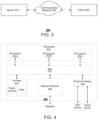
- FIG. 3 shows a schematic diagram of a video search architecture according to an embodiment of the present disclosure.
- the video search architecture 300 may comprise a server 310, a client 320, and a communication network 330 providing a communication link.
- the server 310 and the client 320 may be connected via a wired or wireless communication network 330.
- the server 310 may be an independent physical server, may be a server cluster formed by a plurality of physical servers, or a distributed system, and may also be a cloud server that provides basic cloud computing services such as cloud services, cloud databases, cloud computing, cloud functions, cloud storage, network services, cloud communication, middleware services, domain name services, security services, CDN, as well as big data and artificial intelligence platforms.
- the client 320 may be implemented in hardware or software.
- the client 320 when implemented in hardware, the client 320 may be a variety of electronic devices having a display screen and supporting page display, including but not limited to smart phones, tablet computers, e-book readers, laptop portable computers, desktop computers, and the like.
- the client 320 device When implemented in software, the client 320 device may be installed in the electronic devices listed above; it may be implemented as a plurality of software or software modules (e.g., software or software modules for providing distributed services), or may be implemented as a single software or software module, which is not specifically limited herein.
- the video search method provided in the embodiment of the present application may be performed by the client 320, the client 320 may send a video search request to the server 310 and acquire video search results and corresponding video data to be locally played at the client 320.
- the number of clients, networks, and servers in FIG. 1 is illustrative only and not intended to be limiting. There may be any number of clients, networks, and servers as required by the implementation.
- FIG. 4 shows a schematic hardware structure diagram of an exemplary electronic device 400 provided in an embodiment of the present disclosure.
- the electronic device 400 may comprise a processor 402, a storage 404, a network module 406, a peripheral interface 408, and a bus 410, wherein the processor 402, the storage 404, the network module 406 and the peripheral interface 408 are communicatively connected to each other inside the electronic device 400 via the bus 410.
- the processor 402 may be a Central Processing Unit (CPU), an image processor, a Neural Network Processor (NPU), a microcontroller (MCU), a programmable logic device, a Digital Signal Processor (DSP), an Application Specific Integrated Circuit (ASIC), or one or more integrated circuits.
- the processor 402 may be used to perform functions related to the techniques described in the present disclosure.
- the processor 402 may also include a plurality of processors integrated into a single logical component. For example, as shown in FIG. 4 , the processor 402 may include a plurality of processors 402a, 402b, and 402c.
- the storage 404 may be configured to store data (e.g., instructions, computer code, etc. .
- the data stored in the storage 404 may include program instructions (e.g., program instructions for implementing a prediction confidence assessment method of a model in the embodiment of the present disclosure) and data to be processed (for example, the storage may store configuration files of other modules, etc.) .
- the processor 402 may also access the program instructions and data stored in the storage 404 and execute the program instructions to operate the data to be processed.
- the storage 404 may include a volatile storage or a non-volatile storage.
- the storage 404 may include random access memory (RAM), read-only memory (ROM), an optical disk, a magnetic disk, a hard disk, a solid-state drive (SSD), flash memory, a memory stick, etc.
- the network module 406 may be configured to provide the electronic device 400 with communication with other external devices via a network.
- the network may be any wired or wireless network capable of transmitting and receiving data.
- the network may be a wired network, a local wireless network (e.g., Bluetooth, WiFi, Near Field Communication (NFC), etc.), a cellular network, the Internet, or a combination thereof. It is to be understood that the type of the network is not limited to the above specific examples.
- the network module 106 may include any combinations of any number of network interface controllers (NICs), radio frequency modules, transceivers, modems, routers, gateways, adapters, cellular network chips, etc.
- NICs network interface controllers
- the peripheral interface 408 may be configured to connect the electronic device 400 to one or more peripheral devices to enable input and output of information.
- the peripheral devices may include input devices such as a keyboard, a mouse, a touch pad, a touch screen, a microphone, and various sensors, and output devices such as a display, a speaker, a vibrator, and an indicator light.
- the bus 410 may be configured to transmit information between various components of the electronic device 400 (e.g., the processor 402, the storage 404, the network module 406, and the peripheral interface 408), such as an internal bus (e.g., a processor-memory bus), and an external bus (a USB port, a PCI-E bus), etc..
- an internal bus e.g., a processor-memory bus
- an external bus e.g., a USB port, a PCI-E bus
- the architecture of the electronic device 400 described above only shows the processor 402, the storage 404, the network module 406, the peripheral interface 408 and the bus 410, in the specific implementation process, the architecture of the electronic device 400 may also comprise other components necessary for normal operation.
- the architecture of the electronic device 400 may only include components necessary to implement the embodiments of the present disclosure, and does not necessarily include all the components shown in the figure.
- the video search method provided in the embodiment of the present disclosure can be applied to either a portrait display scenario or a landscape display scenario, and landscape display is more in line with the user's habit of use.
- the landscape display may refer to taking a screen of a terminal as a reference plane, in which a horizontal length of the display interface is greater than a vertical length thereof. Therefore, in the landscape display, the video being played and the search results can be displayed side by side on the screen to ensure that the video playing area will not be compressed while displaying the search results, and it is more convenient for the user to operate the playing area and the search result area separately.
- the video search method of the embodiment of the present disclosure will be specifically described with reference to the landscape display scenario.
- FIG. 5 shows a schematic diagram of an initial search interface according to an embodiment of the present disclosure.
- the initial search interface 501 when a terminal device 500 performs landscape display, the initial search interface 501 includes a search area 502, a historical search area 503, and a guess search area 504.
- the user may enter in the search area 502 video search information he or she wants to search for, which may be, for example, a character in the video, a song, and other information related to the video.
- the user may operate a search control 505, such as clicking the search control 505, to search for related videos.
- the user may also operate an exit control 506, such as clicking the exit control 506, to exit the search or remove the video search information entered in the search area 502.
- historical video search information 503a, 503b, ... 503n that the user previously searched may be displayed.
- the user may directly operate the historical video search information 503a, 503b, ... 503n and make a further search, so that the user can quickly search the searched information.
- tags 504a, 504b, 504c, and 504d may be displayed.
- Each tag may correspond to a plurality of pieces of recommended search information, for example, tags 504a, 504b, 504c, and 504d may correspond to "Guess what you want to search for", "TV series", “Movies", and "Popular authors", respectively.
- the tag 504a may correspond to a plurality of pieces of recommended search information 504a-1, 504a-2, ... 504a-n, which may be the search information with the currently highest popularity (or the highest search rate), or may be the search information recommended based on the user's historical search data.
- tags 504b, 504c, and 504d may also correspond to a plurality of pieces of search information for the user to perform a quick search.
- the present disclosure enhances the landscape interaction experience, makes it convenient for the user to efficiently switch between videos according to search results when watching the videos in a landscape mode, and causes the user to have an anticipation of the corresponding video after switching, thereby improving user experience.
- FIG. 6 shows a schematic diagram of an input interface of video search information according to an embodiment of the present disclosure.
- search information 601a including “abc”, such as “abcde”, search information 601b, such as “abc-xyz", ..., and search information 601n appear in an area 601 below the search area 502 for the user to select for quick operation.
- the terminal device is a smartphone, an IPAD, or the like without an input device such as an input keyboard, and a soft keyboard may be displayed in an area 602 below the area 601 for the user to enter video search information.
- the terminal device is a laptop portable computer, a desktop computer, or the like with an input device such as an input keyboard, and a soft keyboard may be displayed in the area 602 below the area 601, and the area 602 may not be displayed.
- the user clicks the search control 505, entering a first display page 701 as shown in FIG. 7A .
- the user may also click the exit control 506, returning to the initial search interface 501 shown in FIG. 5 .
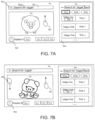
- FIG. 7A shows a schematic diagram of a search result interface according to an embodiment of the present disclosure.
- video search information 702a being currently searched for may be displayed in a search area 702, for example, Search for "piggy" is displayed in the search area 702, which indicates that the current first display interface is video search results about the video search information 702a "piggy".
- the terminal device 700 acquires a first search result 704 about the video search information 702a from the server side(e.g., the server 310 in FIG. 3 ).
- the first search result 704 may include a plurality of videos 704a, 704b, 704c, ...
- video 704a is the video ranked first; video 704b is located at a next ranked position from video 704a; video 704c is located at a next ranked position from video 704b, that is, video 704b is located at a previous ranked position from video 704c, and so on.
- an exit control 706 is also displayed on the first display interface 701. The user may perform operation O1 for the exit control 706 to exit the video search, returning to the initial search interface 501 shown in FIG. 5 .
- a first area 703 is provided on the left side of the first display interface 701.
- a second area 705 is provided on the right side of the first display interface 701.
- the terminal device acquires the first search result 704 about the video search information 702a, and may automatically play the video 704a ranked first in the first search result in the first area 703. Further, in some embodiments, the videos 704a, 704b, 704c, ... may be played in the first area 703 in the first order. In this way, after the user performs a search, the search results, while being displayed, are automatically played in the ranking order of the search results without user operation, so that the user feels it convenient to watch the video results quickly and has an anticipation of the next video to be played, thereby further improving the user experience.
- the terminal device may display the first search result 704 in the second area 705. Further, in some embodiments, when displaying the plurality of videos 704a, 704b, 704c, ... in the first search result 704, video information 704a-1, 704b-1, 704c-1, ... of the respective videos may also be displayed correspondingly, such as the title, description, tags (e.g., system recommended tags or custom tags) of the videos, etc.. Furthermore, in some embodiments, the video search information 702a may be highlighted in the video information 704a-1, 704b-1, 704c-1, ... as well.
- the second area 705 further includes a plurality of attribute tags 707a, 707b, and 707c, each of which may indicate a different attribute, such as a "general" tag, a " movie & TV " tag, and a "user" tag.
- search results about video search information may be sorted or filtered according to different attributes, and presented in different orders (for example, they may be arranged according to the attributes or a degree of relevance to the video search information).
- the tag 707a may be set as a default tag, that is, the search results about the video search information are arranged in a first order based on the attribute indicated by the tag 707a by default, to form the first search result 704.
- the search results may be determined to be arranged in the first order based on the tag 707a. In some embodiments, the search results may be determined to be arranged in a second order based on the tag 707b. In some embodiments, the search results may be determined to be arranged in a third order based on the tag 707c.
- the tag 707a may be a "general" tag, which indicates that when the tag 707a is selected, search results about video search information are arranged according to general ranking.
- the tag 707b may be a "movie & TV” tag, which indicates that when the tag 707b is selected, videos of the movie & TV type in the search results about the video search information are arranged in the second order.
- the tag 707c may be a "user" tag, which indicates that when the tag 707c is selected, the search results about the video search information are sorted by user and arranged in the third order. It should be understood that the video search method in the embodiment of the present disclosure is not limited by how the search results are arranged based on different tags. The specific implementation algorithm for arranging the search results based on different tags is not limited here.
- a display status tag 708 may be displayed in an icon of the displayed video 704a in the second area 705, to indicate that the video 704a is in a playing state, that is, the video 704a is being played in the first area 703. It should be understood that the display status tag 708 may also be set at any position in the second area 705, which is not limited here.
- the user may directly operate the first area 703 to switch between videos in the first search result to play, without exiting the current display interface and returning to the search result page shown in FIGS. 1A and 1B to make a new selection as in the method shown in FIGS. 1B and 2B , thereby ensuring the continuity of watching videos by the user.
- the user may perform operation O2 for the first area 703 to switch the playing of the video.
- the operation O2 may be slide-up in the first area 703, and then the video played in the first area 703 is switched from the video 704a to the next video 704b adjacent thereto, as shown in FIG. 7B.
- FIG. 7B shows a schematic diagram of video switching according to an embodiment of the present disclosure.
- FIG. 7B the video 704b is played in the first area 703.
- the display status tag 708 is displayed in the icon of the video 704b in the second area 705 to indicate that the video 704b is being played in the first area 703.
- the user may perform operation O3 for the first area 703 in FIG. 7B to switch to the video 704c to play, wherein the operation O3 may be slide-up in the first area 703, and then the video played in the first area 703 in FIG. 7B is switched from video 704b to the next video 704c adjacent thereto, as shown in FIG. 7C.
- FIG. 7C shows a schematic diagram of video switching according to an embodiment of the present disclosure.
- the video 704c is played in the first area 703.
- the display status tag 708 is displayed in an icon of the video 704c in the second area 705 to indicate that the video 704c is being played in the first area 703.
- the user may perform operation O4 for the first area 703 in FIG. 7C to switch to the previous video 704b to play.
- the operation O4 may be slide-down in the first area 703, and then the video played in the first area 703 in FIG. 7C is switched from the video 704c to the previous video 704b adjacent thereto, as shown in FIG. 7B .
- the user may perform operation O5 for the first area 703 in FIG. 7B to switch to the previous video 704a to play.
- the operation O5 may be slide-down in the first area 703, and then the video played in the first area 703 in FIG. 7B is switched from the video 704b to the previous video 704a adjacent thereto, as shown in FIG. 7A .
- the video switching shown in FIG. 7A to FIG. 7C may be performed not only by user operation but also automatically. For example, after playing of a video is finished, the next video is automatically played, and the display before and after the switching is the same as the display before and after the switching based on the user operation in the foregoing embodiment. Correspondingly, in response to the switching of the video being played, the video corresponding to the display status tag is switched accordingly.
- the videos in the search results are played while the search results are displayed on the same display interface, and by sliding up and down the video being played, the videos in the search results are switched to play.
- the present disclosure improves the continuity and efficiency of watching videos by the user and allows the user to anticipate the video that is about to be played; at the same time, it reduces the user's repeated operations and enhances the user's video consumption experience.
- a publisher tag 709 may also be displayed on the first display interface 701 in FIGS. 7A-7C . Further, in some embodiments, the publisher tag 709 is located below the first area 703 (or may be located in any direction of the first area). The publisher tag 709 may indicate a publisher of the video being currently played in the first area 703. For example, the publisher tag 709 in FIG. 7A indicates the publisher X1 of the video 704a, the publisher tag 709 in FIG. 7B indicates the publisher X2 of the video 704b, and the publisher tag 709 in FIG. 7C indicates the publisher X3 of the video 704c.
- the name or ID of the publisher is displayed corresponding to the publisher tag 709, such as "Publisher X1" in FIG. 7A , “Publisher X2" in FIG. 7B , and “Publisher X3" in FIG. 7C .
- a follow control 710 may also be displayed on the first display interface 701. Further, in some embodiments, the user may follow a publisher based on operation O6 for the follow control 710, such as clicking the follow control 710.
- a like control 711 may also be displayed on the first display interface 701. Further, in some embodiments, the user may like the video 704a being played in the first area 703 based on operation O7 for the like control 711, such as clicking the like control 711.
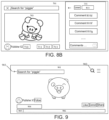
- a comment control 712 may also be displayed on the first display interface 701. Further, in some embodiments, the user may comment on the video 704a being played in the first area 703 or view other users' comments on the video 704a based on operation O8 for the comment control 712, such as clicking the comment control 712. As shown in FIG. 8A, FIG. 8A shows a schematic diagram of a comment interface according to an embodiment of the present disclosure.
- comment information 810 pops up or slides out to the left on the right side of the first display interface 701 to switch the first search result 704 in the second area 705 to the comment information 810.
- the second area 705 may display comments 810a, 810b, 810c, ... on the video 704a played in the first area 703.
- Each comment may include information such as the commenting user and his/her specific comment text (which may also include emoticons, symbols, etc.), comment time, etc. Further, in some embodiments, the second area 705 may also display the number of comments 811.
- the second area 705 may display a comment area 812 through which the user may comment on the video 704a and then post the comment.
- the user can not only watch videos on the current interface, but also make comments or view other users' comments in real time therein, without affecting video watching.
- This makes full use of the horizontal length advantage of the landscape display interface, enabling the user to consume videos and make comments conveniently and smoothly without switching to other interfaces, thereby ensuring the continuity of watching videos by the user and improving the user experience.
- a return control 813 may also be displayed in the second area 705, and the user may perform operation O9 for the return control 812, such as clicking the return control 813, to return to the first display interface 701 shown in FIG. 7A .
- the user may perform operation O10 for the second area 705, such as sliding from left to right, to switch the comment information 810 in the second area 705 to the first search result 704, i.e., to display the first display interface 701 as shown in FIG. 7A .
- the comment information 810 displayed in the second area 705 corresponds to the video displayed in the first area 703.
- the user may perform operation O11 for the first area 703 in FIG. 8A to switch to the next video 704b to play.
- the operation O11 may be slide-down in the first area 703, and then the video played in the first area 703 in FIG. 8A is switched from the video 704a to the next video 704b adjacent thereto, and the comments in the second area 705 are also correspondingly switched to comments 810d, 810f, 810g, ... on the video 704b (as shown in FIG. 8B ).
- clicking the comment control 712 also causes a third area 810 to appear, which includes comments on the displayed video 704b as shown in FIG. 8B .
- a share control 713 may also be displayed on the first display interface 701. Further, in some embodiments, the user may share the video being played in the first area 703 based on operation O12 for the share control 713, such as clicking the share control 713.
- the user may also perform operation O13 for the first area 703 to achieve full-screen display of the video being played.
- the user may perform a preset operation O13 for the first area, such as single-click, double-click, and long press, to perform full-screen display of the video being displayed in the first area 703 on the second display interface 901 as shown in FIG. 9 .
- FIG. 9 shows a schematic diagram of a full-screen display interface according to an embodiment of the present disclosure.
- the video 704a is being played in the first area 703, and the user may perform single-click, double-click, or long-press at any position in the first area 703, and then full-screen display as shown in FIG. 9 can be achieved.
- the video 704b and the video 704c may be full-screen displayed respectively. In this way, the user can quickly enter a full-screen mode to watch videos on the current display interface and return to the current interface, which provides the user with a variety of video watching options and further improves the user's video watching experience.
- a search control 902 and a return control 903 may also be displayed on the second display interface 901. Further, the user may perform operation O14 for the search control 902 or the return control 903, such as clicking the search control 902 or the return control 903, to return to the first display interface 701 as shown in FIG. 7A .
- a video identifier 904 may also be displayed on the second display interface 901 to display video information of the video being currently played (e.g., 704a-1 in FIG. 7A , 704b-1 in FIG. 7B , and 704c-1 in FIG. 7C ).
- a time tag 905 may also be displayed on the second display interface 901 to display the playing duration and/or total duration of the current video.
- a progress tag 906 may also be displayed on the second display interface 901 to display the playing progress of the current video.
- the user may also perform operation O15 for the first area 703 to display a play control.
- FIG. 10 shows a schematic diagram of a play control display interface according to an embodiment of the present disclosure, wherein the operation O15 may include single-click on the first area 703.
- the user performs the operation O15 in the first area 703 shown in FIG. 7A , and corresponding play controls 1001, 1002, ... are displayed in the first area 703.
- the play control may be located at any position in the first area 703 and is used to control play parameters of the video in the first area 703, such as playing speed, playing volume, playing progress, and start/pause, etc..
- the play controls for the video 704b and the video 704c may be displayed and controlled respectively.
- an operation O16 may also be performed for a non-control area of the first area 703 to achieve full-screen play of the video in the first area 703.
- the operation O16 may include clicking a non-control area 1010. After the user clicks on the non-control area 1010 in FIG. 10 , the video 704a may be full-screen displayed, as shown in FIG. 9 . Similarly, after the operation O16 is performed for the non-control area of the first area 703 in FIG. 7B and FIG. 7C , the video 704b and the video 704c may be full-screen displayed, respectively.
- the user may also perform operation O17 for the publisher's identification 709 to display the videos posted by the publisher.
- the operation O17 may include clicking the publisher's identification 709.
- the user performs the operation O17 for the publisher's identification 709 shown in FIG. 7A , and then the videos posted by the publisher pop up or slide out on the right side of the first display interface 701, so that the first search result displayed in the second area is switched to the videos posted by the publisher, as shown in FIG. 11.
- FIG. 11 shows a schematic diagram of a publisher's video interface according to an embodiment of the present disclosure.
- videos 1102a, 1102b, 1102c, ... posted by the publisher X1 are displayed in the second area 705.
- the videos posted by the publishers X2 and X3 of the video 704b and the video 704c may be displayed in the second area 705 respectively.
- a return control 1103 when displaying videos posted by a publisher, may also be displayed in the second area 705, and the user may perform operation O18 for the return control 1103, such as clicking the return control 1103, so that the videos posted by the publisher are switched to the first search result 704, returning to the first display interface 701 shown in FIG. 7A .
- the user may perform operation O19 for the second area 705, such as sliding from left to right, to switch the videos posted by the publisher to the first search result 704, i.e., to display the first display interface 701 as shown in FIG. 7A .
- the user can also quickly track relevant information of the video being currently played on the current display interface, providing the user with more interaction content, and without the need for exiting the current display interface and searching for relevant information, that is, the user can quickly obtain the content of the relevant information, thereby further ensuring the continuity of the user's video consumption, and meanwhile, the user is provided with more video related information, thereby further improving the user experience.
- the user may perform operation O20 for the attribute tag 707b, such as clicking the attribute tag 707b, and the video 704b and its video information 704b-1, the video 704e and its video information 704e-1, the video 704f and its video information 704f-1, ... in the second area 705 are arranged in a second order to form a second search result, as shown in FIG. 12 .
- FIG. 12 shows a schematic diagram of a second tag display interface according to an embodiment of the present disclosure.
- the video 704b-1 ranked first may still be automatically played in the first area 703. It should be understood that any operations in FIGS. 7A-11 are applicable to the scenario in FIG. 12 and will not be described in detail here.
- the user is provided with search results in a variety of orders, so that the user can obtain videos arranged in the orders in which they are more interested by selecting attribute tags in which they are more interested, thereby improving the user's video consumption experience.
- the user can smoothly switch between videos, view/post comments, consume the publishers' videos and other relevant information, sort search results according to different attribute tags, etc. in a plurality of interaction ways, based on the advantage of landscape display on the current display page, without affecting the continuity of video watching; without exiting the current display interface, the continuity of video consumption is ensured, and the user is provided with rich video content, improving the continuity and efficiency of watching videos by the user, and letting the user have an anticipation of the video to be played; meanwhile, the user's repeated operations are reduced and the user's video consumption experience is enhanced.
- FIG. 13 it shows a schematic flow chart of a video search method 1300 according to an embodiment of the present disclosure.
- the video search method 1300 comprises:
- Step S1310 acquiring a first search result (e.g., the first search result 704 in FIGS. 7A-7C ) about video search information (e.g., the video search information 702a in FIG. 7A ); wherein the first search result comprises a plurality of videos (e.g., videos 704a, 704b, 704c, ... in FIGS. 7A-7C );
- Step S1320 playing a first video (e.g., the video 704a in FIG. 7A , the video 704b in FIG. 7B , and the video 704c in FIG. 7C ) in the first search result in the first area (e.g., the first area 703 in FIGS. 7A-7C , FIGS. 8A-8B and FIGS. 10-12 ) of the first display interface (e.g., the first display interface 701 in FIGS. 7A-7C , FIGS. 8A-8B and FIGS. 10-12 ), and displaying the first search result in the second area (e.g., the second area 705 in FIGS. 7A-7C , FIGS. 8A-8B and FIGS. 10-12 ) displayed on the first interface;
- a first video e.g., the video 704a in FIG. 7A , the video 704b in FIG. 7B , and the video 704c in FIG. 7C
- the first area e.g., the first area 70
- Step S1330 in response to a first trigger operation for the first area (e.g., operations O2-O5 in FIGS. 7A-7C ), playing a second video in the first search result (e.g., the videos 704a, 704b, 704c in FIGS. 7A-7C ) in the first area.
- a first trigger operation for the first area e.g., operations O2-O5 in FIGS. 7A-7C
- playing a second video in the first search result e.g., the videos 704a, 704b, 704c in FIGS. 7A-7C
- the second video is located at a ranked position adjacent to the first video.
- the first display interface is a landscape display interface (e.g., the first display interface 701 in FIGS. 7A-7C ).
- the first trigger operation includes a slide-up operation (e.g., the operation O2 in FIG. 7A , and the operation O3 in FIG. 7B ), and the second video is located at a next ranked position from the first video (e.g., the operation O2 in FIG. 7A , and the operation O3 in FIG. 7B ).
- the first trigger operation includes a slide-down operation (e.g., the operation O5 in FIG. 7B , and the operation O4 in FIG. 7C ), and the second video is located at a previous ranked position from the first video (e.g., the video 704b is located at the next ranked position of the video 704a; the video 704c is located at the next ranked position of the video 704b, that is, the video 704b is located at the previous ranked position of the video 704c) .
- the method 1300 further comprises: indicating in the second area that the second video is in a playing state (e.g., the display status tag 708 in FIGS. 7A-7B ).
- playing a first video in the first search result in the first area of the first display interface comprises: automatically playing the video ranked first in the first search result (e.g., the video 704a in FIG. 7A ) in the first area.
- the method 1300 further comprises: in response to a second trigger operation for the first area, full-screen playing the first video on a second display interface (e.g., the second display interface 901 in FIG. 9 ).
- a second display interface e.g., the second display interface 901 in FIG. 9 .
- the method 1300 further comprises:
- a first return control e.g., the return control 903 in FIG. 9
- the current display interface e.g., the second display interface 901 in FIG. 9
- the method 1300 further comprises:
- a comment control (e.g., the comment control 712 in FIGS. 7A-7C ) on the first display interface;
- a fourth trigger operation for the comment control e.g., single-click, double-click, long press, etc.
- switching the first search result displayed in the second area to first comment information on the first video e.g., comments 810a, 810b and 810c in FIG. 8A ).
- the method 1300 further comprises: in response to the first trigger operation, switching the first comment information displayed in the second area (e.g., the comments 810a, 810b, 810c in FIG. 8A ) to second comment information on the second video (e.g., the comments 810d, 810f, 810g in FIG. 8B ).
- switching the first comment information displayed in the second area e.g., the comments 810a, 810b, 810c in FIG. 8A
- second comment information on the second video e.g., the comments 810d, 810f, 810g in FIG. 8B .
- the method 1300 further comprises:
- an identification of a publisher for the first video on the first display interface e.g., the identification 709 of the publisher in FIGS. 7A-7C ;
- a fourth trigger operation for the identification of the publisher e.g., single-click, double-click, long press, etc.
- switching the first search result displayed in the second area to videos posted by the publisher e.g., the videos 1102a, 1102b, 1102c, ... in FIG. 11 ).
- the method 1300 further comprises:
- the embodiment of the method 1300 of the above embodiment may have the beneficial effects of the corresponding embodiment of the aforementioned video search method, which will not be described in detail here.
- the method of the embodiment of the present disclosure may be executed by a single device, such as a computer or a server.
- the method of this embodiment may also be applied in a distributed scenario and completed by a plurality of devices in cooperation with each other.
- one of the plurality of devices may execute only one or more steps in the method of the embodiment of the present disclosure, and the plurality of devices may interact with each other to complete the method.
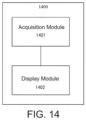
- FIG. 14 shows a schematic structural diagram of an exemplary apparatus 1400 provided in an embodiment of the present disclosure.
- the video search apparatus 1400 may comprise an acquisition module 1401 and a display module 1402.
- the acquisition module 1401 is configured to acquire a first search result about video search information, wherein the first search result comprises a plurality of videos.
- the display module 1402 is configured to play a first video in the first search result in a first area of a first display interface, and to display the first search result in a second area displayed on the first interface; and to play a second video in the first area in response to a first trigger operation for the first area.
- the apparatus of the above embodiment is configured to implement the corresponding video search method in any of the foregoing embodiments, and has the beneficial effects of the corresponding method embodiment, which will not be described in detail here.
- the present disclosure further provides a non-transitory computer-readable storage medium, which stores computer instructions for causing the computer to execute the video search method described in any of the above embodiments.
- the computer readable medium of this embodiment includes both permanent and non-permanent, removable and non-removable media.
- the storage medium may implement information storage by any method or technology, and the information may be computer readable instructions, data structures, program modules or other data.
- Examples of the computer storage medium include, but are not limited to, phase change memory (PRAM), Static Random Access Memory (SRAM), Dynamic Random Access Memory (DRAM), other types of Random Access Memory (RAM), Read Only Memory (ROM), Electrically Erasable Programmable Read Only Memory (EEPROM), flash memory or other memory technology, compact disc read only memory (CD-ROM), Digital Versatile Disk (DVD) or other optical storage, magnetic cassettes, magnetic tape or disk storage or other magnetic storage devices, or any other non-transmission medium, which can be used to store information that can be accessed by a computing device.
- phase change memory PRAM
- SRAM Static Random Access Memory
- DRAM Dynamic Random Access Memory
- RAM Random Access Memory
- ROM Read Only Memory
- EEPROM Electrically Eras
- the computer instructions stored on the storage medium of the above embodiment are used to cause the computer to execute the video search method described in any of the above embodiments, and have the beneficial effects of the corresponding method embodiments, which will not be repeated here.
- the present disclosure further provides a computer program product, which comprises a computer program.
- the computer program is executable by one or more processors to cause the processor(s) to perform the video search method.
- the processor that executes the corresponding step may belong to the corresponding execution entity.
- the computer program product of the above embodiment is configured to cause the processor(s) to perform the video search method described in any of the above embodiments, and has the beneficial effects of the corresponding method embodiments, which will not be repeated here.
- the video search method and apparatus, device, storage medium, and program product provided by the present disclosure by performing operation for the first area in which the first video in the search results is displayed and switching to the second video in the search results to play in the first area, achieves the effect that other search results can be viewed without exiting the current play interface, thereby improving the continuity and efficiency of watching videos by the user, and enhancing the user's video consumption experience.
- DRAM dynamic RAM
Landscapes
- Engineering & Computer Science (AREA)
- Theoretical Computer Science (AREA)
- General Engineering & Computer Science (AREA)
- Multimedia (AREA)
- Physics & Mathematics (AREA)
- General Physics & Mathematics (AREA)
- Human Computer Interaction (AREA)
- Signal Processing (AREA)
- Databases & Information Systems (AREA)
- Data Mining & Analysis (AREA)
- Computational Linguistics (AREA)
- Health & Medical Sciences (AREA)
- General Health & Medical Sciences (AREA)
- Social Psychology (AREA)
- Software Systems (AREA)
- Business, Economics & Management (AREA)
- Marketing (AREA)
- Computer Networks & Wireless Communication (AREA)
- User Interface Of Digital Computer (AREA)
Applications Claiming Priority (2)
| Application Number | Priority Date | Filing Date | Title |
|---|---|---|---|
| CN202210043475.3A CN116489447A (zh) | 2022-01-14 | 2022-01-14 | 视频搜索方法、装置、设备、存储介质及程序产品 |
| PCT/CN2023/070902 WO2023134562A1 (zh) | 2022-01-14 | 2023-01-06 | 视频搜索方法、装置、设备、存储介质及程序产品 |
Publications (2)
| Publication Number | Publication Date |
|---|---|
| EP4451683A1 true EP4451683A1 (de) | 2024-10-23 |
| EP4451683A4 EP4451683A4 (de) | 2025-04-16 |
Family
ID=87212490
Family Applications (1)
| Application Number | Title | Priority Date | Filing Date |
|---|---|---|---|
| EP23739905.0A Pending EP4451683A4 (de) | 2022-01-14 | 2023-01-06 | Videosuchverfahren und -vorrichtung, vorrichtung, speichermedium und programmprodukt |
Country Status (4)
| Country | Link |
|---|---|
| US (1) | US20240370490A1 (de) |
| EP (1) | EP4451683A4 (de) |
| CN (1) | CN116489447A (de) |
| WO (1) | WO2023134562A1 (de) |
Family Cites Families (17)
| Publication number | Priority date | Publication date | Assignee | Title |
|---|---|---|---|---|
| US8736561B2 (en) * | 2010-01-06 | 2014-05-27 | Apple Inc. | Device, method, and graphical user interface with content display modes and display rotation heuristics |
| US8750682B1 (en) * | 2011-07-06 | 2014-06-10 | Google Inc. | Video interface |
| US10298874B1 (en) * | 2015-12-02 | 2019-05-21 | Google Llc | Automatically playing partially visible videos |
| CN108959320A (zh) * | 2017-05-25 | 2018-12-07 | 合网络技术(北京)有限公司 | 预览视频搜索结果的方法和装置 |
| CN109408174A (zh) * | 2018-09-27 | 2019-03-01 | 上海哔哩哔哩科技有限公司 | 用于平板端应用的分屏方法、装置和存储介质 |
| CN110149557B (zh) * | 2019-05-22 | 2021-08-17 | 北京达佳互联信息技术有限公司 | 视频播放方法、装置、终端和存储介质 |
| CN110704684B (zh) * | 2019-10-17 | 2022-08-09 | 北京字节跳动网络技术有限公司 | 视频搜索的方法及装置、终端和存储介质 |
| CN110856031B (zh) * | 2019-11-18 | 2022-01-18 | 广州市百果园信息技术有限公司 | 一种媒体资源的展示系统、方法、设备和存储介质 |
| CN111143610B (zh) * | 2019-12-30 | 2021-03-02 | 腾讯科技(深圳)有限公司 | 一种内容推荐方法、装置、电子设备和存储介质 |
| CN111405318B (zh) * | 2020-03-24 | 2022-09-09 | 聚好看科技股份有限公司 | 视频展示方法、装置及计算机存储介质 |
| US20210409811A1 (en) * | 2020-06-26 | 2021-12-30 | Rovi Guides, Inc. | Autoplay recommendations and sequencing in full screen video mode |
| CN112256915A (zh) * | 2020-09-29 | 2021-01-22 | 当趣网络科技(杭州)有限公司 | 适于分屏的搜索处理方法、装置、电子设备及介质 |
| CN112423138A (zh) * | 2020-11-06 | 2021-02-26 | 北京字节跳动网络技术有限公司 | 一种搜索结果展示方法及终端设备 |
| CN113158004A (zh) * | 2021-04-29 | 2021-07-23 | 北京字节跳动网络技术有限公司 | 数据搜索处理方法、装置、电子设备和存储介质 |
| CN113111286B (zh) * | 2021-05-12 | 2023-07-18 | 抖音视界有限公司 | 一种信息展示的方法、装置以及计算机存储介质 |
| CN113536136B (zh) * | 2021-08-09 | 2023-04-18 | 北京字跳网络技术有限公司 | 一种实现搜索的方法、装置及设备 |
| CN113891164B (zh) * | 2021-09-28 | 2024-08-20 | 北京字跳网络技术有限公司 | 视频列表的显示方法、装置、电子设备和存储介质 |
-
2022
- 2022-01-14 CN CN202210043475.3A patent/CN116489447A/zh active Pending
-
2023
- 2023-01-06 EP EP23739905.0A patent/EP4451683A4/de active Pending
- 2023-01-06 WO PCT/CN2023/070902 patent/WO2023134562A1/zh not_active Ceased
-
2024
- 2024-07-15 US US18/773,464 patent/US20240370490A1/en active Pending
Also Published As
| Publication number | Publication date |
|---|---|
| CN116489447A (zh) | 2023-07-25 |
| US20240370490A1 (en) | 2024-11-07 |
| WO2023134562A1 (zh) | 2023-07-20 |
| EP4451683A4 (de) | 2025-04-16 |
Similar Documents
| Publication | Publication Date | Title |
|---|---|---|
| US10394408B1 (en) | Recommending media based on received signals indicating user interest in a plurality of recommended media items | |
| US10664148B2 (en) | Loading content on electronic device | |
| US11720640B2 (en) | Searching social media content | |
| US9507483B2 (en) | Photographs with location or time information | |
| CN117093796B (zh) | 内容创造性web浏览器 | |
| US10459621B2 (en) | Image panning and zooming effect | |
| WO2022193597A1 (zh) | 界面信息切换方法及装置 | |
| US20210099405A1 (en) | Content item module arrangements | |
| US20170131859A1 (en) | Hierarchical User Interface | |
| US20140063051A1 (en) | System and method for graphical user interface having a social media multimedia container | |
| US11706166B2 (en) | Presenting reactions from friends | |
| CN107820138A (zh) | 视频播放方法、装置、终端及存储介质 | |
| WO2020007012A1 (zh) | 一种搜索页面显示方法、装置、终端及存储介质 | |
| KR20160075822A (ko) | 피드백 사용자-인터페이스 요소와 관련된 애니메이션 시퀀스 | |
| US20260064709A1 (en) | System and method for aggregation and graduated visualization of user generated social post on a social mapping network | |
| CA2988901A1 (en) | Content composer for third-party applications | |
| US9071867B1 (en) | Delaying automatic playing of a video based on visibility of the video | |
| US10650475B2 (en) | Hierarchical panel presentation responsive to incremental search interface | |
| KR20260014697A (ko) | 콘텐츠 아이템 모듈 배열들 | |
| EP4529188A1 (de) | Live-streaming-verfahren und -vorrichtung sowie vorrichtung, medium und programmprodukt | |
| CN117314585A (zh) | 书籍信息处理方法、装置、设备和存储介质 | |
| EP4592869A1 (de) | Textmaterialerfassungsverfahren, -vorrichtung, -einrichtung, -medium und -programmprodukt | |
| EP4451683A1 (de) | Videosuchverfahren und -vorrichtung, vorrichtung, speichermedium und programmprodukt | |
| CN118885089A (zh) | 页面显示方法及相关设备 | |
| CN117076707A (zh) | 视频剪辑模板搜索方法、装置、电子设备及存储介质 |
Legal Events
| Date | Code | Title | Description |
|---|---|---|---|
| STAA | Information on the status of an ep patent application or granted ep patent |
Free format text: STATUS: THE INTERNATIONAL PUBLICATION HAS BEEN MADE |
|
| PUAI | Public reference made under article 153(3) epc to a published international application that has entered the european phase |
Free format text: ORIGINAL CODE: 0009012 |
|
| STAA | Information on the status of an ep patent application or granted ep patent |
Free format text: STATUS: REQUEST FOR EXAMINATION WAS MADE |
|
| 17P | Request for examination filed |
Effective date: 20240715 |
|
| AK | Designated contracting states |
Kind code of ref document: A1 Designated state(s): AL AT BE BG CH CY CZ DE DK EE ES FI FR GB GR HR HU IE IS IT LI LT LU LV MC ME MK MT NL NO PL PT RO RS SE SI SK SM TR |
|
| A4 | Supplementary search report drawn up and despatched |
Effective date: 20250314 |
|
| RIC1 | Information provided on ipc code assigned before grant |
Ipc: H04N 21/482 20110101ALI20250310BHEP Ipc: H04N 21/431 20110101ALI20250310BHEP Ipc: G06F 16/738 20190101ALI20250310BHEP Ipc: G06F 3/04883 20220101ALI20250310BHEP Ipc: G06F 3/0485 20220101ALI20250310BHEP Ipc: G06F 3/0483 20130101ALI20250310BHEP Ipc: H04N 21/239 20110101AFI20250310BHEP |
|
| DAV | Request for validation of the european patent (deleted) | ||
| DAX | Request for extension of the european patent (deleted) | ||
| GRAP | Despatch of communication of intention to grant a patent |
Free format text: ORIGINAL CODE: EPIDOSNIGR1 |
|
| STAA | Information on the status of an ep patent application or granted ep patent |
Free format text: STATUS: GRANT OF PATENT IS INTENDED |
|
| RIC1 | Information provided on ipc code assigned before grant |
Ipc: H04N 21/239 20110101AFI20251104BHEP Ipc: G06F 3/0483 20130101ALI20251104BHEP Ipc: G06F 3/0485 20220101ALI20251104BHEP Ipc: G06F 3/04883 20220101ALI20251104BHEP Ipc: G06F 16/738 20190101ALI20251104BHEP Ipc: H04N 21/431 20110101ALI20251104BHEP Ipc: H04N 21/482 20110101ALI20251104BHEP |
|
| INTG | Intention to grant announced |
Effective date: 20251204 |
|
| GRAS | Grant fee paid |
Free format text: ORIGINAL CODE: EPIDOSNIGR3 |
|
| GRAA | (expected) grant |
Free format text: ORIGINAL CODE: 0009210 |
|
| STAA | Information on the status of an ep patent application or granted ep patent |
Free format text: STATUS: THE PATENT HAS BEEN GRANTED |