EP4447458A1 - Verfahren und vorrichtung zur ausgabe eines videostroms sowie endgerätevorrichtung und speichermedium - Google Patents
Verfahren und vorrichtung zur ausgabe eines videostroms sowie endgerätevorrichtung und speichermedium Download PDFInfo
- Publication number
- EP4447458A1 EP4447458A1 EP23739853.2A EP23739853A EP4447458A1 EP 4447458 A1 EP4447458 A1 EP 4447458A1 EP 23739853 A EP23739853 A EP 23739853A EP 4447458 A1 EP4447458 A1 EP 4447458A1
- Authority
- EP
- European Patent Office
- Prior art keywords
- camera
- application
- identifier
- data stream
- image data
- Prior art date
- Legal status (The legal status is an assumption and is not a legal conclusion. Google has not performed a legal analysis and makes no representation as to the accuracy of the status listed.)
- Pending
Links
Images




Classifications
-
- H—ELECTRICITY
- H04—ELECTRIC COMMUNICATION TECHNIQUE
- H04N—PICTORIAL COMMUNICATION, e.g. TELEVISION
- H04N21/00—Selective content distribution, e.g. interactive television or video on demand [VOD]
- H04N21/40—Client devices specifically adapted for the reception of or interaction with content, e.g. set-top-box [STB]; Operations thereof
- H04N21/43—Processing of content or additional data, e.g. demultiplexing additional data from a digital video stream; Elementary client operations, e.g. monitoring of home network or synchronising decoder's clock; Client middleware
- H04N21/431—Generation of visual interfaces for content selection or interaction; Content or additional data rendering
-
- H—ELECTRICITY
- H04—ELECTRIC COMMUNICATION TECHNIQUE
- H04M—TELEPHONIC COMMUNICATION
- H04M1/00—Substation equipment, e.g. for use by subscribers
- H04M1/72—Mobile telephones; Cordless telephones, i.e. devices for establishing wireless links to base stations without route selection
- H04M1/724—User interfaces specially adapted for cordless or mobile telephones
- H04M1/72403—User interfaces specially adapted for cordless or mobile telephones with means for local support of applications that increase the functionality
-
- H—ELECTRICITY
- H04—ELECTRIC COMMUNICATION TECHNIQUE
- H04N—PICTORIAL COMMUNICATION, e.g. TELEVISION
- H04N21/00—Selective content distribution, e.g. interactive television or video on demand [VOD]
- H04N21/20—Servers specifically adapted for the distribution of content, e.g. VOD servers; Operations thereof
- H04N21/21—Server components or server architectures
- H04N21/218—Source of audio or video content, e.g. local disk arrays
- H04N21/2187—Live feed
-
- H—ELECTRICITY
- H04—ELECTRIC COMMUNICATION TECHNIQUE
- H04N—PICTORIAL COMMUNICATION, e.g. TELEVISION
- H04N21/00—Selective content distribution, e.g. interactive television or video on demand [VOD]
- H04N21/40—Client devices specifically adapted for the reception of or interaction with content, e.g. set-top-box [STB]; Operations thereof
- H04N21/41—Structure of client; Structure of client peripherals
- H04N21/414—Specialised client platforms, e.g. receiver in car or embedded in a mobile appliance
- H04N21/41407—Specialised client platforms, e.g. receiver in car or embedded in a mobile appliance embedded in a portable device, e.g. video client on a mobile phone, PDA, laptop
-
- H—ELECTRICITY
- H04—ELECTRIC COMMUNICATION TECHNIQUE
- H04N—PICTORIAL COMMUNICATION, e.g. TELEVISION
- H04N21/00—Selective content distribution, e.g. interactive television or video on demand [VOD]
- H04N21/40—Client devices specifically adapted for the reception of or interaction with content, e.g. set-top-box [STB]; Operations thereof
- H04N21/41—Structure of client; Structure of client peripherals
- H04N21/422—Input-only peripherals, i.e. input devices connected to specially adapted client devices, e.g. global positioning system [GPS]
- H04N21/4223—Cameras
Definitions
- the present disclosure relates to the technical field of application program development, for example, to a video stream pushing method and apparatus, a terminal device and a storage medium.
- live streaming on mobile phones has become more and more popular, and many platforms have launched services related to live streaming, such as sharing life, promoting projects and selling goods, etc., through live streaming.
- the anchor hopes to perform live streaming on multiple live streaming Applications (Apps) at the same time.
- Apps live streaming Applications
- the relevant solution requires the anchor to prepare multiple mobile phones to realize, and the cost is relatively high.
- the present disclosure provides a video stream pushing method and apparatus, a terminal device and a storage medium, so as to achieve the effect of allowing at least two applications to simultaneously perform video stream pushing on one terminal device.
- the embodiments of the present disclosure provide a video stream pushing method, which comprises:
- the embodiments of the present disclosure further provide a video stream pushing apparatus, which comprises:
- the embodiments of the present disclosure further provide a computer-readable storage medium, storing a computer program thereon, wherein the computer program, when executed by a processor, realizes the video stream pushing method provided by any one of embodiments of the present disclosure.
- the application scenarios of the embodiments of the present disclosure are exemplified: because the image data stream captured by the mobile phone camera can only be obtained by one live streaming App for live streaming at one time (that is, only one live streaming App is allowed to open the mobile phone camera to capture the image data stream at one time), in order to achieve the effect of perform live streaming on multiple live streaming Apps at the same time, the relevant solution requires the anchor to prepare multiple mobile phones, and only one live streaming App runs on each mobile phone; thus, it can be ensured that the live streaming App can obtain the image data stream captured by the camera of the mobile phone camera on the mobile phone, so that the image data streams captured by the mobile phone cameras on different mobile phones can be obtained by different live streaming Apps for live streaming.
- the above solution has the problem of high cost of video stream pushing.
- FIG. 1 is a flowchart of a video stream pushing method according to Embodiment 1 of the present disclosure.
- the present embodiment can be applied to the situation of video stream pushing, for example, to the situation of allowing at least two applications on the same terminal device to perform video stream pushing at the same time.
- the method can be executed by a video stream pushing apparatus provided by the embodiment of the present disclosure, the apparatus can be implemented by software and/or hardware, and the apparatus can be integrated on a terminal device.
- the method of the embodiment of the present disclosure includes the following steps.
- S 110 displaying a display interface, wherein at least two application windows are provided on the display interface.
- a display interface is displayed on the display screen of a terminal device, at least two application windows can be provided on the display interface, and the application window can be a window for displaying the application content of an application.
- Such a display interface can be realized on the premise that the multi-opening and split-screen function on the terminal device (that is, the function of allowing at least two applications to be displayed on the display interface at the same time) has been enabled.
- the above terminal device can be a mobile phone, a tablet computer, a laptop computer, a desktop computer, etc., which is not limited here.
- S 120 displaying, in response to a camera first opening request initiated by a user for a first application, an image data stream captured by an opened physical camera in an application window of the first application.
- the camera first opening request can be a request initiated by the user for a first application running on a terminal device to request to open a camera on the terminal device, and the first application can be an application having the need of opening the camera, that is, an application that can be effectively run after the camera is opened, such as a live streaming application, an image capturing application, a video recording application, etc., which is not limited here.
- the physical camera can be a physically existing camera set on the terminal device, such as a front camera or a rear camera.
- the opening operation of the physical camera may be performed before the camera first opening request is received, or may be performed after the camera first opening request is received, which is not limited here.
- the result of responding to the camera first opening request is not to open the physical camera, but to display the image data stream in the application window of the first application.
- what camera is opened after responding to the camera first opening request it is not limited here.
- S130 displaying, in response to a camera second opening request initiated by the user for a second application, the image data stream in an application window of the second application.
- the camera second opening request can be a request initiated by the user for a second application running on the terminal device to request to open a camera on the terminal device
- the first application and the second application are different applications, for example, one of them is a video recording application and the other of them is a live streaming application, or one of them is a live streaming application on platform A and the other of them is a live streaming application on platform B, and so on.
- the camera requested by the first application and the camera requested by the second application can be the same or different, which is not limited here.
- the opening operation of the physical camera may be performed before the camera second opening request is received, or may be performed after the camera second opening request is received, which is not limited here.
- the responding operation of the camera first opening request can be performed before or after the responding operation of the camera second opening request, which is not limited here.
- the image data stream is displayed in the application window.
- both the application window of the first application and the application window of the second application display the image data stream captured by the physical camera, that is, the same image data stream is displayed in the two application windows, thereby achieving the effect of allowing at least two applications on the same terminal device to perform video stream pushing at the same time.
- the application effect will be illustrated below in conjunction with examples. Illustratively, as shown in FIG.
- the application window 101 is the application window of a first application
- the application window 102 is the application window of a second application
- the application window 103 is the application window of a third application
- the application window 104 is the application window of a fourth application
- all of the application windows display the same image data stream. That is, all of the four applications can obtain the image data stream, instead of only one application being able to obtain the image data stream, thereby achieving the effect of opening multiple applications at the same time and providing the same image data stream to the multiple applications at the same time.
- a display interface is displayed, wherein at least two application windows are provided on the display interface; in response to a camera first opening request initiated by a user for a first application, an image data stream captured by an opened physical camera is displayed in an application window of the first application; and in response to a camera second opening request initiated by the user for a second application, the image data stream is displayed in an application window of the second application.
- the image data stream captured by the physical camera can be displayed in the application windows of multiple applications on the same terminal device at the same time, which means that at least two applications can simultaneously perform video stream pushing under the condition that only one terminal device needs to be prepared, thereby reducing the cost of video stream pushing.
- the camera third opening request can be a request initiated by the user for a fourth application to request to open a physical camera
- the application type of the fourth application can be the same as or different from the application type of the first application and/or the second application, for example, all of these three applications are live streaming applications, or the first application and the second application are live streaming applications and the fourth application is an application for determining image sources of multiple live streaming applications, and so on, which is not limited here; and the application package name can be the package name of the fourth application.
- the at least two application windows include a first window and a second window, and the number of second windows is at least one; displaying the image data stream captured by the opened physical camera in the application window of the first application can include: using the first window as the application window of the first application, and displaying the image data stream captured by the opened physical camera in the first window; displaying the image data stream in the application window of the second application can include: using the first window as the application window of the second application, displaying the image data stream displayed in the first window in the second window, and displaying the image data stream of the second application in the first window.
- the first window can be understood as a main window
- the second window can be understood as a secondary window
- the image data stream of the currently responded application can be displayed in the main window.
- the display window of the image data stream of the previously responded application can be changed from the main window to the secondary window, and the image data stream of the currently responded application can be displayed in the main window, thereby effectively ensuring that the image data stream of the currently responded application is always displayed in the main window.
- a parameter adjustment window is further provided on the display interface, and the video stream pushing method can further include: in response to a third click operation on the parameter adjustment window, updating and displaying the image data stream displayed in the application window of the first application and/or the application window of the second application, wherein the updated image data stream includes a data stream obtained by processing the image data stream based on the target parameter corresponding to the third click operation.
- At least one parameter type identifier such as a sound effect identifier, a sound identifier, a virtual background identifier, etc., can be provided in the parameter adjustment window. After a parameter type identifier is clicked, candidate parameters corresponding to the parameter type identifier can be displayed.
- the third click operation can be a click operation on the parameter adjustment window for selecting a candidate parameter to obtain a target parameter, and the image data stream can be processed based on the target parameter thus obtained, for example, the target data stream corresponding to the target parameter is added to the image data stream; and the processed image data stream is displayed in the application window of the first application and/or the application window of the second application, thereby achieving the effect of displaying the image data stream meeting actual needs of the user, and further improving the user experience.
- a prompt window can further be provided on the display interface, and preset multimedia data, such as text data, picture data, video data, etc., can be displayed in the prompt window.
- preset multimedia data such as text data, picture data, video data, etc.
- FIG. 3 is a flowchart of a video stream pushing method according to Embodiment 2 of the present disclosure.
- the video stream pushing method can further include: opening an available camera, wherein the available camera belongs to a virtual camera; obtaining video data matched with the available camera, wherein the video data includes the image data stream captured by the opened physical camera matched with the available camera; accordingly, displaying the image data stream captured by the opened physical camera in the application window of the first application can include: sending the video data to the opened available camera, so that the first application succeeding in requesting the available camera obtains the video data, and displaying the obtained video data in the application window of the first application.
- the explanations of terms that are the same as or corresponding to those of the above embodiment are not repeated here.
- the method of the present embodiment can include the following steps.
- S210 displaying a display interface, wherein at least two application windows are provided on the display interface.
- S220 opening, in response to a camera first opening request initiated by a user for a first application, an available camera, wherein the available camera belongs to a virtual camera.
- the virtual camera can be a camera, that does not actually exist physically, on the terminal device, that is, a camera that cannot directly capture the image data stream, but the virtual camera can share the image data stream captured by the physical camera after being opened.
- the available camera can be a camera currently in an available state among a plurality of virtual cameras, the available state can be understood as a state that exists in the terminal device and has not been requested by other applications except the first application. Whether the available camera is the requested camera when the user initiates the camera first opening request for the first application is not limited here.
- S230 obtaining video data matched with the available camera, wherein the video data includes the image data stream captured by the opened physical camera matched with the available camera.
- the video data can be a data stream matched with the available camera, that is, a data stream that can be obtained by the available camera.
- the video data can include the image data stream captured by the opened physical camera matched with the available camera.
- the physical camera matched with the available camera is emphasized here because physical cameras corresponding to different virtual cameras may be the same or different.
- S240 sending the video data to the opened available camera, so that the first application succeeding in requesting the available camera obtains the video data, and displaying the obtained video data in the application window of the first application.
- the video data is sent to the opened available camera, and in this way, the first application succeeding in requesting the available camera can obtain the video data, and the obtained video data can be displayed in the application window of the first application.
- S250 displaying, in response to a camera second opening request initiated by the user for a second application, the image data stream in an application window of the second application.
- the process of displaying the image data stream in the application window of the second application and the process of displaying the image data stream (that is, the video data including the image data stream) in the application window of the first application can be the same or different, which is not limited here. If the displaying process of them is the same, similar to physical cameras, each virtual camera can only be requested by one application, then the available camera requested by the first application and the available camera requested by the second application are different virtual cameras.
- At least two virtual cameras are virtualized on the terminal device, and the at least two virtual cameras share the image data stream captured by the physical camera; in this way, when multiple applications are matched with corresponding available cameras from multiple virtual cameras, respectively, the image data stream can be obtained by opening the available cameras, thereby achieving the effect of displaying the same image data stream in the application windows of multiple applications.
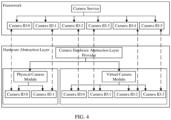
- a physical camera module of the physical camera and a virtual camera module of the virtual camera are both deployed in a hardware abstraction layer of an Android system, and the virtual camera is opened through a camera service set in a framework layer of the Android system.
- the physical camera module can be a code segment for realizing corresponding functions of the physical camera
- the virtual camera module can be a code segment for realizing corresponding functions of the virtual camera
- both modules can be deployed in the Hardware Abstraction Layer (HAL) of the Android system.
- HAL Hardware Abstraction Layer
- the virtual camera can be opened through a camera service (CameraSerivce) set in the Framework layer of the Android system, thereby realizing the effect of deploying and applying the virtual camera in the terminal device.
- HAL can be used to manage hardware devices
- the camera hardware abstraction layer provider (CameraHalProvider) is a service in HAL, which interfaces with the CameraService in the Framework layer above and is responsible for managing camera devices below
- the internal physical camera module (InternalCamera) can generally include a front camera (camera ID:0) and a rear camera (camera ID:1)
- the virtual camera module (EmuCamera) can set multiple virtual cameras according to actual needs, and the present example takes four virtual cameras (camera ID:0, camera ID: 1, camera ID:2 and camera ID:3) as an example.
- the video stream pushing method before opening the available camera, can further include: obtaining a camera identifier from the camera first opening request, and determining whether a to-be-requested camera corresponding to the camera identifier is the physical camera; judging, in the case where it is determined that the to-be-requested camera corresponding to the camera identifier is not the physical camera, whether the camera identifier can be used, and determining, according to a judgment result, whether or not to use the to-be-requested camera as the available camera, so as to obtain the available camera; modifying, in the case where it is determined that the to-be-requested camera corresponding to the camera identifier is the physical camera, the camera identifier based on a first modification strategy, and updating the camera identifier according to a modification result, so that the to-be-requested camera corresponding to the camera identifier belongs to the virtual camera, and performing the step of judging whether the camera identifier can be
- the camera identifier can be an identifier of the camera requested to be opened by the first application (that is, the to-be-requested camera), such as the number after the camera ID in the above example.
- the cameras that can be requested by multiple applications are all virtual cameras.
- the to-be-requested camera is a physical camera, and if not (that is, the to-be-requested camera is not a physical camera), it can be judged whether the camera identifier can be used, that is, whether the virtual camera corresponding to the camera identifier exists and has not been requested by other applications, so as to determine whether or not to use the to-be-requested camera as the available camera according to the judgment result, thereby obtaining the available camera.
- the camera identifier can be modified based on the first modification strategy, and the camera identifier can be updated according to the modification result, so that the to-be-requested camera corresponding to the camera identifier belongs to a virtual camera, that is, the goal of this modification is to make the to-be-requested camera correspond to a virtual camera; and therefore, an available camera can be obtained by judging whether the camera identifier can be used.
- the above technical solution achieves the effect of effectively obtaining an available camera.
- judging whether the camera identifier can be used and determining, according to the judgment result, whether or not to use the to-be-requested camera as the available camera can include: judging whether the camera identifier has been used; modifying, in the case where the camera identifier has been used, the camera identifier based on a second modification strategy, and updating the camera identifier according to a modification result, and performing the step of judging whether the camera identifier has been used, again; using, in the case where the camera identifier has not been used, the to-be-requested camera corresponding to the camera identifier as the available camera when the camera identifier belongs to a valid identifier.
- the camera identifier can be modified based on the second modification strategy, and whether the modified camera identifier has been used is judged again, thereby obtaining an unused camera identifier.
- the first modification strategy and the second modification strategy can be the same or different modification strategies, and their settings are related to the actual application scenarios, which is not limited here.
- the camera identifier when the camera identifier is not used, it can be determined whether the camera identifier belongs to a valid identifier (that is, there exists a camera corresponding to the camera identifier in the terminal device), and if so, the to-be-requested camera corresponding to the camera identifier can be used as an available camera, thereby achieving the effect of effectively obtaining an available camera.
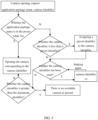
- a scheduling algorithm which is used for allocating physical cameras and virtual cameras and as shown in FIG. 5 , is set, and the scheduling algorithm can be integrated in the framework layer and the hardware abstraction layer as shown in FIG. 4 .
- an application is started, an camera opening request initiated by the user for the application is sent to the CameraSerivce, so that the CameraSerivce provides the camera opening request to the scheduling algorithm, so that the scheduling algorithm can execute the algorithm logic as shown in FIG. 5 according to the camera opening request to determine which camera is to be assigned to the application.
- the application can request a physical camera by determining whether the application package name obtained from the camera opening request is in the preset white list, and if so, the physical camera corresponding to the camera identifier in the camera opening request is directly opened; otherwise, it means that the application belongs to an application that cannot request a physical camera, and then it is determined whether the camera corresponding to the camera identifier is a physical camera by determining whether the camera identifier is less than a preset identifier.
- the preset identity can be the camera identifier with the smallest value among the camera identifiers corresponding to the multiple virtual cameras. In combination with the example shown in FIG. 4 , the preset identity can be 2.
- the camera identifier is less than the preset identifier, it means that the application requests a physical camera, and the preset identifier can be assigned to the camera identifier to make the application request a virtual camera; otherwise, it means that the application requests a virtual camera.
- the camera identifier is increased by 1 (+1, that is, the camera ID in the CameraSerivce is moved backward by one), and judgment is performed again; otherwise, it is judged whether the camera identifier is greater than the maximum identifier, and the maximum identifier can be the maximum value among multiple effective identifiers, and taking the example shown in FIG. 4 as an example, the maximum identifier can be 5. If the camera identifier is greater than the maximum identifier, it means that there is no available camera (i.e. virtual camera) that can be assigned to the application at present; otherwise, the virtual camera corresponding to the camera identifier is directly opened.
- the maximum identifier it means that there is no available camera (i.e. virtual camera) that can be assigned to the application at present; otherwise, the virtual camera corresponding to the camera identifier is directly opened.
- the execution process of the camera opening operation can be that the CameraSerivce provides the determined camera identifier to the CameraHalProvider, and the CameraHalProvider determines which camera needs to be opened according to the preset mapping relationship, and opens the camera.
- the execution process of the camera opening operation can be that the CameraSerivce provides the determined camera identifier to the CameraHalProvider, and the CameraHalProvider determines which camera needs to be opened according to the preset mapping relationship, and opens the camera.
- FIG. 6 is a flowchart of a video stream pushing method according to Embodiment 3 of the present disclosure.
- the present embodiment is described on the basis of multiple optional solutions in the above embodiment.
- an image source selection window is further provided on the display interface, at least two image source identifiers are provided on the image source selection window, and the at least two image source identifiers include an image source identifier corresponding to the physical camera.
- the explanations of terms that are the same as or corresponding to those of the above embodiment are not repeated here.
- the method of the present embodiment can include the following steps.
- S310 displaying a display interface, wherein at least two application windows and an image source selection window are provided on the display interface, at least two image source identifiers are provided on the image source selection window, and the at least two image source identifiers include an image source identifier corresponding to the physical camera.
- An image source selection window is further provided on the display interface, and the image source selection window is a window for selecting the image source of the virtual camera, that is, a window for selecting which image data stream to be sent to the virtual camera.
- At least two image source identifiers are provided on the image source selection window, and each image source identifier corresponds to an image source, such as a front camera, a rear camera, a front camera + a background special effect, a rear camera + a background special effect, or a generated data stream (e.g., pure virtual data rendered by a game engine, video data already recorded, etc.), etc., which is not limited here.
- the image source selection window can be the display effect of a pre-developed pilot application when being applied, and for example, the pilot application is expanded from a floating window to the image source selection window when being applied; and the pilot application can be an application for controlling the image source of a virtual camera.
- the at least two image source identifiers can include an image source identifier corresponding to the physical camera, so that when the image source identifier corresponding to the physical camera is selected, the image data stream captured by the physical camera can be provided to multiple virtual cameras.
- the application window 301 is the application window of the first application
- the application window 302 is the application window of the second application
- the application window 303 is the application window of the third application
- the application window 304 is the application window of the fourth application.
- Three image source identifiers are provided on the image source selection window 305, namely a front camera 3051, a rear camera 3052, and a generated data stream 3053. In this way, it can be determined which data stream is to be sent to multiple virtual cameras by a click operation on the image source selection window, thereby achieving the effect that multiple applications can display corresponding data streams according to actual application needs.
- S320 displaying, in response to a camera first opening request initiated by a user for a first application, an image data stream captured by an opened physical camera in an application window of the first application.
- S330 displaying, in response to a camera second opening request initiated by the user for a second application, the image data stream in an application window of the second application.
- an image source selection window is provided on the display interface, at least two image source identifiers are provided on the image source selection window, and the at least two image source identifiers include an image source identifier corresponding to the physical camera.
- the video stream pushing method can further include: determining, in response to a first click operation on the image source selection window for a first camera, a selected image source identifier, wherein the first camera belongs to a virtual camera; accordingly, displaying the image data stream captured by the opened physical camera in the application window of the first application can include: displaying, when the first application succeeds in requesting the first camera and the selected image source identifier corresponds to a physical camera, the image data stream captured by the opened physical camera in the application window of the first application.
- the first camera belongs to a virtual camera
- the first click operation can be an operation of clicking on the image source selection window for selecting the image source of the first camera
- a selected image source identifier is determined from multiple image source identifiers in response to the first click operation.
- the click operation can be aimed at a virtual camera; thus, the data streams displayed in the application windows of multiple applications can be the same or different, which is related to the actual application needs, thereby enriching the modes of video stream pushing and improving the effect of video stream pushing.
- the video stream pushing method can further include: determining, in response to a second click operation on the image source selection window for a second camera, a selected image source identifier, wherein the second camera belongs to a virtual camera; in response to a camera fourth opening request initiated by the user for a third application, displaying, when the third application succeeds in requesting the second camera and the selected image source identifier corresponds to a generated data stream or a processed data stream obtained by processing the image data stream, the generated data stream or the processed data stream in an application window of the third application.
- the second camera belongs to a virtual camera
- the second click operation can be an operation of clicking on the image source selection window for selecting the image source of the second camera
- a selected image source identifier is determined from multiple image source identifiers in response to the second click operation.
- the camera fourth opening request can be a request initiated by the user for a third application to request to open a camera.
- the generated data stream or the processed data stream can be displayed in the application window of the third application, thereby realizing the display of data streams other than the image data stream in the application window, and further enhancing the diversity of video stream pushing.
- the user turns on the terminal device, opens the pilot application to set the image sources of multiple virtual cameras, and opens multiple live streaming applications in turn to perform live streaming.
- a camera opening request is sent to the CameraService, and the CameraService automatically starts the pilot application after receiving the camera opening request, so that the started pilot application opens the physical camera to work; after a live streaming application succeeds in requesting a virtual camera, the started pilot application sends the image data stream captured by the physical camera or other data stream (depending on the image source matched by the user for the virtual camera) to the virtual camera, so that the live streaming application can perform live streaming based on the obtained data stream.
- the user can further switch image sources according to live streaming needs, thereby ensuring the diversity of live streaming.
- FIG. 9 is a structural block diagram of a video stream pushing apparatus according to Embodiment 4 of the present disclosure, and the apparatus is configured to execute the video stream pushing method according to any of the above embodiments.
- the apparatus belongs to the same concept as the video stream pushing method in the above embodiments, and for details not described in detail in the embodiment of the video stream pushing apparatus, please refer to the embodiments of the video stream pushing method.
- the apparatus include a display interface displaying module 410, an image data stream first displaying module 420 and an image data stream second displaying module 430.
- the display interface displaying module 410 is configured to display a display interface, wherein at least two application windows are provided on the display interface.
- the image data stream first displaying module 420 is configured to display, in response to a camera first opening request initiated by a user for a first application, an image data stream captured by an opened physical camera in an application window of the first application.
- the image data stream second displaying module 430 is configured to display, in response to a camera second opening request initiated by the user for a second application, the image data stream in an application window of the second application.
- the display interface displaying module 410 displays a display interface, wherein at least two application windows are provided on the display interface;
- the image data stream first displaying module 420 displays, in response to a camera first opening request initiated by a user for a first application, an image data stream captured by an opened physical camera in an application window of the first application;
- the image data stream second displaying module 430 displays, in response to a camera second opening request initiated by the user for a second application, the image data stream captured by the physical camera can be displayed in the application windows of multiple applications on the same terminal device at the same time, which means that at least two applications can simultaneously perform video stream pushing under the condition that only one terminal device needs to be prepared, thereby reducing the cost of video stream pushing.
- the video stream pushing apparatus provided by the embodiment of the present disclosure can execute the video stream pushing method provided by any embodiment of the present disclosure, and has corresponding functional modules for executing the method and corresponding effects.
- multiple units and modules included are only divided according to functional logic, but are not limited to the above division, as long as corresponding functions can be realized; in addition, the names of multiple functional units are intended only for the convenience of distinguishing each other, and are not used to limit the protection scope of the present disclosure.
- FIG. 10 shows a schematic structural diagram of a terminal device 500 suitable for implementing the embodiments of the present disclosure.
- the terminal device in the embodiment of the present disclosure can include, a mobile terminal such as a mobile phone, a laptop computer, a digital broadcast receiver, a personal digital assistant (PDA), a portable android device (PAD), a portable multimedia player (PMP), a vehicle-mounted terminal (e.g., vehicle-mounted navigation terminal), etc., and a fixed terminal such as a digital television (TV), a desktop computer, etc.
- PDA personal digital assistant
- PAD portable android device
- PMP portable multimedia player
- vehicle-mounted terminal e.g., vehicle-mounted navigation terminal
- TV digital television
- desktop computer a desktop computer
- the terminal device 500 can include a processing apparatus (e.g., central processing unit, graphics processing unit, etc.) 501, and the processing apparatus 501 can execute various appropriate actions and processes according to a program stored on a read-only memory (ROM) 502 or a program loaded from a storage apparatus 508 into a random access memory (RAM) 503.
- ROM read-only memory
- RAM random access memory
- various programs and data necessary for the operations of the terminal device 500 are also stored.
- the processing apparatus 501, the ROM 502, and the RAM 503 are connected to each other through a bus 504.
- An input/output (I/O) interface 4505 is also connected to the bus 504.
- the following apparatuses can be connected to the I/O interface 505: an input apparatus 506 including, for example, a touch screen, a touch pad, a keyboard, a mouse, a camera, a microphone, an accelerometer, a gyroscope, etc.; an output apparatus 507 including, for example, a liquid crystal display (LCD), a speaker, a vibrator, etc.; a storage apparatus 508 including, for example, a magnetic tape, a hard disk, etc.; and a communication apparatus 509.
- the communication apparatus 409 can allow the terminal device 500 to perform wireless or wired communication with another device to exchange data.
- FIG. 10 illustrates the terminal device 400 with various apparatuses, it is to be understood that all illustrated apparatuses are not required to be implemented or provided. More or fewer apparatuses can be alternatively implemented or provided.
- an embodiment of the present disclosure includes a computer program product, the computer program product includes a computer program carried on a non-transitory computer-readable medium, and the computer program contains program codes for performing the method illustrated by the flowcharts.
- the computer program can be downloaded and installed from a network via the communication apparatus 509, or installed from the storage apparatus 508, or installed from the ROM 502.
- the processing apparatus 501 executes the above functions defined in the method according to the embodiment of the present disclosure.
- the above computer-readable medium in the present disclosure can be a computer-readable signal medium or a computer-readable storage medium or any combination thereof.
- the computer-readable storage medium can be, for example, an electronic, magnetic, optical, electromagnetic, infrared, or semiconductor system, apparatus, or device, or any combination of the above.
- the computer-readable storage medium can include: an electrical connection having one or more wires, a portable computer diskette, a hard disk, a random access memory (RAM), a read-only memory (ROM), an erasable programmable read-only memory (EPROM), a flash memory, an optical fiber, a portable compact disc read-only memory (CD-ROM), an optical storage device, a magnetic storage device, or any suitable combination of the above.
- the computer-readable storage medium can be any tangible medium containing or storing a program, and the program can be used by or in conjunction with an instruction execution system, apparatus, or device.
- the computer-readable signal medium can include a data signal propagated on a baseband or as part of a carrier wave, in which computer-readable program code is carried. Such a propagated data signal can be in a variety of forms, including an electro-magnetic signal, an optical signal, or any suitable combination of the above.
- the computer-readable signal medium can also be any computer-readable medium other than the computer-readable storage medium, and the computer-readable signal medium can send, propagate, or transmit a program for use by or in conjunction with an instruction execution system, apparatus, or device.
- Program codes contained on the computer-readable medium can be transmitted using any suitable medium, including: an electrical wire, an optical cable, radio frequency (RF), etc., or any suitable combination of the above.
- the storage medium can be a non-transitory storage medium.
- a client and a server can communicate using any network protocol currently known or to be developed in the future, such as HTTP (HyperText Transfer Protocol), etc., and can be interconnected with any form or medium of digital data communication (e.g., a communication network).
- a communication network examples include a local area network (LAN), a wide area network (WAN), an internet (e.g., the Internet), and a peer-to-peer network (e.g., ad hoc peer-to-peer network), as well as any network currently known or to be developed in the future.
- the above computer-readable medium can be contained in the above terminal device 500; or can exist alone without being assembled into the terminal device 500.
- the above computer-readable medium has thereon carried one or more programs which, when executed by the terminal device, cause the terminal device to: display a display interface, wherein at least two application windows are provided on the display interface; display, in response to a camera first opening request initiated by a user for a first application, an image data stream captured by an opened physical camera in an application window of the first application; and display, in response to a camera second opening request initiated by the user for a second application, the image data stream in an application window of the second application.
- Computer program codes for performing operations of the present disclosure can be written in one or more programming languages or a combination thereof, and the programming language includes an object-oriented programming language such as Java, Smalltalk, C++, and also includes a conventional procedural programming language such as a "C" language or similar programming language.
- the program codes can be executed entirely on a user computer, partly on the user computer, as a stand-alone software package, partly on the user computer and partly on a remote computer, or entirely on the remote computer or a server.
- the remote computer can be connected to the user computer through any type of network, including a local area network (LAN) or a wide area network (WAN), or can be connected to an external computer (for example, through the Internet using an Internet service provider).
- LAN local area network
- WAN wide area network
- Internet service provider for example, AT&T, MCI, Sprint, EarthLink, MSN, GTE, etc.
- each block in the flowcharts or block diagrams can represent one module, program segment, or portion of code, which contains one or more executable instructions for implementing the specified logic function.
- functions noted in blocks can occur in an order different from the order noted in the accompanying drawings.
- two blocks shown in succession can, in fact, be executed substantially concurrently, and they can sometimes be executed in a reverse order, which depends upon functions involved.
- Each block in the block diagrams and/or flowcharts, and a combination of blocks in the block diagrams and/or flowcharts, can be implemented by a dedicated hardware-based system that performs a specified function or operation, or can be implemented by a combination of dedicated hardware and computer instructions.
- the involved units described in the embodiment of the present disclosure can be implemented in a software manner, and can also be implemented in a hardware manner.
- the names of the units do not constitute a limitation on the unit itself under certain circumstance.
- the display interface displaying module can also be described as "a module that displays a display interface, wherein at least two application windows are provided on the display interface".
- an exemplary type of hardware logic component that can be used includes: a field programmable gate array (FPGA), an application specific integrated circuit (ASIC), an application specific standard product (ASSP), a system on a chip (SOC), a complex programmable logic device (CPLD), and so on.
- FPGA field programmable gate array
- ASIC application specific integrated circuit
- ASSP application specific standard product
- SOC system on a chip
- CPLD complex programmable logic device
- a machine-readable medium can be a tangible medium, which can contain or store a program that is used by or in conjunction with an instruction execution system, apparatus, or device.
- the machine-readable medium can be a machine-readable signal medium or a machine-readable storage medium.
- the machine-readable medium can include an electronic, magnetic, optical, electromagnetic, infrared, or semiconductor system, apparatus, or device, or any suitable combination of the above.
- the machine-readable storage medium can include an electrical connection based on one or more wires, a portable computer diskette, a hard disk, a RAM, a ROM, an erasable programmable read-only memory (EPROM), a flash memory, an optical fiber, a portable CD-ROM, an optical storage device, a magnetic storage device, or any suitable combination of the above.
- Example 1 provides a video stream pushing method, which can include:
- Example 2 provides the method of Example 1, and after responding to the camera first opening request initiated by the user for the first application, the video stream pushing method can further include:
- Example 3 provides the method of Example 2, and before opening the available camera, the video stream pushing method can further include:
- Example 4 provides the method of Example 3, and the judging whether the camera identifier can be used, and determining, according to a judgment result, whether or not to use the to-be-requested camera as the available camera, so as to obtain the available camera, can include:
- Example 5 provides the method of Example 2, wherein a physical camera module of the physical camera and a virtual camera module of the virtual camera are both deployed in a hardware abstraction layer of an Android system, and the virtual camera is opened through a camera service set in a framework layer of the Android system.
- Example 6 provides the method of Example 1, and the video stream pushing method can further include:
- Example 7 provides the method of Example 1, wherein an image source selection window is further provided on the display interface, at least two image source identifiers are provided on the image source selection window, and the at least two image source identifiers include an image source identifier corresponding to the physical camera.
- Example 8 provides the method of Example 7, and the video stream pushing method can further include:
- Example 9 provides the method of Example 7, and the video stream pushing method can further include:
- Example 10 provides a video stream pushing apparatus, which can include:
- Example 11 provides the apparatus of Example 7, and the video stream pushing apparatus can further include:
- Example 12 provides the apparatus of Example 11, and the video stream pushing apparatus can further include:
- Example 13 provides the apparatus of Example 12, and the available camera obtaining module can include:
- Example 14 provides the apparatus of Example 11, wherein a physical camera module of the physical camera and a virtual camera module of the virtual camera are both deployed in a hardware abstraction layer of an Android system, and the virtual camera is opened through a camera service set in a framework layer of the Android system.
- Example 15 provides the apparatus of Example 10, and the video stream pushing apparatus can further include:
- Example 16 provides the apparatus of Example 10, wherein an image source selection window is further provided on the display interface, at least two image source identifiers are provided on the image source selection window, and the at least two image source identifiers comprise an image source identifier corresponding to the physical camera.
- Example 17 provides the apparatus of Example 16, and the video stream pushing apparatus can further include:
- Example 18 provides the apparatus of Example 16, and the video stream pushing apparatus can further include:
Landscapes
- Engineering & Computer Science (AREA)
- Signal Processing (AREA)
- Multimedia (AREA)
- General Engineering & Computer Science (AREA)
- Databases & Information Systems (AREA)
- Human Computer Interaction (AREA)
- Computer Networks & Wireless Communication (AREA)
- User Interface Of Digital Computer (AREA)
- Two-Way Televisions, Distribution Of Moving Picture Or The Like (AREA)
Applications Claiming Priority (2)
| Application Number | Priority Date | Filing Date | Title |
|---|---|---|---|
| CN202210033822.4A CN114363654B (zh) | 2022-01-12 | 2022-01-12 | 一种视频推流方法、装置、终端设备及存储介质 |
| PCT/CN2023/070337 WO2023134509A1 (zh) | 2022-01-12 | 2023-01-04 | 视频推流方法、装置、终端设备及存储介质 |
Publications (2)
| Publication Number | Publication Date |
|---|---|
| EP4447458A1 true EP4447458A1 (de) | 2024-10-16 |
| EP4447458A4 EP4447458A4 (de) | 2025-03-12 |
Family
ID=81108261
Family Applications (1)
| Application Number | Title | Priority Date | Filing Date |
|---|---|---|---|
| EP23739853.2A Pending EP4447458A4 (de) | 2022-01-12 | 2023-01-04 | Verfahren und vorrichtung zur ausgabe eines videostroms sowie endgerätevorrichtung und speichermedium |
Country Status (3)
| Country | Link |
|---|---|
| EP (1) | EP4447458A4 (de) |
| CN (1) | CN114363654B (de) |
| WO (1) | WO2023134509A1 (de) |
Families Citing this family (2)
| Publication number | Priority date | Publication date | Assignee | Title |
|---|---|---|---|---|
| CN114363654B (zh) * | 2022-01-12 | 2023-12-19 | 北京字节跳动网络技术有限公司 | 一种视频推流方法、装置、终端设备及存储介质 |
| CN116033256B (zh) * | 2022-12-16 | 2025-03-14 | 京东方科技集团股份有限公司 | 共享图像采集装置的方法、装置及存储介质 |
Family Cites Families (17)
| Publication number | Priority date | Publication date | Assignee | Title |
|---|---|---|---|---|
| US8732728B2 (en) * | 2009-07-20 | 2014-05-20 | Samsung Electronics Co., Ltd. | System and method to allow multiple plug-in applications real-time access to a camera application in a mobile device |
| US10674191B2 (en) * | 2012-04-06 | 2020-06-02 | Minerva Networks, Inc | Systems and methods to remotely synchronize digital data |
| CN106851172A (zh) * | 2017-03-27 | 2017-06-13 | 青岛海信电器股份有限公司 | 摄像头的调用方法、装置及系统 |
| CN109068179B (zh) * | 2018-09-17 | 2020-10-02 | 珠海市筑巢科技有限公司 | 一种多平台直播方法、计算机装置及计算机可读存储介质 |
| CN112351235B (zh) * | 2019-08-06 | 2022-06-07 | 荣耀终端有限公司 | 一种视频通话的方法 |
| US11086491B1 (en) * | 2020-01-21 | 2021-08-10 | Honeywell International Inc. | Systems and methods for displaying video streams on a display |
| CN111901614A (zh) * | 2020-06-22 | 2020-11-06 | 深圳市沃特沃德股份有限公司 | 多平台同步直播方法、装置、计算机设备和可读存储介质 |
| CN112118459A (zh) * | 2020-08-28 | 2020-12-22 | 上海商米科技集团股份有限公司 | 共享摄像头数据实现多个app共同直播的方法及可读介质 |
| CN113556479B (zh) * | 2020-09-02 | 2022-07-29 | 华为技术有限公司 | 一种多应用共享摄像头的方法与电子设备 |
| CN112584049A (zh) * | 2020-12-22 | 2021-03-30 | Oppo广东移动通信有限公司 | 远程交互方法及装置、电子设备、存储介质 |
| CN112804459A (zh) * | 2021-01-12 | 2021-05-14 | 杭州星犀科技有限公司 | 基于虚拟摄像头的图像展示方法、装置、存储介质及电子设备 |
| CN112804460A (zh) * | 2021-01-12 | 2021-05-14 | 杭州星犀科技有限公司 | 基于虚拟摄像头的图像处理方法、装置、存储介质及电子设备 |
| CN113220445A (zh) * | 2021-03-26 | 2021-08-06 | 西安神鸟软件科技有限公司 | 一种图像或视频数据获取方法及终端设备 |
| CN113254228A (zh) * | 2021-03-26 | 2021-08-13 | 西安神鸟软件科技有限公司 | 一种图像或视频数据分发方法及终端设备 |
| CN113220446A (zh) * | 2021-03-26 | 2021-08-06 | 西安神鸟软件科技有限公司 | 一种图像或视频数据处理方法及终端设备 |
| CN113852763B (zh) * | 2021-09-30 | 2023-12-12 | 上海绚显科技有限公司 | 音视频处理方法、装置、电子设备和存储介质 |
| CN114363654B (zh) * | 2022-01-12 | 2023-12-19 | 北京字节跳动网络技术有限公司 | 一种视频推流方法、装置、终端设备及存储介质 |
-
2022
- 2022-01-12 CN CN202210033822.4A patent/CN114363654B/zh active Active
-
2023
- 2023-01-04 WO PCT/CN2023/070337 patent/WO2023134509A1/zh not_active Ceased
- 2023-01-04 EP EP23739853.2A patent/EP4447458A4/de active Pending
Also Published As
| Publication number | Publication date |
|---|---|
| WO2023134509A1 (zh) | 2023-07-20 |
| CN114363654B (zh) | 2023-12-19 |
| EP4447458A4 (de) | 2025-03-12 |
| CN114363654A (zh) | 2022-04-15 |
Similar Documents
| Publication | Publication Date | Title |
|---|---|---|
| JP7635393B2 (ja) | ミラーリング方法、装置、電子機器および記憶媒体 | |
| US10725972B2 (en) | Continuous and concurrent device experience in a multi-device ecosystem | |
| US12386500B2 (en) | Method, an apparatus, an electronic device and a storage medium for sharing multimedia information in social media | |
| US12367560B2 (en) | Video transmission method, electronic device and computer readable medium | |
| CN113521728B (zh) | 云应用的实现方法、装置、电子设备和存储介质 | |
| CN110708602A (zh) | 视频启动方法、装置、电子设备及存储介质 | |
| WO2022237744A1 (zh) | 视频的展示方法、装置、设备及介质 | |
| US11758087B2 (en) | Multimedia conference data processing method and apparatus, and electronic device | |
| WO2023165370A1 (zh) | 一种信息交互方法、装置、显示设备及存储介质 | |
| EP4447458A1 (de) | Verfahren und vorrichtung zur ausgabe eines videostroms sowie endgerätevorrichtung und speichermedium | |
| US12537984B2 (en) | Method of video downloading, method of video transmission, terminal device, server and storage medium | |
| CN115883857A (zh) | 一种直播礼物云渲染方法、装置、电子设备及存储介质 | |
| CN113893525B (zh) | 云游戏运行方法、装置、电子设备及计算机可读介质 | |
| CN118118723A (zh) | 特效处理方法、装置、电子设备及存储介质 | |
| GB2600341A (en) | Image special effect processing method and apparatus, electronic device and computer-readable storage medium | |
| CN114489891A (zh) | 云应用程序的控制方法、系统、装置、可读介质和设备 | |
| US20230385097A1 (en) | Distributed device capability virtualization method, medium, and electronic device | |
| CN113382293A (zh) | 内容显示的方法、装置、设备及计算机可读存储介质 | |
| US12537906B2 (en) | Video effect packet generation method and apparatus, device, and storage medium | |
| CN116709557B (zh) | 业务处理方法、设备及存储介质 | |
| CN118474418A (zh) | 一种vr空间中的交互方法、装置、设备及存储介质 | |
| CN112261426A (zh) | 动画素材播放方法、装置、电子设备及计算机可读介质 | |
| US12335596B2 (en) | Electronic device and shooting method thereof, and medium | |
| US20250386095A1 (en) | Remote photographing method and apparatus, device, and storage medium | |
| US12184951B2 (en) | Video generation method, apparatus, electronic device and storage medium |
Legal Events
| Date | Code | Title | Description |
|---|---|---|---|
| STAA | Information on the status of an ep patent application or granted ep patent |
Free format text: STATUS: THE INTERNATIONAL PUBLICATION HAS BEEN MADE |
|
| PUAI | Public reference made under article 153(3) epc to a published international application that has entered the european phase |
Free format text: ORIGINAL CODE: 0009012 |
|
| STAA | Information on the status of an ep patent application or granted ep patent |
Free format text: STATUS: REQUEST FOR EXAMINATION WAS MADE |
|
| 17P | Request for examination filed |
Effective date: 20240711 |
|
| AK | Designated contracting states |
Kind code of ref document: A1 Designated state(s): AL AT BE BG CH CY CZ DE DK EE ES FI FR GB GR HR HU IE IS IT LI LT LU LV MC ME MK MT NL NO PL PT RO RS SE SI SK SM TR |
|
| A4 | Supplementary search report drawn up and despatched |
Effective date: 20250212 |
|
| RIC1 | Information provided on ipc code assigned before grant |
Ipc: H04N 21/414 20110101ALI20250206BHEP Ipc: H04M 1/72403 20210101ALI20250206BHEP Ipc: H04N 21/431 20110101ALI20250206BHEP Ipc: H04N 21/4223 20110101ALI20250206BHEP Ipc: H04N 21/2187 20110101AFI20250206BHEP |
|
| DAV | Request for validation of the european patent (deleted) | ||
| DAX | Request for extension of the european patent (deleted) | ||
| STAA | Information on the status of an ep patent application or granted ep patent |
Free format text: STATUS: EXAMINATION IS IN PROGRESS |
|
| 17Q | First examination report despatched |
Effective date: 20251111 |