EP4439247A1 - Augmented world environment model for an artificial reality environment - Google Patents
Augmented world environment model for an artificial reality environment Download PDFInfo
- Publication number
- EP4439247A1 EP4439247A1 EP24156842.7A EP24156842A EP4439247A1 EP 4439247 A1 EP4439247 A1 EP 4439247A1 EP 24156842 A EP24156842 A EP 24156842A EP 4439247 A1 EP4439247 A1 EP 4439247A1
- Authority
- EP
- European Patent Office
- Prior art keywords
- augment
- state
- experience
- artificial reality
- augments
- Prior art date
- Legal status (The legal status is an assumption and is not a legal conclusion. Google has not performed a legal analysis and makes no representation as to the accuracy of the status listed.)
- Granted
Links
Images









Classifications
-
- G—PHYSICS
- G06—COMPUTING OR CALCULATING; COUNTING
- G06T—IMAGE DATA PROCESSING OR GENERATION, IN GENERAL
- G06T17/00—Three-dimensional [3D] modelling for computer graphics
-
- G—PHYSICS
- G06—COMPUTING OR CALCULATING; COUNTING
- G06F—ELECTRIC DIGITAL DATA PROCESSING
- G06F3/00—Input arrangements for transferring data to be processed into a form capable of being handled by the computer; Output arrangements for transferring data from processing unit to output unit, e.g. interface arrangements
- G06F3/01—Input arrangements or combined input and output arrangements for interaction between user and computer
- G06F3/011—Arrangements for interaction with the human body, e.g. for user immersion in virtual reality
-
- G—PHYSICS
- G06—COMPUTING OR CALCULATING; COUNTING
- G06F—ELECTRIC DIGITAL DATA PROCESSING
- G06F3/00—Input arrangements for transferring data to be processed into a form capable of being handled by the computer; Output arrangements for transferring data from processing unit to output unit, e.g. interface arrangements
- G06F3/01—Input arrangements or combined input and output arrangements for interaction between user and computer
- G06F3/011—Arrangements for interaction with the human body, e.g. for user immersion in virtual reality
- G06F3/012—Head tracking input arrangements
-
- G—PHYSICS
- G06—COMPUTING OR CALCULATING; COUNTING
- G06F—ELECTRIC DIGITAL DATA PROCESSING
- G06F3/00—Input arrangements for transferring data to be processed into a form capable of being handled by the computer; Output arrangements for transferring data from processing unit to output unit, e.g. interface arrangements
- G06F3/01—Input arrangements or combined input and output arrangements for interaction between user and computer
- G06F3/017—Gesture based interaction, e.g. based on a set of recognized hand gestures
-
- G—PHYSICS
- G06—COMPUTING OR CALCULATING; COUNTING
- G06F—ELECTRIC DIGITAL DATA PROCESSING
- G06F3/00—Input arrangements for transferring data to be processed into a form capable of being handled by the computer; Output arrangements for transferring data from processing unit to output unit, e.g. interface arrangements
- G06F3/01—Input arrangements or combined input and output arrangements for interaction between user and computer
- G06F3/03—Arrangements for converting the position or the displacement of a member into a coded form
- G06F3/033—Pointing devices displaced or positioned by the user, e.g. mice, trackballs, pens or joysticks; Accessories therefor
- G06F3/0346—Pointing devices displaced or positioned by the user, e.g. mice, trackballs, pens or joysticks; Accessories therefor with detection of the device orientation or free movement in a three-dimensional [3D] space, e.g. 3D mice, 6-DOF [six degrees of freedom] pointers using gyroscopes, accelerometers or tilt-sensors
-
- G—PHYSICS
- G06—COMPUTING OR CALCULATING; COUNTING
- G06T—IMAGE DATA PROCESSING OR GENERATION, IN GENERAL
- G06T19/00—Manipulating three-dimensional [3D] models or images for computer graphics
- G06T19/006—Mixed reality
-
- G—PHYSICS
- G06—COMPUTING OR CALCULATING; COUNTING
- G06T—IMAGE DATA PROCESSING OR GENERATION, IN GENERAL
- G06T2219/00—Indexing scheme for manipulating 3D models or images for computer graphics
- G06T2219/20—Indexing scheme for editing of 3D models
- G06T2219/2004—Aligning objects, relative positioning of parts
-
- H—ELECTRICITY
- H04—ELECTRIC COMMUNICATION TECHNIQUE
- H04N—PICTORIAL COMMUNICATION, e.g. TELEVISION
- H04N7/00—Television systems
- H04N7/14—Systems for two-way working
- H04N7/15—Conference systems
- H04N7/157—Conference systems defining a virtual conference space and using avatars or agents
Definitions
- the present disclosure is directed to an augmented world environment model for an artificial reality environment.
- Augmented reality (AR) applications can provide interactive 3D experiences that combine images of the real-world with virtual objects
- virtual reality (VR) applications can provide an entirely self-contained 3D computer environment.
- AR Augmented reality
- VR virtual reality
- an AR application can be used to superimpose virtual objects over a video feed of a real scene that is observed by a camera.
- a real-world user in the scene can then make gestures captured by the camera that can provide interactivity between the real-world user and the virtual objects.
- Mixed reality (MR) systems can allow light to enter a user's eye that is partially generated by a computing system and partially includes light reflected off objects in the real-world.
- AR, MR, and VR experiences can be observed by a user through a head-mounted display (HMD), such as glasses or a headset.
- HMD head-mounted display
- the present invention provides a method, a computer-readable storage medium and a system as defined in the appended claims.
- a method for providing an augmented world environment model for an artificial reality environment comprising:
- Interaction by a user of the artificial reality device, with the augment of the one or more augments corresponding to the particular artificial reality experience, may cause the augment to transition to the focused state as the augment state.
- the particular artificial reality experience, of the multiple artificial reality experiences may be a first artificial reality experience, and the rule may be a first rule of the set of rules.
- a second artificial reality experience, of the multiple artificial reality experiences, not being in the active state, and having at least one of the one or more augments, corresponding to the second artificial reality experience, in the displayed state, may cause a corresponding transition to the foregrounded state for the second artificial reality experience.
- the particular artificial reality experience, of the multiple artificial reality experiences, may be exclusively in the active state.
- the particular artificial reality experience, of the multiple artificial reality experiences may be a first artificial reality experience, and the rule may be a first rule of the set of rules.
- a second artificial reality experience creating a new augment in the artificial reality environment may cause an augment, of the one or more augments corresponding to the second artificial reality experience, to transition to the minimized state.
- the artificial reality device may render an augment, of the one or more corresponding augments, in the displayed state with degradation relative to the augment having the focused state.
- a virtual representation of the artificial reality device being a threshold distance away from an augment of the one or more corresponding augments may cause the augment to transition to the unloaded state.
- the particular artificial reality experience, of the multiple artificial reality experiences may be a first artificial reality experience, and the rule may be a first rule of the set of rules.
- Each of the one or more augments, corresponding to a second artificial reality experience of the multiple artificial reality experiences, having at least one of A) the minimized state, B) the unloaded state, C) the closed augment state, or D) any combination thereof, may cause the second artificial reality experience to transition to the backgrounded state, based on a second rule of the set of rules.
- the particular artificial reality experience, of the multiple artificial reality experiences may be a first artificial reality experience, and the rule may be a first rule of the set of rules.
- the artificial reality device terminating a second artificial reality experience of the multiple artificial reality experiences may cause the second artificial reality experience to transition to the not running state, based on a second rule of the set of rules.
- the particular artificial reality experience, of the multiple artificial reality experiences may be a first artificial reality experience, and the rule is a first rule of the set of rules, and wherein either A) a second artificial reality experience, of the multiple artificial reality experiences, being closed by a user of the artificial reality device, or B) each of the one or more augments, corresponding to the second artificial reality experience, being closed by a user of the artificial reality device, may cause the second artificial reality experience to transition to the closed experience state, based on a second rule of the set of rules.
- the method may further comprise receiving input relative to the augment corresponding to the particular artificial reality experience to enter an exclusive mode for the particular artificial reality experience; and exclusively rendering the particular artificial reality experience in the artificial reality environment.
- a computer-readable storage medium storing instructions that, when executed by a computing system, cause the computing system to perform a process for providing an augmented world environment model for an artificial reality environment, the process comprising:
- the experience states may comprise an active state, a foregrounded state, a backgrounded state, a not running state, and a closed experience state, and wherein the augment states may comprise a focused state, a displayed state, and a not displayed state.
- the not displayed state may be a minimized state, an unloaded state, or a closed augment state.
- Each of the one or more augments, corresponding to a particular artificial reality experience of the multiple artificial reality experiences, having the not displayed state, may cause the particular artificial reality experience to transition to the backgrounded state, based on a second rule of the set of rules.
- a computing system for providing an augmented world environment model for an artificial reality environment comprising:
- the experience states may comprise an active state, a foregrounded state, a backgrounded state, a not running state, and a closed experience state, and wherein the augment states may comprise a focused state, a displayed state, and a not displayed state.
- An augment of the one or more augments may cause the active state as the experience state for the particular artificial reality experience, based on the hierarchy.
- Interaction by a user of the artificial reality device, with an augment of the one or more augments corresponding to a particular artificial reality experience of the multiple artificial reality experiences, may cause the augment to transition to the focused state as the augment state.
- the artificial reality device may render an augment, of the one or more corresponding augments, in the displayed state with degradation relative to the augment having the focused state.
- aspects of the present disclosure are directed to providing an augmented world environment model for an artificial reality (XR) environment.
- Some implementations of the present technology define how experiences will run on an XR system as a hierarchy of entities, including experiences (i.e., applications), augments those experiences create, and an exclusive mode in which a particular experience takes control of the entire view.
- Some implementations establish a framework for multiple experiences to interface with each other and to run in an XR ecosystem, e.g., with a user interacting with the experiences and the real world simultaneously. This can improve upon traditional mobile and desktop operating systems by providing different states optimized for XR, which can include improved utilization of resources on an XR device, such as an XR head-mounted display (HMD).
- HMD XR head-mounted display
- experiences manage augments - experiences have states including active, foregrounded, backgrounded, not running, and closed, while augments have states such as focused, displayed, minimized, unloaded, and closed.
- Experiences and augments can enter a particular state based on criteria, and can be, based on the state, processed and/or displayed using different resources by an operating system or provided with particular capabilities.
- an experience can be in an active state either 1) upon initial launch of the experience, or 2) by receiving user engagement with its augment, both of which can also cause its augment to be in a focused state.
- its capabilities can include A) closing augments, B) creating augments, C) manipulating augments, and D) moving augments from body-leashed to world-locked, which can be exclusive capabilities for the XR experience having the active experience state.
- the XR system enters exclusive mode for a particular experience in which other experiences and their augments are temporarily hidden, and augment constraints and spatial rules existing in the augmented world environment are no longer applied.
- Some implementations allow for both visual and auditory XR experiences in an augmented world environment.
- a user can launch an XR gallery experience on an XR device, causing an augment to appear.
- the XR gallery experience can become active, and the gallery augment can be loaded and focused.
- the user can interact with the existing augment to fill it with virtual art, and place the augment in a world-locked position overlaid on a view of his real-world wall.
- the XR gallery experience can stay in an active state, and the gallery augment can remain focused.
- the user can then open an XR music experience, and a music augment can be created.
- the XR music experience can instead become active, and the XR gallery experience can be foregrounded.
- the gallery augment can now transition from the focused state to be in a displayed state.
- the music augment can instead transition to being loaded and focused.
- the user can play music, then glance around.
- the augments can briefly exit, then return, to the field-of-view of the user. Since the user is not actively engaged with the XR music experience, the XR music experience can be foregrounded.
- neither the gallery augment nor the music augment are in the focused state, but both are now displayed while the user looks around his space.
- the music augment is attached to the position of the headset and thus virtually moves relative to the headset.
- Body space can refer to the physical space surrounding a body of a headset wearing user in the real world (e.g., within a distance reachable by a determined typical arm length or a specific arm length determined for the current user).
- the XR music experience can be backgrounded, and the XR gallery experience can remain foregrounded.
- the music augment can remain loaded, since it is still in body space, and the gallery augment can remain displayed. The user can then sit down in a different room, causing the XR music experience to remain backgrounded, and the XR gallery experience to stop running.
- the music augment can remain loaded, since it is still in body space, but the gallery augment can be unloaded because it is world-locked to a different room and is no longer in the body space of the user. Then, the user can access an experience/augment manager, and see the XR gallery experience and the gallery augment (even though the XR gallery experience is invisible to the user in his field-of-view), as well as the XR music experience and the music augment, which can cause no change in state for either of the XR experiences or augments. The user can then walk back into the original room, causing the gallery augment to become immediately visible.
- the XR music experience can remain backgrounded, while the XR gallery experience can become foregrounded. Both the music augment and the gallery augment can remain loaded.
- Some implementations differentiate between closing of XR experiences and closing of augments in an augmented world environment. For example, a user can start an XR gallery experience and place three decorative augments overlaid onto her real-world environment (e.g., a first augment, a second augment, and a third augment). Because the XR gallery experience has been launched, it becomes active. The first augment, second augment, and third augment are opened, and the XR gallery experience can select the second augment to be focused. The user can close the XR gallery experience through an experience/augment manager, causing all three augments to disappear. In other words, the XR gallery experience can be closed, as well as all three of its augments.
- three decorative augments overlaid onto her real-world environment
- the user can re-open the XR gallery experience, and all three augments can reappear in the same place with respect to the real-world environment.
- the XR gallery experience can select the first augment to be focused. Because the XR gallery experience has been re-launched, it can become active, and all of its augments can be opened. In some implementations, the XR gallery experience can decide to preserve the augments, although in other implementations, this is not necessary, as is described below.
- the user can close the first augment having the augment state, causing the first augment to become closed, and the XR gallery experience can be foregrounded.
- the user can then close the remaining augments (i.e., the second and third augments), causing the XR gallery experience to close.
- the user can again re-launch the XR gallery experience, causing it to become active, and the XR gallery experience can select an initial "home scene" augment to appear, without the three previous augments being persisted.
- Some implementations of the present technology are used in conjunction with augmented calling in an augmented world environment.
- a user can start an augmented call via an XR calling experience, causing the XR calling experience to become active.
- a corresponding calling augment can be opened and be focused.
- the user can world-lock the calling augment.
- the XR calling experience can remain active, and the calling augment can remain focused.
- the user can look away from the calling augment and not look back, removing it from the user's field-of view.
- the XR calling experience can come foregrounded, and the calling augment can lose its focus and enter a displayed state.
- the user can then move locations, causing the XR calling experience to become backgrounded, but the XR calling experience can continue working to keep the call audio running.
- the calling augment can become unloaded when the user moves locations.
- the headset determines whether the user moves locations by utilizing cameras combined with Simultaneous Localization and Mapping (SLAM) techniques.
- SLAM Simultaneous Localization and Mapping
- the user can then return to the original location, returning the calling augment to the field-of-view, but the user does not engage with the augment.
- the XR calling experience can become foregrounded, and the calling augment can enter a displayed state.
- the user can then interact with the calling augment, causing the XR calling experience to become active, and the calling augment to become focused.
- Some implementations of the present technology allow for an exclusive mode for an XR experience outside of an augmented world environment.
- a user can open a launcher and select an XR experience of a virtual reality (VR) game, which is an exclusive mode.
- the XR experience can be launched and enter into an active experience state.
- the exclusive mode can open, and the user can be removed from the augmented world environment, while the XR experience remains active.
- the XR device can determine that it needs to show a system dialog, such as the battery getting too low, which the user must respond to. Based on the system dialog, the XR experience can become foregrounded. The user can then dismiss the dialog to return to playing the VR game, returning the XR experience to an active state.
- Some implementations of the present technology allow for multi-tasking of augments within an augmented world environment.
- a user can open a launcher and select an XR social media experience, causing the XR social media experience to become active, and its augment to appear focused in body space.
- the user can see a call-to-action to view a product within the social media augment.
- the XR social media experience can remain active, and its augment can remain focused.
- the user can decide to buy the product, and begin to fill out a form, populating the first field.
- the XR social media experience can continue to remain active, and its augment can continue to remain focused. The user can then realize that he needs to switch to another XR experience to get information to input into the form.
- the user can perform a gesture to bring up a launcher.
- the XR social media experience can be backgrounded, and its augment can be minimized.
- the user can select an XR notes experience, creating a notes augment in body space.
- the XR notes experience can become active, and the notes augment can become focused.
- the user can navigate the XR notes experience to copy details for the form he is looking to fill out.
- the XR notes experience can remain active, and the notes augment can remain focused.
- the user can open a task switcher to return back to the XR social media experience.
- the XR notes experience can be backgrounded, and the notes augment can be minimized.
- the user can select the XR social media experience, and its corresponding augment can be shown with the form retaining the prior information that the user previously entered.
- the XR social media experience can become active, and its augment can be focused.
- the user can then paste his details into the form, completing the remainder of the fields.
- the XR social media experience can remain active, and its augment can remain focused.
- Embodiments of the disclosed technology may include or be implemented in conjunction with an artificial reality system.
- Artificial reality or extra reality (XR) is a form of reality that has been adjusted in some manner before presentation to a user, which may include, e.g., virtual reality (VR), augmented reality (AR), mixed reality (MR), hybrid reality, or some combination and/or derivatives thereof.
- Artificial reality content may include completely generated content or generated content combined with captured content (e.g., real-world photographs).
- the artificial reality content may include video, audio, haptic feedback, or some combination thereof, any of which may be presented in a single channel or in multiple channels (such as stereo video that produces a three-dimensional effect to the viewer).
- artificial reality may be associated with applications, products, accessories, services, or some combination thereof, that are, e.g., used to create content in an artificial reality and/or used in (e.g., perform activities in) an artificial reality.
- the artificial reality system that provides the artificial reality content may be implemented on various platforms, including a head-mounted display (HMD) connected to a host computer system, a standalone HMD, a mobile device or computing system, a "cave" environment or other projection system, or any other hardware platform capable of providing artificial reality content to one or more viewers.
- HMD head-mounted display
- Virtual reality refers to an immersive experience where a user's visual input is controlled by a computing system.
- Augmented reality refers to systems where a user views images of the real world after they have passed through a computing system.
- a tablet with a camera on the back can capture images of the real world and then display the images on the screen on the opposite side of the tablet from the camera. The tablet can process and adjust or “augment” the images as they pass through the system, such as by adding virtual objects.
- Mated reality or “MR” refers to systems where light entering a user's eye is partially generated by a computing system and partially composes light reflected off objects in the real world.
- a MR headset could be shaped as a pair of glasses with a pass-through display, which allows light from the real world to pass through a waveguide that simultaneously emits light from a projector in the MR headset, allowing the MR headset to present virtual objects intermixed with the real objects the user can see.
- "Artificial reality,” “extra reality,” or “XR,” as used herein, refers to any of VR, AR, MR, or any combination or hybrid thereof.
- Some implementations provide specific technological improvements in the area of coordinating and rendering multiple XR experiences and their augments on an XR device for a user.
- Some implementations define a hierarchy of XR experiences and augments having various states, and can prioritize allocation of compute resources and capabilities of XR experiences based on the hierarchy.
- multiple XR experiences can be rendered on an XR device without such a hierarchy, thereby allowing a large amount of resources to be consumed equally by each experience or augment.
- Implementations address this problem and others by providing systems and methods that moderate, reduce, and/or conserve battery power, heat production, bandwidth, and/or processing power on XR systems and devices by moderating, minimizing, or not displaying less priority augments on the XR device, as well as limiting what capabilities particular XR experiences can perform on the XR device, without affecting user experience.
- user comprehension of the artificial reality environment can be improved by simplifying what is seen in the user's field-of-view and what actions can be taken with respect to XR experiences.
- some implementations can improve the functionality of XR systems by both conserving resources as noted above and selectively increasing processing speeds when applying the moderated or minimized augments (or entirely eliminating the display of unnecessary augments), allowing for more efficient and longer lasting XR experiences.
- FIG. 1 is a block diagram illustrating an overview of devices on which some implementations of the disclosed technology can operate.
- the devices can comprise hardware components of a computing system 100 that can provide and augmented world environment model for an artificial reality (XR) environment.
- computing system 100 can include a single computing device 103 or multiple computing devices (e.g., computing device 101, computing device 102, and computing device 103) that communicate over wired or wireless channels to distribute processing and share input data.
- computing system 100 can include a stand-alone headset capable of providing a computer created or augmented experience for a user without the need for external processing or sensors.
- computing system 100 can include multiple computing devices such as a headset and a core processing component (such as a console, mobile device, or server system) where some processing operations are performed on the headset and others are offloaded to the core processing component.
- a headset and a core processing component (such as a console, mobile device, or server system) where some processing operations are performed on the headset and others are offloaded to the core processing component.
- Example headsets are described below in relation to Figures 2A and 2B .
- position and environment data can be gathered only by sensors incorporated in the headset device, while in other implementations one or more of the non-headset computing devices can include sensor components that can track environment or position data.
- Computing system 100 can include one or more processor(s) 110 (e.g., central processing units (CPUs), graphical processing units (GPUs), holographic processing units (HPUs), etc.)
- processors 110 can be a single processing unit or multiple processing units in a device or distributed across multiple devices (e.g., distributed across two or more of computing devices 101-103).
- Computing system 100 can include one or more input devices 120 that provide input to the processors 110, notifying them of actions. The actions can be mediated by a hardware controller that interprets the signals received from the input device and communicates the information to the processors 110 using a communication protocol.
- Each input device 120 can include, for example, a mouse, a keyboard, a touchscreen, a touchpad, a wearable input device (e.g., a haptics glove, a bracelet, a ring, an earring, a necklace, a watch, etc.), a camera (or other light-based input device, e.g., an infrared sensor), a microphone, or other user input devices.
- Processors 110 can be coupled to other hardware devices, for example, with the use of an internal or external bus, such as a PCI bus, SCSI bus, or wireless connection.
- the processors 110 can communicate with a hardware controller for devices, such as for a display 130.
- Display 130 can be used to display text and graphics.
- display 130 includes the input device as part of the display, such as when the input device is a touchscreen or is equipped with an eye direction monitoring system.
- the display is separate from the input device. Examples of display devices are: an LCD display screen, an LED display screen, a projected, holographic, or augmented reality display (such as a heads-up display device or a head-mounted device), and so on.
- Other I/O devices 140 can also be coupled to the processor, such as a network chip or card, video chip or card, audio chip or card, USB, firewire or other external device, camera, printer, speakers, CD-ROM drive, DVD drive, disk drive, etc.
- input from the I/O devices 140 can be used by the computing system 100 to identify and map the physical environment of the user while tracking the user's location within that environment.
- This simultaneous localization and mapping (SLAM) system can generate maps (e.g., topologies, girds, etc.) for an area (which may be a room, building, outdoor space, etc.) and/or obtain maps previously generated by computing system 100 or another computing system that had mapped the area.
- the SLAM system can track the user within the area based on factors such as GPS data, matching identified objects and structures to mapped objects and structures, monitoring acceleration and other position changes, etc.
- Computing system 100 can include a communication device capable of communicating wirelessly or wire-based with other local computing devices or a network node.
- the communication device can communicate with another device or a server through a network using, for example, TCP/IP protocols.
- Computing system 100 can utilize the communication device to distribute operations across multiple network devices.
- the processors 110 can have access to a memory 150, which can be contained on one of the computing devices of computing system 100 or can be distributed across of the multiple computing devices of computing system 100 or other external devices.
- a memory includes one or more hardware devices for volatile or non-volatile storage, and can include both read-only and writable memory.
- a memory can include one or more of random access memory (RAM), various caches, CPU registers, read-only memory (ROM), and writable non-volatile memory, such as flash memory, hard drives, floppy disks, CDs, DVDs, magnetic storage devices, tape drives, and so forth.
- RAM random access memory
- ROM read-only memory
- writable non-volatile memory such as flash memory, hard drives, floppy disks, CDs, DVDs, magnetic storage devices, tape drives, and so forth.
- a memory is not a propagating signal divorced from underlying hardware; a memory is thus non-transitory.
- Memory 150 can include program memory 160 that stores programs and software, such as an operating system 162, augmented world environment system 164, and other application programs 166. Memory 150 can also include data memory 170 that can include, e.g., XR experience data, experience state data, augment data, augment state data, layout data, rendering data, configuration data, settings, user options or preferences, etc., which can be provided to the program memory 160 or any element of the computing system 100.
- program memory 160 stores programs and software, such as an operating system 162, augmented world environment system 164, and other application programs 166.
- Memory 150 can also include data memory 170 that can include, e.g., XR experience data, experience state data, augment data, augment state data, layout data, rendering data, configuration data, settings, user options or preferences, etc., which can be provided to the program memory 160 or any element of the computing system 100.
- Some implementations can be operational with numerous other computing system environments or configurations.
- Examples of computing systems, environments, and/or configurations that may be suitable for use with the technology include, but are not limited to, XR headsets, personal computers, server computers, handheld or laptop devices, cellular telephones, wearable electronics, gaming consoles, tablet devices, multiprocessor systems, microprocessor-based systems, set-top boxes, programmable consumer electronics, network PCs, minicomputers, mainframe computers, distributed computing environments that include any of the above systems or devices, or the like.
- FIG. 2A is a wire diagram of a virtual reality head-mounted display (HMD) 200, in accordance with some embodiments.
- the HMD 200 includes a front rigid body 205 and a band 210.
- the front rigid body 205 includes one or more electronic display elements of an electronic display 245, an inertial motion unit (IMU) 215, one or more position sensors 220, locators 225, and one or more compute units 230.
- the position sensors 220, the IMU 215, and compute units 230 may be internal to the HMD 200 and may not be visible to the user.
- IMU inertial motion unit
- the IMU 215, position sensors 220, and locators 225 can track movement and location of the HMD 200 in the real world and in an artificial reality environment in three degrees of freedom (3DoF) or six degrees of freedom (6DoF).
- the locators 225 can emit infrared light beams which create light points on real objects around the HMD 200.
- the IMU 215 can include e.g., one or more accelerometers, gyroscopes, magnetometers, other non-camera-based position, force, or orientation sensors, or combinations thereof.
- One or more cameras (not shown) integrated with the HMD 200 can detect the light points.
- Compute units 230 in the HMD 200 can use the detected light points to extrapolate position and movement of the HMD 200 as well as to identify the shape and position of the real objects surrounding the HMD 200.
- the electronic display 245 can be integrated with the front rigid body 205 and can provide image light to a user as dictated by the compute units 230.
- the electronic display 245 can be a single electronic display or multiple electronic displays (e.g., a display for each user eye).
- Examples of the electronic display 245 include: a liquid crystal display (LCD), an organic light-emitting diode (OLED) display, an active-matrix organic light-emitting diode display (AMOLED), a display including one or more quantum dot light-emitting diode (QOLED) sub-pixels, a projector unit (e.g., microLED, LASER, etc.), some other display, or some combination thereof.
- LCD liquid crystal display
- OLED organic light-emitting diode
- AMOLED active-matrix organic light-emitting diode display
- QOLED quantum dot light-emitting diode
- a projector unit e.g., microLED, LASER,
- the HMD 200 can be coupled to a core processing component such as a personal computer (PC) (not shown) and/or one or more external sensors (not shown).
- the external sensors can monitor the HMD 200 (e.g., via light emitted from the HMD 200) which the PC can use, in combination with output from the IMU 215 and position sensors 220, to determine the location and movement of the HMD 200.
- Figure 2B is a wire diagram of a mixed reality HMD system 250 which includes a mixed reality HMD 252 and a core processing component 254.
- the mixed reality HMD 252 and the core processing component 254 can communicate via a wireless connection (e.g., a 60 GHz link) as indicated by link 256.
- the mixed reality system 250 includes a headset only, without an external compute device or includes other wired or wireless connections between the mixed reality HMD 252 and the core processing component 254.
- the mixed reality HMD 252 includes a pass-through display 258 and a frame 260.
- the frame 260 can house various electronic components (not shown) such as light projectors (e.g., LASERs, LEDs, etc.), cameras, eye-tracking sensors, MEMS components, networking components, etc.
- the projectors can be coupled to the pass-through display 258, e.g., via optical elements, to display media to a user.
- the optical elements can include one or more waveguide assemblies, reflectors, lenses, mirrors, collimators, gratings, etc., for directing light from the projectors to a user's eye.
- Image data can be transmitted from the core processing component 254 via link 256 to HMD 252. Controllers in the HMD 252 can convert the image data into light pulses from the projectors, which can be transmitted via the optical elements as output light to the user's eye.
- the output light can mix with light that passes through the display 258, allowing the output light to present virtual objects that appear as if they exist in the real world.
- the HMD system 250 can also include motion and position tracking units, cameras, light sources, etc., which allow the HMD system 250 to, e.g., track itself in 3DoF or 6DoF, track portions of the user (e.g., hands, feet, head, or other body parts), map virtual objects to appear as stationary as the HMD 252 moves, and have virtual objects react to gestures and other real-world objects.
- motion and position tracking units cameras, light sources, etc.
- FIG. 2C illustrates controllers 270 (including controller 276A and 276B), which, in some implementations, a user can hold in one or both hands to interact with an artificial reality environment presented by the HMD 200 and/or HMD 250.
- the controllers 270 can be in communication with the HMDs, either directly or via an external device (e.g., core processing component 254).
- the controllers can have their own IMU units, position sensors, and/or can emit further light points.
- the HMD 200 or 250, external sensors, or sensors in the controllers can track these controller light points to determine the controller positions and/or orientations (e.g., to track the controllers in 3DoF or 6DoF).
- the compute units 230 in the HMD 200 or the core processing component 254 can use this tracking, in combination with IMU and position output, to monitor hand positions and motions of the user.
- the controllers can also include various buttons (e.g., buttons 272A-F) and/or joysticks (e.g., joysticks 274A-B), which a user can actuate to provide input and interact with objects.
- the HMD 200 or 250 can also include additional subsystems, such as an eye tracking unit, an audio system, various network components, etc., to monitor indications of user interactions and intentions.
- additional subsystems such as an eye tracking unit, an audio system, various network components, etc.
- one or more cameras included in the HMD 200 or 250, or from external cameras can monitor the positions and poses of the user's hands to determine gestures and other hand and body motions.
- one or more light sources can illuminate either or both of the user's eyes and the HMD 200 or 250 can use eye-facing cameras to capture a reflection of this light to determine eye position (e.g., based on set of reflections around the user's cornea), modeling the user's eye and determining a gaze direction.
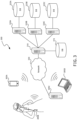
- FIG. 3 is a block diagram illustrating an overview of an environment 300 in which some implementations of the disclosed technology can operate.
- Environment 300 can include one or more client computing devices 305A-D, examples of which can include computing system 100.
- client computing devices e.g., client computing device 305B
- Client computing devices 305 can operate in a networked environment using logical connections through network 330 to one or more remote computers, such as a server computing device.
- server 310 can be an edge server which receives client requests and coordinates fulfillment of those requests through other servers, such as servers 320A-C.
- Server computing devices 310 and 320 can comprise computing systems, such as computing system 100. Though each server computing device 310 and 320 is displayed logically as a single server, server computing devices can each be a distributed computing environment encompassing multiple computing devices located at the same or at geographically disparate physical locations.
- Client computing devices 305 and server computing devices 310 and 320 can each act as a server or client to other server/client device(s).
- Server 310 can connect to a database 315.
- Servers 320A-C can each connect to a corresponding database 325A-C.
- each server 310 or 320 can correspond to a group of servers, and each of these servers can share a database or can have their own database.
- databases 315 and 325 are displayed logically as single units, databases 315 and 325 can each be a distributed computing environment encompassing multiple computing devices, can be located within their corresponding server, or can be located at the same or at geographically disparate physical locations.
- Network 330 can be a local area network (LAN), a wide area network (WAN), a mesh network, a hybrid network, or other wired or wireless networks.
- Network 330 may be the Internet or some other public or private network.
- Client computing devices 305 can be connected to network 330 through a network interface, such as by wired or wireless communication. While the connections between server 310 and servers 320 are shown as separate connections, these connections can be any kind of local, wide area, wired, or wireless network, including network 330 or a separate public or private network.
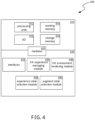
- Figure 4 is a block diagram illustrating components 400 which, in some implementations, can be used in a system employing the disclosed technology.
- Components 400 can be included in one device of computing system 100 or can be distributed across multiple of the devices of computing system 100.
- the components 400 include hardware 410, mediator420, and specialized components 430.
- a system implementing the disclosed technology can use various hardware including processing units 412, working memory 414, input and output devices 416 (e.g., cameras, displays, IMU units, network connections, etc.), and storage memory 418.
- processing units 412 working memory 414
- input and output devices 416 e.g., cameras, displays, IMU units, network connections, etc.
- storage memory 418 can be one or more of: local devices, interfaces to remote storage devices, or combinations thereof.
- storage memory 418 can be one or more hard drives or flash drives accessible through a system bus or can be a cloud storage provider (such as in storage 315 or 325) or other network storage accessible via one or more communications networks.
- components 400 can be implemented in a client computing device such as client computing devices 305 or on a server computing device, such as server computing device 310 or 320.
- Mediator 420 can include components which mediate resources between hardware 410 and specialized components 430.
- mediator 420 can include an operating system, services, drivers, a basic input output system (BIOS), controller circuits, or other hardware or software systems.
- BIOS basic input output system
- Specialized components 430 can include software or hardware configured to perform operations for providing an augmented world environment model for an artificial reality (XR) environment.
- Specialized components 430 can include XR experience managing module 434, XR environment rendering module 436, experience state selection module 438, augment state selection module 440, and components and APIs which can be used for providing user interfaces, transferring data, and controlling the specialized components, such as interfaces 432.
- components 400 can be in a computing system that is distributed across multiple computing devices or can be an interface to a server-based application executing one or more of specialized components 430.
- specialized components 430 may be logical or other nonphysical differentiations of functions and/or may be submodules or code-blocks of one or more applications.
- XR experience managing module 434 can manage multiple artificial reality (XR) experiences in an augmented world environment (e.g., an XR environment) on an XR device.
- Each XR experience can provide one or more corresponding augments defining bounding layouts for two-dimensional (2D) and/or three-dimensional (3D) virtual objects.
- Bounding layouts can represent coordinates, orientation, dimensions, and location types for virtual objects overlaid onto the real world as perceived from the perspective of the user.
- one or more of the XR experiences can provide other content items relevant to the XR experience, such as audio items and/or haptics items. Further details regarding managing multiple XR experiences in an XR environment on an XR device are described herein with respect to block 502 of Figure 5 .
- XR environment rendering module 436 can render the XR environment, managed by XR experience managing module 434, based on a hierarchy of multiple states.
- the multiple states can include multiple experience states corresponding to XR experiences in the XR environment, as well as multiple augment states corresponding to augments managed by XR experiences in the XR environment.
- the experience states can define capabilities of XR experiences.
- the experience states can include an active experience state, a foregrounded experience state, a backgrounded experience state, a not running experience state, and a closed experience state.
- the augment states can define how corresponding augments are or are not displayed in the XR environment.
- the augment states can include a focused state, a displayed state, a minimized state, an unloaded state, and a closed state.
- XR environment rendering module 436 can render the XR environment on the XR device by, for example, applying lighting effects to a display of the XR device to generate an XR environment overlaid on a view of a real-world environment, such as in mixed reality (MR) or augmented reality (AR). Further details regarding rendering an XR environment based on a hierarchy of multiple states are described herein with respect to block 504 of Figure 5 .
- Experience state selection module 438 can cause an XR experience to transition to a particular experience state (or determine an experience state for an XR experience) based on any of a number of factors. For example, experience state selection module 438 can cause an XR experience to transition to an active experience state if one of its augments has a focused augment state (e.g., based on user interaction with one of its augments). In another example, experience state selection module 438 can cause an XR experience to transition to an active experience state upon launch of the XR experience.
- experience state selection module 438 can cause an XR experience to transition to a foregrounded experience state if the XR experience is not in the active experience state, and if the XR experience has at least one corresponding augment in a displayed augment state.
- experience state selection module 438 can cause an XR experience to transition to a backgrounded experience state if each of its augments is not displayed (i.e., has a minimized augment state, an unloaded augment state, or a closed augment state), but when all of its augments are not closed.
- experience state selection module 438 can cause an XR experience to transition to a not running experience state when the XR device terminates the XR experience.
- experience state selection module 438 can cause an XR experience to transition to a closed experience state when the XR experience is closed by the user (e.g., from an experience/augment manager), and/or when each of its corresponding augments has a closed augment state. Further details regarding selecting or determining a state of an XR experience are described herein with respect to Figures 7A-7E .
- Augment state selection module 440 can cause an augment corresponding to an XR experience to transition to a particular augment state, and/or can determine an augment state of an augment corresponding to an XR experience. For example, if a user interacts with an augment, augment state selection module 440 can cause the augment to transition to a focused augment state. In some implementations, if the user ceases interaction with the augment, augment state selection module 440 can cause the augment to transition to a displayed augment state. In another example, if an XR experience creates a new augment in the XR environment, augment state selection module 440 can cause its preexisting augment to transition to a minimized augment state.
- augment state selection module 440 can cause the augment to transition to an unloaded augment state.
- augment state selection module 440 can cause the augment to transition to a closed augment state. Further details regarding selecting or determining a state of an augment are described herein with respect to Figures 9A-9E .
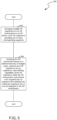
- Figure 5 is a flow diagram illustrating a process 500 used in some implementations for providing an augmented world environment model for an artificial reality (XR) environment.
- the augmented world environment can be a general multitasking XR environment in which multiple XR experiences can be accessed.
- process 500 can be performed upon activation or donning of an XR device.
- process 500 can be performed upon launch of multiple XR experiences on an XR device.
- one or more blocks of process 500 can be performed by an XR device, such as an XR head-mounted display (HMD).
- one or more blocks of process 500 can be performed by another XR device in operable communication with an XR HMD, such as external processing components.
- process 500 can manage multiple XR experiences in the XR environment on an XR device.
- the XR experiences can be, for example, XR applications installed on the XR device, which can be associated with the same or different developers.
- Each XR experience can provide one or more corresponding augments.
- the augments can define bounding layouts for one or more content items, such as visual virtual objects.
- XR experiences can provide other content items other than visual virtual objects, such as audio objects, haptics objects, etc.
- An "augment,” also referred to herein as a "virtual container” is a 2D or 3D volume, in an artificial reality environment, that can include presentation data, context, and logic.
- An artificial reality system can use augments as the fundamental building block for displaying 2D and 3D content in the artificial reality environment.
- augments can represent people, places, and things in an artificial reality environment and can respond to a context such as a current display mode, date or time of day, a type of surface the augment is on, a relationship to other augments, etc.
- a controller in the artificial reality system sometimes referred to as a "shell,” can control how artificial reality environment information is surfaced to users, what interactions can be performed, and what interactions are provided to applications.
- Augments can live on "surfaces" with context properties and layouts that cause the augments to be presented or act in different ways.
- Augments and other objects can also interact with each other, where these interactions can be mediated by the shell and are controlled by rules in the augments evaluated based on contextual information from the shell.
- An augment can be created by requesting the augment from the artificial reality system shell, where the request supplies a manifest specifying initial properties of the augment.
- the manifest can specify parameters such as an augment title, a type for the augment, display properties (size, orientation, location, eligible location type, etc.) for the augment in different display modes or contexts, context factors the augment needs to be informed of to enable display modes or invoke logic, etc.
- the artificial reality system can supply the augment as a volume, with the properties specified in the manifest, for the requestor to place in the artificial reality environment and write presentation data into.
- Augment "presentation data” can include anything that can be output by the augment, including visual presentation data, auditory presentation data, haptic presentation data, etc.
- the presentation data is "live" such that it matches external data either by pointing to that external data or being a copy of it that is periodically updated.
- the presentation data can also be shared, such that a change to the external data by another user or system can be propagated to the output of the augment.
- an augment can display live services and data while accepting interactions from users or other augments.
- a user may select a photo shared on a social media platform to add as presentation data to an augment that is positioned on her wall.
- the owner of the post may modify the photo and the modified version can be shown in the augment.
- Additional live social media content related to the photo may also be in the augment presentation data, such as indications of "likes" or comments on the photo.
- the owner of the photo may also change the access rights, causing the photo to no longer display in the augment.
- An augment can track a current context, based on context factors signaled to the augment by the artificial reality system.
- a context can include a variety of context factors such as a current mode of the artificial reality system (e.g., interactive mode, minimized mode, audio-only mode, etc.), other objects (real or virtual) in the artificial reality environment or within a threshold distance of an augment, characteristics of a current user, social graph elements related to the current user and/or artificial reality environment objects, artificial reality environment conditions (e.g., time, date, lighting, temperature, weather, graphical mapping data), surface properties, movement characteristics of the augment or of other objects, sounds, user commands, etc.
- a current mode of the artificial reality system e.g., interactive mode, minimized mode, audio-only mode, etc.
- other objects real or virtual in the artificial reality environment or within a threshold distance of an augment
- characteristics of a current user e.g., social graph elements related to the current user and/or artificial reality environment objects, artificial reality environment conditions (e.g., time,
- an "object” can be a real or virtual object and can be an inanimate or animate object (e.g., a user).
- Context factors can be identified by the artificial reality system and signaled to the relevant augments. Some context factors (e.g., the current artificial reality system mode) can be automatically supplied to all augments. Other context factors can be registered to be delivered to certain augments (e.g., at creation time via the manifest or through a subsequent context factor registration call). The augment can have variables that hold context factors for which the augment has logic.
- augments can inherit some of these variables from a base augment class, some of these variables can be defined in extensions of the augment class (e.g., for various preestablished augment types), or some of these variables can added to individual augments at augment creation (e.g., with the manifest) or through a later declaration.
- certain context factors can be tracked by the artificial reality system, which augments can check without the artificial reality system having to push the data to individual augments.
- the artificial reality system may maintain a time/date global variable which augments can access without the artificial reality system constantly pushing the value of that variable to the augment.
- the augment's logic (defined declaratively or imperatively) can cause the augment to change its presentation data, properties, or perform other actions in response to context factors.
- the augment's logic can be specified in a base class, in an extension of the base class for augment types, or individually for the augment (e.g., in the manifest).
- all augments can be defined to have logic to redraw themselves for different display modes, where the augment is provided different sizes or shapes of volumes to write into for the different modes.
- all augments of a "person" type can have logic to provide notifications of posts by that person or incoming messages from that person.
- a specific augment can be configured with logic that responds to an area_type context factor for which the augment is registered to receive updates, where the augment responds to that context factor having an "outside" value by checking if a time context factor indicates between 6:00 am and 7:00 pm, and if so, switching to a darker display mode.
- process 500 can render the XR environment based on a hierarchy of multiple states, the multiple states including experience states and augment states.
- the defined hierarchy can be based on a set of rules that control rendering of the multiple XR experiences and the corresponding augments.
- Each XR experience can have an experience state, while each augment can have an augment state.
- the experience states can define capabilities of respective XR experiences.
- the experience states can include an active state, a foregrounded state, a backgrounded state, a not running state, and/or a closed experience state.
- the augment states can define how respective augments are or are not displayed.
- the augment states can include a focused state, a displayed state, a minimized state, an unloaded state, and/or a closed augment state.
- an augment corresponding to a particular XR experience, having a focused state as its augment state, causes the experience state for the particular artificial reality experience to transition to the active state, based on a rule of the set of rules.
- interaction, by a user of the XR device, with an augment corresponding to a particular XR experience can cause the augment to transition to the focused state as the augment state.
- the XR device can render various augments overlaid onto a view of a real-world environment of the user, such as in a mixed reality (MR) or augmented reality (AR) environment.
- MR mixed reality
- AR augmented reality
- the user can interact with one of the augments rendered on the XR device to cause it to enter into the focused state by, for example, making a gesture toward and/or touching a virtual location of a virtual object within the augment, selecting a virtual object within the augment using a virtual ray cast from the user's virtual hand (which can track movements of the user's physical hand) and/or from a controller (e.g., controller 276A and/or controller 276B of Figure 2C ), making an audible announcement (e.g., "Make the avatar of my virtual assistant dance!”, which can be captured by one or more microphones integral with or in operable communication with the XR device, and processed using speech recognition and/or natural language processing techniques), etc.
- the user interaction can cause the augment to come into focus, and its associated experience to become active.
- launching of an XR experience causes the XR experience to transition to the active state, and the XR experience can select one of its corresponding augments to transition to the focused state.
- process 500 can launch the XR experience in response to a user request to launch the XR experience. For example, a user can select the XR experience from a menu and/or via a virtual button corresponding to the XR experience, such as by making a gesture relative to the virtual location of a virtual object representative of the XR experience, and/or by selecting the virtual object using a virtual ray cast in the XR environment, such as via a controller (e.g., controller 276A and/or controller 276B of Figure 2C ).
- a controller e.g., controller 276A and/or controller 276B of Figure 2C .
- a user can select the XR experience by audibly announcing that he would like to launch the XR experience (e.g., "Open my XR pets experience!), which can be captured by, e.g., one or microphones integral with or in operable communication with the XR device.
- process 500 can perform speech recognition and/or natural language processing techniques to translate the announcement into a command recognizable and executable by the XR device to launch the XR experience.
- process 500 can launch the XR experience automatically, such as when process 500 detects that the XR device is in a particular physical space in a real-world environment, e.g., based on visual features of the real-world environment, based on captured and/or obtained spatial anchors for the physical space, based on captured and/or obtained scene data for the physical space, etc.
- process 500 can launch the XR experience automatically based on the XR device entering a particular guardian (i.e., a defined XR usage space, which may have a boundary which can trigger warnings or other system actions if a user crosses the boundary when in an XR experience).
- a particular guardian i.e., a defined XR usage space, which may have a boundary which can trigger warnings or other system actions if a user crosses the boundary when in an XR experience.
- Process 500 can launch the particular XR experience automatically based on, for example, the XR experience being the most frequently used XR experience in that physical space and/or guardian, the XR experience being last accessed within that physical space and/or guardian (in which case, in some implementations, process 500 can pick up where the user left off when last accessing the XR experience), and/or a mapping of the of the XR experience to that physical space and/or guardian (either established manually by the user or automatically by process 500, such as based on features of the physical space with respect to features of the XR experience, as described further herein).
- process 500 can automatically launch an XR work space experience, which can cause the XR work space experience to transition to the active state, and an augment within the XR work space experience (e.g., a virtual computer) to transition to the focused state.
- an XR experience can have the active state
- only one augment can have the focused state, i.e., the XR experience in the active state can be exclusively in the active state, and/or the augment in the focused state can be exclusively in the focused state.
- any other augments associated with any other experiences rendered in the physical office space can be unfocused (e.g., have a displayed state or a minimized state). Further details regarding an active experience state are described herein with respect to Figure 7A . Further details regarding a focused augment state are described herein with respect to Figure 9A .
- an XR experience if an XR experience is not in the active state (e.g., has not just been launched and/or has not received a user interaction with one of its augments, i.e., does not have an augment in the focused state), but has at least one of its augments displayed (e.g., in an unfocused state), the XR experience can have a foregrounded state.
- the XR experience can perform any functions that are not restricted to only the active state. For example, process 500 can still render the augments of the foregrounded experience, targetable content within the augments can remain hoverable, and the foregrounded experience can continue to perform work of user value.
- an in the displayed state corresponding to an XR experience in the foregrounded state, can be rendered with degradation (i.e., in a moderated manner) relative to a focused augment state.
- the at least one augment in the displayed state does not have to be rendered with degradation relative to the focused augment state.
- interaction with a displayed augment while the XR experience is in the foregrounded state can cause the augment to enter the focused state and the XR experience to enter the active state. Further details regarding a foregrounded experience state are described herein with respect to Figure 7B . Further details regarding a displayed augment state are described herein with respect to Figure 9B .
- process 500 can render multiple augments having different augment states, despite each of the augments corresponding to the same XR experience.
- the XR experience can create new augments in the XR environment.
- process 500 can cause one or more of the existing displayed augments corresponding to the XR experience to transition to a minimized state.
- process 500 can cause all of the existing displayed augments corresponding to the XR experience to transition to a minimized state.
- augments can be loaded in the scene (either in or out of the field-of-view of the XR device), but can be minimized to an icon (e.g., a virtual object representative of the augment, but simpler than the full display of the augment and/or consuming less resources than a full display of the augment).
- icon e.g., a virtual object representative of the augment, but simpler than the full display of the augment and/or consuming less resources than a full display of the augment.
- other actions can cause an augment to transition to a minimized state as well. Further details regarding a minimized augment state are described herein with respect to Figure 9C .
- process 500 can render the augment (or its corresponding icon when in the minimized state) with reference to one or more spatial anchors established for the real-world environment.
- the spatial anchors can be world-locked frames of reference that can be created at particular positions and orientations to position content items within the augments at consistent points in an XR environment. Spatial anchors can be persistent across different sessions of an XR experience, such that a user can stop and resume an XR experience, while still maintaining content at the same locations in the real-world environment.
- the spatial anchors can be stored locally on the XR device.
- the spatial anchors can be stored on a platform computing system on a cloud.
- the user of the XR device (or another user on the XR device or another XR device) can use the XR device to create, capture, and/or access locally cached spatial anchors at locations in the real-world environment, then upload those spatial anchors to the platform computing system.
- the platform computing system can align the uploaded spatial anchors on a localization map, query a database for preexisting spatial anchors for the real-world environment (e.g., that are proximate to the XR device), and transmit the preexisting spatial anchors back to the XR device.
- the XR device can then render one or more augments of the XR experience in the real-world environment using the uploaded spatial anchors and the preexisting spatial anchors, without having to itself capture and persistently store all of the spatial anchors needed to render the XR experience.
- some implementations can conserve storage space on an XR device.
- the XR device can locally store larger amounts of data needed render the XR experience, improving latency and processing speed on the XR device.
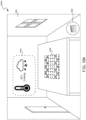
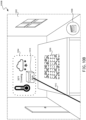
- the augment when an augment has a focused state, a displayed state, or a minimized state, the augment can have a corresponding virtual selectable element that can receive input to enter into an exclusive mode with respect to the corresponding XR experience, thereby removing the user from the augmented world environment, as described further herein with respect to Figure 10B .
- process 500 can display the corresponding virtual selectable element to enter into the exclusive mode upon a certain interaction, such as hovering by a hand, controller, and/or virtual ray cast into the XR environment over a particular augment.
- an XR experience can proactively prompt the user of the XR device to enter into the exclusive mode.
- process 500 can render only the corresponding XR experience in the XR environment (i.e., exclusively render the corresponding XR experience), without rendering any augments associated with any other XR experiences.
- Entering the exclusive mode can remove the user of the XR device from the augmented world environment, allowing the user to focus instead on the selected XR experience.
- the XR experience can position content within the XR environment without consideration of other experiences and potential augments. Further, rules that the augmented world environment enforces to facilitate a spatial multi-tasking environment can be relaxed for the XR experience in exclusive mode.
- the XR experience in exclusive mode is the active experience, so input does not need to be directed through augments to define active experiences.
- an XR experience can display a menu or other set of one or more options with respect to the exclusive mode, including an option to exit the exclusive mode, and return to the augmented world environment. Further details regarding rendering of an exclusive mode are described herein with respect to Figure 10B .
- the XR experience when all of the augments corresponding to an XR experience are not displayed, but an XR experience is performing work of user value, the XR experience can have a backgrounded state. When in the backgrounded state, the XR experience can continue to perform work of user value (e.g., playing music, downloading a file, tracking location, etc., which can also be performed by XR experiences in the active or foregrounded state), even though none of its augments are being displayed. Further details regarding a backgrounded experience state are described herein with respect to Figure 7C .
- Augments that are not displayed can have, for example, a minimized state as described above, an unloaded state, or a closed state.
- the virtual representation of the XR device being a threshold distance away from an augment can cause the augment to transition to the unloaded state.
- an augment can have the unloaded state when the XR device can no longer localize the augment, e.g., due to the user leaving a physical space (e.g., a room) in which the augment is localized.
- the XR device can no longer localize the augment because the XR device moved outside a guardian where the XR experience can be accessed.
- the XR device can no longer localize the augment because the XR device no longer has access to one or more spatial anchors referenced by the augment. Further details regarding an unloaded augment state are described herein with respect to Figure 9D .
- an XR experience can have a not running experience state.
- the XR experience can have the not running experience state when it is not executing, and thus has no open augments.
- the XR experience can have the not running experience state when process 500 terminates the XR experience.
- the XR experience can have no capabilities, e.g., unlike in the active, foregrounded, and backgrounded states, the XR experience cannot perform work of user value. Further details regarding a not running experience state are described herein with respect to Figure 7D .
- An augment can have a closed augment state when the augment no longer exists (i.e., it has been deleted from an augment graph and is no longer present in the scene).
- an augment can have a closed augment state when a user selects to close the augment from an experience/augment manager displayed on the XR device.
- an augment can have a closed augment state when an XR experience having an active experience state chooses to close its augment.
- an augment can have a closed augment state when an orchestrating experience (e.g., an experience managing rendering of augments corresponding to one or more open XR experiences) closes the augment.
- the XR experience and/or the orchestrating experience can close an augment based on one or more constraints, the constraints being either system-level (i.e., established by a platform associated with the XR device) or developer-defined (i.e., established by a developer of a respective XR experience and/or its particular rendering framework).
- constraints being either system-level (i.e., established by a platform associated with the XR device) or developer-defined (i.e., established by a developer of a respective XR experience and/or its particular rendering framework).
- the constraints can include one or more of a size of the augment, a size of the augment that is allocated to a particular content item, the size of the augment that is allocated to the XR experience relative to the size of augments allocated to the one or more other XR experiences, how the content items and/or augments associated with the same or different XR experiences can interact with each other, how the content items and/or augments are positioned with respect to other content items and/or augments associated with the same or different XR experiences, or any combination thereof. Further details regarding a closed augment state are described herein with respect to Figure 9E .
- the XR experience when all of the augments corresponding to an XR experience are in a closed augment state, the XR experience can have a closed experience state.
- the XR experience when the XR experience is closed by a user of the XR device (e.g., from an experience/augment manager displayed on the XR device), the XR experience can have a closed experience state.
- An XR experience in a closed experience state can be closed from the perspective of the user of the XR device. From the closed experience state, the user of the XR device can launch the XR experience, causing the XR experience to transition to an active experience state. Further details regarding a closed experience state are described herein with respect to Figure 7E .
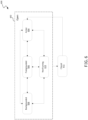
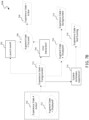
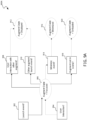
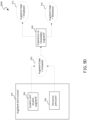
- Figure 6 is a block diagram illustrating a lifecycle 600 of experience states for an XR experience in an augmented world environment model.
- the experience states can include open experience states 602 and closed experience state 612.
- Open experience states 602 can include active state 604, foregrounded state 606, backgrounded state 608, and not running state 610.
- An XR experience can move from "open” or "closed” states from the perspective of a user of an XR device in which the augmented world environment is modeled, while moving through foregrounded state 606, backgrounded state 608, and not running state 610 can be observed from a system- and developer-level perspective.
- Open experience states 602 can transition amongst themselves based on various factors, as described further herein with respect to Figures 7A-7D . Open experience states 602 can further transition into closed experience state 612, and closed experience state 612 can transition into active state 604, as described further herein with respect to Figure 7E .
- lifecycle 600 can provide resource management. For example, XR experiences can receive varying resources (e.g., processing power and memory) as they move between states. Lifecycle 600 can further provide capability management, such that an XR experience having active state 604 can have privileges and capabilities not provided to the other states. For example, a single XR experience having active state 604 can have unique capabilities and resource priority.
- XR experiences can be visible in foregrounded state 606 (or invisible and in backgrounded state 608), but can have fewer resources and capabilities.
- XR experiences in active state 604 can be allocated more rendering resources than XR experiences in the backgrounded state.
- lifecycle 600 can increase a user's feeling of control by allowing only one XR experience to modify the user's augmented world environment without direct user action. Thus, a user can more readily understand which XR experience has taken an action, such as by spontaneously creating or closing an augment.
- Active state 604 is described further herein with respect to Figure 7A .
- Foregrounded state 606 is described further herein with respect to Figure 7B .
- Backgrounded state 608 is described further herein with respect to Figure 7C .
- Not running state 610 is described further herein with respect to Figure 7D .
- Closed experience state 612 is described further herein with respect to Figure 7E .
- Figure 7A is a flow diagram illustrating a process 700A used in some implementations for entering and exiting an active experience state according to an augmented world environment model.
- process 700A can be performed upon receipt of a launch event at block 702, and/or upon interaction with an augment rendered on an XR device at block 704.
- one or more blocks of process 700A can be performed by an XR device, such as an XR head-mounted display (HMD) (e.g., XR HMD 200 of Figure 2A and/or XR HMD 252 of Figure 2B ).
- one or more blocks of process 700A can be performed by another XR device in an XR system in operable communication with an XR HMD, such as external processing components.
- HMD XR head-mounted display
- process 700A can determine whether a launch event has occurred.
- the launch event can be, for example, a user selection of the XR experience from a virtual menu or launcher, a user selecting or entering a virtual portal associated with the XR experience, etc.
- the launch event can be an automatic launch of the XR experience, e.g., by a user of the XR device entering a particular physical space or guardian, by a user activating and/or donning the XR device, etc.
- the launch event can be based on the user following a deep link to the XR experience, such as, for example, a user "clicking" on a notification from an XR experience.
- the XR experience can select one of its augments to bring into focus at block 706, as is described further herein with respect to block 906 of Figure 9A .
- process 700A can receive a user interaction with an augment corresponding to an XR experience.
- the user interaction can be an engagement interaction, such as, for example, touching of or hovering over a virtual object within an augment with the user's virtual hand (which can be tracking movements of the user's physical hand), touching of or hovering over the virtual object with a virtual ray cast from the user's virtual hand and/or a controller (e.g., controller 276A and/or controller 276B of Figure 2C ), a selection of a physical button when the virtual ray cast from the controller is hovering over the virtual object, etc.
- the engagement interaction can provide intent of the user to interact with the augment, without a "physical" interaction occurring between the user and the augment.
- the user interaction can alternatively or additionally include the user's gaze direction being at an augment or a particular virtual object within an augment, which, in some implementations, can be captured by one or more cameras integral with the XR device and facing the user.
- the user interaction can alternatively or additionally include the user's gaze direction being at an augment or a particular virtual object within an augment, which, in some implementations, can be captured by one or more cameras integral with the XR device and facing the user.
- the augment can be in the focused state at block 706 regardless of whether the augment is inside or outside the field-of-view of the XR device.
- the user can interact with a virtual object within an augment being rendered on the XR device, but can then move the XR device (e.g., by moving her head), such that the virtual object and/or the augment is no longer in the field-of-view of the user.
- the augment that the user interacted with at block 704 can remain in the focused state, unless or until another XR experience is launched at block 702, or a user interaction with a different augment is received at block 704.
- only one augment, of all of the augments for all of the XR experiences being accessed on the XR device can have the focused state.
- the corresponding XR experience hosting the augment can be brought into an active state at block 708.
- the XR experience having the active state can be the XR experience that owns the currently focused augment. In some implementations, only one XR experience can have the active state at a time. In some implementations, the XR experience having the active state can have unique capabilities, such as closing augments, creating augments, manipulating augments, moving augments from body-leashed to world-locked, etc. In some implementations, such capabilities can be withheld from XR experiences in other experience states, such as the foregrounded state, the backgrounded state, etc.
- Blocks 710-718 describe processes by which an XR experience can move from an active state to another experience state.
- the augment state for the focused augment changes to any other augment state (e.g., as described herein with respect to Figure 9A )
- either block 712 or block 714 can occur based on particular criteria, as described further herein with respect to Figures 7B and 7C .
- the XR experience can have a foregrounded experience state, or at block 714, the XR experience can have a backgrounded experience state.
- the XR device terminates the XR experience
- the XR experience can have a not running experience state at block 718, as is described further herein with respect to Figure 7D .
- Figure 7B is a flow diagram illustrating a process 700B used in some implementations for entering and exiting a foregrounded experience state according to an augmented world environment model.
- process 700B can be performed when an XR experience does not have an active state, but has one or more augments having a displayed state.
- one or more blocks of process 700B can be performed by an XR device, such as an XR head-mounted display (HMD) (e.g., XR HMD 200 of Figure 2A and/or XR HMD 252 of Figure 2B ).
- HMD XR head-mounted display
- one or more blocks of process 700B can be performed by another XR device in an XR system in operable communication with an XR HMD, such as external processing components.
- An XR experience can have the foregrounded experience state at block 712 when its experience state is not the active experience state at block 720, and when at least one augment corresponding to the XR experience has a displayed augment state. Further details regarding a displayed augment state are described herein with respect to Figure 9B . While in the foregrounded state at block 712, the XR experience can have any capabilities that are not restricted to only active XR experiences. For example, foregrounded XR experiences can still render to their relevant augments and targetable content can remain hoverable. Further, foregrounded XR experiences can perform work of user value, such as playing music, downloading files, tracking location, etc.
- the XR experience having the foregrounded experience state at block 712 can move to another experience state by any of a number of methods. For example, if the XR experience receives a launch event at block 702, or an augment corresponding to the XR experience receives a user interaction at block 706, a selected or corresponding augment can enter a focused augment state at block 706, and the XR experience can enter the active experience state at block 708, as described further herein with respect to Figure 7A . In another example, if the XR experience no longer owns at least one augment that has a displayed augment state at block 724, then the XR experience can enter into the backgrounded experience state at block 714, as is described further herein with respect to Figure 7C . In still another example, if the XR device terminates the XR experience at block 716, then the XR experience can enter into the not running experience state, as is described further herein with respect to Figure 7D .
- Figure 7C is a flow diagram illustrating a process 700C used in some implementations for entering and exiting a backgrounded experience state according to an augmented world environment model.
- process 700C can be performed when an XR experience has no augments that are in a displayed state, i.e., only has augments in a not displayed state (e.g., a minimized augment state, an unloaded augment state, or a closed augment date).
- one or more blocks of process 700C can be performed by an XR device, such as an XR head-mounted display (HMD) (e.g., XR HMD 200 of Figure 2A and/or XR HMD 252 of Figure 2B ).
- one or more blocks of process 700C can be performed by another XR device in an XR system in operable communication with an XR HMD, such as external processing components.
- HMD XR head-mounted display
- an XR experience can be in a backgrounded experience state at block 714.
- An XR experience in a backgrounded experience state at block 714 can be an XR experience with no displayed augments that may be performing work of user value.
- the XR experience can do anything that an XR experience in a foregrounded experience state can do. While backgrounded, the XR experience will likely do background work such as playing music, downloading files, tracking location, etc.
- the XR experience having the backgrounded experience state at block 714 can move to another experience state by any of a number of methods. For example, if the XR experience receives a launch event at block 702, a selected augment can enter a focused augment state at block 706, and the XR experience can enter the active experience state at block 708, as described further herein with respect to Figure 7A . In another example, if one or more augments enters a displayed augment state at block 722, the XR experience can have the foregrounded experience state at block 712. Further details regarding a foregrounded experience state are described herein with respect to Figure 7B . Further details regarding a displayed augment state are described herein with respect to Figure 9B .
- the XR experience can enter into the not running experience state.
- the XR experience stops performing background work at block 726 then the XR experience can similarly enter into the not running experience state. Further details regarding a not running experience state are described herein with respect to Figure 7D .
- Figure 7D is a flow diagram illustrating a process 700D used in some implementations for entering and exiting a not running experience state according to an augmented world environment model.
- process 700D can be performed when an XR device terminates an XR experience at block 716, or when an XR experience stops performing background work at block 726.
- one or more blocks of process 700D can be performed by an XR device, such as an XR head-mounted display (HMD) (e.g., XR HMD 200 of Figure 2A and/or XR HMD 252 of Figure 2B ).
- one or more blocks of process 700D can be performed by another XR device in an XR system in operable communication with an XR HMD, such as external processing components.
- HMD XR head-mounted display
- an XR experience can have a not running experience state at block 718 when an XR device terminates the XR experience at block 716.
- an XR experience can have a not running experience state at block 718 when an XR device stops performing background work at block 726, i.e., is not performing work of user value, such as not playing music, not downloading files, not tracking location, etc. While in the not running experience state at block 718, the XR experience is not executing.
- the XR experience having the not running state at block 718 can move to another experience state by any of a number of methods. For example, if the XR experience receives a launch event at block 702, a selected augment can enter a focused augment state at block 706, and the XR experience can enter the active experience state at block 708, as described further herein with respect to Figure 7A . In another example, if a creation event takes place at block 728, the XR experience can enter either a foregrounded experience state at block 712 or a backgrounded experience state at block 714.
- the creation event received at block 728 can be a system-level creation of the XR experience by the XR device.
- Figure 7E is a flow diagram illustrating a process 700E used in some implementations for entering and exiting a closed experience state according to an augmented world environment model.
- process 700E can be performed when a user closes an XR experience or closes all augments corresponding to an XR experience at block 730.
- one or more blocks of process 700E can be performed by an XR device, such as an XR head-mounted display (HMD) (e.g., XR HMD 200 of Figure 2A and/or XR HMD 252 of Figure 2B ).
- HMD XR head-mounted display
- one or more blocks of process 700E can be performed by another XR device in an XR system in operable communication with an XR HMD, such as external processing components.
- a user can close the XR experience at block 730, and the XR experience will enter a closed experience state at block 732.
- a user can close all augments corresponding to an XR experience (i.e., all augments of the XR experience enter into a closed augment state), and the XR experience will enter a closed experience state at block 732.
- the XR experience will remain in a closed experience state at block 732 unless or until a launch event occurs at block 702. If a launch event occurs at block 702, an augment corresponding to the XR experience will enter a focused augment state at block 706. Further, the XR experience will enter an active experience state at block 708. Further details regarding a focused augment state are described herein with respect to Figure 9A . Further details regarding an active experience state are described herein with respect to Figure 7A .
- FIG. 8 is a block diagram illustrating a lifecycle 800 of augment states for augments of XR experiences in an augmented world environment model.
- the augment states can include open augment states 802 and closed augment state 812.
- Open augment states 802 can include focused augment state 804, displayed augment state 806, minimized augment state 808, and unloaded augment state 810.
- An augment having one of open augment states 802 can be an augment that exists, whether it is minimized or not, and can be listed in an experience/augment manager of the augmented world environment in some implementations. Any of open augment states 802 can map to any non-closed experience state of an XR experience.
- An augment having closed augment state 812 can be an augment that does not exist, e.g., due to a user closing the augment in an experience/augment manager, thereby removing it from the scene.
- Closed augment state 812 can map to a closed experience state of an XR experience.
- Focused augment state 804 can transition to any other open augment state 802, as well as to closed augment state 812. Further details regarding focused augment state 804 are described herein with respect to Figure 9A .
- Displayed augment state 806 can transition to any other open augment state 802, as well as to closed augment state 812. Further details regarding displayed augment state 806 are described herein with respect to Figure 9B .
- Minimized augment state 808 can transition to displayed augment state 806, unloaded augment state 810, or closed augment state 812. Further details regarding minimized augment state 808 are described herein with respect to Figure 9C .
- Unloaded augment state 810 can transition to any other open augment state 802, as well as to closed augment state 812.
- Figure 9A is a flow diagram illustrating a process 900A used in some implementations for entering and exiting a focused augment state according to an augmented world environment model.
- process 900A can be performed upon detection of a launch event with respect to an XR experience at block 902, and/or upon detection of an interaction with an augment rendered on an XR device at block 904.
- one or more blocks of process 900A can be performed by an XR device, such as an XR head-mounted display (HMD) (e.g., XR HMD 200 of Figure 2A and/or XR HMD 252 of Figure 2B ).
- one or more blocks of process 900A can be performed by another XR device in an XR system in operable communication with an XR HMD, such as external processing components.
- HMD XR head-mounted display
- process 900A can determine whether a launch event has occurred with respect to an XR experience.
- Process 900A can determine whether a launch event has occurred with respect to an XR experience similarly to that described with respect to block 702 of process 700A of Figure 7A herein. If process 900A determines that a launch event has occurred with respect to the XR experience, the XR experience can select one of its augments to bring into focus at block 906.
- the XR experience can select which augment to bring into focus based on any criteria, such as the augment last displayed when the XR experience was previously accessed, the augment most frequently interacted with by the user when the XR experience was previously accessed, the most popular augment associated with the XR experience with respect to multiple users of the XR experience, etc.
- the XR experience can select which augment to bring into focus based on features of the augment with respect to features of the user (e.g., demographics of the user, habits of the user, etc.), with respect to features of the real-world environment (i.e., where the XR device was located when the user launched the XR experience, scene data and/or visual features of the real-world environment for the location of the XR device when the user launched the XR experience, guardian data established for the real-world environment, etc.), contextual data (e.g., time of day, time of year, season, environmental conditions such as temperature, etc.), and/or the like.
- features of the user e.g., demographics of the user, habits of the user, etc.
- features of the real-world environment i.e., where the XR device was located when the user launched the XR experience, scene data and/or visual features of the real-world environment for the location of the XR device when the user launched the XR experience, guardian
- the XR cooking experience can bring into focus an augment including a virtual timer.
- the XR cooking experience can bring into focus an augment including a virtual cookbook, instead of the augment with the virtual timer.
- the XR home experience can bring an augment having a virtual book into focus when launched in a bedroom at night based on visual features of the bedroom (e.g., ambient light, a bed recognized by object recognition, etc.), while the XR home experience can bring an augment having a virtual television in focus when launched from a guardian corresponding to a couch at night.
- visual features of the bedroom e.g., ambient light, a bed recognized by object recognition, etc.
- process 900A can determine whether a user interaction has occurred with an augment corresponding to an XR experience.
- Process 900A can determine whether a user interaction has occurred with an augment corresponding to an XR experience similarly to that described with respect to block 704 of process 700A of Figure 7A .
- that augment can be brought into a focused state at block 906.
- the augment can be in the focused state at block 906 regardless of whether the augment is inside or outside the field-of-view of the XR device.
- the user can interact with a virtual object within an augment being rendered on the XR device, but can then move the XR device (e.g., by moving her head), such that the virtual object and/or the augment is no longer in the field-of-view of the user.
- only one augment, of all of the augments for all of the XR experiences being accessed on the XR device can have the focused state.
- the augment that the user interacted with at block 904 can remain in the focused state at block 906, unless or until an event is detected relative to blocks 908, 910, 914, or 918, unless or until the augment is closed, or unless or until the XR device is removed and/or deactivated.
- process 900A can determine whether a user interaction has been detected with respect to another augment.
- the other augment can be another augment corresponding to the same XR experience, or can be another augment corresponding to a different XR experience. If a user interaction is detected with respect to another augment at block 908, process 900A can change the augment state to a displayed augment state at block 912.
- process 900A can determine whether there is another augment launch event, e.g., an XR experience chooses to bring a different augment into focus. If process 900A determines that there is another augment launch event, process 900A can change the augment state to a displayed augment state at block 912. In other words, if another augment goes into a focused augment state, process 900A can change the augment state to a displayed augment state. Further details regarding a displayed augment state are described herein with respect to Figure 9B .
- process 900A can determine whether a minimize event has occurred. If process 900A determines that a minimize event has occurred at block 914, process 900A can change the augment state to a minimized augment state at block 916.
- the minimize event can be a user minimization of the augment to an icon in order to clear the user's field-of-view, or to create space in the augmented world environment. Further details regarding a minimized augment state are described herein with respect to Figure 9C .
- process 900A can determine whether the augment is not in the scene. If process 900A determines that the augment is not in the scene at block 918, process 900A can change the augment state to an unloaded augment state at block 920. Once in an unloaded augment state, the corresponding XR experience will not be doing any work or consuming any resources for the augment. Further details regarding an unloaded augment state are described herein with respect to Figure 9D .
- Figure 9B is a flow diagram illustrating a process 900B used in some implementations for entering and exiting a displayed augment state according to an augmented world environment model.
- process 900B can be performed when it is determined that an augment does not have an augment state of unloaded at block 922 and does not have an augment state of minimized at block 924.
- process 900B can be performed when an augment has an unminimize event at block 926.
- process 900B can be performed when an XR experience re-instantiates an augment at block 930.
- one or more blocks of process 900B can be performed by an XR device, such as an XR head-mounted display (HMD) (e.g., XR HMD 200 of Figure 2A and/or XR HMD 252 of Figure 2B ).
- an XR device such as an XR head-mounted display (HMD) (e.g., XR HMD 200 of Figure 2A and/or XR HMD 252 of Figure 2B ).
- one or more blocks of process 900B can be performed by another XR device in an XR system in operable communication with an XR HMD, such as external processing components.
- HMD XR head-mounted display
- process 900B can determine whether an augment is newly loaded into the augmented world environment, and at block 924, process 900B can determine whether the newly loaded augment does not have a minimized state. If the augment is newly loaded and does not have the minimized state, process 900B can determine that the augment has a displayed state at block 912. Further details regarding loading an augment from an unloaded state are described with respect to Figure 9D . Further details regarding a minimized state are described with respect to Figure 9C .
- process 900B can determine whether an unminimize event occurred with respect to an augment having the minimized state. For example, a user of the XR device can select an option to unminimize an augment displayed as an icon on the XR device, which, in some implementations, can be overlaid onto a view of the real-world environment. If an unminimize event occurred, process 900B can cause the augment to transition to the displayed state at block 912. Further details regarding unminimizing an augment having a minimized state are described herein with respect to Figure 9C .
- process 900B can determine whether an XR experience corresponding to an augment has re-instantiated the augment. For example, if an XR device can no longer localize the augment (e.g., due to the user of the XR device leaving the room, leaving a particular guardian, being a threshold distance from spatial anchors needed to localize the augment, etc., as described further herein), the XR device can enter an unloaded state, as described further herein with respect to Figure 9D .
- the XR device can send an instantiation event to the XR experience corresponding to the augment, and, in some implementations, the XR experiences can re-instantiate the augment in a displayed augment state at block 912.
- the augment In the displayed augment state, the augment can be loaded in the scene and can render its content into a presenter volume, which may or may not be within the field-of-view of the XR device.
- the augment can be visible when looked at, and audible when behind the user of the XR device.
- the augment's corresponding spatial anchor can be localized, and the XR device can place the augment relative to the spatial anchor.
- the augment when an augment has a displayed state, can have degradation applied relative to an augment in a focused state.
- the augment having the displayed state can be rendered in a fully or selectively moderated manner.
- the moderated manner can include at least one of dimming, desaturating, rendering the augment in two dimensions, reducing framerate/pausing animation, applying foveated vignette, monochrome rendering, removing fills, reducing texture resolution, using imposters, simplification of features (e.g., reducing polygon count, making an augment appear blockier), applying blur, entering light or dark mode, compressing content, degrading to bounding box, degrading to object outline, clipping the field-of-view, reducing dynamic lighting, applying smoothing (e.g., blue or shapes), applying noise (e.g., fine grain, coarse grain, etc.), or any combination thereof, thus requiring less resources to render the augment.
- smoothing e.g., blue or shapes
- noise e.g., fine grain, coarse grain, etc.
- Foveated imaging is an image processing technique in which the amount of detail varies across the image based on the fixation point of a user's gaze.
- Vignette is an image processing technique in which an image fades off gradually into the background.
- "foveated vignette” describes applying image processing to the augment such that the augment fades gradually from a focal point, such as a particular virtual object, toward its edges and into the background.
- the augment can have increased opacity or transparency toward its edges such that it appears to fade into the real-world background.
- the augment can become darker toward its edges, i.e., fading into black.
- an "imposter,” as used herein, is a two-dimensional simplified rendering of a three-dimensional object mapped onto a rectangular card or billboard.
- process 900B can render multiple possible perspectives of a three-dimensional representation of the augment into textures onto a billboard, creating a less complex geometric representation. Because the augment is not focused, the user of the XR device is less likely to notice the imposter. Using imposters can result in the XR device using less processing power by reducing the amount of geometry that needs to be rendered.
- Entering light or dark mode relates generally to the inversion of colors.
- process 900B can render the augment in light color against a dark background.
- process 900B can render the augment in dark colors against a light background.
- Using light or dark mode can reduce power consumption by the display on an XR device depending on the environment of the user of the XR device. For example, if the user is in a room with high ambient light, process 900B can enter light mode and render the augment in darker colors, reducing battery consumption. As another example, if the user is in a room with low ambient light, process 900B can enter dark mode and render the background in darker colors, also reducing battery consumption.
- the augment can exit a displayed augment state and enter another augment state by any of a variety of methods, such as those described with respect to blocks 902, 904, 914, and 918.
- process 900B can determine whether a launch event occurred to bring the augment into a focused augment state.
- the launch event can be, for example, an XR experience selecting to bring the displayed augment into focus, and placing an augment previously in a focused augment state into a displayed, minimized, unloaded, or closed augment state, as described further herein with respect to Figures 9A and 9E . If process 900B determines that a launch event occurred at block 902, process 900B can bring the augment into a focused augment state at block 906.
- process 900B can determine whether there was a user interaction with an augment having the displayed augment state. If there was a user interaction with the augment having the displayed augment state, process 900B can bring the augment into a focused augment state at block 906. Further details regarding determining whether a user interaction with an augment occurred and further details regarding a focused augment state are described herein with respect to Figure 9A .
- process 900B can determine whether a minimize event has occurred with respect to the augment in the displayed augment state. If process 900B determines that a minimize event has occurred at block 914, process 900B can change the augment state to a minimized augment state at block 916.
- the minimize event can be a user minimization of the augment to an icon in order to clear the user's field-of-view, or to create space in the augmented world environment. Further details regarding a minimized augment state are described herein with respect to Figure 9C .
- process 900B can determine whether the augment is not in the scene. If process 900B determines that the augment is not in the scene at block 918, process 900B can change the augment state to an unloaded augment state at block 920. Once in an unloaded augment state, the corresponding XR experience will not be doing any work or consuming any resources for the augment. Further details regarding an unloaded augment state are described herein with respect to Figure 9D .
- Figure 9C is a flow diagram illustrating a process 900C used in some implementations for entering and exiting a minimized augment state according to an augmented world environment model.
- process 900C can be performed when it is determined that a minimize event has occurred at block 914, a creation event has occurred at block 928, an experience re-instantiates an augment at block 930, and/or a system event has occurred at block 932.
- one or more blocks of process 900C can be performed by an XR device, such as an XR head-mounted display (HMD) (e.g., XR HMD 200 of Figure 2A and/or XR HMD 252 of Figure 2B ).
- one or more blocks of process 900C can be performed by another XR device in an XR system in operable communication with an XR HMD, such as external processing components.
- HMD XR head-mounted display
- process 900C can determine whether a minimize event has occurred with respect to an augment having a focused augment state or a displayed augment state.
- the minimize event can be a user minimization of the augment.
- the user can select an option, such as a virtual button or other selectable element, displayed on the XR device in conjunction with the augment.
- the user can select the option by, for example, touching of or hovering over the virtual button with the user's virtual hand (which can be tracking movements of the user's physical hand), touching of or hovering over the virtual button with a virtual ray cast from the user's virtual hand and/or a controller (e.g., controller 276A and/or controller 276B of Figure 2C ), a selection of a physical button when the virtual ray cast from the controller is hovering over the virtual button, etc.
- a controller e.g., controller 276A and/or controller 276B of Figure 2C
- the minimize event can alternatively or additionally include the user's gaze direction being away from a focused or displayed augment (e.g., for a threshold period of time), which, in some implementations, can be captured by one or more cameras integral with the XR device and facing the user. If process 900B determines that a minimize event has occurred at block 914, process 900B can cause the augment to transition to a minimized augment state at block 916.
- a focused or displayed augment e.g., for a threshold period of time
- process 900C can determine whether a creation event has occurred.
- the creation event can be, for example, an XR experience creating a new augment in the scene.
- that augment can have a focused augment state or a displayed augment state, and the pre-existing augment can be assigned a minimized augment state at block 916.
- process 900C can determine whether an XR experience corresponding to the augment has re-instantiated the augment. For example, as described herein with respect to Figure 9D , the XR device can no longer localize an augment in some circumstances, such as when a user of the XR device leaves the room in which the augment is rendered. When the user re-enters the room, for example, process 900C can re-localize the augment and send an instantiation event to the corresponding XR experience. The XR experience can then re-instantiate the augment, putting the augment into a minimized augment state at block 916. In some implementations, however, it is contemplated that the XR experience can alternatively re-instantiate the augment in a displayed augment state at block 912 of Figure 9B .
- the XR experience can determine whether to re-instantiate the augment into a displayed augment state at block 912 of Figure 9B , or in a minimized augment state at block 916 of Figure 9C . In some implementations, however, process 900C can determine whether to re-instantiate the augment into a displayed augment state at block 912 of Figure 9B , or in a minimized augment state at block 916 of Figure 9C .
- Process 900C can make such a determination, based on, for example, system-level or application-defined constraints, such as available resources (e.g., battery power, processing power, available storage, etc.), a size of the augment, a size of the augment that is allocated to a particular content item, the size of the augment that is allocated to the XR experience relative to the size of augments allocated to the one or more other XR experiences, how the content items and/or augments associated with the same or different XR experiences can interact with each other, how the content items and/or augments are positioned with respect to other content items and/or augments associated with the same or different XR experiences, crowding of the field-of-view of the user on the XR device, or any combination thereof.
- available resources e.g., battery power, processing power, available storage, etc.
- a size of the augment e.g., a size of the augment that is allocated to a particular content item
- the size of the augment that is allocated to the XR experience
- process 900C can determine whether a system event has occurred.
- the system event can be enforced minimization of an augment by an XR device.
- the XR device can enforce minimization based on any of the system-level or application-defined constraints described above. If process 900C determines that a system event has occurred, process 900C can cause the augment to transition to a minimized augment state at block 916.
- the augment In the minimized augment state, the augment can be loaded in the scene (and may be in or out of the user's field-of-view on the XR device), but the augment can be minimized to an icon.
- the icon can be a simplification of the augment, and can include text and/or graphics representative of the augment.
- the augment is an XR chess board, the icon can be a chess piece.
- the icon can be simplified to two dimensions and/or can be static. In some implementations, however, the icon can be three-dimensional (3D) and/or dynamic.
- the icon can be a placeholder for the augment that is visible when looked at.
- the icon's related spatial anchor can be localized and the XR device can render the icon at that spatial anchor.
- the minimized augment state can be useful for a user so that she is able to clear her field-of-view without unloading or closing the augment.
- the minimized augment state allows the user to minimize the amount of display dedicated to the augment, without removing reference to the augment from the scene altogether, allowing the user to quickly and easily unminimize the augment as desired.
- the minimized augment state can be useful to create space in the augmented world environment, which can cause an augment to be minimized to avoid collision of augments.
- the augment can exit the minimized augment state and enter another augment state by any of a variety of methods.
- process 900C can determine whether an unminimize event has occurred. Similar to a minimize event at block 914, an unminimize event can include a user selection of an option to unminimize the augment (e.g., through a hand gesture, via a controller, via a voice command, through a gaze dwell for a threshold period of time, etc.). In some implementations, the unminimize event can be system-initiated, such as when the XR device has sufficient processing power, display area, battery power, storage, etc. to unminimize the augment. If process 900C detects an unminimize event at block 926, process 900C can cause the augment to transition to a displayed augment state at block 912. Further details regarding a displayed augment state are described herein with respect to Figure 9B .
- process 900C can determine whether the augment is not in the scene. If process 900B determines that the augment is not in the scene at block 918, process 900B can change the augment state to an unloaded augment state at block 920. Once in an unloaded augment state, the corresponding XR experience will not be doing any work or consuming any resources for the augment. Further details regarding an unloaded augment state are described herein with respect to Figure 9D .
- Figure 9D is a flow diagram illustrating a process 900D used in some implementations for entering and exiting an unloaded augment state according to an augmented world environment model.
- process 900D can be performed when it is determined that the augment is not in the scene at block 918.
- one or more blocks of process 900D can be performed by an XR device, such as an XR head-mounted display (HMD) (e.g., XR HMD 200 of Figure 2A and/or XR HMD 252 of Figure 2B ).
- one or more blocks of process 900D can be performed by another XR device in an XR system in operable communication with an XR HMD, such as external processing components.
- HMD XR head-mounted display
- process 900D can determine whether an augment is not in the scene. In some implementations, process 900D can determine that the augment is not in the scene because process 900D determines, at block 934, that the system cannot localize the augment. In some implementations, the XR device being a threshold distance away from an augment can cause the augment to no longer be localized, e.g., due to the user leaving a physical space (e.g., a room) in which the augment is localized. In some implementations, process 900D can determine that the system can no longer localize the augment because the XR device moved outside a guardian where the XR experience and/or the augment can be accessed.
- the process 900D can determine that the system can no longer localize the augment because the XR device no longer has access to one or more spatial anchors referenced by the augment, and needed to render the augment. If process 900D determines that the system cannot localize the augment at block 934, process 900D can cause the augment to transition to unloaded augment state at block 920.
- process 900D can determine that the augment is not in the scene because process 900D determines, at block 936, that there is resource pressure. For example, process 900D can determine that there is insufficient processing power, memory capabilities, storage, battery power, display resources, etc., to render an augment in a focused augment state, displayed augment state, or minimized augment state. Thus, process 900D can cause the augment to be in an unloaded augment state at block 920.
- the augment In the unloaded augment state, the augment is not in the scene.
- the XR experience corresponding to the augment in the unloaded augment state should not be doing any work or consuming any resources for the augment in the unloaded augment state. If the augment is persisted, it can still appear in an augment or experience manager, and can appear open to the user, as described herein with respect to Figure 8 .
- Figure 9E is a flow diagram illustrating a process 900E used in some implementations for entering and exiting a closed augment state according to an augmented world environment model.
- process 900E can be performed when a user or XR experience closes a corresponding augment.
- one or more blocks of process 900E can be performed by an XR device, such as an XR head-mounted display (HMD) (e.g., XR HMD 200 of Figure 2A and/or XR HMD 252 of Figure 2B ).
- one or more blocks of process 900D can be performed by another XR device in an XR system in operable communication with an XR HMD, such as external processing components.
- HMD XR head-mounted display
- process 900E can determine whether a user or an XR experience closes the augment at block 938. In some implementations, process 900E can determine that a user closed an augment based on, for example, a user selection of an option to close the augment from an experience/augment manager (e.g., a list of open augments and/or experiences), and can cause the augment to transition to the closed augment state at block 940.
- an experience/augment manager e.g., a list of open augments and/or experiences
- process 900E can determine that an XR experience in an active experience state has chosen to close one of its corresponding augments, and can cause the augment to transition to the closed augment state at block 940. In some implementations, process 900E can determine that an orchestrating experience (e.g., an experience managing rendering of augments corresponding to one or more open XR experiences) has closed the augment, and can cause the augment to transition to the closed augment state at block 940.
- an orchestrating experience e.g., an experience managing rendering of augments corresponding to one or more open XR experiences
- the XR experience and/or the orchestrating experience can close an augment based on one or more constraints, the constraints being either system-level (i.e., established by a platform associated with the XR device) or developer-defined (i.e., established by a developer of a respective XR experience and/or its particular rendering framework.
- constraints being either system-level (i.e., established by a platform associated with the XR device) or developer-defined (i.e., established by a developer of a respective XR experience and/or its particular rendering framework.
- the constraints can include one or more of a size of the augment, a size of the augment that is allocated to a particular content item, the size of the augment that is allocated to the XR experience relative to the size of augments allocated to the one or more other XR experiences, how the content items and/or augments associated with the same or different XR experiences can interact with each other, how the content items and/or augments are positioned with respect to other content items and/or augments associated with the same or different XR experiences, or any combination thereof.
- the augment In the closed augment state, the augment no longer exists (i.e., it is deleted from the augment graph for the scene).
- the backgrounded experience state has one state while its corresponding augment states have their own respective states (i.e., in lines 3 and 4).
- the XR experience is not displaying augments to the user via the XR device.
- the implementation of line 3 supports minimization, instantiating into the scene, and degradation.
- the implementation of line 4 supports persistent audio, where augments are not necessary for the XR experience.
- Figure 10A is a conceptual diagram illustrating an exemplary view 1000A from an XR device of augments 1004-1008, having various augment states, overlaid on a view of a real-world environment 1002 surrounding the XR device.
- augment 1004 corresponding to an XR weather experience, can be in a focused augment state.
- augment 1004 can be in a focused augment state based upon a launch of the XR weather experience.
- augment 1004 can be in a focused augment state based on a user interaction with augment 1004, such as touching or hovering with a virtual hand (tracking the user's physical hand), touching or hovering with a virtual ray cast from the virtual hand or a controller and overlaid onto real-world environment 1002, and/or gaze of the user of the XR device dwelling on augment 1004 (i.e., looking at augment 1004 for greater than a threshold amount of time).
- augment 1004 can be the only augment of augments 1004-1008 that can have the focused augment state.
- augment 1004 can remain in the focused augment state as long as interaction continues to occur, e.g., the user of the XR device continues to gaze at augment 1004.
- augment 1004 can remain in the focused augment state indefinitely, unless or until another augment enters the focused augment state (e.g., augment 1006), or unless or until the augment is closed.
- the XR weather experience can have an active experience state. While in the active experience state, the XR weather experience can close augments, create augments, manipulate augments, and move augments from body-leashed to world-locked. In some implementations, such capabilities are not available to an XR checkers experience corresponding to augment 1006, or an XR movie experience corresponding to augment 1008, as they are not and cannot be in the active experience state.
- augment 1006 corresponding to the XR checkers experience, can be in a displayed augment state.
- augment 1006 can be rendered in a moderated manner (i.e., with degradation) relative to augment 1004 in the focused augment state.
- the moderated manner can include at least one of dimming, desaturating, rendering the augment in two dimensions, reducing framerate/pausing animation, applying foveated vignette, monochrome rendering, removing fills, reducing texture resolution, using imposters, simplification of features (e.g., reducing polygon count, making an augment appear blockier), applying blur, entering light or dark mode, compressing content, degrading to bounding box, degrading to object outline, clipping the field-of-view, reducing dynamic lighting, applying smoothing (e.g., blue or shapes), applying noise (e.g., fine grain, coarse grain, etc.), or any combination thereof, thus requiring less resources to render augment 1006 than augment 1004.
- the dashed lines outlining augment 1006 indicate that augment 1006 is being rendered in a moderated manner.
- augment 1008 corresponding to an XR movie experience, can be in a minimized augment state.
- augment 1008 can be an icon representative of the XR movie experience, e.g., a director's cut board. If the user of the XR device unminimizes augment 1008, augment 1008 can have a displayed augment state, similar to augment 1006. If resource pressure becomes too high to render augment 1008, for example, augment 1008 can have an unloaded augment state, and augment 1008 can be removed from exemplary view 1000A.
- augment 1004 and augment 1008 communicate with each other.
- experiences managing augments can declare particular content types, such as user input text or data processed by the experience, to be accessible by other experiences.
- the content types can be declared in the manifest described above.
- a snapshot of weather data can be shared to the experience managing augment 1008. The weather data can be used to customize the augment 1008.
- Figure 10B is a conceptual diagram illustrating an exemplary view 1000B from an XR device of an option 1010 to enter an exclusive mode, with respect to an XR experience, overlaid on a view of a real-world environment 1002 surrounding the XR device.
- option 1010 to enter an exclusive mode with respect to the XR weather experience can be rendered automatically when augment 1004 is in a focused augment state.
- option 1010 to enter an exclusive mode with respect to the XR weather experience can be rendered upon hovering and/or interaction of virtual ray 1012 with augment 1004.
- option 1010 can be omitted from exemplary view 1000B, and that the user of the XR device can instead audibly announce that he wishes to enter exclusive mode with respect to the XR weather experience.
- Figure 10C is a conceptual diagram illustrating an exemplary view 1000C from an XR device of an XR experience, in exclusive mode, overlaid on a view of a real-world environment 1002 surrounding the XR device.
- the user of the XR device can use virtual ray 1012, cast from a controller, to point at option 1010 to enter the exclusive mode, and select the option by, for example, selecting a physical button on the controller while pointing at option 1010.
- the XR weather experience can enter the exclusive mode.
- exemplary view 1000C can no longer display augments 1006-1008 and their corresponding XR applications, and allow the XR weather experience to fully control exemplary view 1000C.
- the XR weather experience can exclusively render augments and content items 1014 overlaid on the view of real-world environment 1002.
- being above a threshold means that a value for an item under comparison is above a specified other value, that an item under comparison is among a certain specified number of items with the largest value, or that an item under comparison has a value within a specified top percentage value.
- being below a threshold means that a value for an item under comparison is below a specified other value, that an item under comparison is among a certain specified number of items with the smallest value, or that an item under comparison has a value within a specified bottom percentage value.
- being within a threshold means that a value for an item under comparison is between two specified other values, that an item under comparison is among a middle-specified number of items, or that an item under comparison has a value within a middle-specified percentage range.
- Relative terms such as high or unimportant, when not otherwise defined, can be understood as assigning a value and determining how that value compares to an established threshold. For example, the phrase "selecting a fast connection" can be understood to mean selecting a connection that has a value assigned corresponding to its connection speed that is above a threshold.
- the word “or” refers to any possible permutation of a set of items.
- the phrase “A, B, or C” refers to at least one of A, B, C, or any combination thereof, such as any of: A; B; C; A and B; A and C; B and C; A, B, and C; or multiple of any item such as A and A; B, B, and C; A, A, B, C, and C; etc.
Landscapes
- Engineering & Computer Science (AREA)
- Theoretical Computer Science (AREA)
- General Engineering & Computer Science (AREA)
- Physics & Mathematics (AREA)
- General Physics & Mathematics (AREA)
- Human Computer Interaction (AREA)
- Computer Graphics (AREA)
- Software Systems (AREA)
- Geometry (AREA)
- Computer Hardware Design (AREA)
- User Interface Of Digital Computer (AREA)
- Processing Or Creating Images (AREA)
Abstract
Description
- The present disclosure is directed to an augmented world environment model for an artificial reality environment.
- Artificial reality (XR) devices are becoming more prevalent. As they become more popular, the applications implemented on such devices are becoming more sophisticated. Augmented reality (AR) applications can provide interactive 3D experiences that combine images of the real-world with virtual objects, while virtual reality (VR) applications can provide an entirely self-contained 3D computer environment. For example, an AR application can be used to superimpose virtual objects over a video feed of a real scene that is observed by a camera. A real-world user in the scene can then make gestures captured by the camera that can provide interactivity between the real-world user and the virtual objects. Mixed reality (MR) systems can allow light to enter a user's eye that is partially generated by a computing system and partially includes light reflected off objects in the real-world. AR, MR, and VR experiences can be observed by a user through a head-mounted display (HMD), such as glasses or a headset.
- The present invention provides a method, a computer-readable storage medium and a system as defined in the appended claims.
- In accordance with a first aspect, there is provided a method for providing an augmented world environment model for an artificial reality environment, the method comprising:
- managing the artificial reality environment on an artificial reality device, the artificial reality environment including multiple artificial reality experiences, each artificial reality experience providing one or more corresponding augments, the augments defining bounding layouts for one or more content items; and
- rendering the artificial reality environment based on a defined hierarchy of multiple states,
- wherein the defined hierarchy is based on a set of rules that control rendering of the multiple artificial reality experiences and the corresponding augments,
- wherein each artificial reality experience, of the multiple artificial reality experiences, has an experience state, of the multiple states, the experience states comprising an active state, a foregrounded state, a backgrounded state, a not running state, and a closed experience state,
- wherein each augment of the one or more corresponding augments has an augment state of the multiple states, the augment states comprising a focused state, a displayed state, a minimized state, an unloaded state, and a closed augment state, and
- wherein an augment of the one or more augments, corresponding to a particular artificial reality experience of the multiple artificial reality experiences, having the focused state as the augment state, causes the experience state for the particular artificial reality experience to transition to the active state, based on a rule of the set of rules.
- Interaction, by a user of the artificial reality device, with the augment of the one or more augments corresponding to the particular artificial reality experience, may cause the augment to transition to the focused state as the augment state.
- The particular artificial reality experience, of the multiple artificial reality experiences, may be a first artificial reality experience, and the rule may be a first rule of the set of rules. A second artificial reality experience, of the multiple artificial reality experiences, not being in the active state, and having at least one of the one or more augments, corresponding to the second artificial reality experience, in the displayed state, may cause a corresponding transition to the foregrounded state for the second artificial reality experience.
- The particular artificial reality experience, of the multiple artificial reality experiences, may be exclusively in the active state.
- The particular artificial reality experience, of the multiple artificial reality experiences, may be a first artificial reality experience, and the rule may be a first rule of the set of rules. A second artificial reality experience creating a new augment in the artificial reality environment may cause an augment, of the one or more augments corresponding to the second artificial reality experience, to transition to the minimized state.
- The artificial reality device may render an augment, of the one or more corresponding augments, in the displayed state with degradation relative to the augment having the focused state.
- A virtual representation of the artificial reality device being a threshold distance away from an augment of the one or more corresponding augments may cause the augment to transition to the unloaded state.
- The particular artificial reality experience, of the multiple artificial reality experiences, may be a first artificial reality experience, and the rule may be a first rule of the set of rules. Each of the one or more augments, corresponding to a second artificial reality experience of the multiple artificial reality experiences, having at least one of A) the minimized state, B) the unloaded state, C) the closed augment state, or D) any combination thereof, may cause the second artificial reality experience to transition to the backgrounded state, based on a second rule of the set of rules.
- The particular artificial reality experience, of the multiple artificial reality experiences, may be a first artificial reality experience, and the rule may be a first rule of the set of rules. The artificial reality device terminating a second artificial reality experience of the multiple artificial reality experiences may cause the second artificial reality experience to transition to the not running state, based on a second rule of the set of rules.
- The particular artificial reality experience, of the multiple artificial reality experiences, may be a first artificial reality experience, and the rule is a first rule of the set of rules, and wherein either A) a second artificial reality experience, of the multiple artificial reality experiences, being closed by a user of the artificial reality device, or B) each of the one or more augments, corresponding to the second artificial reality experience, being closed by a user of the artificial reality device, may cause the second artificial reality experience to transition to the closed experience state, based on a second rule of the set of rules.
- The method may further comprise receiving input relative to the augment corresponding to the particular artificial reality experience to enter an exclusive mode for the particular artificial reality experience; and exclusively rendering the particular artificial reality experience in the artificial reality environment.
- In accordance with a second aspect, there is provided a computer-readable storage medium storing instructions that, when executed by a computing system, cause the computing system to perform a process for providing an augmented world environment model for an artificial reality environment, the process comprising:
- managing multiple artificial reality experiences in the artificial reality environment on an artificial reality device, each artificial reality experience providing one or more corresponding augments defining bounding layouts for one or more content items; and
- rendering the artificial reality environment based on a hierarchy of multiple states,
- wherein each artificial reality experience has an experience state, of the multiple states, the experience states defining capabilities of respective artificial reality experiences within the artificial reality environment;
- wherein each augment of the one or more corresponding augments has an augment state, of the multiple states, the augment states defining how respective augments are or are not displayed in the artificial reality environment, and
- wherein at least one of the multiple states is selected based on a mapping between at least one of the experience states and at least one of the augment states defined by the hierarchy.
- The experience states may comprise an active state, a foregrounded state, a backgrounded state, a not running state, and a closed experience state, and wherein the augment states may comprise a focused state, a displayed state, and a not displayed state.
- The not displayed state may be a minimized state, an unloaded state, or a closed augment state.
- Each of the one or more augments, corresponding to a particular artificial reality experience of the multiple artificial reality experiences, having the not displayed state, may cause the particular artificial reality experience to transition to the backgrounded state, based on a second rule of the set of rules.
- In accordance with a third aspect, there is provided a computing system for providing an augmented world environment model for an artificial reality environment, the computing system comprising:
- one or more processors; and
- one or more memories storing instructions that, when executed by the one or more processors, cause the computing system to perform a process comprising:
- managing multiple artificial reality experiences in the artificial reality environment on an artificial reality device, each artificial reality experience providing one or more corresponding augments defining bounding layouts for one or more content items; and
- rendering the artificial reality environment based on a hierarchy of multiple states,
- wherein each artificial reality experience has an experience state, of the multiple states, the experience states defining capabilities of respective artificial reality experience in the artificial reality environment,
- wherein each augment of the one or more corresponding augments has an augment state, of the multiple states, the augment states defining how respective augments are or are not displayed in the artificial reality environment, and
- wherein at least one of the multiple states is selected based on a mapping between at least one of the experience states and at least one of the augment states defined by the hierarchy.
- The experience states may comprise an active state, a foregrounded state, a backgrounded state, a not running state, and a closed experience state, and wherein the augment states may comprise a focused state, a displayed state, and a not displayed state.
- An augment of the one or more augments, corresponding to a particular artificial reality experience of the multiple artificial reality experiences, having the focused state as the augment state, may cause the active state as the experience state for the particular artificial reality experience, based on the hierarchy.
- Interaction, by a user of the artificial reality device, with an augment of the one or more augments corresponding to a particular artificial reality experience of the multiple artificial reality experiences, may cause the augment to transition to the focused state as the augment state.
- The artificial reality device may render an augment, of the one or more corresponding augments, in the displayed state with degradation relative to the augment having the focused state.
- It will be appreciated that any features described herein as being suitable for incorporation into one or more aspects are intended to be generalizable across any and all aspects described herein. Other aspects of the present disclosure can be understood by those skilled in the art in light of the description, the claims and the drawings. The foregoing general description and the following detailed description are exemplary and explanatory only and are not restrictive of the claims.
-
-
Figure 1 is a block diagram illustrating an overview of devices on which some implementations of the present technology can operate. -
Figure 2A is a wire diagram illustrating a virtual reality headset which can be used in some implementations of the present technology. -
Figure 2B is a wire diagram illustrating a mixed reality headset which can be used in some implementations of the present technology. -
Figure 2C is a wire diagram illustrating controllers which, in some implementations, a user can hold in one or both hands to interact with an artificial reality environment. -
Figure 3 is a block diagram illustrating an overview of an environment in which some implementations of the present technology can operate. -
Figure 4 is a block diagram illustrating components which, in some implementations, can be used in a system employing the disclosed technology. -
Figure 5 is a flow diagram illustrating a process used in some implementations of the present technology for providing an augmented world environment model for an artificial reality environment. -
Figure 6 is a block diagram illustrating a lifecycle of experience states for an artificial reality experience in an augmented world environment model. -
Figure 7A is a flow diagram illustrating a process used in some implementations for entering and exiting an active experience state according to an augmented world environment model. -
Figure 7B is a flow diagram illustrating a process used in some implementations for entering and exiting a foregrounded experience state according to an augmented world environment model. -
Figure 7C is a flow diagram illustrating a process used in some implementations for entering and exiting a backgrounded experience state according to an augmented world environment model. -
Figure 7D is a flow diagram illustrating a process used in some implementations for entering and exiting a not running experience state according to an augmented world environment model. -
Figure 7E is a flow diagram illustrating a process used in some implementations for entering and exiting a closed experience state according to an augmented world environment model. -
Figure 8 is a block diagram illustrating a lifecycle of augment states for augments of artificial reality experiences in an augmented world environment model. -
Figure 9A is a flow diagram illustrating a process used in some implementations for entering and exiting a focused augment state according to an augmented world environment model. -
Figure 9B is a flow diagram illustrating a process used in some implementations for entering and exiting a displayed augment state according to an augmented world environment model. -
Figure 9C is a flow diagram illustrating a process used in some implementations for entering and exiting a minimized augment state according to an augmented world environment model. -
Figure 9D is a flow diagram illustrating a process used in some implementations for entering and exiting an unloaded augment state according to an augmented world environment model. -
Figure 9E is a flow diagram illustrating a process used in some implementations for entering and exiting a closed augment state according to an augmented world environment model. -
Figure 10A is a conceptual diagram illustrating an exemplary view from an artificial reality device of augments, having various augment states according to an augmented world environment model, overlaid on a view of a real-world environment surrounding the artificial reality device. -
Figure 10B is a conceptual diagram illustrating an exemplary view from an artificial reality device of an option to enter an exclusive mode, with respect to an artificial reality experience, overlaid on a view of a real-world environment surrounding the artificial reality device. -
Figure 10C is a conceptual diagram illustrating an exemplary view from an artificial reality device of an artificial reality experience, in exclusive mode, overlaid on a view of a real-world environment surrounding the artificial reality device. - The techniques introduced here may be better understood by referring to the following Detailed Description in conjunction with the accompanying drawings, in which like reference numerals indicate identical or functionally similar elements.
- Aspects of the present disclosure are directed to providing an augmented world environment model for an artificial reality (XR) environment. Some implementations of the present technology define how experiences will run on an XR system as a hierarchy of entities, including experiences (i.e., applications), augments those experiences create, and an exclusive mode in which a particular experience takes control of the entire view. Some implementations establish a framework for multiple experiences to interface with each other and to run in an XR ecosystem, e.g., with a user interacting with the experiences and the real world simultaneously. This can improve upon traditional mobile and desktop operating systems by providing different states optimized for XR, which can include improved utilization of resources on an XR device, such as an XR head-mounted display (HMD). In some implementations, experiences manage augments - experiences have states including active, foregrounded, backgrounded, not running, and closed, while augments have states such as focused, displayed, minimized, unloaded, and closed. Experiences and augments can enter a particular state based on criteria, and can be, based on the state, processed and/or displayed using different resources by an operating system or provided with particular capabilities.
- For example, in some implementations, an experience can be in an active state either 1) upon initial launch of the experience, or 2) by receiving user engagement with its augment, both of which can also cause its augment to be in a focused state. Once an experience is in an active state, its capabilities can include A) closing augments, B) creating augments, C) manipulating augments, and D) moving augments from body-leashed to world-locked, which can be exclusive capabilities for the XR experience having the active experience state. In some implementations, the XR system enters exclusive mode for a particular experience in which other experiences and their augments are temporarily hidden, and augment constraints and spatial rules existing in the augmented world environment are no longer applied.
- Some implementations allow for both visual and auditory XR experiences in an augmented world environment. For example, a user can launch an XR gallery experience on an XR device, causing an augment to appear. The XR gallery experience can become active, and the gallery augment can be loaded and focused. The user can interact with the existing augment to fill it with virtual art, and place the augment in a world-locked position overlaid on a view of his real-world wall. While the user is interacting with the augment, the XR gallery experience can stay in an active state, and the gallery augment can remain focused. The user can then open an XR music experience, and a music augment can be created. The XR music experience can instead become active, and the XR gallery experience can be foregrounded. The gallery augment can now transition from the focused state to be in a displayed state. The music augment can instead transition to being loaded and focused. The user can play music, then glance around. The augments can briefly exit, then return, to the field-of-view of the user. Since the user is not actively engaged with the XR music experience, the XR music experience can be foregrounded. Thus, neither the gallery augment nor the music augment are in the focused state, but both are now displayed while the user looks around his space. In some implementations, the music augment is attached to the position of the headset and thus virtually moves relative to the headset.
- The user can minimize the music augment in body space, and the music can continue to play. Body space can refer to the physical space surrounding a body of a headset wearing user in the real world (e.g., within a distance reachable by a determined typical arm length or a specific arm length determined for the current user). Thus, the XR music experience can be backgrounded, and the XR gallery experience can remain foregrounded. The music augment can remain loaded, since it is still in body space, and the gallery augment can remain displayed. The user can then sit down in a different room, causing the XR music experience to remain backgrounded, and the XR gallery experience to stop running. The music augment can remain loaded, since it is still in body space, but the gallery augment can be unloaded because it is world-locked to a different room and is no longer in the body space of the user. Then, the user can access an experience/augment manager, and see the XR gallery experience and the gallery augment (even though the XR gallery experience is invisible to the user in his field-of-view), as well as the XR music experience and the music augment, which can cause no change in state for either of the XR experiences or augments. The user can then walk back into the original room, causing the gallery augment to become immediately visible. The XR music experience can remain backgrounded, while the XR gallery experience can become foregrounded. Both the music augment and the gallery augment can remain loaded.
- Some implementations differentiate between closing of XR experiences and closing of augments in an augmented world environment. For example, a user can start an XR gallery experience and place three decorative augments overlaid onto her real-world environment (e.g., a first augment, a second augment, and a third augment). Because the XR gallery experience has been launched, it becomes active. The first augment, second augment, and third augment are opened, and the XR gallery experience can select the second augment to be focused. The user can close the XR gallery experience through an experience/augment manager, causing all three augments to disappear. In other words, the XR gallery experience can be closed, as well as all three of its augments. A few minutes later, the user can re-open the XR gallery experience, and all three augments can reappear in the same place with respect to the real-world environment. Upon re-launch, the XR gallery experience can select the first augment to be focused. Because the XR gallery experience has been re-launched, it can become active, and all of its augments can be opened. In some implementations, the XR gallery experience can decide to preserve the augments, although in other implementations, this is not necessary, as is described below. The user can close the first augment having the augment state, causing the first augment to become closed, and the XR gallery experience can be foregrounded. The user can then close the remaining augments (i.e., the second and third augments), causing the XR gallery experience to close. The user can again re-launch the XR gallery experience, causing it to become active, and the XR gallery experience can select an initial "home scene" augment to appear, without the three previous augments being persisted.
- Some implementations of the present technology are used in conjunction with augmented calling in an augmented world environment. For example, a user can start an augmented call via an XR calling experience, causing the XR calling experience to become active. A corresponding calling augment can be opened and be focused. Because the XR calling experience is in an active state, the user can world-lock the calling augment. The XR calling experience can remain active, and the calling augment can remain focused. The user can look away from the calling augment and not look back, removing it from the user's field-of view. Thus, the XR calling experience can come foregrounded, and the calling augment can lose its focus and enter a displayed state. The user can then move locations, causing the XR calling experience to become backgrounded, but the XR calling experience can continue working to keep the call audio running. The calling augment can become unloaded when the user moves locations. In some implementations, the headset determines whether the user moves locations by utilizing cameras combined with Simultaneous Localization and Mapping (SLAM) techniques. The user can then return to the original location, returning the calling augment to the field-of-view, but the user does not engage with the augment. Thus, the XR calling experience can become foregrounded, and the calling augment can enter a displayed state. The user can then interact with the calling augment, causing the XR calling experience to become active, and the calling augment to become focused.
- Some implementations of the present technology allow for an exclusive mode for an XR experience outside of an augmented world environment. For example, a user can open a launcher and select an XR experience of a virtual reality (VR) game, which is an exclusive mode. The XR experience can be launched and enter into an active experience state. The exclusive mode can open, and the user can be removed from the augmented world environment, while the XR experience remains active. The XR device can determine that it needs to show a system dialog, such as the battery getting too low, which the user must respond to. Based on the system dialog, the XR experience can become foregrounded. The user can then dismiss the dialog to return to playing the VR game, returning the XR experience to an active state.
- Some implementations of the present technology allow for multi-tasking of augments within an augmented world environment. For example, a user can open a launcher and select an XR social media experience, causing the XR social media experience to become active, and its augment to appear focused in body space. The user can see a call-to-action to view a product within the social media augment. The XR social media experience can remain active, and its augment can remain focused. The user can decide to buy the product, and begin to fill out a form, populating the first field. The XR social media experience can continue to remain active, and its augment can continue to remain focused. The user can then realize that he needs to switch to another XR experience to get information to input into the form. The user can perform a gesture to bring up a launcher. The XR social media experience can be backgrounded, and its augment can be minimized. The user can select an XR notes experience, creating a notes augment in body space. Thus, the XR notes experience can become active, and the notes augment can become focused. The user can navigate the XR notes experience to copy details for the form he is looking to fill out. The XR notes experience can remain active, and the notes augment can remain focused. The user can open a task switcher to return back to the XR social media experience. The XR notes experience can be backgrounded, and the notes augment can be minimized. The user can select the XR social media experience, and its corresponding augment can be shown with the form retaining the prior information that the user previously entered. The XR social media experience can become active, and its augment can be focused. The user can then paste his details into the form, completing the remainder of the fields. The XR social media experience can remain active, and its augment can remain focused.
- Embodiments of the disclosed technology may include or be implemented in conjunction with an artificial reality system. Artificial reality or extra reality (XR) is a form of reality that has been adjusted in some manner before presentation to a user, which may include, e.g., virtual reality (VR), augmented reality (AR), mixed reality (MR), hybrid reality, or some combination and/or derivatives thereof. Artificial reality content may include completely generated content or generated content combined with captured content (e.g., real-world photographs). The artificial reality content may include video, audio, haptic feedback, or some combination thereof, any of which may be presented in a single channel or in multiple channels (such as stereo video that produces a three-dimensional effect to the viewer). Additionally, in some embodiments, artificial reality may be associated with applications, products, accessories, services, or some combination thereof, that are, e.g., used to create content in an artificial reality and/or used in (e.g., perform activities in) an artificial reality. The artificial reality system that provides the artificial reality content may be implemented on various platforms, including a head-mounted display (HMD) connected to a host computer system, a standalone HMD, a mobile device or computing system, a "cave" environment or other projection system, or any other hardware platform capable of providing artificial reality content to one or more viewers.
- "Virtual reality" or "VR," as used herein, refers to an immersive experience where a user's visual input is controlled by a computing system. "Augmented reality" or "AR" refers to systems where a user views images of the real world after they have passed through a computing system. For example, a tablet with a camera on the back can capture images of the real world and then display the images on the screen on the opposite side of the tablet from the camera. The tablet can process and adjust or "augment" the images as they pass through the system, such as by adding virtual objects. "Mixed reality" or "MR" refers to systems where light entering a user's eye is partially generated by a computing system and partially composes light reflected off objects in the real world. For example, a MR headset could be shaped as a pair of glasses with a pass-through display, which allows light from the real world to pass through a waveguide that simultaneously emits light from a projector in the MR headset, allowing the MR headset to present virtual objects intermixed with the real objects the user can see. "Artificial reality," "extra reality," or "XR," as used herein, refers to any of VR, AR, MR, or any combination or hybrid thereof.
- Some implementations provide specific technological improvements in the area of coordinating and rendering multiple XR experiences and their augments on an XR device for a user. Some implementations define a hierarchy of XR experiences and augments having various states, and can prioritize allocation of compute resources and capabilities of XR experiences based on the hierarchy. Traditionally, multiple XR experiences can be rendered on an XR device without such a hierarchy, thereby allowing a large amount of resources to be consumed equally by each experience or augment. Implementations address this problem and others by providing systems and methods that moderate, reduce, and/or conserve battery power, heat production, bandwidth, and/or processing power on XR systems and devices by moderating, minimizing, or not displaying less priority augments on the XR device, as well as limiting what capabilities particular XR experiences can perform on the XR device, without affecting user experience. In some implementations, user comprehension of the artificial reality environment can be improved by simplifying what is seen in the user's field-of-view and what actions can be taken with respect to XR experiences. In addition, some implementations can improve the functionality of XR systems by both conserving resources as noted above and selectively increasing processing speeds when applying the moderated or minimized augments (or entirely eliminating the display of unnecessary augments), allowing for more efficient and longer lasting XR experiences.
- Several implementations are discussed below in more detail in reference to the figures.
Figure 1 is a block diagram illustrating an overview of devices on which some implementations of the disclosed technology can operate. The devices can comprise hardware components of acomputing system 100 that can provide and augmented world environment model for an artificial reality (XR) environment. In various implementations,computing system 100 can include asingle computing device 103 or multiple computing devices (e.g.,computing device 101,computing device 102, and computing device 103) that communicate over wired or wireless channels to distribute processing and share input data. In some implementations,computing system 100 can include a stand-alone headset capable of providing a computer created or augmented experience for a user without the need for external processing or sensors. In other implementations,computing system 100 can include multiple computing devices such as a headset and a core processing component (such as a console, mobile device, or server system) where some processing operations are performed on the headset and others are offloaded to the core processing component. Example headsets are described below in relation toFigures 2A and2B . In some implementations, position and environment data can be gathered only by sensors incorporated in the headset device, while in other implementations one or more of the non-headset computing devices can include sensor components that can track environment or position data. -
Computing system 100 can include one or more processor(s) 110 (e.g., central processing units (CPUs), graphical processing units (GPUs), holographic processing units (HPUs), etc.)Processors 110 can be a single processing unit or multiple processing units in a device or distributed across multiple devices (e.g., distributed across two or more of computing devices 101-103). -
Computing system 100 can include one ormore input devices 120 that provide input to theprocessors 110, notifying them of actions. The actions can be mediated by a hardware controller that interprets the signals received from the input device and communicates the information to theprocessors 110 using a communication protocol. Eachinput device 120 can include, for example, a mouse, a keyboard, a touchscreen, a touchpad, a wearable input device (e.g., a haptics glove, a bracelet, a ring, an earring, a necklace, a watch, etc.), a camera (or other light-based input device, e.g., an infrared sensor), a microphone, or other user input devices. -
Processors 110 can be coupled to other hardware devices, for example, with the use of an internal or external bus, such as a PCI bus, SCSI bus, or wireless connection. Theprocessors 110 can communicate with a hardware controller for devices, such as for adisplay 130.Display 130 can be used to display text and graphics. In some implementations,display 130 includes the input device as part of the display, such as when the input device is a touchscreen or is equipped with an eye direction monitoring system. In some implementations, the display is separate from the input device. Examples of display devices are: an LCD display screen, an LED display screen, a projected, holographic, or augmented reality display (such as a heads-up display device or a head-mounted device), and so on. Other I/O devices 140 can also be coupled to the processor, such as a network chip or card, video chip or card, audio chip or card, USB, firewire or other external device, camera, printer, speakers, CD-ROM drive, DVD drive, disk drive, etc. - In some implementations, input from the I/
O devices 140, such as cameras, depth sensors, IMU sensor, GPS units, LiDAR or other time-of-flights sensors, etc. can be used by thecomputing system 100 to identify and map the physical environment of the user while tracking the user's location within that environment. This simultaneous localization and mapping (SLAM) system can generate maps (e.g., topologies, girds, etc.) for an area (which may be a room, building, outdoor space, etc.) and/or obtain maps previously generated by computingsystem 100 or another computing system that had mapped the area. The SLAM system can track the user within the area based on factors such as GPS data, matching identified objects and structures to mapped objects and structures, monitoring acceleration and other position changes, etc. -
Computing system 100 can include a communication device capable of communicating wirelessly or wire-based with other local computing devices or a network node. The communication device can communicate with another device or a server through a network using, for example, TCP/IP protocols.Computing system 100 can utilize the communication device to distribute operations across multiple network devices. - The
processors 110 can have access to amemory 150, which can be contained on one of the computing devices ofcomputing system 100 or can be distributed across of the multiple computing devices ofcomputing system 100 or other external devices. A memory includes one or more hardware devices for volatile or non-volatile storage, and can include both read-only and writable memory. For example, a memory can include one or more of random access memory (RAM), various caches, CPU registers, read-only memory (ROM), and writable non-volatile memory, such as flash memory, hard drives, floppy disks, CDs, DVDs, magnetic storage devices, tape drives, and so forth. A memory is not a propagating signal divorced from underlying hardware; a memory is thus non-transitory.Memory 150 can includeprogram memory 160 that stores programs and software, such as anoperating system 162, augmentedworld environment system 164, andother application programs 166.Memory 150 can also includedata memory 170 that can include, e.g., XR experience data, experience state data, augment data, augment state data, layout data, rendering data, configuration data, settings, user options or preferences, etc., which can be provided to theprogram memory 160 or any element of thecomputing system 100. - Some implementations can be operational with numerous other computing system environments or configurations. Examples of computing systems, environments, and/or configurations that may be suitable for use with the technology include, but are not limited to, XR headsets, personal computers, server computers, handheld or laptop devices, cellular telephones, wearable electronics, gaming consoles, tablet devices, multiprocessor systems, microprocessor-based systems, set-top boxes, programmable consumer electronics, network PCs, minicomputers, mainframe computers, distributed computing environments that include any of the above systems or devices, or the like.
-
Figure 2A is a wire diagram of a virtual reality head-mounted display (HMD) 200, in accordance with some embodiments. TheHMD 200 includes a frontrigid body 205 and aband 210. The frontrigid body 205 includes one or more electronic display elements of anelectronic display 245, an inertial motion unit (IMU) 215, one ormore position sensors 220,locators 225, and one ormore compute units 230. Theposition sensors 220, theIMU 215, and computeunits 230 may be internal to theHMD 200 and may not be visible to the user. In various implementations, theIMU 215,position sensors 220, andlocators 225 can track movement and location of theHMD 200 in the real world and in an artificial reality environment in three degrees of freedom (3DoF) or six degrees of freedom (6DoF). For example, thelocators 225 can emit infrared light beams which create light points on real objects around theHMD 200. As another example, theIMU 215 can include e.g., one or more accelerometers, gyroscopes, magnetometers, other non-camera-based position, force, or orientation sensors, or combinations thereof. One or more cameras (not shown) integrated with theHMD 200 can detect the light points.Compute units 230 in theHMD 200 can use the detected light points to extrapolate position and movement of theHMD 200 as well as to identify the shape and position of the real objects surrounding theHMD 200. - The
electronic display 245 can be integrated with the frontrigid body 205 and can provide image light to a user as dictated by thecompute units 230. In various embodiments, theelectronic display 245 can be a single electronic display or multiple electronic displays (e.g., a display for each user eye). Examples of theelectronic display 245 include: a liquid crystal display (LCD), an organic light-emitting diode (OLED) display, an active-matrix organic light-emitting diode display (AMOLED), a display including one or more quantum dot light-emitting diode (QOLED) sub-pixels, a projector unit (e.g., microLED, LASER, etc.), some other display, or some combination thereof. - In some implementations, the
HMD 200 can be coupled to a core processing component such as a personal computer (PC) (not shown) and/or one or more external sensors (not shown). The external sensors can monitor the HMD 200 (e.g., via light emitted from the HMD 200) which the PC can use, in combination with output from theIMU 215 andposition sensors 220, to determine the location and movement of theHMD 200. -
Figure 2B is a wire diagram of a mixedreality HMD system 250 which includes amixed reality HMD 252 and acore processing component 254. Themixed reality HMD 252 and thecore processing component 254 can communicate via a wireless connection (e.g., a 60 GHz link) as indicated bylink 256. In other implementations, themixed reality system 250 includes a headset only, without an external compute device or includes other wired or wireless connections between themixed reality HMD 252 and thecore processing component 254. Themixed reality HMD 252 includes a pass-throughdisplay 258 and aframe 260. Theframe 260 can house various electronic components (not shown) such as light projectors (e.g., LASERs, LEDs, etc.), cameras, eye-tracking sensors, MEMS components, networking components, etc. - The projectors can be coupled to the pass-through
display 258, e.g., via optical elements, to display media to a user. The optical elements can include one or more waveguide assemblies, reflectors, lenses, mirrors, collimators, gratings, etc., for directing light from the projectors to a user's eye. Image data can be transmitted from thecore processing component 254 vialink 256 toHMD 252. Controllers in theHMD 252 can convert the image data into light pulses from the projectors, which can be transmitted via the optical elements as output light to the user's eye. The output light can mix with light that passes through thedisplay 258, allowing the output light to present virtual objects that appear as if they exist in the real world. - Similarly to the
HMD 200, theHMD system 250 can also include motion and position tracking units, cameras, light sources, etc., which allow theHMD system 250 to, e.g., track itself in 3DoF or 6DoF, track portions of the user (e.g., hands, feet, head, or other body parts), map virtual objects to appear as stationary as theHMD 252 moves, and have virtual objects react to gestures and other real-world objects. -
Figure 2C illustrates controllers 270 (includingcontroller 276A and 276B), which, in some implementations, a user can hold in one or both hands to interact with an artificial reality environment presented by theHMD 200 and/orHMD 250. Thecontrollers 270 can be in communication with the HMDs, either directly or via an external device (e.g., core processing component 254). The controllers can have their own IMU units, position sensors, and/or can emit further light points. TheHMD compute units 230 in theHMD 200 or thecore processing component 254 can use this tracking, in combination with IMU and position output, to monitor hand positions and motions of the user. The controllers can also include various buttons (e.g.,buttons 272A-F) and/or joysticks (e.g., joysticks 274A-B), which a user can actuate to provide input and interact with objects. - In various implementations, the
HMD HMD HMD -
Figure 3 is a block diagram illustrating an overview of anenvironment 300 in which some implementations of the disclosed technology can operate.Environment 300 can include one or moreclient computing devices 305A-D, examples of which can includecomputing system 100. In some implementations, some of the client computing devices (e.g.,client computing device 305B) can be theHMD 200 or theHMD system 250. Client computing devices 305 can operate in a networked environment using logical connections throughnetwork 330 to one or more remote computers, such as a server computing device. - In some implementations,
server 310 can be an edge server which receives client requests and coordinates fulfillment of those requests through other servers, such asservers 320A-C.Server computing devices 310 and 320 can comprise computing systems, such ascomputing system 100. Though eachserver computing device 310 and 320 is displayed logically as a single server, server computing devices can each be a distributed computing environment encompassing multiple computing devices located at the same or at geographically disparate physical locations. - Client computing devices 305 and
server computing devices 310 and 320 can each act as a server or client to other server/client device(s).Server 310 can connect to adatabase 315.Servers 320A-C can each connect to acorresponding database 325A-C. As discussed above, eachserver 310 or 320 can correspond to a group of servers, and each of these servers can share a database or can have their own database. Thoughdatabases 315 and 325 are displayed logically as single units,databases 315 and 325 can each be a distributed computing environment encompassing multiple computing devices, can be located within their corresponding server, or can be located at the same or at geographically disparate physical locations. -
Network 330 can be a local area network (LAN), a wide area network (WAN), a mesh network, a hybrid network, or other wired or wireless networks.Network 330 may be the Internet or some other public or private network. Client computing devices 305 can be connected to network 330 through a network interface, such as by wired or wireless communication. While the connections betweenserver 310 and servers 320 are shown as separate connections, these connections can be any kind of local, wide area, wired, or wireless network, includingnetwork 330 or a separate public or private network. -
Figure 4 is a blockdiagram illustrating components 400 which, in some implementations, can be used in a system employing the disclosed technology.Components 400 can be included in one device ofcomputing system 100 or can be distributed across multiple of the devices ofcomputing system 100. Thecomponents 400 includehardware 410, mediator420, andspecialized components 430. As discussed above, a system implementing the disclosed technology can use various hardware includingprocessing units 412, workingmemory 414, input and output devices 416 (e.g., cameras, displays, IMU units, network connections, etc.), andstorage memory 418. In various implementations,storage memory 418 can be one or more of: local devices, interfaces to remote storage devices, or combinations thereof. For example,storage memory 418 can be one or more hard drives or flash drives accessible through a system bus or can be a cloud storage provider (such as instorage 315 or 325) or other network storage accessible via one or more communications networks. In various implementations,components 400 can be implemented in a client computing device such as client computing devices 305 or on a server computing device, such asserver computing device 310 or 320. -
Mediator 420 can include components which mediate resources betweenhardware 410 andspecialized components 430. For example,mediator 420 can include an operating system, services, drivers, a basic input output system (BIOS), controller circuits, or other hardware or software systems. -
Specialized components 430 can include software or hardware configured to perform operations for providing an augmented world environment model for an artificial reality (XR) environment.Specialized components 430 can include XRexperience managing module 434, XRenvironment rendering module 436, experiencestate selection module 438, augmentstate selection module 440, and components and APIs which can be used for providing user interfaces, transferring data, and controlling the specialized components, such as interfaces 432. In some implementations,components 400 can be in a computing system that is distributed across multiple computing devices or can be an interface to a server-based application executing one or more ofspecialized components 430. Although depicted as separate components,specialized components 430 may be logical or other nonphysical differentiations of functions and/or may be submodules or code-blocks of one or more applications. - XR
experience managing module 434 can manage multiple artificial reality (XR) experiences in an augmented world environment (e.g., an XR environment) on an XR device. Each XR experience can provide one or more corresponding augments defining bounding layouts for two-dimensional (2D) and/or three-dimensional (3D) virtual objects. Bounding layouts can represent coordinates, orientation, dimensions, and location types for virtual objects overlaid onto the real world as perceived from the perspective of the user. In some implementations, one or more of the XR experiences can provide other content items relevant to the XR experience, such as audio items and/or haptics items. Further details regarding managing multiple XR experiences in an XR environment on an XR device are described herein with respect to block 502 ofFigure 5 . - XR
environment rendering module 436 can render the XR environment, managed by XRexperience managing module 434, based on a hierarchy of multiple states. The multiple states can include multiple experience states corresponding to XR experiences in the XR environment, as well as multiple augment states corresponding to augments managed by XR experiences in the XR environment. In some implementations, the experience states can define capabilities of XR experiences. In some implementations, the experience states can include an active experience state, a foregrounded experience state, a backgrounded experience state, a not running experience state, and a closed experience state. In some implementations, the augment states can define how corresponding augments are or are not displayed in the XR environment. In some implementations, the augment states can include a focused state, a displayed state, a minimized state, an unloaded state, and a closed state. XRenvironment rendering module 436 can render the XR environment on the XR device by, for example, applying lighting effects to a display of the XR device to generate an XR environment overlaid on a view of a real-world environment, such as in mixed reality (MR) or augmented reality (AR). Further details regarding rendering an XR environment based on a hierarchy of multiple states are described herein with respect to block 504 ofFigure 5 . - Experience
state selection module 438 can cause an XR experience to transition to a particular experience state (or determine an experience state for an XR experience) based on any of a number of factors. For example, experiencestate selection module 438 can cause an XR experience to transition to an active experience state if one of its augments has a focused augment state (e.g., based on user interaction with one of its augments). In another example, experiencestate selection module 438 can cause an XR experience to transition to an active experience state upon launch of the XR experience. In still another example, experiencestate selection module 438 can cause an XR experience to transition to a foregrounded experience state if the XR experience is not in the active experience state, and if the XR experience has at least one corresponding augment in a displayed augment state. In still another example, experiencestate selection module 438 can cause an XR experience to transition to a backgrounded experience state if each of its augments is not displayed (i.e., has a minimized augment state, an unloaded augment state, or a closed augment state), but when all of its augments are not closed. In some implementations, experiencestate selection module 438 can cause an XR experience to transition to a not running experience state when the XR device terminates the XR experience. In some implementations, experiencestate selection module 438 can cause an XR experience to transition to a closed experience state when the XR experience is closed by the user (e.g., from an experience/augment manager), and/or when each of its corresponding augments has a closed augment state. Further details regarding selecting or determining a state of an XR experience are described herein with respect toFigures 7A-7E . - Augment
state selection module 440 can cause an augment corresponding to an XR experience to transition to a particular augment state, and/or can determine an augment state of an augment corresponding to an XR experience. For example, if a user interacts with an augment, augmentstate selection module 440 can cause the augment to transition to a focused augment state. In some implementations, if the user ceases interaction with the augment, augmentstate selection module 440 can cause the augment to transition to a displayed augment state. In another example, if an XR experience creates a new augment in the XR environment, augmentstate selection module 440 can cause its preexisting augment to transition to a minimized augment state. In still another example, if the XR device can no longer localize a focused, displayed, or minimized augment, augmentstate selection module 440 can cause the augment to transition to an unloaded augment state. In still another example, if a user closes the augment or its corresponding XR experience, e.g., through an experience/augment manager displayed on the XR device, augmentstate selection module 440 can cause the augment to transition to a closed augment state. Further details regarding selecting or determining a state of an augment are described herein with respect toFigures 9A-9E . - Those skilled in the art will appreciate that the components illustrated in
Figures 1-4 described above, and in each of the flow diagrams discussed below, may be altered in a variety of ways. For example, the order of the logic may be rearranged, substeps may be performed in parallel, illustrated logic may be omitted, other logic may be included, etc. In some implementations, one or more of the components described above can execute one or more of the processes described below. -
Figure 5 is a flow diagram illustrating aprocess 500 used in some implementations for providing an augmented world environment model for an artificial reality (XR) environment. In some implementations, the augmented world environment can be a general multitasking XR environment in which multiple XR experiences can be accessed. In some implementations,process 500 can be performed upon activation or donning of an XR device. In some implementations,process 500 can be performed upon launch of multiple XR experiences on an XR device. In some implementations, one or more blocks ofprocess 500 can be performed by an XR device, such as an XR head-mounted display (HMD). In some implementations, one or more blocks ofprocess 500 can be performed by another XR device in operable communication with an XR HMD, such as external processing components. - At
block 502,process 500 can manage multiple XR experiences in the XR environment on an XR device. The XR experiences can be, for example, XR applications installed on the XR device, which can be associated with the same or different developers. Each XR experience can provide one or more corresponding augments. The augments can define bounding layouts for one or more content items, such as visual virtual objects. However, it is contemplated that XR experiences can provide other content items other than visual virtual objects, such as audio objects, haptics objects, etc. An "augment," also referred to herein as a "virtual container" is a 2D or 3D volume, in an artificial reality environment, that can include presentation data, context, and logic. An artificial reality system can use augments as the fundamental building block for displaying 2D and 3D content in the artificial reality environment. For example, augments can represent people, places, and things in an artificial reality environment and can respond to a context such as a current display mode, date or time of day, a type of surface the augment is on, a relationship to other augments, etc. A controller in the artificial reality system, sometimes referred to as a "shell," can control how artificial reality environment information is surfaced to users, what interactions can be performed, and what interactions are provided to applications. Augments can live on "surfaces" with context properties and layouts that cause the augments to be presented or act in different ways. Augments and other objects (real or virtual) can also interact with each other, where these interactions can be mediated by the shell and are controlled by rules in the augments evaluated based on contextual information from the shell. - An augment can be created by requesting the augment from the artificial reality system shell, where the request supplies a manifest specifying initial properties of the augment. The manifest can specify parameters such as an augment title, a type for the augment, display properties (size, orientation, location, eligible location type, etc.) for the augment in different display modes or contexts, context factors the augment needs to be informed of to enable display modes or invoke logic, etc. The artificial reality system can supply the augment as a volume, with the properties specified in the manifest, for the requestor to place in the artificial reality environment and write presentation data into.
- Augment "presentation data" can include anything that can be output by the augment, including visual presentation data, auditory presentation data, haptic presentation data, etc. In some implementations, the presentation data is "live" such that it matches external data either by pointing to that external data or being a copy of it that is periodically updated. The presentation data can also be shared, such that a change to the external data by another user or system can be propagated to the output of the augment. For example, an augment can display live services and data while accepting interactions from users or other augments. As a more specific example, a user may select a photo shared on a social media platform to add as presentation data to an augment that is positioned on her wall. The owner of the post may modify the photo and the modified version can be shown in the augment. Additional live social media content related to the photo may also be in the augment presentation data, such as indications of "likes" or comments on the photo. The owner of the photo may also change the access rights, causing the photo to no longer display in the augment.
- An augment can track a current context, based on context factors signaled to the augment by the artificial reality system. A context can include a variety of context factors such as a current mode of the artificial reality system (e.g., interactive mode, minimized mode, audio-only mode, etc.), other objects (real or virtual) in the artificial reality environment or within a threshold distance of an augment, characteristics of a current user, social graph elements related to the current user and/or artificial reality environment objects, artificial reality environment conditions (e.g., time, date, lighting, temperature, weather, graphical mapping data), surface properties, movement characteristics of the augment or of other objects, sounds, user commands, etc. As used herein an "object" can be a real or virtual object and can be an inanimate or animate object (e.g., a user). Context factors can be identified by the artificial reality system and signaled to the relevant augments. Some context factors (e.g., the current artificial reality system mode) can be automatically supplied to all augments. Other context factors can be registered to be delivered to certain augments (e.g., at creation time via the manifest or through a subsequent context factor registration call). The augment can have variables that hold context factors for which the augment has logic. All augments can inherit some of these variables from a base augment class, some of these variables can be defined in extensions of the augment class (e.g., for various preestablished augment types), or some of these variables can added to individual augments at augment creation (e.g., with the manifest) or through a later declaration. In some cases, certain context factors can be tracked by the artificial reality system, which augments can check without the artificial reality system having to push the data to individual augments. For example, the artificial reality system may maintain a time/date global variable which augments can access without the artificial reality system constantly pushing the value of that variable to the augment.
- The augment's logic (defined declaratively or imperatively) can cause the augment to change its presentation data, properties, or perform other actions in response to context factors. Similarly to the variable holding context factors, the augment's logic can be specified in a base class, in an extension of the base class for augment types, or individually for the augment (e.g., in the manifest). For example, all augments can be defined to have logic to redraw themselves for different display modes, where the augment is provided different sizes or shapes of volumes to write into for the different modes. As a further example, all augments of a "person" type can have logic to provide notifications of posts by that person or incoming messages from that person. As yet another example, a specific augment can be configured with logic that responds to an area_type context factor for which the augment is registered to receive updates, where the augment responds to that context factor having an "outside" value by checking if a time context factor indicates between 6:00 am and 7:00 pm, and if so, switching to a darker display mode.
- At
block 504,process 500 can render the XR environment based on a hierarchy of multiple states, the multiple states including experience states and augment states. In some implementations, the defined hierarchy can be based on a set of rules that control rendering of the multiple XR experiences and the corresponding augments. Each XR experience can have an experience state, while each augment can have an augment state. In some implementations, the experience states can define capabilities of respective XR experiences. In some implementations, the experience states can include an active state, a foregrounded state, a backgrounded state, a not running state, and/or a closed experience state. In some implementations, the augment states can define how respective augments are or are not displayed. In some implementations, the augment states can include a focused state, a displayed state, a minimized state, an unloaded state, and/or a closed augment state. - In some implementations, an augment, corresponding to a particular XR experience, having a focused state as its augment state, causes the experience state for the particular artificial reality experience to transition to the active state, based on a rule of the set of rules. In some implementations, interaction, by a user of the XR device, with an augment corresponding to a particular XR experience, can cause the augment to transition to the focused state as the augment state. For example, the XR device can render various augments overlaid onto a view of a real-world environment of the user, such as in a mixed reality (MR) or augmented reality (AR) environment. The user can interact with one of the augments rendered on the XR device to cause it to enter into the focused state by, for example, making a gesture toward and/or touching a virtual location of a virtual object within the augment, selecting a virtual object within the augment using a virtual ray cast from the user's virtual hand (which can track movements of the user's physical hand) and/or from a controller (e.g., controller 276A and/or
controller 276B ofFigure 2C ), making an audible announcement (e.g., "Make the avatar of my virtual assistant dance!", which can be captured by one or more microphones integral with or in operable communication with the XR device, and processed using speech recognition and/or natural language processing techniques), etc. In some implementations, the user interaction can cause the augment to come into focus, and its associated experience to become active. - In some implementations, launching of an XR experience causes the XR experience to transition to the active state, and the XR experience can select one of its corresponding augments to transition to the focused state. In some implementations,
process 500 can launch the XR experience in response to a user request to launch the XR experience. For example, a user can select the XR experience from a menu and/or via a virtual button corresponding to the XR experience, such as by making a gesture relative to the virtual location of a virtual object representative of the XR experience, and/or by selecting the virtual object using a virtual ray cast in the XR environment, such as via a controller (e.g., controller 276A and/orcontroller 276B ofFigure 2C ). In another example, a user can select the XR experience by audibly announcing that he would like to launch the XR experience (e.g., "Open my XR pets experience!"), which can be captured by, e.g., one or microphones integral with or in operable communication with the XR device. In such an example, upon capturing the audible announcement,process 500 can perform speech recognition and/or natural language processing techniques to translate the announcement into a command recognizable and executable by the XR device to launch the XR experience. - In still another example,
process 500 can launch the XR experience automatically, such as whenprocess 500 detects that the XR device is in a particular physical space in a real-world environment, e.g., based on visual features of the real-world environment, based on captured and/or obtained spatial anchors for the physical space, based on captured and/or obtained scene data for the physical space, etc. In still another example,process 500 can launch the XR experience automatically based on the XR device entering a particular guardian (i.e., a defined XR usage space, which may have a boundary which can trigger warnings or other system actions if a user crosses the boundary when in an XR experience).Process 500 can launch the particular XR experience automatically based on, for example, the XR experience being the most frequently used XR experience in that physical space and/or guardian, the XR experience being last accessed within that physical space and/or guardian (in which case, in some implementations,process 500 can pick up where the user left off when last accessing the XR experience), and/or a mapping of the of the XR experience to that physical space and/or guardian (either established manually by the user or automatically byprocess 500, such as based on features of the physical space with respect to features of the XR experience, as described further herein). For example, upon detection of the XR device entering a physical office space,process 500 can automatically launch an XR work space experience, which can cause the XR work space experience to transition to the active state, and an augment within the XR work space experience (e.g., a virtual computer) to transition to the focused state. In some implementations, only one XR experience can have the active state, and/or only one augment can have the focused state, i.e., the XR experience in the active state can be exclusively in the active state, and/or the augment in the focused state can be exclusively in the focused state. In the above example, therefore, any other augments associated with any other experiences rendered in the physical office space (and, in some implementations, other augments associated with the same XR experience that have not been interacted with and/or that have not been selected by the XR experience to transition to the focused state) can be unfocused (e.g., have a displayed state or a minimized state). Further details regarding an active experience state are described herein with respect toFigure 7A . Further details regarding a focused augment state are described herein with respect toFigure 9A . - In some implementations, if an XR experience is not in the active state (e.g., has not just been launched and/or has not received a user interaction with one of its augments, i.e., does not have an augment in the focused state), but has at least one of its augments displayed (e.g., in an unfocused state), the XR experience can have a foregrounded state. When the XR experience is in the foregrounded state, the XR experience can perform any functions that are not restricted to only the active state. For example,
process 500 can still render the augments of the foregrounded experience, targetable content within the augments can remain hoverable, and the foregrounded experience can continue to perform work of user value. In some implementations, an in the displayed state, corresponding to an XR experience in the foregrounded state, can be rendered with degradation (i.e., in a moderated manner) relative to a focused augment state. In some implementations, however, the at least one augment in the displayed state does not have to be rendered with degradation relative to the focused augment state. However, interaction with a displayed augment while the XR experience is in the foregrounded state can cause the augment to enter the focused state and the XR experience to enter the active state. Further details regarding a foregrounded experience state are described herein with respect toFigure 7B . Further details regarding a displayed augment state are described herein with respect toFigure 9B . - In some implementations,
process 500 can render multiple augments having different augment states, despite each of the augments corresponding to the same XR experience. In some implementations, the XR experience can create new augments in the XR environment. In some implementations, when an XR experience creates a new augment in the XR environment,process 500 can cause one or more of the existing displayed augments corresponding to the XR experience to transition to a minimized state. In some implementations, when the XR experience creates the new augment in the XR environment,process 500 can cause all of the existing displayed augments corresponding to the XR experience to transition to a minimized state. While in the minimized states, augments can be loaded in the scene (either in or out of the field-of-view of the XR device), but can be minimized to an icon (e.g., a virtual object representative of the augment, but simpler than the full display of the augment and/or consuming less resources than a full display of the augment). However, other actions can cause an augment to transition to a minimized state as well. Further details regarding a minimized augment state are described herein with respect toFigure 9C . - In some implementations, when an augment has a focused state, a displayed state, or a minimized state,
process 500 can render the augment (or its corresponding icon when in the minimized state) with reference to one or more spatial anchors established for the real-world environment. The spatial anchors can be world-locked frames of reference that can be created at particular positions and orientations to position content items within the augments at consistent points in an XR environment. Spatial anchors can be persistent across different sessions of an XR experience, such that a user can stop and resume an XR experience, while still maintaining content at the same locations in the real-world environment. - In some implementations, the spatial anchors can be stored locally on the XR device. However, because the user can use the XR device in many different locations in the real-world environment (e.g., multiple rooms in a home, other people's homes, etc.), a large number of spatial anchors may need to be stored to consistently render content at those locations. Due to the storage constraints on an XR device, some created spatial anchors often cannot be retained locally. Thus, in some implementations, the spatial anchors can be stored on a platform computing system on a cloud. The user of the XR device (or another user on the XR device or another XR device) can use the XR device to create, capture, and/or access locally cached spatial anchors at locations in the real-world environment, then upload those spatial anchors to the platform computing system.
- The platform computing system can align the uploaded spatial anchors on a localization map, query a database for preexisting spatial anchors for the real-world environment (e.g., that are proximate to the XR device), and transmit the preexisting spatial anchors back to the XR device. The XR device can then render one or more augments of the XR experience in the real-world environment using the uploaded spatial anchors and the preexisting spatial anchors, without having to itself capture and persistently store all of the spatial anchors needed to render the XR experience. Thus, some implementations can conserve storage space on an XR device. Further, by storing unnecessary or infrequently used spatial anchors on a cloud, the XR device can locally store larger amounts of data needed render the XR experience, improving latency and processing speed on the XR device.
- In some implementations, when an augment has a focused state, a displayed state, or a minimized state, the augment can have a corresponding virtual selectable element that can receive input to enter into an exclusive mode with respect to the corresponding XR experience, thereby removing the user from the augmented world environment, as described further herein with respect to
Figure 10B . In some implementations,process 500 can display the corresponding virtual selectable element to enter into the exclusive mode upon a certain interaction, such as hovering by a hand, controller, and/or virtual ray cast into the XR environment over a particular augment. In some implementations, an XR experience can proactively prompt the user of the XR device to enter into the exclusive mode. When in the exclusive mode,process 500 can render only the corresponding XR experience in the XR environment (i.e., exclusively render the corresponding XR experience), without rendering any augments associated with any other XR experiences. Entering the exclusive mode can remove the user of the XR device from the augmented world environment, allowing the user to focus instead on the selected XR experience. In exclusive mode, the XR experience can position content within the XR environment without consideration of other experiences and potential augments. Further, rules that the augmented world environment enforces to facilitate a spatial multi-tasking environment can be relaxed for the XR experience in exclusive mode. In addition, the XR experience in exclusive mode is the active experience, so input does not need to be directed through augments to define active experiences. In some implementations, within exclusive mode, an XR experience can display a menu or other set of one or more options with respect to the exclusive mode, including an option to exit the exclusive mode, and return to the augmented world environment. Further details regarding rendering of an exclusive mode are described herein with respect toFigure 10B . - In some implementations, when all of the augments corresponding to an XR experience are not displayed, but an XR experience is performing work of user value, the XR experience can have a backgrounded state. When in the backgrounded state, the XR experience can continue to perform work of user value (e.g., playing music, downloading a file, tracking location, etc., which can also be performed by XR experiences in the active or foregrounded state), even though none of its augments are being displayed. Further details regarding a backgrounded experience state are described herein with respect to
Figure 7C . - Augments that are not displayed can have, for example, a minimized state as described above, an unloaded state, or a closed state. In some implementations, the virtual representation of the XR device being a threshold distance away from an augment can cause the augment to transition to the unloaded state. For example, an augment can have the unloaded state when the XR device can no longer localize the augment, e.g., due to the user leaving a physical space (e.g., a room) in which the augment is localized. In some implementations, the XR device can no longer localize the augment because the XR device moved outside a guardian where the XR experience can be accessed. In some implementations, the XR device can no longer localize the augment because the XR device no longer has access to one or more spatial anchors referenced by the augment. Further details regarding an unloaded augment state are described herein with respect to
Figure 9D . - In some implementations, an XR experience can have a not running experience state. In some implementations, the XR experience can have the not running experience state when it is not executing, and thus has no open augments. In some implementations, the XR experience can have the not running experience state when
process 500 terminates the XR experience. When in the not running experience state, the XR experience can have no capabilities, e.g., unlike in the active, foregrounded, and backgrounded states, the XR experience cannot perform work of user value. Further details regarding a not running experience state are described herein with respect toFigure 7D . - An augment can have a closed augment state when the augment no longer exists (i.e., it has been deleted from an augment graph and is no longer present in the scene). For example, an augment can have a closed augment state when a user selects to close the augment from an experience/augment manager displayed on the XR device. In another example, an augment can have a closed augment state when an XR experience having an active experience state chooses to close its augment. In still another example, an augment can have a closed augment state when an orchestrating experience (e.g., an experience managing rendering of augments corresponding to one or more open XR experiences) closes the augment. In some implementations, the XR experience and/or the orchestrating experience can close an augment based on one or more constraints, the constraints being either system-level (i.e., established by a platform associated with the XR device) or developer-defined (i.e., established by a developer of a respective XR experience and/or its particular rendering framework). For example, the constraints can include one or more of a size of the augment, a size of the augment that is allocated to a particular content item, the size of the augment that is allocated to the XR experience relative to the size of augments allocated to the one or more other XR experiences, how the content items and/or augments associated with the same or different XR experiences can interact with each other, how the content items and/or augments are positioned with respect to other content items and/or augments associated with the same or different XR experiences, or any combination thereof. Further details regarding a closed augment state are described herein with respect to
Figure 9E . - In some implementations, when all of the augments corresponding to an XR experience are in a closed augment state, the XR experience can have a closed experience state. In some implementations, when the XR experience is closed by a user of the XR device (e.g., from an experience/augment manager displayed on the XR device), the XR experience can have a closed experience state. An XR experience in a closed experience state can be closed from the perspective of the user of the XR device. From the closed experience state, the user of the XR device can launch the XR experience, causing the XR experience to transition to an active experience state. Further details regarding a closed experience state are described herein with respect to
Figure 7E . -
Figure 6 is a block diagram illustrating alifecycle 600 of experience states for an XR experience in an augmented world environment model. The experience states can include open experience states 602 andclosed experience state 612. Open experience states 602 can includeactive state 604, foregroundedstate 606, backgroundedstate 608, and not runningstate 610. An XR experience can move from "open" or "closed" states from the perspective of a user of an XR device in which the augmented world environment is modeled, while moving through foregroundedstate 606, backgroundedstate 608, and not runningstate 610 can be observed from a system- and developer-level perspective. - Open experience states 602 can transition amongst themselves based on various factors, as described further herein with respect to
Figures 7A-7D . Open experience states 602 can further transition intoclosed experience state 612, andclosed experience state 612 can transition intoactive state 604, as described further herein with respect toFigure 7E . By transitioning between states,lifecycle 600 can provide resource management. For example, XR experiences can receive varying resources (e.g., processing power and memory) as they move between states.Lifecycle 600 can further provide capability management, such that an XR experience havingactive state 604 can have privileges and capabilities not provided to the other states. For example, a single XR experience havingactive state 604 can have unique capabilities and resource priority. Other XR experiences can be visible in foregrounded state 606 (or invisible and in backgrounded state 608), but can have fewer resources and capabilities. For example, XR experiences inactive state 604 can be allocated more rendering resources than XR experiences in the backgrounded state. In some implementations,lifecycle 600 can increase a user's feeling of control by allowing only one XR experience to modify the user's augmented world environment without direct user action. Thus, a user can more readily understand which XR experience has taken an action, such as by spontaneously creating or closing an augment.Active state 604 is described further herein with respect toFigure 7A .Foregrounded state 606 is described further herein with respect toFigure 7B .Backgrounded state 608 is described further herein with respect toFigure 7C . Not runningstate 610 is described further herein with respect toFigure 7D .Closed experience state 612 is described further herein with respect toFigure 7E . -
Figure 7A is a flow diagram illustrating aprocess 700A used in some implementations for entering and exiting an active experience state according to an augmented world environment model. In some implementations,process 700A can be performed upon receipt of a launch event atblock 702, and/or upon interaction with an augment rendered on an XR device atblock 704. In some implementations, one or more blocks ofprocess 700A can be performed by an XR device, such as an XR head-mounted display (HMD) (e.g.,XR HMD 200 ofFigure 2A and/orXR HMD 252 ofFigure 2B ). In some implementations, one or more blocks ofprocess 700A can be performed by another XR device in an XR system in operable communication with an XR HMD, such as external processing components. - At
block 702,process 700A can determine whether a launch event has occurred. In some implementations, the launch event can be, for example, a user selection of the XR experience from a virtual menu or launcher, a user selecting or entering a virtual portal associated with the XR experience, etc. In some implementations, the launch event can be an automatic launch of the XR experience, e.g., by a user of the XR device entering a particular physical space or guardian, by a user activating and/or donning the XR device, etc. In some implementations, the launch event can be based on the user following a deep link to the XR experience, such as, for example, a user "clicking" on a notification from an XR experience. Upon launch of the XR experience, the XR experience can select one of its augments to bring into focus atblock 706, as is described further herein with respect to block 906 ofFigure 9A . - Alternatively, at
block 704,process 700A can receive a user interaction with an augment corresponding to an XR experience. The user interaction can be an engagement interaction, such as, for example, touching of or hovering over a virtual object within an augment with the user's virtual hand (which can be tracking movements of the user's physical hand), touching of or hovering over the virtual object with a virtual ray cast from the user's virtual hand and/or a controller (e.g., controller 276A and/orcontroller 276B ofFigure 2C ), a selection of a physical button when the virtual ray cast from the controller is hovering over the virtual object, etc. In some implementations, the engagement interaction can provide intent of the user to interact with the augment, without a "physical" interaction occurring between the user and the augment. For example, in some implementations, the user interaction can alternatively or additionally include the user's gaze direction being at an augment or a particular virtual object within an augment, which, in some implementations, can be captured by one or more cameras integral with the XR device and facing the user. Upon receipt of the user interaction with an augment atblock 704, that augment can be brought into a focused state atblock 706. - In some implementations, the augment can be in the focused state at
block 706 regardless of whether the augment is inside or outside the field-of-view of the XR device. For example, atblock 704, the user can interact with a virtual object within an augment being rendered on the XR device, but can then move the XR device (e.g., by moving her head), such that the virtual object and/or the augment is no longer in the field-of-view of the user. However, in some implementations, the augment that the user interacted with atblock 704 can remain in the focused state, unless or until another XR experience is launched atblock 702, or a user interaction with a different augment is received atblock 704. In some implementations, only one augment, of all of the augments for all of the XR experiences being accessed on the XR device, can have the focused state. - When the augment state is focused at
block 706, the corresponding XR experience hosting the augment can be brought into an active state atblock 708. Although illustrated asblock 706 occurring prior to block 708, however, it is contemplated thatblock 708 can be performed prior to block 706, and/or that blocks 706 and 708 can be performed concurrently or simultaneously. The XR experience having the active state can be the XR experience that owns the currently focused augment. In some implementations, only one XR experience can have the active state at a time. In some implementations, the XR experience having the active state can have unique capabilities, such as closing augments, creating augments, manipulating augments, moving augments from body-leashed to world-locked, etc. In some implementations, such capabilities can be withheld from XR experiences in other experience states, such as the foregrounded state, the backgrounded state, etc. - Blocks 710-718 describe processes by which an XR experience can move from an active state to another experience state. In some implementations, if, at
block 710, the augment state for the focused augment changes to any other augment state (e.g., as described herein with respect toFigure 9A ), then either block 712 or block 714 can occur based on particular criteria, as described further herein with respect toFigures 7B and7C . For example, atblock 712, the XR experience can have a foregrounded experience state, or atblock 714, the XR experience can have a backgrounded experience state. In some implementations, if, atblock 716, the XR device terminates the XR experience, the XR experience can have a not running experience state atblock 718, as is described further herein with respect toFigure 7D . -
Figure 7B is a flow diagram illustrating aprocess 700B used in some implementations for entering and exiting a foregrounded experience state according to an augmented world environment model. In some implementations,process 700B can be performed when an XR experience does not have an active state, but has one or more augments having a displayed state. In some implementations, one or more blocks ofprocess 700B can be performed by an XR device, such as an XR head-mounted display (HMD) (e.g.,XR HMD 200 ofFigure 2A and/orXR HMD 252 ofFigure 2B ). In some implementations, one or more blocks ofprocess 700B can be performed by another XR device in an XR system in operable communication with an XR HMD, such as external processing components. - An XR experience can have the foregrounded experience state at
block 712 when its experience state is not the active experience state atblock 720, and when at least one augment corresponding to the XR experience has a displayed augment state. Further details regarding a displayed augment state are described herein with respect toFigure 9B . While in the foregrounded state atblock 712, the XR experience can have any capabilities that are not restricted to only active XR experiences. For example, foregrounded XR experiences can still render to their relevant augments and targetable content can remain hoverable. Further, foregrounded XR experiences can perform work of user value, such as playing music, downloading files, tracking location, etc. - The XR experience having the foregrounded experience state at
block 712 can move to another experience state by any of a number of methods. For example, if the XR experience receives a launch event atblock 702, or an augment corresponding to the XR experience receives a user interaction atblock 706, a selected or corresponding augment can enter a focused augment state atblock 706, and the XR experience can enter the active experience state atblock 708, as described further herein with respect toFigure 7A . In another example, if the XR experience no longer owns at least one augment that has a displayed augment state atblock 724, then the XR experience can enter into the backgrounded experience state atblock 714, as is described further herein with respect toFigure 7C . In still another example, if the XR device terminates the XR experience atblock 716, then the XR experience can enter into the not running experience state, as is described further herein with respect toFigure 7D . -
Figure 7C is a flow diagram illustrating aprocess 700C used in some implementations for entering and exiting a backgrounded experience state according to an augmented world environment model. In some implementations,process 700C can be performed when an XR experience has no augments that are in a displayed state, i.e., only has augments in a not displayed state (e.g., a minimized augment state, an unloaded augment state, or a closed augment date). In some implementations, one or more blocks ofprocess 700C can be performed by an XR device, such as an XR head-mounted display (HMD) (e.g.,XR HMD 200 ofFigure 2A and/orXR HMD 252 ofFigure 2B ). In some implementations, one or more blocks ofprocess 700C can be performed by another XR device in an XR system in operable communication with an XR HMD, such as external processing components. - If, at
block 724, an XR experience has no augments that are in a displayed state, the XR experience can be in a backgrounded experience state atblock 714. An XR experience in a backgrounded experience state atblock 714 can be an XR experience with no displayed augments that may be performing work of user value. When in the backgrounded experience state atblock 714, the XR experience can do anything that an XR experience in a foregrounded experience state can do. While backgrounded, the XR experience will likely do background work such as playing music, downloading files, tracking location, etc. - The XR experience having the backgrounded experience state at
block 714 can move to another experience state by any of a number of methods. For example, if the XR experience receives a launch event atblock 702, a selected augment can enter a focused augment state atblock 706, and the XR experience can enter the active experience state atblock 708, as described further herein with respect toFigure 7A . In another example, if one or more augments enters a displayed augment state atblock 722, the XR experience can have the foregrounded experience state atblock 712. Further details regarding a foregrounded experience state are described herein with respect toFigure 7B . Further details regarding a displayed augment state are described herein with respect toFigure 9B . In still another example, if the XR device terminates the XR experience atblock 716, then the XR experience can enter into the not running experience state. In addition, if the XR experience stops performing background work atblock 726, then the XR experience can similarly enter into the not running experience state. Further details regarding a not running experience state are described herein with respect toFigure 7D . -
Figure 7D is a flow diagram illustrating aprocess 700D used in some implementations for entering and exiting a not running experience state according to an augmented world environment model. In some implementations,process 700D can be performed when an XR device terminates an XR experience atblock 716, or when an XR experience stops performing background work atblock 726. In some implementations, one or more blocks ofprocess 700D can be performed by an XR device, such as an XR head-mounted display (HMD) (e.g.,XR HMD 200 ofFigure 2A and/orXR HMD 252 ofFigure 2B ). In some implementations, one or more blocks ofprocess 700D can be performed by another XR device in an XR system in operable communication with an XR HMD, such as external processing components. - In some implementations, an XR experience can have a not running experience state at
block 718 when an XR device terminates the XR experience atblock 716. In some implementations, an XR experience can have a not running experience state atblock 718 when an XR device stops performing background work atblock 726, i.e., is not performing work of user value, such as not playing music, not downloading files, not tracking location, etc. While in the not running experience state atblock 718, the XR experience is not executing. - The XR experience having the not running state at
block 718 can move to another experience state by any of a number of methods. For example, if the XR experience receives a launch event atblock 702, a selected augment can enter a focused augment state atblock 706, and the XR experience can enter the active experience state atblock 708, as described further herein with respect toFigure 7A . In another example, if a creation event takes place atblock 728, the XR experience can enter either a foregrounded experience state atblock 712 or a backgrounded experience state atblock 714. The creation event received atblock 728 can be a system-level creation of the XR experience by the XR device. -
Figure 7E is a flow diagram illustrating aprocess 700E used in some implementations for entering and exiting a closed experience state according to an augmented world environment model. In some implementations,process 700E can be performed when a user closes an XR experience or closes all augments corresponding to an XR experience atblock 730. In some implementations, one or more blocks ofprocess 700E can be performed by an XR device, such as an XR head-mounted display (HMD) (e.g.,XR HMD 200 ofFigure 2A and/orXR HMD 252 ofFigure 2B ). In some implementations, one or more blocks ofprocess 700E can be performed by another XR device in an XR system in operable communication with an XR HMD, such as external processing components. - In some implementations, from an XR experience having an active experience state at
block 708, a foregrounded experience state atblock 712, a backgrounded experience state atblock 714, or a not running experience state atblock 718, a user can close the XR experience atblock 730, and the XR experience will enter a closed experience state atblock 732. Alternatively, from an XR experience having an active experience state atblock 708, a foregrounded experience state atblock 712, a backgrounded experience state atblock 714, or a not running experience state atblock 718, a user can close all augments corresponding to an XR experience (i.e., all augments of the XR experience enter into a closed augment state), and the XR experience will enter a closed experience state atblock 732. - The XR experience will remain in a closed experience state at
block 732 unless or until a launch event occurs atblock 702. If a launch event occurs atblock 702, an augment corresponding to the XR experience will enter a focused augment state atblock 706. Further, the XR experience will enter an active experience state atblock 708. Further details regarding a focused augment state are described herein with respect toFigure 9A . Further details regarding an active experience state are described herein with respect toFigure 7A . -
Figure 8 is a block diagram illustrating alifecycle 800 of augment states for augments of XR experiences in an augmented world environment model. The augment states can include open augmentstates 802 and closed augmentstate 812. Open augmentstates 802 can include focused augmentstate 804, displayed augmentstate 806, minimized augmentstate 808, and unloaded augmentstate 810. An augment having one of open augmentstates 802 can be an augment that exists, whether it is minimized or not, and can be listed in an experience/augment manager of the augmented world environment in some implementations. Any of open augmentstates 802 can map to any non-closed experience state of an XR experience. An augment having closed augmentstate 812 can be an augment that does not exist, e.g., due to a user closing the augment in an experience/augment manager, thereby removing it from the scene. Closed augmentstate 812 can map to a closed experience state of an XR experience. - Focused augment
state 804 can transition to any other open augmentstate 802, as well as to closed augmentstate 812. Further details regarding focused augmentstate 804 are described herein with respect toFigure 9A . Displayed augmentstate 806 can transition to any other open augmentstate 802, as well as to closed augmentstate 812. Further details regarding displayed augmentstate 806 are described herein with respect toFigure 9B . Minimized augmentstate 808 can transition to displayed augmentstate 806, unloaded augmentstate 810, or closed augmentstate 812. Further details regarding minimized augmentstate 808 are described herein with respect toFigure 9C . Unloaded augmentstate 810 can transition to any other open augmentstate 802, as well as to closed augmentstate 812. -
Figure 9A is a flow diagram illustrating aprocess 900A used in some implementations for entering and exiting a focused augment state according to an augmented world environment model. In some implementations,process 900A can be performed upon detection of a launch event with respect to an XR experience atblock 902, and/or upon detection of an interaction with an augment rendered on an XR device atblock 904. In some implementations, one or more blocks ofprocess 900A can be performed by an XR device, such as an XR head-mounted display (HMD) (e.g.,XR HMD 200 ofFigure 2A and/orXR HMD 252 ofFigure 2B ). In some implementations, one or more blocks ofprocess 900A can be performed by another XR device in an XR system in operable communication with an XR HMD, such as external processing components. - At
block 902,process 900A can determine whether a launch event has occurred with respect to an XR experience.Process 900A can determine whether a launch event has occurred with respect to an XR experience similarly to that described with respect to block 702 ofprocess 700A ofFigure 7A herein. Ifprocess 900A determines that a launch event has occurred with respect to the XR experience, the XR experience can select one of its augments to bring into focus atblock 906. The XR experience can select which augment to bring into focus based on any criteria, such as the augment last displayed when the XR experience was previously accessed, the augment most frequently interacted with by the user when the XR experience was previously accessed, the most popular augment associated with the XR experience with respect to multiple users of the XR experience, etc. In some implementations, the XR experience can select which augment to bring into focus based on features of the augment with respect to features of the user (e.g., demographics of the user, habits of the user, etc.), with respect to features of the real-world environment (i.e., where the XR device was located when the user launched the XR experience, scene data and/or visual features of the real-world environment for the location of the XR device when the user launched the XR experience, guardian data established for the real-world environment, etc.), contextual data (e.g., time of day, time of year, season, environmental conditions such as temperature, etc.), and/or the like. For example, if a user launches an XR cooking experience over a boiling pot in the kitchen, the XR cooking experience can bring into focus an augment including a virtual timer. In another example, if the user launches an XR cooking experience while sitting on the couch, the XR cooking experience can bring into focus an augment including a virtual cookbook, instead of the augment with the virtual timer. In still another example, if the user launches an XR home experience, the XR home experience can bring an augment having a virtual book into focus when launched in a bedroom at night based on visual features of the bedroom (e.g., ambient light, a bed recognized by object recognition, etc.), while the XR home experience can bring an augment having a virtual television in focus when launched from a guardian corresponding to a couch at night. - At
block 904,process 900A can determine whether a user interaction has occurred with an augment corresponding to an XR experience.Process 900A can determine whether a user interaction has occurred with an augment corresponding to an XR experience similarly to that described with respect to block 704 ofprocess 700A ofFigure 7A . Upon determining that a user interaction has occurred with respect to an augment corresponding to an XR experience atblock 904, that augment can be brought into a focused state atblock 906. - In some implementations, the augment can be in the focused state at
block 906 regardless of whether the augment is inside or outside the field-of-view of the XR device. For example, atblock 906, the user can interact with a virtual object within an augment being rendered on the XR device, but can then move the XR device (e.g., by moving her head), such that the virtual object and/or the augment is no longer in the field-of-view of the user. In some implementations, only one augment, of all of the augments for all of the XR experiences being accessed on the XR device, can have the focused state. - In some implementations, the augment that the user interacted with at
block 904 can remain in the focused state atblock 906, unless or until an event is detected relative toblocks block 908,process 900A can determine whether a user interaction has been detected with respect to another augment. In some implementations, the other augment can be another augment corresponding to the same XR experience, or can be another augment corresponding to a different XR experience. If a user interaction is detected with respect to another augment atblock 908,process 900A can change the augment state to a displayed augment state atblock 912. Atblock 910,process 900A can determine whether there is another augment launch event, e.g., an XR experience chooses to bring a different augment into focus. Ifprocess 900A determines that there is another augment launch event,process 900A can change the augment state to a displayed augment state atblock 912. In other words, if another augment goes into a focused augment state,process 900A can change the augment state to a displayed augment state. Further details regarding a displayed augment state are described herein with respect toFigure 9B . - At
block 914,process 900A can determine whether a minimize event has occurred. Ifprocess 900A determines that a minimize event has occurred atblock 914,process 900A can change the augment state to a minimized augment state atblock 916. In some implementations, the minimize event can be a user minimization of the augment to an icon in order to clear the user's field-of-view, or to create space in the augmented world environment. Further details regarding a minimized augment state are described herein with respect toFigure 9C . - At
block 918,process 900A can determine whether the augment is not in the scene. Ifprocess 900A determines that the augment is not in the scene atblock 918,process 900A can change the augment state to an unloaded augment state atblock 920. Once in an unloaded augment state, the corresponding XR experience will not be doing any work or consuming any resources for the augment. Further details regarding an unloaded augment state are described herein with respect toFigure 9D . -
Figure 9B is a flow diagram illustrating aprocess 900B used in some implementations for entering and exiting a displayed augment state according to an augmented world environment model. In some implementations,process 900B can be performed when it is determined that an augment does not have an augment state of unloaded atblock 922 and does not have an augment state of minimized atblock 924. In some implementations,process 900B can be performed when an augment has an unminimize event atblock 926. In some implementations,process 900B can be performed when an XR experience re-instantiates an augment atblock 930. In some implementations, one or more blocks ofprocess 900B can be performed by an XR device, such as an XR head-mounted display (HMD) (e.g.,XR HMD 200 ofFigure 2A and/orXR HMD 252 ofFigure 2B ). In some implementations, one or more blocks ofprocess 900B can be performed by another XR device in an XR system in operable communication with an XR HMD, such as external processing components. - At
block 922,process 900B can determine whether an augment is newly loaded into the augmented world environment, and atblock 924,process 900B can determine whether the newly loaded augment does not have a minimized state. If the augment is newly loaded and does not have the minimized state,process 900B can determine that the augment has a displayed state atblock 912. Further details regarding loading an augment from an unloaded state are described with respect toFigure 9D . Further details regarding a minimized state are described with respect toFigure 9C . - Alternatively, at
block 926,process 900B can determine whether an unminimize event occurred with respect to an augment having the minimized state. For example, a user of the XR device can select an option to unminimize an augment displayed as an icon on the XR device, which, in some implementations, can be overlaid onto a view of the real-world environment. If an unminimize event occurred,process 900B can cause the augment to transition to the displayed state atblock 912. Further details regarding unminimizing an augment having a minimized state are described herein with respect toFigure 9C . - Alternatively, at
block 930,process 900B can determine whether an XR experience corresponding to an augment has re-instantiated the augment. For example, if an XR device can no longer localize the augment (e.g., due to the user of the XR device leaving the room, leaving a particular guardian, being a threshold distance from spatial anchors needed to localize the augment, etc., as described further herein), the XR device can enter an unloaded state, as described further herein with respect toFigure 9D . However, if the XR device is able to re-localize the augment, the XR device can send an instantiation event to the XR experience corresponding to the augment, and, in some implementations, the XR experiences can re-instantiate the augment in a displayed augment state atblock 912. - In the displayed augment state, the augment can be loaded in the scene and can render its content into a presenter volume, which may or may not be within the field-of-view of the XR device. In some implementations, the augment can be visible when looked at, and audible when behind the user of the XR device. The augment's corresponding spatial anchor can be localized, and the XR device can place the augment relative to the spatial anchor.
- In some implementations, when an augment has a displayed state, the augment can have degradation applied relative to an augment in a focused state. In other words, in some implementations, the augment having the displayed state can be rendered in a fully or selectively moderated manner. The moderated manner can include at least one of dimming, desaturating, rendering the augment in two dimensions, reducing framerate/pausing animation, applying foveated vignette, monochrome rendering, removing fills, reducing texture resolution, using imposters, simplification of features (e.g., reducing polygon count, making an augment appear blockier), applying blur, entering light or dark mode, compressing content, degrading to bounding box, degrading to object outline, clipping the field-of-view, reducing dynamic lighting, applying smoothing (e.g., blue or shapes), applying noise (e.g., fine grain, coarse grain, etc.), or any combination thereof, thus requiring less resources to render the augment.
- Foveated imaging is an image processing technique in which the amount of detail varies across the image based on the fixation point of a user's gaze. Vignette is an image processing technique in which an image fades off gradually into the background. Thus, "foveated vignette," as referred to herein, describes applying image processing to the augment such that the augment fades gradually from a focal point, such as a particular virtual object, toward its edges and into the background. In some implementations, by applying foveated rendering, the augment can have increased opacity or transparency toward its edges such that it appears to fade into the real-world background. In some implementations, the augment can become darker toward its edges, i.e., fading into black. By applying foveated vignette, less heat can be generated on the display of an XR system, and less processing power can be needed due to lack of detailed rendering of the entire augment.
- An "imposter," as used herein, is a two-dimensional simplified rendering of a three-dimensional object mapped onto a rectangular card or billboard. To create an imposter,
process 900B can render multiple possible perspectives of a three-dimensional representation of the augment into textures onto a billboard, creating a less complex geometric representation. Because the augment is not focused, the user of the XR device is less likely to notice the imposter. Using imposters can result in the XR device using less processing power by reducing the amount of geometry that needs to be rendered. - Entering light or dark mode, as used herein, relates generally to the inversion of colors. In dark mode,
process 900B can render the augment in light color against a dark background. In contrast, in light mode,process 900B can render the augment in dark colors against a light background. Using light or dark mode can reduce power consumption by the display on an XR device depending on the environment of the user of the XR device. For example, if the user is in a room with high ambient light,process 900B can enter light mode and render the augment in darker colors, reducing battery consumption. As another example, if the user is in a room with low ambient light,process 900B can enter dark mode and render the background in darker colors, also reducing battery consumption. - The augment can exit a displayed augment state and enter another augment state by any of a variety of methods, such as those described with respect to
blocks block 902,process 900B can determine whether a launch event occurred to bring the augment into a focused augment state. In this context, the launch event can be, for example, an XR experience selecting to bring the displayed augment into focus, and placing an augment previously in a focused augment state into a displayed, minimized, unloaded, or closed augment state, as described further herein with respect toFigures 9A and9E . Ifprocess 900B determines that a launch event occurred atblock 902,process 900B can bring the augment into a focused augment state atblock 906. - At
block 904,process 900B can determine whether there was a user interaction with an augment having the displayed augment state. If there was a user interaction with the augment having the displayed augment state,process 900B can bring the augment into a focused augment state atblock 906. Further details regarding determining whether a user interaction with an augment occurred and further details regarding a focused augment state are described herein with respect toFigure 9A . - At
block 914,process 900B can determine whether a minimize event has occurred with respect to the augment in the displayed augment state. Ifprocess 900B determines that a minimize event has occurred atblock 914,process 900B can change the augment state to a minimized augment state atblock 916. In some implementations, the minimize event can be a user minimization of the augment to an icon in order to clear the user's field-of-view, or to create space in the augmented world environment. Further details regarding a minimized augment state are described herein with respect toFigure 9C . - At
block 918,process 900B can determine whether the augment is not in the scene. Ifprocess 900B determines that the augment is not in the scene atblock 918,process 900B can change the augment state to an unloaded augment state atblock 920. Once in an unloaded augment state, the corresponding XR experience will not be doing any work or consuming any resources for the augment. Further details regarding an unloaded augment state are described herein with respect toFigure 9D . -
Figure 9C is a flow diagram illustrating aprocess 900C used in some implementations for entering and exiting a minimized augment state according to an augmented world environment model. In some implementations,process 900C can be performed when it is determined that a minimize event has occurred atblock 914, a creation event has occurred atblock 928, an experience re-instantiates an augment atblock 930, and/or a system event has occurred atblock 932. In some implementations, one or more blocks ofprocess 900C can be performed by an XR device, such as an XR head-mounted display (HMD) (e.g.,XR HMD 200 ofFigure 2A and/orXR HMD 252 ofFigure 2B ). In some implementations, one or more blocks ofprocess 900C can be performed by another XR device in an XR system in operable communication with an XR HMD, such as external processing components. - At
block 914,process 900C can determine whether a minimize event has occurred with respect to an augment having a focused augment state or a displayed augment state. In some implementations, the minimize event can be a user minimization of the augment. For example, the user can select an option, such as a virtual button or other selectable element, displayed on the XR device in conjunction with the augment. In some implementations, the user can select the option by, for example, touching of or hovering over the virtual button with the user's virtual hand (which can be tracking movements of the user's physical hand), touching of or hovering over the virtual button with a virtual ray cast from the user's virtual hand and/or a controller (e.g., controller 276A and/orcontroller 276B ofFigure 2C ), a selection of a physical button when the virtual ray cast from the controller is hovering over the virtual button, etc. In some implementations, the minimize event can alternatively or additionally include the user's gaze direction being away from a focused or displayed augment (e.g., for a threshold period of time), which, in some implementations, can be captured by one or more cameras integral with the XR device and facing the user. Ifprocess 900B determines that a minimize event has occurred atblock 914,process 900B can cause the augment to transition to a minimized augment state atblock 916. - At
block 928,process 900C can determine whether a creation event has occurred. The creation event can be, for example, an XR experience creating a new augment in the scene. In some implementations, when the XR experiences creates a new augment in the scene, that augment can have a focused augment state or a displayed augment state, and the pre-existing augment can be assigned a minimized augment state atblock 916. - At
block 930,process 900C can determine whether an XR experience corresponding to the augment has re-instantiated the augment. For example, as described herein with respect toFigure 9D , the XR device can no longer localize an augment in some circumstances, such as when a user of the XR device leaves the room in which the augment is rendered. When the user re-enters the room, for example,process 900C can re-localize the augment and send an instantiation event to the corresponding XR experience. The XR experience can then re-instantiate the augment, putting the augment into a minimized augment state atblock 916. In some implementations, however, it is contemplated that the XR experience can alternatively re-instantiate the augment in a displayed augment state atblock 912 ofFigure 9B . - In some implementations, the XR experience can determine whether to re-instantiate the augment into a displayed augment state at
block 912 ofFigure 9B , or in a minimized augment state atblock 916 ofFigure 9C . In some implementations, however,process 900C can determine whether to re-instantiate the augment into a displayed augment state atblock 912 ofFigure 9B , or in a minimized augment state atblock 916 ofFigure 9C .Process 900C can make such a determination, based on, for example, system-level or application-defined constraints, such as available resources (e.g., battery power, processing power, available storage, etc.), a size of the augment, a size of the augment that is allocated to a particular content item, the size of the augment that is allocated to the XR experience relative to the size of augments allocated to the one or more other XR experiences, how the content items and/or augments associated with the same or different XR experiences can interact with each other, how the content items and/or augments are positioned with respect to other content items and/or augments associated with the same or different XR experiences, crowding of the field-of-view of the user on the XR device, or any combination thereof. - At
block 932,process 900C can determine whether a system event has occurred. In some implementations, the system event can be enforced minimization of an augment by an XR device. In some implementations, the XR device can enforce minimization based on any of the system-level or application-defined constraints described above. Ifprocess 900C determines that a system event has occurred,process 900C can cause the augment to transition to a minimized augment state atblock 916. - In the minimized augment state, the augment can be loaded in the scene (and may be in or out of the user's field-of-view on the XR device), but the augment can be minimized to an icon. The icon can be a simplification of the augment, and can include text and/or graphics representative of the augment. For example, if the augment is an XR chess board, the icon can be a chess piece. In some implementations, the icon can be simplified to two dimensions and/or can be static. In some implementations, however, the icon can be three-dimensional (3D) and/or dynamic. In some implementations, the icon can be a placeholder for the augment that is visible when looked at. In some implementations, the icon's related spatial anchor can be localized and the XR device can render the icon at that spatial anchor.
- In some implementations, the minimized augment state can be useful for a user so that she is able to clear her field-of-view without unloading or closing the augment. For example, the minimized augment state allows the user to minimize the amount of display dedicated to the augment, without removing reference to the augment from the scene altogether, allowing the user to quickly and easily unminimize the augment as desired. In some implementations, the minimized augment state can be useful to create space in the augmented world environment, which can cause an augment to be minimized to avoid collision of augments.
- The augment can exit the minimized augment state and enter another augment state by any of a variety of methods. For example, at
block 926,process 900C can determine whether an unminimize event has occurred. Similar to a minimize event atblock 914, an unminimize event can include a user selection of an option to unminimize the augment (e.g., through a hand gesture, via a controller, via a voice command, through a gaze dwell for a threshold period of time, etc.). In some implementations, the unminimize event can be system-initiated, such as when the XR device has sufficient processing power, display area, battery power, storage, etc. to unminimize the augment. Ifprocess 900C detects an unminimize event atblock 926,process 900C can cause the augment to transition to a displayed augment state atblock 912. Further details regarding a displayed augment state are described herein with respect toFigure 9B . - At
block 918,process 900C can determine whether the augment is not in the scene. Ifprocess 900B determines that the augment is not in the scene atblock 918,process 900B can change the augment state to an unloaded augment state atblock 920. Once in an unloaded augment state, the corresponding XR experience will not be doing any work or consuming any resources for the augment. Further details regarding an unloaded augment state are described herein with respect toFigure 9D . -
Figure 9D is a flow diagram illustrating aprocess 900D used in some implementations for entering and exiting an unloaded augment state according to an augmented world environment model. In some implementations,process 900D can be performed when it is determined that the augment is not in the scene atblock 918. In some implementations, one or more blocks ofprocess 900D can be performed by an XR device, such as an XR head-mounted display (HMD) (e.g.,XR HMD 200 ofFigure 2A and/orXR HMD 252 ofFigure 2B ). In some implementations, one or more blocks ofprocess 900D can be performed by another XR device in an XR system in operable communication with an XR HMD, such as external processing components. - At
block 918,process 900D can determine whether an augment is not in the scene. In some implementations,process 900D can determine that the augment is not in the scene becauseprocess 900D determines, atblock 934, that the system cannot localize the augment. In some implementations, the XR device being a threshold distance away from an augment can cause the augment to no longer be localized, e.g., due to the user leaving a physical space (e.g., a room) in which the augment is localized. In some implementations,process 900D can determine that the system can no longer localize the augment because the XR device moved outside a guardian where the XR experience and/or the augment can be accessed. In some implementations, theprocess 900D can determine that the system can no longer localize the augment because the XR device no longer has access to one or more spatial anchors referenced by the augment, and needed to render the augment. Ifprocess 900D determines that the system cannot localize the augment atblock 934,process 900D can cause the augment to transition to unloaded augment state atblock 920. - In some implementations,
process 900D can determine that the augment is not in the scene becauseprocess 900D determines, atblock 936, that there is resource pressure. For example,process 900D can determine that there is insufficient processing power, memory capabilities, storage, battery power, display resources, etc., to render an augment in a focused augment state, displayed augment state, or minimized augment state. Thus,process 900D can cause the augment to be in an unloaded augment state atblock 920. - In the unloaded augment state, the augment is not in the scene. The XR experience corresponding to the augment in the unloaded augment state should not be doing any work or consuming any resources for the augment in the unloaded augment state. If the augment is persisted, it can still appear in an augment or experience manager, and can appear open to the user, as described herein with respect to
Figure 8 . -
Figure 9E is a flow diagram illustrating aprocess 900E used in some implementations for entering and exiting a closed augment state according to an augmented world environment model. In some implementations,process 900E can be performed when a user or XR experience closes a corresponding augment. In some implementations, one or more blocks ofprocess 900E can be performed by an XR device, such as an XR head-mounted display (HMD) (e.g.,XR HMD 200 ofFigure 2A and/orXR HMD 252 ofFigure 2B ). In some implementations, one or more blocks ofprocess 900D can be performed by another XR device in an XR system in operable communication with an XR HMD, such as external processing components. - In some implementations, from an augment having a focused augment state at
block 906, an augment having a displayed augment state atblock 912, an augment having a minimized augment state atblock 916, or an augment having an unloaded augment state atblock 920,process 900E can determine whether a user or an XR experience closes the augment atblock 938. In some implementations,process 900E can determine that a user closed an augment based on, for example, a user selection of an option to close the augment from an experience/augment manager (e.g., a list of open augments and/or experiences), and can cause the augment to transition to the closed augment state atblock 940. In some implementations,process 900E can determine that an XR experience in an active experience state has chosen to close one of its corresponding augments, and can cause the augment to transition to the closed augment state atblock 940. In some implementations,process 900E can determine that an orchestrating experience (e.g., an experience managing rendering of augments corresponding to one or more open XR experiences) has closed the augment, and can cause the augment to transition to the closed augment state atblock 940. In some implementations, the XR experience and/or the orchestrating experience can close an augment based on one or more constraints, the constraints being either system-level (i.e., established by a platform associated with the XR device) or developer-defined (i.e., established by a developer of a respective XR experience and/or its particular rendering framework. For example, the constraints can include one or more of a size of the augment, a size of the augment that is allocated to a particular content item, the size of the augment that is allocated to the XR experience relative to the size of augments allocated to the one or more other XR experiences, how the content items and/or augments associated with the same or different XR experiences can interact with each other, how the content items and/or augments are positioned with respect to other content items and/or augments associated with the same or different XR experiences, or any combination thereof. In the closed augment state, the augment no longer exists (i.e., it is deleted from the augment graph for the scene). - Table I below summarizes experience states when an XR experience has at least one augment in a respective augment state:
Augment States Experience State User Perceived System Variables of Definition System Variables Focused Displayed Loaded Working 1 Open/ Focused Focused Focused Displayed Loaded Active Working 2 Open Displayed Unfocused Displayed Loaded Foregrounded Working 3 Open Minimized Unfocused Minimized Loaded Backgrounded Working 4 Open Unloaded Unfocused Not Displayed Unloaded Backgrounded Working 5 Open Unloaded Unfocused Not Displayed Unloaded Not Running Not Working 6 Closed Closed n/a n/a n/a Closed n/a - As shown in Table I, in some implementations, the backgrounded experience state has one state while its corresponding augment states have their own respective states (i.e., in lines 3 and 4). In both cases, the XR experience is not displaying augments to the user via the XR device. In one example, the implementation of line 3 supports minimization, instantiating into the scene, and degradation. In another example, the implementation of line 4 supports persistent audio, where augments are not necessary for the XR experience.
-
Figure 10A is a conceptual diagram illustrating anexemplary view 1000A from an XR device of augments 1004-1008, having various augment states, overlaid on a view of a real-world environment 1002 surrounding the XR device. Inexemplary view 1000A, augment 1004, corresponding to an XR weather experience, can be in a focused augment state. In some implementations, augment 1004 can be in a focused augment state based upon a launch of the XR weather experience. In some implementations, augment 1004 can be in a focused augment state based on a user interaction with augment 1004, such as touching or hovering with a virtual hand (tracking the user's physical hand), touching or hovering with a virtual ray cast from the virtual hand or a controller and overlaid onto real-world environment 1002, and/or gaze of the user of the XR device dwelling on augment 1004 (i.e., looking at augment 1004 for greater than a threshold amount of time). In some implementations, augment 1004 can be the only augment of augments 1004-1008 that can have the focused augment state. In some implementations, augment 1004 can remain in the focused augment state as long as interaction continues to occur, e.g., the user of the XR device continues to gaze at augment 1004. In some implementations, augment 1004 can remain in the focused augment state indefinitely, unless or until another augment enters the focused augment state (e.g., augment 1006), or unless or until the augment is closed. - While augment 1004 has the focused augment state, the XR weather experience can have an active experience state. While in the active experience state, the XR weather experience can close augments, create augments, manipulate augments, and move augments from body-leashed to world-locked. In some implementations, such capabilities are not available to an XR checkers experience corresponding to augment 1006, or an XR movie experience corresponding to augment 1008, as they are not and cannot be in the active experience state.
- In
exemplary view 1000A, augment 1006, corresponding to the XR checkers experience, can be in a displayed augment state. In some implementations, because augment 1006 is in the displayed augment state, augment 1006 can be rendered in a moderated manner (i.e., with degradation) relative to augment 1004 in the focused augment state. The moderated manner can include at least one of dimming, desaturating, rendering the augment in two dimensions, reducing framerate/pausing animation, applying foveated vignette, monochrome rendering, removing fills, reducing texture resolution, using imposters, simplification of features (e.g., reducing polygon count, making an augment appear blockier), applying blur, entering light or dark mode, compressing content, degrading to bounding box, degrading to object outline, clipping the field-of-view, reducing dynamic lighting, applying smoothing (e.g., blue or shapes), applying noise (e.g., fine grain, coarse grain, etc.), or any combination thereof, thus requiring less resources to render augment 1006 than augment 1004. Inexemplary view 1000A, the dashed lines outlining augment 1006 indicate that augment 1006 is being rendered in a moderated manner. - Further in
exemplary view 1000A, augment 1008, corresponding to an XR movie experience, can be in a minimized augment state. For example, augment 1008 can be an icon representative of the XR movie experience, e.g., a director's cut board. If the user of the XR device unminimizes augment 1008, augment 1008 can have a displayed augment state, similar to augment 1006. If resource pressure becomes too high to render augment 1008, for example, augment 1008 can have an unloaded augment state, and augment 1008 can be removed fromexemplary view 1000A. - In some implementations, augment 1004 and augment 1008 communicate with each other. In particular, experiences managing augments can declare particular content types, such as user input text or data processed by the experience, to be accessible by other experiences. The content types can be declared in the manifest described above. By way of illustration, upon a drag from a user from augment 1004 to augment 1008, a snapshot of weather data can be shared to the experience managing augment 1008. The weather data can be used to customize the augment 1008.
-
Figure 10B is a conceptual diagram illustrating anexemplary view 1000B from an XR device of anoption 1010 to enter an exclusive mode, with respect to an XR experience, overlaid on a view of a real-world environment 1002 surrounding the XR device. In some implementations,option 1010 to enter an exclusive mode with respect to the XR weather experience can be rendered automatically when augment 1004 is in a focused augment state. In some implementations,option 1010 to enter an exclusive mode with respect to the XR weather experience can be rendered upon hovering and/or interaction ofvirtual ray 1012 with augment 1004. In some implementations, however, it is contemplated thatoption 1010 can be omitted fromexemplary view 1000B, and that the user of the XR device can instead audibly announce that he wishes to enter exclusive mode with respect to the XR weather experience. -
Figure 10C is a conceptual diagram illustrating anexemplary view 1000C from an XR device of an XR experience, in exclusive mode, overlaid on a view of a real-world environment 1002 surrounding the XR device. Fromview 1000B ofFigure 10B , the user of the XR device can usevirtual ray 1012, cast from a controller, to point atoption 1010 to enter the exclusive mode, and select the option by, for example, selecting a physical button on the controller while pointing atoption 1010. Upon selection ofoption 1010, the XR weather experience can enter the exclusive mode. While in the exclusive mode,exemplary view 1000C can no longer display augments 1006-1008 and their corresponding XR applications, and allow the XR weather experience to fully controlexemplary view 1000C. Inexemplary view 1000C, the XR weather experience can exclusively render augments andcontent items 1014 overlaid on the view of real-world environment 1002. - Reference in this specification to "implementations" (e.g., "some implementations," "various implementations," "one implementation," "an implementation," etc.) means that a particular feature, structure, or characteristic described in connection with the implementation is included in at least one implementation of the disclosure. The appearances of these phrases in various places in the specification are not necessarily all referring to the same implementation, nor are separate or alternative implementations mutually exclusive of other implementations. Moreover, various features are described which may be exhibited by some implementations and not by others. Similarly, various requirements are described which may be requirements for some implementations but not for other implementations.
- As used herein, being above a threshold means that a value for an item under comparison is above a specified other value, that an item under comparison is among a certain specified number of items with the largest value, or that an item under comparison has a value within a specified top percentage value. As used herein, being below a threshold means that a value for an item under comparison is below a specified other value, that an item under comparison is among a certain specified number of items with the smallest value, or that an item under comparison has a value within a specified bottom percentage value. As used herein, being within a threshold means that a value for an item under comparison is between two specified other values, that an item under comparison is among a middle-specified number of items, or that an item under comparison has a value within a middle-specified percentage range. Relative terms, such as high or unimportant, when not otherwise defined, can be understood as assigning a value and determining how that value compares to an established threshold. For example, the phrase "selecting a fast connection" can be understood to mean selecting a connection that has a value assigned corresponding to its connection speed that is above a threshold.
- As used herein, the word "or" refers to any possible permutation of a set of items. For example, the phrase "A, B, or C" refers to at least one of A, B, C, or any combination thereof, such as any of: A; B; C; A and B; A and C; B and C; A, B, and C; or multiple of any item such as A and A; B, B, and C; A, A, B, C, and C; etc.
- Although the subject matter has been described in language specific to structural features and/or methodological acts, it is to be understood that the subject matter defined in the appended claims is not necessarily limited to the specific features or acts described above. Specific embodiments and implementations have been described herein for purposes of illustration, but various modifications can be made without deviating from the scope of the appended claims. The specific features and acts described above are disclosed as example forms of implementing the claims that follow. Accordingly, the embodiments and implementations are not limited except as by the appended claims.
- Any patents, patent applications, and other references noted above are incorporated herein by reference. Aspects can be modified, if necessary, to employ the systems, functions, and concepts of the various references described above to provide yet further implementations. If statements or subject matter in a document incorporated by reference conflicts with statements or subject matter of this application, then this application shall control.
Claims (15)
- A method for providing an augmented world environment model for an artificial reality environment, the method comprising:managing the artificial reality environment on an artificial reality device, the artificial reality environment including multiple artificial reality experiences, each artificial reality experience providing one or more corresponding augments, the augments defining bounding layouts for one or more content items; andrendering the artificial reality environment based on a defined hierarchy of multiple states,wherein the defined hierarchy is based on a set of rules that control rendering of the multiple artificial reality experiences and the corresponding augments,wherein each artificial reality experience, of the multiple artificial reality experiences, has an experience state, of the multiple states, the experience states comprising an active state, a foregrounded state, a backgrounded state, a not running state, and a closed experience state,wherein each augment of the one or more corresponding augments has an augment state of the multiple states, the augment states comprising a focused state, a displayed state, a minimized state, an unloaded state, and a closed augment state, andwherein an augment of the one or more augments, corresponding to a particular artificial reality experience of the multiple artificial reality experiences, having the focused state as the augment state, causes the experience state for the particular artificial reality experience to transition to the active state, based on a rule of the set of rules.
- The method of claim 1, and one or more of the following:wherein interaction, by a user of the artificial reality device, with the augment of the one or more augments corresponding to the particular artificial reality experience, causes the augment to transition to the focused state as the augment state;wherein a virtual representation of the artificial reality device being a threshold distance away from an augment of the one or more corresponding augments causes the augment to transition to the unloaded state.
- The method of claim 1 or claim 2,wherein the particular artificial reality experience, of the multiple artificial reality experiences, is a first artificial reality experience, and the rule is a first rule of the set of rules, andwherein a second artificial reality experience, of the multiple artificial reality experiences, not being in the active state, and having at least one of the one or more augments, corresponding to the second artificial reality experience, in the displayed state, causes a corresponding transition to the foregrounded state for the second artificial reality experience.
- The method of any preceding claim, wherein the particular artificial reality experience, of the multiple artificial reality experiences, is exclusively in the active state.
- The method of any preceding claim,wherein the particular artificial reality experience, of the multiple artificial reality experiences, is a first artificial reality experience, and the rule is a first rule of the set of rules, andwherein a second artificial reality experience creating a new augment in the artificial reality environment causes an augment, of the one or more augments corresponding to the second artificial reality experience, to transition to the minimized state.
- The method of any preceding claim, wherein the artificial reality device renders an augment, of the one or more corresponding augments, in the displayed state with degradation relative to the augment having the focused state.
- The method of any preceding claim,wherein the particular artificial reality experience, of the multiple artificial reality experiences, is a first artificial reality experience, and the rule is a first rule of the set of rules, andwherein each of the one or more augments, corresponding to a second artificial reality experience of the multiple artificial reality experiences, having at least one of A) the minimized state, B) the unloaded state, C) the closed augment state, or D) any combination thereof, causes the second artificial reality experience to transition to the backgrounded state, based on a second rule of the set of rules.
- The method of any preceding claim,wherein the particular artificial reality experience, of the multiple artificial reality experiences, is a first artificial reality experience, and the rule is a first rule of the set of rules, andwherein the artificial reality device terminating a second artificial reality experience of the multiple artificial reality experiences causes the second artificial reality experience to transition to the not running state, based on a second rule of the set of rules.
- The method of any preceding claim,wherein the particular artificial reality experience, of the multiple artificial reality experiences, is a first artificial reality experience, and the rule is a first rule of the set of rules, andwherein either A) a second artificial reality experience, of the multiple artificial reality experiences, being closed by a user of the artificial reality device, or B) each of the one or more augments, corresponding to the second artificial reality experience, being closed by a user of the artificial reality device, causes the second artificial reality experience to transition to the closed experience state, based on a second rule of the set of rules.
- The method of any preceding claim, further comprising:receiving input relative to the augment corresponding to the particular artificial reality experience to enter an exclusive mode for the particular artificial reality experience; andexclusively rendering the particular artificial reality experience in the artificial reality environment.
- A computer-readable storage medium storing instructions that, when executed by a computing system, cause the computing system to perform a process for providing an augmented world environment model for an artificial reality environment, the process comprising:managing multiple artificial reality experiences in the artificial reality environment on an artificial reality device, each artificial reality experience providing one or more corresponding augments defining bounding layouts for one or more content items; andrendering the artificial reality environment based on a hierarchy of multiple states,wherein each artificial reality experience has an experience state, of the multiple states, the experience states defining capabilities of respective artificial reality experiences within the artificial reality environment;wherein each augment of the one or more corresponding augments has an augment state, of the multiple states, the augment states defining how respective augments are or are not displayed in the artificial reality environment, andwherein at least one of the multiple states is selected based on a mapping between at least one of the experience states and at least one of the augment states defined by the hierarchy.
- The computer-readable storage medium of claim 11,wherein the experience states comprise an active state, a foregrounded state, a backgrounded state, a not running state, and a closed experience state, andwherein the augment states comprise a focused state, a displayed state, and a not displayed state;optionally, wherein the not displayed state is a minimized state, an unloaded state, or a closed augment state;optionally, wherein each of the one or more augments, corresponding to a particular artificial reality experience of the multiple artificial reality experiences, having the not displayed state, causes the particular artificial reality experience to transition to the backgrounded state, based on a second rule of the set of rules.
- A computing system for providing an augmented world environment model for an artificial reality environment, the computing system comprising:one or more processors; andone or more memories storing instructions that, when executed by the one or more processors, cause the computing system to perform a process comprising:managing multiple artificial reality experiences in the artificial reality environment on an artificial reality device, each artificial reality experience providing one or more corresponding augments defining bounding layouts for one or more content items; andrendering the artificial reality environment based on a hierarchy of multiple states,wherein each artificial reality experience has an experience state, of the multiple states, the experience states defining capabilities of respective artificial reality experience in the artificial reality environment,wherein each augment of the one or more corresponding augments has an augment state, of the multiple states, the augment states defining how respective augments are or are not displayed in the artificial reality environment, andwherein at least one of the multiple states is selected based on a mapping between at least one of the experience states and at least one of the augment states defined by the hierarchy.
- The computing system of claim 13,wherein the experience states comprise an active state, a foregrounded state, a backgrounded state, a not running state, and a closed experience state, andwherein the augment states comprise a focused state, a displayed state, and a not displayed state;optionally, wherein an augment of the one or more augments, corresponding to a particular artificial reality experience of the multiple artificial reality experiences, having the focused state as the augment state, causes the active state as the experience state for the particular artificial reality experience, based on the hierarchy.
- The computing system of claim 13 or 14, wherein interaction, by a user of the artificial reality device, with an augment of the one or more augments corresponding to a particular artificial reality experience of the multiple artificial reality experiences, causes the augment to transition to the focused state as the augment state;
optionally, wherein the artificial reality device renders an augment, of the one or more corresponding augments, in the displayed state with degradation relative to the augment having the focused state.
Applications Claiming Priority (1)
| Application Number | Priority Date | Filing Date | Title |
|---|---|---|---|
| US18/194,207 US12548245B2 (en) | 2023-03-31 | 2023-03-31 | Rendering an artificial reality environment based on a defined hierarchy of multiple states including multiple artificial reality experiences with augments |
Publications (2)
| Publication Number | Publication Date |
|---|---|
| EP4439247A1 true EP4439247A1 (en) | 2024-10-02 |
| EP4439247B1 EP4439247B1 (en) | 2026-05-20 |
Family
ID=89900995
Family Applications (1)
| Application Number | Title | Priority Date | Filing Date |
|---|---|---|---|
| EP24156842.7A Active EP4439247B1 (en) | 2023-03-31 | 2024-02-09 | ENVIRONMENT MODEL FOR AUGMENTED WORLDS FOR AN ARTIFICIAL REALITY ENVIRONMENT |
Country Status (3)
| Country | Link |
|---|---|
| US (1) | US12548245B2 (en) |
| EP (1) | EP4439247B1 (en) |
| CN (1) | CN118732837A (en) |
Cited By (8)
| Publication number | Priority date | Publication date | Assignee | Title |
|---|---|---|---|---|
| US20240331312A1 (en) * | 2023-03-31 | 2024-10-03 | Meta Platforms Technologies, Llc | Exclusive Mode Transitions |
| US12272012B2 (en) | 2021-06-02 | 2025-04-08 | Meta Platforms Technologies, Llc | Dynamic mixed reality content in virtual reality |
| US12548245B2 (en) | 2023-03-31 | 2026-02-10 | Meta Platforms Technologies, Llc | Rendering an artificial reality environment based on a defined hierarchy of multiple states including multiple artificial reality experiences with augments |
| US12572253B2 (en) | 2020-12-22 | 2026-03-10 | Meta Platforms Technologies, Llc | Augment orchestration in an artificial reality environment |
| US12613938B2 (en) | 2021-06-28 | 2026-04-28 | Meta Platforms Technologies, Llc | Artificial reality application lifecycle |
| US12633068B2 (en) | 2021-07-01 | 2026-05-19 | Meta Platforms Technologies, Llc | Generating a virtual surface corresponding to a planar real-world surface and associating a virtual object with a specific virtual surface that is selected based on conditions in a query |
| US12670001B2 (en) | 2022-05-10 | 2026-06-30 | Meta Platforms Technologies, Llc | World-controlled and application-controlled augments in an artificial-reality environment |
| US12681561B2 (en) | 2021-08-17 | 2026-07-14 | Meta Platforms Technologies, Llc | Platformization of mixed reality objects in virtual reality environments |
Families Citing this family (3)
| Publication number | Priority date | Publication date | Assignee | Title |
|---|---|---|---|---|
| US11307647B2 (en) | 2019-09-11 | 2022-04-19 | Facebook Technologies, Llc | Artificial reality triggered by physical object |
| US11176755B1 (en) | 2020-08-31 | 2021-11-16 | Facebook Technologies, Llc | Artificial reality augments and surfaces |
| JP2025125225A (en) * | 2024-02-15 | 2025-08-27 | キヤノン株式会社 | Information processing device, control method for information processing device, information processing system, and program |
Citations (2)
| Publication number | Priority date | Publication date | Assignee | Title |
|---|---|---|---|---|
| US20190278432A1 (en) * | 2018-03-08 | 2019-09-12 | Microsoft Technology Licensing, Llc | Virtual reality device with varying interactive modes for document viewing and editing |
| US20220276765A1 (en) * | 2020-12-22 | 2022-09-01 | Facebook Technologies, Llc | Augment Orchestration in An Artificial Reality Environment |
Family Cites Families (349)
| Publication number | Priority date | Publication date | Assignee | Title |
|---|---|---|---|---|
| US770149A (en) | 1903-12-03 | 1904-09-13 | James Franklin Bailey | Turpentine-still. |
| IL117133A (en) | 1996-02-14 | 1999-07-14 | Olivr Corp Ltd | Method and system for providing on-line virtual reality movies |
| US6842877B2 (en) | 1998-12-18 | 2005-01-11 | Tangis Corporation | Contextual responses based on automated learning techniques |
| US6842175B1 (en) | 1999-04-22 | 2005-01-11 | Fraunhofer Usa, Inc. | Tools for interacting with virtual environments |
| US7089530B1 (en) | 1999-05-17 | 2006-08-08 | Invensys Systems, Inc. | Process control configuration system with connection validation and configuration |
| US6748420B1 (en) | 1999-11-23 | 2004-06-08 | Cisco Technology, Inc. | Methods and apparatus for providing shared access to an application |
| US6999083B2 (en) | 2001-08-22 | 2006-02-14 | Microsoft Corporation | System and method to provide a spectator experience for networked gaming |
| US7650575B2 (en) | 2003-03-27 | 2010-01-19 | Microsoft Corporation | Rich drag drop user interface |
| US7395534B2 (en) | 2003-05-22 | 2008-07-01 | Microsoft Corporation | System and method for progressively installing a software application |
| US20040237082A1 (en) | 2003-05-22 | 2004-11-25 | Alcazar Mark A. | System, method, and API for progressively installing software application |
| US20050018216A1 (en) | 2003-07-22 | 2005-01-27 | International Business Machines Corporation | Apparatus and method to advertise to the consumer based off a digital image |
| US8726233B1 (en) | 2005-06-20 | 2014-05-13 | The Mathworks, Inc. | System and method of using an active link in a state programming environment to locate an element |
| US8730156B2 (en) | 2010-03-05 | 2014-05-20 | Sony Computer Entertainment America Llc | Maintaining multiple views on a shared stable virtual space |
| WO2007121557A1 (en) | 2006-04-21 | 2007-11-01 | Anand Agarawala | System for organizing and visualizing display objects |
| US7701439B2 (en) | 2006-07-13 | 2010-04-20 | Northrop Grumman Corporation | Gesture recognition simulation system and method |
| KR100783552B1 (en) | 2006-10-11 | 2007-12-07 | 삼성전자주식회사 | Method and device for input control of a mobile terminal |
| US7934194B2 (en) | 2006-10-17 | 2011-04-26 | The Mathworks, Inc. | User-defined hierarchies of user-defined classes of graphical objects in a graphical modeling environment |
| US20090006937A1 (en) | 2007-06-26 | 2009-01-01 | Knapp Sean | Object tracking and content monetization |
| US7797289B2 (en) | 2007-09-05 | 2010-09-14 | Oracle International Corporation | Method and apparatus for automatically executing rules in enterprise systems |
| US9268849B2 (en) | 2007-09-07 | 2016-02-23 | Alexander Siedlecki | Apparatus and methods for web marketing tools for digital archives—web portal advertising arts |
| US8276079B2 (en) | 2007-12-21 | 2012-09-25 | Jonathan Davar | Supplementing user web-browsing |
| US8356258B2 (en) | 2008-02-01 | 2013-01-15 | Microsoft Corporation | Arranging display areas utilizing enhanced window states |
| US8341184B2 (en) | 2008-05-07 | 2012-12-25 | Smooth Productions Inc. | Communications network system and service provider |
| US9344396B2 (en) | 2009-03-30 | 2016-05-17 | Avaya Inc. | System and method for persistent multimedia conferencing services |
| US9477368B1 (en) | 2009-03-31 | 2016-10-25 | Google Inc. | System and method of indicating the distance or the surface of an image of a geographical object |
| US8473862B1 (en) | 2009-05-21 | 2013-06-25 | Perceptive Pixel Inc. | Organizational tools on a multi-touch display device |
| US20100306716A1 (en) | 2009-05-29 | 2010-12-02 | Microsoft Corporation | Extending standard gestures |
| US20120188279A1 (en) | 2009-09-29 | 2012-07-26 | Kent Demaine | Multi-Sensor Proximity-Based Immersion System and Method |
| US9981193B2 (en) | 2009-10-27 | 2018-05-29 | Harmonix Music Systems, Inc. | Movement based recognition and evaluation |
| US8479286B2 (en) | 2009-12-15 | 2013-07-02 | Mcafee, Inc. | Systems and methods for behavioral sandboxing |
| US9507418B2 (en) | 2010-01-21 | 2016-11-29 | Tobii Ab | Eye tracker based contextual action |
| US8959183B2 (en) | 2010-01-27 | 2015-02-17 | Code Systems Corporation | System for downloading and executing a virtual application |
| US8467133B2 (en) | 2010-02-28 | 2013-06-18 | Osterhout Group, Inc. | See-through display with an optical assembly including a wedge-shaped illumination system |
| US8593402B2 (en) | 2010-04-30 | 2013-11-26 | Verizon Patent And Licensing Inc. | Spatial-input-based cursor projection systems and methods |
| US8335991B2 (en) | 2010-06-11 | 2012-12-18 | Microsoft Corporation | Secure application interoperation via user interface gestures |
| JP5802667B2 (en) | 2010-07-20 | 2015-10-28 | パナソニック インテレクチュアル プロパティ コーポレーション オブアメリカPanasonic Intellectual Property Corporation of America | Gesture input device and gesture input method |
| US9213890B2 (en) | 2010-09-17 | 2015-12-15 | Sony Corporation | Gesture recognition system for TV control |
| US8497838B2 (en) | 2011-02-16 | 2013-07-30 | Microsoft Corporation | Push actuation of interface controls |
| CN103460256B (en) | 2011-03-29 | 2016-09-14 | 高通股份有限公司 | Anchoring virtual images to real-world surfaces in augmented reality systems |
| US8811719B2 (en) | 2011-04-29 | 2014-08-19 | Microsoft Corporation | Inferring spatial object descriptions from spatial gestures |
| JP2012243007A (en) | 2011-05-18 | 2012-12-10 | Toshiba Corp | Image display device and image area selection method using the same |
| CA2836505C (en) | 2011-05-23 | 2018-10-30 | Lego A/S | Generation of building instructions for construction element models |
| US11048333B2 (en) | 2011-06-23 | 2021-06-29 | Intel Corporation | System and method for close-range movement tracking |
| US8558759B1 (en) | 2011-07-08 | 2013-10-15 | Google Inc. | Hand gestures to signify what is important |
| US9117274B2 (en) | 2011-08-01 | 2015-08-25 | Fuji Xerox Co., Ltd. | System and method for interactive markerless paper documents in 3D space with mobile cameras and projectors |
| EP3925676A1 (en) | 2011-08-18 | 2021-12-22 | Pfaqutruma Research LLC | Systems and methods of virtual world interaction |
| US8930940B2 (en) | 2011-08-19 | 2015-01-06 | Yongyong Xu | Online software execution platform |
| WO2013028908A1 (en) | 2011-08-24 | 2013-02-28 | Microsoft Corporation | Touch and social cues as inputs into a computer |
| KR101343609B1 (en) | 2011-08-24 | 2014-02-07 | 주식회사 팬택 | Apparatus and Method for Automatically recommending Application using Augmented Reality Data |
| US9292089B1 (en) | 2011-08-24 | 2016-03-22 | Amazon Technologies, Inc. | Gestural object selection |
| JP5718197B2 (en) | 2011-09-14 | 2015-05-13 | 株式会社バンダイナムコゲームス | Program and game device |
| US20130076788A1 (en) | 2011-09-26 | 2013-03-28 | Eyeducation A. Y. Ltd | Apparatus, method and software products for dynamic content management |
| US8947351B1 (en) | 2011-09-27 | 2015-02-03 | Amazon Technologies, Inc. | Point of view determinations for finger tracking |
| JP5581292B2 (en) | 2011-09-30 | 2014-08-27 | 楽天株式会社 | SEARCH DEVICE, SEARCH METHOD, RECORDING MEDIUM, AND PROGRAM |
| US9268406B2 (en) | 2011-09-30 | 2016-02-23 | Microsoft Technology Licensing, Llc | Virtual spectator experience with a personal audio/visual apparatus |
| US9081177B2 (en) | 2011-10-07 | 2015-07-14 | Google Inc. | Wearable computer with nearby object response |
| EP2595111A1 (en) | 2011-11-07 | 2013-05-22 | Gface GmbH | Computer Implemented Method of Displaying Contact Nodes in an Online Social Network, Computer Systems and Computer Readable Medium Thereof |
| JP6121647B2 (en) | 2011-11-11 | 2017-04-26 | ソニー株式会社 | Information processing apparatus, information processing method, and program |
| US20130125066A1 (en) | 2011-11-14 | 2013-05-16 | Microsoft Corporation | Adaptive Area Cursor |
| US9443353B2 (en) | 2011-12-01 | 2016-09-13 | Qualcomm Incorporated | Methods and systems for capturing and moving 3D models and true-scale metadata of real world objects |
| US20130141419A1 (en) | 2011-12-01 | 2013-06-06 | Brian Mount | Augmented reality with realistic occlusion |
| EP2602703B1 (en) | 2011-12-09 | 2018-02-07 | LG Electronics Inc. -1- | Mobile terminal and controlling method thereof |
| US9607422B1 (en) | 2011-12-22 | 2017-03-28 | Msc.Software Corporation | Interactive vertex manipulation system and methods for geometry repair |
| WO2013098827A1 (en) | 2011-12-27 | 2013-07-04 | Hewlett-Packard Development Company, L.P. | User interface device |
| KR102006470B1 (en) | 2011-12-28 | 2019-08-02 | 삼성전자 주식회사 | Method and apparatus for multi-tasking in a user device |
| US20150220150A1 (en) | 2012-02-14 | 2015-08-06 | Google Inc. | Virtual touch user interface system and methods |
| EP3239878B1 (en) | 2012-02-24 | 2018-08-15 | Nant Holdings IP LLC | Content activation via interaction-based authentication, systems and method |
| US20140309864A1 (en) | 2013-04-15 | 2014-10-16 | Flextronics Ap, Llc | Configurable Dash Display Based on Detected Location and Preferences |
| US9477303B2 (en) | 2012-04-09 | 2016-10-25 | Intel Corporation | System and method for combining three-dimensional tracking with a three-dimensional display for a user interface |
| US9122321B2 (en) | 2012-05-04 | 2015-09-01 | Microsoft Technology Licensing, Llc | Collaboration environment using see through displays |
| US9055404B2 (en) | 2012-05-21 | 2015-06-09 | Nokia Technologies Oy | Apparatus and method for detecting proximate devices |
| US9219901B2 (en) | 2012-06-19 | 2015-12-22 | Qualcomm Incorporated | Reactive user interface for head-mounted display |
| WO2014009561A2 (en) | 2012-07-13 | 2014-01-16 | Softkinetic Software | Method and system for human-to-computer gesture based simultaneous interactions using singular points of interest on a hand |
| US9015099B2 (en) | 2012-08-14 | 2015-04-21 | Sri International | Method, system and device for inferring a mobile user's current context and proactively providing assistance |
| US20140075370A1 (en) | 2012-09-13 | 2014-03-13 | The Johns Hopkins University | Dockable Tool Framework for Interaction with Large Scale Wall Displays |
| US9129404B1 (en) | 2012-09-13 | 2015-09-08 | Amazon Technologies, Inc. | Measuring physical objects and presenting virtual articles |
| CA3135585C (en) | 2012-10-23 | 2023-10-03 | Roam Holdings, LLC | Three-dimensional virtual environment |
| US9575562B2 (en) | 2012-11-05 | 2017-02-21 | Synaptics Incorporated | User interface systems and methods for managing multiple regions |
| KR101969318B1 (en) | 2012-11-05 | 2019-04-17 | 삼성전자주식회사 | Display apparatus and control method thereof |
| US20140149901A1 (en) | 2012-11-28 | 2014-05-29 | Motorola Mobility Llc | Gesture Input to Group and Control Items |
| JPWO2014097706A1 (en) | 2012-12-21 | 2017-01-12 | ソニー株式会社 | Display control apparatus and recording medium |
| US9870716B1 (en) | 2013-01-26 | 2018-01-16 | Ip Holdings, Inc. | Smart glasses and smart watches for real time connectivity and health |
| JP6159323B2 (en) | 2013-01-31 | 2017-07-05 | パナソニック インテレクチュアル プロパティ コーポレーション オブ アメリカPanasonic Intellectual Property Corporation of America | Information processing method and information processing apparatus |
| US20140225922A1 (en) | 2013-02-11 | 2014-08-14 | Rocco A. Sbardella | System and method for an augmented reality software application |
| US10220303B1 (en) | 2013-03-15 | 2019-03-05 | Harmonix Music Systems, Inc. | Gesture-based music game |
| US9152870B2 (en) | 2013-03-15 | 2015-10-06 | Sri International | Computer vision as a service |
| US9245388B2 (en) | 2013-05-13 | 2016-01-26 | Microsoft Technology Licensing, Llc | Interactions of virtual objects with surfaces |
| US10262462B2 (en) | 2014-04-18 | 2019-04-16 | Magic Leap, Inc. | Systems and methods for augmented and virtual reality |
| WO2014208202A1 (en) | 2013-06-24 | 2014-12-31 | 株式会社日立ハイテクノロジーズ | Pattern shape evaluation device and method |
| US9129430B2 (en) | 2013-06-25 | 2015-09-08 | Microsoft Technology Licensing, Llc | Indicating out-of-view augmented reality images |
| US9639987B2 (en) | 2013-06-27 | 2017-05-02 | Canon Information And Imaging Solutions, Inc. | Devices, systems, and methods for generating proxy models for an enhanced scene |
| US20160147308A1 (en) | 2013-07-10 | 2016-05-26 | Real View Imaging Ltd. | Three dimensional user interface |
| US9665259B2 (en) | 2013-07-12 | 2017-05-30 | Microsoft Technology Licensing, Llc | Interactive digital displays |
| US9658737B2 (en) | 2013-08-16 | 2017-05-23 | Disney Enterprises, Inc. | Cross platform sharing of user-generated content |
| US9448689B2 (en) | 2013-08-30 | 2016-09-20 | Paypal, Inc. | Wearable user device enhanced display system |
| US9424239B2 (en) | 2013-09-06 | 2016-08-23 | Microsoft Technology Licensing, Llc | Managing shared state information produced by applications |
| US9413784B2 (en) | 2013-09-06 | 2016-08-09 | Microsoft Technology Licensing, Llc | World-driven access control |
| US20150123966A1 (en) | 2013-10-03 | 2015-05-07 | Compedia - Software And Hardware Development Limited | Interactive augmented virtual reality and perceptual computing platform |
| US10083627B2 (en) | 2013-11-05 | 2018-09-25 | Lincoln Global, Inc. | Virtual reality and real welding training system and method |
| KR101512084B1 (en) | 2013-11-15 | 2015-04-17 | 한국과학기술원 | Web search system for providing 3 dimensional web search interface based virtual reality and method thereof |
| JP6090140B2 (en) | 2013-12-11 | 2017-03-08 | ソニー株式会社 | Information processing apparatus, information processing method, and program |
| US10126822B2 (en) | 2013-12-16 | 2018-11-13 | Leap Motion, Inc. | User-defined virtual interaction space and manipulation of virtual configuration |
| EP2887322B1 (en) | 2013-12-18 | 2020-02-12 | Microsoft Technology Licensing, LLC | Mixed reality holographic object development |
| US9622322B2 (en) | 2013-12-23 | 2017-04-11 | Sharp Laboratories Of America, Inc. | Task light based system and gesture control |
| US9311718B2 (en) | 2014-01-23 | 2016-04-12 | Microsoft Technology Licensing, Llc | Automated content scrolling |
| KR20150101612A (en) | 2014-02-27 | 2015-09-04 | 엘지전자 주식회사 | Head Mounted Display with closed-view and Method for controlling the same |
| KR102184402B1 (en) | 2014-03-06 | 2020-11-30 | 엘지전자 주식회사 | glass-type mobile terminal |
| US10203762B2 (en) | 2014-03-11 | 2019-02-12 | Magic Leap, Inc. | Methods and systems for creating virtual and augmented reality |
| US20150261659A1 (en) | 2014-03-12 | 2015-09-17 | Bjoern BADER | Usability testing of applications by assessing gesture inputs |
| US9996975B2 (en) | 2014-03-18 | 2018-06-12 | Dreamworks Animation L.L.C. | Interactive multi-rider virtual reality ride system |
| US9478030B1 (en) | 2014-03-19 | 2016-10-25 | Amazon Technologies, Inc. | Automatic visual fact extraction |
| US10013625B1 (en) | 2014-04-16 | 2018-07-03 | Instart Logic, Inc. | QoE-driven unsupervised image categorization for optimized web delivery |
| JP6500477B2 (en) | 2015-02-12 | 2019-04-17 | セイコーエプソン株式会社 | Head-mounted display device, control system, control method of head-mounted display device, and computer program |
| US9959675B2 (en) | 2014-06-09 | 2018-05-01 | Microsoft Technology Licensing, Llc | Layout design using locally satisfiable proposals |
| US10852838B2 (en) | 2014-06-14 | 2020-12-01 | Magic Leap, Inc. | Methods and systems for creating virtual and augmented reality |
| EP4206870A1 (en) | 2014-06-14 | 2023-07-05 | Magic Leap, Inc. | Method for updating a virtual world |
| US10416760B2 (en) | 2014-07-25 | 2019-09-17 | Microsoft Technology Licensing, Llc | Gaze-based object placement within a virtual reality environment |
| KR101453815B1 (en) | 2014-08-01 | 2014-10-22 | 스타십벤딩머신 주식회사 | Device and method for providing user interface which recognizes a user's motion considering the user's viewpoint |
| US9508195B2 (en) | 2014-09-03 | 2016-11-29 | Microsoft Technology Licensing, Llc | Management of content in a 3D holographic environment |
| WO2016041088A1 (en) | 2014-09-19 | 2016-03-24 | Sulon Technologies Inc. | System and method for tracking wearable peripherals in augmented reality and virtual reality applications |
| US9734634B1 (en) | 2014-09-26 | 2017-08-15 | A9.Com, Inc. | Augmented reality product preview |
| KR20160046150A (en) | 2014-10-20 | 2016-04-28 | 삼성전자주식회사 | Apparatus and method for drawing and solving a figure content |
| US10007333B2 (en) | 2014-11-07 | 2018-06-26 | Eye Labs, LLC | High resolution perception of content in a wide field of view of a head-mounted display |
| US20160147408A1 (en) | 2014-11-25 | 2016-05-26 | Johnathan Bevis | Virtual measurement tool for a wearable visualization device |
| WO2016085368A1 (en) | 2014-11-27 | 2016-06-02 | Erghis Technologies Ab | Method and system for gesture based control of device |
| US10088971B2 (en) | 2014-12-10 | 2018-10-02 | Microsoft Technology Licensing, Llc | Natural user interface camera calibration |
| WO2016099556A1 (en) | 2014-12-19 | 2016-06-23 | Hewlett-Packard Development Company, Lp | 3d visualization |
| US9754416B2 (en) | 2014-12-23 | 2017-09-05 | Intel Corporation | Systems and methods for contextually augmented video creation and sharing |
| US9569859B2 (en) | 2014-12-29 | 2017-02-14 | Dell Products, Lp | System and method for redefining depth-based edge snapping for three-dimensional point selection |
| US10448692B2 (en) | 2015-03-06 | 2019-10-22 | Illinois Tool Works Inc. | Sensor assisted head mounted displays for welding |
| US20160378291A1 (en) | 2015-06-26 | 2016-12-29 | Haworth, Inc. | Object group processing and selection gestures for grouping objects in a collaboration system |
| US10335572B1 (en) | 2015-07-17 | 2019-07-02 | Naveen Kumar | Systems and methods for computer assisted operation |
| US10799792B2 (en) | 2015-07-23 | 2020-10-13 | At&T Intellectual Property I, L.P. | Coordinating multiple virtual environments |
| US10412160B2 (en) | 2015-08-05 | 2019-09-10 | Facebook, Inc. | Controlling a device cloud |
| US10101803B2 (en) | 2015-08-26 | 2018-10-16 | Google Llc | Dynamic switching and merging of head, gesture and touch input in virtual reality |
| US9898869B2 (en) | 2015-09-09 | 2018-02-20 | Microsoft Technology Licensing, Llc | Tactile interaction in virtual environments |
| US9947140B2 (en) | 2015-09-15 | 2018-04-17 | Sartorius Stedim Biotech Gmbh | Connection method, visualization system and computer program product |
| US10015503B1 (en) | 2015-09-24 | 2018-07-03 | Instart Logic, Inc. | Fast, real-time, estimation of content-sensitive encoding quality for optimized web delivery of images |
| EP3365724B1 (en) | 2015-10-20 | 2021-05-05 | Magic Leap, Inc. | Selecting virtual objects in a three-dimensional space |
| CN105184030B (en) | 2015-11-02 | 2018-08-07 | 北京理工大学 | Based on bending complex spring Mass Model flexible cable pose analogy method and device |
| US10248284B2 (en) | 2015-11-16 | 2019-04-02 | Atheer, Inc. | Method and apparatus for interface control with prompt and feedback |
| US9857881B2 (en) | 2015-12-31 | 2018-01-02 | Microsoft Technology Licensing, Llc | Electrical device for hand gestures detection |
| US20170242675A1 (en) | 2016-01-15 | 2017-08-24 | Rakesh Deshmukh | System and method for recommendation and smart installation of applications on a computing device |
| WO2017143303A1 (en) | 2016-02-17 | 2017-08-24 | Meta Company | Apparatuses, methods and systems for sharing virtual elements |
| US10446009B2 (en) | 2016-02-22 | 2019-10-15 | Microsoft Technology Licensing, Llc | Contextual notification engine |
| CN111329554B (en) | 2016-03-12 | 2021-01-05 | P·K·朗 | Devices and methods for surgery |
| WO2017165705A1 (en) | 2016-03-23 | 2017-09-28 | Bent Image Lab, Llc | Augmented reality for the internet of things |
| US10665019B2 (en) | 2016-03-24 | 2020-05-26 | Qualcomm Incorporated | Spatial relationships for integration of visual images of physical environment into virtual reality |
| CA3018758A1 (en) | 2016-03-31 | 2017-10-05 | Magic Leap, Inc. | Interactions with 3d virtual objects using poses and multiple-dof controllers |
| US10852835B2 (en) | 2016-04-15 | 2020-12-01 | Board Of Regents, The University Of Texas System | Systems, apparatuses and methods for controlling prosthetic devices by gestures and other modalities |
| US9992628B2 (en) | 2016-04-21 | 2018-06-05 | Microsoft Technology Licensing, Llc | Map downloading based on user's future location |
| US10551993B1 (en) | 2016-05-15 | 2020-02-04 | Google Llc | Virtual reality content development environment |
| US10852913B2 (en) | 2016-06-21 | 2020-12-01 | Samsung Electronics Co., Ltd. | Remote hover touch system and method |
| US20190258318A1 (en) | 2016-06-28 | 2019-08-22 | Huawei Technologies Co., Ltd. | Terminal for controlling electronic device and processing method thereof |
| US20170372225A1 (en) | 2016-06-28 | 2017-12-28 | Microsoft Technology Licensing, Llc | Targeting content to underperforming users in clusters |
| US10313404B2 (en) | 2016-06-30 | 2019-06-04 | Microsoft Technology Licensing, Llc | Sharing user context and preferences |
| US10657701B2 (en) | 2016-06-30 | 2020-05-19 | Sony Interactive Entertainment Inc. | Dynamic entering and leaving of virtual-reality environments navigated by different HMD users |
| US10191541B2 (en) | 2016-06-30 | 2019-01-29 | Sony Interactive Entertainment Inc. | Augmenting virtual reality content with real world content |
| US10473935B1 (en) | 2016-08-10 | 2019-11-12 | Meta View, Inc. | Systems and methods to provide views of virtual content in an interactive space |
| US11269480B2 (en) | 2016-08-23 | 2022-03-08 | Reavire, Inc. | Controlling objects using virtual rays |
| US12444141B2 (en) | 2016-09-16 | 2025-10-14 | Zimmer, Inc. | Augmented reality surgical technique guidance |
| US10445925B2 (en) | 2016-09-30 | 2019-10-15 | Sony Interactive Entertainment Inc. | Using a portable device and a head-mounted display to view a shared virtual reality space |
| US20180095636A1 (en) | 2016-10-04 | 2018-04-05 | Facebook, Inc. | Controls and Interfaces for User Interactions in Virtual Spaces |
| US20180095635A1 (en) | 2016-10-04 | 2018-04-05 | Facebook, Inc. | Controls and Interfaces for User Interactions in Virtual Spaces |
| US10503349B2 (en) | 2016-10-04 | 2019-12-10 | Facebook, Inc. | Shared three-dimensional user interface with personal space |
| US20180096507A1 (en) | 2016-10-04 | 2018-04-05 | Facebook, Inc. | Controls and Interfaces for User Interactions in Virtual Spaces |
| US20180096505A1 (en) | 2016-10-04 | 2018-04-05 | Facebook, Inc. | Controls and Interfaces for User Interactions in Virtual Spaces |
| US10809808B2 (en) | 2016-10-14 | 2020-10-20 | Intel Corporation | Gesture-controlled virtual reality systems and methods of controlling the same |
| CN107024981B (en) | 2016-10-26 | 2020-03-20 | 阿里巴巴集团控股有限公司 | Interaction method and device based on virtual reality |
| KR20180048142A (en) | 2016-11-02 | 2018-05-10 | 엘지전자 주식회사 | Mobile terminal and method for controlling the same |
| US20180158134A1 (en) | 2016-12-05 | 2018-06-07 | Abdelrahman Hassan | Shopping System Using Augmented Reality |
| US20180189647A1 (en) | 2016-12-29 | 2018-07-05 | Google, Inc. | Machine-learned virtual sensor model for multiple sensors |
| KR102630774B1 (en) | 2016-12-29 | 2024-01-30 | 매직 립, 인코포레이티드 | Automatic control of wearable display device based on external conditions |
| US10621773B2 (en) | 2016-12-30 | 2020-04-14 | Google Llc | Rendering content in a 3D environment |
| US20180300557A1 (en) | 2017-04-18 | 2018-10-18 | Amazon Technologies, Inc. | Object analysis in live video content |
| US10768693B2 (en) | 2017-04-19 | 2020-09-08 | Magic Leap, Inc. | Multimodal task execution and text editing for a wearable system |
| KR102414122B1 (en) * | 2017-04-19 | 2022-06-29 | 삼성전자주식회사 | Electronic device for processing user utterance and method for operation thereof |
| US11782669B2 (en) | 2017-04-28 | 2023-10-10 | Microsoft Technology Licensing, Llc | Intuitive augmented reality collaboration on visual data |
| US10572970B2 (en) | 2017-04-28 | 2020-02-25 | Google Llc | Extracting 2D floor plan from 3D GRID representation of interior space |
| US10880086B2 (en) | 2017-05-02 | 2020-12-29 | PracticalVR Inc. | Systems and methods for authenticating a user on an augmented, mixed and/or virtual reality platform to deploy experiences |
| US10417827B2 (en) | 2017-05-04 | 2019-09-17 | Microsoft Technology Licensing, Llc | Syndication of direct and indirect interactions in a computer-mediated reality environment |
| US10402647B2 (en) | 2017-05-17 | 2019-09-03 | Microsoft Technology Licensing, Llc | Adapted user interface for surfacing contextual analysis of content |
| GB201709199D0 (en) | 2017-06-09 | 2017-07-26 | Delamont Dean Lindsay | IR mixed reality and augmented reality gaming system |
| US10650544B2 (en) | 2017-06-09 | 2020-05-12 | Sony Interactive Entertainment Inc. | Optimized shadows in a foveated rendering system |
| US10304251B2 (en) | 2017-06-15 | 2019-05-28 | Microsoft Technology Licensing, Llc | Virtually representing spaces and objects while maintaining physical properties |
| JP2019008351A (en) | 2017-06-20 | 2019-01-17 | ソニー株式会社 | Information processing apparatus, information processing method, and recording medium |
| US12141927B2 (en) | 2017-06-30 | 2024-11-12 | Microsoft Technology Licensing, Llc | Presenting augmented reality display data in physical presentation environments |
| US10521020B2 (en) | 2017-07-12 | 2019-12-31 | Unity IPR ApS | Methods and systems for displaying UI elements in mixed reality environments |
| US20190107935A1 (en) | 2017-07-28 | 2019-04-11 | Magical Technologies, Llc | Systems, Methods and Apparatuses to Facilitate Physical and Non-Physical Interaction/Action/Reactions Between Alternate Realities |
| US10803663B2 (en) | 2017-08-02 | 2020-10-13 | Google Llc | Depth sensor aided estimation of virtual reality environment boundaries |
| US10627635B2 (en) | 2017-08-02 | 2020-04-21 | Microsoft Technology Licensing, Llc | Transitioning into a VR environment and warning HMD users of real-world physical obstacles |
| CN110998674B (en) | 2017-08-09 | 2023-11-24 | 索尼公司 | Information processing device, information processing method and program |
| US10521944B2 (en) | 2017-08-16 | 2019-12-31 | Microsoft Technology Licensing, Llc | Repositioning user perspectives in virtual reality environments |
| DK180470B1 (en) | 2017-08-31 | 2021-05-06 | Apple Inc | Systems, procedures, and graphical user interfaces for interacting with augmented and virtual reality environments |
| DK179931B1 (en) * | 2017-09-09 | 2019-10-11 | Apple Inc. | DEVICES, METHODS AND GRAPHICAL USER INTERFACES FOR DISPLAYING AN AFFORDANCE ON A BACKGROUND |
| WO2019055703A2 (en) | 2017-09-13 | 2019-03-21 | Magical Technologies, Llc | Virtual billboarding, collaboration facilitation, and message objects to facilitate communications sessions in an augmented reality environment |
| US11062517B2 (en) | 2017-09-27 | 2021-07-13 | Fisher-Rosemount Systems, Inc. | Virtual access to a limited-access object |
| CN111052045B (en) * | 2017-09-29 | 2022-07-15 | 苹果公司 | computer-generated reality platform |
| EP3467707B1 (en) | 2017-10-07 | 2024-03-13 | Tata Consultancy Services Limited | System and method for deep learning based hand gesture recognition in first person view |
| US11099392B2 (en) | 2017-10-18 | 2021-08-24 | Hewlett-Packard Development Company, L.P. | Stabilized and tracked enhanced reality images |
| US20190130788A1 (en) | 2017-10-26 | 2019-05-02 | Aquinas Learning, Inc. | Virtual Reality Microsimulation Platform |
| US20190130656A1 (en) | 2017-11-01 | 2019-05-02 | Tsunami VR, Inc. | Systems and methods for adding notations to virtual objects in a virtual environment |
| WO2019091943A1 (en) | 2017-11-07 | 2019-05-16 | Koninklijke Philips N.V. | Augmented reality drag and drop of objects |
| US10671238B2 (en) | 2017-11-17 | 2020-06-02 | Adobe Inc. | Position-dependent modification of descriptive content in a virtual reality environment |
| US11138259B2 (en) | 2017-11-28 | 2021-10-05 | Muso.Ai Inc. | Obtaining details regarding an image based on search intent and determining royalty distributions of musical projects |
| JP2019101743A (en) | 2017-12-01 | 2019-06-24 | ソニー株式会社 | Information processor, information processing method, and program |
| US11164380B2 (en) | 2017-12-05 | 2021-11-02 | Samsung Electronics Co., Ltd. | System and method for transition boundaries and distance responsive interfaces in augmented and virtual reality |
| US10963144B2 (en) | 2017-12-07 | 2021-03-30 | Microsoft Technology Licensing, Llc | Graphically organizing content in a user interface to a software application |
| US10636219B2 (en) | 2017-12-22 | 2020-04-28 | Magic Leap, Inc. | Viewpoint dependent brick selection for fast volumetric reconstruction |
| CN111684495B (en) | 2017-12-22 | 2025-01-21 | 奇跃公司 | Method and system for managing and displaying virtual content in a mixed reality system |
| US11037116B2 (en) | 2017-12-29 | 2021-06-15 | Paypal, Inc. | Payment transactions using an augmented reality device |
| US10739861B2 (en) | 2018-01-10 | 2020-08-11 | Facebook Technologies, Llc | Long distance interaction with artificial reality objects using a near eye display interface |
| US20190213792A1 (en) | 2018-01-11 | 2019-07-11 | Microsoft Technology Licensing, Llc | Providing Body-Anchored Mixed-Reality Experiences |
| US20190221035A1 (en) | 2018-01-12 | 2019-07-18 | International Business Machines Corporation | Physical obstacle avoidance in a virtual reality environment |
| US11126846B2 (en) | 2018-01-18 | 2021-09-21 | Ebay Inc. | Augmented reality, computer vision, and digital ticketing systems |
| US11567627B2 (en) | 2018-01-30 | 2023-01-31 | Magic Leap, Inc. | Eclipse cursor for virtual content in mixed reality displays |
| US10540941B2 (en) | 2018-01-30 | 2020-01-21 | Magic Leap, Inc. | Eclipse cursor for mixed reality displays |
| US10657716B2 (en) | 2018-03-07 | 2020-05-19 | California Institute Of Technology | Collaborative augmented reality system |
| US10540821B2 (en) | 2018-03-09 | 2020-01-21 | Staples, Inc. | Dynamic item placement using 3-dimensional optimization of space |
| US11327993B2 (en) | 2018-03-26 | 2022-05-10 | Verizon Patent And Licensing Inc. | Systems and methods for managing and delivering digital content |
| US11501572B2 (en) | 2018-03-26 | 2022-11-15 | Nvidia Corporation | Object behavior anomaly detection using neural networks |
| US11093103B2 (en) | 2018-04-09 | 2021-08-17 | Spatial Systems Inc. | Augmented reality computing environments-collaborative workspaces |
| WO2019210353A1 (en) | 2018-04-30 | 2019-11-07 | MedVR Pty Ltd | Medical virtual reality and mixed reality collaboration platform |
| US10916065B2 (en) | 2018-05-04 | 2021-02-09 | Facebook Technologies, Llc | Prevention of user interface occlusion in a virtual reality environment |
| DK201870351A1 (en) | 2018-05-07 | 2020-01-13 | Apple Inc. | Devices and Methods for Measuring Using Augmented Reality |
| US10757109B2 (en) | 2018-05-10 | 2020-08-25 | Rovi Guides, Inc. | Systems and methods for connecting a public device to a private device with pre-installed content management applications |
| US11875012B2 (en) | 2018-05-25 | 2024-01-16 | Ultrahaptics IP Two Limited | Throwable interface for augmented reality and virtual reality environments |
| US11651555B2 (en) | 2018-05-31 | 2023-05-16 | Microsoft Technology Licensing, Llc | Re-creation of virtual environment through a video call |
| US10698206B2 (en) | 2018-05-31 | 2020-06-30 | Renault Innovation Silicon Valley | Three dimensional augmented reality involving a vehicle |
| JP7136931B2 (en) | 2018-06-05 | 2022-09-13 | マジック リープ, インコーポレイテッド | Matching content to spatial 3D environments |
| WO2019236344A1 (en) | 2018-06-07 | 2019-12-12 | Magic Leap, Inc. | Augmented reality scrollbar |
| US10948993B2 (en) | 2018-06-07 | 2021-03-16 | Facebook, Inc. | Picture-taking within virtual reality |
| US10747302B2 (en) | 2018-06-08 | 2020-08-18 | Facebook Technologies, Llc | Artificial reality interaction plane |
| US10497161B1 (en) | 2018-06-08 | 2019-12-03 | Curious Company, LLC | Information display by overlay on an object |
| US10748342B2 (en) | 2018-06-19 | 2020-08-18 | Google Llc | Interaction system for augmented reality objects |
| US10607391B2 (en) | 2018-07-04 | 2020-03-31 | International Business Machines Corporation | Automated virtual artifact generation through natural language processing |
| US10319154B1 (en) | 2018-07-20 | 2019-06-11 | The University Of North Carolina At Chapel Hill | Methods, systems, and computer readable media for dynamic vision correction for in-focus viewing of real and virtual objects |
| US20180345129A1 (en) | 2018-07-27 | 2018-12-06 | Yogesh Rathod | Display virtual objects within predefined geofence or receiving of unique code from closest beacon |
| EP3830631A4 (en) | 2018-08-03 | 2021-10-27 | Magic Leap, Inc. | NON-FUSED POSE DRIFT CORRECTION OF A FUSED TOTEM IN A USER INTERACTION SYSTEM |
| US10909762B2 (en) | 2018-08-24 | 2021-02-02 | Microsoft Technology Licensing, Llc | Gestures for facilitating interaction with pages in a mixed reality environment |
| US10853649B2 (en) | 2018-08-27 | 2020-12-01 | Dell Products, L.P. | Context-aware hazard detection using world-facing cameras in virtual, augmented, and mixed reality (xR) applications |
| US10902678B2 (en) | 2018-09-06 | 2021-01-26 | Curious Company, LLC | Display of hidden information |
| CN110908741A (en) | 2018-09-14 | 2020-03-24 | 阿里巴巴集团控股有限公司 | Application performance management display method and device |
| US11633659B2 (en) | 2018-09-14 | 2023-04-25 | Mirrorar Llc | Systems and methods for assessing balance and form during body movement |
| US10732725B2 (en) | 2018-09-25 | 2020-08-04 | XRSpace CO., LTD. | Method and apparatus of interactive display based on gesture recognition |
| US10942577B2 (en) | 2018-09-26 | 2021-03-09 | Rockwell Automation Technologies, Inc. | Augmented reality interaction techniques |
| CN109120866B (en) | 2018-09-27 | 2020-04-03 | 腾讯科技(深圳)有限公司 | Dynamic expression generation method, apparatus, computer readable storage medium and computer device |
| US20200111256A1 (en) | 2018-10-08 | 2020-04-09 | Microsoft Technology Licensing, Llc | Real-world anchor in a virtual-reality environment |
| US10996915B2 (en) | 2018-10-31 | 2021-05-04 | Doubleme, Inc. | Surrogate visitor mixed-reality live environment sharing system with remote visitors |
| US11263824B2 (en) | 2018-11-14 | 2022-03-01 | Unity IPR ApS | Method and system to generate authoring conditions for digital content in a mixed reality environment |
| US10824244B2 (en) | 2018-11-19 | 2020-11-03 | Facebook Technologies, Llc | Systems and methods for transitioning between modes of tracking real-world objects for artificial reality interfaces |
| US11010974B2 (en) | 2019-01-04 | 2021-05-18 | Vungle, Inc. | Augmented reality in-application advertisements |
| US10740960B2 (en) | 2019-01-11 | 2020-08-11 | Microsoft Technology Licensing, Llc | Virtual object placement for augmented reality |
| US11107265B2 (en) | 2019-01-11 | 2021-08-31 | Microsoft Technology Licensing, Llc | Holographic palm raycasting for targeting virtual objects |
| US11294472B2 (en) | 2019-01-11 | 2022-04-05 | Microsoft Technology Licensing, Llc | Augmented two-stage hand gesture input |
| US11397463B2 (en) | 2019-01-12 | 2022-07-26 | Microsoft Technology Licensing, Llc | Discrete and continuous gestures for enabling hand rays |
| US10783714B2 (en) | 2019-01-29 | 2020-09-22 | Verizon Patent And Licensing Inc. | Methods and systems for automatically tailoring a form of an extended reality overlay object |
| KR102788907B1 (en) | 2019-01-31 | 2025-03-31 | 삼성전자주식회사 | Electronic device for operating various functions in augmented reality environment and operating method thereof |
| US10984546B2 (en) | 2019-02-28 | 2021-04-20 | Apple Inc. | Enabling automatic measurements |
| US11467656B2 (en) | 2019-03-04 | 2022-10-11 | Magical Technologies, Llc | Virtual object control of a physical device and/or physical device control of a virtual object |
| US12242652B2 (en) | 2019-03-07 | 2025-03-04 | Lookout, Inc. | Security policy manager to configure permissions on computing devices |
| US11058950B2 (en) | 2019-03-15 | 2021-07-13 | Sony Interactive Entertainment Inc. | Methods and systems for spectating characters in virtual reality views |
| US10994201B2 (en) | 2019-03-21 | 2021-05-04 | Wormhole Labs, Inc. | Methods of applying virtual world elements into augmented reality |
| WO2020198437A1 (en) | 2019-03-27 | 2020-10-01 | Drone Technology LLC | System and method for structure inspection |
| US11004269B2 (en) | 2019-04-22 | 2021-05-11 | Microsoft Technology Licensing, Llc | Blending virtual environments with situated physical reality |
| US11361513B2 (en) | 2019-04-23 | 2022-06-14 | Valve Corporation | Head-mounted display with pass-through imaging |
| CN113508361B (en) | 2019-05-06 | 2024-12-03 | 苹果公司 | Device, method and computer readable medium for presenting a computer generated reality file |
| US11287947B2 (en) | 2019-05-15 | 2022-03-29 | Microsoft Technology Licensing, Llc | Contextual input in a three-dimensional environment |
| WO2020243483A1 (en) | 2019-05-29 | 2020-12-03 | Surgical Planning Associates Inc. | Systems and methods for utilizing augmented reality in surgery |
| US11361676B2 (en) | 2019-06-14 | 2022-06-14 | International Business Machines Corporation, Armonk, Ny | Augmented reality techniques for simultaneously learning multiple languages |
| CN112102497B (en) | 2019-06-18 | 2024-09-10 | 卡兰控股有限公司 | Systems and methods for attaching applications and interactions to static objects |
| US10939034B2 (en) | 2019-07-08 | 2021-03-02 | Varjo Technologies Oy | Imaging system and method for producing images via gaze-based control |
| US11017231B2 (en) | 2019-07-10 | 2021-05-25 | Microsoft Technology Licensing, Llc | Semantically tagged virtual and physical objects |
| US11132052B2 (en) | 2019-07-19 | 2021-09-28 | Disney Enterprises, Inc. | System for generating cues in an augmented reality environment |
| US11307647B2 (en) | 2019-09-11 | 2022-04-19 | Facebook Technologies, Llc | Artificial reality triggered by physical object |
| US11170576B2 (en) | 2019-09-20 | 2021-11-09 | Facebook Technologies, Llc | Progressive display of virtual objects |
| US11340756B2 (en) | 2019-09-27 | 2022-05-24 | Apple Inc. | Devices, methods, and graphical user interfaces for interacting with three-dimensional environments |
| US11227446B2 (en) | 2019-09-27 | 2022-01-18 | Apple Inc. | Systems, methods, and graphical user interfaces for modeling, measuring, and drawing using augmented reality |
| US12079638B2 (en) | 2019-10-03 | 2024-09-03 | Magic Leap, Inc. | Management framework for mixed reality devices |
| US11068393B2 (en) | 2019-10-17 | 2021-07-20 | Microsoft Technology Licensing, Llc | Enhanced concurrency garbage collection stack scanning |
| US20210126823A1 (en) | 2019-10-29 | 2021-04-29 | Facebook Technologies, Llc | Operating System with Context-based Permissions |
| US20210124821A1 (en) | 2019-10-29 | 2021-04-29 | Facebook Technologies, Llc | Operating System Implementation of Language to Describe Permissions |
| US11494995B2 (en) | 2019-10-29 | 2022-11-08 | Magic Leap, Inc. | Systems and methods for virtual and augmented reality |
| US11138787B2 (en) | 2019-11-25 | 2021-10-05 | Rockwell Collins, Inc. | Efficient transfer of dynamic 3D world model data |
| US11126320B1 (en) | 2019-12-11 | 2021-09-21 | Amazon Technologies, Inc. | User interfaces for browsing objects in virtual reality environments |
| US11468605B2 (en) | 2019-12-12 | 2022-10-11 | Sony Interactive Entertainment Inc. | VR real player capture for in-game interaction view |
| US10715851B1 (en) | 2019-12-16 | 2020-07-14 | BigScreen, Inc. | Digital rights managed virtual reality content sharing |
| KR102892361B1 (en) | 2019-12-19 | 2025-12-01 | 엘지전자 주식회사 | Xr device and method for controlling the same |
| US11875013B2 (en) | 2019-12-23 | 2024-01-16 | Apple Inc. | Devices, methods, and graphical user interfaces for displaying applications in three-dimensional environments |
| US10950034B1 (en) | 2020-01-27 | 2021-03-16 | Facebook Technologies, Llc | Systems, methods, and media for generating visualization of physical environment in artificial reality |
| JP7681609B2 (en) | 2020-02-14 | 2025-05-22 | マジック リープ, インコーポレイテッド | 3D Object Annotation |
| US11727650B2 (en) | 2020-03-17 | 2023-08-15 | Apple Inc. | Systems, methods, and graphical user interfaces for displaying and manipulating virtual objects in augmented reality environments |
| US11593997B2 (en) | 2020-03-31 | 2023-02-28 | Snap Inc. | Context based augmented reality communication |
| US11769302B2 (en) | 2020-06-05 | 2023-09-26 | Verb Surgical Inc. | Remote surgical mentoring |
| EP3926441B1 (en) | 2020-06-15 | 2024-02-21 | Nokia Technologies Oy | Output of virtual content |
| US11064047B1 (en) | 2020-07-30 | 2021-07-13 | Square, Inc. | Accessibility of instant application data via associated application |
| US11544684B2 (en) | 2020-07-30 | 2023-01-03 | Block, Inc. | Embedded applications |
| US11227445B1 (en) | 2020-08-31 | 2022-01-18 | Facebook Technologies, Llc | Artificial reality augments and surfaces |
| US11270522B1 (en) | 2020-08-31 | 2022-03-08 | Verizon Patent And Licensing Inc. | Systems and methods for facilitating display of augmented reality content |
| US11176755B1 (en) | 2020-08-31 | 2021-11-16 | Facebook Technologies, Llc | Artificial reality augments and surfaces |
| US11178376B1 (en) | 2020-09-04 | 2021-11-16 | Facebook Technologies, Llc | Metering for display modes in artificial reality |
| CN116583816A (en) | 2020-09-11 | 2023-08-11 | 苹果公司 | Methods for interacting with objects in the environment |
| CN116324680A (en) | 2020-09-11 | 2023-06-23 | 苹果公司 | Methods for manipulating objects in the environment |
| US11302085B2 (en) | 2020-09-15 | 2022-04-12 | Facebook Technologies, Llc | Artificial reality collaborative working environments |
| US12032803B2 (en) | 2020-09-23 | 2024-07-09 | Apple Inc. | Devices, methods, and graphical user interfaces for interacting with three-dimensional environments |
| KR102833872B1 (en) | 2020-09-25 | 2025-07-15 | 애플 인크. | Methods for manipulating objects in an environment |
| WO2022067342A2 (en) | 2020-09-25 | 2022-03-31 | Apple Inc. | Methods for interacting with virtual controls and/or an affordance for moving virtual objects in virtual environments |
| US12399568B2 (en) | 2020-09-30 | 2025-08-26 | Qualcomm Incorporated | Dynamic configuration of user interface layouts and inputs for extended reality systems |
| US11238664B1 (en) | 2020-11-05 | 2022-02-01 | Qualcomm Incorporated | Recommendations for extended reality systems |
| US11113893B1 (en) | 2020-11-17 | 2021-09-07 | Facebook Technologies, Llc | Artificial reality environment with glints displayed by an extra reality device |
| US11017609B1 (en) | 2020-11-24 | 2021-05-25 | Horizon Group USA, INC | System and method for generating augmented reality objects |
| CN112454333B (en) | 2020-11-26 | 2022-02-11 | 青岛理工大学 | Robot teaching system and method based on image segmentation and surface electromyogram signals |
| US12279701B2 (en) | 2020-12-03 | 2025-04-22 | Wrmth Corp. | Controlling elements of furnishing units |
| KR20250103813A (en) | 2021-02-08 | 2025-07-07 | 사이트풀 컴퓨터스 리미티드 | Extended reality for productivity |
| US11417054B1 (en) | 2021-03-17 | 2022-08-16 | Facebook Technologies, Llc. | Mixed reality objects in virtual reality environments |
| JP7785458B2 (en) | 2021-03-23 | 2025-12-15 | 株式会社コロプラ | program |
| US11676348B2 (en) | 2021-06-02 | 2023-06-13 | Meta Platforms Technologies, Llc | Dynamic mixed reality content in virtual reality |
| US11762952B2 (en) | 2021-06-28 | 2023-09-19 | Meta Platforms Technologies, Llc | Artificial reality application lifecycle |
| US12079780B2 (en) | 2021-06-30 | 2024-09-03 | Microsoft Technology Licensing, Llc | Intelligent processing and presentation of user-connection data on a computing device |
| US11521361B1 (en) | 2021-07-01 | 2022-12-06 | Meta Platforms Technologies, Llc | Environment model with surfaces and per-surface volumes |
| US11580734B1 (en) | 2021-07-26 | 2023-02-14 | At&T Intellectual Property I, L.P. | Distinguishing real from virtual objects in immersive reality |
| WO2023009580A2 (en) | 2021-07-28 | 2023-02-02 | Multinarity Ltd | Using an extended reality appliance for productivity |
| US11567572B1 (en) | 2021-08-16 | 2023-01-31 | At&T Intellectual Property I, L.P. | Augmented reality object manipulation |
| US12056268B2 (en) | 2021-08-17 | 2024-08-06 | Meta Platforms Technologies, Llc | Platformization of mixed reality objects in virtual reality environments |
| US20220261088A1 (en) | 2021-09-01 | 2022-08-18 | Facebook Technologies, Llc | Artificial reality platforms and controls |
| US11748944B2 (en) | 2021-10-27 | 2023-09-05 | Meta Platforms Technologies, Llc | Virtual object structures and interrelationships |
| US11798247B2 (en) | 2021-10-27 | 2023-10-24 | Meta Platforms Technologies, Llc | Virtual object structures and interrelationships |
| US20230134355A1 (en) | 2021-10-29 | 2023-05-04 | Meta Platforms Technologies, Llc | Efficient Processing For Artificial Reality |
| US20220406021A1 (en) | 2021-12-13 | 2022-12-22 | Meta Platforms Technologies, Llc | Virtual Reality Experiences and Mechanics |
| US20230196766A1 (en) | 2021-12-22 | 2023-06-22 | Meta Platforms Technologies, Llc | Artificial Reality Applications Through Virtual Object Definitions and Invocation |
| US12093447B2 (en) | 2022-01-13 | 2024-09-17 | Meta Platforms Technologies, Llc | Ephemeral artificial reality experiences |
| US12130998B1 (en) | 2022-01-20 | 2024-10-29 | Apple Inc. | Application content management in 3D environments |
| US12159303B2 (en) | 2022-01-26 | 2024-12-03 | Ebay Inc. | Prospective object search techniques based on removed objects |
| US12067688B2 (en) | 2022-02-14 | 2024-08-20 | Meta Platforms Technologies, Llc | Coordination of interactions of virtual objects |
| US12026527B2 (en) | 2022-05-10 | 2024-07-02 | Meta Platforms Technologies, Llc | World-controlled and application-controlled augments in an artificial-reality environment |
| US11935202B2 (en) | 2022-05-25 | 2024-03-19 | Shopify Inc. | Augmented reality enabled dynamic product presentation |
| US12020386B2 (en) | 2022-06-23 | 2024-06-25 | Snap Inc. | Applying pregenerated virtual experiences in new location |
| US12380927B2 (en) | 2022-06-28 | 2025-08-05 | Apple Inc. | Systems, methods and graphical user interfaces for media capture and editing applications |
| CN117453094A (en) * | 2022-07-25 | 2024-01-26 | 荣耀终端有限公司 | Display method, electronic device and storage medium of service card |
| CN119790364A (en) | 2022-08-16 | 2025-04-08 | 苹果公司 | Device, method and graphical user interface for improving accessibility of interactions with a three-dimensional environment |
| US12399599B2 (en) | 2022-08-16 | 2025-08-26 | Apple Inc. | Devices, methods, and graphical user interfaces for improving accessibility of interactions with three-dimensional environments |
| US12657815B2 (en) | 2022-09-24 | 2026-06-16 | Apple Inc. | Devices, methods, and graphical user interfaces for providing computer-generated experiences |
| US12444152B1 (en) | 2022-10-21 | 2025-10-14 | Meta Platforms Technologies, Llc | Application multitasking in a three-dimensional environment |
| US20240288995A1 (en) | 2023-02-23 | 2024-08-29 | Meta Platforms Technologies, Llc | Contextual recommendations for digital content |
| US20240312143A1 (en) | 2023-03-14 | 2024-09-19 | Meta Platforms Technologies, Llc | Augment Graph for Selective Sharing of Augments Across Applications or Users |
| US20240311498A1 (en) | 2023-03-14 | 2024-09-19 | Meta Platforms Technologies, Llc | Augment Graph for Selective Sharing of Augments Across Applications or Users |
| US20240331312A1 (en) | 2023-03-31 | 2024-10-03 | Meta Platforms Technologies, Llc | Exclusive Mode Transitions |
| US12548245B2 (en) | 2023-03-31 | 2026-02-10 | Meta Platforms Technologies, Llc | Rendering an artificial reality environment based on a defined hierarchy of multiple states including multiple artificial reality experiences with augments |
| US12663910B2 (en) | 2023-06-02 | 2026-06-23 | Apple Inc. | Devices, methods, and graphical user interfaces for content collaboration and sharing |
-
2023
- 2023-03-31 US US18/194,207 patent/US12548245B2/en active Active
-
2024
- 2024-02-09 EP EP24156842.7A patent/EP4439247B1/en active Active
- 2024-04-01 CN CN202410386221.0A patent/CN118732837A/en active Pending
Patent Citations (2)
| Publication number | Priority date | Publication date | Assignee | Title |
|---|---|---|---|---|
| US20190278432A1 (en) * | 2018-03-08 | 2019-09-12 | Microsoft Technology Licensing, Llc | Virtual reality device with varying interactive modes for document viewing and editing |
| US20220276765A1 (en) * | 2020-12-22 | 2022-09-01 | Facebook Technologies, Llc | Augment Orchestration in An Artificial Reality Environment |
Cited By (8)
| Publication number | Priority date | Publication date | Assignee | Title |
|---|---|---|---|---|
| US12572253B2 (en) | 2020-12-22 | 2026-03-10 | Meta Platforms Technologies, Llc | Augment orchestration in an artificial reality environment |
| US12272012B2 (en) | 2021-06-02 | 2025-04-08 | Meta Platforms Technologies, Llc | Dynamic mixed reality content in virtual reality |
| US12613938B2 (en) | 2021-06-28 | 2026-04-28 | Meta Platforms Technologies, Llc | Artificial reality application lifecycle |
| US12633068B2 (en) | 2021-07-01 | 2026-05-19 | Meta Platforms Technologies, Llc | Generating a virtual surface corresponding to a planar real-world surface and associating a virtual object with a specific virtual surface that is selected based on conditions in a query |
| US12681561B2 (en) | 2021-08-17 | 2026-07-14 | Meta Platforms Technologies, Llc | Platformization of mixed reality objects in virtual reality environments |
| US12670001B2 (en) | 2022-05-10 | 2026-06-30 | Meta Platforms Technologies, Llc | World-controlled and application-controlled augments in an artificial-reality environment |
| US20240331312A1 (en) * | 2023-03-31 | 2024-10-03 | Meta Platforms Technologies, Llc | Exclusive Mode Transitions |
| US12548245B2 (en) | 2023-03-31 | 2026-02-10 | Meta Platforms Technologies, Llc | Rendering an artificial reality environment based on a defined hierarchy of multiple states including multiple artificial reality experiences with augments |
Also Published As
| Publication number | Publication date |
|---|---|
| EP4439247B1 (en) | 2026-05-20 |
| US12548245B2 (en) | 2026-02-10 |
| CN118732837A (en) | 2024-10-01 |
| US20240331278A1 (en) | 2024-10-03 |
Similar Documents
| Publication | Publication Date | Title |
|---|---|---|
| US12548245B2 (en) | Rendering an artificial reality environment based on a defined hierarchy of multiple states including multiple artificial reality experiences with augments | |
| US11637999B1 (en) | Metering for display modes in artificial reality | |
| US12164741B2 (en) | Activating a snap point in an artificial reality environment | |
| US12067688B2 (en) | Coordination of interactions of virtual objects | |
| US12613938B2 (en) | Artificial reality application lifecycle | |
| US12026527B2 (en) | World-controlled and application-controlled augments in an artificial-reality environment | |
| US12266061B2 (en) | Virtual personal interface for control and travel between virtual worlds | |
| US20240312143A1 (en) | Augment Graph for Selective Sharing of Augments Across Applications or Users | |
| US20240331312A1 (en) | Exclusive Mode Transitions | |
| US12346396B2 (en) | Artificial reality browser configured to trigger an immersive experience | |
| US20240311498A1 (en) | Augment Graph for Selective Sharing of Augments Across Applications or Users | |
| US12444152B1 (en) | Application multitasking in a three-dimensional environment | |
| US11991222B1 (en) | Persistent call control user interface element in an artificial reality environment | |
| US12141907B2 (en) | Virtual separate spaces for virtual reality experiences | |
| CN117590935A (en) | Perspective sharing in artificial reality environment between 2D interface and artificial reality interface | |
| EP4632542A1 (en) | Automatic boundary creation and relocalization | |
| US20250329105A1 (en) | Coordination Between Independent Rendering Frameworks | |
| US20240192973A1 (en) | Artificial Reality Simulation for Augment Manipulation Controls on a Two-Dimensional Interface | |
| US20260080641A1 (en) | Immersive System with Mixed Reality and Virtual Reality Modes | |
| WO2024137458A1 (en) | Artificial intelligence expression engine | |
| EP4544382A1 (en) | Virtual personal interface for control and travel between virtual worlds |
Legal Events
| Date | Code | Title | Description |
|---|---|---|---|
| PUAI | Public reference made under article 153(3) epc to a published international application that has entered the european phase |
Free format text: ORIGINAL CODE: 0009012 |
|
| STAA | Information on the status of an ep patent application or granted ep patent |
Free format text: STATUS: THE APPLICATION HAS BEEN PUBLISHED |
|
| AK | Designated contracting states |
Kind code of ref document: A1 Designated state(s): AL AT BE BG CH CY CZ DE DK EE ES FI FR GB GR HR HU IE IS IT LI LT LU LV MC ME MK MT NL NO PL PT RO RS SE SI SK SM TR |
|
| STAA | Information on the status of an ep patent application or granted ep patent |
Free format text: STATUS: REQUEST FOR EXAMINATION WAS MADE |
|
| 17P | Request for examination filed |
Effective date: 20250401 |
|
| GRAJ | Information related to disapproval of communication of intention to grant by the applicant or resumption of examination proceedings by the epo deleted |
Free format text: ORIGINAL CODE: EPIDOSDIGR1 |
|
| GRAP | Despatch of communication of intention to grant a patent |
Free format text: ORIGINAL CODE: EPIDOSNIGR1 |
|
| GRAP | Despatch of communication of intention to grant a patent |
Free format text: ORIGINAL CODE: EPIDOSNIGR1 |
|
| STAA | Information on the status of an ep patent application or granted ep patent |
Free format text: STATUS: GRANT OF PATENT IS INTENDED |
|
| INTG | Intention to grant announced |
Effective date: 20251215 |
|
| GRAS | Grant fee paid |
Free format text: ORIGINAL CODE: EPIDOSNIGR3 |
|
| GRAA | (expected) grant |
Free format text: ORIGINAL CODE: 0009210 |
|
| STAA | Information on the status of an ep patent application or granted ep patent |
Free format text: STATUS: THE PATENT HAS BEEN GRANTED |
|
| AK | Designated contracting states |
Kind code of ref document: B1 Designated state(s): AL AT BE BG CH CY CZ DE DK EE ES FI FR GB GR HR HU IE IS IT LI LT LU LV MC ME MK MT NL NO PL PT RO RS SE SI SK SM TR |
|
| P01 | Opt-out of the competence of the unified patent court (upc) registered |
Free format text: CASE NUMBER: UPC_APP_0012741_4439247/2026 Effective date: 20260414 |
|
| REG | Reference to a national code |
Ref country code: CH Ref legal event code: F10 Free format text: ST27 STATUS EVENT CODE: U-0-0-F10-F00 (AS PROVIDED BY THE NATIONAL OFFICE) Effective date: 20260520 Ref country code: GB Ref legal event code: FG4D |
|
| REG | Reference to a national code |
Ref country code: DE Ref legal event code: R096 Ref document number: 602024004875 Country of ref document: DE |