EP4438192A1 - Method and system for remotely interacting with a fume hood using a mobile device - Google Patents
Method and system for remotely interacting with a fume hood using a mobile device Download PDFInfo
- Publication number
- EP4438192A1 EP4438192A1 EP24163441.9A EP24163441A EP4438192A1 EP 4438192 A1 EP4438192 A1 EP 4438192A1 EP 24163441 A EP24163441 A EP 24163441A EP 4438192 A1 EP4438192 A1 EP 4438192A1
- Authority
- EP
- European Patent Office
- Prior art keywords
- fume hood
- mobile device
- display
- fume
- user
- Prior art date
- Legal status (The legal status is an assumption and is not a legal conclusion. Google has not performed a legal analysis and makes no representation as to the accuracy of the status listed.)
- Pending
Links
Images









Classifications
-
- G—PHYSICS
- G08—SIGNALLING
- G08B—SIGNALLING SYSTEMS, e.g. PERSONAL CALLING SYSTEMS; ORDER TELEGRAPHS; ALARM SYSTEMS
- G08B21/00—Alarms responsive to a single specified undesired or abnormal condition and not otherwise provided for
- G08B21/18—Status alarms
-
- B—PERFORMING OPERATIONS; TRANSPORTING
- B08—CLEANING
- B08B—CLEANING IN GENERAL; PREVENTION OF FOULING IN GENERAL
- B08B15/00—Preventing escape of dirt or fumes from the area where they are produced; Collecting or removing dirt or fumes from that area
- B08B15/02—Preventing escape of dirt or fumes from the area where they are produced; Collecting or removing dirt or fumes from that area using chambers or hoods covering the area
- B08B15/023—Fume cabinets or cupboards, e.g. for laboratories
-
- G—PHYSICS
- G06—COMPUTING OR CALCULATING; COUNTING
- G06F—ELECTRIC DIGITAL DATA PROCESSING
- G06F3/00—Input arrangements for transferring data to be processed into a form capable of being handled by the computer; Output arrangements for transferring data from processing unit to output unit, e.g. interface arrangements
- G06F3/01—Input arrangements or combined input and output arrangements for interaction between user and computer
- G06F3/048—Interaction techniques based on graphical user interfaces [GUI]
- G06F3/0484—Interaction techniques based on graphical user interfaces [GUI] for the control of specific functions or operations, e.g. selecting or manipulating an object, an image or a displayed text element, setting a parameter value or selecting a range
- G06F3/04847—Interaction techniques to control parameter settings, e.g. interaction with sliders or dials
Definitions
- the present disclosure relates generally to fume hoods, and more particularly to methods and systems for interacting with a fume hood using a mobile device.
- Fume hoods are commonly used when personnel are handling potentially harmful materials, particularly substances that give off noxious fumes. Fume hoods can often be found in educational, industrial, medical and government laboratories and production facilities.
- a typical fume hood may include a housing within which the harmful materials may be stored and used. Users typically access the interior of the fume hood housing through an opening, which in some cases, may be selectively opened and closed via one or more movable sashes or the like.
- the fume hood housing is typically vented by a ventilation device so that air and potentially harmful gases or other materials within the housing are positively exhausted out of the building through ductwork. Such venting typically draws fresh air in through the fume hood opening, which helps keep any potentially harmful materials within the fume hood and out of the space where personnel may be located.
- Fume hoods typically include a fume hood monitor that is mounted to a frame or the like of the fume hood.
- the fume hood monitor typically includes a user interface that allows a user standing at the fume hood to view and/or set one or more parameters of the fume hood. What would be desirable is a system and method that facilitates remotely interacting with a fume hood using a mobile device.
- the disclosure relates generally to fume hoods, and more particularly to methods and systems for interacting with a fume hood using a mobile device.
- a fume hood system that includes a fume hood including a fume hood monitor that is configured to communicate with a mobile device.
- the fume hood monitor includes a user interface including a display and a user input device, a wireless interface, a memory for storing a plurality of fume hood parameters associated with the fume hood, and a controller operatively coupled to the user interface, the wireless interface and the memory of the fume hood monitor.
- the controller of the fume hood monitor is configured to display one or more of the fume hood parameters on the display of the fume hood monitor and to communicate with the mobile device via the wireless interface.
- the mobile device includes a user interface including a display and a user input device, a wireless interface, a memory, and a controller operatively coupled to the user interface, the wireless interface and the memory of the mobile device.
- the controller of the mobile device is configured to pair the mobile device with the fume hood monitor via the wireless interface of the mobile device and the wireless interface of the fume hood monitor, resulting in a paired wireless connection.
- the controller of the mobile device is configured to receive two or more of the fume hood parameters from the controller of the fume hood monitor via the paired wireless connection, display two or more of the received fume hood parameters on the display of the user interface of the mobile device, and receive a user interaction via the user input device of the mobile device.
- the user interaction allows a user of the mobile device to manipulate information that is displayed on the display of the mobile device regarding the fume hood.
- the mobile device includes a user interface including a display and a user input device, a wireless interface, a memory, and a controller operatively coupled to the user interface, the wireless interface and the memory of the mobile device.
- the controller of the mobile device is configured to pair the mobile device with one or more fume hoods via the wireless interface of the mobile device, resulting in a paired wireless connection with each of the one or more fume hoods.
- the controller of the mobile device is further configured to receive one or more fume hood parameters from each of the one or more fume hoods via the corresponding paired wireless connection, display one or more of the received fume hood parameters on the display of the mobile device, and concurrently display on the display of the mobile device a status of each of two or more experiments currently associated with one or more of the fume hoods.
- a non-transitory computer readable medium storing instructions thereof that when executed by one or more processors of a mobile device causes the one or more processors to receive one or more of fume hood parameters from each of one or more fume hoods via a corresponding paired wireless connection.
- the one or more processors are caused to display one or more of the received fume hood parameters on a display of the mobile device.
- the one or more processors are caused to receive a user interaction via the mobile device, the user interaction allowing a user to manipulate information that is displayed on the display of the mobile device regarding operation of the one or more fume hoods.
- FIG. 1 is a schematic block diagram showing an illustrative fume hood system 10.
- the illustrative fume hood system 10 includes a fume hood 12, a ventilation system 14 and a control system 16.
- the fume hood 12 may include one or more moveable sashes 18 (a total of four are shown) that are mechanically coupled to the fume hood 12.
- the one or more moveable sashes 18 may be moved back and forth in order to either increase or decrease a size of an opening 20 that is formed between the one or more moveable sashes 18.
- the moveable sashes 18 may travel within one or more tracks that are disposed at or near a front of the fume hood 12. This is just an example fume hood configuration.
- the fume hood 12 may be used in, for example, educational, industrial, medical (e.g. biological safety cabinets) and/or government facilities to help facilitate handling of potentially harmful materials, particularly substances that emit noxious fumes or may include pathogens or other harmful agents.
- the fume hood 12 may include a housing and/or enclosure 22 within which materials may be stored, examined, and/or used. Users may access an interior of the housing and/or enclosure 22 via the opening 20 using the movable sashes 18.
- a negative pressure may be created in the interior of the housing and/or enclosure 22 (relative to the exterior of the housing and/or enclosure 22) by the ventilation system 14 (e.g., a fan, a blower, etc.) by drawing air through the fume hood opening 20 and exhausting the air through a ductwork 24 to an exterior of the building.
- the ventilation system 14 e.g., a fan, a blower, etc.
- Proper airflow may be desirable to prevent harmful materials from exiting the fume hood through the opening 20 and into the space where personnel may be located.
- the ventilation system 14 may include a filter (e.g., a HEPA filter, a ULPA filter, etc.) or other decontamination device (e.g., a scrubber) to help remove harmful materials and/or pathogens from the exhausted air.
- a filter e.g., a HEPA filter, a ULPA filter, etc.
- other decontamination device e.g., a scrubber
- Proper control of airflow through the fume hood opening 20 may be important for safety, economic, comfort or other reasons. For example, if airflow through the fume hood opening 20 is too low (e.g., the face velocity of air flowing through the opening is too low), contaminants inside the fume hood 12 may have an opportunity to exit the fume hood 12 through the opening 20.
- conditioned air e.g., cooled or heated air
- additional air would need to be conditioned and supplied to the room to replace the exhausted air to maintain comfort in the room.
- the control system 16 may control operation of the ventilation system 14 in such a way as to provide safety while minimizing energy costs, for example.
- the fume hood 12 may be a bench-mounted fume hood, a floor-mounted fume hood, a portable fume hood, or any other type of fume hood.
- a bench-mounted fume hood may be installed such that the work surface is positioned at a standing-work height and may be used, for example, in an educational laboratory, an industrial laboratory, or a medical laboratory for limiting exposure to hazardous and/or noxious fumes, vapors, and/or dust.
- a floor-mounted (e.g., walk-in) fume hood may likewise be used in industrial, educational, or medical settings when large amounts of hazardous materials must be safely contained, while limiting exposure to hazardous and/or noxious fumes, vapors or dust.
- a floor-mounted fume hood may be used to accommodate large amounts of hazardous material, larger equipment, and/or to facilitate access by a number of individuals.
- a portable fume hood may be used, for example, in settings where a permanently installed fume hood would not be practical, such as in laboratories having limited space and/or where a small containment area is needed, or for temporary or other short term use.
- uses for a portable fume hood include, but are not limited to, chemical fume control, pharmaceutical compounding containment, soldering applications, light dust removal, biological applications, and other applications.
- the fume hood opening 20 is defined by one or more moveable sashes 18.
- the moveable sashes 18 may include panes, doors, strip curtains and/or other structure for enclosing the interior space of the fume hood 12.
- the moveable sashes 18 may include a combination of panes, doors and/or strip curtains.
- the moveable sashes 18 may be configured to open vertically, horizontally, or a combination of horizontally and vertically.
- the fume hood 12 may be configured with one or more vertical moving sashes 18 and strip curtains affixed to the lower edge of the lowest vertical moving sash to allow access to the fume hood interior while still providing very significant containment.
- the fume hood 12 may have two or more openings 20 defined by independently operating moveable sashes 18.
- the ventilation system 14 may be configured to maintain an airflow through the fume hood 12.
- the airflow may have a specified minimum airflow (e.g., when the moveable sashes 18 are fully closed), and a specified maximum airflow (e.g. when the moveable sashes 18 are fully open), such as to help ensure safe operation while reducing costs.
- the specified ventilation rates may be based on one or more industry standards provided by the American National Standards Institute (ANSI) and/or the American Industrial Hygiene Association (AIHA) (e.g., ANSI/AIHA Z9.5 Laboratory Ventilation), The Occupational Safety & Health Administration (OSHA) (e.g., OSHA Technical Manual, Section III: Chapter 3 Ventilation Investigation, OSHA Part 1910.1450), and/or The Scientific Equipment and Furniture Association (SEFA) (e.g., SEFA 1.2 Laboratory Fume Hoods Recommended Practices).
- ANSI American National Standards Institute
- AIHA American Industrial Hygiene Association
- OSHA OSHA Technical Manual, Section III: Chapter 3 Ventilation Investigation, OSHA Part 1910.1450
- SEFA Scientific Equipment and Furniture Association
- Such standards define airflow requirements at the fume hood opening, typically specifying that the face velocities (e.g., air velocity through the fume hood opening 20) should remain within the range from about 60 feet per minute to about 125 feet per minute. Often, the recommended face velocity may depend on the relative toxicity and/or hazard of the materials within the fume hood 12 or the operations within the fume hood 12, or both.
- the face velocities e.g., air velocity through the fume hood opening 20
- the recommended face velocity may depend on the relative toxicity and/or hazard of the materials within the fume hood 12 or the operations within the fume hood 12, or both.
- the fume hood system 10 includes a fume hood monitor 26.
- the fume hood monitor 26 may be physically mounted on a front panel of the fume hood 12.
- the fume hood monitor 26 provides a display for information generated by the fume hood 12.
- the fume hood monitor 26 may be configured to communicate with a mobile device 28.
- the mobile device 28 may be a smartphone, a smartwatch, a tablet, or any other suitable portable device.
- the mobile device 28 may be configured to display information received from the fume hood monitor 26.
- the particular information that is displayed, the format of the information that is displayed and/or the layout of the information that is displayed on the mobile device may be personalized to the accommodate the user of the mobile device.
- the mobile device 28 may be configured to communicate information and/or commands to the fume hood monitor 26.
- the mobile device 28 may be used to acknowledge an alarm of the fume hood, send a command to for example change the face velocity setting of the fume hood, start and/or stop a timer maintained by the fume hood monitor 26, and/or communicate any other suitable information and/or command to the fume hood monitor 26.
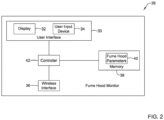
- FIG 2 is a schematic block diagram of the fume hood monitor 26 of Figure 1 .
- the fume hood monitor 26 may include a user interface 30 that itself includes a display 32 and a user input device 34.
- the user interface 30 may include a touchscreen display that functions as both the display 32 and the user input device 34.
- the display 32 and the user input device 34 may be separate, such as when the user input device 34 includes a keypad that a user can enter information on.
- the illustrative fume hood monitor 26 includes a wireless interface 36 that may be used to communicate with other devices, such as but not limited to, the mobile device 28 of Figure 1 .
- the fume hood monitor 26 includes a memory 38.
- the memory 38 may store a set of fume hood parameters 40.
- fume hood parameters 40 include but are not limited to a fume hood identifier that uniquely identifies the fume hood, a fume hood location that identifies a location of the fume hood, a current face velocity setting of the fume hood, a current sash percent opening of the fume hood, a timer value associated with the fume hood, an alarm associated with the fume hood, an experiment identifier identifying an experiment that is associated with the fume hood, an experiment status identifying a status of an experiment that is associated with the fume hood, and a personnel identifier that identifies a person responsible for an experiment associated with the fume hood. These are just example fume hood parameters.
- a controller 42 is operatively coupled to the user interface 30, the wireless interface 36 and the memory 38.
- Figure 3 is a flow diagram showing an illustrative series of steps 44 that may be carried out by the controller 42 of the fume hood monitor 26 of Figure 2 .
- the controller 42 may be configured to display one or more of the fume hood parameters on the display 32 of the fume hood monitor 26, as indicated at block 46.
- the controller 42 may be configured to communicate with the mobile device 28 via the wireless interface 36.
- FIG 4 is a schematic block diagram of the mobile device 28 of Figure 1 .
- the mobile device 28 may include a user interface 50 that itself includes a display 52 and a user input device 54.
- the user interface 50 may include a touchscreen display that functions as both the display 52 and the user input device 54.
- the display 52 and the user input device 54 may be separate, such as when the user input device 54 includes a keypad that a user can enter information on.
- the illustrative mobile device 28 includes a wireless interface 56 that may be used to communicate with other devices, such as but not limited to the fume hood monitor 26 of Figure 1 .
- the mobile device 28 includes a memory 58.
- a controller 60 is operatively coupled to the user interface 50, the wireless interface 56 and the memory 58.
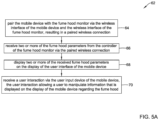
- Figure 5A is a flow diagram showing an illustrative series of steps 62 that may be carried out by the controller 60 of the mobile device 28 of Figure 4 .
- the controller 60 may be configured to pair the mobile device 28 with the fume hood monitor 26 via the wireless interface 56 of the mobile device 28 and the wireless interface 36 of the fume hood monitor 26, resulting in a paired wireless connection, as indicated at block 64.
- the pair wireless connection may be a Bluetooth wireless connection, a WIFI wireless connection and/or any other suitable wireless connection.
- the controller 60 of the mobile device 28 may be configured to receive two or more of the fume hood parameters 40 from the controller 42 of the fume hood monitor 26 via the paired wireless connection, as indicated at block 66.
- the controller 60 may be configured to display two or more of the received fume hood parameters 40 on the display 52 of the user interface 50 of the mobile device 28, as indicated at block 68.
- the particular fume hood parameters 40 that are displayed, the format of the fume hood parameters 40 that are displayed and/or the layout of the fume hood parameters 40 that are displayed on the mobile device 28 may be personalized by the mobile device 28 to accommodate the particular user associated with the mobile device 28.
- an application program running on the mobile device 28 may facilitate the particular user of the mobile device to personalize the selection and display of fume hood parameters 40 on the display 52.
- the controller 60 of the mobile device 28 may be configured to receive a user interaction via the user input device 54 of the mobile device 28.
- the user interaction may allow a user of the mobile device 28 to manipulate information that is displayed on the display 52 of the mobile device 28 regarding the fume hood 12.
- the user interaction received via the user input device 54 of the mobile device 28 includes acknowledging one or more alarms associated with one or more of the received fume hood parameters 40.
- the user interaction received via the user input device 54 of the mobile device 28 includes altering one or more of the received fume hood parameters 40, after which the controller 60 of the mobile device 28 is configured to send the altered one or more of the received fume hood parameters to the fume hood monitor 26 via the paired wireless connection for use by the fume hood monitor 26 during subsequent operation of the fume hood 12.
- the user interaction received via the user input device 54 of the mobile device 28 includes setting one or more first display settings that control which of the two or more received fume hood parameters 40 are displayed on the display 52 of the mobile device 28. In some instances, the user interaction received via the user input device 54 of the mobile device 28 includes setting one or more second display settings that control a display format for one or more of the received fume hood parameters 40 that are displayed on the display 52 of the mobile device 28.
- the user interaction received via the user input device 54 of the mobile device 28 includes setting up one or more timers for one or more experiments associated with the fume hood 12. In some instances, the user interaction received via the user input device 54 of the mobile device 28 includes setting up one or more experiments associated with the fume hood. As an example, setting up one or more experiments may include setting up one or more steps for each of the one or more experiments and one or more timers associated with at least one of the one or more steps.
- Figure 5B is a flow diagram showing an illustrative series of steps 72 that may be carried out by the controller 60 of the mobile device 28.
- the controller 60 may be configured to pair the mobile device 28 with the fume hood monitor 26 via the wireless interface 56 of the mobile device 28 and the wireless interface 36 of the fume hood monitor 26, resulting in a paired wireless connection, as indicated at block 74.
- the controller 60 may be configured to receive two or more of the fume hood parameters 40 from the controller 42 of the fume hood monitor 26 via the paired wireless connection, as indicated at block 76.
- the controller 60 may be configured to display two or more of the received fume hood parameters 40 on the display 52 of the user interface 50 of the mobile device 28, as indicated at block 78.
- the controller 60 of the mobile device 28 may be configured to concurrently display on the display 52 of the mobile device 28 a status of each of two or more experiments currently associated with one or more of the fume hoods, as indicated at block 80.
- the status of at least one of the two or more experiments associated with one or more fume hoods may include one or more of a timer status and an alarm status.
- the timer status may include a time remaining indicator for the corresponding experiment.
- the controller 60 may be configured to display an experiment name for each of the two or more experiments associated with the one or more fume hoods, as indicated at block 82. In some cases, the two or more experiments may be associated with two or more different fume hoods. In some instances, the controller 60 may be configured to display a fume hood name for each of the two or more experiments, where the fume hood name identifies the fume hood that is associated with the respective experiment, as indicated at block 84. In some instances, the controller 60 may be configured to highlight each of the two or more experiments that are associated with the one or more fume hoods that are currently within communication range of the wireless interface 56 (resulting in the corresponding paired wireless connection being active), as indicated at block 86.
- Figures 6A and 6B are flow diagrams that together show an illustrative series of steps 88 that may be carried out by one or more processors of the mobile device 28.
- the one or more processors may be considered as being part of the controller 60, for example.
- the one or more processors may be caused to receive one or more fume hood parameters from each of one or more fume hoods via a corresponding paired wireless connection, as indicated at block 90.
- the one or more processors may be caused to display one or more of the received fume hood parameters on a display 52 of the mobile device 28, as indicated at block 92.
- the one or more processors may be caused to receive a user interaction via the mobile device 28, wherein the user interaction allows a user to manipulate information that is displayed on the display 52 of the mobile device 28 regarding operation of the one or more fume hoods, as indicated at block 94.
- Manipulating information may include, for example, identifying which of the one or more fume hood parameters to display, identify a display format for one or more fume hood parameters on the display, selecting a menu or the like to display additional information regarding one or more of the fume hood parameters, setting a value of one or more of the fume hood parameters, and changing a value of one or more of the fume hood parameters.
- the one or more processors may be caused to receive a user interaction via the mobile device 28 that manipulates information by setting up one or more experiments associated with one or more of the fume hoods, wherein each of the one or more experiments includes an experiment name and an experiment timer, as indicated at block 96.
- the one or more processors may be caused to display on the display 52 of the mobile device 28 an indicator for each of the one or more experiments associated with one or more of the fume hoods, as indicated at block 98.
- the one or more processors may be caused to receive a user interaction via the mobile device 28 that manipulates information by setting up two or more experiments associated with two or more of the fume hoods, wherein each of the two or more experiments includes an experiment name and an experiment timer, as indicated at block 100.
- the one or more processors may be caused to display on the display 52 of the mobile device 28 an indicator for each of the two or more experiments associated with two or more of the fume hoods, as indicated at block 102.
- the one or more processors may be caused to display a fume hood name for each of the two or more experiments, the fume hood name identifies the fume hood that is associated with the respective experiment, as indicated at block 104. In some instances, the one or more processors may be caused to concurrently display on the display 52 of the mobile device 28 a status of each of two or more experiments associated with the one or more fume hoods, wherein the status of at least one of the two or more experiments associated with the one or more fume hoods includes one or more of a timer status and an alarm status, as indicated at block 106.
- the fume hood monitor 26 is able to communicate with the mobile device 28, and the mobile device 28 is configured to receive information from the fume hood monitor 26 and to display some or all of this information on the display 52 of the mobile device 28. In some cases, the mobile device 28 is configured to communicate information back to the fume hood monitor 26.
- Figure 7A shows a smartphone 108 and Figure 7B shows a smartwatch 110. The smartphone 108 and the smartwatch 110 may each be considered to be examples of the mobile device 28. The smartphone 108 shows a screen 112 while the smartwatch 110 shows a screen 114 that has been adjusted for the smaller display of the smartwatch 110.
- the screen 112 includes a toolbar 116 that includes an experiments overview icon 116a, a historical data icon 116b, an experimental timer icon 116c and a new experiment icon 116d.
- the screen 114 includes the same toolbar 116.
- the screen 112 includes a number of icons 118 that each show information for a particular fume hood or a particular experiment.
- the icons 118 include an icon 118a, an icon 118b, an icon 118c, an icon 118d, an icon 118e and an icon 118f.
- Each of the icons 118 include timer information for a particular fume hood or a particular experiment. As an example, the icon 118a shows that experiment #22705 has 49 seconds remaining.
- the icon 118b shows that the timer has expired for Teaching Hood 4.
- the screen 114 includes several icons 120 that mirror the information shown in some of the icons 120.
- the screen 114 includes an icon 120a, an icon 120b and an icon 120c.
- the icon 120a mirrors the information shown in the icon 118a, and reports that experiment #22705 has 49 seconds remaining.
- the icon 120c mirrors the information shown in the icon 118b, i.e., that the timer has expired for Teaching Hood 4.
- the screen 112 includes a settings button 122 that may be selected to chose various options.
- the settings button 122 is mirrored on the screen 114.
- An alarms icon 124 (not illuminated) is seen in both the screen 112 and the screen 114. If an alarm occurs, the alarms icon 124 will be highlighted.
- a user can acknowledge an alarm from either the screen 112 (on the smartphone 108) or the screen 114 (on the smartwatch 110). The alarm acknowledgement may be communicated back to the fume hood monitor that is associated with the alarm.
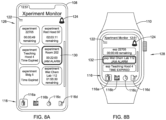
- Figure 8A shows a screen 126 on the smartphone 108 and Figure 8B shows a corresponding screen 128 on the smartwatch 110 in which the alarms icon 124 has been illuminated, indicating that the fume hood monitor 26 is currently reporting one or more alarms.
- an icon 130 indicates that a JAM ALARM has occurred in experiment room #202.
- a similar icon 132 on the screen 128 shows a similar alarm, but for Wet Chem Lab 112.
- Figure 9A shows a screen 134 on the smartphone 108 and Figure 9B shows a corresponding screen 136 on the smartwatch 110 in which the user has selected the alarms icon 124 in order to view current alarms.
- the alarms icon 124 remains illuminated.
- the screen 134 includes several icons 138, including an icon 138a indicating that the experiment timer has expired on experiment #22705, an icon 138b indicating an energy waste alarm in Teaching Hood 4, and an icon 138c indicating an emergency exhaust alarm in Teaching Hood 2.
- different colors may be used to indicate different alarm severity levels, such as yellow for a medium priority alarm and red for a high priority alarm, for example.
- Each of the icons 138 include an "x" 140 that may be selected to acknowledge a particular alarm.
- the screen 134 also includes a CLEAR ALL button 142 that may be used to simultaneously clear and in some cases acknowledge all of the current alarms.
- the screen 136 includes several icons 144, including an icon 144a indicating that the experiment timer has expired on experiment #22705, an icon 144b indicating an energy waste alarm in Teaching Hood 4, and an icon 144c indicating an emergency exhaust alarm in Teaching Hood 2.
- Each of the icons 144 include the "x" 140 that may be selected by the user to acknowledge a particular alarm.
- the information displayed by the smartphone 108 or the smartwatch 110 may change, depending on which fume hoods, or more accurately, which fume hood monitors 26, are within range of the smartphone 108 or the smartwatch 110.
- Figure 10A shows a screen 146 that is similar to the screen 112 shown in Figure 7A , but some of the icons 118 are now illuminated or highlighted in order to show which experiments are physically nearby. In some instances, this may indicate that the smartphone 108 is within Bluetooth range of the particular fume hoods. In particular, icon 118a has illuminated to show that the experiment 22705 is nearby (e.g.
- the icon 118b has illuminated to show that the Teaching Hood 4 is nearby, the icon 118d has illuminated to show that the Red Hood 97 is nearby, and the icon 118e has illuminated to show that the experiment in Room 202 is nearby.
- the experiments on Bldg 5 and Wet Chem Lab 112 are not nearby (e.g. not currently within Bluetooth range), and are thus not highlighted and in some cases grayed out.
- Figure 10B shows a screen 148 that is similar to the screen 114 shown in Figure 7B , but the icons 120 are now illuminated or highlighted to show which experiments are physically nearby. In some instances, this may indicate that the smartwatch 110 is within Bluetooth range of the particular range hoods.
- icon 120a has illuminated to show that the experiment 22705 is nearby
- the icon 120b has illuminated to show that the Wet Chem Lab 112 is nearby
- the icon 120c has been illuminated to show that the Teaching Hood 4 is nearby.
- the screen 148 includes icons that are not visible on the screen 146. These icons may be viewed by scrolling up/down using the scroll features of the smartwatch 110.
- Figure 11A shows a screen 150 that is similar to the screen 146 shown in Figure 10A , but shows selection of the icon 118f by the user.
- selecting the icon 118f may cause additional information to be displayed regarding the experiment referenced by the icon 118f, including information such as experiment name, steps completed, steps remaining and fume hood data such as face velocity and sash opening percentage. It will be appreciated that while selection of the icon 118f is shown, similar results may occur when selecting any of the icons 118. Selecting the icon 118f will cause a screen 152 to be displayed, as seen for example in Figure 11B .
- the screen 152 displays a title Wet Chem Lab 112, which corresponds to that shown in the icon 118f.
- a first section 154 provides fume hood data, indicating a current face velocity of 100 FPM (feet per minute), that the sash is 22 percent open and that the current experiment has been running for 2 hours, 3 minutes and 39 seconds.
- a second section 156 shows details of the experiment, step by step. Steps 156a and 156b are shown to have been completed, and step 156c is currently underway. In some cases, each step may include a description of the step. For example, step 1 includes a description of "Prepare solution AB12".
- notes may be added by the user for each step. A note may be added by selecting the pencil icon associated with the step, and entering the desired note. For example, a note of "Color not looking great, but OK for now" has been entered by the user of the smartphone 108 for step 156b.
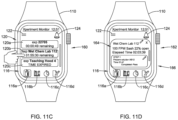
- Figure 11C shows a screen 160 that is similar to the screen 148 shown in Figure 10B , but shows selection of the icon 120b.
- selecting the icon 120b may cause additional information to be displayed regarding the experiment referenced by the icon 120b, including information such as experiment name, steps completed, steps remaining and fume hood data such as face velocity and sash opening percentage. It will be appreciated that while selection of the icon 120b is shown, similar results may occur when selecting any of the icons 120. Selecting the icon 120b will cause a screen 162 to be displayed, as seen for example in Figure 11D .
- the screen 162 displays a title Wet Chem Lab 112, which corresponds to that shown in the icon 120b.
- a first section 164 provides fume hood data, indicating a current face velocity of 100 FPM (feet per minute), that the sash is 22 percent open and that the current experiment has been running for 2 hours, 3 minutes and 39 seconds.
- a second section 166 allows the user to scroll through the steps of the experiment, step by step.
- Figure 12A shows a screen 170 that includes a first section 172 that displays a name of a recipe, in this case ABC Experiment, the name of the fume hood, in this case Wet Chem Lab 112, and the total number of steps in the experiment, in this case a total of three steps.
- a section 174 includes the steps, including a first step 174a and a second step 174b.
- a third step, 174c, is not visible in this view, and may be reached by scrolling through the section 174.
- the screen 170 includes a LOAD button 176, a DELETE button 178 and a SAVE button 180 that may be used, respectively, to load an experiment, to delete an experiment and to save an experiment.
- Figure 12B shows a screen 182 that is similar to the screen 170, but that has been modified for the smaller display of the smartwatch 110.
- the screen 182 includes a first section 184 that displays a name of a recipe, in this case ABC Experiment, the name of the fume hood, in this case Wet Chem Lab 112, and the total number of steps in the experiment, in this case a total of three steps.
- a recipe in this case ABC Experiment
- the name of the fume hood in this case Wet Chem Lab 112
- the total number of steps in the experiment in this case a total of three steps.
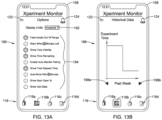
- Figures 13A, 13B and 13C provide additional examples of screens that may be displayed by the smartphone 108 in communication with the fume hood monitor 26.
- Figure 13A shows a screen 190 that allows a user to choose various options regarding which information and/or how the information is to be displayed.
- the screen 190 includes a pull-down menu 192 that allows a user to specify display units. While not explicitly shown, a pull-down menu may be provided to allow a user to select a desired natural language for use on the display (e.g. English, Chinese, German).
- a second 194 includes a number of options that the user can choose between. As can be seen, some of the options are highlighted, meaning that they have been selected, and some of the options are not highlighted, meaning that they have not been selected.
- the user has chosen to fade fume hoods that are out of range (e.g. out of Bluetooth range as discussed with respect to Figures 10A-10B ), to show face velocity, to show time remaining and to show total elapsed time.
- the user has chosen not to warn when limited time remains, to enable auto-monitor pairing, to auto-mute, to show sash open percentage or to show certification data. This facilitates the user in personalizing what information is displayed and/or how the information is displayed.
- Figure 13B includes a screen 196 showing a graphical representation of historical data.
- the screen 196 may be displayed in response to the user selecting the historical data icon 116b.
- the screen 196 may include scroll buttons 198a and 198b that may be used to change the time period for the displayed historical data.
- Figure 13C shows a screen 200 that provides a tabular version of historical data, including a listing of which experiments have been completed successfully, which experiments have failed and which were either not finished or were skipped.
- the mobile device 28 may be configured to provide any of a variety of different functions related to the operation of the fume hood. Some of these functions are outlined in the table below: Feature Description Experiment Timer Multiple separate stopwatch timers for experiments that the user can name and see on screen simultaneously Experiment Countdown Multiple separate countdown alarms for experiments that the user can name and see on screen, with reminder warning time (for example, user sets experiment alarm for 1 hour, and 5 minutes before as a reminder) Experiment Details Experiment notes can be kept on the application Last At Fume Hood Keeps track of the last time the user was at the fume hood (can display as Time of Day or elapsed time) Time At Fume Hood Keeps track of total time at the fume hood, can be reset by user Configurable Display User decides which fume hood parameters to display on application main view page and/or can auto rotate through the fume hood parameters one at a time Configurable Style User can choose from a variety of fonts
- the fume hood monitor can be configured to take hood out of setback mode (e.g. out of low face velocity) if supported by the Fume Hood and Fume Hood air flow valve.
- Sash Position Can display the fume hood sash percentage open Certification Data Can display the certification data for the fume hood Other fume hood data Can show some fume hood parameters for fume hoods not currently in range, such as time remaining on an experiment, certification data, etc.
- Pair with FHM Searches for other wireless devices to pair with a wireless-compatible fume hood monitor
- Selecting other units User can choose display units for all fume hood parameters Misc Fume Hood Data
- Other data that is displayed on a fume hood monitor can be shown on the main view of the smartphone or smartwatch application
Landscapes
- Engineering & Computer Science (AREA)
- General Engineering & Computer Science (AREA)
- Physics & Mathematics (AREA)
- General Physics & Mathematics (AREA)
- Theoretical Computer Science (AREA)
- Human Computer Interaction (AREA)
- Business, Economics & Management (AREA)
- Emergency Management (AREA)
- Selective Calling Equipment (AREA)
- User Interface Of Digital Computer (AREA)
- Devices For Use In Laboratory Experiments (AREA)
Abstract
A fume hood monitor (26) includes a fume hood monitor controller (42) that is configured to display one or more of the fume hood parameters (40) on a display (32) of the fume hood monitor (26) and to communicate with the mobile device (28). The mobile device (28) includes a mobile device controller (60) that is configured to pair the mobile device (28) with the fume hood monitor (26). Once paired, the mobile device controller (60) is configured to receive two or more of the fume hood parameters (40) from the fume hood monitor controller (60), display two or more of the received fume hood parameters on a display (52) of a user interface (50) of the mobile device (28), and receive a user interaction via the user input device (54) of the mobile device. The user interaction may allow a user to manipulate information that is displayed on the display (52) of the mobile device (28) regarding the fume hood (12).
Description
- The present disclosure relates generally to fume hoods, and more particularly to methods and systems for interacting with a fume hood using a mobile device.
- Fume hoods are commonly used when personnel are handling potentially harmful materials, particularly substances that give off noxious fumes. Fume hoods can often be found in educational, industrial, medical and government laboratories and production facilities. A typical fume hood may include a housing within which the harmful materials may be stored and used. Users typically access the interior of the fume hood housing through an opening, which in some cases, may be selectively opened and closed via one or more movable sashes or the like. The fume hood housing is typically vented by a ventilation device so that air and potentially harmful gases or other materials within the housing are positively exhausted out of the building through ductwork. Such venting typically draws fresh air in through the fume hood opening, which helps keep any potentially harmful materials within the fume hood and out of the space where personnel may be located.
- Fume hoods typically include a fume hood monitor that is mounted to a frame or the like of the fume hood. The fume hood monitor typically includes a user interface that allows a user standing at the fume hood to view and/or set one or more parameters of the fume hood. What would be desirable is a system and method that facilitates remotely interacting with a fume hood using a mobile device.
- The disclosure relates generally to fume hoods, and more particularly to methods and systems for interacting with a fume hood using a mobile device. An example may be found in a fume hood system that includes a fume hood including a fume hood monitor that is configured to communicate with a mobile device. The fume hood monitor includes a user interface including a display and a user input device, a wireless interface, a memory for storing a plurality of fume hood parameters associated with the fume hood, and a controller operatively coupled to the user interface, the wireless interface and the memory of the fume hood monitor. The controller of the fume hood monitor is configured to display one or more of the fume hood parameters on the display of the fume hood monitor and to communicate with the mobile device via the wireless interface. The mobile device includes a user interface including a display and a user input device, a wireless interface, a memory, and a controller operatively coupled to the user interface, the wireless interface and the memory of the mobile device. The controller of the mobile device is configured to pair the mobile device with the fume hood monitor via the wireless interface of the mobile device and the wireless interface of the fume hood monitor, resulting in a paired wireless connection. Once paired, the controller of the mobile device is configured to receive two or more of the fume hood parameters from the controller of the fume hood monitor via the paired wireless connection, display two or more of the received fume hood parameters on the display of the user interface of the mobile device, and receive a user interaction via the user input device of the mobile device. In some cases, the user interaction allows a user of the mobile device to manipulate information that is displayed on the display of the mobile device regarding the fume hood.
- Another example may be found in a mobile device. The mobile device includes a user interface including a display and a user input device, a wireless interface, a memory, and a controller operatively coupled to the user interface, the wireless interface and the memory of the mobile device. The controller of the mobile device is configured to pair the mobile device with one or more fume hoods via the wireless interface of the mobile device, resulting in a paired wireless connection with each of the one or more fume hoods. The controller of the mobile device is further configured to receive one or more fume hood parameters from each of the one or more fume hoods via the corresponding paired wireless connection, display one or more of the received fume hood parameters on the display of the mobile device, and concurrently display on the display of the mobile device a status of each of two or more experiments currently associated with one or more of the fume hoods.
- Another example may be found in a non-transitory computer readable medium storing instructions thereof that when executed by one or more processors of a mobile device causes the one or more processors to receive one or more of fume hood parameters from each of one or more fume hoods via a corresponding paired wireless connection. The one or more processors are caused to display one or more of the received fume hood parameters on a display of the mobile device. The one or more processors are caused to receive a user interaction via the mobile device, the user interaction allowing a user to manipulate information that is displayed on the display of the mobile device regarding operation of the one or more fume hoods.
- The preceding summary is provided to facilitate an understanding of some of the innovative features unique to the present disclosure and is not intended to be a full description. A full appreciation of the disclosure can be gained by taking the entire specification, claims, drawings, and abstract as a whole.
- The disclosure may be more completely understood in consideration of the following description of various illustrative embodiments in connection with the accompanying drawings, in which:
-
Figure 1 is a schematic block diagram of an illustrative fume hood system; -
Figure 2 is a schematic block diagram of an illustrative fume hood monitor forming a portion of the illustrative fume hood system ofFigure 1 ; -
Figure 3 is a flow diagram showing an illustrative series of steps that a controller forming part of the illustrative fume hood monitor ofFigure 2 may carry out; -
Figure 4 is a schematic block diagram of an illustrative mobile device forming a portion of the illustrative fume hood system ofFigure 1 ; -
Figure 5A is a flow diagram showing an illustrative series of steps that a controller forming part of the illustrative mobile device ofFigure 4 may carry out; -
Figure 5B is a flow diagram showing an illustrative series of steps that a controller forming part of the illustrative mobile device ofFigure 4 may carry out; -
Figures 6A and6B are flow diagrams that together show an illustrative series of steps that one or more processors of the illustrative mobile device ofFigure 4 may carry out when executing executable instructions; -
Figure 7A is a screen shot of an illustrative screen that may be displayed on a smartphone whileFigure 7B is a screen shot of a corresponding screen that may be displayed on a smartwatch; -
Figure 8A is a screen shot of an illustrative screen that may be displayed on a smartphone whileFigure 8B is a screen shot of a corresponding screen that may be displayed on a smartwatch; -
Figure 9A is a screen shot of an illustrative screen that may be displayed on a smartphone whileFigure 9B is a screen shot of a corresponding screen that may be displayed on a smartwatch; -
Figure 10A is a screen shot an of illustrative screen that may be displayed on a smartphone whileFigure 10B is a screen shot of a corresponding screen that may be displayed on a smartwatch; -
Figures 11A and 11B are screen shots of illustrative screens that may be displayed on a smartphone whileFigure 11C and 11D are screen shots of corresponding screens that may be displayed on a smartwatch; -
Figure 12A is a screen shot of an illustrative screen that may be displayed on a smartphone whileFigure 12B is a screen shot of a corresponding screen that may be displayed on a smartwatch; and -
Figures 13A, 13B and13C are screen shots of illustrative screens that may be displayed on a smartphone. - While the disclosure is amenable to various modifications and alternative forms, specifics thereof have been shown by way of example in the drawings and will be described in detail. It should be understood, however, that the intention is not to limit aspects of the disclosure to the particular illustrative embodiments described. On the contrary, the intention is to cover all modifications, equivalents, and alternatives falling within the spirit and scope of the disclosure.
- The following description should be read with reference to the drawings wherein like reference numerals indicate like elements throughout the several views. The description and drawings show several illustrative embodiments which are meant to be illustrative in nature.
-
Figure 1 is a schematic block diagram showing an illustrativefume hood system 10. The illustrativefume hood system 10 includes afume hood 12, aventilation system 14 and acontrol system 16. Thefume hood 12 may include one or more moveable sashes 18 (a total of four are shown) that are mechanically coupled to thefume hood 12. The one or more moveable sashes 18 may be moved back and forth in order to either increase or decrease a size of an opening 20 that is formed between the one or more moveable sashes 18. In some instances, particularly when there are multiple moveable sashes 18, the moveable sashes 18 may travel within one or more tracks that are disposed at or near a front of thefume hood 12. This is just an example fume hood configuration. - The
fume hood 12 may be used in, for example, educational, industrial, medical (e.g. biological safety cabinets) and/or government facilities to help facilitate handling of potentially harmful materials, particularly substances that emit noxious fumes or may include pathogens or other harmful agents. In some instances, thefume hood 12 may include a housing and/orenclosure 22 within which materials may be stored, examined, and/or used. Users may access an interior of the housing and/orenclosure 22 via the opening 20 using the movable sashes 18. To facilitate containment of the potentially harmful materials within thefume hood 12, a negative pressure may be created in the interior of the housing and/or enclosure 22 (relative to the exterior of the housing and/or enclosure 22) by the ventilation system 14 (e.g., a fan, a blower, etc.) by drawing air through the fume hood opening 20 and exhausting the air through aductwork 24 to an exterior of the building. - Proper airflow may be desirable to prevent harmful materials from exiting the fume hood through the
opening 20 and into the space where personnel may be located. In some cases, theventilation system 14 may include a filter (e.g., a HEPA filter, a ULPA filter, etc.) or other decontamination device (e.g., a scrubber) to help remove harmful materials and/or pathogens from the exhausted air. Proper control of airflow through the fume hood opening 20 may be important for safety, economic, comfort or other reasons. For example, if airflow through the fume hood opening 20 is too low (e.g., the face velocity of air flowing through the opening is too low), contaminants inside thefume hood 12 may have an opportunity to exit thefume hood 12 through theopening 20. This may present a safety issue. However, maintaining a high volume of airflow through the fume hood opening 20 at all times may be wasteful because unnecessarily large volumes of conditioned air (e.g., cooled or heated air) in the room may be drawn into thefume hood 12 and exhausted from the building. In such cases, additional air would need to be conditioned and supplied to the room to replace the exhausted air to maintain comfort in the room. By controlling the airflow of thefume hood 12, it has been found that airflow can be maintained at a level that helps ensure safe operation of thefume hood 12, while reducing costs associated with supplying conditioned air to the building where thefume hood 12 is installed. Further, energy required to drive the ventilation system 14 (e.g. fan) may be reduced, providing additional savings. Thecontrol system 16 may control operation of theventilation system 14 in such a way as to provide safety while minimizing energy costs, for example. - Depending on the application and/or installation, the
fume hood 12 may be a bench-mounted fume hood, a floor-mounted fume hood, a portable fume hood, or any other type of fume hood. A bench-mounted fume hood may be installed such that the work surface is positioned at a standing-work height and may be used, for example, in an educational laboratory, an industrial laboratory, or a medical laboratory for limiting exposure to hazardous and/or noxious fumes, vapors, and/or dust. A floor-mounted (e.g., walk-in) fume hood may likewise be used in industrial, educational, or medical settings when large amounts of hazardous materials must be safely contained, while limiting exposure to hazardous and/or noxious fumes, vapors or dust. In some cases, a floor-mounted fume hood may be used to accommodate large amounts of hazardous material, larger equipment, and/or to facilitate access by a number of individuals. A portable fume hood may be used, for example, in settings where a permanently installed fume hood would not be practical, such as in laboratories having limited space and/or where a small containment area is needed, or for temporary or other short term use. In some instances, uses for a portable fume hood include, but are not limited to, chemical fume control, pharmaceutical compounding containment, soldering applications, light dust removal, biological applications, and other applications. - In some instances, the fume hood opening 20 is defined by one or more moveable sashes 18. The moveable sashes 18 may include panes, doors, strip curtains and/or other structure for enclosing the interior space of the
fume hood 12. In some cases, the moveable sashes 18 may include a combination of panes, doors and/or strip curtains. For example, the moveable sashes 18 may be configured to open vertically, horizontally, or a combination of horizontally and vertically. In some cases, thefume hood 12 may be configured with one or more vertical moving sashes 18 and strip curtains affixed to the lower edge of the lowest vertical moving sash to allow access to the fume hood interior while still providing very significant containment. In some cases, thefume hood 12 may have two ormore openings 20 defined by independently operating moveable sashes 18. - The
ventilation system 14 may be configured to maintain an airflow through thefume hood 12. In some cases, the airflow may have a specified minimum airflow (e.g., when the moveable sashes 18 are fully closed), and a specified maximum airflow (e.g. when the moveable sashes 18 are fully open), such as to help ensure safe operation while reducing costs. In one example, the specified ventilation rates may be based on one or more industry standards provided by the American National Standards Institute (ANSI) and/or the American Industrial Hygiene Association (AIHA) (e.g., ANSI/AIHA Z9.5 Laboratory Ventilation), The Occupational Safety & Health Administration (OSHA) (e.g., OSHA Technical Manual, Section III:Chapter 3 Ventilation Investigation, OSHA Part 1910.1450), and/or The Scientific Equipment and Furniture Association (SEFA) (e.g., SEFA 1.2 Laboratory Fume Hoods Recommended Practices). Such standards define airflow requirements at the fume hood opening, typically specifying that the face velocities (e.g., air velocity through the fume hood opening 20) should remain within the range from about 60 feet per minute to about 125 feet per minute. Often, the recommended face velocity may depend on the relative toxicity and/or hazard of the materials within thefume hood 12 or the operations within thefume hood 12, or both. - The
fume hood system 10 includes a fume hood monitor 26. In some instances, the fume hood monitor 26 may be physically mounted on a front panel of thefume hood 12. In some instances, the fume hood monitor 26 provides a display for information generated by thefume hood 12. In some instances, the fume hood monitor 26 may be configured to communicate with amobile device 28. Themobile device 28 may be a smartphone, a smartwatch, a tablet, or any other suitable portable device. In some instances, themobile device 28 may be configured to display information received from the fume hood monitor 26. In some instances, the particular information that is displayed, the format of the information that is displayed and/or the layout of the information that is displayed on the mobile device may be personalized to the accommodate the user of the mobile device. In some instances, themobile device 28 may be configured to communicate information and/or commands to the fume hood monitor 26. For example, themobile device 28 may be used to acknowledge an alarm of the fume hood, send a command to for example change the face velocity setting of the fume hood, start and/or stop a timer maintained by the fume hood monitor 26, and/or communicate any other suitable information and/or command to the fume hood monitor 26. -
Figure 2 is a schematic block diagram of the fume hood monitor 26 ofFigure 1 . The fume hood monitor 26 may include auser interface 30 that itself includes adisplay 32 and auser input device 34. In some instances, theuser interface 30 may include a touchscreen display that functions as both thedisplay 32 and theuser input device 34. In some instances, thedisplay 32 and theuser input device 34 may be separate, such as when theuser input device 34 includes a keypad that a user can enter information on. The illustrative fume hood monitor 26 includes awireless interface 36 that may be used to communicate with other devices, such as but not limited to, themobile device 28 ofFigure 1 . The fume hood monitor 26 includes amemory 38. In some cases, thememory 38 may store a set offume hood parameters 40. Examples offume hood parameters 40 include but are not limited to a fume hood identifier that uniquely identifies the fume hood, a fume hood location that identifies a location of the fume hood, a current face velocity setting of the fume hood, a current sash percent opening of the fume hood, a timer value associated with the fume hood, an alarm associated with the fume hood, an experiment identifier identifying an experiment that is associated with the fume hood, an experiment status identifying a status of an experiment that is associated with the fume hood, and a personnel identifier that identifies a person responsible for an experiment associated with the fume hood. These are just example fume hood parameters. Acontroller 42 is operatively coupled to theuser interface 30, thewireless interface 36 and thememory 38. -
Figure 3 is a flow diagram showing an illustrative series ofsteps 44 that may be carried out by thecontroller 42 of the fume hood monitor 26 ofFigure 2 . In some cases, thecontroller 42 may be configured to display one or more of the fume hood parameters on thedisplay 32 of the fume hood monitor 26, as indicated atblock 46. In some cases, thecontroller 42 may be configured to communicate with themobile device 28 via thewireless interface 36. -
Figure 4 is a schematic block diagram of themobile device 28 ofFigure 1 . Themobile device 28 may include auser interface 50 that itself includes adisplay 52 and auser input device 54. In some instances, theuser interface 50 may include a touchscreen display that functions as both thedisplay 52 and theuser input device 54. In some instances, thedisplay 52 and theuser input device 54 may be separate, such as when theuser input device 54 includes a keypad that a user can enter information on. The illustrativemobile device 28 includes awireless interface 56 that may be used to communicate with other devices, such as but not limited to the fume hood monitor 26 ofFigure 1 . Themobile device 28 includes amemory 58. Acontroller 60 is operatively coupled to theuser interface 50, thewireless interface 56 and thememory 58. -
Figure 5A is a flow diagram showing an illustrative series ofsteps 62 that may be carried out by thecontroller 60 of themobile device 28 ofFigure 4 . In some instances, thecontroller 60 may be configured to pair themobile device 28 with the fume hood monitor 26 via thewireless interface 56 of themobile device 28 and thewireless interface 36 of the fume hood monitor 26, resulting in a paired wireless connection, as indicated atblock 64. The pair wireless connection may be a Bluetooth wireless connection, a WIFI wireless connection and/or any other suitable wireless connection. In some instances, thecontroller 60 of themobile device 28 may be configured to receive two or more of thefume hood parameters 40 from thecontroller 42 of the fume hood monitor 26 via the paired wireless connection, as indicated atblock 66. Thecontroller 60 may be configured to display two or more of the receivedfume hood parameters 40 on thedisplay 52 of theuser interface 50 of themobile device 28, as indicated atblock 68. In some cases, the particularfume hood parameters 40 that are displayed, the format of thefume hood parameters 40 that are displayed and/or the layout of thefume hood parameters 40 that are displayed on themobile device 28 may be personalized by themobile device 28 to accommodate the particular user associated with themobile device 28. In some cases, an application program running on themobile device 28 may facilitate the particular user of the mobile device to personalize the selection and display offume hood parameters 40 on thedisplay 52. - In some instances, the
controller 60 of themobile device 28 may be configured to receive a user interaction via theuser input device 54 of themobile device 28. The user interaction may allow a user of themobile device 28 to manipulate information that is displayed on thedisplay 52 of themobile device 28 regarding thefume hood 12. In some instances, the user interaction received via theuser input device 54 of themobile device 28 includes acknowledging one or more alarms associated with one or more of the receivedfume hood parameters 40. In some instances, the user interaction received via theuser input device 54 of themobile device 28 includes altering one or more of the receivedfume hood parameters 40, after which thecontroller 60 of themobile device 28 is configured to send the altered one or more of the received fume hood parameters to the fume hood monitor 26 via the paired wireless connection for use by the fume hood monitor 26 during subsequent operation of thefume hood 12. - In some instances, the user interaction received via the
user input device 54 of themobile device 28 includes setting one or more first display settings that control which of the two or more receivedfume hood parameters 40 are displayed on thedisplay 52 of themobile device 28. In some instances, the user interaction received via theuser input device 54 of themobile device 28 includes setting one or more second display settings that control a display format for one or more of the receivedfume hood parameters 40 that are displayed on thedisplay 52 of themobile device 28. - In some instances, the user interaction received via the
user input device 54 of themobile device 28 includes setting up one or more timers for one or more experiments associated with thefume hood 12. In some instances, the user interaction received via theuser input device 54 of themobile device 28 includes setting up one or more experiments associated with the fume hood. As an example, setting up one or more experiments may include setting up one or more steps for each of the one or more experiments and one or more timers associated with at least one of the one or more steps. -
Figure 5B is a flow diagram showing an illustrative series ofsteps 72 that may be carried out by thecontroller 60 of themobile device 28. In some instances, thecontroller 60 may be configured to pair themobile device 28 with the fume hood monitor 26 via thewireless interface 56 of themobile device 28 and thewireless interface 36 of the fume hood monitor 26, resulting in a paired wireless connection, as indicated atblock 74. In some instances, thecontroller 60 may be configured to receive two or more of thefume hood parameters 40 from thecontroller 42 of the fume hood monitor 26 via the paired wireless connection, as indicated atblock 76. Thecontroller 60 may be configured to display two or more of the receivedfume hood parameters 40 on thedisplay 52 of theuser interface 50 of themobile device 28, as indicated atblock 78. - In some instances, the
controller 60 of themobile device 28 may be configured to concurrently display on thedisplay 52 of the mobile device 28 a status of each of two or more experiments currently associated with one or more of the fume hoods, as indicated atblock 80. As an example, the status of at least one of the two or more experiments associated with one or more fume hoods may include one or more of a timer status and an alarm status. As another example, the timer status may include a time remaining indicator for the corresponding experiment. - In some instances, the
controller 60 may be configured to display an experiment name for each of the two or more experiments associated with the one or more fume hoods, as indicated atblock 82. In some cases, the two or more experiments may be associated with two or more different fume hoods. In some instances, thecontroller 60 may be configured to display a fume hood name for each of the two or more experiments, where the fume hood name identifies the fume hood that is associated with the respective experiment, as indicated atblock 84. In some instances, thecontroller 60 may be configured to highlight each of the two or more experiments that are associated with the one or more fume hoods that are currently within communication range of the wireless interface 56 (resulting in the corresponding paired wireless connection being active), as indicated atblock 86. -
Figures 6A and6B are flow diagrams that together show an illustrative series ofsteps 88 that may be carried out by one or more processors of themobile device 28. The one or more processors may be considered as being part of thecontroller 60, for example. The one or more processors may be caused to receive one or more fume hood parameters from each of one or more fume hoods via a corresponding paired wireless connection, as indicated atblock 90. The one or more processors may be caused to display one or more of the received fume hood parameters on adisplay 52 of themobile device 28, as indicated atblock 92. The one or more processors may be caused to receive a user interaction via themobile device 28, wherein the user interaction allows a user to manipulate information that is displayed on thedisplay 52 of themobile device 28 regarding operation of the one or more fume hoods, as indicated atblock 94. Manipulating information may include, for example, identifying which of the one or more fume hood parameters to display, identify a display format for one or more fume hood parameters on the display, selecting a menu or the like to display additional information regarding one or more of the fume hood parameters, setting a value of one or more of the fume hood parameters, and changing a value of one or more of the fume hood parameters. These are just examples. - The one or more processors may be caused to receive a user interaction via the
mobile device 28 that manipulates information by setting up one or more experiments associated with one or more of the fume hoods, wherein each of the one or more experiments includes an experiment name and an experiment timer, as indicated atblock 96. The one or more processors may be caused to display on thedisplay 52 of themobile device 28 an indicator for each of the one or more experiments associated with one or more of the fume hoods, as indicated atblock 98. - The series of
steps 88 continues onFigure 6B . In some instances, the one or more processors may be caused to receive a user interaction via themobile device 28 that manipulates information by setting up two or more experiments associated with two or more of the fume hoods, wherein each of the two or more experiments includes an experiment name and an experiment timer, as indicated atblock 100. In some instances, the one or more processors may be caused to display on thedisplay 52 of themobile device 28 an indicator for each of the two or more experiments associated with two or more of the fume hoods, as indicated atblock 102. In some instances, the one or more processors may be caused to display a fume hood name for each of the two or more experiments, the fume hood name identifies the fume hood that is associated with the respective experiment, as indicated atblock 104. In some instances, the one or more processors may be caused to concurrently display on thedisplay 52 of the mobile device 28 a status of each of two or more experiments associated with the one or more fume hoods, wherein the status of at least one of the two or more experiments associated with the one or more fume hoods includes one or more of a timer status and an alarm status, as indicated atblock 106. - As described herein, the fume hood monitor 26 is able to communicate with the
mobile device 28, and themobile device 28 is configured to receive information from the fume hood monitor 26 and to display some or all of this information on thedisplay 52 of themobile device 28. In some cases, themobile device 28 is configured to communicate information back to the fume hood monitor 26.Figure 7A shows asmartphone 108 andFigure 7B shows asmartwatch 110. Thesmartphone 108 and thesmartwatch 110 may each be considered to be examples of themobile device 28. Thesmartphone 108 shows ascreen 112 while thesmartwatch 110 shows ascreen 114 that has been adjusted for the smaller display of thesmartwatch 110. - In
Figure 7A , thescreen 112 includes atoolbar 116 that includes anexperiments overview icon 116a, ahistorical data icon 116b, anexperimental timer icon 116c and anew experiment icon 116d. As can be seen inFigure 7B , thescreen 114 includes thesame toolbar 116. Thescreen 112 includes a number oficons 118 that each show information for a particular fume hood or a particular experiment. Theicons 118 include anicon 118a, anicon 118b, anicon 118c, anicon 118d, anicon 118e and anicon 118f. Each of theicons 118 include timer information for a particular fume hood or a particular experiment. As an example, theicon 118a shows thatexperiment # 22705 has 49 seconds remaining. Theicon 118b shows that the timer has expired forTeaching Hood 4. Thescreen 114 includesseveral icons 120 that mirror the information shown in some of theicons 120. For example, thescreen 114 includes anicon 120a, anicon 120b and anicon 120c. Theicon 120a mirrors the information shown in theicon 118a, and reports that experiment #22705 has 49 seconds remaining. Theicon 120c mirrors the information shown in theicon 118b, i.e., that the timer has expired forTeaching Hood 4. - The
screen 112 includes asettings button 122 that may be selected to chose various options. Thesettings button 122 is mirrored on thescreen 114. An alarms icon 124 (not illuminated) is seen in both thescreen 112 and thescreen 114. If an alarm occurs, thealarms icon 124 will be highlighted. As will be discussed, in some instances, a user can acknowledge an alarm from either the screen 112 (on the smartphone 108) or the screen 114 (on the smartwatch 110). The alarm acknowledgement may be communicated back to the fume hood monitor that is associated with the alarm. -
Figure 8A shows ascreen 126 on thesmartphone 108 andFigure 8B shows acorresponding screen 128 on thesmartwatch 110 in which thealarms icon 124 has been illuminated, indicating that the fume hood monitor 26 is currently reporting one or more alarms. As seen on thescreen 126, anicon 130 indicates that a JAM ALARM has occurred inexperiment room # 202. Asimilar icon 132 on thescreen 128 shows a similar alarm, but forWet Chem Lab 112. -
Figure 9A shows ascreen 134 on thesmartphone 108 andFigure 9B shows acorresponding screen 136 on thesmartwatch 110 in which the user has selected thealarms icon 124 in order to view current alarms. As can be seen, thealarms icon 124 remains illuminated. Thescreen 134 includesseveral icons 138, including anicon 138a indicating that the experiment timer has expired onexperiment # 22705, anicon 138b indicating an energy waste alarm inTeaching Hood 4, and anicon 138c indicating an emergency exhaust alarm inTeaching Hood 2. In some cases, different colors may be used to indicate different alarm severity levels, such as yellow for a medium priority alarm and red for a high priority alarm, for example. - Each of the
icons 138 include an "x" 140 that may be selected to acknowledge a particular alarm. Thescreen 134 also includes aCLEAR ALL button 142 that may be used to simultaneously clear and in some cases acknowledge all of the current alarms. InFigure 9B , thescreen 136 includesseveral icons 144, including anicon 144a indicating that the experiment timer has expired onexperiment # 22705, anicon 144b indicating an energy waste alarm inTeaching Hood 4, and anicon 144c indicating an emergency exhaust alarm inTeaching Hood 2. Each of theicons 144 include the "x" 140 that may be selected by the user to acknowledge a particular alarm. - In some instances, the information displayed by the
smartphone 108 or thesmartwatch 110 may change, depending on which fume hoods, or more accurately, which fume hood monitors 26, are within range of thesmartphone 108 or thesmartwatch 110.Figure 10A shows ascreen 146 that is similar to thescreen 112 shown inFigure 7A , but some of theicons 118 are now illuminated or highlighted in order to show which experiments are physically nearby. In some instances, this may indicate that thesmartphone 108 is within Bluetooth range of the particular fume hoods. In particular,icon 118a has illuminated to show that theexperiment 22705 is nearby (e.g. within Bluetooth range), theicon 118b has illuminated to show that theTeaching Hood 4 is nearby, theicon 118d has illuminated to show that theRed Hood 97 is nearby, and theicon 118e has illuminated to show that the experiment inRoom 202 is nearby. In the example shown, the experiments onBldg 5 andWet Chem Lab 112 are not nearby (e.g. not currently within Bluetooth range), and are thus not highlighted and in some cases grayed out. -
Figure 10B shows ascreen 148 that is similar to thescreen 114 shown inFigure 7B , but theicons 120 are now illuminated or highlighted to show which experiments are physically nearby. In some instances, this may indicate that thesmartwatch 110 is within Bluetooth range of the particular range hoods. In particular,icon 120a has illuminated to show that theexperiment 22705 is nearby, theicon 120b has illuminated to show that theWet Chem Lab 112 is nearby, and theicon 120c has been illuminated to show that theTeaching Hood 4 is nearby. It will be appreciated that thescreen 148 includes icons that are not visible on thescreen 146. These icons may be viewed by scrolling up/down using the scroll features of thesmartwatch 110. -
Figure 11A shows ascreen 150 that is similar to thescreen 146 shown inFigure 10A , but shows selection of theicon 118f by the user. In some instances, selecting theicon 118f may cause additional information to be displayed regarding the experiment referenced by theicon 118f, including information such as experiment name, steps completed, steps remaining and fume hood data such as face velocity and sash opening percentage. It will be appreciated that while selection of theicon 118f is shown, similar results may occur when selecting any of theicons 118. Selecting theicon 118f will cause ascreen 152 to be displayed, as seen for example inFigure 11B . Thescreen 152 displays a titleWet Chem Lab 112, which corresponds to that shown in theicon 118f. Afirst section 154 provides fume hood data, indicating a current face velocity of 100 FPM (feet per minute), that the sash is 22 percent open and that the current experiment has been running for 2 hours, 3 minutes and 39 seconds. Asecond section 156 shows details of the experiment, step by step.Steps step 156c is currently underway. In some cases, each step may include a description of the step. For example,step 1 includes a description of "Prepare solution AB12". Moreover, and in some cases, notes may be added by the user for each step. A note may be added by selecting the pencil icon associated with the step, and entering the desired note. For example, a note of "Color not looking great, but OK for now" has been entered by the user of thesmartphone 108 forstep 156b. -
Figure 11C shows ascreen 160 that is similar to thescreen 148 shown inFigure 10B , but shows selection of theicon 120b. In some instances, selecting theicon 120b may cause additional information to be displayed regarding the experiment referenced by theicon 120b, including information such as experiment name, steps completed, steps remaining and fume hood data such as face velocity and sash opening percentage. It will be appreciated that while selection of theicon 120b is shown, similar results may occur when selecting any of theicons 120. Selecting theicon 120b will cause ascreen 162 to be displayed, as seen for example inFigure 11D . Thescreen 162 displays a titleWet Chem Lab 112, which corresponds to that shown in theicon 120b. Afirst section 164 provides fume hood data, indicating a current face velocity of 100 FPM (feet per minute), that the sash is 22 percent open and that the current experiment has been running for 2 hours, 3 minutes and 39 seconds. Asecond section 166 allows the user to scroll through the steps of the experiment, step by step. - In some instances, the user can use their
smartphone 108 or their smartwatch 110 (as examples of the mobile device 28) to create experiments, sometimes referred to as "recipes" or to recall previously saved "recipes" saved as templates that can be used as-is or modified.Figure 12A shows ascreen 170 that includes afirst section 172 that displays a name of a recipe, in this case ABC Experiment, the name of the fume hood, in this caseWet Chem Lab 112, and the total number of steps in the experiment, in this case a total of three steps. Asection 174 includes the steps, including afirst step 174a and asecond step 174b. A third step, 174c, is not visible in this view, and may be reached by scrolling through thesection 174. Thescreen 170 includes aLOAD button 176, aDELETE button 178 and aSAVE button 180 that may be used, respectively, to load an experiment, to delete an experiment and to save an experiment. -
Figure 12B shows ascreen 182 that is similar to thescreen 170, but that has been modified for the smaller display of thesmartwatch 110. Thescreen 182 includes afirst section 184 that displays a name of a recipe, in this case ABC Experiment, the name of the fume hood, in this caseWet Chem Lab 112, and the total number of steps in the experiment, in this case a total of three steps. By scrolling, the user is able to view the details of each step (as seen for example in thescreen 170 shown inFigure 12A ). -
Figures 13A, 13B and13C provide additional examples of screens that may be displayed by thesmartphone 108 in communication with the fume hood monitor 26.Figure 13A shows ascreen 190 that allows a user to choose various options regarding which information and/or how the information is to be displayed. Thescreen 190 includes a pull-down menu 192 that allows a user to specify display units. While not explicitly shown, a pull-down menu may be provided to allow a user to select a desired natural language for use on the display (e.g. English, Chinese, German). A second 194 includes a number of options that the user can choose between. As can be seen, some of the options are highlighted, meaning that they have been selected, and some of the options are not highlighted, meaning that they have not been selected. For example, the user has chosen to fade fume hoods that are out of range (e.g. out of Bluetooth range as discussed with respect toFigures 10A-10B ), to show face velocity, to show time remaining and to show total elapsed time. The user has chosen not to warn when limited time remains, to enable auto-monitor pairing, to auto-mute, to show sash open percentage or to show certification data. This facilitates the user in personalizing what information is displayed and/or how the information is displayed. -
Figure 13B includes ascreen 196 showing a graphical representation of historical data. In some instances, thescreen 196 may be displayed in response to the user selecting thehistorical data icon 116b. In some instances, as shown, thescreen 196 may includescroll buttons Figure 13C shows ascreen 200 that provides a tabular version of historical data, including a listing of which experiments have been completed successfully, which experiments have failed and which were either not finished or were skipped. - In some instances, the mobile device 28 (such as the
smartphone 108 or the smartwatch 110) may be configured to provide any of a variety of different functions related to the operation of the fume hood. Some of these functions are outlined in the table below:Feature Description Experiment Timer Multiple separate stopwatch timers for experiments that the user can name and see on screen simultaneously Experiment Countdown Multiple separate countdown alarms for experiments that the user can name and see on screen, with reminder warning time (for example, user sets experiment alarm for 1 hour, and 5 minutes before as a reminder) Experiment Details Experiment notes can be kept on the application Last At Fume Hood Keeps track of the last time the user was at the fume hood (can display as Time of Day or elapsed time) Time At Fume Hood Keeps track of total time at the fume hood, can be reset by user Configurable Display User decides which fume hood parameters to display on application main view page and/or can auto rotate through the fume hood parameters one at a time Configurable Style User can choose from a variety of fonts and colors for the application main view page Face Velocity Face velocity displayed in current units (ft/min, m/s, etc.) based on location, user can override and select units Alarm Application can display multiple alarms, if the fume hood monitor is in an alarm condition (broken sash, low flow, etc.), they will be shown on the application screen. User can choose alarm sounds Alarm Mute If supported by the fume hood monitor, user can mute alarms using the application End Setback (e.g. operator detection) As user approaches a fume hood, the fume hood monitor can be configured to take hood out of setback mode (e.g. out of low face velocity) if supported by the Fume Hood and Fume Hood air flow valve. Sash Position Can display the fume hood sash percentage open Certification Data Can display the certification data for the fume hood Other fume hood data Can show some fume hood parameters for fume hoods not currently in range, such as time remaining on an experiment, certification data, etc. Pair with FHM Searches for other wireless devices, to pair with a wireless-compatible fume hood monitor Selecting other units User can choose display units for all fume hood parameters Misc Fume Hood Data Other data that is displayed on a fume hood monitor can be shown on the main view of the smartphone or smartwatch application - Having thus described several illustrative embodiments of the present disclosure, those of skill in the art will readily appreciate that yet other embodiments may be made and used within the scope of the claims hereto attached.
Claims (15)
- A fume hood system comprising:a fume hood including a fume hood monitor, the fume hood monitor including:a user interface including a display and a user input device;a wireless interface;a memory for storing a plurality of fume hood parameters associated with the fume hood;a controller operatively coupled to the user interface, the wireless interface and the memory of the fume hood monitor, the controller of the fume hood monitor configured to:display one or more of the fume hood parameters on the display of the fume hood monitor;communicate with a mobile device via the wireless interface;the mobile device including:a user interface including a display and a user input device;a wireless interface;a memory;a controller operatively coupled to the user interface, the wireless interface and the memory of the mobile device, the controller of the mobile device is configured to:pair the mobile device with the fume hood monitor via the wireless interface of the mobile device and the wireless interface of the fume hood monitor, resulting in a paired wireless connection;receive two or more of the fume hood parameters from the controller of the fume hood monitor via the paired wireless connection;display two or more of the received fume hood parameters on the display of the user interface of the mobile device; andreceive a user interaction via the user input device of the mobile device, the user interaction allowing a user of the mobile device to manipulate information that is displayed on the display of the mobile device regarding the fume hood.
- The fume hood system of claim 1, wherein the user interaction received via the user input device of the mobile device includes acknowledging one or more alarms associated with one or more of the received fume hood parameters.
- The fume hood system of claim 1, wherein the user interaction received via the user input device of the mobile device includes altering one or more of the received fume hood parameters, after which the controller of the mobile device is configured to send the altered one or more of the received fume hood parameters to the fume hood monitor via the paired wireless connection for use by the fume hood monitor during subsequent operation of the fume hood.
- The fume hood system of claim 1, wherein the user interaction received via the user input device of the mobile device includes setting one or more first display settings that control which of the two or more received fume hood parameters are displayed on the display of the mobile device.
- The fume hood system of claim 1, wherein the user interaction received via the user input device of the mobile device includes setting one or more second display settings that control a display format for one or more of the received fume hood parameters that are displayed on the display of the mobile device.
- The fume hood system of claim 1, wherein the user interaction received via the user input device of the mobile device includes setting up one or more timers for one or more experiments associated with the fume hood.
- The fume hood system of claim 1, wherein the user interaction received via the user input device of the mobile device includes setting up one or more experiments associated with the fume hood.
- The fume hood system of claim 7, wherein setting up one or more experiments includes setting up one or more steps for each of the one or more experiments and one or more timers associated with at least one of the one or more steps.
- The fume hood system of claim 1, wherein the two or more of the fume hood parameters include one or more of:a fume hood identifier that uniquely identifies the fume hood;a fume hood location that identifies a location of the fume hood;a current face velocity setting of the fume hood;a current sash percent opening of the fume hood;a timer value associated with the fume hood;an alarm associated with the fume hood;an experiment identifier identifying an experiment that is associated with the fume hood;an experiment status identifying a status of an experiment that is associated with the fume hood; anda personnel identifier that identifies a person responsible for an experiment associated with the fume hood.
- A non-transitory computer readable medium storing instructions thereof that when executed by one or more processors of a mobile device causes the one or more processors to:receive one or more of fume hood parameters from each of one or more fume hoods via a corresponding paired wireless connection;display one or more of the received fume hood parameters on a display of the mobile device; andreceive a user interaction via the mobile device, the user interaction allowing a user to manipulate information that is displayed on the display of the mobile device regarding operation of the one or more fume hoods.
- The non-transitory computer readable medium of claim 10, wherein the instructions cause the one or more processors to:receive a user interaction via the mobile device that sets up one or more experiments associated with one or more of the fume hoods, wherein each of the one or more experiments includes an experiment name and an experiment timer; anddisplay on the display of the mobile device an indicator for each of the one or more experiments associated with one or more of the fume hoods.
- The non-transitory computer readable medium of claim 11, wherein the instructions cause the one or more processors to:receive a user interaction via the mobile device that sets up two or more experiments associated with two or more of the fume hoods, wherein each of the two or more experiments includes an experiment name and an experiment timer;display on the display of the mobile device an indicator for each of the two or more experiments associated with two or more of the fume hoods; anddisplay a fume hood name for each of the two or more experiments, the fume hood name identifies the fume hood that is associated with the respective experiment.
- The non-transitory computer readable medium of claim 10, wherein the instructions cause the one or more processors to:
concurrently display on the display of the mobile device a status of each of two or more experiments associated with the one or more fume hoods, wherein the status of at least one of the two or more experiments associated with the one or more fume hoods includes one or more of a timer status and an alarm status. - A mobile device comprising:a user interface including a display and a user input device;a wireless interface;a memory;a controller operatively coupled to the user interface, the wireless interface and the memory of the mobile device, the controller of the mobile device is configured to:pair the mobile device with one or more fume hoods via the wireless interface of the mobile device, resulting in a paired wireless connection with each of the one or more fume hoods;receive one or more fume hood parameters from each of the one or more fume hoods via the corresponding paired wireless connection;display one or more of the received fume hood parameters on the display of the mobile device; andconcurrently display on the display of the mobile device a status of each of two or more experiments currently associated with one or more of the fume hoods.
- The mobile device of claim 14, wherein the status of at least one of the two or more experiments associated with one or more fume hoods includes one or more of a timer status and an alarm status.
Applications Claiming Priority (1)
| Application Number | Priority Date | Filing Date | Title |
|---|---|---|---|
| US18/127,623 US12361812B2 (en) | 2023-03-28 | 2023-03-28 | Methods and systems for remotely interacting with a fume hood using a mobile device |
Publications (1)
| Publication Number | Publication Date |
|---|---|
| EP4438192A1 true EP4438192A1 (en) | 2024-10-02 |
Family
ID=90365588
Family Applications (1)
| Application Number | Title | Priority Date | Filing Date |
|---|---|---|---|
| EP24163441.9A Pending EP4438192A1 (en) | 2023-03-28 | 2024-03-14 | Method and system for remotely interacting with a fume hood using a mobile device |
Country Status (2)
| Country | Link |
|---|---|
| US (1) | US12361812B2 (en) |
| EP (1) | EP4438192A1 (en) |
Families Citing this family (2)
| Publication number | Priority date | Publication date | Assignee | Title |
|---|---|---|---|---|
| EP4598697A1 (en) * | 2022-10-04 | 2025-08-13 | Fipak Research And Development Company | Apparatus and method for handling hazardous materials |
| US12361812B2 (en) * | 2023-03-28 | 2025-07-15 | Honeywell International Inc. | Methods and systems for remotely interacting with a fume hood using a mobile device |
Citations (6)
| Publication number | Priority date | Publication date | Assignee | Title |
|---|---|---|---|---|
| WO2007149584A2 (en) * | 2006-06-23 | 2007-12-27 | Hauville Francois P | Ductless fumehood system |
| CN105149313A (en) * | 2015-09-17 | 2015-12-16 | 杭州睿泰智能科技有限公司 | Wireless bluetooth fume hood used in laboratories and mating ventilation system thereof |
| AU2018101644A4 (en) * | 2018-11-02 | 2018-12-06 | Raven Iot Pty Ltd | Sash monitoring device |
| CN109521726A (en) * | 2018-12-19 | 2019-03-26 | 广州九诺实业有限公司 | Laboratory ventilation robot control system(RCS) |
| US20210291242A1 (en) * | 2020-03-18 | 2021-09-23 | Measured Air Performance, LLC | System and methods for controlling laboratory fume hood minimum airflow |
| CN218240715U (en) * | 2022-09-26 | 2023-01-06 | 上海泰坦科技股份有限公司 | Control system of intelligent fume hood and intelligent fume hood |
Family Cites Families (77)
| Publication number | Priority date | Publication date | Assignee | Title |
|---|---|---|---|---|
| US4150606A (en) * | 1977-06-28 | 1979-04-24 | Nelson Laurence N | Automatic laboratory fume hood sash operator |
| US4155289A (en) * | 1978-05-25 | 1979-05-22 | Garriss John E | Energy conserving laboratory hood |
| US4466341A (en) * | 1982-12-17 | 1984-08-21 | Grogan Dennis R | Fume hood energy controller |
| US4502375A (en) * | 1983-08-18 | 1985-03-05 | Tri City Laboratory Specialists, Inc. | Fume hood sash operator |
| US4528898A (en) * | 1984-03-05 | 1985-07-16 | Imec Corporation | Fume hood controller |
| AU617955B2 (en) | 1986-07-11 | 1991-12-05 | Mcneall Industrial Technologies Pty Limited | Fume cupboard with variable air flow |
| US4773311A (en) * | 1986-11-24 | 1988-09-27 | Phoenix Controls Corporation | Make up air controller for use with fume hood systems |
| US5450873A (en) * | 1988-04-07 | 1995-09-19 | Palmer; David W. | System for controlling flow through a process region |
| US4893551A (en) * | 1988-05-19 | 1990-01-16 | Phoenix Controls Corporation | Fume hood sash sensing apparatus |
| US4934256A (en) * | 1989-02-14 | 1990-06-19 | Labconco Corporation | Fume hood ventilation control system |
| SE468118B (en) | 1990-03-08 | 1992-11-09 | Flaekt Ab | PROCEDURE AND DEVICE TO ACHIEVE SIGNIFICANT CONSTANT AIR FLOW THROUGH THE DOOR OF A TRANSFER |
| US5117746A (en) * | 1990-07-02 | 1992-06-02 | Sharp Gordon P | Fume hood sash sensing apparatus |
| US5170673A (en) | 1990-09-28 | 1992-12-15 | Landis & Gyr Powers, Inc. | Method and apparatus for determining the uncovered size of an opening adapted to be covered by multiple moveable doors |
| US5092227B1 (en) * | 1990-09-28 | 1995-02-14 | Landis & Gyr Powers Inc | Apparatus for controlling the ventilation of laboratory fume hoods |
| US5115728A (en) * | 1990-09-28 | 1992-05-26 | Landis & Gyr Powers, Inc. | System for controlling the differential pressure of a room having laboratory fume hoods |
| US5215497A (en) * | 1991-07-10 | 1993-06-01 | Johnson Service Company | Fume hood controller |
| US5240455A (en) * | 1991-08-23 | 1993-08-31 | Phoenix Controls Corporation | Method and apparatus for controlling a fume hood |
| US5262578A (en) * | 1992-11-20 | 1993-11-16 | Systems Chemistry, Inc. | Chemical vessel environmental chamber |
| US5406073A (en) * | 1993-01-25 | 1995-04-11 | Phoenix Controls Corporation | System for detecting a movable entity within a selected space |
| US5385505A (en) * | 1993-07-02 | 1995-01-31 | Phoenix Controls Corporation | Pressure maintenance system for substantially sealed space |
| US5439414A (en) * | 1993-07-26 | 1995-08-08 | Landis & Gyr Powers, Inc. | Networked fume hood monitoring system |
| EP0746427A1 (en) | 1993-11-09 | 1996-12-11 | STASCH, Karlheinz | A computerized ventilation system |
| US5545086A (en) * | 1994-08-18 | 1996-08-13 | Phoenix Controls Corporation | Air flow control for pressurized room facility |
| US5562537A (en) * | 1995-05-11 | 1996-10-08 | Landis & Gyr Powers, Inc. | Networked fume hood monitoring system |
| US5733188A (en) * | 1996-08-12 | 1998-03-31 | Landis & Staefa, Inc. | Speed of laboratory fume hood sash opening monitor and indicator |
| US5882254A (en) * | 1997-06-09 | 1999-03-16 | Siemens Building Technologies, Inc. | Laboratory fume hood controller utilizing object detection |
| US6252689B1 (en) * | 1998-04-10 | 2001-06-26 | Aircuity, Inc. | Networked photonic signal distribution system |
| US6137403A (en) | 1998-12-10 | 2000-10-24 | Phoenix Controls Corporation | Sash sensor and method of sensing a sash using an array of multiplexed elements |
| DE10028333B4 (en) | 2000-06-05 | 2007-01-11 | Gärtner, Erich | Safety radio circuit arrangement for an exhaust air system |
| US6909921B1 (en) * | 2000-10-19 | 2005-06-21 | Destiny Networks, Inc. | Occupancy sensor and method for home automation system |
| JP3745715B2 (en) * | 2002-08-02 | 2006-02-15 | 株式会社山武 | Fume food management system |
| JP3711096B2 (en) | 2002-08-02 | 2005-10-26 | 株式会社山武 | Fume hood dead time display method and apparatus |
| US6960126B2 (en) * | 2002-10-10 | 2005-11-01 | Honeywell International Inc. | Wireless communication for fume hood control |
| US6994619B2 (en) * | 2003-03-04 | 2006-02-07 | Triatek, Inc. | Optical sash sensing system for fume hoods |
| US6914532B2 (en) * | 2003-07-30 | 2005-07-05 | Honeywell International Inc. | Method and apparatus for alarm verification in a ventilation system |
| US8050782B2 (en) * | 2004-05-20 | 2011-11-01 | Abb Research Ltd. | Method and system to retrieve and display technical data for an industrial device |
| US20060079164A1 (en) * | 2004-09-30 | 2006-04-13 | Decastro Eugene A | Automatic sash safety mechanism |
| WO2006060746A2 (en) * | 2004-12-03 | 2006-06-08 | Infrared Solutions, Inc. | Visible light and ir combined image camera with a laser pointer |
| US7318771B2 (en) | 2005-07-19 | 2008-01-15 | Institute Of Occupational Safety And Health, Council Of Labor Affairs | Air-isolator fume hood |
| JP4431532B2 (en) * | 2005-09-16 | 2010-03-17 | 富士フイルム株式会社 | Target image position detecting device and method, and program for controlling target image position detecting device |
| US7532541B2 (en) * | 2006-02-23 | 2009-05-12 | Fev Engine Technology, Inc | Object detection using acoustic imaging |
| KR101472785B1 (en) * | 2008-01-07 | 2014-12-16 | 삼성전자주식회사 | Optimized Sharing Method of Multimedia Contents and Mobile Terminal Using the Same |
| US20090191803A1 (en) * | 2008-01-24 | 2009-07-30 | Honeywell International Inc. | fume hood system having an automatic decommission mode |
| US20090211451A1 (en) * | 2008-02-27 | 2009-08-27 | Hauville Francois P | Ductless fumehood system |
| DE102008048552B4 (en) * | 2008-09-17 | 2014-02-27 | Khs Gmbh | Method for operating an industrial system |
| CN102202741A (en) * | 2008-11-25 | 2011-09-28 | 穆扎费尔·萨拉姆 | a fire extinguishing system |
| US8717417B2 (en) * | 2009-04-16 | 2014-05-06 | Primesense Ltd. | Three-dimensional mapping and imaging |
| US20110164032A1 (en) * | 2010-01-07 | 2011-07-07 | Prime Sense Ltd. | Three-Dimensional User Interface |
| US20110254939A1 (en) * | 2010-04-16 | 2011-10-20 | Tatiana Pavlovna Kadantseva | Detecting User Input Provided To A Projected User Interface |
| US9638432B2 (en) * | 2010-08-31 | 2017-05-02 | Broan-Nutone Llc | Ventilation unit calibration apparatus, system and method |
| US8908024B2 (en) * | 2011-06-29 | 2014-12-09 | Honeywell International Inc. | System for detecting an item within a specified zone |
| DE102011111949B4 (en) * | 2011-08-29 | 2013-05-29 | Thermo Electron Led Gmbh | Fume hood and in particular safety workbench with projection device |
| US9990509B2 (en) * | 2011-11-11 | 2018-06-05 | Rockwell Automation Technologies, Inc. | Systems and methods for error detection and diagnostics visualization |
| US9255721B2 (en) * | 2012-03-08 | 2016-02-09 | Kieran L. Donohue | Venturi valve and control system |
| US10379607B2 (en) * | 2012-07-30 | 2019-08-13 | Agilent Technologies, Inc. | Experimental chamber with computer-controlled display wall |
| US9267791B2 (en) * | 2012-09-28 | 2016-02-23 | Siemens Industry, Inc. | Sash position sensor |
| US9694398B2 (en) * | 2012-10-31 | 2017-07-04 | Honeywell International Inc. | Controlling a fume hood airflow using an image of a fume hood opening |
| DE102012220598A1 (en) * | 2012-11-13 | 2014-05-28 | BSH Bosch und Siemens Hausgeräte GmbH | Monitoring system and method for monitoring and adjusting air parameters in a room, extractor device for use in a monitoring system |
| US11112925B2 (en) * | 2013-03-15 | 2021-09-07 | Fisher-Rosemount Systems, Inc. | Supervisor engine for process control |
| WO2014171682A1 (en) * | 2013-04-16 | 2014-10-23 | Samsung Electronics Co., Ltd. | Display apparatus, and method and apparatus for setting up and controlling the same |
| GB201320019D0 (en) * | 2013-11-13 | 2013-12-25 | Univ Singapore | Method and hand held laboratory device to control screen navigation |
| US10228837B2 (en) * | 2014-01-24 | 2019-03-12 | Honeywell International Inc. | Dashboard framework for gadgets |
| US9612587B2 (en) * | 2014-02-11 | 2017-04-04 | Honeywell International Inc. | Mobile extension for industrial operator consoles |
| WO2016167808A1 (en) * | 2015-04-17 | 2016-10-20 | Hewlett-Packard Development Company, L.P. | Management of display inputs |
| CN108369762B (en) * | 2015-09-29 | 2022-01-28 | 可口可乐公司 | Distributor connection |
| US10528241B2 (en) * | 2016-03-21 | 2020-01-07 | Roku, Inc. | Controlling display device settings from a mobile device touch interface |
| CA3027456C (en) * | 2016-06-20 | 2021-04-27 | Mp Acquisition, Llc | Grossing station system |
| US11619924B2 (en) * | 2017-04-13 | 2023-04-04 | Rockwell Automation, Inc. | Combined visualization thin client HMI system and method |
| CN107301066A (en) * | 2017-05-25 | 2017-10-27 | 捷开通讯(深圳)有限公司 | Method, mobile terminal and the device with store function of account quick registration |
| CN109426524A (en) | 2017-08-18 | 2019-03-05 | 上海卓思智能科技股份有限公司 | A kind of projection touch-control system for vent cabinet |
| JP7350563B2 (en) * | 2019-08-09 | 2023-09-26 | キヤノン株式会社 | Display control method, display device, display control system, and program |
| CN212821674U (en) | 2020-07-07 | 2021-03-30 | 苏州高新区扬悦电子有限公司 | Ventilation cabinet controller with color TFT display |
| CN113033316A (en) | 2021-03-01 | 2021-06-25 | 湖南长海现代实验室设备有限公司 | Device and method for detecting and controlling show window state of fume hood |
| IL310271A (en) * | 2021-07-21 | 2024-03-01 | Methodical Mind Llc | Graphical user interface system guide module |
| CN114740774B (en) | 2022-04-07 | 2022-09-27 | 青岛沃柏斯智能实验科技有限公司 | Behavior analysis control system for safe operation of fume hood |
| US12313275B2 (en) * | 2023-03-28 | 2025-05-27 | Honeywell International Inc. | System and method for personalizing a user interface of a fume hood monitor based on the identify of a detected user |
| US12361812B2 (en) * | 2023-03-28 | 2025-07-15 | Honeywell International Inc. | Methods and systems for remotely interacting with a fume hood using a mobile device |
-
2023
- 2023-03-28 US US18/127,623 patent/US12361812B2/en active Active
-
2024
- 2024-03-14 EP EP24163441.9A patent/EP4438192A1/en active Pending
Patent Citations (6)
| Publication number | Priority date | Publication date | Assignee | Title |
|---|---|---|---|---|
| WO2007149584A2 (en) * | 2006-06-23 | 2007-12-27 | Hauville Francois P | Ductless fumehood system |
| CN105149313A (en) * | 2015-09-17 | 2015-12-16 | 杭州睿泰智能科技有限公司 | Wireless bluetooth fume hood used in laboratories and mating ventilation system thereof |
| AU2018101644A4 (en) * | 2018-11-02 | 2018-12-06 | Raven Iot Pty Ltd | Sash monitoring device |
| CN109521726A (en) * | 2018-12-19 | 2019-03-26 | 广州九诺实业有限公司 | Laboratory ventilation robot control system(RCS) |
| US20210291242A1 (en) * | 2020-03-18 | 2021-09-23 | Measured Air Performance, LLC | System and methods for controlling laboratory fume hood minimum airflow |
| CN218240715U (en) * | 2022-09-26 | 2023-01-06 | 上海泰坦科技股份有限公司 | Control system of intelligent fume hood and intelligent fume hood |
Also Published As
| Publication number | Publication date |
|---|---|
| US12361812B2 (en) | 2025-07-15 |
| US20240331525A1 (en) | 2024-10-03 |
Similar Documents
| Publication | Publication Date | Title |
|---|---|---|
| US12361812B2 (en) | Methods and systems for remotely interacting with a fume hood using a mobile device | |
| US20240253094A1 (en) | Controlling a fume hood airflow using an image of a fume hood opening | |
| US6920874B1 (en) | Intelligent ventilating safety range hood | |
| US10473565B2 (en) | Monitoring system and method for monitoring and setting air parameters in a room, fume extraction device for use in a monitoring system | |
| US20080278040A1 (en) | Air bypass system for biosafety cabinets | |
| EP3156141B1 (en) | System, computer program implemented product and method for operating a ductless fume hood | |
| US20090186571A1 (en) | Air ventilation system | |
| US20250264240A1 (en) | System and method for personalizing a user interface of a fume hood monitor based on the identity of a detected user | |
| KR102065176B1 (en) | Filter apparatus for window | |
| US20230022954A1 (en) | User interface module for a building control system | |
| CN108068578A (en) | A kind of family expenses vehicle air quality intelligent controlling device | |
| KR102692048B1 (en) | Artificial intelligence based harmful environment control system connected to internet of things | |
| US7701329B2 (en) | Room monitor for critical environment rooms | |
| EP3395453B1 (en) | Laboratory suction hood | |
| EP4443065A1 (en) | System and method for controlling the ventilation airflow rate of a fume hood | |
| JP2009058191A (en) | Air conditioning system for bioprocessing facility | |
| JP2019143933A (en) | Clean room and exhaust air volume adjustment method for clean room | |
| US8068021B1 (en) | Room monitor for critical environment rooms | |
| JP2010203755A (en) | Pass box and isolator device | |
| JP4565984B2 (en) | Air conditioner | |
| JP7017232B2 (en) | Lighting system | |
| EP4300000A1 (en) | Method for operating an hvac system | |
| US20180141093A1 (en) | Fume Hood with Windable Sash | |
| US12392510B2 (en) | Mobile clean room | |
| CN221288988U (en) | Multifunctional fume hood |
Legal Events
| Date | Code | Title | Description |
|---|---|---|---|
| PUAI | Public reference made under article 153(3) epc to a published international application that has entered the european phase |
Free format text: ORIGINAL CODE: 0009012 |
|
| STAA | Information on the status of an ep patent application or granted ep patent |
Free format text: STATUS: REQUEST FOR EXAMINATION WAS MADE |
|
| 17P | Request for examination filed |
Effective date: 20240314 |
|
| AK | Designated contracting states |
Kind code of ref document: A1 Designated state(s): AL AT BE BG CH CY CZ DE DK EE ES FI FR GB GR HR HU IE IS IT LI LT LU LV MC ME MK MT NL NO PL PT RO RS SE SI SK SM TR |