EP4404033A1 - Informationsanzeigeverfahren und -vorrichtung, elektronische vorrichtung und speichermedium - Google Patents
Informationsanzeigeverfahren und -vorrichtung, elektronische vorrichtung und speichermedium Download PDFInfo
- Publication number
- EP4404033A1 EP4404033A1 EP22869094.7A EP22869094A EP4404033A1 EP 4404033 A1 EP4404033 A1 EP 4404033A1 EP 22869094 A EP22869094 A EP 22869094A EP 4404033 A1 EP4404033 A1 EP 4404033A1
- Authority
- EP
- European Patent Office
- Prior art keywords
- candidate
- candidate item
- column
- item
- string
- Prior art date
- Legal status (The legal status is an assumption and is not a legal conclusion. Google has not performed a legal analysis and makes no representation as to the accuracy of the status listed.)
- Pending
Links
Images








Classifications
-
- G—PHYSICS
- G06—COMPUTING OR CALCULATING; COUNTING
- G06F—ELECTRIC DIGITAL DATA PROCESSING
- G06F3/00—Input arrangements for transferring data to be processed into a form capable of being handled by the computer; Output arrangements for transferring data from processing unit to output unit, e.g. interface arrangements
- G06F3/01—Input arrangements or combined input and output arrangements for interaction between user and computer
- G06F3/048—Interaction techniques based on graphical user interfaces [GUI]
- G06F3/0484—Interaction techniques based on graphical user interfaces [GUI] for the control of specific functions or operations, e.g. selecting or manipulating an object, an image or a displayed text element, setting a parameter value or selecting a range
- G06F3/0486—Drag-and-drop
-
- G—PHYSICS
- G06—COMPUTING OR CALCULATING; COUNTING
- G06F—ELECTRIC DIGITAL DATA PROCESSING
- G06F3/00—Input arrangements for transferring data to be processed into a form capable of being handled by the computer; Output arrangements for transferring data from processing unit to output unit, e.g. interface arrangements
- G06F3/01—Input arrangements or combined input and output arrangements for interaction between user and computer
- G06F3/02—Input arrangements using manually operated switches, e.g. using keyboards or dials
- G06F3/023—Arrangements for converting discrete items of information into a coded form, e.g. arrangements for interpreting keyboard generated codes as alphanumeric codes, operand codes or instruction codes
- G06F3/0233—Character input methods
-
- G—PHYSICS
- G06—COMPUTING OR CALCULATING; COUNTING
- G06F—ELECTRIC DIGITAL DATA PROCESSING
- G06F3/00—Input arrangements for transferring data to be processed into a form capable of being handled by the computer; Output arrangements for transferring data from processing unit to output unit, e.g. interface arrangements
- G06F3/01—Input arrangements or combined input and output arrangements for interaction between user and computer
- G06F3/02—Input arrangements using manually operated switches, e.g. using keyboards or dials
- G06F3/023—Arrangements for converting discrete items of information into a coded form, e.g. arrangements for interpreting keyboard generated codes as alphanumeric codes, operand codes or instruction codes
- G06F3/0233—Character input methods
- G06F3/0237—Character input methods using prediction or retrieval techniques
-
- G—PHYSICS
- G06—COMPUTING OR CALCULATING; COUNTING
- G06F—ELECTRIC DIGITAL DATA PROCESSING
- G06F3/00—Input arrangements for transferring data to be processed into a form capable of being handled by the computer; Output arrangements for transferring data from processing unit to output unit, e.g. interface arrangements
- G06F3/01—Input arrangements or combined input and output arrangements for interaction between user and computer
- G06F3/048—Interaction techniques based on graphical user interfaces [GUI]
- G06F3/0481—Interaction techniques based on graphical user interfaces [GUI] based on specific properties of the displayed interaction object or a metaphor-based environment, e.g. interaction with desktop elements like windows or icons, or assisted by a cursor's changing behaviour or appearance
- G06F3/0482—Interaction with lists of selectable items, e.g. menus
-
- G—PHYSICS
- G06—COMPUTING OR CALCULATING; COUNTING
- G06F—ELECTRIC DIGITAL DATA PROCESSING
- G06F3/00—Input arrangements for transferring data to be processed into a form capable of being handled by the computer; Output arrangements for transferring data from processing unit to output unit, e.g. interface arrangements
- G06F3/01—Input arrangements or combined input and output arrangements for interaction between user and computer
- G06F3/048—Interaction techniques based on graphical user interfaces [GUI]
- G06F3/0484—Interaction techniques based on graphical user interfaces [GUI] for the control of specific functions or operations, e.g. selecting or manipulating an object, an image or a displayed text element, setting a parameter value or selecting a range
- G06F3/04842—Selection of displayed objects or displayed text elements
-
- G—PHYSICS
- G06—COMPUTING OR CALCULATING; COUNTING
- G06F—ELECTRIC DIGITAL DATA PROCESSING
- G06F3/00—Input arrangements for transferring data to be processed into a form capable of being handled by the computer; Output arrangements for transferring data from processing unit to output unit, e.g. interface arrangements
- G06F3/01—Input arrangements or combined input and output arrangements for interaction between user and computer
- G06F3/048—Interaction techniques based on graphical user interfaces [GUI]
- G06F3/0487—Interaction techniques based on graphical user interfaces [GUI] using specific features provided by the input device, e.g. functions controlled by the rotation of a mouse with dual sensing arrangements, or of the nature of the input device, e.g. tap gestures based on pressure sensed by a digitiser
- G06F3/0488—Interaction techniques based on graphical user interfaces [GUI] using specific features provided by the input device, e.g. functions controlled by the rotation of a mouse with dual sensing arrangements, or of the nature of the input device, e.g. tap gestures based on pressure sensed by a digitiser using a touch-screen or digitiser, e.g. input of commands through traced gestures
- G06F3/04883—Interaction techniques based on graphical user interfaces [GUI] using specific features provided by the input device, e.g. functions controlled by the rotation of a mouse with dual sensing arrangements, or of the nature of the input device, e.g. tap gestures based on pressure sensed by a digitiser using a touch-screen or digitiser, e.g. input of commands through traced gestures for inputting data by handwriting, e.g. gesture or text
-
- G—PHYSICS
- G06—COMPUTING OR CALCULATING; COUNTING
- G06F—ELECTRIC DIGITAL DATA PROCESSING
- G06F3/00—Input arrangements for transferring data to be processed into a form capable of being handled by the computer; Output arrangements for transferring data from processing unit to output unit, e.g. interface arrangements
- G06F3/01—Input arrangements or combined input and output arrangements for interaction between user and computer
- G06F3/048—Interaction techniques based on graphical user interfaces [GUI]
- G06F3/0487—Interaction techniques based on graphical user interfaces [GUI] using specific features provided by the input device, e.g. functions controlled by the rotation of a mouse with dual sensing arrangements, or of the nature of the input device, e.g. tap gestures based on pressure sensed by a digitiser
- G06F3/0488—Interaction techniques based on graphical user interfaces [GUI] using specific features provided by the input device, e.g. functions controlled by the rotation of a mouse with dual sensing arrangements, or of the nature of the input device, e.g. tap gestures based on pressure sensed by a digitiser using a touch-screen or digitiser, e.g. input of commands through traced gestures
- G06F3/04886—Interaction techniques based on graphical user interfaces [GUI] using specific features provided by the input device, e.g. functions controlled by the rotation of a mouse with dual sensing arrangements, or of the nature of the input device, e.g. tap gestures based on pressure sensed by a digitiser using a touch-screen or digitiser, e.g. input of commands through traced gestures by partitioning the display area of the touch-screen or the surface of the digitising tablet into independently controllable areas, e.g. virtual keyboards or menus
-
- G—PHYSICS
- G06—COMPUTING OR CALCULATING; COUNTING
- G06F—ELECTRIC DIGITAL DATA PROCESSING
- G06F9/00—Arrangements for program control, e.g. control units
- G06F9/06—Arrangements for program control, e.g. control units using stored programs, i.e. using an internal store of processing equipment to receive or retain programs
- G06F9/44—Arrangements for executing specific programs
- G06F9/451—Execution arrangements for user interfaces
Definitions
- This application pertains to the field of data computer technologies, and in particular, to an information display method and apparatus, an electronic device, and a storage medium.
- Embodiments of this application aim to provide an information display method and apparatus, an electronic device, and a storage medium, to resolve a problem that user operations are cumbersome and input efficiency is low due to an input method in the related art.
- an embodiment of this application provides an information display method.
- the method includes:
- an embodiment of this application provides an information display apparatus.
- the apparatus includes:
- an embodiment of this application provides an electronic device.
- the electronic device includes a processor, a memory, and a program or an instruction that is stored in the memory and that can be run on the processor, and the program or the instruction is executed by the processor to implement the steps of the information display method according to the first aspect.
- an embodiment of this application further provides an electronic device, configured to perform the steps of the information display method according to the first aspect.
- an embodiment of this application provides a readable storage medium.
- a program or an instruction is stored on the readable storage medium, and the program or the instruction is executed by a processor to implement the steps of the information display method according to the first aspect.
- an embodiment of this application provides a computer program product.
- the computer program product may be executed by a processor to implement the steps of the information display method according to the first aspect.
- an embodiment of this application provides a chip.
- the chip includes a processor and a communication interface, the communication interface is coupled to the processor, and the processor is configured to run a program or an instruction to implement the information display method according to the first aspect.
- the first string input by the user is received, the first candidate item corresponding to the first string is displayed in the first candidate column, and the first associative candidate item that matches the first candidate item is displayed in the second candidate column.
- the user may directly select the first candidate item and/or the first associative candidate item from different candidate columns.
- the candidate item corresponding to the first substring in the first string may be displayed in the first candidate column, and the candidate item corresponding to the second substring in the first string may be displayed in the second candidate column.
- candidate items corresponding to the first string can be separately displayed in a plurality of candidate columns, more candidate items are displayed, and more candidate items are provided for the user, so that the user can directly select a required candidate item from the plurality of candidate columns.
- more candidate items can be displayed in a simple operation manner, and an associative candidate item corresponding to a candidate item can be further displayed, so that more candidate options are provided for the user, thereby improving input efficiency of the user.
- the embodiments of this application provide an information display method.
- a first string input by a user is received, a first candidate item corresponding to the first string is displayed in a first candidate column, and a first associative candidate item that matches the first candidate item is displayed in a second candidate column.
- the user may directly select the first candidate item and/or the first associative candidate item from different candidate columns.
- a candidate item corresponding to a first substring in the first string may be displayed in a first candidate column, and a candidate item corresponding to a second substring in the first string may be displayed in a second candidate column.
- candidate items corresponding to the first string can be separately displayed in a plurality of candidate columns, more candidate items are displayed, and more candidate items are provided for the user, so that the user can directly select a required candidate item from the plurality of candidate columns.
- more candidate items can be displayed in a simple operation manner, and an associative candidate item corresponding to a candidate item can be further displayed, so that more candidate options are provided for the user, thereby improving input efficiency of the user.
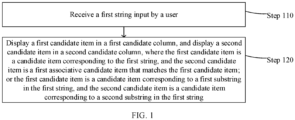
- FIG. 1 is a schematic flowchart of an information display method according to an embodiment of this application.
- the information display method may be executed by an electronic device or a server. It should be noted that the foregoing execution body does not constitute a limitation on this application.
- the electronic device may be but is not limited to a personal computer (Personal Computer, PC), a smartphone, a tablet computer, a personal digital assistant (Personal Digital Assistant, PDA), or the like.
- PC Personal Computer
- PDA Personal Digital Assistant
- the information processing method provided in this embodiment of this application may include step 110 and step 120.
- Step 110 Receive a first string input by a user.
- Step 120 Display a first candidate item in a first candidate column, and display a second candidate item in a second candidate column, where the first candidate item is a candidate item corresponding to the first string, and the second candidate item is a first associative candidate item that matches the first candidate item; or the first candidate item is a candidate item corresponding to a first substring in the first string, and the second candidate item is a candidate item corresponding to a second substring in the first string.
- the first string may include the first substring and the second substring.
- step 110 is described.
- the first string input by the user is received.
- the first string may be a string input by the user on an input method interface.
- the first string may be but is not limited to any one of the following types of strings: a Chinese Pinyin string, an English letter string, or a string in another possible input method solution.
- a specific type of the first string may be set according to a user requirement, and is not limited herein.
- the Chinese Pinyin string in a case that the first string is a Chinese Pinyin string, may be but is not limited to a full Pinyin string, a simple Pinyin string, a fuzzy tone string, or a custom string. This may be specifically set according to a user requirement, and is not limited herein.
- an input method keyboard corresponding to the input method interface may be of different types. This may be specifically determined according to an actual situation, and is not limited herein.
- the input keyboard corresponding to the input method interface may be a 9-key keyboard, or may be a 26-key keyboard.
- step 120 is described.
- the first candidate item is displayed in the first candidate column, and the second candidate item is displayed in the second candidate column, where the first candidate item is the candidate item corresponding to the first string, and the second candidate item is the first associative candidate item that matches the first candidate item; or the first candidate item is the candidate item corresponding to the first substring in the first string, and the second candidate item is the candidate item corresponding to the second substring in the first string.
- the first candidate column may be a preset candidate column.
- the second candidate column may be another preset candidate column that is different from the first candidate column.
- the input method keyboard corresponding to the input method interface is a 9-key keyboard
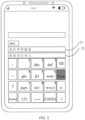
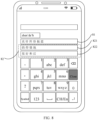
- the first candidate column may be an area 21 in FIG. 2
- the second candidate column may be an area 22 in FIG. 2 .
- first candidate item may be a candidate item displayed in the first candidate column
- second candidate item may be a candidate item displayed in the second candidate column
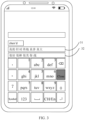
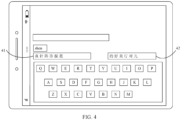
- the input method interface may be displayed on a screen in a portrait orientation (as shown in FIG. 2 and FIG. 3 ), or may be displayed on a screen in a landscape orientation (as shown in FIG. 4 and FIG. 5 ).
- the first candidate column and the second candidate column are arranged in a first direction in a case that the input method interface is displayed on the screen in a portrait orientation; and the first candidate column and the second candidate column are arranged in a second direction in a case that the input method interface is displayed on the screen in a landscape orientation.
- the first direction may be a preset direction
- the second direction may be another preset direction.
- being arranged in the first direction may be being arranged in a vertical direction
- being arranged in the second direction may be being arranged in a horizontal direction.
- a first candidate column 21 and a second candidate column 22 are arranged on the screen in a vertical direction.
- a first candidate column 41 and a second candidate column 42 are arranged on the screen in a horizontal direction.
- the first candidate column and the second candidate column are arranged in different manners according to a display state of the display screen.
- a layout of the first candidate column and the second candidate column matches the display state of the display screen of the electronic device more, so that the user can watch and operate an input keyboard, thereby improving user experience.
- the candidate item corresponding to the first string may be a candidate word corresponding to the first string.
- the first associative candidate item may be an associative word or an associative symbol of the first candidate item.
- first candidate items “ “ (zh e n), “ “ (zh e n), “ “ (zhén), “ “ (zh e n), “ “ (zhén), and “ “ (zhèn) corresponding to the first string "zhen” may be displayed in a first candidate column 21, and first associative candidate items corresponding to the first candidate items displayed in the first candidate column 21 may be displayed in a second candidate column 22.
- the first associative candidate items may be candidate words such as “ “ “ (de), “ “ “ (h ⁇ o), “ “ “ (m ⁇ i), “ “ (xing), “ “ (dui), and “ “ (ér) corresponding to the first candidate items.
- first candidate items “ “ (zh e n de), “ “ (zh e n dui), “ “ (zhèn di), “ “ (zh e n du o ), and “ “ (zh e n dà) corresponding to the first string "zhen'd” may be displayed in a first candidate column 31, and first associative candidate items corresponding to the first candidate items displayed in the first candidate column 31 may be displayed in a second candidate column 32.
- the first associative candidate items may be candidate words such as “ “ (h ⁇ n h ⁇ o), “ “ (h ⁇ n bàng), “ “ (h ⁇ n m ⁇ i), “ “ (n ⁇ ), and “ “ (zhàn) corresponding to the first candidate items.
- first candidate items “ “ (zh e n de h ⁇ n h ⁇ o), “ “ (zh e n de h ⁇ o h ⁇ n), “ “ (zh e n de h ⁇ n h ⁇ n), and “ “ (zh e n de h ⁇ o h ⁇ o) corresponding to the first string "zhendehh” may be displayed in the first candidate column, and first associative candidate items corresponding to the first candidate items displayed in the first candidate column may be displayed in the second candidate column.
- the first associative candidate items may be candidate symbols such as "*", "!, “ ⁇ ", and “#” corresponding to the first candidate items.
- the first string may include the first substring and the second substring.
- the first substring may be a part of the first string, and the second substring may be a part of the first string except the first substring.
- the first substring may be a string “zhende”, and the second substring may be a string “haobang”.
- the first substring when the user inputs the first string "zhende”, the first substring may be a string "zhen", and the second substring may be a string "de”.
- Candidate items “ “ “ (zh e n), “ “ (zh e n), “ “ (zhén), “ “ (zh e n), “ “ (zhén), and “ “ (zhèn) corresponding to the first substring "zhen” are displayed in the first candidate column, and candidate items “ “ “ (de), “ “ (mü), “ “ (é), and “ “ (de) corresponding to the second substring "de” are displayed in the second candidate column.
- the first string input by the user is received, the first candidate item corresponding to the first string is displayed in the first candidate column, and the first associative candidate item that matches the first candidate item is displayed in the second candidate column.
- the user may directly select the first candidate item and/or the first associative candidate item from different candidate columns.
- the candidate item corresponding to the first substring in the first string may be displayed in the first candidate column, and the candidate item corresponding to the second substring in the first string may be displayed in the second candidate column.
- candidate items corresponding to the first string can be separately displayed in a plurality of candidate columns, more candidate items are displayed, and more candidate items are provided for the user, so that the user can directly select a required candidate item from the plurality of candidate columns.
- more candidate items can be displayed in a simple operation manner, and an associative candidate item corresponding to a candidate item can be further displayed, so that more candidate options are provided for the user, thereby improving input efficiency of the user.
- the two cases may be as follows:
- the preset segmentation symbol may be a symbol that is preset in the first string and that is used to segment the first string into at least two substrings.
- the preset segmentation symbol may be but is not limited to ";", “'", “,”, or the like. This may be specifically set according to a user requirement, and is not limited herein.
- the first substring may be a string before a preset segmentation symbol at a preset location in the first string
- the second substring may be a string after the preset segmentation symbol at the preset location.
- the preset location may be a location that is preset.
- the first string is "zhen'de'hao'bang”
- the preset location may be a location of any one of three preset segmentation symbols "'" If the preset location is a location of a first segmentation symbol, the first substring may be a string "zhen”, and the second substring may be a string "dehaobang”.
- a candidate items in the first candidate column and a candidate item in the second candidate column are separately displayed based on whether the first string includes a preset segmentation symbol, so that display of a candidate item is more in line with an operation habit of the user, thereby improving user experience.
- the first substring is a string before the preset segmentation symbol
- the second substring is a string after the preset segmentation symbol.
- the candidate item corresponding to the first substring is displayed in the first candidate column
- the candidate item corresponding to the second substring is displayed in the second candidate column.
- first candidate items “ “ (zh e n), “ “ (zh e n), “ “ (zhèn), “ “ (zh e n), “ “ (zhèn), and “ “ (zhèn) corresponding to a string "zhen” before a last preset segmentation symbol may be displayed in a first candidate column 71, and second candidate items " “ “ (de), “ “ “ (di), “ “ (dài), “ “ (di), “ “ (dui), and “ “ (di) corresponding to a string "d” after the last preset segmentation symbol is displayed in a second candidate column 72.
- the first candidate item is displayed in the first candidate column, and the second candidate item is displayed in the second candidate column.
- the following may be included: displaying the first candidate item in the first candidate column, and separately displaying second candidate item in M sub-candidate columns.
- the first candidate item may be a candidate item corresponding to a string before the first one of the preset segmentation symbols in the first string.
- the second candidate column may include the M sub-candidate columns, and a candidate item corresponding to a string between two adjacent preset segmentation symbols is displayed in each sub-candidate column.
- a second candidate column 82 may include two sub-candidate columns: a sub-candidate column 821 and a sub-candidate column 822.
- the first candidate items “ “ (zh e n), “ “ “ (zh e n), “ “ “ (zhén), “3 ⁇ ” (zh e n), “ “ (zhén), and “ “ (zhèn) corresponding to a string "zhen” before the first one of the preset segmentation symbol in the first string may be displayed in a first candidate column 81, candidate items “ “ “ (de), “ “ (mü), “ “ (mü), and “ “ (de) corresponding to a substring “de” between the first one of the preset segmentation symbols and the second one of the preset segmentation symbols may be displayed in the sub-candidate column 821, and candidate items “ “ “ (h ⁇ n), “ “ (h ⁇ o), “ “ (hé), and “ “ (h ⁇ u) corresponding to a string "h” after the last one of the preset segmentation symbols may be displayed in the sub-candidate column 822.
- the preset segmentation symbols may be the same or may be different.
- the first string input by the user on the input method interface may be "zhen'de'h", or may be "zhen'de;h”.
- whether the preset segmentation symbols are the same may be set according to a user requirement, and is not limited herein.
- the input method keyboard corresponding to the input method interface is a 9-key keyboard in vertical sorting.
- the input method keyboard corresponding to the input method interface may be alternatively a 26-key keyboard or a 9-key keyboard, and the first candidate column and the second candidate column are horizontally arranged for display.
- FIG. 4 and FIG. 5 Details are not described herein.
- the input method keyboard corresponding to the input method interface is a 9-key keyboard in vertical arrangement
- Horizontal arrangement and vertical arrangement are only different layout manners of the first candidate column and the second candidate column.
- Another implementation of the information display method is the same.
- An implementation of a 26-key keyboard is the same as that of the 9-key keyboard, except that one is a 9-key keyboard and the other is a 26-key keyboard. Details are not described in the following embodiments.
- a candidate item displayed in the second candidate column is determined according to a quantity of preset segmentation symbols.
- the quantity of preset segmentation symbols is relatively large, a plurality of sub-candidate columns are displayed in the second candidate column, so that a character corresponding to a string between each two segmentation symbols can be operated separately, and accuracy of selecting each character in a long string is higher, thereby further improving user experience.
- step 120 may specifically include: displaying a plurality of first candidate items in the first candidate column and displaying a plurality of second candidate items in the second candidate column according to a weight level.
- candidate items corresponding to the first string “zhen” may include “ “ “ (zh e n), “ “ “ (zh e n), “ “ (zhén), “ “ “ (zh e n), “ “ (zhèn), “ “ (zh e n), “ “ (zhèn), and “ “ (zhèn), where a weight level of “ “ (zh e n) corresponding to the first string “zhen” may be 0.98, a weight of “ “ (zh e n) corresponding to the first string “zhen” may be 0.95, a weight level of “ “ (zhén) corresponding to the first string “zhen” may be 0.8, a weight level of "3 ⁇ ” (zh e n) corresponding to the first string “zhen” may be 0.7, a weight level of " “ (zhén) corresponding to the
- first associative candidate items corresponding to the first candidate items may be displayed in the second candidate column.
- the first associative candidate items corresponding to the first candidate items may include “ “ “ (de), “ “ “ (h ⁇ o), “ “ “ (m ⁇ i), “ “ “ (xing), “ “ “ (dui), “ “ (ér), “ “ (zhù), “ “ “ (x i ), and “ “ (x i n).
- the first associative candidate items corresponding to the first candidate items may be displayed in the second candidate column in descending order of the weight levels, that is, a display result in the second candidate column shown in FIG. 2 .
- the weight level is used to display candidate items in the first candidate column and the second candidate column.
- the candidate items may be displayed in the first candidate column and the second candidate column in another manner.
- the candidate items may be displayed according to historical input records of the user. For example, if candidate words selected by the user may include “ “ “ (zh e n), “ “ (zh e n), and “ “ (zhèn) when the user inputs "zhen”, “ “ “ (zh e n), “ “ (zh e n), and “ “ (zhèn) may be displayed in the first candidate column.
- sorting may be performed according to time points at which the user selects these candidate words. For example, a candidate word most recently selected by the user is “ “ (zh e n), a candidate word selected just before that is “ “ (zh e n), and a candidate word selected two times before that is “ “ (zhèn).
- the first candidate item is displayed in the first candidate column and the second candidate item is displayed in the second candidate column according to the weight level, so that candidate items displayed in the first candidate column and the second candidate column are more accurate.
- candidate words displayed in the first candidate column and the second candidate column are limited, that is, the candidate words cannot be fully displayed in the first candidate column and the second candidate column.
- the information display method may further include:
- the fourth input may be performed to display the fifth candidate item in the target candidate column.
- the fourth input may be but is not limited to a touch input, a voice input, a gesture input, or another possible input, or may be a combination of at least two of the foregoing inputs. This is not limited herein.
- the fourth input in a case that the fourth input is a touch input, the fourth input may be specifically but is not limited to a tap input, a double-tap input, a slide input, or a fill-in input in the target candidate column, or may be a combination of at least two of the foregoing inputs. This is not limited herein.
- the fifth candidate item may be a candidate item that is not completely the same as the first candidate item or the second candidate item.
- first candidate items “ “ (zh e n), “ “ (zh e n), “ “ (zhèn), “ “ (zh e n), “ “ (zhén), and “ “ (zhèn) corresponding to "zhen” are displayed in a first candidate column 91.
- fifth candidate items “ “ (zh e n) and “ “ (zhèn) are displayed in the first candidate column.
- associative candidate items displayed in a corresponding second candidate column are correspondingly updated. As shown in FIG.
- the fourth input performed by the user on the target candidate column is received, and the fifth candidate item is displayed in the target candidate column in response to the fourth input.
- more candidate items may be displayed for selection by the user.
- a candidate item in another candidate column other than the target candidate column is correspondingly adjusted, thereby improving user experience.
- the information display method may further include:
- the first target candidate item may be one of a plurality of second candidate items in the second candidate column.
- the first target candidate item may be one of a plurality of second candidate items in FIG. 2 to FIG. 9 .
- the first input may be performed to display the third candidate item in the first candidate column, and display the second associative candidate item corresponding to the third candidate item in the second candidate column.
- the first input may be but is not limited to a touch input, a voice input, a gesture input, or another possible input, or may be a combination of at least two of the foregoing inputs. This is not limited herein.
- the first input in a case that the first input is a touch input, the first input may be specifically but is not limited to a tap input, a double-tap input, a slide input, or a fill-in input on the first target candidate item in the second candidate column, or may be a combination of at least two of the foregoing inputs. This is not limited herein.
- the third candidate item may be a candidate item formed by combining the first target candidate item with the first candidate item.
- the first input performed by the user on the first target candidate item in the second candidate column is received, and in response to the first input, the third candidate item is displayed in the first candidate column, and the second associative candidate item corresponding to the third candidate item is displayed in the second candidate column.
- the first target candidate item may be combined with the first candidate item in the first candidate column to obtain the third candidate item. Therefore, when selecting candidate items, the user does not need to select the first candidate item in the first candidate column and then select the second candidate item in the second candidate column one by one, so that operations are simple, thereby improving input efficiency of the user.
- the receiving a first input performed by the user on a first target candidate item in the second candidate column may include:
- the select input may be an input for selecting the first target candidate item, for example, may be a tap input.
- the input method keyboard corresponding to the input method interface is a 9-key keyboard, and a layout manner is vertical sorting.
- first candidate items “ “ (zh e n de), “ “ (zh e n dui), “ “ (zhèn di), “ “ (zh e n du o ), and “ " (zh e n dà) corresponding to the first string may be displayed in a first candidate column 111, and first associative candidate items such as “ “ “ (h ⁇ n h ⁇ o), “ “ (h ⁇ n bàng), “ “ (h ⁇ n m ⁇ i), “ “ (n ⁇ ), and “ “ (zhàn) corresponding to the first candidate items are displayed in a second candidate column 112.
- the first target candidate item in a case that the second input is a select input, may be combined with the first one of the first candidate item, or the first target candidate item may be combined with each first candidate item, to form the third candidate item, and the third candidate item is displayed in the first candidate column, so that a corresponding associative word can be displayed in the second candidate column, and the user does not need to further perform an input to obtain a different associative word that is more in line with a user requirement, thereby improving user input efficiency.
- the receiving a first input performed by the user on a first target candidate item in the second candidate column may include:
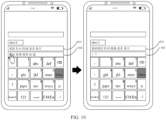
- the drag input may be an input for dragging the first target candidate item.
- the first location is a location corresponding to the second target candidate item in the first candidate column.
- first candidate items “ “ (zh e n de), “ “ (zh e n dui), “ “ (zhèn di), “ “ (zh e n du o ), and “ “ (zh e n dà) corresponding to the first string may be displayed on a first candidate column 121, and first associative candidate items such as “ “ “ (h ⁇ n h ⁇ o), “ “ (h ⁇ n bàng), “ “ (h ⁇ n m ⁇ i), “ “ (n ⁇ ), and “ “ (zhàn) corresponding to the first candidate items are displayed in a second candidate column 122.
- the first target candidate item in a case that the second input is a drag input, may be combined with any first candidate item in the first candidate column, so that the user can drag the first target candidate item to any first candidate item in the first candidate column based on a requirement, to obtain the required third candidate item, thereby improving user experience.
- the information display method may further include:
- the third target candidate item may be one of the first candidate items.
- the second input may be performed by display the third target candidate item on the screen, display the fourth candidate item in the first candidate column, and display the third associative candidate item corresponding to the fourth candidate item in the second candidate column.
- the second input may be but is not limited to a touch input, a voice input, a gesture input, or another possible input, or may be a combination of at least two of the foregoing inputs. This is not limited herein.
- the second input in a case that the second input is a touch input, the second input may be specifically but is not limited to a tap input, a double-tap input, a slide input, or a fill-in input on the first target candidate item in the second candidate column, or may be a combination of at least two of the foregoing inputs. This is not limited herein.
- the fourth candidate item may be a candidate item formed by moving the second candidate item to the first candidate column.
- the third associative candidate item may be an associative word or an associative symbol corresponding to the fourth candidate item.
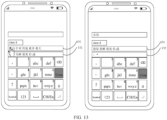
- first candidate items “ “ (zh e n de), “ “ (zh e n dui), “ “ (zhèn di), “ “ (zh e n du o ), and “ “ (zh e n dà) corresponding to the first string may be displayed in a first candidate column 131, and first associative candidate items such as “ “ “ (h ⁇ n h ⁇ o), “ “ (h ⁇ n bàng), “ “ (h ⁇ n m ⁇ i), “ “ (n ⁇ ), and “ “ (zhàn) corresponding to the first candidate items are displayed in a second candidate column 132.
- the second input performed by the user on the third target candidate item in the first candidate column is received, and in response to the second input, the third target candidate item is displayed on the screen, the fourth candidate item is displayed in the first candidate column, and the third associative candidate item corresponding to the fourth candidate item is displayed in the second candidate column.
- the fourth candidate item may be further displayed in the first candidate column, and the third associative candidate item corresponding to the fourth candidate item is displayed in the second candidate column. Therefore, the user may directly select a required a candidate item by tapping the fourth candidate item and the third associative candidate item, and does not need to input a string again, so that operations are simple, thereby improving input efficiency of the user.
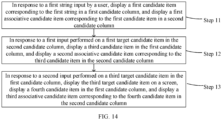
- FIG. 14 is a schematic flowchart of an information display method according to an embodiment of this application.
- the information display method is for a scene in which a first string does not include a preset segmentation symbol.
- the information display method provided in this embodiment of this application may include step 11 to step 13.
- Step 11 In response to a first string input by a user, display a first candidate item corresponding to the first string in a first candidate column, and display a first associative candidate item corresponding to the first candidate item in a second candidate column.
- Step 12 In response to a first input performed on a first target candidate item in the second candidate column, display a third candidate item in the first candidate column, and display a second associative candidate item corresponding to the third candidate item in the second candidate column.
- Step 13 In response to a second input performed on a third target candidate item in the first candidate column, display the third target candidate item on a screen, display a fourth candidate item in the first candidate column, and display a third associative candidate item corresponding to the fourth candidate item in the second candidate column.
- FIG. 15 is a schematic flowchart of an information display method according to an embodiment of this application.
- the information display method is for a scene in which a first string includes a preset segmentation symbol.
- the information display method provided in this embodiment of this application may include step 21 to step 23.
- Step 21 In response to a first string input by a user, display, in a first candidate column, a first candidate item corresponding to a first substring in the first string, and display, in a second candidate column, a second candidate item corresponding to a second substring in the first string.
- Step 22 In response to a first input performed on a first target candidate item in the second candidate column, display a third candidate item in the first candidate column, and display a second associative candidate item corresponding to the third candidate item in the second candidate column.
- Step 23 In response to a second input performed on a third target candidate item in the first candidate column, display the third target candidate item on a screen, display a fourth candidate item in the first candidate column, and display a third associative candidate item corresponding to the fourth candidate item in the second candidate column.
- the information display method provided in the embodiments of this application may be performed by an information display apparatus, or a control module that is in the information display apparatus and that is configured to perform the information display method.
- an example in which the information display apparatus performs the information display method is used to describe the information display apparatus provided in the embodiments of this application.
- this application further provides an information display apparatus, and the information display apparatus is applied to an electronic device.
- the following describes in detail the information display apparatus provided in this embodiment of this application with reference to FIG. 16 .
- FIG. 16 is a structural block diagram of an information display apparatus according to an example embodiment.
- the information processing apparatus may include:
- the receiving module receives the first string input by the user, and the display module displays the first candidate item corresponding to the first string in the first candidate column, and displays the first associative candidate item that matches the first candidate item in the second candidate column.
- the user may directly select the first candidate item and/or the first associative candidate item from different candidate columns.
- the display module may display the candidate item corresponding to the first substring in the first string in the first candidate column, and display the candidate item corresponding to the second substring in the first string in the second candidate column.
- candidate items corresponding to the first string can be separately displayed in a plurality of candidate columns, more candidate items are displayed, and more candidate items are provided for the user, so that the user can directly select a required candidate item from the plurality of candidate columns.
- more candidate items can be displayed in a simple operation manner, and an associative candidate item corresponding to a candidate item can be further displayed, so that more candidate options are provided for the user, thereby improving input efficiency of the user.
- the first candidate item in a case that the first string does not include a preset segmentation symbol, is the candidate item corresponding to the first string, and the second candidate item is the first associative candidate item that matches the first candidate item; or in a case that the first string includes a preset segmentation symbol, the first candidate item is the candidate item corresponding to the first substring in the first string, and the second candidate item is the candidate item corresponding to the second substring in the first string, where the first substring is a string before a preset segmentation symbol at a preset location in the first string, and the second substring is a string after the preset segmentation symbol at the preset location.
- the display module 1620 is specifically configured to:
- the receiving module 1610 may be further configured to receive a first input performed by the user on a first target candidate item in the second candidate column, where the first target candidate item is one of the second candidate items.
- the display module 1620 may be further configured to: in response to the first input, display a third candidate item in the first candidate column, and display a second associative candidate item corresponding to the third candidate item in the second candidate column, where the third candidate item is a candidate item formed by combining the first target candidate item with the first candidate item.
- the receiving module 1610 may be specifically configured to: in a case that the second input is a select input, receive a select input performed by the user on the first target candidate item in the second candidate column.
- the display module 1620 may be specifically configured to:
- the receiving module 1610 may be specifically configured to: in a case that the second input is a drag input, receive a drag input performed by the user to drag the first target candidate item to a first location in the first candidate column, where the first location is a location corresponding to a second target candidate item in the first candidate column.
- the display module 1620 may be specifically configured to: display, in the first candidate column in response to the drag input, a candidate item formed by combining the second target candidate item with the first target candidate item.
- the receiving module 1610 may be further configured to receive a second input performed by the user on a third target candidate item in the first candidate column, where the third target candidate item is one of the first candidate items.
- the display module 1620 may be further configured to: in response to the second input, display the third target candidate item on a screen, display a fourth candidate item in the first candidate column, and display a third associative candidate item corresponding to the fourth candidate item in the second candidate column, where the fourth candidate item is a candidate item formed by moving the second candidate item to the first candidate column.
- the information display apparatus in this embodiment of this application may be an apparatus, or may be a component, an integrated circuit, or a chip in a terminal.
- the apparatus may be a mobile electronic device, or may be a non-mobile electronic device.
- the mobile electronic device may be a mobile phone, a tablet computer, a notebook computer, a palmtop computer, an in-vehicle electronic device, a wearable device, an ultra-mobile personal computer (ultra-mobile personal computer, UMPC), a netbook, or a personal digital assistant (personal digital assistant, PDA).
- the non-mobile electronic device may be a server, a network attached storage (Network Attached Storage, NAS), a personal computer (personal computer, PC), a television (television, TV), a teller machine, or a self-service machine. This is not specifically limited in this embodiment of this application.
- the information display apparatus in this embodiment of this application may be an apparatus with an operating system.
- the operating system may be an Android (Android) operating system, an iOS operating system, or another possible operating system. This is not specifically limited in this embodiment of this application.
- the information display apparatus provided in this embodiment of this application can implement the processes implemented in the method embodiments shown in FIG. 1 to FIG. 15 . To avoid repetition, details are not described herein again.
- An embodiment of the present invention further provides an electronic device, configured to perform the processes of the foregoing information display method embodiment, and a same technical effect can be achieved. To avoid repetition, details are not described herein again.
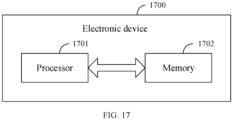
- an embodiment of this application further provides an electronic device 1700, including a processor 1701, a memory 1702, and a program or an instruction that is stored in the memory 1702 and that can be run on the processor 1701.
- the program or the instruction is executed by the processor 1701 to implement the processes of the foregoing information display method embodiment, and a same technical effect can be achieved. To avoid repetition, details are not described herein again.
- the electronic device in this embodiment of this application includes the mobile electronic device and the non-mobile electronic device.
- FIG. 18 is a schematic diagram of a hardware structure of an electronic device according to an embodiment of this application.
- An electronic device 1800 includes but is not limited to components such as a radio frequency unit 1801, a network module 1802, an audio output unit 1803, an input unit 1804, a sensor 1805, a display unit 1806, a user input unit 1807, an interface unit 1808, a memory 1809, and a processor 1810.
- the electronic device 1800 may further include the power supply (for example, a battery) that supplies power to each component.
- the power supply may be logically connected to the processor 1810 by using a power supply management system, so as to manage functions such as charging, discharging, and power consumption by using the power supply management system.
- the structure of the electronic device shown in FIG. 18 does not constitute a limitation on the electronic device, and the electronic device may include more or fewer components than those shown in the figure, or combine some components, or have different component arrangements. Details are not described herein again.
- the user input unit 1807 is configured to receive a first string input by a user.
- the display unit 1806 is configured to: display a first candidate item in a first candidate column, and display a second candidate item in a second candidate column, where the first candidate item is a candidate item corresponding to the first string, and the second candidate item is a first associative candidate item that matches the first candidate item; or the first candidate item is a candidate item corresponding to a first substring in the first string, the second candidate item is a candidate item corresponding to a second substring in the first string, and the first string includes the first substring and the second substring.
- the first string input by the user is received, the first candidate item corresponding to the first string is displayed in the first candidate column, and the first associative candidate item that matches the first candidate item is displayed in the second candidate column.
- the user may directly select the first candidate item and/or the first associative candidate item from different candidate columns.
- the candidate item corresponding to the first substring in the first string may be displayed in the first candidate column, and the candidate item corresponding to the second substring in the first string may be displayed in the second candidate column.
- candidate items corresponding to the first string can be separately displayed in a plurality of candidate columns, more candidate items are displayed, and more candidate items are provided for the user, so that the user can directly select a required candidate item from the plurality of candidate columns.
- more candidate items can be displayed in a simple operation manner, and an associative candidate item corresponding to a candidate item can be further displayed, so that more candidate options are provided for the user, thereby improving input efficiency of the user.
- the first candidate item is the candidate item corresponding to the first string
- the second candidate item is the first associative candidate item that matches the first candidate item
- the first candidate item is the candidate item corresponding to the first substring in the first string
- the second candidate item is the candidate item corresponding to the second substring in the first string, where the first substring is a string before a preset segmentation symbol at a preset location in the first string, and the second substring is a string after the preset segmentation symbol at the preset location.
- the display unit 1806 may be further configured to: display the first candidate item in the first candidate column, where the first candidate item is a candidate item corresponding to a string before the first one of the preset segmentation symbols in the first string; and separately display second candidate items in M sub-candidate columns, where the second candidate column includes the M sub-candidate columns, and a candidate item corresponding to a string between two adjacent preset segmentation symbols is displayed in each sub-candidate column, where M is a positive integer greater than 1.
- the user input unit 1807 may be further configured to receive a first input performed by the user on a first target candidate item in the second candidate column, where the first target candidate item is one of the second candidate items.
- the display unit 1806 may be further configured to: in response to the first input, display a third candidate item in the first candidate column, and display a second associative candidate item corresponding to the third candidate item in the second candidate column, where the third candidate item is a candidate item formed by combining the first target candidate item with the first candidate item.
- the first input performed by the user on the first target candidate item in the second candidate column is received, and in response to the first input, the third candidate item is displayed in the first candidate column, and the second associative candidate item corresponding to the third candidate item is displayed in the second candidate column.
- the first target candidate item may be combined with the first candidate item in the first candidate column to obtain the third candidate item. Therefore, when selecting candidate items, the user does not need to select the first candidate item in the first candidate column and then select the second candidate item in the second candidate column one by one, so that operations are simple, thereby improving input efficiency of the user.
- the user input unit 1807 may be further configured to receive a select input performed by the user on the first target candidate item in the second candidate column.
- the display unit 1806 may be further configured to display, in the first candidate column in response to the select input, a candidate item formed by combining the first target candidate item with the first one of the first candidate item; or display, in the first candidate column in response to the select input, a candidate item formed by combining the first target candidate item with each of the first candidate items.
- the candidate item formed by combining the first target candidate item with the first candidate item may be displayed in the first candidate column in response to the select input performed by the user on the first target candidate item in the second candidate column; or the candidate item formed by combining the first target candidate item with the first one of the first candidate item is displayed in the first candidate column in response to the select input.
- the first target candidate item may be combined with the first one of the first candidate item, or the first target candidate item may be combined with each first candidate item, and the user can obtain the combination of the first target candidate item and the first one of the first candidate item without a need to select the first target candidate item and the first one of the first candidate item one by one (or can obtain the combination of the first target candidate item and each first candidate item without a need to select the first target candidate item and each first candidate item one by one), so that operations are simple, thereby improving input efficiency of the user.
- the user input unit 1807 may be further configured to receive a drag input performed by the user to drag the first target candidate item to a first location in the first candidate column, where the first location is a location corresponding to a second target candidate item in the first candidate column.
- the display unit 1806 may be further configured to display, in the first candidate column in response to the drag input, a candidate item formed by combining the second target candidate item with the first target candidate item.
- the candidate item formed by combining the second target candidate item with the first target candidate item may be displayed in the first candidate column in response to the drag input performed by the user to drag the first target candidate item to the first location in the first candidate column.
- the first target candidate item may be combined with any first candidate item in the first candidate column. Therefore, the user may drag the first target candidate item to any first candidate item in the first candidate column based on a requirement, to obtain the required third candidate item, thereby improving user experience.
- the user can obtain the combination of the first target candidate item and the first candidate item without a need to select the first target candidate item and the first candidate item one by one, so that operations are simple, thereby improving input efficiency of the user.
- the user input unit 1807 may be further configured to receive a second input performed by the user on a third target candidate item in the first candidate column, where the third target candidate item is one of the first candidate items.
- the display unit 1806 may be further configured to: in response to the second input, display the third target candidate item on a screen, display a fourth candidate item in the first candidate column, and display a third associative candidate item corresponding to the fourth candidate item in the second candidate column, where the fourth candidate item is a candidate item formed by moving the second candidate item to the first candidate column.
- the second input performed by the user on the third target candidate item in the first candidate column is received, and in response to the second input, the third target candidate item is displayed on the screen, the fourth candidate item is displayed in the first candidate column, and the third associative candidate item corresponding to the fourth candidate item is displayed in the second candidate column.
- the fourth candidate item may be further displayed in the first candidate column, and the third associative candidate item corresponding to the fourth candidate item is displayed in the second candidate column. Therefore, the user may directly select a required a candidate item by tapping the fourth candidate item and the third associative candidate item, and does not need to input a string again, so that operations are simple, thereby improving input efficiency of the user.
- the input unit 1804 may include a graphics processing unit (Graphics Processing Unit, GPU) 18041 and a microphone 18042, and the graphics processing unit 18041 processes image data of a still image or a video that is obtained by an image capturing apparatus (for example, a camera) in a video capturing mode or an image capturing mode.
- the display unit 1806 may include a display panel 18061.
- the display panel 18061 may be configured in a form such as a liquid crystal display or an organic light-emitting diode.
- the user input unit 1807 may include a touch panel 18071 and another input device 18072.
- the touch panel 18071 is also referred to as a touchscreen.
- the touch panel 18071 may include two parts: a touch detection apparatus and a touch controller.
- the another input device 18072 may include but is not limited to a physical keyboard, a functional button (such as a volume control button or a power on/off button), a trackball, a mouse, and a joystick. Details are not described herein.
- the memory 1809 may be configured to store a software program and various data, including but not limited to an application and an operating system.
- An application processor and a modem processor may be integrated into the processor 1810, the application processor mainly processes an operating system, a user interface, an application program, and the like, and the modem processor mainly processes wireless communication. It can be understood that, alternatively, the modem processor may not be integrated into the processor 1810.
- An embodiment of this application further provides a readable storage medium.
- the readable storage medium stores a program or an instruction, and the program or the instruction is executed by a processor to implement the processes in the foregoing information display method embodiment, and a same technical effect can be achieved. To avoid repetition, details are not described herein again.
- the processor is a processor in the electronic device in the foregoing embodiment.
- the readable storage medium includes a computer readable storage medium, for example, a read-only memory (Read-Only Memory, ROM), a random access memory (Random Access Memory, RAM), a magnetic disk, or an optical disc.
- An embodiment of the present invention further provides a computer program product.
- the computer program product may be executed by a processor to implement the processes of the foregoing information display method embodiment, and a same technical effect can be achieved. To avoid repetition, details are not described herein again.
- An embodiment of this application further provides a chip.
- the chip includes a processor and a communication interface, the communication interface is coupled to the processor, and the processor is configured to run a program or an instruction to implement the processes of the foregoing information display method embodiment, and a same technical effect can be achieved. To avoid repetition, details are not described herein again.
- the chip mentioned in this embodiment of this application may also be referred to as a system-level chip, a system chip, a chip system, or an on-chip system chip.
- the method in the foregoing embodiment may be implemented by software in addition to a necessary universal hardware platform or by hardware only. In most circumstances, the former is a preferred implementation manner.
- the technical solutions of this application essentially or the part contributing to the related art may be implemented in a form of a computer software product.
- the computer software product is stored in a storage medium (for example, a ROM/RAM, a floppy disk, or an optical disc), and includes several instructions for instructing a terminal (which may be a mobile phone, a computer, a server, a network device, or the like) to perform the methods described in the embodiments of this application.
- the term "include” does not exclude other apparatuses or steps; when an article is not modified with a quantifier, it is intended to include one/one type or a plurality of/a plurality of types of articles, and an article can be used interchangeably with "one/one type or a plurality of/a plurality of types of articles”; and the terms “first” and “second” are used to indicate names rather than to indicate any particular order. None of the reference signs in the claims shall be construed as a limitation on the protection scope. A plurality of functions in the claims may be implemented by a single hardware or software module. Some technical features in different dependent claims do not mean that these technical features cannot be combined to achieve beneficial effects.
Landscapes
- Engineering & Computer Science (AREA)
- Theoretical Computer Science (AREA)
- General Engineering & Computer Science (AREA)
- Human Computer Interaction (AREA)
- Physics & Mathematics (AREA)
- General Physics & Mathematics (AREA)
- Software Systems (AREA)
- User Interface Of Digital Computer (AREA)
Applications Claiming Priority (2)
| Application Number | Priority Date | Filing Date | Title |
|---|---|---|---|
| CN202111072731.3A CN113805708B (zh) | 2021-09-14 | 2021-09-14 | 信息显示方法、装置、电子设备和存储介质 |
| PCT/CN2022/117581 WO2023040724A1 (zh) | 2021-09-14 | 2022-09-07 | 信息显示方法、装置、电子设备和存储介质 |
Publications (2)
| Publication Number | Publication Date |
|---|---|
| EP4404033A1 true EP4404033A1 (de) | 2024-07-24 |
| EP4404033A4 EP4404033A4 (de) | 2024-12-18 |
Family
ID=78895264
Family Applications (1)
| Application Number | Title | Priority Date | Filing Date |
|---|---|---|---|
| EP22869094.7A Pending EP4404033A4 (de) | 2021-09-14 | 2022-09-07 | Informationsanzeigeverfahren und -vorrichtung, elektronische vorrichtung und speichermedium |
Country Status (4)
| Country | Link |
|---|---|
| US (1) | US20240220079A1 (de) |
| EP (1) | EP4404033A4 (de) |
| CN (1) | CN113805708B (de) |
| WO (1) | WO2023040724A1 (de) |
Families Citing this family (1)
| Publication number | Priority date | Publication date | Assignee | Title |
|---|---|---|---|---|
| CN113805708B (zh) * | 2021-09-14 | 2024-01-23 | 维沃移动通信有限公司 | 信息显示方法、装置、电子设备和存储介质 |
Family Cites Families (19)
| Publication number | Priority date | Publication date | Assignee | Title |
|---|---|---|---|---|
| US5329609A (en) * | 1990-07-31 | 1994-07-12 | Fujitsu Limited | Recognition apparatus with function of displaying plural recognition candidates |
| CN1908866A (zh) * | 2005-08-07 | 2007-02-07 | 黄金富 | 可进行句子联想的输入方法 |
| US8191142B2 (en) * | 2006-10-26 | 2012-05-29 | Polytechnic Institute Of New York University | Detecting whether an arbitrary-length bit string input matches one of a plurality of known arbitrary-length bit strings using a hierarchical data structure |
| US20100199176A1 (en) * | 2009-02-02 | 2010-08-05 | Chronqvist Fredrik A | Electronic device with text prediction function and method |
| US20110087961A1 (en) * | 2009-10-11 | 2011-04-14 | A.I Type Ltd. | Method and System for Assisting in Typing |
| US9223497B2 (en) * | 2012-03-16 | 2015-12-29 | Blackberry Limited | In-context word prediction and word correction |
| IN2013CH00469A (de) * | 2013-01-21 | 2015-07-31 | Keypoint Technologies India Pvt Ltd | |
| CN103092969A (zh) * | 2013-01-22 | 2013-05-08 | 上海量明科技发展有限公司 | 对输入法候选项进行流媒体检索的方法、客户端及系统 |
| JP6409165B2 (ja) * | 2014-12-08 | 2018-10-24 | 富士通コネクテッドテクノロジーズ株式会社 | 電子機器、及び、手書き文字入力プログラム |
| CN104503597B (zh) * | 2014-12-19 | 2017-12-12 | 北京奇虎科技有限公司 | 笔画输入方法、装置和系统 |
| CN104615591B (zh) * | 2015-03-10 | 2019-02-05 | 上海触乐信息科技有限公司 | 基于上下文的前向输入纠错方法和装置 |
| CN107665046B (zh) * | 2016-07-29 | 2023-03-10 | 北京搜狗科技发展有限公司 | 一种输入方法和装置、一种用于输入的装置 |
| CN107688397B (zh) * | 2016-08-03 | 2022-10-21 | 北京搜狗科技发展有限公司 | 一种输入方法、系统和用于输入的装置 |
| US10686750B2 (en) * | 2017-03-07 | 2020-06-16 | Verisign, Inc. | Alternate character set domain name suggestion and registration using translation and transliteration |
| CN109144285B (zh) * | 2017-06-16 | 2022-09-06 | 北京搜狗科技发展有限公司 | 一种输入方法和装置 |
| CN109799916B (zh) * | 2017-11-16 | 2021-08-13 | 北京搜狗科技发展有限公司 | 一种候选项联想方法和装置 |
| CA3231830A1 (en) * | 2019-08-05 | 2021-02-11 | Ai21 Labs | Systems and methods of controllable natural language generation |
| CN112698735B (zh) * | 2020-12-24 | 2024-05-31 | 维沃移动通信有限公司 | 信息输入方法、装置和电子设备 |
| CN113805708B (zh) * | 2021-09-14 | 2024-01-23 | 维沃移动通信有限公司 | 信息显示方法、装置、电子设备和存储介质 |
-
2021
- 2021-09-14 CN CN202111072731.3A patent/CN113805708B/zh active Active
-
2022
- 2022-09-07 EP EP22869094.7A patent/EP4404033A4/de active Pending
- 2022-09-07 WO PCT/CN2022/117581 patent/WO2023040724A1/zh not_active Ceased
-
2024
- 2024-03-13 US US18/603,605 patent/US20240220079A1/en active Pending
Also Published As
| Publication number | Publication date |
|---|---|
| CN113805708B (zh) | 2024-01-23 |
| US20240220079A1 (en) | 2024-07-04 |
| EP4404033A4 (de) | 2024-12-18 |
| WO2023040724A1 (zh) | 2023-03-23 |
| CN113805708A (zh) | 2021-12-17 |
Similar Documents
| Publication | Publication Date | Title |
|---|---|---|
| CN103049254B (zh) | 用于语义缩放的编程接口 | |
| US8302004B2 (en) | Method of displaying menu items and related touch screen device | |
| US20150169212A1 (en) | Character Recognition Using a Hybrid Text Display | |
| US20180196854A1 (en) | Application extension for generating automatic search queries | |
| US9292203B2 (en) | Providing a vertical candidate bar with an on-screen keyboard | |
| CN105122185A (zh) | 使用过去交互数据的文本建议输出 | |
| CN102763077A (zh) | 自动显示及隐藏屏幕上键盘 | |
| JP6640893B2 (ja) | 文字を入力する方法及び装置 | |
| CN105164616A (zh) | 一致文本建议输出 | |
| US20120023433A1 (en) | Method and apparatus for inputting character in a portable terminal | |
| CN105308551A (zh) | 用于连续手势输入的多图形键盘 | |
| US11360663B2 (en) | Presenting miniprofile from feed | |
| CN112099685A (zh) | 通知消息显示控制方法、装置、电子设备和可读存储介质 | |
| CN113641638A (zh) | 应用管理方法、装置、电子设备及存储介质 | |
| US20170083232A1 (en) | Dual display device | |
| EP4372555A1 (de) | Verfahren und vorrichtung zur anzeige von anwendungsbenachrichtigungen und elektronische vorrichtung | |
| US12353677B2 (en) | Application icon display method and apparatus, and electronic device | |
| US20240220091A1 (en) | Information display method, electronic device, and storage medium | |
| US20240220079A1 (en) | Information display method and apparatus, electronic device, and storage medium | |
| EP4582920A1 (de) | Verfahren und vorrichtung zur verwaltung von hintergrundanwendungen, elektronische vorrichtung und medium | |
| WO2022068725A1 (zh) | 导航手势的设置方法及装置、电子设备 | |
| CN112698734A (zh) | 候选词显示方法及装置、电子设备 | |
| CN113359999A (zh) | 候选词更新方法、装置和电子设备 | |
| US20130091455A1 (en) | Electronic device having touchscreen and character input method therefor | |
| EP4170473B1 (de) | Verfahren und vorrichtung zur anzeige von anwendungssymbolen und elektronische vorrichtung |
Legal Events
| Date | Code | Title | Description |
|---|---|---|---|
| STAA | Information on the status of an ep patent application or granted ep patent |
Free format text: STATUS: THE INTERNATIONAL PUBLICATION HAS BEEN MADE |
|
| PUAI | Public reference made under article 153(3) epc to a published international application that has entered the european phase |
Free format text: ORIGINAL CODE: 0009012 |
|
| STAA | Information on the status of an ep patent application or granted ep patent |
Free format text: STATUS: REQUEST FOR EXAMINATION WAS MADE |
|
| 17P | Request for examination filed |
Effective date: 20240327 |
|
| AK | Designated contracting states |
Kind code of ref document: A1 Designated state(s): AL AT BE BG CH CY CZ DE DK EE ES FI FR GB GR HR HU IE IS IT LI LT LU LV MC MK MT NL NO PL PT RO RS SE SI SK SM TR |
|
| REG | Reference to a national code |
Ref country code: DE Ref legal event code: R079 Free format text: PREVIOUS MAIN CLASS: G06F0003023000 Ipc: G06F0003048860 |
|
| A4 | Supplementary search report drawn up and despatched |
Effective date: 20241118 |
|
| DAV | Request for validation of the european patent (deleted) | ||
| DAX | Request for extension of the european patent (deleted) | ||
| RIC1 | Information provided on ipc code assigned before grant |
Ipc: G06F 3/023 20060101ALI20241112BHEP Ipc: G06F 3/0486 20130101ALI20241112BHEP Ipc: G06F 3/0482 20130101ALI20241112BHEP Ipc: G06F 3/04883 20220101ALI20241112BHEP Ipc: G06F 3/04842 20220101ALI20241112BHEP Ipc: G06F 3/04886 20220101AFI20241112BHEP |