EP4353142A1 - Verfahren und vorrichtung zur anpassung einer darstellungshierarchiesequenz - Google Patents
Verfahren und vorrichtung zur anpassung einer darstellungshierarchiesequenz Download PDFInfo
- Publication number
- EP4353142A1 EP4353142A1 EP23817289.4A EP23817289A EP4353142A1 EP 4353142 A1 EP4353142 A1 EP 4353142A1 EP 23817289 A EP23817289 A EP 23817289A EP 4353142 A1 EP4353142 A1 EP 4353142A1
- Authority
- EP
- European Patent Office
- Prior art keywords
- editing material
- rendering
- hierarchy
- editing
- order
- Prior art date
- Legal status (The legal status is an assumption and is not a legal conclusion. Google has not performed a legal analysis and makes no representation as to the accuracy of the status listed.)
- Pending
Links
Images




Classifications
-
- G—PHYSICS
- G06—COMPUTING OR CALCULATING; COUNTING
- G06T—IMAGE DATA PROCESSING OR GENERATION, IN GENERAL
- G06T15/00—Three-dimensional [3D] image rendering
- G06T15/005—General purpose rendering architectures
-
- G—PHYSICS
- G06—COMPUTING OR CALCULATING; COUNTING
- G06T—IMAGE DATA PROCESSING OR GENERATION, IN GENERAL
- G06T11/00—Two-dimensional [2D] image generation
- G06T11/60—Creating or editing images; Combining images with text
-
- G—PHYSICS
- G06—COMPUTING OR CALCULATING; COUNTING
- G06T—IMAGE DATA PROCESSING OR GENERATION, IN GENERAL
- G06T19/00—Manipulating three-dimensional [3D] models or images for computer graphics
- G06T19/20—Editing of three-dimensional [3D] images, e.g. changing shapes or colours, aligning objects or positioning parts
-
- G—PHYSICS
- G11—INFORMATION STORAGE
- G11B—INFORMATION STORAGE BASED ON RELATIVE MOVEMENT BETWEEN RECORD CARRIER AND TRANSDUCER
- G11B27/00—Editing; Indexing; Addressing; Timing or synchronising; Monitoring; Measuring tape travel
- G11B27/02—Editing, e.g. varying the order of information signals recorded on, or reproduced from, record carriers
- G11B27/031—Electronic editing of digitised analogue information signals, e.g. audio or video signals
-
- G—PHYSICS
- G11—INFORMATION STORAGE
- G11B—INFORMATION STORAGE BASED ON RELATIVE MOVEMENT BETWEEN RECORD CARRIER AND TRANSDUCER
- G11B27/00—Editing; Indexing; Addressing; Timing or synchronising; Monitoring; Measuring tape travel
- G11B27/10—Indexing; Addressing; Timing or synchronising; Measuring tape travel
- G11B27/34—Indicating arrangements
-
- G—PHYSICS
- G06—COMPUTING OR CALCULATING; COUNTING
- G06T—IMAGE DATA PROCESSING OR GENERATION, IN GENERAL
- G06T2200/00—Indexing scheme for image data processing or generation, in general
- G06T2200/24—Indexing scheme for image data processing or generation, in general involving graphical user interfaces [GUIs]
-
- Y—GENERAL TAGGING OF NEW TECHNOLOGICAL DEVELOPMENTS; GENERAL TAGGING OF CROSS-SECTIONAL TECHNOLOGIES SPANNING OVER SEVERAL SECTIONS OF THE IPC; TECHNICAL SUBJECTS COVERED BY FORMER USPC CROSS-REFERENCE ART COLLECTIONS [XRACs] AND DIGESTS
- Y02—TECHNOLOGIES OR APPLICATIONS FOR MITIGATION OR ADAPTATION AGAINST CLIMATE CHANGE
- Y02P—CLIMATE CHANGE MITIGATION TECHNOLOGIES IN THE PRODUCTION OR PROCESSING OF GOODS
- Y02P90/00—Enabling technologies with a potential contribution to greenhouse gas [GHG] emissions mitigation
- Y02P90/30—Computing systems specially adapted for manufacturing
Definitions
- Embodiments of the present disclosure relate to an adjustment method and apparatus for a rendering hierarchy order.
- Rendering is the last process of drawing an image by a computer, thus ultimately making the image conform to a 3D scene.
- a visual effect in a multimedia content the user often edits a main material, for example, adding a sticker, a special effect, and a picture-in-picture to the main material, so as to obtain the visually rich multimedia content.
- a rendering hierarchy order is set in advance for different categories of editing materials, and then the main material and the added editing materials are rendered according to the preset rendering hierarchy order.
- the visual effect presented in the edited multimedia content obtained by the above rendering method often fails to meet the user's expectation.
- the present disclosure provides an adjustment method and apparatus for a rendering hierarchy order.
- the present disclosure provides an adjustment method for a rendering hierarchy order, which includes:
- an adjustment apparatus for a rendering hierarchy order which includes:
- the present disclosure provides an electronic device, which includes a memory and a processor.
- the memory is configured to store a computer program instruction.
- the processor is configured to execute the computer program instruction, causing the electronic device to implement the adjustment method for the rendering hierarchy order according to the first aspect.
- the present disclosure provides a readable storage medium, which includes a computer program instruction.
- An electronic device executes the computer program instruction, causing the electronic device to implement the adjustment method for the rendering hierarchy order according to the first aspect.
- the present disclosure provides a computer program product, upon execution of the computer program product by an electronic device, causes the electronic device to implement the adjustment method for the rendering hierarchy order according to the first aspect.
- the rendering hierarchy order of editing material segments of different categories is fixed, and the rendering hierarchy order of editing material segments of the identical category is sorted in accordance with the addition time of the editing material segments, and the visual effect presented by the video rendered according to the above method is substantially limited, and cannot satisfy the user's expectation.
- the order of different rendering hierarchies in an editing tool or editing software is, from high to low, a text, a sticker, a picture-in-picture, and a main material. According to this order, it is not possible to move the text/sticker to the bottom of the picture-in-picture, nor is it possible to edit the picture-in-picture, text, and sticker in an interspersed manner, thus failing to meet the user's needs.
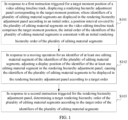
- embodiments of the present disclosure provide an adjustment method and apparatus for a rendering hierarchy order, and the method includes: displaying, in response to a first instruction triggered for a target moment position of a video editing timeline track, a rendering hierarchy adjustment panel corresponding to the target moment position, the identifiers of a plurality of editing material segments whose position intervals covered on the video editing timeline track includes the target moment position are displayed in the rendering hierarchy adjustment panel according to an initial order; moving for the identifier of the editing material segment and adjusting the display position of the identifier of the editing material segment, so that the identifiers of the plurality of editing material segments are displayed according to a target order; and then determining a target rendering hierarchy order of the plurality of editing material segments according to the target order of the identifiers of the plurality of editing material segments.
- the method can implement to freely adjust the rendering hierarchy order of the editing material segments to meet the user's video editing needs.
- embodiments of the present disclosure provide an adjustment method and apparatus for a rendering hierarchy order, in which, in response to the instruction input by the user, a rendering hierarchy adjustment panel corresponding to a target moment position is displayed, identifiers respectively corresponding to a plurality of editing material segments are displayed in the rendering hierarchy adjustment panel according to the current rendering hierarchy order of the plurality of editing material segments, and the rendering hierarchy order of the editing material segment is adjusted by moving the display position of the identifier corresponding to the editing material segment.
- the method provided in the present disclosure enables the user to freely adjust the rendering hierarchy order of the editing material segment, so that the user can freely exert creativity.
- the rendering hierarchy adjustment interface presented to the user displays the identifiers respectively corresponding to various editing material segments according to the rendering hierarchy order, which can facilitate the user to quickly understand and use.
- the adjustment method for the rendering hierarchy order provided by the present disclosure may be executed by the adjustment apparatus for the rendering hierarchy order provided by the present disclosure, the adjustment apparatus for the rendering hierarchy order may be implemented by any software and/or hardware.
- the adjustment apparatus for the rendering hierarchy order may be an electronic device, and the electronic device may include, but is not limited to: a mobile phone, a tablet computer, a wearable electronic device, a laptop computer, an ultra-mobile personal computer (UMPC), a netbook, a personal digital assistant (PDA), and the like.
- UMPC ultra-mobile personal computer
- PDA personal digital assistant
- the present disclosure does not limit the specific type of the electronic device.
- the present disclosure does not limit the type of operating system of the electronic device, for example, an Android system, a Linux system, a Windows system, an iOS system, and the like.
- FIG. 1 is a flowchart of an adjustment method for a rendering hierarchy order provided by an embodiment of the present disclosure.
- the method of the present embodiment includes: S101, in response to a first instruction triggered for a target moment position of a video editing timeline track, displaying a rendering hierarchy adjustment panel corresponding to the target moment position; where identifiers of a plurality of editing material segments are displayed in the rendering hierarchy adjustment panel according to an initial order, a position interval covered by the plurality of editing material segments on the video editing timeline track comprises the target moment position, the initial order of the identifiers of the plurality of editing material segments is consistent with an initial rendering hierarchy order of the plurality of editing material segments.
- the user can launch an editing tool (e.g., a video editing application) installed in the electronic device and create a corresponding editing project, which can be understood as an editing draft, including the imported original video and original audio as well as the indication information of the editing operation.
- an editing tool e.g., a video editing application
- the editing project there is a timeline track, and the imported original video, the imported original audio, the editing material segment added by the editing operation, and the like cover the corresponding position intervals on the timeline track according to their respective starting moments and durations.
- the user can add editing material segments of different categories into the editing project through an editing operation, such as a text, a sticker, a filter, a picture-in-picture, and the like, and one or more editing material segments can be added for each category.
- an editing operation such as a text, a sticker, a filter, a picture-in-picture, and the like
- one or more editing material segments can be added for each category.
- the target moment position is a moment position on the video editing timeline track and is a current preview moment position.
- the editing tool may present a visualization entrance to the user, such that the user inputs the first instruction to the editing tool by operating the visualization entrance.
- a window or panel may be displayed on the interface of the editing tool, and may include entrances or controls for various editing operations, and the user may edit the editing material segment by operating these entrances or controls.
- An entrance for accessing the rendering hierarchy adjustment panel is included, and a first instruction is input to the editing tool by an operation such as clicking the entrance.
- the editing tool in response to the first instruction, determines the plurality of editing material segments whose position intervals cover the target moment position, displays a rendering hierarchy adjustment panel, and displays the identifiers of the plurality of editing material segments in the rendering hierarchy adjustment panel according to an initial order.
- the plurality of editing material segments may be editing material segments of a specified category or editing material segments of all categories, which is not limited in the present disclosure.
- the editing material segments of "all categories" mentioned here are editing material segments of a first category
- the editing material segments of the first category has an impact on the visual effect of the video editing.
- the first category may include an image category, which may include visual elements such as a text, a sticker, a picture-in-picture, a filter/adjustment, and the like.
- the editing material segment whose position interval on the video editing timeline track covers the target moment position may further include an editing material segment of a second category, the editing material segment of the second category may be understood as not having an impact on the visual effect of the video editing, for example, the second category may include a non-image category, and may include the audio material.
- the specified category may be one or more subcategories included in the aforementioned first category, for example, the first category is an image category, the image category may include a plurality of subcategories such as a text, a sticker, a picture-in-picture, a filter, an adjustment, and the like, and the specified category may be a text category or a sticker category.
- the initial order may be determined as follows: presetting the rendering hierarchy order of editing material segments of different categories, for example, the preset rendering hierarchy order is, from high to low, a text, a sticker, a filter, a picture-in-picture, a main material, of course, the preset order can also be any other order, and this is only an example.
- the rendering hierarchy order of the editing material segments of the identical category is arranged according to the time of adding the editing material segments, the rendering hierarchy of the editing material segment added at an earlier time is lower, and the rendering hierarchy of the editing material segment added at a later time is higher.
- the current rendering hierarchy order of the respective editing material segments is the initial order.
- the identifiers respectively corresponding to the plurality of editing materials may include: a thumbnail image corresponding to the editing material and/or a description text of the editing material.
- the description text may be, but is not limited to, a name, category information, and the like.
- the initial rendering hierarchy order of the plurality of editing material segments and the display positions of the identifiers corresponding to the editing material segments, respectively, are closely related, so that the user can quickly and clearly understand the situation of the current rendering hierarchy order of the plurality of editing material segments for which the first instruction is directed through the content displayed in the rendering hierarchy adjustment page.
- the user may drag the identifier corresponding to the editing material segment displayed in the rendering hierarchy adjustment panel from a current display position to another display position and then release it to move the display position of the identifier of the editing material segment, thereby adjusting the order of the identifiers of the plurality of editing material segments. If the user needs to adjust the plurality of editing material segments, the user may perform the moving operation on the plurality of editing material segments one by one.
- the three editing material segments are an editing material segment A, an editing material segment B, and an editing material segment C, respectively.
- the rendering hierarchy in a descending order, is A>B>C, and the thumbnails of the three editing material segments are arranged and displayed from left to right according to the rendering hierarchy order from high to low, among them, the rightmost thumbnail is the thumbnail of the editing material segment A, and the middle thumbnail is the thumbnail of the editing material segment B, and the leftmost thumbnail is the thumbnail of the editing material segment C.
- the thumbnail of the editing material segment C is on the rightmost side
- the thumbnail of the editing material segment A is in the middle
- the thumbnail of the editing material segment B is on the leftmost side
- the user may also adjust the display position of the identifier corresponding to the identical editing material segment several times to adjust the rendering hierarchy order of the editing material segment several times.
- the user may adjust the display position of the thumbnail of the editing material segment C several times, such as by first adjusting the thumbnail of the editing material segment C to the right side of the thumbnail of the editing material segment A, and then re-adjusting the thumbnail of the editing material segment C to the middle of the thumbnail of the editing material segment A and the thumbnail of the editing material segment B, thereby adjusting the order of the editing material segments A, B, and, C several times.
- the method provided in the present embodiment can achieve that a user can freely adjust the rendering hierarchy order for the editing material segments of a single module or all categories, so that the user can freely give play to creativity to obtain a video that meets the desired visual effect.
- the user can achieve to adjust the rendering hierarchy order corresponding to the editing material segment, which is simple to operate and can convenient for the user to quickly understand and use the rendering hierarchy adjustment function provided by the editing tool.
- the rendering hierarchy adjustment panel presented to the user displays the identifiers respectively corresponding to respective editing material segments according to the rendering hierarchy order, which can facilitate the user to quickly understand and use the rendering hierarchy adjustment function provided by the editing tool.
- the editing tool may also can also support the user to switch the display of editing material segments of all categories for the convenience of the user.
- the editing tool in response to a third instruction triggered for the rendering hierarchy adjustment panel, displaying identifiers of editing material segments, whose position intervals covered on the video editing timeline track comprises the target moment position, of all categories in the rendering hierarchy adjustment panel.
- the user may trigger the display of a specific pop-up window through a specified entrance in the rendering hierarchy adjustment panel, and trigger the third instruction by manipulating a configuration item in the specific pop-up window.
- the editing tool in response to a moving operation for an identifier of at least one editing material segment of identifiers of the editing material segments of all categories, adjusts a display position of the identifier of the corresponding at least one editing material segment in the rendering hierarchy adjustment panel, causing the identifiers of the editing material segments of all categories to be displayed in the rendering hierarchy adjustment panel according to a target order; and determining a target rendering hierarchical order of the editing material segments of all categories according to the target order of the identifiers of the editing material segments of all categories.
- the editing tool can follow the user's operation in real time, determine the rendering hierarchy order of the plurality of editing material segments, whose position intervals on the video editing timeline track covers the target moment position, according to the order of identifiers of respective editing material segments, and render to display, so as to facilitate the user to preview and adjust in real time the editing effect of the rendering hierarchy order.
- the user can adjust the position of the identifier of the identical editing material segment several times, and the editing tool can follow the user's operation for rendering and displaying in real time, and preview in real-time the editing effect of each moving operation.
- the user first adjusts the thumbnail of the editing material segment C to the right side of the thumbnail of the editing material segment A, then the editing tool renders and displays the video frame image at the current preview position as well as the images of the three editing material segments in real time according to a rendering hierarchy order, which is, from high to low, C>A>B; thereafter, the user readjusts the thumbnail of the editing material segment C to the middle of the thumbnail of the editing material segment A and the thumbnail of the editing material segment B, then the editing tool renders and displays the video frame image at the current preview position and the three editing material segments in real time according to the rendering hierarchy order, which is, from high to low, A>C>B.
- the user may also create an editing material segment to the editing project.
- the editing tool in response to a fourth instruction triggered for the target moment position, creates a newly created editing material segment at the target moment position and determines an initial rendering hierarchy corresponding to the newly created editing material segment according to a preset rendering hierarchy order.
- the preset rendering hierarchy order is, in descending order, a text, a sticker, a filter, an adjustment, and a picture-in-picture; the determining an initial rendering hierarchy corresponding to the newly created editing material segment according to a preset rendering hierarchy order includes: if the newly created editing material segment is the text, determining that the initial rendering hierarchy of the newly created editing material segment is a highest hierarchy; if the newly created editing material segment is the sticker, determining that the initial rendering hierarchy of the newly created editing material segment is lower than a text editing material segment with a lowest hierarchy; if the newly created editing material segment is the filter or the adjustment, determining that the initial rendering hierarchy of the newly created editing material segment is lower than a sticker editing material segment with a lowest hierarchy; and if the newly created editing material segment is the picture-in-picture, determining that the initial rendering hierarchy of the newly created editing material segment is lower than a filter or adjustment editing material segment with a lowest hierarchy.
- the preset rendering hierarchy order may also be other orders and is not limited to the above examples, for example, the sticker may be higher than the text, and the picture-in-picture may be higher than the filter and the adjustment, which may be set flexibly according to the needs.
- the following is an exemplary illustration of a human-computer interaction process of an adjustment method for a rendering hierarchy order provided by the present disclosure through interaction interfaces illustrated in FIGS. 2A to 2F .
- the electronic device is a mobile phone and an editing tool (e.g., a video editing application, hereinafter referred to as the application 1) is installed in the mobile phone is taken as an example for illustration.
- an editing tool e.g., a video editing application, hereinafter referred to as the application 1
- the user launches the application 1 installed in the mobile phone, imports the original video into the application 1, and adds four editing material segments at the current preview position, namely: the picture-in-picture 1, the sticker 1, the sticker 2, and the sticker 3, the picture-in-picture 1 is added at a later time than the sticker 1, the sticker 1 is added at a later time than the sticker 2, and the sticker 2 is added at a later time than the sticker 3. Therefore, in a case of not adjusting the rendering hierarchy order, the rendering hierarchy of the sticker 1 is higher than the rendering hierarchy of the sticker 2, the rendering hierarchy of the sticker 2 is higher than the rendering hierarchy of the sticker 3, and the rendering hierarchy of the picture-in-picture 1 is the lowest.
- editing materials of some categories may be displayed for a preset length of time after being added, such that these editing materials may be understood as editing material segments.
- the sticker 1 to sticker 3 added at the current preview position may also be understood as the sticker segment 1 to sticker segment 3.
- the application 1 displays an editing tool panel corresponding to the editing material to the user, and the editing tool panel may include an entrance for accessing the rendering hierarchy adjustment panel.
- the editing tool panel may also include other entrances or controls, which are not limited by the present disclosure.
- FIG. 2A exemplarily illustrates an editing tool panel corresponding to a sticker displayed by the application 1 after the user has added the sticker 3 at the current preview position.
- the user interface 11 includes: a region 101, a region 102, a region 103, and an entrance 104.
- the region 101 is a preview region for displaying a preview effect of a corresponding preview position.
- the present disclosure does not limit the size, display position, shape, and other parameters of the region 101.
- the region 101 may be rectangular and located in the middle region of the user interface 11.
- the region 102 is used to display the original video as well as respective added editing material segments according to the video editing timeline track.
- a bold black vertical line in the region 102 is used to indicate the current preview position, for example, the target moment position described above.
- the region 102 may also provide an entrance for adding a video, a control to turn off the video soundtrack, and the like.
- the region 103 is used to display an editing tool panel, the editing tool panel is used to provide an entrance or control corresponding to an editing operation.
- FIG. 2A exemplarily illustrates displaying the editing tool panel corresponding to the sticker in the region 103 after the user newly creates the sticker 3.
- the region 102 includes an entrance 104 for accessing the rendering hierarchy adjustment panel. It should be understood that if the user newly creates other editing material segment or clicks on an image region corresponding to other editing material segment in the region 101 or clicks on an identifier corresponding to an editing material segment in the region 102, an editing tool panel corresponding to the newly created editing material segment or to the selected other editing material segment may be displayed in the region 103.
- the entrance 104 is used to access the rendering hierarchy adjustment panel for a user to adjust a rendering hierarchy order of one or more editing martials whose position intervals cover the current preview position.
- the present disclosure does not limit the implementation way of the entrance 104, in which the entrance 104 can be implemented by one or more ways such as an icon, a text, an image, a symbol, and the like.
- the entrance 104 is implemented by the way of combining an icon with a text "rendering hierarchy".
- the present disclosure does not limit the size, display position, color, and other display parameters of the entrance 104.
- the application 1 receives a triggering operation (e.g., a click operation) by the user on the entrance 104, the application 1 may display a rendering hierarchy adjustment panel and display the identifiers of the editing material segments of a single module (i.e., a single specified category) in the rendering hierarchy adjustment panel according to an initial order, that is, displaying the identifiers of all the stickers whose position intervals cover the current preview position in the rendering hierarchy adjustment panel.
- a triggering operation e.g., a click operation
- the specified category is associated with an entrance or path to the rendering hierarchy adjustment panel.
- the identifiers of all stickers whose position intervals cover the current preview position are displayed by default in the rendering hierarchy adjustment panel.
- the identifiers of all picture-in-pictures whose position intervals cover the current preview position are displayed by default in the rendering hierarchy adjustment panel.
- the identifiers of all texts whose position intervals cover the current preview position are displayed by default in the rendering hierarchy adjustment panel.
- Other cases are similar and are not exemplified here one by one.
- the identifiers of the editing material segments of all categories can also be displayed by default in the rendering hierarchy adjustment panel.
- the application in response to a triggering operation on the entrance 104 by the user, exemplarily displays on the mobile phone a user interface 12 as illustrated in FIG. 2B , the user interface 12 includes a region 105.
- the region 105 is used to display the rendering hierarchy adjustment panel.
- the rendering hierarchy adjustment panel includes a region 105a for displaying the current rendering hierarchy order of the editing material and an associated control, such as a confirmation control 105b.
- each editing material segment corresponds to a display region, and in the display region one or more items selected from a group comprising the thumbnail image, the name, and the category information of the corresponding editing material segment can be displayed to the user.
- the identifiers respectively corresponding to these editing material segments are sequentially arranged according to the rendering hierarchy from high to low.
- the region 105a includes display regions respectively corresponding to the sticker segments 1 to 3, for displaying thumbnail images corresponding to the sticker segments 1 to 3, respectively.
- each editing material segment can be set flexibly and is not limited to the manner shown in FIG. 2B .
- guidance information may be displayed in the region 105a.
- the textual content "top” is displayed in the region 105c
- the textual content "bottom” is displayed in the region 105d.
- the sorting of the initial rendering hierarchies of the respective editing material segments may also be illustrated by an arrow in combination with a text, or may be implemented in any other way, which is not limited in the present disclosure.
- the user can adjust the display position of an editing material segment in the rendering hierarchy adjustment panel by dragging the identifier corresponding to the editing material segment.
- the application 1 may exemplarily display on the mobile phone the user interface 13 illustrated in FIG. 2C .
- the sticker segment 2 is the editing material segment on which the moving operation mentioned above is performed.
- the display positions of the identifiers corresponding to the sticker segment 2 and the sticker segment 3, respectively, have changed, correspondingly, the rendering hierarchy order of the sticker segment 2 and the sticker segment 3 is adjusted from the sticker segment 2 being higher than the sticker segment 3 to the sticker segment 3 being higher than the sticker segment 2.
- the rendering hierarchy of the sticker segment 1 is higher than that of the sticker segment 2 and the sticker segment 3 and remains unchanged.
- the application 1 may render and display in the region 101 according to the adjusted rendering hierarchy order of the sticker segments 1 to 3, the rendering hierarchy order of the picture-in-picture, and the video frame at the current preview position, for the user to preview the editing effect.
- the application 1 may exemplarily display on the mobile phone the user interface 14 illustrated in FIG. 2D .
- the sticker segment 2 is the editing material segment on which the moving operation mentioned above is performed.
- the positions of the identifiers corresponding to the sticker segment 1 and the sticker segment 2, respectively, have changed, correspondingly, the rendering hierarchy order of the sticker segment 1 and the sticker segment 2 is adjusted from the sticker segment 1 being higher than the sticker segment 2 to the sticker segment 2 being higher than the sticker segment 1.
- the rendering hierarchy of the sticker segment 3 is lower than that of the sticker segment 1 and the sticker segment 2 and remains unchanged.
- the application 1 may render and display in the region 101 in real time according to the adjusted rendering hierarchy order of the sticker segments 1 to 3, the rendering hierarchy order of the picture-in-picture, and the video frame image at the current preview position, for the user to preview the editing effect.
- the sticker fragment 1 obscures part of the region of the sticker fragment 2
- the sticker fragment 2 obscures part of the region of the sticker fragment 3, and there is no overlapping region between the sticker fragment 1 and the sticker fragment 3.
- the sticker fragment 3 is located on the upper layer of the sticker fragment 2 and displayed, that is, the sticker fragment 3 obscures part of the region of the sticker fragment 2
- the sticker fragment 2 is located on the upper layer of the sticker fragment 1 and displayed, that is, the sticker fragment 2 obscures part of the region of the sticker fragment 1.
- the occlusion relationship between the plurality of sticker segments changes after adjusting the rendering hierarchy order of the sticker segments 1 to 3.
- the user may adjust the positions of the display regions corresponding to the sticker segments 1 to 3, respectively, in the region 105a a plurality of times, thereby adjusting the rendering hierarchy order of the sticker segments 1 to 3, and after each adjustment, the respective editing material segments are rendered and displayed in accordance with the adjusted rendering hierarchy order of the respective editing material segments for the user to preview the editing effect until the desired visual effect is satisfied.
- the user may input a second instruction by operating the confirmation control 105b.
- the application 1 responds to the second instruction, and determines a target rendering hierarchy order of the plurality of editing material segments described above according to the target order of the identifiers of the plurality of editing material segments.
- the application 1 supports the user to switch from adjusting a rendering hierarchy order of the editing material segments of a single module to adjusting a rendering hierarchy order of the editing material segments of all categories in the rendering hierarchy adjustment panel.
- the application 1 may present the user with an entrance for accessing the category switching panel in the rendering hierarchy adjustment panel.
- the region 104 further includes an entrance 106.
- the application 1 responds to a triggered operation (e.g., a click operation) on the entrance 106 by the user, and the application 1 may exemplarily display a user interface 15 as illustrated in FIG. 2E on the mobile phone.
- the user interface 15 includes a pop-up window 107, the pop-up window 107 may include a plurality of configuration items, each of which corresponds to a category configuration, and the user may switch to display the editing materials of a single module or the editing materials of all categories in the region 105a by operating these configuration items.
- the pop-up window 107 includes a configuration item 107a and a configuration item 107b, the configuration item 107a corresponds to a single module, and the configuration item 107b corresponds to all categories.
- the names of the configuration item 107a and the configuration item 107b may be set according to the actual situation; for example, the name of the configuration item 107a may be "xx only", with "xx" denoting the single module; the name of the configuration item 107b may be "All categories".
- the entrance 104 is located in the editing tool panel corresponding to the sticker, therefore, editing material segments of the single module corresponding to the configuration item 107a is in the category of the sticker, and the name of the configuration item 107a is "Sticker only" and is positioned to the configuration item 107a by default; the name of the configuration item 107b is "All categories”.
- the pop-up window 107 can be positioned to the configuration item 107b by default.
- FIG. 2E exemplarily illustrates a case in which two configuration items are included in the pop-up window 107, and in some embodiments, more configuration items may be included in the pop-up window 107.
- the current preview position corresponds to the editing material segments of three categories
- four configuration items can be displayed in the pop-up window 107, three of the four configuration items are single-module configuration items, and the other one configuration item is an all-categories configuration item.
- the application 1 receives the triggered operation on the configuration item 107b and the triggered operation on the entrance 106 by the user, and the application 1 may exemplarily display the user interface 16 as illustrated in FIG. 2F on the mobile phone.
- the region 105a in the user interface 16 includes display regions corresponding to the sticker segments 1 to 3 and the picture-in-picture 1, respectively, and the identifiers respectively corresponding to the four editing material segments are arranged in order from left to right according to the current rendering hierarchy order from high to low.
- the video frame at the current preview position may correspond to a greater number of editing material segments, the size of the screen of the mobile phone is limited, and the identifiers corresponding to some editing materials may be displayed on the screen of the mobile phone, and the user may view the identifiers corresponding to more editing material segments by swiping to the left or swiping to the right.
- the user may also access the pop-up window 107 through the entrance 106 in the corresponding panel, and an identifier of an editing material segment of what category, which is displayed in the region 105a, is switched through the configuration item shown in the pop-up window 107.
- the user may enter the pop-up window 107 through the entrance 106 a plurality times and repeatedly switch between the configuration item 107a and the configuration item 107b, so that the identifiers of the editing material segments of different categories are switched to display in the region 105a following the user's operation to meet the user's needs.
- the user can control the closing of the pop-up window 107 by triggering to click on any region other than the pop-up window 107 or by clicking on the entrance 106 again.
- the user can achieve the adjustment of the rendering hierarchy order of the editing material segments of the identical category as well as the adjustment of the rendering hierarchy order of the editing material segments of different categories, which breaks the limitation of the fixed sorting of the rendering hierarchy order, thereby satisfying the user's editing needs.
- the user can move the picture-in-picture above the sticker and the text for display, and can achieve the interspersed editing of video frames at different positions, which greatly enriches the visual effect of the video obtained by editing.
- each editing material segment is identified by a rectangle, and the length of which may also indicate a position interval covered by the editing material segment on the video editing timeline track.
- the three quadrilateral identifiers filled with black are identifiers of editing material segments of the identical category, and are named A, B, and C, respectively, and there exists an editing material segment of other category on the previous hierarchy of the editing material segment A, there exists an editing material segment of other category between the editing material segment A and the editing material segment B, there exists an editing material segment of other category between the editing material segment B and the editing material segment C, and there exists an editing material segment of other category on the next hierarchy of the editing material segment C.
- the seven editing material segments are arranged from top to bottom according to the rendering hierarchy order from high to low.
- the vertical black bold solid line in the figure below indicates the current preview position (i.e., the target moment position).
- the rendering hierarchy order may be updated from the order illustrated on the left side in FIG. 3A to the order illustrated on the right side, and in conjunction with the description of the above scenario 1, after adjustment, there exists an editing material segment C of the identical category on the previous hierarchy of the editing material segment B, then the rendering hierarchy of the editing material segment B can immediately follow the rendering hierarchy of the editing material segment C, that is, after adjustment, the rendering hierarchy of the editing material segment C is 4 and the rendering hierarchy of the editing material segment B is 5.
- the rendering hierarchy order may be updated from the order illustrated on the left side in FIG. 3B to the order illustrated on the right side, and in conjunction with the description of the above scenario 2, after adjustment, there is no editing material segment of the identical category on the previous hierarchy of the editing material segment B, then the rendering hierarchy of the editing material segment B can immediately follow the rendering hierarchy of the editing material segment A, that is, after adjustment, the rendering hierarchy of the editing material segment B is 2 and the rendering hierarchy of the editing material segment A is 3.
- the identifiers of a plurality of editing material segments whose position intervals on the video editing timeline track cover the current preview position are arranged sequentially in the descending order in accordance with the rendering hierarchy order, the editing material segment on which the moving operation is performed can be inserted into the position that is to be adjusted, and the overall upward or downward adjustment of the rendering hierarchy order of the other related editing material segments can be performed.
- each editing material segment corresponds to a global track hierarchy position
- the global track hierarchy position is the track hierarchy position corresponding to the rendering hierarchy.
- Adjusting the hierarchy of the editing material segment can be processed in the following way: Scenario a, if the category of the editing material segment existing on the target track to be adjusted to is consistent with the category of the editing material segment on which the moving operation is performed, and there is a position for placing an editing material segment, the editing material segment on which the moving operation is performed is placed on the target track.
- Scenario b if the category of the editing material segment existing on the target track to be adjusted to is consistent with the category of the editing material segment on which the moving operation is performed, but there is no position for placing an editing material segment, the editing material segment on which the move operation is performed is placed on the upper-layer track of the track if the upper-layer track of the track is a track corresponding to a category that is the same as the category of the editing material segment on which the move operation is performed, or else a new track is created above the track as the target track for placing the editing material segment on which the move operation is performed.
- the editing material segment on which the move operation is performed is placed on the upper-layer track of the track if the upper-layer track of the track is a track corresponding to a category that is the same as the category of the editing material segment on which the move operation is performed, or else a new track is created above the track as the target track for placing the editing material segment on which the move operation is performed.
- Scenario d after adjusting the hierarchy, if there is no other editing material on the target track to be adjusted to, a new track is directly created and used as the target track for placing the editing material segment on which the moving operation is performed.
- each editing material segment corresponds to a global hierarchy track position, and the rendering hierarchies corresponding to the global hierarchy tracks decreases in order from top to bottom.
- a plurality of editing material segments may exist in some tracks, and the plurality of editing material segments on the identical track do not conflict with each other.
- the user adds 8 editing material segments, and the 8 editing material segments correspond to 7 tracks, and two editing material segments exist on the track 4.
- the user wants to adjust the rendering hierarchy order of the editing material segment 8 from the current track 7 to the position of the track 4, because the editing material segment category of the editing material segment 8 and the editing material segment category of the editing material segment 4 are identical, and there is a position in the track 4 for placing the editing material segment 8, the editing material segment 8 can be adjusted to the track 4, that is, as illustrated in FIG. 3E , thereby adjusting the rendering hierarchy order of the editing material segment 8 to the rendering hierarchy order corresponding to the track 4. That is, it corresponds to the processing way illustrated in the scenario a.
- a new track 4 may be created for placing the editing material segment 8, that is, as illustrated in FIG. 3G , thereby adjusting the rendering hierarchy order of the editing material segment 8 to the rendering hierarchy order corresponding to the track 4. That is, it corresponds to the processing way illustrated in the scenario b.
- a new track 4 may be created for placing the editing material segment 8, that is, as illustrated in FIG. 3I , thereby adjusting the rendering hierarchy order of the editing material segment 8 to the rendering hierarchy order corresponding to the track 4. That is, it corresponds to the processing way illustrated in the scenario c.
- a new track 5 may be created for placing the editing material segment 8, that is, as illustrated in FIG. 3K , thereby adjusting the rendering hierarchy order of the editing material segment 8 to the rendering hierarchy order corresponding to the track 5. That is, it corresponds to the processing way illustrated in the scenario d.
- FIG. 3E to FIG. 3K above are schematic diagrams of the logic of adjusting the rendering hierarchy order of the editing material segment from a global perspective.
- some editing tools such as editing tools installed on the PC, may present user interfaces as illustrated in FIG. 3E to FIG. 3K based on the above implementation logic to the user to facilitate the user in understanding the adjustment process of the rendering hierarchy and using the rendering hierarchy adjustment function.
- the present disclosure also provides an adjustment apparatus for a rendering hierarchy order.
- FIG. 4 is a structural schematic diagram of an adjustment apparatus for a rendering hierarchy order provided by an embodiment of the present disclosure.
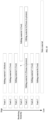
- the adjustment apparatus for the rendering hierarchy order 400 provided in the present embodiment includes:
- the adjustment apparatus for the rendering hierarchy order 400 further include a rendering module 403 used to render, in response to selecting the target moment position on the video editing timeline track as a preview position, images of the plurality of editing material segments at the target moment position according to the initial rendering hierarchy order; and the display module 401 is further used to display the rendered images in a preview region.
- the rendering module 403 is further used to render the images of the plurality of editing material segments at the target moment position according to the target rendering hierarchy order after the in response to a second instruction triggered for the rendering hierarchy adjustment panel; and the display module 401 is further used to display the rendered images in the preview region.
- the first instruction is triggered for an editing material segment of a specified category, then the plurality of editing material segments displayed in the rendering hierarchy adjustment panel are all editing material segments of the specified category.
- the display module 401 is further used to display, in response to a third instruction triggered for the rendering hierarchy adjustment panel, identifiers of editing material segments, whose position intervals covered on the video editing timeline track comprise the target moment position, of all categories in the rendering hierarchy adjustment panel; and adjust, in response to a moving operation for an identifier of at least one editing material segment of identifiers of the editing material segments of all categories, a display position of the corresponding identifier of the at least one editing material segment in the rendering hierarchy adjustment panel, causing the identifiers of the editing material segments of all categories to be displayed in the rendering hierarchy adjustment panel according to a target order.
- the rendering hierarchy order determination module 402 is further used to determine a target rendering hierarchical order of the editing material segments of all categories according to the target order of the identifiers of the editing material segments of all categories.
- the rendering hierarchy order determination module 402 is specifically for determining that if no editing material segment of an identical category exists at a higher hierarchy of an editing material segment on which the moving operation is performed, a next hierarchy of a rendering hierarchy corresponding to the editing material segment on which the moving operation is performed is an editing material segment of the identical category; if the editing material segment of the identical category exists at the higher hierarchy of the editing material segment on which the moving operation is performed, a previous hierarchy of the rendering hierarchy corresponding to the editing material segment on which the moving operation is performed is the editing material segment of the identical category; if a rendering hierarchy order of the editing material segment of the specified category before the moving operation is performed is identical to the rendering hierarchy order of the editing material segment of the specified category after the moving operation is performed, a rendering hierarchy order of the plurality of editing material segments in all editing material segments corresponding to the target moment position is not adjusted.
- the identifier of the editing material segment displayed in the rendering hierarchy adjustment panel comprises: a thumbnail image corresponding to the editing material segment and/or a description text of the editing material segment.
- the rendering hierarchy order determination module 402 is further used to, in response to a fourth instruction triggered for the target moment position, create a newly created editing material segment at the target moment position and determine an initial rendering hierarchy corresponding to the newly created editing material segment according to a preset rendering hierarchy order.
- the preset rendering hierarchy order is sequentially, in descending order, a text, a sticker, a filter, an adjustment, and a picture-in-picture;
- the rendering hierarchy order determination module 402 is specifically used to determine the initial rendering hierarchy corresponding to the newly created editing material segment as follows: if the newly created editing material segment is the text, determine that the initial rendering hierarchy of the newly created editing material segment is a highest hierarchy; if the newly created editing material segment is the sticker, determine that the initial rendering hierarchy of the newly created editing material segment is lower than a text editing material segment with a lowest hierarchy; if the newly created editing material segment is the filter or the adjustment, determine that the initial rendering hierarchy of the newly created editing material segment is lower than a sticker editing material segment with a lowest hierarchy; and if the newly created editing material segment is the picture-in-picture, determine that the initial rendering hierarchy of the newly created editing material segment is lower than a filter or adjustment editing material segment with a lowest hierarchy.
- the rendering apparatus provided in the present embodiment can be used to perform the technical solutions of any of the above method embodiments, and the implementation principle as well as the technical effect thereof are similar, and reference can be made to the detailed description of the above method embodiments, which will not be repeated herein for the sake of brevity.
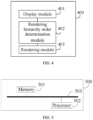
- FIG. 5 is a structural schematic diagram of an electronic device according to an embodiment of the present disclosure.
- the electronic device 500 provided in the present embodiment includes a memory 501 and a processor 502.
- the memory 501 may be a separate physical unit, and may be connected with the processor 502 via a bus 503.
- the memory 501 and the processor 502 may also be integrated together, and implemented through a hardware, and the like.
- the memory 501 is used to store program instructions, and the processor 502 invokes the program instructions to execute the adjustment method for the rendering hierarchy order provided by any of the above method embodiments.
- the above electronic device 500 may also include only the processor 502.
- the memory 501 for storing programs is located outside the electronic device 500, and the processor 502 is connected to the memory through a circuit/wire for reading and executing the programs stored in the memory.
- the processor 502 may be a central processing unit (CPU), a network processor (NP), or a combination of a CPU and an NP.
- the processor 502 may further include a hardware chip.
- the hardware chip may be an application-specific integrated circuit (ASIC), a programmable logic device (PLD), or a combination thereof.
- the PLD may be a complex programmable logic device (CPLD), a field-programmable gate array (FPGA), a generic array logic (GAL), or any combination thereof.
- the memory 501 may include a volatile memory, such as a random-access memory (RAM); the memory 501 may also include a non-volatile memory, such as a flash memory, a hard disk drive (HDD), or a solid-state drive (SSD); the memory 501 may also include a combination of the above types of memories.
- RAM random-access memory
- non-volatile memory such as a flash memory, a hard disk drive (HDD), or a solid-state drive (SSD)
- SSD solid-state drive
- the memory 501 may also include a combination of the above types of memories.
- the present disclosure also provides a readable storage medium, which includes a computer program instruction, the computer program instruction, upon being executed by at least one processor of an electronic device, cause the electronic device to implement the adjustment method for the rendering hierarchy order provided by any of the above method embodiments.
- the present disclosure also provides a computer program product, when the computer program product is run on the computer, the computer is caused to implement the adjustment method for the rendering hierarchy order provided by any of the above method embodiments.
Landscapes
- Engineering & Computer Science (AREA)
- Physics & Mathematics (AREA)
- Theoretical Computer Science (AREA)
- General Physics & Mathematics (AREA)
- Computer Graphics (AREA)
- General Engineering & Computer Science (AREA)
- Software Systems (AREA)
- Computer Hardware Design (AREA)
- Architecture (AREA)
- Multimedia (AREA)
- Television Signal Processing For Recording (AREA)
- Processing Or Creating Images (AREA)
- Studio Circuits (AREA)
Applications Claiming Priority (2)
| Application Number | Priority Date | Filing Date | Title |
|---|---|---|---|
| CN202211065529.2A CN117671100B (zh) | 2022-08-31 | 2022-08-31 | 渲染层级顺序调整方法及装置 |
| PCT/CN2023/115255 WO2024046268A1 (zh) | 2022-08-31 | 2023-08-28 | 渲染层级顺序调整方法及装置 |
Publications (2)
| Publication Number | Publication Date |
|---|---|
| EP4353142A1 true EP4353142A1 (de) | 2024-04-17 |
| EP4353142A4 EP4353142A4 (de) | 2024-11-27 |
Family
ID=89190691
Family Applications (1)
| Application Number | Title | Priority Date | Filing Date |
|---|---|---|---|
| EP23817289.4A Pending EP4353142A4 (de) | 2022-08-31 | 2023-08-28 | Verfahren und vorrichtung zur anpassung einer darstellungshierarchiesequenz |
Country Status (6)
| Country | Link |
|---|---|
| US (1) | US12100084B2 (de) |
| EP (1) | EP4353142A4 (de) |
| JP (1) | JP7725622B2 (de) |
| KR (1) | KR20250010697A (de) |
| CN (1) | CN117671100B (de) |
| WO (1) | WO2024046268A1 (de) |
Families Citing this family (1)
| Publication number | Priority date | Publication date | Assignee | Title |
|---|---|---|---|---|
| JP2025527039A (ja) * | 2023-07-26 | 2025-08-18 | 北京字跳▲網▼絡技▲術▼有限公司 | ビデオ編集方法、装置、デバイスおよび媒体 |
Family Cites Families (16)
| Publication number | Priority date | Publication date | Assignee | Title |
|---|---|---|---|---|
| GB2336061B (en) * | 1998-04-03 | 2000-05-17 | Discreet Logic Inc | Modifying image data |
| JP3505138B2 (ja) * | 2000-09-28 | 2004-03-08 | 株式会社リコー | 構造編集装置、映像構造編集装置およびその装置の各手段としてコンピュータを実行させるプログラムを記録したコンピュータ読み取り可能な記録媒体 |
| US8610725B2 (en) * | 2007-10-10 | 2013-12-17 | Apple Inc. | Framework for dynamic configuration of hardware resources |
| US8773468B1 (en) * | 2010-08-27 | 2014-07-08 | Disney Enterprises, Inc. | System and method for intuitive manipulation of the layering order of graphics objects |
| US8879888B2 (en) | 2013-03-12 | 2014-11-04 | Fuji Xerox Co., Ltd. | Video clip selection via interaction with a hierarchic video segmentation |
| KR102025362B1 (ko) * | 2013-11-07 | 2019-09-25 | 한화테크윈 주식회사 | 검색 시스템 및 영상 검색 방법 |
| US9940396B1 (en) * | 2014-12-10 | 2018-04-10 | Amazon Technologies, Inc. | Mining potential user actions from a web page |
| US11158344B1 (en) * | 2015-09-30 | 2021-10-26 | Amazon Technologies, Inc. | Video ingestion and clip creation |
| US9818451B1 (en) * | 2015-12-21 | 2017-11-14 | Amazon Technologies, Inc. | Frame selection of video data |
| US11856315B2 (en) | 2017-09-29 | 2023-12-26 | Apple Inc. | Media editing application with anchored timeline for captions and subtitles |
| CN108536441A (zh) * | 2018-03-29 | 2018-09-14 | 广州视源电子科技股份有限公司 | 基于排版工具中元素层级的管理方法和装置 |
| KR102155345B1 (ko) * | 2018-09-19 | 2020-09-11 | (주)비디오몬스터 | 블록화 기법을 이용한 영상 제작 시스템 및 방법 |
| CN112346811A (zh) | 2021-01-08 | 2021-02-09 | 北京小米移动软件有限公司 | 渲染方法及装置 |
| CN113038234B (zh) * | 2021-03-15 | 2023-07-21 | 北京字跳网络技术有限公司 | 视频的处理方法、装置、电子设备和存储介质 |
| CN113891113B (zh) | 2021-09-29 | 2024-03-12 | 阿里巴巴(中国)有限公司 | 视频剪辑合成方法及电子设备 |
| CN114827722A (zh) * | 2022-04-12 | 2022-07-29 | 咪咕文化科技有限公司 | 视频预览方法、装置、设备及存储介质 |
-
2022
- 2022-08-31 CN CN202211065529.2A patent/CN117671100B/zh active Active
-
2023
- 2023-08-28 KR KR1020247041779A patent/KR20250010697A/ko active Pending
- 2023-08-28 JP JP2023579182A patent/JP7725622B2/ja active Active
- 2023-08-28 WO PCT/CN2023/115255 patent/WO2024046268A1/zh not_active Ceased
- 2023-08-28 EP EP23817289.4A patent/EP4353142A4/de active Pending
- 2023-12-13 US US18/538,828 patent/US12100084B2/en active Active
Also Published As
| Publication number | Publication date |
|---|---|
| CN117671100A (zh) | 2024-03-08 |
| US12100084B2 (en) | 2024-09-24 |
| KR20250010697A (ko) | 2025-01-21 |
| EP4353142A4 (de) | 2024-11-27 |
| WO2024046268A1 (zh) | 2024-03-07 |
| JP2024537589A (ja) | 2024-10-16 |
| JP7725622B2 (ja) | 2025-08-19 |
| US20240112387A1 (en) | 2024-04-04 |
| CN117671100B (zh) | 2026-04-28 |
Similar Documents
| Publication | Publication Date | Title |
|---|---|---|
| US10990250B2 (en) | Organized timeline | |
| US8456488B2 (en) | Displaying digital images using groups, stacks, and version sets | |
| EP2273357B1 (de) | Virtuelle Loupe | |
| US7719548B2 (en) | Viewing digital images using a floating controller | |
| JP4592799B2 (ja) | 新たなオブジェクト検索uiおよびオブジェクト結果のドラッグ | |
| US8312388B2 (en) | Information processing apparatus, information processing method and computer readable medium | |
| US11899919B2 (en) | Media presentation effects | |
| US20120284624A1 (en) | Multi-point representation | |
| JP2014531645A (ja) | 選択可能なタイルのグループ化 | |
| KR20140072033A (ko) | 타일 정렬 기법 | |
| US9927968B2 (en) | Move of object between pages of editable document | |
| WO2024067494A1 (zh) | 视频素材剪辑方法及装置 | |
| EP4353142A1 (de) | Verfahren und vorrichtung zur anpassung einer darstellungshierarchiesequenz | |
| WO2025201234A1 (zh) | 信息展示方法、装置、电子设备以及存储介质 | |
| EP3734431A1 (de) | Bildschwenkverfahren | |
| EP4415371A1 (de) | Videobegrenzungsverfahren, vorrichtung, elektronische vorrichtung und lesbares speichermedium | |
| EP4525459A1 (de) | Videobearbeitungsverfahren und -vorrichtung sowie vorrichtung und medium |
Legal Events
| Date | Code | Title | Description |
|---|---|---|---|
| STAA | Information on the status of an ep patent application or granted ep patent |
Free format text: STATUS: UNKNOWN |
|
| STAA | Information on the status of an ep patent application or granted ep patent |
Free format text: STATUS: THE INTERNATIONAL PUBLICATION HAS BEEN MADE |
|
| PUAI | Public reference made under article 153(3) epc to a published international application that has entered the european phase |
Free format text: ORIGINAL CODE: 0009012 |
|
| STAA | Information on the status of an ep patent application or granted ep patent |
Free format text: STATUS: REQUEST FOR EXAMINATION WAS MADE |
|
| 17P | Request for examination filed |
Effective date: 20231212 |
|
| AK | Designated contracting states |
Kind code of ref document: A1 Designated state(s): AL AT BE BG CH CY CZ DE DK EE ES FI FR GB GR HR HU IE IS IT LI LT LU LV MC ME MK MT NL NO PL PT RO RS SE SI SK SM TR |
|
| REG | Reference to a national code |
Ref country code: DE Ref legal event code: R079 Free format text: PREVIOUS MAIN CLASS: A61B0003117000 Ipc: G11B0027031000 |
|
| A4 | Supplementary search report drawn up and despatched |
Effective date: 20241030 |
|
| RIC1 | Information provided on ipc code assigned before grant |
Ipc: G06T 11/60 20060101ALI20241024BHEP Ipc: G01N 21/49 20060101ALI20241024BHEP Ipc: G01N 21/21 20060101ALI20241024BHEP Ipc: A61B 3/117 20060101ALI20241024BHEP Ipc: G11B 27/34 20060101ALI20241024BHEP Ipc: G11B 27/031 20060101AFI20241024BHEP |
|
| STAA | Information on the status of an ep patent application or granted ep patent |
Free format text: STATUS: EXAMINATION IS IN PROGRESS |
|
| 17Q | First examination report despatched |
Effective date: 20250709 |
|
| DAV | Request for validation of the european patent (deleted) | ||
| DAX | Request for extension of the european patent (deleted) |