EP4318299A1 - Document generation method and apparatus and electronic device - Google Patents
Document generation method and apparatus and electronic device Download PDFInfo
- Publication number
- EP4318299A1 EP4318299A1 EP22794772.8A EP22794772A EP4318299A1 EP 4318299 A1 EP4318299 A1 EP 4318299A1 EP 22794772 A EP22794772 A EP 22794772A EP 4318299 A1 EP4318299 A1 EP 4318299A1
- Authority
- EP
- European Patent Office
- Prior art keywords
- document
- target
- input
- picture
- component
- Prior art date
- Legal status (The legal status is an assumption and is not a legal conclusion. Google has not performed a legal analysis and makes no representation as to the accuracy of the status listed.)
- Granted
Links
Images





Classifications
-
- G—PHYSICS
- G06—COMPUTING OR CALCULATING; COUNTING
- G06F—ELECTRIC DIGITAL DATA PROCESSING
- G06F40/00—Handling natural language data
- G06F40/10—Text processing
- G06F40/103—Formatting, i.e. changing of presentation of documents
- G06F40/106—Display of layout of documents; Previewing
-
- G—PHYSICS
- G06—COMPUTING OR CALCULATING; COUNTING
- G06F—ELECTRIC DIGITAL DATA PROCESSING
- G06F40/00—Handling natural language data
- G06F40/40—Processing or translation of natural language
- G06F40/55—Rule-based translation
- G06F40/56—Natural language generation
-
- G—PHYSICS
- G06—COMPUTING OR CALCULATING; COUNTING
- G06F—ELECTRIC DIGITAL DATA PROCESSING
- G06F40/00—Handling natural language data
- G06F40/10—Text processing
- G06F40/166—Editing, e.g. inserting or deleting
-
- G—PHYSICS
- G06—COMPUTING OR CALCULATING; COUNTING
- G06F—ELECTRIC DIGITAL DATA PROCESSING
- G06F40/00—Handling natural language data
- G06F40/10—Text processing
- G06F40/12—Use of codes for handling textual entities
- G06F40/151—Transformation
-
- G—PHYSICS
- G06—COMPUTING OR CALCULATING; COUNTING
- G06F—ELECTRIC DIGITAL DATA PROCESSING
- G06F40/00—Handling natural language data
- G06F40/10—Text processing
- G06F40/166—Editing, e.g. inserting or deleting
- G06F40/186—Templates
-
- G—PHYSICS
- G06—COMPUTING OR CALCULATING; COUNTING
- G06T—IMAGE DATA PROCESSING OR GENERATION, IN GENERAL
- G06T11/00—Two-dimensional [2D] image generation
- G06T11/60—Creating or editing images; Combining images with text
-
- H—ELECTRICITY
- H04—ELECTRIC COMMUNICATION TECHNIQUE
- H04N—PICTORIAL COMMUNICATION, e.g. TELEVISION
- H04N23/00—Cameras or camera modules comprising electronic image sensors; Control thereof
- H04N23/60—Control of cameras or camera modules
- H04N23/63—Control of cameras or camera modules by using electronic viewfinders
- H04N23/631—Graphical user interfaces [GUI] specially adapted for controlling image capture or setting capture parameters
Definitions
- This application belongs to the field of image processing technologies, and specifically, relates to a document generation method and apparatus and an electronic device.
- a photography function of mobile phones greatly facilitates people's lives, and provides convenience for recording content of life and work.
- a conventional photography function of mobile phones cannot meet a requirement in some specific scenarios, for example, quickly converting slideshow pictures of meeting content into a document.
- a user needs to use another tool to perform an operation, which is time-consuming and labor-intensive.
- An objective of the embodiments of this application is to provide a document generation method and apparatus and an electronic device, to resolve a problem in the conventional technology that a photography function of a mobile phone cannot quickly convert a captured picture into a document.
- an embodiment of this application provides a document generation method.
- the method includes:
- an embodiment of this application provides a document generation apparatus.
- the apparatus includes:
- an embodiment of this application provides an electronic device, where the electronic device includes a processor, a memory, and a program or instructions stored in the memory and executable on the processor, and when the program or the instructions are executed by the processor, steps of the method according to the first aspect are implemented.
- an embodiment of this application provides a readable storage medium, where the readable storage medium stores a program or instructions, and when the program or the instructions are executed by a processor, steps of the method according to the first aspect are implemented.
- an embodiment of this application provides a chip, where the chip includes a processor and a communications interface, the communications interface is coupled to the processor, and the processor is configured to run a program or instructions, to implement the method according to the first aspect.
- an embodiment of this application provides a computer program product, where the computer program product is stored in a non-transitory storage medium, and the computer program product is executed by at least one processor to implement steps of the method according to the first aspect.
- an embodiment of this application provides a communications device, configured to perform the method according to the first aspect.
- a user may flexibly select a type of a to-be-created document on a camera interface, and add a corresponding picture to any position in a document by capturing a picture in real time, to quickly convert the picture into a document and generate a document with a specific organizational structure required by the user.
- first”, “second”, and the like in the specification and claims of this application are used to distinguish between similar objects, but not to indicate a specific order or sequence. It should be understood that the data used in this way is interchangeable in appropriate circumstances, so that the embodiments of this application can be implemented in an order other than the order illustrated or described herein.
- the objects distinguished by “first”, “second”, and the like usually belong to one category, and the number of objects is not limited. For example, there may be one or more first objects.
- “and/or” represents at least one of connected objects, and the character “/" typically represents an "or” relationship between the associated objects.
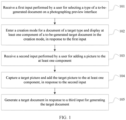
- FIG. 1 is a schematic flowchart of a document generation method according to an embodiment of this application. As shown in FIG. 1 , the document generation method in this embodiment of this application includes the following steps.
- Step 101 Receive a first input performed by a user for selecting a type of a to-be-generated document on a photographing preview interface.
- the document generation method is applied to an electronic device.
- the user may select a document option on the photographing preview interface, and select the type of the to-be-generated document.
- the electronic device receives the first input performed by the user for selecting the type of to-be-generated document on the photographing preview interface.
- document types in this embodiment of the application may include format types such as WORD, PowerPoint (PowerPoint, PPT), portable document format (Portable Document Format, PDF), and notepad.
- Step 102 Enter a creation mode for a document of a target type and display at least one component of a to-be-generated target document in the creation mode, in response to the first input.
- the electronic device After receiving the first input, the electronic device enters the creation mode for the document of the target type in response to the first input.
- the electronic device creates the document of the target type selected by the user (the document created herein is only a template), and displays the at least one component of the to-be-generated target document in the creation mode.
- the component of the target document is a structural composition of the target document. Components of different types of documents may be different. A component of a document may be preset or customized, or an existing document may be called.
- Step 103 Receive a second input performed by a user for adding a picture to the at least one component.
- the electronic device receives the second input performed by the user for adding the picture to the at least one component of the target document, where the component may be any component of the target document selected by the user, and the to-be-added picture may be captured by the camera in real time.
- a picture may be added to one component of the target document, or a picture may be added to two or more components of the target document. This depends on a requirement of the user.
- Step 104 Capture a target picture and add the target picture to the at least one component, in response to the second input.
- the electronic device After receiving the second input, the electronic device starts the camera to capture the target picture and adds the captured target picture to the at least one component of the created target document, in response to the second input.
- the target picture captured by the camera is quickly converted into the document of the target type selected by the user, and a process of converting the picture into a document is completed when photographing is completed.
- Step 105 Generate a target document in response to a third input for generating the target document.
- the electronic device After the target picture is added to the at least one component of the to-be-generated target document, in a case that the electronic device receives the third input of generating the target document by the user, the electronic device generates the target document in response to the third input for generating the target document.
- the finally generated target document includes the target picture added to the at least one component in the foregoing step. This is equivalent to synchronously converting the picture into a document during photographing, and the target document can be immediately generated after the picture is captured. This greatly improves efficiency of converting the picture into a document, and eliminates a complex process of converting the picture into a document by using another software tool.
- the user may flexibly select a type of a to-be-created document on the photographing preview interface, and add a corresponding picture to any position in a document by capturing a picture in real time, to quickly convert the picture into a document and generate a document with a specific organizational structure required by the user.
- FIG. 2 is a schematic diagram of a camera interface according to an embodiment of this application
- FIG. 3 is a schematic diagram of document types according to an embodiment of this application.
- options such as Photo and Document may be displayed on the photographing preview interface
- the first input may include tap input performed on the Document option.
- the Document option is tapped, it is considered that the user selects the document mode.
- the document mode a picture captured by the camera may be converted into a corresponding document.
- the electronic device may further display optional document types on the camera interface, and the document types may include WORD, PPT, Others, and the like.
- FIG. 4 is a schematic diagram of a creation mode for a target document whose document type is PPT according to an embodiment of this application
- FIG. 5 is a schematic diagram of a creation mode for a target document whose document type is WORD according to an embodiment of this application.
- the first input may alternatively include input of selecting the target type from the optional document types displayed above.
- the electronic device enters the creation mode for the document of the target type.
- the creation mode the at least one component of the target document, that is, at least a partial structural composition of the target document, is displayed. For example, as shown in FIG.
- the electronic device enters a creation mode for a PPT document.
- the creation mode components of the PPT document are displayed, including Contents, Theme 1, Theme 2, Theme 3, Theme 4, Theme 5, Summary, and the like.
- a directory list of the target document that is, titles of components of the target document, may be displayed.
- the electronic device enters a creation mode for a WORD document. In the mode, components of the WORD document are displayed, including Chapter 1, Chapter 2, Chapter 3, Summary, and the like.
- a directory list of the target document that is, titles of components of the target document, may be displayed.
- the receiving a second input performed by a user for adding a picture to the at least one component includes:
- FIG. 6 is a schematic diagram of selecting, from a PPT document, a target component to which a picture is to be inserted according to an embodiment of this application
- FIG. 7 is a schematic diagram of capturing a picture in a PPT document according to an embodiment of this application.
- a created document is a PPT document.
- the electronic device starts the camera for photographing in response to the second input, and sequentially adds, according to an order of photographing time, captured pictures to the target component (namely, "Theme 1") of the target document selected by the user.
- Another component of the target document may be further selected, and a picture is captured, to add the captured picture to the another component of the target document.
- the user may tap an end button, and the electronic device ends photographing for current documenting, and saves a result (that is, a corresponding PPT document) of converting the picture into a document.
- the target document may be saved a document album.
- a default name of the target document may be a combination of a type of the target document and creation time of the target document.
- FIG. 8 is a schematic diagram of selecting, from a WORD document, a target component to which a picture is to be inserted according to an embodiment of this application
- FIG. 9 is a schematic diagram of capturing a picture in a WORD document according to an embodiment of this application.
- a created document is a WORD document.
- the electronic device After components of the target document are displayed in the creation mode, in a case that the first sub-input performed by the user for selecting the target component in the target document and the second sub-input performed by the user for capturing a picture are received, for example, the first sub-input may be input of tapping the target component "Chapter 1" of the target document, and the second sub-input may be input of tapping the Photo button, the electronic device starts the camera for photographing in response to the second input, and sequentially adds, according to an order of photographing time, captured pictures to the target component (namely, "Chapter 1 ") of the target document selected by the user.
- the first sub-input may be input of tapping the target component "Chapter 1" of the target document
- the second sub-input may be input of tapping the Photo button
- Another component of the target document may be further selected, and a picture is captured, to add the captured picture to the another component of the target document.
- the user may tap an end button, and the electronic device ends photographing for current documenting, and saves a result (that is, a corresponding WORD document) of converting the picture into a document.
- the target document may be saved a document album.
- a default name of the target document may be a combination of a type of the target document and creation time of the target document.
- FIG. 10 is a schematic diagram of adding a picture to a notepad document according to an embodiment of this application.
- a created document is a notepad document.
- the components of the notepad document may be empty, that is, displayed in blank
- the first sub-input performed by the user for selecting the target component in the target document and the second sub-input performed by the user for capturing a picture are received, for example, the first sub-input may be input of tapping any position in the document, and the second sub-input may be input of tapping the Photo button
- the electronic device starts the camera for photographing in response to the second input, and sequentially adds, according to an order of photographing time, captured pictures to the corresponding position in the target document selected by the user.
- the user may tap an end button, and the electronic device ends photographing for current documenting, and saves a result (that is, a corresponding notepad document) of converting the picture into a document.
- the target document may be saved a document album.
- a default name of the target document may be a combination of a type of the target document and creation time of the target document.
- the document generation method further includes:
- the electronic device adjusts an order of positions of the target pictures added to the target component of the target document, so that target pictures in a finally generated target document are coherent in content.
- an order of pictures may alternatively adjusted in a unified manner after all pictures are converted into documents. To be specific, after target pictures are added to all components of the target document, an order of target pictures in corresponding components is adjusted, so that target pictures in a finally generated target document are coherent in content.
- the user may flexibly select a type of a to-be-created document on the photographing preview interface, and add a corresponding picture to any position in a document by capturing a picture in real time, to quickly convert the picture into a document and generate a document with a specific organizational structure required by the user.
- the document generation method provided in the embodiments of this application may be performed by a document generation apparatus, or by a control module that is in the document generation apparatus and that is configured to perform the document generation method.
- a document generation apparatus provided in the embodiments of this application is described by using an example in which the document generation apparatus performs the document generation method.
- FIG. 11 is a schematic structural diagram of a document generation apparatus according to an embodiment of this application. As shown in FIG. 11 , the document generation apparatus 1100 in this embodiment of this application includes:
- the second receiving module 1103 includes:
- the display module 1102 includes: a display unit, configured to display a directory list of the target document in the creation mode.
- the document generation apparatus 1100 further includes:
- the user may flexibly select a type of a to-be-created document on the photographing preview interface, and add a corresponding picture to any position in a document by capturing a picture in real time, to quickly convert the picture into a document and generate a document with a specific organizational structure required by the user.
- the document generation apparatus in this embodiment of this application may be an apparatus, or may be a component, an integrated circuit, or a chip in a terminal.
- the apparatus may be a mobile electronic device, or may be a non-mobile electronic device.
- the mobile electronic device may be a mobile phone, a tablet computer, a notebook computer, a palmtop computer, a vehicle-mounted electronic device, a wearable device, an ultra-mobile personal computer (ultra-mobile personal computer, UMPC), a netbook, or a personal digital assistant (personal digital assistant, PDA), and the non-mobile electronic device may be a personal computer (personal computer, PC), a television (television, TV), a teller machine, or a self-service machine. This is not specifically limited in this embodiment of this application.
- the document generation apparatus in this embodiment of this application may be an apparatus with an operating system.
- the operating system may be an Android (Android) operating system, may be an iOS operating system, or may be another possible operating system. This is not specifically limited in this embodiment of this application.
- the document generation apparatus provided in this embodiment of this application is capable of implementing the processes implemented in the method embodiments of FIG. 1 to FIG. 10 . To avoid repetition, details are not described herein again.
- an embodiment of this application further provides an electronic device 1200, including a processor 1201, a memory 1202, and a program or instructions stored in the memory 1202 and executable on the processor 1201.
- an electronic device 1200 including a processor 1201, a memory 1202, and a program or instructions stored in the memory 1202 and executable on the processor 1201.
- the program or the instructions are executed by the processor 1201
- the processes of the foregoing document generation method embodiments are implemented, with the same technical effects achieved. To avoid repetition, details are not described herein again.
- the electronic device in this embodiment of this application includes the foregoing mobile electronic device and non-mobile electronic device.
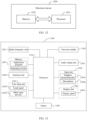
- FIG. 13 is a schematic diagram of a hardware structure of an electronic device for implementing the embodiments of this application.
- the electronic device 1300 includes but is not limited to components such as a radio frequency unit 1301, a network module 1302, an audio output unit 1303, an input unit 1304, a sensor 1305, a display unit 1306, a user input unit 1307, an interface unit 1308, a memory 1309, and a processor 1310.
- the electronic device 1300 may further include a power supply (for example, a battery) that supplies power to each component.
- the power supply may be logically connected to the processor 1310 by using a power management system, to implement functions such as charging management, discharging management, and power consumption management by using the power management system.
- the structure of the electronic device shown in FIG. 13 does not constitute a limitation on the electronic device.
- the electronic device may include more or fewer components than those shown in the figure, or some components may be combined, or there may be a different component layout. Details are not described herein again.
- the user input unit 1307 is configured to receive a first input performed by a user for selecting a type of a to-be-generated document on a photographing preview interface.
- the display unit 1306 is configured to enter a creation mode for a document of a target type and display at least one component of a to-be-generated target document in the creation mode, in response to the first input.
- the user input unit 1307 is further configured to receive a second input performed by a user for adding a picture to the at least one component.
- the input unit 1304 is configured to capture a target picture.
- the processor 1310 is configured to add the target picture to the at least one component.
- the user input unit 1307 is further configured to receive a third input for generating the target document.
- the processor 1310 is further configured to generate a target document in response to the third input for generating the target document.
- the user may flexibly select a type of a to-be-created document on the photographing preview interface, and add a corresponding picture to any position in a document by capturing a picture in real time, to quickly convert the picture into a document and generate a document with a specific organizational structure required by the user.
- the user input unit 1307 is configured to receive a first sub-input performed by the user for selecting a target component in the target document, and receive a second sub-input performed by the user for capturing the target picture; and the processor 1310 is configured to add the target picture to the target component according to an order of photographing time.
- the display unit 1306 is configured to display a directory list of the target document in the creation mode.
- the user input unit 1307 is further configured to receive a fourth input performed by a user for adjusting the target picture in the target document; and the processor 1310 is further configured to adjust a position of the target picture in the target document in response to the fourth input.
- the input unit 1304 may include a graphics processing unit (Graphics Processing Unit, GPU) 13041 and a microphone 13042.
- the graphics processing unit 13041 processes image data of a static picture or a video that is obtained by an image capture apparatus (for example, a camera) in a video capture mode or an image capture mode.
- the display unit 1306 may include a display panel 13061.
- the display panel 13061 may be configured in a form of a liquid crystal display, an organic light-emitting diode, or the like.
- the user input unit 1307 includes a touch panel 13071 and other input devices 13072.
- the touch panel 13071 is also referred to as a touchscreen.
- the touch panel 13071 may include two parts: a touch detection apparatus and a touch controller.
- the other input devices 13072 may include but are not limited to a physical keyboard, a function key (such as a volume control key or an on/off key), a trackball, a mouse, and a joystick. Details are not described herein.
- the memory 1309 may be configured to store software programs and various data, including but not limited to an application program and an operating system.
- the processor 1310 may integrate an application processor and a modem processor.
- the application processor mainly processes an operating system, a user interface, an application program, and the like.
- the modem processor mainly processes wireless communication. It can be understood that the modem processor may alternatively not be integrated in the processor 1310.
- An embodiment of this application further provides a readable storage medium.
- the readable storage medium may be non-volatile or volatile.
- the readable storage medium stores a program or instructions. When the program or instructions are executed by a processor, the processes of the foregoing document generation method embodiments are implemented, with the same technical effects achieved. To avoid repetition, details are not described herein again.
- the processor is a processor in the electronic device in the foregoing embodiments.
- the readable storage medium includes a computer-readable storage medium, for example, a computer read-only memory (Read-Only Memory, ROM), a random access memory (Random Access Memory, RAM), a magnetic disk, or an optical disc.
- An embodiment of this application further provides a computer program product.
- the computer program product is stored in a non-transitory storage medium.
- the computer program product is executed by at least one processor to implement the steps of the document generation method provided in the embodiments of this application, with the same technical effects achieved. To avoid repetition, details are not described herein again.
- An embodiment of this application further provides a chip.
- the chip includes a processor and a communications interface.
- the communications interface is coupled to the processor.
- the processor is configured to run a program or instructions, to implement the processes of the foregoing document generation method embodiments, with the same technical effects achieved. To avoid repetition, details are not described herein again.
- the chip provided in this embodiment of this application may also be referred to as a system-level chip, a system on chip, a chip system, a system-on-a-chip, or the like.
- the methods in the foregoing embodiments may be implemented by using software in combination with a necessary common hardware platform, or certainly may be implemented by using hardware. However, in most cases, the former is a preferred implementation.
- the technical solutions of this application essentially or the part contributing to the conventional technology may be implemented in a form of a computer software product.
- the computer software product may be stored in a storage medium (for example, a ROM/RAM, a magnetic disk, or a compact disc), and includes several instructions for instructing a terminal (which may be a mobile phone, a computer, a server, a network device, or the like) to perform the methods in the embodiments of this application.
Landscapes
- Engineering & Computer Science (AREA)
- Theoretical Computer Science (AREA)
- Physics & Mathematics (AREA)
- General Physics & Mathematics (AREA)
- General Health & Medical Sciences (AREA)
- Artificial Intelligence (AREA)
- Audiology, Speech & Language Pathology (AREA)
- Computational Linguistics (AREA)
- Health & Medical Sciences (AREA)
- General Engineering & Computer Science (AREA)
- Human Computer Interaction (AREA)
- Multimedia (AREA)
- Signal Processing (AREA)
- Document Processing Apparatus (AREA)
- Studio Devices (AREA)
- User Interface Of Digital Computer (AREA)
- Processing Or Creating Images (AREA)
Abstract
Description
- This application claims priority to
Chinese Patent Application No. 202110474177.5, filed in China on April 29, 2021 - This application belongs to the field of image processing technologies, and specifically, relates to a document generation method and apparatus and an electronic device.
- A photography function of mobile phones greatly facilitates people's lives, and provides convenience for recording content of life and work. However, a conventional photography function of mobile phones cannot meet a requirement in some specific scenarios, for example, quickly converting slideshow pictures of meeting content into a document. In this case, a user needs to use another tool to perform an operation, which is time-consuming and labor-intensive.
- An objective of the embodiments of this application is to provide a document generation method and apparatus and an electronic device, to resolve a problem in the conventional technology that a photography function of a mobile phone cannot quickly convert a captured picture into a document.
- According to a first aspect, an embodiment of this application provides a document generation method. The method includes:
- receiving a first input performed by a user for selecting a type of a to-be-generated document on a photographing preview interface;
- entering a creation mode for a document of a target type and displaying at least one component of a to-be-generated target document in the creation mode, in response to the first input;
- receiving a second input performed by a user for adding a picture to the at least one component;
- capturing a target picture and adding the target picture to the at least one component, in response to the second input; and
- generating a target document in response to a third input for generating the target document.
- According to a second aspect, an embodiment of this application provides a document generation apparatus. The apparatus includes:
- a first receiving module, configured to receive a first input performed by a user for selecting a type of a to-be-generated document on a photographing preview interface;
- a display module, configured to enter a creation mode for a document of a target type and display at least one component of a to-be-generated target document in the creation mode, in response to the first input;
- a second receiving module, configured to receive a second input performed by a user for adding a picture to the at least one component;
- a photographing module, configured to capture a target picture in response to the second input;
- an addition module, configured to add the target picture to the at least one component in response to the second input; and
- a document generation module, configured to generate a target document in response to a third input for generating the target document.
- According to a third aspect, an embodiment of this application provides an electronic device, where the electronic device includes a processor, a memory, and a program or instructions stored in the memory and executable on the processor, and when the program or the instructions are executed by the processor, steps of the method according to the first aspect are implemented.
- According to a fourth aspect, an embodiment of this application provides a readable storage medium, where the readable storage medium stores a program or instructions, and when the program or the instructions are executed by a processor, steps of the method according to the first aspect are implemented.
- According to a fifth aspect, an embodiment of this application provides a chip, where the chip includes a processor and a communications interface, the communications interface is coupled to the processor, and the processor is configured to run a program or instructions, to implement the method according to the first aspect.
- According to a sixth aspect, an embodiment of this application provides a computer program product, where the computer program product is stored in a non-transitory storage medium, and the computer program product is executed by at least one processor to implement steps of the method according to the first aspect.
- According to a seventh aspect, an embodiment of this application provides a communications device, configured to perform the method according to the first aspect.
- In the embodiments of this application, a user may flexibly select a type of a to-be-created document on a camera interface, and add a corresponding picture to any position in a document by capturing a picture in real time, to quickly convert the picture into a document and generate a document with a specific organizational structure required by the user.
-
-
FIG. 1 is a schematic flowchart of a document generation method according to an embodiment of this application; -
FIG. 2 is a schematic diagram of a camera interface according to an embodiment of this application; -
FIG. 3 is a schematic diagram of document types according to an embodiment of this application; -
FIG. 4 is a schematic diagram of a creation mode for a target document whose document type is PPT according to an embodiment of this application; -
FIG. 5 is a schematic diagram of a creation mode for a target document whose document type is WORD according to an embodiment of this application; -
FIG. 6 is a schematic diagram of selecting, from a PPT document, a target component to which a picture is to be inserted according to an embodiment of this application; -
FIG. 7 is a schematic diagram of capturing a picture in a PPT document according to an embodiment of this application; -
FIG. 8 is a schematic diagram of selecting, from a WORD document, a target component to which a picture is to be inserted according to an embodiment of this application; -
FIG. 9 is a schematic diagram of capturing a picture in a WORD document according to an embodiment of this application; -
FIG. 10 is a schematic diagram of adding a picture to a notepad document according to an embodiment of this application; -
FIG. 11 is a schematic structural diagram of a document generation apparatus according to an embodiment of this application; -
FIG. 12 is a schematic structural diagram of an electronic device according to an embodiment of this application; and -
FIG. 13 is a schematic diagram of a hardware structure of an electronic device for implementing the embodiments of this application. - The following clearly describes the technical solutions in the embodiments of this application with reference to the accompanying drawings in the embodiments of this application. Clearly, the described embodiments are some but not all of the embodiments of this application. All other embodiments obtained by a person of ordinary skill in the art based on the embodiments of this application shall fall within the protection scope of this application.
- The terms "first", "second", and the like in the specification and claims of this application are used to distinguish between similar objects, but not to indicate a specific order or sequence. It should be understood that the data used in this way is interchangeable in appropriate circumstances, so that the embodiments of this application can be implemented in an order other than the order illustrated or described herein. In addition, the objects distinguished by "first", "second", and the like usually belong to one category, and the number of objects is not limited. For example, there may be one or more first objects. In addition, in the specification and claims, "and/or" represents at least one of connected objects, and the character "/" typically represents an "or" relationship between the associated objects.
- The following describes in detail a document generation method and apparatus and an electronic device in the embodiments of this application with reference to the accompanying drawings and by using specific embodiments and application scenarios thereof.
-
FIG. 1 is a schematic flowchart of a document generation method according to an embodiment of this application. As shown inFIG. 1 , the document generation method in this embodiment of this application includes the following steps. - Step 101: Receive a first input performed by a user for selecting a type of a to-be-generated document on a photographing preview interface.
- In this embodiment of this application, the document generation method is applied to an electronic device. After camera software of the electronic device is started, in a case that a document mode needs to be used, the user may select a document option on the photographing preview interface, and select the type of the to-be-generated document. The electronic device receives the first input performed by the user for selecting the type of to-be-generated document on the photographing preview interface. Optionally, document types in this embodiment of the application may include format types such as WORD, PowerPoint (PowerPoint, PPT), portable document format (Portable Document Format, PDF), and notepad.
- Step 102: Enter a creation mode for a document of a target type and display at least one component of a to-be-generated target document in the creation mode, in response to the first input.
- In this step, after receiving the first input, the electronic device enters the creation mode for the document of the target type in response to the first input. To be specific, after the user selects the type of the to-be-generated document on the photographing preview interface, the electronic device creates the document of the target type selected by the user (the document created herein is only a template), and displays the at least one component of the to-be-generated target document in the creation mode. The component of the target document is a structural composition of the target document. Components of different types of documents may be different. A component of a document may be preset or customized, or an existing document may be called.
- Step 103: Receive a second input performed by a user for adding a picture to the at least one component.
- After the at least one component of the to-be-generated target document is displayed, in a case that the user wants to add a picture to a specific component of the target document, the user only needs to select the corresponding component of the document, and then capture a to-be-added picture by using a camera. To be specific, the electronic device receives the second input performed by the user for adding the picture to the at least one component of the target document, where the component may be any component of the target document selected by the user, and the to-be-added picture may be captured by the camera in real time. A picture may be added to one component of the target document, or a picture may be added to two or more components of the target document. This depends on a requirement of the user.
- Step 104: Capture a target picture and add the target picture to the at least one component, in response to the second input.
- In this step, after receiving the second input, the electronic device starts the camera to capture the target picture and adds the captured target picture to the at least one component of the created target document, in response to the second input. To be specific, the target picture captured by the camera is quickly converted into the document of the target type selected by the user, and a process of converting the picture into a document is completed when photographing is completed.
- Step 105: Generate a target document in response to a third input for generating the target document.
- After the target picture is added to the at least one component of the to-be-generated target document, in a case that the electronic device receives the third input of generating the target document by the user, the electronic device generates the target document in response to the third input for generating the target document. The finally generated target document includes the target picture added to the at least one component in the foregoing step. This is equivalent to synchronously converting the picture into a document during photographing, and the target document can be immediately generated after the picture is captured. This greatly improves efficiency of converting the picture into a document, and eliminates a complex process of converting the picture into a document by using another software tool.
- Therefore, in this embodiment of this application, the user may flexibly select a type of a to-be-created document on the photographing preview interface, and add a corresponding picture to any position in a document by capturing a picture in real time, to quickly convert the picture into a document and generate a document with a specific organizational structure required by the user.
- Refer to
FIG. 2 and FIG. 3. FIG. 2 is a schematic diagram of a camera interface according to an embodiment of this application, andFIG. 3 is a schematic diagram of document types according to an embodiment of this application. As shown inFIG. 2 and FIG. 3 , in some embodiments of this application, after the electronic device enters the photographing preview interface, options such as Photo and Document may be displayed on the photographing preview interface, and the first input may include tap input performed on the Document option. In a case that the Document option is tapped, it is considered that the user selects the document mode. In the document mode, a picture captured by the camera may be converted into a corresponding document. After the Document option is tapped, the electronic device may further display optional document types on the camera interface, and the document types may include WORD, PPT, Others, and the like. - Refer to
FIG. 4 and FIG. 5. FIG. 4 is a schematic diagram of a creation mode for a target document whose document type is PPT according to an embodiment of this application, andFIG. 5 is a schematic diagram of a creation mode for a target document whose document type is WORD according to an embodiment of this application. As shown inFIG. 4 and FIG. 5 , in some embodiments of this application, the first input may alternatively include input of selecting the target type from the optional document types displayed above. After the target type is selected, the electronic device enters the creation mode for the document of the target type. In the creation mode, the at least one component of the target document, that is, at least a partial structural composition of the target document, is displayed. For example, as shown inFIG. 4 , after the document type PPT is selected, the electronic device enters a creation mode for a PPT document. In the creation mode, components of the PPT document are displayed, including Contents,Theme 1,Theme 2,Theme 3,Theme 4,Theme 5, Summary, and the like. During displaying of the components of the PPT document, a directory list of the target document, that is, titles of components of the target document, may be displayed. For another example, as shown inFIG. 5 , after the document type WORD is selected, the electronic device enters a creation mode for a WORD document. In the mode, components of the WORD document are displayed, includingChapter 1,Chapter 2,Chapter 3, Summary, and the like. During displaying of the components of the WORD document, a directory list of the target document, that is, titles of components of the target document, may be displayed. - In some embodiments of this application, the receiving a second input performed by a user for adding a picture to the at least one component includes:
- receiving a first sub-input performed by the user for selecting a target component in the target document, and receiving a second sub-input performed by the user for capturing the target picture; and
- the capturing a target picture and adding the target picture to the at least one component, in response to the second input includes:
capturing the target picture and adding the target picture to the target component according to an order of photographing time, in response to the second input. - Refer to
FIG. 6 and FIG. 7. FIG. 6 is a schematic diagram of selecting, from a PPT document, a target component to which a picture is to be inserted according to an embodiment of this application, andFIG. 7 is a schematic diagram of capturing a picture in a PPT document according to an embodiment of this application. As shown inFIG. 6 and FIG. 7 , in this embodiment of this application, for example, a created document is a PPT document. After components of the document are displayed in the creation mode, in a case that the first sub-input performed by the user for selecting the target component in the target document and the second sub-input performed by the user for capturing a picture are received, for example, the first sub-input may be input of tapping the target component "Theme 1" of the document, and the second sub-input may be input of tapping the Photo button, the electronic device starts the camera for photographing in response to the second input, and sequentially adds, according to an order of photographing time, captured pictures to the target component (namely, "Theme 1") of the target document selected by the user. After the picture is added to the "Theme 1", another component of the target document may be further selected, and a picture is captured, to add the captured picture to the another component of the target document. After a final picture is captured, the user may tap an end button, and the electronic device ends photographing for current documenting, and saves a result (that is, a corresponding PPT document) of converting the picture into a document. The target document may be saved a document album. A default name of the target document may be a combination of a type of the target document and creation time of the target document. - Refer to
FIG. 8 and FIG. 9. FIG. 8 is a schematic diagram of selecting, from a WORD document, a target component to which a picture is to be inserted according to an embodiment of this application, andFIG. 9 is a schematic diagram of capturing a picture in a WORD document according to an embodiment of this application. As shown inFIG. 8 and FIG. 9 , in this embodiment of this application, for example, a created document is a WORD document. After components of the target document are displayed in the creation mode, in a case that the first sub-input performed by the user for selecting the target component in the target document and the second sub-input performed by the user for capturing a picture are received, for example, the first sub-input may be input of tapping the target component "Chapter 1" of the target document, and the second sub-input may be input of tapping the Photo button, the electronic device starts the camera for photographing in response to the second input, and sequentially adds, according to an order of photographing time, captured pictures to the target component (namely, "Chapter 1 ") of the target document selected by the user. After the picture is added to the "Chapter 1", another component of the target document may be further selected, and a picture is captured, to add the captured picture to the another component of the target document. After a final picture is captured, the user may tap an end button, and the electronic device ends photographing for current documenting, and saves a result (that is, a corresponding WORD document) of converting the picture into a document. The target document may be saved a document album. A default name of the target document may be a combination of a type of the target document and creation time of the target document. -
FIG. 10 is a schematic diagram of adding a picture to a notepad document according to an embodiment of this application. As shown inFIG. 10 , in this embodiment of this application, for example, a created document is a notepad document. After components of the target document are displayed in the creation mode (the components of the notepad document may be empty, that is, displayed in blank), in a case that the first sub-input performed by the user for selecting the target component in the target document and the second sub-input performed by the user for capturing a picture are received, for example, the first sub-input may be input of tapping any position in the document, and the second sub-input may be input of tapping the Photo button, the electronic device starts the camera for photographing in response to the second input, and sequentially adds, according to an order of photographing time, captured pictures to the corresponding position in the target document selected by the user. After a final picture is captured, the user may tap an end button, and the electronic device ends photographing for current documenting, and saves a result (that is, a corresponding notepad document) of converting the picture into a document. The target document may be saved a document album. A default name of the target document may be a combination of a type of the target document and creation time of the target document. - In some other embodiments of this application, the document generation method further includes:
- receiving a fourth input performed by a user for adjusting the target picture in the target document; and
- adjusting a position of the target picture in the target document in response to the fourth input.
- In an optional implementation, after captured pictures are sequentially added, according to an order of photographing time, to the target component of the target document selected by the user, in a case that the fourth input performed by the user for adjusting the target picture is received, in response to the fourth input, the electronic device adjusts an order of positions of the target pictures added to the target component of the target document, so that target pictures in a finally generated target document are coherent in content. In another optional implementation, an order of pictures may alternatively adjusted in a unified manner after all pictures are converted into documents. To be specific, after target pictures are added to all components of the target document, an order of target pictures in corresponding components is adjusted, so that target pictures in a finally generated target document are coherent in content.
- In this embodiment of this application, the user may flexibly select a type of a to-be-created document on the photographing preview interface, and add a corresponding picture to any position in a document by capturing a picture in real time, to quickly convert the picture into a document and generate a document with a specific organizational structure required by the user.
- It should be noted that the document generation method provided in the embodiments of this application may be performed by a document generation apparatus, or by a control module that is in the document generation apparatus and that is configured to perform the document generation method. In the embodiments of this application, a document generation apparatus provided in the embodiments of this application is described by using an example in which the document generation apparatus performs the document generation method.
-
FIG. 11 is a schematic structural diagram of a document generation apparatus according to an embodiment of this application. As shown inFIG. 11 , thedocument generation apparatus 1100 in this embodiment of this application includes: - a
first receiving module 1101, configured to receive a first input performed by a user for selecting a type of a to-be-generated document on a photographing preview interface; - a
display module 1102, configured to enter a creation mode for a document of a target type and display at least one component of a to-be-generated target document in the creation mode, in response to the first input; - a
second receiving module 1103, configured to receive a second input performed by a user for adding a picture to the at least one component; - a photographing
module 1104, configured to capture a target picture in response to the second input; - an
addition module 1105, configured to add the target picture to the at least one component in response to the second input; and - a
document generation module 1106, configured to generate a target document in response to a third input for generating the target document. - Optionally, the
second receiving module 1103 includes: - a first receiving unit, configured to receive a first sub-input performed by the user for selecting a target component in the target document; and
- a second receiving unit, configured to receive a second sub-input performed by the user for capturing the target picture; and
- the addition module includes:
an addition unit, configured to add the target picture to the target component according to an order of photographing time. - Optionally, the
display module 1102 includes:
a display unit, configured to display a directory list of the target document in the creation mode. - Optionally, the
document generation apparatus 1100 further includes: - a fourth receiving module, configured to receive a fourth input performed by a user for adjusting the target picture in the target document; and
- an adjustment module, configured to adjust a position of the target picture in the target document in response to the fourth input.
- In this embodiment of this application, the user may flexibly select a type of a to-be-created document on the photographing preview interface, and add a corresponding picture to any position in a document by capturing a picture in real time, to quickly convert the picture into a document and generate a document with a specific organizational structure required by the user.
- The document generation apparatus in this embodiment of this application may be an apparatus, or may be a component, an integrated circuit, or a chip in a terminal. The apparatus may be a mobile electronic device, or may be a non-mobile electronic device. For example, the mobile electronic device may be a mobile phone, a tablet computer, a notebook computer, a palmtop computer, a vehicle-mounted electronic device, a wearable device, an ultra-mobile personal computer (ultra-mobile personal computer, UMPC), a netbook, or a personal digital assistant (personal digital assistant, PDA), and the non-mobile electronic device may be a personal computer (personal computer, PC), a television (television, TV), a teller machine, or a self-service machine. This is not specifically limited in this embodiment of this application.
- The document generation apparatus in this embodiment of this application may be an apparatus with an operating system. The operating system may be an Android (Android) operating system, may be an iOS operating system, or may be another possible operating system. This is not specifically limited in this embodiment of this application.
- The document generation apparatus provided in this embodiment of this application is capable of implementing the processes implemented in the method embodiments of
FIG. 1 to FIG. 10 . To avoid repetition, details are not described herein again. - Optionally, as shown in
FIG. 12 , an embodiment of this application further provides anelectronic device 1200, including aprocessor 1201, amemory 1202, and a program or instructions stored in thememory 1202 and executable on theprocessor 1201. When the program or the instructions are executed by theprocessor 1201, the processes of the foregoing document generation method embodiments are implemented, with the same technical effects achieved. To avoid repetition, details are not described herein again. - It should be noted that the electronic device in this embodiment of this application includes the foregoing mobile electronic device and non-mobile electronic device.
-
FIG. 13 is a schematic diagram of a hardware structure of an electronic device for implementing the embodiments of this application. - The
electronic device 1300 includes but is not limited to components such as aradio frequency unit 1301, anetwork module 1302, anaudio output unit 1303, aninput unit 1304, asensor 1305, adisplay unit 1306, a user input unit 1307, aninterface unit 1308, amemory 1309, and aprocessor 1310. - A person skilled in the art can understand that the
electronic device 1300 may further include a power supply (for example, a battery) that supplies power to each component. The power supply may be logically connected to theprocessor 1310 by using a power management system, to implement functions such as charging management, discharging management, and power consumption management by using the power management system. The structure of the electronic device shown inFIG. 13 does not constitute a limitation on the electronic device. The electronic device may include more or fewer components than those shown in the figure, or some components may be combined, or there may be a different component layout. Details are not described herein again. - The user input unit 1307 is configured to receive a first input performed by a user for selecting a type of a to-be-generated document on a photographing preview interface.
- The
display unit 1306 is configured to enter a creation mode for a document of a target type and display at least one component of a to-be-generated target document in the creation mode, in response to the first input. - The user input unit 1307 is further configured to receive a second input performed by a user for adding a picture to the at least one component.
- The
input unit 1304 is configured to capture a target picture. - The
processor 1310 is configured to add the target picture to the at least one component. - The user input unit 1307 is further configured to receive a third input for generating the target document.
- The
processor 1310 is further configured to generate a target document in response to the third input for generating the target document. - In this embodiment of this application, the user may flexibly select a type of a to-be-created document on the photographing preview interface, and add a corresponding picture to any position in a document by capturing a picture in real time, to quickly convert the picture into a document and generate a document with a specific organizational structure required by the user.
- Optionally, the user input unit 1307 is configured to receive a first sub-input performed by the user for selecting a target component in the target document, and receive a second sub-input performed by the user for capturing the target picture; and
theprocessor 1310 is configured to add the target picture to the target component according to an order of photographing time. - Optionally, the
display unit 1306 is configured to display a directory list of the target document in the creation mode. - Optionally, the user input unit 1307 is further configured to receive a fourth input performed by a user for adjusting the target picture in the target document; and
theprocessor 1310 is further configured to adjust a position of the target picture in the target document in response to the fourth input. - It should be understood that, in this embodiment of this application, the
input unit 1304 may include a graphics processing unit (Graphics Processing Unit, GPU) 13041 and amicrophone 13042. Thegraphics processing unit 13041 processes image data of a static picture or a video that is obtained by an image capture apparatus (for example, a camera) in a video capture mode or an image capture mode. Thedisplay unit 1306 may include adisplay panel 13061. Thedisplay panel 13061 may be configured in a form of a liquid crystal display, an organic light-emitting diode, or the like. The user input unit 1307 includes atouch panel 13071 andother input devices 13072. Thetouch panel 13071 is also referred to as a touchscreen. Thetouch panel 13071 may include two parts: a touch detection apparatus and a touch controller. Theother input devices 13072 may include but are not limited to a physical keyboard, a function key (such as a volume control key or an on/off key), a trackball, a mouse, and a joystick. Details are not described herein. Thememory 1309 may be configured to store software programs and various data, including but not limited to an application program and an operating system. Theprocessor 1310 may integrate an application processor and a modem processor. The application processor mainly processes an operating system, a user interface, an application program, and the like. The modem processor mainly processes wireless communication. It can be understood that the modem processor may alternatively not be integrated in theprocessor 1310. - An embodiment of this application further provides a readable storage medium. The readable storage medium may be non-volatile or volatile. The readable storage medium stores a program or instructions. When the program or instructions are executed by a processor, the processes of the foregoing document generation method embodiments are implemented, with the same technical effects achieved. To avoid repetition, details are not described herein again.
- The processor is a processor in the electronic device in the foregoing embodiments. The readable storage medium includes a computer-readable storage medium, for example, a computer read-only memory (Read-Only Memory, ROM), a random access memory (Random Access Memory, RAM), a magnetic disk, or an optical disc.
- An embodiment of this application further provides a computer program product. The computer program product is stored in a non-transitory storage medium. The computer program product is executed by at least one processor to implement the steps of the document generation method provided in the embodiments of this application, with the same technical effects achieved. To avoid repetition, details are not described herein again.
- An embodiment of this application further provides a chip. The chip includes a processor and a communications interface. The communications interface is coupled to the processor. The processor is configured to run a program or instructions, to implement the processes of the foregoing document generation method embodiments, with the same technical effects achieved. To avoid repetition, details are not described herein again.
- It should be understood that the chip provided in this embodiment of this application may also be referred to as a system-level chip, a system on chip, a chip system, a system-on-a-chip, or the like.
- It should be noted that the terms "include", "comprise", or any other variation thereof in this specification are intended to cover a non-exclusive inclusion, so that a process, a method, an object, or an apparatus that includes a list of elements not only includes those elements but also includes other elements that are not expressly listed, or further includes elements inherent to such a process, method, object, or apparatus. In absence of more constraints, an element preceded by "includes a..." does not preclude the existence of other identical elements in the process, method, article, or apparatus that includes the element. In addition, it should be noted that the scope of the method and apparatus in the implementations of this application is not limited to performing functions in the shown or described order, but may also include performing functions in a substantially simultaneous manner or in a reverse order depending on the functions involved. For example, the described method may be performed in an order different from that described, and steps may be added, omitted, or combined. In addition, features described with reference to some examples may be combined in other examples.
- According to the foregoing descriptions of the implementations, a person skilled in the art can clearly understand that the methods in the foregoing embodiments may be implemented by using software in combination with a necessary common hardware platform, or certainly may be implemented by using hardware. However, in most cases, the former is a preferred implementation. Based on such an understanding, the technical solutions of this application essentially or the part contributing to the conventional technology may be implemented in a form of a computer software product. The computer software product may be stored in a storage medium (for example, a ROM/RAM, a magnetic disk, or a compact disc), and includes several instructions for instructing a terminal (which may be a mobile phone, a computer, a server, a network device, or the like) to perform the methods in the embodiments of this application.
- The foregoing describes the embodiments of this application with reference to the accompanying drawings. However, this application is not limited to the foregoing specific implementations. The foregoing specific implementations are merely illustrative rather than restrictive. As instructed by this application, persons of ordinary skill in the art may develop many other manners without departing from principles of this application and the protection scope of the claims, and all such manners fall within the protection scope of this application.
Claims (13)
- A document generation method, comprising:receiving a first input performed by a user for selecting a type of a to-be-generated document on a photographing preview interface;entering a creation mode for a document of a target type and displaying at least one component of a to-be-generated target document in the creation mode, in response to the first input;receiving a second input performed by a user for adding a picture to the at least one component;capturing a target picture and adding the target picture to the at least one component, in response to the second input; andgenerating a target document in response to a third input for generating the target document.
- The method according to claim 1, wherein the receiving a second input performed by a user for adding a picture to the at least one component comprises:receiving a first sub-input performed by the user for selecting a target component in the target document, and receiving a second sub-input performed by the user for capturing the target picture; andthe capturing a target picture and adding the target picture to the at least one component, in response to the second input comprises:
capturing the target picture and adding the target picture to the target component according to an order of photographing time, in response to the second input. - The method according to claim 1, wherein the displaying at least one component of a to-be-generated target document in the creation mode comprises:
displaying a directory list of the target document in the creation mode. - The method according to claim 1, further comprising:receiving a fourth input performed by a user for adjusting the target picture in the target document; andadjusting a position of the target picture in the target document in response to the fourth input.
- A document generation apparatus, comprising:a first receiving module, configured to receive a first input performed by a user for selecting a type of a to-be-generated document on a photographing preview interface;a display module, configured to enter a creation mode for a document of a target type and display at least one component of a to-be-generated target document in the creation mode, in response to the first input;a second receiving module, configured to receive a second input performed by a user for adding a picture to the at least one component;a photographing module, configured to capture a target picture in response to the second input;an addition module, configured to add the target picture to the at least one component in response to the second input; anda document generation module, configured to generate a target document in response to a third input for generating the target document.
- The apparatus according to claim 5, wherein the second receiving module comprises:a first receiving unit, configured to receive a first sub-input performed by the user for selecting a target component in the target document; anda second receiving unit, configured to receive a second sub-input performed by the user for capturing the target picture; andthe addition module comprises:
an addition unit, configured to add the target picture to the target component according to an order of photographing time. - The apparatus according to claim 5, wherein the display module comprises:
a display unit, configured to display a directory list of the target document in the creation mode. - The apparatus according to claim 5, further comprising:a fourth receiving module, configured to receive a fourth input performed by a user for adjusting the target picture in the target document; andan adjustment module, configured to adjust a position of the target picture in the target document in response to the fourth input.
- An electronic device, comprising a processor, a memory, and a program or instructions stored in the memory and executable on the processor, wherein when the program or the instructions are executed by the processor, steps of the document generation method according to any one of claims 1 to 4 are implemented.
- A readable storage medium, wherein the readable storage medium stores a program or instructions, and when the program or the instructions are executed by a processor, steps of the document generation method according to any one of claims 1 to 4 are implemented.
- A chip, comprising a processor and a communications interface, wherein the communications interface is coupled to the processor, and the processor is configured to run a program or instructions, to implement steps of the document generation method according to any one of claims 1 to 4.
- A computer program product, wherein the computer program product is stored in a non-transitory readable storage medium, and the computer program product is executed by at least one processor to implement steps of the document generation method according to any one of claims 1 to 4.
- A communications device, configured to perform steps of the document generation method according to any one of claims 1 to 4.
Applications Claiming Priority (2)
| Application Number | Priority Date | Filing Date | Title |
|---|---|---|---|
| CN202110474177.5A CN113139367A (en) | 2021-04-29 | 2021-04-29 | Document generation method and device and electronic equipment |
| PCT/CN2022/088427 WO2022228301A1 (en) | 2021-04-29 | 2022-04-22 | Document generation method and apparatus and electronic device |
Publications (3)
| Publication Number | Publication Date |
|---|---|
| EP4318299A1 true EP4318299A1 (en) | 2024-02-07 |
| EP4318299A4 EP4318299A4 (en) | 2024-08-07 |
| EP4318299B1 EP4318299B1 (en) | 2025-08-27 |
Family
ID=76817797
Family Applications (1)
| Application Number | Title | Priority Date | Filing Date |
|---|---|---|---|
| EP22794772.8A Active EP4318299B1 (en) | 2021-04-29 | 2022-04-22 | Document generation method and apparatus and electronic device |
Country Status (5)
| Country | Link |
|---|---|
| US (1) | US20240061990A1 (en) |
| EP (1) | EP4318299B1 (en) |
| CN (1) | CN113139367A (en) |
| ES (1) | ES3041941T3 (en) |
| WO (1) | WO2022228301A1 (en) |
Families Citing this family (1)
| Publication number | Priority date | Publication date | Assignee | Title |
|---|---|---|---|---|
| CN113139367A (en) * | 2021-04-29 | 2021-07-20 | 维沃移动通信有限公司 | Document generation method and device and electronic equipment |
Family Cites Families (13)
| Publication number | Priority date | Publication date | Assignee | Title |
|---|---|---|---|---|
| US6976229B1 (en) * | 1999-12-16 | 2005-12-13 | Ricoh Co., Ltd. | Method and apparatus for storytelling with digital photographs |
| KR101188393B1 (en) * | 2004-07-12 | 2012-10-05 | 삼성전자주식회사 | Electronic document publishing method by continuous photographing a document, and apparatus thereof |
| US9191612B2 (en) * | 2010-06-29 | 2015-11-17 | Ricoh Co., Ltd. | Automatic attachment of a captured image to a document based on context |
| CN102831106A (en) * | 2012-08-27 | 2012-12-19 | 腾讯科技(深圳)有限公司 | Electronic document generation method of mobile terminal and mobile terminal |
| US10698591B2 (en) * | 2014-03-31 | 2020-06-30 | Microsoft Technology Licensing, Llc | Immersive document interaction with device-aware scaling |
| KR102411890B1 (en) * | 2014-09-02 | 2022-06-23 | 삼성전자주식회사 | A mehtod for processing contents and an electronic device therefor |
| CN104794104A (en) * | 2015-04-30 | 2015-07-22 | 努比亚技术有限公司 | Multimedia document generating method and device |
| CN107358227A (en) * | 2017-06-29 | 2017-11-17 | 努比亚技术有限公司 | A kind of mark recognition method, mobile terminal and computer-readable recording medium |
| CN112396675A (en) * | 2019-08-12 | 2021-02-23 | 北京小米移动软件有限公司 | Image processing method, device and storage medium |
| US11635867B2 (en) * | 2020-05-17 | 2023-04-25 | Google Llc | Viewing images on a digital map |
| CN111639474A (en) * | 2020-05-26 | 2020-09-08 | 维沃移动通信有限公司 | Document style reconstruction method, apparatus and electronic device |
| CN111833416A (en) * | 2020-07-23 | 2020-10-27 | 深圳传音控股股份有限公司 | Image processing method, terminal device and storage medium |
| CN113139367A (en) * | 2021-04-29 | 2021-07-20 | 维沃移动通信有限公司 | Document generation method and device and electronic equipment |
-
2021
- 2021-04-29 CN CN202110474177.5A patent/CN113139367A/en active Pending
-
2022
- 2022-04-22 EP EP22794772.8A patent/EP4318299B1/en active Active
- 2022-04-22 ES ES22794772T patent/ES3041941T3/en active Active
- 2022-04-22 WO PCT/CN2022/088427 patent/WO2022228301A1/en not_active Ceased
-
2023
- 2023-10-27 US US18/384,465 patent/US20240061990A1/en active Pending
Also Published As
| Publication number | Publication date |
|---|---|
| US20240061990A1 (en) | 2024-02-22 |
| ES3041941T3 (en) | 2025-11-17 |
| EP4318299B1 (en) | 2025-08-27 |
| CN113139367A (en) | 2021-07-20 |
| EP4318299A4 (en) | 2024-08-07 |
| WO2022228301A1 (en) | 2022-11-03 |
Similar Documents
| Publication | Publication Date | Title |
|---|---|---|
| KR102013331B1 (en) | Terminal device and method for synthesizing a dual image in device having a dual camera | |
| KR101198744B1 (en) | Apparatus, method and computer program product for using images in contact lists maintained in electronic devices | |
| US8375283B2 (en) | System, device, method, and computer program product for annotating media files | |
| US9134932B2 (en) | User selection of a file format prior to a print preview | |
| EP3528140A1 (en) | Picture processing method, device, electronic device and graphic user interface | |
| US20120088543A1 (en) | System and method for displaying text in augmented reality | |
| US20240248582A1 (en) | Content Sharing Method and Apparatus, and Electronic Device | |
| CN111310747A (en) | Information processing method, information processing device, and storage medium | |
| JP2018506082A (en) | Font addition method, apparatus, program, and recording medium | |
| US12400288B2 (en) | Photographing method, and electronic device and non-transitory readable storage medium | |
| CN104104767B (en) | The treating method and apparatus of associated person information in portable intelligent terminal | |
| US20240061990A1 (en) | Document Generation Method and Electronic Device and Non-transitory Readable Storage Medium | |
| CN113268961A (en) | Travel note generation method and device | |
| CN113805709B (en) | Information input method and device | |
| CN106778507A (en) | Text extraction method and device | |
| CN113037618B (en) | Image sharing method and device | |
| US11328120B2 (en) | Importing text into a draft email | |
| CN113835598A (en) | Information acquisition method, device and electronic device | |
| CN116027950A (en) | Screen capture method and screen capture device | |
| US8189218B2 (en) | Image forming device and printing system having selective printing function of address book and printing method thereof | |
| CN113778240B (en) | Text input method and device | |
| CN110908618A (en) | File printing method and device, storage medium | |
| CN111880794A (en) | Method, device and medium for displaying interface configuration data conversion process | |
| CN114519859A (en) | Text recognition method, text recognition device, electronic equipment and medium | |
| CN120909460A (en) | Information input method and device |
Legal Events
| Date | Code | Title | Description |
|---|---|---|---|
| STAA | Information on the status of an ep patent application or granted ep patent |
Free format text: STATUS: THE INTERNATIONAL PUBLICATION HAS BEEN MADE |
|
| PUAI | Public reference made under article 153(3) epc to a published international application that has entered the european phase |
Free format text: ORIGINAL CODE: 0009012 |
|
| STAA | Information on the status of an ep patent application or granted ep patent |
Free format text: STATUS: REQUEST FOR EXAMINATION WAS MADE |
|
| 17P | Request for examination filed |
Effective date: 20231026 |
|
| AK | Designated contracting states |
Kind code of ref document: A1 Designated state(s): AL AT BE BG CH CY CZ DE DK EE ES FI FR GB GR HR HU IE IS IT LI LT LU LV MC MK MT NL NO PL PT RO RS SE SI SK SM TR |
|
| REG | Reference to a national code |
Ref country code: DE Ref legal event code: R079 Free format text: PREVIOUS MAIN CLASS: G06F0040166000 Ipc: G06F0040186000 Ref country code: DE Ref legal event code: R079 Ref document number: 602022020347 Country of ref document: DE Free format text: PREVIOUS MAIN CLASS: G06F0040166000 Ipc: G06F0040186000 |
|
| A4 | Supplementary search report drawn up and despatched |
Effective date: 20240710 |
|
| DAV | Request for validation of the european patent (deleted) | ||
| DAX | Request for extension of the european patent (deleted) | ||
| RIC1 | Information provided on ipc code assigned before grant |
Ipc: G06F 40/56 20200101ALI20240704BHEP Ipc: G06F 40/186 20200101AFI20240704BHEP |
|
| GRAP | Despatch of communication of intention to grant a patent |
Free format text: ORIGINAL CODE: EPIDOSNIGR1 |
|
| STAA | Information on the status of an ep patent application or granted ep patent |
Free format text: STATUS: GRANT OF PATENT IS INTENDED |
|
| INTG | Intention to grant announced |
Effective date: 20250224 |
|
| GRAJ | Information related to disapproval of communication of intention to grant by the applicant or resumption of examination proceedings by the epo deleted |
Free format text: ORIGINAL CODE: EPIDOSDIGR1 |
|
| STAA | Information on the status of an ep patent application or granted ep patent |
Free format text: STATUS: REQUEST FOR EXAMINATION WAS MADE |
|
| GRAP | Despatch of communication of intention to grant a patent |
Free format text: ORIGINAL CODE: EPIDOSNIGR1 |
|
| STAA | Information on the status of an ep patent application or granted ep patent |
Free format text: STATUS: GRANT OF PATENT IS INTENDED |
|
| INTC | Intention to grant announced (deleted) | ||
| INTG | Intention to grant announced |
Effective date: 20250521 |
|
| GRAS | Grant fee paid |
Free format text: ORIGINAL CODE: EPIDOSNIGR3 |
|
| GRAA | (expected) grant |
Free format text: ORIGINAL CODE: 0009210 |
|
| STAA | Information on the status of an ep patent application or granted ep patent |
Free format text: STATUS: THE PATENT HAS BEEN GRANTED |
|
| AK | Designated contracting states |
Kind code of ref document: B1 Designated state(s): AL AT BE BG CH CY CZ DE DK EE ES FI FR GB GR HR HU IE IS IT LI LT LU LV MC MK MT NL NO PL PT RO RS SE SI SK SM TR |
|
| REG | Reference to a national code |
Ref country code: CH Ref legal event code: EP |
|
| REG | Reference to a national code |
Ref country code: DE Ref legal event code: R096 Ref document number: 602022020347 Country of ref document: DE |
|
| REG | Reference to a national code |
Ref country code: IE Ref legal event code: FG4D |
|
| REG | Reference to a national code |
Ref country code: NL Ref legal event code: FP |
|
| REG | Reference to a national code |
Ref country code: ES Ref legal event code: FG2A Ref document number: 3041941 Country of ref document: ES Kind code of ref document: T3 Effective date: 20251117 |
|
| PG25 | Lapsed in a contracting state [announced via postgrant information from national office to epo] |
Ref country code: IS Free format text: LAPSE BECAUSE OF FAILURE TO SUBMIT A TRANSLATION OF THE DESCRIPTION OR TO PAY THE FEE WITHIN THE PRESCRIBED TIME-LIMIT Effective date: 20251227 |
|
| PG25 | Lapsed in a contracting state [announced via postgrant information from national office to epo] |
Ref country code: NO Free format text: LAPSE BECAUSE OF FAILURE TO SUBMIT A TRANSLATION OF THE DESCRIPTION OR TO PAY THE FEE WITHIN THE PRESCRIBED TIME-LIMIT Effective date: 20251127 |
|
| REG | Reference to a national code |
Ref country code: LT Ref legal event code: MG9D |
|
| PG25 | Lapsed in a contracting state [announced via postgrant information from national office to epo] |
Ref country code: PT Free format text: LAPSE BECAUSE OF FAILURE TO SUBMIT A TRANSLATION OF THE DESCRIPTION OR TO PAY THE FEE WITHIN THE PRESCRIBED TIME-LIMIT Effective date: 20251229 |
|
| PG25 | Lapsed in a contracting state [announced via postgrant information from national office to epo] |
Ref country code: FI Free format text: LAPSE BECAUSE OF FAILURE TO SUBMIT A TRANSLATION OF THE DESCRIPTION OR TO PAY THE FEE WITHIN THE PRESCRIBED TIME-LIMIT Effective date: 20250827 |
|
| PG25 | Lapsed in a contracting state [announced via postgrant information from national office to epo] |
Ref country code: HR Free format text: LAPSE BECAUSE OF FAILURE TO SUBMIT A TRANSLATION OF THE DESCRIPTION OR TO PAY THE FEE WITHIN THE PRESCRIBED TIME-LIMIT Effective date: 20250827 |
|
| PG25 | Lapsed in a contracting state [announced via postgrant information from national office to epo] |
Ref country code: GR Free format text: LAPSE BECAUSE OF FAILURE TO SUBMIT A TRANSLATION OF THE DESCRIPTION OR TO PAY THE FEE WITHIN THE PRESCRIBED TIME-LIMIT Effective date: 20251128 |
|
| PG25 | Lapsed in a contracting state [announced via postgrant information from national office to epo] |
Ref country code: SE Free format text: LAPSE BECAUSE OF FAILURE TO SUBMIT A TRANSLATION OF THE DESCRIPTION OR TO PAY THE FEE WITHIN THE PRESCRIBED TIME-LIMIT Effective date: 20250827 |
|
| PG25 | Lapsed in a contracting state [announced via postgrant information from national office to epo] |
Ref country code: LV Free format text: LAPSE BECAUSE OF FAILURE TO SUBMIT A TRANSLATION OF THE DESCRIPTION OR TO PAY THE FEE WITHIN THE PRESCRIBED TIME-LIMIT Effective date: 20250827 |
|
| PG25 | Lapsed in a contracting state [announced via postgrant information from national office to epo] |
Ref country code: BG Free format text: LAPSE BECAUSE OF FAILURE TO SUBMIT A TRANSLATION OF THE DESCRIPTION OR TO PAY THE FEE WITHIN THE PRESCRIBED TIME-LIMIT Effective date: 20250827 Ref country code: PL Free format text: LAPSE BECAUSE OF FAILURE TO SUBMIT A TRANSLATION OF THE DESCRIPTION OR TO PAY THE FEE WITHIN THE PRESCRIBED TIME-LIMIT Effective date: 20250827 |
|
| PG25 | Lapsed in a contracting state [announced via postgrant information from national office to epo] |
Ref country code: RS Free format text: LAPSE BECAUSE OF FAILURE TO SUBMIT A TRANSLATION OF THE DESCRIPTION OR TO PAY THE FEE WITHIN THE PRESCRIBED TIME-LIMIT Effective date: 20251127 |
|
| REG | Reference to a national code |
Ref country code: AT Ref legal event code: MK05 Ref document number: 1830796 Country of ref document: AT Kind code of ref document: T Effective date: 20250827 |
|
| PG25 | Lapsed in a contracting state [announced via postgrant information from national office to epo] |
Ref country code: SM Free format text: LAPSE BECAUSE OF FAILURE TO SUBMIT A TRANSLATION OF THE DESCRIPTION OR TO PAY THE FEE WITHIN THE PRESCRIBED TIME-LIMIT Effective date: 20250827 |
|
| PGFP | Annual fee paid to national office [announced via postgrant information from national office to epo] |
Ref country code: GB Payment date: 20260303 Year of fee payment: 5 |
|
| PG25 | Lapsed in a contracting state [announced via postgrant information from national office to epo] |
Ref country code: DK Free format text: LAPSE BECAUSE OF FAILURE TO SUBMIT A TRANSLATION OF THE DESCRIPTION OR TO PAY THE FEE WITHIN THE PRESCRIBED TIME-LIMIT Effective date: 20250827 |
|
| PG25 | Lapsed in a contracting state [announced via postgrant information from national office to epo] |
Ref country code: AT Free format text: LAPSE BECAUSE OF FAILURE TO SUBMIT A TRANSLATION OF THE DESCRIPTION OR TO PAY THE FEE WITHIN THE PRESCRIBED TIME-LIMIT Effective date: 20250827 |
|
| PGFP | Annual fee paid to national office [announced via postgrant information from national office to epo] |
Ref country code: IT Payment date: 20260320 Year of fee payment: 5 |
|
| PGFP | Annual fee paid to national office [announced via postgrant information from national office to epo] |
Ref country code: NL Payment date: 20260317 Year of fee payment: 5 |
|
| PGFP | Annual fee paid to national office [announced via postgrant information from national office to epo] |
Ref country code: FR Payment date: 20260309 Year of fee payment: 5 |
|
| PG25 | Lapsed in a contracting state [announced via postgrant information from national office to epo] |
Ref country code: CZ Free format text: LAPSE BECAUSE OF FAILURE TO SUBMIT A TRANSLATION OF THE DESCRIPTION OR TO PAY THE FEE WITHIN THE PRESCRIBED TIME-LIMIT Effective date: 20250827 |
|
| PG25 | Lapsed in a contracting state [announced via postgrant information from national office to epo] |
Ref country code: EE Free format text: LAPSE BECAUSE OF FAILURE TO SUBMIT A TRANSLATION OF THE DESCRIPTION OR TO PAY THE FEE WITHIN THE PRESCRIBED TIME-LIMIT Effective date: 20250827 Ref country code: SK Free format text: LAPSE BECAUSE OF FAILURE TO SUBMIT A TRANSLATION OF THE DESCRIPTION OR TO PAY THE FEE WITHIN THE PRESCRIBED TIME-LIMIT Effective date: 20250827 |