EP4309353B1 - Aktualisierung von benutzerspezifischen anwendungsinstanzen auf der basis von kollaborativer objektaktivität - Google Patents
Aktualisierung von benutzerspezifischen anwendungsinstanzen auf der basis von kollaborativer objektaktivität Download PDFInfo
- Publication number
- EP4309353B1 EP4309353B1 EP21807409.4A EP21807409A EP4309353B1 EP 4309353 B1 EP4309353 B1 EP 4309353B1 EP 21807409 A EP21807409 A EP 21807409A EP 4309353 B1 EP4309353 B1 EP 4309353B1
- Authority
- EP
- European Patent Office
- Prior art keywords
- application
- communication session
- user
- data
- data file
- Prior art date
- Legal status (The legal status is an assumption and is not a legal conclusion. Google has not performed a legal analysis and makes no representation as to the accuracy of the status listed.)
- Active
Links
Images




Classifications
-
- H—ELECTRICITY
- H04—ELECTRIC COMMUNICATION TECHNIQUE
- H04L—TRANSMISSION OF DIGITAL INFORMATION, e.g. TELEGRAPHIC COMMUNICATION
- H04L65/00—Network arrangements, protocols or services for supporting real-time applications in data packet communication
- H04L65/40—Support for services or applications
- H04L65/402—Support for services or applications wherein the services involve a main real-time session and one or more additional parallel non-real time sessions, e.g. downloading a file in a parallel FTP session, initiating an email or combinational services
- H04L65/4025—Support for services or applications wherein the services involve a main real-time session and one or more additional parallel non-real time sessions, e.g. downloading a file in a parallel FTP session, initiating an email or combinational services where none of the additional parallel sessions is real time or time sensitive, e.g. downloading a file in a parallel FTP session, initiating an email or combinational services
-
- H—ELECTRICITY
- H04—ELECTRIC COMMUNICATION TECHNIQUE
- H04L—TRANSMISSION OF DIGITAL INFORMATION, e.g. TELEGRAPHIC COMMUNICATION
- H04L12/00—Data switching networks
- H04L12/02—Details
- H04L12/16—Arrangements for providing special services to substations
- H04L12/18—Arrangements for providing special services to substations for broadcast or conference, e.g. multicast
- H04L12/1813—Arrangements for providing special services to substations for broadcast or conference, e.g. multicast for computer conferences, e.g. chat rooms
- H04L12/1818—Conference organisation arrangements, e.g. handling schedules, setting up parameters needed by nodes to attend a conference, booking network resources, notifying involved parties
-
- H—ELECTRICITY
- H04—ELECTRIC COMMUNICATION TECHNIQUE
- H04L—TRANSMISSION OF DIGITAL INFORMATION, e.g. TELEGRAPHIC COMMUNICATION
- H04L12/00—Data switching networks
- H04L12/02—Details
- H04L12/16—Arrangements for providing special services to substations
- H04L12/18—Arrangements for providing special services to substations for broadcast or conference, e.g. multicast
- H04L12/1813—Arrangements for providing special services to substations for broadcast or conference, e.g. multicast for computer conferences, e.g. chat rooms
- H04L12/1831—Tracking arrangements for later retrieval, e.g. recording contents, participants activities or behavior, network status
-
- H—ELECTRICITY
- H04—ELECTRIC COMMUNICATION TECHNIQUE
- H04L—TRANSMISSION OF DIGITAL INFORMATION, e.g. TELEGRAPHIC COMMUNICATION
- H04L65/00—Network arrangements, protocols or services for supporting real-time applications in data packet communication
- H04L65/40—Support for services or applications
- H04L65/401—Support for services or applications wherein the services involve a main real-time session and one or more additional parallel real-time or time sensitive sessions, e.g. white board sharing or spawning of a subconference
- H04L65/4015—Support for services or applications wherein the services involve a main real-time session and one or more additional parallel real-time or time sensitive sessions, e.g. white board sharing or spawning of a subconference where at least one of the additional parallel sessions is real time or time sensitive, e.g. white board sharing, collaboration or spawning of a subconference
-
- H—ELECTRICITY
- H04—ELECTRIC COMMUNICATION TECHNIQUE
- H04L—TRANSMISSION OF DIGITAL INFORMATION, e.g. TELEGRAPHIC COMMUNICATION
- H04L65/00—Network arrangements, protocols or services for supporting real-time applications in data packet communication
- H04L65/40—Support for services or applications
- H04L65/403—Arrangements for multi-party communication, e.g. for conferences
Definitions
- Web-based collaboration platforms facilitate virtual meetings and a variety of other forms of collaboration between groups of users.
- web conference systems allow users, in two or more remote locations, to communicate interactively with each other via live, simultaneous two-way video streams, audio streams, or both.
- Participants of a virtual meeting oftentimes use screen sharing to enable attendees of a virtual meeting to simultaneously view and discuss content that is being generated via an application that is different than the web conferencing system being used to facilitate the virtual meeting.
- a user may share their screen to enable other users to see content that the user is generating in a word processing application such as MICROSOFT WORD or a notetaking application such as MICROSOFT ONENOTE.
- One major drawback of existing web-based collaboration platforms is that multiple different users are not typically enabled to collaboratively edit the same content that is shared in association with a collaboration object (e.g., a virtual meeting, persistent message thread, etc.). For example, under circumstances where a user shares her screen during a virtual meeting while she is actively editing a document via a notetaking application, the other users with whom the screen is being shared with can only view the content that is displayed on the shared screen. This drawback often leads users to share data files via email prior to or during a virtual meeting so that each user can both view and edit the content that is being discussed. However, this results in the users having to sift through messages to find the content.
- a collaboration object e.g., a virtual meeting, persistent message thread, etc.
- each user since each user is editing a different instance of the content, the foregoing techniques lead to unnecessary content proliferation and potentially disparate impressions of content that is discussed and agreed upon during a virtual meeting. For example, each user may take their own notes which may not align with other peoples' notes or impressions of what was discussed and/or agreed upon.
- US2015/0149404 discloses a technique for facilitating online collaboration among users of client machines allows multiple users to work together and concurrently on a set of documents.
- a server opens a document in a software application running on the server and virtualizes the software application to the client machines. Multiple users can then operate the software application from the respective client machines to edit the document via remote control.
- the server multiplexes pointer input from the client machines to provide pointer input to the software application from one user at a time. Multiplexing of pointer input takes place seamlessly and automatically in response to user activity with respect to the virtualized software application.
- US2012/0192055 discloses a device including plug-in software components that are integrated with document processing software suites.
- the plug-in software components provide a set of integrated interfaces for collaborative document processing in conjunction with multiple remote file, data, and application service providers.
- the set of interfaces enable coauthoring a document, document merging, discovering and displaying context-sensitive metadata on a software dashboard based on permissions associated with the metadata and/or a client computing device, caching, symmetric distributed document merge with the multiple service providers, and integrated search and insertion of multimedia data in documents, among others.
- the documents include formatted text documents, spreadsheet documents, and slide presentation documents.
- the invention is defined by a computer-implemented method for managing operation of a collaboration platform according to claim 1 and a system according to claim 8. Further embodiments are defined by the dependent claims.
- the techniques disclosed herein enable a system to update user-specific instances of an application for individual users of a group in response to a data file for the application being associated with a collaboration object that corresponds to the entire group within a different application.
- the user-specific instances of the application present each individual user with their own custom user experience that provides access to specific data files based on object permissions for the application.
- the application may be a notetaking application through which an individual user can access and edit files that the object permissions indicate that she is permitted to access.
- the files may include content that the individual user has created herself and retains exclusive access to and/or content that has been created by another user and shared with the individual user via the collaboration object.
- An application extension may be executable by the different application (e.g., a web-conferencing application) to extend content editing functionalities of the application into the collaboration object.
- the application extension may enable a web-conferencing application to implement content editing functions of a stand-alone notetaking application within a virtual meeting (e.g., an exemplary form of collaboration object).
- a virtual meeting e.g., an exemplary form of collaboration object.
- each of the user-specific instances of the application may be automatically updated to provide direct access to the data file.
- each of the users within the user group associated with the collaboration object is enabled to access the data file via both of the collaboration object (that is accessible by the entire user group) and their own user-specific instance of the application.
- the collaboration object is a communication session (e.g., a virtual meeting or web-based conference), for example that is facilitated between the entire group of users by a web-based collaboration platform that transmits bi-directional user streams between a plurality of client devices.
- client devices may continuously capture audio and video "AV" data (e.g., of a user) via various input devices such as cameras and microphones.
- the captured A/V data may be continuously streamed to a server device(s).
- the server device(s) Upon receiving the AV data streams, the server device(s) transmit to each individual client device the streams of A/V data that is received from each other client device.
- each individual client device is enabled to render live audio and/or video of the participants who are utilizing the other client devices.
- the web-based collaboration platform may execute an application extension of the application in association with the communication session.
- functionalities that are provided within each user-specific instance of the application may be extended into the communication session.
- Exemplary applications which may be extended into a communication session include, but are not limited to, the notetaking application described above, a form generation application, a whiteboard application, and so on.
- the web-based collaboration platform exposes content editing functionalities of the notetaking application into the communication session via the application extension for the notetaking application.
- user-specific instances of the notetaking application that correspond to the group of users attending the virtual meeting may be automatically updated to provide each individual user of the group with access to the data file by way of their own user-specific instance of the notetaking application.
- a system determines a group definition that associates multiple user accounts with a collaboration object corresponding to a first application.
- Collaboration objects are communication sessions, examples of which include, but are not limited to, virtual meetings, web-based calls, channels, chats, and email threads, and/or various other communication modalities that support collaborative editing of a data object.
- the group definition may correspond to an invitee list for a communication session, participants of a communication session and/or web-based call, members of a channel or chat, senders and/or recipients of an email thread, and so on.
- the first application may be a web-conferencing application that is implemented by a web-based collaboration platform that facilitates the collaboration object.
- a web-based collaboration platform may facilitate a virtual meeting or call by transmitting bi-directional user streams between a plurality of client devices.
- the system receives an instruction to associate a data file corresponding to a second application with the collaboration object corresponding to the first application.
- the instruction corresponds to a user generating a new data file, e.g. that corresponds to a notetaking application, during a communication session that is being facilitated by the web-conferencing application via an application extension for the notetaking application.
- the application extension may extend content editing functionalities of the second application into the collaboration object corresponding to the first application. In this way, one or more of the multiple user accounts associated with the collaboration object by the group definition are provided with the content editing functionalities of the second application directly through the collaboration object being facilitated by the first application. For example, under circumstances where the collaboration object is a virtual meeting being facilitated by a web-conferencing application and the application extension corresponds to the notetaking application, notetaking functionalities provided by the notetaking application are exposed with respect to data file directly within the virtual meeting.
- the system may automatically (e.g., without manual user input) configure object permissions data to grant the multiple user accounts (defined by the group definition of the collaboration object) with access to the data file. Additionally, the system may also update application configuration parameters for the second application in association with each of the multiple user accounts. Generally described, the application configuration parameters may control aspects of a user experience presented by the user-specific instances of the second application. For example, the application configuration parameters may dictate a listing of data files that are presented by each of the user-specific instances of the second application that uniquely correspond to the individual users defined by the group definition.
- the application configuration parameters that are updated based on the object permissions data may be transmitted to user-specific instances of the second application for each of the multiple user accounts defined by the group definition for the collaboration object.
- the application configuration parameters cause each user-specific instance of the second application to render a user interface element that is configured to provision access to the content of the data file that has been associated with the collaboration object based on the instruction received via the first application.
- the techniques described herein enable each of the users within the user group for the collaboration object to access the data file via both of the collaboration object (that is accessible by the entire user group) and their own user-specific instance of the application. In this way, users are seamlessly enabled to access content that was edited via the application extension being executed by the first application in association with the collaboration object directly via their own user-specific stand-alone instance of the second application.
- the following Detailed Description discloses techniques for updating user-specific instances of an application that correspond to individual users of a group based on a data file for the application becoming accessible via a collaboration object that corresponds to the entire group within a different application.
- the user-specific instances of the application present each individual user with their own custom user experience that is configured to provide access to specific content based on object permissions for the application.
- the application may be a notetaking application (e.g., MICROSOFT ONENOTE, MICROSOFT WHITEBOARD) through which an individual user can view and/or edit files that the object permissions indicate she is permitted to access.
- An application extension may be executable, by the different application, in association with the collaboration object to extend content editing functionalities of the application into the collaboration object.
- each of the user-specific instances of the application may be automatically updated to provide direct access to the specific content.
- each of the users within the user group associated with the collaboration object is enabled to access the data file via both of the collaboration object (that is accessible by the entire user group) and their own user-specific instance of the application.
- aspects of the disclosed techniques are described in the specific context of automatically configuring a user group's user-specific instances of a second application to include a pointer to a data file as a response to that data file being associated with a collaboration object that is accessible to the user group via a first application.
- the collaboration object is communication session (e.g., a prescheduled virtual meeting, an impromptu virtual call, etc.) and some aspects are described in relation to a specific example of content of the data file being collaboratively edited during the communication session by way of an application extension, of a notetaking application, that is executed by a web-conferencing application that is facilitating the communication session.
- FIGS. 1 - 8 Various examples, scenarios, and aspects of the disclosed techniques are described below with reference to FIGS. 1 - 8 .
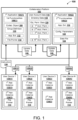
- FIG. 1 is a system diagram illustrating an example environment 100 in which a data file 124 being accessed in association with a collaboration object 108 of a first application 104(1) causes user-specific instances 134 of a second application 104(2) for a group of users associated with the collaboration object 108 to include a file pointer 114 to the data file 124.
- the example environment 100 includes a collaboration platform 102 that is in communication with a plurality of user devices 130.
- the collaboration platform 102 may include one or more servers that implement aspects of the first application 104(1) and the second application 104(2) in association with multiple user accounts.
- the collaboration platform 102 implements aspects of each of the first application 104(1) and the second application 104(2) in association with a first user account through an Nth user account. Further presume that the first user account corresponds to a first user device 130(1), the second user account corresponds to a second user device 130(2), and so on.
- the first user device 130(1) may be operating based on login credentials for the first user account, the second user device 130(2) may be operating based on login credentials for the second user account, and so on.
- each of the user devices 130 support corresponding first application instances 132 and second application instances 134, each of which are user-specific in the sense that the instances 132 and 134 operate in accordance with whichever user account is actively logged into the respective user device 130.
- the first user device 130(1) is supporting a first instance 132(1) of the first application 104(1) that corresponds to login credentials for the first user account
- the second user device 130(2) is supporting a second instance 132(2) of the first application 104(1) that corresponds to login credentials for the second user account, and so on.
- the first user device 130(1) is supporting a first instance 134(1) of the second application 104(2) that corresponds to login credentials for the first user account
- the second user device 130(2) is supporting a second instance 134(2) of the second application 104(2) that corresponds to login credentials for the second user account
- the user-specific instances 134 of the second application 104(2) present a custom user experience that uniquely corresponds to the user account that is logged into that user-specific instance 134.
- each custom user experience is configured to provide direct and seamless access to specific data files based on object permissions associated with the second application 104(2).
- the first instance 134(1) (of the second application 104(2)) that is operating on the first user device 130(1) may present a listing of data files that user account data 116 indicates the first user account is permitted to access.
- the collaboration platform 102 executes the first application 104(1) to implement first functionalities 106(1) in association with a collaboration object 108.
- the collaboration object 108 is a communication session (e.g., a virtual meeting or web-based conference) that corresponds to a group definition 110.
- the group definition 110 may define a plurality of user accounts in association with the collaboration object 108.
- the group definition 110 may correspond to a group of users that are invited to a pre-scheduled virtual meeting, a group of users that attend an impromptu virtual call, a group of users that have accepted an invitation to a pre-scheduled virtual meeting, a group of users that belong to a channel or chat, etc.
- the group definition 110 excludes the third user account and includes each of the first user account, the second user account, and the Nth user account.
- the collaboration platform 102 may maintain or otherwise have access to directory data 118 that defines attributes (e.g., usernames, passwords, departments, job titles, etc.) for the first through Nth user account.
- the collaboration platform 102 receives an instruction 128 to associate a data file 124 with the collaboration object 108.
- the data file 124 may correspond to the second application 104(2).
- the data file 124 may be a note page that viewable and editable via second functionalities 106(2) that are provided by the second application 104(2).
- the instruction 128 causes the first application 104(1) to expose the second functionalities 106(2) with respect to content of the data file 124 by executing an application extension 112 of the second application 104(2) in association with the collaboration object 108.
- the application extension 112 enables the group of users associated with the collaboration object 108 to implement the second functionalities 106(2) of the second application 104(2) while collaboratively viewing the content of the data file 124 within the context of the collaboration object 108.
- the collaboration platform 102 may receive user streams from each of the first user device 130(1), the second user device 130(2), and the Nth user device 130(N).
- each of these user devices 130 may continuously capture audio and video "AV" data (e.g., of a user) via various input devices such as cameras and microphones.
- Each of these user devices 130 may also continuously stream the captured A/V data to the collaboration platform 102.
- the collaboration platform 102 transmits to each individual user device the streams of A/V data that is received from each other user device.
- each individual user device is enabled to render live audio and/or video of the participants who are utilizing the other user devices.
- the instruction 128 may be generated based on a user input that selects an icon that corresponds to the second application 104(2) that is exposed by the user-specific instances 132 of the first application 104(1).
- the instruction 128 may cause the first application 104(1) to execute the application extension 112 within the context of the collaboration object 108.
- the execution of the application extension 112 by the first application 104(1) may expose notetaking functionalities of the notetaking application directly within the virtual meeting.
- each of the users that are participating in the virtual meeting are enabled to collaboratively edit content of the data file 124 within the context of the virtual meeting using notetaking functionalities that are extended into the virtual meeting via the application extension 112.
- the file pointer 114 that is illustrated within the collaboration object 108 may point to the data file 124 (e.g., identify a unique path to the data file 124 in a file system maintained by the collaboration platform 102).
- the file system is configured to facilitate and/or perform operations in association with stored files (e.g., open a file, delete a file, write to a file, read from a file, replace a file, copy a file, move a file, search for a file, create a file, etc.).
- a file system is typically configured as a hierarchical structure that includes nodes representing directories and/or files. Moreover, a file system comprises logic that enables navigation through the nodes to locate a file (e.g., a document, an executable, a spreadsheet, an image, a video, etc.) and to perform an operation in association with the file. In some instances, a file system may maintain object permissions data 120 as described below.
- the first application 104(1) may generate update data 126 that is configured to update the user account data 116 to indicate that each user defined by the group definition 110 for the collaboration object 108 is permitted to access the data file 124.
- object permissions data 120 that corresponds to the data file 124 is shown with check-marks indicating that account permissions for each of the first user account, the second user account, and the Nth user account permit access to the data file 124.
- the collaboration platform 102 may then provide aspects of the update data 126 to the second application 104(2) which may update application configuration parameters 122 to reflect the object permissions data 120 as updated based on the instruction 128.
- the application configuration parameters 122 may control aspects of a user experience presented by the user-specific instances 134 of the second application 104(2) at each of the user devices 130.
- the application configuration parameters 122 for each user account may dictate a listing of data files that are presented by each of the user-specific instances 134 of the second application 104(2).
- the collaboration platform 102 transmits instances of the application configuration parameters to each instance 134 of the second application 104(2) that corresponds to the users identified in the group definition 110 for the collaboration object 108. It will be appreciated that the transmitted instances of the application configuration parameters may be transmitted as a result of the instruction 128 causing the object permission data 120 to be updated to indicate that user accounts defined by the group definition 110 are permitted to access the data file 124.
- first application configuration parameters 122(1) are sent to the first user device 130(1)
- second application configuration parameters 122(2) are sent to the second user device 130(2)
- Nth application configuration parameters 122(N) are sent to the first user device 130(N).
- application configuration parameters are not generated for and transmitted to the third user device 130(3).
- the application configuration parameters 122 transmitted to each user device 130 associated with the group definition 110 cause the respective instances 134 of the second application 104(2) to include the file pointer 114 that points to the data file 124.
- the transmitted instances of the application configuration parameters may cause each user-specific instance 134 of the second application 104(2) to render a user interface element that is configured to provision access to the content of the data file 124 that has been associated with the collaboration object 108 based on the instruction 128 received via the first application 104(1).
- the techniques described herein enable each of the users within the user group for the collaboration object 108 to access the data file 124 via both of the collaboration object 108 (that is accessible by the entire user group) and their own user-specific instance 134 of the second application 104(2).
- users are seamlessly enabled to access content that was edited via the application extension being executed by the first application in association with the collaboration object directly via their own user-specific stand-alone instance 134 of the second application 104(2) operating on their user device 130.
- I data file 124 is generated as a result of the instruction 128 being received via the first application 104(2). For example, during a virtual call the participants may decide to collaboratively generate content using the second functionalities of the second application 104(2).
- one of the participants may select an icon or user interface element that extends the second application 104(2) into the virtual call. Selection of the icon may result in the instruction 128 being sent to the first application 104(1) and may trigger the first application 104(1) to being executing the application extension 112 (e.g., a plug-in) in association with the virtual call. This may result in a function tray of the second application 104(2) being displayed to all of the participants in the context of the virtual call. Selection of the icon may also cause the collaboration platform 102 to generate the data file 124 in storage that is accessible by each of the first application 104(1) and the second application 104(2). Selection of the icon may also cause the collaboration platform 102 to provide the file pointer to the first application 104(1).
- the application extension 112 e.g., a plug-in
- the file pointer 114 points to a single data file 124 that is shared by and accessible to all of the user accounts included in the group definition 110.
- the instruction 128 may trigger generation of a single notetaking file or whiteboard file and each instance 134 of the second application for user accounts in the group definition 110 point to the same file. In this way, all of the users within the group may see all of the others users' inputs to the single data file. Additionally, or alternatively, the instruction 128 may cause the collaboration platform 102 to a plurality of user-specific instances of the data file in association with the plurality of user accounts included within the group definition.
- the application configuration parameters 122 may cause individual instances 134 of the second application to provision individual user accounts, of the plurality of user accounts, with access to individual user-specific instances of the data file initially shared via the instruction 128.
- each user may start off with the same content but may mark it up as she sees fit to generate her own content in accordance with her own preferences.
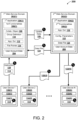
- FIG. 2 illustrated is a system diagram illustrating an example environment 200 in which a data file 124 being accessed via a collaboration object 108 of a first web-service domain 202(1) results in the data file 124 becoming accessible to a user group via a second web-service domain 202(1).
- the first web-service domain 202(1) may include one or more servers that implement aspects of a first application 104(1) that provides a set of first functionalities 106(1).
- the first application 104(1) may facilitate a collaboration object 108 between a group of users defined by a group definition 110.
- the collaboration object 108 may be a prescheduled virtual meeting for which meeting invitations are sent to the group of users, an impromptu virtual call between the group of users (e.g., one user may call the others without prescheduling the event), a channel, a chat, an email thread, and so on.
- the second web-service domain 202(2) may be provide third-party services that are extendable into the first application 104(1) via an application extension 112 that is executable by the first web-service domain 202(1).
- the second web-service domain 202(2) may include one or more servers that implement aspects of a second application 104(2) that provides a set of second functionalities 106(2). Execution of the application extension 112 by the first application 104(1) may expose the second functionalities 106(2) to the group of users within the context of the collaboration object 108.
- execution of the application extension during a virtual communication session may enable the participants of the virtual communication session to collaboratively utilize data analytics functionalities provided by the second application 104(2) within the context of the virtual communication session.
- each of the first user device 130 through the Nth user device 130(N) may be operating respective instances 132 of the first application 104(1) in association the collaboration object 108.
- the instances 132 may be facilitating a communication session between the users of each of the first through Nth user device.
- the first user may generate an instruction 128 to cause the first application 104(2) to begin running the application extension 112 to extend the 2 nd functionalities 106(2) from the second web-service domain 202(2) into the collaboration object 108.
- the first user may select an icon, representing the second application 104(2), that is presented by the first instance 132(1).
- the first user already has access to the data file 124 and time T 1 and therefore a file pointer 114 may already reside within her user-specific instance 134 of the second application 104(2).
- the first user provides an indication of the file pointer 114 within the instruction 128 to inform the first application 104(1) that is operating in the first web-service domain 202(1) of which specific data file is to be accessed from the second web-service domain 202(2) and shared via the collaboration object 108.
- the first web-service domain 202(1) transmits update data 126 to the second web-service domain 202(2) to inform the second web-service domain 202(2) that the first user has elected to share the data file 124 with the group of users for the collaboration object 108.
- the update data 126 may cause the second web-service domain 202(2) to update application configuration parameters 122 to reflect that the group of users associated with the collaboration session 106 have been granted access to the data file 124 identified within the instruction 128.
- the second web-service domain 202(2) may transmit instances of application configuration parameters 122 to at least some of the user devices 130 that belong or correspond to the users defined by the group definition 110.
- one or both of the web-service domains 202 may map user account data 204 for the first application 104(1) with user account data 206 for the second application 104(2) to identify which users within the group have subscriptions already associated with respective instances 134 of the second application 104(2).
- receipt of the second instance 122(2) and Nth instance 122(N) of the application configuration parameters cause the second instance 134(2) and Nth instance 134(N) of the second application 104(2) to also include the file pointer 114.
- the instances 134 of the second application 104(2) may be automatically updated to provide the other users with who the data file is shared with seamless access to the data file 124 via a completely different application that the one within which the file was shared by the first user. It can be appreciated therefore that the techniques described herein facilitate synchronization of shared data files across different applications - even when those applications are provided bv separate web service entities that operate different web-service domains 202.
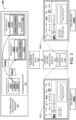
- FIG. 3 illustrated is a system diagram illustrating an example environment 300 in which calendar activity 302 that occurs in association with instances 132 of a first application results in data content being selectively added to instances 134 of a second application.
- a file pointer 114 that is identified within the meeting invitations 304 and that points to a specific file (e.g., within an online storage location) may be added to user-specific instances 134 of a second application in response to individual users being sent an electronic invitation 304 via instances 132 of a first application.
- the calendar activity 302 includes invitations 304 being generated via a first user-specific instance 132(1) of a first application.
- the calendar activity 302 further includes the generated invitations 304 being transmitted over one more networks and received by a second user-specific instance 132(2) of the first application and a third user-specific instance 132(3) of the first application.
- user response data that is generated via the second instance 132(2) or the Nth instance 132(N) of the first application may control application configuration data corresponding to the second instance 134(2) or the Nth instance 134(N) of the second application, respectively.
- application configuration data may be generated based on whether a user accepts an invitation 304, tentatively accepts an invitation 304, responds to a meeting invitation by proposing a new time, declines a meeting invitation, or so on.
- a collaboration application service 308 may generate calendar application data 306 based on the calendar activity 302.
- the collaboration application service 308 may then transmit the calendar application data 306 to a content editing application service 310 which may then generate user interface data 312 based thereon.
- the user interface data 312 may control aspects of a user experience that is generate via individual ones of the instances 134 of the second application.
- the calendar activity data 302 includes the second user declining the second meeting invitation 304(2) via the second instance 132(2) of the first application.
- the user interface data 312 causes the second instance 134(2) that is displayed via the second user device 130(2) to omit the file pointer 114 to the data file 124 that is identified within the second meeting invitation 304(2).
- the calendar activity data 302 further includes the Nth user accepting the Nth meeting invitation 304(N) via the Nth instance 132(N) of the first application.
- the user interface data 312 causes the Nth instance 134(N) that is displayed via the Nth user device 130(N) to include a graphical user interface element that is associated with the file pointer 114 to the data file 124 that is identified within the Nth meeting invitation 304(N).
- the techniques described herein facilitate seamless integration of data content that is shared within calendar objects generated via a first application into a user experience for invitees of the calendar objects within a separate application.
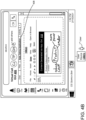
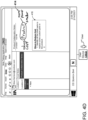
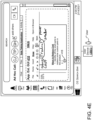
- FIGS. 4A through 4E illustrate various aspects of exemplary GUIs that can be displayed in association with the technologies described herein.
- FIGS. 4A through 4E are described below in the context of a sequence of operations resulting in various application configuration changes to user-specific instances of a collaboration application and a content editing application.
- FIG. 4A illustrates an exemplary messaging GUI 400 that can be presented to a first user in association with the collaboration application.
- the messaging GUI 400 corresponds to a message thread between a group of three users.
- the messaging GUI 400 corresponds to a user-specific instance 132, of the collaboration application, that is being run on a first user device 130(1).
- the messaging GUI 400 includes a message generation field for typing and/or dictating message content in association with a persistent workplace chat as shown represented.
- a user may generate and transmit messages in association with the persistent workplace chat so that any other members of this persistent workplace chat receive and retain continued access to such messages.
- Exemplary such persistent workplace chats include, but are not limited to, a conversation thread within the MICROSOFT TEAMS collaboration platform, a SLACK conversation object, or any other type of multi-user persistent chat system.
- the messaging GUI 400 identifies the group definition 110 for the collaboration object of the message thread. Specifically, a set of graphical elements 402 identify each user that is included within the message thread.
- the messaging GUI 400 further includes a user interface element 404 that enables one or more users to initiate a virtual call between the entire group of users that are included within the group definition.
- the illustrated example shows a sequence of messages leading up to a virtual call that is facilitated by the collaboration application.
- FIG. 4B illustrates an exemplary virtual call GUI 406 that can be presented to the first user in association with the collaboration application.
- the virtual call GUI 406 corresponds to a live virtual call between the group of three users of the message thread.
- the live virtual call may be initiated as a result of the first user selecting the user interface element 404.
- the first user may further select a user interface element 408 that causes the collaboration application to utilize an application extension 112 to expose the second functionalities 106(2) associated with a content editing application.
- the application extension 112 enables the group of users that are associated with a collaboration object (e.g., participants of a virtual call, members of a message thread, etc.) to implement the second functionalities 106(2) of the content editing application while collaboratively viewing content of that application within the context of the collaboration object 108.
- a collaboration object e.g., participants of a virtual call, members of a message thread, etc.
- the virtual call GUI 406 is displaying a set of graphical user interface elements that are selectable to implement the second functionalities 106(2) and are arranged in accordance with a layout of the content editing application.
- FIG. 4C illustrates an exemplary application extension GUI 410 that is configured to enable a user to define directory location data for content being generated via the application extension 112 directly through the virtual call GUI 406.
- the first user has selected a graphical user interface element 412 that is displayed within the application extension GUI 410 in order to expose an organizational structure of the content editing application.
- the displayed organizational structure includes various directory locations that exist within the first user's instance 134(1) of the content editing application.
- the application extension GUI 410 also enables the user to select from existing locations (e.g., location 1, location 2, and location 3) and/or to generate a new location within his existing organizational structure for the content editing application.
- the first user's selection of a directory location for content being edited via the application extension GUI 410 that is shown within the collaboration object GUI may control where the content appears in both his instance 134(1) of the content editing application as well as other participants instances 134.
- FIG. 4D illustrates an exemplary GUI 414 that corresponds to the second user's instance 134(2) of the content editing application.
- the GUI 414 illustrates that as a result of the first user deploying the application extension 112 to share content with the group within the collaboration application (e.g., during a virtual call or any other collaboration object for that matter) the shared content automatically is compiled into the user-specific instances 134 of the content editing application for the entire group. Additionally, as shown the content may be synchronized to the same directory location for the entire group within the content editing application based on the directory location data generated via the application extension 112 directly through the collaboration application.
- the GUI 414 that corresponds to the second user's instance 134(2) of the content editing application enables the second user to generate and/or modify content that is shared via the collaboration object directly via the content editing application.
- the second user has added the content shown in the box 416 into the content via the instance 134(2) during the virtual call.
- the second user's input via the instance 134(2) during the virtual call causes the application extension GUI 410 of the first user's instance 132(1).
- the application extension GUI 410 may include a status indicator 418 indicating which user (e.g., the second user in this case) is modifying content at specific locations within the data file.
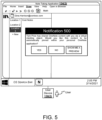
- FIG. 5 illustrates an exemplary notification 500 that may be displayed in response to content for a second application being shared with a user via a collaboration object of a first application.
- the notification 500 is displayed in association with an instance of the second application that uniquely corresponds to the user that the content has been shared with.
- the notification 500 includes a message that is designed to inform the user that content has been shared with them by another user via a virtual meeting object.
- the content may be shared in an ad hoc manner during the virtual meeting.
- the content may be shared with them via a meeting invitation for a yet to occur pre-scheduled meeting.
- the notification 500 may provide the recipient user with one or more options to select between. For example, as illustrated, the notification 500 informs the recipient user (i.e., the user with whom content is shared by another user) the name of the other user that has shared content with them. Specifically, the notification 500 states "Tom Price has shared OneNote content with you via a virtual meeting object.” Furthermore, the notification 500 may inquire whether the recipient user would like to have the content that has been shared with them pinned to their instance of the second application.
- the illustrated notification 500 states “Would you like this content to be automatically pinned within your personal OneNote application?”
- the notification 500 provides the recipient user with options to: (i) accept having their user-specific instance of the second application updated based on the content that is shared (e.g., by selecting the "YES” button), (ii) decline having their user-specific instance of the second application updated based on the content that is shared (e.g., by selecting the "NO” button), or (iii) electing to preview the content (e.g., by selecting the "SHOW ME A PREVIEW” button) prior to accepting or declining the option of having their user-specific instance of the second application updated based on the content that is shared.
- FIG. 6 is a diagram illustrating aspects of a routine 600 for responding to content being associated with a collaboration object of a first application by automatically configuring user-specific instances of a second application for a group of users associated with the collaboration object.
- the logical operations described herein are implemented (1) as a sequence of computer implemented acts or program modules running on a computing system such as those described herein) and/or (2) as interconnected machine logic circuits or circuit modules within the computing system.
- the implementation is a matter of choice dependent on the performance and other requirements of the computing system. Accordingly, the logical operations may be implemented in software, in firmware, in special purpose digital logic, and any combination thereof.
- the various device(s) and/or module(s) described herein can generate, transmit, receive, and/or display data associated with content of a communication session (e.g., live content, broadcasted event, recorded content, etc.) and/or a presentation UI that includes renderings of one or more participants of remote computing devices, avatars, channels, persistent chat sessions, video streams, images, virtual objects, and/or applications associated with a communication session.
- the routine 600 starts at operation 602, where a system receives collaboration object data that includes a group definition for a collaboration object corresponding to a first application.
- the collaboration object may be a chat, , a virtual call, a prescheduled meeting, an email thread, and various other types of collaboration objects that are designed to facilitate collaborative communications between a group of users.
- the routine 600 proceeds to operation 604, where the system receives an instruction to associate a data file, corresponding to a second application, with the collaboration object corresponding to the first application.
- the instruction causes the first application to provide access to content of the data file in association with the collaboration object via an application extension of the second application that is executable by the first application.
- the routine 600 proceeds to operation 606, where the system configures, in response to the instruction, object permissions data to grant a plurality of user accounts identified by the group definition with access to the content of the data file corresponding to the second application.
- the routine 600 proceeds to operation 608, where the system updates, based on the object permission data, application configuration parameters for the second application in association with the plurality of user accounts.
- the routine 600 proceeds to operation 610, where the system transmits the application configuration parameters to instances of the second application that correspond to the plurality of user accounts.
- the above-described subject matter may be implemented as a computer-controlled apparatus, a computer process, a computing system, or as an article of manufacture such as a computer-readable storage medium.
- the operations of the example methods are illustrated in individual blocks and summarized with reference to those blocks.
- the methods are illustrated as logical flows of blocks, each block of which can represent one or more operations that can be implemented in hardware, software, or a combination thereof.
- the operations represent computer-executable instructions stored on one or more computer-readable media that, when executed by one or more processors, enable the one or more processors to perform the recited operations.
- computer-executable instructions include routines, programs, objects, modules, components, data structures, and the like that perform particular functions or implement particular abstract data types.
- the order in which the operations are described is not intended to be construed as a limitation, and any number of the described operations can be executed in any order, combined in any order, subdivided into multiple sub-operations, and/or executed in parallel to implement the described processes.
- the described processes can be performed by resources associated with one or more device(s) such as one or more internal or external CPUs or GPUs, and/or one or more pieces of hardware logic such as field-programmable gate arrays ("FPGAs”), digital signal processors (“DSPs”), or other types of accelerators.
- FPGAs field-programmable gate arrays
- DSPs digital signal processors
- FIG. 7 is a diagram illustrating an example environment 700 in which a system 702 can implement the techniques disclosed herein.
- a system 702 may function to collect, analyze, and share data defining one or more objects that are displayed to users of a communication session 1004.
- the communication session 703 may be implemented between a number of client computing devices 706(1) through 706(N) (where N is a number having a value of two or greater) that are associated with or are part of the system 702.
- the client computing devices 706(1) through 706(N) enable users, also referred to as individuals, to participate in the communication session 703.
- the communication session 703 is hosted, over one or more network(s) 708, by the system 702. That is, the system 702 can provide a service that enables users of the client computing devices 706(1) through 706(N) to participate in the communication session 703 (e.g., via a live viewing and/or a recorded viewing). Consequently, a "participant" to the communication session 703 can comprise a user and/or a client computing device (e.g., multiple users may be in a room participating in a communication session via the use of a single client computing device), each of which can communicate with other participants. As an alternative, the communication session 703 can be hosted by one of the client computing devices 706(1) through 706(N) utilizing peer-to-peer technologies. The system 702 can also host chat conversations and other team collaboration functionality (e.g., as part of an application suite).
- chat conversations and other team collaboration functionality are considered external communication sessions distinct from the communication session 703.
- a computing system 702 that collects participant data in the communication session 703 may be able to link to such external communication sessions. Therefore, the system may receive information, such as date, time, session particulars, and the like, that enables connectivity to such external communication sessions.
- a chat conversation can be conducted in accordance with the communication session 703. Additionally, the system 702 may host the communication session 703, which includes at least a plurality of participants co-located at a meeting location, such as a meeting room or auditorium, or located in disparate locations.
- client computing devices 706(1) through 706(N) participating in the communication session 703 are configured to receive and render for display, on a user interface of a display screen, communication data.
- the communication data can comprise a collection of various instances, or streams, of live content and/or recorded content.
- the collection of various instances, or streams, of live content and/or recorded content may be provided by one or more cameras, such as video cameras.
- an individual stream of live or recorded content can comprise media data associated with a video feed provided by a video camera (e.g., audio and visual data that capture the appearance and speech of a user participating in the communication session).
- the video feeds may comprise such audio and visual data, one or more still images, and/or one or more avatars.
- the one or more still images may also comprise one or more avatars.
- an individual stream of live or recorded content can comprise media data that includes an avatar of a user participating in the communication session along with audio data that captures the speech of the user.
- Yet another example of an individual stream of live or recorded content can comprise media data that includes a file displayed on a display screen along with audio data that captures the speech of a user. Accordingly, the various streams of live or recorded content within the communication data enable a remote meeting to be facilitated between a group of people and the sharing of content within the group of people.
- the various streams of live or recorded content within the communication data may originate from a plurality of co-located video cameras, positioned in a space, such as a room, to record or stream live a presentation that includes one or more individuals presenting and one or more individuals consuming presented content.
- a participant or attendee can view content of the communication session 703 live as activity occurs, or alternatively, via a recording at a later time after the activity occurs.
- client computing devices 706(1) through 706(N) participating in the communication session 703 are configured to receive and render for display, on a user interface of a display screen, communication data.
- the communication data can comprise a collection of various instances, or streams, of live and/or recorded content.
- an individual stream of content can comprise media data associated with a video feed (e.g., audio and visual data that capture the appearance and speech of a user participating in the communication session).
- Another example of an individual stream of content can comprise media data that includes an avatar of a user participating in the conference session along with audio data that captures the speech of the user.
- an individual stream of content can comprise media data that includes a content item displayed on a display screen and/or audio data that captures the speech of a user. Accordingly, the various streams of content within the communication data enable a meeting or a broadcast presentation to be facilitated amongst a group of people dispersed across remote locations.
- a participant or attendee to a communication session is a person that is in range of a camera, or other image and/or audio capture device such that actions and/or sounds of the person which are produced while the person is viewing and/or listening to the content being shared via the communication session can be captured (e.g., recorded).
- a participant may be sitting in a crowd viewing the shared content live at a broadcast location where a stage presentation occurs.
- a participant may be sitting in an office conference room viewing the shared content of a communication session with other colleagues via a display screen.
- a participant may be sitting or standing in front of a personal device (e.g., tablet, smartphone, computer, etc.) viewing the shared content of a communication session alone in their office or at home.
- a personal device e.g., tablet, smartphone, computer, etc.
- the system 702 of FIGURE 7 includes device(s) 710.
- the device(s) 710 and/or other components of the system 702 can include distributed computing resources that communicate with one another and/or with the client computing devices 706(1) through 706(N) via the one or more network(s) 708.
- the system 702 may be an independent system that is tasked with managing aspects of one or more communication sessions such as communication session 703.
- the system 702 may be managed by entities such as SLACK, WEBEX, GOTOMEETING, GOOGLE HANGOUTS, etc.
- Network(s) 708 may include, for example, public networks such as the Internet, private networks such as an institutional and/or personal intranet, or some combination of private and public networks.
- Network(s) 708 may also include any type of wired and/or wireless network, including but not limited to local area networks ("LANs”), wide area networks (“WANs”), satellite networks, cable networks, Wi-Fi networks, WiMax networks, mobile communications networks (e.g., 3G, 4G, and so forth) or any combination thereof.
- Network(s) 708 may utilize communications protocols, including packet-based and/or datagram-based protocols such as Internet protocol (“IP”), transmission control protocol (“TCP”), user datagram protocol (“UDP”), or other types of protocols.
- IP Internet protocol
- TCP transmission control protocol
- UDP user datagram protocol
- network(s) 708 may also include a number of devices that facilitate network communications and/or form a hardware basis for the networks, such as switches, routers, gateways, access points, firewalls, base stations, repeaters, back
- network(s) 708 may further include devices that enable connection to a wireless network, such as a wireless access point ("WAP").
- WAP wireless access point
- Examples support connectivity through WAPs that send and receive data over various electromagnetic frequencies (e.g., radio frequencies), including WAPs that support Institute of Electrical and Electronics Engineers (“IEEE”) 802.7 standards (e.g., 802.7g, 802.7n, 802.7ac and so forth), and other standards.
- IEEE Institute of Electrical and Electronics Engineers
- device(s) 710 may include one or more computing devices that operate in a cluster or other grouped configuration to share resources, balance load, increase performance, provide fail-over support or redundancy, or for other purposes.
- device(s) 710 may belong to a variety of classes of devices such as traditional server-type devices, desktop computer-type devices, and/or mobile-type devices.
- device(s) 710 may include a diverse variety of device types and are not limited to a particular type of device.
- Device(s) 710 may represent, but are not limited to, server computers, desktop computers, web-server computers, personal computers, mobile computers, laptop computers, tablet computers, or any other sort of computing device.
- a client computing device (e.g., one of client computing device(s) 706(1) through 706(N)) (each of which are also referred to herein as a "data processing system”) may belong to a variety of classes of devices, which may be the same as, or different from, device(s) 710, such as traditional client-type devices, desktop computer-type devices, mobile-type devices, special purpose-type devices, embedded-type devices, and/or wearable-type devices.
- a client computing device can include, but is not limited to, a desktop computer, a game console and/or a gaming device, a tablet computer, a personal data assistant ("PDA”), a mobile phone/tablet hybrid, a laptop computer, a telecommunication device, a computer navigation type client computing device such as a satellite-based navigation system including a global positioning system (“GPS”) device, a wearable device, a virtual reality (“VR”) device, an augmented reality (“AR”) device, an implanted computing device, an automotive computer, a network-enabled television, a thin client, a terminal, an Internet of Things (“IoT”) device, a work station, a media player, a personal video recorder (“PVR”), a set-top box, a camera, an integrated component (e.g., a peripheral device) for inclusion in a computing device, an appliance, or any other sort of computing device.
- the client computing device may include a combination of the earlier listed examples of the client computing device such as, for example,
- Client computing device(s) 706(1) through 706(N) of the various classes and device types can represent any type of computing device having one or more data processing unit(s) 792 operably connected to computer-readable media 794 such as via a bus 716, which in some instances can include one or more of a system bus, a data bus, an address bus, a PCI bus, a Mini-PCI bus, and any variety of local, peripheral, and/or independent buses.
- Executable instructions stored on computer-readable media 794 may include, for example, an operating system 719, a client module 720, a profile module 722, and other modules, programs, or applications that are loadable and executable by data processing units(s) 792.
- Client computing device(s) 706(1) through 706(N) may also include one or more interface(s) 724 to enable communications between client computing device(s) 706(1) through 706(N) and other networked devices, such as device(s) 710, over network(s) 708.
- Such network interface(s) 724 may include one or more network interface controllers (NICs) or other types of transceiver devices to send and receive communications and/or data over a network.
- NICs network interface controllers
- client computing device(s) 706(1) through 706(N) can include input/output ("I/O") interfaces (devices) 726 that enable communications with input/output devices such as user input devices including peripheral input devices (e.g., a game controller, a keyboard, a mouse, a pen, a voice input device such as a microphone, a video camera for obtaining and providing video feeds and/or still images, a touch input device, a gestural input device, and the like) and/or output devices including peripheral output devices (e.g., a display, a printer, audio speakers, a haptic output device, and the like).
- FIGURE 7 illustrates that client computing device 706(1) is in some way connected to a display device (e.g., a display screen 729(N)), which can display a UI according to the techniques described herein.
- a display device e.g., a display screen 729(N)
- client computing devices 706(1) through 706(N) may use their respective client modules 720 to connect with one another and/or other external device(s) in order to participate in the communication session 703, or in order to contribute activity to a collaboration environment.
- client computing device 706(1) may utilize a client computing device 706(1) to communicate with a second user of another client computing device 706(2).
- client modules 720 the users may share data, which may cause the client computing device 706(1) to connect to the system 702 and/or the other client computing devices 706(2) through 706(N) over the network(s) 708.
- the client computing device(s) 706(1) through 706(N) may use their respective profile modules 722 to generate participant profiles (not shown in FIGURE 7 ) and provide the participant profiles to other client computing devices and/or to the device(s) 710 of the system 702.
- a participant profile may include one or more of an identity of a user or a group of users (e.g., a name, a unique identifier ("ID"), etc.), user data such as personal data, machine data such as location (e.g., an IP address, a room in a building, etc.) and technical capabilities, etc. Participant profiles may be utilized to register participants for communication sessions.
- the device(s) 710 of the system 702 include a server module 730 and an output module 732.
- the server module 730 is configured to receive, from individual client computing devices such as client computing devices 706(1) through 706(N), media streams 734(1) through 734(N).
- media streams can comprise a video feed (e.g., audio and visual data associated with a user), audio data which is to be output with a presentation of an avatar of a user (e.g., an audio only experience in which video data of the user is not transmitted), text data (e.g., text messages), file data and/or screen sharing data (e.g., a document, a slide deck, an image, a video displayed on a display screen, etc.), and so forth.
- the server module 730 is configured to receive a collection of various media streams 734(1) through 734(N) during a live viewing of the communication session 703 (the collection being referred to herein as "media data 734").
- not all of the client computing devices that participate in the communication session 703 provide a media stream.
- a client computing device may only be a consuming, or a "listening", device such that it only receives content associated with the communication session 703 but does not provide any content to the communication session 703.
- the server module 730 can select aspects of the media streams 734 that are to be shared with individual ones of the participating client computing devices 706(1) through 706(N). Consequently, the server module 730 may be configured to generate session data 736 based on the streams 734 and/or pass the session data 736 to the output module 732. Then, the output module 732 may communicate communication data 739 to the client computing devices (e.g., client computing devices 706(1) through 706(3) participating in a live viewing of the communication session). The communication data 739 may include video, audio, and/or other content data, provided by the output module 732 based on content 750 associated with the output module 732 and based on received session data 736.
- the communication data 739 may include video, audio, and/or other content data, provided by the output module 732 based on content 750 associated with the output module 732 and based on received session data 736.
- the output module 732 transmits communication data 739(1) to client computing device 706(1), and transmits communication data 739(2) to client computing device 706(2), and transmits communication data 739(3) to client computing device 706(3), etc.
- the communication data 739 transmitted to the client computing devices can be the same or can be different (e.g., positioning of streams of content within a user interface may vary from one device to the next).
- the device(s) 710 and/or the client module 720 can include GUI presentation module 740.
- the GUI presentation module 740 may be configured to analyze communication data 739 that is for delivery to one or more of the client computing devices 706.
- the UI presentation module 740 at the device(s) 710 and/or the client computing device 706, may analyze communication data 739 to determine an appropriate manner for displaying video, image, and/or content on the display screen 729 of an associated client computing device 706.
- the GUI presentation module 740 may provide video, image, and/or content to a presentation GUI 746 rendered on the display screen 729 of the associated client computing device 706.
- the presentation GUI 746 may be caused to be rendered on the display screen 729 by the GUI presentation module 740.
- the presentation GUI 1146 may include the video, image, and/or content analyzed by the GUI presentation module 740.
- the presentation GUI 746 may include a plurality of sections or grids that may render or comprise video, image, and/or content for display on the display screen 729.
- a first section of the presentation GUI 746 may include a video feed of a presenter or individual
- a second section of the presentation GUI 746 may include a video feed of an individual consuming meeting information provided by the presenter or individual.
- the GUI presentation module 740 may populate the first and second sections of the presentation GUI 746 in a manner that properly imitates an environment experience that the presenter and the individual may be sharing.
- the GUI presentation module 740 may enlarge or provide a zoomed view of the individual represented by the video feed in order to highlight a reaction, such as a facial feature, the individual had to the presenter.
- the presentation GUI 746 may include a video feed of a plurality of participants associated with a meeting, such as a general communication session.
- the presentation GUI 746 may be associated with a channel, such as a chat channel, enterprise teams channel, or the like. Therefore, the presentation GUI 746 may be associated with an external communication session that is different than the general communication session.
- FIG. 8 illustrates a diagram that shows example components of an example device 800 (also referred to herein as a "computing device") configured to generate data for some of the user interfaces disclosed herein.
- the device 800 may generate data that may include one or more sections that may render or comprise video, images, virtual objects, and/or content for display on the display screen 189.
- the device 800 may represent one of the device(s) described herein. Additionally, or alternatively, the device 800 may represent one of the client computing devices 1106.
- the device 800 includes one or more data processing unit(s) 802, computer-readable media 804, and communication interface(s) 806.
- the components of the device 800 are operatively connected, for example, via a bus 809, which may include one or more of a system bus, a data bus, an address bus, a PCI bus, a Mini-PCI bus, and any variety of local, peripheral, and/or independent buses.
- data processing unit(s) such as the data processing unit(s) 802 and/or data processing unit(s) 1192, may represent, for example, a CPU-type data processing unit, a GPU-type data processing unit, a field-programmable gate array ("FPGA"), another class of DSP, or other hardware logic components that may, in some instances, be driven by a CPU.
- FPGA field-programmable gate array
- illustrative types of hardware logic components that may be utilized include Application-Specific Integrated Circuits ("ASICs”), Application-Specific Standard Products (“ASSPs”), System-on-a-Chip Systems (“SOCs”), Complex Programmable Logic Devices (“CPLDs”), etc.
- ASICs Application-Specific Integrated Circuits
- ASSPs Application-Specific Standard Products
- SOCs System-on-a-Chip Systems
- CPLDs Complex Programmable Logic Devices
- computer-readable media such as computer-readable media 804 and computer-readable media 1194, may store instructions executable by the data processing unit(s).
- the computer-readable media may also store instructions executable by external data processing units such as by an external CPU, an external GPU, and/or executable by an external accelerator, such as an FPGA type accelerator, a DSP type accelerator, or any other internal or external accelerator.
- an external accelerator such as an FPGA type accelerator, a DSP type accelerator, or any other internal or external accelerator.
- at least one CPU, GPU, and/or accelerator is incorporated in a computing device, while in some examples one or more of a CPU, GPU, and/or accelerator is external to a computing device.
- Computer-readable media may include computer storage media and/or communication media.
- Computer storage media may include one or more of volatile memory, nonvolatile memory, and/or other persistent and/or auxiliary computer storage media, removable and non-removable computer storage media implemented in any method or technology for storage of information such as computer-readable instructions, data structures, program modules, or other data.
- computer storage media includes tangible and/or physical forms of media included in a device and/or hardware component that is part of a device or external to a device, including but not limited to random access memory (“RAM”), static random-access memory (“SRAM”), dynamic random-access memory (“DRAM”), phase change memory (“PCM”), read-only memory (“ROM”), erasable programmable read-only memory (“EPROM”), electrically erasable programmable read-only memory (“EEPROM”), flash memory, compact disc read-only memory (“CD-ROM”), digital versatile disks (“DVDs”), optical cards or other optical storage media, magnetic cassettes, magnetic tape, magnetic disk storage, magnetic cards or other magnetic storage devices or media, solid-state memory devices, storage arrays, network attached storage, storage area networks, hosted computer storage or any other storage memory, storage device, and/or storage medium that can be used to store and maintain information for access by a computing device.
- RAM random access memory
- SRAM static random-access memory
- DRAM dynamic random-access memory
- PCM phase change
- communication media may embody computer-readable instructions, data structures, program modules, or other data in a modulated data signal, such as a carrier wave, or other transmission mechanism.
- a modulated data signal such as a carrier wave, or other transmission mechanism.
- computer storage media does not include communication media. That is, computer storage media does not include communications media consisting solely of a modulated data signal, a carrier wave, or a propagated signal, per se.
- Communication interface(s) 806 may represent, for example, network interface controllers ("NICs") or other types of transceiver devices to send and receive communications over a network. Furthermore, the communication interface(s) 806 may include one or more video cameras and/or audio devices 822 to enable generation of video feeds and/or still images, and so forth.
- NICs network interface controllers
- the communication interface(s) 806 may include one or more video cameras and/or audio devices 822 to enable generation of video feeds and/or still images, and so forth.
- computer-readable media 804 includes a data store 808.
- the data store 808 includes data storage such as a database, data warehouse, or other type of structured or unstructured data storage.
- the data store 808 includes a corpus and/or a relational database with one or more tables, indices, stored procedures, and so forth to enable data access including one or more of hypertext markup language (“HTML”) tables, resource description framework (“RDF”) tables, web ontology language (“OWL”) tables, and/or extensible markup language (“XML”) tables, for example.
- HTML hypertext markup language
- RDF resource description framework
- OWL web ontology language
- XML extensible markup language
- the data store 808 may store data for the operations of processes, applications, components, and/or modules stored in computer-readable media 804 and/or executed by data processing unit(s) 802 and/or accelerator(s).
- the data store 808 may store session data 810 (e.g., session data 1136 as shown in FIGURE 11), profile data 88 (e.g., associated with a participant profile), and/or other data.
- the session data 810 can include a total number of participants (e.g., users and/or client computing devices) in a communication session, activity that occurs in the communication session, a list of invitees to the communication session, and/or other data related to when and how the communication session is conducted or hosted.
- the data store 808 may also include content data 814, such as the content that includes video, audio, or other content for rendering and display on one or more of the display screens 189.
- the above-referenced data can be stored on separate memories 816 on board one or more data processing unit(s) 802 such as a memory on board a CPU-type processor, a GPU-type processor, an FPGA-type accelerator, a DSP-type accelerator, and/or another accelerator.
- the computer-readable media 804 also includes an operating system 818 and application programming interface(s) 810 (APIs) configured to expose the functionality and the data of the device 800 to other devices.
- the computer-readable media 804 includes one or more modules such as the server module 830, the output module 832, and the GUI presentation module 840, although the number of illustrated modules is just an example, and the number may vary higher or lower. That is, functionality described herein in association with the illustrated modules may be performed by a fewer number of modules or a larger number of modules on one device or spread across multiple devices.
- the presently disclosed technologies are believed to be applicable to a variety of systems and approaches for presenting a status indicator within a first digital context in response to a user interacting with a data object within a second digital context. Furthermore, the presently disclosed technologies are believed to be applicable to a variety of systems and approaches for enabling a recipient of the status indicator to initiate communications, directly from the first digital context, with the user that is interacting with the data object within the second digital context. Aspects of the disclosed technologies are described in the context of a unified communications platform. While the presently disclosed technologies are not necessarily limited to this context, an appreciation of various aspects of the presently disclosed technologies is best gained through a discussion of examples in this specific context.
- a unified communications platform such as, for example, file synchronization platforms (e.g., ONEDRIVE, DROPBOX, etc.) file directory platforms (e.g., WINDOWS, MacOS, etc.) photo previews, SharePoint, and so on.
- file synchronization platforms e.g., ONEDRIVE, DROPBOX, etc.
- file directory platforms e.g., WINDOWS, MacOS, etc.
Landscapes
- Engineering & Computer Science (AREA)
- Multimedia (AREA)
- Computer Networks & Wireless Communication (AREA)
- Signal Processing (AREA)
- General Engineering & Computer Science (AREA)
- Information Transfer Between Computers (AREA)
Claims (14)
- Ein computerimplementiertes Verfahren zur Verwaltung des Betriebs einer Kollaborationsplattform (102), umfassend:Empfangen von Kollaborationsobjektdaten, die ein Kollaborationsobjekt (108) einer ersten Anwendung (104(1)) in der Kollaborationsplattform definieren, wobei das Kollaborationsobjekt eine Kommunikationssitzung ist, und wobei die Kollaborationsobjektdaten weiter eine Gruppendefinition (110) definieren, die eine Vielzahl von Benutzerkonten mit der Kommunikationssitzung verknüpft;Empfangen einer Anweisung (128), die die Kollaborationsplattform veranlasst, Zugriff auf Inhalte einer Datendatei (124) einer zweiten Anwendung (104(2)) zu gewähren, indem eine oder mehrere Funktionalitäten (106(2)) der zweiten Anwendung der Kommunikationssitzung der ersten Anwendung zugänglich gemacht werden;In Reaktion auf die Anweisung, Verknüpfen der Datendatei der zweiten Anwendung mit der Kommunikationssitzung der ersten Anwendung;Basierend auf dem Verknüpfen der Datendatei der zweiten Anwendung mit der Kommunikationssitzung der ersten Anwendung, Aktualisieren der Anwendungskonfigurationsparameter (122) für die zweite Anwendung in Verbindung mit der Vielzahl von Benutzerkonten der Kommunikationssitzung; undIn Reaktion auf das Aktualisieren der Anwendungskonfigurationsparameter der zweiten Anwendung, Veranlassen einer Instanz der zweiten Anwendung (134), die einem der Vielzahl von Konten entspricht, ein Benutzeroberflächenelement darzustellen, das eingerichtet ist, um Zugriff auf die Datendatei der zweiten Anwendung über ein Dateisystem der Instanz der Anwendung zu gewähren, wobei die Instanz der zweiten Anwendung vor dem Verknüpfen der Datendatei mit der Kommunikationssitzung keinen Zugriff auf die Datendatei über das Dateisystem hat;dadurch gekennzeichnet, dass: die Datendatei eine neue Datendatei ist, die als Ergebnis der Anweisung erzeugt wird, die während der Kommunikationssitzung durch die erste Anwendung empfangen wird.
- Das computerimplementierte Verfahren nach Anspruch 1, wobei die Anwendungskonfigurationsparameter an die Instanz der zweiten Anwendung (104(2)) übertragen werden:in Reaktion auf die Anweisung, die die Datendatei mit der Kommunikationssitzung verknüpft, die der Kollaborationsplattform entspricht, undbasierend auf der Gruppendefinition für die Kommunikationssitzung der ersten Anwendung (104(1)).
- Das computerimplementierte Verfahren nach Anspruch 1, wobei die Kommunikationssitzung durch eine Vielzahl von Instanzen der Kollaborationsplattform erleichtert wird, die der Gruppendefinition entspricht.
- Das computerimplementierte Verfahren nach Anspruch 3, wobei eine Anwendungserweiterung durch die Kollaborationsplattform während der Kommunikationssitzung ausführbar ist, um Inhaltsbearbeitungsfunktionen der zweiten Anwendung (104(2)) der Vielzahl von Benutzerkonten in Verbindung mit den Inhalten der Datendatei bereitzustellen.
- Das computerimplementierte Verfahren nach Anspruch 1, wobei mindestens ein Teil des Inhalts der Datendatei während der Kommunikationssitzung, die durch die Kommunikationssitzung erleichtert wird, über eine Anwendungserweiterung der zweiten Anwendung (104(2)) erzeugt wird.
- Das computerimplementierte Verfahren nach Anspruch 1, weiter umfassend:Empfangen von Kalenderaktivitäten, die mit einer Einladung zur Kommunikationssitzung verbunden sind; undBestimmen der Gruppendefinition basierend auf mindestens einem von: einem ersten Satz individueller Benutzerkonten, die die Einladung zur Kommunikationssitzung angenommen haben, oder einem zweiten Satz individueller Benutzerkonten, die die Einladung zur Kommunikationssitzung abgelehnt haben.
- Das computerimplementierte Verfahren nach Anspruch 1, weiter umfassend:
Konfigurieren von Objektberechtigungsdaten in Reaktion auf die Anweisung, um der Vielzahl von Benutzerkonten Zugriff auf die Inhalte der Datendatei der zweiten Anwendung (104(2)) zu gewähren. - Ein System, umfassend:einen oder mehrere Prozessoren; undmindestens ein Computerspeichermedium, auf dem computerausführbare Anweisungen gespeichert sind, die, wenn sie von den einen oder mehreren Prozessoren ausgeführt werden, das System veranlassen:Empfangen von Kollaborationsobjektdaten, die eine Gruppendefinition (110) für ein Kollaborationsobjekt (108) umfassen, das einer ersten Anwendung (104(1)) entspricht, wobei das Kollaborationsobjekt eine Kommunikationssitzung ist, und wobei die Gruppendefinition eine Vielzahl von Benutzerkonten mit der Kommunikationssitzung verknüpft;Empfangen einer Anweisung (128), um eine Datendatei, die einer zweiten Anwendung (104(2)) entspricht, mit der Kommunikationssitzung zu verknüpfen, die der ersten Anwendung entspricht;In Reaktion auf die Anweisung:Übertragen von Aktualisierungsdaten an einen Dienst, der die zweite Anwendung erleichtert, wobei die Aktualisierungsdaten eingerichtet sind, um den Dienst zu veranlassen,Anwendungskonfigurationsparameter (122) für die zweite Anwendung in Verbindung mit der Vielzahl von Benutzerkonten der Gruppendefinition zu aktualisieren; undAusführen einer Anwendungserweiterung (112) der zweiten Anwendung durch die erste Anwendung in Verbindung mit der Kommunikationssitzung, um Zugriff auf Inhalte der Datendatei über die Kommunikationssitzung zu gewähren;dadurch gekennzeichnet, dass: die Datendatei eine neue Datendatei ist, die als Ergebnis der Anweisung erzeugt wird, die während der Kommunikationssitzung durch die erste Anwendung empfangen wird.
- Das System nach Anspruch 8, wobei die Aktualisierungsdaten den Dienst veranlassen, die Anwendungskonfigurationsparameter an eine Vielzahl von Benutzergeräten zu übertragen, die Instanzen der zweiten Anwendung (104(2)) entsprechen, die mit der Gruppendefinition für die Kommunikationssitzung verknüpft sind.
- Das System nach Anspruch 8, wobei die Anweisung einen Dateizeiger umfasst, der die Datendatei bei dem Dienst identifiziert, der die zweite Anwendung (104(2)) erleichtert.
- Das System nach Anspruch 8, wobei die Aktualisierungsdaten, die an den Dienst übertragen werden, der die zweite Anwendung (104(2)) erleichtert, Benutzerdaten umfassen, die mit der Gruppendefinition für die Kommunikationssitzung verknüpft sind.
- Das System nach Anspruch 8, wobei die Kommunikationssitzung durch eine Vielzahl von Instanzen der ersten Anwendung (104(1)) erleichtert wird, die der Gruppendefinition entspricht.
- Das System nach Anspruch 8, wobei die Anwendungserweiterung durch die erste Anwendung (104(1)) während der Kommunikationssitzung ausführbar ist, um Inhaltsbearbeitungsfunktionen der zweiten Anwendung (104(2)) der Vielzahl von Benutzerkonten in Verbindung mit den Inhalten der Datendatei bereitzustellen.
- Das System nach Anspruch 8, wobei die Gruppendefinition einem Nachrichten-Thread entspricht, der durch eine Vielzahl von Instanzen der ersten Anwendung (104(1)) erleichtert wird, die der Gruppendefinition entspricht.
Applications Claiming Priority (2)
| Application Number | Priority Date | Filing Date | Title |
|---|---|---|---|
| US17/207,078 US11228627B1 (en) | 2021-03-19 | 2021-03-19 | Updating user-specific application instances based on collaborative object activity |
| PCT/US2021/055932 WO2022197331A1 (en) | 2021-03-19 | 2021-10-21 | Updating user-specific application instances based on collaborative object activity |
Publications (2)
| Publication Number | Publication Date |
|---|---|
| EP4309353A1 EP4309353A1 (de) | 2024-01-24 |
| EP4309353B1 true EP4309353B1 (de) | 2025-06-18 |
Family
ID=78622061
Family Applications (1)
| Application Number | Title | Priority Date | Filing Date |
|---|---|---|---|
| EP21807409.4A Active EP4309353B1 (de) | 2021-03-19 | 2021-10-21 | Aktualisierung von benutzerspezifischen anwendungsinstanzen auf der basis von kollaborativer objektaktivität |
Country Status (4)
| Country | Link |
|---|---|
| US (4) | US11228627B1 (de) |
| EP (1) | EP4309353B1 (de) |
| CN (1) | CN116982308A (de) |
| WO (1) | WO2022197331A1 (de) |
Families Citing this family (6)
| Publication number | Priority date | Publication date | Assignee | Title |
|---|---|---|---|---|
| US11704626B2 (en) * | 2021-07-09 | 2023-07-18 | Prezi, Inc. | Relocation of content item to motion picture sequences at multiple devices |
| US12197478B1 (en) | 2023-06-28 | 2025-01-14 | Atlassian Pty Ltd. | Automated content creation and content services for collaboration platforms |
| US12229498B2 (en) | 2023-06-28 | 2025-02-18 | Atlassian Pty Ltd. | Automated content creation and content services for collaboration platforms |
| US12346625B2 (en) * | 2023-07-28 | 2025-07-01 | International Business Machines Corporation | Controlled screen sharing |
| US20250139263A1 (en) * | 2023-10-25 | 2025-05-01 | Varonis Systems Inc. | Object Security Control |
| US20250373461A1 (en) * | 2024-05-31 | 2025-12-04 | Microsoft Technology Licensing, Llc | Automation for inserting a reference accessing a screen-shared file in meeting summaries and transcripts |
Family Cites Families (39)
| Publication number | Priority date | Publication date | Assignee | Title |
|---|---|---|---|---|
| US7130885B2 (en) * | 2000-09-05 | 2006-10-31 | Zaplet, Inc. | Methods and apparatus providing electronic messages that are linked and aggregated |
| EP1687729A4 (de) * | 2003-11-04 | 2008-07-09 | Taskport Inc | Verfahren und system zur kollaboration |
| US20060031497A1 (en) * | 2004-05-21 | 2006-02-09 | Bea Systems, Inc. | Systems and methods for collaborative content storage |
| US20050262095A1 (en) * | 2004-05-21 | 2005-11-24 | Bea Systems, Inc. | Systems and methods for collaboration interceptors |
| US20060031234A1 (en) * | 2004-05-21 | 2006-02-09 | Brodi Beartusk | Systems and methods for a collaborative group chat |
| US20060010125A1 (en) * | 2004-05-21 | 2006-01-12 | Bea Systems, Inc. | Systems and methods for collaborative shared workspaces |
| US7702730B2 (en) * | 2004-09-03 | 2010-04-20 | Open Text Corporation | Systems and methods for collaboration |
| US8099671B2 (en) * | 2007-09-28 | 2012-01-17 | Xcerion Aktiebolag | Opening an application view |
| US7917584B2 (en) * | 2007-10-22 | 2011-03-29 | Xcerion Aktiebolag | Gesture-based collaboration |
| US9824333B2 (en) | 2008-02-29 | 2017-11-21 | Microsoft Technology Licensing, Llc | Collaborative management of activities occurring during the lifecycle of a meeting |
| US20110264686A1 (en) * | 2010-04-23 | 2011-10-27 | Cavagnari Mario R | Contextual Collaboration Embedded Inside Applications |
| US9367530B2 (en) * | 2011-01-21 | 2016-06-14 | Jive Software | Distributed document co-authoring and processing |
| US20150195311A1 (en) * | 2011-09-02 | 2015-07-09 | Micah Lemonik | Systems and Methods for Providing Access to a Document Associated with a Third Party Software Application Via Interframe Communication |
| US12118594B2 (en) * | 2011-10-19 | 2024-10-15 | Yourknow Inc. | System and method for managing electronic files and data in a centralized collaborative workspace |
| US9165290B2 (en) | 2011-11-02 | 2015-10-20 | Microsoft Technology Licensing, Llc | Sharing notes in online meetings |
| US20140047413A1 (en) * | 2012-08-09 | 2014-02-13 | Modit, Inc. | Developing, Modifying, and Using Applications |
| US9392077B2 (en) * | 2012-10-12 | 2016-07-12 | Citrix Systems, Inc. | Coordinating a computing activity across applications and devices having multiple operation modes in an orchestration framework for connected devices |
| US10176156B2 (en) | 2012-10-30 | 2019-01-08 | Microsoft Technology Licensing, Llc | System and method for providing linked note-taking |
| US9245257B2 (en) * | 2013-03-12 | 2016-01-26 | Salesforce.Com, Inc. | System and method for generating a user profile based on skill information |
| US10257360B2 (en) * | 2013-10-09 | 2019-04-09 | Swn Communications Inc. | System and method to improve management during a conference call |
| US10866931B2 (en) * | 2013-10-22 | 2020-12-15 | Box, Inc. | Desktop application for accessing a cloud collaboration platform |
| US9832237B2 (en) * | 2013-11-27 | 2017-11-28 | Getgo, Inc. | Collaborative online document editing |
| US9628329B2 (en) * | 2014-03-21 | 2017-04-18 | Citrix Systems, Inc. | Ubiquitous collaboration in managed applications |
| US9413739B1 (en) * | 2014-06-25 | 2016-08-09 | Google Inc. | System and method for identification and consolidation of related concurrent document sessions |
| US20150378995A1 (en) | 2014-06-26 | 2015-12-31 | Citrix Systems, Inc. | Managing public notes and private notes pertaining to a document which is shared during an online meeting |
| US10146915B2 (en) * | 2015-09-14 | 2018-12-04 | Salesforce.Com, Inc. | Publication of collaborative file to library |
| US20170329505A1 (en) * | 2016-05-13 | 2017-11-16 | Sap Se | Transferring parameters in applications and interfaces across multiple platforms |
| US10860985B2 (en) | 2016-10-11 | 2020-12-08 | Ricoh Company, Ltd. | Post-meeting processing using artificial intelligence |
| US10404765B2 (en) * | 2016-11-01 | 2019-09-03 | Microsoft Technology Licensing, Llc | Re-homing embedded web content via cross-iframe signaling |
| US10469438B2 (en) * | 2017-02-27 | 2019-11-05 | Salesforce.Com, Inc. | Facilitating integration of collaborative communication platform and document collaboration tool |
| US11038973B2 (en) * | 2017-10-19 | 2021-06-15 | Dropbox, Inc. | Contact event feeds and activity updates |
| US20200065313A1 (en) * | 2018-08-27 | 2020-02-27 | Box, Inc. | Extensible content object metadata |
| JP7187962B2 (ja) * | 2018-10-13 | 2022-12-13 | 日本電産株式会社 | 冷却装置 |
| US10911539B2 (en) * | 2019-01-08 | 2021-02-02 | Box, Inc. | Managing shared content directory structure metadata |
| CA3092705A1 (en) * | 2019-03-26 | 2020-09-26 | Nec Platforms, Ltd. | Portable terminal device and method for displaying incoming caller information |
| US11334825B2 (en) * | 2020-04-01 | 2022-05-17 | Citrix Systems, Inc. | Identifying an application for communicating with one or more individuals |
| US12155703B2 (en) * | 2020-10-13 | 2024-11-26 | Zoom Video Communications, Inc. | System and methods for associating conference application content with an instance of a network conference |
| US11949675B2 (en) * | 2021-01-12 | 2024-04-02 | Salesforce, Inc. | Direct access to embedded link via authenticated application |
| US11175806B1 (en) * | 2021-01-29 | 2021-11-16 | Slack Technologies, Llc | Utilizing message metadata for improving user interface presentation |
-
2021
- 2021-03-19 US US17/207,078 patent/US11228627B1/en active Active
- 2021-10-21 EP EP21807409.4A patent/EP4309353B1/de active Active
- 2021-10-21 CN CN202180095961.3A patent/CN116982308A/zh active Pending
- 2021-10-21 WO PCT/US2021/055932 patent/WO2022197331A1/en not_active Ceased
- 2021-12-13 US US17/549,391 patent/US11838334B2/en active Active
-
2023
- 2023-10-27 US US18/496,206 patent/US12328348B2/en active Active
-
2025
- 2025-04-23 US US19/187,201 patent/US20260006084A1/en active Pending
Also Published As
| Publication number | Publication date |
|---|---|
| EP4309353A1 (de) | 2024-01-24 |
| US20260006084A1 (en) | 2026-01-01 |
| US20220303322A1 (en) | 2022-09-22 |
| US11228627B1 (en) | 2022-01-18 |
| US11838334B2 (en) | 2023-12-05 |
| US12328348B2 (en) | 2025-06-10 |
| CN116982308A (zh) | 2023-10-31 |
| US20240056490A1 (en) | 2024-02-15 |
| WO2022197331A1 (en) | 2022-09-22 |
Similar Documents
| Publication | Publication Date | Title |
|---|---|---|
| US11888633B2 (en) | Concurrent display of multiple content views during a communication session | |
| EP4309353B1 (de) | Aktualisierung von benutzerspezifischen anwendungsinstanzen auf der basis von kollaborativer objektaktivität | |
| CN114600086B (zh) | 用于跨数字上下文传送用户活动的状态指示符 | |
| CN113597626B (zh) | 日历视图中的实时会议信息 | |
| EP3970385B1 (de) | Dynamisch skalierbare zusammenfassungen mit adaptiven grafischen zuordnungen zwischen menschen und inhalt | |
| US20180359293A1 (en) | Conducting private communications during a conference session | |
| US11838253B2 (en) | Dynamically controlled permissions for managing the display of messages directed to a presenter | |
| US11997102B2 (en) | Data object for selective per-message participation of an external user in a meeting chat | |
| US20230208663A1 (en) | Vocal action automation for controlling confidential content | |
| EP4457677A1 (de) | Verbesserte sicherheitsmerkmale zur steuerung des zugriffs auf gemeinsamen inhalt und privaten inhalt eines gemeinsamen dokuments | |
| US11985100B2 (en) | Management of delegates for participants that are mentioned in a communication session | |
| US12047189B2 (en) | Controlled delivery of messages for to a presenter of a communication session | |
| US12610020B2 (en) | Equitable presence of communication session attendees |
Legal Events
| Date | Code | Title | Description |
|---|---|---|---|
| STAA | Information on the status of an ep patent application or granted ep patent |
Free format text: STATUS: UNKNOWN |
|
| STAA | Information on the status of an ep patent application or granted ep patent |
Free format text: STATUS: THE INTERNATIONAL PUBLICATION HAS BEEN MADE |
|
| PUAI | Public reference made under article 153(3) epc to a published international application that has entered the european phase |
Free format text: ORIGINAL CODE: 0009012 |
|
| STAA | Information on the status of an ep patent application or granted ep patent |
Free format text: STATUS: REQUEST FOR EXAMINATION WAS MADE |
|
| 17P | Request for examination filed |
Effective date: 20230913 |
|
| AK | Designated contracting states |
Kind code of ref document: A1 Designated state(s): AL AT BE BG CH CY CZ DE DK EE ES FI FR GB GR HR HU IE IS IT LI LT LU LV MC MK MT NL NO PL PT RO RS SE SI SK SM TR |
|
| DAV | Request for validation of the european patent (deleted) | ||
| DAX | Request for extension of the european patent (deleted) | ||
| GRAP | Despatch of communication of intention to grant a patent |
Free format text: ORIGINAL CODE: EPIDOSNIGR1 |
|
| STAA | Information on the status of an ep patent application or granted ep patent |
Free format text: STATUS: GRANT OF PATENT IS INTENDED |
|
| INTG | Intention to grant announced |
Effective date: 20250124 |
|
| GRAS | Grant fee paid |
Free format text: ORIGINAL CODE: EPIDOSNIGR3 |
|
| GRAA | (expected) grant |
Free format text: ORIGINAL CODE: 0009210 |
|
| STAA | Information on the status of an ep patent application or granted ep patent |
Free format text: STATUS: THE PATENT HAS BEEN GRANTED |
|
| AK | Designated contracting states |
Kind code of ref document: B1 Designated state(s): AL AT BE BG CH CY CZ DE DK EE ES FI FR GB GR HR HU IE IS IT LI LT LU LV MC MK MT NL NO PL PT RO RS SE SI SK SM TR |
|
| REG | Reference to a national code |
Ref country code: GB Ref legal event code: FG4D |
|
| REG | Reference to a national code |
Ref country code: CH Ref legal event code: EP |
|
| P01 | Opt-out of the competence of the unified patent court (upc) registered |
Free format text: CASE NUMBER: APP_24756/2025 Effective date: 20250523 |
|
| REG | Reference to a national code |
Ref country code: DE Ref legal event code: R096 Ref document number: 602021032539 Country of ref document: DE |
|
| REG | Reference to a national code |
Ref country code: CH Ref legal event code: EP |
|
| REG | Reference to a national code |
Ref country code: IE Ref legal event code: FG4D |
|
| PG25 | Lapsed in a contracting state [announced via postgrant information from national office to epo] |
Ref country code: FI Free format text: LAPSE BECAUSE OF FAILURE TO SUBMIT A TRANSLATION OF THE DESCRIPTION OR TO PAY THE FEE WITHIN THE PRESCRIBED TIME-LIMIT Effective date: 20250618 |
|
| REG | Reference to a national code |
Ref country code: LT Ref legal event code: MG9D |
|
| PG25 | Lapsed in a contracting state [announced via postgrant information from national office to epo] |
Ref country code: NO Free format text: LAPSE BECAUSE OF FAILURE TO SUBMIT A TRANSLATION OF THE DESCRIPTION OR TO PAY THE FEE WITHIN THE PRESCRIBED TIME-LIMIT Effective date: 20250918 Ref country code: GR Free format text: LAPSE BECAUSE OF FAILURE TO SUBMIT A TRANSLATION OF THE DESCRIPTION OR TO PAY THE FEE WITHIN THE PRESCRIBED TIME-LIMIT Effective date: 20250919 |
|
| PG25 | Lapsed in a contracting state [announced via postgrant information from national office to epo] |
Ref country code: BG Free format text: LAPSE BECAUSE OF FAILURE TO SUBMIT A TRANSLATION OF THE DESCRIPTION OR TO PAY THE FEE WITHIN THE PRESCRIBED TIME-LIMIT Effective date: 20250618 |
|
| PGFP | Annual fee paid to national office [announced via postgrant information from national office to epo] |
Ref country code: GB Payment date: 20250923 Year of fee payment: 5 |
|
| PG25 | Lapsed in a contracting state [announced via postgrant information from national office to epo] |
Ref country code: HR Free format text: LAPSE BECAUSE OF FAILURE TO SUBMIT A TRANSLATION OF THE DESCRIPTION OR TO PAY THE FEE WITHIN THE PRESCRIBED TIME-LIMIT Effective date: 20250618 |
|
| PG25 | Lapsed in a contracting state [announced via postgrant information from national office to epo] |
Ref country code: RS Free format text: LAPSE BECAUSE OF FAILURE TO SUBMIT A TRANSLATION OF THE DESCRIPTION OR TO PAY THE FEE WITHIN THE PRESCRIBED TIME-LIMIT Effective date: 20250918 |
|
| REG | Reference to a national code |
Ref country code: NL Ref legal event code: MP Effective date: 20250618 |
|
| PG25 | Lapsed in a contracting state [announced via postgrant information from national office to epo] |
Ref country code: LV Free format text: LAPSE BECAUSE OF FAILURE TO SUBMIT A TRANSLATION OF THE DESCRIPTION OR TO PAY THE FEE WITHIN THE PRESCRIBED TIME-LIMIT Effective date: 20250618 |
|
| PG25 | Lapsed in a contracting state [announced via postgrant information from national office to epo] |
Ref country code: NL Free format text: LAPSE BECAUSE OF FAILURE TO SUBMIT A TRANSLATION OF THE DESCRIPTION OR TO PAY THE FEE WITHIN THE PRESCRIBED TIME-LIMIT Effective date: 20250618 |
|
| PG25 | Lapsed in a contracting state [announced via postgrant information from national office to epo] |
Ref country code: PT Free format text: LAPSE BECAUSE OF FAILURE TO SUBMIT A TRANSLATION OF THE DESCRIPTION OR TO PAY THE FEE WITHIN THE PRESCRIBED TIME-LIMIT Effective date: 20251020 |
|
| REG | Reference to a national code |
Ref country code: AT Ref legal event code: MK05 Ref document number: 1805252 Country of ref document: AT Kind code of ref document: T Effective date: 20250618 |
|
| PG25 | Lapsed in a contracting state [announced via postgrant information from national office to epo] |
Ref country code: IS Free format text: LAPSE BECAUSE OF FAILURE TO SUBMIT A TRANSLATION OF THE DESCRIPTION OR TO PAY THE FEE WITHIN THE PRESCRIBED TIME-LIMIT Effective date: 20251018 |
|
| PGFP | Annual fee paid to national office [announced via postgrant information from national office to epo] |
Ref country code: DE Payment date: 20250923 Year of fee payment: 5 |
|
| PG25 | Lapsed in a contracting state [announced via postgrant information from national office to epo] |
Ref country code: AT Free format text: LAPSE BECAUSE OF FAILURE TO SUBMIT A TRANSLATION OF THE DESCRIPTION OR TO PAY THE FEE WITHIN THE PRESCRIBED TIME-LIMIT Effective date: 20250618 Ref country code: SM Free format text: LAPSE BECAUSE OF FAILURE TO SUBMIT A TRANSLATION OF THE DESCRIPTION OR TO PAY THE FEE WITHIN THE PRESCRIBED TIME-LIMIT Effective date: 20250618 |
|
| PG25 | Lapsed in a contracting state [announced via postgrant information from national office to epo] |
Ref country code: CZ Free format text: LAPSE BECAUSE OF FAILURE TO SUBMIT A TRANSLATION OF THE DESCRIPTION OR TO PAY THE FEE WITHIN THE PRESCRIBED TIME-LIMIT Effective date: 20250618 |
|
| PG25 | Lapsed in a contracting state [announced via postgrant information from national office to epo] |
Ref country code: PL Free format text: LAPSE BECAUSE OF FAILURE TO SUBMIT A TRANSLATION OF THE DESCRIPTION OR TO PAY THE FEE WITHIN THE PRESCRIBED TIME-LIMIT Effective date: 20250618 |
|
| PG25 | Lapsed in a contracting state [announced via postgrant information from national office to epo] |
Ref country code: EE Free format text: LAPSE BECAUSE OF FAILURE TO SUBMIT A TRANSLATION OF THE DESCRIPTION OR TO PAY THE FEE WITHIN THE PRESCRIBED TIME-LIMIT Effective date: 20250618 |
|
| PG25 | Lapsed in a contracting state [announced via postgrant information from national office to epo] |
Ref country code: SK Free format text: LAPSE BECAUSE OF FAILURE TO SUBMIT A TRANSLATION OF THE DESCRIPTION OR TO PAY THE FEE WITHIN THE PRESCRIBED TIME-LIMIT Effective date: 20250618 |
|
| PG25 | Lapsed in a contracting state [announced via postgrant information from national office to epo] |
Ref country code: ES Free format text: LAPSE BECAUSE OF FAILURE TO SUBMIT A TRANSLATION OF THE DESCRIPTION OR TO PAY THE FEE WITHIN THE PRESCRIBED TIME-LIMIT Effective date: 20250618 |
|
| PG25 | Lapsed in a contracting state [announced via postgrant information from national office to epo] |
Ref country code: RO Free format text: LAPSE BECAUSE OF FAILURE TO SUBMIT A TRANSLATION OF THE DESCRIPTION OR TO PAY THE FEE WITHIN THE PRESCRIBED TIME-LIMIT Effective date: 20250618 |
|
| PG25 | Lapsed in a contracting state [announced via postgrant information from national office to epo] |
Ref country code: DK Free format text: LAPSE BECAUSE OF FAILURE TO SUBMIT A TRANSLATION OF THE DESCRIPTION OR TO PAY THE FEE WITHIN THE PRESCRIBED TIME-LIMIT Effective date: 20250618 |
|
| PG25 | Lapsed in a contracting state [announced via postgrant information from national office to epo] |
Ref country code: IT Free format text: LAPSE BECAUSE OF FAILURE TO SUBMIT A TRANSLATION OF THE DESCRIPTION OR TO PAY THE FEE WITHIN THE PRESCRIBED TIME-LIMIT Effective date: 20250618 |
|
| PLBE | No opposition filed within time limit |
Free format text: ORIGINAL CODE: 0009261 |
|
| STAA | Information on the status of an ep patent application or granted ep patent |
Free format text: STATUS: NO OPPOSITION FILED WITHIN TIME LIMIT |