EP4290353A1 - Input method and apparatus, electronic device, and storage medium - Google Patents
Input method and apparatus, electronic device, and storage medium Download PDFInfo
- Publication number
- EP4290353A1 EP4290353A1 EP22748796.4A EP22748796A EP4290353A1 EP 4290353 A1 EP4290353 A1 EP 4290353A1 EP 22748796 A EP22748796 A EP 22748796A EP 4290353 A1 EP4290353 A1 EP 4290353A1
- Authority
- EP
- European Patent Office
- Prior art keywords
- application
- text
- input
- current application
- target text
- Prior art date
- Legal status (The legal status is an assumption and is not a legal conclusion. Google has not performed a legal analysis and makes no representation as to the accuracy of the status listed.)
- Pending
Links
Images




Classifications
-
- G—PHYSICS
- G06—COMPUTING OR CALCULATING; COUNTING
- G06F—ELECTRIC DIGITAL DATA PROCESSING
- G06F3/00—Input arrangements for transferring data to be processed into a form capable of being handled by the computer; Output arrangements for transferring data from processing unit to output unit, e.g. interface arrangements
- G06F3/01—Input arrangements or combined input and output arrangements for interaction between user and computer
- G06F3/048—Interaction techniques based on graphical user interfaces [GUI]
- G06F3/0481—Interaction techniques based on graphical user interfaces [GUI] based on specific properties of the displayed interaction object or a metaphor-based environment, e.g. interaction with desktop elements like windows or icons, or assisted by a cursor's changing behaviour or appearance
- G06F3/0482—Interaction with lists of selectable items, e.g. menus
-
- G—PHYSICS
- G06—COMPUTING OR CALCULATING; COUNTING
- G06F—ELECTRIC DIGITAL DATA PROCESSING
- G06F3/00—Input arrangements for transferring data to be processed into a form capable of being handled by the computer; Output arrangements for transferring data from processing unit to output unit, e.g. interface arrangements
- G06F3/01—Input arrangements or combined input and output arrangements for interaction between user and computer
- G06F3/048—Interaction techniques based on graphical user interfaces [GUI]
- G06F3/0487—Interaction techniques based on graphical user interfaces [GUI] using specific features provided by the input device, e.g. functions controlled by the rotation of a mouse with dual sensing arrangements, or of the nature of the input device, e.g. tap gestures based on pressure sensed by a digitiser
- G06F3/0488—Interaction techniques based on graphical user interfaces [GUI] using specific features provided by the input device, e.g. functions controlled by the rotation of a mouse with dual sensing arrangements, or of the nature of the input device, e.g. tap gestures based on pressure sensed by a digitiser using a touch-screen or digitiser, e.g. input of commands through traced gestures
- G06F3/04886—Interaction techniques based on graphical user interfaces [GUI] using specific features provided by the input device, e.g. functions controlled by the rotation of a mouse with dual sensing arrangements, or of the nature of the input device, e.g. tap gestures based on pressure sensed by a digitiser using a touch-screen or digitiser, e.g. input of commands through traced gestures by partitioning the display area of the touch-screen or the surface of the digitising tablet into independently controllable areas, e.g. virtual keyboards or menus
-
- G—PHYSICS
- G06—COMPUTING OR CALCULATING; COUNTING
- G06F—ELECTRIC DIGITAL DATA PROCESSING
- G06F3/00—Input arrangements for transferring data to be processed into a form capable of being handled by the computer; Output arrangements for transferring data from processing unit to output unit, e.g. interface arrangements
- G06F3/01—Input arrangements or combined input and output arrangements for interaction between user and computer
- G06F3/02—Input arrangements using manually operated switches, e.g. using keyboards or dials
- G06F3/023—Arrangements for converting discrete items of information into a coded form, e.g. arrangements for interpreting keyboard generated codes as alphanumeric codes, operand codes or instruction codes
- G06F3/0233—Character input methods
- G06F3/0237—Character input methods using prediction or retrieval techniques
-
- G—PHYSICS
- G06—COMPUTING OR CALCULATING; COUNTING
- G06F—ELECTRIC DIGITAL DATA PROCESSING
- G06F3/00—Input arrangements for transferring data to be processed into a form capable of being handled by the computer; Output arrangements for transferring data from processing unit to output unit, e.g. interface arrangements
- G06F3/01—Input arrangements or combined input and output arrangements for interaction between user and computer
- G06F3/048—Interaction techniques based on graphical user interfaces [GUI]
- G06F3/0481—Interaction techniques based on graphical user interfaces [GUI] based on specific properties of the displayed interaction object or a metaphor-based environment, e.g. interaction with desktop elements like windows or icons, or assisted by a cursor's changing behaviour or appearance
- G06F3/04812—Interaction techniques based on cursor appearance or behaviour, e.g. being affected by the presence of displayed objects
-
- G—PHYSICS
- G06—COMPUTING OR CALCULATING; COUNTING
- G06F—ELECTRIC DIGITAL DATA PROCESSING
- G06F3/00—Input arrangements for transferring data to be processed into a form capable of being handled by the computer; Output arrangements for transferring data from processing unit to output unit, e.g. interface arrangements
- G06F3/01—Input arrangements or combined input and output arrangements for interaction between user and computer
- G06F3/048—Interaction techniques based on graphical user interfaces [GUI]
- G06F3/0487—Interaction techniques based on graphical user interfaces [GUI] using specific features provided by the input device, e.g. functions controlled by the rotation of a mouse with dual sensing arrangements, or of the nature of the input device, e.g. tap gestures based on pressure sensed by a digitiser
- G06F3/0489—Interaction techniques based on graphical user interfaces [GUI] using specific features provided by the input device, e.g. functions controlled by the rotation of a mouse with dual sensing arrangements, or of the nature of the input device, e.g. tap gestures based on pressure sensed by a digitiser using dedicated keyboard keys or combinations thereof
- G06F3/04895—Guidance during keyboard input operation, e.g. prompting
Definitions
- the present disclosure relates to the field of data processing technology, and in particular, to an input method and apparatus, an electronic device, and a storage medium.
- a floating keyboard makes it convenient for a user to type at anywhere on a screen.
- the user types through the floating keyboard he/she needs to switch the line of sight back and forth between the floating keyboard and an input box of an application, which easily cause visual fatigue of the user or typos, and also reduces the input speed.
- the present disclosure proposes an input method and apparatus, an electronic device, and a storage medium to alleviate the above problems.
- an embodiment of the present disclosure provides an input method applied to an electronic device.
- a floating keyboard corresponding to a current application is displayed, where the floating keyboard includes a key operation area and an input text preview area.
- At least one text input through the key operation area is acquired, and the at least one text is displayed as a target text in the input text preview area.
- the target text is input into the current application.
- an embodiment of the present disclosure provides an input apparatus implemented on an electronic device.
- the apparatus includes a first display module configured to display a floating keyboard corresponding to a current application, where the floating keyboard includes a key operation area and an input text preview area.
- the apparatus further includes a content acquisition module configured to acquire at least one text input through the key operation area.
- the apparatus further includes a second display module configured to display the at least one text as a target text in the input text preview area.
- the apparatus further includes an input module configured to input the target text into the current application in response to a content-sending instruction associated with the target text.
- an embodiment of the present disclosure provides an electronic device.
- the electronic device includes one or more processors and a memory.
- One or more programs are stored in the memory and configured to be executed by the one or more processors, and the one or more programs are configured to implement the method of the first aspect above.
- an embodiment of the present disclosure provides a computer-readable storage medium storing therein program codes.
- the program codes when being executed, cause the method of the first aspect above to be implemented.
- the existing floating keyboard greatly facilitates the selection of a typing area on the screen by a user.
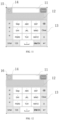
- the existing floating keyboard is only a small sized ordinary keyboard, and does not adapt to the input box of an application. This causes the user, when typing on different application interfaces through the floating keyboard, to switch his/her line of sight back and forth between the floating keyboard and the input box of the application (for example, in the case of typing, through the floating keyboard, on the interface of an application as illustrated in the left view of FIG. 1 , the input box is located at the bottom of the displayed interface of the application; and in the case of typing, through the floating keyboard, on the interface of an application as illustrated in the right view of FIG. 1 , the input box is located at the top of the displayed interface of the application; that is, the user needs to jump his/her line of sight back and forth between the input box of the application and the floating keyboard Jump), resulting in an extremely poor user experience.
- An embodiment of the present application provides an input method applied to an electronic device, and the method may include:
- acquiring the at least one text input through the key operation area may include: acquiring, according to a current input mode of the floating keyboard, the at least one text input through the key operation area.
- acquiring, according to the current input mode of the floating keyboard, the at least one text input through the key operation area may include: in response to the current input mode being a full keyboard English input mode, acquiring the at least one text input through the key operation area.
- acquiring, according to the current input mode of the floating keyboard, the at least one text input through the key operation area may include: in response to the current input mode being a full keyboard Chinese input mode, acquiring candidate texts for an input made through the key operation area, and selecting the at least one text from the candidate texts.
- the method may further include: in response to detecting that the current application is switched from a first application to a second application, clearing out a first target text displayed in the input text preview area, where the first target text corresponds to the first application.
- the method may further include: in response to detecting that the current application is switched from the second application to the first application, restoring displaying, in the input text preview area, of the first target text that was cleared out.
- the method may further include: in response to detecting that the current application is switched from the first application to the second application, displaying the target text in a candidate word preview area of the floating keyboard.
- displaying the target text in the candidate word preview area of the floating keyboard may include: in response to detecting an operation performed on the key operation area, replacing the target text with a target text corresponding to the operation.
- the floating keyboard further includes an icon display area
- the method may further include: displaying, in the icon display area, an application icon corresponding to the current application.
- displaying, in the icon display area, the application icon corresponding to the current application may include: in response to detecting that the current application is switched from the first application to the second application, switching a first application icon displayed in the icon display area to a second application icon, where the first application icon corresponds to the first application, and the second application icon corresponds to the second application.
- displaying the floating keyboard corresponding to the current application may include: in response to detecting that an input box corresponding to the current application is in an active state, displaying the floating keyboard corresponding to the current application.
- the method may further include: in response to a cursor being displayed in the input box corresponding to the current application, determining that the input box corresponding to the current application is in the active state.
- the method may further include: in response to detecting that there are multiple applications each in an enabled state at a current moment, determining, as the current application, an application running in foreground from the multiple applications each in the enabled state.
- the floating keyboard further includes a send button
- the method may also include: in response to triggering of the send button, generating the content delivery instruction associated with the target text; or in response to a word number of the target text acquired reaching a word number threshold, generating the content delivery instruction associated with the target text.
- inputting the target text into the current application may include: directly inputting, through the floating keyboard, the target text into the current application.
- inputting the target text into the current application may include: directly sending, through the floating keyboard, the target text to a message-receiving object in the current application.
- inputting the target text into the current application may include: first sending, through the floating keyboard, the target text to the current application, and then sending, through the current application, the target text to the message-receiving object in the current application.
- an input method according to an embodiment of the present disclosure is illustrated.
- the method may be applied to an electronic device, and the method includes operations as follows.
- a floating keyboard corresponding to a current application is displayed, the floating keyboard including a key operation area and an input text preview area.
- the floating keyboard corresponding to the current application may be displayed.
- the current application is a newly started application. For example, when using application 1, the user suddenly receives a pop-up message from application 2; when the user switches to application 2 to process the pop-up message, the application 2 is enabled (started), and application 2 may be used as the current application at that time.
- the current application may also be an application being used at the current moment.
- an application running in the foreground among the applications each in the enabled state may be determined as the current application, and applications running in the background among the multiple applications each in the enabled state are determined as other applications.
- the number of the current applications is one.
- the floating keyboard in the embodiment may be adapted to a current application of any function. For example, if the current application is an instant messaging application, a floating keyboard corresponding to the instant messaging application may be displayed; if the current application is a battle game application, a floating keyboard corresponding to the battle game application may be displayed.
- the floating keyboard corresponding to the instant messaging application and the floating keyboard corresponding to the battle game application each include a button operation area and an input text preview area.
- the display style of the floating keyboard corresponding to the instant messaging application may be different from the display style of the floating keyboard corresponding to the battle game application.
- a shortcut button for the "floating keyboard” may be provided in a quick notification bar of the electronic device.
- the floating keyboard function may be directly triggered and started. If the user triggers and starts the floating keyboard function when using a certain application, at this time, a correspondence is created between the application and the floating keyboard, and the floating keyboard may be displayed on the interface of the application, and the application is the current application.
- the floating keyboard in the embodiment includes a key operation area and an input text preview area.
- the input text preview area has an input function, and the input function of the input text preview area is consistent with an input function of the input box corresponding to the current application. For example, when the current application is the instant messaging application, the input text preview area has a same text input function as the input box of the instant messaging application; and when the current application is notepad application, the input text preview area has a same text input function as the input box of the notepad application.
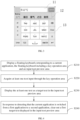
- the floating keyboard includes an input text preview area 11, a candidate word preview area 12, and a key operation area 13.
- the key operation area 13 is used to type or handwrite a text.
- the candidate word preview area 12 is used to display candidate texts corresponding to a current typing operation, and input a text selected by the user from the candidate texts to the input text preview area 11.
- the input text preview area 11 is used to display the text selected from the candidate texts as the target text, or to display at least one text input through the key operation area 13 as the target text.
- At block S 120 at least one text input through the key operation area is acquired.
- the mode of acquiring the input text may be determined according to a current input mode of the floating keyboard. For example, when the input mode of the floating keyboard is a full keyboard English input mode, at least one text input through the key operation area may be directly acquired. And when the input mode of the floating keyboard is a full keyboard Chinese input mode, candidate texts for an input made through the key operation area are acquired, and at least one text is selected from the candidate texts, where the number of the candidate texts may not be limited.
- the candidate texts illustrated in FIG. 3 may include " , , , , (which are Chinese words corresponding to or in proximity to Chinese phonetic alphabets "zhi'qi")" and so on. Among them, each text is a character or word, and the type of content of each text may not be limited. In the embodiment, the type of content of each text may include, but is not limited to: words, including English words; numbers; characters; emoticons, etc.
- the at least one text is displayed as a target text in the input text preview area.
- the floating keyboard in the embodiment may directly display the acquired at least one text as the target text in the input text preview area, and there is no need for the user to jump back and forth between the input box of the current application and the floating keyboard when inputting a text.
- the target text is input into the current application.
- the floating keyboard may further include a "send” button, and the user may directly click the “send” button on the floating keyboard to input the target text into the current application.
- the content delivery instruction associated with the target text may be triggered to be generated; as such, the target text may be input into the current application in response to the content delivery instruction.
- a word number threshold may be set for the target text edited each time, and when a word number of the target text currently acquired reaches the word number threshold, the content delivery instruction associated with the target text is triggered to be generated.
- the floating keyboard may directly input the target text into the current application for storage.
- the floating keyboard is associated with the current application, that is, the target text input through the floating keyboard at the current moment may be directly input into the current application.
- the target text displayed in the input text preview area of the floating keyboard may be directly input into Notepad for storage.
- association between the floating keyboard and the current application may be established when the current application is started, so that the floating keyboard has a same text control function as the input box of the current application (including a function of controlling the display of the target text and a function of controlling the sending of the target text).
- at least one text, that needs to be sent to a message-receiving object of the current application may be directly displayed as the target text in the input text preview area of the floating keyboard, and then the target text is directly sent to the message-receiving object of the current application. This does not need to switch back and forth the user's line of sight between the floating keyboard and the input box of the current application, thereby improving the efficiency of inputting a text.
- the input text preview area (which may be understood as an application with a text input function and a text display area) of the floating keyboard may first send the target text to the current application, and then the current application sends the target text to other objects (a message-receiving object) in the current application.
- the current application is a chat application
- the other objects may be objects to chat with.
- the text content input by the user is synchronized to the input box of the current application in real-time, and the input content is sent on the input box interface of the current application.
- the user there is an inevitable need for the user to switch his/her line of sight between the input box of the current application and the floating keyboard, which is prone to typos, and also reduces the typing efficiency.
- the floating keyboard in the embodiment is equipped with an input text preview area and a "send" button; in this case, when the target text is displayed in the input text preview area and a touch operation is performed on the send button, the target text can be directly sent, as a whole, to the current application in response to one touch operation performed on the interface of the floating keyboard, and there is no need for the user to switch his/her line of sight between the input box of the current application and the floating keyboard. Accordingly, this reduces the visual fatigue of the user when typing, and improves the accuracy of typing. Moreover, this can save the time required for the user to switch the line of sight between the input box of the current application and the floating keyboard, and improves the typing efficiency.
- a floating keyboard corresponding to a current application is displayed, where the floating keyboard includes a key operation area and an input text preview area; at least one text input through the key operation area is acquired, and the at least one text is displayed as a target text in the input text preview area.
- the target text is input into the current application.
- an input method according to another embodiment of the present disclosure is illustrated.
- the method may be applied to an electronic device, and the method includes operations as follows.
- a floating keyboard corresponding to a current application is displayed, the floating keyboard including a key operation area and an input text preview area.
- At block S220 at least one text input through the key operation area is acquired.
- the at least one text is displayed as a target text in the input text preview area.
- the first to-be-sent text displayed in the input text preview area is cleared out, where the first to-be-sent text corresponds to the first application.
- the user can directly input reply content corresponding to the second application on the floating keyboard. There is no need for the user to first manually clear out the input first to-be-sent text for the input, on the floating keyboard, the reply content corresponding to the second application. Therefore, the time required for the user to manually clear out the input first to-be-sent text is saved, and the typing experience of the user is improved.
- the first to-be-sent text displayed in the input text preview area of the floating keyboard is " " in Chinese (which means "ambitious” in English)
- the first text to-be-sent " may be cleared out, to obtain a floating keyboard as illustrated in FIG. 5 .
- the candidate texts displayed in the candidate word preview area may be cleared out simultaneously. That is, after clearing out the candidate texts " , , , , " displayed in the candidate word preview area, the floating keyboard as illustrated in FIG. 5 may be obtained.
- the candidate texts displayed in the candidate word preview area may also be retained, and the candidate texts in this way may be blessings related to festivals, birthdays, etc., which is convenient for the user to directly select a text from the candidate texts for input, without typing the same text repeatedly. Under this way, the type of content of the candidate text may be identified by the electronic device. If a candidate text is in a type of $9, inspiration, or encouragement, the candidate text displayed in the candidate word preview area may be retained at the time of clearing out the first to-be-sent text.
- the first to-be-sent text displayed in the input text preview area is cleared out in response to detecting that the current application is switched from the first application to the second application, when it is detected that the current application is switched from the second application to the first application, and it is detected that there is no input text in the input text preview area, the first to-be-sent text that was cleared out may be restored to be displayed in the input text preview area.
- the floating keyboard illustrated in FIG. 6 may be jumped to the floating keyboard illustrated in FIG. 6 , that is, the first to-be-sent text that was cleared out, such as " " illustrated in FIG. 3 , may be restored to be displayed. It is notable that, at this time, the user has not made any input through the floating keyboard, and the cursor illustrated in FIG. 3 may not be restored to be displayed in the input text preview area; and if the user inputs a text, through the floating keyboard, on the interface of the first application, the cursor is displayed.
- the second to-be-sent text displayed in the input text preview area may be cleared out, and the first to-be-sent text that was cleared out may be restored to be displayed in the input text preview area, where the second to-be-sent text corresponds to the second application.
- a floating keyboard corresponding to a current application is displayed, where the floating keyboard includes a key operation area and an input text preview area; and at least one text input through the key operation area is obtained, and the at least one text is displayed as a target text in the input text preview area. Then, when it is detected that the current application is switched from the first application to the second application, a first target text displayed in the input text preview area is cleared out.
- the input content can be directly viewed in the input text preview area of the floating keyboard, without jumping the line of sight to the input box of the current application to view the input content. Therefore, the visual fatigue caused by switching the line of sight back and forth in the text input process is reduced, and the input speed is improved.
- an input method is provided according to a further embodiment of the present disclosure.
- the method may be applied to an electronic device, and the method includes operations as follows.
- a floating keyboard corresponding to a current application is displayed, the floating keyboard including a key operation area and an input text preview area.
- At block S320 at least one text input through the key operation area is acquired.
- the at least one text is displayed as a target text in the input text preview area.
- the target text is displayed in a candidate word preview area of the floating keyboard.
- the target text may be displayed in the candidate word preview area of the floating keyboard when it is detected that the current application is switched from the first application to the second application, so that the user can quickly input the target text.
- the corresponding to-be-sent text is " "; and when the current application is switched from the first application to the second application, the to-be-sent text " " may be displayed in the candidate word preview area 12 of the floating keyboard.
- the first application may be other application(s) in the multiple applications except the second application (that is, the first application may include more than one applications).
- the number of times that each of the multiple first applications sends each of its respective target texts may be acquired, where the number and content of the to-be-sent texts corresponding to each of the multiple applications may not be limited.
- the target texts having a high sending frequency (such as the top three target texts) are sequentially displayed as a list in the candidate word preview. For example, a target text with the highest sending frequency is arranged at the top, a target text with the lowest sending frequency is provided at the bottom, and a target text with the medium sending frequency are provided at the middle. The target text is provided in the middle. Alternatively, only the target text with the highest sending frequency is displayed in the candidate word preview area.
- individual target texts may be displayed, in an order of input times of the individual target texts, in the candidate word preview area of the floating keyboard corresponding to the current application.
- the target text corresponding to application A is “Hello, happy New Year”
- the target text corresponding to application B is “Happy birthday”
- the target text corresponding to application C is "This game is really interesting”
- the order of the input times of the above three target texts is that: "Happy birthday” is later than "This game is really interesting” which is in turn later than "Hello, happy New Year”
- the target text when an operation performed on the key operation area is detected, the target text may be replaced with a target text corresponding to the operation.
- the target text " " displayed in the candidate word preview area may be replaced with the candidate words " , , , , " (which are Chinese words corresponding to or in proximity to Chinese phonetic alphabets "shenme") corresponding to the touch operation as illustrated in FIG. 9 , so that the content displayed in the candidate word preview area can be flexibly switched according to the user's operation.
- a floating keyboard corresponding to a current application is displayed, where the floating keyboard includes a key operation area and an input text preview area; and at least one text input through the key operation area is acquired, and the at least one text is displayed as a target text in the input text preview area.
- the target text is displayed in the candidate word preview area of the floating keyboard.
- the input content can be viewed directly in the input text preview area of the floating keyboard, without jumping the line of sight to the input box of the current application to view the input content. Therefore, the visual fatigue caused by switching the line of sight back and forth in the text input process is reduced, and the input speed is improved.
- the target text is displayed in the candidate word preview area of the floating keyboard, so that the user can quickly input the target text, which further improves the input speed.
- an input method according to yet a further embodiment of the present disclosure is illustrated.
- the method may be applied to an electronic device, and the method includes operations as follow.
- a floating keyboard corresponding to a current application is displayed, the floating keyboard including a key operation area and an input text preview area.
- At block S420 at least one text input through the key operation area is acquired.
- the at least one text is displayed as a target text in the input text preview area.
- an application icon corresponding to the current application is displayed in an icon display area.
- the floating keyboard in the embodiment may also include the icon display area, and the icon display area may be configured to display the application icon corresponding to the current application, to remind the user of the application to which the content of a current reply belongs. In addition, this avoids a reply to a wrong message when multiple applications are running simultaneously.
- the floating keyboard includes an icon display area 14, and an application icon 15 corresponding to the instant messaging application may be displayed in the icon display area 14.
- a first application icon displayed in the icon display area may be switched to a second application icon, where the first application icon corresponds to the first application, and the second application icon corresponds to the second application.
- the application icon displayed in the icon display area may be switched from the application icon 15 as illustrated in FIG. 11 to an application icon 16 as illustrated in FIG. 12 .
- the application icon 15 corresponds to the instant messaging application
- the application icon 16 corresponds to the game battle application.
- the application icon corresponding to the current application is switched synchronously. As such, it can intuitively remind the user of the application whose message he/she is currently replying to, and avoid the loss caused when the user wrongly sends a message to an object of other application.
- a floating keyboard corresponding to a current application is displayed, where the floating keyboard includes a key operation area and an input text preview area; and at least one text input through the key operation area is acquired, and the at least one text is displayed as a target text in the input text preview area.
- an application icon corresponding to the current application is displayed in an icon display area.
- an input apparatus 500 is illustrated.
- the apparatus is implemented on an electronic device, and the apparatus includes: a first display module 510, configured to display a floating keyboard corresponding to a current application, the floating keyboard including a key operation area and an input text preview area.
- the first display module may be configured to display the floating keyboard corresponding to the current application, when it is detected that an input box corresponding to a current application is in an active state.
- the input box corresponding to the current application when a cursor is displayed in the input box corresponding to the current application, it may be determined that the input box corresponding to the current application is in the active state.
- the floating keyboard corresponding to the current application may also include that: when multiple applications are in an enabled state at a current moment, the application running in the foreground among the multiple applications each in the enabled state is determined as the current application.
- the first display module may further be configured to display the target text in a word candidate preview area of the floating keyboard, when it is detected that the current application is switched from the first application to the second application.
- the displaying the target text in the candidate word preview area of the floating keyboard may include: when an operation performed on the key operation area is detected, replacing the target text with a target text corresponding to the operation.
- the floating keyboard further includes an icon display area
- the apparatus 500 may further include an application icon display module configured to display an application icon corresponding to the current application in the icon display area.
- the displaying the application icon corresponding to the current application in the icon display area may include: when it is detected that the current application is switched from the first application to the second application, switching a first application icon displayed in the icon display area to a second application icon, where the first application icon corresponds to the first application, and the second application icon corresponds to the second application.
- the first display module 510 may be configured to display the floating keyboard corresponding to the current application, when it is detected that the input box of the current application is in an active state.
- the apparatus further includes a content acquisition module 520 configured to acquire at least one text input through the key operation area.
- the content acquisition module may be specifically configured to acquire, according to a current input mode of the floating keyboard, the at least one text input through the key operation area.
- acquiring, according to the current input mode of the floating keyboard, the at least one text input through the key operation area may include: when the current input mode is a full keyboard English input mode, acquiring the at least one text input through the key operation area.
- acquiring, according to the current input mode of the floating keyboard, the at least one text input through the key operation area may include: when the current input mode is a full keyboard Chinese input mode, acquiring candidate texts for an input made through the key operation area; and selecting the at least one text from the candidate text.
- the apparatus 500 may further include a data processing module configured to clear out a first target text displayed in the input text preview area, when it is detected that the current application is switched from the first application to the second application, where the first target text corresponds to the first application.
- a data processing module configured to clear out a first target text displayed in the input text preview area, when it is detected that the current application is switched from the first application to the second application, where the first target text corresponds to the first application.
- the data processing module may be further configured to restore displaying, in the input text preview area, of the first target text that was cleared out, when it is detected that the current application is switched from the second application to the first application.
- the apparatus may further include a second display module 530 configured to display the at least one text as the target text in the input text preview area.
- the apparatus may further include an input module 540 configured to input the target text into the current application, in response to a content delivery instruction associated with the target text.
- the floating keyboard further includes a send button, and before the target text is input into the current application in response to the content delivery instruction associated with the target text, it may also include that: when the send button is triggered, triggering the generation of the content delivery instruction associated with the target text; or, when the word number of the target text acquired reaches a word number threshold, triggering the generation of the content delivery instruction associated with the target text.
- the inputting the target text into the current application may include: directly sending, through the floating keyboard, the target text to a message-receiving object in the current application.
- the inputting the target text into the current application may include: first sending, through the floating keyboard, the target text to the current application, and then sending, through the current application, the target text to the message-receiving object in the current application.
- the apparatus 500 may further include a text content processing module configured to clear out a first target text displayed in the input text preview area, when it is detected that the current application is switched from the first application to the second application, where the first target text corresponds to the first application.
- a text content processing module configured to clear out a first target text displayed in the input text preview area, when it is detected that the current application is switched from the first application to the second application, where the first target text corresponds to the first application.
- the text content processing module may also be configured to: when it is detected that the current application is switched from the second application to the first application, in response to recognizing that there is no input text in the input text preview area, restore the displaying, in the input text preview area, the first target text that was cleared out; or, in response to recognizing that a second target text displayed in the input text preview area is not null, clear out the second target text displayed in the input text preview area, and resume the displaying, in the input text preview area, of the first target text that was cleared out, where the second target text corresponds to the second application.
- the text content processing module may also be configured to display the target text in the candidate word preview area of the floating keyboard when it is detected that the current application is switched from the first application to the second application.
- the target text is replaced with a target text corresponding to the operation.
- the floating keyboard may further include an icon display area
- the apparatus 500 may further include an icon display module configured to display an application icon corresponding to the current application in the icon display area.
- the icon display module may also be configured to switch a first application icon displayed in the icon display area to a second application icon when it is detected that the current application is switched from the first application to the second application, where the first application icon corresponds to the first application, and the second application icon corresponds to the second application.
- the illustrated or discussed coupling or direct coupling or communication connection between the modules may be indirect coupling or communication connection through some interfaces, devices or modules, and which may be electrical, mechanical, or in other forms.
- each module in each embodiment of the present application may be integrated into one processing module, or each module may exist separately and physically, or two or more modules may be integrated into one module.
- the above integrated modules may be implemented in the form of hardware or in the form of software function modules.
- an electronic device 100 that may implement the above input method is further provided in the embodiments of the present disclosure.
- the electronic device 100 includes a memory 102 and one or more (only one is illustrated in FIG. 14 ) processors 104 coupled to each other, and the memory 102 and the processors 104 are connected by communication lines.
- the memory 102 stores programs that may execute the contents of the above embodiments, and the processor 104 may execute the programs stored in the memory 102.
- the processor 104 may include one or more processing cores.
- the processor 104 uses various interfaces and lines to connect various parts of the entire electronic device 100, and executes or executes instructions, programs, code sets, or instruction sets stored in the memory 102, and calls data stored in the memory 102 to execute various functions of the electronic device 100 and process data.
- the processor 104 may be implemented with at least one hardware of Digital Signal Processing (DSP), Field-Programmable Gate Array (FPGA), and Programmable Logic Array (PLA).
- DSP Digital Signal Processing
- FPGA Field-Programmable Gate Array
- PDA Programmable Logic Array
- the processor 104 may integrate one or a combination of a Central Processing Unit (CPU), a Graphics Processing Unit (GPU), a modem, and the like.
- the CPU mainly handles the operating system, user interface and application programs, etc.
- the GPU is responsible for rendering and drawing the displayed content.
- the modem is configured to handle wireless communication. It may be understood that the above modem may also not
- the memory 102 may include a Random Access Memory (RAM), and may also include a Read-Only Memory.
- the memory 102 may be configured to store instructions, programs, codes, code sets, or instruction sets.
- an input apparatus may be stored in the memory 102.
- the input apparatus may be the above apparatus 500.
- the memory 102 may include a program storage area and a data storage area, where the program storage area may store instructions for implementing an operating system and instructions for implementing at least one function (such as a touch function, a sound playback function, and an image playback function), and instructions for realizing the foregoing embodiments, and the like.
- the data storage area may also store data created during the use of the electronic device 100 (such as phonebook, audio and video data, chat record data), and the like.
- FIG. 15 a structural block diagram of a computer-readable storage medium according to an embodiment of the present disclosure is illustrated.
- Program codes are stored in the computer-readable storage medium 600, and the program codes may be invoked by a processor to execute the method described in the foregoing method embodiments.
- the computer readable storage medium 600 may be an electronic memory, such as flash memory, EEPROM (Electrically Erasable Programmable Read Only Memory), EPROM, hard disk, or ROM.
- the computer-readable storage medium 600 includes a non-transitory computer-readable storage medium.
- the computer-readable storage medium 600 has a storage space for program codes 610 for implementing any operation of the above method. These program codes may be read from or written into one or more computer program products.
- the program codes 610 may, for example, be compressed in a suitable form.
- a floating keyboard corresponding to a current application is displayed, where the floating keyboard includes a key operation area and an input text preview area; and at least one text input through the key operation area is acquired, and the at least one text is displayed as a target text in the input text preview area.
- the target text is input into the current application.
- the input content in the input text preview area of the floating keyboard can be directly viewed, without jumping the line of sight to the input box of the current application to view the input content. Therefore, the visual fatigue caused by switching the line of sight back and forth in the text input process is reduced, and the input speed is improved.
Landscapes
- Engineering & Computer Science (AREA)
- General Engineering & Computer Science (AREA)
- Theoretical Computer Science (AREA)
- Human Computer Interaction (AREA)
- Physics & Mathematics (AREA)
- General Physics & Mathematics (AREA)
- User Interface Of Digital Computer (AREA)
Abstract
Description
- This application claims priority to
Chinese Patent Application No. 202110158863.1 filed on February 4, 2021 - The present disclosure relates to the field of data processing technology, and in particular, to an input method and apparatus, an electronic device, and a storage medium.
- A floating keyboard makes it convenient for a user to type at anywhere on a screen. However, when the user types through the floating keyboard, he/she needs to switch the line of sight back and forth between the floating keyboard and an input box of an application, which easily cause visual fatigue of the user or typos, and also reduces the input speed.
- In view of the above, the present disclosure proposes an input method and apparatus, an electronic device, and a storage medium to alleviate the above problems.
- In a first aspect, an embodiment of the present disclosure provides an input method applied to an electronic device. In the method, a floating keyboard corresponding to a current application is displayed, where the floating keyboard includes a key operation area and an input text preview area. At least one text input through the key operation area is acquired, and the at least one text is displayed as a target text in the input text preview area. In response to a content delivery instruction associated with the target text, the target text is input into the current application.
- In a second aspect, an embodiment of the present disclosure provides an input apparatus implemented on an electronic device. The apparatus includes a first display module configured to display a floating keyboard corresponding to a current application, where the floating keyboard includes a key operation area and an input text preview area. The apparatus further includes a content acquisition module configured to acquire at least one text input through the key operation area. The apparatus further includes a second display module configured to display the at least one text as a target text in the input text preview area. The apparatus further includes an input module configured to input the target text into the current application in response to a content-sending instruction associated with the target text.
- In a third aspect, an embodiment of the present disclosure provides an electronic device. The electronic device includes one or more processors and a memory. One or more programs are stored in the memory and configured to be executed by the one or more processors, and the one or more programs are configured to implement the method of the first aspect above.
- In a fourth aspect, an embodiment of the present disclosure provides a computer-readable storage medium storing therein program codes. The program codes, when being executed, cause the method of the first aspect above to be implemented.
- In order to provide a clearer explanation of technical schemes in the embodiments of the present disclosure, a brief introduction will be given to the accompanying drawings required in the description of the embodiments. Apparently, the accompanying drawings in the following description are only some embodiments of the present disclosure. For those skilled in the art, other accompanying drawings may be obtained based on these drawings without any creative effort.
-
FIG. 1 is a schematic diagram illustrating operation interfaces of a floating keyboard in the related art. -
FIG. 2 illustrates a flow chart of an input method provided by an embodiment of the present disclosure. -
FIG. 3 is a schematic diagram illustrating an interface of the floating keyboard provided by an embodiment of the present disclosure. -
FIG. 4 illustrates a flow chart of an input method provided by another embodiment of the present disclosure. -
FIG. 5 is a schematic diagram illustrating an interface of the floating keyboard provided by the embodiment of the present disclosure when a current application is switched from a first application to a second application. -
FIG. 6 is a schematic diagram illustrating an interface of the floating keyboard provided by the embodiment of the present disclosure when the current application is switched from the second application to the first application. -
FIG. 7 illustrates a flow chart of an input method provided by a further embodiment of the present disclosure. -
FIG. 8 is another schematic diagram illustrating the interface of the floating keyboard provided by the embodiment of the present disclosure when the current application is switched from the first application to the second application. -
FIG. 9 is a further schematic diagram illustrating the interface of the floating keyboard provided by the embodiment of the present disclosure when the current application is switched from the first application to the second application. -
FIG. 10 illustrates a flow chart of an input method provided by yet a further embodiment of the present disclosure. -
FIG. 11 is an example diagram illustrating display of an application icon of the current application on the floating keyboard provided by the embodiment of the present disclosure. -
FIG. 12 is an example diagram illustrating application icons displayed on the floating keyboard provided by the embodiment of the present disclosure when the current application is switched from the first application to the second application. -
FIG. 13 illustrates a structural block diagram of an input apparatus provided by an embodiment of the present disclosure. -
FIG. 14 illustrates a structural block diagram of an electronic device for executing an input method according to an embodiment of the present disclosure. -
FIG. 15 illustrates a storage unit for storing or carrying program codes for implementing an input method according to an embodiment of the present disclosure. - The technical schemes in the embodiments of the present disclosure will be clearly and comprehensively described below, in conjunction with the drawings in the embodiments of the present disclosure. Apparently, the described embodiments are merely some, not all, of the embodiments of the present disclosure. Based on the embodiments of the present disclosure, all other embodiments, obtained by those of ordinary skill in the art without making creative efforts, fall within the scope of protection of the present disclosure.
- The advent of the floating keyboard greatly facilitates the selection of a typing area on the screen by a user. However, the existing floating keyboard is only a small sized ordinary keyboard, and does not adapt to the input box of an application. This causes the user, when typing on different application interfaces through the floating keyboard, to switch his/her line of sight back and forth between the floating keyboard and the input box of the application (for example, in the case of typing, through the floating keyboard, on the interface of an application as illustrated in the left view of
FIG. 1 , the input box is located at the bottom of the displayed interface of the application; and in the case of typing, through the floating keyboard, on the interface of an application as illustrated in the right view ofFIG. 1 , the input box is located at the top of the displayed interface of the application; that is, the user needs to jump his/her line of sight back and forth between the input box of the application and the floating keyboard Jump), resulting in an extremely poor user experience. - An embodiment of the present application provides an input method applied to an electronic device, and the method may include:
- displaying a floating keyboard corresponding to a current application, the floating keyboard including a key operation area and an input text preview area;
- acquiring at least one text input through the key operation area;
- displaying the at least one text as a target text in the input text preview area; and
- inputting the target text into the current application, in response to a content delivery instruction associated with the target text.
- In an implementation, acquiring the at least one text input through the key operation area may include: acquiring, according to a current input mode of the floating keyboard, the at least one text input through the key operation area.
- In an implementation, acquiring, according to the current input mode of the floating keyboard, the at least one text input through the key operation area may include: in response to the current input mode being a full keyboard English input mode, acquiring the at least one text input through the key operation area.
- In an implementation, acquiring, according to the current input mode of the floating keyboard, the at least one text input through the key operation area may include: in response to the current input mode being a full keyboard Chinese input mode, acquiring candidate texts for an input made through the key operation area, and selecting the at least one text from the candidate texts.
- In an implementation, the method may further include: in response to detecting that the current application is switched from a first application to a second application, clearing out a first target text displayed in the input text preview area, where the first target text corresponds to the first application.
- In an implementation, after clearing out the first target text displayed in the input text preview area in response to detecting that the current application is switched from the first application to the second application, the method may further include: in response to detecting that the current application is switched from the second application to the first application, restoring displaying, in the input text preview area, of the first target text that was cleared out.
- In an implementation, the method may further include: in response to detecting that the current application is switched from the first application to the second application, displaying the target text in a candidate word preview area of the floating keyboard.
- In an implementation, displaying the target text in the candidate word preview area of the floating keyboard may include: in response to detecting an operation performed on the key operation area, replacing the target text with a target text corresponding to the operation.
- In an implementation, the floating keyboard further includes an icon display area, and the method may further include: displaying, in the icon display area, an application icon corresponding to the current application.
- In an implementation, displaying, in the icon display area, the application icon corresponding to the current application may include: in response to detecting that the current application is switched from the first application to the second application, switching a first application icon displayed in the icon display area to a second application icon, where the first application icon corresponds to the first application, and the second application icon corresponds to the second application.
- In an implementation, displaying the floating keyboard corresponding to the current application may include: in response to detecting that an input box corresponding to the current application is in an active state, displaying the floating keyboard corresponding to the current application.
- In an implementation, the method may further include: in response to a cursor being displayed in the input box corresponding to the current application, determining that the input box corresponding to the current application is in the active state.
- In an implementation, before displaying the floating keyboard corresponding to the current application, the method may further include: in response to detecting that there are multiple applications each in an enabled state at a current moment, determining, as the current application, an application running in foreground from the multiple applications each in the enabled state.
- In an implementation, the floating keyboard further includes a send button, and before inputting the target text into the current application in response to the content delivery instruction associated with the target text, the method may also include: in response to triggering of the send button, generating the content delivery instruction associated with the target text; or in response to a word number of the target text acquired reaching a word number threshold, generating the content delivery instruction associated with the target text.
- In an implementation, inputting the target text into the current application may include: directly inputting, through the floating keyboard, the target text into the current application.
- In an implementation, inputting the target text into the current application may include: directly sending, through the floating keyboard, the target text to a message-receiving object in the current application.
- In an implementation, inputting the target text into the current application may include: first sending, through the floating keyboard, the target text to the current application, and then sending, through the current application, the target text to the message-receiving object in the current application.
- The embodiments of the present disclosure will be described in detail below with reference to the accompanying drawings.
- Referring to
FIG. 2 , an input method according to an embodiment of the present disclosure is illustrated. The method may be applied to an electronic device, and the method includes operations as follows. - At block S1 10, a floating keyboard corresponding to a current application is displayed, the floating keyboard including a key operation area and an input text preview area.
- In the embodiment, when it is detected that the input box corresponding to the current application is in an active state, the floating keyboard corresponding to the current application may be displayed. In particular, when the user touches the input box corresponding to the current application, and a cursor is displayed in the input box, it is determined that the input box corresponding to the current application is in the active state. In the embodiment, the current application is a newly started application. For example, when using
application 1, the user suddenly receives a pop-up message from application 2; when the user switches to application 2 to process the pop-up message, the application 2 is enabled (started), and application 2 may be used as the current application at that time. In some implementations, the current application may also be an application being used at the current moment. It is notable that, when there are multiple applications each in the enabled state at the current moment, an application running in the foreground among the applications each in the enabled state may be determined as the current application, and applications running in the background among the multiple applications each in the enabled state are determined as other applications. The number of the current applications is one. - The floating keyboard in the embodiment may be adapted to a current application of any function. For example, if the current application is an instant messaging application, a floating keyboard corresponding to the instant messaging application may be displayed; if the current application is a battle game application, a floating keyboard corresponding to the battle game application may be displayed. The floating keyboard corresponding to the instant messaging application and the floating keyboard corresponding to the battle game application each include a button operation area and an input text preview area. The display style of the floating keyboard corresponding to the instant messaging application may be different from the display style of the floating keyboard corresponding to the battle game application.
- In some implementations, a shortcut button for the "floating keyboard" may be provided in a quick notification bar of the electronic device. When the user touches the shortcut button, the floating keyboard function may be directly triggered and started. If the user triggers and starts the floating keyboard function when using a certain application, at this time, a correspondence is created between the application and the floating keyboard, and the floating keyboard may be displayed on the interface of the application, and the application is the current application.
- The floating keyboard in the embodiment includes a key operation area and an input text preview area. The input text preview area has an input function, and the input function of the input text preview area is consistent with an input function of the input box corresponding to the current application. For example, when the current application is the instant messaging application, the input text preview area has a same text input function as the input box of the instant messaging application; and when the current application is notepad application, the input text preview area has a same text input function as the input box of the notepad application.
- Referring to
FIG. 3 , a schematic diagram of a floating keyboard according to an embodiment of the present disclosure is illustrated. As illustrated inFIG. 3 , the floating keyboard includes an inputtext preview area 11, a candidateword preview area 12, and akey operation area 13. Thekey operation area 13 is used to type or handwrite a text. The candidateword preview area 12 is used to display candidate texts corresponding to a current typing operation, and input a text selected by the user from the candidate texts to the inputtext preview area 11. The inputtext preview area 11 is used to display the text selected from the candidate texts as the target text, or to display at least one text input through thekey operation area 13 as the target text. - At
block S 120, at least one text input through the key operation area is acquired. - As an input way in the embodiment, when the floating keyboard corresponding to the current application is displayed, the mode of acquiring the input text may be determined according to a current input mode of the floating keyboard. For example, when the input mode of the floating keyboard is a full keyboard English input mode, at least one text input through the key operation area may be directly acquired. And when the input mode of the floating keyboard is a full keyboard Chinese input mode, candidate texts for an input made through the key operation area are acquired, and at least one text is selected from the candidate texts, where the number of the candidate texts may not be limited. The candidate texts illustrated in
FIG. 3 may include " ,
, ,
, ,
, ,
, (which are Chinese words corresponding to or in proximity to Chinese phonetic alphabets "zhi'qi")" and so on. Among them, each text is a character or word, and the type of content of each text may not be limited. In the embodiment, the type of content of each text may include, but is not limited to: words, including English words; numbers; characters; emoticons, etc.
- At
block S 130, the at least one text is displayed as a target text in the input text preview area. - The floating keyboard in the embodiment may directly display the acquired at least one text as the target text in the input text preview area, and there is no need for the user to jump back and forth between the input box of the current application and the floating keyboard when inputting a text.
- At
block S 140, in response to a content delivery instruction associated with the target text, the target text is input into the current application. - In the embodiment, the floating keyboard may further include a "send" button, and the user may directly click the "send" button on the floating keyboard to input the target text into the current application. Specifically, when the "send" button in the floating keyboard is triggered, the content delivery instruction associated with the target text may be triggered to be generated; as such, the target text may be input into the current application in response to the content delivery instruction. In some implementations, a word number threshold may be set for the target text edited each time, and when a word number of the target text currently acquired reaches the word number threshold, the content delivery instruction associated with the target text is triggered to be generated.
- In the present disclosure, there may be multiple ways of inputting the target text into the current application.
- As a way, if the current application only stores the input target text, the floating keyboard may directly input the target text into the current application for storage. At this time, the floating keyboard is associated with the current application, that is, the target text input through the floating keyboard at the current moment may be directly input into the current application. For example, if the current application is notepad, the target text displayed in the input text preview area of the floating keyboard may be directly input into Notepad for storage.
- As another way, if the current application is the instant messaging application, association between the floating keyboard and the current application may be established when the current application is started, so that the floating keyboard has a same text control function as the input box of the current application (including a function of controlling the display of the target text and a function of controlling the sending of the target text). In this way, at least one text, that needs to be sent to a message-receiving object of the current application, may be directly displayed as the target text in the input text preview area of the floating keyboard, and then the target text is directly sent to the message-receiving object of the current application. This does not need to switch back and forth the user's line of sight between the floating keyboard and the input box of the current application, thereby improving the efficiency of inputting a text.
- As a further way, the input text preview area (which may be understood as an application with a text input function and a text display area) of the floating keyboard may first send the target text to the current application, and then the current application sends the target text to other objects (a message-receiving object) in the current application. For example, if the current application is a chat application, the other objects may be objects to chat with.
- In the related art, when inputting text content through the floating keyboard, the text content input by the user is synchronized to the input box of the current application in real-time, and the input content is sent on the input box interface of the current application. In this case, there is an inevitable need for the user to switch his/her line of sight between the input box of the current application and the floating keyboard, which is prone to typos, and also reduces the typing efficiency.
- In order to alleviate the above problems, the floating keyboard in the embodiment is equipped with an input text preview area and a "send" button; in this case, when the target text is displayed in the input text preview area and a touch operation is performed on the send button, the target text can be directly sent, as a whole, to the current application in response to one touch operation performed on the interface of the floating keyboard, and there is no need for the user to switch his/her line of sight between the input box of the current application and the floating keyboard. Accordingly, this reduces the visual fatigue of the user when typing, and improves the accuracy of typing. Moreover, this can save the time required for the user to switch the line of sight between the input box of the current application and the floating keyboard, and improves the typing efficiency.
- In the input method provided in the embodiments of the present disclosure, a floating keyboard corresponding to a current application is displayed, where the floating keyboard includes a key operation area and an input text preview area; at least one text input through the key operation area is acquired, and the at least one text is displayed as a target text in the input text preview area. In response to a content delivery instruction associated with the target text, the target text is input into the current application. With this method, the input content can be viewed directly in the input text preview area of the floating keyboard, without jumping the line of sight to the input box of the current application to view the input content. Therefore, the visual fatigue caused by switching the line of sight back and forth in the text input process is reduced, and the input speed is improved.
- Referring to
FIG. 4 , an input method according to another embodiment of the present disclosure is illustrated. The method may be applied to an electronic device, and the method includes operations as follows. - At block S210, a floating keyboard corresponding to a current application is displayed, the floating keyboard including a key operation area and an input text preview area.
- At block S220, at least one text input through the key operation area is acquired.
- At block S230, the at least one text is displayed as a target text in the input text preview area.
- At block S240, in response to detecting that the current application is switched from a first application to a second application, a first to-be-sent text displayed in the input text preview area is cleared out.
- As a way to improve the user's input experience, in the embodiment, in response to detecting that the current application is switched from the first application to the second application, the first to-be-sent text displayed in the input text preview area is cleared out, where the first to-be-sent text corresponds to the first application. As such, the user can directly input reply content corresponding to the second application on the floating keyboard. There is no need for the user to first manually clear out the input first to-be-sent text for the input, on the floating keyboard, the reply content corresponding to the second application. Therefore, the time required for the user to manually clear out the input first to-be-sent text is saved, and the typing experience of the user is improved.
- In a specific application scenario, assuming that the current application is the first application, as illustrated in
FIG. 3 , the first to-be-sent text displayed in the input text preview area of the floating keyboard is "" in Chinese (which means "ambitious" in English), and if the current application is switched from the first application to the second application, the first text to-be-sent " " may be cleared out, to obtain a floating keyboard as illustrated in
FIG. 5 . When clearing out the first to-be-sent text "", the candidate texts displayed in the candidate word preview area may be cleared out simultaneously. That is, after clearing out the candidate texts "
 ,
, ,
, ,
, ,
, " displayed in the candidate word preview area, the floating keyboard as illustrated in
FIG. 5 may be obtained. - In some other implementations, when clearing out the first to-be-sent text "", the candidate texts displayed in the candidate word preview area may also be retained, and the candidate texts in this way may be blessings related to festivals, birthdays, etc., which is convenient for the user to directly select a text from the candidate texts for input, without typing the same text repeatedly. Under this way, the type of content of the candidate text may be identified by the electronic device. If a candidate text is in a type of blessing, inspiration, or encouragement, the candidate text displayed in the candidate word preview area may be retained at the time of clearing out the first to-be-sent text.

- As a way, after the first to-be-sent text displayed in the input text preview area is cleared out in response to detecting that the current application is switched from the first application to the second application, when it is detected that the current application is switched from the second application to the first application, and it is detected that there is no input text in the input text preview area, the first to-be-sent text that was cleared out may be restored to be displayed in the input text preview area. For example, in a specific application scenario, in response to the current application being switched from the second application to the first application, if the user has not input a text yet, through the floating keyboard, on the interface of the first application, or if the user did not input a text, through the floating keyboard, on the interface of the second application, the floating keyboard illustrated in
FIG. 5 may be jumped to the floating keyboard illustrated inFIG. 6 , that is, the first to-be-sent text that was cleared out, such as "" illustrated in
FIG. 3 , may be restored to be displayed. It is notable that, at this time, the user has not made any input through the floating keyboard, and the cursor illustrated inFIG. 3 may not be restored to be displayed in the input text preview area; and if the user inputs a text, through the floating keyboard, on the interface of the first application, the cursor is displayed. - As another way, after the first to-be-sent text displayed in the input text preview area is cleared out in response to detecting that the current application is switched from the first application to the second application, when it is recognized that a second to-be-sent text displayed in the input text preview area is not null, and it is detected that the current application is switched from the second application to the first application, the second to-be-sent text displayed in the input text preview area may be cleared out, and the first to-be-sent text that was cleared out may be restored to be displayed in the input text preview area, where the second to-be-sent text corresponds to the second application. In a specific application scenario, taking the above example as an example, if the user input a second to-be-sent text "What's for dinner tonight" on the interface of the second application through the floating keyboard, and when the current application jumps back from the second application to the first application, the second to-be-sent text "What's for dinner tonight" displayed in the input text preview area may be cleared out first, and then the first to-be-sent text "" that was cleared out may be restored to be displayed in the input text preview area.

- In the input method provided in the embodiments of the present disclosure, by a floating keyboard corresponding to a current application is displayed, where the floating keyboard includes a key operation area and an input text preview area; and at least one text input through the key operation area is obtained, and the at least one text is displayed as a target text in the input text preview area. Then, when it is detected that the current application is switched from the first application to the second application, a first target text displayed in the input text preview area is cleared out. As such, the input content can be directly viewed in the input text preview area of the floating keyboard, without jumping the line of sight to the input box of the current application to view the input content. Therefore, the visual fatigue caused by switching the line of sight back and forth in the text input process is reduced, and the input speed is improved. By clearing out the first to-be-sent text displayed in the input text preview area when it is detected that the current application is switched from the first application to the second application, the time required for the user to manually clear out the input first to-be-sent text is saved, and the user's typing experience is improved.
- Referring to
FIG. 7 , an input method is provided according to a further embodiment of the present disclosure. The method may be applied to an electronic device, and the method includes operations as follows. - At block S310, a floating keyboard corresponding to a current application is displayed, the floating keyboard including a key operation area and an input text preview area.
- At block S320, at least one text input through the key operation area is acquired.
- At block S330, the at least one text is displayed as a target text in the input text preview area.
- At block S340, in response to detecting that the current application is switched from a first application to a second application, the target text is displayed in a candidate word preview area of the floating keyboard.
- As a way, in order to avoid the resource consumption caused by repeatedly inputting the same target text, the target text may be displayed in the candidate word preview area of the floating keyboard when it is detected that the current application is switched from the first application to the second application, so that the user can quickly input the target text.
- For example, in a specific application scenario, as illustrated in
FIG. 8 , when the current application is the first application, the corresponding to-be-sent text is ""; and when the current application is switched from the first application to the second application, the to-be-sent text " " may be displayed in the candidate
word preview area 12 of the floating keyboard. - When there are multiple applications running simultaneously in the electronic device, and the second application is the current application, the first application may be other application(s) in the multiple applications except the second application (that is, the first application may include more than one applications). As an implementation, the number of times that each of the multiple first applications sends each of its respective target texts may be acquired, where the number and content of the to-be-sent texts corresponding to each of the multiple applications may not be limited. And the target texts having a high sending frequency (such as the top three target texts) are sequentially displayed as a list in the candidate word preview. For example, a target text with the highest sending frequency is arranged at the top, a target text with the lowest sending frequency is provided at the bottom, and a target text with the medium sending frequency are provided at the middle. The target text is provided in the middle. Alternatively, only the target text with the highest sending frequency is displayed in the candidate word preview area.
- As another implementation, individual target texts may be displayed, in an order of input times of the individual target texts, in the candidate word preview area of the floating keyboard corresponding to the current application. For example, in a case where the first application includes "application A, application B, and application C", the target text corresponding to application A is "Hello, happy New Year", the target text corresponding to application B is "Happy birthday", and the target text corresponding to application C is "This game is really interesting", if the order of the input times of the above three target texts is that: "Happy birthday" is later than "This game is really interesting" which is in turn later than "Hello, happy New Year", the texts "Happy birthday", "This game is really interesting" and "Hello, happy New Year" may be displayed in this order in the candidate word preview area of the floating keyboard from top to bottom or from left to right.
- In the embodiment, when an operation performed on the key operation area is detected, the target text may be replaced with a target text corresponding to the operation. In a specific application scenario, in the display state illustrated in
FIG. 8 , when a touch operation performed on thekey operation area 13 is detected, the target text "" displayed in the candidate word preview area may be replaced with the candidate words " ,
, ,
, ,
, ,
, " (which are Chinese words corresponding to or in proximity to Chinese phonetic alphabets "shenme") corresponding to the touch operation as illustrated in
FIG. 9 , so that the content displayed in the candidate word preview area can be flexibly switched according to the user's operation. - In the input method provided in the embodiments of the present disclosure, a floating keyboard corresponding to a current application is displayed, where the floating keyboard includes a key operation area and an input text preview area; and at least one text input through the key operation area is acquired, and the at least one text is displayed as a target text in the input text preview area. When it is detected that the current application is switched from a first application to a second application, the target text is displayed in the candidate word preview area of the floating keyboard. As such, the input content can be viewed directly in the input text preview area of the floating keyboard, without jumping the line of sight to the input box of the current application to view the input content. Therefore, the visual fatigue caused by switching the line of sight back and forth in the text input process is reduced, and the input speed is improved. When it is detected that the current application is switched from the first application to the second application, the target text is displayed in the candidate word preview area of the floating keyboard, so that the user can quickly input the target text, which further improves the input speed.
- Referring to
FIG. 10 , an input method according to yet a further embodiment of the present disclosure is illustrated. The method may be applied to an electronic device, and the method includes operations as follow. - At block S410, a floating keyboard corresponding to a current application is displayed, the floating keyboard including a key operation area and an input text preview area.
- At block S420, at least one text input through the key operation area is acquired.
- At block S430, the at least one text is displayed as a target text in the input text preview area.
- At block S440, an application icon corresponding to the current application is displayed in an icon display area.
- The floating keyboard in the embodiment may also include the icon display area, and the icon display area may be configured to display the application icon corresponding to the current application, to remind the user of the application to which the content of a current reply belongs. In addition, this avoids a reply to a wrong message when multiple applications are running simultaneously.
- For example, in a specific application scenario, if the current application is instant messaging application, as illustrated in
FIG. 11 , the floating keyboard includes anicon display area 14, and anapplication icon 15 corresponding to the instant messaging application may be displayed in theicon display area 14. - In the embodiment, when it is detected that the current application is switched from a first application to a second application, a first application icon displayed in the icon display area may be switched to a second application icon, where the first application icon corresponds to the first application, and the second application icon corresponds to the second application.
- For example, in a specific application scenario, if the first application is the instant messaging application and the second application is game battle application, as illustrated in
FIG. 12 , when it is detected that the current application is switched from the first application to the second application, the application icon displayed in the icon display area may be switched from theapplication icon 15 as illustrated inFIG. 11 to anapplication icon 16 as illustrated inFIG. 12 . Theapplication icon 15 corresponds to the instant messaging application, and theapplication icon 16 corresponds to the game battle application. When the current application is switched, the application icon corresponding to the current application is switched synchronously. As such, it can intuitively remind the user of the application whose message he/she is currently replying to, and avoid the loss caused when the user wrongly sends a message to an object of other application. - In the input method provided in the present disclosure, a floating keyboard corresponding to a current application is displayed, where the floating keyboard includes a key operation area and an input text preview area; and at least one text input through the key operation area is acquired, and the at least one text is displayed as a target text in the input text preview area. In addition, an application icon corresponding to the current application is displayed in an icon display area. As such, the input content may be directly viewed in the input text preview area of the floating keyboard, without jumping the line of sight to the input box of the current application to view the input content. Therefore, the visual fatigue caused by switching the line of sight back and forth in the text input process is reduced, and the input speed is improved. Moreover, by displaying the application icon corresponding to the current application in the icon display area of the floating keyboard, it can conveniently remind the user of the application to which the content of a current reply belongs, this avoids a reply to a wrong message when multiple applications are running simultaneously.
- Referring to
FIG. 13 , an input apparatus 500 according to an embodiment of the present disclosure is illustrated. The apparatus is implemented on an electronic device, and the apparatus includes:
afirst display module 510, configured to display a floating keyboard corresponding to a current application, the floating keyboard including a key operation area and an input text preview area. - As an implementation, the first display module may be configured to display the floating keyboard corresponding to the current application, when it is detected that an input box corresponding to a current application is in an active state.
- As an implementation, when a cursor is displayed in the input box corresponding to the current application, it may be determined that the input box corresponding to the current application is in the active state.
- As an implementation, before the floating keyboard corresponding to the current application is displayed, it may also include that: when multiple applications are in an enabled state at a current moment, the application running in the foreground among the multiple applications each in the enabled state is determined as the current application.
- As an implementation, the first display module may further be configured to display the target text in a word candidate preview area of the floating keyboard, when it is detected that the current application is switched from the first application to the second application.
- As an implementation, the displaying the target text in the candidate word preview area of the floating keyboard may include: when an operation performed on the key operation area is detected, replacing the target text with a target text corresponding to the operation.
- As an implementation, the floating keyboard further includes an icon display area, and the apparatus 500 may further include an application icon display module configured to display an application icon corresponding to the current application in the icon display area.
- As an implementation, the displaying the application icon corresponding to the current application in the icon display area may include: when it is detected that the current application is switched from the first application to the second application, switching a first application icon displayed in the icon display area to a second application icon, where the first application icon corresponds to the first application, and the second application icon corresponds to the second application.
- As an implementation, the
first display module 510 may be configured to display the floating keyboard corresponding to the current application, when it is detected that the input box of the current application is in an active state. - The apparatus further includes a
content acquisition module 520 configured to acquire at least one text input through the key operation area. - As an implementation, the content acquisition module may be specifically configured to acquire, according to a current input mode of the floating keyboard, the at least one text input through the key operation area.
- As an implementation, acquiring, according to the current input mode of the floating keyboard, the at least one text input through the key operation area may include: when the current input mode is a full keyboard English input mode, acquiring the at least one text input through the key operation area.
- As an implementation, acquiring, according to the current input mode of the floating keyboard, the at least one text input through the key operation area may include: when the current input mode is a full keyboard Chinese input mode, acquiring candidate texts for an input made through the key operation area; and selecting the at least one text from the candidate text.
- As an implementation, the apparatus 500 may further include a data processing module configured to clear out a first target text displayed in the input text preview area, when it is detected that the current application is switched from the first application to the second application, where the first target text corresponds to the first application.
- As an implementation, after the first target text displayed in the input text preview area is cleared out when it is detected that the current application is switched from the first application to the second application, the data processing module may be further configured to restore displaying, in the input text preview area, of the first target text that was cleared out, when it is detected that the current application is switched from the second application to the first application.
- The apparatus may further include a
second display module 530 configured to display the at least one text as the target text in the input text preview area. - The apparatus may further include an
input module 540 configured to input the target text into the current application, in response to a content delivery instruction associated with the target text. - As an implementation, the floating keyboard further includes a send button, and before the target text is input into the current application in response to the content delivery instruction associated with the target text, it may also include that: when the send button is triggered, triggering the generation of the content delivery instruction associated with the target text; or, when the word number of the target text acquired reaches a word number threshold, triggering the generation of the content delivery instruction associated with the target text.
- As an implementation, the inputting the target text into the current application may include: directly sending, through the floating keyboard, the target text to a message-receiving object in the current application.
- As an implementation, the inputting the target text into the current application may include: first sending, through the floating keyboard, the target text to the current application, and then sending, through the current application, the target text to the message-receiving object in the current application.
- In the implementation, the apparatus 500 may further include a text content processing module configured to clear out a first target text displayed in the input text preview area, when it is detected that the current application is switched from the first application to the second application, where the first target text corresponds to the first application.
- In some implementations, the text content processing module may also be configured to: when it is detected that the current application is switched from the second application to the first application, in response to recognizing that there is no input text in the input text preview area, restore the displaying, in the input text preview area, the first target text that was cleared out; or, in response to recognizing that a second target text displayed in the input text preview area is not null, clear out the second target text displayed in the input text preview area, and resume the displaying, in the input text preview area, of the first target text that was cleared out, where the second target text corresponds to the second application.
- In some implementations, the text content processing module may also be configured to display the target text in the candidate word preview area of the floating keyboard when it is detected that the current application is switched from the first application to the second application. In addition, when an operation acting on the key operation area is detected, the target text is replaced with a target text corresponding to the operation.
- In the embodiment, the floating keyboard may further include an icon display area, and the apparatus 500 may further include an icon display module configured to display an application icon corresponding to the current application in the icon display area.
- In some implementations, the icon display module may also be configured to switch a first application icon displayed in the icon display area to a second application icon when it is detected that the current application is switched from the first application to the second application, where the first application icon corresponds to the first application, and the second application icon corresponds to the second application.
- It may be clearly understandable for those skilled in the art that, for the convenience and brevity of the description, the specific working process of the apparatus and modules described above may refer to the corresponding process in the foregoing method embodiments, which will not be repeated here.
- In several embodiments provided in the present disclosure, the illustrated or discussed coupling or direct coupling or communication connection between the modules may be indirect coupling or communication connection through some interfaces, devices or modules, and which may be electrical, mechanical, or in other forms.
- In addition, the individual functional modules in each embodiment of the present application may be integrated into one processing module, or each module may exist separately and physically, or two or more modules may be integrated into one module. The above integrated modules may be implemented in the form of hardware or in the form of software function modules.
- Referring to
FIG. 14 , based on the above-mentioned input method and apparatus, anelectronic device 100 that may implement the above input method is further provided in the embodiments of the present disclosure. Theelectronic device 100 includes amemory 102 and one or more (only one is illustrated inFIG. 14 )processors 104 coupled to each other, and thememory 102 and theprocessors 104 are connected by communication lines. Thememory 102 stores programs that may execute the contents of the above embodiments, and theprocessor 104 may execute the programs stored in thememory 102. - The
processor 104 may include one or more processing cores. Theprocessor 104 uses various interfaces and lines to connect various parts of the entireelectronic device 100, and executes or executes instructions, programs, code sets, or instruction sets stored in thememory 102, and calls data stored in thememory 102 to execute various functions of theelectronic device 100 and process data. Optionally, theprocessor 104 may be implemented with at least one hardware of Digital Signal Processing (DSP), Field-Programmable Gate Array (FPGA), and Programmable Logic Array (PLA). Theprocessor 104 may integrate one or a combination of a Central Processing Unit (CPU), a Graphics Processing Unit (GPU), a modem, and the like. The CPU mainly handles the operating system, user interface and application programs, etc. The GPU is responsible for rendering and drawing the displayed content. The modem is configured to handle wireless communication. It may be understood that the above modem may also not be integrated into theprocessor 104, but implemented by a separate communication chip. - The
memory 102 may include a Random Access Memory (RAM), and may also include a Read-Only Memory. Thememory 102 may be configured to store instructions, programs, codes, code sets, or instruction sets. For example, an input apparatus may be stored in thememory 102. The input apparatus may be the above apparatus 500. Thememory 102 may include a program storage area and a data storage area, where the program storage area may store instructions for implementing an operating system and instructions for implementing at least one function (such as a touch function, a sound playback function, and an image playback function), and instructions for realizing the foregoing embodiments, and the like. The data storage area may also store data created during the use of the electronic device 100 (such as phonebook, audio and video data, chat record data), and the like. - Referring to
FIG. 15 , a structural block diagram of a computer-readable storage medium according to an embodiment of the present disclosure is illustrated. Program codes are stored in the computer-readable storage medium 600, and the program codes may be invoked by a processor to execute the method described in the foregoing method embodiments. - The computer
readable storage medium 600 may be an electronic memory, such as flash memory, EEPROM (Electrically Erasable Programmable Read Only Memory), EPROM, hard disk, or ROM. Optionally, the computer-readable storage medium 600 includes a non-transitory computer-readable storage medium. The computer-readable storage medium 600 has a storage space forprogram codes 610 for implementing any operation of the above method. These program codes may be read from or written into one or more computer program products. Theprogram codes 610 may, for example, be compressed in a suitable form. - To sum up, in the input method and apparatus, electronic device, and storage medium provided in the present disclosure, a floating keyboard corresponding to a current application is displayed, where the floating keyboard includes a key operation area and an input text preview area; and at least one text input through the key operation area is acquired, and the at least one text is displayed as a target text in the input text preview area. In response to a content delivery instruction associated with the target text, the target text is input into the current application. In this way, the input content in the input text preview area of the floating keyboard can be directly viewed, without jumping the line of sight to the input box of the current application to view the input content. Therefore, the visual fatigue caused by switching the line of sight back and forth in the text input process is reduced, and the input speed is improved.
- Finally, it is notable that the above embodiments are only used to illustrate the technical schemes of the present disclosure, rather than limiting them. Although the present disclosure has been described in detail with reference to the foregoing embodiments, it is understandable for those of ordinary skill in the art that: the technical schemes described in the foregoing embodiments may still be modified, or some technical features thereof may be replaced by equivalents; and these modifications or replacements do not drive the essence of the corresponding technical schemes to depart away from the spirit and scope of the technical schemes of the various embodiments of the present disclosure.
Claims (20)
- An input method, implemented by an electronic device, the method comprising:displaying a floating keyboard corresponding to a current application, the floating keyboard comprising a key operation area and an input text preview area;acquiring at least one text input through the key operation area;displaying the at least one text as a target text in the input text preview area; andin response to a content delivery instruction associated with the target text, inputting the target text into the current application.
- The method of claim 1, wherein acquiring the at least one text input through the key operation area comprises:
acquiring, according to a current input mode of the floating keyboard, the at least one text input through the key operation area. - The method of claim 2, wherein acquiring, according to the current input mode of the floating keyboard, the at least one text input through the key operation area comprises:
in response to the current input mode being a full keyboard English input mode, acquiring the at least one text input through the key operation area. - The method of claim 2, wherein acquiring, according to the current input mode of the floating keyboard, the at least one text input through the key operation area comprises:in response to the current input mode being a full keyboard Chinese input mode, acquiring candidate texts for an input made through the key operation area; andselecting the at least one text from the candidate texts.
- The method of claim 1, wherein the method further comprises:
in response to detecting that the current application is switched from a first application to a second application, clearing out a first target text displayed in the input text preview area, wherein the first target text corresponds to the first application. - The method of claim 5, wherein after clearing out the first target text displayed in the input text preview area in response to detecting that the current application is switched from the first application to the second application, the method further comprises:
in response to detecting that the current application is switched from the second application to the first application, restoring displaying, in the input text preview area, of the first target text that was cleared out. - The method of claim 1, wherein the method further comprises:
in response to detecting that the current application is switched from a first application to a second application, displaying the target text in a candidate word preview area of the floating keyboard. - The method of claim 7, wherein displaying the target text in the candidate word preview area of the floating keyboard comprises:
in response to detecting an operation performed on the keyboard operation area, replacing the target text with a target text corresponding to the operation. - The method of any one of claims 1-8, wherein the floating keyboard further comprises an icon display area, and the method further comprises:
displaying, in the icon display area, an application icon corresponding to the current application. - The method of claim 9, wherein displaying, in the icon display area, the application icon corresponding to the current application comprises:
in response to detecting that the current application is switched from a first application to a second application, switching a first application icon displayed in the icon display area to a second application icon, wherein the first application icon corresponds to the first application, and the second application icon corresponds to the second application. - The method of claim 1, wherein displaying the floating keyboard corresponding to the current application comprises:
in response to detecting that an input box corresponding to the current application is in an active state, displaying the floating keyboard corresponding to the current application. - The method of claim 11, wherein the method further comprises:
in response to a cursor being displayed in the input box corresponding to the current application, determining that the input box corresponding to the current application is in the active state. - The method of claim 1, wherein before displaying the floating keyboard corresponding to the current application, the method further comprises:
in response to detecting that there are multiple applications each in an enabled state at a current moment, determining, as the current application, an application running in foreground from the multiple applications each in the enabled state. - The method of claim 1, wherein the floating keyboard further comprises a send button, and before inputting the target text into the current application in response to the content delivery instruction associated with the target text, the method further comprises:in response to triggering of the send button, generating the content delivery instruction associated with the target text; orin response to a word number of the target text acquired reaching a word number threshold, generating the content delivery instruction associated with the target text.
- The method of claim 1, wherein inputting the target text into the current application comprises:
directly inputting, through the floating keyboard, the target text into the current application. - The method of claim 1, wherein inputting the target text into the current application comprises:
directly sending, through the floating keyboard, the target text to a message-receiving object in the current application. - The method of claim 1, wherein inputting the target text into the current application comprises:
first sending, through the floating keyboard, the target text into the current application, and sending, through the current application, the target text to a message-receiving object in the current application. - An input apparatus, implemented on an electronic device, the apparatus comprising:a first display module, configured to display a floating keyboard corresponding to a current application, the floating keyboard comprising a key operation area and an input text preview area;a content acquisition module, configured to acquire at least one text input through the key operation area;a second display module, configured to display the at least one text as a target text in the input text preview area; andan input module, configured to input, in response to a content delivery instruction associated with the target text, the target text into the current application.
- An electronic device, comprising one or more processors and a memory, wherein
one or more programs are stored in the memory and configured to be executed by the one or more processors, and the one or more programs are configured to implement the method of any one of claims 1-17. - A computer-readable storage medium, storing program codes therein, wherein the program codes, when being executed by a processor, cause the method of any one of claims 1-17 to be implemented.
Applications Claiming Priority (2)
| Application Number | Priority Date | Filing Date | Title |
|---|---|---|---|
| CN202110158863.1A CN114860147B (en) | 2021-02-04 | 2021-02-04 | Input method, input device, electronic equipment and storage medium |
| PCT/CN2022/070492 WO2022166517A1 (en) | 2021-02-04 | 2022-01-06 | Input method and apparatus, electronic device, and storage medium |
Publications (2)
| Publication Number | Publication Date |
|---|---|
| EP4290353A1 true EP4290353A1 (en) | 2023-12-13 |
| EP4290353A4 EP4290353A4 (en) | 2024-08-14 |
Family
ID=82623258
Family Applications (1)
| Application Number | Title | Priority Date | Filing Date |
|---|---|---|---|
| EP22748796.4A Pending EP4290353A4 (en) | 2021-02-04 | 2022-01-06 | Input method and apparatus, electronic device, and storage medium |
Country Status (4)
| Country | Link |
|---|---|
| US (1) | US12164750B2 (en) |
| EP (1) | EP4290353A4 (en) |
| CN (1) | CN114860147B (en) |
| WO (1) | WO2022166517A1 (en) |
Families Citing this family (1)
| Publication number | Priority date | Publication date | Assignee | Title |
|---|---|---|---|---|
| CN117648050A (en) * | 2022-09-05 | 2024-03-05 | Oppo广东移动通信有限公司 | Keyboard display method, keyboard display device, electronic equipment and computer readable storage medium |
Family Cites Families (21)
| Publication number | Priority date | Publication date | Assignee | Title |
|---|---|---|---|---|
| US6741267B1 (en) * | 1998-10-30 | 2004-05-25 | Smart Technologies, Inc. | Keyboard for an electronic writeboard and method |
| US8555201B2 (en) * | 2008-06-05 | 2013-10-08 | Qualcomm Incorporated | Wireless communication device having deterministic control of foreground access of the user interface |
| CN101937300B (en) * | 2009-07-01 | 2013-07-31 | 神形互联有限公司 | Method and device for inputting graphic writing |
| WO2011146740A2 (en) * | 2010-05-19 | 2011-11-24 | Google Inc. | Sliding motion to change computer keys |
| JP5361913B2 (en) * | 2011-01-25 | 2013-12-04 | 株式会社ソニー・コンピュータエンタテインメント | Input device, input method, and computer program |
| US10360297B2 (en) * | 2013-06-14 | 2019-07-23 | Microsoft Technology Licensing, Llc | Simplified data input in electronic documents |
| US20150143234A1 (en) * | 2013-10-22 | 2015-05-21 | Forbes Holten Norris, III | Ergonomic micro user interface display and editing |
| WO2016058092A1 (en) * | 2014-10-16 | 2016-04-21 | Griffin Innovation | Mobile device systems and methods |
| CN104615268B (en) * | 2015-01-27 | 2018-05-04 | 北京奇虎科技有限公司 | A kind of loading method and device of candidate's text based on input |
| US10812429B2 (en) * | 2015-04-03 | 2020-10-20 | Glu Mobile Inc. | Systems and methods for message communication |
| DK179360B1 (en) | 2015-06-07 | 2018-05-22 | Apple Inc | Devices, methods and graphical user interfaces for providing and interacting with notifications |
| US9952764B2 (en) * | 2015-08-20 | 2018-04-24 | Google Llc | Apparatus and method for touchscreen keyboard suggestion word generation and display |
| TWI676931B (en) * | 2015-10-05 | 2019-11-11 | 香港商極刻科技(香港)控股有限公司 | Method to provide a service while inputting contents in an application through a virtual keyboard |
| US10976923B2 (en) * | 2016-02-11 | 2021-04-13 | Hyperkey, Inc. | Enhanced virtual keyboard |
| CN107479818B (en) | 2017-08-16 | 2020-01-07 | 维沃移动通信有限公司 | Information interaction method and mobile terminal |
| CN107748741B (en) * | 2017-11-20 | 2021-04-23 | 维沃移动通信有限公司 | A text editing method and mobile terminal |
| EP3776161B1 (en) * | 2018-07-27 | 2024-01-24 | Samsung Electronics Co., Ltd. | Method and electronic device for configuring touch screen keyboard |
| CN109976613B (en) * | 2019-03-28 | 2021-11-12 | 努比亚技术有限公司 | Text input implementation method, wearable device and computer-readable storage medium |
| CN111090382B (en) * | 2019-04-22 | 2021-06-25 | 广东小天才科技有限公司 | A text content input method and terminal device |
| CN110515510B (en) * | 2019-08-20 | 2021-03-02 | 北京小米移动软件有限公司 | Data processing method, apparatus, equipment and storage medium |
| CN115176224A (en) * | 2020-04-14 | 2022-10-11 | Oppo广东移动通信有限公司 | Text input method, mobile device, head-mounted display device, and storage medium |
-
2021
- 2021-02-04 CN CN202110158863.1A patent/CN114860147B/en active Active
-
2022
- 2022-01-06 EP EP22748796.4A patent/EP4290353A4/en active Pending
- 2022-01-06 WO PCT/CN2022/070492 patent/WO2022166517A1/en not_active Ceased
-
2023
- 2023-08-03 US US18/365,056 patent/US12164750B2/en active Active
Also Published As
| Publication number | Publication date |
|---|---|
| US12164750B2 (en) | 2024-12-10 |
| WO2022166517A1 (en) | 2022-08-11 |
| US20240184421A1 (en) | 2024-06-06 |
| EP4290353A4 (en) | 2024-08-14 |
| CN114860147A (en) | 2022-08-05 |
| CN114860147B (en) | 2023-09-08 |
Similar Documents
| Publication | Publication Date | Title |
|---|---|---|
| US20230153274A1 (en) | File sharing method and apparatus, terminal, and storage medium | |
| US12157058B2 (en) | Interaction information processing method and apparatus, terminal, and storage medium | |
| US9317116B2 (en) | Systems and methods for haptically-enhanced text interfaces | |
| CN103279292B (en) | Selection input system based on input equipment tracking of motion parameters | |
| EP4016273A1 (en) | Side toolbar display method and device, terminal, and storage medium | |
| CN112817676B (en) | Information processing method and electronic device | |
| CN103049254A (en) | Programming interface for semantic zoom | |
| CN102999274A (en) | Semantic zoom animations | |
| US20130249832A1 (en) | Mobile terminal | |
| US20110296347A1 (en) | Text entry techniques | |
| JP5616463B2 (en) | Method and device for facilitating text editing and associated computer program and computer-readable medium | |
| CN1920754B9 (en) | A kind of method and system to application program inputting artistic character word/figure | |
| CN110568990B (en) | Screen splitting method and device, electronic equipment and storage medium | |
| CN112698735B (en) | Information input method, device and electronic device | |
| EP2963565A1 (en) | Method and apparatus for processing input information | |
| CN115373547A (en) | Session message display method, device, terminal and storage medium | |
| US12164750B2 (en) | Input method, electronic device, and storage medium | |
| KR20150143989A (en) | Easy imoticon or sticker input method and apparatus implementing the same method | |
| WO2023125157A1 (en) | Message sending method and apparatus, and electronic device and medium | |
| EP1602221A1 (en) | Apparatus for and method of inputting alphabets using a reduced keypad | |
| EP2482169A2 (en) | Character input device | |
| CN113407079A (en) | Session content display method and device and electronic terminal | |
| CN106066706A (en) | A kind of data processing method and intelligent terminal | |
| CN112099715B (en) | Information processing method and device | |
| CN106502515B (en) | Picture input method and mobile terminal |
Legal Events
| Date | Code | Title | Description |
|---|---|---|---|
| STAA | Information on the status of an ep patent application or granted ep patent |
Free format text: STATUS: THE INTERNATIONAL PUBLICATION HAS BEEN MADE |
|
| PUAI | Public reference made under article 153(3) epc to a published international application that has entered the european phase |
Free format text: ORIGINAL CODE: 0009012 |
|
| STAA | Information on the status of an ep patent application or granted ep patent |
Free format text: STATUS: REQUEST FOR EXAMINATION WAS MADE |
|
| 17P | Request for examination filed |
Effective date: 20230905 |
|
| AK | Designated contracting states |
Kind code of ref document: A1 Designated state(s): AL AT BE BG CH CY CZ DE DK EE ES FI FR GB GR HR HU IE IS IT LI LT LU LV MC MK MT NL NO PL PT RO RS SE SI SK SM TR |
|
| DAV | Request for validation of the european patent (deleted) | ||
| DAX | Request for extension of the european patent (deleted) | ||
| REG | Reference to a national code |
Ref country code: DE Ref legal event code: R079 Free format text: PREVIOUS MAIN CLASS: G06F0003048800 Ipc: G06F0003023000 |
|
| A4 | Supplementary search report drawn up and despatched |
Effective date: 20240711 |
|
| RIC1 | Information provided on ipc code assigned before grant |
Ipc: G06F 3/04895 20220101ALI20240705BHEP Ipc: G06F 3/04886 20220101ALI20240705BHEP Ipc: G06F 3/0488 20220101ALI20240705BHEP Ipc: G06F 3/023 20060101AFI20240705BHEP |