EP4280133A1 - Methods and systems for managing an incident - Google Patents
Methods and systems for managing an incident Download PDFInfo
- Publication number
- EP4280133A1 EP4280133A1 EP23171001.3A EP23171001A EP4280133A1 EP 4280133 A1 EP4280133 A1 EP 4280133A1 EP 23171001 A EP23171001 A EP 23171001A EP 4280133 A1 EP4280133 A1 EP 4280133A1
- Authority
- EP
- European Patent Office
- Prior art keywords
- assets
- incident
- standard operating
- view
- operating procedure
- Prior art date
- Legal status (The legal status is an assumption and is not a legal conclusion. Google has not performed a legal analysis and makes no representation as to the accuracy of the status listed.)
- Granted
Links
Images






Classifications
-
- G—PHYSICS
- G06—COMPUTING OR CALCULATING; COUNTING
- G06Q—INFORMATION AND COMMUNICATION TECHNOLOGY [ICT] SPECIALLY ADAPTED FOR ADMINISTRATIVE, COMMERCIAL, FINANCIAL, MANAGERIAL OR SUPERVISORY PURPOSES; SYSTEMS OR METHODS SPECIALLY ADAPTED FOR ADMINISTRATIVE, COMMERCIAL, FINANCIAL, MANAGERIAL OR SUPERVISORY PURPOSES, NOT OTHERWISE PROVIDED FOR
- G06Q10/00—Administration; Management
- G06Q10/06—Resources, workflows, human or project management; Enterprise or organisation planning; Enterprise or organisation modelling
- G06Q10/063—Operations research, analysis or management
- G06Q10/0631—Resource planning, allocation, distributing or scheduling for enterprises or organisations
- G06Q10/06316—Sequencing of tasks or work
-
- G—PHYSICS
- G06—COMPUTING OR CALCULATING; COUNTING
- G06Q—INFORMATION AND COMMUNICATION TECHNOLOGY [ICT] SPECIALLY ADAPTED FOR ADMINISTRATIVE, COMMERCIAL, FINANCIAL, MANAGERIAL OR SUPERVISORY PURPOSES; SYSTEMS OR METHODS SPECIALLY ADAPTED FOR ADMINISTRATIVE, COMMERCIAL, FINANCIAL, MANAGERIAL OR SUPERVISORY PURPOSES, NOT OTHERWISE PROVIDED FOR
- G06Q10/00—Administration; Management
- G06Q10/06—Resources, workflows, human or project management; Enterprise or organisation planning; Enterprise or organisation modelling
- G06Q10/063—Operations research, analysis or management
- G06Q10/0631—Resource planning, allocation, distributing or scheduling for enterprises or organisations
-
- G—PHYSICS
- G06—COMPUTING OR CALCULATING; COUNTING
- G06F—ELECTRIC DIGITAL DATA PROCESSING
- G06F3/00—Input arrangements for transferring data to be processed into a form capable of being handled by the computer; Output arrangements for transferring data from processing unit to output unit, e.g. interface arrangements
- G06F3/01—Input arrangements or combined input and output arrangements for interaction between user and computer
- G06F3/048—Interaction techniques based on graphical user interfaces [GUI]
- G06F3/0481—Interaction techniques based on graphical user interfaces [GUI] based on specific properties of the displayed interaction object or a metaphor-based environment, e.g. interaction with desktop elements like windows or icons, or assisted by a cursor's changing behaviour or appearance
- G06F3/0482—Interaction with lists of selectable items, e.g. menus
-
- G—PHYSICS
- G06—COMPUTING OR CALCULATING; COUNTING
- G06Q—INFORMATION AND COMMUNICATION TECHNOLOGY [ICT] SPECIALLY ADAPTED FOR ADMINISTRATIVE, COMMERCIAL, FINANCIAL, MANAGERIAL OR SUPERVISORY PURPOSES; SYSTEMS OR METHODS SPECIALLY ADAPTED FOR ADMINISTRATIVE, COMMERCIAL, FINANCIAL, MANAGERIAL OR SUPERVISORY PURPOSES, NOT OTHERWISE PROVIDED FOR
- G06Q50/00—Information and communication technology [ICT] specially adapted for implementation of business processes of specific business sectors, e.g. utilities or tourism
- G06Q50/10—Services
- G06Q50/26—Government or public services
Definitions
- the present disclosure relates generally to methods and systems for managing an incident using an incident management system.
- incidents are presented to an operator that is responsible for managing the incidents.
- the incident management system typically presents the operator with a predefined standard operating procedure (SOP) for managing the identified incident.
- Standard operating procedures often include predefined steps (e.g., actions, decisions, etc.) that are to be performed in response to a particular incident or incident type.
- different types of assets and/or workforces are available to an operator to manage an incident.
- the operator must go through multiple steps/screens to select and/or activate relevant assets/workforces to initiate and/or monitor progress of some or all of the steps of a standard operating procedure (SOP). It would be desirable to provide a more efficient and intuitive way for managing incidents in an incident management system.
- a method for managing an incident includes receiving one or more incidents, displaying the one or more incidents in an incident view on a display, wherein each of the one or more incidents include an associated standard operating procedure for managing the incident.
- Each of the standard operating procedures may include one or more corresponding standard operating procedure steps.
- the illustrative method may further include receiving, via a user interface, a user selection of one of the one or more incidents displayed in the incident view, and in response, displaying the associated standard operating procedure including the one or more corresponding standard operating procedure steps in a standard operating procedure view.
- the illustrative method may further include receiving, via a user interface, a user selection of one of the one or more standard operating procedure steps from the standard operating procedure view, displaying an action view that displays one or more categories of assets that are activatable via the user interface for supporting one or more of the standard operating procedure steps associated with the selected incident, receiving via the user interface, a user selection of one of the one or more categories of assets, and in response, displaying one or more available assets of the selected one of the one or more category of assets, and receiving via the user interface a user selection of one or more of the available assets of the selected one of the one or more category of assets, and in response, sending one or more commands to activate the selected one or more available assets for supporting one or more of the standard operating procedure steps associated with the selected incident.
- a non-transitory computer readable medium storing instructions that when executed by one or more processors may cause the one or more processors to display a standard operating procedure including the one or more standard operating procedure steps in a standard operating procedure view on a display, receive, via a user interface, a user selection of one of the one or more standard operating procedure steps from the standard operating procedure view, and display an action view that displays two or more categories of assets that are activatable via the user interface for supporting one or more of the standard operating procedure steps associated with the selected incident.
- the one or more processors may further receive, via the user interface, a user selection of one of the two or more categories of assets, and in response, display one or more available assets of the selected one of the two or more category of assets, and receive, via the user interface, a user selection of one or more of the available assets of the selected one of the two or more category of assets, and in response, sending one or more commands to activate the selected one or more available assets for supporting one or more of the standard operating procedure steps associated with the selected incident.
- a system that includes an input/output port configured to receive one or more incidents, a user interface having a display operatively coupled to the input/output port, the user interface configured to display the one or more incidents in an incident view, and a controller operatively coupled to the input/output port and the user interface.
- the controller may be configured to display a standard operating procedure for a selected incident of the one or more incidents, including one or more standard operating procedure steps in a standard operating procedure view on the display, receive, via the user interface, a user selection of one of the one or more standard operating procedure steps from the standard operating procedure view, and display an action view on the display that displays two or more categories of assets that are activatable via the user interface for supporting one or more of the standard operating procedure steps associated with the selected incident.
- the controller may further be configured to receive, via the user interface, a user selection of one of the two or more categories of assets, and in response, display one or more available assets of the selected one of the two or more category of assets, and receive, via the user interface, a user selection of one or more of the available assets of the selected one of the two or more category of assets, and in response, sending one or more commands to activate the selected one or more available assets for supporting one or more of the standard operating procedure steps associated with the selected incident.
- references in the specification to "an embodiment”, “some embodiments”, “other embodiments”, etc., indicate that the embodiment described may include a particular feature, structure, or characteristic, but every embodiment may not necessarily include the particular feature, structure, or characteristic. Moreover, such phrases are not necessarily referring to the same embodiment. Further, when a particular feature, structure, or characteristic is described in connection with an embodiment, it is contemplated that the feature, structure, or characteristic may be applied to other embodiments whether or not explicitly described unless clearly stated to the contrary.
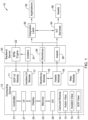
- FIG. 1 is a schematic block diagram of an illustrative incident management system 10 for managing incidents.
- the system 10 includes a computing device 12 that communicates with a backend server 20.
- the computing device includes a controller 21 that is operatively coupled to a memory 23, a user interface (UI) 27 that includes a display 25, and an input/output (I/O) 29.
- the controller 21 may implement a standard operating procedure (SOP) module 11, an incident module 17, a workforce module 18, an assets module 16, and a map module 19.
- SOP standard operating procedure
- the incident module 17, the workforce module 18 and the assets module 16 communicate with the backend server 20 as shown.
- the controller 21 may also implement a carousel module 14, which may be used to generate and display an incident view 15, an SOP view 31 and an action view 13 on the display 25.
- the computing device 12 may be considered as a front-end server, and may, for example, include a laptop computer, a desktop computer, an operator console, a smart phone, a tablet, an e-reader, or any other suitable computing platform.
- the backend server 20 may be contained within the computing device 12. In other cases, the backend server 20 is located remotely from the computing device 12 such as in the cloud, and communicatively coupled to the computing device 12 via, for example, a wired and/or wireless network.
- the backend server 20 may include a backend representational state transfer (REST) application programming interface (API). In some cases, the controller 21 may be configured to communicate with the backend server 20 via the REST API.
- REST backend representational state transfer
- API application programming interface
- the backend server 20 may include a business process management (BPM) engine 22, which may include a list of standard operating procedures (SOPs) for each of various incidents.
- BPM business process management
- SOPs standard operating procedures
- the SOPs define steps that must be completed to properly manage the corresponding incident. Sometimes, the SOPs are driven by industry regulations and/or national laws, but this is not required.
- an incident 24 may be reported to the backend server 20 and subsequently received by the BPM engine 22.
- the incident 24 may be related to an emergency call (e.g., a medical emergency, a fire, a crime, a lost child, or the like), a road closure, a power outage, a downed power line, or any other suitable incident that is reported to the backend server 20.
- the incident 24 may also be sent to the incident module 17 within the computing device 12 via the I/O 29.
- the incident module 17 may be configured to track the reported incidents, including the status of each of the reported incidents.
- the Carousel Module 14 may display the incidents and in some cases a corresponding incident status in the Incident view 15 on the display 25.
- the BPM engine 22 may receive the incident 24, and may identify and send SOP instructions pertaining to the particular incident 24 to the SOP module 11 within the computing device 12.
- the SOP module 11 tracks which of the steps of the SOP pertaining to the incident 24 have been completed by the operator.
- the Carousel Module 14 may display the SOP and corresponding steps in an SOP view 31 on the display 25.
- the system 10 may include an integration layer 30 that may be configured to manage communication between the computing device 12, the backend server 20 and one or more applications 32.
- the integration layer 30 may be configured to integrate the data regarding the selected workforce 26 and/or the selected asset 28 with the applications 32.
- the integration layer 30 may be configured to communicate with an Internet of Things (IoT) services 34 to convert data messages for and from the computing device 12, the backend server 20, and the applications 32.
- IoT Internet of Things
- the memory 23 can be a non-transitory computer readable medium having computer readable instructions (e.g., computer program instructions) stored thereon that are executable by the one or more processors of the computing device 12.
- the executable program may instruct the one or more processors of the computing device 12 to display a listing of incidents in the incident view 15 and receive, via the user interface 27, a user selection of a selected one of the listed incidents.
- the executable program may instruct the one or more processors of the computing device 12 to display the SOP steps of the standard operating procedure (SOP) that corresponds to the selected incident in the SOP view 31, and receive, via the user interface 27, a user selection of one of the one or more SOP steps from the SOP view 31.
- SOP standard operating procedure
- the SOP steps may be identified by the BPM engine of the backend server 20.
- the executable program may further instruct the one or more processors to display an action view 13 on the display 25 that displays one or more categories of assets that are activatable for supporting one or more of the SOP steps associated with a selected incident.
- the action view 13 may display the one or more categories of actionable workforces and/or the one or more categories of actionable assets in a defined ribbon.
- the defined ribbon may display two or more categories of the actionable workforces and/or the actionable assets arranged in a carousel arrangement, meaning the user can scroll through the categories from a first category to a last category, and then continuing to scroll in the same direction returns the user back to the first category.
- the categories are arranged in the ribbon in a circular loop, much like a carousel.
- the one or more categories of actionable workforces may be retrieved from the workforce module 18, and the one or more categories of actionable assets may be retrieved from the assets module 16, and each may be tailored to the assets and/or workforces that are relevant to the selected incident, and in some cases, may be tailored to the assets and/or workforces that are relevant to the selected SOP step.
- the one or more processors may receive, via the user interface 27, a user selection of one of the one or more categories of assets and/or workforces via the action view 13, and in response, display one or more available assets and/or workforces of the selected one of the one or more category of assets and/or workforces, and further receive, via the user interface 27, a user selection of one or more of the available assets and/or workforces of the selected one of the one or more category of assets and/or workforces.
- the assets and/or workforces that are currently available may be reported to the computing device 12 via the backend server 20.
- the backend server 20 may identify the assets and/or workforces that are currently available via one or more of the applications 32 and/or the assets block 36 through the integration layer 30 and/or IoT services 34. This is just an example.
- the assets module 16 and/or workforce module 18 may send one or more commands to activate the selected one or more available assets 28 and/or workforces 26 for supporting one or more of the SOP steps associated with the selected incident.
- the backend server 20 may activate the selected one or more available assets 28 and/or workforces 26 via the integration layer 30 and/or IoT.
- the executable program may instruct the one or more processors of the computing device 12 to receive a user selection, via the UI 27, of another one of the one or more SOP steps from the SOP view 31.
- the action view 13 may display all of the one or more categories of actionable workforces and/or the one or more categories of actionable assets that are pre-associated with the selected one of the one or more SOP steps and all of the one or more categories of actionable workforces and/or the one or more categories of actionable assets that are pre-associated with the selected another one of the one or more SOP steps.
- the one or more processors of the computing device 12 may display a map view that displays the location of the selected one or more available workforce and/or assets on a map. In some cases, only the available assets that have been activated to support one or more of the SOP steps associated with the selected incident are displayed in the map view.
- the map view may be generated by the map module 19 of the computing device 12.
- each of the one or more categories of actionable assets may also be displayed, such as, for example, a status of the asset, a type of asset, a location of the asset, or the like.
- the one or more categories of actionable assets may include, for example, an emergency call icon, a public announcement icon, an icon with which to turn on/off a power grid, a visual message board icon, and/or a social media icon.
- each of the one or more categories of actionable workforces may also be displayed, such as, for example, a real-time location of the workforce, an estimated time of arrival (ETA) for the workforce, contact details for the workforce, or the like.
- the one or more categories of actionable workforces may include, for example, a maintenance vehicle, an ambulance, a fire engine, a police vehicle, or the like.
- the action view 13 may retrieve details regarding the selected one of the one or more categories of actionable assets and/or the one of the one or more categories of actionable workforces, and may display the details within the action view 13.
- the action view 13 may further load appropriate interactions based on the operation(s) that the one of the one or more categories of actionable assets and/or one of the one or more categories of actionable workforces supports. For example, if the one of the one or more categories of actionable workforces selected includes dispatching a police vehicle to a scene, the supported interactions may include canceling the police vehicle, re-dispatching the police vehicle, contacting the police vehicle, or the like.
- FIG. 2 is a schematic block diagram of an illustrative computing device 40 associated with a system (e.g., system 10) for managing an incident.
- the computing device 40 which may be an example of computing device 12, may include an incident module 56, one or more standard operating procedure (SOP) modules including SOP module 50, SOP module 52, SOP module 54, and a carousel module 42.
- the incident module 56 e.g., incident module 17
- the incident module 56 may receive one or more incidents 57a, 57b, 57c (hereinafter generally referenced as incidents 57) from, for example, a backend server 58.
- the incidents 57 may be displayed on a display (e.g., display 25) of the computing device 40 in an incident view 48.
- Each of the incidents 57 may include an associated SOP (e.g., SOP modules 50, 52, 54) for managing each corresponding incident 57.
- the incident 57a may include the associated SOP module 50.
- the SOP module 50 may include one or more corresponding SOP steps 51a, 51b, 51c.
- the incident 57b may include the associated SOP module 52, which may include one or more corresponding SOP steps 53a, 53b, 53c.
- the incident 57c may include the associated SOP module 54, which may include one or more corresponding SOP steps 55a, 55b, 55c.
- a user may view the incidents 57 on the display in the incident view 48, and may select one of the incidents 57 via a user interface (e.g., UI 27). For example, the user may select the incident 57a.
- the associated SOP module 50 including the one or more corresponding SOP steps 51a, 51b, 51c, may be displayed on the display in a standard operating procedure (SOP) view 41. The user may then select one of the SOP steps 51a, 51b, 51c from the SOP view, via the user interface.
- SOP standard operating procedure
- an action view 44 may be loaded and may display to the user one or more categories of actionable workforces 46 and/or one or more categories of actionable assets 45 for the one of the selected SOP step 51a, 51b, 51c.
- the incident view 48, the SOP view 41 and the action view 44 may be concurrently displayed on the display 25 for easy reference by an operator.
- the action view 44 may display the all assets and/or workforces that have been activated by the operator for all of the SOP steps of a selected incident. That is, in some cases, even when a particular SOP step is selected by the operation, the action view 44 may display the assets and/or workforces that have been activated for that particular step and also the assets and/or workforces activated for all other SOP steps of the selected incident.
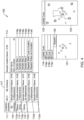
- Figure 3 is a chart showing illustrative actionable assets 80 and actionable workforces 90.
- the actionable assets 80 may include, for example, an emergency call icon 81, a public announcement icon 83, an icon with which to turn on/off a power grid 85, a visual message board icon 87, and a social media icon 89. These are just examples. In some cases, there may be additional icons for additional assets.
- Each actionable asset 80 may include an associated action 82.
- the emergency call icon 81 may be utilized for attending to an incoming emergency call regarding an incident, such as a 911 call.
- the public announcement icon 83 may be utilized to make a public announcement over an intercom system (e.g., a loud speaker) within a location in which an incident occurs.
- the visual message board icon 87 may be utilized to broadcast a visual message regarding an incident on a variable message sign (VMS), such as a VMS over a highway.
- VMS variable message sign
- the social media icon 89 may be utilized to broadcast a message regarding an incident over a social media platform, such as Twitter TM , Facebook TM , Instagram TM , or the like.
- the illustrative actionable workforces 90 may include, for example, a maintenance vehicle 91, an ambulance 93, a fire engine 95, and a police vehicle 97. It is contemplated that the actionable workforces 90 may include additional workforces, such as, for example, a garbage truck, a city bus, a snowplow, a public service vehicle, or the like. These are just examples.
- each actionable workforce 90 may include an associated action 92.
- the maintenance vehicle 91 may include an action of sending a maintenance truck to an incident.
- the ambulance 93 may include an action of sending an ambulance to an incident following an emergency alert.
- the fire engine 95 may include an action of sending a fire engine to an incident following an emergency alert.
- the police vehicle 97 may include an action of sending a police vehicle to an incident following an emergency alert.
- the icons shown in Figure 3 may be used to represent the corresponding asset and/or workforce in the action view 44.
- FIGS. 4-9 depict illustrative user interfaces for managing incidents.
- the user interface may include a sidebar that includes a plurality of tabs.
- the plurality of tabs may include a tab for "available incidents” 111, a tab for "my incidents” 110, a tab for "observations” 113, and a tab for "history” 115.
- the "available incidents” 111 tab when selected, may dispay all of the incidents that have been reported to a monitoring facility in an incident view 117.
- the "observations” 113 tab may indicate one or more comments provided by the user and/or other users regarding the incidents that have been reported to the monitoring facility.
- the "history” 115 tab may indicate the user's history regarding incidents that the user has managed.
- the incidents that the user is responsible for managing may be shown in a listing in the incident view 117.
- the user may then select in the incident view 117 an incident, and the corresponding SOP steps for the selected incident is displayed in a SOP view.
- a user may select a SOP step from the SOP view, and the action view for that step may be displayed.
- an actionable workforce such as, for example, dispatching an ambulance, a fire engine, a police vehicle, or the like
- details regarding the actionable workforce may be displayed within the action view.
- the details may include a location of the actionable workforce, an estimated time of arrival (ETA) for the actionable workforce to arrive at the location of the incident, and a phone number for a driver and/or a company of the actionable workforce.
- ETA estimated time of arrival
- multiple actionable workforces may be selected, and all of the actionable workforces and the corresponding details may be displayed within the action view.
- the actionable workforces may be displayed in the map view, and the user may view the progress of the actionable workforces.
- FIG 4 is an illustrative user interface 100 for managing incidents.
- the user has selected incident 3145 112a from the incident view 117.
- the selected incident 3145 112a along with the corresponding SOP steps are displayed in a SOP view 114.
- the SOP steps may include sample step 1 116a, sample step 2 116b, sample step 3, 116c, sample step 4, 116d, dispatch a solid waste management (SWM) truck to location 116e, and dispatch a police vehicle to location 116f
- SWM solid waste management
- the user may select any of the SOP steps 116.
- an action view 118 is displayed and includes actionable workforces, such as, for example, truck 1 119a, truck 2 119b, and truck 3 119c.
- the user may select one or more of the actionable workforces and may dispatch the SWM trucks by selecting the "dispatch" 120 button.
- the action view 118 may include a map view indicating the location of the incident 3145 112a.
- the user may select one of the actionable workforces, such as, for example, truck 1 119a, which may display a map view 122 including a map 123 indicating the location of the selected actionable workforce.
- each of the actionable workforces may be displayed on the map 123, and a location of each of the actionable workforces in relation to the incident 3145 112a may be easily understood by the operator.
- Figure 5 is an illustrative user interface 200 for managing incidents.
- the user has selected incident 3146 112b from the incident view 117.
- the selected incident 3146 112b along with the corresponding SOP steps are displayed in a SOP view 214.
- the SOP steps include a Twitter TM warning broadcast 216a, an announcement of a possible flood 216b, an instruction to open water valves 216c, and dispatching a water maintenance crew 216d.
- an action view 217 may be displayed concurrently on the display.
- the user selected the Twitter TM warning broadcast 216a, and thus the action view 217 includes tabs in which the user may broadcast a message using Twitter TM 218, broadcast a message using a public address (PA) system 220, and/or broadcast a message using a variable message board (VMB) 222.
- the user may draft a text to be displayed and/or the user may use a predefined text message, as indicated at 223. The user may then choose to broadcast the message by selecting a broadcast 224 button.
- the action view 217 may include a map 225 indicating a location of the incident 3146 112b.
- Figure 6 is an illustrative user interface 300 for managing incidents.
- the user has selected incident 3147 112c from the incident view 117.
- the selected incident 3147 112c along with the corresponding SOP steps are displayed in a SOP view 314.
- the SOP steps may include validating an emergency call 316a, dispatching a police car to the location 316b, and dispatching an ambulance to the location 316c.
- an action view 317 is displayed concurrently.
- the action view 317 may include tabs corresponding to the SOP steps displayed as a horizontal ribbon in the SOP view 314, sometimes in a carousel arrangement.
- the tabs within the action view 317 include an emergency call box (ECB) 318 tab, a police vehicle 320 tab, and an ambulance 322 tab.
- the user has selected the ECB 318 tab which displays to a user an option to receive an emergency call and simultaneously view a live video from an on-site video surveillance camera, as indicated at block 324.
- block 324 may be displayed over a map 325 in the map view.
- the map 325 may indicate a location of the reported incident 3147 112c and the location of any emergency vehicles dispatched to the incident 3147 112c.
- FIGS 7-9 depict illustrative user interfaces for managing incidents.
- the user has selected incident 3148 112d from the incident view 117.
- the selected incident 3148 112d along with corresponding SOP steps are displayed in a SOP view 414.
- the SOP steps may include sample step 1 416a, sample step 2 416b, sample step 3 416c, sample step 4 416d, dispatching a solid waste management truck to a location 416e, and dispatching a police vehicle to the location 416f.
- an action view 417 is displayed concurrently.
- the action view 417 may include tabs corresponding to all of the SOP steps displayed in the SOP view 414.
- the tabs displayed within the action view 417 may include a utilities power 418 tab, a variable message board (VMB) 420 tab, and a public address (PA) devices 422 tab.
- Other action tabs such as workforce tabs related to SOP steps 416e and 416f, may be accessed by scrolling to the right or left of the tabs shown.
- the action view 417 may further include a map 425 indicating a location of the incident 3148 112d.
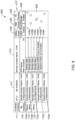
- the user has selected the utilities power 418 tab, which gives the user the ability to manage a power station 01 423 and a power station 02 424.
- the user may have the option to turn the power for the power station 01 423 and the power station 02 424 on and/or off. This may relate to one of the sample SOP steps listed in the SOP 414.
- the user may have the option to manage a light intensity at the location of the incident 3148 112d for any maintenance work that may be required to be done.
- the user has selected the VMB 420 tab, which gives the user the ability to draft a text and/or the user may use a predefined text message, as indicated at 426. This may relate to one of the sample SOP steps listed in the SOP 414.
- the user may select to publish the text and/or cancel the text. In some cases, when the user chooses to publish the text, the text may be broadcast via a VMB.
- the user has selected the public address (PA) devices 422 tab, which gives the user the ability to dictate an audio message and/or use a predefined audio message for broadcast to a PA system, as indicated at 428. This may relate to one of the sample SOP steps listed in the SOP 414. The user may choose to broadcast the audio message and/or cancel the audio message.
- PA public address
- a power line may be down.
- the user may need to turn off power at the power station 01 423, as indicated in Figure 7 .
- the user may then choose to broadcast a text via a VMB to reroute traffic to avoid the downed power line, as indicated in Figure 8 .
- the user may further choose to make an audio announcement via a PA system in an effort to announce road closures due to the downed power line.
- workforce tabs related to SOP steps 416e and 416f may be accessed by scrolling to the right or left of the tabs shown.
- a workforce tab may allow the operator to dispatch a utility crew (SMW truck) to repair the power line to address SOP step 416e.
- a workforce tab may allow the operator to dispatch a police car to oversee the scene around the power line to address SOP step 416f.
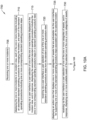
- FIGS 10A-10B are flow diagrams showing an illustrative method 700 for managing an incident, which may be carried out by a controller (e.g., controller 21).
- the method 700 may include the controller receiving one or more incidents, as referenced by block 705.
- the controller may display the one or more incidents in an incident view.
- Each of the one or more incidents may include an associated standard operating procedure (SOP) for managing the incident, and each of the standard operating procedures (SOPs) may include one or more corresponding SOP steps, as referenced by block 710.
- SOP standard operating procedure
- SOPs standard operating procedures
- the method 700 may include the controller receiving, via a user interface, a user selection of one of the one or more incidents displayed in the incident view, and in response, displaying the associated SOP including the one or more corresponding SOP steps in a SOP view, as referenced by block 715.
- the controller may receive, via a user interface, a user selection of one of the one or more SOPs from the SOP view, as referenced by block 720.
- the method 700 may further include the controller displaying an action view that displays one or more categories of assets that are activatable via the user interface for supporting one or more of the SOP steps associated with the selected incident, as referenced by block 725.
- the action view may display the one or more categories of assets in a defined ribbon, and the defined ribbon may display two or more categories of assets arranged in a carousel arrangement.
- the one or more categories of assets that are displayed in the action view may include all of the one or more categories of assets that are pre-associated with the selected one of the one or more SOP steps.
- the controller may then receive, via the user interface, a user selection of one of the one or more categories of assets, and in response, may display one or more available assets of the selected one of the one or more categories of assets, as referenced by block 730.
- displaying one or more available assets of the selected one or more categories of assets includes sorting the one or more available assets according to a distance of a current location of the available asset from the selected incident.
- the controller may receive, via the user interface, a user selection of one or more of the available assets of the selected one of the one or more categories of assets, and in response, may send one or more commands to activate the selected one or more available assets for supporting one or more of the SOP steps associated with the incident, as referenced by block 735.
- the method 700 may further include the controller receiving, via the user interface, a user selection of another one of the one or more SOP steps from the SOP view, and in response, displaying in the action view, all of the one or more categories of assets that are pre-associated with the selected one or more SOP steps and all of the one or more categories of assets that are pre-associated with the selected another one of the one or more SOP steps, as referenced by block 740.
- the controller may then display a map view that displays a location of the selected one or more available assets on a map, as referenced by block 745, and may only display on the map view the available assets that have been activated to support one or more of the SOP steps associated with the selected incident, as referenced by block 750.
- the controller may then receive, via the user interface, a user selection of one of the activated assets on the map view, and in response, may display additional information regarding the selected activated asset, as referenced by block 755.
- the incident view, the SOP view and the action view are concurrently displayed.
- the "assets" reference with respect to Figure 10A-10B can include both actionable assets and actionable workforces, as the actionable workforces are also assets.
Landscapes
- Business, Economics & Management (AREA)
- Engineering & Computer Science (AREA)
- Human Resources & Organizations (AREA)
- Theoretical Computer Science (AREA)
- Strategic Management (AREA)
- Entrepreneurship & Innovation (AREA)
- Economics (AREA)
- Physics & Mathematics (AREA)
- General Physics & Mathematics (AREA)
- General Engineering & Computer Science (AREA)
- Educational Administration (AREA)
- Development Economics (AREA)
- Game Theory and Decision Science (AREA)
- Marketing (AREA)
- Operations Research (AREA)
- Quality & Reliability (AREA)
- Tourism & Hospitality (AREA)
- General Business, Economics & Management (AREA)
- Human Computer Interaction (AREA)
- User Interface Of Digital Computer (AREA)
- Management, Administration, Business Operations System, And Electronic Commerce (AREA)
Abstract
Description
- The present disclosure relates generally to methods and systems for managing an incident using an incident management system.
- In incident management systems, incidents are presented to an operator that is responsible for managing the incidents. In many cases, when an incident is identified, the incident management system typically presents the operator with a predefined standard operating procedure (SOP) for managing the identified incident. Standard operating procedures often include predefined steps (e.g., actions, decisions, etc.) that are to be performed in response to a particular incident or incident type. In many cases, different types of assets and/or workforces are available to an operator to manage an incident. In such systems, it is often difficult for the operator to quickly identify and track relevant assets/workforces when managing an incident. In some systems, the operator must go through multiple steps/screens to select and/or activate relevant assets/workforces to initiate and/or monitor progress of some or all of the steps of a standard operating procedure (SOP). It would be desirable to provide a more efficient and intuitive way for managing incidents in an incident management system.
- The present disclosure relates generally to methods and systems for managing an incident using an incident management system. In one example, a method for managing an incident includes receiving one or more incidents, displaying the one or more incidents in an incident view on a display, wherein each of the one or more incidents include an associated standard operating procedure for managing the incident. Each of the standard operating procedures may include one or more corresponding standard operating procedure steps. The illustrative method may further include receiving, via a user interface, a user selection of one of the one or more incidents displayed in the incident view, and in response, displaying the associated standard operating procedure including the one or more corresponding standard operating procedure steps in a standard operating procedure view.
- The illustrative method may further include receiving, via a user interface, a user selection of one of the one or more standard operating procedure steps from the standard operating procedure view, displaying an action view that displays one or more categories of assets that are activatable via the user interface for supporting one or more of the standard operating procedure steps associated with the selected incident, receiving via the user interface, a user selection of one of the one or more categories of assets, and in response, displaying one or more available assets of the selected one of the one or more category of assets, and receiving via the user interface a user selection of one or more of the available assets of the selected one of the one or more category of assets, and in response, sending one or more commands to activate the selected one or more available assets for supporting one or more of the standard operating procedure steps associated with the selected incident.
- Another example is found in a non-transitory computer readable medium storing instructions that when executed by one or more processors may cause the one or more processors to display a standard operating procedure including the one or more standard operating procedure steps in a standard operating procedure view on a display, receive, via a user interface, a user selection of one of the one or more standard operating procedure steps from the standard operating procedure view, and display an action view that displays two or more categories of assets that are activatable via the user interface for supporting one or more of the standard operating procedure steps associated with the selected incident.
- The one or more processors may further receive, via the user interface, a user selection of one of the two or more categories of assets, and in response, display one or more available assets of the selected one of the two or more category of assets, and receive, via the user interface, a user selection of one or more of the available assets of the selected one of the two or more category of assets, and in response, sending one or more commands to activate the selected one or more available assets for supporting one or more of the standard operating procedure steps associated with the selected incident.
- Another example is found in a system that includes an input/output port configured to receive one or more incidents, a user interface having a display operatively coupled to the input/output port, the user interface configured to display the one or more incidents in an incident view, and a controller operatively coupled to the input/output port and the user interface. The controller may be configured to display a standard operating procedure for a selected incident of the one or more incidents, including one or more standard operating procedure steps in a standard operating procedure view on the display, receive, via the user interface, a user selection of one of the one or more standard operating procedure steps from the standard operating procedure view, and display an action view on the display that displays two or more categories of assets that are activatable via the user interface for supporting one or more of the standard operating procedure steps associated with the selected incident.
- The controller may further be configured to receive, via the user interface, a user selection of one of the two or more categories of assets, and in response, display one or more available assets of the selected one of the two or more category of assets, and receive, via the user interface, a user selection of one or more of the available assets of the selected one of the two or more category of assets, and in response, sending one or more commands to activate the selected one or more available assets for supporting one or more of the standard operating procedure steps associated with the selected incident.
- The preceding summary is provided to facilitate an understanding of some of the innovative features unique to the present disclosure and is not intended to be a full description. A full appreciation of the disclosure can be gained by taking the entire specification, claims, figures, and abstract as a whole.
- The disclosure may be more completely understood in consideration of the following description of various examples in connection with the accompanying drawings, in which:
-
Figure 1 is a schematic block diagram of an illustrative system for managing an incident; -
Figure 2 is a schematic block diagram of an illustrative computing device associated with a system for managing an incident; -
Figure 3 is a chart showing illustrative assets and workforces; -
Figure 4 is an illustrative user interface for managing incidents; -
Figure 5 is an illustrative user interface for managing incidents; -
Figure 6 is an illustrative user interface for managing incidents; -
Figure 7 is an illustrative user interface for managing incidents; -
Figure 8 is an illustrative user interface for managing incidents; -
Figure 9 is an illustrative user interface for managing incidents; and -
Figures 10A-10B are flow diagrams showing an illustrative method. - While the disclosure is amenable to various modifications and alternative forms, specifics thereof have been shown by way of example in the drawings and will be described in detail. It should be understood, however, that the intention is not to limit the disclosure to the particular examples described. On the contrary, the intention is to cover all modifications, equivalents, and alternatives falling within the spirit and scope of the disclosure.
- The following description should be read with reference to the drawings, in which like elements in different drawings are numbered in like fashion. The drawings, which are not necessarily to scale, depict examples that are not intended to limit the scope of the disclosure. Although examples are illustrated for the various elements, those skilled in the art will recognize that many of the examples provided have suitable alternatives that may be utilized.
- All numbers are herein assumed to be modified by the term "about", unless the content clearly dictates otherwise. The recitation of numerical ranged by endpoints includes all numbers subsumed within that range (e.g., 1 to 5 includes, 1, 1.5, 2, 2.75, 3, 3.8, 4, and 5).
- As used in this specification and the appended claims, the singular forms "a", "an", and "the" include the plural referents unless the content clearly dictates otherwise. As used in this specification and the appended claims, the term "or" is generally employed in its sense including "and/or" unless the content clearly dictates otherwise.
- It is noted that references in the specification to "an embodiment", "some embodiments", "other embodiments", etc., indicate that the embodiment described may include a particular feature, structure, or characteristic, but every embodiment may not necessarily include the particular feature, structure, or characteristic. Moreover, such phrases are not necessarily referring to the same embodiment. Further, when a particular feature, structure, or characteristic is described in connection with an embodiment, it is contemplated that the feature, structure, or characteristic may be applied to other embodiments whether or not explicitly described unless clearly stated to the contrary.
-
Figure 1 is a schematic block diagram of an illustrativeincident management system 10 for managing incidents. As shown inFigure 1 , thesystem 10 includes acomputing device 12 that communicates with abackend server 20. The computing device includes acontroller 21 that is operatively coupled to amemory 23, a user interface (UI) 27 that includes adisplay 25, and an input/output (I/O) 29. Thecontroller 21 may implement a standard operating procedure (SOP)module 11, anincident module 17, aworkforce module 18, anassets module 16, and amap module 19. In the example shown, the standard operating procedure (SOP)module 11, theincident module 17, theworkforce module 18 and theassets module 16 communicate with thebackend server 20 as shown. Thecontroller 21 may also implement acarousel module 14, which may be used to generate and display anincident view 15, anSOP view 31 and anaction view 13 on thedisplay 25. Thecomputing device 12 may be considered as a front-end server, and may, for example, include a laptop computer, a desktop computer, an operator console, a smart phone, a tablet, an e-reader, or any other suitable computing platform. In some cases, thebackend server 20 may be contained within thecomputing device 12. In other cases, thebackend server 20 is located remotely from thecomputing device 12 such as in the cloud, and communicatively coupled to thecomputing device 12 via, for example, a wired and/or wireless network. Thebackend server 20 may include a backend representational state transfer (REST) application programming interface (API). In some cases, thecontroller 21 may be configured to communicate with thebackend server 20 via the REST API. - In some cases, the
backend server 20 may include a business process management (BPM)engine 22, which may include a list of standard operating procedures (SOPs) for each of various incidents. The SOPs define steps that must be completed to properly manage the corresponding incident. Sometimes, the SOPs are driven by industry regulations and/or provincial laws, but this is not required. During operation, anincident 24 may be reported to thebackend server 20 and subsequently received by theBPM engine 22. In some cases, theincident 24 may be related to an emergency call (e.g., a medical emergency, a fire, a crime, a lost child, or the like), a road closure, a power outage, a downed power line, or any other suitable incident that is reported to thebackend server 20. Theincident 24 may also be sent to theincident module 17 within thecomputing device 12 via the I/O 29. Theincident module 17 may be configured to track the reported incidents, including the status of each of the reported incidents. TheCarousel Module 14 may display the incidents and in some cases a corresponding incident status in theIncident view 15 on thedisplay 25. - The
BPM engine 22 may receive theincident 24, and may identify and send SOP instructions pertaining to theparticular incident 24 to theSOP module 11 within thecomputing device 12. TheSOP module 11 tracks which of the steps of the SOP pertaining to theincident 24 have been completed by the operator. TheCarousel Module 14 may display the SOP and corresponding steps in anSOP view 31 on thedisplay 25. - In some cases, the
system 10 may include anintegration layer 30 that may be configured to manage communication between thecomputing device 12, thebackend server 20 and one ormore applications 32. Theintegration layer 30 may be configured to integrate the data regarding the selectedworkforce 26 and/or the selectedasset 28 with theapplications 32. Theintegration layer 30 may be configured to communicate with an Internet of Things (IoT)services 34 to convert data messages for and from thecomputing device 12, thebackend server 20, and theapplications 32. - In some cases, the
memory 23 can be a non-transitory computer readable medium having computer readable instructions (e.g., computer program instructions) stored thereon that are executable by the one or more processors of thecomputing device 12. The executable program may instruct the one or more processors of thecomputing device 12 to display a listing of incidents in theincident view 15 and receive, via theuser interface 27, a user selection of a selected one of the listed incidents. The executable program may instruct the one or more processors of thecomputing device 12 to display the SOP steps of the standard operating procedure (SOP) that corresponds to the selected incident in theSOP view 31, and receive, via theuser interface 27, a user selection of one of the one or more SOP steps from theSOP view 31. The SOP steps may be identified by the BPM engine of thebackend server 20. The executable program may further instruct the one or more processors to display anaction view 13 on thedisplay 25 that displays one or more categories of assets that are activatable for supporting one or more of the SOP steps associated with a selected incident. In some cases, theaction view 13 may display the one or more categories of actionable workforces and/or the one or more categories of actionable assets in a defined ribbon. In some cases, the defined ribbon may display two or more categories of the actionable workforces and/or the actionable assets arranged in a carousel arrangement, meaning the user can scroll through the categories from a first category to a last category, and then continuing to scroll in the same direction returns the user back to the first category. That is, the categories are arranged in the ribbon in a circular loop, much like a carousel. The one or more categories of actionable workforces may be retrieved from theworkforce module 18, and the one or more categories of actionable assets may be retrieved from theassets module 16, and each may be tailored to the assets and/or workforces that are relevant to the selected incident, and in some cases, may be tailored to the assets and/or workforces that are relevant to the selected SOP step. - The one or more processors may receive, via the
user interface 27, a user selection of one of the one or more categories of assets and/or workforces via theaction view 13, and in response, display one or more available assets and/or workforces of the selected one of the one or more category of assets and/or workforces, and further receive, via theuser interface 27, a user selection of one or more of the available assets and/or workforces of the selected one of the one or more category of assets and/or workforces. The assets and/or workforces that are currently available may be reported to thecomputing device 12 via thebackend server 20. Thebackend server 20 may identify the assets and/or workforces that are currently available via one or more of theapplications 32 and/or the assets block 36 through theintegration layer 30 and/or IoT services 34. This is just an example. - In response, the
assets module 16 and/orworkforce module 18 may send one or more commands to activate the selected one or moreavailable assets 28 and/orworkforces 26 for supporting one or more of the SOP steps associated with the selected incident. Thebackend server 20 may activate the selected one or moreavailable assets 28 and/orworkforces 26 via theintegration layer 30 and/or IoT. - In some cases, the executable program may instruct the one or more processors of the
computing device 12 to receive a user selection, via theUI 27, of another one of the one or more SOP steps from theSOP view 31. In response to the selection, theaction view 13 may display all of the one or more categories of actionable workforces and/or the one or more categories of actionable assets that are pre-associated with the selected one of the one or more SOP steps and all of the one or more categories of actionable workforces and/or the one or more categories of actionable assets that are pre-associated with the selected another one of the one or more SOP steps. Further, the one or more processors of thecomputing device 12 may display a map view that displays the location of the selected one or more available workforce and/or assets on a map. In some cases, only the available assets that have been activated to support one or more of the SOP steps associated with the selected incident are displayed in the map view. The map view may be generated by themap module 19 of thecomputing device 12. - In some cases, when one or more categories of actionable assets are displayed to the user, details regarding each of the one or more categories of actionable assets may also be displayed, such as, for example, a status of the asset, a type of asset, a location of the asset, or the like. The one or more categories of actionable assets may include, for example, an emergency call icon, a public announcement icon, an icon with which to turn on/off a power grid, a visual message board icon, and/or a social media icon. In some cases, when one or more categories of actionable workforces are displayed to the user, details regarding each of the one or more categories of actionable workforces may also be displayed, such as, for example, a real-time location of the workforce, an estimated time of arrival (ETA) for the workforce, contact details for the workforce, or the like. The one or more categories of actionable workforces may include, for example, a maintenance vehicle, an ambulance, a fire engine, a police vehicle, or the like.
- In some cases, when the user selects one of the one or more categories of actionable assets (e.g., an asset 28) and/or one of the one or more categories of actionable workforces (e.g., a workforce 26), the
action view 13 may retrieve details regarding the selected one of the one or more categories of actionable assets and/or the one of the one or more categories of actionable workforces, and may display the details within theaction view 13. Theaction view 13 may further load appropriate interactions based on the operation(s) that the one of the one or more categories of actionable assets and/or one of the one or more categories of actionable workforces supports. For example, if the one of the one or more categories of actionable workforces selected includes dispatching a police vehicle to a scene, the supported interactions may include canceling the police vehicle, re-dispatching the police vehicle, contacting the police vehicle, or the like. -
Figure 2 is a schematic block diagram of anillustrative computing device 40 associated with a system (e.g., system 10) for managing an incident. As shown inFigure 2 , thecomputing device 40, which may be an example ofcomputing device 12, may include anincident module 56, one or more standard operating procedure (SOP) modules includingSOP module 50,SOP module 52,SOP module 54, and acarousel module 42. The incident module 56 (e.g., incident module 17) may receive one ormore incidents backend server 58. The incidents 57 may be displayed on a display (e.g., display 25) of thecomputing device 40 in anincident view 48. Each of the incidents 57 may include an associated SOP (e.g.,SOP modules incident 57a may include the associatedSOP module 50. TheSOP module 50 may include one or more corresponding SOP steps 51a, 51b, 51c. In some cases, for example, theincident 57b may include the associatedSOP module 52, which may include one or more corresponding SOP steps 53a, 53b, 53c. In other cases, for example, theincident 57c may include the associatedSOP module 54, which may include one or more corresponding SOP steps 55a, 55b, 55c. - A user may view the incidents 57 on the display in the
incident view 48, and may select one of the incidents 57 via a user interface (e.g., UI 27). For example, the user may select theincident 57a. Upon selection of theincident 57a, the associatedSOP module 50, including the one or more corresponding SOP steps 51a, 51b, 51c, may be displayed on the display in a standard operating procedure (SOP)view 41. The user may then select one of the SOP steps 51a, 51b, 51c from the SOP view, via the user interface. Upon selection of one of the one or more corresponding SOP steps 51a, 51b, 51c, anaction view 44 may be loaded and may display to the user one or more categories ofactionable workforces 46 and/or one or more categories ofactionable assets 45 for the one of the selectedSOP step - In some cases, the
incident view 48, theSOP view 41 and theaction view 44 may be concurrently displayed on thedisplay 25 for easy reference by an operator. In some cases, theaction view 44 may display the all assets and/or workforces that have been activated by the operator for all of the SOP steps of a selected incident. That is, in some cases, even when a particular SOP step is selected by the operation, theaction view 44 may display the assets and/or workforces that have been activated for that particular step and also the assets and/or workforces activated for all other SOP steps of the selected incident. -
Figure 3 is a chart showing illustrativeactionable assets 80 andactionable workforces 90. In the example ofFigure 3 , theactionable assets 80 may include, for example, anemergency call icon 81, apublic announcement icon 83, an icon with which to turn on/off apower grid 85, a visualmessage board icon 87, and asocial media icon 89. These are just examples. In some cases, there may be additional icons for additional assets. Eachactionable asset 80 may include an associatedaction 82. For example, theemergency call icon 81 may be utilized for attending to an incoming emergency call regarding an incident, such as a 911 call. In some cases, thepublic announcement icon 83 may be utilized to make a public announcement over an intercom system (e.g., a loud speaker) within a location in which an incident occurs. In some cases, the visualmessage board icon 87 may be utilized to broadcast a visual message regarding an incident on a variable message sign (VMS), such as a VMS over a highway. In some cases, thesocial media icon 89 may be utilized to broadcast a message regarding an incident over a social media platform, such as Twitter™, Facebook™, Instagram™, or the like. - The illustrative
actionable workforces 90 may include, for example, amaintenance vehicle 91, anambulance 93, afire engine 95, and apolice vehicle 97. It is contemplated that theactionable workforces 90 may include additional workforces, such as, for example, a garbage truck, a city bus, a snowplow, a public service vehicle, or the like. These are just examples. In some cases, eachactionable workforce 90 may include an associatedaction 92. For example, themaintenance vehicle 91 may include an action of sending a maintenance truck to an incident. In some cases, theambulance 93 may include an action of sending an ambulance to an incident following an emergency alert. In some cases, thefire engine 95 may include an action of sending a fire engine to an incident following an emergency alert. In some cases, thepolice vehicle 97 may include an action of sending a police vehicle to an incident following an emergency alert. The icons shown inFigure 3 may be used to represent the corresponding asset and/or workforce in theaction view 44. -
Figures 4-9 depict illustrative user interfaces for managing incidents. The user interface may include a sidebar that includes a plurality of tabs. The plurality of tabs may include a tab for "available incidents" 111, a tab for "my incidents" 110, a tab for "observations" 113, and a tab for "history" 115. The "available incidents" 111 tab, when selected, may dispay all of the incidents that have been reported to a monitoring facility in anincident view 117. The "observations" 113 tab may indicate one or more comments provided by the user and/or other users regarding the incidents that have been reported to the monitoring facility. The "history" 115 tab may indicate the user's history regarding incidents that the user has managed. In some cases, when the user selects "my incidents" 110, as shown inFigures 4-9 , the incidents that the user is responsible for managing may be shown in a listing in theincident view 117. The user may then select in theincident view 117 an incident, and the corresponding SOP steps for the selected incident is displayed in a SOP view. - In some cases, a user may select a SOP step from the SOP view, and the action view for that step may be displayed. In cases where an actionable workforce is selected, such as, for example, dispatching an ambulance, a fire engine, a police vehicle, or the like, details regarding the actionable workforce may be displayed within the action view. The details may include a location of the actionable workforce, an estimated time of arrival (ETA) for the actionable workforce to arrive at the location of the incident, and a phone number for a driver and/or a company of the actionable workforce. In some cases, multiple actionable workforces may be selected, and all of the actionable workforces and the corresponding details may be displayed within the action view. In some cases, the actionable workforces may be displayed in the map view, and the user may view the progress of the actionable workforces.
-
Figure 4 is anillustrative user interface 100 for managing incidents. In the particular example shown inFigure 4 , the user has selectedincident 3145 112a from theincident view 117. The selectedincident 3145 112a along with the corresponding SOP steps are displayed in aSOP view 114. The SOP steps may includesample step 1 116a,sample step 2 116b,sample step 3, 116c,sample step location 116e, and dispatch a police vehicle tolocation 116f The user may select any of the SOP steps 116. In the example shown, when the user selects "Dispatch a SWM truck to location" 116e, anaction view 118 is displayed and includes actionable workforces, such as, for example,truck 1 119a,truck 2 119b, andtruck 3 119c. The user may select one or more of the actionable workforces and may dispatch the SWM trucks by selecting the "dispatch" 120 button. In some cases, theaction view 118 may include a map view indicating the location of theincident 3145 112a. For example, the user may select one of the actionable workforces, such as, for example,truck 1 119a, which may display amap view 122 including amap 123 indicating the location of the selected actionable workforce. In some cases, when a plurality of actionable workforces are selected, each of the actionable workforces (e.g.,truck 1 119a,truck 2 119b,truck map 123, and a location of each of the actionable workforces in relation to theincident 3145 112a may be easily understood by the operator. -
Figure 5 is anillustrative user interface 200 for managing incidents. In the example shown inFigure 5 , the user has selectedincident 3146 112b from theincident view 117. The selectedincident 3146 112b along with the corresponding SOP steps are displayed in aSOP view 214. In this example, the SOP steps include a Twitter™ warning broadcast 216a, an announcement of apossible flood 216b, an instruction to openwater valves 216c, and dispatching awater maintenance crew 216d. In some cases, when theSOP view 214 is displayed, anaction view 217 may be displayed concurrently on the display. In the example shown inFigure 5 , the user selected the Twitter™ warning broadcast 216a, and thus theaction view 217 includes tabs in which the user may broadcast amessage using Twitter ™ 218, broadcast a message using a public address (PA)system 220, and/or broadcast a message using a variable message board (VMB) 222. In some cases, the user may draft a text to be displayed and/or the user may use a predefined text message, as indicated at 223. The user may then choose to broadcast the message by selecting abroadcast 224 button. As shown, theaction view 217 may include amap 225 indicating a location of theincident 3146 112b. -
Figure 6 is anillustrative user interface 300 for managing incidents. In the example shown inFigure 6 , the user has selectedincident 3147 112c from theincident view 117. The selectedincident 3147 112c along with the corresponding SOP steps are displayed in aSOP view 314. The SOP steps may include validating anemergency call 316a, dispatching a police car to thelocation 316b, and dispatching an ambulance to thelocation 316c. In some cases, when theSOP view 314 is displayed, anaction view 317 is displayed concurrently. In the example shown inFigure 6 , theaction view 317 may include tabs corresponding to the SOP steps displayed as a horizontal ribbon in theSOP view 314, sometimes in a carousel arrangement. In the example shown, the tabs within theaction view 317 include an emergency call box (ECB) 318 tab, apolice vehicle 320 tab, and anambulance 322 tab. In this example, the user has selected theECB 318 tab which displays to a user an option to receive an emergency call and simultaneously view a live video from an on-site video surveillance camera, as indicated atblock 324. In some cases, block 324 may be displayed over amap 325 in the map view. Themap 325 may indicate a location of the reportedincident 3147 112c and the location of any emergency vehicles dispatched to theincident 3147 112c. -
Figures 7-9 depict illustrative user interfaces for managing incidents. In the example shown inFigures 7-9 , the user has selectedincident 3148 112d from theincident view 117. The selectedincident 3148 112d along with corresponding SOP steps are displayed in aSOP view 414. The SOP steps may includesample step 1 416a,sample step 2 416b,sample step 3 416c,sample step 4 416d, dispatching a solid waste management truck to alocation 416e, and dispatching a police vehicle to thelocation 416f. In some cases, when theSOP view 414 is displayed, anaction view 417 is displayed concurrently. In the example shown inFigures 7-9 , theaction view 417 may include tabs corresponding to all of the SOP steps displayed in theSOP view 414. For example, the tabs displayed within theaction view 417 may include autilities power 418 tab, a variable message board (VMB) 420 tab, and a public address (PA)devices 422 tab. Other action tabs, such as workforce tabs related toSOP steps action view 417 may further include amap 425 indicating a location of theincident 3148 112d. - As shown in
Figure 7 , the user has selected the utilities power 418 tab, which gives the user the ability to manage apower station 01 423 and apower station 02 424. In some cases, the user may have the option to turn the power for thepower station 01 423 and thepower station 02 424 on and/or off. This may relate to one of the sample SOP steps listed in theSOP 414. In some cases, the user may have the option to manage a light intensity at the location of theincident 3148 112d for any maintenance work that may be required to be done. - As shown in
Figure 8 , the user has selected theVMB 420 tab, which gives the user the ability to draft a text and/or the user may use a predefined text message, as indicated at 426. This may relate to one of the sample SOP steps listed in theSOP 414. The user may select to publish the text and/or cancel the text. In some cases, when the user chooses to publish the text, the text may be broadcast via a VMB. - As shown in
Figure 9 , the user has selected the public address (PA)devices 422 tab, which gives the user the ability to dictate an audio message and/or use a predefined audio message for broadcast to a PA system, as indicated at 428. This may relate to one of the sample SOP steps listed in theSOP 414. The user may choose to broadcast the audio message and/or cancel the audio message. - In some examples, as illustrated in
Figures 7-9 , a power line may be down. In such cases, the user may need to turn off power at thepower station 01 423, as indicated inFigure 7 . The user may then choose to broadcast a text via a VMB to reroute traffic to avoid the downed power line, as indicated inFigure 8 . The user may further choose to make an audio announcement via a PA system in an effort to announce road closures due to the downed power line. While not shown, workforce tabs related toSOP steps SOP step 416e. Likewise, a workforce tab may allow the operator to dispatch a police car to oversee the scene around the power line to addressSOP step 416f. -
Figures 10A-10B are flow diagrams showing anillustrative method 700 for managing an incident, which may be carried out by a controller (e.g., controller 21). Themethod 700 may include the controller receiving one or more incidents, as referenced byblock 705. The controller may display the one or more incidents in an incident view. Each of the one or more incidents may include an associated standard operating procedure (SOP) for managing the incident, and each of the standard operating procedures (SOPs) may include one or more corresponding SOP steps, as referenced byblock 710. Themethod 700 may include the controller receiving, via a user interface, a user selection of one of the one or more incidents displayed in the incident view, and in response, displaying the associated SOP including the one or more corresponding SOP steps in a SOP view, as referenced byblock 715. The controller may receive, via a user interface, a user selection of one of the one or more SOPs from the SOP view, as referenced byblock 720. - The
method 700 may further include the controller displaying an action view that displays one or more categories of assets that are activatable via the user interface for supporting one or more of the SOP steps associated with the selected incident, as referenced byblock 725. The action view may display the one or more categories of assets in a defined ribbon, and the defined ribbon may display two or more categories of assets arranged in a carousel arrangement. The one or more categories of assets that are displayed in the action view may include all of the one or more categories of assets that are pre-associated with the selected one of the one or more SOP steps. The controller may then receive, via the user interface, a user selection of one of the one or more categories of assets, and in response, may display one or more available assets of the selected one of the one or more categories of assets, as referenced byblock 730. In some cases, displaying one or more available assets of the selected one or more categories of assets includes sorting the one or more available assets according to a distance of a current location of the available asset from the selected incident. Further, the controller may receive, via the user interface, a user selection of one or more of the available assets of the selected one of the one or more categories of assets, and in response, may send one or more commands to activate the selected one or more available assets for supporting one or more of the SOP steps associated with the incident, as referenced byblock 735. - The
method 700 may further include the controller receiving, via the user interface, a user selection of another one of the one or more SOP steps from the SOP view, and in response, displaying in the action view, all of the one or more categories of assets that are pre-associated with the selected one or more SOP steps and all of the one or more categories of assets that are pre-associated with the selected another one of the one or more SOP steps, as referenced byblock 740. The controller may then display a map view that displays a location of the selected one or more available assets on a map, as referenced byblock 745, and may only display on the map view the available assets that have been activated to support one or more of the SOP steps associated with the selected incident, as referenced byblock 750. The controller may then receive, via the user interface, a user selection of one of the activated assets on the map view, and in response, may display additional information regarding the selected activated asset, as referenced byblock 755. In some cases, the incident view, the SOP view and the action view are concurrently displayed. it is contemplated that the "assets" reference with respect toFigure 10A-10B can include both actionable assets and actionable workforces, as the actionable workforces are also assets. - Having thus described several illustrative embodiments of the present disclosure, those of skill in the art will readily appreciate that yet other embodiments may be made and used within the scope of the claims hereto attached. It will be understood, however, that this disclosure is, in many respects, only illustrative. Changes may be made in details, particularly in matters of shape, size, arrangement of parts, and exclusion and order of steps, without exceeding the scope of the disclosure. The disclosure's scope is, of course, defined in the language in which the appended claims are expressed.
Claims (15)
- A method for managing an incident, the method comprising:receiving one or more incidents;displaying the one or more incidents in an incident view, each of the one or more incidents including an associated standard operating procedure for managing the incident, and each of the standard operating procedures including one or more corresponding standard operating procedure steps;receiving via a user interface a user selection of one of the one or more incidents displayed in the incident view, and in response, displaying the associated standard operating procedure including the one or more corresponding standard operating procedure steps in a standard operating procedure view;receiving via a user interface a user selection of one of the one or more standard operating procedure steps from the standard operating procedure view;displaying an action view that displays one or more categories of assets that are activatable via the user interface for supporting one or more of the standard operating procedure steps associated with the selected incident;receiving via the user interface a user selection of one of the one or more categories of assets, and in response, displaying one or more available assets of the selected one of the one or more categories of assets; andreceiving via the user interface a user selection of one or more of the available assets of the selected one of the one or more categories of assets, and in response, sending one or more commands to activate the selected one or more available assets for supporting one or more of the standard operating procedure steps associated with the selected incident.
- The method of claim 1, wherein the action view displays the one or more categories of assets in a defined ribbon.
- The method of claim 2, wherein the defined ribbon displays two or more categories of assets arranged in a carousel.
- The method of claim 1, wherein the one or more categories of assets that are displayed in the action view include all of the one or more categories of assets that are pre-associated with the selected one of the one or more standard operating procedure steps.
- The method of claim 4, further comprising receiving via the user interface a user selection of another one of the one or more standard operating procedure steps from the standard operating procedure view, and in response, displaying in the action view all of the one or more categories of assets that are pre-associated with the selected one of the one or more standard operating procedure steps and all of the one or more categories of assets that are pre-associated with the selected another one of the one or more standard operating procedure steps.
- The method of claim 1, further comprising:
displaying a map view that displays a location of the selected one or more available assets on a map. - The method of claim 6, further comprising only displaying on the map view the available assets that have been activated to support one or more of the standard operating procedure steps associated with the selected incident.
- The method of claim 6, further comprising:
receiving via the user interface a user selection of one of the activated assets on the map view, and in response, displaying additional information regarding the selected activated asset. - The method of claim 1, wherein the incident view, the standard operating procedure view and the action view are concurrently displayed.
- The method of claim 1, wherein displaying one or more available assets of the selected one of the one or more categories of assets comprises sorting the one or more available assets according to a distance of a current location of the available asset from the selected incident.
- A non-transitory computer readable medium storing instructions that when executed by one or more processors causes the one or more processors to:display a standard operating procedure including the one or more standard operating procedure steps in a standard operating procedure view;receive via a user interface a user selection of one of the one or more standard operating procedure steps from the standard operating procedure view;display an action view that displays two or more categories of assets that are activatable via the user interface for supporting one or more of the standard operating procedure steps associated with the selected incident;receive via the user interface a user selection of one of the two or more categories of assets, and in response, displaying one or more available assets of the selected one of the two or more category of assets; andreceive via the user interface a user selection of one or more of the available assets of the selected one of the two or more category of assets, and in response, sending one or more commands to activate the selected one or more available assets for supporting one or more of the standard operating procedure steps associated with the selected incident.
- The non-transitory computer readable medium of claim 11 storing instructions that when executed by one or more processors causes the one or more processors to:
receive via the user interface a user selection of another one of the one or more standard operating procedure steps from the standard operating procedure view, and in response, display in the action view all of the one or more categories of assets that are pre-associated with the selected one of the one or more standard operating procedure steps and all of the one or more categories of assets that are pre-associated with the selected another one of the one or more standard operating procedure steps. - The non-transitory computer readable medium of claim 11 wherein the action view displays the one or more categories of assets in a carousel arrangement.
- The non-transitory computer readable medium of claim 11 storing instructions that when executed by one or more processors causes the one or more processors to:
display a map view that displays a location of the selected one or more available assets on a map. - The non-transitory computer readable medium of claim 14 storing instructions that when executed by one or more processors causes the one or more processors to:
display on the map view only the available assets that have been activated to support one or more of the standard operating procedure steps associated with the selected incident.
Applications Claiming Priority (1)
| Application Number | Priority Date | Filing Date | Title |
|---|---|---|---|
| US17/744,868 US12190270B2 (en) | 2022-05-16 | 2022-05-16 | Methods and systems for managing an incident |
Publications (2)
| Publication Number | Publication Date |
|---|---|
| EP4280133A1 true EP4280133A1 (en) | 2023-11-22 |
| EP4280133B1 EP4280133B1 (en) | 2025-10-22 |
Family
ID=86328552
Family Applications (1)
| Application Number | Title | Priority Date | Filing Date |
|---|---|---|---|
| EP23171001.3A Active EP4280133B1 (en) | 2022-05-16 | 2023-05-02 | Methods and systems for managing an incident |
Country Status (2)
| Country | Link |
|---|---|
| US (1) | US12190270B2 (en) |
| EP (1) | EP4280133B1 (en) |
Citations (1)
| Publication number | Priority date | Publication date | Assignee | Title |
|---|---|---|---|---|
| WO2021203037A1 (en) * | 2020-04-03 | 2021-10-07 | Rapidsos, Inc. | Systems and methods for identifying and activating emergency response assets |
Family Cites Families (178)
| Publication number | Priority date | Publication date | Assignee | Title |
|---|---|---|---|---|
| JPH0615644B2 (en) | 1985-02-25 | 1994-03-02 | 三菱油化株式会社 | Silane crosslinkable copolymer composition |
| US7076102B2 (en) | 2001-09-27 | 2006-07-11 | Koninklijke Philips Electronics N.V. | Video monitoring system employing hierarchical hidden markov model (HMM) event learning and classification |
| US6236365B1 (en) | 1996-09-09 | 2001-05-22 | Tracbeam, Llc | Location of a mobile station using a plurality of commercial wireless infrastructures |
| US20070008099A1 (en) | 1999-09-01 | 2007-01-11 | Nettalon Security Systems, Inc. | Method and apparatus for remotely monitoring a site |
| US20010049826A1 (en) | 2000-01-19 | 2001-12-06 | Itzhak Wilf | Method of searching video channels by content |
| US7439847B2 (en) | 2002-08-23 | 2008-10-21 | John C. Pederson | Intelligent observation and identification database system |
| FI113129B (en) | 2001-03-26 | 2004-02-27 | Nokia Corp | Synchronization of application data in a telecommunications system |
| US7624034B2 (en) | 2001-11-29 | 2009-11-24 | Hewlett-Packard Development Company, L.P. | Method for receiving and reconciling physical inventory data against an asset management system from a remote location |
| US7683929B2 (en) | 2002-02-06 | 2010-03-23 | Nice Systems, Ltd. | System and method for video content analysis-based detection, surveillance and alarm management |
| US6775642B2 (en) | 2002-04-17 | 2004-08-10 | Motorola, Inc. | Fault detection system having audio analysis and method of using the same |
| US10271017B2 (en) | 2012-09-13 | 2019-04-23 | General Electric Company | System and method for generating an activity summary of a person |
| FR2854483B1 (en) | 2003-05-02 | 2005-12-09 | Miriad Technologies | METHOD FOR IDENTIFYING SPECIFIC SOUNDS |
| US8005937B2 (en) | 2004-03-02 | 2011-08-23 | Fatpot Technologies, Llc | Dynamically integrating disparate computer-aided dispatch systems |
| US7743064B2 (en) | 2004-04-29 | 2010-06-22 | Harris Corporation | Media asset management system for managing video segments from fixed-area security cameras and associated methods |
| US20060004579A1 (en) | 2004-07-01 | 2006-01-05 | Claudatos Christopher H | Flexible video surveillance |
| US7978826B2 (en) * | 2004-08-06 | 2011-07-12 | Christopher Michael Salafia | Response advisor for a call handling system |
| US20060095539A1 (en) | 2004-10-29 | 2006-05-04 | Martin Renkis | Wireless video surveillance system and method for mesh networking |
| US8645092B2 (en) | 2004-10-22 | 2014-02-04 | Fisher-Rosemount Systems, Inc. | Quality control system and method for construction, commissioning, and other initiation of a process plant |
| WO2006086515A2 (en) | 2005-02-08 | 2006-08-17 | Forward Threat Control | Sensor and transmission control circuit in adaptive interface package |
| US20060227237A1 (en) | 2005-03-31 | 2006-10-12 | International Business Machines Corporation | Video surveillance system and method with combined video and audio recognition |
| US7843491B2 (en) | 2005-04-05 | 2010-11-30 | 3Vr Security, Inc. | Monitoring and presenting video surveillance data |
| DE102006018238A1 (en) | 2005-04-20 | 2007-03-29 | Logitech Europe S.A. | Remote control system for home theater system, analyzes log of events stored by remote controller to identify patterns of interest in logged use of remote controller |
| US7961717B2 (en) | 2005-05-12 | 2011-06-14 | Iposi, Inc. | System and methods for IP and VoIP device location determination |
| JP2006344017A (en) | 2005-06-09 | 2006-12-21 | Hitachi Ltd | Sensor network system and sensor network data processing method |
| US7996771B2 (en) | 2005-06-17 | 2011-08-09 | Fuji Xerox Co., Ltd. | Methods and interfaces for event timeline and logs of video streams |
| US20070098303A1 (en) | 2005-10-31 | 2007-05-03 | Eastman Kodak Company | Determining a particular person from a collection |
| CA2569450A1 (en) | 2005-11-30 | 2007-05-30 | Oculus Info Inc. | System and method for generating stories in time and space and for analysis of story patterns in an integrated visual representation on a user interface (stories) |
| US20070177023A1 (en) | 2006-01-31 | 2007-08-02 | Beuhler Allyson J | System and method to provide an adaptive camera network |
| US20090313225A1 (en) | 2006-05-09 | 2009-12-17 | Nordlinger Walter O'neal | Information management of rights clearance system and method for using the same |
| US20080133300A1 (en) * | 2006-10-30 | 2008-06-05 | Mady Jalinous | System and apparatus for enterprise resilience |
| US8566314B2 (en) | 2007-04-05 | 2013-10-22 | Raytheon Company | System and related techniques for detecting and classifying features within data |
| US8013738B2 (en) | 2007-10-04 | 2011-09-06 | Kd Secure, Llc | Hierarchical storage manager (HSM) for intelligent storage of large volumes of data |
| US8209223B2 (en) | 2007-11-30 | 2012-06-26 | Google Inc. | Video object tag creation and processing |
| CN101453700B (en) | 2007-11-30 | 2010-09-29 | 华为技术有限公司 | A concurrent media processing method and device |
| DE102007062914B4 (en) | 2007-12-21 | 2015-10-29 | Endress + Hauser Process Solutions Ag | Method for providing identification information of a field device |
| US8271506B2 (en) | 2008-03-31 | 2012-09-18 | Yahoo! Inc. | System and method for modeling relationships between entities |
| US8270767B2 (en) | 2008-04-16 | 2012-09-18 | Johnson Controls Technology Company | Systems and methods for providing immersive displays of video camera information from a plurality of cameras |
| US8314683B2 (en) | 2008-05-09 | 2012-11-20 | The Israelife Foundation | Incident response system |
| US20100005382A1 (en) | 2008-07-01 | 2010-01-07 | International Business Machines Corporation | Method And System For Recording Asset Installations |
| US11258625B2 (en) | 2008-08-11 | 2022-02-22 | Icontrol Networks, Inc. | Mobile premises automation platform |
| US8631161B2 (en) | 2008-09-30 | 2014-01-14 | Andrei B. Lavrov | Computer program product, system and method for field management and mobile inspection |
| US8725298B2 (en) | 2008-10-27 | 2014-05-13 | Lennox Industries, Inc. | Alarm and diagnostics system and method for a distributed architecture heating, ventilation and conditioning network |
| US8643539B2 (en) | 2008-11-19 | 2014-02-04 | Nokomis, Inc. | Advance manufacturing monitoring and diagnostic tool |
| US10175848B2 (en) * | 2009-02-09 | 2019-01-08 | Nokia Technologies Oy | Displaying a display portion including an icon enabling an item to be added to a list |
| WO2010102176A1 (en) | 2009-03-06 | 2010-09-10 | Vetrix, Llc | Systems and methods for mobile tracking, communications and alerting |
| FR2944629B1 (en) | 2009-04-17 | 2017-01-20 | Univ De Tech De Troyes | SYSTEM AND METHOD FOR TARGET LOCATION BY A CAMERA NETWORK |
| FR2944903B1 (en) | 2009-04-24 | 2016-08-26 | Thales Sa | SYSTEM AND METHOD FOR DETECTING ABNORMAL AUDIO EVENTS |
| US20100296742A1 (en) | 2009-05-22 | 2010-11-25 | Honeywell Inernational Inc. | System and method for object based post event forensics in video surveillance systems |
| US20110087988A1 (en) | 2009-10-12 | 2011-04-14 | Johnson Controls Technology Company | Graphical control elements for building management systems |
| US8891880B2 (en) | 2009-10-16 | 2014-11-18 | Nec Corporation | Person clothing feature extraction device, person search device, and processing method thereof |
| US20120299747A1 (en) | 2009-11-13 | 2012-11-29 | Schaeffler Technologies AG & Co. KG | Remote condition monitoring system and method |
| US20110118880A1 (en) | 2009-11-17 | 2011-05-19 | Computer Associates Think, Inc. | System and method for policy based automated control of building equipment using systems management |
| US10027711B2 (en) | 2009-11-20 | 2018-07-17 | Alert Enterprise, Inc. | Situational intelligence |
| US8917176B2 (en) | 2010-01-14 | 2014-12-23 | Thinxtream Technologies Pte. Ltd. | Apparatus and methods for distributing and displaying emergency communications |
| US8838169B2 (en) | 2010-01-19 | 2014-09-16 | Ringcentral, Inc. | Provisioning interfaces for accessing virtual private branch exchange services through a mobile device |
| KR100986279B1 (en) | 2010-06-30 | 2010-10-07 | 전영일 | Method for control intelligent traffic signal and system thereof |
| US8457354B1 (en) | 2010-07-09 | 2013-06-04 | Target Brands, Inc. | Movement timestamping and analytics |
| US20120044354A1 (en) | 2010-08-22 | 2012-02-23 | Fred Cheng | Versatile dual mode wireless camera hotspot device |
| US10645344B2 (en) | 2010-09-10 | 2020-05-05 | Avigilion Analytics Corporation | Video system with intelligent visual display |
| US8451753B2 (en) | 2010-09-14 | 2013-05-28 | General Electric Company | Systems and methods for the configuration of substation remote terminals with a central controller |
| US20120167146A1 (en) | 2010-12-28 | 2012-06-28 | White Square Media Llc | Method and apparatus for providing or utilizing interactive video with tagged objects |
| US9226037B2 (en) | 2010-12-30 | 2015-12-29 | Pelco, Inc. | Inference engine for video analytics metadata-based event detection and forensic search |
| US9438678B2 (en) | 2011-03-17 | 2016-09-06 | Sears Brands, L.L.C. | Methods and systems for appliance community service management |
| US20120245927A1 (en) | 2011-03-21 | 2012-09-27 | On Semiconductor Trading Ltd. | System and method for monaural audio processing based preserving speech information |
| US20120328162A1 (en) | 2011-06-22 | 2012-12-27 | Certusview Technologies, Llc | Methods, apparatus, and systems for performing installations of engineered systems and generating site visit manifests for same |
| US9087058B2 (en) | 2011-08-03 | 2015-07-21 | Google Inc. | Method and apparatus for enabling a searchable history of real-world user experiences |
| US20130039634A1 (en) | 2011-08-12 | 2013-02-14 | Honeywell International Inc. | System and method of creating an intelligent video clip for improved investigations in video surveillance |
| WO2013032955A1 (en) | 2011-08-26 | 2013-03-07 | Reincloud Corporation | Equipment, systems and methods for navigating through multiple reality models |
| US20130226758A1 (en) | 2011-08-26 | 2013-08-29 | Reincloud Corporation | Delivering aggregated social media with third party apis |
| US9269243B2 (en) | 2011-10-07 | 2016-02-23 | Siemens Aktiengesellschaft | Method and user interface for forensic video search |
| US20130179354A1 (en) | 2011-12-13 | 2013-07-11 | Steven Gary Seat | Automated System for Commissioning Verification, Progress Tracking and Punchlist Resolution of Oil and Gas Production Facilities |
| US9338409B2 (en) | 2012-01-17 | 2016-05-10 | Avigilon Fortress Corporation | System and method for home health care monitoring |
| EP2831842A4 (en) | 2012-03-26 | 2016-03-23 | Tata Consultancy Services Ltd | An event triggered location based participatory surveillance |
| CN103366738B (en) | 2012-04-01 | 2016-08-03 | 佳能株式会社 | Generate sound classifier and the method and apparatus of detection abnormal sound and monitoring system |
| US9600725B2 (en) | 2012-04-18 | 2017-03-21 | Vixs Systems, Inc. | Video processing system with text recognition and methods for use therewith |
| US9137428B2 (en) | 2012-06-01 | 2015-09-15 | Microsoft Technology Licensing, Llc | Storyboards for capturing images |
| US20130332545A1 (en) | 2012-06-12 | 2013-12-12 | Guy W. Primus | Collaborative moderation of social media posts |
| US9038897B2 (en) | 2012-09-04 | 2015-05-26 | Honeywell International Inc. | System and approach to convey data with a handheld device via a multi-dimensional code |
| CN102843542B (en) | 2012-09-07 | 2015-12-02 | 华为技术有限公司 | The media consulation method of multithread meeting, equipment and system |
| EP2907045A4 (en) | 2012-10-15 | 2016-05-25 | Ikanos Communications Inc | Method and apparatus for detecting and analyzing noise and other events affecting a communication system |
| US9087386B2 (en) | 2012-11-30 | 2015-07-21 | Vidsys, Inc. | Tracking people and objects using multiple live and recorded surveillance camera video feeds |
| CN103116825B (en) | 2013-01-29 | 2019-08-30 | 中通服咨询设计研究院有限公司 | Intelligent city management |
| US20150248710A1 (en) | 2013-02-26 | 2015-09-03 | Adience Ser Ltd. | Matching users across indentifiable services vased on images |
| US20160006989A1 (en) | 2013-03-13 | 2016-01-07 | Brandon S. Swanson | Surveillance systems and methods thereof |
| CA2906287C (en) | 2013-03-15 | 2018-05-08 | North Park Innovations Group Inc. | Smart hvac manifold system |
| US20160132046A1 (en) | 2013-03-15 | 2016-05-12 | Fisher-Rosemount Systems, Inc. | Method and apparatus for controlling a process plant with wearable mobile control devices |
| US9551504B2 (en) | 2013-03-15 | 2017-01-24 | Emerson Electric Co. | HVAC system remote monitoring and diagnosis |
| US20140266639A1 (en) | 2013-03-15 | 2014-09-18 | Ebay Inc. | Automated mobile device configuration for remote control of electronic devices |
| EP2971989A4 (en) | 2013-03-15 | 2016-11-30 | Emerson Electric Co | DIAGNOSTICS AND SYSTEM FOR HEATING, VENTILATION AND AIR CONDITIONING REMOTE MONITORING |
| US10649412B2 (en) | 2013-03-15 | 2020-05-12 | Fisher-Rosemount Systems, Inc. | Method and apparatus for seamless state transfer between user interface devices in a mobile control room |
| WO2014169232A1 (en) | 2013-04-11 | 2014-10-16 | Intrepid Networks, Llc | Distributed emergency response network based on situational awareness |
| US9612585B2 (en) | 2013-05-28 | 2017-04-04 | Abl Ip Holding Llc | Distributed building control system |
| US20160036899A1 (en) * | 2013-07-15 | 2016-02-04 | Strawberry Media, Inc. | Systems, methods, and apparatuses for implementing an incident response information management solution for first responders |
| US9244042B2 (en) | 2013-07-31 | 2016-01-26 | General Electric Company | Vibration condition monitoring system and methods |
| US20150113018A1 (en) | 2013-10-17 | 2015-04-23 | Ut Battelle, Llc | Interactive visual analytics for situational awareness of social media |
| US20150134668A1 (en) | 2013-11-14 | 2015-05-14 | Dragan Popovich | Index of Video Objects |
| WO2015095141A1 (en) | 2013-12-16 | 2015-06-25 | Latista Technologies, Inc. | Project management system providing optimized interaction with digital models |
| DE102014006700A1 (en) * | 2013-12-23 | 2015-06-25 | Sew-Eurodrive Gmbh & Co Kg | Navigation device and method for displaying a navigation tree on a display device |
| US9719887B2 (en) | 2014-02-14 | 2017-08-01 | Yokogawa Electric Corporation | Field device commissioning system and field device commissioning method |
| DE112015000828T5 (en) | 2014-02-17 | 2016-11-03 | Mitsubishi Electric Corporation | Anomalous noise detection device, an abnormal sound detection system of a processing machine, and an abnormal noise detection method |
| US9658100B2 (en) | 2014-02-21 | 2017-05-23 | New York University | Systems and methods for audio information environmental analysis |
| US20150278732A1 (en) * | 2014-03-27 | 2015-10-01 | Cadmium Solutions, Llc | Emergency services dispatch system with dynamic rostering of resources |
| US10057546B2 (en) | 2014-04-10 | 2018-08-21 | Sensormatic Electronics, LLC | Systems and methods for automated cloud-based analytics for security and/or surveillance |
| US20150312190A1 (en) | 2014-04-24 | 2015-10-29 | Aaron Rankin | System and methods for integrating social network information |
| US10638194B2 (en) | 2014-05-06 | 2020-04-28 | At&T Intellectual Property I, L.P. | Embedding interactive objects into a video session |
| US9773364B2 (en) | 2014-07-28 | 2017-09-26 | Dan Kerning | Security and public safety application for a mobile device with audio/video analytics and access control authentication |
| US20160191268A1 (en) | 2014-08-18 | 2016-06-30 | Ryan N. Diebel | Interchangeable Modular Home Automation System |
| US20160252905A1 (en) | 2014-08-28 | 2016-09-01 | Google Inc. | Real-time active emergency vehicle detection |
| US10547825B2 (en) | 2014-09-22 | 2020-01-28 | Samsung Electronics Company, Ltd. | Transmission of three-dimensional video |
| US9945755B2 (en) | 2014-09-30 | 2018-04-17 | Marquip, Llc | Methods for using digitized sound patterns to monitor operation of automated machinery |
| US9753439B2 (en) | 2014-10-02 | 2017-09-05 | Fisher-Rosemount Systems, Inc. | Multi-protocol device supporting wireless plant protocols |
| US10552759B2 (en) | 2014-12-01 | 2020-02-04 | Facebook, Inc. | Iterative classifier training on online social networks |
| US9396632B2 (en) | 2014-12-05 | 2016-07-19 | Elwha Llc | Detection and classification of abnormal sounds |
| WO2016098315A1 (en) | 2014-12-15 | 2016-06-23 | パナソニックIpマネジメント株式会社 | Microphone array, monitoring system, and sound pickup setting method |
| CN105005839A (en) | 2015-01-07 | 2015-10-28 | 泰华智慧产业集团股份有限公司 | GPS monitoring system for urban management and operating method of system |
| KR102290419B1 (en) | 2015-01-13 | 2021-08-18 | 삼성전자주식회사 | Method and Appratus For Creating Photo Story based on Visual Context Analysis of Digital Contents |
| US9588514B2 (en) | 2015-01-26 | 2017-03-07 | Fisher-Rosemount Systems, Inc. | Commissioning field devices in a process control system supported by big data |
| US9384666B1 (en) | 2015-02-01 | 2016-07-05 | Thomas Danaher Harvey | Methods to operate autonomous vehicles to pilot vehicles in groups or convoys |
| US20160241818A1 (en) | 2015-02-18 | 2016-08-18 | Honeywell International Inc. | Automatic alerts for video surveillance systems |
| GB2538043B (en) | 2015-03-09 | 2017-12-13 | Buddi Ltd | Activity monitor |
| GB201505577D0 (en) | 2015-03-31 | 2015-05-13 | Westire Technology Ltd | Closed camera photocell and street lamp device |
| US10506015B2 (en) | 2015-05-04 | 2019-12-10 | Johnson Controls Technology Company | HVAC equipment providing a dynamic web interface systems and methods |
| US9736699B1 (en) | 2015-07-28 | 2017-08-15 | Sanjay K. Rao | Wireless Communication Streams for Devices, Vehicles and Drones |
| CN106657867B (en) | 2015-08-12 | 2019-08-06 | 杭州海康威视数字技术股份有限公司 | Mobile terminal alarm method and its device based on video monitoring system |
| US10582167B2 (en) | 2015-08-31 | 2020-03-03 | Sensory, Inc. | Triggering video surveillance using embedded voice, speech, or sound recognition |
| US10616465B2 (en) | 2015-09-16 | 2020-04-07 | Microsoft Technology Licensing, Llc | Bandwidth efficient video surveillance system |
| US9672586B2 (en) | 2015-10-22 | 2017-06-06 | Texas Instruments Incorporated | Image synthesis method with DSP and GPU |
| US20170153790A1 (en) | 2015-11-30 | 2017-06-01 | Honeywell International Inc. | Incident management using a mobile device |
| US10134422B2 (en) | 2015-12-01 | 2018-11-20 | Qualcomm Incorporated | Determining audio event based on location information |
| US20170180814A1 (en) | 2015-12-22 | 2017-06-22 | Rovi Guides, Inc. | Methods and systems of alerting users viewing over-the-top content |
| US20200271462A1 (en) | 2015-12-28 | 2020-08-27 | Nec Corporation | Surveillance apparatus, control method, and program |
| US9992400B2 (en) | 2016-02-23 | 2018-06-05 | VideoStitch Inc. | Real-time changes to a spherical field of view |
| US9776563B1 (en) | 2016-03-21 | 2017-10-03 | Ford Global Technologies, Llc | Geofencing application for driver convenience |
| CN205620145U (en) | 2016-04-14 | 2016-10-05 | 浙江微碳科技股份有限公司 | Equipment trouble acoustic frequency detecting system |
| US9615066B1 (en) | 2016-05-03 | 2017-04-04 | Bao Tran | Smart lighting and city sensor |
| US20170325056A1 (en) | 2016-05-09 | 2017-11-09 | Rapidsos, Inc. | Systems and methods for emergency communications |
| US10334437B2 (en) | 2016-06-09 | 2019-06-25 | Canary Connect, Inc. | Secure pairing of devices and secure keep-alive |
| US20180012173A1 (en) | 2016-07-08 | 2018-01-11 | Honeywell International Inc. | Devices, methods, and systems for multi-user commissioning |
| KR101696730B1 (en) | 2016-07-27 | 2017-01-17 | 주식회사 뉴인테크 | Method for intelligent city integrated monitoring and controlling system buildup |
| US10306403B2 (en) | 2016-08-03 | 2019-05-28 | Honeywell International Inc. | Location based dynamic geo-fencing system for security |
| AU2017356322B2 (en) | 2016-11-14 | 2023-09-21 | Fred Hutchinson Cancer Center | High affinity merkel cell polyomavirus T antigen-specific TCRs and uses thereof |
| US10048086B2 (en) | 2016-11-14 | 2018-08-14 | Qualcomm Incorporated | Systems and methods for trip planning |
| US10429817B2 (en) | 2016-12-19 | 2019-10-01 | Honeywell International Inc. | Voice control of components of a facility |
| US11164119B2 (en) * | 2016-12-28 | 2021-11-02 | Motorola Solutions, Inc. | Systems and methods for assigning roles to user profiles for an incident |
| WO2018226882A1 (en) | 2017-06-07 | 2018-12-13 | Amazon Technologies, Inc. | Behavior-aware security systems and associated methods |
| JP7269179B2 (en) | 2017-07-01 | 2023-05-08 | インテル コーポレイション | Method and apparatus for vehicle wireless communication |
| US10949669B2 (en) | 2017-08-22 | 2021-03-16 | Kreatar, Llc | Augmented reality geolocation using image matching |
| US10482901B1 (en) | 2017-09-28 | 2019-11-19 | Alarm.Com Incorporated | System and method for beep detection and interpretation |
| US20190107845A1 (en) | 2017-10-09 | 2019-04-11 | Intel Corporation | Drone clouds for video capture and creation |
| US10574886B2 (en) | 2017-11-02 | 2020-02-25 | Thermal Imaging Radar, LLC | Generating panoramic video for video management systems |
| US10506202B2 (en) | 2017-11-20 | 2019-12-10 | Cisco Technology, Inc. | System and method for protecting critical data on camera systems from physical attack |
| US10354655B1 (en) | 2018-01-10 | 2019-07-16 | Abl Ip Holding Llc | Occupancy counting by sound |
| US20190236416A1 (en) | 2018-01-31 | 2019-08-01 | Microsoft Technology Licensing, Llc | Artificial intelligence system utilizing microphone array and fisheye camera |
| US10615995B2 (en) | 2018-02-05 | 2020-04-07 | Chengfu Yu | Smart panel device and method |
| US20190324776A1 (en) | 2018-04-18 | 2019-10-24 | Microsoft Technology Licensing, Llc | Dynamic management of interface elements based on bound control flow |
| US11128686B2 (en) | 2018-05-07 | 2021-09-21 | Spotify Ab | Cloud-based preset for media content playback |
| US11792606B2 (en) | 2018-06-25 | 2023-10-17 | Nokia Technologies Oy | Position determination |
| US10475468B1 (en) | 2018-07-12 | 2019-11-12 | Honeywell International Inc. | Monitoring industrial equipment using audio |
| US11140308B2 (en) | 2018-07-25 | 2021-10-05 | International Business Machines Corporation | Life-logging system with third-person perspective |
| US11100918B2 (en) | 2018-08-27 | 2021-08-24 | American Family Mutual Insurance Company, S.I. | Event sensing system |
| US10796554B2 (en) * | 2018-09-04 | 2020-10-06 | Johnson Controls Technology Company | Building incident management system with user interface for creating and editing standard operating procedures |
| CN208674967U (en) | 2018-09-28 | 2019-03-29 | 广东电网有限责任公司 | A kind of video monitoring system for electric power networks |
| US20200109029A1 (en) | 2018-10-08 | 2020-04-09 | Otis Elevator Company | Commissioning tool for association of connected devices |
| US10728536B2 (en) | 2018-11-21 | 2020-07-28 | Ubicquia Iq Llc | System and method for camera commissioning beacons |
| US11133984B2 (en) | 2018-12-31 | 2021-09-28 | Dish Network L.L.C. | Internet-of-things device autonomous activation |
| US11399095B2 (en) | 2019-03-08 | 2022-07-26 | Rapidsos, Inc. | Apparatus and method for emergency dispatch |
| US20200301378A1 (en) | 2019-03-22 | 2020-09-24 | Apple Inc. | Deducing floor plans using modular wall units |
| GB2596674B (en) | 2019-04-01 | 2023-12-27 | Honeywell Int Inc | Building management system using video analytics |
| US11574393B2 (en) | 2019-07-05 | 2023-02-07 | Honeywell International Inc. | Camera integrity checks in a video surveillance system |
| US11030240B1 (en) | 2020-02-17 | 2021-06-08 | Honeywell International Inc. | Systems and methods for efficiently sending video metadata |
| US11681752B2 (en) | 2020-02-17 | 2023-06-20 | Honeywell International Inc. | Systems and methods for searching for events within video content |
| CN211787395U (en) | 2020-05-22 | 2020-10-27 | 四川爱联科技有限公司 | Orchard monitoring anti-theft device based on 5G communication |
| US11087611B1 (en) * | 2020-05-29 | 2021-08-10 | Honeywell International Inc. | Methods and systems for managing execution of standard operating procedures by an operator to address alarms generated by a facility management system |
| US20220014895A1 (en) | 2020-07-13 | 2022-01-13 | Rapidsos, Inc. | Spatiotemporal analysis for emergency response |
| US20220210376A1 (en) | 2020-12-30 | 2022-06-30 | Honeywell International Inc. | Methods and systems for providing security monitoring of a procession as the procession moves along a procession route |
| US11617149B2 (en) | 2021-03-01 | 2023-03-28 | Honeywell International Inc. | Mobile application based commissioning of smart city devices |
| US11620827B2 (en) | 2021-03-22 | 2023-04-04 | Honeywell International Inc. | System and method for identifying activity in an area using a video camera and an audio sensor |
| US11410533B1 (en) | 2021-03-29 | 2022-08-09 | Honeywell International Inc. | Smart cities map-based alert visualization |
-
2022
- 2022-05-16 US US17/744,868 patent/US12190270B2/en active Active
-
2023
- 2023-05-02 EP EP23171001.3A patent/EP4280133B1/en active Active
Patent Citations (1)
| Publication number | Priority date | Publication date | Assignee | Title |
|---|---|---|---|---|
| WO2021203037A1 (en) * | 2020-04-03 | 2021-10-07 | Rapidsos, Inc. | Systems and methods for identifying and activating emergency response assets |
Also Published As
| Publication number | Publication date |
|---|---|
| US12190270B2 (en) | 2025-01-07 |
| US20230368098A1 (en) | 2023-11-16 |
| EP4280133B1 (en) | 2025-10-22 |
Similar Documents
| Publication | Publication Date | Title |
|---|---|---|
| US10637763B2 (en) | Computing system implementing an on-demand transport service based on sub-regional utilization conditions | |
| US20200327790A1 (en) | Systems, methods and apparatus for providing enhanced situational awareness in incidents | |
| US20210352438A1 (en) | Location-specific notification system | |
| CA3156945C (en) | Systems and methods of live streaming emergency dispatch data to first responders | |
| US10779152B2 (en) | Communication between responders | |
| CN108074642A (en) | Emergency medical service method and system, computer installation and readable storage medium storing program for executing | |
| CN110459043A (en) | A kind of alarm processing method and device | |
| US12301756B1 (en) | Methods and systems for an emergency response digital assistant | |
| US20200126385A1 (en) | Information processing apparatus, information processing system and information processing method | |
| CN111199328B (en) | A broadband service processing system, method and device | |
| US9812010B1 (en) | Method, system and computer program product for law enforcement | |
| EP4280133B1 (en) | Methods and systems for managing an incident | |
| CN104464356A (en) | Traffic safety protection method for taxi driver | |
| US20110289144A1 (en) | Broadcasting events affecting public safety | |
| CN103618838B (en) | A kind of method and system utilizing mobile terminal auxiliary to drive | |
| CN103064897B (en) | Geographical entity information loading method and system based on generalized information system | |
| US9641965B1 (en) | Method, system and computer program product for law enforcement | |
| WO2011127711A1 (en) | Method and system for road condition information release | |
| US20240430653A1 (en) | Controller for Coordinating Emergency Alert Broadcasts at Industrial Facilities | |
| CN112036720A (en) | Emergency resource management method and device and electronic equipment | |
| CN107665577B (en) | Traffic warning condition processing method and device | |
| KR20130043541A (en) | Management method of students using push message of smart device | |
| TWI783566B (en) | Emergency command system and emergency command method | |
| JP2020013352A (en) | Vehicle management server and computer program | |
| JP2010086501A (en) | Taxi dispatch management device |
Legal Events
| Date | Code | Title | Description |
|---|---|---|---|
| PUAI | Public reference made under article 153(3) epc to a published international application that has entered the european phase |
Free format text: ORIGINAL CODE: 0009012 |
|
| STAA | Information on the status of an ep patent application or granted ep patent |
Free format text: STATUS: REQUEST FOR EXAMINATION WAS MADE |
|
| 17P | Request for examination filed |
Effective date: 20230502 |
|
| AK | Designated contracting states |
Kind code of ref document: A1 Designated state(s): AL AT BE BG CH CY CZ DE DK EE ES FI FR GB GR HR HU IE IS IT LI LT LU LV MC ME MK MT NL NO PL PT RO RS SE SI SK SM TR |
|
| GRAP | Despatch of communication of intention to grant a patent |
Free format text: ORIGINAL CODE: EPIDOSNIGR1 |
|
| STAA | Information on the status of an ep patent application or granted ep patent |
Free format text: STATUS: GRANT OF PATENT IS INTENDED |
|
| INTG | Intention to grant announced |
Effective date: 20250606 |
|
| GRAS | Grant fee paid |
Free format text: ORIGINAL CODE: EPIDOSNIGR3 |
|
| GRAA | (expected) grant |
Free format text: ORIGINAL CODE: 0009210 |
|
| STAA | Information on the status of an ep patent application or granted ep patent |
Free format text: STATUS: THE PATENT HAS BEEN GRANTED |
|
| AK | Designated contracting states |
Kind code of ref document: B1 Designated state(s): AL AT BE BG CH CY CZ DE DK EE ES FI FR GB GR HR HU IE IS IT LI LT LU LV MC ME MK MT NL NO PL PT RO RS SE SI SK SM TR |
|
| REG | Reference to a national code |
Ref country code: CH Ref legal event code: F10 Free format text: ST27 STATUS EVENT CODE: U-0-0-F10-F00 (AS PROVIDED BY THE NATIONAL OFFICE) Effective date: 20251022 Ref country code: GB Ref legal event code: FG4D |
|
| REG | Reference to a national code |
Ref country code: DE Ref legal event code: R096 Ref document number: 602023007674 Country of ref document: DE |
|
| REG | Reference to a national code |
Ref country code: IE Ref legal event code: FG4D |
|
| REG | Reference to a national code |
Ref country code: NL Ref legal event code: MP Effective date: 20251022 |
|
| PG25 | Lapsed in a contracting state [announced via postgrant information from national office to epo] |
Ref country code: NL Free format text: LAPSE BECAUSE OF FAILURE TO SUBMIT A TRANSLATION OF THE DESCRIPTION OR TO PAY THE FEE WITHIN THE PRESCRIBED TIME-LIMIT Effective date: 20251022 |
|
| PG25 | Lapsed in a contracting state [announced via postgrant information from national office to epo] |
Ref country code: ES Free format text: LAPSE BECAUSE OF FAILURE TO SUBMIT A TRANSLATION OF THE DESCRIPTION OR TO PAY THE FEE WITHIN THE PRESCRIBED TIME-LIMIT Effective date: 20251022 |
|
| REG | Reference to a national code |
Ref country code: LT Ref legal event code: MG9D |
|
| PG25 | Lapsed in a contracting state [announced via postgrant information from national office to epo] |
Ref country code: NO Free format text: LAPSE BECAUSE OF FAILURE TO SUBMIT A TRANSLATION OF THE DESCRIPTION OR TO PAY THE FEE WITHIN THE PRESCRIBED TIME-LIMIT Effective date: 20260122 |
|
| PG25 | Lapsed in a contracting state [announced via postgrant information from national office to epo] |
Ref country code: AT Free format text: LAPSE BECAUSE OF FAILURE TO SUBMIT A TRANSLATION OF THE DESCRIPTION OR TO PAY THE FEE WITHIN THE PRESCRIBED TIME-LIMIT Effective date: 20251022 Ref country code: HR Free format text: LAPSE BECAUSE OF FAILURE TO SUBMIT A TRANSLATION OF THE DESCRIPTION OR TO PAY THE FEE WITHIN THE PRESCRIBED TIME-LIMIT Effective date: 20251022 Ref country code: FI Free format text: LAPSE BECAUSE OF FAILURE TO SUBMIT A TRANSLATION OF THE DESCRIPTION OR TO PAY THE FEE WITHIN THE PRESCRIBED TIME-LIMIT Effective date: 20251022 |
|
| REG | Reference to a national code |
Ref country code: AT Ref legal event code: MK05 Ref document number: 1849807 Country of ref document: AT Kind code of ref document: T Effective date: 20251022 |
|
| PG25 | Lapsed in a contracting state [announced via postgrant information from national office to epo] |
Ref country code: RS Free format text: LAPSE BECAUSE OF FAILURE TO SUBMIT A TRANSLATION OF THE DESCRIPTION OR TO PAY THE FEE WITHIN THE PRESCRIBED TIME-LIMIT Effective date: 20260122 |
|
| PG25 | Lapsed in a contracting state [announced via postgrant information from national office to epo] |
Ref country code: IS Free format text: LAPSE BECAUSE OF FAILURE TO SUBMIT A TRANSLATION OF THE DESCRIPTION OR TO PAY THE FEE WITHIN THE PRESCRIBED TIME-LIMIT Effective date: 20260222 |
|
| PG25 | Lapsed in a contracting state [announced via postgrant information from national office to epo] |
Ref country code: PT Free format text: LAPSE BECAUSE OF FAILURE TO SUBMIT A TRANSLATION OF THE DESCRIPTION OR TO PAY THE FEE WITHIN THE PRESCRIBED TIME-LIMIT Effective date: 20260223 |
|
| PG25 | Lapsed in a contracting state [announced via postgrant information from national office to epo] |
Ref country code: PL Free format text: LAPSE BECAUSE OF FAILURE TO SUBMIT A TRANSLATION OF THE DESCRIPTION OR TO PAY THE FEE WITHIN THE PRESCRIBED TIME-LIMIT Effective date: 20251022 |
|
| PG25 | Lapsed in a contracting state [announced via postgrant information from national office to epo] |
Ref country code: LV Free format text: LAPSE BECAUSE OF FAILURE TO SUBMIT A TRANSLATION OF THE DESCRIPTION OR TO PAY THE FEE WITHIN THE PRESCRIBED TIME-LIMIT Effective date: 20251022 |
|
| PG25 | Lapsed in a contracting state [announced via postgrant information from national office to epo] |
Ref country code: BG Free format text: LAPSE BECAUSE OF FAILURE TO SUBMIT A TRANSLATION OF THE DESCRIPTION OR TO PAY THE FEE WITHIN THE PRESCRIBED TIME-LIMIT Effective date: 20251022 |
|
| PG25 | Lapsed in a contracting state [announced via postgrant information from national office to epo] |
Ref country code: LT Free format text: LAPSE BECAUSE OF FAILURE TO SUBMIT A TRANSLATION OF THE DESCRIPTION OR TO PAY THE FEE WITHIN THE PRESCRIBED TIME-LIMIT Effective date: 20251022 |
|
| PG25 | Lapsed in a contracting state [announced via postgrant information from national office to epo] |
Ref country code: SM Free format text: LAPSE BECAUSE OF FAILURE TO SUBMIT A TRANSLATION OF THE DESCRIPTION OR TO PAY THE FEE WITHIN THE PRESCRIBED TIME-LIMIT Effective date: 20251022 |
|
| PG25 | Lapsed in a contracting state [announced via postgrant information from national office to epo] |
Ref country code: DK Free format text: LAPSE BECAUSE OF FAILURE TO SUBMIT A TRANSLATION OF THE DESCRIPTION OR TO PAY THE FEE WITHIN THE PRESCRIBED TIME-LIMIT Effective date: 20251022 |
|
| PG25 | Lapsed in a contracting state [announced via postgrant information from national office to epo] |
Ref country code: IT Free format text: LAPSE BECAUSE OF FAILURE TO SUBMIT A TRANSLATION OF THE DESCRIPTION OR TO PAY THE FEE WITHIN THE PRESCRIBED TIME-LIMIT Effective date: 20251022 |
|
| PGFP | Annual fee paid to national office [announced via postgrant information from national office to epo] |
Ref country code: DE Payment date: 20260522 Year of fee payment: 4 |
|
| PG25 | Lapsed in a contracting state [announced via postgrant information from national office to epo] |
Ref country code: EE Free format text: LAPSE BECAUSE OF FAILURE TO SUBMIT A TRANSLATION OF THE DESCRIPTION OR TO PAY THE FEE WITHIN THE PRESCRIBED TIME-LIMIT Effective date: 20251022 |
|
| PG25 | Lapsed in a contracting state [announced via postgrant information from national office to epo] |
Ref country code: CZ Free format text: LAPSE BECAUSE OF FAILURE TO SUBMIT A TRANSLATION OF THE DESCRIPTION OR TO PAY THE FEE WITHIN THE PRESCRIBED TIME-LIMIT Effective date: 20251022 |
|
| PGFP | Annual fee paid to national office [announced via postgrant information from national office to epo] |
Ref country code: FR Payment date: 20260521 Year of fee payment: 4 |
|
| PG25 | Lapsed in a contracting state [announced via postgrant information from national office to epo] |
Ref country code: SK Free format text: LAPSE BECAUSE OF FAILURE TO SUBMIT A TRANSLATION OF THE DESCRIPTION OR TO PAY THE FEE WITHIN THE PRESCRIBED TIME-LIMIT Effective date: 20251022 |
|
| PG25 | Lapsed in a contracting state [announced via postgrant information from national office to epo] |
Ref country code: SE Free format text: LAPSE BECAUSE OF FAILURE TO SUBMIT A TRANSLATION OF THE DESCRIPTION OR TO PAY THE FEE WITHIN THE PRESCRIBED TIME-LIMIT Effective date: 20251022 |