EP4254166A1 - Anzeigevorrichtung und betriebsverfahren dafür - Google Patents
Anzeigevorrichtung und betriebsverfahren dafür Download PDFInfo
- Publication number
- EP4254166A1 EP4254166A1 EP21917811.8A EP21917811A EP4254166A1 EP 4254166 A1 EP4254166 A1 EP 4254166A1 EP 21917811 A EP21917811 A EP 21917811A EP 4254166 A1 EP4254166 A1 EP 4254166A1
- Authority
- EP
- European Patent Office
- Prior art keywords
- input
- display apparatus
- source device
- source
- devices
- Prior art date
- Legal status (The legal status is an assumption and is not a legal conclusion. Google has not performed a legal analysis and makes no representation as to the accuracy of the status listed.)
- Pending
Links
Images









Classifications
-
- G—PHYSICS
- G06—COMPUTING OR CALCULATING; COUNTING
- G06F—ELECTRIC DIGITAL DATA PROCESSING
- G06F3/00—Input arrangements for transferring data to be processed into a form capable of being handled by the computer; Output arrangements for transferring data from processing unit to output unit, e.g. interface arrangements
- G06F3/14—Digital output to display device ; Cooperation and interconnection of the display device with other functional units
-
- G—PHYSICS
- G06—COMPUTING OR CALCULATING; COUNTING
- G06F—ELECTRIC DIGITAL DATA PROCESSING
- G06F13/00—Interconnection of, or transfer of information or other signals between, memories, input/output devices or central processing units
- G06F13/38—Information transfer, e.g. on bus
- G06F13/382—Information transfer, e.g. on bus using universal interface adapter
- G06F13/387—Information transfer, e.g. on bus using universal interface adapter for adaptation of different data processing systems to different peripheral devices, e.g. protocol converters for incompatible systems, open system
-
- G—PHYSICS
- G06—COMPUTING OR CALCULATING; COUNTING
- G06F—ELECTRIC DIGITAL DATA PROCESSING
- G06F21/00—Security arrangements for protecting computers, components thereof, programs or data against unauthorised activity
- G06F21/70—Protecting specific internal or peripheral components, in which the protection of a component leads to protection of the entire computer
- G06F21/71—Protecting specific internal or peripheral components, in which the protection of a component leads to protection of the entire computer to assure secure computing or processing of information
- G06F21/72—Protecting specific internal or peripheral components, in which the protection of a component leads to protection of the entire computer to assure secure computing or processing of information in cryptographic circuits
-
- G—PHYSICS
- G06—COMPUTING OR CALCULATING; COUNTING
- G06F—ELECTRIC DIGITAL DATA PROCESSING
- G06F21/00—Security arrangements for protecting computers, components thereof, programs or data against unauthorised activity
- G06F21/70—Protecting specific internal or peripheral components, in which the protection of a component leads to protection of the entire computer
- G06F21/82—Protecting input, output or interconnection devices
- G06F21/84—Protecting input, output or interconnection devices output devices, e.g. displays or monitors
-
- G—PHYSICS
- G06—COMPUTING OR CALCULATING; COUNTING
- G06F—ELECTRIC DIGITAL DATA PROCESSING
- G06F3/00—Input arrangements for transferring data to be processed into a form capable of being handled by the computer; Output arrangements for transferring data from processing unit to output unit, e.g. interface arrangements
- G06F3/14—Digital output to display device ; Cooperation and interconnection of the display device with other functional units
- G06F3/1454—Digital output to display device ; Cooperation and interconnection of the display device with other functional units involving copying of the display data of a local workstation or window to a remote workstation or window so that an actual copy of the data is displayed simultaneously on two or more displays, e.g. teledisplay
-
- G—PHYSICS
- G09—EDUCATION; CRYPTOGRAPHY; DISPLAY; ADVERTISING; SEALS
- G09G—ARRANGEMENTS OR CIRCUITS FOR CONTROL OF INDICATING DEVICES USING STATIC MEANS TO PRESENT VARIABLE INFORMATION
- G09G5/00—Control arrangements or circuits for visual indicators common to cathode-ray tube indicators and other visual indicators
- G09G5/12—Synchronisation between the display unit and other units, e.g. other display units, video-disc players
-
- H—ELECTRICITY
- H04—ELECTRIC COMMUNICATION TECHNIQUE
- H04N—PICTORIAL COMMUNICATION, e.g. TELEVISION
- H04N21/00—Selective content distribution, e.g. interactive television or video on demand [VOD]
- H04N21/40—Client devices specifically adapted for the reception of or interaction with content, e.g. set-top-box [STB]; Operations thereof
- H04N21/41—Structure of client; Structure of client peripherals
- H04N21/4104—Peripherals receiving signals from specially adapted client devices
- H04N21/4126—The peripheral being portable, e.g. PDAs or mobile phones
-
- H—ELECTRICITY
- H04—ELECTRIC COMMUNICATION TECHNIQUE
- H04N—PICTORIAL COMMUNICATION, e.g. TELEVISION
- H04N21/00—Selective content distribution, e.g. interactive television or video on demand [VOD]
- H04N21/40—Client devices specifically adapted for the reception of or interaction with content, e.g. set-top-box [STB]; Operations thereof
- H04N21/41—Structure of client; Structure of client peripherals
- H04N21/422—Input-only peripherals, i.e. input devices connected to specially adapted client devices, e.g. global positioning system [GPS]
- H04N21/42204—User interfaces specially adapted for controlling a client device through a remote control device; Remote control devices therefor
-
- H—ELECTRICITY
- H04—ELECTRIC COMMUNICATION TECHNIQUE
- H04N—PICTORIAL COMMUNICATION, e.g. TELEVISION
- H04N21/00—Selective content distribution, e.g. interactive television or video on demand [VOD]
- H04N21/40—Client devices specifically adapted for the reception of or interaction with content, e.g. set-top-box [STB]; Operations thereof
- H04N21/43—Processing of content or additional data, e.g. demultiplexing additional data from a digital video stream; Elementary client operations, e.g. monitoring of home network or synchronising decoder's clock; Client middleware
- H04N21/436—Interfacing a local distribution network, e.g. communicating with another STB or one or more peripheral devices inside the home
- H04N21/43615—Interfacing a Home Network, e.g. for connecting the client to a plurality of peripherals
-
- H—ELECTRICITY
- H04—ELECTRIC COMMUNICATION TECHNIQUE
- H04N—PICTORIAL COMMUNICATION, e.g. TELEVISION
- H04N21/00—Selective content distribution, e.g. interactive television or video on demand [VOD]
- H04N21/40—Client devices specifically adapted for the reception of or interaction with content, e.g. set-top-box [STB]; Operations thereof
- H04N21/43—Processing of content or additional data, e.g. demultiplexing additional data from a digital video stream; Elementary client operations, e.g. monitoring of home network or synchronising decoder's clock; Client middleware
- H04N21/436—Interfacing a local distribution network, e.g. communicating with another STB or one or more peripheral devices inside the home
- H04N21/4363—Adapting the video stream to a specific local network, e.g. a Bluetooth® network
- H04N21/43632—Adapting the video stream to a specific local network, e.g. a Bluetooth® network involving a wired protocol, e.g. IEEE 1394
- H04N21/43635—HDMI
-
- H—ELECTRICITY
- H04—ELECTRIC COMMUNICATION TECHNIQUE
- H04N—PICTORIAL COMMUNICATION, e.g. TELEVISION
- H04N21/00—Selective content distribution, e.g. interactive television or video on demand [VOD]
- H04N21/40—Client devices specifically adapted for the reception of or interaction with content, e.g. set-top-box [STB]; Operations thereof
- H04N21/43—Processing of content or additional data, e.g. demultiplexing additional data from a digital video stream; Elementary client operations, e.g. monitoring of home network or synchronising decoder's clock; Client middleware
- H04N21/436—Interfacing a local distribution network, e.g. communicating with another STB or one or more peripheral devices inside the home
- H04N21/4363—Adapting the video stream to a specific local network, e.g. a Bluetooth® network
- H04N21/43637—Adapting the video stream to a specific local network, e.g. a Bluetooth® network involving a wireless protocol, e.g. Bluetooth®, RF or wireless LAN [IEEE 802.11]
-
- G—PHYSICS
- G06—COMPUTING OR CALCULATING; COUNTING
- G06F—ELECTRIC DIGITAL DATA PROCESSING
- G06F3/00—Input arrangements for transferring data to be processed into a form capable of being handled by the computer; Output arrangements for transferring data from processing unit to output unit, e.g. interface arrangements
- G06F3/14—Digital output to display device ; Cooperation and interconnection of the display device with other functional units
- G06F3/1423—Digital output to display device ; Cooperation and interconnection of the display device with other functional units controlling a plurality of local displays, e.g. CRT and flat panel display
-
- G—PHYSICS
- G09—EDUCATION; CRYPTOGRAPHY; DISPLAY; ADVERTISING; SEALS
- G09G—ARRANGEMENTS OR CIRCUITS FOR CONTROL OF INDICATING DEVICES USING STATIC MEANS TO PRESENT VARIABLE INFORMATION
- G09G2360/00—Aspects of the architecture of display systems
- G09G2360/04—Display device controller operating with a plurality of display units
-
- G—PHYSICS
- G09—EDUCATION; CRYPTOGRAPHY; DISPLAY; ADVERTISING; SEALS
- G09G—ARRANGEMENTS OR CIRCUITS FOR CONTROL OF INDICATING DEVICES USING STATIC MEANS TO PRESENT VARIABLE INFORMATION
- G09G2370/00—Aspects of data communication
- G09G2370/04—Exchange of auxiliary data, i.e. other than image data, between monitor and graphics controller
-
- G—PHYSICS
- G09—EDUCATION; CRYPTOGRAPHY; DISPLAY; ADVERTISING; SEALS
- G09G—ARRANGEMENTS OR CIRCUITS FOR CONTROL OF INDICATING DEVICES USING STATIC MEANS TO PRESENT VARIABLE INFORMATION
- G09G2370/00—Aspects of data communication
- G09G2370/16—Use of wireless transmission of display information
-
- G—PHYSICS
- G09—EDUCATION; CRYPTOGRAPHY; DISPLAY; ADVERTISING; SEALS
- G09G—ARRANGEMENTS OR CIRCUITS FOR CONTROL OF INDICATING DEVICES USING STATIC MEANS TO PRESENT VARIABLE INFORMATION
- G09G2370/00—Aspects of data communication
- G09G2370/20—Details of the management of multiple sources of image data
Definitions
- Various embodiments relate to a display apparatus and an operating method thereof. More particularly, the disclosure relates to a display apparatus for controlling a source device connected to the display apparatus by using an input device connected to the display apparatus, and an operating method of the display apparatus.
- TVs televisions
- content provided from the source devices may be used through the display apparatuses.
- an input device for controlling each source device needs to be individually connected to the source device, and thus, user convenience may be reduced, and users may have a distracted and unintegrated experience.
- Various embodiments may provide a display apparatus for pairing a source device connected to the display apparatus with an input device connected to the display apparatus, to enable the paired source device to be easily used and operated using the paired input device, and an operating method of the display apparatus.
- a source device connected to the display apparatus may be easily and quickly used and operated.
- a display apparatus may improve a distracted and unintegrated connection experience by integrally controlling all source devices and input devices connected to the display apparatus.
- Source devices connected to a display apparatus may be used by using a remote controller, such that an experience of integrated usability may be increased.
- a display apparatus includes a display, a communicator, a memory storing one or more instructions, and a processor configured to execute the one or more instructions stored in the memory to control the communicator to connect one or more source devices and one or more input devices to the display apparatus, control the display to display an image received from a first source device among the one or more source devices, and when input data is received from a first input device among the one or more input devices, control the communicator to control the first source device based on the input data received.
- the one or more source devices and the one or more input devices may be connected to the display apparatus by using at least one communication scheme among Bluetooth, Wi-Fi, a high-definition multimedia interface (HDMI), and a universal serial bus (USB).
- at least one communication scheme among Bluetooth, Wi-Fi, a high-definition multimedia interface (HDMI), and a universal serial bus (USB).
- the processor may be configured to execute the one or more instructions to connect the first source device and the first input device to each other, based on a user input of selecting the first source device and the first input device.
- the processor may be configured to execute the one or more instructions to control the communicator to transmit, to the first input device, the image received from the first source device.
- the processor may be configured to execute the one or more instructions to connect the first source device and a second input device among the one or more input devices to each other, and when second input data is received from the second input device, control the communicator to control the first source device based on the second input data.
- the processor may be configured to execute the one or more instructions to connect a second source device among the one or more source devices and a third input device among the one or more input devices to each other, and when third input data is received from the third input device, control the communicator to control the second source device based on the third input data.
- the processor may be configured to execute the one or more instructions to, when an input of the display apparatus is switched from the first source device to the second source device, control the display to display an image received from the second source device, and control the communicator not to release but maintain a connected state between the first source device and the first input device.
- the processor may be configured to execute the one or more instructions to, when a connection request between a second source device among the one or more source devices and the first input device is received, disconnect the first source device and the first input device, and connect the second source device and the first input device to each other.
- the processor may be configured to execute the one or more instructions to convert the input data received from the first input device into input information corresponding to the first source device, and control the communicator to transmit the input information to the first source device.
- the processor may be configured to execute the one or more instructions to map an input of each of one or more objects included in the image received from the first source device to an input of each of one or more buttons or keys included in the first input device, and convert the input data into the input information based on information of the mapping.
- the processor may be configured to execute the one or more instructions to convert the input data into the input information based on layout information about the image received from the first source device.
- the processor may be configured to execute the one or more instructions to, when the first source device is in a locked state, control the display to display a screen requesting a password input, and when password information is received from the first input device, display the image received from the first source device.
- an operating method of a display apparatus includes connecting one or more source devices and one or more input devices to the display apparatus, displaying an image received from a first source device among the one or more source devices, receiving input data from a first input device among the one or more input devices, and controlling the first source device based on the input data received.
- the term "user” refers to a person who controls functions or operations of a home appliance (or peripheral device), a display apparatus, and a mobile apparatus, and may include an administrator or an installation engineer.
- FIG. 1 is a diagram of a display apparatus, and source devices and input devices connected to the display apparatus, according to an embodiment.
- source devices 300 and input devices 200 may be connected to a display apparatus 100 through wired/wireless communication.
- the display apparatus 100 which is an electronic apparatus including a display, may be implemented in various forms such as a television (TV), a mobile phone, a tablet personal computer (PC), a digital camera, a camcorder, a laptop computer, a tablet PC, a desktop computer, an e-book reader, a digital broadcast receiver, a personal digital assistant (PDA), a portable media player (PMP), a navigation device, an MP3 player, and a wearable device.
- the display apparatus 100 may be a stationary electronic apparatus arranged at a fixed location or a mobile electronic apparatus carriable by a user, or be a digital broadcast receiver capable of receiving a digital broadcast.
- embodiments may be easily implemented in a display apparatus having a large display such as a TV, but are not limited thereto.
- the source devices 300 are electronic apparatuses that provide content such as an image, text, and audio, and may include a TV, a mobile phone, a tablet PC, a laptop computer, a tablet PC, a desktop computer, a set-top box, a game console, a game player, a digital versatile disk (DVD) player, a Blue Ray disk, and the like.
- a TV a mobile phone
- a tablet PC a laptop computer
- a tablet PC a desktop computer
- a set-top box a game console
- game player a digital versatile disk (DVD) player
- Blue Ray disk and the like.
- the disclosure is not limited thereto.
- the input devices 200 may be implemented as various forms of apparatuses for controlling the source devices 300 and may include a remote controller, a mobile phone, a tablet PC, a mouse, a keyboard, a game controller (e.g., a game pad), and the like.
- a remote controller e.g., a mobile phone
- a tablet PC e.g., a tablet PC
- a mouse e.g., a mouse
- a keyboard e.g., a game pad
- the disclosure is not limited thereto.
- some of the source devices 300 may be used as the input devices 200.
- a mobile apparatus such as a mobile phone or a table PC may be used as a source device or as an input device.
- the input devices 200 and the source devices 300 may be connected to the display apparatus 100 through a wired or wireless network.
- the input devices 200 may be connected to the display apparatus 100 by using Bluetooth (BT), a wireless local area network (WLAN) (Wi-Fi), a universal serial bus (USB), or the like.
- the source devices 300 may be connected to the display apparatus 100 by using BT, a WLAN (Wi-Fi), a USB, a high-definition multimedia interface (HDMI), or the like.
- the disclosure is not limited thereto, and the input devices 200 and the source devices 300 may be connected to the display apparatus 100 by using various wired/wireless communication schemes.
- the source devices 300 and the input devices 200 connected to the display apparatus 100 may be paired with each other, and a paired source device may be controlled by using a paired input device.
- a source device and an input device when paired with each other, it may mean that the paired source device may be controlled by the paired input device by connecting the source device and the input device connected to the display apparatus 100 to each other.
- the display apparatus 100 may match the source device and the input device connected to the display apparatus 100 to each other and may relay input data or image data between the matched source device and input device.
- the display apparatus 100 may receive input data from the first input device and control the first source device based on the received input data.
- the display apparatus 100 may be connected to another display apparatus 101 in a house through Ethernet, and other input devices 201 may be connected to the other display apparatus 101 in the house.
- other input devices 201 may be connected to the other display apparatus 101 in the house.
- the first source device connected to the display apparatus 100 may be controlled by using the second input device connected to the other display apparatus 101.
- the display apparatus 100 may be connected to another display apparatus 102 outside the house through the Internet.
- the other display apparatus 102 outside the house may be connected to input devices 202, and source devices connected to the display apparatus 100 in the house may be controlled by using the input devices 202 connected to the other display apparatus 102 outside the house.
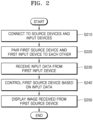
- FIG. 2 is a flowchart of an operating method of a display apparatus according to an embodiment.
- input devices and source devices may be connected to the display apparatus 100 through a wired or wireless network (S210).
- S210 a wired or wireless network
- the input devices 200 may be connected to the display apparatus 100 by using BT, a WLAN (Wi-Fi), a USB, or the like.
- the source devices may be connected to the display apparatus 100 by using BT, a WLAN (Wi-Fi), a USB, an HDMI, or the like.
- the disclosure is not limited thereto, and the input devices and the source devices may be connected to the display apparatus 100 by using various wired/wireless communication schemes. A method of connecting the source devices and the input devices to the display apparatus 100 will be described in detail below with reference to FIGS. 3 and 4 .
- the source devices and the input devices connected to the display apparatus 100 may be paired with each other (S220). For example, based on a user input of selecting a first source device from among the source devices and a first input device from among the input devices, the display apparatus 100 may connect the first source device and the first input device to each other. However, the disclosure is not limited thereto.
- the display apparatus 100 may relay input data between the paired first input device and first source device.
- the display apparatus 100 may receive input data from the first input device (S230) and control the first source device paired with the first input device based on the received input data (S240).
- the display apparatus 100 may convert the input data received from the first input device into input information corresponding to the first source device and transmit the input information to the first source device. For example, the display apparatus 100 may map an input for each of one or more objects included in an image received from the first source device to an input for each of one or more buttons or keys included in the first input device, and convert input data into input information based on mapping information. Alternatively, the display apparatus 100 may convert input data into input information based on layout information about the image received from the first source device. However, the disclosure is not limited thereto.
- the first source device may receive the input information, render an image to which a motion corresponding to the input information is applied, and transmit the image to the display apparatus 100.
- the display apparatus 100 may display the image received from the first source device (S250).
- FIG. 3 is a flowchart of a process of connecting a display apparatus and a peripheral device to each other in a first communication scheme, according to an embodiment.
- a peripheral device 400 may be one of the source devices 300 or the input devices 200 of FIG. 1 .
- the peripheral device 400 and the display apparatus 100 may be connected to each other by using BT or Bluetooth low energy (BLE) communication.
- the peripheral device 400 may transmit a BT advertisement packet (S310), and the display apparatus 100 may search for peripheral devices by using BT communication (S320) and display the searched peripheral devices.
- S310 BT advertisement packet
- S320 BT communication
- the display apparatus 100 may receive a user input of selecting one of the searched peripheral devices (S330).
- the display apparatus 100 may transmit a connection request to the selected peripheral device (S340).
- the peripheral device 400 may transmit a personal identification number (PIN) code to the display apparatus 100 (S350).
- PIN personal identification number
- the display apparatus 100 may display the PIN code received from the peripheral device 400 on a display, and a user may input the PIN code displayed on the display apparatus 100 into the peripheral device 400 (S370).
- the peripheral device 400 may determine whether the PIN code transmitted to the display apparatus 100 and the input PIN code are identical to each other, and when the PIN codes are identical, may complete establishing a connection with the display apparatus 100 (S380).
- FIG. 4 is a flowchart of a process of connecting a display apparatus and a peripheral device to each other in a second communication scheme, according to an embodiment.
- the peripheral device 400 and the display apparatus 100 may be connected to each other by using WLAN.
- peripheral device 400 and the display apparatus 100 may be connected to the same home network (S410, S420).
- the peripheral device 400 may transmit a pairing advertisement packet requesting pairing (S430), and the display apparatus 100 may search for devices within the same home network by using a multicast domain name system (mDNS) method (S440) and display searched peripheral devices.
- mDNS multicast domain name system
- the display apparatus 100 may receive a user input of selecting one of the searched peripheral devices (S450).
- the display apparatus 100 may transmit a connection request to the selected peripheral device (S460).
- the peripheral device 400 may approve a connection (S470) and complete establishing the connection with the display apparatus 100 (S480).
- FIGS. 5A to 5C are diagrams referenced to describe a method of pairing source devices and input devices connected to a display apparatus with each other, according to an embodiment.
- the display apparatus 100 may display, on a display, an image 510 received from a source device currently set as an input of the display apparatus 100.
- the display apparatus 100 may receive, from a first input device 210 (e.g., a remote controller), an input of a down arrow key among four direction keys included in the first input device 210.
- a first input device 210 e.g., a remote controller
- the display apparatus 100 may display, at the bottom of a display screen, a source device list 520 including items indicating one or more source devices connected to the display apparatus 100.
- the location where the source device list 520 is displayed is not limited thereto, and the source device list 520 may be displayed at various locations on the display screen.
- the display apparatus 100 may receive an input of selecting one of one or more source device items included in the source device list 520.
- the display apparatus 100 may receive an input of selecting an item 530 corresponding to a 'set-top box' from the source device list.
- the display apparatus 100 may switch the input of the display apparatus 100 to a selected source device (e.g., the 'set-top box') and display an image received from the 'set-top box' on the display.
- the display apparatus 100 may receive an input of an up arrow key among the four direction keys from the first input device 210. As shown in FIG. 5C , when the input of the up arrow key is received, the display apparatus 100 may display, at the top of the display screen, an input device list 540 including items indicating one or more input devices connected to the display apparatus 100. However, the location where the input device list 540 is displayed is not limited thereto, and the input device list 540 may be displayed at various locations on the display screen.
- the display apparatus 100 may receive an input of selecting one of one or more input device items included in the input device list 540. For example, the display apparatus 100 may receive an input of selecting an item 550 indicating a 'game pad' from the input device list 540.
- the display apparatus 100 may control a selected input device and a selected source device to be paired with each other. For example, as shown in FIG. 5C , the set-top box (source device) and the game pad (input device) may be paired with each other, and when the set-top box and the game pad are paired with each other, the display apparatus 100 may use the game pad to control the image (screen) received from the set-top box displayed on the display apparatus 100.
- FIG. 6 is a diagram referenced to describe an operation when a source device and an input device are connected to each other by 1:1, according to an embodiment.
- a first source device 610 among source devices connected to the display apparatus 100 may be paired with each other.
- the display apparatus 100 may receive input data from the first input device 620 and control the first source device 610 based on the received input data. For example, as shown in FIG. 6 , when an input of the display apparatus 100 is set to the first source device 610, the display apparatus 100 may display, on a display, an image received from the first source device 610. In this case, the image received from the first source device 610 may be the same as an image displayed on the first source device 610, or may be an image rendered in a background environment of the first source device 610 and be different from the image displayed on the first source device 610.
- the display apparatus 100 may receive input data from the first input device 620.
- the input data may be an input of controlling an image displayed on the display apparatus 100 and may include various types of inputs, such as a touch input, a button input, a key input, and a speech input.
- the display apparatus 100 may convert the input data received from the first source device 610 into input information corresponding to the first source device 610 and transmit the input information to the first source device 610.
- the first source device 610 may render an image based on the received input information and transmit the rendered image to the display apparatus 100.
- the display apparatus 100 may display the rendered image based on the input information. Accordingly, the image (screen) displayed on the display may be controlled based on the input data received from the first input device 620.
- the display apparatus 100 may transmit the image received from the first source device 610 (image displayed on the display apparatus 100) to the first input device 620.
- the first input device 620 may display the image received from the display apparatus 100.
- FIG. 7 is a diagram referenced to describe an operation when a source device and an input device are connected to each other by 1:N, according to an embodiment.
- one source device may be paired with a plurality of input devices.
- a second source device 710 among source devices connected to the display apparatus 100 and second to fourth input devices 720, 730, and 740 among input devices connected to the display apparatus 100 may be paired with each other.
- the display apparatus 100 may display the received image on a display.
- the display apparatus 100 may control the image displayed on the display by using the second to fourth input devices 720, 730, and 740. This has been described in detail with reference to FIG. 6 , and thus, a detailed description thereof will be omitted.
- the second input device 720 and the third input device 730 may respectively be a tablet and a PC, which are devices each including a display
- the fourth input device 740 may be a keyboard, which is a device that does not include a display. Accordingly, the display apparatus 100 may transmit the image received from the second source device 710 (screen displayed on the display apparatus 100) to the second and third input devices 720 and 730, and may not transmit the image (screen) to the fourth input device 740.
- the second and third input devices 720 and 730 may display the image received from the display apparatus 100 on the display.
- FIG. 8 is a diagram referenced to describe an operation when an input of a display apparatus is changed, according to an embodiment.
- a first source device 810 connected to the display apparatus 100 may be paired (connected or matched) with first to third input devices 820, 830, and 840.
- the display apparatus 100 may select, as an input, a second source device 850 from among one or more source devices connected to the display apparatus 100 and pair a fourth input device 860 with the second source device 850.
- the display apparatus 100 may display an image received from the second source device 850 and control the displayed image based on input data received from the fourth input device 860.
- the display apparatus 100 may release the paired (connected or matched) state between the second input device 830 and the first source device 810 and control the second input device 830 and the second source device 850 to be paired with each other.
- the display apparatus 100 may display an image received from the first source device 810 and control the displayed image based on input data received from the first to third input devices 820, 830, and 840.
- the image received from the second source device 850 is not displayed on the display apparatus 100, but may be displayed on a display of the fourth input device 860, and the paired (connected or matched) state between the second source device 850 and the fourth input device 860 may be maintained. Accordingly, the image received from the second source device 850 may be controlled based on the input data received from the fourth input device 860.
- the disclosure is not limited thereto.
- FIG. 9 is a diagram illustrating a method, performed by a display apparatus, of controlling source devices by using input devices, according to an embodiment.
- first to fourth source devices 910, 920, 930, and 940 may be connected to the display apparatus 100 according to an embodiment.
- the first source device 910 may be connected to the display apparatus 100 through a wireless display (Wi-Di)
- the second to fourth source devices 920, 930, and 940 may be connected to the display apparatus 100 through an HDMI.
- the disclosure is not limited thereto, the source devices may be connected to the display apparatus 100 through various types of wired/wireless communication.
- first to fifth input devices 950, 960, 970, 980, and 990 may be connected to the display apparatus.
- the first and second input devices 950 and 960 may be paired (connected or matched) with the second source device 920
- the third to fifth input devices 970, 980, and 990 may be paired (connected or matched) with the fourth source device 940.
- the first source device 910 and the third source device 930 connected to the display apparatus 100 are not paired (connected or matched) with any input device.
- the display apparatus 100 may route an image received from a source device to an input device paired (connected or matched) with the source device. For example, the display apparatus 100 may receive a second image from the second source device 920. When the first and second input devices 950 and 960 paired (connected or matched) with the second source device 920 each include a display, the display apparatus 100 may encode the second image and transmit the same to the first and second input devices 950 and 960.
- the display apparatus 100 may receive a fourth image from the fourth source device 940.
- the display apparatus 100 may encode the fourth image and transmit the same to the third input device 970.
- the display apparatus 100 may route input data received from an input device to a source device paired (connected or matched) with the input device. For example, the display apparatus 100 may receive input data from the first and second input devices 950 and 960 and control the received input data based on an input method of the second source device 920 paired with the first and second input devices 950 and 960. For example, when the second source device 920 is a game console, the display apparatus 100 may convert the input data received from the first and second input devices 950 and 960 into input information corresponding to the second source device 920 according to an input method of the game console, and transmit the input information to the second source device 920. In this case, the input information may be transmitted by a communication scheme (e.g., an HDMI scheme) in which the second source device 920 and the display apparatus 100 are connected to each other.
- a communication scheme e.g., an HDMI scheme
- the display apparatus 100 may receive input data from the third to fifth input devices 970, 980, and 990 and control the received input data based on an input method of the fourth source device 940 paired (connected or matched) with the third to fifth input devices 970, 980, and 990.
- the display apparatus 100 may convert the input data received from the third to fifth input devices 970, 980, and 990 into input information corresponding to the fourth source device 940 according to an input method of the PC, and transmit the input information to the fourth source device 940.
- the input information may be transmitted by a communication scheme (e.g., an HDMI scheme) in which the fourth source device 940 and the display apparatus 100 are connected to each other.
- a communication scheme e.g., an HDMI scheme
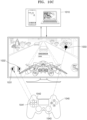
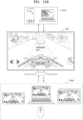
- FIGS. 10A to 10D are diagrams illustrating examples in which a display apparatus changes input data received from an input device into input information based on a source device control method, according to an embodiment.
- a first source device 1010 set as an input of the display apparatus 100 may be a device using a touch input or pointing input method, and a first input device 1020 paired (connected or matched) with the first source device 1010 may be a remote controller including four direction keys. Also, the display apparatus 100 may display a first image received from the first source device 1010, in which case the first image may include at least one item. In addition, the display apparatus 100 may display a cursor 1030.
- the display apparatus 100 may move the cursor 1030 based on input data received from the first input device 1020. For example, when an input of long pressing (long press) a first direction key among the four direction keys included in the first input device 1020 is received, the display apparatus 100 may move the cursor 1030 in a first direction.
- the display apparatus 100 may convert the input data received from the first input device 1020 into input information corresponding to the first source device 1010 and transmit the input information to the first source device 1010. For example, when an input (input data) of pressing an OK key included in the first input device 1020 is received while the cursor is located over a first item included in the first image, the display apparatus 100 may convert the input into an input (input information) of touching the first item in the first image and transmit the same to the first source device 1010.
- the first source device 1010 may receive the input information from the display apparatus 100, render a second image to which the input of touching the first item is applied, and transmit the second image to the display apparatus 100.
- the first source device 1010 may render an application execution screen (second image) on which a corresponding application is executed, and transmit the same to the display apparatus 100.
- the display apparatus 100 may display the application execution screen.
- a first image received from the first source device 1010 may be a game screen, and the display apparatus 100 may display the game screen.
- the game screen may display at least one operation icon.
- the display apparatus 100 may map keys included in the first input device 1020 to operation icons included in the game screen, respectively. For example, as shown in FIG. 10B , a first key 1021 may be mapped to a first operation icon 1031, a second key 1022 may be mapped to a second operation icon 1032, and a third key 1023 may be mapped to a third operation icon 1033.
- the display apparatus 100 convert input data received from the first input device 1020 into input information based on mapping information. For example, when an input of the first key 1021 is received from the first input device 1020, the display apparatus 100 may convert the input into an input (input information) of touching the first operation icon 1031 mapped to the first key 1021 and transmit the same to the first source device 1010.
- the first source device 1010 may receive the input information from the display apparatus 100, render a second image to which the input of touching the first operation icon 1031 is applied, and transmit the second image to the display apparatus 100.
- the first operation icon 1031 is an icon of moving a game main character to the right
- the second image may be a game screen in which the game main character has moved to the right.
- the display apparatus 100 may display the second image.
- a first image received from the first source device 1010 may be a game screen, and the display apparatus 100 may display the game screen.
- the game screen may include at least one operation icon, and the display apparatus 100 may display a cursor 1033 on the game screen.
- a second input device 1040 paired with the first source device 1010 may be a game controller (game pad) including buttons, a joystick, or the like.
- the display apparatus 100 may map buttons included in the second input device 1040 to operation icon s included in the game screen, respectively. For example, as shown in FIG. 10C , a first button 1041 may be mapped to the first operation icon 1031, and a second button 1042 may be mapped to the second operation icon 1032.
- the display apparatus 100 may convert input data received from the second input device 1040 into input information based on mapping information. This has been described in detail with reference to FIG. 10B , and thus, a detailed description thereof will be omitted.
- the display apparatus 100 may move the cursor 1033 displayed on the screen in the direction.
- a control method of the first source device 1010 may be a touch or pointing method
- a third input device 1050 paired (connected or matched) with the first source device 1010 may be a device including a touch screen or a pointing device (e.g., a mouse).
- the display apparatus 100 may convert input data received from the third input device 1050 into coordinate values corresponding to the first source device 1010 and transmit the same to the first source device 1010.
- the display apparatus 100 may convert coordinate values of the touched point into coordinate values on a screen of the first source device 1010, and transmit the coordinate values to the first source device 1010.
- the first source device 1010 may touch a corresponding point based on the received coordinate values, render an image in which the point has been touched, and transmit the image to the display apparatus 100.
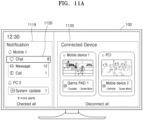
- FIGS. 11A and 11B are diagrams illustrating an example in which a display apparatus displays notification information and connected device information, according to an embodiment.
- the display apparatus 100 may display notification information about source devices connected to the display apparatus 100.
- the display apparatus 100 may display a list screen 1119 including first notification information generated from the first source device, second notification information generated from the second source device, and third notification information generated from the third source device.
- the display apparatus 100 may display the notification information separately for each source device from which a notification is generated.
- the display apparatus 100 may display an application execution screen corresponding to the notification information.
- the display apparatus 100 may transmit, to the first source device, an execution input of a message application corresponding to the message notification.
- the first source device may render a message application execution screen in which the message application is executed, and transmit the same to the display apparatus 100.
- the display apparatus 100 may display the message application execution screen.
- a display apparatus user may easily check all pieces of notification information generated from the source devices by using the display apparatus 100 without having to check each of the source devices for the notification information generated from the source devices.
- the display apparatus 100 may display connected device information 1130.
- the connected device information 1130 may include information about source devices connected to the display apparatus, information about input devices connected to the display apparatus, and pairing information between source devices and input devices.
- the display apparatus 100 may display items respectively indicating the first to third source devices.
- the items may display images or screens (e.g., a title image, a last execution screen, or the like) respectively corresponding to the source devices.
- first to fourth input devices when first to fourth input devices are connected to the display apparatus 100, the first input device is paired (connected or matched) with the first source device, the second input device is with the second source device, and the third and fourth input devices are paired (connected or matched) with the third source device, information about the first input device may be displayed in a first item indicating the first source device, information about the second input device may be displayed in a second item indicating the second source device, and information about the third and fourth input devices may be displayed in a third item indicating the third source device.
- the display apparatus 100 may display a setting screen 1140 corresponding to the selected item, as shown in FIG. 11B .
- the setting screen 1140 may include information about source devices, information about input devices paired (connected or matched) with source devices, an item to add an input device, an item to disconnect an input device, an item to disconnect all, or the like.
- an additional input device to be paired (connected or matched) with a source device may be set, and when one of input devices included in the information about the input devices is selected and the item to disconnect an input device is selected, a paired (connected or matched) state of the selected input device may be released.
- paired (connected or matched) states of all input devices paired (connected or matched) with source devices may be released.
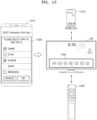
- FIGS. 12A to 12C are diagrams illustrating a process of setting a source device as an input of a display apparatus according to locked states of source devices, according to an embodiment.
- the display apparatus 100 may display a source device list 1210 including one or more source devices pre-registered in the display apparatus 100.
- a source device connected to the same network as the display apparatus 100 may be displayed in an active state, and a source device connected to a different network may be displayed in an inactive state.
- a first item 1221 indicating a first mobile device located in the house and connected through a home network may be displayed in an active state
- a second item 1222 indicating a second mobile device located outside the house, such as at a workplace, and connected through a different network may be displayed in an inactive state. Accordingly, only source devices located in the house and connected through the home network may be set as inputs of the display apparatus 100.
- the disclosure is not limited thereto.
- the display apparatus 100 may display a password input screen.
- an image corresponding to the first mobile device 1230 may be displayed by inputting a password set when the first mobile device 1230 is first connected to the display apparatus 100.
- the image corresponding to the first mobile device 1230 is an image that is rendered by the first mobile device 1230 and transmitted to the display apparatus 100.
- the first mobile device 1230 may continue to maintain the locked state, and a display thereof may be turned off.
- the first mobile device 1230 may render the image in a background environment and transmit the image to the display apparatus 100.
- the display apparatus 100 may transmit a connection request signal to the first mobile device 1230.
- the first mobile device 1230 may display a message 1240 asking whether to use the first mobile device 1230 as an input of the display apparatus 100.
- the display apparatus 100 may display the image corresponding to the first mobile device 1230.
- FIG. 13 is a diagram illustrating an operation of setting an application to be executed by using a display apparatus, according to an embodiment.
- the source device 1310 may set an application to be executed on the display apparatus 100 among applications installed on the source device 1310.
- the source device 1310 may display a first application list 1320 including applications installed on the source device 1310.
- an application that is not executable on the display apparatus 100 due to a policy or technology may be displayed in an inactive state.
- the source device 1310 may set an application to be executed on the display apparatus 100 by receiving a user input of selecting an application.
- the source device 1310 may generate a second application list including a selected application, render a screen including the second application list, and transmit the screen to the display apparatus.
- the display apparatus may display a screen including a second application list 1330, and when the second application list 1330 is displayed, the display apparatus may receive an input of selecting one application included in the second application list 1330 from an input device 1340 paired with the source device 1310.
- the display apparatus 100 may place a focus on one of one or more applications included in the second application list 1330, receive an input of moving the focus from the input device 1340, and receive an input of selecting an application on which the focus is located.
- the display apparatus 100 may convert input data received from the input device 1340 into input information corresponding to the source device 1310, and transmit the input information to the source device 1310. Accordingly, the source device 1310 may identify a selected application, and render an execution screen by executing the selected application. The rendered execution screen may be transmitted to the display apparatus 100, and the display apparatus 100 may display an application execution screen.
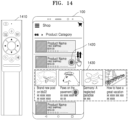
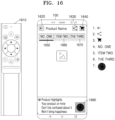
- FIGS. 14 to 16 are diagrams referenced to describe a method of controlling a touch-type source device by using an input device, according to an embodiment.
- the display apparatus 100 may display an image received from a touch-type source device, and display a cursor or pointer 1420.
- An input device 1410 may be a remote controller including four direction keys. When an input of pressing once or holding down one of the four direction keys is received from the input device 1410, the display apparatus 100 may move the cursor or pointer in a corresponding direction.
- the display apparatus 100 may receive, from the input device 1410, an input of pressing twice or holding down a right arrow key.
- the display apparatus 100 may convert the input data received from the input device 1410, such that a motion of scrolling to the right occurs by touching a corresponding area.
- the display apparatus 100 may transmit the converted input data to a source device, and the source device may scroll to the right based on the converted input data. Also, the source device may render a screen to which a scroll motion is applied, and transmit the screen to the display apparatus 100.
- the display apparatus 100 may analyze a layout structure of the image received from the source device, identify an object on which a cursor or pointer is located, and identify objects having the same structure as the object.
- the display apparatus 100 may convert a key or button input included in an input device 1510 into another input according to circumstances, based on a result of the analysis and identification.
- the display apparatus 100 may convert the input data received from the input device 1510, such that a motion of scrolling to the right occurs when an input of a down arrow key or a right arrow key included in the input device is received.
- the display apparatus 100 may convert the input data received from the input device 1510, such that a motion of scrolling to the left occurs when an input of an up arrow key or a left arrow key is received.
- the display apparatus 100 may transmit the converted input data to the source device, and the source device may scroll to the right or to the left based on the converted input data. Also, the source device may render a screen to which a motion of scrolling to the right or a motion of scrolling to the left is applied, and transmit the screen to the display apparatus 100.
- the display apparatus 100 may convert the input data received from the input device 1510, such that a motion of scrolling down occurs when an input of a down arrow key or a right arrow key included in the input device 1510 is received.
- the display apparatus 100 may convert the input data received from the input device 1510, such that a motion of scrolling up occurs when an input of an up arrow key or a left arrow key is received.
- the display apparatus 100 may transmit the converted input data to the source device, and the source device may scroll down or up based on the converted input data. Also, the source device may render a screen to which a motion of scrolling down or a motion of scrolling up is applied, and transmit the screen to the display apparatus 100.
- the display apparatus 100 may analyze a layout structure of an image (screen) received from the source device, identify objects to which events (e.g., a touch event, etc.) are registered among objects included in the image, and determine the order of objects based on locations of the identified objects.
- events e.g., a touch event, etc.
- first to seventh objects 1620, 1630, 1640, 1650, 1660, 1670, and 1680 included in a screen are objects set to perform a preset operation according to a touch input.
- the display apparatus 100 may determine the order based on locations of the first to seventh objects. For example, the order of objects may be determined from top to bottom and from left to right. Accordingly, the first object 1620 may be determined as number 1, the second object 1630 may be determined as number 2, the third object 1640 may be determined as number 3, the fourth object 1650 may be determined as number 4, the fifth object 1660 may be determined as number 5, the sixth object 1670 may be determined as number 6, and the seventh object 1680 may be determined as number 7.
- the display apparatus 100 may convert the input data, such that a motion of moving the focus to the fourth object 1650, which is a next order of the third object, occurs when an input of a right arrow key included in an input device 1610 is received.
- the display apparatus 100 may convert the input data, such that a motion of moving the focus to the second object 1630, which is a previous order of the third object 1640, occurs when an input of a left arrow key included in the input device 1610 is received.
- the display apparatus 100 may convert the input data, such that a motion of moving the focus to the seventh object 1680, which is located below the fourth object 1650, occurs when an input of a down arrow key included in the input device 1610 is received.
- the display apparatus 100 may convert the input data, such that a motion of moving the focus to the first object 1620, which is located above the fourth object 1650, occurs when an input of an up arrow key included in the input device is received.
- the display apparatus 100 may transmit the converted input data to the source device, and the source device may move the focus based on the converted input data. Also, the source device may render a screen on which the focus is moved, and transmit the screen to the display apparatus.
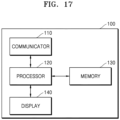
- FIG. 17 is a block diagram of a configuration of a display apparatus according to an embodiment.
- the display apparatus 100 may include a communicator 110, a processor 120, a memory 130, and a display 140.
- the communicator 110 may transmit or receive data or signals to or from an external device or an external server under control by the processor 120.
- the communicator 110 according to an embodiment may communicate with source devices and input devices by using at least one wired or wireless communication network.
- the communicator 110 may transmit or receive data or signals by using at least one of methods such as a WLAN, for example, Wi-Fi, BT, wired Ethernet, infrared (IR), BLE, ultrasound, and Zigbee.
- a WLAN for example, Wi-Fi, BT, wired Ethernet, infrared (IR), BLE, ultrasound, and Zigbee.
- the communicator 110 may include at least one of communication modules capable of transmitting or receiving data according to a communication protocol corresponding to the aforementioned WLAN, for example, Wi-Fi, BT, wired Ethernet, IR, BLE, ultrasound, and Zigbee.
- the communicator 110 may search for a peripheral device (source device or input device) by using Wi-Fi communication and BT or BLE communication.
- the communicator 110 may receive an image or speech from a source device connected to the display apparatus 100 and receive input data from an input device, under the control by the processor 120.
- the processor 120 may execute one or more programs stored in the memory 130.
- the processor 120 may include a single core, a dual core, a triple core, a quadruple core, and a core of a multiple thereof. Also, the processor 120 may include a plurality of processors.
- the memory 130 may store various types of data, programs, or applications for driving and controlling the display apparatus 100.
- a program stored in the memory 130 may include one or more instructions.
- the program (one or more instructions) or applications stored in the memory 130 may be executed by the processor 120.
- the processor 120 may control source devices and input devices, which are connected to the display apparatus 100, to be paired (connected or matched) with each other.
- the processor 120 may route the image to an input device paired (connected or matched) with the source device.
- the processor 120 may convert the input data into input information corresponding to the source device paired (connected or matched) with the input device, and route the input information to the source device.
- the processor 120 may map an input for each of one or more objects included in an image received from a first source device to an input for each of one or more buttons or keys included in a first input device, and convert input data into input information based on mapping information. Alternatively, the processor 120 may convert input data into input information based on layout information about the image received from the first source device. However, the disclosure is not limited thereto.
- the display 140 generates a driving signal by converting an image signal, a data signal, an on-screen display (OSD) signal, a control signal, or the like processed by the processor 120.
- the display 130 may be implemented as a plasma display panel (PDP), a liquid crystal display (LCD), an organic light-emitting diode (OLED) display, a flexible display, or the like, and may also be implemented as a three-dimensional (3D) display.
- the display 130 may be configured as a touch screen to be used as an input device other than an output device.
- the display 140 may receive an image from a source device currently set as an input of the display apparatus 100, and display the image.
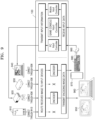
- FIG. 18 is a block diagram of a configuration of a display apparatus 1800 according to another embodiment.
- the display apparatus 1800 of FIG. 18 may be an embodiment of the display apparatus 100 described above with reference to FIGS. 1 to 17 .
- the display apparatus 1800 may include a tuner 1840, a processor 1810, a display 1820, a communicator 1850, a sensor 1830, an inputter/outputter 1870, a video processor 1880, an audio processor 1885, an audio outputter 1860, a memory 1890, and a power supply 1895.
- the communicator 1850 of FIG. 18 is a component corresponding to the communicator 110 of FIG. 17
- the processor 1810 of FIG. 18 is a component corresponding to the processor 120 of FIG. 17
- the memory 1890 of FIG. 18 is a component corresponding to the memory 130 of FIG. 17
- the display 1820 of FIG. 18 is a component corresponding to the display 140 of FIG. 17 . Therefore, the same description that are already provided above will be omitted.
- the tuner 1840 may tune and select only a frequency of a channel that the display apparatus 1800 is to receive, from among a large number of radio wave components, by performing amplification, mixing, resonance, etc. on a broadcast signal received in a wired or wireless manner.
- the broadcast signal includes audio, video, and additional information (e.g., electronic program guide (EPG)).
- EPG electronic program guide
- the tuner 1840 may receive broadcast signals from various sources, such as a terrestrial broadcast, a cable broadcast, a satellite broadcast, an Internet broadcast, and the like.
- the tuner 1840 may receive a broadcast signal from a source, such as an analog broadcast or a digital broadcast.
- the sensor 1830 may detect a speech, image, or interaction of a user, and include a microphone 1831, a camera 1832, and a light receiver 1833.
- the microphone 1831 receives a speech uttered by the user.
- the microphone 1831 may convert the received speech into an electrical signal and output the electrical signal to the processor 1810.
- the speech of the user may include, for example, a speech corresponding to a menu or function of the display apparatus 1800.
- the camera 1832 may receive an image (e.g., consecutive image frames) corresponding to a motion of the user including a gesture in a range recognizable by a camera.
- the processor 1810 may select a menu displayed on the display apparatus 1800 by using a received motion recognition result, or perform a control operation corresponding to the motion recognition result.
- the light receiver 1833 receives an optical signal (including a control signal) from an external control device through an optical window (not shown) of a bezel of the display 1820 or the like.
- the light receiver 1833 may receive an optical signal corresponding to a user input (e.g., a touch, a press, a touch gesture, a speech, or a motion) from the control device.
- a control signal may be extracted from the received optical signal under the control by the processor 1810.
- the inputter/outputter 1870 may receive a video (e.g., a moving image, etc.), audio (e.g., a speech, music, etc.) and additional information (e.g., EPG, etc.) from outside the display apparatus 1800.
- the inputter/outputter 1870 may include at least one of an HDMI port, a mobile high-definition link (MHL) port, a USB port, a display port (DP), a thunderbolt port, a video graphics array (VGA) port, a red-green-blue (RGB) port, a D-subminiature (D-SUB) port, a digital visual interface (DVI) port, a component jack, and a PC port.
- MHL mobile high-definition link
- DP display port
- thunderbolt port e.g., a video graphics array (VGA) port, a red-green-blue (RGB) port, a D-subminiature (D-SUB) port
- the processor 1810 controls overall operations of the display apparatus 1800 and the flow of signals between internal components of the display apparatus 1800, and processes data.
- the processor 1810 may execute an operation system (OS) and various applications stored in the memory 1890 when there is a user input or a preset and stored condition is satisfied.
- OS operation system
- the processor 1810 may include random access memory (RAM) storing signals or data input from outside the display apparatus 1800, or used as a storage area corresponding to various operations performed in the display apparatus 1800, read-only memory (ROM) storing a control program for controlling the display apparatus 1800, and a processor.
- RAM random access memory
- ROM read-only memory
- the video processor 1880 processes video data received by the display apparatus 1800.
- the video processor 1880 may perform various types of image processing, such as decoding, scaling, noise cancellation, frame rate conversion, resolution conversion, and the like, on video data.
- the display 1820 generates a driving signal by converting an image signal, a data signal, an OSD signal, a control signal, or the like processed by the processor 1810.
- the display 1820 may be implemented as a PDP, an LCD, an OLED display, a flexible display, or the like, and may also be implemented as a 3D display. Furthermore, the display 1820 may be configured as a touch screen to be used as an input device other than an output device.
- the audio processor 1885 processes audio data.
- the audio processor 1885 may perform various types of processing, for example, decoding, amplification, noise cancellation, and the like, on the audio data.
- the audio processor 1885 may include a plurality of audio processing modules to process audio data corresponding to a plurality of pieces of content.
- the audio outputter 1860 outputs audio data included in a broadcast signal received through the tuner 1840, under the control by the processor 1810.
- the audio outputter 1860 may output audio data (e.g., a speech or sound) input through the communicator 1850 or the inputter/outputter 1870.
- the audio outputter 1860 may output audio data stored in the memory 1890, under the control by the processor 1810.
- the audio outputter 1860 may include at least one of a speaker, a headphone output port, or a Sony/Philips digital interface (S/PDIF) output port.
- S/PDIF Sony/Philips digital interface
- the power supply 1895 supplies power from an external power source to the internal components of the display apparatus 1800 under the control by the processor 1810.
- the power supply 1895 may supply power output from one or more batteries (not shown) provided in the display apparatus 1800, to the internal components under the control by the processor 1810.
- the memory 1890 may store various types of data, programs, or applications for driving and controlling the display apparatus 1800, under the control by the processor 1810.
- the memory 1890 may include a broadcast reception module, a channel control module, a volume control module, a communication control module, a speech recognition module, a motion recognition module, an optical reception module, a display control module, an audio control module, an external input control module, a power control module, a power control module of an external device connected in a wireless manner (e.g., BT), a speech database (DB), or a motion DB.
- the modules and DBs of the memory 1890 may be implemented in the form of software in the display apparatus 1800 to perform a broadcast reception control function, a channel control function, a volume control function, a communication control function, a speech recognition function, a motion recognition function, an optical reception control function, a display control function, an audio control function, an external input control function, a power control function, or a power control function of an external device connected in a wireless manner (e.g., BT).
- the processor 1810 may perform respective functions by using the software stored in the memory 1890.
- the block diagrams of the display apparatuses 100 and 1800 shown in FIGS. 17 and 18 are for an embodiment.
- Each of the components of the block diagrams may be integrated, added, or omitted according to the specifications of the display apparatuses 100 and 1800 that are actually implemented. That is, two or more components may be combined into one component, or one component may be subdivided into two or more components as needed.
- functions performed by each block are for explaining embodiments, and specific operations or devices thereof do not limit the scope of the disclosure.
- the operating method of the display apparatus may be embodied as program commands executable by various computer means and may be recorded on a computer-readable recording medium.
- the computer-readable recording medium may include program commands, a data file, a data structure, etc. alone or in combination.
- the program commands written to the computer-readable recording medium may be specifically designed and configured for the disclosure or may be well-known and available to one of ordinary skill in the art.
- Examples of the computer-readable recording medium may include magnetic media such as hard disks, floppy disks, and magnetic tapes, optical media such as compact disk read-only memory (CD-ROM) and digital versatile disks (DVDs), magneto-optical media such as floptical disks, and hardware devices especially configured to store and execute program commands, such as read-only memory (ROM), random access memory (RAM) and flash memory, etc.
- Examples of the program commands include advanced language code that can be executed by a computer by using an interpreter or the like as well as machine language code made by a compiler.
- the display apparatus and the operating method therefor may be included in a computer program product and provided in that form.
- the computer program product may be traded as a product between a seller and a buyer.
- the computer program product may include an S/W program or a computer-readable storage medium storing the S/W program.
- the computer program product may include an S/W program product (e.g., a downloadable application) electronically distributed through a manufacturing company of an electronic apparatus or an electronic market (e.g., Google Play Store or App Store).
- S/W program product e.g., a downloadable application
- the storage medium may be a storage medium of a server of a manufacturer, a server of an electronic market, or a relay server that temporarily stores the S/W program.
- the computer program product may include, in a system including a server and a client device, a storage medium of the server or a storage medium of the client device.
- a third device e.g., a smartphone
- the computer program product may include a storage medium of the third device.
- the computer program product may include an S/W program itself, which is transmitted from the server to the client device or the third device, or transmitted from the third device to the client device.
- one of the server, the client device, and the third device may execute a method according to disclosed embodiments by executing the computer program product.
- at least two of the server, the client device, and the third device may execute the method according to disclosed embodiments in a distributed fashion by executing the computer program product.
- the server e.g., a cloud server or an Al server
- the server may execute the computer program product stored in the server and may control the client device communicating with the server to perform the method according to disclosed embodiments.
Landscapes
- Engineering & Computer Science (AREA)
- Theoretical Computer Science (AREA)
- Physics & Mathematics (AREA)
- General Physics & Mathematics (AREA)
- Computer Hardware Design (AREA)
- General Engineering & Computer Science (AREA)
- Multimedia (AREA)
- Signal Processing (AREA)
- Human Computer Interaction (AREA)
- Computer Security & Cryptography (AREA)
- Software Systems (AREA)
- Computer Networks & Wireless Communication (AREA)
- Mathematical Physics (AREA)
- User Interface Of Digital Computer (AREA)
- Controls And Circuits For Display Device (AREA)
Applications Claiming Priority (2)
| Application Number | Priority Date | Filing Date | Title |
|---|---|---|---|
| KR1020210003564A KR102955854B1 (ko) | 2021-01-11 | 2021-01-11 | 디스플레이 장치 및 그 동작방법 |
| PCT/KR2021/001369 WO2022149648A1 (ko) | 2021-01-11 | 2021-02-02 | 디스플레이 장치 및 그 동작방법 |
Publications (2)
| Publication Number | Publication Date |
|---|---|
| EP4254166A1 true EP4254166A1 (de) | 2023-10-04 |
| EP4254166A4 EP4254166A4 (de) | 2024-05-29 |
Family
ID=82357164
Family Applications (1)
| Application Number | Title | Priority Date | Filing Date |
|---|---|---|---|
| EP21917811.8A Pending EP4254166A4 (de) | 2021-01-11 | 2021-02-02 | Anzeigevorrichtung und betriebsverfahren dafür |
Country Status (4)
| Country | Link |
|---|---|
| US (1) | US12260141B2 (de) |
| EP (1) | EP4254166A4 (de) |
| KR (1) | KR102955854B1 (de) |
| WO (1) | WO2022149648A1 (de) |
Families Citing this family (2)
| Publication number | Priority date | Publication date | Assignee | Title |
|---|---|---|---|---|
| WO2025048125A1 (ko) * | 2023-08-25 | 2025-03-06 | 삼성전자 주식회사 | 전자 장치 및 전자 장치의 동작 방법 |
| KR20250109885A (ko) * | 2024-01-11 | 2025-07-18 | 엘지전자 주식회사 | 싱크 기기 및 그의 동작 방법 |
Family Cites Families (27)
| Publication number | Priority date | Publication date | Assignee | Title |
|---|---|---|---|---|
| KR101170403B1 (ko) | 2010-08-26 | 2012-08-01 | 김상국 | 디스플레이 시스템 원격제어 방법 |
| US9128524B2 (en) * | 2011-01-18 | 2015-09-08 | Lg Electronics Inc. | Method for delivering user input, and device using same |
| KR101092009B1 (ko) | 2011-04-19 | 2011-12-08 | (주)마이크로텍시스템 | 스위칭 방식의 무선 다중연결 주변장치 |
| TW201315224A (zh) * | 2011-09-27 | 2013-04-01 | Tpv Display Technology Xiamen | 遠端播放電視節目的方法及電視系統 |
| US8558790B2 (en) * | 2012-03-04 | 2013-10-15 | Lg Electronics Inc. | Portable device and control method thereof |
| KR101925027B1 (ko) | 2012-07-30 | 2018-12-04 | 엘지전자 주식회사 | 영상표시장치 및 이를 이용한 사용자 인터페이스 제공 방법 |
| US9632648B2 (en) | 2012-07-06 | 2017-04-25 | Lg Electronics Inc. | Mobile terminal, image display device and user interface provision method using the same |
| KR101911957B1 (ko) | 2012-07-13 | 2018-10-26 | 주식회사 엘지유플러스 | 단말을 이용한 스마트tv 제어 장치 및 방법 |
| US10299110B2 (en) * | 2012-08-23 | 2019-05-21 | Samsung Electronics Co., Ltd. | Information transmission method and system, device, and computer readable recording medium thereof |
| US9978260B2 (en) | 2012-12-18 | 2018-05-22 | Samsung Electronics Co., Ltd. | Method and apparatus for controlling a home device remotely in a home network system |
| US10905943B2 (en) * | 2013-06-07 | 2021-02-02 | Sony Interactive Entertainment LLC | Systems and methods for reducing hops associated with a head mounted system |
| KR20150006195A (ko) * | 2013-07-08 | 2015-01-16 | 엘지전자 주식회사 | 웨어러블 디바이스 및 그 제어 방법 |
| KR102064952B1 (ko) | 2013-07-12 | 2020-01-10 | 삼성전자주식회사 | 수신 데이터를 이용하여 어플리케이션을 운영하는 전자 장치 |
| KR102120843B1 (ko) | 2014-04-22 | 2020-06-09 | 삼성전자주식회사 | 디스플레이 장치 및 그의 멀티 뷰 디스플레이 방법 |
| JP6612183B2 (ja) * | 2015-06-12 | 2019-11-27 | 任天堂株式会社 | ゲームコントローラ |
| KR101790429B1 (ko) | 2016-02-15 | 2017-10-26 | 엘지전자 주식회사 | 디스플레이 장치 및 그의 동작 방법 |
| KR102519578B1 (ko) | 2016-07-05 | 2023-04-07 | 삼성전자주식회사 | 전자 장치의 화면 표시 방법 및 그 장치 |
| US11243997B2 (en) * | 2017-08-09 | 2022-02-08 | The Nielsen Company (Us), Llc | Methods and apparatus to determine sources of media presentations |
| KR102393917B1 (ko) * | 2017-10-13 | 2022-05-04 | 삼성전자주식회사 | 원격 제어 장치, 디스플레이 장치, 시스템 및 그 제어 방법 |
| US10200733B1 (en) * | 2018-03-09 | 2019-02-05 | Krishna Adusumilli | Automatic input selection |
| KR102495643B1 (ko) | 2018-03-26 | 2023-02-06 | 삼성전자주식회사 | 입력 수단에 따른 어플리케이션으로 사용자 입력을 전달하는 모바일 전자 장치 및 방법 |
| JP7073526B2 (ja) * | 2018-04-02 | 2022-05-23 | グーグル エルエルシー | インタラクティブなクラウドゲームのための方法、デバイス、およびシステム |
| KR20190000328A (ko) | 2018-11-16 | 2019-01-02 | 주식회사 부림 | 입출력을 공유하는 영상처리장치 |
| KR20220052961A (ko) * | 2019-08-23 | 2022-04-28 | 인튜어티브 서지컬 오퍼레이션즈 인코포레이티드 | 트랙 상의 이동 가능한 디스플레이 유닛 |
| US11587330B2 (en) * | 2019-12-31 | 2023-02-21 | Robert Bosch Gmbh | Visual analytics platform for updating object detection models in autonomous driving applications |
| KR102849286B1 (ko) * | 2020-02-24 | 2025-08-25 | 삼성전자주식회사 | 디지털 영상 안정화 장치, 그것의 동작 방법, 및 그것을 갖는 전자 장치 |
| US12169422B2 (en) * | 2021-09-14 | 2024-12-17 | Apple Inc. | Self-retracting display device and techniques for protecting screen using drop detection |
-
2021
- 2021-01-11 KR KR1020210003564A patent/KR102955854B1/ko active Active
- 2021-02-02 WO PCT/KR2021/001369 patent/WO2022149648A1/ko not_active Ceased
- 2021-02-02 EP EP21917811.8A patent/EP4254166A4/de active Pending
-
2023
- 2023-07-11 US US18/220,620 patent/US12260141B2/en active Active
Also Published As
| Publication number | Publication date |
|---|---|
| US12260141B2 (en) | 2025-03-25 |
| KR20220101485A (ko) | 2022-07-19 |
| KR102955854B1 (ko) | 2026-04-22 |
| EP4254166A4 (de) | 2024-05-29 |
| US20230350624A1 (en) | 2023-11-02 |
| WO2022149648A1 (ko) | 2022-07-14 |
Similar Documents
| Publication | Publication Date | Title |
|---|---|---|
| US11231901B2 (en) | Display device performing screen mirroring and operating method thereof | |
| US11722218B2 (en) | Image display device and operation method thereof | |
| US11356741B2 (en) | Image display apparatus and method for operating same | |
| CN102110357B (zh) | 信息处理装置及系统 | |
| EP3190571B1 (de) | Bildanzeigevorrichtung und verfahren zu deren betrieb | |
| US12260141B2 (en) | Display device and operating method therefor | |
| US20170322635A1 (en) | Image displaying apparatus and method of operating the same | |
| US9930392B2 (en) | Apparatus for displaying an image and method of operating the same | |
| USRE48496E1 (en) | Electronic device, system including electronic device and relay apparatus, and control method for the same | |
| US20160231898A1 (en) | Display apparatus and method | |
| EP3038374A1 (de) | Anzeigevorrichtung und anzeigeverfahren | |
| US10582257B2 (en) | Server, image display apparatus, and method of operating the image display apparatus | |
| US9525905B2 (en) | Mapping visual display screen to portable touch screen | |
| US20130212629A1 (en) | Television system operated with remote touch control | |
| US10530737B2 (en) | Electronic device and operation method thereof | |
| CN108476342B (zh) | 显示设备及其操作方法 | |
| US11622157B2 (en) | Display apparatus and operating method of the same | |
| EP4528495A1 (de) | Anzeigevorrichtung und verfahren zum betrieb davon | |
| US20230180001A1 (en) | Electronic apparatus and controlling method thereof | |
| US20170272802A1 (en) | Electronic device and method of operating the same | |
| CN108702546A (zh) | 服务器、图像显示装置及操作图像显示装置的方法 | |
| US20220309095A1 (en) | Display device | |
| CN115437533A (zh) | 一种显示设备、喜爱频道添加方法、装置和介质 |
Legal Events
| Date | Code | Title | Description |
|---|---|---|---|
| STAA | Information on the status of an ep patent application or granted ep patent |
Free format text: STATUS: THE INTERNATIONAL PUBLICATION HAS BEEN MADE |
|
| PUAI | Public reference made under article 153(3) epc to a published international application that has entered the european phase |
Free format text: ORIGINAL CODE: 0009012 |
|
| STAA | Information on the status of an ep patent application or granted ep patent |
Free format text: STATUS: REQUEST FOR EXAMINATION WAS MADE |
|
| 17P | Request for examination filed |
Effective date: 20230626 |
|
| AK | Designated contracting states |
Kind code of ref document: A1 Designated state(s): AL AT BE BG CH CY CZ DE DK EE ES FI FR GB GR HR HU IE IS IT LI LT LU LV MC MK MT NL NO PL PT RO RS SE SI SK SM TR |
|
| DAV | Request for validation of the european patent (deleted) | ||
| DAX | Request for extension of the european patent (deleted) | ||
| A4 | Supplementary search report drawn up and despatched |
Effective date: 20240429 |
|
| RIC1 | Information provided on ipc code assigned before grant |
Ipc: H04N 21/422 20110101ALI20240423BHEP Ipc: G09G 5/12 20060101ALI20240423BHEP Ipc: G06F 21/84 20130101ALI20240423BHEP Ipc: G06F 21/72 20130101ALI20240423BHEP Ipc: G06F 13/38 20060101ALI20240423BHEP Ipc: G06F 3/14 20060101AFI20240423BHEP |