EP4246397A1 - Information processing apparatus, program, and information processing method - Google Patents
Information processing apparatus, program, and information processing method Download PDFInfo
- Publication number
- EP4246397A1 EP4246397A1 EP22199468.4A EP22199468A EP4246397A1 EP 4246397 A1 EP4246397 A1 EP 4246397A1 EP 22199468 A EP22199468 A EP 22199468A EP 4246397 A1 EP4246397 A1 EP 4246397A1
- Authority
- EP
- European Patent Office
- Prior art keywords
- workflow
- information processing
- file
- user
- designation
- Prior art date
- Legal status (The legal status is an assumption and is not a legal conclusion. Google has not performed a legal analysis and makes no representation as to the accuracy of the status listed.)
- Pending
Links
Images






Classifications
-
- G—PHYSICS
- G06—COMPUTING OR CALCULATING; COUNTING
- G06F—ELECTRIC DIGITAL DATA PROCESSING
- G06F3/00—Input arrangements for transferring data to be processed into a form capable of being handled by the computer; Output arrangements for transferring data from processing unit to output unit, e.g. interface arrangements
- G06F3/01—Input arrangements or combined input and output arrangements for interaction between user and computer
- G06F3/048—Interaction techniques based on graphical user interfaces [GUI]
- G06F3/0484—Interaction techniques based on graphical user interfaces [GUI] for the control of specific functions or operations, e.g. selecting or manipulating an object, an image or a displayed text element, setting a parameter value or selecting a range
- G06F3/04847—Interaction techniques to control parameter settings, e.g. interaction with sliders or dials
-
- G—PHYSICS
- G06—COMPUTING OR CALCULATING; COUNTING
- G06Q—INFORMATION AND COMMUNICATION TECHNOLOGY [ICT] SPECIALLY ADAPTED FOR ADMINISTRATIVE, COMMERCIAL, FINANCIAL, MANAGERIAL OR SUPERVISORY PURPOSES; SYSTEMS OR METHODS SPECIALLY ADAPTED FOR ADMINISTRATIVE, COMMERCIAL, FINANCIAL, MANAGERIAL OR SUPERVISORY PURPOSES, NOT OTHERWISE PROVIDED FOR
- G06Q10/00—Administration; Management
- G06Q10/06—Resources, workflows, human or project management; Enterprise or organisation planning; Enterprise or organisation modelling
-
- G—PHYSICS
- G06—COMPUTING OR CALCULATING; COUNTING
- G06F—ELECTRIC DIGITAL DATA PROCESSING
- G06F3/00—Input arrangements for transferring data to be processed into a form capable of being handled by the computer; Output arrangements for transferring data from processing unit to output unit, e.g. interface arrangements
- G06F3/01—Input arrangements or combined input and output arrangements for interaction between user and computer
- G06F3/048—Interaction techniques based on graphical user interfaces [GUI]
- G06F3/0481—Interaction techniques based on graphical user interfaces [GUI] based on specific properties of the displayed interaction object or a metaphor-based environment, e.g. interaction with desktop elements like windows or icons, or assisted by a cursor's changing behaviour or appearance
- G06F3/0482—Interaction with lists of selectable items, e.g. menus
-
- G—PHYSICS
- G06—COMPUTING OR CALCULATING; COUNTING
- G06Q—INFORMATION AND COMMUNICATION TECHNOLOGY [ICT] SPECIALLY ADAPTED FOR ADMINISTRATIVE, COMMERCIAL, FINANCIAL, MANAGERIAL OR SUPERVISORY PURPOSES; SYSTEMS OR METHODS SPECIALLY ADAPTED FOR ADMINISTRATIVE, COMMERCIAL, FINANCIAL, MANAGERIAL OR SUPERVISORY PURPOSES, NOT OTHERWISE PROVIDED FOR
- G06Q10/00—Administration; Management
- G06Q10/06—Resources, workflows, human or project management; Enterprise or organisation planning; Enterprise or organisation modelling
- G06Q10/063—Operations research, analysis or management
- G06Q10/0633—Workflow analysis
-
- G—PHYSICS
- G06—COMPUTING OR CALCULATING; COUNTING
- G06Q—INFORMATION AND COMMUNICATION TECHNOLOGY [ICT] SPECIALLY ADAPTED FOR ADMINISTRATIVE, COMMERCIAL, FINANCIAL, MANAGERIAL OR SUPERVISORY PURPOSES; SYSTEMS OR METHODS SPECIALLY ADAPTED FOR ADMINISTRATIVE, COMMERCIAL, FINANCIAL, MANAGERIAL OR SUPERVISORY PURPOSES, NOT OTHERWISE PROVIDED FOR
- G06Q10/00—Administration; Management
- G06Q10/10—Office automation; Time management
Definitions
- the present disclosure relates to an information processing apparatus, a program, and an information processing method.
- Japanese Patent No. 5535054 discloses an information processing apparatus that enables job data stored in a folder to be securely processed and enables the processing state of the job data to be easily indicated.
- This information processing apparatus performs processing on job data stored in a folder, and includes an input unit, a movement unit, a first storage unit, an execution unit, and a second storage unit.
- the input unit inputs an execution instruction file including a description of an instruction for executing processing to a first folder.
- the movement unit moves job data stored in the first folder and to be subjected to the processing to a second folder different from the first folder.
- the first storage unit stores a file including a description indicating that the processing is in execution in the first folder.
- the execution unit performs the processing on the job data moved to the second folder by the movement unit and to be subjected to the processing.
- the second storage unit stores a file including a description indicating the end of the processing in the first folder in place of the file including the description indicating that the processing is in execution.
- Japanese Patent No. 5845667 discloses a workflow processing apparatus that enables flow definition data to be dynamically changed and enables processing to be performed in accordance with the resulting flow definition data.
- This workflow processing apparatus is connected to a network, and includes a file obtaining unit, a first workflow determining unit, a workflow executing unit, a file analyzing unit, a processing determining unit, and a second workflow determining unit.
- the file obtaining unit obtains a file stored in a file storage unit.
- the first workflow determining unit determines a first workflow corresponding to the file storage unit from which the file is obtained, as a workflow in which the file is to be processed.
- the workflow executing unit processes the obtained file in accordance with the determined workflow.
- the file analyzing unit extracts bibliographic information that is information for classifying the file, from a file name given to the file.
- the processing determining unit determines processing to be performed, based on the extracted bibliographic information.
- the second workflow determining unit determines a second workflow that implements the processing, as a workflow in which the obtained file is to be processed from among multiple workflows set in advance.
- the workflow executing unit processes the obtained file in accordance with the second workflow instead of processing the file in accordance with the first workflow.
- an information processing apparatus including a processor configured to: receive, in response to storage of a file in a folder associated with multiple workflows, designation of selecting a workflow to be executed using the file from among the multiple workflows from a user; and execute the workflow for which the designation is received.
- the processor may be configured to receive second designation of selecting not executing any of the multiple workflows from the user besides the designation of selecting a workflow to be executed; and hold, in response to receiving the second designation, the file stored in the folder without executing any of the multiple workflows.
- the processor may be configured to further receive designation of selecting a workflow to be executed using the held file from the user, in response to a reference being made to the folder after a time point of receiving the second designation in a case of receiving the second designation.
- the processor may be configured to further receive a change instruction for changing a setting of the workflow from the user at a first timing that is predetermined; and change the setting of the workflow subjected to the change instruction in accordance with the received change instruction.
- the first timing may be at least one of a timing when the designation of selecting a workflow to be executed is received or a timing when the folder is opened.
- the processor may be configured to present progress information indicating a progress of the workflow at a second timing that is predetermined.
- the second timing may be at least one of a timing when the designation of selecting a workflow to be executed is received or a timing when the folder is opened.
- the processor may be configured to further receive, when the progress is that the corresponding workflow is in execution, a suspend instruction for suspending execution of the workflow or a cancel instruction for cancelling execution of the workflow from the user; and perform processing corresponding to the received suspend or cancel instruction.
- the processor may be configured to: further receive a resume instruction for resuming execution of the corresponding workflow from the user in a case where the suspend instruction has been received; and perform processing corresponding to the received resume instruction.
- a program causing a computer to execute a process for information processing, the process including receiving, in response to storage of a file in a folder associated with multiple of workflows, designation of selecting a workflow to be executed using the file from among the multiple workflows from a user; and executing the workflow for which the designation is received.
- an information processing method including receiving, in response to storage of a file in a folder associated with multiple workflows, designation of selecting a workflow to be executed using the file from among the multiple workflows from a user; and executing the workflow for which the designation is received.
- selection of a workflow to be executed can be received even when a folder that stores a file is associated with multiple workflows.
- the start of execution of the workflow can be temporarily stopped.
- execution of the workflow can be started at any time point after the time point of storage of the file in the folder.
- the setting of the workflow can be changed at a predetermined timing.
- the setting of the workflow can be changed at an applied timing.
- the progress of the workflow can be checked at a predetermined timing.
- the progress of the workflow can be checked at an applied timing.
- an instruction for suspending or cancelling execution of the workflow can be given.
- execution of the workflow that has been suspended can be resumed.
- workflow refers to "a flow or set of a series of works performed in conjunction with one another in response to a user operation".
- a specific example of the "user operation” herein may be an operation related to a document file.
- an approval task performs processing of transmitting a message to one or more designated users, performs processing of receiving acceptance or decline of approval from the one or more designated users, and performs processing of advancing the workflow to the next result.
- a notification task performs processing of transmitting a message to one or more designated users, performs processing of receiving completion of an operation from the one or more designated users, and performs processing of advancing the workflow to the next result.
- FIG. 1 is a block diagram illustrating an example of the configuration of the information processing system 1 according to the exemplary embodiment.
- the information processing system 1 includes multiple terminal apparatuses 10A, 10B, ..., and a server 80.
- Each of the multiple terminal apparatuses 10A, 10B, ... serves as an information processing apparatus in exemplary embodiments of the present disclosure.
- the terminal apparatuses 10A, 10B, ... are described without being distinguished from each other, the terminal apparatuses 10A, 10B, ... are simply referred to as "terminal apparatuses 10" .
- Examples of the terminal apparatuses 10 and the server 80 include various stationary computers such as personal computers (PCs) and a server computer. However, the terminal apparatuses 10 and the server 80 are not limited to the computers of this type.
- the terminal apparatuses 10 may be various portable information processing apparatuses such as smartphones, tablet terminals, and portable information terminals.
- the terminal apparatuses 10 and the server 80 are connected to each other via a network N.
- the terminal apparatuses 10 and the server 80 can communicate with each other via the network N.
- the network N to be used is a public communication network such as Internet or a telephone network.
- the network N is not limited to the communication network of this type.
- the network N to be used may be an intra-company communication network such as a local area network (LAN) or a wide area network (WAN), or a combination of the intra-company communication network and the public communication network.
- the network N to be used is a wired communication network.
- the network N is not limited to the communication network of this type and may be a wireless communication network or a combination of the wired communication network and the wireless communication network.
- the server 80 includes a storage 82.
- the storage 82 stores a workflow management database (DB) 82A.
- the storage 82 is implemented by a hard disk drive (HDD), a solid state drive (SSD), or a flash memory, for example.
- the workflow management database 82A will be described later in detail.
- Each of the multiple terminal apparatuses 10 according to the exemplary embodiment is used by a person (hereinafter, referred to as an "executor") who executes a corresponding task included in a workflow.
- FIG. 2 is a block diagram illustrating an example of a hardware configuration of the terminal apparatus 10 according to the exemplary embodiment.
- Fig. 3 is a block diagram illustrating an example of a functional configuration of the terminal apparatus 10 according to the exemplary embodiment.
- the terminal apparatus 10 includes a central processing unit (CPU) 11 that serves as a processor, a memory 12 that serves as a temporary storage area, a storage 13 that is nonvolatile, an input device 14 such as a keyboard and a mouse, a display 15 such as a liquid crystal display, a medium reader/writer (R/W) 16, and a communication interface (I/F) 18.
- the CPU 11, the memory 12, the storage 13, the input device 14, the display 15, the medium reader/writer 16, and the communication I/F 18 are connected to each other via a bus B.
- the medium reader/writer 16 reads information written on a recording medium 17 and writes information on the recording medium 17.
- the storage 13 is implemented by an HDD, an SSD, or a flash memory, for example.
- the storage 13 that serves as a storage medium stores a first information processing program 13A and a second information processing program 13B.
- the recording medium 17 having the first information processing program 13A written thereon is connected to the medium reader/writer 16, and the medium reader/writer 16 reads the first information processing program 13A from the recording medium 17.
- the first information processing program 13A is stored (installed) in the storage 13.
- the recording medium 17 having the second information processing program 13B written thereon is connected to the medium reader/writer 16, and the medium reader/writer 16 reads the second information processing program 13B from the recording medium 17.
- the second information processing program 13B is stored in the storage 13.
- the CPU 11 loads the first information processing program 13A and the second information processing program 13B from the storage 13 into the memory 12 as appropriate and sequentially executes processes of these programs.
- the terminal apparatus 10 includes a receiving unit 11A, an executing unit 11B, a holding unit 11C, a changing unit 11D, and a presenting unit 11E.
- the CPU 11 of the terminal apparatus 10 executes the first information processing program 13A and the second information processing program 13B to function as the receiving unit 11A, the executing unit 11B, the holding unit 11C, the changing unit 11D, and the presenting unit 11E.
- the receiving unit 11A receives, in response to storage of a file in a folder associated with multiple workflows, designation of selecting a workflow to be executed using the file from among the multiple workflows from a user.
- the user from whom the receiving unit 11A receives the designation of selecting a workflow in this case is a user who has stored the file in the folder but is not limited to such a user.
- the user from whom the receiving unit 11A receives the designation may be an administrator who manages the information processing system 1 (hereinafter, simply referred to as an "administrator") or a user who is neither the administrator nor the user who has stored the file in the folder.
- the executing unit 11B executes the workflow for which the designation is received by the receiving unit 11A.
- the receiving unit 11A also receives second designation of selecting not to execute any of the multiple workflows from the user besides the designation of selecting a workflow to be executed described above.
- the holding unit 11C holds, in response to the receiving unit 11A receiving the second designation, the file stored in the folder without executing any of the multiple workflows.
- the manner in which the holding unit 11C holds the file is storing the file in the storage 82 of the server 80.
- the manner of holding the file is not limited to this.
- the manner in which the holding unit 11C holds the file may be storing the file in the storage 13 of the terminal apparatus 10 used by the administrator or in the storage 13 of any of the other terminal apparatuses 10.
- the receiving unit 11A further receives designation of selecting a workflow to be executed using the held file from the user, in response to a reference being made to the folder after a time point of receiving the second designation in the case of receiving the second designation.
- the user from whom the receiving unit 11A receives the designation of selecting a workflow in this case is the user who has made the reference to the folder but is not limited to such a user.
- the user from whom the receiving unit 11A receives the designation of selecting a workflow may be the administrator or a user who is neither the administrator nor the user who has made the reference to the folder.
- the receiving unit 11A further receives a change instruction for changing a setting of the workflow from the user at a first timing that is predetermined.
- the changing unit 11D changes the setting of the workflow subjected to the change instruction in accordance with the change instruction received by the receiving unit 11A.
- the first timing is a timing when the designation of selecting a workflow to be executed is received and a timing when the folder is opened but is not limited to such timings.
- the first timing may be only one of these two timings.
- the presenting unit 11E presents progress information indicating a progress of the workflow at a second timing that is predetermined.
- the second timing is a timing when the designation of selecting a workflow to be executed is received and a timing when the folder is opened but is not limited to such timings.
- the second timing may be only one of these two timings.
- the receiving unit 11A further receives, when the progress is that the corresponding workflow is in execution, a suspend instruction for suspending execution of the workflow or a cancel instruction for cancelling execution of the workflow from the user.
- the executing unit 11B according to the exemplary embodiment performs processing corresponding to the suspend or cancel instruction received by the receiving unit 11A.
- the user from whom the receiving unit 11A receives the suspend or cancel instruction in this case is usually the user who has made the designation of selecting a workflow or the user who has opened the folder but is not limited to such a user obviously.
- the receiving unit 11A further receives a resume instruction for resuming execution of the corresponding workflow from the user, in response to receiving the suspend instruction.
- the executing unit 11B according to the exemplary embodiment executes processing corresponding to the resume instruction received by the receiving unit 11A.
- the user from whom the receiving unit 11A receives the resume instruction in this case is usually the user who has given the suspend instruction or the user who has opened the folder but is not limited to such a user obviously.
- Fig. 4 is a schematic diagram illustrating an example of a configuration of the workflow management database 82A according to the exemplary embodiment.
- the workflow management database 82A is a database to which information regarding workflows is registered.
- various kinds of information such as a folder name, a workflow identification (ID), a display name, a task, a file name, and a status are stored in association with one another as illustrated in Fig. 4 .
- the folder name is information indicating a name of a folder for which an associated workflow is executed using a file in response to storage of the file in the folder.
- the workflow ID is information given in advance to individually identify a workflow associated with the corresponding folder so that different workflows have different workflow IDs.
- the display name is information indicating the name of the corresponding workflow used when the workflow is displayed.
- the task is information indicating names of tasks (hereinafter, referred to as "task names") included in the corresponding workflow in a chronological order in which the tasks are to be executed.
- the file name is information indicating a name of the file stored in the corresponding folder so that the corresponding workflow is to be executed.
- the status is information indicating the progress of the workflow executed using the corresponding file.
- the status four kinds of statuses, namely, "completed”, “cancelled”, “suspended”, and "in execution” are used.
- the status “completed” indicates that the workflow is completed.
- the status “cancelled” indicates that the workflow is cancelled.
- the status “suspended” indicates that the workflow is suspended.
- the status "in execution” indicates that the workflow is in execution.
- the status "suspended” and the status “cancelled” include therein information (in the exemplary embodiment, the task name) indicating the task executed most recently to the suspension or cancellation.
- the status "in execution” also includes therein information (in the exemplary embodiment, the task name) indicating the task executed most recently to that time point.
- the information indicating the status is not limited to the information described above.
- the kinds of the statuses are not limited to the four kinds, i.e., "completed”, “cancelled”, “suspended", and "in execution".
- any one of these four kinds or a combination of any two or three of these four kinds may be used as the kinds of statuses.
- another kind of the status indicating the progress of the corresponding workflow may be used in addition to these four kinds.
- the example illustrated in Fig. 4 indicates that a workflow assigned the workflow ID "WF001" and the display name "purchase application flow” is associated with a folder assigned the folder name "F001".
- the example illustrated in Fig. 4 also indicates that tasks “verify”, “sign”, ... are to be executed in this order in the workflow assigned the display name "purchase application flow”.
- the example illustrated in Fig. 4 further indicates that the workflow assigned the display name "purchase application flow” uses a file assigned the file name "PA216818" at this time point and the progress for this file is that the workflow is in execution up to the approval task.
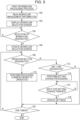
- Fig. 5 is a flowchart illustrating an example of the first information processing process according to the exemplary embodiment.
- the first information processing process according to the exemplary embodiment is performed as a result of the CPU 11 of the terminal apparatus 10 executing the first information processing program 13A in response to a user designating, via the input device 14, a folder (hereinafter, referred to as a "target folder") associated with multiple workflows.
- a folder hereinafter, referred to as a "target folder" associated with multiple workflows.
- step 100 in Fig. 5 the CPU 11 reads all information (hereinafter, referred to as "workflow management information") regarding the target folder from the workflow management database 82A.
- step 102 the CPU 11 controls the display 15 to display a workflow selection screen having a predetermined configuration by using information indicating the display name(s) included in the read workflow management information.
- Fig. 6 illustrates an example of the workflow selection screen according to the exemplary embodiment.
- a message prompting a user to select a workflow serving as a target is displayed in the workflow selection screen according to the exemplary embodiment.
- the display names (workflow names) included in the read workflow management information are individually displayed along with workflow selection buttons 15A each of which is to be designated to select a corresponding workflow.
- the user designates, using the input device 14, the workflow selection button 15A corresponding to the workflow name of the workflow serving as the target.
- the CPU 11 stands by until any of the workflow selection buttons 15A is designated.
- a workflow corresponding to the workflow selection button 15A designated by the user is referred to as a "target workflow”.
- step 106 the CPU 11 controls the display 15 to update the workflow selection screen to display detailed information regarding the target workflow by using the information regarding the target workflow included in the read workflow management information.
- Fig. 7 illustrates an example of the workflow selection screen according to the exemplary embodiment displayed after the update.
- the updated workflow selection screen As illustrated in Fig. 7 , in the updated workflow selection screen according to the exemplary embodiment, for the displayed target workflow, information indicating the progress (corresponding to the progress information described above) is displayed, along with information indicating the status, for each file stored in association with the target workflow.
- the progress information is displayed such that information (in the exemplary embodiment, task names) indicating the tasks executed in the target workflow is displayed in the chronological order and such that display areas of tasks that are completed and display areas of tasks that are not completed are different from each other.
- the user can easily grasp the progress of the target workflow for each file stored in the designated target folder.
- operation buttons i.e., a cancel button 15B and a suspend button 15C are displayed for a file having the status "in execution”.
- An operation button i.e., a resume button 15D is displayed for a file having the status "suspended”.
- the user designates the cancel button 15B when the user wishes to cancel the target workflow for the file having the status "in execution” among the displayed files.
- the user designates the suspend button 15C when the user wishes to temporarily suspend the target workflow for the file having the status "in execution” among the displayed files.
- the user designates the resume button 15D when the user wishes to resume execution of the target workflow for the file having the status "suspended" among the displayed files.
- step 108 the CPU 11 determines whether any operation button among the cancel button 15B, the suspend button 15C, and the resume button 15D is designated. If a positive determination is obtained, the process proceeds to step 110.
- step 110 the CPU 11 performs processing corresponding to the operation button designated by the user. The process then proceeds to step 120.
- the CPU 11 performs processing of cancelling execution of the task(s) yet to be executed for the corresponding file.
- the CPU 11 then stores "cancelled" as the corresponding status along with information indicating the task executed most recently in the workflow management database 82A (updates the status in the workflow management database 82A).
- the cancel button 15B is designated for the file assigned the file name "PA216818" in Fig. 7 , that is, the cancel button 15B is designated upon completion of the approval task immediately preceding a print task.
- the CPU 11 performs control so that a print function of the print task is not to be executed.
- the approver since the approval by the approver is finished through the approval task, the approver is not notified of the cancellation of the workflow.
- the CPU 11 performs control so that an approve request is not delivered to the approver by the approval task. If an approve screen is displayed on the terminal apparatus 10 used by the approver, the CPU 11 performs control to display a message "Approval is no longer required because this workflow is cancelled.”, for example.
- the CPU 11 preforms processing of suspending the corresponding target workflow.
- the CPU 11 performs processing of resuming execution of the corresponding target workflow that has been suspended.
- step 108 the process proceeds to step 112.
- step 112 the CPU 11 determines whether the display area of any of the tasks is designated. If a negative determination is obtained, the process proceeds to step 120. If a positive determination is obtained, the process proceeds to step 114.
- step 114 the CPU 11 performs setting change processing that is processing of changing a setting for the designated task (hereinafter, referred to as a "target task") in the following manner.
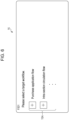
- the CPU 11 controls the display 15 to display a balloon 15J that originates from the display area of the target task and includes a change button 15K as illustrated in Fig. 8 , for example.
- the user then inputs a setting to be changed in the displayed balloon 15J, and designates the change button 15K.
- a setting to be changed in the displayed balloon 15J and designates the change button 15K.
- the case of changing the approver in the approval task is exemplified.
- step 116 the CPU 11 stands by until the change button 15K is designated, that is, stands by until the user finishes changing the setting for the target task.
- step 118 the CPU 11 reflects the setting changed by the user in the workflow management database 82A. The process then proceeds to step 120.
- step 120 the CPU 11 determines whether a timing to end the first information processing process has come. If a negative determination is obtained, the process returns to step 108. On the other hand, if a positive determination is obtained, the first information processing process ends.
- the timing to end the first information processing process described above is a timing when the target folder is closed by the user but is not limited to such a timing.
- the timing to end the first information processing process may be a timing when instruction information indicating the end of the first information processing process is input by the user via the input device 14.
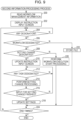
- Fig. 9 is a flowchart illustrating an example of the second information processing process according to the exemplary embodiment.
- the second information processing process according to the exemplary embodiment is performed as a result of the CPU 11 of the terminal apparatus 10 executing the second information processing program 13B in response to storage, in the target folder, of a file (hereinafter, referred to as a "target file") for which the workflow associated with the target folder is to be executed.
- a target file a file for which the workflow associated with the target folder is to be executed.
- step 200 in Fig. 9 the CPU 11 reads all information regarding the target folder from the workflow management database 82A.
- the information read at this time is also referred to as "workflow management information”.
- step 202 the CPU 11 controls the display 15 to display an instruction input screen having a predetermined configuration by using information indicating the display name(s) included in the read workflow management information.
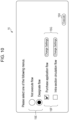
- Fig. 10 illustrates an example of the instruction input screen according to the exemplary embodiment.
- a message prompting a user to select any of menus is displayed in the instruction input screen according to the exemplary embodiment.
- a menu "not execute flow” indicating that none of the workflows are to be executed
- a menu "designate flow” indicating that a workflow to be executed is to be designated are displayed along with menu selection buttons 15E each of which is to be designated to select a corresponding menu.
- the display names (workflow names) included in the read workflow management information are individually displayed along with workflow selection buttons 15F each of which is to be designated to select a corresponding workflow.
- change settings buttons 15G each of which is to be designated to change settings of tasks in the corresponding workflow
- an execute button 15H that is to be designated to start execution of the selected workflow are displayed.
- the user designates the menu selection button 15E corresponding to the menu "not execute flow” by using the input device 14 if the user executes none of the workflows using the target file.
- the user designates the menu selection button 15E corresponding to the menu "designate flow” and then designates the workflow selection button 15F corresponding to the name of the target workflow to be executed.
- the user designates the change settings button 15G corresponding to the workflow and designates the execute button 15H to start execution of the selected workflow.
- step 204 the CPU 11 stands by until any of the menu selection button 15E corresponding to the menu "not execute flow", the change settings buttons 15G, and the execute button 15H is designated.
- the workflow corresponding to the workflow selection button 15F designated by the user along with any of the change settings buttons 15G or the execute button 15H is also referred to as a "target workflow”.
- step 206 the CPU 11 determines whether any of the change settings buttons 15G or the execute button 15H is designated by the user to determine whether the target workflow is designated by the user. If a positive determination is obtained, the process proceeds to step 208. In step 208, the CPU 11 determines whether any of the change settings buttons 15G is designated by the user. If a positive determination is obtained, the process proceeds to step 210.
- step 210 the CPU 11 controls the display 15 to update the instruction input screen to display information regarding the target workflow by using the information regarding the target workflow included in the read workflow management information.
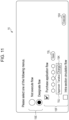
- Fig. 11 illustrates an example of the instruction input screen according to the exemplary embodiment displayed after the update.
- information indicating tasks included in the target workflow is displayed in the chronological order for the displayed target workflow.
- each of the tasks is schematically displayed as a circle.
- the display style of each of the tasks is not limited to this style.
- information in the example illustrated in Fig. 7 , the task names
- indicating the corresponding tasks may be displayed obviously.
- a setting of a displayed task can be changed by designating the display area of the task.
- step 212 the CPU 11 stands by until the display area of any of the tasks is designated.
- step 214 the CPU 11 performs setting change processing that is processing of changing a setting for the designated task in the following manner.
- the CPU 11 controls the display 15 to display the balloon 15J that originates from the display area of the designated task and includes the change button 15K along with a save button 15L as illustrated in Fig. 11 , for example.
- the user then inputs a setting to be changed in the displayed balloon 15J, and designates the change button 15K. After finishing changing the setting of at least one task to a suitable setting, the user designates the save button 15L.
- the case of changing the approver in the approval task is exemplified.
- step 216 the CPU 11 determines whether the save button 15L is designated to determine whether the user has finished the input for changing settings of the target workflow. If a negative determination is obtained, the process returns to step 212. If a positive determination is obtained, the process proceeds to step 218.
- step 218 the CPU 11 reflects the setting changed by the user in the workflow management database 82A. The process then proceeds to step 224.
- step 208 the CPU 11 regards that the execute button 15H is designated by the user and the process proceeds to step 220.
- step 220 the CPU 11 performs workflow execution start processing that is processing of starting execution of the target workflow. The process then proceeds to step 224.
- the workflow execution start processing includes processing of transmitting information for giving an instruction for executing a task to be executed first in the target workflow, to the terminal apparatus 10 used by an executor of the task and processing of updating the corresponding status to "in execution", for example.
- the workflow execution start processing is not limited to such processing and may include processing of notifying the terminal apparatuses 10 used by executors of all the tasks included in the target workflow that execution of the target workflow has been started.
- the CPU 11 then sequentially performs processing related to each of the tasks included in the target workflow.
- the target file for which execution of the workflow has been started in the workflow execution start processing is displayed as a new file as illustrated in Fig. 12 , for example.
- a new marking 15M is displayed to indicate the new file.
- step 206 the CPU 11 regards that the menu "not execute flow" is designated by the user as illustrated in Fig. 13 , for example, and thus the process proceeds to step 222.
- step 222 the CPU 11 newly stores the target file stored in the target folder in a storage area, of the workflow management database 82A, related to the target folder.
- the CPU 11 then stores "suspended" in the corresponding status in the workflow management database 82A.
- step 224 In this case, since there is no task most recently executed, information indicating such a task is not stored.
- "suspended" is set as the status of the target file when the target file is merely stored in the target folder without designation of the workflow to be applied.
- the status to be set is not limited to such a status.
- a new kind of the status "before execution” indicating a stage before the workflow is executed may be set.
- "before execution” may be stored in the status of the target file in the workflow management database 82A.
- the CPU 11 controls the display 15 to display the workflow selection screen as illustrated in Fig. 14 , for example, in step 102 of the first information processing process described above.
- the CPU 11 of the terminal apparatus 10 controls the display 15 to indicate that a file (hereinafter, referred to as a "flow unassociated file") not associated with any workflow is present and to display a flow execution instruction button 15A1 that is to be designated to give an instruction for executing the workflow using the flow unassociated file as illustrated in Fig. 14 .
- a file hereinafter, referred to as a "flow unassociated file”
- the CPU 11 controls the display 15 to display the flow unassociated file along with a new marking 15N indicating a new file and an execute flow button 15P that is to be designated to give an instruction for executing the workflow as illustrated in Fig. 14 .
- the CPU 11 controls the display 15 to display a balloon 15S that originates from the display area of the execute flow button 15P and includes a change settings button 15Q and an execute button 15R as illustrated in Fig. 14 .
- the user then designates a workflow that uses the corresponding flow unassociated file, designates the change settings button 15Q if the user changes the settings of the designated workflow, and designates the execute button 15R to start execution of the designated workflow in the displayed balloon 15S.
- the CPU 11 In response to the user designating the change settings button 15Q, the CPU 11 performs processing of changing the settings for the corresponding workflow as in the processing in step 214 of the second information processing process described above.
- the CPU 11 In response to the user designating the execute button 15R, the CPU 11 associates the flow unassociated file with the designated workflow and performs the workflow execution start processing for the flow unassociated file as in the processing in step 220 of the second information processing process.
- step 224 the CPU 11 determines whether a timing to end the second information processing process has come. If a negative determination is obtained, the process returns to step 204. On the other hand, if a positive determination is obtained, the second information processing process ends.
- the timing to end the second information processing process described above is a timing when the instruction input screen is closed by the user but is not limited to such a timing.
- the timing to end the second information processing process may be a timing when instruction information indicating the end of the second information processing process is input by the user via the input device 14.
- the apparatus that performs the first information processing process and the second information processing process is not limited to the terminal apparatus 10.
- the server 80 may perform the first information processing process and the second information processing process.
- one of the terminal apparatus 10 and the server 80 may perform the first information processing process, and the other of the terminal apparatus 10 and the server 80 may perform the second information processing process.
- the apparatus in which the various databases are registered is not limited to the server 80.
- the various databases may be registered to any of the terminal apparatuses 10.
- the various databases may be registered to an apparatus that is not the server 80 and is accessible from the terminal apparatuses 10.
- the exemplary embodiment described above does not limit the present disclosure according to the claims, and not all combinations of features described in the exemplary embodiment are necessarily required by solutions provided by the present disclosure.
- the exemplary embodiment described above includes various levels of disclosure, and the various disclosures are obtained by the combination of the multiple constituent elements disclosed herein. Even if several constituent elements are removed from among all of the constituent elements described in the exemplary embodiment, the configuration without the several constituent elements may still be obtained as exemplary embodiments of the disclosure as long as advantages are obtained.
- processor refers to hardware in a broad sense.
- Examples of the processor include general processors (e.g., CPU: Central Processing Unit) and dedicated processors (e.g., GPU: Graphics Processing Unit, ASIC: Application Specific Integrated Circuit, FPGA: Field Programmable Gate Array, and programmable logic device).
- processor is broad enough to encompass one processor or plural processors in collaboration which are located physically apart from each other but may work cooperatively.
- the order of operations of the processor is not limited to one described in the embodiments above, and may be changed.
- the first information processing process and the second information processing process are implemented as software by executing the respective programs by a computer.
- the present disclosure is not limited to this case.
- the first information processing process and the second information processing process may be implemented by hardware or a combination of hardware and software.
Landscapes
- Engineering & Computer Science (AREA)
- Business, Economics & Management (AREA)
- Human Resources & Organizations (AREA)
- Theoretical Computer Science (AREA)
- Entrepreneurship & Innovation (AREA)
- Strategic Management (AREA)
- Economics (AREA)
- General Physics & Mathematics (AREA)
- Physics & Mathematics (AREA)
- General Engineering & Computer Science (AREA)
- Quality & Reliability (AREA)
- Tourism & Hospitality (AREA)
- Operations Research (AREA)
- General Business, Economics & Management (AREA)
- Marketing (AREA)
- Game Theory and Decision Science (AREA)
- Educational Administration (AREA)
- Development Economics (AREA)
- Human Computer Interaction (AREA)
- Data Mining & Analysis (AREA)
- Management, Administration, Business Operations System, And Electronic Commerce (AREA)
Abstract
Description
- The present disclosure relates to an information processing apparatus, a program, and an information processing method.
-
Japanese Patent No. 5535054 - This information processing apparatus performs processing on job data stored in a folder, and includes an input unit, a movement unit, a first storage unit, an execution unit, and a second storage unit. The input unit inputs an execution instruction file including a description of an instruction for executing processing to a first folder. In response to the execution instruction file being input by the input unit, the movement unit moves job data stored in the first folder and to be subjected to the processing to a second folder different from the first folder. After the movement performed by the movement unit, the first storage unit stores a file including a description indicating that the processing is in execution in the first folder. The execution unit performs the processing on the job data moved to the second folder by the movement unit and to be subjected to the processing. In response to an end of the processing performed by the execution unit, the second storage unit stores a file including a description indicating the end of the processing in the first folder in place of the file including the description indicating that the processing is in execution.
-
Japanese Patent No. 5845667 - This workflow processing apparatus is connected to a network, and includes a file obtaining unit, a first workflow determining unit, a workflow executing unit, a file analyzing unit, a processing determining unit, and a second workflow determining unit. The file obtaining unit obtains a file stored in a file storage unit. The first workflow determining unit determines a first workflow corresponding to the file storage unit from which the file is obtained, as a workflow in which the file is to be processed. The workflow executing unit processes the obtained file in accordance with the determined workflow. The file analyzing unit extracts bibliographic information that is information for classifying the file, from a file name given to the file. The processing determining unit determines processing to be performed, based on the extracted bibliographic information. In response to the processing to be performed being determined, the second workflow determining unit determines a second workflow that implements the processing, as a workflow in which the obtained file is to be processed from among multiple workflows set in advance. In response to the processing to be performed being determined, the workflow executing unit processes the obtained file in accordance with the second workflow instead of processing the file in accordance with the first workflow.
- However, the techniques disclosed in
Japanese Patent No. 5535054 No. 5845667 - Accordingly, it is an object of the present disclosure to provide an information processing apparatus, a program, and an information processing method that make selection of a workflow to be executed receivable even when a folder that stores a file is associated with multiple workflows.
- According to a first aspect of the present disclosure, there is provided an information processing apparatus including a processor configured to: receive, in response to storage of a file in a folder associated with multiple workflows, designation of selecting a workflow to be executed using the file from among the multiple workflows from a user; and execute the workflow for which the designation is received.
- According to a second aspect of the present disclosure, in the information processing apparatus according to the first aspect, the processor may be configured to receive second designation of selecting not executing any of the multiple workflows from the user besides the designation of selecting a workflow to be executed; and hold, in response to receiving the second designation, the file stored in the folder without executing any of the multiple workflows.
- According to a third aspect of the present disclosure, in the information processing apparatus according to the second aspect, the processor may be configured to further receive designation of selecting a workflow to be executed using the held file from the user, in response to a reference being made to the folder after a time point of receiving the second designation in a case of receiving the second designation.
- According to a fourth aspect of the present disclosure, in the information processing apparatus according to any one of the first to third aspects, the processor may be configured to further receive a change instruction for changing a setting of the workflow from the user at a first timing that is predetermined; and change the setting of the workflow subjected to the change instruction in accordance with the received change instruction.
- According to a fifth aspect of the present disclosure, in the information processing apparatus according to the fourth aspect, the first timing may be at least one of a timing when the designation of selecting a workflow to be executed is received or a timing when the folder is opened.
- According to a sixth aspect of the present disclosure, in the information processing apparatus according to any one of the first to fifth aspects, the processor may be configured to present progress information indicating a progress of the workflow at a second timing that is predetermined.
- According to a seventh aspect of the present disclosure, in the information processing apparatus according to the sixth aspect, the second timing may be at least one of a timing when the designation of selecting a workflow to be executed is received or a timing when the folder is opened.
- According to an eighth aspect of the present disclosure, in the information processing apparatus according to the sixth or seventh aspect, the processor may be configured to further receive, when the progress is that the corresponding workflow is in execution, a suspend instruction for suspending execution of the workflow or a cancel instruction for cancelling execution of the workflow from the user; and perform processing corresponding to the received suspend or cancel instruction.
- According to a ninth aspect of the present disclosure, in the information processing apparatus according to the eighth aspect, the processor may be configured to: further receive a resume instruction for resuming execution of the corresponding workflow from the user in a case where the suspend instruction has been received; and perform processing corresponding to the received resume instruction.
- According to a tenth aspect of the present disclosure, there is provided a program causing a computer to execute a process for information processing, the process including receiving, in response to storage of a file in a folder associated with multiple of workflows, designation of selecting a workflow to be executed using the file from among the multiple workflows from a user; and executing the workflow for which the designation is received.
- According to an eleventh aspect of the present disclosure, there is provided an information processing method including receiving, in response to storage of a file in a folder associated with multiple workflows, designation of selecting a workflow to be executed using the file from among the multiple workflows from a user; and executing the workflow for which the designation is received.
- According to the first, tenth, and eleventh aspects, selection of a workflow to be executed can be received even when a folder that stores a file is associated with multiple workflows.
- According to the second aspect, the start of execution of the workflow can be temporarily stopped.
- According to the third aspect, execution of the workflow can be started at any time point after the time point of storage of the file in the folder.
- According to the fourth aspect, the setting of the workflow can be changed at a predetermined timing.
- According to the fifth aspect, the setting of the workflow can be changed at an applied timing.
- According to the sixth aspect, the progress of the workflow can be checked at a predetermined timing.
- According to the seventh aspect, the progress of the workflow can be checked at an applied timing.
- According to the eighth aspect, an instruction for suspending or cancelling execution of the workflow can be given.
- According to the ninth aspect, execution of the workflow that has been suspended can be resumed.
- An exemplary embodiment of the present disclosure will be described in detail based on the following figures, wherein:
-
Fig. 1 is a block diagram illustrating an example of a configuration of an information processing system according to an exemplary embodiment; -
Fig. 2 is a block diagram illustrating an example of a hardware configuration of a terminal apparatus according to the exemplary embodiment; -
Fig. 3 is a block diagram illustrating an example of a functional configuration of the terminal apparatus according to the exemplary embodiment; -
Fig. 4 is a schematic diagram illustrating an example of a configuration of a workflow management database according to the exemplary embodiment; -
Fig. 5 is a flowchart illustrating an example of a first information processing process according to the exemplary embodiment; -
Fig. 6 illustrates an example of a workflow selection screen according to the exemplary embodiment; -
Fig. 7 illustrates an example of the workflow selection screen according to the exemplary embodiment displayed after the update; -
Fig. 8 illustrates an example of the workflow selection screen according to the exemplary embodiment displayed after the update; -
Fig. 9 is a flowchart illustrating an example of a second information processing process according to the exemplary embodiment; -
Fig. 10 illustrates an example of an instruction input screen according to the exemplary embodiment; -
Fig. 11 illustrates an example of the instruction input screen according to the exemplary embodiment displayed after the update; -
Fig. 12 illustrates an example of the displayed workflow selection screen according to the exemplary embodiment; -
Fig. 13 illustrates an example of the displayed instruction input screen according to the exemplary embodiment; and -
Fig. 14 illustrates an example of the displayed workflow selection screen according to the exemplary embodiment. - An exemplary embodiment of the present disclosure will be described in detail below with reference to the accompanying drawings. In the exemplary embodiment of the present disclosure, multiple kinds of processing included in a workflow are referred to as "tasks". The term "workflow" according to the exemplary embodiment refers to "a flow or set of a series of works performed in conjunction with one another in response to a user operation". A specific example of the "user operation" herein may be an operation related to a document file.
- For example, an approval task performs processing of transmitting a message to one or more designated users, performs processing of receiving acceptance or decline of approval from the one or more designated users, and performs processing of advancing the workflow to the next result. For example, a notification task performs processing of transmitting a message to one or more designated users, performs processing of receiving completion of an operation from the one or more designated users, and performs processing of advancing the workflow to the next result.
- A configuration of an
information processing system 1 according to the exemplary embodiment will be described first with reference toFig. 1. Fig. 1 is a block diagram illustrating an example of the configuration of theinformation processing system 1 according to the exemplary embodiment. - As illustrated in
Fig. 1 , theinformation processing system 1 according to the exemplary embodiment includes multipleterminal apparatuses server 80. Each of the multipleterminal apparatuses terminal apparatuses terminal apparatuses terminal apparatuses 10" . - Examples of the
terminal apparatuses 10 and theserver 80 include various stationary computers such as personal computers (PCs) and a server computer. However, theterminal apparatuses 10 and theserver 80 are not limited to the computers of this type. Theterminal apparatuses 10 may be various portable information processing apparatuses such as smartphones, tablet terminals, and portable information terminals. - The
terminal apparatuses 10 and theserver 80 are connected to each other via a network N. Thus, theterminal apparatuses 10 and theserver 80 can communicate with each other via the network N. In the exemplary embodiment, the network N to be used is a public communication network such as Internet or a telephone network. However, the network N is not limited to the communication network of this type. For example, the network N to be used may be an intra-company communication network such as a local area network (LAN) or a wide area network (WAN), or a combination of the intra-company communication network and the public communication network. In the exemplary embodiment, the network N to be used is a wired communication network. However, the network N is not limited to the communication network of this type and may be a wireless communication network or a combination of the wired communication network and the wireless communication network. - As illustrated in
Fig. 1 , theserver 80 according to the exemplary embodiment includes astorage 82. Thestorage 82 stores a workflow management database (DB) 82A. Thestorage 82 is implemented by a hard disk drive (HDD), a solid state drive (SSD), or a flash memory, for example. Theworkflow management database 82A will be described later in detail. - Each of the multiple
terminal apparatuses 10 according to the exemplary embodiment is used by a person (hereinafter, referred to as an "executor") who executes a corresponding task included in a workflow. - A configuration of each of the
terminal apparatuses 10 according to the exemplary embodiment will be described next with reference toFigs. 2 and3 .Fig. 2 is a block diagram illustrating an example of a hardware configuration of theterminal apparatus 10 according to the exemplary embodiment.Fig. 3 is a block diagram illustrating an example of a functional configuration of theterminal apparatus 10 according to the exemplary embodiment. - As illustrated in
Fig. 2 , theterminal apparatus 10 according to the exemplary embodiment includes a central processing unit (CPU) 11 that serves as a processor, amemory 12 that serves as a temporary storage area, astorage 13 that is nonvolatile, an input device 14 such as a keyboard and a mouse, adisplay 15 such as a liquid crystal display, a medium reader/writer (R/W) 16, and a communication interface (I/F) 18. The CPU 11, thememory 12, thestorage 13, the input device 14, thedisplay 15, the medium reader/writer 16, and the communication I/F 18 are connected to each other via a bus B. The medium reader/writer 16 reads information written on arecording medium 17 and writes information on therecording medium 17. - The
storage 13 according to the exemplary embodiment is implemented by an HDD, an SSD, or a flash memory, for example. Thestorage 13 that serves as a storage medium stores a firstinformation processing program 13A and a secondinformation processing program 13B. - The
recording medium 17 having the firstinformation processing program 13A written thereon is connected to the medium reader/writer 16, and the medium reader/writer 16 reads the firstinformation processing program 13A from therecording medium 17. In this manner, the firstinformation processing program 13A is stored (installed) in thestorage 13. In addition, therecording medium 17 having the secondinformation processing program 13B written thereon is connected to the medium reader/writer 16, and the medium reader/writer 16 reads the secondinformation processing program 13B from therecording medium 17. In this manner, the secondinformation processing program 13B is stored in thestorage 13. The CPU 11 loads the firstinformation processing program 13A and the secondinformation processing program 13B from thestorage 13 into thememory 12 as appropriate and sequentially executes processes of these programs. - The functional configuration of the
terminal apparatus 10 according to the exemplary embodiment will be described next with reference toFig. 3 . As illustrated inFig. 3 , theterminal apparatus 10 includes a receivingunit 11A, an executingunit 11B, a holding unit 11C, a changingunit 11D, and a presentingunit 11E. The CPU 11 of theterminal apparatus 10 executes the firstinformation processing program 13A and the secondinformation processing program 13B to function as the receivingunit 11A, the executingunit 11B, the holding unit 11C, the changingunit 11D, and the presentingunit 11E. - The receiving
unit 11A according to the exemplary embodiment receives, in response to storage of a file in a folder associated with multiple workflows, designation of selecting a workflow to be executed using the file from among the multiple workflows from a user. - In the exemplary embodiment, the user from whom the receiving
unit 11A receives the designation of selecting a workflow in this case is a user who has stored the file in the folder but is not limited to such a user. For example, the user from whom the receivingunit 11A receives the designation may be an administrator who manages the information processing system 1 (hereinafter, simply referred to as an "administrator") or a user who is neither the administrator nor the user who has stored the file in the folder. - The executing
unit 11B according to the exemplary embodiment executes the workflow for which the designation is received by the receivingunit 11A. - The receiving
unit 11A according to the exemplary embodiment also receives second designation of selecting not to execute any of the multiple workflows from the user besides the designation of selecting a workflow to be executed described above. - The holding unit 11C according to the exemplary embodiment holds, in response to the receiving
unit 11A receiving the second designation, the file stored in the folder without executing any of the multiple workflows. - In the exemplary embodiment, the manner in which the holding unit 11C holds the file is storing the file in the
storage 82 of theserver 80. However, the manner of holding the file is not limited to this. For example, the manner in which the holding unit 11C holds the file may be storing the file in thestorage 13 of theterminal apparatus 10 used by the administrator or in thestorage 13 of any of the otherterminal apparatuses 10. - The receiving
unit 11A according to the exemplary embodiment further receives designation of selecting a workflow to be executed using the held file from the user, in response to a reference being made to the folder after a time point of receiving the second designation in the case of receiving the second designation. - In the exemplary embodiment, the user from whom the receiving
unit 11A receives the designation of selecting a workflow in this case is the user who has made the reference to the folder but is not limited to such a user. For example, the user from whom the receivingunit 11A receives the designation of selecting a workflow may be the administrator or a user who is neither the administrator nor the user who has made the reference to the folder. - The receiving
unit 11A according to the exemplary embodiment further receives a change instruction for changing a setting of the workflow from the user at a first timing that is predetermined. In accordance with the change instruction received by the receivingunit 11A, the changingunit 11D according to the exemplary embodiment changes the setting of the workflow subjected to the change instruction in accordance with the change instruction received by the receivingunit 11A. - In the exemplary embodiment, the first timing is a timing when the designation of selecting a workflow to be executed is received and a timing when the folder is opened but is not limited to such timings. For example, the first timing may be only one of these two timings.
- The presenting
unit 11E according to the exemplary embodiment presents progress information indicating a progress of the workflow at a second timing that is predetermined. - In the exemplary embodiment, the second timing is a timing when the designation of selecting a workflow to be executed is received and a timing when the folder is opened but is not limited to such timings. For example, the second timing may be only one of these two timings.
- The receiving
unit 11A according to the exemplary embodiment further receives, when the progress is that the corresponding workflow is in execution, a suspend instruction for suspending execution of the workflow or a cancel instruction for cancelling execution of the workflow from the user. The executingunit 11B according to the exemplary embodiment performs processing corresponding to the suspend or cancel instruction received by the receivingunit 11A. - In the exemplary embodiment, the user from whom the receiving
unit 11A receives the suspend or cancel instruction in this case is usually the user who has made the designation of selecting a workflow or the user who has opened the folder but is not limited to such a user obviously. - The receiving
unit 11A according to the exemplary embodiment further receives a resume instruction for resuming execution of the corresponding workflow from the user, in response to receiving the suspend instruction. The executingunit 11B according to the exemplary embodiment executes processing corresponding to the resume instruction received by the receivingunit 11A. - In the exemplary embodiment, the user from whom the receiving
unit 11A receives the resume instruction in this case is usually the user who has given the suspend instruction or the user who has opened the folder but is not limited to such a user obviously. - The
workflow management database 82A according to the exemplary embodiment will be described next with reference toFig. 4. Fig. 4 is a schematic diagram illustrating an example of a configuration of theworkflow management database 82A according to the exemplary embodiment. - The
workflow management database 82A according to the exemplary embodiment is a database to which information regarding workflows is registered. For example, in theworkflow management database 82A according to the exemplary embodiment, various kinds of information such as a folder name, a workflow identification (ID), a display name, a task, a file name, and a status are stored in association with one another as illustrated inFig. 4 . - The folder name is information indicating a name of a folder for which an associated workflow is executed using a file in response to storage of the file in the folder. The workflow ID is information given in advance to individually identify a workflow associated with the corresponding folder so that different workflows have different workflow IDs.
- The display name is information indicating the name of the corresponding workflow used when the workflow is displayed. The task is information indicating names of tasks (hereinafter, referred to as "task names") included in the corresponding workflow in a chronological order in which the tasks are to be executed. The file name is information indicating a name of the file stored in the corresponding folder so that the corresponding workflow is to be executed. The status is information indicating the progress of the workflow executed using the corresponding file.
- In the exemplary embodiment, as the status, four kinds of statuses, namely, "completed", "cancelled", "suspended", and "in execution" are used. The status "completed" indicates that the workflow is completed. The status "cancelled" indicates that the workflow is cancelled. The status "suspended" indicates that the workflow is suspended. The status "in execution" indicates that the workflow is in execution. The status "suspended" and the status "cancelled" include therein information (in the exemplary embodiment, the task name) indicating the task executed most recently to the suspension or cancellation. The status "in execution" also includes therein information (in the exemplary embodiment, the task name) indicating the task executed most recently to that time point.
- The information indicating the status is not limited to the information described above. For example, the kinds of the statuses are not limited to the four kinds, i.e., "completed", "cancelled", "suspended", and "in execution". For example, any one of these four kinds or a combination of any two or three of these four kinds may be used as the kinds of statuses. Alternatively, another kind of the status indicating the progress of the corresponding workflow may be used in addition to these four kinds.
- The example illustrated in
Fig. 4 indicates that a workflow assigned the workflow ID "WF001" and the display name "purchase application flow" is associated with a folder assigned the folder name "F001". The example illustrated inFig. 4 also indicates that tasks "verify", "sign", ... are to be executed in this order in the workflow assigned the display name "purchase application flow". The example illustrated inFig. 4 further indicates that the workflow assigned the display name "purchase application flow" uses a file assigned the file name "PA216818" at this time point and the progress for this file is that the workflow is in execution up to the approval task. - Various kinds of information (not illustrated) set for each task such as an approver in the case of the approval task and a signing person in the case of the sign task are also registered to the
workflow management database 82A. - An operation of the
information processing system 1 according to the exemplary embodiment, specifically, an operation performed when theterminal apparatus 10 that plays a central role in theinformation processing system 1 performs a first information processing process will be described next with reference toFig. 5. Fig. 5 is a flowchart illustrating an example of the first information processing process according to the exemplary embodiment. - The first information processing process according to the exemplary embodiment is performed as a result of the CPU 11 of the
terminal apparatus 10 executing the firstinformation processing program 13A in response to a user designating, via the input device 14, a folder (hereinafter, referred to as a "target folder") associated with multiple workflows. To avoid complexity, the case will be described where theworkflow management database 82A is already created. - In
step 100 inFig. 5 , the CPU 11 reads all information (hereinafter, referred to as "workflow management information") regarding the target folder from theworkflow management database 82A. Instep 102, the CPU 11 controls thedisplay 15 to display a workflow selection screen having a predetermined configuration by using information indicating the display name(s) included in the read workflow management information.Fig. 6 illustrates an example of the workflow selection screen according to the exemplary embodiment. - As illustrated in
Fig. 6 , a message prompting a user to select a workflow serving as a target is displayed in the workflow selection screen according to the exemplary embodiment. In the workflow selection screen according to the exemplary embodiment, the display names (workflow names) included in the read workflow management information are individually displayed along withworkflow selection buttons 15A each of which is to be designated to select a corresponding workflow. - In response to the workflow selection screen being displayed, the user designates, using the input device 14, the
workflow selection button 15A corresponding to the workflow name of the workflow serving as the target. Thus, instep 104, the CPU 11 stands by until any of theworkflow selection buttons 15A is designated. Hereinafter, a workflow corresponding to theworkflow selection button 15A designated by the user is referred to as a "target workflow". - In
step 106, the CPU 11 controls thedisplay 15 to update the workflow selection screen to display detailed information regarding the target workflow by using the information regarding the target workflow included in the read workflow management information.Fig. 7 illustrates an example of the workflow selection screen according to the exemplary embodiment displayed after the update. - As illustrated in
Fig. 7 , in the updated workflow selection screen according to the exemplary embodiment, for the displayed target workflow, information indicating the progress (corresponding to the progress information described above) is displayed, along with information indicating the status, for each file stored in association with the target workflow. - At this time, the progress information is displayed such that information (in the exemplary embodiment, task names) indicating the tasks executed in the target workflow is displayed in the chronological order and such that display areas of tasks that are completed and display areas of tasks that are not completed are different from each other. Thus, with reference to the workflow selection screen, the user can easily grasp the progress of the target workflow for each file stored in the designated target folder.
- In the updated workflow selection screen according to the exemplary embodiment, operation buttons, i.e., a cancel
button 15B and a suspendbutton 15C are displayed for a file having the status "in execution". An operation button, i.e., aresume button 15D is displayed for a file having the status "suspended". - Thus, the user designates the cancel
button 15B when the user wishes to cancel the target workflow for the file having the status "in execution" among the displayed files. The user designates the suspendbutton 15C when the user wishes to temporarily suspend the target workflow for the file having the status "in execution" among the displayed files. The user designates theresume button 15D when the user wishes to resume execution of the target workflow for the file having the status "suspended" among the displayed files. - Thus, in
step 108, the CPU 11 determines whether any operation button among the cancelbutton 15B, the suspendbutton 15C, and theresume button 15D is designated. If a positive determination is obtained, the process proceeds to step 110. - In
step 110, the CPU 11 performs processing corresponding to the operation button designated by the user. The process then proceeds to step 120. - Specifically, in response to the user designating the cancel
button 15B, the CPU 11 performs processing of cancelling execution of the task(s) yet to be executed for the corresponding file. The CPU 11 then stores "cancelled" as the corresponding status along with information indicating the task executed most recently in theworkflow management database 82A (updates the status in theworkflow management database 82A). - For example, the case is exemplified where the cancel
button 15B is designated for the file assigned the file name "PA216818" inFig. 7 , that is, the cancelbutton 15B is designated upon completion of the approval task immediately preceding a print task. In this case, the CPU 11 performs control so that a print function of the print task is not to be executed. In this case, since the approval by the approver is finished through the approval task, the approver is not notified of the cancellation of the workflow. - By contrast, for example, if the cancel
button 15B is designated for the file assigned the file name "PA216818" inFig. 7 upon completion of the sign task immediately preceding the approval task, the CPU 11 performs control so that an approve request is not delivered to the approver by the approval task. If an approve screen is displayed on theterminal apparatus 10 used by the approver, the CPU 11 performs control to display a message "Approval is no longer required because this workflow is cancelled.", for example. - Likewise, in response to the user designating the suspend
button 15C, the CPU 11 preforms processing of suspending the corresponding target workflow. In response to the user designating theresume button 15D, the CPU 11 performs processing of resuming execution of the corresponding target workflow that has been suspended. - If a negative determination is obtained in
step 108, the process proceeds to step 112. Instep 112, the CPU 11 determines whether the display area of any of the tasks is designated. If a negative determination is obtained, the process proceeds to step 120. If a positive determination is obtained, the process proceeds to step 114. - In
step 114, the CPU 11 performs setting change processing that is processing of changing a setting for the designated task (hereinafter, referred to as a "target task") in the following manner. - First, the CPU 11 controls the
display 15 to display aballoon 15J that originates from the display area of the target task and includes achange button 15K as illustrated inFig. 8 , for example. - The user then inputs a setting to be changed in the displayed
balloon 15J, and designates thechange button 15K. In the example illustrated inFig. 8 , the case of changing the approver in the approval task is exemplified. - Thus, in
step 116, the CPU 11 stands by until thechange button 15K is designated, that is, stands by until the user finishes changing the setting for the target task. Instep 118, the CPU 11 reflects the setting changed by the user in theworkflow management database 82A. The process then proceeds to step 120. - In
step 120, the CPU 11 determines whether a timing to end the first information processing process has come. If a negative determination is obtained, the process returns to step 108. On the other hand, if a positive determination is obtained, the first information processing process ends. In the exemplary embodiment, the timing to end the first information processing process described above is a timing when the target folder is closed by the user but is not limited to such a timing. For example, the timing to end the first information processing process may be a timing when instruction information indicating the end of the first information processing process is input by the user via the input device 14. - An operation performed when the
terminal apparatus 10 performs a second information processing process will be described next with reference toFig. 9. Fig. 9 is a flowchart illustrating an example of the second information processing process according to the exemplary embodiment. - The second information processing process according to the exemplary embodiment is performed as a result of the CPU 11 of the
terminal apparatus 10 executing the secondinformation processing program 13B in response to storage, in the target folder, of a file (hereinafter, referred to as a "target file") for which the workflow associated with the target folder is to be executed. To avoid complexity, the case will be described where theworkflow management database 82A is already created. - In
step 200 inFig. 9 , the CPU 11 reads all information regarding the target folder from theworkflow management database 82A. Hereinafter, the information read at this time is also referred to as "workflow management information". - In
step 202, the CPU 11 controls thedisplay 15 to display an instruction input screen having a predetermined configuration by using information indicating the display name(s) included in the read workflow management information.Fig. 10 illustrates an example of the instruction input screen according to the exemplary embodiment. - As illustrated in
Fig. 10 , a message prompting a user to select any of menus is displayed in the instruction input screen according to the exemplary embodiment. In the instruction input screen according to the exemplary embodiment, a menu "not execute flow" indicating that none of the workflows are to be executed and a menu "designate flow" indicating that a workflow to be executed is to be designated are displayed along withmenu selection buttons 15E each of which is to be designated to select a corresponding menu. - In the instruction input screen according to the exemplary embodiment, the display names (workflow names) included in the read workflow management information are individually displayed along with
workflow selection buttons 15F each of which is to be designated to select a corresponding workflow. - In the instruction input screen according to the exemplary embodiment,
change settings buttons 15G each of which is to be designated to change settings of tasks in the corresponding workflow, and an executebutton 15H that is to be designated to start execution of the selected workflow are displayed. - For example, in response to the instruction input screen illustrated in
Fig. 10 being displayed, the user designates themenu selection button 15E corresponding to the menu "not execute flow" by using the input device 14 if the user executes none of the workflows using the target file. - If the user designates a workflow to be executed using the target file, the user designates the
menu selection button 15E corresponding to the menu "designate flow" and then designates theworkflow selection button 15F corresponding to the name of the target workflow to be executed. In this case, if the user changes settings of the tasks in the designated workflow, the user designates thechange settings button 15G corresponding to the workflow and designates the executebutton 15H to start execution of the selected workflow. - Thus, in
step 204, the CPU 11 stands by until any of themenu selection button 15E corresponding to the menu "not execute flow", thechange settings buttons 15G, and the executebutton 15H is designated. Hereinafter, the workflow corresponding to theworkflow selection button 15F designated by the user along with any of thechange settings buttons 15G or the executebutton 15H is also referred to as a "target workflow". - In
step 206, the CPU 11 determines whether any of thechange settings buttons 15G or the executebutton 15H is designated by the user to determine whether the target workflow is designated by the user. If a positive determination is obtained, the process proceeds to step 208. Instep 208, the CPU 11 determines whether any of thechange settings buttons 15G is designated by the user. If a positive determination is obtained, the process proceeds to step 210. - In
step 210, the CPU 11 controls thedisplay 15 to update the instruction input screen to display information regarding the target workflow by using the information regarding the target workflow included in the read workflow management information.Fig. 11 illustrates an example of the instruction input screen according to the exemplary embodiment displayed after the update. - As illustrated in
Fig. 11 , in the updated instruction input screen according to the exemplary embodiment, information indicating tasks included in the target workflow is displayed in the chronological order for the displayed target workflow. - In the example illustrated in
Fig. 11 , each of the tasks is schematically displayed as a circle. However, the display style of each of the tasks is not limited to this style. For example, as illustrated inFig. 7 , information (in the example illustrated inFig. 7 , the task names) indicating the corresponding tasks may be displayed obviously. - In the updated instruction input screen according to the exemplary embodiment, a setting of a displayed task can be changed by designating the display area of the task.
- Thus, in
step 212, the CPU 11 stands by until the display area of any of the tasks is designated. Instep 214, the CPU 11 performs setting change processing that is processing of changing a setting for the designated task in the following manner. - First, the CPU 11 controls the
display 15 to display theballoon 15J that originates from the display area of the designated task and includes thechange button 15K along with asave button 15L as illustrated inFig. 11 , for example. - The user then inputs a setting to be changed in the displayed
balloon 15J, and designates thechange button 15K. After finishing changing the setting of at least one task to a suitable setting, the user designates thesave button 15L. In the example illustrated inFig. 11 , the case of changing the approver in the approval task is exemplified. - In
step 216, the CPU 11 determines whether thesave button 15L is designated to determine whether the user has finished the input for changing settings of the target workflow. If a negative determination is obtained, the process returns to step 212. If a positive determination is obtained, the process proceeds to step 218. - In
step 218, the CPU 11 reflects the setting changed by the user in theworkflow management database 82A. The process then proceeds to step 224. - If a negative determination is obtained in
step 208, the CPU 11 regards that the executebutton 15H is designated by the user and the process proceeds to step 220. Instep 220, the CPU 11 performs workflow execution start processing that is processing of starting execution of the target workflow. The process then proceeds to step 224. - In the exemplary embodiment, the workflow execution start processing includes processing of transmitting information for giving an instruction for executing a task to be executed first in the target workflow, to the
terminal apparatus 10 used by an executor of the task and processing of updating the corresponding status to "in execution", for example. However, the workflow execution start processing is not limited to such processing and may include processing of notifying theterminal apparatuses 10 used by executors of all the tasks included in the target workflow that execution of the target workflow has been started. The CPU 11 then sequentially performs processing related to each of the tasks included in the target workflow. - When the workflow selection screen described above is displayed after the workflow execution start processing is performed in
step 220, the target file for which execution of the workflow has been started in the workflow execution start processing is displayed as a new file as illustrated inFig. 12 , for example. In the example illustrated inFig. 12 , anew marking 15M is displayed to indicate the new file. - If a negative determination is obtained in
step 206, the CPU 11 regards that the menu "not execute flow" is designated by the user as illustrated inFig. 13 , for example, and thus the process proceeds to step 222. Instep 222, the CPU 11 newly stores the target file stored in the target folder in a storage area, of theworkflow management database 82A, related to the target folder. The CPU 11 then stores "suspended" in the corresponding status in theworkflow management database 82A. The process then proceeds to step 224. In this case, since there is no task most recently executed, information indicating such a task is not stored. - As described above, in the exemplary embodiment, "suspended" is set as the status of the target file when the target file is merely stored in the target folder without designation of the workflow to be applied. However, the status to be set is not limited to such a status. For example, a new kind of the status "before execution" indicating a stage before the workflow is executed may be set. In this case, "before execution" may be stored in the status of the target file in the
workflow management database 82A. - If the target file is stored in the
workflow management database 82A through the processing instep 222, the CPU 11 controls thedisplay 15 to display the workflow selection screen as illustrated inFig. 14 , for example, instep 102 of the first information processing process described above. - Specifically, in this case, the CPU 11 of the
terminal apparatus 10 controls thedisplay 15 to indicate that a file (hereinafter, referred to as a "flow unassociated file") not associated with any workflow is present and to display a flow execution instruction button 15A1 that is to be designated to give an instruction for executing the workflow using the flow unassociated file as illustrated inFig. 14 . - In response to the user designating the flow execution instruction button 15A1, the CPU 11 controls the
display 15 to display the flow unassociated file along with anew marking 15N indicating a new file and an executeflow button 15P that is to be designated to give an instruction for executing the workflow as illustrated inFig. 14 . - In response to the user designating the execute
flow button 15P, the CPU 11 controls thedisplay 15 to display aballoon 15S that originates from the display area of the executeflow button 15P and includes achange settings button 15Q and an executebutton 15R as illustrated inFig. 14 . - The user then designates a workflow that uses the corresponding flow unassociated file, designates the
change settings button 15Q if the user changes the settings of the designated workflow, and designates the executebutton 15R to start execution of the designated workflow in the displayedballoon 15S. - In response to the user designating the
change settings button 15Q, the CPU 11 performs processing of changing the settings for the corresponding workflow as in the processing instep 214 of the second information processing process described above. - In response to the user designating the execute
button 15R, the CPU 11 associates the flow unassociated file with the designated workflow and performs the workflow execution start processing for the flow unassociated file as in the processing instep 220 of the second information processing process. - In
step 224, the CPU 11 determines whether a timing to end the second information processing process has come. If a negative determination is obtained, the process returns to step 204. On the other hand, if a positive determination is obtained, the second information processing process ends. In the exemplary embodiment, the timing to end the second information processing process described above is a timing when the instruction input screen is closed by the user but is not limited to such a timing. For example, the timing to end the second information processing process may be a timing when instruction information indicating the end of the second information processing process is input by the user via the input device 14. - In the exemplary embodiment above, the case where the
terminal apparatus 10 performs the first information processing process and the second information processing process has been described. However, the apparatus that performs the first information processing process and the second information processing process is not limited to theterminal apparatus 10. For example, theserver 80 may perform the first information processing process and the second information processing process. Alternatively, one of theterminal apparatus 10 and theserver 80 may perform the first information processing process, and the other of theterminal apparatus 10 and theserver 80 may perform the second information processing process. - In the exemplary embodiment described above, the case where the various databases are registered to the
server 80 has been described. However, the apparatus in which the various databases are registered is not limited to theserver 80. For example, the various databases may be registered to any of theterminal apparatuses 10. Alternatively, the various databases may be registered to an apparatus that is not theserver 80 and is accessible from theterminal apparatuses 10. - While the exemplary embodiment has been described above, the technical scope of the present disclosure is not limited to the scope of the exemplary embodiment described above. Various modifications or improvements can be made to the exemplary embodiment described above within a scope not departing from the gist of the present disclosure. Such modified or improved exemplary embodiments are also within the technical scope of the present disclosure.
- The exemplary embodiment described above does not limit the present disclosure according to the claims, and not all combinations of features described in the exemplary embodiment are necessarily required by solutions provided by the present disclosure. The exemplary embodiment described above includes various levels of disclosure, and the various disclosures are obtained by the combination of the multiple constituent elements disclosed herein. Even if several constituent elements are removed from among all of the constituent elements described in the exemplary embodiment, the configuration without the several constituent elements may still be obtained as exemplary embodiments of the disclosure as long as advantages are obtained.
- In the embodiments above, the term "processor" refers to hardware in a broad sense. Examples of the processor include general processors (e.g., CPU: Central Processing Unit) and dedicated processors (e.g., GPU: Graphics Processing Unit, ASIC: Application Specific Integrated Circuit, FPGA: Field Programmable Gate Array, and programmable logic device).
- In the embodiments above, the term "processor" is broad enough to encompass one processor or plural processors in collaboration which are located physically apart from each other but may work cooperatively. The order of operations of the processor is not limited to one described in the embodiments above, and may be changed.
- In the exemplary embodiment described above, the case has been described in which the first information processing process and the second information processing process are implemented as software by executing the respective programs by a computer. However, the present disclosure is not limited to this case. For example, the first information processing process and the second information processing process may be implemented by hardware or a combination of hardware and software.
- The configuration of the
terminal apparatus 10 described in the exemplary embodiment above is merely an example. Thus, obviously, an unnecessary constituent element may be removed or a new constituent element may be added within a scope not departing from the gist of the present disclosure. - The flows of the various processes described in the exemplary embodiment above are merely an example. Thus, obviously, an unnecessary step may be removed, a new step may be added, or the processing order may be switched within a scope not departing from the gist of the present disclosure.
- The foregoing description of the exemplary embodiments of the present disclosure has been provided for the purposes of illustration and description. It is not intended to be exhaustive or to limit the disclosure to the precise forms disclosed. Obviously, many modifications and variations will be apparent to practitioners skilled in the art. The embodiments were chosen and described in order to best explain the principles of the disclosure and its practical applications, thereby enabling others skilled in the art to understand the disclosure for various embodiments and with the various modifications as are suited to the particular use contemplated. It is intended that the scope of the disclosure be defined by the following claims and their equivalents.
Claims (11)
- An information processing apparatus comprising:
a processor configured to:receive, in response to storage of a file in a folder associated with a plurality of workflows, designation of selecting a workflow to be executed using the file from among the plurality of workflows from a user; andexecute the workflow for which the designation is received. - The information processing apparatus according to Claim 1, wherein:
the processor is configured to:receive second designation of selecting not executing any of the plurality of workflows from the user besides the designation of selecting a workflow to be executed; andhold, in response to receiving the second designation, the file stored in the folder without executing any of the plurality of workflows. - The information processing apparatus according to Claim 2, wherein the processor is configured to further receive designation of selecting a workflow to be executed using the held file from the user, in response to a reference being made to the folder after a time point of receiving the second designation in a case of receiving the second designation.
- The information processing apparatus according to any one of Claims 1 to 3, wherein:
the processor is configured to:further receive a change instruction for changing a setting of the workflow from the user at a first timing that is predetermined; andchange the setting of the workflow subjected to the change instruction in accordance with the received change instruction. - The information processing apparatus according to Claim 4, wherein the first timing is at least one of a timing when the designation of selecting a workflow to be executed is received or a timing when the folder is opened.
- The information processing apparatus according to any one of Claims 1 to 5, wherein the processor is configured to present progress information indicating a progress of the workflow at a second timing that is predetermined.
- The information processing apparatus according to Claim 6, wherein the second timing is at least one of a timing when the designation of selecting a workflow to be executed is received or a timing when the folder is opened.
- The information processing apparatus according to Claim 6 or 7, wherein:
the processor is configured to:further receive, when the progress is that the corresponding workflow is in execution, a suspend instruction for suspending execution of the workflow or a cancel instruction for cancelling execution of the workflow from the user; andperform processing corresponding to the received suspend or cancel instruction. - The information processing apparatus according to Claim 8, wherein:
the processor is configured to:further receive a resume instruction for resuming execution of the corresponding workflow from the user in a case where the suspend instruction has been received; andperform processing corresponding to the received resume instruction. - A program causing a computer to execute a process for information processing, the process comprising:receiving, in response to storage of a file in a folder associated with a plurality of workflows, designation of selecting a workflow to be executed using the file from among the plurality of workflows from a user; andexecuting the workflow for which the designation is received.
- An information processing method comprising:receiving, in response to storage of a file in a folder associated with a plurality of workflows, designation of selecting a workflow to be executed using the file from among the plurality of workflows from a user; andexecuting the workflow for which the designation is received.
Applications Claiming Priority (1)
| Application Number | Priority Date | Filing Date | Title |
|---|---|---|---|
| JP2022041321A JP7831036B2 (en) | 2022-03-16 | 2022-03-16 | Information processing device and information processing program |
Publications (1)
| Publication Number | Publication Date |
|---|---|
| EP4246397A1 true EP4246397A1 (en) | 2023-09-20 |
Family
ID=83593957
Family Applications (1)
| Application Number | Title | Priority Date | Filing Date |
|---|---|---|---|
| EP22199468.4A Pending EP4246397A1 (en) | 2022-03-16 | 2022-10-04 | Information processing apparatus, program, and information processing method |
Country Status (3)
| Country | Link |
|---|---|
| US (1) | US12517644B2 (en) |
| EP (1) | EP4246397A1 (en) |
| JP (1) | JP7831036B2 (en) |
Citations (5)
| Publication number | Priority date | Publication date | Assignee | Title |
|---|---|---|---|---|
| JP5535054B2 (en) | 2010-11-30 | 2014-07-02 | キヤノン株式会社 | Information processing apparatus, information processing method, and program |
| JP5845667B2 (en) | 2011-07-08 | 2016-01-20 | 株式会社リコー | Workflow processing apparatus, processing method, and program |
| US20170003923A1 (en) * | 2015-06-30 | 2017-01-05 | Fujifilm Corporation | Workflow creation support device, system, and method |
| US20210304145A1 (en) * | 2020-03-26 | 2021-09-30 | Fujifilm Business Innovation Corp. | Information processing apparatus and non-transitory computer readable medium |
| US20220067661A1 (en) * | 2020-08-28 | 2022-03-03 | Venminder, Inc. | Systems and methods for advanced workflows |
Family Cites Families (10)
| Publication number | Priority date | Publication date | Assignee | Title |
|---|---|---|---|---|
| US20120096389A1 (en) * | 2010-10-19 | 2012-04-19 | Ran J Flam | Integrated web-based workspace with curated tree-structure database schema |
| US9424347B2 (en) * | 2013-01-16 | 2016-08-23 | Hewlett-Packard Development Company, L. P. | Techniques pertaining to document creation |
| JP6183771B2 (en) | 2013-02-14 | 2017-08-23 | エヌシーアイ総合システム株式会社 | Workflow system |
| JP2016015007A (en) | 2014-07-02 | 2016-01-28 | 株式会社リコー | Information processing apparatus, information processing system, information processing method, and program |
| JP2016177619A (en) | 2015-03-20 | 2016-10-06 | 株式会社リコー | Workflow management apparatus, workflow management system, workflow management method, program, and information processing apparatus |
| US20170329506A1 (en) * | 2016-05-13 | 2017-11-16 | Servicenow, Inc. | Visual workflow model |
| US10402786B2 (en) * | 2016-12-30 | 2019-09-03 | Dropbox, Inc. | Managing projects in a content management system |
| JP6977661B2 (en) | 2018-05-14 | 2021-12-08 | コニカミノルタ株式会社 | Print control device, print control program and print control method |
| US11625660B2 (en) * | 2020-08-26 | 2023-04-11 | Oracle International Corporation | Machine learning for automatic extraction and workflow assignment of action items |
| US11914912B2 (en) * | 2022-01-25 | 2024-02-27 | Kyocera Document Solutions Inc. | Hot folders with enhanced print ticketing functionality |
-
2022
- 2022-03-16 JP JP2022041321A patent/JP7831036B2/en active Active
- 2022-08-15 US US17/888,254 patent/US12517644B2/en active Active
- 2022-10-04 EP EP22199468.4A patent/EP4246397A1/en active Pending
Patent Citations (5)
| Publication number | Priority date | Publication date | Assignee | Title |
|---|---|---|---|---|
| JP5535054B2 (en) | 2010-11-30 | 2014-07-02 | キヤノン株式会社 | Information processing apparatus, information processing method, and program |
| JP5845667B2 (en) | 2011-07-08 | 2016-01-20 | 株式会社リコー | Workflow processing apparatus, processing method, and program |
| US20170003923A1 (en) * | 2015-06-30 | 2017-01-05 | Fujifilm Corporation | Workflow creation support device, system, and method |
| US20210304145A1 (en) * | 2020-03-26 | 2021-09-30 | Fujifilm Business Innovation Corp. | Information processing apparatus and non-transitory computer readable medium |
| US20220067661A1 (en) * | 2020-08-28 | 2022-03-03 | Venminder, Inc. | Systems and methods for advanced workflows |
Also Published As
| Publication number | Publication date |
|---|---|
| US20230297225A1 (en) | 2023-09-21 |
| JP7831036B2 (en) | 2026-03-17 |
| US12517644B2 (en) | 2026-01-06 |
| JP2023135958A (en) | 2023-09-29 |
Similar Documents
| Publication | Publication Date | Title |
|---|---|---|
| US20030229653A1 (en) | System and method for data backup | |
| US8831967B2 (en) | Workflow management using a to-do list | |
| CN108475159B (en) | Create a note on the lock screen | |
| EP3001363A1 (en) | Apparatus, scheduling method and program | |
| JP6742125B2 (en) | Business management device, information processing method, and business management program | |
| EP3048519B1 (en) | Electronic device and method for displaying object in electronic device | |
| US12517644B2 (en) | Information processing apparatus, non-transitory computer readable medium, and information processing method | |
| JPH11305998A (en) | Computer system | |
| CN107544750B (en) | Terminal device | |
| JP6879016B2 (en) | Information provision program, information provision method, and information provision device | |
| JP2021157399A (en) | Information processing equipment and programs | |
| JP7201098B2 (en) | Information linkage system and information linkage method | |
| JP5936496B2 (en) | Job operation management system | |
| EP4242813A1 (en) | Information processing apparatus, program, and information processing method | |
| CN113312050A (en) | Content display method, apparatus, device and medium | |
| US12511012B2 (en) | Information processing apparatus, information processing method, and non-transitory computer readable medium storing program | |
| EP4246297A1 (en) | Information processing apparatus, information processing method, and program | |
| US20230214512A1 (en) | Information processing apparatus, non-transitory computer readable medium, and method for processing information | |
| EP4209974A1 (en) | Information processing apparatus, program, and method for processing information | |
| CN106934519B (en) | Work management device and work management method | |
| JP2023094787A (en) | Scenario management system, scenario management method, and scenario management program | |
| JP7116671B2 (en) | System development support device and system development support method | |
| JP2022187049A (en) | Information processing apparatus, display control method, and program | |
| JP2026019370A (en) | Information processing device, information processing method, and information processing program | |
| JP2016162141A (en) | Workflow server, control method of workflow server and program |
Legal Events
| Date | Code | Title | Description |
|---|---|---|---|
| PUAI | Public reference made under article 153(3) epc to a published international application that has entered the european phase |
Free format text: ORIGINAL CODE: 0009012 |
|
| STAA | Information on the status of an ep patent application or granted ep patent |
Free format text: STATUS: THE APPLICATION HAS BEEN PUBLISHED |
|
| AK | Designated contracting states |
Kind code of ref document: A1 Designated state(s): AL AT BE BG CH CY CZ DE DK EE ES FI FR GB GR HR HU IE IS IT LI LT LU LV MC ME MK MT NL NO PL PT RO RS SE SI SK SM TR |
|
| STAA | Information on the status of an ep patent application or granted ep patent |
Free format text: STATUS: REQUEST FOR EXAMINATION WAS MADE |
|
| 17P | Request for examination filed |
Effective date: 20240318 |
|
| RBV | Designated contracting states (corrected) |
Designated state(s): AL AT BE BG CH CY CZ DE DK EE ES FI FR GB GR HR HU IE IS IT LI LT LU LV MC ME MK MT NL NO PL PT RO RS SE SI SK SM TR |