EP4239454A1 - Frame rate adjustment method and apparatus, device, computer readable storage medium, and computer program product - Google Patents
Frame rate adjustment method and apparatus, device, computer readable storage medium, and computer program product Download PDFInfo
- Publication number
- EP4239454A1 EP4239454A1 EP21888370.0A EP21888370A EP4239454A1 EP 4239454 A1 EP4239454 A1 EP 4239454A1 EP 21888370 A EP21888370 A EP 21888370A EP 4239454 A1 EP4239454 A1 EP 4239454A1
- Authority
- EP
- European Patent Office
- Prior art keywords
- running
- frame rate
- client
- terminal device
- scenario
- Prior art date
- Legal status (The legal status is an assumption and is not a legal conclusion. Google has not performed a legal analysis and makes no representation as to the accuracy of the status listed.)
- Pending
Links
Images

Classifications
-
- G—PHYSICS
- G09—EDUCATION; CRYPTOGRAPHY; DISPLAY; ADVERTISING; SEALS
- G09G—ARRANGEMENTS OR CIRCUITS FOR CONTROL OF INDICATING DEVICES USING STATIC MEANS TO PRESENT VARIABLE INFORMATION
- G09G5/00—Control arrangements or circuits for visual indicators common to cathode-ray tube indicators and other visual indicators
- G09G5/36—Control arrangements or circuits for visual indicators common to cathode-ray tube indicators and other visual indicators characterised by the display of a graphic pattern, e.g. using an all-points-addressable [APA] memory
- G09G5/39—Control of the bit-mapped memory
- G09G5/395—Arrangements specially adapted for transferring the contents of the bit-mapped memory to the screen
-
- G—PHYSICS
- G09—EDUCATION; CRYPTOGRAPHY; DISPLAY; ADVERTISING; SEALS
- G09G—ARRANGEMENTS OR CIRCUITS FOR CONTROL OF INDICATING DEVICES USING STATIC MEANS TO PRESENT VARIABLE INFORMATION
- G09G5/00—Control arrangements or circuits for visual indicators common to cathode-ray tube indicators and other visual indicators
- G09G5/003—Details of a display terminal, the details relating to the control arrangement of the display terminal and to the interfaces thereto
- G09G5/005—Adapting incoming signals to the display format of the display terminal
-
- G—PHYSICS
- G06—COMPUTING OR CALCULATING; COUNTING
- G06F—ELECTRIC DIGITAL DATA PROCESSING
- G06F1/00—Details not covered by groups G06F3/00 - G06F13/00 and G06F21/00
- G06F1/26—Power supply means, e.g. regulation thereof
- G06F1/32—Means for saving power
- G06F1/3203—Power management, i.e. event-based initiation of a power-saving mode
- G06F1/3234—Power saving characterised by the action undertaken
- G06F1/325—Power saving in peripheral device
- G06F1/3265—Power saving in display device
-
- G—PHYSICS
- G06—COMPUTING OR CALCULATING; COUNTING
- G06F—ELECTRIC DIGITAL DATA PROCESSING
- G06F3/00—Input arrangements for transferring data to be processed into a form capable of being handled by the computer; Output arrangements for transferring data from processing unit to output unit, e.g. interface arrangements
- G06F3/14—Digital output to display device ; Cooperation and interconnection of the display device with other functional units
- G06F3/1407—General aspects irrespective of display type, e.g. determination of decimal point position, display with fixed or driving decimal point, suppression of non-significant zeros
-
- G—PHYSICS
- G09—EDUCATION; CRYPTOGRAPHY; DISPLAY; ADVERTISING; SEALS
- G09G—ARRANGEMENTS OR CIRCUITS FOR CONTROL OF INDICATING DEVICES USING STATIC MEANS TO PRESENT VARIABLE INFORMATION
- G09G2330/00—Aspects of power supply; Aspects of display protection and defect management
- G09G2330/02—Details of power systems and of start or stop of display operation
- G09G2330/021—Power management, e.g. power saving
-
- G—PHYSICS
- G09—EDUCATION; CRYPTOGRAPHY; DISPLAY; ADVERTISING; SEALS
- G09G—ARRANGEMENTS OR CIRCUITS FOR CONTROL OF INDICATING DEVICES USING STATIC MEANS TO PRESENT VARIABLE INFORMATION
- G09G2330/00—Aspects of power supply; Aspects of display protection and defect management
- G09G2330/04—Display protection
- G09G2330/045—Protection against panel overheating
-
- G—PHYSICS
- G09—EDUCATION; CRYPTOGRAPHY; DISPLAY; ADVERTISING; SEALS
- G09G—ARRANGEMENTS OR CIRCUITS FOR CONTROL OF INDICATING DEVICES USING STATIC MEANS TO PRESENT VARIABLE INFORMATION
- G09G2340/00—Aspects of display data processing
- G09G2340/04—Changes in size, position or resolution of an image
- G09G2340/0407—Resolution change, inclusive of the use of different resolutions for different screen areas
- G09G2340/0435—Change or adaptation of the frame rate of the video stream
-
- G—PHYSICS
- G09—EDUCATION; CRYPTOGRAPHY; DISPLAY; ADVERTISING; SEALS
- G09G—ARRANGEMENTS OR CIRCUITS FOR CONTROL OF INDICATING DEVICES USING STATIC MEANS TO PRESENT VARIABLE INFORMATION
- G09G2370/00—Aspects of data communication
- G09G2370/02—Networking aspects
-
- Y—GENERAL TAGGING OF NEW TECHNOLOGICAL DEVELOPMENTS; GENERAL TAGGING OF CROSS-SECTIONAL TECHNOLOGIES SPANNING OVER SEVERAL SECTIONS OF THE IPC; TECHNICAL SUBJECTS COVERED BY FORMER USPC CROSS-REFERENCE ART COLLECTIONS [XRACs] AND DIGESTS
- Y02—TECHNOLOGIES OR APPLICATIONS FOR MITIGATION OR ADAPTATION AGAINST CLIMATE CHANGE
- Y02D—CLIMATE CHANGE MITIGATION TECHNOLOGIES IN INFORMATION AND COMMUNICATION TECHNOLOGIES [ICT], I.E. INFORMATION AND COMMUNICATION TECHNOLOGIES AIMING AT THE REDUCTION OF THEIR OWN ENERGY USE
- Y02D30/00—Reducing energy consumption in communication networks
- Y02D30/70—Reducing energy consumption in communication networks in wireless communication networks
Definitions
- This application relates to the technical field of image processing, and relates to, but not limited to, a frame rate adjustment method, apparatus and device, a computer-readable storage medium and a computer program product.
- a frame rate supported by an intelligent terminal is increasingly high at present, and 120 frames or even 144 frames are more and more common.
- a high frame rate brings users smooth screen displaying and a faster touch-control response experience, but also brings higher power consumption and heat.
- an intelligent terminal cannot maintain a high frame rate for a long time. After running for a period of time, the intelligent terminal will activate a high-temperature protection mechanism in case of an excessively high temperature, which causes performance reduction and makes it impossible to support high frame rates.
- An embodiment of this application provides a frame rate adjustment method, which is implemented by a terminal device and includes:
- An embodiment of this application provides a frame rate adjustment apparatus, including:
- An embodiment of this application provides a terminal device for frame rate adjustment, including:
- An embodiment of this application provides a computer-readable storage medium which stores an executable instruction used for causing a processor to implement the above-mentioned frame rate adjustment method.
- An embodiment of this application provides a computer program product including a computer program or an instruction; and the computer program or instruction, when executed by a processor, implements the above-mentioned frame rate adjustment method.
- a client in a terminal device supports switching of a frame rate
- running data of the client during running at a foreground is acquired, and the client determines a running scenario based on the running data.
- Different running scenarios can correspond to different running frame rates, so that after a running scenario is determined, a first running frame rate of the client is then determined based on the running scenario; next, the client outputs an image at the first running frame rate, so as to adjust the running frame rate of the client, thereby achieving real-time adjustment of the running frame rate by the client based on the running scenario; and furthermore, the adjustment is also used for triggering an operating system of the terminal device to adjust a refresh rate of a screen, so that the power consumption can be effectively reduced while the user experience is guaranteed.
- the terminal device preferentially guarantees a high frame rate, and is forced to reduce the frame rate when an abnormally high temperature occurs and a sufficient performance support cannot be provided.
- a user will obviously feel an extremely high temperature of the terminal device and can also obviously feel a decrease in the frame rate. As a result, there is an obvious influence on the use experience.
- an embodiment of this application provides a frame rate adjustment method.
- a game APP is taken as an example.
- a game scenario in terms of a scenario where a user needs to act, a high running frame rate is supported, so that the best display and touch-control experience is brought to the user; and in terms of a static picture or a scenario where the user does not need to act, the frame rate is reduced in real time, so that the power consumption and generated heat of the terminal device are reduced.
- scenario identification it ensures that scenarios with low running frame rates have no significant impact on the user's game interaction and experience, and at the same time, a significant decrease in the overall power consumption and the running temperature of the terminal device is achieved.
- the terminal device for frame rate adjustment provided in this embodiment of this application may be implemented as a notebook computer, a tablet computer, a desktop computer, a mobile device (such as a mobile phone, a portable music player, a personal digital assistant a dedicated message device and a portable game device), an intelligent robot and any other user terminals with a screen display function.
- a mobile device such as a mobile phone, a portable music player, a personal digital assistant a dedicated message device and a portable game device
- an intelligent robot any other user terminals with a screen display function.
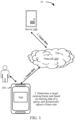
- FIG. 1 is a schematic diagram of a network architecture of a frame rate adjustment system 10 provided by an embodiment of this application.
- the frame rate adjustment system 10 includes a server 100, a network 200 and a terminal device 300.
- the terminal device 300 is connected to the server 100 via the network 200.
- the network 200 may be a wide area network or a local area network, or a combination of the wide area network and the local area network.
- Various clients are installed on the terminal device 300, such as a game client, a shopping client and a video playback client.
- the terminal device 300 displays content displayed by a currently running client on a current display interface.
- a game client running in the terminal device 300 is taken as an example for description.
- the game client acquires game running data from the server 100 via the network 200, determines a current scenario in real time based on the game running data, and adjusts a running frame rate of the game client based on the determined scenario. After the adjustment, the game client informs an operating system of the terminal device 300, so as to trigger the operating system of the terminal device 300 to adjust a refresh rate of a screen. Scenario-based real-time adjustment of the frame rate can be realized, and the power consumption of the terminal device can be effectively reduced, thus ensuring the performance of the terminal device.
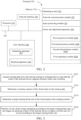
- FIG. 2 is a schematic structural diagram of a terminal device 300 according to an embodiment of this application.
- the terminal device 300 shown in FIG. 2 includes at least one processor 310, a memory 350, at least one network interface 320, and a user interface 330. All the components in the terminal device 300 are coupled together by a bus system 340.
- the bus system 340 is configured to implement connection and communication between the components.
- the bus system 340 further comprises a power bus, a control bus, and a state signal bus.
- all types of buses are marked as the bus system 340 in FIG. 2 .
- the processor 310 may be an integrated circuit chip having a signal processing capability, for example, a general purpose processor, a DSP, or another PLD, discrete gate, transistor logical device, or discrete hardware component.
- the general purpose processor may be a microprocessor, any conventional processor, or the like.
- the user interface 330 comprises one or more output apparatuses 331 that can display media content, comprising one or more speakers and/or one or more visual display screens.
- the user interface 330 further comprises one or more input apparatuses 332, comprising user interface components that facilitate inputting of a user, such as a keyboard, a mouse, a microphone, a touch display screen, a camera, and other input button and control.
- the memory 350 may be a removable memory, a non-removable memory, or a combination thereof.
- Exemplary hardware devices comprise a solid-state memory, a hard disk drive an optical disc driver, or the like.
- the memory 350 alternatively includes one or more storage devices away from the processor 310 in physical positions.
- the memory 350 comprises a volatile memory or a non-volatile memory, or may comprise both a volatile memory and a non-volatile memory.
- the non-volatile memory may be a read-only memory (ROM).
- the volatile memory may be a random access memory (RAM).
- the memory 350 described in this embodiment of this application is to comprise any other suitable type of memories.
- the memory 350 may store data to support various operations. Examples of the data comprise a program, a module, and a data structure, or a subset or a superset thereof, which are described below by using examples.
- An operating system 351 comprises a system program configured to process various basic system services and perform a hardware-related task, such as a framework layer, a core library layer, or a driver layer, and is configured to implement various basic services and process a hardware-based task.
- a hardware-related task such as a framework layer, a core library layer, or a driver layer
- a network communication module 352 is configured to reach another computing device through one or more (wired or wireless) network interfaces 320.
- Exemplary network interfaces 320 comprise: Bluetooth, wireless compatible authentication (Wi-Fi), a universal serial bus (USB), and the like.
- An input processing module 353 is configured to detect one or more user inputs or interactions from one of the one or more input apparatuses 332 and translate the detected input or interaction.
- FIG. 2 illustrates a frame rate adjustment apparatus 354 stored in the memory 350.
- the frame rate adjustment apparatus 354 may be a frame rate adjustment apparatus in the terminal device 300, which may be software in a form such as a program and a plug-in and includes the following software modules: a first acquisition module 3541, a first determination module 3542, a second determination module 3543 and a first outputting module 3544. These modules are logic, and thus can be randomly combined or further split according to functions realized. The following describes functions of the modules.
- the apparatus provided in the embodiments of this application may be implemented by using hardware.
- the apparatus provided in this embodiment of the application may be a processor in a form of a hardware decoding processor, programmed to perform the frame rate adjustment method provided in the embodiments of the application.
- the processor in the form of a hardware decoding processor may use one or more application-specific integrated circuits (ASIC), a DSP, a programmable logic device (PLD), a complex programmable logic device (CPLD), a field-programmable gate array (FPGA), or other electronic components.
- ASIC application-specific integrated circuits
- DSP digital signal processor
- PLD programmable logic device
- CPLD complex programmable logic device
- FPGA field-programmable gate array
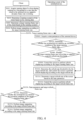
- FIG. 3 is a flowchart of a frame rate adjustment method provided by an embodiment of this application. The frame rate adjustment method will be described in combination with the steps shown in FIG. 3 .
- Step S101 Acquire running data of the client during running in a foreground when a client in the terminal device supports switching of a frame rate.
- the client may be a game client, an instant messaging client, a video playback client, a shopping client, a browser, or the like.
- the client acquires its running data during the running in the foreground.
- the running data may include picture information of a displayed picture and user operation data.
- the picture information may be image data of an image rendered and outputted by the client in the running process.
- the picture information may include a pixel value of each pixel pint of the rendered and outputted image.
- the user operation data may include time point information when a user triggers each operation, location of user's operation, a pressure value of the user's operation and other information.
- Step S102 Determine a running scenario of the client based on the running data.
- the running scenario may include at least a high frame rate running scenario (a scenario with the running frame rate greater than a frame rate threshold) and a low frame rate running scenario (a scenario with the running frame rate less than the frame rate threshold).
- the running scenario may also include a medium frame rate running scenario.
- the embodiments of this application does not specifically limit a division manner for running scenarios, as long as values of the running frame rates respectively corresponding to the high frame rate running scenario, the medium frame rate running scenario and the low frame rate running scenario obtained after division decrease in sequence.
- the running data may be analyzed to determine a picture motion situation, a user operation frequency, or whether it is a specific high frame rate scenario, thereby determining the running scenario of the client. For example, when at least one of the following conditions is satisfies, the running scenario is determined to be a high frame rate scenario: If there is a picture moving and the user operation frequency exceeds a certain threshold of the number of times, the running scenario is determined to be a particular high frame rate scenario. Otherwise, when there is no picture moving, and the user operation frequency does not exceed the certain threshold of the number of times, and it is not a particular high frame rate scenario, the running scenario is determined to a low frame rate scenario.
- Step S103 Determine a first running frame rate of the client based on the running scenario.
- different running frame rates may be pre-allocated for different running scenarios based on the highest refresh rate supported by the terminal device.
- the highest refresh rate supported by the terminal device is 90 Hz
- the running scenario includes the high frame rate running scenario and the low frame rate running scenario
- the value of the running frame rate corresponding to the high frame rate running scenario can be same as the value of the highest refresh rate, that is, 90 FPS
- the running frame rate corresponding to the low frame rate running scenario can be 30 FPS.
- the first running frame rate of the client can be determined according to the determined running scenarios. For example, when the determined running scenario is the high frame rate running scenario, the running frame rate of the client is 90 FPS; and when the determined running scenario is the low frame rate running scenario, the running frame rate of the client is 30 FPS. In this way, the frame rate of the client can be adjusted according to the running data. The power consumption can be effectively reduced while the user experience is guaranteed.
- Step S 104 Output, by the client, an image at the first running frame rate, and trigger an operating system of the terminal device to adjust a refresh rate of a screen according to the first running frame rate.
- the operating system of the terminal device adjusts the refresh rate of the screen according to the running frame rate, which means that the operating system of the terminal device first adjusts a value of the refresh rate to be same as the value of the running frame rate, and displays the adjusted refresh rate. For example, if an original refresh rate of the screen is 40 Hz, and the running frame rate sent by the client is 90 FPS, the operating system will adjust the refresh rate of the screen to 90 Hz and perform refresh displaying at a frequency of 90 Hz. That is, after the client adjusts the running frame rate according to the running scenario, the operating system of the terminal device can also be triggered to adjust the refresh rate of the screen.
- step S 104 there may be two manners to trigger, by means of the frame rate adjustment by the client, the terminal device to adjust the refresh rate of the screen.
- the first manner is passive adjustment by the terminal device, that is, the client instructs the terminal device to adjust the refresh rate according to the running frame rate.
- the second manner is active adjustment by the terminal device, that is, the operating system of the terminal device actively monitors a change in the frame rate of the client, and actively adjusts, if a change in the frame rate of the client is monitored, the refresh rate.
- the terminal device may adjust the value of the refresh rate of the screen to be same as the value of the first running frame rate when a running state of the terminal device is allowable.
- the terminal device may also adjust the refresh rate of the screen to a certain extent (that is, the value of the refresh rate is adjusted to a part of the value of the first running frame rate, such as 70%) when the running state of the terminal device is non-allowable.
- a current refresh rate of the screen is 30 Hz and the first running frame rate is 90 FPS
- the refresh rate of the screen cannot be increased to 90 Hz (because increasing the refresh rate of the screen to 90 Hz will easily cause the temperature of the terminal device to be extremely high).
- the refresh rate can be increased to be less than the value of the first running frame rate, such as 60 Hz.
- the client when a client in a terminal device supports switching of a frame rate, running data of the client during running at a foreground is acquired, and the client determines a running scenario based on the running data.
- Different running scenarios can correspond to different running frame rates, so that after a running scenario is determined, a first running frame rate of the client is then determined based on the running scenario; next, the client outputs an image at the first running frame rate, so as to adjust the running frame rate of the client, thereby achieving real-time adjustment of the running frame rate by the client based on the running scenario; and furthermore, the adjustment is also used for triggering the terminal device to adjust a refresh rate of a screen, so that the power consumption can be effectively reduced while the user experience is guaranteed.
- Step S105A Send, by the client, the first running frame rate to the operating system of the terminal device.
- step S105A after startup, the client requests to establish a communication connection to the operating system of the terminal device. After the communication connection is established successfully, the operating system of the terminal device and the client can interact with each other by information and data.
- Step S106A After receiving the first running frame rate, acquire, by the operating system of the terminal device, a state parameter of the terminal device.
- the state parameter of the terminal device may include at least one of the following: a CPU temperature, a CPU usage rate, and remaining power of the terminal device.
- Step S 107A Determine, by the operating system of the terminal device, based on the state parameter, whether the terminal device satisfies an execution condition of the first running frame rate.
- a set temperature threshold, usage rate threshold and power threshold may be acquired first.
- the execution condition of the first running frame rate includes at least one of the following: the CPU temperature is less than the temperature threshold; the CPU usage rate is less than the usage rate threshold; and the remaining power is greater than the power threshold.
- different running frame rates correspond to different execution conditions.
- the execution condition corresponding to a high running frame rate (for example, 144 FPS) may be that the CPU temperature is lower than 40°C and the CPU usage rate is less than 40%.
- the execution condition corresponding to a medium running frame rate (for example, 90 FPS) may be that the CPU temperature is lower than 55°C.
- There is no execution condition for a low frame rate that is, a low frame rate is executed if neither the execution condition corresponding to a high frame rate nor the execution condition corresponding to a medium frame rate are satisfied.
- the acquired state parameters are as follows: the CPU temperature being 50°C and the CPU usage rate being 45%, the execution condition of the first running frame rate is that the CPU temperature is lower than 40°C and the CPU usage rate is less than 40%. Since neither the CPU temperature nor the CPU usage rate meet the requirements for the CPU temperature and CPU usage rate in the execution condition, the terminal device is determined to not satisfy the execution condition of the first running frame rate, and step S 111A is executed.
- Step S 108A Determine, by the operating system of the terminal device, whether the first running frame rate is less than or equal to a preset refresh rate threshold.
- the operating system of the terminal device determines whether the first running frame rate is less than or equal to the preset refresh rate threshold, which means determining whether the value of the first running frame rate is less than or equal to the value of the preset refresh rate threshold.
- the refresh rate threshold may be set by the user according to own needs.
- the refresh rate threshold may be less than or equal to the highest refresh rate supported by the terminal device.
- Step S109A Control, by the operating system of the terminal device, the screen to perform refresh displaying at the first running frame rate.
- the operating system of the terminal device controls the screen to perform refresh displaying at the first running frame rate, which means that the operating system first adjusts the value of the refresh rate to be same as the value of the first running frame rate and then controls in real time the screen to perform refresh displaying according to the adjusted refresh rate, so as to enhance the user experience.
- Step S110A Determine, by the operating system of the terminal device, the refresh rate threshold to be the target refresh rate, and controls the screen to perform refresh displaying according to the target refresh rate.
- the screen is controlled to perform refresh displaying according to the refresh rate threshold at this time, that is, the terminal device increases the refresh rate to a reachable maximum value to ensure the user experience.
- step S113A and subsequent steps may also be executed.
- Step S 111A Determine, by the operating system of the terminal device, a target refresh rate of the screen based on the state parameter.
- the highest running frame rate corresponding to at least one execution condition that can be satisfied by the state parameter can be determined based on the state parameter, and the value of the highest running frame rate is taken as the value of the target refresh rate of the screen.
- the acquired state parameter is the CPU temperature being 50°C and the CPU usage rate being 45%
- the greater value from 30 FPS and 90 FPS i.e., 90 FPS
- a frequency of the target refresh rate is 90 Hz.
- Step S 112A Control, by the operating system of the terminal device, the screen to perform refresh displaying according to the target refresh rate.
- Step S 1 13A Send, by the operating system of the terminal device, the state parameter and the target refresh rate to the client.
- the operating system of the terminal device sends the state parameter and the target refresh rate to the client based on the previously established communication connection.
- Step S114A Determine, by the client, based on the state parameter, whether the terminal device satisfies the execution condition of the first running frame rate.
- the client can determine, based on the state parameter, whether the terminal device satisfies the execution condition of the first running frame rate, so as to determine whether the terminal device does not adjust the value of the refresh rate to the value of the first running frame rate because the terminal device cannot support the first running frame rate. If it is determined that the terminal device does not satisfy the execution condition of the target frame rate, that is, if it is determined that the terminal device does not adjust the refresh rate because of inability of supporting the first running frame rate, it is determined to reversely adjust the running frame rate at this time, and the step S 115A is executed.
- step S 116A is executed.
- Step S115A Output, by the client, an image at the target refresh rate.
- the client outputs an image at the target refresh rate, which means that the client adjusts the value of the running frame rate to be same as the value of the target refresh rate, and outputs an image at the adjusted running frame rate.
- Step S116A Output, by the client, an image at the first running frame rate.
- the client after determining the first running frame rate based on its own running scenario, the client adjusts its running frame rate to the first running frame rate, and sends the first running frame rate to the operating system of the terminal device by means of the communication connection to the operating system of the terminal device, so as to instruct the operating system of the terminal device to adjust, based on the first running frame rate, the refresh rate of the screen; after receiving the first running frame rate, the operating system of the terminal device determines, based on its own state parameter, whether the screen of the terminal device supports the first running frame rate. If the running state of the terminal device is enough to support the first running frame rate, the value of the refresh rate of the screen can be adjusted to the same as the value of the first running frame rate.
- the power consumption of the terminal device can be effectively reduced; and if the value of the refresh rate of the screen is increased to be same as the value of the first running frame rate, the display effect can be enhanced, and the use experience of a user is thus enhanced.
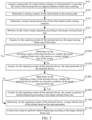
- step S104 if the terminal device actively adjusts the refresh rate, after step S104, as shown in FIG. 5 , the following steps may also be executed:
- Step S 105B Acquire, by the operating system of the terminal device, the first running frame rate of the client.
- the operating system of the terminal device sends a frame rate acquisition request to the client, so as to acquire the first running frame rate of the client.
- the operating system of the terminal device may send a frame rate acquisition request to the client once at a preset time interval (for example, a frame rate acquisition request is sent to the client every 1 min), so as to acquire the first running frame rate of the client.
- Step S 106B Determine, by the operating system of the terminal device, whether the first running frame rate is the same as a current refresh rate of the screen.
- the operating system of the terminal device determines whether the first running frame rate is the same as the current refresh rate of the screen, which means determining whether the value of the first running frame rate is same as the value of the current refresh rate.
- the value of the first running frame rate is determined to be same as the value of the current refresh rate of the screen, it indicates that the refresh rate does not need to be adjusted, and step S105B is executed again.
- the value of the first running frame rate is determined to be different from the value of the current refresh rate of the screen, it indicates that the refresh rate of the screen needs to be adjusted, and step S 107B is executed at this time.
- Step S 107B Acquire, by the operating system of the terminal device, the state parameter of the terminal device.
- the state parameter of the terminal device acquired by the operating system may include, but not limited to, a CPU temperature, a CPU usage rate and the like.
- Step S108B Determine, by the operating system of the terminal device, based on the state parameter, whether the terminal device satisfies an execution condition of the first running frame rate.
- a set temperature threshold and/or usage rate threshold may be acquired first.
- the execution condition of the first running frame rate includes at least one of the following: the CPU temperature is less than the temperature threshold; and the CPU usage rate is less than the usage rate threshold.
- Step S 109B Control, by the operating system of the terminal device, the screen to perform refresh displaying at the first running frame rate.
- the operating system of the terminal device controls the screen to perform refresh displaying at the first running frame rate, which means that the operating system first adjusts the value of the refresh rate of the screen to be the same as the value of the first running frame rate and then performs refresh displaying according to the adjusted refresh rate.
- Step S110B Determine, by the operating system of the terminal device, a target refresh rate of the screen based on the state parameter.
- the highest running frame rate corresponding to at least one execution condition that can be satisfied by the state parameter can be determined based on the state parameter, and the value of the highest running frame rate is taken as the value of the target refresh rate of the screen.
- Step S 111B Control, by the operating system of the terminal device, the screen to perform refresh displaying according to the target refresh rate.
- the client after determining the first running frame rate based on its own running scenario, the client adjusts its running frame rate to the first running frame rate, so as to adjust the running frame rate of the client.
- the client will not instruct the operating system of the terminal device to adjust the refresh rate of the screen. Therefore, the operating system of the terminal device can actively monitor whether the running frame rate of the client changes. If it is monitored that the running frame rate of the client changes, the operating system of the terminal device determines the first running frame rate of the client, and determines, based on its own state parameter, whether the terminal device supports the first running frame rate.
- the refresh rate of the screen can be adjusted to the first running frame rate, thus achieving active adjustment of the refresh rate of the screen. Furthermore, if the value of the refresh rate of the screen is decreased to be the same as the value of the first running frame rate, the power consumption of the terminal device can be effectively reduced; and if the value of the refresh rate of the screen is increased to be same as the value of the first running frame rate, the display effect can be enhanced, and the use experience of a user is thus enhanced.
- step S102 may be implemented by the following steps: Step S1021A: Determine a moving parameter of a virtual object in an outputted picture of the client and an operation frequency of a user based on the running data.
- the virtual object may be either a virtual character or a virtual prop.
- Step S1022A When the moving parameter is greater than a first parameter threshold, or when the operation frequency is greater than a first frequency threshold, determine that the client is in a first running scenario.
- Step S1023A When the moving parameter is less than or equal to the first parameter threshold, or when the operation frequency is less than or equal to the first frequency threshold, determine that the client is in a second running scenario.
- an operation of a user can get a faster response, and the user experience of the client will be smoother. Therefore, when it is determined, based on the operation frequency, that the operation frequency is greater than the predetermined first frequency threshold, it can be determined that the client is in the first running scenario, that is, a high frame rate running scenario; when the operation frequency is less than the first frequency threshold, that is, when the operation frequency of the user is not extremely high, for example, when the user conducts an operation, such as purchasing equipment outside a game of a game client, that does not involve a competition or when the user does not conduct any operation, it can be determined that the client is in the second running scenario, that is, a low frame rate running scenario.
- the high frame rate mode can avoid a non-fluent and blurring picture. Therefore, at this time, it is determined that the client is in the first running scenario, that is, the high frame rate running scenario.
- the moving parameter of the virtual object is less than or equal to the first parameter threshold, which indicates that the virtual object moves at a low speed or does not move, it is determined that the client is in the second running scenario at this time, that is, the low frame rate running scenario.
- step S102 may also be implemented by the following steps: Step S1021B: Determine whether the client plays a recommendation animation based on the running data.
- the scenario is also determined to be the first running scenario, that is, the high frame rate scenario, even if the above condition is not satisfied.
- Step S1022B When it is determined based on the running data that a recommendation animation is played, determine that the client is in a first running scenario.
- Step S1021C Determine whether a game is over or whether a scenario switching animation is played based on the running data.
- Step S1022C When it is determined based on the running data that a game is over or a scenario switching animation is played, determine that the client is in a second running scenario.
- a current running scenario for a client can be determined based on running data of the client, so that the frame rate is adjusted based on the running scenario.
- Step S001 Upon startup of the client, determine whether the client supports frame rate adjustment.
- step S002 When it is determined that the client supports the frame rate adjustment, step S002 is executed; and when it is determined that the client terminal does not support the frame rate adjustment, step S201 is executed.
- Step S002 Upon startup, request by the client, to establish a communication connection to the operating system of the terminal device.
- Step S003 When the establishment of the communication connection is completed, determine, by the client whether the terminal device supports frame rate adjustment.
- step S004 When it is determined that the terminal device supports the frame rate adjustment, step S004 is executed; when it is determined that the terminal device does not support the frame rate adjustment, step S101 is executed.
- Step S004 Acquire, by the client, the highest refresh rate supported by the terminal device.
- the highest refresh rate supported by the terminal device is determined based on hardware of the terminal device, and may be considered to be confirmed when the terminal device leaves the factory.
- step S103 may be implemented by the following steps: Step S1031: When it is determined that the running scenario is the first running scenario, determine the highest refresh rate to be the first running frame rate of the client.
- the highest refresh rate is determined to be the first running frame rate of the client, which means that the value of the highest refresh rate is determined to be the value of the first running frame rate of the client.
- Step S1032 When it is determined that the running scenario is the second running scenario, determine a preset running frame rate to be the first running frame rate of the client.
- the value of the preset running frame rate is less than the value of the highest refresh rate. That is, when it is determined that the running scenario is a high frame rate scenario, the value of the highest refresh rate that can be supported by the hardware of the terminal device is determined to be the value of the first running frame rate of the client, so as to improve the playback quality in the high frame rate scenario. When it is determined that the running scenario is a low frame rate scenario, a preset relatively low running frame rate can be determined to be the first running frame rate of the client, so that without affecting the user experience, the power consumption of the terminal device can be reduced, and the standby time of the terminal device can be prolonged.
- the client when the client supports the frame rate adjustment, the client can adjust the frame rate in real time according to the running data, or the user can manually adjust the frame rate through a frame rate adjustment interface provided by the client. If the client automatically adjusts the frame rate in real time according to the running data, after step S005, step S101 and subsequent steps are executed. If the client manually adjusts the frame rate based on settings of the user, after the client acquires a first running frame rate set by the user, the client outputs an image at the first running frame rate, so as to achieve the adjustment of the running frame rate; and furthermore, the terminal device is triggered based on the adjustment to adjust the refresh rate of the screen.
- Step S201 Acquire, by the operating system of the terminal device, the state parameter of the terminal device.
- Step S202 Collect, by the operating system of the terminal device, image data and user operation data of the client during running within a preset duration.
- the preset duration has been preset by the terminal device when the terminal device leaves the factory.
- the terminal device may also provide a setting interface of the duration, which is preset by the user according to own needs.
- the image data may include pixel values of various pixel points of an image rendered and outputted by the client during running, and the user operation data may include trigger time, a trigger position, a pressure value and other data of a user operation.
- Step S203 Determine, by the operating system of the terminal device, a target refresh rate of the screen based on the state parameter, the image data and the user operation data.
- the running scenario where the client is located can be first determined based on the image data and the user operation data, thus determining the running frame rate corresponding to the running scenario. If the value of the running frame rate is less than the value of the current refresh rate of the terminal device, the value of the running frame rate is determined to the value of the target refresh rate of the screen.
- the value of the running frame rate is greater than the value of the current refresh rate of the terminal device, whether the terminal device can satisfy the execution condition of the running frame rate is determined based on the state parameter; if the terminal device can satisfy the execution condition of the running frame rate, the value of the running frame rate is determined as the value of the target refresh rate of the screen; and if the terminal device cannot satisfy the execution condition of the running frame rate, the target refresh rate is determined based on the state parameter.
- the value of the target refresh rate is greater than or equal to the value of the current refresh rate.
- Step S204 Control, by the operating system of the terminal device, the screen to perform refresh displaying according to the target refresh rate.
- the terminal device can make a real-time judgment on the running scenario of the client based on picture data in a running process and the number of user operations, and estimate a corresponding running frame rate of the client based on the determined running scenario, so that the own refresh rate is adjusted based on the running frame rate; the screen can be refreshed at a high refresh rate in a high frame rate scenario, and the screen can be refreshed at a low refresh rate in a low frame rate scenario; and the power consumption of the terminal device is reduced.
- the frame rate adjustment method provided in this embodiment of this application is described by taking the game client as an example.
- the frame rate adjustment method provided in this embodiment of this application includes the following steps: Step S501: Identify, by the game client, a high frame rate scenario and a low frame rate scenario, and determine a first running frame rate according to the identified scenario.
- the game client can determine whether the current scenario is a scenario where a user can clearly feel a high frame rate, and determine the first running frame rate of the identified scenario.
- the game client can adjust the running frame rate during switching of different scenarios. The adjustment can be based on the identified scenario or a real-time running state of the terminal device.
- Step S502 Send, by the game client, the identified scenario and the first running frame rate to the terminal device.
- an interaction protocol can be defined between the game client and the terminal device, so that the game client can deliver the identified scenario and first running frame rate to the terminal device in real time.
- the terminal device can also notify the game client through the interaction protocol, and the game client adjusts the running frame rate in real time according to received information.
- Step S503 After receiving a frame rate adjustment message sent by the game client, adjust by the terminal device, the refresh rate of the screen of the terminal device in real time.
- the operating system of the terminal device After receiving the frame rate adjustment message sent by the game client, the operating system of the terminal device adjusts the refresh rate of the screen of the terminal device in real time, so as to ensure that no non-fluent pictures will appear in a switching process.
- the terminal device may notify the game client through a callback interface to reduce the running frame rate in real time.
- Low and high running frame rate scenarios are divided according to the impact of different running frame rates in each scenario on actual user experience, and can be distinguished according to the several following factors during implementation.
- Different user operation types can correspond to different scenarios, that is to say, different operation types have different requirements on the running frame rate. For example, in a fierce fighting scenario, the user will conduct operations frequently, and a high running frame rate is required to provide faster responses at this time. For a scenario of purchasing equipment outside a competition game, without involving real-time competitions, the user will not conduct operations frequently; and at this time, a good experience can be brought to the user at medium and high running frame rates.
- a high running frame rate can make the changes of the camera smoother and reduce dizziness of the user; when a character or prop in a game picture moves rapidly, a high running frame rate can make the movement visually smoother; therefore, when the height and position of the camera change, or the movement of the character and prop causes frequent picture switching, it is in a high running frame rate scenario; when pictures are relatively static or the motion is not obvious, a low running frame rate is maintained, which will not affect the user experience and also reduce the overall power consumption in the game. At this time, it is in a low running frame rate scenario.
- a user has a clear expectation. For example, in a cutting animation after the game is over, a switching scenario between different copies, and the like, the user will not be immersed in displayed pictures, so that the running frame rate can be switched to a low running frame rate.
- a high running frame rate can better reflect the quality of the game, so a high running frame rate is also maintained even if the above conditions are not satisfied.
- the client can determine the running frame rate of each scenario according to the above defined principle, mark the running frame rate of each scenario in real time, and send the running frame rate to the terminal device.
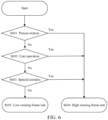
- FIG. 6 is a flowchart of an implementation flow of scenario division provided by an embodiment of this application. As shown in FIG. 6 , the flow includes:
- Step S601 Determine whether a picture moves.
- step S604 is executed to determine that it is in a high running frame rate scenario; and if it is determined that the picture is still, step S602 is executed for further determination.
- Step S602 Determine whether there is a user operation.
- step S604 is executed, and it is determined to be a high frame rate scenario; and when it is determined that there is no user operation, step S603 is executed for further determination.
- determining whether there is a user operation may be determining whether there is a user operation and whether the frequency of the user operation is greater than a certain threshold of the number of times; and if there is a user operation and the frequency of the operation is greater than the threshold of the number of times, it is determined that there is a user operation.
- Step S603 Determine whether it is a preset high running frame rate special scenario.
- step S604 is executed to determine that it is a high operation frame rate scenario; and if it is determined not to be the preset high operation frame rate special scenario, step S605 is executed.
- Step S604 Determine that it is a high running frame rate scenario.
- Step S605 Determine that it is a low running frame rate scenario.
- step S601 to step S605 in order to achieve the best user experience, when any one of the conditions meets the requirement of the high running frame rate, it needs to be identified as a high running frame rate scenario.
- step S601 to step S603 determining the movement of the picture, the user operation and the special scenario in sequence is only an exemplary illustration. In actual implementation, the order of determining the movement of the picture, the user operation and the special scenario is random.
- the game client determines the first running frame rate according to the identified scenario, adjusts a picture rendering frame rate in real time according to the first running frame rate, and then notifies the terminal device in real time to adjust the corresponding refresh rate.
- the game client can not only automatically identify a scenario and adjust a frame rate, but also adjust the frame rate according to actual needs of a user.
- a running state of the terminal device is abnormal, if an extremely high temperature causes the performance to be reduced, the overall running frame rate is also required to be correspondingly reduced.
- the game client When the game client receives a running state abnormality returned by the terminal device, the running frame rate is reduced in real time, and an adjustment result is sent back to the terminal device in real time.
- Table 1 shows field information sent by the game client to the terminal device: Table 1 Field information sent by the game client to the terminal device Name of field Type of field Meaning of field Remarks Game_name String Name of game pack Target_FPS Int Target frame rate Adjust src Int Reasons of frame rate adjustment 0: automatic adjustment 1: adjustment by a user 2: if the terminal device is abnormal, the game is correspondingly adjusted Scence_Type Int Current game scenario type: 1: Special scenario 2: Picture motion scenario 3: User operation scenario Table 2 Field information replied by the terminal device to the game client Name of field Type of field Meaning of field Remarks Game_name String Name of game pack Target _FPS Int First running frame rate issued by the game Terminal_Target_FPS Int Target refresh rate finally adjusted by the terminal device: If the target refresh rate finally adjusted by the terminal device is consistent with that issued by the game, it is not necessary to adjust the game, or it is necessary to correspondingly adjust the game Terminal_state Int Running state of
- FIG. 7 is a schematic diagram of an interaction flow of a terminal device and a game client provided by an embodiment of this application. As shown in FIG. 7 , the interaction flow includes:
- Step S701 Query, by the game client, the terminal device for whether the terminal device supports a dynamic frame rate.
- a QeryDynamicFPS interface can be invoked to query whether the terminal device supports the dynamic frame rate. There is no need to input parameters for the interface. Outputs may be: 1: support or not support; and 2: a supported version number.
- Step S702 Return, by the terminal device, a dynamic frame rate support situation.
- Step S703 Query, by the game client, the terminal device for the currently supported highest refresh rate.
- the currently supported highest refresh rate may be queried from the terminal device by invoking the QueryTerminalMaxFPS interface. There are no input parameters for this interface, and an output parameter is the highest refresh rate that the terminal device can support.
- Step S704 Return, by the terminal device, the currently supported highest refresh rate.
- Step S705 Request, by the game client, to establish a connection to the terminal device.
- the game client may request the terminal device to establish a connection channel for frame rate adjustment by invoking a ConnetToTerminal interface, and an output is success or failure.
- Step S706 Complete, by the terminal device, the initialization and return that the connection has been established.
- step S701 to step S706 before the game client starts to adjust the frame rate, the game client handshakes with the terminal device to make an agreement on related protocols and establish and maintain communication links.
- Step S707 Determine, by the game client, a current first running frame rate, and send information to the terminal device.
- the game client can determine the first running frame rate of the game client by invoking a JudgeTartgetFPS interface, where an input of this interface is the running data of the game, and an output is the first running frame rate. After the game client determines the first running frame rate, the first running frame rate is carried in a message and sent to the terminal device; and a field in the sent information is as shown in Table 1.
- Step S708 After receiving the information sent by the game client, adjust, by the terminal, the refresh rate, and return an adjustment result to the game client.
- the terminal device invokes the AdjustTerminalTargetFPS interface to adjust the refresh rate of the screen, that is, the input of this interface is an information structure shown in Table 1, and the output is an information structure shown in Table 2.
- the information structure shown in Table 2 is then fed back to the game client by the terminal device.
- Step S709 Perform, by the game client, reverse frame rate adjustment according to the information fed back by the terminal device, and feed back the adjustment result and current real-time scenario information to the terminal device.
- the game client After receiving the information structure shown in Table 2 and sent by the terminal device, the game client invokes the AdjustGameTargetFPS interface to adjust the first running frame rate again.
- the input of this interface can be the information structure returned by the terminal device and shown in Table 2 and the first running frame rate TargetFPS determined in step S707, and the output is the information structure shown in Table 1, so that the game client can adjust the first running frame rate again according to the adjustment result returned by the terminal device.
- TargetFPS and the information returned by the terminal device are comprehensively determined, and the running frame rate of the game is adjusted in real time; and a secondary adjustment result is returned to the terminal device.
- Step S710 After receiving the information sent by the game client, adjust, by the terminal device, the refresh rate.
- the terminal device After receiving the adjustment result sent by the game client, the terminal device adjusts the refresh rate of the screen again according to the adjustment result, so as to adjust the refresh rate of the screen.
- Step S711 Repeat the steps 8-10 during the running of the game until the game is over.
- the game notifies the terminal device to disconnect the link.
- the game client can invoke a CloseConnect interface to cut off the communication connection with the terminal device.
- This interface has no input parameter, but has an output of success or failure.
- the terminal device achieves the ability to perform frame rate adjustment in real time.
- the frame rate adjustment can take effect instantaneously, and the user will not feel it.
- the terminal device After receiving the request of adjusting the frame rate from the game client, the terminal device determines a current running state. If the temperature is normal and can support a frame rate requirement of the game client, the refresh rate is adjusted normally according to the request sent by the game client.
- the refresh rate will not be increased temporarily, and the running state will be notified to the game client, so that the game client can follow the terminal device to perform the frame rate adjustment.
- the game client can adjust the running frame rate of the game, and the frame rate adjustment can be notified to the terminal device in real time, allowing the terminal device to perform real-time adjustment with changes of the game. Therefore, the following phenomenon can be avoided: the waste of power or reduction of the user experience caused by inconsistency between the refresh rate of the screen of the terminal device and the running frame rate of the game since the running frame rate of the game is adjusted.
- the terminal device can adjust the refresh rate in real time according to the running state of the terminal device, which can effectively reduce the power consumption while ensuring the user experience.
- the game client can also be notified in real time to perform adjustment accordingly. In this way, through the frame rate adjustment method provided in this embodiment of this application, the user can enjoy a fluent high frame rate experience, and an abnormality such as non-fluent pictures when the temperature of the terminal device is too high is also avoided.
- the running frame rate of the game client and the refresh rate of the screen of the terminal device are adjusted at the same time.
- only the game client may perform the frame rate adjustment, that is, the game client can achieve a dynamic frame rate without relying on the terminal device, and can also gain most of the profits.
- the terminal device does not perform frame rate adjustment accordingly, maintaining a high refresh rate on the screen will still bring additional power consumption in a low frame rate scenario.
- the terminal device can monitor switching of the frame rate of the game through rendering of a GPU. After the game client switches the frame rate, the terminal device can also follow the game client to switch the refresh rate following.
- a game scenario can be dynamically determined in real time by means of collecting game picture changes of the user and touch-control operations of the user in real time, so as to distinguish a high frame rate scenario and a low frame rate scenario and perform switching of a refresh rate.
- a software module stored in the frame rate adjustment apparatus 354 of a memory 350 may be a frame rate adjustment apparatus in a terminal device 300, and includes: a first acquisition module 3541 configured to acquire running data of the client during running in a foreground when a client in the terminal device supports switching of a frame rate; a first determination module 3542 configured to determine a running scenario of the client based on the running data; a second determination module 3543 configured to determine a first running frame rate of the client based on the running scenario; and a first outputting module 3544 configured to control the client to output an image at the first running frame rate, and trigger an operating system of the terminal device to adjust a refresh rate of a screen according to the first running frame rate.
- the apparatus further includes: a first transmission module configured to transmit the first running frame rate to the operating system of the terminal device; a second acquisition module configured to acquire a state parameter of the terminal device after the first running frame rate is received; and a first control module configured to: when it is determined based on the state parameter that the terminal device satisfies an execution condition of the first running frame rate and the first running frame rate is less than or equal to a preset refresh rate threshold, control the screen to perform refresh displaying according to the first running frame rate.
- the apparatus further includes: a third determination module configured to: when it is determined based on the state parameter that the terminal device does not satisfy the execution condition of the first running frame rate, determine a target refresh rate of the screen based on the state parameter; a second control module configured to control the screen to perform refresh displaying according to the target refresh rate; and a second transmission module configured to transmit the state parameter and the target refresh rate to the client.
- a third determination module configured to: when it is determined based on the state parameter that the terminal device does not satisfy the execution condition of the first running frame rate, determine a target refresh rate of the screen based on the state parameter
- a second control module configured to control the screen to perform refresh displaying according to the target refresh rate
- a second transmission module configured to transmit the state parameter and the target refresh rate to the client.
- the state parameter includes at least one of the following: a CPU temperature, a CPU usage rate and remaining power of the terminal device; and the execution condition of the first running frame rate includes at least one of the following: the CPU temperature is less than a temperature threshold; the CPU usage rate is less than a usage rate threshold; and the remaining power is greater than a remaining power threshold.
- the apparatus further includes: a second outputting module configured to: when it is determined based on the state parameter that the terminal device does not meet the execution condition of the first running frame rate, output, by the client, an image at the target refresh rate output; and a third outputting module configured to: when it is determined based on the state parameter that the test device satisfies the execution condition of the first running frame rate, output, by the client, an image at the first running frame rate.
- the apparatus further includes: a fourth obtaining module, configured to obtain the first running frame rate of the client; a fifth obtaining module, configured to obtain a state parameter of the terminal device when an operating system of the terminal device determines that the first running frame rate is different from the current refresh rate of the screen; the third control module is configured to control the screen to refresh and display according to the first running frame rate when it is determined based on the state parameter that the terminal device satisfies the execution condition of the first running frame rate.
- the first determination module is further configured to determine a moving parameter of a virtual object in an outputted picture of the client and an operation frequency of a user based on the running data; when the moving parameter is greater than a first parameter threshold or when the operation frequency is greater than a first frequency threshold, determine that the client is in a first running scenario; and when the moving parameter is less than or equal to the first parameter threshold, and the operation frequency is less than or equal to the first frequency threshold, determine that the client is in a second running scenario.
- the first determination module is further configured to: when it is determined based on the running data that a recommendation animation is played, determine that the client is in the first running scenario; or, when it is determined based on the running data that a game is over or a scenario switching animation is played, determine that the client is in the second running scenario.
- the apparatus further includes: a connection establishment module configured to: after startup, request, by the client, to establish a communication connection with the operating system of the terminal device; a sixth determination module configured to: when the establishment of the communication connection is completed, determine whether the terminal device supports frame rate adjustment; a sixth acquisition module configured to: when it is determined that the terminal device supports the frame rate adjustment, acquire the highest refresh rate supported by the terminal device; and a seventh determination module configured to determine a correspondence relationship between a scenario level and a running frame rate based on the highest refresh rate and a preset scenario level.
- a connection establishment module configured to: after startup, request, by the client, to establish a communication connection with the operating system of the terminal device
- a sixth determination module configured to: when the establishment of the communication connection is completed, determine whether the terminal device supports frame rate adjustment
- a sixth acquisition module configured to: when it is determined that the terminal device supports the frame rate adjustment, acquire the highest refresh rate supported by the terminal device
- a seventh determination module configured to determine a correspondence relationship between a scenario level and
- the second determination module is further configured to: when it is determined that the running scenario is the first running scenario, determine the highest refresh rate to be the first running frame rate of the client; and when it is determined that the running scenario is the second running scenario, determine a preset running frame rate to be the first running frame rate of the client, the preset running frame rate being less than the highest refresh rate.
- the apparatus further includes a seventh acquisition module configured to: when the client in the terminal device does not support the switching of a frame rate, acquire a state parameter of the terminal device; a data collection module configured to collect image data and user operation data of the client during running within a preset duration; an eighth determination module configured to determine a target refresh rate of the screen based on the state parameter, the image data and the user operation data; and a fourth control module configured to control the screen to perform refresh displaying according to the target refresh rate.
- a seventh acquisition module configured to: when the client in the terminal device does not support the switching of a frame rate, acquire a state parameter of the terminal device
- a data collection module configured to collect image data and user operation data of the client during running within a preset duration
- an eighth determination module configured to determine a target refresh rate of the screen based on the state parameter, the image data and the user operation data
- a fourth control module configured to control the screen to perform refresh displaying according to the target refresh rate.
- An embodiment of this application provides a storage medium storing an executable instruction.
- the processor is caused to perform the method, for example, the method shown in FIG. 4 provided in the embodiments of this application.
- the storage medium may be a computer-readable storage medium such as a ferromagnetic random access memory (FRAM), a read only memory (ROM), a programmable read-only memory (PROM), an erasable programmable read-only memory (EPROM), an electrically erasable programmable read-only memory (EEPROM), a flash memory (Flash Memory), a magnetic storage, an optic disc, or a compact disc-read only memory (Compact Disc-Read Only Memory, CD-ROM); or may be various devices including one or any combination of the memories described above.
- FRAM ferromagnetic random access memory
- ROM read only memory
- PROM programmable read-only memory
- EPROM erasable programmable read-only memory
- EEPROM electrically erasable programmable read-only memory
- flash Memory Flash Memory
- magnetic storage an optic disc
- CD-ROM compact disc-read only memory
- the executable instructions may be written in any form of programming language (comprising a compiled or interpreted language, or a declarative or procedural language) by using the form of a program, software, a software module, a script or code, and may be deployed in any form, comprising being deployed as an independent program or being deployed as a module, a component, a subroutine, or another unit suitable for use in a computing environment.
- programming language comprising a compiled or interpreted language, or a declarative or procedural language
- the executable instructions may, but do not necessarily, correspond to a file in a file system, and may be stored in a part of a file that saves another program or other data, for example, be stored in one or more scripts in a HyperText Markup language (HTML) file, stored in a file that is specially used for a program in discussion, or stored in the plurality of collaborative files (for example, be stored in files of one or modules, subprograms, or code parts).
- the executable instructions may be deployed to be executed on a computing device, or deployed to be executed on a plurality of computing devices at the same location, or deployed to be executed on a plurality of computing devices that are distributed in a plurality of locations and interconnected by using a communication network.
Landscapes
- Engineering & Computer Science (AREA)
- Theoretical Computer Science (AREA)
- Physics & Mathematics (AREA)
- General Physics & Mathematics (AREA)
- Computer Hardware Design (AREA)
- General Engineering & Computer Science (AREA)
- Human Computer Interaction (AREA)
- Controls And Circuits For Display Device (AREA)
- Two-Way Televisions, Distribution Of Moving Picture Or The Like (AREA)
Abstract
Description
- This application claims priority to
Chinese Patent Application No. 202011242460.7 filed on November 9, 2020 - This application relates to the technical field of image processing, and relates to, but not limited to, a frame rate adjustment method, apparatus and device, a computer-readable storage medium and a computer program product.
- With the development of a terminal technology, a frame rate supported by an intelligent terminal is increasingly high at present, and 120 frames or even 144 frames are more and more common. A high frame rate brings users smooth screen displaying and a faster touch-control response experience, but also brings higher power consumption and heat. At present, due to the limitation of the heat dissipation capability, an intelligent terminal cannot maintain a high frame rate for a long time. After running for a period of time, the intelligent terminal will activate a high-temperature protection mechanism in case of an excessively high temperature, which causes performance reduction and makes it impossible to support high frame rates.
- An embodiment of this application provides a frame rate adjustment method, which is implemented by a terminal device and includes:
- acquiring running data of a client during running in a foreground when the client in the terminal device supports switching of a frame rate;
- determining a running scenario of the client based on the running data;
- determining a first running frame rate of the client based on the running scenario; and
- outputting, by the client, an image at the first running frame rate, and triggering an operating system of the terminal device to adjust a refresh rate of a screen according to the first running frame rate.
- An embodiment of this application provides a frame rate adjustment apparatus, including:
- a first acquisition module configured to acquire running data of a client during running in a foreground when the client in the terminal device supports switching of a frame rate;
- a first determination module configured to determine a running scenario of the client based on the running data;
- a second determination module configured to determine a first running frame rate of the client based on the running scenario; and
- a first outputting module configured to output, by the client, an image at the first running frame rate, and trigger an operating system of the terminal device to adjust a refresh rate of a screen according to the first running frame rate.
- An embodiment of this application provides a terminal device for frame rate adjustment, including:
- a memory, configured to store executable instructions; and
- a processor configured to implement, when executing an executable instruction stored in the memory, the above-mentioned frame rate adjustment method.
- An embodiment of this application provides a computer-readable storage medium which stores an executable instruction used for causing a processor to implement the above-mentioned frame rate adjustment method.
- An embodiment of this application provides a computer program product including a computer program or an instruction; and the computer program or instruction, when executed by a processor, implements the above-mentioned frame rate adjustment method.
- The embodiments of this application have the following beneficial effects:
- When a client in a terminal device supports switching of a frame rate, running data of the client during running at a foreground is acquired, and the client determines a running scenario based on the running data. Different running scenarios can correspond to different running frame rates, so that after a running scenario is determined, a first running frame rate of the client is then determined based on the running scenario; next, the client outputs an image at the first running frame rate, so as to adjust the running frame rate of the client, thereby achieving real-time adjustment of the running frame rate by the client based on the running scenario; and furthermore, the adjustment is also used for triggering an operating system of the terminal device to adjust a refresh rate of a screen, so that the power consumption can be effectively reduced while the user experience is guaranteed.
-
-
FIG. 1 is a schematic diagram of a network architecture of a framerate adjustment system 10 provided by an embodiment of this application. -
FIG. 2 is a schematic structural diagram of aterminal device 300 provided by an embodiment of this application. -
FIG. 3 is a flowchart of a frame rate adjustment method provided by an embodiment of this application. -
FIG. 4 is a flowchart of a frame rate adjustment method provided by an embodiment of this application. -
FIG. 5 is a flowchart of a frame rate adjustment method provided by an embodiment of this application. -
FIG. 6 is a schematic diagram of an implementation flow of scenario division provided by an embodiment of this application. -
FIG. 7 is a schematic diagram of an interaction flow of a terminal device and a game client provided by an embodiment of this application. - To make the objectives, technical solutions, and advantages of this application clearer, the following describes this application in further detail with reference to the accompanying drawings. The described embodiments are not to be considered as a limitation to this application. All other embodiments obtained by a person of ordinary skill in the art without creative efforts shall fall within the protection scope of this application.
- In the following descriptions, related "some embodiments" describe a subset of all possible embodiments. However, it may be understood that the "some embodiments" may be the same subset or different subsets of all the possible embodiments, and may be combined with each other without conflict. Unless otherwise defined, meanings of all technical and scientific terms used in the embodiments of this application are the same as those usually understood by a person skilled in the art to which the embodiments of this application belongs. Terms used in the embodiments of this application are merely intended to describe objectives of the embodiments of this application, but are not intended to limit this application.
- Before the embodiments of this application are further described in detail, nouns and terms involved in the embodiments of this application are described. The nouns and terms provided in the embodiments of this application are applicable to the following explanations.
- 1) Terminal device: It refers to a kind of device that has rich human-machine interaction manners, has the ability to access an Internet, is usually equipped with various operating systems, and has relatively high processing capability. Terminal devices can be divided into mobile terminal devices and moving-inconvenient terminal devices, where the mobile terminal devices include a smart phone, a tablet computer, a vehicle-mounted terminal, a handheld game consoles and the like, and the moving-inconvenient terminal devices include a desktop computer, a laptop computer and the like.
- 2) Frame rate: frame rate = frames/time, in Frame Per Second (FPS), that is, when the frame rate of an animation is constant at 60 FPS, there are 60 frames within one second.
- 3) Running frame rate is the number of pictures a client can output per second during running.
- 4) Refresh rate refers to the number of times a screen can be refreshed per second, in Hertz (Hz). For example, a 144 Hz high refresh rate display means that an upper limit of the physical refresh velocity of the display is displaying 144 pictures per second.
- 5) Client refers to various application programs running in a terminal device. Clients classified according to use scenarios can include a game client and a player client. Clients classified according to a running platform can include a mobile application (APP) on a mobile terminal device and a client on a computer device.
- In order to better understand the frame rate adjustment method provided in this embodiment of this application, the frame rate adjustment method in the related art is first described:
- In the related art, the terminal device preferentially guarantees a high frame rate, and is forced to reduce the frame rate when an abnormally high temperature occurs and a sufficient performance support cannot be provided. In the solution provided by the related art, a user will obviously feel an extremely high temperature of the terminal device and can also obviously feel a decrease in the frame rate. As a result, there is an obvious influence on the use experience.
- Based on this, an embodiment of this application provides a frame rate adjustment method. A game APP is taken as an example. By means of identifying a game scenario, in terms of a scenario where a user needs to act, a high running frame rate is supported, so that the best display and touch-control experience is brought to the user; and in terms of a static picture or a scenario where the user does not need to act, the frame rate is reduced in real time, so that the power consumption and generated heat of the terminal device are reduced. By means of accurate scenario identification, it ensures that scenarios with low running frame rates have no significant impact on the user's game interaction and experience, and at the same time, a significant decrease in the overall power consumption and the running temperature of the terminal device is achieved.
- An exemplary application of the terminal device for frame rate adjustment provided in an embodiment of this application is described below. The terminal device for frame rate adjustment provided in this embodiment of this application may be implemented as a notebook computer, a tablet computer, a desktop computer, a mobile device (such as a mobile phone, a portable music player, a personal digital assistant a dedicated message device and a portable game device), an intelligent robot and any other user terminals with a screen display function.
- Referring to
FIG. 1, FIG. 1 is a schematic diagram of a network architecture of a framerate adjustment system 10 provided by an embodiment of this application. As shown inFIG. 1 , the framerate adjustment system 10 includes aserver 100, anetwork 200 and aterminal device 300. Furthermore, theterminal device 300 is connected to theserver 100 via thenetwork 200. Thenetwork 200 may be a wide area network or a local area network, or a combination of the wide area network and the local area network. Various clients are installed on theterminal device 300, such as a game client, a shopping client and a video playback client. When the frame rate adjustment method of this embodiment of this application is implemented, theterminal device 300 displays content displayed by a currently running client on a current display interface. In this embodiment of this application, a game client running in theterminal device 300 is taken as an example for description. The game client acquires game running data from theserver 100 via thenetwork 200, determines a current scenario in real time based on the game running data, and adjusts a running frame rate of the game client based on the determined scenario. After the adjustment, the game client informs an operating system of theterminal device 300, so as to trigger the operating system of theterminal device 300 to adjust a refresh rate of a screen. Scenario-based real-time adjustment of the frame rate can be realized, and the power consumption of the terminal device can be effectively reduced, thus ensuring the performance of the terminal device. - Referring to
FIG. 2, FIG. 2 is a schematic structural diagram of aterminal device 300 according to an embodiment of this application. Theterminal device 300 shown inFIG. 2 includes at least oneprocessor 310, amemory 350, at least onenetwork interface 320, and a user interface 330. All the components in theterminal device 300 are coupled together by abus system 340. It may be understood that thebus system 340 is configured to implement connection and communication between the components. In addition to a data bus, thebus system 340 further comprises a power bus, a control bus, and a state signal bus. However, for ease of clear description, all types of buses are marked as thebus system 340 inFIG. 2 . - The
processor 310 may be an integrated circuit chip having a signal processing capability, for example, a general purpose processor, a DSP, or another PLD, discrete gate, transistor logical device, or discrete hardware component. The general purpose processor may be a microprocessor, any conventional processor, or the like. - The user interface 330 comprises one or
more output apparatuses 331 that can display media content, comprising one or more speakers and/or one or more visual display screens. The user interface 330 further comprises one or more input apparatuses 332, comprising user interface components that facilitate inputting of a user, such as a keyboard, a mouse, a microphone, a touch display screen, a camera, and other input button and control. - The
memory 350 may be a removable memory, a non-removable memory, or a combination thereof. Exemplary hardware devices comprise a solid-state memory, a hard disk drive an optical disc driver, or the like. Thememory 350 alternatively includes one or more storage devices away from theprocessor 310 in physical positions. Thememory 350 comprises a volatile memory or a non-volatile memory, or may comprise both a volatile memory and a non-volatile memory. The non-volatile memory may be a read-only memory (ROM). The volatile memory may be a random access memory (RAM). Thememory 350 described in this embodiment of this application is to comprise any other suitable type of memories. In some embodiments, thememory 350 may store data to support various operations. Examples of the data comprise a program, a module, and a data structure, or a subset or a superset thereof, which are described below by using examples. - An
operating system 351 comprises a system program configured to process various basic system services and perform a hardware-related task, such as a framework layer, a core library layer, or a driver layer, and is configured to implement various basic services and process a hardware-based task. - A
network communication module 352 is configured to reach another computing device through one or more (wired or wireless) network interfaces 320. Exemplary network interfaces 320 comprise: Bluetooth, wireless compatible authentication (Wi-Fi), a universal serial bus (USB), and the like. - An
input processing module 353 is configured to detect one or more user inputs or interactions from one of the one or more input apparatuses 332 and translate the detected input or interaction. - In some embodiments, the apparatus provided in the embodiments of this application may be implemented by using software.
FIG. 2 illustrates a frame rate adjustment apparatus 354 stored in thememory 350. The frame rate adjustment apparatus 354 may be a frame rate adjustment apparatus in theterminal device 300, which may be software in a form such as a program and a plug-in and includes the following software modules: afirst acquisition module 3541, afirst determination module 3542, asecond determination module 3543 and afirst outputting module 3544. These modules are logic, and thus can be randomly combined or further split according to functions realized. The following describes functions of the modules. - In some other embodiments, the apparatus provided in the embodiments of this application may be implemented by using hardware. For example, the apparatus provided in this embodiment of the application may be a processor in a form of a hardware decoding processor, programmed to perform the frame rate adjustment method provided in the embodiments of the application. For example, the processor in the form of a hardware decoding processor may use one or more application-specific integrated circuits (ASIC), a DSP, a programmable logic device (PLD), a complex programmable logic device (CPLD), a field-programmable gate array (FPGA), or other electronic components.
- The frame rate adjustment method provided in an embodiment of this application will be described below in combination with exemplary application and implementation of the
terminal device 300 provided in this embodiment of this application. Referring toFIG. 3, FIG. 3 is a flowchart of a frame rate adjustment method provided by an embodiment of this application. The frame rate adjustment method will be described in combination with the steps shown inFIG. 3 . - Step S101: Acquire running data of the client during running in a foreground when a client in the terminal device supports switching of a frame rate.
- The client may be a game client, an instant messaging client, a video playback client, a shopping client, a browser, or the like. During implementation of step S101, when the client supports switching of a frame rate, the client acquires its running data during the running in the foreground. The running data may include picture information of a displayed picture and user operation data. For example, the picture information may be image data of an image rendered and outputted by the client in the running process. For example, the picture information may include a pixel value of each pixel pint of the rendered and outputted image. The user operation data may include time point information when a user triggers each operation, location of user's operation, a pressure value of the user's operation and other information.
- Step S102: Determine a running scenario of the client based on the running data.
- The running scenario may include at least a high frame rate running scenario (a scenario with the running frame rate greater than a frame rate threshold) and a low frame rate running scenario (a scenario with the running frame rate less than the frame rate threshold). In some embodiments, the running scenario may also include a medium frame rate running scenario.
- The embodiments of this application does not specifically limit a division manner for running scenarios, as long as values of the running frame rates respectively corresponding to the high frame rate running scenario, the medium frame rate running scenario and the low frame rate running scenario obtained after division decrease in sequence.
- During implementation of step S102, the running data may be analyzed to determine a picture motion situation, a user operation frequency, or whether it is a specific high frame rate scenario, thereby determining the running scenario of the client. For example, when at least one of the following conditions is satisfies, the running scenario is determined to be a high frame rate scenario: If there is a picture moving and the user operation frequency exceeds a certain threshold of the number of times, the running scenario is determined to be a particular high frame rate scenario. Otherwise, when there is no picture moving, and the user operation frequency does not exceed the certain threshold of the number of times, and it is not a particular high frame rate scenario, the running scenario is determined to a low frame rate scenario.
- Step S103: Determine a first running frame rate of the client based on the running scenario.
- During implementation of step S103, different running frame rates may be pre-allocated for different running scenarios based on the highest refresh rate supported by the terminal device. For example, when the highest refresh rate supported by the terminal device is 90 Hz, the running scenario includes the high frame rate running scenario and the low frame rate running scenario, and the value of the running frame rate corresponding to the high frame rate running scenario can be same as the value of the highest refresh rate, that is, 90 FPS, and the running frame rate corresponding to the low frame rate running scenario can be 30 FPS.
- After the corresponding running frame rates are allocated for different running scenarios, at step S103, the first running frame rate of the client can be determined according to the determined running scenarios. For example, when the determined running scenario is the high frame rate running scenario, the running frame rate of the client is 90 FPS; and when the determined running scenario is the low frame rate running scenario, the running frame rate of the client is 30 FPS. In this way, the frame rate of the client can be adjusted according to the running data. The power consumption can be effectively reduced while the user experience is guaranteed.
- Step S 104: Output, by the client, an image at the first running frame rate, and trigger an operating system of the terminal device to adjust a refresh rate of a screen according to the first running frame rate.
- The operating system of the terminal device adjusts the refresh rate of the screen according to the running frame rate, which means that the operating system of the terminal device first adjusts a value of the refresh rate to be same as the value of the running frame rate, and displays the adjusted refresh rate. For example, if an original refresh rate of the screen is 40 Hz, and the running frame rate sent by the client is 90 FPS, the operating system will adjust the refresh rate of the screen to 90 Hz and perform refresh displaying at a frequency of 90 Hz. That is, after the client adjusts the running frame rate according to the running scenario, the operating system of the terminal device can also be triggered to adjust the refresh rate of the screen. During implementation of
step S 104, there may be two manners to trigger, by means of the frame rate adjustment by the client, the terminal device to adjust the refresh rate of the screen. The first manner is passive adjustment by the terminal device, that is, the client instructs the terminal device to adjust the refresh rate according to the running frame rate. The second manner is active adjustment by the terminal device, that is, the operating system of the terminal device actively monitors a change in the frame rate of the client, and actively adjusts, if a change in the frame rate of the client is monitored, the refresh rate. - In addition, during the adjustment of the refresh rate of the screen, the terminal device may adjust the value of the refresh rate of the screen to be same as the value of the first running frame rate when a running state of the terminal device is allowable. Or, the terminal device may also adjust the refresh rate of the screen to a certain extent (that is, the value of the refresh rate is adjusted to a part of the value of the first running frame rate, such as 70%) when the running state of the terminal device is non-allowable. For example, assuming that a current refresh rate of the screen is 30 Hz and the first running frame rate is 90 FPS, if a current temperature of the terminal device is slightly higher (for example, the current temperature of the terminal device is higher than the set temperature threshold), the refresh rate of the screen cannot be increased to 90 Hz (because increasing the refresh rate of the screen to 90 Hz will easily cause the temperature of the terminal device to be extremely high). At this time, the refresh rate can be increased to be less than the value of the first running frame rate, such as 60 Hz.
- In the frame rate adjustment method provided in this embodiment of this application, when a client in a terminal device supports switching of a frame rate, running data of the client during running at a foreground is acquired, and the client determines a running scenario based on the running data. Different running scenarios can correspond to different running frame rates, so that after a running scenario is determined, a first running frame rate of the client is then determined based on the running scenario; next, the client outputs an image at the first running frame rate, so as to adjust the running frame rate of the client, thereby achieving real-time adjustment of the running frame rate by the client based on the running scenario; and furthermore, the adjustment is also used for triggering the terminal device to adjust a refresh rate of a screen, so that the power consumption can be effectively reduced while the user experience is guaranteed.
- In some embodiments, after the client performs the frame rate adjustment, that is, after the client outputs the image at the first running frame rate, the terminal device may be triggered to also correspondingly adjust the refresh rate. The terminal device may perform active adjustment or passive adjustment based on the adjustment of the client. If the terminal device passively adjusts the refresh rate, after step S104, as shown in
FIG. 4 , the following steps may also be executed:
Step S105A: Send, by the client, the first running frame rate to the operating system of the terminal device. - During implementation of step S105A, after startup, the client requests to establish a communication connection to the operating system of the terminal device. After the communication connection is established successfully, the operating system of the terminal device and the client can interact with each other by information and data.
- Step S106A: After receiving the first running frame rate, acquire, by the operating system of the terminal device, a state parameter of the terminal device.
- The state parameter of the terminal device may include at least one of the following: a CPU temperature, a CPU usage rate, and remaining power of the terminal device.
- Step S 107A: Determine, by the operating system of the terminal device, based on the state parameter, whether the terminal device satisfies an execution condition of the first running frame rate.
- During implementation of step S 107A, a set temperature threshold, usage rate threshold and power threshold may be acquired first. The execution condition of the first running frame rate includes at least one of the following: the CPU temperature is less than the temperature threshold; the CPU usage rate is less than the usage rate threshold; and the remaining power is greater than the power threshold. When it is determined that the terminal device satisfies the execution condition of the first running frame rate, step S 108A is executed; and when it is determined that the terminal device does not satisfy the execution condition of the first running frame rate, step S 111A is executed.
- In the embodiments of this application, different running frame rates correspond to different execution conditions. For example, the execution condition corresponding to a high running frame rate (for example, 144 FPS) may be that the CPU temperature is lower than 40°C and the CPU usage rate is less than 40%. The execution condition corresponding to a medium running frame rate (for example, 90 FPS) may be that the CPU temperature is lower than 55°C. There is no execution condition for a low frame rate, that is, a low frame rate is executed if neither the execution condition corresponding to a high frame rate nor the execution condition corresponding to a medium frame rate are satisfied.
- For example, assuming that the acquired state parameters are as follows: the CPU temperature being 50°C and the CPU usage rate being 45%, the execution condition of the first running frame rate is that the CPU temperature is lower than 40°C and the CPU usage rate is less than 40%. Since neither the CPU temperature nor the CPU usage rate meet the requirements for the CPU temperature and CPU usage rate in the execution condition, the terminal device is determined to not satisfy the execution condition of the first running frame rate, and step S 111A is executed.
- Step S 108A: Determine, by the operating system of the terminal device, whether the first running frame rate is less than or equal to a preset refresh rate threshold.
- The operating system of the terminal device determines whether the first running frame rate is less than or equal to the preset refresh rate threshold, which means determining whether the value of the first running frame rate is less than or equal to the value of the preset refresh rate threshold. The refresh rate threshold may be set by the user according to own needs. The refresh rate threshold may be less than or equal to the highest refresh rate supported by the terminal device. When the first running frame rate is less than or equal to the refresh rate threshold, step S109A is executed; and when the first running frame rate is greater than the refresh rate threshold, step S110A is executed.
- Step S109A: Control, by the operating system of the terminal device, the screen to perform refresh displaying at the first running frame rate.
- The operating system of the terminal device controls the screen to perform refresh displaying at the first running frame rate, which means that the operating system first adjusts the value of the refresh rate to be same as the value of the first running frame rate and then controls in real time the screen to perform refresh displaying according to the adjusted refresh rate, so as to enhance the user experience.
- Step S110A: Determine, by the operating system of the terminal device, the refresh rate threshold to be the target refresh rate, and controls the screen to perform refresh displaying according to the target refresh rate.
- On the premise that the state parameter of the terminal device satisfies the execution condition of the first running frame rate, if the value of the first running frame rate is greater than the value of a limited refresh rate threshold, the screen is controlled to perform refresh displaying according to the refresh rate threshold at this time, that is, the terminal device increases the refresh rate to a reachable maximum value to ensure the user experience.
- In some embodiments, after step S110A, step S113A and subsequent steps may also be executed.
- Step S 111A: Determine, by the operating system of the terminal device, a target refresh rate of the screen based on the state parameter.
- When the terminal device does not satisfy the execution condition of the first running frame rate, the highest running frame rate corresponding to at least one execution condition that can be satisfied by the state parameter can be determined based on the state parameter, and the value of the highest running frame rate is taken as the value of the target refresh rate of the screen.
- According to the above example, assuming that the acquired state parameter is the CPU temperature being 50°C and the CPU usage rate being 45%, if the state parameter satisfies execution conditions of both 90 FPS and 30 FPS, the greater value from 30 FPS and 90 FPS, i.e., 90 FPS, is determined to be the value of the target refresh rate, and a frequency of the target refresh rate is 90 Hz.
- Step S 112A: Control, by the operating system of the terminal device, the screen to perform refresh displaying according to the target refresh rate.
-
Step S 1 13A: Send, by the operating system of the terminal device, the state parameter and the target refresh rate to the client. - The operating system of the terminal device sends the state parameter and the target refresh rate to the client based on the previously established communication connection.
- Step S114A: Determine, by the client, based on the state parameter, whether the terminal device satisfies the execution condition of the first running frame rate.
- The client can determine, based on the state parameter, whether the terminal device satisfies the execution condition of the first running frame rate, so as to determine whether the terminal device does not adjust the value of the refresh rate to the value of the first running frame rate because the terminal device cannot support the first running frame rate. If it is determined that the terminal device does not satisfy the execution condition of the target frame rate, that is, if it is determined that the terminal device does not adjust the refresh rate because of inability of supporting the first running frame rate, it is determined to reversely adjust the running frame rate at this time, and the step S 115A is executed. If it is determined that the terminal device satisfies the execution condition of the first running frame rate, that is, if it is determined that the terminal device does not adjust the refresh rate because of other reasons instead of inability of supporting the first running frame rate, it is determined to not adjust the running frame rate, and step S 116A is executed.
- Step S115A: Output, by the client, an image at the target refresh rate.
- The client outputs an image at the target refresh rate, which means that the client adjusts the value of the running frame rate to be same as the value of the target refresh rate, and outputs an image at the adjusted running frame rate.
- Step S116A: Output, by the client, an image at the first running frame rate.
- In the frame rate adjustment method provided in this embodiment of this application, after determining the first running frame rate based on its own running scenario, the client adjusts its running frame rate to the first running frame rate, and sends the first running frame rate to the operating system of the terminal device by means of the communication connection to the operating system of the terminal device, so as to instruct the operating system of the terminal device to adjust, based on the first running frame rate, the refresh rate of the screen; after receiving the first running frame rate, the operating system of the terminal device determines, based on its own state parameter, whether the screen of the terminal device supports the first running frame rate. If the running state of the terminal device is enough to support the first running frame rate, the value of the refresh rate of the screen can be adjusted to the same as the value of the first running frame rate. If the value of the refresh rate of the screen is decreased to be the same as the value of the first running frame rate, the power consumption of the terminal device can be effectively reduced; and if the value of the refresh rate of the screen is increased to be same as the value of the first running frame rate, the display effect can be enhanced, and the use experience of a user is thus enhanced.
- In some embodiments, if the terminal device actively adjusts the refresh rate, after step S104, as shown in
FIG. 5 , the following steps may also be executed: - Step S 105B: Acquire, by the operating system of the terminal device, the first running frame rate of the client.
- The operating system of the terminal device sends a frame rate acquisition request to the client, so as to acquire the first running frame rate of the client. For example, the operating system of the terminal device may send a frame rate acquisition request to the client once at a preset time interval (for example, a frame rate acquisition request is sent to the client every 1 min), so as to acquire the first running frame rate of the client.
- Step S 106B: Determine, by the operating system of the terminal device, whether the first running frame rate is the same as a current refresh rate of the screen.
- The operating system of the terminal device determines whether the first running frame rate is the same as the current refresh rate of the screen, which means determining whether the value of the first running frame rate is same as the value of the current refresh rate. When the value of the first running frame rate is determined to be same as the value of the current refresh rate of the screen, it indicates that the refresh rate does not need to be adjusted, and step S105B is executed again. When the value of the first running frame rate is determined to be different from the value of the current refresh rate of the screen, it indicates that the refresh rate of the screen needs to be adjusted, and step S 107B is executed at this time.
- Step S 107B: Acquire, by the operating system of the terminal device, the state parameter of the terminal device.
- The state parameter of the terminal device acquired by the operating system may include, but not limited to, a CPU temperature, a CPU usage rate and the like.
- Step S108B: Determine, by the operating system of the terminal device, based on the state parameter, whether the terminal device satisfies an execution condition of the first running frame rate.
- Similar to the implementation process of step S107A, during implementation of step S 108B, a set temperature threshold and/or usage rate threshold may be acquired first. The execution condition of the first running frame rate includes at least one of the following: the CPU temperature is less than the temperature threshold; and the CPU usage rate is less than the usage rate threshold. When it is determined that the terminal device satisfies the execution condition of the first running frame rate, step S109B is executed; and when it is determined that the terminal device does not satisfy the execution condition of the first running frame rate, step S 110B is executed.
- Step
S 109B: Control, by the operating system of the terminal device, the screen to perform refresh displaying at the first running frame rate. - The operating system of the terminal device controls the screen to perform refresh displaying at the first running frame rate, which means that the operating system first adjusts the value of the refresh rate of the screen to be the same as the value of the first running frame rate and then performs refresh displaying according to the adjusted refresh rate.
- Step S110B: Determine, by the operating system of the terminal device, a target refresh rate of the screen based on the state parameter.
- When the terminal device does not satisfy the execution condition of the first running frame rate, the highest running frame rate corresponding to at least one execution condition that can be satisfied by the state parameter can be determined based on the state parameter, and the value of the highest running frame rate is taken as the value of the target refresh rate of the screen.
- Step S 111B: Control, by the operating system of the terminal device, the screen to perform refresh displaying according to the target refresh rate.
- In the frame rate adjustment method provided by the above-mentioned embodiment, after determining the first running frame rate based on its own running scenario, the client adjusts its running frame rate to the first running frame rate, so as to adjust the running frame rate of the client. However, the client will not instruct the operating system of the terminal device to adjust the refresh rate of the screen. Therefore, the operating system of the terminal device can actively monitor whether the running frame rate of the client changes. If it is monitored that the running frame rate of the client changes, the operating system of the terminal device determines the first running frame rate of the client, and determines, based on its own state parameter, whether the terminal device supports the first running frame rate. If the running state of the terminal device is enough to support the first running frame rate, the refresh rate of the screen can be adjusted to the first running frame rate, thus achieving active adjustment of the refresh rate of the screen. Furthermore, if the value of the refresh rate of the screen is decreased to be the same as the value of the first running frame rate, the power consumption of the terminal device can be effectively reduced; and if the value of the refresh rate of the screen is increased to be same as the value of the first running frame rate, the display effect can be enhanced, and the use experience of a user is thus enhanced.
- In some embodiments, step S102 may be implemented by the following steps:
Step S1021A: Determine a moving parameter of a virtual object in an outputted picture of the client and an operation frequency of a user based on the running data. - The virtual object may be either a virtual character or a virtual prop.
- Step S1022A: When the moving parameter is greater than a first parameter threshold, or when the operation frequency is greater than a first frequency threshold, determine that the client is in a first running scenario.
- Step S1023A: When the moving parameter is less than or equal to the first parameter threshold, or when the operation frequency is less than or equal to the first frequency threshold, determine that the client is in a second running scenario.
- In a high frame rate mode, an operation of a user can get a faster response, and the user experience of the client will be smoother. Therefore, when it is determined, based on the operation frequency, that the operation frequency is greater than the predetermined first frequency threshold, it can be determined that the client is in the first running scenario, that is, a high frame rate running scenario; when the operation frequency is less than the first frequency threshold, that is, when the operation frequency of the user is not extremely high, for example, when the user conducts an operation, such as purchasing equipment outside a game of a game client, that does not involve a competition or when the user does not conduct any operation, it can be determined that the client is in the second running scenario, that is, a low frame rate running scenario.
- When the moving parameter of the virtual object is greater than the first parameter threshold, which indicates that the virtual object moves fast, the high frame rate mode can avoid a non-fluent and blurring picture. Therefore, at this time, it is determined that the client is in the first running scenario, that is, the high frame rate running scenario. When the moving parameter of the virtual object is less than or equal to the first parameter threshold, which indicates that the virtual object moves at a low speed or does not move, it is determined that the client is in the second running scenario at this time, that is, the low frame rate running scenario.
- In some embodiments, step S102 may also be implemented by the following steps:
Step S1021B: Determine whether the client plays a recommendation animation based on the running data. - When the client plays the recommended animation, for example, when the game client plays a CG animation, a high frame rate can better show the quality of a game. Or, when a video watching client plays a video recommendation clip, a high frame rate can improve the picture quality. Therefore, the scenario is also determined to be the first running scenario, that is, the high frame rate scenario, even if the above condition is not satisfied.
- Step S1022B: When it is determined based on the running data that a recommendation animation is played, determine that the client is in a first running scenario.
- Or, the following steps are executed:
Step S1021C: Determine whether a game is over or whether a scenario switching animation is played based on the running data. - For the game client, a user will not be immersed in displayed pictures in those scenarios such as a cutting animation after the game is over and a switching scenario between different copies. Therefore, these scenarios are determined to be the second running scenario, that is, the low frame rate scenario. For the video watching client, advertisements in titles or titles, tail leaders and the like that the user does not pay too much attention to can be determined to be low frame rate scenarios.
- Step S1022C: When it is determined based on the running data that a game is over or a scenario switching animation is played, determine that the client is in a second running scenario.
- By means of the above-mentioned three implementations, a current running scenario for a client can be determined based on running data of the client, so that the frame rate is adjusted based on the running scenario.
- In some embodiments, before step S101, the following steps may also be executed:
Step S001: Upon startup of the client, determine whether the client supports frame rate adjustment. - When it is determined that the client supports the frame rate adjustment, step S002 is executed; and when it is determined that the client terminal does not support the frame rate adjustment, step S201 is executed.
- Step S002: Upon startup, request by the client, to establish a communication connection to the operating system of the terminal device.
- Step S003: When the establishment of the communication connection is completed, determine, by the client whether the terminal device supports frame rate adjustment.
- When it is determined that the terminal device supports the frame rate adjustment, step S004 is executed; when it is determined that the terminal device does not support the frame rate adjustment, step S101 is executed.
- Step S004: Acquire, by the client, the highest refresh rate supported by the terminal device.
- The highest refresh rate supported by the terminal device is determined based on hardware of the terminal device, and may be considered to be confirmed when the terminal device leaves the factory.
- After an application client acquires the highest refresh rate supported by the terminal device, step S103 may be implemented by the following steps:
Step S1031: When it is determined that the running scenario is the first running scenario, determine the highest refresh rate to be the first running frame rate of the client. - The highest refresh rate is determined to be the first running frame rate of the client, which means that the value of the highest refresh rate is determined to be the value of the first running frame rate of the client.
- Step S1032: When it is determined that the running scenario is the second running scenario, determine a preset running frame rate to be the first running frame rate of the client.
- The value of the preset running frame rate is less than the value of the highest refresh rate. That is, when it is determined that the running scenario is a high frame rate scenario, the value of the highest refresh rate that can be supported by the hardware of the terminal device is determined to be the value of the first running frame rate of the client, so as to improve the playback quality in the high frame rate scenario. When it is determined that the running scenario is a low frame rate scenario, a preset relatively low running frame rate can be determined to be the first running frame rate of the client, so that without affecting the user experience, the power consumption of the terminal device can be reduced, and the standby time of the terminal device can be prolonged.
- In some embodiments, when the client supports the frame rate adjustment, the client can adjust the frame rate in real time according to the running data, or the user can manually adjust the frame rate through a frame rate adjustment interface provided by the client. If the client automatically adjusts the frame rate in real time according to the running data, after step S005, step S101 and subsequent steps are executed. If the client manually adjusts the frame rate based on settings of the user, after the client acquires a first running frame rate set by the user, the client outputs an image at the first running frame rate, so as to achieve the adjustment of the running frame rate; and furthermore, the terminal device is triggered based on the adjustment to adjust the refresh rate of the screen.
- Step S201: Acquire, by the operating system of the terminal device, the state parameter of the terminal device.
- Step S202: Collect, by the operating system of the terminal device, image data and user operation data of the client during running within a preset duration.
- The preset duration has been preset by the terminal device when the terminal device leaves the factory. Of course, the terminal device may also provide a setting interface of the duration, which is preset by the user according to own needs. The image data may include pixel values of various pixel points of an image rendered and outputted by the client during running, and the user operation data may include trigger time, a trigger position, a pressure value and other data of a user operation.
- Step S203: Determine, by the operating system of the terminal device, a target refresh rate of the screen based on the state parameter, the image data and the user operation data.
- During implementation of step S203, the running scenario where the client is located can be first determined based on the image data and the user operation data, thus determining the running frame rate corresponding to the running scenario. If the value of the running frame rate is less than the value of the current refresh rate of the terminal device, the value of the running frame rate is determined to the value of the target refresh rate of the screen. When the value of the running frame rate is greater than the value of the current refresh rate of the terminal device, whether the terminal device can satisfy the execution condition of the running frame rate is determined based on the state parameter; if the terminal device can satisfy the execution condition of the running frame rate, the value of the running frame rate is determined as the value of the target refresh rate of the screen; and if the terminal device cannot satisfy the execution condition of the running frame rate, the target refresh rate is determined based on the state parameter. The value of the target refresh rate is greater than or equal to the value of the current refresh rate.
- Step S204: Control, by the operating system of the terminal device, the screen to perform refresh displaying according to the target refresh rate.
- Through above steps S201 to S204, even if the client does not support adjustment of a frame rate, the terminal device can make a real-time judgment on the running scenario of the client based on picture data in a running process and the number of user operations, and estimate a corresponding running frame rate of the client based on the determined running scenario, so that the own refresh rate is adjusted based on the running frame rate; the screen can be refreshed at a high refresh rate in a high frame rate scenario, and the screen can be refreshed at a low refresh rate in a low frame rate scenario; and the power consumption of the terminal device is reduced.
- The following describes an exemplary application of this embodiment of this application in an actual application scenario.
- The frame rate adjustment method provided in this embodiment of this application is described by taking the game client as an example. The frame rate adjustment method provided in this embodiment of this application includes the following steps:
Step S501: Identify, by the game client, a high frame rate scenario and a low frame rate scenario, and determine a first running frame rate according to the identified scenario. - During scenario identification, according to whether the user needs to frequently conduct a touch-control operation, whether there is a complicated animation, whether there is scenario switching and transferring and the like, the game client can determine whether the current scenario is a scenario where a user can clearly feel a high frame rate, and determine the first running frame rate of the identified scenario. The game client can adjust the running frame rate during switching of different scenarios. The adjustment can be based on the identified scenario or a real-time running state of the terminal device.
- Step S502: Send, by the game client, the identified scenario and the first running frame rate to the terminal device.
- During the implementation, an interaction protocol can be defined between the game client and the terminal device, so that the game client can deliver the identified scenario and first running frame rate to the terminal device in real time. At the same time, when the terminal device runs abnormally, for example, when an extremely high temperature causes a decrease in the performance and a failure in supporting a high refresh rate, the terminal device can also notify the game client through the interaction protocol, and the game client adjusts the running frame rate in real time according to received information.
- Step S503: After receiving a frame rate adjustment message sent by the game client, adjust by the terminal device, the refresh rate of the screen of the terminal device in real time.
- After receiving the frame rate adjustment message sent by the game client, the operating system of the terminal device adjusts the refresh rate of the screen of the terminal device in real time, so as to ensure that no non-fluent pictures will appear in a switching process.
- In some embodiments, when the current running state of the terminal device is not enough to support the current running frame rate, the terminal device may notify the game client through a callback interface to reduce the running frame rate in real time.
- Division of game scenarios and a dynamic frame rate policy are described below.
- Low and high running frame rate scenarios are divided according to the impact of different running frame rates in each scenario on actual user experience, and can be distinguished according to the several following factors during implementation.
- In a high running frame rate mode, an operation of a use can get a faster response, and the experience in the game will be more fluent. Therefore, a high running frame rate is required if the user conducts an operation.
- Different user operation types can correspond to different scenarios, that is to say, different operation types have different requirements on the running frame rate. For example, in a fierce fighting scenario, the user will conduct operations frequently, and a high running frame rate is required to provide faster responses at this time. For a scenario of purchasing equipment outside a competition game, without involving real-time competitions, the user will not conduct operations frequently; and at this time, a good experience can be brought to the user at medium and high running frame rates.
- In a case of no operation by the user at all, only a low running frame rate is required to be maintained, which does not affect the user experience and can also reduce the overall power consumption in the game.
- Changes in the height and position of a camera will affect the user's perception on the picture. A high running frame rate can make the changes of the camera smoother and reduce dizziness of the user; when a character or prop in a game picture moves rapidly, a high running frame rate can make the movement visually smoother; therefore, when the height and position of the camera change, or the movement of the character and prop causes frequent picture switching, it is in a high running frame rate scenario; when pictures are relatively static or the motion is not obvious, a low running frame rate is maintained, which will not affect the user experience and also reduce the overall power consumption in the game. At this time, it is in a low running frame rate scenario.
- In a particular scenario, a user has a clear expectation. For example, in a cutting animation after the game is over, a switching scenario between different copies, and the like, the user will not be immersed in displayed pictures, so that the running frame rate can be switched to a low running frame rate.
- In some special scenarios, such as playing a CG animation of a game, a high running frame rate can better reflect the quality of the game, so a high running frame rate is also maintained even if the above conditions are not satisfied.
- In a running process of a game, the client can determine the running frame rate of each scenario according to the above defined principle, mark the running frame rate of each scenario in real time, and send the running frame rate to the terminal device.
-
FIG. 6 is a flowchart of an implementation flow of scenario division provided by an embodiment of this application. As shown inFIG. 6 , the flow includes: - Step S601: Determine whether a picture moves.
- If it is determined that the picture moves, step S604 is executed to determine that it is in a high running frame rate scenario; and if it is determined that the picture is still, step S602 is executed for further determination.
- Step S602: Determine whether there is a user operation.
- When it is determined that there is a user operation, step S604 is executed, and it is determined to be a high frame rate scenario; and when it is determined that there is no user operation, step S603 is executed for further determination.
- In the embodiments of this application, determining whether there is a user operation may be determining whether there is a user operation and whether the frequency of the user operation is greater than a certain threshold of the number of times; and if there is a user operation and the frequency of the operation is greater than the threshold of the number of times, it is determined that there is a user operation.
- Step S603: Determine whether it is a preset high running frame rate special scenario.
- When it is determined to be the preset high frame rate special scenario, step S604 is executed to determine that it is a high operation frame rate scenario; and if it is determined not to be the preset high operation frame rate special scenario, step S605 is executed.
- Step S604: Determine that it is a high running frame rate scenario.
- Step S605: Determine that it is a low running frame rate scenario.
- In step S601 to step S605, in order to achieve the best user experience, when any one of the conditions meets the requirement of the high running frame rate, it needs to be identified as a high running frame rate scenario.
- In step S601 to step S603, determining the movement of the picture, the user operation and the special scenario in sequence is only an exemplary illustration. In actual implementation, the order of determining the movement of the picture, the user operation and the special scenario is random.
- After the game client completes the scenario identification, the game client determines the first running frame rate according to the identified scenario, adjusts a picture rendering frame rate in real time according to the first running frame rate, and then notifies the terminal device in real time to adjust the corresponding refresh rate.
- In the embodiments of this application, the game client can not only automatically identify a scenario and adjust a frame rate, but also adjust the frame rate according to actual needs of a user. When a running state of the terminal device is abnormal, if an extremely high temperature causes the performance to be reduced, the overall running frame rate is also required to be correspondingly reduced.
- When the game client receives a running state abnormality returned by the terminal device, the running frame rate is reduced in real time, and an adjustment result is sent back to the terminal device in real time.
- The interaction protocol between the game client and the terminal device is described below. Table 1 shows field information sent by the game client to the terminal device:
Table 1 Field information sent by the game client to the terminal device Name of field Type of field Meaning of field Remarks Game_name String Name of game pack Target_FPS Int Target frame rate Adjust src Int Reasons of frame rate adjustment 0: automatic adjustment 1: adjustment by a user 2: if the terminal device is abnormal, the game is correspondingly adjusted Scence_Type Int Current game scenario type: 1: Special scenario 2: Picture motion scenario 3: User operation scenario Table 2 Field information replied by the terminal device to the game client Name of field Type of field Meaning of field Remarks Game_name String Name of game pack Target _FPS Int First running frame rate issued by the game Terminal_Target_FPS Int Target refresh rate finally adjusted by the terminal device: If the target refresh rate finally adjusted by the terminal device is consistent with that issued by the game, it is not necessary to adjust the game, or it is necessary to correspondingly adjust the game Terminal_state Int Running state of the terminal device: 0: The running is normal, and the running frame rate is adjusted according to game needs 1: There is an abnormality indicating an extremely high temperature, so that the running frame rate of the game needs to be reduced 2: The running frame rate is not adjusted according to the game needs, but the game is not required to be adjusted with the terminal device -
FIG. 7 is a schematic diagram of an interaction flow of a terminal device and a game client provided by an embodiment of this application. As shown inFIG. 7 , the interaction flow includes: - Step S701: Query, by the game client, the terminal device for whether the terminal device supports a dynamic frame rate.
- During the implementation of step S701, a QeryDynamicFPS interface can be invoked to query whether the terminal device supports the dynamic frame rate. There is no need to input parameters for the interface. Outputs may be: 1: support or not support; and 2: a supported version number.
- Step S702: Return, by the terminal device, a dynamic frame rate support situation.
- Step S703: Query, by the game client, the terminal device for the currently supported highest refresh rate.
- During the implementation of step S703, the currently supported highest refresh rate may be queried from the terminal device by invoking the QueryTerminalMaxFPS interface. There are no input parameters for this interface, and an output parameter is the highest refresh rate that the terminal device can support.
- Step S704: Return, by the terminal device, the currently supported highest refresh rate.
- Step S705: Request, by the game client, to establish a connection to the terminal device.
- During the implementation of step S705, the game client may request the terminal device to establish a connection channel for frame rate adjustment by invoking a ConnetToTerminal interface, and an output is success or failure.
- Step S706: Complete, by the terminal device, the initialization and return that the connection has been established.
- At step S701 to step S706, before the game client starts to adjust the frame rate, the game client handshakes with the terminal device to make an agreement on related protocols and establish and maintain communication links.
- Step S707: Determine, by the game client, a current first running frame rate, and send information to the terminal device.
- The game client can determine the first running frame rate of the game client by invoking a JudgeTartgetFPS interface, where an input of this interface is the running data of the game, and an output is the first running frame rate. After the game client determines the first running frame rate, the first running frame rate is carried in a message and sent to the terminal device; and a field in the sent information is as shown in Table 1.
- Step S708: After receiving the information sent by the game client, adjust, by the terminal, the refresh rate, and return an adjustment result to the game client.
- After receiving the message shown in Table 1, the terminal device invokes the AdjustTerminalTargetFPS interface to adjust the refresh rate of the screen, that is, the input of this interface is an information structure shown in Table 1, and the output is an information structure shown in Table 2. The information structure shown in Table 2 is then fed back to the game client by the terminal device.
- Step S709: Perform, by the game client, reverse frame rate adjustment according to the information fed back by the terminal device, and feed back the adjustment result and current real-time scenario information to the terminal device.
- After receiving the information structure shown in Table 2 and sent by the terminal device, the game client invokes the AdjustGameTargetFPS interface to adjust the first running frame rate again. The input of this interface can be the information structure returned by the terminal device and shown in Table 2 and the first running frame rate TargetFPS determined in step S707, and the output is the information structure shown in Table 1, so that the game client can adjust the first running frame rate again according to the adjustment result returned by the terminal device. TargetFPS and the information returned by the terminal device are comprehensively determined, and the running frame rate of the game is adjusted in real time; and a secondary adjustment result is returned to the terminal device.
- Step S710: After receiving the information sent by the game client, adjust, by the terminal device, the refresh rate.
- After receiving the adjustment result sent by the game client, the terminal device adjusts the refresh rate of the screen again according to the adjustment result, so as to adjust the refresh rate of the screen.
- Step S711: Repeat the steps 8-10 during the running of the game until the game is over.
- At the end of the game, the game notifies the terminal device to disconnect the link.
- At the end of the game, when the user shuts down the game client, the game client can invoke a CloseConnect interface to cut off the communication connection with the terminal device. This interface has no input parameter, but has an output of success or failure.
- In this embodiment of this application, the terminal device achieves the ability to perform frame rate adjustment in real time. The frame rate adjustment can take effect instantaneously, and the user will not feel it. After receiving the request of adjusting the frame rate from the game client, the terminal device determines a current running state. If the temperature is normal and can support a frame rate requirement of the game client, the refresh rate is adjusted normally according to the request sent by the game client.
- If the current running state of the terminal device is abnormal, such as extremely high temperature, which leads to a decrease in the performance and a failure of meeting the requirement of the game for a high frame rate, the refresh rate will not be increased temporarily, and the running state will be notified to the game client, so that the game client can follow the terminal device to perform the frame rate adjustment.
- According to the frame rate adjustment method provided in this embodiment of this application, the game client can adjust the running frame rate of the game, and the frame rate adjustment can be notified to the terminal device in real time, allowing the terminal device to perform real-time adjustment with changes of the game. Therefore, the following phenomenon can be avoided: the waste of power or reduction of the user experience caused by inconsistency between the refresh rate of the screen of the terminal device and the running frame rate of the game since the running frame rate of the game is adjusted. In addition, the terminal device can adjust the refresh rate in real time according to the running state of the terminal device, which can effectively reduce the power consumption while ensuring the user experience. At the same time, when the performance is low, the game client can also be notified in real time to perform adjustment accordingly. In this way, through the frame rate adjustment method provided in this embodiment of this application, the user can enjoy a fluent high frame rate experience, and an abnormality such as non-fluent pictures when the temperature of the terminal device is too high is also avoided.
- In the above implementation, the running frame rate of the game client and the refresh rate of the screen of the terminal device are adjusted at the same time. In some embodiments, only the game client may perform the frame rate adjustment, that is, the game client can achieve a dynamic frame rate without relying on the terminal device, and can also gain most of the profits. However, if the terminal device does not perform frame rate adjustment accordingly, maintaining a high refresh rate on the screen will still bring additional power consumption in a low frame rate scenario.
- Or, in some embodiments, it is not necessary to establish a communication connection between the game client and the terminal device. At this time, if the game client performs switching of a frame rate, the terminal device can monitor switching of the frame rate of the game through rendering of a GPU. After the game client switches the frame rate, the terminal device can also follow the game client to switch the refresh rate following.
- Or, in some embodiments, if the game client does not perform switching of a frame rate, the terminal device may also perform refresh rate adjust without relying on the game client. At this time, a game scenario can be dynamically determined in real time by means of collecting game picture changes of the user and touch-control operations of the user in real time, so as to distinguish a high frame rate scenario and a low frame rate scenario and perform switching of a refresh rate.
- An exemplary structure, in which a frame rate adjustment apparatus 354 provided by an embodiment of this application is implemented as a software module, is continued to be described below. In some embodiments, as shown in
FIG. 2 , a software module stored in the frame rate adjustment apparatus 354 of amemory 350 may be a frame rate adjustment apparatus in aterminal device 300, and includes: afirst acquisition module 3541 configured to acquire running data of the client during running in a foreground when a client in the terminal device supports switching of a frame rate; afirst determination module 3542 configured to determine a running scenario of the client based on the running data; asecond determination module 3543 configured to determine a first running frame rate of the client based on the running scenario; and afirst outputting module 3544 configured to control the client to output an image at the first running frame rate, and trigger an operating system of the terminal device to adjust a refresh rate of a screen according to the first running frame rate. - In some embodiments, the apparatus further includes: a first transmission module configured to transmit the first running frame rate to the operating system of the terminal device; a second acquisition module configured to acquire a state parameter of the terminal device after the first running frame rate is received; and a first control module configured to: when it is determined based on the state parameter that the terminal device satisfies an execution condition of the first running frame rate and the first running frame rate is less than or equal to a preset refresh rate threshold, control the screen to perform refresh displaying according to the first running frame rate.
- In some embodiments, the apparatus further includes: a third determination module configured to: when it is determined based on the state parameter that the terminal device does not satisfy the execution condition of the first running frame rate, determine a target refresh rate of the screen based on the state parameter; a second control module configured to control the screen to perform refresh displaying according to the target refresh rate; and a second transmission module configured to transmit the state parameter and the target refresh rate to the client.
- In some embodiments, the state parameter includes at least one of the following: a CPU temperature, a CPU usage rate and remaining power of the terminal device; and the execution condition of the first running frame rate includes at least one of the following: the CPU temperature is less than a temperature threshold; the CPU usage rate is less than a usage rate threshold; and the remaining power is greater than a remaining power threshold.
- In some embodiments, the apparatus further includes: a second outputting module configured to: when it is determined based on the state parameter that the terminal device does not meet the execution condition of the first running frame rate, output, by the client, an image at the target refresh rate output; and a third outputting module configured to: when it is determined based on the state parameter that the test device satisfies the execution condition of the first running frame rate, output, by the client, an image at the first running frame rate.
- In some embodiments, the apparatus further includes: a fourth obtaining module, configured to obtain the first running frame rate of the client; a fifth obtaining module, configured to obtain a state parameter of the terminal device when an operating system of the terminal device determines that the first running frame rate is different from the current refresh rate of the screen; the third control module is configured to control the screen to refresh and display according to the first running frame rate when it is determined based on the state parameter that the terminal device satisfies the execution condition of the first running frame rate.
- In some embodiments, the first determination module is further configured to determine a moving parameter of a virtual object in an outputted picture of the client and an operation frequency of a user based on the running data; when the moving parameter is greater than a first parameter threshold or when the operation frequency is greater than a first frequency threshold, determine that the client is in a first running scenario; and when the moving parameter is less than or equal to the first parameter threshold, and the operation frequency is less than or equal to the first frequency threshold, determine that the client is in a second running scenario.
- In some embodiments, the first determination module is further configured to: when it is determined based on the running data that a recommendation animation is played, determine that the client is in the first running scenario; or, when it is determined based on the running data that a game is over or a scenario switching animation is played, determine that the client is in the second running scenario.
- In some embodiments, the apparatus further includes: a connection establishment module configured to: after startup, request, by the client, to establish a communication connection with the operating system of the terminal device; a sixth determination module configured to: when the establishment of the communication connection is completed, determine whether the terminal device supports frame rate adjustment; a sixth acquisition module configured to: when it is determined that the terminal device supports the frame rate adjustment, acquire the highest refresh rate supported by the terminal device; and a seventh determination module configured to determine a correspondence relationship between a scenario level and a running frame rate based on the highest refresh rate and a preset scenario level.
- In some embodiments, the second determination module is further configured to: when it is determined that the running scenario is the first running scenario, determine the highest refresh rate to be the first running frame rate of the client; and when it is determined that the running scenario is the second running scenario, determine a preset running frame rate to be the first running frame rate of the client, the preset running frame rate being less than the highest refresh rate.
- In some embodiments, the apparatus further includes a seventh acquisition module configured to: when the client in the terminal device does not support the switching of a frame rate, acquire a state parameter of the terminal device; a data collection module configured to collect image data and user operation data of the client during running within a preset duration; an eighth determination module configured to determine a target refresh rate of the screen based on the state parameter, the image data and the user operation data; and a fourth control module configured to control the screen to perform refresh displaying according to the target refresh rate.
- The description of the apparatus embodiments of this application is similar to the description of the foregoing method embodiment, and the apparatus embodiment has beneficial effects similar to those of the method embodiment, and therefore details are not described. Refer to descriptions in the method embodiments of this application for technical details undisclosed in the apparatus embodiments of this application.
- An embodiment of this application provides a storage medium storing an executable instruction. When the executable instruction is executed by a processor, the processor is caused to perform the method, for example, the method shown in
FIG. 4 provided in the embodiments of this application. - In some embodiments, the storage medium may be a computer-readable storage medium such as a ferromagnetic random access memory (FRAM), a read only memory (ROM), a programmable read-only memory (PROM), an erasable programmable read-only memory (EPROM), an electrically erasable programmable read-only memory (EEPROM), a flash memory (Flash Memory), a magnetic storage, an optic disc, or a compact disc-read only memory (Compact Disc-Read Only Memory, CD-ROM); or may be various devices including one or any combination of the memories described above.
- In some embodiments, the executable instructions may be written in any form of programming language (comprising a compiled or interpreted language, or a declarative or procedural language) by using the form of a program, software, a software module, a script or code, and may be deployed in any form, comprising being deployed as an independent program or being deployed as a module, a component, a subroutine, or another unit suitable for use in a computing environment.
- In an example, the executable instructions may, but do not necessarily, correspond to a file in a file system, and may be stored in a part of a file that saves another program or other data, for example, be stored in one or more scripts in a HyperText Markup language (HTML) file, stored in a file that is specially used for a program in discussion, or stored in the plurality of collaborative files (for example, be stored in files of one or modules, subprograms, or code parts). In an example, the executable instructions may be deployed to be executed on a computing device, or deployed to be executed on a plurality of computing devices at the same location, or deployed to be executed on a plurality of computing devices that are distributed in a plurality of locations and interconnected by using a communication network.
Claims (15)
- A frame rate adjustment method, which is implemented by a terminal device, the method comprising:acquiring running data of a client during running in a foreground when the client in the terminal device supports switching of a frame rate;determining a running scenario of the client based on the running data;determining a first running frame rate of the client based on the running scenario; andoutputting, by the client, an image at the first running frame rate, and triggering an operating system of the terminal device to adjust a refresh rate of a screen according to the first running frame rate.
- The method according to claim 1, wherein after the outputting, by the client, an image at the first running frame rate, the method further comprises:transmitting, by the client, the first running frame rate to the operating system of the terminal device, and triggering the operating system of the terminal device to acquire a state parameter of the terminal device; andcontrolling the screen to perform refresh displaying according to the first running frame rate in response to determining, based on the state parameter, that the terminal device satisfies an execution condition of the first running frame rate and that the first running frame rate is less than or equal to a set refresh rate threshold.
- The method according to claim 2, further comprising:determining, by the operating system of the terminal device, a target refresh rate of the screen based on the state parameter in response to determining, based on the state parameter, that the terminal device does not satisfy the execution condition of the first running frame rate;controlling the screen to perform refresh displaying according to the target refresh rate; andtransmitting, by the operating system of the terminal device, the state parameter and the target refresh rate to the client.
- The method according to claim 2 or 3, wherein the state parameter comprises at least one of the following: a central processing unit (CPU) temperature, a CPU usage rate, and remaining power of the terminal device; the execution condition of the first running frame rate comprises at least one of the following:the CPU temperature is less than a temperature threshold;the CPU usage rate is less than a usage rate threshold; andthe remaining power is greater than a remaining power threshold.
- The method according to claim 4, further comprising:outputting, by the client, an image at the target refresh rate in response to the client determining, based on the state parameter, that the terminal device does not satisfy the execution condition of the first running frame rate; andoutputting, by the client, an image at the first running frame rate in response to the client determining, based on the state parameter, that the terminal device satisfies the execution condition of the first running frame rate.
- The method according to claim 1, wherein after the outputting, by the client, an image at the first running frame rate, the method further comprises:acquiring, by the operating system of the terminal device, the first running frame rate of the client;acquiring a state parameter of the terminal device in response to the operating system of the terminal device determining that the first running frame rate is different from a current refresh rate of the screen; andcontrolling the screen to perform refresh displaying according to the first running frame rate in response to determining, based on the state parameter, that the terminal device, based on satisfies an execution condition of the first running frame rate.
- The method according to claim 1, wherein the determining a running scenario of the client based on the running data comprises:determining a moving parameter of a virtual object in an outputted picture of the client and an operation frequency of a user based on the running data;in response to the moving parameter being greater than a first parameter threshold, or in response to the operation frequency being greater than a first frequency threshold, determining that the client is in a first running scenario; andin response to the moving parameter being less than or equal to the first parameter threshold, or in response to the operation frequency being less than or equal to the first frequency threshold, determining that the client is in a second running scenario.
- The method according to claim 1, wherein the determining a running scenario of the client based on the running data comprises:in response to determining, based on the running data, that a recommendation animation is played, determining that the client is in a first running scenario; or,in response to determining, based on the running data, that a game is over or a scenario switching animation is played, determining that the client is in a second running scenario.
- The method according to any one of claims 1 to 8, further comprising:upon startup, requesting, by the client, to establish a communication connection to the operating system of the terminal device; andacquiring, by the client, the highest refresh rate supported by the terminal device in response to the communication connection being established and the client determining that the terminal device supports frame rate adjustment.
- The method according to claim 9, wherein the determining a first running frame rate of the client based on the running scenario comprises:determining the highest refresh rate to be the first running frame rate of the client in response to determining that the running scenario is the first running scenario; anddetermining a preset running frame rate to be the first running frame rate of the client in response to determining taht the running scenario is the second running scenario, wherein the preset running frame rate is less than the highest refresh rate.
- The method according to any one of claims 1 to 7, further comprising:acquiring, by the operating system of the terminal device, the state parameter of the terminal device when the client in the terminal device does not support the switching of the frame rate;collecting, by the operating system of the terminal device, image data and user operation data of the client during running within a preset duration;determining, by the operating system of the terminal device, a target refresh rate of the screen based on the state parameter, the image data and the user operation data; andcontrolling, by the operating system of the terminal device, the screen to perform refresh displaying according to the target refresh rate.
- A frame rate adjustment apparatus, the apparatus comprising:a first acquisition module configured to acquire running data of a client during running in a foreground when the client in the terminal device supports switching of a frame rate;a first determination module configured to determine a running scenario of the client based on the running data;a second determination module configured to determine a first running frame rate of the client based on the running scenario; anda first outputting module configured to output, by the client, an image at the first running frame rate, and trigger an operating system of the terminal device to adjust a refresh rate of a screen according to the first running frame rate.
- A terminal device for frame rate adjustment, the device comprising:a memory, configured to store executable instructions; anda processor configured to implement, when executing an executable instruction stored in the memory, the method according to any one of claims 1 to 11.
- A computer readable storage medium, storing executable instructions, the executable instructions, when executed by a processor, implementing the method according to any one of claims 1 to 11.
- A computer program product, comprising a computer program and instructions, the computer program or the instructions, when executed by a processor, implementing the method according to any one of claims 1 to 11.
Applications Claiming Priority (2)
| Application Number | Priority Date | Filing Date | Title |
|---|---|---|---|
| CN202011242460.7A CN112230758B (en) | 2020-11-09 | 2020-11-09 | Frame rate adjustment method, device, equipment and computer readable storage medium |
| PCT/CN2021/123826 WO2022095673A1 (en) | 2020-11-09 | 2021-10-14 | Frame rate adjustment method and apparatus, device, computer readable storage medium, and computer program product |
Publications (2)
| Publication Number | Publication Date |
|---|---|
| EP4239454A1 true EP4239454A1 (en) | 2023-09-06 |
| EP4239454A4 EP4239454A4 (en) | 2024-05-01 |
Family
ID=74122277
Family Applications (1)
| Application Number | Title | Priority Date | Filing Date |
|---|---|---|---|
| EP21888370.0A Pending EP4239454A4 (en) | 2020-11-09 | 2021-10-14 | METHOD AND DEVICE FOR ADJUSTING THE FRAME RATE, DEVICE, COMPUTER-READABLE STORAGE MEDIUM AND COMPUTER PROGRAM PRODUCT |
Country Status (4)
| Country | Link |
|---|---|
| US (1) | US11922906B2 (en) |
| EP (1) | EP4239454A4 (en) |
| CN (2) | CN117331427B (en) |
| WO (1) | WO2022095673A1 (en) |
Families Citing this family (38)
| Publication number | Priority date | Publication date | Assignee | Title |
|---|---|---|---|---|
| CN117331427B (en) * | 2020-11-09 | 2024-10-22 | 腾讯科技(深圳)有限公司 | Frame rate adjustment method, device, equipment and computer readable storage medium |
| CN112835544B (en) * | 2021-02-04 | 2025-03-04 | Oppo广东移动通信有限公司 | Display method, display device, electronic device, and storage medium |
| CN113098946B (en) * | 2021-03-26 | 2023-12-22 | 西安万像电子科技有限公司 | Cloud desktop scene recognition method and device, storage medium and electronic device |
| CN113117326B (en) * | 2021-03-26 | 2023-06-09 | 腾讯数码(深圳)有限公司 | Frame rate control method and device |
| CN113204323A (en) * | 2021-04-12 | 2021-08-03 | 沈阳中科创达软件有限公司 | Screen refreshing method, device, equipment and storage medium |
| CN113242469B (en) * | 2021-04-21 | 2022-07-12 | 南京大学 | Self-adaptive video transmission configuration method and system |
| CN113242397B (en) * | 2021-06-02 | 2022-11-29 | 北京字节跳动网络技术有限公司 | Frame rate adjusting method, device and equipment |
| CN113505092A (en) * | 2021-07-20 | 2021-10-15 | 努比亚技术有限公司 | Method and device for optimizing following chirality, mobile terminal and storage medium |
| CN113485544B (en) * | 2021-07-20 | 2024-11-05 | 歌尔科技有限公司 | Frame rate adjustment method, system, device and storage medium for augmented reality device |
| CN113625860B (en) * | 2021-07-23 | 2023-01-31 | 荣耀终端有限公司 | Mode switching method, device, electronic device and chip system |
| CN113608713B (en) * | 2021-07-30 | 2023-09-26 | Oppo广东移动通信有限公司 | Variable frequency display method, DDIC, display screen module and terminal |
| CN113655880A (en) * | 2021-08-03 | 2021-11-16 | Oppo广东移动通信有限公司 | Interface rendering method, apparatus, terminal device, and computer-readable storage medium |
| CN115706769A (en) * | 2021-08-09 | 2023-02-17 | 哲库科技(上海)有限公司 | Data transmission control method and related device |
| CN115705231B (en) * | 2021-08-10 | 2023-10-20 | 荣耀终端有限公司 | Screen display method and terminal equipment |
| US12257500B2 (en) * | 2021-09-23 | 2025-03-25 | Google Llc | Automated frame pacing based on gameplay state |
| CN113923485A (en) * | 2021-09-30 | 2022-01-11 | 杭州雾联科技有限公司 | A method, device, and computer-readable storage medium for adjusting code rate |
| CN116504201A (en) * | 2021-10-15 | 2023-07-28 | Oppo广东移动通信有限公司 | Method, device, processor, chip and terminal for adjusting refresh frame rate of display screen |
| CN114157824B (en) * | 2021-11-29 | 2023-08-18 | 联想(北京)有限公司 | Control method and electronic equipment |
| CN114222084B (en) * | 2021-12-01 | 2023-05-23 | 联想(北京)有限公司 | Control method and device and electronic equipment |
| CN114272596A (en) * | 2021-12-21 | 2022-04-05 | 努比亚技术有限公司 | Display frame rate regulation and control method, device and computer readable storage medium |
| CN114390297A (en) * | 2021-12-22 | 2022-04-22 | 中国电信股份有限公司 | Communication system, configuration method, cloud service device and storage medium |
| CN114356146A (en) * | 2021-12-29 | 2022-04-15 | 努比亚技术有限公司 | Method and device for dynamically regulating and controlling game frame rate and computer readable storage medium |
| CN116567336B (en) * | 2022-01-28 | 2024-12-27 | 博泰车联网(南京)有限公司 | Screen projection method, system, equipment and storage medium |
| CN114689967B (en) * | 2022-03-04 | 2025-04-22 | 信利光电股份有限公司 | A production test fixture refresh optimization method and system |
| CN114615727B (en) * | 2022-03-14 | 2024-12-31 | 北京小米移动软件有限公司 | Terminal device control method, device, electronic device and storage medium |
| CN114740965B (en) * | 2022-05-05 | 2023-12-08 | Oppo广东移动通信有限公司 | Processing method for reducing terminal power consumption, device thereof, terminal and readable storage medium |
| CN116048217B (en) * | 2022-08-29 | 2023-09-26 | 荣耀终端有限公司 | An electronic equipment operating method, device and electronic equipment |
| CN115562602A (en) * | 2022-09-30 | 2023-01-03 | 重庆长安汽车股份有限公司 | Vehicle-mounted screen refresh rate control method, device, electronic device, and storage medium |
| CN115440173B (en) * | 2022-10-19 | 2025-03-28 | 广州炫视智能科技有限公司 | A display driving method and system |
| KR20240093014A (en) * | 2022-12-15 | 2024-06-24 | 엘지디스플레이 주식회사 | Display Device Operated With Variable Refresh Rate And Method Of Driving The Same |
| KR20240104836A (en) * | 2022-12-28 | 2024-07-05 | 엘지디스플레이 주식회사 | Light emitting display apparatus |
| CN116709486A (en) * | 2023-06-21 | 2023-09-05 | Oppo广东移动通信有限公司 | Display control method and device, computer-readable storage medium, and electronic device |
| CN116909508A (en) * | 2023-07-28 | 2023-10-20 | 重庆邮电大学 | Method for adaptively adjusting refresh rate of display screen |
| CN117499739B (en) * | 2024-01-02 | 2024-06-07 | 腾讯科技(深圳)有限公司 | Frame rate control method, device, computer equipment and storage medium |
| US20250245137A1 (en) * | 2024-01-26 | 2025-07-31 | Electronic Arts Inc. | Game testing techniques using machine learning |
| CN119815123B (en) * | 2025-03-12 | 2025-06-17 | 太逗科技集团有限公司 | Intelligent advertising placement system and method |
| CN120393400B (en) * | 2025-04-19 | 2025-10-21 | 北京传递快乐科技有限公司 | A method, device and electronic device for controlling and switching the frame rate of a game display screen |
| CN121281181B (en) * | 2025-12-11 | 2026-04-03 | 富鸿资本(湖南)融资租赁有限公司 | A video stream processing method and apparatus based on image frame differences |
Family Cites Families (19)
| Publication number | Priority date | Publication date | Assignee | Title |
|---|---|---|---|---|
| US9858899B2 (en) * | 2013-06-13 | 2018-01-02 | Microsoft Technology Licensing, Llc | Managing transitions of adaptive display rates for different video playback scenarios |
| CN105094272A (en) * | 2014-05-14 | 2015-11-25 | 中兴通讯股份有限公司 | Regulating method and regulating device for hardware refresh rate of terminal |
| US10127883B2 (en) * | 2015-10-27 | 2018-11-13 | Mediatek Inc. | Frame rate control method and image processing apparatus selectively limiting frame rate |
| CN106227482B (en) * | 2016-07-25 | 2019-03-15 | 广东小天才科技有限公司 | Game picture refreshing control method and related equipment |
| CN108243349A (en) * | 2016-12-26 | 2018-07-03 | 中科创达软件股份有限公司 | A kind of information processing method and device |
| CN106791212B (en) * | 2017-03-10 | 2019-07-02 | Oppo广东移动通信有限公司 | Method, device and mobile terminal for controlling refresh rate of mobile terminal |
| CN106657680A (en) * | 2017-03-10 | 2017-05-10 | 广东欧珀移动通信有限公司 | Method and device for controlling frame rate of mobile terminal and mobile terminal |
| US11404023B2 (en) * | 2018-03-26 | 2022-08-02 | Huawei Device Co., Ltd. | Frame rate adjustment method and terminal |
| CN108646906B (en) * | 2018-03-27 | 2021-06-25 | Oppo广东移动通信有限公司 | Frame rate adjustment method, device, storage medium and smart terminal |
| CN109445930A (en) * | 2018-05-30 | 2019-03-08 | Oppo广东移动通信有限公司 | Program optimization method, device, terminal and storage medium |
| US10891915B2 (en) * | 2018-05-30 | 2021-01-12 | Ati Technologies Ulc | Frame refresh synchronization with synchronization boundary |
| CN110300327B (en) * | 2019-04-18 | 2021-06-15 | 深圳市腾讯网域计算机网络有限公司 | Game client performance analysis method, device, terminal and storage medium |
| CN110377251A (en) * | 2019-06-06 | 2019-10-25 | 努比亚技术有限公司 | A kind of screen refresh rate method of adjustment, terminal and computer readable storage medium |
| CN110633003B (en) * | 2019-09-19 | 2022-02-11 | Oppo广东移动通信有限公司 | Method, device, terminal and storage medium for reducing power consumption |
| CN113434300B (en) * | 2019-11-06 | 2023-01-24 | 腾讯科技(深圳)有限公司 | Data processing method and related device |
| CN110795056B (en) * | 2019-11-08 | 2023-08-15 | Oppo广东移动通信有限公司 | Method, device, terminal and storage medium for adjusting display parameters |
| KR102707922B1 (en) * | 2020-02-10 | 2024-09-23 | 삼성전자주식회사 | Electronic device including a display and method of operating the same |
| CN111882626B (en) * | 2020-08-06 | 2023-07-14 | 腾讯科技(深圳)有限公司 | Image processing method, device, server and medium |
| CN117331427B (en) * | 2020-11-09 | 2024-10-22 | 腾讯科技(深圳)有限公司 | Frame rate adjustment method, device, equipment and computer readable storage medium |
-
2020
- 2020-11-09 CN CN202311499852.5A patent/CN117331427B/en active Active
- 2020-11-09 CN CN202011242460.7A patent/CN112230758B/en active Active
-
2021
- 2021-10-14 EP EP21888370.0A patent/EP4239454A4/en active Pending
- 2021-10-14 WO PCT/CN2021/123826 patent/WO2022095673A1/en not_active Ceased
-
2022
- 2022-09-28 US US17/954,842 patent/US11922906B2/en active Active
Also Published As
| Publication number | Publication date |
|---|---|
| CN117331427B (en) | 2024-10-22 |
| CN112230758B (en) | 2023-11-17 |
| US20230028898A1 (en) | 2023-01-26 |
| WO2022095673A1 (en) | 2022-05-12 |
| EP4239454A4 (en) | 2024-05-01 |
| CN112230758A (en) | 2021-01-15 |
| CN117331427A (en) | 2024-01-02 |
| US11922906B2 (en) | 2024-03-05 |
Similar Documents
| Publication | Publication Date | Title |
|---|---|---|
| EP4239454A1 (en) | Frame rate adjustment method and apparatus, device, computer readable storage medium, and computer program product | |
| US11799815B2 (en) | Group management method, terminal, and storage medium | |
| US10841661B2 (en) | Interactive method, apparatus, and system in live room | |
| CN107533417B (en) | Presenting messages in a communication session | |
| JP7733256B2 (en) | Conversation message display method, device, equipment, and storage medium | |
| JP2007534076A (en) | System and method for chat load management in a network chat environment | |
| EP2738998B1 (en) | Real-time sharing method, device and system | |
| CN105554819A (en) | Data transmission method and device and mobile terminal | |
| CN110647366A (en) | Method, device, terminal and storage medium for handling stuck | |
| CN110659136A (en) | Method, device, terminal and storage medium for limiting frame rate | |
| US10575030B2 (en) | System, method, and program for distributing video | |
| JP6378811B1 (en) | System, method, and program for delivering live video | |
| CN114554258A (en) | Watching user control method, device, equipment and storage medium | |
| CN105898596B (en) | Direct broadcasting room display control method and device | |
| CN109948082B (en) | Live broadcast information processing method and device, electronic equipment and storage medium | |
| EP3739874A1 (en) | Video playback method and device, terminal device and computer readable storage medium | |
| WO2023030292A1 (en) | Multimedia file playback method and apparatus | |
| HK40037475A (en) | Frame rate adjusting method, apparatus and device, and computer-readable storage medium | |
| HK40037475B (en) | Frame rate adjusting method, apparatus and device, and computer-readable storage medium | |
| CN116319942B (en) | Slice management method, device, operating system and storage medium | |
| CN115396959B (en) | Intelligent device networking method, networking system, intelligent device and storage medium | |
| CN115079923B (en) | Event processing method, device, equipment and medium | |
| CN110633003A (en) | Method, device, terminal and storage medium for reducing power consumption | |
| CN116133154A (en) | Network connection management method, device, electronic device and readable storage medium | |
| CN118113193A (en) | Picture browsing method and device, electronic equipment and storage medium |
Legal Events
| Date | Code | Title | Description |
|---|---|---|---|
| STAA | Information on the status of an ep patent application or granted ep patent |
Free format text: STATUS: THE INTERNATIONAL PUBLICATION HAS BEEN MADE |
|
| PUAI | Public reference made under article 153(3) epc to a published international application that has entered the european phase |
Free format text: ORIGINAL CODE: 0009012 |
|
| STAA | Information on the status of an ep patent application or granted ep patent |
Free format text: STATUS: REQUEST FOR EXAMINATION WAS MADE |
|
| 17P | Request for examination filed |
Effective date: 20230530 |
|
| AK | Designated contracting states |
Kind code of ref document: A1 Designated state(s): AL AT BE BG CH CY CZ DE DK EE ES FI FR GB GR HR HU IE IS IT LI LT LU LV MC MK MT NL NO PL PT RO RS SE SI SK SM TR |
|
| DAV | Request for validation of the european patent (deleted) | ||
| DAX | Request for extension of the european patent (deleted) | ||
| A4 | Supplementary search report drawn up and despatched |
Effective date: 20240403 |
|
| RIC1 | Information provided on ipc code assigned before grant |
Ipc: G09G 5/00 20060101ALI20240326BHEP Ipc: G06F 1/3234 20190101AFI20240326BHEP |