EP4180770A1 - Graphical user interface (gui) for selection and display of enroute charts in an avionics chart display system - Google Patents
Graphical user interface (gui) for selection and display of enroute charts in an avionics chart display system Download PDFInfo
- Publication number
- EP4180770A1 EP4180770A1 EP22207057.5A EP22207057A EP4180770A1 EP 4180770 A1 EP4180770 A1 EP 4180770A1 EP 22207057 A EP22207057 A EP 22207057A EP 4180770 A1 EP4180770 A1 EP 4180770A1
- Authority
- EP
- European Patent Office
- Prior art keywords
- enroute
- chart
- display
- active
- selection
- Prior art date
- Legal status (The legal status is an assumption and is not a legal conclusion. Google has not performed a legal analysis and makes no representation as to the accuracy of the status listed.)
- Pending
Links
Images


Classifications
-
- G—PHYSICS
- G01—MEASURING; TESTING
- G01C—MEASURING DISTANCES, LEVELS OR BEARINGS; SURVEYING; NAVIGATION; GYROSCOPIC INSTRUMENTS; PHOTOGRAMMETRY OR VIDEOGRAMMETRY
- G01C23/00—Combined instruments indicating more than one navigational value, e.g. for aircraft; Combined measuring devices for measuring two or more variables of movement, e.g. distance, speed or acceleration
-
- G—PHYSICS
- G08—SIGNALLING
- G08G—TRAFFIC CONTROL SYSTEMS
- G08G5/00—Traffic control systems for aircraft
- G08G5/50—Navigation or guidance aids
-
- G—PHYSICS
- G06—COMPUTING OR CALCULATING; COUNTING
- G06F—ELECTRIC DIGITAL DATA PROCESSING
- G06F3/00—Input arrangements for transferring data to be processed into a form capable of being handled by the computer; Output arrangements for transferring data from processing unit to output unit, e.g. interface arrangements
- G06F3/01—Input arrangements or combined input and output arrangements for interaction between user and computer
- G06F3/048—Interaction techniques based on graphical user interfaces [GUI]
- G06F3/0481—Interaction techniques based on graphical user interfaces [GUI] based on specific properties of the displayed interaction object or a metaphor-based environment, e.g. interaction with desktop elements like windows or icons, or assisted by a cursor's changing behaviour or appearance
- G06F3/0482—Interaction with lists of selectable items, e.g. menus
-
- G—PHYSICS
- G06—COMPUTING OR CALCULATING; COUNTING
- G06F—ELECTRIC DIGITAL DATA PROCESSING
- G06F3/00—Input arrangements for transferring data to be processed into a form capable of being handled by the computer; Output arrangements for transferring data from processing unit to output unit, e.g. interface arrangements
- G06F3/01—Input arrangements or combined input and output arrangements for interaction between user and computer
- G06F3/048—Interaction techniques based on graphical user interfaces [GUI]
- G06F3/0484—Interaction techniques based on graphical user interfaces [GUI] for the control of specific functions or operations, e.g. selecting or manipulating an object, an image or a displayed text element, setting a parameter value or selecting a range
- G06F3/04842—Selection of displayed objects or displayed text elements
-
- G—PHYSICS
- G08—SIGNALLING
- G08G—TRAFFIC CONTROL SYSTEMS
- G08G5/00—Traffic control systems for aircraft
- G08G5/20—Arrangements for acquiring, generating, sharing or displaying traffic information
- G08G5/21—Arrangements for acquiring, generating, sharing or displaying traffic information located onboard the aircraft
-
- G—PHYSICS
- G08—SIGNALLING
- G08G—TRAFFIC CONTROL SYSTEMS
- G08G5/00—Traffic control systems for aircraft
- G08G5/50—Navigation or guidance aids
- G08G5/53—Navigation or guidance aids for cruising
-
- G—PHYSICS
- G08—SIGNALLING
- G08G—TRAFFIC CONTROL SYSTEMS
- G08G5/00—Traffic control systems for aircraft
- G08G5/50—Navigation or guidance aids
- G08G5/55—Navigation or guidance aids for a single aircraft
Definitions
- Aeronautical charts are an essential navigational reference for pilots, traditionally propagated as foldable paper charts.
- terminal charts provide navigational reference for pilots operating under Visual Flight Rules (VFR) and/or Instrument Flight Rules (IFR); in particular, terminal charts provide geographical information (e.g., landmarks, populated places, facilities, terrain elevations, natural features, airspace boundaries) as well as operating information (e.g., approach/departure procedures) for the Class B airspace surrounding major airports.
- VFR Visual Flight Rules
- IFR Instrument Flight Rules
- terminal charts provide geographical information (e.g., landmarks, populated places, facilities, terrain elevations, natural features, airspace boundaries) as well as operating information (e.g., approach/departure procedures) for the Class B airspace surrounding major airports.
- operating information e.g., approach/departure procedures
- terminal charts are being displayed electronically, e.g., via electronic flight bags (EFB) or other like cockpit display devices.
- EFB electronic flight bags
- enroute charts may not be able to provide the same level of functionality for enroute charts, which provide navigational information for pilots operating under IFR (and, e.g., who may not be proximate to an originating or destination airport).
- enroute charts eschew visual landmarks and terrain features for details about fixes and beacons; waypoints and airways; minimum altitudes; and other navigational/radionavigational aids between airports.
- Enroute charts may be classified as high-altitude or low-altitude, e.g., based on navigational aids for aircraft above or below a transitional altitude (e.g., FL 180 (Flight Level 180, or 18,000 feet)).
- Enroute charts may additionally include high/low (“hi-lo") providing a combination of high-altitude and low-altitude navigational aids, as well as area charts showing congested terminal areas at a large scale.
- An aircraft-based display system configured for display of a graphical user interface (GUI) associated with the display of avionics charts (e.g., terminal charts, enroute charts) is disclosed.
- GUI graphical user interface
- the display system displays within the GUI an enroute selector configured for engagement by a pilot, operator, or other user of the display system.
- the display system displays within the GUI an enroute menu of enroute charts selectable by a user, the enroute menu including enroute charts previously selected by the user.
- Each enroute chart comprises a sequence of component panels and includes a play button in the enroute menu; the user may select an enroute chart from the enroute menu, designating the selected chart as the active chart and displaying the active chart.
- the display system In response to user engagement with the play button, the display system displays within the GUI an enroute selection menu including drop-down menus for user selection of a geographic region and/or a chart type (e.g., high-altitude, low-altitude, high/low).
- the enroute selection menu includes a selection list of all enroute charts of a selected chart type in a selected region, each listed enroute chart selectable by the user.
- the enroute selection menu includes a visual graphic display showing enroute charts of the selected chart type within the selected region.
- the display system displays within the GUI an ownship indicator showing the position of the aircraft relative to the visual graphic display.
- the display system displays within the GUI a non-displayable ownship indicator showing that the position of the aircraft cannot be displayed within the visual graphic display.
- the enroute selection menu includes identifiers for the active enroute chart and/or the active panel (e.g., currently selected, currently displayed, last displayed) of the active enroute chart.
- the enroute menu includes listed enroute charts corresponding to the ownship position, e.g., the current position of the aircraft.
- the listed current-position enroute charts including an indicator of the specific panel within the current-position enroute chart corresponding to the ownship position.
- the enroute menu includes an indicator of the active panel of each listed enroute chart; if a listed enroute chart is selected from the enroute menu, the currently active panel is displayed.
- the active panel of an enroute chart is the most recently displayed, or last displayed, panel.
- the enroute menu includes listed enroute charts not previously displayed and therefore not associated with an active panel; the listed enroute chart may indicate that there is not yet an active panel for that chart.
- the display system displays within the GUI a panel selector toggle configured for user engagement.
- a panel selector display will be activated or deactivated, the panel selector display configured for selecting an active panel of the active enroute chart.
- the panel selector display includes a thumbnail display superimposed over the displayed active enroute chart (or, e.g., the currently displayed active panel thereof) and showing the full active enroute chart divided into its component panels, indicating the current active panel.
- the display system accepts control input from the user and, in response to the control input, highlights or selects an active enroute chart from the visual graphic display.
- the selection list of the enroute selection menu includes scroll controls and a cursor for selecting the active enroute chart.
- the enroute selection menu indicates if an active enroute chart is out of date.
- a method for selection and display of enroute charts within a GUI for chart display includes displaying (e.g., via an aircraft-based display system configured for providing a GUI for the selection and display of avionics charts) an enroute selector configured for engagement by a pilot, operator, or other user of the aircraft display system.
- the method includes, in response to engagement with the enroute selector by the user, displaying within the GUI an enroute menu listing enroute charts for selection by the user, each enroute chart comprising a sequence of component panels and including a play button, the enroute menu including charts previously selected by the user.
- the method includes, in response to a selection by the user of an enroute chart via the enroute menu, designating the selected chart as the active enroute chart and displaying the selected active enroute chart.
- the method includes, in response to engagement by the user with the play button, displaying within the GUI an enroute selection menu including: drop-down menus for the selection of a geographic region and a chart type; a visual graphic display for graphically depicting the selectable enroute charts of a selected type within a selected region; and a selection list for listing the selectable enroute charts of the selected type and region.
- a letter following a reference numeral is intended to reference an embodiment of the feature or element that may be similar, but not necessarily identical, to a previously described element or feature bearing the same reference numeral (e.g., 1, 1a, 1b).
- reference numeral e.g. 1, 1a, 1b
- Such shorthand notations are used for purposes of convenience only and should not be construed to limit the disclosure in any way unless expressly stated to the contrary.
- any reference to “one embodiment” or “some embodiments” means that a particular element, feature, structure, or characteristic described in connection with the embodiment is included in at least one embodiment disclosed herein.
- the appearances of the phrase “in some embodiments” in various places in the specification are not necessarily all referring to the same embodiment, and embodiments may include one or more of the features expressly described or inherently present herein, or any combination or sub-combination of two or more such features, along with any other features which may not necessarily be expressly described or inherently present in the instant disclosure.
- embodiments of the inventive concepts disclosed herein are directed to expanding the user interface for displaying terminal charts via electronic flight bag (EFB) or other flight displays to provide for the selection and display of enroute charts, which are associated with different characteristics than terminal charts.
- EFB electronic flight bag
- the enroute selection GUI may provide enhanced graphical information to simplify the selection and display of desired enroute charts.
- the selection and display of enroute charts is provided with enhanced context and situational awareness; allowing for graphical enroute chart selection in addition to textual chart selection.
- the display system 100 may include graphical user interface (GUI) 102, main enroute menu 104, enroute selection GUI 106, enroute region selector 108, enroute chart type selector 110, chart graphic display 112, chart selection list 114, and panel selector toggle 116.
- GUI graphical user interface
- the display system 100 may be a cockpit display, e.g., primary flight display (PFD), navigational display, electronic flight bag (EFB), or any other display configured for navigation of an aircraft (e.g., ownship) and incorporating a display unit, data storage, and graphics generation processors.
- PFD primary flight display
- EFB electronic flight bag
- the GUI 102 for selection and display of terminal charts may include an enroute (ENRTE) selector 118 configured for engagement by a user of the GUI (e.g., a pilot or operator).
- an enroute (ENRTE) selector 118 configured for engagement by a user of the GUI (e.g., a pilot or operator).
- engagement of the enroute selector 118 by the user may cause the GUI to display the main enroute menu 104, via which the user may be offered several options for selecting an enroute chart for display.
- each enroute chart listed by the main enroute menu 104 may allow the user to select that enroute chart for display, and may further include a play button 120 via which the user may engage with that particular enroute chart. For example, if the user selects a listed enroute chart for display, that enroute chart is displayed (e.g., and designated the active enroute chart 122).
- each enroute chart may be divided into a sequence of panels.
- enroute charts may be too large to display at once (e.g., particularly within a flight display or EFB) such that a user may make effective use of the geographical information set contained within the enroute chart (e.g., natural features, manmade landmarks and facilities, potential obstructions, navigational and radionavigational aids).
- enroute charts may be divided into a sequence of panels such that when an enroute chart is selected for display, only a particular panel of the selected enroute chart is displayed in detail.
- the display system 100 may select (e.g., according to software logic) an active panel of the selected enroute chart for display.
- engagement with any enroute chart listed by the main enroute menu 104 may cause the GUI 102 to display the selected enroute chart (specifically, an active panel of the selected enroute chart) while engagement with a play button 120 may cause the GUI 102 to display the enroute selection GUI 106.
- the enroute selection GUI 106 may allow the user to select a geographic region via the enroute region selector 108 and select a chart type via the enroute chart type selector 110. For example, as described in greater detail below, enroute charts may be grouped by the geographic region they collectively portray.
- more than one type of enroute chart may be associated with a given region, e.g., if the region in question (or portions thereof) include both high-altitude and low-altitude navigational aids.
- selection of a geographic region and chart type may configure the chart graphic display 112 and chart selection list 114 to allow selection by the user of all charts associated with a particular region and chart type, respectively by graphic or textual means.
- the enroute selection GUI 106 may allow the user to activate or deactivate the panel selector toggle 116, e.g., toggling a panel selector display on or off.
- the panel selector display may provide enhanced situational awareness by showing the currently displayed active panel 124 of the current active enroute chart 122 in the context of its associated enroute chart as a whole, and by allowing the user to select a different or new component panel of the active enroute chart for display.
- the terminal chart GUI 102 is shown.
- the enroute selector 118 may be implemented as an enroute selection button (e.g., labeled with ENRTE, ENR, or any other appropriately descriptive text or icon/s). For example, pressing or otherwise engaging with the enroute selector 118 (e.g., via keyboard, keypad, peripheral device, cursor, mouse, trackball, direct contact with a touchscreen surface on which the terminal chart GUI 102 is displayed, or any other appropriate input device of the display system (100, FIG. 1 )) may cause the terminal chart GUI 102 to display the main enroute menu (104, FIG. 1 ).
- the panel selector toggle 116 may be implemented as a button with which the user may engage to toggle the panel selector display on or off, as described in greater detail below.
- the main enroute menu 104 is shown.
- the main enroute menu 104 may present candidate enroute charts for selection by the user (and display to the user).
- the main enroute menu 104 may display (e.g., under the heading "Any ENR", meaning "any enroute", or any other appropriate textual or iconic description indicating no relationship between the enroute chart and the current position of the aircraft) one or more candidate enroute charts 304 listed by name (e.g., high altitude charts H - 06, H - 04, low altitude charts L - 07, L - 09).
- the main enroute menu 104 may include current position enroute charts 306 listed under headings 308 (e.g., "Current Hi", “Current Lo”) indicating that the current position enroute charts are the respective high-altitude and low-altitude (e.g., or high/low or area, if applicable) enroute charts corresponding to the current position of the aircraft (ownship position), e.g., as determined by positioning systems of the aircraft.
- the current position enroute charts 306 may be colored or shaded differently from the candidate enroute charts 304 (e.g., magenta vs. cyan) to indicate the different status of the current position enroute charts.
- a component panel of the selected enroute chart is displayed (e.g., the active panel). For example, if a candidate enroute chart 302 has been previously selected, the last displayed panel of the selected enroute chart displayed by the display system (100, FIG. 1 ) remains the active panel, and will be displayed (as the active panel (124, FIG. 1 )) when that enroute chart is selected again (as the active enroute chart (122, FIG. 1 )).
- the active panel of a current position enroute chart 308 may be the particular panel within the current position enroute chart corresponding to the current position of the ownship, and may update as the ownship position changes relative to the enroute chart and to its component panels (e.g., when the aircraft leaves the coverage area of one enroute chart and enters the coverage area of an adjacent enroute chart).
- listings in the main enroute menu 104 for current position enroute charts 308 and candidate enroute charts 302 may include the active panel when this information is available (e.g., H - 06 Panel 6, L - 04 Panel 5) or many not include the active panel (e.g., L - 07, L - 09). For example, if additional panels of a current position enroute chart 308 or candidate enroute chart 302 are displayed, the listings for these enroute charts in the main enroute menu 104 may update to indicate the last displayed panel.
- a candidate enroute chart 302 may not have been previously selected.
- the candidate enroute chart "FAA - WTRS" (302a) may not have an associated active panel, as there is no last displayed panel recognized by the display system 100; the listing for the candidate enroute chart may indicate the absence of an active panel ("Select to choose panel").
- the display system 100 may select an active panel for display by software logic if no active panel is otherwise indicated, updating the listing in the main enroute menu 104 to indicate the last displayed panel.
- selection of a current position enroute chart 308 or candidate enroute chart 302 via the main enroute menu 104 may cause the display of a cursor in the panel selector toggle (116, FIG. 1 ), allowing the selection of an active panel.
- the listing for the selected current position enroute chart 308 or candidate enroute chart 302 may be updated to indicate the new active panel.
- each candidate enroute chart 302 listed by the main enroute menu 104 may include a play button 120 (e.g., play key). Engagement of any play button 120 by the user may cause the display system 100 to display the enroute selection GUI (106, FIG. 1 ).
- a play button 120 e.g., play key
- the enroute selection GUI 106 may include enroute region selector 108, enroute chart type selector 110, chart graphic display 112, chart selection list 114, panel selector toggle 116, enroute selector 118, ownship indicator 402, non-displayable ownship indicator 404, active enroute chart identifier 406, scroll controls 408, and active chart currency indicator 410.
- the enroute selection GUI 106 may allow the user to select an enroute region (e.g., via the enroute region selector 108) and a chart type (e.g., via the enroute chart type selector 110).
- the enroute region selector 108 and enroute chart type selector 110 may be implemented as drop-down menus listing all available enroute regions and all available chart types for a given region (e.g., high, low, hi-lo, area).
- the chart graphic display 112 may provide a graphical representation of all available charts for the enroute region selected by the enroute region selector 108 (e.g., FAA enroute charts for the continental United States) of the chart type selected by the enroute chart type selector 110 (e.g., high altitude charts). In some embodiments, the chart graphic display 112 may additionally show other types of charts (e.g., FAA low-altitude charts for the continental United States) in the background.
- the chart selection list 114 may list all available charts for the selected enroute region and chart type. For example, selection of the chart selection list 114 may place a cursor within the chart selection list and activate the scroll controls 408, allowing the user to scroll through the chart selection list and select an enroute chart for display (and designation as the active enroute chart).
- the current position of the aircraft may be indicated by an ownship indicator 402 within the chart graphic display 112.
- the ownship indicator 402 may be superimposed over or otherwise displayed within the chart graphic display 112 to indicate the ownship position as accurately as possible.
- the ownship indicator 402 may be of limited use as a navigational aid but may enhance overall situational awareness.
- the current position of the aircraft may be outside the enroute region selected by the enroute region selector 108 and displayed by the chart graphic display 112, and therefore cannot be represented within the chart graphic display 112.
- the non-displayable ownship indicator 404 may show that the current position of the aircraft is non-displayable by the chart graphic display 112.
- the chart graphic display 112 may allow graphic selection of an active enroute chart in addition to the textual selection provided by the chart selection list 114.
- the user may (e.g., via cursor, touchscreen, mouse, trackball, or any other appropriate input device) highlight an enroute chart (412) displayed by the chart graphic display 112, e.g., FAA high altitude chart USA H - 03.
- a highlighted enroute chart 412 may be designated as the new active enroute chart (122, FIG. 1 ) (replacing the previous active enroute chart, if one was designated) and displayed by the display system (100, FIG. 1 ).
- the panel selector display 400 may be activated (e.g., toggled on) or deactivated/toggled off (e.g., if the panel selector display is currently active).
- the panel selector display 400 may display a graphical representation (e.g., thumbnail display) of the active enroute chart 122 (e.g., including a subset of the geographical information set contained within the active enroute chart).
- the panel selector display 400 may be superimposed over a portion of the displayed active panel 124 of the active enroute chart 122 and may include an active panel indicator 414 indicative of the current active panel (e.g., panel 2).
- the panel selector display 400 may include dividers 416 (e.g., vertical and/or horizontal) indicative of the division of the active enroute chart 122 into its component panels.
- the panel selector display 400 may be rotated through horizontal and vertical orientations. For example, if the displayed active panel 124 is rotated from a horizontal to a vertical orientation (e.g., 90-degree rotation), the panel selector display 400 may likewise rotate 90 degrees (e.g., while maintaining a consistent orientation relative to the displayed active panel.
- the active enroute chart 122 and panel selector display 400 are always displayed in rectangular format, the underlying enroute charts may not align perfectly with cardinal directions (e.g., chart H - 12, as shown by FIG. 4A ).
- the active chart currency indicator 410 may indicate whether the active enroute chart 122 is current or out of date. For example, enroute charts are periodically reissued (e.g., FAA charts are reissued every 56 days), and new enroute charts may or may not include procedural changes relative to their counterpart enroute charts in a previous edition.
- the method 500 may be implemented by embodiments of the aircraft-based display system 100 and may include the following steps.
- the display system within the GUI for displaying terminal charts associated with an airport, displays an enroute selector button with which the user (pilot, operator) may engage for selection and display of enroute charts.
- the display system displays a main enroute menu including enroute charts selectable by the user, each enroute chart comprising a set of component panels.
- the main enroute menu may include enroute charts previously selected by the user.
- Each enroute chart listed by the main enroute menu is selectable by the user (e.g., by engaging with the text corresponding to the listed enroute chart) and further includes a play button or key.
- the display system designates the selected enroute chart as the new active enroute chart and displays the selected enroute chart. For example, if the selected enroute chart is a previously displayed enroute chart, the last displayed panel of the selected enroute chart will remain the active panel and will be displayed.
- the display system displays an enroute selection GUI.
- the enroute selection GUI includes drop-down menus for selection of an enroute region and a chart type (e.g., high-altitude, low-altitude, high/low, area).
- the enroute selection GUI includes a selection list for displaying all available enroute charts for the selected enroute region and of the selected chart type, and a chart graphic display for representing the set of available enroute charts graphically.
- embodiments of the methods disclosed herein may include one or more of the steps described herein. Further, such steps may be carried out in any desired order and two or more of the steps may be carried out simultaneously with one another. Two or more of the steps disclosed herein may be combined in a single step, and in some embodiments, one or more of the steps may be carried out as two or more sub-steps. Further, other steps or sub-steps may be carried in addition to, or as substitutes to one or more of the steps disclosed herein.
Landscapes
- Engineering & Computer Science (AREA)
- Physics & Mathematics (AREA)
- General Physics & Mathematics (AREA)
- General Engineering & Computer Science (AREA)
- Theoretical Computer Science (AREA)
- Aviation & Aerospace Engineering (AREA)
- Human Computer Interaction (AREA)
- Radar, Positioning & Navigation (AREA)
- Remote Sensing (AREA)
- User Interface Of Digital Computer (AREA)
Abstract
Description
- Aeronautical charts are an essential navigational reference for pilots, traditionally propagated as foldable paper charts. For example, terminal charts provide navigational reference for pilots operating under Visual Flight Rules (VFR) and/or Instrument Flight Rules (IFR); in particular, terminal charts provide geographical information (e.g., landmarks, populated places, facilities, terrain elevations, natural features, airspace boundaries) as well as operating information (e.g., approach/departure procedures) for the Class B airspace surrounding major airports. Increasingly, terminal charts are being displayed electronically, e.g., via electronic flight bags (EFB) or other like cockpit display devices. However, these conventional EFB devices may not be able to provide the same level of functionality for enroute charts, which provide navigational information for pilots operating under IFR (and, e.g., who may not be proximate to an originating or destination airport). For example, enroute charts eschew visual landmarks and terrain features for details about fixes and beacons; waypoints and airways; minimum altitudes; and other navigational/radionavigational aids between airports. Enroute charts may be classified as high-altitude or low-altitude, e.g., based on navigational aids for aircraft above or below a transitional altitude (e.g., FL 180 (Flight Level 180, or 18,000 feet)). Enroute charts may additionally include high/low ("hi-lo") providing a combination of high-altitude and low-altitude navigational aids, as well as area charts showing congested terminal areas at a large scale.
- An aircraft-based display system configured for display of a graphical user interface (GUI) associated with the display of avionics charts (e.g., terminal charts, enroute charts) is disclosed. In embodiments, the display system displays within the GUI an enroute selector configured for engagement by a pilot, operator, or other user of the display system. In response to user engagement with the enroute selector, the display system displays within the GUI an enroute menu of enroute charts selectable by a user, the enroute menu including enroute charts previously selected by the user. Each enroute chart comprises a sequence of component panels and includes a play button in the enroute menu; the user may select an enroute chart from the enroute menu, designating the selected chart as the active chart and displaying the active chart. In response to user engagement with the play button, the display system displays within the GUI an enroute selection menu including drop-down menus for user selection of a geographic region and/or a chart type (e.g., high-altitude, low-altitude, high/low). The enroute selection menu includes a selection list of all enroute charts of a selected chart type in a selected region, each listed enroute chart selectable by the user. The enroute selection menu includes a visual graphic display showing enroute charts of the selected chart type within the selected region.
- In some embodiments, the display system displays within the GUI an ownship indicator showing the position of the aircraft relative to the visual graphic display.
- In some embodiments, the display system displays within the GUI a non-displayable ownship indicator showing that the position of the aircraft cannot be displayed within the visual graphic display.
- In some embodiments, the enroute selection menu includes identifiers for the active enroute chart and/or the active panel (e.g., currently selected, currently displayed, last displayed) of the active enroute chart.
- In some embodiments, the enroute menu includes listed enroute charts corresponding to the ownship position, e.g., the current position of the aircraft.
- In some embodiments, the listed current-position enroute charts including an indicator of the specific panel within the current-position enroute chart corresponding to the ownship position.
- In some embodiments, the enroute menu includes an indicator of the active panel of each listed enroute chart; if a listed enroute chart is selected from the enroute menu, the currently active panel is displayed.
- In some embodiments, the active panel of an enroute chart is the most recently displayed, or last displayed, panel.
- In some embodiments, the enroute menu includes listed enroute charts not previously displayed and therefore not associated with an active panel; the listed enroute chart may indicate that there is not yet an active panel for that chart.
- In some embodiments, the display system displays within the GUI a panel selector toggle configured for user engagement. In response to user engagement, a panel selector display will be activated or deactivated, the panel selector display configured for selecting an active panel of the active enroute chart.
- In embodiments, the panel selector display includes a thumbnail display superimposed over the displayed active enroute chart (or, e.g., the currently displayed active panel thereof) and showing the full active enroute chart divided into its component panels, indicating the current active panel.
- In some embodiments, the display system accepts control input from the user and, in response to the control input, highlights or selects an active enroute chart from the visual graphic display.
- In some embodiments, the selection list of the enroute selection menu includes scroll controls and a cursor for selecting the active enroute chart.
- In some embodiments, the enroute selection menu indicates if an active enroute chart is out of date.
- In a further aspect, a method for selection and display of enroute charts within a GUI for chart display is also disclosed. In embodiments, the method includes displaying (e.g., via an aircraft-based display system configured for providing a GUI for the selection and display of avionics charts) an enroute selector configured for engagement by a pilot, operator, or other user of the aircraft display system. The method includes, in response to engagement with the enroute selector by the user, displaying within the GUI an enroute menu listing enroute charts for selection by the user, each enroute chart comprising a sequence of component panels and including a play button, the enroute menu including charts previously selected by the user. The method includes, in response to a selection by the user of an enroute chart via the enroute menu, designating the selected chart as the active enroute chart and displaying the selected active enroute chart. The method includes, in response to engagement by the user with the play button, displaying within the GUI an enroute selection menu including: drop-down menus for the selection of a geographic region and a chart type; a visual graphic display for graphically depicting the selectable enroute charts of a selected type within a selected region; and a selection list for listing the selectable enroute charts of the selected type and region.
- This Summary is provided solely as an introduction to subject matter that is fully described in the Detailed Description and Drawings. The Summary should not be considered to describe essential features nor be used to determine the scope of the Claims. Moreover, it is to be understood that both the foregoing Summary and the following Detailed Description are example and explanatory only and are not necessarily restrictive of the subject matter claimed.
- The detailed description is described with reference to the accompanying figures. The use of the same reference numbers in different instances in the description and the figures may indicate similar or identical items. Various embodiments or examples ("examples") of the present disclosure are disclosed in the following detailed description and the accompanying drawings. The drawings are not necessarily to scale. In general, operations of disclosed processes may be performed in an arbitrary order, unless otherwise provided in the claims. In the drawings:
-
FIG. 1 is a block diagram illustrating a display system configured for display of avionics charts according to example embodiments of this disclosure; -
FIG. 2 is a partial view of a graphical user interface (GUI) for displaying terminal charts of the display system ofFIG. 1 ; -
FIG. 3 is an illustration of a main enroute menu of the display system ofFIG. 1 ; -
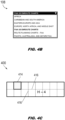
FIGS. 4A through 4C are illustrations respectively of an enroute chart GUI of the display system ofFIG. 1 , an enroute region selector of the enroute chart GUI ofFIG. 4A , and a panel selector display of the display system ofFIG. 1 ; - and
FIG. 5 is a flow diagram illustrating a method for displaying enroute charts via a graphical user interface (GUI) for displaying terminal charts according to example embodiments of this disclosure. - Before explaining one or more embodiments of the disclosure in detail, it is to be understood that the embodiments are not limited in their application to the details of construction and the arrangement of the components or steps or methodologies set forth in the following description or illustrated in the drawings. In the following detailed description of embodiments, numerous specific details may be set forth in order to provide a more thorough understanding of the disclosure. However, it will be apparent to one of ordinary skill in the art having the benefit of the instant disclosure that the embodiments disclosed herein may be practiced without some of these specific details. In other instances, well-known features may not be described in detail to avoid unnecessarily complicating the instant disclosure.
- As used herein a letter following a reference numeral is intended to reference an embodiment of the feature or element that may be similar, but not necessarily identical, to a previously described element or feature bearing the same reference numeral (e.g., 1, 1a, 1b). Such shorthand notations are used for purposes of convenience only and should not be construed to limit the disclosure in any way unless expressly stated to the contrary.
- Further, unless expressly stated to the contrary, "or" refers to an inclusive or and not to an exclusive or. For example, a condition A or B is satisfied by any one of the following: A is true (or present) and B is false (or not present), A is false (or not present) and B is true (or present), and both A and B are true (or present).
- In addition, use of "a" or "an" may be employed to describe elements and components of embodiments disclosed herein. This is done merely for convenience and "a" and "an" are intended to include "one" or "at least one," and the singular also includes the plural unless it is obvious that it is meant otherwise.
- Finally, as used herein any reference to "one embodiment" or "some embodiments" means that a particular element, feature, structure, or characteristic described in connection with the embodiment is included in at least one embodiment disclosed herein. The appearances of the phrase "in some embodiments" in various places in the specification are not necessarily all referring to the same embodiment, and embodiments may include one or more of the features expressly described or inherently present herein, or any combination or sub-combination of two or more such features, along with any other features which may not necessarily be expressly described or inherently present in the instant disclosure.
- Broadly speaking, embodiments of the inventive concepts disclosed herein are directed to expanding the user interface for displaying terminal charts via electronic flight bag (EFB) or other flight displays to provide for the selection and display of enroute charts, which are associated with different characteristics than terminal charts. For example, while the look and feel of the GUI remains consistent, the enroute selection GUI may provide enhanced graphical information to simplify the selection and display of desired enroute charts. Further, the selection and display of enroute charts is provided with enhanced context and situational awareness; allowing for graphical enroute chart selection in addition to textual chart selection.
- Referring to
FIG. 1 , adisplay system 100 for displaying avionics charts (e.g., aeronautical charts) is shown. Thedisplay system 100 may include graphical user interface (GUI) 102, mainenroute menu 104, enrouteselection GUI 106, enrouteregion selector 108, enroutechart type selector 110, chartgraphic display 112,chart selection list 114, andpanel selector toggle 116. In embodiments, thedisplay system 100 may be a cockpit display, e.g., primary flight display (PFD), navigational display, electronic flight bag (EFB), or any other display configured for navigation of an aircraft (e.g., ownship) and incorporating a display unit, data storage, and graphics generation processors. - In embodiments, the
GUI 102 for selection and display of terminal charts may include an enroute (ENRTE)selector 118 configured for engagement by a user of the GUI (e.g., a pilot or operator). For example, engagement of theenroute selector 118 by the user may cause the GUI to display the mainenroute menu 104, via which the user may be offered several options for selecting an enroute chart for display. In embodiments, each enroute chart listed by the mainenroute menu 104 may allow the user to select that enroute chart for display, and may further include aplay button 120 via which the user may engage with that particular enroute chart. For example, if the user selects a listed enroute chart for display, that enroute chart is displayed (e.g., and designated the active enroute chart 122). - In some embodiments, each enroute chart may be divided into a sequence of panels. For example, enroute charts may be too large to display at once (e.g., particularly within a flight display or EFB) such that a user may make effective use of the geographical information set contained within the enroute chart (e.g., natural features, manmade landmarks and facilities, potential obstructions, navigational and radionavigational aids). Accordingly, in embodiments enroute charts may be divided into a sequence of panels such that when an enroute chart is selected for display, only a particular panel of the selected enroute chart is displayed in detail. For example, if the selected enroute chart has previously been displayed by the user, the most recently displayed panel of the selected enroute chart may remain the active panel to be displayed if that enroute chart is selected. If, however, a selected enroute chart has not yet been displayed, no active panel may be associated with that enroute chart, and thus the
display system 100 may select (e.g., according to software logic) an active panel of the selected enroute chart for display. - In embodiments, engagement with any enroute chart listed by the main
enroute menu 104 may cause theGUI 102 to display the selected enroute chart (specifically, an active panel of the selected enroute chart) while engagement with aplay button 120 may cause theGUI 102 to display theenroute selection GUI 106. Theenroute selection GUI 106 may allow the user to select a geographic region via theenroute region selector 108 and select a chart type via the enroutechart type selector 110. For example, as described in greater detail below, enroute charts may be grouped by the geographic region they collectively portray. Similarly, more than one type of enroute chart (e.g., high-altitude, low-altitude, high/low, area) may be associated with a given region, e.g., if the region in question (or portions thereof) include both high-altitude and low-altitude navigational aids. In embodiments, selection of a geographic region and chart type may configure the chartgraphic display 112 andchart selection list 114 to allow selection by the user of all charts associated with a particular region and chart type, respectively by graphic or textual means. - In embodiments, the
enroute selection GUI 106 may allow the user to activate or deactivate thepanel selector toggle 116, e.g., toggling a panel selector display on or off. For example, the panel selector display may provide enhanced situational awareness by showing the currently displayedactive panel 124 of the current active enroutechart 122 in the context of its associated enroute chart as a whole, and by allowing the user to select a different or new component panel of the active enroute chart for display. - Referring to
FIG. 2 , theterminal chart GUI 102 is shown. - In embodiments, the
enroute selector 118 may be implemented as an enroute selection button (e.g., labeled with ENRTE, ENR, or any other appropriately descriptive text or icon/s). For example, pressing or otherwise engaging with the enroute selector 118 (e.g., via keyboard, keypad, peripheral device, cursor, mouse, trackball, direct contact with a touchscreen surface on which theterminal chart GUI 102 is displayed, or any other appropriate input device of the display system (100,FIG. 1 )) may cause theterminal chart GUI 102 to display the main enroute menu (104,FIG. 1 ). Similarly, in embodiments thepanel selector toggle 116 may be implemented as a button with which the user may engage to toggle the panel selector display on or off, as described in greater detail below. - Referring also to
FIG. 3 , the mainenroute menu 104 is shown. - In embodiments, the main
enroute menu 104 may present candidate enroute charts for selection by the user (and display to the user). For example, the mainenroute menu 104 may display (e.g., under the heading "Any ENR", meaning "any enroute", or any other appropriate textual or iconic description indicating no relationship between the enroute chart and the current position of the aircraft) one or more candidate enroutecharts 304 listed by name (e.g., high altitude charts H - 06, H - 04, low altitude charts L - 07, L - 09). - In some embodiments, the main
enroute menu 104 may include current position enroute charts 306 listed under headings 308 (e.g., "Current Hi", "Current Lo") indicating that the current position enroute charts are the respective high-altitude and low-altitude (e.g., or high/low or area, if applicable) enroute charts corresponding to the current position of the aircraft (ownship position), e.g., as determined by positioning systems of the aircraft. For example, the current position enroute charts 306 may be colored or shaded differently from the candidate enroute charts 304 (e.g., magenta vs. cyan) to indicate the different status of the current position enroute charts. - In embodiments, when a current position enroute
chart 308 or candidate enroutechart 302 is selected for display by the user, a component panel of the selected enroute chart is displayed (e.g., the active panel). For example, if a candidate enroutechart 302 has been previously selected, the last displayed panel of the selected enroute chart displayed by the display system (100,FIG. 1 ) remains the active panel, and will be displayed (as the active panel (124,FIG. 1 )) when that enroute chart is selected again (as the active enroute chart (122,FIG. 1 )). Similarly, the active panel of a current position enroutechart 308 may be the particular panel within the current position enroute chart corresponding to the current position of the ownship, and may update as the ownship position changes relative to the enroute chart and to its component panels (e.g., when the aircraft leaves the coverage area of one enroute chart and enters the coverage area of an adjacent enroute chart). - In embodiments, listings in the main
enroute menu 104 for current position enroute charts 308 and candidate enroute charts 302 may include the active panel when this information is available (e.g., H - 06Panel 6, L - 04 Panel 5) or many not include the active panel (e.g., L - 07, L - 09). For example, if additional panels of a current position enroutechart 308 or candidate enroutechart 302 are displayed, the listings for these enroute charts in the mainenroute menu 104 may update to indicate the last displayed panel. - In some embodiments, a candidate enroute
chart 302 may not have been previously selected. For example, the candidate enroute chart "FAA - WTRS" (302a) may not have an associated active panel, as there is no last displayed panel recognized by thedisplay system 100; the listing for the candidate enroute chart may indicate the absence of an active panel ("Select to choose panel"). When the "FAA - WTRS" candidate enroutechart 302a is selected, thedisplay system 100 may select an active panel for display by software logic if no active panel is otherwise indicated, updating the listing in the mainenroute menu 104 to indicate the last displayed panel. - In some embodiments, selection of a current position enroute
chart 308 or candidate enroutechart 302 via the mainenroute menu 104 may cause the display of a cursor in the panel selector toggle (116,FIG. 1 ), allowing the selection of an active panel. For example, the listing for the selected current position enroutechart 308 or candidate enroutechart 302 may be updated to indicate the new active panel. - In embodiments, each candidate enroute
chart 302 listed by the mainenroute menu 104 may include a play button 120 (e.g., play key). Engagement of anyplay button 120 by the user may cause thedisplay system 100 to display the enroute selection GUI (106,FIG. 1 ). - Referring now to
FIGS. 4A through 4C , theenroute selection GUI 106, enrouteregion selector 108, andpanel selector display 400 are respectively shown. Theenroute selection GUI 106 may include enrouteregion selector 108, enroutechart type selector 110, chartgraphic display 112,chart selection list 114,panel selector toggle 116, enrouteselector 118,ownship indicator 402,non-displayable ownship indicator 404, active enroutechart identifier 406, scroll controls 408, and activechart currency indicator 410. - In embodiments, the
enroute selection GUI 106 may allow the user to select an enroute region (e.g., via the enroute region selector 108) and a chart type (e.g., via the enroute chart type selector 110). For example, theenroute region selector 108 and enroutechart type selector 110 may be implemented as drop-down menus listing all available enroute regions and all available chart types for a given region (e.g., high, low, hi-lo, area). - In embodiments, the chart
graphic display 112 may provide a graphical representation of all available charts for the enroute region selected by the enroute region selector 108 (e.g., FAA enroute charts for the continental United States) of the chart type selected by the enroute chart type selector 110 (e.g., high altitude charts). In some embodiments, the chartgraphic display 112 may additionally show other types of charts (e.g., FAA low-altitude charts for the continental United States) in the background. Similarly, thechart selection list 114 may list all available charts for the selected enroute region and chart type. For example, selection of thechart selection list 114 may place a cursor within the chart selection list and activate the scroll controls 408, allowing the user to scroll through the chart selection list and select an enroute chart for display (and designation as the active enroute chart). - In some embodiments, the current position of the aircraft (e.g., ownship position) may be indicated by an
ownship indicator 402 within the chartgraphic display 112. For example, if the current position of the aircraft is within the enroute region currently selected for display by the chartgraphic display 112, theownship indicator 402 may be superimposed over or otherwise displayed within the chartgraphic display 112 to indicate the ownship position as accurately as possible. It should be noted that, due primarily to the scale of the enroute region displayed by the chartgraphic display 112, theownship indicator 402 may be of limited use as a navigational aid but may enhance overall situational awareness. - In some embodiments, the current position of the aircraft may be outside the enroute region selected by the
enroute region selector 108 and displayed by the chartgraphic display 112, and therefore cannot be represented within the chartgraphic display 112. For example, thenon-displayable ownship indicator 404 may show that the current position of the aircraft is non-displayable by the chartgraphic display 112. - In embodiments, the chart
graphic display 112 may allow graphic selection of an active enroute chart in addition to the textual selection provided by thechart selection list 114. For example, the user may (e.g., via cursor, touchscreen, mouse, trackball, or any other appropriate input device) highlight an enroute chart (412) displayed by the chartgraphic display 112, e.g., FAA high altitude chart USA H - 03. In embodiments, a highlighted enroutechart 412 may be designated as the new active enroute chart (122,FIG. 1 ) (replacing the previous active enroute chart, if one was designated) and displayed by the display system (100,FIG. 1 ). - In embodiments, referring in particular to
FIG. 4C , when the user engages with thepanel selector toggle 116, thepanel selector display 400 may be activated (e.g., toggled on) or deactivated/toggled off (e.g., if the panel selector display is currently active). For example, thepanel selector display 400 may display a graphical representation (e.g., thumbnail display) of the active enroute chart 122 (e.g., including a subset of the geographical information set contained within the active enroute chart). In embodiments, thepanel selector display 400 may be superimposed over a portion of the displayedactive panel 124 of the active enroutechart 122 and may include anactive panel indicator 414 indicative of the current active panel (e.g., panel 2). For example, thepanel selector display 400 may include dividers 416 (e.g., vertical and/or horizontal) indicative of the division of the active enroutechart 122 into its component panels. In some embodiments, thepanel selector display 400 may be rotated through horizontal and vertical orientations. For example, if the displayedactive panel 124 is rotated from a horizontal to a vertical orientation (e.g., 90-degree rotation), thepanel selector display 400 may likewise rotate 90 degrees (e.g., while maintaining a consistent orientation relative to the displayed active panel. It should be noted that while the active enroutechart 122 andpanel selector display 400 are always displayed in rectangular format, the underlying enroute charts may not align perfectly with cardinal directions (e.g., chart H - 12, as shown byFIG. 4A ). - In some embodiments, the active
chart currency indicator 410 may indicate whether the active enroutechart 122 is current or out of date. For example, enroute charts are periodically reissued (e.g., FAA charts are reissued every 56 days), and new enroute charts may or may not include procedural changes relative to their counterpart enroute charts in a previous edition. - Referring now to
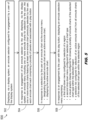
FIG. 5 , themethod 500 may be implemented by embodiments of the aircraft-baseddisplay system 100 and may include the following steps. - At a
step 502 the display system, within the GUI for displaying terminal charts associated with an airport, displays an enroute selector button with which the user (pilot, operator) may engage for selection and display of enroute charts. - At a
step 504, in response to user engagement with the enroute selector button, the display system displays a main enroute menu including enroute charts selectable by the user, each enroute chart comprising a set of component panels. For example, the main enroute menu may include enroute charts previously selected by the user. Each enroute chart listed by the main enroute menu is selectable by the user (e.g., by engaging with the text corresponding to the listed enroute chart) and further includes a play button or key. - At a
step 506, in response to user selection of an enroute chart from the main enroute menu, the display system designates the selected enroute chart as the new active enroute chart and displays the selected enroute chart. For example, if the selected enroute chart is a previously displayed enroute chart, the last displayed panel of the selected enroute chart will remain the active panel and will be displayed. - At a
step 508, in response to engagement with a play button, the display system displays an enroute selection GUI. For example, the enroute selection GUI includes drop-down menus for selection of an enroute region and a chart type (e.g., high-altitude, low-altitude, high/low, area). Further, the enroute selection GUI includes a selection list for displaying all available enroute charts for the selected enroute region and of the selected chart type, and a chart graphic display for representing the set of available enroute charts graphically. - It is to be understood that embodiments of the methods disclosed herein may include one or more of the steps described herein. Further, such steps may be carried out in any desired order and two or more of the steps may be carried out simultaneously with one another. Two or more of the steps disclosed herein may be combined in a single step, and in some embodiments, one or more of the steps may be carried out as two or more sub-steps. Further, other steps or sub-steps may be carried in addition to, or as substitutes to one or more of the steps disclosed herein.
- Although inventive concepts have been described with reference to the embodiments illustrated in the attached drawing figures, equivalents may be employed and substitutions made herein without departing from the scope of the claims. Components illustrated and described herein are merely examples of a system/device and components that may be used to implement embodiments of the inventive concepts and may be replaced with other devices and components without departing from the scope of the claims. Furthermore, any dimensions, degrees, and/or numerical ranges provided herein are to be understood as non-limiting examples unless otherwise specified in the claims.
Claims (15)
- A display system configured for display of a graphical user interface (102), GUI, associated with the display of avionics charts, the display system configured to:display within a GUI an enroute selector (118) configured for engagement by a user of the display system;display, in response to an engagement by the user with the enroute selector, an enroute menu (104) including at least one enroute chart previously selected by the user, each enroute chart associated with a play button (120) and comprising a plurality of panels;in response to a selection by the user of an enroute chart from the enroute menu:designate the selected enroute chart as an active enroute chart; anddisplay the active enroute chart;in response to an engagement by the user with the play button, display an enroute selection menu comprising:a first drop-down menu configured for selection of a region;a second drop-down menu configured for selection of a chart type;a visual graphic display configured for showing a plurality of enroute charts of the selected chart type within the selected region;
anda selection list configured for selection of an active enroute chart from a set of enroute charts of the selected chart type within the selected region. - The display system of Claim 1, wherein the display system is configured to show a position of the ownship relative to the visual graphic display.
- The display system of Claim 1 or 2, wherein the display system is configured to display an indicator that a position of the ownship relative to the visual graphic display cannot be displayed.
- The display system of any preceding Claim , wherein the enroute selection menu further comprises:
at least one identifier corresponding to one or more of:the active enroute chart;
oran active panel of the active enroute chart. - The display system of any preceding Claim, wherein the at least one enroute chart is a candidate enroute chart and the displayed enroute menu comprises at least one current position enroute chart corresponding to a current position of the ownship.
- The display system of Claim 5, wherein the enroute menu includes at least one indicator of a current position active panel associated with each current position enroute chart, the current position active panel corresponding to the current position of the ownship.
- The display system of any preceding Claim, wherein:the enroute menu includes an indicator of an active panel associated with each enroute chart;
andthe display system is configured, in response to the designation of the enroute chart as the active enroute chart, to display the active panel associated with the active enroute chart. - The display system of Claim 7, wherein:
the active panel includes a most recently displayed panel of the associated enroute chart. - The display system of any preceding Claim, wherein:the one or more enroute charts include at least one non-displayed enroute chart not previously selected for display by the display system;
andthe enroute menu includes an indicator associated with each non-displayed enroute chart, the indicator indicating no active panel associated with the non-displayed enroute chart. - The display system of any preceding Claim, wherein the display system is configured to:display a panel selector toggle configured for engagement by the user;
andresponsive to an engagement by the user with the panel selector toggle, toggle a panel selector display configured for selecting an active panel of the active enroute chart. - The display system of Claim 10, wherein the panel selector display is superimposed over the currently displayed active enroute chart and comprises one or more of:a thumbnail display of the active enroute chart divided into its corresponding plurality of panels;
andan active panel indicator corresponding to the active panel of the active enroute chart. - The display system of any preceding Claim, wherein the display system is configured to:accept control input from the user via the visual graphic display, the control input configured for selection of the active enroute chart;
andresponsive to the control input, at least one of 1) highlight within the visual graphic display the enroute chart corresponding to the control input or 2) select as the active enroute chart the enroute chart corresponding to the control input. - The display system of any preceding Claim, wherein the selection list includes one or more scroll controls and a cursor configured for selection of the active enroute chart.
- The display system of any preceding Claim, wherein the enroute selection menu includes an indicator corresponding to a currency of the displayed active enroute chart.
- A method for selection and display of enroute charts via a graphical user interface, GUI, for displaying avionics charts, the method comprising:displaying, via a display system and within a GUI associated with the display of avionics charts, an enroute selector configured for engagement by a user of the display system;in response to an engagement of the enroute selector by the user, displaying within the GUI an enroute menu including one or more enroute charts for selection by the user, the one or more enroute charts featuring at least one enroute chart previously selected by the user, each enroute chart comprising a plurality of panels and associated with a play button;in response to a selection, by the user, of an enroute chart via the enroute menu:designating the selected enroute chart as an active enroute chart; anddisplaying the active enroute chart;andin response to an engagement by the user with the play button, displaying within the GUI an enroute selection menu comprising:a first drop-down menu configured for selection of a region;a second drop-down menu configured for selection of a chart type;a visual graphic display configured for showing a plurality of enroute charts of the selected chart type within the selected region;
anda selection list configured for selection of an active enroute chart from a set of enroute charts of the selected chart type within the selected region.
Applications Claiming Priority (2)
| Application Number | Priority Date | Filing Date | Title |
|---|---|---|---|
| US202163278576P | 2021-11-12 | 2021-11-12 | |
| US17/525,067 US12002369B2 (en) | 2021-11-12 | 2021-11-12 | Graphical user interface (GUI) for selection and display of enroute charts in an avionics chart display system |
Publications (1)
| Publication Number | Publication Date |
|---|---|
| EP4180770A1 true EP4180770A1 (en) | 2023-05-17 |
Family
ID=84332171
Family Applications (1)
| Application Number | Title | Priority Date | Filing Date |
|---|---|---|---|
| EP22207057.5A Pending EP4180770A1 (en) | 2021-11-12 | 2022-11-11 | Graphical user interface (gui) for selection and display of enroute charts in an avionics chart display system |
Country Status (2)
| Country | Link |
|---|---|
| US (1) | US12002369B2 (en) |
| EP (1) | EP4180770A1 (en) |
Families Citing this family (4)
| Publication number | Priority date | Publication date | Assignee | Title |
|---|---|---|---|---|
| US12304648B2 (en) | 2021-11-12 | 2025-05-20 | Rockwell Collins, Inc. | System and method for separating avionics charts into a plurality of display panels |
| US12254282B2 (en) | 2021-11-12 | 2025-03-18 | Rockwell Collins, Inc. | Method for automatically matching chart names |
| US12306007B2 (en) * | 2021-11-12 | 2025-05-20 | Rockwell Collins, Inc. | System and method for chart thumbnail image generation |
| US20250371988A1 (en) * | 2024-06-03 | 2025-12-04 | Wing Aviation Llc | User interface for area management for uav operations |
Citations (1)
| Publication number | Priority date | Publication date | Assignee | Title |
|---|---|---|---|---|
| US20100262318A1 (en) * | 2007-05-16 | 2010-10-14 | J. Ariens & Associates, Inc. | Electronic flight bag user interface system |
Family Cites Families (166)
| Publication number | Priority date | Publication date | Assignee | Title |
|---|---|---|---|---|
| FR1504564A (en) | 1965-08-25 | 1967-12-08 | Nippon Electric Co | Automatic character identification device |
| US3656178A (en) | 1969-09-15 | 1972-04-11 | Research Corp | Data compression and decompression system |
| JPS5242017A (en) | 1975-09-29 | 1977-04-01 | Fuji Xerox Co Ltd | Run length code processing method for facsimile signal |
| JPS61234312A (en) | 1985-04-09 | 1986-10-18 | Mitsubishi Electric Corp | Vehicle-borne navigation apparatus |
| JPS622721A (en) | 1985-06-28 | 1987-01-08 | Nec Corp | Coding and decoding device for picture signal |
| JPH0634237B2 (en) | 1986-02-24 | 1994-05-02 | 三菱電機株式会社 | Image clipping method |
| JPS6393273A (en) | 1986-10-07 | 1988-04-23 | Fuji Xerox Co Ltd | Coding device for image information |
| JPH0820862B2 (en) | 1987-02-27 | 1996-03-04 | キヤノン株式会社 | Character processor |
| US4792981A (en) | 1987-09-21 | 1988-12-20 | Am International, Inc. | Manipulation of run-length encoded images |
| US4876651A (en) | 1988-05-11 | 1989-10-24 | Honeywell Inc. | Digital map system |
| AU624205B2 (en) | 1989-01-23 | 1992-06-04 | General Electric Capital Corporation | Variable length string matcher |
| US5050230A (en) | 1989-11-29 | 1991-09-17 | Eastman Kodak Company | Hybrid residual-based hierarchical storage and display method for high resolution digital images in a multiuse environment |
| US5428692A (en) | 1991-11-18 | 1995-06-27 | Kuehl; Eberhard | Character recognition system |
| US5546572A (en) | 1991-08-28 | 1996-08-13 | Hitachi, Ltd. | Method for retrieving database of image information |
| JP3155595B2 (en) | 1992-01-24 | 2001-04-09 | キヤノン株式会社 | Encoding method and apparatus |
| US5526476A (en) | 1992-12-07 | 1996-06-11 | Fujitsu Limited | Method and apparatus for generating character patterns expressed by coordinates of a coordinate system |
| NO933205D0 (en) | 1993-09-08 | 1993-09-08 | Harald Martens | Data representation system |
| US5499382A (en) | 1993-09-20 | 1996-03-12 | Nusinov; Eugene B. | Circuit and method of bit-packing and bit-unpacking using a barrel shifter |
| US5537669A (en) | 1993-09-30 | 1996-07-16 | Kla Instruments Corporation | Inspection method and apparatus for the inspection of either random or repeating patterns |
| US5577170A (en) | 1993-12-23 | 1996-11-19 | Adobe Systems, Incorporated | Generation of typefaces on high resolution output devices |
| DE4447434A1 (en) | 1994-02-23 | 1995-08-31 | Gfr Ges Fuer Regelungstechnik | CCD sensor for reading out image zones or lines |
| US5454076A (en) | 1994-03-02 | 1995-09-26 | Vlsi Technology, Inc. | Method and apparatus for simultaneously minimizing storage and maximizing total memory bandwidth for a repeating pattern |
| US5559707A (en) * | 1994-06-24 | 1996-09-24 | Delorme Publishing Company | Computer aided routing system |
| US6014133A (en) | 1996-06-14 | 2000-01-11 | Seiko Epson Corporation | Data transmitter/receiver apparatus, data transmitter, data receiver, and data compression method |
| US6275610B1 (en) | 1996-10-16 | 2001-08-14 | Convey Corporation | File structure for scanned documents |
| WO1998043208A2 (en) | 1997-03-21 | 1998-10-01 | Newfire, Inc. | Method and apparatus for graphics processing |
| JPH10293852A (en) | 1997-04-21 | 1998-11-04 | Fuji Photo Film Co Ltd | Outline extracting method |
| US5978715A (en) | 1997-10-15 | 1999-11-02 | Dassault Aviation | Apparatus and method for aircraft display and control |
| US6501441B1 (en) | 1998-06-18 | 2002-12-31 | Sony Corporation | Method of and apparatus for partitioning, scaling and displaying video and/or graphics across several display devices |
| US6240341B1 (en) | 1999-01-18 | 2001-05-29 | Honeywell International Inc. | Flight management system (FMS) with integrated bit mapped data charts |
| JP4433236B2 (en) | 1999-12-03 | 2010-03-17 | ソニー株式会社 | Information processing apparatus, information processing method, and program recording medium |
| US6781600B2 (en) | 2000-04-14 | 2004-08-24 | Picsel Technologies Limited | Shape processor |
| US6839714B2 (en) | 2000-08-04 | 2005-01-04 | Infoglide Corporation | System and method for comparing heterogeneous data sources |
| US6448922B1 (en) | 2000-08-24 | 2002-09-10 | Rockwell Collins, Inc. | Retrofit solution for the integration of ground-based weather radar images with on-board weather radar |
| US6856864B1 (en) | 2000-11-17 | 2005-02-15 | Honeywell International Inc. | Method and system for entering data within a flight plan entry field |
| US20020097417A1 (en) | 2001-01-19 | 2002-07-25 | Chang William Ho | System for universal data output |
| US6823333B2 (en) | 2001-03-02 | 2004-11-23 | The United States Of America As Represented By The Administrator Of The National Aeronautics And Space Administration | System, method and apparatus for conducting a keyterm search |
| US7117089B2 (en) | 2001-03-06 | 2006-10-03 | Honeywell International Inc. | Ground runway awareness and advisory system |
| DE10128858A1 (en) | 2001-06-15 | 2003-02-13 | Heidelberger Druckmasch Ag | Process for creating trapping frames in a printed page |
| US7640098B2 (en) | 2001-07-31 | 2009-12-29 | Stenbock & Everson, Inc. | Process for generating travel plans on the internet |
| US7158141B2 (en) | 2002-01-17 | 2007-01-02 | University Of Washington | Programmable 3D graphics pipeline for multimedia applications |
| US7408552B2 (en) | 2002-02-08 | 2008-08-05 | Raytheon Company | System and method for representation of aircraft altitude using spatial size and other natural perceptual cues |
| US20170313332A1 (en) | 2002-06-04 | 2017-11-02 | General Electric Company | Autonomous vehicle system and method |
| US7039505B1 (en) | 2002-07-19 | 2006-05-02 | Avidyne Corporation | Method for digital transmission and display of weather imagery |
| US20040071351A1 (en) | 2002-10-07 | 2004-04-15 | Johan Rade | Method and system for graphics compression and display |
| US7562289B2 (en) | 2003-06-18 | 2009-07-14 | Layton Geo-Science, Inc. | Methods and systems for encoding geographic coordinates and features in a portable document format file |
| KR100501173B1 (en) | 2003-08-07 | 2005-07-18 | 에스케이 텔레콤주식회사 | Method for Displaying High-Resolution Pictures in Mobile Communication Terminal, Mobile Communication Terminal and File Format Converting System of the Pictures therefor |
| US20050091340A1 (en) | 2003-10-01 | 2005-04-28 | International Business Machines Corporation | Processing interactive content offline |
| JP2007528529A (en) | 2003-11-28 | 2007-10-11 | ブラッコ イメージング エス.ピー.エー. | Method and system for identifying the surface of a 3D dataset ("voxel partitioning") |
| WO2005096173A1 (en) | 2004-03-30 | 2005-10-13 | Victor Company Of Japan, Limited | Digitization service manual generation method and additional data generation method |
| JP2006098250A (en) | 2004-09-30 | 2006-04-13 | Fuji Photo Film Co Ltd | Car navigation system |
| US7581036B2 (en) | 2004-10-13 | 2009-08-25 | Microsoft Corporation | Offline caching of control transactions for storage devices |
| JP4247684B2 (en) | 2005-01-19 | 2009-04-02 | ソニー株式会社 | Map display device and map display method |
| JP4266939B2 (en) | 2005-02-10 | 2009-05-27 | 株式会社ソニー・コンピュータエンタテインメント | Drawing processing apparatus and drawing data compression method |
| KR100639109B1 (en) | 2005-03-23 | 2006-10-31 | 주식회사 코아로직 | An apparatus for generating a thumbnail J.P. image, a method for generating the same, and a storage medium thereof |
| US20070067095A1 (en) | 2005-07-01 | 2007-03-22 | Honeywell International Inc. | Method and apparatus for resolving ambiguous waypoints |
| JP4728744B2 (en) | 2005-08-29 | 2011-07-20 | シャープ株式会社 | Image processing device |
| US7647179B2 (en) | 2005-08-31 | 2010-01-12 | Hilton Goldstein | System and method for coordinate mapping onto airport diagrams |
| US20070094591A1 (en) | 2005-10-24 | 2007-04-26 | Etgen Michael P | System and method for text legibility enhancement |
| JP2007133231A (en) | 2005-11-11 | 2007-05-31 | Denso Corp | Map display device and navigation device |
| US7542846B2 (en) | 2006-02-07 | 2009-06-02 | Alpine Electronics, Inc. | Navigation system utilizing XML/SVG map data converted from geographic map data and layered structure of XML/SVG map data based on administrative regions |
| WO2007114722A1 (en) | 2006-03-30 | 2007-10-11 | Intel Corporation | An optimal floating-point expression translation method based on pattern matching |
| JP2008022215A (en) | 2006-07-12 | 2008-01-31 | Matsushita Electric Ind Co Ltd | Image encoding device, image encoding method, and storage medium therefor |
| US7739622B2 (en) | 2006-10-27 | 2010-06-15 | Microsoft Corporation | Dynamic thumbnails for document navigation |
| US20080103641A1 (en) | 2006-10-31 | 2008-05-01 | Honeywell International, Inc. | Methods and apparatus for overlaying non-georeferenced symbology on a georeferenced chart |
| JP2008158765A (en) | 2006-12-22 | 2008-07-10 | Canon Inc | Information processing apparatus, information processing method, and program for causing computer to execute information processing method |
| US20080240152A1 (en) | 2007-03-27 | 2008-10-02 | Dell Products L.P. | System And Method For Communicating Data For Display On A Remote Display Device |
| US7908082B2 (en) | 2007-05-04 | 2011-03-15 | The Boeing Company | Methods and systems for displaying airport moving map information |
| US8582919B2 (en) | 2007-09-24 | 2013-11-12 | Microsoft Corporation | Altering the appearance of a digital image using a shape |
| US20090125837A1 (en) | 2007-11-08 | 2009-05-14 | International Business Machines Corporation | Tab control with type ahead and thumbnail images |
| US8260048B2 (en) | 2007-11-14 | 2012-09-04 | Exelis Inc. | Segmentation-based image processing system |
| JP5056469B2 (en) | 2008-02-22 | 2012-10-24 | 富士通株式会社 | Image management device |
| US7948502B2 (en) | 2008-05-13 | 2011-05-24 | Mitac International Corp. | Method of displaying picture having location data and apparatus thereof |
| JP4969515B2 (en) | 2008-05-23 | 2012-07-04 | 株式会社リコー | Image forming apparatus, gradation graphic image drawing method, gradation graphic image drawing program, and recording medium |
| FR2932047B1 (en) | 2008-05-29 | 2010-08-13 | Airbus France | COMPUTER SYSTEM FOR MAINTENANCE OF A REMOTE TERMINAL AIRCRAFT |
| JP5302768B2 (en) | 2008-06-26 | 2013-10-02 | キヤノン株式会社 | Image processing apparatus and image processing method |
| US8339417B2 (en) | 2008-07-25 | 2012-12-25 | Navteq B.V. | Open area maps based on vector graphics format images |
| CN101676988B (en) | 2008-09-19 | 2011-12-28 | 威锋数位开发股份有限公司 | Method for displaying the quality of small characters in stroke-based Chinese fonts |
| KR101319342B1 (en) | 2008-11-25 | 2013-10-16 | 엘지디스플레이 주식회사 | Multi-panel display and method of driving the same |
| US8386957B2 (en) | 2009-02-25 | 2013-02-26 | Hewlett-Packard Development Company, L.P. | Method for dynamically scaling an original background layout |
| JP5274305B2 (en) | 2009-02-27 | 2013-08-28 | キヤノン株式会社 | Image processing apparatus, image processing method, and computer program |
| US10440329B2 (en) | 2009-05-22 | 2019-10-08 | Immersive Media Company | Hybrid media viewing application including a region of interest within a wide field of view |
| US8374390B2 (en) | 2009-06-24 | 2013-02-12 | Navteq B.V. | Generating a graphic model of a geographic object and systems thereof |
| US20100328353A1 (en) | 2009-06-30 | 2010-12-30 | Solidfx Llc | Method and system for displaying an image on a display of a computing device |
| US8515658B1 (en) | 2009-07-06 | 2013-08-20 | The Boeing Company | Managing navigational chart presentation |
| CN101751449B (en) | 2009-09-16 | 2012-10-10 | 中国科学院计算技术研究所 | Spatial overlap analysis method and system used in geographic information system |
| GB0916994D0 (en) | 2009-09-28 | 2009-11-11 | Nats Services Ltd | Aeronautical information processing |
| US20110157473A1 (en) | 2009-12-30 | 2011-06-30 | Hoon Choi | Method, apparatus, and system for simultaneously previewing contents from multiple protected sources |
| US20110191014A1 (en) | 2010-02-04 | 2011-08-04 | Microsoft Corporation | Mapping interface with higher zoom level inset map |
| US8583368B1 (en) * | 2010-02-17 | 2013-11-12 | The Boeing Company | Rule based depiction of minimum altitudes |
| US9430195B1 (en) | 2010-04-16 | 2016-08-30 | Emc Corporation | Dynamic server graphics |
| US9031971B2 (en) | 2010-07-23 | 2015-05-12 | Qualcomm Incorporated | Flexible data download models for augmented reality |
| US8704732B2 (en) | 2010-09-29 | 2014-04-22 | Qualcomm Incorporated | Image synchronization for multiple displays |
| US9195637B2 (en) | 2010-11-03 | 2015-11-24 | Microsoft Technology Licensing, Llc | Proportional font scaling |
| KR101495189B1 (en) | 2011-03-25 | 2015-02-24 | 엘지전자 주식회사 | Image processing apparatus and image processing method |
| US8913080B2 (en) | 2011-05-09 | 2014-12-16 | Microsoft Corporation | Partitioning high resolution images into sub-images for display |
| EP2695049A1 (en) | 2011-05-10 | 2014-02-12 | NDS Limited | Adaptive presentation of content |
| JP2013025331A (en) | 2011-07-14 | 2013-02-04 | Konica Minolta Business Technologies Inc | Image processing apparatus, thumbnail image creation method using the apparatus and thumbnail image creation program |
| US20130031072A1 (en) | 2011-07-25 | 2013-01-31 | Luca Passani | System and Method for using a Device Description Repository |
| US9721324B2 (en) | 2011-09-10 | 2017-08-01 | Microsoft Technology Licensing, Llc | Thumbnail zoom |
| US9489121B2 (en) | 2011-11-02 | 2016-11-08 | Microsoft Technology Licensing, Llc | Optimal display and zoom of objects and text in a document |
| WO2013121459A1 (en) | 2012-02-16 | 2013-08-22 | 古野電気株式会社 | Information display device, display mode switching method, and display mode switching program |
| US10620241B2 (en) | 2012-02-17 | 2020-04-14 | Perspecta Labs Inc. | Method and system for packet acquisition, analysis and intrusion detection in field area networks |
| GB2504085A (en) | 2012-07-16 | 2014-01-22 | Software Ltd C | Displaying maps and data sets on image display interfaces |
| US20150070373A1 (en) | 2012-08-23 | 2015-03-12 | Google Inc. | Clarification of Zoomed Text Embedded in Images |
| US9361003B2 (en) | 2012-10-18 | 2016-06-07 | Dental Imaging Technologies Corporation | Overlay maps for navigation of intraoral images |
| US9035969B2 (en) | 2012-11-29 | 2015-05-19 | Seiko Epson Corporation | Method for multiple projector display using a GPU frame buffer |
| US9619919B1 (en) | 2012-12-19 | 2017-04-11 | Rockwell Collins, Inc. | Synthetic environments with stereoscopic avionics displays system and related method |
| US9484006B2 (en) | 2013-02-13 | 2016-11-01 | Documill Oy | Manipulation of textual content data for layered presentation |
| US10372292B2 (en) | 2013-03-13 | 2019-08-06 | Microsoft Technology Licensing, Llc | Semantic zoom-based navigation of displayed content |
| KR102124188B1 (en) | 2013-03-13 | 2020-06-26 | 삼성전자주식회사 | Electronic device and method for processing image |
| US20140282038A1 (en) | 2013-03-15 | 2014-09-18 | InTheAirNet, LLC. | Flight detail application and interactive map system and method |
| CN104063844B (en) | 2013-03-21 | 2019-01-15 | 腾讯科技(深圳)有限公司 | A kind of reduced graph generating method and system |
| US9465513B2 (en) * | 2013-04-11 | 2016-10-11 | General Electric Company | Visual representation of map navigation history |
| US9002637B2 (en) | 2013-04-16 | 2015-04-07 | The Boeing Company | Systems and methods for generating a navigation chart |
| JP6337888B2 (en) | 2013-04-30 | 2018-06-06 | ソニー株式会社 | Image processing apparatus, image processing method, and program |
| US9846534B2 (en) | 2013-06-13 | 2017-12-19 | Microsoft Technology Licensing, Llc | Inset dynamic content preview pane |
| US9939271B1 (en) | 2013-09-23 | 2018-04-10 | The Boeing Company | Enroute distance measuring tool |
| CN103645837B (en) | 2013-11-27 | 2016-08-31 | 小米科技有限责任公司 | The method and apparatus amplifying display font |
| US9718558B2 (en) | 2014-02-26 | 2017-08-01 | Honeywell International Inc. | Pilot centered system and method for decluttering aircraft displays |
| JP6268023B2 (en) | 2014-03-31 | 2018-01-24 | 日本電産サンキョー株式会社 | Character recognition device and character cutout method thereof |
| US20150324088A1 (en) | 2014-05-09 | 2015-11-12 | Lyve Minds, Inc. | Thumbnail image creation |
| US9921721B2 (en) | 2014-08-08 | 2018-03-20 | Google Llc | Navigation interfaces for ebooks |
| KR20160030701A (en) | 2014-09-11 | 2016-03-21 | 삼성전자주식회사 | Host divice transmitting print data to printer and method for rendering print data by host device |
| US10210246B2 (en) | 2014-09-26 | 2019-02-19 | Oracle International Corporation | Techniques for similarity analysis and data enrichment using knowledge sources |
| US20160093080A1 (en) | 2014-09-30 | 2016-03-31 | Microsoft Technology Licensing, Llc | Optimizing the Legibility of Displayed Text |
| US10001376B1 (en) | 2015-02-19 | 2018-06-19 | Rockwell Collins, Inc. | Aircraft position monitoring system and method |
| US9443433B1 (en) | 2015-04-23 | 2016-09-13 | The Boeing Company | Method and system to monitor for conformance to a traffic control instruction |
| US9858823B1 (en) * | 2015-06-09 | 2018-01-02 | Rockwell Collins, Inc. | Interactive flight plan |
| US10061480B1 (en) | 2015-07-28 | 2018-08-28 | Rockwell Collins, Inc. | Navigation chart information generating and presenting system, device, and method |
| US11106329B2 (en) | 2015-09-18 | 2021-08-31 | Honeywell International Inc. | Flight deck display systems and methods for generating cockpit displays including dynamic taxi turnoff icons |
| US9639309B1 (en) | 2015-10-14 | 2017-05-02 | Kyocera Document Solutions Inc. | Image conversion methods |
| US9818051B2 (en) | 2016-01-29 | 2017-11-14 | Ricoh Company, Ltd. | Rotation and clipping mechanism |
| US20170223227A1 (en) | 2016-01-29 | 2017-08-03 | Kabushiki Kaisha Toshiba | Dynamic font size management system and method for multifunction devices |
| US10489489B2 (en) | 2016-03-09 | 2019-11-26 | Adobe Inc. | Automatically classifying and presenting digital fonts |
| CN107239786B (en) | 2016-03-29 | 2022-01-11 | 阿里巴巴集团控股有限公司 | Character recognition method and device |
| EP3243668B1 (en) | 2016-05-10 | 2020-07-15 | Agfa Nv | Manufacturing of a security document |
| US9781294B1 (en) | 2016-08-09 | 2017-10-03 | Xerox Corporation | System and method for rendering micro gloss effect image patterns on a recording medium |
| US10108883B2 (en) | 2016-10-28 | 2018-10-23 | Intuit Inc. | Image quality assessment and improvement for performing optical character recognition |
| IL248975B2 (en) | 2016-11-14 | 2023-05-01 | Israel Aerospace Ind Ltd | System and method for auto-execution of aircraft check lists |
| US20180181646A1 (en) | 2016-12-26 | 2018-06-28 | Infosys Limited | System and method for determining identity relationships among enterprise data entities |
| JP2018147259A (en) | 2017-03-06 | 2018-09-20 | キヤノン株式会社 | Information processing device, program, storage medium, and information processing method |
| WO2018183994A1 (en) | 2017-03-31 | 2018-10-04 | Area 2601, LLC | Computer-based systems and methods for facilitating aircraft approach |
| CN107402734A (en) | 2017-07-25 | 2017-11-28 | 浪潮金融信息技术有限公司 | A kind of method that text definition is automatically adjusted with screen resolution |
| US10417991B2 (en) | 2017-08-18 | 2019-09-17 | Microsoft Technology Licensing, Llc | Multi-display device user interface modification |
| WO2019047763A1 (en) | 2017-09-08 | 2019-03-14 | Mediatek Inc. | Methods and apparatuses of processing pictures in an image or video coding system |
| US11106339B2 (en) | 2017-09-19 | 2021-08-31 | Adobe Inc. | Designing and resizing graphical user interfaces |
| US10095925B1 (en) | 2017-12-18 | 2018-10-09 | Capital One Services, Llc | Recognizing text in image data |
| US10459670B2 (en) | 2018-01-15 | 2019-10-29 | Lucid Dream Software, Inc. | Methods, systems, apparatuses and devices for facilitating printing of a digital image based on image splitting |
| US10446113B2 (en) | 2018-01-30 | 2019-10-15 | ForeFlight LLC | Method and system for inversion of raster images |
| US10170010B1 (en) * | 2018-06-07 | 2019-01-01 | Rockwell Collins, Inc. | Display of traffic overlaid on aeronautical chart |
| US11580166B2 (en) | 2018-06-13 | 2023-02-14 | Oracle International Corporation | Regular expression generation using span highlighting alignment |
| CN109325083B (en) | 2018-08-03 | 2021-01-26 | 江苏联旺信息科技有限公司 | Aviation flight image map loading method, aviation flight image map loading software and aerial photographing device |
| GB2577478B (en) * | 2018-09-06 | 2021-03-10 | Maritech Development Ltd | A method of creating map tiles which comprise vessel information |
| CN110906938A (en) | 2018-09-14 | 2020-03-24 | 上海擎感智能科技有限公司 | Map navigation query method, system, medium, and apparatus |
| CN111510642A (en) | 2019-01-31 | 2020-08-07 | 中强光电股份有限公司 | Display system, display method for display system, and display device |
| JP2020201649A (en) | 2019-06-07 | 2020-12-17 | トヨタ自動車株式会社 | Map generation device, map generation method and computer program for map generation |
| US11288764B2 (en) | 2019-07-01 | 2022-03-29 | Digimarc Corporation | Watermarking arrangements permitting vector graphics editing |
| EP3772030A1 (en) | 2019-08-01 | 2021-02-03 | Honeywell International Inc. | Systems and methods to utilize flight monitoring data |
| WO2021035223A1 (en) | 2019-08-22 | 2021-02-25 | Educational Vision Technologies, Inc. | Automatic data extraction and conversion of video/images/sound information from a board-presented lecture into an editable notetaking resource |
| US11087123B2 (en) | 2019-08-24 | 2021-08-10 | Kira Inc. | Text extraction, in particular table extraction from electronic documents |
| CN110516221B (en) | 2019-08-29 | 2021-07-30 | 企查查科技有限公司 | Method, equipment and storage medium for extracting chart data in PDF document |
| CN110727747B (en) | 2019-09-02 | 2022-03-15 | 湖北大学 | Paper map rapid vectorization method and system based on longitude and latitude recognition |
| US11061563B1 (en) * | 2020-01-06 | 2021-07-13 | Rockwell Collins, Inc. | Interactive charts system and method |
| US20210225181A1 (en) | 2020-01-20 | 2021-07-22 | Honeywell International Inc. | Display systems and methods for providing ground traffic collison threat awareness |
| US20230154338A1 (en) * | 2021-11-12 | 2023-05-18 | Rockwell Collins, Inc. | Tool to facilitate customer generated chart databases for use with a certified avionics system |
-
2021
- 2021-11-12 US US17/525,067 patent/US12002369B2/en active Active
-
2022
- 2022-11-11 EP EP22207057.5A patent/EP4180770A1/en active Pending
Patent Citations (1)
| Publication number | Priority date | Publication date | Assignee | Title |
|---|---|---|---|---|
| US20100262318A1 (en) * | 2007-05-16 | 2010-10-14 | J. Ariens & Associates, Inc. | Electronic flight bag user interface system |
Non-Patent Citations (2)
| Title |
|---|
| ANONYMOUS: "Pilot's Guide to FOREFLIGHT MOBILE 82nd Edition Covers ForeFlight Mobile v12.7", 26 August 2020 (2020-08-26), pages 161 - 165, XP093034903, Retrieved from the Internet <URL:https://cloudfront.foreflight.com/docs/ff/12.7/v12.7%20-%20foreflight%20mobile%20pilot%20guide%20optimized.pdf> [retrieved on 20230327] * |
| ANONYMOUS: "Pilot's Guide to FOREFLIGHT MOBILE 82nd Edition Covers ForeFlight Mobile v12.7", 26 August 2020 (2020-08-26), pages 78 - 90, XP093034848, Retrieved from the Internet <URL:https://cloudfront.foreflight.com/docs/ff/12.7/v12.7%20-%20foreflight%20mobile%20pilot%20guide%20optimized.pdf> [retrieved on 20230327] * |
Also Published As
| Publication number | Publication date |
|---|---|
| US12002369B2 (en) | 2024-06-04 |
| US20230154341A1 (en) | 2023-05-18 |
Similar Documents
| Publication | Publication Date | Title |
|---|---|---|
| EP4180770A1 (en) | Graphical user interface (gui) for selection and display of enroute charts in an avionics chart display system | |
| US8843255B2 (en) | Methods for displaying aircraft procedure information | |
| US6690298B1 (en) | Enhanced vertical terrain profile display | |
| US6842672B1 (en) | Cockpit instrument panel systems and methods with redundant flight data display | |
| EP1366340B1 (en) | Graphical system and method for defining pilot tasks, patterns and constraints | |
| US6389355B1 (en) | Methods and apparatus for graphical display and editing of flight plans | |
| US9523580B2 (en) | System and method for aiding a pilot in locating an out of view landing site | |
| US20060005147A1 (en) | Methods and systems for controlling the display of maps aboard an aircraft | |
| US9262931B2 (en) | System and method for graphically generating an approach/departure course | |
| US20100023187A1 (en) | System and method for displaying constraint information on a graphical aircraft instrument tape element | |
| EP2816540B1 (en) | A system and method for graphically displaying aircraft traffic information | |
| EP4180771A1 (en) | System and method for enhancing situational awareness via panel selector display while viewing multipanel map-based charts | |
| US20100148990A1 (en) | System and method for selectively displaying terminal procedure data | |
| US10706726B2 (en) | Multiple flight data reference for a specific selection on a vertical and lateral display | |
| CN101989177A (en) | Display and method for selecting images to be displayed | |
| EP3657131B1 (en) | Waypoint list presentation methods and systems | |
| EP2762837A2 (en) | System and method for displaying terrain altitudes on an aircraft display | |
| CN113284368B (en) | Apparatus, method and aircraft for displaying future waypoints and constraints | |
| US9448702B2 (en) | Methods and systems for selecting a displayed aircraft approach or departure | |
| WO2009035757A2 (en) | Flight management system having interactive flight plan selection arrangement | |
| US8631336B2 (en) | Display system for an aircraft cockpit | |
| EP4148394A1 (en) | Methods and systems for managing user-configured custom routes | |
| AU2013345421B2 (en) | Systems and methods for displaying in-flight navigation procedures | |
| CN104063066A (en) | Alphanumeric keypad | |
| US20230072633A1 (en) | Methods and systems for managing user-configured custom routes |
Legal Events
| Date | Code | Title | Description |
|---|---|---|---|
| PUAI | Public reference made under article 153(3) epc to a published international application that has entered the european phase |
Free format text: ORIGINAL CODE: 0009012 |
|
| STAA | Information on the status of an ep patent application or granted ep patent |
Free format text: STATUS: THE APPLICATION HAS BEEN PUBLISHED |
|
| AK | Designated contracting states |
Kind code of ref document: A1 Designated state(s): AL AT BE BG CH CY CZ DE DK EE ES FI FR GB GR HR HU IE IS IT LI LT LU LV MC ME MK MT NL NO PL PT RO RS SE SI SK SM TR |
|
| STAA | Information on the status of an ep patent application or granted ep patent |
Free format text: STATUS: REQUEST FOR EXAMINATION WAS MADE |
|
| 17P | Request for examination filed |
Effective date: 20231117 |
|
| RBV | Designated contracting states (corrected) |
Designated state(s): AL AT BE BG CH CY CZ DE DK EE ES FI FR GB GR HR HU IE IS IT LI LT LU LV MC ME MK MT NL NO PL PT RO RS SE SI SK SM TR |
|
| STAA | Information on the status of an ep patent application or granted ep patent |
Free format text: STATUS: EXAMINATION IS IN PROGRESS |
|
| 17Q | First examination report despatched |
Effective date: 20250905 |