EP4171985B1 - Betriebsverfahren für ein fahrzeuginformationssystem - Google Patents
Betriebsverfahren für ein fahrzeuginformationssystem Download PDFInfo
- Publication number
- EP4171985B1 EP4171985B1 EP21731738.7A EP21731738A EP4171985B1 EP 4171985 B1 EP4171985 B1 EP 4171985B1 EP 21731738 A EP21731738 A EP 21731738A EP 4171985 B1 EP4171985 B1 EP 4171985B1
- Authority
- EP
- European Patent Office
- Prior art keywords
- partition
- graphical
- vehicle
- infotainment
- display screen
- Prior art date
- Legal status (The legal status is an assumption and is not a legal conclusion. Google has not performed a legal analysis and makes no representation as to the accuracy of the status listed.)
- Active
Links
Images


Classifications
-
- G—PHYSICS
- G06—COMPUTING OR CALCULATING; COUNTING
- G06F—ELECTRIC DIGITAL DATA PROCESSING
- G06F9/00—Arrangements for program control, e.g. control units
- G06F9/06—Arrangements for program control, e.g. control units using stored programs, i.e. using an internal store of processing equipment to receive or retain programs
- G06F9/44—Arrangements for executing specific programs
- G06F9/451—Execution arrangements for user interfaces
-
- B—PERFORMING OPERATIONS; TRANSPORTING
- B60—VEHICLES IN GENERAL
- B60K—ARRANGEMENT OR MOUNTING OF PROPULSION UNITS OR OF TRANSMISSIONS IN VEHICLES; ARRANGEMENT OR MOUNTING OF PLURAL DIVERSE PRIME-MOVERS IN VEHICLES; AUXILIARY DRIVES FOR VEHICLES; INSTRUMENTATION OR DASHBOARDS FOR VEHICLES; ARRANGEMENTS IN CONNECTION WITH COOLING, AIR INTAKE, GAS EXHAUST OR FUEL SUPPLY OF PROPULSION UNITS IN VEHICLES
- B60K35/00—Instruments specially adapted for vehicles; Arrangement of instruments in or on vehicles
- B60K35/10—Input arrangements, i.e. from user to vehicle, associated with vehicle functions or specially adapted therefor
-
- B—PERFORMING OPERATIONS; TRANSPORTING
- B60—VEHICLES IN GENERAL
- B60K—ARRANGEMENT OR MOUNTING OF PROPULSION UNITS OR OF TRANSMISSIONS IN VEHICLES; ARRANGEMENT OR MOUNTING OF PLURAL DIVERSE PRIME-MOVERS IN VEHICLES; AUXILIARY DRIVES FOR VEHICLES; INSTRUMENTATION OR DASHBOARDS FOR VEHICLES; ARRANGEMENTS IN CONNECTION WITH COOLING, AIR INTAKE, GAS EXHAUST OR FUEL SUPPLY OF PROPULSION UNITS IN VEHICLES
- B60K2360/00—Indexing scheme associated with groups B60K35/00 or B60K37/00 relating to details of instruments or dashboards
- B60K2360/143—Touch sensitive instrument input devices
- B60K2360/1438—Touch screens
-
- B—PERFORMING OPERATIONS; TRANSPORTING
- B60—VEHICLES IN GENERAL
- B60K—ARRANGEMENT OR MOUNTING OF PROPULSION UNITS OR OF TRANSMISSIONS IN VEHICLES; ARRANGEMENT OR MOUNTING OF PLURAL DIVERSE PRIME-MOVERS IN VEHICLES; AUXILIARY DRIVES FOR VEHICLES; INSTRUMENTATION OR DASHBOARDS FOR VEHICLES; ARRANGEMENTS IN CONNECTION WITH COOLING, AIR INTAKE, GAS EXHAUST OR FUEL SUPPLY OF PROPULSION UNITS IN VEHICLES
- B60K2360/00—Indexing scheme associated with groups B60K35/00 or B60K37/00 relating to details of instruments or dashboards
- B60K2360/149—Instrument input by detecting viewing direction not otherwise provided for
Definitions
- the invention relates to a method for operating an information system of a vehicle, in which a processor subsystem (central processing unit, CPU) of a single-chip system (system on a chip, SoC) of an information system of a vehicle executes a system partition of the single-chip system and an in-vehicle infotainment (IVI) partition of the single-chip system; a functional system of the system partition generates a graphical control element and arranges it in a front composition level of a main compositor of the information system in relation to a viewing direction of a user of the vehicle, and a touch-sensitive display screen (center infotainment display, CID) of the information system arranged centrally in the vehicle, which is functionally connected to the single-chip system, displays a display content comprising the graphical control element provided by the main compositor.
- the invention further relates to an information system for a vehicle.
- Information systems for vehicles are known in the prior art in various designs and serve to display information which a vehicle provides for a user of the vehicle, i.e. for a driver or an occupant of the vehicle other than the driver.
- the information to be displayed generally includes graphical outputs generated by the vehicle's functional systems, which have a high safety relevance, a high robustness against disturbances and have early availability after the vehicle is switched on and in many cases must meet prescribed functional safety requirements.
- the graphical outputs of functional systems include, for example, a power-on animation, a system pop-up, an air conditioning control interface, a personalization module, an instrument display (cockpit display) and the like.
- the information to be displayed generally includes graphical outputs generated by information and entertainment systems of the vehicle, which serve to inform or entertain the user, referred to as in-vehicle infotainment (IVI) systems, and are primarily intended to create a pleasant user experience (UX) and offer a variety of usage options.
- IVI in-vehicle infotainment
- UX pleasant user experience
- a navigation system, a radio, a telephone, an Internet browser, a multimedia system and an application for connecting to external devices such as integrating a smartphone are among the information and entertainment systems of the vehicle that generate graphical infotainment elements.
- the functional systems of the vehicle as well as the information and entertainment systems of the vehicle can be designed as a single-chip system (system on a chip, SoC) with a system partition comprising the functional systems of the vehicle and a vehicle infotainment partition (IVI partition) comprising the information and entertainment systems (IVI systems for short) of the vehicle, as well as a processor subsystem (central processing unit, CPU) for executing the system partition and the IVI partition.
- SoC system on a chip
- IVI partition vehicle infotainment partition
- CPU central processing unit
- the information system may also include a display screen (Center Infotainment Display, CID) located centrally in the vehicle, which is functionally connected to the single-chip system and is usually touch-sensitive and primarily used to display a display screen generated by an IVI system. generated graphic output, in short an IVI output, and for operating the functional systems and the IVI systems.
- CID Center Infotainment Display
- EN 10 2014 111 749 A1 an information system for a vehicle and a method for operating the information system.
- a number of touch points of one or more fingers and a movement of the number of touch points are recorded by a touch-sensitive display screen arranged centrally in the vehicle.
- a function is selected based on the number of touch points and a gesture is recognized based on the movement of the number of touch points and the selected function is triggered depending on the recognized gesture.
- the joint display of several graphic outputs can take place in several disjoint sections of a display area of the central display screen. It may be desirable to optionally manually adjust the size of the sections to the graphic outputs.
- Such an information system for a vehicle and a method for operating the information system are disclosed. EN 10 2012 022 312 A1 .
- On a touch-sensitive display screen of the information system two different graphic outputs are displayed next to each other in two sections of the display screen separated by a line.
- a user can move the vertical line in a transverse direction using a manual touch gesture in order to enlarge or reduce the areas of the two sections and to give the respective graphic outputs more or less space.
- a function or visibility of a graphical output generated by the system partition can be impaired by a graphical output generated by the IVI partition.
- This impairment could be counteracted by means of a watchdog logic that brings the system output to the foreground when necessary so that it at least partially covers the IVI output.
- this would impair the user experience caused by the IVI output and increase the complexity of the information system.
- a section of the display screen left free by a system output and usable for displaying an IVI output may be insufficient.
- a video stream that is usually formatted in the standardized aspect ratio 16:9 cannot be displayed in an insufficiently small size.
- an input method editor (IME) that simulates a keyboard cannot leave enough display space free for a hit list.
- an IVI application that uses an immersive mode (available from Android 4.4) for its graphical output is limited by the graphical output of the system partition.
- the document EP 3 092 560 A1 shows a method for operating an information system of a vehicle, in which a processor subsystem of a single-chip system of an information system of a vehicle executes a system partition of the single-chip system and a vehicle infotainment partition of the single-chip system, and in which a functional system of the system partition generates a graphical control element.
- the invention is therefore based on the object of providing an improved method to operate a vehicle information system, which is easy to implement and manage and ensures both a pleasant user experience caused by IVI outputs and a function and visibility of system outputs. Furthermore, the object of the invention is to provide an information system for a vehicle.
- the subject matter of the invention is a method for operating an information system of a vehicle, in which a processor subsystem of the single-chip system of an information system of a vehicle executes a system partition of the single-chip system and a vehicle infotainment partition of the single-chip system; a functional system of the system partition generates a graphical control element and arranges it in a front composition level of a main compositor of the information system in relation to a viewing direction of a user of the vehicle, and a touch-sensitive display screen of the information system arranged centrally in the vehicle, which is functionally connected to the single-chip system, displays a display content comprising the graphical control element provided by the main compositor.
- Such operating methods are carried out by vehicle information systems of many modern vehicles, so that there are many possible uses for the present invention.
- the graphical control element is understood to be a graphical element to which a touch area of the display screen, in particular one with the same position and contour, and a function are assigned which triggers the system partition as a result of the user manually touching the touch area.
- the display content is shown across the entire surface of the display screen, i.e. an outer contour and number of pixels of the display content is the same as an outer contour and number of pixels of the display screen.
- the system partition minimizes or maximizes the graphical control element as a result of an outside System partition generated switching event.
- Minimizing means transforming into a minimized state, ie reducing the size of the graphical control element.
- maximizing means transforming into a maximized state, ie increasing the size of the graphical control element.
- the minimized graphical control element has a small size relative to a display area of the display screen and covers a small area of rear composition layers of the main compositor. As a result, graphical elements arranged in rear composition layers of the main compositor can be displayed essentially in the entire area of the display screen.
- the small size of the control element is, however, sufficient to trigger a single function associated with the minimized control element by a manual touch.
- the maximized graphical control element can have several disjoint touch areas and different functions assigned to each of the touch areas, which are triggered by manually touching the respective touch area.
- the maximized graphical control element can advantageously include the minimized graphical control element, i.e. the graphical control element can be an extension of the minimized graphical control element.
- the maximized graphical control element can in turn have one or more fleeting extensions (flyout), i.e. the fleeting extensions are displayed for a predetermined period of time from the time of maximization and are hidden after the predetermined period of time.
- an infotainment system of the vehicle infotainment partition generates a graphical infotainment element and arranges the graphical infotainment element in a rear composition plane of the main compositor arranged behind the front composition plane with respect to the viewing direction, the main compositor executes the rear Composition level with the graphic infotainment element and the front composition level with the graphic control element to form the display content in such a way that each graphic element of the front composition level, in particular the graphic control element, covers an area of the same position and contour of the rear composition level, in particular the graphic infotainment element, and the main compositor provides the merged display content.
- the graphic infotainment element is a graphically displayed display content of the IVI partition, for example a video stream in standard format with an aspect ratio of 16:9.
- the main compositor merges all of its composition layers by successively overlaying them, starting with a rearmost composition layer and ending with the front composition layer.
- the graphic infotainment element can in turn be created by an IVI compositor (e.g. surface flinger) by merging several IVI layers and/or composing several IVI elements within an IVI layer.
- the display screen generates the switching event as a result of a manual touch of the graphical control element displayed on the central display screen by the user and makes the generated switching event available to the system partition.
- the minimized graphical control element is assigned the maximization of the graphical control element as the only function and the maximized graphical control element is assigned the minimization of the control element as one function of several functions, i.e. the switching event triggers a maximization of the minimized graphical control element or a minimization of the maximized graphical control element depending on the state.
- the system partition meets high security requirements and is available even if the IVI partition is faulty.
- the user can change the state of the graphical control element at any time during the operation of the information system. and in particular trigger the different functions assigned to the maximized control element.
- the vehicle infotainment partition may generate the switching event as a result of activating or deactivating an application of the vehicle infotainment partition, in particular an input method editor of the vehicle infotainment partition, and a switching interface arranged between the vehicle infotainment partition and the system partition may provide the switching event generated by the vehicle infotainment partition to the system partition.
- activating the application of the vehicle infotainment partition may cause the graphical control element to be minimized and deactivating the application may cause the graphical control element to be maximized.
- the graphical infotainment element belonging to the activated application is displayed essentially over the entire area of the display screen or at least in an area of the display screen sufficient for the graphical infotainment element and at the same time the minimized graphical control element is displayed.
- the vehicle infotainment partition defines an exception area of the display screen that has the same position and contour as the minimized graphical control element and an output area of the display screen for the graphical infotainment element that is exactly complementary to the exception area.
- the exception area causes the graphical infotainment element to leave the exception area free and therefore not be covered by the minimized graphical control element.
- each touch surface assigned to the graphical infotainment element is arranged in the output area and can be touched as an alternative to the minimized graphical control element. Accordingly, the output area is statically defined and configured by the IVI partition.
- the vehicle infotainment partition defines an exception area of the display screen that has the same position and contour as the graphical control element and an output area of the display screen for the graphical infotainment element that is exactly complementary to the exception area, depending on a state of the graphical control element.
- the output area is dynamically defined and configured by the IVI partition during operation of the information system.
- the vehicle infotainment partition arranges a non-functional placeholder element in the rear composition layer that is co-positioned and co-contoured with the maximized graphical control element and is not covered by any application of the vehicle infotainment partition other than an input method editor of the vehicle infotainment partition.
- the input method editor as the only application of the IVI partition, can additionally utilize the display area of the maximized graphical control element, which is associated with a better user experience regarding the input method editor.
- the system partition may initialize the graphical control as the maximized graphical control and/or minimizing the graphical control or maximizing the graphical control may include animating the graphical control. Accordingly, after starting the information system, all functions associated with the graphical control may initially be triggered by manual touching. Animating the graphical control may include continuously transforming the graphical control between the minimized state and the maximized state and improves a user experience regarding the graphical control.
- a graphic control element of an air conditioning system of the vehicle in particular a climate control bar
- an air conditioning control interface is displayed as the graphical control element and/or an Android operating system is executed in the vehicle infotainment partition and/or the processor subsystem executes a hypervisor virtualizing the processor subsystem and the hypervisor executed by the processor subsystem executes the system partition and the vehicle infotainment partition.
- the maximized climate control bar can be arranged and displayed at a lower edge of the display screen over an entire width of the display screen.
- the maximized climate control bar can have one or more than one climate control extension, in particular two climate control bar flyouts, which are arranged next to one another at a distance from one another and extend from the maximized climate control bar to the upper edge of the display screen.
- the minimized climate control bar (retracted climate control bar) can be arranged and displayed as part of the maximized climate control bar in a lower left corner as a rectangle, in particular as a square.
- the hypervisor abstracts the processor subsystem and dynamically allocates the required or available computing power to the system partition and the IVI partition, thereby optimizing a function of the system partition and a user experience caused by the IVI partition.
- the hypervisor prevents the IVI partition from interfering with the system partition, which results in the vehicle's functional systems being highly robust against disruptions.
- the invention also relates to an information system for a vehicle, according to claim 10, which comprises a single-chip system (SoC) with at least one processor subsystem (CPU), a system partition executable by the processor subsystem, a vehicle infotainment (IVI) partition executable by the processor subsystem and a main compositor, which comprises a front composition level and a rear composition level, and a touch-sensitive device functionally connected to the single-chip system and centrally located in a vehicle. arranged display screen (CID).
- SoC single-chip system
- CPU processor subsystem
- IVI vehicle infotainment
- main compositor which comprises a front composition level and a rear composition level
- a touch-sensitive device functionally connected to the single-chip system and centrally located in a vehicle.
- arranged display screen (CID) Information systems of this type are installed in a large number of vehicles, so that there are numerous possible uses for the invention.
- the information system according to the invention is configured to carry out a method according to the invention.
- the information system operated according to the invention ensures, on the one hand, a high availability of functions of the system partition and, on the other hand, allows a pleasant user experience with regard to graphical outputs of the IVI partition.
- the information system is easy to implement and handle.
- the vehicle infotainment partition includes an Android operating system.
- Android operating systems are widely used and have a high level of availability. If the Android operating system has a version of 4.4 or higher, the output area for the graphical infotainment element can be configured dynamically during runtime.
- a significant advantage of the method according to the invention is that the graphical output of the IVI partition can use essentially the entire display area of the central display screen even without a watchdog logic that is itself prone to errors, which is accompanied by a pleasant user experience.
- Another advantage is that a user can optionally switch the graphical output of the IVI partition between using essentially the entire display area and a display area reduced in favor of a graphical output of the system partition.
- a separate display screen for graphical system outputs can be omitted and the size of the central display screen can be reduced.
- FIG. 1 shows a display content 2 of an information system for a vehicle according to an embodiment of the prior art.
- the display content 2 comprises a graphic control element 21, which as a graphic control element of an air conditioning system of a vehicle comprises a climate control bar 212 and two extensions 213 of the climate control bar 212 arranged next to one another at a distance from one another, which are assigned, for example, to a right front seat or a left front seat of the vehicle.
- the climate control bar 212 is arranged in a lower edge area of the display content 2 and extends along an entire width of the display content 2.
- the two extensions 213 can be volatile, ie only displayed temporarily.
- the display content 2 comprises a graphic infotainment element 22, which comprises a status bar 221, a navigation bar 222 and a climate control extension 223.
- the climate control extension 223 provides a plurality of functions of the air conditioning system, in particular switches, sliders and/or controls for setting, as well as a plurality of information from the air conditioning system, in particular operating parameters of the air conditioning system.
- a graphic IVI content 224 (see Figures 5 and 6 ) of a vehicle’s infotainment system, such as a web browser or a video stream, may be part of the display content 2.
- the climate control extension 223 or alternatively the graphical output of the infotainment system may be partially covered by the climate control bar 212 and thus not fully visible or may be reduced in size, i.e. with a reduced height, and fully displayed. In both cases, a user experience is impaired.
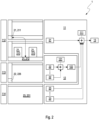
- FIG. 2 shows a block diagram of an information system 1 for a vehicle according to an embodiment of the invention, which is operated using a method according to a first embodiment of the invention.
- the information system 1 comprises a single-chip system (system on a chip, SoC) with at least one processor subsystem (central processing unit, CPU), a system partition 11 that can be executed by the processor subsystem, and an in-vehicle infotainment (IVI) partition 12 that can be executed by the processor subsystem.
- SoC system on a chip
- processor subsystem central processing unit, CPU
- IVI in-vehicle infotainment
- the system partition 11 comprises a master compositor (MCP) 111 with a front composition plane 112 in relation to a viewing direction of a user of the vehicle and a rear composition plane 113 arranged behind the front composition plane 112 in relation to the viewing direction of the user, as well as a rearmost Composition layer 114.
- the main compositor 111 may include further composition layers.
- the system partition is configured to generate a graphical control element 21 and a plurality of graphical system elements 23 and to arrange them in the front composition layer 112 and in the backmost composition layer 114, respectively.
- the graphical system elements 23 may include a graphical background 231.
- the vehicle infotainment partition 12 includes an IVI compositor (surface flinger) 121 and a hardware acceleration driver 122 and is configured to generate a graphical infotainment element 22, merge it by means of the IVI compositor 121 and arrange it in the rear composition layer 113 by means of the hardware acceleration driver 122.
- IVI compositor surface flinger
- the system on chip may include a hypervisor configured to execute from the processor subsystem and execute the system partition 11 and the IVI partition 12.
- the information system 1 comprises a touch-sensitive display screen (Center Infotainment Display, CID) 13 that is functionally connected to the single-chip system and is arranged centrally in the vehicle.
- CID Center Infotainment Display
- the information system 1 is configured to perform the following procedure.
- the processor subsystem of the system on chip of the vehicle information system 1 executes the system on chip system partition 11 and the vehicle infotainment partition 12 of the system on chip. If the system on chip includes a hypervisor, the processor subsystem executes the hypervisor virtualizing the processor subsystem, and the hypervisor executed by the processor subsystem executes the system partition 11 and the vehicle infotainment partition 12. In the vehicle infotainment partition 12 can run an Android operating system, preferably an Android operating system version 4.4 or higher.
- a functional system of the system partition 11 generates the graphic control element 21 and arranges the graphic control element 21 in the front composition level 112 of the main composer 111 of the information system 1. Furthermore, the system partition 11 generates the graphic background and arranges the graphic background 231 in the rearmost composition level 114.
- An infotainment system of the vehicle infotainment partition 12 generates the graphical infotainment element 22 using the IVI compositor 121 and the hardware acceleration driver 122 and arranges the graphical infotainment element 22 in the rear composition layer 113 of the main compositor 111.
- the main compositor 111 combines the rear composition level 113 with the graphic infotainment element 22 and the front composition level 112 with the graphic control element 21 to form the display content 2 in such a way that each graphic element of the front composition level 112, in particular the graphic control element 21, covers an area of the rear composition level 113, in particular of the graphic infotainment element 22, that has the same position and contour, and provides the combined display content 2.
- the display screen 13 of the information system 1 displays the display content 2 comprising the graphical control element 21 provided by the main composer 111.
- a graphical control element of an air conditioning system of the vehicle in particular a climate control bar 212 of an air conditioning control interface, is displayed as the graphical control element 21.
- the display screen 13 generates a toggle event in response to a user manually touching the graphical control 21 displayed on the display screen 13 and provides the generated toggle event to the system partition 11.
- the system partition 11 minimizes or maximizes the graphical control 21, 211, 212 in response to the toggle event generated outside the system partition 11.
- the vehicle infotainment partition 12 may generate the switching event as a result of activating or deactivating an application of the vehicle infotainment partition 12, in particular an input method editor (IME) 225 of the vehicle infotainment partition 12, and a switching interface arranged between the vehicle infotainment partition 12 and the system partition 11 may provide the switching event generated by the vehicle infotainment partition 12 to the system partition 11.
- IME input method editor
- the vehicle infotainment partition 12 defines an exception area 226 of the display screen 13 for the graphic infotainment element 22 that is in the same position and has the same contour as the minimized graphic control element 211 and an output area 228 of the display screen 13 that is exactly complementary to the exception area 226, i.e. the exception area 226 and the output area 228 are static and unchangeable during operation of the information system 1 and together take up an entire display area of the display screen 13.
- Minimizing the graphical control element 21, 212 or maximizing the graphical control element 21, 211 can include animating, ie continuously transforming, the graphical control element 21.
- the graphical control element 21 is initialized as the maximized graphical control element 212 after the information system 1 is switched on.
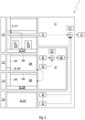
- Figure 3 shows a block diagram of the Figure 2 shown information system 1, which is operated with a method according to a second embodiment of the invention.
- the method differs from that in Figure 2 shown method in that the vehicle infotainment partition 12 defines an exception area 226 of the display screen 13 that is in the same position and has the same contour as the graphical control element 21, 211, 212 and an output area 228 of the display screen 13 that is exactly complementary to the exception area 226 for the graphical infotainment element 22 depending on a state of the graphical control element 21, 211, 212.
- the exception area 226 and the output area 228 are dynamic and changeable during operation of the information system 1 and together always take up the entire display area of the display screen 13.
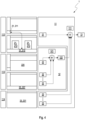
- Figure 4 shows a block diagram of the Figure 2 shown information system 1, which is operated with a method according to a third embodiment of the invention.
- the method differs from that in the Figures 2 and 3 shown method in that the vehicle infotainment partition 12 arranges a non-functional placeholder element 227 in the rear composition plane 113 that is in the same position and has the same contour as the maximized graphical control element 212 and is not covered by any application of the vehicle infotainment partition 12 except the input method editor 225 of the vehicle infotainment partition 12.
- the shifting of the input method editor 225 into the area of the placeholder element 227 means that the input method editor 225 can use the area of the maximized graphical control element 212.
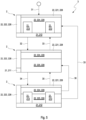
- Figure 5 shows a flow chart of a method 3 for operating the Figures 2 to 4 shown information system 1.
- the information system was initialized 31 with the maximized control element 212.
- the display content 2 includes the status bar 221, the navigation bar 222 and a graphic IVI content 224, for example a web browser, which together form the output area 228, and the graphical control element 21, which comprises the maximized graphical control element 212 and the two ephemeral extensions 213.
- the input method editor 225 is activated 32 by the user by selecting an input field of the graphical IVI content 224, whereby the maximized graphical control element 212 is minimized. By terminating an input in the input field, the user deactivates 33 the input method editor 225, whereby the minimized graphical control element 211 is maximized. Alternatively, the input method editor 225 is deactivated and the minimized graphical control element 211 is maximized if the user manually touches the minimized control element 211 34.
- Figure 6 shows a flow chart of another method 3 for operating the Figures 2 to 4 shown information system 1. The procedure differs from the Figure 5 shown method in that as a result of touching the minimized graphical control element 211, the input method editor 225 is deactivated and not partially covered by the maximized control element 212.
- the display content 2 is restored after initialization 31 of the information system 1.
- the user can minimize the maximized control 212 by manually touching 35 the maximized control 212 or by manually touching 36 the graphical IVI content 224.
Landscapes
- Engineering & Computer Science (AREA)
- Software Systems (AREA)
- Chemical & Material Sciences (AREA)
- Combustion & Propulsion (AREA)
- Transportation (AREA)
- Mechanical Engineering (AREA)
- Theoretical Computer Science (AREA)
- Human Computer Interaction (AREA)
- Physics & Mathematics (AREA)
- General Engineering & Computer Science (AREA)
- General Physics & Mathematics (AREA)
- User Interface Of Digital Computer (AREA)
Description
- Die Erfindung betrifft ein Verfahren zum Betreiben eines Informationssystems eines Fahrzeugs, bei dem ein Prozessorsubsystem (Central Processing Unit, CPU) eines Ein-Chip-Systems (System on a Chip, SoC) eines Informationssystems eines Fahrzeugs eine Systempartition des Ein-Chip-Systems und eine Fahrzeug-Infotainment (In-Vehicle Infotainment, IVI)-Partition des Ein-Chip-Systems ausführt; ein Funktionssystem der Systempartition ein graphisches Bedienelement erzeugt und in einer bezogen auf eine Blickrichtung eines Nutzers des Fahrzeugs vorderen Kompositionsebene eines Hauptkompositors des Informationssystems anordnet und ein mit dem Ein-Chip-System funktional verbundener berührungsempfindlicher in dem Fahrzeug zentral angeordneter Anzeigeschirm (Center Infotainment Display, CID) des Informationssystems einen von dem Hauptkompositor bereitgestellten das graphische Bedienelement umfassenden Anzeigeinhalt anzeigt. Ferner betrifft die Erfindung ein Informationssystem für ein Fahrzeug.
- Informationssysteme für Fahrzeuge sind im Stand der Technik in unterschiedlichen Ausgestaltungen bekannt und dienen dem Anzeigen von Informationen, welche ein Fahrzeug für einen Nutzer des Fahrzeugs, d.h. für einen Fahrer oder einen von dem Fahrer verschiedenen Insassen des Fahrzeugs, bereitstellt.
- Die anzuzeigenden Informationen umfassen im Allgemeinen von Funktionssystemen des Fahrzeugs erzeugte graphische Ausgaben, welche eine hohe Sicherheitsrelevanz, eine große Robustheit gegenüber Störungen und eine frühe Verfügbarkeit nach dem Einschalten des Fahrzeug aufweisen und in vielen Fällen vorgeschriebene funktionale Sicherheitsanforderungen erfüllen müssen. Zu den graphischen Ausgaben von Funktionssystemen gehören beispielsweise eine Einschalt-Animation, ein System-Popup, eine Klimaanlagenbedienschnittstelle, ein Personalisierungsmodul, eine Instrumentenanzeige (cockpit display) und dergleichen.
- Ferner umfassen die anzuzeigenden Informationen im Allgemeinen von Informations- und Unterhaltungssystemen des Fahrzeugs erzeugte graphische Ausgaben, welche der Information oder der Unterhaltung des Nutzers dienen, als Fahrzeug-Infotainment (In-Vehicle Infotainment, IVI)-Systeme bezeichnet werden und in erster Linie ein angenehmes Nutzererlebnis (User eXperience, UX) verursachen und vielfältige Nutzungsmöglichkeiten bieten sollen. Beispielsweise gehören ein Navigationssystem, ein Radio, ein Telefon, ein Internet-Browser, ein Multimediasystem und eine Anwendung zum Verbinden mit externen Geräten wie beispielsweise zum Integrieren eines Smartphones zu den Informations- und Unterhaltungssystemen des Fahrzeugs, welche graphische Infotainmentelemente erzeugen.
- Die Funktionssysteme des Fahrzeugs sowie die Informations- und Unterhaltungssysteme des Fahrzeugs können als ein Ein-Chip-System (System on a Chip, SoC) mit einer die Funktionssysteme des Fahrzeugs umfassenden Systempartition und einer die Informations- und Unterhaltungssysteme, kurz IVI-Systeme, des Fahrzeugs umfassenden Fahrzeug-Infotainment-Partition, kurz IVI-Partition, sowie einem Prozessorsubsystem (Central Processing Unit, CPU) zum Ausführen der System-Partition und der IVI-Partition ausgebildet sein. Das Ein-Chip-System kann von dem Informationssystem umfasst sein.
- Zu dem Informationssystem kann auch ein mit dem Ein-Chip-System funktional verbundener in dem Fahrzeug zentral angeordneter Anzeigeschirm (Center Infotainment Display, CID) gehören, welcher zumeist berührungsempfindlich und in erster Linie zum Anzeigen einer von einem IVI-System erzeugten graphischen Ausgabe, kurz einer IVI-Ausgabe, und zum Betätigen der Funktionssysteme und der IVI-Systeme ausgebildet ist. Vielfach besteht aber ein Bedarf, auf dem zentralen Anzeigeschirm eine von einem Funktionssystem erzeugte graphische Ausgabe, kurz eine Systemausgabe, während des Betriebs des Informationssystems gemeinsam mit der IVI-Ausgabe anzuzeigen.
- Durch Berühren des zentralen Anzeigebildschirms beispielsweise mit einem Finger kann der Nutzer ein auf dem Anzeigebildschirm angezeigtes Bedienelement einer graphischen Ausgabe auswählen und eine dem graphischen Bedienelement zugeordnete Funktion auslösen. So offenbart
DE 10 2014 111 749 A1 ein Informationssystem für ein Fahrzeug und ein Verfahren zum Betreiben des Informationssystems. Von einem berührungsempfindlichen in dem Fahrzeug zentral angeordneten Anzeigeschirm wird eine Anzahl von Berührungspunkten eines oder mehrerer Finger und eine Bewegung der Anzahl von Berührungspunkten erfasst. Anhand der Anzahl von Berührungspunkten wird eine Funktion ausgewählt und anhand der Bewegung der Anzahl von Berührungspunkten wird eine Geste erkannt und die gewählte Funktion abhängig von der erkannten Geste ausgelöst. - Das gemeinsame Anzeigen mehrerer graphischer Ausgaben kann in mehreren disjunkten Ausschnitten einer Anzeigefläche des zentralen Anzeigeschirms erfolgen. Dabei kann es wünschenswert sein, eine Größe der Ausschnitte wahlweise manuell an die graphischen Ausgaben anzupassen. Ein solches Informationssystem für ein Fahrzeug und ein Verfahren zum Betreiben des Informationssystems offenbart
DE 10 2012 022 312 A1 . Auf einem berührungsempfindlichen Anzeigeschirm des Informationssystems werden zwei verschiedene graphische Ausgaben in zwei durch eine Linie voneinander getrennten Ausschnitten des Anzeigeschirms nebeneinander angezeigt. Ein Nutzer kann die vertikale Linie in einer Querrichtung mittels einer manuellen Berührgeste verschieben, um Flächen der beiden Ausschnitte zu vergrößern bzw. zu verkleinern und den jeweiligen graphischen Ausgaben mehr bzw. weniger Raum geben. - Das gemeinsame Anzeigen von graphischen Ausgaben, welche einerseits von Funktionssystemen und andererseits von IVI-Systemen erzeugt sind, auf dem zentralen Anzeigeschirm bringt aber weitere Probleme mit sich.
- Zunächst kann eine Funktion oder Sichtbarkeit einer von der Systempartition erzeugten graphischen Ausgabe durch eine von der IVI-Partition erzeugte graphische Ausgabe beeinträchtigt sein. Zwar könnte man der Beeinträchtigung mittels einer Fehlerkennungslogik (watchdog logic) entgegenwirken, welche die Systemausgabe bei Bedarf derart in den Vordergrund bringt, dass sie die IVI-Ausgabe zumindest teilweise überdeckt. Jedoch wäre dann das von der IVI-Ausgabe verursachte Nutzererlebnis beeinträchtigt und die Komplexität des Informationssystems erhöht.
- Weiterhin kann ein von einer Systemausgabe freigelassener und zum Anzeigen einer IVI-Ausgabe nutzbarer Ausschnitt des Anzeigeschirms unzureichend sein. Beispielsweise lässt sich ein üblicherweise in dem standardisierten Seitenverhältnis 16:9 formatierter Videostrom nur unzureichend klein anzeigen. Oder ein Eingabemethodeneditor (Input Method Editor, IME), welcher eine Tastatur simuliert, kann nicht genügend Anzeigefläche für eine Trefferliste freilassen. Oder eine IVI-Anwendung, welche für ihre graphischen Ausgaben einen Immersivmodus (immersive mode, verfügbar ab Android 4.4) nutzt, ist durch die graphischen Ausgaben der Systempartition eingeschränkt.
- Abgesehen davon kann eine Kompatibilität von Fremdanwendungen mit einem von einem Originalhersteller (Original Equipment Manufacturer, OEM) des Fahrzeugs bereitgestellten IME nicht sichergestellt werden. Nur mit einer vollständigen Kompatibilität könnte dem IME des Originalherstellers als einziger Anwendung der IVI-Partition erlaubt werden, eine Systemausgabe abzudecken.
- Das Dokument
EP 3 092 560 A1 zeigt ein Verfahren zum Betreiben eines Informationssystems eines Fahrzeugs, bei dem ein Prozessorsubsystem eines Ein-Chip-Systems eines Informationssystems eines Fahrzeugs eine Systempartition des Ein-Chip-Systems und eine Fahrzeug-Infotainment-Partition des Ein-Chip-Systems ausführt, und bei dem ein Funktionssystem der Systempartition ein graphisches Bedienelement erzeugt. - Der Erfindung liegt daher die Aufgabe zugrunde, ein verbessertes Verfahren zum Betreiben eines Informationssystems eines Fahrzeugs vorzuschlagen, welches einfach implementierbar und handhabbar ist sowie sowohl ein angenehmes von IVI-Ausgaben verursachtes Nutzererlebnis als auch eine Funktion und Sichtbarkeit von Systemausgaben gewährleistet. Darüber hinaus ist es Aufgabe der Erfindung, ein Informationssystem für ein Fahrzeug zur Verfügung zu stellen.
- Der Gegenstand der Erfindung, gemäss dem Anspruch 1, ist ein Verfahren zum Betreiben eines Informationssystems eines Fahrzeugs, bei dem ein Prozessorsubsystem des Ein-Chip-Systems eines Informationssystems eines Fahrzeugs eine Systempartition des Ein-Chip-Systems und eine Fahrzeug-Infotainment-Partition des Ein-Chip-Systems ausführt; ein Funktionssystem der Systempartition ein graphisches Bedienelement erzeugt und in einer bezogen auf eine Blickrichtung eines Nutzers des Fahrzeugs vorderen Kompositionsebene eines Hauptkompositors des Informationssystems anordnet und ein mit dem Ein-Chip-System funktional verbundener berührungsempfindlicher in dem Fahrzeug zentral angeordneter Anzeigeschirm des Informationssystems einen von dem Hauptkompositor bereitgestellten das graphische Bedienelement umfassenden Anzeigeinhalt anzeigt. Derartige Betriebsverfahren werden von Fahrzeuginformationssystemen vieler moderner Fahrzeuge ausgeführt, so dass für die vorliegende Erfindung vielfältige Verwendungsmöglichkeiten bestehen.
- Unter dem graphischen Bedienelement ist ein graphisches Element zu verstehen, dem ein insbesondere positionsgleicher und konturgleicher Berührbereich des Anzeigeschirms und eine Funktion zugeordnet sind, welche die Systempartition infolge eines manuellen Berührens des Berührbereichs durch den Nutzer auslöst. Der Anzeigeinhalt wird von dem Anzeigeschirm vollflächig angezeigt, d.h. eine Außenkontur und Pixelanzahl des Anzeigeinhalts ist gleich einer Außenkontur und Pixelanzahl des Anzeigeschirms.
- Bei dem erfindungsgemäßen Verfahren minimiert oder maximiert die Systempartition das graphische Bedienelement infolge eines außerhalb der Systempartition erzeugten Umschaltereignisses. Unter einem Minimieren ist ein Transformieren in einen minimierten Zustand zu verstehen, d.h. ein Verkleinern des graphischen Bedienelements. Entsprechend bedeutet ein Maximieren ein Transformieren in einen maximierten Zustand, d.h. ein Vergrößern des graphischen Bedienelements.
- Das minimierte graphische Bedienelement weist eine relativ zu einer Anzeigefläche des Anzeigeschirms geringe Größe auf und deckt einen kleinen Bereich von hinteren Kompositionsebenen des Hauptkompositors ab. Infolgedessen können in hinteren Kompositionsebenen des Hauptkompositors angeordnete graphische Elemente im Wesentlichen vollflächig von dem Anzeigeschirm angezeigt werden. Die geringe Größe des Bedienelements reicht aber aus, um durch ein manuelles Berühren eine einzige dem minimierten Bedienelement zugeordnete Funktion auszulösen.
- Dem maximierten graphischen Bedienelement können dagegen mehrere disjunkte Berührbereiche und den Berührbereichen jeweils unterschiedliche Funktionen zugeordnet sein, welche durch ein manuelles Berühren des jeweiligen Berührbereichs ausgelöst werden. Vorteilhaft kann das maximierte graphische Bedienelement das minimierte graphische Bedienelement umfassen, d.h. das graphische Bedienelement kann eine Erweiterung des minimierten graphischen Bedienelements sein.
- Insbesondere kann das maximierte graphische Bedienelement seinerseits eine oder mehrere flüchtige Erweiterungen (flyout) aufweisen, d.h. die flüchtigen Erweiterungen werden ab dem Maximieren während einer vorbestimmten Zeitdauer angezeigt und nach der vorbestimmten Zeitdauer ausgeblendet.
- Bei vielen Ausführungsformen erzeugt ein Infotainmentsystem der Fahrzeug-Infotainment-Partition ein graphisches Infotainmentelement und ordnet das graphische Infotainmentelement in einer bezogen auf die Blickrichtung hinter der vorderen Kompositionsebene angeordneten hinteren Kompositionsebene des Hauptkompositors an, führt der Hauptkompositor die hintere Kompositionsebene mit dem graphischen Infotainmentelement und die vordere Kompositionsebene mit dem graphischen Bedienelement zu dem Anzeigeinhalt derart zusammen, dass jedes graphische Element der vorderen Kompositionsebene, insbesondere das graphische Bedienelement, einen positionsgleichen und konturgleichen Bereich der hinteren Kompositionsebene, insbesondere des graphischen Infotainmentelements, abdeckt, und stellt der Hauptkompositor den zusammengeführten Anzeigeinhalt bereit.
- Unter dem graphischen Infotainmentelement ist ein graphisch dargestellter Anzeigeinhalt der IVI-Partition zu verstehen, beispielsweise ein Videostrom im Standardformat mit einem Seitenverhältnis 16:9. Der Hauptkompositor führt seine sämtlichen Kompositionsebenen durch ein sukzessives Überlagern beginnend mit einer hintersten Kompositionsebene und endend mit der vorderen Kompositionsebene zusammen. Das graphische Infotainmentelement kann seinerseits von einem IVI-Kompositor (z.B. surface flinger) durch ein Zusammenführen von mehreren IVI-Ebenen und/oder ein Zusammensetzen von mehreren IVI-Elementen innerhalb einer IVI-Ebene erzeugt werden.
- Bevorzugt erzeugt der Anzeigeschirm das Umschaltereignis infolge eines manuellen Berührens des auf dem zentralen Anzeigeschirm angezeigten graphischen Bedienelements durch den Nutzer und stellt das erzeugte Umschaltereignis für die Systempartition bereit. Mit anderen Worten ist dem minimierten graphischen Bedienelement das Maximieren des graphischen Bedienelements als die einzige Funktion und dem maximierten graphischen Bedienelement das Minimieren des Bedienelements als eine Funktion von mehreren Funktionen zugeordnet, d.h. das Umschaltereignis löst zustandsabhängig ein Maximieren des minimierten graphischen Bedienelements oder ein Minimieren des maximierten graphischen Bedienelements aus. Die Systempartition erfüllt hohe Sicherheitserfordernisse und ist auch bei einer Störung der IVI-Partition verfügbar. Infolgedessen kann der Nutzer während des Betriebs des Informationssystems jederzeit den Zustand des graphischen Bedienelements umschalten und insbesondere die unterschiedlichen dem maximierten Bedienelement zugeordneten Funktionen auslösen.
- Alternativ oder zusätzlich kann die Fahrzeug-Infotainment-Partition das Umschaltereignis infolge eines Aktivierens oder eines Deaktivierens einer Anwendung der Fahrzeug-Infotainment-Partition, insbesondere eines Eingabemethodeneditors der Fahrzeug-Infotainment-Partition, das Umschaltereignis erzeugen und kann eine zwischen der Fahrzeug-Infotainment-Partition und der Systempartition angeordnete Umschaltschnittstelle das von der Fahrzeug-Infotainment-Partition erzeugte Umschaltereignis für die Systempartition bereitstellen. Kurz gesagt, kann das Aktivieren der Anwendung der Fahrzeug-Infotainment-Partition das Minimieren des graphischen Bedienelements bewirken und kann das Deaktivieren der Anwendung ein Maximieren des graphischen Bedienelements bewirken. Auf diese Weise wird gewährleistet, dass das zu der aktivierten Anwendung gehörende graphische Infotainmentelement im Wesentlichen vollflächig von dem Anzeigeschirm oder zumindest in einem für das graphische Infotainmentelement ausreichenden Bereich des Anzeigeschirms und gleichzeitig das minimierte graphische Bedienelement angezeigt wird.
- Bei einer Ausführungsform definiert die Fahrzeug-Infotainment-Partition einen zu dem minimierten graphischen Bedienelement positionsgleichen und konturgleichen Ausnahmebereich des Anzeigeschirms und einen zu dem Ausnahmebereich exakt komplementären Ausgabebereich des Anzeigeschirms für das graphische Infotainmentelement fest. Der Ausnahmebereich bewirkt, dass das graphische Infotainmentelement den Ausnahmebereich freilässt und demzufolge nicht durch das minimierte graphische Bedienelement abgedeckt wird. Insbesondere ist jede dem graphischen Infotainmentelement zugeordnete Berührfläche in dem Ausgabebereich angeordnet und alternativ zu dem minimierten graphischen Bedienelement berührbar. Entsprechend wird der Ausgabebereich von der IVI-Partition statisch definiert und konfiguriert.
- Bei einer anderen Ausführungsform definiert die Fahrzeug-Infotainment-Partition einen zu dem graphischen Bedienelement positionsgleichen und konturgleichen Ausnahmebereich des Anzeigeschirms und einen zu dem Ausnahmebereich exakt komplementären Ausgabebereich des Anzeigeschirms für das graphische Infotainmentelement abhängig von einem Zustand des graphischen Bedienelements. Mit anderen Worten wird der Ausgabebereich von der IVI-Partition während des Betriebs des Informationssystems dynamisch definiert und konfiguriert.
- Bei noch einer anderen Ausführungsform ordnet die Fahrzeug-Infotainment-Partition ein zu dem maximierten graphischen Bedienelement positionsgleiches und konturgleiches funktionsloses Platzhalterelement in der hinteren Kompositionsebene an, welches von keiner Anwendung der Fahrzeug-Infotainment-Partition außer einem Eingabemethodeneditor der Fahrzeug-Infotainment-Partion abgedeckt wird. Das bedeutet, dass der Eingabemethodeneditor als einzige Anwendung der IVI-Partition zusätzlich den Anzeigebereich des maximierten graphischen Bedienelements ausnutzen kann, was mit einer besseren Nutzererfahrung betreffend den Eingabemethodeneditor einhergeht.
- Die Systempartition kann das graphische Bedienelement als das maximierte graphische Bedienelement initialisieren und/oder ein Minimieren des graphischen Bedienelements oder ein Maximieren des graphischen Bedienelements kann ein Animieren des graphischen Bedienelements umfassen. Nach dem Starten des Informationssystems können demzufolge zunächst sämtliche dem graphischen Bedienelement zugeordneten Funktionen durch manuelles Berühren ausgelöst werden. Das Animieren des graphischen Bedienelements kann ein stetiges Transformieren des graphischen Bedienelements zwischen dem minimierten Zustand und dem maximierten Zustand umfassen und verbessert ein Nutzererlebnis betreffend das graphische Bedienelement.
- In einer vorteilhaften Ausführungsform wird ein graphisches Steuerungselement einer Klimaanlage des Fahrzeugs, insbesondere ein Klimasteuerbalken eine Klimaanlagenbedienschnittstelle, als das graphische Bedienelement angezeigt und/oder wird in der Fahrzeug-Infotainment-Partition ein Android-Betriebssystem ausgeführt und/oder führt das Prozessorsubsystem einen das Prozessorsubsystem virtualisierenden Hypervisor aus und führt der von dem Prozessorsubsystem ausgeführte Hypervisor die Systempartition und die Fahrzeug-Infotainment-Partition aus. Der maximierte Klimasteuerbalken (full climate control bar) kann an einem unteren Rand des Anzeigeschirms eine gesamte Breite des Anzeigeschirms angeordnet sein und angezeigt werden. Der maximierte Klimasteuerbalken kann eine oder mehr als eine Klimasteuerungserweiterung, insbesondere zwei flüchtige Klimasteuererweiterungen (climate control bar flyout), aufweisen, welche zueinander beabstandet nebeneinander angeordnet sind und sich von dem maximierten Klimasteuerbalken zu dem oberen Rand des Anzeigeschirms erstrecken. Der minimierte Klimasteuerbalken (retracted climate control bar) kann als Teil des maximierten Klimasteuerbalkens in einer linken unteren Ecke als ein Rechteck, insbesondere als ein Quadrat, angeordnet sein und angezeigt werden.
- Der Hypervisor abstrahiert das Prozessorsubsystem und teilt der Systempartition und der IVI-Partition eine jeweils benötigte bzw. verfügbare Rechenleistung dynamisch zu, wodurch eine Funktion der Systempartition und ein von der IVI-Partition verursachtes Nutzererlebnis optimiert werden. Zudem verhindert der Hypervisor ein Interferieren der IVI-Partition mit der Systempartition, was mit einer großen Robustheit der Funktionssysteme des Fahrzeugs gegenüber Störungen einhergeht.
- Gegenstand der Erfindung ist auch ein Informationssystem für ein Fahrzeug, gemäss dem Anspruch 10, welches ein Ein-Chip-System (SoC) mit wenigstens einem Prozessorsubsystem (CPU), einer von dem Prozessorsubsystem ausführbaren Systempartition, einer von dem Prozessorsubsystem ausführbaren Fahrzeug-Infotainment (IVI)-Partition und einem Hauptkompositor, welcher eine vordere Kompositionsebene und eine hintere Kompositionsebene umfasst, und einen mit dem Ein-Chip-System funktional verbundenen berührungsempfindlichen in einem Fahrzeug zentral angeordneten Anzeigeschirm (CID) umfasst. Informationssysteme dieser Art sind in einer Vielzahl von Fahrzeugen verbaut, so dass sich zahlreiche Verwendungsmöglichkeiten für die Erfindung bieten.
- Das erfindungsgemäße Informationssystem ist konfiguriert, ein erfindungsgemäßes Verfahren auszuführen. Das erfindungsgemäß betriebene Informationssystem stellt einerseits eine hohe Verfügbarkeit von Funktionen der Systempartition sicher und erlaubt andererseits ein angenehmes Nutzererlebnis betreffend graphische Ausgaben der IVI-Partition. Zudem ist das Informationssystem einfach zu implementieren und zu handhaben.
- Bevorzugt umfasst die Fahrzeug-Infotainment-Partition ein Android-Betriebssystem. Android-Betriebssysteme sind weit verbreitet und weisen eine hohe Verfügbarkeit auf. Wenn das Android-Betriebssystem eine Version von 4.4 oder höher aufweist, lässt sich der Ausgabebereich für das graphische Infotainmentelement dynamisch während der Laufzeit konfigurieren.
- Ein wesentlicher Vorteil des erfindungsgemäßen Verfahrens besteht darin, dass die graphische Ausgabe der IVI-Partition auch ohne eine selbst fehleranfällige Wachhund-Logik im Wesentlichen die gesamte Anzeigefläche des zentralen Anzeigeschirms nutzen kann, was mit einem angenehmen Nutzererlebnis einhergeht. Weiterhin vorteilhaft ist, dass ein Nutzer die graphische Ausgabe der IVI-Partition zwischen einer Nutzung der im Wesentlichen gesamten Anzeigefläche und einer zugunsten einer graphischen Ausgabe der Systempartition reduzierten Anzeigefläche wahlweise umschalten kann. Darüber kann ein separater Anzeigeschirm für graphische Systemausgaben entfallen, und eine Größe des zentralen Anzeigeschirms kann reduziert sein.
- Die Erfindung ist anhand von Ausführungsformen in den Zeichnungen schematisch dargestellt und wird unter Bezugnahme auf die Zeichnungen weiter beschrieben. Es zeigt:
- Figur 1
- einen Anzeigeinhalt eines Informationssystems für ein Fahrzeug nach einer Ausführungsform des Stands der Technik;
- Figur 2
- ein Blockdiagramm eines Informationssystems für ein Fahrzeug nach einer Ausführungsform der Erfindung, welches mit einem Verfahren nach einer ersten Ausführungsform der Erfindung betrieben wird;
- Figur 3
- ein Blockdiagramm des in
Figur 2 gezeigten Informationssystems, welches mit einem Verfahren nach einer zweiten Ausführungsform der Erfindung betrieben wird; - Figur 4
- ein Blockdiagramm des in
Figur 2 gezeigten Informationssystems, welches mit einem Verfahren nach einer dritten Ausführungsform der Erfindung betrieben wird; - Figur 5
- ein Flussdiagramm eines Verfahrens zum Betätigen des in den
Figuren 2 bis 4 gezeigten Informationssystems; - Figur 6
- ein Flussdiagramm eines weiteren Verfahrens zum Betätigen des in
Figuren 2 bis 4 gezeigten Informationssystems. -
Figur 1 zeigt einen Anzeigeinhalt 2 eines Informationssystems für ein Fahrzeug nach einer Ausführungsform des Stands der Technik. Der Anzeigeinhalt 2 umfasst ein graphisches Bedienelement 21, welches als ein graphisches Steuerungselement einer Klimaanlage eines Fahrzeugs einen Klimasteuerbalken 212 und zwei zueinander beabstandet nebeneinander angeordnete Erweiterungen 213 des Klimasteuerbalkens 212 umfasst, welche beispielsweise einem rechten Vordersitz bzw. einem linken Vordersitz des Fahrzeugs zugeordnet sind. Der Klimasteuerbalken 212 ist in einem unteren Randbereich des Anzeigeinhalts 2 angeordnet und erstreckt sich entlang einer Gesamtbreite des Anzeigeinhalts 2. Während der Klimasteuerbalken 212 dauerhaft angezeigt wird, können die beiden Erweiterungen 213 flüchtig sein, d.h. nur temporär angezeigt werden. - Ferner umfasst der Anzeigeinhalt 2 ein graphisches Infotainmentelement 22, welches eine Statusleiste 221, eine Navigationsleiste 222 und eine Klimasteuerungserweiterung 223 umfasst. Die Klimasteuerungserweiterung 223 stellt eine Mehrzahl von Funktionen der Klimaanlage, insbesondere Schalter, Schieber und/oder Regler zum Einstellen, sowie eine Mehrzahl von Informationen von der Klimaanlage, insbesondere Betriebsparameter der Klimaanlage, bereit. Anstelle der Klimasteuerungserweiterung 223 kann auch ein graphischer IVI-Inhalt 224 (siehe
Figuren 5 und6 ) eines Infotainmentsystems des Fahrzeugs, beispielsweise ein Web-Browser oder ein Videostrom, Teil des Anzeigeinhalts 2 sein. - Die Klimasteuerungserweiterung 223 oder alternativ die graphische Ausgabe des Infotainmentsystems können von dem Klimasteuerbalken 212 teilweise abgedeckt und folglich nicht vollständig sichtbar sein oder verkleinert, d.h. mit einer verringerten Höhe, und vollständig angezeigt werden. In beiden Fällen ist ein Nutzererlebnis beeinträchtigt.
-
Figur 2 zeigt ein Blockdiagramm eines Informationssystems 1 für ein Fahrzeug nach einer Ausführungsform der Erfindung, welches mit einem Verfahren nach einer ersten Ausführungsform der Erfindung betrieben wird. Das Informationssystem 1 umfasst ein Ein-Chip-System (System on a Chip, SoC) mit wenigstens einem Prozessorsubsystem (Central Processing Unit, CPU), einer von dem Prozessorsubsystem ausführbaren Systempartition 11, einer von dem Prozessorsubsystem ausführbaren Fahrzeug-Infotainment (In-Vehicle-Infotainment, IVI)-Partition 12. - Die Systempartition 11 umfasst einen Hauptkompositor (master compositor, MCP) 111 mit einer bezogen auf eine Blickrichtung eines Nutzers des Fahrzeugs vorderen Kompositionsebene 112 und einer bezogen auf die Blickrichtung des Nutzers hinter der vorderen Kompositionsebene 112 angeordneten hinteren Kompositionsebene 113 sowie einer hintersten Kompositionsebene 114. Der Hauptkompositor 111 kann weitere Kompositionsebenen umfassen. Die Systempartition ist konfiguriert, ein graphisches Bedienelement 21 und eine Mehrzahl von graphischen Systemelementen 23 zu erzeugen und in der vorderen Kompositionsebene 112 bzw. in der hintersten Kompositionsebene 114 anzuordnen. Die graphischen Systemelemente 23 können einen graphischen Hintergrund 231 umfassen.
- Die Fahrzeug-Infotainment-Partition 12 umfasst einen IVI-Kompositor (surface flinger) 121 und einen Hardwarebeschleunigungstreiber 122 und ist konfiguriert, ein graphisches Infotainmentelement 22 zu erzeugen, mittels des IVI-Kompositors 121 zusammenzuführen und mittels des Hardwarebeschleunigungstreibers 122 in der hinteren Kompositionsebene 113 anzuordnen.
- Das Ein-Chip-System kann einen Hypervisor umfassen, welcher konfiguriert ist, von dem Prozessorsubsystem ausgeführt zu werden und die Systempartition 11 und die IVI-Partition 12 auszuführen.
- Ferner umfasst das Informationssystem 1 einen mit dem Ein-Chip-System funktional verbundenen berührungsempfindlichen in dem Fahrzeug zentral angeordneten Anzeigeschirm (Center Infotainment Display, CID) 13.
- Das Informationssystem 1 ist konfiguriert, das folgende Verfahren auszuführen.
- Das Prozessorsubsystem des Ein-Chip-Systems des Informationssystems 1 des Fahrzeugs führt die Systempartition 11 des Ein-Chip-Systems und die Fahrzeug-Infotainment-Partition 12 des Ein-Chip-Systems aus. Wenn das Ein-Chip-System einen Hypervisor umfasst, führt das Prozessorsubsystem den das Prozessorsubsystem virtualisierenden Hypervisor aus und führt der von dem Prozessorsubsystem ausgeführte Hypervisor die Systempartition 11 und die Fahrzeug-Infotainment-Partition 12 aus. In der Fahrzeug-Infotainment-Partition 12 kann ein Android-Betriebssystem ausgeführt werden, bevorzugt ein Android-Betriebssystem der Version 4.4 oder höher.
- Ein Funktionssystem der Systempartition 11 erzeugt das graphische Bedienelement 21 und ordnet das graphische Bedienelement 21 in der vorderen Kompositionsebene 112 des Hauptkompositors 111 des Informationssystems 1 an. Ferner erzeugt die Systempartition 11 den graphischen Hintergrund und ordnet den graphischen Hintergrund 231 in der hintersten Kompositionsebene 114 an.
- Ein Infotainmentsystem der Fahrzeug-Infotainment-Partition 12 erzeugt mittels des IVI-Kompositors 121 und des Hardwarebeschleunigungstreibers 122 das graphische Infotainmentelement 22 und ordnet das graphische Infotainmentelement 22 in der hinteren Kompositionsebene 113 des Hauptkompositors 111 an.
- Der Hauptkompositor 111 führt die hintere Kompositionsebene 113 mit dem graphischen Infotainmentelement 22 und die vordere Kompositionsebene 112 mit dem graphischen Bedienelement 21 zu dem Anzeigeinhalt 2 derart zusammen, dass jedes graphische Element der vorderen Kompositionsebene 112, insbesondere das graphische Bedienelement 21, einen positionsgleichen und konturgleichen Bereich der hinteren Kompositionsebene 113, insbesondere des graphischen Infotainmentelements 22, abdeckt, und stellt den zusammengeführten Anzeigeinhalt 2 bereit.
- Der Anzeigeschirm 13 des Informationssystems 1 zeigt den von dem Hauptkompositor 111 bereitgestellten das graphische Bedienelement 21 umfassenden Anzeigeinhalt 2 an. Lediglich beispielhaft wird ein graphisches Steuerungselement einer Klimaanlage des Fahrzeugs, insbesondere ein Klimasteuerbalken 212 einer Klimaanlagenbedienschnittstelle, als das graphische Bedienelement 21 angezeigt.
- Der Anzeigeschirm 13 erzeugt ein Umschaltereignis infolge eines manuellen Berührens des auf dem Anzeigeschirm 13 angezeigten graphischen Bedienelements 21 durch den Nutzer und stellt das erzeugte Umschaltereignis für die Systempartition 11 bereit. Die Systempartition 11 minimiert oder maximiert das graphische Bedienelement 21, 211, 212 infolge des außerhalb der Systempartition 11 erzeugten Umschaltereignisses.
- Alternativ oder zusätzlich kann die Fahrzeug-Infotainment-Partition 12 das Umschaltereignis infolge eines Aktivierens oder eines Deaktivierens einer Anwendung der Fahrzeug-Infotainment-Partition 12, insbesondere eines Eingabemethodeneditors (Input Method Editor, IME) 225 der Fahrzeug-Infotainment-Partition 12, das Umschaltereignis erzeugen und eine zwischen der Fahrzeug-Infotainment-Partition 12 und der Systempartition 11 angeordnete Umschaltschnittstelle das von der Fahrzeug-Infotainment-Partition 12 erzeugte Umschaltereignis für die Systempartition 11 bereitstellen.
- Die Fahrzeug-Infotainment-Partition 12 definiert einen zu dem minimierten graphischen Bedienelement 211 positionsgleichen und konturgleichen Ausnahmebereich 226 des Anzeigeschirms 13 und einen zu dem Ausnahmebereich 226 exakt komplementären Ausgabebereich 228 des Anzeigeschirms 13 für das graphische Infotainmentelement 22 fest, d.h. der Ausnahmebereich 226 und der Ausgabebereich 228 sind statisch und während des Betriebs des Informationssystems 1 unveränderlich und nehmen gemeinsam eine gesamte Anzeigefläche des Anzeigeschirms 13 ein.
- Ein Minimieren des graphischen Bedienelements 21, 212 oder ein Maximieren des graphischen Bedienelements 21, 211 kann ein Animieren, d.h. ein stetiges Transformieren, des graphischen Bedienelements 21 umfassen. Das graphische Bedienelement 21 wird nach einem Einschalten des Informationssystems 1 als das maximierte graphische Bedienelement 212 initialisiert.
-
Figur 3 zeigt ein Blockdiagramm des inFigur 2 gezeigten Informationssystems 1, welches mit einem Verfahren nach einer zweiten Ausführungsform der Erfindung betrieben wird. Das Verfahren unterscheidet sich von dem inFigur 2 gezeigten Verfahren dadurch, dass die Fahrzeug-Infotainment-Partition 12 einen zu dem graphischen Bedienelement 21, 211, 212 positionsgleichen und konturgleichen Ausnahmebereich 226 des Anzeigeschirms 13 und einen zu dem Ausnahmebereich 226 exakt komplementären Ausgabebereich 228 des Anzeigeschirms 13 für das graphische Infotainmentelement 22 abhängig von einem Zustand des graphischen Bedienelements 21, 211, 212 definiert. Mit anderen Worten , sind der Ausnahmebereich 226 und der Ausgabebereich 228 dynamisch und während des Betriebs des Informationssystems 1 veränderlich und nehmen gemeinsam stets die gesamte Anzeigefläche des Anzeigeschirms 13 ein. -
Figur 4 zeigt ein Blockdiagramm des inFigur 2 gezeigten Informationssystems 1, welches mit einem Verfahren nach einer dritten Ausführungsform der Erfindung betrieben wird. Das Verfahren unterscheidet sich von dem in denFiguren 2 und3 gezeigten Verfahren dadurch, dass die Fahrzeug-Infotainment-Partition 12 ein zu dem maximierten graphischen Bedienelement 212 positionsgleiches und konturgleiches funktionsloses Platzhalterelement 227 in der hinteren Kompositionsebene 113 anordnet, welches von keiner Anwendung der Fahrzeug-Infotainment-Partition 12 außer dem Eingabemethodeneditor 225 der Fahrzeug-Infotainment-Partition 12 abgedeckt wird. Das Ausweichen des Eingabemethodeneditors 225 in den Bereich des Platzhalterelements 227 bewirkt, dass der Eingabemethodeneditor 225 den Bereich des maximierten graphischen Bedienelements 212 nutzen kann. -
Figur 5 zeigt ein Flussdiagramm eines Verfahrens 3 zum Betätigen des in denFiguren 2 bis 4 gezeigten Informationssystems 1. - Das Informationssystem wurde mit dem maximierten Bedienelement 212 initialisiert 31. Der Anzeigeinhalt 2 umfasst die Statusleiste 221, die Navigationsleiste 222 und einen graphischen IVI-Inhalt 224, beispielsweise einen Web-Browser, welche gemeinsam den Ausgabebereich 228 bilden, sowie das graphische Bedienelement 21, welches das maximierte graphische Bedienelement 212 und die beiden flüchtigen Erweiterungen 213 umfasst. Der Eingabemethodeneditor 225 wird von dem Nutzer durch Auswählen eines Eingabefelds des graphischer IVI-Inhalts 224 aktiviert 32, wodurch das maximierte graphische Bedienelement 212 minimiert wird. Durch Beendigen einer Eingabe in das Eingabefeld deaktiviert 33 der Nutzer den Eingabemethodeneditors 225, wodurch das minimierte graphische Bedienelement 211 maximiert werden. Alternativ dazu werden der Eingabemethodeneditor 225 deaktiviert und das minimierte graphische Bedienelement 211 maximiert, wenn der Nutzer das minimierte Bedienelement 211 manuell berührt 34.
-
Figur 6 zeigt ein Flussdiagramm eines weiteren Verfahrens 3 zum Betätigen des inFiguren 2 bis 4 gezeigten Informationssystems 1. Das Verfahren unterscheidet sich von demFigur 5 gezeigten Verfahren dadurch, dass infolge des Berührens des minimierten graphischen Bedienelements 211 der Eingabemethodeneditor 225 deaktiviert und nicht teilweise von dem maximierten Bedienelement 212 abgedeckt wird. - Wenn der Nutzer den teilweise abgedeckten Eingabemethodeneditor 225 durch Beenden einer Eingabe deaktiviert, wird der Anzeigeinhalt 2 nach dem Initialisieren 31 des Informationssystems 1 wieder hergestellt. Alternativ kann der Nutzer das maximierte Bedienelement 212 durch manuelles Berühren 35 des maximierten Bedienelements 212 oder durch manuelles Berühren 36 des graphischen IVI-Inhalts 224 minimieren.
-
- 1
- Informationssystem
- 11
- Systempartition
- 111
- Hauptkompositor
- 112
- vordere Kompositionsebene
- 113
- hintere Kompositionsebene
- 114
- hinterste Kompositionsebene
- 12
- Fahrzeug-Infotainment (In-Vehicle Infotainment, IVI)-Partition
- 121
- IVI-Kompositor
- 122
- Hardwarebeschleunigungstreiber
- 13
- Anzeigeschirm
- 2
- Anzeigeinhalt
- 21
- graphisches Bedienelement
- 211
- minimiertes graphisches Bedienelement, Klimasteuerbalken (Climate Control Bar) im minimierten Zustand
- 212
- maximiertes graphisches Bedienelement, Klimasteuerbalken im maximierten Zustand
- 213
- flüchtige Erweiterung des maximierten graphischen Bedienelements (Climate Control Bar Layout)
- 22
- graphisches Infotainmentelement
- 221
- Statusleiste
- 222
- Navigationsleiste
- 223
- Klimasteuerungserweiterung (Climate Control Flyout)
- 224
- graphischer IVI-Inhalt
- 225
- Eingabemethodeneditor (IME)
- 226
- Ausnahmebereich
- 227
- Platzhalterelement
- 228
- Ausgabebereich
- 23
- graphisches Systemelement
- 231
- graphischer Hintergrund
- 3
- Verfahren zum Betätigen
- 31
- Initialisieren
- 32
- Aktivieren IME
- 33
- Deaktivieren IME
- 34
- manuelles Berühren des minimierten graphischen Bedienelements
- 35
- manuelles Berühren des maximierten graphischen Bedienelements
- 36
- manuelles Berühren des IVI-Inhalts
Claims (10)
- Verfahren zum Betreiben eines Informationssystems (1) eines Fahrzeugs, bei dem- ein Prozessorsubsystem eines Ein-Chip-Systems eines Informationssystems (1) eines Fahrzeugs eine Systempartition (11) des Ein-Chip-Systems und eine Fahrzeug-Infotainment-Partition (12) des Ein-Chip-Systems ausführt;- ein Funktionssystem der Systempartition (11) ein graphisches Bedienelement (21) erzeugt und in einer bezogen auf eine Blickrichtung eines Nutzers des Fahrzeugs vorderen Kompositionsebene (112) eines Hauptkompositors (111) des Informationssystems (1) anordnet;- ein mit dem Ein-Chip-System funktional verbundener berührungsempfindlicher in dem Fahrzeug zentral angeordneter Anzeigeschirm (13) des Informationssystems (1) einen von dem Hauptkompositor (111) bereitgestellten das graphische Bedienelement (21) umfassenden Anzeigeinhalt (2) anzeigt; und- die Systempartition (11) das graphische Bedienelement (21, 211, 212) infolge eines außerhalb der Systempartition (11) erzeugten Umschaltereignisses minimiert oder maximiert.
- Verfahren nach Anspruch 1, bei dem- ein Infotainmentsystem der Fahrzeug-Infotainment-Partition (12) ein graphisches Infotainmentelement (22) erzeugt und in einer bezogen auf die Blickrichtung hinter der vorderen Kompositionsebene (112) angeordneten hinteren Kompositionsebene (113) des Hauptkompositors (111) anordnet; und- der Hauptkompositor (111) die hintere Kompositionsebene (113) mit dem graphischen Infotainmentelement (22) und die vordere Kompositionsebene (112) mit dem graphischen Bedienelement (21) zu dem Anzeigeinhalt (2) derart zusammenführt, dass jedes graphische Element der vorderen Kompositionsebene (112) einen positionsgleichen und konturgleichen Bereich der hinteren Kompositionsebene (113) abdeckt, und- der Hauptkompositor (111) den zusammengeführten Anzeigeinhalt (2) bereitstellt.
- Verfahren nach einem der Ansprüche 1 oder 2, bei dem der Anzeigeschirm (13) das Umschaltereignis infolge eines manuellen Berührens des auf dem Anzeigeschirm (13) angezeigten graphischen Bedienelements (21) durch den Nutzer erzeugt und das erzeugte Umschaltereignis für die Systempartition (11) bereitstellt.
- Verfahren nach einem der Ansprüche 1 bis 3, bei dem die Fahrzeug-Infotainment-Partition (12) das Umschaltereignis infolge eines Aktivierens oder eines Deaktivierens einer Anwendung der Fahrzeug-Infotainment-Partition (12) das Umschaltereignis erzeugt und eine zwischen der Fahrzeug-Infotainment-Partition (12) und der Systempartition (11) angeordnete Umschaltschnittstelle das von der Fahrzeug-Infotainment-Partition (12) erzeugte Umschaltereignis für die Systempartition (11) bereitstellt.
- Verfahren nach Anspruch 4, bei dem die Fahrzeug-Infotainment-Partition (12) einen zu dem minimierten graphischen Bedienelement (211) positionsgleichen und konturgleichen Ausnahmebereich (226) des Anzeigeschirms (13) und einen zu dem Ausnahmebereich (226) exakt komplementären Ausgabebereich (228) des Anzeigeschirms (13) für das graphische Infotainmentelement (22) fest definiert.
- Verfahren nach einem der Ansprüche 4 oder 5, bei dem die Fahrzeug-Infotainment-Partition (12) einen zu dem graphischen Bedienelement (21, 211, 212) positionsgleichen und konturgleichen Ausnahmebereich (226) des Anzeigeschirms (13) und einen zu dem Ausnahmebereich (226) exakt komplementären Ausgabebereich (228) des Anzeigeschirms (13) für das graphische Infotainmentelement (22) abhängig von einem Zustand des graphischen Bedienelements (21, 211, 212) definiert.
- Verfahren nach einem der Ansprüche 4 bis 6, bei dem die Fahrzeug-Infotainment-Partition (12) ein zu dem maximierten graphischen Bedienelement (212) positionsgleiches und konturgleiches funktionsloses Platzhalterelement (227) in der hinteren Kompositionsebene (113) anordnet, welches von keiner Anwendung der Fahrzeug-Infotainment-Partition (12) außer einem Eingabemethodeneditor (225) der Fahrzeug-Infotainment-Partition (12) abgedeckt wird.
- Verfahren nach einem der Ansprüche 1 bis 7, bei dem das graphische Bedienelement (21) als das maximierte graphische Bedienelement (212) initialisiert wird und/oder ein Minimieren des graphischen Bedienelements (21, 212) oder ein Maximieren des graphischen Bedienelements (21, 211) ein Animieren des graphischen Bedienelements (21) umfasst.
- Verfahren nach einem der Ansprüche 1 bis 8, bei dem ein graphisches Steuerungselement einer Klimaanlage des Fahrzeugs als das graphische Bedienelement (21) angezeigt wird und/oder in der Fahrzeug-Infotainment-Partition (12) ein Android-Betriebssystem ausgeführt wird und/oder das Prozessorsubsystem einen das Prozessorsubsystem virtualisierenden Hypervisor ausführt und der von dem Prozessorsubsystem ausgeführte Hypervisor die Systempartition (11) und die Fahrzeug-Infotainment-Partition (12) ausführt.
- Informationssystem (1) für ein Fahrzeug, welches ein Ein-Chip-System mit wenigstens einem Prozessorsubsystem, einer von dem Prozessorsubsystem ausführbaren Systempartition (11), einer von dem Prozessorsubsystem ausführbaren Fahrzeug-Infotainment-Partition (12) und einem Hauptkompositor (111), welcher eine vordere Kompositionsebene (112) und eine hintere Kompositionsebene (113) umfasst, und einen mit dem Ein-Chip-System funktional verbundenen berührungsempfindlichen in einem Fahrzeug zentral angeordneten Anzeigeschirm (13) umfasst und welches konfiguriert ist, ein Verfahren nach einem der Ansprüche 1 bis 9 auszuführen.
Applications Claiming Priority (2)
| Application Number | Priority Date | Filing Date | Title |
|---|---|---|---|
| DE102020116988.4A DE102020116988A1 (de) | 2020-06-29 | 2020-06-29 | Betriebsverfahren für ein Fahrzeuginformationssystem |
| PCT/EP2021/065094 WO2022002530A1 (de) | 2020-06-29 | 2021-06-07 | Betriebsverfahren für ein fahrzeuginformationssystem |
Publications (2)
| Publication Number | Publication Date |
|---|---|
| EP4171985A1 EP4171985A1 (de) | 2023-05-03 |
| EP4171985B1 true EP4171985B1 (de) | 2024-08-07 |
Family
ID=76392361
Family Applications (1)
| Application Number | Title | Priority Date | Filing Date |
|---|---|---|---|
| EP21731738.7A Active EP4171985B1 (de) | 2020-06-29 | 2021-06-07 | Betriebsverfahren für ein fahrzeuginformationssystem |
Country Status (5)
| Country | Link |
|---|---|
| US (1) | US20240025257A1 (de) |
| EP (1) | EP4171985B1 (de) |
| CN (1) | CN115803215B (de) |
| DE (1) | DE102020116988A1 (de) |
| WO (1) | WO2022002530A1 (de) |
Families Citing this family (3)
| Publication number | Priority date | Publication date | Assignee | Title |
|---|---|---|---|---|
| DE102021115126B3 (de) | 2021-06-11 | 2022-10-06 | Cariad Se | Verfahren und System zum Bedienen eines nicht-tragbaren Benutzergeräts mittels eines Touchscreens eines portablen Handgeräts sowie ein mit dem Benutzergerät koppelbares Handgerät |
| DE102022116990A1 (de) * | 2022-07-07 | 2024-01-18 | Cariad Se | Verfahren und Prozessorschaltung zum Betreiben einer Kraftfahrzeug-Bedienvorrichtung mit zwei Benutzerschnittstellen sowie Kraftfahrzeug |
| CN118514706B (zh) * | 2024-07-18 | 2024-10-11 | 比亚迪股份有限公司 | 车辆控制方法、系统、设备、介质、计算机产品及车辆 |
Family Cites Families (11)
| Publication number | Priority date | Publication date | Assignee | Title |
|---|---|---|---|---|
| US9604542B2 (en) * | 2011-04-20 | 2017-03-28 | Harman Becker Automotive Systems Gmbh | I/O device for a vehicle and method for interacting with an I/O device |
| DE102011116141A1 (de) * | 2011-10-15 | 2013-04-18 | Volkswagen Aktiengesellschaft | Verfahren zum Anzeigen von Informationen in einemFahrzeug und Anzeigeeinrichtung für ein Fahrzeug |
| DE102012022312A1 (de) * | 2012-11-14 | 2014-05-15 | Volkswagen Aktiengesellschaft | Informationswiedergabesystem und Verfahren zur Informationswiedergabe |
| CN103049239A (zh) * | 2012-12-27 | 2013-04-17 | 中兴通讯股份有限公司 | 信息显示终端及其使用方法 |
| DE102013002891A1 (de) * | 2013-03-22 | 2014-09-25 | Volkswagen Aktiengesellschaft | Informationswiedergabesystem für ein Fahrzeug und Verfahren zum Bereitstellen von Informationen für den Benutzer eines Fahrzeugs |
| EP3092560B1 (de) * | 2014-01-06 | 2019-05-08 | Johnson Controls Technology Company | Fahrzeug mit operationsdomänen für mehrere benutzerschnittstellen |
| DE102014111749A1 (de) | 2014-08-18 | 2016-02-18 | Dr. Ing. H.C. F. Porsche Aktiengesellschaft | Verfahren und Vorrichtung zum Steuern eines technischen Gerätes |
| KR101781048B1 (ko) * | 2016-04-20 | 2017-09-25 | 엘지전자 주식회사 | 차량용 제어장치 |
| DE102016121107A1 (de) * | 2016-11-04 | 2018-05-09 | Volkswagen Ag | Anordnung einer grafischen Benutzerschnittstelle in einem Fahrzeug und Verfahren zum Bereitstellen einer grafischen Benutzerschnittstelle in einem Fahrzeug |
| CN111332231B (zh) * | 2018-06-22 | 2021-07-20 | 浙江航芯科技有限公司 | 汽车用智能座舱系统及使用该系统的汽车 |
| US11555711B2 (en) * | 2020-04-11 | 2023-01-17 | Harman Becker Automotive Systems Gmbh | Systems and methods for augmented reality in a vehicle |
-
2020
- 2020-06-29 DE DE102020116988.4A patent/DE102020116988A1/de not_active Withdrawn
-
2021
- 2021-06-07 WO PCT/EP2021/065094 patent/WO2022002530A1/de not_active Ceased
- 2021-06-07 US US18/003,722 patent/US20240025257A1/en not_active Abandoned
- 2021-06-07 EP EP21731738.7A patent/EP4171985B1/de active Active
- 2021-06-07 CN CN202180046769.5A patent/CN115803215B/zh active Active
Also Published As
| Publication number | Publication date |
|---|---|
| US20240025257A1 (en) | 2024-01-25 |
| WO2022002530A1 (de) | 2022-01-06 |
| DE102020116988A1 (de) | 2021-12-30 |
| CN115803215A (zh) | 2023-03-14 |
| CN115803215B (zh) | 2024-04-09 |
| EP4171985A1 (de) | 2023-05-03 |
Similar Documents
| Publication | Publication Date | Title |
|---|---|---|
| EP2927791B1 (de) | Verfahren und vorrichtung zum bereitstellen einer graphischen benutzerschnittstelle in einem fahrzeug | |
| EP4171985A1 (de) | Betriebsverfahren für ein fahrzeuginformationssystem | |
| DE102012022312A1 (de) | Informationswiedergabesystem und Verfahren zur Informationswiedergabe | |
| EP3036126A1 (de) | Bedienverfahren für eine bedien- und anzeigevorrichtung in einem fahrzeug und bedien- und anzeigevorrichtung in einem fahrzeug | |
| EP2930051B1 (de) | Vorrichtung und Verfahren zum Bereitstellen einer graphischen Benutzerschnittstelle in einem Fahrzeug | |
| DE102015011647B3 (de) | Kraftfahrzeug-Bedienvorrichtung mit mehreren gekoppelten Bildschirmen | |
| WO2013023751A1 (de) | Verfahren zum bedienen einer elektronischen einrichtung oder einer applikation und entsprechende vorrichtung | |
| WO2016096066A1 (de) | Verfahren zum betreiben einer bedienvorrichtung eines kraftfahrzeugs in unterschiedlichen bedienmodi sowie bedienvorrichtung und kraftfahrzeug | |
| EP2941685B1 (de) | Bedienverfahren und bediensystem in einem fahrzeug | |
| DE102012211163A1 (de) | Verfahren zum Empfangen einer Eingabe auf einem berührungsempfindlichen Feld | |
| DE102006029506A1 (de) | Eingabevorrichtung | |
| WO2017041867A1 (de) | Bedienvorrichtung mit zeicheneingabe und löschfunktion | |
| WO2018086826A1 (de) | Verfahren zum betreiben eines bediensystems und bediensystem | |
| DE102009059869A1 (de) | Verfahren zum Bereitstellen einer Benutzerschnittstelle und Bedienvorrichtung | |
| EP2917062B1 (de) | Verfahren zum anzeigen von informationen in einem fahrzeug und vorrichtung zum steuern der anzeige | |
| WO2013023752A2 (de) | Verfahren und einrichtung zum bedienen einer elektronischen einrichtung und/ oder applikationen | |
| WO2017140569A1 (de) | Kraftfahrzeug-bedienvorrichtung und verfahren zum betreiben einer bedienvorrichtung, um eine wechselwirkung zwischen einer virtuellen darstellungsebene und einer hand zu bewirken | |
| EP3426516A1 (de) | Bedienvorrichtung und verfahren zum erfassen einer benutzerauswahl zumindest einer bedienfunktion der bedienvorrichtung | |
| WO2015197479A1 (de) | Fahrpult für ein schienenfahrzeug und computerimplementiertes verfahren zur steuerung einer benutzerschnittstelle eines schienenfahrzeugs | |
| EP3033668A1 (de) | Verfahren zum bereitstellen einer bedienvorrichtung in einem fahrzeug und bedienvorrichtung | |
| EP2703205B1 (de) | Verfahren zum Anzeigen und Bedienen von Funktionsgruppen und/oder Funktionen sowie eine Anzeige- und Bedienvorrichtung | |
| EP2885152B1 (de) | Verfahren zum anzeigen von informationen in einem fahrzeug und anzeigeeinrichtung dafür | |
| DE102019206028B3 (de) | Grafiksystem für ein Fahrzeug | |
| DE102021115126B3 (de) | Verfahren und System zum Bedienen eines nicht-tragbaren Benutzergeräts mittels eines Touchscreens eines portablen Handgeräts sowie ein mit dem Benutzergerät koppelbares Handgerät | |
| EP3962767B1 (de) | Fahrerinformationssystem mit verknüpfungen zu suchfunktionen einzelner dienste |
Legal Events
| Date | Code | Title | Description |
|---|---|---|---|
| STAA | Information on the status of an ep patent application or granted ep patent |
Free format text: STATUS: UNKNOWN |
|
| STAA | Information on the status of an ep patent application or granted ep patent |
Free format text: STATUS: THE INTERNATIONAL PUBLICATION HAS BEEN MADE |
|
| PUAI | Public reference made under article 153(3) epc to a published international application that has entered the european phase |
Free format text: ORIGINAL CODE: 0009012 |
|
| STAA | Information on the status of an ep patent application or granted ep patent |
Free format text: STATUS: REQUEST FOR EXAMINATION WAS MADE |
|
| 17P | Request for examination filed |
Effective date: 20230126 |
|
| AK | Designated contracting states |
Kind code of ref document: A1 Designated state(s): AL AT BE BG CH CY CZ DE DK EE ES FI FR GB GR HR HU IE IS IT LI LT LU LV MC MK MT NL NO PL PT RO RS SE SI SK SM TR |
|
| P01 | Opt-out of the competence of the unified patent court (upc) registered |
Effective date: 20230529 |
|
| DAV | Request for validation of the european patent (deleted) | ||
| DAX | Request for extension of the european patent (deleted) | ||
| REG | Reference to a national code |
Ref country code: DE Ref legal event code: R079 Free format text: PREVIOUS MAIN CLASS: B60K0037060000 Ipc: B60K0037000000 Ref country code: DE Ref legal event code: R079 Ref document number: 502021004696 Country of ref document: DE Free format text: PREVIOUS MAIN CLASS: B60K0037060000 Ipc: B60K0037000000 |
|
| GRAP | Despatch of communication of intention to grant a patent |
Free format text: ORIGINAL CODE: EPIDOSNIGR1 |
|
| STAA | Information on the status of an ep patent application or granted ep patent |
Free format text: STATUS: GRANT OF PATENT IS INTENDED |
|
| RIC1 | Information provided on ipc code assigned before grant |
Ipc: B60K 35/00 20060101ALI20240129BHEP Ipc: B60K 37/00 20060101AFI20240129BHEP |
|
| INTG | Intention to grant announced |
Effective date: 20240213 |
|
| GRAS | Grant fee paid |
Free format text: ORIGINAL CODE: EPIDOSNIGR3 |
|
| GRAA | (expected) grant |
Free format text: ORIGINAL CODE: 0009210 |
|
| STAA | Information on the status of an ep patent application or granted ep patent |
Free format text: STATUS: THE PATENT HAS BEEN GRANTED |
|
| AK | Designated contracting states |
Kind code of ref document: B1 Designated state(s): AL AT BE BG CH CY CZ DE DK EE ES FI FR GB GR HR HU IE IS IT LI LT LU LV MC MK MT NL NO PL PT RO RS SE SI SK SM TR |
|
| REG | Reference to a national code |
Ref country code: GB Ref legal event code: FG4D Free format text: NOT ENGLISH |
|
| REG | Reference to a national code |
Ref country code: CH Ref legal event code: EP |
|
| REG | Reference to a national code |
Ref country code: IE Ref legal event code: FG4D Free format text: LANGUAGE OF EP DOCUMENT: GERMAN |
|
| REG | Reference to a national code |
Ref country code: DE Ref legal event code: R096 Ref document number: 502021004696 Country of ref document: DE |
|
| REG | Reference to a national code |
Ref country code: LT Ref legal event code: MG9D |
|
| REG | Reference to a national code |
Ref country code: NL Ref legal event code: MP Effective date: 20240807 |
|
| PG25 | Lapsed in a contracting state [announced via postgrant information from national office to epo] |
Ref country code: NO Free format text: LAPSE BECAUSE OF FAILURE TO SUBMIT A TRANSLATION OF THE DESCRIPTION OR TO PAY THE FEE WITHIN THE PRESCRIBED TIME-LIMIT Effective date: 20241107 |
|
| PG25 | Lapsed in a contracting state [announced via postgrant information from national office to epo] |
Ref country code: NL Free format text: LAPSE BECAUSE OF FAILURE TO SUBMIT A TRANSLATION OF THE DESCRIPTION OR TO PAY THE FEE WITHIN THE PRESCRIBED TIME-LIMIT Effective date: 20240807 Ref country code: PL Free format text: LAPSE BECAUSE OF FAILURE TO SUBMIT A TRANSLATION OF THE DESCRIPTION OR TO PAY THE FEE WITHIN THE PRESCRIBED TIME-LIMIT Effective date: 20240807 Ref country code: GR Free format text: LAPSE BECAUSE OF FAILURE TO SUBMIT A TRANSLATION OF THE DESCRIPTION OR TO PAY THE FEE WITHIN THE PRESCRIBED TIME-LIMIT Effective date: 20241108 Ref country code: FI Free format text: LAPSE BECAUSE OF FAILURE TO SUBMIT A TRANSLATION OF THE DESCRIPTION OR TO PAY THE FEE WITHIN THE PRESCRIBED TIME-LIMIT Effective date: 20240807 Ref country code: PT Free format text: LAPSE BECAUSE OF FAILURE TO SUBMIT A TRANSLATION OF THE DESCRIPTION OR TO PAY THE FEE WITHIN THE PRESCRIBED TIME-LIMIT Effective date: 20241209 |
|
| PG25 | Lapsed in a contracting state [announced via postgrant information from national office to epo] |
Ref country code: BG Free format text: LAPSE BECAUSE OF FAILURE TO SUBMIT A TRANSLATION OF THE DESCRIPTION OR TO PAY THE FEE WITHIN THE PRESCRIBED TIME-LIMIT Effective date: 20240807 |
|
| PG25 | Lapsed in a contracting state [announced via postgrant information from national office to epo] |
Ref country code: LV Free format text: LAPSE BECAUSE OF FAILURE TO SUBMIT A TRANSLATION OF THE DESCRIPTION OR TO PAY THE FEE WITHIN THE PRESCRIBED TIME-LIMIT Effective date: 20240807 |
|
| PG25 | Lapsed in a contracting state [announced via postgrant information from national office to epo] |
Ref country code: IS Free format text: LAPSE BECAUSE OF FAILURE TO SUBMIT A TRANSLATION OF THE DESCRIPTION OR TO PAY THE FEE WITHIN THE PRESCRIBED TIME-LIMIT Effective date: 20241207 |
|
| PG25 | Lapsed in a contracting state [announced via postgrant information from national office to epo] |
Ref country code: HR Free format text: LAPSE BECAUSE OF FAILURE TO SUBMIT A TRANSLATION OF THE DESCRIPTION OR TO PAY THE FEE WITHIN THE PRESCRIBED TIME-LIMIT Effective date: 20240807 |
|
| PG25 | Lapsed in a contracting state [announced via postgrant information from national office to epo] |
Ref country code: ES Free format text: LAPSE BECAUSE OF FAILURE TO SUBMIT A TRANSLATION OF THE DESCRIPTION OR TO PAY THE FEE WITHIN THE PRESCRIBED TIME-LIMIT Effective date: 20240807 Ref country code: RS Free format text: LAPSE BECAUSE OF FAILURE TO SUBMIT A TRANSLATION OF THE DESCRIPTION OR TO PAY THE FEE WITHIN THE PRESCRIBED TIME-LIMIT Effective date: 20241107 |
|
| PG25 | Lapsed in a contracting state [announced via postgrant information from national office to epo] |
Ref country code: RS Free format text: LAPSE BECAUSE OF FAILURE TO SUBMIT A TRANSLATION OF THE DESCRIPTION OR TO PAY THE FEE WITHIN THE PRESCRIBED TIME-LIMIT Effective date: 20241107 Ref country code: PT Free format text: LAPSE BECAUSE OF FAILURE TO SUBMIT A TRANSLATION OF THE DESCRIPTION OR TO PAY THE FEE WITHIN THE PRESCRIBED TIME-LIMIT Effective date: 20241209 Ref country code: PL Free format text: LAPSE BECAUSE OF FAILURE TO SUBMIT A TRANSLATION OF THE DESCRIPTION OR TO PAY THE FEE WITHIN THE PRESCRIBED TIME-LIMIT Effective date: 20240807 Ref country code: NO Free format text: LAPSE BECAUSE OF FAILURE TO SUBMIT A TRANSLATION OF THE DESCRIPTION OR TO PAY THE FEE WITHIN THE PRESCRIBED TIME-LIMIT Effective date: 20241107 Ref country code: NL Free format text: LAPSE BECAUSE OF FAILURE TO SUBMIT A TRANSLATION OF THE DESCRIPTION OR TO PAY THE FEE WITHIN THE PRESCRIBED TIME-LIMIT Effective date: 20240807 Ref country code: LV Free format text: LAPSE BECAUSE OF FAILURE TO SUBMIT A TRANSLATION OF THE DESCRIPTION OR TO PAY THE FEE WITHIN THE PRESCRIBED TIME-LIMIT Effective date: 20240807 Ref country code: IS Free format text: LAPSE BECAUSE OF FAILURE TO SUBMIT A TRANSLATION OF THE DESCRIPTION OR TO PAY THE FEE WITHIN THE PRESCRIBED TIME-LIMIT Effective date: 20241207 Ref country code: HR Free format text: LAPSE BECAUSE OF FAILURE TO SUBMIT A TRANSLATION OF THE DESCRIPTION OR TO PAY THE FEE WITHIN THE PRESCRIBED TIME-LIMIT Effective date: 20240807 Ref country code: GR Free format text: LAPSE BECAUSE OF FAILURE TO SUBMIT A TRANSLATION OF THE DESCRIPTION OR TO PAY THE FEE WITHIN THE PRESCRIBED TIME-LIMIT Effective date: 20241108 Ref country code: FI Free format text: LAPSE BECAUSE OF FAILURE TO SUBMIT A TRANSLATION OF THE DESCRIPTION OR TO PAY THE FEE WITHIN THE PRESCRIBED TIME-LIMIT Effective date: 20240807 Ref country code: ES Free format text: LAPSE BECAUSE OF FAILURE TO SUBMIT A TRANSLATION OF THE DESCRIPTION OR TO PAY THE FEE WITHIN THE PRESCRIBED TIME-LIMIT Effective date: 20240807 Ref country code: BG Free format text: LAPSE BECAUSE OF FAILURE TO SUBMIT A TRANSLATION OF THE DESCRIPTION OR TO PAY THE FEE WITHIN THE PRESCRIBED TIME-LIMIT Effective date: 20240807 |
|
| PG25 | Lapsed in a contracting state [announced via postgrant information from national office to epo] |
Ref country code: DK Free format text: LAPSE BECAUSE OF FAILURE TO SUBMIT A TRANSLATION OF THE DESCRIPTION OR TO PAY THE FEE WITHIN THE PRESCRIBED TIME-LIMIT Effective date: 20240807 Ref country code: SM Free format text: LAPSE BECAUSE OF FAILURE TO SUBMIT A TRANSLATION OF THE DESCRIPTION OR TO PAY THE FEE WITHIN THE PRESCRIBED TIME-LIMIT Effective date: 20240807 |
|
| PG25 | Lapsed in a contracting state [announced via postgrant information from national office to epo] |
Ref country code: EE Free format text: LAPSE BECAUSE OF FAILURE TO SUBMIT A TRANSLATION OF THE DESCRIPTION OR TO PAY THE FEE WITHIN THE PRESCRIBED TIME-LIMIT Effective date: 20240807 |
|
| PG25 | Lapsed in a contracting state [announced via postgrant information from national office to epo] |
Ref country code: CZ Free format text: LAPSE BECAUSE OF FAILURE TO SUBMIT A TRANSLATION OF THE DESCRIPTION OR TO PAY THE FEE WITHIN THE PRESCRIBED TIME-LIMIT Effective date: 20240807 |
|
| PG25 | Lapsed in a contracting state [announced via postgrant information from national office to epo] |
Ref country code: SK Free format text: LAPSE BECAUSE OF FAILURE TO SUBMIT A TRANSLATION OF THE DESCRIPTION OR TO PAY THE FEE WITHIN THE PRESCRIBED TIME-LIMIT Effective date: 20240807 |
|
| REG | Reference to a national code |
Ref country code: DE Ref legal event code: R097 Ref document number: 502021004696 Country of ref document: DE |
|
| PLBE | No opposition filed within time limit |
Free format text: ORIGINAL CODE: 0009261 |
|
| STAA | Information on the status of an ep patent application or granted ep patent |
Free format text: STATUS: NO OPPOSITION FILED WITHIN TIME LIMIT |
|
| 26N | No opposition filed |
Effective date: 20250508 |
|
| PGFP | Annual fee paid to national office [announced via postgrant information from national office to epo] |
Ref country code: AT Payment date: 20250721 Year of fee payment: 5 |
|
| PG25 | Lapsed in a contracting state [announced via postgrant information from national office to epo] |
Ref country code: SE Free format text: LAPSE BECAUSE OF FAILURE TO SUBMIT A TRANSLATION OF THE DESCRIPTION OR TO PAY THE FEE WITHIN THE PRESCRIBED TIME-LIMIT Effective date: 20240807 |
|
| REG | Reference to a national code |
Ref country code: CH Ref legal event code: H13 Free format text: ST27 STATUS EVENT CODE: U-0-0-H10-H13 (AS PROVIDED BY THE NATIONAL OFFICE) Effective date: 20260127 |
|
| PG25 | Lapsed in a contracting state [announced via postgrant information from national office to epo] |
Ref country code: IT Free format text: LAPSE BECAUSE OF FAILURE TO SUBMIT A TRANSLATION OF THE DESCRIPTION OR TO PAY THE FEE WITHIN THE PRESCRIBED TIME-LIMIT Effective date: 20240807 |
|
| PG25 | Lapsed in a contracting state [announced via postgrant information from national office to epo] |
Ref country code: MC Free format text: LAPSE BECAUSE OF FAILURE TO SUBMIT A TRANSLATION OF THE DESCRIPTION OR TO PAY THE FEE WITHIN THE PRESCRIBED TIME-LIMIT Effective date: 20240807 |
|
| PG25 | Lapsed in a contracting state [announced via postgrant information from national office to epo] |
Ref country code: LU Free format text: LAPSE BECAUSE OF NON-PAYMENT OF DUE FEES Effective date: 20250607 |
|
| REG | Reference to a national code |
Ref country code: BE Ref legal event code: MM Effective date: 20250630 |
|
| PG25 | Lapsed in a contracting state [announced via postgrant information from national office to epo] |
Ref country code: IE Free format text: LAPSE BECAUSE OF NON-PAYMENT OF DUE FEES Effective date: 20250607 |
|
| PG25 | Lapsed in a contracting state [announced via postgrant information from national office to epo] |
Ref country code: RO Free format text: LAPSE BECAUSE OF FAILURE TO SUBMIT A TRANSLATION OF THE DESCRIPTION OR TO PAY THE FEE WITHIN THE PRESCRIBED TIME-LIMIT Effective date: 20240807 Ref country code: BE Free format text: LAPSE BECAUSE OF NON-PAYMENT OF DUE FEES Effective date: 20250630 |
|
| PG25 | Lapsed in a contracting state [announced via postgrant information from national office to epo] |
Ref country code: CH Free format text: LAPSE BECAUSE OF NON-PAYMENT OF DUE FEES Effective date: 20250630 |
|
| PG25 | Lapsed in a contracting state [announced via postgrant information from national office to epo] |
Ref country code: LT Free format text: LAPSE BECAUSE OF FAILURE TO SUBMIT A TRANSLATION OF THE DESCRIPTION OR TO PAY THE FEE WITHIN THE PRESCRIBED TIME-LIMIT Effective date: 20240807 |
|
| PGFP | Annual fee paid to national office [announced via postgrant information from national office to epo] |
Ref country code: GB Payment date: 20260623 Year of fee payment: 6 |
|
| PGFP | Annual fee paid to national office [announced via postgrant information from national office to epo] |
Ref country code: DE Payment date: 20260630 Year of fee payment: 6 |
|
| PGFP | Annual fee paid to national office [announced via postgrant information from national office to epo] |
Ref country code: FR Payment date: 20260626 Year of fee payment: 6 |
|
| PG25 | Lapsed in a contracting state [announced via postgrant information from national office to epo] |
Ref country code: CY Free format text: LAPSE BECAUSE OF FAILURE TO SUBMIT A TRANSLATION OF THE DESCRIPTION OR TO PAY THE FEE WITHIN THE PRESCRIBED TIME-LIMIT Effective date: 20240807 |