EP4151444A1 - Vehicle-mounted device, vehicle, control method for vehicle-mounted device, and program - Google Patents
Vehicle-mounted device, vehicle, control method for vehicle-mounted device, and program Download PDFInfo
- Publication number
- EP4151444A1 EP4151444A1 EP22195379.7A EP22195379A EP4151444A1 EP 4151444 A1 EP4151444 A1 EP 4151444A1 EP 22195379 A EP22195379 A EP 22195379A EP 4151444 A1 EP4151444 A1 EP 4151444A1
- Authority
- EP
- European Patent Office
- Prior art keywords
- image
- pattern
- vehicle
- display
- mounted device
- Prior art date
- Legal status (The legal status is an assumption and is not a legal conclusion. Google has not performed a legal analysis and makes no representation as to the accuracy of the status listed.)
- Granted
Links
Images




Classifications
-
- G—PHYSICS
- G06—COMPUTING OR CALCULATING; COUNTING
- G06F—ELECTRIC DIGITAL DATA PROCESSING
- G06F3/00—Input arrangements for transferring data to be processed into a form capable of being handled by the computer; Output arrangements for transferring data from processing unit to output unit, e.g. interface arrangements
- G06F3/01—Input arrangements or combined input and output arrangements for interaction between user and computer
- G06F3/048—Interaction techniques based on graphical user interfaces [GUI]
- G06F3/0487—Interaction techniques based on graphical user interfaces [GUI] using specific features provided by the input device, e.g. functions controlled by the rotation of a mouse with dual sensing arrangements, or of the nature of the input device, e.g. tap gestures based on pressure sensed by a digitiser
- G06F3/0488—Interaction techniques based on graphical user interfaces [GUI] using specific features provided by the input device, e.g. functions controlled by the rotation of a mouse with dual sensing arrangements, or of the nature of the input device, e.g. tap gestures based on pressure sensed by a digitiser using a touch-screen or digitiser, e.g. input of commands through traced gestures
- G06F3/04886—Interaction techniques based on graphical user interfaces [GUI] using specific features provided by the input device, e.g. functions controlled by the rotation of a mouse with dual sensing arrangements, or of the nature of the input device, e.g. tap gestures based on pressure sensed by a digitiser using a touch-screen or digitiser, e.g. input of commands through traced gestures by partitioning the display area of the touch-screen or the surface of the digitising tablet into independently controllable areas, e.g. virtual keyboards or menus
-
- G—PHYSICS
- G06—COMPUTING OR CALCULATING; COUNTING
- G06F—ELECTRIC DIGITAL DATA PROCESSING
- G06F3/00—Input arrangements for transferring data to be processed into a form capable of being handled by the computer; Output arrangements for transferring data from processing unit to output unit, e.g. interface arrangements
- G06F3/01—Input arrangements or combined input and output arrangements for interaction between user and computer
- G06F3/048—Interaction techniques based on graphical user interfaces [GUI]
- G06F3/0487—Interaction techniques based on graphical user interfaces [GUI] using specific features provided by the input device, e.g. functions controlled by the rotation of a mouse with dual sensing arrangements, or of the nature of the input device, e.g. tap gestures based on pressure sensed by a digitiser
- G06F3/0488—Interaction techniques based on graphical user interfaces [GUI] using specific features provided by the input device, e.g. functions controlled by the rotation of a mouse with dual sensing arrangements, or of the nature of the input device, e.g. tap gestures based on pressure sensed by a digitiser using a touch-screen or digitiser, e.g. input of commands through traced gestures
-
- B—PERFORMING OPERATIONS; TRANSPORTING
- B60—VEHICLES IN GENERAL
- B60H—ARRANGEMENTS OF HEATING, COOLING, VENTILATING OR OTHER AIR-TREATING DEVICES SPECIALLY ADAPTED FOR PASSENGER OR GOODS SPACES OF VEHICLES
- B60H1/00—Heating, cooling or ventilating devices
- B60H1/00642—Control systems or circuits; Control members or indication devices for heating, cooling or ventilating devices
- B60H1/00985—Control systems or circuits characterised by display or indicating devices, e.g. voice simulators
-
- B—PERFORMING OPERATIONS; TRANSPORTING
- B60—VEHICLES IN GENERAL
- B60K—ARRANGEMENT OR MOUNTING OF PROPULSION UNITS OR OF TRANSMISSIONS IN VEHICLES; ARRANGEMENT OR MOUNTING OF PLURAL DIVERSE PRIME-MOVERS IN VEHICLES; AUXILIARY DRIVES FOR VEHICLES; INSTRUMENTATION OR DASHBOARDS FOR VEHICLES; ARRANGEMENTS IN CONNECTION WITH COOLING, AIR INTAKE, GAS EXHAUST OR FUEL SUPPLY OF PROPULSION UNITS IN VEHICLES
- B60K35/00—Instruments specially adapted for vehicles; Arrangement of instruments in or on vehicles
- B60K35/10—Input arrangements, i.e. from user to vehicle, associated with vehicle functions or specially adapted therefor
-
- B—PERFORMING OPERATIONS; TRANSPORTING
- B60—VEHICLES IN GENERAL
- B60K—ARRANGEMENT OR MOUNTING OF PROPULSION UNITS OR OF TRANSMISSIONS IN VEHICLES; ARRANGEMENT OR MOUNTING OF PLURAL DIVERSE PRIME-MOVERS IN VEHICLES; AUXILIARY DRIVES FOR VEHICLES; INSTRUMENTATION OR DASHBOARDS FOR VEHICLES; ARRANGEMENTS IN CONNECTION WITH COOLING, AIR INTAKE, GAS EXHAUST OR FUEL SUPPLY OF PROPULSION UNITS IN VEHICLES
- B60K35/00—Instruments specially adapted for vehicles; Arrangement of instruments in or on vehicles
- B60K35/20—Output arrangements, i.e. from vehicle to user, associated with vehicle functions or specially adapted therefor
- B60K35/21—Output arrangements, i.e. from vehicle to user, associated with vehicle functions or specially adapted therefor using visual output, e.g. blinking lights or matrix displays
- B60K35/22—Display screens
-
- B—PERFORMING OPERATIONS; TRANSPORTING
- B60—VEHICLES IN GENERAL
- B60K—ARRANGEMENT OR MOUNTING OF PROPULSION UNITS OR OF TRANSMISSIONS IN VEHICLES; ARRANGEMENT OR MOUNTING OF PLURAL DIVERSE PRIME-MOVERS IN VEHICLES; AUXILIARY DRIVES FOR VEHICLES; INSTRUMENTATION OR DASHBOARDS FOR VEHICLES; ARRANGEMENTS IN CONNECTION WITH COOLING, AIR INTAKE, GAS EXHAUST OR FUEL SUPPLY OF PROPULSION UNITS IN VEHICLES
- B60K35/00—Instruments specially adapted for vehicles; Arrangement of instruments in or on vehicles
- B60K35/20—Output arrangements, i.e. from vehicle to user, associated with vehicle functions or specially adapted therefor
- B60K35/28—Output arrangements, i.e. from vehicle to user, associated with vehicle functions or specially adapted therefor characterised by the type of the output information, e.g. video entertainment or vehicle dynamics information; characterised by the purpose of the output information, e.g. for attracting the attention of the driver
-
- B—PERFORMING OPERATIONS; TRANSPORTING
- B60—VEHICLES IN GENERAL
- B60K—ARRANGEMENT OR MOUNTING OF PROPULSION UNITS OR OF TRANSMISSIONS IN VEHICLES; ARRANGEMENT OR MOUNTING OF PLURAL DIVERSE PRIME-MOVERS IN VEHICLES; AUXILIARY DRIVES FOR VEHICLES; INSTRUMENTATION OR DASHBOARDS FOR VEHICLES; ARRANGEMENTS IN CONNECTION WITH COOLING, AIR INTAKE, GAS EXHAUST OR FUEL SUPPLY OF PROPULSION UNITS IN VEHICLES
- B60K35/00—Instruments specially adapted for vehicles; Arrangement of instruments in or on vehicles
- B60K35/20—Output arrangements, i.e. from vehicle to user, associated with vehicle functions or specially adapted therefor
- B60K35/29—Instruments characterised by the way in which information is handled, e.g. showing information on plural displays or prioritising information according to driving conditions
-
- G—PHYSICS
- G06—COMPUTING OR CALCULATING; COUNTING
- G06F—ELECTRIC DIGITAL DATA PROCESSING
- G06F3/00—Input arrangements for transferring data to be processed into a form capable of being handled by the computer; Output arrangements for transferring data from processing unit to output unit, e.g. interface arrangements
- G06F3/01—Input arrangements or combined input and output arrangements for interaction between user and computer
- G06F3/048—Interaction techniques based on graphical user interfaces [GUI]
- G06F3/0481—Interaction techniques based on graphical user interfaces [GUI] based on specific properties of the displayed interaction object or a metaphor-based environment, e.g. interaction with desktop elements like windows or icons, or assisted by a cursor's changing behaviour or appearance
-
- G—PHYSICS
- G06—COMPUTING OR CALCULATING; COUNTING
- G06F—ELECTRIC DIGITAL DATA PROCESSING
- G06F3/00—Input arrangements for transferring data to be processed into a form capable of being handled by the computer; Output arrangements for transferring data from processing unit to output unit, e.g. interface arrangements
- G06F3/01—Input arrangements or combined input and output arrangements for interaction between user and computer
- G06F3/048—Interaction techniques based on graphical user interfaces [GUI]
- G06F3/0481—Interaction techniques based on graphical user interfaces [GUI] based on specific properties of the displayed interaction object or a metaphor-based environment, e.g. interaction with desktop elements like windows or icons, or assisted by a cursor's changing behaviour or appearance
- G06F3/0482—Interaction with lists of selectable items, e.g. menus
-
- G—PHYSICS
- G06—COMPUTING OR CALCULATING; COUNTING
- G06F—ELECTRIC DIGITAL DATA PROCESSING
- G06F3/00—Input arrangements for transferring data to be processed into a form capable of being handled by the computer; Output arrangements for transferring data from processing unit to output unit, e.g. interface arrangements
- G06F3/01—Input arrangements or combined input and output arrangements for interaction between user and computer
- G06F3/048—Interaction techniques based on graphical user interfaces [GUI]
- G06F3/0484—Interaction techniques based on graphical user interfaces [GUI] for the control of specific functions or operations, e.g. selecting or manipulating an object, an image or a displayed text element, setting a parameter value or selecting a range
-
- G—PHYSICS
- G06—COMPUTING OR CALCULATING; COUNTING
- G06F—ELECTRIC DIGITAL DATA PROCESSING
- G06F3/00—Input arrangements for transferring data to be processed into a form capable of being handled by the computer; Output arrangements for transferring data from processing unit to output unit, e.g. interface arrangements
- G06F3/01—Input arrangements or combined input and output arrangements for interaction between user and computer
- G06F3/048—Interaction techniques based on graphical user interfaces [GUI]
- G06F3/0484—Interaction techniques based on graphical user interfaces [GUI] for the control of specific functions or operations, e.g. selecting or manipulating an object, an image or a displayed text element, setting a parameter value or selecting a range
- G06F3/04847—Interaction techniques to control parameter settings, e.g. interaction with sliders or dials
-
- B—PERFORMING OPERATIONS; TRANSPORTING
- B60—VEHICLES IN GENERAL
- B60K—ARRANGEMENT OR MOUNTING OF PROPULSION UNITS OR OF TRANSMISSIONS IN VEHICLES; ARRANGEMENT OR MOUNTING OF PLURAL DIVERSE PRIME-MOVERS IN VEHICLES; AUXILIARY DRIVES FOR VEHICLES; INSTRUMENTATION OR DASHBOARDS FOR VEHICLES; ARRANGEMENTS IN CONNECTION WITH COOLING, AIR INTAKE, GAS EXHAUST OR FUEL SUPPLY OF PROPULSION UNITS IN VEHICLES
- B60K2360/00—Indexing scheme associated with groups B60K35/00 or B60K37/00 relating to details of instruments or dashboards
- B60K2360/11—Instrument graphical user interfaces or menu aspects
- B60K2360/119—Icons
-
- B—PERFORMING OPERATIONS; TRANSPORTING
- B60—VEHICLES IN GENERAL
- B60K—ARRANGEMENT OR MOUNTING OF PROPULSION UNITS OR OF TRANSMISSIONS IN VEHICLES; ARRANGEMENT OR MOUNTING OF PLURAL DIVERSE PRIME-MOVERS IN VEHICLES; AUXILIARY DRIVES FOR VEHICLES; INSTRUMENTATION OR DASHBOARDS FOR VEHICLES; ARRANGEMENTS IN CONNECTION WITH COOLING, AIR INTAKE, GAS EXHAUST OR FUEL SUPPLY OF PROPULSION UNITS IN VEHICLES
- B60K2360/00—Indexing scheme associated with groups B60K35/00 or B60K37/00 relating to details of instruments or dashboards
- B60K2360/143—Touch sensitive instrument input devices
- B60K2360/1438—Touch screens
-
- B—PERFORMING OPERATIONS; TRANSPORTING
- B60—VEHICLES IN GENERAL
- B60K—ARRANGEMENT OR MOUNTING OF PROPULSION UNITS OR OF TRANSMISSIONS IN VEHICLES; ARRANGEMENT OR MOUNTING OF PLURAL DIVERSE PRIME-MOVERS IN VEHICLES; AUXILIARY DRIVES FOR VEHICLES; INSTRUMENTATION OR DASHBOARDS FOR VEHICLES; ARRANGEMENTS IN CONNECTION WITH COOLING, AIR INTAKE, GAS EXHAUST OR FUEL SUPPLY OF PROPULSION UNITS IN VEHICLES
- B60K2360/00—Indexing scheme associated with groups B60K35/00 or B60K37/00 relating to details of instruments or dashboards
- B60K2360/16—Type of output information
- B60K2360/166—Navigation
-
- B—PERFORMING OPERATIONS; TRANSPORTING
- B60—VEHICLES IN GENERAL
- B60K—ARRANGEMENT OR MOUNTING OF PROPULSION UNITS OR OF TRANSMISSIONS IN VEHICLES; ARRANGEMENT OR MOUNTING OF PLURAL DIVERSE PRIME-MOVERS IN VEHICLES; AUXILIARY DRIVES FOR VEHICLES; INSTRUMENTATION OR DASHBOARDS FOR VEHICLES; ARRANGEMENTS IN CONNECTION WITH COOLING, AIR INTAKE, GAS EXHAUST OR FUEL SUPPLY OF PROPULSION UNITS IN VEHICLES
- B60K2360/00—Indexing scheme associated with groups B60K35/00 or B60K37/00 relating to details of instruments or dashboards
- B60K2360/18—Information management
- B60K2360/186—Displaying information according to relevancy
-
- G—PHYSICS
- G06—COMPUTING OR CALCULATING; COUNTING
- G06F—ELECTRIC DIGITAL DATA PROCESSING
- G06F2203/00—Indexing scheme relating to G06F3/00 - G06F3/048
- G06F2203/048—Indexing scheme relating to G06F3/048
- G06F2203/04803—Split screen, i.e. subdividing the display area or the window area into separate subareas
-
- G—PHYSICS
- G06—COMPUTING OR CALCULATING; COUNTING
- G06F—ELECTRIC DIGITAL DATA PROCESSING
- G06F3/00—Input arrangements for transferring data to be processed into a form capable of being handled by the computer; Output arrangements for transferring data from processing unit to output unit, e.g. interface arrangements
- G06F3/01—Input arrangements or combined input and output arrangements for interaction between user and computer
- G06F3/048—Interaction techniques based on graphical user interfaces [GUI]
- G06F3/0481—Interaction techniques based on graphical user interfaces [GUI] based on specific properties of the displayed interaction object or a metaphor-based environment, e.g. interaction with desktop elements like windows or icons, or assisted by a cursor's changing behaviour or appearance
- G06F3/04817—Interaction techniques based on graphical user interfaces [GUI] based on specific properties of the displayed interaction object or a metaphor-based environment, e.g. interaction with desktop elements like windows or icons, or assisted by a cursor's changing behaviour or appearance using icons
Definitions
- the present disclosure relates to display of image information in a vehicle-mounted device.
- Patent Literature 1 discloses a vehicle-mounted operation display device.
- the vehicle-mounted operation display device disclosed in Patent Literature 1 includes a monitor having a touch panel and a plurality of mechanical switches.
- the plurality of mechanical switches are disposed around the monitor.
- An icon corresponding to a function of an operated mechanical switch is displayed on the monitor.
- Patent Literature 1 Japanese Patent Application Laid-Open Publication No. 2011-218909
- An object of the present disclosure is to provide a technique capable of more suitably displaying an operation unit that is operated for air conditioning in a vehicle interior or temperature adjustment of pieces of equipment on a touchscreen of a vehicle-mounted device.
- a vehicle-mounted device according to a first aspect of the present disclosure
- a vehicle according to a second aspect of the present disclosure is equipped with the vehicle-mounted device according to the first aspect of the present disclosure.
- a control method for a vehicle-mounted device according to a third aspect of the present disclosure
- the operation unit that is operated for the air conditioning in the vehicle interior or the temperature adjustment of the pieces of equipment on the touchscreen of the vehicle-mounted device it is possible to more suitably display the operation unit that is operated for the air conditioning in the vehicle interior or the temperature adjustment of the pieces of equipment on the touchscreen of the vehicle-mounted device.
- a vehicle-mounted device has a touchscreen.
- the touchscreen displays image information to be provided to a user and accepts input by the user's touch operation.
- a controller separately displays a first image and a second image on the touchscreen.
- the first image is an image displaying an operation unit that is operated for air conditioning in a vehicle interior or temperature adjustment of pieces of equipment. That is, a user can perform the air conditioning in the vehicle interior or the temperature adjustment of the pieces of equipment by performing a touch operation on the operation unit displayed as the first image on the touchscreen.
- the second image is an image displaying image information different from the first image, i.e., image information different from the operation unit.
- image information displayed as the second image map information for navigation or image information of video content can be named.
- the operation unit displayed as the first image on the touchscreen is operated by a user in the vehicle interior with relatively high frequency. For this reason, even if the second image is displayed on the touchscreen, the first image is also displayed separately from the second image. This makes it possible to improve convenience when the user performs the air conditioning in the vehicle interior or the temperature adjustment of the pieces of equipment. Note that the user may wish to display more image information as the second image or display the second image with a larger size while separately displaying the first image and the second image on the touchscreen.
- the vehicle-mounted device has a first pattern and a second pattern as a display pattern for separately displaying the first image and the second image on the touchscreen. That is, the first image and the second image are separately displayed on the touchscreen in each of the first pattern and the second pattern.
- the first pattern and the second pattern are different in a size of a region where the first image is to be displayed and a size of a region where the second image is to be displayed on the touchscreen.
- the second pattern has a smaller display region for the first image and a larger display region for the second image than the first pattern.
- the controller separately displays the first image and the second image in a display pattern that is either the first pattern or the second pattern.
- the vehicle-mounted device is capable of switching between the first pattern and the second pattern as a display pattern for separately displaying the first image and the second image on the touchscreen in accordance with a user's request in the vehicle-mounted device.
- the vehicle-mounted device is capable of switching between the first pattern and the second pattern as a display pattern for separately displaying the first image and the second image on the touchscreen in accordance with a user's request in the vehicle-mounted device.
- Fig. 1 is a diagram illustrating a schematic configuration of a vehicle-mounted device according to the present embodiment.
- a vehicle-mounted device 100 is a device which is to be mounted on a vehicle 1.
- the vehicle-mounted device 100 is configured to include a computer having a processor 101, a main storage 102, and an auxiliary storage 103.
- the vehicle-mounted device 100 also has a touchscreen 10.
- the touchscreen 10 is a device including a display for displaying image information to be provided to a user and a touch panel for accepting input by the user's touch operation.
- the processor 101 performs arithmetic processing for controlling the vehicle-mounted device 100.
- the processor 101 is, for example, a CPU (Central Processing Unit) or a DSP (Digital Signal Processor) .
- the main storage 102 is, for example, a RAM (Random Access Memory).
- the auxiliary storage 103 is, for example, a ROM (Read Only Memory), an HDD (Hard Disk Drive), or a flash memory.
- the auxiliary storage 103 may include a removable medium (removable recording medium).
- the removable medium here is, for example, a USB memory, an SD card, or a disc recording medium, such as a CD-ROM, a DVD, or a Blu-ray Disc.
- An operating system (OS), various types of programs, and various types of information tables are stored in the auxiliary storage 103.
- Various types of image information to be displayed on the touchscreen 10 are also stored in the auxiliary storage 103.
- the processor 101 loads a program stored in the auxiliary storage 103 into the main storage 102 and executes the program, thereby implementing control for displaying various types of image information on the touchscreen 10.
- the processor 101 corresponds to a "controller" according to the present disclosure in the present embodiment.
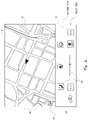
- Fig. 2 is a view illustrating a first example of image display on the touchscreen 10 of the vehicle-mounted device 100.
- Fig. 3 is a view illustrating a second example of the image display on the touchscreen 10 of the vehicle-mounted device 100.
- a first image i1 and a second image i2 are separately displayed on the touchscreen 10.
- Figs. 2 and 3 are different in display pattern.
- the first image i1 and the second image i2 are separately displayed in a first pattern.
- Fig. 3 the first image i1 and the second image i2 are separately displayed in a second pattern.
- the first image i1 is an image displaying an operation unit that is operated for air conditioning in a vehicle interior of the vehicle 1 or temperature adjustment of pieces of equipment.
- the operation unit is composed of a plurality of operation icons 20.
- Each operation icon 20 is an icon indicating a button, a switch, a lever, or the like that is operated for the air conditioning in the vehicle interior or the temperature adjustment of the pieces of equipment. That is, in the vehicle 1, the user performs a touch operation on each operation icon 20 in the first image i1, thereby performing the air conditioning in the vehicle interior or the temperature adjustment of the pieces of equipment.
- An air conditioner (A/C) ON/OFF icon, a blower level control icon, a blower OFF icon, an inside/outside air selector icon, an automatic air conditioning ON/OFF icon, an air conditioner blowout mode selector icon, a seat air conditioning ON/OFF icon, and a steering heater ON/OFF icon can be named as the operation icons 20. Note that the icons are merely illustrative and that the operation icons 20 are not limited to icons having such functions.
- the second image i2 is image information displaying map information for navigation.
- various types of image information to be displayed on the touchscreen 10 are stored in the auxiliary storage 103.
- the processor 101 acquires image information that is required to be displayed as the first image i1 and image information that is required to be displayed as the second image i2 from the auxiliary storage 103 and separately displays the both images i1 and i2 on the touchscreen 10.
- image information to be displayed on the touchscreen 10 need not be stored in the auxiliary storage 103.
- the vehicle-mounted device 100 may have a function of communicating with an external server device via a network.
- the processor 101 may receive image information, such as map information for navigation, from the external server device.
- a region where the first image i1 is displayed and a region where the second image i2 is displayed are a first region E1 and a second region E2, respectively, when the first image i1 and the second image i2 are separately displayed on a screen of the touchscreen 10.
- a display region is vertically split in two on the screen of the touchscreen 10.
- a lower region is the first region E1
- an upper region is the second region E2.
- the first pattern illustrated in Fig. 2 and the second pattern illustrated in Fig. 3 are different in the sizes of the first region E1 and the second region E2 on the screen of the touchscreen 10. That is, the second pattern has the smaller first region E1 and the larger second region E2 than the first pattern. Differences in image display between the first pattern and the second pattern will be described below in more detail.
- the first image i1 includes an image in a first tier and an image in a second tier (a broken line indicates a border between the image in the first tier and the image in the second tier in Fig. 2 ), as illustrated in Fig. 2 .
- a plurality of operation icons 20 and a plurality of operation icons 20 are displayed in the first tier and the second tire, respectively, of the first image i1.
- the operation icons 20 displayed in the first tier will be referred to as first operation icons while the operation icons 20 displayed in the second tire will be referred to as second operation icons.
- the second operation icons here are generally icons which are operated by a user less frequently than the first operation icons.
- the first operation icons are, for example, an air conditioner (A/C) ON/OFF icon, a blower level control icon, a blower OFF icon, an inside/outside air selector icon, and an automatic air conditioning ON/OFF icon.
- the second operation icons are, for example, an air conditioner blowout mode selector icon, a seat air conditioning ON/OFF icon, and a steering heater ON/OFF icon.
- the second pattern an image in a first tier alone is displayed as the first image i1, as illustrated in Fig. 3 . That is, in the second pattern, the second operation icons are hidden, and the first operation icons alone are displayed in the first image i1.
- the first region E1 on the screen of the touchscreen 10 is smaller than the first region E1 in the first pattern by an amount corresponding to the image in the second tier of the first image i1 that is hidden.
- the second region E2 on the screen of the touchscreen 10 is larger than the second region E2 in the first pattern by the amount corresponding to the image in the second tier of the first image i1 that is hidden.
- the second pattern a wider range of map information than in the first pattern is displayed as the second image i2 in the second region E2.
- the number of types of the operation icons 20 displayed in the first image i1 is smaller in the second pattern than in the first pattern.
- the number of user-adjustable items related to the air conditioning in the vehicle interior or the temperature adjustment of the pieces of equipment is smaller in the second pattern.
- a selector icon 30 is displayed on the touchscreen 10 in each display pattern of the first pattern and the second pattern.
- the selector icon 30 is an icon which is operated to switch between the first pattern and the second pattern. That is, in the vehicle-mounted device 100, a display pattern is switched by a user performing a touch operation on the selector icon 30 when the first image i1 and the second image i2 are separately displayed on the touchscreen 10.
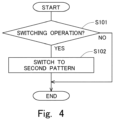
- Fig. 4 is a flowchart illustrating a flow of switching control of the display pattern for image display in the vehicle-mounted device 100, according to the present embodiment.
- the flow is executed by the processor 101.
- the flow is assumed to be repeatedly executed at predetermined intervals when the first image i1 and the second image i2 are separately displayed in the first pattern on the touchscreen 10.
- a process in S102 is executed.
- the display pattern is switched from the first pattern to the second pattern. Specifically, the image in the second tier in the first image i1 is hidden, and a display range for map information in the second image i2 is enlarged. After that, the flow is ended.
- display pattern switching control is similarly executed by the processor 101.
- the display pattern is switched from the second pattern to the first pattern. Specifically, the image in the second tier in the first image i1 is displayed, and the display range for the map information in the second image i2 is reduced.
- the first image i1 and the second image i2 are separately displayed on the touchscreen 10. This allows a user to operate various types of operation icons 20 in the first image i1 while map information for navigation is displayed as the second image i2. It is thus possible to improve convenience when the user performs the air conditioning in the vehicle interior or the temperature adjustment of the pieces of equipment.
- a user can select the first pattern or the second pattern as a display pattern at the time of separately displaying the first image i1 and the second image i2 on the touchscreen 10. For this reason, if the user wishes to display a wider range of map information as map information for navigation, the user can select the second pattern. If the user wishes to more appropriately perform the air conditioning in the vehicle interior or the temperature adjustment of the pieces of equipment, the user can select the first pattern.
- objects to be hidden in the second pattern are the second operation icons in the first image i1. That is, in the second pattern, the first operation icons that are operated more frequently than the second operation icons in the first image i1 are similarly displayed on the touchscreen 10. It is thus possible to curb reduction in the convenience when a user performs the air conditioning in the vehicle interior and the temperature adjustment of the pieces of equipment that accompanies selection of the second pattern.
- map information for navigation is set as image information to be displayed as the second image i2 on the touchscreen 10 in the present embodiment.
- the image information to be displayed as the second image i2 on the touchscreen 10 is not limited to map information for navigation.
- the image information to be displayed as the second image i2 on the touchscreen 10 may be image information of video content (i.e., video information). If the vehicle-mounted device 100 has a communication function of connecting to the Internet, the image information to be displayed as the second image i2 on the touchscreen 10 may be image information of a Web page.
- a first image i1 and a second image i2 are separately displayed on a touchscreen 10 of a vehicle-mounted device 100. If image information displaying map information for navigation is displayed as the second image i2, the first image i1 and the second image i2 are separately displayed in a first pattern or a second pattern, as in the first embodiment. Note that, if image information of video content is displayed as the second image i2, an image display pattern on the touchscreen 10 is different from the first pattern and the second pattern in the present embodiment.
- Fig. 5 is a view illustrating a third example of image display on the touchscreen 10 of the vehicle-mounted device 100.
- Fig. 6 is a view illustrating a fourth example of the image display on the touchscreen 10 of the vehicle-mounted device 100.
- Fig. 7 is a view illustrating a fifth example of the image display on the touchscreen 10 of the vehicle-mounted device 100.
- image information of video content is displayed as the second image i2. Note that Figs. 5 , 6 , and 7 are different in display pattern.
- the first image i1 and the second image i2 are separately displayed in a third pattern.
- displayed contents of and a display region for the first image i1 are the same as displayed contents of and a display region for the first image i1 in the first pattern. That is, in the third pattern, the first image i1 includes an image in a first tier and an image in a second tier, in each of which a plurality of operation icons 20 are displayed.
- the first image i1 is displayed in the same region as a first region E1 in the first pattern.
- the second image i2 is displayed on a reduced scale in a partial region in a second region E2 in the first pattern, on the screen of the touchscreen 10.
- a zoom in icon 40 is displayed on the touchscreen 10.
- the zoom in icon 40 is an icon which is operated to zoom in the second image i2 displayed on the reduced scale.
- the display pattern is switched to a fourth pattern illustrated in Fig. 6 by a user performing a touch operation on the zoom in icon 40 when the first image i1 and the second image i2 are separately displayed in the third pattern on the touchscreen 10.
- the second image i2 is displayed in the fourth pattern in Fig. 6 .
- the second image i2 is displayed over the entire second region E2.
- the first image i1 is hidden on the touchscreen 10.
- a display icon 50 is displayed on the touchscreen 10 instead of the first image i1.
- the display icon 50 is an icon which is operated to display the first image i1.
- the display icon 50 is displayed in the same region as the first region E1 in the second pattern on the screen of the touchscreen 10.
- the second region E2 where the second image i2 is to be displayed is enlarged to the same region as the second region E2 in the second pattern 2 on the screen of the touchscreen 10.
- the vehicle-mounted device 100 if image information of video content is displayed as the second image i2 over the entire second region E2 on the screen of the touchscreen 10, the first image i1 is hidden, and the size of the second region E2 is enlarged. This makes it possible to prevent a user from feeling cumbersomeness toward display of the first image i1 when the user views video content with the vehicle-mounted device 100. Additionally, the video content can be displayed with as large a size as possible on the touchscreen 10. Thus, the user can view the video content in a more comfortable state in the vehicle-mounted device 100.
- the display pattern is switched to a fifth pattern illustrated in Fig. 7 by a user performing a touch operation on the display icon 50 when the second image i2 is displayed in the fourth pattern on the touchscreen 10.
- the first image i1 and the second image i2 are separately displayed in the fifth pattern. That is, in the fifth pattern, the display icon 50 is hidden in a state where the second image i2 is displayed over the entire second region E2, and the first image i1 is displayed in the first region E1, on the touchscreen 10. This allows a user to perform air conditioning in a vehicle interior or temperature adjustment of pieces of equipment while viewing video content in the vehicle-mounted device 100.
- image display in the third pattern, the fourth pattern, or the fifth pattern is executed by a processor 101 in the vehicle-mounted device 100.
- Fig. 8 is a flowchart illustrating a flow of switching control of the display pattern for image display in the vehicle-mounted device 100, according to the present embodiment.
- the flow is executed by the processor 101.
- the flow is assumed to be repeatedly executed at predetermined intervals when the second image i2 is displayed in the fourth pattern on the touchscreen 10.
- a process in S202 is executed.
- the display pattern is switched from the fourth pattern to the fifth pattern. Specifically, the display icon 50 is hidden in a state where the second image i2 is displayed, and the first image i1 is displayed.
- S203 it is judged whether a state of non-operation on the operation icons 20 of an operation unit in the first image i1 is continued for a predetermined period or longer. Specifically, it is judged whether a state where no touch operation on the operation icons 20 is detected on the screen of the touchscreen 10 is continued for the predetermined period or longer. If the state where no touch operation on the operation icons 20 is detected is not continued for the predetermined period or longer (NO in S203), the process in S203 is executed again. On the other hand, if the state where no touch operation on the operation icons 20 is detected is continued for the predetermined period or longer (YES in S203), a process in S204 is executed. In S204, the display pattern is switched from the fifth pattern to the fourth pattern. Specifically, the first image i1 is hidden, and the display icon 50 is redisplayed. After that, the flow is ended.
- the display pattern can be automatically returned to the fourth pattern.
- image information of video content corresponds to "predetermined image information" according to the present disclosure in the present embodiment.
- predetermined image information according to the present disclosure is not limited to image information of video content and may be different image information.
- a process that is described to be performed by one apparatus may be shared and performed by a plurality of apparatuses. Processes described to be performed by different apparatuses may be performed by one apparatus. Which function is to be implemented by which hardware configuration (server configuration) in a computer system may be flexibly changed.
- the present disclosure may also be implemented by supplying computer programs for implementing the functions described in the embodiments described above to a computer, and by one or more processors of the computer reading out and executing the programs.
- Such computer programs may be provided to the computer by a non-transitory computer-readable storage medium that can be connected to a system bus of the computer, or may be provided to the computer through a network.
- the non-transitory computer-readable storage medium may be any type of disk including magnetic disks (floppy (registered trademark) disks, hard disk drives (HDDs), etc.) and optical disks (CD-ROMs, DVD discs, Blu-ray discs, etc.), and any type of medium suitable for storing electronic instructions, such as read-only memories (ROMs), random access memories (RAMs), EPROMs, EEPROMs, magnetic cards, flash memories, or optical cards.
- ROMs read-only memories
- RAMs random access memories
- EPROMs EPROMs
- EEPROMs electrically erasable programmable read-only memory
- magnetic cards magnetic cards
- flash memories or optical cards.
Landscapes
- Engineering & Computer Science (AREA)
- General Engineering & Computer Science (AREA)
- Theoretical Computer Science (AREA)
- Mechanical Engineering (AREA)
- Physics & Mathematics (AREA)
- Transportation (AREA)
- Chemical & Material Sciences (AREA)
- Combustion & Propulsion (AREA)
- Human Computer Interaction (AREA)
- General Physics & Mathematics (AREA)
- Thermal Sciences (AREA)
- User Interface Of Digital Computer (AREA)
- Navigation (AREA)
- Air-Conditioning For Vehicles (AREA)
Abstract
Description
- The present disclosure relates to display of image information in a vehicle-mounted device.
-
Patent Literature 1 discloses a vehicle-mounted operation display device. The vehicle-mounted operation display device disclosed inPatent Literature 1 includes a monitor having a touch panel and a plurality of mechanical switches. The plurality of mechanical switches are disposed around the monitor. An icon corresponding to a function of an operated mechanical switch is displayed on the monitor. - Patent Literature 1:
Japanese Patent Application Laid-Open Publication No. 2011-218909 - An object of the present disclosure is to provide a technique capable of more suitably displaying an operation unit that is operated for air conditioning in a vehicle interior or temperature adjustment of pieces of equipment on a touchscreen of a vehicle-mounted device.
- A vehicle-mounted device according to a first aspect of the present disclosure
- is a vehicle-mounted device having a touchscreen, including
- a controller configured to separately display a first image displaying an operation unit that is operated for air conditioning in a vehicle interior or temperature adjustment of pieces of equipment and a second image displaying image information different from the first image on the touchscreen,
- wherein the vehicle-mounted device has a first pattern and a second pattern as a display pattern for separately displaying the first image and the second image, and the second pattern has a smaller display region for the first image and a larger display region for the second image than the first pattern, and
- the controller separately displays the first image and the second image in a display pattern that is either the first pattern or the second pattern.
- A vehicle according to a second aspect of the present disclosure is equipped with the vehicle-mounted device according to the first aspect of the present disclosure.
- A control method for a vehicle-mounted device according to a third aspect of the present disclosure
- is a control method for a vehicle-mounted device having a touchscreen, including
- separately displaying a first image displaying an operation unit that is operated for air conditioning in a vehicle interior or temperature adjustment of pieces of equipment and a second image displaying image information different from the first image on the touchscreen,
- wherein the vehicle-mounted device has a first pattern and a second pattern as a display pattern for separately displaying the first image and the second image, and the second pattern has a smaller display region for the first image and a larger display region for the second image than the first pattern, and
- the first image and the second image are separately displayed in a display pattern that is either the first pattern or the second pattern in the control method.
- A program according to a fourth aspect of the present disclosure
- is a program for controlling a vehicle-mounted device having a touchscreen,
- the program causing the vehicle-mounted device to separately display a first image displaying an operation unit that is operated for air conditioning in a vehicle interior or temperature adjustment of pieces of equipment and a second image displaying image information different from the first image on the touchscreen,
- wherein the vehicle-mounted device has a first pattern and a second pattern as a display pattern for separately displaying the first image and the second image, and the second pattern has a smaller display region for the first image and a larger display region for the second image than the first pattern, and
- the program causes the vehicle-mounted device to separately display the first image and the second image in a display pattern that is either the first pattern or the second pattern.
- According to the present disclosure, it is possible to more suitably display the operation unit that is operated for the air conditioning in the vehicle interior or the temperature adjustment of the pieces of equipment on the touchscreen of the vehicle-mounted device.
-
-
Fig. 1 is a diagram illustrating a schematic configuration of a vehicle-mounted device according to an embodiment; -
Fig. 2 is a view illustrating a first example of image display on a touchscreen; -
Fig. 3 is a view illustrating a second example of the image display on the touchscreen; -
Fig. 4 is a flowchart illustrating a flow of switching control of a display pattern for image display in the vehicle-mounted device, according to a first embodiment; -
Fig. 5 is a view illustrating a third example of the image display on the touchscreen; -
Fig. 6 is a view illustrating a fourth example of the image display on the touchscreen; -
Fig. 7 is a view illustrating a fifth example of the image display on the touchscreen; and -
Fig. 8 is a flowchart illustrating a flow of switching control of a display pattern for image display in a vehicle-mounted device, according to a second embodiment. - A vehicle-mounted device according to a first aspect of the present disclosure has a touchscreen. The touchscreen displays image information to be provided to a user and accepts input by the user's touch operation. In the vehicle-mounted device, a controller separately displays a first image and a second image on the touchscreen.
- The first image is an image displaying an operation unit that is operated for air conditioning in a vehicle interior or temperature adjustment of pieces of equipment. That is, a user can perform the air conditioning in the vehicle interior or the temperature adjustment of the pieces of equipment by performing a touch operation on the operation unit displayed as the first image on the touchscreen. The second image is an image displaying image information different from the first image, i.e., image information different from the operation unit. As the image information displayed as the second image, map information for navigation or image information of video content can be named.
- In the vehicle-mounted device, the operation unit displayed as the first image on the touchscreen is operated by a user in the vehicle interior with relatively high frequency. For this reason, even if the second image is displayed on the touchscreen, the first image is also displayed separately from the second image. This makes it possible to improve convenience when the user performs the air conditioning in the vehicle interior or the temperature adjustment of the pieces of equipment. Note that the user may wish to display more image information as the second image or display the second image with a larger size while separately displaying the first image and the second image on the touchscreen.
- Under the circumstances, the vehicle-mounted device according to the first aspect of the present disclosure has a first pattern and a second pattern as a display pattern for separately displaying the first image and the second image on the touchscreen. That is, the first image and the second image are separately displayed on the touchscreen in each of the first pattern and the second pattern. Note that the first pattern and the second pattern are different in a size of a region where the first image is to be displayed and a size of a region where the second image is to be displayed on the touchscreen. Particularly, the second pattern has a smaller display region for the first image and a larger display region for the second image than the first pattern. The controller separately displays the first image and the second image in a display pattern that is either the first pattern or the second pattern.
- The vehicle-mounted device according to the first aspect of the present disclosure is capable of switching between the first pattern and the second pattern as a display pattern for separately displaying the first image and the second image on the touchscreen in accordance with a user's request in the vehicle-mounted device. Thus, separate display of the first image and the second image compliant with the user's request is possible.
- Specific embodiments of the present disclosure will be described below on the basis of the drawings. The technical scope of the present disclosure is not limited to sizes, materials, shapes, relative arrangement, and the like of constituent components described in the present embodiments unless otherwise described.
-
Fig. 1 is a diagram illustrating a schematic configuration of a vehicle-mounted device according to the present embodiment. A vehicle-mounteddevice 100 is a device which is to be mounted on avehicle 1. The vehicle-mounteddevice 100 is configured to include a computer having aprocessor 101, amain storage 102, and anauxiliary storage 103. The vehicle-mounteddevice 100 also has atouchscreen 10. Thetouchscreen 10 is a device including a display for displaying image information to be provided to a user and a touch panel for accepting input by the user's touch operation. - The
processor 101 performs arithmetic processing for controlling the vehicle-mounteddevice 100. Theprocessor 101 is, for example, a CPU (Central Processing Unit) or a DSP (Digital Signal Processor) . Themain storage 102 is, for example, a RAM (Random Access Memory). Theauxiliary storage 103 is, for example, a ROM (Read Only Memory), an HDD (Hard Disk Drive), or a flash memory. Theauxiliary storage 103 may include a removable medium (removable recording medium). The removable medium here is, for example, a USB memory, an SD card, or a disc recording medium, such as a CD-ROM, a DVD, or a Blu-ray Disc. - An operating system (OS), various types of programs, and various types of information tables are stored in the
auxiliary storage 103. Various types of image information to be displayed on thetouchscreen 10 are also stored in theauxiliary storage 103. Theprocessor 101 loads a program stored in theauxiliary storage 103 into themain storage 102 and executes the program, thereby implementing control for displaying various types of image information on thetouchscreen 10. Note that theprocessor 101 corresponds to a "controller" according to the present disclosure in the present embodiment. -
Fig. 2 is a view illustrating a first example of image display on thetouchscreen 10 of the vehicle-mounteddevice 100.Fig. 3 is a view illustrating a second example of the image display on thetouchscreen 10 of the vehicle-mounteddevice 100. In each ofFigs. 2 and3 , a first image i1 and a second image i2 are separately displayed on thetouchscreen 10. Note thatFigs. 2 and3 are different in display pattern. InFig. 2 , the first image i1 and the second image i2 are separately displayed in a first pattern. InFig. 3 , the first image i1 and the second image i2 are separately displayed in a second pattern. - The first image i1 is an image displaying an operation unit that is operated for air conditioning in a vehicle interior of the
vehicle 1 or temperature adjustment of pieces of equipment. The operation unit is composed of a plurality ofoperation icons 20. Eachoperation icon 20 is an icon indicating a button, a switch, a lever, or the like that is operated for the air conditioning in the vehicle interior or the temperature adjustment of the pieces of equipment. That is, in thevehicle 1, the user performs a touch operation on eachoperation icon 20 in the first image i1, thereby performing the air conditioning in the vehicle interior or the temperature adjustment of the pieces of equipment. - An air conditioner (A/C) ON/OFF icon, a blower level control icon, a blower OFF icon, an inside/outside air selector icon, an automatic air conditioning ON/OFF icon, an air conditioner blowout mode selector icon, a seat air conditioning ON/OFF icon, and a steering heater ON/OFF icon can be named as the
operation icons 20. Note that the icons are merely illustrative and that theoperation icons 20 are not limited to icons having such functions. - The second image i2 is image information displaying map information for navigation. As described above, various types of image information to be displayed on the
touchscreen 10 are stored in theauxiliary storage 103. Theprocessor 101 acquires image information that is required to be displayed as the first image i1 and image information that is required to be displayed as the second image i2 from theauxiliary storage 103 and separately displays the both images i1 and i2 on thetouchscreen 10. Note that image information to be displayed on thetouchscreen 10 need not be stored in theauxiliary storage 103. For example, the vehicle-mounteddevice 100 may have a function of communicating with an external server device via a network. In this case, theprocessor 101 may receive image information, such as map information for navigation, from the external server device. - Assume here that a region where the first image i1 is displayed and a region where the second image i2 is displayed are a first region E1 and a second region E2, respectively, when the first image i1 and the second image i2 are separately displayed on a screen of the
touchscreen 10. As illustrated inFigs. 2 and3 , a display region is vertically split in two on the screen of thetouchscreen 10. A lower region is the first region E1, and an upper region is the second region E2. - In the above-described case, the first pattern illustrated in
Fig. 2 and the second pattern illustrated inFig. 3 are different in the sizes of the first region E1 and the second region E2 on the screen of thetouchscreen 10. That is, the second pattern has the smaller first region E1 and the larger second region E2 than the first pattern. Differences in image display between the first pattern and the second pattern will be described below in more detail. - In the first pattern, the first image i1 includes an image in a first tier and an image in a second tier (a broken line indicates a border between the image in the first tier and the image in the second tier in
Fig. 2 ), as illustrated inFig. 2 . A plurality ofoperation icons 20 and a plurality ofoperation icons 20 are displayed in the first tier and the second tire, respectively, of the first image i1. In this case, theoperation icons 20 displayed in the first tier will be referred to as first operation icons while theoperation icons 20 displayed in the second tire will be referred to as second operation icons. The second operation icons here are generally icons which are operated by a user less frequently than the first operation icons. The first operation icons are, for example, an air conditioner (A/C) ON/OFF icon, a blower level control icon, a blower OFF icon, an inside/outside air selector icon, and an automatic air conditioning ON/OFF icon. The second operation icons are, for example, an air conditioner blowout mode selector icon, a seat air conditioning ON/OFF icon, and a steering heater ON/OFF icon. - In contrast, in the second pattern, an image in a first tier alone is displayed as the first image i1, as illustrated in
Fig. 3 . That is, in the second pattern, the second operation icons are hidden, and the first operation icons alone are displayed in the first image i1. As a result, in the second pattern, the first region E1 on the screen of thetouchscreen 10 is smaller than the first region E1 in the first pattern by an amount corresponding to the image in the second tier of the first image i1 that is hidden. In the second pattern, the second region E2 on the screen of thetouchscreen 10 is larger than the second region E2 in the first pattern by the amount corresponding to the image in the second tier of the first image i1 that is hidden. For this reason, in the second pattern, a wider range of map information than in the first pattern is displayed as the second image i2 in the second region E2. Note that the number of types of theoperation icons 20 displayed in the first image i1 is smaller in the second pattern than in the first pattern. The number of user-adjustable items related to the air conditioning in the vehicle interior or the temperature adjustment of the pieces of equipment is smaller in the second pattern. - As illustrated in
Figs. 2 and3 , aselector icon 30 is displayed on thetouchscreen 10 in each display pattern of the first pattern and the second pattern. Theselector icon 30 is an icon which is operated to switch between the first pattern and the second pattern. That is, in the vehicle-mounteddevice 100, a display pattern is switched by a user performing a touch operation on theselector icon 30 when the first image i1 and the second image i2 are separately displayed on thetouchscreen 10. -
Fig. 4 is a flowchart illustrating a flow of switching control of the display pattern for image display in the vehicle-mounteddevice 100, according to the present embodiment. The flow is executed by theprocessor 101. The flow is assumed to be repeatedly executed at predetermined intervals when the first image i1 and the second image i2 are separately displayed in the first pattern on thetouchscreen 10. - In the flow, it is first judged in S101 whether a display pattern switching operation is made by a user. Specifically, it is judged whether a touch operation on the
selector icon 30 is detected on the screen of thetouchscreen 10. If a touch operation on theselector icon 30 is not detected (NO in S101), the flow is ended. - On the other hand, if a touch operation on the
selector icon 30 is detected (YES in S101), a process in S102 is executed. In S102, the display pattern is switched from the first pattern to the second pattern. Specifically, the image in the second tier in the first image i1 is hidden, and a display range for map information in the second image i2 is enlarged. After that, the flow is ended. - When the first image i1 and the second image i2 are separately displayed in the second pattern on the
touchscreen 10, display pattern switching control is similarly executed by theprocessor 101. In this case, when a touch operation on theselector icon 30 is detected, the display pattern is switched from the second pattern to the first pattern. Specifically, the image in the second tier in the first image i1 is displayed, and the display range for the map information in the second image i2 is reduced. - According to the present embodiment, the first image i1 and the second image i2 are separately displayed on the
touchscreen 10. This allows a user to operate various types ofoperation icons 20 in the first image i1 while map information for navigation is displayed as the second image i2. It is thus possible to improve convenience when the user performs the air conditioning in the vehicle interior or the temperature adjustment of the pieces of equipment. - A user can select the first pattern or the second pattern as a display pattern at the time of separately displaying the first image i1 and the second image i2 on the
touchscreen 10. For this reason, if the user wishes to display a wider range of map information as map information for navigation, the user can select the second pattern. If the user wishes to more appropriately perform the air conditioning in the vehicle interior or the temperature adjustment of the pieces of equipment, the user can select the first pattern. - In the present embodiment, objects to be hidden in the second pattern are the second operation icons in the first image i1. That is, in the second pattern, the first operation icons that are operated more frequently than the second operation icons in the first image i1 are similarly displayed on the
touchscreen 10. It is thus possible to curb reduction in the convenience when a user performs the air conditioning in the vehicle interior and the temperature adjustment of the pieces of equipment that accompanies selection of the second pattern. - Note that map information for navigation is set as image information to be displayed as the second image i2 on the
touchscreen 10 in the present embodiment. Note that the image information to be displayed as the second image i2 on thetouchscreen 10 is not limited to map information for navigation. For example, the image information to be displayed as the second image i2 on thetouchscreen 10 may be image information of video content (i.e., video information). If the vehicle-mounteddevice 100 has a communication function of connecting to the Internet, the image information to be displayed as the second image i2 on thetouchscreen 10 may be image information of a Web page. - In the present embodiment, a first image i1 and a second image i2 are separately displayed on a
touchscreen 10 of a vehicle-mounteddevice 100. If image information displaying map information for navigation is displayed as the second image i2, the first image i1 and the second image i2 are separately displayed in a first pattern or a second pattern, as in the first embodiment. Note that, if image information of video content is displayed as the second image i2, an image display pattern on thetouchscreen 10 is different from the first pattern and the second pattern in the present embodiment. -
Fig. 5 is a view illustrating a third example of image display on thetouchscreen 10 of the vehicle-mounteddevice 100.Fig. 6 is a view illustrating a fourth example of the image display on thetouchscreen 10 of the vehicle-mounteddevice 100.Fig. 7 is a view illustrating a fifth example of the image display on thetouchscreen 10 of the vehicle-mounteddevice 100. In each ofFigs. 5 ,6 , and7 , image information of video content is displayed as the second image i2. Note thatFigs. 5 ,6 , and7 are different in display pattern. - In
Fig. 5 , the first image i1 and the second image i2 are separately displayed in a third pattern. In the third pattern, displayed contents of and a display region for the first image i1 are the same as displayed contents of and a display region for the first image i1 in the first pattern. That is, in the third pattern, the first image i1 includes an image in a first tier and an image in a second tier, in each of which a plurality ofoperation icons 20 are displayed. On a screen of thetouchscreen 10, the first image i1 is displayed in the same region as a first region E1 in the first pattern. - In the third pattern, the second image i2 is displayed on a reduced scale in a partial region in a second region E2 in the first pattern, on the screen of the
touchscreen 10. In the third pattern, a zoom inicon 40 is displayed on thetouchscreen 10. The zoom inicon 40 is an icon which is operated to zoom in the second image i2 displayed on the reduced scale. In the vehicle-mounteddevice 100, the display pattern is switched to a fourth pattern illustrated inFig. 6 by a user performing a touch operation on the zoom inicon 40 when the first image i1 and the second image i2 are separately displayed in the third pattern on thetouchscreen 10. - The second image i2 is displayed in the fourth pattern in
Fig. 6 . In the fourth pattern, the second image i2 is displayed over the entire second region E2. In the fourth pattern, the first image i1 is hidden on thetouchscreen 10. In the fourth pattern, adisplay icon 50 is displayed on thetouchscreen 10 instead of the first image i1. Thedisplay icon 50 is an icon which is operated to display the first image i1. - In the fourth pattern, the
display icon 50 is displayed in the same region as the first region E1 in the second pattern on the screen of thetouchscreen 10. The second region E2 where the second image i2 is to be displayed is enlarged to the same region as the second region E2 in thesecond pattern 2 on the screen of thetouchscreen 10. - That is, in the vehicle-mounted
device 100 according to the present embodiment, if image information of video content is displayed as the second image i2 over the entire second region E2 on the screen of thetouchscreen 10, the first image i1 is hidden, and the size of the second region E2 is enlarged. This makes it possible to prevent a user from feeling cumbersomeness toward display of the first image i1 when the user views video content with the vehicle-mounteddevice 100. Additionally, the video content can be displayed with as large a size as possible on thetouchscreen 10. Thus, the user can view the video content in a more comfortable state in the vehicle-mounteddevice 100. - In the vehicle-mounted
device 100, the display pattern is switched to a fifth pattern illustrated inFig. 7 by a user performing a touch operation on thedisplay icon 50 when the second image i2 is displayed in the fourth pattern on thetouchscreen 10. - In
Fig. 7 , the first image i1 and the second image i2 are separately displayed in the fifth pattern. That is, in the fifth pattern, thedisplay icon 50 is hidden in a state where the second image i2 is displayed over the entire second region E2, and the first image i1 is displayed in the first region E1, on thetouchscreen 10. This allows a user to perform air conditioning in a vehicle interior or temperature adjustment of pieces of equipment while viewing video content in the vehicle-mounteddevice 100. Note that image display in the third pattern, the fourth pattern, or the fifth pattern is executed by aprocessor 101 in the vehicle-mounteddevice 100. -
Fig. 8 is a flowchart illustrating a flow of switching control of the display pattern for image display in the vehicle-mounteddevice 100, according to the present embodiment. The flow is executed by theprocessor 101. The flow is assumed to be repeatedly executed at predetermined intervals when the second image i2 is displayed in the fourth pattern on thetouchscreen 10. - In the flow, it is first judged in S201 whether an operation to redisplay the first image i1 is performed by a user. Specifically, it is judged whether a touch operation on the
display icon 50 is detected on the screen of thetouchscreen 10. If a touch operation on thedisplay icon 50 is not detected (NO in S201), the flow is ended. - On the other hand, if a touch operation on the
display icon 50 is detected (YES in S201), a process in S202 is executed. In S202, the display pattern is switched from the fourth pattern to the fifth pattern. Specifically, thedisplay icon 50 is hidden in a state where the second image i2 is displayed, and the first image i1 is displayed. - In S203, it is judged whether a state of non-operation on the
operation icons 20 of an operation unit in the first image i1 is continued for a predetermined period or longer. Specifically, it is judged whether a state where no touch operation on theoperation icons 20 is detected on the screen of thetouchscreen 10 is continued for the predetermined period or longer. If the state where no touch operation on theoperation icons 20 is detected is not continued for the predetermined period or longer (NO in S203), the process in S203 is executed again. On the other hand, if the state where no touch operation on theoperation icons 20 is detected is continued for the predetermined period or longer (YES in S203), a process in S204 is executed. In S204, the display pattern is switched from the fifth pattern to the fourth pattern. Specifically, the first image i1 is hidden, and thedisplay icon 50 is redisplayed. After that, the flow is ended. - With the above-described flow, if the air conditioning in the vehicle interior or the temperature adjustment of the pieces of equipment is not performed for the predetermined period or longer by the user after the display pattern is switched from the fourth pattern to the fifth pattern, the display pattern can be automatically returned to the fourth pattern.
- Note that image information of video content corresponds to "predetermined image information" according to the present disclosure in the present embodiment. Note that the predetermined image information according to the present disclosure is not limited to image information of video content and may be different image information.
- The embodiments described above are merely examples, and the present disclosure may be changed and implemented as appropriate within the scope of the disclosure. Furthermore, processes and means described in the present disclosure may be freely combined to the extent that no technical conflict exists.
- Furthermore, a process that is described to be performed by one apparatus may be shared and performed by a plurality of apparatuses. Processes described to be performed by different apparatuses may be performed by one apparatus. Which function is to be implemented by which hardware configuration (server configuration) in a computer system may be flexibly changed.
- The present disclosure may also be implemented by supplying computer programs for implementing the functions described in the embodiments described above to a computer, and by one or more processors of the computer reading out and executing the programs. Such computer programs may be provided to the computer by a non-transitory computer-readable storage medium that can be connected to a system bus of the computer, or may be provided to the computer through a network. The non-transitory computer-readable storage medium may be any type of disk including magnetic disks (floppy (registered trademark) disks, hard disk drives (HDDs), etc.) and optical disks (CD-ROMs, DVD discs, Blu-ray discs, etc.), and any type of medium suitable for storing electronic instructions, such as read-only memories (ROMs), random access memories (RAMs), EPROMs, EEPROMs, magnetic cards, flash memories, or optical cards.
Claims (20)
- A vehicle-mounted device (100) having a touchscreen (10), comprisinga controller (101) configured to separately display a first image (i1) displaying an operation unit (20) that is operated for air conditioning in a vehicle interior or temperature adjustment of pieces of equipment and a second image (i2) displaying image information different from the first image (i1) on the touchscreen (10),wherein the vehicle-mounted device (100) has a first pattern and a second pattern as a display pattern for separately displaying the first image (i1) and the second image (i2), and the second pattern has a smaller display region for the first image (i1) and a larger display region for the second image (i2) than the first pattern, andthe controller (101) separately displays the first image (i1) and the second image (i2) in a display pattern that is either the first pattern or the second pattern.
- The vehicle-mounted device (100) according to claim 1, whereinthe controller (101)displays, on the touchscreen (10), a selector icon (30) that is operated to switch between the first pattern and the second pattern in separately displaying the first image (i1) and the second image (i2), andswitches between the first pattern and the second pattern when the selector icon (30) is operated.
- The vehicle-mounted device (100) according to claim 1 or 2, whereinthe operation unit (20) includes one or a plurality of first operation icons and one or a plurality of second operation icons that are operated less frequently than the one or plurality of first operation icons, andthe controller (101)displays the one or plurality of first operation icons and the one or plurality of second operation icons in the first image (i1) in separately displaying the first image (i1) and the second image (i2) in the first pattern, andhides the one or plurality of second operation icons and displays the one or plurality of first operation icons alone in the first image (i1) in separately displaying the first image (i1) and the second image (i2) in the second pattern.
- The vehicle-mounted device (100) according to any one of claims 1 to 3, wherein
the image information displayed as the second image (i2) is map information for navigation. - The vehicle-mounted device (100) according to any one of claims 1 to 3, wherein
the image information displayed as the second image (i2) is image information of video content. - The vehicle-mounted device (100) according to any one of claims 1 to 3, whereinthe controller (101)displays a display icon (50) that is operated to display the first image (i1) in the display region for the first image (i1) in the second pattern instead of the first image (i1) in displaying predetermined image information over a whole of the display region for the second image (i2) on the touchscreen (10).
- The vehicle-mounted device (100) according to claim 6, whereinthe controller (101)hides the display icon (50) and separately displays the first image (i1) and the second image (i2) when the display icon (50) is operated, andredisplays the display icon (50) instead of the first image (i1) if a state of non-operation on the operation unit (20) in the first image (i1) is continued for a predetermined period or longer after the separate display of the first image (i1) and the second image (i2).
- The vehicle-mounted device (100) according to claim 6 or 7, wherein
the predetermined image information is image information of video content. - A vehicle equipped with a vehicle-mounted device (100) according to any one of claims 1 to 8.
- A control method for a vehicle-mounted device (100) having a touchscreen (10), comprisingseparately displaying a first image (i1) displaying an operation unit (20) that is operated for air conditioning in a vehicle interior or temperature adjustment of pieces of equipment and a second image displaying image information different from the first image (i1) on the touchscreen (10),wherein the vehicle-mounted device (100) has a first pattern and a second pattern as a display pattern for separately displaying the first image (i1) and the second image, and the second pattern has a smaller display region for the first image (i1) and a larger display region for the second image than the first pattern, andthe first image (i1) and the second image are separately displayed in a display pattern that is either the first pattern or the second pattern in the control method.
- The control method for the vehicle-mounted device (100) according to claim 10, further comprising:displaying, on the touchscreen (10), a selector icon (30) that is operated to switch between the first pattern and the second pattern in separately displaying the first image (i1) and the second image; andswitching between the first pattern and the second pattern when the selector icon (30) is operated.
- The control method for the vehicle-mounted device (100) according to claim 10 or 11, whereinthe operation unit (20) includes one or a plurality of first operation icons and one or a plurality of second operation icons that are operated less frequently than the one or plurality of first operation icons, andin the control method,the one or plurality of first operation icons and the one or plurality of second operation icons are displayed in the first image (i1) when the first image (i1) and the second image are separately displayed in the first pattern, andthe one or plurality of second operation icons are hidden, and the one or plurality of first operation icons alone are displayed in the first image (i1) when the first image (i1) and the second image are separately displayed in the second pattern.
- The control method for the vehicle-mounted device (100) according to any one of claims 10 to 12, wherein
the image information displayed as the second image is map information for navigation. - The control method for the vehicle-mounted device (100) according to any one of claims 10 to 12, wherein
the image information displayed as the second image is image information of video content. - The control method for the vehicle-mounted device (100) according to any one of claims 10 to 12, further comprising
displaying a display icon (50) that is operated to display the first image (i1) in the display region for the first image (i1) in the second pattern instead of the first image (i1) in displaying predetermined image information over a whole of the display region for the second image on the touchscreen (10). - The control method for the vehicle-mounted device (100) according to claim 15, further comprising:hiding the display icon (50) and separately displaying the first image (i1) and the second image when the display icon (50) is operated; andredisplaying the display icon (50) instead of the first image (i1) if a state of non-operation on the operation unit (20) in the first image (i1) is continued for a predetermined period or longer after the separately displaying the first image (i1) and the second image.
- The control method for the vehicle-mounted device (100) according to claim 15 or 16, wherein
the predetermined image information is image information of video content. - A program for controlling a vehicle-mounted device (100) having a touchscreen (10),the program causing the vehicle-mounted device (100) to separately display a first image (i1) displaying an operation unit (20) that is operated for air conditioning in a vehicle interior or temperature adjustment of pieces of equipment and a second image displaying image information different from the first image (i1) on the touchscreen (10),wherein the vehicle-mounted device (100) has a first pattern and a second pattern as a display pattern for separately displaying the first image (i1) and the second image, and the second pattern has a smaller display region for the first image (i1) and a larger display region for the second image than the first pattern, andthe program causes the vehicle-mounted device (100) to separately display the first image (i1) and the second image in a display pattern that is either the first pattern or the second pattern.
- The program according to claim 18, whereinthe program causes the vehicle-mounted device (100) todisplay, on the touchscreen (10), a selector icon (30) that is operated to switch between the first pattern and the second pattern in separately displaying the first image (i1) and the second image, andswitch between the first pattern and the second pattern when the selector icon (30) is operated.
- The program according to claim 18 or 19, whereinthe program causes the vehicle-mounted device (100) todisplay a display icon (50) that is operated to display the first image (i1) in the display region for the first image (i1) in the second pattern instead of the first image (i1) in displaying predetermined image information over a whole of the display region for the second image on the touchscreen (10).
Applications Claiming Priority (1)
| Application Number | Priority Date | Filing Date | Title |
|---|---|---|---|
| JP2021151506A JP7559721B2 (en) | 2021-09-16 | 2021-09-16 | On-vehicle device, vehicle, on-vehicle device control method, and program |
Publications (2)
| Publication Number | Publication Date |
|---|---|
| EP4151444A1 true EP4151444A1 (en) | 2023-03-22 |
| EP4151444B1 EP4151444B1 (en) | 2025-07-16 |
Family
ID=83318826
Family Applications (1)
| Application Number | Title | Priority Date | Filing Date |
|---|---|---|---|
| EP22195379.7A Active EP4151444B1 (en) | 2021-09-16 | 2022-09-13 | Vehicle-mounted device, vehicle, control method for vehicle-mounted device, and program |
Country Status (4)
| Country | Link |
|---|---|
| US (1) | US12073077B2 (en) |
| EP (1) | EP4151444B1 (en) |
| JP (1) | JP7559721B2 (en) |
| CN (1) | CN115817172A (en) |
Cited By (1)
| Publication number | Priority date | Publication date | Assignee | Title |
|---|---|---|---|---|
| FR3145432A1 (en) * | 2023-02-01 | 2024-08-02 | Psa Automobiles Sa | Method and device for controlling a set of indicators of a man-machine interface for a vehicle |
Families Citing this family (6)
| Publication number | Priority date | Publication date | Assignee | Title |
|---|---|---|---|---|
| USD1067931S1 (en) * | 2022-11-03 | 2025-03-25 | Volvo Car Corporation | Display panel with graphical user interface |
| USD1073723S1 (en) | 2022-11-03 | 2025-05-06 | Volvo Car Corporation | Display panel with graphical user interface |
| USD1070909S1 (en) * | 2022-11-03 | 2025-04-15 | Volvo Car Corporation | Display panel with graphical user interface |
| USD1083981S1 (en) | 2022-11-03 | 2025-07-15 | Volvo Car Corporation | Display panel with graphical user interface |
| USD1078790S1 (en) | 2022-11-03 | 2025-06-10 | Volvo Car Corporation | Display panel with graphical user interface |
| USD1074706S1 (en) * | 2022-11-03 | 2025-05-13 | Volvo Car Corporation | Display panel with graphical user interface |
Citations (3)
| Publication number | Priority date | Publication date | Assignee | Title |
|---|---|---|---|---|
| JP2011218909A (en) | 2010-04-07 | 2011-11-04 | Tokai Rika Co Ltd | On-vehicle operation and display device |
| EP2838002A1 (en) * | 2012-04-13 | 2015-02-18 | Toyota Jidosha Kabushiki Kaisha | Display device |
| US20160077652A1 (en) * | 2014-09-16 | 2016-03-17 | Hyundai Motor Company | Vehicle, display device for vehicle, and method for controlling the vehicle display device |
Family Cites Families (9)
| Publication number | Priority date | Publication date | Assignee | Title |
|---|---|---|---|---|
| US20120185805A1 (en) * | 2011-01-14 | 2012-07-19 | Apple Inc. | Presenting Visual Indicators of Hidden Objects |
| US10019066B2 (en) * | 2012-09-28 | 2018-07-10 | Tesla, Inc. | Method of launching an application and selecting the application target window |
| DE102012022312A1 (en) * | 2012-11-14 | 2014-05-15 | Volkswagen Aktiengesellschaft | An information reproduction system and information reproduction method |
| WO2014189632A1 (en) * | 2013-05-20 | 2014-11-27 | Citrix Systems, Inc. | Providing enhanced user interfaces |
| US9542029B2 (en) * | 2013-09-30 | 2017-01-10 | Fca Us Llc | Vehicle multi-mode vertical-split-screen display |
| JP6466887B2 (en) * | 2016-09-01 | 2019-02-06 | 本田技研工業株式会社 | Information terminal program and information terminal |
| KR102614012B1 (en) * | 2016-11-08 | 2023-12-14 | 한화비전 주식회사 | Aapparatus of processing image and method of providing image thereof |
| US11372527B2 (en) * | 2019-01-22 | 2022-06-28 | Ford Global Technologies, Llc | Dash cards user interface |
| DE102020100059A1 (en) * | 2020-01-03 | 2021-07-08 | Faurecia Autositze Gmbh | Screen operating unit and method for activating the operability of a motor vehicle functional unit and / or for activating a display of the contents of a motor vehicle functional unit |
-
2021
- 2021-09-16 JP JP2021151506A patent/JP7559721B2/en active Active
-
2022
- 2022-09-12 US US17/931,203 patent/US12073077B2/en active Active
- 2022-09-13 EP EP22195379.7A patent/EP4151444B1/en active Active
- 2022-09-15 CN CN202211120332.4A patent/CN115817172A/en active Pending
Patent Citations (3)
| Publication number | Priority date | Publication date | Assignee | Title |
|---|---|---|---|---|
| JP2011218909A (en) | 2010-04-07 | 2011-11-04 | Tokai Rika Co Ltd | On-vehicle operation and display device |
| EP2838002A1 (en) * | 2012-04-13 | 2015-02-18 | Toyota Jidosha Kabushiki Kaisha | Display device |
| US20160077652A1 (en) * | 2014-09-16 | 2016-03-17 | Hyundai Motor Company | Vehicle, display device for vehicle, and method for controlling the vehicle display device |
Cited By (2)
| Publication number | Priority date | Publication date | Assignee | Title |
|---|---|---|---|---|
| FR3145432A1 (en) * | 2023-02-01 | 2024-08-02 | Psa Automobiles Sa | Method and device for controlling a set of indicators of a man-machine interface for a vehicle |
| WO2024161070A1 (en) * | 2023-02-01 | 2024-08-08 | Stellantis Auto Sas | Method and device for controlling a set of indicators of a human-machine interface for a vehicle |
Also Published As
| Publication number | Publication date |
|---|---|
| CN115817172A (en) | 2023-03-21 |
| EP4151444B1 (en) | 2025-07-16 |
| JP7559721B2 (en) | 2024-10-02 |
| US20230080359A1 (en) | 2023-03-16 |
| JP2023043728A (en) | 2023-03-29 |
| US12073077B2 (en) | 2024-08-27 |
Similar Documents
| Publication | Publication Date | Title |
|---|---|---|
| EP4151444A1 (en) | Vehicle-mounted device, vehicle, control method for vehicle-mounted device, and program | |
| JP6622705B2 (en) | Presentation and interaction with audiovisual content in vehicles | |
| KR101002852B1 (en) | Management of Icons in the Display Interface | |
| EP3092559B1 (en) | Presenting and interacting with audio-visual content in a vehicle | |
| EP2656193B1 (en) | Application-launching interface for multiple modes | |
| KR101620058B1 (en) | Apparatus for switching screen between virtual machines and method thereof | |
| US20170277274A1 (en) | Method of Selecting an Application Target Window in a User Interface | |
| EP2821907B1 (en) | Method and system for managing infotainment functionality | |
| US20160139798A1 (en) | Program, method, and device for controlling application, and recording medium | |
| US20150331594A1 (en) | Content display device, content display method and program | |
| US20050235221A1 (en) | Computer, display device setting method, and program | |
| CN109876439B (en) | Game picture display method and device, storage medium and electronic equipment | |
| US20200192420A1 (en) | Computing system with automated video memory overclocking | |
| EP3929715A1 (en) | Information processing device and information processing method | |
| US20130215332A1 (en) | Image and sound controller | |
| CN114554299A (en) | Display device and split-screen display method | |
| PH12015500078B1 (en) | A method and device for controlling a display device | |
| JP2007011841A (en) | Display device | |
| US9298413B1 (en) | System, method, and computer program product for changing a state of operation of a display system with respect to at least a portion of an image occluded by a non-display surface | |
| EP4300979B1 (en) | Display method, terminal device and storage medium | |
| JP2009274795A (en) | Elevator monitoring device | |
| JP2008016000A (en) | Onboard computer system | |
| CN117311653A (en) | Screen sharing method, device and electronic device | |
| JP2013221979A (en) | Information system | |
| US20220358899A1 (en) | Control method for magnifying display screen and associated display system |
Legal Events
| Date | Code | Title | Description |
|---|---|---|---|
| PUAI | Public reference made under article 153(3) epc to a published international application that has entered the european phase |
Free format text: ORIGINAL CODE: 0009012 |
|
| STAA | Information on the status of an ep patent application or granted ep patent |
Free format text: STATUS: REQUEST FOR EXAMINATION WAS MADE |
|
| 17P | Request for examination filed |
Effective date: 20220913 |
|
| AK | Designated contracting states |
Kind code of ref document: A1 Designated state(s): AL AT BE BG CH CY CZ DE DK EE ES FI FR GB GR HR HU IE IS IT LI LT LU LV MC MK MT NL NO PL PT RO RS SE SI SK SM TR |
|
| REG | Reference to a national code |
Ref country code: DE Ref legal event code: R079 Free format text: PREVIOUS MAIN CLASS: B60K0037060000 Ipc: B60K0035100000 Ref country code: DE Ref legal event code: R079 Ref document number: 602022017574 Country of ref document: DE Free format text: PREVIOUS MAIN CLASS: B60K0037060000 Ipc: B60K0035100000 |
|
| RIC1 | Information provided on ipc code assigned before grant |
Ipc: G06F 3/048 20130101ALI20250109BHEP Ipc: B60K 35/29 20240101ALI20250109BHEP Ipc: B60K 35/28 20240101ALI20250109BHEP Ipc: B60K 35/22 20240101ALI20250109BHEP Ipc: G06F 3/0488 20220101ALI20250109BHEP Ipc: B60K 35/10 20240101AFI20250109BHEP |
|
| GRAP | Despatch of communication of intention to grant a patent |
Free format text: ORIGINAL CODE: EPIDOSNIGR1 |
|
| STAA | Information on the status of an ep patent application or granted ep patent |
Free format text: STATUS: GRANT OF PATENT IS INTENDED |
|
| INTG | Intention to grant announced |
Effective date: 20250219 |
|
| GRAS | Grant fee paid |
Free format text: ORIGINAL CODE: EPIDOSNIGR3 |
|
| GRAA | (expected) grant |
Free format text: ORIGINAL CODE: 0009210 |
|
| STAA | Information on the status of an ep patent application or granted ep patent |
Free format text: STATUS: THE PATENT HAS BEEN GRANTED |
|
| AK | Designated contracting states |
Kind code of ref document: B1 Designated state(s): AL AT BE BG CH CY CZ DE DK EE ES FI FR GB GR HR HU IE IS IT LI LT LU LV MC MK MT NL NO PL PT RO RS SE SI SK SM TR |
|
| REG | Reference to a national code |
Ref country code: GB Ref legal event code: FG4D |
|
| REG | Reference to a national code |
Ref country code: CH Ref legal event code: EP |
|
| REG | Reference to a national code |
Ref country code: DE Ref legal event code: R096 Ref document number: 602022017574 Country of ref document: DE |
|
| REG | Reference to a national code |
Ref country code: IE Ref legal event code: FG4D |
|
| PGFP | Annual fee paid to national office [announced via postgrant information from national office to epo] |
Ref country code: DE Payment date: 20250827 Year of fee payment: 4 |
|
| PGFP | Annual fee paid to national office [announced via postgrant information from national office to epo] |
Ref country code: FR Payment date: 20250821 Year of fee payment: 4 Ref country code: AT Payment date: 20251020 Year of fee payment: 4 |
|
| REG | Reference to a national code |
Ref country code: NL Ref legal event code: MP Effective date: 20250716 |
|
| PG25 | Lapsed in a contracting state [announced via postgrant information from national office to epo] |
Ref country code: PT Free format text: LAPSE BECAUSE OF FAILURE TO SUBMIT A TRANSLATION OF THE DESCRIPTION OR TO PAY THE FEE WITHIN THE PRESCRIBED TIME-LIMIT Effective date: 20251117 |
|
| PG25 | Lapsed in a contracting state [announced via postgrant information from national office to epo] |
Ref country code: NL Free format text: LAPSE BECAUSE OF FAILURE TO SUBMIT A TRANSLATION OF THE DESCRIPTION OR TO PAY THE FEE WITHIN THE PRESCRIBED TIME-LIMIT Effective date: 20250716 |
|
| REG | Reference to a national code |
Ref country code: AT Ref legal event code: MK05 Ref document number: 1813758 Country of ref document: AT Kind code of ref document: T Effective date: 20250716 |
|
| PG25 | Lapsed in a contracting state [announced via postgrant information from national office to epo] |
Ref country code: IS Free format text: LAPSE BECAUSE OF FAILURE TO SUBMIT A TRANSLATION OF THE DESCRIPTION OR TO PAY THE FEE WITHIN THE PRESCRIBED TIME-LIMIT Effective date: 20251116 |
|
| PG25 | Lapsed in a contracting state [announced via postgrant information from national office to epo] |
Ref country code: NO Free format text: LAPSE BECAUSE OF FAILURE TO SUBMIT A TRANSLATION OF THE DESCRIPTION OR TO PAY THE FEE WITHIN THE PRESCRIBED TIME-LIMIT Effective date: 20251016 |
|
| REG | Reference to a national code |
Ref country code: LT Ref legal event code: MG9D |
|
| PG25 | Lapsed in a contracting state [announced via postgrant information from national office to epo] |
Ref country code: AT Free format text: LAPSE BECAUSE OF FAILURE TO SUBMIT A TRANSLATION OF THE DESCRIPTION OR TO PAY THE FEE WITHIN THE PRESCRIBED TIME-LIMIT Effective date: 20250716 |
|
| PG25 | Lapsed in a contracting state [announced via postgrant information from national office to epo] |
Ref country code: FI Free format text: LAPSE BECAUSE OF FAILURE TO SUBMIT A TRANSLATION OF THE DESCRIPTION OR TO PAY THE FEE WITHIN THE PRESCRIBED TIME-LIMIT Effective date: 20250716 |
|
| PG25 | Lapsed in a contracting state [announced via postgrant information from national office to epo] |
Ref country code: HR Free format text: LAPSE BECAUSE OF FAILURE TO SUBMIT A TRANSLATION OF THE DESCRIPTION OR TO PAY THE FEE WITHIN THE PRESCRIBED TIME-LIMIT Effective date: 20250716 |
|
| PG25 | Lapsed in a contracting state [announced via postgrant information from national office to epo] |
Ref country code: GR Free format text: LAPSE BECAUSE OF FAILURE TO SUBMIT A TRANSLATION OF THE DESCRIPTION OR TO PAY THE FEE WITHIN THE PRESCRIBED TIME-LIMIT Effective date: 20251017 |
|
| PG25 | Lapsed in a contracting state [announced via postgrant information from national office to epo] |
Ref country code: SE Free format text: LAPSE BECAUSE OF FAILURE TO SUBMIT A TRANSLATION OF THE DESCRIPTION OR TO PAY THE FEE WITHIN THE PRESCRIBED TIME-LIMIT Effective date: 20250716 |
|
| PG25 | Lapsed in a contracting state [announced via postgrant information from national office to epo] |
Ref country code: LV Free format text: LAPSE BECAUSE OF FAILURE TO SUBMIT A TRANSLATION OF THE DESCRIPTION OR TO PAY THE FEE WITHIN THE PRESCRIBED TIME-LIMIT Effective date: 20250716 |
|
| PG25 | Lapsed in a contracting state [announced via postgrant information from national office to epo] |
Ref country code: PL Free format text: LAPSE BECAUSE OF FAILURE TO SUBMIT A TRANSLATION OF THE DESCRIPTION OR TO PAY THE FEE WITHIN THE PRESCRIBED TIME-LIMIT Effective date: 20250716 Ref country code: BG Free format text: LAPSE BECAUSE OF FAILURE TO SUBMIT A TRANSLATION OF THE DESCRIPTION OR TO PAY THE FEE WITHIN THE PRESCRIBED TIME-LIMIT Effective date: 20250716 |
|
| PG25 | Lapsed in a contracting state [announced via postgrant information from national office to epo] |
Ref country code: RS Free format text: LAPSE BECAUSE OF FAILURE TO SUBMIT A TRANSLATION OF THE DESCRIPTION OR TO PAY THE FEE WITHIN THE PRESCRIBED TIME-LIMIT Effective date: 20251016 |
|
| PG25 | Lapsed in a contracting state [announced via postgrant information from national office to epo] |
Ref country code: ES Free format text: LAPSE BECAUSE OF FAILURE TO SUBMIT A TRANSLATION OF THE DESCRIPTION OR TO PAY THE FEE WITHIN THE PRESCRIBED TIME-LIMIT Effective date: 20250716 |
|
| PG25 | Lapsed in a contracting state [announced via postgrant information from national office to epo] |
Ref country code: RO Free format text: LAPSE BECAUSE OF FAILURE TO SUBMIT A TRANSLATION OF THE DESCRIPTION OR TO PAY THE FEE WITHIN THE PRESCRIBED TIME-LIMIT Effective date: 20250716 |
|
| PG25 | Lapsed in a contracting state [announced via postgrant information from national office to epo] |
Ref country code: SM Free format text: LAPSE BECAUSE OF FAILURE TO SUBMIT A TRANSLATION OF THE DESCRIPTION OR TO PAY THE FEE WITHIN THE PRESCRIBED TIME-LIMIT Effective date: 20250716 |
|
| PG25 | Lapsed in a contracting state [announced via postgrant information from national office to epo] |
Ref country code: DK Free format text: LAPSE BECAUSE OF FAILURE TO SUBMIT A TRANSLATION OF THE DESCRIPTION OR TO PAY THE FEE WITHIN THE PRESCRIBED TIME-LIMIT Effective date: 20250716 |
|
| PG25 | Lapsed in a contracting state [announced via postgrant information from national office to epo] |
Ref country code: IT Free format text: LAPSE BECAUSE OF FAILURE TO SUBMIT A TRANSLATION OF THE DESCRIPTION OR TO PAY THE FEE WITHIN THE PRESCRIBED TIME-LIMIT Effective date: 20250716 |
|
| PG25 | Lapsed in a contracting state [announced via postgrant information from national office to epo] |
Ref country code: CZ Free format text: LAPSE BECAUSE OF FAILURE TO SUBMIT A TRANSLATION OF THE DESCRIPTION OR TO PAY THE FEE WITHIN THE PRESCRIBED TIME-LIMIT Effective date: 20250716 |
|
| PG25 | Lapsed in a contracting state [announced via postgrant information from national office to epo] |
Ref country code: EE Free format text: LAPSE BECAUSE OF FAILURE TO SUBMIT A TRANSLATION OF THE DESCRIPTION OR TO PAY THE FEE WITHIN THE PRESCRIBED TIME-LIMIT Effective date: 20250716 Ref country code: SK Free format text: LAPSE BECAUSE OF FAILURE TO SUBMIT A TRANSLATION OF THE DESCRIPTION OR TO PAY THE FEE WITHIN THE PRESCRIBED TIME-LIMIT Effective date: 20250716 |