EP4139788B1 - Selektive wiedergabe einer tastaturschnittstelle als reaktion auf einen hilfsaufruf unter bestimmten bedingungen - Google Patents
Selektive wiedergabe einer tastaturschnittstelle als reaktion auf einen hilfsaufruf unter bestimmten bedingungen Download PDFInfo
- Publication number
- EP4139788B1 EP4139788B1 EP21851886.8A EP21851886A EP4139788B1 EP 4139788 B1 EP4139788 B1 EP 4139788B1 EP 21851886 A EP21851886 A EP 21851886A EP 4139788 B1 EP4139788 B1 EP 4139788B1
- Authority
- EP
- European Patent Office
- Prior art keywords
- interface
- user
- computing device
- automated assistant
- keyboard
- Prior art date
- Legal status (The legal status is an assumption and is not a legal conclusion. Google has not performed a legal analysis and makes no representation as to the accuracy of the status listed.)
- Active
Links
Images



Classifications
-
- G—PHYSICS
- G06—COMPUTING OR CALCULATING; COUNTING
- G06N—COMPUTING ARRANGEMENTS BASED ON SPECIFIC COMPUTATIONAL MODELS
- G06N20/00—Machine learning
-
- G—PHYSICS
- G06—COMPUTING OR CALCULATING; COUNTING
- G06F—ELECTRIC DIGITAL DATA PROCESSING
- G06F3/00—Input arrangements for transferring data to be processed into a form capable of being handled by the computer; Output arrangements for transferring data from processing unit to output unit, e.g. interface arrangements
- G06F3/01—Input arrangements or combined input and output arrangements for interaction between user and computer
- G06F3/016—Input arrangements with force or tactile feedback as computer generated output to the user
-
- G—PHYSICS
- G06—COMPUTING OR CALCULATING; COUNTING
- G06F—ELECTRIC DIGITAL DATA PROCESSING
- G06F3/00—Input arrangements for transferring data to be processed into a form capable of being handled by the computer; Output arrangements for transferring data from processing unit to output unit, e.g. interface arrangements
- G06F3/01—Input arrangements or combined input and output arrangements for interaction between user and computer
- G06F3/048—Interaction techniques based on graphical user interfaces [GUI]
- G06F3/0481—Interaction techniques based on graphical user interfaces [GUI] based on specific properties of the displayed interaction object or a metaphor-based environment, e.g. interaction with desktop elements like windows or icons, or assisted by a cursor's changing behaviour or appearance
- G06F3/04817—Interaction techniques based on graphical user interfaces [GUI] based on specific properties of the displayed interaction object or a metaphor-based environment, e.g. interaction with desktop elements like windows or icons, or assisted by a cursor's changing behaviour or appearance using icons
-
- G—PHYSICS
- G06—COMPUTING OR CALCULATING; COUNTING
- G06F—ELECTRIC DIGITAL DATA PROCESSING
- G06F3/00—Input arrangements for transferring data to be processed into a form capable of being handled by the computer; Output arrangements for transferring data from processing unit to output unit, e.g. interface arrangements
- G06F3/01—Input arrangements or combined input and output arrangements for interaction between user and computer
- G06F3/048—Interaction techniques based on graphical user interfaces [GUI]
- G06F3/0481—Interaction techniques based on graphical user interfaces [GUI] based on specific properties of the displayed interaction object or a metaphor-based environment, e.g. interaction with desktop elements like windows or icons, or assisted by a cursor's changing behaviour or appearance
- G06F3/0482—Interaction with lists of selectable items, e.g. menus
-
- G—PHYSICS
- G06—COMPUTING OR CALCULATING; COUNTING
- G06F—ELECTRIC DIGITAL DATA PROCESSING
- G06F3/00—Input arrangements for transferring data to be processed into a form capable of being handled by the computer; Output arrangements for transferring data from processing unit to output unit, e.g. interface arrangements
- G06F3/01—Input arrangements or combined input and output arrangements for interaction between user and computer
- G06F3/048—Interaction techniques based on graphical user interfaces [GUI]
- G06F3/0484—Interaction techniques based on graphical user interfaces [GUI] for the control of specific functions or operations, e.g. selecting or manipulating an object, an image or a displayed text element, setting a parameter value or selecting a range
- G06F3/04842—Selection of displayed objects or displayed text elements
-
- G—PHYSICS
- G06—COMPUTING OR CALCULATING; COUNTING
- G06F—ELECTRIC DIGITAL DATA PROCESSING
- G06F3/00—Input arrangements for transferring data to be processed into a form capable of being handled by the computer; Output arrangements for transferring data from processing unit to output unit, e.g. interface arrangements
- G06F3/01—Input arrangements or combined input and output arrangements for interaction between user and computer
- G06F3/048—Interaction techniques based on graphical user interfaces [GUI]
- G06F3/0487—Interaction techniques based on graphical user interfaces [GUI] using specific features provided by the input device, e.g. functions controlled by the rotation of a mouse with dual sensing arrangements, or of the nature of the input device, e.g. tap gestures based on pressure sensed by a digitiser
- G06F3/0488—Interaction techniques based on graphical user interfaces [GUI] using specific features provided by the input device, e.g. functions controlled by the rotation of a mouse with dual sensing arrangements, or of the nature of the input device, e.g. tap gestures based on pressure sensed by a digitiser using a touch-screen or digitiser, e.g. input of commands through traced gestures
-
- H—ELECTRICITY
- H04—ELECTRIC COMMUNICATION TECHNIQUE
- H04M—TELEPHONIC COMMUNICATION
- H04M1/00—Substation equipment, e.g. for use by subscribers
- H04M1/72—Mobile telephones; Cordless telephones, i.e. devices for establishing wireless links to base stations without route selection
- H04M1/724—User interfaces specially adapted for cordless or mobile telephones
- H04M1/72448—User interfaces specially adapted for cordless or mobile telephones with means for adapting the functionality of the device according to specific conditions
- H04M1/72454—User interfaces specially adapted for cordless or mobile telephones with means for adapting the functionality of the device according to specific conditions according to context-related or environment-related conditions
-
- H—ELECTRICITY
- H04—ELECTRIC COMMUNICATION TECHNIQUE
- H04M—TELEPHONIC COMMUNICATION
- H04M1/00—Substation equipment, e.g. for use by subscribers
- H04M1/72—Mobile telephones; Cordless telephones, i.e. devices for establishing wireless links to base stations without route selection
- H04M1/724—User interfaces specially adapted for cordless or mobile telephones
- H04M1/72448—User interfaces specially adapted for cordless or mobile telephones with means for adapting the functionality of the device according to specific conditions
- H04M1/72457—User interfaces specially adapted for cordless or mobile telephones with means for adapting the functionality of the device according to specific conditions according to geographic location
-
- H—ELECTRICITY
- H04—ELECTRIC COMMUNICATION TECHNIQUE
- H04M—TELEPHONIC COMMUNICATION
- H04M1/00—Substation equipment, e.g. for use by subscribers
- H04M1/72—Mobile telephones; Cordless telephones, i.e. devices for establishing wireless links to base stations without route selection
- H04M1/724—User interfaces specially adapted for cordless or mobile telephones
- H04M1/72448—User interfaces specially adapted for cordless or mobile telephones with means for adapting the functionality of the device according to specific conditions
- H04M1/72463—User interfaces specially adapted for cordless or mobile telephones with means for adapting the functionality of the device according to specific conditions to restrict the functionality of the device
-
- G—PHYSICS
- G06—COMPUTING OR CALCULATING; COUNTING
- G06F—ELECTRIC DIGITAL DATA PROCESSING
- G06F3/00—Input arrangements for transferring data to be processed into a form capable of being handled by the computer; Output arrangements for transferring data from processing unit to output unit, e.g. interface arrangements
- G06F3/01—Input arrangements or combined input and output arrangements for interaction between user and computer
- G06F3/048—Interaction techniques based on graphical user interfaces [GUI]
- G06F3/0487—Interaction techniques based on graphical user interfaces [GUI] using specific features provided by the input device, e.g. functions controlled by the rotation of a mouse with dual sensing arrangements, or of the nature of the input device, e.g. tap gestures based on pressure sensed by a digitiser
- G06F3/0488—Interaction techniques based on graphical user interfaces [GUI] using specific features provided by the input device, e.g. functions controlled by the rotation of a mouse with dual sensing arrangements, or of the nature of the input device, e.g. tap gestures based on pressure sensed by a digitiser using a touch-screen or digitiser, e.g. input of commands through traced gestures
- G06F3/04886—Interaction techniques based on graphical user interfaces [GUI] using specific features provided by the input device, e.g. functions controlled by the rotation of a mouse with dual sensing arrangements, or of the nature of the input device, e.g. tap gestures based on pressure sensed by a digitiser using a touch-screen or digitiser, e.g. input of commands through traced gestures by partitioning the display area of the touch-screen or the surface of the digitising tablet into independently controllable areas, e.g. virtual keyboards or menus
-
- G—PHYSICS
- G06—COMPUTING OR CALCULATING; COUNTING
- G06F—ELECTRIC DIGITAL DATA PROCESSING
- G06F3/00—Input arrangements for transferring data to be processed into a form capable of being handled by the computer; Output arrangements for transferring data from processing unit to output unit, e.g. interface arrangements
- G06F3/16—Sound input; Sound output
- G06F3/167—Audio in a user interface, e.g. using voice commands for navigating, audio feedback
-
- H—ELECTRICITY
- H04—ELECTRIC COMMUNICATION TECHNIQUE
- H04M—TELEPHONIC COMMUNICATION
- H04M2250/00—Details of telephonic subscriber devices
- H04M2250/74—Details of telephonic subscriber devices with voice recognition means
Definitions
- Humans may engage in human-to-computer dialogs with interactive software applications referred to herein as "automated assistants” (also referred to as “digital agents,” “chatbots,” “interactive personal assistants,” “intelligent personal assistants,” “assistant applications,” “conversational agents,” etc.).
- automated assistants also referred to as “digital agents,” “chatbots,” “interactive personal assistants,” “intelligent personal assistants,” “assistant applications,” “conversational agents,” etc.
- humans (which when they interact with automated assistants may be referred to as “users”) may provide commands and/or requests to an automated assistant using spoken natural language input (i.e. , utterances), which may in some cases be converted into text and then processed, and/or by providing textual (e.g., typed) natural language input.
- spoken natural language input i.e. , utterances
- EP3005668 B1 discloses multimodal user interfaces, and more specifically to user interfaces that adapt to different limited and non-limited distraction contexts.
- US2019/0354252 A1 discloses receiving request data specifying a request to launch a virtual assistant application from a lock screen of a mobile device. In response to receiving the request data, input signals are obtained. A selection of an input mode for the virtual assistant application is made, from candidate input modes, based on the input signals.
- An automated assistant may be invoked through different modalities, such as an audio interface, touch interface, and/or camera interface. Each of these modalities may be more suitable depending on a context in which the user is attempting to interact with the automated assistant. However, in order to select a particular modality, the user may need to provide one or more inputs to the automated assistant to ensure that the automated assistant is initialized for receiving further inputs via a desired modality. For example, pressing a "home" button or squeezing the sides of a mobile device are invocation inputs that can be used to initialize some automated assistants for receiving spoken utterances. Regardless of the input modality that the user intends to employ to interact with the automated assistant, the automated assistant may indiscriminately cause a default interface to be initialized for receiving user input.
- modalities such as an audio interface, touch interface, and/or camera interface. Each of these modalities may be more suitable depending on a context in which the user is attempting to interact with the automated assistant.
- the user may need to provide
- the user may or may not wish to further engage with the automated assistant using spoken utterances. For instance, a user that taps their "home" button to initialize their automated assistant may be presented with a microphone icon, indicating that the automated assistant has been initialized for receiving audible inputs from the user.
- a user that taps their "home" button to initialize their automated assistant may be presented with a microphone icon, indicating that the automated assistant has been initialized for receiving audible inputs from the user.
- another interface e.g ., keyboard interface
- the user may need to provide additional input to a computing device to reach the other interface.
- Such additional inputs may be redundant, at least in view of the automated assistant having already been initialized.
- the additional inputs may indirectly waste computational resources that are consumed when an interface (e.g., a microphone) is initialized but then is not used by the user.
- a method as set forth in claim 1 there is provided a method as set forth in claim 1.
- a computer program as set forth in claim 11.
- a computer-readable medium as set forth in claim 12.
- a computing device as set forth in claim 13.
- Implementations set forth herein relate to an automated assistant that can pro-actively render a predicted interface for a user to communicate with the automated assistant. Some of those implementations render the predicted interface when the user has invoked the automated assistant with input(s) that are agnostic as to which of multiple candidate interfaces should be rendered (exclusively or in combination with other candidate interface(s)) or with input(s) that specify a different interface that is different from the predicted interface that is rendered.
- an automated assistant can be invoked at a mobile computing device by tapping a "home" button, an application icon, other button for an amount of time, squeezing the mobile device, speaking an invocation phrase (e.g ., "Ok, Assistant"), gazing at the mobile computing device for a threshold duration of time, and/or providing other automated assistant invocation input(s).
- the automated assistant can typically default to initializing an audio interface for receiving spoken inputs from the user, regardless of whether the user plans to interact with the automated assistant using spoken input.
- the user may be required to provide additional input(s) to the automated assistant and/or computing device in order to indicate to the automated assistant that the user would like to interact with the automated assistant via another interface.
- the user can be required to select a keyboard icon that is rendered along with the audio interface but without rendering of a keyboard interface and, in response to the selection of the keyboard icon, the keyboard interface can then be rendered ( e.g., and the audio interface no longer rendered).
- the alternate interface this can ultimately extend an amount of time that the interaction between the user and the automated assistant consumes, and also waste computational resources when processing the user inputs that direct the automated assistant to another interface.
- determining whether to initially render the keyboard GUI can be based on a current context and based on previous interactions between the user and the automated assistant and/or previous interactions between one or more other users and one or more other computing devices.
- a machine learning model can be trained based on training examples that each include a historical past current context as training instance input and an indication of which interface was utilized, by a corresponding user, when the automated assistant was invoked in the historical past current context. For instance, assume a user invoked the automated assistant in a given context and only the audio interface was rendered initially in response to the invocation, but the user then selected a keyboard icon to cause the keyboard GUI to be rendered and/or used the keyboard GUI once rendered. In such an instance, the training example can include input that is based on the given context and can include output that indicates the keyboard GUI was utilized.
- determining whether to selectively render the keyboard GUI based on current context and previous interactions can ensure that, at least in aggregate, rendering the keyboard GUI will reduce a quantity of user inputs during interactions with the automated assistant and/or enable the interactions to conclude more quickly.
- the predictions, in aggregate e.g ., multiple predictions for a given user or a collection of users, will be correct more often than not and result in various efficiencies.
- a user is using a computing device that is rendering a website and/or application at a display interface of the computing device.
- the automated assistant can determine, based on a GUI and/or an application being rendered at the computing device, whether or not to initialize an audio interface of the computing device.
- a current state of the application can be one in which the user has not previously, frequently (e.g ., less than or equal to a threshold frequency) engaged with a keyboard interface of the computing device concurrent to the application being in the state.
- the keyboard may not be presented to the user for providing input to the automated assistant.
- the application e.g ., a website and/or local application
- the application can be exhibiting another state in which the user has occasionally (e.g ., more than the threshold frequency) engaged with the keyboard interface of the computing device concurrent to the application being in the other state.
- the keyboard is presented to the user for providing input to the automated assistant.
- an audio interface can be initialized for providing spoken input to the automated assistant while the application is exhibiting the other state.
- a particular state of an application and/or website can be one in which the user and/or a collection of users (optionally including the user) may or may not have shown an inclination for employing a keyboard interface.
- interaction data that characterizes prior interactions between the user and one or more applications can indicate that a frequency of usage of a keyboard when the application is in the particular state satisfies an additional threshold.
- the automated assistant can cause a shortcut or other selectable element to be rendered at an interface of the application.
- the other selectable element can be, for example, a button that causes the keyboard interface to appear when the user selects the button ( e.g ., swipes up at the button to reveal the keyboard).
- an audio interface can be initialized and a keyboard indication (e.g ., a button, flashing, highlighting, link, etc.) can be rendered at the computing device.
- a keyboard indication e.g ., a button, flashing, highlighting, link, etc.
- one or more different GUI elements can be rendered at a display interface of a computing device based on a context in which the user has invoked their automated assistant.
- a partial keyboard and/or a selectable suggestion can be rendered at the display interface based on a context in which the user invoked the automated assistant.
- the selectable suggestion can be a word and/or phrase that the user is predicted to provide as an input to the automated assistant after invoking the automated assistant.
- the automated assistant can identify an input modality that the user is likely to prefer for interacting with the automated assistant, as well as one or more predictions for natural language inputs that the user may provide to the automated assistant.
- the automated assistant can then cause a selectable element associated with the input modality to be rendered at the computing device, and also cause another selectable element to be rendered for identifying the predicted natural language input that the user may provide (e.g., "Call" or "Send a message to.").
- the automated assistant can provide the user with a quick entry-point for interacting with the automated assistant via a separate modality that is more suitable under the circumstances.
- implementations can include a non-transitory computer readable storage medium storing instructions executable by one or more processors (e.g ., central processing unit(s) (CPU(s)), graphics processing unit(s) (GPU(s)), and/or tensor processing unit(s) (TPU(s)) to perform a method such as one or more of the methods described above and/or elsewhere herein.
- processors e.g ., central processing unit(s) (CPU(s)), graphics processing unit(s) (GPU(s)), and/or tensor processing unit(s) (TPU(s)
- CPU central processing unit
- GPU graphics processing unit
- TPU(s) tensor processing unit
- implementations can include a system of one or more computers that include one or more processors operable to execute stored instructions to perform a method such as one or more of the methods described above and/or elsewhere herein.
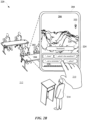
- FIG. 1A and FIG. 1B illustrate a view 100 and a view 120 of a user 102 invoking an automated assistant that can select an initial interface for interacting with the automated assistant based on a context of the user 102.
- the user 102 can be interacting with a computing device 104 that can provide access to an automated assistant, which the user 102 can provide inputs to via multiple different interfaces of the computing device 104.
- the user 102 may not be willing to provide a spoken input to an audio interface of the computing device 104.
- a spoken utterance from the user 102 may interrupt a lecturer 114 that is presenting to an audience in the context 112.
- the user 102 can rely on the automated assistant to select a suitable interface for interacting with the automated assistant in the given context 112 (e.g., a location of the user 102, an application being rendered in a foreground of a display interface 106 of the computing device 104, a state of the application, etc.).
- a suitable interface for interacting with the automated assistant in the given context 112 e.g., a location of the user 102, an application being rendered in a foreground of a display interface 106 of the computing device 104, a state of the application, etc.
- the user 102 can tap, with their hand 110, a selectable element 108 that is rendered at a display interface 106 of the computing device 104.
- the automated assistant can identify a particular interface to initialize for the user 102 to interact with the automated assistant.
- the automated assistant can process data (e.g ., contextual data 116) from one or more sources in order to generate interface data 118 for identifying a suitable interface for the user 102 to interact with the automated assistant.
- the automated assistant can process this data before the user 102 invokes the automated assistant and/or in response to the user 102 invoking the automated assistant.
- the data can characterize a location of the user 102, an amount of noise in the context 112, image data captured by one or more cameras and communication with the computing device 104, features of a foreground application, state(s) of an application(s), audio data captured by one or more microphones in communication with the computing device 104, and/or interaction data that is based on interactions between one or more users and one or more computing devices (e.g., a frequency of usage of a particular assistant interface).
- one or more features of a context of the user can be processed to generate a metric that can be compared to one or more thresholds to identify one or more interfaces to initialize for the user to interact with the automated assistant.
- a metric and/or embedding can be generated based on the user accessing a particular type of application (e.g ., an email application) in a particular location ( e.g., in a library). This metric and/or embedding can be compared to a threshold and/or other embedding in order to determine whether to cause a keyboard interface to be fully rendered, partially rendered, or not rendered at the interface in response to a user invoking the automated assistant.
- the automated assistant can cause the keyboard interface to be fully rendered at the display interface of the computing device in order to receive assistant inputs via the automated assistant.
- another metric can be generated, with prior permission from the user, based on the user speaking to someone in close proximity (e.g ., less than 10 feet away).
- the automated assistant can determine that the user may prefer to speak to their automated assistant when they are already speaking out loud to someone in close proximity.
- the automated assistant can initialize an audio interface of the computing device without causing a keyboard interface and/or keyboard suggestion to be rendered at the computing device.
- data can be processed in order to generate a metric that is based on a suitability of a particular interface for interacting with the automated assistant in a particular context.
- the automated assistant can respond to an invocation input by initializing a first input modality.
- the automated assistant can respond to an invocation input by initializing a second input modality.
- the automated assistant can initialize one or more input modalities and bypass initializing one or more other input modalities.
- the metric can be generated using a statistical analysis of when certain interfaces are employed by a user at different times and/or in different contexts. Alternatively, or additionally, the metric can be generated using one or more trained machine learning models that can be used to process contextual data in order to provide an indication of whether a keyboard interface and/or audio interface should be initialized.
- a metric can be, but is not limited to, a value between 0 and 1 such that: (1) when the metric is 0, a keyboard can be rendered, (2) when the value is 1, a keyboard may not be rendered, and (3) when the value is between 0 and 1, a keyboard shortcut and/or partial keyboard can be rendered.
- a keyboard shortcut can be rendered and/or caused to be emphasized at a display interface, and when the value is between 0.5 and 1, a partial keyboard (e.g ., a keyboard preview and/or snippet) and/or a natural language content suggestion (e.g ., a tap-able word or command phrase) can be rendered at the display interface.
- a partial keyboard e.g ., a keyboard preview and/or snippet
- a natural language content suggestion e.g ., a tap-able word or command phrase
- training data can be generated for training a machine learning model during interactions between a user and an automated assistant, and/or the user and an application.
- certain contextual data can be used to generate training data by classifying certain contextual signals as being, or not being, associated with keyboard usage.
- trained machine learning models can be further trained in order to accurately initialize certain interfaces in such contexts.
- the automated assistant in response to the user tapping the selectable element 108, can cause a keyboard interface 126 to be rendered at a computing device 104.
- the automated assistant can cause the keyboard interface 126 to be rendered for the user 102.
- a GUI element 122 can be rendered to indicate that the audio interface of the computing device 104 has not been initialized in response to the invocation input.
- the automated assistant can cause an input field 124 to be rendered at the display interface 106 in lieu of initializing the audio interface for receiving spoken input from the user 102.
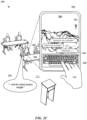
- FIG. 2A , FIG. 2B , and FIG. 2C illustrate a view 200, a view 220, and a view 240 of a user 202 interacting with an automated assistant that can predict and select an interface that a user will employ in a context 212 in which the user 202 invoked the automated assistant.
- the user 202 may nonetheless invoke the automated assistant by using their hand 210 to select a selectable element 208.
- the automated assistant can process contextual data 216 characterizing the context 212 in which the user 202 invoked the automated assistant. Based on this processing, the automated assistant can generate interface data 218, which can identify an interface that the user 202 is predicted to employ for interacting with the automated assistant in the given context 212.
- the automated assistant can determine that one or more other interfaces may be suitable for interacting with the automated assistant.
- the interface data 218 can indicate that a keyboard interface 224 is predicted to be employed by the user 202 in the given context 212, but that the audio interface may also be suitable. Based on this indication, the automated assistant can initialize a keyboard interface 224, with selectable suggestions, and an audio interface for receiving spoken utterances from the user 202. Alternatively, or additionally, the automated assistant can cause an input field 226 to be rendered with natural language content incorporated into the input field 226.
- the automated assistant can cause the audio interface of the computing device 204 to be initialized simultaneous to providing a selectable element 228 for invoking the keyboard interface.
- the automated assistant can cause a GUI element 222 to be rendered at the display interface 206 to indicate that the audio interface has been initialized in response to the user 202 invoking the automated assistant.
- the selectable element 228 can be rendered, with or without other selectable suggestions (e.g ., "... how,” “... set a reminder,” etc.), to put the user 202 on notice that they may access a keyboard by selecting the selectable element 228.
- the user 202 can select a selectable suggestion (e.g ., "... set a reminder.") with their hand 210, which can cause content to be incorporated into the input field 226 for creating a command to be submitted to the automated assistant.
- the automated assistant can provide a response 242 to the command via the same interface or another interface that has been indicated by the automated assistant as being available. For example, as the user 202 is typing an additional input 244 to the automated assistant, an instructor 214 may leave the context 212 in which the user 202 is interacting with the automated assistant.
- the user 202 can choose to provide a spoken utterance 246 such as, "...with his school project tonight," instead of continuing to type an input via a keyboard 248, as illustrated in view 240 of FIG. 2C .
- a spoken utterance 246 such as, "...with his school project tonight”
- the automated assistant also identified another interface that the user 202 may employ as the context 212 changes.
- one or more different interfaces can be initialized by the automated assistant in response to an invocation input and according to one or more features of a context in which the automated assistant was invoked.
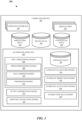
- FIG. 3 illustrates a system 300 for providing an automated assistant 304 that can predict when a user will prefer to use a non-audio interface for interacting with the automated assistant 304 after the user has invoked the automated assistant 304.
- the automated assistant 304 can operate as part of an assistant application that is provided at one or more computing devices, such as a computing device 302 and/or a server device.
- a user can interact with the automated assistant 304 via assistant interface(s) 320, which can be a microphone, a camera, a touch screen display, a user interface, and/or any other apparatus capable of providing an interface between a user and an application.
- a user can initialize the automated assistant 304 by providing a verbal, textual, and/or a graphical input to an assistant interface 320 to cause the automated assistant 304 to initialize one or more actions (e.g ., provide data, control a peripheral device, access an agent, generate an input and/or an output, etc.).
- the automated assistant 304 can be initialized based on processing of contextual data 336 using one or more trained machine learning models.
- the contextual data 336 can characterize one or more features of an environment in which the automated assistant 304 is accessible, and/or one or more features of a user that is predicted to be intending to interact with the automated assistant 304.
- the computing device 302 can include a display device, which can be a display panel that includes a touch interface for receiving touch inputs and/or gestures for allowing a user to control applications 334 of the computing device 302 via the touch interface.
- the computing device 302 can lack a display device, thereby providing an audible user interface output, without providing a graphical user interface output.
- the computing device 302 can provide a user interface, such as a microphone, for receiving spoken natural language inputs from a user.
- the computing device 302 can include a touch interface and can be void of a camera, but can optionally include one or more other sensors.
- the computing device 302 and/or other third party client devices can be in communication with a server device over a network, such as the internet. Additionally, the computing device 302 and any other computing devices can be in communication with each other over a local area network (LAN), such as a Wi-Fi network.
- the computing device 302 can offload computational tasks to the server device in order to conserve computational resources at the computing device 302.
- the server device can host the automated assistant 304, and/or computing device 302 can transmit inputs received at one or more assistant interfaces 320 to the server device.
- the automated assistant 304 can be hosted at the computing device 302, and various processes that can be associated with automated assistant operations can be performed at the computing device 302.
- all or less than all aspects of the automated assistant 304 can be implemented on the computing device 302.
- aspects of the automated assistant 304 are implemented via the computing device 302 and can interface with a server device, which can implement other aspects of the automated assistant 304.
- the server device can optionally serve a plurality of users and their associated assistant applications via multiple threads.
- the automated assistant 304 can be an application that is separate from an operating system of the computing device 302 (e.g., installed "on top" of the operating system) - or can alternatively be implemented directly by the operating system of the computing device 302 ( e.g ., considered an application of, but integral with, the operating system).
- the automated assistant 304 can include an input processing engine 306, which can employ multiple different modules for processing inputs and/or outputs for the computing device 302 and/or a server device.
- the input processing engine 306 can include a speech processing engine 308, which can process audio data received at an assistant interface 320 to identify the text embodied in the audio data.
- the audio data can be transmitted from, for example, the computing device 302 to the server device in order to preserve computational resources at the computing device 302. Additionally, or alternatively, the audio data can be exclusively processed at the computing device 302.
- the process for converting the audio data to text can include a speech recognition algorithm, which can employ neural networks, and/or statistical models for identifying groups of audio data corresponding to words or phrases.
- the text converted from the audio data can be parsed by a data parsing engine 310 and made available to the automated assistant 304 as textual data that can be used to generate and/or identify command phrase(s), intent(s), action(s), slot value(s), and/or any other content specified by the user.
- output data provided by the data parsing engine 310 can be provided to a parameter engine 312 to determine whether the user provided an input that corresponds to a particular intent, action, and/or routine capable of being performed by the automated assistant 304 and/or an application or agent that is capable of being accessed via the automated assistant 304.
- assistant data 338 can be stored at the server device and/or the computing device 302, and can include data that defines one or more actions capable of being performed by the automated assistant 304, as well as parameters necessary to perform the actions.
- the parameter engine 312 can generate one or more parameters for an intent, action, and/or slot value, and provide the one or more parameters to an output generating engine 314.
- the output generating engine 314 can use the one or more parameters to communicate with an assistant interface 320 for providing an output to a user, and/or communicate with one or more applications 334 for providing an output to one or more applications 334.
- the automated assistant 304 can be an application that can be installed "on-top of" an operating system of the computing device 302 and/or can itself form part of (or the entirety of) the operating system of the computing device 302.
- the automated assistant application includes, and/or has access to, on-device speech recognition, on-device natural language understanding, and on-device fulfillment.
- on-device speech recognition can be performed using an on-device speech recognition module that processes audio data (detected by the microphone(s)) using an end-to-end speech recognition machine learning model stored locally at the computing device 302.
- the on-device speech recognition generates recognized text for a spoken utterance (if any) present in the audio data.
- on-device natural language understanding (NLU) can be performed using an on-device NLU module that processes recognized text, generated using the on-device speech recognition, and optionally contextual data, to generate NLU data.
- NLU on-device natural language understanding
- NLU data can include intent(s) that correspond to the spoken utterance and optionally parameter(s) (e.g ., slot values) for the intent(s).
- On-device fulfillment can be performed using an on-device fulfillment module that utilizes the NLU data (from the on-device NLU), and optionally other local data, to determine action(s) to take to resolve the intent(s) of the spoken utterance (and optionally the parameter(s) for the intent).
- This can include determining local and/or remote responses (e.g ., answers) to the spoken utterance, interaction(s) with locally installed application(s) to perform based on the spoken utterance, command(s) to transmit to internet-of-things (IoT) device(s) (directly or via corresponding remote system(s)) based on the spoken utterance, and/or other resolution action(s) to perform based on the spoken utterance.
- IoT internet-of-things
- the on-device fulfillment can then initiate local and/or remote performance/execution of the determined action(s) to resolve the spoken utterance.
- remote speech processing, remote NLU, and/or remote fulfillment can at least selectively be utilized.
- recognized text can at least selectively be transmitted to remote automated assistant component(s) for remote NLU and/or remote fulfillment.
- the recognized text can optionally be transmitted for remote performance in parallel with on-device performance, or responsive to failure of on-device NLU and/or on-device fulfillment.
- on-device speech processing, on-device NLU, on-device fulfillment, and/or on-device execution can be prioritized at least due to the latency reductions they provide when resolving a spoken utterance (due to no client-server roundtrip(s) being needed to resolve the spoken utterance).
- on-device functionality can be the only functionality that is available in situations with no or limited network connectivity.
- the computing device 302 can include one or more applications 334 which can be provided by a third-party entity that is different from an entity that provided the computing device 302 and/or the automated assistant 304.
- An application state engine of the automated assistant 304 and/or the computing device 302 can access application data 330 to determine one or more actions capable of being performed by one or more applications 334, as well as a state of each application of the one or more applications 334 and/or a state of a respective device that is associated with the computing device 302.
- a device state engine of the automated assistant 304 and/or the computing device 302 can access device data 332 to determine one or more actions capable of being performed by the computing device 302 and/or one or more devices that are associated with the computing device 302.
- the application data 330 and/or any other data can be accessed by the automated assistant 304 to generate contextual data 336, which can characterize a context in which a particular application 334 and/or device is executing, and/or a context in which a particular user is accessing the computing device 302, accessing an application 334, and/or any other device or module.
- contextual data 336 can characterize a context in which a particular application 334 and/or device is executing, and/or a context in which a particular user is accessing the computing device 302, accessing an application 334, and/or any other device or module.
- the device data 332 can characterize a current operating state of each application 334 executing at the computing device 302.
- the application data 330 can characterize one or more features of an executing application 334, such as content of one or more graphical user interfaces being rendered at the direction of one or more applications 334.
- the application data 330 can characterize an action schema, which can be updated by a respective application and/or by the automated assistant 304, based on a current operating status of the respective application.
- one or more action schemas for one or more applications 334 can remain static, but can be accessed by the application state engine in order to determine a suitable action to initialize via the automated assistant 304.
- the computing device 302 can further include an assistant invocation engine 322 that can use one or more trained machine learning models to process application data 330, device data 332, contextual data 336, and/or any other data that is accessible to the computing device 302.
- the assistant invocation engine 322 can process this data in order to determine whether or not to wait for a user to explicitly speak an invocation phrase to invoke the automated assistant 304, or consider the data to be indicative of an intent by the user to invoke the automated assistant-in lieu of requiring the user to explicitly speak the invocation phrase.
- the one or more trained machine learning models can be trained using instances of training data that are based on scenarios in which the user is in an environment where multiple devices and/or applications are exhibiting various operating states.
- the instances of training data can be generated in order to capture training data that characterizes contexts in which the user invokes the automated assistant and other contexts in which the user does not invoke the automated assistant.
- the assistant invocation engine 322 can cause the automated assistant 304 to detect, or limit detecting, spoken invocation phrases from a user based on features of a context and/or an environment. Additionally, or alternatively, the assistant invocation engine 322 can cause the automated assistant 304 to detect, or limit detecting for one or more assistant commands from a user based on features of a context and/or an environment. For example, a user that typically invokes their automated assistant immediately upon entering their vehicle each morning can cause training data to be generated for training the automated assistant to initialize when the user subsequently enters their vehicle.
- assistant invocations based on context and/or environment can include further determinations of whether and/or how to render a keyboard for providing assistant input to the automated assistant. For example, when the automated assistant is initialized based on a user entering their vehicle, the automated assistant may not cause a keyboard interface to be rendered. However, when the automated assistant is initialized based on the user entering the library and accessing a search engine website, the automated assistant may cause a keyboard shortcut (e.g., a selectable GUI element that, when swiped, causes a full keyboard initialized) to be rendered.
- a keyboard shortcut e.g., a selectable GUI element that, when swiped, causes a full keyboard initialized
- the system 300 can include a contextual feature engine 316, which can process various data in order to identify one or more features of a context in which a user has invoked the automated assistant 304.
- the contextual feature engine 316 can process application data 330, device data 332, and/or contextual data 336 in order to identify one or more features of a context in which the user has invoked, or may subsequently invoke, the automated assistant 304.
- data processed by the contextual feature engine 316 can be used to generate an embedding that can be mapped to a latent space. When an embedding is generated for a particular context, Euclidian distances in latent space can be identified.
- the Euclidian distances can correspond to a distance in latent space between the embedding and other embeddings corresponding to assistant interfaces.
- a distance satisfies one or more thresholds and when a user invokes the automated assistant 304, one or more interfaces can be initialized or not initialized based on the one or more thresholds being satisfied.
- the system 300 can include an interface prediction engine 318, which can identify one or more interfaces that a user may prefer to use for interacting with the automated assistant 304 in a given context.
- the interface prediction engine 318 can process data generated by the contextual feature engine 316 in order to predict a particular interface that may be more suitable for assistant interactions in a given context.
- the interface prediction engine 318 can employ one or more trained machine learning models in order to process data from the contextual feature engine 316 and/or data that is based on interactions between one or more other users (with prior permission from those other users) and their respective automated assistants.
- instances when another user has invoked their automated assistant but selected a non-default interface e.g ., an interface that is less frequently activated when the other user invokes their automated assistant
- a non-default interface e.g ., an interface that is less frequently activated when the other user invokes their automated assistant
- the user can invoke their automated assistant and an audio interface can be initialized without a keyboard interface being rendered for the user.
- the user may start to access the keyboard interface in the particular context, which can cause additional training data to be generated for updating one or more models employed by the interface prediction engine 318.
- the automated assistant can be initialized with the keyboard interface, based on the feedback generated as the user changes their habits when accessing the automated assistant in certain contexts.
- a weight assigned to one or more contextual features can be adjusted based on such instances, thereby resulting in changes to location(s) of embedding(s) in latent space. This can allow more accurate interface predictions to be made by the interface prediction engine 318, which can result in condensed assistant interactions and/or fewer inputs to be processed by the automated assistant and/or computing device 302.
- the system 300 can include an interface activation engine 326 that can control whether one or more assistant interfaces 320 of the computing device 302 or another computing device are initialized in response to a user invoking their automated assistant.
- a determination of whether the interface activation engine 326 initializes an interface can be based on processing performed by the contextual feature engine 316 and/or the interface prediction engine 318.
- the interface activation engine 326 can generate a "hybrid" interface for one or more interfaces based on the context of the user. For example, when one or more thresholds are determined to be satisfied for providing a "hybrid" interface of a keyboard interface, the interface activation engine 326 can generate data that can be used for rendering a "hybrid" keyboard interface.
- the data can characterize one or more selectable suggestions for portions of a command to be provided to the automated assistant ( e.g ., as illustrated in FIG. 2B ).
- the interface activation engine 326 can generate data that can be used to indicate to the user that one or more interfaces have, or have not, been initialized.
- a crossed-out microphone e.g ., as illustrated in FIG. 1B
- the system 300 can include an interaction data engine 324, which can generate interaction data that is based on interactions (e.g ., indirect and/or direct) between one or more users and an automated assistant, and/or one or more users and one or more devices.
- the interaction data can then be processed by one or more engines of the system 300 in order to predict an interface and/or type of input (e.g ., physical motion at a non-zero distance from an interface) that a user may prefer to employ to interact with an automated assistant in a given context.
- the interaction data can be used, with prior permission from a user, for training one or more trained machine learning models that can be used when subsequently processing context-related data.
- the system 300 can determine that an interface prediction is wrong based on a user switching from a predicted interface to a non-predicted interface. This can occur when, for instance, the use presses a button to invoke the automated assistant 304 in a particular context (e.g., at their office), is provided with a full rendering of a keyboard interface, but, instead, uses an audio interface to provide input to the automated assistant.
- This instance can be used by the interaction data engine 324 to generate negative feedback data for further training one or more trained machine learning models so that the automated assistant 304 is less likely to render the full keyboard interface in that particular context.
- the user may employ the predicted interface in another context, and-in these instances, positive feedback data can be generated for further training one or more trained machine learning models to continue to provide the keyboard interface in that other context.
- FIG. 4 illustrates a method 400 operating an automated assistant that, in response to being invoked, can proactively predict and/or suggest an interface that a user may interact with in a certain context in order to engage with the automated assistant.
- the method 400 can be performed by one or more devices, applications, and/or any other apparatus or module capable of controlling an automated assistant.
- the method 400 can include an operation 402 of determining whether an assistant invocation has been detected.
- An assistant invocation can be an input to an automated assistant that causes the automated assistant to be initialized for detecting further input from a user.
- a button of a computing device can be programmed to invoke the automated assistant upon selection of the button by the user.
- the automated assistant can be invoked in response to an invocation phrase (e.g ., "Assistant"), which can be a word or phrase that, when spoken by a user, causes the automated assistant to operate to detect further input from the user.
- an invocation phrase e.g ., "Assistant”
- the method 400 can proceed from operation 402 to an operation 404. Otherwise, the automated assistant and/or computing device can continue to detect an assistant invocation input from a user.
- the operation 404 can include determining whether to limit certain interfaces from being initialized in response to the invocation input.
- the automated assistant can determine whether, in response to the invocation input, to initialize other interfaces of the computing device besides a keyboard interface and/or other non-audio input (e.g., a GUI rendering of a keyboard).
- the operation 404 can be determined based on interaction data that characterizes prior interactions between the user and one or more computing devices, and/or one or more other users and/or one or more other computing devices.
- the interaction data can indicate features of various contexts in which users engage with certain interfaces in order to interact with a respective automated assistant.
- the interaction data can indicate that on certain public walkways, a user is more likely to prefer to interact with their automated assistant via a keyboard interface over an audio interface.
- the interaction data can indicate that, when a user is at their home or in their vehicle, the user is more likely to prefer to interact with their automated assistant via an audio interface over a keyboard interface.
- the method 400 can proceed to an operation 406.
- the operation 406 can include initializing an audio interface for the user to interact with the automated assistant.
- the audio interface can include one or more microphones that can be used to detect spoken input from the user to the automated assistant.
- the automated assistant can cause a GUI element to be rendered at a display interface of the computing device in order to indicate that the audio interface is active.
- the method 400 can proceed from the operation 406 to an optional operation 410, which can include determining whether to suggest a keyboard as an alternative assistant interface.
- the automated assistant can determine whether to render a suggestion to the user regarding a separate assistant interface that may be more effective and/or more suitable for communicating with the automated assistant than the audio interface. In some implementations, this determination can be based on the interaction data used for the determination at operation 404 and/or other data that can indicate features of a context of the user. In this way, the automated assistant can adapt according to changes in circumstances of the user and/or offer a variety of different interface arrangements according to the circumstances of the user.
- the method 400 determines to not suggest the keyboard as an alternative assistant interface, the method 400 can proceed to an operation 412. Otherwise, the method 400 can proceed to an optional operation 414.
- the optional operation 414 can include causing a keyboard suggestion to be rendered at an interface of the computing device.
- the keyboard suggestion can include one or more selectable elements rendered at a display interface of the computing device to which the user provided the invocation input.
- the keyboard suggestion can include a portion of an image of a keyboard and/or a portion of a natural language command (e.g ., "Assistant, navigate to") that can be provided to the automated assistant via spoken utterance and/or textual input.
- the method 400 can proceed to the operation 412 for determining whether an assistant input has been received at any active input.
- the method 400 can proceed to an operation 408.
- the operation 408 can include rendering a keyboard interface for receiving a subsequent input from the user and for the automated assistant.
- the keyboard interface can be provided in lieu of defaulting to initializing an audio interface for receiving spoken utterances from the user. This can prove to be more efficient, as this process can reduce an amount of processing that may otherwise occur if the user had to manually direct the automated assistant to initialize the keyboard interface for interactions that constantly defaulted to the audio interface.
- the method 400 can proceed from the operation 408 to the operation 412 for determining whether an input has been received at an interface that is available for receiving assistant inputs. When an input is received, the method 400 can proceed to an operation 416 for causing the automated assistant to respond according to the input received at the active interface. Otherwise, when no input is received for a duration of time, the method 400 can return to the operation 402.
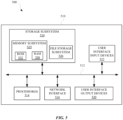
- FIG. 5 is a block diagram 500 of an example computer system 510.
- Computer system 510 typically includes at least one processor 514 which communicates with a number of peripheral devices via bus subsystem 512. These peripheral devices may include a storage subsystem 524, including, for example, a memory 525 and a file storage subsystem 526, user interface output devices 520, user interface input devices 522, and a network interface subsystem 516. The input and output devices allow user interaction with computer system 510.
- Network interface subsystem 516 provides an interface to outside networks and is coupled to corresponding interface devices in other computer systems.
- User interface input devices 522 may include a keyboard, pointing devices such as a mouse, trackball, button, touchpad, or graphics tablet, a scanner, a touchscreen incorporated into the display, audio input devices such as voice recognition systems, microphones, and/or other types of input devices.
- pointing devices such as a mouse, trackball, button, touchpad, or graphics tablet
- audio input devices such as voice recognition systems, microphones, and/or other types of input devices.
- use of the term "input device” is intended to include all possible types of devices and ways to input information into computer system 510 or onto a communication network.
- User interface output devices 520 may include a display subsystem, a printer, a fax machine, or non-visual displays such as audio output devices.
- the display subsystem may include a cathode ray tube (CRT), a flat-panel device such as a liquid crystal display (LCD), a projection device, or some other mechanism for creating a visible image.
- the display subsystem may also provide non-visual display such as via audio output devices.
- output device is intended to include all possible types of devices and ways to output information from computer system 510 to the user or to another machine or computer system.
- Storage subsystem 524 stores programming and data constructs that provide the functionality of some or all of the modules described herein.
- the storage subsystem 524 may include the logic to perform selected aspects of method 400, and/or to implement one or more of system 300, computing device 104, computing device 204, automated assistant, and/or any other application, device, apparatus, and/or module discussed herein.
- Memory 525 used in the storage subsystem 524 can include a number of memories including a main random access memory (RAM) 530 for storage of instructions and data during program execution and a read only memory (ROM) 532 in which fixed instructions are stored.
- a file storage subsystem 526 can provide persistent storage for program and data files, and may include a hard disk drive, a floppy disk drive along with associated removable media, a CD-ROM drive, an optical drive, or removable media cartridges.
- the modules implementing the functionality of certain implementations may be stored by file storage subsystem 526 in the storage subsystem 524, or in other machines accessible by the processor(s) 514.
- Bus subsystem 512 provides a mechanism for letting the various components and subsystems of computer system 510 communicate with each other as intended. Although bus subsystem 512 is shown schematically as a single bus, alternative implementations of the bus subsystem may use multiple busses.
- Computer system 510 can be of varying types including a workstation, server, computing cluster, blade server, server farm, or any other data processing system or computing device. Due to the ever-changing nature of computers and networks, the description of computer system 510 depicted in FIG. 5 is intended only as a specific example for purposes of illustrating some implementations. Many other configurations of computer system 510 are possible having more or fewer components than the computer system depicted in FIG. 5 .
- the systems described herein collect personal information about users (or as often referred to herein, "participants"), or may make use of personal information
- the users may be provided with an opportunity to control whether programs or features collect user information (e.g ., information about a user's social network, social actions or activities, profession, a user's preferences, or a user's current geographic location), or to control whether and/or how to receive content from the content server that may be more relevant to the user.
- certain data may be treated in one or more ways before it is stored or used, so that personal identifiable information is removed.
- a user's identity may be treated so that no personal identifiable information can be determined for the user, or a user's geographic location may be generalized where geographic location information is obtained (such as to a city, ZIP code, or state level), so that a particular geographic location of a user cannot be determined.
- geographic location information such as to a city, ZIP code, or state level
- the user may have control over how information is collected about the user and/or used.
- a method implemented by one or more processors is set forth as including operations such as receiving, at a computing device, a user input for invoking an automated assistant that is accessible via the computing device, wherein the automated assistant is responsive to audio interface input and keyboard interface input from a user via the computing device.
- the method can further include an operation of determining, by the automated assistant, whether to render the keyboard interface at a display interface of the computing device in response to the user input, wherein determining whether to render the keyboard interface in response to the user input is based on one or more prior interactions between one or more users and one or more computing devices.
- the method can further include an operation of, when the automated assistant determines to not render the keyboard interface at the display interface of the computing device: causing, in response to the user input, the audio interface of the computing device or another computing device to be initialized for receiving a spoken utterance from the user.
- determining whether to render the keyboard interface at the display interface of the computing device in response to the user input includes: identifying a foreground application being rendered at the display interface of the computing device, and determining whether a prior interaction between the user and the foreground application involved an interface selected from a group of interfaces comprising the keyboard interface and the audio interface, wherein the automated assistant determines to render the keyboard interface at the display interface of the computing device when the user accessed the keyboard interface during the prior interaction.
- determining whether to render the keyboard interface at the display interface of the computing device in response to the user input includes: identifying a foreground application being rendered at the display interface of the computing device, and determining whether prior interactions between the user and the foreground application involved an interface selected from a group of interfaces comprising the keyboard interface and the audio interface, wherein the automated assistant determines to render a keyboard shortcut or a portion of the keyboard interface at the display interface of the computing device when the keyboard interface and the audio interface were used during the prior interactions.
- determining whether to render the keyboard interface at the display interface of the computing device in response to the user input includes: identifying a current state of a foreground application being rendered at the display interface of the computing device, and determining whether the user previously accessed, during a prior interaction with the foreground application, an interface selected from a group of interfaces comprising the keyboard interface and the audio interface, wherein, during the prior interaction, the foreground application was operating in a state corresponding to the current state.
- the method can further include an operation of, when the automated assistant determines to not render the keyboard interface at the display interface of the computing device: determining whether to render, at the display interface, a selectable element that, when selected, causes the keyboard interface to be rendered at the display interface.
- determining whether to render the selectable element at the display interface includes: determining whether a metric satisfies a particular threshold, wherein the metric is based on a number of instances in which the user accessed the keyboard interface while the foreground application was operating in the state, and wherein the automated assistant causes the selectable element to be rendered when the metric does not satisfy the particular threshold.
- the selectable element includes an assistant input suggestion and, when the selectable element is selected, the assistant input suggestion is rendered as a portion of a draft input that can be edited using the keyboard interface.
- the foreground application is an internet browser application and the current state of the foreground application is based on a website that is being rendered at the foreground application.
- the method can further include an operation of, when the automated assistant determines to render the keyboard interface at the display interface of the computing device: causing, in response to the user input, the computing device to render a haptic output.
- determining whether to render the keyboard interface at the display interface of the computing device in response to the user input includes: determining a location of the user when the user provides the user input for invoking the automated assistant, and determining whether a prior interaction, at the location, between the user and the computing device involved an interface selected from a group comprising the keyboard interface and the audio interface, wherein the automated assistant determines to render the keyboard interface at the display interface of the computing device when the user is determined to have accessed the keyboard interface during the prior interaction.
- determining whether to render the keyboard interface at the display interface of the computing device in response to the user input includes: processing interaction data using one or more trained machine learning models, wherein the interaction data is based on the one or more prior interactions, and wherein the one or more trained machine learning models are trained using training data that is based on one or more other prior interactions between the user and the computing device.
- determining whether to render the keyboard interface at the display interface of the computing device in response to the user input includes: processing interaction data using one or more trained machine learning models, wherein the interaction data is based on the one or more prior interactions between the user and the computing device, and wherein the one or more trained machine learning models are trained using training data that is based one or more other prior interactions between others users and other computing devices.
- a method implemented by one or more processors is set forth as including operations such as receiving, at a computing device, a user input for invoking an automated assistant that is accessible via the computing device, wherein the computing device includes a first input modality and a second input modality, and the user input is received at the first input modality.
- the method can further include an operation of determining, by the automated assistant, whether to cause the computing device to render an indication that the second input modality is active for receiving separate input from the user.
- the method can further include an operation of, when the automated assistant determines to not render the indication that the second input modality is active for receiving the separate input from the user: causing, in response to the user input, the computing device to render a separate indication that the first input modality is active for receiving additional input from the user, wherein the automated assistant can receive the additional input via direct physical contact at the first input modality.
- the method can further include an operation of, when the automated assistant determines to render the indication that the second input modality is active for receiving the further input from the user: causing, in response to the user input, the computing device to render the indication that the second input modality is active for receiving the separate input from the user, wherein the automated assistant can receive the separate input via indirect physical input to the second input modality.
- the direct physical contact includes a touch input performed using an extremity of a user, and wherein the indirect physical input includes a non-touch input performed, by the user, via a physical motion that occurs at a non-zero distance from the computing device.
- a method implemented by one or more processors is set forth as including operations such as receiving, at a computing device, a user input for invoking an automated assistant that is accessible via the computing device, wherein the computing device includes a first input modality and a second input modality that is different than the first input modality.
- the method can further include an operation of processing interaction data that indicates a frequency in which a user employs the first input modality of the computing device for providing input to the automated assistant in a particular circumstance.
- the method can further include an operation of determining, based on the interaction data, whether the frequency satisfies one or more thresholds for indicating that one or more particular input modalities are available for receiving further inputs from the user.
- the method can further include an operation of, when the frequency satisfies a threshold, of the one or more thresholds, for indicating that the first input modality is available for receiving further inputs from the user: causing the computing device to render a graphical user interface (GUI) element that corresponds to the first input modality.
- GUI graphical user interface
- the method can further include an operation of, when the frequency satisfies a different threshold, of the one or more thresholds, for indicating that the first input modality and the second input modality are available for receiving additional inputs from the user: causing the computing device to concurrently render the GUI element and an additional GUI element, wherein the additional GUI element corresponds to the second input modality.
- causing the computing device to concurrently render the GUI element and the additional GUI element includes: causing the GUI element to be rendered as a portion of a keyboard that can receive the further inputs from the user to the automated assistant.
- the additional GUI element indicates that an audio interface of the computing device has been initialized in response to the user input.
- the particular circumstance includes a circumstance in which a particular application is being rendered at a foreground of a display interface of the computing device.
Landscapes
- Engineering & Computer Science (AREA)
- Theoretical Computer Science (AREA)
- General Engineering & Computer Science (AREA)
- Human Computer Interaction (AREA)
- Physics & Mathematics (AREA)
- General Physics & Mathematics (AREA)
- Software Systems (AREA)
- Computer Networks & Wireless Communication (AREA)
- Signal Processing (AREA)
- Environmental & Geological Engineering (AREA)
- Computer Vision & Pattern Recognition (AREA)
- Artificial Intelligence (AREA)
- Data Mining & Analysis (AREA)
- Evolutionary Computation (AREA)
- Medical Informatics (AREA)
- Computing Systems (AREA)
- Mathematical Physics (AREA)
- Health & Medical Sciences (AREA)
- General Health & Medical Sciences (AREA)
- Audiology, Speech & Language Pathology (AREA)
- Multimedia (AREA)
- User Interface Of Digital Computer (AREA)
Claims (13)
- Verfahren, das durch einen oder mehrere Prozessoren implementiert wird, wobei das Verfahren Folgendes umfasst:Empfangen (402) einer Benutzereingabe von einer Schnittstelle einer Rechenvorrichtung, die keine Audioschnittstelleneingabe oder keine Tastaturschnittstelleneingabe ist, zum Aufrufen eines automatisierten Assistenten, der über die Rechenvorrichtung zugänglich ist, an der Rechenvorrichtung,wobei der automatisierte Assistent auf die Audioschnittstelleneingabe und die Tastaturschnittstelleneingabe von einem Benutzer über die Rechenvorrichtung reagiert;Bestimmen (404) durch den automatisierten Assistenten, ob die Tastaturschnittstelle an einer Anzeigeschnittstelle der Rechenvorrichtung als Reaktion auf die Benutzereingabe wiederzugeben ist,wobei das Bestimmen, ob die Tastaturschnittstelle als Reaktion auf die Benutzereingabe wiederzugeben ist, auf einer oder mehreren vorherigen Interaktionen zwischen einem oder mehreren Benutzern und einer oder mehreren Rechenvorrichtungen basiert und Folgendes beinhaltet:Erkennen eines aktuellen Zustands einer an der Anzeigeschnittstelle der Rechenvorrichtung wiedergegebenen Vordergrundanwendung undBestimmen, ob der Benutzer zuvor während einer vorherigen Interaktion mit der Vordergrundanwendung auf eine Schnittstelle zugegriffen hat, ausgewählt aus einer Gruppe von Schnittstellen, umfassend die Tastaturschnittstelle und die Audioschnittstelle;wobei die Vordergrundanwendung während der vorherigen Interaktion in einem Zustand betrieben wurde, der dem aktuellen Zustand entspricht; undwenn der automatisierte Assistent bestimmt, die Tastaturschnittstelle nicht an der Anzeigeschnittstelle der Rechenvorrichtung wiederzugeben:Veranlassen (406), dass die Audioschnittstelle der Rechenvorrichtung oder einer anderen Rechenvorrichtung als Reaktion auf die Benutzereingabe zum Empfangen einer gesprochenen Äußerung von dem Benutzer initialisiert wird; undBestimmen (410), ob ein auswählbares Element, das nach dem Auswählen die Tastaturschnittstelle veranlasst, an der Anzeigeschnittstelle wiedergegeben zu werden, an der Anzeigeschnittstelle wiederzugeben ist; undals Reaktion auf das Bestimmen, das auswählbare Element wiederzugeben, Wiedergeben (414) des auswählbaren Elements.
- Verfahren nach Anspruch 1, wobei das Bestimmen, ob die Tastaturschnittstelle an der Anzeigeschnittstelle der Rechenvorrichtung als Reaktion auf die Benutzereingabe wiederzugeben ist, Folgendes beinhaltet:Bestimmen, ob eine vorherige Interaktion zwischen dem Benutzer und der Vordergrundanwendung eine Schnittstelle einschloss, ausgewählt aus einer Gruppe von Schnittstellen, umfassend die Tastaturschnittstelle und die Audioschnittstelle,wobei der automatisierte Assistent bestimmt, die Tastaturschnittstelle an der Anzeigenschnittstelle der Rechenvorrichtung wiederzugeben, wenn der Benutzer während der vorherigen Interaktion auf die Tastaturschnittstelle zugegriffen hat.
- Verfahren nach Anspruch 1, wobei das Bestimmen, ob die Tastaturschnittstelle an der Anzeigeschnittstelle der Rechenvorrichtung als Reaktion auf die Benutzereingabe wiederzugeben ist, Folgendes beinhaltet:Bestimmen, ob vorherige Interaktionen zwischen dem Benutzer und der Vordergrundanwendung eine Schnittstelle einschlossen, ausgewählt aus einer Gruppe von Schnittstellen, umfassend die Tastaturschnittstelle und die Audioschnittstelle,wobei der automatisierte Assistent bestimmt, ein Tastaturkürzel oder einen Teil der Tastaturschnittstelle an der Anzeigenschnittstelle der Rechenvorrichtung wiederzugeben, wenn die Tastaturschnittstelle und die Audioschnittstelle während der vorherigen Interaktionen verwendet wurden.
- Verfahren nach einem der vorhergehenden Ansprüche, wobei das Bestimmen, ob das auswählbare Element an der Anzeigeschnittstelle wiederzugeben ist, Folgendes beinhaltet:Bestimmen, ob eine Metrik einen bestimmten Schwellenwert erfüllt,wobei die Metrik auf einer Anzahl von Fällen basiert, in denen der Benutzer auf die Tastaturschnittstelle zugegriffen hat, während die Vordergrundanwendung in dem Zustand betrieben wurde, undwobei der automatisierte Assistent veranlasst, dass das auswählbare Element wiedergegeben wird, wenn die Metrik den bestimmten Schwellenwert nicht erfüllt.
- Verfahren nach Anspruch 4, wobei das auswählbare Element einen Assistenteneingabevorschlag beinhaltet und der Assistenteneingabevorschlag als ein Teil einer Entwurfseingabe wiedergegeben wird, die unter Verwendung der Tastaturschnittstelle bearbeitet werden kann, wenn das auswählbare Element ausgewählt ist.
- Verfahren nach einem der Ansprüche 3 bis 5, wobei die Vordergrundanwendung eine Internetbrowser-Anwendung ist und der aktuelle Zustand der Vordergrundanwendung auf einer Website basiert, die bei der Vordergrundanwendung wiedergegeben wird.
- Verfahren nach einem der vorhergehenden Ansprüche, ferner umfassend:
wenn der automatisierte Assistent bestimmt, die Tastaturschnittstelle an der Anzeigeschnittstelle der Rechenvorrichtung wiederzugeben:
Veranlassen, dass die Rechenvorrichtung als Reaktion auf die Benutzereingabe eine haptische Ausgabe wiedergibt. - Verfahren nach Anspruch 1, wobei das Bestimmen, ob die Tastaturschnittstelle an der Anzeigeschnittstelle der Rechenvorrichtung als Reaktion auf die Benutzereingabe wiederzugeben ist, Folgendes beinhaltet:Bestimmen eines Orts des Benutzers, wenn der Benutzer die Benutzereingabe zum Aufrufen des automatisierten Assistenten bereitstellt, undBestimmen, ob eine vorherige Interaktion zwischen dem Benutzer und der Rechenvorrichtung an dem Ort eine Schnittstelle einschloss, ausgewählt aus einer Gruppe, umfassend die Tastaturschnittstelle und die Audioschnittstelle,wobei der automatisierte Assistent bestimmt, die Tastaturschnittstelle an der Anzeigenschnittstelle der Rechenvorrichtung wiederzugeben, wenn bestimmt wird, dass der Benutzer während der vorherigen Interaktion auf die Tastaturschnittstelle zugegriffen hat.
- Verfahren nach Anspruch 1, wobei das Bestimmen, ob die Tastaturschnittstelle an der Anzeigeschnittstelle der Rechenvorrichtung als Reaktion auf die Benutzereingabe wiederzugeben ist, Folgendes beinhaltet:Verarbeiten von Interaktionsdaten unter Verwendung eines oder mehrerer trainierter Maschinenlernmodelle, wobei die Interaktionsdaten auf der einen oder den mehreren vorherigen Interaktionen basieren undwobei das eine oder die mehreren trainierten Maschinenlernmodelle unter Verwendung von Trainingsdaten trainiert werden, die auf einer oder mehreren vorherigen Interaktionen zwischen dem Benutzer und der Rechenvorrichtung basieren.
- Verfahren nach Anspruch 1, wobei das Bestimmen, ob die Tastaturschnittstelle an der Anzeigeschnittstelle der Rechenvorrichtung als Reaktion auf die Benutzereingabe wiederzugeben ist, Folgendes beinhaltet:Verarbeiten von Interaktionsdaten unter Verwendung eines oder mehrerer trainierter Maschinenlernmodelle,wobei die Interaktionsdaten auf der einen oder den mehreren vorherigen Interaktionen zwischen dem Benutzer und der Rechenvorrichtung basieren undwobei das eine oder die mehreren trainierten Maschinenlernmodelle unter Verwendung von Trainingsdaten trainiert werden, die auf einer oder mehreren vorherigen Interaktionen zwischen anderen Benutzern und anderen Rechenvorrichtungen basieren.
- Computerprogramm, das Anweisungen umfasst, die bei Ausführung durch einen oder mehrere Prozessoren eines Rechensystems das Rechensystem dazu veranlassen, das Verfahren nach einem der vorhergehenden Ansprüche durchzuführen.
- Computerlesbares Medium, das darauf gespeicherte Anweisungen umfasst, die bei Ausführung durch einen oder mehrere Prozessoren eines Rechensystems das Rechensystem dazu veranlassen, das Verfahren nach einem der Ansprüche 1 bis 10 durchzuführen.
- Rechenvorrichtung, die dazu konfiguriert ist, das Verfahren nach einem der Ansprüche 1 bis 10 durchzuführen.
Applications Claiming Priority (2)
| Application Number | Priority Date | Filing Date | Title |
|---|---|---|---|
| US17/319,378 US11481686B1 (en) | 2021-05-13 | 2021-05-13 | Selectively rendering a keyboard interface in response to an assistant invocation in certain circumstances |
| PCT/US2021/063362 WO2022240445A1 (en) | 2021-05-13 | 2021-12-14 | Selectively rendering a keyboard interface in response to an assistant invocation in certain circumstances |
Publications (2)
| Publication Number | Publication Date |
|---|---|
| EP4139788A1 EP4139788A1 (de) | 2023-03-01 |
| EP4139788B1 true EP4139788B1 (de) | 2025-05-07 |
Family
ID=80123109
Family Applications (1)
| Application Number | Title | Priority Date | Filing Date |
|---|---|---|---|
| EP21851886.8A Active EP4139788B1 (de) | 2021-05-13 | 2021-12-14 | Selektive wiedergabe einer tastaturschnittstelle als reaktion auf einen hilfsaufruf unter bestimmten bedingungen |
Country Status (4)
| Country | Link |
|---|---|
| US (3) | US11481686B1 (de) |
| EP (1) | EP4139788B1 (de) |
| CN (1) | CN116802597A (de) |
| WO (1) | WO2022240445A1 (de) |
Families Citing this family (1)
| Publication number | Priority date | Publication date | Assignee | Title |
|---|---|---|---|---|
| US12530206B2 (en) * | 2023-05-12 | 2026-01-20 | Satyam Dhar | System to facilitate factually accurate online debates |
Family Cites Families (19)
| Publication number | Priority date | Publication date | Assignee | Title |
|---|---|---|---|---|
| US6211860B1 (en) * | 1994-07-06 | 2001-04-03 | Hewlett-Packard Company | Pressure sensitive electronic device |
| US20090280860A1 (en) * | 2008-05-12 | 2009-11-12 | Sony Ericsson Mobile Communications Ab | Mobile phone with directional force feedback and method |
| US20130275899A1 (en) | 2010-01-18 | 2013-10-17 | Apple Inc. | Application Gateway for Providing Different User Interfaces for Limited Distraction and Non-Limited Distraction Contexts |
| US9317116B2 (en) * | 2009-09-09 | 2016-04-19 | Immersion Corporation | Systems and methods for haptically-enhanced text interfaces |
| US9152211B2 (en) * | 2012-10-30 | 2015-10-06 | Google Technology Holdings LLC | Electronic device with enhanced notifications |
| KR102579086B1 (ko) * | 2013-02-07 | 2023-09-15 | 애플 인크. | 디지털 어시스턴트를 위한 음성 트리거 |
| US10445115B2 (en) | 2013-04-18 | 2019-10-15 | Verint Americas Inc. | Virtual assistant focused user interfaces |
| WO2014197730A1 (en) | 2013-06-08 | 2014-12-11 | Apple Inc. | Application gateway for providing different user interfaces for limited distraction and non-limited distraction contexts |
| US10212111B2 (en) * | 2014-09-12 | 2019-02-19 | Google Llc | System and interface that facilitate selecting videos to share in a messaging application |
| US10530705B2 (en) * | 2016-03-10 | 2020-01-07 | Ricoh Co., Ltd. | Architecture customization at user application layer |
| JP6517179B2 (ja) * | 2016-11-15 | 2019-05-22 | 京セラ株式会社 | 電子機器、プログラムおよび制御方法 |
| US10511818B2 (en) * | 2017-03-29 | 2019-12-17 | Intel Corporation | Context aware projection |
| US11695711B2 (en) * | 2017-04-06 | 2023-07-04 | International Business Machines Corporation | Adaptive communications display window |
| US11150922B2 (en) * | 2017-04-25 | 2021-10-19 | Google Llc | Initializing a conversation with an automated agent via selectable graphical element |
| KR102364420B1 (ko) * | 2017-04-26 | 2022-02-17 | 삼성전자 주식회사 | 전자 장치 및 터치 입력에 기초하여 상기 전자 장치를 제어하는 방법 |
| US11169668B2 (en) | 2018-05-16 | 2021-11-09 | Google Llc | Selecting an input mode for a virtual assistant |
| KR102592907B1 (ko) | 2018-06-22 | 2023-10-23 | 삼성전자주식회사 | 텍스트 입력 디바이스 및 그 방법 |
| US11233831B2 (en) * | 2019-07-31 | 2022-01-25 | Centurylink Intellectual Property Llc | In-line, in-call AI virtual assistant for teleconferencing |
| US11657817B2 (en) * | 2020-10-16 | 2023-05-23 | Google Llc | Suggesting an alternative interface when environmental interference is expected to inhibit certain automated assistant interactions |
-
2021
- 2021-05-13 US US17/319,378 patent/US11481686B1/en active Active
- 2021-12-14 CN CN202180088373.7A patent/CN116802597A/zh active Pending
- 2021-12-14 EP EP21851886.8A patent/EP4139788B1/de active Active
- 2021-12-14 WO PCT/US2021/063362 patent/WO2022240445A1/en not_active Ceased
-
2022
- 2022-10-21 US US17/971,331 patent/US12169764B2/en active Active
-
2024
- 2024-12-16 US US18/981,974 patent/US20250117708A1/en active Pending
Also Published As
| Publication number | Publication date |
|---|---|
| CN116802597A (zh) | 2023-09-22 |
| EP4139788A1 (de) | 2023-03-01 |
| US11481686B1 (en) | 2022-10-25 |
| US20230039741A1 (en) | 2023-02-09 |
| US20250117708A1 (en) | 2025-04-10 |
| US12169764B2 (en) | 2024-12-17 |
| WO2022240445A1 (en) | 2022-11-17 |
| US20220365745A1 (en) | 2022-11-17 |
Similar Documents
| Publication | Publication Date | Title |
|---|---|---|
| US12367880B2 (en) | Passive disambiguation of assistant commands | |
| JP7625619B2 (ja) | 現在のユーザ入力を完了するための特定のオートコンプリート提案をユーザが選択する前に、実行可能な要求を履行すること | |
| US12032874B2 (en) | Automated assistant performance of a non-assistant application operation(s) in response to a user input that can be limited to a parameter(s) | |
| US12046239B2 (en) | Suggesting an alternative interface when environmental interference is expected to inhibit certain automated assistant interactions | |
| US20250117708A1 (en) | Selectively rendering a keyboard interface in response to an assistant invocation in certain circumstances | |
| JP7727734B2 (ja) | 別個のアプリケーションにおいて検索フィルタパラメータを導入または制御するための自動アシスタント | |
| US20250217445A1 (en) | Generating a selectable suggestion using a provisional machine learning model when use of a default suggestion model is inconsequential | |
| US12451142B2 (en) | Non-wake word invocation of an automated assistant from certain utterances related to display content | |
| US12437760B2 (en) | Generating and/or causing rendering of video playback-based assistant suggestion(s) that link to other application(s) | |
| CN119563159A (zh) | 用于自动化助理的条件相关的可扩展实用程序 |
Legal Events
| Date | Code | Title | Description |
|---|---|---|---|
| STAA | Information on the status of an ep patent application or granted ep patent |
Free format text: STATUS: UNKNOWN |
|
| STAA | Information on the status of an ep patent application or granted ep patent |
Free format text: STATUS: THE INTERNATIONAL PUBLICATION HAS BEEN MADE |
|
| PUAI | Public reference made under article 153(3) epc to a published international application that has entered the european phase |
Free format text: ORIGINAL CODE: 0009012 |
|
| STAA | Information on the status of an ep patent application or granted ep patent |
Free format text: STATUS: REQUEST FOR EXAMINATION WAS MADE |
|
| 17P | Request for examination filed |
Effective date: 20221125 |
|
| AK | Designated contracting states |
Kind code of ref document: A1 Designated state(s): AL AT BE BG CH CY CZ DE DK EE ES FI FR GB GR HR HU IE IS IT LI LT LU LV MC MK MT NL NO PL PT RO RS SE SI SK SM TR |
|
| STAA | Information on the status of an ep patent application or granted ep patent |
Free format text: STATUS: EXAMINATION IS IN PROGRESS |
|
| 17Q | First examination report despatched |
Effective date: 20240226 |
|
| DAV | Request for validation of the european patent (deleted) | ||
| DAX | Request for extension of the european patent (deleted) | ||
| GRAP | Despatch of communication of intention to grant a patent |
Free format text: ORIGINAL CODE: EPIDOSNIGR1 |
|
| STAA | Information on the status of an ep patent application or granted ep patent |
Free format text: STATUS: GRANT OF PATENT IS INTENDED |
|
| INTG | Intention to grant announced |
Effective date: 20241203 |
|
| GRAS | Grant fee paid |
Free format text: ORIGINAL CODE: EPIDOSNIGR3 |
|
| GRAA | (expected) grant |
Free format text: ORIGINAL CODE: 0009210 |
|
| STAA | Information on the status of an ep patent application or granted ep patent |
Free format text: STATUS: THE PATENT HAS BEEN GRANTED |
|
| P01 | Opt-out of the competence of the unified patent court (upc) registered |
Free format text: CASE NUMBER: APP_14157/2025 Effective date: 20250321 |
|
| AK | Designated contracting states |
Kind code of ref document: B1 Designated state(s): AL AT BE BG CH CY CZ DE DK EE ES FI FR GB GR HR HU IE IS IT LI LT LU LV MC MK MT NL NO PL PT RO RS SE SI SK SM TR |
|
| REG | Reference to a national code |
Ref country code: GB Ref legal event code: FG4D |
|
| REG | Reference to a national code |
Ref country code: CH Ref legal event code: EP |
|
| REG | Reference to a national code |
Ref country code: DE Ref legal event code: R096 Ref document number: 602021030588 Country of ref document: DE |
|
| REG | Reference to a national code |
Ref country code: IE Ref legal event code: FG4D |
|
| REG | Reference to a national code |
Ref country code: NL Ref legal event code: MP Effective date: 20250507 |
|
| PG25 | Lapsed in a contracting state [announced via postgrant information from national office to epo] |
Ref country code: PT Free format text: LAPSE BECAUSE OF FAILURE TO SUBMIT A TRANSLATION OF THE DESCRIPTION OR TO PAY THE FEE WITHIN THE PRESCRIBED TIME-LIMIT Effective date: 20250908 Ref country code: FI Free format text: LAPSE BECAUSE OF FAILURE TO SUBMIT A TRANSLATION OF THE DESCRIPTION OR TO PAY THE FEE WITHIN THE PRESCRIBED TIME-LIMIT Effective date: 20250507 Ref country code: ES Free format text: LAPSE BECAUSE OF FAILURE TO SUBMIT A TRANSLATION OF THE DESCRIPTION OR TO PAY THE FEE WITHIN THE PRESCRIBED TIME-LIMIT Effective date: 20250507 |
|
| REG | Reference to a national code |
Ref country code: LT Ref legal event code: MG9D |
|
| PG25 | Lapsed in a contracting state [announced via postgrant information from national office to epo] |
Ref country code: GR Free format text: LAPSE BECAUSE OF FAILURE TO SUBMIT A TRANSLATION OF THE DESCRIPTION OR TO PAY THE FEE WITHIN THE PRESCRIBED TIME-LIMIT Effective date: 20250808 Ref country code: NO Free format text: LAPSE BECAUSE OF FAILURE TO SUBMIT A TRANSLATION OF THE DESCRIPTION OR TO PAY THE FEE WITHIN THE PRESCRIBED TIME-LIMIT Effective date: 20250807 |
|
| PG25 | Lapsed in a contracting state [announced via postgrant information from national office to epo] |
Ref country code: NL Free format text: LAPSE BECAUSE OF FAILURE TO SUBMIT A TRANSLATION OF THE DESCRIPTION OR TO PAY THE FEE WITHIN THE PRESCRIBED TIME-LIMIT Effective date: 20250507 Ref country code: PL Free format text: LAPSE BECAUSE OF FAILURE TO SUBMIT A TRANSLATION OF THE DESCRIPTION OR TO PAY THE FEE WITHIN THE PRESCRIBED TIME-LIMIT Effective date: 20250507 |
|
| REG | Reference to a national code |
Ref country code: AT Ref legal event code: MK05 Ref document number: 1793216 Country of ref document: AT Kind code of ref document: T Effective date: 20250507 |
|
| PG25 | Lapsed in a contracting state [announced via postgrant information from national office to epo] |
Ref country code: BG Free format text: LAPSE BECAUSE OF FAILURE TO SUBMIT A TRANSLATION OF THE DESCRIPTION OR TO PAY THE FEE WITHIN THE PRESCRIBED TIME-LIMIT Effective date: 20250507 |
|
| PG25 | Lapsed in a contracting state [announced via postgrant information from national office to epo] |
Ref country code: HR Free format text: LAPSE BECAUSE OF FAILURE TO SUBMIT A TRANSLATION OF THE DESCRIPTION OR TO PAY THE FEE WITHIN THE PRESCRIBED TIME-LIMIT Effective date: 20250507 |
|
| PG25 | Lapsed in a contracting state [announced via postgrant information from national office to epo] |
Ref country code: AT Free format text: LAPSE BECAUSE OF FAILURE TO SUBMIT A TRANSLATION OF THE DESCRIPTION OR TO PAY THE FEE WITHIN THE PRESCRIBED TIME-LIMIT Effective date: 20250507 |
|
| PG25 | Lapsed in a contracting state [announced via postgrant information from national office to epo] |
Ref country code: RS Free format text: LAPSE BECAUSE OF FAILURE TO SUBMIT A TRANSLATION OF THE DESCRIPTION OR TO PAY THE FEE WITHIN THE PRESCRIBED TIME-LIMIT Effective date: 20250807 |
|
| PG25 | Lapsed in a contracting state [announced via postgrant information from national office to epo] |
Ref country code: IS Free format text: LAPSE BECAUSE OF FAILURE TO SUBMIT A TRANSLATION OF THE DESCRIPTION OR TO PAY THE FEE WITHIN THE PRESCRIBED TIME-LIMIT Effective date: 20250907 |
|
| PG25 | Lapsed in a contracting state [announced via postgrant information from national office to epo] |
Ref country code: LV Free format text: LAPSE BECAUSE OF FAILURE TO SUBMIT A TRANSLATION OF THE DESCRIPTION OR TO PAY THE FEE WITHIN THE PRESCRIBED TIME-LIMIT Effective date: 20250507 |
|
| PGFP | Annual fee paid to national office [announced via postgrant information from national office to epo] |
Ref country code: GB Payment date: 20251229 Year of fee payment: 5 |
|
| PG25 | Lapsed in a contracting state [announced via postgrant information from national office to epo] |
Ref country code: DK Free format text: LAPSE BECAUSE OF FAILURE TO SUBMIT A TRANSLATION OF THE DESCRIPTION OR TO PAY THE FEE WITHIN THE PRESCRIBED TIME-LIMIT Effective date: 20250507 Ref country code: SM Free format text: LAPSE BECAUSE OF FAILURE TO SUBMIT A TRANSLATION OF THE DESCRIPTION OR TO PAY THE FEE WITHIN THE PRESCRIBED TIME-LIMIT Effective date: 20250507 |
|
| PGFP | Annual fee paid to national office [announced via postgrant information from national office to epo] |
Ref country code: FR Payment date: 20251226 Year of fee payment: 5 |
|
| PG25 | Lapsed in a contracting state [announced via postgrant information from national office to epo] |
Ref country code: CZ Free format text: LAPSE BECAUSE OF FAILURE TO SUBMIT A TRANSLATION OF THE DESCRIPTION OR TO PAY THE FEE WITHIN THE PRESCRIBED TIME-LIMIT Effective date: 20250507 |
|
| PG25 | Lapsed in a contracting state [announced via postgrant information from national office to epo] |
Ref country code: EE Free format text: LAPSE BECAUSE OF FAILURE TO SUBMIT A TRANSLATION OF THE DESCRIPTION OR TO PAY THE FEE WITHIN THE PRESCRIBED TIME-LIMIT Effective date: 20250507 |
|
| PG25 | Lapsed in a contracting state [announced via postgrant information from national office to epo] |
Ref country code: SK Free format text: LAPSE BECAUSE OF FAILURE TO SUBMIT A TRANSLATION OF THE DESCRIPTION OR TO PAY THE FEE WITHIN THE PRESCRIBED TIME-LIMIT Effective date: 20250507 |
|
| PG25 | Lapsed in a contracting state [announced via postgrant information from national office to epo] |
Ref country code: IT Free format text: LAPSE BECAUSE OF FAILURE TO SUBMIT A TRANSLATION OF THE DESCRIPTION OR TO PAY THE FEE WITHIN THE PRESCRIBED TIME-LIMIT Effective date: 20250507 |
|
| PG25 | Lapsed in a contracting state [announced via postgrant information from national office to epo] |
Ref country code: RO Free format text: LAPSE BECAUSE OF FAILURE TO SUBMIT A TRANSLATION OF THE DESCRIPTION OR TO PAY THE FEE WITHIN THE PRESCRIBED TIME-LIMIT Effective date: 20250507 |
|
| REG | Reference to a national code |
Ref country code: DE Ref legal event code: R097 Ref document number: 602021030588 Country of ref document: DE |
|
| PLBE | No opposition filed within time limit |
Free format text: ORIGINAL CODE: 0009261 |
|
| STAA | Information on the status of an ep patent application or granted ep patent |
Free format text: STATUS: NO OPPOSITION FILED WITHIN TIME LIMIT |
|
| REG | Reference to a national code |
Ref country code: CH Ref legal event code: L10 Free format text: ST27 STATUS EVENT CODE: U-0-0-L10-L00 (AS PROVIDED BY THE NATIONAL OFFICE) Effective date: 20260318 |