EP4113263A1 - Screenshot image sharing method and device, terminal and storage medium - Google Patents
Screenshot image sharing method and device, terminal and storage medium Download PDFInfo
- Publication number
- EP4113263A1 EP4113263A1 EP21765069.6A EP21765069A EP4113263A1 EP 4113263 A1 EP4113263 A1 EP 4113263A1 EP 21765069 A EP21765069 A EP 21765069A EP 4113263 A1 EP4113263 A1 EP 4113263A1
- Authority
- EP
- European Patent Office
- Prior art keywords
- floating window
- user interface
- operation signal
- screenshot
- image
- Prior art date
- Legal status (The legal status is an assumption and is not a legal conclusion. Google has not performed a legal analysis and makes no representation as to the accuracy of the status listed.)
- Granted
Links
Images



Classifications
-
- G—PHYSICS
- G06—COMPUTING OR CALCULATING; COUNTING
- G06F—ELECTRIC DIGITAL DATA PROCESSING
- G06F3/00—Input arrangements for transferring data to be processed into a form capable of being handled by the computer; Output arrangements for transferring data from processing unit to output unit, e.g. interface arrangements
- G06F3/01—Input arrangements or combined input and output arrangements for interaction between user and computer
- G06F3/048—Interaction techniques based on graphical user interfaces [GUI]
- G06F3/0481—Interaction techniques based on graphical user interfaces [GUI] based on specific properties of the displayed interaction object or a metaphor-based environment, e.g. interaction with desktop elements like windows or icons, or assisted by a cursor's changing behaviour or appearance
- G06F3/04812—Interaction techniques based on cursor appearance or behaviour, e.g. being affected by the presence of displayed objects
-
- G—PHYSICS
- G06—COMPUTING OR CALCULATING; COUNTING
- G06F—ELECTRIC DIGITAL DATA PROCESSING
- G06F3/00—Input arrangements for transferring data to be processed into a form capable of being handled by the computer; Output arrangements for transferring data from processing unit to output unit, e.g. interface arrangements
- G06F3/01—Input arrangements or combined input and output arrangements for interaction between user and computer
- G06F3/048—Interaction techniques based on graphical user interfaces [GUI]
- G06F3/0481—Interaction techniques based on graphical user interfaces [GUI] based on specific properties of the displayed interaction object or a metaphor-based environment, e.g. interaction with desktop elements like windows or icons, or assisted by a cursor's changing behaviour or appearance
-
- G—PHYSICS
- G06—COMPUTING OR CALCULATING; COUNTING
- G06F—ELECTRIC DIGITAL DATA PROCESSING
- G06F3/00—Input arrangements for transferring data to be processed into a form capable of being handled by the computer; Output arrangements for transferring data from processing unit to output unit, e.g. interface arrangements
- G06F3/01—Input arrangements or combined input and output arrangements for interaction between user and computer
- G06F3/048—Interaction techniques based on graphical user interfaces [GUI]
- G06F3/0484—Interaction techniques based on graphical user interfaces [GUI] for the control of specific functions or operations, e.g. selecting or manipulating an object, an image or a displayed text element, setting a parameter value or selecting a range
- G06F3/0486—Drag-and-drop
-
- G—PHYSICS
- G06—COMPUTING OR CALCULATING; COUNTING
- G06F—ELECTRIC DIGITAL DATA PROCESSING
- G06F3/00—Input arrangements for transferring data to be processed into a form capable of being handled by the computer; Output arrangements for transferring data from processing unit to output unit, e.g. interface arrangements
- G06F3/01—Input arrangements or combined input and output arrangements for interaction between user and computer
- G06F3/048—Interaction techniques based on graphical user interfaces [GUI]
- G06F3/0481—Interaction techniques based on graphical user interfaces [GUI] based on specific properties of the displayed interaction object or a metaphor-based environment, e.g. interaction with desktop elements like windows or icons, or assisted by a cursor's changing behaviour or appearance
- G06F3/04817—Interaction techniques based on graphical user interfaces [GUI] based on specific properties of the displayed interaction object or a metaphor-based environment, e.g. interaction with desktop elements like windows or icons, or assisted by a cursor's changing behaviour or appearance using icons
-
- G—PHYSICS
- G06—COMPUTING OR CALCULATING; COUNTING
- G06F—ELECTRIC DIGITAL DATA PROCESSING
- G06F3/00—Input arrangements for transferring data to be processed into a form capable of being handled by the computer; Output arrangements for transferring data from processing unit to output unit, e.g. interface arrangements
- G06F3/01—Input arrangements or combined input and output arrangements for interaction between user and computer
- G06F3/048—Interaction techniques based on graphical user interfaces [GUI]
- G06F3/0484—Interaction techniques based on graphical user interfaces [GUI] for the control of specific functions or operations, e.g. selecting or manipulating an object, an image or a displayed text element, setting a parameter value or selecting a range
- G06F3/04842—Selection of displayed objects or displayed text elements
-
- G—PHYSICS
- G06—COMPUTING OR CALCULATING; COUNTING
- G06F—ELECTRIC DIGITAL DATA PROCESSING
- G06F3/00—Input arrangements for transferring data to be processed into a form capable of being handled by the computer; Output arrangements for transferring data from processing unit to output unit, e.g. interface arrangements
- G06F3/01—Input arrangements or combined input and output arrangements for interaction between user and computer
- G06F3/048—Interaction techniques based on graphical user interfaces [GUI]
- G06F3/0487—Interaction techniques based on graphical user interfaces [GUI] using specific features provided by the input device, e.g. functions controlled by the rotation of a mouse with dual sensing arrangements, or of the nature of the input device, e.g. tap gestures based on pressure sensed by a digitiser
- G06F3/0488—Interaction techniques based on graphical user interfaces [GUI] using specific features provided by the input device, e.g. functions controlled by the rotation of a mouse with dual sensing arrangements, or of the nature of the input device, e.g. tap gestures based on pressure sensed by a digitiser using a touch-screen or digitiser, e.g. input of commands through traced gestures
-
- G—PHYSICS
- G06—COMPUTING OR CALCULATING; COUNTING
- G06F—ELECTRIC DIGITAL DATA PROCESSING
- G06F2203/00—Indexing scheme relating to G06F3/00 - G06F3/048
- G06F2203/048—Indexing scheme relating to G06F3/048
- G06F2203/04808—Several contacts: gestures triggering a specific function, e.g. scrolling, zooming, right-click, when the user establishes several contacts with the surface simultaneously; e.g. using several fingers or a combination of fingers and pen
Definitions
- Embodiments of the present disclosure relate to the field of human-computer interaction technologies, and in particularly, to a screenshot image sharing method and a device, a terminal and a storage medium.
- a user wants to share a display content in a current display interface of a terminal to another user for viewing, he/she can first take a screenshot of the current display interface of the terminal, and then share a screenshot image.
- a sharing process of the screenshot image in the related art is as follows. Specifically, a terminal takes a screenshot of a current display interface to get a screenshot image. A user clicks to select the screenshot image, and then the terminal displays a sharing control. The user triggers the sharing control, the terminal correspondingly displays a list of applications with image sharing function, and then the user selects an application will be for sharing the screenshot image from the list of the applications. Afterwards, the terminal displays a contact list of the selected application, the user selects a shared object in the contact list, and then the terminal sends the screenshot image to the selected shared object.
- the present disclosure provides a screenshot image sharing method and a device, a terminal and a storage medium.
- Technical schemes are as follows.
- an embodiment of the present disclosure provides a screenshot image sharing method, and the method includes:
- an embodiment of the present disclosure provides a screenshot image sharing device, and the device includes:
- an embodiment of the present disclosure provides a terminal, the terminal includes a processor and a memory; the memory is stored with at least one instruction, and the processor is configured to, when the at least one instruction is loaded and executed by the processor, implement the screenshot image sharing method according to the first aspect.
- an embodiment of the present disclosure provides a computer-readable storage medium stored with at least one instruction therein, the at least one instruction is configured to be loaded and executed by a processor to implement the screenshot image sharing method according to the first aspect.
- an embodiment of the present disclosure provides a computer program product, the computer program product or a computer program includes computer instructions stored in a computer-readable storage medium.
- a processor of a computer device is configured to read the computer instructions from the computer-readable storage medium and execute the computer instructions, therefore the computer device is configured to execute the above screenshot image sharing method.
- the beneficial effects of the technical schemes provided by the embodiments of the present disclosure can at least include: by displaying a screenshot image in a floating window after obtaining the screenshot image by taking a screenshot, a terminal can switch a user interface displaying the screenshot image to be shared, in this process, the floating window is always the top window, the user can drag the floating window to share the screenshot image to other objects, which can reduce operations required to share the screenshot image to the other objects and improve the efficiency of image sharing.
- FIG. 1 illustrates an implementation environment according to an embodiment of the present disclosure.
- the implementation environment may include: a first terminal 11, a second terminal 12, and a background server 13.
- the first terminal 11 has a screenshot function and an image sending function.
- the first terminal 11 can be a smart phone, tablet computer, personal computer, etc.
- a sender client is installed in the first terminal 11, and the sender client realizes the above image sharing function.
- the second terminal 12 has an image receiving function.
- the second terminal 12 may be a smart phone, tablet computer, personal computer, etc.
- a receiver client is installed in the second terminal 12, and the receiver client realizes the above image sharing function.
- the sender client and the receiver client can be clients with different functions.
- the sender client has a sending image function and the receiver client has a receiving image function.
- the above sender client and receiver client can also be clients with the same function.
- both sender client and receiver client are clients with image sending and receiving function.
- the background server 13 is a background server corresponding to the sender client and the receiver client.
- the background server 13 can be a server, a server cluster, or a cloud computing service center.
- a connection is established between the first terminal 11 and the background server 13 through a wired network or a wireless network.
- a connection is established between the background server 13 and the second terminal 12 through a wired network or a wireless network.
- an embodiment of the present disclosure provides a screen image sharing method, by displaying a screenshot image in a floating window after obtaining the screenshot image by taking a screenshot, a terminal can switch a user interface displaying the screenshot image to be shared, in this process, the floating window is always the top window, the user can drag the floating window to share the screenshot image to other objects, which can reduce operations required to share the screenshot image to the other objects and improve the efficiency of image sharing.
- FIG. 2 illustrates a schematic flowchart of a screenshot image sharing method according to an embodiment of the present disclosure, and the screenshot image sharing method is implemented by the first terminal illustrated in FIG. 1 .
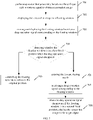
- the method may begin from block 201 to block 204.
- performing screenshot processing in response to receiving a screenshot instruction, on a first user interface to obtain a screenshot image.
- the screenshot instruction is configured to trigger the screenshot processing of the first user interface.
- the screenshot processing refers to a process of intercepting a user interface (such as the first user interface) and saving it as an image.
- the first user interface is a user interface displayed when the terminal receives the screenshot instruction, it can be a desktop interface or a user interface of any application in the terminal.
- the terminal when the terminal receives a call out instruction of a function interface, the function interface is displayed, which includes a screenshot function control. If the terminal receives a trigger signal acting on the screenshot function control, the terminal takes the trigger signal as the screenshot instruction. In another illustrated embodiment, if the terminal receives a specified operation signal, the terminal receives the screenshot instruction.
- the above specified operation signal is a multi-finger touch operation signal, that is, an operation signal generated by multiple fingers touching a terminal screen. In the embodiment of the present disclosure, only the specified operation signal is a three-finger slide signal as an example.
- the terminal After receiving the screenshot image, the terminal displays the floating window on the upper layer of the first user interface, the floating window is configured to display the screenshot image.
- a size of the floating window is usually small.
- the terminal after obtaining the screenshot image, the terminal reduces a size of the screenshot image to obtain a thumbnail image of the screenshot image, and the floating window is configured to display the thumbnail image of the screenshot image.
- the second user interface is an interface selected by the user for sharing the screenshot image, which can be a conversation interface with a target contact, a group conversation interface of a target group, or a content display interface.
- the conversation interface with the target contact is configured for a local account to talk with a target contact.
- the target contact can be any contact associated with the local account, which can be selected by the user.
- the local account refers to a user account logged in a client in a terminal.
- An association relationship between the local account and the target contact can be any one of friend relationship, follow relationship and listening relationship.
- the group conversation interface of the target group is configured for the local account to talk with other contact in the target group.
- the target group can be any group with at least two user accounts, and the above at least two user accounts include the local account.
- the content display interface is configured to display at least one of social content issued by a contact associated with the local account and social content issued by the local account.
- the above social content includes but is not limited to pictures, words, videos, music, Web links, etc.
- the second operation signal can be any one of long press operation signals, click operation signals, double click operation signals, slide operation signals, and drag operation signals. In the embodiment of the present disclosure, only the second operation signal is the drag operation signal as an example.
- the target object corresponding to the second user interface can be actually determined according to a type of the second user interface.
- the second user interface is the conversation interface with the target contact, and the target object is the target contact.
- the second user interface is the group conversation interface of the target group, and the target object is other contact in the target group except the local account.
- the second user interface is a social information sharing interface, and the target object can be all or part of the contacts associated with the local account, and the above part of the contacts can be customized by the terminal user.
- the terminal when the second user interface is the conversation interface with the target contact or the group conversation interface of the target group, the terminal can select an application and a target object to which the second user interface belongs based on the second operation signal, and then select confirmation sending.
- the terminal sends the screenshot image to a background server corresponding to the application to which the second user interface belongs, the background server transmits the screenshot image to the above target object. It should be noted that the selecting the application to which the second user interface belongs, the target object and selecting the confirmation sending are all completed in the background.
- the sharing the screenshot image to the target object corresponding to the second user interface can be realized as: displaying a social content editing interface; when receiving a content publishing instruction, sending target social content to the target server.
- the first content display interface is configured to display at least one of social content issued by the local account and social content issued by a contact associated with the local account.
- the social content editing interface is configured for the terminal user to edit the social content.
- the social content editing interface includes the screenshot image.
- the content publishing instruction is configured to trigger the terminal to publish the target social content.
- the target server is a background server corresponding to the application to which the second user interface belongs.
- the target server is configured to transmit the target social content to the target client.
- the target client is configured to display the target social content in a second content display interface.
- the target social content includes the screenshot image.
- the target social content may further include other content edited by the terminal user, such as text, facial expressions, and so on.
- the technical scheme provided by the embodiment of the disclosure present is to display a screenshot image in a floating window after obtaining the screenshot image by the screenshot processing, a terminal can switch a user interface displaying the screenshot image to be shared, in this process, the floating window is always the top window, the user can drag the floating window to share the screenshot image to other objects, which can reduce operations required to share the screenshot image to the other objects and improve the efficiency of image sharing.
- FIG. 3 illustrates a schematic flowchart of a screenshot image sharing method according to an embodiment of the present disclosure. The method may begin from block 301 to block 307.
- performing screenshot processing in response to receiving a screenshot instruction, on a first user interface to obtain a screenshot image.
- the floating window is configured to display the screenshot image.
- the third operation signal can be any one of click operation signals, double click operation signals, slide operation signals, long press operation signals and drag operation signals. In the embodiment of the present disclosure, only the third operation signal is the drag operation signal as an example.
- the terminal enters the image sharing mode based on the third operation signal.
- the floating window is always in the focus state, that is, the floating window is always the top window.
- the terminal sets a property WS_EX_NOACTIVATE for the floating window, based on the property WS_EX_NOACTIVATE, enables the floating window to maintain the focus state all the time in the image sharing mode.
- the floating window when the terminal is in the image sharing mode, the floating window is in a preset position in the terminal, and the preset position can be set by the terminal by default or customized by the user.
- the terminal when the terminal receives the drag operation signal acting on the floating window, when the drag operation signal disappears, if a drag track of the drag operation signal is greater than a first length, the terminal enters the image sharing mode. At this time, the floating window is fixed at the preset position in the terminal and always maintained in the focus state.
- the floating window when the floating window maintains the focus state, the floating window is always the top window.
- the terminal can perform other operations based on operation signals triggered by the user, such as switching the display user interface, performing screenshot processing, etc.
- FIG. 4 which illustrates a schematic view of an interface of sharing the screenshot image according to an embodiment of the present disclosure.
- a terminal displays a first floating window 42 configured to display a screenshot image 1 at a preset position 41.
- the terminal receives a three-finger slide operation signal acting on a current display interface, and then the terminal performs screenshot processing on the current display interface to obtain a screenshot image 2, and displays a second floating window 43 configured to display the screenshot image 1 at the preset position 41.
- the floating window is a top window.
- the second operation signal is the drag operation signal.
- the terminal When the terminal is in the image sharing mode, if it receives the drag operation signal acting on the floating window, it will control the floating window to display following the drag track of the drag operation signal.
- the terminal before receiving the drag operation signal, the terminal first receives a selecting signal corresponding to the screenshot image to be shared.
- the terminal can receive a selecting signal of at least two screenshot images from the plurality of screenshot images, in this case, when the terminal receives the drag operation signal of any selected floating window, the selected floating windows can be displayed following the drag track of the drag operation signal.
- marking a preset area in the second user interface in a process of controlling the floating window to display following the drag track of the drag operation signal.
- the above preset area refers to an area where the sharing operation takes effect, which can be set by the terminal by default or customized by the user.
- the terminal displays a sharing icon on the second user interface
- the preset area refers to the area including the sharing icon.
- the preset area is a rectangular area or a circular area centered on the shared icon, and the size of the rectangular area or the circular area is not limited in the embodiment of the present disclosure.
- FIG. 5 which illustrates a schematic view of an interface of sharing the screenshot image according to an embodiment of the present disclosure.
- the terminal displays the floating window 52 for displaying the screenshot image at the preset position 51.
- the terminal receives the drag operation signal acting on the floating window 52.
- the terminal displays the preset area 54 on the second user interface 53, the preset area 54 includes the sharing icon 55.
- sharing the screenshot image to the target object, in response to the floating window is in the preset area when the drag operation signal disappears.
- the screenshot image is shared to the target object.
- the drag operation signal disappears, if the floating window is in the preset area, the screenshot image is shared to the target object.
- the drag operation signal disappears, if the floating window 52 is in the preset area 54, the screenshot image is shared to the target object.
- the terminal after sharing the screenshot image to the target object, the terminal still displays the floating window at the preset position, the floating window includes the shared screenshot image.
- the terminal can switch to other user interface according to the user's operation signal, and continue to share the screenshot image based on the drag operation signal corresponding to the floating window, so as to realize multiple sharing of the screenshot image across applications, users and groups, further improve the efficiency of image sharing.
- FIG. 6 which illustrates a schematic view of an interface of sharing the screenshot image according to an embodiment of the present disclosure.
- the terminal displays a first user interface 61, and a user performs a three-finger slide operation on the first user interface 61.
- the terminal performs screenshot processing on the first user interface 61 to obtains a screenshot image, and displays the screenshot image in the floating window 62.
- the terminal receives a drag operation signal corresponding to the floating window 62
- the terminal enters an image sharing mode, and the terminal displays the floating window 62 at the preset position 63, the terminal switches and displays the second user interface 64 based on the operation signal triggered by the user.
- the terminal shares the screenshot image to the target object corresponding to the second user interface 64.
- the technical scheme provided by the embodiment of the present disclosure is to display the screenshot image in the floating window after obtaining the screenshot image by taking a screenshot, a terminal can switch a user interface displaying the screenshot image to be shared, in this process, the floating window is always the top window, the user can drag the floating window to share the screenshot image to other objects, which can reduce operations required to share the screenshot image to the other objects and improve the efficiency of image sharing.
- FIG. 7 illustrates a schematic flowchart of a screenshot image sharing method according to an embodiment of the present disclosure. The method may begin from block 701 to block 708.
- the floating window If the floating window is in the first fixed position when the drag operation signal disappears, entering an image sharing mode. If the floating window is not in the first fixed position when the drag operation signal disappears, the floating window returns to an original position.
- the terminal after the terminal displays the screenshot image in the floating window, it can save or share the screenshot image through shortcut operations of the floating window.
- the screenshot image sharing method further include: saving the screenshot image in response to a fourth operation signal acting on the floating window.
- the fourth operation signal can be any one of click operation signals, double click operation signals, slide operation signals, long press operation signals and drag operation signals.
- only the fourth operation signal is the slide operation signal as an example.
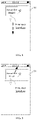
- FIG. 8 illustrates a schematic view of an interface of saving a screenshot image according to an embodiment of the present disclosure.
- the terminal displays the floating window 82 at the preset position 81, the floating window is configured to display the screenshot image.
- the terminal receives a downward slide operation signal corresponding to the floating window 82, it saves the screenshot image.
- the screenshot image sharing method may further include: deleting the screenshot image in response to a fifth operation signal acting on the floating window.
- the fifth operation signal can be any one of click operation signals, double click operation signals, slide operation signals, long press operation signals and drag operation signals.
- the fifth operation signal is the slide operation signal as an example.
- the fourth operation signal and the fifth operation signal are slide operation signals with different directions.
- the fourth operation signal is an operation signal with a sliding direction upward
- the fifth operation signal is an operation signal with a sliding direction downward.
- FIG. 9 which illustrates a schematic view of an interface of deleting a screenshot image according to an embodiment of the present disclosure.
- the terminal displays the floating window 92 at the preset position 91, the floating window is configured to display the screenshot image.
- the terminal receives an upward slide operation signal corresponding to the floating window 92, the screenshot image is deleted.
- the technical scheme provided by the embodiment of the present disclosure is to save the screenshot image through the downward slide operation signal of the floating window and delete the screenshot image through the upward slide operation signal of the floating window, which realizes the saving or deleting of the screenshot image through the quick operation of the floating window and improves the operation efficiency.
- FIG. 10 illustrates a schematic block diagram of a screenshot image sharing device according to an embodiment of the present disclosure.
- the screenshot image sharing device can be realized as all or part of the terminal through software, hardware or a combination of the software and hardware.
- the screenshot sharing device may include: a screenshot module 1001, a floating window displaying module 1002, an interface displaying module 1003, and an image sharing module 1004.
- the screenshot module 1001 is configured to perform screenshot processing, in response to receiving a screenshot instruction, on a first user interface to obtain a screenshot image.
- the floating window displaying module 1002 is configured to display a floating window on an upper layer of the first user interface, and the floating window being configured to display the screenshot image.
- the interface displaying module 1003 is configured to display, in response to a first operation signal for triggering a display of a second user interface, a second user interface, and the floating window being a top window in a process of switching the first user interface to the second user interface.
- the image sharing module 1004 is configured to share, in response to a second operation signal acting on the floating window, the screenshot image to a target object corresponding to the second user interface.
- the technical scheme provided by the embodiment of the disclosure present is to display a screenshot image in a floating window after obtaining the screenshot image by taking a screenshot, a terminal can switch a user interface displaying the screenshot image to be shared, in this process, the floating window is always the top window, the user can drag the floating window to share the screenshot image to other objects, which can reduce operations required to share the screenshot image to the other objects and improve the efficiency of image sharing.
- the second operation signal is a drag operation signal; and the image sharing module 1004 is configured to:
- the image sharing module 1004 is further configured to: mark the preset area in the second user interface, in a process of controlling the floating window to display following the drag track of the drag operation signal.
- the image sharing module 1004 is configured to: in response to the drag track of the drag operation signal is greater than a second length, display a sharing icon on the second user interface, and the preset area referring to an area containing the sharing icon.
- the device further includes a mode controlling module (not illustrated in FIG. 10 ).
- the mode controlling module is configured to control, in response to a third operation signal acting on the floating window, the terminal to enter an image sharing mode, and when the terminal is in the image sharing mode, the floating window being in a focus state.
- the second user interface is a first content display interface
- the first content display interface is configured to display at least one of social content issued by a local account and social content issued by a contact associated with the local account
- the local account is a user account currently logged in a client to which the second user interface belongs.
- the image sharing module 1004 is configured to:
- the device further includes an image storing module (not illustrated in FIG. 10 ).
- the image storing module is configured to save the screenshot image, in response to a fourth operation signal acting on the floating window.
- the device further includes an image deleting module (not illustrated in FIG. 10 ).
- the image deleting module is configured to delete the screenshot image, in response to a fifth operation signal acting on the floating window.
- the floating window displaying module 1002 is further configured to display the floating window at a preset position, and the floating window includes the shared screenshot image.
- the device provided by the above embodiment realizes its functions, only the division of the above-mentioned functional modules is illustrated.
- the above-mentioned functions can be allocated by different functional modules according to needs, that is, the internal structure of the device is divided into different functional modules to complete all or part of the functions described above.
- the device provided by the above embodiment and the method embodiment belong to the same concept, and the specific implementation process is detailed in the method embodiment, which will not be repeated here.
- FIG. 11 illustrates a schematic block diagram of a terminal according to an embodiment of the present disclosure.
- the terminal of the disclosure can include one or more components: a processer 1110 and a memory 1120.
- the processor 1110 may include one or more processing cores.
- the processor 1110 uses various interfaces and lines to connect to various parts of the entire terminal, and executes various functions of the terminal and processes data by running or executing instructions, programs, code sets or instruction sets stored in the memory 1120 and retrieving data stored in the memory 1120.
- the processor 1110 may be implemented by at least one hardware form of a Digital Signal Processing (DSP), a Field-Programmable Gate Array (FPGA) and a Programmable Logic Array (PLA).
- DSP Digital Signal Processing
- FPGA Field-Programmable Gate Array
- PDA Programmable Logic Array
- the processor 110 may be integrated with one or any combination of a Central Processing Unit (CPU) and a modem.
- the CPU mainly processes an operating system, applications and so on.
- the modem is configured to process wireless communication. It can be understood that the above modem may not be integrated into the processor 1110, but may be implemented by a chip alone.
- the processor 1110 is configured to, when the program instructions stored in the memory 1120 executed by the processer 1110, implement the screenshot image sharing method provided by the above method embodiments.
- the memory 1120 may include a Random-Access Memory (RAM) or may include a Read-Only Memory. In at least one alternative embodiment, the memory 1120 may include a nontransitory computer-readable storage medium. The memory 1120 may be configured to store instructions, programs, codes, code sets, or instruction sets. The memory 1120 may include a program storage region and a data storage region. The program storage region may store instructions for implementing the operating system, instructions for at least one function, instructions used to implement the following method embodiments, etc. The data storage region can store data created by the terminal in use.
- RAM Random-Access Memory
- the memory 1120 may include a Read-Only Memory.
- the memory 1120 may include a nontransitory computer-readable storage medium.
- the memory 1120 may be configured to store instructions, programs, codes, code sets, or instruction sets.
- the memory 1120 may include a program storage region and a data storage region.
- the program storage region may store instructions for implementing the operating system, instructions for at least one function, instructions used to implement the following
- the terminal can include more or less components, such as camera, etc., which is not limited in this embodiment.
- FIG. 11 does not constitute a limitation on the terminal 1100, and may include more or fewer components than illustrated in the figure, or combine some components, or adopt different component arrangements.
- a computer-readable storage medium is provided, the computer-readable storage medium is stored with at least one instruction, and the at least one instruction is loaded and executed by the processor of the terminal to realize the screenshot image sharing method in the above method embodiment.
- the computer-readable storage medium may be a hard disk, or a Read Only Memory (ROM), a Read Access Memory (RAM), magnetic tape, floppy disk, optical data storage device, etc.
- ROM Read Only Memory
- RAM Read Access Memory
- magnetic tape magnetic tape
- floppy disk magnetic tape
- optical data storage device etc.
- a computer program product is provided, which is used to realize the screenshot image sharing method provided in the above method embodiment when the computer program product is executed.
Landscapes
- Engineering & Computer Science (AREA)
- General Engineering & Computer Science (AREA)
- Theoretical Computer Science (AREA)
- Human Computer Interaction (AREA)
- Physics & Mathematics (AREA)
- General Physics & Mathematics (AREA)
- User Interface Of Digital Computer (AREA)
- Information Transfer Between Computers (AREA)
Abstract
Description
- The present disclosure claims priority to
Chinese patent application No. 202010136170.8, filed on March 02, 2020 - Embodiments of the present disclosure relate to the field of human-computer interaction technologies, and in particularly, to a screenshot image sharing method and a device, a terminal and a storage medium.
- At present, if a user wants to share a display content in a current display interface of a terminal to another user for viewing, he/she can first take a screenshot of the current display interface of the terminal, and then share a screenshot image.
- A sharing process of the screenshot image in the related art is as follows. Specifically, a terminal takes a screenshot of a current display interface to get a screenshot image. A user clicks to select the screenshot image, and then the terminal displays a sharing control. The user triggers the sharing control, the terminal correspondingly displays a list of applications with image sharing function, and then the user selects an application will be for sharing the screenshot image from the list of the applications. Afterwards, the terminal displays a contact list of the selected application, the user selects a shared object in the contact list, and then the terminal sends the screenshot image to the selected shared object.
- The present disclosure provides a screenshot image sharing method and a device, a terminal and a storage medium. Technical schemes are as follows.
- In a first aspect, an embodiment of the present disclosure provides a screenshot image sharing method, and the method includes:
- performing screenshot processing, in response to receiving a screenshot instruction, on a first user interface to obtain a screenshot image;
- displaying a floating window on an upper layer of the first user interface, and the floating window being configured to display the screenshot image;
- displaying, in response to a first operation signal for triggering a display of a second user interface, a second user interface, and the floating window being a top window in a process of switching the first user interface to the second user interface; and
- sharing, in response to a second operation signal acting on the floating window, the screenshot image to a target object corresponding to the second user interface.
- In a second aspect, an embodiment of the present disclosure provides a screenshot image sharing device, and the device includes:
- a screenshot module, configured to perform screenshot processing, in response to receiving a screenshot instruction, on a first user interface to obtain a screenshot image;
- a floating window displaying module, configured to display a floating window on an upper layer of the first user interface, and the floating window being configured to display the screenshot image;
- an interface displaying module, configured to display, in response to a first operation signal for triggering a display of a second user interface, a second user interface, and the floating window being kept as a top window in a process of switching the first user interface to the second user interface; and
- an image sharing module, configured to share, in response to a second operation signal acting on the floating window, the screenshot image to a target object corresponding to the second user interface.
- In a third aspect, an embodiment of the present disclosure provides a terminal, the terminal includes a processor and a memory; the memory is stored with at least one instruction, and the processor is configured to, when the at least one instruction is loaded and executed by the processor, implement the screenshot image sharing method according to the first aspect.
- In a fourth aspect, an embodiment of the present disclosure provides a computer-readable storage medium stored with at least one instruction therein, the at least one instruction is configured to be loaded and executed by a processor to implement the screenshot image sharing method according to the first aspect.
- In a fifth aspect, an embodiment of the present disclosure provides a computer program product, the computer program product or a computer program includes computer instructions stored in a computer-readable storage medium. A processor of a computer device is configured to read the computer instructions from the computer-readable storage medium and execute the computer instructions, therefore the computer device is configured to execute the above screenshot image sharing method.
- The beneficial effects of the technical schemes provided by the embodiments of the present disclosure can at least include:
by displaying a screenshot image in a floating window after obtaining the screenshot image by taking a screenshot, a terminal can switch a user interface displaying the screenshot image to be shared, in this process, the floating window is always the top window, the user can drag the floating window to share the screenshot image to other objects, which can reduce operations required to share the screenshot image to the other objects and improve the efficiency of image sharing. -
-
FIG. 1 illustrates a schematic diagram of an implementation environment according to an embodiment of the present disclosure. -
FIG. 2 illustrates a schematic flowchart of a screenshot image sharing method according to an embodiment of the present disclosure. -
FIG. 3 illustrates a schematic flowchart of a screenshot image sharing method according to another embodiment of the present disclosure. -
FIG. 4 to FIG. 6 illustrate schematic views of interfaces according to the embodiment of FG. 3. -
FIG. 7 illustrates a schematic flowchart of a screenshot image sharing method according to still another embodiment of the present disclosure. -
FIG. 8 illustrates a schematic view of an interface of saving a screenshot image according to an embodiment of the present disclosure. -
FIG. 9 illustrates a schematic view of an interface of deleting a screenshot image according to an embodiment of the present disclosure. -
FIG. 10 illustrates a schematic block diagram of a screenshot image sharing device according to an embodiment of the present disclosure. -
FIG. 11 illustrates a schematic block diagram of a terminal according to an embodiment of the present disclosure. - In order to make the purposes, technical schemes, and advantages of the present disclosure clearer, embodiments of the present disclosure will be described below in further detail in conjunction with the accompanying drawings.
- Please refer to
FIG. 1 , which illustrates an implementation environment according to an embodiment of the present disclosure. The implementation environment may include: afirst terminal 11, asecond terminal 12, and abackground server 13. - The
first terminal 11 has a screenshot function and an image sending function. Thefirst terminal 11 can be a smart phone, tablet computer, personal computer, etc. In at least one alternative embodiment, a sender client is installed in thefirst terminal 11, and the sender client realizes the above image sharing function. - The
second terminal 12 has an image receiving function. Thesecond terminal 12 may be a smart phone, tablet computer, personal computer, etc. In at least one alternative embodiment, a receiver client is installed in thesecond terminal 12, and the receiver client realizes the above image sharing function. - The sender client and the receiver client can be clients with different functions. For example, the sender client has a sending image function and the receiver client has a receiving image function. The above sender client and receiver client can also be clients with the same function. For example, both sender client and receiver client are clients with image sending and receiving function. When one of the clients is used to realize the image sending function, the one of the clients is the sender client; when one of the clients is used to realize the image receiving function, and the one of the clients is the receiver client.
- The
background server 13 is a background server corresponding to the sender client and the receiver client. Thebackground server 13 can be a server, a server cluster, or a cloud computing service center. - A connection is established between the
first terminal 11 and thebackground server 13 through a wired network or a wireless network. A connection is established between thebackground server 13 and thesecond terminal 12 through a wired network or a wireless network. - In the related art, operations required to share a screenshot image to other contacts are cumbersome, and the efficiency of the image sharing is low. Based on this, an embodiment of the present disclosure provides a screen image sharing method, by displaying a screenshot image in a floating window after obtaining the screenshot image by taking a screenshot, a terminal can switch a user interface displaying the screenshot image to be shared, in this process, the floating window is always the top window, the user can drag the floating window to share the screenshot image to other objects, which can reduce operations required to share the screenshot image to the other objects and improve the efficiency of image sharing.
- Please refer to
FIG. 2 , which illustrates a schematic flowchart of a screenshot image sharing method according to an embodiment of the present disclosure, and the screenshot image sharing method is implemented by the first terminal illustrated inFIG. 1 . The method may begin fromblock 201 toblock 204. - At the
block 201, performing screenshot processing, in response to receiving a screenshot instruction, on a first user interface to obtain a screenshot image. - The screenshot instruction is configured to trigger the screenshot processing of the first user interface. The screenshot processing refers to a process of intercepting a user interface (such as the first user interface) and saving it as an image. The first user interface is a user interface displayed when the terminal receives the screenshot instruction, it can be a desktop interface or a user interface of any application in the terminal.
- In an illustrated embodiment, when the terminal receives a call out instruction of a function interface, the function interface is displayed, which includes a screenshot function control. If the terminal receives a trigger signal acting on the screenshot function control, the terminal takes the trigger signal as the screenshot instruction. In another illustrated embodiment, if the terminal receives a specified operation signal, the terminal receives the screenshot instruction. In at least one alternative embodiment, the above specified operation signal is a multi-finger touch operation signal, that is, an operation signal generated by multiple fingers touching a terminal screen. In the embodiment of the present disclosure, only the specified operation signal is a three-finger slide signal as an example.
- At the
block 202, displaying a floating window on an upper layer of the first user interface. - After receiving the screenshot image, the terminal displays the floating window on the upper layer of the first user interface, the floating window is configured to display the screenshot image.
- In order to avoid the floating window blocking the user interface currently displayed on the terminal, a size of the floating window is usually small. In at least one alternative embodiment, after obtaining the screenshot image, the terminal reduces a size of the screenshot image to obtain a thumbnail image of the screenshot image, and the floating window is configured to display the thumbnail image of the screenshot image.
- At the
block 203, displaying, in response to a first operation signal for triggering a display of a second user interface, a second user interface. - The second user interface is an interface selected by the user for sharing the screenshot image, which can be a conversation interface with a target contact, a group conversation interface of a target group, or a content display interface.
- The conversation interface with the target contact is configured for a local account to talk with a target contact. The target contact can be any contact associated with the local account, which can be selected by the user. The local account refers to a user account logged in a client in a terminal. An association relationship between the local account and the target contact can be any one of friend relationship, follow relationship and listening relationship. The group conversation interface of the target group is configured for the local account to talk with other contact in the target group.
- The target group can be any group with at least two user accounts, and the above at least two user accounts include the local account. The content display interface is configured to display at least one of social content issued by a contact associated with the local account and social content issued by the local account. The above social content includes but is not limited to pictures, words, videos, music, Web links, etc.
- At the
block 204, sharing, in response to a second operation signal acting on the floating window, the screenshot image to a target object corresponding to the second user interface. - The second operation signal can be any one of long press operation signals, click operation signals, double click operation signals, slide operation signals, and drag operation signals. In the embodiment of the present disclosure, only the second operation signal is the drag operation signal as an example.
- The target object corresponding to the second user interface can be actually determined according to a type of the second user interface. In an alternative embodiment, the second user interface is the conversation interface with the target contact, and the target object is the target contact. In another alternative embodiment, the second user interface is the group conversation interface of the target group, and the target object is other contact in the target group except the local account. In another alternative embodiment, the second user interface is a social information sharing interface, and the target object can be all or part of the contacts associated with the local account, and the above part of the contacts can be customized by the terminal user.
- In an alternative embodiment, when the second user interface is the conversation interface with the target contact or the group conversation interface of the target group, the terminal can select an application and a target object to which the second user interface belongs based on the second operation signal, and then select confirmation sending. The terminal sends the screenshot image to a background server corresponding to the application to which the second user interface belongs, the background server transmits the screenshot image to the above target object. It should be noted that the selecting the application to which the second user interface belongs, the target object and selecting the confirmation sending are all completed in the background.
- In another alternative embodiment, when the second user interface is a first content display interface, the sharing the screenshot image to the target object corresponding to the second user interface can be realized as: displaying a social content editing interface; when receiving a content publishing instruction, sending target social content to the target server.
- The first content display interface is configured to display at least one of social content issued by the local account and social content issued by a contact associated with the local account. The social content editing interface is configured for the terminal user to edit the social content. In the embodiment of the present disclosure, the social content editing interface includes the screenshot image. The content publishing instruction is configured to trigger the terminal to publish the target social content. The target server is a background server corresponding to the application to which the second user interface belongs. The target server is configured to transmit the target social content to the target client. The target client is configured to display the target social content in a second content display interface. The target social content includes the screenshot image. In at least one alternative embodiment, the target social content may further include other content edited by the terminal user, such as text, facial expressions, and so on.
- To sum up, the technical scheme provided by the embodiment of the disclosure present is to display a screenshot image in a floating window after obtaining the screenshot image by the screenshot processing, a terminal can switch a user interface displaying the screenshot image to be shared, in this process, the floating window is always the top window, the user can drag the floating window to share the screenshot image to other objects, which can reduce operations required to share the screenshot image to the other objects and improve the efficiency of image sharing.
- Please refer to
FIG. 3 , which illustrates a schematic flowchart of a screenshot image sharing method according to an embodiment of the present disclosure. The method may begin fromblock 301 to block 307. - At the
block 301, performing screenshot processing, in response to receiving a screenshot instruction, on a first user interface to obtain a screenshot image. - At the
block 302, displaying a floating window on an upper layer of the first user interface. - The floating window is configured to display the screenshot image.
- At the
block 303, controlling, in response to a third operation signal acting on the floating window, the terminal to enter an image sharing mode. - The third operation signal can be any one of click operation signals, double click operation signals, slide operation signals, long press operation signals and drag operation signals. In the embodiment of the present disclosure, only the third operation signal is the drag operation signal as an example.
- The terminal enters the image sharing mode based on the third operation signal. In this mode, the floating window is always in the focus state, that is, the floating window is always the top window. In at least one alternative embodiment, the terminal sets a property WS_EX_NOACTIVATE for the floating window, based on the property WS_EX_NOACTIVATE, enables the floating window to maintain the focus state all the time in the image sharing mode.
- In at least one alternative embodiment, when the terminal is in the image sharing mode, the floating window is in a preset position in the terminal, and the preset position can be set by the terminal by default or customized by the user. In the embodiment of the present disclosure, when the terminal receives the drag operation signal acting on the floating window, when the drag operation signal disappears, if a drag track of the drag operation signal is greater than a first length, the terminal enters the image sharing mode. At this time, the floating window is fixed at the preset position in the terminal and always maintained in the focus state.
- It should be noted that when the floating window maintains the focus state, the floating window is always the top window. On the premise that the user can always interact with the floating window, the terminal can perform other operations based on operation signals triggered by the user, such as switching the display user interface, performing screenshot processing, etc.
- Referring to
FIG. 4 , which illustrates a schematic view of an interface of sharing the screenshot image according to an embodiment of the present disclosure. A terminal displays a first floatingwindow 42 configured to display ascreenshot image 1 at apreset position 41. The terminal receives a three-finger slide operation signal acting on a current display interface, and then the terminal performs screenshot processing on the current display interface to obtain ascreenshot image 2, and displays a second floatingwindow 43 configured to display thescreenshot image 1 at thepreset position 41. - At the
block 304, displaying, in response to a first operation signal for triggering a display of a second user interface, a second user interface. - In a process of switching the first user interface to the second user interface, the floating window is a top window.
- At the
block 305, controlling, in response to a drag operation signal acting on the floating window, the floating window to display following a drag track of the drag operation signal. - In the embodiment of the present application, the second operation signal is the drag operation signal. When the terminal is in the image sharing mode, if it receives the drag operation signal acting on the floating window, it will control the floating window to display following the drag track of the drag operation signal.
- In at least one alternative embodiment, before receiving the drag operation signal, the terminal first receives a selecting signal corresponding to the screenshot image to be shared. When there are a plurality of screenshot images, the terminal can receive a selecting signal of at least two screenshot images from the plurality of screenshot images, in this case, when the terminal receives the drag operation signal of any selected floating window, the selected floating windows can be displayed following the drag track of the drag operation signal.
- At the
block 306, marking a preset area in the second user interface, in a process of controlling the floating window to display following the drag track of the drag operation signal. - The above preset area refers to an area where the sharing operation takes effect, which can be set by the terminal by default or customized by the user. In at least one alternative embodiment, when the drag track of the drag operation signal exceeds a second length, the terminal displays a sharing icon on the second user interface, and the preset area refers to the area including the sharing icon. For example, the preset area is a rectangular area or a circular area centered on the shared icon, and the size of the rectangular area or the circular area is not limited in the embodiment of the present disclosure.
- Referring to
FIG. 5 , which illustrates a schematic view of an interface of sharing the screenshot image according to an embodiment of the present disclosure. The terminal displays the floatingwindow 52 for displaying the screenshot image at thepreset position 51. The terminal receives the drag operation signal acting on the floatingwindow 52. During the drag process, the terminal displays thepreset area 54 on thesecond user interface 53, thepreset area 54 includes thesharing icon 55. - At the
block 307, sharing the screenshot image to the target object, in response to the floating window is in the preset area when the drag operation signal disappears. - In the embodiment of the present disclosure, when the drag operation signal disappears, if the floating window is in the preset area, the screenshot image is shared to the target object. Referring to
FIG. 5 , when the drag operation signal disappears, if the floatingwindow 52 is in the presetarea 54, the screenshot image is shared to the target object. - In at least one alternative embodiment, after sharing the screenshot image to the target object, the terminal still displays the floating window at the preset position, the floating window includes the shared screenshot image. The terminal can switch to other user interface according to the user's operation signal, and continue to share the screenshot image based on the drag operation signal corresponding to the floating window, so as to realize multiple sharing of the screenshot image across applications, users and groups, further improve the efficiency of image sharing.
- Referring to
FIG. 6 , which illustrates a schematic view of an interface of sharing the screenshot image according to an embodiment of the present disclosure. The terminal displays afirst user interface 61, and a user performs a three-finger slide operation on thefirst user interface 61. The terminal performs screenshot processing on thefirst user interface 61 to obtains a screenshot image, and displays the screenshot image in the floatingwindow 62. When the terminal receives a drag operation signal corresponding to the floatingwindow 62, the terminal enters an image sharing mode, and the terminal displays the floatingwindow 62 at thepreset position 63, the terminal switches and displays thesecond user interface 64 based on the operation signal triggered by the user. When receiving the drag operation signal corresponding to the floatingwindow 62, the terminal shares the screenshot image to the target object corresponding to thesecond user interface 64. - To sum up, the technical scheme provided by the embodiment of the present disclosure is to display the screenshot image in the floating window after obtaining the screenshot image by taking a screenshot, a terminal can switch a user interface displaying the screenshot image to be shared, in this process, the floating window is always the top window, the user can drag the floating window to share the screenshot image to other objects, which can reduce operations required to share the screenshot image to the other objects and improve the efficiency of image sharing.
- In at least one alternative embodiment, with reference to
FIG. 7 , which illustrates a schematic flowchart of a screenshot image sharing method according to an embodiment of the present disclosure. The method may begin fromblock 701 to block 708. - At the
block 701, performing screenshot processing based on a three-finger slide operation signal to obtain a screenshot image. - At the
block 702, displaying the screenshot image in a floating window. - At the
block 703, moving and displaying the floating window based on a drag operation signal corresponding to the floating window. - At the
block 704, detecting whether the floating window is in a first fixed position when the drag operation signal disappears. - If the floating window is in the first fixed position when the drag operation signal disappears, entering an image sharing mode. If the floating window is not in the first fixed position when the drag operation signal disappears, the floating window returns to an original position.
- At the
block 705, entering the instant sharing mode. - At the
block 706, controlling the floating window to return to the original position. - At the
block 707, receiving a drag operation signal corresponding to the floating window. - At the
block 708, when the drag operation signal disappears, if the floating window is in a second fixed position, sharing the screenshot image to the target object. - When the drag operation signal disappears, if the floating window is not in the second fixed position, the sharing the screenshot image to the target object is not performed.
- In at least one alternative embodiment, after the terminal displays the screenshot image in the floating window, it can save or share the screenshot image through shortcut operations of the floating window.
- In an alternative embodiment provided based on the embodiment illustrated in
FIG. 2 orFIG. 4 , after the floating window is displayed on the upper layer of the first user interface, the screenshot image sharing method further include: saving the screenshot image in response to a fourth operation signal acting on the floating window. - The fourth operation signal can be any one of click operation signals, double click operation signals, slide operation signals, long press operation signals and drag operation signals. In the embodiment of the present disclosure, only the fourth operation signal is the slide operation signal as an example.
- After the terminal saves the screenshot image, the user can view the screenshot image in a photo album. Referring to
FIG. 8 , which illustrates a schematic view of an interface of saving a screenshot image according to an embodiment of the present disclosure. The terminal displays the floatingwindow 82 at thepreset position 81, the floating window is configured to display the screenshot image. When the terminal receives a downward slide operation signal corresponding to the floatingwindow 82, it saves the screenshot image. - In an alternative embodiment provided based on the embodiment illustrated in
FIG. 3 orFIG. 5 , after the floating window is displayed on the upper layer of the first user interface, the screenshot image sharing method may further include: deleting the screenshot image in response to a fifth operation signal acting on the floating window. - The fifth operation signal can be any one of click operation signals, double click operation signals, slide operation signals, long press operation signals and drag operation signals. In the embodiment of the present disclosure, only the fifth operation signal is the slide operation signal as an example. It should be noted that the fourth operation signal and the fifth operation signal are slide operation signals with different directions. For example, the fourth operation signal is an operation signal with a sliding direction upward, and the fifth operation signal is an operation signal with a sliding direction downward.
- It should be noted that when there is no floating window at the preset position, the terminal exits the image sharing mode.
- Referring to
FIG. 9 , which illustrates a schematic view of an interface of deleting a screenshot image according to an embodiment of the present disclosure. The terminal displays the floatingwindow 92 at thepreset position 91, the floating window is configured to display the screenshot image. When the terminal receives an upward slide operation signal corresponding to the floatingwindow 92, the screenshot image is deleted. - To sum up, the technical scheme provided by the embodiment of the present disclosure is to save the screenshot image through the downward slide operation signal of the floating window and delete the screenshot image through the upward slide operation signal of the floating window, which realizes the saving or deleting of the screenshot image through the quick operation of the floating window and improves the operation efficiency.
- The following is an embodiment of a device of the present disclosure. For the part not described in detail in the embodiment of the device, it can refer to the technical details disclosed in the above method embodiments.
- Please refer to
FIG. 10 , which illustrates a schematic block diagram of a screenshot image sharing device according to an embodiment of the present disclosure. The screenshot image sharing device can be realized as all or part of the terminal through software, hardware or a combination of the software and hardware. The screenshot sharing device may include: ascreenshot module 1001, a floatingwindow displaying module 1002, aninterface displaying module 1003, and animage sharing module 1004. - The
screenshot module 1001 is configured to perform screenshot processing, in response to receiving a screenshot instruction, on a first user interface to obtain a screenshot image. - The floating
window displaying module 1002 is configured to display a floating window on an upper layer of the first user interface, and the floating window being configured to display the screenshot image. - The
interface displaying module 1003 is configured to display, in response to a first operation signal for triggering a display of a second user interface, a second user interface, and the floating window being a top window in a process of switching the first user interface to the second user interface. - The
image sharing module 1004 is configured to share, in response to a second operation signal acting on the floating window, the screenshot image to a target object corresponding to the second user interface. - To sum up, the technical scheme provided by the embodiment of the disclosure present is to display a screenshot image in a floating window after obtaining the screenshot image by taking a screenshot, a terminal can switch a user interface displaying the screenshot image to be shared, in this process, the floating window is always the top window, the user can drag the floating window to share the screenshot image to other objects, which can reduce operations required to share the screenshot image to the other objects and improve the efficiency of image sharing.
- In an alternative embodiment provided based on the embodiment illustrated in
FIG. 10 , the second operation signal is a drag operation signal; and theimage sharing module 1004 is configured to: - control the floating window to display following a drag track of the drag operation signal; and
- share the screenshot image to the target object, in response to the floating window is in a preset area when the drag operation signal disappears.
- In at least one alternative embodiment, the
image sharing module 1004 is further configured to:
mark the preset area in the second user interface, in a process of controlling the floating window to display following the drag track of the drag operation signal. - In at least one alternative embodiment, the
image sharing module 1004 is configured to: in response to the drag track of the drag operation signal is greater than a second length, display a sharing icon on the second user interface, and the preset area referring to an area containing the sharing icon. - In at least one alternative embodiment provided based on the embodiment illustrated in
FIG. 10 , the device further includes a mode controlling module (not illustrated inFIG. 10 ). - The mode controlling module is configured to control, in response to a third operation signal acting on the floating window, the terminal to enter an image sharing mode, and when the terminal is in the image sharing mode, the floating window being in a focus state.
- In at least one alternative embodiment provided based on the embodiment illustrated in
FIG. 10 , the second user interface is a first content display interface, the first content display interface is configured to display at least one of social content issued by a local account and social content issued by a contact associated with the local account, and the local account is a user account currently logged in a client to which the second user interface belongs. - The
image sharing module 1004 is configured to: - display a social content editing interface, and the social content editing interface including the screenshot image; and
- send, in response to receiving a content publishing instruction, target social content to a target server, the target server being configured to transmit the target social content to a target client, the target client being configured to display the target social content on a second content display interface, and the target social content comprising the screenshot image.
- In at least one alternative embodiment provided based on the embodiment illustrated in
FIG. 10 , the device further includes an image storing module (not illustrated inFIG. 10 ). - The image storing module is configured to save the screenshot image, in response to a fourth operation signal acting on the floating window.
- In at least one alternative embodiment provided based on the embodiment illustrated in
FIG. 10 , the device further includes an image deleting module (not illustrated inFIG. 10 ). - The image deleting module is configured to delete the screenshot image, in response to a fifth operation signal acting on the floating window.
- In at least one alternative embodiment provided based on the embodiment illustrated in
FIG. 10 , the floatingwindow displaying module 1002 is further configured to display the floating window at a preset position, and the floating window includes the shared screenshot image. - It should be noted that when the device provided by the above embodiment realizes its functions, only the division of the above-mentioned functional modules is illustrated. In practical application, the above-mentioned functions can be allocated by different functional modules according to needs, that is, the internal structure of the device is divided into different functional modules to complete all or part of the functions described above. In addition, the device provided by the above embodiment and the method embodiment belong to the same concept, and the specific implementation process is detailed in the method embodiment, which will not be repeated here.
- Please refer to
FIG. 11 , which illustrates a schematic block diagram of a terminal according to an embodiment of the present disclosure. The terminal of the disclosure can include one or more components: aprocesser 1110 and amemory 1120. - The
processor 1110 may include one or more processing cores. Theprocessor 1110 uses various interfaces and lines to connect to various parts of the entire terminal, and executes various functions of the terminal and processes data by running or executing instructions, programs, code sets or instruction sets stored in thememory 1120 and retrieving data stored in thememory 1120. In at least one illustrated embodiment, theprocessor 1110 may be implemented by at least one hardware form of a Digital Signal Processing (DSP), a Field-Programmable Gate Array (FPGA) and a Programmable Logic Array (PLA). The processor 110 may be integrated with one or any combination of a Central Processing Unit (CPU) and a modem. The CPU mainly processes an operating system, applications and so on. The modem is configured to process wireless communication. It can be understood that the above modem may not be integrated into theprocessor 1110, but may be implemented by a chip alone. - In at least one alternative embodiment, the
processor 1110 is configured to, when the program instructions stored in thememory 1120 executed by theprocesser 1110, implement the screenshot image sharing method provided by the above method embodiments. - The
memory 1120 may include a Random-Access Memory (RAM) or may include a Read-Only Memory. In at least one alternative embodiment, thememory 1120 may include a nontransitory computer-readable storage medium. Thememory 1120 may be configured to store instructions, programs, codes, code sets, or instruction sets. Thememory 1120 may include a program storage region and a data storage region. The program storage region may store instructions for implementing the operating system, instructions for at least one function, instructions used to implement the following method embodiments, etc. The data storage region can store data created by the terminal in use. - The structure of the above terminal is only schematic. In actual implementation, the terminal can include more or less components, such as camera, etc., which is not limited in this embodiment.
- Those skilled in the art can understand that the structure illustrated in
FIG. 11 does not constitute a limitation on the terminal 1100, and may include more or fewer components than illustrated in the figure, or combine some components, or adopt different component arrangements. - In at least one alternative embodiment, a computer-readable storage medium is provided, the computer-readable storage medium is stored with at least one instruction, and the at least one instruction is loaded and executed by the processor of the terminal to realize the screenshot image sharing method in the above method embodiment.
- In at least one alternative embodiment, the computer-readable storage medium may be a hard disk, or a Read Only Memory (ROM), a Read Access Memory (RAM), magnetic tape, floppy disk, optical data storage device, etc.
- In at least one alternative embodiment, a computer program product is provided, which is used to realize the screenshot image sharing method provided in the above method embodiment when the computer program product is executed.
- It should be understood that "multiple" mentioned in this article refers to two or more. "And/or" describes an association relationship of associated objects, indicating that there can be three kinds of relationships, for example, A and/or B, which can indicate that there are three situations: A alone, A and B at the same time, and B alone. The character "/" generally indicates that the front and rear associated objects are an "or" relationship. The words "first", "second" and similar words used in this article do not mean any order, amount or importance, but are only used to distinguish different components.
- The above serial numbers of the embodiments of the present disclosure are only for description and does not represent the advantages and disadvantages of the embodiments.
- The above are only exemplary embodiments of present disclosure and are not intended to limit the present disclosure. Any amendment, equivalent replacement, improvement, etc. made within the spirit and principles of the present disclosure should be included in the scope of protection of the present disclosure.
Claims (20)
- A screenshot image sharing method, comprising:performing screenshot processing, in response to receiving a screenshot instruction, on a first user interface to obtain a screenshot image;displaying a floating window on an upper layer of the first user interface, and the floating window being configured to display the screenshot image;displaying, in response to a first operation signal for triggering a display of a second user interface, the second user interface, and the floating window being a top window in a process of switching the first user interface to the second user interface; andsharing, in response to a second operation signal acting on the floating window, the screenshot image to a target object corresponding to the second user interface.
- The method according to claim 1, wherein the second operation signal is a drag operation signal, and the sharing, in response to a second operation signal acting on the floating window, the screenshot image to a target object corresponding to the second user interface, comprises:controlling the floating window to display following a drag track of the drag operation signal; andsharing the screenshot image to the target object, in response to the floating window is in a preset area when the drag operation signal disappears.
- The method according to claim 2, further comprising:
marking the preset area in the second user interface, in a process of controlling the floating window to display following the drag track of the drag operation signal. - The method according to claim 3, wherein the marking the preset area in the second user interface, comprises:
displaying, in response to the drag track of the drag operation signal is greater than a second length, a sharing icon on the second user interface, wherein the preset area refers to an area containing the sharing icon. - The method according to claim 1, wherein after the displaying a floating window on an upper layer of the first user interface, the method further comprises:
controlling, in response to a third operation signal acting on the floating window, a terminal to enter an image sharing mode, and the floating window being in a focus state when the terminal is in the image sharing mode. - The method according to claim 1, wherein the second user interface is a first content display interface, the first content display interface is configured to display at least one of social content issued by a local account and social content issued by a contact associated with the local account, and the local account is a user account currently logged in a client to which the second user interface belongs;
wherein the sharing the screenshot image to a target object corresponding to the second user interface, comprises:displaying a social content editing interface, and the social content editing interface comprising the screenshot image; andsending, in response to receiving a content publishing instruction, target social content to a target server, the target server being configured to transmit the target social content to a target client, the target client being configured to display the target social content on a second content display interface, and the target social content comprising the screenshot image. - The method according to any one of claims 1-6, wherein after the displaying a floating window on an upper layer of the first user interface, the method further comprises:
saving the screenshot image in response to a fourth operation signal acting on the floating window. - The method according to any one of claims 1-6, wherein after the displaying a floating window on an upper layer of the first user interface, the method further comprises:
deleting the screenshot image in response to a fifth operation signal acting on the floating window. - The method according to any one of claims 1-6, wherein after the sharing the screenshot image to a target object corresponding to the second user interface, the method further comprises:
displaying the floating window at a preset position, and the floating window comprising the shared screenshot image. - A screenshot image sharing device, comprising:a screenshot module, configured to perform screenshot processing, in response to receiving a screenshot instruction, on a first user interface to obtain a screenshot image;a floating window displaying module, configured to display a floating window on an upper layer of the first user interface, wherein the floating window is configured to display the screenshot image;an interface displaying module, configured to display, in response to a first operation signal for triggering a display of a second user interface, the second user interface, wherein the floating window is kept as a top window in a process of switching the first user interface to the second user interface; andan image sharing module, configured to share, in response to a second operation signal acting on the floating window, the screenshot image to a target object corresponding to the second user interface.
- The device according to claim 10, wherein the second operation signal is a drag operation signal, and the image sharing module is configured to:control the floating window to display following a drag track of the drag operation signal; andshare the screenshot image to the target object, in response to the floating window is in a preset area when the drag operation signal disappears.
- The device according to claim 11, wherein the image sharing module is further configured to:
mark the preset area in the second user interface, in a process of controlling the floating window to display following the drag track of the drag operation signal. - The device according to claim 12, wherein the image sharing module is configured to:
display, in response to the drag track of the drag operation signal is greater than a second length, a sharing icon on the second user interface, wherein the preset area refers to an area containing the sharing icon. - The device according to claim 10, wherein the device further comprises:
a mode controlling module, configured to control, in response to a third operation signal acting on the floating window, a terminal to enter an image sharing mode, wherein the floating window is in a focus state when the terminal is in the image sharing mode. - The device according to claim 10, wherein the second user interface is a first content display interface, the first content display interface is configured to display at least one of social content issued by a local account and social content issued by a contact associated with the local account, and the local account is a user account currently logged in a client to which the second user interface belongs;
wherein the image sharing module is configured to:display a social content editing interface, wherein the social content editing interface comprises the screenshot image; andsend, in response to receiving a content publishing instruction, target social content to a target server, wherein the target server is configured to transmit the target social content to a target client, the target client is configured to display the target social content on a second content display interface, and the target social content comprises the screenshot image. - The device according to any one of claims 10-15, wherein the device further comprises:
an image storing module, configured to save the screenshot image in response to a fourth operation signal acting on the floating window. - The device according to any one of claims 10-15, wherein the device further comprises:
an image deleting module, configured to delete the screenshot image in response to a fifth operation signal acting on the floating window. - The device according to any one of claims 10-15, wherein the floating window displaying module is further configured to display the floating window at a preset position, wherein the floating window comprises the shared screenshot image.
- A terminal comprising: a processor and a memory; wherein the memory is stored with at least one instruction, and the processor is configured to, when the at least one instruction is loaded and executed by the processor, implement the screenshot image sharing method according to any one of claims 1-9.
- A computer-readable storage medium stored with at least one instruction therein, wherein the at least one instruction is configured to be loaded and executed by a processor to implement the screenshot image sharing method according to any one of claims 1-9.
Applications Claiming Priority (2)
| Application Number | Priority Date | Filing Date | Title |
|---|---|---|---|
| CN202010136170.8A CN111290675B (en) | 2020-03-02 | 2020-03-02 | Screen capture image sharing method, device, terminal and storage medium |
| PCT/CN2021/074227 WO2021175052A1 (en) | 2020-03-02 | 2021-01-28 | Screenshot image sharing method and device, terminal and storage medium |
Publications (3)
| Publication Number | Publication Date |
|---|---|
| EP4113263A1 true EP4113263A1 (en) | 2023-01-04 |
| EP4113263A4 EP4113263A4 (en) | 2023-08-23 |
| EP4113263B1 EP4113263B1 (en) | 2025-12-24 |
Family
ID=71022959
Family Applications (1)
| Application Number | Title | Priority Date | Filing Date |
|---|---|---|---|
| EP21765069.6A Active EP4113263B1 (en) | 2020-03-02 | 2021-01-28 | Screenshot image sharing method, terminal and storage medium |
Country Status (4)
| Country | Link |
|---|---|
| US (1) | US20220413671A1 (en) |
| EP (1) | EP4113263B1 (en) |
| CN (1) | CN111290675B (en) |
| WO (1) | WO2021175052A1 (en) |
Families Citing this family (35)
| Publication number | Priority date | Publication date | Assignee | Title |
|---|---|---|---|---|
| CN120765353A (en) * | 2019-02-25 | 2025-10-10 | 福特全球技术公司 | Method and system for itinerary invitation |
| CN109933767B (en) * | 2019-03-15 | 2023-11-03 | Oppo(重庆)智能科技有限公司 | Image editing method, electronic device and device with storage function |
| CN111290675B (en) * | 2020-03-02 | 2023-02-17 | Oppo广东移动通信有限公司 | Screen capture image sharing method, device, terminal and storage medium |
| CN114756151B (en) * | 2020-12-25 | 2024-11-22 | 华为技术有限公司 | Interface element display method and device |
| CN114281225B (en) | 2020-09-28 | 2025-12-16 | 华为技术有限公司 | Window display method and device |
| CN114115629B (en) | 2020-08-26 | 2025-01-10 | 华为技术有限公司 | Interface display method and device |
| CN111766997A (en) * | 2020-07-07 | 2020-10-13 | 网易(杭州)网络有限公司 | Screenshot sharing method and device, storage medium and electronic equipment |
| CN117971104A (en) | 2020-07-29 | 2024-05-03 | 华为技术有限公司 | A cross-device object dragging method and device |
| CN114764298B (en) | 2020-07-29 | 2023-03-03 | 华为技术有限公司 | Cross-device object dragging method and device |
| CN112162870B (en) * | 2020-09-25 | 2024-07-26 | 深圳传音控股股份有限公司 | File processing operation method, mobile terminal and storage medium |
| CN112162812B (en) * | 2020-09-27 | 2024-05-31 | 维沃移动通信有限公司 | Object adding method and device |
| CN112333326B (en) * | 2020-10-26 | 2022-03-18 | 努比亚技术有限公司 | Screen projection display control method and device and computer readable storage medium |
| CN114518919A (en) | 2020-11-19 | 2022-05-20 | Oppo广东移动通信有限公司 | Content sharing method and device, equipment and storage medium |
| CN114911400A (en) * | 2021-02-08 | 2022-08-16 | 花瓣云科技有限公司 | Method for sharing pictures and electronic equipment |
| CN112954111A (en) * | 2021-02-09 | 2021-06-11 | 维沃移动通信有限公司 | Method and device for sharing pictures, electronic equipment and storage medium |
| CN113325981B (en) * | 2021-06-07 | 2023-09-01 | 上海传英信息技术有限公司 | Processing method, mobile terminal and storage medium |
| CN113810608B (en) * | 2021-09-14 | 2022-11-25 | 荣耀终端有限公司 | Shooting method, electronic equipment and storage medium |
| CN113835601A (en) * | 2021-09-26 | 2021-12-24 | 维沃移动通信有限公司 | Screenshot management method and device |
| CN114253448A (en) * | 2021-11-15 | 2022-03-29 | 珠海格力电器股份有限公司 | Screen capture processing method, electronic equipment and storage medium |
| CN116450012A (en) * | 2022-01-10 | 2023-07-18 | 荣耀终端有限公司 | Control method of electronic equipment and electronic equipment |
| CN114510166B (en) * | 2022-04-01 | 2022-08-26 | 深圳传音控股股份有限公司 | Operation method, intelligent terminal and storage medium |
| CN115237290A (en) * | 2022-07-11 | 2022-10-25 | 北京达佳互联信息技术有限公司 | Method, Apparatus, Equipment and Storage Medium for Determining Resource Disclosure Scope |
| CN115185422A (en) * | 2022-07-11 | 2022-10-14 | 深圳壹账通智能科技有限公司 | Method, device, medium and electronic equipment for displaying screenshot in terminal screen |
| CN115933954B (en) * | 2022-07-25 | 2025-09-23 | Oppo广东移动通信有限公司 | Screen capture method, device, electronic device, and storage medium |
| CN116048351B (en) * | 2022-07-27 | 2024-08-27 | 荣耀终端有限公司 | Screen capturing method and electronic equipment |
| CN117666877A (en) * | 2022-08-26 | 2024-03-08 | Oppo广东移动通信有限公司 | Screen capture method, device, storage medium and terminal |
| CN118101641A (en) * | 2022-11-17 | 2024-05-28 | 华为技术有限公司 | Screenshot sharing method and electronic device |
| CN116271851A (en) * | 2023-03-22 | 2023-06-23 | 网易(杭州)网络有限公司 | Information sharing method, device, electronic device, storage medium and program product |
| CN119225578A (en) * | 2023-06-29 | 2024-12-31 | 荣耀终端有限公司 | Cross-application data transmission method and related equipment |
| CN117215513A (en) * | 2023-09-28 | 2023-12-12 | 武汉卡比特信息有限公司 | A floating window screen projection system and method |
| CN117354271A (en) * | 2023-10-30 | 2024-01-05 | 北京字跳网络技术有限公司 | Methods, devices, electronic devices and storage media for sending interactive information |
| CN119766923B (en) * | 2023-11-14 | 2026-06-19 | 荣耀终端股份有限公司 | Data transmission method, electronic device and storage medium |
| EP4776599A1 (en) * | 2023-11-14 | 2026-07-15 | Honor Device Co., Ltd. | Data transmission method, electronic device and storage medium |
| CN120315613A (en) * | 2024-01-05 | 2025-07-15 | 荣耀终端股份有限公司 | Information transmission method and device |
| CN119676204B (en) * | 2024-12-16 | 2026-05-12 | 北京达佳互联信息技术有限公司 | Message sending method, device, equipment and storage medium |
Family Cites Families (13)
| Publication number | Priority date | Publication date | Assignee | Title |
|---|---|---|---|---|
| US7640502B2 (en) * | 2004-10-01 | 2009-12-29 | Microsoft Corporation | Presentation facilitation |
| US20170091888A1 (en) * | 2013-03-15 | 2017-03-30 | Google Inc. | User-triggered reactive emergency account protection |
| KR20150056346A (en) * | 2013-11-15 | 2015-05-26 | 엘지전자 주식회사 | Terminal for screen capture processing for multi windows |
| CN105828167A (en) * | 2016-03-04 | 2016-08-03 | 乐视网信息技术(北京)股份有限公司 | Screen-shot sharing method and device |
| CN106527882A (en) * | 2016-09-29 | 2017-03-22 | 北京小米移动软件有限公司 | Content sharing method, device and terminal |
| CN106502527A (en) * | 2016-09-29 | 2017-03-15 | 北京小米移动软件有限公司 | Method, device and terminal that a kind of content is shared |
| CN106527883B (en) * | 2016-09-29 | 2020-03-17 | 北京小米移动软件有限公司 | Content sharing method and device and terminal |
| CN106775625A (en) * | 2016-11-15 | 2017-05-31 | 北京金山安全软件有限公司 | Screenshot picture sharing method and device and electronic equipment |
| CN108174022A (en) * | 2017-12-12 | 2018-06-15 | 上海爱优威软件开发有限公司 | A kind of quick sending method of sectional drawing and terminal device |
| CN108509533B (en) * | 2018-03-15 | 2019-08-16 | 平安科技(深圳)有限公司 | Control method, device and equipment for screen shot file sharing and computer storage medium |
| CN109164964B (en) * | 2018-08-22 | 2020-08-04 | Oppo广东移动通信有限公司 | Content sharing method and device, terminal and storage medium |
| CN109726179A (en) * | 2018-12-29 | 2019-05-07 | 努比亚技术有限公司 | Screenshot picture processing method, storage medium and mobile terminal |
| CN111290675B (en) * | 2020-03-02 | 2023-02-17 | Oppo广东移动通信有限公司 | Screen capture image sharing method, device, terminal and storage medium |
-
2020
- 2020-03-02 CN CN202010136170.8A patent/CN111290675B/en active Active
-
2021
- 2021-01-28 EP EP21765069.6A patent/EP4113263B1/en active Active
- 2021-01-28 WO PCT/CN2021/074227 patent/WO2021175052A1/en not_active Ceased
-
2022
- 2022-09-02 US US17/929,358 patent/US20220413671A1/en not_active Abandoned
Also Published As
| Publication number | Publication date |
|---|---|
| EP4113263A4 (en) | 2023-08-23 |
| EP4113263B1 (en) | 2025-12-24 |
| US20220413671A1 (en) | 2022-12-29 |
| CN111290675A (en) | 2020-06-16 |
| CN111290675B (en) | 2023-02-17 |
| WO2021175052A1 (en) | 2021-09-10 |
Similar Documents
| Publication | Publication Date | Title |
|---|---|---|
| US20220413671A1 (en) | Screenshot image sharing method, terminal and storage medium | |
| US12081506B2 (en) | Display method and device | |
| US11347389B2 (en) | File processing method, terminal, and storage medium | |
| US20260044476A1 (en) | File sharing method and apparatus, terminal, and storage medium | |
| WO2022039802A1 (en) | Animated visual cues indicating the availability of associated content | |
| WO2020199840A1 (en) | Conversation message display method, apparatus, device, and storage medium | |
| US10705671B2 (en) | Information sharing method, terminal, and storage medium | |
| CA2813784C (en) | System and method to manage visual voice mail messages | |
| CN111984130B (en) | Shortcut operation method and device and electronic equipment | |
| CN112306325B (en) | Interaction control method and device | |
| US20250370590A1 (en) | Content sharing methods and apparatus, terminal, storage medium | |
| JP7642676B2 (en) | Information display method, apparatus, electronic device and storage medium | |
| JP7680561B2 (en) | Inter-process information processing method, controller, terminal, and storage medium | |
| CN115407909A (en) | Content sharing method and device, terminal and storage medium | |
| WO2021249408A1 (en) | Message processing method and apparatus, and electronic device | |
| US20230004673A1 (en) | Information management system and method for communication application, and display terminal | |
| CN113805756B (en) | Interface display method, device, electronic device and storage medium | |
| WO2023179345A1 (en) | Message processing method and apparatus, device, medium and computer program product | |
| WO2023040845A1 (en) | Message transmission method and apparatus, and electronic device | |
| CN111817945A (en) | Method and equipment for replying communication information in instant communication application | |
| CN115996206A (en) | Information processing method, device, electronic device, storage medium, and program product | |
| CN115412634A (en) | Message display method and device | |
| CN108762633B (en) | Picture adding method and device, terminal equipment and storage medium | |
| CN115220633B (en) | Message sending method, device and electronic device | |
| CN112989077B (en) | Method and device for managing expression objects |
Legal Events
| Date | Code | Title | Description |
|---|---|---|---|
| STAA | Information on the status of an ep patent application or granted ep patent |
Free format text: STATUS: THE INTERNATIONAL PUBLICATION HAS BEEN MADE |
|
| PUAI | Public reference made under article 153(3) epc to a published international application that has entered the european phase |
Free format text: ORIGINAL CODE: 0009012 |
|
| STAA | Information on the status of an ep patent application or granted ep patent |
Free format text: STATUS: REQUEST FOR EXAMINATION WAS MADE |
|
| 17P | Request for examination filed |
Effective date: 20220930 |
|
| AK | Designated contracting states |
Kind code of ref document: A1 Designated state(s): AL AT BE BG CH CY CZ DE DK EE ES FI FR GB GR HR HU IE IS IT LI LT LU LV MC MK MT NL NO PL PT RO RS SE SI SK SM TR |
|
| DAV | Request for validation of the european patent (deleted) | ||
| DAX | Request for extension of the european patent (deleted) | ||
| REG | Reference to a national code |
Ref country code: DE Ref legal event code: R079 Free format text: PREVIOUS MAIN CLASS: G06F0003048100 Ref country code: DE Ref legal event code: R079 Ref document number: 602021045007 Country of ref document: DE Free format text: PREVIOUS MAIN CLASS: G06F0003048100 Ipc: G06F0003048120 |
|
| A4 | Supplementary search report drawn up and despatched |
Effective date: 20230726 |
|
| RIC1 | Information provided on ipc code assigned before grant |
Ipc: G06F 3/0488 20220101ALI20230720BHEP Ipc: G06F 3/0486 20130101ALI20230720BHEP Ipc: G06F 3/04812 20220101AFI20230720BHEP |
|
| GRAP | Despatch of communication of intention to grant a patent |
Free format text: ORIGINAL CODE: EPIDOSNIGR1 |
|
| STAA | Information on the status of an ep patent application or granted ep patent |
Free format text: STATUS: GRANT OF PATENT IS INTENDED |
|
| INTG | Intention to grant announced |
Effective date: 20250714 |
|
| GRAS | Grant fee paid |
Free format text: ORIGINAL CODE: EPIDOSNIGR3 |
|
| GRAA | (expected) grant |
Free format text: ORIGINAL CODE: 0009210 |
|
| STAA | Information on the status of an ep patent application or granted ep patent |
Free format text: STATUS: THE PATENT HAS BEEN GRANTED |
|
| AK | Designated contracting states |
Kind code of ref document: B1 Designated state(s): AL AT BE BG CH CY CZ DE DK EE ES FI FR GB GR HR HU IE IS IT LI LT LU LV MC MK MT NL NO PL PT RO RS SE SI SK SM TR |
|
| REG | Reference to a national code |
Ref country code: CH Ref legal event code: F10 Free format text: ST27 STATUS EVENT CODE: U-0-0-F10-F00 (AS PROVIDED BY THE NATIONAL OFFICE) Effective date: 20251224 Ref country code: GB Ref legal event code: FG4D |
|
| REG | Reference to a national code |
Ref country code: DE Ref legal event code: R096 Ref document number: 602021045007 Country of ref document: DE |
|
| P01 | Opt-out of the competence of the unified patent court (upc) registered |
Free format text: CASE NUMBER: UPC_APP_0001938_4113263/2026 Effective date: 20260120 |
|
| REG | Reference to a national code |
Ref country code: LT Ref legal event code: MG9D |
|
| PG25 | Lapsed in a contracting state [announced via postgrant information from national office to epo] |
Ref country code: NO Free format text: LAPSE BECAUSE OF FAILURE TO SUBMIT A TRANSLATION OF THE DESCRIPTION OR TO PAY THE FEE WITHIN THE PRESCRIBED TIME-LIMIT Effective date: 20260324 |
|
| PGFP | Annual fee paid to national office [announced via postgrant information from national office to epo] |
Ref country code: DE Payment date: 20260126 Year of fee payment: 6 |
|
| PG25 | Lapsed in a contracting state [announced via postgrant information from national office to epo] |
Ref country code: FI Free format text: LAPSE BECAUSE OF FAILURE TO SUBMIT A TRANSLATION OF THE DESCRIPTION OR TO PAY THE FEE WITHIN THE PRESCRIBED TIME-LIMIT Effective date: 20251224 Ref country code: HR Free format text: LAPSE BECAUSE OF FAILURE TO SUBMIT A TRANSLATION OF THE DESCRIPTION OR TO PAY THE FEE WITHIN THE PRESCRIBED TIME-LIMIT Effective date: 20251224 |
|
| PG25 | Lapsed in a contracting state [announced via postgrant information from national office to epo] |
Ref country code: RS Free format text: LAPSE BECAUSE OF FAILURE TO SUBMIT A TRANSLATION OF THE DESCRIPTION OR TO PAY THE FEE WITHIN THE PRESCRIBED TIME-LIMIT Effective date: 20260324 |
|
| PG25 | Lapsed in a contracting state [announced via postgrant information from national office to epo] |
Ref country code: LV Free format text: LAPSE BECAUSE OF FAILURE TO SUBMIT A TRANSLATION OF THE DESCRIPTION OR TO PAY THE FEE WITHIN THE PRESCRIBED TIME-LIMIT Effective date: 20251224 |
|
| REG | Reference to a national code |
Ref country code: NL Ref legal event code: MP Effective date: 20251224 |
|
| PG25 | Lapsed in a contracting state [announced via postgrant information from national office to epo] |
Ref country code: BG Free format text: LAPSE BECAUSE OF FAILURE TO SUBMIT A TRANSLATION OF THE DESCRIPTION OR TO PAY THE FEE WITHIN THE PRESCRIBED TIME-LIMIT Effective date: 20251224 |
|
| REG | Reference to a national code |
Ref country code: AT Ref legal event code: MK05 Ref document number: 1871371 Country of ref document: AT Kind code of ref document: T Effective date: 20251224 |
|
| PG25 | Lapsed in a contracting state [announced via postgrant information from national office to epo] |
Ref country code: NL Free format text: LAPSE BECAUSE OF FAILURE TO SUBMIT A TRANSLATION OF THE DESCRIPTION OR TO PAY THE FEE WITHIN THE PRESCRIBED TIME-LIMIT Effective date: 20251224 |
|
| PG25 | Lapsed in a contracting state [announced via postgrant information from national office to epo] |
Ref country code: LT Free format text: LAPSE BECAUSE OF FAILURE TO SUBMIT A TRANSLATION OF THE DESCRIPTION OR TO PAY THE FEE WITHIN THE PRESCRIBED TIME-LIMIT Effective date: 20251224 |
|
| PG25 | Lapsed in a contracting state [announced via postgrant information from national office to epo] |
Ref country code: SM Free format text: LAPSE BECAUSE OF FAILURE TO SUBMIT A TRANSLATION OF THE DESCRIPTION OR TO PAY THE FEE WITHIN THE PRESCRIBED TIME-LIMIT Effective date: 20251224 |
|
| PG25 | Lapsed in a contracting state [announced via postgrant information from national office to epo] |
Ref country code: ES Free format text: LAPSE BECAUSE OF FAILURE TO SUBMIT A TRANSLATION OF THE DESCRIPTION OR TO PAY THE FEE WITHIN THE PRESCRIBED TIME-LIMIT Effective date: 20251224 |
|
| PG25 | Lapsed in a contracting state [announced via postgrant information from national office to epo] |
Ref country code: PL Free format text: LAPSE BECAUSE OF FAILURE TO SUBMIT A TRANSLATION OF THE DESCRIPTION OR TO PAY THE FEE WITHIN THE PRESCRIBED TIME-LIMIT Effective date: 20251224 |
|
| PG25 | Lapsed in a contracting state [announced via postgrant information from national office to epo] |
Ref country code: IT Free format text: LAPSE BECAUSE OF FAILURE TO SUBMIT A TRANSLATION OF THE DESCRIPTION OR TO PAY THE FEE WITHIN THE PRESCRIBED TIME-LIMIT Effective date: 20251224 |
|
| PG25 | Lapsed in a contracting state [announced via postgrant information from national office to epo] |
Ref country code: AT Free format text: LAPSE BECAUSE OF FAILURE TO SUBMIT A TRANSLATION OF THE DESCRIPTION OR TO PAY THE FEE WITHIN THE PRESCRIBED TIME-LIMIT Effective date: 20251224 |
|
| PG25 | Lapsed in a contracting state [announced via postgrant information from national office to epo] |
Ref country code: EE Free format text: LAPSE BECAUSE OF FAILURE TO SUBMIT A TRANSLATION OF THE DESCRIPTION OR TO PAY THE FEE WITHIN THE PRESCRIBED TIME-LIMIT Effective date: 20251224 |
|
| PG25 | Lapsed in a contracting state [announced via postgrant information from national office to epo] |
Ref country code: PT Free format text: LAPSE BECAUSE OF FAILURE TO SUBMIT A TRANSLATION OF THE DESCRIPTION OR TO PAY THE FEE WITHIN THE PRESCRIBED TIME-LIMIT Effective date: 20260424 Ref country code: IS Free format text: LAPSE BECAUSE OF FAILURE TO SUBMIT A TRANSLATION OF THE DESCRIPTION OR TO PAY THE FEE WITHIN THE PRESCRIBED TIME-LIMIT Effective date: 20260424 |
|
| PG25 | Lapsed in a contracting state [announced via postgrant information from national office to epo] |
Ref country code: CZ Free format text: LAPSE BECAUSE OF FAILURE TO SUBMIT A TRANSLATION OF THE DESCRIPTION OR TO PAY THE FEE WITHIN THE PRESCRIBED TIME-LIMIT Effective date: 20251224 |
|
| PG25 | Lapsed in a contracting state [announced via postgrant information from national office to epo] |
Ref country code: SK Free format text: LAPSE BECAUSE OF FAILURE TO SUBMIT A TRANSLATION OF THE DESCRIPTION OR TO PAY THE FEE WITHIN THE PRESCRIBED TIME-LIMIT Effective date: 20251224 |
|
| PG25 | Lapsed in a contracting state [announced via postgrant information from national office to epo] |
Ref country code: SE Free format text: LAPSE BECAUSE OF FAILURE TO SUBMIT A TRANSLATION OF THE DESCRIPTION OR TO PAY THE FEE WITHIN THE PRESCRIBED TIME-LIMIT Effective date: 20251224 |