EP4082164B1 - Verfahren und system zum bereitstellen von dynamisch gesteuerten ansichtszuständen zur verbesserten beteiligung während kommunikationssitzungen - Google Patents
Verfahren und system zum bereitstellen von dynamisch gesteuerten ansichtszuständen zur verbesserten beteiligung während kommunikationssitzungen Download PDFInfo
- Publication number
- EP4082164B1 EP4082164B1 EP20817135.5A EP20817135A EP4082164B1 EP 4082164 B1 EP4082164 B1 EP 4082164B1 EP 20817135 A EP20817135 A EP 20817135A EP 4082164 B1 EP4082164 B1 EP 4082164B1
- Authority
- EP
- European Patent Office
- Prior art keywords
- streams
- stream
- display area
- individuals
- threshold
- Prior art date
- Legal status (The legal status is an assumption and is not a legal conclusion. Google has not performed a legal analysis and makes no representation as to the accuracy of the status listed.)
- Active
Links
Images









Classifications
-
- H—ELECTRICITY
- H04—ELECTRIC COMMUNICATION TECHNIQUE
- H04L—TRANSMISSION OF DIGITAL INFORMATION, e.g. TELEGRAPHIC COMMUNICATION
- H04L65/00—Network arrangements, protocols or services for supporting real-time applications in data packet communication
- H04L65/40—Support for services or applications
- H04L65/403—Arrangements for multi-party communication, e.g. for conferences
-
- G—PHYSICS
- G06—COMPUTING OR CALCULATING; COUNTING
- G06F—ELECTRIC DIGITAL DATA PROCESSING
- G06F3/00—Input arrangements for transferring data to be processed into a form capable of being handled by the computer; Output arrangements for transferring data from processing unit to output unit, e.g. interface arrangements
- G06F3/01—Input arrangements or combined input and output arrangements for interaction between user and computer
- G06F3/048—Interaction techniques based on graphical user interfaces [GUI]
- G06F3/0484—Interaction techniques based on graphical user interfaces [GUI] for the control of specific functions or operations, e.g. selecting or manipulating an object, an image or a displayed text element, setting a parameter value or selecting a range
-
- G—PHYSICS
- G06—COMPUTING OR CALCULATING; COUNTING
- G06V—IMAGE OR VIDEO RECOGNITION OR UNDERSTANDING
- G06V20/00—Scenes; Scene-specific elements
- G06V20/10—Terrestrial scenes
-
- H—ELECTRICITY
- H04—ELECTRIC COMMUNICATION TECHNIQUE
- H04L—TRANSMISSION OF DIGITAL INFORMATION, e.g. TELEGRAPHIC COMMUNICATION
- H04L65/00—Network arrangements, protocols or services for supporting real-time applications in data packet communication
- H04L65/1066—Session management
- H04L65/1083—In-session procedures
- H04L65/1089—In-session procedures by adding media; by removing media
-
- H—ELECTRICITY
- H04—ELECTRIC COMMUNICATION TECHNIQUE
- H04L—TRANSMISSION OF DIGITAL INFORMATION, e.g. TELEGRAPHIC COMMUNICATION
- H04L65/00—Network arrangements, protocols or services for supporting real-time applications in data packet communication
- H04L65/1066—Session management
- H04L65/1083—In-session procedures
- H04L65/1093—In-session procedures by adding participants; by removing participants
-
- H—ELECTRICITY
- H04—ELECTRIC COMMUNICATION TECHNIQUE
- H04N—PICTORIAL COMMUNICATION, e.g. TELEVISION
- H04N7/00—Television systems
- H04N7/14—Systems for two-way working
- H04N7/141—Systems for two-way working between two video terminals, e.g. videophone
- H04N7/147—Communication arrangements, e.g. identifying the communication as a video-communication, intermediate storage of the signals
-
- H—ELECTRICITY
- H04—ELECTRIC COMMUNICATION TECHNIQUE
- H04N—PICTORIAL COMMUNICATION, e.g. TELEVISION
- H04N7/00—Television systems
- H04N7/14—Systems for two-way working
- H04N7/15—Conference systems
-
- G—PHYSICS
- G06—COMPUTING OR CALCULATING; COUNTING
- G06V—IMAGE OR VIDEO RECOGNITION OR UNDERSTANDING
- G06V40/00—Recognition of biometric, human-related or animal-related patterns in image or video data
- G06V40/10—Human or animal bodies, e.g. vehicle occupants or pedestrians; Body parts, e.g. hands
- G06V40/16—Human faces, e.g. facial parts, sketches or expressions
Definitions
- Some systems allow people to collaborate by the use of live video streams, live audio streams, and other forms of text-based or image-based mediums.
- Participants of a communication session can share a video stream showing a single person or a group of people with a display of shared content.
- Such systems can provide participants of a communication session with an experience that simulates an in-person meeting.
- Software applications that do not promote user engagement can lead to production loss and inefficiencies with respect to computing resources. For instance, participants of a communication session, such as an online meeting, may need to refer to recordings or other resources when content is missed or overlooked. Content may need to be re-sent when users miss salient points during a live meeting. Such activities can lead to inefficient use a network, processor, memory, or other computing resources. Also, when a participant's level of engagement is negatively impacted during a meeting, such a loss of production may cause a need for prolonged meetings or follow-up meetings, which in turn take additional computing resources. Such production loss and inefficiencies with respect to computing resources can be exacerbated when a system is used to provide a collaborative environment for a large number of participants.
- WO 2016/168154 discloses techniques for visual configuration for communication session participants.
- a communication session is established that includes a video feed that is streamed between devices involved in the communication session.
- the video feed for example, includes video images of participants in the communication session.
- a number of participants present at a particular device involved in the communication session is determined and used to generate instructions to other devices for visually representing video of the participants.
- US 7,554,571 discloses a video conference system that is capable of adjusting image window sizes based on the number of video conference participants included in an image window.
- face recognition technology is applied to determine the number of persons included within an image associated with a video call. The information regarding the number of participants in the video call is used as a factor in determining the area of a video output device in which the image from the video call is presented at another video end-point.
- a system can control a view state, e.g., a size, position, or arrangement, of a video rendering based on the number of individuals depicted in a video stream.
- a primary area of a user interface is reserved for video feeds depicting a threshold number of people, and a secondary area of the user interface can be reserved for video feeds depicting fewer than the threshold number of people.
- the primary area of a user interface is reserved for video feeds depicting multiple people, other areas of the user interface are reserved for video feeds depicting a single person.
- the techniques disclosed herein provide an optimized user interface arrangement by analyzing the context of people depicted within a live stream or a recorded stream. This is an improvement over existing systems that typically display different types of video streams in a similar manner.
- One benefit of the presently disclosed techniques is to make the people depicted in a multi-person video stream appear to be the same size as people depicted in single-person video streams. This sometimes requires a rendering of a multi-person video stream to be larger than a rendering of a single-person video stream.
- a video stream depicting a threshold number of people can be increased in size by being positioned within a primary display area having a size that is larger than a secondary display area.
- the primary display area and the secondary display area can be sized according to a predetermined ratio to accommodate a number of different scenarios. For instance, a primary display area and a secondary display area may be sized to render a selected video stream for the primary display area at twice or three times the size of a video stream shown in the secondary display area.
- a system may generate a user interface having a primary section and a secondary section, where the primary section has a position and a size that is more visually prominent than the secondary section.
- a unique scaling factor can be applied to individual renderings of each stream.
- a scaling factor can be selected for each stream to equalize at least one dimension of a physical feature of two or more people depicted in different streams.
- One dimension can include a width and/or height of a person's face, head, crown or any other dimension that can be measured by an analysis of a video image of a person. For instance, consider a scenario where a first rendering depicts two people and a second rendering depicts one person. In this example, without the application of a scaling factor, the renderings show that the people in the two-person video appear to be smaller, e.g., half the size as the person in the single-person video.
- a scaling factor can be selected to increase the size of the rendering, which may include cropping edges from the image, of the two-person video.
- another scaling factor can be selected to reduce the size of the rendering of the single-person video.
- a scaling factor for each video can be selected based on the number of people depicted in each video.
- the selection of the scaling factors can be linear or non-linear. For instance, a two-person video may be scaled up by two times, and a three-person video can be scaled up by three times, etc. Alternatively, a two-person video may be scaled up by 1.75 times the size, and a three-person video can be scaled up by 2.15 times the size, etc.
- a scaling factor for each video can be selected based on dimension of at least one physical feature of a depicted person.
- the two-person video may be scaled up by a factor of two. Other scaling factors may be selected based on the measurements depending on a desired outcome.
- equalizing, or at least partially equalizing, at least one dimension of individual users depicted in each stream the system can help improve user engagement by allowing viewers see details of displayed gestures and mitigating any visual favoritism that can result from people being displayed at different sizes.
- a computer managing a collaborative environment involves any type of computer managing a communication session where two or more computers are sharing video data, both recorded and live video streams.
- the techniques disclosed herein can apply to any user interface arrangement that is used for displaying content.
- the scope of the present disclosure is not limited to embodiments associated with collaborative environments.
- the techniques disclosed herein provide a number of features that improve existing computers. For instance, computing resources such as processor cycles, memory, network bandwidth, and power, are used more efficiently as a system can dynamically control the size, position, and shape of video streams depicting a threshold number of people. By providing dynamically controlled user interfaces that provide more visual details for objects of interest, the techniques disclosed herein can provide more efficient use of computing resources.
- the system can improve user interaction with a computing device by mitigating the need for additional communication systems, as the disclosed system can mitigate or eliminate the need for requests for content to be re-sent, repeated, etc. Improvement of user interactions with a device can also lead to the reduction of unnecessary or redundant inputs, which can mitigate inadvertent inputs, corrected inputs, and other types of user interactions that utilize computing resources. Other technical benefits not specifically mentioned herein can also be realized through implementations of the disclosed subject matter.
- a system can control the size and position of a video rendering based on the number of individuals depicted in a video stream.
- a user interface includes a primary display area reserved for video feeds depicting multiple people, other display areas reserved for video feeds depicting fewer than a threshold number of people. Additional details of a system for controlling a size and position of a rendering of a video stream depicting a threshold number of people are described below and shown in the examples described in association with FIGURES 1A-1D .
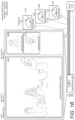
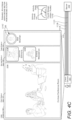
- FIGURE 1A illustrates aspects of a system 100 for configuring a user interface arrangement based on a number of people depicted in a video stream.
- the system 100 can include a server 110 and at least one client device 101 associated with a user 103.
- the server 110 can manage a number of data streams having a video component and an audio component allowing the client device 101 to communicate with a number of other remote client devices. Additional aspects of the server 110 managing communication sessions between client computers are described in additional detail below with reference to the system 602 shown in FIGURE 6 . Additional aspects of the client device 101 are also described in more detail below with reference to the devices 606 shown in FIGURE 6 .
- the server 110 can analyze a number of streams 111 to identify select streams having a video component depicting at least a threshold 118 number of individuals 119A.
- the select streams which in this example includes the first stream 111A, have a video component depicting a number of individuals 119A that meet or exceed a threshold 118.
- the threshold can be a predetermined number. For instance, a predetermined number can be three (3).
- a stream has a video component that depicts at least three people, that video stream can be selected and distinguished from other streams.
- the first stream 111A is selected and a rendering 111A' of the first stream 111A is positioned in a first display area 121 (primary display area).
- the other streams that do not have a threshold number of people, such as the second stream 111B have a rendering 111B' that is positioned in a second display area 122 (secondary display area).
- the first display area can be larger in size and positioned in a more central location within a user interface 120.
- the first display area can have a dimension, such as a side, that is sized at a predetermined ratio over a dimension of the second display area.
- the ratio can be based on the threshold used to select threads for display within the first display area. For example, if the threshold is three (3) people, the width of the first display area 121 can be three times the width of the second display area 122.
- a number of different technologies for determining a number of individuals depicted within a video component of a stream can be utilized.
- a suitable facial recognition technology can be utilized to identify individuals within a video component of a stream.
- other technologies that identify predetermined shapes and/or various forms of movement can be utilized to determine the number of individuals depicted within a video component of a stream.
- recognition techniques may be utilized by any suitable computing device, such as the server 110, any client device 101, or a combination thereof. Once individuals are identified and counted, the system can generate metadata indicating a number of individuals depicted within a video stream.
- the metadata which can be included in the communication session data 113, may be communicated from the server 110 to the client device 101.
- the client device can utilize the metadata to determine an arrangement of a user interface and a position and size of each stream rendering within the user interface.
- the metadata can identify a number of people depicted in a video and a description characterizing roles of people associated with the stream.
- the roles or other data indicating a priority for each individual can cause a computer to arrange the rendering of each stream based on a ranking or role of the individuals depicted in the streams.
- Metadata can also characterize certain streams, e.g., indicate that a number of people are audience members or presenters.
- Such metadata can be utilized to select a display region for different types of media content. For instance, although a video may have hundreds of people depicted in a video component, the video may not be selected for the first display area 122 because the people depicted in the video component are characterized as an audience and not as presenters.
- the server 120 can communicate the session data 113 and one or more streams to a number of remote devices, including the client device 101.
- the session data 113 and one or more streams 111 cause one or more remote computers to generate a user interface data 104 defining a user interface 120 having a first display area 121 and a second display area 122.
- the first display area 121 is reserved for a rendering 111A' of select streams, e.g., the first stream 111A, having the video component depicting at least the threshold number 118 of individuals 119A.
- the session data 113 can cause renderings 111B' for other streams, such as the second stream 111B, that do not depict a threshold number of individuals, within the second display area 122.
- FIGURE 1B illustrates aspects of the system in a scenario where a new stream having fewer than a threshold number of individuals is added to the communication session.
- the server 110 and/or the client device 101 detect the addition of a new stream 111C.
- the new stream 111C is then analyzed to determine that the number of individuals 119C depicted in the video component of the new stream 111C is less than the threshold 118.
- the server 120 or the client can configure the communication session data 113 to cause at least one client computing device, such as client device 101, to display a rendering 111C' of the new stream 111C within the second display area 122.
- FIGURE 1C illustrates aspects of the system 100 in a scenario where a new stream having a threshold number of people is added to a communication session.
- the server 110 and/or the client device 101 detect the addition of a new stream 111D.
- the new stream 111D is then analyzed to determine that the number of individuals 119D depicted in the video component of the new stream 111D meets or exceeds a threshold 118.
- the server 120 or the client can configure the communication session data 113 to cause at least one client computing device, such as client device 101, to display a rendering 111D' of the new stream 111D within the first display area 121.
- the embodiments disclosed herein may utilize policy data to determine an arrangement for a user interface and the size and position of individual renderings of one or more video streams.
- a policy may indicate that a primary area of a user interface is reserved for video feeds depicting a threshold number of people, and a secondary area of the user interface can be reserved for video feeds depicting fewer than the threshold number of people.
- a policy can define exceptions to this arrangement and allow the rendering of a video stream showing fewer than the threshold in the primary display area when one or more criteria is met. For instance, when there are no video streams depicting a threshold number of people, a system can apply an exception and allow the rendering of a stream having fewer than threshold number of people to be displayed within the primary display area. However, in such an embodiment, the system can remove the exception and exclusively reserve the primary area video streams depicting at least the threshold number of people when at least one video stream depicting a threshold number of people is detected.
- An exception can also be applied when a user input provides an override.
- an exception can be applied when there are fewer than a minimum number of video streams depicting a threshold number of people. For instance, if the minimum number of video streams is two, and there is only one live video stream depicting the threshold number of people, the system may also allow a stream depicting only one person to be rendered within the primary display area. Such an exception may be applied until there are at least two video streams depicting the threshold number of people.
- the server 110 and/or the client device 101 can detect the addition of a new stream 111E.
- the new stream 111E is then analyzed to determine a stream type, which can include a first type, e.g., an audio and video stream, or a second type, e.g., an audio-only stream.
- the server 120 can configure the communication session data 113 to cause at least one client computing device to a display of a graphical element 111E' representing a person or object associated with the new stream 111E within the second display area 122.
- graphical element 111E' representing the person associated with the new stream 111E can be positioned below the second display area.
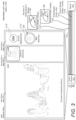
- the user interface can have a third display area reserved for items that do not have a video stream. An embodiment showing such features is described in more detail below with respect to FIGURE 3 .
- the threshold for the number of depicted users can be based on a number of factors.
- a threshold for the number of depicted users can change over time based on a number of factors.
- the threshold for the number of depicted users can be based on a number of videos currently rendered in the primary display area.
- the system may establish a first threshold level, e.g. two people.
- the threshold can increase, e.g., from two to five people, to keep the focus on larger groups of individuals. This feature helps with a number of technical benefits.
- the primary display area may be utilized more when there are not enough streams to utilize the entire user interface.
- it can place higher priority streams ahead of other streams. This is benefit is based on the premise that larger groups of people depicted in a single video stream may have potential for more contributions to a communication session versus streams having fewer people.
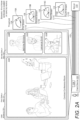
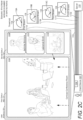
- FIGURES 2A-2D a user scenario involving a displayed video component depicting a single person transitions to a video component depicting four people.
- a video component of a stream transitions from a video depicting less than a threshold number of people to depicting more than a threshold number of people.
- the system transitions a rendering of the stream from a secondary display area to a first display area.
- the client device 101 receives four streams: a first stream 111A depicting four people, and three other streams 111B, 111C, 111D depicting a single person.
- the threshold 118 is four people.
- One or more computing devices monitor the streams 111B, 111C, 111D depicting less than the threshold 118 number of individuals 119B.
- the computing devices can utilize any number of technologies to identify people depicted in each stream.
- the content of the fourth stream 111D changes as the zoom level starts to show more people. From such a transition, the rendering 111D' of the fourth stream 111D remains in the second display area 122 since the number of individuals depicted in the fourth stream 111D remains below the threshold 118.
- the client device 101 modifies the user interface data 104 causing the user interface 120 to transition the size and position of the rendering 111D' of the fourth stream 111D.
- the rendering 111D' is moved from the second display area 122 to the first display area 121.
- FIGURE 2D illustrates aspects of a reconfigured user interface resulting from the process shown in FIGURES 2A-2C .
- the user interface 120 has a primary display area 121 reserved for a rendering of a video stream depicting at least a threshold number of people.
- the first display area 121 (also referred to herein as a primary display area) is configured to be larger than the second display area 122 (also referred to herein as a secondary display area).
- This size difference causes a rendering of a stream to be larger when displayed in the first display area versus a rendering of the stream in the second display area.
- the system can limit the number of streams that are displayed in the first display area 121 to maintain a size minimum for each rendering.
- a client or server can limit the number of renderings in the first display area 121 to two (2) so as to allow for a certain size of each rendering.
- the location of the first display area 121 can also be in a more prominent position within a user interface 120.
- the first display area 121 can be positioned to cover a center point of the user interface, while the second display area 122 can be positioned near the periphery of the user interface and not sized or positioned to cover a center point of a user interface.
- the first display area 121 is reserved for renderings of streams having a threshold number of people depicted in a video component of each stream.
- the second display area 122 can be reserved for renderings of streams having a live or recorded video feed of a person having less than a threshold number depicted individuals.
- the third display area 123 can be reserved for graphical elements that represent people or objects of streams having less than a threshold level of activity, or when an audio-only stream is detected.
- the third display area 123 can include a graphical element showing a person's name, initials, or other identifiers.
- the fourth stream 111D is associated with a video and audio component.
- a graphical element 111D' representing the fourth stream 111D is rendered within the third display area 123 when the activity of a user depicted within the stream does not meet an activity threshold. This may occur when the system detects that the user depicted within the stream is not moving, not speaking or not preforming a specific gesture. But when the user speaks, moves, or performs a specific gesture, the rendering of the stream may move to the second display area.
- a rendering of a stream can also be displayed within the third display area 123 when the stream does not include a video component.
- a rendering such as the rendering 111C' of the third stream 111C
- a supplemental graphical element 135, such as a colored ring, can also be positioned in proximity to the representative rendering 111C' of an audio-only stream.
- the supplemental graphical element 135 can generate one or more highlights, e.g., change colors or line thickness, when the person associated with the third stream 111C is speaking.
- streams can be represented within the display areas based on one or more characteristics of each stream. Categories of streams, e.g., audio-only streams, low activity level streams, or video and audio streams, can be positioned within each display area and moved as streams transition to different categories over time.
- a user interface includes first display area, a second display area, and a third display area.
- Each display area is reserved for different types of communication streams.
- the first display area 121 is reserved for renderings of streams having a threshold number of people depicted in a video component of each stream.
- the second display area 122 can be reserved for renderings of streams having a live or recorded video stream of a person having less than a threshold number depicted individuals.
- the third display area 123 is reserved for graphical elements that represent people or objects of streams having less than a threshold level of activity or when an audio-only stream is detected.
- the first stream 111A comprises a video component depicting at least a threshold number of people, e.g., four people, thus the rendering 111A' of the first stream is displayed within the first display area 121.
- the second stream comprises a video component depicting less than a threshold number of people.
- the rendering 111B' of the second stream is displayed within the second display area 122.
- the third stream is an audio-only stream.
- a rendering of a graphical element 111C' representing the third stream is displayed within the third display area 123.
- the fourth stream 111D is characterized by metadata indicating an activity level associated with the stream.
- the fourth stream is an audio and video stream.
- the activity level can be based on a level of engagement with respect to a person or content associated with the fourth stream.
- the activity level may indicate a rate in which someone is speaking, a frequency in which a person is speaking, a volume in which a person is speaking, etc.
- a graphical element 111D' can be displayed within the third display area 123.
- the server 120 can generate communication session data 113 causing one or more computers to reconfigure the user interface 120.
- the associated graphical element 111D' can be moved from the third display area 123 to the second display area 122.
- the graphical element 111D' can transition from a graphical element that is a representation of a user to a live or recorded video stream of the user.
- FIGURE 4C illustrates aspects of a reconfigured user interface resulting from the process shown in FIGURES 4A-4B .
- a rendering 111D' of the fourth stream 111D is displayed within the second display area 122.
- the rendering can be configured to show a video component of the fourth stream showing the movement of the user.
- FIGURE 5 is a diagram illustrating aspects of a routine 500 for improving user engagement and more efficient use of computing resources by providing dynamically controlled view states for communication sessions based on a number of people depicted in video streams. It should be understood by those of ordinary skill in the art that the operations of the methods disclosed herein are not necessarily presented in any particular order and that performance of some or all of the operations in an alternative order(s) is possible and is contemplated. The operations have been presented in the demonstrated order for ease of description and illustration. Operations may be added, omitted, performed together, and/or performed simultaneously, without departing from the scope of the appended claims.
- the logical operations described herein are implemented (1) as a sequence of computer implemented acts or program modules running on a computing system such as those described herein) and/or (2) as interconnected machine logic circuits or circuit modules within the computing system.
- the implementation is a matter of choice dependent on the performance and other requirements of the computing system. Accordingly, the logical operations may be implemented in software, in firmware, in special purpose digital logic, and any combination thereof.
- FIGURE 5 and the other FIGURES can be implemented in association with the example presentation UIs described above.
- the various device(s) and/or module(s) described herein can generate, transmit, receive, and/or display data associated with content of a communication session (e.g., live content, broadcasted event, recorded content, etc.) and/or a presentation UI that includes renderings of one or more participants of remote computing devices, avatars, channels, chat sessions, video streams, images, virtual objects, and/or applications associated with a communication session.
- a communication session e.g., live content, broadcasted event, recorded content, etc.
- a presentation UI that includes renderings of one or more participants of remote computing devices, avatars, channels, chat sessions, video streams, images, virtual objects, and/or applications associated with a communication session.
- the routine 500 starts at operation 502, where one or more computing devices analyze one or more streams of a communication session to identify select streams depicting a threshold number of people.
- Operation 502 can utilize a number of different technologies for identifying people within an image or video images. Any suitable facial recognition technologies can be utilized to identify individuals. In addition, any suitable technology for identifying a person by a shape or a specific movement or gesture can be utilized.
- People that are identified in a video component of a stream can be filtered from the count of the number of depicted people based on an activity they are engaged in. For instance, the system may only count individuals facing a camera capturing the video images, while individuals were not facing the camera are not counted for a comparison with a threshold. People that are talking may also be counted while other people who are not talking for a period of time are not counted. Different categories of gestures or movement can be identified and individuals who are in a predetermined category of gestures or movement can be counted and compared with a threshold.
- the routine 500 proceeds to operation 504, where one or more computing devices generate communication session data 113 for causing one or more remote computers to generate a user interface data 104 having a first display area 121 and a second display area 122, the first display area 121 reserved for the select streams 111A having the video component depicting at least the threshold number 118 of individuals, the second display area 111A designated for other streams 111B of the plurality of streams 111.
- the one or more computing devices communicate the communication session data 113 to one or more clients.
- the communication session data 113 causes the client computers to generate a user interface data 104 having a first display area 121 and a second display area 122, the first display area 121 reserved for the select streams 111A having the video component depicting at least the threshold number 118 of individuals, the second display area 111A designated for other streams 111B of the plurality of streams 111.
- the one or more computing devices monitor the streams for detecting activity levels and changes with respect to the number of people depicted in the streams.
- One or more technologies can be utilized for detecting a number of people depicted within the streams. For instance, facial recognition or other technologies may be utilized to identify and count individuals within the stream.
- Activity level changes can involve a volume change within a stream, detection of a person speaking, detection of a rate of speech, or changes within the video content, such as color changes, transitions from a live video stream of person to a rendering of a data file or document.
- one or more computing devices can modify a position and/or size of a video rendering.
- a detected change within an activity level or number of people within a stream can cause a rendering of the stream to move from a first region of a user interface to a second region of a user interface.
- a detected change within an activity level or number of people within a stream can cause a rendering of the stream to be resized.
- Operation 510 can also involve changes within stream type, such as an audio-only stream transitioning to an audio and video stream.
- the system can analyze the user activity for the purposes of collecting, analyzing and using machine learning data. For instance, when a video stream moves from particular display area to another display area, and the viewer interacts with a computer in response to the move, the system can record machine learning data indicating the user's interaction to adjust a threshold, e.g., a threshold number of people for a video, for future streams. For instance, when a system detects that a viewer's eye gaze direction is more focused on a video rendering after a move, the system can raise a priority level with respect to one or more selected thresholds to be used in future streams. However, if a viewer's eye gaze is less focused, then a system may raise or lower a threshold for future streams.
- a threshold e.g., a threshold number of people for a video
- the above-described subject matter may be implemented as a computer-controlled apparatus, a computer process, a computing system, or as an article of manufacture such as a computer-readable storage medium.
- the operations of the example methods are illustrated in individual blocks and summarized with reference to those blocks.
- the methods are illustrated as logical flows of blocks, each block of which can represent one or more operations that can be implemented in hardware, software, or a combination thereof.
- the operations represent computer-executable instructions stored on one or more computer-readable media that, when executed by one or more processors, enable the one or more processors to perform the recited operations.
- computer-executable instructions include routines, programs, objects, modules, components, data structures, and the like that perform particular functions or implement particular abstract data types.
- the order in which the operations are described is not intended to be construed as a limitation, and any number of the described operations can be executed in any order, combined in any order, subdivided into multiple suboperations, and/or executed in parallel to implement the described processes.
- the described processes can be performed by resources associated with one or more device(s) such as one or more internal or external CPUs or GPUs, and/or one or more pieces of hardware logic such as field-programmable gate arrays ("FPGAs”), digital signal processors (“DSPs”), or other types of accelerators.
- FPGAs field-programmable gate arrays
- DSPs digital signal processors
- All of the methods and processes described above may be embodied in, and fully automated via, software code modules executed by one or more general purpose computers or processors.
- the code modules may be stored in any type of computer-readable storage medium or other computer storage device, such as those described below. Some or all of the methods may alternatively be embodied in specialized computer hardware, such as that described below.
- FIGURE 6 is a diagram illustrating an example environment 600 in which a system 602 can implement the techniques disclosed herein.
- a system 602 may function to collect, analyze, and share data defining one or more objects that are displayed to users of a communication session 604.
- the communication session 603 may be implemented between a number of client computing devices 606(1) through 606(N) (where N is a number having a value of two or greater) that are associated with or are part of the system 602.
- the client computing devices 606(1) through 606(N) enable users, also referred to as individuals, to participate in the communication session 603.
- the communication session 603 is hosted, over one or more network(s) 608, by the system 602. That is, the system 602 can provide a service that enables users of the client computing devices 606(1) through 606(N) to participate in the communication session 603 (e.g., via a live viewing and/or a recorded viewing). Consequently, a "participant" to the communication session 603 can comprise a user and/or a client computing device (e.g., multiple users may be in a room participating in a communication session via the use of a single client computing device), each of which can communicate with other participants. As an alternative, the communication session 603 can be hosted by one of the client computing devices 606(1) through 606(N) utilizing peer-to-peer technologies. The system 602 can also host chat conversations and other team collaboration functionality (e.g., as part of an application suite).
- chat conversations and other team collaboration functionality are considered external communication sessions distinct from the communication session 603.
- a computing system 602 that collects participant data in the communication session 603 may be able to link to such external communication sessions. Therefore, the system may receive information, such as date, time, session particulars, and the like, that enables connectivity to such external communication sessions.
- a chat conversation can be conducted in accordance with the communication session 603. Additionally, the system 602 may host the communication session 603, which includes at least a plurality of participants co-located at a meeting location, such as a meeting room or auditorium, or located in disparate locations.
- client computing devices 606(1) through 606(N) participating in the communication session 603 are configured to receive and render for display, on a user interface of a display screen, communication data.
- the communication data can comprise a collection of various instances, or streams, of live content and/or recorded content.
- the collection of various instances, or streams, of live content and/or recorded content may be provided by one or more cameras, such as video cameras.
- an individual stream of live or recorded content can comprise media data associated with a video feed provided by a video camera (e.g., audio and visual data that capture the appearance and speech of a user participating in the communication session).
- the video feeds may comprise such audio and visual data, one or more still images, and/or one or more avatars.
- the one or more still images may also comprise one or more avatars.
- an individual stream of live or recorded content can comprise media data that includes an avatar of a user participating in the communication session along with audio data that captures the speech of the user.
- Yet another example of an individual stream of live or recorded content can comprise media data that includes a file displayed on a display screen along with audio data that captures the speech of a user. Accordingly, the various streams of live or recorded content within the communication data enable a remote meeting to be facilitated between a group of people and the sharing of content within the group of people.
- the various streams of live or recorded content within the communication data may originate from a plurality of co-located video cameras, positioned in a space, such as a room, to record or stream live a presentation that includes one or more individuals presenting and one or more individuals consuming presented content.
- a participant or attendee can view content of the communication session 603 live as activity occurs, or alternatively, via a recording at a later time after the activity occurs.
- client computing devices 606(1) through 606(N) participating in the communication session 603 are configured to receive and render for display, on a user interface of a display screen, communication data.
- the communication data can comprise a collection of various instances, or streams, of live and/or recorded content.
- an individual stream of content can comprise media data associated with a video feed (e.g., audio and visual data that capture the appearance and speech of a user participating in the communication session).
- Another example of an individual stream of content can comprise media data that includes an avatar of a user participating in the conference session along with audio data that captures the speech of the user.
- an individual stream of content can comprise media data that includes a content item displayed on a display screen and/or audio data that captures the speech of a user. Accordingly, the various streams of content within the communication data enable a meeting or a broadcast presentation to be facilitated amongst a group of people dispersed across remote locations.
- a participant or attendee to a communication session is a person that is in range of a camera, or other image and/or audio capture device such that actions and/or sounds of the person which are produced while the person is viewing and/or listening to the content being shared via the communication session can be captured (e.g., recorded).
- a participant may be sitting in a crowd viewing the shared content live at a broadcast location where a stage presentation occurs.
- a participant may be sitting in an office conference room viewing the shared content of a communication session with other colleagues via a display screen.
- a participant may be sitting or standing in front of a personal device (e.g., tablet, smartphone, computer, etc.) viewing the shared content of a communication session alone in their office or at home.
- a personal device e.g., tablet, smartphone, computer, etc.
- the system 602 of FIGURE 6 includes device(s) 610.
- the device(s) 610 and/or other components of the system 602 can include distributed computing resources that communicate with one another and/or with the client computing devices 606(1) through 606(N) via the one or more network(s) 608.
- the system 602 may be an independent system that is tasked with managing aspects of one or more communication sessions such as communication session 603.
- the system 602 may be managed by entities such as SLACK, WEBEX, GOTOMEETING, GOOGLE HANGOUTS, etc.
- Network(s) 608 may include, for example, public networks such as the Internet, private networks such as an institutional and/or personal intranet, or some combination of private and public networks.
- Network(s) 608 may also include any type of wired and/or wireless network, including but not limited to local area networks ("LANs”), wide area networks ("WANs”), satellite networks, cable networks, Wi-Fi networks, WiMax networks, mobile communications networks (e.g., 3G, 4G, and so forth) or any combination thereof.
- Network(s) 608 may utilize communications protocols, including packet-based and/or datagram-based protocols such as Internet protocol (“IP”), transmission control protocol (“TCP”), user datagram protocol (“UDP”), or other types of protocols.
- IP Internet protocol
- TCP transmission control protocol
- UDP user datagram protocol
- network(s) 608 may also include a number of devices that facilitate network communications and/or form a hardware basis for the networks, such as switches, routers, gateways, access points, firewalls, base stations, repeaters, back
- network(s) 608 may further include devices that enable connection to a wireless network, such as a wireless access point ("WAP").
- WAP wireless access point
- Examples support connectivity through WAPs that send and receive data over various electromagnetic frequencies (e.g., radio frequencies), including WAPs that support Institute of Electrical and Electronics Engineers (“IEEE”) 802.11 standards (e.g., 802.11g, 802.11n, 802.11ac and so forth), and other standards.
- IEEE Institute of Electrical and Electronics Engineers
- device(s) 610 may include one or more computing devices that operate in a cluster or other grouped configuration to share resources, balance load, increase performance, provide fail-over support or redundancy, or for other purposes.
- device(s) 610 may belong to a variety of classes of devices such as traditional server-type devices, desktop computer-type devices, and/or mobile-type devices.
- device(s) 610 may include a diverse variety of device types and are not limited to a particular type of device.
- Device(s) 610 may represent, but are not limited to, server computers, desktop computers, web-server computers, personal computers, mobile computers, laptop computers, tablet computers, or any other sort of computing device.
- a client computing device (e.g., one of client computing device(s) 606(1) through 606(N)) (each of which are also referred to herein as a "data processing system”) may belong to a variety of classes of devices, which may be the same as, or different from, device(s) 610, such as traditional client-type devices, desktop computer-type devices, mobile-type devices, special purpose-type devices, embedded-type devices, and/or wearable-type devices.
- a client computing device can include, but is not limited to, a desktop computer, a game console and/or a gaming device, a tablet computer, a personal data assistant ("PDA”), a mobile phone/tablet hybrid, a laptop computer, a telecommunication device, a computer navigation type client computing device such as a satellite-based navigation system including a global positioning system (“GPS”) device, a wearable device, a virtual reality (“VR”) device, an augmented reality (“AR”) device, an implanted computing device, an automotive computer, a network-enabled television, a thin client, a terminal, an Internet of Things (“IoT”) device, a work station, a media player, a personal video recorder (“PVR”), a set-top box, a camera, an integrated component (e.g., a peripheral device) for inclusion in a computing device, an appliance, or any other sort of computing device.
- the client computing device may include a combination of the earlier listed examples of the client computing device such as, for example,
- Client computing device(s) 606(1) through 606(N) of the various classes and device types can represent any type of computing device having one or more data processing unit(s) 692 operably connected to computer-readable media 694 such as via a bus 616, which in some instances can include one or more of a system bus, a data bus, an address bus, a PCI bus, a Mini-PCI bus, and any variety of local, peripheral, and/or independent buses.
- Executable instructions stored on computer-readable media 694 may include, for example, an operating system 619, a client module 620, a profile module 622, and other modules, programs, or applications that are loadable and executable by data processing units(s) 692.
- Client computing device(s) 606(1) through 606(N) may also include one or more interface(s) 624 to enable communications between client computing device(s) 606(1) through 606(N) and other networked devices, such as device(s) 610, over network(s) 608.
- Such network interface(s) 624 may include one or more network interface controllers (NICs) or other types of transceiver devices to send and receive communications and/or data over a network.
- NICs network interface controllers
- client computing device(s) 606(1) through 606(N) can include input/output ("I/O") interfaces (devices) 626 that enable communications with input/output devices such as user input devices including peripheral input devices (e.g., a game controller, a keyboard, a mouse, a pen, a voice input device such as a microphone, a video camera for obtaining and providing video feeds and/or still images, a touch input device, a gestural input device, and the like) and/or output devices including peripheral output devices (e.g., a display, a printer, audio speakers, a haptic output device, and the like).
- FIGURE 6 illustrates that client computing device 606(1) is in some way connected to a display device (e.g., a display screen 629(N)), which can display a UI according to the techniques described herein.
- a display device e.g., a display screen 629(N)
- client computing devices 606(1) through 606(N) may use their respective client modules 620 to connect with one another and/or other external device(s) in order to participate in the communication session 603, or in order to contribute activity to a collaboration environment.
- client computing device 606(1) may utilize a client computing device 606(1) to communicate with a second user of another client computing device 606(2).
- client modules 620 the users may share data, which may cause the client computing device 606(1) to connect to the system 602 and/or the other client computing devices 606(2) through 606(N) over the network(s) 608.
- the client computing device(s) 606(1) through 606(N) may use their respective profile modules 622 to generate participant profiles (not shown in FIGURE 6 ) and provide the participant profiles to other client computing devices and/or to the device(s) 610 of the system 602.
- a participant profile may include one or more of an identity of a user or a group of users (e.g., a name, a unique identifier ("ID"), etc.), user data such as personal data, machine data such as location (e.g., an IP address, a room in a building, etc.) and technical capabilities, etc. Participant profiles may be utilized to register participants for communication sessions.
- the device(s) 610 of the system 602 include a server module 630 and an output module 632.
- the server module 630 is configured to receive, from individual client computing devices such as client computing devices 606(1) through 606(N), media streams 634(1) through 634(N).
- media streams can comprise a video feed (e.g., audio and visual data associated with a user), audio data which is to be output with a presentation of an avatar of a user (e.g., an audio only experience in which video data of the user is not transmitted), text data (e.g., text messages), file data and/or screen sharing data (e.g., a document, a slide deck, an image, a video displayed on a display screen, etc.), and so forth.
- the server module 630 is configured to receive a collection of various media streams 634(1) through 634(N) during a live viewing of the communication session 603 (the collection being referred to herein as "media data 634").
- not all of the client computing devices that participate in the communication session 603 provide a media stream.
- a client computing device may only be a consuming, or a "listening", device such that it only receives content associated with the communication session 603 but does not provide any content to the communication session 603.
- the server module 630 can select aspects of the media streams 634 that are to be shared with individual ones of the participating client computing devices 606(1) through 606(N). Consequently, the server module 630 may be configured to generate session data 636 based on the streams 634 and/or pass the session data 636 to the output module 632. Then, the output module 632 may communicate communication data 639 to the client computing devices (e.g., client computing devices 606(1) through 606(3) participating in a live viewing of the communication session). The communication data 639 may include video, audio, and/or other content data, provided by the output module 632 based on content 650 associated with the output module 632 and based on received session data 636.
- the communication data 639 may include video, audio, and/or other content data, provided by the output module 632 based on content 650 associated with the output module 632 and based on received session data 636.
- the content 650 can include the streams 634 or other shared data, such a image file, a spreadsheet file, a slide deck, a document, etc.
- the streams 634 can include a video component depicting images captured by an I/O device 626 on each client computer.
- the output module 632 transmits communication data 639(1) to client computing device 606(1), and transmits communication data 639(2) to client computing device 606(2), and transmits communication data 639(3) to client computing device 606(3), etc.
- the communication data 639 transmitted to the client computing devices can be the same or can be different (e.g., positioning of streams of content within a user interface may vary from one device to the next).
- the device(s) 610 and/or the client module 620 can include GUI presentation module 640.
- the GUI presentation module 640 may be configured to analyze communication data 639 that is for delivery to one or more of the client computing devices 606.
- the UI presentation module 640 at the device(s) 610 and/or the client computing device 606, may analyze communication data 639 to determine an appropriate manner for displaying video, image, and/or content on the display screen 629 of an associated client computing device 606.
- the GUI presentation module 640 may provide video, image, and/or content to a presentation GUI 646 rendered on the display screen 629 of the associated client computing device 606.
- the presentation GUI 646 may be caused to be rendered on the display screen 629 by the GUI presentation module 640.
- the presentation GUI 646 may include the video, image, and/or content analyzed by the GUI presentation module 640.
- the presentation GUI 646 may include a plurality of sections or grids that may render or comprise video, image, and/or content for display on the display screen 629.
- a first section of the presentation GUI 646 may include a video feed of a presenter or individual
- a second section of the presentation GUI 646 may include a video feed of an individual consuming meeting information provided by the presenter or individual.
- the GUI presentation module 640 may populate the first and second sections of the presentation GUI 646 in a manner that properly imitates an environment experience that the presenter and the individual may be sharing.
- the GUI presentation module 640 may enlarge or provide a zoomed view of the individual represented by the video feed in order to highlight a reaction, such as a facial feature, the individual had to the presenter.
- the presentation GUI 646 may include a video feed of a plurality of participants associated with a meeting, such as a general communication session.
- the presentation GUI 646 may be associated with a channel, such as a chat channel, enterprise Teams channel, or the like. Therefore, the presentation GUI 646 may be associated with an external communication session that is different than the general communication session.
- FIGURE 7 illustrates a diagram that shows example components of an example device 700 (also referred to herein as a "computing device") configured to generate data for some of the user interfaces disclosed herein.
- the device 700 may generate data that may include one or more sections that may render or comprise video, images, virtual objects, and/or content for display on the display screen 629.
- the device 700 may represent one of the device(s) described herein. Additionally, or alternatively, the device 700 may represent one of the client computing devices 606.
- data processing unit(s) such as the data processing unit(s) 702 and/or data processing unit(s) 692, may represent, for example, a CPU-type data processing unit, a GPU-type data processing unit, a field-programmable gate array ("FPGA"), another class of DSP, or other hardware logic components that may, in some instances, be driven by a CPU.
- FPGA field-programmable gate array
- illustrative types of hardware logic components that may be utilized include Application-Specific Integrated Circuits ("ASICs”), Application-Specific Standard Products (“ASSPs”), System-on-a-Chip Systems (“SOCs”), Complex Programmable Logic Devices (“CPLDs”), etc.
- ASICs Application-Specific Integrated Circuits
- ASSPs Application-Specific Standard Products
- SOCs System-on-a-Chip Systems
- CPLDs Complex Programmable Logic Devices
- computer-readable media such as computer-readable media 704 and computer-readable media 694, may store instructions executable by the data processing unit(s).
- the computer-readable media may also store instructions executable by external data processing units such as by an external CPU, an external GPU, and/or executable by an external accelerator, such as an FPGA type accelerator, a DSP type accelerator, or any other internal or external accelerator.
- an external accelerator such as an FPGA type accelerator, a DSP type accelerator, or any other internal or external accelerator.
- at least one CPU, GPU, and/or accelerator is incorporated in a computing device, while in some examples one or more of a CPU, GPU, and/or accelerator is external to a computing device.
- Computer-readable media may include computer storage media and/or communication media.
- Computer storage media may include one or more of volatile memory, nonvolatile memory, and/or other persistent and/or auxiliary computer storage media, removable and nonremovable computer storage media implemented in any method or technology for storage of information such as computer-readable instructions, data structures, program modules, or other data.
- computer storage media includes tangible and/or physical forms of media included in a device and/or hardware component that is part of a device or external to a device, including but not limited to random access memory (“RAM”), static random-access memory (“SRAM”), dynamic random-access memory (“DRAM”), phase change memory (“PCM”), read-only memory (“ROM”), erasable programmable read-only memory (“EPROM”), electrically erasable programmable read-only memory (“EEPROM”), flash memory, compact disc read-only memory (“CD-ROM”), digital versatile disks (“DVDs”), optical cards or other optical storage media, magnetic cassettes, magnetic tape, magnetic disk storage, magnetic cards or other magnetic storage devices or media, solid-state memory devices, storage arrays, network attached storage, storage area networks, hosted computer storage or any other storage memory, storage device, and/or storage medium that can be used to store and maintain information for access by a computing device.
- RAM random access memory
- SRAM static random-access memory
- DRAM dynamic random-access memory
- PCM phase change
- communication media may embody computer-readable instructions, data structures, program modules, or other data in a modulated data signal, such as a carrier wave, or other transmission mechanism.
- a modulated data signal such as a carrier wave, or other transmission mechanism.
- computer storage media does not include communication media. That is, computer storage media does not include communications media consisting solely of a modulated data signal, a carrier wave, or a propagated signal, per se.
- Communication interface(s) 706 may represent, for example, network interface controllers ("NICs") or other types of transceiver devices to send and receive communications over a network. Furthermore, the communication interface(s) 706 may include one or more video cameras and/or audio devices 722 to enable generation of video feeds and/or still images, and so forth.
- NICs network interface controllers
- the communication interface(s) 706 may include one or more video cameras and/or audio devices 722 to enable generation of video feeds and/or still images, and so forth.
- computer-readable media 704 includes a data store 708.
- the data store 708 includes data storage such as a database, data warehouse, or other type of structured or unstructured data storage.
- the data store 708 includes a corpus and/or a relational database with one or more tables, indices, stored procedures, and so forth to enable data access including one or more of hypertext markup language (“HTML”) tables, resource description framework (“RDF”) tables, web ontology language (“OWL”) tables, and/or extensible markup language (“XML”) tables, for example.
- HTML hypertext markup language
- RDF resource description framework
- OWL web ontology language
- XML extensible markup language
- the data store 708 may store data for the operations of processes, applications, components, and/or modules stored in computer-readable media 704 and/or executed by data processing unit(s) 702 and/or accelerator(s).
- the data store 708 may store session data 710 (e.g., session data 636 as shown in FIGURE 6 ), profile data 712 (e.g., associated with a participant profile), and/or other data.
- the session data 710 can include a total number of participants (e.g., users and/or client computing devices) in a communication session, activity that occurs in the communication session, a list of invitees to the communication session, and/or other data related to when and how the communication session is conducted or hosted.
- the data store 708 may also include content data 714, such as the content that includes video, audio, or other content for rendering and display on one or more of the display screens 629.
- the above-referenced data can be stored on separate memories 716 on board one or more data processing unit(s) 702 such as a memory on board a CPU-type processor, a GPU-type processor, an FPGA-type accelerator, a DSP-type accelerator, and/or another accelerator.
- the computer-readable media 704 also includes an operating system 718 and application programming interface(s) 710 (APIs) configured to expose the functionality and the data of the device 700 to other devices.
- the computer-readable media 704 includes one or more modules such as the server module 730, the output module 732, and the GUI presentation module 740, although the number of illustrated modules is just an example, and the number may vary higher or lower. That is, functionality described herein in association with the illustrated modules may be performed by a fewer number of modules or a larger number of modules on one device or spread across multiple devices.
Landscapes
- Engineering & Computer Science (AREA)
- Multimedia (AREA)
- Signal Processing (AREA)
- Computer Networks & Wireless Communication (AREA)
- Theoretical Computer Science (AREA)
- General Business, Economics & Management (AREA)
- Business, Economics & Management (AREA)
- General Engineering & Computer Science (AREA)
- Physics & Mathematics (AREA)
- General Physics & Mathematics (AREA)
- Human Computer Interaction (AREA)
- Two-Way Televisions, Distribution Of Moving Picture Or The Like (AREA)
- User Interface Of Digital Computer (AREA)
- Information Transfer Between Computers (AREA)
Claims (10)
- Verfahren, durchgeführt von einem Datenverarbeitungssystem (110), wobei das Verfahren Folgendes umfasst:Analysieren einer Vielzahl von Streams (111), um ausgewählte Streams zu identifizieren, die eine Videokomponente aufweisen, die mindestens eine Schwellenanzahl (118) von Individuen (119A) darstellt;Erzeugen von Kommunikationssitzungsdaten (113) zum Veranlassen einer Erzeugung einer Benutzerschnittstelle (120) mit einem ersten Anzeigebereich (121) und einem zweiten Anzeigebereich (122), wobei der erste Anzeigebereich (121) für die ausgewählten Streams (111A) reserviert ist, die die Videokomponente aufweisen, die mindestens die Schwellenanzahl (118) von Individuen innerhalb von Wiedergaben von Individuen darstellt, wobei der zweite Anzeigebereich (122) für andere Streams (111B) der Vielzahl von Streams vorgesehen ist; undÜbertragen der Kommunikationssitzungsdaten (113), die die Vielzahl von Streams (111) umfassen, an eine Vielzahl von Client-Computergeräten (101), wobei die Kommunikationssitzungsdaten (113) mindestens ein Client-Computergerät (101) veranlassen, eine Anzeige einer Benutzerschnittstelle (120) zu erzeugen, die den ersten Anzeigebereich (121) aufweist, der für einen ersten Satz von Wiedergaben (111A') der ausgewählten Streams (111A) reserviert ist, wobei jeder der ausgewählten Streams (111A) eine Anzeige der Wiedergaben von Individuen (111A') veranlasst, die jeweils mindestens die Schwellenanzahl (118) von Individuen darstellen, und der zweite Anzeigebereich (122) für einen zweiten Satz von Wiedergaben (111B') anderer Streams (111B) vorgesehen ist, wobei jeder der anderen Streams (111B) eine Anzeige anderer Wiedergaben von Individuen (111B') veranlasst, die jeweils weniger als die Schwellenanzahl (118) von Individuen darstellen;wobei das Verfahren dadurch gekennzeichnet ist, dass es ferner Folgendes umfasst:Erkennen einer Hinzufügung eines neuen Streams (111C, 111D);Analysieren des neuen Streams (111C, 111D), um zu bestimmen, dass die Anzahl der in der Videokomponente des neuen Streams dargestellten Individuen entweder kleiner als die Schwellenanzahl (118) von Individuen ist oder mindestens der Schwellenanzahl (118) von Individuen entspricht; und,wenn bestimmt wurde, dass die Anzahl von Individuen kleiner als die Schwellenanzahl (118) von Individuen ist, Konfigurieren der Kommunikationssitzungsdaten (113), um auf dem mindestens einen Client-Computergerät (101) eine Anzeige einer Wiedergabe (111C') des neuen Streams (111C) innerhalb des zweiten Anzeigebereichs (122) zu veranlassen; oder,wenn bestimmt wurde, dass die Anzahl der in der Videokomponente des neuen Streams (111D) dargestellten Individuen mindestens der Schwellenanzahl (118) von Individuen entspricht, Konfigurieren der Kommunikationssitzungsdaten (113), um auf dem mindestens einen Client-Computergerät (101) eine Anzeige einer Wiedergabe (111D') des neuen Streams (111D) innerhalb des ersten Anzeigebereichs (121) zu veranlassen.
- Verfahren nach Anspruch 1, ferner umfassend:Erkennen einer Hinzufügung eines neuen Streams;Analysieren des neuen Streams, um zu bestimmen, dass der neue Stream eine Audiokomponente ohne Live-Videokomponente umfasst; und,wenn bestimmt wurde, dass der neue Stream die Audiokomponente ohne Live-Videokomponente umfasst, Konfigurieren der Kommunikationssitzungsdaten, um auf dem mindestens einen Client-Computergerät eine Anzeige eines grafischen Elements innerhalb des zweiten Anzeigebereichs zu veranlassen, das eine dem neuen Stream zugehörige Person repräsentiert.
- Verfahren nach Anspruch 1, wobei die Vielzahl von Streams einen zusätzlichen Stream umfasst, wobei das Verfahren ferner Folgendes umfasst:Überwachen der anderen Streams, die weniger als die Schwellenanzahl von Individuen darstellen, um zu bestimmen, ob ein einzelner Stream der anderen Streams beginnt, eine Videokomponente zu beinhalten, die mindestens die Schwellenanzahl von Individuen darstellt; und,wenn bestimmt wurde, ob der einzelne Stream beginnt, die Videokomponente zu beinhalten, die mindestens die Schwellenzahl von Individuen darstellt, Überführen einer Wiedergabe des einzelnen Streams aus dem zweiten Anzeigebereich in den ersten Anzeigebereich.
- Verfahren nach Anspruch 1, wobei die Vielzahl von Streams einen zusätzlichen Stream umfasst, wobei das Verfahren ferner Folgendes umfasst:Analysieren des zusätzlichen Streams, um zu bestimmen, dass der zusätzliche Stream eine Audiokomponente ohne Live-Videokomponente umfasst; und,wenn bestimmt wurde, dass der zusätzliche Stream die Audiokomponente ohne Live-Videokomponente umfasst, Konfigurieren der Kommunikationssitzungsdaten, um das mindestens eine Client-Computergerät zu veranlassen, eine Wiedergabe eines grafischen Elements, das einen Status des neuen Streams repräsentiert, innerhalb eines dritten Anzeigebereichs, der vom zweiten Anzeigebereich und vom ersten Anzeigebereich getrennt ist, anzuzeigen.
- Verfahren nach Anspruch 1, wobei die Vielzahl von Streams einen zusätzlichen Stream umfasst, wobei das Verfahren ferner Folgendes umfasst:Analysieren des zusätzlichen Streams, um einen Aktivitätsgrad der Audiokomponente oder der Videokomponente des zusätzlichen Streams zu bestimmen;Bestimmen, dass der Aktivitätsgrad der Audiokomponente oder der Videokomponente des zusätzlichen Streams unter einem Aktivitätsgradschwellenwert liegt; und,wenn bestimmt wurde, dass der Aktivitätsgrad der Audiokomponente oder der Videokomponente des zusätzlichen Streams unter dem Aktivitätsgradschwellenwert liegt, Konfigurieren der Kommunikationssitzungsdaten, um das mindestens eine Client-Computergerät zu veranlassen, ein grafisches Element, das den zusätzlichen Stream repräsentiert, innerhalb eines dritten Anzeigebereichs anzuzeigen, wobei der zweite Anzeigebereich zwischen dem ersten Anzeigebereich und dem dritten Anzeigebereich positioniert ist.
- Verfahren nach Anspruch 1, wobei die Vielzahl von Streams einen zusätzlichen Stream umfasst, wobei das Verfahren ferner Folgendes umfasst:Überwachen des zusätzlichen Streams, um zu bestimmen, dass ein Aktivitätsgrad der Audiokomponente oder der Videokomponente des zusätzlichen Streams beginnt, einen Aktivitätsgradschwellenwert zu überschreiten; und,wenn bestimmt wurde, dass der Aktivitätsgrad der Audiokomponente oder der Videokomponente des zusätzlichen Streams beginnt, den Aktivitätsgradschwellenwert zu überschreiten, Überführen einer Wiedergabe des zusätzlichen Streams aus einem dritten Anzeigebereich in den zweiten Anzeigebereich.
- Verfahren nach Anspruch 1, wobei ein Skalierungsfaktor auf die Wiedergaben der ausgewählten Streams angewendet wird, um eine Größe von mindestens einem Individuum, das in der Videokomponente der ausgewählten Streams dargestellt wird, innerhalb einer Schwellendifferenz im Vergleich zu einer Größe von mindestens einem Individuum, das in der Videokomponente der anderen Streams dargestellt wird, zu bringen.
- Datenverarbeitungssystem (606), umfassend:eine oder mehrere Verarbeitungseinheiten (692); undein computerlesbares Medium (694), das darauf codierte computerausführbare Anweisungen aufweist, welche die eine oder die mehreren Verarbeitungseinheiten (692) zu Folgendem veranlassen:Empfangen einer Vielzahl von Streams (111), wobei einzelne Streams der Vielzahl von Streams (111) mindestens eine Videokomponente und eine Audiokomponente einer Kommunikationssitzung umfassen;Identifizieren ausgewählter Streams der Vielzahl von Streams (111), wobei die ausgewählten Streams mindestens eine Schwellenanzahl (118) von Individuen innerhalb von Wiedergaben von Individuen aufweisen, die in einer zugehörigen Videokomponente dargestellt sind; undVeranlassen einer Anzeige einer Benutzerschnittstelle (120), die einen ersten Anzeigebereich (121) und einen zweiten Anzeigebereich (122) aufweist, wobei der erste Anzeigebereich (121) für einen ersten Satz von Wiedergaben (111A') der ausgewählten Streams (111A) reserviert ist, wobei jeder der ausgewählten Streams (111A) eine Anzeige der Wiedergaben von Individuen (111A') veranlasst, die jeweils mindestens die Schwellenanzahl (118) von Individuen innerhalb der Wiedergaben von Individuen (111A') darstellen, und der zweite Anzeigebereich (122) für einen zweiten Satz von Wiedergaben (111B') anderer Streams (111B) vorgesehen ist, wobei jeder der anderen Streams (111B) eine Anzeige anderer Wiedergaben von Individuen (111B') veranlasst, die jeweils weniger als die Schwellenanzahl (118) von Individuen darstellen;dadurch gekennzeichnet, dass es die eine oder die mehreren Verarbeitungseinheiten ferner zu Folgendem veranlasst:Erkennen einer Hinzufügung eines neuen Streams (111C, 111D);Analysieren des neuen Streams (111C, 111D), um zu bestimmen, dass die Anzahl der in der Videokomponente des neuen Streams dargestellten Individuen entweder kleiner als die Schwellenanzahl (118) von Individuen ist oder mindestens der Schwellenanzahl (118) von Individuen entspricht; und,wenn bestimmt wurde, dass die Anzahl von Individuen kleiner als die Schwellenanzahl (118) von Individuen ist, Konfigurieren der Kommunikationssitzungsdaten (113), um auf dem mindestens einen Client-Computergerät (101) eine Anzeige einer Wiedergabe (111C') des neuen Streams (111C) innerhalb des zweiten Anzeigebereichs (122) zu veranlassen; oder,wenn bestimmt wurde, dass die Anzahl der in der Videokomponente des neuen Streams (111D) dargestellten Individuen mindestens der Schwellenanzahl (118) von Individuen entspricht, Konfigurieren der Kommunikationssitzungsdaten (113), um auf dem mindestens einen Client-Computergerät (101) eine Anzeige einer Wiedergabe (111D') des neuen Streams (111D) innerhalb des ersten Anzeigebereichs (121) zu veranlassen.
- System nach Anspruch 8, wobei die ausgewählten Streams basierend auf mindestens einem von Metadaten, die eine Anzahl von Individuen identifizieren, die in der Videokomponente der ausgewählten Streams dargestellt sind, und einer Analyse der ausgewählten Streams zum Identifizieren von Individuen, die in der Videokomponente der ausgewählten Streams dargestellt sind, identifiziert werden.
- System nach Anspruch 8, wobei die Anweisungen ferner die eine oder die mehreren Verarbeitungseinheiten zu Folgendem veranlassen:Bestimmen, dass der neue Stream eine Audiokomponente ohne Live-Videokomponente umfasst; undAnzeigen eines grafischen Elements, das eine dem neuen Stream zugehörige Person repräsentiert, innerhalb des zweiten Anzeigebereichs, wenn bestimmt wurde, dass der neue Stream die Audiokomponente ohne Live-Videokomponente umfasst.
Applications Claiming Priority (2)
| Application Number | Priority Date | Filing Date | Title |
|---|---|---|---|
| US16/729,255 US10924709B1 (en) | 2019-12-27 | 2019-12-27 | Dynamically controlled view states for improved engagement during communication sessions |
| PCT/US2020/059254 WO2021133473A1 (en) | 2019-12-27 | 2020-11-06 | Method and system for providing dynamically controlled view states for improved engagement during communication sessions |
Publications (2)
| Publication Number | Publication Date |
|---|---|
| EP4082164A1 EP4082164A1 (de) | 2022-11-02 |
| EP4082164B1 true EP4082164B1 (de) | 2024-09-25 |
Family
ID=73654907
Family Applications (1)
| Application Number | Title | Priority Date | Filing Date |
|---|---|---|---|
| EP20817135.5A Active EP4082164B1 (de) | 2019-12-27 | 2020-11-06 | Verfahren und system zum bereitstellen von dynamisch gesteuerten ansichtszuständen zur verbesserten beteiligung während kommunikationssitzungen |
Country Status (4)
| Country | Link |
|---|---|
| US (1) | US10924709B1 (de) |
| EP (1) | EP4082164B1 (de) |
| CN (1) | CN114902629B (de) |
| WO (1) | WO2021133473A1 (de) |
Families Citing this family (13)
| Publication number | Priority date | Publication date | Assignee | Title |
|---|---|---|---|---|
| US20220086197A1 (en) * | 2020-09-14 | 2022-03-17 | Damaka, Inc. | System and method for establishing and managing multiple call sessions from a centralized control interface |
| US11146602B1 (en) * | 2020-12-04 | 2021-10-12 | Plantronics, Inc. | User status detection and interface |
| US11902343B1 (en) | 2021-04-19 | 2024-02-13 | Damaka, Inc. | System and method for highly scalable browser-based audio/video conferencing |
| US11770584B1 (en) | 2021-05-23 | 2023-09-26 | Damaka, Inc. | System and method for optimizing video communications based on device capabilities |
| US11540078B1 (en) * | 2021-06-04 | 2022-12-27 | Google Llc | Spatial audio in video conference calls based on content type or participant role |
| US20230120629A1 (en) * | 2021-10-14 | 2023-04-20 | At&T Intellectual Property I, L.P. | Methods, systems, and devices for orchestrating allocation of network resources utilizing quality of experience (qoe) metrics of a service |
| US11606508B1 (en) * | 2021-11-18 | 2023-03-14 | Motorola Mobility Llc | Enhanced representations based on sensor data |
| US12160684B2 (en) * | 2022-06-20 | 2024-12-03 | Zoom Video Communications, Inc. | Dynamic aspect ratio adjustment during video conferencing |
| EP4566267A2 (de) * | 2022-08-05 | 2025-06-11 | Huddly AS | Systeme und verfahren zur rahmung von konferenzumgebungen und teilnehmern |
| WO2024028843A2 (en) * | 2022-08-05 | 2024-02-08 | Huddly As | Systems and methods for framing meeting environments and participants |
| US20240054736A1 (en) * | 2022-08-11 | 2024-02-15 | Apple Inc. | Adjustable Immersion Level for Content |
| US12566498B2 (en) | 2023-06-04 | 2026-03-03 | Apple Inc. | Devices, methods, and graphical user interfaces for displaying presentation environments for a presentation application |
| WO2026006944A1 (en) * | 2024-07-01 | 2026-01-08 | Ringcentral, Inc. | System and method for inserting live video feed into content |
Family Cites Families (30)
| Publication number | Priority date | Publication date | Assignee | Title |
|---|---|---|---|---|
| US3678935A (en) * | 1970-09-25 | 1972-07-25 | Harry Bronstein | Circumcision clamp |
| US7113200B2 (en) | 2004-05-21 | 2006-09-26 | Polycom, Inc. | Method and system for preparing video communication image for wide screen display |
| US7554571B1 (en) | 2005-03-18 | 2009-06-30 | Avaya Inc. | Dynamic layout of participants in a multi-party video conference |
| US8436889B2 (en) | 2005-12-22 | 2013-05-07 | Vidyo, Inc. | System and method for videoconferencing using scalable video coding and compositing scalable video conferencing servers |
| US20070300165A1 (en) | 2006-06-26 | 2007-12-27 | Microsoft Corporation, Corporation In The State Of Washington | User interface for sub-conferencing |
| US8446454B2 (en) * | 2007-05-21 | 2013-05-21 | Polycom, Inc. | Dynamic adaption of a continuous presence videoconferencing layout based on video content |
| EP2292016B1 (de) | 2008-06-09 | 2014-12-17 | Vidyo, Inc. | Verbesserte verwaltung des ansichtslayouts in skalierbaren video- und audiokommunikationssystemen |
| US8350891B2 (en) | 2009-11-16 | 2013-01-08 | Lifesize Communications, Inc. | Determining a videoconference layout based on numbers of participants |
| US9264659B2 (en) * | 2010-04-07 | 2016-02-16 | Apple Inc. | Video conference network management for a mobile device |
| US9538229B2 (en) | 2010-09-15 | 2017-01-03 | Verizon Patent And Licensing Inc. | Media experience for touch screen devices |
| US8379077B2 (en) | 2010-11-24 | 2013-02-19 | Cisco Technology, Inc. | Automatic layout and speaker selection in a continuous presence video conference |
| US20120182384A1 (en) | 2011-01-17 | 2012-07-19 | Anderson Eric C | System and method for interactive video conferencing |
| US20120249877A1 (en) | 2011-03-28 | 2012-10-04 | Hernandez Costa Fabio J | Determining video stream display positioning |
| US20130106988A1 (en) | 2011-10-28 | 2013-05-02 | Joseph Davis | Compositing of videoconferencing streams |
| US9369672B2 (en) | 2013-03-14 | 2016-06-14 | Polycom, Inc. | Intelligent layouts for call scaling and layout persistence |
| US9781385B2 (en) | 2013-03-15 | 2017-10-03 | Blue Jeans Network | User interfaces for presentation of audio/video streams |
| US9055186B2 (en) * | 2013-07-23 | 2015-06-09 | Personify, Inc | Systems and methods for integrating user personas with content during video conferencing |
| US9088694B2 (en) | 2013-10-03 | 2015-07-21 | Avaya, Inc. | Adjusting video layout |
| GB2522453A (en) | 2014-01-24 | 2015-07-29 | Barco Nv | Dynamic display layout |
| US9876989B2 (en) | 2014-05-23 | 2018-01-23 | Polycom, Inc. | Method and system for new layout experience in video communication |
| US9602771B2 (en) | 2014-12-10 | 2017-03-21 | Polycom, Inc. | Automated layouts optimized for multi-screen and multi-camera videoconferencing calls |
| US20160308920A1 (en) * | 2015-04-16 | 2016-10-20 | Microsoft Technology Licensing, Llc | Visual Configuration for Communication Session Participants |
| WO2016205748A1 (en) | 2015-06-18 | 2016-12-22 | Jie Diao | Conveying attention information in virtual conference |
| US20180014049A1 (en) | 2016-07-08 | 2018-01-11 | Tastemade, Inc. | Orientation Based, Aspect Ratio Switching Video Playback System |
| US11567785B2 (en) * | 2016-10-31 | 2023-01-31 | Microsoft Technology Licensing, Llc | Integrated multitasking interface for communication sessions |
| US20180152737A1 (en) | 2016-11-28 | 2018-05-31 | Facebook, Inc. | Systems and methods for management of multiple streams in a broadcast |
| US10140675B2 (en) | 2016-11-28 | 2018-11-27 | Google Llc | Image grid with selectively prominent images |
| US9819877B1 (en) * | 2016-12-30 | 2017-11-14 | Microsoft Technology Licensing, Llc | Graphical transitions of displayed content based on a change of state in a teleconference session |
| US10038877B1 (en) * | 2017-03-13 | 2018-07-31 | Microsoft Technology Licensing, Llc | Event conditioned views for teleconferencing sessions |
| DK201870364A1 (en) | 2018-05-07 | 2019-12-03 | Apple Inc. | Multi-participant live communication user interface |
-
2019
- 2019-12-27 US US16/729,255 patent/US10924709B1/en active Active
-
2020
- 2020-11-06 EP EP20817135.5A patent/EP4082164B1/de active Active
- 2020-11-06 WO PCT/US2020/059254 patent/WO2021133473A1/en not_active Ceased
- 2020-11-06 CN CN202080090707.XA patent/CN114902629B/zh active Active
Also Published As
| Publication number | Publication date |
|---|---|
| CN114902629B (zh) | 2024-10-29 |
| EP4082164A1 (de) | 2022-11-02 |
| CN114902629A (zh) | 2022-08-12 |
| WO2021133473A1 (en) | 2021-07-01 |
| US10924709B1 (en) | 2021-02-16 |
Similar Documents
| Publication | Publication Date | Title |
|---|---|---|
| EP4082164B1 (de) | Verfahren und system zum bereitstellen von dynamisch gesteuerten ansichtszuständen zur verbesserten beteiligung während kommunikationssitzungen | |
| US11888633B2 (en) | Concurrent display of multiple content views during a communication session | |
| US10917608B1 (en) | Dynamically controlled aspect ratios based on a number of participants depicted in communication video streams | |
| US12294619B2 (en) | Controlled user interface transitions using seating policies that position users added to communication sessions | |
| US10951947B2 (en) | Dynamic configuration of a user interface for bringing focus to target events | |
| US11425334B2 (en) | Dynamically controlled aspect ratios for communication session video streams | |
| US20240364845A1 (en) | Automated ui and permission transitions between presenters of a communication session | |
| US12374054B2 (en) | Automation of audio and viewing perspectives for bringing focus to relevant activity of a communication session | |
| US12361702B2 (en) | Automatic composition of a presentation video of shared content and a rendering of a selected presenter | |
| US20260025420A1 (en) | Automation of visual indicators for distinguishing active speakers of users displayed as three-dimensional representations | |
| US12489858B2 (en) | Customization of a user interface displaying a rendering of multiple participants of a hybrid communication session | |
| US12056665B2 (en) | Agenda driven control of user interface environments | |
| US12462470B2 (en) | Adaptive adjustments of perspective views for improving detail awareness for users associated with target entities of a virtual environment |
Legal Events
| Date | Code | Title | Description |
|---|---|---|---|
| STAA | Information on the status of an ep patent application or granted ep patent |
Free format text: STATUS: UNKNOWN |
|
| STAA | Information on the status of an ep patent application or granted ep patent |
Free format text: STATUS: THE INTERNATIONAL PUBLICATION HAS BEEN MADE |
|
| PUAI | Public reference made under article 153(3) epc to a published international application that has entered the european phase |
Free format text: ORIGINAL CODE: 0009012 |
|
| STAA | Information on the status of an ep patent application or granted ep patent |
Free format text: STATUS: REQUEST FOR EXAMINATION WAS MADE |
|
| 17P | Request for examination filed |
Effective date: 20220623 |
|
| AK | Designated contracting states |
Kind code of ref document: A1 Designated state(s): AL AT BE BG CH CY CZ DE DK EE ES FI FR GB GR HR HU IE IS IT LI LT LU LV MC MK MT NL NO PL PT RO RS SE SI SK SM TR |
|
| DAV | Request for validation of the european patent (deleted) | ||
| DAX | Request for extension of the european patent (deleted) | ||
| STAA | Information on the status of an ep patent application or granted ep patent |
Free format text: STATUS: EXAMINATION IS IN PROGRESS |
|
| 17Q | First examination report despatched |
Effective date: 20230606 |
|
| REG | Reference to a national code |
Ref country code: DE Ref legal event code: R079 Free format text: PREVIOUS MAIN CLASS: H04L0029060000 Ipc: H04L0065403000 Ref document number: 602020038414 Country of ref document: DE |
|
| GRAP | Despatch of communication of intention to grant a patent |
Free format text: ORIGINAL CODE: EPIDOSNIGR1 |
|
| STAA | Information on the status of an ep patent application or granted ep patent |
Free format text: STATUS: GRANT OF PATENT IS INTENDED |
|
| RIC1 | Information provided on ipc code assigned before grant |
Ipc: H04N 7/14 20060101ALI20240322BHEP Ipc: H04N 7/15 20060101ALI20240322BHEP Ipc: H04L 65/403 20220101AFI20240322BHEP |
|
| INTG | Intention to grant announced |
Effective date: 20240423 |
|
| P01 | Opt-out of the competence of the unified patent court (upc) registered |
Free format text: CASE NUMBER: APP_40114/2024 Effective date: 20240705 |
|
| GRAS | Grant fee paid |
Free format text: ORIGINAL CODE: EPIDOSNIGR3 |
|
| GRAA | (expected) grant |
Free format text: ORIGINAL CODE: 0009210 |
|
| STAA | Information on the status of an ep patent application or granted ep patent |
Free format text: STATUS: THE PATENT HAS BEEN GRANTED |
|
| AK | Designated contracting states |
Kind code of ref document: B1 Designated state(s): AL AT BE BG CH CY CZ DE DK EE ES FI FR GB GR HR HU IE IS IT LI LT LU LV MC MK MT NL NO PL PT RO RS SE SI SK SM TR |
|
| REG | Reference to a national code |
Ref country code: GB Ref legal event code: FG4D |
|
| REG | Reference to a national code |
Ref country code: CH Ref legal event code: EP |
|
| REG | Reference to a national code |
Ref country code: DE Ref legal event code: R096 Ref document number: 602020038414 Country of ref document: DE |
|
| REG | Reference to a national code |
Ref country code: IE Ref legal event code: FG4D |
|
| REG | Reference to a national code |
Ref country code: LT Ref legal event code: MG9D |
|
| PG25 | Lapsed in a contracting state [announced via postgrant information from national office to epo] |
Ref country code: NO Free format text: LAPSE BECAUSE OF FAILURE TO SUBMIT A TRANSLATION OF THE DESCRIPTION OR TO PAY THE FEE WITHIN THE PRESCRIBED TIME-LIMIT Effective date: 20241225 |
|
| PG25 | Lapsed in a contracting state [announced via postgrant information from national office to epo] |
Ref country code: GR Free format text: LAPSE BECAUSE OF FAILURE TO SUBMIT A TRANSLATION OF THE DESCRIPTION OR TO PAY THE FEE WITHIN THE PRESCRIBED TIME-LIMIT Effective date: 20241226 Ref country code: FI Free format text: LAPSE BECAUSE OF FAILURE TO SUBMIT A TRANSLATION OF THE DESCRIPTION OR TO PAY THE FEE WITHIN THE PRESCRIBED TIME-LIMIT Effective date: 20240925 |
|
| PG25 | Lapsed in a contracting state [announced via postgrant information from national office to epo] |
Ref country code: BG Free format text: LAPSE BECAUSE OF FAILURE TO SUBMIT A TRANSLATION OF THE DESCRIPTION OR TO PAY THE FEE WITHIN THE PRESCRIBED TIME-LIMIT Effective date: 20240925 |
|
| PG25 | Lapsed in a contracting state [announced via postgrant information from national office to epo] |
Ref country code: LV Free format text: LAPSE BECAUSE OF FAILURE TO SUBMIT A TRANSLATION OF THE DESCRIPTION OR TO PAY THE FEE WITHIN THE PRESCRIBED TIME-LIMIT Effective date: 20240925 |
|
| PG25 | Lapsed in a contracting state [announced via postgrant information from national office to epo] |
Ref country code: RS Free format text: LAPSE BECAUSE OF FAILURE TO SUBMIT A TRANSLATION OF THE DESCRIPTION OR TO PAY THE FEE WITHIN THE PRESCRIBED TIME-LIMIT Effective date: 20241225 |
|
| REG | Reference to a national code |
Ref country code: NL Ref legal event code: MP Effective date: 20240925 |
|
| PG25 | Lapsed in a contracting state [announced via postgrant information from national office to epo] |
Ref country code: RS Free format text: LAPSE BECAUSE OF FAILURE TO SUBMIT A TRANSLATION OF THE DESCRIPTION OR TO PAY THE FEE WITHIN THE PRESCRIBED TIME-LIMIT Effective date: 20241225 Ref country code: NO Free format text: LAPSE BECAUSE OF FAILURE TO SUBMIT A TRANSLATION OF THE DESCRIPTION OR TO PAY THE FEE WITHIN THE PRESCRIBED TIME-LIMIT Effective date: 20241225 Ref country code: LV Free format text: LAPSE BECAUSE OF FAILURE TO SUBMIT A TRANSLATION OF THE DESCRIPTION OR TO PAY THE FEE WITHIN THE PRESCRIBED TIME-LIMIT Effective date: 20240925 Ref country code: GR Free format text: LAPSE BECAUSE OF FAILURE TO SUBMIT A TRANSLATION OF THE DESCRIPTION OR TO PAY THE FEE WITHIN THE PRESCRIBED TIME-LIMIT Effective date: 20241226 Ref country code: FI Free format text: LAPSE BECAUSE OF FAILURE TO SUBMIT A TRANSLATION OF THE DESCRIPTION OR TO PAY THE FEE WITHIN THE PRESCRIBED TIME-LIMIT Effective date: 20240925 Ref country code: BG Free format text: LAPSE BECAUSE OF FAILURE TO SUBMIT A TRANSLATION OF THE DESCRIPTION OR TO PAY THE FEE WITHIN THE PRESCRIBED TIME-LIMIT Effective date: 20240925 |
|
| REG | Reference to a national code |
Ref country code: AT Ref legal event code: MK05 Ref document number: 1727598 Country of ref document: AT Kind code of ref document: T Effective date: 20240925 |
|
| PG25 | Lapsed in a contracting state [announced via postgrant information from national office to epo] |
Ref country code: NL Free format text: LAPSE BECAUSE OF FAILURE TO SUBMIT A TRANSLATION OF THE DESCRIPTION OR TO PAY THE FEE WITHIN THE PRESCRIBED TIME-LIMIT Effective date: 20240925 |
|
| PG25 | Lapsed in a contracting state [announced via postgrant information from national office to epo] |
Ref country code: IS Free format text: LAPSE BECAUSE OF FAILURE TO SUBMIT A TRANSLATION OF THE DESCRIPTION OR TO PAY THE FEE WITHIN THE PRESCRIBED TIME-LIMIT Effective date: 20250125 Ref country code: PT Free format text: LAPSE BECAUSE OF FAILURE TO SUBMIT A TRANSLATION OF THE DESCRIPTION OR TO PAY THE FEE WITHIN THE PRESCRIBED TIME-LIMIT Effective date: 20250127 |
|
| PG25 | Lapsed in a contracting state [announced via postgrant information from national office to epo] |
Ref country code: RO Free format text: LAPSE BECAUSE OF FAILURE TO SUBMIT A TRANSLATION OF THE DESCRIPTION OR TO PAY THE FEE WITHIN THE PRESCRIBED TIME-LIMIT Effective date: 20240925 Ref country code: SM Free format text: LAPSE BECAUSE OF FAILURE TO SUBMIT A TRANSLATION OF THE DESCRIPTION OR TO PAY THE FEE WITHIN THE PRESCRIBED TIME-LIMIT Effective date: 20240925 |
|
| PG25 | Lapsed in a contracting state [announced via postgrant information from national office to epo] |
Ref country code: ES Free format text: LAPSE BECAUSE OF FAILURE TO SUBMIT A TRANSLATION OF THE DESCRIPTION OR TO PAY THE FEE WITHIN THE PRESCRIBED TIME-LIMIT Effective date: 20240925 |
|
| PG25 | Lapsed in a contracting state [announced via postgrant information from national office to epo] |
Ref country code: AT Free format text: LAPSE BECAUSE OF FAILURE TO SUBMIT A TRANSLATION OF THE DESCRIPTION OR TO PAY THE FEE WITHIN THE PRESCRIBED TIME-LIMIT Effective date: 20240925 Ref country code: EE Free format text: LAPSE BECAUSE OF FAILURE TO SUBMIT A TRANSLATION OF THE DESCRIPTION OR TO PAY THE FEE WITHIN THE PRESCRIBED TIME-LIMIT Effective date: 20240925 |
|
| PG25 | Lapsed in a contracting state [announced via postgrant information from national office to epo] |
Ref country code: CZ Free format text: LAPSE BECAUSE OF FAILURE TO SUBMIT A TRANSLATION OF THE DESCRIPTION OR TO PAY THE FEE WITHIN THE PRESCRIBED TIME-LIMIT Effective date: 20240925 Ref country code: PL Free format text: LAPSE BECAUSE OF FAILURE TO SUBMIT A TRANSLATION OF THE DESCRIPTION OR TO PAY THE FEE WITHIN THE PRESCRIBED TIME-LIMIT Effective date: 20240925 |
|
| PG25 | Lapsed in a contracting state [announced via postgrant information from national office to epo] |
Ref country code: IT Free format text: LAPSE BECAUSE OF FAILURE TO SUBMIT A TRANSLATION OF THE DESCRIPTION OR TO PAY THE FEE WITHIN THE PRESCRIBED TIME-LIMIT Effective date: 20240925 Ref country code: SK Free format text: LAPSE BECAUSE OF FAILURE TO SUBMIT A TRANSLATION OF THE DESCRIPTION OR TO PAY THE FEE WITHIN THE PRESCRIBED TIME-LIMIT Effective date: 20240925 |
|
| REG | Reference to a national code |
Ref country code: DE Ref legal event code: R097 Ref document number: 602020038414 Country of ref document: DE |
|
| REG | Reference to a national code |
Ref country code: CH Ref legal event code: PL |
|
| PG25 | Lapsed in a contracting state [announced via postgrant information from national office to epo] |
Ref country code: MC Free format text: LAPSE BECAUSE OF FAILURE TO SUBMIT A TRANSLATION OF THE DESCRIPTION OR TO PAY THE FEE WITHIN THE PRESCRIBED TIME-LIMIT Effective date: 20240925 |
|
| PG25 | Lapsed in a contracting state [announced via postgrant information from national office to epo] |
Ref country code: DK Free format text: LAPSE BECAUSE OF FAILURE TO SUBMIT A TRANSLATION OF THE DESCRIPTION OR TO PAY THE FEE WITHIN THE PRESCRIBED TIME-LIMIT Effective date: 20240925 |
|
| PG25 | Lapsed in a contracting state [announced via postgrant information from national office to epo] |
Ref country code: LU Free format text: LAPSE BECAUSE OF NON-PAYMENT OF DUE FEES Effective date: 20241106 |
|
| REG | Reference to a national code |
Ref country code: CH Ref legal event code: PL |
|
| PG25 | Lapsed in a contracting state [announced via postgrant information from national office to epo] |
Ref country code: CH Free format text: LAPSE BECAUSE OF NON-PAYMENT OF DUE FEES Effective date: 20241130 |
|
| PLBE | No opposition filed within time limit |
Free format text: ORIGINAL CODE: 0009261 |
|
| STAA | Information on the status of an ep patent application or granted ep patent |
Free format text: STATUS: NO OPPOSITION FILED WITHIN TIME LIMIT |
|
| REG | Reference to a national code |
Ref country code: BE Ref legal event code: MM Effective date: 20241130 |
|
| 26N | No opposition filed |
Effective date: 20250626 |
|
| PG25 | Lapsed in a contracting state [announced via postgrant information from national office to epo] |
Ref country code: SE Free format text: LAPSE BECAUSE OF FAILURE TO SUBMIT A TRANSLATION OF THE DESCRIPTION OR TO PAY THE FEE WITHIN THE PRESCRIBED TIME-LIMIT Effective date: 20240925 |
|
| PG25 | Lapsed in a contracting state [announced via postgrant information from national office to epo] |
Ref country code: BE Free format text: LAPSE BECAUSE OF NON-PAYMENT OF DUE FEES Effective date: 20241130 |
|
| PG25 | Lapsed in a contracting state [announced via postgrant information from national office to epo] |
Ref country code: IE Free format text: LAPSE BECAUSE OF NON-PAYMENT OF DUE FEES Effective date: 20241106 |
|
| PGFP | Annual fee paid to national office [announced via postgrant information from national office to epo] |
Ref country code: DE Payment date: 20251022 Year of fee payment: 6 |
|
| PGFP | Annual fee paid to national office [announced via postgrant information from national office to epo] |
Ref country code: GB Payment date: 20251022 Year of fee payment: 6 |
|
| PG25 | Lapsed in a contracting state [announced via postgrant information from national office to epo] |
Ref country code: HR Free format text: LAPSE BECAUSE OF FAILURE TO SUBMIT A TRANSLATION OF THE DESCRIPTION OR TO PAY THE FEE WITHIN THE PRESCRIBED TIME-LIMIT Effective date: 20240925 |
|
| PGFP | Annual fee paid to national office [announced via postgrant information from national office to epo] |
Ref country code: FR Payment date: 20251023 Year of fee payment: 6 |
|
| PG25 | Lapsed in a contracting state [announced via postgrant information from national office to epo] |
Ref country code: HU Free format text: LAPSE BECAUSE OF FAILURE TO SUBMIT A TRANSLATION OF THE DESCRIPTION OR TO PAY THE FEE WITHIN THE PRESCRIBED TIME-LIMIT; INVALID AB INITIO Effective date: 20201106 |
|
| PG25 | Lapsed in a contracting state [announced via postgrant information from national office to epo] |
Ref country code: CY Free format text: LAPSE BECAUSE OF FAILURE TO SUBMIT A TRANSLATION OF THE DESCRIPTION OR TO PAY THE FEE WITHIN THE PRESCRIBED TIME-LIMIT; INVALID AB INITIO Effective date: 20201106 |