EP4060466A1 - Information processing apparatus, program, and information processing method - Google Patents
Information processing apparatus, program, and information processing method Download PDFInfo
- Publication number
- EP4060466A1 EP4060466A1 EP21194309.7A EP21194309A EP4060466A1 EP 4060466 A1 EP4060466 A1 EP 4060466A1 EP 21194309 A EP21194309 A EP 21194309A EP 4060466 A1 EP4060466 A1 EP 4060466A1
- Authority
- EP
- European Patent Office
- Prior art keywords
- image
- thumbnail image
- display
- enlarged
- case
- Prior art date
- Legal status (The legal status is an assumption and is not a legal conclusion. Google has not performed a legal analysis and makes no representation as to the accuracy of the status listed.)
- Pending
Links
Images



Classifications
-
- G—PHYSICS
- G06—COMPUTING OR CALCULATING; COUNTING
- G06F—ELECTRIC DIGITAL DATA PROCESSING
- G06F3/00—Input arrangements for transferring data to be processed into a form capable of being handled by the computer; Output arrangements for transferring data from processing unit to output unit, e.g. interface arrangements
- G06F3/01—Input arrangements or combined input and output arrangements for interaction between user and computer
- G06F3/048—Interaction techniques based on graphical user interfaces [GUI]
- G06F3/0481—Interaction techniques based on graphical user interfaces [GUI] based on specific properties of the displayed interaction object or a metaphor-based environment, e.g. interaction with desktop elements like windows or icons, or assisted by a cursor's changing behaviour or appearance
- G06F3/04817—Interaction techniques based on graphical user interfaces [GUI] based on specific properties of the displayed interaction object or a metaphor-based environment, e.g. interaction with desktop elements like windows or icons, or assisted by a cursor's changing behaviour or appearance using icons
-
- G—PHYSICS
- G06—COMPUTING OR CALCULATING; COUNTING
- G06T—IMAGE DATA PROCESSING OR GENERATION, IN GENERAL
- G06T3/00—Geometric image transformations in the plane of the image
- G06T3/40—Scaling of whole images or parts thereof, e.g. expanding or contracting
-
- G—PHYSICS
- G06—COMPUTING OR CALCULATING; COUNTING
- G06F—ELECTRIC DIGITAL DATA PROCESSING
- G06F3/00—Input arrangements for transferring data to be processed into a form capable of being handled by the computer; Output arrangements for transferring data from processing unit to output unit, e.g. interface arrangements
- G06F3/01—Input arrangements or combined input and output arrangements for interaction between user and computer
- G06F3/048—Interaction techniques based on graphical user interfaces [GUI]
- G06F3/0481—Interaction techniques based on graphical user interfaces [GUI] based on specific properties of the displayed interaction object or a metaphor-based environment, e.g. interaction with desktop elements like windows or icons, or assisted by a cursor's changing behaviour or appearance
- G06F3/04812—Interaction techniques based on cursor appearance or behaviour, e.g. being affected by the presence of displayed objects
-
- G—PHYSICS
- G06—COMPUTING OR CALCULATING; COUNTING
- G06F—ELECTRIC DIGITAL DATA PROCESSING
- G06F3/00—Input arrangements for transferring data to be processed into a form capable of being handled by the computer; Output arrangements for transferring data from processing unit to output unit, e.g. interface arrangements
- G06F3/01—Input arrangements or combined input and output arrangements for interaction between user and computer
- G06F3/048—Interaction techniques based on graphical user interfaces [GUI]
- G06F3/0484—Interaction techniques based on graphical user interfaces [GUI] for the control of specific functions or operations, e.g. selecting or manipulating an object, an image or a displayed text element, setting a parameter value or selecting a range
- G06F3/04842—Selection of displayed objects or displayed text elements
-
- G—PHYSICS
- G06—COMPUTING OR CALCULATING; COUNTING
- G06F—ELECTRIC DIGITAL DATA PROCESSING
- G06F3/00—Input arrangements for transferring data to be processed into a form capable of being handled by the computer; Output arrangements for transferring data from processing unit to output unit, e.g. interface arrangements
- G06F3/01—Input arrangements or combined input and output arrangements for interaction between user and computer
- G06F3/048—Interaction techniques based on graphical user interfaces [GUI]
- G06F3/0484—Interaction techniques based on graphical user interfaces [GUI] for the control of specific functions or operations, e.g. selecting or manipulating an object, an image or a displayed text element, setting a parameter value or selecting a range
- G06F3/04845—Interaction techniques based on graphical user interfaces [GUI] for the control of specific functions or operations, e.g. selecting or manipulating an object, an image or a displayed text element, setting a parameter value or selecting a range for image manipulation, e.g. dragging, rotation, expansion or change of colour
-
- G—PHYSICS
- G06—COMPUTING OR CALCULATING; COUNTING
- G06F—ELECTRIC DIGITAL DATA PROCESSING
- G06F3/00—Input arrangements for transferring data to be processed into a form capable of being handled by the computer; Output arrangements for transferring data from processing unit to output unit, e.g. interface arrangements
- G06F3/01—Input arrangements or combined input and output arrangements for interaction between user and computer
- G06F3/048—Interaction techniques based on graphical user interfaces [GUI]
- G06F3/0484—Interaction techniques based on graphical user interfaces [GUI] for the control of specific functions or operations, e.g. selecting or manipulating an object, an image or a displayed text element, setting a parameter value or selecting a range
- G06F3/0485—Scrolling or panning
-
- G—PHYSICS
- G06—COMPUTING OR CALCULATING; COUNTING
- G06F—ELECTRIC DIGITAL DATA PROCESSING
- G06F3/00—Input arrangements for transferring data to be processed into a form capable of being handled by the computer; Output arrangements for transferring data from processing unit to output unit, e.g. interface arrangements
- G06F3/01—Input arrangements or combined input and output arrangements for interaction between user and computer
- G06F3/048—Interaction techniques based on graphical user interfaces [GUI]
- G06F3/0484—Interaction techniques based on graphical user interfaces [GUI] for the control of specific functions or operations, e.g. selecting or manipulating an object, an image or a displayed text element, setting a parameter value or selecting a range
- G06F3/0486—Drag-and-drop
-
- G—PHYSICS
- G06—COMPUTING OR CALCULATING; COUNTING
- G06F—ELECTRIC DIGITAL DATA PROCESSING
- G06F2203/00—Indexing scheme relating to G06F3/00 - G06F3/048
- G06F2203/048—Indexing scheme relating to G06F3/048
- G06F2203/04806—Zoom, i.e. interaction techniques or interactors for controlling the zooming operation
Definitions
- the present invention relates to an information processing apparatus, a program, and an information processing method.
- thumbnail image is a reduced image for displaying a list of the files, and contents can be approximatively grasped without opening the file, which is highly convenient.
- JP2008-077210A describes an image display apparatus capable of enlarging and displaying an image in an appropriate mode by a simple operation in a case where a page is opened by using a thumbnail image.
- the file is managed by using the thumbnail image and there is a function to enlarge the thumbnail image, the contents can be grasped in more detail without opening the file, which makes it easier to manage the file.
- this enlargement for example, in a case where a configuration is such that the thumbnail is enlarged only by accepting an instruction on an area in which the thumbnail is displayed, the enlargement may occur unintentionally by a user and operability may be deteriorated.
- an information processing apparatus a program, and an information processing method that suppress a decrease in user operability as compared with a case where a thumbnail image is enlarged only by accepting an instruction on an area in which a thumbnail is displayed.
- an information processing apparatus including a processor configured to display a thumbnail image of a file on a screen, display an enlargement instruction image for instructing to enlarge and display the thumbnail image to be superimposed on at least a part of the thumbnail image, and in a case where the enlargement instruction image is designated, display an enlarged thumbnail image enlarged from the thumbnail image on the screen.
- the processor may be configured to in a case where a predetermined operation is performed by a user, control the display of the enlarged thumbnail image to be maintained even in a case where the designation of the enlargement instruction image is canceled.
- the processor may be configured to control the enlarged thumbnail image not to move in a case where a scroll operation is performed on the screen in a state in which the display of the enlarged thumbnail image is maintained.
- the processor may be configured to in a case where the enlarged thumbnail image is displayed, display a maintenance instruction image for instructing to maintain the display of the enlarged thumbnail image, and in a case where the maintenance instruction image is designated, control the display of the enlarged thumbnail image to be maintained.
- the processor may be configured to in a case where the enlarged thumbnail image is displayed, change the enlargement instruction image to the maintenance instruction image and display the maintenance instruction image, and control the changed maintenance instruction image to function as the enlargement instruction image as well.
- the processor may be configured to accept designation of the changed maintenance instruction image by a user operation different from the designation of the enlargement instruction image.
- the processor may be configured to display a plurality of thumbnail images corresponding to a plurality of files on the screen, and in a case where display of one enlarged thumbnail image enlarged from one thumbnail image is maintained and another enlargement instruction image for instructing to enlarge and display another thumbnail image is designated, perform control such that another enlarged thumbnail image enlarged from the other thumbnail image is displayed while maintaining the display of the one enlarged thumbnail image.
- the processor may be configured to even in a case where the predetermined operation is performed in a state in which the display of the one enlarged thumbnail image is maintained and in a state in which the other enlarged thumbnail image is displayed, control the display of the other enlarged thumbnail image not to be maintained.
- a program causing a computer to realize a function of displaying a thumbnail image of a file on a screen, a function of displaying an enlargement instruction image for instructing to enlarge and display the thumbnail image to be superimposed on at least a part of the thumbnail image on the screen, and a function of displaying, in a case where the enlargement instruction image is designated, an enlarged thumbnail image enlarged from the thumbnail image on the screen.
- an information processing method including displaying a thumbnail image of a file on a screen, displaying an enlargement instruction image for instructing to enlarge and display the thumbnail image to be superimposed on at least a part of the thumbnail image, and displaying, in a case where the enlargement instruction image is designated, an enlarged thumbnail image enlarged from the thumbnail image on the screen.
- a decrease in user operability is suppressed as compared with a case where the thumbnail image is enlarged only by accepting an instruction on an area in which a thumbnail is displayed.
- a scroll operation can be performed while referring to the enlarged thumbnail image.
- the fourth aspect of the present disclosure it is possible to shift to a state in which the display of the enlarged thumbnail image is maintained by using a simpler operation, as compared with a configuration in which the display of the enlarged thumbnail image is maintained in a case where a key operation is performed.
- the operation of shifting from the display of the enlarged thumbnail image becomes easy, as compared with a case where the enlargement instruction image and the maintenance instruction image are separately displayed.
- the sixth aspect of the present disclosure it is possible to suppress the shift to a state in which the display of an unintended enlarged thumbnail image is maintained, as compared with a configuration in which the designation of the enlargement instruction image and the designation of the maintenance instruction image are the same.
- the eighth aspect of the aspect of the present it is possible to prevent display contents of the screen from becoming complicated, as compared with a case where the display of a plurality of enlarged thumbnail images are maintained.
- a decrease in user operability is suppressed as compared with a case where the thumbnail image is enlarged only by accepting an instruction on an area in which a thumbnail is displayed.
- a decrease in user operability is suppressed as compared with a case where the thumbnail image is enlarged only by accepting an instruction on an area in which a thumbnail is displayed.
- Fig. 1 is a diagram illustrating an example of a hardware configuration of an image display apparatus 1 to which the present exemplary embodiment is applied.
- the image display apparatus 1 functions as an example of an information processing apparatus, and includes an arithmetic processing unit 10 that executes a digital arithmetic process according to a predetermined processing program in a case of displaying a screen, an input unit 20 that accepts an input operation from a user, a secondary storage unit 30 that is realized by a hard disk drive (HDD), a display unit 40 that consists of a liquid crystal display panel, an organic electro luminescence (EL) display panel, or the like which displays an image, text information, or the like to the user, and a communication unit 50 which transmits and accepts data via a network.
- HDD hard disk drive
- a display unit 40 that consists of a liquid crystal display panel, an organic electro luminescence (EL) display panel, or the like which displays an image, text information, or the like to the user
- a communication unit 50 which transmits and accepts data via a network.
- the arithmetic processing unit 10 includes a central processing unit (CPU) 11 that controls the entire apparatus, as an example of a processor, a random access memory (RAM) 12 to be used as a working memory of the CPU 11, a read only memory (ROM) 13 that stores an image display processing program or the like executed by the CPU 11, a non-volatile memory 14 such as a static RAM (SRAM), a flash memory, or the like backed up by battery, that is rewritable and can hold data even in a case where power supply is interrupted, and an interface unit 15 that controls each unit such as the input unit 20 connected to the arithmetic processing unit 10. Image information such as thumbnail images (described below) displayed on the display unit 40 is stored in the non-volatile memory 14.
- CPU central processing unit
- RAM random access memory
- ROM read only memory
- non-volatile memory 14 such as a static RAM (SRAM), a flash memory, or the like backed up by battery, that is rewritable and can hold data
- the secondary storage unit 30 also stores an image display processing program to be executed by the arithmetic processing unit 10, and the arithmetic processing unit 10 reads the image display processing program to execute each process of the image display apparatus 1 according to the present exemplary embodiment.
- the program executed by the CPU 11, which is an example of a processor, is provided to the arithmetic processing unit 10 in a state of being stored in a computer-readable recording medium such as a magnetic recording medium (a magnetic tape, a magnetic disk, or the like), an optical recording medium (an optical disk, or the like), an optical magnetic recording medium, a semiconductor memory, or the like. Further, the program executed by the CPU 11 may be downloaded to the image display apparatus 1 by using a communication section such as the Internet.
- processor refers to hardware in a broad sense.
- the processor include general processors (e.g., CPU: Central Processing Unit) and dedicated processors (e.g., GPU: Graphics Processing Unit, ASIC: Application Specific Integrated Circuit, FPGA: Field Programmable Gate Array, and programmable logic device).
- general processors e.g., CPU: Central Processing Unit
- dedicated processors e.g., GPU: Graphics Processing Unit
- ASIC Application Specific Integrated Circuit
- FPGA Field Programmable Gate Array
- programmable logic device e.g., programmable logic device
- the input unit 20 is an apparatus such as a pointing device by which the user inputs an operation.
- the user can designate a position on a screen of the display unit 40, a displayed image, or the like by performing a cursor movement operation or a click operation.
- the input unit 20 is a touch panel or the like
- the user can designate a position on a screen or a displayed image by performing an operation of touching the touch panel with a finger or the like or an operation of maintaining the touched state of the finger or the like for a longer time than a predetermined time.
- the input unit 20 is provided integrally with the display unit 40.
- a keyboard or the like for performing a key input operation may be provided as the input unit 20.
- Fig. 2 is a diagram illustrating an example of an operation screen.
- the display unit 40 displays an operation screen 400.
- the operation screen 400 is a workspace on file handling software, and is an area in which an image related to a file selected by the user, a thumbnail image 410 (which will be described below), and the like are arranged.
- the file handling software is software that digitizes and manages files such as image data or document data, and has a function of promoting unified management of paper and electronic files.
- instruction images such as an icon 420, a toolbar 430, an enlarged thumbnail image 411, and an enlargement instruction image 412 are displayed, on the operation screen 400.
- the icon 420 represents various types of functions such as a program function with pictograms.
- the toolbar 430 is an aggregation of instruction units that accept instructions from the user.
- the thumbnail image 410 is an image for checking contents before opening a file
- the enlarged thumbnail image 411 is an enlarged image of the thumbnail image 410.
- the instruction image such as the enlargement instruction image 412 is an image for giving an instruction related to the display of the enlarged thumbnail image 411.
- the thumbnail image 410 is an image for checking at least a part of the content of the file managed by the file handling software. For example, in a case where the corresponding file is image data, the file is simply displayed as a reduced image of the original image. In a case where the corresponding file is document data of a plurality of pages, a representative page such as a first page is displayed as a reduced image.
- the thumbnail image 410 functions as an icon for opening the corresponding file. For example, by performing a specific operation such as a double-click operation on the thumbnail image 410, the corresponding file can be opened.
- the enlarged thumbnail image 411 is an enlarged image of the thumbnail image 410 instructed to be enlarged by the user, and is displayed without starting a new program. It is assumed that the enlarged thumbnail image 411 is enlarged and displayed to a size that allows the user to understand the content of the thumbnail image 410. More specifically, it is assumed that the enlarged thumbnail image 411 is displayed larger than the corresponding thumbnail image 410.
- the instruction image is an image for accepting an operation of the user and giving an instruction related to the display of the enlarged thumbnail image 411, and is displayed in a state of being associated with the thumbnail image 410.
- various types of instruction images corresponding to the contents of the instruction such as a maintenance instruction image (which will be described below in Figs. 7A and 7B ) are displayed.
- the instruction image such as the enlargement instruction image 412 is displayed to be superimposed on an upper right corner portion of the thumbnail image 410.
- the instruction image is displayed so as not to reduce visibility of the thumbnail image 410, for example.
- the enlargement instruction image 412 is displayed to be smaller than the thumbnail image 410.
- the enlargement instruction image 412 is made semi-transparent and displayed so that a superimposed portion with the thumbnail image 410 can be seen through.
- a text such as a name of the file or a function corresponding to the thumbnail image 410 or the icon 420 may be displayed in association with each image. Further, the text may be displayed in association with the enlarged thumbnail image 411.
- Fig. 3 is a block diagram illustrating an example of the functional configuration of the image display apparatus 1.
- the image display apparatus 1 includes an operation determination unit 101, a display control unit 102, an instruction image output unit 103, an enlarged image output unit 104, a thumbnail image generation unit 105, and a thumbnail image storage unit 106, which are realized by the arithmetic processing unit 10 (see Fig. 1 ).
- the operation determination unit 101 determines whether or not a user operation is performed via the input unit 20 on the operation screen 400 (see Fig. 2 ).
- the user operation is, for example, an operation of designating an image, an icon, a position, or the like on the operation screen 400, a scroll operation, a key input operation, or the like.
- the display control unit 102 controls a display mode or position of the image, the icon 420, the toolbar 430 (see Fig. 2 ), or the like based on a content determined by the operation determination unit 101. Further, the thumbnail image 410 is received from the thumbnail image storage unit 106, and controlled to be displayed as an icon for opening the corresponding file.
- the instruction image output unit 103 outputs an instruction image such as the enlargement instruction image 412 for assisting the operation of the user to the display unit 40 in a case of an enlargement instruction from the user or an instruction to maintain the display of the enlarged thumbnail image.
- This instruction image is displayed in a state of being associated with the thumbnail image 410.
- the enlarged image output unit 104 receives the thumbnail image 410 from the thumbnail image storage unit 106, based on determination of designating the enlargement instruction image 412 by the operation determination unit 101.
- the enlarged image output unit 104 outputs the enlarged thumbnail image 411 which is enlarged from thumbnail image 410, to the display unit 40, without starting a new program.
- the thumbnail image generation unit 105 generates a thumbnail image 440 to be displayed on the operation screen 400, based on a file such as image data stored in the secondary storage unit 30.
- the thumbnail image storage unit 106 acquires and stores the thumbnail image 410 generated by the thumbnail image generation unit 105.
- the thumbnail image storage unit 106 is realized by the non-volatile memory 14.
- Fig. 4 is a flowchart illustrating an example of a processing procedure of displaying an enlarged thumbnail image.
- Figs. 5A to 5C are diagrams illustrating an example of displaying an operation screen.
- Fig. 5A is a diagram illustrating a state before a thumbnail image is designated
- Fig. 5B is a diagram illustrating a state in which the thumbnail image is designated and an enlargement instruction image is displayed
- Fig. 5C is a diagram illustrating a state in which the enlargement instruction image is designated and the enlarged thumbnail image is displayed.
- the display unit 40 displays a cursor 200 indicating a position on the screen, an image, or the like, and an operation screen 400.
- the cursor 200 is moved by an operation of the user input via the input unit 20, and is displayed so as to point to the position, the image, or the like on the screen designated by the user.
- Thumbnail images 410a, 410b, and 410c, the icon 420 corresponding to various types of functions, and the toolbar 430 are displayed on the operation screen 400.
- the thumbnail images 410a, 410b, and 410c are collectively referred to as the thumbnail image 410, in some cases.
- the operation determination unit 101 determines whether or not any of the thumbnail images 410 is designated based on an operation via the input unit 20 (step S501).
- the operation determination unit 101 determines that an operation of moving the cursor 200 so as to point to the thumbnail image 410a is the designation of the thumbnail image 410a. For example, a mouse over operation of positioning the cursor 200 on the thumbnail image 410a is determined as the designation of the thumbnail image 410a.
- the process waits until the thumbnail image 410 is designated.
- the instruction image output unit 103 outputs and displays the enlargement instruction image 412a (step S502) .
- the operation determination unit 101 determines whether or not the enlargement instruction image 412a is designated based on an operation via the input unit 20 (step S503).
- the operation determination unit 101 determines, for example, that a mouse over operation on the enlargement instruction image 412a is the designation on the enlargement instruction image 412a.
- the process waits until the enlargement instruction image 412a is designated. As illustrated in Fig.
- the enlarged image output unit 104 receives the thumbnail image 410a from the thumbnail image storage unit 106, and outputs and displays the enlarged thumbnail image 411a which is enlarged from the thumbnail image 410a to the display unit 40 (step S504).
- the operation determination unit 101 determines whether or not the designation of the enlargement instruction image 412a is canceled (step S505).
- the cancellation of the designation of the enlargement instruction image 412a includes, for example, the cursor moving out of the enlargement instruction image 412a from above the enlargement instruction image 412a.
- the display of the enlarged thumbnail image 411a is continued.
- the enlarged image output unit 104 stops the output to the display unit 40, and the enlarged thumbnail image 411a is not displayed (step S506) .
- the operation determination unit 101 determines whether or not the designation of the thumbnail image 411a is canceled (step S507). In a case where the designation of the thumbnail image 411a is not canceled (NO in step S507), the display of the enlargement instruction image 412a is continued. In a case where the designation of the thumbnail image 410a is canceled (YES in step S507), the enlarged image output unit 104 stops the output to the display unit 40, and the enlargement instruction image 412a is not displayed. As a result, the operation screen 400 returns to the state before the thumbnail image 410a is designated (step S508) .
- the mouse over operation on the thumbnail image 410a or the enlargement instruction image 412a is determined as the designation of these images.
- the operation determination unit 101 may determine another user operation, for example, a click operation as the designation of the thumbnail image 410a.
- a specific key input operation and an instruction operation from the instruction unit of the toolbar 430 may be used as determination conditions . Any one of these conditions is an example of a predetermined condition based on the operation of the user for displaying the enlargement instruction image 412a.
- it can be configured to always display the enlargement instruction image 412a without providing step S501.
- the enlargement instruction image 412a by configuring the enlargement instruction image 412a to be displayed based on the operation of the user, the display of the enlarged thumbnail image 411a which is not intended by the user is suppressed, and operability of the user is improved.
- the enlargement instruction image 412a may be displayed so as not to be superimposed on the corresponding thumbnail image 410a. In a case where the enlargement instruction image 412a is always displayed as described above, even in a case where the thumbnail image 410a and the enlargement instruction image 412a are displayed apart from each other, it is possible to designate the enlargement instruction image 412a.
- a correspondence between the enlargement instruction image 412a and the thumbnail image 410a can be easily grasped, and the operability of the user is improved. Further, in the present exemplary embodiment, the operations from the designation of the thumbnail image 410a to the designation of the enlargement instruction image 412a can be smoothly performed.
- the enlarged thumbnail image 411a may be displayed so as to be superimposed on other display contents such as the corresponding thumbnail image 410a or another thumbnail image, the icon 420, the toolbar 430, and the like. In this case, since the enlarged thumbnail image 411a is displayed so as not to completely cover the enlargement instruction image 412a, it is possible to suppress the unintended cancellation of the designation of the enlargement instruction image 412a.
- the enlarged thumbnail image 411a is not displayed.
- the image display apparatus 1 shifts to a state in which the display of the enlarged thumbnail image 411a is maintained even in a case where the designation of the enlargement instruction image 412a is canceled, in a case where the user performs a predetermined operation.
- Fig. 6 is a flowchart illustrating an example of the processing procedure of shifting to the state in which the display of the enlarged thumbnail image 411a is maintained.
- Figs. 7A and 7B are diagrams illustrating an example of a display screen in a case of shifting to the state in which the display of the enlarged thumbnail image 411a is maintained.
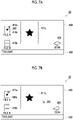
- Fig. 7A illustrates an example of a display screen in a case where a maintenance instruction image 413a is displayed
- Fig. 7B illustrates an example of a display screen in a state in which the display of the enlarged thumbnail image 411a is maintained.
- the operation determination unit 101 determines whether or not the enlargement instruction image 412a (see Fig. 5C ) is designated (step S601) .
- the process waits until the enlargement instruction image 412a is designated and the enlarged thumbnail image 411a is displayed.
- the instruction image output unit 103 outputs and displays the maintenance instruction image 413a to the display unit 40 (step S602) .
- the enlargement instruction image 412a is changed to the maintenance instruction image 413a and displayed.
- the maintenance instruction image 413a also functions as an enlargement instruction image, and the enlargement can be instructed by a mouse over operation. That is, even in a case where the enlargement instruction image 412a is changed to the maintenance instruction image 413a and displayed, the designation of the enlargement instruction image by the mouse over operation is not canceled, and the display of the enlarged thumbnail image 411a is maintained as long as the mouse over operation on the maintenance instruction image 413a as the enlargement instruction image is continued.
- the operation determination unit 101 determines whether or not the maintenance instruction image 413a is designated (step S603).
- the operation determination unit 101 determines a click operation on the maintenance instruction image 413a as the designation on the maintenance instruction image 413a.
- the unintended shift to the state in which the display of the enlarged thumbnail image 411a is maintained is suppressed.
- step S603 the process waits until the maintenance instruction image 413a is designated. In a case where the maintenance instruction image 413a is designated (YES in step S603), the process is shifted to the state in which the display of the enlarged thumbnail image 411a is maintained (step S604) .
- the display of the enlarged thumbnail image 411a is maintained even in a case where the mouse over operation on the maintenance instruction image 413a as the enlargement instruction image is canceled. Further, in the state in which the display of the enlarged thumbnail image 411a is maintained, the display of the enlarged thumbnail image 411a is maintained even in a case where another operation, for example, a scroll operation on the operation screen 400 is performed. Further, in the present exemplary embodiment, a position of the enlarged thumbnail image 411a on the screen is fixed, so that the enlarged thumbnail image 411a does not move even in a case where the scroll operation is performed.
- the operation determination unit 101 determines whether or not an operation of canceling the state in which the display of the enlarged thumbnail image 411a is maintained is performed (step S605) .
- performing a click operation at a position other than an area in which the enlarged thumbnail image 411a is displayed, for example, at a position of the cursor 200 in Fig. 7B is determined to be an operation of canceling the state in which the display of the enlarged thumbnail image 411a is maintained.
- the canceling operation is not performed (NO in step S605)
- the state in which the display of the enlarged thumbnail image 411a is maintained is continued.
- the canceling operation is performed (YES in step S605)
- the state in which the display of the enlarged thumbnail image 411a is maintained is canceled (step S606).
- the operation of designating the maintenance instruction image 413a is configured to shift to the state in which the display of the enlarged thumbnail image 411a is maintained.
- the operation of shifting to the state in which the display of the enlarged thumbnail image 411a is maintained may be performed by another predetermined operation such as a key operation.
- the configuration may be provided so that the maintenance instruction image 413a is not displayed, or the enlargement instruction image 412a and the maintenance instruction image 413a are independently displayed at different positions.
- the enlargement instruction image 412a is changed to the maintenance instruction image 413a and displayed, so that the operation from displaying the enlarged thumbnail image 411a to shifting to the state in which the display of the enlarged thumbnail image 411a is maintained can be smoothly performed.
- the maintenance instruction image 413a may be changed to another image.
- the maintenance instruction image 413a it becomes easier for the user to recognize that the display of the enlarged thumbnail image 411a is maintained.
- the image display apparatus 1 in a case of a state in which the display of one enlarged thumbnail image 411a, which is enlarged from one thumbnail image 410a, is maintained, it is possible to display the other enlarged thumbnail image 411b, which is enlarged from the other thumbnail image 410b.
- Fig. 8 is a flowchart illustrating an example of a processing procedure of displaying the other enlarged thumbnail image 411b.
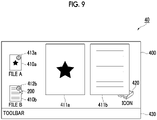
- Fig. 9 illustrates an example of a display screen in a case where the other enlarged thumbnail image 411b is displayed while maintaining the display of the one enlarged thumbnail image 411a.
- the operation determination unit 101 determines whether or not display of the one enlarged thumbnail image 411a is maintained. More specifically, it is determined whether or not an operation of designating the maintenance instruction image 413a is performed (step S701). In a case where the display of the one enlarged thumbnail image 411a is not maintained (NO in step S701), the process waits until the display of the one enlarged thumbnail image 411a is maintained. In a case where the display of the one enlarged thumbnail image 411a is maintained (YES in step S701), the process is shifted to step S702, and whether or not another thumbnail image 410 different from the one thumbnail image 410a is designated is determined.
- the process waits until the other thumbnail image 410 is designated.
- the instruction image output unit 103 outputs and displays an enlargement instruction image 412b corresponding to the other thumbnail image 410b (step S703).
- the operation determination unit 101 determines whether or not the other enlargement instruction image 412b is designated based on an operation via the input unit 20 (step S704). In the present exemplary embodiment, the operation determination unit 101 determines that a mouse over operation on the other enlargement instruction image 412b is the designation of the other enlargement instruction image 412b. In a case where the other enlargement instruction image 412b is not designated (NO in step S704), the process waits until the other enlargement instruction image 412b is designated. As illustrated in Fig.
- the enlarged image output unit 104 receives the other thumbnail image 410b from the thumbnail image storage unit 106, and outputs and displays the other enlarged thumbnail image 411b, which is enlarged from the thumbnail image 410b, to the display unit 40 (step S705).
- the operation determination unit 101 determines whether or not the designation of the other enlargement instruction image 412b is canceled (step S706). In a case where the designation of the other enlargement instruction image 412b is not canceled (NO in step S706), the display of the other enlarged thumbnail image 411b is continued. In a case where the designation of the other enlargement instruction image 412b is canceled (YES in step S706), the enlarged image output unit 104 stops the output to the display unit 40, and the other enlarged thumbnail image 411b is not displayed.
- the operation determination unit 101 determines whether or not the designation of the other enlarged thumbnail image 411b is canceled (step S707) .
- the display of the other enlargement instruction image 412b is continued.
- the enlarged image output unit 104 stops the output to the display unit 40, and the other enlargement instruction image 412b is not displayed. In this manner, the operation screen 400 returns to the display content before the other thumbnail image 410b is designated (step S708) .
- Figs. 8 and 9 illustrate the example of displaying the two enlarged thumbnail images 411a and 411b
- the three or more enlarged thumbnail images 411 may be displayed. More specifically, after step S705, in a state in which the display of the other enlarged thumbnail image 411b is maintained according to the same procedure as the procedure of the one enlarged thumbnail image 411a, the third enlarged thumbnail image 411 corresponding to the thumbnail image 410c or the like may be displayed.
- the image display apparatus 1 is configured so that the state in which the display of the one enlarged thumbnail image 411a is maintained is not shifted to the state in which the display of the other enlarged thumbnail image 411b is maintained.
- the image display apparatus 1 is configured so that the state in which the display of the one enlarged thumbnail image 411a is maintained is not shifted to the state in which the display of the other enlarged thumbnail image 411b is maintained.
- some of the enlarged thumbnail images 411 may be displayed so as to be superimposed with each other. Meanwhile, by displaying the plurality of enlarged thumbnail images 411 so as not to be superimposed with each other as in the display example of Fig. 9 , the contents of the file can be grasped in more detail as compared with the case where some of the enlarged thumbnail images are displayed so as to be superimposed with each other. Further, for example, the display control unit 102 may change a size or a position of the enlarged thumbnail images 411 to control the display so that the enlarged thumbnail images 411 are not superimposed with each other.
- the operation of enlarging the other thumbnail image 410b or the display of the enlargement instruction image 412b and the other enlarged thumbnail image 411b has various aspects, in the same manner as the display of the enlarged thumbnail image 411a described in Fig. 4 and Figs. 5A to 5C .
- the process performed by the image display apparatus 1 according to the present exemplary embodiment is prepared, for example, as a program such as application software.
- the program can be provided by a communication section as well as provided by being stored in a recording medium such as a CD-ROM or the like.
Landscapes
- Engineering & Computer Science (AREA)
- Theoretical Computer Science (AREA)
- General Engineering & Computer Science (AREA)
- Physics & Mathematics (AREA)
- General Physics & Mathematics (AREA)
- Human Computer Interaction (AREA)
- User Interface Of Digital Computer (AREA)
- Processing Or Creating Images (AREA)
- Controls And Circuits For Display Device (AREA)
Abstract
Description
- The present invention relates to an information processing apparatus, a program, and an information processing method.
- In the related art, there is an apparatus or software that digitizes and manages a file such as data read by a scanner or a document created by an application on a personal computer (PC), for example. In such an apparatus or software, a plurality of application files, image files, and the like are managed, and in that case, a so-called "thumbnail image" is used. This thumbnail image is a reduced image for displaying a list of the files, and contents can be approximatively grasped without opening the file, which is highly convenient.
- For example,
JP2008-077210A - In a case where the file is managed by using the thumbnail image and there is a function to enlarge the thumbnail image, the contents can be grasped in more detail without opening the file, which makes it easier to manage the file.
- In the operation of this enlargement, for example, in a case where a configuration is such that the thumbnail is enlarged only by accepting an instruction on an area in which the thumbnail is displayed, the enlargement may occur unintentionally by a user and operability may be deteriorated.
- According to an aspect of the present disclosure, there is an information processing apparatus, a program, and an information processing method that suppress a decrease in user operability as compared with a case where a thumbnail image is enlarged only by accepting an instruction on an area in which a thumbnail is displayed.
- According to a first aspect of the present disclosure, there is provided an information processing apparatus including a processor configured to display a thumbnail image of a file on a screen, display an enlargement instruction image for instructing to enlarge and display the thumbnail image to be superimposed on at least a part of the thumbnail image, and in a case where the enlargement instruction image is designated, display an enlarged thumbnail image enlarged from the thumbnail image on the screen.
- According to a second aspect of the present disclosure, in the information processing apparatus according to the first aspect, the processor may be configured to in a case where a predetermined operation is performed by a user, control the display of the enlarged thumbnail image to be maintained even in a case where the designation of the enlargement instruction image is canceled.
- According to a third aspect of the present disclosure, in the information processing apparatus according to the second aspect, the processor may be configured to control the enlarged thumbnail image not to move in a case where a scroll operation is performed on the screen in a state in which the display of the enlarged thumbnail image is maintained.
- According to a fourth aspect of the present disclosure, in the information processing apparatus according to the second aspect, the processor may be configured to in a case where the enlarged thumbnail image is displayed, display a maintenance instruction image for instructing to maintain the display of the enlarged thumbnail image, and in a case where the maintenance instruction image is designated, control the display of the enlarged thumbnail image to be maintained.
- According to a fifth aspect of the present disclosure, in the information processing apparatus according to the fourth aspect, the processor may be configured to in a case where the enlarged thumbnail image is displayed, change the enlargement instruction image to the maintenance instruction image and display the maintenance instruction image, and control the changed maintenance instruction image to function as the enlargement instruction image as well.
- According to a sixth aspect of the present disclosure, in the information processing apparatus according to the fifth aspect, the processor may be configured to accept designation of the changed maintenance instruction image by a user operation different from the designation of the enlargement instruction image.
- According to a seventh aspect of the present disclosure, in the information processing apparatus according to the second aspect, the processor may be configured to display a plurality of thumbnail images corresponding to a plurality of files on the screen, and in a case where display of one enlarged thumbnail image enlarged from one thumbnail image is maintained and another enlargement instruction image for instructing to enlarge and display another thumbnail image is designated, perform control such that another enlarged thumbnail image enlarged from the other thumbnail image is displayed while maintaining the display of the one enlarged thumbnail image.
- According to an eighth aspect of the present disclosure, in the information processing apparatus according to the seventh aspect, the processor may be configured to even in a case where the predetermined operation is performed in a state in which the display of the one enlarged thumbnail image is maintained and in a state in which the other enlarged thumbnail image is displayed, control the display of the other enlarged thumbnail image not to be maintained.
- According to a ninth aspect of the present disclosure, there is provided a program causing a computer to realize a function of displaying a thumbnail image of a file on a screen, a function of displaying an enlargement instruction image for instructing to enlarge and display the thumbnail image to be superimposed on at least a part of the thumbnail image on the screen, and a function of displaying, in a case where the enlargement instruction image is designated, an enlarged thumbnail image enlarged from the thumbnail image on the screen.
- According to a tenth aspect of the present disclosure, there is provided an information processing method including displaying a thumbnail image of a file on a screen, displaying an enlargement instruction image for instructing to enlarge and display the thumbnail image to be superimposed on at least a part of the thumbnail image, and displaying, in a case where the enlargement instruction image is designated, an enlarged thumbnail image enlarged from the thumbnail image on the screen.
- According to the first aspect of the present disclosure, a decrease in user operability is suppressed as compared with a case where the thumbnail image is enlarged only by accepting an instruction on an area in which a thumbnail is displayed.
- According to the second aspect of the present disclosure, other operations can be performed while referring to the enlarged thumbnail image.
- According to the third aspect of the present disclosure, a scroll operation can be performed while referring to the enlarged thumbnail image.
- According to the fourth aspect of the present disclosure, it is possible to shift to a state in which the display of the enlarged thumbnail image is maintained by using a simpler operation, as compared with a configuration in which the display of the enlarged thumbnail image is maintained in a case where a key operation is performed.
- According to the fifth aspect of the present disclosure, the operation of shifting from the display of the enlarged thumbnail image becomes easy, as compared with a case where the enlargement instruction image and the maintenance instruction image are separately displayed.
- According to the sixth aspect of the present disclosure, it is possible to suppress the shift to a state in which the display of an unintended enlarged thumbnail image is maintained, as compared with a configuration in which the designation of the enlargement instruction image and the designation of the maintenance instruction image are the same.
- According to the seventh aspect of the present disclosure, it is possible to check contents of one file while referring to contents of another file.
- According to the eighth aspect of the aspect of the present, it is possible to prevent display contents of the screen from becoming complicated, as compared with a case where the display of a plurality of enlarged thumbnail images are maintained.
- According to the ninth aspect of the present disclosure, a decrease in user operability is suppressed as compared with a case where the thumbnail image is enlarged only by accepting an instruction on an area in which a thumbnail is displayed.
- According to the tenth aspect of the present disclosure, a decrease in user operability is suppressed as compared with a case where the thumbnail image is enlarged only by accepting an instruction on an area in which a thumbnail is displayed.
- Exemplary embodiment(s) of the present invention will be described in detail based on the following figures, wherein:
-
Fig. 1 is a diagram illustrating an example of a hardware configuration of animage display apparatus 1 to which the present exemplary embodiment is applied; -
Fig. 2 is a diagram illustrating an example of an operation screen; -
Fig. 3 is a block diagram illustrating an example of a functional configuration of theimage display apparatus 1; -
Fig. 4 is a flowchart illustrating an example of a processing procedure of displaying an enlarged thumbnail image; -
Figs. 5A and 5C are diagrams illustrating an example of displaying the operation screen, andFig. 5A is a diagram illustrating a state before a thumbnail image is designated,Fig. 5B is a diagram illustrating a state in which the thumbnail image is designated and an enlargement instruction image is displayed, andFig. 5C is a diagram illustrating a state in which the enlargement instruction image is designated and the enlarged thumbnail image is displayed; -
Fig. 6 is a flowchart illustrating an example of a processing procedure of shifting to a state in which the display of the enlarged thumbnail image is maintained; -
Figs. 7A and 7B are diagrams illustrating an example of a display screen in a case of shifting to the state in which the display of the enlarged thumbnail image is maintained, andFig. 7A is a diagram illustrating an example of a display screen in a case where a maintenance instruction image is displayed, andFig. 7B is a diagram illustrating an example of the display screen in the state in which the display of the enlarged thumbnail image is maintained; -
Fig. 8 is a flowchart illustrating an example of a processing procedure of displaying another enlarged thumbnail image; and -
Fig. 9 is a diagram illustrating an example of a display screen in a case where the other enlarged thumbnail image is displayed. - Hereinafter, exemplary embodiments of the present invention will be described with reference to drawings.
-
Fig. 1 is a diagram illustrating an example of a hardware configuration of animage display apparatus 1 to which the present exemplary embodiment is applied. - As illustrated in
Fig. 1 , theimage display apparatus 1 according to the present exemplary embodiment functions as an example of an information processing apparatus, and includes anarithmetic processing unit 10 that executes a digital arithmetic process according to a predetermined processing program in a case of displaying a screen, aninput unit 20 that accepts an input operation from a user, asecondary storage unit 30 that is realized by a hard disk drive (HDD), adisplay unit 40 that consists of a liquid crystal display panel, an organic electro luminescence (EL) display panel, or the like which displays an image, text information, or the like to the user, and acommunication unit 50 which transmits and accepts data via a network. - The
arithmetic processing unit 10 includes a central processing unit (CPU) 11 that controls the entire apparatus, as an example of a processor, a random access memory (RAM) 12 to be used as a working memory of theCPU 11, a read only memory (ROM) 13 that stores an image display processing program or the like executed by theCPU 11, anon-volatile memory 14 such as a static RAM (SRAM), a flash memory, or the like backed up by battery, that is rewritable and can hold data even in a case where power supply is interrupted, and aninterface unit 15 that controls each unit such as theinput unit 20 connected to thearithmetic processing unit 10. Image information such as thumbnail images (described below) displayed on thedisplay unit 40 is stored in thenon-volatile memory 14. - In addition to storing image data and the like, the
secondary storage unit 30 also stores an image display processing program to be executed by thearithmetic processing unit 10, and thearithmetic processing unit 10 reads the image display processing program to execute each process of theimage display apparatus 1 according to the present exemplary embodiment. - Here, the program executed by the
CPU 11, which is an example of a processor, is provided to thearithmetic processing unit 10 in a state of being stored in a computer-readable recording medium such as a magnetic recording medium (a magnetic tape, a magnetic disk, or the like), an optical recording medium (an optical disk, or the like), an optical magnetic recording medium, a semiconductor memory, or the like. Further, the program executed by theCPU 11 may be downloaded to theimage display apparatus 1 by using a communication section such as the Internet. - In the embodiments above, the term "processor" refers to hardware in a broad sense. Examples of the processor include general processors (e.g., CPU: Central Processing Unit) and dedicated processors (e.g., GPU: Graphics Processing Unit, ASIC: Application Specific Integrated Circuit, FPGA: Field Programmable Gate Array, and programmable logic device). In the embodiments above, the term "processor" is broad enough to encompass one processor or plural processors in collaboration which are located physically apart from each other but may work cooperatively. The order of operations of the processor is not limited to one described in the embodiments above, and may be changed.
- The
input unit 20 is an apparatus such as a pointing device by which the user inputs an operation. - For example, in a case where the
input unit 20 is a mouse or the like, the user can designate a position on a screen of thedisplay unit 40, a displayed image, or the like by performing a cursor movement operation or a click operation. - Further, in a case where the
input unit 20 is a touch panel or the like, the user can designate a position on a screen or a displayed image by performing an operation of touching the touch panel with a finger or the like or an operation of maintaining the touched state of the finger or the like for a longer time than a predetermined time. In this case, theinput unit 20 is provided integrally with thedisplay unit 40. - In addition to the apparatus such as the pointing device described above, a keyboard or the like for performing a key input operation may be provided as the
input unit 20. -
Fig. 2 is a diagram illustrating an example of an operation screen. - As illustrated in
Fig. 2 , thedisplay unit 40 displays anoperation screen 400. Theoperation screen 400 is a workspace on file handling software, and is an area in which an image related to a file selected by the user, a thumbnail image 410 (which will be described below), and the like are arranged. The file handling software is software that digitizes and manages files such as image data or document data, and has a function of promoting unified management of paper and electronic files. - In addition to the
thumbnail image 410, instruction images such as anicon 420, atoolbar 430, anenlarged thumbnail image 411, and anenlargement instruction image 412 are displayed, on theoperation screen 400. - The
icon 420 represents various types of functions such as a program function with pictograms. Further, thetoolbar 430 is an aggregation of instruction units that accept instructions from the user. - The
thumbnail image 410 is an image for checking contents before opening a file, and theenlarged thumbnail image 411 is an enlarged image of thethumbnail image 410. Further, the instruction image such as theenlargement instruction image 412 is an image for giving an instruction related to the display of theenlarged thumbnail image 411. - The
thumbnail image 410 is an image for checking at least a part of the content of the file managed by the file handling software. For example, in a case where the corresponding file is image data, the file is simply displayed as a reduced image of the original image. In a case where the corresponding file is document data of a plurality of pages, a representative page such as a first page is displayed as a reduced image. - In the present exemplary embodiment, the
thumbnail image 410 functions as an icon for opening the corresponding file. For example, by performing a specific operation such as a double-click operation on thethumbnail image 410, the corresponding file can be opened. - The
enlarged thumbnail image 411 is an enlarged image of thethumbnail image 410 instructed to be enlarged by the user, and is displayed without starting a new program. It is assumed that theenlarged thumbnail image 411 is enlarged and displayed to a size that allows the user to understand the content of thethumbnail image 410. More specifically, it is assumed that theenlarged thumbnail image 411 is displayed larger than thecorresponding thumbnail image 410. - The instruction image is an image for accepting an operation of the user and giving an instruction related to the display of the
enlarged thumbnail image 411, and is displayed in a state of being associated with thethumbnail image 410. In addition to theenlargement instruction image 412 illustrated inFig. 2 , various types of instruction images corresponding to the contents of the instruction such as a maintenance instruction image (which will be described below inFigs. 7A and 7B ) are displayed. - In the present exemplary embodiment, the instruction image such as the
enlargement instruction image 412 is displayed to be superimposed on an upper right corner portion of thethumbnail image 410. In this case, it is preferable that the instruction image is displayed so as not to reduce visibility of thethumbnail image 410, for example. For example, theenlargement instruction image 412 is displayed to be smaller than thethumbnail image 410. Further, theenlargement instruction image 412 is made semi-transparent and displayed so that a superimposed portion with thethumbnail image 410 can be seen through. - In addition, as illustrated in
Fig. 2 , a text such as a name of the file or a function corresponding to thethumbnail image 410 or theicon 420 may be displayed in association with each image. Further, the text may be displayed in association with theenlarged thumbnail image 411. - Next, a functional configuration of the
image display apparatus 1 will be described. -
Fig. 3 is a block diagram illustrating an example of the functional configuration of theimage display apparatus 1. As illustrated inFig. 3 , theimage display apparatus 1 includes anoperation determination unit 101, adisplay control unit 102, an instructionimage output unit 103, an enlargedimage output unit 104, a thumbnailimage generation unit 105, and a thumbnailimage storage unit 106, which are realized by the arithmetic processing unit 10 (seeFig. 1 ). - The
operation determination unit 101 determines whether or not a user operation is performed via theinput unit 20 on the operation screen 400 (seeFig. 2 ). The user operation is, for example, an operation of designating an image, an icon, a position, or the like on theoperation screen 400, a scroll operation, a key input operation, or the like. - The
display control unit 102 controls a display mode or position of the image, theicon 420, the toolbar 430 (seeFig. 2 ), or the like based on a content determined by theoperation determination unit 101. Further, thethumbnail image 410 is received from the thumbnailimage storage unit 106, and controlled to be displayed as an icon for opening the corresponding file. - The instruction
image output unit 103 outputs an instruction image such as theenlargement instruction image 412 for assisting the operation of the user to thedisplay unit 40 in a case of an enlargement instruction from the user or an instruction to maintain the display of the enlarged thumbnail image. This instruction image is displayed in a state of being associated with thethumbnail image 410. - The enlarged
image output unit 104 receives thethumbnail image 410 from the thumbnailimage storage unit 106, based on determination of designating theenlargement instruction image 412 by theoperation determination unit 101. The enlargedimage output unit 104 outputs theenlarged thumbnail image 411 which is enlarged fromthumbnail image 410, to thedisplay unit 40, without starting a new program. - The thumbnail
image generation unit 105 generates a thumbnail image 440 to be displayed on theoperation screen 400, based on a file such as image data stored in thesecondary storage unit 30. - The thumbnail
image storage unit 106 acquires and stores thethumbnail image 410 generated by the thumbnailimage generation unit 105. The thumbnailimage storage unit 106 is realized by thenon-volatile memory 14. - Next, the user operation and the display process in a case where the enlarged thumbnail image is displayed will be described with reference to
Fig. 4 andFigs. 5A to 5C . -
Fig. 4 is a flowchart illustrating an example of a processing procedure of displaying an enlarged thumbnail image. -
Figs. 5A to 5C are diagrams illustrating an example of displaying an operation screen.Fig. 5A is a diagram illustrating a state before a thumbnail image is designated,Fig. 5B is a diagram illustrating a state in which the thumbnail image is designated and an enlargement instruction image is displayed, andFig. 5C is a diagram illustrating a state in which the enlargement instruction image is designated and the enlarged thumbnail image is displayed. - As illustrated in
Figs. 5A to 5C , thedisplay unit 40 according to the present exemplary embodiment displays acursor 200 indicating a position on the screen, an image, or the like, and anoperation screen 400. Thecursor 200 is moved by an operation of the user input via theinput unit 20, and is displayed so as to point to the position, the image, or the like on the screen designated by the user. -
Thumbnail images icon 420 corresponding to various types of functions, and thetoolbar 430 are displayed on theoperation screen 400. Hereinafter, thethumbnail images thumbnail image 410, in some cases. - In the flowchart illustrated in
Fig. 4 , first, theoperation determination unit 101 determines whether or not any of thethumbnail images 410 is designated based on an operation via the input unit 20 (step S501). In the present exemplary embodiment, theoperation determination unit 101 determines that an operation of moving thecursor 200 so as to point to thethumbnail image 410a is the designation of thethumbnail image 410a. For example, a mouse over operation of positioning thecursor 200 on thethumbnail image 410a is determined as the designation of thethumbnail image 410a. As illustrated inFig. 5A , in a case where thethumbnail image 410 is not designated (NO in step S501), the process waits until thethumbnail image 410 is designated. As illustrated inFig. 5B , in a case where thethumbnail image 410a is designated (YES in step S501), the instructionimage output unit 103 outputs and displays theenlargement instruction image 412a (step S502) . - Next, the
operation determination unit 101 determines whether or not theenlargement instruction image 412a is designated based on an operation via the input unit 20 (step S503). Theoperation determination unit 101 according to the present exemplary embodiment determines, for example, that a mouse over operation on theenlargement instruction image 412a is the designation on theenlargement instruction image 412a. As illustrated inFig. 5B , in a case where theenlargement instruction image 412a is not designated (NO in step S503), the process waits until theenlargement instruction image 412a is designated. As illustrated inFig. 5C , in a case where theenlargement instruction image 412a is designated (YES in step S503), the enlargedimage output unit 104 receives thethumbnail image 410a from the thumbnailimage storage unit 106, and outputs and displays theenlarged thumbnail image 411a which is enlarged from thethumbnail image 410a to the display unit 40 (step S504). - Subsequently, the
operation determination unit 101 determines whether or not the designation of theenlargement instruction image 412a is canceled (step S505). The cancellation of the designation of theenlargement instruction image 412a includes, for example, the cursor moving out of theenlargement instruction image 412a from above theenlargement instruction image 412a. In a case where the designation of theenlargement instruction image 412a is not canceled (NO in step S505), the display of theenlarged thumbnail image 411a is continued. In a case where the designation of theenlargement instruction image 412a is canceled (YES in step S505), the enlargedimage output unit 104 stops the output to thedisplay unit 40, and theenlarged thumbnail image 411a is not displayed (step S506) . With this process, in a case where thecursor 200 is on theenlargement instruction image 412a, the display of theenlarged thumbnail image 411a is maintained. Further, in a case where thecursor 200 is moved to a position different from theenlargement instruction image 412a, theenlarged thumbnail image 411a is not displayed. - Subsequently, the
operation determination unit 101 determines whether or not the designation of thethumbnail image 411a is canceled (step S507). In a case where the designation of thethumbnail image 411a is not canceled (NO in step S507), the display of theenlargement instruction image 412a is continued. In a case where the designation of thethumbnail image 410a is canceled (YES in step S507), the enlargedimage output unit 104 stops the output to thedisplay unit 40, and theenlargement instruction image 412a is not displayed. As a result, theoperation screen 400 returns to the state before thethumbnail image 410a is designated (step S508) . - The process of displaying the
enlarged thumbnail image 411a is completed according to the above processing procedure. - In the present exemplary embodiment, as described above, the mouse over operation on the
thumbnail image 410a or theenlargement instruction image 412a is determined as the designation of these images. In another exemplary embodiment, theoperation determination unit 101 may determine another user operation, for example, a click operation as the designation of thethumbnail image 410a. Further, in addition to the designation of thethumbnail image 410a, a specific key input operation and an instruction operation from the instruction unit of thetoolbar 430 may be used as determination conditions . Any one of these conditions is an example of a predetermined condition based on the operation of the user for displaying theenlargement instruction image 412a. - Further, for example, it can be configured to always display the
enlargement instruction image 412a without providing step S501. Meanwhile, as in the present exemplary embodiment, by configuring theenlargement instruction image 412a to be displayed based on the operation of the user, the display of theenlarged thumbnail image 411a which is not intended by the user is suppressed, and operability of the user is improved. - The
enlargement instruction image 412a may be displayed so as not to be superimposed on thecorresponding thumbnail image 410a. In a case where theenlargement instruction image 412a is always displayed as described above, even in a case where thethumbnail image 410a and theenlargement instruction image 412a are displayed apart from each other, it is possible to designate theenlargement instruction image 412a. - Meanwhile, as illustrated in
Figs. 5B and 5C , by displaying theenlargement instruction image 412a to be superimposed on at least a part of thethumbnail image 410a, a correspondence between theenlargement instruction image 412a and thethumbnail image 410a can be easily grasped, and the operability of the user is improved. Further, in the present exemplary embodiment, the operations from the designation of thethumbnail image 410a to the designation of theenlargement instruction image 412a can be smoothly performed. - Further, the
enlarged thumbnail image 411a may be displayed so as to be superimposed on other display contents such as thecorresponding thumbnail image 410a or another thumbnail image, theicon 420, thetoolbar 430, and the like. In this case, since theenlarged thumbnail image 411a is displayed so as not to completely cover theenlargement instruction image 412a, it is possible to suppress the unintended cancellation of the designation of theenlargement instruction image 412a. - As described above, in the present exemplary embodiment, in a case where the designation of the
enlargement instruction image 412a is canceled, theenlarged thumbnail image 411a is not displayed. In a case where the user actually manages the file, it is convenient to have a function of maintaining the display of theenlarged thumbnail image 411a even in a case where the designation of theenlargement instruction image 412a is canceled. - The
image display apparatus 1 according to the present exemplary embodiment shifts to a state in which the display of theenlarged thumbnail image 411a is maintained even in a case where the designation of theenlargement instruction image 412a is canceled, in a case where the user performs a predetermined operation. - An operation example of the user and an example of a processing procedure will be described with reference to
Fig. 6 andFigs. 7A and 7B , regarding the state in which the display of theenlarged thumbnail image 411a is maintained. -
Fig. 6 is a flowchart illustrating an example of the processing procedure of shifting to the state in which the display of theenlarged thumbnail image 411a is maintained. -
Figs. 7A and 7B are diagrams illustrating an example of a display screen in a case of shifting to the state in which the display of theenlarged thumbnail image 411a is maintained.Fig. 7A illustrates an example of a display screen in a case where amaintenance instruction image 413a is displayed, andFig. 7B illustrates an example of a display screen in a state in which the display of theenlarged thumbnail image 411a is maintained. - In the flowchart illustrated in
Fig. 6 , first, the operation determination unit 101 (seeFig. 3 ) determines whether or not theenlargement instruction image 412a (seeFig. 5C ) is designated (step S601) . In a case where theenlargement instruction image 412a is not designated (NO in step S601), the process waits until theenlargement instruction image 412a is designated and theenlarged thumbnail image 411a is displayed. In a case where theenlargement instruction image 412a is designated and theenlarged thumbnail image 411a is displayed (YES in step S601), the instructionimage output unit 103 outputs and displays themaintenance instruction image 413a to the display unit 40 (step S602) . In the present exemplary embodiment illustrated inFig. 7A , theenlargement instruction image 412a is changed to themaintenance instruction image 413a and displayed. In this case, themaintenance instruction image 413a also functions as an enlargement instruction image, and the enlargement can be instructed by a mouse over operation. That is, even in a case where theenlargement instruction image 412a is changed to themaintenance instruction image 413a and displayed, the designation of the enlargement instruction image by the mouse over operation is not canceled, and the display of theenlarged thumbnail image 411a is maintained as long as the mouse over operation on themaintenance instruction image 413a as the enlargement instruction image is continued. - Next, the
operation determination unit 101 determines whether or not themaintenance instruction image 413a is designated (step S603). In the present exemplary embodiment, theoperation determination unit 101 determines a click operation on themaintenance instruction image 413a as the designation on themaintenance instruction image 413a. As in the present exemplary embodiment, by accepting the designation of theenlargement instruction image 412a and the designation of themaintenance instruction image 413a with different user operations, the unintended shift to the state in which the display of theenlarged thumbnail image 411a is maintained is suppressed. - In a case where the
maintenance instruction image 413a is not designated (NO in step S603), the process waits until themaintenance instruction image 413a is designated. In a case where themaintenance instruction image 413a is designated (YES in step S603), the process is shifted to the state in which the display of theenlarged thumbnail image 411a is maintained (step S604) . - As illustrated in
Fig. 7B , in the state in which the display of theenlarged thumbnail image 411a is maintained, the display of theenlarged thumbnail image 411a is maintained even in a case where the mouse over operation on themaintenance instruction image 413a as the enlargement instruction image is canceled. Further, in the state in which the display of theenlarged thumbnail image 411a is maintained, the display of theenlarged thumbnail image 411a is maintained even in a case where another operation, for example, a scroll operation on theoperation screen 400 is performed. Further, in the present exemplary embodiment, a position of theenlarged thumbnail image 411a on the screen is fixed, so that theenlarged thumbnail image 411a does not move even in a case where the scroll operation is performed. - Subsequently, the
operation determination unit 101 determines whether or not an operation of canceling the state in which the display of theenlarged thumbnail image 411a is maintained is performed (step S605) . In the present exemplary embodiment, performing a click operation at a position other than an area in which theenlarged thumbnail image 411a is displayed, for example, at a position of thecursor 200 inFig. 7B , is determined to be an operation of canceling the state in which the display of theenlarged thumbnail image 411a is maintained. In a case where the canceling operation is not performed (NO in step S605), the state in which the display of theenlarged thumbnail image 411a is maintained is continued. In a case where the canceling operation is performed (YES in step S605), the state in which the display of theenlarged thumbnail image 411a is maintained is canceled (step S606). - The process of displaying the
enlarged thumbnail image 411a is completed according to the above processing procedure. - In the example described above, the operation of designating the
maintenance instruction image 413a is configured to shift to the state in which the display of theenlarged thumbnail image 411a is maintained. The operation of shifting to the state in which the display of theenlarged thumbnail image 411a is maintained may be performed by another predetermined operation such as a key operation. - Further, in a case of shifting to the state in which the display of the
enlarged thumbnail image 411a is maintained, the configuration may be provided so that themaintenance instruction image 413a is not displayed, or theenlargement instruction image 412a and themaintenance instruction image 413a are independently displayed at different positions. As in the present exemplary embodiment, theenlargement instruction image 412a is changed to themaintenance instruction image 413a and displayed, so that the operation from displaying theenlarged thumbnail image 411a to shifting to the state in which the display of theenlarged thumbnail image 411a is maintained can be smoothly performed. - Further, in the state in which the display of the
enlarged thumbnail image 411a is maintained, themaintenance instruction image 413a may be changed to another image. By changing themaintenance instruction image 413a to the other image, it becomes easier for the user to recognize that the display of theenlarged thumbnail image 411a is maintained. - In a case where a plurality of files is managed, it is convenient to have a function of displaying two or more enlarged thumbnail images so that the contents can be compared.
- With the
image display apparatus 1 according to the present exemplary embodiment, in a case of a state in which the display of oneenlarged thumbnail image 411a, which is enlarged from onethumbnail image 410a, is maintained, it is possible to display the otherenlarged thumbnail image 411b, which is enlarged from theother thumbnail image 410b. - An operation example of the user and an example of a processing procedure in a case where the other enlarged thumbnail image is displayed will be described with reference to
Figs. 8 and9 . -
Fig. 8 is a flowchart illustrating an example of a processing procedure of displaying the otherenlarged thumbnail image 411b. -
Fig. 9 illustrates an example of a display screen in a case where the otherenlarged thumbnail image 411b is displayed while maintaining the display of the oneenlarged thumbnail image 411a. - In the flowchart illustrated in
Fig. 8 , first, the operation determination unit 101 (seeFig. 3 ) determines whether or not display of the oneenlarged thumbnail image 411a is maintained. More specifically, it is determined whether or not an operation of designating themaintenance instruction image 413a is performed (step S701). In a case where the display of the oneenlarged thumbnail image 411a is not maintained (NO in step S701), the process waits until the display of the oneenlarged thumbnail image 411a is maintained. In a case where the display of the oneenlarged thumbnail image 411a is maintained (YES in step S701), the process is shifted to step S702, and whether or not anotherthumbnail image 410 different from the onethumbnail image 410a is designated is determined. In a case where theother thumbnail image 410 is not designated (NO in step S702), the process waits until theother thumbnail image 410 is designated. In a case where another thumbnail image, for example, theother thumbnail image 410b is designated as illustrated inFig. 9 (YES in step S702), the instructionimage output unit 103 outputs and displays anenlargement instruction image 412b corresponding to theother thumbnail image 410b (step S703). - Next, the
operation determination unit 101 determines whether or not the otherenlargement instruction image 412b is designated based on an operation via the input unit 20 (step S704). In the present exemplary embodiment, theoperation determination unit 101 determines that a mouse over operation on the otherenlargement instruction image 412b is the designation of the otherenlargement instruction image 412b. In a case where the otherenlargement instruction image 412b is not designated (NO in step S704), the process waits until the otherenlargement instruction image 412b is designated. As illustrated inFig. 9 , in a case where the otherenlargement instruction image 412b is designated (YES in step S704), the enlargedimage output unit 104 receives theother thumbnail image 410b from the thumbnailimage storage unit 106, and outputs and displays the otherenlarged thumbnail image 411b, which is enlarged from thethumbnail image 410b, to the display unit 40 (step S705). - Subsequently, the
operation determination unit 101 determines whether or not the designation of the otherenlargement instruction image 412b is canceled (step S706). In a case where the designation of the otherenlargement instruction image 412b is not canceled (NO in step S706), the display of the otherenlarged thumbnail image 411b is continued. In a case where the designation of the otherenlargement instruction image 412b is canceled (YES in step S706), the enlargedimage output unit 104 stops the output to thedisplay unit 40, and the otherenlarged thumbnail image 411b is not displayed. - Subsequently, the
operation determination unit 101 determines whether or not the designation of the otherenlarged thumbnail image 411b is canceled (step S707) . In a case where the designation of the otherenlarged thumbnail image 411b is not canceled (NO in step S707), the display of the otherenlargement instruction image 412b is continued. In a case where the designation of theother thumbnail image 410b is canceled (YES in step S707), the enlargedimage output unit 104 stops the output to thedisplay unit 40, and the otherenlargement instruction image 412b is not displayed. In this manner, theoperation screen 400 returns to the display content before theother thumbnail image 410b is designated (step S708) . - The process of displaying the other
enlarged thumbnail image 411b is completed according to the above processing procedure. - Although
Figs. 8 and9 illustrate the example of displaying the twoenlarged thumbnail images enlarged thumbnail images 411 may be displayed. More specifically, after step S705, in a state in which the display of the otherenlarged thumbnail image 411b is maintained according to the same procedure as the procedure of the oneenlarged thumbnail image 411a, the thirdenlarged thumbnail image 411 corresponding to thethumbnail image 410c or the like may be displayed. - Meanwhile, the
image display apparatus 1 according to the present exemplary embodiment is configured so that the state in which the display of the oneenlarged thumbnail image 411a is maintained is not shifted to the state in which the display of the otherenlarged thumbnail image 411b is maintained. By not providing a state in which the displays of the two or moreenlarged thumbnail images 411 are displayed, it is possible to prevent the display contents of thedisplay unit 40 from becoming complicated and to suppress a decrease in operability of the user. - Further, in a case where the plurality of
enlarged thumbnail images 411 are displayed, some of theenlarged thumbnail images 411 may be displayed so as to be superimposed with each other. Meanwhile, by displaying the plurality ofenlarged thumbnail images 411 so as not to be superimposed with each other as in the display example ofFig. 9 , the contents of the file can be grasped in more detail as compared with the case where some of the enlarged thumbnail images are displayed so as to be superimposed with each other. Further, for example, thedisplay control unit 102 may change a size or a position of theenlarged thumbnail images 411 to control the display so that theenlarged thumbnail images 411 are not superimposed with each other. - The operation of enlarging the
other thumbnail image 410b or the display of theenlargement instruction image 412b and the otherenlarged thumbnail image 411b has various aspects, in the same manner as the display of theenlarged thumbnail image 411a described inFig. 4 andFigs. 5A to 5C . - The process performed by the
image display apparatus 1 according to the present exemplary embodiment is prepared, for example, as a program such as application software. The program can be provided by a communication section as well as provided by being stored in a recording medium such as a CD-ROM or the like. - The foregoing description of the exemplary embodiments of the present invention has been provided for the purposes of illustration and description. It is not intended to be exhaustive or to limit the invention to the precise forms disclosed. Obviously, many modifications and variations will be apparent to practitioners skilled in the art. The embodiments were chosen and described in order to best explain the principles of the invention and its practical applications, thereby enabling others skilled in the art to understand the invention for various embodiments and with the various modifications as are suited to the particular use contemplated. It is intended that the scope of the invention be defined by the following claims and their equivalents.
-
- 1:
- Image display apparatus
- 10:
- Arithmetic processing unit
- 11:
- CPU
- 12:
- RAM
- 13:
- ROM
- 14:
- Non-volatile memory
- 15:
- Interface unit
- 20:
- Input unit
- 30:
- Secondary storage unit
- 40:
- Display unit
- 50:
- Communication unit
- 101:
- Operation determination unit
- 102:
- Display control unit
- 103:
- Instruction image output unit
- 104:
- Enlarged image output unit
- 105:
- Thumbnail image generation unit
- 106:
- Thumbnail image storage unit
- 411,411a, 411b:
- Enlarged thumbnail image
- 412, 412a, 412b:
- Enlargement instruction image
- 413a:
- Maintenance instruction image
Claims (10)
- An information processing apparatus comprising:
a processor configured to:display a thumbnail image of a file on a screen;display an enlargement instruction image for instructing to enlarge and display the thumbnail image to be superimposed on at least a part of the thumbnail image; andin a case where the enlargement instruction image is designated, display an enlarged thumbnail image enlarged from the thumbnail image on the screen. - The information processing apparatus according to claim 1, wherein the processor is configured to:
in a case where a predetermined operation is performed by a user, control the display of the enlarged thumbnail image to be maintained even in a case where the designation of the enlargement instruction image is canceled. - The information processing apparatus according to claim 2, wherein the processor is configured to:
control the enlarged thumbnail image not to move in a case where a scroll operation is performed on the screen in a state in which the display of the enlarged thumbnail image is maintained. - The information processing apparatus according to claim 2, wherein the processor is configured to:in a case where the enlarged thumbnail image is displayed, display a maintenance instruction image for instructing to maintain the display of the enlarged thumbnail image, andin a case where the maintenance instruction image is designated, control the display of the enlarged thumbnail image to be maintained.
- The information processing apparatus according to claim 4, wherein the processor is configured to:in a case where the enlarged thumbnail image is displayed, change the enlargement instruction image to the maintenance instruction image and display the maintenance instruction image, andcontrol the changed maintenance instruction image to function as the enlargement instruction image as well.
- The information processing apparatus according to claim 5, wherein the processor is configured to:
accept designation of the changed maintenance instruction image by a user operation different from the designation of the enlargement instruction image. - The information processing apparatus according to claim 2, wherein the processor is configured to:display a plurality of thumbnail images corresponding to a plurality of files on the screen, andin a case where display of one enlarged thumbnail image enlarged from one thumbnail image is maintained and another enlargement instruction image for instructing to enlarge and display another thumbnail image is designated, perform control such that another enlarged thumbnail image enlarged from the other thumbnail image is displayed while maintaining the display of the one enlarged thumbnail image.
- The information processing apparatus according to claim 7, wherein the processor is configured to:
even in a case where the predetermined operation is performed in a state in which the display of the one enlarged thumbnail image is maintained and in a state in which the other enlarged thumbnail image is displayed, control the display of the other enlarged thumbnail image not to be maintained. - A program causing a computer to realize:a function of displaying a thumbnail image of a file on a screen;a function of displaying an enlargement instruction image for instructing to enlarge and display the thumbnail image to be superimposed on at least a part of the thumbnail image on the screen; anda function of displaying, in a case where the enlargement instruction image is designated, an enlarged thumbnail image enlarged from the thumbnail image on the screen.
- An information processing method comprising:displaying a thumbnail image of a file on a screen;displaying an enlargement instruction image for instructing to enlarge and display the thumbnail image to be superimposed on at least a part of the thumbnail image; anddisplaying, in a case where the enlargement instruction image is designated, an enlarged thumbnail image enlarged from the thumbnail image on the screen.
Applications Claiming Priority (1)
| Application Number | Priority Date | Filing Date | Title |
|---|---|---|---|
| JP2021041854A JP7120364B1 (en) | 2021-03-15 | 2021-03-15 | Information processing device and program |
Publications (1)
| Publication Number | Publication Date |
|---|---|
| EP4060466A1 true EP4060466A1 (en) | 2022-09-21 |
Family
ID=77640358
Family Applications (1)
| Application Number | Title | Priority Date | Filing Date |
|---|---|---|---|
| EP21194309.7A Pending EP4060466A1 (en) | 2021-03-15 | 2021-09-01 | Information processing apparatus, program, and information processing method |
Country Status (4)
| Country | Link |
|---|---|
| US (1) | US20220291810A1 (en) |
| EP (1) | EP4060466A1 (en) |
| JP (2) | JP7120364B1 (en) |
| CN (1) | CN115082304A (en) |
Citations (5)
| Publication number | Priority date | Publication date | Assignee | Title |
|---|---|---|---|---|
| EP1621990A2 (en) * | 2004-07-29 | 2006-02-01 | Canon Kabushiki Kaisha | Information management apparatus and method, image processing apparatus and method |
| JP2008077210A (en) | 2006-09-19 | 2008-04-03 | Fuji Xerox Co Ltd | Image display apparatus and program |
| US20090106674A1 (en) * | 2007-10-22 | 2009-04-23 | Cedric Bray | Previewing user interfaces and other aspects |
| JP2013077312A (en) * | 2012-12-18 | 2013-04-25 | Toshiba Corp | Electronic device, and display method |
| US20130268875A1 (en) * | 2012-04-06 | 2013-10-10 | Samsung Electronics Co., Ltd. | Method and device for executing object on display |
Family Cites Families (71)
| Publication number | Priority date | Publication date | Assignee | Title |
|---|---|---|---|---|
| JP3697908B2 (en) * | 1998-03-16 | 2005-09-21 | セイコーエプソン株式会社 | Image printing system |
| US7434177B1 (en) * | 1999-12-20 | 2008-10-07 | Apple Inc. | User interface for providing consolidation and access |
| JP4325075B2 (en) * | 2000-04-21 | 2009-09-02 | ソニー株式会社 | Data object management device |
| JP2004215041A (en) * | 2003-01-06 | 2004-07-29 | Olympus Corp | Image processor, image processing program, recording medium, and image processing method |
| US7596760B2 (en) * | 2005-04-07 | 2009-09-29 | Microsoft Corporation | System and method for selecting a tab within a tabbed browser |
| GB0605587D0 (en) * | 2006-03-20 | 2006-04-26 | British Broadcasting Corp | Graphical user interface methods and systems |
| US8196045B2 (en) * | 2006-10-05 | 2012-06-05 | Blinkx Uk Limited | Various methods and apparatus for moving thumbnails with metadata |
| US20130212534A1 (en) * | 2006-10-23 | 2013-08-15 | Jerry Knight | Expanding thumbnail with metadata overlay |
| JP4850673B2 (en) * | 2006-12-04 | 2012-01-11 | キヤノン株式会社 | Information processing device |
| US20100145936A1 (en) * | 2007-01-05 | 2010-06-10 | Georges Grinstein | Personal information maps |
| KR20080099487A (en) * | 2007-05-09 | 2008-11-13 | 엘지전자 주식회사 | Mobile communication terminal and its control method |
| JP2009020144A (en) * | 2007-07-10 | 2009-01-29 | Brother Ind Ltd | Image display device and image display program |
| WO2009020103A1 (en) * | 2007-08-03 | 2009-02-12 | Loilo Inc | Interface system for editing video data |
| US20090113352A1 (en) * | 2007-10-31 | 2009-04-30 | Michael Casey Gotcher | Media System Having Three Dimensional Navigation for Use With Media Data |
| JP5194776B2 (en) * | 2007-12-21 | 2013-05-08 | 株式会社リコー | Information display system, information display method and program |
| US9030418B2 (en) * | 2008-06-24 | 2015-05-12 | Lg Electronics Inc. | Mobile terminal capable of sensing proximity touch |
| CA2677921C (en) * | 2008-09-12 | 2017-06-13 | Mathieu Ma Audet | Method of managing groups of arrays of documents |
| US9715701B2 (en) * | 2008-11-24 | 2017-07-25 | Ebay Inc. | Image-based listing using image of multiple items |
| JP5470861B2 (en) * | 2009-01-09 | 2014-04-16 | ソニー株式会社 | Display device and display method |
| US8826117B1 (en) * | 2009-03-25 | 2014-09-02 | Google Inc. | Web-based system for video editing |
| JP5504722B2 (en) * | 2009-07-15 | 2014-05-28 | 富士ゼロックス株式会社 | Information processing apparatus and computer program |
| US20110113384A1 (en) * | 2009-11-12 | 2011-05-12 | Gotcher Michael C | Media System Having Three Dimensional Navigation via Dynamic Carousel |
| US8782562B2 (en) * | 2009-12-02 | 2014-07-15 | Dell Products L.P. | Identifying content via items of a navigation system |
| US8698762B2 (en) * | 2010-01-06 | 2014-04-15 | Apple Inc. | Device, method, and graphical user interface for navigating and displaying content in context |
| KR101690786B1 (en) * | 2010-02-12 | 2016-12-28 | 삼성전자주식회사 | Device and method for performing multi-tasking |
| US9612715B2 (en) * | 2010-06-28 | 2017-04-04 | International Business Machines Corporation | Real-time preview of uniform resource identifier addressable dynamic content |
| US8549430B2 (en) * | 2010-08-25 | 2013-10-01 | Dell Products L.P. | Using expanded tiles to access personal content |
| CN102105881A (en) * | 2010-09-24 | 2011-06-22 | 株式会社富塞特网 | Book content sending system and content server |
| US9552144B2 (en) * | 2010-12-17 | 2017-01-24 | Paypal, Inc. | Item preview with aggregation to a list |
| JP2012168790A (en) * | 2011-02-15 | 2012-09-06 | Brother Ind Ltd | Display program and display device |
| KR20130069041A (en) * | 2011-12-16 | 2013-06-26 | 삼성전자주식회사 | Display apparatus and method |
| US9832258B2 (en) * | 2012-01-06 | 2017-11-28 | Google Llc | Mode indicators for applications, web applications, and browser extensions |
| JP5315424B2 (en) * | 2012-01-23 | 2013-10-16 | キヤノン株式会社 | Image display control apparatus and control method thereof |
| US9235318B2 (en) * | 2012-02-01 | 2016-01-12 | Facebook, Inc. | Transitions among hierarchical user-interface layers |
| US9898174B2 (en) * | 2012-02-28 | 2018-02-20 | Google Llc | Previewing expandable content items |
| US20130239031A1 (en) * | 2012-03-06 | 2013-09-12 | Apple Inc. | Application for viewing images |
| JP6002836B2 (en) * | 2012-05-09 | 2016-10-05 | アップル インコーポレイテッド | Device, method, and graphical user interface for transitioning between display states in response to a gesture |
| US8997021B2 (en) * | 2012-11-06 | 2015-03-31 | Lytro, Inc. | Parallax and/or three-dimensional effects for thumbnail image displays |
| JP6171374B2 (en) * | 2013-02-06 | 2017-08-02 | ソニー株式会社 | Information processing apparatus, information processing method, program, and information processing system |
| WO2014150429A1 (en) * | 2013-03-15 | 2014-09-25 | David Temkin | Systems and methods for aggregating information and providing access to multiple web services through an interactive user interface |
| KR20140122952A (en) * | 2013-04-11 | 2014-10-21 | 삼성전자주식회사 | Method for composing images and electronic device implementing the same |
| KR102161230B1 (en) * | 2013-05-28 | 2020-09-29 | 삼성전자주식회사 | Method and apparatus for user interface for multimedia content search |
| US9880727B2 (en) * | 2013-05-29 | 2018-01-30 | Microsoft Technology Licensing, Llc | Gesture manipulations for configuring system settings |
| KR20150043063A (en) * | 2013-10-14 | 2015-04-22 | 삼성전자주식회사 | Electronic device and method for providing information thereof |
| US20150128042A1 (en) * | 2013-11-04 | 2015-05-07 | Microsoft Corporation | Multitasking experiences with interactive picture-in-picture |
| US9454289B2 (en) * | 2013-12-03 | 2016-09-27 | Google Inc. | Dyanmic thumbnail representation for a video playlist |
| US9304657B2 (en) * | 2013-12-31 | 2016-04-05 | Abbyy Development Llc | Audio tagging |
| US9607332B1 (en) * | 2014-02-07 | 2017-03-28 | Google Inc. | Embedded web application gallery |
| US10656773B2 (en) * | 2014-04-15 | 2020-05-19 | Rakuten, Inc. | Alternative presentation of occluded high-presence material within an ecommerce environment |
| US9613181B2 (en) * | 2014-05-29 | 2017-04-04 | Globalfoundries Inc. | Semiconductor device structure including active region having an extension portion |
| JP5770918B1 (en) * | 2014-12-18 | 2015-08-26 | 株式会社Cygames | Information processing program and information processing method |
| US9740378B2 (en) * | 2015-05-25 | 2017-08-22 | Cisco Technology, Inc. | Collaboration content sharing |
| US10871868B2 (en) * | 2015-06-05 | 2020-12-22 | Apple Inc. | Synchronized content scrubber |
| US10198144B2 (en) * | 2015-08-28 | 2019-02-05 | Google Llc | Multidimensional navigation |
| US20170076348A1 (en) * | 2015-09-11 | 2017-03-16 | Knack Llc | Interactive generation of customized orderable articles apparatus, methods, articles and tools |
| CN106561050B (en) * | 2015-10-06 | 2020-06-02 | 佳能株式会社 | Image processing apparatus, electronic apparatus, display processing apparatus, and control method thereof |
| US20170147168A1 (en) * | 2015-11-19 | 2017-05-25 | Kabushiki Kaisha Toshiba | Image processing apparatus |
| KR101825598B1 (en) * | 2016-02-05 | 2018-02-05 | 라인 가부시키가이샤 | Apparatus and method for providing contents, and computer program recorded on computer readable recording medium for executing the method |
| US10379726B2 (en) * | 2016-11-16 | 2019-08-13 | Xerox Corporation | Re-ordering pages within an image preview |
| WO2018096987A1 (en) * | 2016-11-28 | 2018-05-31 | ソニー株式会社 | Information processing apparatus and method, and program |
| US20180173377A1 (en) * | 2016-12-15 | 2018-06-21 | Microsoft Technology Licensing, Llc | Condensed communication chain control surfacing |
| US10955994B2 (en) * | 2017-06-02 | 2021-03-23 | Apple Inc. | User interfaces for downloading applications on an electronic device |
| US20190149885A1 (en) * | 2017-11-13 | 2019-05-16 | Philo, Inc. | Thumbnail preview after a seek request within a video |
| US10423320B2 (en) * | 2017-11-13 | 2019-09-24 | Philo, Inc. | Graphical user interface for navigating a video |
| US11112930B2 (en) * | 2018-01-23 | 2021-09-07 | Paul Erich Keel | Computer-implemented environment for creating, sharing, and storing documents in a modular format |
| US11157159B2 (en) * | 2018-06-07 | 2021-10-26 | Magic Leap, Inc. | Augmented reality scrollbar |
| US20200159372A1 (en) * | 2018-11-21 | 2020-05-21 | General Electric Company | Pinned bar apparatus and methods |
| JP2020160654A (en) * | 2019-03-26 | 2020-10-01 | セイコーエプソン株式会社 | Display device control method and display device |
| US20210374467A1 (en) * | 2020-05-29 | 2021-12-02 | Fei Company | Correlated slice and view image annotation for machine learning |
| US11934846B2 (en) * | 2020-10-01 | 2024-03-19 | Adobe Inc. | Job modification to present a user interface based on a user interface update rate |
| US11561808B2 (en) * | 2020-12-14 | 2023-01-24 | Microsoft Technology Licensing, Llc | System and method of providing access to and managing virtual desktops |
-
2021
- 2021-03-15 JP JP2021041854A patent/JP7120364B1/en active Active
- 2021-07-13 US US17/373,808 patent/US20220291810A1/en not_active Abandoned
- 2021-09-01 EP EP21194309.7A patent/EP4060466A1/en active Pending
- 2021-09-01 CN CN202111022133.5A patent/CN115082304A/en active Pending
-
2022
- 2022-06-16 JP JP2022097329A patent/JP7647690B2/en active Active
Patent Citations (5)
| Publication number | Priority date | Publication date | Assignee | Title |
|---|---|---|---|---|
| EP1621990A2 (en) * | 2004-07-29 | 2006-02-01 | Canon Kabushiki Kaisha | Information management apparatus and method, image processing apparatus and method |
| JP2008077210A (en) | 2006-09-19 | 2008-04-03 | Fuji Xerox Co Ltd | Image display apparatus and program |
| US20090106674A1 (en) * | 2007-10-22 | 2009-04-23 | Cedric Bray | Previewing user interfaces and other aspects |
| US20130268875A1 (en) * | 2012-04-06 | 2013-10-10 | Samsung Electronics Co., Ltd. | Method and device for executing object on display |
| JP2013077312A (en) * | 2012-12-18 | 2013-04-25 | Toshiba Corp | Electronic device, and display method |
Also Published As
| Publication number | Publication date |
|---|---|
| CN115082304A (en) | 2022-09-20 |
| JP7120364B1 (en) | 2022-08-17 |
| JP2022141643A (en) | 2022-09-29 |
| JP7647690B2 (en) | 2025-03-18 |
| JP2022141512A (en) | 2022-09-29 |
| US20220291810A1 (en) | 2022-09-15 |
Similar Documents
| Publication | Publication Date | Title |
|---|---|---|
| US11681858B2 (en) | Document processing apparatus and non-transitory computer readable medium | |
| EP4148544B1 (en) | Information processing apparatus, program, and information processing method | |
| US20220291810A1 (en) | Information processing apparatus and non-transitory computer readable medium storing program | |
| EP4224297A1 (en) | Information processing system and program | |
| EP4064017B1 (en) | Information processing apparatus, program, and information processing method | |
| US20230315251A1 (en) | Information processing apparatus, non-transitory computer readable medium storing program, and information processing method | |
| EP4224295B1 (en) | Information processing system and program | |
| JP7638203B2 (en) | Information processing device, PDF file display method, PDF file generation method, PDF file display program, and PDF file generation program | |
| JP6420799B2 (en) | Information processing apparatus, control method thereof, and program | |
| EP4254152A1 (en) | Information processing system and information processing program | |
| US12411593B2 (en) | Information processing system for providing file image information, information processing method, and non-transitory computer readable medium | |
| EP4254155A1 (en) | Information processing system and method and program | |
| EP4254151A1 (en) | Information processing system and method and program | |
| EP4064014A1 (en) | Information processing apparatus, program, and information processing method | |
| US20220374581A1 (en) | Information processing apparatus, information processing method, and non-transitory computer readable medium | |
| JP2020201668A (en) | Information processor, document data display method and program |
Legal Events
| Date | Code | Title | Description |
|---|---|---|---|
| PUAI | Public reference made under article 153(3) epc to a published international application that has entered the european phase |
Free format text: ORIGINAL CODE: 0009012 |
|
| STAA | Information on the status of an ep patent application or granted ep patent |
Free format text: STATUS: REQUEST FOR EXAMINATION WAS MADE |
|
| 17P | Request for examination filed |
Effective date: 20210901 |
|
| AK | Designated contracting states |
Kind code of ref document: A1 Designated state(s): AL AT BE BG CH CY CZ DE DK EE ES FI FR GB GR HR HU IE IS IT LI LT LU LV MC MK MT NL NO PL PT RO RS SE SI SK SM TR |
|
| RBV | Designated contracting states (corrected) |
Designated state(s): AL AT BE BG CH CY CZ DE DK EE ES FI FR GB GR HR HU IE IS IT LI LT LU LV MC MK MT NL NO PL PT RO RS SE SI SK SM TR |
|
| STAA | Information on the status of an ep patent application or granted ep patent |
Free format text: STATUS: EXAMINATION IS IN PROGRESS |
|
| 17Q | First examination report despatched |
Effective date: 20241011 |