EP4058882B1 - Durch multimodale benutzereingaben angesteuerte inhaltserfassungserfahrungen - Google Patents
Durch multimodale benutzereingaben angesteuerte inhaltserfassungserfahrungen Download PDFInfo
- Publication number
- EP4058882B1 EP4058882B1 EP20811805.9A EP20811805A EP4058882B1 EP 4058882 B1 EP4058882 B1 EP 4058882B1 EP 20811805 A EP20811805 A EP 20811805A EP 4058882 B1 EP4058882 B1 EP 4058882B1
- Authority
- EP
- European Patent Office
- Prior art keywords
- combined
- computing apparatus
- application
- icon
- captured
- Prior art date
- Legal status (The legal status is an assumption and is not a legal conclusion. Google has not performed a legal analysis and makes no representation as to the accuracy of the status listed.)
- Active
Links
Images





Classifications
-
- G—PHYSICS
- G06—COMPUTING OR CALCULATING; COUNTING
- G06F—ELECTRIC DIGITAL DATA PROCESSING
- G06F3/00—Input arrangements for transferring data to be processed into a form capable of being handled by the computer; Output arrangements for transferring data from processing unit to output unit, e.g. interface arrangements
- G06F3/01—Input arrangements or combined input and output arrangements for interaction between user and computer
- G06F3/048—Interaction techniques based on graphical user interfaces [GUI]
- G06F3/0481—Interaction techniques based on graphical user interfaces [GUI] based on specific properties of the displayed interaction object or a metaphor-based environment, e.g. interaction with desktop elements like windows or icons, or assisted by a cursor's changing behaviour or appearance
- G06F3/04817—Interaction techniques based on graphical user interfaces [GUI] based on specific properties of the displayed interaction object or a metaphor-based environment, e.g. interaction with desktop elements like windows or icons, or assisted by a cursor's changing behaviour or appearance using icons
-
- G—PHYSICS
- G06—COMPUTING OR CALCULATING; COUNTING
- G06F—ELECTRIC DIGITAL DATA PROCESSING
- G06F3/00—Input arrangements for transferring data to be processed into a form capable of being handled by the computer; Output arrangements for transferring data from processing unit to output unit, e.g. interface arrangements
- G06F3/01—Input arrangements or combined input and output arrangements for interaction between user and computer
- G06F3/048—Interaction techniques based on graphical user interfaces [GUI]
- G06F3/0484—Interaction techniques based on graphical user interfaces [GUI] for the control of specific functions or operations, e.g. selecting or manipulating an object, an image or a displayed text element, setting a parameter value or selecting a range
- G06F3/0486—Drag-and-drop
-
- G—PHYSICS
- G06—COMPUTING OR CALCULATING; COUNTING
- G06F—ELECTRIC DIGITAL DATA PROCESSING
- G06F3/00—Input arrangements for transferring data to be processed into a form capable of being handled by the computer; Output arrangements for transferring data from processing unit to output unit, e.g. interface arrangements
- G06F3/01—Input arrangements or combined input and output arrangements for interaction between user and computer
- G06F3/048—Interaction techniques based on graphical user interfaces [GUI]
- G06F3/0487—Interaction techniques based on graphical user interfaces [GUI] using specific features provided by the input device, e.g. functions controlled by the rotation of a mouse with dual sensing arrangements, or of the nature of the input device, e.g. tap gestures based on pressure sensed by a digitiser
- G06F3/0488—Interaction techniques based on graphical user interfaces [GUI] using specific features provided by the input device, e.g. functions controlled by the rotation of a mouse with dual sensing arrangements, or of the nature of the input device, e.g. tap gestures based on pressure sensed by a digitiser using a touch-screen or digitiser, e.g. input of commands through traced gestures
- G06F3/04883—Interaction techniques based on graphical user interfaces [GUI] using specific features provided by the input device, e.g. functions controlled by the rotation of a mouse with dual sensing arrangements, or of the nature of the input device, e.g. tap gestures based on pressure sensed by a digitiser using a touch-screen or digitiser, e.g. input of commands through traced gestures for inputting data by handwriting, e.g. gesture or text
-
- G—PHYSICS
- G06—COMPUTING OR CALCULATING; COUNTING
- G06F—ELECTRIC DIGITAL DATA PROCESSING
- G06F3/00—Input arrangements for transferring data to be processed into a form capable of being handled by the computer; Output arrangements for transferring data from processing unit to output unit, e.g. interface arrangements
- G06F3/16—Sound input; Sound output
- G06F3/167—Audio in a user interface, e.g. using voice commands for navigating, audio feedback
-
- G—PHYSICS
- G06—COMPUTING OR CALCULATING; COUNTING
- G06F—ELECTRIC DIGITAL DATA PROCESSING
- G06F9/00—Arrangements for program control, e.g. control units
- G06F9/06—Arrangements for program control, e.g. control units using stored programs, i.e. using an internal store of processing equipment to receive or retain programs
- G06F9/44—Arrangements for executing specific programs
- G06F9/451—Execution arrangements for user interfaces
-
- G—PHYSICS
- G10—MUSICAL INSTRUMENTS; ACOUSTICS
- G10L—SPEECH ANALYSIS TECHNIQUES OR SPEECH SYNTHESIS; SPEECH RECOGNITION; SPEECH OR VOICE PROCESSING TECHNIQUES; SPEECH OR AUDIO CODING OR DECODING
- G10L15/00—Speech recognition
- G10L15/22—Procedures used during a speech recognition process, e.g. man-machine dialogue
-
- G—PHYSICS
- G10—MUSICAL INSTRUMENTS; ACOUSTICS
- G10L—SPEECH ANALYSIS TECHNIQUES OR SPEECH SYNTHESIS; SPEECH RECOGNITION; SPEECH OR VOICE PROCESSING TECHNIQUES; SPEECH OR AUDIO CODING OR DECODING
- G10L15/00—Speech recognition
- G10L15/26—Speech to text systems
-
- G—PHYSICS
- G06—COMPUTING OR CALCULATING; COUNTING
- G06F—ELECTRIC DIGITAL DATA PROCESSING
- G06F2203/00—Indexing scheme relating to G06F3/00 - G06F3/048
- G06F2203/038—Indexing scheme relating to G06F3/038
- G06F2203/0381—Multimodal input, i.e. interface arrangements enabling the user to issue commands by simultaneous use of input devices of different nature, e.g. voice plus gesture on digitizer
-
- G—PHYSICS
- G10—MUSICAL INSTRUMENTS; ACOUSTICS
- G10L—SPEECH ANALYSIS TECHNIQUES OR SPEECH SYNTHESIS; SPEECH RECOGNITION; SPEECH OR VOICE PROCESSING TECHNIQUES; SPEECH OR AUDIO CODING OR DECODING
- G10L15/00—Speech recognition
- G10L15/22—Procedures used during a speech recognition process, e.g. man-machine dialogue
- G10L2015/223—Execution procedure of a spoken command
Definitions
- aspects of the disclosure are related to the fields of computing devices and software applications, and in particular, to enhanced content capture experiences driven by multi-modal user inputs.
- Modern computing devices support a variety of user input modalities such as voice control and spatial gesturing, in addition to traditional touch and keyboard-based input modes. While a vast improvement over the options of the past, the same general framework persists where one modality is utilized at a time to control events.
- many devices in the marketplace today support the voice invocation of digital assistants. Users can interact with digital assistants in a conversational manner by speaking a digital assistant's name followed by a command or request.
- spatial gestures made with a device e.g. making a particular motion with a phone
- the content capture experience has likewise been improved by the advent of new input modalities. Users can reliably generate content using the speech-to-text transcription capabilities of many applications and devices, as well as their handwriting recognition capabilities coupled with digital inking implements.
- the single-modality framework relegates the user to supplying input by one modality or another: a user is either speaking to a device or using touch or spatial gestures; typing on a keyboard or inking with a stylus.
- a user is either speaking to a device or using touch or spatial gestures; typing on a keyboard or inking with a stylus.
- Some frameworks do utilize multiple modes of user input at the same time, but not to control events.
- some messaging applications include a feature whereby users can hold down a button while speaking, in order to make a recording of their voice which can be sent to a recipient in a text message.
- the first modality in this example is touch, while the second modality is voice, although it is the touch that controls events - the recording is just content.
- US 2016/124706 A1 describes a system, method and computer-readable storage devices for multi-modal interactions with a system via a long-touch gesture on a touch-sensitive display.
- a system can receive a multi-modal input comprising speech and a touch on a display, wherein the speech comprises a pronoun.
- the system can identify an object within a threshold distance of the touch, associate the object with the pronoun in the speech, to yield an association, and perform an action based on the speech and the association.
- a combined user input comprises a voice signal and a touch gesture sustained at least partially coincident with the voice signal.
- An occurrence of the combined user input triggers the identification of an associated content object which may then be associated with a captured version of the voice signal.
- a new multi-input mode framework is disclosed herein that allows users to enter and exit a multi-input mode paradigm that, when engaged, allows the users to control the content capture experience by a combination of user inputs.
- the multi-input mode may be selectively engaged by the user, although it may be provided in some cases as the default mode of operation. In other cases, multi-input mode may be one of two or more supported frameworks on a device or alternatively it may be the only framework supported on a device.
- the multi-input mode framework centers on the concept of combined user inputs.
- a combined user input comprises a voice signal and a touch gesture sustained at least partially coincident with the voice signal.
- An occurrence of a combined user input triggers the identification of an associated content object.
- the content object may then be associated with a captured version of the voice signal such as an audio and/or video recording, a transcription, or the like, such that the content object and a representation of the voice signal can be presented and accessed together.
- a combined object may be produced that associates the captured version of the voice signal with the content object voice object and that can be displayed or otherwise presented to the user.
- the captured version of the voice signal can be stored in association with the content object targeted by a touch gesture.
- a single file structure holds both the captured version of the voice and the content object, whose data types may differ.
- the file structure includes meta data that points to or otherwise references one or both of the captured voice and the content object.
- Examples of content objects include but are not limited to individual emails, documents, calendar events, screen captures, images, and videos.
- Examples of captured versions of the voice signals include but are not limited to transcriptions of spoken utterances encoded in the voice signals, audio or video recordings of voice signals, and the like.
- the captured versions of the voice signals may be transcriptions of utterances encoded in the voice signals.
- the transcription may be stored in the context of an application that allows the user to browse both stand-alone transcriptions (such as the one just described), as well as those stored in association with other objects (as described above).
- Combined user inputs may be detected by monitoring for them when in a multi-input mode, as opposed to when not in a multi-input mode. If a given environment is always in a multi-input mode, then the monitoring may be continuous - or nearly so.
- the multi-input mode may be entered into via a selection or command in a user interface to an environment.
- the selection of the multi-input mode may be a touch-and-drag gesture made with respect to an icon associated with the multi-input mode.
- the gesture "drags" the icon from an initial position to a position on a content canvas in the user interface.
- Press-and-hold gestures made with respect to the same icon when in the initial position, generate captured versions of voice signals that are received coincident with the press-and-hold gestures.
- a slide gesture made with the icon transitions the user experience from one application to another while in the multi-input mode.
- a user browsing email may select an email for voice annotation, which causes a "listening" window to surface.
- the listening graph includes a button for launching the camera application. The user can slide the multi-input icon onto the camera button which causes the camera application to load in the user interface - in the multi-input mode. The user may then proceed to annotate images and/or video captured by the camera.
- Figure 1 illustrates an operational scenario 100 in an implementation of combined user inputs.
- Operational scenario 100 relates to computing device 101, examples of which include - but are not limited to - mobile phones, tablet computers, laptop computers, desktop computers, wearable devices (e.g. watches), and any other computing devices, combination of devices, or variation thereof.
- Computing device 101 may be implemented in accordance with any suitable computing architecture of which the architecture of computing device 600 in Figure 6 is representative.
- Computing device 101 includes one or more user interface devices, systems, or sub-systems through which a user may interact with software and services running on the device. Examples include display 103 and microphone 105.
- Operational scenario 100 begins with an inbox 110 and feature menu 120 displayed on display 103.
- Inbox 110 is representative of a screen presented by a personal information management application for users to view the contents of the email, e.g. email 111, 112, 113, 114, 115, 116, and 117.
- a personal information management application e.g. an email application
- FIG. 1 A block diagram illustrating an email application.
- Feature menu 120 includes various options for navigating to different parts or features of the application such as a compose mail option, a search option, and a calendar option.
- Feature menu 120 also includes an option for transitioning to multi-input mode, represented by capture button 121.
- Capture button 121 comprises an icon and associated controls that respond to various user inputs to drive the behavior of the application.
- touch and dragging capture button 121 via user input 125 onto the content canvas of inbox 110 (or the content canvas of any other application) triggers the application to transition to multi-input mode.
- Feature menu 120 disappears from display 103 upon the transition to multi-input mode, thereby giving the user a visual clue to the modal change.
- Capture button 121 also lands elsewhere on the content canvas to provide the user with further contextual awareness of the mode.
- computing device 101 employs combined input process 200A, illustrated in Figure 2A , to enhance the user experience.
- Combined input process 200A may be implemented in program instructions in the context of any of the modules, components, or other such elements of the operating system and/or application(s) supported by computing device 101.
- the program instructions direct computing device 101 to operate as described for combined input process 200A, referring parenthetically to the steps in Figure 2A .
- computing device 101 identifies an occurrence of a combined user input (step 201).
- Examples of combined user inputs include spoken utterances (speech) that are carried by voice signals that occur at least partly coincident with touch gestures, spatial gestures, or the like. While two user inputs are disclosed herein, a combined user input may include more than two user inputs in some implementations (e.g. voice, touch, and spatial inputs).
- computing device 101 identifies a content object associated with the combined user input (step 203). This may include, for instance: identifying an email, a document, an object in a photo or video; an image on a page, a paragraph of text, or any other type of content object that is the target of a sustained touch gesture (press and hold).
- computing device 101 associates the decoded utterance with the content object (step 205). For example, computing device 101 may annotate the content object with the words of the spoken utterance or store an audio recording of the utterance in association with the content object.
- a new combined-input object may be created that includes both the content object and the captured version of the utterance.
- the combined-input object may include meta data that points to both the content object and the captured version of the utterance, although it may also include the actual data for the content object and the utterance.
- the content object and captured version of the utterance are associated such that a combination of the two items may be retrieved and presented together in a later context such as an application, a module of an application, or the like.
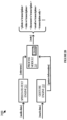
- FIG. 2B illustrates a functional architecture 200B for implementing combined input process 200A.
- Functional architecture 200B includes speech-to-text engine 211, gesture engine 213, process module 215, which may be implemented in hardware, software, firmware, or any combination thereof.
- Functional architecture 200B may be implemented on a single device (e.g. computing device 101) or distributed over multiple devices, co-located or remote.
- Speech-to-text engine 211 is operatively coupled with process module 215, as is gesture engine 213.
- speech-to-text engine 211 receives audio data captured by an audio sub-system of computing device 101.
- the audio data comprises a symbolic representation of an analog voice signal having a spoken utterance encoded therein.
- the audio data may be formatted in accordance with any suitable protocol and in an uncompressed or compressed state. Non-limiting examples of such protocols include WAV, PCM, MP3, and MP4.
- Speech-to-text engine 211 analyzes the audio data to identify and extract utterances within the recordings, which may then be provided to process module 215.
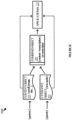
- Figure 2C briefly illustrates an object architecture 200C in an exemplary implementation.
- Object architecture 200C includes content object 221, utterance object 223, combined object 225, and one or more applications, represented by application 227.
- Utterance object 223 is representative of one or more software objects that form a data representation of a spoken utterance.
- Utterance object 223 may be, for example, a transcription, a recording, or both.
- Combined object 225 represents one or more data structures that combines one or more elements of each of content object 221 and utterance object 223. That is, combined object 225 draws from both of the other objects such that a rendering of combined object 225 by an application would include visual references to both of the other objects.
- Application 227 represents any application capable of utilizing combined object 225 and - optionally - content object 221 and utterance object 223.
- a combined object may include (or has meta data that points to) the text in an utterance object and a file icon in a content object, in addition to other graphical elements of the combined object itself.
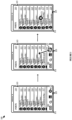
- Figure 3 illustrates an operational scenario 300 in an implementation of combined input process 200 by computing device 101.
- computing device 101 has entered into multi-input mode by virtue of a user dragging capture button 121 from feature menu 120 onto the canvas of inbox 110, which includes emails 111-119.
- user input 320 is representative of a touch-and-hold gesture. While user input 320 persists, computing device 101 is triggered by the gesture to surface an expanded view 321 of email 114 (i.e. content object). Additionally, computing device 101 surfaces a supplemental window 325 that indicates that the device is listening for voice input coincident with user input 320.
- the user proceeds to speak, thereby producing voice signal 323.
- Microphone 105 receives the voice signal 323, which an audio sub-system on computing device 101 captures and converts to a digital representation.
- a speech-to-text engine onboard computing device 101 (or possible remote from the device, however unlikely) analyzes the digital representation of voice signal 323 to extract and transcribe one or more utterances carried by the voice signal.
- the transcription is surfaced on supplemental window 325 for the user to view.
- a new combined object is produced and supplied to one or more applications for display in a list or in some other context.
- Capture button 121 is updated on display 103 to indicate that a new combined object has been created and is available.
- the new combined object may be represented using the metaphor of a note within the context of a note application, a task within a task application, or the like. Updating capture button 121 provides the user with a visual hint that the note has been persisted to the application.
- Figure 4 illustrates another operational scenario 300 in an additional implementation of combined input process 200.
- computing device 101 has again entered into multi-input mode, but this time within the context of a messaging, conversation, or other such collaboration and communication application or tool.
- Capture button 417 in this scenario resides above a conversation view 410 of the various messages or conversations carried on via the application or tool.
- conversation view 410 includes conversation 411, conversation 413, and conversation 415.
- Conversation 413 includes a preview 414 of a document (e.g. a presentation deck) that was attached to or otherwise referenced in the conversation.
- the user may expand the preview 414 of the document by supplying user input 420 such as a touch gesture, a spoken command, a mouse click, or the like.
- user input 421 is a touch-and-hold gesture made with respect to capture button 417.
- User input 421 causes a window 416 to surface in association with the preview 414, to give the user the indication that the device is monitoring for the user to speak.
- Computing device 101 captures voice signal 423 and transcribes an utterance encoded in the signal. The utterance then surfaces in window 416. The user may then release capture button 417 which stops the transcriptions process and returns preview 414 to its original state.
- a combined object is created from all or portions of the transcribed utterance and the document and capture button 417 is updated to reflect that a new object has been created and persisted.
- user input 520 comprises a touch-and-hold gesture made with respect to capture button 121. That is, the user presses and holds capture button 121, as opposed to touching one of the emails in inbox 110.
- User input 520 causes computing device 101 to surface window 521.
- Window 521 includes the same capture button as well as a camera icon 523.
- the user proceeds to maintain user input while also speaking into microphone 105.
- Microphone 105 captures voice signal 525 which is decoded and analyzed for a spoken utterance.
- a transcription of the utterance surfaces in window 521.
- the transcription of the utterance is made available to one or more applications and capture button 121 is updated to reflect the recent addition of the transcription to a collection of notes, tasks, or other such items accessible through an application that may be reached by selecting capture button 121.
- Operational scenario 500B gives an alternative example whereby the user navigates to the camera function or application on computing device 101.
- the again provides a user input 530 comprises a touch-and-hold gesture made with respect to capture button 121.
- User input 530 brings up window 521, which includes the same capture button as well as a camera icon 523.
- the user performs a new gesture 531 by sliding the touch point onto camera icon 523.
- View 540 includes an image of whatever scene is presently in-view of the camera lens of computing device 101.
- the scene in this example is of a white board with various notes scrawled on its canvas.
- View 540 also includes capture button 121 hovering over the canvas of the view. The user may proceed to take a photo, change to a video or slow-motion mode, or - as described with respect to Figures 6A-6C utilize combined user input to enhance the content capture experience.
- Figure 6A illustrates operational scenario 600A in which display 103 presents a view 610 supplied by a camera application.
- View 610 includes an image of scene 611 taken in by the camera lens and sub-system of computing device 101.
- Scene 611 includes a whiteboard with various notes, symbols, and graphs written on it.
- the user proceeds to pan the camera to the left such that the left-most part of the whiteboard in view 610 comes into full view while the right-most portion slides partially out of view.
- the user then supplies user input 613 (a touch-and-hold gesture) on an area of scene 611 that includes an exemplary formula.
- the gesture causes window 615 to surface on display 103.
- a speech-to-text engine on computing device 101 extracts the utterance from a digital representation of the signal and transcribes the utterance into text. Computing device 101 then displays the text within window 615.
- a sub-view 612 of the region of interest in scene 611 that was the target of user input 613 is displayed over the scene.
- the image (or sub-image) that is used to create the sub-view 612 is a content object which may then be merged with the transcription to form a new combined object.
- the new combined object may be stored in association with the other such notes and tasks.
- Window 615 and sub-view 612 disappear from view 610 upon subsequent user input, a timer expiring, or the like.
- Figure 6B illustrates operational scenario 600B in which display 103 presents a view 620 of video supplied by a camera application.
- View 620 includes an image of scene 611 captured by the camera lens and sub-system of computing device 101.
- scene 611 includes a whiteboard with various notes, symbols, and graphs written on it.
- View 620 includes a button 621 to change view 620 from an outward perspective to a self-facing perspective.
- Button 623 allows the user to start and stop recording.
- View 620 also includes capture button 625 that would navigate the user to a sift application where combined objects may be consumed.
- the user proceeds to pan the camera to the left such that the left-most part of the whiteboard in view 610 comes into full view while the right-most portion slides partially out of view.
- the user then supplies user input 631 (a touch-and-hold gesture) on an area of scene 611 that includes the exemplary formula.
- the gesture again causes window 615 to surface on display 103.
- a speech-to-text engine on computing device 101 extracts the utterance from a digital representation of the signal and transcribes the utterance into text. Computing device 101 then displays the text within window 615.
- the sub-view 612 of the region of interest in scene 611 that was the target of user input 631 is displayed over the scene.
- the image (or sub-image) that is used to create the sub-view 612 is a content object which may then be merged with the transcription to form a new combined object.
- the new combined object may be stored in association with the other such notes and tasks.
- Window 615 and sub-view 612 disappear from view 620 upon subsequent user input, a timer expiring, or the like.
- capture button 625 is updated to indicate that a new combined object (e.g. a note or task) is available via the sift application.
- the user can touch, click-on, or otherwise select capture button 625 to navigate to the application and/or list of objects.
- the combined object in this example would be comprised of the transcription of the utterance in voice signal 635 and the image(s) used to populate sub-view 612.
- Operational scenario 600C in Figure 6C illustrates a user experience in which display 103 again presents view 620 of video supplied by a camera application.
- View 620 includes an image of scene 611 captured by the camera lens and sub-system of computing device 101.
- scene 611 includes a whiteboard with various notes, symbols, and graphs.
- he user then supplies user input 641 (a touch-and-hold gesture) on an area of scene 611 that includes an exemplary graph or chart.
- the gesture again causes window 615 to surface on display 103.
- a speech-to-text engine on computing device 101 extracts the utterance from a digital representation of the signal and transcribes the utterance into text. Computing device 101 then displays the text within window 615. Once the user releases the touch-and-hold gesture, a sub-view 642 of the region of interest in scene 611 that was the target of user input 641 is displayed over the scene.
- Window 615 in this scenario includes an inking button 645 that, when selected, allows the user to annotate images with digital ink.
- User input 649 e.g. a touch gesture
- inking button 645 causes window 615 to recede or disappear, to be replaced by an expanded version of sub-view 642 on which the user may ink with a digital inking implement 651.
- the user provides digital ink 653 on the graph in sub-view 642.
- the digital ink 653 is persisted to a combined object along with the image (or sub-image) that is used to create the sub-view 642 and the transcription of the utterance in voice signal 647.
- Captures view 710 includes all of the combined objects captured in the preceding operational scenarios. For example, captures view 710 includes combined object 711 created by the combination of a transcribed voice annotation (transcription) and email content in operational scenario 300. Combined object 713 includes the combination of the transcription and document in operational scenario 400. Combined object 715 includes the transcription captured in operational scenario 500A. Lastly, combined object 717 includes the transcription captured in operational scenario 600B, as well as a preview 727 of the image.
- Combined object 713 includes a document icon 723 that links to the document associated with combined object 713, and combined object 717 includes the preview 727 of its associated image.
- Document icon 723 can be selected to open the associated document, as can preview 727 to open the associated image.
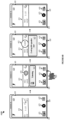
- Operational scenario 800 in Figure 8 pertains to photo gallery 810.
- Photo gallery 810 includes thumbnails 811, 812, 813, 815, and 817 of photos and/or videos taken with a camera application on computing device 101.
- thumbnails 811, 812, 813, 815, and 817 of photos and/or videos taken with a camera application on computing device 101.
- thumbnails 813, 813, 815, and 817 of photos and/or videos taken with a camera application on computing device 101.
- thumbnail 813 includes icon 823
- thumbnail 814 includes icon 824.
- a user may select a given icon to navigate to a corresponding combined object.
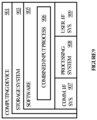
- FIG. 9 illustrates computing device 901 that is representative of any device or collection of devices in which the various processes, programs, services, and scenarios disclosed herein may be implemented.
- Examples of computing device 901 include, but are not limited to, mobile phones, tablets, laptops, desktops, watches and other wearable devices, and Internet of Things (IoT) devices.
- IoT Internet of Things
- Some or all aspects of the various processes, programs, services, and scenarios disclosed herein may also be implemented on server computers, cloud computing platforms, and data center equipment, as well as any other type of physical or virtual server machine, container, and any variation or combination thereof.
- processing system 908 may comprise a microprocessor and other circuitry that retrieves and executes software 905 from storage system 903.
- Processing system 908 may be implemented within a single processing device but may also be distributed across multiple processing devices or sub-systems that cooperate in executing program instructions. Examples of processing system 908 include general purpose central processing units, graphical processing units, application specific processors, and logic devices, as well as any other type of processing device, combinations, or variations thereof.
- Storage system 903 may comprise any computer readable storage media readable by processing system 908 and capable of storing software 905.
- Storage system 903 may include volatile and nonvolatile, removable and non-removable media implemented in any method or technology for storage of information, such as computer readable instructions, data structures, program modules, or other data. Examples of storage media include random access memory, read only memory, magnetic disks, optical disks, flash memory, virtual memory and non-virtual memory, magnetic cassettes, magnetic tape, magnetic disk storage or other magnetic storage devices, or any other suitable storage media. In no case is the computer readable storage media a propagated signal.
- Software 905 may be implemented in program instructions and among other functions may, when executed by processing system 908, direct processing system 908 to operate as described with respect to the various operational scenarios, sequences, and processes illustrated herein.
- software 905 may include program instructions for implementing a combined input process as described herein.
- Communication between computing device 901 and other computing systems may occur over a communication network or networks and in accordance with various communication protocols, combinations of protocols, or variations thereof. Examples include intranets, internets, the Internet, local area networks, wide area networks, wireless networks, wired networks, virtual networks, software defined networks, data center buses and backplanes, or any other type of network, combination of network, or variation thereof.
- the aforementioned communication networks and protocols are well known and need not be discussed at length here.
- User interface system 909 may include a keyboard, a mouse, a voice input device, a touch input device for receiving a touch gesture from a user, a motion input device for detecting non-touch gestures and other motions by a user, and other comparable input devices and associated processing elements capable of receiving user input from a user.
- Output devices such as a display, speakers, haptic devices, and other types of output devices may also be included in user interface system 909. In some cases, the input and output devices may be combined in a single device, such as a display capable of displaying images and receiving touch gestures.
- the aforementioned user input and output devices are well known in the art and need not be discussed at length here.
- User interface system 909 may also include associated user interface software executable by processing system 902 in support of the various user input and output devices discussed above. Separately or in conjunction with each other and other hardware and software elements, the user interface software and user interface devices may support a graphical user interface, a natural user interface, a conversational user interface, or any other type of user interface.
Landscapes
- Engineering & Computer Science (AREA)
- Theoretical Computer Science (AREA)
- General Engineering & Computer Science (AREA)
- Human Computer Interaction (AREA)
- Physics & Mathematics (AREA)
- General Physics & Mathematics (AREA)
- Audiology, Speech & Language Pathology (AREA)
- Health & Medical Sciences (AREA)
- Multimedia (AREA)
- Software Systems (AREA)
- Computational Linguistics (AREA)
- Acoustics & Sound (AREA)
- General Health & Medical Sciences (AREA)
- User Interface Of Digital Computer (AREA)
Claims (15)
- Rechenvorrichtung, umfassend:ein oder mehrere computerlesbare Speichermedien;einen oder mehrere Prozessoren, die betriebsfähig mit dem einen oder den mehreren computerlesbaren Speichermedien gekoppelt sind; undProgrammanweisungen, die auf dem einen oder den mehreren computerlesbaren Speichermedien gespeichert sind und bei Ausführung durch den einen oder die mehreren Prozessoren die Rechenvorrichtung in einem Multi-Eingabe-Modus mindestens zu Folgendem anweisen:Anzeigen eines Inhaltsobjekts in einer Benutzerschnittstelle einer Anwendung auf einem Anzeigebildschirm der Rechenvorrichtung;Überwachen auf das Auftreten von kombinierten Modalitätseingaben;Erfassen eines Auftretens einer kombinierten Modalitätseingabe (320, 323), wobei die kombinierte Modalitätseingabe eine Äußerung (323), die über ein Mikrofon der Rechenvorrichtung erfasst wird, und eine Berührungsgeste (320), die auf dem Anzeigebildschirm der Rechenvorrichtung aufrechterhalten wird, umfasst, wobei die Berührungsgeste mindestens teilweise mit der Äußerung zusammenfällt;als Reaktion auf das Erfassen des Auftretens der kombinierten Modalitätseingabe, Identifizieren des Inhaltsobjekts (114), das mit der Berührungsgeste verbunden ist; undErzeugen eines kombinierten Objekts, umfassend eine Transkription einer aufgenommenen Version der Äußerung und ein Symbol zum Öffnen des Inhaltsobjekts mit dem Inhaltsobjekt in der Anwendung.
- Rechenvorrichtung nach Anspruch 1, wobei:das Inhaltsobjekt eine E-Mail umfasst und die Anwendung eine E-Mail-Anwendung umfasst; unddie Programmanweisungen die Rechenvorrichtung ferner anweisen, das kombinierte Objekt zu einer Ansicht einer Vielzahl kombinierter Objekte hinzuzufügen, wobei die Vielzahl kombinierter Objekte mindestens ein anderes kombiniertes Objekt einschließt, umfassend eine unterschiedliche Transkription einer erfassten Version einer unterschiedlichen Äußerung und ein Dateisymbol zum Öffnen eines unterschiedlichen Inhaltsobjekts in einer unterschiedlichen Anwendung als der E-Mail-Anwendung.
- Rechenvorrichtung nach Anspruch 2, wobei das Objekt mit unterschiedlichem Inhalt ein Bild umfasst und die unterschiedliche Anwendung eine Fotogalerieanwendung umfasst.
- Rechenvorrichtung nach Anspruch 3, wobei die Programmanweisungen die Rechenvorrichtung anweisen, in Reaktion auf eine Auswahl einer Option für den Multi-Eingabe-Modus in der Benutzerschnittstelle der Rechenvorrichtung in den Multi-Eingabe-Modus zu wechseln.
- Rechenvorrichtung nach Anspruch 4, wobei die Auswahl des Multi-Eingabe-Modus eine Ziehgeste umfasst, die im Hinblick auf ein mit dem Multi-Eingabe-Modus verbundenes Symbol ausgeführt wird, um das Symbol von einer Anfangsposition zu einer Position auf einer Inhaltsfläche in der Benutzerschnittstelle zu ziehen.
- Rechenvorrichtung nach Anspruch 5, wobei die Programmanweisungen die Rechenvorrichtung anweisen, als Reaktion auf Drücken-und-Halten-Gesten, die im Hinblick auf das Symbol in der Ausgangsposition ausgeführt werden, erfasste Versionen von Äußerungen zu erzeugen, die gleichzeitig mit den Drücken-und-Halten-Gesten erfasst werden.
- Rechenvorrichtung nach Anspruch 6, wobei:die erfassten Versionen der Äußerungen Transkriptionen gesprochener Wörter umfassen, die in Sprachsignalen codiert sind; unddie Programmanweisungen die Rechenvorrichtung weiter anweisen, die Transkriptionen der gesprochenen Wörter ohne Verbindung zu irgendwelchen inhaltlichen Objekten zu speichern.
- Rechenvorrichtung nach Anspruch 6, wobei die Programmanweisungen die Rechenvorrichtung ferner anweisen, als Reaktion auf eine mit dem Symbol ausgeführte Wischgeste den Multi-Eingabe-Modus in eine unterschiedliche Anwendung zu überführen.
- Verfahren zum Betreiben einer Rechenvorrichtung (101), umfassend:Anzeigen eines Inhaltsobjekts in einer Benutzerschnittstelle einer Anwendung auf einem Anzeigebildschirm der Rechenvorrichtung;Überwachen auf das Auftreten von kombinierten Modalitätseingaben in einem Multi-Eingabe-Modus;im Multi-Eingabe-Modus, Erfassen eines Auftretens einer kombinierten Modalitätseingabe, umfassend ein Sprachsignal (323), das über ein Mikrofon der Rechenvorrichtung erfasst wird, und eine Berührungsgeste (320), die auf dem Anzeigebildschirm der Rechenvorrichtung ausgeführt wird, wobei die Berührungsgeste mindestens teilweise mit dem Sprachsignal zusammenfällt;als Reaktion auf das Erfassen des Auftretens der kombinierten Modalitätseingabe, Identifizieren eines Inhaltsobjekts (114), das mit der Berührungsgeste verbunden ist;Erzeugen eines kombinierten Objekts durch Kombination einer erfassten Version des Sprachsignals und eines Symbols zum Öffnen des Inhaltsobjekts in der Anwendung; undSpeichern der erfassten Version des Sprachsignals in Verbindung mit dem Inhaltsobjekt.
- Verfahren nach Anspruch 9, wobei:das Inhaltsobjekt eine E-Mail umfasst und die Anwendung eine E-Mail-Anwendung umfasst; unddie Programmanweisungen die Rechenvorrichtung ferner anweisen, das kombinierte Objekt zu einer Ansicht einer Vielzahl kombinierter Objekte hinzuzufügen, wobei die Vielzahl kombinierter Objekte mindestens ein anderes kombiniertes Objekt einschließt, umfassend eine unterschiedliche Transkription einer erfassten Version einer unterschiedlichen Äußerung und ein Dateisymbol zum Öffnen eines unterschiedlichen Inhaltsobjekts in einer unterschiedlichen Anwendung als der E-Mail-Anwendung.
- Verfahren nach Anspruch 9, wobei das Objekt mit unterschiedlichem Inhalt ein Bild umfasst und die unterschiedliche Anwendung eine Fotogalerieanwendung umfasst.
- Verfahren nach Anspruch 11, ferner umfassend das Eintreten in den Multi-Eingabe-Modus als Reaktion auf eine Auswahl des Multi-Eingabe-Modus in einer Benutzerschnittstelle.
- Verfahren nach Anspruch 12, wobei die Auswahl des Multi-Eingabe-Modus eine Ziehgeste umfasst, die im Hinblick auf ein mit dem Multi-Eingabe-Modus verbundenes Symbol ausgeführt wird, um das Symbol von einer Anfangsposition zu einer Position auf einer Inhaltsfläche in der Benutzerschnittstelle zu ziehen.
- Verfahren nach Anspruch 13, ferner umfassend, als Reaktion auf Drücken-und-Halten-Gesten, die im Hinblick auf das Symbol in der Ausgangsposition ausgeführt werden, Erzeugen von erfassten Versionen von Sprachsignalen, die gleichzeitig mit den Drücken-und-Halten-Gesten erfasst werden.
- Verfahren nach Anspruch 14, wobei die erfassten Versionen der Sprachsignale Transkriptionen von in den Sprachsignalen codierten Äußerungen umfassen und wobei das Verfahren ferner das Speichern der Transkriptionen der Äußerungen ohne Verbindung zu irgendwelchen Inhaltsobjekten umfasst.
Applications Claiming Priority (2)
| Application Number | Priority Date | Filing Date | Title |
|---|---|---|---|
| US16/684,329 US11403064B2 (en) | 2019-11-14 | 2019-11-14 | Content capture experiences driven by multi-modal user inputs |
| PCT/US2020/057583 WO2021096676A1 (en) | 2019-11-14 | 2020-10-28 | Content capture experiences driven by multi-modal user inputs |
Publications (2)
| Publication Number | Publication Date |
|---|---|
| EP4058882A1 EP4058882A1 (de) | 2022-09-21 |
| EP4058882B1 true EP4058882B1 (de) | 2025-04-23 |
Family
ID=73544286
Family Applications (1)
| Application Number | Title | Priority Date | Filing Date |
|---|---|---|---|
| EP20811805.9A Active EP4058882B1 (de) | 2019-11-14 | 2020-10-28 | Durch multimodale benutzereingaben angesteuerte inhaltserfassungserfahrungen |
Country Status (3)
| Country | Link |
|---|---|
| US (1) | US11403064B2 (de) |
| EP (1) | EP4058882B1 (de) |
| WO (1) | WO2021096676A1 (de) |
Families Citing this family (1)
| Publication number | Priority date | Publication date | Assignee | Title |
|---|---|---|---|---|
| US12468887B1 (en) * | 2020-04-24 | 2025-11-11 | Educational Testing Service | Machine learning-based metaphor detection |
Family Cites Families (12)
| Publication number | Priority date | Publication date | Assignee | Title |
|---|---|---|---|---|
| US7761814B2 (en) | 2004-09-13 | 2010-07-20 | Microsoft Corporation | Flick gesture |
| US7941316B2 (en) * | 2005-10-28 | 2011-05-10 | Microsoft Corporation | Combined speech and alternate input modality to a mobile device |
| US9001047B2 (en) | 2007-01-07 | 2015-04-07 | Apple Inc. | Modal change based on orientation of a portable multifunction device |
| US20090251441A1 (en) | 2008-04-03 | 2009-10-08 | Livescribe, Inc. | Multi-Modal Controller |
| US8487888B2 (en) | 2009-12-04 | 2013-07-16 | Microsoft Corporation | Multi-modal interaction on multi-touch display |
| US20130019175A1 (en) * | 2011-07-14 | 2013-01-17 | Microsoft Corporation | Submenus for context based menu system |
| US20140173529A1 (en) | 2012-12-14 | 2014-06-19 | Barnesandnoble.Com Llc | Circular gesture for touch sensitive ui control feature |
| US9727235B2 (en) | 2013-12-12 | 2017-08-08 | Lenovo (Singapore) Pte. Ltd. | Switching an interface mode using an input gesture |
| US10276158B2 (en) | 2014-10-31 | 2019-04-30 | At&T Intellectual Property I, L.P. | System and method for initiating multi-modal speech recognition using a long-touch gesture |
| US10656907B2 (en) * | 2015-11-03 | 2020-05-19 | Observepoint Inc. | Translation of natural language into user interface actions |
| US20190087205A1 (en) | 2017-09-18 | 2019-03-21 | Microsoft Technology Licensing, Llc | Varying modality of user experiences with a mobile device based on context |
| JP7006198B2 (ja) * | 2017-12-01 | 2022-01-24 | 富士フイルムビジネスイノベーション株式会社 | 情報処理装置、情報処理システムおよびプログラム |
-
2019
- 2019-11-14 US US16/684,329 patent/US11403064B2/en active Active
-
2020
- 2020-10-28 WO PCT/US2020/057583 patent/WO2021096676A1/en not_active Ceased
- 2020-10-28 EP EP20811805.9A patent/EP4058882B1/de active Active
Also Published As
| Publication number | Publication date |
|---|---|
| EP4058882A1 (de) | 2022-09-21 |
| US11403064B2 (en) | 2022-08-02 |
| US20210149625A1 (en) | 2021-05-20 |
| WO2021096676A1 (en) | 2021-05-20 |
Similar Documents
| Publication | Publication Date | Title |
|---|---|---|
| US12050857B2 (en) | Device, method, and graphical user interface for editing screenshot images | |
| US12477058B2 (en) | Device, method, and graphical user interface for updating a background for home and wake screen user interfaces | |
| US11269483B2 (en) | Device, method, and graphical user interface for managing content items and associated metadata | |
| EP2972742B1 (de) | Semantische zoombasierte navigation von angezeigtem inhalt | |
| KR102064952B1 (ko) | 수신 데이터를 이용하여 어플리케이션을 운영하는 전자 장치 | |
| CN107111496B (zh) | 可定制刀片应用 | |
| CN103529934B (zh) | 用于处理多个输入的方法和装置 | |
| US20100293460A1 (en) | Text selection method and system based on gestures | |
| US20150199320A1 (en) | Creating, displaying and interacting with comments on computing devices | |
| JP2014044725A (ja) | ユーザインターフェース提供方法、機械可読保存媒体及び携帯端末 | |
| US20230012613A1 (en) | Device, Method, and Graphical User Interface for Managing Data Stored on a Device | |
| CN116261702A (zh) | 设备上的上下文工作流触发 | |
| US20140152693A1 (en) | Controlling display of command space using multi-state element | |
| US20140068547A1 (en) | Sharing application code across platforms | |
| JPWO2014192125A1 (ja) | 電子機器および処理方法 | |
| US11403064B2 (en) | Content capture experiences driven by multi-modal user inputs | |
| US20180173377A1 (en) | Condensed communication chain control surfacing | |
| CN114631140A (zh) | 由多模态用户输入驱动的内容捕获体验 | |
| CN109871173A (zh) | 信息处理装置、信息处理系统 | |
| US11303464B2 (en) | Associating content items with images captured of meeting content | |
| US20130205201A1 (en) | Touch Control Presentation System and the Method thereof | |
| CN120949984A (zh) | 图像搜索方法及装置 | |
| WO2026055988A1 (zh) | 一种虚拟助手协同使用方法及电子设备 | |
| US20220360659A1 (en) | Mobile terminal and method for controlling the same | |
| CN120390002A (zh) | 信息分享方法、装置、电子设备和存储介质 |
Legal Events
| Date | Code | Title | Description |
|---|---|---|---|
| STAA | Information on the status of an ep patent application or granted ep patent |
Free format text: STATUS: UNKNOWN |
|
| STAA | Information on the status of an ep patent application or granted ep patent |
Free format text: STATUS: THE INTERNATIONAL PUBLICATION HAS BEEN MADE |
|
| PUAI | Public reference made under article 153(3) epc to a published international application that has entered the european phase |
Free format text: ORIGINAL CODE: 0009012 |
|
| STAA | Information on the status of an ep patent application or granted ep patent |
Free format text: STATUS: REQUEST FOR EXAMINATION WAS MADE |
|
| 17P | Request for examination filed |
Effective date: 20220411 |
|
| AK | Designated contracting states |
Kind code of ref document: A1 Designated state(s): AL AT BE BG CH CY CZ DE DK EE ES FI FR GB GR HR HU IE IS IT LI LT LU LV MC MK MT NL NO PL PT RO RS SE SI SK SM TR |
|
| DAV | Request for validation of the european patent (deleted) | ||
| DAX | Request for extension of the european patent (deleted) | ||
| REG | Reference to a national code |
Ref country code: DE Ref legal event code: R079 Free format text: PREVIOUS MAIN CLASS: G06F0003048800 Ipc: G06F0003048830 Ref country code: DE Ref legal event code: R079 Ref document number: 602020050059 Country of ref document: DE Free format text: PREVIOUS MAIN CLASS: G06F0003048800 Ipc: G06F0003048830 |
|
| GRAP | Despatch of communication of intention to grant a patent |
Free format text: ORIGINAL CODE: EPIDOSNIGR1 |
|
| STAA | Information on the status of an ep patent application or granted ep patent |
Free format text: STATUS: GRANT OF PATENT IS INTENDED |
|
| RIC1 | Information provided on ipc code assigned before grant |
Ipc: G06F 3/16 20060101ALI20241127BHEP Ipc: G06F 3/04883 20220101AFI20241127BHEP |
|
| INTG | Intention to grant announced |
Effective date: 20241205 |
|
| P01 | Opt-out of the competence of the unified patent court (upc) registered |
Free format text: CASE NUMBER: APP_4658/2025 Effective date: 20250128 |
|
| GRAS | Grant fee paid |
Free format text: ORIGINAL CODE: EPIDOSNIGR3 |
|
| GRAA | (expected) grant |
Free format text: ORIGINAL CODE: 0009210 |
|
| STAA | Information on the status of an ep patent application or granted ep patent |
Free format text: STATUS: THE PATENT HAS BEEN GRANTED |
|
| AK | Designated contracting states |
Kind code of ref document: B1 Designated state(s): AL AT BE BG CH CY CZ DE DK EE ES FI FR GB GR HR HU IE IS IT LI LT LU LV MC MK MT NL NO PL PT RO RS SE SI SK SM TR |
|
| REG | Reference to a national code |
Ref country code: GB Ref legal event code: FG4D |
|
| REG | Reference to a national code |
Ref country code: CH Ref legal event code: EP |
|
| REG | Reference to a national code |
Ref country code: DE Ref legal event code: R096 Ref document number: 602020050059 Country of ref document: DE |
|
| REG | Reference to a national code |
Ref country code: IE Ref legal event code: FG4D |
|
| REG | Reference to a national code |
Ref country code: NL Ref legal event code: MP Effective date: 20250423 |
|
| PG25 | Lapsed in a contracting state [announced via postgrant information from national office to epo] |
Ref country code: NL Free format text: LAPSE BECAUSE OF FAILURE TO SUBMIT A TRANSLATION OF THE DESCRIPTION OR TO PAY THE FEE WITHIN THE PRESCRIBED TIME-LIMIT Effective date: 20250423 |
|
| REG | Reference to a national code |
Ref country code: AT Ref legal event code: MK05 Ref document number: 1788419 Country of ref document: AT Kind code of ref document: T Effective date: 20250423 |
|
| PG25 | Lapsed in a contracting state [announced via postgrant information from national office to epo] |
Ref country code: ES Free format text: LAPSE BECAUSE OF FAILURE TO SUBMIT A TRANSLATION OF THE DESCRIPTION OR TO PAY THE FEE WITHIN THE PRESCRIBED TIME-LIMIT Effective date: 20250423 Ref country code: FI Free format text: LAPSE BECAUSE OF FAILURE TO SUBMIT A TRANSLATION OF THE DESCRIPTION OR TO PAY THE FEE WITHIN THE PRESCRIBED TIME-LIMIT Effective date: 20250423 Ref country code: PT Free format text: LAPSE BECAUSE OF FAILURE TO SUBMIT A TRANSLATION OF THE DESCRIPTION OR TO PAY THE FEE WITHIN THE PRESCRIBED TIME-LIMIT Effective date: 20250825 |
|
| REG | Reference to a national code |
Ref country code: LT Ref legal event code: MG9D |
|
| PG25 | Lapsed in a contracting state [announced via postgrant information from national office to epo] |
Ref country code: NO Free format text: LAPSE BECAUSE OF FAILURE TO SUBMIT A TRANSLATION OF THE DESCRIPTION OR TO PAY THE FEE WITHIN THE PRESCRIBED TIME-LIMIT Effective date: 20250723 Ref country code: GR Free format text: LAPSE BECAUSE OF FAILURE TO SUBMIT A TRANSLATION OF THE DESCRIPTION OR TO PAY THE FEE WITHIN THE PRESCRIBED TIME-LIMIT Effective date: 20250724 |
|
| PG25 | Lapsed in a contracting state [announced via postgrant information from national office to epo] |
Ref country code: PL Free format text: LAPSE BECAUSE OF FAILURE TO SUBMIT A TRANSLATION OF THE DESCRIPTION OR TO PAY THE FEE WITHIN THE PRESCRIBED TIME-LIMIT Effective date: 20250423 |
|
| PG25 | Lapsed in a contracting state [announced via postgrant information from national office to epo] |
Ref country code: BG Free format text: LAPSE BECAUSE OF FAILURE TO SUBMIT A TRANSLATION OF THE DESCRIPTION OR TO PAY THE FEE WITHIN THE PRESCRIBED TIME-LIMIT Effective date: 20250423 |
|
| PGFP | Annual fee paid to national office [announced via postgrant information from national office to epo] |
Ref country code: GB Payment date: 20250923 Year of fee payment: 6 |
|
| PG25 | Lapsed in a contracting state [announced via postgrant information from national office to epo] |
Ref country code: HR Free format text: LAPSE BECAUSE OF FAILURE TO SUBMIT A TRANSLATION OF THE DESCRIPTION OR TO PAY THE FEE WITHIN THE PRESCRIBED TIME-LIMIT Effective date: 20250423 |
|
| PG25 | Lapsed in a contracting state [announced via postgrant information from national office to epo] |
Ref country code: AT Free format text: LAPSE BECAUSE OF FAILURE TO SUBMIT A TRANSLATION OF THE DESCRIPTION OR TO PAY THE FEE WITHIN THE PRESCRIBED TIME-LIMIT Effective date: 20250423 |
|
| PG25 | Lapsed in a contracting state [announced via postgrant information from national office to epo] |
Ref country code: RS Free format text: LAPSE BECAUSE OF FAILURE TO SUBMIT A TRANSLATION OF THE DESCRIPTION OR TO PAY THE FEE WITHIN THE PRESCRIBED TIME-LIMIT Effective date: 20250723 |
|
| PG25 | Lapsed in a contracting state [announced via postgrant information from national office to epo] |
Ref country code: IS Free format text: LAPSE BECAUSE OF FAILURE TO SUBMIT A TRANSLATION OF THE DESCRIPTION OR TO PAY THE FEE WITHIN THE PRESCRIBED TIME-LIMIT Effective date: 20250823 |
|
| PG25 | Lapsed in a contracting state [announced via postgrant information from national office to epo] |
Ref country code: LV Free format text: LAPSE BECAUSE OF FAILURE TO SUBMIT A TRANSLATION OF THE DESCRIPTION OR TO PAY THE FEE WITHIN THE PRESCRIBED TIME-LIMIT Effective date: 20250423 |
|
| PGFP | Annual fee paid to national office [announced via postgrant information from national office to epo] |
Ref country code: DE Payment date: 20250923 Year of fee payment: 6 |
|
| PG25 | Lapsed in a contracting state [announced via postgrant information from national office to epo] |
Ref country code: DK Free format text: LAPSE BECAUSE OF FAILURE TO SUBMIT A TRANSLATION OF THE DESCRIPTION OR TO PAY THE FEE WITHIN THE PRESCRIBED TIME-LIMIT Effective date: 20250423 Ref country code: SM Free format text: LAPSE BECAUSE OF FAILURE TO SUBMIT A TRANSLATION OF THE DESCRIPTION OR TO PAY THE FEE WITHIN THE PRESCRIBED TIME-LIMIT Effective date: 20250423 |
|
| PG25 | Lapsed in a contracting state [announced via postgrant information from national office to epo] |
Ref country code: CZ Free format text: LAPSE BECAUSE OF FAILURE TO SUBMIT A TRANSLATION OF THE DESCRIPTION OR TO PAY THE FEE WITHIN THE PRESCRIBED TIME-LIMIT Effective date: 20250423 |
|
| PG25 | Lapsed in a contracting state [announced via postgrant information from national office to epo] |
Ref country code: EE Free format text: LAPSE BECAUSE OF FAILURE TO SUBMIT A TRANSLATION OF THE DESCRIPTION OR TO PAY THE FEE WITHIN THE PRESCRIBED TIME-LIMIT Effective date: 20250423 |
|
| REG | Reference to a national code |
Ref country code: DE Ref legal event code: R097 Ref document number: 602020050059 Country of ref document: DE |
|
| PG25 | Lapsed in a contracting state [announced via postgrant information from national office to epo] |
Ref country code: SK Free format text: LAPSE BECAUSE OF FAILURE TO SUBMIT A TRANSLATION OF THE DESCRIPTION OR TO PAY THE FEE WITHIN THE PRESCRIBED TIME-LIMIT Effective date: 20250423 |
|
| PG25 | Lapsed in a contracting state [announced via postgrant information from national office to epo] |
Ref country code: IT Free format text: LAPSE BECAUSE OF FAILURE TO SUBMIT A TRANSLATION OF THE DESCRIPTION OR TO PAY THE FEE WITHIN THE PRESCRIBED TIME-LIMIT Effective date: 20250423 |
|
| PG25 | Lapsed in a contracting state [announced via postgrant information from national office to epo] |
Ref country code: RO Free format text: LAPSE BECAUSE OF FAILURE TO SUBMIT A TRANSLATION OF THE DESCRIPTION OR TO PAY THE FEE WITHIN THE PRESCRIBED TIME-LIMIT Effective date: 20250423 |
|
| PLBE | No opposition filed within time limit |
Free format text: ORIGINAL CODE: 0009261 |
|
| STAA | Information on the status of an ep patent application or granted ep patent |
Free format text: STATUS: NO OPPOSITION FILED WITHIN TIME LIMIT |
|
| REG | Reference to a national code |
Ref country code: CH Ref legal event code: L10 Free format text: ST27 STATUS EVENT CODE: U-0-0-L10-L00 (AS PROVIDED BY THE NATIONAL OFFICE) Effective date: 20260304 |
|
| 26N | No opposition filed |
Effective date: 20260126 |