EP3913474A1 - Information processing device and image generation method - Google Patents
Information processing device and image generation method Download PDFInfo
- Publication number
- EP3913474A1 EP3913474A1 EP19910116.3A EP19910116A EP3913474A1 EP 3913474 A1 EP3913474 A1 EP 3913474A1 EP 19910116 A EP19910116 A EP 19910116A EP 3913474 A1 EP3913474 A1 EP 3913474A1
- Authority
- EP
- European Patent Office
- Prior art keywords
- image
- content
- generation unit
- pixel
- information processing
- Prior art date
- Legal status (The legal status is an assumption and is not a legal conclusion. Google has not performed a legal analysis and makes no representation as to the accuracy of the status listed.)
- Pending
Links
Images



Classifications
-
- G—PHYSICS
- G06—COMPUTING OR CALCULATING; COUNTING
- G06F—ELECTRIC DIGITAL DATA PROCESSING
- G06F3/00—Input arrangements for transferring data to be processed into a form capable of being handled by the computer; Output arrangements for transferring data from processing unit to output unit, e.g. interface arrangements
- G06F3/01—Input arrangements or combined input and output arrangements for interaction between user and computer
- G06F3/048—Interaction techniques based on graphical user interfaces [GUI]
- G06F3/0484—Interaction techniques based on graphical user interfaces [GUI] for the control of specific functions or operations, e.g. selecting or manipulating an object, an image or a displayed text element, setting a parameter value or selecting a range
- G06F3/04845—Interaction techniques based on graphical user interfaces [GUI] for the control of specific functions or operations, e.g. selecting or manipulating an object, an image or a displayed text element, setting a parameter value or selecting a range for image manipulation, e.g. dragging, rotation, expansion or change of colour
-
- A—HUMAN NECESSITIES
- A63—SPORTS; GAMES; AMUSEMENTS
- A63F—CARD, BOARD, OR ROULETTE GAMES; INDOOR GAMES USING SMALL MOVING PLAYING BODIES; VIDEO GAMES; GAMES NOT OTHERWISE PROVIDED FOR
- A63F13/00—Video games, i.e. games using an electronically generated display having two or more dimensions
- A63F13/50—Controlling the output signals based on the game progress
- A63F13/53—Controlling the output signals based on the game progress involving additional visual information provided to the game scene, e.g. by overlay to simulate a head-up display [HUD] or displaying a laser sight in a shooting game
- A63F13/533—Controlling the output signals based on the game progress involving additional visual information provided to the game scene, e.g. by overlay to simulate a head-up display [HUD] or displaying a laser sight in a shooting game for prompting the player, e.g. by displaying a game menu
-
- A—HUMAN NECESSITIES
- A63—SPORTS; GAMES; AMUSEMENTS
- A63F—CARD, BOARD, OR ROULETTE GAMES; INDOOR GAMES USING SMALL MOVING PLAYING BODIES; VIDEO GAMES; GAMES NOT OTHERWISE PROVIDED FOR
- A63F13/00—Video games, i.e. games using an electronically generated display having two or more dimensions
- A63F13/45—Controlling the progress of the video game
- A63F13/49—Saving the game status; Pausing or ending the game
-
- A—HUMAN NECESSITIES
- A63—SPORTS; GAMES; AMUSEMENTS
- A63F—CARD, BOARD, OR ROULETTE GAMES; INDOOR GAMES USING SMALL MOVING PLAYING BODIES; VIDEO GAMES; GAMES NOT OTHERWISE PROVIDED FOR
- A63F13/00—Video games, i.e. games using an electronically generated display having two or more dimensions
- A63F13/85—Providing additional services to players
- A63F13/87—Communicating with other players during game play, e.g. by e-mail or chat
-
- G—PHYSICS
- G06—COMPUTING OR CALCULATING; COUNTING
- G06F—ELECTRIC DIGITAL DATA PROCESSING
- G06F3/00—Input arrangements for transferring data to be processed into a form capable of being handled by the computer; Output arrangements for transferring data from processing unit to output unit, e.g. interface arrangements
- G06F3/01—Input arrangements or combined input and output arrangements for interaction between user and computer
- G06F3/048—Interaction techniques based on graphical user interfaces [GUI]
- G06F3/0481—Interaction techniques based on graphical user interfaces [GUI] based on specific properties of the displayed interaction object or a metaphor-based environment, e.g. interaction with desktop elements like windows or icons, or assisted by a cursor's changing behaviour or appearance
- G06F3/04815—Interaction with a metaphor-based environment or interaction object displayed as three-dimensional [3D], e.g. changing the user viewpoint with respect to the environment or object
-
- G—PHYSICS
- G06—COMPUTING OR CALCULATING; COUNTING
- G06F—ELECTRIC DIGITAL DATA PROCESSING
- G06F3/00—Input arrangements for transferring data to be processed into a form capable of being handled by the computer; Output arrangements for transferring data from processing unit to output unit, e.g. interface arrangements
- G06F3/01—Input arrangements or combined input and output arrangements for interaction between user and computer
- G06F3/048—Interaction techniques based on graphical user interfaces [GUI]
- G06F3/0481—Interaction techniques based on graphical user interfaces [GUI] based on specific properties of the displayed interaction object or a metaphor-based environment, e.g. interaction with desktop elements like windows or icons, or assisted by a cursor's changing behaviour or appearance
- G06F3/04817—Interaction techniques based on graphical user interfaces [GUI] based on specific properties of the displayed interaction object or a metaphor-based environment, e.g. interaction with desktop elements like windows or icons, or assisted by a cursor's changing behaviour or appearance using icons
-
- G—PHYSICS
- G06—COMPUTING OR CALCULATING; COUNTING
- G06F—ELECTRIC DIGITAL DATA PROCESSING
- G06F3/00—Input arrangements for transferring data to be processed into a form capable of being handled by the computer; Output arrangements for transferring data from processing unit to output unit, e.g. interface arrangements
- G06F3/01—Input arrangements or combined input and output arrangements for interaction between user and computer
- G06F3/048—Interaction techniques based on graphical user interfaces [GUI]
- G06F3/0481—Interaction techniques based on graphical user interfaces [GUI] based on specific properties of the displayed interaction object or a metaphor-based environment, e.g. interaction with desktop elements like windows or icons, or assisted by a cursor's changing behaviour or appearance
- G06F3/0482—Interaction with lists of selectable items, e.g. menus
-
- A—HUMAN NECESSITIES
- A63—SPORTS; GAMES; AMUSEMENTS
- A63F—CARD, BOARD, OR ROULETTE GAMES; INDOOR GAMES USING SMALL MOVING PLAYING BODIES; VIDEO GAMES; GAMES NOT OTHERWISE PROVIDED FOR
- A63F2300/00—Features of games using an electronically generated display having two or more dimensions, e.g. on a television screen, showing representations related to the game
- A63F2300/30—Features of games using an electronically generated display having two or more dimensions, e.g. on a television screen, showing representations related to the game characterized by output arrangements for receiving control signals generated by the game device
- A63F2300/308—Details of the user interface
-
- A—HUMAN NECESSITIES
- A63—SPORTS; GAMES; AMUSEMENTS
- A63F—CARD, BOARD, OR ROULETTE GAMES; INDOOR GAMES USING SMALL MOVING PLAYING BODIES; VIDEO GAMES; GAMES NOT OTHERWISE PROVIDED FOR
- A63F2300/00—Features of games using an electronically generated display having two or more dimensions, e.g. on a television screen, showing representations related to the game
- A63F2300/60—Methods for processing data by generating or executing the game program
- A63F2300/66—Methods for processing data by generating or executing the game program for rendering three dimensional images
- A63F2300/6692—Methods for processing data by generating or executing the game program for rendering three dimensional images using special effects, generally involving post-processing, e.g. blooming
Definitions
- the present invention relates to a technique for generating an image.
- PTL 1 discloses a game machine that is manipulated through a dedicated game controller.
- the game controller includes a plurality of buttons and, when a user presses down a predetermined button while a game image is displayed, the game machine hides the game image to display a menu image instead on a display.
- the user may suspend a game play to display the menu image on the display.
- the user checks messages from friends or transmits a message to a friend, for instance, the user switches from a game image to the menu image and selects a menu item regarding the message, so that a message image is displayed. After the user finishes what is to be done, the user promptly redisplays the game image to resume the game play.
- a view of the world in content such as a game forms an important element for immersion of a user into the content.
- a switch from a content image to a menu image may pull the user from a virtual world back to a real world and may thus impair a sense of immersion into the content. Therefore, development of such a technique upon a switch from the content image to another image as to hand over the view of the world in the content to the image after the switch is demanded.
- a still image of a selected content is displayed as a background image in a menu image in which icons of a plurality of pieces of content are arranged, additionally, it is desirable that rendering for increase in concern of the user about the selected content should be given.
- an information processing device includes a first image generation unit to generate a moving image of content, a receiving unit to receive a displayed image changing request, a display control unit to acquire information regarding a frame image of the content upon reception of the changing request by the receiving unit, and a second image generation unit to use the information regarding the frame image to generate an image that differs from the frame image.
- Another aspect of the present invention is an image generation method including a step of generating a moving image of a piece of content, a step of receiving a displayed image changing request, a step of acquiring information regarding a frame image of the content upon reception of the changing request, and a step of using the information regarding the frame image of the content to generate an image that differs from the frame image.
- Still another aspect of the present invention is an information processing device including an image generation unit to generate a content selection image in which icons of a plurality of pieces of content are arranged so as to be selectable by a user and in which a still image of a piece of content corresponding to an icon being selected is used as a background image, and a receiving unit to receive an icon changing manipulation.
- the image generation unit When the receiving unit receives the icon changing manipulation, the image generation unit generates an image different from a still image of a piece of content corresponding to a selected icon and generates a moving image that is to change into the still image after lapse of a predetermined time period from display of the different image.
- Still another aspect of the present invention is an image generation method including a step of generating a content selection image in which icons of a plurality of pieces of content are arranged so as to be selectable by a user and in which a still image of a piece of content corresponding to an icon being selected is used as a background image, a step of receiving an icon changing manipulation, generating an image different from a still image of a content corresponding to a selected icon upon reception of the icon changing manipulation, and a step of generating a moving image that is to change into the still image after lapse of a predetermined time period from display of the different image.
- any combination of above components and expression of the present invention converted among a method, a device, a system, a recording medium, a computer program, and the like are also effective as aspects of the present invention.
- FIG. 1 illustrates an information processing system 1 in accordance with an embodiment of the present invention.
- the information processing system 1 includes an auxiliary storage device 2, an output device 4, an input device 6, a camera 7, and an information processing device 10.
- the information processing device 10 may be connected via an access point (AP) 8 to an external network.
- AP access point
- the input device 6 is connected to the information processing device 10 in a wireless or wired manner, receives manipulated input from a user, and supplies manipulation information to the information processing device 10.
- the information processing device 10 reflects the manipulation information received from the input device 6, on processing in system software or application software and makes the output device 4 output a result of the processing.
- the information processing device 10 of the embodiment is a game machine to execute game software and the input device 6 may be equipment, such as a game controller, to supply the manipulation information from the user to the information processing device 10.
- the information processing device 10 may have a function of executing application software other than game software and may have a function of reproducing content such as a movie.
- the input device 6 includes a plurality of manipulation push buttons, an analog stick through which an analog quantity can be inputted, and a plurality of input units such as rotatable buttons.
- the auxiliary storage device 2 is a mass-storage device such as an HDD (Hard Disk Drive) or a flash memory and may be an external storage device to be connected to the information processing device 10 via a USB (Universal Serial Bus) or the like or may be a built-in storage device.
- the output device 4 may be a television including a display to output images and a speaker to output audio.
- the output device 4 may be connected to the information processing device 10 via a wire cable or in a wireless manner.
- the camera 7 is a stereo camera to image a space around the output device 4.
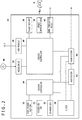
- FIG. 2 illustrates functional blocks for the information processing device 10.
- the information processing device 10 includes a main power button 20, a power-on LED (light emitting diode) 21, a standby LED 22, a system controller 24, a clock 26, a device controller 30, a media drive 32, a USB module 34, a flash memory 36, a wireless communication module 38, a wired communication module 40, a sub system 50, and a main system 60.
- the main system 60 includes a main CPU (Central Processing Unit), a memory that is a main storage device, a memory controller, a GPU (Graphics Processing Unit), and the like.
- the GPU is used mainly for arithmetic processing in a game program. These functions may be implemented as a system-on-a-chip formed on a single chip.
- the main CPU has a function of executing game programs recorded in the auxiliary storage device 2 or a ROM (read-only memory) medium 44.
- the sub system 50 includes a sub CPU, a memory that is a main storage device, a memory controller, and the like, includes no GPU, and has no function of executing a game program.
- the number of circuit gates of the sub CPU is smaller than the number of circuit gates of the main CPU and an operating power consumption of the sub CPU is smaller than an operating power consumption of the main CPU.
- the sub CPU operates even while the main CPU is in a standby state, and processing functions of the sub CPU are restricted to keep the power consumption at a low level.
- the main power button 20 is an input unit through which manipulated input is carried out by the user, is provided on a front face of a housing of the information processing device 10, and is manipulated to turn on or off power supply to the main system 60 of the information processing device 10.
- the power-on LED 21 is lighted when the main power button 20 is turned on and the standby LED 22 is lighted when the main power button 20 is turned off.
- the system controller 24 detects pressing of the main power button 20 by the user. When the main power button 20 is pressed down with a main power supply being in an off state, the system controller 24 acquires such a pressing manipulation as an "on-instruction.” When the main power button 20 is pressed down with the main power supply being in an on state, by contrast, the system controller 24 acquires such a pressing manipulation as an "off-instruction.”
- the clock 26 is a real-time clock to generate current date and time information and to supply the information to the system controller 24, the sub system 50, and the main system 60.
- the device controller 30 is configured as an LSI (Large-Scale Integrated Circuit), such as a southbridge, to carry out exchanges of information between devices. As illustrated, the device controller 30 is connected with devices such as the system controller 24, the media drive 32, the USB module 34, the flash memory 36, the wireless communication module 38, the wired communication module 40, the sub system 50, and the main system 60.
- the device controller 30 absorbs differences in electric characteristics, data transfer rates, and the like among the devices and controls timing of data transfer.
- the media drive 32 is a drive device to load and drive a ROM medium 44 on which application software such as a game and license information are recorded and to read a program, data, and the like from the ROM medium 44.
- the ROM medium 44 may be a read-only recording medium such as an optical disc, a magneto-optical disk, or a Blu-ray disc.
- the USB module 34 is a module to be connected to external equipment via USB cables.
- the USB module 34 may be connected to the auxiliary storage device 2 and the camera 7 via USB cables.
- the flash memory 36 is an auxiliary storage device to configure an internal storage.
- the wireless communication module 38 communicates wirelessly with the input device 6, for instance, in accordance with a communication protocol such as Bluetooth (registered trademark) protocol or IEEE 802.11 protocol.
- the wired communication module 40 communicates with external equipment in a wired manner and is connected to a network 3 via the AP 8.
- FIG. 3 illustrates a configuration of the information processing device 10.
- the information processing device 10 includes a processing unit 100 and a communication unit 102, and the processing unit 100 includes a receiving unit 104, a display control unit 106, a frame buffer 108, a game execution unit 110, and a system image generation unit 120.
- the game execution unit 110 has a function of executing game software and includes a game image generation unit 112 and a game audio generation unit 114.
- the game execution unit 110 may execute application software other than game software.
- Each of elements illustrated as the functional blocks that carry out various processes in FIG. 3 may be implemented by a circuit block, a memory, or another LSI as hardware or may be implemented by system software, a game program loaded in a memory, or the like as software. Therefore, it is understood by those skilled in the art these functional blocks may be implemented in various forms by only hardware, only software, or a combination thereof and there is no limitation to any of the forms.
- the communication unit 102 is expressed as a configuration having both functions of the wireless communication module 38 and the wired communication module 40 that are illustrated in FIG. 2 .
- the communication unit 102 receives the manipulation information resulting from manipulation of the input units of the input device 6 by the user, and the receiving unit 104 receives the manipulation information.
- the receiving unit 104 receives the manipulation information designating a displayed image changing request and supplies the manipulation information to the display control unit 106.
- the game execution unit 110 executes game software.
- the game image generation unit 112 generates a moving image for a game
- the game audio generation unit 114 generates audio for the game.
- the game image generation unit 112 supplies game image data to the frame buffer 108
- the display control unit 106 makes the output device 4 output the game image data stored in the frame buffer 108.
- the display control unit 106 has a function of making the output device 4 display the game image data generated by the game image generation unit 112 and system image data generated by the system image generation unit 120.
- FIG. 4 illustrates an example of the game image displayed on the output device 4.
- an image of a first-person shooter (FPS) is displayed on the output device 4.
- the output device 4 of the embodiment may be a set-top display device such as a television, a portable display device such as a tablet, or a head-mounted display device.
- a view of the world in a game includes various elements, among which a "color tone" of a video picture is an element that determines a visual atmosphere of the game and that is of high importance.
- a unified color tone throughout a game may make the user recognize that the color tone configures a tint of the world of the game and may bring about an effect of immersion into the game.
- the receiving unit 104 Upon manipulation of a predetermined button of the input device 6 by the user in a game play, the receiving unit 104 receives a displayed image changing request.
- the displayed image changing request is a request to switch from a game image to a system image.
- the display control unit 106 instructs the game execution unit 110 to suspend a progression of the game and instructs the system image generation unit 120 to generate the system image.
- the system image may be a menu image including one or more menu items for manipulation of the information processing device 10.
- FIG. 5 illustrates an example of the menu items included in a menu screen.
- the menu screen includes a plurality of the menu items, and the user manipulates the input device 6 to select an intended menu item.
- the user manipulates a determination button of the input device 6 with a cursor pointed to an item "Message,” so that a browsing screen for message is displayed on the display.
- the user may have a feeling of having been pulled back to a world completely separated from the world of the game.
- the user has to enter the world of the game afresh when resuming the game play; however, the user may keep a state of being immersed in the game, provided that the view of the world in the game is expressed in the menu screen as well.
- FIG. 6 illustrates an example of the menu screen displayed on the output device 4 in the embodiment.
- the display control unit 106 acquires information regarding a frame image of the game.
- the display control unit 106 acquires pixel information regarding the last frame image (end frame image) in game moving images from the frame buffer 108 and supplies the pixel information to the system image generation unit 120.
- the system image generation unit 120 uses the information regarding the frame image to generate an image that differs from the frame image.
- the system image generation unit 120 uses the information regarding the frame image of the game to generate a background image for the menu screen and generates the menu image in which at least one menu item is placed in front of the background image. Data of the menu image is supplied to the frame buffer 108, and the display control unit 106 makes the output device 4 display the menu image.
- the system image generation unit 120 may use the pixel information regarding the end frame image, the system image generation unit 120 may generate the background image for the menu screen by use of pixel information regarding an image preceding the end frame image by a predetermined number of frames, in order to ensure processing time for generation of the background image.
- the system image generation unit 120 may use the pixel information regarding the frame images of the game to generate a moving image in accordance with a predetermined image generation program.
- the system image generation unit 120 generates the background image for the menu screen through blur processing of a frame image of the game.
- a color tone of the game world is maintained in the menu screen.
- the system image generation unit 120 may blur frame images of the game, while generating the blurred background image as a moving image. By setting the background image as the moving image, the user may be made to feel as if the world of the game is moving.
- the game execution unit 110 can also generate the background moving image for the menu screen.
- a process of generating the moving image by the game execution unit 110 requires a large quantity of resources and thus may involve difficulty in terms of spec depending on processing power of the information processing device 10.
- the system image generation unit 120 expresses the world of the game through the blur processing of one frame image of the game, so that the menu screen is generated under a light processing load.
- the system image generation unit 120 may generate the moving image in which each pixel is randomly moved. For instance, the system image generation unit 120 may generate the background moving image by setting a moving velocity in accordance with a luminance of an aggregation of a plurality of pixels and by determining a moving direction of the aggregation of the plurality of pixels with use of random function. Such movement of the background image may provide the user with a feeling of manipulating the menu in the dynamic world of the game, while the user maintains the sense of immersion into the world of the game through the color tone of the background image.
- FIG. 7 illustrates another example of the menu screen displayed on the output device 4.
- the system image generation unit 120 uses the pixel information regarding a frame image to generate a polka-dot background image.
- polka dots should be colored in accordance with pixel values used in the frame image and should be moved randomly.
- the system image generation unit 120 partitions the frame image with a plurality of grid lines that are horizontal and vertical and generates a circle, having a pixel value of each grid point, for each grid point.
- a size of each circle may be set randomly so as to be equal to or smaller than a predetermined upper limit and each circle may be a true circle or an ellipse.
- the plurality of polka dots may be made to express a color tone of the game world by coloring of the polka dots in accordance with the pixel values of respective grid points.
- the system image generation unit 120 may find a color tone of a frame image of the game and may determine colors of the polka dots so as to maintain the color tone. On condition that the color tone of the frame image is brown, for instance, the system image generation unit 120 may determine the colors of the polka dots such that brown polka dots may become dominant in number (or occupied area in the screen). Thus, the user may be made to feel the game world in the menu screen.
- the receiving unit 104 receives a changing request from a first content moving image to a different second content moving image.
- the system image generation unit 120 generates a moving image (link moving image) that links an end frame image of the first content moving image generated by the game image generation unit 112 and a start frame image of the second content moving image generated by the game image generation unit 112 in response to the changing request.
- the system image generation unit 120 may generate a start frame image of the link moving image with use of information regarding the end frame image of the first content moving image and may generate an end frame image of the link moving image with use of information regarding the start frame image of the second content moving image.
- a color tone of the link moving image may be controlled so as to continuously change from a color tone of the end frame image of the first content moving image to a color tone of the start frame image of the second content moving image.
- the system image generation unit 120 may generate a content selection image in which a background image is temporarily made into a moving image, so that rendering for increase in concern of the user about the content may be given.
- FIG. 8 illustrates an example of the content selection screen.
- the system image generation unit 120 arranges icons of a plurality of pieces of content such that the icons can be selected by the user, to generate the content selection image in which a still image of a piece of content corresponding to an icon being selected is used as a background image.
- the icons and still images of the pieces of content are stored for each piece of content in the auxiliary storage device 2.
- the system image generation unit 120 In the example illustrated in FIG. 8 , in which an icon of a title "PlayGolf" has been selected, the system image generation unit 120 generates the content selection image in which the icon of "PlayGolf" is set relatively large in size and in which a still image of "PlayGolf” is used as the background image, and the display control unit 106 makes the output device 4 display the content selection image.
- the still image may be a package image.
- the system image generation unit 120 arranges the icons of the plurality of pieces of content along one direction in front of the background image. In the example, the system image generation unit 120 arranges the icons of the plurality of pieces of content along a horizontal direction, and the third icon from left is in a selected state.
- the user manipulates a right arrow key or a left arrow key of the input device 6 so as to move a row of the icons leftward or rightward and so as to place an icon of a desired piece of content at a third position from left.
- the user may move the row of the icons leftward or rightward by tipping an analog stick of the input device 6 rightward or leftward.
- the receiving unit 104 receives a manipulation of the input device 6 in a direction of arrangement of the icons, as an icon changing manipulation.
- the receiving unit 104 receives a manipulation of the right arrow key as the icon changing manipulation, for instance, the whole row of the icons moves leftward, so that the icon of a title "WarShip2" is placed at the third position from the left.
- FIG. 9 illustrates another example of the content selection screen.
- the row of the icons has been shifted to the next position on the left from a state illustrated in FIG. 8 , and the background image has been changed into a still image of the title "WarShip2."
- the system image generation unit 120 should give the rendering for increase in the concern of the user about the content by inserting a dynamic effect, instead of suddenly displaying the still image.
- the system image generation unit 120 When the receiving unit 104 receives the icon changing manipulation, the system image generation unit 120 generates an image different from a still image of a piece of content corresponding to a selected icon, makes the output device 4 display the different image, and generates a moving image that are to change into the still image of the content after lapse of a predetermined time period from display of the different image.
- the system image generation unit 120 generates the image resulting from processing of the still image of "WarShip2" corresponding to the selected icon, makes the output device 4 display the image, and generates the moving image that are to be changed continuously in terms of time into the still image of "WarShip2" after the lapse of the predetermined time period from the display of the processed image.
- the system image generation unit 120 identifies a luminance value of a first pixel in a still image (such as package image) of the content and generates the image, resulting from processing of the still image such that a second pixel at a distance corresponding to the identified luminance value is made to have a pixel value of the first pixel.
- a still image such as package image
- the system image generation unit 120 therefore carries out this processing for all pixels in the still image.
- the system image generation unit 120 uses the still image as a base image to carry out the processing in which the pixel value of each pixel in the still image is used as the pixel value of a pixel at the distance corresponding to the luminance value.
- Different distances correspond to such luminance values. For instance, the distance may be increased on condition that the luminance value is relatively high, and the distance may be decreased on condition that the luminance value is relatively low.
- the brighter pixel value moves the more greatly when the processed image changes into the still image, so that an effect of movement of images is increased.
- the system image generation unit 120 When the receiving unit 104 receives the icon changing manipulation, the system image generation unit 120 generates the different image such that the second pixel at the distance corresponding to the luminance value from the first pixel in the direction of arrangement of the icons is made to have the pixel value of the first pixel.
- the system image generation unit 120 may generate the moving image such that the pixel value of the second pixel may be sequentially set as pixel values of a plurality of pixels located between the second pixel and the first pixel during a predetermined time period after generation of the different image.
- the present invention can be applied to fields in which an image is displayed.
Landscapes
- Engineering & Computer Science (AREA)
- Multimedia (AREA)
- General Engineering & Computer Science (AREA)
- Theoretical Computer Science (AREA)
- Physics & Mathematics (AREA)
- Human Computer Interaction (AREA)
- General Physics & Mathematics (AREA)
- Optics & Photonics (AREA)
- User Interface Of Digital Computer (AREA)
Abstract
Description
- The present invention relates to a technique for generating an image.
- PTL 1 discloses a game machine that is manipulated through a dedicated game controller. The game controller includes a plurality of buttons and, when a user presses down a predetermined button while a game image is displayed, the game machine hides the game image to display a menu image instead on a display.
- The user may suspend a game play to display the menu image on the display. In a case where the user checks messages from friends or transmits a message to a friend, for instance, the user switches from a game image to the menu image and selects a menu item regarding the message, so that a message image is displayed. After the user finishes what is to be done, the user promptly redisplays the game image to resume the game play.
- [PTL 1]
JP 2014-236866A - A view of the world in content such as a game forms an important element for immersion of a user into the content. In conventional information processing devices, a switch from a content image to a menu image may pull the user from a virtual world back to a real world and may thus impair a sense of immersion into the content. Therefore, development of such a technique upon a switch from the content image to another image as to hand over the view of the world in the content to the image after the switch is demanded. In a case where a still image of a selected content is displayed as a background image in a menu image in which icons of a plurality of pieces of content are arranged, additionally, it is desirable that rendering for increase in concern of the user about the selected content should be given.
- In order to solve the problem, an information processing device according to an aspect of the present invention includes a first image generation unit to generate a moving image of content, a receiving unit to receive a displayed image changing request, a display control unit to acquire information regarding a frame image of the content upon reception of the changing request by the receiving unit, and a second image generation unit to use the information regarding the frame image to generate an image that differs from the frame image.
- Another aspect of the present invention is an image generation method including a step of generating a moving image of a piece of content, a step of receiving a displayed image changing request, a step of acquiring information regarding a frame image of the content upon reception of the changing request, and a step of using the information regarding the frame image of the content to generate an image that differs from the frame image.
- Still another aspect of the present invention is an information processing device including an image generation unit to generate a content selection image in which icons of a plurality of pieces of content are arranged so as to be selectable by a user and in which a still image of a piece of content corresponding to an icon being selected is used as a background image, and a receiving unit to receive an icon changing manipulation. When the receiving unit receives the icon changing manipulation, the image generation unit generates an image different from a still image of a piece of content corresponding to a selected icon and generates a moving image that is to change into the still image after lapse of a predetermined time period from display of the different image.
- Still another aspect of the present invention is an image generation method including a step of generating a content selection image in which icons of a plurality of pieces of content are arranged so as to be selectable by a user and in which a still image of a piece of content corresponding to an icon being selected is used as a background image, a step of receiving an icon changing manipulation, generating an image different from a still image of a content corresponding to a selected icon upon reception of the icon changing manipulation, and a step of generating a moving image that is to change into the still image after lapse of a predetermined time period from display of the different image.
- In addition, any combination of above components and expression of the present invention converted among a method, a device, a system, a recording medium, a computer program, and the like are also effective as aspects of the present invention.
-
- [
FIG. 1 ]
FIG. 1 is a diagram illustrating an information processing system in accordance with an embodiment. - [
FIG. 2 ]
FIG. 2 is a diagram illustrating functional blocks for an information processing device. - [
FIG. 3 ]
FIG. 3 is a diagram illustrating a configuration of the information processing device. - [
FIG. 4 ]
FIG. 4 is a diagram illustrating an example of a game image. - [
FIG. 5 ]
FIG. 5 illustrates an example of menu items included in a menu screen. - [
FIG. 6 ]
FIG. 6 is a diagram illustrating an example of a menu image in the embodiment. - [
FIG. 7 ]
FIG. 7 is a diagram illustrating another example of a menu image in the embodiment. - [
FIG. 8 ]
FIG. 8 is a diagram illustrating an example of a content selection image. - [
FIG. 9 ]
FIG. 9 is a diagram illustrating another example of the content selection image. -
FIG. 1 illustrates aninformation processing system 1 in accordance with an embodiment of the present invention. Theinformation processing system 1 includes anauxiliary storage device 2, anoutput device 4, aninput device 6, acamera 7, and aninformation processing device 10. Theinformation processing device 10 may be connected via an access point (AP) 8 to an external network. - The
input device 6 is connected to theinformation processing device 10 in a wireless or wired manner, receives manipulated input from a user, and supplies manipulation information to theinformation processing device 10. Theinformation processing device 10 reflects the manipulation information received from theinput device 6, on processing in system software or application software and makes theoutput device 4 output a result of the processing. - The
information processing device 10 of the embodiment is a game machine to execute game software and theinput device 6 may be equipment, such as a game controller, to supply the manipulation information from the user to theinformation processing device 10. Theinformation processing device 10 may have a function of executing application software other than game software and may have a function of reproducing content such as a movie. Theinput device 6 includes a plurality of manipulation push buttons, an analog stick through which an analog quantity can be inputted, and a plurality of input units such as rotatable buttons. - The
auxiliary storage device 2 is a mass-storage device such as an HDD (Hard Disk Drive) or a flash memory and may be an external storage device to be connected to theinformation processing device 10 via a USB (Universal Serial Bus) or the like or may be a built-in storage device. Theoutput device 4 may be a television including a display to output images and a speaker to output audio. Theoutput device 4 may be connected to theinformation processing device 10 via a wire cable or in a wireless manner. Thecamera 7 is a stereo camera to image a space around theoutput device 4. -
FIG. 2 illustrates functional blocks for theinformation processing device 10. Theinformation processing device 10 includes amain power button 20, a power-on LED (light emitting diode) 21, astandby LED 22, asystem controller 24, aclock 26, adevice controller 30, amedia drive 32, aUSB module 34, aflash memory 36, awireless communication module 38, awired communication module 40, asub system 50, and amain system 60. - The
main system 60 includes a main CPU (Central Processing Unit), a memory that is a main storage device, a memory controller, a GPU (Graphics Processing Unit), and the like. The GPU is used mainly for arithmetic processing in a game program. These functions may be implemented as a system-on-a-chip formed on a single chip. The main CPU has a function of executing game programs recorded in theauxiliary storage device 2 or a ROM (read-only memory)medium 44. - The
sub system 50 includes a sub CPU, a memory that is a main storage device, a memory controller, and the like, includes no GPU, and has no function of executing a game program. The number of circuit gates of the sub CPU is smaller than the number of circuit gates of the main CPU and an operating power consumption of the sub CPU is smaller than an operating power consumption of the main CPU. The sub CPU operates even while the main CPU is in a standby state, and processing functions of the sub CPU are restricted to keep the power consumption at a low level. - The
main power button 20 is an input unit through which manipulated input is carried out by the user, is provided on a front face of a housing of theinformation processing device 10, and is manipulated to turn on or off power supply to themain system 60 of theinformation processing device 10. The power-onLED 21 is lighted when themain power button 20 is turned on and thestandby LED 22 is lighted when themain power button 20 is turned off. - The
system controller 24 detects pressing of themain power button 20 by the user. When themain power button 20 is pressed down with a main power supply being in an off state, thesystem controller 24 acquires such a pressing manipulation as an "on-instruction." When themain power button 20 is pressed down with the main power supply being in an on state, by contrast, thesystem controller 24 acquires such a pressing manipulation as an "off-instruction." - The
clock 26 is a real-time clock to generate current date and time information and to supply the information to thesystem controller 24, thesub system 50, and themain system 60. Thedevice controller 30 is configured as an LSI (Large-Scale Integrated Circuit), such as a southbridge, to carry out exchanges of information between devices. As illustrated, thedevice controller 30 is connected with devices such as thesystem controller 24, themedia drive 32, theUSB module 34, theflash memory 36, thewireless communication module 38, thewired communication module 40, thesub system 50, and themain system 60. Thedevice controller 30 absorbs differences in electric characteristics, data transfer rates, and the like among the devices and controls timing of data transfer. - The media drive 32 is a drive device to load and drive a
ROM medium 44 on which application software such as a game and license information are recorded and to read a program, data, and the like from theROM medium 44. TheROM medium 44 may be a read-only recording medium such as an optical disc, a magneto-optical disk, or a Blu-ray disc. - The
USB module 34 is a module to be connected to external equipment via USB cables. TheUSB module 34 may be connected to theauxiliary storage device 2 and thecamera 7 via USB cables. Theflash memory 36 is an auxiliary storage device to configure an internal storage. Thewireless communication module 38 communicates wirelessly with theinput device 6, for instance, in accordance with a communication protocol such as Bluetooth (registered trademark) protocol or IEEE 802.11 protocol. Thewired communication module 40 communicates with external equipment in a wired manner and is connected to a network 3 via theAP 8. -
FIG. 3 illustrates a configuration of theinformation processing device 10. Theinformation processing device 10 includes aprocessing unit 100 and acommunication unit 102, and theprocessing unit 100 includes a receivingunit 104, adisplay control unit 106, aframe buffer 108, agame execution unit 110, and a systemimage generation unit 120. Thegame execution unit 110 has a function of executing game software and includes a gameimage generation unit 112 and a gameaudio generation unit 114. Thegame execution unit 110 may execute application software other than game software. - Each of elements illustrated as the functional blocks that carry out various processes in
FIG. 3 may be implemented by a circuit block, a memory, or another LSI as hardware or may be implemented by system software, a game program loaded in a memory, or the like as software. Therefore, it is understood by those skilled in the art these functional blocks may be implemented in various forms by only hardware, only software, or a combination thereof and there is no limitation to any of the forms. - The
communication unit 102 is expressed as a configuration having both functions of thewireless communication module 38 and thewired communication module 40 that are illustrated inFIG. 2 . Thecommunication unit 102 receives the manipulation information resulting from manipulation of the input units of theinput device 6 by the user, and the receivingunit 104 receives the manipulation information. In the embodiment, the receivingunit 104 receives the manipulation information designating a displayed image changing request and supplies the manipulation information to thedisplay control unit 106. - The
game execution unit 110 executes game software. In thegame execution unit 110, the gameimage generation unit 112 generates a moving image for a game, and the gameaudio generation unit 114 generates audio for the game. The gameimage generation unit 112 supplies game image data to theframe buffer 108, and thedisplay control unit 106 makes theoutput device 4 output the game image data stored in theframe buffer 108. Meanwhile, thedisplay control unit 106 has a function of making theoutput device 4 display the game image data generated by the gameimage generation unit 112 and system image data generated by the systemimage generation unit 120. -
FIG. 4 illustrates an example of the game image displayed on theoutput device 4. In this example, an image of a first-person shooter (FPS) is displayed on theoutput device 4. Theoutput device 4 of the embodiment may be a set-top display device such as a television, a portable display device such as a tablet, or a head-mounted display device. - A view of the world in a game includes various elements, among which a "color tone" of a video picture is an element that determines a visual atmosphere of the game and that is of high importance. A unified color tone throughout a game may make the user recognize that the color tone configures a tint of the world of the game and may bring about an effect of immersion into the game.
- Upon manipulation of a predetermined button of the
input device 6 by the user in a game play, the receivingunit 104 receives a displayed image changing request. Here, the displayed image changing request is a request to switch from a game image to a system image. Upon reception of the displayed image changing request by the receivingunit 104, thedisplay control unit 106 instructs thegame execution unit 110 to suspend a progression of the game and instructs the systemimage generation unit 120 to generate the system image. The system image may be a menu image including one or more menu items for manipulation of theinformation processing device 10. -
FIG. 5 illustrates an example of the menu items included in a menu screen. The menu screen includes a plurality of the menu items, and the user manipulates theinput device 6 to select an intended menu item. For a purpose of browsing a received message, for instance, the user manipulates a determination button of theinput device 6 with a cursor pointed to an item "Message," so that a browsing screen for message is displayed on the display. - In a case where the menu screen illustrated in
FIG. 5 has a background of such a predetermined color as blue, for instance, the user may have a feeling of having been pulled back to a world completely separated from the world of the game. Thus, the user has to enter the world of the game afresh when resuming the game play; however, the user may keep a state of being immersed in the game, provided that the view of the world in the game is expressed in the menu screen as well. -
FIG. 6 illustrates an example of the menu screen displayed on theoutput device 4 in the embodiment. When the user manipulates the predetermined button of theinput device 6 in a game play and the receivingunit 104 then receives a displayed image changing request, thedisplay control unit 106 acquires information regarding a frame image of the game. Here, thedisplay control unit 106 acquires pixel information regarding the last frame image (end frame image) in game moving images from theframe buffer 108 and supplies the pixel information to the systemimage generation unit 120. The systemimage generation unit 120 uses the information regarding the frame image to generate an image that differs from the frame image. - In the embodiment, the system
image generation unit 120 uses the information regarding the frame image of the game to generate a background image for the menu screen and generates the menu image in which at least one menu item is placed in front of the background image. Data of the menu image is supplied to theframe buffer 108, and thedisplay control unit 106 makes theoutput device 4 display the menu image. Though the systemimage generation unit 120 may use the pixel information regarding the end frame image, the systemimage generation unit 120 may generate the background image for the menu screen by use of pixel information regarding an image preceding the end frame image by a predetermined number of frames, in order to ensure processing time for generation of the background image. - The system
image generation unit 120 may use the pixel information regarding the frame images of the game to generate a moving image in accordance with a predetermined image generation program. In the example illustrated inFIG. 6 , the systemimage generation unit 120 generates the background image for the menu screen through blur processing of a frame image of the game. Thus, a color tone of the game world is maintained in the menu screen. Note that the systemimage generation unit 120 may blur frame images of the game, while generating the blurred background image as a moving image. By setting the background image as the moving image, the user may be made to feel as if the world of the game is moving. - Note that, in theory, the
game execution unit 110 can also generate the background moving image for the menu screen. A process of generating the moving image by thegame execution unit 110, however, requires a large quantity of resources and thus may involve difficulty in terms of spec depending on processing power of theinformation processing device 10. In the embodiment, therefore, the systemimage generation unit 120 expresses the world of the game through the blur processing of one frame image of the game, so that the menu screen is generated under a light processing load. - The system
image generation unit 120 may generate the moving image in which each pixel is randomly moved. For instance, the systemimage generation unit 120 may generate the background moving image by setting a moving velocity in accordance with a luminance of an aggregation of a plurality of pixels and by determining a moving direction of the aggregation of the plurality of pixels with use of random function. Such movement of the background image may provide the user with a feeling of manipulating the menu in the dynamic world of the game, while the user maintains the sense of immersion into the world of the game through the color tone of the background image. -
FIG. 7 illustrates another example of the menu screen displayed on theoutput device 4. The systemimage generation unit 120 uses the pixel information regarding a frame image to generate a polka-dot background image. In this example, it is preferable that polka dots should be colored in accordance with pixel values used in the frame image and should be moved randomly. For instance, the systemimage generation unit 120 partitions the frame image with a plurality of grid lines that are horizontal and vertical and generates a circle, having a pixel value of each grid point, for each grid point. A size of each circle may be set randomly so as to be equal to or smaller than a predetermined upper limit and each circle may be a true circle or an ellipse. The plurality of polka dots may be made to express a color tone of the game world by coloring of the polka dots in accordance with the pixel values of respective grid points. - Note that the system
image generation unit 120 may find a color tone of a frame image of the game and may determine colors of the polka dots so as to maintain the color tone. On condition that the color tone of the frame image is brown, for instance, the systemimage generation unit 120 may determine the colors of the polka dots such that brown polka dots may become dominant in number (or occupied area in the screen). Thus, the user may be made to feel the game world in the menu screen. - The present invention has been described above on the basis of the embodiment. The embodiment is an exemplification and it is to be understood by those skilled in the art that various modifications may be made to combinations of individual components or individual processes of the embodiment and that such modifications are still within the scope of the present invention.
- In a modification, the receiving
unit 104 receives a changing request from a first content moving image to a different second content moving image. Then, the systemimage generation unit 120 generates a moving image (link moving image) that links an end frame image of the first content moving image generated by the gameimage generation unit 112 and a start frame image of the second content moving image generated by the gameimage generation unit 112 in response to the changing request. The systemimage generation unit 120 may generate a start frame image of the link moving image with use of information regarding the end frame image of the first content moving image and may generate an end frame image of the link moving image with use of information regarding the start frame image of the second content moving image. A color tone of the link moving image may be controlled so as to continuously change from a color tone of the end frame image of the first content moving image to a color tone of the start frame image of the second content moving image. - Hereinbelow, another modification will be described. When the user manipulates the determination button of the
input device 6 with the cursor pointed to an item "Content" in the menu screen illustrated inFIG. 6 , for instance, a content selection screen is displayed on the display. The systemimage generation unit 120 may generate a content selection image in which a background image is temporarily made into a moving image, so that rendering for increase in concern of the user about the content may be given. -
FIG. 8 illustrates an example of the content selection screen. The systemimage generation unit 120 arranges icons of a plurality of pieces of content such that the icons can be selected by the user, to generate the content selection image in which a still image of a piece of content corresponding to an icon being selected is used as a background image. The icons and still images of the pieces of content are stored for each piece of content in theauxiliary storage device 2. - In the example illustrated in
FIG. 8 , in which an icon of a title "PlayGolf" has been selected, the systemimage generation unit 120 generates the content selection image in which the icon of "PlayGolf" is set relatively large in size and in which a still image of "PlayGolf" is used as the background image, and thedisplay control unit 106 makes theoutput device 4 display the content selection image. The still image may be a package image. The systemimage generation unit 120 arranges the icons of the plurality of pieces of content along one direction in front of the background image. In the example, the systemimage generation unit 120 arranges the icons of the plurality of pieces of content along a horizontal direction, and the third icon from left is in a selected state. - The user manipulates a right arrow key or a left arrow key of the
input device 6 so as to move a row of the icons leftward or rightward and so as to place an icon of a desired piece of content at a third position from left. The user may move the row of the icons leftward or rightward by tipping an analog stick of theinput device 6 rightward or leftward. The receivingunit 104 receives a manipulation of theinput device 6 in a direction of arrangement of the icons, as an icon changing manipulation. When the receivingunit 104 receives a manipulation of the right arrow key as the icon changing manipulation, for instance, the whole row of the icons moves leftward, so that the icon of a title "WarShip2" is placed at the third position from the left. -
FIG. 9 illustrates another example of the content selection screen. In the content selection screen, the row of the icons has been shifted to the next position on the left from a state illustrated inFIG. 8 , and the background image has been changed into a still image of the title "WarShip2." When the background image is changed, it is preferable that the systemimage generation unit 120 should give the rendering for increase in the concern of the user about the content by inserting a dynamic effect, instead of suddenly displaying the still image. - When the receiving
unit 104 receives the icon changing manipulation, the systemimage generation unit 120 generates an image different from a still image of a piece of content corresponding to a selected icon, makes theoutput device 4 display the different image, and generates a moving image that are to change into the still image of the content after lapse of a predetermined time period from display of the different image. In this case, the systemimage generation unit 120 generates the image resulting from processing of the still image of "WarShip2" corresponding to the selected icon, makes theoutput device 4 display the image, and generates the moving image that are to be changed continuously in terms of time into the still image of "WarShip2" after the lapse of the predetermined time period from the display of the processed image. - When the receiving
unit 104 receives the icon changing manipulation, the systemimage generation unit 120 identifies a luminance value of a first pixel in a still image (such as package image) of the content and generates the image, resulting from processing of the still image such that a second pixel at a distance corresponding to the identified luminance value is made to have a pixel value of the first pixel. Herein, the first pixel in the still image signifies each pixel in the still image, and the systemimage generation unit 120 therefore carries out this processing for all pixels in the still image. The systemimage generation unit 120 uses the still image as a base image to carry out the processing in which the pixel value of each pixel in the still image is used as the pixel value of a pixel at the distance corresponding to the luminance value. Different distances correspond to such luminance values. For instance, the distance may be increased on condition that the luminance value is relatively high, and the distance may be decreased on condition that the luminance value is relatively low. Thus, the brighter pixel value moves the more greatly when the processed image changes into the still image, so that an effect of movement of images is increased. - When the receiving
unit 104 receives the icon changing manipulation, the systemimage generation unit 120 generates the different image such that the second pixel at the distance corresponding to the luminance value from the first pixel in the direction of arrangement of the icons is made to have the pixel value of the first pixel. The systemimage generation unit 120 may generate the moving image such that the pixel value of the second pixel may be sequentially set as pixel values of a plurality of pixels located between the second pixel and the first pixel during a predetermined time period after generation of the different image. Thus, rendering in which pixel values are moved continuously in terms of time is attained, so that a sense of anticipation for the content can be increased. - The present invention can be applied to fields in which an image is displayed.
-
- 1:
- Information processing system
- 10:
- Information processing device
- 100:
- Processing unit
- 102:
- Communication unit
- 104:
- Receiving unit
- 106:
- Display control unit
- 108:
- Frame buffer
- 110:
- Game execution unit
- 112:
- Game image generation unit
- 114:
- Game audio generation unit
- 120:
- System image generation unit
Claims (16)
- An information processing device comprising:a first image generation unit to generate a moving image of content;a receiving unit to receive a displayed image changing request;a display control unit to acquire information regarding a frame image of the content upon reception of the changing request by the receiving unit; anda second image generation unit to use the information regarding the frame image to generate an image that differs from the frame image.
- The information processing device according to claim 1,
wherein the display control unit acquires information regarding an end frame image of the content or an image preceding the end frame image by a predetermined number of frames. - The information processing device according to claim 1 or 2,
wherein the second image generation unit generates a background image. - The information processing device according to claim 3,
wherein the second image generation unit places at least one menu item in front of the background image. - The information processing device according to claim 3 or 4,
wherein the background image includes a moving image. - The information processing device according to claim 1,
wherein the second image generation unit generates a moving image that links an end frame image of a first moving image generated by the first image generation unit and a start frame image of a second moving image generated by the first image generation unit in response to the changing request. - The information processing device according to any of claims 1 through 6,
wherein the second image generation unit uses pixel information regarding the frame image to generate an image in accordance with a image generation program. - The information processing device according to any of claims 1 through 7,
wherein the second image generation unit generates an image through blur processing of the frame image. - An information processing device comprising:an image generation unit to generate a content selection image in which icons of a plurality of pieces of content are arranged so as to be selectable by a user and in which a still image of a piece of content corresponding to an icon being selected is used as a background image; anda receiving unit to receive an icon changing manipulation, wherein, when the receiving unit receives the icon changing manipulation, the image generation unit generates an image different from a still image of a piece of content corresponding to a selected icon and generates a moving image that is to change into the still image after lapse of a predetermined time period from display of the different image.
- The information processing device according to claim 9, wherein, when the receiving unit receives the icon changing manipulation, the image generation unit identifies a luminance value of a first pixel in the still image and generates the different image in which a second pixel at a distance corresponding to the identified luminance value is made to have a pixel value of the first pixel.
- The information processing device according to claim 10,wherein the image generation unit arranges icons of a plurality of pieces of content along one direction in front of the background image,when the receiving unit receives the icon changing manipulation, the image generation unit generates the different image such that the second pixel at the distance away from the first pixel in the direction of arrangement of the icons is made to have the pixel value of the first pixel.
- The information processing device according to claim 11,
wherein the image generation unit generates a moving image such that the pixel value of the second pixel is sequentially set as pixel values of a plurality of pixels located between the second pixel and the first pixel during a predetermined time period. - An image generation method comprising:a step of generating a moving image of a piece of content;a step of receiving a displayed image changing request;a step of acquiring information regarding a frame image of the content upon reception of the changing request; anda step of using the information regarding the frame image of the content to generate an image that differs from the frame image.
- A program that causes a computer to realize:a function of generating a moving image of a piece of content;a function of receiving a displayed image changing request;a function of acquiring information regarding a frame image of the content upon reception of the changing request; anda function of using the information regarding the frame image of the content to generate an image that differs from the frame image.
- An image generation method comprising:a step of generating a content selection image in which icons of a plurality of pieces of content are arranged so as to be selectable by a user and in which a still image of a piece of content corresponding to an icon being selected is used as a background image;a step of receiving an icon changing manipulation;generating an image different from a still image of a content corresponding to a selected icon upon reception of the icon changing manipulation; anda step of generating a moving image that is to change into the still image after lapse of a predetermined time period from display of the different image.
- A program that causes a computer to realize:a function of generating a content selection image in which icons of a plurality of pieces of content are arranged so as to be selectable by a user and in which a still image of a piece of content corresponding to an icon being selected is used as a background image;a function of receiving an icon changing manipulation;generating an image different from a still image of a piece of content corresponding to a selected icon upon reception of the icon changing manipulation; anda function of generating a moving image that is to change into the still image after lapse of a predetermined time period from display of the different image.
Applications Claiming Priority (2)
| Application Number | Priority Date | Filing Date | Title |
|---|---|---|---|
| JP2019006990 | 2019-01-18 | ||
| PCT/JP2019/039511 WO2020148949A1 (en) | 2019-01-18 | 2019-10-07 | Information processing device and image generation method |
Publications (2)
| Publication Number | Publication Date |
|---|---|
| EP3913474A1 true EP3913474A1 (en) | 2021-11-24 |
| EP3913474A4 EP3913474A4 (en) | 2022-12-07 |
Family
ID=71613587
Family Applications (1)
| Application Number | Title | Priority Date | Filing Date |
|---|---|---|---|
| EP19910116.3A Pending EP3913474A4 (en) | 2019-01-18 | 2019-10-07 | INFORMATION PROCESSING DEVICE AND IMAGE GENERATING METHOD |
Country Status (5)
| Country | Link |
|---|---|
| US (1) | US12128305B2 (en) |
| EP (1) | EP3913474A4 (en) |
| JP (1) | JPWO2020148949A1 (en) |
| CN (1) | CN113287088B (en) |
| WO (1) | WO2020148949A1 (en) |
Families Citing this family (1)
| Publication number | Priority date | Publication date | Assignee | Title |
|---|---|---|---|---|
| EP3913474A4 (en) * | 2019-01-18 | 2022-12-07 | Sony Interactive Entertainment Inc. | INFORMATION PROCESSING DEVICE AND IMAGE GENERATING METHOD |
Family Cites Families (35)
| Publication number | Priority date | Publication date | Assignee | Title |
|---|---|---|---|---|
| JPH0580963A (en) * | 1991-09-19 | 1993-04-02 | Nec Corp | Menu display system of graphic display system |
| JPH1027082A (en) * | 1996-07-09 | 1998-01-27 | Nec Home Electron Ltd | Image display device |
| JPH11232438A (en) * | 1998-02-10 | 1999-08-27 | Square Co Ltd | Information processor and information recording medium |
| JP4095158B2 (en) * | 1998-04-28 | 2008-06-04 | イーストマン コダック カンパニー | Electronic still camera |
| JP2002077329A (en) | 2000-08-31 | 2002-03-15 | Nintendo Co Ltd | Electronic equipment |
| JPWO2002067039A1 (en) * | 2001-02-19 | 2004-06-24 | オリンパス株式会社 | Image comparison apparatus, image comparison method, and program for causing computer to execute image comparison |
| JP4066162B2 (en) * | 2002-09-27 | 2008-03-26 | 富士フイルム株式会社 | Image editing apparatus, image editing program, and image editing method |
| US9756349B2 (en) * | 2002-12-10 | 2017-09-05 | Sony Interactive Entertainment America Llc | User interface, system and method for controlling a video stream |
| JP2004214749A (en) * | 2002-12-27 | 2004-07-29 | Kenwood Corp | Disk reproducing device |
| JP4044487B2 (en) * | 2003-05-19 | 2008-02-06 | ソフトバンクモバイル株式会社 | Communication equipment |
| WO2005026933A1 (en) * | 2003-09-10 | 2005-03-24 | Fujitsu Limited | Information processing device for setting background image, information display method, and program |
| US7798903B2 (en) * | 2004-04-30 | 2010-09-21 | Microsoft Corporation | System and method for accessing system software in a gaming console system via an input device |
| JP2005341169A (en) * | 2004-05-26 | 2005-12-08 | Funai Electric Co Ltd | Optical disk player |
| US20070139408A1 (en) * | 2005-12-19 | 2007-06-21 | Nokia Corporation | Reflective image objects |
| GB0601919D0 (en) * | 2006-01-31 | 2006-03-15 | Sonaptic Ltd | Themes for a mobile device |
| US8407744B2 (en) * | 2007-06-19 | 2013-03-26 | Verizon Patent And Licensing Inc. | Snapshot recognition for TV |
| JP2009112550A (en) | 2007-11-07 | 2009-05-28 | Sony Computer Entertainment Inc | Game device, image processing method, program, and information recording medium |
| KR101506488B1 (en) * | 2008-04-04 | 2015-03-27 | 엘지전자 주식회사 | Portable terminal using proximity sensor and control method thereof |
| JP4938733B2 (en) | 2008-06-30 | 2012-05-23 | 株式会社ソニー・コンピュータエンタテインメント | Menu screen display method and menu screen display device |
| JP5586436B2 (en) * | 2009-12-03 | 2014-09-10 | パナソニック インテレクチュアル プロパティ コーポレーション オブ アメリカ | Lifestyle collection device, user interface device, and lifestyle collection method |
| US8462221B2 (en) * | 2010-11-03 | 2013-06-11 | Eastman Kodak Company | Method for producing high dynamic range images |
| JP2012129697A (en) * | 2010-12-14 | 2012-07-05 | Samsung Yokohama Research Institute Co Ltd | Image display device, image display method, and imaging device using them |
| JP2013005489A (en) * | 2011-06-13 | 2013-01-07 | Toshiba Elevator Co Ltd | Non-contact feeding system of elevator |
| DE112013001407B4 (en) * | 2012-04-05 | 2017-09-14 | Lg Electronics Inc. | Digital broadcast receiver for wand remote control and method for controlling the receiver |
| JP6000805B2 (en) | 2012-11-01 | 2016-10-05 | 株式会社ソニー・インタラクティブエンタテインメント | Information processing device |
| US20140292803A1 (en) * | 2013-03-29 | 2014-10-02 | Nvidia Corporation | System, method, and computer program product for generating mixed video and three-dimensional data to reduce streaming bandwidth |
| JP6037923B2 (en) * | 2013-04-08 | 2016-12-07 | 三菱電機株式会社 | Display information generating apparatus and display information generating method |
| JP6137949B2 (en) | 2013-06-07 | 2017-05-31 | 株式会社ソニー・インタラクティブエンタテインメント | Information processing apparatus and display method |
| US9083850B1 (en) * | 2013-06-29 | 2015-07-14 | Securus Technologies, Inc. | Video blurring in a secure environment |
| US9987554B2 (en) * | 2014-03-14 | 2018-06-05 | Sony Interactive Entertainment Inc. | Gaming device with volumetric sensing |
| JP5770918B1 (en) * | 2014-12-18 | 2015-08-26 | 株式会社Cygames | Information processing program and information processing method |
| JP6668046B2 (en) * | 2015-11-16 | 2020-03-18 | 池上通信機株式会社 | Image display device burn-in prevention method and image display device burn-in prevention circuit |
| JP2017173990A (en) * | 2016-03-22 | 2017-09-28 | トヨタ自動車株式会社 | Image display device |
| US10534503B1 (en) * | 2016-06-06 | 2020-01-14 | Google Llc | Motion stills experience |
| EP3913474A4 (en) * | 2019-01-18 | 2022-12-07 | Sony Interactive Entertainment Inc. | INFORMATION PROCESSING DEVICE AND IMAGE GENERATING METHOD |
-
2019
- 2019-10-07 EP EP19910116.3A patent/EP3913474A4/en active Pending
- 2019-10-07 CN CN201980088545.3A patent/CN113287088B/en active Active
- 2019-10-07 US US17/421,555 patent/US12128305B2/en active Active
- 2019-10-07 WO PCT/JP2019/039511 patent/WO2020148949A1/en not_active Ceased
- 2019-10-07 JP JP2020566102A patent/JPWO2020148949A1/en active Pending
Also Published As
| Publication number | Publication date |
|---|---|
| WO2020148949A1 (en) | 2020-07-23 |
| US20220258051A1 (en) | 2022-08-18 |
| US12128305B2 (en) | 2024-10-29 |
| JPWO2020148949A1 (en) | 2021-12-02 |
| CN113287088B (en) | 2025-03-25 |
| CN113287088A (en) | 2021-08-20 |
| EP3913474A4 (en) | 2022-12-07 |
Similar Documents
| Publication | Publication Date | Title |
|---|---|---|
| CN111510753B (en) | Display device | |
| CN110708581B (en) | Display device and method for presenting multimedia screen saver information | |
| CN112333495B (en) | Focus switching method, display device and system | |
| US11109108B2 (en) | Information processing device | |
| CN111432260A (en) | Synchronization method, device, device and storage medium for multi-channel video images | |
| KR20190047734A (en) | Information processing device, and input device | |
| CN112463267B (en) | Method for presenting screen saver information on display device screen and display device | |
| CN112169318A (en) | Application program starting and archiving method, device, equipment and storage medium | |
| US12268968B2 (en) | Information processing device and image distribution method | |
| WO2020248681A1 (en) | Display device and method for displaying bluetooth switch states | |
| CN112073770B (en) | Display device and video communication data processing method | |
| US20220067995A1 (en) | Information processing device and image generating method | |
| CN111464840A (en) | Display device and method for adjusting screen brightness of display device | |
| US12076646B2 (en) | Information processing device and image display method | |
| US12128305B2 (en) | Information processing device and image generation method | |
| CN112269553B (en) | Display system, display method and computing device | |
| US11904247B2 (en) | Information processing apparatus and image display method for superimposing another image on a content image | |
| CN112073789B (en) | A sound processing method and display device | |
| JP6381789B2 (en) | Display control device and control terminal | |
| WO2020248682A1 (en) | Display device and virtual scene generation method | |
| KR102904511B1 (en) | Method for providing integrated reality service and apparatus and system therefor | |
| CN112073779B (en) | Fault Tolerant Method for Display Device and Button Delivery | |
| CN112788380B (en) | Display device and display method | |
| CN112399223B (en) | Method for improving moire fringe phenomenon and display device | |
| CN119520884A (en) | A spatial video processing method, device, equipment and medium |
Legal Events
| Date | Code | Title | Description |
|---|---|---|---|
| STAA | Information on the status of an ep patent application or granted ep patent |
Free format text: STATUS: THE INTERNATIONAL PUBLICATION HAS BEEN MADE |
|
| PUAI | Public reference made under article 153(3) epc to a published international application that has entered the european phase |
Free format text: ORIGINAL CODE: 0009012 |
|
| STAA | Information on the status of an ep patent application or granted ep patent |
Free format text: STATUS: REQUEST FOR EXAMINATION WAS MADE |
|
| 17P | Request for examination filed |
Effective date: 20210708 |
|
| AK | Designated contracting states |
Kind code of ref document: A1 Designated state(s): AL AT BE BG CH CY CZ DE DK EE ES FI FR GB GR HR HU IE IS IT LI LT LU LV MC MK MT NL NO PL PT RO RS SE SI SK SM TR |
|
| DAV | Request for validation of the european patent (deleted) | ||
| DAX | Request for extension of the european patent (deleted) | ||
| REG | Reference to a national code |
Ref country code: DE Ref legal event code: R079 Free format text: PREVIOUS MAIN CLASS: G06F0003048400 Ipc: A63F0013490000 |
|
| A4 | Supplementary search report drawn up and despatched |
Effective date: 20221108 |
|
| RIC1 | Information provided on ipc code assigned before grant |
Ipc: A63F 13/52 20140101ALI20221102BHEP Ipc: G06F 3/0484 20130101ALI20221102BHEP Ipc: A63F 13/533 20140101ALI20221102BHEP Ipc: A63F 13/49 20140101AFI20221102BHEP |
|
| STAA | Information on the status of an ep patent application or granted ep patent |
Free format text: STATUS: EXAMINATION IS IN PROGRESS |
|
| 17Q | First examination report despatched |
Effective date: 20250116 |