EP3865994A1 - Information processing system, information processing apparatus, information processing program, and information processing method - Google Patents
Information processing system, information processing apparatus, information processing program, and information processing method Download PDFInfo
- Publication number
- EP3865994A1 EP3865994A1 EP21155754.1A EP21155754A EP3865994A1 EP 3865994 A1 EP3865994 A1 EP 3865994A1 EP 21155754 A EP21155754 A EP 21155754A EP 3865994 A1 EP3865994 A1 EP 3865994A1
- Authority
- EP
- European Patent Office
- Prior art keywords
- input
- display
- coordinate
- coordinates
- main body
- Prior art date
- Legal status (The legal status is an assumption and is not a legal conclusion. Google has not performed a legal analysis and makes no representation as to the accuracy of the status listed.)
- Granted
Links
Images








Classifications
-
- G—PHYSICS
- G06—COMPUTING OR CALCULATING; COUNTING
- G06F—ELECTRIC DIGITAL DATA PROCESSING
- G06F3/00—Input arrangements for transferring data to be processed into a form capable of being handled by the computer; Output arrangements for transferring data from processing unit to output unit, e.g. interface arrangements
- G06F3/01—Input arrangements or combined input and output arrangements for interaction between user and computer
- G06F3/048—Interaction techniques based on graphical user interfaces [GUI]
- G06F3/0487—Interaction techniques based on graphical user interfaces [GUI] using specific features provided by the input device, e.g. functions controlled by the rotation of a mouse with dual sensing arrangements, or of the nature of the input device, e.g. tap gestures based on pressure sensed by a digitiser
- G06F3/0488—Interaction techniques based on graphical user interfaces [GUI] using specific features provided by the input device, e.g. functions controlled by the rotation of a mouse with dual sensing arrangements, or of the nature of the input device, e.g. tap gestures based on pressure sensed by a digitiser using a touch-screen or digitiser, e.g. input of commands through traced gestures
- G06F3/04883—Interaction techniques based on graphical user interfaces [GUI] using specific features provided by the input device, e.g. functions controlled by the rotation of a mouse with dual sensing arrangements, or of the nature of the input device, e.g. tap gestures based on pressure sensed by a digitiser using a touch-screen or digitiser, e.g. input of commands through traced gestures for inputting data by handwriting, e.g. gesture or text
-
- A—HUMAN NECESSITIES
- A63—SPORTS; GAMES; AMUSEMENTS
- A63F—CARD, BOARD, OR ROULETTE GAMES; INDOOR GAMES USING SMALL MOVING PLAYING BODIES; VIDEO GAMES; GAMES NOT OTHERWISE PROVIDED FOR
- A63F13/00—Video games, i.e. games using an electronically generated display having two or more dimensions
- A63F13/20—Input arrangements for video game devices
- A63F13/24—Constructional details thereof, e.g. game controllers with detachable joystick handles
-
- A—HUMAN NECESSITIES
- A63—SPORTS; GAMES; AMUSEMENTS
- A63F—CARD, BOARD, OR ROULETTE GAMES; INDOOR GAMES USING SMALL MOVING PLAYING BODIES; VIDEO GAMES; GAMES NOT OTHERWISE PROVIDED FOR
- A63F13/00—Video games, i.e. games using an electronically generated display having two or more dimensions
- A63F13/20—Input arrangements for video game devices
- A63F13/21—Input arrangements for video game devices characterised by their sensors, purposes or types
- A63F13/214—Input arrangements for video game devices characterised by their sensors, purposes or types for locating contacts on a surface, e.g. floor mats or touch pads
- A63F13/2145—Input arrangements for video game devices characterised by their sensors, purposes or types for locating contacts on a surface, e.g. floor mats or touch pads the surface being also a display device, e.g. touch screens
-
- A—HUMAN NECESSITIES
- A63—SPORTS; GAMES; AMUSEMENTS
- A63F—CARD, BOARD, OR ROULETTE GAMES; INDOOR GAMES USING SMALL MOVING PLAYING BODIES; VIDEO GAMES; GAMES NOT OTHERWISE PROVIDED FOR
- A63F13/00—Video games, i.e. games using an electronically generated display having two or more dimensions
- A63F13/30—Interconnection arrangements between game servers and game devices; Interconnection arrangements between game devices; Interconnection arrangements between game servers
- A63F13/31—Communication aspects specific to video games, e.g. between several handheld game devices at close range
-
- A—HUMAN NECESSITIES
- A63—SPORTS; GAMES; AMUSEMENTS
- A63F—CARD, BOARD, OR ROULETTE GAMES; INDOOR GAMES USING SMALL MOVING PLAYING BODIES; VIDEO GAMES; GAMES NOT OTHERWISE PROVIDED FOR
- A63F13/00—Video games, i.e. games using an electronically generated display having two or more dimensions
- A63F13/40—Processing input control signals of video game devices, e.g. signals generated by the player or derived from the environment
- A63F13/42—Processing input control signals of video game devices, e.g. signals generated by the player or derived from the environment by mapping the input signals into game commands, e.g. mapping the displacement of a stylus on a touch screen to the steering angle of a virtual vehicle
- A63F13/426—Processing input control signals of video game devices, e.g. signals generated by the player or derived from the environment by mapping the input signals into game commands, e.g. mapping the displacement of a stylus on a touch screen to the steering angle of a virtual vehicle involving on-screen location information, e.g. screen coordinates of an area at which the player is aiming with a light gun
-
- G—PHYSICS
- G06—COMPUTING OR CALCULATING; COUNTING
- G06F—ELECTRIC DIGITAL DATA PROCESSING
- G06F3/00—Input arrangements for transferring data to be processed into a form capable of being handled by the computer; Output arrangements for transferring data from processing unit to output unit, e.g. interface arrangements
- G06F3/01—Input arrangements or combined input and output arrangements for interaction between user and computer
- G06F3/048—Interaction techniques based on graphical user interfaces [GUI]
- G06F3/0487—Interaction techniques based on graphical user interfaces [GUI] using specific features provided by the input device, e.g. functions controlled by the rotation of a mouse with dual sensing arrangements, or of the nature of the input device, e.g. tap gestures based on pressure sensed by a digitiser
- G06F3/0488—Interaction techniques based on graphical user interfaces [GUI] using specific features provided by the input device, e.g. functions controlled by the rotation of a mouse with dual sensing arrangements, or of the nature of the input device, e.g. tap gestures based on pressure sensed by a digitiser using a touch-screen or digitiser, e.g. input of commands through traced gestures
-
- G—PHYSICS
- G06—COMPUTING OR CALCULATING; COUNTING
- G06F—ELECTRIC DIGITAL DATA PROCESSING
- G06F3/00—Input arrangements for transferring data to be processed into a form capable of being handled by the computer; Output arrangements for transferring data from processing unit to output unit, e.g. interface arrangements
- G06F3/14—Digital output to display device ; Cooperation and interconnection of the display device with other functional units
- G06F3/1423—Digital output to display device ; Cooperation and interconnection of the display device with other functional units controlling a plurality of local displays, e.g. CRT and flat panel display
-
- G—PHYSICS
- G06—COMPUTING OR CALCULATING; COUNTING
- G06F—ELECTRIC DIGITAL DATA PROCESSING
- G06F3/00—Input arrangements for transferring data to be processed into a form capable of being handled by the computer; Output arrangements for transferring data from processing unit to output unit, e.g. interface arrangements
- G06F3/14—Digital output to display device ; Cooperation and interconnection of the display device with other functional units
- G06F3/1423—Digital output to display device ; Cooperation and interconnection of the display device with other functional units controlling a plurality of local displays, e.g. CRT and flat panel display
- G06F3/1446—Digital output to display device ; Cooperation and interconnection of the display device with other functional units controlling a plurality of local displays, e.g. CRT and flat panel display display composed of modules, e.g. video walls
-
- G—PHYSICS
- G09—EDUCATION; CRYPTOGRAPHY; DISPLAY; ADVERTISING; SEALS
- G09G—ARRANGEMENTS OR CIRCUITS FOR CONTROL OF INDICATING DEVICES USING STATIC MEANS TO PRESENT VARIABLE INFORMATION
- G09G2354/00—Aspects of interface with display user
Definitions
- the present invention relates to an information processing system, an information processing apparatus, an information processing program, and an information processing method for performing processing corresponding to an operation on a display.
- Patent Literature 1 Japanese Unexamined Patent Application Publication No. 2018-60438
- Patent Literature 1 Japanese Unexamined Patent Application Publication No. 2018-60438
- Patent Literature 1 there is room for further improvement in notifying a user in an easily understandable manner of how to perform an operation for setting the positional relationship between the touch panels.
- an object of the present invention to provide an information processing system, an information processing apparatus, an information processing program, and an information processing method that are capable of notifying a user in an easily understandable manner of an operation for setting a positional relationship.
- the present invention can employ, for example, the following configurations.
- an information processing system including at least an information processing apparatus.
- the information processing system includes a first display, a second display, first position detection means, second position detection means, first image control means, second image control means, start determination means, first coordinate determination means, second coordinate determination means, arrival determination means, and positional relationship setting means.
- the first position detection means detects a coordinate input to the first display.
- the second position detection means detects a coordinate input to the second display.
- the first image control means displays, at a position including coordinates of an input start possible point on the first display, an image indicating the input start possible point.
- the second image control means displays, at a position including coordinates of an input target point on the second display, an image indicating the input target point.
- the start determination means determines whether or not a first coordinate input detected by the first position detection means includes an input to the position including the coordinates of the input start possible point. If it is determined that the first coordinate input includes the input to the position including the coordinates of the input start possible point, the first coordinate determination means determines whether or not a first continuous coordinate input to the first display detected continuously from the first coordinate input satisfies a first coordinate condition. If it is determined that the first continuous coordinate input satisfies the first coordinate condition, the second coordinate determination means determines whether or not a second coordinate input is detected by the second position detection means after the first continuous coordinate input, and the detected second coordinate input satisfies a second coordinate condition.
- the arrival determination means determines whether or not a second continuous coordinate input to the second display detected continuously from the second coordinate input includes an input to a position including the coordinates of the input target point. If it is determined that the second continuous coordinate input includes the input to the position including the coordinates of the input target point, the positional relationship setting means determines a positional relationship between the first display and the second display based on a trajectory of coordinates of the first continuous coordinate input and a trajectory of coordinates of the second continuous coordinate input.
- the first coordinate determination means may determine that the coordinates of the first continuous coordinate input satisfy the first coordinate condition.
- the second coordinate determination means may determine that the second coordinate input satisfies the second coordinate condition.
- the first image control means may place, as the image indicating the input start possible point, an image of a first movement object at the position including the coordinates of the input start possible point, and if it is determined that the first coordinate input includes the input to the position including the coordinates of the input start possible point, may move a position of the first movement object so that the first movement object is located at the coordinates of the first continuous coordinate input.
- the second image control means may display, as the image indicating the input target point, an image corresponding to a shape of the first movement object at a position including the coordinates of the input target point.
- the second image control means may display an image of a second movement object so that the second movement object is located at the coordinates of the second coordinate input, and may move a position of the second movement object so that the second movement object is located at the coordinates of the second continuous coordinate input.
- the first image control means may display the first movement object by moving the first movement object to the position including the coordinates of the input start possible point.
- an image of the second movement object may be the same image as an image of the first movement object.
- the first image control means may erase the first movement object in accordance with a determination that the coordinates of the second coordinate input satisfy the second coordinate condition.
- the first image control means may display the first movement object at the position including the coordinates of the input start possible point.
- the positional relationship setting means may determine the positional relationship between the first display and the second display.
- the information processing system may further include a third display, third position detection means, third image control means, third coordinate determination means, and fourth coordinate determination means.
- the third position detection means detects a coordinate input to the third display.
- the third image control means displays, at a position including coordinates of an input target point on the third display, an image indicating the input target point on the third display. If the coordinates of the second continuous coordinate input pass through a position including the coordinates of the input target point on the second display and become coordinates of an edge portion of the second display, the third coordinate determination means determines that a third coordinate condition is satisfied.
- the fourth coordinate determination means determines that the third coordinate input satisfies a fourth coordinate condition. If it is determined that the third coordinate input satisfies the fourth coordinate condition, the arrival determination means may determine whether or not a third continuous coordinate input to the third display detected continuously from the third coordinate input includes an input to the position including coordinates of the input target point on the third display.
- the positional relationship setting means may set a positional relationship between the second display and the third display.
- the first image control means may place, as the image indicating the input start possible point, an image of a first movement object at the position including the coordinates of the input start possible point, and if it is determined that the first coordinate input includes the input to the position including the coordinates of the input start possible point, may move a position of the first movement object so that the first movement object is located at the coordinates of the first continuous coordinate input. If it is determined that the coordinates of the second coordinate input satisfy the second coordinate condition, the second image control means may display an image of a second movement object so that the second movement object is located at the coordinates of the second coordinate input, and may move a position of the second movement object so that the second movement object is located at the coordinates of the second continuous coordinate input.
- the second image control means may erase the second movement object. If the second continuous coordinate input becomes the coordinates of the edge portion of the second display that are different from the coordinates used to determine the second coordinate condition without including the input to the position including the coordinates of the input target point on the second display, the first image control means may display the first movement object by moving the first movement object to the position including the coordinates of the input start possible point.
- the information processing system may further include a third display and third position detection means.
- the third position detection means detects a coordinate input to the third display. If a positional relationship between the first display and the third display is to be further set after the positional relationship between the first display and the second display is set, the first image control means may display, at the position including coordinates of the input start possible point on the first display, the image indicating the input start possible point again.
- the information processing system may further include a third display and third position detection means.
- the third position detection means detects a coordinate input to the third display. If a positional relationship between the second display and the third display is to be further set after the positional relationship between the first display and the second display is set, the second image control means may display, at a position including coordinates of an input start possible point on the second display, an image indicating the input start possible point.
- the first image control means may place the image indicating the input start possible point in a center portion of the first display.
- the second image control means may place the image indicating the input target point in a center portion of the second display.
- the information processing system may further include continuous image display control means. Based on the positional relationship between the first display and the second display, the continuous image display control means performs display control so that a display content of the first display and a display content of the second display are continuous with each other.
- each of the first position detection means and the second position detection means may be a touch panel.
- the present invention may be carried out in the forms of an information processing apparatus, an information processing program, and an information processing method.
- a game system is described below.
- An example of the game system 1 according to the exemplary embodiment includes a main body apparatus (an information processing apparatus; which functions as a game apparatus main body in the exemplary embodiment) 2, and a left controller 3 and a right controller 4 and functions also as an information processing system.
- Each of the left controller 3 and the right controller 4 is attachable to and detachable from the main body apparatus 2. That is, the game system 1 can be used as a unified apparatus obtained by attaching each of the left controller 3 and the right controller 4 to the main body apparatus 2. Further, in the game system 1, the main body apparatus 2, the left controller 3, and the right controller 4 can also be used as separate bodies (see FIG. 2 ).
- the hardware configuration of the game system 1 according to the exemplary embodiment is described, and then, the control of the game system 1 according to the exemplary embodiment is described.
- FIG. 1 is a diagram showing an example of the state where the left controller 3 and the right controller 4 are attached to the main body apparatus 2. As shown in FIG. 1 , each of the left controller 3 and the right controller 4 is attached to and unified with the main body apparatus 2.
- the main body apparatus 2 is an apparatus for performing various processes (e.g., game processing) in the game system 1.
- the main body apparatus 2 includes a display 12.
- Each of the left controller 3 and the right controller 4 is an apparatus including operation sections with which a user provides inputs.
- FIG. 2 is a diagram showing an example of the state where each of the left controller 3 and the right controller 4 is detached from the main body apparatus 2. As shown in FIGS. 1 and 2 , the left controller 3 and the right controller 4 are attachable to and detachable from the main body apparatus 2. It should be noted that hereinafter, the left controller 3 and the right controller 4 will occasionally be referred to collectively as a "controller”.
- FIG. 3 is six orthogonal views showing an example of the main body apparatus 2.
- the main body apparatus 2 includes an approximately plate-shaped housing 11.
- a main surface in other words, a surface on a front side, i.e., a surface on which the display 12 is provided
- the housing 11 has a generally rectangular shape.
- the shape and the size of the housing 11 are optional.
- the housing 11 may be of a portable size.
- the main body apparatus 2 alone or the unified apparatus obtained by attaching the left controller 3 and the right controller 4 to the main body apparatus 2 may function as a mobile apparatus.
- the main body apparatus 2 or the unified apparatus may function as a handheld apparatus or a portable apparatus.
- the main body apparatus 2 includes the display 12, which is provided on the main surface of the housing 11.
- the display 12 displays an image generated by the main body apparatus 2.
- the display 12 is a liquid crystal display device (LCD).
- the main body apparatus 2 includes a touch panel 13 on a screen of the display 12.
- the touch panel 13 is of a type that allows a multi-touch input (e.g., a capacitive type).
- the touch panel 13, however, may be of any type.
- the touch panel 13 may be of a type that allows a single-touch input (e.g., a resistive type).
- the main body apparatus 2 includes speakers (i.e., speakers 88 shown in FIG. 6 ) within the housing 11. As shown in FIG. 3 , speaker holes 11a and 11b are formed on the main surface of the housing 11. Then, sounds output from the speakers 88 are output through the speaker holes 11a and 11b.
- speakers i.e., speakers 88 shown in FIG. 6
- the main body apparatus 2 includes a left terminal 17, which is a terminal for the main body apparatus 2 to perform wired communication with the left controller 3, and a right terminal 21, which is a terminal for the main body apparatus 2 to perform wired communication with the right controller 4.
- the main body apparatus 2 includes a slot 23.
- the slot 23 is provided on an upper side surface of the housing 11.
- the slot 23 is so shaped as to allow a predetermined type of storage medium to be attached to the slot 23.
- the predetermined type of storage medium is, for example, a dedicated storage medium (e.g., a dedicated memory card) for the game system 1 and an information processing apparatus of the same type as the game system 1.
- the predetermined type of storage medium is used to store, for example, data (e.g., saved data of an application or the like) used by the main body apparatus 2 and/or a program (e.g., a program for an application or the like) executed by the main body apparatus 2.
- the main body apparatus 2 includes a power button 28.
- the main body apparatus 2 includes a lower terminal 27.
- the lower terminal 27 is a terminal for the main body apparatus 2 to communicate with a cradle.
- the lower terminal 27 is a USB connector (more specifically, a female connector).
- the game system 1 can display on a stationary monitor an image generated by and output from the main body apparatus 2.
- the cradle has the function of charging the unified apparatus or the main body apparatus 2 alone mounted on the cradle.
- the cradle has the function of a hub device (specifically, a USB hub).
- FIG. 4 is six orthogonal views showing an example of the left controller 3.
- the left controller 3 includes a housing 31.
- the housing 31 has a vertically long shape, i.e., is shaped to be long in an up-down direction (i.e., a y-axis direction shown in FIGS. 1 and 4 ).
- the left controller 3 can also be held in the orientation in which the left controller 3 is vertically long.
- the housing 31 has such a shape and a size that when held in the orientation in which the housing 31 is vertically long, the housing 31 can be held with one hand, particularly the left hand.
- the left controller 3 can also be held in the orientation in which the left controller 3 is horizontally long. When held in the orientation in which the left controller 3 is horizontally long, the left controller 3 may be held with both hands.
- the left controller 3 includes an analog stick 32. As shown in FIG. 4 , the analog stick 32 is provided on a main surface of the housing 31. The analog stick 32 can be used as a direction input section with which a direction can be input. The user tilts the analog stick 32 and thereby can input a direction corresponding to the direction of the tilt (and input a magnitude corresponding to the angle of the tilt). It should be noted that the left controller 3 may include a directional pad, a slide stick that allows a slide input, or the like as the direction input section, instead of the analog stick. Further, in the exemplary embodiment, it is possible to provide an input by pressing the analog stick 32.
- the left controller 3 includes various operation buttons.
- the left controller 3 includes four operation buttons 33 to 36 (specifically, a right direction button 33, a down direction button 34, an up direction button 35, and a left direction button 36) on the main surface of the housing 31.
- the left controller 3 includes a record button 37 and a "-" (minus) button 47.
- the left controller 3 includes a first L-button 38 and a ZL-button 39 in an upper left portion of a side surface of the housing 31.
- the left controller 3 includes a second L-button 43 and a second R-button 44, on the side surface of the housing 31 on which the left controller 3 is attached to the main body apparatus 2.
- These operation buttons are used to give instructions depending on various programs (e.g., an OS program and an application program) executed by the main body apparatus 2.
- the left controller 3 includes a terminal 42 for the left controller 3 to perform wired communication with the main body apparatus 2.
- FIG. 5 is six orthogonal views showing an example of the right controller 4.
- the right controller 4 includes a housing 51.
- the housing 51 has a vertically long shape, i.e., is shaped to be long in the up-down direction.
- the right controller 4 can also be held in the orientation in which the right controller 4 is vertically long.
- the housing 51 has such a shape and a size that when held in the orientation in which the housing 51 is vertically long, the housing 51 can be held with one hand, particularly the right hand.
- the right controller 4 can also be held in the orientation in which the right controller 4 is horizontally long. When held in the orientation in which the right controller 4 is horizontally long, the right controller 4 may be held with both hands.
- the right controller 4 includes an analog stick 52 as a direction input section.
- the analog stick 52 has the same configuration as that of the analog stick 32 of the left controller 3.
- the right controller 4 may include a directional pad, a slide stick that allows a slide input, or the like, instead of the analog stick.
- the right controller 4 similarly to the left controller 3, includes four operation buttons 53 to 56 (specifically, an A-button 53, a B-button 54, an X-button 55, and a Y-button 56) on a main surface of the housing 51.
- the right controller 4 includes a "+" (plus) button 57 and a home button 58.
- the right controller 4 includes a first R-button 60 and a ZR-button 61 in an upper right portion of a side surface of the housing 51. Further, similarly to the left controller 3, the right controller 4 includes a second L-button 65 and a second R-button 66.
- the right controller 4 includes a terminal 64 for the right controller 4 to perform wired communication with the main body apparatus 2.
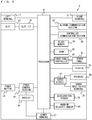
- FIG. 6 is a block diagram showing an example of the internal configuration of the main body apparatus 2.
- the main body apparatus 2 includes components 81 to 91, 97, and 98 shown in FIG. 6 in addition to the components shown in FIG. 3 .
- Some of the components 81 to 91, 97, and 98 may be mounted as electronic components on an electronic circuit board and accommodated in the housing 11.
- the main body apparatus 2 includes a processor 81.
- the processor 81 is an information processing section for executing various types of information processing to be executed by the main body apparatus 2.
- the processor 81 may be composed only of a CPU (Central Processing Unit), or may be composed of a SoC (System-on-a-chip) having a plurality of functions such as a CPU function and a GPU (Graphics Processing Unit) function.
- the processor 81 executes an information processing program (e.g., a game program) stored in a storage section (specifically, an internal storage medium such as a flash memory 84, an external storage medium attached to the slot 23, or the like), thereby performing the various types of information processing.
- a storage section specifically, an internal storage medium such as a flash memory 84, an external storage medium attached to the slot 23, or the like
- the main body apparatus 2 includes a flash memory 84 and a DRAM (Dynamic Random Access Memory) 85 as examples of internal storage media built into the main body apparatus 2.
- the flash memory 84 and the DRAM 85 are connected to the processor 81.
- the flash memory 84 is a memory mainly used to store various data (or programs) to be saved in the main body apparatus 2.
- the DRAM 85 is a memory used to temporarily store various data used for information processing.
- the main body apparatus 2 includes a slot interface (hereinafter abbreviated as "I/F") 91.
- the slot I/F 91 is connected to the processor 81.
- the slot I/F 91 is connected to the slot 23, and in accordance with an instruction from the processor 81, reads and writes data from and to the predetermined type of storage medium (e.g., a dedicated memory card) attached to the slot 23.
- the predetermined type of storage medium e.g., a dedicated memory card
- the processor 81 appropriately reads and writes data from and to the flash memory 84, the DRAM 85, and each of the above storage media, thereby performing the above information processing.
- the main body apparatus 2 includes a network communication section 82.
- the network communication section 82 is connected to the processor 81.
- the network communication section 82 communicates (specifically, through wireless communication) with an external apparatus via a network.
- the network communication section 82 connects to a wireless LAN and communicates with an external apparatus, using a method compliant with the Wi-Fi standard.
- the network communication section 82 wirelessly communicates with another main body apparatus 2 of the same type, using a predetermined communication method (e.g., communication based on a unique protocol or infrared light communication).
- the wireless communication in the above second communication form achieves the function of enabling so-called "local communication" in which the main body apparatus 2 can wirelessly communicate with another main body apparatus 2 placed in a closed local network area, and the plurality of main body apparatuses 2 directly communicate with each other to transmit and receive data.
- the main body apparatus 2 includes a controller communication section 83.
- the controller communication section 83 is connected to the processor 81.
- the controller communication section 83 wirelessly communicates with the left controller 3 and/or the right controller 4.
- the communication method between the main body apparatus 2 and the left controller 3 and the right controller 4 is optional.
- the controller communication section 83 performs communication compliant with the Bluetooth (registered trademark) standard with the left controller 3 and with the right controller 4.
- the processor 81 is connected to the left terminal 17, the right terminal 21, and the lower terminal 27.
- the processor 81 transmits data to the left controller 3 via the left terminal 17 and also receives operation data from the left controller 3 via the left terminal 17.
- the processor 81 transmits data to the right controller 4 via the right terminal 21 and also receives operation data from the right controller 4 via the right terminal 21.
- the processor 81 transmits data to the cradle via the lower terminal 27.
- the main body apparatus 2 can perform both wired communication and wireless communication with each of the left controller 3 and the right controller 4.
- the main body apparatus 2 can output data (e.g., image data or sound data) to the stationary monitor or the like via the cradle.
- data e.g., image data or sound data
- the main body apparatus 2 can communicate with a plurality of left controllers 3 simultaneously (in other words, in parallel). Further, the main body apparatus 2 can communicate with a plurality of right controllers 4 simultaneously (in other words, in parallel).
- a plurality of users can simultaneously provide inputs to the main body apparatus 2, each using a set of the left controller 3 and the right controller 4.
- a first user can provide an input to the main body apparatus 2 using a first set of the left controller 3 and the right controller 4
- a second user can provide an input to the main body apparatus 2 using a second set of the left controller 3 and the right controller 4.
- the main body apparatus 2 includes a touch panel controller 86, which is a circuit for controlling the touch panel 13.
- the touch panel controller 86 is connected between the touch panel 13 and the processor 81. Based on a signal from the touch panel 13, the touch panel controller 86 generates, for example, data indicating the position where a touch input is provided. Then, the touch panel controller 86 outputs the data to the processor 81.
- the display 12 is connected to the processor 81.
- the processor 81 displays a generated image (e.g., an image generated by executing the above information processing) and/or an externally acquired image on the display 12.
- the main body apparatus 2 includes a codec circuit 87 and speakers (specifically, a left speaker and a right speaker) 88.
- the codec circuit 87 is connected to the speakers 88 and a sound input/output terminal 25 and also connected to the processor 81.
- the codec circuit 87 is a circuit for controlling the input and output of sound data to and from the speakers 88 and the sound input/output terminal 25.
- the main body apparatus 2 includes an acceleration sensor 89.
- the acceleration sensor 89 detects the magnitudes of accelerations along predetermined three axial (e.g., xyz axes shown in FIG. 1 ) directions. It should be noted that the acceleration sensor 89 may detect an acceleration along one axial direction or accelerations along two axial directions.
- the main body apparatus 2 includes an angular velocity sensor 90.
- the angular velocity sensor 90 detects angular velocities about predetermined three axes (e.g., the xyz axes shown in FIG. 1 ). It should be noted that the angular velocity sensor 90 may detect an angular velocity about one axis or angular velocities about two axes.
- the acceleration sensor 89 and the angular velocity sensor 90 are connected to the processor 81, and the detection results of the acceleration sensor 89 and the angular velocity sensor 90 are output to the processor 81. Based on the detection results of the acceleration sensor 89 and the angular velocity sensor 90, the processor 81 can calculate information regarding the motion and/or the orientation of the main body apparatus 2.
- the main body apparatus 2 includes a power control section 97 and a battery 98.
- the power control section 97 is connected to the battery 98 and the processor 81. Further, although not shown in FIG. 6 , the power control section 97 is connected to components of the main body apparatus 2 (specifically, components that receive power supplied from the battery 98, the left terminal 17, and the right terminal 21). Based on a command from the processor 81, the power control section 97 controls the supply of power from the battery 98 to the above components.
- the battery 98 is connected to the lower terminal 27.
- an external charging device e.g., the cradle
- the battery 98 is charged with the supplied power.
- FIG. 7 is a block diagram showing examples of the internal configurations of the main body apparatus 2, the left controller 3, and the right controller 4. It should be noted that the details of the internal configuration of the main body apparatus 2 are shown in FIG. 6 and therefore are omitted in FIG. 7 .
- the left controller 3 includes a communication control section 101, which communicates with the main body apparatus 2. As shown in FIG. 7 , the communication control section 101 is connected to components including the terminal 42. In the exemplary embodiment, the communication control section 101 can communicate with the main body apparatus 2 through both wired communication via the terminal 42 and wireless communication not via the terminal 42.
- the communication control section 101 controls the method for communication performed by the left controller 3 with the main body apparatus 2. That is, when the left controller 3 is attached to the main body apparatus 2, the communication control section 101 communicates with the main body apparatus 2 via the terminal 42. Further, when the left controller 3 is detached from the main body apparatus 2, the communication control section 101 wirelessly communicates with the main body apparatus 2 (specifically, the controller communication section 83).
- the wireless communication between the communication control section 101 and the controller communication section 83 is performed in accordance with the Bluetooth (registered trademark) standard, for example.
- the left controller 3 includes a memory 102 such as a flash memory.
- the communication control section 101 includes, for example, a microcomputer (or a microprocessor) and executes firmware stored in the memory 102, thereby performing various processes.
- the left controller 3 includes buttons 103 (specifically, the buttons 33 to 39, 43, 44, and 47). Further, the left controller 3 includes the analog stick ("stick" in FIG. 7 ) 32. Each of the buttons 103 and the analog stick 32 outputs information regarding an operation performed on itself to the communication control section 101 repeatedly at appropriate timing.
- the left controller 3 includes inertial sensors. Specifically, the left controller 3 includes an acceleration sensor 104. Further, the left controller 3 includes an angular velocity sensor 105.
- the acceleration sensor 104 detects the magnitudes of accelerations along predetermined three axial (e.g., xyz axes shown in FIG. 4 ) directions. It should be noted that the acceleration sensor 104 may detect an acceleration along one axial direction or accelerations along two axial directions.
- the angular velocity sensor 105 detects angular velocities about predetermined three axes (e.g., the xyz axes shown in FIG. 4 ).
- the angular velocity sensor 105 may detect an angular velocity about one axis or angular velocities about two axes.
- Each of the acceleration sensor 104 and the angular velocity sensor 105 is connected to the communication control section 101. Then, the detection results of the acceleration sensor 104 and the angular velocity sensor 105 are output to the communication control section 101 repeatedly at appropriate timing.
- the communication control section 101 acquires information regarding an input (specifically, information regarding an operation or the detection result of the sensor) from each of input sections (specifically, the buttons 103, the analog stick 32, and the sensors 104 and 105).
- the communication control section 101 transmits operation data including the acquired information (or information obtained by performing predetermined processing on the acquired information) to the main body apparatus 2. It should be noted that the operation data is transmitted repeatedly, once every predetermined time. It should be noted that the interval at which the information regarding an input is transmitted from each of the input sections to the main body apparatus 2 may or may not be the same.
- the above operation data is transmitted to the main body apparatus 2, whereby the main body apparatus 2 can obtain inputs provided to the left controller 3. That is, the main body apparatus 2 can determine operations on the buttons 103 and the analog stick 32 based on the operation data. Further, the main body apparatus 2 can calculate information regarding the motion and/or the orientation of the left controller 3 based on the operation data (specifically, the detection results of the acceleration sensor 104 and the angular velocity sensor 105).
- the left controller 3 includes a power supply section 108.
- the power supply section 108 includes a battery and a power control circuit.
- the power control circuit is connected to the battery and also connected to components of the left controller 3 (specifically, components that receive power supplied from the battery).
- the right controller 4 includes a communication control section 111, which communicates with the main body apparatus 2. Further, the right controller 4 includes a memory 112, which is connected to the communication control section 111.
- the communication control section 111 is connected to components including the terminal 64.
- the communication control section 111 and the memory 112 have functions similar to those of the communication control section 101 and the memory 102, respectively, of the left controller 3.
- the communication control section 111 can communicate with the main body apparatus 2 through both wired communication via the terminal 64 and wireless communication not via the terminal 64 (specifically, communication compliant with the Bluetooth (registered trademark) standard).
- the communication control section 111 controls the method for communication performed by the right controller 4 with the main body apparatus 2.
- the right controller 4 includes input sections similar to the input sections of the left controller 3. Specifically, the right controller 4 includes buttons 113, the analog stick 52, and inertial sensors (an acceleration sensor 114 and an angular velocity sensor 115). These input sections have functions similar to those of the input sections of the left controller 3 and operate similarly to the input sections of the left controller 3.
- the right controller 4 includes a processing section 121.
- the processing section 121 is connected to the communication control section 111.
- the right controller 4 includes a power supply section 118.
- the power supply section 118 has a function similar to that of the power supply section 108 of the left controller 3 and operates similarly to the power supply section 108.
- the left controller 3 and the right controller 4 are attachable to and detachable from the main body apparatus 2. Further, the unified apparatus obtained by attaching the left controller 3 and the right controller 4 to the main body apparatus 2 or the main body apparatus 2 alone is attached to the cradle and thereby can output an image (and a sound) to the stationary monitor 6.
- a description is given below using a game system in a use form in which an image (and a sound) is output from the main body apparatus 2 in the state where the left controller 3 and the right controller 4 are detached from the main body apparatus 2.
- a plurality of main body apparatuses 2 in the state where the left controller 3 and the right controller 4 are detached can be used.
- a form in a case where an operation is performed on an application (e.g., a game application) using the game system 1 in the separate state a form is possible in which two or more main body apparatuses 2 are placed next to each other, and two or more users each use the left controller 3 and/or the right controller 4.
- FIGS. 8 to 10 are diagrams illustrating the setting of the positional relationship between the two main body apparatuses 2.
- the two main body apparatuses 2 are referred to as a "first main body apparatus 2a" and a "second main body apparatus 2b" and are in the state where the first main body apparatus 2a and the second main body apparatus 2b can communicate with each other.
- the display 12 and the touch panel 13 of the first main body apparatus 2a are referred to as a "first display 12a” and a “first touch panel 13a”, respectively.
- the display 12 and the touch panel 13 of the second main body apparatus 2b are referred to as a “second display 12b” and a “second touch panel 13b”, respectively.
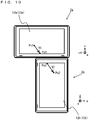
- FIG. 8 An example is used where, as shown in FIG. 8 , the first main body apparatus 2a and the second main body apparatus 2b are mounted at any positions so that the first display 12a (the first touch panel 13a) of the first main body apparatus 2a and the second display 12b (the second touch panel 13b) of the second main body apparatus 2b are adjacent to each other.
- the first main body apparatus 2a and the second main body apparatus 2b may be mounted as shown in FIG. 8 and then turned on.
- a user performs a touch-on on the touch panel 13 of either one of the main body apparatuses 2 (specifically, the touch panel 13 of one of the main body apparatuses 2 set as a parent apparatus when the main body apparatuses 2 communicate with each other; here, the first touch panel 13a of the first main body apparatus 2a), starts a touch operation, performs from this position the touch operation (a slide operation) for sliding onto the touch panel 13 of the other main body apparatus 2 (specifically, the touch panel 13 of one of the main body apparatuses 2 set as a child apparatus when the main body apparatuses 2 communicate with each other; here, the second touch panel 13b of the second main body apparatus 2b), and performs a touch-off.
- the user performs a touch-on at a position on the first touch panel 13a and then performs a slide operation to the periphery of the first touch panel 13a. Then, the user continues the slide operation to cross the gap between the first touch panel 13a and the second touch panel 13b, performs a touch operation on the periphery of the second touch panel 13b, then continues the slide operation from this position to a position on the second touch panel 13b, and performs a touch-off.
- This slide operation may be performed continuously and approximately along a straight line, or may be curved on the touch panels 13. In the following example, an example is used where the slide operation is performed approximately along a straight line.
- the starting point and the ending point of the slide operation performed on the first touch panel 13a are referred to as a "first starting point Psi” and a “first ending point Pe1", respectively.
- the starting point and the ending point of the slide operation performed on the second touch panel 13b are referred to as a "second starting point Ps2" and a “second ending point Pe2", respectively.
- the first main body apparatus 2a and the second main body apparatus 2b do not recognize the positional relationship with each other.
- the above slide operation is detected by each of the first main body apparatus 2a and the second main body apparatus 2b without recognizing the positional relationship between the first main body apparatus 2a and the second main body apparatus 2b.
- the first touch panel 13a detects this touch-on operation. Consequently, a processor 81a of the first main body apparatus 2a determines that the slide operation is performed from the first touch panel 13a of the first main body apparatus 2a toward the second touch panel 13b of the second main body apparatus 2b.
- the slide operation on the first touch panel 13a ends.
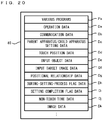
- the coordinates of the touch operation performed on the first touch panel 13a are sequentially stored in the DRAM 85a of the first main body apparatus 2a. For example, while the touch operation is detected, the coordinates of the touch operation can be stored in each processing frame.
- the time from when the touch-off is performed at the first ending point Pe1 to when the touch-on is performed at the second starting point Ps2 (a non-touch time t1) is calculated.
- the slide operation for setting the positional relationship ends.
- the coordinates of the touch operation performed on the second touch panel 13b are sequentially stored in the DRAM 85b of the second main body apparatus 2b.
- the processor 81a of the first main body apparatus 2a calculates a first vector V1 from the first starting point Ps1 to the first ending point Pe1 based on the coordinates of the touch operation performed on first touch panel 13a as shown in FIG. 9 .
- a processor 81b of the second main body apparatus 2b also calculates a second vector V2 from the second starting point Ps2 to the second ending point Pe2. Then, using the first vector Vi, the second vector V2, and the non-touch time t1, the positional relationship between the first touch panel 13a (the first display 12a) and the second touch panel 13b (the second display 12b) is set.
- the positional relationship between the first touch panel 13a (the first display 12a) and the second touch panel 13b (the second display 12b) is set so that the first vector V1 and the second vector V2 are placed next to each other on a straight line in accordance with time with which the first vector V1 and the second vector V2 are recorded.
- the first vector Vi, the second vector V2, and the non-touch time t1 calculated after the slide operation are cross-referenced by the first main body apparatus 2a and the second main body apparatus 2b, and the positional relationship is calculated by at least one of the first main body apparatus 2a and the second main body apparatus 2b (typically, the first main body apparatus 2a set as the parent apparatus). Then, this positional relationship is cross-referenced by the first main body apparatus 2a and the second main body apparatus 2b.
- this positional relationship is obtained by, for example, defining the coordinates on the first touch panel 13a and the second touch panel 13b (the positions of pixels on the first display 12a and the second display 12b) of the first main body apparatus 2a and the second main body apparatus 2b installed at positions shown in FIG. 8 , in a global coordinate space defined by a virtual game space. Consequently, the positions of pixels on the first display 12a and the second display 12b become known, and therefore, images corresponding to the placement positions of the first main body apparatus 2a and the second main body apparatus 2b can be displayed on the first display 12a and the second display 12b, and the virtual game space can be displayed on two displays, i.e., the first display 12a and the second display 12b.
- the virtual game space is displayed on two displays, i.e., the first display 12a and the second display 12b.
- the first vector V1 and the second vector V2 are calculated, the angle between the first touch panel 13a and the second touch panel 13b is calculated. If the velocity of the slide operation and the non-touch time t1 are calculated, the distance between the first ending point Pe1 and the second starting point Ps2 can be calculated, and therefore, the distance between the first touch panel 13a and the second touch panel 13b can be calculated.
- the coordinates on the second touch panel 13b in the coordinate system of the first touch panel 13a can be calculated. Then, if the position and the angle (the orientation) of the first touch panel 13a in the global coordinate space are set in advance, the coordinates on the second touch panel 13b can also be represented by global coordinates. Further, since the coordinates on the first touch panel 13a and the second touch panel 13b and the positions (the coordinates) of pixels on the first display 12a and the second display 12b approximately coincide with each other, the coordinates on the first display 12a and the second display 12b can be represented by global coordinates. As a result, images corresponding to the placement positions of the first main body apparatus 2a and the second main body apparatus 2b can be displayed on the first display 12a and the second display 12b.
- the number of samples for calculating the above vectors on the first display 12a and the second display 12b can be determined in advance. For example, the number of frames (times) a touch operation is performed on the first touch panel 13a is calculated, and further, the number of frames a touch operation is performed on the second touch panel 13b is calculated. Then, if either number of frames is less than a predetermined number of frames (e.g., 15 frames), the above vectors are not calculated (an error is determined), whereby the above positional relationship is not set.
- a predetermined number of frames e.g. 15 frames
- the required number of frames (the non-touch time t1) or the required time from the first ending point Pe1 to the second starting point Ps2 exceeds a predetermined number of frames (e.g., 80 frames) or a predetermined time (e.g., 0.3 seconds), it may be determined that the slide operation from the first touch panel 13a to the second touch panel 13b is not continuous (an error may be determined), and the positional relationship may not be set.
- a predetermined number of frames e.g. 80 frames
- a predetermined time e.g. 80 frames
- the vectors used for the above setting of the positions may be set based on another condition. For example, in a slide operation from a touch-on at a position on the first touch panel 13a to the periphery of the first touch panel 13a, a vector from a single point in the trajectory of the slide operation (i.e., the trajectory from the first starting point Ps1 to the first ending point Pe1) to a touch position at the periphery (i.e., the first ending point Pe1) maybe set as the first vector V1.
- a point in the trajectory may be a touch position on the trajectory obtained predetermined frames before the time when the touch position at the periphery is obtained.
- a vector from a touch position at the periphery i.e., the second starting point Ps2 to a single point in the trajectory of the slide operation (i.e., the trajectory from the second starting point Ps2 to the second ending point Pe2) may be set as the second vector V2.
- a point in the trajectory may be a touch position on the trajectory obtained predetermined frames after the time when the touch position at the periphery is obtained.
- a void may be formed between the plurality of main body apparatuses 2 between which the positional relationship is set.
- the distance between the first ending point Pe1 and the second starting point Ps2 is calculated from the velocity of the slide operation in which the first vector V1 and the second vector V2 are generated, and the non-touch time t1, and a void corresponding to the calculated distance is set between the first touch panel 13a and the second touch panel 13b. That is, the positional relationship between the first touch panel 13a and the second touch panel 13b is set so that the first vector V1 and the second vector V2 are placed next to each other on the same straight line with the above distance between the first vector V1 and the second vector V2.
- the velocity of the slide operation used here is not particularly limited. Any velocity of the slide operation from the first starting point Ps1 to the second ending point Pe2 may be used.
- the average velocity of the slide operation on the first touch panel 13a may be used, or the average velocity of the slide operation on the second touch panel 13b may be used.
- the average velocity of the entire slide operation from the first touch panel 13a to the second touch panel 13b can also be used.
- the partial velocity or the average velocity of the slide operation on each touch panel can also be used.
- the positional relationship is set in a case where the first main body apparatus 2a (the first touch panel 13a) and the second main body apparatus 2b (the second touch panel 13b) are placed on the same two-dimensional plane.
- the first main body apparatus 2a and the second main body apparatus 2b are placed three-dimensionally tilted, and the first main body apparatus 2a and the second main body apparatus 2b three-dimensionally intersect each other, based on the orientations detected by the inertial sensors (the acceleration sensors 89 and/or the angular velocity sensors 90)
- the positional relationship between the first main body apparatus 2a and the second main body apparatus 2b may be set taking into account the tilt based on the intersection.
- the coordinates on the first display 12a and the second display 12b can be represented by three-dimensional global coordinates.
- FIG. 11 is a diagram showing examples of an input object image Is and an input target image Ie for guiding the user through the operation for setting the positional relationship between the plurality of main body apparatuses 2.
- FIG. 12 is a diagram showing an example of the state where the input object image Is is moved by performing a touch operation on the first touch panel 13a.
- FIG. 13 is a diagram showing an example of the state where the input object image Is is moved by performing a touch operation on the second touch panel 13b.
- FIG. 14 is a diagram showing an example of the state where the input object image Is is moved to a position indicated by the input target image Ie.
- the two main body apparatuses 2 are referred to as a "first main body apparatus 2a” and a “second main body apparatus 2b” and are in the state where the first main body apparatus 2a and the second main body apparatus 2b can communicate with each other.
- the display 12 and the touch panel 13 of the first main body apparatus 2a are referred to as a "first display 12a” and a first touch panel 13a", respectively.
- the display 12 and the touch panel 13 of the second main body apparatus 2b are referred to as a "second display 12b” and a "second touch panel 13b", respectively.
- the first main body apparatus 2a and the second main body apparatus 2b are in the state where the first main body apparatus 2a and the second main body apparatus 2b can communicate with each other.
- the first main body apparatus 2a is set as a parent apparatus
- the second main body apparatus 2b is set as a child apparatus.
- an input object image Is is displayed at a position including the coordinates of an input start possible point on the first display 12a (e.g., a position including the center of the screen).
- an input target image Ie is displayed at a position including the coordinates of an input target point on the second display 12b (e.g., a position including the center of the screen).
- the input object image Is is an image represented by a circular object such as a coin.
- the input target image Ie is a figure of the same shape as the input object image Is and is displayed in the same size as, a slightly larger size than, or a slightly smaller size than the outer edge of the input object image Is.
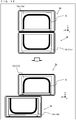
- FIG. 12 if the user performs a touch-on on the first touch panel 13a from a position on the input object image Is displayed on the first display 12a and then performs a touch operation for sliding (a slide operation), the input object image Is moves to a position that coincides with a touch position in the slide operation. Consequently, the input object image Is displayed on the first display 12a makes a drag movement by the slide operation on the first touch panel 13a. Then, after performing the touch-on on the position on the first touch panel 13a, the user performs the slide operation toward the second main body apparatus 2b of which the position is to be set, so that the input object image Is makes a drag movement to the periphery of the first touch panel 13a.
- the input object image Is may be displayed at a position in the middle of performing a touch-on at a position other than the input object image Is on the first touch panel 13a and performing a slide operation.
- the input object image Is may start making a drag movement from the time when the position where the above slide operation is performed and the position of the input object image Is overlap each other.
- the user performs the slide operation to the periphery of the first touch panel 13a toward the second main body apparatus 2b, then continues the slide operation to cross the gap between the first touch panel 13a and the second touch panel 13b, and performs an operation for starting a touch operation from the periphery of the second touch panel 13b (see an arrow shown in FIG. 13 ).
- this slide operation becomes an operation for performing a touch-off once at a peripheral portion of the first touch panel 13a and performing a touch-on again at a peripheral portion of the second touch panel 13b.
- the input object image Is displayed while making a drag movement on the first display 12a is erased once at the peripheral portion of the first touch panel 13a where the touch-off is performed. Then, the input object image Is is displayed again on the second display 12b from the peripheral portion of the second touch panel 13b where the touch-on is performed. Then, the slide operation is continued from the peripheral portion on the second touch panel 13b, whereby the input object image Is makes a drag movement in accordance with the slide operation on the second touch panel 13b from the peripheral portion and is displayed on the second display 12b.
- the timing when the input object image Is is erased once at the peripheral portion of the first touch panel 13a may be the timing when the touch-off is performed at the peripheral portion, or may be the timing when the touch-on is performed at the peripheral portion of the second touch panel 13b.
- the display of the input object image Is may be continued at the peripheral portion where the touch-off is performed from the first touch panel 13a. It is preferable that the input object image Is displayed on the first display 12a should be the same as the input object image Is displayed on the second display 12b as a displayed image.
- each of the first main body apparatus 2a and the second main body apparatus 2b not the same image object, but different image objects having the same appearance are used.
- the handling of such image objects in the internal processing is similar in a case where processing is performed by another main body apparatus 2.
- the operation for setting the positional relationship between the first main body apparatus 2a and the second main body apparatus 2b ends. Then, based on the touch position as a trajectory on the first touch panel 13a and the second touch panel 13b obtained by the above slide operation, the positional relationship between the first main body apparatus 2a and the second main body apparatus 2b is set. If the above positional relationship is set, the input object image Is and the input target image Ie displayed on the second display 12b are erased, and images based on the positional relationship are displayed on the first display 12a and the second display 12b.
- the inappropriate operation is treated as an operation error, and the process for setting the positional relationship between the main body apparatuses 2 is performed again, and it is indicated to the user that an operation error occurs.
- the position where the input object image Is is displayed is returned to the initial position, i.e., the position including the coordinates of the input start possible point on the first display 12a (e.g., the position including the center of the screen), thereby indicating to the user that the operation error occurs.
- the operation for setting the positional relationship between the main body apparatuses 2 it may be determined that an operation error occurs.
- an operation error occurs in a case where the time in which the slide operation is continued to cross the gap between the touch panels 13 (a non-touch time) reaches a predetermined time, a case where the moving velocity of the touch position of the slide operation performed on the touch panels 13 exceeds a predetermined velocity, a case where a touch-off is performed before the position of the slide operation reaches a position overlapping the input target image displayed on the display 12, a case where, before the positional relationship between the main body apparatuses 2 is set, a touch operation is performed by the above slide operation on the touch panel 13 of another main body apparatus 2 capable of performing wireless communication, or the like.
- the display form of the indication to the user that an operation error occurs may not be based on the position where the input object image Is is displayed. For example, the user may be informed by a text image, a sound, or the like that an error occurs in the slide operation.
- the input object image Is and the input target image Ie are displayed, thereby guiding the user through the operation for setting the positional relationship between the plurality of main body apparatuses 2 placed next to each other.
- this guiding may be performed using other images.
- predetermined images e.g., images of "x" marks
- predetermined images may be displayed at the input start possible position and the input target position, thereby urging the user to perform a slide operation to connect the predetermined images.
- the trajectory of the above slide operation may be displayed as a line image, and if the slide operation is not completed by, for example, performing a touch-off in the middle of the slide operation and an error occurs in the middle, the line image may be erased, thereby urging the user to correctly perform the slide operation.
- the input object image Is may not be a circular object such as a coin, and may be an image representing a polygon, a character image, or an image representing a solid such as a sphere.
- each of the input start possible position and the input target position is set at the center of the display 12. Consequently, space for performing a slide operation on a plurality of touch panels 13 can be secured no matter what placement relationship the touch panels 13 are mounted in. Thus, it is possible to accurately determine the positional relationship. If such an effect is not desired, at least one of the input start possible position and the input target position may not be set at the center of the display 12.
- a touch-on may not be performed from the input start possible position set in advance, and a touch-off may be performed at the input target position set in advance.
- the slide operation may be established as the operation for setting the positional relationship between the plurality of main body apparatuses 2.
- the operation for setting the positional relationship between the plurality of main body apparatuses 2 may be established by performing a touch-on from the input start possible position set in advance and performing a touch-off at the input target position set in advance.
- an example of the display of images guiding the user through an operation for calculating the positional relationship between two main body apparatuses 2 capable of communicating with each other is shown.
- the positional relationships among three or more main body apparatuses 2 capable of communicating with each other can also be calculated.
- FIG. 15 a description is given using an example where three or more main body apparatuses 2 are placed in a placement form determined in advance, and the placement order of the three or more main body apparatuses 2 is set as the positional relationships.
- FIGS. 16 and 17 an example is used where three or more main body apparatuses 2 are placed in any placement form, and the positional relationships among the three or more main body apparatuses 2 are set.
- four main body apparatuses 2 (a first main body apparatus 2a, a second main body apparatus 2b, a third main body apparatus 2c, and a fourth main body apparatus 2d) are placed in a placement form determined in advance, and the placement order of the four main body apparatuses 2 is set as the positional relationships.
- the placement form determined in advance refers to the mounting of the plurality of main body apparatuses 2 in a placement shape specified in advance, such as a placement in which the plurality of main body apparatuses 2 are arranged horizontally in a line, a placement in which the plurality of main body apparatuses 2 are arranged vertically in a line, a placement in which the plurality of main body apparatuses 2 are arranged in a grid (e.g., a two-by-two matrix shape), a placement in which the plurality of main body apparatuses 2 are arranged in an L-shape, or a placement in which the plurality of main body apparatuses 2 are arranged in a loop (e.g., a square shape).
- a placement shape specified in advance such as a placement in which the plurality of main body apparatuses 2 are arranged horizontally in a line, a placement in which the plurality of main body apparatuses 2 are arranged vertically in a line, a placement in which the plurality of main body apparatus
- the first main body apparatus 2a, the second main body apparatus 2b, the third main body apparatus 2c, and the fourth main body apparatus 2d are placed next to each other horizontally in a line, and this placement order is set as the positional relationships.
- the first main body apparatus 2a, the second main body apparatus 2b, the third main body apparatus 2c, and the fourth main body apparatus 2d capable of communicating with each other are mounted next to each other horizontally in a line in the left-right direction by the user so that the left-right direction of each main body apparatus is its long axis direction.
- the first main body apparatus 2a is set as a parent apparatus in the above communication and placed at an end (the left end or the right end) in the above placement order of the placement made horizontally in a line in the left-right direction.
- the placement order of the other main body apparatuses, i.e., the second main body apparatus 2b, the third main body apparatus 2c, and the fourth main body apparatus 2d are optional.
- an input object image Is is displayed at a position including the coordinates of an input start possible point on the first display 12a (e.g., a position including the center of the screen).
- input target images Ieb, Iec, and led are displayed at positions including the coordinates of input target points (e.g., positions including the centers of the screens).
- the user performs a touch-on on a first touch panel 13a from a position on the input object image Is displayed on the first display 12a and then performs a slide operation to another one of the main body apparatuses 2 adjacent to the main body apparatus 2a (in the example of FIG. 15 , the second main body apparatus 2b), whereby the input object image Is makes a drag movement in accordance with the slide operation.
- the user performs the slide operation to the periphery of the first touch panel 13a toward the second main body apparatus 2b adjacent to the main body apparatus 2a, then continues the slide operation to cross the gap between the first touch panel 13a and a second touch panel 13b, and performs an operation for starting a touch operation from the periphery of the second touch panel 13b (see an arrow shown in (b) of FIG. 15 ).
- the input object image Is displayed while making a drag movement on the first display 12a is erased once at a peripheral portion of the first touch panel 13a where a touch-off is performed.
- the input object image Is is displayed again on the second display 12b from a peripheral portion of the second touch panel 13b where a touch-on is performed. Then, the slide operation is continued from the peripheral portion on the second touch panel 13b, whereby the input object image Is makes a drag movement in accordance with the slide operation on the second touch panel 13b from the peripheral portion and is displayed on the second display 12b.
- the positional relationships of the third main body apparatus 2c and the fourth main body apparatus 2d are not yet set, and therefore, the input object image Is displayed on the second display 12b is continuously displayed, thereby urging the user to perform a touch-on operation on the second touch panel 13b. Then, the operation for setting the positional relationships is continued.
- the user performs a touch-on on the second touch panel 13b from a position on the input object image Is displayed on the second display 12b and then performs a slide operation to another one of the main body apparatuses 2 adjacent on the right to the main body apparatus 2b (in the example of FIG. 15 , the third main body apparatus 2c), whereby the input object image Is makes a drag movement in accordance with the slide operation.
- the user performs the slide operation to the periphery of the second touch panel 13b toward the third main body apparatus 2c adjacent to the main body apparatus 2b, then continues the slide operation to cross the gap between the second touch panel 13b and a third touch panel 13c, and performs an operation for starting a touch operation from the periphery of the third touch panel 13c (see an arrow shown in (d) of FIG. 15 ).
- the input object image Is displayed while making a drag movement on the second display 12b is erased once at a peripheral portion of the second touch panel 13b where a touch-off is performed.
- the input object image Is is displayed again on the third display 12c from a peripheral portion of the third touch panel 13c where a touch-on is performed. Then, the slide operation is continued from the peripheral portion on the third touch panel 13c, whereby the input object image Is makes a drag movement in accordance with the slide operation on the third touch panel 13c from the peripheral portion and is displayed on the third display 12c.
- the user causes the input object image Is displayed on the third display 12c to make a drag movement, and performs a slide operation to another one of the main body apparatuses 2 adjacent on the right to the main body apparatus 2c (in the example of FIG. 15 , the fourth main body apparatus 2d). Then, the user performs the slide operation to the periphery of the third touch panel 13c toward the fourth main body apparatus 2d adjacent to the main body apparatus 2c, then continues the slide operation to cross the gap between the third touch panel 13c and a fourth touch panel 13d, and performs an operation for starting a touch operation from the periphery of the fourth touch panel 13d (see an arrow shown in (e) of FIG. 15 ).
- the input object image Is displayed while making a drag movement on the third display 12c is erased once at a peripheral portion of the third touch panel 13c where a touch-off is performed. Then, the input object image Is is displayed again on the fourth display 12d from a peripheral portion of the fourth touch panel 13d where a touch-on is performed. Then, the slide operation is continued from the peripheral portion on the fourth touch panel 13d, whereby the input object image Is makes a drag movement in accordance with the slide operation on the fourth touch panel 13d from the peripheral portion and is displayed on the fourth display 12d.
- the positional relationships among all the main body apparatuses 2 are set, and therefore, the setting of the positional relationships among the four main body apparatuses 2 (the first main body apparatus 2a, the second main body apparatus 2b, the third main body apparatus 2c, and the fourth main body apparatus 2d) ends. Then, if the above positional relationships are set, the input object image Is and all the input target images Ie displayed on the displays 12 are erased, and a game image Ip based on the positional relationships is displayed on the first display 12a to the fourth display 12d (see (f) of FIG. 15 ).
- four main body apparatuses 2 are placed in any placement form, and the positional relationships among the four main body apparatuses 2 are set.
- a first main body apparatus 2a, a second main body apparatus 2b, a third main body apparatus 2c, and a fourth main body apparatus 2d are placed in any placement form, and the positional relationships among the four main body apparatuses 2 are set.
- an example is used where, as any placement form, the first main body apparatus 2a, the second main body apparatus 2b, the third main body apparatus 2c, and the fourth main body apparatus 2d are placed next to each other in an L-shape, and the positional relationships among the four main body apparatuses 2 are detected and set.
- the first main body apparatus 2a, the second main body apparatus 2b, the third main body apparatus 2c, and the fourth main body apparatus 2d capable of communicating with each other are mounted next to each other in an L-shape by the user.
- the first main body apparatus 2a, the second main body apparatus 2b, and the third main body apparatus 2c are mounted next to each other horizontally in a line in the left-right direction, and the fourth main body apparatus 2d is mounted below and vertically next to the first main body apparatus 2a.
- the first main body apparatus 2a is set as a parent apparatus in the above communication.
- an input object image Is1 is displayed at a position including the coordinates of an input start possible point on the first display 12a (e.g., a position including the center of the screen).
- input target images Ieb, Iec, and Ied are displayed at positions including the coordinates of input target points (e.g., positions including the centers of the screens).
- the user performs a touch-on on a first touch panel 13a from a position on the input object image Is1 displayed on the first display 12a and then performs a slide operation to another one of the main body apparatuses 2 adjacent on the right to the main body apparatus 2a (in the example of FIG. 16 , the second main body apparatus 2b), whereby the input object image Is1 makes a drag movement in accordance with the slide operation.
- the user performs the slide operation to the periphery of the first touch panel 13a toward the second main body apparatus 2b adjacent on the right to the main body apparatus 2a, then continues the slide operation to cross the gap between the first touch panel 13a and a second touch panel 13b, and performs an operation for starting a touch operation from the periphery of the second touch panel 13b (see an arrow shown in (b) of FIG. 16 ).
- the input object image Is1 displayed while making a drag movement on the first display 12a is erased once at a peripheral portion of the first touch panel 13a where a touch-off is performed.
- the input object image Is1 is displayed again on the second display 12b from a peripheral portion of the second touch panel 13b where a touch-on is performed. Then, the slide operation is continued from the peripheral portion on the second touch panel 13b, whereby the input object image Is1 makes a drag movement in accordance with the slide operation on the second touch panel 13b from the peripheral portion and is displayed on the second display 12b.
- the user performs the slide operation to the periphery of the first touch panel 13a toward the fourth main body apparatus 2d adjacent below to the main body apparatus 2a, then continues the slide operation to cross the gap between the first touch panel 13a and a fourth touch panel 13d, and performs an operation for starting a touch operation from the periphery of the fourth touch panel 13d (see an arrow shown in (d) of FIG. 16 ).
- the input object image Is2 displayed while making a drag movement on the first display 12a is erased once at a peripheral portion of the first touch panel 13a where a touch-off is performed.
- the input object image Is2 is displayed again on the fourth display 12d from a peripheral portion of the fourth touch panel 13d where a touch-on is performed. Then, the slide operation is continued from the peripheral portion on the fourth touch panel 13d, whereby the input object image Is2 makes a drag movement in accordance with the slide operation on the fourth touch panel 13d from the peripheral portion and is displayed on the fourth display 12d.
- the input object image Is2 displayed on the fourth display 12d is continuously displayed at a position including the coordinates of an input start possible point on the fourth display 12d (e.g., a position including the center of the screen)
- the input object image Is1 displayed on the second display 12b is also continuously displayed, and yet another input object image Is3 newly appears and is displayed at the position including the coordinates of the input start possible point on the first display 12a (e.g., the position including the center of the screen).
- the user performs a touch-on on the second touch panel 13b from a position on the input object image Is1 displayed on the second display 12b and then performs a slide operation to another one of the main body apparatuses 2 adjacent on the right to the main body apparatus 2b (in the example of FIG. 17 , the third main body apparatus 2c), whereby the input object image Is1 makes a drag movement in accordance with the slide operation.
- the user performs the slide operation to the periphery of the second touch panel 13b toward the third main body apparatus 2c adjacent to the main body apparatus 2b, then continues the slide operation to cross the gap between the second touch panel 13b and a third touch panel 13c, and performs an operation for starting a touch operation from the periphery of the third touch panel 13c (see an arrow shown in (b) of FIG. 17 ).
- the input object image Is1 displayed while making a drag movement on the second display 12b is erased once at a peripheral portion of the second touch panel 13b where a touch-off is performed.
- the input object image Is1 is displayed again on the third display 12c from a peripheral portion of the third touch panel 13c where a touch-on is performed. Then, the slide operation is continued from the peripheral portion on the third touch panel 13c, whereby the input object image Is1 makes a drag movement in accordance with the slide operation on the third touch panel 13c from the peripheral portion and is displayed on the third display 12c.
- the positional relationships among all the main body apparatuses 2 are set, and therefore, the setting of the positional relationships among the four main body apparatuses 2 (the first main body apparatus 2a, the second main body apparatus 2b, the third main body apparatus 2c, and the fourth main body apparatus 2d) ends. Then, if the above positional relationships are set, the input object images Isi, Is2, and Is3 and all the input target images Ie displayed on the displays 12 are erased, and a game image Ip based on the positional relationships is displayed on the first display 12a to the fourth display 12d (see (d) of FIG. 17 ).
- the game image Ip obtained by defining the coordinates on the first touch panel 13a to the fourth touch panel 13d placed in an L-shape (the positions of pixels on the first display 12a to the fourth display 12d placed in an L-shape), in the global coordinate space defined by the virtual game space is displayed using the first display 12a to the fourth display 12d. That is, a game image is displayed by being subjected to display control based on the positional relationships among the first display 12a to the fourth display 12d so that the display contents of the first display 12a to the fourth display 12d continue in an L-shape.
- both a position including the coordinates of an input start possible point and a position including the coordinates of an input target point are set at positions including the centers of the screens. These positions, however, may not be at exactly the same coordinates between the apparatuses. For example, depending on the displays or the touch panels for use, the resolutions may differ between the apparatuses. In this case, the coordinates of an input start possible point and the coordinates of an input target point differ. Thus, even if an input start possible point and an input target point are set at positions including the centers of the screens as described above, the input start possible points and the input target points can be set at different coordinates between the apparatuses.
- FIGS. 18 and 19 a description is given of the relationship between a positional shift between main body apparatuses 2 placed adjacent to each other and a display image.
- a game image is displayed by also defining a positional shift between main body apparatuses 2 placed adjacent to each other in the global coordinate space defined by the virtual game space.
- a game image is displayed without defining a positional shift between main body apparatuses 2 placed adjacent to each other in the global coordinate space defined by the virtual game space.
- FIG. 18 an example is used where a single game image Ip is displayed using two main body apparatuses 2 (a first main body apparatus 2a and a second main body apparatus 2b).
- the first main body apparatus 2a and the second main body apparatus 2b are mounted so that in the state where the left-right directions of both the first main body apparatus 2a and the second main body apparatus 2b are their long axis directions, the first main body apparatus 2a and the second main body apparatus 2b are vertically adjacent to each other with the first main body apparatus 2a on the upper side and the second main body apparatus 2b on the lower side.
- the first main body apparatus 2a and the second main body apparatus 2b are placed adjacent to each other such that in the state where a lower side surface of the first main body apparatus 2a and an upper side surface of the second main body apparatus 2b are in surface contact with each other, the center line directions in the up-down direction (a y-axis direction shown in Fig. 18 ) of the first main body apparatus 2a and the second main body apparatus 2b coincide with each other.
- the positions of pixels on a first display 12a and a second display 12b adjacent to each other without a positional shift are defined in the global coordinate space defined by the virtual game space.
- the single game image Ip is displayed such that the display content of the first display 12a and the display content of the second display 12b are continuous without a positional shift.
- the game image Ip representing a game course that makes a round of a rounded-corner rectangular shape is displayed on the first display 12a and the second display 12b.
- a case is considered where, for example, as shown in the lower diagram of FIG. 18 , the first main body apparatus 2a and the second main body apparatus 2b are placed adjacent to each other in the state where the lower side surface of the first main body apparatus 2a and the upper side surface of the second main body apparatus 2b are in surface contact with each other, and the center line directions in the up-down direction (the y-axis direction shown in Fig. 18 ) of the first main body apparatus 2a and the second main body apparatus 2b are shifted from each other.
- the positions of pixels on the first display 12a and the second display 12b adjacent to each other are defined in the global coordinate space defined by the virtual game space, by including the positional shift in the left-right direction.
- the single game image Ip is displayed such that the display content of the first display 12a and the display content of the second display 12b are continuous without a positional shift.
- the game image Ip corresponding to the placement positions of the first main body apparatus 2a and the second main body apparatus 2b including a positional shift in the left-right direction can be displayed.
- the virtual game space may be distorted in accordance with the screen shapes resulting from the positional shift, and a game image representing the virtual game space may be displayed on the first display 12a and the second display 12b. If the first main body apparatus 2a and the second main body apparatus 2b are placed adjacent to each other in the state where, for example, as shown in the lower diagram of FIG.
- the lower side surface of the first main body apparatus 2a and the upper side surface of the second main body apparatus 2b are in surface contact with each other, and the center line directions in the up-down direction (the y-axis direction shown in Fig. 18 ) of the first main body apparatus 2a and the second main body apparatus 2b are shifted from each other in the left-right direction, this results in the state where the first display 12a and the second display 12b are adjacent to each other in an approximate S-shape.
- the length at which the first main body apparatus 2a and the second main body apparatus 2b are in contact with each other is shorter than the length of each of the above side surfaces, and the length at which the first display 12a and the second display 12b overlap each other in the left-right direction (a length L shown in Fig. 18 ) is shorter than the length in the left-right direction of each of the first display 12a and the second display 12b.
- the length at which the virtual game world displayed on the first display 12a and the virtual game world displayed on the second display 12b seem to be connected together (the length L shown in Fig. 18 ) is shorter than the length in the left-right direction of another portion.
- an image of the virtual game space displayed on the first display 12a and the second display 12b has a shape narrowed from the left and right in a connection portion of the first display 12a and the second display 12b.
- a game image displayed on the first display 12a and the second display 12b may also be deformed into a shape narrowed in the connection portion. For example, as shown in the lower diagram of FIG.
- the game course that makes a round of a rounded-corner rectangular shape may be displayed as the single game image Ip so that in the state where the game course is deformed into a shape narrowed from the left and right in the connection portion, the display content of the first display 12a and the display content of the second display 12b are continuous without a positional shift.
- a virtual game space is distorted, whereby it is possible to form a virtual game space corresponding to the positional relationship between a plurality of main body apparatuses 2 and enable a new strategy for a game using the virtual game space.
- FIG. 19 an example is described where a game image is displayed on the premise that a positional shift between main body apparatuses 2 adjacent to each other in the global coordinate space defined by the virtual game space is not defined, i.e., the main body apparatuses 2 are placed adjacent to each other in the state where there is not a positional shift between the main body apparatuses 2.
- a game image is displayed on the premise that a positional shift between main body apparatuses 2 adjacent to each other in the global coordinate space defined by the virtual game space is not defined, i.e., the main body apparatuses 2 are placed adjacent to each other in the state where there is not a positional shift between the main body apparatuses 2.
- a case is considered where, for example, as shown in the lower diagram of FIG.
- the first main body apparatus 2a and the second main body apparatus 2b are placed adjacent to each other in the state where the lower side surface of the first main body apparatus 2a and the upper side surface of the second main body apparatus 2b are in surface contact with each other, and the center line directions in the up-down direction (a y-axis direction shown in Fig. 19 ) of the first main body apparatus 2a and the second main body apparatus 2b are shifted from each other.
- the positions of pixels on the first display 12a and the second display 12b adjacent to each other are defined in the global coordinate space defined by the virtual game space without taking into account a positional shift in the left-right direction so that the display content of the first display 12a and the display content of the second display 12b are continuous without a positional shift.
- the single game image Ip may be displayed in a discontinuous state where the display content of the first display 12a and the display content of the second display 12b are shifted by an amount of shift corresponding to the positional shift.
- the user moves the placement of at least one of the main body apparatuses 2 to solve the positional shift in the displayed game image, and thereby can correct the game image to a display state as shown in the upper diagram of FIG. 19 .
- Each of the above plurality of examples of the relationship between a positional shift between main body apparatuses 2 placed adjacent to each other and a display image can be applied to any of the examples of placements based on the positional relationship set between a plurality of main body apparatuses 2.
- FIGS. 15 to 17 an example is described where the positional relationships among three or more main body apparatuses 2 are set.
- the plurality of examples of the relationship between a positional shift between main body apparatuses 2 and a display image can be applied to any of the examples.
- FIG. 20 is a diagram showing an example of a data area set in the DRAM 85 of each of the plurality of main body apparatuses 2 in the exemplary embodiment. It should be noted that in the DRAM 85, in addition to the data shown in FIG. 20 , data used in another process is also stored, but is not described in detail here.
- various programs Pa which are executed by the game system 1, are stored.
- a communication program for wirelessly communicating with the left controller 3 and the right controller 4 and wirelessly communicating with another game system 1 (another main body apparatus 2) an application program for performing information processing for setting the positional relationship between the plurality of main body apparatuses 2 and information processing (e.g., game processing) based on data acquired from the touch panel 13, the left controller 3, and/or the right controller 4, and the like are stored.
- the various programs Pa may be stored in advance in the flash memory 84, or may be acquired from a storage medium attachable to and detachable from the game system 1 (e.g., a predetermined type of a storage medium attached to the slot 23) and stored in the DRAM 85, or may be acquired from another apparatus via a network such as the Internet and stored in the DRAM 85.
- the processor 81 executes the various programs Pa stored in the DRAM 85.
- a data storage area of the DRAM 85 various data used for processes such as a communication process and information processing executed by the game system 1 is stored.
- operation data Da, communication data Db, parent apparatus/child apparatus setting data Dc, touch position data Dd, input object data De, input target image data Df, positional relationship data Dg, during-setting-process flag data Dh, setting completion flag data Di, non-touch time data Dj, image data Dk, and the like are stored.
- the operation data Da is operation data appropriately acquired from each of the touch panel 13, the left controller 3, and/or the right controller 4.
- operation data transmitted from each of the left controller 3 and/or the right controller 4 includes information regarding an input (specifically, information regarding an operation or the detection result of each sensor) from each of the input sections (specifically, each button, each analog stick, and each sensor).
- operation data is transmitted in a predetermined cycle from each of the left controller 3 and/or the right controller 4 through wireless communication, and the operation data Da is appropriately updated using the received operation data.
- data indicating a touch position (touch coordinates) on the touch panel 13 is acquired from the touch panel 13 of the main body apparatus 2 in a predetermined cycle.
- the operation data Da is appropriately updated using the acquired touch position data.
- the update cycle of the operation data Da may be such that the operation data Da is updated every frame, which is the cycle of the processing described later executed by the main body apparatus 2, or is updated every cycle in which the above operation data is transmitted through the wireless communication or every cycle in which touch position data is acquired.
- the communication data Db is data to be wirelessly transmitted to another game system 1 (another main body apparatus 2) or data received from another game system 1 (another main body apparatus 2).
- the parent apparatus/child apparatus setting data Dc is data indicating whether or not the main body apparatus 2 is set as a parent apparatus or a child apparatus in a communication process with another game system 1 (another main body apparatus 2).
- the touch position data Dd includes history data of a touch position (touch coordinates) on the touch panel 13 of the main body apparatus 2, and history data of a touch position (touch coordinates) on the touch panel 13 of another game system 1 (another main body apparatus 2) capable of performing wireless communication.
- the input object data De is data indicating the position of an input object displayed on at least one of the displays 12 of a plurality of main body apparatuses 2 capable of performing wireless communication.
- the input target image data Df is data indicating the position of an input target image displayed on at least one of the displays 12 of a plurality of main body apparatuses 2 capable of performing wireless communication.
- the positional relationship data Dg is data indicating the positional relationship between a plurality of main body apparatuses 2 capable of performing wireless communication.
- the during-setting-process flag data Dh is data indicating a during-setting-process flag that is set to on in a case where the process for setting the positional relationship between a plurality of main body apparatuses 2 is performed.
- the setting completion flag data Di is data indicating a setting completion flag that is set to on in a case where the process for setting the positional relationship between a plurality of main body apparatuses 2 ends.
- the non-touch time data Dj is data indicating the time required for a slide operation to cross the gap between a plurality of touch panels 13.
- the image data Dk is data for displaying images (e.g., an image of a player character, an image of a virtual object, an information image, a field image, a background image, and the like) on display screens when a setting process and a game are performed.
- images e.g., an image of a player character, an image of a virtual object, an information image, a field image, a background image, and the like
- FIG. 21 is a flow chart showing an example of information processing executed by a game system 1 set as a parent apparatus.
- FIG. 22 is a subroutine showing a detailed example of a parent apparatus positional relationship setting process performed in step S129 in FIG. 21 .
- FIG. 23 is a flow chart showing an example of information processing executed by a game system 1 set as a child apparatus.
- FIG. 24 is a subroutine showing a detailed example of a child apparatus positional relationship setting process performed in step S168 in FIG. 23 .
- a series of processes shown in FIGS. 21 to 24 is performed by the processor 81 executing a communication program or a predetermined application program (a game program) included in the various programs Pa. Further, the game processing shown in FIGS. 21 to 24 is started at any timing.
- part of the processing performed by the main body apparatus 2 may be executed by another information processing apparatus capable of communicating with the main body apparatus 2 (e.g., a server capable of communicating with the main body apparatus 2 via a network). That is, all the processes shown in FIGS. 21 to 24 may be executed by the cooperation of a plurality of information processing apparatuses including the main body apparatus 2.
- the processor 81 performs initialization in game processing (step S121), and the processing proceeds to the next step. For example, in the initialization, the processor 81 initializes parameters for performing the processing described below.
- the processor 81 starts wirelessly communicating with another main body apparatus 2 (step S122), and the processing proceeds to the next step.
- the processor 81 serves as a parent apparatus in the wireless communication to be started, and starts communicating with another main body apparatus 2. If a connection (pairing) with the other main body apparatus 2 is established, the main body apparatuses 2 enter the state where the main body apparatuses 2 can communicate with each other. Then, the identification number of the other main body apparatus 2 as the communication partner is stored.
- the processor 81 broadcasts parent apparatus information for communicating with the other main body apparatus 2, thereby waiting for a response from the other main body apparatus 2. Then, the processor 81 receives child apparatus information as a communication participation request from the other main body apparatus 2, thereby establishing a connection (pairing) with the other main body apparatus 2.
- the processor 81 sets the main body apparatus 2 including the processor 81 as a parent apparatus in the wireless communication and stores, in the parent apparatus/child apparatus setting data Dc, apparatus information (the identification number) regarding the child apparatus with which the connection is established (step S123), and the processing proceeds to the next step.
- the processor 81 acquires operation data from the touch panel 13 of the main body apparatus 2 including the processor 81, the left controller 3, and/or the right controller 4 and updates the operation data Da (step S124), and the processing proceeds to the next step. Then, the processor 81 adds, to the touch position data Dd, operation data indicating a touch position obtained from the touch panel 13 of the main body apparatus 2 including the processor 81, as the history of new touch position data.
- First position detection means performs the process of detecting a coordinate input to the first display. As an example, the first position detection means corresponds to the processor 81 that performs the process of step S124.
- the processor 81 determines whether or not it is before a positional relationship setting process (step S125). For example, if the during-setting-process flag indicated by the during-setting-process flag data Dh is off, and the setting completion flag indicated by the setting completion flag data Di is off, the determination of the processor 81 is affirmative in the above step S125. Then, if it is before the positional relationship setting process, the processing proceeds to step S126. If, on the other hand, it is during the positional relationship setting process or after the positional relationship setting process, the processing proceeds to step S128.
- step S126 the processor 81 places an input object at a position including an input start possible position on the touch panel 13 (the display 12) of the main body apparatus 2 including the processor 81, and the processing proceeds to the next step.
- the processor 81 sets the position of the input object so that the center of the input object image Is is placed at the input start possible position, thereby updating the input object data De.
- First image control means performs the process of displaying, at a position including coordinates of an input start possible point on the first display, an image (Is) indicating the input start possible point.
- the first image control means corresponds to the processor 81 that performs the process of step S126.
- the processor 81 determines whether or not the process of setting the positional relationship is to be started (step S127). For example, if the latest touch position acquired in the above step S124 overlaps the input object image Is displayed at the input start possible position on the display 12 of the main body apparatus 2 including the processor 81, the determination of the processor 81 is affirmative in the above step S127. Then, if the process of setting the positional relationship is to be started, the processing proceeds to step S129. On the other hand, if the process of setting the positional relationship is not to be started, the processing proceeds to step S131.
- Start determination means performs the process of determining whether or not a first coordinate input detected by the first position detection means includes an input to the position including the coordinates of the input start possible point. As an example, the start determination means corresponds to the processor 81 that performs the process of step S127.
- step S1228 determines whether or not it is during the positional relationship setting process. For example, if the during-setting-process flag indicated by the during-setting-process flag data Dh is on, the determination of the processor 81 is affirmative in the above step S128. Then, if it is during the positional relationship setting process, the processing proceeds to step S129. If, on the other hand, it is after the positional relationship setting process, the processing proceeds to step S130.
- step S129 the processor 81 performs the positional relationship setting process in the parent apparatus, and the processing proceeds to step S131.
- the processor 81 performs the positional relationship setting process in the parent apparatus, and the processing proceeds to step S131.
- FIG. 22 a description is given of the positional relationship setting process in the parent apparatus performed in the above step S129.
- the processor 81 sets the during-setting-process flag to on (step S141), and the processing proceeds to the next step. For example, the processor 81 sets the during-setting-process flag indicated by the during-setting-process flag data Dh to on, thereby updating the during-setting-process flag data Dh.
- the processor 81 determines whether or not a touch operation on the touch panel 13 of the main body apparatus 2 including the processor 81 is performed (step S142). For example, if the latest touch position acquired in the above step S124 indicates that a touch operation is performed on the touch panel 13 of the main body apparatus 2 including the processor 81, the determination of the processor 81 is affirmative in the above step S142. Then, if the touch operation is performed, the processing proceeds to step S143. If, on the other hand, the touch operation is not performed, the processing proceeds to step S144.
- the processor 81 If the latest touch position acquired in the previous processing indicates an edge portion of the touch panel 13 (the display 12) of the main body apparatus 2 including the processor 81, and it is detected that the touch operation on the touch panel 13 of the main body apparatus 2 including the processor 81 is not performed in the current processing, the processor 81 initializes the non-touch time data Dj and starts measuring a non-touch time. Then, every time the determination is negative in the above step S142 in the following processing, the processor 81 adds a predetermined number to a non-touch time count indicated by the non-touch time data Dj.
- the processor 81 stops adding the predetermined number to the non-touch time count indicated by the non-touch time data Dj and initializes the non-touch time data Dj. If it is detected that the touch operation on the touch panel 13 of the main body apparatus 2 including the processor 81 is not performed, the processor 81 sets the position of the input object to NULL once and brings the input object image Is into a non-display state while the non-touch time is counted.
- step S143 the processor 81 places the input object at a position including a position overlapping the latest touch position on the touch panel 13 of the main body apparatus 2 including the processor 81, and the processing proceeds to step S144.
- the processor 81 sets the position of the input object so that the center of the input object image Is is placed at the latest touch position on the main body apparatus 2 including the processor 81 indicated by the touch position data Dd, thereby updating the input object data De.
- step S144 the processor 81 determines whether or not an error occurs in the positional relationship setting process. For example, in a case where an inappropriate touch operation is detected as the operation for setting the positional relationship, such as a case where a touch-off is performed at a position other than an edge portion of the touch panel 13 (the display 12) of the main body apparatus 2 including the processor 81, a case where the non-touch time indicated by the non-touch time data Dj reaches a predetermined time, a case where the moving velocity of a touch position of a slide operation performed on the touch panel 13 of the main body apparatus 2 including the processor 81 exceeds a predetermined velocity, or a case where information indicating that an error occurs is acquired from the other main body apparatus 2, the determination of the processor 81 is affirmative in the above step S144.
- First coordinate determination means performs the process of, if it is determined that the first coordinate input includes the input to the position including the coordinates of the input start possible point, determining whether or not a first continuous coordinate input to the first display detected continuously from the first coordinate input satisfies a first coordinate condition.
- the first coordinate determination means corresponds to the processor 81 that performs the processes of steps S142 and S144.
- step S145 the processor 81 sets the during-setting-process flag to off, and the processing proceeds to step S146.
- the processor 81 sets the during-setting-process flag indicated by the during-setting-process flag data Dh to off, thereby updating the during-setting-process flag data Dh.
- step S146 the processor 81 determines whether or not a slide operation for setting the positional relationship reaches an input target position on the other main body apparatus 2. For example, if the processor 81 acquires, from the other main body apparatus 2, information indicating that a slide operation for setting the positional relationship reaches an input target position on the other main body apparatus 2, the determination of the processor 81 is affirmative in the above step S146. Then, if the above slide operation reaches the input target position, the processing proceeds to step S147. If, on the other hand, the slide operation does not reach the input target position, the processing of this subroutine ends.
- step S147 the processor 81 sets the during-setting-process flag to off, and the processing proceeds to the next step. For example, the processor 81 sets the during-setting-process flag indicated by the during-setting-process flag data Dh to off, thereby updating the during-setting-process flag data Dh.
- step S148 the processor 81 sets the setting completion flag to on (step S148), and the processing proceeds to the next step.
- the processor 81 sets the setting completion flag indicated by the setting completion flag data Di to on, thereby updating the setting completion flag data Di.
- the processor 81 sets the positional relationship with the other main body apparatus 2 (step S149), and the processing of this subroutine ends.
- the processor 81 references the touch position data Dd, acquires the history of a touch position on the main body apparatus 2 including the processor 81 and the history of a touch position on the child apparatus as the communication partner, calculates the first vector V1 on the parent apparatus (the main body apparatus 2 including the processor 81) and the second vector V2 on the child apparatus, and updates the positional relationship data Dg using the positional relationship set using the first vector V1 and the second vector V2.
- the processor 81 erases both the input object image Is and the input target image Ie.
- Positional relationship setting means performs the process of, if it is determined that the second continuous coordinate input includes the input to the position including the coordinates of the input target point, determining a positional relationship between the first display and the second display based on a trajectory of coordinates of the first continuous coordinate input and a trajectory of coordinates of the second continuous coordinate input.
- the positional relationship setting means corresponds to the processor 81 that performs the process of step S149.
- step S128 if it is determined in the above step S128 that it is not during the positional relationship setting process, the processor 81 performs game processing based on the positional relationship with the other main body apparatus 2 (step S130), and the processing proceeds to step S131.
- the process of displaying a game image on a plurality of displays 12 using the positional relationship between the displays 12 has been described above, and therefore is not described in detail here.
- step S131 the processor 81 performs a communication process with the other main body apparatus 2, and the processing proceeds to the next step.
- a touch position of a touch operation performed on the touch panel 13 of each apparatus and various data calculated based on each touch position are transmitted and received between the apparatuses every time frame processing is performed.
- processing performed by one of the main body apparatuses 2 is transmitted to the other main body apparatus 2, and each main body apparatus 2 can reference data of the other.
- the processor 81 updates reception data in the communication data Db using communication data received from the other main body apparatus 2. Then, the processor 81 performs processing based on the content of the reception data. As an example, if the processor 81 acquires, from the other main body apparatus 2, touch position data detected by the other main body apparatus 2, the processor 81 adds the touch position data as the history of new touch position data of the other apparatus to the touch position data Dd. As another example, if the processor 81 acquires, from the other main body apparatus 2, information indicating that an error occurs in the positional relationship setting process, the processor 81 performs the process of the above step S144 based on the information.
- the processor 81 generates data to be transmitted to the other main body apparatus 2, appropriately stores the data in transmission data in the communication data Db, and transmits the transmission data to the other main body apparatus 2 in the above step S131.
- the processor 81 stores various data calculated and set in the above processing in transmission data in the communication data Db and transmits the transmission data to the other main body apparatus 2.
- the processor 81 performs a display control process for generating a display image and displaying the display image on the display 12 (step S132), and the processing proceeds to the next step. For example, based on the input object data De, the processor 81 displays the input object image Is on the display 12. If the positional relationship with the other main body apparatus 2 is already set, the processor 81 displays a game image corresponding to the game processing in the above step S130 on the display 12, using a global coordinate space in a virtual game space based on the positional relationship.
- step S133 determines whether or not the game is to be ended. Examples of a condition for ending the game in the above step S133 include the fact that the result of the game is finalized, the fact that the user performs the operation for ending the game, and the like. If the game is not to be ended, the processing returns to the above step S124, and the process of step S124 is repeated. If the game is to be ended, the processing of the flow chart ends. Hereinafter, the series of processes of steps S124 to S133 is repeatedly executed until it is determined in step S133 that the game is to be ended.
- the processor 81 performs initialization in game processing (step S161), and the processing proceeds to the next step. For example, in the initialization, the processor 81 initializes parameters for performing the processing described below.
- the processor 81 starts wirelessly communicating with a main body apparatus 2 as a parent apparatus (step S162), and the processing proceeds to the next step. For example, if the processor 81 receives, by broadcast, parent apparatus information for communicating with another main body apparatus 2, the processor 81 transmits child apparatus information as a communication participation request (including identification information regarding the main body apparatus 2 including the processor 81) to the other main body apparatus 2, thereby establishing a connection (pairing) with the main body apparatus 2 as the parent apparatus.
- a communication participation request including identification information regarding the main body apparatus 2 including the processor 81
- the processor 81 sets the main body apparatus 2 including the processor 81 as a child apparatus in the wireless communication and stores, in the parent apparatus/child apparatus setting data Dc, apparatus information (the identification number) regarding the parent apparatus with which the connection is established (step S163), and the processing proceeds to the next step.
- the processor 81 acquires operation data from the touch panel 13 of the main body apparatus 2 including the processor 81, the left controller 3, and/or the right controller 4 and updates the operation data Da (step S164), and the processing proceeds to the next step. Then, the processor 81 adds, to the touch position data Dd, operation data indicating a touch position obtained from the touch panel 13 of the main body apparatus 2 including the processor 81, as the history of new touch position data. Second position detection means performs the process of for detecting a coordinate input to the second display. As an example, the second position detection means corresponds to the processor 81 that performs the process of step S164.
- step S165 the processor 81 determines whether or not it is after a positional relationship setting process. For example, if the setting completion flag indicated by the setting completion flag data Di is off, the determination of the processor 81 is affirmative in the above step S165. Then, if it is before the positional relationship setting process or during the positional relationship setting process, the processing proceeds to step S166. If, on the other hand, it is after the positional relationship setting process, the processing proceeds to step S169.
- step S166 the processor 81 places an input target image at a position including an input target position on the touch panel 13 (the display 12) of the main body apparatus 2 including the processor 81, and the processing proceeds to the next step.
- the processor 81 sets the position of the input target image so that the center of the input target image Ie is placed at the input target position, thereby updating the input target image data Df.
- Second image control means performs the process of displaying, at a position including coordinates of an input target point on the second display, an image indicating the input target point.
- the second image control means corresponds to the processor 81 that performs the process of step S166.
- the processor 81 determines whether or not it is during the process of setting the positional relationship (step S167). For example, if the during-setting-process flag indicated by the during-setting-process flag data Dh is on, or if the processor 81 acquires, from the main body apparatus 2 as the parent apparatus, data indicating that the process of setting the positional relationship is started, the determination of the processor 81 is affirmative in the above step S167. Then, if it is during the process of setting the positional relationship, the processing proceeds to step S168. If, on the other hand, it is not during the process of setting the positional relationship, the processing proceeds to step S170.
- step S168 the processor 81 performs the positional relationship setting process in the child apparatus, and the processing proceeds to step S170.
- the processor 81 performs the positional relationship setting process in the child apparatus, and the processing proceeds to step S170.
- step S170 a description is given of the positional relationship setting process in the child apparatus performed in the above step S168.
- the processor 81 sets the during-setting-process flag to on (step S181), and the processing proceeds to the next step. For example, the processor 81 sets the during-setting-process flag indicated by the during-setting-process flag data Dh to on, thereby updating the during-setting-process flag data Dh.
- the processor 81 determines whether or not a touch operation on the touch panel 13 of the main body apparatus 2 including the processor 81 is performed (step S182). For example, if the latest touch position acquired in the above step S164 indicates that a touch operation is performed on the touch panel 13 of the main body apparatus 2 including the processor 81, the determination of the processor 81 is affirmative in the above step S182. Then, if the touch operation is performed, the processing proceeds to step S183. If, on the other hand, the touch operation is not performed, the processing proceeds to step S184.
- step S183 the processor 81 places the input object at a position including a position overlapping the latest touch position on the touch panel 13 of the main body apparatus 2 including the processor 81, and the processing proceeds to step S184.
- the processor 81 sets the position of the input object so that the center of the input object image Is is placed at the latest touch position on the main body apparatus 2 including the processor 81 indicated by the touch position data Dd, thereby updating the input object data De.
- step S184 the processor 81 determines whether or not an error occurs in the positional relationship setting process. For example, in a case where an inappropriate touch operation is detected as the operation for setting the positional relationship, such as a case where a touch-off is performed before the position of a slide operation reaches a position overlapping the input target image displayed on the display 12 of the main body apparatus 2 including the processor 81, a case where the moving velocity of a touch position of a slide operation performed on the touch panel 13 of the main body apparatus 2 including the processor 81 exceeds a predetermined velocity, or a case where information indicating that an error occurs is acquired from the other main body apparatus 2, the determination of the processor 81 is affirmative in the above step S184.
- Second coordinate determination means performs the process of, if it is determined that the first continuous coordinate input satisfies the first coordinate condition, determining whether or not a second coordinate input is detected by the second position detection means after the first continuous coordinate input, and the detected second coordinate input satisfies a second coordinate condition.
- the second coordinate determination means corresponds to the processor 81 that performs the processes of steps S182 and S184.
- step S185 the processor 81 sets the during-setting-process flag to off, and the processing proceeds to step S186.
- the processor 81 sets the during-setting-process flag indicated by the during-setting-process flag data Dh to off, thereby updating the during-setting-process flag data Dh.
- step Si86 the processor 81 determines whether or not a slide operation for setting the positional relationship reaches the input target position on the touch panel 13 of the main body apparatus 2 including the processor 81. For example, if the latest touch position acquired in the above step S164 overlaps the input target image Ie displayed on the display 12 of the main body apparatus 2 including the processor 81, it is determined that the slide operation for setting the positional relationship reaches the input target position, and the determination of processor 81 is affirmative in the above step S186. Then, if the above slide operation reaches the input target position, the processing proceeds to step S187. If, on the other hand, the slide operation does not reach the input target position, the processing of this subroutine ends.
- Arrival determination means performs the process of, if it is determined that the second coordinate input is detected by the second position detection means, and the detected second coordinate input satisfies the second coordinate condition, determining whether or not a second continuous coordinate input to the second display detected continuously from the second coordinate input includes an input to a position including the coordinates of the input target point.
- the arrival determination means corresponds to the processor 81 that performs the process of step S186.
- step S187 the processor 81 sets the during-setting-process flag to off, and the processing proceeds to the next step. For example, the processor 81 sets the during-setting-process flag indicated by the during-setting-process flag data Dh to off, thereby updating the during-setting-process flag data Dh.
- the processor 81 sets the setting completion flag to on (step S188), and the processing of this subroutine ends. For example, the processor 81 sets the setting completion flag indicated by the setting completion flag data Di to on, thereby updating the setting completion flag data Di. Then, the processor 81 erases both the input object image Is and the input target image Ie, thereby updating each of the input object data De and the input target image data Df to a non-display setting (e.g., NULL).
- a non-display setting e.g., NULL
- step S165 if it is determined in the above step S165 that it is after the positional relationship setting process, the processor 81 performs game processing based on the positional relationship with the other main body apparatus 2 (the parent apparatus) (step S169), and the processing proceeds to step S170.
- the process of displaying a game image on a plurality of displays 12 using the positional relationship between the displays 12 has been described above, and therefore is not described in detail here.
- step S170 the processor 81 performs a communication process with the other main body apparatus 2, and the processing proceeds to the next step.
- this communication process a touch position of a touch operation performed on the touch panel 13 of each apparatus and various data calculated based on each touch position are transmitted and received between the apparatuses every time frame processing is performed.
- processing performed by one of the main body apparatuses 2 is transmitted to the other main body apparatus 2, and each main body apparatus 2 can reference data of the other.
- the processor 81 updates reception data in the communication data Db using communication data received from the other main body apparatus 2. Then, the processor 81 performs processing based on the content of the reception data. As an example, if the processor 81 acquires, from the other main body apparatus 2, touch position data detected by the other main body apparatus 2, the processor 81 adds the touch position data as the history of new touch position data of the other apparatus to the touch position data Dd. As another example, if the processor 81 acquires, from the other main body apparatus 2, information indicating that an error occurs in the positional relationship setting process, the processor 81 performs the process of the above step S184 based on the information.
- the processor 81 acquires, from the other main body apparatus 2 (the parent apparatus), information regarding the positional relationship set by the other main body apparatus 2 (the parent apparatus), the processor 81 updates the positional relationship data Dg using the information and uses the positional relationship data Dg in the process of the above step S169.
- the processor 81 generates data to be transmitted to the other main body apparatus 2, appropriately stores the data in transmission data in the communication data Db, and transmits the transmission data to the other main body apparatus 2 (the parent apparatus) in the above step S170.
- the processor 81 stores various data calculated and set in the above processing in transmission data in the communication data Db and transmits the transmission data to the other main body apparatus 2.
- the processor 81 performs a display control process for generating a display image and displaying the display image on the display 12 (step S171), and the processing proceeds to the next step. For example, based on the input object data De, the processor 81 displays the input object image Is on the display 12. If the positional relationship with the other main body apparatus 2 is already set, the processor 81 displays a game image corresponding to the game processing in the above step S169 on the display 12, using a global coordinate space in a virtual game space based on the positional relationship.
- step S172 the processor 81 determines whether or not the game is to be ended. Examples of a condition for ending the game in the above step S172 include the fact that the result of the game is finalized, the fact that the user performs the operation for ending the game, and the like. If the game is not to be ended, the processing returns to the above step S164, and the process of step S164 is repeated. If the game is to be ended, the processing of the flow chart ends. Hereinafter, the series of processes of steps S164 to S172 is repeatedly executed until it is determined in step S172 that the game is to be ended.
- an image as a guide for performing a slide operation for setting the positional relationship between a plurality of main body apparatuses 2 is displayed.
- the input object image Is following a slide operation is displayed, whereby it is possible to urge the user to slowly perform the slide operation, and it is also possible to prevent the above operation error.
- each of the edge portions may be an area including the furthest edge portion of the touch panel 13 and having a predetermined width from the furthest edge portion.
- the predetermined width may be any length so long as the trajectory of a certain slide operation can be ensured on both the touch panels 13.
- a plurality of main body apparatuses 2 are used, and processing is performed in a shared manner by the processors 81 built into the main body apparatuses 2.
- the above example of the sharing of the processing is merely an example.
- the processing may be shared in another form. All the processing may be performed by any one of the processors 81.
- only a single information processing apparatus may include a processor, and a system may be formed by the combination of an information processing apparatus and at least one display device (a display including a touch panel) capable of communicating with the information processing apparatus.
- the information processing apparatus may be a single control apparatus or a server capable of communicating with the plurality of display devices, and the information processing apparatus may control the display content of each display device.
- At least one of a plurality of displays used in the exemplary embodiment may be stationary.
- transmission data to be transmitted and received between the apparatuses may be limited in accordance with this sharing form.
- the transmission data may be limited to information necessary for the processing performed by each main body apparatus 2, and the main body apparatuses 2 may transmit and receive the data to and from each other.
- a touch panel covering a display detects an operation for setting the positional relationship between a plurality of main body apparatuses 2.
- the operation for setting the positional relationship may be performed using another input device.
- the positional relationship between the plurality of main body apparatuses 2 may be set by an operation using a pointing device that detects a position on a display pointed at by an input device from a spatially separate position.
- the positional relationship between touch panels is set so that a vector obtained by a slide operation on one of the touch panels and a vector obtained by a slide operation on the other touch panel connect to each other in the direction of a straight line.
- the positional relationship may be set using another vector.
- the positional relationship between the touch panels may be set using a vector in a direction opposite to a vector calculated in the above exemplary embodiment (i.e., a chronologically reversed vector).
- the game system 1 may be any apparatus, and may be a mobile game apparatus, any mobile electronic device (a PDA (Personal Digital Assistant), a mobile phone, a personal computer, a camera, a tablet, or the like.
- a PDA Personal Digital Assistant
- a mobile phone a personal computer, a camera, a tablet, or the like.
- the above descriptions have been given using an example where the game system 1 performs information processing (game processing) and a communication process.
- another apparatus may perform at least some of the processing steps.
- the game system 1 is further configured to communicate with another apparatus (e.g., another server, another image display device, another game apparatus, or another mobile terminal), the other apparatus may cooperate to perform the processing steps.
- Another apparatus may thus perform at least some of the processing steps, thereby enabling processing similar to that described above.
- the above information processing (game processing) can be performed by a processor or the cooperation of a plurality of processors, the processor or the plurality of processors included in an information processing system including at least one information processing apparatus.
- information processing can be performed by the processor 81 of the game system 1 executing a predetermined program.
- part or all of the processing of the flow charts may be performed by a dedicated circuit included in the game system 1.
- a system form such as cloud computing, or a system form such as a distributed wide area network or a local area network.
- a system form such as a distributed local area network
- a stationary information processing apparatus a stationary game apparatus
- a mobile information processing apparatus a mobile game apparatus
- processing orders, the setting values, the conditions used in the determinations, and the like that are used in the information processing described above are merely illustrative.
- the exemplary embodiment can be achieved also with other orders, other values, and other conditions.
- the above program may be supplied to the game system 1 not only through an external storage medium such as an external memory, but also through a wired or wireless communication link. Further, the program may be stored in advance in a non-volatile storage device included in the apparatus. It should be noted that examples of an information storage medium having stored therein the program may include CD-ROMs, DVDs, optical disk storage media similar to these, flexible disks, hard disks, magneto-optical disks, and magnetic tapes, as well as non-volatile memories. Alternatively, an information storage medium having stored therein the program may be a volatile memory for storing the program. It can be said that such a storage medium is a storage medium readable by a computer or the like. For example, it is possible to provide the various functions described above by causing a computer or the like to load a program from the storage medium and execute it.
- the present invention can be used as an information processing system, an information processing apparatus, an information processing program, an information processing method, and the like that are capable of notifying a user in an easily understandable manner of an operation for setting the positional relationship between a plurality of displays.
Landscapes
- Engineering & Computer Science (AREA)
- Multimedia (AREA)
- Human Computer Interaction (AREA)
- Theoretical Computer Science (AREA)
- General Engineering & Computer Science (AREA)
- Physics & Mathematics (AREA)
- General Physics & Mathematics (AREA)
- User Interface Of Digital Computer (AREA)
- Position Input By Displaying (AREA)
Abstract
Description
- The present invention relates to an information processing system, an information processing apparatus, an information processing program, and an information processing method for performing processing corresponding to an operation on a display.
- Conventionally, for example, as disclosed in Japanese Unexamined Patent Application Publication No.
2018-60438 Patent Literature 1"), there is an information processing apparatus that, in accordance with the execution of a slide operation from a first touch panel to a second touch panel, sets the positional relationship between the touch panels. - In the information processing apparatus disclosed in
Patent Literature 1, however, there is room for further improvement in notifying a user in an easily understandable manner of how to perform an operation for setting the positional relationship between the touch panels. - Therefore, it is an object of the present invention to provide an information processing system, an information processing apparatus, an information processing program, and an information processing method that are capable of notifying a user in an easily understandable manner of an operation for setting a positional relationship.
- To achieve the above object, the present invention can employ, for example, the following configurations.
- In an exemplary configuration of an information processing system according to the present invention, an information processing system including at least an information processing apparatus. The information processing system includes a first display, a second display, first position detection means, second position detection means, first image control means, second image control means, start determination means, first coordinate determination means, second coordinate determination means, arrival determination means, and positional relationship setting means. The first position detection means detects a coordinate input to the first display. The second position detection means detects a coordinate input to the second display. The first image control means displays, at a position including coordinates of an input start possible point on the first display, an image indicating the input start possible point. The second image control means displays, at a position including coordinates of an input target point on the second display, an image indicating the input target point. The start determination means determines whether or not a first coordinate input detected by the first position detection means includes an input to the position including the coordinates of the input start possible point. If it is determined that the first coordinate input includes the input to the position including the coordinates of the input start possible point, the first coordinate determination means determines whether or not a first continuous coordinate input to the first display detected continuously from the first coordinate input satisfies a first coordinate condition. If it is determined that the first continuous coordinate input satisfies the first coordinate condition, the second coordinate determination means determines whether or not a second coordinate input is detected by the second position detection means after the first continuous coordinate input, and the detected second coordinate input satisfies a second coordinate condition. If it is determined that the second coordinate input is detected by the second position detection means, and the detected second coordinate input satisfies the second coordinate condition, the arrival determination means determines whether or not a second continuous coordinate input to the second display detected continuously from the second coordinate input includes an input to a position including the coordinates of the input target point. If it is determined that the second continuous coordinate input includes the input to the position including the coordinates of the input target point, the positional relationship setting means determines a positional relationship between the first display and the second display based on a trajectory of coordinates of the first continuous coordinate input and a trajectory of coordinates of the second continuous coordinate input.
- Based on the above, it is possible to notify a user in an easily understandable manner of an operation for setting a positional relationship between a plurality of displays.
- Further, if the coordinates of the first continuous coordinate input are coordinates of an edge portion of the first display, the first coordinate determination means may determine that the coordinates of the first continuous coordinate input satisfy the first coordinate condition.
- Based on the above, under the condition that a coordinate input is provided from an input start possible point to an edge portion of one of the displays, it is possible to set the positional relationship between the plurality of displays. Thus, using the trajectory of a relatively long coordinate input, it is possible to set the accurate positional relationship.
- Further, if coordinates of the second coordinate input are coordinates of an edge portion of the second display, the second coordinate determination means may determine that the second coordinate input satisfies the second coordinate condition.
- Based on the above, under the condition that a coordinate input continuous from an edge portion of one of the displays to an edge portion of the other display is performed, it is possible to set the positional relationship between the plurality of displays.
- Further, the first image control means may place, as the image indicating the input start possible point, an image of a first movement object at the position including the coordinates of the input start possible point, and if it is determined that the first coordinate input includes the input to the position including the coordinates of the input start possible point, may move a position of the first movement object so that the first movement object is located at the coordinates of the first continuous coordinate input.
- Based on the above, it is possible to indicate the start position of a coordinate input to the user in an easily understandable manner, and a first movement object following a coordinate input is displayed, whereby it is possible to urge the user to slowly perform a coordinate input operation on a first display.
- Further, the second image control means may display, as the image indicating the input target point, an image corresponding to a shape of the first movement object at a position including the coordinates of the input target point.
- Based on the above, it is possible to indicate a target position of a coordinate input to the user in an easily understandable manner.
- Further, if it is determined that coordinates of the second coordinate input satisfy the second coordinate condition, the second image control means may display an image of a second movement object so that the second movement object is located at the coordinates of the second coordinate input, and may move a position of the second movement object so that the second movement object is located at the coordinates of the second continuous coordinate input.
- Based on the above, it is possible to urge the user to slowly perform a coordinate input operation on a second display.
- Further, if it is determined that the first coordinate input includes an input to the coordinates of the input start possible point, and when the coordinate input to the first display ceases to be detected before it is determined that the coordinates of the first continuous coordinate input satisfy the first coordinate condition, the first image control means may display the first movement object by moving the first movement object to the position including the coordinates of the input start possible point.
- Based on the above, it is possible to notify the user that an operation for setting the positional relationship between the plurality of displays is not appropriately performed.
- Further, an image of the second movement object may be the same image as an image of the first movement object.
- Based on the above, it is possible to cause the user to grasp, in an easily understandable manner, a series of operations using the plurality of displays.
- Further, the first image control means may erase the first movement object in accordance with a determination that the coordinates of the second coordinate input satisfy the second coordinate condition.
- Based on the above, it is possible to make the image of the movement of a first movement object clearer.
- Further, if it is determined that the coordinates of the second coordinate input satisfy the second coordinate condition, and when the coordinate input to the second display ceases to be detected before it is determined that the coordinates of the second coordinate input includes an input to the coordinates of the input target point, the first image control means may display the first movement object at the position including the coordinates of the input start possible point.
- Based on the above, it is possible to notify the user that an operation for setting the positional relationship between the plurality of displays is not appropriately performed.
- Further, if the coordinate input ceases to be detected by the second position detection means in a state where the second continuous coordinate input includes the input to the position including the coordinates of the input target point, the positional relationship setting means may determine the positional relationship between the first display and the second display.
- Based on the above, to set the positional relationship between the plurality of displays, it is possible to urge the user to perform a touch-off near an input target point.
- Further, the information processing system may further include a third display, third position detection means, third image control means, third coordinate determination means, and fourth coordinate determination means. The third position detection means detects a coordinate input to the third display. The third image control means displays, at a position including coordinates of an input target point on the third display, an image indicating the input target point on the third display. If the coordinates of the second continuous coordinate input pass through a position including the coordinates of the input target point on the second display and become coordinates of an edge portion of the second display, the third coordinate determination means determines that a third coordinate condition is satisfied. If it is determined that the second continuous coordinate input satisfies the third coordinate condition, and when a third coordinate input is detected by the third position detector after the second continuous coordinate input, and coordinates of the detected third coordinate input are coordinates of an edge portion of the third display, the fourth coordinate determination means determines that the third coordinate input satisfies a fourth coordinate condition. If it is determined that the third coordinate input satisfies the fourth coordinate condition, the arrival determination means may determine whether or not a third continuous coordinate input to the third display detected continuously from the third coordinate input includes an input to the position including coordinates of the input target point on the third display. If it is determined that the third continuous coordinate input includes the input to the position including the coordinates of the input target point on the third display, based on coordinates of the trajectory of the coordinates of the second continuous coordinate input and a trajectory of the third continuous coordinate input, the positional relationship setting means may set a positional relationship between the second display and the third display.
- Based on the above, it is possible to continuously set the positional relationships among three or more displays.
- Further, the first image control means may place, as the image indicating the input start possible point, an image of a first movement object at the position including the coordinates of the input start possible point, and if it is determined that the first coordinate input includes the input to the position including the coordinates of the input start possible point, may move a position of the first movement object so that the first movement object is located at the coordinates of the first continuous coordinate input. If it is determined that the coordinates of the second coordinate input satisfy the second coordinate condition, the second image control means may display an image of a second movement object so that the second movement object is located at the coordinates of the second coordinate input, and may move a position of the second movement object so that the second movement object is located at the coordinates of the second continuous coordinate input. If the second continuous coordinate input becomes the coordinates of the edge portion of the second display that are different from coordinates used to determine the second coordinate condition without including the input to the position including the coordinates of the input target point on the second display, the second image control means may erase the second movement object. If the second continuous coordinate input becomes the coordinates of the edge portion of the second display that are different from the coordinates used to determine the second coordinate condition without including the input to the position including the coordinates of the input target point on the second display, the first image control means may display the first movement object by moving the first movement object to the position including the coordinates of the input start possible point.
- Based on the above, it is possible to prevent the positional relationship from being set without providing a coordinate input to an input target point.
- Further, the information processing system may further include a third display and third position detection means. The third position detection means detects a coordinate input to the third display. If a positional relationship between the first display and the third display is to be further set after the positional relationship between the first display and the second display is set, the first image control means may display, at the position including coordinates of the input start possible point on the first display, the image indicating the input start possible point again.
- Based on the above, when, it is possible to set the positional relationships among three or more displays by an additional operation.
- Further, the information processing system may further include a third display and third position detection means. The third position detection means detects a coordinate input to the third display. If a positional relationship between the second display and the third display is to be further set after the positional relationship between the first display and the second display is set, the second image control means may display, at a position including coordinates of an input start possible point on the second display, an image indicating the input start possible point.
- Based on the above, it is possible to set the positional relationships among three or more displays by an additional operation.
- Further, the first image control means may place the image indicating the input start possible point in a center portion of the first display.
- Based on the above, it is possible to ensure a space where a slide operation is performed. Thus, it is possible to accurately set the positional relationship.
- The second image control means may place the image indicating the input target point in a center portion of the second display.
- Based on the above, it is possible to ensure a space where a slide operation is performed. Thus, it is possible to accurately set the positional relationship.
- Further, the information processing system may further include continuous image display control means. Based on the positional relationship between the first display and the second display, the continuous image display control means performs display control so that a display content of the first display and a display content of the second display are continuous with each other.
- Based on the above, it is possible to perform display based on the positional relationship between the plurality of displays.
- Further, each of the first position detection means and the second position detection means may be a touch panel.
- Based on the above, it is possible to set the positional relationship between the plurality of displays by a touch operation.
- The present invention may be carried out in the forms of an information processing apparatus, an information processing program, and an information processing method.
- According to the present invention, it is possible to notify a user in an easily understandable manner of an operation for setting the positional relationship between a plurality of displays.
- These and other objects, features, aspects and advantages of the present invention will become more apparent from the following detailed description of the present invention when taken in conjunction with the accompanying drawings.
-
-
FIG. 1 is a diagram showing an example of the state where aleft controller 3 and aright controller 4 are attached to amain body apparatus 2; -
FIG. 2 is a diagram showing an example of the state where each of theleft controller 3 and theright controller 4 is detached from themain body apparatus 2; -
FIG. 3 is six orthogonal views showing an example of themain body apparatus 2; -
FIG. 4 is six orthogonal views showing an example of theleft controller 3; -
FIG. 5 is six orthogonal views showing an example of theright controller 4; -
FIG. 6 is a block diagram showing an example of the internal configuration of themain body apparatus 2; -
FIG. 7 is a block diagram showing examples of the internal configurations of themain body apparatus 2, theleft controller 3, and theright controller 4; -
FIG. 8 is a diagram illustrating an example of the setting of the positional relationship between twomain body apparatuses 2; -
FIG. 9 is a diagram illustrating an example of the setting of the positional relationship between the twomain body apparatuses 2; -
FIG. 10 is a diagram illustrating an example of the setting of the positional relationship between the twomain body apparatuses 2; -
FIG. 11 is a diagram showing an example of an input object image Is and an input target image Ie for guiding a user through an operation for setting the positional relationship between a plurality ofmain body apparatuses 2; -
FIG. 12 is a diagram showing an example of the state where the input object image Is is moved by performing a touch operation on afirst touch panel 13a; -
FIG. 13 is a diagram showing an example of the state where the input object image Is is moved by performing a touch operation on asecond touch panel 13b; -
FIG. 14 is a diagram showing an example of the state where the input object image Is is moved to a position indicated by an input target image Ie; -
FIG. 15 is a diagram showing an example where three or moremain body apparatuses 2 are placed in a placement form determined in advance, and the placement order of the three or moremain body apparatuses 2 is set as the positional relationships; -
FIG. 16 is a diagram showing an example where three or moremain body apparatuses 2 are placed in any placement form, and the positional relationships among the three or moremain body apparatuses 2 are set; -
FIG. 17 is a diagram showing an example where three or moremain body apparatuses 2 are placed in any placement form, and the positional relationships among the three or moremain body apparatuses 2 are set; -
FIG. 18 is a diagram showing an example where a game image is displayed by also defining a positional shift betweenmain body apparatuses 2 placed adjacent to each other in a global coordinate space defined by a virtual game space; -
FIG. 19 is a diagram showing an example where a game image is displayed without defining a positional shift betweenmain body apparatuses 2 placed adjacent to each other in the global coordinate space defined by the virtual game space; -
FIG. 20 is a diagram showing an example of a data area set in aDRAM 85 of each of a plurality ofmain body apparatuses 2; -
FIG. 21 is an example of a flow chart showing information processing executed by agame system 1 set as a parent apparatus; -
FIG. 22 is a detailed example of a subroutine showing a parent apparatus positional relationship setting process performed in step S129 inFIG. 21 ; -
FIG. 23 is an example of a flow chart showing information processing executed by agame system 1 set as a child apparatus; and -
FIG. 24 is a detailed example of a subroutine showing a child apparatus positional relationship setting process performed in step S168 inFIG. 23 . - A game system according to an exemplary embodiment is described below. An example of the
game system 1 according to the exemplary embodiment includes a main body apparatus (an information processing apparatus; which functions as a game apparatus main body in the exemplary embodiment) 2, and aleft controller 3 and aright controller 4 and functions also as an information processing system. Each of theleft controller 3 and theright controller 4 is attachable to and detachable from themain body apparatus 2. That is, thegame system 1 can be used as a unified apparatus obtained by attaching each of theleft controller 3 and theright controller 4 to themain body apparatus 2. Further, in thegame system 1, themain body apparatus 2, theleft controller 3, and theright controller 4 can also be used as separate bodies (seeFIG. 2 ). Hereinafter, first, the hardware configuration of thegame system 1 according to the exemplary embodiment is described, and then, the control of thegame system 1 according to the exemplary embodiment is described. -
FIG. 1 is a diagram showing an example of the state where theleft controller 3 and theright controller 4 are attached to themain body apparatus 2. As shown inFIG. 1 , each of theleft controller 3 and theright controller 4 is attached to and unified with themain body apparatus 2. Themain body apparatus 2 is an apparatus for performing various processes (e.g., game processing) in thegame system 1. Themain body apparatus 2 includes adisplay 12. Each of theleft controller 3 and theright controller 4 is an apparatus including operation sections with which a user provides inputs. -
FIG. 2 is a diagram showing an example of the state where each of theleft controller 3 and theright controller 4 is detached from themain body apparatus 2. As shown inFIGS. 1 and2 , theleft controller 3 and theright controller 4 are attachable to and detachable from themain body apparatus 2. It should be noted that hereinafter, theleft controller 3 and theright controller 4 will occasionally be referred to collectively as a "controller". -
FIG. 3 is six orthogonal views showing an example of themain body apparatus 2. As shown inFIG. 3 , themain body apparatus 2 includes an approximately plate-shapedhousing 11. In the exemplary embodiment, a main surface (in other words, a surface on a front side, i.e., a surface on which thedisplay 12 is provided) of thehousing 11 has a generally rectangular shape. - It should be noted that the shape and the size of the
housing 11 are optional. As an example, thehousing 11 may be of a portable size. Further, themain body apparatus 2 alone or the unified apparatus obtained by attaching theleft controller 3 and theright controller 4 to themain body apparatus 2 may function as a mobile apparatus. Themain body apparatus 2 or the unified apparatus may function as a handheld apparatus or a portable apparatus. - As shown in
FIG. 3 , themain body apparatus 2 includes thedisplay 12, which is provided on the main surface of thehousing 11. Thedisplay 12 displays an image generated by themain body apparatus 2. In the exemplary embodiment, thedisplay 12 is a liquid crystal display device (LCD). Thedisplay 12, however, may be a display device of any type. - Further, the
main body apparatus 2 includes atouch panel 13 on a screen of thedisplay 12. In the exemplary embodiment, thetouch panel 13 is of a type that allows a multi-touch input (e.g., a capacitive type). Thetouch panel 13, however, may be of any type. For example, thetouch panel 13 may be of a type that allows a single-touch input (e.g., a resistive type). - The
main body apparatus 2 includes speakers (i.e.,speakers 88 shown inFIG. 6 ) within thehousing 11. As shown inFIG. 3 , speaker holes 11a and 11b are formed on the main surface of thehousing 11. Then, sounds output from thespeakers 88 are output through the speaker holes 11a and 11b. - Further, the
main body apparatus 2 includes aleft terminal 17, which is a terminal for themain body apparatus 2 to perform wired communication with theleft controller 3, and aright terminal 21, which is a terminal for themain body apparatus 2 to perform wired communication with theright controller 4. - As shown in
FIG. 3 , themain body apparatus 2 includes aslot 23. Theslot 23 is provided on an upper side surface of thehousing 11. Theslot 23 is so shaped as to allow a predetermined type of storage medium to be attached to theslot 23. The predetermined type of storage medium is, for example, a dedicated storage medium (e.g., a dedicated memory card) for thegame system 1 and an information processing apparatus of the same type as thegame system 1. The predetermined type of storage medium is used to store, for example, data (e.g., saved data of an application or the like) used by themain body apparatus 2 and/or a program (e.g., a program for an application or the like) executed by themain body apparatus 2. Further, themain body apparatus 2 includes apower button 28. - The
main body apparatus 2 includes alower terminal 27. Thelower terminal 27 is a terminal for themain body apparatus 2 to communicate with a cradle. In the exemplary embodiment, thelower terminal 27 is a USB connector (more specifically, a female connector). Further, when the unified apparatus or themain body apparatus 2 alone is mounted on the cradle, thegame system 1 can display on a stationary monitor an image generated by and output from themain body apparatus 2. Further, in the exemplary embodiment, the cradle has the function of charging the unified apparatus or themain body apparatus 2 alone mounted on the cradle. Further, the cradle has the function of a hub device (specifically, a USB hub). -
FIG. 4 is six orthogonal views showing an example of theleft controller 3. As shown inFIG. 4 , theleft controller 3 includes ahousing 31. In the exemplary embodiment, thehousing 31 has a vertically long shape, i.e., is shaped to be long in an up-down direction (i.e., a y-axis direction shown inFIGS. 1 and4 ). In the state where theleft controller 3 is detached from themain body apparatus 2, theleft controller 3 can also be held in the orientation in which theleft controller 3 is vertically long. Thehousing 31 has such a shape and a size that when held in the orientation in which thehousing 31 is vertically long, thehousing 31 can be held with one hand, particularly the left hand. Further, theleft controller 3 can also be held in the orientation in which theleft controller 3 is horizontally long. When held in the orientation in which theleft controller 3 is horizontally long, theleft controller 3 may be held with both hands. - The
left controller 3 includes ananalog stick 32. As shown inFIG. 4 , theanalog stick 32 is provided on a main surface of thehousing 31. Theanalog stick 32 can be used as a direction input section with which a direction can be input. The user tilts theanalog stick 32 and thereby can input a direction corresponding to the direction of the tilt (and input a magnitude corresponding to the angle of the tilt). It should be noted that theleft controller 3 may include a directional pad, a slide stick that allows a slide input, or the like as the direction input section, instead of the analog stick. Further, in the exemplary embodiment, it is possible to provide an input by pressing theanalog stick 32. - The
left controller 3 includes various operation buttons. Theleft controller 3 includes fouroperation buttons 33 to 36 (specifically, aright direction button 33, adown direction button 34, an updirection button 35, and a left direction button 36) on the main surface of thehousing 31. Further, theleft controller 3 includes arecord button 37 and a "-" (minus)button 47. Theleft controller 3 includes a first L-button 38 and a ZL-button 39 in an upper left portion of a side surface of thehousing 31. Further, theleft controller 3 includes a second L-button 43 and a second R-button 44, on the side surface of thehousing 31 on which theleft controller 3 is attached to themain body apparatus 2. These operation buttons are used to give instructions depending on various programs (e.g., an OS program and an application program) executed by themain body apparatus 2. - Further, the
left controller 3 includes a terminal 42 for theleft controller 3 to perform wired communication with themain body apparatus 2. -
FIG. 5 is six orthogonal views showing an example of theright controller 4. As shown inFIG. 5 , theright controller 4 includes ahousing 51. In the exemplary embodiment, thehousing 51 has a vertically long shape, i.e., is shaped to be long in the up-down direction. In the state where theright controller 4 is detached from themain body apparatus 2, theright controller 4 can also be held in the orientation in which theright controller 4 is vertically long. Thehousing 51 has such a shape and a size that when held in the orientation in which thehousing 51 is vertically long, thehousing 51 can be held with one hand, particularly the right hand. Further, theright controller 4 can also be held in the orientation in which theright controller 4 is horizontally long. When held in the orientation in which theright controller 4 is horizontally long, theright controller 4 may be held with both hands. - Similarly to the
left controller 3, theright controller 4 includes ananalog stick 52 as a direction input section. In the exemplary embodiment, theanalog stick 52 has the same configuration as that of theanalog stick 32 of theleft controller 3. Further, theright controller 4 may include a directional pad, a slide stick that allows a slide input, or the like, instead of the analog stick. Further, similarly to theleft controller 3, theright controller 4 includes fouroperation buttons 53 to 56 (specifically, an A-button 53, a B-button 54, an X-button 55, and a Y-button 56) on a main surface of thehousing 51. Further, theright controller 4 includes a "+" (plus)button 57 and ahome button 58. Further, theright controller 4 includes a first R-button 60 and a ZR-button 61 in an upper right portion of a side surface of thehousing 51. Further, similarly to theleft controller 3, theright controller 4 includes a second L-button 65 and a second R-button 66. - Further, the
right controller 4 includes a terminal 64 for theright controller 4 to perform wired communication with themain body apparatus 2. -
FIG. 6 is a block diagram showing an example of the internal configuration of themain body apparatus 2. Themain body apparatus 2 includescomponents 81 to 91, 97, and 98 shown inFIG. 6 in addition to the components shown inFIG. 3 . Some of thecomponents 81 to 91, 97, and 98 may be mounted as electronic components on an electronic circuit board and accommodated in thehousing 11. - The
main body apparatus 2 includes aprocessor 81. Theprocessor 81 is an information processing section for executing various types of information processing to be executed by themain body apparatus 2. For example, theprocessor 81 may be composed only of a CPU (Central Processing Unit), or may be composed of a SoC (System-on-a-chip) having a plurality of functions such as a CPU function and a GPU (Graphics Processing Unit) function. Theprocessor 81 executes an information processing program (e.g., a game program) stored in a storage section (specifically, an internal storage medium such as aflash memory 84, an external storage medium attached to theslot 23, or the like), thereby performing the various types of information processing. - The
main body apparatus 2 includes aflash memory 84 and a DRAM (Dynamic Random Access Memory) 85 as examples of internal storage media built into themain body apparatus 2. Theflash memory 84 and theDRAM 85 are connected to theprocessor 81. Theflash memory 84 is a memory mainly used to store various data (or programs) to be saved in themain body apparatus 2. TheDRAM 85 is a memory used to temporarily store various data used for information processing. - The
main body apparatus 2 includes a slot interface (hereinafter abbreviated as "I/F") 91. The slot I/F 91 is connected to theprocessor 81. The slot I/F 91 is connected to theslot 23, and in accordance with an instruction from theprocessor 81, reads and writes data from and to the predetermined type of storage medium (e.g., a dedicated memory card) attached to theslot 23. - The
processor 81 appropriately reads and writes data from and to theflash memory 84, theDRAM 85, and each of the above storage media, thereby performing the above information processing. - The
main body apparatus 2 includes anetwork communication section 82. Thenetwork communication section 82 is connected to theprocessor 81. Thenetwork communication section 82 communicates (specifically, through wireless communication) with an external apparatus via a network. In the exemplary embodiment, as a first communication form, thenetwork communication section 82 connects to a wireless LAN and communicates with an external apparatus, using a method compliant with the Wi-Fi standard. Further, as a second communication form, thenetwork communication section 82 wirelessly communicates with anothermain body apparatus 2 of the same type, using a predetermined communication method (e.g., communication based on a unique protocol or infrared light communication). It should be noted that the wireless communication in the above second communication form achieves the function of enabling so-called "local communication" in which themain body apparatus 2 can wirelessly communicate with anothermain body apparatus 2 placed in a closed local network area, and the plurality ofmain body apparatuses 2 directly communicate with each other to transmit and receive data. - The
main body apparatus 2 includes acontroller communication section 83. Thecontroller communication section 83 is connected to theprocessor 81. Thecontroller communication section 83 wirelessly communicates with theleft controller 3 and/or theright controller 4. The communication method between themain body apparatus 2 and theleft controller 3 and theright controller 4 is optional. In the exemplary embodiment, thecontroller communication section 83 performs communication compliant with the Bluetooth (registered trademark) standard with theleft controller 3 and with theright controller 4. - The
processor 81 is connected to theleft terminal 17, theright terminal 21, and thelower terminal 27. When performing wired communication with theleft controller 3, theprocessor 81 transmits data to theleft controller 3 via theleft terminal 17 and also receives operation data from theleft controller 3 via theleft terminal 17. Further, when performing wired communication with theright controller 4, theprocessor 81 transmits data to theright controller 4 via theright terminal 21 and also receives operation data from theright controller 4 via theright terminal 21. Further, when communicating with the cradle, theprocessor 81 transmits data to the cradle via thelower terminal 27. As described above, in the exemplary embodiment, themain body apparatus 2 can perform both wired communication and wireless communication with each of theleft controller 3 and theright controller 4. Further, when the unified apparatus obtained by attaching theleft controller 3 and theright controller 4 to themain body apparatus 2 or themain body apparatus 2 alone is attached to the cradle, themain body apparatus 2 can output data (e.g., image data or sound data) to the stationary monitor or the like via the cradle. - Here, the
main body apparatus 2 can communicate with a plurality ofleft controllers 3 simultaneously (in other words, in parallel). Further, themain body apparatus 2 can communicate with a plurality ofright controllers 4 simultaneously (in other words, in parallel). Thus, a plurality of users can simultaneously provide inputs to themain body apparatus 2, each using a set of theleft controller 3 and theright controller 4. As an example, a first user can provide an input to themain body apparatus 2 using a first set of theleft controller 3 and theright controller 4, and simultaneously, a second user can provide an input to themain body apparatus 2 using a second set of theleft controller 3 and theright controller 4. - The
main body apparatus 2 includes atouch panel controller 86, which is a circuit for controlling thetouch panel 13. Thetouch panel controller 86 is connected between thetouch panel 13 and theprocessor 81. Based on a signal from thetouch panel 13, thetouch panel controller 86 generates, for example, data indicating the position where a touch input is provided. Then, thetouch panel controller 86 outputs the data to theprocessor 81. - Further, the
display 12 is connected to theprocessor 81. Theprocessor 81 displays a generated image (e.g., an image generated by executing the above information processing) and/or an externally acquired image on thedisplay 12. - The
main body apparatus 2 includes acodec circuit 87 and speakers (specifically, a left speaker and a right speaker) 88. Thecodec circuit 87 is connected to thespeakers 88 and a sound input/output terminal 25 and also connected to theprocessor 81. Thecodec circuit 87 is a circuit for controlling the input and output of sound data to and from thespeakers 88 and the sound input/output terminal 25. - Further, the
main body apparatus 2 includes anacceleration sensor 89. In the exemplary embodiment, theacceleration sensor 89 detects the magnitudes of accelerations along predetermined three axial (e.g., xyz axes shown inFIG. 1 ) directions. It should be noted that theacceleration sensor 89 may detect an acceleration along one axial direction or accelerations along two axial directions. - Further, the
main body apparatus 2 includes anangular velocity sensor 90. In the exemplary embodiment, theangular velocity sensor 90 detects angular velocities about predetermined three axes (e.g., the xyz axes shown inFIG. 1 ). It should be noted that theangular velocity sensor 90 may detect an angular velocity about one axis or angular velocities about two axes. - The
acceleration sensor 89 and theangular velocity sensor 90 are connected to theprocessor 81, and the detection results of theacceleration sensor 89 and theangular velocity sensor 90 are output to theprocessor 81. Based on the detection results of theacceleration sensor 89 and theangular velocity sensor 90, theprocessor 81 can calculate information regarding the motion and/or the orientation of themain body apparatus 2. - The
main body apparatus 2 includes apower control section 97 and abattery 98. Thepower control section 97 is connected to thebattery 98 and theprocessor 81. Further, although not shown inFIG. 6 , thepower control section 97 is connected to components of the main body apparatus 2 (specifically, components that receive power supplied from thebattery 98, theleft terminal 17, and the right terminal 21). Based on a command from theprocessor 81, thepower control section 97 controls the supply of power from thebattery 98 to the above components. - Further, the
battery 98 is connected to thelower terminal 27. When an external charging device (e.g., the cradle) is connected to thelower terminal 27, and power is supplied to themain body apparatus 2 via thelower terminal 27, thebattery 98 is charged with the supplied power. -
FIG. 7 is a block diagram showing examples of the internal configurations of themain body apparatus 2, theleft controller 3, and theright controller 4. It should be noted that the details of the internal configuration of themain body apparatus 2 are shown inFIG. 6 and therefore are omitted inFIG. 7 . - The
left controller 3 includes acommunication control section 101, which communicates with themain body apparatus 2. As shown inFIG. 7 , thecommunication control section 101 is connected to components including the terminal 42. In the exemplary embodiment, thecommunication control section 101 can communicate with themain body apparatus 2 through both wired communication via the terminal 42 and wireless communication not via theterminal 42. Thecommunication control section 101 controls the method for communication performed by theleft controller 3 with themain body apparatus 2. That is, when theleft controller 3 is attached to themain body apparatus 2, thecommunication control section 101 communicates with themain body apparatus 2 via theterminal 42. Further, when theleft controller 3 is detached from themain body apparatus 2, thecommunication control section 101 wirelessly communicates with the main body apparatus 2 (specifically, the controller communication section 83). The wireless communication between thecommunication control section 101 and thecontroller communication section 83 is performed in accordance with the Bluetooth (registered trademark) standard, for example. - Further, the
left controller 3 includes amemory 102 such as a flash memory. Thecommunication control section 101 includes, for example, a microcomputer (or a microprocessor) and executes firmware stored in thememory 102, thereby performing various processes. - The
left controller 3 includes buttons 103 (specifically, thebuttons 33 to 39, 43, 44, and 47). Further, theleft controller 3 includes the analog stick ("stick" inFIG. 7 ) 32. Each of thebuttons 103 and theanalog stick 32 outputs information regarding an operation performed on itself to thecommunication control section 101 repeatedly at appropriate timing. - The
left controller 3 includes inertial sensors. Specifically, theleft controller 3 includes anacceleration sensor 104. Further, theleft controller 3 includes anangular velocity sensor 105. In the exemplary embodiment, theacceleration sensor 104 detects the magnitudes of accelerations along predetermined three axial (e.g., xyz axes shown inFIG. 4 ) directions. It should be noted that theacceleration sensor 104 may detect an acceleration along one axial direction or accelerations along two axial directions. In the exemplary embodiment, theangular velocity sensor 105 detects angular velocities about predetermined three axes (e.g., the xyz axes shown inFIG. 4 ). It should be noted that theangular velocity sensor 105 may detect an angular velocity about one axis or angular velocities about two axes. Each of theacceleration sensor 104 and theangular velocity sensor 105 is connected to thecommunication control section 101. Then, the detection results of theacceleration sensor 104 and theangular velocity sensor 105 are output to thecommunication control section 101 repeatedly at appropriate timing. - The
communication control section 101 acquires information regarding an input (specifically, information regarding an operation or the detection result of the sensor) from each of input sections (specifically, thebuttons 103, theanalog stick 32, and thesensors 104 and 105). Thecommunication control section 101 transmits operation data including the acquired information (or information obtained by performing predetermined processing on the acquired information) to themain body apparatus 2. It should be noted that the operation data is transmitted repeatedly, once every predetermined time. It should be noted that the interval at which the information regarding an input is transmitted from each of the input sections to themain body apparatus 2 may or may not be the same. - The above operation data is transmitted to the
main body apparatus 2, whereby themain body apparatus 2 can obtain inputs provided to theleft controller 3. That is, themain body apparatus 2 can determine operations on thebuttons 103 and theanalog stick 32 based on the operation data. Further, themain body apparatus 2 can calculate information regarding the motion and/or the orientation of theleft controller 3 based on the operation data (specifically, the detection results of theacceleration sensor 104 and the angular velocity sensor 105). - The
left controller 3 includes apower supply section 108. In the exemplary embodiment, thepower supply section 108 includes a battery and a power control circuit. Although not shown inFIG. 7 , the power control circuit is connected to the battery and also connected to components of the left controller 3 (specifically, components that receive power supplied from the battery). - As shown in
FIG. 7 , theright controller 4 includes acommunication control section 111, which communicates with themain body apparatus 2. Further, theright controller 4 includes amemory 112, which is connected to thecommunication control section 111. Thecommunication control section 111 is connected to components including the terminal 64. Thecommunication control section 111 and thememory 112 have functions similar to those of thecommunication control section 101 and thememory 102, respectively, of theleft controller 3. Thus, thecommunication control section 111 can communicate with themain body apparatus 2 through both wired communication via the terminal 64 and wireless communication not via the terminal 64 (specifically, communication compliant with the Bluetooth (registered trademark) standard). Thecommunication control section 111 controls the method for communication performed by theright controller 4 with themain body apparatus 2. - The
right controller 4 includes input sections similar to the input sections of theleft controller 3. Specifically, theright controller 4 includesbuttons 113, theanalog stick 52, and inertial sensors (anacceleration sensor 114 and an angular velocity sensor 115). These input sections have functions similar to those of the input sections of theleft controller 3 and operate similarly to the input sections of theleft controller 3. - The
right controller 4 includes aprocessing section 121. Theprocessing section 121 is connected to thecommunication control section 111. - The
right controller 4 includes apower supply section 118. Thepower supply section 118 has a function similar to that of thepower supply section 108 of theleft controller 3 and operates similarly to thepower supply section 108. - As describe above, in the
game system 1 according to the exemplary embodiment, theleft controller 3 and theright controller 4 are attachable to and detachable from themain body apparatus 2. Further, the unified apparatus obtained by attaching theleft controller 3 and theright controller 4 to themain body apparatus 2 or themain body apparatus 2 alone is attached to the cradle and thereby can output an image (and a sound) to the stationary monitor 6. A description is given below using a game system in a use form in which an image (and a sound) is output from themain body apparatus 2 in the state where theleft controller 3 and theright controller 4 are detached from themain body apparatus 2. - In the exemplary embodiment, a plurality of
main body apparatuses 2 in the state where theleft controller 3 and theright controller 4 are detached (referred to as a "separate state") can be used. As a form in a case where an operation is performed on an application (e.g., a game application) using thegame system 1 in the separate state, a form is possible in which two or moremain body apparatuses 2 are placed next to each other, and two or more users each use theleft controller 3 and/or theright controller 4. - In the exemplary embodiment, the positional relationship between a plurality of
main body apparatuses 2 placed next to each other is set, and based on this positional relationship, game processing is performed. To make the description specific, with reference toFIGS. 8 to 10 , an example is described where using twomain body apparatuses 2, the positional relationship between the twomain body apparatuses 2 is set.FIGS. 8 to 10 are diagrams illustrating the setting of the positional relationship between the twomain body apparatuses 2. Hereinafter, for convenience of description, the twomain body apparatuses 2 are referred to as a "firstmain body apparatus 2a" and a "secondmain body apparatus 2b" and are in the state where the firstmain body apparatus 2a and the secondmain body apparatus 2b can communicate with each other. Thedisplay 12 and thetouch panel 13 of the firstmain body apparatus 2a are referred to as a "first display 12a" and a "first touch panel 13a", respectively. Thedisplay 12 and thetouch panel 13 of the secondmain body apparatus 2b are referred to as a "second display 12b" and a "second touch panel 13b", respectively. - An example is used where, as shown in
FIG. 8 , the firstmain body apparatus 2a and the secondmain body apparatus 2b are mounted at any positions so that thefirst display 12a (thefirst touch panel 13a) of the firstmain body apparatus 2a and thesecond display 12b (thesecond touch panel 13b) of the secondmain body apparatus 2b are adjacent to each other. The firstmain body apparatus 2a and the secondmain body apparatus 2b may be mounted as shown inFIG. 8 and then turned on. Then, to set the positional relationship between the firstmain body apparatus 2a and the secondmain body apparatus 2b, a user performs a touch-on on thetouch panel 13 of either one of the main body apparatuses 2 (specifically, thetouch panel 13 of one of themain body apparatuses 2 set as a parent apparatus when themain body apparatuses 2 communicate with each other; here, thefirst touch panel 13a of the firstmain body apparatus 2a), starts a touch operation, performs from this position the touch operation (a slide operation) for sliding onto thetouch panel 13 of the other main body apparatus 2 (specifically, thetouch panel 13 of one of themain body apparatuses 2 set as a child apparatus when themain body apparatuses 2 communicate with each other; here, thesecond touch panel 13b of the secondmain body apparatus 2b), and performs a touch-off. - Specifically, the user performs a touch-on at a position on the
first touch panel 13a and then performs a slide operation to the periphery of thefirst touch panel 13a. Then, the user continues the slide operation to cross the gap between thefirst touch panel 13a and thesecond touch panel 13b, performs a touch operation on the periphery of thesecond touch panel 13b, then continues the slide operation from this position to a position on thesecond touch panel 13b, and performs a touch-off. This slide operation may be performed continuously and approximately along a straight line, or may be curved on thetouch panels 13. In the following example, an example is used where the slide operation is performed approximately along a straight line. The starting point and the ending point of the slide operation performed on thefirst touch panel 13a are referred to as a "first starting point Psi" and a "first ending point Pe1", respectively. The starting point and the ending point of the slide operation performed on thesecond touch panel 13b are referred to as a "second starting point Ps2" and a "second ending point Pe2", respectively. A description is given below of an example of the processing of the firstmain body apparatus 2a and the secondmain body apparatus 2b when this slide operation is performed. - Before the slide operation for setting the positional relationship is performed, the first
main body apparatus 2a and the secondmain body apparatus 2b do not recognize the positional relationship with each other. Thus, as shown inFIG. 9 , the above slide operation is detected by each of the firstmain body apparatus 2a and the secondmain body apparatus 2b without recognizing the positional relationship between the firstmain body apparatus 2a and the secondmain body apparatus 2b. First, if the user performs a touch-on on the first starting point Ps1 on thefirst touch panel 13a, thefirst touch panel 13a detects this touch-on operation. Consequently, a processor 81a of the firstmain body apparatus 2a determines that the slide operation is performed from thefirst touch panel 13a of the firstmain body apparatus 2a toward thesecond touch panel 13b of the secondmain body apparatus 2b. - If the user starts the slide operation from the first starting point Psi, and the touch operation on the
first touch panel 13a ends and a touch-off is performed at the first ending point Pe1, the slide operation on thefirst touch panel 13a ends. In the process of this slide operation, the coordinates of the touch operation performed on thefirst touch panel 13a are sequentially stored in the DRAM 85a of the firstmain body apparatus 2a. For example, while the touch operation is detected, the coordinates of the touch operation can be stored in each processing frame. - Next, if a touch-on is performed on the second starting point Ps2 on the
second touch panel 13b, the time from when the touch-off is performed at the first ending point Pe1 to when the touch-on is performed at the second starting point Ps2 (a non-touch time t1) is calculated. Then, if the user starts the slide operation again from the second starting point Ps2 and performs a touch-off from thesecond touch panel 13b at the second ending point Pe2, the slide operation for setting the positional relationship ends. During this slide operation from the second starting point Ps2 to the second ending point Pe2 on thesecond touch panel 13b, the coordinates of the touch operation performed on thesecond touch panel 13b are sequentially stored in the DRAM 85b of the secondmain body apparatus 2b. - After the above slide operation ends, to set the positional relationship between the first
main body apparatus 2a and the secondmain body apparatus 2b, the processor 81a of the firstmain body apparatus 2a calculates a first vector V1 from the first starting point Ps1 to the first ending point Pe1 based on the coordinates of the touch operation performed onfirst touch panel 13a as shown inFIG. 9 . Similarly, a processor 81b of the secondmain body apparatus 2b also calculates a second vector V2 from the second starting point Ps2 to the second ending point Pe2. Then, using the first vector Vi, the second vector V2, and the non-touch time t1, the positional relationship between thefirst touch panel 13a (thefirst display 12a) and thesecond touch panel 13b (thesecond display 12b) is set. That is, as shown inFIG. 10 , the positional relationship between thefirst touch panel 13a (thefirst display 12a) and thesecond touch panel 13b (thesecond display 12b) is set so that the first vector V1 and the second vector V2 are placed next to each other on a straight line in accordance with time with which the first vector V1 and the second vector V2 are recorded. The first vector Vi, the second vector V2, and the non-touch time t1 calculated after the slide operation are cross-referenced by the firstmain body apparatus 2a and the secondmain body apparatus 2b, and the positional relationship is calculated by at least one of the firstmain body apparatus 2a and the secondmain body apparatus 2b (typically, the firstmain body apparatus 2a set as the parent apparatus). Then, this positional relationship is cross-referenced by the firstmain body apparatus 2a and the secondmain body apparatus 2b. - Specifically, this positional relationship is obtained by, for example, defining the coordinates on the
first touch panel 13a and thesecond touch panel 13b (the positions of pixels on thefirst display 12a and thesecond display 12b) of the firstmain body apparatus 2a and the secondmain body apparatus 2b installed at positions shown inFIG. 8 , in a global coordinate space defined by a virtual game space. Consequently, the positions of pixels on thefirst display 12a and thesecond display 12b become known, and therefore, images corresponding to the placement positions of the firstmain body apparatus 2a and the secondmain body apparatus 2b can be displayed on thefirst display 12a and thesecond display 12b, and the virtual game space can be displayed on two displays, i.e., thefirst display 12a and thesecond display 12b. Then, when a game is performed, after the positional relationship is set, predetermined game processing based on this positional relationship is performed, and based on the game processing, the virtual game space is displayed on two displays, i.e., thefirst display 12a and thesecond display 12b. - Regarding the setting of the positions of the
first display 12a and thesecond display 12b in the above global coordinate space, since the sizes of and the coordinates on thefirst touch panel 13a and thesecond touch panel 13b and thefirst display 12a and thesecond display 12b of the firstmain body apparatus 2a and the secondmain body apparatus 2b are known, if the first vector V1 and the second vector V2 are calculated, the angle between thefirst touch panel 13a and thesecond touch panel 13b is calculated. If the velocity of the slide operation and the non-touch time t1 are calculated, the distance between the first ending point Pe1 and the second starting point Ps2 can be calculated, and therefore, the distance between thefirst touch panel 13a and thesecond touch panel 13b can be calculated. Based on the calculated angle and distance, the coordinates on thesecond touch panel 13b in the coordinate system of thefirst touch panel 13a can be calculated. Then, if the position and the angle (the orientation) of thefirst touch panel 13a in the global coordinate space are set in advance, the coordinates on thesecond touch panel 13b can also be represented by global coordinates. Further, since the coordinates on thefirst touch panel 13a and thesecond touch panel 13b and the positions (the coordinates) of pixels on thefirst display 12a and thesecond display 12b approximately coincide with each other, the coordinates on thefirst display 12a and thesecond display 12b can be represented by global coordinates. As a result, images corresponding to the placement positions of the firstmain body apparatus 2a and the secondmain body apparatus 2b can be displayed on thefirst display 12a and thesecond display 12b. - The number of samples for calculating the above vectors on the
first display 12a and thesecond display 12b can be determined in advance. For example, the number of frames (times) a touch operation is performed on thefirst touch panel 13a is calculated, and further, the number of frames a touch operation is performed on thesecond touch panel 13b is calculated. Then, if either number of frames is less than a predetermined number of frames (e.g., 15 frames), the above vectors are not calculated (an error is determined), whereby the above positional relationship is not set. If the required number of frames (the non-touch time t1) or the required time from the first ending point Pe1 to the second starting point Ps2 exceeds a predetermined number of frames (e.g., 80 frames) or a predetermined time (e.g., 0.3 seconds), it may be determined that the slide operation from thefirst touch panel 13a to thesecond touch panel 13b is not continuous (an error may be determined), and the positional relationship may not be set. - The vectors used for the above setting of the positions may be set based on another condition. For example, in a slide operation from a touch-on at a position on the
first touch panel 13a to the periphery of thefirst touch panel 13a, a vector from a single point in the trajectory of the slide operation (i.e., the trajectory from the first starting point Ps1 to the first ending point Pe1) to a touch position at the periphery (i.e., the first ending point Pe1) maybe set as the first vector V1. As an example, a point in the trajectory may be a touch position on the trajectory obtained predetermined frames before the time when the touch position at the periphery is obtained. In a slide operation from the periphery of thesecond touch panel 13b to a touch-off, a vector from a touch position at the periphery (i.e., the second starting point Ps2) to a single point in the trajectory of the slide operation (i.e., the trajectory from the second starting point Ps2 to the second ending point Pe2) may be set as the second vector V2. As an example, a point in the trajectory may be a touch position on the trajectory obtained predetermined frames after the time when the touch position at the periphery is obtained. - Between the plurality of
main body apparatuses 2 between which the positional relationship is set, a void may be formed. For example, the distance between the first ending point Pe1 and the second starting point Ps2 is calculated from the velocity of the slide operation in which the first vector V1 and the second vector V2 are generated, and the non-touch time t1, and a void corresponding to the calculated distance is set between thefirst touch panel 13a and thesecond touch panel 13b. That is, the positional relationship between thefirst touch panel 13a and thesecond touch panel 13b is set so that the first vector V1 and the second vector V2 are placed next to each other on the same straight line with the above distance between the first vector V1 and the second vector V2. - The velocity of the slide operation used here is not particularly limited. Any velocity of the slide operation from the first starting point Ps1 to the second ending point Pe2 may be used. For example, the average velocity of the slide operation on the
first touch panel 13a may be used, or the average velocity of the slide operation on thesecond touch panel 13b may be used. Alternatively, the average velocity of the entire slide operation from thefirst touch panel 13a to thesecond touch panel 13b can also be used. Yet alternatively, the partial velocity or the average velocity of the slide operation on each touch panel can also be used. - In the above exemplary embodiment, an example has been shown where the positional relationship is set in a case where the first
main body apparatus 2a (thefirst touch panel 13a) and the secondmain body apparatus 2b (thesecond touch panel 13b) are placed on the same two-dimensional plane. However, in a case where at least one of the firstmain body apparatus 2a and the secondmain body apparatus 2b is placed three-dimensionally tilted, and the firstmain body apparatus 2a and the secondmain body apparatus 2b three-dimensionally intersect each other, based on the orientations detected by the inertial sensors (theacceleration sensors 89 and/or the angular velocity sensors 90), the positional relationship between the firstmain body apparatus 2a and the secondmain body apparatus 2b may be set taking into account the tilt based on the intersection. Specifically, the coordinates on thefirst display 12a and thesecond display 12b can be represented by three-dimensional global coordinates. - In the exemplary embodiment, an image for guiding the user through an operation for setting the positional relationship between the plurality of
main body apparatuses 2 placed next to each other is displayed on thedisplay 12 of each of themain body apparatuses 2. With reference toFIGS. 11 to 14 , a description is given below of an example where an operation for setting the positional relationship between twomain body apparatuses 2 is performed using the above images.FIG. 11 is a diagram showing examples of an input object image Is and an input target image Ie for guiding the user through the operation for setting the positional relationship between the plurality ofmain body apparatuses 2.FIG. 12 is a diagram showing an example of the state where the input object image Is is moved by performing a touch operation on thefirst touch panel 13a.FIG. 13 is a diagram showing an example of the state where the input object image Is is moved by performing a touch operation on thesecond touch panel 13b.FIG. 14 is a diagram showing an example of the state where the input object image Is is moved to a position indicated by the input target image Ie. Hereinafter, for convenience of description, similarly to the above, the twomain body apparatuses 2 are referred to as a "firstmain body apparatus 2a" and a "secondmain body apparatus 2b" and are in the state where the firstmain body apparatus 2a and the secondmain body apparatus 2b can communicate with each other. Thedisplay 12 and thetouch panel 13 of the firstmain body apparatus 2a are referred to as a "first display 12a" and afirst touch panel 13a", respectively. Thedisplay 12 and thetouch panel 13 of the secondmain body apparatus 2b are referred to as a "second display 12b" and a "second touch panel 13b", respectively. - In
FIG. 11 , the firstmain body apparatus 2a and the secondmain body apparatus 2b are in the state where the firstmain body apparatus 2a and the secondmain body apparatus 2b can communicate with each other. In this communication process, the firstmain body apparatus 2a is set as a parent apparatus, and the secondmain body apparatus 2b is set as a child apparatus. In this case, in the state before the process of setting the positional relationship is performed, on thefirst display 12a of the firstmain body apparatus 2a set as the parent apparatus, an input object image Is is displayed at a position including the coordinates of an input start possible point on thefirst display 12a (e.g., a position including the center of the screen). In the state before the process of setting the positional relationship is performed, on thesecond display 12b of the secondmain body apparatus 2b set as the child apparatus, an input target image Ie is displayed at a position including the coordinates of an input target point on thesecond display 12b (e.g., a position including the center of the screen). For example, the input object image Is is an image represented by a circular object such as a coin. Then, the input target image Ie is a figure of the same shape as the input object image Is and is displayed in the same size as, a slightly larger size than, or a slightly smaller size than the outer edge of the input object image Is. - In
FIG. 12 , if the user performs a touch-on on thefirst touch panel 13a from a position on the input object image Is displayed on thefirst display 12a and then performs a touch operation for sliding (a slide operation), the input object image Is moves to a position that coincides with a touch position in the slide operation. Consequently, the input object image Is displayed on thefirst display 12a makes a drag movement by the slide operation on thefirst touch panel 13a. Then, after performing the touch-on on the position on thefirst touch panel 13a, the user performs the slide operation toward the secondmain body apparatus 2b of which the position is to be set, so that the input object image Is makes a drag movement to the periphery of thefirst touch panel 13a. In the above description, an example of an operation for performing a touch-on on thefirst touch panel 13a from a position on the input object image Is is used. Alternatively, the input object image Is may be displayed at a position in the middle of performing a touch-on at a position other than the input object image Is on thefirst touch panel 13a and performing a slide operation. In this case, the input object image Is may start making a drag movement from the time when the position where the above slide operation is performed and the position of the input object image Is overlap each other. - In
FIG. 13 , the user performs the slide operation to the periphery of thefirst touch panel 13a toward the secondmain body apparatus 2b, then continues the slide operation to cross the gap between thefirst touch panel 13a and thesecond touch panel 13b, and performs an operation for starting a touch operation from the periphery of thesecond touch panel 13b (see an arrow shown inFIG. 13 ). By the slide operation from thefirst touch panel 13a to thesecond touch panel 13b, this slide operation becomes an operation for performing a touch-off once at a peripheral portion of thefirst touch panel 13a and performing a touch-on again at a peripheral portion of thesecond touch panel 13b. By this slide operation, the input object image Is displayed while making a drag movement on thefirst display 12a is erased once at the peripheral portion of thefirst touch panel 13a where the touch-off is performed. Then, the input object image Is is displayed again on thesecond display 12b from the peripheral portion of thesecond touch panel 13b where the touch-on is performed. Then, the slide operation is continued from the peripheral portion on thesecond touch panel 13b, whereby the input object image Is makes a drag movement in accordance with the slide operation on thesecond touch panel 13b from the peripheral portion and is displayed on thesecond display 12b. The timing when the input object image Is is erased once at the peripheral portion of thefirst touch panel 13a may be the timing when the touch-off is performed at the peripheral portion, or may be the timing when the touch-on is performed at the peripheral portion of thesecond touch panel 13b. As another example, even after the slide operation on thesecond touch panel 13b is started, separately from the input object image Is displayed on thesecond display 12b, the display of the input object image Is may be continued at the peripheral portion where the touch-off is performed from thefirst touch panel 13a. It is preferable that the input object image Is displayed on thefirst display 12a should be the same as the input object image Is displayed on thesecond display 12b as a displayed image. However, as the internal processing of each of the firstmain body apparatus 2a and the secondmain body apparatus 2b, not the same image object, but different image objects having the same appearance are used. The handling of such image objects in the internal processing is similar in a case where processing is performed by anothermain body apparatus 2. - As shown in
FIG. 14 , if the above slide operation on thesecond touch panel 13b is performed to the position where the input target image Ie is displayed on thesecond display 12b, and a touch-off is performed from thesecond touch panel 13b at a position on the input target image Ie, the operation for setting the positional relationship between the firstmain body apparatus 2a and the secondmain body apparatus 2b ends. Then, based on the touch position as a trajectory on thefirst touch panel 13a and thesecond touch panel 13b obtained by the above slide operation, the positional relationship between the firstmain body apparatus 2a and the secondmain body apparatus 2b is set. If the above positional relationship is set, the input object image Is and the input target image Ie displayed on thesecond display 12b are erased, and images based on the positional relationship are displayed on thefirst display 12a and thesecond display 12b. - In the exemplary embodiment, if an inappropriate operation is performed in the middle of the above slide operation, the inappropriate operation is treated as an operation error, and the process for setting the positional relationship between the
main body apparatuses 2 is performed again, and it is indicated to the user that an operation error occurs. As an example, if the above operation error occurs, the position where the input object image Is is displayed is returned to the initial position, i.e., the position including the coordinates of the input start possible point on thefirst display 12a (e.g., the position including the center of the screen), thereby indicating to the user that the operation error occurs. Here, in any case where it can be determined that the operation for setting the positional relationship between themain body apparatuses 2 is inappropriate, it may be determined that an operation error occurs. For example, it may be determined that an operation error occurs in a case where the time in which the slide operation is continued to cross the gap between the touch panels 13 (a non-touch time) reaches a predetermined time, a case where the moving velocity of the touch position of the slide operation performed on thetouch panels 13 exceeds a predetermined velocity, a case where a touch-off is performed before the position of the slide operation reaches a position overlapping the input target image displayed on thedisplay 12, a case where, before the positional relationship between themain body apparatuses 2 is set, a touch operation is performed by the above slide operation on thetouch panel 13 of anothermain body apparatus 2 capable of performing wireless communication, or the like. The display form of the indication to the user that an operation error occurs may not be based on the position where the input object image Is is displayed. For example, the user may be informed by a text image, a sound, or the like that an error occurs in the slide operation. - In the above description, an example has been used where the input object image Is and the input target image Ie are displayed, thereby guiding the user through the operation for setting the positional relationship between the plurality of
main body apparatuses 2 placed next to each other. Alternatively, this guiding may be performed using other images. For example, predetermined images (e.g., images of "x" marks) may be displayed at the input start possible position and the input target position, thereby urging the user to perform a slide operation to connect the predetermined images. Alternatively, the trajectory of the above slide operation may be displayed as a line image, and if the slide operation is not completed by, for example, performing a touch-off in the middle of the slide operation and an error occurs in the middle, the line image may be erased, thereby urging the user to correctly perform the slide operation. The input object image Is may not be a circular object such as a coin, and may be an image representing a polygon, a character image, or an image representing a solid such as a sphere. - In the above description, each of the input start possible position and the input target position is set at the center of the
display 12. Consequently, space for performing a slide operation on a plurality oftouch panels 13 can be secured no matter what placement relationship thetouch panels 13 are mounted in. Thus, it is possible to accurately determine the positional relationship. If such an effect is not desired, at least one of the input start possible position and the input target position may not be set at the center of thedisplay 12. Although it is apparent from other descriptions, in the operation for setting the positional relationship between the plurality ofmain body apparatuses 2, a touch-on may not be performed from the input start possible position set in advance, and a touch-off may be performed at the input target position set in advance. For example, even if, in the middle of a slide operation, the slide operation passes through the input start possible position set in advance or the input target position set in advance, the slide operation may be established as the operation for setting the positional relationship between the plurality ofmain body apparatuses 2. As a matter of course, the operation for setting the positional relationship between the plurality ofmain body apparatuses 2 may be established by performing a touch-on from the input start possible position set in advance and performing a touch-off at the input target position set in advance. - In the above exemplary embodiment, an example of the display of images guiding the user through an operation for calculating the positional relationship between two
main body apparatuses 2 capable of communicating with each other is shown. However, the positional relationships among three or moremain body apparatuses 2 capable of communicating with each other can also be calculated. Then, as an example, with reference toFIG. 15 , a description is given using an example where three or moremain body apparatuses 2 are placed in a placement form determined in advance, and the placement order of the three or moremain body apparatuses 2 is set as the positional relationships. As another example, with reference toFIGS. 16 and17 , an example is used where three or moremain body apparatuses 2 are placed in any placement form, and the positional relationships among the three or moremain body apparatuses 2 are set. - In an example shown in
FIG. 15 , four main body apparatuses 2 (a firstmain body apparatus 2a, a secondmain body apparatus 2b, a thirdmain body apparatus 2c, and a fourthmain body apparatus 2d) are placed in a placement form determined in advance, and the placement order of the fourmain body apparatuses 2 is set as the positional relationships. Here, the placement form determined in advance refers to the mounting of the plurality ofmain body apparatuses 2 in a placement shape specified in advance, such as a placement in which the plurality ofmain body apparatuses 2 are arranged horizontally in a line, a placement in which the plurality ofmain body apparatuses 2 are arranged vertically in a line, a placement in which the plurality ofmain body apparatuses 2 are arranged in a grid (e.g., a two-by-two matrix shape), a placement in which the plurality ofmain body apparatuses 2 are arranged in an L-shape, or a placement in which the plurality ofmain body apparatuses 2 are arranged in a loop (e.g., a square shape). For example, in the example shown inFIG. 15 , an example is used where the firstmain body apparatus 2a, the secondmain body apparatus 2b, the thirdmain body apparatus 2c, and the fourthmain body apparatus 2d are placed next to each other horizontally in a line, and this placement order is set as the positional relationships. - In (a) of
FIG. 15 , the firstmain body apparatus 2a, the secondmain body apparatus 2b, the thirdmain body apparatus 2c, and the fourthmain body apparatus 2d capable of communicating with each other are mounted next to each other horizontally in a line in the left-right direction by the user so that the left-right direction of each main body apparatus is its long axis direction. Here, the firstmain body apparatus 2a is set as a parent apparatus in the above communication and placed at an end (the left end or the right end) in the above placement order of the placement made horizontally in a line in the left-right direction. Then, the placement order of the other main body apparatuses, i.e., the secondmain body apparatus 2b, the thirdmain body apparatus 2c, and the fourthmain body apparatus 2d, are optional. - In the state before the process of setting the positional relationships is performed, on a
first display 12a of the firstmain body apparatus 2a set as the parent apparatus among the plurality ofmain body apparatuses 2 placed horizontally in a line in the left-right direction, an input object image Is is displayed at a position including the coordinates of an input start possible point on thefirst display 12a (e.g., a position including the center of the screen). In the state before the process of setting the positional relationships is performed, on asecond display 12b, athird display 12c, and afourth display 12d of the secondmain body apparatus 2b, the thirdmain body apparatus 2c, and the fourthmain body apparatus 2d set as child apparatuses, input target images Ieb, Iec, and led, respectively, are displayed at positions including the coordinates of input target points (e.g., positions including the centers of the screens). - In (b) of
FIG. 15 , the user performs a touch-on on afirst touch panel 13a from a position on the input object image Is displayed on thefirst display 12a and then performs a slide operation to another one of themain body apparatuses 2 adjacent to themain body apparatus 2a (in the example ofFIG. 15 , the secondmain body apparatus 2b), whereby the input object image Is makes a drag movement in accordance with the slide operation. Then, the user performs the slide operation to the periphery of thefirst touch panel 13a toward the secondmain body apparatus 2b adjacent to themain body apparatus 2a, then continues the slide operation to cross the gap between thefirst touch panel 13a and asecond touch panel 13b, and performs an operation for starting a touch operation from the periphery of thesecond touch panel 13b (see an arrow shown in (b) ofFIG. 15 ). By this slide operation, the input object image Is displayed while making a drag movement on thefirst display 12a is erased once at a peripheral portion of thefirst touch panel 13a where a touch-off is performed. Then, the input object image Is is displayed again on thesecond display 12b from a peripheral portion of thesecond touch panel 13b where a touch-on is performed. Then, the slide operation is continued from the peripheral portion on thesecond touch panel 13b, whereby the input object image Is makes a drag movement in accordance with the slide operation on thesecond touch panel 13b from the peripheral portion and is displayed on thesecond display 12b. - In (c) of
FIG. 15 , if the above slide operation on thesecond touch panel 13b is performed to the position where the input target image Ieb is displayed on thesecond display 12b, and a touch-off is performed from thesecond touch panel 13b at a position on the input target image Ieb, based on a touch position as a trajectory on thefirst touch panel 13a and thesecond touch panel 13b obtained by the above slide operation, a positional relationship is set such that the secondmain body apparatus 2b is adjacent to the right side of the firstmain body apparatus 2a. Then, if the above positional relationship is set, the positional relationships of the thirdmain body apparatus 2c and the fourthmain body apparatus 2d are not yet set, and therefore, the input object image Is displayed on thesecond display 12b is continuously displayed, thereby urging the user to perform a touch-on operation on thesecond touch panel 13b. Then, the operation for setting the positional relationships is continued. - In (d) of
FIG. 15 , the user performs a touch-on on thesecond touch panel 13b from a position on the input object image Is displayed on thesecond display 12b and then performs a slide operation to another one of themain body apparatuses 2 adjacent on the right to themain body apparatus 2b (in the example ofFIG. 15 , the thirdmain body apparatus 2c), whereby the input object image Is makes a drag movement in accordance with the slide operation. Then, the user performs the slide operation to the periphery of thesecond touch panel 13b toward the thirdmain body apparatus 2c adjacent to themain body apparatus 2b, then continues the slide operation to cross the gap between thesecond touch panel 13b and athird touch panel 13c, and performs an operation for starting a touch operation from the periphery of thethird touch panel 13c (see an arrow shown in (d) ofFIG. 15 ). By this slide operation, the input object image Is displayed while making a drag movement on thesecond display 12b is erased once at a peripheral portion of thesecond touch panel 13b where a touch-off is performed. Then, the input object image Is is displayed again on thethird display 12c from a peripheral portion of thethird touch panel 13c where a touch-on is performed. Then, the slide operation is continued from the peripheral portion on thethird touch panel 13c, whereby the input object image Is makes a drag movement in accordance with the slide operation on thethird touch panel 13c from the peripheral portion and is displayed on thethird display 12c. - In (e) of
FIG. 15 , if the input object image Is makes a drag movement in accordance with the slide operation on thethird touch panel 13c, and the slide operation is continued through the position of the input target image Iec displayed on thethird display 12c without performing a touch-off, based on a touch position as a trajectory on thesecond touch panel 13b and thethird touch panel 13c obtained by the above slide operation, a positional relationship is set such that the thirdmain body apparatus 2c is adjacent to the right side of the secondmain body apparatus 2b. Then, even if the above positional relationship is set, the positional relationship of the fourthmain body apparatus 2d is not yet set, and therefore, the input object image Is displayed on thethird display 12c while making a drag movement is continuously displayed, and further, the slide operation for setting the positional relationships is continued. - Next, the user causes the input object image Is displayed on the
third display 12c to make a drag movement, and performs a slide operation to another one of themain body apparatuses 2 adjacent on the right to themain body apparatus 2c (in the example ofFIG. 15 , the fourthmain body apparatus 2d). Then, the user performs the slide operation to the periphery of thethird touch panel 13c toward the fourthmain body apparatus 2d adjacent to themain body apparatus 2c, then continues the slide operation to cross the gap between thethird touch panel 13c and afourth touch panel 13d, and performs an operation for starting a touch operation from the periphery of thefourth touch panel 13d (see an arrow shown in (e) ofFIG. 15 ). By this slide operation, the input object image Is displayed while making a drag movement on thethird display 12c is erased once at a peripheral portion of thethird touch panel 13c where a touch-off is performed. Then, the input object image Is is displayed again on thefourth display 12d from a peripheral portion of thefourth touch panel 13d where a touch-on is performed. Then, the slide operation is continued from the peripheral portion on thefourth touch panel 13d, whereby the input object image Is makes a drag movement in accordance with the slide operation on thefourth touch panel 13d from the peripheral portion and is displayed on thefourth display 12d. - Then, if the slide operation on the
fourth touch panel 13d is performed to the position where the input target image led is displayed on thefourth display 12d, and a touch-off is performed from thefourth touch panel 13d at a position on the input target image Ied, based on a touch position as a trajectory on thethird touch panel 13c and thefourth touch panel 13d obtained by the above slide operation, a positional relationship is set such that the fourthmain body apparatus 2d is adjacent to the right side of the thirdmain body apparatus 2c. Then, if the above positional relationship is set, the positional relationships among all themain body apparatuses 2 are set, and therefore, the setting of the positional relationships among the four main body apparatuses 2 (the firstmain body apparatus 2a, the secondmain body apparatus 2b, the thirdmain body apparatus 2c, and the fourthmain body apparatus 2d) ends. Then, if the above positional relationships are set, the input object image Is and all the input target images Ie displayed on thedisplays 12 are erased, and a game image Ip based on the positional relationships is displayed on thefirst display 12a to thefourth display 12d (see (f) ofFIG. 15 ). As an example, the game image Ip obtained by defining the coordinates on thefirst touch panel 13a to thefourth touch panel 13d placed horizontally in a line (the positions of pixels on thefirst display 12a to thefourth display 12d placed horizontally in a line), in the global coordinate space defined by the virtual game space is displayed using thefirst display 12a to thefourth display 12d. That is, a game image is displayed by being subjected to display control based on the positional relationships among thefirst display 12a to thefourth display 12d so that the display contents of thefirst display 12a to thefourth display 12d continue horizontally in a line. - In an example shown in
FIGS. 16 and17 , four main body apparatuses 2 (a firstmain body apparatus 2a, a secondmain body apparatus 2b, a thirdmain body apparatus 2c, and a fourthmain body apparatus 2d) are placed in any placement form, and the positional relationships among the fourmain body apparatuses 2 are set. For example, in the example shown inFIGS. 16 and17 , an example is used where, as any placement form, the firstmain body apparatus 2a, the secondmain body apparatus 2b, the thirdmain body apparatus 2c, and the fourthmain body apparatus 2d are placed next to each other in an L-shape, and the positional relationships among the fourmain body apparatuses 2 are detected and set. - In (a) of
FIG. 16 , the firstmain body apparatus 2a, the secondmain body apparatus 2b, the thirdmain body apparatus 2c, and the fourthmain body apparatus 2d capable of communicating with each other are mounted next to each other in an L-shape by the user. Specifically, in order from the left, the firstmain body apparatus 2a, the secondmain body apparatus 2b, and the thirdmain body apparatus 2c are mounted next to each other horizontally in a line in the left-right direction, and the fourthmain body apparatus 2d is mounted below and vertically next to the firstmain body apparatus 2a. Here, the firstmain body apparatus 2a is set as a parent apparatus in the above communication. - In the state before the process of setting the positional relationships is performed, on a
first display 12a of the firstmain body apparatus 2a set as the parent apparatus among the plurality ofmain body apparatuses 2 that are mounted, an input object image Is1 is displayed at a position including the coordinates of an input start possible point on thefirst display 12a (e.g., a position including the center of the screen). In the state before the process of setting the positional relationships is performed, on asecond display 12b, athird display 12c, and afourth display 12d of the secondmain body apparatus 2b, the thirdmain body apparatus 2c, and the fourthmain body apparatus 2d set as child apparatuses, input target images Ieb, Iec, and Ied, respectively, are displayed at positions including the coordinates of input target points (e.g., positions including the centers of the screens). - In (b) of
FIG. 16 , the user performs a touch-on on afirst touch panel 13a from a position on the input object image Is1 displayed on thefirst display 12a and then performs a slide operation to another one of themain body apparatuses 2 adjacent on the right to themain body apparatus 2a (in the example ofFIG. 16 , the secondmain body apparatus 2b), whereby the input object image Is1 makes a drag movement in accordance with the slide operation. Then, the user performs the slide operation to the periphery of thefirst touch panel 13a toward the secondmain body apparatus 2b adjacent on the right to themain body apparatus 2a, then continues the slide operation to cross the gap between thefirst touch panel 13a and asecond touch panel 13b, and performs an operation for starting a touch operation from the periphery of thesecond touch panel 13b (see an arrow shown in (b) ofFIG. 16 ). By this slide operation, the input object image Is1 displayed while making a drag movement on thefirst display 12a is erased once at a peripheral portion of thefirst touch panel 13a where a touch-off is performed. Then, the input object image Is1 is displayed again on thesecond display 12b from a peripheral portion of thesecond touch panel 13b where a touch-on is performed. Then, the slide operation is continued from the peripheral portion on thesecond touch panel 13b, whereby the input object image Is1 makes a drag movement in accordance with the slide operation on thesecond touch panel 13b from the peripheral portion and is displayed on thesecond display 12b. - If the above slide operation on the
second touch panel 13b is performed to the position where the input target image Ieb is displayed on thesecond display 12b, and a touch-off is performed from thesecond touch panel 13b at a position on the input target image Ieb, based on a touch position as a trajectory on thefirst touch panel 13a and thesecond touch panel 13b obtained by the above slide operation, a positional relationship is set such that the secondmain body apparatus 2b is adjacent to the right side of the firstmain body apparatus 2a. Then, if the above positional relationship is set, the positional relationships of the thirdmain body apparatus 2c and the fourthmain body apparatus 2d are not yet set, and therefore, the input object image Is1 displayed on thesecond display 12b in (c) ofFIG. 16 is continuously displayed at a position including the coordinates of an input start possible point on thesecond display 12b (e.g., a position including the center of the screen), and another input object image Is2 newly appears and is displayed at the position including the coordinates of the input start possible point on thefirst display 12a (e.g., the position including the center of the screen). This urges the user to perform a touch-on operation on thefirst touch panel 13a or thesecond touch panel 13b, and the operation for setting the positional relationships is continued. - In (d) of
FIG. 16 , after the positional relationship between the firstmain body apparatus 2a and the secondmain body apparatus 2b is set, the user performs a touch-on on thefirst touch panel 13a from a position on the input object image Is2 displayed on thefirst display 12a and then performs a slide operation to another one of themain body apparatuses 2 adjacent below to themain body apparatus 2a (in the example ofFIG. 16 , the fourthmain body apparatus 2d), whereby the input object image Is2 makes a drag movement in accordance with the slide operation. Then, the user performs the slide operation to the periphery of thefirst touch panel 13a toward the fourthmain body apparatus 2d adjacent below to themain body apparatus 2a, then continues the slide operation to cross the gap between thefirst touch panel 13a and afourth touch panel 13d, and performs an operation for starting a touch operation from the periphery of thefourth touch panel 13d (see an arrow shown in (d) ofFIG. 16 ). By this slide operation, the input object image Is2 displayed while making a drag movement on thefirst display 12a is erased once at a peripheral portion of thefirst touch panel 13a where a touch-off is performed. Then, the input object image Is2 is displayed again on thefourth display 12d from a peripheral portion of thefourth touch panel 13d where a touch-on is performed. Then, the slide operation is continued from the peripheral portion on thefourth touch panel 13d, whereby the input object image Is2 makes a drag movement in accordance with the slide operation on thefourth touch panel 13d from the peripheral portion and is displayed on thefourth display 12d. - In (a) of
FIG. 17 , if the above slide operation on thefourth touch panel 13d is performed to the position where the input target image led is displayed on thefourth display 12d, and a touch-off is performed from thefourth touch panel 13d at a position on the input target image Ied, based on a touch position as a trajectory on thefirst touch panel 13a and thefourth touch panel 13d obtained by the above slide operation, a positional relationship is set such that the fourthmain body apparatus 2d is adjacent below to the firstmain body apparatus 2a. Then, if the above positional relationship is set, the positional relationship of the thirdmain body apparatus 2c is not yet set, and therefore, the input object image Is2 displayed on thefourth display 12d is continuously displayed at a position including the coordinates of an input start possible point on thefourth display 12d (e.g., a position including the center of the screen), the input object image Is1 displayed on thesecond display 12b is also continuously displayed, and yet another input object image Is3 newly appears and is displayed at the position including the coordinates of the input start possible point on thefirst display 12a (e.g., the position including the center of the screen). This urges the user to perform a touch-on operation on thefirst touch panel 13a, thesecond touch panel 13b, or thefourth touch panel 13d, and the operation for setting the positional relationships is continued. - In (b) of
FIG. 17 , the user performs a touch-on on thesecond touch panel 13b from a position on the input object image Is1 displayed on thesecond display 12b and then performs a slide operation to another one of themain body apparatuses 2 adjacent on the right to themain body apparatus 2b (in the example ofFIG. 17 , the thirdmain body apparatus 2c), whereby the input object image Is1 makes a drag movement in accordance with the slide operation. Then, the user performs the slide operation to the periphery of thesecond touch panel 13b toward the thirdmain body apparatus 2c adjacent to themain body apparatus 2b, then continues the slide operation to cross the gap between thesecond touch panel 13b and athird touch panel 13c, and performs an operation for starting a touch operation from the periphery of thethird touch panel 13c (see an arrow shown in (b) ofFIG. 17 ). By this slide operation, the input object image Is1 displayed while making a drag movement on thesecond display 12b is erased once at a peripheral portion of thesecond touch panel 13b where a touch-off is performed. Then, the input object image Is1 is displayed again on thethird display 12c from a peripheral portion of thethird touch panel 13c where a touch-on is performed. Then, the slide operation is continued from the peripheral portion on thethird touch panel 13c, whereby the input object image Is1 makes a drag movement in accordance with the slide operation on thethird touch panel 13c from the peripheral portion and is displayed on thethird display 12c. - In (c) of
FIG. 17 , if the above slide operation on thethird touch panel 13c is performed to the position where the input target image Iec is displayed on thethird display 12c, and a touch-off is performed from thethird touch panel 13c at a position on the input target image Iec, based on a touch position as a trajectory on thesecond touch panel 13b and thethird touch panel 13c obtained by the above slide operation, a positional relationship is set such that the thirdmain body apparatus 2c is adjacent to the right side of the secondmain body apparatus 2b. Then, if the above positional relationship is set, the positional relationships among all themain body apparatuses 2 are set, and therefore, the setting of the positional relationships among the four main body apparatuses 2 (the firstmain body apparatus 2a, the secondmain body apparatus 2b, the thirdmain body apparatus 2c, and the fourthmain body apparatus 2d) ends. Then, if the above positional relationships are set, the input object images Isi, Is2, and Is3 and all the input target images Ie displayed on thedisplays 12 are erased, and a game image Ip based on the positional relationships is displayed on thefirst display 12a to thefourth display 12d (see (d) ofFIG. 17 ). As an example, the game image Ip obtained by defining the coordinates on thefirst touch panel 13a to thefourth touch panel 13d placed in an L-shape (the positions of pixels on thefirst display 12a to thefourth display 12d placed in an L-shape), in the global coordinate space defined by the virtual game space is displayed using thefirst display 12a to thefourth display 12d. That is, a game image is displayed by being subjected to display control based on the positional relationships among thefirst display 12a to thefourth display 12d so that the display contents of thefirst display 12a to thefourth display 12d continue in an L-shape. - In the descriptions with reference to
FIGS. 15 to 17 , examples are used where both a position including the coordinates of an input start possible point and a position including the coordinates of an input target point are set at positions including the centers of the screens. These positions, however, may not be at exactly the same coordinates between the apparatuses. For example, depending on the displays or the touch panels for use, the resolutions may differ between the apparatuses. In this case, the coordinates of an input start possible point and the coordinates of an input target point differ. Thus, even if an input start possible point and an input target point are set at positions including the centers of the screens as described above, the input start possible points and the input target points can be set at different coordinates between the apparatuses. - Next, with reference to
FIGS. 18 and19 , a description is given of the relationship between a positional shift betweenmain body apparatuses 2 placed adjacent to each other and a display image. As an example, with reference toFIG. 18 , an example is described where a game image is displayed by also defining a positional shift betweenmain body apparatuses 2 placed adjacent to each other in the global coordinate space defined by the virtual game space. As another example, with reference toFIG. 19 , an example is described where a game image is displayed without defining a positional shift betweenmain body apparatuses 2 placed adjacent to each other in the global coordinate space defined by the virtual game space. - In
FIG. 18 , an example is used where a single game image Ip is displayed using two main body apparatuses 2 (a firstmain body apparatus 2a and a secondmain body apparatus 2b). For example, as shown in the upper diagram ofFIG. 18 , the firstmain body apparatus 2a and the secondmain body apparatus 2b are mounted so that in the state where the left-right directions of both the firstmain body apparatus 2a and the secondmain body apparatus 2b are their long axis directions, the firstmain body apparatus 2a and the secondmain body apparatus 2b are vertically adjacent to each other with the firstmain body apparatus 2a on the upper side and the secondmain body apparatus 2b on the lower side. Then, the firstmain body apparatus 2a and the secondmain body apparatus 2b are placed adjacent to each other such that in the state where a lower side surface of the firstmain body apparatus 2a and an upper side surface of the secondmain body apparatus 2b are in surface contact with each other, the center line directions in the up-down direction (a y-axis direction shown inFig. 18 ) of the firstmain body apparatus 2a and the secondmain body apparatus 2b coincide with each other. If the firstmain body apparatus 2a and the secondmain body apparatus 2b are placed adjacent to each other in the state where there is not a positional shift in the left-right direction between the firstmain body apparatus 2a and the secondmain body apparatus 2b as described above, the positions of pixels on afirst display 12a and asecond display 12b adjacent to each other without a positional shift are defined in the global coordinate space defined by the virtual game space. Thus, on thefirst display 12a and thesecond display 12b adjacent to each other without a positional shift, the single game image Ip is displayed such that the display content of thefirst display 12a and the display content of thesecond display 12b are continuous without a positional shift. As an example, in the example of the upper diagram ofFIG. 18 , the game image Ip representing a game course that makes a round of a rounded-corner rectangular shape is displayed on thefirst display 12a and thesecond display 12b. - A case is considered where, for example, as shown in the lower diagram of
FIG. 18 , the firstmain body apparatus 2a and the secondmain body apparatus 2b are placed adjacent to each other in the state where the lower side surface of the firstmain body apparatus 2a and the upper side surface of the secondmain body apparatus 2b are in surface contact with each other, and the center line directions in the up-down direction (the y-axis direction shown inFig. 18 ) of the firstmain body apparatus 2a and the secondmain body apparatus 2b are shifted from each other. If the firstmain body apparatus 2a and the secondmain body apparatus 2b are placed adjacent to each other in the state where there is a positional shift in the left-right direction between the firstmain body apparatus 2a and the secondmain body apparatus 2b as described above, the positions of pixels on thefirst display 12a and thesecond display 12b adjacent to each other are defined in the global coordinate space defined by the virtual game space, by including the positional shift in the left-right direction. Thus, even if thefirst display 12a and thesecond display 12b are adjacent to each other in the state where there is a positional shift between thefirst display 12a and thesecond display 12b, the single game image Ip is displayed such that the display content of thefirst display 12a and the display content of thesecond display 12b are continuous without a positional shift. - For example, as described with reference to
FIGS. 9 and10 , regarding the setting of the positions of thefirst display 12a and thesecond display 12b in the global coordinate space, since the sizes of and the coordinates on thefirst touch panel 13a and thesecond touch panel 13b and thefirst display 12a and thesecond display 12b are known, if the first vector V1 and the second vector V2 are calculated, the positional relationship and the angle between thefirst touch panel 13a and thesecond touch panel 13b can be calculated. As a result, on thefirst display 12a and thesecond display 12b, the game image Ip corresponding to the placement positions of the firstmain body apparatus 2a and the secondmain body apparatus 2b including a positional shift in the left-right direction can be displayed. - As an example, in a case where a game image is displayed on the
first display 12a and thesecond display 12b adjacent to each other in the state where there is a positional shift between thefirst display 12a and thesecond display 12b as described above, the virtual game space may be distorted in accordance with the screen shapes resulting from the positional shift, and a game image representing the virtual game space may be displayed on thefirst display 12a and thesecond display 12b. If the firstmain body apparatus 2a and the secondmain body apparatus 2b are placed adjacent to each other in the state where, for example, as shown in the lower diagram ofFIG. 18 , the lower side surface of the firstmain body apparatus 2a and the upper side surface of the secondmain body apparatus 2b are in surface contact with each other, and the center line directions in the up-down direction (the y-axis direction shown inFig. 18 ) of the firstmain body apparatus 2a and the secondmain body apparatus 2b are shifted from each other in the left-right direction, this results in the state where thefirst display 12a and thesecond display 12b are adjacent to each other in an approximate S-shape. Thus, the length at which the firstmain body apparatus 2a and the secondmain body apparatus 2b are in contact with each other is shorter than the length of each of the above side surfaces, and the length at which thefirst display 12a and thesecond display 12b overlap each other in the left-right direction (a length L shown inFig. 18 ) is shorter than the length in the left-right direction of each of thefirst display 12a and thesecond display 12b. Thus, the length at which the virtual game world displayed on thefirst display 12a and the virtual game world displayed on thesecond display 12b seem to be connected together (the length L shown inFig. 18 ) is shorter than the length in the left-right direction of another portion. That is, an image of the virtual game space displayed on thefirst display 12a and thesecond display 12b has a shape narrowed from the left and right in a connection portion of thefirst display 12a and thesecond display 12b. As described above, in a case where the virtual game space having a shape narrowed from the left and right in the connection portion is displayed, a game image displayed on thefirst display 12a and thesecond display 12b may also be deformed into a shape narrowed in the connection portion. For example, as shown in the lower diagram ofFIG. 18 , the game course that makes a round of a rounded-corner rectangular shape may be displayed as the single game image Ip so that in the state where the game course is deformed into a shape narrowed from the left and right in the connection portion, the display content of thefirst display 12a and the display content of thesecond display 12b are continuous without a positional shift. As described above, a virtual game space is distorted, whereby it is possible to form a virtual game space corresponding to the positional relationship between a plurality ofmain body apparatuses 2 and enable a new strategy for a game using the virtual game space. - Next, with reference to
FIG. 19 , an example is described where a game image is displayed on the premise that a positional shift betweenmain body apparatuses 2 adjacent to each other in the global coordinate space defined by the virtual game space is not defined, i.e., themain body apparatuses 2 are placed adjacent to each other in the state where there is not a positional shift between themain body apparatuses 2. A case is considered where, for example, as shown in the lower diagram ofFIG. 19 , the firstmain body apparatus 2a and the secondmain body apparatus 2b are placed adjacent to each other in the state where the lower side surface of the firstmain body apparatus 2a and the upper side surface of the secondmain body apparatus 2b are in surface contact with each other, and the center line directions in the up-down direction (a y-axis direction shown inFig. 19 ) of the firstmain body apparatus 2a and the secondmain body apparatus 2b are shifted from each other. Even if the firstmain body apparatus 2a and the secondmain body apparatus 2b are placed adjacent to each other in the state where there is a positional shift in the left-right direction between the firstmain body apparatus 2a and the secondmain body apparatus 2b as described above, the positions of pixels on thefirst display 12a and thesecond display 12b adjacent to each other are defined in the global coordinate space defined by the virtual game space without taking into account a positional shift in the left-right direction so that the display content of thefirst display 12a and the display content of thesecond display 12b are continuous without a positional shift. Thus, if thefirst display 12a and thesecond display 12b are adjacent to each other in the state where there is a positional shift between thefirst display 12a and thesecond display 12b, the single game image Ip may be displayed in a discontinuous state where the display content of thefirst display 12a and the display content of thesecond display 12b are shifted by an amount of shift corresponding to the positional shift. In a case where such a game image is displayed, the user moves the placement of at least one of themain body apparatuses 2 to solve the positional shift in the displayed game image, and thereby can correct the game image to a display state as shown in the upper diagram ofFIG. 19 . In a case where such a game image is displayed, it is not necessary to calculate the exact positional relationship between thefirst display 12a and thesecond display 12b. Thus, it is possible to simplify the process of calculating the positional relationship between the firstmain body apparatus 2a and the secondmain body apparatus 2b. Thus, it is possible to reduce processing load. - Each of the above plurality of examples of the relationship between a positional shift between
main body apparatuses 2 placed adjacent to each other and a display image can be applied to any of the examples of placements based on the positional relationship set between a plurality ofmain body apparatuses 2. For example, with reference toFIGS. 15 to 17 , an example is described where the positional relationships among three or moremain body apparatuses 2 are set. The plurality of examples of the relationship between a positional shift betweenmain body apparatuses 2 and a display image can be applied to any of the examples. - Next, with reference to
FIGS. 20 to 24 , a description is given of an example of a specific process executed between twomain body apparatuses 2 in the exemplary embodiment.FIG. 20 is a diagram showing an example of a data area set in theDRAM 85 of each of the plurality ofmain body apparatuses 2 in the exemplary embodiment. It should be noted that in theDRAM 85, in addition to the data shown inFIG. 20 , data used in another process is also stored, but is not described in detail here. - In a program storage area of the
DRAM 85, various programs Pa, which are executed by thegame system 1, are stored. In the exemplary embodiment, as the various programs Pa, a communication program for wirelessly communicating with theleft controller 3 and theright controller 4 and wirelessly communicating with another game system 1 (another main body apparatus 2), an application program for performing information processing for setting the positional relationship between the plurality ofmain body apparatuses 2 and information processing (e.g., game processing) based on data acquired from thetouch panel 13, theleft controller 3, and/or theright controller 4, and the like are stored. It should be noted that the various programs Pa may be stored in advance in theflash memory 84, or may be acquired from a storage medium attachable to and detachable from the game system 1 (e.g., a predetermined type of a storage medium attached to the slot 23) and stored in theDRAM 85, or may be acquired from another apparatus via a network such as the Internet and stored in theDRAM 85. Theprocessor 81 executes the various programs Pa stored in theDRAM 85. - Further, in a data storage area of the
DRAM 85, various data used for processes such as a communication process and information processing executed by thegame system 1 is stored. In the exemplary embodiment, in theDRAM 85, operation data Da, communication data Db, parent apparatus/child apparatus setting data Dc, touch position data Dd, input object data De, input target image data Df, positional relationship data Dg, during-setting-process flag data Dh, setting completion flag data Di, non-touch time data Dj, image data Dk, and the like are stored. - The operation data Da is operation data appropriately acquired from each of the
touch panel 13, theleft controller 3, and/or theright controller 4. As described above, operation data transmitted from each of theleft controller 3 and/or theright controller 4 includes information regarding an input (specifically, information regarding an operation or the detection result of each sensor) from each of the input sections (specifically, each button, each analog stick, and each sensor). In the exemplary embodiment, operation data is transmitted in a predetermined cycle from each of theleft controller 3 and/or theright controller 4 through wireless communication, and the operation data Da is appropriately updated using the received operation data. In the exemplary embodiment, data indicating a touch position (touch coordinates) on thetouch panel 13 is acquired from thetouch panel 13 of themain body apparatus 2 in a predetermined cycle. The operation data Da is appropriately updated using the acquired touch position data. It should be noted that the update cycle of the operation data Da may be such that the operation data Da is updated every frame, which is the cycle of the processing described later executed by themain body apparatus 2, or is updated every cycle in which the above operation data is transmitted through the wireless communication or every cycle in which touch position data is acquired. - The communication data Db is data to be wirelessly transmitted to another game system 1 (another main body apparatus 2) or data received from another game system 1 (another main body apparatus 2). The parent apparatus/child apparatus setting data Dc is data indicating whether or not the
main body apparatus 2 is set as a parent apparatus or a child apparatus in a communication process with another game system 1 (another main body apparatus 2). - The touch position data Dd includes history data of a touch position (touch coordinates) on the
touch panel 13 of themain body apparatus 2, and history data of a touch position (touch coordinates) on thetouch panel 13 of another game system 1 (another main body apparatus 2) capable of performing wireless communication. - The input object data De is data indicating the position of an input object displayed on at least one of the
displays 12 of a plurality ofmain body apparatuses 2 capable of performing wireless communication. The input target image data Df is data indicating the position of an input target image displayed on at least one of thedisplays 12 of a plurality ofmain body apparatuses 2 capable of performing wireless communication. - The positional relationship data Dg is data indicating the positional relationship between a plurality of
main body apparatuses 2 capable of performing wireless communication. - The during-setting-process flag data Dh is data indicating a during-setting-process flag that is set to on in a case where the process for setting the positional relationship between a plurality of
main body apparatuses 2 is performed. The setting completion flag data Di is data indicating a setting completion flag that is set to on in a case where the process for setting the positional relationship between a plurality ofmain body apparatuses 2 ends. - The non-touch time data Dj is data indicating the time required for a slide operation to cross the gap between a plurality of
touch panels 13. - The image data Dk is data for displaying images (e.g., an image of a player character, an image of a virtual object, an information image, a field image, a background image, and the like) on display screens when a setting process and a game are performed.
- Next, with reference to
FIGS. 21 to 24 , a detailed example of information processing (positional relationship setting processes and game processing) according to the exemplary embodiment is described.FIG. 21 is a flow chart showing an example of information processing executed by agame system 1 set as a parent apparatus.FIG. 22 is a subroutine showing a detailed example of a parent apparatus positional relationship setting process performed in step S129 inFIG. 21 .FIG. 23 is a flow chart showing an example of information processing executed by agame system 1 set as a child apparatus.FIG. 24 is a subroutine showing a detailed example of a child apparatus positional relationship setting process performed in step S168 inFIG. 23 . In the exemplary embodiment, a series of processes shown inFIGS. 21 to 24 is performed by theprocessor 81 executing a communication program or a predetermined application program (a game program) included in the various programs Pa. Further, the game processing shown inFIGS. 21 to 24 is started at any timing. - It should be noted that the processes of all of the steps in the flow charts shown in
FIGS. 21 to 24 are merely illustrative. Thus, the processing order of the steps may be changed, or another process may be performed in addition to (or instead of) the processes of all of the steps, so long as similar results are obtained. Further, in the exemplary embodiment, descriptions are given on the assumption that theprocessor 81 performs the processes of all of the steps in the flow charts. Alternatively, a processor or a dedicated circuit other than theprocessor 81 may perform the processes of some of the steps in the flow charts. Yet alternatively, part of the processing performed by themain body apparatus 2 may be executed by another information processing apparatus capable of communicating with the main body apparatus 2 (e.g., a server capable of communicating with themain body apparatus 2 via a network). That is, all the processes shown inFIGS. 21 to 24 may be executed by the cooperation of a plurality of information processing apparatuses including themain body apparatus 2. - First, with reference to
FIGS. 21 and22 , a description is given of the processing of amain body apparatus 2 to be set as a parent apparatus. InFIG. 21 , theprocessor 81 performs initialization in game processing (step S121), and the processing proceeds to the next step. For example, in the initialization, theprocessor 81 initializes parameters for performing the processing described below. - Next, the
processor 81 starts wirelessly communicating with another main body apparatus 2 (step S122), and the processing proceeds to the next step. For example, theprocessor 81 serves as a parent apparatus in the wireless communication to be started, and starts communicating with anothermain body apparatus 2. If a connection (pairing) with the othermain body apparatus 2 is established, themain body apparatuses 2 enter the state where themain body apparatuses 2 can communicate with each other. Then, the identification number of the othermain body apparatus 2 as the communication partner is stored. As an example, theprocessor 81 broadcasts parent apparatus information for communicating with the othermain body apparatus 2, thereby waiting for a response from the othermain body apparatus 2. Then, theprocessor 81 receives child apparatus information as a communication participation request from the othermain body apparatus 2, thereby establishing a connection (pairing) with the othermain body apparatus 2. - Next, the
processor 81 sets themain body apparatus 2 including theprocessor 81 as a parent apparatus in the wireless communication and stores, in the parent apparatus/child apparatus setting data Dc, apparatus information (the identification number) regarding the child apparatus with which the connection is established (step S123), and the processing proceeds to the next step. - Next, the
processor 81 acquires operation data from thetouch panel 13 of themain body apparatus 2 including theprocessor 81, theleft controller 3, and/or theright controller 4 and updates the operation data Da (step S124), and the processing proceeds to the next step. Then, theprocessor 81 adds, to the touch position data Dd, operation data indicating a touch position obtained from thetouch panel 13 of themain body apparatus 2 including theprocessor 81, as the history of new touch position data. First position detection means performs the process of detecting a coordinate input to the first display. As an example, the first position detection means corresponds to theprocessor 81 that performs the process of step S124. - Next, the
processor 81 determines whether or not it is before a positional relationship setting process (step S125). For example, if the during-setting-process flag indicated by the during-setting-process flag data Dh is off, and the setting completion flag indicated by the setting completion flag data Di is off, the determination of theprocessor 81 is affirmative in the above step S125. Then, if it is before the positional relationship setting process, the processing proceeds to step S126. If, on the other hand, it is during the positional relationship setting process or after the positional relationship setting process, the processing proceeds to step S128. - In step S126, the
processor 81 places an input object at a position including an input start possible position on the touch panel 13 (the display 12) of themain body apparatus 2 including theprocessor 81, and the processing proceeds to the next step. For example, with the center of the screen of the touch panel 13 (the display 12) of themain body apparatus 2 including theprocessor 81 as an input start possible position, theprocessor 81 sets the position of the input object so that the center of the input object image Is is placed at the input start possible position, thereby updating the input object data De. First image control means performs the process of displaying, at a position including coordinates of an input start possible point on the first display, an image (Is) indicating the input start possible point. As an example, the first image control means corresponds to theprocessor 81 that performs the process of step S126. - Next, the
processor 81 determines whether or not the process of setting the positional relationship is to be started (step S127). For example, if the latest touch position acquired in the above step S124 overlaps the input object image Is displayed at the input start possible position on thedisplay 12 of themain body apparatus 2 including theprocessor 81, the determination of theprocessor 81 is affirmative in the above step S127. Then, if the process of setting the positional relationship is to be started, the processing proceeds to step S129. On the other hand, if the process of setting the positional relationship is not to be started, the processing proceeds to step S131. Start determination means performs the process of determining whether or not a first coordinate input detected by the first position detection means includes an input to the position including the coordinates of the input start possible point. As an example, the start determination means corresponds to theprocessor 81 that performs the process of step S127. - If, on the other hand, it is determined in the above step S125 that it is not before the positional relationship setting process, the
processor 81 determines whether or not it is during the positional relationship setting process (step S128). For example, if the during-setting-process flag indicated by the during-setting-process flag data Dh is on, the determination of theprocessor 81 is affirmative in the above step S128. Then, if it is during the positional relationship setting process, the processing proceeds to step S129. If, on the other hand, it is after the positional relationship setting process, the processing proceeds to step S130. - In step S129, the
processor 81 performs the positional relationship setting process in the parent apparatus, and the processing proceeds to step S131. With reference toFIG. 22 , a description is given of the positional relationship setting process in the parent apparatus performed in the above step S129. - In
FIG. 22 , theprocessor 81 sets the during-setting-process flag to on (step S141), and the processing proceeds to the next step. For example, theprocessor 81 sets the during-setting-process flag indicated by the during-setting-process flag data Dh to on, thereby updating the during-setting-process flag data Dh. - Next, the
processor 81 determines whether or not a touch operation on thetouch panel 13 of themain body apparatus 2 including theprocessor 81 is performed (step S142). For example, if the latest touch position acquired in the above step S124 indicates that a touch operation is performed on thetouch panel 13 of themain body apparatus 2 including theprocessor 81, the determination of theprocessor 81 is affirmative in the above step S142. Then, if the touch operation is performed, the processing proceeds to step S143. If, on the other hand, the touch operation is not performed, the processing proceeds to step S144. If the latest touch position acquired in the previous processing indicates an edge portion of the touch panel 13 (the display 12) of themain body apparatus 2 including theprocessor 81, and it is detected that the touch operation on thetouch panel 13 of themain body apparatus 2 including theprocessor 81 is not performed in the current processing, theprocessor 81 initializes the non-touch time data Dj and starts measuring a non-touch time. Then, every time the determination is negative in the above step S142 in the following processing, theprocessor 81 adds a predetermined number to a non-touch time count indicated by the non-touch time data Dj. If acquiring, from the othermain body apparatus 2, data indicating that a touch operation is performed, theprocessor 81 stops adding the predetermined number to the non-touch time count indicated by the non-touch time data Dj and initializes the non-touch time data Dj. If it is detected that the touch operation on thetouch panel 13 of themain body apparatus 2 including theprocessor 81 is not performed, theprocessor 81 sets the position of the input object to NULL once and brings the input object image Is into a non-display state while the non-touch time is counted. - In step S143, the
processor 81 places the input object at a position including a position overlapping the latest touch position on thetouch panel 13 of themain body apparatus 2 including theprocessor 81, and the processing proceeds to step S144. For example, theprocessor 81 sets the position of the input object so that the center of the input object image Is is placed at the latest touch position on themain body apparatus 2 including theprocessor 81 indicated by the touch position data Dd, thereby updating the input object data De. - In step S144, the
processor 81 determines whether or not an error occurs in the positional relationship setting process. For example, in a case where an inappropriate touch operation is detected as the operation for setting the positional relationship, such as a case where a touch-off is performed at a position other than an edge portion of the touch panel 13 (the display 12) of themain body apparatus 2 including theprocessor 81, a case where the non-touch time indicated by the non-touch time data Dj reaches a predetermined time, a case where the moving velocity of a touch position of a slide operation performed on thetouch panel 13 of themain body apparatus 2 including theprocessor 81 exceeds a predetermined velocity, or a case where information indicating that an error occurs is acquired from the othermain body apparatus 2, the determination of theprocessor 81 is affirmative in the above step S144. Then, if an error occurs in the positional relationship setting process, the processing proceeds to step S145. If, on the other hand, an error does not occur in the positional relationship setting process, the processing proceeds to step S146. First coordinate determination means performs the process of, if it is determined that the first coordinate input includes the input to the position including the coordinates of the input start possible point, determining whether or not a first continuous coordinate input to the first display detected continuously from the first coordinate input satisfies a first coordinate condition. As an example, the first coordinate determination means corresponds to theprocessor 81 that performs the processes of steps S142 and S144. - In step S145, the
processor 81 sets the during-setting-process flag to off, and the processing proceeds to step S146. For example, theprocessor 81 sets the during-setting-process flag indicated by the during-setting-process flag data Dh to off, thereby updating the during-setting-process flag data Dh. - In step S146, the
processor 81 determines whether or not a slide operation for setting the positional relationship reaches an input target position on the othermain body apparatus 2. For example, if theprocessor 81 acquires, from the othermain body apparatus 2, information indicating that a slide operation for setting the positional relationship reaches an input target position on the othermain body apparatus 2, the determination of theprocessor 81 is affirmative in the above step S146. Then, if the above slide operation reaches the input target position, the processing proceeds to step S147. If, on the other hand, the slide operation does not reach the input target position, the processing of this subroutine ends. - In step S147, the
processor 81 sets the during-setting-process flag to off, and the processing proceeds to the next step. For example, theprocessor 81 sets the during-setting-process flag indicated by the during-setting-process flag data Dh to off, thereby updating the during-setting-process flag data Dh. - Next, the
processor 81 sets the setting completion flag to on (step S148), and the processing proceeds to the next step. For example, theprocessor 81 sets the setting completion flag indicated by the setting completion flag data Di to on, thereby updating the setting completion flag data Di. - Next, the
processor 81 sets the positional relationship with the other main body apparatus 2 (step S149), and the processing of this subroutine ends. For example, theprocessor 81 references the touch position data Dd, acquires the history of a touch position on themain body apparatus 2 including theprocessor 81 and the history of a touch position on the child apparatus as the communication partner, calculates the first vector V1 on the parent apparatus (themain body apparatus 2 including the processor 81) and the second vector V2 on the child apparatus, and updates the positional relationship data Dg using the positional relationship set using the first vector V1 and the second vector V2. Then, theprocessor 81 erases both the input object image Is and the input target image Ie. The method for calculating the first vector V1 and the second vector V2 and the method for calculating the positional relationship between themain body apparatuses 2 from the first vector V1 and the second vector V2 have been described with reference toFIGS. 8 to 10 , and therefore are not described in detail here. Positional relationship setting means performs the process of, if it is determined that the second continuous coordinate input includes the input to the position including the coordinates of the input target point, determining a positional relationship between the first display and the second display based on a trajectory of coordinates of the first continuous coordinate input and a trajectory of coordinates of the second continuous coordinate input. As an example, the positional relationship setting means corresponds to theprocessor 81 that performs the process of step S149. - Referring back to
FIG. 21 , if it is determined in the above step S128 that it is not during the positional relationship setting process, theprocessor 81 performs game processing based on the positional relationship with the other main body apparatus 2 (step S130), and the processing proceeds to step S131. The process of displaying a game image on a plurality ofdisplays 12 using the positional relationship between thedisplays 12 has been described above, and therefore is not described in detail here. - In step S131, the
processor 81 performs a communication process with the othermain body apparatus 2, and the processing proceeds to the next step. In this communication process, a touch position of a touch operation performed on thetouch panel 13 of each apparatus and various data calculated based on each touch position are transmitted and received between the apparatuses every time frame processing is performed. Thus, processing performed by one of themain body apparatuses 2 is transmitted to the othermain body apparatus 2, and eachmain body apparatus 2 can reference data of the other. - For example, the
processor 81 updates reception data in the communication data Db using communication data received from the othermain body apparatus 2. Then, theprocessor 81 performs processing based on the content of the reception data. As an example, if theprocessor 81 acquires, from the othermain body apparatus 2, touch position data detected by the othermain body apparatus 2, theprocessor 81 adds the touch position data as the history of new touch position data of the other apparatus to the touch position data Dd. As another example, if theprocessor 81 acquires, from the othermain body apparatus 2, information indicating that an error occurs in the positional relationship setting process, theprocessor 81 performs the process of the above step S144 based on the information. - The
processor 81 generates data to be transmitted to the othermain body apparatus 2, appropriately stores the data in transmission data in the communication data Db, and transmits the transmission data to the othermain body apparatus 2 in the above step S131. As an example, theprocessor 81 stores various data calculated and set in the above processing in transmission data in the communication data Db and transmits the transmission data to the othermain body apparatus 2. - Next, the
processor 81 performs a display control process for generating a display image and displaying the display image on the display 12 (step S132), and the processing proceeds to the next step. For example, based on the input object data De, theprocessor 81 displays the input object image Is on thedisplay 12. If the positional relationship with the othermain body apparatus 2 is already set, theprocessor 81 displays a game image corresponding to the game processing in the above step S130 on thedisplay 12, using a global coordinate space in a virtual game space based on the positional relationship. - Next, the
processor 81 determines whether or not the game is to be ended (step S133). Examples of a condition for ending the game in the above step S133 include the fact that the result of the game is finalized, the fact that the user performs the operation for ending the game, and the like. If the game is not to be ended, the processing returns to the above step S124, and the process of step S124 is repeated. If the game is to be ended, the processing of the flow chart ends. Hereinafter, the series of processes of steps S124 to S133 is repeatedly executed until it is determined in step S133 that the game is to be ended. - With reference to
FIGS. 23 and24 , a description is given of the processing of amain body apparatus 2 to be set as a child apparatus. InFIG. 23 , theprocessor 81 performs initialization in game processing (step S161), and the processing proceeds to the next step. For example, in the initialization, theprocessor 81 initializes parameters for performing the processing described below. - Next, the
processor 81 starts wirelessly communicating with amain body apparatus 2 as a parent apparatus (step S162), and the processing proceeds to the next step. For example, if theprocessor 81 receives, by broadcast, parent apparatus information for communicating with anothermain body apparatus 2, theprocessor 81 transmits child apparatus information as a communication participation request (including identification information regarding themain body apparatus 2 including the processor 81) to the othermain body apparatus 2, thereby establishing a connection (pairing) with themain body apparatus 2 as the parent apparatus. - Next, the
processor 81 sets themain body apparatus 2 including theprocessor 81 as a child apparatus in the wireless communication and stores, in the parent apparatus/child apparatus setting data Dc, apparatus information (the identification number) regarding the parent apparatus with which the connection is established (step S163), and the processing proceeds to the next step. - Next, the
processor 81 acquires operation data from thetouch panel 13 of themain body apparatus 2 including theprocessor 81, theleft controller 3, and/or theright controller 4 and updates the operation data Da (step S164), and the processing proceeds to the next step. Then, theprocessor 81 adds, to the touch position data Dd, operation data indicating a touch position obtained from thetouch panel 13 of themain body apparatus 2 including theprocessor 81, as the history of new touch position data. Second position detection means performs the process of for detecting a coordinate input to the second display. As an example, the second position detection means corresponds to theprocessor 81 that performs the process of step S164. - Next, the
processor 81 determines whether or not it is after a positional relationship setting process (step S165). For example, if the setting completion flag indicated by the setting completion flag data Di is off, the determination of theprocessor 81 is affirmative in the above step S165. Then, if it is before the positional relationship setting process or during the positional relationship setting process, the processing proceeds to step S166. If, on the other hand, it is after the positional relationship setting process, the processing proceeds to step S169. - In step S166, the
processor 81 places an input target image at a position including an input target position on the touch panel 13 (the display 12) of themain body apparatus 2 including theprocessor 81, and the processing proceeds to the next step. For example, with the center of the screen of the touch panel 13 (the display 12) of themain body apparatus 2 including theprocessor 81 as an input target position, theprocessor 81 sets the position of the input target image so that the center of the input target image Ie is placed at the input target position, thereby updating the input target image data Df. Second image control means performs the process of displaying, at a position including coordinates of an input target point on the second display, an image indicating the input target point. As an example, the second image control means corresponds to theprocessor 81 that performs the process of step S166. - Next, the
processor 81 determines whether or not it is during the process of setting the positional relationship (step S167). For example, if the during-setting-process flag indicated by the during-setting-process flag data Dh is on, or if theprocessor 81 acquires, from themain body apparatus 2 as the parent apparatus, data indicating that the process of setting the positional relationship is started, the determination of theprocessor 81 is affirmative in the above step S167. Then, if it is during the process of setting the positional relationship, the processing proceeds to step S168. If, on the other hand, it is not during the process of setting the positional relationship, the processing proceeds to step S170. - In step S168, the
processor 81 performs the positional relationship setting process in the child apparatus, and the processing proceeds to step S170. With reference toFIG. 24 , a description is given of the positional relationship setting process in the child apparatus performed in the above step S168. - In
FIG. 24 , theprocessor 81 sets the during-setting-process flag to on (step S181), and the processing proceeds to the next step. For example, theprocessor 81 sets the during-setting-process flag indicated by the during-setting-process flag data Dh to on, thereby updating the during-setting-process flag data Dh. - Next, the
processor 81 determines whether or not a touch operation on thetouch panel 13 of themain body apparatus 2 including theprocessor 81 is performed (step S182). For example, if the latest touch position acquired in the above step S164 indicates that a touch operation is performed on thetouch panel 13 of themain body apparatus 2 including theprocessor 81, the determination of theprocessor 81 is affirmative in the above step S182. Then, if the touch operation is performed, the processing proceeds to step S183. If, on the other hand, the touch operation is not performed, the processing proceeds to step S184. - In step S183, the
processor 81 places the input object at a position including a position overlapping the latest touch position on thetouch panel 13 of themain body apparatus 2 including theprocessor 81, and the processing proceeds to step S184. For example, theprocessor 81 sets the position of the input object so that the center of the input object image Is is placed at the latest touch position on themain body apparatus 2 including theprocessor 81 indicated by the touch position data Dd, thereby updating the input object data De. - In step S184, the
processor 81 determines whether or not an error occurs in the positional relationship setting process. For example, in a case where an inappropriate touch operation is detected as the operation for setting the positional relationship, such as a case where a touch-off is performed before the position of a slide operation reaches a position overlapping the input target image displayed on thedisplay 12 of themain body apparatus 2 including theprocessor 81, a case where the moving velocity of a touch position of a slide operation performed on thetouch panel 13 of themain body apparatus 2 including theprocessor 81 exceeds a predetermined velocity, or a case where information indicating that an error occurs is acquired from the othermain body apparatus 2, the determination of theprocessor 81 is affirmative in the above step S184. Then, if an error occurs in the positional relationship setting process, the processing proceeds to step S185. If, on the other hand, an error does not occur in the positional relationship setting process, the processing proceeds to step S186. Second coordinate determination means performs the process of, if it is determined that the first continuous coordinate input satisfies the first coordinate condition, determining whether or not a second coordinate input is detected by the second position detection means after the first continuous coordinate input, and the detected second coordinate input satisfies a second coordinate condition. As an example, the second coordinate determination means corresponds to theprocessor 81 that performs the processes of steps S182 and S184. - In step S185, the
processor 81 sets the during-setting-process flag to off, and the processing proceeds to step S186. For example, theprocessor 81 sets the during-setting-process flag indicated by the during-setting-process flag data Dh to off, thereby updating the during-setting-process flag data Dh. - In step Si86, the
processor 81 determines whether or not a slide operation for setting the positional relationship reaches the input target position on thetouch panel 13 of themain body apparatus 2 including theprocessor 81. For example, if the latest touch position acquired in the above step S164 overlaps the input target image Ie displayed on thedisplay 12 of themain body apparatus 2 including theprocessor 81, it is determined that the slide operation for setting the positional relationship reaches the input target position, and the determination ofprocessor 81 is affirmative in the above step S186. Then, if the above slide operation reaches the input target position, the processing proceeds to step S187. If, on the other hand, the slide operation does not reach the input target position, the processing of this subroutine ends. Arrival determination means performs the process of, if it is determined that the second coordinate input is detected by the second position detection means, and the detected second coordinate input satisfies the second coordinate condition, determining whether or not a second continuous coordinate input to the second display detected continuously from the second coordinate input includes an input to a position including the coordinates of the input target point. As an example, the arrival determination means corresponds to theprocessor 81 that performs the process of step S186. - In step S187, the
processor 81 sets the during-setting-process flag to off, and the processing proceeds to the next step. For example, theprocessor 81 sets the during-setting-process flag indicated by the during-setting-process flag data Dh to off, thereby updating the during-setting-process flag data Dh. - Next, the
processor 81 sets the setting completion flag to on (step S188), and the processing of this subroutine ends. For example, theprocessor 81 sets the setting completion flag indicated by the setting completion flag data Di to on, thereby updating the setting completion flag data Di. Then, theprocessor 81 erases both the input object image Is and the input target image Ie, thereby updating each of the input object data De and the input target image data Df to a non-display setting (e.g., NULL). - Referring back to
FIG. 23 , if it is determined in the above step S165 that it is after the positional relationship setting process, theprocessor 81 performs game processing based on the positional relationship with the other main body apparatus 2 (the parent apparatus) (step S169), and the processing proceeds to step S170. The process of displaying a game image on a plurality ofdisplays 12 using the positional relationship between thedisplays 12 has been described above, and therefore is not described in detail here. - In step S170, the
processor 81 performs a communication process with the othermain body apparatus 2, and the processing proceeds to the next step. In this communication process, a touch position of a touch operation performed on thetouch panel 13 of each apparatus and various data calculated based on each touch position are transmitted and received between the apparatuses every time frame processing is performed. Thus, processing performed by one of themain body apparatuses 2 is transmitted to the othermain body apparatus 2, and eachmain body apparatus 2 can reference data of the other. - For example, the
processor 81 updates reception data in the communication data Db using communication data received from the othermain body apparatus 2. Then, theprocessor 81 performs processing based on the content of the reception data. As an example, if theprocessor 81 acquires, from the othermain body apparatus 2, touch position data detected by the othermain body apparatus 2, theprocessor 81 adds the touch position data as the history of new touch position data of the other apparatus to the touch position data Dd. As another example, if theprocessor 81 acquires, from the othermain body apparatus 2, information indicating that an error occurs in the positional relationship setting process, theprocessor 81 performs the process of the above step S184 based on the information. If theprocessor 81 acquires, from the other main body apparatus 2 (the parent apparatus), information regarding the positional relationship set by the other main body apparatus 2 (the parent apparatus), theprocessor 81 updates the positional relationship data Dg using the information and uses the positional relationship data Dg in the process of the above step S169. - The
processor 81 generates data to be transmitted to the othermain body apparatus 2, appropriately stores the data in transmission data in the communication data Db, and transmits the transmission data to the other main body apparatus 2 (the parent apparatus) in the above step S170. As an example, theprocessor 81 stores various data calculated and set in the above processing in transmission data in the communication data Db and transmits the transmission data to the othermain body apparatus 2. - Next, the
processor 81 performs a display control process for generating a display image and displaying the display image on the display 12 (step S171), and the processing proceeds to the next step. For example, based on the input object data De, theprocessor 81 displays the input object image Is on thedisplay 12. If the positional relationship with the othermain body apparatus 2 is already set, theprocessor 81 displays a game image corresponding to the game processing in the above step S169 on thedisplay 12, using a global coordinate space in a virtual game space based on the positional relationship. - Next, the
processor 81 determines whether or not the game is to be ended (step S172). Examples of a condition for ending the game in the above step S172 include the fact that the result of the game is finalized, the fact that the user performs the operation for ending the game, and the like. If the game is not to be ended, the processing returns to the above step S164, and the process of step S164 is repeated. If the game is to be ended, the processing of the flow chart ends. Hereinafter, the series of processes of steps S164 to S172 is repeatedly executed until it is determined in step S172 that the game is to be ended. - As described above, in the exemplary embodiment, an image as a guide for performing a slide operation for setting the positional relationship between a plurality of
main body apparatuses 2 is displayed. Thus, it is possible to notify the user in an easily understandable manner of how to perform the slide operation. For example, if the above image as the guide is not displayed, it is possible that an operation is quickly performed as in a flick operation. It is also possible that a sufficient touch operation is not performed on atouch panel 13 on which a touch operation is to be performed later to set the positional relationship. In the exemplary embodiment, the input object image Is following a slide operation is displayed, whereby it is possible to urge the user to slowly perform the slide operation, and it is also possible to prevent the above operation error. - In the above exemplary embodiment, to determine a slide operation crossing the gap between
touch panels 13, if a touch-off is performed in an edge portion of one of thetouch panels 13, and a touch-on is performed again in an edge portion of theother touch panel 13, it is determined that a slide operation is performed at the gap. Here, each of the edge portions may be an area including the furthest edge portion of thetouch panel 13 and having a predetermined width from the furthest edge portion. The predetermined width may be any length so long as the trajectory of a certain slide operation can be ensured on both thetouch panels 13. - In the above exemplary embodiment, a plurality of
main body apparatuses 2 are used, and processing is performed in a shared manner by theprocessors 81 built into themain body apparatuses 2. The above example of the sharing of the processing, however, is merely an example. The processing may be shared in another form. All the processing may be performed by any one of theprocessors 81. In the second case, only a single information processing apparatus may include a processor, and a system may be formed by the combination of an information processing apparatus and at least one display device (a display including a touch panel) capable of communicating with the information processing apparatus. Specifically, a system in which an information processing apparatus including a display and at least one display that does not have an information processing function are combined together, a system in which an information processing apparatus that does not include a display and a plurality of displays that do not have an information processing function are combined together, and the like are possible. In this case, the information processing apparatus may be a single control apparatus or a server capable of communicating with the plurality of display devices, and the information processing apparatus may control the display content of each display device. At least one of a plurality of displays used in the exemplary embodiment may be stationary. - As described above, if processing is shared by a plurality of
main body apparatuses 2, transmission data to be transmitted and received between the apparatuses may be limited in accordance with this sharing form. For example, the transmission data may be limited to information necessary for the processing performed by eachmain body apparatus 2, and themain body apparatuses 2 may transmit and receive the data to and from each other. - In the above exemplary embodiment, a touch panel covering a display detects an operation for setting the positional relationship between a plurality of
main body apparatuses 2. Alternatively, the operation for setting the positional relationship may be performed using another input device. For example, the positional relationship between the plurality ofmain body apparatuses 2 may be set by an operation using a pointing device that detects a position on a display pointed at by an input device from a spatially separate position. - In the above exemplary embodiment, the positional relationship between touch panels (displays) is set so that a vector obtained by a slide operation on one of the touch panels and a vector obtained by a slide operation on the other touch panel connect to each other in the direction of a straight line. Alternatively, the positional relationship may be set using another vector. For example, the positional relationship between the touch panels (the displays) may be set using a vector in a direction opposite to a vector calculated in the above exemplary embodiment (i.e., a chronologically reversed vector).
- Further, the
game system 1 may be any apparatus, and may be a mobile game apparatus, any mobile electronic device (a PDA (Personal Digital Assistant), a mobile phone, a personal computer, a camera, a tablet, or the like. - Further, the above descriptions have been given using an example where the
game system 1 performs information processing (game processing) and a communication process. Alternatively, another apparatus may perform at least some of the processing steps. For example, if thegame system 1 is further configured to communicate with another apparatus (e.g., another server, another image display device, another game apparatus, or another mobile terminal), the other apparatus may cooperate to perform the processing steps. Another apparatus may thus perform at least some of the processing steps, thereby enabling processing similar to that described above. Further, the above information processing (game processing) can be performed by a processor or the cooperation of a plurality of processors, the processor or the plurality of processors included in an information processing system including at least one information processing apparatus. Further, in the above exemplary embodiment, information processing can be performed by theprocessor 81 of thegame system 1 executing a predetermined program. Alternatively, part or all of the processing of the flow charts may be performed by a dedicated circuit included in thegame system 1. - Here, according to the above variations, it is possible to achieve the present invention also by a system form such as cloud computing, or a system form such as a distributed wide area network or a local area network. For example, in a system form such as a distributed local area network, it is possible to execute the processing between a stationary information processing apparatus (a stationary game apparatus) and a mobile information processing apparatus (a mobile game apparatus) by the cooperation of the apparatuses. It should be noted that, in these system forms, there is no particular limitation on which apparatus performs the above processing. Thus, it goes without saying that it is possible to achieve the present invention by sharing the processing in any manner.
- Further, the processing orders, the setting values, the conditions used in the determinations, and the like that are used in the information processing described above are merely illustrative. Thus, it goes without saying that the exemplary embodiment can be achieved also with other orders, other values, and other conditions.
- Further, the above program may be supplied to the
game system 1 not only through an external storage medium such as an external memory, but also through a wired or wireless communication link. Further, the program may be stored in advance in a non-volatile storage device included in the apparatus. It should be noted that examples of an information storage medium having stored therein the program may include CD-ROMs, DVDs, optical disk storage media similar to these, flexible disks, hard disks, magneto-optical disks, and magnetic tapes, as well as non-volatile memories. Alternatively, an information storage medium having stored therein the program may be a volatile memory for storing the program. It can be said that such a storage medium is a storage medium readable by a computer or the like. For example, it is possible to provide the various functions described above by causing a computer or the like to load a program from the storage medium and execute it. - While the present invention has been described in detail above, the above descriptions are merely illustrative in all respects, and do not limit the scope of the present invention. It is needless to say that the present invention can be improved and modified in various manners without departing the scope thereof. It is understood that the scope of the present invention should be interpreted only by the scope of the claims. Further, it is understood that the specific descriptions of the embodiments of the present invention enable a person skilled in the art to carry out an equivalent scope on the basis of the descriptions of the present invention and general technical knowledge. Furthermore, it should be understood that, unless otherwise stated, the terms used in the specification are used in their common meanings in the field. Thus, unless otherwise defined, all the jargons and the technical terms used in the specification have the same meanings as those generally understood by a person skilled in the art in the field of the present invention. If there is a conflict, the specification (including definitions) takes precedence.
- As described above, the present invention can be used as an information processing system, an information processing apparatus, an information processing program, an information processing method, and the like that are capable of notifying a user in an easily understandable manner of an operation for setting the positional relationship between a plurality of displays.
Claims (18)
- An information processing system (1) including at least an information processing apparatus (2), the information processing system comprising:a first display (12a);a second display (12b);first position detection means (81, S124) for detecting a coordinate input to the first display;second position detection means (81, S164) for detecting a coordinate input to the second display;first image control means (81, S126) for displaying, at a position including coordinates of an input start possible point on the first display, an image (Is) indicating the input start possible point;second image control means (81, S166) for displaying, at a position including coordinates of an input target point on the second display, an image (Ie) indicating the input target point;start determination means (81, S127) for determining whether or not a first coordinate input detected by the first position detection means includes an input to the position including the coordinates of the input start possible point;first coordinate determination means (81, S142, S144) for, if it is determined that the first coordinate input includes the input to the position including the coordinates of the input start possible point, determining whether or not a first continuous coordinate input to the first display detected continuously from the first coordinate input satisfies a first coordinate condition;second coordinate determination means (81, S182, S184) for, if it is determined that the first continuous coordinate input satisfies the first coordinate condition, determining whether or not a second coordinate input is detected by the second position detection means after the first continuous coordinate input, and the detected second coordinate input satisfies a second coordinate condition;arrival determination means (81, S186) for, if it is determined that the second coordinate input is detected by the second position detection means, and the detected second coordinate input satisfies the second coordinate condition, determining whether or not a second continuous coordinate input to the second display detected continuously from the second coordinate input includes an input to a position including the coordinates of the input target point; andpositional relationship setting means (81, S149) for, if it is determined that the second continuous coordinate input includes the input to the position including the coordinates of the input target point, determining a positional relationship between the first display and the second display based on a trajectory of coordinates of the first continuous coordinate input and a trajectory of coordinates of the second continuous coordinate input.
- The information processing system according to claim 1, wherein
if the coordinates of the first continuous coordinate input are coordinates of an edge portion of the first display, the first coordinate determination means determines that the coordinates of the first continuous coordinate input satisfy the first coordinate condition. - The information processing system according to claim 2, wherein
if coordinates of the second coordinate input are coordinates of an edge portion of the second display, the second coordinate determination means determines that the second coordinate input satisfies the second coordinate condition. - The information processing system according to any one of claims 1 to 3, wherein
the first image control means places, as the image indicating the input start possible point, an image of a first movement object at the position including the coordinates of the input start possible point, and if it is determined that the first coordinate input includes the input to the position including the coordinates of the input start possible point, moves a position of the first movement object so that the first movement object is located at the coordinates of the first continuous coordinate input. - The information processing system according to claim 4, wherein
if it is determined that coordinates of the second coordinate input satisfy the second coordinate condition, the second image control means displays an image of a second movement object so that the second movement object is located at the coordinates of the second coordinate input, and moves a position of the second movement object so that the second movement object is located at the coordinates of the second continuous coordinate input. - The information processing system according to any one of claims 4 to 5, wherein
if it is determined that the first coordinate input includes an input to the coordinates of the input start possible point, and when the coordinate input to the first display ceases to be detected before it is determined that the coordinates of the first continuous coordinate input satisfy the first coordinate condition, the first image control means displays the first movement object by moving the first movement object to the position including the coordinates of the input start possible point. - The information processing system according to claim 5, wherein
the first image control means erases the first movement object in accordance with a determination that the coordinates of the second coordinate input satisfy the second coordinate condition. - The information processing system according to claim 7, wherein
if it is determined that the coordinates of the second coordinate input satisfy the second coordinate condition, and when the coordinate input to the second display ceases to be detected before it is determined that the coordinates of the second coordinate input includes an input to the coordinates of the input target point, the first image control means displays the first movement object at the position including the coordinates of the input start possible point. - The information processing system according to any one of claims 1 to 8, wherein
if the coordinate input ceases to be detected by the second position detection means in a state where the second continuous coordinate input includes the input to the position including the coordinates of the input target point, the positional relationship setting means determines the positional relationship between the first display and the second display. - The information processing system according to any one of claims 1 to 9, further comprising:a third display;third position detection means for detecting a coordinate input to the third display;third image control means for displaying, at a position including coordinates of an input target point on the third display, an image indicating the input target point on the third display;third coordinate determination means for, if the coordinates of the second continuous coordinate input pass through a position including the coordinates of the input target point on the second display and become coordinates of an edge portion of the second display, determining that a third coordinate condition is satisfied; andfourth coordinate determination means for, if it is determined that the second continuous coordinate input satisfies the third coordinate condition, and when a third coordinate input is detected by the third position detection means after the second continuous coordinate input, and coordinates of the detected third coordinate input are coordinates of an edge portion of the third display, determining that the third coordinate input satisfies a fourth coordinate condition, whereinif it is determined that the third coordinate input satisfies the fourth coordinate condition, the arrival determination means determines whether or not a third continuous coordinate input to the third display detected continuously from the third coordinate input includes an input to the position including coordinates of the input target point on the third display, andif it is determined that the third continuous coordinate input includes the input to the position including the coordinates of the input target point on the third display, based on coordinates of the trajectory of the coordinates of the second continuous coordinate input and a trajectory of the third continuous coordinate input, the positional relationship setting means sets a positional relationship between the second display and the third display.
- The information processing system according to claim 10, wherein
the first image control means places, as the image indicating the input start possible point, an image of a first movement object at the position including the coordinates of the input start possible point, and if it is determined that the first coordinate input includes the input to the position including the coordinates of the input start possible point, moves a position of the first movement object so that the first movement object is located at the coordinates of the first continuous coordinate input,
if it is determined that the coordinates of the second coordinate input satisfy the second coordinate condition, the second image control means displays an image of a second movement object so that the second movement object is located at the coordinates of the second coordinate input, and moves a position of the second movement object so that the second movement object is located at the coordinates of the second continuous coordinate input,
if the second continuous coordinate input becomes the coordinates of the edge portion of the second display that are different from coordinates used to determine the second coordinate condition without including the input to the position including the coordinates of the input target point on the second display, the second image control means erases the second movement object, and
if the second continuous coordinate input becomes the coordinates of the edge portion of the second display that are different from the coordinates used to determine the second coordinate condition without including the input to the position including the coordinates of the input target point on the second display, the first image control means displays the first movement object by moving the first movement object to the position including the coordinates of the input start possible point. - The information processing system according to any one of claims 1 to 9, further comprising:a third display; andthird position detection means for detecting a coordinate input to the third display, whereinif a positional relationship between the first display and the third display is to be further set after the positional relationship between the first display and the second display is set, the first image control means displays, at the position including coordinates of the input start possible point on the first display, the image indicating the input start possible point again.
- The information processing system according to any one of claims 1 to 9 and 12, further comprising:a third display; andthird position detection means for detecting a coordinate input to the third display, whereinif a positional relationship between the second display and the third display is to be further set after the positional relationship between the first display and the second display is set, the second image control means displays, at a position including coordinates of an input start possible point on the second display, an image indicating the input start possible point.
- The information processing system according to any one of claims 1 to 13, further comprising
continuous image display control means for, based on the positional relationship between the first display and the second display, performing display control so that a display content of the first display and a display content of the second display are continuous with each other. - An information processing apparatus comprising:a first display;position detection means for detecting a coordinate input to the first display;image control means for displaying, at a position including coordinates of an input start possible point on the first display, an image indicating the input start possible point;start determination means for determining whether or not a first coordinate input detected by the position detection means includes an input to the position including the coordinates of the input start possible point;coordinate determination means for, if it is determined that the first coordinate input includes the input to the position including the coordinates of the input start possible point, determining whether or not a first continuous coordinate input to the first display detected continuously from the first coordinate input satisfies a first coordinate condition; andpositional relationship setting means for, if it is determined that the first continuous coordinate input satisfies the first coordinate condition, and a coordinate input to a second display is detected after the first continuous coordinate input, and if it is determined that the detected coordinate input to the second display satisfies a second coordinate condition, and when it is determined that a second continuous coordinate input to the second display detected continuously from the coordinate input includes an input to a position including coordinates of an input target point on the second display, based on a trajectory of coordinates of the first continuous coordinate input and a trajectory of coordinates of the second continuous coordinate input, determining a positional relationship between the first display and the second display.
- An information processing apparatus for setting a positional relationship with a first display, the information processing apparatus comprising:a second display;position detection means for detecting a coordinate input to the second display;image control means for displaying, at a position including coordinates of an input target point on the second display, an image indicating the input target point;coordinate determination means for, if a first coordinate input to the first display includes an input to a position including coordinates of an input start possible point on the first display, and after it is determined that a first continuous coordinate input to the first display detected continuously from the first coordinate input satisfies a first coordinate condition, determining whether or not a second coordinate input is detected by the position detection means, and the detected second coordinate input to the second display satisfies a second coordinate condition;arrival determination means for, if it is determined that the second coordinate input is detected by the position detection means, and the detected second coordinate input satisfies the second coordinate condition, determining whether or not a second continuous coordinate input to the second display detected continuously from the second coordinate input includes an input to the position including the coordinates of the input target point; andpositional relationship acquisition means for, if it is determined that the second continuous coordinate input includes the input to the position including the coordinates of the input target point, based on a trajectory of coordinates of the first continuous coordinate input and a trajectory of coordinates of the second continuous coordinate input, acquiring a determined positional relationship between the first display and the second display.
- An information processing program executed by a computer included in an information processing apparatus, the information processing program causing the computer to function as:position detection means for detecting a coordinate input to a first display;image control means for displaying, at a position including coordinates of an input start possible point on the first display, an image indicating the input start possible point;start determination means for determining whether or not a first coordinate input detected by the position detection means includes an input to the position including the coordinates of the input start possible point;coordinate determination means for, if it is determined that the first coordinate input includes the input to the position including the coordinates of the input start possible point, determining whether or not a first continuous coordinate input to the first display detected continuously from the first coordinate input satisfies a first coordinate condition; andpositional relationship setting means for, if it is determined that the first continuous coordinate input satisfies the first coordinate condition, and a coordinate input to a second display is detected after the first continuous coordinate input, and if it is determined that the detected coordinate input to the second display satisfies a second coordinate condition, and when it is determined that a second continuous coordinate input to the second display detected continuously from the coordinate input includes an input to a position including coordinates of an input target point on the second display, based on a trajectory of coordinates of the first continuous coordinate input and a trajectory of coordinates of the second continuous coordinate input, determining a positional relationship between the first display and the second display.
- An information processing method comprising:a first position detection step of detecting a coordinate input to the first display;a second position detection step of detecting a coordinate input to the second display;a first image control step of displaying, at a position including coordinates of an input start possible point on the first display, an image indicating the input start possible point;a second image control step of displaying, at a position including coordinates of an input target point on the second display, an image indicating the input target point;a first position detection step of determining whether or not a first coordinate input detected in the first position detection step includes an input to the position including the coordinates of the input start possible point;a first coordinate determination step of, if it is determined that the first coordinate input includes the input to the position including the coordinates of the input start possible point, determining whether or not a first continuous coordinate input to the first display detected continuously from the first coordinate input satisfies a first coordinate condition;a second coordinate determination step of, if it is determined that the first continuous coordinate input satisfies the first coordinate condition, determining whether or not a second coordinate input is detected in the second position detection step after the first continuous coordinate input, and the detected second coordinate input satisfies a second coordinate condition;an arrival determination step of, if it is determined that the second coordinate input is detected in the second position detection step, and the detected second coordinate input satisfies the second coordinate condition, determining whether or not a second continuous coordinate input to the second display detected continuously from the second coordinate input includes an input to a position including the coordinates of the input target point; anda positional relationship setting step of, if it is determined that the second continuous coordinate input includes the input to the position including the coordinates of the input target point, determining a positional relationship between the first display and the second display based on a trajectory of coordinates of the first continuous coordinate input and a trajectory of coordinates of the second continuous coordinate input.
Applications Claiming Priority (1)
| Application Number | Priority Date | Filing Date | Title |
|---|---|---|---|
| JP2020022643A JP7038153B2 (en) | 2020-02-13 | 2020-02-13 | Information processing system, information processing device, information processing program, and information processing method |
Publications (2)
| Publication Number | Publication Date |
|---|---|
| EP3865994A1 true EP3865994A1 (en) | 2021-08-18 |
| EP3865994B1 EP3865994B1 (en) | 2023-12-20 |
Family
ID=74561760
Family Applications (1)
| Application Number | Title | Priority Date | Filing Date |
|---|---|---|---|
| EP21155754.1A Active EP3865994B1 (en) | 2020-02-13 | 2021-02-08 | Information processing system and information processing method |
Country Status (3)
| Country | Link |
|---|---|
| US (2) | US11872477B2 (en) |
| EP (1) | EP3865994B1 (en) |
| JP (1) | JP7038153B2 (en) |
Cited By (1)
| Publication number | Priority date | Publication date | Assignee | Title |
|---|---|---|---|---|
| CN117379779A (en) * | 2023-10-12 | 2024-01-12 | 网易(杭州)网络有限公司 | Image mask processing method, device, equipment and readable storage medium |
Families Citing this family (3)
| Publication number | Priority date | Publication date | Assignee | Title |
|---|---|---|---|---|
| CN116204143A (en) * | 2021-11-30 | 2023-06-02 | 华为技术有限公司 | Interface display method and device |
| JP2024078944A (en) * | 2022-11-30 | 2024-06-11 | Nkkスイッチズ株式会社 | Touch Panel |
| JP2025092793A (en) * | 2024-04-02 | 2025-06-20 | 任天堂株式会社 | GAME SYSTEM AND GAME PROCESSING METHOD |
Citations (4)
| Publication number | Priority date | Publication date | Assignee | Title |
|---|---|---|---|---|
| US20050093868A1 (en) * | 2003-10-30 | 2005-05-05 | Microsoft Corporation | Distributed sensing techniques for mobile devices |
| JP2015079291A (en) * | 2013-10-15 | 2015-04-23 | 富士ゼロックス株式会社 | Information processing device, information processing system and program |
| EP3305380A1 (en) * | 2016-10-07 | 2018-04-11 | Nintendo Co., Ltd. | Game system |
| EP3343546A1 (en) * | 2016-12-28 | 2018-07-04 | LG Display Co., Ltd. | Multi-display system and driving method of the same |
Family Cites Families (44)
| Publication number | Priority date | Publication date | Assignee | Title |
|---|---|---|---|---|
| AU597035B2 (en) | 1986-03-07 | 1990-05-24 | Nec Corporation | Mobile receiver unit having function for providing information of electric field intensity |
| US6545669B1 (en) | 1999-03-26 | 2003-04-08 | Husam Kinawi | Object-drag continuity between discontinuous touch-screens |
| JP4268081B2 (en) | 2004-03-30 | 2009-05-27 | 任天堂株式会社 | Game program |
| JP2006192246A (en) * | 2004-12-13 | 2006-07-27 | Nintendo Co Ltd | Game device and game program |
| JP4326568B2 (en) | 2007-02-20 | 2009-09-09 | 任天堂株式会社 | Information processing apparatus and information processing program |
| JP2008203649A (en) | 2007-02-21 | 2008-09-04 | Mitsubishi Electric Corp | Display device and system |
| US20090140986A1 (en) | 2007-11-30 | 2009-06-04 | Nokia Corporation | Method, apparatus and computer program product for transferring files between devices via drag and drop |
| KR101567785B1 (en) * | 2009-05-28 | 2015-11-11 | 삼성전자주식회사 | Method and Apparatus for Controlling Zoom Function in Portable Terminal |
| JP5158023B2 (en) | 2009-06-09 | 2013-03-06 | 富士通株式会社 | Input device, input method, and computer program |
| JP2011048610A (en) | 2009-08-27 | 2011-03-10 | Jvc Kenwood Holdings Inc | Image display system and image display method |
| US20110109526A1 (en) | 2009-11-09 | 2011-05-12 | Qualcomm Incorporated | Multi-screen image display |
| US8751970B2 (en) | 2010-02-25 | 2014-06-10 | Microsoft Corporation | Multi-screen synchronous slide gesture |
| JP5557314B2 (en) | 2010-03-24 | 2014-07-23 | Necカシオモバイルコミュニケーションズ株式会社 | Terminal device and program |
| JP5444073B2 (en) | 2010-03-25 | 2014-03-19 | Necカシオモバイルコミュニケーションズ株式会社 | Terminal device and program |
| JP2011248465A (en) | 2010-05-24 | 2011-12-08 | Toshiba Corp | Information processing apparatus and display control method |
| JP5229289B2 (en) | 2010-09-24 | 2013-07-03 | 日本電気株式会社 | Display device, coordinate notification method and program |
| CN102486918A (en) | 2010-12-02 | 2012-06-06 | 鸿富锦精密工业(深圳)有限公司 | Adjusting system and method of display device |
| EP3734408A1 (en) | 2011-02-10 | 2020-11-04 | Samsung Electronics Co., Ltd. | Portable device comprising a touch-screen display, and method for controlling same |
| US8736583B2 (en) | 2011-03-29 | 2014-05-27 | Intel Corporation | Virtual links between different displays to present a single virtual object |
| CN103608758A (en) | 2011-06-21 | 2014-02-26 | 日本电气株式会社 | Information processing device, information processing system, server, information processing method and computer program |
| JP5556767B2 (en) | 2011-08-19 | 2014-07-23 | コニカミノルタ株式会社 | Image forming apparatus, image forming system, image forming apparatus control method and program |
| JP2013125373A (en) | 2011-12-14 | 2013-06-24 | Sony Corp | Information processing device, information processing method, and program |
| CN103959344B (en) | 2011-12-20 | 2017-03-01 | 英特尔公司 | The augmented reality crossing over multiple equipment represents |
| US8982133B2 (en) | 2012-01-31 | 2015-03-17 | Disney Enterprises, Inc. | Portable virtual characters |
| JP2013200854A (en) | 2012-02-22 | 2013-10-03 | Nikon Corp | Electronic device and program |
| JP2013196142A (en) | 2012-03-16 | 2013-09-30 | Ntt Docomo Inc | Input device and input method |
| JP5719325B2 (en) | 2012-03-30 | 2015-05-13 | 楽天株式会社 | Display system, display system control method, control device, control device control method, program, and information storage medium |
| JP2013218468A (en) | 2012-04-06 | 2013-10-24 | Sharp Corp | Information processing system, display terminal device, server, information processing method, and program |
| JP2013246724A (en) | 2012-05-28 | 2013-12-09 | Panasonic Corp | Display device, display control method and display control program |
| JP5293909B1 (en) | 2012-10-05 | 2013-09-18 | 三菱電機株式会社 | display |
| US20140129374A1 (en) * | 2012-11-05 | 2014-05-08 | Anantha Pradeep | Intelligent and informed store design |
| JP2014123316A (en) | 2012-12-21 | 2014-07-03 | Canon Inc | Information processing system, information processing device, detection device, information processing method, detection method, and computer program |
| US9678613B2 (en) * | 2013-02-25 | 2017-06-13 | Sharp Kabushiki Kaisha | Input device and display |
| JP6010737B2 (en) | 2013-03-19 | 2016-10-19 | 株式会社Pfu | Information processing apparatus, information processing system, and program |
| JP2014186699A (en) | 2013-03-25 | 2014-10-02 | Asuko:Kk | Input device, control method for input device, control program, and recording medium |
| JP6271878B2 (en) * | 2013-06-25 | 2018-01-31 | 任天堂株式会社 | Information processing program, information processing apparatus, information processing system, and method for calculating indicated position |
| US20150180912A1 (en) | 2013-12-20 | 2015-06-25 | Mobigloo LLC | Method and system for data transfer between touchscreen devices of same or different type |
| US20190037611A1 (en) | 2013-12-23 | 2019-01-31 | Google Llc | Intuitive inter-device connectivity for data sharing and collaborative resource usage |
| US20150186029A1 (en) * | 2013-12-30 | 2015-07-02 | Samsung Electronics Co., Ltd. | Multiscreen touch gesture to determine relative placement of touch screens |
| JP2016051110A (en) | 2014-09-01 | 2016-04-11 | シャープ株式会社 | Display device and display control program |
| JP6598748B2 (en) | 2016-08-26 | 2019-10-30 | 任天堂株式会社 | Information processing system, information processing program, information processing apparatus, and information processing method |
| JP6593784B2 (en) | 2016-09-09 | 2019-10-23 | 株式会社デザインMプラス | Display method, system and program for multiple display devices |
| JP6755224B2 (en) * | 2017-08-28 | 2020-09-16 | 任天堂株式会社 | Game systems, game programs, game devices, and game processing methods |
| US10809958B2 (en) | 2018-04-16 | 2020-10-20 | Microsoft Technology Licensing, Llc | Setting up multiple displays via user input |
-
2020
- 2020-02-13 JP JP2020022643A patent/JP7038153B2/en active Active
-
2021
- 2021-02-08 EP EP21155754.1A patent/EP3865994B1/en active Active
- 2021-02-12 US US17/174,605 patent/US11872477B2/en active Active
-
2023
- 2023-11-09 US US18/505,545 patent/US12090394B2/en active Active
Patent Citations (5)
| Publication number | Priority date | Publication date | Assignee | Title |
|---|---|---|---|---|
| US20050093868A1 (en) * | 2003-10-30 | 2005-05-05 | Microsoft Corporation | Distributed sensing techniques for mobile devices |
| JP2015079291A (en) * | 2013-10-15 | 2015-04-23 | 富士ゼロックス株式会社 | Information processing device, information processing system and program |
| EP3305380A1 (en) * | 2016-10-07 | 2018-04-11 | Nintendo Co., Ltd. | Game system |
| JP2018060438A (en) | 2016-10-07 | 2018-04-12 | 任天堂株式会社 | Game system |
| EP3343546A1 (en) * | 2016-12-28 | 2018-07-04 | LG Display Co., Ltd. | Multi-display system and driving method of the same |
Cited By (1)
| Publication number | Priority date | Publication date | Assignee | Title |
|---|---|---|---|---|
| CN117379779A (en) * | 2023-10-12 | 2024-01-12 | 网易(杭州)网络有限公司 | Image mask processing method, device, equipment and readable storage medium |
Also Published As
| Publication number | Publication date |
|---|---|
| US11872477B2 (en) | 2024-01-16 |
| EP3865994B1 (en) | 2023-12-20 |
| US20240075383A1 (en) | 2024-03-07 |
| US12090394B2 (en) | 2024-09-17 |
| JP2021128534A (en) | 2021-09-02 |
| US20210252389A1 (en) | 2021-08-19 |
| JP7038153B2 (en) | 2022-03-17 |
Similar Documents
| Publication | Publication Date | Title |
|---|---|---|
| EP3865994B1 (en) | Information processing system and information processing method | |
| US11439907B2 (en) | Audio feedback that varies based on direction of input stroke | |
| US11055048B2 (en) | Techniques for establishing positional relationship(s) between information processing apparatuses | |
| JP2009011362A (en) | Information processing system, robot apparatus, and its control method | |
| CN101561708A (en) | Method for determining input mode by using motion sensing and input device thereof | |
| JP7808155B2 (en) | Information processing program, information processing device, information processing system, and information processing method | |
| US20240261680A1 (en) | Non-transitory computer-readable storage medium having information processing program stored therein, information processing system, and information processing method | |
| US10661177B2 (en) | Information processing system, storage medium having stored therein information processing program, information processing apparatus, and information processing method | |
| US20200276500A1 (en) | Storage medium having stored therein information processing program, information processing apparatus, information processing system, and information processing method | |
| EP4362504A1 (en) | Method for providing user interface on basis of locational relationship between electronic devices, and electronic device therefor | |
| US11285394B1 (en) | Computer-readable non-transitory storage medium having instructions stored therein, game apparatus, game system, and game processing method | |
| US11209974B2 (en) | Storage medium having stored therein information processing program, information processing apparatus, information processing system, and information processing method for determining a correction offset for a dragged object | |
| TW200935274A (en) | Method for determining input mode by motion sensing and an input apparatus for the same | |
| US11654355B2 (en) | Operation input program and operation inputting method | |
| EP3687186B1 (en) | Apparatus and method for providing point of interest (poi) information in 360 video | |
| US20260077268A1 (en) | Information processing method, system, and one or more non-transitory computer-readable storage media | |
| US20250303287A1 (en) | Game system and game processing method | |
| US20260138018A1 (en) | Electronic device, method, and computer-readable storage medium for scanning object in virtual space | |
| JP2025160875A (en) | Program, information processing system, and information processing method | |
| JP2025142187A (en) | Information processing method, information processing system, and information processing program | |
| JP2025142188A (en) | Information processing method, information processing system, and information processing program |
Legal Events
| Date | Code | Title | Description |
|---|---|---|---|
| PUAI | Public reference made under article 153(3) epc to a published international application that has entered the european phase |
Free format text: ORIGINAL CODE: 0009012 |
|
| STAA | Information on the status of an ep patent application or granted ep patent |
Free format text: STATUS: REQUEST FOR EXAMINATION WAS MADE |
|
| 17P | Request for examination filed |
Effective date: 20210208 |
|
| AK | Designated contracting states |
Kind code of ref document: A1 Designated state(s): AL AT BE BG CH CY CZ DE DK EE ES FI FR GB GR HR HU IE IS IT LI LT LU LV MC MK MT NL NO PL PT RO RS SE SI SK SM TR |
|
| RBV | Designated contracting states (corrected) |
Designated state(s): AL AT BE BG CH CY CZ DE DK EE ES FI FR GB GR HR HU IE IS IT LI LT LU LV MC MK MT NL NO PL PT RO RS SE SI SK SM TR |
|
| STAA | Information on the status of an ep patent application or granted ep patent |
Free format text: STATUS: EXAMINATION IS IN PROGRESS |
|
| 17Q | First examination report despatched |
Effective date: 20230621 |
|
| GRAP | Despatch of communication of intention to grant a patent |
Free format text: ORIGINAL CODE: EPIDOSNIGR1 |
|
| STAA | Information on the status of an ep patent application or granted ep patent |
Free format text: STATUS: GRANT OF PATENT IS INTENDED |
|
| GRAS | Grant fee paid |
Free format text: ORIGINAL CODE: EPIDOSNIGR3 |
|
| RIC1 | Information provided on ipc code assigned before grant |
Ipc: A63F 13/426 20140101ALI20230929BHEP Ipc: A63F 13/31 20140101ALI20230929BHEP Ipc: A63F 13/2145 20140101ALI20230929BHEP Ipc: G06F 3/04883 20220101ALI20230929BHEP Ipc: G06F 3/14 20060101AFI20230929BHEP |
|
| INTG | Intention to grant announced |
Effective date: 20231016 |
|
| GRAA | (expected) grant |
Free format text: ORIGINAL CODE: 0009210 |
|
| STAA | Information on the status of an ep patent application or granted ep patent |
Free format text: STATUS: THE PATENT HAS BEEN GRANTED |
|
| AK | Designated contracting states |
Kind code of ref document: B1 Designated state(s): AL AT BE BG CH CY CZ DE DK EE ES FI FR GB GR HR HU IE IS IT LI LT LU LV MC MK MT NL NO PL PT RO RS SE SI SK SM TR |
|
| P01 | Opt-out of the competence of the unified patent court (upc) registered |
Effective date: 20231109 |
|
| REG | Reference to a national code |
Ref country code: GB Ref legal event code: FG4D |
|
| REG | Reference to a national code |
Ref country code: CH Ref legal event code: EP |
|
| REG | Reference to a national code |
Ref country code: DE Ref legal event code: R096 Ref document number: 602021007760 Country of ref document: DE |
|
| REG | Reference to a national code |
Ref country code: IE Ref legal event code: FG4D |
|
| PG25 | Lapsed in a contracting state [announced via postgrant information from national office to epo] |
Ref country code: GR Free format text: LAPSE BECAUSE OF FAILURE TO SUBMIT A TRANSLATION OF THE DESCRIPTION OR TO PAY THE FEE WITHIN THE PRESCRIBED TIME-LIMIT Effective date: 20240321 |
|
| REG | Reference to a national code |
Ref country code: LT Ref legal event code: MG9D |
|
| PG25 | Lapsed in a contracting state [announced via postgrant information from national office to epo] |
Ref country code: LT Free format text: LAPSE BECAUSE OF FAILURE TO SUBMIT A TRANSLATION OF THE DESCRIPTION OR TO PAY THE FEE WITHIN THE PRESCRIBED TIME-LIMIT Effective date: 20231220 |
|
| REG | Reference to a national code |
Ref country code: NL Ref legal event code: MP Effective date: 20231220 |
|
| PG25 | Lapsed in a contracting state [announced via postgrant information from national office to epo] |
Ref country code: ES Free format text: LAPSE BECAUSE OF FAILURE TO SUBMIT A TRANSLATION OF THE DESCRIPTION OR TO PAY THE FEE WITHIN THE PRESCRIBED TIME-LIMIT Effective date: 20231220 |
|
| PG25 | Lapsed in a contracting state [announced via postgrant information from national office to epo] |
Ref country code: LT Free format text: LAPSE BECAUSE OF FAILURE TO SUBMIT A TRANSLATION OF THE DESCRIPTION OR TO PAY THE FEE WITHIN THE PRESCRIBED TIME-LIMIT Effective date: 20231220 Ref country code: GR Free format text: LAPSE BECAUSE OF FAILURE TO SUBMIT A TRANSLATION OF THE DESCRIPTION OR TO PAY THE FEE WITHIN THE PRESCRIBED TIME-LIMIT Effective date: 20240321 Ref country code: FI Free format text: LAPSE BECAUSE OF FAILURE TO SUBMIT A TRANSLATION OF THE DESCRIPTION OR TO PAY THE FEE WITHIN THE PRESCRIBED TIME-LIMIT Effective date: 20231220 Ref country code: ES Free format text: LAPSE BECAUSE OF FAILURE TO SUBMIT A TRANSLATION OF THE DESCRIPTION OR TO PAY THE FEE WITHIN THE PRESCRIBED TIME-LIMIT Effective date: 20231220 Ref country code: BG Free format text: LAPSE BECAUSE OF FAILURE TO SUBMIT A TRANSLATION OF THE DESCRIPTION OR TO PAY THE FEE WITHIN THE PRESCRIBED TIME-LIMIT Effective date: 20240320 |
|
| REG | Reference to a national code |
Ref country code: AT Ref legal event code: MK05 Ref document number: 1643035 Country of ref document: AT Kind code of ref document: T Effective date: 20231220 |
|
| PG25 | Lapsed in a contracting state [announced via postgrant information from national office to epo] |
Ref country code: NL Free format text: LAPSE BECAUSE OF FAILURE TO SUBMIT A TRANSLATION OF THE DESCRIPTION OR TO PAY THE FEE WITHIN THE PRESCRIBED TIME-LIMIT Effective date: 20231220 |
|
| PG25 | Lapsed in a contracting state [announced via postgrant information from national office to epo] |
Ref country code: SE Free format text: LAPSE BECAUSE OF FAILURE TO SUBMIT A TRANSLATION OF THE DESCRIPTION OR TO PAY THE FEE WITHIN THE PRESCRIBED TIME-LIMIT Effective date: 20231220 Ref country code: RS Free format text: LAPSE BECAUSE OF FAILURE TO SUBMIT A TRANSLATION OF THE DESCRIPTION OR TO PAY THE FEE WITHIN THE PRESCRIBED TIME-LIMIT Effective date: 20231220 Ref country code: NO Free format text: LAPSE BECAUSE OF FAILURE TO SUBMIT A TRANSLATION OF THE DESCRIPTION OR TO PAY THE FEE WITHIN THE PRESCRIBED TIME-LIMIT Effective date: 20240320 Ref country code: NL Free format text: LAPSE BECAUSE OF FAILURE TO SUBMIT A TRANSLATION OF THE DESCRIPTION OR TO PAY THE FEE WITHIN THE PRESCRIBED TIME-LIMIT Effective date: 20231220 Ref country code: LV Free format text: LAPSE BECAUSE OF FAILURE TO SUBMIT A TRANSLATION OF THE DESCRIPTION OR TO PAY THE FEE WITHIN THE PRESCRIBED TIME-LIMIT Effective date: 20231220 Ref country code: HR Free format text: LAPSE BECAUSE OF FAILURE TO SUBMIT A TRANSLATION OF THE DESCRIPTION OR TO PAY THE FEE WITHIN THE PRESCRIBED TIME-LIMIT Effective date: 20231220 |
|
| PG25 | Lapsed in a contracting state [announced via postgrant information from national office to epo] |
Ref country code: IS Free format text: LAPSE BECAUSE OF FAILURE TO SUBMIT A TRANSLATION OF THE DESCRIPTION OR TO PAY THE FEE WITHIN THE PRESCRIBED TIME-LIMIT Effective date: 20240420 |
|
| PG25 | Lapsed in a contracting state [announced via postgrant information from national office to epo] |
Ref country code: CZ Free format text: LAPSE BECAUSE OF FAILURE TO SUBMIT A TRANSLATION OF THE DESCRIPTION OR TO PAY THE FEE WITHIN THE PRESCRIBED TIME-LIMIT Effective date: 20231220 Ref country code: AT Free format text: LAPSE BECAUSE OF FAILURE TO SUBMIT A TRANSLATION OF THE DESCRIPTION OR TO PAY THE FEE WITHIN THE PRESCRIBED TIME-LIMIT Effective date: 20231220 |
|
| PG25 | Lapsed in a contracting state [announced via postgrant information from national office to epo] |
Ref country code: SK Free format text: LAPSE BECAUSE OF FAILURE TO SUBMIT A TRANSLATION OF THE DESCRIPTION OR TO PAY THE FEE WITHIN THE PRESCRIBED TIME-LIMIT Effective date: 20231220 |
|
| PG25 | Lapsed in a contracting state [announced via postgrant information from national office to epo] |
Ref country code: SM Free format text: LAPSE BECAUSE OF FAILURE TO SUBMIT A TRANSLATION OF THE DESCRIPTION OR TO PAY THE FEE WITHIN THE PRESCRIBED TIME-LIMIT Effective date: 20231220 Ref country code: SK Free format text: LAPSE BECAUSE OF FAILURE TO SUBMIT A TRANSLATION OF THE DESCRIPTION OR TO PAY THE FEE WITHIN THE PRESCRIBED TIME-LIMIT Effective date: 20231220 Ref country code: RO Free format text: LAPSE BECAUSE OF FAILURE TO SUBMIT A TRANSLATION OF THE DESCRIPTION OR TO PAY THE FEE WITHIN THE PRESCRIBED TIME-LIMIT Effective date: 20231220 Ref country code: IT Free format text: LAPSE BECAUSE OF FAILURE TO SUBMIT A TRANSLATION OF THE DESCRIPTION OR TO PAY THE FEE WITHIN THE PRESCRIBED TIME-LIMIT Effective date: 20231220 Ref country code: IS Free format text: LAPSE BECAUSE OF FAILURE TO SUBMIT A TRANSLATION OF THE DESCRIPTION OR TO PAY THE FEE WITHIN THE PRESCRIBED TIME-LIMIT Effective date: 20240420 Ref country code: EE Free format text: LAPSE BECAUSE OF FAILURE TO SUBMIT A TRANSLATION OF THE DESCRIPTION OR TO PAY THE FEE WITHIN THE PRESCRIBED TIME-LIMIT Effective date: 20231220 Ref country code: CZ Free format text: LAPSE BECAUSE OF FAILURE TO SUBMIT A TRANSLATION OF THE DESCRIPTION OR TO PAY THE FEE WITHIN THE PRESCRIBED TIME-LIMIT Effective date: 20231220 Ref country code: AT Free format text: LAPSE BECAUSE OF FAILURE TO SUBMIT A TRANSLATION OF THE DESCRIPTION OR TO PAY THE FEE WITHIN THE PRESCRIBED TIME-LIMIT Effective date: 20231220 |
|
| PG25 | Lapsed in a contracting state [announced via postgrant information from national office to epo] |
Ref country code: PL Free format text: LAPSE BECAUSE OF FAILURE TO SUBMIT A TRANSLATION OF THE DESCRIPTION OR TO PAY THE FEE WITHIN THE PRESCRIBED TIME-LIMIT Effective date: 20231220 Ref country code: PT Free format text: LAPSE BECAUSE OF FAILURE TO SUBMIT A TRANSLATION OF THE DESCRIPTION OR TO PAY THE FEE WITHIN THE PRESCRIBED TIME-LIMIT Effective date: 20240422 |
|
| PG25 | Lapsed in a contracting state [announced via postgrant information from national office to epo] |
Ref country code: PT Free format text: LAPSE BECAUSE OF FAILURE TO SUBMIT A TRANSLATION OF THE DESCRIPTION OR TO PAY THE FEE WITHIN THE PRESCRIBED TIME-LIMIT Effective date: 20240422 Ref country code: PL Free format text: LAPSE BECAUSE OF FAILURE TO SUBMIT A TRANSLATION OF THE DESCRIPTION OR TO PAY THE FEE WITHIN THE PRESCRIBED TIME-LIMIT Effective date: 20231220 |
|
| REG | Reference to a national code |
Ref country code: DE Ref legal event code: R097 Ref document number: 602021007760 Country of ref document: DE |
|
| PG25 | Lapsed in a contracting state [announced via postgrant information from national office to epo] |
Ref country code: MC Free format text: LAPSE BECAUSE OF FAILURE TO SUBMIT A TRANSLATION OF THE DESCRIPTION OR TO PAY THE FEE WITHIN THE PRESCRIBED TIME-LIMIT Effective date: 20231220 |
|
| REG | Reference to a national code |
Ref country code: CH Ref legal event code: PL |
|
| PG25 | Lapsed in a contracting state [announced via postgrant information from national office to epo] |
Ref country code: DK Free format text: LAPSE BECAUSE OF FAILURE TO SUBMIT A TRANSLATION OF THE DESCRIPTION OR TO PAY THE FEE WITHIN THE PRESCRIBED TIME-LIMIT Effective date: 20231220 |
|
| PG25 | Lapsed in a contracting state [announced via postgrant information from national office to epo] |
Ref country code: LU Free format text: LAPSE BECAUSE OF NON-PAYMENT OF DUE FEES Effective date: 20240208 |
|
| PG25 | Lapsed in a contracting state [announced via postgrant information from national office to epo] |
Ref country code: CH Free format text: LAPSE BECAUSE OF NON-PAYMENT OF DUE FEES Effective date: 20240229 |
|
| PLBE | No opposition filed within time limit |
Free format text: ORIGINAL CODE: 0009261 |
|
| STAA | Information on the status of an ep patent application or granted ep patent |
Free format text: STATUS: NO OPPOSITION FILED WITHIN TIME LIMIT |
|
| PG25 | Lapsed in a contracting state [announced via postgrant information from national office to epo] |
Ref country code: SI Free format text: LAPSE BECAUSE OF FAILURE TO SUBMIT A TRANSLATION OF THE DESCRIPTION OR TO PAY THE FEE WITHIN THE PRESCRIBED TIME-LIMIT Effective date: 20231220 |
|
| PG25 | Lapsed in a contracting state [announced via postgrant information from national office to epo] |
Ref country code: SI Free format text: LAPSE BECAUSE OF FAILURE TO SUBMIT A TRANSLATION OF THE DESCRIPTION OR TO PAY THE FEE WITHIN THE PRESCRIBED TIME-LIMIT Effective date: 20231220 Ref country code: LU Free format text: LAPSE BECAUSE OF NON-PAYMENT OF DUE FEES Effective date: 20240208 Ref country code: DK Free format text: LAPSE BECAUSE OF FAILURE TO SUBMIT A TRANSLATION OF THE DESCRIPTION OR TO PAY THE FEE WITHIN THE PRESCRIBED TIME-LIMIT Effective date: 20231220 Ref country code: CH Free format text: LAPSE BECAUSE OF NON-PAYMENT OF DUE FEES Effective date: 20240229 |
|
| 26N | No opposition filed |
Effective date: 20240923 |
|
| REG | Reference to a national code |
Ref country code: BE Ref legal event code: MM Effective date: 20240229 |
|
| PG25 | Lapsed in a contracting state [announced via postgrant information from national office to epo] |
Ref country code: BE Free format text: LAPSE BECAUSE OF NON-PAYMENT OF DUE FEES Effective date: 20240229 |
|
| PG25 | Lapsed in a contracting state [announced via postgrant information from national office to epo] |
Ref country code: IE Free format text: LAPSE BECAUSE OF NON-PAYMENT OF DUE FEES Effective date: 20240208 |
|
| PG25 | Lapsed in a contracting state [announced via postgrant information from national office to epo] |
Ref country code: IE Free format text: LAPSE BECAUSE OF NON-PAYMENT OF DUE FEES Effective date: 20240208 Ref country code: BE Free format text: LAPSE BECAUSE OF NON-PAYMENT OF DUE FEES Effective date: 20240229 |
|
| PG25 | Lapsed in a contracting state [announced via postgrant information from national office to epo] |
Ref country code: CY Free format text: LAPSE BECAUSE OF FAILURE TO SUBMIT A TRANSLATION OF THE DESCRIPTION OR TO PAY THE FEE WITHIN THE PRESCRIBED TIME-LIMIT; INVALID AB INITIO Effective date: 20210208 |
|
| PG25 | Lapsed in a contracting state [announced via postgrant information from national office to epo] |
Ref country code: HU Free format text: LAPSE BECAUSE OF FAILURE TO SUBMIT A TRANSLATION OF THE DESCRIPTION OR TO PAY THE FEE WITHIN THE PRESCRIBED TIME-LIMIT; INVALID AB INITIO Effective date: 20210208 |
|
| PG25 | Lapsed in a contracting state [announced via postgrant information from national office to epo] |
Ref country code: TR Free format text: LAPSE BECAUSE OF FAILURE TO SUBMIT A TRANSLATION OF THE DESCRIPTION OR TO PAY THE FEE WITHIN THE PRESCRIBED TIME-LIMIT Effective date: 20231220 |
|
| PGFP | Annual fee paid to national office [announced via postgrant information from national office to epo] |
Ref country code: FR Payment date: 20251231 Year of fee payment: 6 |
|
| PGFP | Annual fee paid to national office [announced via postgrant information from national office to epo] |
Ref country code: GB Payment date: 20260106 Year of fee payment: 6 |
|
| PGFP | Annual fee paid to national office [announced via postgrant information from national office to epo] |
Ref country code: DE Payment date: 20251230 Year of fee payment: 6 |