EP3862855A1 - Method and device for controlling a touch screen, terminal and storage medium - Google Patents
Method and device for controlling a touch screen, terminal and storage medium Download PDFInfo
- Publication number
- EP3862855A1 EP3862855A1 EP20189517.4A EP20189517A EP3862855A1 EP 3862855 A1 EP3862855 A1 EP 3862855A1 EP 20189517 A EP20189517 A EP 20189517A EP 3862855 A1 EP3862855 A1 EP 3862855A1
- Authority
- EP
- European Patent Office
- Prior art keywords
- touch
- touch screen
- accidental
- regions
- region
- Prior art date
- Legal status (The legal status is an assumption and is not a legal conclusion. Google has not performed a legal analysis and makes no representation as to the accuracy of the status listed.)
- Pending
Links
Images




Classifications
-
- G—PHYSICS
- G06—COMPUTING OR CALCULATING; COUNTING
- G06F—ELECTRIC DIGITAL DATA PROCESSING
- G06F3/00—Input arrangements for transferring data to be processed into a form capable of being handled by the computer; Output arrangements for transferring data from processing unit to output unit, e.g. interface arrangements
- G06F3/01—Input arrangements or combined input and output arrangements for interaction between user and computer
- G06F3/03—Arrangements for converting the position or the displacement of a member into a coded form
- G06F3/041—Digitisers, e.g. for touch screens or touch pads, characterised by the transducing means
- G06F3/0416—Control or interface arrangements specially adapted for digitisers
- G06F3/0418—Control or interface arrangements specially adapted for digitisers for error correction or compensation, e.g. based on parallax, calibration or alignment
-
- G—PHYSICS
- G06—COMPUTING OR CALCULATING; COUNTING
- G06F—ELECTRIC DIGITAL DATA PROCESSING
- G06F3/00—Input arrangements for transferring data to be processed into a form capable of being handled by the computer; Output arrangements for transferring data from processing unit to output unit, e.g. interface arrangements
- G06F3/01—Input arrangements or combined input and output arrangements for interaction between user and computer
- G06F3/03—Arrangements for converting the position or the displacement of a member into a coded form
- G06F3/041—Digitisers, e.g. for touch screens or touch pads, characterised by the transducing means
- G06F3/0416—Control or interface arrangements specially adapted for digitisers
-
- G—PHYSICS
- G06—COMPUTING OR CALCULATING; COUNTING
- G06F—ELECTRIC DIGITAL DATA PROCESSING
- G06F3/00—Input arrangements for transferring data to be processed into a form capable of being handled by the computer; Output arrangements for transferring data from processing unit to output unit, e.g. interface arrangements
- G06F3/01—Input arrangements or combined input and output arrangements for interaction between user and computer
- G06F3/03—Arrangements for converting the position or the displacement of a member into a coded form
- G06F3/041—Digitisers, e.g. for touch screens or touch pads, characterised by the transducing means
- G06F3/0416—Control or interface arrangements specially adapted for digitisers
- G06F3/0418—Control or interface arrangements specially adapted for digitisers for error correction or compensation, e.g. based on parallax, calibration or alignment
- G06F3/04186—Touch location disambiguation
-
- G—PHYSICS
- G06—COMPUTING OR CALCULATING; COUNTING
- G06F—ELECTRIC DIGITAL DATA PROCESSING
- G06F1/00—Details not covered by groups G06F3/00 - G06F13/00 and G06F21/00
- G06F1/16—Constructional details or arrangements
- G06F1/1613—Constructional details or arrangements for portable computers
- G06F1/1626—Constructional details or arrangements for portable computers with a single-body enclosure integrating a flat display, e.g. Personal Digital Assistants [PDAs]
-
- G—PHYSICS
- G06—COMPUTING OR CALCULATING; COUNTING
- G06F—ELECTRIC DIGITAL DATA PROCESSING
- G06F3/00—Input arrangements for transferring data to be processed into a form capable of being handled by the computer; Output arrangements for transferring data from processing unit to output unit, e.g. interface arrangements
- G06F3/01—Input arrangements or combined input and output arrangements for interaction between user and computer
- G06F3/03—Arrangements for converting the position or the displacement of a member into a coded form
- G06F3/041—Digitisers, e.g. for touch screens or touch pads, characterised by the transducing means
- G06F3/0412—Digitisers structurally integrated in a display
-
- G—PHYSICS
- G06—COMPUTING OR CALCULATING; COUNTING
- G06F—ELECTRIC DIGITAL DATA PROCESSING
- G06F3/00—Input arrangements for transferring data to be processed into a form capable of being handled by the computer; Output arrangements for transferring data from processing unit to output unit, e.g. interface arrangements
- G06F3/01—Input arrangements or combined input and output arrangements for interaction between user and computer
- G06F3/048—Interaction techniques based on graphical user interfaces [GUI]
- G06F3/0487—Interaction techniques based on graphical user interfaces [GUI] using specific features provided by the input device, e.g. functions controlled by the rotation of a mouse with dual sensing arrangements, or of the nature of the input device, e.g. tap gestures based on pressure sensed by a digitiser
- G06F3/0488—Interaction techniques based on graphical user interfaces [GUI] using specific features provided by the input device, e.g. functions controlled by the rotation of a mouse with dual sensing arrangements, or of the nature of the input device, e.g. tap gestures based on pressure sensed by a digitiser using a touch-screen or digitiser, e.g. input of commands through traced gestures
-
- G—PHYSICS
- G06—COMPUTING OR CALCULATING; COUNTING
- G06F—ELECTRIC DIGITAL DATA PROCESSING
- G06F3/00—Input arrangements for transferring data to be processed into a form capable of being handled by the computer; Output arrangements for transferring data from processing unit to output unit, e.g. interface arrangements
- G06F3/01—Input arrangements or combined input and output arrangements for interaction between user and computer
- G06F3/048—Interaction techniques based on graphical user interfaces [GUI]
- G06F3/0487—Interaction techniques based on graphical user interfaces [GUI] using specific features provided by the input device, e.g. functions controlled by the rotation of a mouse with dual sensing arrangements, or of the nature of the input device, e.g. tap gestures based on pressure sensed by a digitiser
- G06F3/0488—Interaction techniques based on graphical user interfaces [GUI] using specific features provided by the input device, e.g. functions controlled by the rotation of a mouse with dual sensing arrangements, or of the nature of the input device, e.g. tap gestures based on pressure sensed by a digitiser using a touch-screen or digitiser, e.g. input of commands through traced gestures
- G06F3/04886—Interaction techniques based on graphical user interfaces [GUI] using specific features provided by the input device, e.g. functions controlled by the rotation of a mouse with dual sensing arrangements, or of the nature of the input device, e.g. tap gestures based on pressure sensed by a digitiser using a touch-screen or digitiser, e.g. input of commands through traced gestures by partitioning the display area of the touch-screen or the surface of the digitising tablet into independently controllable areas, e.g. virtual keyboards or menus
-
- G—PHYSICS
- G06—COMPUTING OR CALCULATING; COUNTING
- G06F—ELECTRIC DIGITAL DATA PROCESSING
- G06F2203/00—Indexing scheme relating to G06F3/00 - G06F3/048
- G06F2203/041—Indexing scheme relating to G06F3/041 - G06F3/045
- G06F2203/04107—Shielding in digitiser, i.e. guard or shielding arrangements, mostly for capacitive touchscreens, e.g. driven shields, driven grounds
Definitions
- the present disclosure relates to the technical field of display touch but not limited to the technical field of wireless communications, and more particularly, to a method and device for controlling a touch screen, a terminal and a storage medium.
- a touch screen can be an integrated body of a display screen and a touch panel. In such a manner, large-screen touch, full-screen touch or curved-screen touch can be realized.
- misoperation is likely to occur at edge regions of a screen when a user is holding a device, resulting a high misoperation rate.
- a method for controlling a touch screen is provided.
- the method for controlling a touch screen is applied to a terminal with a touch screen.
- the method includes:
- determining the application scene of the touch screen may include:
- determining the accidental-touch prevention region of the touch screen according to the application scene may include: determining the accidental-touch prevention region of the touch screen under the application scene based on preset corresponding relations between application scenes and the accidental-touch prevention regions.
- the method may further include:
- the touch screen may include a plane region and curved regions at edges of the plane region.
- Determining the accidental-touch prevention region of the touch screen according to the application scene may include: determining at least part of the curved regions as the accidental-touch prevention region according to the application scene.
- a device for controlling a touch screen is provided.
- the device for controlling a touch screen is applied to a terminal with a touch screen.
- the device includes:
- the first determination module may be configured to determine the application scene according to a display mode of the touch screen of the terminal; or/and, determine the application scene according to a type of display content of the touch screen of the terminal.
- the first determination module may be specifically configured to determine the accidental-touch prevention region of the touch screen under the application scene based on preset corresponding relations between application scenes and accidental-touch prevention regions.
- the device may further include:
- the touch screen may include a plane region and curved regions at edges of the plane region.
- the second determination module may be configured to determine at least part of the curved regions as the accidental-touch prevention region according to the application scene.
- a terminal includes:
- the processor may be configured to run the instructions to implement the method for controlling a touch screen according to any embodiment of the first aspect.
- a computer storage medium which has executable instructions stored thereon.
- the executable instructions when executed by a processor, may implement the method for controlling a touch screen according to any embodiment of the first aspect.
- a terminal network selection method provided by the embodiments of the disclosure may determine an application scene of a touch screen, and determine whether to shield an edge region with a high accidental-touch rate according to the application scene, so that large-screen, full-screen or curved screen touch can be realized under the application scene where whole-screen touch is needed, and accidental-touch prevention regions which easily have a high accidental-touch rate can be automatically shielded under the application scene where accidental touch needs to be lowered. Therefore, the accidental-touch rate of the touch screen is reduced, and the touch detection accuracy of the touch screen is improved.
- the embodiment provides a method for controlling a touch screen, applied to a terminal with a touch screen.
- the method includes:
- the touch screen of the terminal may be a full screen or a curved screen.
- the application scene of the touch screen may be determined according to a foreground application of the terminal in the use of the terminal.
- a foreground application of the terminal When the application runs in background, a running state of the application may not be changed even if the touch screen is accidentally touched. Therefore, the application scene is determined according to the foreground application in the embodiments of the present disclosure.
- the application scene of the touch screen may be determined according to activated hardware in the terminal in the use of the terminal. For example, a positioning chip of the terminal may determine that the touch screen is in a positioning scene. For another example, when a data volume transmitted by an antenna of the terminal is larger than a volume threshold, it may be determined that the touch screen is in a communication scene.
- Shielded regions in the touch screen are the shielded accidental-touch prevention regions. Even if the touch screen is touched, the touch screen cannot detect any touch point and/or does not report any touch point.
- the requirements on the use of the touch screen are different. Accordingly, whether to shield all or part of edge regions of the touch screen may be determined according to application scenes. Therefore, no region of the touch screen may be shielded under an application scene where the whole touch screen needs to be used, and all or part of the edge regions of the touch screen may be shielded under an application scene where accidental touch needs to be reduced.
- the touch screen may include a center region and edge regions at a periphery of the center region.
- a user can have better experience in the user of a large touch screen, a full touch screen or a curved touch screen under some application scenes. Under some application scenes, accidental touch can be reduced and touch accuracy can be improved by shielding part or all of edge regions of the touch screen.
- S11 may include: determining application scenes of the touch screen according to use states of the touch screen.
- the use states of the touch screen include, but not limited to, display modes and/or display content of the touch screen.
- S11 may include: determining application scenes according to display modes of the touch screen of the terminal; or/and, determining application scenes according to types of the display content of the touch screen of the terminal.
- the display modes are related to the posture of the touch screen.
- the display modes may include: a landscape display mode for a landscape screen posture and a portrait display mode for a portrait screen posture.
- the display content is related to applications, for example, game applications, reading applications and/or multimedia information applications.
- the multimedia information applications may include: audio applications, video applications and applications supporting both audio playing and video playing.
- application scenes may be determined according to the use states of the terminal.
- the use states may include, but not limited to, a use state determined by an application in an on state or an application in an activated state in the terminal.
- An application may be in an active activated state or in an inactive dormant state after being turned on.
- Various application functions can be executed when the application is in the activated state. While, a plurality of functions cannot be realized when the application is in the dormant state, and the power consumption therein is low.
- application scenes may include: a daily application scene and a non-daily application scene.
- the daily application scene can be one or more application scenes with higher use frequencies; and the non-daily application scene can be any application scene other than the daily application scene.
- the daily application scenes may include: common social scenes, shopping scenes, information browsing scenes and/or searching scenes. Under the daily application scenes, the edge regions of the touch screen are not shielded. Under the non-daily application scene, the edge regions of the touch screen are shielded.
- S12 may include: determining the accidental-touch prevention region of the touch screen under the application scene based on preset corresponding relations between application scenes and accidental-touch prevention regions.
- the accidental-touch prevention regions may be the edge regions as described above, and may further include a middle region other than the edge regions.
- the edge regions may be edge regions with a distance from a terminal border less than a predetermined value. Since held regions of the edge regions are regions where accidental touch is likely to occur frequently, the edge regions may be set as the accidental-touch prevention regions.
- An edge region 21 and a middle region 22 are exemplarily shown in FIG. 4A .
- the method may further include:
- the accidental-touch region data may include: indication data of a region affected by an accidental-touch operation.
- an application scene when an accidental-touch operation is generated may be further recorded, so that corresponding relations may be established subsequently for the accidental-touch prevention regions.
- accidental-touch region data under the different application scenes may be collected.
- touch regions with a higher accidental-touch probability than a threshold or with a maximum accidental-touch probability under the different application scenes can be analyzed, and the touch regions may be set as accidental-touch prevention regions under the corresponding application scenes.
- the accidental-touch prevention data may be analyzed through a deep learning model or a machine learning model or the like. Corresponding relations between the different application scenes and the accidental-touch prevention regions can be established.
- accidental-touch prevention regions corresponding to an application scene in a portrait mode may be edge regions 211 and edge regions 212 as shown in FIG. 4C . Further, the edge regions 211 and the edge regions 212 may be edge regions of long sides of a touch screen.
- accidental-touch prevention regions corresponding to an application scene in a landscape mode may be edge regions 213 and edge regions 214 as shown in FIG. 4D . Further, the edge regions 213 and the edge regions 214 may be edge regions of short sides of a touch screen.
- touch data of the touch screen under the different application scenes may be collected in advance. After a touch operation is detected and the terminal responds to the touch operation, a confirmation feedback from a user to the response is not detected. Instead, a negative feedback about exiting a page jump caused by the touch operation is detected; or, a negative feedback such as a closing operation responding to the touch operation is detected. At this moment, it may be determined that an accidental-touch operation is detected. Data in a region where the accidental-touch operation occurs and other data may be a type of the accidental-touch operation data as mentioned above.
- the terminal may record the touch positions of the accidental-touch operation and the corresponding application scenes. Under subsequent corresponding application scenes, shapes and/or sizes of the regions needing to be prevented against accidental touch may be determined according to the collected touch positions of the accidental-touch operation.
- S01 to S11 may be executed after a terminal is started.
- accidental-touch prevention regions needing to be shielded under different application scenes may be predetermined by executing S01 and S02.
- the method may further include: when application scenes are full-screen scenes, it is determined that a touch screen is not shielded, wherein the full-screen scenes include: video playing scenes, game scenes or photographing scenes.
- the application scenes may include full-screen scenes and non-full-screen scenes. Under the full-screen scenes, no region of the touch screen may be shielded.
- the full-screen scenes may include, but not limited to, video playing scenes, game scenes or photographing scenes.
- the video playing scenes may include application scenes where a terminal plays videos.
- the game scenes may include scenes where the terminal turns on game applications.
- the photographing scenes may include scenes of collecting a single image or scenes of video recording.
- the method may include: when the application scenes are not the full-screen scenes, it is determined that the accidental-touch prevention regions are shielded.
- the accidental-touch prevention regions may include, but not limited to, part of edge regions of the touch screen.
- S12 may include: according to a display mode of the touch screen, the shielded accidental-touch prevention regions are determined as at least part of edge regions of long sides or at least part of edge regions of short sides of the touch screen.
- the application scenes under the condition that the application scenes are not the full-screen scenes, it may be determined that part of the edge regions of the touch screen need to be shielded. In some embodiments, under the condition that the application scenes are not the full-screen scenes, it may be determined that all of the edge regions of the touch screen need to be shielded.
- specific edge regions needing to be shielded may be determined according to the display modes of the touch screen.
- S12 may include: when the display mode of the touch screen is a landscape mode, shielded accidental-touch prevention regions may be determined as edge regions of short sides of the touch screen.
- the accidental-touch prevention regions in the landscape mode may be part of edge regions of short sides of the touch screen, the edge regions of the short sides in FIG. 4D further include part of unrestraint ranges.
- the unrestraint ranges here are non-shielded regions, please see the middle parts of the edge regions of the short sides in FIG. 4D .
- a display mode of a posture of a touch screen may be obtained by monitoring the posture of a terminal through a gravitational acceleration sensor and the like of the terminal.
- the short sides of the touch screen may be regions held by a user.
- part or all of the edge regions of the short sides of the touch screen may be the accidental-touch prevention regions in the embodiments of the present disclosure.
- determining to shield at least part of the edge regions of the long sides or at least part of the edge regions of the short sides of the touch screen according to the display modes of the touch screen may include: when the display mode of the touch screen is a portrait mode, it is determined that at least part of the edge regions of the long sides of the touch screen are shielded.
- the edge regions of the long sides of the touch screen may be the regions where a user holds the terminal. In such a case, it may be determined that part or all of the edge regions of the long sides of the touch screen are shielded, so that accidental touch can be reduced. Further, referring to FIG. 4C , the edge regions of the long sides of the touch screen may further include unrestraint regions at the middle position. The unrestraint regions are regions other than the accidental-touch prevention regions. That is, the unrestraint ranges are touch regions that do not need to be shielded.
- S13 may include:
- full-screen scenes include video playing scenes, game scenes and photographing scenes. No region of the touch screen is shielded under the full-screen scenes to implement full-screen operations.
- the shielded accidental-touch prevention regions are 211 and 212 representing the vertical shielding ranges in FIG. 4C .
- the unrestraint ranges in FIG. 4C are schematic center sub-regions of the edge regions.
- transverse shielding ranges in FIG. 4D are shielded, and in the landscape mode, the shielded accidental-touch prevention regions are 213 and 214 representing the transverse shielding ranges in FIG. 4D .
- the unrestraint ranges in FIG. 4D are schematic center sub-regions of the edge regions.
- the non-full-screen scenes here can be any scenes other than the full-screen scenes.
- the touch screen includes: a plane region and curved regions at edges of the plane region.
- S12 may include S121.
- S121 may include: at least part of the curved regions are determined as the accidental-touch prevention region according to the application scene.
- the plane region may be the center region of the touch screen.
- the curved regions may be edge regions of the touch screen.
- the touch screen may include two curved regions symmetrically distributed with respect to a center point of the touch screen, or may include four curved regions symmetrically distributed with respect to the center point of the touch screen.
- the touch screen may further include one or three curved regions distributed at the edges of the plane region.
- one curved region may be one edge region of the touch screen.
- the method for controlling a touch screen in the embodiments of the present disclosure is applied to a touch screen with curved regions, so that a high accidental-touch rate of the curved regions is avoided, and the touch accuracy of the touch screen is improved.
- the method for controlling a touch screen may determine an application scene of a touch screen, and determine whether to shield an edge region with a high accidental-touch rate according to the application scene, so that large-screen, full-screen or curved screen touch can be realized under the application scene where whole-screen touch is needed, and accidental-touch prevention regions which easily have a high accidental-touch rate can be automatically shielded under the application scene where accidental touch needs to be lowered. Therefore, the accidental-touch rate of the touch screen is reduced, and the touch detection accuracy of the touch screen is improved.
- the embodiment provides a device for controlling a touch screen, applied to a terminal with a touch screen.
- the device includes:
- the first determination module 110, the second determination module 120 and the shielding module 130 may all be program modules.
- the program modules, when run by a processor, may determine the application scene and determine whether to shield part of edge regions.
- the first determination module 110, the second determination module 120 and the shielding module 130 may all be software and hardware combination modules.
- the software and hardware combination modules may include, but not limited to, various programmable arrays.
- the programmable arrays may include, but not limited to, complex programmable arrays or field programmable arrays.
- the first determination module 110, the second determination module 120 and the shielding module 130 may all be pure hardware modules.
- the pure hardware modules may include, but not limited to, application-specific integrated circuits.
- the first determination module 110 is configured to determine the application scene according to a display mode of the touch screen of the terminal; or/and, determine the application scene according to a type of display content of the touch screen of the terminal.
- the device may further include:
- the second determination module 120 is configured to determine to not shield the touch screen when the application scene is a full-screen scene.
- the full-screen scene may be a video playing scene, a game scene or a photographing scene.
- the second determination module 120 is configured to determine to shield part of edge regions of the touch screen when the application scene is not the full-screen scene.
- the device may further include: a fourth determination module, configured to determine to shield at least part of edge regions of long sides or at least part of edge regions of short sides of the touch screen according to the display mode of the touch screen.
- a fourth determination module configured to determine to shield at least part of edge regions of long sides or at least part of edge regions of short sides of the touch screen according to the display mode of the touch screen.
- the fourth determination module is configured to determine to shield at least part of the edge regions of the short sides of the touch screen when the display mode of the touch screen is a landscape mode.
- the fourth determination module is configured to determine to shield at least part of the edge regions of the long sides of the touch screen when the display mode of the touch screen is a portrait mode.
- the edge regions of the long sides may include: long side left edge regions and long side right edge regions symmetrically distributed with the long side left edge regions
- the edge regions of the short sides may include: short side upper edge regions and short side lower edge regions symmetrically distributed with the short side upper edge regions.
- Shielding at least part of the edge regions of the long sides or at least part of the edge regions of the short sides of the touch screen may include: shielding regions other than center sub-regions of the long side left edge regions and sub-regions other than the center sub-regions of the long side right edge regions, or shielding regions other than the center sub-regions of the short side upper edge regions and sub-regions other than the center sub-regions of the short side lower edge regions.
- the touch screen may include a plane region and curved regions at edges of the plane region.
- the second determination module 120 is configured to determine at least part of the curved regions as the accidental-touch prevention region according to the application scene.
- the ranges of fingers touching a screen of a mobile phone may be different under different application scenes, namely accidental-touch regions may be not the same under different conditions, therefore, different optimization strategies may be adopted for specific application scenes so as to reduce accidental touch.
- a first category is that: the mobile phone is vertically held in daily use.
- a second category is that: the mobile phone enters into a game scene, accidental-touch regions are in a landscape mode, and regions where accidental touch may occur may be not the same when games are different and operations are different.
- a third category is that: the mobile phone is in a reading scene, such as novels, cartoons and the like.
- Different application scenes may be determined firstly when a terminal device is used, what state a user is in, e.g., a daily use condition or other application scenes, may be determined according to present conditions of use of the terminal device by a user, and accidental-touch prevention regions may be set according to different conditions.
- Data collection under each scene may be performed for a specific curved screen, accidental-touch region data of a user may be collected, and corresponding setting may be made according to related information of accidental touch, namely, accidental-touch prevention regions under the corresponding scenes are set.
- the accidental-touch prevention regions are regions needing to be shielded under a specific scene.
- the terminal includes:
- the processor is configured to run the instructions to implement the above method for controlling a touch screen provided by any technical solution, for example, the method for controlling a touch screen applied to the terminal or the method for controlling a touch screen applied to a server.
- the processor may implement the methods for controlling a touch screen shown in FIG. 1, FIG. 2 and/or FIG. 3 by running various executable instructions such as source codes or object codes.
- An embodiment of the present disclosure provides a computer storage medium, which has executable instructions stored thereon.
- the executable instructions when run by a processor, may implement the above methods for controlling a touch screen provided by any technical solution.
- FIG. 6 is a block diagram illustrating a terminal 800 according to an exemplary embodiment.
- the terminal 800 may be a mobile phone, a computer, a digital broadcast terminal, a messaging device, a gaming console, a tablet, a medical device, exercise equipment, a personal digital assistant, and the like.
- the terminal 800 may include one or more of the following components: a processing component 802, a memory 804, a power component 806, a multimedia component 808, an audio component 810, an Input/Output (I/O) interface 812, a sensor component 814, and a communication component 816.
- a processing component 802 a memory 804
- a power component 806 a multimedia component 808, an audio component 810, an Input/Output (I/O) interface 812, a sensor component 814, and a communication component 816.
- I/O Input/Output
- the processing component 802 is typically configured to control overall operations of the terminal 800, such as operations associated with display, telephone calls, data communications, camera operations, and recording operations.
- the processing component 802 may include one or a plurality of processors 820 to execute instructions to complete all or part of the steps of the method described above.
- the processing component 802 may include one or a plurality of modules to facilitate the interaction between the processing component 802 and other components.
- the processing component 802 may include a multimedia module to facilitate the interaction between the multimedia component 808 and the processing component 802.
- the memory 804 is configured to store various types of data to support operations at the device 800. Examples of such data include instructions for any applications or methods operated on the terminal 800, contact data, phonebook data, messages, pictures, video, etc.
- the memory 804 may be implemented by any type of volatile or non-volatile memory devices or combinations thereof, such as a Static Random Access Memory (SRAM), an Electrically Erasable Programmable Read Only Memory (EEPROM), an Erasable Programmable Read Only Memory (EPROM), a Programmable Read Only Memory (PROM), a Read Only Memory (ROM), a magnetic memory, a flash memory, a magnetic disk or a compact disk.
- SRAM Static Random Access Memory
- EEPROM Electrically Erasable Programmable Read Only Memory
- EPROM Erasable Programmable Read Only Memory
- PROM Programmable Read Only Memory
- ROM Read Only Memory
- magnetic memory a magnetic memory
- flash memory a magnetic disk or a compact disk.
- the power component 806 is configured to provide power to various components of the terminal 800.
- the power component 806 may include a power management system, one or more power sources, and any other components associated with the generation, management and distribution of power for the terminal 800.
- the multimedia component 808 may include a screen providing an output interface between the terminal 800 and a user.
- the screen may include a liquid crystal display (LCD) and a touch panel (TP). If the screen includes the TP, the screen may be implemented as a touch screen to receive an input signal from a user.
- the touch panel includes one or more touch sensors to sense touch, sliding, and gestures on the touch panel. The touch sensors may not only sense a boundary of a touch or swipe action, but also detect duration and pressure related to the touch or swipe operation.
- the multimedia component 808 includes a front camera and/or a rear camera. The front camera and/or the rear camera may receive external multimedia data when the terminal 800 is in an operation mode, such as a photographing mode or a video mode. Each front camera and each rear camera may be fixed optical lens systems or may have focal lengths and optical zoom capabilities.
- the audio component 810 is configured to output and/or input audio signals.
- the audio component 810 may include a Microphone (MIC) configured to receive an external audio signal when the terminal 800 is in an operation mode, such as a call mode, a recording mode, and a voice recognition mode.
- the received audio signals may be further stored in the memory 804 or sent via the communication component 816.
- the audio component 810 may further include a speaker configured to output audio signals.
- the I/O interface 812 may provide an interface between the processing component 802 and peripheral interface modules, such as a keyboard, a click wheel, or buttons. These buttons may include, but not limited to: a home button, a volume button, a start button, and a lock button.
- the sensor component 814 may include one or more sensors configured to provide status assessments of various aspects of the terminal 800. For example, the sensor component 814 may detect an opened/closed state of the terminal 800 and the relative positioning of the components such as a display and a keypad of the terminal 800, and the sensor component 814 may also detect the position change of the terminal 800 or a component of the terminal 800, the presence or absence of contact between a user and the terminal 800, the orientation or acceleration/deceleration of the terminal 800, and the temperature change of the terminal 800.
- the sensor component 814 may include a proximity sensor configured to detect the existence of nearby objects under the situation of no physical contact.
- the sensor component 814 may also include an optical sensor, such as a CMOS or CCD image sensor, for use in an imaging application.
- the sensor component 814 may further include an accelerometer sensor, a gyroscope sensor, a magnetic sensor, a pressure sensor, or a temperature sensor.
- the communication component 816 is configured to facilitate a wired or wireless communication between the terminal 800 and other devices.
- the terminal 800 may access a wireless network based on a communication standard, such as WiFi, 2G or 3G, or combinations thereof.
- the communication component 816 receives broadcast signals or broadcast related information from an external broadcast management system via a broadcast channel.
- the communication component 816 further includes a Near Field Communication (NFC) module to facilitate short-range communications.
- NFC Near Field Communication
- the NFC module can be implemented based on a Radio Frequency Identification (RFID) technology, an Infrared Data Association (IrDA) technology, an Ultra-Wideband (UWB) technology, a Bluetooth (BT) technology and other technologies.
- RFID Radio Frequency Identification
- IrDA Infrared Data Association
- UWB Ultra-Wideband
- BT Bluetooth
- the terminal 800 may be implemented with one or more Application Specific Integrated Circuits (ASICs), Digital Signal Processors (DSPs), Digital Signal Processing Devices (DSPDs), Programmable Logic Devices (PLDs), Field Programmable Gate Arrays (FPGAs), controllers, micro-controllers, microprocessors, or other electronic elements, for performing the above described methods.
- ASICs Application Specific Integrated Circuits
- DSPs Digital Signal Processors
- DSPDs Digital Signal Processing Devices
- PLDs Programmable Logic Devices
- FPGAs Field Programmable Gate Arrays
- controllers micro-controllers, microprocessors, or other electronic elements, for performing the above described methods.
- non-transitory computer readable storage medium including instructions, such as included in the memory 804, executable by the processor 820 in the terminal 800, for performing the above described methods.
- the non-transitory computer-readable storage medium may be a Read Only Memory (ROM), a Random Access Memory (RAM), a Compact Disc Read Only Memory (CD-ROM), a magnetic tape, a floppy disk, an optical data storage device, and the like.
- the embodiment of the present disclosure provides a non-transitory computer readable storage medium.
- the mobile terminal may execute a method for controlling a touch screen.
- the method includes:
- determining the application scene of the touch screen may include:
- determining the accidental-touch prevention region of the touch screen according to the application scene may include: determining the accidental-touch prevention region of the touch screen under the application scene based on preset corresponding relations between application scenes and accidental-touch prevention regions.
- the method may include:
- the touch screen may include a plane region and curved regions on edges of the plane region.
- Determining the accidental-touch prevention region of the touch screen according to the application scene may include: determining at least part of the curved regions as the accidental-touch prevention region according to the application scene.
- FIG. 7 is a block diagram illustrating a server 1900 according to an exemplary embodiment.
- the server 1900 may be provided as a server.
- the server 1900 includes a processing component 1922, further including one or more processors and memory resources represented by a memory 1932 for storing instructions capable of being executed by the processing component 1922, such as application programs.
- the application programs stored in the memory 1932 may include one or more modules each of which corresponds to a set of instructions.
- the processing component 1922 is configured to execute instructions to execute the above methods.
- the server 1900 may further include a power component 1926 configured to execute power management of the server 1900, a wired or wireless network interface 1950 configured to connect the server 1900 to the network, and an input/output (I/O) interface 1958.
- the server 1900 may operate an operating system stored in the memory 1932, such as Windows ServerTM, Mac OS XTM, UnixTM, LinuxTM, FreeBSDTM or the like.
Landscapes
- Engineering & Computer Science (AREA)
- Theoretical Computer Science (AREA)
- General Engineering & Computer Science (AREA)
- Human Computer Interaction (AREA)
- Physics & Mathematics (AREA)
- General Physics & Mathematics (AREA)
- Computer Hardware Design (AREA)
- User Interface Of Digital Computer (AREA)
Abstract
Description
- The present disclosure relates to the technical field of display touch but not limited to the technical field of wireless communications, and more particularly, to a method and device for controlling a touch screen, a terminal and a storage medium.
- With development of display touch technologies, large-screen handheld devices, full-screen handheld devices or curved handheld devices have been designed for mobile phones, tablet computers or wearable devices. A touch screen can be an integrated body of a display screen and a touch panel. In such a manner, large-screen touch, full-screen touch or curved-screen touch can be realized. However, in some scenes, misoperation is likely to occur at edge regions of a screen when a user is holding a device, resulting a high misoperation rate.
- According to a first aspect of the embodiments of the disclosure, a method for controlling a touch screen is provided. The method for controlling a touch screen is applied to a terminal with a touch screen. The method includes:
- determining an application scene of the touch screen;
- determining an accidental-touch prevention region of the touch screen according to the application scene; and
- shielding an operation on the accidental-touch prevention region.
- Based on the above solution, determining the application scene of the touch screen may include:
- determining the application scene according to a display mode of the touch screen of the terminal; or/and,
- determining the application scene according to a type of display content of the touch screen of the terminal.
- Based on the above solution, determining the accidental-touch prevention region of the touch screen according to the application scene may include:
determining the accidental-touch prevention region of the touch screen under the application scene based on preset corresponding relations between application scenes and the accidental-touch prevention regions. - Based on the above solution, the method may further include:
- collecting accidental-touch region data of the touch screen under different application scenes based on usage data of a user; and
- establishing the corresponding relations between the application scenes and the accidental-touch prevention regions according to the accidental-touch region data.
- Based on the above solution, the touch screen may include a plane region and curved regions at edges of the plane region.
- Determining the accidental-touch prevention region of the touch screen according to the application scene may include:
determining at least part of the curved regions as the accidental-touch prevention region according to the application scene. - According to a second aspect of the embodiments of the disclosure, a device for controlling a touch screen is provided. The device for controlling a touch screen is applied to a terminal with a touch screen. The device includes:
- a first determination module, configured to determine an application scene of the touch screen;
- a second determination module, configured to determine an accidental-touch prevention region of the touch screen according to the application scene; and
- a shielding module, configured to shield an operation on the accidental-touch prevention region.
- Based on the above solution, the first determination module may be configured to determine the application scene according to a display mode of the touch screen of the terminal; or/and, determine the application scene according to a type of display content of the touch screen of the terminal.
- Based on the above solution, the first determination module may be specifically configured to determine the accidental-touch prevention region of the touch screen under the application scene based on preset corresponding relations between application scenes and accidental-touch prevention regions.
- Based on the above solution, the device may further include:
- a collection module, configured to collect accidental-touch region data of the touch screen under different application scenes based on usage data of a user; and
- a third determination module, configured to establish the corresponding relations between the application scenes and the accidental-touch prevention regions according to the accidental-touch region data.
- Based on the above solution, the touch screen may include a plane region and curved regions at edges of the plane region.
- The second determination module may be configured to determine at least part of the curved regions as the accidental-touch prevention region according to the application scene.
- According to a third aspect of the embodiments of the disclosure, a terminal is provided. The terminal includes:
- a processor; and
- a memory configured to store instructions executable by the processor.
- The processor may be configured to run the instructions to implement the method for controlling a touch screen according to any embodiment of the first aspect.
- According to a fourth aspect of the embodiments of the disclosure, a computer storage medium is provided, which has executable instructions stored thereon. The executable instructions, when executed by a processor, may implement the method for controlling a touch screen according to any embodiment of the first aspect.
- A terminal network selection method provided by the embodiments of the disclosure may determine an application scene of a touch screen, and determine whether to shield an edge region with a high accidental-touch rate according to the application scene, so that large-screen, full-screen or curved screen touch can be realized under the application scene where whole-screen touch is needed, and accidental-touch prevention regions which easily have a high accidental-touch rate can be automatically shielded under the application scene where accidental touch needs to be lowered. Therefore, the accidental-touch rate of the touch screen is reduced, and the touch detection accuracy of the touch screen is improved.
- It is to be understood that the above general descriptions and the following detailed descriptions are exemplary and explanatory only, and are not intended to limit the disclosure.
- The accompanying drawings, which are incorporated in and constitute a part of this specification, illustrate embodiments consistent with the disclosure and together with the specification serve to explain the principles of the disclosure.
-
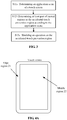
FIG. 1 is a flowchart showing a method for controlling a touch screen according to an exemplary embodiment. -
FIG. 2 is a flowchart showing a method for controlling a touch screen according to an exemplary embodiment. -
FIG. 3 is a flowchart showing a method for controlling a touch screen according to an exemplary embodiment. -
FIG. 4A is a schematic diagram illustrating a touch screen according to an exemplary embodiment. -
FIG. 4B is a schematic diagram illustrating a touch region under a full-screen application scene according to an exemplary embodiment. -
FIG. 4C is a schematic diagram illustrating accidental-touch prevention regions under an application scene in a portrait mode according to an exemplary embodiment. -
FIG. 4D is a schematic diagram illustrating accidental-touch prevention regions under an application scene in a landscape mode according to an exemplary embodiment. -
FIG. 5 is a block diagram illustrating a device for controlling a touch screen according to an exemplary embodiment. -
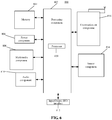
FIG. 6 is a block diagram illustrating a terminal according to an exemplary embodiment. -
FIG. 7 is a block diagram illustrating a server according to an exemplary embodiment. - Exemplary embodiments will be described in detail herein, examples of which are illustrated in the accompanying drawings. When the following description refers to the accompanying drawings, the same numbers in different drawings represent the same or similar elements unless otherwise indicated. The implementations described in the following exemplary embodiments do not represent all implementations consistent with the disclosure. They are merely examples of devices and methods consistent with some aspects of the disclosure as detailed in the appended claims.
- Terms used in the present disclosure are only adopted for the purpose of describing specific embodiments but not intended to limit the present disclosure. "A/an" and "the" in a singular form in the present disclosure and the appended claims are also intended to include a plural form, unless other meanings are clearly denoted throughout the present disclosure. It is also to be understood that term "and/or" used in the present disclosure refers to and includes one or any or all possible combinations of multiple associated items that are listed.
- It is to be understood that "first", "second" and similar terms used in the specification and claims of the present application are not to represent any sequence, number or importance but only to distinguish different parts. Likewise, similar terms such as "one" or "a/an" also do not represent a number limit but represent "at least one". Unless otherwise pointed out, terms like "front", "rear", "lower" and/or "upper" are only for convenient description but not limited to a position or a spatial orientation. Terms like "include" or "contain" refer to that an element or object appearing before "include" or "contain" covers an element or object and equivalent thereof listed after "include" or "contain" and does not exclude another element or object. Similar terms such as "connect" or "interconnect" are not limited to physical or mechanical connection, and may include electrical connection, either direct or indirect.
- As shown in
FIG. 1 , the embodiment provides a method for controlling a touch screen, applied to a terminal with a touch screen. The method includes: - S11: an application scene of the touch screen is determined;
- S12: an accidental-touch prevention region of the touch screen is determined according to the application scene; and
- S13: an operation on the accidental-touch prevention region is shielded.
- In an embodiment of the present disclosure, the touch screen of the terminal may be a full screen or a curved screen.
- In other embodiments, the application scene of the touch screen may be determined according to a foreground application of the terminal in the use of the terminal. When the application runs in background, a running state of the application may not be changed even if the touch screen is accidentally touched. Therefore, the application scene is determined according to the foreground application in the embodiments of the present disclosure. In other embodiments, the application scene of the touch screen may be determined according to activated hardware in the terminal in the use of the terminal. For example, a positioning chip of the terminal may determine that the touch screen is in a positioning scene. For another example, when a data volume transmitted by an antenna of the terminal is larger than a volume threshold, it may be determined that the touch screen is in a communication scene.
- Shielded regions in the touch screen are the shielded accidental-touch prevention regions. Even if the touch screen is touched, the touch screen cannot detect any touch point and/or does not report any touch point.
- Under different application scenes, the requirements on the use of the touch screen are different. Accordingly, whether to shield all or part of edge regions of the touch screen may be determined according to application scenes. Therefore, no region of the touch screen may be shielded under an application scene where the whole touch screen needs to be used, and all or part of the edge regions of the touch screen may be shielded under an application scene where accidental touch needs to be reduced.
- In some embodiments, the touch screen may include a center region and edge regions at a periphery of the center region.
- According to the method provided by the present embodiment, a user can have better experience in the user of a large touch screen, a full touch screen or a curved touch screen under some application scenes. Under some application scenes, accidental touch can be reduced and touch accuracy can be improved by shielding part or all of edge regions of the touch screen.
- In some embodiments, S11 may include: determining application scenes of the touch screen according to use states of the touch screen. The use states of the touch screen include, but not limited to, display modes and/or display content of the touch screen.
- Thus, in some embodiments, S11 may include: determining application scenes according to display modes of the touch screen of the terminal; or/and, determining application scenes according to types of the display content of the touch screen of the terminal.
- The display modes are related to the posture of the touch screen. The display modes may include: a landscape display mode for a landscape screen posture and a portrait display mode for a portrait screen posture.
- The display content is related to applications, for example, game applications, reading applications and/or multimedia information applications. The multimedia information applications may include: audio applications, video applications and applications supporting both audio playing and video playing.
- In some embodiments, application scenes may be determined according to the use states of the terminal. The use states may include, but not limited to, a use state determined by an application in an on state or an application in an activated state in the terminal. An application may be in an active activated state or in an inactive dormant state after being turned on. Various application functions can be executed when the application is in the activated state. While, a plurality of functions cannot be realized when the application is in the dormant state, and the power consumption therein is low.
- In some cases, application scenes may include: a daily application scene and a non-daily application scene. Generally, the daily application scene can be one or more application scenes with higher use frequencies; and the non-daily application scene can be any application scene other than the daily application scene.
- In some embodiments, the daily application scenes may include: common social scenes, shopping scenes, information browsing scenes and/or searching scenes. Under the daily application scenes, the edge regions of the touch screen are not shielded. Under the non-daily application scene, the edge regions of the touch screen are shielded.
- In some embodiments, S12 may include: determining the accidental-touch prevention region of the touch screen under the application scene based on preset corresponding relations between application scenes and accidental-touch prevention regions.
- The accidental-touch prevention regions may be the edge regions as described above, and may further include a middle region other than the edge regions. The edge regions may be edge regions with a distance from a terminal border less than a predetermined value. Since held regions of the edge regions are regions where accidental touch is likely to occur frequently, the edge regions may be set as the accidental-touch prevention regions. An
edge region 21 and a middle region 22 are exemplarily shown inFIG. 4A . - In some embodiments, as shown in
FIG. 2 , the method may further include: - S01: accidental-touch region data of a touch screen under different application scenes are collected based on usage data of a user; and
- S02: the corresponding relations between the application scenes and the accidental-touch prevention regions are established according to the accidental-touch region data. The usage data of the user may include, but not limited to, data about the use of the touch screen.
- The accidental-touch region data may include: indication data of a region affected by an accidental-touch operation.
- Meanwhile, an application scene when an accidental-touch operation is generated may be further recorded, so that corresponding relations may be established subsequently for the accidental-touch prevention regions.
- For example, usage data generated when a user uses the terminal may be collected, and after a large amount of data are statistically analyzed and processed, accidental-touch region data under the different application scenes may be collected. According to the accidental-touch prevention data, touch regions with a higher accidental-touch probability than a threshold or with a maximum accidental-touch probability under the different application scenes can be analyzed, and the touch regions may be set as accidental-touch prevention regions under the corresponding application scenes.
- For example, the accidental-touch prevention data may be analyzed through a deep learning model or a machine learning model or the like. Corresponding relations between the different application scenes and the accidental-touch prevention regions can be established.
- Referring to
FIG. 4B , under full-screen application scenes like videos, games or photographing, no region of a touch screen is shielded. - Referring to
FIG. 4C , accidental-touch prevention regions corresponding to an application scene in a portrait mode may beedge regions 211 andedge regions 212 as shown inFIG. 4C . Further, theedge regions 211 and theedge regions 212 may be edge regions of long sides of a touch screen. - Referring to
FIG. 4D , accidental-touch prevention regions corresponding to an application scene in a landscape mode may beedge regions 213 andedge regions 214 as shown inFIG. 4D . Further, theedge regions 213 and theedge regions 214 may be edge regions of short sides of a touch screen. - In the embodiments of the present disclosure, touch data of the touch screen under the different application scenes may be collected in advance. After a touch operation is detected and the terminal responds to the touch operation, a confirmation feedback from a user to the response is not detected. Instead, a negative feedback about exiting a page jump caused by the touch operation is detected; or, a negative feedback such as a closing operation responding to the touch operation is detected. At this moment, it may be determined that an accidental-touch operation is detected. Data in a region where the accidental-touch operation occurs and other data may be a type of the accidental-touch operation data as mentioned above.
- The terminal may record the touch positions of the accidental-touch operation and the corresponding application scenes. Under subsequent corresponding application scenes, shapes and/or sizes of the regions needing to be prevented against accidental touch may be determined according to the collected touch positions of the accidental-touch operation.
- In some embodiments, there is no certain sequential order between S01 and S11. In some embodiments, S01 to S11 may be executed after a terminal is started.
- In some embodiments, in the early stage when a terminal is put into use, accidental-touch prevention regions needing to be shielded under different application scenes may be predetermined by executing S01 and S02.
- In some embodiments, the method may further include:
when application scenes are full-screen scenes, it is determined that a touch screen is not shielded, wherein the full-screen scenes include: video playing scenes, game scenes or photographing scenes. - In the embodiments of the present disclosure, the application scenes may include full-screen scenes and non-full-screen scenes. Under the full-screen scenes, no region of the touch screen may be shielded. The full-screen scenes may include, but not limited to, video playing scenes, game scenes or photographing scenes.
- The video playing scenes may include application scenes where a terminal plays videos.
- The game scenes may include scenes where the terminal turns on game applications.
- The photographing scenes may include scenes of collecting a single image or scenes of video recording.
- In some embodiments, the method may include: when the application scenes are not the full-screen scenes, it is determined that the accidental-touch prevention regions are shielded. The accidental-touch prevention regions may include, but not limited to, part of edge regions of the touch screen.
- Further, S12 may include:
according to a display mode of the touch screen, the shielded accidental-touch prevention regions are determined as at least part of edge regions of long sides or at least part of edge regions of short sides of the touch screen. - Firstly, under the condition that the application scenes are not the full-screen scenes, it may be determined that part of the edge regions of the touch screen need to be shielded. In some embodiments, under the condition that the application scenes are not the full-screen scenes, it may be determined that all of the edge regions of the touch screen need to be shielded.
- In the embodiments of the present disclosure, specific edge regions needing to be shielded may be determined according to the display modes of the touch screen.
- Exemplarily, S12 may include: when the display mode of the touch screen is a landscape mode, shielded accidental-touch prevention regions may be determined as edge regions of short sides of the touch screen.
- Further, referring to
FIG. 4D , the accidental-touch prevention regions in the landscape mode may be part of edge regions of short sides of the touch screen, the edge regions of the short sides inFIG. 4D further include part of unrestraint ranges. The unrestraint ranges here are non-shielded regions, please see the middle parts of the edge regions of the short sides inFIG. 4D . - In specific embodiments, a display mode of a posture of a touch screen may be obtained by monitoring the posture of a terminal through a gravitational acceleration sensor and the like of the terminal.
- In a horizontal screen posture and a landscape mode, the short sides of the touch screen may be regions held by a user. In order to reduce accidental touch, part or all of the edge regions of the short sides of the touch screen may be the accidental-touch prevention regions in the embodiments of the present disclosure.
- In some embodiments, determining to shield at least part of the edge regions of the long sides or at least part of the edge regions of the short sides of the touch screen according to the display modes of the touch screen may include:
when the display mode of the touch screen is a portrait mode, it is determined that at least part of the edge regions of the long sides of the touch screen are shielded. - Under the condition that the touch screen is in the portrait mode, the edge regions of the long sides of the touch screen may be the regions where a user holds the terminal. In such a case, it may be determined that part or all of the edge regions of the long sides of the touch screen are shielded, so that accidental touch can be reduced. Further, referring to
FIG. 4C , the edge regions of the long sides of the touch screen may further include unrestraint regions at the middle position. The unrestraint regions are regions other than the accidental-touch prevention regions. That is, the unrestraint ranges are touch regions that do not need to be shielded. - In some embodiments, S13 may include:
- regions other than center sub-regions of long-side left-edge regions and sub-regions other than the center sub-regions of long-side right-edge regions are shielded;
- or,
- regions other than the center sub-regions of short-side upper-edge regions and sub-regions other than the center sub-regions of short-side lower-edge regions are shielded.
- Exemplarily, as shown in
FIG. 4B , full-screen scenes include video playing scenes, game scenes and photographing scenes. No region of the touch screen is shielded under the full-screen scenes to implement full-screen operations. - In the portrait mode, vertical shielding ranges in
FIG. 4C are shielded. In the landscape mode, the shielded accidental-touch prevention regions are 211 and 212 representing the vertical shielding ranges inFIG. 4C . The unrestraint ranges inFIG. 4C are schematic center sub-regions of the edge regions. - In the landscape mode, transverse shielding ranges in
FIG. 4D are shielded, and in the landscape mode, the shielded accidental-touch prevention regions are 213 and 214 representing the transverse shielding ranges inFIG. 4D . The unrestraint ranges inFIG. 4D are schematic center sub-regions of the edge regions. - The non-full-screen scenes here can be any scenes other than the full-screen scenes.
- In some embodiments, as shown in
FIG. 3 , the touch screen includes: a plane region and curved regions at edges of the plane region. - S12 may include S121. S121 may include:
at least part of the curved regions are determined as the accidental-touch prevention region according to the application scene. - In the embodiments of the present disclosure, the plane region may be the center region of the touch screen. The curved regions may be edge regions of the touch screen. In some embodiments, the touch screen may include two curved regions symmetrically distributed with respect to a center point of the touch screen, or may include four curved regions symmetrically distributed with respect to the center point of the touch screen.
- In some embodiments, the touch screen may further include one or three curved regions distributed at the edges of the plane region. For example, one curved region may be one edge region of the touch screen.
- The method for controlling a touch screen in the embodiments of the present disclosure is applied to a touch screen with curved regions, so that a high accidental-touch rate of the curved regions is avoided, and the touch accuracy of the touch screen is improved.
- The method for controlling a touch screen provided by the embodiments of the disclosure may determine an application scene of a touch screen, and determine whether to shield an edge region with a high accidental-touch rate according to the application scene, so that large-screen, full-screen or curved screen touch can be realized under the application scene where whole-screen touch is needed, and accidental-touch prevention regions which easily have a high accidental-touch rate can be automatically shielded under the application scene where accidental touch needs to be lowered. Therefore, the accidental-touch rate of the touch screen is reduced, and the touch detection accuracy of the touch screen is improved.
- As shown in
FIG. 5 , the embodiment provides a device for controlling a touch screen, applied to a terminal with a touch screen. The device includes: - a first determination module 110, configured to determine an application scene of the touch screen;
- a
second determination module 120, configured to determine an accidental-touch prevention region of the touch screen according to the application scene; and - a
shielding module 130, configured to shield an operation on the accidental-touch prevention region. - In some embodiments, the first determination module 110, the
second determination module 120 and theshielding module 130 may all be program modules. The program modules, when run by a processor, may determine the application scene and determine whether to shield part of edge regions. - In some embodiments, the first determination module 110, the
second determination module 120 and theshielding module 130 may all be software and hardware combination modules. The software and hardware combination modules may include, but not limited to, various programmable arrays. The programmable arrays may include, but not limited to, complex programmable arrays or field programmable arrays. - In other embodiments, the first determination module 110, the
second determination module 120 and theshielding module 130 may all be pure hardware modules. The pure hardware modules may include, but not limited to, application-specific integrated circuits. - In some embodiments, the first determination module 110 is configured to determine the application scene according to a display mode of the touch screen of the terminal; or/and, determine the application scene according to a type of display content of the touch screen of the terminal.
- In some embodiments, the device may further include:
- a collection module, configured to collect accidental-touch region data of the touch screen under the different application scenes based on usage data of a user; and
- a third determination module, configured to predetermine edge parts to be shielded under different application scenes according to the accidental-touch region data and establish corresponding relations between application scenes and the corresponding accidental-touch prevention regions according to the accidental-touch region data.
- In some embodiments, the
second determination module 120 is configured to determine to not shield the touch screen when the application scene is a full-screen scene. The full-screen scene may be a video playing scene, a game scene or a photographing scene. - In some embodiments, the
second determination module 120 is configured to determine to shield part of edge regions of the touch screen when the application scene is not the full-screen scene. - The device may further include:
a fourth determination module, configured to determine to shield at least part of edge regions of long sides or at least part of edge regions of short sides of the touch screen according to the display mode of the touch screen. - In some embodiments, the fourth determination module is configured to determine to shield at least part of the edge regions of the short sides of the touch screen when the display mode of the touch screen is a landscape mode.
- In some embodiments, the fourth determination module is configured to determine to shield at least part of the edge regions of the long sides of the touch screen when the display mode of the touch screen is a portrait mode.
- In some embodiments, the edge regions of the long sides may include: long side left edge regions and long side right edge regions symmetrically distributed with the long side left edge regions, The edge regions of the short sides may include: short side upper edge regions and short side lower edge regions symmetrically distributed with the short side upper edge regions. Shielding at least part of the edge regions of the long sides or at least part of the edge regions of the short sides of the touch screen may include: shielding regions other than center sub-regions of the long side left edge regions and sub-regions other than the center sub-regions of the long side right edge regions, or shielding regions other than the center sub-regions of the short side upper edge regions and sub-regions other than the center sub-regions of the short side lower edge regions.
- In some embodiments, the touch screen may include a plane region and curved regions at edges of the plane region.
- The
second determination module 120 is configured to determine at least part of the curved regions as the accidental-touch prevention region according to the application scene. - Two examples are provided below with reference to any of the embodiments described above.
- The ranges of fingers touching a screen of a mobile phone may be different under different application scenes, namely accidental-touch regions may be not the same under different conditions, therefore, different optimization strategies may be adopted for specific application scenes so as to reduce accidental touch. Typically, there are following categories depending on the conditions of usage.
- A first category is that: the mobile phone is vertically held in daily use.
- A second category is that: the mobile phone enters into a game scene, accidental-touch regions are in a landscape mode, and regions where accidental touch may occur may be not the same when games are different and operations are different.
- A third category is that: the mobile phone is in a reading scene, such as novels, cartoons and the like.
- Different application scenes may be determined firstly when a terminal device is used, what state a user is in, e.g., a daily use condition or other application scenes, may be determined according to present conditions of use of the terminal device by a user, and accidental-touch prevention regions may be set according to different conditions.
- Data collection under each scene may be performed for a specific curved screen, accidental-touch region data of a user may be collected, and corresponding setting may be made according to related information of accidental touch, namely, accidental-touch prevention regions under the corresponding scenes are set. The accidental-touch prevention regions are regions needing to be shielded under a specific scene.
- In daily use, different region shielding settings may be performed for different scenes so as to avoid accidental touch over the curved screen to the maximum extent. Different optimizations may be performed for different application scenes, accidental touch can be reduced as much as possible without degrading use experience, and making different optimizations for different scenes is optimal solutions at present.
- An embodiment of the present disclosure provides a terminal. The terminal includes:
- a transceiver;
- a processor; and
- a memory configured to store instructions executable by the processor.
- The processor is configured to run the instructions to implement the above method for controlling a touch screen provided by any technical solution, for example, the method for controlling a touch screen applied to the terminal or the method for controlling a touch screen applied to a server.
- The processor may implement the methods for controlling a touch screen shown in
FIG. 1, FIG. 2 and/orFIG. 3 by running various executable instructions such as source codes or object codes. - An embodiment of the present disclosure provides a computer storage medium, which has executable instructions stored thereon. The executable instructions, when run by a processor, may implement the above methods for controlling a touch screen provided by any technical solution.
-
FIG. 6 is a block diagram illustrating a terminal 800 according to an exemplary embodiment. For example, the terminal 800 may be a mobile phone, a computer, a digital broadcast terminal, a messaging device, a gaming console, a tablet, a medical device, exercise equipment, a personal digital assistant, and the like. - Referring to
FIG. 6 , the terminal 800 may include one or more of the following components: aprocessing component 802, amemory 804, apower component 806, amultimedia component 808, anaudio component 810, an Input/Output (I/O)interface 812, asensor component 814, and acommunication component 816. - The
processing component 802 is typically configured to control overall operations of the terminal 800, such as operations associated with display, telephone calls, data communications, camera operations, and recording operations. Theprocessing component 802 may include one or a plurality ofprocessors 820 to execute instructions to complete all or part of the steps of the method described above. In addition, theprocessing component 802 may include one or a plurality of modules to facilitate the interaction between theprocessing component 802 and other components. For example, theprocessing component 802 may include a multimedia module to facilitate the interaction between themultimedia component 808 and theprocessing component 802. - The
memory 804 is configured to store various types of data to support operations at thedevice 800. Examples of such data include instructions for any applications or methods operated on the terminal 800, contact data, phonebook data, messages, pictures, video, etc. Thememory 804 may be implemented by any type of volatile or non-volatile memory devices or combinations thereof, such as a Static Random Access Memory (SRAM), an Electrically Erasable Programmable Read Only Memory (EEPROM), an Erasable Programmable Read Only Memory (EPROM), a Programmable Read Only Memory (PROM), a Read Only Memory (ROM), a magnetic memory, a flash memory, a magnetic disk or a compact disk. - The
power component 806 is configured to provide power to various components of the terminal 800. Thepower component 806 may include a power management system, one or more power sources, and any other components associated with the generation, management and distribution of power for the terminal 800. - The
multimedia component 808 may include a screen providing an output interface between the terminal 800 and a user. In some embodiments, the screen may include a liquid crystal display (LCD) and a touch panel (TP).If the screen includes the TP, the screen may be implemented as a touch screen to receive an input signal from a user. The touch panel includes one or more touch sensors to sense touch, sliding, and gestures on the touch panel. The touch sensors may not only sense a boundary of a touch or swipe action, but also detect duration and pressure related to the touch or swipe operation. In some embodiments, themultimedia component 808 includes a front camera and/or a rear camera. The front camera and/or the rear camera may receive external multimedia data when the terminal 800 is in an operation mode, such as a photographing mode or a video mode. Each front camera and each rear camera may be fixed optical lens systems or may have focal lengths and optical zoom capabilities. - The
audio component 810 is configured to output and/or input audio signals. For example, theaudio component 810 may include a Microphone (MIC) configured to receive an external audio signal when the terminal 800 is in an operation mode, such as a call mode, a recording mode, and a voice recognition mode. The received audio signals may be further stored in thememory 804 or sent via thecommunication component 816. In some embodiments, theaudio component 810 may further include a speaker configured to output audio signals. - The I/
O interface 812 may provide an interface between theprocessing component 802 and peripheral interface modules, such as a keyboard, a click wheel, or buttons. These buttons may include, but not limited to: a home button, a volume button, a start button, and a lock button. - The
sensor component 814 may include one or more sensors configured to provide status assessments of various aspects of the terminal 800. For example, thesensor component 814 may detect an opened/closed state of the terminal 800 and the relative positioning of the components such as a display and a keypad of the terminal 800, and thesensor component 814 may also detect the position change of the terminal 800 or a component of the terminal 800, the presence or absence of contact between a user and the terminal 800, the orientation or acceleration/deceleration of the terminal 800, and the temperature change of the terminal 800. Thesensor component 814 may include a proximity sensor configured to detect the existence of nearby objects under the situation of no physical contact. Thesensor component 814 may also include an optical sensor, such as a CMOS or CCD image sensor, for use in an imaging application. In some embodiments, thesensor component 814 may further include an accelerometer sensor, a gyroscope sensor, a magnetic sensor, a pressure sensor, or a temperature sensor. - The
communication component 816 is configured to facilitate a wired or wireless communication between the terminal 800 and other devices. The terminal 800 may access a wireless network based on a communication standard, such as WiFi, 2G or 3G, or combinations thereof. In one exemplary embodiment, thecommunication component 816 receives broadcast signals or broadcast related information from an external broadcast management system via a broadcast channel. In one exemplary embodiment, thecommunication component 816 further includes a Near Field Communication (NFC) module to facilitate short-range communications. For example, the NFC module can be implemented based on a Radio Frequency Identification (RFID) technology, an Infrared Data Association (IrDA) technology, an Ultra-Wideband (UWB) technology, a Bluetooth (BT) technology and other technologies. - In exemplary embodiments, the terminal 800 may be implemented with one or more Application Specific Integrated Circuits (ASICs), Digital Signal Processors (DSPs), Digital Signal Processing Devices (DSPDs), Programmable Logic Devices (PLDs), Field Programmable Gate Arrays (FPGAs), controllers, micro-controllers, microprocessors, or other electronic elements, for performing the above described methods.
- In exemplary embodiments, there is also provided a non-transitory computer readable storage medium including instructions, such as included in the
memory 804, executable by theprocessor 820 in the terminal 800, for performing the above described methods. For example, the non-transitory computer-readable storage medium may be a Read Only Memory (ROM), a Random Access Memory (RAM), a Compact Disc Read Only Memory (CD-ROM), a magnetic tape, a floppy disk, an optical data storage device, and the like. - The embodiment of the present disclosure provides a non-transitory computer readable storage medium. When instructions in the storage medium are executed by a processor of a mobile terminal, the mobile terminal may execute a method for controlling a touch screen. The method includes:
- determining an application scene of a touch screen;
- determining an accidental-touch prevention region of the touch screen according to the application scene; and
- shielding an operation on the accidental-touch prevention region.
- Further, determining the application scene of the touch screen may include:
- determining the application scene according to a display mode of the touch screen of the terminal; or/and
- determining the application scene according to a type of display content of the touch screen of the terminal.
- Further, determining the accidental-touch prevention region of the touch screen according to the application scene may include:
determining the accidental-touch prevention region of the touch screen under the application scene based on preset corresponding relations between application scenes and accidental-touch prevention regions. - Further, the method may include:
- collecting accidental-touch region data of the touch screen under different application scenes based on usage data of a user; and
- establishing the corresponding relations between the application scenes and the accidental-touch prevention regions according to the accidental-touch region data.
- Further, the touch screen may include a plane region and curved regions on edges of the plane region.
- Determining the accidental-touch prevention region of the touch screen according to the application scene may include:
determining at least part of the curved regions as the accidental-touch prevention region according to the application scene. -
FIG. 7 is a block diagram illustrating aserver 1900 according to an exemplary embodiment. For example, theserver 1900 may be provided as a server. Referring toFIG. 7 , theserver 1900 includes aprocessing component 1922, further including one or more processors and memory resources represented by amemory 1932 for storing instructions capable of being executed by theprocessing component 1922, such as application programs. The application programs stored in thememory 1932 may include one or more modules each of which corresponds to a set of instructions. Furthermore, theprocessing component 1922 is configured to execute instructions to execute the above methods. - The
server 1900 may further include apower component 1926 configured to execute power management of theserver 1900, a wired orwireless network interface 1950 configured to connect theserver 1900 to the network, and an input/output (I/O)interface 1958. Theserver 1900 may operate an operating system stored in thememory 1932, such as Windows ServerTM, Mac OS XTM, UnixTM, LinuxTM, FreeBSDTM or the like. - Other embodiments of the present disclosure will be apparent to those skilled in the art from consideration of the specification and practice of the disclosure herein. The disclosure is intended to cover any variations, uses, or adaptations of the disclosure following the general principles thereof and including such departures from the disclosure as come within known or customary practice in the art. It is intended that the specification and embodiments be considered as exemplary only, with a true scope and spirit of the present disclosure being indicated by the following claims.
- It will be appreciated that the present disclosure is not limited to the exact construction that has been described above and illustrated in the accompanying drawings, and that various modifications and changes may be made without departing from the scope thereof. It is intended that the scope of the present disclosure only be limited by the appended claims.
Claims (12)
- A method for controlling a touch screen, implemented by a terminal with a touch screen, the method comprising:determining (S11) an application scene of the touch screen;determining (S12) an accidental-touch prevention region of the touch screen according to the application scene; andshielding (S13) an operation on the accidental-touch prevention region.
- The method according to claim 1, wherein determining the application scene of the touch screen comprises:determining the application scene according to a display mode of the touch screen of the terminal; or/anddetermining the application scene according to a type of display content of the touch screen of the terminal.
- The method according to claim 1, wherein determining the accidental-touch prevention region of the touch screen according to the application scene comprises:
determining the accidental-touch prevention region of the touch screen under the application scene based on preset corresponding relations between application scenes and accidental-touch prevention regions. - The method according to claim 3, further comprising:collecting accidental-touch region data of the touch screen under different application scenes based on usage data of a user; andestablishing the corresponding relations between the application scenes and the accidental-touch prevention regions according to the accidental-touch region data.
- The method according to any one of claims 1-4, wherein the touch screen comprises a plane region and curved regions on edges of the plane region; and
determining the accidental-touch prevention region of the touch screen according to the application scene comprises:
determining at least part of the curved regions as the accidental-touch prevention region according to the application scene. - A device for controlling a touch screen, applied to a terminal with a touch screen, the device comprising:a first determination module (110), configured to determine an application scene of the touch screen;a second determination module (120), configured to determine an accidental-touch prevention region of the touch screen according to the application scene; anda shielding module (130), configured to shield an operation on the accidental-touch prevention region.
- The device according to claim 6, wherein the first determination module is configured to determine the application scene according to a display mode of the touch screen of the terminal; or/and, determine the application scene according to a type of display content of the touch screen of the terminal.
- The device according to claim 6, wherein the first determination module is specifically configured to determine the accidental-touch prevention region of the touch screen under the application scene based on preset corresponding relations between application scenes and accidental-touch prevention regions.
- The device according to any one of claims 6 to 8, further comprising:a collection module, configured to collect accidental-touch region data of the touch screen under different application scenes based on usage data of a user; anda third determination module, configured to establish the corresponding relations between the application scenes and the accidental-touch prevention regions according to the accidental-touch region data.
- The device according to any one of claims 6 to 9, wherein the touch screen comprises a plane region and curved regions on edges of the plane region; and
the second determination module is configured to determine at least part of the curved regions as the accidental-touch prevention region according to the application scene. - A terminal, comprising:a processor; anda memory for storing instructions executable by the processor;wherein the processor is configured to run the instructions to implement the method of any one of claims 1-5.
- A computer storage medium, having executable instructions stored thereon that, when executed by a processor, implement the method of any one of claims 1-5.
Applications Claiming Priority (1)
| Application Number | Priority Date | Filing Date | Title |
|---|---|---|---|
| CN202010084852.9A CN111309179A (en) | 2020-02-10 | 2020-02-10 | Touch screen control method and device, terminal and storage medium |
Publications (1)
| Publication Number | Publication Date |
|---|---|
| EP3862855A1 true EP3862855A1 (en) | 2021-08-11 |
Family
ID=71148964
Family Applications (1)
| Application Number | Title | Priority Date | Filing Date |
|---|---|---|---|
| EP20189517.4A Pending EP3862855A1 (en) | 2020-02-10 | 2020-08-05 | Method and device for controlling a touch screen, terminal and storage medium |
Country Status (3)
| Country | Link |
|---|---|
| US (1) | US20210247888A1 (en) |
| EP (1) | EP3862855A1 (en) |
| CN (1) | CN111309179A (en) |
Cited By (1)
| Publication number | Priority date | Publication date | Assignee | Title |
|---|---|---|---|---|
| EP4092516A4 (en) * | 2020-09-27 | 2023-08-23 | ZTE Corporation | False touch rejection method, terminal device, and storage medium |
Families Citing this family (7)
| Publication number | Priority date | Publication date | Assignee | Title |
|---|---|---|---|---|
| CN110007796B (en) * | 2019-03-25 | 2023-03-21 | 联想(北京)有限公司 | Electronic device and information processing method |
| CN114185444B (en) * | 2020-08-24 | 2024-09-24 | 北京小米移动软件有限公司 | Touch screen accidental touch prevention method, device and storage medium |
| CN112363647A (en) * | 2020-11-06 | 2021-02-12 | 北京小米移动软件有限公司 | Touch operation method and device and storage medium |
| CN114724196A (en) * | 2021-01-05 | 2022-07-08 | 北京小米移动软件有限公司 | Accidental touch prevention method and device, electronic equipment, storage medium |
| CN115033121A (en) * | 2021-02-20 | 2022-09-09 | 北京小米移动软件有限公司 | Anti-mistouch method, device, equipment and storage medium |
| WO2024039219A1 (en) * | 2022-08-19 | 2024-02-22 | 삼성전자 주식회사 | Electronic device and method of determining learning model for training of electronic device |
| CN116301424B (en) * | 2023-03-02 | 2023-10-31 | 瑞态常州高分子科技有限公司 | Touch recognition system based on pressure touch sensor |
Citations (1)
| Publication number | Priority date | Publication date | Assignee | Title |
|---|---|---|---|---|
| EP3483714A1 (en) * | 2016-08-01 | 2019-05-15 | Samsung Electronics Co., Ltd. | Electronic device and operation method therefor |
Family Cites Families (15)
| Publication number | Priority date | Publication date | Assignee | Title |
|---|---|---|---|---|
| JP5813991B2 (en) * | 2011-05-02 | 2015-11-17 | 埼玉日本電気株式会社 | Portable terminal, input control method and program |
| CN102830844A (en) * | 2012-08-17 | 2012-12-19 | 北京小米科技有限责任公司 | Touch screen misoperation prevention method, touch screen and mobile terminal |
| JP2014102557A (en) * | 2012-11-16 | 2014-06-05 | Sharp Corp | Portable terminal |
| TWI608407B (en) * | 2013-11-27 | 2017-12-11 | 緯創資通股份有限公司 | Touch device and control method thereof |
| KR102429740B1 (en) * | 2015-12-24 | 2022-08-05 | 삼성전자 주식회사 | Method and apparatus for precessing touch event |
| CN105975160A (en) * | 2016-05-26 | 2016-09-28 | 深圳市金立通信设备有限公司 | Mistaken touch prevention method and terminal |
| CN106445238B (en) * | 2016-10-17 | 2019-08-13 | 北京小米移动软件有限公司 | Edge touch-control suppressing method and device |
| CN106527818B (en) * | 2016-12-16 | 2019-07-02 | Oppo广东移动通信有限公司 | A control method, device and mobile terminal for touch operation on a mobile terminal |
| CN106681554B (en) * | 2016-12-16 | 2019-09-06 | Oppo广东移动通信有限公司 | A control method, device and mobile terminal for a touch screen of a mobile terminal |
| CN106775084B (en) * | 2016-12-16 | 2019-04-16 | Oppo广东移动通信有限公司 | A kind of false-touch prevention method, device and mobile terminal of touch screen |
| CN106598335B (en) * | 2016-12-16 | 2019-06-28 | Oppo广东移动通信有限公司 | A touch screen control method, device and mobile terminal of a mobile terminal |
| KR102383295B1 (en) * | 2017-04-21 | 2022-04-05 | 후아웨이 테크놀러지 컴퍼니 리미티드 | Touch control method and device |
| CN107450773B (en) * | 2017-07-25 | 2021-03-16 | 维沃移动通信有限公司 | A kind of anti-mistouch method, terminal and computer-readable storage medium |
| US10698533B2 (en) * | 2017-09-11 | 2020-06-30 | Guangdong Oppo Mobile Telecommunications Corp., Ltd. | Method for responding to touch operation and electronic device |
| CN110456938B (en) * | 2019-06-28 | 2021-01-29 | 华为技术有限公司 | False touch prevention method for curved screen and electronic equipment |
-
2020
- 2020-02-10 CN CN202010084852.9A patent/CN111309179A/en active Pending
- 2020-07-29 US US16/941,728 patent/US20210247888A1/en not_active Abandoned
- 2020-08-05 EP EP20189517.4A patent/EP3862855A1/en active Pending
Patent Citations (1)
| Publication number | Priority date | Publication date | Assignee | Title |
|---|---|---|---|---|
| EP3483714A1 (en) * | 2016-08-01 | 2019-05-15 | Samsung Electronics Co., Ltd. | Electronic device and operation method therefor |
Cited By (1)
| Publication number | Priority date | Publication date | Assignee | Title |
|---|---|---|---|---|
| EP4092516A4 (en) * | 2020-09-27 | 2023-08-23 | ZTE Corporation | False touch rejection method, terminal device, and storage medium |
Also Published As
| Publication number | Publication date |
|---|---|
| CN111309179A (en) | 2020-06-19 |
| US20210247888A1 (en) | 2021-08-12 |
Similar Documents
| Publication | Publication Date | Title |
|---|---|---|
| EP3862855A1 (en) | Method and device for controlling a touch screen, terminal and storage medium | |
| US12135976B2 (en) | Screen display method and electronic device | |
| US20250231683A1 (en) | Split-screen display method and electronic device | |
| US11921987B2 (en) | System navigation bar display method, system navigation bar control method, graphical user interface, and electronic device | |
| EP3306441B1 (en) | Temperature control method and apparatus | |
| EP3477423A1 (en) | Method and device for preventing terminal from being inadvertently touched | |
| EP3099063A1 (en) | Video communication method and apparatus | |
| EP3109727A2 (en) | A method and apparatus for controlling a display, and a mobile terminal | |
| EP3046016A1 (en) | Method and apparatus for switching display mode | |
| US12216899B2 (en) | Display element display method and electronic device | |
| EP4033339A1 (en) | User interface display method and electronic device | |
| CN106033397B (en) | Memory buffer area adjusting method, device and terminal | |
| EP3232301B1 (en) | Mobile terminal and virtual key processing method | |
| CN106095401A (en) | Informing message treatment method and device | |
| EP3249505B1 (en) | Method and electronic device for controlling a state of a touch screen | |
| EP4283450A1 (en) | Display method, electronic device, storage medium, and program product | |
| EP3322227A1 (en) | Methods and apparatuses for controlling wireless connection, computer program and recording medium | |
| CN111651216A (en) | NFC card processing method, device and storage medium | |
| CN107132983B (en) | Split screen window operation method and device | |
| CN109922203B (en) | Terminal, screen-off method and device | |
| EP3337104B1 (en) | Method, device and storage medium for outputting communication message | |
| EP3995939A1 (en) | Method and device for touch operation, and storage medium | |
| US20170147134A1 (en) | Method and apparatus for controlling touch-screen sensitivity | |
| US10691193B2 (en) | Method, apparatus and computer-readable medium for terminal control | |
| CN111372003A (en) | Camera switching method and device and terminal |
Legal Events
| Date | Code | Title | Description |
|---|---|---|---|
| PUAI | Public reference made under article 153(3) epc to a published international application that has entered the european phase |
Free format text: ORIGINAL CODE: 0009012 |
|
| STAA | Information on the status of an ep patent application or granted ep patent |
Free format text: STATUS: THE APPLICATION HAS BEEN PUBLISHED |
|
| AK | Designated contracting states |
Kind code of ref document: A1 Designated state(s): AL AT BE BG CH CY CZ DE DK EE ES FI FR GB GR HR HU IE IS IT LI LT LU LV MC MK MT NL NO PL PT RO RS SE SI SK SM TR |
|
| STAA | Information on the status of an ep patent application or granted ep patent |
Free format text: STATUS: REQUEST FOR EXAMINATION WAS MADE |
|
| 17P | Request for examination filed |
Effective date: 20220118 |
|
| RBV | Designated contracting states (corrected) |
Designated state(s): AL AT BE BG CH CY CZ DE DK EE ES FI FR GB GR HR HU IE IS IT LI LT LU LV MC MK MT NL NO PL PT RO RS SE SI SK SM TR |
|
| STAA | Information on the status of an ep patent application or granted ep patent |
Free format text: STATUS: EXAMINATION IS IN PROGRESS |
|
| 17Q | First examination report despatched |
Effective date: 20230929 |
|
| GRAP | Despatch of communication of intention to grant a patent |
Free format text: ORIGINAL CODE: EPIDOSNIGR1 |
|
| STAA | Information on the status of an ep patent application or granted ep patent |
Free format text: STATUS: GRANT OF PATENT IS INTENDED |
|
| INTG | Intention to grant announced |
Effective date: 20260116 |