EP3779644B1 - Informationsverarbeitungsvorrichtung und informationsverarbeitungsverfahren - Google Patents
Informationsverarbeitungsvorrichtung und informationsverarbeitungsverfahren Download PDFInfo
- Publication number
- EP3779644B1 EP3779644B1 EP19776170.3A EP19776170A EP3779644B1 EP 3779644 B1 EP3779644 B1 EP 3779644B1 EP 19776170 A EP19776170 A EP 19776170A EP 3779644 B1 EP3779644 B1 EP 3779644B1
- Authority
- EP
- European Patent Office
- Prior art keywords
- user
- view
- angle
- video
- acceleration
- Prior art date
- Legal status (The legal status is an assumption and is not a legal conclusion. Google has not performed a legal analysis and makes no representation as to the accuracy of the status listed.)
- Active
Links
Images







Classifications
-
- G—PHYSICS
- G06—COMPUTING OR CALCULATING; COUNTING
- G06F—ELECTRIC DIGITAL DATA PROCESSING
- G06F3/00—Input arrangements for transferring data to be processed into a form capable of being handled by the computer; Output arrangements for transferring data from processing unit to output unit, e.g. interface arrangements
- G06F3/01—Input arrangements or combined input and output arrangements for interaction between user and computer
- G06F3/011—Arrangements for interaction with the human body, e.g. for user immersion in virtual reality
- G06F3/012—Head tracking input arrangements
-
- G—PHYSICS
- G06—COMPUTING OR CALCULATING; COUNTING
- G06F—ELECTRIC DIGITAL DATA PROCESSING
- G06F3/00—Input arrangements for transferring data to be processed into a form capable of being handled by the computer; Output arrangements for transferring data from processing unit to output unit, e.g. interface arrangements
- G06F3/01—Input arrangements or combined input and output arrangements for interaction between user and computer
- G06F3/011—Arrangements for interaction with the human body, e.g. for user immersion in virtual reality
-
- G—PHYSICS
- G02—OPTICS
- G02B—OPTICAL ELEMENTS, SYSTEMS OR APPARATUS
- G02B27/00—Optical systems or apparatus not provided for by any of the groups G02B1/00 - G02B26/00, G02B30/00
- G02B27/0093—Optical systems or apparatus not provided for by any of the groups G02B1/00 - G02B26/00, G02B30/00 with means for monitoring data relating to the user, e.g. head-tracking, eye-tracking
-
- A—HUMAN NECESSITIES
- A63—SPORTS; GAMES; AMUSEMENTS
- A63F—CARD, BOARD, OR ROULETTE GAMES; INDOOR GAMES USING SMALL MOVING PLAYING BODIES; VIDEO GAMES; GAMES NOT OTHERWISE PROVIDED FOR
- A63F13/00—Video games, i.e. games using an electronically generated display having two or more dimensions
- A63F13/20—Input arrangements for video game devices
- A63F13/21—Input arrangements for video game devices characterised by their sensors, purposes or types
- A63F13/211—Input arrangements for video game devices characterised by their sensors, purposes or types using inertial sensors, e.g. accelerometers or gyroscopes
-
- A—HUMAN NECESSITIES
- A63—SPORTS; GAMES; AMUSEMENTS
- A63F—CARD, BOARD, OR ROULETTE GAMES; INDOOR GAMES USING SMALL MOVING PLAYING BODIES; VIDEO GAMES; GAMES NOT OTHERWISE PROVIDED FOR
- A63F13/00—Video games, i.e. games using an electronically generated display having two or more dimensions
- A63F13/20—Input arrangements for video game devices
- A63F13/21—Input arrangements for video game devices characterised by their sensors, purposes or types
- A63F13/212—Input arrangements for video game devices characterised by their sensors, purposes or types using sensors worn by the player, e.g. for measuring heart beat or leg activity
-
- A—HUMAN NECESSITIES
- A63—SPORTS; GAMES; AMUSEMENTS
- A63F—CARD, BOARD, OR ROULETTE GAMES; INDOOR GAMES USING SMALL MOVING PLAYING BODIES; VIDEO GAMES; GAMES NOT OTHERWISE PROVIDED FOR
- A63F13/00—Video games, i.e. games using an electronically generated display having two or more dimensions
- A63F13/25—Output arrangements for video game devices
-
- A—HUMAN NECESSITIES
- A63—SPORTS; GAMES; AMUSEMENTS
- A63F—CARD, BOARD, OR ROULETTE GAMES; INDOOR GAMES USING SMALL MOVING PLAYING BODIES; VIDEO GAMES; GAMES NOT OTHERWISE PROVIDED FOR
- A63F13/00—Video games, i.e. games using an electronically generated display having two or more dimensions
- A63F13/40—Processing input control signals of video game devices, e.g. signals generated by the player or derived from the environment
- A63F13/42—Processing input control signals of video game devices, e.g. signals generated by the player or derived from the environment by mapping the input signals into game commands, e.g. mapping the displacement of a stylus on a touch screen to the steering angle of a virtual vehicle
- A63F13/428—Processing input control signals of video game devices, e.g. signals generated by the player or derived from the environment by mapping the input signals into game commands, e.g. mapping the displacement of a stylus on a touch screen to the steering angle of a virtual vehicle involving motion or position input signals, e.g. signals representing the rotation of an input controller or a player's arm motions sensed by accelerometers or gyroscopes
-
- A—HUMAN NECESSITIES
- A63—SPORTS; GAMES; AMUSEMENTS
- A63F—CARD, BOARD, OR ROULETTE GAMES; INDOOR GAMES USING SMALL MOVING PLAYING BODIES; VIDEO GAMES; GAMES NOT OTHERWISE PROVIDED FOR
- A63F13/00—Video games, i.e. games using an electronically generated display having two or more dimensions
- A63F13/50—Controlling the output signals based on the game progress
- A63F13/52—Controlling the output signals based on the game progress involving aspects of the displayed game scene
- A63F13/525—Changing parameters of virtual cameras
- A63F13/5255—Changing parameters of virtual cameras according to dedicated instructions from a player, e.g. using a secondary joystick to rotate the camera around a player's character
-
- G—PHYSICS
- G02—OPTICS
- G02B—OPTICAL ELEMENTS, SYSTEMS OR APPARATUS
- G02B27/00—Optical systems or apparatus not provided for by any of the groups G02B1/00 - G02B26/00, G02B30/00
- G02B27/01—Head-up displays
- G02B27/017—Head mounted
-
- G—PHYSICS
- G06—COMPUTING OR CALCULATING; COUNTING
- G06F—ELECTRIC DIGITAL DATA PROCESSING
- G06F1/00—Details not covered by groups G06F3/00 - G06F13/00 and G06F21/00
- G06F1/16—Constructional details or arrangements
- G06F1/1613—Constructional details or arrangements for portable computers
- G06F1/163—Wearable computers, e.g. on a belt
-
- G—PHYSICS
- G06—COMPUTING OR CALCULATING; COUNTING
- G06F—ELECTRIC DIGITAL DATA PROCESSING
- G06F1/00—Details not covered by groups G06F3/00 - G06F13/00 and G06F21/00
- G06F1/16—Constructional details or arrangements
- G06F1/1613—Constructional details or arrangements for portable computers
- G06F1/1633—Constructional details or arrangements of portable computers not specific to the type of enclosures covered by groups G06F1/1615 - G06F1/1626
- G06F1/1684—Constructional details or arrangements related to integrated I/O peripherals not covered by groups G06F1/1635 - G06F1/1675
- G06F1/1694—Constructional details or arrangements related to integrated I/O peripherals not covered by groups G06F1/1635 - G06F1/1675 the I/O peripheral being a single or a set of motion sensors for pointer control or gesture input obtained by sensing movements of the portable computer
-
- G—PHYSICS
- G06—COMPUTING OR CALCULATING; COUNTING
- G06F—ELECTRIC DIGITAL DATA PROCESSING
- G06F3/00—Input arrangements for transferring data to be processed into a form capable of being handled by the computer; Output arrangements for transferring data from processing unit to output unit, e.g. interface arrangements
- G06F3/01—Input arrangements or combined input and output arrangements for interaction between user and computer
- G06F3/048—Interaction techniques based on graphical user interfaces [GUI]
- G06F3/0481—Interaction techniques based on graphical user interfaces [GUI] based on specific properties of the displayed interaction object or a metaphor-based environment, e.g. interaction with desktop elements like windows or icons, or assisted by a cursor's changing behaviour or appearance
-
- G—PHYSICS
- G06—COMPUTING OR CALCULATING; COUNTING
- G06F—ELECTRIC DIGITAL DATA PROCESSING
- G06F3/00—Input arrangements for transferring data to be processed into a form capable of being handled by the computer; Output arrangements for transferring data from processing unit to output unit, e.g. interface arrangements
- G06F3/01—Input arrangements or combined input and output arrangements for interaction between user and computer
- G06F3/048—Interaction techniques based on graphical user interfaces [GUI]
- G06F3/0481—Interaction techniques based on graphical user interfaces [GUI] based on specific properties of the displayed interaction object or a metaphor-based environment, e.g. interaction with desktop elements like windows or icons, or assisted by a cursor's changing behaviour or appearance
- G06F3/04815—Interaction with a metaphor-based environment or interaction object displayed as three-dimensional [3D], e.g. changing the user viewpoint with respect to the environment or object
-
- G—PHYSICS
- G06—COMPUTING OR CALCULATING; COUNTING
- G06T—IMAGE DATA PROCESSING OR GENERATION, IN GENERAL
- G06T19/00—Manipulating three-dimensional [3D] models or images for computer graphics
-
- G—PHYSICS
- G06—COMPUTING OR CALCULATING; COUNTING
- G06T—IMAGE DATA PROCESSING OR GENERATION, IN GENERAL
- G06T19/00—Manipulating three-dimensional [3D] models or images for computer graphics
- G06T19/003—Navigation within 3D models or images
-
- H—ELECTRICITY
- H04—ELECTRIC COMMUNICATION TECHNIQUE
- H04N—PICTORIAL COMMUNICATION, e.g. TELEVISION
- H04N23/00—Cameras or camera modules comprising electronic image sensors; Control thereof
- H04N23/50—Constructional details
- H04N23/54—Mounting of pick-up tubes, electronic image sensors, deviation or focusing coils
-
- H—ELECTRICITY
- H04—ELECTRIC COMMUNICATION TECHNIQUE
- H04N—PICTORIAL COMMUNICATION, e.g. TELEVISION
- H04N23/00—Cameras or camera modules comprising electronic image sensors; Control thereof
- H04N23/57—Mechanical or electrical details of cameras or camera modules specially adapted for being embedded in other devices
-
- H—ELECTRICITY
- H04—ELECTRIC COMMUNICATION TECHNIQUE
- H04N—PICTORIAL COMMUNICATION, e.g. TELEVISION
- H04N23/00—Cameras or camera modules comprising electronic image sensors; Control thereof
- H04N23/60—Control of cameras or camera modules
- H04N23/68—Control of cameras or camera modules for stable pick-up of the scene, e.g. compensating for camera body vibrations
- H04N23/681—Motion detection
- H04N23/6812—Motion detection based on additional sensors, e.g. acceleration sensors
-
- H—ELECTRICITY
- H04—ELECTRIC COMMUNICATION TECHNIQUE
- H04N—PICTORIAL COMMUNICATION, e.g. TELEVISION
- H04N5/00—Details of television systems
- H04N5/222—Studio circuitry; Studio devices; Studio equipment
- H04N5/2224—Studio circuitry; Studio devices; Studio equipment related to virtual studio applications
-
- G—PHYSICS
- G02—OPTICS
- G02B—OPTICAL ELEMENTS, SYSTEMS OR APPARATUS
- G02B27/00—Optical systems or apparatus not provided for by any of the groups G02B1/00 - G02B26/00, G02B30/00
- G02B27/01—Head-up displays
- G02B27/0179—Display position adjusting means not related to the information to be displayed
- G02B2027/0187—Display position adjusting means not related to the information to be displayed slaved to motion of at least a part of the body of the user, e.g. head, eye
Definitions
- the present technology relates to an information processing apparatus and an information processing method that make it possible to eliminate or minimize VR sickness with an immersive feeling enhanced.
- PTL 1 disclosed is a technology which, in order to reduce screen shaking caused by the rotational movement of an imaging apparatus worn on the head of a user, makes a correction of rotating an image in a reverse direction, in response to a change of the direction of the user's line of sight.
- PTL 2 disclosed is a technology which presents, to the head of a user wearing an HMD (Head-Mounted Display), a force sensation in response to a change on a video that the user is watching.
- HMD Head-Mounted Display
- PTL 3 to PTL 6 discloses various methods for changing viewing angles of virtual camera views.
- PTL 4 and PTL 5 refer to methods for reducing VR motion sickness.
- the present technology has been made in view of such a situation and makes it possible to eliminate or minimize the VR sickness with an immersive feeling enhanced.
- the invention provides an information processing apparatus as defined in claim 1 and an information processing method as defined in claim 15. Preferred embodiments are defined by the dependent claims.
- a video resulting from control of an angle of view of a virtual camera, the angle of view corresponding to a field of view of the user within a virtual space, is generated, and, when the user is in an acceleration state in the virtual space, the angle of view of the virtual camera is changed from a first angle of view at a time when the user is in a non-acceleration state to a second angle of view based on an acceleration direction of the user.
- the present technology makes it possible to eliminate or minimize the VR sickness with an immersive feeling enhanced.
- a video presentation system to which the technology according to the present disclosure (the present technology) is applied, presents videos resulting from using a visual righting reflex that causes a human being to attempt to return to his or her original posture.
- the righting reflex is one of postural reflexes that cause animals to attempt to maintain their postures.
- induction in response to visual stimulation causes a human being to attempt to keep his or her head position normal.
- FIG. 1 is a diagram illustrating the outline of a video presentation presented by the image presentation system to which the present technology is applied.
- FIG. 1 there is illustrated a condition in which a user U1 wearing an HMD 10 on his or her head is watching videos.
- the HMD 10 is configured as a display apparatus for VR and includes a non-transparent type display section 11.
- the display section 11 presents a video serving as a field of view of the user U1 within a virtual space (hereinafter referred to as a VR space).
- a VR space a virtual space
- the display section 11 presents a video captured by a virtual camera VC and corresponding to the field of view of the user U1 within the VR space.
- the video presented on the display section 11 serves as a first-person visual point-of-view video including a state in which the user U1 is travelling at a given acceleration in the VR space.
- the display section 11 presents a video from a view point positioned at a vehicle driver's seat, or a video from a view point of a person skiing, snowboarding, or surfing.
- an acceleration state a state in which acceleration is forcibly applied to the user U1, for example, when the user U1 travels at a given acceleration in the VR space
- a non-acceleration state a state in which the user U1 is at a stop or is travelling at a constant speed
- the acceleration state includes a state in which the user U1 is travelling at a given acceleration in the VR space by means of a travelling object independent of the user U1.
- the travelling object may be the abovementioned vehicle, an aircraft, or a train, and further may be a ride that the user U1 rides in the VR space, such as a magic carpet, or a magic broom which is unique to the virtual space, or equipment (a board) for use in any one of the abovementioned skiing, snowboarding, or surfing, and the like.
- the travelling object may be any one of an escalator and an elevator car overlooking the outside, which is utilized by a user in the VR space.
- the acceleration state may be expanded to include a state in which, in the VR space, a vibration is forcibly applied to the user U1 (the user U1 is caused to shake) by earthquake or an earthquake generation car.
- the acceleration state may be expanded to include a state in which a force generated by an event is applied to the user U1, examples of the event including an event in which the user U1 is pulled by a character or the like that appears in the VR space, an event in which the user U1 is blown away by wind, an event in which the user U1 is sucked into something, and any other similar events.
- a displayed region (a field of view of the user U1 within the VR space) is changed in response to the change of head posture of the user U1.
- the video presented on the display section 11, therefore, serves as, for example, an entire celestial sphere video, or a 3D-model video resulting from modeling the virtual space, which can be displayed as any one of videos of regions outside a currently displayed region (i.e., videos of regions on the upper, lower, left, and right sides relative to the currently displayed region).
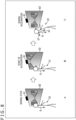
- a of FIG. 1 illustrates a condition in which, in the VR apace, the user U1 rides a vehicle and is in a non-acceleration state in which the user U1 is travelling forward at a constant speed, for example.
- the display section 11 is presenting a video serving as the field of view of the user U1 within the VR space and captured by the virtual camera VC with its angle of view set in a front forward direction.
- Gravity G is applied to the head of the user U1 in the direction of the gravity (downward in FIG. 1 ).
- FIG. 1 illustrates a condition in which the user U1 has moved from the state of A of FIG. 1 and is, in the VR space, in an acceleration state in which the user U1 is travelling forward while starting acceleration.
- the display section 11 presents a video serving as a field of view of the user U1 within the VR space and captured by the virtual camera VC with its angle of view set in a direction inclined downward from the front forward direction. That is, the field of view of the user U1 within the VR space is caused to incline downward from the front forward direction.
- the user U1 attempts to tilt his or her head backward by bending his or her body backward in order to maintain his or her posture (in order to attempt to return his or her field of view to the front forward direction).
- This behavior causes the gravity G applied to the head of the user U1 to be decomposed into a force g1 that is applied to the head backward and a force g2 that is applied thereto in a direction along his or her body trunk.
- the behavior in which the user U1 bends his or her body backward shifts the center of gravity of the body, and thus, as a result, the user U1 feels a force that pulls the body backward.
- the user U1 attempts to maintain his or her posture against the force by straining his or her back and legs. This situation in which the user U1 attempts to maintain his or her posture results in a similar situation in a case in which, in the real space, the user U1 rides a vehicle and is traveling forward while accelerating.
- the display section 11 presents a video captured by the virtual camera VC with its angle of view returned to the front forward direction in response to the backward tilt of the head of the user U1.
- FIG. 2 is a block diagram illustrating an example of a configuration of a video presentation system to which the present technology is applied and which implements the video presentation having been described with reference to FIG. 1 .
- the video presentation system of FIG. 2 includes the HMD 10 and an information processing apparatus 20
- the HMD 10 is worn on the head of a user and supplies the information processing apparatus 20 with posture information representing head posture of the user. Further, the HMD 10 presents thereon videos watched by the user on the basis of video information from the information processing apparatus 20.
- the information processing apparatus 20 is configured as, for example, a PC (Personal Computer) or the like.
- the information processing apparatus 20 generates videos on the basis of the posture information from the HMD 10 and supplies the HMD 10 with the video information representing the videos.
- a CPU Central Processor Unit
- ROM Read Only Memory
- RAM Random Access Memory
- the CPU 21 executes various processes for implementing functions included in the information processing apparatus 20 in accordance with programs stored in the ROM 22 or programs loaded in the RAM 23. Pieces of data needed in the execution of the various processes by the CPU 21 and any other kind of data are also stored in the RAM 23 as needed.
- the bus 24 is also connected to an input/output interface 25.
- the input/output interface 25 is connected to an input section 26, an output section 27, a storage section 28, and a communication section 29.
- the input section 26 includes keys, buttons, a touch panel, a microphone, and any other component
- the output section 27 includes a display, a speaker, and any other component.
- the storage section 28 includes a non-volatile memory and any other storage component.
- the storage section 28 stores therein, in addition to the programs executed by the CPU 21, various kinds of data for the videos presented on the HMD 10 and any other kind of data.
- the communication section 29 includes a network interface and any other component.
- the communication section 29 performs communication via a wireless line or a wired line, with the HMD 10.
- the input/output interface 25 is also connected to a drive 30 when necessary, to which a removable medium 32 implemented by a semiconductor memory or any other storage medium is attached as needed. Programs having been read from the removable medium 32 are installed into the storage section 28 when necessary.
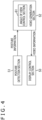
- the video presentation system of FIG. 4 includes a posture detection section 51, a video generation section 52, and a display control section 53.
- the posture detection section 51 is supposed to be implemented by the HMD 10
- the video generation section 52 and the display control section 53 are supposed to be implemented by the information processing apparatus 20.
- the display control section 53 may be implemented by the HMD 10.
- the posture detection section 51 detects head posture of a user wearing the HMD 10 and supplies the video generation section 52 with posture information representing the posture.
- the HMD 10 includes, for example, an acceleration sensor, and the posture detection section 51 detects the head posture of the user on the basis of the output of the acceleration sensor.
- the video generation section 52 generates videos to be presented to the user, on the basis of the posture information from the posture detection section 51.
- the video generation section 52 includes an angle of view control section 61.
- the angle of view control section 61 controls an angle of view of a virtual camera, which corresponds to a field of view of the user within the VR space.
- the angle of view control section 61 changes the angle of view of the vertical camera from a first angle of view at the time when the user is in the non-acceleration state to a second angle of view based on an acceleration direction of the user.
- the second angle of view is defined as an angle of view, such as that illustrated in B of FIG. 1 , by which a visual righting reflex guides the head posture of the user in the direction of a force applied to the user who is, in the real space, in the same state as the acceleration state.
- the angle of view control section 61 controls the angle of view of the virtual camera on the basis of the posture information from the posture detection section 51. For example, the angle of view control section 61 changes the angle of view of the virtual camera so as to bring the relevant angle of view close to the first angle of view from the second angle of view, as illustrated in C of FIG. 1 , according to the change of the head posture at the time when the user is in the acceleration state in the VR space.
- the video generation section 52 generates a video resulting from the control of the angle of view of the virtual camera by the angle of view control section 61.
- Video information representing the generated video is supplied to the display control section 53.
- the display control section 53 supplies the HMD 10 with the video information from the video generation section 52 and controls the display of the video represented by the video information.
- angle of view control processing on videos presented on the HMD 10 will be described with reference to a flowchart of FIG. 5 .
- the processing of FIG. 5 is started upon start of the presentation of the videos on the HMD 10.
- step S11 the angle of view control section 61 determines whether or not the user is in the acceleration state in the VR space, on the basis of videos generated by the video generation section 52.
- Step S11 is repeated until it is determined that the user is in the acceleration state, and when it is determined that the user is in the acceleration state, the processing proceeds to step S12.
- step S12 the angle of view control section 61 calculates an angle of view of the virtual camera according to the magnitude of acceleration in a video presented in the acceleration state.
- the larger the forward acceleration is in the VR space the more largely it is desirable to cause the user to bend his or her body backward in order to allow the user to bodily sense the acceleration.
- step S13 the angle of view control section 61 changes the angle of view of the virtual camera on the basis of the calculated angle of view change amount d1.
- step S14 the angle of view control section 61 determines whether or not a change of the head posture of the user has been detected, on the basis of the posture information from the posture detection section 51.
- Step S14 is repeated until it is determined that the change of the posture has been detected, and upon determination of the detection of the change of the posture, the processing proceeds to step S15.
- step S15 the angle of view control section 61 calculates an angle of view of the virtual camera again according to the acceleration in the video presented in the acceleration state and an amount of change of the head posture of the user.
- the downwardly inclined angle of view of the virtual camera is caused to return to the front forward direction according to a degree of the backward bending of the body (an amount of backward bending).
- an amount of backward bending of the user's body is defined by the product of h1, i.e., an amount of traveling backward from the position, and h2, i.e., an amount of rotation upward from the orientation (an angle change amount).
- An angle of view change amount d2 at the time when the angle of view of the virtual camera is caused to return to the front forward direction according to the amount of backward bending of the user's body is represented by the following formula, using h1 ⁇ h2, i.e., the abovementioned amount of backward bending of the user's body, and a given coefficient k2.
- d 2 k 2 ⁇ h 1 ⁇ h 2
- an angle of view change amount d3 i.e., an amount of change of the angle of view from that in the non-acceleration state, which is calculated according to the change of head posture of the user, is presented by the following formula, using the angle of view change amount d1, the angle of view change amount d2, and a given coefficient k3.
- d 3 k 3 d 1 ⁇ d 2
- the processing returns to step S13, and there, the angle of view of the virtual camera is caused to change on the basis of the calculated angle of view change amount d3.
- a behavior in which the user bends his or her body backward so as to cause a value of the angle of view change amount d2 to be the same as that of the angle of view change amount d1 causes the value of the angle of view change amount d3 to be equal to 0, thereby causing the angle of view of the virtual camera to be the same angle of view as the angle of view in the non-acceleration state.
- the field of view of the user within the VR space is oriented to the front forward direction, and thus, the user maintains the posture without further bending the body backward. Consequently, this configuration allows the user to feel a force that pulls the body backward, and reproduces the state in which the user is travelling at the constant acceleration in the real space. That is, h1 ⁇ h2 at this time, i.e., the amount of backward bending of the user's body at this time, can be regarded to be an ideal backward bending amount that allows the user to bodily sense the acceleration.
- a video different from such an abovementioned acceleration-state video may be generated and presented.
- a presented video may be switched from a video of a start-of-acceleration state, such as that presented on the display section 11 in B of FIG. 1 , to a video of the collision with another vehicle or a video of the rolling.
- Such a video presentation makes it possible to give a further enhanced immersive feeling to a user.
- Fig. 6 is a diagram illustrating an example of a configuration of a video presentation system in which a single display serves as a display apparatus.
- FIG. 6 illustrates a condition in which the user U1 is watching videos in front of a display 82 on which a sensor 81 is mounted.
- the body position of the user U1 may be a standing position or a sitting position.
- the sensor 81 includes an RGB camera, a depth sensor, and any other component and detects posture of the user U1 by means of skeleton recognition and the like for the user U1.
- the display 82 is configured as a television receiver with a large screen, a large type screen, or the like.
- the display 82 presents a video serving as a field of view of the user U1 within the VR space.
- FIG. 7 is a block diagram illustrating an example of a configuration of the video presentation system of FIG. 6 .
- the video presentation system of FIG. 7 includes the sensor 81, the display 82, and the information processing apparatus 20.
- the sensor 81 makes skeleton recognition and the like for the user U1 and supplies the information processing apparatus 20 with resultant posture information representing head posture of the user U1.
- the information processing apparatus 20 generates videos on the basis of the posture information from the sensor 81 and supplies the display 82 with video information representing the resultant videos.
- the display 82 presents videos to be watched by the user U1, on the basis of the video information from the information processing apparatus 20.
- FIG. 8 is a diagram illustrating an example of a video presentation provided by the video presentation system of FIG. 6 and FIG. 7 .
- a of FIG. 8 illustrates a condition in which, in the VR space, the user U1 rides a vehicle and is in a non-acceleration state in which the user U1 is travelling forward at a constant speed, for example.
- the display 82 is presenting a video serving as a field of view of the user U1 within the VR space and captured by an unillustrated virtual camera with its angle of view set in a front forward direction.
- Gravity G is applied to the head of the user U1 in the direction of gravity (downward in FIG. 8 ).
- FIG. 8 illustrates a condition in which the user U1 has moved from the state of A of FIG. 8 and is, in the VR space, in an acceleration state in which the user U1 is travelling forward while starting acceleration.
- the display 82 presents a video serving as a field of view of the user U1 within the VR space and captured by the unillustrated virtual camera with its angle of view set in a direction inclined downward from the front forward direction. That is, the field of view of the user U1 within the VR space is caused to incline downward from the front forward direction.
- This operation gives the user U1 an illusion that his or her head has been inclined forward, and this illusion induces a visual righting reflex that causes the user U1 to attempt to return to his or her original posture.
- the user U1 attempts to tilt his or her head backward by bending his or her body backward in order to maintain his or her posture (in order to attempt to return his or her field of view to the front forward direction).
- This behavior causes the gravity G applied to the head of the user U1 to be decomposed into a force g1 that is applied to the head backward and a force g2 that is applied thereto in a direction along his or her body trunk.
- the behavior in which the user U1 bends his or her body backward shifts the center of gravity of the body, and thus, as a result, the user U1 feels a force that pulls the body backward.
- the user U1 attempts to maintain his or her posture against the force by straining his or her back and legs. This situation in which the user U1 attempts to maintain his or her posture results in a similar situation in a case in which, in the real space, the user U1 rides a vehicle and is traveling forward while accelerating.
- the display 82 presents a video captured by the unillustrated virtual camera with its angle of view returned to the front forward direction in response to the backward tilt of the head of the user U1.
- an acceleration direction of the user in the VR space is not limited to the forward direction.
- an example of a video presentation at the time when the user is in other acceleration states will be described.
- FIG. 9 is a diagram illustrating an example of a video presentation at the time when a user is in a backward acceleration state.
- the backward acceleration state includes not only a state in which the user is travelling backward while accelerating, as a matter of course, but also a state in which the user is travelling forward while decelerating.
- a of FIG. 9 illustrates a condition in which, in the VR state, the user U1 rides a vehicle and is in a non-acceleration state in which the user U1 is travelling forward at a constant speed, for example.
- a display apparatus 100 presents a video serving as a field of view of the user U1 within the VR space and captured by an unillustrated camera with its angle of view set in the front forward direction.
- the display apparatus 100 may be configured as an HMD or a single display.
- the head (face) of the user U1 faces the right-hand side
- the user U1 is supposed to be actually located directly opposite to a display section of the display apparatus 100.
- FIG. 9 illustrates a condition in which the user U1 has moved from the state of A of FIG. 9 and is, in the VR space, in a backward acceleration state in which the user U1 is travelling forward while decelerating.
- the display apparatus 100 presents a video serving as a field of view of the user U1 within the VR space and captured by the unillustrated virtual camera with its angle of view set in a direction inclined upward from the front forward direction. That is, the field of view of the user U1 within the VR space is caused to incline upward from the front forward direction.
- This operation gives the user U1 an illusion that his or her head has been inclined backward, and this illusion induces a visual righting reflex that causes the user U1 to attempt to return to his or her original posture.
- the user U1 attempts to tilt his or her head forward by bending his or her body forward in order to maintain his or her posture (in order to attempt to return his or her field of view to the front forward direction).
- This behavior causes the gravity G applied to the head of the user U1 to be decomposed into a force g11 that is applied to the head forward and a force g12 that is applied thereto in a direction along his or her body trunk.
- the behavior in which the user U1 bends his or her body forward shifts the center of gravity of the body, and thus, as a result, the user U1 feels a force that pulls the body forward.
- the user U1 attempts to maintain his or her posture against the force by straining his or her abdomen and legs. This situation in which the user U1 attempts to maintain his or her posture results in a similar situation in a case in which, in the real space, the user U1 rides a vehicle and is traveling forward while decelerating.
- the display apparatus 100 presents a video captured by the unillustrated virtual camera with its angle of view returned to the front forward direction in response to the forward tilt of the head of the user U1.
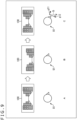
- FIG. 10 is a diagram illustrating an example of a video presentation at the time when a user is in an acceleration state with turning involved.
- the acceleration state with turning involved is a state in which the user is travelling forward (or backward) in such a way as to curve around a corner to a rightward (or leftward) direction.
- a of FIG. 10 illustrates a condition in which, in the VR space, the user U1 rides a vehicle and is in a non-acceleration state in which the user U1 is travelling forward at a constant speed, for example.
- the display apparatus 100 is presenting a video serving as a field of view of the user U1 within the VR space and captured by an unillustrated virtual camera with its angle of view set in a front forward direction.
- FIG. 10 illustrates a condition in which the user U1 has moved from the state of A of FIG. 10 and is, in the VR space, in an acceleration state with turning involved, in which the user U1 is travelling forward while turning to the right.
- the display apparatus 100 presents a video serving as a field of view of the user U1 within the VR space and captured by the unillustrated virtual camera with its angle of view rotated to the inner side of a turning direction (i.e., to the right). That is, the horizontal direction of the field of view of the user U1 within the VR space is caused to incline to the right.
- This operation gives the user U1 an illusion that his or her head has been tilted rightward, and this illusion induces a visual righting reflex that causes the user U1 to attempt to return to his or her original posture.
- the user U1 attempts to tilt his or her head leftward by leaning his or her body leftward in order to maintain his or her posture (in order to attempt to return the inclined horizontal direction of his or her field of view to the original direction).
- This behavior causes the gravity G applied to the head of the user U1 to be decomposed into a force g21 that is applied to the head leftward and a force g22 that is applied thereto in a direction along his or her body trunk.
- the behavior in which the user U1 leans his or her body leftward shifts the center of gravity of the body, and thus, as a result, the user U1 feels a force that pulls the body leftward.
- the user U1 attempts to maintain his or her posture against the force by straining his or her body and neck. This situation in which the user U1 attempts to maintain his or her posture results in a similar situation in a case in which, in the real space, the user U1 rides a vehicle and is traveling while turning to the right.
- the display apparatus 100 presents a video captured by the unillustrated virtual camera with the rotation of its angle of view returned to the original angle of view in response to the leftward tilt of the head of the user U1.
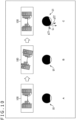
- FIG. 11 is a diagram illustrating an example of a video presentation at the time when a user is in a lateral acceleration state.
- the lateral acceleration state is a state in which the user is travelling while accelerating (or decelerating) rightward (or leftward).
- a of FIG. 11 illustrates a condition in which, in the VR apace, the user U1 rides a vehicle and is in a non-acceleration state in which the user U1 is travelling rightward as viewed from the user U1 at a constant speed.
- the display apparatus 100 is presenting a video serving as a field of view of the user U1 within the VR space and captured by an unillustrated virtual camera with its angle of view set directly opposite to the left side of a forward travelling direction of a train.
- the video captured by the virtual camera is moving leftward relative to the angle of view.
- FIG. 11 illustrates a condition in which the user U1 has moved from the state of A of FIG. 11 and is, in the VR space, in an acceleration state in which the user U1 is travelling rightward while accelerating.
- the display apparatus 100 presents a video serving as a field of view of the user U1 within the VR space and captured by the unillustrated virtual camera with its angle of view rotated to the side of a accelerating direction (i.e., to the right). That is, the horizontal direction of the field of view of the user U1 within the VR space is caused to incline to the right.
- This operation gives the user U1 an illusion that his or her head has been tilted rightward, and this illusion induces a visual righting reflex that causes the user U1 to attempt to return to his or her original posture.
- the user U1 attempts to tilt his or her head leftward by leaning his or her body leftward in order to maintain his or her posture (in order to attempt to return the inclined horizontal direction of his or her field of view to the original direction).
- This behavior causes the gravity G applied to the head of the user U1 to be decomposed into a force g31 that is applied to the head leftward and a force g32 that is applied thereto in a direction along his or her body trunk.
- the behavior in which the user U1 leans his or her body leftward shifts the center of gravity of the body, and thus, as a result, the user U1 feels a force that pulls the body leftward.
- the user U1 attempts to maintain his or her posture against the force by straining his or her body and neck. This situation in which the user U1 attempts to maintain his or her posture results in a similar situation in a case in which, in the real space, the user U1 is on a train and is traveling rightward while accelerating.
- the display apparatus 100 presents a video captured by the unillustrated virtual camera with the rotation of its angle of view returned to the original angle of view in response to the leftward tilt of the head of the user U1.
- the video presentation system can employ any other configuration capable of presenting a video that gives an immersive feeling to a user.
- FIG. 12 is a diagram illustrating an example of a configuration of a video presentation system in which a dome type display serves as a display apparatus.
- FIG. 12 illustrates a condition in which the user U1 is watching videos in front of a display 132 on which a sensor 131 is mounted.
- the sensor 131 includes an RGB camera, a depth sensor, and any other component and detects posture of the user U1 by means of skeleton recognition and the like for the user U1.
- the display 132 is configured as a dome type display and includes a dome-shaped display face.
- the display 132 presents a video serving as a field of view of the user U1 within the VR space.
- FIG. 13 is a diagram illustrating an example of a configuration of a video presentation system in which a mobile terminal serves as a display apparatus.
- a mobile terminal 150 illustrated in FIG. 13 is configured as, for example, a smartphone, a tablet terminal, or the like and includes a sensor 151 and a display section 152.
- the sensor 151 includes an RGB camera, a depth sensor, and any other component and detects posture of the user by means of skeleton recognition and the like for the user.
- the display section 152 is configured as a display having touch panel functions.
- the display section 152 presents a video serving as a field of view of the user within the VR space.
- the above-described series of processes can be executed by hardware or software.
- programs constituting the software are installed from a network or a recording medium.
- This recording medium includes, for example, the removable medium 31, illustrated in FIG. 3 , which is distributed, separately from the apparatus body, to users of the information processing device 20 for the delivery of the programs.
- the removable medium 31 is implemented by a storage medium in which the programs are recorded, such as a magnetic disk (including a flexible disk), an optical disk (including a CD-ROM and a DVD), a magnetooptical disk, or a semiconductor memory.
- the recording medium is implemented by not only such the above storage media but also a storage medium, such as the ROM 22, or a hard disk included in the storage unit 28, which records therein programs delivered to an administrator in a state of being preliminarily embedded in the apparatus body.
- the steps that describe the programs recorded in the recording medium include not only processes performed in a time-series way according to the above-described order, as a matter of course, but also processes that are not necessarily performed in the time-series way and may be performed in parallel or individually.
Landscapes
- Engineering & Computer Science (AREA)
- Multimedia (AREA)
- Theoretical Computer Science (AREA)
- Physics & Mathematics (AREA)
- General Engineering & Computer Science (AREA)
- Human Computer Interaction (AREA)
- General Physics & Mathematics (AREA)
- Computer Hardware Design (AREA)
- Signal Processing (AREA)
- Optics & Photonics (AREA)
- Software Systems (AREA)
- Health & Medical Sciences (AREA)
- Biophysics (AREA)
- Cardiology (AREA)
- General Health & Medical Sciences (AREA)
- Heart & Thoracic Surgery (AREA)
- Computer Graphics (AREA)
- Life Sciences & Earth Sciences (AREA)
- Radar, Positioning & Navigation (AREA)
- Remote Sensing (AREA)
- User Interface Of Digital Computer (AREA)
- Controls And Circuits For Display Device (AREA)
- Processing Or Creating Images (AREA)
Claims (15)
- Informationsverarbeitungseinrichtung (20), umfassend:einen Videoerzeugungsabschnitt (52), der dazu ausgelegt ist, auf Basis von Kopfhaltungsinformationen eines Benutzers, ein Video zu erzeugen, das aus der Steuerung eines Sichtwinkels einer virtuellen Kamera resultiert, wobei der Sichtwinkel der virtuellen Kamera einem Sichtfeld des Benutzers in einem virtuellen Raum entspricht,wobei, wenn sich der Benutzer in einem Nicht-Beschleunigungszustand im virtuellen Raum befindet, der Videoerzeugungsabschnitt (52) dazu ausgelegt ist, das Video basierend auf einem ersten Sichtwinkel der virtuellen Kamera zu erzeugen, undwobei, wenn sich der Benutzer in einem Beschleunigungszustand befindet, bei dem eine Beschleunigung in eine Richtung im virtuellen Raum angewendet wird, der Videoerzeugungsabschnitt (52) dazu ausgelegt ist, den Sichtwinkel der virtuellen Kamera von dem ersten Sichtwinkel zu einer Zeit, zu der sich der Benutzer in dem Nicht-Beschleunigungszustand befindet, zu einem zweiten Sichtwinkel basierend auf der Beschleunigungsrichtung des Benutzers im virtuellen Raum zu ändern und das Video basierend auf dem zweiten Sichtwinkel der virtuellen Kamera zu erzeugen, um einen visuellen Aufrichtungsreflex am Benutzer im realen Raum zu induzieren.
- Informationsverarbeitungseinrichtung (20) nach Anspruch 1, wobei
wenn, im virtuellen Raum, sich der Benutzer im Beschleunigungszustand befindet, bei dem eine Beschleunigung nach vorne angewendet wird, der Videoerzeugungsabschnitt (52) dazu ausgelegt ist, den Sichtwinkel der virtuellen Kamera von einer vorderen Vorwärtsrichtung nach unten zu neigen. - Informationsverarbeitungseinrichtung (20) nach Anspruch 1, wobei
wenn, im virtuellen Raum, sich der Benutzer im Beschleunigungszustand befindet, bei dem eine Beschleunigung nach hinten angewendet wird, der Videoerzeugungsabschnitt (52) dazu ausgelegt ist, den Sichtwinkel der virtuellen Kamera von einer vorderen Vorwärtsrichtung nach oben zu neigen. - Informationsverarbeitungseinrichtung (20) nach Anspruch 1, wobei
wenn, im virtuellen Raum, sich der Benutzer im Beschleunigungszustand befindet, bei dem eine Drehung eingeschlossen ist, der Videoerzeugungsabschnitt (52) dazu ausgelegt ist, den Sichtwinkel der virtuellen Kamera zu einer inneren Seite einer Richtung der Drehung zu rotieren. - Informationsverarbeitungseinrichtung (20) nach Anspruch 1, wobei
wenn, im virtuellen Raum, sich der Benutzer im Beschleunigungszustand befindet, bei dem eine Beschleunigung nach links oder rechts angewendet wird, der Videoerzeugungsabschnitt (52) dazu ausgelegt ist, den Sichtwinkel der virtuellen Kamera zu einer Richtung der Beschleunigung zu rotieren. - Informationsverarbeitungseinrichtung (20) nach einem der vorstehenden Ansprüche, wobei
wenn, im Beschleunigungszustand, der Videoerzeugungsabschnitt (52) dazu ausgelegt ist, das Video so zu erzeugen, dass sich der Benutzer, während er beschleunigt wird, im virtuellen Raum fortbewegt. - Informationsverarbeitungseinrichtung (20) nach Anspruch 6, wobei
wenn, im Beschleunigungszustand, der Videoerzeugungsabschnitt (52) dazu ausgelegt ist, das Video so zu erzeugen, dass sich der Benutzer im virtuellen Raum mit einer gegebenen Beschleunigung mittels eines sich fortbewegenden Objekts unabhängig vom Benutzer fortbewegt. - Informationsverarbeitungseinrichtung (20) nach Anspruch 7, wobei
wenn, im Beschleunigungszustand, der Videoerzeugungsabschnitt (52) dazu ausgelegt ist, das Video so zu erzeugen, dass sich der Benutzer im virtuellen Raum mit einer gegebenen Beschleunigung mittels eines Fahrzeugs fortbewegt, das der Benutzer im virtuellen Raum fährt. - Informationsverarbeitungseinrichtung (20) nach einem der vorstehenden Ansprüche, wobei
der Videoerzeugungsabschnitt (52) dazu ausgelegt ist, eine Menge einer Änderung vom ersten Sichtwinkel zum zweiten Sichtwinkel gemäß einer Größe der Beschleunigung des Benutzers im Beschleunigungszustand zu steuern. - Informationsverarbeitungseinrichtung (20) nach Anspruch 9, wobei
der Videoerzeugungsabschnitt (52) dazu ausgelegt ist, die Menge der Änderung vom ersten Sichtwinkel zum zweiten Sichtwinkel umso größer zu machen, je größer die Beschleunigung des Benutzers im Beschleunigungszustand ist. - Informationsverarbeitungseinrichtung (20) nach Anspruch 9 oder 10, wobei
in einem Fall, bei dem die Menge der Änderung vom ersten Sichtwinkel zum zweiten Sichtwinkel einen vorbestimmten Schwellenwert überschreitet, der Videoerzeugungsabschnitt (52) dazu ausgelegt ist, ein zweites Video zu erzeugen, das sich von dem Video unterscheidet, das zu einer Zeit erzeugt wird, zu der sich der Benutzer im Beschleunigungszustand im virtuellen Raum befindet. - Informationsverarbeitungseinrichtung (20) nach einem der vorstehenden Ansprüche, wobei
der Videoerzeugungsabschnitt (52) dazu ausgelegt ist, den Sichtwinkel der virtuellen Kamera so zu ändern, dass der Sichtwinkel der virtuellen Kamera vom zweiten Sichtwinkel in die Nähe des ersten Sichtwinkels gebracht wird, gemäß einer Änderung der Kopfhaltung zu einer Zeit, zu der sich der Benutzer im Beschleunigungszustand im virtuellen Raum befindet. - Informationsverarbeitungseinrichtung (20) nach Anspruch 13, wobei
der Videoerzeugungsabschnitt (52) dazu ausgelegt ist, den Sichtwinkel der virtuellen Kamera auf Basis einer Differenz zwischen einem Wert, der einer Menge der Änderung vom ersten Sichtwinkel zum zweiten Sichtwinkel zu der Zeit entspricht, zu der sich der Benutzer im Beschleunigungszustand im virtuellen Raum befindet, und einem Wert, der einer Menge der Änderung der Kopfhaltung zu der Zeit entspricht, zu der sich der Benutzer im Beschleunigungszustand im virtuellen Raum befindet, zu berechnen. - Informationsverarbeitungseinrichtung (20) nach einem der vorstehenden Ansprüche, ferner umfassend:
einen Anzeigesteuerabschnitt (53), der dazu ausgelegt ist, das durch den Videoerzeugungsabschnitt (52) erzeugte Video an eine Anzeigeeinrichtung (10) zu liefern und die Anzeige des durch den Videoerzeugungsabschnitt (52) erzeugten Videos durch die Anzeigeeinrichtung (10) zu steuern. - Informationsverarbeitungsverfahren in einer Informationsverarbeitungseinrichtung (20), die einen Videoerzeugungsabschnitt (52) umfasst, wobei das Informationsverarbeitungsverfahren umfasst:Erzeugen, durch den Videoerzeugungsabschnitt (52) auf Basis von Kopfhaltungsinformationen eines Benutzers, eines Videos, das aus der Steuerung eines Sichtwinkels einer virtuellen Kamera resultiert, wobei der Sichtwinkel einem Sichtfeld des Benutzers in einem virtuellen Raum entspricht;wenn sich der Benutzer in einem Nicht-Beschleunigungszustand im virtuellen Raum befindet, Erzeugen, durch den Videoerzeugungsabschnitt (52), des Videos basierend auf einem ersten Sichtwinkel der virtuellen Kamera; undwenn sich der Benutzer in einem Beschleunigungszustand befindet, bei dem eine Beschleunigung in eine Richtung im virtuellen Raum angewendet wird, Ändern (S13), durch den Videoerzeugungsabschnitt (52), des Sichtwinkels der virtuellen Kamera von dem ersten Sichtwinkel zu einer Zeit, zu der sich der Benutzer in dem Nicht-Beschleunigungszustand befindet, zu einem zweiten Sichtwinkel basierend auf der Beschleunigungsrichtung des Benutzers im virtuellen Raum und Erzeugen, durch den Videoerzeugungsabschnitt (52), des Videos basierend auf dem zweiten Sichtwinkel der virtuellen Kamera, um einen visuellen Aufrichtungsreflex am Benutzer im realen Raum zu induzieren.
Applications Claiming Priority (2)
| Application Number | Priority Date | Filing Date | Title |
|---|---|---|---|
| JP2018057580 | 2018-03-26 | ||
| PCT/JP2019/009855 WO2019188229A1 (ja) | 2018-03-26 | 2019-03-12 | 情報処理装置、情報処理方法、およびプログラム |
Publications (3)
| Publication Number | Publication Date |
|---|---|
| EP3779644A1 EP3779644A1 (de) | 2021-02-17 |
| EP3779644A4 EP3779644A4 (de) | 2021-04-28 |
| EP3779644B1 true EP3779644B1 (de) | 2023-03-08 |
Family
ID=68061436
Family Applications (1)
| Application Number | Title | Priority Date | Filing Date |
|---|---|---|---|
| EP19776170.3A Active EP3779644B1 (de) | 2018-03-26 | 2019-03-12 | Informationsverarbeitungsvorrichtung und informationsverarbeitungsverfahren |
Country Status (6)
| Country | Link |
|---|---|
| US (1) | US11480787B2 (de) |
| EP (1) | EP3779644B1 (de) |
| JP (1) | JP7235041B2 (de) |
| KR (1) | KR20200133338A (de) |
| CN (1) | CN111868667B (de) |
| WO (1) | WO2019188229A1 (de) |
Families Citing this family (5)
| Publication number | Priority date | Publication date | Assignee | Title |
|---|---|---|---|---|
| WO2021095143A1 (ja) * | 2019-11-12 | 2021-05-20 | 株式会社ハシラス | Vr用搭乗装置 |
| DE112021003448T5 (de) * | 2020-06-29 | 2023-07-06 | Sony Group Corporation | Informationsverarbeitungseinrichtung, informationsverarbeitungsverfahren und programm |
| JP7619789B2 (ja) * | 2020-11-30 | 2025-01-22 | 株式会社デンソーテン | 情報処理装置、情報処理方法およびプログラム |
| JP7611682B2 (ja) * | 2020-11-30 | 2025-01-10 | 株式会社デンソーテン | 情報処理装置、情報処理方法およびプログラム |
| WO2025150187A1 (ja) * | 2024-01-12 | 2025-07-17 | 三菱電機株式会社 | 映像出力装置、プログラム及び映像出力方法 |
Family Cites Families (57)
| Publication number | Priority date | Publication date | Assignee | Title |
|---|---|---|---|---|
| WO2013126784A2 (en) * | 2012-02-23 | 2013-08-29 | Huston Charles D | System and method for creating an environment and for sharing a location based experience in an environment |
| WO2014008185A1 (en) * | 2012-07-02 | 2014-01-09 | Sony Computer Entertainment Inc. | Methods and systems for interaction with an expanded information space |
| US9417762B2 (en) * | 2013-01-09 | 2016-08-16 | Northrop Grumman Systems Corporation | System and method for providing a virtual immersive environment |
| US10955665B2 (en) * | 2013-06-18 | 2021-03-23 | Microsoft Technology Licensing, Llc | Concurrent optimal viewing of virtual objects |
| US10380799B2 (en) * | 2013-07-31 | 2019-08-13 | Splunk Inc. | Dockable billboards for labeling objects in a display having a three-dimensional perspective of a virtual or real environment |
| US20150138099A1 (en) * | 2013-11-15 | 2015-05-21 | Marc Robert Major | Systems, Apparatus, and Methods for Motion Controlled Virtual Environment Interaction |
| EP3109744B1 (de) | 2014-02-17 | 2020-09-09 | Sony Corporation | Informationsverarbeitungsvorrichtung, informationsverarbeitungsverfahren und programm |
| US9865089B2 (en) * | 2014-07-25 | 2018-01-09 | Microsoft Technology Licensing, Llc | Virtual reality environment with real world objects |
| US20160027218A1 (en) * | 2014-07-25 | 2016-01-28 | Tom Salter | Multi-user gaze projection using head mounted display devices |
| US9363569B1 (en) * | 2014-07-28 | 2016-06-07 | Jaunt Inc. | Virtual reality system including social graph |
| SG11201704316YA (en) * | 2014-11-28 | 2017-06-29 | Haptech Inc | Methods and apparatuses for haptic systems |
| US10163255B2 (en) * | 2015-01-07 | 2018-12-25 | Geopogo, Inc. | Three-dimensional geospatial visualization |
| US10684485B2 (en) * | 2015-03-06 | 2020-06-16 | Sony Interactive Entertainment Inc. | Tracking system for head mounted display |
| US10300362B2 (en) * | 2015-04-23 | 2019-05-28 | Win Reality, Llc | Virtual reality sports training systems and methods |
| US10078917B1 (en) * | 2015-06-26 | 2018-09-18 | Lucasfilm Entertainment Company Ltd. | Augmented reality simulation |
| JP2017027163A (ja) | 2015-07-16 | 2017-02-02 | 株式会社コロプラ | 仮想カメラの制御方法及び制御プログラム |
| US9766713B2 (en) * | 2015-09-08 | 2017-09-19 | Unity IPR ApS | System and method for providing user interface tools |
| EP4339689A3 (de) * | 2015-09-25 | 2024-06-12 | Sony Interactive Entertainment Inc. | Informationsverarbeitungsgerät |
| US20170091993A1 (en) * | 2015-09-25 | 2017-03-30 | Microsoft Technology Licensing, Llc | 3D Model Generation From Map Data and User Interface |
| US10724874B2 (en) * | 2015-10-13 | 2020-07-28 | Here Global B.V. | Virtual reality environment responsive to predictive route navigation |
| JP6395687B2 (ja) | 2015-10-16 | 2018-09-26 | 株式会社カプコン | 映像生成方法、映像生成プログラムおよび映像生成装置 |
| JP6675209B2 (ja) * | 2016-01-20 | 2020-04-01 | 株式会社ソニー・インタラクティブエンタテインメント | 情報処理装置およびユーザガイド提示方法 |
| JP6092437B1 (ja) | 2016-02-02 | 2017-03-08 | 株式会社コロプラ | 仮想空間画像提供方法、及びそのプログラム |
| US11314089B2 (en) * | 2016-03-07 | 2022-04-26 | Apple Inc. | Method and device for evaluating view images |
| US10518172B2 (en) * | 2016-03-07 | 2019-12-31 | Htc Corporation | Accessory management of virtual reality system |
| US11163358B2 (en) * | 2016-03-17 | 2021-11-02 | Sony Interactive Entertainment Inc. | Spectating virtual (VR) environments associated with VR user interactivity |
| JP2017182130A (ja) | 2016-03-28 | 2017-10-05 | ソニー株式会社 | 情報処理装置、情報処理方法、及びプログラム |
| KR20170126295A (ko) * | 2016-05-09 | 2017-11-17 | 엘지전자 주식회사 | 헤드 마운티드 디스플레이 장치 및 그것의 제어방법 |
| JP7187446B2 (ja) * | 2016-05-27 | 2022-12-12 | ホロビルダー インコーポレイテッド | 拡張された仮想現実 |
| US10395428B2 (en) * | 2016-06-13 | 2019-08-27 | Sony Interactive Entertainment Inc. | HMD transitions for focusing on specific content in virtual-reality environments |
| US10981061B2 (en) * | 2016-06-13 | 2021-04-20 | Sony Interactive Entertainment LLC | Method and system for directing user attention to a location based game play companion application |
| US10482662B2 (en) * | 2016-06-30 | 2019-11-19 | Intel Corporation | Systems and methods for mixed reality transitions |
| JP6719308B2 (ja) | 2016-07-13 | 2020-07-08 | 株式会社バンダイナムコエンターテインメント | シミュレーションシステム及びプログラム |
| JP6774260B2 (ja) * | 2016-08-12 | 2020-10-21 | 株式会社バンダイナムコアミューズメント | シミュレーションシステム |
| JP6185123B1 (ja) * | 2016-08-18 | 2017-08-23 | グリー株式会社 | プログラム、制御方法、及び情報処理装置 |
| US10255714B2 (en) * | 2016-08-24 | 2019-04-09 | Disney Enterprises, Inc. | System and method of gaze predictive rendering of a focal area of an animation |
| US20180061084A1 (en) * | 2016-08-24 | 2018-03-01 | Disney Enterprises, Inc. | System and method of bandwidth-sensitive rendering of a focal area of an animation |
| US10617956B2 (en) * | 2016-09-30 | 2020-04-14 | Sony Interactive Entertainment Inc. | Methods for providing interactive content in a virtual reality scene to guide an HMD user to safety within a real world space |
| US10602133B2 (en) * | 2016-10-04 | 2020-03-24 | Facebook, Inc. | Controls and interfaces for user interactions in virtual spaces |
| US20180095636A1 (en) * | 2016-10-04 | 2018-04-05 | Facebook, Inc. | Controls and Interfaces for User Interactions in Virtual Spaces |
| US10152851B2 (en) * | 2016-11-29 | 2018-12-11 | Microsoft Technology Licensing, Llc | Notification artifact display |
| WO2018100906A1 (ja) * | 2016-11-30 | 2018-06-07 | グリー株式会社 | アプリケーション制御プログラム、アプリケーション制御方法及びアプリケーション制御システム |
| US10620441B2 (en) * | 2016-12-14 | 2020-04-14 | Qualcomm Incorporated | Viewport-aware quality metric for 360-degree video |
| US20180182172A1 (en) * | 2016-12-28 | 2018-06-28 | Brillio LLC | Method and electronic device for managing display information in first immersive mode and second immersive mode |
| US10553036B1 (en) * | 2017-01-10 | 2020-02-04 | Lucasfilm Entertainment Company Ltd. | Manipulating objects within an immersive environment |
| US10503964B1 (en) * | 2017-02-10 | 2019-12-10 | Aldin Dynamics, Ehf. | Method and system for measuring and visualizing user behavior in virtual reality and augmented reality |
| US10554950B1 (en) * | 2017-03-16 | 2020-02-04 | Amazon Technologies, Inc. | Collection of camera calibration data using augmented reality |
| US10656704B2 (en) * | 2017-05-10 | 2020-05-19 | Universal City Studios Llc | Virtual reality mobile pod |
| JP6909286B2 (ja) * | 2017-05-18 | 2021-07-28 | 株式会社ソニー・インタラクティブエンタテインメント | 画像生成装置、画像表示システム、および画像生成方法 |
| US20180373348A1 (en) * | 2017-06-22 | 2018-12-27 | Microsoft Technology Licensing, Llc | Systems and methods of active brightness depth calculation for object tracking |
| US10751621B2 (en) * | 2017-09-01 | 2020-08-25 | Square Enix Limited | Method and system for rendering video game images |
| US11179635B2 (en) * | 2017-10-11 | 2021-11-23 | Sony Interactive Entertainment LLC | Sound localization in an augmented reality view of a live event held in a real-world venue |
| US10930075B2 (en) * | 2017-10-16 | 2021-02-23 | Microsoft Technology Licensing, Llc | User interface discovery and interaction for three-dimensional virtual environments |
| US11303814B2 (en) * | 2017-11-09 | 2022-04-12 | Qualcomm Incorporated | Systems and methods for controlling a field of view |
| US10553016B2 (en) * | 2017-11-15 | 2020-02-04 | Google Llc | Phase aligned foveated rendering |
| US20190204599A1 (en) * | 2017-12-28 | 2019-07-04 | Microsoft Technology Licensing, Llc | Head-mounted display device with electromagnetic sensor |
| US10636188B2 (en) * | 2018-02-09 | 2020-04-28 | Nicholas T. Hariton | Systems and methods for utilizing a living entity as a marker for augmented reality content |
-
2019
- 2019-03-12 US US16/981,764 patent/US11480787B2/en active Active
- 2019-03-12 CN CN201980020486.6A patent/CN111868667B/zh active Active
- 2019-03-12 WO PCT/JP2019/009855 patent/WO2019188229A1/ja not_active Ceased
- 2019-03-12 JP JP2020509842A patent/JP7235041B2/ja active Active
- 2019-03-12 KR KR1020207026590A patent/KR20200133338A/ko active Pending
- 2019-03-12 EP EP19776170.3A patent/EP3779644B1/de active Active
Also Published As
| Publication number | Publication date |
|---|---|
| WO2019188229A1 (ja) | 2019-10-03 |
| EP3779644A4 (de) | 2021-04-28 |
| JP7235041B2 (ja) | 2023-03-08 |
| KR20200133338A (ko) | 2020-11-27 |
| CN111868667A (zh) | 2020-10-30 |
| EP3779644A1 (de) | 2021-02-17 |
| US11480787B2 (en) | 2022-10-25 |
| CN111868667B (zh) | 2024-08-23 |
| JPWO2019188229A1 (ja) | 2021-03-18 |
| US20210096361A1 (en) | 2021-04-01 |
Similar Documents
| Publication | Publication Date | Title |
|---|---|---|
| EP3779644B1 (de) | Informationsverarbeitungsvorrichtung und informationsverarbeitungsverfahren | |
| US9996975B2 (en) | Interactive multi-rider virtual reality ride system | |
| Yao et al. | Oculus vr best practices guide | |
| US6497649B2 (en) | Alleviating motion, simulator, and virtual environmental sickness by presenting visual scene components matched to inner ear vestibular sensations | |
| JP2019516159A (ja) | Vr環境における観客ビュー視点 | |
| CN110300994B (zh) | 图像处理装置、图像处理方法以及图像系统 | |
| KR102205691B1 (ko) | Vr 모션 플랫폼을 위한 멀미저감 방법 및 장치 | |
| CN113544765A (zh) | 信息处理装置、信息处理方法和程序 | |
| JP7512488B2 (ja) | 画像処理装置、画像処理方法及び画像処理システム | |
| US11182950B2 (en) | Information processing device and information processing method | |
| JP4040609B2 (ja) | 移動体シミュレーション装置及び移動体シミュレーションプログラム | |
| US12561864B2 (en) | Acceleration-based screen effects to prevent vehicle passenger motion sickness | |
| JPWO2018051964A1 (ja) | 映像表示システム及び映像表示方法、映像表示プログラム | |
| CN115442581A (zh) | 车载vr眼镜控制方法、装置及计算机设备 | |
| JPH09269723A (ja) | 運動知覚制御装置 | |
| JP7485221B2 (ja) | 映像処理装置、映像処理方法及び映像処理プログラム | |
| JP7027753B2 (ja) | 情報処理装置及びプログラム | |
| JP6838168B2 (ja) | Vrアミューズメント用旋回揺動制御装置 | |
| WO2021095143A1 (ja) | Vr用搭乗装置 | |
| WO2023242981A1 (ja) | ヘッドマウントディスプレイ、ヘッドマウントディスプレイシステム、および、ヘッドマウントディスプレイの表示方法 | |
| KR20230104430A (ko) | Vr체험시 특정환경에서의 어지럼증 해소를 위한 실감형 체험 장치 및 그 방법 | |
| JP2022184456A (ja) | 画像処理装置、画像処理方法、及びプログラム | |
| JP2022015283A (ja) | 画像生成装置 | |
| JP2000140442A (ja) | 画像表示装置 |
Legal Events
| Date | Code | Title | Description |
|---|---|---|---|
| STAA | Information on the status of an ep patent application or granted ep patent |
Free format text: STATUS: THE INTERNATIONAL PUBLICATION HAS BEEN MADE |
|
| PUAI | Public reference made under article 153(3) epc to a published international application that has entered the european phase |
Free format text: ORIGINAL CODE: 0009012 |
|
| STAA | Information on the status of an ep patent application or granted ep patent |
Free format text: STATUS: REQUEST FOR EXAMINATION WAS MADE |
|
| 17P | Request for examination filed |
Effective date: 20201026 |
|
| AK | Designated contracting states |
Kind code of ref document: A1 Designated state(s): AL AT BE BG CH CY CZ DE DK EE ES FI FR GB GR HR HU IE IS IT LI LT LU LV MC MK MT NL NO PL PT RO RS SE SI SK SM TR |
|
| AX | Request for extension of the european patent |
Extension state: BA ME |
|
| A4 | Supplementary search report drawn up and despatched |
Effective date: 20210330 |
|
| RIC1 | Information provided on ipc code assigned before grant |
Ipc: G06F 3/0481 20130101AFI20210324BHEP Ipc: G06F 3/01 20060101ALI20210324BHEP |
|
| DAV | Request for validation of the european patent (deleted) | ||
| DAX | Request for extension of the european patent (deleted) | ||
| RAP3 | Party data changed (applicant data changed or rights of an application transferred) |
Owner name: SONY GROUP CORPORATION |
|
| REG | Reference to a national code |
Ref country code: DE Ref legal event code: R079 Ref document number: 602019026213 Country of ref document: DE Free format text: PREVIOUS MAIN CLASS: G06F0003010000 Ipc: G06F0003048150 |
|
| GRAP | Despatch of communication of intention to grant a patent |
Free format text: ORIGINAL CODE: EPIDOSNIGR1 |
|
| STAA | Information on the status of an ep patent application or granted ep patent |
Free format text: STATUS: GRANT OF PATENT IS INTENDED |
|
| RIC1 | Information provided on ipc code assigned before grant |
Ipc: A63F 13/25 20140101ALI20220914BHEP Ipc: G02B 27/01 20060101ALI20220914BHEP Ipc: A63F 13/5255 20140101ALI20220914BHEP Ipc: A63F 13/428 20140101ALI20220914BHEP Ipc: A63F 13/212 20140101ALI20220914BHEP Ipc: A63F 13/211 20140101ALI20220914BHEP Ipc: G06T 19/00 20110101ALI20220914BHEP Ipc: G06F 3/01 20060101ALI20220914BHEP Ipc: G06F 3/04815 20220101AFI20220914BHEP |
|
| RIC1 | Information provided on ipc code assigned before grant |
Ipc: A63F 13/428 20140101ALI20220920BHEP Ipc: G06F 1/16 20060101ALI20220920BHEP Ipc: A63F 13/25 20140101ALI20220920BHEP Ipc: G02B 27/01 20060101ALI20220920BHEP Ipc: A63F 13/5255 20140101ALI20220920BHEP Ipc: A63F 13/212 20140101ALI20220920BHEP Ipc: A63F 13/211 20140101ALI20220920BHEP Ipc: G06T 19/00 20110101ALI20220920BHEP Ipc: G06F 3/01 20060101ALI20220920BHEP Ipc: G06F 3/04815 20220101AFI20220920BHEP |
|
| INTG | Intention to grant announced |
Effective date: 20221011 |
|
| GRAS | Grant fee paid |
Free format text: ORIGINAL CODE: EPIDOSNIGR3 |
|
| GRAA | (expected) grant |
Free format text: ORIGINAL CODE: 0009210 |
|
| STAA | Information on the status of an ep patent application or granted ep patent |
Free format text: STATUS: THE PATENT HAS BEEN GRANTED |
|
| AK | Designated contracting states |
Kind code of ref document: B1 Designated state(s): AL AT BE BG CH CY CZ DE DK EE ES FI FR GB GR HR HU IE IS IT LI LT LU LV MC MK MT NL NO PL PT RO RS SE SI SK SM TR |
|
| REG | Reference to a national code |
Ref country code: CH Ref legal event code: EP Ref country code: AT Ref legal event code: REF Ref document number: 1553034 Country of ref document: AT Kind code of ref document: T Effective date: 20230315 |
|
| REG | Reference to a national code |
Ref country code: DE Ref legal event code: R096 Ref document number: 602019026213 Country of ref document: DE |
|
| REG | Reference to a national code |
Ref country code: IE Ref legal event code: FG4D |
|
| REG | Reference to a national code |
Ref country code: LT Ref legal event code: MG9D |
|
| REG | Reference to a national code |
Ref country code: NL Ref legal event code: MP Effective date: 20230308 |
|
| PG25 | Lapsed in a contracting state [announced via postgrant information from national office to epo] |
Ref country code: RS Free format text: LAPSE BECAUSE OF FAILURE TO SUBMIT A TRANSLATION OF THE DESCRIPTION OR TO PAY THE FEE WITHIN THE PRESCRIBED TIME-LIMIT Effective date: 20230308 Ref country code: NO Free format text: LAPSE BECAUSE OF FAILURE TO SUBMIT A TRANSLATION OF THE DESCRIPTION OR TO PAY THE FEE WITHIN THE PRESCRIBED TIME-LIMIT Effective date: 20230608 Ref country code: LV Free format text: LAPSE BECAUSE OF FAILURE TO SUBMIT A TRANSLATION OF THE DESCRIPTION OR TO PAY THE FEE WITHIN THE PRESCRIBED TIME-LIMIT Effective date: 20230308 Ref country code: LT Free format text: LAPSE BECAUSE OF FAILURE TO SUBMIT A TRANSLATION OF THE DESCRIPTION OR TO PAY THE FEE WITHIN THE PRESCRIBED TIME-LIMIT Effective date: 20230308 Ref country code: HR Free format text: LAPSE BECAUSE OF FAILURE TO SUBMIT A TRANSLATION OF THE DESCRIPTION OR TO PAY THE FEE WITHIN THE PRESCRIBED TIME-LIMIT Effective date: 20230308 Ref country code: ES Free format text: LAPSE BECAUSE OF FAILURE TO SUBMIT A TRANSLATION OF THE DESCRIPTION OR TO PAY THE FEE WITHIN THE PRESCRIBED TIME-LIMIT Effective date: 20230308 |
|
| REG | Reference to a national code |
Ref country code: AT Ref legal event code: MK05 Ref document number: 1553034 Country of ref document: AT Kind code of ref document: T Effective date: 20230308 |
|
| PG25 | Lapsed in a contracting state [announced via postgrant information from national office to epo] |
Ref country code: SE Free format text: LAPSE BECAUSE OF FAILURE TO SUBMIT A TRANSLATION OF THE DESCRIPTION OR TO PAY THE FEE WITHIN THE PRESCRIBED TIME-LIMIT Effective date: 20230308 Ref country code: NL Free format text: LAPSE BECAUSE OF FAILURE TO SUBMIT A TRANSLATION OF THE DESCRIPTION OR TO PAY THE FEE WITHIN THE PRESCRIBED TIME-LIMIT Effective date: 20230308 Ref country code: GR Free format text: LAPSE BECAUSE OF FAILURE TO SUBMIT A TRANSLATION OF THE DESCRIPTION OR TO PAY THE FEE WITHIN THE PRESCRIBED TIME-LIMIT Effective date: 20230609 Ref country code: FI Free format text: LAPSE BECAUSE OF FAILURE TO SUBMIT A TRANSLATION OF THE DESCRIPTION OR TO PAY THE FEE WITHIN THE PRESCRIBED TIME-LIMIT Effective date: 20230308 |
|
| PG25 | Lapsed in a contracting state [announced via postgrant information from national office to epo] |
Ref country code: SM Free format text: LAPSE BECAUSE OF FAILURE TO SUBMIT A TRANSLATION OF THE DESCRIPTION OR TO PAY THE FEE WITHIN THE PRESCRIBED TIME-LIMIT Effective date: 20230308 Ref country code: RO Free format text: LAPSE BECAUSE OF FAILURE TO SUBMIT A TRANSLATION OF THE DESCRIPTION OR TO PAY THE FEE WITHIN THE PRESCRIBED TIME-LIMIT Effective date: 20230308 Ref country code: PT Free format text: LAPSE BECAUSE OF FAILURE TO SUBMIT A TRANSLATION OF THE DESCRIPTION OR TO PAY THE FEE WITHIN THE PRESCRIBED TIME-LIMIT Effective date: 20230710 Ref country code: EE Free format text: LAPSE BECAUSE OF FAILURE TO SUBMIT A TRANSLATION OF THE DESCRIPTION OR TO PAY THE FEE WITHIN THE PRESCRIBED TIME-LIMIT Effective date: 20230308 Ref country code: CZ Free format text: LAPSE BECAUSE OF FAILURE TO SUBMIT A TRANSLATION OF THE DESCRIPTION OR TO PAY THE FEE WITHIN THE PRESCRIBED TIME-LIMIT Effective date: 20230308 Ref country code: AT Free format text: LAPSE BECAUSE OF FAILURE TO SUBMIT A TRANSLATION OF THE DESCRIPTION OR TO PAY THE FEE WITHIN THE PRESCRIBED TIME-LIMIT Effective date: 20230308 |
|
| REG | Reference to a national code |
Ref country code: CH Ref legal event code: PL |
|
| PG25 | Lapsed in a contracting state [announced via postgrant information from national office to epo] |
Ref country code: SK Free format text: LAPSE BECAUSE OF FAILURE TO SUBMIT A TRANSLATION OF THE DESCRIPTION OR TO PAY THE FEE WITHIN THE PRESCRIBED TIME-LIMIT Effective date: 20230308 Ref country code: PL Free format text: LAPSE BECAUSE OF FAILURE TO SUBMIT A TRANSLATION OF THE DESCRIPTION OR TO PAY THE FEE WITHIN THE PRESCRIBED TIME-LIMIT Effective date: 20230308 Ref country code: IS Free format text: LAPSE BECAUSE OF FAILURE TO SUBMIT A TRANSLATION OF THE DESCRIPTION OR TO PAY THE FEE WITHIN THE PRESCRIBED TIME-LIMIT Effective date: 20230708 |
|
| REG | Reference to a national code |
Ref country code: BE Ref legal event code: MM Effective date: 20230331 |
|
| REG | Reference to a national code |
Ref country code: DE Ref legal event code: R097 Ref document number: 602019026213 Country of ref document: DE |
|
| PG25 | Lapsed in a contracting state [announced via postgrant information from national office to epo] |
Ref country code: LU Free format text: LAPSE BECAUSE OF NON-PAYMENT OF DUE FEES Effective date: 20230312 |
|
| PLBE | No opposition filed within time limit |
Free format text: ORIGINAL CODE: 0009261 |
|
| STAA | Information on the status of an ep patent application or granted ep patent |
Free format text: STATUS: NO OPPOSITION FILED WITHIN TIME LIMIT |
|
| PG25 | Lapsed in a contracting state [announced via postgrant information from national office to epo] |
Ref country code: MC Free format text: LAPSE BECAUSE OF FAILURE TO SUBMIT A TRANSLATION OF THE DESCRIPTION OR TO PAY THE FEE WITHIN THE PRESCRIBED TIME-LIMIT Effective date: 20230308 |
|
| REG | Reference to a national code |
Ref country code: IE Ref legal event code: MM4A |
|
| PG25 | Lapsed in a contracting state [announced via postgrant information from national office to epo] |
Ref country code: SI Free format text: LAPSE BECAUSE OF FAILURE TO SUBMIT A TRANSLATION OF THE DESCRIPTION OR TO PAY THE FEE WITHIN THE PRESCRIBED TIME-LIMIT Effective date: 20230308 Ref country code: MC Free format text: LAPSE BECAUSE OF FAILURE TO SUBMIT A TRANSLATION OF THE DESCRIPTION OR TO PAY THE FEE WITHIN THE PRESCRIBED TIME-LIMIT Effective date: 20230308 Ref country code: LI Free format text: LAPSE BECAUSE OF NON-PAYMENT OF DUE FEES Effective date: 20230331 Ref country code: IE Free format text: LAPSE BECAUSE OF NON-PAYMENT OF DUE FEES Effective date: 20230312 Ref country code: DK Free format text: LAPSE BECAUSE OF FAILURE TO SUBMIT A TRANSLATION OF THE DESCRIPTION OR TO PAY THE FEE WITHIN THE PRESCRIBED TIME-LIMIT Effective date: 20230308 Ref country code: CH Free format text: LAPSE BECAUSE OF NON-PAYMENT OF DUE FEES Effective date: 20230331 |
|
| 26N | No opposition filed |
Effective date: 20231211 |
|
| GBPC | Gb: european patent ceased through non-payment of renewal fee |
Effective date: 20230608 |
|
| PG25 | Lapsed in a contracting state [announced via postgrant information from national office to epo] |
Ref country code: BE Free format text: LAPSE BECAUSE OF NON-PAYMENT OF DUE FEES Effective date: 20230331 |
|
| PG25 | Lapsed in a contracting state [announced via postgrant information from national office to epo] |
Ref country code: GB Free format text: LAPSE BECAUSE OF NON-PAYMENT OF DUE FEES Effective date: 20230608 |
|
| PGFP | Annual fee paid to national office [announced via postgrant information from national office to epo] |
Ref country code: DE Payment date: 20240220 Year of fee payment: 6 |
|
| P01 | Opt-out of the competence of the unified patent court (upc) registered |
Effective date: 20240329 |
|
| PG25 | Lapsed in a contracting state [announced via postgrant information from national office to epo] |
Ref country code: IT Free format text: LAPSE BECAUSE OF FAILURE TO SUBMIT A TRANSLATION OF THE DESCRIPTION OR TO PAY THE FEE WITHIN THE PRESCRIBED TIME-LIMIT Effective date: 20230308 Ref country code: FR Free format text: LAPSE BECAUSE OF NON-PAYMENT OF DUE FEES Effective date: 20230508 |
|
| PG25 | Lapsed in a contracting state [announced via postgrant information from national office to epo] |
Ref country code: BG Free format text: LAPSE BECAUSE OF FAILURE TO SUBMIT A TRANSLATION OF THE DESCRIPTION OR TO PAY THE FEE WITHIN THE PRESCRIBED TIME-LIMIT Effective date: 20230308 |
|
| PG25 | Lapsed in a contracting state [announced via postgrant information from national office to epo] |
Ref country code: BG Free format text: LAPSE BECAUSE OF FAILURE TO SUBMIT A TRANSLATION OF THE DESCRIPTION OR TO PAY THE FEE WITHIN THE PRESCRIBED TIME-LIMIT Effective date: 20230308 |
|
| PG25 | Lapsed in a contracting state [announced via postgrant information from national office to epo] |
Ref country code: CY Free format text: LAPSE BECAUSE OF FAILURE TO SUBMIT A TRANSLATION OF THE DESCRIPTION OR TO PAY THE FEE WITHIN THE PRESCRIBED TIME-LIMIT; INVALID AB INITIO Effective date: 20190312 |
|
| PG25 | Lapsed in a contracting state [announced via postgrant information from national office to epo] |
Ref country code: HU Free format text: LAPSE BECAUSE OF FAILURE TO SUBMIT A TRANSLATION OF THE DESCRIPTION OR TO PAY THE FEE WITHIN THE PRESCRIBED TIME-LIMIT; INVALID AB INITIO Effective date: 20190312 |
|
| REG | Reference to a national code |
Ref country code: DE Ref legal event code: R119 Ref document number: 602019026213 Country of ref document: DE |
|
| PG25 | Lapsed in a contracting state [announced via postgrant information from national office to epo] |
Ref country code: TR Free format text: LAPSE BECAUSE OF FAILURE TO SUBMIT A TRANSLATION OF THE DESCRIPTION OR TO PAY THE FEE WITHIN THE PRESCRIBED TIME-LIMIT Effective date: 20230308 |
|
| PG25 | Lapsed in a contracting state [announced via postgrant information from national office to epo] |
Ref country code: DE Free format text: LAPSE BECAUSE OF NON-PAYMENT OF DUE FEES Effective date: 20251001 |