EP3765951B1 - Interface tactile de commande d'applications pour vehicule - Google Patents
Interface tactile de commande d'applications pour vehicule Download PDFInfo
- Publication number
- EP3765951B1 EP3765951B1 EP19711146.1A EP19711146A EP3765951B1 EP 3765951 B1 EP3765951 B1 EP 3765951B1 EP 19711146 A EP19711146 A EP 19711146A EP 3765951 B1 EP3765951 B1 EP 3765951B1
- Authority
- EP
- European Patent Office
- Prior art keywords
- display
- touch
- applications
- sub
- application
- Prior art date
- Legal status (The legal status is an assumption and is not a legal conclusion. Google has not performed a legal analysis and makes no representation as to the accuracy of the status listed.)
- Active
Links
Images

Classifications
-
- G—PHYSICS
- G06—COMPUTING OR CALCULATING; COUNTING
- G06F—ELECTRIC DIGITAL DATA PROCESSING
- G06F3/00—Input arrangements for transferring data to be processed into a form capable of being handled by the computer; Output arrangements for transferring data from processing unit to output unit, e.g. interface arrangements
- G06F3/01—Input arrangements or combined input and output arrangements for interaction between user and computer
- G06F3/048—Interaction techniques based on graphical user interfaces [GUI]
- G06F3/0487—Interaction techniques based on graphical user interfaces [GUI] using specific features provided by the input device, e.g. functions controlled by the rotation of a mouse with dual sensing arrangements, or of the nature of the input device, e.g. tap gestures based on pressure sensed by a digitiser
- G06F3/0488—Interaction techniques based on graphical user interfaces [GUI] using specific features provided by the input device, e.g. functions controlled by the rotation of a mouse with dual sensing arrangements, or of the nature of the input device, e.g. tap gestures based on pressure sensed by a digitiser using a touch-screen or digitiser, e.g. input of commands through traced gestures
-
- B—PERFORMING OPERATIONS; TRANSPORTING
- B60—VEHICLES IN GENERAL
- B60K—ARRANGEMENT OR MOUNTING OF PROPULSION UNITS OR OF TRANSMISSIONS IN VEHICLES; ARRANGEMENT OR MOUNTING OF PLURAL DIVERSE PRIME-MOVERS IN VEHICLES; AUXILIARY DRIVES FOR VEHICLES; INSTRUMENTATION OR DASHBOARDS FOR VEHICLES; ARRANGEMENTS IN CONNECTION WITH COOLING, AIR INTAKE, GAS EXHAUST OR FUEL SUPPLY OF PROPULSION UNITS IN VEHICLES
- B60K35/00—Instruments specially adapted for vehicles; Arrangement of instruments in or on vehicles
- B60K35/20—Output arrangements, i.e. from vehicle to user, associated with vehicle functions or specially adapted therefor
- B60K35/29—Instruments characterised by the way in which information is handled, e.g. showing information on plural displays or prioritising information according to driving conditions
-
- B—PERFORMING OPERATIONS; TRANSPORTING
- B60—VEHICLES IN GENERAL
- B60K—ARRANGEMENT OR MOUNTING OF PROPULSION UNITS OR OF TRANSMISSIONS IN VEHICLES; ARRANGEMENT OR MOUNTING OF PLURAL DIVERSE PRIME-MOVERS IN VEHICLES; AUXILIARY DRIVES FOR VEHICLES; INSTRUMENTATION OR DASHBOARDS FOR VEHICLES; ARRANGEMENTS IN CONNECTION WITH COOLING, AIR INTAKE, GAS EXHAUST OR FUEL SUPPLY OF PROPULSION UNITS IN VEHICLES
- B60K35/00—Instruments specially adapted for vehicles; Arrangement of instruments in or on vehicles
- B60K35/10—Input arrangements, i.e. from user to vehicle, associated with vehicle functions or specially adapted therefor
-
- B—PERFORMING OPERATIONS; TRANSPORTING
- B60—VEHICLES IN GENERAL
- B60K—ARRANGEMENT OR MOUNTING OF PROPULSION UNITS OR OF TRANSMISSIONS IN VEHICLES; ARRANGEMENT OR MOUNTING OF PLURAL DIVERSE PRIME-MOVERS IN VEHICLES; AUXILIARY DRIVES FOR VEHICLES; INSTRUMENTATION OR DASHBOARDS FOR VEHICLES; ARRANGEMENTS IN CONNECTION WITH COOLING, AIR INTAKE, GAS EXHAUST OR FUEL SUPPLY OF PROPULSION UNITS IN VEHICLES
- B60K35/00—Instruments specially adapted for vehicles; Arrangement of instruments in or on vehicles
- B60K35/20—Output arrangements, i.e. from vehicle to user, associated with vehicle functions or specially adapted therefor
- B60K35/21—Output arrangements, i.e. from vehicle to user, associated with vehicle functions or specially adapted therefor using visual output, e.g. blinking lights or matrix displays
- B60K35/22—Display screens
-
- G—PHYSICS
- G06—COMPUTING OR CALCULATING; COUNTING
- G06F—ELECTRIC DIGITAL DATA PROCESSING
- G06F3/00—Input arrangements for transferring data to be processed into a form capable of being handled by the computer; Output arrangements for transferring data from processing unit to output unit, e.g. interface arrangements
- G06F3/01—Input arrangements or combined input and output arrangements for interaction between user and computer
- G06F3/048—Interaction techniques based on graphical user interfaces [GUI]
- G06F3/0481—Interaction techniques based on graphical user interfaces [GUI] based on specific properties of the displayed interaction object or a metaphor-based environment, e.g. interaction with desktop elements like windows or icons, or assisted by a cursor's changing behaviour or appearance
- G06F3/0482—Interaction with lists of selectable items, e.g. menus
-
- B—PERFORMING OPERATIONS; TRANSPORTING
- B60—VEHICLES IN GENERAL
- B60K—ARRANGEMENT OR MOUNTING OF PROPULSION UNITS OR OF TRANSMISSIONS IN VEHICLES; ARRANGEMENT OR MOUNTING OF PLURAL DIVERSE PRIME-MOVERS IN VEHICLES; AUXILIARY DRIVES FOR VEHICLES; INSTRUMENTATION OR DASHBOARDS FOR VEHICLES; ARRANGEMENTS IN CONNECTION WITH COOLING, AIR INTAKE, GAS EXHAUST OR FUEL SUPPLY OF PROPULSION UNITS IN VEHICLES
- B60K2360/00—Indexing scheme associated with groups B60K35/00 or B60K37/00 relating to details of instruments or dashboards
- B60K2360/11—Instrument graphical user interfaces or menu aspects
-
- B—PERFORMING OPERATIONS; TRANSPORTING
- B60—VEHICLES IN GENERAL
- B60K—ARRANGEMENT OR MOUNTING OF PROPULSION UNITS OR OF TRANSMISSIONS IN VEHICLES; ARRANGEMENT OR MOUNTING OF PLURAL DIVERSE PRIME-MOVERS IN VEHICLES; AUXILIARY DRIVES FOR VEHICLES; INSTRUMENTATION OR DASHBOARDS FOR VEHICLES; ARRANGEMENTS IN CONNECTION WITH COOLING, AIR INTAKE, GAS EXHAUST OR FUEL SUPPLY OF PROPULSION UNITS IN VEHICLES
- B60K2360/00—Indexing scheme associated with groups B60K35/00 or B60K37/00 relating to details of instruments or dashboards
- B60K2360/11—Instrument graphical user interfaces or menu aspects
- B60K2360/115—Selection of menu items
-
- B—PERFORMING OPERATIONS; TRANSPORTING
- B60—VEHICLES IN GENERAL
- B60K—ARRANGEMENT OR MOUNTING OF PROPULSION UNITS OR OF TRANSMISSIONS IN VEHICLES; ARRANGEMENT OR MOUNTING OF PLURAL DIVERSE PRIME-MOVERS IN VEHICLES; AUXILIARY DRIVES FOR VEHICLES; INSTRUMENTATION OR DASHBOARDS FOR VEHICLES; ARRANGEMENTS IN CONNECTION WITH COOLING, AIR INTAKE, GAS EXHAUST OR FUEL SUPPLY OF PROPULSION UNITS IN VEHICLES
- B60K2360/00—Indexing scheme associated with groups B60K35/00 or B60K37/00 relating to details of instruments or dashboards
- B60K2360/11—Instrument graphical user interfaces or menu aspects
- B60K2360/119—Icons
-
- B—PERFORMING OPERATIONS; TRANSPORTING
- B60—VEHICLES IN GENERAL
- B60K—ARRANGEMENT OR MOUNTING OF PROPULSION UNITS OR OF TRANSMISSIONS IN VEHICLES; ARRANGEMENT OR MOUNTING OF PLURAL DIVERSE PRIME-MOVERS IN VEHICLES; AUXILIARY DRIVES FOR VEHICLES; INSTRUMENTATION OR DASHBOARDS FOR VEHICLES; ARRANGEMENTS IN CONNECTION WITH COOLING, AIR INTAKE, GAS EXHAUST OR FUEL SUPPLY OF PROPULSION UNITS IN VEHICLES
- B60K2360/00—Indexing scheme associated with groups B60K35/00 or B60K37/00 relating to details of instruments or dashboards
- B60K2360/143—Touch sensitive instrument input devices
-
- B—PERFORMING OPERATIONS; TRANSPORTING
- B60—VEHICLES IN GENERAL
- B60K—ARRANGEMENT OR MOUNTING OF PROPULSION UNITS OR OF TRANSMISSIONS IN VEHICLES; ARRANGEMENT OR MOUNTING OF PLURAL DIVERSE PRIME-MOVERS IN VEHICLES; AUXILIARY DRIVES FOR VEHICLES; INSTRUMENTATION OR DASHBOARDS FOR VEHICLES; ARRANGEMENTS IN CONNECTION WITH COOLING, AIR INTAKE, GAS EXHAUST OR FUEL SUPPLY OF PROPULSION UNITS IN VEHICLES
- B60K2360/00—Indexing scheme associated with groups B60K35/00 or B60K37/00 relating to details of instruments or dashboards
- B60K2360/18—Information management
- B60K2360/186—Displaying information according to relevancy
- B60K2360/1868—Displaying information according to relevancy according to driving situations
-
- G—PHYSICS
- G06—COMPUTING OR CALCULATING; COUNTING
- G06F—ELECTRIC DIGITAL DATA PROCESSING
- G06F2203/00—Indexing scheme relating to G06F3/00 - G06F3/048
- G06F2203/048—Indexing scheme relating to G06F3/048
- G06F2203/04803—Split screen, i.e. subdividing the display area or the window area into separate subareas
Definitions
- the present invention generally relates to the field of tactile control interfaces for vehicles, in particular of the automobile type.
- touch control interfaces conventionally comprise a touch screen having a display surface, as well as a display module able to manage the display of said applications on said screen.
- EP 2 751 650 such a control interface provided with a rectangular touch screen whose display surface comprises a main zone displaying the representation of a single application at a time and comprising a touch button for controlling this application, as well as four peripheral zones s 'extending along its four edges and being in the form of bars each containing a a text label associated with a respective navigation, vehicle information, entertainment and communication application.
- the touch screen is further configured to switch the display of the main zone from the representation of an application to the representation of another application following the detection of a predetermined finger gesture.
- the document EP 2 955 614 discloses a user interface and a method for adapting a semantic scaling of a tile on a display unit of a user interface.
- the document EP 3 282 352 discloses a method of operating a device, wherein a graphical user interface is generated and displayed on a display surface.
- the document EP 3 254 882 discloses multifunctional display and control devices for a motor vehicle.
- the document US2015268842 discloses a method for configuring the user interface of a head unit of a vehicle using a mobile terminal.
- the document EP 2 924 551 discloses a method for providing a graphical user interface in a vehicle, the vehicle comprising at least two vehicle-related functions.
- the present invention therefore aims to make navigation in the available applications simpler, faster and more intuitive for the user.
- the touch control interface according to the invention thus offers in its home configuration an overview offering a synthetic view of the applications in operation while offering direct access to a limited number of other applications by category, so to avoid as much as possible to the user to navigate in complex sub-menus to launch the application which he wishes.
- the invention also relates, in a second aspect, to an infotainment device for a vehicle comprising such a touch interface.
- the infotainment device 1 comprises a control unit 10, a touch control interface 20 located at the central console of the dashboard and speakers 30 connected to this control unit 10.
- the infotainment device 1 also comprises a telecommunications module 40 comprising a GSM/GPRS or UMTS modem (or modem/router) associated with a SIM or USIM card and notably allowing the vehicle to access the Internet network.
- a telecommunications module 40 comprising a GSM/GPRS or UMTS modem (or modem/router) associated with a SIM or USIM card and notably allowing the vehicle to access the Internet network.
- the control unit 10 comprises a computer 11 equipped with one or more interconnected microprocessors, as well as a memory module 12 comprising non-volatile memory of the EEPROM or FLASH type as well as volatile memory.
- the non-volatile memory is intended to store different types of data such as the configuration parameters of certain functional modules as well as applications pre-installed from the start and/or downloaded via a dedicated online application platform.
- the infotainment device 10 also comprises a connection module 50 intended to establish a communication link with a mobile terminal via one or more wired (USB, IEEE1394, HDMI, etc.) and/or wireless (Bluetooth, Wi-Fi, etc.) connection protocols.
- a connection module 50 intended to establish a communication link with a mobile terminal via one or more wired (USB, IEEE1394, HDMI, etc.) and/or wireless (Bluetooth, Wi-Fi, etc.) connection protocols.
- mobile terminal we here designate a telephone of the Smartphone type, an electronic tablet, a PDA (Personal Digital Assistant), or any other mobile electronic device equipped with an operating system ("Android”, “IOS”, “Windows Phone” or other) and comprising a plurality of applications directly integrated into this operating system or else downloaded and then stored in a memory module.
- an operating system "Android”, “IOS”, “Windows Phone” or other) and comprising a plurality of applications directly integrated into this operating system or else downloaded and then stored in a memory module.
- This connection module 50 integrates a duplication or mirroring solution in English (for example: Apple ® CarPlay ® , Google ® Android Auto ® or even Mirrorlink ® ) allowing during driving, to reproduce in real time respectively on the touch interface control 20 (with a suitable visual interface) and on the speakers 30 the display and the sound generated by certain applications hosted on the mobile terminal.
- English for example: Apple ® CarPlay ® , Google ® Android Auto ® or even Mirrorlink ®
- the control unit 10 manages, autonomously or via the instructions transmitted by the user using the touch control interface 20, the operation of certain functional modules of the vehicle (such as in particular the ventilation/air conditioning modules or driving assistance) as well as that of the on-board and off-board applications available.
- the touch control interface 20 comprises a screen 21 having a rectangular display surface 22 (see figures 2 to 5 ) whose diagonal is advantageously between 25 and 30 cm (i.e. between 10 and 12 inches), and being equipped with a capacitive touch matrix making it possible to identify the position of the user's finger by detecting the transfers of electric charge s operating towards this finger from the zone of the display surface with which it is in contact.
- this matrix is of the multipoint type, which means that it is capable of detecting several simultaneous presses of different fingers of the user on the display surface.
- the tactile matrix will be of a different type: resistive, infrared, surface wave or even strain gauge.
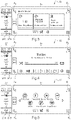
- the control touch interface 20 also comprises a display module 23 configured to display on the screen 21 by default when the vehicle is started a home configuration illustrated by the view of the figure 2 .
- the display surface 22 of the screen 21 comprises a main rectangular display zone 24 representing at least the major part of this surface, and advantageously between 80 and 100% of the latter.
- This main display area is divided into four rectangular display sub-areas of the same dimensions 24A, 24B, 24C, 24D separated from each other by two horizontal 25 and vertical 26 demarcation lines, corresponding to the two mediators of this area main display.
- the display sub-zones 24A, 24B, 24C, 24D are each dedicated to a respective category of applications (“movement” for the sub-zone 24A located at the top left, “audio-video” for the sub-zone 24B located at the top right, "communication” for the sub-field 24C located at the bottom left, and “other applications” for the sub-field 24D located at the bottom right).
- each category of applications can comprise both “on-board” type applications and “off-board” type applications.
- the display module 23 is configured so that each of these sub-zones can present two different types of displays depending on the circumstances.
- the sub-zone displays a reduced “widget” type representation of said application displaying graphic and/or textual information which can evolve dynamically under its control.
- the two upper sub-zones 24A, 24B present this first type of display (the upper left-hand zone 24A displaying a reduced representation of a GPS navigation application ensuring the guidance of the vehicle towards a predefined destination, while the upper zone on the right 24B displays a reduced representation of an audio player application operating simultaneously and playing a musical file).
- This reduced representation advantageously comprises tactile control means, such as buttons, menus, scroll bars or others, allowing the user to interact in a limited way with the application in operation.
- the upper sub-zones 24A, 24B thus each comprise three touch buttons A 1 , A 2 , A 3 and B 1 , B 2 , B 3 decked out with three respective pictograms representing the commands associated with these buttons.
- the upper left sub-zone 24A comprises a first touch button A 1 decked out with a cross-shaped pictogram allowing the selected destination to be canceled, as well as two other touch buttons A 2 and A 3 decked out respectively with pictograms in the form of "+" and "-" and used to increase or decrease the zoom level.
- the sub-zone displays a predetermined number of touch icons.
- the two lower sub-zones 24C, 24D have this second type of display and each include three touch icons C 1 , C 2 , C 3 and D 1 , D 2 , D 3 making it possible to launch three applications of the corresponding category.
- touch icons are representative of applications of the corresponding category and making it possible to launch these applications and display them over the entire main display area 24 such as than illustrated on the picture 3 representing a view of the display surface 22 of the screen 21 after pressing the icon D 1 of the lower right sub-zone 24D.
- the number of touch icons can vary according in particular to the dimensions of these display sub-zones. Preferably, this number will be between 3 and 6 so as not to overload the host configuration too much.
- the display module 23 is configured to select, automatically and according to one or more predetermined criteria, the touch icons displayed in each display sub-zone from among those associated with a predefined list of applications compatible with the driving mode in progress, stored in the memory module of the control unit.
- the icons potentially displayable in manual driving mode will be limited to those associated with applications for playing audio files.
- the or one of the criteria for selecting the icons displayed corresponds to the frequency of use of the associated applications.
- Each display sub-zone 24A, 24B, 24C, 24D also includes and regardless of the type of display in progress, a touch button A 4 , B 4 , C 4 , D 4 decked out with a pictogram representing the corresponding category (respectively and as illustrated on the figure 2 , an arrow associated with the letter N for the upper left sub-zone 24A corresponding to the "movement” category, a musical note for the upper right sub-zone 24B corresponding to the "audio-video” category, a telephone handset for the lower left sub-zone 24C corresponding to the “communication” category, and a 2 ⁇ 2 matrix made up of four squares for the lower right sub-zone 24D corresponding to the “other applications” category).
- this touch button is configured so that its actuation causes the display of this application to switch over the entire main display area 24 with a greater number of tactile control means allowing the user to interact with it in an extended manner, as illustrated on the figure 4 representing a view of the display surface 22 of the screen 21 after pressing the button B 4 decked out with the pictogram in the form of a musical note of the upper right sub-zone 24B.
- this touch button is configured so that its actuation causes the display of a sub-menu extending over the whole of the main display area 24 and allowing the user to access the all of the applications compatible with the current driving mode, as illustrated in the figure 5 representing a view of the screen 21 after pressing button D 4 decked out with the pictogram representing a 2x2 matrix consisting of four small squares.
- buttons A 4 , B 4 , C 4 , D 4 are advantageously arranged at the four corners of the main display zone 24.
- the display surface 22 of the screen 21 also advantageously comprises a side strip 27 extending vertically along one of its lateral sides (in this case, the left) .
- This vertical strip 27 has a tactile portion 27A displaying information on the current settings of the ventilation/air conditioning system and the actuation of which allows access to the settings menu of this system.
- the strip 27 also includes a touch button 27B allowing access to the menu for adjusting certain parameters of the vehicle.
- this side strip is absent and the main display zone occupies the entire display surface of the screen in its home configuration.
- this main display zone is divided in its reception configuration into a different number of display sub-zones, advantageously between 3 and 6.
Landscapes
- Engineering & Computer Science (AREA)
- Chemical & Material Sciences (AREA)
- Combustion & Propulsion (AREA)
- Transportation (AREA)
- Mechanical Engineering (AREA)
- General Engineering & Computer Science (AREA)
- Theoretical Computer Science (AREA)
- Human Computer Interaction (AREA)
- Physics & Mathematics (AREA)
- General Physics & Mathematics (AREA)
- User Interface Of Digital Computer (AREA)
- Position Input By Displaying (AREA)
Description
- La présente invention concerne d'une manière générale le domaine des interfaces de commande tactiles pour véhicules, en particulier de type automobile.
- Ces dernières années ont été marquées par l'émergence des interfaces de commande tactiles dans de nombreux domaines de la vie courante.
- Dans l'automobile, cette révolution s'est traduite notamment au niveau des tableaux de bord des véhicules dont les dispositifs d'info-divertissement intègrent désormais de telles interfaces de commande tactiles permettant de s'affranchir des façades de commande conventionnelles dotées de nombreux actionneurs mécaniques tels que boutons, molettes, curseurs, etc...
- Ces interfaces de commande tactiles comportent classiquement un écran tactile présentant une surface d'affichage, ainsi qu'un module d'affichage apte à gérer l'affichage desdites applications sur ledit écran.
- Elles permettent à l'utilisateur, et notamment au conducteur, de naviguer dans une arborescence de menus lui donnant accès à la commande du système de ventilation/climatisation du véhicule ainsi qu'à celle d'applications audio-vidéo, de navigation, de télécommunication, etc...
- Afin de faciliter la navigation de l'utilisateur dans cette arborescence, on connaît ainsi de la demande de brevet européenne
EP 2 751 650 une telle interface de commande dotée d'un écran tactile rectangulaire dont la surface d'affichage comporte une zone principale affichant la représentation d'une unique application à la fois et comprenant un bouton tactile de commande de cette application, ainsi que quatre zones périphériques s'étendant le long de ses quatre bords et se présentant sous la forme de barres contenant chacune une étiquette textuelle associée à une application respective de navigation, d'information véhicule, de divertissement et de communication. - L'écran tactile est en outre configuré pour basculer l'affichage de la zone principale depuis la représentation d'une application vers la représentation d'une autre application suite à la détection d'un geste de doigt prédéterminé.
- La période récente a également été marquée par le développement des véhicules connectés au réseau Internet, soit directement via un module de télécommunication intégré doté d'un modem (ou un modem/routeur) GSM/GPRS ou UMTS associé à une carte SIM ou USIM, soit via le Smartphone du conducteur ou d'un passager.
- Cette évolution couplée à l'apparition depuis peu de dispositifs d'assistance à la conduite aptes à gérer de manière entièrement autonome la conduite du véhicule durant de longues périodes, a eu pour conséquence de permettre à l'utilisateur, et notamment au conducteur, d'accéder à une innombrable quantité de nouvelles applications contrôlables via l'interface tactile de commande leur écran tactile.
- Cette multiplication des contenus accessibles entraine inévitablement une complexification de l'arborescence de l'interface tactile particulièrement délicate à appréhender pour le conducteur qui a tendance à s'y perdre et peut éprouver certaines difficultés à accéder rapidement à l'application désirée.
- Cela est tout particulièrement le cas pour le conducteur durant les phases de conduite manuelles durant lesquelles ce dernier doit détourner le moins possible son regard de la route.
- Le document
EP 2 955 614 divulgue une interface utilisateur et un procédé pour adapter une mise à l'échelle sémantique d'une tuile sur une unité d'affichage d'une interface utilisateur. Le documentEP 3 282 352 divulgue un procédé de fonctionnement d'un dispositif, dans lequel une interface utilisateur graphique est générée et affichée sur une surface d'affichage. Le documentEP 3 254 882 divulgue des dispositifs d'affichage et de commande multifonctionnels pour un véhicule automobile. Le documentUS2015268842 divulgue un procédé de configuration de l'interface utilisateur d'une unité de tête d'un véhicule à l'aide d'un terminal mobile. Le documentEP 2 924 551 divulgue un procédé pour fournir une interface utilisateur graphique dans un véhicule, le véhicule comprenant au moins deux fonctions relatives au véhicule. - La présente invention vise donc à rendre la navigation dans les applications disponibles plus simple, rapide et intuitive pour l'utilisateur.
- Elle propose à cet effet, une interface tactile de commande d'applications pour véhicule conformément à la revendication 1.
- L'interface tactile de commande selon l'invention propose ainsi dans sa configuration d'accueil une vue d'ensemble proposant une vue synthétique des applications en fonctionnement tout en offrant un accès direct à un nombre limité d'autres applications par catégories, de sorte à éviter le plus possible à l'utilisateur de naviguer dans des sous-menus complexes pour lancer l'application qu'il souhaite.
- Selon des caractéristiques préférées de ladite interface, prises seules ou en combinaison :
- ladite représentation réduite comprend des moyens tactiles de commande permettant à l'utilisateur d'interagir de manière limitée avec ladite application en fonctionnement ;
- le ou l'un desdits critères de sélection correspond à la fréquence d'utilisation desdites applications associées ;
- le nombre prédéterminé de dites icônes tactiles est compris entre 3 et 6 ;
- chaque sous-zone d'affichage comprend un bouton tactile affublé d'un pictogramme représentatif de la catégorie correspondante et configuré de sorte que son actionnement entraine, lorsque ladite sous-zone correspondante affiche une représentation réduite d'une application en fonctionnement, le basculement de l'affichage de cette application sur l'ensemble de ladite zone principale d'affichage ;
- ledit bouton tactile est configuré de sorte que son actionnement entraine, lorsque ladite sous-zone correspondante affiche un nombre prédéterminé d'icônes tactiles, l'affichage d'un sous-menu s'étendant sur l'ensemble de ladite zone principale d'affichage et permettant à l'utilisateur d'accéder à l'ensemble des applications compatibles avec le mode de conduite en cours ;
- le nombre de sous-zones d'affichage est compris entre 3 et 6 ; et/ou
- dans ladite configuration d'accueil, ladite surface d'affichage comprend également un bandeau latéral s'étendant verticalement le long de l'un de ses côtés latéraux et affichant des informations sur les réglages actuels du système de ventilation/climatisation dudit véhicule.
- L'invention vise également sous un second aspect un dispositif d'info-divertissement pour véhicule comportant une telle interface tactile.
- L'exposé de l'invention sera maintenant poursuivi par la description détaillée d'un exemple de réalisation, donnée ci-après à titre illustratif mais non limitatif, en référence aux dessins annexés, sur lesquels :
- la
figure 1 est un schéma fonctionnel d'un dispositif d'info-divertissement de véhicule automobile comportant une interface tactile de commande selon l'invention ; et - les
figures 2 à 5 représentent différentes vues de la surface d'affichage de l'écran de l'interface tactile. - En référence à la
figure 1 , le dispositif d'info-divertissement 1 comprend une unité de pilotage 10, une interface tactile de commande 20 implantée au niveau de la console centrale du tableau de bord et des haut-parleurs 30 reliés à cette unité de pilotage 10. - Le dispositif d'info-divertissement 1 comprend également un module de télécommunication 40 comportant un modem (ou un modem/routeur) GSM/GPRS ou UMTS associé à une carte SIM ou USIM et permettant notamment au véhicule d'accéder au réseau Internet.
- L'unité de pilotage 10 comporte un calculateur 11 doté d'un ou de plusieurs microprocesseurs interconnectés, ainsi qu'un module mémoire 12 comprenant de la mémoire non volatile de type EEPROM ou FLASH ainsi que de la mémoire volatile.
- La mémoire non volatile est destinée à stocker différents types de données telles que les paramètres de configuration de certains modules fonctionnels ainsi que des applications pré-installées dès l'origine et/ou téléchargées via une plate-forme d'applications en ligne dédiée.
- Le dispositif d'info-divertissement 10 comporte également un module de connexion 50 destiné à établir un lien de communication avec un terminal mobile via un ou plusieurs protocoles de connexion filaires (USB, IEEE1394, HDMI, etc...) et/ou sans fil (Bluetooth, Wi-Fi, etc...).
- Par « terminal mobile », on désigne ici un téléphone de type Smartphone, une tablette électronique, un PDA (Personal Digital Assistant), ou tout autre appareil électronique nomade doté d'un système d'exploitation (« Android », « IOS », « Windows Phone » ou autre) et comportant une pluralité d'applications directement intégrées à ce système d'exploitation ou bien téléchargées puis stockées dans un module mémoire.
- Ce module de connexion 50 intégre une solution de duplication ou mirroring en anglais (par exemple : Apple® CarPlay®, Google® Android Auto® ou bien encore Mirrorlink®) permettant pendant la conduite, de reproduire en temps réel respectivement sur l'interface tactile de commande 20 (avec une interface visuelle adaptée) et sur les haut-parleurs 30 l'affichage et le son générés par certaines applications hébergées sur le terminal mobile.
- Ces applications accessibles via cette solution de duplication seront associées dans la suite de cette description à l'adjectif « débarquées », par opposition aux applications intégrées au dispositif d'info-divertissement 1 du véhicule qui seront affublées de l'adjectif « embarquées ».
- L'unité de pilotage 10 gère, de manière autonome ou via les instructions transmises par l'utilisateur à l'aide de l'interface tactile de commande20, le fonctionnement de certains modules fonctionnels du véhicule (tels que notamment les modules de ventilation/climatisation ou d'assistance à la conduite) ainsi que celui des applications embarquées et débarquées disponibles.
- L'interface tactile de commande 20 comporte un écran 21 présentant une surface d'affichage rectangulaire 22 (voir
figures 2 à 5 ) dont la diagonale est avantageusement comprise entre 25 et 30 cm (soit entre 10 et 12 pouces), et étant doté d'une matrice tactile capacitive permettant d'identifier la position du doigt de l'usager en détectant les transferts de charge électrique s'opérant vers ce doigt depuis la zone de la surface d'affichage avec laquelle il est en contact. - De préférence, cette matrice est de type multipoints ce qui signifie qu'elle est capable de détecter plusieurs appuis simultanés de différents doigts de l'usager sur la surface d'affichage.
- En variante, et selon certains critères de prix, de résistance aux chocs, de précision ou de taille, la matrice tactile sera d'un type différent : résistive, infrarouge, à ondes de surface ou encore à jauges de contraintes.
- L'interface tactile de commande 20 comprend également un module d'affichage 23 configuré pour afficher sur l'écran 21 par défaut au démarrage du véhicule une configuration d'accueil illustrée par la vue de la
figure 2 . - Dans cette configuration d'accueil, la surface d'affichage 22 de l'écran 21 comprend une zone principale d'affichage rectangulaire 24 représentant au moins la majeure partie de cette surface, et avantageusement entre 80 et 100 % de celle-ci.
- Cette zone principale d'affichage est divisée en quatre sous-zones d'affichages rectangulaires de mêmes dimensions 24A, 24B, 24C, 24D séparées les unes des autres par deux lignes de démarcation horizontale 25 et verticale 26, correspondant aux deux médiatrices de cette zone principale d'affichage.
- Les sous-zones d'affichage 24A, 24B, 24C, 24D sont chacune dédiées à une catégorie respective d'applications (« déplacement » pour la sous-zone 24A située en haut à gauche, « audio-vidéo » pour la sous-zone 24B située en haut à droite, « communication » pour la sous-zone 24C située en bas à gauche, et « autres applications » pour la sous-zone 24D située en bas à droite).
- On notera que chaque catégorie d'applications peut comprendre à la fois des applications de type « embarquées » et des applications de type « débarquées ».
- Le module d'affichage 23 est configuré de sorte que chacune de ces sous-zones puisse présenter deux types d'affichages différents suivant les circonstances.
- Plus précisément, lorsqu'une application de la catégorie correspondante est en fonctionnement, la sous-zone affiche une représentation réduite de type « widget » de ladite application affichant des informations graphiques et/ou textuelles qui peuvent évoluer dynamiquement sous son contrôle.
- Sur la vue de la
figure 2 , les deux sous-zones supérieures 24A, 24B présentent ce premier type d'affichage (la zone supérieure de gauche 24A affichant une représentation réduite d'une application de navigation GPS assurant le guidage du véhicule vers une destination prédéfinie, tandis que la zone supérieure de droite 24B affiche une représentation réduite d'une application de lecture audio fonctionnant en simultané et reproduisant un fichier musical). - Cette représentation réduite comprend avantageusement des moyens tactiles de commande, tels que boutons, menus, barres de défilement ou autres, permettant à l'utilisateur d'interagir de manière limitée avec l'application en fonctionnement.
- En référence à cette
figure 2 , les sous-zones supérieures 24A, 24B comprennent ainsi chacune trois boutons tactiles A1, A2, A3 et B1, B2, B3 affublés de trois pictogrammes respectifs représentatifs des commandes associées à ces boutons. - Plus précisément, la sous-zone supérieure de gauche 24A comprend un premier bouton tactile A1 affublé d'un pictogramme en forme de croix permettant d'annuler la destination sélectionnée, ainsi que deux autres boutons tactiles A2 et A3 affublés respectivement de pictogrammes en forme de « + » et de « - » et permettant d'augmenter ou de diminuer le niveau de zoom.
- A l'inverse, lorsqu'aucune application de la catégorie correspondante n'est en fonctionnement, la sous-zone affiche un nombre prédéterminé d'icônes tactiles.
- Sur la vue de la
figure 2 , les deux sous-zones inférieures 24C, 24D présentent ce second type d'affichage et comprennent chacune trois icônes tactiles C1, C2, C3 et D1, D2, D3 permettant de lancer trois applications de la catégorie correspondante. - Ces icônes tactiles sont représentatives d'applications de la catégorie correspondante et permettant de lancer ces applications et de les afficher sur la totalité de la zone principale d'affichage 24 tel qu'illustré sur la
figure 3 représentant une vue de la surface d'affichage 22 de l'écran 21 après un appui sur l'icône D1 de la sous-zone inférieure droite 24D. - En variante, le nombre d'icônes tactiles peut varier en fonction notamment des dimensions de ces sous-zones d'affichage. De préférence, ce nombre sera compris entre 3 et 6 afin de ne pas trop surcharger la configuration d'accueil.
- Le module d'affichage 23 est configuré pour sélectionner, de manière automatique et suivant un ou plusieurs critères prédéterminés, les icônes tactiles affichées dans chaque sous-zone d'affichage parmi celles associées à une liste prédéfinie d'applications compatibles avec le mode de conduite en cours, stockée dans le module mémoire de l'unité de pilotage.
- Par exemple, dans la catégorie « audio-vidéo », les icônes potentiellement affichables en mode de conduite manuel seront limitées à celles associées à des applications de lecture de fichiers audio.
- Avantageusement, le ou l'un des critères de sélection des icônes affichées correspond à la fréquence d'utilisation des applications associées.
- Chaque sous-zone d'affichage 24A, 24B, 24C, 24D comprend également et quel que soit le type d'affichage en cours, un bouton tactile A4, B4, C4, D4 affublé d'un pictogramme représentatif de la catégorie correspondante (respectivement et tel qu'illustré sur la
figure 2 , une flèche associé à la lettre N pour la sous-zone supérieure gauche 24A correspondant à la catégorie « déplacement », une note de musique pour la sous-zone supérieure droite 24B correspondant à la catégorie « audio-vidéo », un combiné téléphonique pour la sous-zone inférieure gauche 24C correspondant à la catégorie « communication », et une matrice 2x2 constituée de quatre carrés pour la sous-zone inférieure droite 24D correspondant à la catégorie « autres applications »). - Lorsque la sous-zone d'affichage correspondante affiche une représentation réduite de type « widget » de l'application en fonctionnement (cas des deux sous-zones supérieures 24A, 24B sur la
figure 2 ), ce bouton tactile est configuré de sorte que son actionnement entraine le basculement de l'affichage de cette application sur l'ensemble de la zone principale d'affichage 24 avec un nombre plus important de moyens tactiles de contrôle permettant à l'utilisateur d'interagir de manière étendue avec elle, tel qu'illustré sur lafigure 4 représentant une vue de la surface d'affichage 22 de l'écran 21 après un appui sur le bouton B4 affublé du pictogramme en forme de note de musique de la sous-zone supérieure droite 24B. - A l'inverse, lorsque la sous-zone d'affichage correspondante affiche un nombre prédéterminé d'icônes tactiles (cas des deux sous-zones inférieures sur la
figure 2 ), ce bouton tactile est configuré de sorte que son actionnement entraine, l'affichage d'un sous-menu s'étendant sur l'ensemble de la zone principale d'affichage 24 et permettant à l'utilisateur d'accéder à l'ensemble des applications compatibles avec le mode de conduite en cours, tel qu'illustré sur lafigure 5 représentant une vue de l'écran 21 après un appui sur le bouton D4 affublé du pictogramme représentant une matrice 2x2 constituée de quatre petits carrés. - Pour une meilleure ergonomie d'utilisation, ces quatre boutons A4, B4, C4, D4 sont avantageusement disposés aux quatre coins de la zone principale d'affichage 24.
- Dans sa configuration d'accueil, la surface d'affichage 22 de l'écran 21 comprend également de manière avantageuse un bandeau latéral 27 s'étendant verticalement le long de l'un de ses côtés latéraux (en l'occurrence, le gauche).
- Ce bandeau vertical 27 présente une portion tactile 27A affichant des informations sur les réglages actuels du système de ventilation/climatisation et dont l'actionnement permettant d'accéder au menu de paramétrage de ce système.
- Le bandeau 27 comprend également un bouton tactile 27B permettant d'accéder au menu de réglage de certains paramètres du véhicule.
- Selon des variantes de réalisation non représentées, ce bandeau latéral est absent et la zone principale d'affichage occupe l'intégralité de la surface d'affichage de l'écran dans sa configuration d'accueil.
- Selon d'autres variantes de réalisation non représentées, cette zone principale d'affichage est divisée dans sa configuration d'accueil en un nombre différent de sous-zones d'affichages, compris avantageusement entre 3 et 6.
- Bien entendu, la présente invention ne se limite pas aux formes de réalisation décrites et représentées, mais englobe également toutes les variantes d'exécution à la portée de l'homme du métier.
Claims (9)
- Interface tactile de commande d'applications pour véhicule comportant un écran tactile (21) présentant une surface d'affichage (22), ainsi qu'un module d'affichage (23) apte à gérer l'affichage desdites applications sur ledit écran (21) ;dans lequel ledit module d'affichage (23) est configuré pour afficher sur ledit écran (21) une configuration d'accueil dans laquelle ladite surface d'affichage (22) comprend une zone principale d'affichage (24) représentant au moins la majeure partie de cette surface d'affichage (22) et étant divisée en plusieurs sous-zones d'affichage (24A, 24B, 24C, 24D) dédiées chacune à une catégorie respective d'applications,ledit module d'affichage (23) étant en outre configuré de sorte que chaque dite sous-zone d'affichage (24A, 24B, 24C, 24D) affiche :▪ lorsqu'une application de la catégorie correspondante est en fonctionnement, une représentation réduite de ladite application, et▪ lorsqu'aucune application de la catégorie correspondante n'est en fonctionnement, un nombre prédéterminé d'icônes tactiles (C1, C2, C3, D1, D2, D3) représentatives d'applications de la catégorie correspondante et permettant de lancer ces applications et de les afficher sur la totalité de ladite zone principale d'affichage (24),et dans lequel ledit module d'affichage (23) est configuré pour sélectionner, de manière automatique et suivant un ou plusieurs critères prédéterminés, lesdites icônes tactiles (C1, C2, C3, D1, D2, D3) parmi celles associées à une liste prédéfinie d'applications compatibles avec le mode de conduite en cours.
- Interface tactile selon la revendication 1, caractérisée en ce que ladite représentation réduite comprend des moyens tactiles de commande (A1, A2, A3, B1, B2, B3) permettant à l'utilisateur d'interagir de manière limitée avec ladite application en fonctionnement.
- Interface tactile selon l'une des revendications 1 ou 2, caractérisée en ce que le ou l'un desdits critères de sélection correspond à la fréquence d'utilisation desdites applications associées.
- Interface tactile selon l'une des revendications 1 à 3, caractérisée en ce que le nombre prédéterminé de dites icônes tactiles (C1, C2, C3, D1, D2, D3) est compris entre 3 et 6.
- Interface tactile selon l'une des revendications 1 à 4, caractérisée en ce que chaque sous-zone d'affichage (24A, 24B, 24C, 24D) comprend un bouton tactile (A4, B4, C4, D4) affublé d'un pictogramme représentatif de la catégorie correspondante et configuré de sorte que son actionnement entraine, lorsque ladite sous-zone correspondante (24A, 24B) affiche une représentation réduite d'une application en fonctionnement, le basculement de l'affichage de cette application sur l'ensemble de ladite zone principale d'affichage (24).
- Interface tactile selon la revendication 5, caractérisée en ce que ledit bouton tactile (A4, B4, C4, D4) est configuré de sorte que son actionnement entraine, lorsque ladite sous-zone correspondante (24C, 24D) affiche un nombre prédéterminé d'icônes tactiles (C1, C2, C3, D1, D2, D3), l'affichage d'un sous-menu s'étendant sur l'ensemble de ladite zone principale d'affichage (24) et permettant à l'utilisateur d'accéder à l'ensemble des applications compatibles avec le mode de conduite en cours.
- Interface tactile selon l'une des revendications 1 à 6, caractérisée en ce que le nombre de sous-zones d'affichage (24A, 24B, 24C, 24D) est compris entre 3 et 6.
- Interface tactile selon l'une des revendications 1 à 7, caractérisée en ce que dans ladite configuration d'accueil, ladite surface d'affichage (22) comprend également un bandeau latéral (27) s'étendant verticalement le long de l'un de ses côtés latéraux et affichant des informations sur les réglages actuels du système de ventilation/climatisation dudit véhicule.
- Dispositif d'info-divertissement pour véhicule comportant une interface tactile selon l'une des revendications 1 à 8.
Applications Claiming Priority (2)
| Application Number | Priority Date | Filing Date | Title |
|---|---|---|---|
| FR1852103A FR3078797B1 (fr) | 2018-03-12 | 2018-03-12 | Interface tactile de commande d’applications pour vehicule. |
| PCT/FR2019/050307 WO2019175484A1 (fr) | 2018-03-12 | 2019-02-13 | Interface tactile de commande d'applications pour vehicule |
Publications (2)
| Publication Number | Publication Date |
|---|---|
| EP3765951A1 EP3765951A1 (fr) | 2021-01-20 |
| EP3765951B1 true EP3765951B1 (fr) | 2022-06-22 |
Family
ID=62017558
Family Applications (1)
| Application Number | Title | Priority Date | Filing Date |
|---|---|---|---|
| EP19711146.1A Active EP3765951B1 (fr) | 2018-03-12 | 2019-02-13 | Interface tactile de commande d'applications pour vehicule |
Country Status (3)
| Country | Link |
|---|---|
| EP (1) | EP3765951B1 (fr) |
| FR (1) | FR3078797B1 (fr) |
| WO (1) | WO2019175484A1 (fr) |
Families Citing this family (1)
| Publication number | Priority date | Publication date | Assignee | Title |
|---|---|---|---|---|
| FR3145051B1 (fr) * | 2023-01-16 | 2024-11-29 | Psa Automobiles Sa | Procédé et dispositif de contrôle d’un système d’affichage embarqué dans un véhicule. |
Family Cites Families (6)
| Publication number | Priority date | Publication date | Assignee | Title |
|---|---|---|---|---|
| EP2751650B1 (fr) | 2011-08-31 | 2017-11-15 | Qoros Automotive Co. Ltd. | Système interactif pour véhicule |
| KR101580850B1 (ko) * | 2014-03-18 | 2015-12-30 | 주식회사 오비고 | 모바일 단말 장치를 사용하여 차량의 헤드 유닛의 사용자 인터페이스를 동적으로 구성하는 방법, 이를 사용한 헤드 유닛 및 컴퓨터 판독 가능한 기록 매체 |
| EP2924551B1 (fr) * | 2014-03-27 | 2018-12-05 | Volkswagen Aktiengesellschaft | Procédé et dispositif de préparation d'une interface utilisateur graphique dans un véhicule |
| DE102014211342A1 (de) * | 2014-06-13 | 2015-12-17 | Volkswagen Aktiengesellschaft | Anwenderschnittstelle und Verfahren zum Anpassen einer semantischen Skalierung einer Kachel |
| ES2893723T3 (es) * | 2016-04-22 | 2022-02-09 | Volkswagen Ag | Pantalla multifuncional y dispositivo de operación para un vehículo de motor |
| DE102016114669A1 (de) * | 2016-08-08 | 2018-02-08 | Volkswagen Aktiengesellschaft | Verfahren und Bedienvorrichtung zum Bedienen einer Einrichtung |
-
2018
- 2018-03-12 FR FR1852103A patent/FR3078797B1/fr not_active Expired - Fee Related
-
2019
- 2019-02-13 EP EP19711146.1A patent/EP3765951B1/fr active Active
- 2019-02-13 WO PCT/FR2019/050307 patent/WO2019175484A1/fr not_active Ceased
Also Published As
| Publication number | Publication date |
|---|---|
| WO2019175484A1 (fr) | 2019-09-19 |
| FR3078797B1 (fr) | 2020-02-14 |
| EP3765951A1 (fr) | 2021-01-20 |
| FR3078797A1 (fr) | 2019-09-13 |
Similar Documents
| Publication | Publication Date | Title |
|---|---|---|
| CN102483680B (zh) | 用于显示信息的方法和设备 | |
| EP1434412B1 (fr) | Procédé de navigation optimisée dans les menus d'affichage d'un terminal mobile et terminal mobile associé | |
| EP1148525B1 (fr) | Dispositif de commande de fonction comprenant au moins un sélecteur | |
| CN110382280A (zh) | 用于控制车辆信息系统的系统和方法 | |
| CN103930859B (zh) | 用于显示信息和用于操作电子装置的方法与设备 | |
| EP2778885A1 (fr) | Procédé de traitement d'un geste composé, dispositif et terminal d'utilisateur associés | |
| EP1759912B1 (fr) | Centrale de commande de bord pour véhicule automobile | |
| EP2614433A1 (fr) | Terminal mobile comportant une interface homme-machine | |
| KR102016650B1 (ko) | 장치를 조작하기 위한 방법 및 조작 장치 | |
| CN104035696B (zh) | 车载消息中心在触控显示界面上的显示方法及装置 | |
| FR2969781A1 (fr) | Interface homme machine comprenant une surface tactile de commande sensible a des glissements pour faire defiler les elements d'une liste | |
| EP2898391B1 (fr) | Methode de selection de mode d'interactivite | |
| WO2006027434A2 (fr) | Dispositif de selection tactile | |
| FR2993975A1 (fr) | Procede d'affichage de la situation geographique d'un aeronef | |
| WO2019175484A1 (fr) | Interface tactile de commande d'applications pour vehicule | |
| EP2161650B1 (fr) | Procédé de configuraniton automatique de touches de commande et dispositif de controle de moyens d'affichage, notamment pour aéronef | |
| FR2915017A1 (fr) | Dispositif de commande a pave tactile pour l'affichage de donnees sur un ecran de visualisation pour vehicule automobile. | |
| EP3856559B1 (fr) | Dispositif d'affichage à écran tactile affichant dans des zones indépendantes des pages d'imagettes associées à des fonctionnalités d'un véhicule | |
| FR3096019A1 (fr) | Procédé et système de contrôle d’affichage dans un véhicule | |
| EP0645604B1 (fr) | Dispositif d'édition d'informations pour calculateur notamment d'aide à la navigation de véhicule automobile | |
| EP2561673A1 (fr) | Système d'enregistrement et de consultation de messages vocaux | |
| FR3096018A1 (fr) | Procédé et système de contrôle d’un dispositif d’affichage dans un véhicule | |
| FR3147883A1 (fr) | Dispositif d’interaction tactile pour véhicule affichant deux interfaces graphiques tactiles superposées | |
| FR2966261A1 (fr) | Procede de navigation au sein d'un terminal mobile, et terminal incluant le procede | |
| FR3103592A1 (fr) | Interface tactile de commande d’un système de ventilation/climatisation de véhicule |
Legal Events
| Date | Code | Title | Description |
|---|---|---|---|
| STAA | Information on the status of an ep patent application or granted ep patent |
Free format text: STATUS: UNKNOWN |
|
| STAA | Information on the status of an ep patent application or granted ep patent |
Free format text: STATUS: THE INTERNATIONAL PUBLICATION HAS BEEN MADE |
|
| PUAI | Public reference made under article 153(3) epc to a published international application that has entered the european phase |
Free format text: ORIGINAL CODE: 0009012 |
|
| STAA | Information on the status of an ep patent application or granted ep patent |
Free format text: STATUS: REQUEST FOR EXAMINATION WAS MADE |
|
| 17P | Request for examination filed |
Effective date: 20200907 |
|
| AK | Designated contracting states |
Kind code of ref document: A1 Designated state(s): AL AT BE BG CH CY CZ DE DK EE ES FI FR GB GR HR HU IE IS IT LI LT LU LV MC MK MT NL NO PL PT RO RS SE SI SK SM TR |
|
| AX | Request for extension of the european patent |
Extension state: BA ME |
|
| DAV | Request for validation of the european patent (deleted) | ||
| DAX | Request for extension of the european patent (deleted) | ||
| GRAP | Despatch of communication of intention to grant a patent |
Free format text: ORIGINAL CODE: EPIDOSNIGR1 |
|
| STAA | Information on the status of an ep patent application or granted ep patent |
Free format text: STATUS: GRANT OF PATENT IS INTENDED |
|
| RIC1 | Information provided on ipc code assigned before grant |
Ipc: G06F 3/0482 20130101ALI20220203BHEP Ipc: B60K 37/06 20060101ALI20220203BHEP Ipc: B60K 35/00 20060101ALI20220203BHEP Ipc: G06F 3/0488 20130101AFI20220203BHEP |
|
| INTG | Intention to grant announced |
Effective date: 20220218 |
|
| GRAS | Grant fee paid |
Free format text: ORIGINAL CODE: EPIDOSNIGR3 |
|
| GRAA | (expected) grant |
Free format text: ORIGINAL CODE: 0009210 |
|
| STAA | Information on the status of an ep patent application or granted ep patent |
Free format text: STATUS: THE PATENT HAS BEEN GRANTED |
|
| AK | Designated contracting states |
Kind code of ref document: B1 Designated state(s): AL AT BE BG CH CY CZ DE DK EE ES FI FR GB GR HR HU IE IS IT LI LT LU LV MC MK MT NL NO PL PT RO RS SE SI SK SM TR |
|
| REG | Reference to a national code |
Ref country code: GB Ref legal event code: FG4D Free format text: NOT ENGLISH |
|
| REG | Reference to a national code |
Ref country code: CH Ref legal event code: EP |
|
| REG | Reference to a national code |
Ref country code: DE Ref legal event code: R096 Ref document number: 602019016154 Country of ref document: DE |
|
| REG | Reference to a national code |
Ref country code: AT Ref legal event code: REF Ref document number: 1500201 Country of ref document: AT Kind code of ref document: T Effective date: 20220715 |
|
| REG | Reference to a national code |
Ref country code: IE Ref legal event code: FG4D Free format text: LANGUAGE OF EP DOCUMENT: FRENCH Ref country code: DE Ref legal event code: R084 Ref document number: 602019016154 Country of ref document: DE |
|
| REG | Reference to a national code |
Ref country code: GB Ref legal event code: 746 Effective date: 20220818 |
|
| REG | Reference to a national code |
Ref country code: LT Ref legal event code: MG9D |
|
| REG | Reference to a national code |
Ref country code: NL Ref legal event code: MP Effective date: 20220622 |
|
| PG25 | Lapsed in a contracting state [announced via postgrant information from national office to epo] |
Ref country code: SE Free format text: LAPSE BECAUSE OF FAILURE TO SUBMIT A TRANSLATION OF THE DESCRIPTION OR TO PAY THE FEE WITHIN THE PRESCRIBED TIME-LIMIT Effective date: 20220622 Ref country code: NO Free format text: LAPSE BECAUSE OF FAILURE TO SUBMIT A TRANSLATION OF THE DESCRIPTION OR TO PAY THE FEE WITHIN THE PRESCRIBED TIME-LIMIT Effective date: 20220922 Ref country code: LT Free format text: LAPSE BECAUSE OF FAILURE TO SUBMIT A TRANSLATION OF THE DESCRIPTION OR TO PAY THE FEE WITHIN THE PRESCRIBED TIME-LIMIT Effective date: 20220622 Ref country code: HR Free format text: LAPSE BECAUSE OF FAILURE TO SUBMIT A TRANSLATION OF THE DESCRIPTION OR TO PAY THE FEE WITHIN THE PRESCRIBED TIME-LIMIT Effective date: 20220622 Ref country code: GR Free format text: LAPSE BECAUSE OF FAILURE TO SUBMIT A TRANSLATION OF THE DESCRIPTION OR TO PAY THE FEE WITHIN THE PRESCRIBED TIME-LIMIT Effective date: 20220923 Ref country code: FI Free format text: LAPSE BECAUSE OF FAILURE TO SUBMIT A TRANSLATION OF THE DESCRIPTION OR TO PAY THE FEE WITHIN THE PRESCRIBED TIME-LIMIT Effective date: 20220622 Ref country code: BG Free format text: LAPSE BECAUSE OF FAILURE TO SUBMIT A TRANSLATION OF THE DESCRIPTION OR TO PAY THE FEE WITHIN THE PRESCRIBED TIME-LIMIT Effective date: 20220922 |
|
| REG | Reference to a national code |
Ref country code: AT Ref legal event code: MK05 Ref document number: 1500201 Country of ref document: AT Kind code of ref document: T Effective date: 20220622 |
|
| PG25 | Lapsed in a contracting state [announced via postgrant information from national office to epo] |
Ref country code: RS Free format text: LAPSE BECAUSE OF FAILURE TO SUBMIT A TRANSLATION OF THE DESCRIPTION OR TO PAY THE FEE WITHIN THE PRESCRIBED TIME-LIMIT Effective date: 20220622 Ref country code: LV Free format text: LAPSE BECAUSE OF FAILURE TO SUBMIT A TRANSLATION OF THE DESCRIPTION OR TO PAY THE FEE WITHIN THE PRESCRIBED TIME-LIMIT Effective date: 20220622 |
|
| PG25 | Lapsed in a contracting state [announced via postgrant information from national office to epo] |
Ref country code: NL Free format text: LAPSE BECAUSE OF FAILURE TO SUBMIT A TRANSLATION OF THE DESCRIPTION OR TO PAY THE FEE WITHIN THE PRESCRIBED TIME-LIMIT Effective date: 20220622 |
|
| PG25 | Lapsed in a contracting state [announced via postgrant information from national office to epo] |
Ref country code: SM Free format text: LAPSE BECAUSE OF FAILURE TO SUBMIT A TRANSLATION OF THE DESCRIPTION OR TO PAY THE FEE WITHIN THE PRESCRIBED TIME-LIMIT Effective date: 20220622 Ref country code: SK Free format text: LAPSE BECAUSE OF FAILURE TO SUBMIT A TRANSLATION OF THE DESCRIPTION OR TO PAY THE FEE WITHIN THE PRESCRIBED TIME-LIMIT Effective date: 20220622 Ref country code: RO Free format text: LAPSE BECAUSE OF FAILURE TO SUBMIT A TRANSLATION OF THE DESCRIPTION OR TO PAY THE FEE WITHIN THE PRESCRIBED TIME-LIMIT Effective date: 20220622 Ref country code: PT Free format text: LAPSE BECAUSE OF FAILURE TO SUBMIT A TRANSLATION OF THE DESCRIPTION OR TO PAY THE FEE WITHIN THE PRESCRIBED TIME-LIMIT Effective date: 20221024 Ref country code: ES Free format text: LAPSE BECAUSE OF FAILURE TO SUBMIT A TRANSLATION OF THE DESCRIPTION OR TO PAY THE FEE WITHIN THE PRESCRIBED TIME-LIMIT Effective date: 20220622 Ref country code: EE Free format text: LAPSE BECAUSE OF FAILURE TO SUBMIT A TRANSLATION OF THE DESCRIPTION OR TO PAY THE FEE WITHIN THE PRESCRIBED TIME-LIMIT Effective date: 20220622 Ref country code: CZ Free format text: LAPSE BECAUSE OF FAILURE TO SUBMIT A TRANSLATION OF THE DESCRIPTION OR TO PAY THE FEE WITHIN THE PRESCRIBED TIME-LIMIT Effective date: 20220622 Ref country code: AT Free format text: LAPSE BECAUSE OF FAILURE TO SUBMIT A TRANSLATION OF THE DESCRIPTION OR TO PAY THE FEE WITHIN THE PRESCRIBED TIME-LIMIT Effective date: 20220622 |
|
| PG25 | Lapsed in a contracting state [announced via postgrant information from national office to epo] |
Ref country code: PL Free format text: LAPSE BECAUSE OF FAILURE TO SUBMIT A TRANSLATION OF THE DESCRIPTION OR TO PAY THE FEE WITHIN THE PRESCRIBED TIME-LIMIT Effective date: 20220622 Ref country code: IS Free format text: LAPSE BECAUSE OF FAILURE TO SUBMIT A TRANSLATION OF THE DESCRIPTION OR TO PAY THE FEE WITHIN THE PRESCRIBED TIME-LIMIT Effective date: 20221022 |
|
| REG | Reference to a national code |
Ref country code: DE Ref legal event code: R097 Ref document number: 602019016154 Country of ref document: DE |
|
| PG25 | Lapsed in a contracting state [announced via postgrant information from national office to epo] |
Ref country code: AL Free format text: LAPSE BECAUSE OF FAILURE TO SUBMIT A TRANSLATION OF THE DESCRIPTION OR TO PAY THE FEE WITHIN THE PRESCRIBED TIME-LIMIT Effective date: 20220622 |
|
| PG25 | Lapsed in a contracting state [announced via postgrant information from national office to epo] |
Ref country code: DK Free format text: LAPSE BECAUSE OF FAILURE TO SUBMIT A TRANSLATION OF THE DESCRIPTION OR TO PAY THE FEE WITHIN THE PRESCRIBED TIME-LIMIT Effective date: 20220622 |
|
| PLBE | No opposition filed within time limit |
Free format text: ORIGINAL CODE: 0009261 |
|
| STAA | Information on the status of an ep patent application or granted ep patent |
Free format text: STATUS: NO OPPOSITION FILED WITHIN TIME LIMIT |
|
| 26N | No opposition filed |
Effective date: 20230323 |
|
| PG25 | Lapsed in a contracting state [announced via postgrant information from national office to epo] |
Ref country code: SI Free format text: LAPSE BECAUSE OF FAILURE TO SUBMIT A TRANSLATION OF THE DESCRIPTION OR TO PAY THE FEE WITHIN THE PRESCRIBED TIME-LIMIT Effective date: 20220622 |
|
| PG25 | Lapsed in a contracting state [announced via postgrant information from national office to epo] |
Ref country code: MC Free format text: LAPSE BECAUSE OF FAILURE TO SUBMIT A TRANSLATION OF THE DESCRIPTION OR TO PAY THE FEE WITHIN THE PRESCRIBED TIME-LIMIT Effective date: 20220622 |
|
| REG | Reference to a national code |
Ref country code: CH Ref legal event code: PL |
|
| REG | Reference to a national code |
Ref country code: BE Ref legal event code: MM Effective date: 20230228 |
|
| PG25 | Lapsed in a contracting state [announced via postgrant information from national office to epo] |
Ref country code: LU Free format text: LAPSE BECAUSE OF NON-PAYMENT OF DUE FEES Effective date: 20230213 Ref country code: LI Free format text: LAPSE BECAUSE OF NON-PAYMENT OF DUE FEES Effective date: 20230228 Ref country code: CH Free format text: LAPSE BECAUSE OF NON-PAYMENT OF DUE FEES Effective date: 20230228 |
|
| REG | Reference to a national code |
Ref country code: IE Ref legal event code: MM4A |
|
| PG25 | Lapsed in a contracting state [announced via postgrant information from national office to epo] |
Ref country code: IT Free format text: LAPSE BECAUSE OF FAILURE TO SUBMIT A TRANSLATION OF THE DESCRIPTION OR TO PAY THE FEE WITHIN THE PRESCRIBED TIME-LIMIT Effective date: 20220622 Ref country code: IE Free format text: LAPSE BECAUSE OF NON-PAYMENT OF DUE FEES Effective date: 20230213 |
|
| PG25 | Lapsed in a contracting state [announced via postgrant information from national office to epo] |
Ref country code: BE Free format text: LAPSE BECAUSE OF NON-PAYMENT OF DUE FEES Effective date: 20230228 |
|
| REG | Reference to a national code |
Ref country code: DE Ref legal event code: R081 Ref document number: 602019016154 Country of ref document: DE Owner name: STELLANTIS AUTO SAS, FR Free format text: FORMER OWNER: PSA AUTOMOBILES SA, POISSY, FR |
|
| PG25 | Lapsed in a contracting state [announced via postgrant information from national office to epo] |
Ref country code: BG Free format text: LAPSE BECAUSE OF FAILURE TO SUBMIT A TRANSLATION OF THE DESCRIPTION OR TO PAY THE FEE WITHIN THE PRESCRIBED TIME-LIMIT Effective date: 20220622 |
|
| PG25 | Lapsed in a contracting state [announced via postgrant information from national office to epo] |
Ref country code: BG Free format text: LAPSE BECAUSE OF FAILURE TO SUBMIT A TRANSLATION OF THE DESCRIPTION OR TO PAY THE FEE WITHIN THE PRESCRIBED TIME-LIMIT Effective date: 20220622 |
|
| PG25 | Lapsed in a contracting state [announced via postgrant information from national office to epo] |
Ref country code: CY Free format text: LAPSE BECAUSE OF FAILURE TO SUBMIT A TRANSLATION OF THE DESCRIPTION OR TO PAY THE FEE WITHIN THE PRESCRIBED TIME-LIMIT; INVALID AB INITIO Effective date: 20190213 |
|
| PG25 | Lapsed in a contracting state [announced via postgrant information from national office to epo] |
Ref country code: HU Free format text: LAPSE BECAUSE OF FAILURE TO SUBMIT A TRANSLATION OF THE DESCRIPTION OR TO PAY THE FEE WITHIN THE PRESCRIBED TIME-LIMIT; INVALID AB INITIO Effective date: 20190213 |
|
| PG25 | Lapsed in a contracting state [announced via postgrant information from national office to epo] |
Ref country code: TR Free format text: LAPSE BECAUSE OF FAILURE TO SUBMIT A TRANSLATION OF THE DESCRIPTION OR TO PAY THE FEE WITHIN THE PRESCRIBED TIME-LIMIT Effective date: 20220622 |
|
| PGFP | Annual fee paid to national office [announced via postgrant information from national office to epo] |
Ref country code: GB Payment date: 20260121 Year of fee payment: 8 |
|
| PGFP | Annual fee paid to national office [announced via postgrant information from national office to epo] |
Ref country code: DE Payment date: 20260121 Year of fee payment: 8 |
|
| PGFP | Annual fee paid to national office [announced via postgrant information from national office to epo] |
Ref country code: FR Payment date: 20260121 Year of fee payment: 8 |