EP3754518A1 - Identifizierung und empfehlung von dateiinhaltssegmenten - Google Patents
Identifizierung und empfehlung von dateiinhaltssegmenten Download PDFInfo
- Publication number
- EP3754518A1 EP3754518A1 EP20175645.9A EP20175645A EP3754518A1 EP 3754518 A1 EP3754518 A1 EP 3754518A1 EP 20175645 A EP20175645 A EP 20175645A EP 3754518 A1 EP3754518 A1 EP 3754518A1
- Authority
- EP
- European Patent Office
- Prior art keywords
- segment
- file
- user
- determining
- client device
- Prior art date
- Legal status (The legal status is an assumption and is not a legal conclusion. Google has not performed a legal analysis and makes no representation as to the accuracy of the status listed.)
- Ceased
Links
Images









Classifications
-
- G—PHYSICS
- G06—COMPUTING OR CALCULATING; COUNTING
- G06F—ELECTRIC DIGITAL DATA PROCESSING
- G06F16/00—Information retrieval; Database structures therefor; File system structures therefor
- G06F16/40—Information retrieval; Database structures therefor; File system structures therefor of multimedia data, e.g. slideshows comprising image and additional audio data
- G06F16/48—Retrieval characterised by using metadata, e.g. metadata not derived from the content or metadata generated manually
-
- G—PHYSICS
- G06—COMPUTING OR CALCULATING; COUNTING
- G06F—ELECTRIC DIGITAL DATA PROCESSING
- G06F16/00—Information retrieval; Database structures therefor; File system structures therefor
- G06F16/10—File systems; File servers
- G06F16/11—File system administration, e.g. details of archiving or snapshots
- G06F16/122—File system administration, e.g. details of archiving or snapshots using management policies
-
- G—PHYSICS
- G06—COMPUTING OR CALCULATING; COUNTING
- G06F—ELECTRIC DIGITAL DATA PROCESSING
- G06F16/00—Information retrieval; Database structures therefor; File system structures therefor
- G06F16/10—File systems; File servers
- G06F16/17—Details of further file system functions
- G06F16/178—Techniques for file synchronisation in file systems
-
- G—PHYSICS
- G06—COMPUTING OR CALCULATING; COUNTING
- G06V—IMAGE OR VIDEO RECOGNITION OR UNDERSTANDING
- G06V20/00—Scenes; Scene-specific elements
- G06V20/40—Scenes; Scene-specific elements in video content
- G06V20/49—Segmenting video sequences, i.e. computational techniques such as parsing or cutting the sequence, low-level clustering or determining units such as shots or scenes
-
- G—PHYSICS
- G10—MUSICAL INSTRUMENTS; ACOUSTICS
- G10L—SPEECH ANALYSIS TECHNIQUES OR SPEECH SYNTHESIS; SPEECH RECOGNITION; SPEECH OR VOICE PROCESSING TECHNIQUES; SPEECH OR AUDIO CODING OR DECODING
- G10L15/00—Speech recognition
- G10L15/26—Speech to text systems
Definitions
- ShareFile® offered by Citrix Systems, Inc., of Fort Lauderdale, FL, is one example of a system that provides such capabilities.
- At least one computing device performs a method involving determining at least first and second segments of content represented by a first file, determining first data corresponding to occasions on which the first segment has been previously accessed, and determining second data corresponding to occasions on which the second segment has been previously accessed. Based at least in part on the first data and the second data, it is determined that the first segment is likely more relevant to a first user than the second segment.
- a system includes at least one processor and at least one computer-readable medium.
- the at least one computer-readable medium is encoded with instructions which, when executed by the at least one processor, cause the system to determine at least first and second segments of content represented by a first file, to determine first data corresponding to occasions on which the first segment has been previously accessed, to determine second data corresponding to occasions on which the second segment has been previously accessed, and to determine, based at least in part on the first data and the second data, that the first segment is likely more relevant to a first user than the second segment.
- At least one computing device performs a method involving decoding at least one first payload of a first media file to determine at least first un-encoded data representing audio, and determining first text corresponding to at least a portion of the audio. At least first and second segments of media content represented by the first media file are determined based at least in part on the first text, and a second media file that includes at least one second payload that represents the first segment but not the second segment is generated.
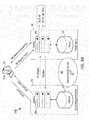
- FIGS. 1A-C show example embodiments of a file segment management system (FSMS) 102 that may be used to implement various aspects of the present disclosure.
- FSMS file segment management system
- FIGS. 1A-C show example embodiments of a file segment management system (FSMS) 102 that may be used to implement various aspects of the present disclosure.
- the illustrated examples show the FSMS 102 as including just three servers, it should be appreciated that the FSMS 102 may include any number of servers (including only a single server) as well as any number of additional or different components, such as one or more databases, other network components, etc.
- the inventors have recognized and appreciated that that some users may not want or require significant portions of some files. For example, for large video files available to a large population of a business enterprise, engineers may be primarily interested in certain segments of the video relating to technical topics whereas sales personnel may be primarily interested in other segments of the video relating to market analysis and pricing.
- the FSMS 102 may advantageously allow discrete portions of a file 104 to be readily identified and transferred between a client device 106 operated by a user 108 and a file repository, e.g., a file sharing system included within or associated with the FSMS 102, thus minimizing the bandwidth required to transfer relevant content between the client device 106 and the repository.
- a file repository e.g., a file sharing system included within or associated with the FSMS 102
- the described embodiments may be particularly useful for managing the transfer of very large media files, such as video files (e.g., MP4s), they may also be applicable to smaller files that represent other content which can be visually and/or audibly presented for human consumption, such as audio files (e.g., MP3s), desktop publishing files (e.g., PDFs), etc.
- FIG. 1A illustrates an example embodiment of the FSMS 102 in which one or more segments of content represented by the file 104 that are most likely to be relevant to the user 108 may be identified by evaluating how often and/or extensively the various content segments of the file 104, e.g., segments 110 and 112 shown in FIG. 1A , have been previously accessed.
- the FSMS 102 may, at a step 114, determine at least the first segment 110 and the second segment 114 of content represented in the file 104.
- the first and second segments may correspond to respective portions of a video represented by an MP4 file of the like.
- the video may also include many more segments in addition to the first segment 110 and the second segment 112 referenced in FIG. 1A .
- the respective segments of content may have been identified in any of numerous ways prior to the step 114.
- the segments 110, 112 may, at least in part, have been identified automatically by analysis of a transcript of audio represented in the file 104.
- the segments 110, 112 may have been identified by an author or designated custodian of the file 104.
- the segments 110, 112 may have been identified based on "tags" applied to portions of the content by one or more individuals while they were previously accessing the file 104.
- the FSMS 102 may determine at least two such segments of the content represented in the file 104 for further analysis.
- the FSMS 102 may determine data corresponding to occasions on which each of the first and second segments 110, 112, and perhaps other segments as well, have been previously accessed, e.g., viewed or listened to, by one or more individuals.
- the FSMS 102 may, for example, consult a database (not shown in FIG. 1A ) that includes records indicating the frequency and/or extent to which various individuals have accessed the different segments of the content. Examples of techniques for collecting such historical access data are described in more detail below.
- the database may additionally correlate the historical access data with one or more characteristics of the individuals who accessed the respective segments, such as the location of the individuals at the time of access and/or demographic information about the individuals, such as their job titles, age, sex, nationality, languages spoken, etc.
- the FSMS 102 may determine, based at least in part on the historical access data, one or more segments of the content that are likely to be of the most interest to the user 108.
- the segment(s) that have been accessed (e.g., viewed or listened to) most often and/or extensively by other individuals, regardless of their locations and/or demographics, may be determined to be likely more relevant to the user 108 than the other segments.
- the segment(s) so identified may thus be considered the most "popular" segment(s) for the overall population of individuals who have accessed at least a portion of the file 104.
- the current location and/or demographic data of the user 108 may be determined, and the segment(s) that have been viewed most often and/or extensively by other individuals similarly situated with the user 108, e.g., who accessed such segment(s) at the same location and/or who share common demographic data with the user 108, may be identified to determine which segment(s) are likely more relevant to the first user 108 than the other segments.
- the segment(s) identified using the latter technique may be considered the most popular segment(s) for a subset of all individuals who have previously accessed at least a portion of the file 104 and who also share one or more characteristics with the user 108.
- the client device 106 may present the user 108 with a message 122 informing the user 108 that certain segments of the content (e.g., video segments) represented in the file 104 have been determined to likely be of particular interest to the user 108 and giving the user 108 the option to download only the identified segments to the client device 106.
- the message 122 may, for example, have been generated by the FSMS 102 and sent to the client device 106 in response to the client device 106 (under control of the user 108) having sent a request to the FSMS 102 to download the entirety of the file 104.
- the message 122 presented to the user 108 may also inform the user 108 of the basis of the relevance determination, e.g., by indicating that the determination is based on the current location of the user 108, the job title, e.g., engineer, sales representative, marketing representative, of the user 108, etc.
- the client device 106 may additionally present the user 108 with a user-interface that allows the user 108 to adjust the criteria on which the relevance determination is based, such as by allowing the user to specify whether the relevance determination is to be based on one or more of location, job title, etc., or by allowing the user to change the particular parameters that are to be used in making such a determination.
- the relevance determination of the step 120 may additionally or alternatively be used to determine one or more segments of file content (e.g., video segments) that are to be transferred from the FSMS 102 to the client device 106 during an automated synchronization operation, thus maximizing the likelihood that the client device 106 will have stored on it the segment(s) of the file 104 that are of the most interest to the user 108 following such a synchronization operation.
- segments of file content e.g., video segments
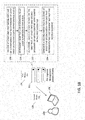
- FIGS. 1B and 1C show steps that may be performed by the FSMS 102 ( FIG. 1B ) or a client device 106 ( FIG. 1C ) to process a first media file 124 to generate a second media file 126 that represents less than all of the media content represented by the first media file 124. Because the second media file 126 may be significantly smaller than the first media file 124, the bandwidth required to transfer the second media file 126 may be substantially less than that required to transfer to the first media file 124. Significant network resources can thus be conserved by transferring only one or more discrete potions of the first media file 124 (which are included within the second media file 126) from the FSMS 102 to the client device 106 (as shown in FIG. 1B ) or from the client device 106 to the FSMS 102 (as shown in FIG. 1C ).
- a payload of the first media file 124 corresponding to an audio channel may be decoded to determine un-encoded data representing audio.
- the first media file 124 may also include a video payload that is synchronized with the audio channel, such as with an MP4 file or the like.
- the first media file 124 may contain only audio content, such as with an MP3 file or the like.
- the audio represented in the file may be converted to text using automatic speech recognition (ASR) processing on the un-encoded audio data.
- ASR automatic speech recognition
- the resulting text may thus constitute a transcript of at least one channel of the audio represented in the file.
- the transcript may be analyzed to identify discrete segments of the audio and/or video content represented in the first media file 124.
- respective segments of video and audio channel(s) represented in the first media file 124 may, based on a review of the transcript, be determined to correspond to introductory remarks, an agenda for the presentation, technical details of a product, sales metrics for the product, a summary of the discussion, concluding remarks, and so on.
- the analysis of the text can be based simply on the presence of one or more keywords that are likely to coincide with particular topics of discussion.
- the analysis can be more sophisticated and may, for example, involve processing the text using one or more trained neural networks to identify discrete topics within the transcript.
- the second media file 126 may be generated so as to include as one or more payloads representing only certain of the segments determined at the step 132.
- the second media file 126 may include not only an audio payload corresponding to selected segment(s) of the transcribed audio channel, but also payloads representing corresponding segments of the other audio channel(s) represented in the first media file 124.
- the first media file 124 includes a payload representing video in addition to the transcribed audio channel
- the second media file 126 may include not only an audio payload corresponding to selected segment(s) of the transcribed audio channel, but also a video payload representing corresponding segments of the video.
- timestamps or the like may be used to correlate video and or other audio channels with the text of the transcribed audio channel.
- the selected segment(s) of the decoded and transcribed audio channel payload, as well as corresponding segments of other decoded audio and/or video payload(s) of the first media file 124 may be re-encoded and packaged together with a header and other metadata for the desired media container file format.
- the first media file 124 and the second media file 126 have the same media container file format, e.g., they may both be MP4 files or the like.
- the steps 128, 130, 132 and 134 may be performed by the FSMS 102 and the resulting second media file 126 may be sent from the FSMS 102 to the client device 106.
- the FSMS 102 may further allow the quantity and/or location of the respective content segments to be refined, e.g., in response to user input, and may also additionally track the frequency and/or extent to which the various segments are accessed and send a recommendation to the client device 106 suggesting that only certain segments that appear to be of more relevance to the user 108 be downloaded to conserve network resources.
- the steps 128, 130, 132 and 134 may be performed by the client device 106 and the resulting second media file 126 may be sent from the client device 106 to the FSMS 102.
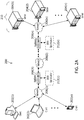
- the network environment 200 may include one or more clients 202(1)-202(n) (also generally referred to as local machine(s) 202 or client(s) 202) in communication with one or more servers 204(1)-204(n) (also generally referred to as remote machine(s) 204 or server(s) 204) via one or more networks 206(1)-206(n) (generally referred to as network(s) 206).
- a client 202 may communicate with a server 204 via one or more appliances 208(1)-208(n) (generally referred to as appliance(s) 208 or gateway(s) 208).
- the embodiment shown in FIG. 2A shows one or more networks 206 between the clients 202 and the servers 204
- the clients 202 and the servers 204 may be on the same network 206.
- the various networks 206 may be the same type of network or different types of networks.
- the networks 206(1) and 206(n) may each be a private network such as a local area network (LAN) or a company Intranet
- the network 206(2) may be a public network, such as a wide area network (WAN) or the Internet.
- WAN wide area network
- one or both of the network 206(1) and the network 206(n), as well as the network 206(2) may be public networks.
- all three of the network 206(1), the network 206(2) and the network 206(n) may be private networks.
- the networks 206 may employ one or more types of physical networks and/or network topologies, such as wired and/or wireless networks, and may employ one or more communication transport protocols, such as transmission control protocol (TCP), internet protocol (IP), user datagram protocol (UDP) or other similar protocols.
- TCP transmission control protocol
- IP internet protocol
- UDP user datagram protocol
- one or more appliances 208 may be located at various points or in various communication paths of the network environment 200.
- the appliance 208(1) may be deployed between the network 206(1) and the network 206(2)
- the appliance 208(n) may be deployed between the network 206(2) and the network 206(n).
- the appliances 208 may communicate with one another and work in conjunction to, for example, accelerate network traffic between the clients 202 and the servers 204.
- each appliance 208 may act as a gateway between two or more networks.
- one or more of the appliances 208 may instead be implemented in conjunction with or as part of a single one of the clients 202 or servers 204 to allow such device to connect directly to one of the networks 206.
- one or more of the appliances 208 may be implemented as network devices sold by Citrix Systems, Inc., of Fort Lauderdale, FL, such as Citrix GatewayTM or Citrix ADCTM.
- groups of the servers 204 may operate as one or more server farms 210.
- the servers 204 of each such server farm 210 may be logically grouped, and may either be geographically co-located (e.g., on premises) or geographically dispersed (e.g., cloud based) from the clients 202 and/or other servers 204.
- one or more server farms 210 may execute one or more applications on behalf of one or more of clients 202 (e.g., as an application server system) and/or may facilitate the sharing of files between the clients 202 (e.g., as a file sharing system), although other uses are possible, such as a file server, gateway server, proxy server, or other similar server uses.
- two or more server farms 210 may communicate with one another, e.g., via respective appliances 208 connected to the network 206(2), to allow multiple server-based processes to interact with one another.
- one server farm 210 may operate as a file segment management system (FSMS) 102 (as disclosed herein) and another server farm 210 may operate as an application server system (described in more detail below), with one or more servers 204 of the application serving system providing a virtual computing environment to a client 202 and also interacting with the FSMS 102 on behalf of the client 202.
- FSMS file segment management system
- application server system described in more detail below
- one or more of the appliances 208 may include, be replaced by, or be in communication with, one or more additional appliances, such as WAN optimization appliances 212(1)-212(n), referred to generally as WAN optimization appliance(s) 212.
- each WAN optimization appliance 212 may accelerate, cache, compress or otherwise optimize or improve performance, operation, flow control, or quality of service of network traffic, such as traffic to and/or from a WAN connection, such as optimizing Wide Area File Services (WAFS), accelerating Server Message Block (SMB) or Common Internet File System (CIFS).
- WAFS Wide Area File Services
- SMB accelerating Server Message Block
- CIFS Common Internet File System
- one or more of the appliances 212 may be a performance enhancing proxy or a WAN optimization controller.
- one or more of the appliances 212 may be implemented as products sold by Citrix Systems, Inc., of Fort Lauderdale, FL, such as Citrix SD-WANTM or Citrix CloudTM.
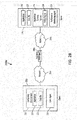
- a client 202a may include a computing environment 218, and a server 204a may include an application delivery system 214 for delivering a computing environment, application, and/or data files to one or more clients 202.
- each client 202 may additionally include a client agent 216 for establishing and exchanging communications with the appliance 208 and/or the server(s) 204 via a network 206.
- the client 202a may, for example, have installed and/or execute one or more applications that are in communication with the network 206a.
- the client agent 216 may intercept network communications from a network stack used by the one or more applications. For example, the client agent 216 may intercept a network communication at any point in a network stack and redirect the network communication to a destination desired, managed, and/or controlled by the client agent 216, for example, to intercept and redirect a transport layer connection to an IP address and port controlled and/or managed by the client agent 216.
- the client agent 216 may thus, in some embodiments, transparently intercept any protocol layer below the transport layer, such as the network layer, and any protocol layer above the transport layer, such as the session, presentation, or application layers.
- the client agent 216 may, for example, interface with the transport layer to secure, optimize, accelerate, route, and/or load-balance any communications provided via any protocol carried by the transport layer.
- the client agent 216 may be implemented as an Independent Computing Architecture (ICA) client developed by Citrix Systems, Inc.
- the client agent 216 may perform acceleration, streaming, monitoring, and/or other operations. For example, the client agent 216 may accelerate streaming an application from the server 204a to the client 202a.
- the client agent 216 may also perform end-point detection/scanning and/or collect end-point information about the client 202a for the appliance 208a and/or the server 204a.
- the appliance 208a and/or the server 204a may use the collected information to determine and provide access, authentication, and/or authorization control of the client's connection to the network 206a.
- the client agent 216 may identify and determine one or more client-side attributes, such as: the operating system and/or a version of an operating system, a service pack of the operating system, a running service, a running process, a file, presence or versions of various applications of the client, such as antivirus, firewall, security, and/or other software.
- client-side attributes such as: the operating system and/or a version of an operating system, a service pack of the operating system, a running service, a running process, a file, presence or versions of various applications of the client, such as antivirus, firewall, security, and/or other software.
- the computing environment 218 may, for example, execute or operate an application 220 that accesses, processes and/or uses a data file 222.
- the computing environment 218, application 220 and/or data file 222 may be delivered via an appliance 208a and/or the server 204a.
- the appliance 208a may accelerate delivery of all or a portion of the computing environment 218 to the client 202a, for example by the application delivery system 214.
- the appliance 208a may accelerate delivery of a streaming application 220' and data file 222' processable by the application 220 from a data center to a remote user location by accelerating transport layer traffic between the client 202a and the server 204a.
- Such acceleration may be provided by one or more techniques, such as: 1) transport layer connection pooling, 2) transport layer connection multiplexing, 3) transport control protocol buffering, 4) compression, 5) caching, or other techniques.
- the appliance 208a may also provide load balancing of servers 204 in a server farm 210 (shown in FIG.
- the servers 204 to process requests from the clients 202, act as a proxy or access server to provide access to the one or more servers 204, provide security and/or act as a firewall between the clients 202 and the servers 204, provide Domain Name Service (DNS) resolution, provide one or more virtual servers or virtual internet protocol servers, and/or provide secure virtual private network (VPN) connections from the clients 202 to the servers 204, such as a secure socket layer (SSL) VPN connection and/or provide encryption and decryption operations.
- DNS Domain Name Service
- VPN secure virtual private network
- the application delivery system 214 may deliver the computing environment 218 to a user (e.g., client 202a), remote or otherwise, based on authentication and authorization policies applied by a policy engine 224.
- a remote user may obtain a computing environment and access to server stored applications 220' and data files 222' from any network-connected device (e.g., the client 202a).
- the appliance 208a may request an application 220' and data file 222' from the server 204a.
- the application delivery system 214 and/or the server 204a may deliver the application 220' and data file 222' to the client 202a, for example via an application stream to operate in the computing environment 218 on client the 202a, or via a remote-display protocol or otherwise via remote-based or server-based computing.
- application delivery system 214 may be implemented as any portion of the Citrix WorkspaceTM by Citrix Systems, Inc., of Fort Lauderdale, FL, such as Citrix Virtual Apps and DesktopsTM.
- the policy engine 224 may control and manage the access to, and execution and delivery of, applications. For example, the policy engine 224 may determine the one or more applications a user or client 202 may access and/or how the application should be delivered to the user or client 202, such as a server-based computing, streaming or delivering the application locally to the client 202 for local execution.
- the client 202a may request execution of an application (e.g., application 220') and the application delivery system 214 of the server 204a may determine how to execute the application 220', for example based upon credentials received from the client 202a and a user policy applied by the policy engine 224 associated with the credentials.
- the application delivery system 214 may enable the client 202a to receive application-output data generated by execution of the application on the server 204a, may enable client the 202a to execute the application 220 locally after receiving the application from the server 204a, or may stream the application via one or more networks 206a, 206b to the client 202a.
- the application 220 may be a server-based or a remote-based application executed on the server 204a on behalf of the client 202a.
- the server 204a may display output to the client 202a using a thin-client or remote-display protocol, such as the Independent Computing Architecture (ICA) protocol by Citrix Systems, Inc.
- the application 220 may be any application related to real-time data communications, such as applications for streaming graphics, streaming video and/or audio or other data, delivery of remote desktops or workspaces or hosted services or applications, for example infrastructure as a service (IaaS), workspace as a service (WaaS), software as a service (SaaS) or platform as a service (PaaS).
- IaaS infrastructure as a service
- WaaS workspace as a service
- SaaS software as a service
- PaaS platform as a service
- one or more servers 204 may also include a performance monitoring service or agent 226.
- a dedicated one or more servers 204 may be employed to perform performance monitoring.
- Performance monitoring may be performed using data collection, aggregation, analysis, management and reporting, for example by software, hardware or a combination thereof.
- Performance monitoring may include one or more agents for performing monitoring, measurement and data collection activities on one or more clients 202 (e.g., the client agent 216), one or more servers 204 (e.g., the agent 226) and/or one or more appliances 208 and/or 212 (agent not shown).
- the monitoring agents may execute transparently (e.g., in the background) to any application and/or user of the device.
- the monitoring agent 226 may be implemented as Citrix AnalyticsTM by Citrix Systems, Inc., of Fort Lauderdale, FL.
- the monitoring agents may, for example, monitor, measure, collect, and/or analyze data on a predetermined frequency, based upon an occurrence of given event(s), or in real time during operation of the network environment 200a.
- the monitoring agents may monitor resource consumption and/or performance of hardware, software, and/or communications resources of the clients 202, networks 206, appliances 208 and/or 212, and/or servers 204.
- network connections such as a transport layer connection, network latency, bandwidth utilization, end-user response times, application usage and performance, session connections to an application, cache usage, memory usage, processor usage, storage usage, database transactions, client and/or server utilization, active users, duration of user activity, application crashes, errors, or hangs, the time required to log-in to an application, a server, or the application delivery system, and/or other performance conditions and metrics may be monitored.
- network connections such as a transport layer connection, network latency, bandwidth utilization, end-user response times, application usage and performance, session connections to an application, cache usage, memory usage, processor usage, storage usage, database transactions, client and/or server utilization, active users, duration of user activity, application crashes, errors, or hangs, the time required to log-in to an application, a server, or the application delivery system, and/or other performance conditions and metrics may be monitored.
- the monitoring agents may provide application performance management for the application delivery system 214. For example, based upon one or more monitored performance conditions or metrics, the application delivery system 214 may be dynamically adjusted, for example periodically or in real-time, to optimize application delivery by the servers 204 to the clients 202 based upon network environment performance and conditions.
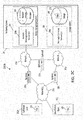
- FIG. 2C shows an example network environment 200b for allowing an authorized client 202b and/or an unauthorized client 202c to upload a file 228 to a file sharing system 230 or download a file 228 from the file sharing system 230.
- the authorized client 202b may, for example, be a client 202 operated by a user having an active account with the file sharing system 230, while the unauthorized client 202c may be operated by a user who lacks such an account.
- the file sharing system 230 may include an access management system 234 and a storage system 238.
- the access management system 234 may include one or more access management servers 204b and a database 236, and the storage system 238 may include one or more storage control servers 204c and a storage medium 240.
- the access management server(s) 204b may, for example, allow a user of the client 202b to log in to his or her account, e.g., by entering a user name and password corresponding to account data stored in the database 236.
- the access management server 204b may enable the user to view (via the authorized client 202b) information identifying various folders represented in the storage medium 240, which is managed by the storage control server(s) 204c, as well as any files 228 contained within such folders.
- File/folder metadata stored in the database 236 may be used to identify the files 228 and folders in the storage medium 240 to which a particular user has been provided access rights.
- the clients 202b, 202c may be connected to one or more networks 206c (which may include the Internet), the access management server(s) 204b may include webservers, and an appliance 208b may load balance requests from the authorized client 202b to such webservers.
- the database 236 associated with the access management server(s) 204b may, for example, include information used to process user requests, such as user account data (e.g., username, password, access rights, security questions and answers, etc.), file and folder metadata (e.g., name, description, storage location, access rights, source IP address, etc.), and logs, among other things.
- user account data e.g., username, password, access rights, security questions and answers, etc.
- file and folder metadata e.g., name, description, storage location, access rights, source IP address, etc.
- logs among other things.
- one or both of the clients 202b, 202c shown in FIG. 2C may instead represent other types of computing devices or systems that can be operated by users.
- one or both of the authorized client 202b and the unauthorized client 202c may be implemented as a server-based virtual computing environment that can be remotely accessed using a separate computing device operated by users, such as described above in connection with FIG. 2B .
- the access management system 234 may be logically separated from the storage system 238, such that files 228 and other data that are transferred between clients 202 and the storage system 238 do not pass through the access management system 234. Similar to the access management server(s) 204b, one or more appliances 208b-d may load-balance requests from the clients 202b, 202c received from the network(s) 206c (which may include the Internet) to the storage control server(s) 204c. In some embodiments, the storage control server(s) 204c and/or the storage medium 240 may be hosted by a cloud-based service provider (e.g., Amazon Web Services or Microsoft Azure).
- a cloud-based service provider e.g., Amazon Web Services or Microsoft Azure
- the storage control server(s) 204c and/or the storage medium 240 may be located at a data center managed by an enterprise of a client 202, or may be distributed among some combination of a cloud-based system and an enterprise system, or elsewhere.
- the server 204b may receive a request from the client 202b for access to one of the files 228 or folders to which the logged in user has access rights.
- the request may either be for the authorized client 202b to itself to obtain access to a file 228 or folder or to provide such access to the unauthorized client 202c.
- the access management server 204b may communicate with the storage control server(s) 204c (e.g., either over the Internet via appliances 208b and 208c or via an appliance 208d positioned between networks 206d and 206e) to obtain a token generated by the storage control server 204c that can subsequently be used to access the identified file 228 or folder.
- the storage control server(s) 204c e.g., either over the Internet via appliances 208b and 208c or via an appliance 208d positioned between networks 206d and 206e
- the generated token may, for example, be sent to the authorized client 202b, and the authorized client 202b may then send a request for a file 228, including the token, to the storage control server(s) 202c.
- the authorized client 202b may send the generated token to the unauthorized client 202c so as to allow the unauthorized client 202c to send a request for the file 228, including the token, to the storage control server(s) 202c.
- an access management server 204b may, at the direction of the authorized client 202b, send the generated token directly to the unauthorized client 202c so as to allow the unauthorized client 202c to send a request for the file 228, including the token, to the storage control server(s) 202c.
- the request sent to the storage control server(s) may, in some embodiments, include a uniform resource locator (URL) that resolves to an internet protocol (IP) address of the storage control server(s) 202c, and the token may be appended to or otherwise accompany the URL
- URL uniform resource locator
- IP internet protocol
- providing access to one or more clients 202 may be accomplished, for example, by causing the authorized client 202b to send a request to the URL address, or by sending an email, text message or other communication including the token-containing URL to the unauthorized client 202c, either directly from the access management server(s) 204b or indirectly from the access management server(s) 204b to the authorized client 202b and then from the authorized client 202b to the unauthorized client 202c.
- selecting the URL or a user interface element corresponding to the URL may cause a request to be sent to the storage control server(s) 204c that either causes a file 228 to be downloaded immediately to the client that sent the request, or may cause the storage control server 204c to return a webpage to the client that includes a link or other user interface element that can be selected to effect the download.
- a generated token can be used in a similar manner to allow either an authorized client 202b or an unauthorized client 202c to upload a file 228 to a folder corresponding to the token.
- an "upload" token can be generated as discussed above when an authorized client 202b is logged in and a designated folder is selected for uploading. Such a selection may, for example, cause a request to be sent to the access management server(s) 204b, and a webpage may be returned, along with the generated token, that permits the user to drag and drop one or more files 228 into a designated region and then select a user interface element to effect the upload.
- the resulting communication to the storage control server(s) 204c may include both the to-be-uploaded file(s) 228 and the pertinent token.
- a storage control server 204c may cause the file(s) 228 to be stored in a folder corresponding to the token.
- sending a request including such a token to the storage control server(s) 204c e.g., by selecting a URL or user-interface element included in an email inviting the user to upload one or more files 228 to the file sharing system 230
- a webpage may be returned that permits the user to drag and drop one or more files 228 into a designated region and then select a user interface element to effect the upload.
- the resulting communication to the storage control server(s) 204c may include both the to-be-uploaded file(s) 228 and the pertinent token.
- a storage control server 204c may cause the file(s) 228 to be stored in a folder corresponding to the token.
- the clients 202, servers 204, and appliances 208 and/or 212 may be deployed as and/or executed on any type and form of computing device, such as any desktop computer, laptop computer, rack-mounted computer, or mobile device capable of communication over at least one network and performing the operations described herein.
- the clients 202, servers 204 and/or appliances 208 and/or 212 may each correspond to one computer, a plurality of computers, or a network of distributed computers such as computer 246 shown in FIG. 2D .
- the computer 246 may include one or more processors 248, volatile memory 250 (e.g., RAM), non-volatile memory 252 (e.g., one or more hard disk drives (HDDs) or other magnetic or optical storage media, one or more solid state drives (SSDs) such as a flash drive or other solid state storage media, one or more hybrid magnetic and solid state drives, and/or one or more virtual storage volumes, such as a cloud storage, or a combination of such physical storage volumes and virtual storage volumes or arrays thereof), a user interface (UI) 254, one or more communications interfaces 256, and a communication bus 258.
- volatile memory 250 e.g., RAM
- non-volatile memory 252 e.g., one or more hard disk drives (HDDs) or other magnetic or optical storage media, one or more solid state drives (SSDs) such as a flash drive or other solid state storage media, one or more hybrid magnetic and solid state drives, and/or one or more virtual storage volumes, such as a cloud storage, or a combination
- the user interface 254 may include a graphical user interface (GUI) 260 (e.g., a touchscreen, a display, etc.) and one or more input/output (I/O) devices 262 (e.g., a mouse, a keyboard, etc.).
- GUI graphical user interface
- I/O input/output
- the non-volatile memory 252 may store an operating system 264, one or more applications 266, and data 268 such that, for example, computer instructions of the operating system 264 and/or applications 266 are executed by the processor(s) 248 out of the volatile memory 250.
- Data may be entered using an input device of the GUI 260 or received from I/O device(s) 262.
- Various elements of the computer 246 may communicate via communication the bus 258.
- the computer 246 as shown in FIG.
- clients 202, servers 204 and/or appliances 208 and 212 may be implemented by any computing or processing environment and with any type of machine or set of machines that may have suitable hardware and/or software capable of operating as described herein.
- the processor(s) 248 may be implemented by one or more programmable processors executing one or more computer programs to perform the functions of the system.
- the term "processor” describes an electronic circuit that performs a function, an operation, or a sequence of operations. The function, operation, or sequence of operations may be hard coded into the electronic circuit or soft coded by way of instructions held in a memory device.
- a "processor” may perform the function, operation, or sequence of operations using digital values or using analog signals.
- the "processor” can be embodied in one or more application specific integrated circuits (ASICs), microprocessors, digital signal processors, microcontrollers, field programmable gate arrays (FPGAs), programmable logic arrays (PLAs), multi-core processors, or general-purpose computers with associated memory.
- ASICs application specific integrated circuits
- microprocessors digital signal processors
- microcontrollers field programmable gate arrays
- PDAs programmable logic arrays
- multi-core processors multi-core processors
- general-purpose computers with associated memory or general-purpose computers with associated memory.
- the "processor” may be analog, digital or mixed-signal.
- the "processor” may be one or more physical processors or one or more "virtual” (e.g., remotely located or “cloud”) processors.
- the communications interfaces 256 may include one or more interfaces to enable the computer 246 to access a computer network such as a LAN, a WAN, or the Internet through a variety of wired and/or wireless or cellular connections.
- one or more computers 246 may execute an application on behalf of a user of a client computing device (e.g., a client 202), may execute a virtual machine, which provides an execution session within which applications execute on behalf of a user or a client computing device (e.g., a client 202), such as a hosted desktop session, may execute a terminal services session to provide a hosted desktop environment, or may provide access to a computing environment including one or more of: one or more applications, one or more desktop applications, and one or more desktop sessions in which one or more applications may execute.
- a virtual machine which provides an execution session within which applications execute on behalf of a user or a client computing device (e.g., a client 202), such as a hosted desktop session, may execute a terminal services session to provide a hosted desktop environment, or may provide access to a computing environment including one or more of: one or more applications, one or more desktop applications, and one or more desktop sessions in which one or more applications may execute.
- a file sharing system may be distributed between two sub-systems, with one subsystem (e.g., the access management system 234) being responsible for controlling access to files 228 stored in the other subsystem (e.g., the storage system 238).
- FIG. 3A illustrates conceptually how one or more clients 202 may interact with two such subsystems.
- an authorized user operating a client 202 may log in to the access management system 234, for example, by entering a valid user name and password.
- the access management system 234 may include one or more webservers that respond to requests from the client 202.
- the access management system 234 may store metadata concerning the identity and arrangements of files 228 (shown in FIG. 2C ) stored by the storage system 238, such as folders maintained by the storage system 238 and any files 228 contained within such folders.
- the metadata may also include permission metadata identifying the folders and files 228 each user is allowed to access.
- the user may employ a user-interface mechanism of the client 202 to navigate among folders for which the metadata indicates the user has access permission.
- the logged-in user may select a particular file 228 the user wants to access and/or to which the logged-in user wants a different user of a different client 202 to be able to access.
- the access management system 234 may take steps to authorize access to the selected file 228 by the logged-in client 202 and/or the different client 202.
- the access management system 234 may interact with the storage system 238 to obtain a unique "download" token which may subsequently be used by a client 202 to retrieve the identified file 228 from the storage system 238.
- the access management system 234 may, for example, send the download token to the logged-in client 202 and/or a client 202 operated by a different user.
- the download token may a single-use token that expires after its first use.
- the storage system 238 may also include one or more webservers and may respond to requests from clients 202.
- one or more files 228 may be transferred from the storage system 238 to a client 202 in response to a request that includes the download token.
- the download token may be appended to a URL that resolves to an IP address of the webserver(s) of the storage system 238. Access to a given file 228 may thus, for example, be enabled by a "download link" that includes the URL/token.
- Such a download link may, for example, be sent the logged-in client 202 in the form of a "DOWNLOAD" button or other user-interface element the user can select to effect the transfer of the file 228 from the storage system 238 to the client 202.
- the download link may be sent to a different client 202 operated by an individual with which the logged-in user desires to share the file 228.
- the access management system 234 may send an email or other message to the different client 202 that includes the download link in the form of a "DOWNLOAD” button or other user-interface element, or simply with a message indicating "Click Here to Download” or the like.
- the logged-in client 202 may receive the download link from the access management system 234 and cut-and-paste or otherwise copy the download link into an email or other message the logged in user can then send to the other client 202 to enable the other client 202 to retrieve the file 228 from the storage system 238.
- a logged-in user may select a folder on the file sharing system to which the user wants to transfer one or more files 228 (shown in FIG. 2C ) from the logged-in client 202, or to which the logged-in user wants to allow a different user of a different client 202 to transfer one or more files 228. Additionally or alternatively, the logged-in user may identify one or more different users (e.g., by entering their email addresses) the logged-in user wants to be able to access one or more files 228 currently accessible to the logged-in client 202.
- the access management system 234 may take steps to authorize access to the selected folder by the logged-in client 202 and/or the different client 202.
- the access management system 234 may interact with the storage system 238 to obtain a unique "upload token" which may subsequently be used by a client 202 to transfer one or more files 228 from the client 202 to the storage system 238.
- the access management system 234 may, for example, send the upload token to the logged-in client 202 and/or a client 202 operated by a different user.
- One or more files 228 may be transferred from a client 202 to the storage system 238 in response to a request that includes the upload token.
- the upload token may be appended to a URL that resolves to an IP address of the webserver(s) of the storage system 238.
- the access management system 234 may return a webpage requesting that the user drag-and-drop or otherwise identify the file(s) 228 the user desires to transfer to the selected folder and/or a designated recipient.
- the returned webpage may also include an "upload link,” e.g., in the form of an "UPLOAD” button or other user-interface element that the user can select to effect the transfer of the file(s) 228 from the client 202 to the storage system 238.
- an "upload link” e.g., in the form of an "UPLOAD” button or other user-interface element that the user can select to effect the transfer of the file(s) 228 from the client 202 to the storage system 238.
- the access management system 234 may generate an upload link that may be sent to the different client 202. For example, in some embodiments, the access management system 234 may send an email or other message to the different client 202 that includes a message indicating that the different user has been authorized to transfer one or more files 228 to the file sharing system, and inviting the user to select the upload link to effect such a transfer.
- Section of the upload link by the different user may, for example, generate a request to webserver(s) in the storage system and cause a webserver to return a webpage inviting the different user to drag-and-drop or otherwise identify the file(s) 228 the different user wishes to upload to the file sharing system 230.
- the returned webpage may also include a user-interface element, e.g., in the form of an "UPLOAD" button, that the different user can select to effect the transfer of the file(s) 228 from the client 202 to the storage system 238.
- the logged-in user may receive the upload link from the access management system 234 and may cut-and-paste or otherwise copy the upload link into an email or other message the logged-in user can then send to the different client 202 to enable the different client to upload one or more files 228 to the storage system 238.
- the storage system 238 may send a message to the access management system 234 indicating that the file(s) 228 have been successfully uploaded, and an access management system 234 may, in turn, send an email or other message to one or more users indicating the same.
- a message may be sent to the account holder that includes a download link that the account holder can select to effect the transfer of the file 228 from the storage system 238 to the client 202 operated by the account holder.
- the message to the account holder may include a link to a webpage from the access management system 234 inviting the account holder to log in to retrieve the transferred files 228.
- the access management system 234 may send a message including a download link to the designated recipients (e.g., in the manner described above), which such designated recipients can then use to effect the transfer of the file(s) 228 from the storage system 238 to the client(s) 202 operated by those designated recipients.
- FIG. 3B is a block diagram showing an example of a process for generating access tokens (e.g., the upload tokens and download tokens discussed above) within the file sharing system 230 described in connection with FIGS. 2C and 3A .
- access tokens e.g., the upload tokens and download tokens discussed above
- a logged-in client 202 may initiate the access token generation process by sending an access request 332 to the access management server(s) 204b.
- the access request 332 may, for example, correspond to one or more of (A) a request to enable the downloading of one or more files 228 (shown in FIG.
- an access management server 204b may send a "prepare" message 334 to the storage control server(s) 204c of the storage system 238, identifying the type of action indicated in the request, as well as the identity and/or location within the storage medium 240 of any applicable folders and/or files 228.
- a trust relationship may be established (step 336) between the storage control server(s) 204c and the access management server(s) 204b.
- the storage control server(s) 204c may establish the trust relationship by validating a hash-based message authentication code (HMAC) based on shared secret or key 348).
- HMAC hash-based message authentication code
- the storage control server(s) 204c may generate and send (step 338) to the access management server(s) 204b a unique upload token and/or a unique download token, such as those as discussed above.
- the access management server(s) 204b may prepare and send a link 340 including the token to one or more client(s) 202.
- the link may contain a fully qualified domain name (FQDN) of the storage control server(s) 204c, together with the token.
- FQDN fully qualified domain name
- the link 340 may be sent to the logged-in client 202 and/or to a different client 202 operated by a different user, depending on the operation that was indicated by the request.
- the client(s) 202 that receive the token may thereafter send a request 342 (which includes the token) to the storage control server(s) 204c.
- the storage control server(s) 204c may validate (step 344) the token and, if the validation is successful, the storage control server(s) 204c may interact with the client(s) 202 to effect the transfer (step 346) of the pertinent file(s) 228, as discussed above.
- FIG. 4 An example embodiments of the FSMS 102, as introduced above in connection with FIGS. 1A-C , is shown in FIG. 4 .
- the FSMS 102 may interact with the client device 106 (also shown in FIGS. 1A-C ) as well as any number of other client devices 402.
- each of the client devices 106, 402 may correspond to one of the clients 202
- the FSMS 102 may correspond to one or more of the servers 204, or one or more servers that operate in conjunction with one or more of the servers 204, that are described above in connection with FIGS. 2 and 3 .
- the FSMS 102 may be implemented within or in conjunction with a file sharing system, such as the file sharing system 230 described above in connection with FIGS. 2C , 3A , and 3B .
- the FSMS 102 may include a database 404 and a storage medium 406, as well as four functional engines in communication therewith: a file access interface engine 408, a segmentation engine 410, a segment access and tag monitoring engine 412, and a recommendation engine 414.
- Each of the engines 408, 410, 412, and 414 may, for example, be implemented as one or more processors that execute instructions encoded on one or more computer-readable media.
- the file access interface engine 408 may implement functionality that is the same as or similar to that implemented by the access management server(s) 204b and the storage control server(s) 204c described above, as well as additional functionality relating to the processing of file download requests received from clients 202, as described below in connection with FIG. 5 , or other functionality described herein.
- the database 404 and the storage medium 406 may either be the same as the database 236 and the storage medium 238, or wholly or partially separate from the database 236 and the storage medium 238.
- the functionality of the engines 408, 410, 412, and 414 described herein may, in some embodiments, be implemented by one or more of the access management server(s) 204b, the storage control server(s) 204c, or one or more servers that operate in conjunction with the access management server(s) 204b and/or the storage control server(s) 204c.
- the FSMS 102 may be implemented using a different file sharing or file management architecture.
- the storage medium 406 may store both "complete files” and "segment files.”
- the segment files may, for example, each represent one or more, but fewer than all, segments of content that is represented by one of the complete files.
- the complete files may correspond to the files 228 described above in connection with FIGS. 2C , 3A , and 3B . As also shown in FIG.
- the database 404 may store "account data,” "file/folder metadata,” “segment access data,” “segment preference tags,” and “re-segmentation tags.”
- the account data and file/folder metadata may be the same or similar to, and may serve the same or a similar purpose as, the account data and file/folder metadata employed by the file sharing system 230 described above in connection with FIGS. 2C , 3A , and 3B .
- the file/folder metadata may thus identify and describe the various complete files that are stored in the storage medium 406.
- the segment file metadata may identify and describe the various segment files store in the storage medium 406, as described in more detail below.
- segment access data, segment preference tags, and re-segmentation tags may be managed by the segment access and tag monitoring engine 412 based on interactions by client devices 106, 402 with the file access interface engine 408. Further, as explained below, the segment access data and segment preference tags may be used by the recommendation engine 414 to recommend particular segment files to a user of the client device 106, and the re-segmentation tags may be used by the segmentation engine 410 to determine whether and how to identify new or different segments of content for the complete files stored in the storage medium 406.
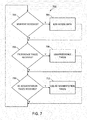
- FIG. 5 shows an example of a routine 500 that may be performed by the file access interface engine 408 when the FSMS 102 receives a request to download an entire file stored in the storage medium 406, as indicated by the file/folder metadata stored in the database 404.
- the routine 500 may determine that a download request for an entire file has been received from the client device 106.
- the step 502 may correspond to a user somehow identifying a file for potential download. For instance, a user of the client device 106 may navigate to a folder including files stored by the storage medium 406 and then click on or mouse over a file name or user interface element corresponding to an entire file.
- the routine 500 may make a call to the segmentation engine 410 to determine whether and/or how the content represented by the entire file is to be segmented (if it has not already been segmented) or re-segmented, as explained below.
- An example of a routine 600 that may be executed by the segmentation engine 410 for such purposes is described below in connection with FIG. 6 .
- some or all of the functions performed by the segmentation engine 410 may additionally or alternatively be performed at different times and/or under different circumstances.
- the content represented by files may instead be initially segmented each time a new file is uploaded to the FSMS 102 and/or may be conditionally re-segmented each time a new re-segmentation tag is received, and/or the content represented by some or all of the files stored by the storage medium 406 may be segmented and/or re-segmented periodically.
- Other implementations are also possible and contemplated.
- the routine 500 may make a function call to the recommendation engine 414.
- An example of a routine 900 that may be performed by the recommendation engine 414 is described below in connection with FIGS. 9A-B .
- the recommendation engine 414 may, in some embodiments, send a message to the client device 106 indicating that one or more segments of the content represented by the entire file identified for download (or potential download) are likely to be of interest to the user 108, and giving the user 108 of the client device 106 the opportunity to download one or more files representing only the recommended segments.
- the routine 500 determines whether a message received from the client device 106 in response to the recommendation message identifies some subset of the content segments for download.
- the user 108 may have either accepted the recommendation as presented or may have selected one or more different content segments as being of interest.
- the client device 106 may display an indication of the various segments of content for the selected file, and possibly descriptive information about each of them, and the user 108 may provide an input to select one or more of the indicated segments, e.g., by clicking checkboxes or the like, corresponding to the respective segments that are desired for download.
- the FSMS 102 may send the entire file to the client (step 510). If, on the other hand, it is determined, at the step 508, that a subset of the segments has been selected for download, then the FSMS 102 may generate one or more new files that include only the selected segments as payload(s) (step 512), and then send the new file(s) to the client device 106 (step 514).
- the new file(s) may also be stored in the storage medium 406 (as "segment files”), and metadata concerning such new files may be stored in the database 404 (as "segment file metadata”) for future use.
- FIG. 6 shows an example of a routine 600 that may be executed by the segmentation engine 410 shown in FIG. 4 and which may be called at the step 504 of the routine 500 shown in FIG. 5 .
- a determination may be made, at a step 602, whether the file in question has already been segmented. If the file has not already been segmented, then the routine 600 may initially proceed to a step 604, at which two or more segments of content that are represented by the file may be determined, before continuing to a step 606. Examples of processes for making the determination of the step 604 are described above in connection with the step 114 shown in FIG. 1A and the steps 128, 130, and 132 shown in FIGS. 1B and 1C , and will thus not be described again here. If the file has not already been segmented, then the routine 600 may proceed directly to the step 606.
- the routine 600 may check the database 404 to determine whether any re-segmentation tags are associated with the file.
- individuals accessing the file may selectively apply re-segmentation tags to portions of the file to indicate how they believe the file ought to be re-segmented. For instance, an individual may apply a "Product A" tag to a first segment of a video describing one product and a "Product B" tag to a second segment of a video describing another product. Such tagging may be achieved in any of a number of ways.
- an individual may right click on a location on a video scroll bar to obtain a drop down menu of tag suggestions and/or a blank to type in a new tag name, e.g., "Product A.” That re-segmentation tag may then be associated with the specified location in the video.
- the segmentation engine 410 may adjust the content segments of the file based on the re-segmentation tags.
- re-segmentation will be performed only under certain circumstances. For example, in some embodiments, a certain threshold number of re-segmentation tags of the same type may need to be received before re-segmenting a file.
- re-segmentation tags applied by certain individuals may be given precedence over other tags, or approval of one or more particular individuals may be required before allowing re-segmentation of a file to take place in response to the application of re-segmentation tags by others.
- re-segmentation may be permitted in response to receipt of even a single re-segmentation tag by any individual that has permission to access the file.
- a learning algorithm may be employed to improve the automated segmentation process performed at the step 604, such as by adjusting one or more features or parameters used by the step 132 discussed above in connection with FIGS. 1A-B .
- segment access data (described in detail below) indicating how often and extensively the previously identified segments have been accessed may be adjusted, to the extent possible, in view of any re-segmentation that was performed.
- FIG. 7 shows an example of a routine 700 that may be performed by the segment access and tag monitoring engine 412 shown in FIG. 4 .
- the routine 700 may continuously monitor interaction by client devices 106, 402 with one or more files stored by the storage medium 406.
- the segment access and tag monitoring engine 412 may reside in the FSMS 102 and the routine 700 may monitor such interaction by evaluating communications between the client devices 106, 402 and the file access interface engine 408 shown in FIG. 4 .
- the functionality of the routine 700 may be distributed between the client devices 106, 402 and the FSMS 102. For example, one or more agents on the client devices 106, 402 may monitor user interaction with the respective files/segments and communicate accumulated usage data to the FSMS 102 for logging in the database 404.
- the segment access determined at the step 702 may correspond to an on-line access in which a client device 106, 402 is receiving streamed content (e.g., video or audio content) from a segment of a complete file stored in the storage medium 406.
- instances in which a segment file stored in the storage medium 406 is downloaded to a client device 106, 402 may additionally or alternatively counted as accesses to that segment.
- the FSMS 102 may also determine the current location of each user effecting any such access, e.g., based on the IP address of the client device 106, 402 accessing the file segment, and store data indicating such locations in the database 404 along with data indicating the quantity, and possibly also the cumulative duration, of accesses from each such location.
- the FSMS 102 may additionally or alternatively retrieve profile information associated with the user of the client device 106, 402 effecting the access and store some or all of such profile information in the database 404 along with information indicating the number of accesses made to the segment, and possibly also the cumulative time duration, of such accesses.
- FIG. 8 An example of how quantities and cumulative durations of accesses by individual having certain characteristics (e.g., location and job title) may be correlated in the database 404 is shown in FIG. 8 .
- the access data indicates that individuals located in the United States and with the job title "engineer” accessed the "first segment" of "File XYZ” a total of "201" times and for a total duration of "65" minutes whereas individuals having those same characteristics accessed the second segment of "File XYZ” a total of "33” times and for a total duration of "15” minutes.
- data for many other segments, and many other characteristics of individuals accessing such segments may additionally or alternatively be collected and stored in the database 404.
- preference tags are indicated as "TAG A" in the example data table of FIG. 8 .
- a preference tag may be as simple as a user indicating that a particular segment of content is "relevant" to his or her job function. Such a tag may be generated, for example, by a user selecting a button or other input mechanism while watching or listening to content from a particular segment. More sophisticated tags may, for example, assign different levels of relevance to discrete segments. For instance, in some embodiments, an individual may select "not relevant,” “marginally relevant,” or “highly-relevant” for a particular segment.
- re-segmentation tags may be correlated with the complete files stored in the storage medium 406 and may indicate, for instance, a location within the content (e.g., a time marker in a video) at which re-segmentation is desired as well as an indicator of the topic or subject matter of the desired new segment.
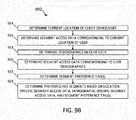
- FIG. 9A shows an example of a routine 900 that may be performed by the recommendation engine 414 shown in FIG. 4 and called at the step 506 shown in FIG. 5 .
- the routine 900 may begin at a step 902, at which an algorithm (shown in FIG. 9B and described below) may be used to determine one or more of the segments of the content represented by a file requested for download that are likely to be of the most relevance to the user 108 of the client device 106 that requested the download.
- the FSMS 102 may send a message to the client device 106 indicating the recommended segments.
- the message sent at the step 904 may, for example, correspond to the message 122 shown in FIG. 1A .
- the current location of the client device 106 operated by the user 108 may be determined.
- current location of the client device 106 may be determined, for example, using the IP address of the client device.
- segment access data reflecting the quantity and/or cumulative duration of accesses to the respective segments of the content represented by the file from the current location may be determined, e.g., by referring to a table such as that shown in FIG. 8 .
- demographics data of the user 108 of the client device 106 may be determined. Such demographics data may be determined, for example, based on user profile information associated with the client's log on credentials.
- segment access data reflecting the quantity and/or cumulative duration of accesses to the respective segments of the content represented by the file by individuals matching one or more characteristics of the user (e.g., job title) may be determined, for example, by also referring to a table such as that shown in FIG. 8 .
- any segment preference tags that have been received from individuals for respective segments may also be determined.
- one or more segments that are likely to be of the most interest to the user 108 may be determined based on a combination of the location-specific segment access data, the demographic-specific segment access data, and/or any identified segment preference tags. Any of a number of algorithms and/or equations may be used to evaluate the foregoing data, possibly giving more weight to certain data or factors than other data or factors. In some embodiments, the data may also be filtered to at least some extent by considering only data that exceeds certain threshold values. Such algorithms and/or equations may, of course, also be tailored to the particular circumstances or purpose of the recommendation being given.
- the routine 900 may wait for a message from the client device that identifies for download either the complete file or one or more discrete segments (recommended or otherwise) of the content represented by the file. If such a message is received, then the routine 900 completes and the routine 500 shown in FIG. 5 may continue to the step 508. As shown in FIG. 9A , while waiting for a download selection message, the routine 900 may also determine, at a step 908, whether the FSMS 102 instead receives a message indicating one or more modified criteria on which a determination of likely relevance of the respective segments may be determined.
- the user 108 of the client device may, via a user interface, indicate whether each of current location, job title, etc., is to be taken into account when making the segment relevance determination. Additionally or alternatively, in some embodiments, the user 108 may also determine, via a user interface, the types and/or specificity of the data that is to be used for such a determination. For example, as illustrated in FIG. 10 , in some embodiments, one or more expandable tree structures or similar mechanisms, may be used to indicate a hierarchical organization of locations, job titles, etc., and the user may selectively expand or collapse such elements and indicate the types and/or specificity of the data, e.g., using check boxes of the like, that is to be used. In the example shown in FIG.
- the checked boxes may indicate that the user 108 wants relevance of the segments to be determined based on data corresponding only to individuals who are software engineers located in the United States.
- the user 108 may have the job title "electrical engineer," but may want to review segments relating to sales topics.
- the user 108 could select the check box for "sales" so as to cause the FSMS 102 to send a revised recommendation identifying one or more segments that are likely to be the most relevant to sales personnel.
- one or more modified recommendation criteria may again be determined using an algorithm that is the same as or similar to that shown in FIG. 9B , but taking into account the modified criteria.
- a new message indicating a revised recommendation of segments may then be sent to the client device 106, and the FSMS 102 may again await either a download selection indication (per the step 906) or further modified relevance criteria (per the step 908) from the client device 106.
- FIG. 11 illustrates an example of a routine 1100 that may, for example, be performed by the file access interface engine 408 shown in FIG. 4 when the FSMS 102 is ready to perform a synchronization operation with the client device 106 (step 1102).
- the routine 1100 may be particularly beneficial, for example, in a circumstance in which the client device 106 has a limited storage capacity.
- the FSMS 102 may, for at least certain files, determine discrete segments of content represented by the files that are most likely to be relevant to the user 108 of the client device 106 and, rather than downloading the entirety of such files, download one or more files that represent only the determined discrete segments, thus maximizing the likelihood that the content transferred to the client device 106 during the synchronization operation is the content that will be the most useful to the user 108. Because the operations performed by the steps/routines 504, 902, 512, and 514 are described above, the description of those operations will not be repeated here.
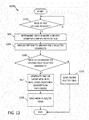
- FIG. 12 shows an example of a routine 1200 that may be executed by the client device 106 in connection with the uploading of a file to the FSMS 102.
- the routine 1200 may be particularly useful, for example, in a circumstance when the user 108 desires to upload less than the entirety of a large media file, e.g., an MP4 file, to a file storage system, such as the FSMS 102.
- the routine 1200 may determine whether a request (in response to input from the user 108) to upload a file to the FSMS 102 has been received.
- one or more payloads of the file may be decoded and analyzed (e.g., a transcript of the audio corresponding to an audio payload may be parsed) to determine two of more content segments represented by the file.
- the client device 106 may display an option to upload only selected ones of the determined segments of the content. If, at the step 1206, a command (in response to input from the user 108) is received indicating that at least one, but fewer than all, of the determined segments are to be uploaded, the routine 1200 may proceed to the step 512 (described above in connection with FIG. 5 ), at which one or new files may be generated that include the identified segments of content as payloads. At a step, 1208, the client device 106 may send the newly-generated file(s) (representing only the selected segments of the content) to the FSMS 102.
- routine 1200 may proceed to a step 1210, at which the entire file is sent to the FSMS 102.
- CCM1 through CM24 describe examples of computer-readable media that may be implemented in accordance with the present disclosure.
- the disclosed aspects may be embodied as a method, of which an example has been provided.
- the acts performed as part of the method may be ordered in any suitable way. Accordingly, embodiments may be constructed in which acts are performed in an order different than illustrated, which may include performing some acts simultaneously, even though shown as sequential acts in illustrative embodiments.
Landscapes
- Engineering & Computer Science (AREA)
- Theoretical Computer Science (AREA)
- Physics & Mathematics (AREA)
- General Physics & Mathematics (AREA)
- Databases & Information Systems (AREA)
- Data Mining & Analysis (AREA)
- General Engineering & Computer Science (AREA)
- Multimedia (AREA)
- Computational Linguistics (AREA)
- Health & Medical Sciences (AREA)
- Audiology, Speech & Language Pathology (AREA)
- Human Computer Interaction (AREA)
- Acoustics & Sound (AREA)
- Computing Systems (AREA)
- Library & Information Science (AREA)
- Information Transfer Between Computers (AREA)
Applications Claiming Priority (1)
| Application Number | Priority Date | Filing Date | Title |
|---|---|---|---|
| US16/446,112 US11216415B2 (en) | 2019-06-19 | 2019-06-19 | Identification and recommendation of file content segments |
Publications (1)
| Publication Number | Publication Date |
|---|---|
| EP3754518A1 true EP3754518A1 (de) | 2020-12-23 |
Family
ID=70861207
Family Applications (1)
| Application Number | Title | Priority Date | Filing Date |
|---|---|---|---|
| EP20175645.9A Ceased EP3754518A1 (de) | 2019-06-19 | 2020-05-20 | Identifizierung und empfehlung von dateiinhaltssegmenten |
Country Status (2)
| Country | Link |
|---|---|
| US (1) | US11216415B2 (de) |
| EP (1) | EP3754518A1 (de) |
Cited By (1)
| Publication number | Priority date | Publication date | Assignee | Title |
|---|---|---|---|---|
| CN114780844A (zh) * | 2022-04-21 | 2022-07-22 | 杭州樱熊网络科技有限公司 | 基于用户习惯的小说推荐方法及系统 |
Families Citing this family (4)
| Publication number | Priority date | Publication date | Assignee | Title |
|---|---|---|---|---|
| US11418636B1 (en) * | 2019-05-16 | 2022-08-16 | Alarm.Com Incorporated | Smart light switch with display |
| CN111243587A (zh) * | 2020-01-08 | 2020-06-05 | 北京松果电子有限公司 | 语音交互方法、装置、设备及存储介质 |
| CN112925761B (zh) * | 2021-03-31 | 2024-11-15 | 北京金山云网络技术有限公司 | 一种资源文件同步方法、装置、设备和存储介质 |
| US12613904B2 (en) * | 2024-09-20 | 2026-04-28 | Accenture Global Solutions Limited | Systems and methods for information retrieval and knowledge discovery |
Citations (3)
| Publication number | Priority date | Publication date | Assignee | Title |
|---|---|---|---|---|
| US20070154168A1 (en) * | 2005-12-29 | 2007-07-05 | United Video Properties, Inc. | Systems and methods for accessing media program options based on program segment interest |
| US9678637B1 (en) * | 2013-06-11 | 2017-06-13 | Audible, Inc. | Providing context-based portions of content |
| US20170329762A1 (en) * | 2016-05-13 | 2017-11-16 | Comcast Cable Communications, Llc | Methods and systems for matching interests with content |
Family Cites Families (4)
| Publication number | Priority date | Publication date | Assignee | Title |
|---|---|---|---|---|
| US6557042B1 (en) * | 1999-03-19 | 2003-04-29 | Microsoft Corporation | Multimedia summary generation employing user feedback |
| US9792285B2 (en) * | 2012-06-01 | 2017-10-17 | Excalibur Ip, Llc | Creating a content index using data on user actions |
| US8843951B1 (en) * | 2012-08-27 | 2014-09-23 | Google Inc. | User behavior indicator |
| US9465435B1 (en) * | 2013-08-26 | 2016-10-11 | Google Inc. | Segmentation of a video based on user engagement in respective segments of the video |
-
2019
- 2019-06-19 US US16/446,112 patent/US11216415B2/en not_active Expired - Fee Related
-
2020
- 2020-05-20 EP EP20175645.9A patent/EP3754518A1/de not_active Ceased
Patent Citations (3)
| Publication number | Priority date | Publication date | Assignee | Title |
|---|---|---|---|---|
| US20070154168A1 (en) * | 2005-12-29 | 2007-07-05 | United Video Properties, Inc. | Systems and methods for accessing media program options based on program segment interest |
| US9678637B1 (en) * | 2013-06-11 | 2017-06-13 | Audible, Inc. | Providing context-based portions of content |
| US20170329762A1 (en) * | 2016-05-13 | 2017-11-16 | Comcast Cable Communications, Llc | Methods and systems for matching interests with content |
Cited By (1)
| Publication number | Priority date | Publication date | Assignee | Title |
|---|---|---|---|---|
| CN114780844A (zh) * | 2022-04-21 | 2022-07-22 | 杭州樱熊网络科技有限公司 | 基于用户习惯的小说推荐方法及系统 |
Also Published As
| Publication number | Publication date |
|---|---|
| US11216415B2 (en) | 2022-01-04 |
| US20200401555A1 (en) | 2020-12-24 |
Similar Documents
| Publication | Publication Date | Title |
|---|---|---|
| US11216415B2 (en) | Identification and recommendation of file content segments | |
| US11314563B1 (en) | Context-based generation of activity feed notifications | |
| US11334529B2 (en) | Recommending files for file sharing system | |
| US11544344B2 (en) | Remote web browsing service | |
| CN115344548B (zh) | 预测存储服务 | |
| JP6608453B2 (ja) | 記憶されたデータに対するリモートアクセス制御 | |
| US20220067551A1 (en) | Next action recommendation system | |
| US11539783B1 (en) | Efficient downloading of files to multiple users in proximity of one another | |
| US11372867B2 (en) | Bootstrapped relevance scoring system | |
| US20230129467A1 (en) | Systems and methods to analyze audio data to identify different speakers | |
| US20230205734A1 (en) | Systems and methods for file identification | |
| US20220230094A1 (en) | Multi-tenant model evaluation | |
| US20220261300A1 (en) | Context-based notification processing system | |
| US11360943B2 (en) | Unified file storage system | |
| EP4303729A1 (de) | Exposition standardisierter ereignisse in einem api-proxy-system | |
| US11683166B2 (en) | Secure file modification with supervision | |
| US20220182447A1 (en) | Intelligent file access system | |
| US12388891B2 (en) | Uploading files via distributed devices | |
| US20210019285A1 (en) | File download using deduplication techniques | |
| US10346366B1 (en) | Management of a data processing pipeline | |
| EP4310693A1 (de) | Bewertung der qualität von integrationen zur ausführung von suchvorgängen unter verwendung von anwendungsprogrammierungsschnittstellen | |
| US11539810B1 (en) | Data stream management | |
| US20230224357A1 (en) | Optimized on-demand file download | |
| EP3896578A1 (de) | Vereinheitlichtes dateispeicherungssystem | |
| US20220358093A1 (en) | Compression techniques for shared files |
Legal Events
| Date | Code | Title | Description |
|---|---|---|---|
| PUAI | Public reference made under article 153(3) epc to a published international application that has entered the european phase |
Free format text: ORIGINAL CODE: 0009012 |
|
| STAA | Information on the status of an ep patent application or granted ep patent |
Free format text: STATUS: THE APPLICATION HAS BEEN PUBLISHED |
|
| AK | Designated contracting states |
Kind code of ref document: A1 Designated state(s): AL AT BE BG CH CY CZ DE DK EE ES FI FR GB GR HR HU IE IS IT LI LT LU LV MC MK MT NL NO PL PT RO RS SE SI SK SM TR |
|
| AX | Request for extension of the european patent |
Extension state: BA ME |
|
| STAA | Information on the status of an ep patent application or granted ep patent |
Free format text: STATUS: REQUEST FOR EXAMINATION WAS MADE |
|
| 17P | Request for examination filed |
Effective date: 20210622 |
|
| RBV | Designated contracting states (corrected) |
Designated state(s): AL AT BE BG CH CY CZ DE DK EE ES FI FR GB GR HR HU IE IS IT LI LT LU LV MC MK MT NL NO PL PT RO RS SE SI SK SM TR |
|
| STAA | Information on the status of an ep patent application or granted ep patent |
Free format text: STATUS: EXAMINATION IS IN PROGRESS |
|
| 17Q | First examination report despatched |
Effective date: 20220519 |
|
| STAA | Information on the status of an ep patent application or granted ep patent |
Free format text: STATUS: THE APPLICATION HAS BEEN REFUSED |
|
| 18R | Application refused |
Effective date: 20230330 |