EP3712729B1 - Machine tool operation system and machine tool operation method carried out by said system - Google Patents
Machine tool operation system and machine tool operation method carried out by said system Download PDFInfo
- Publication number
- EP3712729B1 EP3712729B1 EP19877215.4A EP19877215A EP3712729B1 EP 3712729 B1 EP3712729 B1 EP 3712729B1 EP 19877215 A EP19877215 A EP 19877215A EP 3712729 B1 EP3712729 B1 EP 3712729B1
- Authority
- EP
- European Patent Office
- Prior art keywords
- machine tool
- tablet terminal
- display
- input
- computer
- Prior art date
- Legal status (The legal status is an assumption and is not a legal conclusion. Google has not performed a legal analysis and makes no representation as to the accuracy of the status listed.)
- Active
Links
Images



Classifications
-
- G—PHYSICS
- G05—CONTROLLING; REGULATING
- G05B—CONTROL OR REGULATING SYSTEMS IN GENERAL; FUNCTIONAL ELEMENTS OF SUCH SYSTEMS; MONITORING OR TESTING ARRANGEMENTS FOR SUCH SYSTEMS OR ELEMENTS
- G05B19/00—Program-control systems
- G05B19/02—Program-control systems electric
- G05B19/18—Numerical control [NC], i.e. automatically operating machines, in particular machine tools, e.g. in a manufacturing environment, so as to execute positioning, movement or co-ordinated operations by means of program data in numerical form
- G05B19/409—Numerical control [NC], i.e. automatically operating machines, in particular machine tools, e.g. in a manufacturing environment, so as to execute positioning, movement or co-ordinated operations by means of program data in numerical form characterised by using manual data input [MDI] or by using control panel, e.g. controlling functions with the panel; characterised by control panel details or by setting parameters
-
- G—PHYSICS
- G05—CONTROLLING; REGULATING
- G05B—CONTROL OR REGULATING SYSTEMS IN GENERAL; FUNCTIONAL ELEMENTS OF SUCH SYSTEMS; MONITORING OR TESTING ARRANGEMENTS FOR SUCH SYSTEMS OR ELEMENTS
- G05B2219/00—Program-control systems
- G05B2219/30—Nc systems
- G05B2219/32—Operator till task planning
- G05B2219/32002—Operator interface, manual control at cell, if host fails or priority
-
- G—PHYSICS
- G05—CONTROLLING; REGULATING
- G05B—CONTROL OR REGULATING SYSTEMS IN GENERAL; FUNCTIONAL ELEMENTS OF SUCH SYSTEMS; MONITORING OR TESTING ARRANGEMENTS FOR SUCH SYSTEMS OR ELEMENTS
- G05B2219/00—Program-control systems
- G05B2219/30—Nc systems
- G05B2219/33—Director till display
- G05B2219/33192—Radio link, wireless
-
- Y—GENERAL TAGGING OF NEW TECHNOLOGICAL DEVELOPMENTS; GENERAL TAGGING OF CROSS-SECTIONAL TECHNOLOGIES SPANNING OVER SEVERAL SECTIONS OF THE IPC; TECHNICAL SUBJECTS COVERED BY FORMER USPC CROSS-REFERENCE ART COLLECTIONS [XRACs] AND DIGESTS
- Y02—TECHNOLOGIES OR APPLICATIONS FOR MITIGATION OR ADAPTATION AGAINST CLIMATE CHANGE
- Y02P—CLIMATE CHANGE MITIGATION TECHNOLOGIES IN THE PRODUCTION OR PROCESSING OF GOODS
- Y02P70/00—Climate change mitigation technologies in the production process for final industrial or consumer products
- Y02P70/10—Greenhouse gas [GHG] capture, material saving, heat recovery or other energy efficient measures, e.g. motor control, characterised by manufacturing processes, e.g. for rolling metal or metal working
Definitions
- the present invention relates to a machine tool operation system to enable input operations to an NC device that is connected to a machine tool body and that executes numerical controls by use of a tablet terminal at any location and to a machine tool operation method using the operation system.
- NC control panel an NC function
- a display section is arranged on the upper side of the front surface of the control panel. And around and below the display section, a CF card slot, a USB port, a keyboard including a mouse pad and a mouse button, and many various keys such as switches, buttons, and dials related to driving operations are arranged.
- NC programs, tool information, etc. for various machining operations are inputted into a storage section of an incorporated control section via this control panel.
- a machine tool body executes automatic machining operations according to the NC programs.
- a specific configuration of the NC control panel currently used includes a touch panel liquid crystal display 101 provided to the upper area of the front surface of an NC control panel 100 as a display section, and a USB port 103 to input and output various data.
- a keyboard 110 including a mouse pad 108 and a mouse button 109 is arranged below the liquid crystal display 101.
- An operation panel 102 on the area below the keyboard 110 arranges an operation preparation switch 104 that first powers up a control circuit of the NC control panel and starts a lubricant pump, an operation end switch 105 that stops the lubricant pump and powers OFF the control circuit of the control panel, an emergency stop switch 106 that stops each drive section, an automatic operation start switch 111 capable of starting a cycle start, and a feed hold switch 112 that stops the feeding under automatic operation.
- a mode change-over switch 122 is arranged to select automatic operation modes including various modes of an MDI operation, DNC operation, memory operation and edit, and manual operation modes including various modes of handle feed, jog feed and zero-return.
- the operation panel 102 further arranges a jog feedrate setting switch 113, a rapid traverse override switch 114, a spindle speed override switch 115, and an operation door interlock release button 116.
- a jog feed (+)(-) direction switch 136 that feeds each of Y, Y, and Z axes in the plus or minus direction at a rate selected by the jog feedrate setting switch 113 in the manual operation mode, and a rapid traverse button 137 that enables each axis feed at a rate set by the rapid traverse override switch 114 are also arranged.
- the area where various switches (123 to 130) to change-over the enable/disable program functions are arranged, the area where various switches (131 to 135) to change-over the enable/disable functions related to coolant are arranged, and the area where various switches (147 to 158) to change-over the enable/disable auxiliary functions are arranged, are provided.
- Various lamps such as a power lamp, alarm lamp, zero-return confirmation indication lamp, and mirror image lamp are also arranged.
- a handy manual pulse generator 107 capable of wired or wireless communications is provided, in the handle mode of the manual operation modes, a step feed operation specified by an axis selection switch and magnification specifying switch is executed.
- Patent Literature 2 discloses a machine control system includes an operation terminal and a safety switch device that is detachably attached to the operation terminal and outputs a stop instruction signal outputted from the switch unit to the operation terminal.
- Patent Literature 3 discloses a CNC machine tool comprising a port system configured to couple a portable control system (PCS) to the machine tool, wherein the port system is configured to detect when the PCS is coupled to the machine tool and to provide at least one of the program status data and the feedback data to the PCS in response to the detection of the PCS being coupled to the machine tool.
- PCS portable control system
- Patent Literature 4 discloses an NC machine tool system comprising an NC machine tool that can attach a measuring probe to the spindle instead of a tool and a terminal device that causes the NC machine tool to perform an operation equivalent to that of a measuring machine, and the terminal device is manually operated to determine the moving direction and moving speed of the measuring probe.
- Patent Literature 5 discloses a machine tool including a main operation panel that receives various inputs required for operation and displays an operation state, and a wireless terminal that transmits an operation input for the machine tool input through the graphical user interface which identical in appearance and function to the interface provided by the main operation panel to the machine tool in a short-distance wireless communication method.
- Patent Literature 6 discloses an input control apparatus comprising a display device, a touch panel disposed on the display device, and vibrating means for vibrating the touch panel.
- Patent Literature 7 relates to a controller for machine tool which is provided to be connectable to a data processing device via a telecommunication line and which is configured to remotely operate the data processing device to cause it to perform data processing related to workpiece machining.
- Patent Literature 8 relates to a control system for controlling operation of an NC machine tool, the system comprising a back-end control device and a front-end control device communicably connected to the back-end control device.
- An NC control panel is usually installed on a wall surface of a splash guard surrounding a machining field of a machine tool body. Most operations are executed at the installation location. It may be however preferable to execute actual various operations while confirming a machine status and an operational status. In this case, an operator needs to execute operations after confirming the status of certain sections of the machine tool and returning to the front of the NC control panel at the fixed location. Thus, in the past, the operations are difficult while confirming the machine status and operational status of the machine tool body at any location. This may be inefficient.
- an object of the present invention is to provide a machine tool operation system that enables input to an NC device from any location by use of a tablet terminal and a machine tool operation method using the system.
- the invention is defined by a machine tool operation system in accordance with claim 1, and by a machine tool operation method in accordance with claim 6. Further embodiments are defined in the dependent claims.
- a machine tool operation system of the invention includes an NC device connected to a machine tool body to perform numerical controls, a computer connected to the NC device, and a tablet terminal in wirelessly communication with the computer to enable input and output of signals to and from the NC device via the computer.
- the tablet terminal includes a display unit configured to display a menu screen showing selectable various operation modes for a machine tool that being previously provided to the NC device, on a display screen, an input unit configured to receive inputs of a user, and an input processing unit configured to output an input signal to be transmitted to the computer based on the input received by the input unit, wherein the display unit of the tablet terminal has a touch panel liquid crystal display as the display screen of the display unit and as touch panel type input unit.
- the computer includes a signal processing unit configured to output a command signal for a machine tool operation to be transmitted to the NC device based on an input signal from the tablet terminal, the machine tool operation system further comprises a wireless communication unit configured to wirelessly send and receive signals between the tablet terminal and computer, and a transmission unit configured to transmit signals between the computer and NC device.
- the tablet terminal further includes software having a function to make the display unit display, on the display screen, an operation panel image on which a plurality of operation buttons are arranged corresponding to at least some executions of various machine tool operational functions previously provided to the NC device and, based on an input operation selecting one of the plurality of operation buttons of the operation panel image, to make the input unit output an input signal corresponding to the operation button selected.
- the computer includes a storage section configured to previously store a respective command code corresponding to each operation button arranged on the operation panel image, the command codes being for machine tool operations, and software having a function to make the signal processing unit read the respective command code for the corresponding machine tool operation from the storage section based on the input signal wirelessly transmitted from the tablet terminal via the wireless communication unit, and output the respective command code as a command signal to transmit the command signal to the NC device via the transmission unit, and the display unit of the tablet terminal configured to display on the display screen at start-up the menu screen showing the selectable various operation modes as icons, configured to display a downward arrow button for application start-up on a lower left of the display screen, which downward arrow button is movable to any position on the display screen while being pushed by a finger, and configured to start and display the operation panel image on the display screen (21), when the downward arrow button (22) is touched while being fixed in position.
- a storage section configured to previously store a respective command code corresponding to each operation button arranged on the operation panel image,
- command signals can be transmitted to the NC device via the computer incorporated in the present operation system to operate the machine tool. Desired operations can be thus performed to the machine tool as with inputs on the operation panel of past NC control panels .
- the operation system using the fixed positioned NC control panel is therefore unnecessary. Operations of the machine tool are possible from any location even when remote from the machine tool while the actual status of the machine tool is confirmed using the tablet terminal.
- the tablet terminal has a display unit that displays an image indicating an operational status of the machine tool on the display screen.
- the operational statuses of the machine tool can be confirmed using the tablet terminal as with the display of the past NC control panel.
- the NC device may include software to transmit a status signal indicating the operational status of the machine tool to the computer via the transmission unit.
- the computer may include software that makes the signal processing unit output an image display signal based on the status signal transmitted from the NC device and wirelessly transmit the image display signal to the tablet terminal via the wireless communication unit.
- the tablet terminal may include software that makes the display unit display an image indicating the operational status of the machine tool on the display screen of the tablet terminal based on the image display signal wirelessly transmitted from the computer via the wireless communication unit.
- the tablet terminal further includes software to make the display unit display on the display screen an operation panel image where multiple operation buttons are arranged corresponding to executions of at least some of various machine tool operation functions previously provided to the NC device.
- the software makes the input unit output input signals corresponding to the operation buttons based on input operations that select the operation buttons of the operation panel image.
- the computer includes a storage section previously storing all command codes for the machine tool driving operations corresponding to all the operation buttons arranged on the operation panel image.
- the computer includes software having a function to make the signal processing unit read the command code of the corresponding machine tool operation from the storage section based on the input signal received via the wireless communication unit, and output the command code as a command signal to transmit to the NC device via the transmission unit.
- An input method using the touch panel is capable of touching each operation mode of the machine tool on the menu screen and displaying an operational status of the machine tool at each mode.
- the input method is also capable of starting and displaying the operation panel image by touch operation from the menu screen.
- the operation buttons corresponding to each machine tool operation function are arranged on this operation panel image. The input operation is complete only by pushing the operation button corresponding to a desired operation function.
- an input signal of the operation button previously which corresponded to the position signal detected by this touch operation is outputted and wirelessly transmitted to the computer.
- An operation method using the operation panel image of the above machine tool operation system is executed in the following steps.
- An operation panel starting step for displaying the operation panel image on the display screen of the tablet terminal.
- An input operation step for selecting the operation buttons arranged on the operation panel image on the display screen of the tablet terminal.
- the input signal outputted in response to the operation button is converted to the command signal in the computer and transmitted to the NC device.
- the NC device is capable of executing the operation of the corresponding part of the machine tool as with when the command signal is generated by pushing the corresponding operation button of the real operation panel of the past NC control panel.
- At least an emergency stop button is required as a function displayed on the operation panel image.
- a cycle start button to start a cycle of an NC program
- a feed hold button to stop the NC program
- a mode change-over button to switch between a manual operation mode and automatic operation mode. It is desirable to provide some program function buttons, coolant buttons, and auxiliary function buttons as buttons to change-over the enable/disable of various functions.
- the tablet terminal may further include software to change a color tone display of each operation button between the enabled state and disabled state based on the input operation to each operation button arranged on the operation panel image.
- NC control panel new inputs of various NC data such as programs required for NC program operations, parameters, and tool information are usually performed using a USB memory via a USB port provided to the NC control panel.
- the inputs are possible via the computer that transmits signals to and from the NC device by the transmission unit in the machine tool operation system of the present invention.
- input unit may be provided to enable inputs of NC data to the computer. For example, it is convenient to use a USB port previously provided to the computer.
- the tablet terminal in the present invention can use a popular tablet computer, i.e., one whose plate-like body incorporates a computer body and which has a liquid crystal display as display unit and touch panel type input unit.
- wireless LAN connection is preferred.
- the tablet terminal can use Wi-Fi and a Wi-Fi router is attached to the computer, a wireless LAN can be easily configured.
- the operation panel image displayed on the tablet terminal does not necessarily indicate all the functions operable on the real operation panel of the NC control panel. It is also possible for the machine tool operation system of the present invention to provide a separate compact operation panel connected to the NC device via an I/O device, use this operation panel together with the tablet terminal, and divide the operable functions between the panel and the tablet terminal. With this configuration, even when the operation panel image displayable on the tablet terminal is smaller than the real operation panel of the NC control panel to limit the number of operation buttons arranged on the operation panel image, other operational functions can be provided to the compact operation panel in a complementary manner. Not only some direct operations using such a compact operation panel but also direct operations using a wirelessly connected handy manual pulse generator are applicable.
- the tablet terminal is substantially connected to the NC device via the computer that processes signals wirelessly inputted from the tablet terminal and outputs command signals to operate the machine tool.
- the machine tool is thus operable only by executing input operations on the tablet terminal from any location, for example, while the status of the machine tool is directly confirmed. This achieves more effective operations than before.
- the display unit of the tablet terminal in the present invention includes the function that displays the operation panel image indicating at least a part of the operational functions previously provided to the NC device on the display screen.
- the input unit of the tablet terminal includes the function that transmits the input signal of the operational function selected from the display of the operation panel image to the computer.
- the computer includes the function that outputs the command signal to the NC device to operate the machine tool based on the input signal from the tablet terminal. The operator can thus easily operate the machine tool by inputting operations to the operation panel image on the display screen of the tablet terminal.
- Figs. 1 to 4 show a machine tool operation system of one embodiment of the present invention.
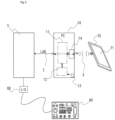
- Fig. 1 shows a schematic configuration of the entirety of the present machine tool operation system.
- Fig. 2 shows a flow of operating steps in the present operation system.
- Figs. 3 are diagrams showing a display screen of a tablet terminal.
- Fig. 4 is an enlarged view of an operation panel image displayed on a tablet terminal.
- a machine tool operation system 1 of the present embodiment includes an NC device 5 connected to a machine tool body (not illustrated), a computer 10 connected to the NC device 5 by a LAN cable 2 as the transmission unit, and a touch panel tablet terminal 20 in communication with the computer 10 by a wireless LAN connection 3 as the wireless communication unit using a Wi-Fi router 14.
- the computer 10 incorporated in the system 1 may use a commercially available personal computer of, e.g., Windows (registered trademark) OS. And later, the computer 10 incorporated in the system is also called the incorporated PC 10.
- a touch panel liquid crystal display 21 of the tablet terminal 20 at startup displays a menu screen showing selectably various operation modes for the machine tool that are previously provided to the NC device 5, as icons 23.
- Operation panel application software is installed to the tablet terminal 20.
- the operation panel application software has a function of displaying an operation panel image 30 indicating a part of various machine tool operating functions previously provided to the NC device 5 on the menu screen and enabling touch input.
- a downward arrow button 22 for application startup is displayed on the lower left of the screen.
- the downward arrow button 22 is movable to any position on the screen while being pushed by the finger.
- the operation panel image 30 is started and displayed on the screen.
- the operation panel image 30 When an upward arrow button 31 that appears on the upper left of the operation panel image 30 is pushed, the operation panel image 30 disappears and the display of only the downward arrow button 22 returns.
- the operation panel image 30 is also set to be movable to any position on the screen while the area other than the various operation buttons is pushed by the finger.
- the operation buttons corresponding to the various machine tool operating functions are arranged on the operation panel image 30.
- an input signal corresponding to each operation button is set.
- Signal processing software corresponding to the operation panel application software on the tablet terminal 20 is installed to the incorporated PC 10.
- a storage section 12 stores each code to command an execution of the operational function for the machine tool indicated by the operation button corresponding to each input signal.
- the signal processing software reads a command code corresponding to an input signal from the tablet terminal 20 from the storage section 12 to output the command code as a command signal in the signal processing section 11.
- New NC data can be also input into the incorporated PC 10 from a USB memory via a USB port 13.
- the NC device 5 can use the inputted NC data via the incorporated PC 10.
- the functions capable of operating the machine tool in response to inputs from the tablet terminal 20 correspond to various operation buttons arranged on the operation panel image 30 in Fig. 4 .
- the operation buttons are set to change in color by the operation panel application software in order to confirm that the operation buttons are changed from the disabled state to the enabled state. For example, the disabled state appears in white, in order to avoid malfunction grey appears, and the enabled state appears in other colors.
- an emergency stop button 32 As the operation buttons arranged on the operation panel image 30, an emergency stop button 32, a cycle start button 33, a feed hold button 34, and a reset button 36 are arranged on the area toward the left end on the panel.
- An ENABLE button 63 is arranged on the lower right on the panel. When the ENABLE button 63 is pushed, some operation buttons enter the enabled state to function. When pushed, this button will illuminate in yellow for a fixed time.
- the cycle start button 33 that starts a cycle of an NC program operation will illuminate in green during a cycle start. To prevent malfunction, the cycle start button 33 in gray does not function. Only when it turns white after the ENABLE button 63 is pushed, the cycle start button 33 can be in the enabled state. After pushed, the feed hold button 34 that stops the NC program during automatic operation will illuminate in yellow during feed hold.
- an alarm lamp 37 and a mirror image lamp 38 are arranged above the left end area on the panel.
- the alarm lamp 37 will blink yellow.
- the mirror image lamp 38 illuminates when a mirror image is formed on each axis. It will illuminate in green when the mirror image is enabled.
- mode change-over buttons are arranged to change the operating modes of the machine tool between the automatic operation mode and manual operation mode.
- an MDI operation mode button 40 As to the automatic operation modes, an MDI operation mode button 40, a memory operation mode button 41, an edit mode button 42, and a DNC operation mode button 43 are arranged.
- a handle feed mode button 44 As to the manual operation modes, a handle feed mode button 44, a jog feed mode button 45, and a homing mode button Z are arranged. Only the buttons of the selected modes will illuminate in yellow.
- program function buttons are arranged to change-over the enabled/disabled states of the functions of the program.
- a single block button 46 to stop the command of the block under execution after execution when turned ON during automatic operation an optional stop button 47 to temporarily stop the automatic operation (coolant and a main shaft are stopped) at the block when turned ON during the program, and a block skip button 48 to disregard the command of the block including "/" (slash) on the NC program when turned ON, are arranged on the upper side in this area.
- Each button will illuminate in yellow in the enabled state.
- buttons are arranged to operate the functions of the program.
- a dry run button 49 that disregards the feedrate commanded by the program and operates the machine at the feedrate set by a jog feedrate setting switch when turned ON
- a program restart function button 50 that disregards the feedrate commanded by the program and operates the machine at the feedrate set by a jog feedrate setting switch when turned ON
- a program restart function button 50 that disregards the feedrate commanded by the program and operates the machine at the feedrate set by a jog feedrate setting switch when turned ON
- a program restart function button 50 that disregards the feedrate commanded by the program and operates the machine at the feedrate set by a jog feedrate setting switch when turned ON
- a program restart function button 50 that disregards the feedrate commanded by the program and operates the machine at the feedrate set by a jog feedrate setting switch when turned ON
- a program restart function button 50 that disregards the feedrate commanded by the program and operates the machine at the feedrate set by a
- coolant buttons are arranged on the upper side to change-over the enabled/disabled states of the functions of the coolant. That is, an automatic cutting fluid supply button 53 and first to fourth cutting fluid units ON buttons (54, 55, 56, 57) are arranged. These operation buttons will illuminate in yellow in the enabled states.
- auxiliary function buttons are arranged to change-over the enabled/disabled states of auxiliary functions.
- this arrangement includes a chip conveyor start button 58 that starts and stops a chip conveyor, a chip conveyor reverse start button 59 that reverses (retreats) the chip conveyor while being pushed, a work light button 60 that turns ON/OFF a work light, an automatic power shutdown button 61 that change-over the enabled/disabled states of an automatic power shutdown function, and a manual tool exchange button 62.
- These auxiliary function buttons will illuminate in yellow in the enabled state.
- the incorporated PC 10 previously stores, to the storage section 12, the command codes respectively corresponding to the operation buttons displayed on the operation panel image 30 to drive and operate the machine tool. Based on an input signal wirelessly transmitted from the tablet terminal 20, the signal processing section 11, using the signal processing software, reads a command code corresponding to the input signal from the storage section 12, outputs the read code as a command signal, and transmits the command signal to the NC device 5.
- the operations of the machine tool using input operations from the tablet terminal 20 are executed through the following processes as shown in Fig. 2 .
- step (S70) in the tablet terminal 20, as an operation panel starting (: operation panel application start, operation panel image display) step (S70), in the state where the display screen of the tablet terminal 20 displays the menu screen, the downward arrow button 22 on the menu screen is pushed to start and display the operation panel image 30.
- the operation button corresponding to the driving operation to be executed by the machine tool at the present time is pushed among the operation buttons corresponding to the various operation functions arranged on the operation panel image 30.
- the incorporated PC 10 based on the input signal wirelessly transmitted from the tablet terminal 20, makes the signal processing section 11 read the command code corresponding to the input signal from the command codes stored in the storage section 12 and outputs the read command code as a command signal by the signal processing software.
- the incorporated PC 10 transmits this command signal to the NC device 5.
- command signal execution step (S74) the NC device 5 operates the corresponding part of the machine tool based on the received command signal.
- the operation commanded using the touch operation input to the panel operation image 30 on the display screen of the tablet terminal 20 is executed in the real machine tool.
- a specific example of operations by the operator is as follows.
- the example described below concerns the operator's operation for inputting on the tablet terminal 20 to drive the discharge of cutting fluid from a main shaft lateral cutting fluid supply nozzle of the machine tool.
- the operator first performs a startup operation so that the operation panel image 30 is displayed on the menu screen currently displayed on the tablet terminal 20 (S70) .
- the operator pushes a first cutting fluid manual ON button 54 as an input operation to indicate the operational function that turns ON/OFF the supply of cutting fluid from the main shaft lateral cutting fluid nozzle among the coolant buttons of the operation panel image 30 displayed on the display screen of the tablet terminal 20 (S71).
- the input signal corresponding to the position signal of the button 54 detected on the touch panel is outputted and transmitted to the incorporated PC 10 (S72) . After being pushed, the button 54 will illuminate in yellow.
- the signal processing section 11 reads, from the storage section 12, the command code corresponding to the input signal to command discharge of cutting fluid from the main shaft lateral cutting fluid nozzle.
- the command code is transmitted from the incorporated PC 10 to the NC device 5 (S73) as a command signal.
- the NC device 5 that has received the command signal makes the main shaft lateral cutting fluid nozzle of the machine tool discharge cutting fluid based on the command signal (S74). To stop the discharge of this cutting fluid, the first cutting fluid manual ON button 54 is pushed again to OFF (S71). Then, an input signal to disable the previous input signal that enables the commanded function is outputted from the tablet terminal 20 and also wirelessly transmitted to the PC 10 (S72).
- the incorporated PC 10 outputs a command signal for disablement based on the input signal for disablement and transmits the command signal to the NC device 5 (S73) .
- the NC device 5 stops the discharge of the cutting fluid from the main shaft lateral cutting fluid nozzle according to the received command signal for disablement (S74).
- the ON/OFF operation command made by pushing the first cutting fluid manual ON button 54 of the operation panel image 30 on the screen of the tablet terminal 20 is equivalent to the ON/OFF operation command made by pushing a first cutting fluid manual ON switch 132 arranged on the real operation panel 102 of the past NC control panel 100.
- the operation buttons displayed on the operation panel image 30 in the above embodiment indicate some operating functions arranged on the real operation panel 102 of the actual NC control panel 100. It is not necessary for the operation panel image 30 to cover all the operating functions usually provided to the real operation panel 102.
- the operation panel image 30 does not include manual operational functions to move each axis in the jog feed mode in the manual operation mode, such as a jog feedrate setting switch 113, a rapid traverse override switch 114, and a jog feed (+) (-) direction switch 136.
- the operating functions displayed on the operation panel image 30 can be inputted using ON/OFF of the operation buttons.
- the axis moving operation of the jog feed mode had been performed by rotating a dial. It is preferable for the operation equivalent to such a dial operation to use dial type input means.
- the other operational functions not displayed on the operation panel image 30, such as the operations generally inputted using the dial type, are mounted on a separately provided compact operation panel 80 as shown in Fig. 5 and incorporated in the present system via an I/O device 90.
- the tablet terminal 10, compact operation panel 80, handy manual pulse generator 107 are used together to divide the operational functions for the machine tool.
- the functions that require the input operations exceeding the processing capacity of the tablet terminal may freeze during operation depending on the specification of the used tablet terminal 10, such as a long push of a button, are omitted on the operation panel image 30 to reduce load. This ensures that the operation system will constantly have smooth input operations.
- the functions displayed on the operation panel image 30 are not limited to the types of the above embodiment. Multiple types of operation panel images may be provided to display different combinations of operational functions that can be appropriately selected and used.
Landscapes
- Engineering & Computer Science (AREA)
- Human Computer Interaction (AREA)
- Manufacturing & Machinery (AREA)
- Physics & Mathematics (AREA)
- General Physics & Mathematics (AREA)
- Automation & Control Theory (AREA)
- Numerical Control (AREA)
Description
- The present invention relates to a machine tool operation system to enable input operations to an NC device that is connected to a machine tool body and that executes numerical controls by use of a tablet terminal at any location and to a machine tool operation method using the operation system.
- Recent machining centers achieve various machining operations according to various NC programs using numerical controls from a control panel having an NC function (hereinafter called an NC control panel) connected to a machine tool body.
- Generally, in such an NC control panel, a display section is arranged on the upper side of the front surface of the control panel. And around and below the display section, a CF card slot, a USB port, a keyboard including a mouse pad and a mouse button, and many various keys such as switches, buttons, and dials related to driving operations are arranged.
- NC programs, tool information, etc. for various machining operations are inputted into a storage section of an incorporated control section via this control panel. When an operator operates the NC control panel to call and execute a predetermined NC program, a machine tool body executes automatic machining operations according to the NC programs.
- Various dials, buttons, switches, display lamps, etc. required for the driving operations of the machine tool body are arranged on the NC control panel. All automatic and manual operations of the machine tool can be executed while being confirmed on the display section (see Patent Literature 1).
- As shown in
Fig. 6 , a specific configuration of the NC control panel currently used includes a touch panelliquid crystal display 101 provided to the upper area of the front surface of anNC control panel 100 as a display section, and aUSB port 103 to input and output various data. Akeyboard 110 including amouse pad 108 and amouse button 109 is arranged below theliquid crystal display 101. - An
operation panel 102 on the area below thekeyboard 110 arranges anoperation preparation switch 104 that first powers up a control circuit of the NC control panel and starts a lubricant pump, anoperation end switch 105 that stops the lubricant pump and powers OFF the control circuit of the control panel, anemergency stop switch 106 that stops each drive section, an automaticoperation start switch 111 capable of starting a cycle start, and afeed hold switch 112 that stops the feeding under automatic operation. A mode change-overswitch 122 is arranged to select automatic operation modes including various modes of an MDI operation, DNC operation, memory operation and edit, and manual operation modes including various modes of handle feed, jog feed and zero-return. - The
operation panel 102 further arranges a jogfeedrate setting switch 113, a rapidtraverse override switch 114, a spindlespeed override switch 115, and an operation door interlock release button 116. A jog feed (+)(-)direction switch 136 that feeds each of Y, Y, and Z axes in the plus or minus direction at a rate selected by the jogfeedrate setting switch 113 in the manual operation mode, and arapid traverse button 137 that enables each axis feed at a rate set by the rapidtraverse override switch 114 are also arranged. - In addition, the area where various switches (123 to 130) to change-over the enable/disable program functions are arranged, the area where various switches (131 to 135) to change-over the enable/disable functions related to coolant are arranged, and the area where various switches (147 to 158) to change-over the enable/disable auxiliary functions are arranged, are provided. Various lamps such as a power lamp, alarm lamp, zero-return confirmation indication lamp, and mirror image lamp are also arranged. In many cases, a handy
manual pulse generator 107 capable of wired or wireless communications is provided, in the handle mode of the manual operation modes, a step feed operation specified by an axis selection switch and magnification specifying switch is executed. -
Patent Literature 2 discloses a machine control system includes an operation terminal and a safety switch device that is detachably attached to the operation terminal and outputs a stop instruction signal outputted from the switch unit to the operation terminal.Patent Literature 3 discloses a CNC machine tool comprising a port system configured to couple a portable control system (PCS) to the machine tool, wherein the port system is configured to detect when the PCS is coupled to the machine tool and to provide at least one of the program status data and the feedback data to the PCS in response to the detection of the PCS being coupled to the machine tool. -
Patent Literature 4 discloses an NC machine tool system comprising an NC machine tool that can attach a measuring probe to the spindle instead of a tool and a terminal device that causes the NC machine tool to perform an operation equivalent to that of a measuring machine, and the terminal device is manually operated to determine the moving direction and moving speed of the measuring probe. -
Patent Literature 5 discloses a machine tool including a main operation panel that receives various inputs required for operation and displays an operation state, and a wireless terminal that transmits an operation input for the machine tool input through the graphical user interface which identical in appearance and function to the interface provided by the main operation panel to the machine tool in a short-distance wireless communication method. -
Patent Literature 6 discloses an input control apparatus comprising a display device, a touch panel disposed on the display device, and vibrating means for vibrating the touch panel. - Patent Literature 7 relates to a controller for machine tool which is provided to be connectable to a data processing device via a telecommunication line and which is configured to remotely operate the data processing device to cause it to perform data processing related to workpiece machining.
- Patent Literature 8 relates to a control system for controlling operation of an NC machine tool, the system comprising a back-end control device and a front-end control device communicably connected to the back-end control device.
-
- [PTL 1]
JP2016-85702A - [PTL 2]
US2018/136631A1 - [PTL 3]
US2014/074279A1 - [PTL 4]
JP2016-018255A - [PTL 5]
KR2017 - 0047497A - [PTL 6]
EP1548549A2 - [PTL 7]
US2012/065767A1 - [PTL 8]
US2016/179085A1 - An NC control panel is usually installed on a wall surface of a splash guard surrounding a machining field of a machine tool body. Most operations are executed at the installation location. It may be however preferable to execute actual various operations while confirming a machine status and an operational status. In this case, an operator needs to execute operations after confirming the status of certain sections of the machine tool and returning to the front of the NC control panel at the fixed location. Thus, in the past, the operations are difficult while confirming the machine status and operational status of the machine tool body at any location. This may be inefficient.
- Thus, it had been considered to directly operate from any location using a tablet terminal in which programs necessary for input operation to an NC device for drive control of the machine tool is installed, without the inputs using an NC control panel. This however is unpractical since it exceeds the processing capability of the tablet terminal and cannot be used stably.
- In view of the above problem, an object of the present invention is to provide a machine tool operation system that enables input to an NC device from any location by use of a tablet terminal and a machine tool operation method using the system.
- The invention is defined by a machine tool operation system in accordance with
claim 1, and by a machine tool operation method in accordance withclaim 6. Further embodiments are defined in the dependent claims. - To achieve the above object, a machine tool operation system of the invention according to
claim 1 includes an NC device connected to a machine tool body to perform numerical controls, a computer connected to the NC device, and a tablet terminal in wirelessly communication with the computer to enable input and output of signals to and from the NC device via the computer. The tablet terminal includes a display unit configured to display a menu screen showing selectable various operation modes for a machine tool that being previously provided to the NC device, on a display screen, an input unit configured to receive inputs of a user, and an input processing unit configured to output an input signal to be transmitted to the computer based on the input received by the input unit, wherein the display unit of the tablet terminal has a touch panel liquid crystal display as the display screen of the display unit and as touch panel type input unit. The computer includes a signal processing unit configured to output a command signal for a machine tool operation to be transmitted to the NC device based on an input signal from the tablet terminal, the machine tool operation system further comprises a wireless communication unit configured to wirelessly send and receive signals between the tablet terminal and computer, and a transmission unit configured to transmit signals between the computer and NC device. - The tablet terminal further includes software having a function to make the display unit display, on the display screen, an operation panel image on which a plurality of operation buttons are arranged corresponding to at least some executions of various machine tool operational functions previously provided to the NC device and, based on an input operation selecting one of the plurality of operation buttons of the operation panel image, to make the input unit output an input signal corresponding to the operation button selected. The computer includes a storage section configured to previously store a respective command code corresponding to each operation button arranged on the operation panel image, the command codes being for machine tool operations, and software having a function to make the signal processing unit read the respective command code for the corresponding machine tool operation from the storage section based on the input signal wirelessly transmitted from the tablet terminal via the wireless communication unit, and output the respective command code as a command signal to transmit the command signal to the NC device via the transmission unit, and the display unit of the tablet terminal configured to display on the display screen at start-up the menu screen showing the selectable various operation modes as icons, configured to display a downward arrow button for application start-up on a lower left of the display screen, which downward arrow button is movable to any position on the display screen while being pushed by a finger, and configured to start and display the operation panel image on the display screen (21), when the downward arrow button (22) is touched while being fixed in position.
- With the above configuration in the present invention, by performing the input to the tablet terminal, command signals can be transmitted to the NC device via the computer incorporated in the present operation system to operate the machine tool. Desired operations can be thus performed to the machine tool as with inputs on the operation panel of past NC control panels . The operation system using the fixed positioned NC control panel is therefore unnecessary. Operations of the machine tool are possible from any location even when remote from the machine tool while the actual status of the machine tool is confirmed using the tablet terminal.
- The tablet terminal has a display unit that displays an image indicating an operational status of the machine tool on the display screen. The operational statuses of the machine tool can be confirmed using the tablet terminal as with the display of the past NC control panel.
- As a configuration to display the image indicating the operational statuses of the machine tool on the display screen of the tablet terminal, the NC device may include software to transmit a status signal indicating the operational status of the machine tool to the computer via the transmission unit. The computer may include software that makes the signal processing unit output an image display signal based on the status signal transmitted from the NC device and wirelessly transmit the image display signal to the tablet terminal via the wireless communication unit. The tablet terminal may include software that makes the display unit display an image indicating the operational status of the machine tool on the display screen of the tablet terminal based on the image display signal wirelessly transmitted from the computer via the wireless communication unit.
- In the past NC control panel, input operations are executed for various machine tool operations with various dials, switches, and buttons arranged on the mounted real operation panel. The display unit of the tablet terminal of the present invention displays an operation panel image where multiple operation buttons corresponding to various machine tool operation functions are arranged to enable input operations on the screen. Instead of the above real operation panel, this operation panel image is applicable.
- To achieve a configuration that makes possible input operations on the operation panel image for machine tool operations with such a tablet terminal, the tablet terminal further includes software to make the display unit display on the display screen an operation panel image where multiple operation buttons are arranged corresponding to executions of at least some of various machine tool operation functions previously provided to the NC device.
- Additionally, the software makes the input unit output input signals corresponding to the operation buttons based on input operations that select the operation buttons of the operation panel image. The computer includes a storage section previously storing all command codes for the machine tool driving operations corresponding to all the operation buttons arranged on the operation panel image. The computer includes software having a function to make the signal processing unit read the command code of the corresponding machine tool operation from the storage section based on the input signal received via the wireless communication unit, and output the command code as a command signal to transmit to the NC device via the transmission unit.
- As the input unit of the tablet terminal of the present invention, one having a touch panel is easy to use. An input method using the touch panel is capable of touching each operation mode of the machine tool on the menu screen and displaying an operational status of the machine tool at each mode. The input method is also capable of starting and displaying the operation panel image by touch operation from the menu screen. The operation buttons corresponding to each machine tool operation function are arranged on this operation panel image. The input operation is complete only by pushing the operation button corresponding to a desired operation function. With the touch panel, an input signal of the operation button previously which corresponded to the position signal detected by this touch operation is outputted and wirelessly transmitted to the computer.
- An operation method using the operation panel image of the above machine tool operation system is executed in the following steps. An operation panel starting step for displaying the operation panel image on the display screen of the tablet terminal. An input operation step for selecting the operation buttons arranged on the operation panel image on the display screen of the tablet terminal. A step for outputting an input signal corresponding to the operation button selected in the input operation step by the input processing unit of the tablet terminal and wirelessly transmitting the input signal to the computer. A step for outputting the corresponding command signal by the signal processing unit of the computer based on the input signal wirelessly transmitted from the tablet terminal, and transmitting the command signal to the NC device. A step for causing the NC device to execute the driving operation of the corresponding part of the machine tool according to the command signal transmitted from the computer.
- Through the above steps, for the operation panel image displayed by the tablet terminal, only by executing the input operation selecting the operation button indicating a predetermined operational function, the input signal outputted in response to the operation button is converted to the command signal in the computer and transmitted to the NC device. Based on the transmitted command signal, the NC device is capable of executing the operation of the corresponding part of the machine tool as with when the command signal is generated by pushing the corresponding operation button of the real operation panel of the past NC control panel.
- At least an emergency stop button is required as a function displayed on the operation panel image. In addition, it is preferable to provide a cycle start button to start a cycle of an NC program, a feed hold button to stop the NC program, and a mode change-over button to switch between a manual operation mode and automatic operation mode. It is desirable to provide some program function buttons, coolant buttons, and auxiliary function buttons as buttons to change-over the enable/disable of various functions.
- In the input operations to the operation buttons of the operation panel image, it is desirable to confirm whether the input is valid. As the confirmation mechanism, the tablet terminal may further include software to change a color tone display of each operation button between the enabled state and disabled state based on the input operation to each operation button arranged on the operation panel image.
- In the past NC control panel, new inputs of various NC data such as programs required for NC program operations, parameters, and tool information are usually performed using a USB memory via a USB port provided to the NC control panel. Instead of this, the inputs are possible via the computer that transmits signals to and from the NC device by the transmission unit in the machine tool operation system of the present invention. In this case, input unit may be provided to enable inputs of NC data to the computer. For example, it is convenient to use a USB port previously provided to the computer.
- The tablet terminal in the present invention can use a popular tablet computer, i.e., one whose plate-like body incorporates a computer body and which has a liquid crystal display as display unit and touch panel type input unit.
- As wireless communication unit between the tablet terminal and computer, wireless LAN connection is preferred. For example, when the tablet terminal can use Wi-Fi and a Wi-Fi router is attached to the computer, a wireless LAN can be easily configured.
- The operation panel image displayed on the tablet terminal does not necessarily indicate all the functions operable on the real operation panel of the NC control panel. It is also possible for the machine tool operation system of the present invention to provide a separate compact operation panel connected to the NC device via an I/O device, use this operation panel together with the tablet terminal, and divide the operable functions between the panel and the tablet terminal. With this configuration, even when the operation panel image displayable on the tablet terminal is smaller than the real operation panel of the NC control panel to limit the number of operation buttons arranged on the operation panel image, other operational functions can be provided to the compact operation panel in a complementary manner. Not only some direct operations using such a compact operation panel but also direct operations using a wirelessly connected handy manual pulse generator are applicable.
- As above, in the present invention, the tablet terminal is substantially connected to the NC device via the computer that processes signals wirelessly inputted from the tablet terminal and outputs command signals to operate the machine tool. The machine tool is thus operable only by executing input operations on the tablet terminal from any location, for example, while the status of the machine tool is directly confirmed. This achieves more effective operations than before.
- The display unit of the tablet terminal in the present invention includes the function that displays the operation panel image indicating at least a part of the operational functions previously provided to the NC device on the display screen. The input unit of the tablet terminal includes the function that transmits the input signal of the operational function selected from the display of the operation panel image to the computer. The computer includes the function that outputs the command signal to the NC device to operate the machine tool based on the input signal from the tablet terminal. The operator can thus easily operate the machine tool by inputting operations to the operation panel image on the display screen of the tablet terminal.
-
-
Fig. 1 is a schematic diagram of a machine tool operation system of one embodiment of the present invention. -
Fig. 2 is a flowchart showing operating steps of the machine tool operation system ofFig. 1 . -
Figs. 3 are diagrams showing examples of a display screen of a tablet terminal forming the machine tool operation system of the present invention. -
Fig. 3(a) is a menu screen before an operation panel image is displayed. -
Fig. 3 (b) is the display screen in a state where the operation panel image is displayed on the menu screen. -
Fig. 4 is an enlarged view of the operation panel image displayed on the display screen ofFig. 3 . -
Fig. 5 is a schematic diagram of a machine tool operation system as a modification of the embodiment ofFig. 1 . -
Fig. 6 is a schematic front view showing a configuration of a past NC control panel. -
Figs. 1 to 4 show a machine tool operation system of one embodiment of the present invention.Fig. 1 shows a schematic configuration of the entirety of the present machine tool operation system.Fig. 2 shows a flow of operating steps in the present operation system.Figs. 3 are diagrams showing a display screen of a tablet terminal.Fig. 4 is an enlarged view of an operation panel image displayed on a tablet terminal. - A machine
tool operation system 1 of the present embodiment includes anNC device 5 connected to a machine tool body (not illustrated), acomputer 10 connected to theNC device 5 by aLAN cable 2 as the transmission unit, and a touchpanel tablet terminal 20 in communication with thecomputer 10 by awireless LAN connection 3 as the wireless communication unit using a Wi-Fi router 14. Thecomputer 10 incorporated in thesystem 1 may use a commercially available personal computer of, e.g., Windows (registered trademark) OS. And later, thecomputer 10 incorporated in the system is also called the incorporatedPC 10. - A touch panel
liquid crystal display 21 of thetablet terminal 20 at startup displays a menu screen showing selectably various operation modes for the machine tool that are previously provided to theNC device 5, asicons 23. Operation panel application software is installed to thetablet terminal 20. The operation panel application software has a function of displaying anoperation panel image 30 indicating a part of various machine tool operating functions previously provided to theNC device 5 on the menu screen and enabling touch input. - That is, when the screen of the
liquid crystal display 21 of thetablet terminal 20 displays a menu screen inFig. 3 (a) , adownward arrow button 22 for application startup is displayed on the lower left of the screen. Thedownward arrow button 22 is movable to any position on the screen while being pushed by the finger. When thedownward arrow button 22 is touched while being fixed in position, theoperation panel image 30 is started and displayed on the screen. - When an
upward arrow button 31 that appears on the upper left of theoperation panel image 30 is pushed, theoperation panel image 30 disappears and the display of only thedownward arrow button 22 returns. Theoperation panel image 30 is also set to be movable to any position on the screen while the area other than the various operation buttons is pushed by the finger. - The operation buttons corresponding to the various machine tool operating functions are arranged on the
operation panel image 30. In the operation panel application software, an input signal corresponding to each operation button is set. Signal processing software corresponding to the operation panel application software on thetablet terminal 20 is installed to the incorporatedPC 10. Astorage section 12 stores each code to command an execution of the operational function for the machine tool indicated by the operation button corresponding to each input signal. The signal processing software reads a command code corresponding to an input signal from thetablet terminal 20 from thestorage section 12 to output the command code as a command signal in thesignal processing section 11. New NC data can be also input into the incorporatedPC 10 from a USB memory via aUSB port 13. TheNC device 5 can use the inputted NC data via the incorporatedPC 10. - In the present embodiment, the functions capable of operating the machine tool in response to inputs from the
tablet terminal 20 correspond to various operation buttons arranged on theoperation panel image 30 inFig. 4 . The operation buttons are set to change in color by the operation panel application software in order to confirm that the operation buttons are changed from the disabled state to the enabled state. For example, the disabled state appears in white, in order to avoid malfunction grey appears, and the enabled state appears in other colors. - Similarly to the arrangement of a real operation panel of a past NC control panel, as the operation buttons arranged on the
operation panel image 30, anemergency stop button 32, acycle start button 33, afeed hold button 34, and areset button 36 are arranged on the area toward the left end on the panel. AnENABLE button 63 is arranged on the lower right on the panel. When theENABLE button 63 is pushed, some operation buttons enter the enabled state to function. When pushed, this button will illuminate in yellow for a fixed time. - When the
emergency stop button 32 is pushed in order to change to the enabled state, it appears in red. Thecycle start button 33 that starts a cycle of an NC program operation will illuminate in green during a cycle start. To prevent malfunction, thecycle start button 33 in gray does not function. Only when it turns white after theENABLE button 63 is pushed, thecycle start button 33 can be in the enabled state. After pushed, thefeed hold button 34 that stops the NC program during automatic operation will illuminate in yellow during feed hold. - Above the left end area on the panel, an
alarm lamp 37 and amirror image lamp 38 are arranged. When the alarm is generated thealarm lamp 37 will blink yellow. Themirror image lamp 38 illuminates when a mirror image is formed on each axis. It will illuminate in green when the mirror image is enabled. - In the left area near the center of on the panel, mode change-over buttons are arranged to change the operating modes of the machine tool between the automatic operation mode and manual operation mode. As to the automatic operation modes, an MDI
operation mode button 40, a memoryoperation mode button 41, anedit mode button 42, and a DNCoperation mode button 43 are arranged. As to the manual operation modes, a handlefeed mode button 44, a jogfeed mode button 45, and a homing mode button Z are arranged. Only the buttons of the selected modes will illuminate in yellow. - In the right area near the center of the panel, program function buttons are arranged to change-over the enabled/disabled states of the functions of the program. For example, a
single block button 46 to stop the command of the block under execution after execution when turned ON during automatic operation, anoptional stop button 47 to temporarily stop the automatic operation (coolant and a main shaft are stopped) at the block when turned ON during the program, and ablock skip button 48 to disregard the command of the block including "/" (slash) on the NC program when turned ON, are arranged on the upper side in this area. Each button will illuminate in yellow in the enabled state. - Below these buttons, program function buttons are arranged to operate the functions of the program. For example, a
dry run button 49 that disregards the feedrate commanded by the program and operates the machine at the feedrate set by a jog feedrate setting switch when turned ON, a programrestart function button 50, ahandle interruption button 51, and a tool retraction/return function button 52 are arranged. These buttons will illuminate in yellow during operation, but do not function in the gray state to avoid malfunction. And these buttons can function only when they turn white after theENABLE button 63 is pushed. - In the area toward the right end on the panel, coolant buttons are arranged on the upper side to change-over the enabled/disabled states of the functions of the coolant. That is, an automatic cutting
fluid supply button 53 and first to fourth cutting fluid units ON buttons (54, 55, 56, 57) are arranged. These operation buttons will illuminate in yellow in the enabled states. - Below these coolant buttons, auxiliary function buttons are arranged to change-over the enabled/disabled states of auxiliary functions. Specifically, this arrangement includes a chip
conveyor start button 58 that starts and stops a chip conveyor, a chip conveyorreverse start button 59 that reverses (retreats) the chip conveyor while being pushed, awork light button 60 that turns ON/OFF a work light, an automaticpower shutdown button 61 that change-over the enabled/disabled states of an automatic power shutdown function, and a manualtool exchange button 62. These auxiliary function buttons will illuminate in yellow in the enabled state. - The incorporated
PC 10 previously stores, to thestorage section 12, the command codes respectively corresponding to the operation buttons displayed on theoperation panel image 30 to drive and operate the machine tool. Based on an input signal wirelessly transmitted from thetablet terminal 20, thesignal processing section 11, using the signal processing software, reads a command code corresponding to the input signal from thestorage section 12, outputs the read code as a command signal, and transmits the command signal to theNC device 5. - In the machine
tool operation system 1 of the present embodiment including the above configuration, the operations of the machine tool using input operations from thetablet terminal 20 are executed through the following processes as shown inFig. 2 . - First, in the
tablet terminal 20, as an operation panel starting (: operation panel application start, operation panel image display) step (S70), in the state where the display screen of thetablet terminal 20 displays the menu screen, thedownward arrow button 22 on the menu screen is pushed to start and display theoperation panel image 30. - Next, as an input operation (: touch panel input) step (S71), the operation button corresponding to the driving operation to be executed by the machine tool at the present time is pushed among the operation buttons corresponding to the various operation functions arranged on the
operation panel image 30. - Then, as an input processing (: tablet terminal signal processing, input signal outputting) step (S72), the position signal of the operation button pushed at the previous input operation step (S71) detected on the touch panel is processed and the corresponding input signal is outputted and wirelessly transmitted to the incorporated
PC 10. - Next, as an input signal processing ( : PC input signal processing, command signal outputting) step (S73), the incorporated
PC 10, based on the input signal wirelessly transmitted from thetablet terminal 20, makes thesignal processing section 11 read the command code corresponding to the input signal from the command codes stored in thestorage section 12 and outputs the read command code as a command signal by the signal processing software. The incorporatedPC 10 transmits this command signal to theNC device 5. - And as command signal execution step (S74), the
NC device 5 operates the corresponding part of the machine tool based on the received command signal. Through the above steps, the operation commanded using the touch operation input to thepanel operation image 30 on the display screen of thetablet terminal 20 is executed in the real machine tool. - A specific example of operations by the operator is as follows. The example described below concerns the operator's operation for inputting on the
tablet terminal 20 to drive the discharge of cutting fluid from a main shaft lateral cutting fluid supply nozzle of the machine tool. During the automatic or manual operation of the machine tool, the operator first performs a startup operation so that theoperation panel image 30 is displayed on the menu screen currently displayed on the tablet terminal 20 (S70) . Next, the operator pushes a first cutting fluid manual ONbutton 54 as an input operation to indicate the operational function that turns ON/OFF the supply of cutting fluid from the main shaft lateral cutting fluid nozzle among the coolant buttons of theoperation panel image 30 displayed on the display screen of the tablet terminal 20 (S71). - When the first cutting fluid manual ON
button 54 is pushed, by the operation panel application software, the input signal corresponding to the position signal of thebutton 54 detected on the touch panel is outputted and transmitted to the incorporated PC 10 (S72) . After being pushed, thebutton 54 will illuminate in yellow. - In the incorporated
PC 10, based on the input signal wirelessly transmitted from thetablet terminal 20, thesignal processing section 11 reads, from thestorage section 12, the command code corresponding to the input signal to command discharge of cutting fluid from the main shaft lateral cutting fluid nozzle. The command code is transmitted from the incorporatedPC 10 to the NC device 5 (S73) as a command signal. - The
NC device 5 that has received the command signal makes the main shaft lateral cutting fluid nozzle of the machine tool discharge cutting fluid based on the command signal (S74). To stop the discharge of this cutting fluid, the first cutting fluid manual ONbutton 54 is pushed again to OFF (S71). Then, an input signal to disable the previous input signal that enables the commanded function is outputted from thetablet terminal 20 and also wirelessly transmitted to the PC 10 (S72). - The incorporated
PC 10 outputs a command signal for disablement based on the input signal for disablement and transmits the command signal to the NC device 5 (S73) . TheNC device 5 stops the discharge of the cutting fluid from the main shaft lateral cutting fluid nozzle according to the received command signal for disablement (S74). - The ON/OFF operation command made by pushing the first cutting fluid manual ON
button 54 of theoperation panel image 30 on the screen of thetablet terminal 20 is equivalent to the ON/OFF operation command made by pushing a first cutting fluid manual ONswitch 132 arranged on thereal operation panel 102 of the pastNC control panel 100. - The operation buttons displayed on the
operation panel image 30 in the above embodiment indicate some operating functions arranged on thereal operation panel 102 of the actualNC control panel 100. It is not necessary for theoperation panel image 30 to cover all the operating functions usually provided to thereal operation panel 102. Theoperation panel image 30 does not include manual operational functions to move each axis in the jog feed mode in the manual operation mode, such as a jogfeedrate setting switch 113, a rapidtraverse override switch 114, and a jog feed (+) (-)direction switch 136. - The operating functions displayed on the
operation panel image 30 can be inputted using ON/OFF of the operation buttons. In the real operation panel of the pastNC control panel 100, the axis moving operation of the jog feed mode had been performed by rotating a dial. It is preferable for the operation equivalent to such a dial operation to use dial type input means. - Accordingly, the other operational functions not displayed on the
operation panel image 30, such as the operations generally inputted using the dial type, are mounted on a separately providedcompact operation panel 80 as shown inFig. 5 and incorporated in the present system via an I/O device 90. This makes it possible to supplement the other operational functions. It is also possible to use the handymanual pulse generator 107 wirelessly connected to theNC device 5. - That is, in this system configuration, the
tablet terminal 10,compact operation panel 80, handymanual pulse generator 107 are used together to divide the operational functions for the machine tool. In this case, the functions that require the input operations exceeding the processing capacity of the tablet terminal may freeze during operation depending on the specification of the usedtablet terminal 10, such as a long push of a button, are omitted on theoperation panel image 30 to reduce load. This ensures that the operation system will constantly have smooth input operations. - The functions displayed on the
operation panel image 30 are not limited to the types of the above embodiment. Multiple types of operation panel images may be provided to display different combinations of operational functions that can be appropriately selected and used. -
- 1:
- machine tool operation system
- 2:
- LAN cable
- 3:
- wireless LAN connection
- 5:
- NC device
- 10:
- incorporated PC
- 11:
- signal processing section
- 12:
- storage section
- 13:
- USB port
- 14:
- Wi-Fi router
- 20:
- tablet terminal
- 21:
- liquid crystal display (touch panel type)
- 22:
- downward arrow button
- 23:
- icon
- 31:
- upward arrow button
- 30:
- operation panel image
- 80:
- compact operation panel
- 90:
- I/O device
- 100:
- NC control panel
- 101:
- liquid crystal display
- 102:
- (real) operation panel
- 107:
- handy manual pulse generator
Claims (6)
- A machine tool operation system comprising:an NC device (5) connected to a machine tool body to perform numerical control;a computer (10) connected to the NC device (5); anda tablet terminal (20) in wirelessly communication with the computer (10), the tablet terminal (2) being configured to enable input and output of signals to and from the NC device (5) via the computer (10),characterized in thatthe tablet terminal (20) includes,a display unit configured to display a menu screen showing selectable various operation modes for a machine tool on a display screen (21) of the tablet terminal (20), the various operation modes being previously provided to the NC device (5);an input unit configured to receive inputs of a user; andan input processing unit configured to output an input signal to be transmitted to the computer (10) based on the input received by the input unit,wherein the tablet terminal (20) has a touch panel liquid crystal display as the display screen (21) of the display unit and as touch panel type input unit,the computer (10) includes
a signal processing unit (11) configured to output a command signal for a machine tool operation, the command signal being transmitted to the NC device (5) based on the input signal from the tablet terminal;whereinthe machine tool operation system further comprisesa wireless communication unit (3, 14) configured to wirelessly send and receive signals between the tablet terminal (20) and the computer (10), anda transmission unit (2) configured to transmit signals between the computer (10) and the NC device (5),the tablet terminal (20) further includes software having a function to make the display unit display, on the display screen (21), an operation panel image (30) on which a plurality of operation buttons (32-34, 36-38, 40-63, Z) are arranged corresponding to at least some executions of various machine tool operational functions previously provided to the NC device (5) and, based on an input operation by selecting one of the plurality of operation buttons (32-34, 36-38, 40-63, Z) of the operation panel image (30), to make the input processing unit output an input signal corresponding to the operation button (32-34, 36-38, 40-63, Z) selected,the computer (10) further includesa storage section (12) configured to previously store a respective command code corresponding to each operation button (32-34, 36-38, 40-63, Z) arranged on the operation panel image (30), the command codes being for machine tool operations, andsoftware having a function to make the signal processing unit (11) read the respective command code for the corresponding machine tool operation from the storage section (12) based on the input signal wirelessly transmitted from the tablet terminal (20) via the wireless communication unit (3, 14), and output the respective command code as the command signal, to transmit the command signal to the NC device (5) via the transmission unit (2), andwherein the display unit of the tablet terminal (20) is configured to display on the display screen (21) at start-up the menu screen showing the selectable various operation modes as icons (23), the display unit of the tablet terminal (20) is further configured to display a downward arrow button (22) for application start-up on a lower left of the display screen (21),wherein the downward arrow button (22) is movable to any position on the display screen (22) while being pushed by a finger, andthe display unit of the tablet terminal (20) is further configured to start and display the operation panel image (30) on the display screen (21), when the downward arrow button (22) is touched while being fixed in position. - The machine tool operation system according to claim 1 whereinthe NC device (5) includes software having a function to transmit a status signal indicating an operational status of the machine tool to the computer (10) via the transmission unit (2),the computer (10) includes software having a function to make the signal processing unit (11) output an image display signal based on the status signal transmitted from the NC device (5) and wirelessly transmit the image display signal to the tablet terminal (20) via the wireless communication unit (3, 14), andthe tablet terminal (20) includes software having a function to make the display unit display an image indicating the operational status of the machine tool on the display screen (21) of the tablet terminal (20) based on the image display signal wirelessly transmitted from the computer (10) via the wireless communication unit (3, 14(.
- The machine tool operation system according to claim 1 or 2 wherein the plurality of operation buttons (32-34, 36-38, 40-63, Z) arranged on the operation panel image (30) comprise: an emergency stop button (32), a cycle start button (33), a feed hold button (34) and a reset button (36) arranged on an area toward a left end on the operation panel image(30).
- The machine tool operation system according to any one of claims 1 to 3 wherein
the tablet terminal (20) further includes software having a function to change a color tone display of each operation button (32-34, 36-38, 40-63, Z) between an enabled state and a disabled state according to an input operation to each operation button (32-34, 36-38, 40-63, Z) arranged on the operation panel image (30) . - The machine tool operation system according to any one of claims 1 to 4 wherein
the computer (10) includes means to receive inputs of various NC data (13). - A machine tool operation method carried out by the machine tool operation system according to any one of claims 1 to 5 comprising:an operation panel starting step for displaying the operation panel image (30) on the display screen (21) of the tablet terminal (20);an input operation step for selecting one of the plurality of operation buttons (32-34, 36-38, 40-63, Z) arranged on the operation panel image (30) on the display screen (21) of the tablet terminal (20) ;a step for outputting an input signal corresponding to the operation button selected in the input operation step by the input processing unit of the tablet terminal (20) and wirelessly transmitting the input signal to the computer (10);a step for outputting the corresponding command signal by the signal processing unit (11) of the computer (10) based on the input signal wirelessly transmitted from the tablet terminal (20), and transmitting the command signal to the NC device (5); anda step for causing the NC device (5) to drive a corresponding part of the machine tool according to the command signal transmitted from the computer (10).
Applications Claiming Priority (2)
| Application Number | Priority Date | Filing Date | Title |
|---|---|---|---|
| JP2018201984A JP6674005B1 (en) | 2018-10-26 | 2018-10-26 | Machine tool operating system and machine tool operating method using the system |
| PCT/JP2019/040104 WO2020085109A1 (en) | 2018-10-26 | 2019-10-10 | Machine tool operation system and machine tool operation method carried out by said system |
Publications (3)
| Publication Number | Publication Date |
|---|---|
| EP3712729A1 EP3712729A1 (en) | 2020-09-23 |
| EP3712729A4 EP3712729A4 (en) | 2021-09-01 |
| EP3712729B1 true EP3712729B1 (en) | 2024-08-21 |
Family
ID=70000920
Family Applications (1)
| Application Number | Title | Priority Date | Filing Date |
|---|---|---|---|
| EP19877215.4A Active EP3712729B1 (en) | 2018-10-26 | 2019-10-10 | Machine tool operation system and machine tool operation method carried out by said system |
Country Status (4)
| Country | Link |
|---|---|
| US (1) | US11774942B2 (en) |
| EP (1) | EP3712729B1 (en) |
| JP (1) | JP6674005B1 (en) |
| WO (1) | WO2020085109A1 (en) |
Families Citing this family (5)
| Publication number | Priority date | Publication date | Assignee | Title |
|---|---|---|---|---|
| CN111290314A (en) * | 2020-02-20 | 2020-06-16 | 广东工业大学 | Flexible material processing wireless monitoring device and control method thereof |
| JPWO2022249305A1 (en) | 2021-05-25 | 2022-12-01 | ||
| JP7246530B1 (en) | 2022-01-18 | 2023-03-27 | Dmg森精機株式会社 | MACHINE TOOL, MACHINE TOOL CONTROL METHOD, AND MACHINE TOOL CONTROL PROGRAM |
| WO2023162248A1 (en) * | 2022-02-28 | 2023-08-31 | ファナック株式会社 | Teaching operation panel and robot control system |
| DE102023123715A1 (en) * | 2023-09-04 | 2025-03-06 | Gildemeister Drehmaschinen Gmbh | METHOD FOR OPERATING A NUMERICALLY CONTROLLED MACHINE TOOL |
Citations (2)
| Publication number | Priority date | Publication date | Assignee | Title |
|---|---|---|---|---|
| US20120065767A1 (en) * | 2010-09-09 | 2012-03-15 | Mori Seiki Co., Ltd. | Controller for Machine Tool and Machining-Related Data Processing System Provided Therewith |
| US20160179085A1 (en) * | 2013-07-30 | 2016-06-23 | Dmg Mori Aktiengesellschaft | Control system for controlling operation of a numerically controlled machine tool, and back-end and front-end control devices for use in such system |
Family Cites Families (14)
| Publication number | Priority date | Publication date | Assignee | Title |
|---|---|---|---|---|
| JP2000315103A (en) * | 1999-04-30 | 2000-11-14 | Star Micronics Co Ltd | NC machine tool management system, management program and NC machine tool |
| JP2005190290A (en) | 2003-12-26 | 2005-07-14 | Alpine Electronics Inc | Input controller and method for responding to input |
| JP2006215630A (en) * | 2005-02-01 | 2006-08-17 | Canon Inc | Print system |
| EP2077474B1 (en) * | 2007-12-27 | 2010-07-21 | Siemens Aktiengesellschaft | Operating device and method for assigning a control display to a soft-key button |
| JP5774450B2 (en) * | 2011-11-14 | 2015-09-09 | 株式会社日立産機システム | Industrial equipment control system |
| US20150165277A1 (en) * | 2012-02-23 | 2015-06-18 | Nike, Inc. | System and method for making golf balls |
| US20140074279A1 (en) | 2012-09-07 | 2014-03-13 | Haas Automation, Inc. | Computer numerical controlled machine tool control system |
| JP5948589B2 (en) * | 2013-08-07 | 2016-07-06 | パナソニックIpマネジメント株式会社 | Production system |
| JP6471402B2 (en) | 2014-07-04 | 2019-02-20 | 株式会社ミツトヨ | NC machine tool control method |
| JP6498908B2 (en) | 2014-10-29 | 2019-04-10 | キタムラ機械株式会社 | Machining center operation method |
| KR20170047497A (en) | 2015-10-23 | 2017-05-08 | 현대위아 주식회사 | System and method for operating machine tool using short distance wireless communication |
| JP6450733B2 (en) | 2016-11-16 | 2019-01-09 | ファナック株式会社 | Safety switch device, operation terminal and machine control system |
| JP6899515B2 (en) * | 2016-12-07 | 2021-07-07 | パナソニックIpマネジメント株式会社 | Work machine information acquisition system |
| US20190088170A1 (en) * | 2017-09-20 | 2019-03-21 | Phineas Anthony Atchison, JR. | Wireless, multi-colored dial-in board |
-
2018
- 2018-10-26 JP JP2018201984A patent/JP6674005B1/en active Active
-
2019
- 2019-10-10 WO PCT/JP2019/040104 patent/WO2020085109A1/en not_active Ceased
- 2019-10-10 EP EP19877215.4A patent/EP3712729B1/en active Active
- 2019-10-10 US US16/977,488 patent/US11774942B2/en active Active
Patent Citations (2)
| Publication number | Priority date | Publication date | Assignee | Title |
|---|---|---|---|---|
| US20120065767A1 (en) * | 2010-09-09 | 2012-03-15 | Mori Seiki Co., Ltd. | Controller for Machine Tool and Machining-Related Data Processing System Provided Therewith |
| US20160179085A1 (en) * | 2013-07-30 | 2016-06-23 | Dmg Mori Aktiengesellschaft | Control system for controlling operation of a numerically controlled machine tool, and back-end and front-end control devices for use in such system |
Also Published As
| Publication number | Publication date |
|---|---|
| EP3712729A1 (en) | 2020-09-23 |
| US11774942B2 (en) | 2023-10-03 |
| JP6674005B1 (en) | 2020-04-01 |
| JP2020067956A (en) | 2020-04-30 |
| CA3086331A1 (en) | 2020-04-30 |
| EP3712729A4 (en) | 2021-09-01 |
| WO2020085109A1 (en) | 2020-04-30 |
| US20210003991A1 (en) | 2021-01-07 |
Similar Documents
| Publication | Publication Date | Title |
|---|---|---|
| US11774942B2 (en) | Machine tool operation system and machine tool operation method carried out by said system | |
| CN104440120B (en) | The operation device of NC toolroom machines | |
| CN107422694B (en) | Control panel for a machine tool and management system for a machine tool | |
| EP3140705A2 (en) | Automation interface | |
| US20170205803A1 (en) | Machine apparatus and method of controlling the same, remote operation apparatus, and main operation apparatus | |
| US20160256968A1 (en) | Processing machine and processing machine line | |
| EP0511395A1 (en) | Conversational type numerical control equipment | |
| US11754993B2 (en) | Machine tool, control method for machine tool, and control program for machine tool | |
| US20150112475A1 (en) | Numerical controller capable of specifying halt point | |
| CN101025622A (en) | Numerical controller | |
| JPH0746675A (en) | Remote control system for molding machine | |
| US9971331B2 (en) | Monitoring device for programmable controller | |
| EP0571157B1 (en) | Method and apparatus for controlling a manufacturing system | |
| US11994841B2 (en) | System and method for controlling a core drill and an auto feed device with a human machine interface arranged on the core drill | |
| KR20170047497A (en) | System and method for operating machine tool using short distance wireless communication | |
| JP2000015495A (en) | Display device of press machine and display method thereof | |
| KR100520117B1 (en) | Device and Method for remote control using function-group | |
| EP3825076A1 (en) | Machine for working panels with remote control and method thereof | |
| EP4668041A1 (en) | Control device | |
| US20230072717A1 (en) | Display control system | |
| KR20200094975A (en) | Graphic image-based machine tool pallet monitor device and display method thereof | |
| KR100226074B1 (en) | Arithmetic controlling device & method for enabling bidirectional communication | |
| JPH01118905A (en) | Nc device for machine tool and input method to said nc device | |
| JP2003005810A (en) | Programmable controller | |
| JP2002032121A (en) | Programmable operation display |
Legal Events
| Date | Code | Title | Description |
|---|---|---|---|
| STAA | Information on the status of an ep patent application or granted ep patent |
Free format text: STATUS: THE INTERNATIONAL PUBLICATION HAS BEEN MADE |
|
| PUAI | Public reference made under article 153(3) epc to a published international application that has entered the european phase |
Free format text: ORIGINAL CODE: 0009012 |
|
| STAA | Information on the status of an ep patent application or granted ep patent |
Free format text: STATUS: REQUEST FOR EXAMINATION WAS MADE |
|
| 17P | Request for examination filed |
Effective date: 20200616 |
|
| AK | Designated contracting states |
Kind code of ref document: A1 Designated state(s): AL AT BE BG CH CY CZ DE DK EE ES FI FR GB GR HR HU IE IS IT LI LT LU LV MC MK MT NL NO PL PT RO RS SE SI SK SM TR |
|
| AX | Request for extension of the european patent |
Extension state: BA ME |
|
| RIN1 | Information on inventor provided before grant (corrected) |
Inventor name: KITAMURA AKIHIRO Inventor name: AMAIKE SEIJI Inventor name: KITAMURA KOSAKU |
|
| A4 | Supplementary search report drawn up and despatched |
Effective date: 20210729 |
|
| RIC1 | Information provided on ipc code assigned before grant |
Ipc: G05B 19/409 20060101AFI20210723BHEP |
|
| DAV | Request for validation of the european patent (deleted) | ||
| DAX | Request for extension of the european patent (deleted) | ||
| STAA | Information on the status of an ep patent application or granted ep patent |
Free format text: STATUS: EXAMINATION IS IN PROGRESS |
|
| 17Q | First examination report despatched |
Effective date: 20230209 |
|
| P01 | Opt-out of the competence of the unified patent court (upc) registered |
Effective date: 20230517 |
|
| GRAP | Despatch of communication of intention to grant a patent |
Free format text: ORIGINAL CODE: EPIDOSNIGR1 |
|
| STAA | Information on the status of an ep patent application or granted ep patent |
Free format text: STATUS: GRANT OF PATENT IS INTENDED |
|
| INTG | Intention to grant announced |
Effective date: 20240321 |
|
| GRAS | Grant fee paid |
Free format text: ORIGINAL CODE: EPIDOSNIGR3 |
|
| GRAA | (expected) grant |
Free format text: ORIGINAL CODE: 0009210 |
|
| STAA | Information on the status of an ep patent application or granted ep patent |
Free format text: STATUS: THE PATENT HAS BEEN GRANTED |
|
| AK | Designated contracting states |
Kind code of ref document: B1 Designated state(s): AL AT BE BG CH CY CZ DE DK EE ES FI FR GB GR HR HU IE IS IT LI LT LU LV MC MK MT NL NO PL PT RO RS SE SI SK SM TR |
|
| REG | Reference to a national code |
Ref country code: GB Ref legal event code: FG4D |
|
| REG | Reference to a national code |
Ref country code: CH Ref legal event code: EP |
|
| REG | Reference to a national code |
Ref country code: IE Ref legal event code: FG4D |
|
| REG | Reference to a national code |
Ref country code: DE Ref legal event code: R096 Ref document number: 602019057623 Country of ref document: DE |
|
| REG | Reference to a national code |
Ref country code: LT Ref legal event code: MG9D |
|
| REG | Reference to a national code |
Ref country code: NL Ref legal event code: MP Effective date: 20240821 |
|
| PG25 | Lapsed in a contracting state [announced via postgrant information from national office to epo] |
Ref country code: NO Free format text: LAPSE BECAUSE OF FAILURE TO SUBMIT A TRANSLATION OF THE DESCRIPTION OR TO PAY THE FEE WITHIN THE PRESCRIBED TIME-LIMIT Effective date: 20241121 |
|
| REG | Reference to a national code |
Ref country code: AT Ref legal event code: MK05 Ref document number: 1716095 Country of ref document: AT Kind code of ref document: T Effective date: 20240821 |
|
| PG25 | Lapsed in a contracting state [announced via postgrant information from national office to epo] |
Ref country code: PT Free format text: LAPSE BECAUSE OF FAILURE TO SUBMIT A TRANSLATION OF THE DESCRIPTION OR TO PAY THE FEE WITHIN THE PRESCRIBED TIME-LIMIT Effective date: 20241223 Ref country code: NL Free format text: LAPSE BECAUSE OF FAILURE TO SUBMIT A TRANSLATION OF THE DESCRIPTION OR TO PAY THE FEE WITHIN THE PRESCRIBED TIME-LIMIT Effective date: 20240821 Ref country code: GR Free format text: LAPSE BECAUSE OF FAILURE TO SUBMIT A TRANSLATION OF THE DESCRIPTION OR TO PAY THE FEE WITHIN THE PRESCRIBED TIME-LIMIT Effective date: 20241122 Ref country code: PL Free format text: LAPSE BECAUSE OF FAILURE TO SUBMIT A TRANSLATION OF THE DESCRIPTION OR TO PAY THE FEE WITHIN THE PRESCRIBED TIME-LIMIT Effective date: 20240821 Ref country code: FI Free format text: LAPSE BECAUSE OF FAILURE TO SUBMIT A TRANSLATION OF THE DESCRIPTION OR TO PAY THE FEE WITHIN THE PRESCRIBED TIME-LIMIT Effective date: 20240821 |
|
| PG25 | Lapsed in a contracting state [announced via postgrant information from national office to epo] |
Ref country code: BG Free format text: LAPSE BECAUSE OF FAILURE TO SUBMIT A TRANSLATION OF THE DESCRIPTION OR TO PAY THE FEE WITHIN THE PRESCRIBED TIME-LIMIT Effective date: 20240821 |
|
| PG25 | Lapsed in a contracting state [announced via postgrant information from national office to epo] |
Ref country code: LV Free format text: LAPSE BECAUSE OF FAILURE TO SUBMIT A TRANSLATION OF THE DESCRIPTION OR TO PAY THE FEE WITHIN THE PRESCRIBED TIME-LIMIT Effective date: 20240821 |
|
| PG25 | Lapsed in a contracting state [announced via postgrant information from national office to epo] |
Ref country code: AT Free format text: LAPSE BECAUSE OF FAILURE TO SUBMIT A TRANSLATION OF THE DESCRIPTION OR TO PAY THE FEE WITHIN THE PRESCRIBED TIME-LIMIT Effective date: 20240821 Ref country code: IS Free format text: LAPSE BECAUSE OF FAILURE TO SUBMIT A TRANSLATION OF THE DESCRIPTION OR TO PAY THE FEE WITHIN THE PRESCRIBED TIME-LIMIT Effective date: 20241221 |
|
| PG25 | Lapsed in a contracting state [announced via postgrant information from national office to epo] |
Ref country code: HR Free format text: LAPSE BECAUSE OF FAILURE TO SUBMIT A TRANSLATION OF THE DESCRIPTION OR TO PAY THE FEE WITHIN THE PRESCRIBED TIME-LIMIT Effective date: 20240821 |
|
| PG25 | Lapsed in a contracting state [announced via postgrant information from national office to epo] |
Ref country code: ES Free format text: LAPSE BECAUSE OF FAILURE TO SUBMIT A TRANSLATION OF THE DESCRIPTION OR TO PAY THE FEE WITHIN THE PRESCRIBED TIME-LIMIT Effective date: 20240821 Ref country code: RS Free format text: LAPSE BECAUSE OF FAILURE TO SUBMIT A TRANSLATION OF THE DESCRIPTION OR TO PAY THE FEE WITHIN THE PRESCRIBED TIME-LIMIT Effective date: 20241121 |
|
| PG25 | Lapsed in a contracting state [announced via postgrant information from national office to epo] |
Ref country code: RS Free format text: LAPSE BECAUSE OF FAILURE TO SUBMIT A TRANSLATION OF THE DESCRIPTION OR TO PAY THE FEE WITHIN THE PRESCRIBED TIME-LIMIT Effective date: 20241121 Ref country code: PT Free format text: LAPSE BECAUSE OF FAILURE TO SUBMIT A TRANSLATION OF THE DESCRIPTION OR TO PAY THE FEE WITHIN THE PRESCRIBED TIME-LIMIT Effective date: 20241223 Ref country code: PL Free format text: LAPSE BECAUSE OF FAILURE TO SUBMIT A TRANSLATION OF THE DESCRIPTION OR TO PAY THE FEE WITHIN THE PRESCRIBED TIME-LIMIT Effective date: 20240821 Ref country code: NO Free format text: LAPSE BECAUSE OF FAILURE TO SUBMIT A TRANSLATION OF THE DESCRIPTION OR TO PAY THE FEE WITHIN THE PRESCRIBED TIME-LIMIT Effective date: 20241121 Ref country code: NL Free format text: LAPSE BECAUSE OF FAILURE TO SUBMIT A TRANSLATION OF THE DESCRIPTION OR TO PAY THE FEE WITHIN THE PRESCRIBED TIME-LIMIT Effective date: 20240821 Ref country code: LV Free format text: LAPSE BECAUSE OF FAILURE TO SUBMIT A TRANSLATION OF THE DESCRIPTION OR TO PAY THE FEE WITHIN THE PRESCRIBED TIME-LIMIT Effective date: 20240821 Ref country code: IS Free format text: LAPSE BECAUSE OF FAILURE TO SUBMIT A TRANSLATION OF THE DESCRIPTION OR TO PAY THE FEE WITHIN THE PRESCRIBED TIME-LIMIT Effective date: 20241221 Ref country code: HR Free format text: LAPSE BECAUSE OF FAILURE TO SUBMIT A TRANSLATION OF THE DESCRIPTION OR TO PAY THE FEE WITHIN THE PRESCRIBED TIME-LIMIT Effective date: 20240821 Ref country code: GR Free format text: LAPSE BECAUSE OF FAILURE TO SUBMIT A TRANSLATION OF THE DESCRIPTION OR TO PAY THE FEE WITHIN THE PRESCRIBED TIME-LIMIT Effective date: 20241122 Ref country code: FI Free format text: LAPSE BECAUSE OF FAILURE TO SUBMIT A TRANSLATION OF THE DESCRIPTION OR TO PAY THE FEE WITHIN THE PRESCRIBED TIME-LIMIT Effective date: 20240821 Ref country code: ES Free format text: LAPSE BECAUSE OF FAILURE TO SUBMIT A TRANSLATION OF THE DESCRIPTION OR TO PAY THE FEE WITHIN THE PRESCRIBED TIME-LIMIT Effective date: 20240821 Ref country code: BG Free format text: LAPSE BECAUSE OF FAILURE TO SUBMIT A TRANSLATION OF THE DESCRIPTION OR TO PAY THE FEE WITHIN THE PRESCRIBED TIME-LIMIT Effective date: 20240821 Ref country code: AT Free format text: LAPSE BECAUSE OF FAILURE TO SUBMIT A TRANSLATION OF THE DESCRIPTION OR TO PAY THE FEE WITHIN THE PRESCRIBED TIME-LIMIT Effective date: 20240821 |
|
| PG25 | Lapsed in a contracting state [announced via postgrant information from national office to epo] |
Ref country code: DK Free format text: LAPSE BECAUSE OF FAILURE TO SUBMIT A TRANSLATION OF THE DESCRIPTION OR TO PAY THE FEE WITHIN THE PRESCRIBED TIME-LIMIT Effective date: 20240821 Ref country code: SM Free format text: LAPSE BECAUSE OF FAILURE TO SUBMIT A TRANSLATION OF THE DESCRIPTION OR TO PAY THE FEE WITHIN THE PRESCRIBED TIME-LIMIT Effective date: 20240821 Ref country code: RO Free format text: LAPSE BECAUSE OF FAILURE TO SUBMIT A TRANSLATION OF THE DESCRIPTION OR TO PAY THE FEE WITHIN THE PRESCRIBED TIME-LIMIT Effective date: 20240821 |
|
| PG25 | Lapsed in a contracting state [announced via postgrant information from national office to epo] |
Ref country code: EE Free format text: LAPSE BECAUSE OF FAILURE TO SUBMIT A TRANSLATION OF THE DESCRIPTION OR TO PAY THE FEE WITHIN THE PRESCRIBED TIME-LIMIT Effective date: 20240821 |
|
| PG25 | Lapsed in a contracting state [announced via postgrant information from national office to epo] |
Ref country code: CZ Free format text: LAPSE BECAUSE OF FAILURE TO SUBMIT A TRANSLATION OF THE DESCRIPTION OR TO PAY THE FEE WITHIN THE PRESCRIBED TIME-LIMIT Effective date: 20240821 |
|
| PG25 | Lapsed in a contracting state [announced via postgrant information from national office to epo] |
Ref country code: SK Free format text: LAPSE BECAUSE OF FAILURE TO SUBMIT A TRANSLATION OF THE DESCRIPTION OR TO PAY THE FEE WITHIN THE PRESCRIBED TIME-LIMIT Effective date: 20240821 |
|
| REG | Reference to a national code |
Ref country code: DE Ref legal event code: R097 Ref document number: 602019057623 Country of ref document: DE |
|
| REG | Reference to a national code |
Ref country code: CH Ref legal event code: PL |
|
| PLBE | No opposition filed within time limit |
Free format text: ORIGINAL CODE: 0009261 |
|
| STAA | Information on the status of an ep patent application or granted ep patent |
Free format text: STATUS: NO OPPOSITION FILED WITHIN TIME LIMIT |
|
| PG25 | Lapsed in a contracting state [announced via postgrant information from national office to epo] |
Ref country code: MC Free format text: LAPSE BECAUSE OF FAILURE TO SUBMIT A TRANSLATION OF THE DESCRIPTION OR TO PAY THE FEE WITHIN THE PRESCRIBED TIME-LIMIT Effective date: 20240821 |
|
| PG25 | Lapsed in a contracting state [announced via postgrant information from national office to epo] |
Ref country code: BE Free format text: LAPSE BECAUSE OF NON-PAYMENT OF DUE FEES Effective date: 20241031 Ref country code: LU Free format text: LAPSE BECAUSE OF NON-PAYMENT OF DUE FEES Effective date: 20241010 |
|
| PG25 | Lapsed in a contracting state [announced via postgrant information from national office to epo] |
Ref country code: CH Free format text: LAPSE BECAUSE OF NON-PAYMENT OF DUE FEES Effective date: 20241031 |
|
| 26N | No opposition filed |
Effective date: 20250522 |
|
| REG | Reference to a national code |
Ref country code: BE Ref legal event code: MM Effective date: 20241031 |
|
| PG25 | Lapsed in a contracting state [announced via postgrant information from national office to epo] |
Ref country code: SE Free format text: LAPSE BECAUSE OF FAILURE TO SUBMIT A TRANSLATION OF THE DESCRIPTION OR TO PAY THE FEE WITHIN THE PRESCRIBED TIME-LIMIT Effective date: 20240821 |
|
| PG25 | Lapsed in a contracting state [announced via postgrant information from national office to epo] |
Ref country code: IE Free format text: LAPSE BECAUSE OF NON-PAYMENT OF DUE FEES Effective date: 20241010 |
|
| PGFP | Annual fee paid to national office [announced via postgrant information from national office to epo] |
Ref country code: DE Payment date: 20251021 Year of fee payment: 7 |
|
| PGFP | Annual fee paid to national office [announced via postgrant information from national office to epo] |
Ref country code: GB Payment date: 20251024 Year of fee payment: 7 |
|
| PGFP | Annual fee paid to national office [announced via postgrant information from national office to epo] |
Ref country code: IT Payment date: 20251031 Year of fee payment: 7 |
|
| PGFP | Annual fee paid to national office [announced via postgrant information from national office to epo] |
Ref country code: FR Payment date: 20251024 Year of fee payment: 7 |
|
| PG25 | Lapsed in a contracting state [announced via postgrant information from national office to epo] |
Ref country code: CY Free format text: LAPSE BECAUSE OF FAILURE TO SUBMIT A TRANSLATION OF THE DESCRIPTION OR TO PAY THE FEE WITHIN THE PRESCRIBED TIME-LIMIT; INVALID AB INITIO Effective date: 20191010 |
|
| PG25 | Lapsed in a contracting state [announced via postgrant information from national office to epo] |
Ref country code: HU Free format text: LAPSE BECAUSE OF FAILURE TO SUBMIT A TRANSLATION OF THE DESCRIPTION OR TO PAY THE FEE WITHIN THE PRESCRIBED TIME-LIMIT; INVALID AB INITIO Effective date: 20191010 |
|
| PG25 | Lapsed in a contracting state [announced via postgrant information from national office to epo] |
Ref country code: TR Free format text: LAPSE BECAUSE OF FAILURE TO SUBMIT A TRANSLATION OF THE DESCRIPTION OR TO PAY THE FEE WITHIN THE PRESCRIBED TIME-LIMIT Effective date: 20240821 |
|
| PG25 | Lapsed in a contracting state [announced via postgrant information from national office to epo] |
Ref country code: SI Free format text: LAPSE BECAUSE OF FAILURE TO SUBMIT A TRANSLATION OF THE DESCRIPTION OR TO PAY THE FEE WITHIN THE PRESCRIBED TIME-LIMIT Effective date: 20240821 |
|
| PG25 | Lapsed in a contracting state [announced via postgrant information from national office to epo] |
Ref country code: LT Free format text: LAPSE BECAUSE OF FAILURE TO SUBMIT A TRANSLATION OF THE DESCRIPTION OR TO PAY THE FEE WITHIN THE PRESCRIBED TIME-LIMIT Effective date: 20240821 |