EP3532919B1 - Method and apparatus for dynamically reducing application render-to-on-screen time in a desktop environment - Google Patents
Method and apparatus for dynamically reducing application render-to-on-screen time in a desktop environment Download PDFInfo
- Publication number
- EP3532919B1 EP3532919B1 EP17863900.1A EP17863900A EP3532919B1 EP 3532919 B1 EP3532919 B1 EP 3532919B1 EP 17863900 A EP17863900 A EP 17863900A EP 3532919 B1 EP3532919 B1 EP 3532919B1
- Authority
- EP
- European Patent Office
- Prior art keywords
- refresh
- buffer
- high resolution
- dwm
- resolution timer
- Prior art date
- Legal status (The legal status is an assumption and is not a legal conclusion. Google has not performed a legal analysis and makes no representation as to the accuracy of the status listed.)
- Active
Links
Images




Classifications
-
- G—PHYSICS
- G06—COMPUTING OR CALCULATING; COUNTING
- G06F—ELECTRIC DIGITAL DATA PROCESSING
- G06F9/00—Arrangements for program control, e.g. control units
- G06F9/06—Arrangements for program control, e.g. control units using stored programs, i.e. using an internal store of processing equipment to receive or retain programs
- G06F9/44—Arrangements for executing specific programs
- G06F9/451—Execution arrangements for user interfaces
-
- G—PHYSICS
- G06—COMPUTING OR CALCULATING; COUNTING
- G06F—ELECTRIC DIGITAL DATA PROCESSING
- G06F9/00—Arrangements for program control, e.g. control units
- G06F9/06—Arrangements for program control, e.g. control units using stored programs, i.e. using an internal store of processing equipment to receive or retain programs
- G06F9/44—Arrangements for executing specific programs
- G06F9/4401—Bootstrapping
- G06F9/4411—Configuring for operating with peripheral devices; Loading of device drivers
-
- G—PHYSICS
- G09—EDUCATION; CRYPTOGRAPHY; DISPLAY; ADVERTISING; SEALS
- G09G—ARRANGEMENTS OR CIRCUITS FOR CONTROL OF INDICATING DEVICES USING STATIC MEANS TO PRESENT VARIABLE INFORMATION
- G09G5/00—Control arrangements or circuits for visual indicators common to cathode-ray tube indicators and other visual indicators
- G09G5/14—Display of multiple viewports
-
- G—PHYSICS
- G09—EDUCATION; CRYPTOGRAPHY; DISPLAY; ADVERTISING; SEALS
- G09G—ARRANGEMENTS OR CIRCUITS FOR CONTROL OF INDICATING DEVICES USING STATIC MEANS TO PRESENT VARIABLE INFORMATION
- G09G5/00—Control arrangements or circuits for visual indicators common to cathode-ray tube indicators and other visual indicators
- G09G5/36—Control arrangements or circuits for visual indicators common to cathode-ray tube indicators and other visual indicators characterised by the display of a graphic pattern, e.g. using an all-points-addressable [APA] memory
- G09G5/363—Graphics controllers
-
- G—PHYSICS
- G09—EDUCATION; CRYPTOGRAPHY; DISPLAY; ADVERTISING; SEALS
- G09G—ARRANGEMENTS OR CIRCUITS FOR CONTROL OF INDICATING DEVICES USING STATIC MEANS TO PRESENT VARIABLE INFORMATION
- G09G5/00—Control arrangements or circuits for visual indicators common to cathode-ray tube indicators and other visual indicators
- G09G5/36—Control arrangements or circuits for visual indicators common to cathode-ray tube indicators and other visual indicators characterised by the display of a graphic pattern, e.g. using an all-points-addressable [APA] memory
- G09G5/39—Control of the bit-mapped memory
- G09G5/399—Control of the bit-mapped memory using two or more bit-mapped memories, the operations of which are switched in time, e.g. ping-pong buffers
-
- G—PHYSICS
- G09—EDUCATION; CRYPTOGRAPHY; DISPLAY; ADVERTISING; SEALS
- G09G—ARRANGEMENTS OR CIRCUITS FOR CONTROL OF INDICATING DEVICES USING STATIC MEANS TO PRESENT VARIABLE INFORMATION
- G09G2310/00—Command of the display device
- G09G2310/06—Details of flat display driving waveforms
- G09G2310/061—Details of flat display driving waveforms for resetting or blanking
-
- G—PHYSICS
- G09—EDUCATION; CRYPTOGRAPHY; DISPLAY; ADVERTISING; SEALS
- G09G—ARRANGEMENTS OR CIRCUITS FOR CONTROL OF INDICATING DEVICES USING STATIC MEANS TO PRESENT VARIABLE INFORMATION
- G09G2310/00—Command of the display device
- G09G2310/08—Details of timing specific for flat panels, other than clock recovery
-
- G—PHYSICS
- G09—EDUCATION; CRYPTOGRAPHY; DISPLAY; ADVERTISING; SEALS
- G09G—ARRANGEMENTS OR CIRCUITS FOR CONTROL OF INDICATING DEVICES USING STATIC MEANS TO PRESENT VARIABLE INFORMATION
- G09G2340/00—Aspects of display data processing
- G09G2340/04—Changes in size, position or resolution of an image
- G09G2340/0407—Resolution change, inclusive of the use of different resolutions for different screen areas
- G09G2340/0435—Change or adaptation of the frame rate of the video stream
-
- G—PHYSICS
- G09—EDUCATION; CRYPTOGRAPHY; DISPLAY; ADVERTISING; SEALS
- G09G—ARRANGEMENTS OR CIRCUITS FOR CONTROL OF INDICATING DEVICES USING STATIC MEANS TO PRESENT VARIABLE INFORMATION
- G09G2340/00—Aspects of display data processing
- G09G2340/14—Solving problems related to the presentation of information to be displayed
-
- G—PHYSICS
- G09—EDUCATION; CRYPTOGRAPHY; DISPLAY; ADVERTISING; SEALS
- G09G—ARRANGEMENTS OR CIRCUITS FOR CONTROL OF INDICATING DEVICES USING STATIC MEANS TO PRESENT VARIABLE INFORMATION
- G09G2360/00—Aspects of the architecture of display systems
- G09G2360/08—Power processing, i.e. workload management for processors involved in display operations, such as CPUs or GPUs
-
- G—PHYSICS
- G09—EDUCATION; CRYPTOGRAPHY; DISPLAY; ADVERTISING; SEALS
- G09G—ARRANGEMENTS OR CIRCUITS FOR CONTROL OF INDICATING DEVICES USING STATIC MEANS TO PRESENT VARIABLE INFORMATION
- G09G2360/00—Aspects of the architecture of display systems
- G09G2360/18—Use of a frame buffer in a display terminal, inclusive of the display panel
Definitions
- This invention relates generally to computing systems and software, and more particularly to computing systems and software for displaying graphical content.
- Most modern computer operating systems include the capability to display applications in fullscreen mode (or even full screen exclusive mode) or windowed mode.
- Some conventional computer monitors have a fixed refresh rate and others may be dynamically refreshed.
- content for display on a monitor is first rendered or created by rendering hardware, such as a graphics processing unit (GPU), and then stored in one of two buffers, which are typically address locations in system memory or GPU memory/caches.
- graphics processing unit GPU
- Many conventional systems use two buffers in a so-called double buffering scheme.
- One buffer typically referred to the front buffer, holds the rendered content that is currently displayed on the monitor.
- the other buffer typically the back buffer, holds rendered content that is waiting to be displayed at the next appropriate time.
- a flip is performed, where the display switches to displaying the contents of the back buffer.
- the rendering process includes rendering the content of each open application along with any unoccupied portions of the desktop and taskbars and menus and thereafter compositing those individual graphical portions into a composited surface that is then displayed frame after frame on the display.
- This latter process is known as desktop composition and usually performed by an operating system process called a desktop compositor.
- the desktop compositor is a system process that typically wakes up at a fixed interval tied to the refresh rate of the monitor in order to compose multiple application windows into a single surface that is scanned out and displayed on the monitor.
- VSYNC vertical synchronization
- Windows ® 10 introduced an emulated full screen exclusive mode that has the low latency advantages of traditional full screen exclusive, and also the convenience of quick task switching. However, this implementation does not cover all windowed applications, and also has limitations based on whether the GPU is able to seamlessly flip between two completely different surface formats (desktop compositor surface vs. application surface).
- the user may choose to run directly in Full screen Exclusive mode for a low latency experience.
- the drawbacks include long task switch time when focus switches between applications, especially in multi-display configurations where the user may switch between using applications running on different monitors.
- Another drawback is that some applications do not have the option to run in Full screen Exclusive mode at all.
- the desktop compositor cannot overlay useful content, such as volume or brightness controls, on the screen.
- US 2005/083339 A1 discloses methods and systems for interfaces between video applications and display screens that allow applications to intelligently use display resources of their host device without tying themselves too closely to operational particulars of that host.
- a graphics arbiter provides display environment information to the video applications and accesses the applications' output to efficiently present that output to the display screen, possibly transforming the output or allowing another application to transform it in the process.
- the graphics arbiter tells applications the estimated time when the next frame will be displayed on the screen. Applications tailor their output to the estimated display time, thus improving output quality while decreasing resource waste by avoiding the production of "extra" frames.
- the graphics arbiter tells an application when its output is fully or partially occluded so that the application need not expend resources to draw portions of frames that are not visible.
- the present invention is directed to overcoming or reducing the effects of one or more of the foregoing disadvantages.
- FIG. 1 Various embodiments of computing systems operable to render video with applications in windowed mode are disclosed.
- One variation is operable to render video content for display on a display device and to periodically refresh that display device.
- the video content includes multiple application windows.
- a desktop compositor which may be an operating system process, is operable to wake and execute commands to compose video frames that are composited surfaces that include the multiple application windows and to initiate a buffer flip to deliver the video frames to the display device.
- a high resolution timer is operable to cause the desktop compositor to wake in multiple instances between display refreshes to execute the commands if rendered video content is available.
- the desktop compositor only wakes and executes once after each refresh cycle, which introduces delays in buffer flipping. Additional details will now be described.
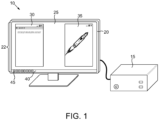
- FIG. 1 therein is depicted a pictorial view of an exemplary embodiment of a computing system 10 that includes a computer 15 and a display or monitor 20 connected to the computer 15.
- the computer 15 and the display 20 may be integrated into a single case.
- the display 20 may be any of a variety of technologies such as LCD, OLED, plasma or other technologies.
- the display 20 advantageously is capable of dynamic refresh as described in more detail below.
- the computer system 10 may include various input devices such as mice and keyboards which are not shown for simplicity of illustration.
- the computer 15 may utilize one or more operating systems such as Windows ® , Linux, IOs or others. Indeed, the techniques described herein may be, in many ways, platform agnostic.
- operating system software is displaying a surface 22 or content on the display 20 that includes a desktop 25, two exemplary windowed applications 30 and 35 that are open and some task bar 40 that includes some number of icons 45.
- the applications 30 and 35 may, of course, number more than two and indeed may be between one and some unspecified number.
- the combination of the desktop 25 and the opened windowed applications 30 and 35 make up the composited surface 22 that is dynamically refreshed.
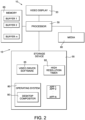
- the computing device 10 may include the aforementioned display 20, a processor 50 or processors, a storage device 55, media 60, and memory 65.
- the processor 50 may be an integrated circuit dedicated to video processing, a microprocessor, graphics processing unit (GPU), an accelerated processing unit (APU) that combines microprocessor and graphics processor functions, an application specific integrated circuit or other device.
- An exemplary APU may include fixed function cores for compression, decompression, pre-imposed or post-imposed processing tasks or others. Indeed, the processor 50 may consist of multiple examples of such integrated circuits operating in parallel or otherwise.
- the storage device 55 is a computer readable medium and may be any kind of hard disk, optical storage disk, solid state storage device, ROM, RAM or virtually any other system for storing computer readable media.
- the media 60 may include media supplied by satellite tuner, cable set top box, optical disk player, internet streaming, a removable storage device or a hard drive. These represent just a few examples of the types of media that may be used to deliver video content to the processor 50 and thus the display 20 depicted in FIG. 1 .
- the memory 65 may be one or more discrete memory devices, such as DRAM, SRAM, VRAM or flash chips, boards or modules or onboard cache(s) or combinations of these.
- the memory 65 may be subdivided into, among various things, plural buffers, buffer 1, buffer 2 ... buffer m.
- the buffers buffer 1, buffer 2 . . . buffer m are addressable memory locations that may be used for double, triple or other buffering for displaying video frames as described in more detail below.
- the computing device 10 includes an operating system 80, video driver software 85, a desktop compositor 90, a high resolution timer 92, and may include plural applications, which are abbreviated APP 1, APP 2 ... APP n, and which may be drivers, software applications, or other types of applications.
- APP 1 when opened may correspond to the windowed application 30
- APP 2 when opened may correspond to the windowed application 35 shown in FIG. 1 .
- the operating system 80, the video driver software 85, a high resolution timer 90, a desktop compositor 90 and the applications APP 1 ... APP n may be stored on the storage device 55.
- the operating system software 80 may be any of a great variety of different operating systems.
- the video driver software 85 may similarly be suitable for various different types of operating system platforms.
- the desktop compositor 90 may be part of the operating system 80 as shown and function as a system process.
- One or more (and two in the case of double buffering) of the buffers Buffer 1, Buffer 2 ... Buffer m may be allocated by each of the applications APP 1, APP 2 ... APP n to store rendered application content.
- one or more of the buffers (and two in the case of double buffering) buffer 1, buffer 2 ... buffer m may be allocated by the desktop compositor 90 to store composited rendered content.
- the high resolution timer 92 is designed to modify the way in which the desktop compositor 90 creates, for example, the desktop surface 22, which is the composition consisting of the desktop 25 and the opened applications 30 and 35 depicted in FIG. 1 , with a technical goal of reducing the latency between the various operations required to create the desktop composition and the actual display of the desktop composited surface 22 on the display 20.
- the high resolution timer 92 may be implemented in the video driver software 85, the operating system software 80 or even as firmware, perhaps in the storage device 55 or other location. If implemented in firmware, the high resolution timer 92 should advantageously work through the video driver software 85 in order to implement the desired functionality.
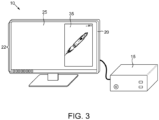
- FIG. 3 is a pictorial view of the computing system 10 initially displaying the desktop 25 and the windowed application 35 only, i.e. the desktop surface 22 consisting of the desktop 25 and the windowed application 35.
- FIG. 4 is an activity diagram that is akin to a timing diagram that depicts the various hardware and software activities associated with displaying the desktop surface 22 depicted in FIG. 3 . Going from top to bottom, FIG. 4 depicts a Hardware Queue stream 100, a Desktop Compositor (DWM) Process stream 105, an Application Generated Content stream 110, a Pending Flip stream 115 and an On Screen Display stream 120.
- DWM Desktop Compositor
- the Hardware Queue stream 100 represents the hardware rendering of content.
- the rendered content may be Application Generated Content, such as the rendering of the content of the windowed application 35 in FIG. 3 , and the rendering of composited content, such as the rendering the composited surface 22 in FIG. 3 .
- the rendering is performed by whatever hardware is actually writing video frames. This may be the processor 50 depicted in FIG. 2 or a discrete GPU if a GPU is implemented in the computing system 10, the two in concert or some other device(s).
- the DWM Process stream 105 depicts the periodic waking of the DWM Process (i.e., the desktop compositor 90) within the operating system software 80 shown in FIG. 2 to perform a variety of functions to be described in more detail below.
- the Application Generated Content stream 110 depicts new content, for example Content (A), generated by a particular application. This may be, for example, some updated video information for the windowed application 35 shown in FIG. 3 that is to be rendered on the display 20.
- the Pending Flip stream 115 depicts when the desktop compositor 90 initiates a buffer flip between two DWM allocated buffers, say from Buffer 1 to Buffer 2 (and ultimately for delivery to the display 20) and indicates where there are delays in the flip between Buffer 1 and Buffer 2, such as the delays 125 and 130 depicted. These delays 125 and 130 will be explained in more detail below.
- the On Screen stream 120 depicts what is actually being currently displayed on the display 20. For example, the contents of Buffer 1 is initially being displayed on the display 20, and Buffer 1 may be storing the desktop surface 22 that has been rendered and delivered from the processor 50 or whatever processor is on board.
- Refresh 1 and Refresh 2 are depicted. These represent individual refreshes of the display 20.
- Refresh 1 and Refresh 2, etc. occur at specified fixed points in time that are set by a conventional vertical synchronization code termed VSYNC.
- VSYNC When VSYNC is enabled, the frame rendering rate is effectively capped at the monitor refresh rate.
- an instance of a DWM process wake/execute occurs immediately after each refresh, i.e., Refresh 1, Refresh 2, etc. For example, after Refresh 1, a DWM process wake/execute instance 135 occurs.
- an application is generating Content (A), which again may simply be an updated frame for the application 35 depicted in FIG. 3 .
- A the contents of Buffer 1, which is the desktop surface 22 as shown in FIG. 3 , is being displayed.
- Buffer 1 which is the desktop surface 22 as shown in FIG. 3
- the DWM process wake/execute instance 135 looks for available rendered content, and if rendered content is available, then informs the video driver 85 of the address location of the available content, (it might be Buffer m).
- the DWM process wake/execute instance 135 then closes.
- the video driver 85 programs the new buffer address (say buffer m) into the processor 50 (or GPU if on board), and the processor initiates the next refresh. If rendered content is not sensed, the DWM process wake/execute instance 135 closes and awaits the next refresh. Following Refresh 2 but prior to Refresh 3, the next DWM process wake/execute instance 140 occurs and during this period the Application Generated Content (A) is complete and the updated Content (A) completes rendering as shown in the Hardware Queue stream 100. This rendered Content (A) will be stored in an application allocated buffer, for example Buffer m. However, because the DWM process wake/execute instance 140 has already opened and closed prior to the completion of the rendering of Content (A) a delay is first introduced.
- the DWM process wake/execute instance 140 has already opened and closed prior to the completion of the rendering of Content (A) a delay is first introduced.
- FIG. 4 depicts a typical exemplary hardware delay which may be caused by complexities associated with rendering Content (B) or a variety of other factors.
- the DWM composition process 150 is not completed until some time shortly before Refresh 4.
- the DWM process wake/execute instance 145 will sense the availability of application Content (A) and, as represented by the arrow 152, prompt the rendering hardware to perform the DWM composition process 150 as reflected in the Hardware Queue 100.
- the DWM composition process 150 involves taking the contents of the desktop 25 and the windowed application 35 (which is currently stored in Buffer m, the application allocated buffer), composing from those two the desktop surface 22, which is the composite of the two, and then storing that composited desktop surface 22 in Buffer 2, the other DWM allocated buffer.
- the contents of the desktop surface 22 shown in FIG. 3 are written to Buffer 2.
- the Application Generated Content continues to be Content (C) and the rendering of (C) continues as shown in the Hardware Queue 100.
- the DWM process wake/execute instance 155 will sense the availability of application Content (B) (i.e., the Render (B) is complete) and, as again represented by the arrow 152, prompt the rendering hardware to perform the next DWM composition process 160 as reflected in the Hardware Queue 100.
- a composited content frame is written to Buffer 1.
- the flipping of the content from Buffer 2 back to Buffer 1 cannot occur, due to the VSYNC imposed refresh points, until the next refresh, which is Refresh 6 thus introducing the aforementioned flip delay 130.
- FIG. 4 is an activity diagram like FIG. 4 but simplified down to only include the rendering of Content (A) and only four refresh cycles.
- FIG. 6 is an exemplary new process for rendering the same content and by utilizing the high resolution timer 92 depicted in FIG. 2 and described briefly above.
- FIG. 5 like FIG. 4 , depicts the Hardware Queue stream 100, the DWM Process stream 105, the Application Generated Content stream 110, the Pending Flip stream 115 and the On Screen Display stream 120.
- the frame rendering rate is faster than the display refresh rate.
- the On Screen Display stream 120 reflects that the contents of Buffer 1, which is simply whatever the current desktop surface 22 is on the display 20 in FIG. 3 .
- an Application Generated Content (A) begins generation, again by way of the operating system 80 depicted in FIG. 2 and that the DWM process wake/execute instance 170 occurs.
- the rendering hardware begins to render Content (A).
- the rendering (Render (A)) of Content (A) is completed between Refresh 1 and Refresh 2.
- the DWM composition process 150 has to wait until Refresh 2, which introduces a delay in composition.
- the next DWM process wake/execute instance 175 occurs.
- the DWM process wake/execute instance 175 senses the available rendered Content (A) and prompts the DWM composition process 150 as reflected in the arrow 177.
- the DWM composition process 150 may proceed and results in a rendered composited desktop 22 being stored in Buffer 2.
- FIG. 6 depicts the Hardware Queue stream 100, the DWM Process stream 105, the Application Generated Content stream 110, the Pending Flip stream 115 and the On Screen Display stream 120.
- FIG. 5 depicts the Hardware Queue stream 100, the DWM Process stream 105, the Application Generated Content stream 110, the Pending Flip stream 115 and the On Screen Display stream 120.
- Refresh 1, Refresh 2, Refresh 3 and Refresh 4 are depicted and it is assumed that initially that the contents of Buffer 1 is depicted on the display 20 shown in FIG. 3 .
- the frame rendering rate is faster than the display refresh rate.
- the Application Generated Content (A) is delivered to rendering hardware as shown in the Hardware Queue stream 100 rendering (Render (A)) of Content (A) begins.
- the DWM Process stream 105 reflects that there are multiple DWM process wake/execution instances, two of which are labeled 190 and 195.
- the multiple DWM process wake/execution instances 190 and 195 are controlled by the high resolution timer 92 depicted in FIG. 2 . With the high resolution timer 92, the DWM composition process is decoupled from the VSYNC timing normally imposed on the display 20.
- the high resolution timer 92 can be enabled automatically in response to sensing of various types of latency sensitive content or be enabled manually by user input. Furthermore, the number of DWM process wake/execution instances 190 and 195 per refresh may be user selected, operating system selected or otherwise. Indeed, the high resolution timer frequency, that is, the frequency at which the high resolution timer 92 causes DWM process wake/execution instances between refreshes, can be dynamic and change based on content in order to manage the computing overhead associated with running the high resolution timer 92.
- the high resolution timer 92 may be implemented in the operating system software 80, the video driver software 85, or in some other location.
- the high resolution timer 92 periodically causes each of the DWM process instance 190 and 195 by periodically prompting the video driver software 85 to check the current display, i.e. what buffer, say Buffer 1 or Buffer 2, is currently being displayed.
- the video driver software 85 then performs the requested check and reports to the operating system 80 the results of the check, i.e., which buffer, Buffer 1 or Buffer 2, is currently being displayed. This report prompts the operating system 80 to initiate the next DWM wake/execution instance.
- the DWM process polls the contents of any application allocated buffers, say Buffer m, and makes a determination if the rendering hardware should commence with a DWM composition process.
- DWM process wake/execution instance 190 occurs when rendering of (A) (Render (A)) is not complete, then DWM composition at that point is not appropriate.
- DWM process wake/execution instance 195 the rendering of (A) (Render (A)) is complete and that rendered content (A) is stored in Buffer m, the application allocated buffer.
- the DWM process wake/execution instance 195 prompts the rendering hardware to commence a DWM composition process 200 as suggested by the arrow 203 and reflected in the Hardware Queue stream 100. Note that this occurs prior to Refresh 2, which is earlier than the conventional techniques disclosed herein.
- the desktop compositor composes a composited surface 22, which includes the contents of application allocated buffer, Buffer m, and any other portion of the desktop surface 22, and stores that composited surface 22 in Buffer 2.
- a flip from Buffer 1 to Buffer 2 is pending as shown in the Pending Flip stream 115 but does not occur until Refresh 2, resulting in a flip delay 205.
- a much earlier execution of a DWM composition step 200 may occur than in the conventional technique shown in FIG. 5 , resulting in a relatively short flip delay 205 and ultimately a flip to Buffer 2 that can occur at Refresh 2.
- FIG. 7 is an activity diagram like FIG. 5 and FIG. 8 is an activity diagram like FIG. 6 .
- FIG. 7 again depicts the Hardware Queue stream 100, the DWM Process stream 105, the Application Generated Content stream 110, the Pending Flip stream 115, the On Screen Display stream 120 and four refresh cycles Refresh 1, Refresh 2, Refresh 3 and Refresh 4. Again, it is assumed that initially the desktop surface 22 on the display 20 is the contents of Buffer 1 shown in FIG. 2 .
- the Application Generated Content stream 110 and the Hardware Queue stream 100 reflect that Content (A) is delivered to the rendering hardware and rendering of (A) (Render (A)) begins.
- the DWM process wake/execution instance 205 occurs.
- the next DWM Process wake/execution instance 210 occurs but because the rendering frame rate is slower than the refresh rate, i.e., the period from Refresh 1 to Refresh 2, the rendering of Content (A) (Render (A)) is not complete as reflected in the Hardware Queue stream 100.
- Render (A) completes following Refresh 2 and prior to Refresh 3, that completion occurs after the conclusion of the DWM process wake/execution instance 210.
- the continued movement of the rendered content, Render (A), to DWM composition or otherwise is delayed at least until Refresh 3.
- the next DWM process wake/execution instance 215 occurs, the rendered content from the Render (A) process is sensed and the rendering hardware is prompted, as suggested by the arrow 223, to commence a DWM composition process 220.
- the composited desktop 22 consisting of the rendered Content (A) and any remaining portions of the desktop surface are written to Buffer 2.
- the flip to Buffer 2 to actually deliver the composited desktop surface 22 to the display 20 has to wait until Refresh 4, which introduces a significant flip delay 225.
- a flip to Buffer 2 may occur to deliver the updated desktop surface 22 (including updated Content (A)) to the monitor 20 as represented on the On Screen stream 120.
- the total delay associated with following the completion of Render (A) in the Hardware Queue 100 is over one frame and may be as great as two frames.
- three full frames, that is Refresh 1 to Refresh 4 have occurred between the commencement of Render (A) and the actual display of (A) as part of the desktop surface 22.
- FIG. 8 depicts the Hardware Queue stream 100, the DWM Process stream 105, the Application Generated Content stream 110, the Pending Flip stream 115 and the On Screen Display stream 120.
- FIG. 3 depicts the utilization of a dynamic refresh rate for the monitor 20 depicted in FIG. 3 means that the refreshes Refresh 1, Refresh 2, Refresh 3 and Refresh 4 do not occur at fixed intervals but rather at intervals determined by whatever the dynamic refresh rate is at the time of a DWM composition process.
- the contents of Buffer 1 is displayed.
- Refresh 1 application generated Content (A) is called up by the operating system 80 depicted in FIG. 2 and thus the Hardware Queue 100 shows that Render (A) commences as well.
- the high resolution timer 92 depicted in FIG. 2 produces the multiple DWM process wake/execution instances, two of which are labeled 230 and 235, respectively.
- the Refresh 2 would occur where the conventional VSYNC refresh point illustrated by the dashed vertical line would occur.
- Refresh 2 can occur later and thus with a lower refresh rate between Refresh 1 and Refresh 2 than would be provided by VSYNC.
- DWM process wake/execution instance 235 the rendering of (A) (Render (A)) is complete and this is sensed by the DWM process wake/execution instance 235.
- the DWM process wake/execution instance 235 signals the rendering hardware to commence a DWM composition process 240 as suggested by the arrow 243 and reflected in the Hardware Queue stream 100.
- the rendering hardware renders a composited surface that includes rendered Content (A) and any other portion of the desktop surface 22 (see FIG. 3 ) and writes that composited desktop surface 22 to Buffer 2.
- a user configurable and potentially very short flip delay 245 may be introduced followed immediately by Refresh 2 and a flip from Buffer 1 to Buffer 2.
- the length of the flip delay 245 may be set by the high resolution timer 92 and may take on a variety of values. In an exemplary embodiment, examples include 0.5 to 20 milliseconds.
- the new technique utilizing the dynamic refresh and the more frequent DWM Process wake/execution instances steps 230 and 235, etc.
- the Content (A) may be delivered in a single dynamically refreshed frame.
- the frequency of the high resolution timer 92 may be static or dynamic.
- the high resolution timer frequency can be dynamically adjusted based on content.
- a game application might generate high frame rates.
- the frequency of the high resolution timer 92 might be dynamically set to some frequency ⁇ 1 .
- One example might be the first few seconds after application start where intro screens are displayed.
- the high resolution timer 92 can change to another frequency ⁇ 2 where ⁇ 2 ⁇ ⁇ 1 . This dynamic frequency switching can occur multiple times per second and to multiple frequencies depending on the content.
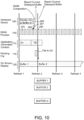
- FIGS. 9 and 10 Another advantage associated with the disclosed exemplary embodiments over the conventional rendering techniques described herein may be understood by referring now to FIGS. 9 and 10 .
- the improved rendering process moves forward in time the points where the desktop compositor 90 depicted in FIG. 2 is informed that a flip has occurred and thus one of two buffers is freed up to begin rendering new content.
- FIG. 9 is an activity diagram like FIG. 5 and depicts a conventional rendering process. Again, FIG. 9 depicts the Hardware Queue stream 100, the DWM Process stream 105, the Application Generated Content stream 110, the Pending Flip stream 115 and the On Screen Display stream 120 and four refresh cycles Refresh 1, Refresh 2, Refresh 3 and Refresh 4.
- a first DWM process wake/execution instance 250 occurs and Application Generated Content (A) is sent by the operating system to the rendering hardware as reflected in the Hardware Queue stream 100 where the process of rendering the updated Content (A) to an application allocated Buffer m begins.
- the display 20 is showing the contents of Buffer 1, which again is one of the desktop compositor 90 allocated buffers.
- the rendering of Content (A) to Buffer m is completed prior to Refresh 2.
- Application Generated Content (B) is slated for rendering to another application allocated buffer, Buffer n. However this cannot occur until later as described in more detail below.
- the DWM Process wake/execution instance 255 senses the available rendered content (A) in Buffer m and prompts the rendering hardware to commence a DWM composition process 260 as suggested by the arrow 262 and reflected in the Hardware Queue stream 100.
- the DWM composition process 260 produces a composited surface 22 (see FIG. 3 ) that includes the rendered content (A).
- a flip from Buffer 1 to Buffer 2 must await the next refresh, Refresh 3, which introduces a flip delay 265 shown in the Flip Pending stream 115.
- a flip to Buffer 2 occurs such that the contents of Buffer 2, namely the product of Render (A), is delivered to the display 20 shown in FIG. 3 and as reflected in the On Screen Display stream 120.
- the DWM Process instance 270 reports the current buffer that is being displayed and in this instance that would be Buffer 2. It is only at this point that the operating system 80 receives a report of this current buffer display and is made aware that the other buffer, Buffer 1, is now available to render the next composited content that would, in this case, include Content (B).
- FIG. 10 depicts the Hardware Queue stream 100, the DWM Process stream 105, the Application Generated Content stream 110, the Pending Flip stream 115 and the On Screen Display stream 120 and four refresh cycles Refresh 1, Refresh 2, Refresh 3 and Refresh 4.
- Refresh 1 the contents of Buffer 1 is displayed and Application Generated Content (A) is sent to the rendering hardware to begin the Render (A) to application allocated Buffer m process as reflected through the Hardware Queue stream 100.
- Application Generated Content A
- FIG. 2 multiple periodic DWM process wake/execution instances 275, 280, etc.
- the high resolution timer 92 periodically prompts the video driver software 85 to check the current display, i.e. what DWM allocated buffer, say Buffer 1 or Buffer 2, is currently being displayed.
- the video driver software 85 then performs the requested check and reports to the operating system 80 the results of the check, i.e., which buffer, Buffer 1 or Buffer 2, is currently being displayed. This report prompts the operating system 80 to initiate the next DWM wake/execution instance.
- the conclusion of the Render (A) to Buffer m process is sensed by the next available DWM process wake/execution instance, in this case the instance 280.
- the DWM process wake/execution instance 280 signals the rendering hardware to commence the DWM composition process 285 as suggested by the arrow 287.
- the contents of Buffer m are composited with any remaining portion of the desktop surface 22 (see FIG. 3 ) and written to Buffer 2.
- the video driver software 85 reports to the operating system software 80 that the currently displayed buffer is still Buffer 1.
- a report is sent by (by the current DWM process wake/execution instance) to the desktop compositor 90 of the operating system software 80 depicted in FIG.
- FIG. 11 is a flow chart of an exemplary process flow.
- the computing device 10 senses if full screen exclusive mode is enabled at step 305. If full screen exclusive mode is detected, then the process proceeds to step 310 and rendering in full screen exclusive mode with the high resolution timer disabled. The process proceeds back to step 305. If, however, at step 305 full screen exclusive mode is not detected, the process to step 320 and detection of latency sensitive content. This can be done in a variety of ways.
- step 323 the process proceeds to step 325 and rendering of windowed mode with the high resolution timer 92 disabled.
- This windowed mode can include a mode where an application is rendered full screen.
- step 330 the process returns to step 305. If, however, at step 323, latency sensitive content is detected, then the process moves to step 340 where content is rendered with the high resolution timer 92 enabled. Thus for example as depicted in FIG. 8 , this may entail the high resolution timer 92 causing multiple DWM process wake/execute instances 230, 235, etc.
- step 345 a DWM composition process is performed. This corresponds to, for example, the DWM composition process 240 depicted in FIG. 8 .
- step 350 a dynamic refresh and buffer flip is executed. This corresponds to, for example, the dynamic refresh, Refresh 2, and the buffer flip from Buffer 1 to Buffer 2.
- step 355 the high resolution timer 92 shown in FIG.
- step 330 reports to the desktop compositor 90 depicted in FIG. 2 that one of the two buffers is now available. This corresponds to the report current displayed buffer report depicted in, for example, FIG. 10 at Refresh 2. At this point, the process may proceed to step 330 and ultimately back to step 305. Of course, this loop may occur many times per second.
- step 340 in FIG. 11 may be understood by referring now also to FIG. 12 , which is also flow chart.
- the frequency of the high resolution timer 92 may be static or dynamic.
- the content is rendered with the high resolution timer 92 at a static frequency followed by a loop back to step 360.
- the high resolution timer frequency may be set by user input or automatically if latency sensitive content is sensed.
- step 360 If, however, at step 360, high resolution timer dynamic frequency is enabled, then at step 370 the content is rendered with the high resolution timer 92 at a dynamic frequency based on the content followed by a loop back to step 360.
- the frequency may be adjusted up or down multiple times per second if desired based on the computationally intensive aspects of the content.
Landscapes
- Engineering & Computer Science (AREA)
- Theoretical Computer Science (AREA)
- Software Systems (AREA)
- Physics & Mathematics (AREA)
- General Physics & Mathematics (AREA)
- Computer Hardware Design (AREA)
- General Engineering & Computer Science (AREA)
- Human Computer Interaction (AREA)
- Computer Security & Cryptography (AREA)
- Computer Graphics (AREA)
- Controls And Circuits For Display Device (AREA)
- Digital Computer Display Output (AREA)
Applications Claiming Priority (2)
| Application Number | Priority Date | Filing Date | Title |
|---|---|---|---|
| US15/338,492 US12079642B2 (en) | 2016-10-31 | 2016-10-31 | Method and apparatus for dynamically reducing application render-to-on screen time in a desktop environment |
| PCT/CA2017/051206 WO2018076102A1 (en) | 2016-10-31 | 2017-10-11 | Method apparatus for dynamically reducing application render-to-on screen time in a desktop environment |
Publications (3)
| Publication Number | Publication Date |
|---|---|
| EP3532919A1 EP3532919A1 (en) | 2019-09-04 |
| EP3532919A4 EP3532919A4 (en) | 2020-06-24 |
| EP3532919B1 true EP3532919B1 (en) | 2024-07-17 |
Family
ID=62021497
Family Applications (1)
| Application Number | Title | Priority Date | Filing Date |
|---|---|---|---|
| EP17863900.1A Active EP3532919B1 (en) | 2016-10-31 | 2017-10-11 | Method and apparatus for dynamically reducing application render-to-on-screen time in a desktop environment |
Country Status (6)
| Country | Link |
|---|---|
| US (2) | US12079642B2 (enExample) |
| EP (1) | EP3532919B1 (enExample) |
| JP (1) | JP7198202B2 (enExample) |
| KR (1) | KR102426012B1 (enExample) |
| CN (1) | CN110073324B (enExample) |
| WO (1) | WO2018076102A1 (enExample) |
Families Citing this family (9)
| Publication number | Priority date | Publication date | Assignee | Title |
|---|---|---|---|---|
| WO2020062069A1 (en) * | 2018-09-28 | 2020-04-02 | Qualcomm Incorporated | Frame composition alignment to target frame rate for janks reduction |
| CN109743517B (zh) * | 2019-01-21 | 2021-04-20 | 合肥惠科金扬科技有限公司 | 一种显示模式设置方法、显示器及终端设备 |
| CN110503708A (zh) * | 2019-07-03 | 2019-11-26 | 华为技术有限公司 | 一种基于垂直同步信号的图像处理方法及电子设备 |
| CN113096054B (zh) * | 2020-01-09 | 2024-06-25 | 北京小米移动软件有限公司 | 图像帧合成方法、装置及存储介质 |
| CN113345478B (zh) * | 2020-03-02 | 2022-07-05 | 海信视像科技股份有限公司 | 播放器时刻获取方法、设备、存储介质及播放器 |
| CN115729435A (zh) * | 2021-08-31 | 2023-03-03 | 广东艾檬电子科技有限公司 | 一种实现桌面应用交互及渲染的方法和系统 |
| CN117854455A (zh) * | 2022-09-30 | 2024-04-09 | 荣耀终端有限公司 | 显示方法及装置 |
| CN115797526A (zh) * | 2022-12-07 | 2023-03-14 | 广州随手玩网络科技有限公司 | 一种gif渲染方法及装置 |
| CN118349311B (zh) * | 2024-06-14 | 2024-08-20 | 北京麟卓信息科技有限公司 | 一种基于可视区域度量的应用渲染帧率自适应调整方法 |
Family Cites Families (33)
| Publication number | Priority date | Publication date | Assignee | Title |
|---|---|---|---|---|
| US6661427B1 (en) | 1998-11-09 | 2003-12-09 | Broadcom Corporation | Graphics display system with video scaler |
| US6636222B1 (en) | 1999-11-09 | 2003-10-21 | Broadcom Corporation | Video and graphics system with an MPEG video decoder for concurrent multi-row decoding |
| US6924807B2 (en) | 2000-03-23 | 2005-08-02 | Sony Computer Entertainment Inc. | Image processing apparatus and method |
| JP3481913B2 (ja) | 2000-12-18 | 2003-12-22 | 株式会社アクセル | 画像処理装置 |
| US7038690B2 (en) | 2001-03-23 | 2006-05-02 | Microsoft Corporation | Methods and systems for displaying animated graphics on a computing device |
| US20030107604A1 (en) * | 2001-12-12 | 2003-06-12 | Bas Ording | Method and system for automatic window resizing in a graphical user interface |
| EP1621010A1 (en) * | 2003-05-02 | 2006-02-01 | Allan Robert Staker | Interactive system and method for video compositing |
| US7839419B2 (en) * | 2003-10-23 | 2010-11-23 | Microsoft Corporation | Compositing desktop window manager |
| US7397478B2 (en) | 2005-09-29 | 2008-07-08 | Intel Corporation | Various apparatuses and methods for switching between buffers using a video frame buffer flip queue |
| US7705842B2 (en) * | 2006-01-11 | 2010-04-27 | Microsoft Corporation | Fast display initialization and light up |
| JP4312238B2 (ja) | 2007-02-13 | 2009-08-12 | 株式会社ソニー・コンピュータエンタテインメント | 画像変換装置および画像変換方法 |
| JP2009075888A (ja) | 2007-09-20 | 2009-04-09 | Canon Inc | 描画処理装置及びその方法、プログラム、記録媒体 |
| US8334857B1 (en) * | 2007-12-14 | 2012-12-18 | Nvidia Corporation | Method and system for dynamically controlling a display refresh rate |
| US8300056B2 (en) * | 2008-10-13 | 2012-10-30 | Apple Inc. | Seamless display migration |
| US8350867B2 (en) | 2009-12-22 | 2013-01-08 | Ati Technologies Ulc | Image quality configuration apparatus, system and method |
| JP4692682B1 (ja) | 2010-01-26 | 2011-06-01 | 株式会社アクセル | 音声処理装置 |
| US8446411B2 (en) * | 2010-06-11 | 2013-05-21 | Microsoft Corporation | Adaptive image rendering and use of imposter |
| KR20120024315A (ko) * | 2010-09-06 | 2012-03-14 | 삼성전자주식회사 | 사용자 이벤트에 반응한 프레임워크를 표시하는 프레임워크 표시 시스템 및 방법 |
| US9047085B2 (en) * | 2011-03-14 | 2015-06-02 | Nvidia Corporation | Method and apparatus for controlling sparse refresh of a self-refreshing display device using a communications path with an auxiliary communications channel for delivering data to the display |
| CA2849158A1 (en) | 2011-09-19 | 2013-03-28 | Quickplay Media Inc. | Media processor |
| US20130155101A1 (en) * | 2011-12-15 | 2013-06-20 | Ati Technologies, Ulc | System and method for displaying content in an exclusive mode environment |
| EP2629182B1 (en) | 2012-02-17 | 2019-01-16 | 2236008 Ontario Inc. | System and method for sample rate adaption |
| US8547480B1 (en) * | 2012-06-25 | 2013-10-01 | Google Inc. | Coordinating distributed graphics rendering in a multi-window display |
| US9251552B2 (en) | 2012-06-28 | 2016-02-02 | Intel Corporation | Method and apparatus for managing image data for presentation on a display |
| US9030481B2 (en) * | 2012-06-28 | 2015-05-12 | Intel Corporation | Method and apparatus for reducing power usage during video presentation on a display |
| US9269121B2 (en) * | 2012-12-18 | 2016-02-23 | Intel Corporation | Techniques for managing system power using deferred graphics rendering |
| US9858899B2 (en) | 2013-06-13 | 2018-01-02 | Microsoft Technology Licensing, Llc | Managing transitions of adaptive display rates for different video playback scenarios |
| CN103593155B (zh) | 2013-11-06 | 2016-09-07 | 华为终端有限公司 | 显示帧生成方法和终端设备 |
| JP2015158751A (ja) * | 2014-02-21 | 2015-09-03 | 富士通株式会社 | 描画方法、描画装置及びプログラム |
| US9332216B2 (en) * | 2014-03-12 | 2016-05-03 | Sony Computer Entertainment America, LLC | Video frame rate compensation through adjustment of vertical blanking |
| US9973795B2 (en) * | 2014-08-27 | 2018-05-15 | ClearOne Inc. | Method for video synchronization in video distribution systems |
| US9728166B2 (en) * | 2015-08-20 | 2017-08-08 | Qualcomm Incorporated | Refresh rate matching with predictive time-shift compensation |
| US11042955B2 (en) * | 2016-06-02 | 2021-06-22 | Nextlabs, Inc. | Manipulating display content of a graphical user interface |
-
2016
- 2016-10-31 US US15/338,492 patent/US12079642B2/en active Active
-
2017
- 2017-10-11 KR KR1020197006548A patent/KR102426012B1/ko active Active
- 2017-10-11 WO PCT/CA2017/051206 patent/WO2018076102A1/en not_active Ceased
- 2017-10-11 CN CN201780060691.6A patent/CN110073324B/zh active Active
- 2017-10-11 JP JP2019516935A patent/JP7198202B2/ja active Active
- 2017-10-11 EP EP17863900.1A patent/EP3532919B1/en active Active
-
2024
- 2024-08-29 US US18/818,737 patent/US20240419461A1/en active Pending
Also Published As
| Publication number | Publication date |
|---|---|
| EP3532919A1 (en) | 2019-09-04 |
| CN110073324B (zh) | 2023-08-15 |
| US20180121213A1 (en) | 2018-05-03 |
| US12079642B2 (en) | 2024-09-03 |
| KR20190073350A (ko) | 2019-06-26 |
| WO2018076102A1 (en) | 2018-05-03 |
| EP3532919A4 (en) | 2020-06-24 |
| KR102426012B1 (ko) | 2022-07-27 |
| US20240419461A1 (en) | 2024-12-19 |
| JP2020502553A (ja) | 2020-01-23 |
| JP7198202B2 (ja) | 2022-12-28 |
| CN110073324A (zh) | 2019-07-30 |
Similar Documents
| Publication | Publication Date | Title |
|---|---|---|
| US20240419461A1 (en) | Method and apparatus for dynamically reducing application render-to-on screen time in a desktop environment | |
| CN114648951B (zh) | 控制屏幕刷新率动态变化的方法及电子设备 | |
| JP4383853B2 (ja) | 時間アロケータを有するグラフィックレンダリングエンジンを用いる装置、方法及びシステム | |
| US7941645B1 (en) | Isochronous pipelined processor with deterministic control | |
| US12249017B2 (en) | Reduced display processing unit transfer time to compensate for delayed graphics processing unit render time | |
| WO2021056364A1 (en) | Methods and apparatus to facilitate frame per second rate switching via touch event signals | |
| US20220013087A1 (en) | Methods and apparatus for display processor enhancement | |
| WO2024112401A1 (en) | Display processing unit (dpu) pixel rate based on display region of interest (roi) geometry | |
| US8773442B2 (en) | Aligning animation state update and frame composition | |
| CN111399930B (zh) | 一种页面启动方法、装置、设备及存储介质 | |
| US20230074876A1 (en) | Delaying dsi clock change based on frame update to provide smoother user interface experience | |
| US20250037683A1 (en) | Dpu driven adaptive sync for command mode panels | |
| WO2021248370A1 (en) | Methods and apparatus for reducing frame drop via adaptive scheduling | |
| US20060170691A1 (en) | Apparatus and method for frame buffer control | |
| US20250251773A1 (en) | Esync hybrid mode | |
| WO2024221309A1 (en) | Ddic fallback scaling for partial frame update | |
| US20250252525A1 (en) | Display driver thread run-time scheduling | |
| WO2025160792A1 (en) | Dynamic video/camera power framework | |
| WO2025171179A1 (en) | Esync hybrid mode | |
| WO2025232257A1 (zh) | 一种图层渲染方法、装置、设备及存储介质 | |
| KR20260002665A (ko) | 부분 프레임 업데이트를 위한 ddic 폴백 스케일링 |
Legal Events
| Date | Code | Title | Description |
|---|---|---|---|
| STAA | Information on the status of an ep patent application or granted ep patent |
Free format text: STATUS: THE INTERNATIONAL PUBLICATION HAS BEEN MADE |
|
| PUAI | Public reference made under article 153(3) epc to a published international application that has entered the european phase |
Free format text: ORIGINAL CODE: 0009012 |
|
| STAA | Information on the status of an ep patent application or granted ep patent |
Free format text: STATUS: REQUEST FOR EXAMINATION WAS MADE |
|
| 17P | Request for examination filed |
Effective date: 20190325 |
|
| AK | Designated contracting states |
Kind code of ref document: A1 Designated state(s): AL AT BE BG CH CY CZ DE DK EE ES FI FR GB GR HR HU IE IS IT LI LT LU LV MC MK MT NL NO PL PT RO RS SE SI SK SM TR |
|
| AX | Request for extension of the european patent |
Extension state: BA ME |
|
| DAV | Request for validation of the european patent (deleted) | ||
| DAX | Request for extension of the european patent (deleted) | ||
| REG | Reference to a national code |
Ref country code: DE Ref legal event code: R079 Ipc: G06F0009440100 Ref country code: DE Ref legal event code: R079 Ref document number: 602017083413 Country of ref document: DE Free format text: PREVIOUS MAIN CLASS: G06F0003140000 Ipc: G06F0009440100 |
|
| A4 | Supplementary search report drawn up and despatched |
Effective date: 20200525 |
|
| RIC1 | Information provided on ipc code assigned before grant |
Ipc: G09G 5/14 20060101ALI20200516BHEP Ipc: G09G 5/399 20060101ALI20200516BHEP Ipc: G06F 9/4401 20180101AFI20200516BHEP Ipc: G06F 9/451 20180101ALI20200516BHEP |
|
| STAA | Information on the status of an ep patent application or granted ep patent |
Free format text: STATUS: EXAMINATION IS IN PROGRESS |
|
| 17Q | First examination report despatched |
Effective date: 20211208 |
|
| GRAP | Despatch of communication of intention to grant a patent |
Free format text: ORIGINAL CODE: EPIDOSNIGR1 |
|
| STAA | Information on the status of an ep patent application or granted ep patent |
Free format text: STATUS: GRANT OF PATENT IS INTENDED |
|
| INTG | Intention to grant announced |
Effective date: 20240220 |
|
| GRAS | Grant fee paid |
Free format text: ORIGINAL CODE: EPIDOSNIGR3 |
|
| GRAA | (expected) grant |
Free format text: ORIGINAL CODE: 0009210 |
|
| STAA | Information on the status of an ep patent application or granted ep patent |
Free format text: STATUS: THE PATENT HAS BEEN GRANTED |
|
| AK | Designated contracting states |
Kind code of ref document: B1 Designated state(s): AL AT BE BG CH CY CZ DE DK EE ES FI FR GB GR HR HU IE IS IT LI LT LU LV MC MK MT NL NO PL PT RO RS SE SI SK SM TR |
|
| P01 | Opt-out of the competence of the unified patent court (upc) registered |
Free format text: CASE NUMBER: APP_34761/2024 Effective date: 20240610 |
|
| REG | Reference to a national code |
Ref country code: CH Ref legal event code: EP |
|
| REG | Reference to a national code |
Ref country code: DE Ref legal event code: R096 Ref document number: 602017083413 Country of ref document: DE |
|
| REG | Reference to a national code |
Ref country code: IE Ref legal event code: FG4D |
|
| REG | Reference to a national code |
Ref country code: LT Ref legal event code: MG9D |
|
| REG | Reference to a national code |
Ref country code: NL Ref legal event code: MP Effective date: 20240717 |
|
| PG25 | Lapsed in a contracting state [announced via postgrant information from national office to epo] |
Ref country code: PT Free format text: LAPSE BECAUSE OF FAILURE TO SUBMIT A TRANSLATION OF THE DESCRIPTION OR TO PAY THE FEE WITHIN THE PRESCRIBED TIME-LIMIT Effective date: 20241118 |
|
| REG | Reference to a national code |
Ref country code: AT Ref legal event code: MK05 Ref document number: 1704776 Country of ref document: AT Kind code of ref document: T Effective date: 20240717 |
|
| PG25 | Lapsed in a contracting state [announced via postgrant information from national office to epo] |
Ref country code: NL Free format text: LAPSE BECAUSE OF FAILURE TO SUBMIT A TRANSLATION OF THE DESCRIPTION OR TO PAY THE FEE WITHIN THE PRESCRIBED TIME-LIMIT Effective date: 20240717 |
|
| PG25 | Lapsed in a contracting state [announced via postgrant information from national office to epo] |
Ref country code: PT Free format text: LAPSE BECAUSE OF FAILURE TO SUBMIT A TRANSLATION OF THE DESCRIPTION OR TO PAY THE FEE WITHIN THE PRESCRIBED TIME-LIMIT Effective date: 20241118 Ref country code: NL Free format text: LAPSE BECAUSE OF FAILURE TO SUBMIT A TRANSLATION OF THE DESCRIPTION OR TO PAY THE FEE WITHIN THE PRESCRIBED TIME-LIMIT Effective date: 20240717 |
|
| PG25 | Lapsed in a contracting state [announced via postgrant information from national office to epo] |
Ref country code: NO Free format text: LAPSE BECAUSE OF FAILURE TO SUBMIT A TRANSLATION OF THE DESCRIPTION OR TO PAY THE FEE WITHIN THE PRESCRIBED TIME-LIMIT Effective date: 20241017 |
|
| PG25 | Lapsed in a contracting state [announced via postgrant information from national office to epo] |
Ref country code: FI Free format text: LAPSE BECAUSE OF FAILURE TO SUBMIT A TRANSLATION OF THE DESCRIPTION OR TO PAY THE FEE WITHIN THE PRESCRIBED TIME-LIMIT Effective date: 20240717 Ref country code: GR Free format text: LAPSE BECAUSE OF FAILURE TO SUBMIT A TRANSLATION OF THE DESCRIPTION OR TO PAY THE FEE WITHIN THE PRESCRIBED TIME-LIMIT Effective date: 20241018 Ref country code: PL Free format text: LAPSE BECAUSE OF FAILURE TO SUBMIT A TRANSLATION OF THE DESCRIPTION OR TO PAY THE FEE WITHIN THE PRESCRIBED TIME-LIMIT Effective date: 20240717 |
|
| PG25 | Lapsed in a contracting state [announced via postgrant information from national office to epo] |
Ref country code: BG Free format text: LAPSE BECAUSE OF FAILURE TO SUBMIT A TRANSLATION OF THE DESCRIPTION OR TO PAY THE FEE WITHIN THE PRESCRIBED TIME-LIMIT Effective date: 20240717 |
|
| PG25 | Lapsed in a contracting state [announced via postgrant information from national office to epo] |
Ref country code: LV Free format text: LAPSE BECAUSE OF FAILURE TO SUBMIT A TRANSLATION OF THE DESCRIPTION OR TO PAY THE FEE WITHIN THE PRESCRIBED TIME-LIMIT Effective date: 20240717 |
|
| PG25 | Lapsed in a contracting state [announced via postgrant information from national office to epo] |
Ref country code: IS Free format text: LAPSE BECAUSE OF FAILURE TO SUBMIT A TRANSLATION OF THE DESCRIPTION OR TO PAY THE FEE WITHIN THE PRESCRIBED TIME-LIMIT Effective date: 20241117 Ref country code: AT Free format text: LAPSE BECAUSE OF FAILURE TO SUBMIT A TRANSLATION OF THE DESCRIPTION OR TO PAY THE FEE WITHIN THE PRESCRIBED TIME-LIMIT Effective date: 20240717 |
|
| PG25 | Lapsed in a contracting state [announced via postgrant information from national office to epo] |
Ref country code: HR Free format text: LAPSE BECAUSE OF FAILURE TO SUBMIT A TRANSLATION OF THE DESCRIPTION OR TO PAY THE FEE WITHIN THE PRESCRIBED TIME-LIMIT Effective date: 20240717 |
|
| PG25 | Lapsed in a contracting state [announced via postgrant information from national office to epo] |
Ref country code: RS Free format text: LAPSE BECAUSE OF FAILURE TO SUBMIT A TRANSLATION OF THE DESCRIPTION OR TO PAY THE FEE WITHIN THE PRESCRIBED TIME-LIMIT Effective date: 20241017 Ref country code: ES Free format text: LAPSE BECAUSE OF FAILURE TO SUBMIT A TRANSLATION OF THE DESCRIPTION OR TO PAY THE FEE WITHIN THE PRESCRIBED TIME-LIMIT Effective date: 20240717 |
|
| PG25 | Lapsed in a contracting state [announced via postgrant information from national office to epo] |
Ref country code: RS Free format text: LAPSE BECAUSE OF FAILURE TO SUBMIT A TRANSLATION OF THE DESCRIPTION OR TO PAY THE FEE WITHIN THE PRESCRIBED TIME-LIMIT Effective date: 20241017 Ref country code: PL Free format text: LAPSE BECAUSE OF FAILURE TO SUBMIT A TRANSLATION OF THE DESCRIPTION OR TO PAY THE FEE WITHIN THE PRESCRIBED TIME-LIMIT Effective date: 20240717 Ref country code: NO Free format text: LAPSE BECAUSE OF FAILURE TO SUBMIT A TRANSLATION OF THE DESCRIPTION OR TO PAY THE FEE WITHIN THE PRESCRIBED TIME-LIMIT Effective date: 20241017 Ref country code: LV Free format text: LAPSE BECAUSE OF FAILURE TO SUBMIT A TRANSLATION OF THE DESCRIPTION OR TO PAY THE FEE WITHIN THE PRESCRIBED TIME-LIMIT Effective date: 20240717 Ref country code: IS Free format text: LAPSE BECAUSE OF FAILURE TO SUBMIT A TRANSLATION OF THE DESCRIPTION OR TO PAY THE FEE WITHIN THE PRESCRIBED TIME-LIMIT Effective date: 20241117 Ref country code: HR Free format text: LAPSE BECAUSE OF FAILURE TO SUBMIT A TRANSLATION OF THE DESCRIPTION OR TO PAY THE FEE WITHIN THE PRESCRIBED TIME-LIMIT Effective date: 20240717 Ref country code: GR Free format text: LAPSE BECAUSE OF FAILURE TO SUBMIT A TRANSLATION OF THE DESCRIPTION OR TO PAY THE FEE WITHIN THE PRESCRIBED TIME-LIMIT Effective date: 20241018 Ref country code: FI Free format text: LAPSE BECAUSE OF FAILURE TO SUBMIT A TRANSLATION OF THE DESCRIPTION OR TO PAY THE FEE WITHIN THE PRESCRIBED TIME-LIMIT Effective date: 20240717 Ref country code: ES Free format text: LAPSE BECAUSE OF FAILURE TO SUBMIT A TRANSLATION OF THE DESCRIPTION OR TO PAY THE FEE WITHIN THE PRESCRIBED TIME-LIMIT Effective date: 20240717 Ref country code: BG Free format text: LAPSE BECAUSE OF FAILURE TO SUBMIT A TRANSLATION OF THE DESCRIPTION OR TO PAY THE FEE WITHIN THE PRESCRIBED TIME-LIMIT Effective date: 20240717 Ref country code: AT Free format text: LAPSE BECAUSE OF FAILURE TO SUBMIT A TRANSLATION OF THE DESCRIPTION OR TO PAY THE FEE WITHIN THE PRESCRIBED TIME-LIMIT Effective date: 20240717 |
|
| PG25 | Lapsed in a contracting state [announced via postgrant information from national office to epo] |
Ref country code: SM Free format text: LAPSE BECAUSE OF FAILURE TO SUBMIT A TRANSLATION OF THE DESCRIPTION OR TO PAY THE FEE WITHIN THE PRESCRIBED TIME-LIMIT Effective date: 20240717 Ref country code: RO Free format text: LAPSE BECAUSE OF FAILURE TO SUBMIT A TRANSLATION OF THE DESCRIPTION OR TO PAY THE FEE WITHIN THE PRESCRIBED TIME-LIMIT Effective date: 20240717 Ref country code: DK Free format text: LAPSE BECAUSE OF FAILURE TO SUBMIT A TRANSLATION OF THE DESCRIPTION OR TO PAY THE FEE WITHIN THE PRESCRIBED TIME-LIMIT Effective date: 20240717 |
|
| REG | Reference to a national code |
Ref country code: DE Ref legal event code: R097 Ref document number: 602017083413 Country of ref document: DE |
|
| PG25 | Lapsed in a contracting state [announced via postgrant information from national office to epo] |
Ref country code: EE Free format text: LAPSE BECAUSE OF FAILURE TO SUBMIT A TRANSLATION OF THE DESCRIPTION OR TO PAY THE FEE WITHIN THE PRESCRIBED TIME-LIMIT Effective date: 20240717 |
|
| PG25 | Lapsed in a contracting state [announced via postgrant information from national office to epo] |
Ref country code: CZ Free format text: LAPSE BECAUSE OF FAILURE TO SUBMIT A TRANSLATION OF THE DESCRIPTION OR TO PAY THE FEE WITHIN THE PRESCRIBED TIME-LIMIT Effective date: 20240717 |
|
| PG25 | Lapsed in a contracting state [announced via postgrant information from national office to epo] |
Ref country code: SK Free format text: LAPSE BECAUSE OF FAILURE TO SUBMIT A TRANSLATION OF THE DESCRIPTION OR TO PAY THE FEE WITHIN THE PRESCRIBED TIME-LIMIT Effective date: 20240717 |
|
| PLBE | No opposition filed within time limit |
Free format text: ORIGINAL CODE: 0009261 |
|
| STAA | Information on the status of an ep patent application or granted ep patent |
Free format text: STATUS: NO OPPOSITION FILED WITHIN TIME LIMIT |
|
| REG | Reference to a national code |
Ref country code: CH Ref legal event code: PL |
|
| 26N | No opposition filed |
Effective date: 20250422 |
|
| PG25 | Lapsed in a contracting state [announced via postgrant information from national office to epo] |
Ref country code: MC Free format text: LAPSE BECAUSE OF FAILURE TO SUBMIT A TRANSLATION OF THE DESCRIPTION OR TO PAY THE FEE WITHIN THE PRESCRIBED TIME-LIMIT Effective date: 20240717 |
|
| PG25 | Lapsed in a contracting state [announced via postgrant information from national office to epo] |
Ref country code: BE Free format text: LAPSE BECAUSE OF NON-PAYMENT OF DUE FEES Effective date: 20241031 Ref country code: LU Free format text: LAPSE BECAUSE OF NON-PAYMENT OF DUE FEES Effective date: 20241011 |
|
| PG25 | Lapsed in a contracting state [announced via postgrant information from national office to epo] |
Ref country code: FR Free format text: LAPSE BECAUSE OF NON-PAYMENT OF DUE FEES Effective date: 20241031 |
|
| PG25 | Lapsed in a contracting state [announced via postgrant information from national office to epo] |
Ref country code: CH Free format text: LAPSE BECAUSE OF NON-PAYMENT OF DUE FEES Effective date: 20241031 |
|
| REG | Reference to a national code |
Ref country code: BE Ref legal event code: MM Effective date: 20241031 |
|
| PG25 | Lapsed in a contracting state [announced via postgrant information from national office to epo] |
Ref country code: SE Free format text: LAPSE BECAUSE OF FAILURE TO SUBMIT A TRANSLATION OF THE DESCRIPTION OR TO PAY THE FEE WITHIN THE PRESCRIBED TIME-LIMIT Effective date: 20240717 |
|
| PG25 | Lapsed in a contracting state [announced via postgrant information from national office to epo] |
Ref country code: IE Free format text: LAPSE BECAUSE OF NON-PAYMENT OF DUE FEES Effective date: 20241011 |
|
| PGFP | Annual fee paid to national office [announced via postgrant information from national office to epo] |
Ref country code: DE Payment date: 20250922 Year of fee payment: 9 |
|
| PGFP | Annual fee paid to national office [announced via postgrant information from national office to epo] |
Ref country code: GB Payment date: 20251017 Year of fee payment: 9 |