EP3508970A1 - A dynamic user interface system and a method therefor - Google Patents
A dynamic user interface system and a method therefor Download PDFInfo
- Publication number
- EP3508970A1 EP3508970A1 EP18150390.5A EP18150390A EP3508970A1 EP 3508970 A1 EP3508970 A1 EP 3508970A1 EP 18150390 A EP18150390 A EP 18150390A EP 3508970 A1 EP3508970 A1 EP 3508970A1
- Authority
- EP
- European Patent Office
- Prior art keywords
- user interface
- status information
- interface system
- digital
- tile
- Prior art date
- Legal status (The legal status is an assumption and is not a legal conclusion. Google has not performed a legal analysis and makes no representation as to the accuracy of the status listed.)
- Granted
Links
Images


Classifications
-
- G—PHYSICS
- G06—COMPUTING OR CALCULATING; COUNTING
- G06F—ELECTRIC DIGITAL DATA PROCESSING
- G06F3/00—Input arrangements for transferring data to be processed into a form capable of being handled by the computer; Output arrangements for transferring data from processing unit to output unit, e.g. interface arrangements
- G06F3/12—Digital output to print unit, e.g. line printer, chain printer
- G06F3/1201—Dedicated interfaces to print systems
- G06F3/1202—Dedicated interfaces to print systems specifically adapted to achieve a particular effect
- G06F3/1203—Improving or facilitating administration, e.g. print management
- G06F3/1207—Improving or facilitating administration, e.g. print management resulting in the user being informed about print result after a job submission
-
- G—PHYSICS
- G06—COMPUTING OR CALCULATING; COUNTING
- G06F—ELECTRIC DIGITAL DATA PROCESSING
- G06F3/00—Input arrangements for transferring data to be processed into a form capable of being handled by the computer; Output arrangements for transferring data from processing unit to output unit, e.g. interface arrangements
- G06F3/01—Input arrangements or combined input and output arrangements for interaction between user and computer
- G06F3/048—Interaction techniques based on graphical user interfaces [GUI]
- G06F3/0481—Interaction techniques based on graphical user interfaces [GUI] based on specific properties of the displayed interaction object or a metaphor-based environment, e.g. interaction with desktop elements like windows or icons, or assisted by a cursor's changing behaviour or appearance
- G06F3/04817—Interaction techniques based on graphical user interfaces [GUI] based on specific properties of the displayed interaction object or a metaphor-based environment, e.g. interaction with desktop elements like windows or icons, or assisted by a cursor's changing behaviour or appearance using icons
-
- G—PHYSICS
- G06—COMPUTING OR CALCULATING; COUNTING
- G06F—ELECTRIC DIGITAL DATA PROCESSING
- G06F3/00—Input arrangements for transferring data to be processed into a form capable of being handled by the computer; Output arrangements for transferring data from processing unit to output unit, e.g. interface arrangements
- G06F3/12—Digital output to print unit, e.g. line printer, chain printer
- G06F3/1201—Dedicated interfaces to print systems
- G06F3/1202—Dedicated interfaces to print systems specifically adapted to achieve a particular effect
- G06F3/121—Facilitating exception or error detection and recovery, e.g. fault, media or consumables depleted
-
- G—PHYSICS
- G06—COMPUTING OR CALCULATING; COUNTING
- G06F—ELECTRIC DIGITAL DATA PROCESSING
- G06F3/00—Input arrangements for transferring data to be processed into a form capable of being handled by the computer; Output arrangements for transferring data from processing unit to output unit, e.g. interface arrangements
- G06F3/12—Digital output to print unit, e.g. line printer, chain printer
- G06F3/1201—Dedicated interfaces to print systems
- G06F3/1223—Dedicated interfaces to print systems specifically adapted to use a particular technique
- G06F3/1229—Printer resources management or printer maintenance, e.g. device status, power levels
-
- G—PHYSICS
- G06—COMPUTING OR CALCULATING; COUNTING
- G06F—ELECTRIC DIGITAL DATA PROCESSING
- G06F3/00—Input arrangements for transferring data to be processed into a form capable of being handled by the computer; Output arrangements for transferring data from processing unit to output unit, e.g. interface arrangements
- G06F3/12—Digital output to print unit, e.g. line printer, chain printer
- G06F3/1201—Dedicated interfaces to print systems
- G06F3/1223—Dedicated interfaces to print systems specifically adapted to use a particular technique
- G06F3/1237—Print job management
- G06F3/1259—Print job monitoring, e.g. job status
-
- G—PHYSICS
- G06—COMPUTING OR CALCULATING; COUNTING
- G06F—ELECTRIC DIGITAL DATA PROCESSING
- G06F3/00—Input arrangements for transferring data to be processed into a form capable of being handled by the computer; Output arrangements for transferring data from processing unit to output unit, e.g. interface arrangements
- G06F3/12—Digital output to print unit, e.g. line printer, chain printer
- G06F3/1201—Dedicated interfaces to print systems
- G06F3/1278—Dedicated interfaces to print systems specifically adapted to adopt a particular infrastructure
- G06F3/1285—Remote printer device, e.g. being remote from client or server
-
- G—PHYSICS
- G06—COMPUTING OR CALCULATING; COUNTING
- G06F—ELECTRIC DIGITAL DATA PROCESSING
- G06F2203/00—Indexing scheme relating to G06F3/00 - G06F3/048
- G06F2203/048—Indexing scheme relating to G06F3/048
- G06F2203/04803—Split screen, i.e. subdividing the display area or the window area into separate subareas
Definitions
- the present invention relates to a user interface system for displaying on a window digital dynamic status information tiles, each digital dynamic status information tile comprising information of a live status of a functional object connected to the user interface system and at least one user notification of the functional object, having a navigation option to a digital user representation of the functional object, and being configured to be pinned to a digital task bar on the window.
- User interface systems are known that offer a large set of functionality. Such a set of functionality may be grouped in task modules for functional objects connected to the user interface system, for example applications (apps) having an application access with live information, like the LIVETILES of Microsoft's Windows 10.
- digital dynamic status information tile may be abbreviated to the term “information tile”, and even to the term “tile”.
- this object is achieved by the user interface system presented here-above, wherein the sequence order of the dynamic status information tiles on the digital task bar dynamically depends on a priority criterion for the live status and/or the at least one notification of the dynamic status information tiles.
- the dynamic status information tile comprises live, and up-to-date summary, status information and notifications with respect to the coupled functional object.
- access is offered to the full functional object, i.e. for example access to a software item, document or application by means of clicking or touching the tile.
- the dynamic status information tile may be pinned to the task bar in the window of the user interface system.
- the tile order on the window is dynamically determined by a priority of status and/or a priority of notifications. Tiles that require immediate action will shift to the front of the task bar.
- a task for an operator of the functional object is coupled to the information of the live status and/or the at least one user notification.
- the user notification may be directed to the urgency of the task for the operator.
- the task of the operator may be determined by the live status of the functional object.
- the functional object is one out of a printing system, a print job submitted to the printing system, a print job planner installed on the controller of the printing system, a maintenance planner installed on the controller of the printing system, a status monitor for supplies residing in the printing system, a dashboard application installed in the cloud, a production overview from an output management system on a dedicated server or in the cloud, an order management system on a dedicated server or in the cloud, a customer communication system on a dedicated server or in the cloud, and a print job editing system running on a desktop, the controller of the printing system, a dedicated server or in the cloud.
- the priority criterion comprises a relative position of the operator to the printing system and the relative position of the operator is taking into account with respect to the sequence order of the dynamic status information tiles. For example, tiles that represent a task that cannot be resolved remotely will not influence a tile order on the window when the user interface system is installed on a remote device. Only at the window of the user interface system being close to the printing system functional object, such tasks will be prioritized with a high priority.
- a colour of a dynamic status information tile on the task bar depends on the priority criterion of the respective dynamic status information tile. Tiles that require immediate action will shift to the front of the task bar and become - for example - red or orange coloured.
- the dynamic status information tile is configured to automatically close when a coupled task is finished, when the dynamic status information tile is unpinned from the digital task bar, and/or when there is no association of the dynamic status information tile with unsaved work in progress.
- the tile may be temporarily visible on the window.
- the tile may automatically close. For example, when a task is finished, for example a print job is submitted or a paper jam is resolved, the related tile may automatically close.
- Unsaved work in progress may be related to scheduling print jobs in a print job schedule or browsing through a media catalogue for a printing system.
- sequence order of the dynamic status information tiles is adapted to tasks of a user of the user interface system.
- Tiles of tasks of the user of the user interface system may get priority in sequence order on the window and may be shifted to a front of the task bar.
- the dynamic status information tile is configured to automatically close when a task coupled to the dynamic status information tile is not considered in a primary responsibility of the user of the dynamic user interface system.
- a primary responsibility may be based on user groups and/or user specific configurations of the functional object.
- tiles do not automatically close when a task is unfinished, when the tile is pinned to the task bar, when there is unsaved work in progress associated to the tile, or when a task is considered to be in the primary responsibility of the user of the user interface system.
- a dynamic reordering of the tiles - in other words live, on-the-fly reordering - may be caused by a change in task statuses of tiles on the window, appearance of new tiles on the window or automatically closing of tiles on the window.
- the invention also relates to a method for a user interface system, the method comprising the steps of receiving information of a live status and at least one user notification from a plurality of functional objects connected to the user interface system, the user interface system displaying digital dynamic status information tiles, each digital dynamic status information tile comprising information of a live status and at least one user notification of a functional object of the plurality of functional objects, having a navigation option to a digital user representation of the functional object, and being configured to be pinned to a digital task bar on the user interface system, and dynamically determining a sequence order of the dynamic status information tiles on the digital task bar depending on a priority criterion for the live status and/or the at least one notification of the dynamic status information tiles.
- the invention also relates to a non-transitory software medium comprising executable program code configured to, when executed, perform the method according to the invention.
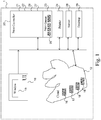
- Fig. 1 is a schematic environment diagram 1 of the user interface system 10 according to the present invention.
- the user interface system 10 is connected to a functional object 20 via a digital network N, being wired or wireless.
- the functional object may be a printing system 24, a print job 25 submitted to a print controller 20 of the printing system 24, a print job planner 21 installed on the print controller 20 of the printing system 24, a maintenance planner 22 installed on the print controller 20 of the printing system 24, a status monitor 26 for supplies residing in the printing system 24, a dashboard application 16 installed in a cloud environment 12, a production overview from an output management system on a dedicated server 28, a production overview from an output management system 17 in the cloud 12, an order management system on the dedicated server 28, an order management system 18 in the cloud 12, a customer communication system on the dedicated server 28, a customer communication system 19 in the cloud 12, and a print job editing system running on a desktop 29, the print controller 20 of the printing system 24, the dedicated server 28 or a dedicated system in the cloud 12.
- the user interface system 10 may be installed on a computer used by an operator or user of the functional object.
- the computer may be a print controller, a server, a desktop computer, a laptop computer, a tablet computer, a mobile device like a mobile phone, a wrist watch, a server computer, a mini-computer, a smart TV screen, a set-top box, etc.
- the user interface system 10 is configured to display information on a user interface window 15.
- the user interface window may be displayed on an LCD screen, a touch screen, a pixel screen, a projector, etc.
- Fig. 2 shows an example of information tiles 201 - 203 according to the present invention.
- a first information tile 201 concerns a warning to load a kind of media type in a printing system within a certain time frame according to the print scheduler of the printing system.
- the background colour of the first information tile 201 may be orange to indicate that the warning needs attention.
- a second information tile 202 concerns a selected maintenance action which has to be carried out within a certain time frame.
- the user may have selected the maintenance action to be in the window of the user interface system as a reminder.
- the background colour of the second information tile 202 may be neutral, for example white.
- a third information tile 203 concerns normal information like a status of the media supply holders of the printing system together with a specification of the media type being present in the supply holders.
- the background colour of the information tile 203 may be a discrete colour, for example a colour which is equal the the background colour of the window of the user interface system.
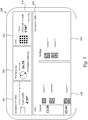
- Fig. 3 shows a taskbar with pinned information tiles 301 - 303 on a taskbar 310 in a user interface window 300 according to the present invention. Three information tiles are shown, but another number of information tiles may be envisioned on the task bar 310.
- a task associated with the most left information tile 301 has a most urgent deadline (4'59").
- a task associated with the middle information tile 302 has a less urgent deadline (14:34).
- a functional object - a print job of a pdf file - associated with the right most information tile 303 is a status of the printing system, namely the current job being printed on the printing system. From a left side of the task bar to a right side of the taskbar a priority or urgency of a required user action is decreasing.
- the information in the information tiles is changing if there is a trigger to change.
- the sequence order of the information tiles may change if at least one of the priorities of the related functional objects or task related to the functional objects is changed.
- sequence order is also changed if a functional object has been completed or otherwise has become irrelevant for showing at the task bar.
- an information tile may automatically close when a coupled task is finished, when the information tile is unpinned from the digital task bar, and/or when there is no association of the information tile with unsaved work in progress.
- the tile may be temporarily visible on the window.
- the tile may automatically close. For example, when a task is finished, for example a print job is submitted or a paper jam is resolved, the related tile may automatically close.
- the information tile will automatically close when a task coupled to the information tile is not considered in a primary responsibility of the user of the user interface system.
- a primary responsibility may be based on user groups and/or user specific configurations of the functional object.
- Unsaved work in progress may be related to scheduling print jobs in a print job schedule or browsing through a media catalogue for a printing system.
- the user interface system navigates to a digital user representation of the underlying functional object, for example to another user window with relevant information with respect to the functional object.
- a printing system may be selected. Beneath the selection entry in the lower part 320 jobs in the queue 330 of the selected printing system "Varioprint i300" are shown and jobs in a waiting room 340 are shown waiting to be placed into the queue 330 for the selected printing system "Varioprint i300".
- Fig. 4 is a flow diagram of the method according to the present invention. The method starts in a starting point A. The method is used for the user interface system according to the invention.
- a first step S1 information of a live status and at least one user notification is received from a plurality of functional objects connected to the user interface system.
- each digital dynamic status information tile comprises information of a live status and at least one user notification of a functional object of the plurality of functional objects.
- Each tile has a navigation option to a digital user representation of the functional object.
- Each tile may be pinned to a digital task bar on the user interface system.
- a third step S3 the user interface system dynamically determines a sequence order of the dynamic status information tiles on the digital task bar depending on a priority criterion for the live status and/or the at least one notification of the dynamic status information tiles.
- the priority criteria are retrieved from the functional objects itself or from a processing system at which the functional objects reside.
- the user interface system is configured to store the priority criteria beforehand in memory of the user interface and use the stored priority criteria when displaying the tiles on the window of the user interface system.
- a fourth step S4 the user interface system displays the dynamic status information tiles on a window of the user interface system according to the sequence order determined in the third step S3.
- the steps S1-S4 are repeated each time a status update or notification is received from a functional object.
- the method ends in an end point B.
- the present invention may be at least partially realised by using computer equipment residing in a cloud environment and computer power produced by a cloud environment.
- the cloud is a term referring to accessing computer, information technology (IT), and software applications through a network connection, often by accessing data centers using wide area networking (WAN) or internet connectivity.
- IT information technology
- WAN wide area networking
Landscapes
- Engineering & Computer Science (AREA)
- Theoretical Computer Science (AREA)
- General Engineering & Computer Science (AREA)
- Human Computer Interaction (AREA)
- Physics & Mathematics (AREA)
- General Physics & Mathematics (AREA)
- User Interface Of Digital Computer (AREA)
Abstract
Description
- The present invention relates to a user interface system for displaying on a window digital dynamic status information tiles, each digital dynamic status information tile comprising information of a live status of a functional object connected to the user interface system and at least one user notification of the functional object, having a navigation option to a digital user representation of the functional object, and being configured to be pinned to a digital task bar on the window.
- User interface systems are known that offer a large set of functionality. Such a set of functionality may be grouped in task modules for functional objects connected to the user interface system, for example applications (apps) having an application access with live information, like the LIVETILES of Microsoft's Windows 10.
- For convenience reasons the term "digital dynamic status information tile" may be abbreviated to the term "information tile", and even to the term "tile".
- It is an object of the invention to provide a user interface system for displaying applications in a more dynamic way.
- According to the present invention, this object is achieved by the user interface system presented here-above, wherein the sequence order of the dynamic status information tiles on the digital task bar dynamically depends on a priority criterion for the live status and/or the at least one notification of the dynamic status information tiles.
The dynamic status information tile comprises live, and up-to-date summary, status information and notifications with respect to the coupled functional object.
Through the dynamic status information tile access is offered to the full functional object, i.e. for example access to a software item, document or application by means of clicking or touching the tile.
The dynamic status information tile may be pinned to the task bar in the window of the user interface system. - The tile order on the window is dynamically determined by a priority of status and/or a priority of notifications. Tiles that require immediate action will shift to the front of the task bar.
- According to an embodiment a task for an operator of the functional object is coupled to the information of the live status and/or the at least one user notification. The user notification may be directed to the urgency of the task for the operator. The task of the operator may be determined by the live status of the functional object.
- According to an embodiment the functional object is one out of a printing system, a print job submitted to the printing system, a print job planner installed on the controller of the printing system, a maintenance planner installed on the controller of the printing system, a status monitor for supplies residing in the printing system, a dashboard application installed in the cloud, a production overview from an output management system on a dedicated server or in the cloud, an order management system on a dedicated server or in the cloud, a customer communication system on a dedicated server or in the cloud, and a print job editing system running on a desktop, the controller of the printing system, a dedicated server or in the cloud.
- According to an embodiment the priority criterion comprises a relative position of the operator to the printing system and the relative position of the operator is taking into account with respect to the sequence order of the dynamic status information tiles. For example, tiles that represent a task that cannot be resolved remotely will not influence a tile order on the window when the user interface system is installed on a remote device. Only at the window of the user interface system being close to the printing system functional object, such tasks will be prioritized with a high priority.
- According to an embodiment a colour of a dynamic status information tile on the task bar depends on the priority criterion of the respective dynamic status information tile. Tiles that require immediate action will shift to the front of the task bar and become - for example - red or orange coloured.
- According to an embodiment the dynamic status information tile is configured to automatically close when a coupled task is finished, when the dynamic status information tile is unpinned from the digital task bar, and/or when there is no association of the dynamic status information tile with unsaved work in progress. Implemented in this way, the tile may be temporarily visible on the window. When a user of the user interface system navigates away from a tile, the tile may automatically close. For example, when a task is finished, for example a print job is submitted or a paper jam is resolved, the related tile may automatically close. Unsaved work in progress may be related to scheduling print jobs in a print job schedule or browsing through a media catalogue for a printing system.
- According to an embodiment the sequence order of the dynamic status information tiles is adapted to tasks of a user of the user interface system. Tiles of tasks of the user of the user interface system may get priority in sequence order on the window and may be shifted to a front of the task bar.
- According to an embodiment the dynamic status information tile is configured to automatically close when a task coupled to the dynamic status information tile is not considered in a primary responsibility of the user of the dynamic user interface system. Such a primary responsibility may be based on user groups and/or user specific configurations of the functional object.
- On the other hand, tiles do not automatically close when a task is unfinished, when the tile is pinned to the task bar, when there is unsaved work in progress associated to the tile, or when a task is considered to be in the primary responsibility of the user of the user interface system.
- A dynamic reordering of the tiles - in other words live, on-the-fly reordering - may be caused by a change in task statuses of tiles on the window, appearance of new tiles on the window or automatically closing of tiles on the window.
- The invention also relates to a method for a user interface system, the method comprising the steps of receiving information of a live status and at least one user notification from a plurality of functional objects connected to the user interface system, the user interface system displaying digital dynamic status information tiles, each digital dynamic status information tile comprising information of a live status and at least one user notification of a functional object of the plurality of functional objects, having a navigation option to a digital user representation of the functional object, and being configured to be pinned to a digital task bar on the user interface system, and dynamically determining a sequence order of the dynamic status information tiles on the digital task bar depending on a priority criterion for the live status and/or the at least one notification of the dynamic status information tiles.
- The invention also relates to a non-transitory software medium comprising executable program code configured to, when executed, perform the method according to the invention.
- The user interface system and the method will be explained in greater detail with reference to the accompanying drawings wherein:
-
Fig. 1 is a schematic environment diagram of the user interface system connected to a functional object according to the present invention; -
Fig. 2 shows an example of information tiles according to the present invention, -
Fig. 3 shows a taskbar with pinned tiles on the window according to the present invention, and -
Fig. 4 is a flow diagram of an embodiment of the method according to the present invention. -
Fig. 1 is a schematic environment diagram 1 of theuser interface system 10 according to the present invention. Theuser interface system 10 is connected to afunctional object 20 via a digital network N, being wired or wireless. The functional object may be aprinting system 24, aprint job 25 submitted to aprint controller 20 of theprinting system 24, a print job planner 21 installed on theprint controller 20 of theprinting system 24, amaintenance planner 22 installed on theprint controller 20 of theprinting system 24, a status monitor 26 for supplies residing in theprinting system 24, adashboard application 16 installed in acloud environment 12, a production overview from an output management system on adedicated server 28, a production overview from anoutput management system 17 in thecloud 12, an order management system on thededicated server 28, anorder management system 18 in thecloud 12, a customer communication system on thededicated server 28, acustomer communication system 19 in thecloud 12, and a print job editing system running on adesktop 29, theprint controller 20 of theprinting system 24, thededicated server 28 or a dedicated system in thecloud 12. - The
user interface system 10 may be installed on a computer used by an operator or user of the functional object. The computer may be a print controller, a server, a desktop computer, a laptop computer, a tablet computer, a mobile device like a mobile phone, a wrist watch, a server computer, a mini-computer, a smart TV screen, a set-top box, etc. Theuser interface system 10 is configured to display information on auser interface window 15. The user interface window may be displayed on an LCD screen, a touch screen, a pixel screen, a projector, etc. -
Fig. 2 shows an example of information tiles 201 - 203 according to the present invention. - A first information tile 201 concerns a warning to load a kind of media type in a printing system within a certain time frame according to the print scheduler of the printing system. The background colour of the
first information tile 201 may be orange to indicate that the warning needs attention. - A
second information tile 202 concerns a selected maintenance action which has to be carried out within a certain time frame. The user may have selected the maintenance action to be in the window of the user interface system as a reminder. The background colour of thesecond information tile 202 may be neutral, for example white. - A third information tile 203 concerns normal information like a status of the media supply holders of the printing system together with a specification of the media type being present in the supply holders. When no urgent action needs to be coupled to this status the background colour of the
information tile 203 may be a discrete colour, for example a colour which is equal the the background colour of the window of the user interface system. -
Fig. 3 shows a taskbar with pinned information tiles 301 - 303 on ataskbar 310 in auser interface window 300 according to the present invention.
Three information tiles are shown, but another number of information tiles may be envisioned on thetask bar 310. - A task associated with the most
left information tile 301 has a most urgent deadline (4'59"). A task associated with themiddle information tile 302 has a less urgent deadline (14:34). A functional object - a print job of a pdf file - associated with the rightmost information tile 303 is a status of the printing system, namely the current job being printed on the printing system. From a left side of the task bar to a right side of the taskbar a priority or urgency of a required user action is decreasing.
The information in the information tiles is changing if there is a trigger to change. Moreover, the sequence order of the information tiles may change if at least one of the priorities of the related functional objects or task related to the functional objects is changed.
The sequence order is also changed if a functional object has been completed or otherwise has become irrelevant for showing at the task bar.
For example, an information tile may automatically close when a coupled task is finished, when the information tile is unpinned from the digital task bar, and/or when there is no association of the information tile with unsaved work in progress. - Implemented in this way, the tile may be temporarily visible on the window. When a user of the user interface system navigates away from a tile by clicking on another tile or opening a new workspace in the window, the tile may automatically close. For example, when a task is finished, for example a print job is submitted or a paper jam is resolved, the related tile may automatically close.
- In another example the information tile will automatically close when a task coupled to the information tile is not considered in a primary responsibility of the user of the user interface system. Such a primary responsibility may be based on user groups and/or user specific configurations of the functional object.
- On the other hand, information tiles do not automatically close when a task is unfinished, when the tile is pinned to the task bar, when there is unsaved work in progress associated to the tile, or when a task is considered to be in the primary responsibility of the user of the user interface system. Unsaved work in progress may be related to scheduling print jobs in a print job schedule or browsing through a media catalogue for a printing system.
- When touching or clicking on a tile the user interface system navigates to a digital user representation of the underlying functional object, for example to another user window with relevant information with respect to the functional object.
- In a
lower part 320 of the window 300 a printing system may be selected. Beneath the selection entry in thelower part 320 jobs in thequeue 330 of the selected printing system "Varioprint i300" are shown and jobs in awaiting room 340 are shown waiting to be placed into thequeue 330 for the selected printing system "Varioprint i300". -
Fig. 4 is a flow diagram of the method according to the present invention.
The method starts in a starting point A. The method is used for the user interface system according to the invention. - In a first step S1 information of a live status and at least one user notification is received from a plurality of functional objects connected to the user interface system.
- In a second step S2 the user interface system displays digital dynamic status information tiles. Each digital dynamic status information tile comprises information of a live status and at least one user notification of a functional object of the plurality of functional objects. Each tile has a navigation option to a digital user representation of the functional object. Each tile may be pinned to a digital task bar on the user interface system.
- In a third step S3 the user interface system dynamically determines a sequence order of the dynamic status information tiles on the digital task bar depending on a priority criterion for the live status and/or the at least one notification of the dynamic status information tiles. As a sub-step the priority criteria are retrieved from the functional objects itself or from a processing system at which the functional objects reside. In another implementation the user interface system is configured to store the priority criteria beforehand in memory of the user interface and use the stored priority criteria when displaying the tiles on the window of the user interface system.
- In a fourth step S4 the user interface system displays the dynamic status information tiles on a window of the user interface system according to the sequence order determined in the third step S3.
- The steps S1-S4 are repeated each time a status update or notification is received from a functional object.
- The method ends in an end point B.
- Although a printing environment has been shown in the embodiments elucidated here-above, other production environments may as well be suitable for implementing the present invention.
- The present invention may be at least partially realised by using computer equipment residing in a cloud environment and computer power produced by a cloud environment. The cloud is a term referring to accessing computer, information technology (IT), and software applications through a network connection, often by accessing data centers using wide area networking (WAN) or internet connectivity.
- It may be clear to the skilled person that the various embodiments of the method may be combined in one way or another in order to establish an appropriate and applicable embodiment of the method according to the invention.
Claims (10)
- A user interface system for displaying on a window digital dynamic status information tiles, each digital dynamic status information tile comprising information of a live status of a functional object connected to the user interface system and at least one user notification of the functional object, having a navigation option to a digital user representation of the functional object, and being configured to be pinned to a digital task bar on the window,
wherein the sequence order of the dynamic status information tiles on the digital task bar dynamically depends on a priority criterion for the live status and/or the at least one notification of the dynamic status information tiles. - A user interface system according to claim 1, wherein a task for an operator of the functional object is coupled to the information of the live status and/or the at least one user notification.
- A user interface system according to claim 2, wherein the functional object is one out of a printing system, a print job submitted to the printing system, a print job planner installed on the controller of the printing system, a maintenance planner installed on the controller of the printing system, a status monitor for supplies residing in the printing system, a dashboard application installed in the cloud, a production overview from an output management system on a dedicated server or in the cloud, an order management system on a dedicated server or in the cloud, a customer communication system on a dedicated server or in the cloud, and a print job editing system running on a desktop, the controller of the printing system, a dedicated server or in the cloud.
- A user interface system according to claim 3, wherein the priority criterion comprises a relative position of the operator to the printing system and the relative position of the operator is taking into account with respect to the sequence order of the dynamic status information tiles.
- A user interface system according to any of the preceding claims, wherein a colour of a dynamic status information tile on the task bar depends on the priority criterion of the respective dynamic status information tile.
- A user interface system according to claim 2, wherein the dynamic status information tile is configured to automatically close when a coupled task is finished, when the dynamic status information tile is unpinned from the digital task bar, and/or when there is no association of the dynamic status information tile with unsaved work in progress.
- A user interface system according to any of the preceding claims, wherein the sequence order of the dynamic status information tiles is adapted to tasks of a user of the user interface system.
- A user interface system according to claim 7, wherein the dynamic status information tile is configured to automatically close when a task coupled to the dynamic status information tile is not considered in a primary responsibility of the user of the dynamic user interface system.
- A method for a user interface system, the method comprising the steps of receiving information of a live status and at least one user notification from a plurality of functional objects connected to the user interface system,
the user interface system displaying digital dynamic status information tiles, each digital dynamic status information tile comprising information of a live status and at least one user notification of a functional object of the plurality of functional objects, having a navigation option to a digital user representation of the functional object, and being configured to be pinned to a digital task bar on the user interface system, and
dynamically determining a sequence order of the dynamic status information tiles on the digital task bar depending on a priority criterion for the live status and/or the at least one notification of the dynamic status information tiles. - A non-transitory software medium comprising executable program code configured to, when executed, perform the method according to claim 9.
Priority Applications (1)
| Application Number | Priority Date | Filing Date | Title |
|---|---|---|---|
| EP18150390.5A EP3508970B1 (en) | 2018-01-05 | 2018-01-05 | A dynamic user interface system and a method therefor |
Applications Claiming Priority (1)
| Application Number | Priority Date | Filing Date | Title |
|---|---|---|---|
| EP18150390.5A EP3508970B1 (en) | 2018-01-05 | 2018-01-05 | A dynamic user interface system and a method therefor |
Publications (3)
| Publication Number | Publication Date |
|---|---|
| EP3508970A1 true EP3508970A1 (en) | 2019-07-10 |
| EP3508970B1 EP3508970B1 (en) | 2023-07-12 |
| EP3508970C0 EP3508970C0 (en) | 2023-07-12 |
Family
ID=60997294
Family Applications (1)
| Application Number | Title | Priority Date | Filing Date |
|---|---|---|---|
| EP18150390.5A Active EP3508970B1 (en) | 2018-01-05 | 2018-01-05 | A dynamic user interface system and a method therefor |
Country Status (1)
| Country | Link |
|---|---|
| EP (1) | EP3508970B1 (en) |
Citations (2)
| Publication number | Priority date | Publication date | Assignee | Title |
|---|---|---|---|---|
| US20160253078A1 (en) * | 2015-02-27 | 2016-09-01 | Cisco Technology, Inc. | Enhanced user interface systems including dynamic context selection for cloud-based networks |
| US20170329500A1 (en) * | 2016-05-13 | 2017-11-16 | Sap Se | Overview page in multi application user interface |
-
2018
- 2018-01-05 EP EP18150390.5A patent/EP3508970B1/en active Active
Patent Citations (2)
| Publication number | Priority date | Publication date | Assignee | Title |
|---|---|---|---|---|
| US20160253078A1 (en) * | 2015-02-27 | 2016-09-01 | Cisco Technology, Inc. | Enhanced user interface systems including dynamic context selection for cloud-based networks |
| US20170329500A1 (en) * | 2016-05-13 | 2017-11-16 | Sap Se | Overview page in multi application user interface |
Also Published As
| Publication number | Publication date |
|---|---|
| EP3508970B1 (en) | 2023-07-12 |
| EP3508970C0 (en) | 2023-07-12 |
Similar Documents
| Publication | Publication Date | Title |
|---|---|---|
| US9372612B2 (en) | Exposing inertial snap points | |
| US10444937B2 (en) | Method for displaying applications and electronic device thereof | |
| US20230090000A1 (en) | Operating room management system with mobile app | |
| EP3086188A2 (en) | Wall module display modification and sharing | |
| EP3309722A1 (en) | Waitlist management system, waitlist management device, and waitlist management program | |
| CN102685426A (en) | Information storage medium, terminal device, and display system | |
| US10868927B1 (en) | System and method for machine learning assisted multifunction peripheral fleet management via a handheld device | |
| KR101536730B1 (en) | Cloud device and system for building information modeling architectural design collaboration | |
| US20140068445A1 (en) | Systems and Methods for Mobile Access to Enterprise Work Area Information | |
| JP2010039698A (en) | Ship production management system | |
| JP2015201114A (en) | Work management device, school lunch management device, school lunch management method, and school lunch management program | |
| EP3319019A1 (en) | Queue management system and recording medium containing queue management program | |
| US20080059881A1 (en) | Method and Device for Presenting Calendar Views on Small Displays | |
| JP6715919B2 (en) | Display control device and display control method | |
| US20150242821A1 (en) | Operating Room Management System with Actuateable Pictures | |
| EP3508970B1 (en) | A dynamic user interface system and a method therefor | |
| EP2743826A1 (en) | Service providing device, and method of providing a user interface | |
| CN104508615A (en) | Method and apparatus for providing task-based user interface | |
| CN102567324B (en) | Receipt field position adjusting method and field position adjuster | |
| JP2019053479A (en) | Duty management state display program and duty management state display device | |
| KR102056266B1 (en) | System and method of group message delivery and processing in shop | |
| JP2017134619A (en) | Work shift creation support system and work shift creation support program | |
| US10977591B2 (en) | Work shift management device, work shift management method and computer-readable recording medium | |
| JP7126832B2 (en) | Information processing apparatus, method using information processing apparatus, and program for causing information processing apparatus to execute procedures | |
| KR20090070759A (en) | Apparatus and method for setting screens of multiple monitors |
Legal Events
| Date | Code | Title | Description |
|---|---|---|---|
| PUAI | Public reference made under article 153(3) epc to a published international application that has entered the european phase |
Free format text: ORIGINAL CODE: 0009012 |
|
| STAA | Information on the status of an ep patent application or granted ep patent |
Free format text: STATUS: THE APPLICATION HAS BEEN PUBLISHED |
|
| AK | Designated contracting states |
Kind code of ref document: A1 Designated state(s): AL AT BE BG CH CY CZ DE DK EE ES FI FR GB GR HR HU IE IS IT LI LT LU LV MC MK MT NL NO PL PT RO RS SE SI SK SM TR |
|
| AX | Request for extension of the european patent |
Extension state: BA ME |
|
| STAA | Information on the status of an ep patent application or granted ep patent |
Free format text: STATUS: REQUEST FOR EXAMINATION WAS MADE |
|
| 17P | Request for examination filed |
Effective date: 20200110 |
|
| RBV | Designated contracting states (corrected) |
Designated state(s): AL AT BE BG CH CY CZ DE DK EE ES FI FR GB GR HR HU IE IS IT LI LT LU LV MC MK MT NL NO PL PT RO RS SE SI SK SM TR |
|
| RAP1 | Party data changed (applicant data changed or rights of an application transferred) |
Owner name: CANON PRODUCTION PRINTING HOLDING B.V. |
|
| RAP1 | Party data changed (applicant data changed or rights of an application transferred) |
Owner name: CANON PRODUCTION PRINTING HOLDING B.V. |
|
| STAA | Information on the status of an ep patent application or granted ep patent |
Free format text: STATUS: EXAMINATION IS IN PROGRESS |
|
| 17Q | First examination report despatched |
Effective date: 20211201 |
|
| GRAP | Despatch of communication of intention to grant a patent |
Free format text: ORIGINAL CODE: EPIDOSNIGR1 |
|
| STAA | Information on the status of an ep patent application or granted ep patent |
Free format text: STATUS: GRANT OF PATENT IS INTENDED |
|
| INTG | Intention to grant announced |
Effective date: 20230223 |
|
| GRAS | Grant fee paid |
Free format text: ORIGINAL CODE: EPIDOSNIGR3 |
|
| GRAA | (expected) grant |
Free format text: ORIGINAL CODE: 0009210 |
|
| STAA | Information on the status of an ep patent application or granted ep patent |
Free format text: STATUS: THE PATENT HAS BEEN GRANTED |
|
| AK | Designated contracting states |
Kind code of ref document: B1 Designated state(s): AL AT BE BG CH CY CZ DE DK EE ES FI FR GB GR HR HU IE IS IT LI LT LU LV MC MK MT NL NO PL PT RO RS SE SI SK SM TR |
|
| REG | Reference to a national code |
Ref country code: CH Ref legal event code: EP |
|
| REG | Reference to a national code |
Ref country code: DE Ref legal event code: R096 Ref document number: 602018053084 Country of ref document: DE |
|
| REG | Reference to a national code |
Ref country code: IE Ref legal event code: FG4D |
|
| U01 | Request for unitary effect filed |
Effective date: 20230803 |
|
| U07 | Unitary effect registered |
Designated state(s): AT BE BG DE DK EE FI FR IT LT LU LV MT NL PT SE SI Effective date: 20230808 |
|
| REG | Reference to a national code |
Ref country code: LT Ref legal event code: MG9D |
|
| PG25 | Lapsed in a contracting state [announced via postgrant information from national office to epo] |
Ref country code: GR Free format text: LAPSE BECAUSE OF FAILURE TO SUBMIT A TRANSLATION OF THE DESCRIPTION OR TO PAY THE FEE WITHIN THE PRESCRIBED TIME-LIMIT Effective date: 20231013 |
|
| PG25 | Lapsed in a contracting state [announced via postgrant information from national office to epo] |
Ref country code: ES Free format text: LAPSE BECAUSE OF FAILURE TO SUBMIT A TRANSLATION OF THE DESCRIPTION OR TO PAY THE FEE WITHIN THE PRESCRIBED TIME-LIMIT Effective date: 20230712 |
|
| PG25 | Lapsed in a contracting state [announced via postgrant information from national office to epo] |
Ref country code: IS Free format text: LAPSE BECAUSE OF FAILURE TO SUBMIT A TRANSLATION OF THE DESCRIPTION OR TO PAY THE FEE WITHIN THE PRESCRIBED TIME-LIMIT Effective date: 20231112 |
|
| PG25 | Lapsed in a contracting state [announced via postgrant information from national office to epo] |
Ref country code: RS Free format text: LAPSE BECAUSE OF FAILURE TO SUBMIT A TRANSLATION OF THE DESCRIPTION OR TO PAY THE FEE WITHIN THE PRESCRIBED TIME-LIMIT Effective date: 20230712 Ref country code: NO Free format text: LAPSE BECAUSE OF FAILURE TO SUBMIT A TRANSLATION OF THE DESCRIPTION OR TO PAY THE FEE WITHIN THE PRESCRIBED TIME-LIMIT Effective date: 20231012 Ref country code: IS Free format text: LAPSE BECAUSE OF FAILURE TO SUBMIT A TRANSLATION OF THE DESCRIPTION OR TO PAY THE FEE WITHIN THE PRESCRIBED TIME-LIMIT Effective date: 20231112 Ref country code: HR Free format text: LAPSE BECAUSE OF FAILURE TO SUBMIT A TRANSLATION OF THE DESCRIPTION OR TO PAY THE FEE WITHIN THE PRESCRIBED TIME-LIMIT Effective date: 20230712 Ref country code: GR Free format text: LAPSE BECAUSE OF FAILURE TO SUBMIT A TRANSLATION OF THE DESCRIPTION OR TO PAY THE FEE WITHIN THE PRESCRIBED TIME-LIMIT Effective date: 20231013 Ref country code: ES Free format text: LAPSE BECAUSE OF FAILURE TO SUBMIT A TRANSLATION OF THE DESCRIPTION OR TO PAY THE FEE WITHIN THE PRESCRIBED TIME-LIMIT Effective date: 20230712 |
|
| PG25 | Lapsed in a contracting state [announced via postgrant information from national office to epo] |
Ref country code: PL Free format text: LAPSE BECAUSE OF FAILURE TO SUBMIT A TRANSLATION OF THE DESCRIPTION OR TO PAY THE FEE WITHIN THE PRESCRIBED TIME-LIMIT Effective date: 20230712 |
|
| U20 | Renewal fee for the european patent with unitary effect paid |
Year of fee payment: 7 Effective date: 20240131 |
|
| REG | Reference to a national code |
Ref country code: DE Ref legal event code: R097 Ref document number: 602018053084 Country of ref document: DE |
|
| PG25 | Lapsed in a contracting state [announced via postgrant information from national office to epo] |
Ref country code: SM Free format text: LAPSE BECAUSE OF FAILURE TO SUBMIT A TRANSLATION OF THE DESCRIPTION OR TO PAY THE FEE WITHIN THE PRESCRIBED TIME-LIMIT Effective date: 20230712 Ref country code: RO Free format text: LAPSE BECAUSE OF FAILURE TO SUBMIT A TRANSLATION OF THE DESCRIPTION OR TO PAY THE FEE WITHIN THE PRESCRIBED TIME-LIMIT Effective date: 20230712 Ref country code: CZ Free format text: LAPSE BECAUSE OF FAILURE TO SUBMIT A TRANSLATION OF THE DESCRIPTION OR TO PAY THE FEE WITHIN THE PRESCRIBED TIME-LIMIT Effective date: 20230712 Ref country code: SK Free format text: LAPSE BECAUSE OF FAILURE TO SUBMIT A TRANSLATION OF THE DESCRIPTION OR TO PAY THE FEE WITHIN THE PRESCRIBED TIME-LIMIT Effective date: 20230712 |
|
| PLBE | No opposition filed within time limit |
Free format text: ORIGINAL CODE: 0009261 |
|
| STAA | Information on the status of an ep patent application or granted ep patent |
Free format text: STATUS: NO OPPOSITION FILED WITHIN TIME LIMIT |
|
| 26N | No opposition filed |
Effective date: 20240415 |
|
| PG25 | Lapsed in a contracting state [announced via postgrant information from national office to epo] |
Ref country code: MC Free format text: LAPSE BECAUSE OF FAILURE TO SUBMIT A TRANSLATION OF THE DESCRIPTION OR TO PAY THE FEE WITHIN THE PRESCRIBED TIME-LIMIT Effective date: 20230712 |
|
| PG25 | Lapsed in a contracting state [announced via postgrant information from national office to epo] |
Ref country code: MC Free format text: LAPSE BECAUSE OF FAILURE TO SUBMIT A TRANSLATION OF THE DESCRIPTION OR TO PAY THE FEE WITHIN THE PRESCRIBED TIME-LIMIT Effective date: 20230712 |
|
| REG | Reference to a national code |
Ref country code: CH Ref legal event code: PL |
|
| PG25 | Lapsed in a contracting state [announced via postgrant information from national office to epo] |
Ref country code: CH Free format text: LAPSE BECAUSE OF NON-PAYMENT OF DUE FEES Effective date: 20240131 |
|
| PG25 | Lapsed in a contracting state [announced via postgrant information from national office to epo] |
Ref country code: CH Free format text: LAPSE BECAUSE OF NON-PAYMENT OF DUE FEES Effective date: 20240131 |
|
| PG25 | Lapsed in a contracting state [announced via postgrant information from national office to epo] |
Ref country code: IE Free format text: LAPSE BECAUSE OF NON-PAYMENT OF DUE FEES Effective date: 20240105 |
|
| PG25 | Lapsed in a contracting state [announced via postgrant information from national office to epo] |
Ref country code: IE Free format text: LAPSE BECAUSE OF NON-PAYMENT OF DUE FEES Effective date: 20240105 |
|
| U20 | Renewal fee for the european patent with unitary effect paid |
Year of fee payment: 8 Effective date: 20250131 |
|
| PG25 | Lapsed in a contracting state [announced via postgrant information from national office to epo] |
Ref country code: CY Free format text: LAPSE BECAUSE OF FAILURE TO SUBMIT A TRANSLATION OF THE DESCRIPTION OR TO PAY THE FEE WITHIN THE PRESCRIBED TIME-LIMIT; INVALID AB INITIO Effective date: 20180105 |
|
| PG25 | Lapsed in a contracting state [announced via postgrant information from national office to epo] |
Ref country code: HU Free format text: LAPSE BECAUSE OF FAILURE TO SUBMIT A TRANSLATION OF THE DESCRIPTION OR TO PAY THE FEE WITHIN THE PRESCRIBED TIME-LIMIT; INVALID AB INITIO Effective date: 20180105 |
|
| PG25 | Lapsed in a contracting state [announced via postgrant information from national office to epo] |
Ref country code: TR Free format text: LAPSE BECAUSE OF FAILURE TO SUBMIT A TRANSLATION OF THE DESCRIPTION OR TO PAY THE FEE WITHIN THE PRESCRIBED TIME-LIMIT Effective date: 20230712 |
|
| U20 | Renewal fee for the european patent with unitary effect paid |
Year of fee payment: 9 Effective date: 20260202 |
|
| PGFP | Annual fee paid to national office [announced via postgrant information from national office to epo] |
Ref country code: GB Payment date: 20260123 Year of fee payment: 9 |