EP3461140A1 - Method for displaying key function icon on screen and system thereof - Google Patents
Method for displaying key function icon on screen and system thereof Download PDFInfo
- Publication number
- EP3461140A1 EP3461140A1 EP16902271.2A EP16902271A EP3461140A1 EP 3461140 A1 EP3461140 A1 EP 3461140A1 EP 16902271 A EP16902271 A EP 16902271A EP 3461140 A1 EP3461140 A1 EP 3461140A1
- Authority
- EP
- European Patent Office
- Prior art keywords
- key function
- function icons
- screen
- display
- key
- Prior art date
- Legal status (The legal status is an assumption and is not a legal conclusion. Google has not performed a legal analysis and makes no representation as to the accuracy of the status listed.)
- Withdrawn
Links
Images

Classifications
-
- H—ELECTRICITY
- H04—ELECTRIC COMMUNICATION TECHNIQUE
- H04N—PICTORIAL COMMUNICATION, e.g. TELEVISION
- H04N21/00—Selective content distribution, e.g. interactive television or video on demand [VOD]
- H04N21/40—Client devices specifically adapted for the reception of or interaction with content, e.g. set-top-box [STB]; Operations thereof
- H04N21/43—Processing of content or additional data, e.g. demultiplexing additional data from a digital video stream; Elementary client operations, e.g. monitoring of home network or synchronising decoder's clock; Client middleware
- H04N21/431—Generation of visual interfaces for content selection or interaction; Content or additional data rendering
- H04N21/4312—Generation of visual interfaces for content selection or interaction; Content or additional data rendering involving specific graphical features, e.g. screen layout, special fonts or colors, blinking icons, highlights or animations
-
- H—ELECTRICITY
- H04—ELECTRIC COMMUNICATION TECHNIQUE
- H04N—PICTORIAL COMMUNICATION, e.g. TELEVISION
- H04N21/00—Selective content distribution, e.g. interactive television or video on demand [VOD]
- H04N21/40—Client devices specifically adapted for the reception of or interaction with content, e.g. set-top-box [STB]; Operations thereof
- H04N21/47—End-user applications
- H04N21/485—End-user interface for client configuration
-
- G—PHYSICS
- G06—COMPUTING OR CALCULATING; COUNTING
- G06F—ELECTRIC DIGITAL DATA PROCESSING
- G06F3/00—Input arrangements for transferring data to be processed into a form capable of being handled by the computer; Output arrangements for transferring data from processing unit to output unit, e.g. interface arrangements
- G06F3/01—Input arrangements or combined input and output arrangements for interaction between user and computer
- G06F3/048—Interaction techniques based on graphical user interfaces [GUI]
- G06F3/0481—Interaction techniques based on graphical user interfaces [GUI] based on specific properties of the displayed interaction object or a metaphor-based environment, e.g. interaction with desktop elements like windows or icons, or assisted by a cursor's changing behaviour or appearance
- G06F3/04817—Interaction techniques based on graphical user interfaces [GUI] based on specific properties of the displayed interaction object or a metaphor-based environment, e.g. interaction with desktop elements like windows or icons, or assisted by a cursor's changing behaviour or appearance using icons
-
- G—PHYSICS
- G06—COMPUTING OR CALCULATING; COUNTING
- G06F—ELECTRIC DIGITAL DATA PROCESSING
- G06F3/00—Input arrangements for transferring data to be processed into a form capable of being handled by the computer; Output arrangements for transferring data from processing unit to output unit, e.g. interface arrangements
- G06F3/01—Input arrangements or combined input and output arrangements for interaction between user and computer
- G06F3/048—Interaction techniques based on graphical user interfaces [GUI]
- G06F3/0484—Interaction techniques based on graphical user interfaces [GUI] for the control of specific functions or operations, e.g. selecting or manipulating an object, an image or a displayed text element, setting a parameter value or selecting a range
- G06F3/04845—Interaction techniques based on graphical user interfaces [GUI] for the control of specific functions or operations, e.g. selecting or manipulating an object, an image or a displayed text element, setting a parameter value or selecting a range for image manipulation, e.g. dragging, rotation, expansion or change of colour
-
- H—ELECTRICITY
- H04—ELECTRIC COMMUNICATION TECHNIQUE
- H04N—PICTORIAL COMMUNICATION, e.g. TELEVISION
- H04N21/00—Selective content distribution, e.g. interactive television or video on demand [VOD]
- H04N21/40—Client devices specifically adapted for the reception of or interaction with content, e.g. set-top-box [STB]; Operations thereof
- H04N21/41—Structure of client; Structure of client peripherals
- H04N21/422—Input-only peripherals, i.e. input devices connected to specially adapted client devices, e.g. global positioning system [GPS]
-
- H—ELECTRICITY
- H04—ELECTRIC COMMUNICATION TECHNIQUE
- H04N—PICTORIAL COMMUNICATION, e.g. TELEVISION
- H04N21/00—Selective content distribution, e.g. interactive television or video on demand [VOD]
- H04N21/40—Client devices specifically adapted for the reception of or interaction with content, e.g. set-top-box [STB]; Operations thereof
- H04N21/41—Structure of client; Structure of client peripherals
- H04N21/422—Input-only peripherals, i.e. input devices connected to specially adapted client devices, e.g. global positioning system [GPS]
- H04N21/42204—User interfaces specially adapted for controlling a client device through a remote control device; Remote control devices therefor
-
- H—ELECTRICITY
- H04—ELECTRIC COMMUNICATION TECHNIQUE
- H04N—PICTORIAL COMMUNICATION, e.g. TELEVISION
- H04N21/00—Selective content distribution, e.g. interactive television or video on demand [VOD]
- H04N21/40—Client devices specifically adapted for the reception of or interaction with content, e.g. set-top-box [STB]; Operations thereof
- H04N21/41—Structure of client; Structure of client peripherals
- H04N21/422—Input-only peripherals, i.e. input devices connected to specially adapted client devices, e.g. global positioning system [GPS]
- H04N21/42204—User interfaces specially adapted for controlling a client device through a remote control device; Remote control devices therefor
- H04N21/42206—User interfaces specially adapted for controlling a client device through a remote control device; Remote control devices therefor characterized by hardware details
- H04N21/42212—Specific keyboard arrangements
- H04N21/42213—Specific keyboard arrangements for facilitating data entry
-
- H—ELECTRICITY
- H04—ELECTRIC COMMUNICATION TECHNIQUE
- H04N—PICTORIAL COMMUNICATION, e.g. TELEVISION
- H04N21/00—Selective content distribution, e.g. interactive television or video on demand [VOD]
- H04N21/40—Client devices specifically adapted for the reception of or interaction with content, e.g. set-top-box [STB]; Operations thereof
- H04N21/41—Structure of client; Structure of client peripherals
- H04N21/422—Input-only peripherals, i.e. input devices connected to specially adapted client devices, e.g. global positioning system [GPS]
- H04N21/42204—User interfaces specially adapted for controlling a client device through a remote control device; Remote control devices therefor
- H04N21/42206—User interfaces specially adapted for controlling a client device through a remote control device; Remote control devices therefor characterized by hardware details
- H04N21/42212—Specific keyboard arrangements
- H04N21/42218—Specific keyboard arrangements for mapping a matrix of displayed objects on the screen to the numerical key-matrix of the remote control
-
- H—ELECTRICITY
- H04—ELECTRIC COMMUNICATION TECHNIQUE
- H04N—PICTORIAL COMMUNICATION, e.g. TELEVISION
- H04N21/00—Selective content distribution, e.g. interactive television or video on demand [VOD]
- H04N21/40—Client devices specifically adapted for the reception of or interaction with content, e.g. set-top-box [STB]; Operations thereof
- H04N21/47—End-user applications
-
- H—ELECTRICITY
- H04—ELECTRIC COMMUNICATION TECHNIQUE
- H04N—PICTORIAL COMMUNICATION, e.g. TELEVISION
- H04N21/00—Selective content distribution, e.g. interactive television or video on demand [VOD]
- H04N21/40—Client devices specifically adapted for the reception of or interaction with content, e.g. set-top-box [STB]; Operations thereof
- H04N21/47—End-user applications
- H04N21/485—End-user interface for client configuration
- H04N21/4852—End-user interface for client configuration for modifying audio parameters, e.g. switching between mono and stereo
-
- H—ELECTRICITY
- H04—ELECTRIC COMMUNICATION TECHNIQUE
- H04N—PICTORIAL COMMUNICATION, e.g. TELEVISION
- H04N21/00—Selective content distribution, e.g. interactive television or video on demand [VOD]
- H04N21/40—Client devices specifically adapted for the reception of or interaction with content, e.g. set-top-box [STB]; Operations thereof
- H04N21/47—End-user applications
- H04N21/485—End-user interface for client configuration
- H04N21/4858—End-user interface for client configuration for modifying screen layout parameters, e.g. fonts, size of the windows
-
- H—ELECTRICITY
- H04—ELECTRIC COMMUNICATION TECHNIQUE
- H04N—PICTORIAL COMMUNICATION, e.g. TELEVISION
- H04N21/00—Selective content distribution, e.g. interactive television or video on demand [VOD]
- H04N21/40—Client devices specifically adapted for the reception of or interaction with content, e.g. set-top-box [STB]; Operations thereof
- H04N21/41—Structure of client; Structure of client peripherals
- H04N21/422—Input-only peripherals, i.e. input devices connected to specially adapted client devices, e.g. global positioning system [GPS]
- H04N21/42204—User interfaces specially adapted for controlling a client device through a remote control device; Remote control devices therefor
- H04N21/42206—User interfaces specially adapted for controlling a client device through a remote control device; Remote control devices therefor characterized by hardware details
- H04N21/42208—Display device provided on the remote control
-
- H—ELECTRICITY
- H04—ELECTRIC COMMUNICATION TECHNIQUE
- H04N—PICTORIAL COMMUNICATION, e.g. TELEVISION
- H04N21/00—Selective content distribution, e.g. interactive television or video on demand [VOD]
- H04N21/40—Client devices specifically adapted for the reception of or interaction with content, e.g. set-top-box [STB]; Operations thereof
- H04N21/41—Structure of client; Structure of client peripherals
- H04N21/422—Input-only peripherals, i.e. input devices connected to specially adapted client devices, e.g. global positioning system [GPS]
- H04N21/42204—User interfaces specially adapted for controlling a client device through a remote control device; Remote control devices therefor
- H04N21/42226—Reprogrammable remote control devices
- H04N21/42227—Reprogrammable remote control devices the keys being reprogrammable, e.g. soft keys
- H04N21/42228—Reprogrammable remote control devices the keys being reprogrammable, e.g. soft keys the reprogrammable keys being displayed on a display screen in order to reduce the number of keys on the remote control device itself
Definitions
- the present disclosure relates to the field of graphics and images, and in particular, to a system and method for displaying key function icons on a screen.
- the main problem with the existing method is that the printed icon is difficult to be modified. In case the icon is misplaced at a position not corresponding to the key, the user cannot operate the function key properly.
- the present disclosure provides a method and a system for displaying key function icons on a screen, which can improve the precision to operate physical keys of a device.
- the system for displaying key function icons on a screen of the present disclosure includes:
- the system for displaying key function icons on a screen of the embodiment by acquiring a size of a screen display area of the device, acquiring preset key function icons corresponding to physical keys of the device and a display mode of the preset key function icons, display positions of the key function icons on the screen of the device are determined according to the size and the display mode, and the triggering states of the physical keys of the device are monitored, if a physical key of the device is triggered, the key function icons at the display positions are displayed, thereby improving the accuracy in operating the physical keys of the device.
- step S101 a size of a screen display area of a device is acquired.
- the size of the screen display area can be acquired directly from the preset code of the control board of the device, or be acquired by acquiring the width and height of the screen display area and then the size of the screen display area is calculated from the width and height. It is also possible to preset a database for storing the device model and the size of the screen display area, in which the device model has a one-to-one correspondence with the size of the screen display area. The device model is acquired from the preset code of the control board of the device, and the size of the screen display area corresponding to the device model is acquired from the database.
- step S102 preset key function icons corresponding to physical keys of the device and a display mode of the preset key function icons are acquired.
- the display mode may be a horizontally arranged display mode or a vertically arranged display mode.
- the specific display mode can be determined according to actual use situations or the arrangement of the physical keys of the device.
- the preset key function icons corresponding to the physical keys of the device are acquired, lengths and widths of the key function icons are acquired, and sizes of the key function icons are compared with the size of the corresponding keypad of the physical keys of the device. If the sizes of the key function icons do not match the size of the corresponding keypad, the lengths and widths of the key function icons are adjusted, so that the sizes of the key function icons are matched with the size of the corresponding keypad, thereby effecting the space matching between the key function icons and the physical keys of the device, and further improving the accuracy in operating the physical keys of the device.
- the icons to be used and the order in which they are to be arranged may be pre-defined in the preset code of the control board of the device.
- the software automatically acquires the lengths and widths of the icons to calculate the display space required for the entire icon set. If the size of the display space of the icons does not match the size of the physical keypad of the device, the display space of the icons can be adjusted by defining the lengths and widths of the icons, so as to match the space occupied by the icons and the physical keys of the device.
- step S103 display positions of the key function icons on a screen of the device are determined according to the size and the display mode.
- a display position of a first key function icon on the screen of the device is determined as a starting position; according to the display mode and the starting position, display positions of the remaining key function icon other than the first key function icon are determined as remaining positions on the screen of the device; and display positions of the key function icons on the screen of the device are determined according to the starting position and the remaining positions.
- the key function icons includes an Enter key function icon, a menu key function icon, a volume up key function icon, a volume down key function icon, a channel+ key function icon, a channel- key function icon, and a power key function icon. If the Enter key function icon is used as the first key function icon in the key function icon, the remaining menu key function icon, volume up key function icon, volume down key function icon, channel+ key function icon, channel- key function icon, and power key function icon are used as the remaining key function icons except for the first key function icon. This step is to determine the display position of the first key function icon on the screen of the device as the starting position. Then, according to the starting position, the display positions of the remaining key function icons on the screen of the device are determined, thereby improving the convenience of setting the key function icons.
- a plane coordinate system on the screen display area is established by taking an upper left corner of the screen display area of the device as an origin, a horizontal line passing through the origin as an horizontal axis, and a vertical line passing through the origin as a vertical axis.
- the coordinate of the first key function icon in the plane coordinate system is determined according to the position of the first physical key of the device as a starting coordinate position; coordinates of the remaining key function icons in the plane coordinate system are determined according to the display mode and the starting coordinate position as the remaining coordinate positions; the display positions of the key function icons on the screen of the device are determined according to the starting coordinate position and the remaining coordinate positions.
- This step determines the starting coordinate position of the first key function icon on the screen of the device by establishing the plane coordinate system on the screen display area, and then other coordinate positions of the remaining key function icons on the screen of the device are determined according to the starting coordinate position, thereby improving the accuracy of the key function icon settings.
- step S104 triggering states of the physical keys of the device are monitored, and if a physical key of the device is triggered, the key function icons are displayed at the display positions.
- the physical key of the device may be triggered by the user directly pressing the physical key of the device. This step improves the accuracy in operating the physical keys of the device.
- the key function icons are displayed at the display positions, the key function icon corresponding to the position of the triggered physical key of the device is differentially displayed.
- the user directly learns which physical key of the device is triggered, so as to accurately operate the physical keys of the device, thereby further improving the accuracy in operating the physical keys of the device and improving user experience.
- the key function icons are automatically hidden to avoid interfering with the operation of the device by the user, thereby further improving user experience.
- the method for displaying key function icons on a screen of the embodiment by acquiring a size of a screen display area of the device, acquiring preset key function icons corresponding to physical keys of the device and a display mode of the preset key function icons, display positions of the key function icons on the screen of the device are determined according to the size and the display mode, and the triggering states of the physical keys of the device are monitored, if a physical key of the device is triggered, the key function icons at the display positions are displayed, thereby improving the accuracy in operating the physical keys of the device.
- step S201 to step S205 are included:
- step S201 a height and width of a display area of a TV screen display area are acquired.
- the width and height of the screen in the software code of the TV main board are defined, or the model number of the screen is defined.
- the software acquires the width and height of the screen from the preset database according to the model of the screen. Specifically, for a new LCD TV screen, the height and width of the screen are acquired firstly through the specification of the screen, and the height and width of the screen are fed into the code of the LCD TV control board. For a used LCD screen, the code will automatically find the height and width of the screen in the database by simply inputting the model number of the screen into the code.
- step S202 OSD (On Screen Display) icons and their displaying order are defined.
- the icons to be used and the order in which they are to be arranged are pre-defined, and the software automatically acquires the lengths and widths of the icons to calculate the display space required for the entire set of icons. If the size of the display space of the icons does not match with the size of the area where the keypad is located, the display space of the icons can be adjusted by defining the lengths and widths of the icons, so as to match with the space occupied by the icons and the operation keys.
- icons that can indicate functions of these keys are selected according to the keys on the keypad required for the design of the television.
- a TV may require seven keys, e.g., "Enter”, “Menu”, “V+”, “V-”, “CH+”, “CH-” and “Power”, and the keys are arranged in the same order as they are laid out above, and the selected indicating icons and their arrangement are shown in Table 1:
- Table 1 OSD indicating icon pattern selection and horizontal sorting table Enter Menu V+ V- CH+ CH- Power
- the selected indicating icons can also be arranged vertically, as shown in Table 2 below: Enter Menu V+ V- CH+ CH- Power
- step S203 the coordinate for displaying a first OSD icon is defined.
- the starting coordinate of the first OSD icon in the software code of the TV main board is defined.
- the software calculates the positions of all subsequent OSD icons to form a set of ordered OSD icon display.
- the plane coordinate system is established by taking an upper left corner of the TV as an origin, the X coordinate axis runs through the origin horizontally to the right, and the Y coordinate axis runs through the origin vertically downward.
- the coordinate of the upper left corner of the first OSD icon is defined.
- the software automatically calculates the coordinates of other icons to form an ordered OSD icon display.
- step S204 the OSD icons are displayed if any one of the keys on the keypad is triggered.
- the OSD icons are not displayed on the TV screen.
- an entire set of OSD icons will be displayed on the TV screen, and each key icon will be aligned with the corresponding function key.
- the icon corresponding to the pressed key will be highlighted to let the user know which key is being pressed. According to the entire set of OSD icons on the screen, the user can accurately control the TV using the keys.
- step S205 the OSD icons are automatically hidden when the keys on the keypad are no longer triggered. After the user stops operating the TV keypad for a few seconds, the TV automatically hides the OSD icons on the screen, and the TV screen returns to the normal state, so that the OSD icons do not obstruct the user from watching the TV.
- the key function indicating icons are displayed on the TV screen at positions corresponding to the operation keys, thereby improving the accuracy in operating the physical keys of the television.
- the method for displaying key function icons on a screen according to the present implementation can also save the cost of icon printing or the icon sticker.
- the key function icons displayed as the OSD the modification of the positions, order, and pattern of the icons is facilitated, and the material cost for remaking the icons is avoided.
- the disclosure also provides a screen display system of key function icons, including, as shown in FIG. 3 , a first acquiring module 301, a second acquiring module 302, a position determining module 303, and a monitoring & displaying module 304.
- the first acquiring module 301 is configured to acquire a size of a screen display area of a device; the second acquiring module 302 is configured to acquire preset key function icons corresponding to physical keys of the device, and a display mode of the preset key function icons; the position determining module 303 is configured to acquire, according to the size and the display mode, display positions of the key function icons on the screen of the device; the monitoring & displaying module 304 is configured to monitor triggering states of the physical keys of the device, if a physical key of the device is triggered, displaying the key function icons at the display positions.
- the system for displaying key function icons on a screen of the embodiment by acquiring a size of a screen display area of the device, acquiring preset key function icons corresponding to physical keys of the device and a display mode of the preset key function icons, display positions of the key function icons on the screen of the device are determined according to the size and the display mode, and the triggering states of the physical keys of the device are monitored, if a physical key of the device is triggered, the key function icons at the display positions are displayed, thereby improving the accuracy in operating the physical keys of the device.
- the second acquiring module 302 includes a comparing submodule and a matching submodule.
- the comparing submodule is configured to acquire lengths and widths of the key function icons, and compare sizes of the key function icons with a size of a corresponding key of the physical keys of the device.
- the matching submodule is configured to adjust lengths and widths of the key function icons if the sizes of the key function icons do not match the size of the corresponding keypad, so that the sizes of the key function icons may fit the size of the corresponding keypad, thus realizing spatial match between the key function icons and the physical keys of the device, thereby improving the accuracy in operating physical keys of the device.
- the position determining module 303 includes a first position determining submodule, a second position determining submodule, and a third position determining submodule.
- the first position determining submodule is configured to determine, according to the size and location of a first physical key of the device, a display position of the first key function icon on the screen of the device as a starting position.
- the second position determining submodule is configured to determine, according to the display mode and the starting position, display positions of remaining key function icons other than the first key function icon as remaining positions on the screen of the device.
- the third position determining submodule is configured to acquire display positions of the key function icons on the screen of the device according to the starting position and the remaining positions. This embodiment determines the display position of the first key function icon on the screen of the device as the starting position, and then determines, according to the starting position, display positions of the remaining key function icons on the screen of the device, thereby improving the convenience in setting the key function icons.
- the monitoring & displaying module 304 includes a differentially displaying submodule and a hiding submodule.
- the differentially displaying submodule is configured to display the key function icons at the display positions, where the key function icon corresponding to the triggered physical key of the device is displayed differentially, allowing the user to directly learn which physical key of the device is being triggered, and to accurately operate the physical keys of the device, thereby further improving the accuracy in operating physical keys of the device and improving the user experience.
- the hiding submodule is configured to, after the key function icons are displayed at the display positions, automatically hide the key function icons if there is no detection that the physical keys of the device have been triggered again within a set time, so as to avoid interfering the operation of the device by the user, thereby further improving the user experience.
Landscapes
- Engineering & Computer Science (AREA)
- Multimedia (AREA)
- Signal Processing (AREA)
- Human Computer Interaction (AREA)
- General Engineering & Computer Science (AREA)
- Theoretical Computer Science (AREA)
- Physics & Mathematics (AREA)
- General Physics & Mathematics (AREA)
- User Interface Of Digital Computer (AREA)
Abstract
Description
- The present disclosure relates to the field of graphics and images, and in particular, to a system and method for displaying key function icons on a screen.
- At present, functional keys are commonly used on televisions. In addition to the most basic TV power-on/off keys, they usually include channel switching keys, menu keys, and up, down, left and right directional keys, etc. The purpose is to be able to operate the TV with basic functions such as TV on and off, channel switching, and menu option operation when the TV remote control is unavailable. In order to let the TV user know the function of each key, the current technique is mostly to print the function icon corresponding to the key on the TV shell, next to the position where each key is located, or on a sticker that is then pasted next to the key.
- The main problem with the existing method is that the printed icon is difficult to be modified. In case the icon is misplaced at a position not corresponding to the key, the user cannot operate the function key properly.
- In view of the above problems in the prior art, the present disclosure provides a method and a system for displaying key function icons on a screen, which can improve the precision to operate physical keys of a device.
- The method for displaying key function icons on a screen of the present disclosure provides the following technical solution:
- acquiring a size of a screen display area of a device;
- acquiring preset key function icons corresponding to physical keys of the device, and a display mode of the preset key function icons;
- determining, according to the size and the display mode, display positions of the key function icons on a screen of the device; and
- monitoring triggering states of the physical keys of the device, and if a physical key of the device is triggered, displaying the key function icons at the display positions.
- The system for displaying key function icons on a screen of the present disclosure includes:
- a first acquiring module, configured to acquire a size of a screen display area of a device;
- a second acquiring module, configured to acquire preset key function icons corresponding to physical keys of the device, and a display mode of the preset key function icons;
- a position determining module, configured to acquire, according to the size and the display mode, display positions of the key function icons on the screen of the device; and
- a monitoring & displaying module, configured to monitor triggering states of the physical keys of the device, and if a physical key of the device is triggered, display the key function icons at the display positions.
- In the system for displaying key function icons on a screen of the embodiment, by acquiring a size of a screen display area of the device, acquiring preset key function icons corresponding to physical keys of the device and a display mode of the preset key function icons, display positions of the key function icons on the screen of the device are determined according to the size and the display mode, and the triggering states of the physical keys of the device are monitored, if a physical key of the device is triggered, the key function icons at the display positions are displayed, thereby improving the accuracy in operating the physical keys of the device..
-
-
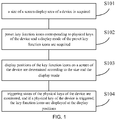
FIG.1 is a flow chart of a method for displaying key function icons on a screen according to an embodiment; -
FIG.2 is a flow chart of a method for displaying key function icons on a screen according to a preferred embodiment; and -
FIG. 3 is a schematic diagram of a structure of a system for displaying key function icons on a screen according to an embodiment. - The present disclosure will be described in details in combination with the accompanying drawings and embodiments such that the technical solution and advantages of the present disclosure will be more apparent.
- Please refer to the flow chart of a method for displaying key function icons on a screen according to an embodiment in
FIG. 1 , including steps S101 to S104 : - In step S101: a size of a screen display area of a device is acquired.
- In this step, the size of the screen display area can be acquired directly from the preset code of the control board of the device, or be acquired by acquiring the width and height of the screen display area and then the size of the screen display area is calculated from the width and height. It is also possible to preset a database for storing the device model and the size of the screen display area, in which the device model has a one-to-one correspondence with the size of the screen display area. The device model is acquired from the preset code of the control board of the device, and the size of the screen display area corresponding to the device model is acquired from the database.
- In step S102: preset key function icons corresponding to physical keys of the device and a display mode of the preset key function icons are acquired.
- The display mode may be a horizontally arranged display mode or a vertically arranged display mode. The specific display mode can be determined according to actual use situations or the arrangement of the physical keys of the device.
- Further, after the preset key function icons corresponding to the physical keys of the device are acquired, lengths and widths of the key function icons are acquired, and sizes of the key function icons are compared with the size of the corresponding keypad of the physical keys of the device. If the sizes of the key function icons do not match the size of the corresponding keypad, the lengths and widths of the key function icons are adjusted, so that the sizes of the key function icons are matched with the size of the corresponding keypad, thereby effecting the space matching between the key function icons and the physical keys of the device, and further improving the accuracy in operating the physical keys of the device.
- Specifically, the icons to be used and the order in which they are to be arranged may be pre-defined in the preset code of the control board of the device. The software automatically acquires the lengths and widths of the icons to calculate the display space required for the entire icon set. If the size of the display space of the icons does not match the size of the physical keypad of the device, the display space of the icons can be adjusted by defining the lengths and widths of the icons, so as to match the space occupied by the icons and the physical keys of the device.
- In step S103: display positions of the key function icons on a screen of the device are determined according to the size and the display mode.
- Further, according to the size and a position of a first physical key of the device, a display position of a first key function icon on the screen of the device is determined as a starting position; according to the display mode and the starting position, display positions of the remaining key function icon other than the first key function icon are determined as remaining positions on the screen of the device; and display positions of the key function icons on the screen of the device are determined according to the starting position and the remaining positions.
- In this embodiment, the key function icons includes an Enter key function icon, a menu key function icon, a volume up key function icon, a volume down key function icon, a channel+ key function icon, a channel- key function icon, and a power key function icon. If the Enter key function icon is used as the first key function icon in the key function icon, the remaining menu key function icon, volume up key function icon, volume down key function icon, channel+ key function icon, channel- key function icon, and power key function icon are used as the remaining key function icons except for the first key function icon. This step is to determine the display position of the first key function icon on the screen of the device as the starting position. Then, according to the starting position, the display positions of the remaining key function icons on the screen of the device are determined, thereby improving the convenience of setting the key function icons.
- Further, before the display position of the first key function icon on the screen of the device is determined according to the size and the position of the first physical key of the device,, a plane coordinate system on the screen display area is established by taking an upper left corner of the screen display area of the device as an origin, a horizontal line passing through the origin as an horizontal axis, and a vertical line passing through the origin as a vertical axis. Then, the coordinate of the first key function icon in the plane coordinate system is determined according to the position of the first physical key of the device as a starting coordinate position; coordinates of the remaining key function icons in the plane coordinate system are determined according to the display mode and the starting coordinate position as the remaining coordinate positions; the display positions of the key function icons on the screen of the device are determined according to the starting coordinate position and the remaining coordinate positions. This step determines the starting coordinate position of the first key function icon on the screen of the device by establishing the plane coordinate system on the screen display area, and then other coordinate positions of the remaining key function icons on the screen of the device are determined according to the starting coordinate position, thereby improving the accuracy of the key function icon settings.
- In step S104: triggering states of the physical keys of the device are monitored, and if a physical key of the device is triggered, the key function icons are displayed at the display positions.
- In this step, the physical key of the device may be triggered by the user directly pressing the physical key of the device. This step improves the accuracy in operating the physical keys of the device.
- Further, in the step the key function icons are displayed at the display positions, the key function icon corresponding to the position of the triggered physical key of the device is differentially displayed. Through this step, the user directly learns which physical key of the device is triggered, so as to accurately operate the physical keys of the device, thereby further improving the accuracy in operating the physical keys of the device and improving user experience.
- Further, after the displaying of the key function icons at the display positions, if there is no detection that the physical keys of the device have been triggered again within a set period, the key function icons are automatically hidden to avoid interfering with the operation of the device by the user, thereby further improving user experience.
- In the method for displaying key function icons on a screen of the embodiment, by acquiring a size of a screen display area of the device, acquiring preset key function icons corresponding to physical keys of the device and a display mode of the preset key function icons, display positions of the key function icons on the screen of the device are determined according to the size and the display mode, and the triggering states of the physical keys of the device are monitored, if a physical key of the device is triggered, the key function icons at the display positions are displayed, thereby improving the accuracy in operating the physical keys of the device.
- The following is a preferred embodiment of the method for displaying key function icons on a screen of the present disclosure. In this embodiment, references are made by taking a screen display of television key function icons as an example. As shown in
FIG. 2 , step S201 to step S205 are included: - In step S201: a height and width of a display area of a TV screen display area are acquired. The width and height of the screen in the software code of the TV main board are defined, or the model number of the screen is defined. The software acquires the width and height of the screen from the preset database according to the model of the screen. Specifically, for a new LCD TV screen, the height and width of the screen are acquired firstly through the specification of the screen, and the height and width of the screen are fed into the code of the LCD TV control board. For a used LCD screen, the code will automatically find the height and width of the screen in the database by simply inputting the model number of the screen into the code.
- In step S202: OSD (On Screen Display) icons and their displaying order are defined. In the software code of the TV main board, the icons to be used and the order in which they are to be arranged are pre-defined, and the software automatically acquires the lengths and widths of the icons to calculate the display space required for the entire set of icons. If the size of the display space of the icons does not match with the size of the area where the keypad is located, the display space of the icons can be adjusted by defining the lengths and widths of the icons, so as to match with the space occupied by the icons and the operation keys.
- Specifically, icons that can indicate functions of these keys are selected according to the keys on the keypad required for the design of the television. For example, a TV may require seven keys, e.g., "Enter", "Menu", "V+", "V-", "CH+", "CH-" and "Power", and the keys are arranged in the same order as they are laid out above, and the selected indicating icons and their arrangement are shown in Table 1:
Table 1 OSD indicating icon pattern selection and horizontal sorting table Enter Menu V+ V- CH+ CH- Power - The selected indicating icons can also be arranged vertically, as shown in Table 2 below:
Enter Menu V+ V- CH+ CH- Power - In step S203: the coordinate for displaying a first OSD icon is defined. According to the positions of the operation keys on the TV case, the starting coordinate of the first OSD icon in the software code of the TV main board is defined. Based on the coordinate of the first OSD icon, the software calculates the positions of all subsequent OSD icons to form a set of ordered OSD icon display.
- The plane coordinate system is established by taking an upper left corner of the TV as an origin, the X coordinate axis runs through the origin horizontally to the right, and the Y coordinate axis runs through the origin vertically downward. In this coordinate system, the coordinate of the upper left corner of the first OSD icon is defined. After the coordinate of the upper left corner of the first OSD icon is defined, the software automatically calculates the coordinates of other icons to form an ordered OSD icon display.
- In step S204: the OSD icons are displayed if any one of the keys on the keypad is triggered. In the default state of the TV, the OSD icons are not displayed on the TV screen. When the user presses a key on the TV keypad, an entire set of OSD icons will be displayed on the TV screen, and each key icon will be aligned with the corresponding function key. The icon corresponding to the pressed key will be highlighted to let the user know which key is being pressed. According to the entire set of OSD icons on the screen, the user can accurately control the TV using the keys.
- In step S205: the OSD icons are automatically hidden when the keys on the keypad are no longer triggered. After the user stops operating the TV keypad for a few seconds, the TV automatically hides the OSD icons on the screen, and the TV screen returns to the normal state, so that the OSD icons do not obstruct the user from watching the TV.
- In this implementation, instead of conventional printed icons or posted icons on the TV casing, the key function indicating icons are displayed on the TV screen at positions corresponding to the operation keys, thereby improving the accuracy in operating the physical keys of the television. In addition, the method for displaying key function icons on a screen according to the present implementation can also save the cost of icon printing or the icon sticker. Moreover, by using the key function icons displayed as the OSD, the modification of the positions, order, and pattern of the icons is facilitated, and the material cost for remaking the icons is avoided.
- The disclosure also provides a screen display system of key function icons, including, as shown in
FIG. 3 , a first acquiringmodule 301, a second acquiringmodule 302, aposition determining module 303, and a monitoring & displayingmodule 304. - The first acquiring
module 301 is configured to acquire a size of a screen display area of a device; the second acquiringmodule 302 is configured to acquire preset key function icons corresponding to physical keys of the device, and a display mode of the preset key function icons; theposition determining module 303 is configured to acquire, according to the size and the display mode, display positions of the key function icons on the screen of the device; the monitoring & displayingmodule 304 is configured to monitor triggering states of the physical keys of the device, if a physical key of the device is triggered, displaying the key function icons at the display positions. - In the system for displaying key function icons on a screen of the embodiment, by acquiring a size of a screen display area of the device, acquiring preset key function icons corresponding to physical keys of the device and a display mode of the preset key function icons, display positions of the key function icons on the screen of the device are determined according to the size and the display mode, and the triggering states of the physical keys of the device are monitored, if a physical key of the device is triggered, the key function icons at the display positions are displayed, thereby improving the accuracy in operating the physical keys of the device..
- In one of the embodiments, the second acquiring
module 302 includes a comparing submodule and a matching submodule. The comparing submodule is configured to acquire lengths and widths of the key function icons, and compare sizes of the key function icons with a size of a corresponding key of the physical keys of the device. The matching submodule is configured to adjust lengths and widths of the key function icons if the sizes of the key function icons do not match the size of the corresponding keypad, so that the sizes of the key function icons may fit the size of the corresponding keypad, thus realizing spatial match between the key function icons and the physical keys of the device, thereby improving the accuracy in operating physical keys of the device. - In one of the embodiments, the
position determining module 303 includes a first position determining submodule, a second position determining submodule, and a third position determining submodule. The first position determining submodule is configured to determine, according to the size and location of a first physical key of the device, a display position of the first key function icon on the screen of the device as a starting position. The second position determining submodule is configured to determine, according to the display mode and the starting position, display positions of remaining key function icons other than the first key function icon as remaining positions on the screen of the device. The third position determining submodule is configured to acquire display positions of the key function icons on the screen of the device according to the starting position and the remaining positions. This embodiment determines the display position of the first key function icon on the screen of the device as the starting position, and then determines, according to the starting position, display positions of the remaining key function icons on the screen of the device, thereby improving the convenience in setting the key function icons. - In one of the embodiments, the monitoring & displaying
module 304 includes a differentially displaying submodule and a hiding submodule. The differentially displaying submodule is configured to display the key function icons at the display positions, where the key function icon corresponding to the triggered physical key of the device is displayed differentially, allowing the user to directly learn which physical key of the device is being triggered, and to accurately operate the physical keys of the device, thereby further improving the accuracy in operating physical keys of the device and improving the user experience. The hiding submodule is configured to, after the key function icons are displayed at the display positions, automatically hide the key function icons if there is no detection that the physical keys of the device have been triggered again within a set time, so as to avoid interfering the operation of the device by the user, thereby further improving the user experience. - The foregoing respective technical features involved in the respective embodiments can be combined arbitrarily, for brevity, not all possible combinations of the respective technical features in the foregoing embodiments are described, however, to the extent they have no collision with each other, the combination of the respective technical features shall be considered to be within the scope of the description.
- The foregoing implementations are merely specific embodiments of the present disclosure, and are not intended to limit the protection scope of the present disclosure. It should be noted that any variation or replacement readily figured out by persons skilled in the art within the technical scope disclosed in the present disclosure shall all fall into the protection scope of the present disclosure. Therefore, the protection scope of the present disclosure shall be object to the protection scope of the claims.
Claims (10)
- A method for displaying key function icons on a screen, comprising:acquiring a size of a screen display area of a device;acquiring preset key function icons corresponding to physical keys of the device, and a display mode of the preset key function icons;determining, according to the size and the display mode, display positions of the key function icons on a screen of the device; andmonitoring triggering states of the physical keys of the device, and if a physical key of the device is triggered, displaying the key function icons at the display positions.
- The method according to claim 1, after the acquiring of the preset key function icons corresponding to physical keys of the device, the method further comprising:acquiring lengths and widths of the key function icons, and comparing sizes of the key function icons with a size of a corresponding keypad of the physical keys of the device;if the sizes of the key function icons do not match with the size of the corresponding keypad, adjusting the lengths and the widths of the key function icons to match the sizes of the key function icons with the size of the corresponding keypad.
- The method according to claim 1, wherein the determining of, according to the size and the display mode, display positions of the key function icons on a screen of the device comprises:determining, according to the size and a position of a first physical key of the device, a display position of a first key function icon on the screen of the device as a starting position;determining, according to the display mode and the starting position, display positions of the remaining key function icons other than the first key function icon on the screen of the device as remaining positions; anddetermining, according to the starting position and the remaining positions, the display positions of the key function icons on the screen of the device.
- The method according to claim 3, before the determining of, according to the size and a position of a first physical key of the device, a display position of a first key function icon on the screen of the device as a starting position, the method further comprising:establishing a plane coordinate system on the screen display area by taking an upper left corner of the screen display area of the device as an origin, a horizontal line passing through the origin as a horizontal axis, and a vertical line passing through the origin as a vertical axis;wherein the determining of, according to the size and the position of a first physical key of the device, a display position of a first key function icon on the screen of the device as a starting position comprises:determining, according to the position of the first physical key of the device, a coordinate of the first key function icon in the plane coordinate system as a starting coordinate position;wherein the determining of, according to the display mode and the starting position, display positions of the remaining key function icons other than the first key function icon on the screen of the device as remaining positions comprises:determining, according to the display mode and the starting coordinate position, coordinates of the remaining key function icons in the plane coordinate system as remaining coordinate positions; andwherein the determining of, according to the starting position and the remaining positions, the display positions of the key function icons on the screen of the device comprises:
determining, according to the starting coordinate position and the remaining coordinate positions, the display positions of the key function icons on the screen of the device. - The method according to claim 1, wherein the displaying of the key function icons at the display positions comprises:
displaying the key function icons at the display positions, wherein the key function icon corresponding to the triggered physical key of the device is displayed differentially. - The method according to claim 1, after the displaying of the key function icons in the display positions, the method further comprising:
automatically hiding the key function icons if it is not detected that the physical keys of the device are triggered again within a set time. - A system for displaying key function icons on a screen, comprising:a first acquiring module, configured to acquire a size of a screen display area of a device;a second acquiring module, configured to acquire preset key function icons corresponding to physical keys of the device, and a display mode of the preset key function icons;a position determining module, configured to determine, according to the size and the display mode, display positions of the key function icons on a screen of the device; anda monitoring & displaying module, configured to monitor triggering states of the physical keys of the device, and if a physical key of the device is triggered, display the key function icons at the display positions.
- The system according to claim 7, wherein the second acquiring module comprises:a comparing submodule, configured to acquire lengths and widths of the key function icons to compare sizes of the key function icons with a size of a corresponding keypad of the physical keys of the device;a matching submodule, configured to adjust the lengths and the widths of the key function icons to match the sizes of the key function icons with the size of the corresponding keypad if the sizes of the key function icons do not match with the size of the corresponding keypad.
- The system according to claim 7, wherein the position determining module comprises:a first position determining submodule, configured to determine, according to the size and a position of a first physical key of the device, a display position of a first key function icon on the screen of the device as a starting position;a second position determining submodule, configured to determine, according to the display mode and the starting position, display positions of the remaining key function icons other than the first key function icon on the screen of the device as remaining positions; anda third position determining submodule, configured to determine display positions of the key function icons on the screen of the device according to the starting position and the remaining positions.
- The method according to claim 7, wherein the monitoring & displaying module comprises:a differentially displaying submodule, configured to display the key function icons at the display positions, wherein the key function icon corresponding to the triggered physical key of the device is displayed differentially;a hiding submodule, configured to automatically hide the key function icons if it is not detected that the physical keys of the device are triggered again within a set time after the displaying of the key function icons at the display positions.
Applications Claiming Priority (2)
| Application Number | Priority Date | Filing Date | Title |
|---|---|---|---|
| CN201610341296.2A CN106028101A (en) | 2016-05-19 | 2016-05-19 | Screen display method and system for key function icons |
| PCT/CN2016/113122 WO2017197892A1 (en) | 2016-05-19 | 2016-12-29 | Method for displaying key function icon on screen and system thereof |
Publications (2)
| Publication Number | Publication Date |
|---|---|
| EP3461140A1 true EP3461140A1 (en) | 2019-03-27 |
| EP3461140A4 EP3461140A4 (en) | 2019-03-27 |
Family
ID=57096737
Family Applications (1)
| Application Number | Title | Priority Date | Filing Date |
|---|---|---|---|
| EP16902271.2A Withdrawn EP3461140A4 (en) | 2016-05-19 | 2016-12-29 | Method for displaying key function icon on screen and system thereof |
Country Status (4)
| Country | Link |
|---|---|
| US (1) | US10616524B2 (en) |
| EP (1) | EP3461140A4 (en) |
| CN (1) | CN106028101A (en) |
| WO (1) | WO2017197892A1 (en) |
Families Citing this family (6)
| Publication number | Priority date | Publication date | Assignee | Title |
|---|---|---|---|---|
| CN106028101A (en) * | 2016-05-19 | 2016-10-12 | 广州视源电子科技股份有限公司 | Screen display method and system for key function icons |
| CN106484236B (en) * | 2016-10-14 | 2019-10-29 | 珠海市魅族科技有限公司 | A kind of method and device of physical button prompt operation |
| CN106775270B (en) * | 2016-11-29 | 2019-09-17 | 青岛海信电器股份有限公司 | A kind of display methods and device of on-screen menu |
| CN112328143B (en) * | 2017-04-14 | 2024-06-21 | 创新先进技术有限公司 | Button activation method and device |
| CN107219458B (en) * | 2017-06-16 | 2020-07-14 | 广州视源电子科技股份有限公司 | Key board test equipment and test method |
| CN111641916B (en) * | 2020-04-29 | 2022-09-06 | 维沃移动通信有限公司 | Audio sharing method and electronic equipment |
Family Cites Families (31)
| Publication number | Priority date | Publication date | Assignee | Title |
|---|---|---|---|---|
| US8065155B1 (en) * | 1999-06-10 | 2011-11-22 | Gazdzinski Robert F | Adaptive advertising apparatus and methods |
| KR20070013492A (en) * | 2005-07-26 | 2007-01-31 | 삼성테크윈 주식회사 | Digital image processing device with efficient input function and its control method |
| FI20070702A7 (en) * | 2007-09-14 | 2009-03-15 | Oy Clarovision Ltd | Graphical user interface and device for controlling it |
| US20100064212A1 (en) * | 2008-09-11 | 2010-03-11 | Sony Ericsson Mobile Communications Ab | Electronic Device Having a User Input Interface Opposite a Display |
| KR101548958B1 (en) * | 2008-09-18 | 2015-09-01 | 삼성전자주식회사 | Method and apparatus for controlling touch screen operation of a portable terminal |
| KR101658240B1 (en) | 2010-05-10 | 2016-09-30 | 엘지전자 주식회사 | On Screen Display device |
| US8698764B1 (en) * | 2010-06-30 | 2014-04-15 | Amazon Technologies, Inc. | Dorsal touch input |
| TWI500060B (en) * | 2010-09-10 | 2015-09-11 | Htc Corp | Portable electronic device and switching method of icon |
| US8819576B2 (en) * | 2011-05-09 | 2014-08-26 | Blackberry Limited | Systems and methods for facilitating an input to an electronic device |
| US8866769B2 (en) * | 2012-03-13 | 2014-10-21 | Blackberry Limited | Device cover with drawing pad input device |
| JP6271858B2 (en) * | 2012-07-04 | 2018-01-31 | キヤノン株式会社 | Display device and control method thereof |
| US20140078086A1 (en) * | 2012-09-20 | 2014-03-20 | Marvell World Trade Ltd. | Augmented touch control for hand-held devices |
| KR101990035B1 (en) * | 2012-10-31 | 2019-06-18 | 엘지전자 주식회사 | Mobile terminal and control method for the mobile terminal |
| KR20140073245A (en) * | 2012-12-06 | 2014-06-16 | 삼성전자주식회사 | Method for inputting back surface and an electronic device thereof |
| KR102120099B1 (en) * | 2013-02-06 | 2020-06-09 | 엘지전자 주식회사 | The digital device for recognizing double-sided touch and method thereof |
| CN103218165B (en) * | 2013-04-02 | 2016-06-08 | 广东欧珀移动通信有限公司 | A kind of method, device and mobile terminal changing key arrangement |
| JP6128967B2 (en) * | 2013-05-31 | 2017-05-17 | キヤノン株式会社 | Display control apparatus and control method thereof |
| JP2014241030A (en) * | 2013-06-11 | 2014-12-25 | カシオ計算機株式会社 | Graph display device, program, and server device |
| CN103440086A (en) * | 2013-08-03 | 2013-12-11 | 惠州华阳通用电子有限公司 | Method and system for controlling physical keys of intelligent mobile terminals in double terminal interaction mode |
| CN203840653U (en) * | 2013-08-19 | 2014-09-17 | 三星电子株式会社 | Protective shell and electronic device equipped with protection shell |
| KR102210494B1 (en) * | 2013-10-30 | 2021-02-02 | 삼성전자주식회사 | Apparatus and method for displaying a notification in an eletronic device |
| CN103618863A (en) * | 2013-12-16 | 2014-03-05 | 乐视致新电子科技(天津)有限公司 | Smart television key prompting method and system |
| CN104915089B (en) * | 2014-03-12 | 2017-12-05 | 佛山市恒力泰机械有限公司 | A kind of display methods of dummy keyboard |
| US20150331551A1 (en) * | 2014-05-14 | 2015-11-19 | Samsung Electronics Co., Ltd. | Image display apparatus, image display method, and computer-readable recording medium |
| KR102264444B1 (en) * | 2014-09-04 | 2021-06-15 | 삼성전자주식회사 | Method and apparatus for executing function in electronic device |
| US9671828B2 (en) * | 2014-09-19 | 2017-06-06 | Lg Electronics Inc. | Mobile terminal with dual touch sensors located on different sides of terminal body and method of controlling the same |
| CN104461549B (en) * | 2014-12-15 | 2018-09-18 | 北京国双科技有限公司 | The arrangement display methods and device of graphical interfaces |
| US9846505B2 (en) * | 2015-01-07 | 2017-12-19 | Honeywell International Inc. | Customizable user interface |
| TWI708169B (en) * | 2015-06-02 | 2020-10-21 | 南韓商三星電子股份有限公司 | User terminal apparatus and controlling method thereof |
| JP2017151747A (en) * | 2016-02-25 | 2017-08-31 | コニカミノルタ株式会社 | Display device, image forming apparatus, key screen display method, and key screen display program |
| CN106028101A (en) * | 2016-05-19 | 2016-10-12 | 广州视源电子科技股份有限公司 | Screen display method and system for key function icons |
-
2016
- 2016-05-19 CN CN201610341296.2A patent/CN106028101A/en active Pending
- 2016-12-29 EP EP16902271.2A patent/EP3461140A4/en not_active Withdrawn
- 2016-12-29 WO PCT/CN2016/113122 patent/WO2017197892A1/en not_active Ceased
- 2016-12-29 US US16/301,694 patent/US10616524B2/en active Active
Also Published As
| Publication number | Publication date |
|---|---|
| EP3461140A4 (en) | 2019-03-27 |
| US20190289244A1 (en) | 2019-09-19 |
| CN106028101A (en) | 2016-10-12 |
| US10616524B2 (en) | 2020-04-07 |
| WO2017197892A1 (en) | 2017-11-23 |
Similar Documents
| Publication | Publication Date | Title |
|---|---|---|
| US10616524B2 (en) | System and method for displaying key function icons on screen | |
| EP3220251A1 (en) | Method and system based on mobile terminal for turning off screen during call to prevent inadvertent touch | |
| US10635227B2 (en) | Image display device | |
| US10007375B2 (en) | Portable apparatus and method for controlling cursor position on a display of a portable apparatus | |
| EP2148267A2 (en) | Mobile device having touch screen and method for setting virtual keypad thereof | |
| US20140143691A1 (en) | User interface generating apparatus and associated method | |
| CN116775177A (en) | Display control adjustment method, device, terminal and computer readable storage medium | |
| US20140068495A1 (en) | Apparatus and method for processing handwriting input | |
| EP3121768A1 (en) | Information processing device, display method and control program | |
| US20200225788A1 (en) | Image display device | |
| CN107133002B (en) | Information processing method and electronic equipment | |
| JP2015019195A (en) | Image projection device, control method of image projection device, and control method for image projection device | |
| JP5989942B2 (en) | BACKGROUND DISPLAY METHOD, DEVICE, ELECTRONIC DEVICE, PROGRAM, AND RECORDING MEDIUM | |
| US20130141353A1 (en) | Method for unlocking electronic device and electronic device using the same | |
| EP2662751A1 (en) | Method and device for an electronic terminal to realize desktop switching, and electronic terminal | |
| CN105100438B (en) | Intelligent terminal and calling method thereof | |
| US20100199178A1 (en) | Screen output control device for mobile communication terminal | |
| KR20100025709A (en) | Method and apparatus of guiding input-signal for display | |
| WO2018205745A1 (en) | Input interface display system and method for portable device | |
| CN105900416A (en) | Consumer device and method for accommodating periods of temporary control state associated with display of user interface elements | |
| US10139954B2 (en) | Display device and operating method thereof | |
| JP2015225646A (en) | Information processing device | |
| CN104679138A (en) | Display device | |
| JP6923604B2 (en) | Image display device | |
| CN109739384B (en) | Display device, calibration method and calibration device for display device, and electronic apparatus |
Legal Events
| Date | Code | Title | Description |
|---|---|---|---|
| STAA | Information on the status of an ep patent application or granted ep patent |
Free format text: STATUS: THE INTERNATIONAL PUBLICATION HAS BEEN MADE |
|
| PUAI | Public reference made under article 153(3) epc to a published international application that has entered the european phase |
Free format text: ORIGINAL CODE: 0009012 |
|
| STAA | Information on the status of an ep patent application or granted ep patent |
Free format text: STATUS: REQUEST FOR EXAMINATION WAS MADE |
|
| 17P | Request for examination filed |
Effective date: 20181217 |
|
| A4 | Supplementary search report drawn up and despatched |
Effective date: 20190227 |
|
| AK | Designated contracting states |
Kind code of ref document: A1 Designated state(s): AL AT BE BG CH CY CZ DE DK EE ES FI FR GB GR HR HU IE IS IT LI LT LU LV MC MK MT NL NO PL PT RO RS SE SI SK SM TR |
|
| AX | Request for extension of the european patent |
Extension state: BA ME |
|
| DAV | Request for validation of the european patent (deleted) | ||
| DAX | Request for extension of the european patent (deleted) | ||
| STAA | Information on the status of an ep patent application or granted ep patent |
Free format text: STATUS: EXAMINATION IS IN PROGRESS |
|
| 17Q | First examination report despatched |
Effective date: 20190916 |
|
| STAA | Information on the status of an ep patent application or granted ep patent |
Free format text: STATUS: THE APPLICATION HAS BEEN WITHDRAWN |
|
| 18W | Application withdrawn |
Effective date: 20191031 |