EP3214534A1 - Method and device for displaying object information on screen display apparatus - Google Patents
Method and device for displaying object information on screen display apparatus Download PDFInfo
- Publication number
- EP3214534A1 EP3214534A1 EP15854714.1A EP15854714A EP3214534A1 EP 3214534 A1 EP3214534 A1 EP 3214534A1 EP 15854714 A EP15854714 A EP 15854714A EP 3214534 A1 EP3214534 A1 EP 3214534A1
- Authority
- EP
- European Patent Office
- Prior art keywords
- information
- display
- flipping
- area
- display area
- Prior art date
- Legal status (The legal status is an assumption and is not a legal conclusion. Google has not performed a legal analysis and makes no representation as to the accuracy of the status listed.)
- Withdrawn
Links
Images
Classifications
-
- G—PHYSICS
- G06—COMPUTING OR CALCULATING; COUNTING
- G06F—ELECTRIC DIGITAL DATA PROCESSING
- G06F3/00—Input arrangements for transferring data to be processed into a form capable of being handled by the computer; Output arrangements for transferring data from processing unit to output unit, e.g. interface arrangements
- G06F3/01—Input arrangements or combined input and output arrangements for interaction between user and computer
- G06F3/048—Interaction techniques based on graphical user interfaces [GUI]
- G06F3/0484—Interaction techniques based on graphical user interfaces [GUI] for the control of specific functions or operations, e.g. selecting or manipulating an object, an image or a displayed text element, setting a parameter value or selecting a range
- G06F3/04845—Interaction techniques based on graphical user interfaces [GUI] for the control of specific functions or operations, e.g. selecting or manipulating an object, an image or a displayed text element, setting a parameter value or selecting a range for image manipulation, e.g. dragging, rotation, expansion or change of colour
-
- G—PHYSICS
- G06—COMPUTING OR CALCULATING; COUNTING
- G06F—ELECTRIC DIGITAL DATA PROCESSING
- G06F3/00—Input arrangements for transferring data to be processed into a form capable of being handled by the computer; Output arrangements for transferring data from processing unit to output unit, e.g. interface arrangements
- G06F3/01—Input arrangements or combined input and output arrangements for interaction between user and computer
- G06F3/048—Interaction techniques based on graphical user interfaces [GUI]
- G06F3/0481—Interaction techniques based on graphical user interfaces [GUI] based on specific properties of the displayed interaction object or a metaphor-based environment, e.g. interaction with desktop elements like windows or icons, or assisted by a cursor's changing behaviour or appearance
- G06F3/0482—Interaction with lists of selectable items, e.g. menus
-
- G—PHYSICS
- G06—COMPUTING OR CALCULATING; COUNTING
- G06F—ELECTRIC DIGITAL DATA PROCESSING
- G06F3/00—Input arrangements for transferring data to be processed into a form capable of being handled by the computer; Output arrangements for transferring data from processing unit to output unit, e.g. interface arrangements
- G06F3/01—Input arrangements or combined input and output arrangements for interaction between user and computer
- G06F3/048—Interaction techniques based on graphical user interfaces [GUI]
- G06F3/0481—Interaction techniques based on graphical user interfaces [GUI] based on specific properties of the displayed interaction object or a metaphor-based environment, e.g. interaction with desktop elements like windows or icons, or assisted by a cursor's changing behaviour or appearance
- G06F3/0483—Interaction with page-structured environments, e.g. book metaphor
-
- G—PHYSICS
- G06—COMPUTING OR CALCULATING; COUNTING
- G06F—ELECTRIC DIGITAL DATA PROCESSING
- G06F3/00—Input arrangements for transferring data to be processed into a form capable of being handled by the computer; Output arrangements for transferring data from processing unit to output unit, e.g. interface arrangements
- G06F3/01—Input arrangements or combined input and output arrangements for interaction between user and computer
- G06F3/048—Interaction techniques based on graphical user interfaces [GUI]
- G06F3/0484—Interaction techniques based on graphical user interfaces [GUI] for the control of specific functions or operations, e.g. selecting or manipulating an object, an image or a displayed text element, setting a parameter value or selecting a range
- G06F3/04842—Selection of displayed objects or displayed text elements
-
- G—PHYSICS
- G06—COMPUTING OR CALCULATING; COUNTING
- G06F—ELECTRIC DIGITAL DATA PROCESSING
- G06F3/00—Input arrangements for transferring data to be processed into a form capable of being handled by the computer; Output arrangements for transferring data from processing unit to output unit, e.g. interface arrangements
- G06F3/01—Input arrangements or combined input and output arrangements for interaction between user and computer
- G06F3/048—Interaction techniques based on graphical user interfaces [GUI]
- G06F3/0487—Interaction techniques based on graphical user interfaces [GUI] using specific features provided by the input device, e.g. functions controlled by the rotation of a mouse with dual sensing arrangements, or of the nature of the input device, e.g. tap gestures based on pressure sensed by a digitiser
- G06F3/0488—Interaction techniques based on graphical user interfaces [GUI] using specific features provided by the input device, e.g. functions controlled by the rotation of a mouse with dual sensing arrangements, or of the nature of the input device, e.g. tap gestures based on pressure sensed by a digitiser using a touch-screen or digitiser, e.g. input of commands through traced gestures
- G06F3/04883—Interaction techniques based on graphical user interfaces [GUI] using specific features provided by the input device, e.g. functions controlled by the rotation of a mouse with dual sensing arrangements, or of the nature of the input device, e.g. tap gestures based on pressure sensed by a digitiser using a touch-screen or digitiser, e.g. input of commands through traced gestures for inputting data by handwriting, e.g. gesture or text
-
- G—PHYSICS
- G06—COMPUTING OR CALCULATING; COUNTING
- G06F—ELECTRIC DIGITAL DATA PROCESSING
- G06F3/00—Input arrangements for transferring data to be processed into a form capable of being handled by the computer; Output arrangements for transferring data from processing unit to output unit, e.g. interface arrangements
- G06F3/01—Input arrangements or combined input and output arrangements for interaction between user and computer
- G06F3/048—Interaction techniques based on graphical user interfaces [GUI]
- G06F3/0487—Interaction techniques based on graphical user interfaces [GUI] using specific features provided by the input device, e.g. functions controlled by the rotation of a mouse with dual sensing arrangements, or of the nature of the input device, e.g. tap gestures based on pressure sensed by a digitiser
- G06F3/0488—Interaction techniques based on graphical user interfaces [GUI] using specific features provided by the input device, e.g. functions controlled by the rotation of a mouse with dual sensing arrangements, or of the nature of the input device, e.g. tap gestures based on pressure sensed by a digitiser using a touch-screen or digitiser, e.g. input of commands through traced gestures
- G06F3/04886—Interaction techniques based on graphical user interfaces [GUI] using specific features provided by the input device, e.g. functions controlled by the rotation of a mouse with dual sensing arrangements, or of the nature of the input device, e.g. tap gestures based on pressure sensed by a digitiser using a touch-screen or digitiser, e.g. input of commands through traced gestures by partitioning the display area of the touch-screen or the surface of the digitising tablet into independently controllable areas, e.g. virtual keyboards or menus
-
- G—PHYSICS
- G06—COMPUTING OR CALCULATING; COUNTING
- G06Q—INFORMATION AND COMMUNICATION TECHNOLOGY [ICT] SPECIALLY ADAPTED FOR ADMINISTRATIVE, COMMERCIAL, FINANCIAL, MANAGERIAL OR SUPERVISORY PURPOSES; SYSTEMS OR METHODS SPECIALLY ADAPTED FOR ADMINISTRATIVE, COMMERCIAL, FINANCIAL, MANAGERIAL OR SUPERVISORY PURPOSES, NOT OTHERWISE PROVIDED FOR
- G06Q30/00—Commerce
- G06Q30/06—Buying, selling or leasing transactions
- G06Q30/0601—Electronic shopping [e-shopping]
- G06Q30/0641—Electronic shopping [e-shopping] utilising user interfaces specially adapted for shopping
-
- G—PHYSICS
- G06—COMPUTING OR CALCULATING; COUNTING
- G06F—ELECTRIC DIGITAL DATA PROCESSING
- G06F2203/00—Indexing scheme relating to G06F3/00 - G06F3/048
- G06F2203/048—Indexing scheme relating to G06F3/048
- G06F2203/04802—3D-info-object: information is displayed on the internal or external surface of a three dimensional manipulable object, e.g. on the faces of a cube that can be rotated by the user
Definitions
- the application relates to the field of information display, in particular, to a method for displaying object information on a screen display device.
- the application also provides a device for displaying object information on a screen display device.
- Hover refers to a mouse "hovering" state, by means of which, more additional information (or referred to as complimentary or auxiliary information) can be displayed with respect to the area where the mouse pointer is hovered above.
- additional information or referred to as complimentary or auxiliary information
- the "Hover" function is widely used by a website in exhibiting product information. For example, when a user moves and stops (i.e., "hovers") a mouse pointer to a display area of a specific product, additional information of the product will be shown such that the user does not need to click to open a landing page to review such information. Therefore, the additional information is provided without disturbance on the user's browsing path(s).
- Hover based information display technology can only be applied to a device (such as a desktop personal computer) that includes a mouse to perform interactive interfacing.
- a device such as a desktop personal computer
- touch screen devices that do not include mouse or similar interfacing device, with which users interface through direct finger touches on the screen, there is no such "Hover" action and the related information display techniques.
- the screen display will contain too much information with an unconcise interface, which could be burdensome to the browsing users. Further, with limited display space, displaying too much information may naturally lower the exposure rate of the products, which also wastes the display resources.
- the application provides a method for displaying object information on a screen display device, which includes a new solution to present information through a screen display device other than the traditional Hover-based information display.
- the application further provides a device for displaying object information on a screen display device.
- the application provides a method for presenting object information on a screen display device, comprising: for a presentation object, displaying one of basic information and additional information of the object on a corresponding display area of the screen display device; receiving an interfacing operation on the screen display device; determining whether a screen display position associated with the interfacing operation is within a switch triggering area corresponding to the object; and in a case that the screen display position associated with the interfacing operation is within the switch triggering area, switching to display other one of the basic information and the additional information of the object on the corresponding display area.
- the screen display device is a touch screen device.
- the switching to display the other one of the basic information and the additional information of the object in the corresponding display area includes: displaying in an animation form a flipping-to-backside process on the corresponding display area; and displaying the other one of the basic information and the additional information of the object on the corresponding display area after the flipping-to-backside process.
- the displaying the flipping-to-backside process on the corresponding display area includes: flipping about a vertical center line of the corresponding display area to a backside display; and flipping about a horizontal center line of the corresponding display area to the backside display.
- the switch triggering area includes an area of a control element with a shape of a product tag about a border of the corresponding display area of the object.
- control element is displayed at an opposite position in the corresponding display area against a position of the control element before the flipping-to-backside process
- the basic information of the object is displayed.
- the basic information and the additional information includes at least one of elements of a letter, a graphic item, an image, a table, an animation, a sound, and a control for executing a particular operation related to the object.
- the basic information includes at least one of a picture of the product, a name of the product and a price of the product
- the additional information includes at least one of a user review of the product, a sale amount of the product, a button for executing a save-item operation and a button for executing a put-into-shopping cart operation.
- the application further provides a device for presenting object information on a screen display device, comprising: an information display module configured to, for a presentation object, display one of basic information and additional information of the object on a corresponding display area of the screen display device; a touch receiving module configured to receive an interfacing operation on the screen display device; and a switch determination module configured to determine whether a screen display position associated with the interfacing operation is within a switch triggering area corresponding to the object, and in a case that the screen display position associated with the interfacing operation is within the switch triggering area, to switch to display other one of the basic information and the additional information of the object on the corresponding display area.
- the screen display device is a touch screen device.
- the switch determination module includes: a determination sub-module configured to determine whether the screen display position associated with the interfacing operation is within the switch triggering area corresponding to the object; and a switch implementation sub-module configured to, in the case that the screen display position associated with the interfacing operation is within the switch triggering area, switch to display the other one of the basic information and the additional information of the object on the corresponding display area; wherein the switch implementation sub-module includes: an animation flipping sub-module configured to display in an animation form a flipping-to-backside process on the corresponding display area; and a switch information displaying sub-module configured to display the other one of the basic information and the additional information of the object on the corresponding display area after the flipping-to-backside process.
- the animation flipping sub-module is configured to display in the animation form one of two flipping-to-backside processes including: flipping about a vertical center line of the corresponding display area to a backside display; and flipping about a horizontal center line of the corresponding display area to the backside display.
- the switch triggering area referred to in the determination by the switch determination module includes an area of a control element with a shape of a product tag about a border of the corresponding display area of the object.
- the animation flip sub-module is configured to display in an animation form a flipping-to-backside process on the corresponding display area, and display the control element at an opposite position on the corresponding display area against a position of the control element before the flipping-to-backside process.
- the information display module displays (is configured to display) the basic information of the object in an initial display of the object on the corresponding display area.
- the basic information and the additional information includes at least one of elements of a letter, a graphic item, an image, a table, an animation, a sound, and a control for executing a particular operation related to the object.
- the basic information includes at least one of a picture of the product, a name of the product and a price of the product
- the additional information includes at least one of a user review of the product, a sale amount of the product, a button for executing a save-item operation and a button for executing a put-into-shopping cart operation.
- the method for displaying object information on a screen display device mimics the habitual practice of flipping cards or product tags to view the backside information.
- Basic information or additional information of an object is displayed on a corresponding display area of a screen display device.
- the information display on the corresponding display area will be switched between the basic information and the additional information of the object.
- the application includes a new solution to present object information, which is different than the traditional Hover-based information display. Using the new solution, both basic information and additional information of an object could be displayed without disturbance on the users' browsing paths, and thus user experience is improved.
- the solution can overcome the inconvenience of missing Hover function in touch screen devices.
- the application provides a method and a device for presenting object information on a screen display device, which are described herein respectively.
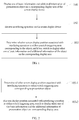
- FIG. 1 a flowchart of an embodiment method for presenting object information on a screen display device is provided. The method includes the following steps:
- the current method of presenting object information on a screen display device of the application provides a new solution to present object information other than the traditional Hover based techniques.
- either basic information or additional information of an object is displayed on a display area of the screen display device; and based on a received interfacing operation on a switch triggering area, the information displayed on the corresponding display area is switched between the basic information and the additional information.
- the technical solution displays object information upon user requests, and will not disturb users' browsing paths, which ensures a satisfactory user experience.
- the present technical solution especially fits for applications with touch screen devices.
- the usage of the technical solution is not limited to touch screen devices.
- the technical solution could be used with other screen display devices.
- a desktop PC with a mouse for human machine interfacing may also adopt the present technical solution for presenting object information.
- a presentation object is a relatively broad concept and includes any and all objects, information of which can be presented on a screen display device.
- a presentation object may be a product listed/recommended by an on-line shopping website.
- the object information may include two categories: basic information and additional information.
- the basic information and the additional information is not limited to word information, but rather may include any one or more of the following elements: a letter, a graphic item, an image, a table, an animation, a sound, and a control including prompting information to prompt a user to perform an operation related to the object (i.e., a user may be prompted to touch the control button and a particular operation related to the object will be executed).
- the basic information may usually include the overall description of a presentation object or the information concerned by a user viewing the presentation object, e.g., a product image. Additional information may provide further description on some details of the object, on top of the basic information. Additional information may also be referred to as ancillary information or secondary information.
- the basic information may include the product image, the product name and/or the price, and so on.
- the additional information may include user reviews of the product, order amounts of the product, seller information, a control button for executing a save-item operation and/or a control button for executing a put-into-shopping cart operation.
- This step displays one of the basic information and the additional information of a presentation object on a corresponding display area of the screen display device.
- the display interface may be segmented into multiple display areas, each corresponding to one presentation object for displaying basic information/additional information thereof.
- the basic information of an object may be initially displayed on the corresponding display area.
- either one of the basic information and the additional information may be displayed on the corresponding display area.
- the initial display may be set up based on a state of the most recent viewing of the object by a user.
- Step 102 receive an interfacing operation on the screen display device.
- an interfacing operation refers to an interaction between a user and a screen display device, including a user's touch or other gesture operation (e.g., a gesture click) upon a touch screen through fingers and/or stylus and a click event on a display interface of a screen display device through a mouse, and so on.
- a user's touch or other gesture operation e.g., a gesture click
- a click event on a display interface of a screen display device through a mouse, and so on.
- such interfacing operations usually correspond to particular events defined in the operating systems and/or platforms implementing the method. The triggering of the particular events within the systems/platforms indicates that the interfacing operation on the screen display device is received.
- a click operation on a screen display device through a mouse usually triggers a mouse click event, e.g., a Click event or a MouseClick event, of a system implementing the present method.
- a mouse click event e.g., a Click event or a MouseClick event
- the parameters may be analyzed to obtain the position of the mouse click operation and other associated information.
- a touch operation on a touch screen usually triggers a corresponding event.
- a touch operation usually triggers an OnTouch event.
- the getAction() function may obtain a type of the touch event, e.g., press down, move, or release, etc.
- Functions getRawX() and getRawY() may work together to obtain the coordinate pair information corresponding to the touch operation on the touch screen, i.e., the position of the touch operation.
- a TouchFrameReported event may be registered to detect a touch event on a touch screen, and the TouchFrameEventArgs parameters in the corresponding processing algorithm may be used to obtain the position information of the touch operation.
- Step 103 determine whether a screen display position associated with the interfacing operation is within a switch triggering area corresponding to the presentation object. If the screen display position associated with the interfacing operation is within the switch triggering area, information display is switched to the other one of the basic information and the additional information of the object on the corresponding display area.
- the step switches the information displayed on the display area corresponding to the object. That is, if the basic information is previously displayed, the switching will turn to display the additional information; if the additional information is previously displayed, the switching will turn to display the basic information.
- This process may include step 103-1 and step 103-2, which will be described herein with reference to FIG. 2 .
- Step 103-1 determine whether a screen display position associated with the interfacing operation is within a switch triggering area corresponding to the object. If yes, proceed to execute step 103-2.
- the switch triggering area refers to a preset area on the current display interface, where an interfacing operation triggers switching information display for the corresponding object. For each presentation object that requires switching information display between basic information and additional information, a corresponding switch triggering area may be set up on the current displace interface. Such switch triggering area may be positioned within the display area of the object, or may be positioned outside the display area of the object. For example, a switch triggering area may be an area of a control button prompting "See Backside " positioned at the lower right corner of the display area.
- the switch triggering area may be designed as a control element with a shape of a product tag and positioned about the border of the corresponding display area of the object.
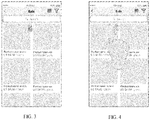
- FIG. 3 illustrates an interface design including a switch triggering area with a shape of a product tag according to an embodiment.
- This step determines whether the received interfacing operation is within the switch triggering area corresponding to the presentation object. Based on a result of this determination, it is determined whether step 103-2 is to be executed to switch information display of the object information.
- a position of the interfacing operation obtained through step 102 e.g., a coordinate pair relative to the upper left corner of the display screen
- a switch triggering area includes control element(s) for event responding and/or processing functions
- an interfacing operation on the switch triggering area may trigger the event processing algorithm associated to the control element, e.g., a touch on a control button element may trigger an onClick() algorithm associated to the control button element.
- the above described determination may not need to be performed separately. Instead, the system/platform implementing the method may automatically effectuate a correspondence between the interfacing operation and the control element. Therefore, the function of the subsequently described step 103-2 may be simply added into the processing algorithm associated to the control element.
- Step 103-2 switch to display the other one of the basic information and the additional information of the presentation object on the corresponding display area.
- the method proceeds to this step, it means that an interfacing operation on a switch triggering area has been received.
- the object information displayed on the display area corresponding to the switch triggering area is switched - if the basic information of the presentation object is displayed previously, now the additional information of the presentation object is displayed on the corresponding display area; if the additional information of the presentation object is displayed previously, now the basic information of the presentation object is displayed on the corresponding display area.
- the technical solution of the application provides a preferred implementation approach: displaying the switching process in an animation form. Specifically, it is displayed in an animation form a flipping-to-backside process, and after the flipping-to-backside process, the other one of the basic information and the additional information of the object (i.e., other than the one previously displayed) will be displayed on the corresponding display area. Adopting this implementation approach, it is extended to the screen display devices the habitual user practice of flipping to read the backside information of a card or product tag. Such an interaction process mimics users' real world activity and may effectively improve user experience.
- the flipping-to-backside process on the corresponding display area may include a left to right flipping, i.e., flipping about a vertical center line of the corresponding display area to a backside display, or may include an up to down flipping, i.e., flipping about a horizontal center line of the corresponding display area to the backside display.
- the animated flipping process of the display area may include images of the display area taken at multiple flipping angles.
- the animated effect may be achieved by displaying in time sequence the multiple images.
- the animated flipping process may be effectuated through different approaches.
- the UIKit directly integrates animation into the UIView category so that the animated flipping process may be realized through UIView.
- the CGAffineTransformMakeRotation() algorithm may be used to set up the rotation amount (i.e., angle(s) of rotation).
- beginAnimation may be used to start an animation
- commitAnimation may be used to finish an animation
- animation curves, animation speeds, flip directions, whether to use cache technology, and/or duration of animation presentation may all be set up.
- the set animationTransition is used for setting up flip direction. For example, UIViewAnimationTransitionFlipFromRight instructs that the display area flips from right to left; and UIViewAnimationTransitionFlipFromLeft instructs that the display area flips from left to right.
- a control element with a shape of a product tag may be displayed at a position about a border of the display area of a presentation object and may be configured to be a switch triggering area.
- the control element may be displayed at an opposite position on the corresponding display area against a position of the control element before the flipping-to-back side process.
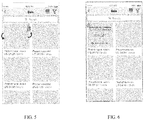
- FIGS. 4-6 illustrate, respectively, in scheme and/or design figures, a user touching a switch triggering area, a flipping-to-backside process of a displaying area, and a display area with information display after the flipping-to-backside process.
- basic information of a product is displayed on the upper left display area, e.g., product image; after the flipping, additional information of the product is displayed on the same display area, including a control element for executing a specific operation in relation to the product, e.g., a button to add the product to save list (save-item operation).
- the object information is presented to users upon requests, without additional webpage being loaded and without other presentation objects being affected.
- the application is not limited to the above described animation approach(es) in implementing the switching of information display.
- the information displayed on the display area may be directly updated without an animation process, which are also included in the technical solution of the application.
- the switch triggering area includes a shape of a product tag and is positioned about the upper right corner of the display area, mimicking physical product tag hanging.
- the switch triggering area may include different exterior shapes and be positioned at different locations, as long as it can prompt a user to perform an interfacing operation and can perform a display switching based on the user's interfacing operation. Any and all variants in specific implementations do not deviate from the application, and are included in the scope of the application.
- the application includes a new technical solution to present object information, which is different than the traditional Hover-based information display. That is, information displayed on the display area corresponding to a presentation object may be switched between basic information and additional information, based on a received interfacing operation upon a switch triggering area. Therefore, both basic information and additional information of an object could be displayed upon user's needs, without disturbance on the users' browsing paths, which improves user experience. Particularly, when applied to touch screen devices, the solution can overcome the inconvenience of missing the Hover function on touch screen devices.
- a method for presenting object information on a screen display device is provided.
- the application also provides a device for presenting object information on a screen display device.
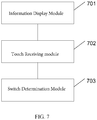
- FIG. 7 an embodiment of a device for presenting object information on a screen display device is illustrated.
- the device embodiment is similar to the method embodiment in operation, the relevant description is relatively simple, and reference to the method embodiment may be made to appreciate the device embodiment.
- the description herein of the device embodiment is for illustrative purposes only.
- a device for presenting object information on a screen display device may comprises: an information display module 701 configured to, for a presentation object, display one of basic information and additional information of the object on a corresponding display area of the screen display device; a touch receiving module 702 configured to receive an interfacing operation on the screen display device; and a switch determination module 703 configured to determine whether a screen display position associated with the interfacing operation is within a switch triggering area corresponding to the object, and in a case that the screen display position associated with the interfacing operation is within the switch triggering area, to switch to display other one of the basic information and the additional information of the object on the corresponding display area.
- the screen display device is a touch screen device.
- the switch determination module includes: a determination sub-module configured to determine whether the screen display position associated with the interfacing operation is within the switch triggering area corresponding to the object; and a switch implementation sub-module configured to, in the case that the screen display position associated with the interfacing operation is within the switch triggering area, switch to display the other one of the basic information and the additional information of the object on the corresponding display area; wherein the switch implementation sub-module includes: an animation flipping sub-module configured to display in an animation form a flipping-to-backside process on the corresponding display area; and a switch information displaying sub-module configured to display the other one of the basic information and the additional information of the object on the corresponding display area after the flipping-to-backside process.
- the animation flipping sub-module is configured to display in the animation form one of two flipping-to-backside processes including: flipping about a vertical center line of the corresponding display area to a backside display; and flipping about a horizontal center line of the corresponding display area to the backside display.
- the switch triggering area referred to in the determination by the switch determination module includes an area of a control element with a shape of a product tag about a border of the corresponding display area of the object.
- the animation flip sub-module is configured to display in an animation form a flipping-to-backside process on the corresponding display area, and display the control element at an opposite position on the corresponding display area against a position of the control element before the flipping-to-backside process.
- the information display module displays (is configured to display) the basic information of the object in an initial display of the object on the corresponding display area.
- the basic information and the additional information includes at least one of elements of a letter, a graphic item, an image, a table, an animation, a sound, and a control for executing a particular operation related to the object.
- the basic information includes at least one of a picture of the product, a name of the product and a price of the product
- the additional information includes at least one of a user review of the product, a sale amount of the product, a button for executing a save-item operation and a button for executing a put-into-shopping cart operation.
- the computation device includes one or more Central Processing Units (CPUs), an I/O interface, a network interface, and a memory.
- CPUs Central Processing Units
- I/O interface I/O interface
- network interface I/O interface
- memory a memory
- the memory may include computer readable media such as a volatile memory, a Random Access Memory (RAM), and/or non-volatile memory, e.g., Read-Only Memory (ROM) or flash RAM, and so on.
- RAM Random Access Memory
- ROM Read-Only Memory
- flash RAM flash RAM
- Computer readable media include non-volatile, volatile, mobile and non-mobile media, and can implement information storage through any method or technology.
- the information may be computer readable instructions, data structures, program modules or other data.
- Examples of storage media of a computer include, but not limited to, Phase-change RAMs (PRAMs), Static RAMs (SRAMs), Dynamic RAMs (DRAMs), other types of RAMs, ROMs, Electrically Erasable Programmable Read-Only Memories (EEPROMs), flash memories or other memory technologies, Compact Disk Read-Only Memories (CD-ROMs), Digital Versatile Discs (DVDs) or other optical memories, cassettes, cassette and disk memories or other magnetic memory devices or any other non-transmission media, and can be used for storing information accessible to the computation device.
- the computer readable media exclude transitory media, such as modulated data signals and carriers.
- the examples of the present disclosure may be provided as a method, a system, or a computer program product. Therefore, the present disclosure may be implemented as a completely hardware example, a completely software example, or an example combining software and hardware. Moreover, the present disclosure may employ the form of a computer program product implemented on one or more computer usable storage media (including, but not limited to, a magnetic disk memory, a CD-ROM, an optical memory, and the like) including computer usable program codes.
- a computer usable storage media including, but not limited to, a magnetic disk memory, a CD-ROM, an optical memory, and the like
Landscapes
- Engineering & Computer Science (AREA)
- Theoretical Computer Science (AREA)
- General Engineering & Computer Science (AREA)
- Physics & Mathematics (AREA)
- General Physics & Mathematics (AREA)
- Human Computer Interaction (AREA)
- Business, Economics & Management (AREA)
- Finance (AREA)
- Accounting & Taxation (AREA)
- Development Economics (AREA)
- Economics (AREA)
- Marketing (AREA)
- Strategic Management (AREA)
- General Business, Economics & Management (AREA)
- User Interface Of Digital Computer (AREA)
- Controls And Circuits For Display Device (AREA)
Abstract
Description
- The application relates to the field of information display, in particular, to a method for displaying object information on a screen display device. The application also provides a device for displaying object information on a screen display device.
- Hover refers to a mouse "hovering" state, by means of which, more additional information (or referred to as complimentary or auxiliary information) can be displayed with respect to the area where the mouse pointer is hovered above. Presently, the "Hover" function is widely used by a website in exhibiting product information. For example, when a user moves and stops (i.e., "hovers") a mouse pointer to a display area of a specific product, additional information of the product will be shown such that the user does not need to click to open a landing page to review such information. Therefore, the additional information is provided without disturbance on the user's browsing path(s).
- Hover based information display technology can only be applied to a device (such as a desktop personal computer) that includes a mouse to perform interactive interfacing. For touch screen devices that do not include mouse or similar interfacing device, with which users interface through direct finger touches on the screen, there is no such "Hover" action and the related information display techniques.
- Although the additional information that is supposed to be displayed under the Hover state may not be as important as the basic information directly displayed on the screen, as a necessary supplement to the basic information, such additional information still may be required/preferred by users. Therefore, it is undesirable if such additional information is not displayed at all, which initially could be displayed under the Hover state with a mouse based device. Under existing solutions, such additional information, which could be displayed under Hover states, is usually presented with touch screen devices using one of the following approaches:
- (1) directly displaying the additional information;
- (2) display the additional information in a separate landing page through an added link. For example, a link could be added, leading to webpage of product seller's contact information. When a user clicks on the link, the user will be directed from the current webpage to a landing page showing detailed information including contact information of the seller.
- In practical applications, the above two methods both have respective disadvantages:
- With regard to the direct display approach (1) above, the screen display will contain too much information with an unconcise interface, which could be burdensome to the browsing users. Further, with limited display space, displaying too much information may naturally lower the exposure rate of the products, which also wastes the display resources.
- With regard to the link to landing page approach (2) above, although the original webpage that displays the basic product information could be maintained the same as that using Hover function, users have to click on links to view the additional information of relevant products, which disturbs the original browsing path of the users, increases user cost of browsing, and may cause lose in user resources by directing them to other webpages.
- The application provides a method for displaying object information on a screen display device, which includes a new solution to present information through a screen display device other than the traditional Hover-based information display. The application further provides a device for displaying object information on a screen display device.
- The application provides a method for presenting object information on a screen display device, comprising: for a presentation object, displaying one of basic information and additional information of the object on a corresponding display area of the screen display device; receiving an interfacing operation on the screen display device; determining whether a screen display position associated with the interfacing operation is within a switch triggering area corresponding to the object; and in a case that the screen display position associated with the interfacing operation is within the switch triggering area, switching to display other one of the basic information and the additional information of the object on the corresponding display area.
- Optionally, the screen display device is a touch screen device.
- Optionally, the switching to display the other one of the basic information and the additional information of the object in the corresponding display area includes: displaying in an animation form a flipping-to-backside process on the corresponding display area; and displaying the other one of the basic information and the additional information of the object on the corresponding display area after the flipping-to-backside process.
- Optionally, the displaying the flipping-to-backside process on the corresponding display area includes: flipping about a vertical center line of the corresponding display area to a backside display; and flipping about a horizontal center line of the corresponding display area to the backside display.
- Optionally, the switch triggering area includes an area of a control element with a shape of a product tag about a border of the corresponding display area of the object.
- Optionally, after the flipping-to-backside process, the control element is displayed at an opposite position in the corresponding display area against a position of the control element before the flipping-to-backside process
- Optionally, in an initial display of the object on the corresponding display area, the basic information of the object is displayed.
- Optionally, the basic information and the additional information includes at least one of elements of a letter, a graphic item, an image, a table, an animation, a sound, and a control for executing a particular operation related to the object.
- Optionally, in a case that the object is a product, the basic information includes at least one of a picture of the product, a name of the product and a price of the product, and the additional information includes at least one of a user review of the product, a sale amount of the product, a button for executing a save-item operation and a button for executing a put-into-shopping cart operation.
- Correspondingly, the application further provides a device for presenting object information on a screen display device, comprising: an information display module configured to, for a presentation object, display one of basic information and additional information of the object on a corresponding display area of the screen display device; a touch receiving module configured to receive an interfacing operation on the screen display device; and a switch determination module configured to determine whether a screen display position associated with the interfacing operation is within a switch triggering area corresponding to the object, and in a case that the screen display position associated with the interfacing operation is within the switch triggering area, to switch to display other one of the basic information and the additional information of the object on the corresponding display area.
- Optionally, the screen display device is a touch screen device.
- Optionally, the switch determination module includes: a determination sub-module configured to determine whether the screen display position associated with the interfacing operation is within the switch triggering area corresponding to the object; and a switch implementation sub-module configured to, in the case that the screen display position associated with the interfacing operation is within the switch triggering area, switch to display the other one of the basic information and the additional information of the object on the corresponding display area; wherein the switch implementation sub-module includes: an animation flipping sub-module configured to display in an animation form a flipping-to-backside process on the corresponding display area; and a switch information displaying sub-module configured to display the other one of the basic information and the additional information of the object on the corresponding display area after the flipping-to-backside process.
- Optionally, the animation flipping sub-module is configured to display in the animation form one of two flipping-to-backside processes including: flipping about a vertical center line of the corresponding display area to a backside display; and flipping about a horizontal center line of the corresponding display area to the backside display.
- Optionally, the switch triggering area referred to in the determination by the switch determination module includes an area of a control element with a shape of a product tag about a border of the corresponding display area of the object.
- Optionally, in a case the switch determination module includes an animation flip sub-module, the animation flip sub-module is configured to display in an animation form a flipping-to-backside process on the corresponding display area, and display the control element at an opposite position on the corresponding display area against a position of the control element before the flipping-to-backside process.
- Optionally, the information display module displays (is configured to display) the basic information of the object in an initial display of the object on the corresponding display area.
- Optionally, the basic information and the additional information includes at least one of elements of a letter, a graphic item, an image, a table, an animation, a sound, and a control for executing a particular operation related to the object.
- Optionally, in a case that the object is a product, the basic information includes at least one of a picture of the product, a name of the product and a price of the product, and the additional information includes at least one of a user review of the product, a sale amount of the product, a button for executing a save-item operation and a button for executing a put-into-shopping cart operation.
- Comparing to existing solutions, the present application includes the following advantages. The method for displaying object information on a screen display device mimics the habitual practice of flipping cards or product tags to view the backside information. Basic information or additional information of an object is displayed on a corresponding display area of a screen display device. Based on a received interfacing operation on a switch triggering area, the information display on the corresponding display area will be switched between the basic information and the additional information of the object. The application includes a new solution to present object information, which is different than the traditional Hover-based information display. Using the new solution, both basic information and additional information of an object could be displayed without disturbance on the users' browsing paths, and thus user experience is improved. Particularly, when applied to touch screen devices, the solution can overcome the inconvenience of missing Hover function in touch screen devices.
-
-
FIG. 1 illustrates a flowchart of an embodiment of a method for presenting object information on a screen display device according to the application. -
FIG. 2 illustrates a flowchart of switching information display based on an interfacing operation according to an embodiment of the application. -
FIG. 3 illustrates an interface design including a switch triggering area with a shape of a product tag according to an embodiment of the present application. -
FIG. 4 illustrates a touch on a switch triggering area according to an embodiment of the application. -
FIG. 5 illustrates a flipping process of a display area based on an interfacing operation according to an embodiment of the application. -
FIG. 6 illustrates an interface design including a display area after a flipping process according to an embodiment of the application. -
FIG. 7 illustrates an embodiment of a device for presenting object information on a screen display device according to the application. - Some detailed implementation examples are provided herein to facilitate a fully understanding of the application. The application could be implemented with examples other than those described herein. People of ordinary skill in the art may derive similar implementations without deviating from the scope of the application. Hence, the scope of the application shall not be limited to the specific implementation examples described herein.
- The application provides a method and a device for presenting object information on a screen display device, which are described herein respectively.
- With reference to
FIG. 1 , a flowchart of an embodiment method for presenting object information on a screen display device is provided. The method includes the following steps: - Step 101: for a presentation object, display one of basic information and additional information of the object on a corresponding display area of the screen display device.
- The current method of presenting object information on a screen display device of the application provides a new solution to present object information other than the traditional Hover based techniques. Under the new solution, either basic information or additional information of an object is displayed on a display area of the screen display device; and based on a received interfacing operation on a switch triggering area, the information displayed on the corresponding display area is switched between the basic information and the additional information. Mimicking the habitual practice of flipping cards or product tags to view the backside information, the technical solution displays object information upon user requests, and will not disturb users' browsing paths, which ensures a satisfactory user experience.
- As users usually touch screen devices through fingers (or styluses) to effectuate human machine interfacing, there is no mouse Hover function for information presentation with touch screen devices. Using the current method of the application on a touch screen device can overcome the above identified shortcoming and enable user to obtain similar browsing experience as with a mouse based device.
- Hence, it is apparent that the present technical solution especially fits for applications with touch screen devices. However, the usage of the technical solution is not limited to touch screen devices. The technical solution could be used with other screen display devices. For example, a desktop PC with a mouse for human machine interfacing may also adopt the present technical solution for presenting object information.
- In the application, a presentation object is a relatively broad concept and includes any and all objects, information of which can be presented on a screen display device. For example, a presentation object may be a product listed/recommended by an on-line shopping website.
- The object information may include two categories: basic information and additional information. Regarding forms of information presentation, the basic information and the additional information is not limited to word information, but rather may include any one or more of the following elements: a letter, a graphic item, an image, a table, an animation, a sound, and a control including prompting information to prompt a user to perform an operation related to the object (i.e., a user may be prompted to touch the control button and a particular operation related to the object will be executed).
- Regarding information contents, the basic information may usually include the overall description of a presentation object or the information concerned by a user viewing the presentation object, e.g., a product image. Additional information may provide further description on some details of the object, on top of the basic information. Additional information may also be referred to as ancillary information or secondary information. For example, for a product recommended by an on-line shopping website, the basic information may include the product image, the product name and/or the price, and so on. And the additional information may include user reviews of the product, order amounts of the product, seller information, a control button for executing a save-item operation and/or a control button for executing a put-into-shopping cart operation.
- This step displays one of the basic information and the additional information of a presentation object on a corresponding display area of the screen display device. In example implementation(s), to simultaneously present information of multiple objects on a screen display device, the display interface may be segmented into multiple display areas, each corresponding to one presentation object for displaying basic information/additional information thereof.
- In an example practical implementation, usually the basic information of an object may be initially displayed on the corresponding display area. However, depending on the specific scenarios, either one of the basic information and the additional information may be displayed on the corresponding display area. For example, the initial display may be set up based on a state of the most recent viewing of the object by a user.
- Step 102: receive an interfacing operation on the screen display device.
- In the application, an interfacing operation refers to an interaction between a user and a screen display device, including a user's touch or other gesture operation (e.g., a gesture click) upon a touch screen through fingers and/or stylus and a click event on a display interface of a screen display device through a mouse, and so on. In implementation, such interfacing operations usually correspond to particular events defined in the operating systems and/or platforms implementing the method. The triggering of the particular events within the systems/platforms indicates that the interfacing operation on the screen display device is received.
- For example, a click operation on a screen display device through a mouse usually triggers a mouse click event, e.g., a Click event or a MouseClick event, of a system implementing the present method. Using an algorithm corresponding to the event, e.g., the onclick() algorithm, the parameters may be analyzed to obtain the position of the mouse click operation and other associated information.
- Similarly, a touch operation on a touch screen usually triggers a corresponding event. For example, in an Android system, a touch operation usually triggers an OnTouch event. In the corresponding processing algorithms OnTouch() or OnTouchEvent(), the getAction() function may obtain a type of the touch event, e.g., press down, move, or release, etc. Functions getRawX() and getRawY() may work together to obtain the coordinate pair information corresponding to the touch operation on the touch screen, i.e., the position of the touch operation. In WP7 system, a TouchFrameReported event may be registered to detect a touch event on a touch screen, and the TouchFrameEventArgs parameters in the corresponding processing algorithm may be used to obtain the position information of the touch operation.
- Step 103: determine whether a screen display position associated with the interfacing operation is within a switch triggering area corresponding to the presentation object. If the screen display position associated with the interfacing operation is within the switch triggering area, information display is switched to the other one of the basic information and the additional information of the object on the corresponding display area.
- Upon the received interfacing operation is within the switch triggering area of the presentation object, the step switches the information displayed on the display area corresponding to the object. That is, if the basic information is previously displayed, the switching will turn to display the additional information; if the additional information is previously displayed, the switching will turn to display the basic information. This process may include step 103-1 and step 103-2, which will be described herein with reference to
FIG. 2 . - Step 103-1: determine whether a screen display position associated with the interfacing operation is within a switch triggering area corresponding to the object. If yes, proceed to execute step 103-2.
- The switch triggering area refers to a preset area on the current display interface, where an interfacing operation triggers switching information display for the corresponding object. For each presentation object that requires switching information display between basic information and additional information, a corresponding switch triggering area may be set up on the current displace interface. Such switch triggering area may be positioned within the display area of the object, or may be positioned outside the display area of the object. For example, a switch triggering area may be an area of a control button prompting "See Backside ..." positioned at the lower right corner of the display area.
- In an implementation example, to make the display interface more user friendly, and better fit users' habits, the switch triggering area may be designed as a control element with a shape of a product tag and positioned about the border of the corresponding display area of the object. Please refer to
FIG. 3 , which illustrates an interface design including a switch triggering area with a shape of a product tag according to an embodiment. - This step determines whether the received interfacing operation is within the switch triggering area corresponding to the presentation object. Based on a result of this determination, it is determined whether step 103-2 is to be executed to switch information display of the object information. In an example implementation, a position of the interfacing operation obtained through step 102 (e.g., a coordinate pair relative to the upper left corner of the display screen) may be compared with the position information of the switch triggering area(s) on the current interface to determine whether the interfacing operation falls within the switch triggering area of a presentation object.
- If a switch triggering area includes control element(s) for event responding and/or processing functions, an interfacing operation on the switch triggering area may trigger the event processing algorithm associated to the control element, e.g., a touch on a control button element may trigger an onClick() algorithm associated to the control button element. In this scenario, the above described determination may not need to be performed separately. Instead, the system/platform implementing the method may automatically effectuate a correspondence between the interfacing operation and the control element. Therefore, the function of the subsequently described step 103-2 may be simply added into the processing algorithm associated to the control element.
- Step 103-2: switch to display the other one of the basic information and the additional information of the presentation object on the corresponding display area.
- When the method proceeds to this step, it means that an interfacing operation on a switch triggering area has been received. In this step, the object information displayed on the display area corresponding to the switch triggering area is switched - if the basic information of the presentation object is displayed previously, now the additional information of the presentation object is displayed on the corresponding display area; if the additional information of the presentation object is displayed previously, now the basic information of the presentation object is displayed on the corresponding display area.
- To make the user interface more user friendly, the technical solution of the application provides a preferred implementation approach: displaying the switching process in an animation form. Specifically, it is displayed in an animation form a flipping-to-backside process, and after the flipping-to-backside process, the other one of the basic information and the additional information of the object (i.e., other than the one previously displayed) will be displayed on the corresponding display area. Adopting this implementation approach, it is extended to the screen display devices the habitual user practice of flipping to read the backside information of a card or product tag. Such an interaction process mimics users' real world activity and may effectively improve user experience.
- The flipping-to-backside process on the corresponding display area may include a left to right flipping, i.e., flipping about a vertical center line of the corresponding display area to a backside display, or may include an up to down flipping, i.e., flipping about a horizontal center line of the corresponding display area to the backside display.
- In a specific implementation, the animated flipping process of the display area may include images of the display area taken at multiple flipping angles. The animated effect may be achieved by displaying in time sequence the multiple images. Depending on the specific systems or development platforms, the animated flipping process may be effectuated through different approaches.
- For example, in IOS systems, the UIKit directly integrates animation into the UIView category so that the animated flipping process may be realized through UIView. Specifically, the CGAffineTransformMakeRotation() algorithm may be used to set up the rotation amount (i.e., angle(s) of rotation). The following are illustrative code segments:
             CGAffineTransform transform = CGAffineTransformldentity; // state
       amount of rotation
             transform = CGAffineTransformMakeRotation(-M_PI/2); // set
       specific value for the rotation amount
             secondView.view.transform=transform; // introduce amount of rotation
       UlView * rotateView=[[UIView alloc] initWithFrame:CGRectMake(20,20, 100, 100)];
              [rotateView setBackgroundColor:[UIColor redColor]];
              [self.view addSubview:rotateView];
              [UIView beginAnimation:nil contex:nil];
              [UIView setAnimationCurve:UIViewAnimationCurveEaselnOut];
              [UIView setAnimationDuration:3.0];
              [UIView setAnimationTransition:UIViewAnimationTransitionFlipFromLeft
        forView:rotateView cache:Yes];
              [UlView commitAnimations];
Claims (18)
- A method for presenting object information on a screen display device, characterized by comprising:for a presentation object, displaying one of basic information and additional information of the object on a corresponding display area of the screen display device;receiving an interfacing operation on the screen display device;determining whether a screen display position associated with the interfacing operation is within a switch triggering area corresponding to the object; andin a case that the screen display position associated with the interfacing operation is within the switch triggering area, switching to display other one of the basic information and the additional information of the object on the corresponding display area.
- The method of claim 1, characterized in that the screen display device includes a touch screen device.
- The method of claim 1, characterized in that the switching to display the other one of the basic information and the additional information of the object in the corresponding display area includes:displaying in an animation form a flipping-to-backside process on the corresponding display area; anddisplaying the other one of the basic information and the additional information of the object on the corresponding display area after the flipping-to-backside process.
- The method of claim 3, characterized in that the displaying the flipping-to-backside process on the corresponding display area includes:flipping about a vertical center line of the corresponding display area to a backside display; andflipping about a horizontal center line of the corresponding display area to the backside display.
- The method of any one of claims 1-4, characterized in that the switch triggering area includes an area of a control element with a shape of a product tag about a border of the corresponding display area of the object.
- The method of claim 5, characterized in that after the flipping-to-backside process, the control element is displayed at an opposite position on the corresponding display area against a position of the control element before the flipping-to-backside process.
- The method of any of claims 1-4, characterized in that in an initial display of the object on the corresponding display area, the basic information of the object is displayed.
- The method of any of claims 1-4, characterized in that the basic information and the additional information includes at least one of elements of a letter, a graphic item, an image, a table, an animation, a sound, and a control for executing a particular operation related to the object.
- The method of claim 8, characterized in that in a case that the object is a product, the basic information includes at least one of a picture of the product, a name of the product and a price of the product, and the additional information includes at least one of a user review of the product, a sale amount of the product, a button for executing a save-item operation and a button for executing a put-into-shopping cart operation.
- A device for presenting object information on a screen display device, characterized by comprising:an information display module configured to, for a presentation object, display one of basic information and additional information of the object on a corresponding display area of the screen display device;a touch receiving module configured to receive an interfacing operation on the screen display device; anda switch determination module configured to determine whether a screen display position associated with the interfacing operation is within a switch triggering area corresponding to the object, and in a case that the screen display position associated with the interfacing operation is within the switch triggering area, to switch to display other one of the basic information and the additional information of the object on the corresponding display area.
- The device of claim 10, characterized in that the screen display device includes a touch screen device.
- The device of claim 10, characterized in that the switch determination module includes:a determination sub-module configured to determine whether the screen display position associated with the interfacing operation is within the switch triggering area corresponding to the object; anda switch implementation sub-module configured to, in the case that the screen display position associated with the interfacing operation is within the switch triggering area, switch to display the other one of the basic information and the additional information of the object on the corresponding display area;wherein the switch implementation sub-module includes:an animation flipping sub-module configured to display in an animation form a flipping-to-backside process on the corresponding display area; anda switch information displaying sub-module configured to display the other one of the basic information and the additional information of the object on the corresponding display area after the flipping-to-backside process.
- The device of claim 12, characterized in that the animation flipping sub-module is configured to display in the animation form one of two flipping-to-backside processes including:flipping about a vertical center line of the corresponding display area to a backside display; andflipping about a horizontal center line of the corresponding display area to the backside display.
- The device of any one of claims 10-13, characterized in that the switch triggering area referred to in the determination by the switch determination module includes an area of a control element with a shape of a product tag about a border of the corresponding display area of the object.
- The device of claim 14, characterized in that in a case the switch determination module includes an animation flip sub-module, the animation flip sub-module is configured to display in an animation form a flipping-to-backside process on the corresponding display area, and display the control element at an opposite position on the corresponding display area against a position of the control element before the flipping-to-backside process.
- The device of any of claims 10-13, characterized in that the information display module displays the basic information of the object in an initial display of the object on the corresponding display area.
- The device of any of claims 10-13, characterized in that the basic information and the additional information includes at least one of elements of a letter, a graphic item, an image, a table, an animation, a sound, and a control for executing a particular operation related to the object.
- The device of claim 17, characterized in that in a case that the object is a product, the basic information includes at least one of a picture of the product, a name of the product and a price of the product, and the additional information includes at least one of a user review of the product, a sale amount of the product, a button for executing a save-item operation and a button for executing a put-into-shopping cart operation.
Applications Claiming Priority (2)
| Application Number | Priority Date | Filing Date | Title |
|---|---|---|---|
| CN201410602568.0A CN105630366A (en) | 2014-10-31 | 2014-10-31 | Method and apparatus for displaying object information in screen display device |
| PCT/CN2015/092515 WO2016066047A1 (en) | 2014-10-31 | 2015-10-22 | Method and device for displaying object information on screen display apparatus |
Publications (2)
| Publication Number | Publication Date |
|---|---|
| EP3214534A1 true EP3214534A1 (en) | 2017-09-06 |
| EP3214534A4 EP3214534A4 (en) | 2018-04-11 |
Family
ID=55856598
Family Applications (1)
| Application Number | Title | Priority Date | Filing Date |
|---|---|---|---|
| EP15854714.1A Withdrawn EP3214534A4 (en) | 2014-10-31 | 2015-10-22 | Method and device for displaying object information on screen display apparatus |
Country Status (5)
| Country | Link |
|---|---|
| US (1) | US20170228142A1 (en) |
| EP (1) | EP3214534A4 (en) |
| JP (1) | JP2017538202A (en) |
| CN (1) | CN105630366A (en) |
| WO (1) | WO2016066047A1 (en) |
Families Citing this family (6)
| Publication number | Priority date | Publication date | Assignee | Title |
|---|---|---|---|---|
| US20160334969A1 (en) * | 2015-05-11 | 2016-11-17 | Facebook, Inc. | Methods and Systems for Viewing an Associated Location of an Image |
| CN106909365A (en) * | 2016-08-30 | 2017-06-30 | 阿里巴巴集团控股有限公司 | The methods of exhibiting and device of information |
| CN107633443A (en) * | 2017-08-29 | 2018-01-26 | 昆山市那美信息科技有限公司 | A kind of evaluation labeling system of intelligent panoramic displaying |
| CN111429227A (en) * | 2020-03-30 | 2020-07-17 | 上海宝尊电子商务有限公司 | Interactive method and system for improving online shopping experience of consumers for SPU attribute set display on shopping mall list page |
| CN111797603B (en) | 2020-07-02 | 2022-02-01 | 北京字节跳动网络技术有限公司 | Method and device for browsing table in document, electronic equipment and storage medium |
| CN113467681A (en) * | 2021-06-30 | 2021-10-01 | 深圳集智数字科技有限公司 | Picture turning and displaying method and device, electronic equipment and readable medium |
Family Cites Families (15)
| Publication number | Priority date | Publication date | Assignee | Title |
|---|---|---|---|---|
| US8564543B2 (en) * | 2006-09-11 | 2013-10-22 | Apple Inc. | Media player with imaged based browsing |
| US8736557B2 (en) * | 2006-09-11 | 2014-05-27 | Apple Inc. | Electronic device with image based browsers |
| JP5219929B2 (en) * | 2008-07-31 | 2013-06-26 | ソニー株式会社 | Information processing apparatus and method, and program |
| KR101446644B1 (en) * | 2009-10-30 | 2014-10-01 | 삼성전자 주식회사 | Image forming apparatus and menu selectㆍdisplay method thereof |
| US20110154260A1 (en) * | 2009-12-17 | 2011-06-23 | Motorola Inc | Method and apparatus for displaying information in an electronic device |
| US10739932B2 (en) * | 2011-10-11 | 2020-08-11 | Semi-Linear, Inc. | Systems and methods for interactive mobile electronic content creation and publication |
| KR101916742B1 (en) * | 2011-11-10 | 2018-11-09 | 삼성전자 주식회사 | Method and apparatus for providing user interface in portable device |
| JP5813486B2 (en) * | 2011-12-05 | 2015-11-17 | シャープ株式会社 | Information display method, information display device, information display program, and computer-readable recording medium |
| JP2013125328A (en) * | 2011-12-13 | 2013-06-24 | Stella Green Corp | Augmented reality display method |
| CN102929934A (en) * | 2012-09-25 | 2013-02-13 | 东莞宇龙通信科技有限公司 | Method for displaying photo information and mobile terminal |
| US20140195890A1 (en) * | 2013-01-09 | 2014-07-10 | Amazon Technologies, Inc. | Browser interface for accessing supplemental content associated with content pages |
| KR20140105689A (en) * | 2013-02-23 | 2014-09-02 | 삼성전자주식회사 | Method for providing a feedback in response to user input and terminal implementing the same |
| WO2014150429A1 (en) * | 2013-03-15 | 2014-09-25 | David Temkin | Systems and methods for aggregating information and providing access to multiple web services through an interactive user interface |
| CN103257795A (en) * | 2013-04-28 | 2013-08-21 | 百度在线网络技术(北京)有限公司 | Method and device for showing contact person list |
| CN103886044A (en) * | 2014-03-11 | 2014-06-25 | 百度在线网络技术(北京)有限公司 | Method and device for providing search results |
-
2014
- 2014-10-31 CN CN201410602568.0A patent/CN105630366A/en active Pending
-
2015
- 2015-10-22 WO PCT/CN2015/092515 patent/WO2016066047A1/en not_active Ceased
- 2015-10-22 JP JP2017523221A patent/JP2017538202A/en active Pending
- 2015-10-22 EP EP15854714.1A patent/EP3214534A4/en not_active Withdrawn
-
2017
- 2017-04-26 US US15/498,284 patent/US20170228142A1/en not_active Abandoned
Also Published As
| Publication number | Publication date |
|---|---|
| CN105630366A (en) | 2016-06-01 |
| WO2016066047A1 (en) | 2016-05-06 |
| US20170228142A1 (en) | 2017-08-10 |
| JP2017538202A (en) | 2017-12-21 |
| EP3214534A4 (en) | 2018-04-11 |
Similar Documents
| Publication | Publication Date | Title |
|---|---|---|
| US20170228142A1 (en) | Method and device for displaying object information on a screen display device | |
| CN107577495B (en) | Interface display method and device and terminal | |
| US20140118268A1 (en) | Touch screen operation using additional inputs | |
| US20120297341A1 (en) | Modified Operating Systems Allowing Mobile Devices To Accommodate IO Devices More Convenient Than Their Own Inherent IO Devices And Methods For Generating Such Systems | |
| CN109144370B (en) | Screen capturing method, device, terminal and computer readable medium | |
| HK1206834A1 (en) | Method for controlling page element and device thereof | |
| CN102339282A (en) | Method and device for controlling web widget display | |
| US11086442B2 (en) | Method for responding to touch operation, mobile terminal, and storage medium | |
| CN111767002B (en) | Page display method, device, equipment and storage medium | |
| US10346284B1 (en) | Feature usage prediction using shell application feature telemetry | |
| US20140123036A1 (en) | Touch screen display process | |
| WO2016100280A1 (en) | Method and apparatus for displaying information | |
| CN109240495B (en) | Method and equipment for controlling automatic page turning | |
| WO2015017464A1 (en) | Form processing | |
| CN107608609A (en) | A kind of event object sending method and device | |
| CN108255546A (en) | A kind of implementation method and device of data loading animation | |
| CN111553172A (en) | Translation document display method, device, system and storage medium | |
| WO2021068405A1 (en) | Element transfer method, apparatus and device, and storage medium | |
| US11194425B2 (en) | Method for responding to touch operation, mobile terminal, and storage medium | |
| WO2017120069A1 (en) | Universal inking support | |
| CN111368234B (en) | Window adjustment method, equipment and storage medium | |
| CN110908552B (en) | Multi-window operation control method, device, equipment and storage medium | |
| CN105701124A (en) | Method and apparatus for providing prompt information | |
| CN109960562B (en) | Information display method and device and computer readable storage medium | |
| CN105204724B (en) | A kind of method for information display and device |
Legal Events
| Date | Code | Title | Description |
|---|---|---|---|
| STAA | Information on the status of an ep patent application or granted ep patent |
Free format text: STATUS: THE INTERNATIONAL PUBLICATION HAS BEEN MADE |
|
| PUAI | Public reference made under article 153(3) epc to a published international application that has entered the european phase |
Free format text: ORIGINAL CODE: 0009012 |
|
| STAA | Information on the status of an ep patent application or granted ep patent |
Free format text: STATUS: REQUEST FOR EXAMINATION WAS MADE |
|
| 17P | Request for examination filed |
Effective date: 20170428 |
|
| AK | Designated contracting states |
Kind code of ref document: A1 Designated state(s): AL AT BE BG CH CY CZ DE DK EE ES FI FR GB GR HR HU IE IS IT LI LT LU LV MC MK MT NL NO PL PT RO RS SE SI SK SM TR |
|
| AX | Request for extension of the european patent |
Extension state: BA ME |
|
| DAV | Request for validation of the european patent (deleted) | ||
| DAX | Request for extension of the european patent (deleted) | ||
| A4 | Supplementary search report drawn up and despatched |
Effective date: 20180314 |
|
| RIC1 | Information provided on ipc code assigned before grant |
Ipc: G06F 3/0482 20130101ALI20180308BHEP Ipc: G06F 3/0488 20130101AFI20180308BHEP Ipc: G06F 3/0483 20130101ALI20180308BHEP |
|
| STAA | Information on the status of an ep patent application or granted ep patent |
Free format text: STATUS: EXAMINATION IS IN PROGRESS |
|
| 17Q | First examination report despatched |
Effective date: 20200107 |
|
| STAA | Information on the status of an ep patent application or granted ep patent |
Free format text: STATUS: THE APPLICATION HAS BEEN WITHDRAWN |
|
| 18W | Application withdrawn |
Effective date: 20200213 |