EP3189402B1 - Keyboard for use with a computing device - Google Patents
Keyboard for use with a computing device Download PDFInfo
- Publication number
- EP3189402B1 EP3189402B1 EP15837306.8A EP15837306A EP3189402B1 EP 3189402 B1 EP3189402 B1 EP 3189402B1 EP 15837306 A EP15837306 A EP 15837306A EP 3189402 B1 EP3189402 B1 EP 3189402B1
- Authority
- EP
- European Patent Office
- Prior art keywords
- keys
- key
- keyboard
- computing device
- virtual
- Prior art date
- Legal status (The legal status is an assumption and is not a legal conclusion. Google has not performed a legal analysis and makes no representation as to the accuracy of the status listed.)
- Active
Links
Images


Classifications
-
- G—PHYSICS
- G06—COMPUTING OR CALCULATING; COUNTING
- G06F—ELECTRIC DIGITAL DATA PROCESSING
- G06F3/00—Input arrangements for transferring data to be processed into a form capable of being handled by the computer; Output arrangements for transferring data from processing unit to output unit, e.g. interface arrangements
- G06F3/01—Input arrangements or combined input and output arrangements for interaction between user and computer
- G06F3/02—Input arrangements using manually operated switches, e.g. using keyboards or dials
- G06F3/0227—Cooperation and interconnection of the input arrangement with other functional units of a computer
-
- G—PHYSICS
- G06—COMPUTING OR CALCULATING; COUNTING
- G06F—ELECTRIC DIGITAL DATA PROCESSING
- G06F3/00—Input arrangements for transferring data to be processed into a form capable of being handled by the computer; Output arrangements for transferring data from processing unit to output unit, e.g. interface arrangements
- G06F3/01—Input arrangements or combined input and output arrangements for interaction between user and computer
- G06F3/048—Interaction techniques based on graphical user interfaces [GUI]
- G06F3/0487—Interaction techniques based on graphical user interfaces [GUI] using specific features provided by the input device, e.g. functions controlled by the rotation of a mouse with dual sensing arrangements, or of the nature of the input device, e.g. tap gestures based on pressure sensed by a digitiser
- G06F3/0488—Interaction techniques based on graphical user interfaces [GUI] using specific features provided by the input device, e.g. functions controlled by the rotation of a mouse with dual sensing arrangements, or of the nature of the input device, e.g. tap gestures based on pressure sensed by a digitiser using a touch-screen or digitiser, e.g. input of commands through traced gestures
- G06F3/04886—Interaction techniques based on graphical user interfaces [GUI] using specific features provided by the input device, e.g. functions controlled by the rotation of a mouse with dual sensing arrangements, or of the nature of the input device, e.g. tap gestures based on pressure sensed by a digitiser using a touch-screen or digitiser, e.g. input of commands through traced gestures by partitioning the display area of the touch-screen or the surface of the digitising tablet into independently controllable areas, e.g. virtual keyboards or menus
-
- G—PHYSICS
- G06—COMPUTING OR CALCULATING; COUNTING
- G06F—ELECTRIC DIGITAL DATA PROCESSING
- G06F1/00—Details not covered by groups G06F3/00 - G06F13/00 and G06F21/00
- G06F1/16—Constructional details or arrangements
- G06F1/1613—Constructional details or arrangements for portable computers
- G06F1/1626—Constructional details or arrangements for portable computers with a single-body enclosure integrating a flat display, e.g. Personal Digital Assistants [PDAs]
-
- G—PHYSICS
- G06—COMPUTING OR CALCULATING; COUNTING
- G06F—ELECTRIC DIGITAL DATA PROCESSING
- G06F1/00—Details not covered by groups G06F3/00 - G06F13/00 and G06F21/00
- G06F1/16—Constructional details or arrangements
- G06F1/1613—Constructional details or arrangements for portable computers
- G06F1/1633—Constructional details or arrangements of portable computers not specific to the type of enclosures covered by groups G06F1/1615 - G06F1/1626
- G06F1/1662—Details related to the integrated keyboard
- G06F1/1669—Detachable keyboards
-
- G—PHYSICS
- G06—COMPUTING OR CALCULATING; COUNTING
- G06F—ELECTRIC DIGITAL DATA PROCESSING
- G06F3/00—Input arrangements for transferring data to be processed into a form capable of being handled by the computer; Output arrangements for transferring data from processing unit to output unit, e.g. interface arrangements
- G06F3/01—Input arrangements or combined input and output arrangements for interaction between user and computer
- G06F3/02—Input arrangements using manually operated switches, e.g. using keyboards or dials
-
- G—PHYSICS
- G06—COMPUTING OR CALCULATING; COUNTING
- G06F—ELECTRIC DIGITAL DATA PROCESSING
- G06F3/00—Input arrangements for transferring data to be processed into a form capable of being handled by the computer; Output arrangements for transferring data from processing unit to output unit, e.g. interface arrangements
- G06F3/01—Input arrangements or combined input and output arrangements for interaction between user and computer
- G06F3/02—Input arrangements using manually operated switches, e.g. using keyboards or dials
- G06F3/023—Arrangements for converting discrete items of information into a coded form, e.g. arrangements for interpreting keyboard generated codes as alphanumeric codes, operand codes or instruction codes
- G06F3/0231—Cordless keyboards
-
- G—PHYSICS
- G06—COMPUTING OR CALCULATING; COUNTING
- G06F—ELECTRIC DIGITAL DATA PROCESSING
- G06F3/00—Input arrangements for transferring data to be processed into a form capable of being handled by the computer; Output arrangements for transferring data from processing unit to output unit, e.g. interface arrangements
- G06F3/01—Input arrangements or combined input and output arrangements for interaction between user and computer
- G06F3/02—Input arrangements using manually operated switches, e.g. using keyboards or dials
- G06F3/023—Arrangements for converting discrete items of information into a coded form, e.g. arrangements for interpreting keyboard generated codes as alphanumeric codes, operand codes or instruction codes
- G06F3/0233—Character input methods
-
- G—PHYSICS
- G06—COMPUTING OR CALCULATING; COUNTING
- G06F—ELECTRIC DIGITAL DATA PROCESSING
- G06F3/00—Input arrangements for transferring data to be processed into a form capable of being handled by the computer; Output arrangements for transferring data from processing unit to output unit, e.g. interface arrangements
- G06F3/01—Input arrangements or combined input and output arrangements for interaction between user and computer
- G06F3/02—Input arrangements using manually operated switches, e.g. using keyboards or dials
- G06F3/023—Arrangements for converting discrete items of information into a coded form, e.g. arrangements for interpreting keyboard generated codes as alphanumeric codes, operand codes or instruction codes
- G06F3/0238—Programmable keyboards
-
- G—PHYSICS
- G06—COMPUTING OR CALCULATING; COUNTING
- G06F—ELECTRIC DIGITAL DATA PROCESSING
- G06F3/00—Input arrangements for transferring data to be processed into a form capable of being handled by the computer; Output arrangements for transferring data from processing unit to output unit, e.g. interface arrangements
- G06F3/01—Input arrangements or combined input and output arrangements for interaction between user and computer
- G06F3/048—Interaction techniques based on graphical user interfaces [GUI]
- G06F3/0487—Interaction techniques based on graphical user interfaces [GUI] using specific features provided by the input device, e.g. functions controlled by the rotation of a mouse with dual sensing arrangements, or of the nature of the input device, e.g. tap gestures based on pressure sensed by a digitiser
- G06F3/0489—Interaction techniques based on graphical user interfaces [GUI] using specific features provided by the input device, e.g. functions controlled by the rotation of a mouse with dual sensing arrangements, or of the nature of the input device, e.g. tap gestures based on pressure sensed by a digitiser using dedicated keyboard keys or combinations thereof
-
- H—ELECTRICITY
- H01—ELECTRIC ELEMENTS
- H01H—ELECTRIC SWITCHES; RELAYS; SELECTORS; EMERGENCY PROTECTIVE DEVICES
- H01H13/00—Switches having rectilinearly-movable operating part or parts adapted for pushing or pulling in one direction only, e.g. push-button switch
- H01H13/70—Switches having rectilinearly-movable operating part or parts adapted for pushing or pulling in one direction only, e.g. push-button switch having a plurality of operating members associated with different sets of contacts, e.g. keyboard
- H01H13/702—Switches having rectilinearly-movable operating part or parts adapted for pushing or pulling in one direction only, e.g. push-button switch having a plurality of operating members associated with different sets of contacts, e.g. keyboard with contacts carried by or formed from layers in a multilayer structure, e.g. membrane switches
- H01H13/705—Switches having rectilinearly-movable operating part or parts adapted for pushing or pulling in one direction only, e.g. push-button switch having a plurality of operating members associated with different sets of contacts, e.g. keyboard with contacts carried by or formed from layers in a multilayer structure, e.g. membrane switches characterised by construction, mounting or arrangement of operating parts, e.g. push-buttons or keys
- H01H13/7065—Switches having rectilinearly-movable operating part or parts adapted for pushing or pulling in one direction only, e.g. push-button switch having a plurality of operating members associated with different sets of contacts, e.g. keyboard with contacts carried by or formed from layers in a multilayer structure, e.g. membrane switches characterised by construction, mounting or arrangement of operating parts, e.g. push-buttons or keys characterised by the mechanism between keys and layered keyboards
-
- G—PHYSICS
- G06—COMPUTING OR CALCULATING; COUNTING
- G06F—ELECTRIC DIGITAL DATA PROCESSING
- G06F1/00—Details not covered by groups G06F3/00 - G06F13/00 and G06F21/00
- G06F1/16—Constructional details or arrangements
- G06F1/1613—Constructional details or arrangements for portable computers
- G06F1/1633—Constructional details or arrangements of portable computers not specific to the type of enclosures covered by groups G06F1/1615 - G06F1/1626
- G06F1/1662—Details related to the integrated keyboard
- G06F1/1673—Arrangements for projecting a virtual keyboard
-
- G—PHYSICS
- G06—COMPUTING OR CALCULATING; COUNTING
- G06F—ELECTRIC DIGITAL DATA PROCESSING
- G06F1/00—Details not covered by groups G06F3/00 - G06F13/00 and G06F21/00
- G06F1/16—Constructional details or arrangements
- G06F1/1613—Constructional details or arrangements for portable computers
- G06F1/1633—Constructional details or arrangements of portable computers not specific to the type of enclosures covered by groups G06F1/1615 - G06F1/1626
- G06F1/1684—Constructional details or arrangements related to integrated I/O peripherals not covered by groups G06F1/1635 - G06F1/1675
- G06F1/169—Constructional details or arrangements related to integrated I/O peripherals not covered by groups G06F1/1635 - G06F1/1675 the I/O peripheral being an integrated pointing device, e.g. trackball in the palm rest area, mini-joystick integrated between keyboard keys, touch pads or touch stripes
- G06F1/1692—Constructional details or arrangements related to integrated I/O peripherals not covered by groups G06F1/1635 - G06F1/1675 the I/O peripheral being an integrated pointing device, e.g. trackball in the palm rest area, mini-joystick integrated between keyboard keys, touch pads or touch stripes the I/O peripheral being a secondary touch screen used as control interface, e.g. virtual buttons or sliders
-
- H—ELECTRICITY
- H01—ELECTRIC ELEMENTS
- H01H—ELECTRIC SWITCHES; RELAYS; SELECTORS; EMERGENCY PROTECTIVE DEVICES
- H01H2205/00—Movable contacts
- H01H2205/002—Movable contacts fixed to operating part
-
- H—ELECTRICITY
- H04—ELECTRIC COMMUNICATION TECHNIQUE
- H04N—PICTORIAL COMMUNICATION, e.g. TELEVISION
- H04N21/00—Selective content distribution, e.g. interactive television or video on demand [VOD]
- H04N21/40—Client devices specifically adapted for the reception of or interaction with content, e.g. set-top-box [STB]; Operations thereof
- H04N21/41—Structure of client; Structure of client peripherals
- H04N21/422—Input-only peripherals, i.e. input devices connected to specially adapted client devices, e.g. global positioning system [GPS]
- H04N21/42204—User interfaces specially adapted for controlling a client device through a remote control device; Remote control devices therefor
- H04N21/42206—User interfaces specially adapted for controlling a client device through a remote control device; Remote control devices therefor characterized by hardware details
- H04N21/42212—Specific keyboard arrangements
- H04N21/42218—Specific keyboard arrangements for mapping a matrix of displayed objects on the screen to the numerical key-matrix of the remote control
-
- H—ELECTRICITY
- H04—ELECTRIC COMMUNICATION TECHNIQUE
- H04N—PICTORIAL COMMUNICATION, e.g. TELEVISION
- H04N21/00—Selective content distribution, e.g. interactive television or video on demand [VOD]
- H04N21/40—Client devices specifically adapted for the reception of or interaction with content, e.g. set-top-box [STB]; Operations thereof
- H04N21/41—Structure of client; Structure of client peripherals
- H04N21/422—Input-only peripherals, i.e. input devices connected to specially adapted client devices, e.g. global positioning system [GPS]
- H04N21/42204—User interfaces specially adapted for controlling a client device through a remote control device; Remote control devices therefor
- H04N21/42226—Reprogrammable remote control devices
- H04N21/42227—Reprogrammable remote control devices the keys being reprogrammable, e.g. soft keys
- H04N21/42228—Reprogrammable remote control devices the keys being reprogrammable, e.g. soft keys the reprogrammable keys being displayed on a display screen in order to reduce the number of keys on the remote control device itself
Definitions
- This description relates to a keyboard for use with a computing device.
- the description further relates to a computing device, a computer implemented method, and a computer program.
- Keyboards for smaller computing devices such as tablets and netbooks may include keys that are placed close together, which may degrade a user's experience using the keyboard to interact with the computing device.
- US 2010182169 relates to a keyboard layout for use with information handling systems such as ultra mobile information handling systems.
- the keyboard layout eliminates the numbered function key (F1-F12) row and maps all of the functions that have traditionally been function (Fn) options on the F1-F12 row (such as brightness, volume, battery meter, etc.) to other keys.
- EP 2653947 relates to an input device (100; 300) comprising a processor (210) configured to operate the input device (100; 300) in one of a plurality of modes of operation, a plurality of buttons (370), and a housing (310) configured to receive and secure a display device.
- the housing (310) is configurable in a plurality of positions relative to the plurality of buttons (370), where at least a portion of the plurality of buttons (370) operates in one of the plurality of modes of operation based, at least in part, on a position of the plurality of positions of the housing (310) relative to the plurality of buttons (370).
- a keyboard for use with a computing device includes multiple rows of keys with each of the rows of keys including multiple keys.
- a horizontal pitch of the keys is between 18 mm and 19 mm and a length of the rows of the keys is between 230 mm and 235 mm.
- a computing device in another general aspect described herein, includes a memory that is configured to store instructions and a processor that is operably connected to the memory and that is configured to execute the instructions stored in the memory.
- the computing device includes a touch screen display that is operably coupled to the processor and a keyboard.
- the keyboard includes multiple rows of keys with each of the rows of keys including multiple keys.
- One of the keys is a launch key that, when selected, causes a processor of the computing device to display one or more virtual keys for selection on the touch screen display, where the virtual keys include keys not included on the keyboard.
- a computer-implemented method includes executing instructions stored on a non-transitory computer storage device that, when executed, cause a computing device to perform the actions of receiving a selection of a launch key on a keyboard and displaying one or more virtual keys on a display of the computing device in response to receiving the selection of the launch key, where the virtual keys represent keys not included on the keyboard.
- a computer program includes machine readable instructions that, when executed on a computing device, cause a computing device to perform the actions of receiving a selection of a launch key on a keyboard and displaying one or more virtual keys on a display of the computing device in response to receiving the selection of the launch key, where the virtual keys represent keys not included on the keyboard.
- a keyboard having keys that are used frequently by users when typing and omitting keys that are not used frequently by users.
- a computing device comprising a display and being coupled to the keyboard. The computing device is adapted to initiate displaying the omitted keys as virtual keys or soft keys on the display by user interaction or based on application context or in response to another input or control command.
- the provided keyboards and computing devices allow to have keyboards for small computing devices which have a full pitch keyboard.
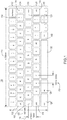
- FIG. 1 illustrates an example schematic of a keyboard 100.
- the keyboard 100 includes five rows of keys 102, 104, 106, 108 and 110. Each of the rows 102-110 includes multiple keys.
- the keyboard 100 includes keys that are used frequently by users when typing and omits some of the keys that may be found on other keyboards. In this manner, the keyboard 100 may be a full pitch keyboard and, at the same time, have a length that makes the keyboard 100 compatible for use with a smaller size computing devices such as, for example, about a 10 inch tablet computing device or about a 10 inch laptop computing device.
- the keyboard 100 may be used with other size computing devices as well.
- the keys that are omitted from the keyboard 100 may be instantiated as virtual keys or soft keys on a computing device, where the virtual keys may be launched by selecting one of the keys on the keyboard 100, as discussed in more detail below.
- a pitch in the x-direction may be set so that typing is comfortable for the user.
- the horizontal pitch may be defined as the distance between the middle of one key to the middle of an adjacent key in the same row.
- the pitch is measured between two adjacent keys that are a same size.
- the pitch or horizontal pitch 112 may be measured between the "x" key and the "c" key in row 110.
- the same or substantially the same horizontal pitch may be consistent between adjacent keys that are the same size in the same row.
- a full pitch keyboard may be a keyboard that has a horizontal pitch between 18mm and 19mm.
- the horizontal pitch 112 may be between 18mm and 19mm. This horizontal pitch may be consistent across the keyboard 100 as measured between like-sized adjacent keys in each of the rows 102-110. Thus, the keyboard 100 may be considered a full pitch keyboard. In a more specific example implementation, the horizontal pitch 112 may be about 18.8mm. In other example implementations, the horizontal pitch 112 may be between about 18mm and 19mm.
- Each of the rows of keys 102-110 is the same length or at least substantially the same length such that the outside edge of the first key and the outside edge of the last key in each row are aligned.
- the length 114 also may be referred to as a width of the rows 102-110.
- the length 114 of the rows 102-110 may be between 230mm and 235mm. In a more specific example, the length 114 may be about 233mm.
- the horizontal pitch 112 may be about 18.8mm and the length 114 may be about 233mm.
- the vertical pitch 116 may be the distance between the middle of a key on one row to the middle of a key in an adjacent row.
- the vertical pitch 116 is measured between the middle of the "shift" key 118 in row 108 and the middle of the "search" key 120 in row 106.
- the vertical pitch may be consistent between each of the adjacent rows (102-104, 104-106, 106-108 and 108-110).
- the vertical pitch 116 may be between 18mm and 19mm.
- Full vertical pitch may be considered between 18mm and 19mm.
- the keyboard 100 provides both full horizontal pitch and full vertical pitch.
- the height 122 of the keyboard may be measured from a bottom edge of the bottom row 110 and a top edge of the top row 102.
- the height 122 may be between 89mm and 93 mm. In a more specific example, the height 122 may be about 91mm.
- the individual keys in the rows 102-110 may include different sizes and different shapes.
- a number of the individual keys also may be a substantially same size and substantially the same shape.
- the keys that include the alphabet characters in rows 104, 106 and 108 all are substantially the same size and substantially the same shape.
- the alphabet character keys may be a substantially square shape having a same width and a same height. In one example implementation, the alphabet character keys may have a width and a height of about 16mm.
- the numbered keys “2", “3”, “4", “5", “6”, “7”, “8”, “9” and “0” in row 102 also may be substantially the same size and substantially the same shape.
- these numbered keys in row 102 (other than “1") may be a substantially square shape like the alphabet keys. In one example, implementation, these numbered keys (other than “1") may have a width and a height of about 16mm.
- the "backspace” key and the "1" key in row 102 have a non-square shape and are wider than the substantially square keys.
- the "backspace” key and the “1” key are substantially rectangular in shape. In other example implementations, the "backspace” key may be made wider and the "1" key may be made substantially square shaped.
- Other keys on the keyboard 100 also may have a substantially rectangular shape including the "shift” key 118, the "enter” key 124, the “ctrl” key 126, the “alt” key 128 and the spacebar key 130. It is understood that the width of one or more of the rectangular shaped keys may be changed and still keep the same overall length 114 of a row the same. For example, the width of the "ctrl" key 126 and/or the "alt” key 128 may be made smaller and the width of the spacebar key 130 may be made larger and the overall width of the row 110 may remain the same.
- Other keys on the keyboard 100 may have a smaller width than one of the square shaped keys.
- the "tab" key 132 and the quotes key 134 may have a smaller width than one of the square shaped keys.
- the keys in each of the rows 102-110 may be arranged and sized such that at least some of the keys are staggered or offset from row to row.
- the "f' key in row 106 is offset from the "v" key in row 108 and offset from the "r” key in row 104. That is, those keys do not align in straight columns, but are instead offset with respect to each other.
- the keyboard 100 includes only a single “ctrl” key 126 and a single “alt” key 128 to the left of the spacebar key 130 instead of a “ctrl” key and an “alt” key on both sides of the spacebar key 130. Also, while two “shift” keys 118 and 136 remain on the keyboard in the same row 108, the "shift" key 118 is wider than the "shift” key 136.
- keys have been omitted from the keyboard 100, but may be accessed as virtual keys.
- the "[/ ⁇ ” key and the "]/ ⁇ ” key have been removed from the keyboard 100 and implemented as a virtual key(s).
- the "[/ ⁇ ” key and the "]/ ⁇ ” key may be found, for example, in row 104.
- the convention " character / character” such as "[/ ⁇ ” is used to show two characters that appear on the same key, with one character being accessed when the key is selected and the other character being accessed when the key is selected in conjunction with using one of the "shift” keys.
- the " ⁇ /'” key has been omitted and implemented as a virtual key(s).
- the " ⁇ /'” key may be found on other keyboards in row 102.
- " key has been omitted and implemented as a virtual key(s).
- ” key may be found on other keyboards in row 104.
- one or more keys have been moved on the keyboard 100 for where the keys may appear on other keyboards.
- the quote key 104 is in row 104, but on other keyboards the quote key may be placed in the same row 106 as the "enter" key.
- the keyboard 100 includes a launch key 140.
- the launch key 140 is placed next to the spacebar key 130 in the bottom row 110.
- the virtual keys may appear on a display of a computing device, as described below with respect to FIG. 2 and FIG. 3 .
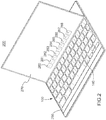
- a computing device 200 includes the keyboard 100 of FIG. 1 .
- the computing device 200 may include a laptop type computing device including the keyboard 100 in a base 250 of the laptop and a display 270.
- the display 270 may include a touch screen display such that objects on the touch screen may be selected to cause the computing device 200 to perform various different actions.
- the computing device 200 may be a tablet computer, where the keyboard 100 in the base 250 is separate and removable from the tablet computer portion 270, which also functions as the touch screen display for the tablet computer.
- the keyboard 100 in the base 250 may communicate with the tablet computer portion 270 in a wired and/or wireless manner.
- the keyboard 100 includes the launch key 140.
- the launch key 140 When the launch key 140 is selected, one or more virtual keys 280-288 are instantiated and displayed on the display 270.
- the virtual keys 280-288 represent the keys that have been omitted from the keyboard 100, as discussed above.
- a second selection of the launch key 140 may cause the virtual keys 280-288 to collapse or close such that the virtual keys 280-288 are no longer displayed on the display 270.
- the display 270 is a touch screen display or a table computing device with a touch screen display, which enables selection of objects and icons that are on the display 270.
- a selection of one of the virtual keys 280-288 causes the computing device 200 to perform the function indicated by the selected key.
- a selection of one of the virtual keys 280-288 causes the computing device 200 to insert the character from the selected virtual key.
- the launch key 140 may be selected when using any application to launch the virtual keys 280-288.
- the launch key 140 may be selected when using a word processing application, a browser application, an email application, a spread sheet application or any other type of application.
- an example schematic illustrates a more detailed view of virtual keys 380-390 instantiated on the display 270 along with a portion of the keyboard 100, which is showing the top row of keys 102.
- the virtual keys 380-390 may represent the keys omitted from the keyboard 100.
- the virtual keys 380-390 may be displayed using the launch key 140 and removed from display also using the launch key 140.
- the virtual keys include an escape key “esc” key 380, an "[" key 381, a “]” key 382, a " ⁇ ” key 383, a “ ⁇ ” key 384, a " ⁇ ” key 385, a " ⁇ ” key 386, a " ' “ key 387, and a "
- the keys 380-388 may represent keys that are not included on the keyboard 100 and that have been removed as physical keys from the keyboard 100. In this manner, the keyboard 100 may be a substantially full pitch keyboard with a smaller overall length so as to be more compatible with smaller-sized computing devices and yet still have a full pitch keyboard.
- the removed keys are implemented as virtual keys 380-388 that may be inserted by selecting the key on the display 270.
- the keys 380-389 also include a number on each of the keys.
- the number on the virtual keys 380-389 corresponds to one of the physical number keys in row 102 of the keyboard 100.
- the character on the virtual keys 380-389 may be selected by selecting the corresponding number key in row 102 instead of touching the key on the display 270.
- the selection of the corresponding number key in row 102 may be implemented in computing devices having a touch screen display and in computing devices that do not have a touch screen display.
- the selection of the corresponding number key in row 102 inserts the character from the virtual key instead of the number key on the physical key in row 102. For example, when virtual key "[" 381 is displayed on the display 270 and the "2" key in row 102 is selected, then the "[" character is inserted on the display and not the "2" character. At other times, when the virtual key "[" 381 is not displayed, then selection of the "2" key in row 102 inserts the "2" character on the display 270.
- the virtual keys 380-390 may be selected by other means.
- the virtual keys 380-390 may be selected using a shortcut of one or more keys or combination of keys from the keyboard 100.
- the virtual keys 380-390 may be displayed in various locations on the display 270.
- the virtual keys 380-390 may be displayed on the display 270 and positioned on the display 270 in alignment directly above the number keys in row 102 of the physical keyboard. 100.
- the selection of a virtual key using a corresponding physical number key is made easier for the user because of the physical key used to select the virtual key is lined up substantially below the virtual key displayed on the display 270.
- the "4" key in row 102 is substantially aligned directly below the corresponding virtual key " ⁇ " 383.
- the virtual keys 380-390 may be fixed in a position on the display 270.
- the virtual keys 380-390 may be fixed above the corresponding physical number keys in row 102, as discussed above.
- the virtual keys 380-390 may appear to be embedded as part of a window or frame being displayed on the display 270.
- the virtual keys 380-390 may not be fixed in a specific location on the display 270 but may be float in various locations. For instance, the virtual keys 380-390 may be displayed at a top of the display 270 or on a side of the display 270 or as a separate window or frame that is not embedded as part of an underlying window or frame. The virtual keys 380-390 may be displayed so as not to interfere with other information currently being shown on the display 270.
- the virtual keys 380-390 may be shown at a location of a cursor within an application. For example, in a word processing application, the virtual keys 380-390 may appear at a position of the cursor on the display 270. Other locations or positions of the virtual keys 380-390 are also possible.
- the virtual keys 380-390 While shown in FIG. 3 as a strip of keys in a horizontal directions, the virtual keys 380-390 also may be displayed in other formats including a box or table of keys. The virtual keys 380-390 may be displayed as a vertical strip of keys in a designated location.
- the launch key 140 on the keyboard 100 may be used to initiate the display of the virtual keys 380-390.
- Other means of initiating the display of the virtual keys 380-390 are also possible.
- the virtual keys 380-390 may be displayed in response to a pointer hovering in a certain location on the display 270 (e.g., at a bottom of the display).
- the virtual keys 380-390 may be displayed by touching a particular location on the touch screen including, for instance, an icon or other element on the display 270.
- the selection of the location on the touch screen may display and activate the virtual keys 380-390.
- a second selection of the location on the touch screen may hid and/or de-activate the virtual keys 380-390.
- virtual key 389 is an emoticon key that, when selected, may insert an emoticon or an emoji.
- the selection of the virtual key 389 may instantiate a menu of display of other emoticons for selection using the touch screen or the keyboard.
- the selection of the virtual key 389 also may cause a display of other virtual keys depicting the emoticons in the place of the other virtual keys 380-388.
- the strip of virtual keys 380-390 may be swipable meaning that there may be multiple strips of virtual keys that are displayed one strip at a time.
- the other strips of virtual keys are accessed by swiping a finger or other object across the displayed strip to display the other strips. For instance, if the virtual key 389 is selected, then a strip of virtual emoticon keys may be displayed in the place of the virtual keys, where the strip of virtual emoticon keys may include many keys that are viewed by swiping along the strip to reveal other hidden emoticon keys.
- the virtual key 389 may be a different key that causes other types of virtual keys to be displayed for selection.
- the virtual key 390 may be used to collapse or close the virtual keys from being displayed on the display 270. In other implementations, the virtual key 390 may be used to bring up a display of other virtual keys or menus of virtual keys for display and selection.
- the specific virtual keys that may be displayed may be application context dependent.
- a selection of the launch key 140 may cause a display of virtual keys that include functions or actions or keys related to the word processing application.
- a selection of the launch key 140 may cause a display of virtual keys that include functions or actions or keys related to the spread sheet application.
- the selection of a virtual key 390 in these application context examples may cause a menu or other application context virtual keys to be displayed for selection.
- the virtual keys may be displayed without a specific selection of the launch key 140 and, instead, may be displayed based on a particular application being launched and/or brought into focus on the display.
- corresponding virtual keys may be displayed automatically in response to launching and/or bringing the spread sheet into focus, where the virtual keys may include functions or actions or keys related to the spread sheet application.
- a selection of the launch key 140 may cause the virtual keys to disappear.
- the launch key 140 may still function as described above.
- FIG. 4 an example schematic of a keyboard 400 is illustrated.
- the keyboard 400 is substantially similar in pitch and size to the keyboard 100 of FIG. 1 .
- the keyboard 400 has a slightly different key layout to accommodate a different shaped "enter" key 401.
- the "enter” key 401 spans across two rows of the keyboard 400.
- the keyboard 400 includes five rows of keys 402, 404, 406, 408 and 410. Each of the rows 402-410 includes multiple keys.
- the keyboard 400 includes keys that are used frequently by users when typing and omits some of the keys that may be found on other keyboards. In this manner, the keyboard 400 may be a full pitch keyboard and, at the same time, have a length that makes the keyboard 400 compatible for use with a smaller size computing devices such as, for example, about a 10 inch tablet computing device or about a 10 inch laptop computing device.
- the keyboard 400 may be used with other size computing devices as well.
- the keys that are omitted from the keyboard 400 may be instantiated as virtual keys or soft keys on a computing device, where the virtual keys may be launched by selecting one of the keys on the keyboard 400, as discussed in above with respect to keyboard 100 of FIG. 1 and as illustrated in FIGS. 2 and 3 and discussed in the corresponding text. Even though the keyboard 400 includes a slightly different key layout, the keyboard 400 may function in the same manner as discussed with respect to the keyboard 100 of FIG. 1 and the operation of the virtual keys as discussed above.
- the pitch or horizontal pitch 412 may be measured between the "x" key and the "c" key in row 410.
- the horizontal pitch 412 may be between 18mm and 19mm. This horizontal pitch may be consistent across the keyboard 400 as measured between like-sized adjacent keys in each of the rows 402-410. Thus, the keyboard 400 may be considered a full pitch keyboard.
- the horizontal pitch 412 may be about 18.4mm. In other example implementations, the horizontal pitch 412 may be between about 18mm and 19mm.
- Each of the rows of keys 402-410 is the same length or at least substantially the same length such that the outside edge of the first key and the outside edge of the last key in each row are aligned.
- the length 414 also may be referred to as a width of the rows 402-410.
- the length 414 of the rows 402-410 may be between 230mm and 235mm. In a more specific example, the length 414 may be about 233mm.
- the horizontal pitch 412 may be about 18.4mm and the length 414 may be about 233mm.
- the vertical pitch 416 may be the distance between the middle of a key on one row to the middle of a key in an adjacent row.
- the vertical pitch 416 is measured between the middle of the "shift" key 418 in row 408 and the middle of the "search” key 420 in row 406.
- the vertical pitch may be consistent between each of the adjacent rows (402-404, 404-406, 406-408 and 408-410).
- the vertical pitch 416 may be between 18mm and 19mm.
- Full vertical pitch may be considered between 18mm and 19mm.
- the keyboard 400 provides both full horizontal pitch and full vertical pitch.
- the height 422 of the keyboard may be measured from a bottom edge of the bottom row 410 and a top edge of the top row 402. In this example, the height 422 may be between 89mm and 93 mm. In a more specific example, the height 422 may be about 91mm.
- the individual keys in the rows 402-410 may include different sizes and different shapes.
- a number of the individual keys also may be a substantially same size and substantially the same shape.
- the keys that include the alphabet characters in rows 404, 406 and 408 all are substantially the same size and substantially the same shape.
- the alphabet character keys may be a substantially square shape having a same width and a same height. In one example implementation, the alphabet character keys may have a width and a height of about 16mm.
- the numbered keys “2", “3”, “4", “5", “6”, “7”, “8”, “9” and “0” in row 402 also may be substantially the same size and substantially the same shape.
- these numbered keys in row 402 (other than “1") may be a substantially square shape like the alphabet keys. In one example, implementation, these numbered keys (other than “1") may have a width and a height of about 16mm.
- the "backspace” key and the "1" key in row 402 have a non-square shape and are wider than the substantially square keys.
- the "backspace” key and the “1” key are substantially rectangular in shape. In other example implementations, the "backspace” key may be made wider and the "1" key may be made substantially square shaped.
- Other keys on the keyboard 400 also may have a substantially rectangular shape including the "shift" keys 418 and 436, the "ctrl” key 426, the “alt” key 428 and the spacebar key 430. It is understood that the width of one or more of the rectangular shaped keys may be changed and still keep the same overall length 414 of a row the same. For example, the width of the "ctrl" key 426 and/or the “alt” key 428 may be made smaller and the width of the spacebar key 430 may be made larger and the overall width of the row 410 may remain the same.
- keys on the keyboard 400 may have a smaller width than one of the square shaped keys.
- the "tab" key 432 may have a smaller width than one of the square shaped keys.
- the keys in each of the rows 402-410 may be arranged and sized such that at least some of the keys are staggered or offset from row to row.
- the "f' key in row 406 is offset from the "v" key in row 408 and offset from the "r” key in row 404. That is, those keys do not align in straight columns, but are instead offset with respect to each other.
- the keyboard 400 includes only a single “ctrl” key 426 and a single “alt” key 428 to the left of the spacebar key 430 instead of a “ctrl” key and an “alt” key on both sides of the spacebar key 430. Also, while two “shift” keys 418 and 436 remain on the keyboard in the same row 408, the "shift" key 418 is wider than the "shift” key 436.
- keys have been omitted from the keyboard 400, but may be accessed as virtual keys.
- the "[/ ⁇ ” key and the "]/ ⁇ ” key have been removed from the keyboard 400 and implemented as a virtual key(s).
- the "[/ ⁇ ” key and the "]/ ⁇ ” key may be found, for example, in row 404.
- the " ⁇ / '" key has been omitted and implemented as a virtual key(s).
- the " ⁇ /'” key may be found on other keyboards in row 402.
- " key has been omitted and implemented as a virtual key(s).
- ” key may be found on other keyboards in row 404.
- one or more keys have been moved on the keyboard 400 for where the keys may appear on other keyboards.
- the keyboard 400 includes a launch key 440.
- the launch key 440 is placed next to the spacebar key 430 in the bottom row 410.
- the virtual keys may appear on a display of a computing device, as described below with respect to launch key 140 of FIG. 1 as described in FIG. 2 and FIG. 3 .
- an example schematic 500 illustrates the keyboard 100 of FIG. 1 in a base 550. While the example shows keyboard 100, it is understood that the keyboard 400 of FIG. 4 may also be used with the same base 550.
- the base 500 and the keyboard 100 may be a separate component from any computing device.
- the base 500 may include a communication module 590 to communicate in a wired and/or wireless manner with any computing device.
- the base 550 may be wirelessly connected to a computing device using Bluetooth or other wireless communications. Additionally and/or alternatively, the base 550 may mate with a computing device and couple via a hard wire to the computing device.
- Process 600 includes receiving a selection of a launch key on a keyboard (602) and displaying one or more virtual keys on a display of the computing device in response to receiving the selection of the launch key, where the virtual keys represent keys not included on the keyboard (604).
- the keyboard may include the keyboard 100 of FIG. 1 or the keyboard 400 of FIG. 400.
- the virtual keys 280-288 of FIG. 2 or the virtual keys 380-390 of FIG. 3 may be displayed on display 270.
- the virtual keys may represent keys that were omitted from the keyboards 100 and 400.
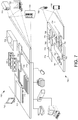
- FIG. 7 shows an example of a generic computer device 700 and a generic mobile computer device 750, which may be used with the techniques described here.
- Computing device 700 is intended to represent various forms of digital computers, such as laptops, desktops, workstations, personal digital assistants, servers, blade servers, mainframes, and other appropriate computers.
- Computing device 750 is intended to represent various forms of mobile devices, such as personal digital assistants, cellular telephones, smart phones, and other similar computing devices.
- the components shown here, their connections and relationships, and their functions, are meant to be exemplary only, and are not meant to limit implementations of the inventions described and/or claimed in this document.
- Computing device 700 includes a processor 702, memory 704, a storage device 706, a high-speed interface 708 connecting to memory 704 and high-speed expansion ports 710, and a low speed interface 712 connecting to low speed bus 714 and storage device 706.
- Each of the components 702, 704, 706, 708, 710, and 712, are interconnected using various busses, and may be mounted on a common motherboard or in other manners as appropriate.
- the processor 702 can process instructions for execution within the computing device 700, including instructions stored in the memory 704 or on the storage device 706 to display graphical information for a GUI on an external input/output device, such as display 716 coupled to high speed interface 708.
- multiple processors and/or multiple buses may be used, as appropriate, along with multiple memories and types of memory.
- multiple computing devices 700 may be connected, with each device providing portions of the necessary operations (e.g., as a server bank, a group of blade servers, or a multi-processor system).
- the memory 704 stores information within the computing device 700.
- the memory 704 is a volatile memory unit or units.
- the memory 704 is a non-volatile memory unit or units.
- the memory 704 may also be another form of computer-readable medium, such as a magnetic or optical disk.
- the storage device 706 is capable of providing mass storage for the computing device 700.
- the storage device 706 may be or contain a computer-readable medium, such as a floppy disk device, a hard disk device, an optical disk device, or a tape device, a flash memory or other similar solid state memory device, or an array of devices, including devices in a storage area network or other configurations.
- a computer program product can be tangibly embodied in an information carrier.
- the computer program product may also contain instructions that, when executed, perform one or more methods, such as those described above.
- the information carrier is a computer- or machine-readable medium, such as the memory 704, the storage device 706, or memory on processor 702.
- the high speed controller 708 manages bandwidth-intensive operations for the computing device 700, while the low speed controller 712 manages lower bandwidth-intensive operations.
- the high-speed controller 708 is coupled to memory 704, display 716 (e.g., through a graphics processor or accelerator), and to high-speed expansion ports 710, which may accept various expansion cards (not shown).
- the low-speed controller 712 is coupled to storage device 706 and low-speed expansion port 714.
- the low-speed expansion port which may include various communication ports (e.g., USB, Bluetooth, Ethernet, wireless Ethernet) may be coupled to one or more input/output devices, such as a keyboard (e.g., keyboard 100 of FIG. 1 and keyboard 400 of FIG. 4 ), a pointing device, a scanner, or a networking device such as a switch or router, e.g., through a network adapter.
- the computing device 700 may be implemented in a number of different forms, as shown in the figure. For example, it may be implemented as a standard server 720, or multiple times in a group of such servers. It may also be implemented as part of a rack server system 724. In addition, it may be implemented in a personal computer such as a laptop computer 722. Alternatively, components from computing device 700 may be combined with other components in a mobile device (not shown), such as device 750. Each of such devices may contain one or more of computing device 700, 750, and an entire system may be made up of multiple computing devices 700, 750 communicating with each other.
- Computing device 750 includes a processor 752, memory 764, an input/output device such as a display 754, a communication interface 766, and a transceiver 768, among other components.
- the device 750 may also be provided with a storage device, such as a microdrive or other device, to provide additional storage.
- a storage device such as a microdrive or other device, to provide additional storage.
- Each of the components 750, 752, 764, 754, 766, and 768, are interconnected using various buses, and several of the components may be mounted on a common motherboard or in other manners as appropriate.
- the processor 752 can execute instructions within the computing device 750, including instructions stored in the memory 764.
- the processor may be implemented as a chipset of chips that include separate and multiple analog and digital processors.
- the processor may provide, for example, for coordination of the other components of the device 750, such as control of user interfaces, applications run by device 750, and wireless communication by device 750.
- Processor 752 may communicate with a user through control interface 758 and display interface 756 coupled to a display 754.
- the display 754 may be, for example, a TFT LCD (Thin-Film-Transistor Liquid Crystal Display) or an OLED (Organic Light Emitting Diode) display, or other appropriate display technology.
- the display interface 756 may comprise appropriate circuitry for driving the display 754 to present graphical and other information to a user.
- the control interface 758 may receive commands from a user and convert them for submission to the processor 752.
- an external interface 762 may be provide in communication with processor 752, so as to enable near area communication of device 750 with other devices.
- External interface 762 may provide, for example, for wired communication in some implementations, or for wireless communication in other implementations, and multiple interfaces may also be used.
- the memory 764 stores information within the computing device 750.
- the memory 764 can be implemented as one or more of a computer-readable medium or media, a volatile memory unit or units, or a non-volatile memory unit or units.
- Expansion memory 774 may also be provided and connected to device 750 through expansion interface 772, which may include, for example, a SIMM (Single In Line Memory Module) card interface.
- SIMM Single In Line Memory Module
- expansion memory 774 may provide extra storage space for device 750, or may also store applications or other information for device 750.
- expansion memory 774 may include instructions to carry out or supplement the processes described above, and may include secure information also.
- expansion memory 774 may be provide as a security module for device 750, and may be programmed with instructions that permit secure use of device 750.
- secure applications may be provided via the SIMM cards, along with additional information, such as placing identifying information on the SIMM card in a non-hackable manner.
- the memory may include, for example, flash memory and/or NVRAM memory, as discussed below.
- a computer program product is tangibly embodied in an information carrier.
- the computer program product contains instructions that, when executed, perform one or more methods, such as those described above.
- the information carrier is a computer- or machine-readable medium, such as the memory 764, expansion memory 774, or memory on processor 752, that may be received, for example, over transceiver 768 or external interface 762.
- Device 750 may communicate wirelessly through communication interface 766, which may include digital signal processing circuitry where necessary. Communication interface 766 may provide for communications under various modes or protocols, such as GSM voice calls, SMS, EMS, or MMS messaging, CDMA, TDMA, PDC, WCDMA, CDMA2000, or GPRS, among others. Such communication may occur, for example, through radio-frequency transceiver 768. In addition, short-range communication may occur, such as using a Bluetooth, WiFi, or other such transceiver (not shown). In addition, GPS (Global Positioning System) receiver module 770 may provide additional navigation- and location-related wireless data to device 750, which may be used as appropriate by applications running on device 750.
- GPS Global Positioning System
- Device 750 may also communicate audibly using audio codec 760, which may receive spoken information from a user and convert it to usable digital information. Audio codec 760 may likewise generate audible sound for a user, such as through a speaker, e.g., in a handset of device 750. Such sound may include sound from voice telephone calls, may include recorded sound (e.g., voice messages, music files, etc.) and may also include sound generated by applications operating on device 750.
- Audio codec 760 may receive spoken information from a user and convert it to usable digital information. Audio codec 760 may likewise generate audible sound for a user, such as through a speaker, e.g., in a handset of device 750. Such sound may include sound from voice telephone calls, may include recorded sound (e.g., voice messages, music files, etc.) and may also include sound generated by applications operating on device 750.
- the computing device 750 may be implemented in a number of different forms, as shown in the figure. For example, it may be implemented as a cellular telephone 780. It may also be implemented as part of a smart phone 782, personal digital assistant, or other similar mobile device.
- implementations of the systems and techniques described here can be realized in digital electronic circuitry, integrated circuitry, specially designed ASICs (application specific integrated circuits), computer hardware, firmware, software, and/or combinations thereof.
- ASICs application specific integrated circuits
- These various implementations can include implementation in one or more computer programs that are executable and/or interpretable on a programmable system including at least one programmable processor, which may be special or general purpose, coupled to receive data and instructions from, and to transmit data and instructions to, a storage system, at least one input device, and at least one output device.
- the systems and techniques described here can be implemented on a computer having a display device (e.g., a CRT (cathode ray tube) or LCD (liquid crystal display) monitor) for displaying information to the user and a keyboard and a pointing device (e.g., a mouse or a trackball) by which the user can provide input to the computer.
- a display device e.g., a CRT (cathode ray tube) or LCD (liquid crystal display) monitor
- a keyboard and a pointing device e.g., a mouse or a trackball
- Other kinds of devices can be used to provide for interaction with a user as well; for example, feedback provided to the user can be any form of sensory feedback (e.g., visual feedback, auditory feedback, or tactile feedback); and input from the user can be received in any form, including acoustic, speech, or tactile input.
- the systems and techniques described here can be implemented in a computing system that includes a back end component (e.g., as a data server), or that includes a middleware component (e.g., an application server), or that includes a front end component (e.g., a client computer having a graphical user interface or a Web browser through which a user can interact with an implementation of the systems and techniques described here), or any combination of such back end, middleware, or front end components.
- the components of the system can be interconnected by any form or medium of digital data communication (e.g., a communication network). Examples of communication networks include a local area network ("LAN”), a wide area network (“WAN”), and the Internet.
- LAN local area network
- WAN wide area network
- the Internet the global information network
- the computing system can include clients and servers.
- a client and server are generally remote from each other and typically interact through a communication network.
- the relationship of client and server arises by virtue of computer programs running on the respective computers and having a client-server relationship to each other.
- Method steps may be performed by one or more programmable processors executing a computer program to perform functions by operating on input data and generating output. Method steps also may be performed by, and an apparatus may be implemented as, special purpose logic circuitry, e.g., an FPGA (field programmable gate array) or an ASIC (application-specific integrated circuit).
- FPGA field programmable gate array
- ASIC application-specific integrated circuit
Landscapes
- Engineering & Computer Science (AREA)
- Theoretical Computer Science (AREA)
- General Engineering & Computer Science (AREA)
- Physics & Mathematics (AREA)
- Human Computer Interaction (AREA)
- General Physics & Mathematics (AREA)
- Computer Hardware Design (AREA)
- Input From Keyboards Or The Like (AREA)
- User Interface Of Digital Computer (AREA)
- Mathematical Physics (AREA)
Description
- This description relates to a keyboard for use with a computing device. The description further relates to a computing device, a computer implemented method, and a computer program.
- Keyboards for smaller computing devices such as tablets and netbooks may include keys that are placed close together, which may degrade a user's experience using the keyboard to interact with the computing device.
-
US 2010182169 relates to a keyboard layout for use with information handling systems such as ultra mobile information handling systems. The keyboard layout eliminates the numbered function key (F1-F12) row and maps all of the functions that have traditionally been function (Fn) options on the F1-F12 row (such as brightness, volume, battery meter, etc.) to other keys. -
EP 2653947 relates to an input device (100; 300) comprising a processor (210) configured to operate the input device (100; 300) in one of a plurality of modes of operation, a plurality of buttons (370), and a housing (310) configured to receive and secure a display device. The housing (310) is configurable in a plurality of positions relative to the plurality of buttons (370), where at least a portion of the plurality of buttons (370) operates in one of the plurality of modes of operation based, at least in part, on a position of the plurality of positions of the housing (310) relative to the plurality of buttons (370). - The scope of protection is defined by the claims.
- According to one general aspect described herein, a keyboard for use with a computing device includes multiple rows of keys with each of the rows of keys including multiple keys. A horizontal pitch of the keys is between 18 mm and 19 mm and a length of the rows of the keys is between 230 mm and 235 mm.
- In another general aspect described herein, a computing device includes a memory that is configured to store instructions and a processor that is operably connected to the memory and that is configured to execute the instructions stored in the memory. The computing device includes a touch screen display that is operably coupled to the processor and a keyboard. The keyboard includes multiple rows of keys with each of the rows of keys including multiple keys. One of the keys is a launch key that, when selected, causes a processor of the computing device to display one or more virtual keys for selection on the touch screen display, where the virtual keys include keys not included on the keyboard.
- In another general aspect, a computer-implemented method includes executing instructions stored on a non-transitory computer storage device that, when executed, cause a computing device to perform the actions of receiving a selection of a launch key on a keyboard and displaying one or more virtual keys on a display of the computing device in response to receiving the selection of the launch key, where the virtual keys represent keys not included on the keyboard.
- In another general aspect, a computer program includes machine readable instructions that, when executed on a computing device, cause a computing device to perform the actions of receiving a selection of a launch key on a keyboard and displaying one or more virtual keys on a display of the computing device in response to receiving the selection of the launch key, where the virtual keys represent keys not included on the keyboard.
- According to aspects as described herein, there are provided devices, like keyboards or computing devices, and computer implemented methods and computer programs which enable to provide a full pitch keyboard on a smaller-sized computing device. According to an aspect, there is provided a keyboard having keys that are used frequently by users when typing and omitting keys that are not used frequently by users. According to an aspect, there is provided a computing device comprising a display and being coupled to the keyboard. The computing device is adapted to initiate displaying the omitted keys as virtual keys or soft keys on the display by user interaction or based on application context or in response to another input or control command. The provided keyboards and computing devices allow to have keyboards for small computing devices which have a full pitch keyboard.
- The details of one or more implementations are set forth in the accompanying drawings and the description below. Other features will be apparent from the description and drawings, and from the claims.
-
-
FIG. 1 is an example schematic of a keyboard. -
FIG. 2 is an example schematic of the keyboard ofFIG. 1 and a computing device having virtual keys. -
FIG. 3 is an example schematic of a portion of the keyboard ofFIG. 1 and a computing device having virtual keys. -
FIG. 4 is an example schematic of a keyboard. -
FIG. 5 is an example schematic of the keyboard ofFIG. 1 in a base. -
FIG. 6 is an example flow diagram of a process using the keyboards ofFIGS. 1-4 . -
FIG. 7 shows an example of a computer device and a mobile computer device that can be used to implement the techniques described here. -
FIG. 1 illustrates an example schematic of akeyboard 100. Thekeyboard 100 includes five rows ofkeys keyboard 100 includes keys that are used frequently by users when typing and omits some of the keys that may be found on other keyboards. In this manner, thekeyboard 100 may be a full pitch keyboard and, at the same time, have a length that makes thekeyboard 100 compatible for use with a smaller size computing devices such as, for example, about a 10 inch tablet computing device or about a 10 inch laptop computing device. Thekeyboard 100 may be used with other size computing devices as well. The keys that are omitted from thekeyboard 100 may be instantiated as virtual keys or soft keys on a computing device, where the virtual keys may be launched by selecting one of the keys on thekeyboard 100, as discussed in more detail below. - A pitch in the x-direction, also referred to as the horizontal pitch, may be set so that typing is comfortable for the user. The horizontal pitch may be defined as the distance between the middle of one key to the middle of an adjacent key in the same row. Typically, the pitch is measured between two adjacent keys that are a same size. For example, the pitch or
horizontal pitch 112 may be measured between the "x" key and the "c" key inrow 110. The same or substantially the same horizontal pitch may be consistent between adjacent keys that are the same size in the same row. A full pitch keyboard may be a keyboard that has a horizontal pitch between 18mm and 19mm. - In one example implementation, the
horizontal pitch 112 may be between 18mm and 19mm. This horizontal pitch may be consistent across thekeyboard 100 as measured between like-sized adjacent keys in each of the rows 102-110. Thus, thekeyboard 100 may be considered a full pitch keyboard. In a more specific example implementation, thehorizontal pitch 112 may be about 18.8mm. In other example implementations, thehorizontal pitch 112 may be between about 18mm and 19mm. - Each of the rows of keys 102-110 is the same length or at least substantially the same length such that the outside edge of the first key and the outside edge of the last key in each row are aligned. The
length 114 also may be referred to as a width of the rows 102-110. Thelength 114 of the rows 102-110 may be between 230mm and 235mm. In a more specific example, thelength 114 may be about 233mm. Thus, in one specific example, thehorizontal pitch 112 may be about 18.8mm and thelength 114 may be about 233mm. - The
vertical pitch 116 may be the distance between the middle of a key on one row to the middle of a key in an adjacent row. For example, thevertical pitch 116 is measured between the middle of the "shift"key 118 inrow 108 and the middle of the "search"key 120 inrow 106. The vertical pitch may be consistent between each of the adjacent rows (102-104, 104-106, 106-108 and 108-110). In this example, thevertical pitch 116 may be between 18mm and 19mm. Full vertical pitch may be considered between 18mm and 19mm. Thus, thekeyboard 100 provides both full horizontal pitch and full vertical pitch. - The
height 122 of the keyboard may be measured from a bottom edge of thebottom row 110 and a top edge of thetop row 102. In this example, theheight 122 may be between 89mm and 93 mm. In a more specific example, theheight 122 may be about 91mm. - The individual keys in the rows 102-110 may include different sizes and different shapes. A number of the individual keys also may be a substantially same size and substantially the same shape. For example, the keys that include the alphabet characters in
rows - The numbered keys "2", "3", "4", "5", "6", "7", "8", "9" and "0" in
row 102 also may be substantially the same size and substantially the same shape. In thekeyboard 100, these numbered keys in row 102 (other than "1") may be a substantially square shape like the alphabet keys. In one example, implementation, these numbered keys (other than "1") may have a width and a height of about 16mm. - In this example, the "backspace" key and the "1" key in
row 102 have a non-square shape and are wider than the substantially square keys. The "backspace" key and the "1" key are substantially rectangular in shape. In other example implementations, the "backspace" key may be made wider and the "1" key may be made substantially square shaped. - Other keys on the
keyboard 100 also may have a substantially rectangular shape including the "shift" key 118, the "enter" key 124, the "ctrl" key 126, the "alt" key 128 and thespacebar key 130. It is understood that the width of one or more of the rectangular shaped keys may be changed and still keep the sameoverall length 114 of a row the same. For example, the width of the "ctrl" key 126 and/or the "alt" key 128 may be made smaller and the width of thespacebar key 130 may be made larger and the overall width of therow 110 may remain the same. - Other keys on the
keyboard 100 may have a smaller width than one of the square shaped keys. For example, the "tab"key 132 and the quotes key 134 may have a smaller width than one of the square shaped keys. - The keys in each of the rows 102-110 may be arranged and sized such that at least some of the keys are staggered or offset from row to row. For example, the "f' key in
row 106 is offset from the "v" key inrow 108 and offset from the "r" key inrow 104. That is, those keys do not align in straight columns, but are instead offset with respect to each other. - To achieve the horizontal full pitch of the keys in the given length of the
keyboard 100, several keys, which may be found on other keyboards, have been omitted. For example, thekeyboard 100 includes only a single "ctrl" key 126 and a single "alt" key 128 to the left of thespacebar key 130 instead of a "ctrl" key and an "alt" key on both sides of thespacebar key 130. Also, while two "shift"keys same row 108, the "shift"key 118 is wider than the "shift"key 136. - Further, other keys have been omitted from the
keyboard 100, but may be accessed as virtual keys. For example, the "[/{" key and the "]/}" key have been removed from thekeyboard 100 and implemented as a virtual key(s). In other keyboards, the "[/{" key and the "]/}" key may be found, for example, inrow 104. Throughout this document, the convention " character / character" , such as "[/{" is used to show two characters that appear on the same key, with one character being accessed when the key is selected and the other character being accessed when the key is selected in conjunction with using one of the "shift" keys. - Also, for example, the "∼ /'" key has been omitted and implemented as a virtual key(s). The "∼ /'" key may be found on other keyboards in
row 102. Similarly, the "\ / |" key has been omitted and implemented as a virtual key(s). The "\ / |" key may be found on other keyboards inrow 104. - Additionally, one or more keys have been moved on the
keyboard 100 for where the keys may appear on other keyboards. For example, the "+ / =" key 138 is inrow 104, but on other keyboards the "+ / =" key may be placed in thesame row 102 as the number keys. Also, thequote key 104 is inrow 104, but on other keyboards the quote key may be placed in thesame row 106 as the "enter" key. - To implement the omitted keys as virtual keys, the
keyboard 100 includes alaunch key 140. Thelaunch key 140 is placed next to thespacebar key 130 in thebottom row 110. When thelaunch key 140 is selected, the virtual keys may appear on a display of a computing device, as described below with respect toFIG. 2 andFIG. 3 . - Referring to
FIG. 2 , acomputing device 200 includes thekeyboard 100 ofFIG. 1 . In one example implementation, thecomputing device 200 may include a laptop type computing device including thekeyboard 100 in abase 250 of the laptop and adisplay 270. Thedisplay 270 may include a touch screen display such that objects on the touch screen may be selected to cause thecomputing device 200 to perform various different actions. - In another example implementation, the
computing device 200 may be a tablet computer, where thekeyboard 100 in thebase 250 is separate and removable from thetablet computer portion 270, which also functions as the touch screen display for the tablet computer. Thekeyboard 100 in thebase 250 may communicate with thetablet computer portion 270 in a wired and/or wireless manner. - In the various different computing device implementations, the
same keyboard 100 may be used. Thekeyboard 100 includes thelaunch key 140. When thelaunch key 140 is selected, one or more virtual keys 280-288 are instantiated and displayed on thedisplay 270. In one implementation, the virtual keys 280-288 represent the keys that have been omitted from thekeyboard 100, as discussed above. After a first selection of thelaunch key 140 that cause the virtual keys 280-288 to appear on thedisplay 270, a second selection of thelaunch key 140 may cause the virtual keys 280-288 to collapse or close such that the virtual keys 280-288 are no longer displayed on thedisplay 270. - In one example implementation, the
display 270 is a touch screen display or a table computing device with a touch screen display, which enables selection of objects and icons that are on thedisplay 270. For example, a selection of one of the virtual keys 280-288 causes thecomputing device 200 to perform the function indicated by the selected key. In the situation where the virtual keys 280-288 represent one or more of the omitted keys from thekeyboard 100, a selection of one of the virtual keys 280-288 causes thecomputing device 200 to insert the character from the selected virtual key. - The
launch key 140 may be selected when using any application to launch the virtual keys 280-288. For example, thelaunch key 140 may be selected when using a word processing application, a browser application, an email application, a spread sheet application or any other type of application. - Referring to
FIG. 3 , an example schematic illustrates a more detailed view of virtual keys 380-390 instantiated on thedisplay 270 along with a portion of thekeyboard 100, which is showing the top row ofkeys 102. As discussed above, in one example implementation, the virtual keys 380-390 may represent the keys omitted from thekeyboard 100. The virtual keys 380-390 may be displayed using thelaunch key 140 and removed from display also using thelaunch key 140. - The virtual keys include an escape key "esc" key 380, an "[" key 381, a "]"
key 382, a "{" key 383, a "}"key 384, a "∼" key 385, a "\" key 386, a " ' "key 387, and a " | "key 388. The keys 380-388 may represent keys that are not included on thekeyboard 100 and that have been removed as physical keys from thekeyboard 100. In this manner, thekeyboard 100 may be a substantially full pitch keyboard with a smaller overall length so as to be more compatible with smaller-sized computing devices and yet still have a full pitch keyboard. The removed keys are implemented as virtual keys 380-388 that may be inserted by selecting the key on thedisplay 270. - The keys 380-389 also include a number on each of the keys. The number on the virtual keys 380-389 corresponds to one of the physical number keys in
row 102 of thekeyboard 100. In one implementation, the character on the virtual keys 380-389 may be selected by selecting the corresponding number key inrow 102 instead of touching the key on thedisplay 270. The selection of the corresponding number key inrow 102 may be implemented in computing devices having a touch screen display and in computing devices that do not have a touch screen display. - When the virtual keys 380-389 are displayed, the selection of the corresponding number key in
row 102 inserts the character from the virtual key instead of the number key on the physical key inrow 102. For example, when virtual key "[" 381 is displayed on thedisplay 270 and the "2" key inrow 102 is selected, then the "[" character is inserted on the display and not the "2" character. At other times, when the virtual key "[" 381 is not displayed, then selection of the "2" key inrow 102 inserts the "2" character on thedisplay 270. - In other examples, the virtual keys 380-390 may be selected by other means. For example, the virtual keys 380-390 may be selected using a shortcut of one or more keys or combination of keys from the
keyboard 100. - The virtual keys 380-390 may be displayed in various locations on the
display 270. In one example implementation, the virtual keys 380-390 may be displayed on thedisplay 270 and positioned on thedisplay 270 in alignment directly above the number keys inrow 102 of the physical keyboard. 100. In this manner, the selection of a virtual key using a corresponding physical number key is made easier for the user because of the physical key used to select the virtual key is lined up substantially below the virtual key displayed on thedisplay 270. For example, the "4" key inrow 102 is substantially aligned directly below the corresponding virtual key "{" 383. - In other implementations, the virtual keys 380-390 may be fixed in a position on the
display 270. For instance, the virtual keys 380-390 may be fixed above the corresponding physical number keys inrow 102, as discussed above. In this example, the virtual keys 380-390 may appear to be embedded as part of a window or frame being displayed on thedisplay 270. - At other times, the virtual keys 380-390 may not be fixed in a specific location on the
display 270 but may be float in various locations. For instance, the virtual keys 380-390 may be displayed at a top of thedisplay 270 or on a side of thedisplay 270 or as a separate window or frame that is not embedded as part of an underlying window or frame. The virtual keys 380-390 may be displayed so as not to interfere with other information currently being shown on thedisplay 270. - Further, the virtual keys 380-390 may be shown at a location of a cursor within an application. For example, in a word processing application, the virtual keys 380-390 may appear at a position of the cursor on the
display 270. Other locations or positions of the virtual keys 380-390 are also possible. - While shown in
FIG. 3 as a strip of keys in a horizontal directions, the virtual keys 380-390 also may be displayed in other formats including a box or table of keys. The virtual keys 380-390 may be displayed as a vertical strip of keys in a designated location. - As discussed above, the
launch key 140 on thekeyboard 100 may be used to initiate the display of the virtual keys 380-390. Other means of initiating the display of the virtual keys 380-390 are also possible. For example, the virtual keys 380-390 may be displayed in response to a pointer hovering in a certain location on the display 270 (e.g., at a bottom of the display). The virtual keys 380-390 may be displayed by touching a particular location on the touch screen including, for instance, an icon or other element on thedisplay 270. The selection of the location on the touch screen may display and activate the virtual keys 380-390. A second selection of the location on the touch screen may hid and/or de-activate the virtual keys 380-390. - In addition to the key omitted from the keyboard 380-388, the virtual keys also may include other keys. For example,
virtual key 389 is an emoticon key that, when selected, may insert an emoticon or an emoji. In another example, the selection of thevirtual key 389 may instantiate a menu of display of other emoticons for selection using the touch screen or the keyboard. The selection of thevirtual key 389 also may cause a display of other virtual keys depicting the emoticons in the place of the other virtual keys 380-388. - In one example, the strip of virtual keys 380-390 may be swipable meaning that there may be multiple strips of virtual keys that are displayed one strip at a time. The other strips of virtual keys are accessed by swiping a finger or other object across the displayed strip to display the other strips. For instance, if the
virtual key 389 is selected, then a strip of virtual emoticon keys may be displayed in the place of the virtual keys, where the strip of virtual emoticon keys may include many keys that are viewed by swiping along the strip to reveal other hidden emoticon keys. - In other example implementations, the
virtual key 389 may be a different key that causes other types of virtual keys to be displayed for selection. - In one implementation, the
virtual key 390 may be used to collapse or close the virtual keys from being displayed on thedisplay 270. In other implementations, thevirtual key 390 may be used to bring up a display of other virtual keys or menus of virtual keys for display and selection. - In one example implementation, the specific virtual keys that may be displayed may be application context dependent. For example, in a word processing application, a selection of the
launch key 140 may cause a display of virtual keys that include functions or actions or keys related to the word processing application. For instance, in a spread sheet application, a selection of thelaunch key 140 may cause a display of virtual keys that include functions or actions or keys related to the spread sheet application. The selection of avirtual key 390 in these application context examples may cause a menu or other application context virtual keys to be displayed for selection. In other implementations, the virtual keys may be displayed without a specific selection of thelaunch key 140 and, instead, may be displayed based on a particular application being launched and/or brought into focus on the display. For instance, if the spread sheet application is launched and/or brought into focus on the display, then corresponding virtual keys may be displayed automatically in response to launching and/or bringing the spread sheet into focus, where the virtual keys may include functions or actions or keys related to the spread sheet application. When the virtual keys are being displayed, a selection of thelaunch key 140 may cause the virtual keys to disappear. In an implementation where the virtual keys are displayed based on the application context and in response to the application launch and/or focus, thelaunch key 140 may still function as described above. - Referring to
FIG. 4 , an example schematic of akeyboard 400 is illustrated. Thekeyboard 400 is substantially similar in pitch and size to thekeyboard 100 ofFIG. 1 . InFIG. 4 , thekeyboard 400 has a slightly different key layout to accommodate a different shaped "enter"key 401. The "enter" key 401 spans across two rows of thekeyboard 400. - The
keyboard 400 includes five rows ofkeys keyboard 400 includes keys that are used frequently by users when typing and omits some of the keys that may be found on other keyboards. In this manner, thekeyboard 400 may be a full pitch keyboard and, at the same time, have a length that makes thekeyboard 400 compatible for use with a smaller size computing devices such as, for example, about a 10 inch tablet computing device or about a 10 inch laptop computing device. Thekeyboard 400 may be used with other size computing devices as well. The keys that are omitted from thekeyboard 400 may be instantiated as virtual keys or soft keys on a computing device, where the virtual keys may be launched by selecting one of the keys on thekeyboard 400, as discussed in above with respect tokeyboard 100 ofFIG. 1 and as illustrated inFIGS. 2 and3 and discussed in the corresponding text. Even though thekeyboard 400 includes a slightly different key layout, thekeyboard 400 may function in the same manner as discussed with respect to thekeyboard 100 ofFIG. 1 and the operation of the virtual keys as discussed above. - In
keyboard 400, the pitch orhorizontal pitch 412 may be measured between the "x" key and the "c" key inrow 410. Thehorizontal pitch 412 may be between 18mm and 19mm. This horizontal pitch may be consistent across thekeyboard 400 as measured between like-sized adjacent keys in each of the rows 402-410. Thus, thekeyboard 400 may be considered a full pitch keyboard. In a more specific example implementation, thehorizontal pitch 412 may be about 18.4mm. In other example implementations, thehorizontal pitch 412 may be between about 18mm and 19mm. - Each of the rows of keys 402-410 is the same length or at least substantially the same length such that the outside edge of the first key and the outside edge of the last key in each row are aligned. The
length 414 also may be referred to as a width of the rows 402-410. Thelength 414 of the rows 402-410 may be between 230mm and 235mm. In a more specific example, thelength 414 may be about 233mm. Thus, in one specific example, thehorizontal pitch 412 may be about 18.4mm and thelength 414 may be about 233mm. - The
vertical pitch 416 may be the distance between the middle of a key on one row to the middle of a key in an adjacent row. For example, thevertical pitch 416 is measured between the middle of the "shift" key 418 inrow 408 and the middle of the "search" key 420 inrow 406. The vertical pitch may be consistent between each of the adjacent rows (402-404, 404-406, 406-408 and 408-410). In this example, thevertical pitch 416 may be between 18mm and 19mm. Full vertical pitch may be considered between 18mm and 19mm. Thus, thekeyboard 400 provides both full horizontal pitch and full vertical pitch. - The
height 422 of the keyboard may be measured from a bottom edge of thebottom row 410 and a top edge of thetop row 402. In this example, theheight 422 may be between 89mm and 93 mm. In a more specific example, theheight 422 may be about 91mm. - The individual keys in the rows 402-410 may include different sizes and different shapes. A number of the individual keys also may be a substantially same size and substantially the same shape. For example, the keys that include the alphabet characters in
rows - The numbered keys "2", "3", "4", "5", "6", "7", "8", "9" and "0" in
row 402 also may be substantially the same size and substantially the same shape. In thekeyboard 400, these numbered keys in row 402 (other than "1") may be a substantially square shape like the alphabet keys. In one example, implementation, these numbered keys (other than "1") may have a width and a height of about 16mm. - In this example, the "backspace" key and the "1" key in
row 402 have a non-square shape and are wider than the substantially square keys. The "backspace" key and the "1" key are substantially rectangular in shape. In other example implementations, the "backspace" key may be made wider and the "1" key may be made substantially square shaped. - Other keys on the
keyboard 400 also may have a substantially rectangular shape including the "shift"keys spacebar key 430. It is understood that the width of one or more of the rectangular shaped keys may be changed and still keep the sameoverall length 414 of a row the same. For example, the width of the "ctrl" key 426 and/or the "alt" key 428 may be made smaller and the width of thespacebar key 430 may be made larger and the overall width of therow 410 may remain the same. - Other keys on the
keyboard 400 may have a smaller width than one of the square shaped keys. For example, the "tab" key 432 may have a smaller width than one of the square shaped keys. - The keys in each of the rows 402-410 may be arranged and sized such that at least some of the keys are staggered or offset from row to row. For example, the "f' key in
row 406 is offset from the "v" key inrow 408 and offset from the "r" key inrow 404. That is, those keys do not align in straight columns, but are instead offset with respect to each other. - To achieve the horizontal full pitch of the keys in the given length of the
keyboard 400, several keys, which may be found on other keyboards, have been omitted. For example, thekeyboard 400 includes only a single "ctrl" key 426 and a single "alt" key 428 to the left of thespacebar key 430 instead of a "ctrl" key and an "alt" key on both sides of thespacebar key 430. Also, while two "shift"keys same row 408, the "shift"key 418 is wider than the "shift"key 436. - Further, other keys have been omitted from the
keyboard 400, but may be accessed as virtual keys. For example, the "[/{" key and the "]/}" key have been removed from thekeyboard 400 and implemented as a virtual key(s). In other keyboards, the "[/{" key and the "]/}" key may be found, for example, inrow 404. Also, for example, the "∼ / '" key has been omitted and implemented as a virtual key(s). The "∼ /'" key may be found on other keyboards inrow 402. Similarly, the "\ / |" key has been omitted and implemented as a virtual key(s). The "\ / |" key may be found on other keyboards inrow 404. - Additionally, one or more keys have been moved on the
keyboard 400 for where the keys may appear on other keyboards. For example, the "+ / =" key 438 is inrow 404, but on other keyboards the "+ / =" key may be placed in thesame row 402 as the number keys. - To implement the omitted keys as virtual keys, the
keyboard 400 includes alaunch key 440. Thelaunch key 440 is placed next to thespacebar key 430 in thebottom row 410. When thelaunch key 440 is selected, the virtual keys may appear on a display of a computing device, as described below with respect to launchkey 140 ofFIG. 1 as described inFIG. 2 andFIG. 3 . - Referring to
FIG. 5 , an example schematic 500 illustrates thekeyboard 100 ofFIG. 1 in abase 550. While the example showskeyboard 100, it is understood that thekeyboard 400 ofFIG. 4 may also be used with thesame base 550. Thebase 500 and thekeyboard 100 may be a separate component from any computing device. The base 500 may include acommunication module 590 to communicate in a wired and/or wireless manner with any computing device. For example, thebase 550 may be wirelessly connected to a computing device using Bluetooth or other wireless communications. Additionally and/or alternatively, thebase 550 may mate with a computing device and couple via a hard wire to the computing device. - Referring to
FIG. 6 , an example flow diagram illustrates aprocess 600.Process 600 includes receiving a selection of a launch key on a keyboard (602) and displaying one or more virtual keys on a display of the computing device in response to receiving the selection of the launch key, where the virtual keys represent keys not included on the keyboard (604). For example, the keyboard may include thekeyboard 100 ofFIG. 1 or thekeyboard 400 of FIG. 400. In response to receiving a selection of thelaunch key 140 or thelaunch key 440, the virtual keys 280-288 ofFIG. 2 or the virtual keys 380-390 ofFIG. 3 may be displayed ondisplay 270. As discussed above, the virtual keys may represent keys that were omitted from thekeyboards -
FIG. 7 shows an example of ageneric computer device 700 and a genericmobile computer device 750, which may be used with the techniques described here.Computing device 700 is intended to represent various forms of digital computers, such as laptops, desktops, workstations, personal digital assistants, servers, blade servers, mainframes, and other appropriate computers.Computing device 750 is intended to represent various forms of mobile devices, such as personal digital assistants, cellular telephones, smart phones, and other similar computing devices. The components shown here, their connections and relationships, and their functions, are meant to be exemplary only, and are not meant to limit implementations of the inventions described and/or claimed in this document. -
Computing device 700 includes aprocessor 702,memory 704, astorage device 706, a high-speed interface 708 connecting tomemory 704 and high-speed expansion ports 710, and alow speed interface 712 connecting tolow speed bus 714 andstorage device 706. Each of thecomponents processor 702 can process instructions for execution within thecomputing device 700, including instructions stored in thememory 704 or on thestorage device 706 to display graphical information for a GUI on an external input/output device, such asdisplay 716 coupled tohigh speed interface 708. In other implementations, multiple processors and/or multiple buses may be used, as appropriate, along with multiple memories and types of memory. Also,multiple computing devices 700 may be connected, with each device providing portions of the necessary operations (e.g., as a server bank, a group of blade servers, or a multi-processor system). - The
memory 704 stores information within thecomputing device 700. In one implementation, thememory 704 is a volatile memory unit or units. In another implementation, thememory 704 is a non-volatile memory unit or units. Thememory 704 may also be another form of computer-readable medium, such as a magnetic or optical disk. - The
storage device 706 is capable of providing mass storage for thecomputing device 700. In one implementation, thestorage device 706 may be or contain a computer-readable medium, such as a floppy disk device, a hard disk device, an optical disk device, or a tape device, a flash memory or other similar solid state memory device, or an array of devices, including devices in a storage area network or other configurations. A computer program product can be tangibly embodied in an information carrier. The computer program product may also contain instructions that, when executed, perform one or more methods, such as those described above. The information carrier is a computer- or machine-readable medium, such as thememory 704, thestorage device 706, or memory onprocessor 702. - The
high speed controller 708 manages bandwidth-intensive operations for thecomputing device 700, while thelow speed controller 712 manages lower bandwidth-intensive operations. Such allocation of functions is exemplary only. In one implementation, the high-speed controller 708 is coupled tomemory 704, display 716 (e.g., through a graphics processor or accelerator), and to high-speed expansion ports 710, which may accept various expansion cards (not shown). In the implementation, low-speed controller 712 is coupled tostorage device 706 and low-speed expansion port 714. The low-speed expansion port, which may include various communication ports (e.g., USB, Bluetooth, Ethernet, wireless Ethernet) may be coupled to one or more input/output devices, such as a keyboard (e.g.,keyboard 100 ofFIG. 1 andkeyboard 400 ofFIG. 4 ), a pointing device, a scanner, or a networking device such as a switch or router, e.g., through a network adapter. - The
computing device 700 may be implemented in a number of different forms, as shown in the figure. For example, it may be implemented as astandard server 720, or multiple times in a group of such servers. It may also be implemented as part of arack server system 724. In addition, it may be implemented in a personal computer such as alaptop computer 722. Alternatively, components fromcomputing device 700 may be combined with other components in a mobile device (not shown), such asdevice 750. Each of such devices may contain one or more ofcomputing device multiple computing devices -
Computing device 750 includes aprocessor 752,memory 764, an input/output device such as adisplay 754, acommunication interface 766, and atransceiver 768, among other components. Thedevice 750 may also be provided with a storage device, such as a microdrive or other device, to provide additional storage. Each of thecomponents - The
processor 752 can execute instructions within thecomputing device 750, including instructions stored in thememory 764. The processor may be implemented as a chipset of chips that include separate and multiple analog and digital processors. The processor may provide, for example, for coordination of the other components of thedevice 750, such as control of user interfaces, applications run bydevice 750, and wireless communication bydevice 750. -
Processor 752 may communicate with a user throughcontrol interface 758 anddisplay interface 756 coupled to adisplay 754. Thedisplay 754 may be, for example, a TFT LCD (Thin-Film-Transistor Liquid Crystal Display) or an OLED (Organic Light Emitting Diode) display, or other appropriate display technology. Thedisplay interface 756 may comprise appropriate circuitry for driving thedisplay 754 to present graphical and other information to a user. Thecontrol interface 758 may receive commands from a user and convert them for submission to theprocessor 752. In addition, anexternal interface 762 may be provide in communication withprocessor 752, so as to enable near area communication ofdevice 750 with other devices.External interface 762 may provide, for example, for wired communication in some implementations, or for wireless communication in other implementations, and multiple interfaces may also be used. - The
memory 764 stores information within thecomputing device 750. Thememory 764 can be implemented as one or more of a computer-readable medium or media, a volatile memory unit or units, or a non-volatile memory unit or units.Expansion memory 774 may also be provided and connected todevice 750 throughexpansion interface 772, which may include, for example, a SIMM (Single In Line Memory Module) card interface.Such expansion memory 774 may provide extra storage space fordevice 750, or may also store applications or other information fordevice 750. Specifically,expansion memory 774 may include instructions to carry out or supplement the processes described above, and may include secure information also. Thus, for example,expansion memory 774 may be provide as a security module fordevice 750, and may be programmed with instructions that permit secure use ofdevice 750. In addition, secure applications may be provided via the SIMM cards, along with additional information, such as placing identifying information on the SIMM card in a non-hackable manner. - The memory may include, for example, flash memory and/or NVRAM memory, as discussed below. In one implementation, a computer program product is tangibly embodied in an information carrier. The computer program product contains instructions that, when executed, perform one or more methods, such as those described above. The information carrier is a computer- or machine-readable medium, such as the
memory 764,expansion memory 774, or memory onprocessor 752, that may be received, for example, overtransceiver 768 orexternal interface 762. -
Device 750 may communicate wirelessly throughcommunication interface 766, which may include digital signal processing circuitry where necessary.Communication interface 766 may provide for communications under various modes or protocols, such as GSM voice calls, SMS, EMS, or MMS messaging, CDMA, TDMA, PDC, WCDMA, CDMA2000, or GPRS, among others. Such communication may occur, for example, through radio-frequency transceiver 768. In addition, short-range communication may occur, such as using a Bluetooth, WiFi, or other such transceiver (not shown). In addition, GPS (Global Positioning System)receiver module 770 may provide additional navigation- and location-related wireless data todevice 750, which may be used as appropriate by applications running ondevice 750. -
Device 750 may also communicate audibly usingaudio codec 760, which may receive spoken information from a user and convert it to usable digital information.Audio codec 760 may likewise generate audible sound for a user, such as through a speaker, e.g., in a handset ofdevice 750. Such sound may include sound from voice telephone calls, may include recorded sound (e.g., voice messages, music files, etc.) and may also include sound generated by applications operating ondevice 750. - The
computing device 750 may be implemented in a number of different forms, as shown in the figure. For example, it may be implemented as acellular telephone 780. It may also be implemented as part of asmart phone 782, personal digital assistant, or other similar mobile device. - Various implementations of the systems and techniques described here can be realized in digital electronic circuitry, integrated circuitry, specially designed ASICs (application specific integrated circuits), computer hardware, firmware, software, and/or combinations thereof. These various implementations can include implementation in one or more computer programs that are executable and/or interpretable on a programmable system including at least one programmable processor, which may be special or general purpose, coupled to receive data and instructions from, and to transmit data and instructions to, a storage system, at least one input device, and at least one output device.
- These computer programs (also known as programs, software, software applications or code) include machine instructions for a programmable processor, and can be implemented in a high-level procedural and/or object-oriented programming language, and/or in assembly/machine language. As used herein, the terms "machine-readable medium" "computer-readable medium" refers to any computer program product, apparatus and/or device (e.g., magnetic discs, optical disks, memory, Programmable Logic Devices (PLDs)) used to provide machine instructions and/or data to a programmable processor, including a machine-readable medium that receives machine instructions as a machine-readable signal. The term "machine-readable signal" refers to any signal used to provide machine instructions and/or data to a programmable processor.
- To provide for interaction with a user, the systems and techniques described here can be implemented on a computer having a display device (e.g., a CRT (cathode ray tube) or LCD (liquid crystal display) monitor) for displaying information to the user and a keyboard and a pointing device (e.g., a mouse or a trackball) by which the user can provide input to the computer. Other kinds of devices can be used to provide for interaction with a user as well; for example, feedback provided to the user can be any form of sensory feedback (e.g., visual feedback, auditory feedback, or tactile feedback); and input from the user can be received in any form, including acoustic, speech, or tactile input.
- The systems and techniques described here can be implemented in a computing system that includes a back end component (e.g., as a data server), or that includes a middleware component (e.g., an application server), or that includes a front end component (e.g., a client computer having a graphical user interface or a Web browser through which a user can interact with an implementation of the systems and techniques described here), or any combination of such back end, middleware, or front end components. The components of the system can be interconnected by any form or medium of digital data communication (e.g., a communication network). Examples of communication networks include a local area network ("LAN"), a wide area network ("WAN"), and the Internet.
- The computing system can include clients and servers. A client and server are generally remote from each other and typically interact through a communication network. The relationship of client and server arises by virtue of computer programs running on the respective computers and having a client-server relationship to each other.
- A number of embodiments have been described. Nevertheless, it will be understood that various modifications may be made without departing from the scope of the invention.
- In addition, the logic flows depicted in the figures do not require the particular order shown, or sequential order, to achieve desirable results. In addition, other steps may be provided, or steps may be eliminated, from the described flows, and other components may be added to, or removed from, the described systems. Accordingly, other embodiments are within the scope of the following claims.
- Method steps may be performed by one or more programmable processors executing a computer program to perform functions by operating on input data and generating output. Method steps also may be performed by, and an apparatus may be implemented as, special purpose logic circuitry, e.g., an FPGA (field programmable gate array) or an ASIC (application-specific integrated circuit).
Claims (15)
- A keyboard (100) for use with a computing device (200), the keyboard (100) comprising:
a plurality of rows of keys (102, 104, 106, 108, 110) with each of the rows of keys including a plurality of keys,
wherein:one of the keys is a launch key (140) that, when selected, causes a processor of the computing device (200) to display one or more virtual keys (280 to 288) for selection on a display (270) of the computing device (200),characterised in that:the virtual keys include keys not included on the keyboardone or more of the virtual keys include a character and a number on the virtual key, andthe character on the virtual key is input in response to a selection of the number key on the keyboard corresponding to the number on the virtual key. - The keyboard of claim 1 wherein a horizontal pitch (112) of the keys is between 18 mm and 19 mm, and a length of the rows (114) of the keys is between 230 mm and 235 mm, and optionally wherein:the horizontal pitch is between 18.4 mm and 19 mm;
orthe horizontal pitch of the keys is about 18.8 mm, andthe length of the rows of the keys is about 233 mm;
orthe horizontal pitch of the keys is about 18.4 mm, andthe length of the rows of the keys is about 233 mm. - The keyboard of claims 1 or 2 wherein:an enter key (401) spans across two rows of keys;
and/orthe rows of keys include five rows of keys. - The keyboard of any one of the preceding claims wherein a bottom row of the keys comprises a single control key (126), a single alternate key (128) and a spacebar (130).
- The keyboard of any one of the preceding claims wherein:
the display of the computing device includes a touch screen display and the virtual keys are selectable using the touch screen display. - The keyboard of any preceding claim wherein:the keyboard is physically separate and removable from the computing device and connects wirelessly to the computing device
orthe keyboard is a part of the computing device, wherein the keyboard and the computing device are a laptop computing device. - A computing device (200), comprising:a memory (704) that is configured to store instructions;a processor (702) that is operably connected to the memory (704) and that is configured to execute the instructions stored in the memory (704);a display (270) that is operably coupled to the processor (702); anda keyboard (100) according to claim 1.
- The computing device of claim 7 wherein:the computing device includes a tablet computer;the keyboard is physically separate and removable from the computing device;the keyboard communicates wirelessly with the computing device; andthe display of the computing device includes a touch screen display and the virtual keys are selectable using the touch screen display.
- The computing device of claim 7 or 8 wherein the virtual keys are displayed on the display in alignment with a number key on the keyboard corresponding to the number on the virtual key.
- The computing device of claim 7 or 8 wherein the virtual keys are displayed on the display at a location of a cursor.
- The computing device of any one of claims 7 to 10 wherein the keys not included on the keyboard include a right bracket key, a left bracket key, an escape key, a right brace key, a left brace key, a backslash key, a pipe key, an acute key and a tilde key.
- The computing device of any one of claims 7 to 9 wherein the launch key, when selected, causes a processor of the computing device to display one or more virtual keys for selection on the display, wherein the virtual keys include keys related to an application being run on the computing device.
- A computer-implemented method comprising executing instructions stored on a non-transitory computer storage device that, when executed by a computing device, cause the computing device to perform the actions of:receiving a selection of a launch key on a keyboard; anddisplaying one or more virtual keys on a display of the computing device in response to receiving the selection of the launch key,characterised in that:the virtual keys represent keys not included on the keyboard,one or more of the virtual keys include a character and a number on the virtual key, andthe character on the virtual key is input in response to a selection of the number key on the keyboard corresponding to the number on the virtual key.
- The computer-implemented method of claim 13 wherein:the virtual keys include keys related to an application running on the computing device,
and/ora horizontal pitch of the keys is between 18 mm and 19 mm and a length of the rows of the keys is between 230 mm and 235 mm. - A computer program comprising instructions which, when the program is executed by a computing device, cause the computing device to carry out the method of claim 13 or 14.
Applications Claiming Priority (3)
| Application Number | Priority Date | Filing Date | Title |
|---|---|---|---|
| US201462044783P | 2014-09-02 | 2014-09-02 | |
| US14/842,546 US10235043B2 (en) | 2014-09-02 | 2015-09-01 | Keyboard for use with a computing device |
| PCT/US2015/048053 WO2016036799A1 (en) | 2014-09-02 | 2015-09-02 | Keyboard for use with a computing device |
Publications (3)
| Publication Number | Publication Date |
|---|---|
| EP3189402A1 EP3189402A1 (en) | 2017-07-12 |
| EP3189402A4 EP3189402A4 (en) | 2018-09-05 |
| EP3189402B1 true EP3189402B1 (en) | 2021-11-17 |
Family
ID=55402459
Family Applications (1)
| Application Number | Title | Priority Date | Filing Date |
|---|---|---|---|
| EP15837306.8A Active EP3189402B1 (en) | 2014-09-02 | 2015-09-02 | Keyboard for use with a computing device |
Country Status (4)
| Country | Link |
|---|---|
| US (1) | US10235043B2 (en) |
| EP (1) | EP3189402B1 (en) |
| CN (1) | CN106662935B (en) |
| WO (1) | WO2016036799A1 (en) |
Families Citing this family (3)
| Publication number | Priority date | Publication date | Assignee | Title |
|---|---|---|---|---|
| USD786236S1 (en) * | 2015-01-23 | 2017-05-09 | Google Inc. | Combined tablet device base and lid |
| US10474358B2 (en) * | 2016-02-29 | 2019-11-12 | Google Llc | Computing devices having dynamically configurable user input devices, and methods of operating the same |
| CN106125923B (en) * | 2016-06-22 | 2019-05-17 | 京东方科技集团股份有限公司 | Electronic equipment, input and output device and method of use thereof |
Family Cites Families (30)
| Publication number | Priority date | Publication date | Assignee | Title |
|---|---|---|---|---|
| JP4480803B2 (en) | 1996-10-11 | 2010-06-16 | 富士通株式会社 | Keyboard and notebook computers |
| JPH11219227A (en) | 1998-01-30 | 1999-08-10 | Nec Software Ltd | Mobile terminal device |
| JP2000020473A (en) | 1998-06-30 | 2000-01-21 | Sony Corp | Portable information processing device |
| JP2002366290A (en) | 2001-06-04 | 2002-12-20 | First Internatl Computer Inc | Notebook computer with multi-purpose hot key |
| US20050002158A1 (en) * | 2002-02-25 | 2005-01-06 | Robert Olodort | Mobile computer with foldable keyboard |
| US20040067086A1 (en) * | 2002-02-25 | 2004-04-08 | Robert Olodort | Foldable keyboard |
| TWI224739B (en) * | 2003-10-22 | 2004-12-01 | Wistron Corp | Electronic apparatus with the combination of notebook computer and tablet computer |
| JP4343051B2 (en) | 2004-07-20 | 2009-10-14 | 株式会社東芝 | Information processing apparatus, operation screen control method, and program |
| US9122396B2 (en) | 2007-03-30 | 2015-09-01 | Qualcomm Incorporated | Application quick launch extension |
| CN101882005B (en) * | 2008-11-21 | 2013-10-16 | 杭州惠道科技有限公司 | A kind of small size electronic equipment keyboard |
| TW201025085A (en) * | 2008-12-23 | 2010-07-01 | Hannstar Display Corp | Keyboard formed from a touch display, method of endowing a touch display with a keyboard function, and a device with functions of keyboard or writing pad input and image output |
| US8174410B2 (en) * | 2009-01-16 | 2012-05-08 | Dell Products L.P. | Ultra mobile keyboard |
| US20100265183A1 (en) * | 2009-04-20 | 2010-10-21 | Microsoft Corporation | State changes for an adaptive device |
| US8621379B2 (en) * | 2010-03-12 | 2013-12-31 | Apple Inc. | Device, method, and graphical user interface for creating and using duplicate virtual keys |
| US8909838B2 (en) * | 2010-06-24 | 2014-12-09 | Microsoft Corporation | Detachable computer with variable performance computing environment |
| US9285836B2 (en) * | 2010-12-13 | 2016-03-15 | Blackberry Limited | Portable electronic device including touch-sensitive display |
| USD682274S1 (en) | 2011-06-23 | 2013-05-14 | Zagg Intellectual Property Holding Co., Inc. | Keyboard |
| TWI461963B (en) * | 2011-08-17 | 2014-11-21 | Wistron Corp | Computer keyboard and control method thereof |
| US11099733B2 (en) * | 2011-09-30 | 2021-08-24 | Microsoft Technology Licensing, Llc | Dynamic command presentation and key configuration for keyboards |
| CN103093797A (en) * | 2011-11-08 | 2013-05-08 | 鸿富锦精密工业(深圳)有限公司 | Electronic device |
| US9227763B2 (en) * | 2011-11-09 | 2016-01-05 | Zagg Intellectual Property Holding Co., Inc. | Multi-functional protective cover for a computing accessory and support accessory for a portable electronic device, and methods and systems relating thereto |
| USD684582S1 (en) | 2011-12-01 | 2013-06-18 | Google Inc. | Keyboard |
| TWD152709S (en) | 2012-01-09 | 2013-04-01 | 三星電子股份有限公司 | Keyboard for a tablet computer |
| USD690302S1 (en) | 2012-01-11 | 2013-09-24 | Samsung Electronics Co., Ltd. | Keyboard for a tablet computer |
| US8988354B2 (en) * | 2012-04-17 | 2015-03-24 | Logitech Europe S.A. | Input device for a display |
| USD697913S1 (en) | 2012-06-27 | 2014-01-21 | Samsung Electronics Co., Ltd. | Keyboard for tablet computer |
| CN103576880B (en) | 2012-07-23 | 2016-08-17 | 纬创资通股份有限公司 | External keyboard of electronic device and sheath of electronic device |
| TWI471756B (en) | 2012-11-16 | 2015-02-01 | Quanta Comp Inc | Virtual touch method |
| JP2014110519A (en) * | 2012-11-30 | 2014-06-12 | Toshiba Corp | Electronic apparatus, keyboard control system, display control method and display control program |
| US20150084871A1 (en) * | 2013-09-26 | 2015-03-26 | Mark D. Yarvis | Customized display and function for keys on a keyboard |
-
2015
- 2015-09-01 US US14/842,546 patent/US10235043B2/en active Active
- 2015-09-02 CN CN201580034705.8A patent/CN106662935B/en active Active
- 2015-09-02 WO PCT/US2015/048053 patent/WO2016036799A1/en not_active Ceased
- 2015-09-02 EP EP15837306.8A patent/EP3189402B1/en active Active
Non-Patent Citations (1)
| Title |
|---|
| None * |
Also Published As
| Publication number | Publication date |
|---|---|
| CN106662935B (en) | 2019-09-24 |
| WO2016036799A1 (en) | 2016-03-10 |
| US20160062528A1 (en) | 2016-03-03 |
| EP3189402A4 (en) | 2018-09-05 |
| EP3189402A1 (en) | 2017-07-12 |
| US10235043B2 (en) | 2019-03-19 |
| CN106662935A (en) | 2017-05-10 |
Similar Documents
| Publication | Publication Date | Title |
|---|---|---|
| CN101842243B (en) | Dynamic virtual input device configuration | |
| EP2987055B1 (en) | Text suggestion output using past interaction data | |
| US8730188B2 (en) | Gesture input on a portable electronic device and method of controlling the same | |
| US8214768B2 (en) | Method, system, and graphical user interface for viewing multiple application windows | |
| EP3005066B1 (en) | Multiple graphical keyboards for continuous gesture input | |
| KR101376286B1 (en) | touchscreen text input | |
| US20130234942A1 (en) | Systems and Methods for Modifying Virtual Keyboards on a User Interface | |
| US20160077733A1 (en) | Method and device having touchscreen keyboard with visual cues | |
| EP3037948B1 (en) | Portable electronic device and method of controlling display of selectable elements | |
| EP2653955B1 (en) | Method and device having touchscreen keyboard with visual cues | |
| US8799779B2 (en) | Text input method in portable device and portable device supporting the same | |
| US20130080963A1 (en) | Electronic Device and Method For Character Deletion | |
| GB2511431A (en) | Character string replacement | |
| US20130300664A1 (en) | Providing a vertical candidate bar with an on-screen keyboard | |
| US8902169B2 (en) | Touch screen device and character input method therein | |
| US8839123B2 (en) | Generating a visual user interface | |
| US9069391B2 (en) | Method and medium for inputting Korean characters using a touch screen | |
| US10235043B2 (en) | Keyboard for use with a computing device | |
| US20130111390A1 (en) | Electronic device and method of character entry | |
| US10101906B2 (en) | Method, device and system for data entering and displaying on touch screen display | |
| US11086410B2 (en) | Apparatus for text entry and associated methods | |
| EP2587355A1 (en) | Electronic device and method of character entry | |
| EP2469384A1 (en) | Portable electronic device and method of controlling same | |
| CN109656460B (en) | Electronic device and method for providing selectable keys of a keyboard | |
| HK40007643A (en) | Electronic device and method of providing selectable keys of a keyboard |
Legal Events
| Date | Code | Title | Description |
|---|---|---|---|
| STAA | Information on the status of an ep patent application or granted ep patent |
Free format text: STATUS: THE INTERNATIONAL PUBLICATION HAS BEEN MADE |
|
| PUAI | Public reference made under article 153(3) epc to a published international application that has entered the european phase |
Free format text: ORIGINAL CODE: 0009012 |
|
| STAA | Information on the status of an ep patent application or granted ep patent |
Free format text: STATUS: REQUEST FOR EXAMINATION WAS MADE |
|
| 17P | Request for examination filed |
Effective date: 20161207 |
|
| AK | Designated contracting states |
Kind code of ref document: A1 Designated state(s): AL AT BE BG CH CY CZ DE DK EE ES FI FR GB GR HR HU IE IS IT LI LT LU LV MC MK MT NL NO PL PT RO RS SE SI SK SM TR |
|
| AX | Request for extension of the european patent |
Extension state: BA ME |
|
| RAP1 | Party data changed (applicant data changed or rights of an application transferred) |
Owner name: GOOGLE LLC |
|
| DAV | Request for validation of the european patent (deleted) | ||
| DAX | Request for extension of the european patent (deleted) | ||
| RIC1 | Information provided on ipc code assigned before grant |
Ipc: G06F 3/023 20060101ALI20180315BHEP Ipc: G06F 3/0488 20130101ALI20180315BHEP Ipc: G06F 1/16 20060101AFI20180315BHEP |
|
| REG | Reference to a national code |
Ref country code: DE Ref legal event code: R079 Ref document number: 602015075131 Country of ref document: DE Free format text: PREVIOUS MAIN CLASS: G06F0003020000 Ipc: G06F0001160000 |
|
| A4 | Supplementary search report drawn up and despatched |
Effective date: 20180807 |
|
| RIC1 | Information provided on ipc code assigned before grant |
Ipc: G06F 3/023 20060101ALI20180801BHEP Ipc: G06F 1/16 20060101AFI20180801BHEP Ipc: G06F 3/0488 20130101ALI20180801BHEP |
|
| GRAP | Despatch of communication of intention to grant a patent |
Free format text: ORIGINAL CODE: EPIDOSNIGR1 |
|
| STAA | Information on the status of an ep patent application or granted ep patent |
Free format text: STATUS: GRANT OF PATENT IS INTENDED |
|
| INTG | Intention to grant announced |
Effective date: 20210112 |
|
| GRAJ | Information related to disapproval of communication of intention to grant by the applicant or resumption of examination proceedings by the epo deleted |
Free format text: ORIGINAL CODE: EPIDOSDIGR1 |
|
| STAA | Information on the status of an ep patent application or granted ep patent |
Free format text: STATUS: REQUEST FOR EXAMINATION WAS MADE |
|
| INTC | Intention to grant announced (deleted) | ||
| GRAP | Despatch of communication of intention to grant a patent |
Free format text: ORIGINAL CODE: EPIDOSNIGR1 |
|
| STAA | Information on the status of an ep patent application or granted ep patent |
Free format text: STATUS: GRANT OF PATENT IS INTENDED |
|
| INTG | Intention to grant announced |
Effective date: 20210729 |
|
| GRAS | Grant fee paid |
Free format text: ORIGINAL CODE: EPIDOSNIGR3 |
|
| GRAA | (expected) grant |
Free format text: ORIGINAL CODE: 0009210 |
|
| STAA | Information on the status of an ep patent application or granted ep patent |
Free format text: STATUS: THE PATENT HAS BEEN GRANTED |
|
| AK | Designated contracting states |
Kind code of ref document: B1 Designated state(s): AL AT BE BG CH CY CZ DE DK EE ES FI FR GB GR HR HU IE IS IT LI LT LU LV MC MK MT NL NO PL PT RO RS SE SI SK SM TR |
|
| REG | Reference to a national code |
Ref country code: GB Ref legal event code: FG4D |
|
| REG | Reference to a national code |
Ref country code: IE Ref legal event code: FG4D |
|
| REG | Reference to a national code |
Ref country code: DE Ref legal event code: R096 Ref document number: 602015075131 Country of ref document: DE |
|
| REG | Reference to a national code |
Ref country code: AT Ref legal event code: REF Ref document number: 1448588 Country of ref document: AT Kind code of ref document: T Effective date: 20211215 |
|
| REG | Reference to a national code |
Ref country code: LT Ref legal event code: MG9D |
|
| REG | Reference to a national code |
Ref country code: NL Ref legal event code: MP Effective date: 20211117 |
|
| REG | Reference to a national code |
Ref country code: AT Ref legal event code: MK05 Ref document number: 1448588 Country of ref document: AT Kind code of ref document: T Effective date: 20211117 |
|
| PG25 | Lapsed in a contracting state [announced via postgrant information from national office to epo] |
Ref country code: RS Free format text: LAPSE BECAUSE OF FAILURE TO SUBMIT A TRANSLATION OF THE DESCRIPTION OR TO PAY THE FEE WITHIN THE PRESCRIBED TIME-LIMIT Effective date: 20211117 Ref country code: LT Free format text: LAPSE BECAUSE OF FAILURE TO SUBMIT A TRANSLATION OF THE DESCRIPTION OR TO PAY THE FEE WITHIN THE PRESCRIBED TIME-LIMIT Effective date: 20211117 Ref country code: FI Free format text: LAPSE BECAUSE OF FAILURE TO SUBMIT A TRANSLATION OF THE DESCRIPTION OR TO PAY THE FEE WITHIN THE PRESCRIBED TIME-LIMIT Effective date: 20211117 Ref country code: BG Free format text: LAPSE BECAUSE OF FAILURE TO SUBMIT A TRANSLATION OF THE DESCRIPTION OR TO PAY THE FEE WITHIN THE PRESCRIBED TIME-LIMIT Effective date: 20220217 Ref country code: AT Free format text: LAPSE BECAUSE OF FAILURE TO SUBMIT A TRANSLATION OF THE DESCRIPTION OR TO PAY THE FEE WITHIN THE PRESCRIBED TIME-LIMIT Effective date: 20211117 |
|
| PG25 | Lapsed in a contracting state [announced via postgrant information from national office to epo] |
Ref country code: IS Free format text: LAPSE BECAUSE OF FAILURE TO SUBMIT A TRANSLATION OF THE DESCRIPTION OR TO PAY THE FEE WITHIN THE PRESCRIBED TIME-LIMIT Effective date: 20220317 Ref country code: SE Free format text: LAPSE BECAUSE OF FAILURE TO SUBMIT A TRANSLATION OF THE DESCRIPTION OR TO PAY THE FEE WITHIN THE PRESCRIBED TIME-LIMIT Effective date: 20211117 Ref country code: PT Free format text: LAPSE BECAUSE OF FAILURE TO SUBMIT A TRANSLATION OF THE DESCRIPTION OR TO PAY THE FEE WITHIN THE PRESCRIBED TIME-LIMIT Effective date: 20220317 Ref country code: PL Free format text: LAPSE BECAUSE OF FAILURE TO SUBMIT A TRANSLATION OF THE DESCRIPTION OR TO PAY THE FEE WITHIN THE PRESCRIBED TIME-LIMIT Effective date: 20211117 Ref country code: NO Free format text: LAPSE BECAUSE OF FAILURE TO SUBMIT A TRANSLATION OF THE DESCRIPTION OR TO PAY THE FEE WITHIN THE PRESCRIBED TIME-LIMIT Effective date: 20220217 Ref country code: NL Free format text: LAPSE BECAUSE OF FAILURE TO SUBMIT A TRANSLATION OF THE DESCRIPTION OR TO PAY THE FEE WITHIN THE PRESCRIBED TIME-LIMIT Effective date: 20211117 Ref country code: LV Free format text: LAPSE BECAUSE OF FAILURE TO SUBMIT A TRANSLATION OF THE DESCRIPTION OR TO PAY THE FEE WITHIN THE PRESCRIBED TIME-LIMIT Effective date: 20211117 Ref country code: HR Free format text: LAPSE BECAUSE OF FAILURE TO SUBMIT A TRANSLATION OF THE DESCRIPTION OR TO PAY THE FEE WITHIN THE PRESCRIBED TIME-LIMIT Effective date: 20211117 Ref country code: GR Free format text: LAPSE BECAUSE OF FAILURE TO SUBMIT A TRANSLATION OF THE DESCRIPTION OR TO PAY THE FEE WITHIN THE PRESCRIBED TIME-LIMIT Effective date: 20220218 Ref country code: ES Free format text: LAPSE BECAUSE OF FAILURE TO SUBMIT A TRANSLATION OF THE DESCRIPTION OR TO PAY THE FEE WITHIN THE PRESCRIBED TIME-LIMIT Effective date: 20211117 |
|
| PG25 | Lapsed in a contracting state [announced via postgrant information from national office to epo] |
Ref country code: SM Free format text: LAPSE BECAUSE OF FAILURE TO SUBMIT A TRANSLATION OF THE DESCRIPTION OR TO PAY THE FEE WITHIN THE PRESCRIBED TIME-LIMIT Effective date: 20211117 Ref country code: SK Free format text: LAPSE BECAUSE OF FAILURE TO SUBMIT A TRANSLATION OF THE DESCRIPTION OR TO PAY THE FEE WITHIN THE PRESCRIBED TIME-LIMIT Effective date: 20211117 Ref country code: RO Free format text: LAPSE BECAUSE OF FAILURE TO SUBMIT A TRANSLATION OF THE DESCRIPTION OR TO PAY THE FEE WITHIN THE PRESCRIBED TIME-LIMIT Effective date: 20211117 Ref country code: EE Free format text: LAPSE BECAUSE OF FAILURE TO SUBMIT A TRANSLATION OF THE DESCRIPTION OR TO PAY THE FEE WITHIN THE PRESCRIBED TIME-LIMIT Effective date: 20211117 Ref country code: DK Free format text: LAPSE BECAUSE OF FAILURE TO SUBMIT A TRANSLATION OF THE DESCRIPTION OR TO PAY THE FEE WITHIN THE PRESCRIBED TIME-LIMIT Effective date: 20211117 Ref country code: CZ Free format text: LAPSE BECAUSE OF FAILURE TO SUBMIT A TRANSLATION OF THE DESCRIPTION OR TO PAY THE FEE WITHIN THE PRESCRIBED TIME-LIMIT Effective date: 20211117 |
|
| REG | Reference to a national code |
Ref country code: DE Ref legal event code: R097 Ref document number: 602015075131 Country of ref document: DE |
|
| PLBE | No opposition filed within time limit |
Free format text: ORIGINAL CODE: 0009261 |
|
| STAA | Information on the status of an ep patent application or granted ep patent |
Free format text: STATUS: NO OPPOSITION FILED WITHIN TIME LIMIT |
|
| 26N | No opposition filed |
Effective date: 20220818 |
|
| PG25 | Lapsed in a contracting state [announced via postgrant information from national office to epo] |
Ref country code: AL Free format text: LAPSE BECAUSE OF FAILURE TO SUBMIT A TRANSLATION OF THE DESCRIPTION OR TO PAY THE FEE WITHIN THE PRESCRIBED TIME-LIMIT Effective date: 20211117 |
|
| PG25 | Lapsed in a contracting state [announced via postgrant information from national office to epo] |
Ref country code: SI Free format text: LAPSE BECAUSE OF FAILURE TO SUBMIT A TRANSLATION OF THE DESCRIPTION OR TO PAY THE FEE WITHIN THE PRESCRIBED TIME-LIMIT Effective date: 20211117 |
|
| PG25 | Lapsed in a contracting state [announced via postgrant information from national office to epo] |
Ref country code: MC Free format text: LAPSE BECAUSE OF FAILURE TO SUBMIT A TRANSLATION OF THE DESCRIPTION OR TO PAY THE FEE WITHIN THE PRESCRIBED TIME-LIMIT Effective date: 20211117 |
|
| REG | Reference to a national code |
Ref country code: CH Ref legal event code: PL |
|
| REG | Reference to a national code |
Ref country code: BE Ref legal event code: MM Effective date: 20220930 |
|
| PG25 | Lapsed in a contracting state [announced via postgrant information from national office to epo] |
Ref country code: IT Free format text: LAPSE BECAUSE OF FAILURE TO SUBMIT A TRANSLATION OF THE DESCRIPTION OR TO PAY THE FEE WITHIN THE PRESCRIBED TIME-LIMIT Effective date: 20211117 |
|
| P01 | Opt-out of the competence of the unified patent court (upc) registered |
Effective date: 20230506 |
|
| PG25 | Lapsed in a contracting state [announced via postgrant information from national office to epo] |
Ref country code: LU Free format text: LAPSE BECAUSE OF NON-PAYMENT OF DUE FEES Effective date: 20220902 |
|
| PG25 | Lapsed in a contracting state [announced via postgrant information from national office to epo] |
Ref country code: LI Free format text: LAPSE BECAUSE OF NON-PAYMENT OF DUE FEES Effective date: 20220930 Ref country code: IE Free format text: LAPSE BECAUSE OF NON-PAYMENT OF DUE FEES Effective date: 20220902 Ref country code: FR Free format text: LAPSE BECAUSE OF NON-PAYMENT OF DUE FEES Effective date: 20220930 Ref country code: CH Free format text: LAPSE BECAUSE OF NON-PAYMENT OF DUE FEES Effective date: 20220930 |
|
| PG25 | Lapsed in a contracting state [announced via postgrant information from national office to epo] |
Ref country code: BE Free format text: LAPSE BECAUSE OF NON-PAYMENT OF DUE FEES Effective date: 20220930 |
|
| PG25 | Lapsed in a contracting state [announced via postgrant information from national office to epo] |
Ref country code: HU Free format text: LAPSE BECAUSE OF FAILURE TO SUBMIT A TRANSLATION OF THE DESCRIPTION OR TO PAY THE FEE WITHIN THE PRESCRIBED TIME-LIMIT; INVALID AB INITIO Effective date: 20150902 |
|
| PG25 | Lapsed in a contracting state [announced via postgrant information from national office to epo] |
Ref country code: CY Free format text: LAPSE BECAUSE OF FAILURE TO SUBMIT A TRANSLATION OF THE DESCRIPTION OR TO PAY THE FEE WITHIN THE PRESCRIBED TIME-LIMIT Effective date: 20211117 |
|
| PG25 | Lapsed in a contracting state [announced via postgrant information from national office to epo] |
Ref country code: MK Free format text: LAPSE BECAUSE OF FAILURE TO SUBMIT A TRANSLATION OF THE DESCRIPTION OR TO PAY THE FEE WITHIN THE PRESCRIBED TIME-LIMIT Effective date: 20211117 |
|
| PG25 | Lapsed in a contracting state [announced via postgrant information from national office to epo] |
Ref country code: MT Free format text: LAPSE BECAUSE OF FAILURE TO SUBMIT A TRANSLATION OF THE DESCRIPTION OR TO PAY THE FEE WITHIN THE PRESCRIBED TIME-LIMIT Effective date: 20211117 |
|
| PGFP | Annual fee paid to national office [announced via postgrant information from national office to epo] |
Ref country code: DE Payment date: 20250929 Year of fee payment: 11 |
|
| PGFP | Annual fee paid to national office [announced via postgrant information from national office to epo] |
Ref country code: GB Payment date: 20250929 Year of fee payment: 11 |
|
| PG25 | Lapsed in a contracting state [announced via postgrant information from national office to epo] |
Ref country code: TR Free format text: LAPSE BECAUSE OF FAILURE TO SUBMIT A TRANSLATION OF THE DESCRIPTION OR TO PAY THE FEE WITHIN THE PRESCRIBED TIME-LIMIT Effective date: 20211117 |