EP3182272A1 - Service providing system, information processing method, nontransitory recording medium, and program - Google Patents
Service providing system, information processing method, nontransitory recording medium, and program Download PDFInfo
- Publication number
- EP3182272A1 EP3182272A1 EP16202759.3A EP16202759A EP3182272A1 EP 3182272 A1 EP3182272 A1 EP 3182272A1 EP 16202759 A EP16202759 A EP 16202759A EP 3182272 A1 EP3182272 A1 EP 3182272A1
- Authority
- EP
- European Patent Office
- Prior art keywords
- job
- print job
- service
- printing
- service providing
- Prior art date
- Legal status (The legal status is an assumption and is not a legal conclusion. Google has not performed a legal analysis and makes no representation as to the accuracy of the status listed.)
- Ceased
Links
Images










Classifications
-
- H—ELECTRICITY
- H04—ELECTRIC COMMUNICATION TECHNIQUE
- H04N—PICTORIAL COMMUNICATION, e.g. TELEVISION
- H04N1/00—Scanning, transmission or reproduction of documents or the like, e.g. facsimile transmission; Details thereof
- H04N1/00127—Connection or combination of a still picture apparatus with another apparatus, e.g. for storage, processing or transmission of still picture signals or of information associated with a still picture
- H04N1/00204—Connection or combination of a still picture apparatus with another apparatus, e.g. for storage, processing or transmission of still picture signals or of information associated with a still picture with a digital computer or a digital computer system, e.g. an internet server
- H04N1/00209—Transmitting or receiving image data, e.g. facsimile data, via a computer, e.g. using e-mail, a computer network, the internet, I-fax
- H04N1/00222—Transmitting or receiving image data, e.g. facsimile data, via a computer, e.g. using e-mail, a computer network, the internet, I-fax details of image data generation or reproduction, e.g. scan-to-email or network printing
- H04N1/0023—Image pull arrangements, e.g. to a multifunctional peripheral from a networked computer
-
- G—PHYSICS
- G06—COMPUTING OR CALCULATING; COUNTING
- G06F—ELECTRIC DIGITAL DATA PROCESSING
- G06F3/00—Input arrangements for transferring data to be processed into a form capable of being handled by the computer; Output arrangements for transferring data from processing unit to output unit, e.g. interface arrangements
- G06F3/12—Digital output to print unit, e.g. line printer, chain printer
- G06F3/1201—Dedicated interfaces to print systems
- G06F3/1202—Dedicated interfaces to print systems specifically adapted to achieve a particular effect
- G06F3/1203—Improving or facilitating administration, e.g. print management
- G06F3/1207—Improving or facilitating administration, e.g. print management resulting in the user being informed about print result after a job submission
-
- G—PHYSICS
- G06—COMPUTING OR CALCULATING; COUNTING
- G06F—ELECTRIC DIGITAL DATA PROCESSING
- G06F3/00—Input arrangements for transferring data to be processed into a form capable of being handled by the computer; Output arrangements for transferring data from processing unit to output unit, e.g. interface arrangements
- G06F3/12—Digital output to print unit, e.g. line printer, chain printer
- G06F3/1201—Dedicated interfaces to print systems
- G06F3/1202—Dedicated interfaces to print systems specifically adapted to achieve a particular effect
- G06F3/1222—Increasing security of the print job
-
- G—PHYSICS
- G06—COMPUTING OR CALCULATING; COUNTING
- G06F—ELECTRIC DIGITAL DATA PROCESSING
- G06F3/00—Input arrangements for transferring data to be processed into a form capable of being handled by the computer; Output arrangements for transferring data from processing unit to output unit, e.g. interface arrangements
- G06F3/12—Digital output to print unit, e.g. line printer, chain printer
- G06F3/1201—Dedicated interfaces to print systems
- G06F3/1223—Dedicated interfaces to print systems specifically adapted to use a particular technique
- G06F3/1237—Print job management
- G06F3/1238—Secure printing, e.g. user identification, user rights for device usage, unallowed content, blanking portions or fields of a page, releasing held jobs
-
- G—PHYSICS
- G06—COMPUTING OR CALCULATING; COUNTING
- G06F—ELECTRIC DIGITAL DATA PROCESSING
- G06F3/00—Input arrangements for transferring data to be processed into a form capable of being handled by the computer; Output arrangements for transferring data from processing unit to output unit, e.g. interface arrangements
- G06F3/12—Digital output to print unit, e.g. line printer, chain printer
- G06F3/1201—Dedicated interfaces to print systems
- G06F3/1223—Dedicated interfaces to print systems specifically adapted to use a particular technique
- G06F3/1237—Print job management
- G06F3/1267—Job repository, e.g. non-scheduled jobs, delay printing
-
- G—PHYSICS
- G06—COMPUTING OR CALCULATING; COUNTING
- G06F—ELECTRIC DIGITAL DATA PROCESSING
- G06F3/00—Input arrangements for transferring data to be processed into a form capable of being handled by the computer; Output arrangements for transferring data from processing unit to output unit, e.g. interface arrangements
- G06F3/12—Digital output to print unit, e.g. line printer, chain printer
- G06F3/1201—Dedicated interfaces to print systems
- G06F3/1223—Dedicated interfaces to print systems specifically adapted to use a particular technique
- G06F3/1237—Print job management
- G06F3/1268—Job submission, e.g. submitting print job order or request not the print data itself
-
- G—PHYSICS
- G06—COMPUTING OR CALCULATING; COUNTING
- G06F—ELECTRIC DIGITAL DATA PROCESSING
- G06F3/00—Input arrangements for transferring data to be processed into a form capable of being handled by the computer; Output arrangements for transferring data from processing unit to output unit, e.g. interface arrangements
- G06F3/12—Digital output to print unit, e.g. line printer, chain printer
- G06F3/1201—Dedicated interfaces to print systems
- G06F3/1278—Dedicated interfaces to print systems specifically adapted to adopt a particular infrastructure
- G06F3/1285—Remote printer device, e.g. being remote from client or server
- G06F3/1287—Remote printer device, e.g. being remote from client or server via internet
-
- G—PHYSICS
- G06—COMPUTING OR CALCULATING; COUNTING
- G06F—ELECTRIC DIGITAL DATA PROCESSING
- G06F3/00—Input arrangements for transferring data to be processed into a form capable of being handled by the computer; Output arrangements for transferring data from processing unit to output unit, e.g. interface arrangements
- G06F3/12—Digital output to print unit, e.g. line printer, chain printer
- G06F3/1201—Dedicated interfaces to print systems
- G06F3/1278—Dedicated interfaces to print systems specifically adapted to adopt a particular infrastructure
- G06F3/1285—Remote printer device, e.g. being remote from client or server
- G06F3/1288—Remote printer device, e.g. being remote from client or server in client-server-printer device configuration
-
- H—ELECTRICITY
- H04—ELECTRIC COMMUNICATION TECHNIQUE
- H04N—PICTORIAL COMMUNICATION, e.g. TELEVISION
- H04N1/00—Scanning, transmission or reproduction of documents or the like, e.g. facsimile transmission; Details thereof
- H04N1/00127—Connection or combination of a still picture apparatus with another apparatus, e.g. for storage, processing or transmission of still picture signals or of information associated with a still picture
- H04N1/00344—Connection or combination of a still picture apparatus with another apparatus, e.g. for storage, processing or transmission of still picture signals or of information associated with a still picture with a management, maintenance, service or repair apparatus
-
- H—ELECTRICITY
- H04—ELECTRIC COMMUNICATION TECHNIQUE
- H04N—PICTORIAL COMMUNICATION, e.g. TELEVISION
- H04N1/00—Scanning, transmission or reproduction of documents or the like, e.g. facsimile transmission; Details thereof
- H04N1/32—Circuits or arrangements for control or supervision between transmitter and receiver or between image input and image output device, e.g. between a still-image camera and its memory or between a still-image camera and a printer device
- H04N1/32101—Display, printing, storage or transmission of additional information, e.g. ID code, date and time or title
- H04N1/32106—Display, printing, storage or transmission of additional information, e.g. ID code, date and time or title separate from the image data, e.g. in a different computer file
- H04N1/32117—Display, printing, storage or transmission of additional information, e.g. ID code, date and time or title separate from the image data, e.g. in a different computer file in a separate transmission or protocol signal prior to or subsequent to the image data transmission, e.g. in digital identification signal [DIS], in non standard setup [NSS] or in non standard field [NSF]
-
- G—PHYSICS
- G06—COMPUTING OR CALCULATING; COUNTING
- G06F—ELECTRIC DIGITAL DATA PROCESSING
- G06F3/00—Input arrangements for transferring data to be processed into a form capable of being handled by the computer; Output arrangements for transferring data from processing unit to output unit, e.g. interface arrangements
- G06F3/12—Digital output to print unit, e.g. line printer, chain printer
- G06F3/1201—Dedicated interfaces to print systems
- G06F3/1202—Dedicated interfaces to print systems specifically adapted to achieve a particular effect
- G06F3/1203—Improving or facilitating administration, e.g. print management
-
- G—PHYSICS
- G06—COMPUTING OR CALCULATING; COUNTING
- G06F—ELECTRIC DIGITAL DATA PROCESSING
- G06F3/00—Input arrangements for transferring data to be processed into a form capable of being handled by the computer; Output arrangements for transferring data from processing unit to output unit, e.g. interface arrangements
- G06F3/12—Digital output to print unit, e.g. line printer, chain printer
- G06F3/1201—Dedicated interfaces to print systems
- G06F3/1202—Dedicated interfaces to print systems specifically adapted to achieve a particular effect
- G06F3/1218—Reducing or saving of used resources, e.g. avoiding waste of consumables or improving usage of hardware resources
- G06F3/122—Reducing or saving of used resources, e.g. avoiding waste of consumables or improving usage of hardware resources with regard to computing resources, e.g. memory, CPU
-
- H—ELECTRICITY
- H04—ELECTRIC COMMUNICATION TECHNIQUE
- H04N—PICTORIAL COMMUNICATION, e.g. TELEVISION
- H04N2201/00—Indexing scheme relating to scanning, transmission or reproduction of documents or the like, and to details thereof
- H04N2201/0077—Types of the still picture apparatus
- H04N2201/0094—Multifunctional device, i.e. a device capable of all of reading, reproducing, copying, facsimile transception, file transception
-
- H—ELECTRICITY
- H04—ELECTRIC COMMUNICATION TECHNIQUE
- H04N—PICTORIAL COMMUNICATION, e.g. TELEVISION
- H04N2201/00—Indexing scheme relating to scanning, transmission or reproduction of documents or the like, and to details thereof
- H04N2201/32—Circuits or arrangements for control or supervision between transmitter and receiver or between image input and image output device, e.g. between a still-image camera and its memory or between a still-image camera and a printer device
- H04N2201/3201—Display, printing, storage or transmission of additional information, e.g. ID code, date and time or title
- H04N2201/3202—Display, printing, storage or transmission of additional information, e.g. ID code, date and time or title of communication or activity log or report
-
- H—ELECTRICITY
- H04—ELECTRIC COMMUNICATION TECHNIQUE
- H04N—PICTORIAL COMMUNICATION, e.g. TELEVISION
- H04N2201/00—Indexing scheme relating to scanning, transmission or reproduction of documents or the like, and to details thereof
- H04N2201/32—Circuits or arrangements for control or supervision between transmitter and receiver or between image input and image output device, e.g. between a still-image camera and its memory or between a still-image camera and a printer device
- H04N2201/3201—Display, printing, storage or transmission of additional information, e.g. ID code, date and time or title
- H04N2201/3204—Display, printing, storage or transmission of additional information, e.g. ID code, date and time or title of data relating to a user, sender, addressee, machine or electronic recording medium
-
- H—ELECTRICITY
- H04—ELECTRIC COMMUNICATION TECHNIQUE
- H04N—PICTORIAL COMMUNICATION, e.g. TELEVISION
- H04N2201/00—Indexing scheme relating to scanning, transmission or reproduction of documents or the like, and to details thereof
- H04N2201/32—Circuits or arrangements for control or supervision between transmitter and receiver or between image input and image output device, e.g. between a still-image camera and its memory or between a still-image camera and a printer device
- H04N2201/3201—Display, printing, storage or transmission of additional information, e.g. ID code, date and time or title
- H04N2201/3212—Display, printing, storage or transmission of additional information, e.g. ID code, date and time or title of data relating to a job, e.g. communication, capture or filing of an image
- H04N2201/3221—Display, printing, storage or transmission of additional information, e.g. ID code, date and time or title of data relating to a job, e.g. communication, capture or filing of an image of a job number or identification, e.g. communication number
-
- H—ELECTRICITY
- H04—ELECTRIC COMMUNICATION TECHNIQUE
- H04N—PICTORIAL COMMUNICATION, e.g. TELEVISION
- H04N2201/00—Indexing scheme relating to scanning, transmission or reproduction of documents or the like, and to details thereof
- H04N2201/32—Circuits or arrangements for control or supervision between transmitter and receiver or between image input and image output device, e.g. between a still-image camera and its memory or between a still-image camera and a printer device
- H04N2201/3201—Display, printing, storage or transmission of additional information, e.g. ID code, date and time or title
- H04N2201/3225—Display, printing, storage or transmission of additional information, e.g. ID code, date and time or title of data relating to an image, a page or a document
- H04N2201/3232—Display, printing, storage or transmission of additional information, e.g. ID code, date and time or title of data relating to an image, a page or a document of a page, copy or picture number
Definitions
- the disclosures herein generally relate to a service providing system, an information processing method, a non-transitory recording medium, and a program.
- Japanese Unexamined Patent Application Publication No. 2013-242848 discloses a printing system that accumulates print jobs in an information processing apparatus such as a print server.
- the printing system uses an image forming apparatus to execute a print job selected from a list of the print jobs by a user.
- One embodiment of the present disclosure has an object to provide a printing service that is in cooperation with a cloud printing service.
- a service providing system for providing a service that is in cooperation with a printing service that is provided by an external printing system.
- the service providing system includes a job obtaining unit configured, when receiving from the printing system a notification representing that a print job is created by the printing service, to obtain the print job from the printing system; a job managing unit configured to store, in a job storage unit, the print job obtained by the job obtaining unit; and a job transmitting unit configured to transmit the print job stored in the job storage unit in response to a print job request from an image forming apparatus that is coupled to the service providing system via a network.
- FIG. 1 is a block diagram illustrating an example of the system configuration of the information processing system 1 according to the first embodiment.
- the information processing system 1 illustrated in FIG. 1 includes a service providing environment E1, a user environment E2, and an external printing system 40 that are coupled with each other in a communicative manner via a wide-area network N1 such as the INTERNET.
- the service providing environment E1 is a system environment that provides, via the network N1, a predetermined service such as a cloud service that is in cooperation with an external service.
- a predetermined service such as a cloud service that is in cooperation with an external service.
- the cloud service is described as a specific example of the external service in the first embodiment, the embodiment is not limited to this.
- the embodiment may be applicable to a service provided by an application service provider (ASP) and various services that are provided through the network N1 such as a Web service.
- ASP application service provider
- the service providing environment E1 includes a service providing system 10 realized by one or more information processing apparatuses.
- the service providing system 10 provides the predetermined service via the network N1.
- the service providing system 10 provides a printing service (cloud cooperation printing service) that is in cooperation with a cloud service (cloud printing service) that is provided by the external printing system 40, which will be described later.
- the service providing system 10 according to the first embodiment provides the cloud cooperation printing service, which may be simply referred to as the "cloud cooperation printing” hereinafter.
- the service providing system 10 may be installed in the user environment E2. That is, the user environment E2 may include (contain) all or part of one or more information processing apparatuses that structure the service providing system 10.
- the user environment E2 is a system environment for one or more users who use an image forming apparatus 20, for example.
- one or more image forming apparatuses 20 and one or more terminal apparatuses 30 are coupled in a communicative manner via a network N2 such as a Local Area Network (LAN), for example.
- LAN Local Area Network
- the image forming apparatus 20 is an apparatus that has a printing function.
- the image forming apparatus 20 may be a Multifunction Peripheral (MFP) that has various functions including a copying function, a scanning function, a faxing (FAX) communication function, and the like in addition to the printing function.
- MFP Multifunction Peripheral
- FAX faxing
- the terminal apparatus 30 is an apparatus such as a personal computer (PC) and a smartphone that transmits, to the external printing system 40, a print request by the cloud printing service in response to a print instruction from the user.
- PC personal computer
- the external printing system 40 is a computer system that provides the cloud printing service via the network N1.
- the cloud printing service is a service to transmit, to an apparatus such as a printer registered in advance, a print job (a unit of a job to be executed by a computer) based on the print request transmitted from the terminal apparatus 30 and causes the apparatus to print (execute) the print job.
- the configuration of the information processing system 1 illustrated in FIG. 1 is an example.
- the information processing system 1 may have another configuration.
- the user environment E2 does not have to include the terminal apparatus 30.
- the terminal apparatus 30 may be coupled to the network N1.
- FIG. 2 is a diagram that describes the cloud cooperation printing according to the first embodiment. In the descriptions of FIG. 2 , it is assumed that registration and the like have been completed so that the user can use the cloud printing service.
- the terminal apparatus 30 instructs printing in an application or the like installed in the terminal apparatus 30 to transmit, to the external printing system 40, a print request including printing target data and the like in step S1.
- the printing target data is data to be printed.
- the print targeting data may be document data, image data, or the like.
- the external printing system 40 When receiving the print request from the terminal apparatus 30, the external printing system 40 transmits, to the service providing system 10 in step S2, a print job based on the received print request.
- the service providing system 10 stores the received print job in step S3. In this way, the service providing system 10 accumulates the print job received from the external printing system 40.
- the image forming apparatus 20 obtains the print job accumulated in the service providing system 10 in response to an operation of the user in step S4.
- the image forming apparatus 20 prints the print data included in the print job in step S5. In this way, the user can cause the desired image forming apparatus 20 to perform the printing.
- the user can use the image forming apparatus 20-1 to obtain the print job from the service providing system 10 to perform printing.
- the user can also use the image forming apparatus 20-2 to obtain the print job from the service providing system 10 to perform printing.
- the user can use a desired image forming apparatus 20 to perform printing by the cloud printing service that is provided by the external printing system 40.
- FIG. 3 is a block diagram illustrating an example of the hardware configuration of a computer 500 according to the first embodiment.
- One or more information processing apparatuses realizing the service providing system 10 according to the first embodiment are realized by the computer 500 having the hardware configuration illustrated in FIG. 3 .
- the terminal apparatus 30 is similarly realized by the computer 500 illustrated in FIG. 3 .
- the computer 500 illustrated in FIG. 3 includes an input device 11, a display device 12, an external I/F 13, and a Random Access Memory (RAM) 14. Further, the computer 500 includes a Read Only Memory (ROM) 15, a Central Processing Unit (CPU) 16, a communication I/F 17, and a Hard Disk Drive (HDD) 18. These hardware elements are coupled with each other via a bus B.
- ROM Read Only Memory
- CPU Central Processing Unit
- HDD Hard Disk Drive
- the input device 11 includes a keyboard, a mouse, a touch panel, and the like.
- the user can use the input device 11 to input various operation signals.
- the display device 12 includes a display or the like to display a processing result by the computer 500.
- at least one of the input device 11 and the display device 12 may be coupled to the bus B to use only when the at least one of the input device 11 and the display device 12 are necessary.
- the communication I/F 17 is an interface that couples the computer 500 to the network N1. With this configuration, the computer 500 can perform data communication via the communication I/F 17.
- the HDD 18 is a non-volatile storage device that stores one or more programs and/or data.
- the programs and/or data stored in the HDD 18 may include an operating system (OS), which is basic software for controlling the entire computer 500, application software that provides various functions in the OS, and so on.
- OS operating system
- the computer 500 may use a drive device using a flash memory (e.g., a solid state drive (SSD)) as a memory medium instead of the HDD 18. Further, the HDD 18 manages the stored programs and/or data using a predetermined file system, a DB, and/or the like.
- a flash memory e.g., a solid state drive (SSD)
- SSD solid state drive
- the HDD 18 manages the stored programs and/or data using a predetermined file system, a DB, and/or the like.
- the external I/F 13 is an interface with an external device.
- the external device may be a recording medium 13a or the like.
- the computer 500 can read information (data) from the recording medium 13a and/or write information (data) on the recording medium 13a through the external I/F 13.
- the recording medium 13a may be a flexible disk, a CD, a DVD, an SD memory card, a USB memory, or the like.
- the ROM 15 is a non-volatile semiconductor memory that can hold (store) programs and/or data even when a power source is powered off.
- the ROM 15 stores programs and/or data such as a basic input/output system (BIOS), an OS setup, and a network setup, which are executed when the computer 500 is activated.
- the RAM 14 is a volatile semiconductor memory that temporarily holds (stores) the programs and/or the data.
- the CPU 16 reads, from the storage device such as the ROM 15 and the HDD 18, the program(s) and/or the data onto the RAM 14 to execute processing.
- the CPU 16 is an arithmetic device that actualizes control and functions of the entire computer 500 by executing the processing.
- One or more information processing apparatuses actualizing the service providing system 10 according to the first embodiment have the hardware configuration of the computer 500 illustrated in FIG. 3 to actualize, various kinds of processing, which will be described later.
- the terminal apparatus 30 according to the first embodiment has the hardware configuration of the computer 500 illustrated in FIG. 3 to actualize, various kinds of processing, which will be described later.
- FIG. 4 is a block diagram illustrating an example of a hardware configuration of the image forming apparatus 20 according to the first embodiment.
- the image forming apparatus 20 illustrated in FIG. 4 includes a controller 21, an operation panel 22, an external I/F 23, a communication I/F 24, a printer 25, and a scanner 26. Further, the controller 21 includes a CPU 211, a RAM 212, a ROM 213, a NVRAM 214, and a HDD 215.
- the ROM 213 stores various programs and/or data.
- the RAM 212 temporarily holds (stores) programs and/or data.
- the NVRAM 214 stores setting information (setup information) and the like, for example.
- the HDD 215 stores various programs and/or data.
- the CPU 211 reads the program(s), the data, the setting information, or the like onto the RAM 212 from the ROM 213, the NVRAM 214, the HDD 215, or the like to execute the processing. Thereby, the CPU 211 actualizes control and functions of the entire image forming apparatus 20.
- the operation panel 22 includes an input unit that receives input from a user and a display unit that displays data, an image, and/or the like.
- the external I/F 23 is an interface with an external device.
- a recording medium 23a or the like may be the external device.
- the image forming apparatus 20 can read and/or write information (data) from and/or on the recording medium 23a via the external I/F 23.
- an IC card, a flexible disk, a CD, a DVD, an SD memory card, a USB memory or the like may be the recording medium 23a.
- the communication I/F 24 is an interface that couples the image forming apparatus 20 to the network N2. With this configuration, the image forming apparatus 20 can perform data communication via the communication I/F 24.
- the printer 25 is a printing device that prints print data on a conveyed object.
- the conveyed object is not limited to a sheet (paper).
- the conveyed object may be an OHP sheet, a plastic film, copper foil, or the like.
- the scanner 26 is a reading device that reads one or more documents to generate image data.
- the image forming apparatus 20 according to the first embodiment has the hardware configuration illustrated in FIG. 4 to realize, various kinds of processing, which will be described later.
- FIG. 5 is a block diagram illustrating an example of the functional configuration of the information processing system 1 according to the first embodiment.
- the terminal apparatus 30 includes a UI control unit 301 and a print requesting unit 302. These functional units (elements) are actualized by processing that one or more programs, installed in the terminal apparatus 30, cause the CPU 16 to execute.
- the UI control unit 301 causes the display device 12 to display various screen. Further, the UI control unit 301 receives various operations that the user inputs to the input device 11.
- the print requesting unit 302 transmits, to the external printing system 40, a print request including printing target data and the like in response to the operation of the user received by the UI control unit 301.
- the image forming apparatus 20 includes a UI control unit 201 and a print processing unit 202. These functional units (elements) are actualized by processing that one or more programs, installed in the image forming apparatus 20, cause the CPU 211 to execute.
- the UI control unit 201 causes the operation panel 22 to display various screen. Further, the UI control unit 201 receives various operations that the user inputs to the various screens displayed on the operation panel 22.
- the print processing unit 202 causes the printer 25 to print the print data included in the print job obtained from the service providing system 10.
- the service providing system 10 includes an authenticating unit 101, an authorizing unit 102, a registering unit 103, a list obtaining unit 104, a notifying unit 105, and a job obtaining unit 106. Further, the service providing system 10 includes a print converting unit 107, a code generating unit 108, a job managing unit 109, a code transmitting unit 110, and a verifying unit 111. These functional units (elements) are actualized by processing that one or more programs, installed in the service providing system 10, cause the CPU 16 to execute.
- the service providing system 10 includes a cooperation information storage unit 120 and a job storage unit 130.
- the HDD 18 may be used to actualize these storage units.
- a storage device or the like that is coupled to the service providing system 10 via the network may be used to realize at least one of the cooperation information storage unit 120 and the job storage unit 130.
- the authenticating unit 101 performs authentication processing for authenticating the user. For example, the authenticating unit 101 performs the authentication processing in a case where the user uses the terminal apparatus 30 to logs in to the service providing system 10.
- the authorizing unit 102 performs authorization processing in conformity with OAuth between the external printing system 40 and the service providing system 10. For example, when the user uses the terminal apparatus 30 to perform use registration for using the cloud cooperation printing, the authorizing unit 102 performs the authorization processing for performing the registration for using the cloud printing service.
- the registering unit 103 performs, on the external printing system 40, the registration for using the cloud printing service.
- the registering unit 103 When performing the registration for using the cloud printing service, the registering unit 103 causes the cooperation information table 121 to store a user ID, which is an example of identification information for identifying a user in the service providing system 10, and an account ID, which is an example of identification information for identifying the user in the external printing system 40, in association with each other. In this way, the user ID in the service providing system 10 is associated with the account ID in the external printing system 40 to perform the registration for using the cloud cooperation service.
- the account ID is information for identifying the user in external printing system 40.
- an e-mail address may be the account ID.
- the account ID is not limited to the e-mail address.
- a telephone number, an arbitrary character string configured with alphanumeric characters, or the like may be used.
- the list obtaining unit 104 obtains, in response to a notification from the external printing system 40, a list of print jobs (referred to as "job list” hereinafter) from the external printing system 40.
- job list includes, for each job, a job ID for identifying a print job uniquely and status of the print job (such as "printed” and "unprocessed (unexecuted)", for example).
- the notifying unit 105 notifies the external printing system 40 of a state of the service providing system 10 (such as "in processing” and “being able to print”, for example).
- the job obtaining unit 106 transmits, to the external printing system 40, an obtaining request for obtaining at least one print job whose status is "unprocessed" among the job list obtained by the list obtaining unit 104. In other words, the job obtaining unit 106 obtains at least one unexecuted print job listed in the job list.
- the print converting unit 107 converts, as needed, the print data included in the print job obtained by the job obtaining unit 106 to data having a data format that can be printed by the image forming apparatus 20.
- the code generating unit 108 generates a temporary code for causing the image forming apparatus 20 to execute the print job.
- the code generating unit 108 generates the temporary code, which is not overlapped with temporary codes that are stored in the job storage unit 130 in association with the print jobs 131, which will be described later.
- the job managing unit 109 causes the job storage unit 130 to store the print job obtained by the job obtaining unit 106 or the print job having print data converted by the print converting unit 107 in association with the temporary code generated by the code generating unit 108.
- the code transmitting unit 110 transmits the temporary code, generated by the code generating unit 108, to a predetermined e-mail address, for example.
- the code transmitting unit 110 serves as an e-mail transmitting unit that transmits the temporary code to an e-mail address designated in advance.
- the verifying unit 111 verifies validity (effectiveness) of the temporary code input for executing the print job in the image forming apparatus 20. That is, the verifying unit 111 verifies whether the print job 131 associated with the temporary code input in the image forming apparatus 20 is stored in the job storage unit 130.
- the job storage unit 130 stores the print job 131 associated with the temporary code. Further, the print job 131 is associated with a job state that represents an execution state of the print job 131. For example, the job state may be "unexecuted”, “in executing", “interrupted”, and "executed”. It should be noted that the job storage unit 130 can store a plurality of print jobs 131 each of which is associated with a temporary code and a job state. Further, the print job may be associated with a user ID of a user of the terminal apparatus 30 that transmits a print request.
- the cooperation information storage unit 120 stores a cooperation information table 121.
- a data configuration of the cooperation information table 121 will be described with reference to FIG. 6.
- FIG. 6 is a table illustrating an example of the cooperation information table 121 according to the first embodiment.
- the cooperation information table 121 illustrated in FIG. 6 includes user IDs and account IDs as data items.
- the user ID is identification information for identifying the user in the service providing system 10.
- the account ID is identification information for identifying the user in the external printing system 40.
- the user IDs are associated with the respective account IDs in the service providing system 10.
- a plurality of account IDs may be associated with one user ID in the cooperation information table 121.
- FIG. 7 is a sequence chart illustrating an example of processing of use registration according to the first embodiment.
- the user has obtained the user ID of the service providing system 10 and the account ID of the external printing system 40 in advance.
- a set (combination) of a user ID and a password with respect to the user ID is referred to as "user information”
- a set (combination) of an account ID and a password with respect to the account ID is referred to as "account information”.
- the user information is authentication information with respect to the service providing system 10
- the account information is authentication information with respect to the external printing system 40.
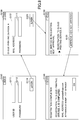
- FIG. 8 is a screen transition diagram of an example of the terminal apparatus 30 in the processing of the use registration according to the first embodiment.
- a registration start screen G110 is displayed on the terminal apparatus 30 by the UI control unit 301 as illustrated in FIG. 8 , for example.
- the UI control unit 301 transmits a login request to the service providing system 10 in step S701.
- the transmitted login request includes the user ID and the password entered in the user ID input field G111 and the password input field G112. That is, the login request includes user information.
- the user information may be issued by the service providing system 10.
- the authenticating unit 101 of the service providing system 10 When receiving the login request, the authenticating unit 101 of the service providing system 10 performs authentication processing based on the user information included in the received login request in step S702. That is, the authenticating unit 101 determines whether the user information included in the login request matches user information registered in advance, to perform the authentication processing, for example.
- the authorizing unit 102 of the service providing system 10 transmits, to the external printing system 40 in step S703, a request for a request token that is in conformity with OAuth. Then, the external printing system 40 transmits (returns) the request token to the service providing system 10.
- the authenticating unit 101 transmits, to the terminal apparatus 30, a notification that represents that the authentication fails.
- the authorizing unit 102 of the service providing system 10 transmits a Uniform Resource Locator (URL) of an authentication screen of the external printing system 40 to the terminal apparatus 30 and redirects the terminal apparatus 30 in step S704.
- a Uniform Resource Locator URL
- an authentication screen G120 of the external printing system 40 is displayed on the terminal apparatus 30 by the UI control unit 301 as illustrated in FIG. 8 , for example.
- the UI control unit 301 transmits a login request to the external printing system 40 in step S705.
- the transmitted login request includes the account ID (e-mail address) and the password entered in the account ID input field G121 and the password input field G122. That is, the login request includes account information.
- the account information may be for using the printing service.
- the authentication processing is performed based on the login request in the external printing system 40.
- the external printing system 40 causes the terminal apparatus 30 to display an authorization confirmation screen G130 as illustrated in FIG. 8 , for example.
- the UI control unit 301 transmits an authorization request to the external printing system 40 in step S706. Then, the external printing system 40 transmits (returns) the authorized request token to the terminal apparatus 30.
- the UI control unit 301 of the terminal apparatus 30 When receiving the authorized request token form the external printing system 40, the UI control unit 301 of the terminal apparatus 30 transmits the received authorized request token to the service providing system 10 in step S707.
- the authorizing unit 102 of the service providing system 10 transmits the received authorized request token to the external printing system 40 in step S708. Then, the external printing system 40 transmits (returns) an access token to the service providing system 10. In this way, the authorization processing is completed so that the service providing system 10 performs, on the external printing system 40, the registration for using the cloud printing service which.
- the registering unit 103 of the service providing system 10 uses the access token obtained in step S708 to perform the registration for using the cloud printing service in step S709. At this time, the registering unit 103 registers the service providing system 10 as an apparatus such as a printer that uses the cloud printing service. That is, the registering unit 103 designates a virtual printer as the apparatus, which uses the cloud printing service, to perform the use registration.
- information on performance (whether the apparatus can perform double face printing, and whether the apparatus can perform color printing, for example) of the apparatus, which uses the cloud printing service, in the external printing system 40, information on performance common in typical printers may be registered as the information on performance of the virtual printer.
- the registering unit 103 of the service providing system 10 causes the cooperation information table 121 to store the user ID and the account ID in association with each other in step S710. That is, the registering unit 103 stores, in the cooperation information table 121, the user ID entered in the user ID input field G111 of the registration start screen G110 and the account ID entered in the account ID input field G121 of the authentication screen G120 of the external printing system 40 in association with each other.
- the registering unit 103 which serves as a use registering unit, stores, in the cooperation information table 121 as a use information storage unit, the user information, included in the use request, and the account information, input in the screen displayed on the terminal apparatus 30 or the image forming apparatus 20 by the printing service, in association with each other. Then, the service providing system 10 causes the terminal apparatus 30 to display a registration completion screen G140 as illustrated in FIG. 8 , for example.
- the use registration is completed so that the user can use the cloud cooperation printing that is provided by the service providing system 10 according to the first embodiment.
- the user who logs in step S701 has already performed the registration for using the cloud cooperation printing (that is, the user ID has been stored in the cooperation information table 121)
- a screen for causing (prompting) the user to confirm whether to perform additional registration may be displayed.
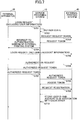
- FIG. 9 is a sequence chart illustrating an example of processing of accumulating the print job according to the first embodiment.
- the print requesting unit 302 of the terminal apparatus 30 transmits a print request to the external printing system 40 in step S901.
- the print request includes printing target data such as document data that the user desires to print, print setting information (setup information) that represents printing settings, and the account ID of the user.
- the printing target data is designated by the user.
- the external printing system 40 When receiving the print request from the terminal apparatus 30, for example, the external printing system 40 creates a print job based on the received print request and transmits, to the service providing system 10, a new job notification that represents that the new print job is created.
- the transmitted new job notification includes user identification information of the user that performs the printing instruction in step S901.
- Arbitrary identification information for identifying the user who instructs the printing between the service providing system 10 and the external printing system 40 may be used as the user identification information.
- the account ID may be used as the user identification information in the first embodiment.
- the list obtaining unit 104 of the service providing system 10 transmits, to the external printing system 40 in step S902, an obtaining request for obtaining a job list that is a list of print jobs of the account ID corresponding to the user identification information, included in the received new job notification, to be identified. Then, the external printing system 40 transmits (returns) the job list to the service providing system 10.
- the job list includes a job ID of each print job and status of each print job, for example.
- the notifying unit 105 of the service providing system 10 transmits, to the external printing system 40 in step S903, a state notification that represents a state of the service providing system 10.
- the state of the service providing system 10 may be "in processing", "being able to print”, or the like.
- the notifying unit 105 may transmit, to the external printing system 40, the state notification that represents "in processing", for example.
- the job obtaining unit 106 of the service providing system 10 transmits, to the external printing system 40 in step S904, an obtaining request for obtaining a print job whose status is "unprocessed" listed in the job list obtained in step S902.
- the external printing system 40 returns (transmits) the print job related to the obtaining request.
- the job obtaining unit 106 obtains the print job from the external printing system 40.
- the job obtaining unit 106 transmits, to the external printing system 40 in step S904, an obtaining request for obtaining the plurality of unprocessed print jobs.
- the print converting unit 107 of the service providing system 10 converts in step S905 print data, included in the print job obtained by the job obtaining unit 106, to data having a data format that can be printed by the image forming apparatus 20.
- the print converting unit 107 does not have to convert the data format.
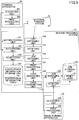
- the code generating unit 108 of the service providing system 10 generates a temporary code in step S906 for causing the image forming apparatus 20 to execute the print job.
- the temporary code becomes invalid when a predetermined time has passed.
- the job managing unit 109 of the service providing system 10 causes the job storage unit 130 to store the print job in association with the temporary code in step S907.
- the job managing unit 109 stores, in the job storage unit 130, the print job obtained by the job obtaining unit 106 in association with the temporary code, which is unique code information, generated by the code generating unit 108.
- the print job created by the cloud printing service is accumulated, in the service providing system 10 according to the first embodiment, in association with the temporary code uniquely.
- the code transmitting unit 110 of the service providing system 10 transmits the temporary code generated by the code generating unit 108 by e-mail in step S908.
- the code transmitting unit 110 may transmit the temporary code to an e-mail address (account ID) included in the print job.
- the code transmitting unit 110 may transmit, to the user of the user ID associated with the account ID included in the print job, the temporary code by e-mail.
- the code transmitting unit 110 may transmit, to the external printing system 40, the temporary code to cause the terminal apparatus 30 to display the temporary code.
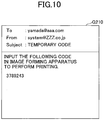
- FIG. 10 is a diagram illustrating an example of the temporary code transmitted to the terminal apparatus 30 by e-mail.
- the temporary code for executing the print job to perform printing by use of the image forming apparatus 20 is displayed in the body of e-mail on the terminal apparatus 30.
- the temporary code may be a character string.
- the user may arbitrarily set the character string to be used.
- the character string may be alphanumeric characters.
- the number of characters may be set by the user arbitrarily.
- the notifying unit 105 of the service providing system 10 transmits, to the external printing system 40 in step S909, a state notification that represents the state of the service providing system 10.
- the notifying unit 105 transmits, to the external printing system 40, the state notification that represents "being able to print", for example.
- the service providing system 10 according to the first embodiment notifies the external printing system 40 that the service providing system 10 is "in processing" during a time period between obtaining the print job and transmitting the temporary code.
- the print job(s) created by the cloud printing service that is provided by the external printing system 40 is accumulated in the service providing system 10 according to the first embodiment. Further, the service providing system 10 according to the first embodiment generates the temporary code for causing the image forming apparatus 20 to print the accumulated print job and notifies the user of the temporary code. Thus, as described later, the user can input the temporary code in the image forming apparatus 20 to execute the print job, associated with the input temporary code, to perform the printing.
- FIG. 11 is a screen transition diagram of an example the image forming apparatus 20 in the processing of executing the printing according to the first embodiment.
- a top screen G310 includes an execution button G311 for executing the job by use of the temporary code.
- the execution button G311 for executing the job by use of the temporary code is pushed by the user in the top screen G310, the UI control unit 201 displays a temporary code screen G320.
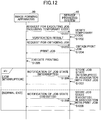
- FIG. 12 is a sequence chart illustrating an example of the processing of executing the printing according to the first embodiment.
- a cancel button G331 is pushed in the screen G330 in printing, the processing of executing the printing is cancelled.
- the UI control unit 201 of the image forming apparatus 20 transmits, to the service providing system 10 in step S1201, a request for executing the job.
- the request for executing the job includes the temporary code input in the temporary code input field G321.
- the verifying unit 111 of the service providing system 10 verifies in step S1202 validity of the temporary code included in the received request for executing the job. That is, the verifying unit 111 verifies whether the print job 131, associated with the temporary code included in the request for executing the job, is stored in the job storage unit 130. Then, the verifying unit 111 transmits (returns) a verification result to the image forming apparatus 20.
- the verifying unit 111 may verify whether a predetermined time has passed after the temporary code is generated, for example. That is the verifying unit 111 may verify whether an expiration date has passed. In a case where the predetermined time has not passed after the temporary code was generated, the verifying unit 111 may determine that the temporary code is valid. In a case where the predetermined time has passed after the temporary code was generated, the verifying unit 111 may determine that the temporary code is not valid.
- the UI control unit 201 of the image forming apparatus 20 transmits, to the service providing system 10 in step S1203, a request for obtaining the job.
- the job managing unit 109 of the service providing system 10 When receiving the request for obtaining the job, the job managing unit 109 of the service providing system 10 obtains, from the job storage unit 130 in step S1204, the print job 131 associated with the temporary code included in the request for executing the job received in step S1201. Then, the job managing unit 109 transmits (returns) the obtained print job 131 to the image forming apparatus 20.
- the job managing unit 109 in response to the print job request designating the temporary code from the image forming apparatus 20 that is coupled to the service providing system 10, the job managing unit 109, which also serves as a job transmitting unit, transmits the print job, associated with the temporary code, stored in the print job storage unit 130 in a case where the verifying unit 111 determines that the temporary code designated by the print job request is valid.
- the job managing unit 109 verifies whether a job state of the print job 131 associated with the temporary code is "executed” or "in executing". In a case where the job state of the print job 131 associated with the temporary code is "executed” or "in executing", the job managing unit 109 does not transmit this print job 131 to the image forming apparatus 20. In other words, the job managing unit 109 transmits at least one print job of the print jobs stored in the job storage unit 130.
- the job execution state of the at least one print job is either an unexecuted state that represents the print job is unexecuted, or an interrupted state that represents execution of the print job is interrupted.
- the print processing unit 202 of the image forming apparatus 20 executes the received print job 131 to print the print data included in the received print job 131 in step S1205. In this way, the print job 131 is executed in the image forming apparatus 20 to print the print data.
- the print processing unit 202 of the image forming apparatus 20 transmits a notification (notification of the job state (in executing)) that represents the print job enters the executing state. Then, when receiving the notification of the job state (in executing), the job managing unit 109 of the service providing system 10 stores the print job 131 in the job storage unit 130 in association with the job state "in executing".
- the print processing unit 202 transmits, to the service providing system 10 in step S1206, a notification (notification of the job state (interrupted)) that represents that the print job 131 enters the interrupted state.
- a notification notification of the job state (interrupted)
- the execution of the print job 131 is stopped.
- the execution of the print job 131 is stopped.
- the job managing unit 109 of the service providing system 10 stores, in the job storage unit 130 in step S1207, the print job 131 obtained in the above step S1204 in association with the job state "interrupted". In this way, the fact that the print job 131 is interrupted is managed.
- the service providing system 10 executes the above steps S1202 to S1205.
- the user can use the other image forming apparatus 20 to execute the same print job 131.
- the user can use another image forming apparatus 20 to execute the same print job 131.
- the print processing unit 202 transmits, to the service providing system 10 in step S1208, a notification (notification of the job state "executed") that represents that the execution of the print job 131 is normally finished.
- the job managing unit 109 of the service providing system 10 stores, in the job storage unit 130 in step S1209, the print job 131 obtained in the above step S1204 in association with the job state "executed". In this way, the fact that the print job 131 is normally finished is managed.
- the job managing unit 109 of the service providing system 10 deletes, from the job storage unit 130, the print job(s) 131 whose job state is "executed” at a predetermined timing, for example.
- the job managing unit 109 may delete, from the job storage unit 130, the print job(s) 131 whose job state is "executed” at regular time intervals.
- the embodiment is not limited to this.
- information relating to a printing completion page may be associated with the print job 131 stored in the job storage unit 130. That is, in the above step S1205, the print processing unit 202 of the image forming apparatus 20 may notify the service providing system 10 of information relating to a printing completion page every time one page of the print data is printed, for example.
- the printing completion page may be a page number of the printed print data.
- the job managing unit 109 transmits (returns) the interrupted print job 131 and the information relating to the printing completion page.
- the print processing unit 202 of the other image forming apparatus 20 can restart the printing. That is, at this time, the print processing unit 202 of the other image forming apparatus 20 can print the print data from the next page of the printing completion page.
- the print processing unit 202 executes the interrupted print job to print the print data from the next page of the printed page that the page information represents.
- the temporary data can be input in the image forming apparatus 20 to obtain and execute the print job accumulated in the service providing system 10.
- the information processing system 1 of the first embodiment it becomes possible to perform printing by the cloud printing service in a desired image forming apparatus 20.
- the information processing system 1 of the first embodiment it becomes possible to perform printing relating to the cloud printing service in the desired image forming apparatus 20. Further, according to the information processing system 1 of the first embodiment, even when the image forming apparatus 20 is replaced due to failure or the like, for example, it is possible to perform printing without re-registering, in the external printing system 40, the image forming apparatus 20 after the replacement.
- a print job 131 to be executed can be selected from print jobs 131 that are associated with the user who logs in from the image forming apparatus 20. Because the second embodiment has a part similar to the first embodiment, descriptions of the second embodiment are omitted as appropriate.
- the print jobs 131 stored in the job storage unit 130 are also associated with the user ID of the user of the terminal apparatus 30 that transmits a print request.
- FIG. 13 is a screen transition diagram of an example of the image forming apparatus 20 in the processing of executing the printing according to the second embodiment.
- a top screen G410 includes (displays) the execution button G311 for executing the job by use of the temporary code and an execution button G411 for executing the job by logging in.
- the execution button G311 for executing the job by use of the temporary code is pushed by the user in the top screen G410, the processing of executing the printing described in the first embodiment is performed.
- the UI control unit 201 displays a user authentication screen G420.
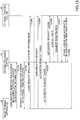
- FIG. 14 is a sequence chart illustrating an example of the processing of executing the printing according to the second embodiment.
- the UI control unit 201 of the image forming apparatus 20 transmits a login request to the service providing system 10 in step S1401.
- the login request includes the user ID and the password entered in the user ID input field G421 and the password input field G422. That is, the login request includes user information.
- the authenticating unit 101 of the service providing system 10 When receiving the login request, the authenticating unit 101 of the service providing system 10 performs authentication processing in step S1402 based on the user information included in the received login request. Then, the authenticating unit 101 transmits (returns) a processing result of the authentication processing to the image forming apparatus 20.
- the UI control unit 201 of the image forming apparatus 20 transmits, to the service providing system 10 in step S1403, an obtaining request for obtaining the job list.
- the transmitted obtaining request includes the user information.
- the job managing unit 109 of the service providing system 10 transmits (returns), to the image forming apparatus 20, a list of print jobs (job list) associated with the user ID included in the received obtaining request.
- the job list includes a job ID and a job name of each print job, for example.
- the image forming apparatus 20 When receiving the job list, the image forming apparatus 20 causes the UI control unit 201 to display a job selection screen G430.
- the job selection screen G430 includes a job list G431 of the print jobs associated with the user ID of the user who has logged in.
- an OK button G432 When an OK button G432 is pushed after a print job is selected from the job list G431 by the user, the UI control unit 201 displays a screen G330 in printing and processing subsequent to step S1404 is executed.
- the UI control unit 201 of the image forming apparatus 20 transmits, to the service providing system 10 in step S1404, an obtaining request for obtaining the print job selected by the user.
- the transmitted obtaining request includes the job ID of the print job selected by the user.
- the job managing unit 109 of the service providing system 10 When receiving the request for obtaining the print job, the job managing unit 109 of the service providing system 10 obtains, from the job storage unit 130 in step S1405, the print job 131 whose job ID is included in the received obtaining request. Then, the job managing unit 109 transmits (returns) the obtained print job 131 to the image forming apparatus 20.
- the print processing unit 202 of the image forming apparatus 20 executes the received print job 131 to print print data included in the received print job 131 in step S1406.
- the print job is executed in the image forming apparatus 20 and the print data is printed.
- the print processing unit 202 transmits, to the service providing system 10 in step S1407, the notification of the job state (interrupted).
- the job managing unit 109 of the service providing system 10 stores, in the job storage unit 130 in step S1408, the print job 131 obtained in the above step S1405 in association with the job state (interrupted). In this way, the fact that the print job 131 is interrupted is managed.
- the print processing unit 202 transmits, to the service providing system 10 in step S1409, the notification of the job state (executed).
- the job managing unit 109 of the service providing system 10 stores, in the job storage unit 130 in step S1410, the print job 131 obtained in the above step S1405 in association with the job state "executed". In this way, the fact that the print job 131 is normally finished is managed.
- a print job selected from the print jobs associated with the user who has logged in to the service providing system 10 from the image forming apparatus 20, can be obtained to execute the obtained print job.
- the user can use a desired image forming apparatus 20 to execute a desired print job to perform printing.
- the user selects a desired cloud printing service from at least one cloud printing service. Thereby, use registration for using the cloud cooperation print is performed. Because the third embodiment has a part similar to the first embodiment, descriptions of the third embodiment are omitted as appropriate.
- the cloud printing services are referred to as a “cloud printing service A (or service A)", a “cloud printing service B (or service B)”, and the like.
- FIG. 15 is a sequence chart illustrating an example of processing of use registration according to the third embodiment.
- the user has obtained the user ID of the service providing system 10 and the account ID of the external printing system 40 in advance.
- the image forming apparatus 20 may be used to newly create the user ID of the service providing system 10.
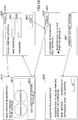
- FIG. 16 is a screen transition diagram of an example of the image forming apparatus 20 in the processing of the use registration according to the third embodiment.
- a registration start screen G510 is displayed on the image forming apparatus 20 by the UI control unit 201 as illustrated in FIG. 16 , for example.
- the registration start screen G510 illustrated in FIG. 16 includes a service selecting field G511 for selecting a cloud printing service that the user uses, and a coupling button G512 for performing use registration for using the cloud printing service selected in the service selecting field G511.
- the user selects a desired cloud printing service from the services in the service selecting field G511, and pushes the coupling button G512. Then, the UI control unit 201 transmits, to the service providing system 10 in step S1501, a registration request for registering the user/service.
- the transmitted registration request includes identification information (external service identification information) for identifying the cloud printing service selected in the service selecting field G511.
- the authenticating unit 101 of the service providing system 10 transmits, to the image forming apparatus 20, a Uniform Resource Locator (URL) of an authorization screen of the external printing system 40 that provides the cloud printing service that is identified by the external service identification information included in the received request and redirects the image forming apparatus 20 in step S1502.
- a Uniform Resource Locator URL
- an authentication screen G520 of the external printing system 40 is displayed on the image forming apparatus 20 by the UI control unit 201 as illustrated in FIG. 16 , for example.
- the external printing system 40 is an external printing system 40 that provides the cloud printing service selected by the user from the services in the service selecting field G511.
- the user pushes a login button G523 after inputting an account ID and a password in an account ID input field G521 and a password input field G522 respectively.
- the UI control unit 201 transmits a login request to the external printing system 40 in step S1503.
- the transmitted login request includes the account ID (e-mail address) and the password entered in the account ID input field G521 and the password input field G522. That is, the login request includes account information.
- the authentication processing is performed based on the login request in the external printing system 40.
- the external printing system 40 causes the image forming apparatus 20 to display an authorization confirmation screen G530 as illustrated in FIG. 16 , for example.
- the UI control unit 201 of the image forming apparatus 20 displays the registration start screen G510 (that is, returns to the registration start screen G510).
- the UI control unit 201 transmits an authorization request to the external printing system 40 in step S1504. Then, the external printing system 40 transmits (returns) the authorized request token to the image forming apparatus 20.
- the UI control unit 201 of the image forming apparatus 20 displays the registration start screen G510 (that is, returns to the registration start screen G510).
- the UI control unit 201 of the image forming apparatus 20 transmits the received authorized request token to the service providing system 10 in step S1505.
- the authorizing unit 102 of the service providing system 10 transmits the received authorized request token to the external printing system 40 in step S1506. Then, the external printing system 40 transmits (returns) an access token to the service providing system 10.
- the registering unit 103 of the service providing system 10 generates a new user ID based on the authentication information obtained from the access token. Then, the registering unit 103 causes the cooperation information table 121 to store the generated user ID. In this way, the authorization processing is completed so that the service providing system 10 performs, on the external printing system 40, the registration for using the cloud printing service which.
- the registering unit 103 of the service providing system 10 uses the access token obtained in step S1506 to perform the registration for using the cloud printing service in step S1507.
- the registering unit 103 of the service providing system 10 causes the cooperation information table 121 to store the user ID and the account ID in association with each other in step S1508. That is, for example, the registering unit 103 stores, in the cooperation information table 121, the newly created user ID and the account ID, input in the account ID input field G521 of the authentication screen G520 of the external printing system 40, in association with each other. Then, the service providing system 10 causes the image forming apparatus 20 to display a registration completion screen G540 illustrated in FIG. 16 , for example.
- the use registration is completed so that the user can use the cloud cooperation printing that is provided by the service providing system 10 according to the third embodiment.
- the service providing system 10 of the third embodiment using the image forming apparatus 20, after selecting a desired cloud printing service from one or more cloud printing services, the user can perform use registration for using the cloud cooperation service.
- a user can select, from print jobs 131 associated with the selected cloud printing service and the user, a print job 131 to be executed.
- print jobs 131 stored in the job storage unit 130 are associated with the user ID of the user of the terminal apparatus 30 that transmits the print request and with the external service identification information on the cloud printing service that creates the print jobs 131.
- FIG. 17 is a screen transition diagram of an example of the image forming apparatus 20 in the processing of executing the printing according to the third embodiment.
- a top screen G610 includes the execution button G311 for executing the job by use of the temporary code, and an execution button G611 for executing the job by using the service A to log in.
- the service A is for executing the print job 131 created by the cloud printing service A.
- the top screen G610 includes an execution button G612 for executing the job by using the service B to log in.
- the service B is for executing the print job 131 created by the cloud printing service B.
- the top screen G610 further includes a user/service registration button G613.
- the top screen G610 may include an execution button for each cloud printing service, provided by the external printing system, such as "an execution button for executing a job by using a service C to log in” and “an execution button for executing a job by using a service D to log in”, for example.
- the UI control unit 201 displays a user authentication screen G620.
- the execution button G611, for executing the job by using the service A to log in is pushed.
- the user/service registration button G613 is pushed, the UI control unit 201 displays the registration start screen G510 illustrated in FIG. 16 .
- FIG. 18 is a sequence chart illustrating an example of the processing of executing the printing according to the third embodiment.
- the UI control unit 201 of the image forming apparatus 20 transmits a login request to the service providing system 10 in step S1801.
- the login request includes the user ID and the password entered in the user ID input field G621 and the password input field G622. That is, the login request includes user information.
- the login request also includes external service identification information on the cloud printing service A.
- the authenticating unit 101 of the service providing system 10 When receiving the login request, the authenticating unit 101 of the service providing system 10 performs authentication processing based on the user information included in the received login request in step S1802. Then, the authenticating unit 101 transmits (returns) a processing result of the authentication processing to the image forming apparatus 20.
- the UI control unit 201 of the image forming apparatus 20 transmits, to the service providing system 10 in step S1803, an obtaining request for obtaining the job list.
- the transmitted obtaining request includes the user information.
- the job managing unit 109 of the service providing system 10 transmits (returns), to the image forming apparatus 20, the list of print jobs (job list) associated with the user ID included in the received obtaining request and with the external service identification information included in the login request received in the above step S1801.
- the job list includes a job ID and a job name of each print job, for example.
- the image forming apparatus 20 When receiving the job list, the image forming apparatus 20 causes the UI control unit 201 to display a job selection screen G630.
- the job selection screen G630 includes a job list G631 of the print jobs associated with the user ID of the user who has logged in and with the external service identification information on the cloud printing service A.
- an OK button G632 When an OK button G632 is pushed after a print job is selected from the print jobs of the job list G631 by the user, the UI control unit 201 displays the screen G330 in printing and processing subsequent to step S1804 is executed. Because processing in steps S1804 to S1810 is similar to the processing in steps S1404 to S1410 of FIG. 14 , descriptions of the processing in steps S1804 to S1810 are omitted.
- a print job selected from the print jobs associated with a user who has logged in to the service providing system 10 and associated with a cloud printing service that the user selects, can be obtained to execute the obtained print job.
- the user can use a desired image forming apparatus 20 to execute a desired print job of a desired cloud printing service to perform printing.
- a fourth embodiment will be described.
- other services such as a storage service and an e-mail service may also be provided as cloud services, for example.
- the other services such as the storage service and the e-mail service may be authorized in the authorization confirmation screen G130 illustrated in FIG. 8 , for example.
- the fourth embodiment a case will be described as an example in which the user uses a service (e-mail service) that transmits image data, generated by using the image forming apparatus 20 to scan one or more documents, by e-mail. Because the fourth embodiment has a part similar to the third embodiment, descriptions of the fourth embodiment are omitted as appropriate.
- e-mail service e-mail service
- FIG. 19 is a block diagram illustrating an example of the functional configuration of the information processing system 1 according to the fourth embodiment.
- the image forming apparatus 20 includes a scan processing unit 203. These functional units (elements) are actualized by processing that one or more programs, installed in the image forming apparatus 20, cause the CPU 211 to execute.
- the scan processing unit 203 uses the scanner 26 to scan one or more documents to generate image data based on parameters (a setup of reading resolution and a setup of an output file format, for example) included in a scan job 132 obtained from the service providing system 10.
- the service providing system 10 includes an image transmitting unit 112.
- the image transmitting unit 112 is actualized by processing that one or more programs, installed in the service providing system 10, cause the CPU 16 to execute.
- the image transmitting unit 112 transmits the image data, generated by the image forming apparatus 20 scanning one or more documents, to a user of a user ID associated with an account ID included in the scan job 132 by e-mail, for example. Further, the image transmitting unit 112 uploads the image data, generated by the image forming apparatus 20 scanning the documents, to a storage designated in the scan job 132, for example.
- the scan jobs 132 which are associated with the user ID and with the external service identification information, are stored in the job storage unit 130 of the service providing system 10.
- the scan job 132 may be created by the job managing unit 109 in advance for each external service identification information and user ID.
- the scan job(s) 132 may be obtained from the external printing system 40, which provides a service using a scan.
- the user logs in to the service providing system 10 from the image forming apparatus 20, performs processing of executing a scan, and uses the e-mail service.
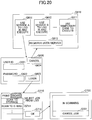
- FIG. 20 is a screen transition diagram of an example the image forming apparatus 20 in the processing of executing the scan according to the fourth embodiment.
- the top screen G610 and the user authentication screen G620 illustrated in FIG. 20 are similar to the top screen G610 and the user authentication screen G620 of the third embodiment.
- the execution button G611 for executing the job by using the service A to log in, is pushed in top screen G610.
- FIG. 21 is a sequence chart illustrating an example of the processing of executing the scan according to the fourth embodiment.
- the UI control unit 201 of the image forming apparatus 20 transmits a login request to the service providing system 10 in step S2101.
- the login request includes the user ID and the password entered in the user ID input field G621 and the password input field G622. That is, the login request includes user information.
- the login request also includes external service identification information on the cloud printing service A.
- the authenticating unit 101 of the service providing system 10 When receiving the login request, the authenticating unit 101 of the service providing system 10 performs authentication processing based on the user information included in the received login request in step S2102. Then, the authenticating unit 101 transmits (returns) a processing result of the authentication processing to the image forming apparatus 20.
- the UI control unit 201 of the image forming apparatus 20 transmits, to the service providing system 10 in step S2103, an obtaining request for obtaining a job list.
- the transmitted obtaining request includes the user information.
- the job managing unit 109 of the service providing system 10 transmits (returns), to the image forming apparatus 20, a list of scan jobs (job list) associated with the user ID included in the received obtaining request and with the external service identification information included in the login request received in the above step S2102.
- the job list includes a job ID and a job name of each scan job 132, for example.
- the image forming apparatus 20 When receiving the job list, the image forming apparatus 20 causes the UI control unit 201 to display a job selection screen G710 illustrated in FIG. 20 .
- the job selection screen G710 illustrated in FIG. 20 includes a job list G711 of the scan jobs associated with the user ID of the user who has logged in and with the external service identification information on the cloud printing service A.
- an OK button G712 When an OK button G712 is pushed after a scan job is selected from the job list G711 by the user, the UI control unit 201 displays a screen G720 in scanning as illustrated in FIG. 20 and processing subsequent to step S2104 is executed.
- a cancel button G721 is pushed in the screen G720 in scanning, the processing of executing the scan is cancelled.
- the UI control unit 201 of the image forming apparatus 20 transmits, to the service providing system 10 in step S2104, an obtaining request for obtaining the scan job selected by the user.
- the transmitted obtaining request includes the job ID of the scan job selected by the user.
- the job managing unit 109 of the service providing system 10 When receiving the request for obtaining the scan job, the job managing unit 109 of the service providing system 10 obtains, from the job storage unit 130 in step S2105, the scan job 132 whose job ID is included in the received obtaining request. Then, the job managing unit 109 transmits (returns) the obtained scan job 132 to the image forming apparatus 20. In other words, the job managing unit 109 transmits, to the image forming apparatus 20 that is the request source, the scan job that is associated with the user information, included in the scan job request, and with the identification information on the service that provides the scan service.
- the scan processing unit 203 of the image forming apparatus 20 executes the received scan job 132 in step S2106. That is, based on the parameters included in the received scan job 132, the scan processing unit 203 uses the scanner 26 to scan one or more documents to generate image data.
- the scan processing unit 203 of the image forming apparatus 20 transmits, to the service providing system 10 in step S2107, the image data generated by executing the scan job 132.
- the image transmitting unit 112 of the service providing system 10 creates e-mail to which the received image data is attached. Then, the image transmitting unit 112 transmits in step S2108 the created e-mail to the user of the user ID associated with the account ID included in the scan job 132 obtained in step S2105.
- the e-mail address of the user which is the transmission destination, may be managed, in a predetermined data table or the like stored in the service providing system 10, in association with the user ID, for example.
- the scan job 132 may include the e-mail address of the transmission destination.
- the image data, generated by scanning at the image forming apparatus 20, is transmitted by e-mail.
- the image transmitting unit 112 may upload the image data, received from the image forming apparatus 20, to a storage included in the scan job 132 obtained in step S2105.
- the user can similarly use other services such as a storage service and an e-mail service, for example, in addition to the cloud printing service.
- the above described system according to the embodiments may be realized by a device memory, which stores at least one program, and at least one processor, which executes the at least one program to execute processing for providing a service as described in the embodiments.
- the service providing system 10 may be realized by the device memory and the at least one processor, for example.
- the device memory and the at least one processor can implement functions as described in the embodiments and may be implemented by hardware elements as described in the embodiments.
- the at least one program may be stored in a non-transitory recording medium.
- the present disclosure can be implemented in any convenient form, for example using dedicated hardware, or a mixture of dedicated hardware and software.
- the present disclosure may be implemented as computer software implemented by one or more networked processing apparatuses.
- the network can comprise any conventional terrestrial or wireless communications network, such as the Internet.
- the processing apparatuses can compromise any suitably programmed apparatuses such as a general purpose computer, personal digital assistant, mobile telephone (such as a WAP or 3G-compliant phone) and so on. Because the present disclosure can be implemented as software, each and every aspect of the present disclosure thus encompasses computer software implementable on a programmable device.
- the computer software can be provided to the programmable device using any storage medium for storing processor readable code such as a floppy disk, hard disk, CD ROM, magnetic tape device or solid state memory device.
- the hardware platform includes any desired kind of hardware resources including, for example, a central processing unit (CPU), a random access memory (RAM), and a hard disk drive (HDD).
- the CPU may be implemented by any desired kind of any desired number of processor.
- the CPU may be implemented by one or more processors.
- the RAM may be implemented by any desired kind of volatile or non-volatile memory.
- the HDD may be implemented by any desired kind of non-volatile memory capable of storing a large amount of data.
- the hardware resources may additionally include an input device, an output device, or a network device, depending on the type of the apparatus. Alternatively, the HDD may be provided outside of the apparatus as long as the HDD is accessible.
- the CPU such as a cache memory of the CPU
- the RAM may function as a physical memory or a primary memory of the apparatus, while the HDD may function as a secondary memory of the apparatus.
Landscapes
- Engineering & Computer Science (AREA)
- Theoretical Computer Science (AREA)
- General Engineering & Computer Science (AREA)
- Physics & Mathematics (AREA)
- General Physics & Mathematics (AREA)
- Human Computer Interaction (AREA)
- Multimedia (AREA)
- Signal Processing (AREA)
- Computer Networks & Wireless Communication (AREA)
- Computing Systems (AREA)
- Computer Security & Cryptography (AREA)
- Facsimiles In General (AREA)
- Accessory Devices And Overall Control Thereof (AREA)
Abstract
Description
- The disclosures herein generally relate to a service providing system, an information processing method, a non-transitory recording medium, and a program.
- Recently, various services are provided according to advance in technology of cloud computing and the like. For example, a technique, in which an image forming apparatus cooperates with a cloud service, is known in the related art. In the technique, printing target data such as document data, transmitted to the cloud service from a personal computer (PC), a smartphone, or the like, is printed by the image forming apparatus.
- For example, Japanese Unexamined Patent Application Publication No.
2013-242848 - One embodiment of the present disclosure has an object to provide a printing service that is in cooperation with a cloud printing service.
- It is a general object of at least one embodiment of the present disclosure to provide a service providing system, an information processing method, a non-transitory recording medium, and a program that substantially obviate one or more problems caused by the limitations and disadvantages of the related art.
- According to one aspect of the present disclosure, there is provided a service providing system for providing a service that is in cooperation with a printing service that is provided by an external printing system. The service providing system includes a job obtaining unit configured, when receiving from the printing system a notification representing that a print job is created by the printing service, to obtain the print job from the printing system; a job managing unit configured to store, in a job storage unit, the print job obtained by the job obtaining unit; and a job transmitting unit configured to transmit the print job stored in the job storage unit in response to a print job request from an image forming apparatus that is coupled to the service providing system via a network.
-
-
FIG. 1 is a block diagram illustrating an example of a configuration of an information processing system according to a first embodiment; -
FIG. 2 is a diagram that describes cloud cooperation printing according to the first embodiment; -
FIG. 3 is a block diagram illustrating an example of a hardware configuration of a computer according to the first embodiment; -
FIG. 4 is a block diagram illustrating an example of a hardware configuration of an image forming apparatus according to the first embodiment; -
FIG. 5 is a block diagram illustrating an example of a functional configuration of the information processing system according to the first embodiment; -
FIG. 6 is a table illustrating an example of a cooperation information table according to the first embodiment; -
FIG. 7 is a sequence chart illustrating an example of processing of use registration according to the first embodiment; -
FIG. 8 is a screen transition diagram of an example of a terminal apparatus in the processing of the use registration according to the first embodiment; -
FIG. 9 is a sequence chart illustrating an example of processing of accumulating a print job according to the first embodiment; -
FIG. 10 is a diagram illustrating an example of a temporary code according to the first embodiment; -
FIG. 11 is a screen transition diagram of an example of the image forming apparatus in processing of executing printing according to the first embodiment; -
FIG. 12 is a sequence chart illustrating an example of the processing of executing the printing according to the first embodiment; -
FIG. 13 is a screen transition diagram of an example of the image forming apparatus in processing of executing printing according to a second embodiment; -
FIG. 14 is a sequence chart illustrating an example of the processing of executing the printing according to the second embodiment; -
FIG. 15 is a sequence chart illustrating an example of processing of use registration according to a third embodiment; -
FIG. 16 is a screen transition diagram of an example of the image forming apparatus in the processing of the use registration according to the third embodiment; -
FIG. 17 is a screen transition diagram of an example of the image forming apparatus in processing of executing printing according to the third embodiment; -
FIG. 18 is a sequence chart illustrating an example of the processing of executing the printing according to the third embodiment; -
FIG. 19 is a block diagram illustrating an example of a functional configuration of an information processing system according to a fourth embodiment; -
FIG. 20 is a screen transition diagram of an example of the image forming apparatus in processing of executing a scan according to the fourth embodiment; and -
FIG. 21 is a sequence chart illustrating an example of the processing of executing the scan according to the fourth embodiment. - In the following, embodiments of the present disclosure will be described in detail with reference to the accompanying drawings.
- A system configuration of an
information processing system 1 according to a first embodiment will be described with reference toFIG. 1. FIG. 1 is a block diagram illustrating an example of the system configuration of theinformation processing system 1 according to the first embodiment. - The
information processing system 1 illustrated inFIG. 1 includes a service providing environment E1, a user environment E2, and anexternal printing system 40 that are coupled with each other in a communicative manner via a wide-area network N1 such as the INTERNET. - The service providing environment E1 is a system environment that provides, via the network N1, a predetermined service such as a cloud service that is in cooperation with an external service. Although the cloud service is described as a specific example of the external service in the first embodiment, the embodiment is not limited to this. For example, the embodiment may be applicable to a service provided by an application service provider (ASP) and various services that are provided through the network N1 such as a Web service.
- The service providing environment E1 includes a
service providing system 10 realized by one or more information processing apparatuses. Theservice providing system 10 provides the predetermined service via the network N1. - For example, the
service providing system 10 provides a printing service (cloud cooperation printing service) that is in cooperation with a cloud service (cloud printing service) that is provided by theexternal printing system 40, which will be described later. Theservice providing system 10 according to the first embodiment provides the cloud cooperation printing service, which may be simply referred to as the "cloud cooperation printing" hereinafter. - Here, all or part of the
service providing system 10 may be installed in the user environment E2. That is, the user environment E2 may include (contain) all or part of one or more information processing apparatuses that structure theservice providing system 10. - The user environment E2 is a system environment for one or more users who use an
image forming apparatus 20, for example. In the user environment E2, one or moreimage forming apparatuses 20 and one or moreterminal apparatuses 30 are coupled in a communicative manner via a network N2 such as a Local Area Network (LAN), for example. - The
image forming apparatus 20 according to the first embodiment is an apparatus that has a printing function. For example, theimage forming apparatus 20 may be a Multifunction Peripheral (MFP) that has various functions including a copying function, a scanning function, a faxing (FAX) communication function, and the like in addition to the printing function. - The
terminal apparatus 30 is an apparatus such as a personal computer (PC) and a smartphone that transmits, to theexternal printing system 40, a print request by the cloud printing service in response to a print instruction from the user. - The
external printing system 40 is a computer system that provides the cloud printing service via the network N1. For example, the cloud printing service is a service to transmit, to an apparatus such as a printer registered in advance, a print job (a unit of a job to be executed by a computer) based on the print request transmitted from theterminal apparatus 30 and causes the apparatus to print (execute) the print job. - Here, the configuration of the
information processing system 1 illustrated inFIG. 1 is an example. Theinformation processing system 1 may have another configuration. For example, the user environment E2 does not have to include theterminal apparatus 30. Further, theterminal apparatus 30 may be coupled to the network N1. - The cloud cooperation printing that is provided by the
service providing system 10 according to the first embodiment will be described with reference toFIG. 2. FIG. 2 is a diagram that describes the cloud cooperation printing according to the first embodiment. In the descriptions ofFIG. 2 , it is assumed that registration and the like have been completed so that the user can use the cloud printing service. - First, the
terminal apparatus 30 instructs printing in an application or the like installed in theterminal apparatus 30 to transmit, to theexternal printing system 40, a print request including printing target data and the like in step S1. Here, the printing target data is data to be printed. For example, the print targeting data may be document data, image data, or the like. - When receiving the print request from the
terminal apparatus 30, theexternal printing system 40 transmits, to theservice providing system 10 in step S2, a print job based on the received print request. - Next, when receiving the print job from the
external printing system 40, theservice providing system 10 stores the received print job in step S3. In this way, theservice providing system 10 accumulates the print job received from theexternal printing system 40. - The
image forming apparatus 20 obtains the print job accumulated in theservice providing system 10 in response to an operation of the user in step S4. Theimage forming apparatus 20 prints the print data included in the print job in step S5. In this way, the user can cause the desiredimage forming apparatus 20 to perform the printing. - That is, for example, the user can use the image forming apparatus 20-1 to obtain the print job from the
service providing system 10 to perform printing. The user can also use the image forming apparatus 20-2 to obtain the print job from theservice providing system 10 to perform printing. In this way, according to the cloud cooperation printing that is provided by theservice providing system 10 of the first embodiment, the user can use a desiredimage forming apparatus 20 to perform printing by the cloud printing service that is provided by theexternal printing system 40. - A hardware configuration of the
service providing system 10 according to the first embodiment will be described with reference toFIG. 3. FIG. 3 is a block diagram illustrating an example of the hardware configuration of acomputer 500 according to the first embodiment. - One or more information processing apparatuses realizing the
service providing system 10 according to the first embodiment are realized by thecomputer 500 having the hardware configuration illustrated inFIG. 3 . Here, theterminal apparatus 30 is similarly realized by thecomputer 500 illustrated inFIG. 3 . - The
computer 500 illustrated inFIG. 3 includes aninput device 11, adisplay device 12, an external I/F 13, and a Random Access Memory (RAM) 14. Further, thecomputer 500 includes a Read Only Memory (ROM) 15, a Central Processing Unit (CPU) 16, a communication I/F 17, and a Hard Disk Drive (HDD) 18. These hardware elements are coupled with each other via a bus B. - The
input device 11 includes a keyboard, a mouse, a touch panel, and the like. The user can use theinput device 11 to input various operation signals. Thedisplay device 12 includes a display or the like to display a processing result by thecomputer 500. Here, at least one of theinput device 11 and thedisplay device 12 may be coupled to the bus B to use only when the at least one of theinput device 11 and thedisplay device 12 are necessary. - The communication I/
F 17 is an interface that couples thecomputer 500 to the network N1. With this configuration, thecomputer 500 can perform data communication via the communication I/F 17. - The
HDD 18 is a non-volatile storage device that stores one or more programs and/or data. The programs and/or data stored in theHDD 18 may include an operating system (OS), which is basic software for controlling theentire computer 500, application software that provides various functions in the OS, and so on. - The
computer 500 may use a drive device using a flash memory (e.g., a solid state drive (SSD)) as a memory medium instead of theHDD 18. Further, theHDD 18 manages the stored programs and/or data using a predetermined file system, a DB, and/or the like. - The external I/
F 13 is an interface with an external device. The external device may be arecording medium 13a or the like. With this configuration, thecomputer 500 can read information (data) from therecording medium 13a and/or write information (data) on therecording medium 13a through the external I/F 13. Therecording medium 13a may be a flexible disk, a CD, a DVD, an SD memory card, a USB memory, or the like. - The
ROM 15 is a non-volatile semiconductor memory that can hold (store) programs and/or data even when a power source is powered off. TheROM 15 stores programs and/or data such as a basic input/output system (BIOS), an OS setup, and a network setup, which are executed when thecomputer 500 is activated. TheRAM 14 is a volatile semiconductor memory that temporarily holds (stores) the programs and/or the data. - The
CPU 16 reads, from the storage device such as theROM 15 and theHDD 18, the program(s) and/or the data onto theRAM 14 to execute processing. TheCPU 16 is an arithmetic device that actualizes control and functions of theentire computer 500 by executing the processing. - One or more information processing apparatuses actualizing the
service providing system 10 according to the first embodiment have the hardware configuration of thecomputer 500 illustrated inFIG. 3 to actualize, various kinds of processing, which will be described later. Similarly, theterminal apparatus 30 according to the first embodiment has the hardware configuration of thecomputer 500 illustrated inFIG. 3 to actualize, various kinds of processing, which will be described later. - A hardware configuration of the
image forming apparatus 20 according to the first embodiment will be described with reference toFIG. 4 .
FIG. 4 is a block diagram illustrating an example of a hardware configuration of theimage forming apparatus 20 according to the first embodiment. - The
image forming apparatus 20 illustrated inFIG. 4 includes acontroller 21, anoperation panel 22, an external I/F 23, a communication I/F 24, aprinter 25, and ascanner 26. Further, thecontroller 21 includes aCPU 211, aRAM 212, aROM 213, aNVRAM 214, and aHDD 215. - The
ROM 213 stores various programs and/or data. TheRAM 212 temporarily holds (stores) programs and/or data. TheNVRAM 214 stores setting information (setup information) and the like, for example. TheHDD 215 stores various programs and/or data. - The
CPU 211 reads the program(s), the data, the setting information, or the like onto theRAM 212 from theROM 213, theNVRAM 214, theHDD 215, or the like to execute the processing. Thereby, theCPU 211 actualizes control and functions of the entireimage forming apparatus 20. - The
operation panel 22 includes an input unit that receives input from a user and a display unit that displays data, an image, and/or the like. The external I/F 23 is an interface with an external device. Arecording medium 23a or the like may be the external device. With this configuration, theimage forming apparatus 20 can read and/or write information (data) from and/or on therecording medium 23a via the external I/F 23. For example, an IC card, a flexible disk, a CD, a DVD, an SD memory card, a USB memory or the like may be therecording medium 23a. - The communication I/
F 24 is an interface that couples theimage forming apparatus 20 to the network N2. With this configuration, theimage forming apparatus 20 can perform data communication via the communication I/F 24. - The
printer 25 is a printing device that prints print data on a conveyed object. Here, the conveyed object is not limited to a sheet (paper). For example, the conveyed object may be an OHP sheet, a plastic film, copper foil, or the like. Thescanner 26 is a reading device that reads one or more documents to generate image data. - The
image forming apparatus 20 according to the first embodiment has the hardware configuration illustrated inFIG. 4 to realize, various kinds of processing, which will be described later. - A functional configuration of the
information processing system 1 according to the first embodiment will be described with reference toFIG. 5. FIG. 5 is a block diagram illustrating an example of the functional configuration of theinformation processing system 1 according to the first embodiment. - The
terminal apparatus 30 includes aUI control unit 301 and aprint requesting unit 302. These functional units (elements) are actualized by processing that one or more programs, installed in theterminal apparatus 30, cause theCPU 16 to execute. - The
UI control unit 301 causes thedisplay device 12 to display various screen. Further, theUI control unit 301 receives various operations that the user inputs to theinput device 11. - The
print requesting unit 302 transmits, to theexternal printing system 40, a print request including printing target data and the like in response to the operation of the user received by theUI control unit 301. - The
image forming apparatus 20 includes aUI control unit 201 and aprint processing unit 202. These functional units (elements) are actualized by processing that one or more programs, installed in theimage forming apparatus 20, cause theCPU 211 to execute. - The
UI control unit 201 causes theoperation panel 22 to display various screen. Further, theUI control unit 201 receives various operations that the user inputs to the various screens displayed on theoperation panel 22. - The
print processing unit 202 causes theprinter 25 to print the print data included in the print job obtained from theservice providing system 10. - The
service providing system 10 includes anauthenticating unit 101, an authorizingunit 102, a registeringunit 103, alist obtaining unit 104, a notifyingunit 105, and ajob obtaining unit 106. Further, theservice providing system 10 includes aprint converting unit 107, acode generating unit 108, ajob managing unit 109, acode transmitting unit 110, and averifying unit 111. These functional units (elements) are actualized by processing that one or more programs, installed in theservice providing system 10, cause theCPU 16 to execute. - Moreover, the
service providing system 10 includes a cooperationinformation storage unit 120 and ajob storage unit 130. TheHDD 18 may be used to actualize these storage units. A storage device or the like that is coupled to theservice providing system 10 via the network may be used to realize at least one of the cooperationinformation storage unit 120 and thejob storage unit 130. - The authenticating
unit 101 performs authentication processing for authenticating the user. For example, the authenticatingunit 101 performs the authentication processing in a case where the user uses theterminal apparatus 30 to logs in to theservice providing system 10. - The authorizing
unit 102 performs authorization processing in conformity with OAuth between theexternal printing system 40 and theservice providing system 10. For example, when the user uses theterminal apparatus 30 to perform use registration for using the cloud cooperation printing, the authorizingunit 102 performs the authorization processing for performing the registration for using the cloud printing service. - When the authorization processing is performed by the authorizing
unit 102, the registeringunit 103 performs, on theexternal printing system 40, the registration for using the cloud printing service. - When performing the registration for using the cloud printing service, the registering
unit 103 causes the cooperation information table 121 to store a user ID, which is an example of identification information for identifying a user in theservice providing system 10, and an account ID, which is an example of identification information for identifying the user in theexternal printing system 40, in association with each other. In this way, the user ID in theservice providing system 10 is associated with the account ID in theexternal printing system 40 to perform the registration for using the cloud cooperation service. - Here, the account ID is information for identifying the user in
external printing system 40. For example, an e-mail address may be the account ID. However, the account ID is not limited to the e-mail address. For example, a telephone number, an arbitrary character string configured with alphanumeric characters, or the like may be used. - The
list obtaining unit 104 obtains, in response to a notification from theexternal printing system 40, a list of print jobs (referred to as "job list" hereinafter) from theexternal printing system 40. For example, the job list includes, for each job, a job ID for identifying a print job uniquely and status of the print job (such as "printed" and "unprocessed (unexecuted)", for example). - The notifying
unit 105 notifies theexternal printing system 40 of a state of the service providing system 10 (such as "in processing" and "being able to print", for example). - The
job obtaining unit 106 transmits, to theexternal printing system 40, an obtaining request for obtaining at least one print job whose status is "unprocessed" among the job list obtained by thelist obtaining unit 104. In other words, thejob obtaining unit 106 obtains at least one unexecuted print job listed in the job list. - The
print converting unit 107 converts, as needed, the print data included in the print job obtained by thejob obtaining unit 106 to data having a data format that can be printed by theimage forming apparatus 20. - The
code generating unit 108 generates a temporary code for causing theimage forming apparatus 20 to execute the print job. Here, thecode generating unit 108 generates the temporary code, which is not overlapped with temporary codes that are stored in thejob storage unit 130 in association with theprint jobs 131, which will be described later. - The
job managing unit 109 causes thejob storage unit 130 to store the print job obtained by thejob obtaining unit 106 or the print job having print data converted by theprint converting unit 107 in association with the temporary code generated by thecode generating unit 108. - The
code transmitting unit 110 transmits the temporary code, generated by thecode generating unit 108, to a predetermined e-mail address, for example. In other words, thecode transmitting unit 110 serves as an e-mail transmitting unit that transmits the temporary code to an e-mail address designated in advance. - The verifying
unit 111 verifies validity (effectiveness) of the temporary code input for executing the print job in theimage forming apparatus 20. That is, the verifyingunit 111 verifies whether theprint job 131 associated with the temporary code input in theimage forming apparatus 20 is stored in thejob storage unit 130. - The
job storage unit 130 stores theprint job 131 associated with the temporary code. Further, theprint job 131 is associated with a job state that represents an execution state of theprint job 131. For example, the job state may be "unexecuted", "in executing", "interrupted", and "executed". It should be noted that thejob storage unit 130 can store a plurality ofprint jobs 131 each of which is associated with a temporary code and a job state. Further, the print job may be associated with a user ID of a user of theterminal apparatus 30 that transmits a print request. - The cooperation
information storage unit 120 stores a cooperation information table 121. A data configuration of the cooperation information table 121 will be described with reference toFIG. 6. FIG. 6 is a table illustrating an example of the cooperation information table 121 according to the first embodiment. - The cooperation information table 121 illustrated in
FIG. 6 includes user IDs and account IDs as data items. As described above, the user ID is identification information for identifying the user in theservice providing system 10. The account ID is identification information for identifying the user in theexternal printing system 40. The user IDs are associated with the respective account IDs in theservice providing system 10. Here, a plurality of account IDs may be associated with one user ID in the cooperation information table 121. - Details of processing of the
information processing system 1 according to the first embodiment will be described. - Processing of use registration in which the user uses the
terminal apparatus 30 and performs registration for using the cloud cooperation printing will be described with reference toFIG. 7. FIG. 7 is a sequence chart illustrating an example of processing of use registration according to the first embodiment. Here, it is assumed that the user has obtained the user ID of theservice providing system 10 and the account ID of theexternal printing system 40 in advance. - In the following, a set (combination) of a user ID and a password with respect to the user ID is referred to as "user information", and a set (combination) of an account ID and a password with respect to the account ID is referred to as "account information". In other words, the user information is authentication information with respect to the
service providing system 10 and the account information is authentication information with respect to theexternal printing system 40. -
FIG. 8 is a screen transition diagram of an example of theterminal apparatus 30 in the processing of the use registration according to the first embodiment. First, a registration start screen G110 is displayed on theterminal apparatus 30 by theUI control unit 301 as illustrated inFIG. 8 , for example. At this time, when a login button G113 is pushed after a user ID and a password are respectively input in a user ID input field G111 and a password input field G112, theUI control unit 301 transmits a login request to theservice providing system 10 in step S701. Here, the transmitted login request includes the user ID and the password entered in the user ID input field G111 and the password input field G112. That is, the login request includes user information. The user information may be issued by theservice providing system 10. - When receiving the login request, the authenticating
unit 101 of theservice providing system 10 performs authentication processing based on the user information included in the received login request in step S702. That is, the authenticatingunit 101 determines whether the user information included in the login request matches user information registered in advance, to perform the authentication processing, for example. - In a case where a processing result of the authentication processing by the authenticating
unit 101 is successful, the authorizingunit 102 of theservice providing system 10 transmits, to theexternal printing system 40 in step S703, a request for a request token that is in conformity with OAuth. Then, theexternal printing system 40 transmits (returns) the request token to theservice providing system 10. - In a case where a processing result of the authentication processing by the authenticating
unit 101 is unsuccessful, the authenticatingunit 101 transmits, to theterminal apparatus 30, a notification that represents that the authentication fails. - Next, when receiving the request token, the authorizing
unit 102 of theservice providing system 10 transmits a Uniform Resource Locator (URL) of an authentication screen of theexternal printing system 40 to theterminal apparatus 30 and redirects theterminal apparatus 30 in step S704. Thus, an authentication screen G120 of theexternal printing system 40 is displayed on theterminal apparatus 30 by theUI control unit 301 as illustrated inFIG. 8 , for example. - At this time, when a login button G123 is pushed after an account ID and a password are respectively input in an account ID input field G121 and a password input field G122, the
UI control unit 301 transmits a login request to theexternal printing system 40 in step S705. Here, the transmitted login request includes the account ID (e-mail address) and the password entered in the account ID input field G121 and the password input field G122. That is, the login request includes account information. The account information may be for using the printing service. - Then, the authentication processing is performed based on the login request in the
external printing system 40. In a case where a processing result of the authentication processing is successful, theexternal printing system 40 causes theterminal apparatus 30 to display an authorization confirmation screen G130 as illustrated inFIG. 8 , for example. - When an authorization button G131 is pushed at this time, the
UI control unit 301 transmits an authorization request to theexternal printing system 40 in step S706. Then, theexternal printing system 40 transmits (returns) the authorized request token to theterminal apparatus 30. - When receiving the authorized request token form the
external printing system 40, theUI control unit 301 of theterminal apparatus 30 transmits the received authorized request token to theservice providing system 10 in step S707. - When receiving the authorized request token, the authorizing
unit 102 of theservice providing system 10 transmits the received authorized request token to theexternal printing system 40 in step S708. Then, theexternal printing system 40 transmits (returns) an access token to theservice providing system 10. In this way, the authorization processing is completed so that theservice providing system 10 performs, on theexternal printing system 40, the registration for using the cloud printing service which. - The registering
unit 103 of theservice providing system 10 uses the access token obtained in step S708 to perform the registration for using the cloud printing service in step S709. At this time, the registeringunit 103 registers theservice providing system 10 as an apparatus such as a printer that uses the cloud printing service. That is, the registeringunit 103 designates a virtual printer as the apparatus, which uses the cloud printing service, to perform the use registration. - If it is required to register information on performance (whether the apparatus can perform double face printing, and whether the apparatus can perform color printing, for example) of the apparatus, which uses the cloud printing service, in the
external printing system 40, information on performance common in typical printers may be registered as the information on performance of the virtual printer. - Next, the registering
unit 103 of theservice providing system 10 causes the cooperation information table 121 to store the user ID and the account ID in association with each other in step S710. That is, the registeringunit 103 stores, in the cooperation information table 121, the user ID entered in the user ID input field G111 of the registration start screen G110 and the account ID entered in the account ID input field G121 of the authentication screen G120 of theexternal printing system 40 in association with each other. In other words, in response to the use request from theterminal apparatus 30 or theimage forming apparatus 20, the registeringunit 103, which serves as a use registering unit, stores, in the cooperation information table 121 as a use information storage unit, the user information, included in the use request, and the account information, input in the screen displayed on theterminal apparatus 30 or theimage forming apparatus 20 by the printing service, in association with each other. Then, theservice providing system 10 causes theterminal apparatus 30 to display a registration completion screen G140 as illustrated inFIG. 8 , for example. - As described above, the use registration is completed so that the user can use the cloud cooperation printing that is provided by the
service providing system 10 according to the first embodiment. Here, if the user who logs in step S701 has already performed the registration for using the cloud cooperation printing (that is, the user ID has been stored in the cooperation information table 121), a screen for causing (prompting) the user to confirm whether to perform additional registration may be displayed. - Processing in which the user uses the
terminal apparatus 30 to perform printing using the cloud printing service and to accumulate the print job in theservice providing system 10 will be described with reference toFIG. 9. FIG. 9 is a sequence chart illustrating an example of processing of accumulating the print job according to the first embodiment. - First, when the
UI control unit 301 receives a printing instruction from the user, theprint requesting unit 302 of theterminal apparatus 30 transmits a print request to theexternal printing system 40 in step S901. Here, the print request includes printing target data such as document data that the user desires to print, print setting information (setup information) that represents printing settings, and the account ID of the user. Here, the printing target data is designated by the user. - When receiving the print request from the
terminal apparatus 30, for example, theexternal printing system 40 creates a print job based on the received print request and transmits, to theservice providing system 10, a new job notification that represents that the new print job is created. Here, the transmitted new job notification includes user identification information of the user that performs the printing instruction in step S901. - Arbitrary identification information for identifying the user who instructs the printing between the
service providing system 10 and theexternal printing system 40 may be used as the user identification information. For example, the account ID may be used as the user identification information in the first embodiment. - When receiving the new job notification, the
list obtaining unit 104 of theservice providing system 10 transmits, to theexternal printing system 40 in step S902, an obtaining request for obtaining a job list that is a list of print jobs of the account ID corresponding to the user identification information, included in the received new job notification, to be identified. Then, theexternal printing system 40 transmits (returns) the job list to theservice providing system 10. As described above, the job list includes a job ID of each print job and status of each print job, for example. - When receiving the job list, the notifying
unit 105 of theservice providing system 10 transmits, to theexternal printing system 40 in step S903, a state notification that represents a state of theservice providing system 10. For example, the state of theservice providing system 10 may be "in processing", "being able to print", or the like. Here, the notifyingunit 105 may transmit, to theexternal printing system 40, the state notification that represents "in processing", for example. - Next, the
job obtaining unit 106 of theservice providing system 10 transmits, to theexternal printing system 40 in step S904, an obtaining request for obtaining a print job whose status is "unprocessed" listed in the job list obtained in step S902. In response to the obtaining request, theexternal printing system 40 returns (transmits) the print job related to the obtaining request. In other words, when receiving from theexternal printing system 40 the notification (information) representing that a print job is created by the printing service, thejob obtaining unit 106 obtains the print job from theexternal printing system 40. - If a plurality of print jobs whose status is "unprocessed" are present in the job list obtained in step S902, the
job obtaining unit 106 transmits, to theexternal printing system 40 in step S904, an obtaining request for obtaining the plurality of unprocessed print jobs. - Next, the
print converting unit 107 of theservice providing system 10 converts in step S905 print data, included in the print job obtained by thejob obtaining unit 106, to data having a data format that can be printed by theimage forming apparatus 20. In a case where the print data, included in the print job obtained by thejob obtaining unit 106, has a data format that can be printed by theimage forming apparatus 20, theprint converting unit 107 does not have to convert the data format. - Next, the
code generating unit 108 of theservice providing system 10 generates a temporary code in step S906 for causing theimage forming apparatus 20 to execute the print job. For example, the temporary code becomes invalid when a predetermined time has passed. - Next, the
job managing unit 109 of theservice providing system 10 causes thejob storage unit 130 to store the print job in association with the temporary code in step S907. In other words, thejob managing unit 109 stores, in thejob storage unit 130, the print job obtained by thejob obtaining unit 106 in association with the temporary code, which is unique code information, generated by thecode generating unit 108. In this way, the print job created by the cloud printing service is accumulated, in theservice providing system 10 according to the first embodiment, in association with the temporary code uniquely. - Subsequently, the
code transmitting unit 110 of theservice providing system 10 transmits the temporary code generated by thecode generating unit 108 by e-mail in step S908. For example, thecode transmitting unit 110 may transmit the temporary code to an e-mail address (account ID) included in the print job. - Further, with reference to the cooperation information table 121, the
code transmitting unit 110 may transmit, to the user of the user ID associated with the account ID included in the print job, the temporary code by e-mail. In addition, for example, in a case where theexternal printing system 40 can cause theterminal apparatus 30, which is a request source of the print request, to display the temporary code, thecode transmitting unit 110 may transmit, to theexternal printing system 40, the temporary code to cause theterminal apparatus 30 to display the temporary code. -
FIG. 10 is a diagram illustrating an example of the temporary code transmitted to theterminal apparatus 30 by e-mail. As illustrated inFIG. 10 , the temporary code for executing the print job to perform printing by use of theimage forming apparatus 20 is displayed in the body of e-mail on theterminal apparatus 30. Although the example of the temporary code is a number in the first embodiment, the temporary code is not limited to this. The temporary code may be a character string. The user may arbitrarily set the character string to be used. For example, the character string may be alphanumeric characters. The number of characters may be set by the user arbitrarily. - Next, the notifying
unit 105 of theservice providing system 10 transmits, to theexternal printing system 40 in step S909, a state notification that represents the state of theservice providing system 10. Here, the notifyingunit 105 transmits, to theexternal printing system 40, the state notification that represents "being able to print", for example. In this way, theservice providing system 10 according to the first embodiment notifies theexternal printing system 40 that theservice providing system 10 is "in processing" during a time period between obtaining the print job and transmitting the temporary code. - As described above, the print job(s) created by the cloud printing service that is provided by the
external printing system 40 is accumulated in theservice providing system 10 according to the first embodiment. Further, theservice providing system 10 according to the first embodiment generates the temporary code for causing theimage forming apparatus 20 to print the accumulated print job and notifies the user of the temporary code. Thus, as described later, the user can input the temporary code in theimage forming apparatus 20 to execute the print job, associated with the input temporary code, to perform the printing. - Processing in which the user inputs the temporary code to the
image forming apparatus 20 and obtains the print job from theservice providing system 10 to execute printing will be described. - A screen transition on the
operation panel 22 of theimage forming apparatus 20 in the processing of executing printing will be described with reference toFIG. 11. FIG. 11 is a screen transition diagram of an example theimage forming apparatus 20 in the processing of executing the printing according to the first embodiment. - As illustrated in
FIG. 11 , a top screen G310 includes an execution button G311 for executing the job by use of the temporary code. When the execution button G311 for executing the job by use of the temporary code is pushed by the user in the top screen G310, theUI control unit 201 displays a temporary code screen G320. - Then, when an OK button G322 is pushed in the temporary code screen G320 after the temporary code is entered in a temporary code input field G321 by the user, the
UI control unit 201 displays a screen G330 in printing and performs the processing of executing the printing according to a sequence illustrated inFIG. 12. FIG. 12 is a sequence chart illustrating an example of the processing of executing the printing according to the first embodiment. Here, when a cancel button G331 is pushed in the screen G330 in printing, the processing of executing the printing is cancelled. - The
UI control unit 201 of theimage forming apparatus 20 transmits, to theservice providing system 10 in step S1201, a request for executing the job. The request for executing the job includes the temporary code input in the temporary code input field G321. - When receiving the request for executing the job, the verifying
unit 111 of theservice providing system 10 verifies in step S1202 validity of the temporary code included in the received request for executing the job. That is, the verifyingunit 111 verifies whether theprint job 131, associated with the temporary code included in the request for executing the job, is stored in thejob storage unit 130. Then, the verifyingunit 111 transmits (returns) a verification result to theimage forming apparatus 20. - Here, the verifying
unit 111 may verify whether a predetermined time has passed after the temporary code is generated, for example. That is the verifyingunit 111 may verify whether an expiration date has passed. In a case where the predetermined time has not passed after the temporary code was generated, the verifyingunit 111 may determine that the temporary code is valid. In a case where the predetermined time has passed after the temporary code was generated, the verifyingunit 111 may determine that the temporary code is not valid. - In a case of receiving a verification result that represents the temporary code is valid (effective), the
UI control unit 201 of theimage forming apparatus 20 transmits, to theservice providing system 10 in step S1203, a request for obtaining the job. - When receiving the request for obtaining the job, the
job managing unit 109 of theservice providing system 10 obtains, from thejob storage unit 130 in step S1204, theprint job 131 associated with the temporary code included in the request for executing the job received in step S1201. Then, thejob managing unit 109 transmits (returns) the obtainedprint job 131 to theimage forming apparatus 20. In other words, in response to the print job request designating the temporary code from theimage forming apparatus 20 that is coupled to theservice providing system 10, thejob managing unit 109, which also serves as a job transmitting unit, transmits the print job, associated with the temporary code, stored in the printjob storage unit 130 in a case where the verifyingunit 111 determines that the temporary code designated by the print job request is valid. Here, when receiving the request for obtaining the job, thejob managing unit 109 verifies whether a job state of theprint job 131 associated with the temporary code is "executed" or "in executing". In a case where the job state of theprint job 131 associated with the temporary code is "executed" or "in executing", thejob managing unit 109 does not transmit thisprint job 131 to theimage forming apparatus 20. In other words, thejob managing unit 109 transmits at least one print job of the print jobs stored in thejob storage unit 130. The job execution state of the at least one print job is either an unexecuted state that represents the print job is unexecuted, or an interrupted state that represents execution of the print job is interrupted. When receiving theprint job 131, theprint processing unit 202 of theimage forming apparatus 20 executes the receivedprint job 131 to print the print data included in the receivedprint job 131 in step S1205. In this way, theprint job 131 is executed in theimage forming apparatus 20 to print the print data. - When starting to execute the
print job 131 in the above step S1205, theprint processing unit 202 of theimage forming apparatus 20 transmits a notification (notification of the job state (in executing)) that represents the print job enters the executing state. Then, when receiving the notification of the job state (in executing), thejob managing unit 109 of theservice providing system 10 stores theprint job 131 in thejob storage unit 130 in association with the job state "in executing". - Thus, even when another
image forming apparatus 20 transmits, to theservice providing system 10, a request for executing the print job 131 (print job 131 whose job state is "in executing"), for example, theprint job 131 is not returned to the otherimage forming apparatus 20. Accordingly, it is possible to prevent thesame print job 131 from being executed by a plurality ofimage forming apparatuses 20 at the same time. - Here, in a case where the execution of the
print job 131 in the above step S1205 is stopped (interrupted), theprint processing unit 202 transmits, to theservice providing system 10 in step S1206, a notification (notification of the job state (interrupted)) that represents that theprint job 131 enters the interrupted state. For example, in a case where the user cancels the printing due to occurrence of a paper jam, run out of paper, or the like while theprint job 131 is executed by theprint processing unit 202, the execution of theprint job 131 is stopped. For example, in a case where theimage forming apparatus 20 fails while theprint job 131 is executed by theprint processing unit 202, the execution of theprint job 131 is stopped. - When receiving the notification of the job state (interrupted), the
job managing unit 109 of theservice providing system 10 stores, in thejob storage unit 130 in step S1207, theprint job 131 obtained in the above step S1204 in association with the job state "interrupted". In this way, the fact that theprint job 131 is interrupted is managed. - After that, in a case of receiving, from another
image forming apparatus 20, a request for executing the interrupted print job 131 (print job 131 whose job state is "interrupted"), for example, theservice providing system 10 executes the above steps S1202 to S1205. Thus, in a case where the execution of theprint job 131 is interrupted due to occurrence of a paper jam, run out of paper, or the like, for example, the user can use the otherimage forming apparatus 20 to execute thesame print job 131. Similarly, in a case where the execution of theprint job 131 is interrupted due to failure of theimage forming apparatus 20, for example, the user can use anotherimage forming apparatus 20 to execute thesame print job 131. - On the other hand, in a case where the execution of the
print job 131 in the above step S1205 is normally finished, theprint processing unit 202 transmits, to theservice providing system 10 in step S1208, a notification (notification of the job state "executed") that represents that the execution of theprint job 131 is normally finished. - When receiving the notification of the job state (executed), the
job managing unit 109 of theservice providing system 10 stores, in thejob storage unit 130 in step S1209, theprint job 131 obtained in the above step S1204 in association with the job state "executed". In this way, the fact that theprint job 131 is normally finished is managed. Here, thejob managing unit 109 of theservice providing system 10 deletes, from thejob storage unit 130, the print job(s) 131 whose job state is "executed" at a predetermined timing, for example. Thejob managing unit 109 may delete, from thejob storage unit 130, the print job(s) 131 whose job state is "executed" at regular time intervals. - Although the job state "unexecuted", "in executing", "interrupted", or "executed" is associated with the
print job 131 stored in thejob storage unit 130 in the first embodiment, the embodiment is not limited to this. For example, information relating to a printing completion page may be associated with theprint job 131 stored in thejob storage unit 130. That is, in the above step S1205, theprint processing unit 202 of theimage forming apparatus 20 may notify theservice providing system 10 of information relating to a printing completion page every time one page of the print data is printed, for example. Here, the printing completion page may be a page number of the printed print data. - Thus, for example, in a case where another
image forming apparatus 20 executes theprint job 131 whose job state is "interrupted", thejob managing unit 109 transmits (returns) the interruptedprint job 131 and the information relating to the printing completion page. Thereby, theprint processing unit 202 of the otherimage forming apparatus 20 can restart the printing. That is, at this time, theprint processing unit 202 of the otherimage forming apparatus 20 can print the print data from the next page of the printing completion page. In other words, when receiving the interrupted print job and the page information relating to the printed page associated with the interrupted print job from thejob managing unit 109, theprint processing unit 202 executes the interrupted print job to print the print data from the next page of the printed page that the page information represents. - As described above, according to the
information processing system 1 of the first embodiment, the temporary data can be input in theimage forming apparatus 20 to obtain and execute the print job accumulated in theservice providing system 10. Thus, according to theinformation processing system 1 of the first embodiment, it becomes possible to perform printing by the cloud printing service in a desiredimage forming apparatus 20. - Therefore, according to the
information processing system 1 of the first embodiment, it becomes possible to perform printing relating to the cloud printing service in the desiredimage forming apparatus 20. Further, according to theinformation processing system 1 of the first embodiment, even when theimage forming apparatus 20 is replaced due to failure or the like, for example, it is possible to perform printing without re-registering, in theexternal printing system 40, theimage forming apparatus 20 after the replacement. - Next, a second embodiment will be described. According to the second embodiment, a
print job 131 to be executed can be selected fromprint jobs 131 that are associated with the user who logs in from theimage forming apparatus 20. Because the second embodiment has a part similar to the first embodiment, descriptions of the second embodiment are omitted as appropriate. - Processing in which the user logs in to the
service providing system 10 from theimage forming apparatus 20, and selects a print job to be executed from print jobs associated with the user to execute the printing will be described. According to the second embodiment, theprint jobs 131 stored in thejob storage unit 130 are also associated with the user ID of the user of theterminal apparatus 30 that transmits a print request. - A screen transition on the
operation panel 22 of theimage forming apparatus 20 in the processing of executing the printing according to the second embodiment will be described with reference toFIG. 13. FIG. 13 is a screen transition diagram of an example of theimage forming apparatus 20 in the processing of executing the printing according to the second embodiment. - As illustrated in
FIG. 13 , a top screen G410 includes (displays) the execution button G311 for executing the job by use of the temporary code and an execution button G411 for executing the job by logging in. In a case where the execution button G311 for executing the job by use of the temporary code is pushed by the user in the top screen G410, the processing of executing the printing described in the first embodiment is performed. - On the other hand, when the execution button G411 for executing the job by logging in is pushed in the top screen G410, the
UI control unit 201 displays a user authentication screen G420. - Then, when a login button G423 is pushed after a user ID and a password are respectively input in a user ID input field G421 and a password input field G422 in the user authentication screen G420, the
UI control unit 201 starts to execute a sequence (processing) illustrated inFIG. 14. FIG. 14 is a sequence chart illustrating an example of the processing of executing the printing according to the second embodiment. - The
UI control unit 201 of theimage forming apparatus 20 transmits a login request to theservice providing system 10 in step S1401. Here, the login request includes the user ID and the password entered in the user ID input field G421 and the password input field G422. That is, the login request includes user information. - When receiving the login request, the authenticating
unit 101 of theservice providing system 10 performs authentication processing in step S1402 based on the user information included in the received login request. Then, the authenticatingunit 101 transmits (returns) a processing result of the authentication processing to theimage forming apparatus 20. - In a case of receiving a processing result representing that the authentication is successful, the
UI control unit 201 of theimage forming apparatus 20 transmits, to theservice providing system 10 in step S1403, an obtaining request for obtaining the job list. Here, the transmitted obtaining request includes the user information. - When receiving the request for obtaining the job list, the
job managing unit 109 of theservice providing system 10 transmits (returns), to theimage forming apparatus 20, a list of print jobs (job list) associated with the user ID included in the received obtaining request. As described above, the job list includes a job ID and a job name of each print job, for example. - When receiving the job list, the
image forming apparatus 20 causes theUI control unit 201 to display a job selection screen G430. The job selection screen G430 includes a job list G431 of the print jobs associated with the user ID of the user who has logged in. When an OK button G432 is pushed after a print job is selected from the job list G431 by the user, theUI control unit 201 displays a screen G330 in printing and processing subsequent to step S1404 is executed. - The
UI control unit 201 of theimage forming apparatus 20 transmits, to theservice providing system 10 in step S1404, an obtaining request for obtaining the print job selected by the user. Here, the transmitted obtaining request includes the job ID of the print job selected by the user. - When receiving the request for obtaining the print job, the
job managing unit 109 of theservice providing system 10 obtains, from thejob storage unit 130 in step S1405, theprint job 131 whose job ID is included in the received obtaining request. Then, thejob managing unit 109 transmits (returns) the obtainedprint job 131 to theimage forming apparatus 20. - When receiving the
print job 131, theprint processing unit 202 of theimage forming apparatus 20 executes the receivedprint job 131 to print print data included in the receivedprint job 131 in step S1406. Thus, the print job is executed in theimage forming apparatus 20 and the print data is printed. - Here, in a case where the execution of the
print job 131 in the above step S1406 is stopped (interrupted), theprint processing unit 202 transmits, to theservice providing system 10 in step S1407, the notification of the job state (interrupted). - When receiving the notification of the job state (interrupted), the
job managing unit 109 of theservice providing system 10 stores, in thejob storage unit 130 in step S1408, theprint job 131 obtained in the above step S1405 in association with the job state (interrupted). In this way, the fact that theprint job 131 is interrupted is managed. - On the other hand, in a case where the execution of the
print job 131 in the above step S1406 is normally finished, theprint processing unit 202 transmits, to theservice providing system 10 in step S1409, the notification of the job state (executed). - When receiving the notification of the job state (executed), the
job managing unit 109 of theservice providing system 10 stores, in thejob storage unit 130 in step S1410, theprint job 131 obtained in the above step S1405 in association with the job state "executed". In this way, the fact that theprint job 131 is normally finished is managed. - As described above, according to the
information processing system 1 of the second embodiment, a print job, selected from the print jobs associated with the user who has logged in to theservice providing system 10 from theimage forming apparatus 20, can be obtained to execute the obtained print job. Thus, according to theinformation processing system 1 of the second embodiment, the user can use a desiredimage forming apparatus 20 to execute a desired print job to perform printing. - Next, a third embodiment will be described. According to the third embodiment, using the
image forming apparatus 20, the user selects a desired cloud printing service from at least one cloud printing service. Thereby, use registration for using the cloud cooperation print is performed. Because the third embodiment has a part similar to the first embodiment, descriptions of the third embodiment are omitted as appropriate. - In the following, when the plurality of cloud printing services are discriminated from each other, the cloud printing services are referred to as a "cloud printing service A (or service A)", a "cloud printing service B (or service B)", and the like.
- Processing of use registration in which the user uses the
image forming apparatus 20 and performs use registration for using the cloud cooperation printing will be described with reference toFIG. 15. FIG. 15 is a sequence chart illustrating an example of processing of use registration according to the third embodiment. Here, it is assumed that the user has obtained the user ID of theservice providing system 10 and the account ID of theexternal printing system 40 in advance. However, theimage forming apparatus 20 may be used to newly create the user ID of theservice providing system 10. -
FIG. 16 is a screen transition diagram of an example of theimage forming apparatus 20 in the processing of the use registration according to the third embodiment. First, a registration start screen G510 is displayed on theimage forming apparatus 20 by theUI control unit 201 as illustrated inFIG. 16 , for example. The registration start screen G510 illustrated inFIG. 16 includes a service selecting field G511 for selecting a cloud printing service that the user uses, and a coupling button G512 for performing use registration for using the cloud printing service selected in the service selecting field G511. - The user selects a desired cloud printing service from the services in the service selecting field G511, and pushes the coupling button G512. Then, the
UI control unit 201 transmits, to theservice providing system 10 in step S1501, a registration request for registering the user/service. Here, the transmitted registration request includes identification information (external service identification information) for identifying the cloud printing service selected in the service selecting field G511. - When receiving the request for registering the user/service, the authenticating
unit 101 of theservice providing system 10 transmits, to theimage forming apparatus 20, a Uniform Resource Locator (URL) of an authorization screen of theexternal printing system 40 that provides the cloud printing service that is identified by the external service identification information included in the received request and redirects theimage forming apparatus 20 in step S1502. Thus, an authentication screen G520 of theexternal printing system 40 is displayed on theimage forming apparatus 20 by theUI control unit 201 as illustrated inFIG. 16 , for example. In the following, it is assumed that theexternal printing system 40 is anexternal printing system 40 that provides the cloud printing service selected by the user from the services in the service selecting field G511. - It is assumed that, in the authentication screen G520 of the
external printing system 40 illustrated inFIG. 16 , the user pushes a login button G523 after inputting an account ID and a password in an account ID input field G521 and a password input field G522 respectively. Then, theUI control unit 201 transmits a login request to theexternal printing system 40 in step S1503. Here, the transmitted login request includes the account ID (e-mail address) and the password entered in the account ID input field G521 and the password input field G522. That is, the login request includes account information. - Then, the authentication processing is performed based on the login request in the
external printing system 40. In a case where a processing result of the authentication processing is successful, theexternal printing system 40 causes theimage forming apparatus 20 to display an authorization confirmation screen G530 as illustrated inFIG. 16 , for example. - Here, in a case where a cancel button G524 is pushed by the user in the authentication screen G520 of the
external printing system 40 illustrated inFIG. 16 , theUI control unit 201 of theimage forming apparatus 20 displays the registration start screen G510 (that is, returns to the registration start screen G510). - When an authorization button G531 is pushed in the authorization confirmation screen G530 illustrated in
FIG. 16 , theUI control unit 201 transmits an authorization request to theexternal printing system 40 in step S1504. Then, theexternal printing system 40 transmits (returns) the authorized request token to theimage forming apparatus 20. - Here, in a case where a cancel button G532 is pushed by the user in the authorization confirmation screen G530 illustrated in
FIG. 16 , theUI control unit 201 of theimage forming apparatus 20 displays the registration start screen G510 (that is, returns to the registration start screen G510). - When receiving the authorized request token form the
external printing system 40, theUI control unit 201 of theimage forming apparatus 20 transmits the received authorized request token to theservice providing system 10 in step S1505. - When receiving the authorized request token, the authorizing
unit 102 of theservice providing system 10 transmits the received authorized request token to theexternal printing system 40 in step S1506. Then, theexternal printing system 40 transmits (returns) an access token to theservice providing system 10. At this time, when there is no user ID cooperating with the account ID of theexternal printing system 40, the registeringunit 103 of theservice providing system 10 generates a new user ID based on the authentication information obtained from the access token. Then, the registeringunit 103 causes the cooperation information table 121 to store the generated user ID. In this way, the authorization processing is completed so that theservice providing system 10 performs, on theexternal printing system 40, the registration for using the cloud printing service which. - The registering
unit 103 of theservice providing system 10 uses the access token obtained in step S1506 to perform the registration for using the cloud printing service in step S1507. - Next, the registering
unit 103 of theservice providing system 10 causes the cooperation information table 121 to store the user ID and the account ID in association with each other in step S1508. That is, for example, the registeringunit 103 stores, in the cooperation information table 121, the newly created user ID and the account ID, input in the account ID input field G521 of the authentication screen G520 of theexternal printing system 40, in association with each other. Then, theservice providing system 10 causes theimage forming apparatus 20 to display a registration completion screen G540 illustrated inFIG. 16 , for example. - As described above, the use registration is completed so that the user can use the cloud cooperation printing that is provided by the
service providing system 10 according to the third embodiment. At this time, according to theservice providing system 10 of the third embodiment, using theimage forming apparatus 20, after selecting a desired cloud printing service from one or more cloud printing services, the user can perform use registration for using the cloud cooperation service. - Processing in which, after selecting a desired cloud printing service from one or more cloud printing services, the user logs in to the
service providing system 10 from theimage forming apparatus 20 to execute the printing will be described. According to the third embodiment, a user can select, fromprint jobs 131 associated with the selected cloud printing service and the user, aprint job 131 to be executed. - According to the third embodiment, it is assumed that
print jobs 131 stored in thejob storage unit 130 are associated with the user ID of the user of theterminal apparatus 30 that transmits the print request and with the external service identification information on the cloud printing service that creates theprint jobs 131. - A screen transition on the
operation panel 22 of theimage forming apparatus 20 in the processing of executing the printing according to the third embodiment will be described with reference toFIG. 17. FIG. 17 is a screen transition diagram of an example of theimage forming apparatus 20 in the processing of executing the printing according to the third embodiment. - As illustrated in
FIG. 17 , a top screen G610 includes the execution button G311 for executing the job by use of the temporary code, and an execution button G611 for executing the job by using the service A to log in. The service A is for executing theprint job 131 created by the cloud printing service A. Further, the top screen G610 includes an execution button G612 for executing the job by using the service B to log in. The service B is for executing theprint job 131 created by the cloud printing service B. The top screen G610 further includes a user/service registration button G613. - In addition these buttons, the top screen G610 may include an execution button for each cloud printing service, provided by the external printing system, such as "an execution button for executing a job by using a service C to log in" and "an execution button for executing a job by using a service D to log in", for example.
- In a case where the execution button G311 for executing the job by use of the temporary code is pushed by the user in the top screen G610, the processing of executing the printing described in the first embodiment is performed.
- On the other hand, in a case where the execution button G611, for executing the job by using the service A to log in, or the execution button G612, for executing the job by using the service B to log in, is pushed in the top screen G610, the
UI control unit 201 displays a user authentication screen G620. In the following descriptions, it is assumed that the execution button G611, for executing the job by using the service A to log in, is pushed. Here, in a case where the user/service registration button G613 is pushed, theUI control unit 201 displays the registration start screen G510 illustrated inFIG. 16 . - When a login button G623 is pushed after a user ID and a password are respectively input in a user ID input field G621 and a password input field G622 in the user authentication screen G620, the
UI control unit 201 starts to execute a sequence (processing) illustrated inFIG. 18. FIG. 18 is a sequence chart illustrating an example of the processing of executing the printing according to the third embodiment. - The
UI control unit 201 of theimage forming apparatus 20 transmits a login request to theservice providing system 10 in step S1801. Here, the login request includes the user ID and the password entered in the user ID input field G621 and the password input field G622. That is, the login request includes user information. The login request also includes external service identification information on the cloud printing service A. - When receiving the login request, the authenticating
unit 101 of theservice providing system 10 performs authentication processing based on the user information included in the received login request in step S1802. Then, the authenticatingunit 101 transmits (returns) a processing result of the authentication processing to theimage forming apparatus 20. - In a case of receiving a processing result representing that the authentication is successful, the
UI control unit 201 of theimage forming apparatus 20 transmits, to theservice providing system 10 in step S1803, an obtaining request for obtaining the job list. Here, the transmitted obtaining request includes the user information. - When receiving the request for obtaining the job list, the
job managing unit 109 of theservice providing system 10 transmits (returns), to theimage forming apparatus 20, the list of print jobs (job list) associated with the user ID included in the received obtaining request and with the external service identification information included in the login request received in the above step S1801. Here, the job list includes a job ID and a job name of each print job, for example. - When receiving the job list, the
image forming apparatus 20 causes theUI control unit 201 to display a job selection screen G630. The job selection screen G630 includes a job list G631 of the print jobs associated with the user ID of the user who has logged in and with the external service identification information on the cloud printing service A. When an OK button G632 is pushed after a print job is selected from the print jobs of the job list G631 by the user, theUI control unit 201 displays the screen G330 in printing and processing subsequent to step S1804 is executed. Because processing in steps S1804 to S1810 is similar to the processing in steps S1404 to S1410 ofFIG. 14 , descriptions of the processing in steps S1804 to S1810 are omitted. - As described above, according to the
information processing system 1 of the third embodiment, a print job, selected from the print jobs associated with a user who has logged in to theservice providing system 10 and associated with a cloud printing service that the user selects, can be obtained to execute the obtained print job. Thus, according to theinformation processing system 1 of the third embodiment, the user can use a desiredimage forming apparatus 20 to execute a desired print job of a desired cloud printing service to perform printing. - Next, a fourth embodiment will be described. In addition to the cloud printing service, other services such as a storage service and an e-mail service may also be provided as cloud services, for example. In such a case, the other services such as the storage service and the e-mail service may be authorized in the authorization confirmation screen G130 illustrated in
FIG. 8 , for example. - In the fourth embodiment, a case will be described as an example in which the user uses a service (e-mail service) that transmits image data, generated by using the
image forming apparatus 20 to scan one or more documents, by e-mail. Because the fourth embodiment has a part similar to the third embodiment, descriptions of the fourth embodiment are omitted as appropriate. - A functional configuration of the
information processing system 1 according to the fourth embodiment will be described with reference toFIG. 19. FIG. 19 is a block diagram illustrating an example of the functional configuration of theinformation processing system 1 according to the fourth embodiment. - The
image forming apparatus 20 includes ascan processing unit 203. These functional units (elements) are actualized by processing that one or more programs, installed in theimage forming apparatus 20, cause theCPU 211 to execute. - The
scan processing unit 203 uses thescanner 26 to scan one or more documents to generate image data based on parameters (a setup of reading resolution and a setup of an output file format, for example) included in ascan job 132 obtained from theservice providing system 10. - The
service providing system 10 includes animage transmitting unit 112. Theimage transmitting unit 112 is actualized by processing that one or more programs, installed in theservice providing system 10, cause theCPU 16 to execute. - The
image transmitting unit 112 transmits the image data, generated by theimage forming apparatus 20 scanning one or more documents, to a user of a user ID associated with an account ID included in thescan job 132 by e-mail, for example. Further, theimage transmitting unit 112 uploads the image data, generated by theimage forming apparatus 20 scanning the documents, to a storage designated in thescan job 132, for example. - The
scan jobs 132, which are associated with the user ID and with the external service identification information, are stored in thejob storage unit 130 of theservice providing system 10. For example, thescan job 132 may be created by thejob managing unit 109 in advance for each external service identification information and user ID. The scan job(s) 132 may be obtained from theexternal printing system 40, which provides a service using a scan. - A case in which the cloud printing service A also provides "e-mail service" will be described. The user logs in to the
service providing system 10 from theimage forming apparatus 20, performs processing of executing a scan, and uses the e-mail service. - A screen transition on the
operation panel 22 of theimage forming apparatus 20 in the processing of executing the scan will be described with reference toFIG. 20. FIG. 20 is a screen transition diagram of an example theimage forming apparatus 20 in the processing of executing the scan according to the fourth embodiment. - The top screen G610 and the user authentication screen G620 illustrated in
FIG. 20 are similar to the top screen G610 and the user authentication screen G620 of the third embodiment. In the following descriptions, it is assumed that the execution button G611, for executing the job by using the service A to log in, is pushed in top screen G610. - When the login button G623 is pushed after a user ID and a password are respectively input in the user ID input field G621 and the password input field G622, the
UI control unit 201 starts to execute a sequence (processing) illustrated inFIG. 21. FIG. 21 is a sequence chart illustrating an example of the processing of executing the scan according to the fourth embodiment. - The
UI control unit 201 of theimage forming apparatus 20 transmits a login request to theservice providing system 10 in step S2101. Here, the login request includes the user ID and the password entered in the user ID input field G621 and the password input field G622. That is, the login request includes user information. The login request also includes external service identification information on the cloud printing service A. - When receiving the login request, the authenticating
unit 101 of theservice providing system 10 performs authentication processing based on the user information included in the received login request in step S2102. Then, the authenticatingunit 101 transmits (returns) a processing result of the authentication processing to theimage forming apparatus 20. - In a case of receiving a processing result representing that the authentication is successful, the
UI control unit 201 of theimage forming apparatus 20 transmits, to theservice providing system 10 in step S2103, an obtaining request for obtaining a job list. Here, the transmitted obtaining request includes the user information. - When receiving the request for obtaining the job list, the
job managing unit 109 of theservice providing system 10 transmits (returns), to theimage forming apparatus 20, a list of scan jobs (job list) associated with the user ID included in the received obtaining request and with the external service identification information included in the login request received in the above step S2102. Here, the job list includes a job ID and a job name of eachscan job 132, for example. - When receiving the job list, the
image forming apparatus 20 causes theUI control unit 201 to display a job selection screen G710 illustrated inFIG. 20 . The job selection screen G710 illustrated inFIG. 20 includes a job list G711 of the scan jobs associated with the user ID of the user who has logged in and with the external service identification information on the cloud printing service A. When an OK button G712 is pushed after a scan job is selected from the job list G711 by the user, theUI control unit 201 displays a screen G720 in scanning as illustrated inFIG. 20 and processing subsequent to step S2104 is executed. When a cancel button G721 is pushed in the screen G720 in scanning, the processing of executing the scan is cancelled. - The
UI control unit 201 of theimage forming apparatus 20 transmits, to theservice providing system 10 in step S2104, an obtaining request for obtaining the scan job selected by the user. Here, the transmitted obtaining request includes the job ID of the scan job selected by the user. - When receiving the request for obtaining the scan job, the
job managing unit 109 of theservice providing system 10 obtains, from thejob storage unit 130 in step S2105, thescan job 132 whose job ID is included in the received obtaining request. Then, thejob managing unit 109 transmits (returns) the obtainedscan job 132 to theimage forming apparatus 20. In other words, thejob managing unit 109 transmits, to theimage forming apparatus 20 that is the request source, the scan job that is associated with the user information, included in the scan job request, and with the identification information on the service that provides the scan service. - When receiving the
scan job 132, thescan processing unit 203 of theimage forming apparatus 20 executes the receivedscan job 132 in step S2106. That is, based on the parameters included in the receivedscan job 132, thescan processing unit 203 uses thescanner 26 to scan one or more documents to generate image data. - Next, the
scan processing unit 203 of theimage forming apparatus 20 transmits, to theservice providing system 10 in step S2107, the image data generated by executing thescan job 132. - When the
job managing unit 109 receives the image data, theimage transmitting unit 112 of theservice providing system 10 creates e-mail to which the received image data is attached. Then, theimage transmitting unit 112 transmits in step S2108 the created e-mail to the user of the user ID associated with the account ID included in thescan job 132 obtained in step S2105. Here, the e-mail address of the user, which is the transmission destination, may be managed, in a predetermined data table or the like stored in theservice providing system 10, in association with the user ID, for example. However, thescan job 132 may include the e-mail address of the transmission destination. - In this way, the image data, generated by scanning at the
image forming apparatus 20, is transmitted by e-mail. Here, theimage transmitting unit 112 may upload the image data, received from theimage forming apparatus 20, to a storage included in thescan job 132 obtained in step S2105. - As described above, according to the
information processing system 1 of the fourth embodiment, using theimage forming apparatus 20, the user can similarly use other services such as a storage service and an e-mail service, for example, in addition to the cloud printing service. - It should be noted that the above described system according to the embodiments may be realized by a device memory, which stores at least one program, and at least one processor, which executes the at least one program to execute processing for providing a service as described in the embodiments. In other words, the
service providing system 10 may be realized by the device memory and the at least one processor, for example. For example, the device memory and the at least one processor can implement functions as described in the embodiments and may be implemented by hardware elements as described in the embodiments. The at least one program may be stored in a non-transitory recording medium. - The order of the method of the present disclosure is not limited to the order of processes of the method disclosed in the above described embodiments.
- The present disclosure can be implemented in any convenient form, for example using dedicated hardware, or a mixture of dedicated hardware and software. The present disclosure may be implemented as computer software implemented by one or more networked processing apparatuses. The network can comprise any conventional terrestrial or wireless communications network, such as the Internet. The processing apparatuses can compromise any suitably programmed apparatuses such as a general purpose computer, personal digital assistant, mobile telephone (such as a WAP or 3G-compliant phone) and so on. Because the present disclosure can be implemented as software, each and every aspect of the present disclosure thus encompasses computer software implementable on a programmable device. The computer software can be provided to the programmable device using any storage medium for storing processor readable code such as a floppy disk, hard disk, CD ROM, magnetic tape device or solid state memory device.
- The hardware platform includes any desired kind of hardware resources including, for example, a central processing unit (CPU), a random access memory (RAM), and a hard disk drive (HDD). The CPU may be implemented by any desired kind of any desired number of processor. For example, the CPU may be implemented by one or more processors. The RAM may be implemented by any desired kind of volatile or non-volatile memory. The HDD may be implemented by any desired kind of non-volatile memory capable of storing a large amount of data. The hardware resources may additionally include an input device, an output device, or a network device, depending on the type of the apparatus. Alternatively, the HDD may be provided outside of the apparatus as long as the HDD is accessible. In this example, the CPU, such as a cache memory of the CPU, and the RAM may function as a physical memory or a primary memory of the apparatus, while the HDD may function as a secondary memory of the apparatus.
- Further, the present disclosure is not limited to these embodiments, but various variations and modifications may be made without departing from the scope of the present invention.
- The present application is based upon and claims the benefit of priority of the prior Japanese Patent Application No.
2015-243792 filed on December 15, 2015 2016-213098 filed on October 31, 2016
Claims (14)
- A service providing system for providing a service that is in cooperation with a printing service that is provided by an external printing system, the service providing system comprising:a job obtaining unit configured, when receiving from the printing system a notification representing that a print job is created by the printing service, to obtain the print job from the printing system;a job managing unit configured to store, in a job storage unit, the print job obtained by the job obtaining unit; anda job transmitting unit configured to transmit the print job stored in the job storage unit in response to a print job request from an image forming apparatus that is coupled to the service providing system via a network.
- The service providing system according to claim 1, further comprising:a code generating unit configured to generate unique code information,wherein the job managing unit stores, in the job storage unit, the print job obtained by the job obtaining unit in association with the code information generated by the code generating unit, andwherein the job transmitting unit transmits the print job, stored in the job storage unit in association with the code information, in response to the print job request designating the code information from the image forming apparatus.
- The service providing system according to claim 2, further comprising:a verifying unit configured to verify validity of the code information designated by the print job request,wherein the job transmitting unit transmits the print job, stored in the job storage unit in association with the code information, in a case where a verification result by the verifying unit represents that the code information designated by the print job request is valid.
- The service providing system according to claim 2 or 3, further comprising:an e-mail transmitting unit configured to transmit, to an e-mail address designated in advance, the code information generated by the code generating unit.
- The service providing system according to any one of claims 1 to 4, further comprising:a list obtaining unit configured, when receiving the notification, to obtain a job list that represents a list of print jobs,wherein the job obtaining unit obtains, from the printing system, at least one unexecuted print job listed in the job list obtained by the list obtaining unit.
- The service providing system according to any one of claims 1 to 5, wherein, when receiving an execution state of the print job from the image forming apparatus, the job managing unit stores, in the job storage unit, the execution state in association with the print job.
- The service providing system according to claim 6, wherein the job transmitting unit transmits at least one print job of print jobs stored in the job storage unit, the job execution state of the at least one print job being either an unexecuted state that represents the print job is unexecuted, or an interrupted state that represents execution of the print job is interrupted.
- The service providing system according to any one of claims 1 to 7,
wherein, when receiving from the image forming apparatus page information representing a printed page of print data included in the print job, the job managing unit stores, in the job storage unit, the page information in association with the print job, and
wherein the job transmitting unit transmits the print job, stored in the job storage unit, and the page information, stored in the job storage unit in association with the print job, in response to the print job request from the image forming apparatus. - The service providing system according to any one of claims 1 to 8, further comprising:a use information storage unit configured to store account information for using the printing service and user information, which is issued by the service providing system, in association with each other; anda use registering unit configured, in response to a use request from a terminal apparatus or the image forming apparatus that is coupled to the service providing system via the network, to store, in the use information storage unit, the user information, included in the use request, and the account information, input in a screen displayed on the terminal apparatus or the image forming apparatus by the printing service, in association with each other.
- The service providing system according to claim 9, wherein the job transmitting unit transmits, in response to the print job request from the image forming apparatus, the print job of the printing service that can be used by the account information stored in the use information storage unit in association with the user information included in the print job request.
- The service providing system according to claim 9 or 10,
wherein the printing service further provides a scan service,
wherein the job storage unit stores a scan job, created by the scan service, in association with the user information and identification information on the printing service, and
wherein the job transmitting unit transmits, in response to a scan job request from the image forming apparatus, the scan job, stored in association with the user information included in the scan job request and with the identification information on the printing service, to the image forming apparatus that is a request source. - An information processing method that is used by a service providing system for providing a service that is in cooperation with a printing service that is provided by an external printing system, the information processing method comprising:obtaining, when receiving from the printing system a notification representing that a print job is created by the printing service, the print job from the printing system;storing the obtained print job in a job storage unit; andtransmitting the print job stored in the job storage unit in response to a print job request from an image forming apparatus that is coupled to the service providing system via a network.
- A non-transitory recording medium storing a program that causes a service providing apparatus for providing a service that is in cooperation with a printing service that is provided by an external printing system to execute processing, the processing comprising:obtaining, when receiving from the printing system a notification representing that a print job is created by the printing service, the print job from the printing system;storing the obtained print job in a job storage unit; andtransmitting the print job stored in the job storage unit in response to a print job request from an image forming apparatus that is coupled to the service providing apparatus via a network.
- A program for causing a service providing apparatus for providing a service that is in cooperation with a printing service that is provided by an external printing system to execute processing, the processing comprising:obtaining, when receiving from the printing system a notification representing that a print job is created by the printing service, the print job from the printing system;storing the obtained print job in a job storage unit; andtransmitting the print job stored in the job storage unit in response to a print job request from an image forming apparatus that is coupled to the service providing apparatus via a network.
Applications Claiming Priority (2)
| Application Number | Priority Date | Filing Date | Title |
|---|---|---|---|
| JP2015243792 | 2015-12-15 | ||
| JP2016213098A JP6922186B2 (en) | 2015-12-15 | 2016-10-31 | Service provision system, information processing system, information processing method, and program |
Publications (1)
| Publication Number | Publication Date |
|---|---|
| EP3182272A1 true EP3182272A1 (en) | 2017-06-21 |
Family
ID=57708302
Family Applications (1)
| Application Number | Title | Priority Date | Filing Date |
|---|---|---|---|
| EP16202759.3A Ceased EP3182272A1 (en) | 2015-12-15 | 2016-12-07 | Service providing system, information processing method, nontransitory recording medium, and program |
Country Status (2)
| Country | Link |
|---|---|
| US (1) | US10171685B2 (en) |
| EP (1) | EP3182272A1 (en) |
Cited By (2)
| Publication number | Priority date | Publication date | Assignee | Title |
|---|---|---|---|---|
| WO2019016438A1 (en) * | 2017-07-20 | 2019-01-24 | Mps Mobileprint Services | Printing service secured via a communication network on any printing equipment belonging to a group of independent printing equipment |
| CN111065523A (en) * | 2018-01-31 | 2020-04-24 | 惠普发展公司,有限责任合伙企业 | End-of-life prediction of printed matter |
Families Citing this family (13)
| Publication number | Priority date | Publication date | Assignee | Title |
|---|---|---|---|---|
| JP6252614B2 (en) * | 2016-03-18 | 2017-12-27 | 株式会社リコー | Information processing apparatus, information processing system, information processing method, program, and storage medium |
| US11163432B2 (en) * | 2018-01-30 | 2021-11-02 | Ricoh Company, Ltd. | Information processing system, electronic blackboard apparatus, and recording medium |
| JP7070134B2 (en) * | 2018-06-19 | 2022-05-18 | 株式会社リコー | Information processing system, information processing device, program and file transmission method |
| EP3800540A1 (en) * | 2019-10-02 | 2021-04-07 | Ricoh Company, Ltd. | Program, information processing system, information processing method, and information processing apparatus |
| KR20210075548A (en) * | 2019-12-13 | 2021-06-23 | 휴렛-팩커드 디벨롭먼트 컴퍼니, 엘.피. | Managing unresolved jobs of devices with cloud server |
| US10970007B1 (en) | 2020-03-26 | 2021-04-06 | Toshiba Tec Kabushiki Kaisha | Image forming system, image forming apparatus, and information terminal |
| JP7434071B2 (en) * | 2020-06-10 | 2024-02-20 | キヤノン株式会社 | Printing device, control method and program |
| JP2022064194A (en) | 2020-10-13 | 2022-04-25 | 株式会社リコー | Information processing system, output system, output method, program |
| JP7589498B2 (en) | 2020-10-26 | 2024-11-26 | 株式会社リコー | Output system, information processing system, authentication method |
| JP7608827B2 (en) | 2020-12-25 | 2025-01-07 | 株式会社リコー | Output system, system, information processing device, output method, and program |
| JP2022172598A (en) | 2021-05-06 | 2022-11-17 | 株式会社リコー | Information processing system, information processing device, processing execution method, program |
| JP2023143002A (en) * | 2022-03-25 | 2023-10-06 | 富士フイルムビジネスイノベーション株式会社 | Image forming device and program |
| EP4270168B1 (en) | 2022-04-26 | 2026-01-14 | Ricoh Company, Ltd. | Output apparatus, information processing system, output method, and carrier means |
Citations (4)
| Publication number | Priority date | Publication date | Assignee | Title |
|---|---|---|---|---|
| EP1056247A2 (en) * | 1999-05-26 | 2000-11-29 | Canon Kabushiki Kaisha | Printing system for e-mail |
| US20020122201A1 (en) * | 2001-03-05 | 2002-09-05 | Toshiba Tec Kabushiki Kaisha | Print system by mobile terminal, and network system using mobile terminal |
| US20090009802A1 (en) * | 2007-07-02 | 2009-01-08 | Pharos Systems International, Inc. | Print management system and related methods |
| JP2013242848A (en) | 2012-02-01 | 2013-12-05 | Ricoh Co Ltd | Information processing system, information processing apparatus and program, and data conversion method |
Family Cites Families (19)
| Publication number | Priority date | Publication date | Assignee | Title |
|---|---|---|---|---|
| JP4298034B2 (en) * | 1998-03-05 | 2009-07-15 | キヤノン株式会社 | Printing system, print management apparatus, information processing apparatus, control method therefor, and storage medium |
| US7092119B1 (en) * | 1999-08-20 | 2006-08-15 | International Business Machines Corporation | Method, system, and program for managing calibration files in a printing system |
| JP2002163078A (en) * | 2000-11-29 | 2002-06-07 | Canon Inc | Information processing apparatus, print system, information processing method and print method |
| US7573593B2 (en) * | 2003-09-25 | 2009-08-11 | Ricoh Company, Ltd. | Printer with hardware and software interfaces for media devices |
| JP4566679B2 (en) * | 2003-11-13 | 2010-10-20 | キヤノン株式会社 | Image forming apparatus, control method, and program |
| JP4533228B2 (en) * | 2005-04-26 | 2010-09-01 | キヤノン株式会社 | Image processing apparatus, image processing method, and image processing program |
| JP4912048B2 (en) * | 2005-07-20 | 2012-04-04 | キヤノン株式会社 | Printing apparatus, control method, and program |
| JP4906469B2 (en) * | 2005-11-14 | 2012-03-28 | キヤノン株式会社 | Printing system, job processing method, storage medium, program |
| US7675638B2 (en) * | 2006-01-13 | 2010-03-09 | Infoprint Solutions Company, Llc | Notification escalation in printing systems using dynamically determined timeout values |
| JP4262270B2 (en) * | 2006-08-03 | 2009-05-13 | キヤノン株式会社 | Information processing apparatus and printing apparatus control method |
| JP5311743B2 (en) * | 2007-01-18 | 2013-10-09 | キヤノン株式会社 | Printing apparatus, control method therefor, and program |
| JP2010042630A (en) * | 2008-08-18 | 2010-02-25 | Seiko Epson Corp | Printer, control method of printer, and printing system |
| JP5524606B2 (en) * | 2009-12-28 | 2014-06-18 | キヤノン株式会社 | Communication method between modules in virtual environment, information processing apparatus and control method thereof, client apparatus, information processing system, and program |
| JP5888880B2 (en) * | 2011-06-09 | 2016-03-22 | キヤノン株式会社 | Printing system, server apparatus, image forming apparatus, and print processing method |
| US8854669B1 (en) * | 2011-12-06 | 2014-10-07 | Google Inc. | Printer search and selection for a cloud-based print service |
| JP5613732B2 (en) * | 2012-07-27 | 2014-10-29 | 株式会社沖データ | Printing device |
| JP2015150706A (en) * | 2014-02-10 | 2015-08-24 | キヤノン株式会社 | Image forming apparatus, control method and program, and image forming system |
| JP6699143B2 (en) | 2014-12-09 | 2020-05-27 | 株式会社リコー | Information processing system, electronic device and program |
| US9876918B2 (en) | 2014-12-09 | 2018-01-23 | Ricoh Company, Ltd. | Information processing system for generating job execution screen, electronic apparatus, and program |
-
2016
- 2016-12-07 EP EP16202759.3A patent/EP3182272A1/en not_active Ceased
- 2016-12-09 US US15/373,838 patent/US10171685B2/en active Active
Patent Citations (4)
| Publication number | Priority date | Publication date | Assignee | Title |
|---|---|---|---|---|
| EP1056247A2 (en) * | 1999-05-26 | 2000-11-29 | Canon Kabushiki Kaisha | Printing system for e-mail |
| US20020122201A1 (en) * | 2001-03-05 | 2002-09-05 | Toshiba Tec Kabushiki Kaisha | Print system by mobile terminal, and network system using mobile terminal |
| US20090009802A1 (en) * | 2007-07-02 | 2009-01-08 | Pharos Systems International, Inc. | Print management system and related methods |
| JP2013242848A (en) | 2012-02-01 | 2013-12-05 | Ricoh Co Ltd | Information processing system, information processing apparatus and program, and data conversion method |
Cited By (6)
| Publication number | Priority date | Publication date | Assignee | Title |
|---|---|---|---|---|
| WO2019016438A1 (en) * | 2017-07-20 | 2019-01-24 | Mps Mobileprint Services | Printing service secured via a communication network on any printing equipment belonging to a group of independent printing equipment |
| FR3069350A1 (en) * | 2017-07-20 | 2019-01-25 | Mps Mobileprint Services | SECURE PRINTING SERVICE VIA A COMMUNICATION NETWORK ON ANY PRINTING EQUIPMENT BELONGING TO A GROUP OF INDEPENDENT PRINTING EQUIPMENTS |
| CN111065523A (en) * | 2018-01-31 | 2020-04-24 | 惠普发展公司,有限责任合伙企业 | End-of-life prediction of printed matter |
| US11055038B2 (en) | 2018-01-31 | 2021-07-06 | Hewlett-Packard Development Company, L.P. | Print substance end-of-life predictions |
| CN111065523B (en) * | 2018-01-31 | 2022-02-11 | 惠普发展公司,有限责任合伙企业 | Printing device and method therefor |
| US11327694B2 (en) | 2018-01-31 | 2022-05-10 | Hewlett-Packard Development Company, L.P. | Print substance end-of-life predictions |
Also Published As
| Publication number | Publication date |
|---|---|
| US20170171399A1 (en) | 2017-06-15 |
| US10171685B2 (en) | 2019-01-01 |
Similar Documents
| Publication | Publication Date | Title |
|---|---|---|
| US10171685B2 (en) | Service providing system, information processing method, and non-transitory recording medium | |
| JP6922186B2 (en) | Service provision system, information processing system, information processing method, and program | |
| US11132154B2 (en) | Image processing system to support printing by users of chat applications and control method thereof | |
| US8953209B2 (en) | Server apparatus, image forming system, and method of managing print data | |
| US8958090B2 (en) | Image forming apparatus including an authentication processor, method, and computer readable medium | |
| EP2993882A2 (en) | Information processing system, information processing apparatus, method of controlling the same, and storage medium | |
| US9591182B2 (en) | Information processing system and method, and recording medium | |
| JP2013003943A (en) | Print system, print job data distribution server, print job re-execution method, and computer program | |
| EP2546734A2 (en) | Printing apparatus, method for controlling printing apparatus, and storage medium | |
| JP5618773B2 (en) | Image forming system, image forming apparatus, and method in image forming apparatus | |
| EP2182714A1 (en) | Image processing apparatus and image processing apparatus control method | |
| KR101784211B1 (en) | Image forming apparatus, method for controlling image forming apparatus, computer-readable storage medium storing program, and program | |
| US9307100B2 (en) | Information processing apparatus, information processing system, control methods thereof, and storage medium | |
| US20160011831A1 (en) | Image forming apparatus, information processing apparatus, printing system, method of controlling the same, and storage medium | |
| JP2013092886A (en) | Printer, control method, and program | |
| JP2019215673A (en) | Image forming apparatus, its control method and program | |
| US10379798B2 (en) | Information processing apparatus that obtains and displays synchronized setting information, control method therefor, and storage medium | |
| JP6968603B2 (en) | Image forming device, image forming method, program | |
| CN112835540B (en) | Image forming apparatus, control method of image forming apparatus, and storage medium | |
| US8941855B2 (en) | Image processing apparatus to register expense information, a method for controlling the same, an image processing system, and a storage medium | |
| JP6331686B2 (en) | Information processing system, information processing method, and program | |
| JP5926537B2 (en) | Image forming apparatus, control method thereof, and program | |
| JP6801439B2 (en) | Printing systems, intermediary servers, printing methods, and computer programs | |
| US9940650B2 (en) | Equipment unit, information processing system, information processing method, and program | |
| JP7022519B2 (en) | Mobile terminals, their control methods, and storage media |
Legal Events
| Date | Code | Title | Description |
|---|---|---|---|
| PUAI | Public reference made under article 153(3) epc to a published international application that has entered the european phase |
Free format text: ORIGINAL CODE: 0009012 |
|
| STAA | Information on the status of an ep patent application or granted ep patent |
Free format text: STATUS: REQUEST FOR EXAMINATION WAS MADE |
|
| 17P | Request for examination filed |
Effective date: 20161207 |
|
| AK | Designated contracting states |
Kind code of ref document: A1 Designated state(s): AL AT BE BG CH CY CZ DE DK EE ES FI FR GB GR HR HU IE IS IT LI LT LU LV MC MK MT NL NO PL PT RO RS SE SI SK SM TR |
|
| AX | Request for extension of the european patent |
Extension state: BA ME |
|
| STAA | Information on the status of an ep patent application or granted ep patent |
Free format text: STATUS: EXAMINATION IS IN PROGRESS |
|
| 17Q | First examination report despatched |
Effective date: 20200612 |
|
| STAA | Information on the status of an ep patent application or granted ep patent |
Free format text: STATUS: THE APPLICATION HAS BEEN REFUSED |
|
| 18R | Application refused |
Effective date: 20220630 |