EP3132345B1 - Anwendungsverwaltungsanwendung - Google Patents
Anwendungsverwaltungsanwendung Download PDFInfo
- Publication number
- EP3132345B1 EP3132345B1 EP15779805.9A EP15779805A EP3132345B1 EP 3132345 B1 EP3132345 B1 EP 3132345B1 EP 15779805 A EP15779805 A EP 15779805A EP 3132345 B1 EP3132345 B1 EP 3132345B1
- Authority
- EP
- European Patent Office
- Prior art keywords
- application
- client
- native
- client device
- server
- Prior art date
- Legal status (The legal status is an assumption and is not a legal conclusion. Google has not performed a legal analysis and makes no representation as to the accuracy of the status listed.)
- Active
Links
Images












Classifications
-
- H—ELECTRICITY
- H04—ELECTRIC COMMUNICATION TECHNIQUE
- H04W—WIRELESS COMMUNICATION NETWORKS
- H04W4/00—Services specially adapted for wireless communication networks; Facilities therefor
- H04W4/12—Messaging; Mailboxes; Announcements
-
- G—PHYSICS
- G06—COMPUTING OR CALCULATING; COUNTING
- G06F—ELECTRIC DIGITAL DATA PROCESSING
- G06F8/00—Arrangements for software engineering
- G06F8/60—Software deployment
- G06F8/65—Updates
- G06F8/656—Updates while running
-
- H—ELECTRICITY
- H04—ELECTRIC COMMUNICATION TECHNIQUE
- H04L—TRANSMISSION OF DIGITAL INFORMATION, e.g. TELEGRAPHIC COMMUNICATION
- H04L67/00—Network arrangements or protocols for supporting network services or applications
- H04L67/34—Network arrangements or protocols for supporting network services or applications involving the movement of software or configuration parameters
-
- H—ELECTRICITY
- H04—ELECTRIC COMMUNICATION TECHNIQUE
- H04W—WIRELESS COMMUNICATION NETWORKS
- H04W4/00—Services specially adapted for wireless communication networks; Facilities therefor
- H04W4/50—Service provisioning or reconfiguring
-
- H—ELECTRICITY
- H04—ELECTRIC COMMUNICATION TECHNIQUE
- H04W—WIRELESS COMMUNICATION NETWORKS
- H04W4/00—Services specially adapted for wireless communication networks; Facilities therefor
- H04W4/60—Subscription-based services using application servers or record carriers, e.g. SIM application toolkits
-
- G—PHYSICS
- G06—COMPUTING OR CALCULATING; COUNTING
- G06F—ELECTRIC DIGITAL DATA PROCESSING
- G06F8/00—Arrangements for software engineering
- G06F8/30—Creation or generation of source code
- G06F8/35—Creation or generation of source code model driven
-
- G—PHYSICS
- G06—COMPUTING OR CALCULATING; COUNTING
- G06F—ELECTRIC DIGITAL DATA PROCESSING
- G06F8/00—Arrangements for software engineering
- G06F8/30—Creation or generation of source code
- G06F8/36—Software reuse
-
- G—PHYSICS
- G06—COMPUTING OR CALCULATING; COUNTING
- G06F—ELECTRIC DIGITAL DATA PROCESSING
- G06F8/00—Arrangements for software engineering
- G06F8/70—Software maintenance or management
- G06F8/71—Version control; Configuration management
Definitions
- the internet is a communication system that interconnects the world.
- the internet has been structured to provide connectivity to billions of users with laptops, notebooks, desktops, Internet Enabled TV sets, cellular phones, smartphones like the IPHONETM, ANDROIDTM and BLACKBERRYTM, wearable devices, and tablets.
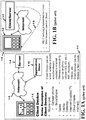
- the internet 1-3 connects a Client Device 1-2 to a server 1-4 and the server to the same Client Device as illustrated in 1-1 of FIG. 1A or to another Client Device (not illustrated).
- the Client Device 1-2 can have at least one display screen 1-8 that can be a touch sensitive screen, pen based or both.
- the screen can display various icons or be attached to a physical keypad 1-9.
- the Client Devices are physical and can be either mobile, such as cellular phones, smartphones, wearable devices, and tablets, or non-mobile, such as laptops, desktops, and TV sets,
- the Client Devices 1-2 are coupled to the internet by wired (a physical interconnect), wirelessly (waves through space), or both wired /wireless networks.
- the wireless connectivity can be cellular (3G, 4G, etc.), Wi-Fi, Bluetooth, WiMax, etc.
- the Client Device 1-2 runs the Application Client which is the actual application software running on device.
- FIG. 1A also shows an Application Store 1-10 connected to the Internet.
- the Application Store 1-10 makes application clients available for download to the Client Devices.
- the APPLETM Application Store makes Application Clients for the IPHONETM and IPADTM available for download
- the ANDROIDTM Application Store makes Application Clients for smartphones and tablets running the ANDROIDTM Operating System available for download, etc.
- Application Stores dedicated to support mobile Client Devices (for example, the IPHONETM/IPADTM APPLETM Application Store, the BLACKBERRYTM Application Store, etc.), and Application Stores dedicated to support non-mobile Client Devices (for example, the MACTM APPLETM Application Store, which makes applications for APPLETM computers running the MACTM Operating System available for download).
- mobile Client Devices for example, the IPHONETM/IPADTM APPLETM Application Store, the BLACKBERRYTM Application Store, etc.
- Application Stores dedicated to support non-mobile Client Devices (for example, the MACTM APPLETM Application Store, which makes applications for APPLETM computers running the MACTM Operating System available for download).
- the Cloud uses the network of the internet to offer services to users by using a combination of hardware and software embedded in the network.
- ADOBETM and MICROSOFTTM offer the ability of using their software programs via the Cloud, while other companies offer storage capabilities via the Cloud to their customers.
- An Application Client can be in the Cloud, but in this case the Client Device is a "virtual" Client Device.
- the "virtual" Client Device has a way to provide access to the Application Client running in the cloud via a physical Client Device.
- a web browser 1-6 running on the physical Client Device 1-2 and coupled to the client/server 1-7 in the Cloud via the Internet accesses the Application Client running in the Cloud, which performs the actual application software.
- the Cloud there are two cases: the entire Application Client runs in the Cloud, or a small portion of the Application Client runs on a physical Client Device while most of the logic runs in the Cloud.
- FIG. 2A illustrates a system 2-1 with the hardware 2-16 and software 2-15 of a Client Device 1-2.
- the Client Device 1-2 is coupled to the Internet 1-3 via wireline connection or Radio Frequency (RF) wireless transmission network (wired/wireless) 2-2 and further coupled to a bank of servers 2-4 via a second interconnection 2-3 that can be wired or wireless.
- the communication link is a receiver and a transmitter known as a transceiver and is coupled to either a wired connector or an antenna (not illustrated) for the wireline connection or RF wireless transmission network, respectively.
- these links wired, wireless, cellular, internet, etc. are called the Communication network.
- the Communication network couples all components together.
- the server's bank 2-4 comprises server-0 2-11 to server-N 2-12.
- the bank contains at least one server and these servers can be localized, coupled by an Intranet, or be physically separated from one another, coupled by the Internet.
- the Operating System (OS) 2-13 running in the Client Device is closely coupled with the hardware 2-16, especially in case of Mobile Client Devices 1-2.
- the hardware 2-16 comprises at least one processor 2-5 operating under the Operating System 2-13.
- the processor 2-5 is coupled to at least one memory 2-7 and at least one communication link 2-9 via at least one bus 2-8.
- At least one communication link 2-9 couples the Client Device to the outside world through a wired and/or wireless interconnection via the transceiver.
- the Client Device offers the user at least one mode of input and one mode of output.
- One mode of input to the Client Device 1-2 is via the touch based keypad 2-6 or through voice control (not illustrated).
- the screen 2-10 can be a touch sensitive screen and provide a second mode of input.
- the screen 2-10 can provide an output response or sound can provide a second mode of output known as voice output (not illustrated).
- Other hardware components such as MEMS, power supplies, etc. are not mentioned but are well-known by those skilled in the art.
- a set of applications or Application Clients 2-14 run on the Client Device are coupled to the Operating System 2-13.
- the Client Device is one of a plurality of Client Devices coupled to the Internet 1-3.
- An Application Store 1-10 is connected 2-21 to the Internet.
- FIG. 2B illustrates that when the term server 2-20 is used, this server is a sub-set representation of a Computer hardware 2-17, which can contain software 2-18, a database 2-19 and the server 2-20 itself. Other components not illustrated are the memory, power supply, etc. One skilled in the art is knowledgeable of other components contained in this device and will not be described further. All servers used in this specification are substantially the same as the server 2-20. Furthermore, a plurality of servers and a plurality of databases can be embedded in the Computer hardware 2-17.
- Client Device encompasses the device being Mobile, Non-Mobile, or located in the Cloud. However, in some cases, for further distinction within this document the term “Mobile Client Device” will be used for mobile devices, “Non-Mobile Client Device” will be used for non-mobile devices and “Cloud Client Device” will be used for the device formed in the Cloud.
- FIG. 3A and FIG. 3B present two different types of Application Clients. This distinction is especially relevant in the case of mobile Client Devices, but is also applicable to non-mobile Client Devices.
- FIG. 3A shows a Native Application Client 3-1 and how it relates to the layered stacks of the hardware/software representation of a Client Device 1-2.
- the Native Application Client 3-1 is an executable which runs directly on the Operating System 2-13 of the Client Device 1-2, which in turn runs on the hardware 2-16 of the Client Device 1-2.
- the Operating System 2-13 provides a set of system libraries 3-5, which the Native Application Client uses 3-2.
- the Native Application Client 3-1 is compiled to run on the Operating System of the Client Device.
- the Native Application Client needs to be downloaded to the Client Device and installed on the Client Device in order to run on the Client Device.
- FIG. 3B shows a Non-Native Application Client 3-1h and how it relates to the layered stacks of the hardware/software representation of a Client Device 1-2a .
- the Non-Native Application Client 3-1h does not run directly on the Operating System 2-13h of the Client Device, but instead uses a web browser 3-3 installed on the Client Device in order to run.
- the Non-Native Application Client 3-1h is written in a programming language that is understood by the web browser running on the Client Device. The most common example of such a language is HTML5.
- the web browser running on the Client Device contains a HTML5 parser 3-4 that is used to interpret the code of the Non-Native Application Client 3-1h .
- the Non-Native Application Client 3- 1h does not depend on the Client Device 1-2a since it does not run directly on the Operating System 2-13h but instead uses the web browser 3-3 running on the Client Device 1-2a .
- the Non-Native Application Client 3-1h can run on any Client Device 1-2a that runs a web browser 3-3 capable of understanding the language which the Non-Native Application Client is written in.
- the web browser 3-3 may depend on the Client Device 1-2a , but the Non-Native Application client does not depend on the Client Device.
- the Operating System 2-13h runs on the hardware 2-16h.
- FIG. 4A An approval and download process in the Application Store is illustrated in FIG. 4A .
- a Business Entity 4-1 creates a new application which comprises a new Native Application Client 3-1.
- the new Native Application Client 3-1 is submitted 4-3 to the Application Store 1-10 for an approval process 4-4.
- Once the new Native Application Client is accepted 4-5 information is passed to the Application Store 1-10 to make the new Native Application Client available for download and installation 4-6 into a Client Device 1-2.
- a Client Device 1-2 which desires the Native Application Client 3-1 downloads the Native Application Client from the corresponding Application Store 1-10. For example, an IPHONETM downloads its desired Native Application Client from the APPLETM Application Store, an ANDROIDTM device downloads its desired Native Application Client from the ANDROIDTM Application Store, etc.
- the Native Application Client is downloaded to the Client Device, it is installed on the Client Device so it can run on the Operating System of the Client Device.
- the client now contains a "native" application coupled to the Operating System 2-13 (see FIG. 2A and FIG. 3A ) of the Client Device.
- the Native Mobile Application Client executable depends on the Operating System (OS) as an iPhone would require a different executable than an ANDROIDTM phone.
- the Updated Native Application Client 4-7 must be re-submitted 4-8 to the Application Store approval process 4-4 and re-accepted 4-9 in order for the updated Native Application Client to be made available in the Application Store 1-10 for download and installation 4-10.
- a Client Device 1-2 which desires the updated Native Application Client 4-7 must download 4-10 the updated Native Application Client again from the Application Store 1-10 and re-install the Native Application Client on the Client Device 1-2.
- the process of updating an existing Native Application Client takes considerable time and effort.
- the Business Entity 4-1 must re-submit the Native Application Client to the Application Store, which requires considerable time and effort since the submission procedure is typically laborious and time-consuming.
- the Application Store must expend funds to re-approve the new executable and the approval process may take considerable time. Once accepted, the store must distribute the new Native Application Client to the Client Device.
- a Client Device 1-2 which desires the updated Native Application Client must go back to the Application Store 1-10 and download the updated version of the Native Application Client and re-install it on the Client Device 1-2.
- the existing Native Application Client 3-1 if running on the Client Device 1-2, must be stopped and deleted from the memory of the Client Device 1-2 in order for the updated Native Application Client 4-10 to be installed on the Client Device 1-2.
- An existing Native Application Client 3-1 cannot be updated while it is running on the Client Device 1-2.
- An existing Native Application Client 3-1 cannot manage the update process, but must rely on an update manager or an external installation manager software or update manager software running on the Operating System of the Client Device to delete the existing Native Application Client, download and re-install the updated Native Application Client 4-7, and complete the update process.
- US2013/0174137A1 discloses a mobile terminal capable of performing updating on an application and a control method thereof are disclosed.
- the mobile terminal includes: a checking unit configured to check status information of the mobile terminal in relation to updating of an application; a detection unit configured to detect an application in which an update event has occurred, on the basis of the status information of the mobile terminal; and a controlled configured to perform updating on the application detected by the detection unit.
- network device “1” is connected to the global network
- network device “3” is connected to the local network
- network device “2” is connected to both networks.
- a network device “1” requests a network device “3” to update a program
- a network device “2” which controls the network device “3” temporarily stores the update request and then issues the update request to the network device "3”.
- the network device "3” shuts down itself and updates the program if the tasks currently running on the network device itself is not important ones.
- the network device "3 when turned on, also acquires the update request that has been temporarily stored by the network device "2".
- US2011/0004945A1 discloses a device managing apparatus for managing software installed in at least one device includes a determination unit configured to determine whether a software item to be installed in the device requires license validation; a validation unit configured to perform a license validation operation on the software item for which the determination unit determines that license validation is required, depending on an available license for the software item; and a setting unit configured to set a license issued by the validation unit in the device in which the software item is installed.
- the claimed invention relates to a method and an apparatus as defined in independent claims 1 and 7, respectively.
- Optional implementations are defined in the dependent claims.
- the System Solution offers the ownership, control and beneficial use of this inventive idea.
- the System solution offers the beneficial use to the Business Entity by providing Applications, Updating Applications, and Update Command Dictionaries for the Business Entity.
- the Applications provided by the System Solution comprise a plurality of Application Components, and include Native Application Clients that run on Mobile, Non-Mobile, and Cloud Client Devices. These Native Application Clients can be modified by the Business Entity using Dashboards and can be downloaded to the Client Devices without the Business Entity having to submit the modified Native Application Client to the corresponding Application Store.
- the Updating Applications allow the Business Entity to modify the Application Clients.
- the Update Command Dictionaries allow the Business Entity to use General Third Party Applications to modify the Application Clients.
- the System Solution is the owner of all Application Components automatically generated by the System Solution.
- the System Solution creates and hosts Applications for different Business Entities (each Business Entity is a System Solution customer).
- the System Solution provides a complete environment for the creation, hosting, updating, and management of the Applications, Updating Applications, and Update Command Dictionaries.
- the Application Servers generated by the System Solution for all Business Entities are hosted in a multi-tenant environment in the Cloud, but each Business Entity "feels" like it is provided a dedicated Application Server.
- the System Solution architecture also applies with minor changes to a scenario where the System Solution Application Server run on dedicated servers owned by the Business Entity, rather than in the Cloud. In this scenario, the System Solution has access to control and offer beneficial use for those servers that are coupled to the Cloud.
- Business Entities deploy their Applications to reach Consumers (i.e., the customers of that Business Entity served by System Solution).
- Consumers are the primary End Users of the Application Clients generated by the System Solution.
- the Business Entities are the End Users of the Dashboards, Update Applications, Update Command Dictionaries, and the Application Server that the System Solution provides to each Business Entity for managing the corresponding Application.
- Mobile Client Devices cellular phones, smartphones, wearable devices, and tablets
- Non-Mobile Client Devices laptops, desktops, and Internet-enabled TV sets
- wired a physical interconnect
- wireless connectivity can be cellular (3G, 4G, etc.), Wi-Fi, Bluetooth, WiMax, etc.
- the network interconnecting these components is called the Communication network.
- the Client Device has the Application Client which is the actual application software running on device.
- the term Mobile Client at times will be referred to as the Client Device.
- the term Application highlights the fact that the application built by the System Solution comprises a plurality of Application Components, and includes a portion of the Application that runs on the Client Device (the Application Client) and a portion of the application that runs on a server (the Application Server).
- the term “Application Client” refers to the portion of the application running on the Client Device and is used to refer to both Native and Non-Native Application Client.
- the term “Application Client” encompasses the Application Client running on a mobile Client Device, a non-mobile Client Device or even in the Cloud.
- the term "Mobile Application Client” will be used for both Native and Non-Native Application Clients running on a mobile Client Device, but it also applies to Client Devices that are non-mobile or in the Cloud.
- the Cloud can run a portion of the Application Client in the server while the remaining portion of the Application Client can run on the Client Device, simultaneously.
- the Application Client can be a part of the software running on the mobile or non-mobile Client Device or can be partially in the Cloud.
- the Client Devices provide the End User with at least one mode of input and at least one mode of output through which the End User navigates and interacts with the Application Client.
- Each Application includes a family of Application Clients. Each Application Client corresponds to a certain Client Device.
- the family of Application Clients includes a set of Native Mobile Application Clients, one per mobile platform.
- the set of Native Mobile Application Clients may include an Updating Application Client.
- each Native Mobile Application Client in the set of Native Mobile Application Clients may include updating functionality that can be enabled by a security mechanism.
- the family of Application Clients also includes a set of Native Non-Mobile Application Clients, one per non-mobile platform.
- the family of Application Clients also includes Non-Native Mobile and Non-Mobile Application Clients, and Application Clients residing in the Cloud.
- the Non-Native Application Clients and the Native Non-Mobile Application Clients may include corresponding Updating Application Clients.
- each Non-Native Application Client or Native Non-Mobile Application Client may include updating functionality that can be enabled by a security mechanism.
- Some examples of the mobile platforms include the IPHONETM, IPADTM, ANDROIDTM phones, or tablets while the non-mobile platforms include the Apple Mac Operating System and the Microsoft Windows Operating System.
- Mobile Application Client or more succinctly Mobile Client to refer to any Mobile Client in the family of Mobile Clients corresponding to an Application generated by the System Solution.
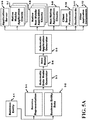
- FIG. 5A depicts a method and apparatus to automatically generate an Application consisting of several Application Components.
- a Business Entity 4-1 defines a Service Representation 5-1 and Business Entity Data 5-2.
- An Automatic Data Model Generator 5-3 takes the Service Representation 5-1 and the Business Entity Data 5-2 as inputs and automatically generates a Data Model 5-4.
- an Automatic Application Generator 5-5 automatically generates all the Application Components.
- the generated Application Components include an Application Server 5-6, a set of Native Mobile Application Clients 5-7, a set of Native Non-Mobile Application Clients 5-8, a set of Non-Native Application Clients 5-9, Client Server Protocols 5-10, Dashboards 5-11, and Other Application Components 5-12.
- the set of Native Mobile Application Clients 5-7 comprises a Native Application Client executable for each mobile Client Device that the Native Mobile Application Client is desired to run on.
- the set of Native Non-Mobile Application Clients 5-8 comprises a Native Non-Mobile Application Client executable for each non-mobile Client Device that the Native Non-Mobile Application Client is desired to run on.
- the method and apparatus depicted in FIG. 5A is explained in detail in the U.S. Patent Application Ser. No. 13/833,589 titled "Apparatus for Single Workflow for Multi-Platform Mobile Application Creation and Delivery" and in U.S. Patent Application Ser. No. 13/833,669 titled “Method for Single Workflow for Multi-Platform Mobile Application Creation and Delivery” both filed on March 15, 2013.
- Appendix A in this specification provides a Glossary of terms. What is relevant in this application is that Native Mobile Application Clients 5-7, Native Non-Mobile Application Clients 5-8, and Non-Native Application Clients 5-9 are automatically generated from the Service Representation 5-1 and Business Entity Data 5-2. Further, the generated Dashboards 5-11 can be used to modify the generated Native Mobile Application Clients 5-7, Native Non-Mobile Application Clients 5-8, and Non-Native Application Clients 5-9.
- the existing Native Application Client If the existing Native Application Client is running on the Client Device, it must first be stopped and deleted before the new version of the Native Application Client is installed.
- the Native Application Client cannot be updated "on the fly" while it is running on the Client Device.
- the update and re-installation process is a time-consuming and inconvenient process.
- the user experience of the Native Application Client is disrupted while the Native Application Client is terminated and re-installed.
- FIG. 5B presents a Dynamic Layer Update flow which shows how the created Native Application Clients can be modified by the Business Entity 4-1 using the newly created Dashboards 5-11.
- the Dashboards 5-11 that are automatically created in FIG. 5A are used by the Business Entity 4-1 to add, delete, or modify content, features, and services contained in the Native and Non-Native Application Clients and replace the existing set of Application Clients in the Client Devices 1-2.
- the System Solution allows the Business Entity 4-1 to modify the Data Model 5-4 and generate new Dynamic Layers.
- the Business Entity 4-1 using the Dashboards 5-11 generates the Dynamically Updated Data Model 5-30 which is then applied to the Automatic Application Update Generator 5-31 which is a sub-set of the Automatic Application Generator 5-5.
- the output of the Automatic Application Update Generator 5-31 generates a set of Dynamically Updated Native Mobile Application Clients 5-32, a set of Dynamically Updated Native Non-Mobile Application Clients 5-33, Dynamically Updated Non-Native Mobile Application Client 5-35, Dynamically Updated Non-Native Non-Mobile and Cloud Application Clients 5-34 and Other Dynamically Updated Application Components 5-36.
- the Business Entity can manipulate the Business Entity Data 5-2 applied to the Dashboards 5-11 and can continuously and automatically update the various Application Clients that this particular system generates.
- FIG. 5C illustrates a System Solution 5-13 coupled to a Business Entity 5-1.
- At least one of System Solution Computing devices 5-15 and at least one System Solution servers 5-16 that comprises Server-A 5-17 through Server-Z 5-18 is coupled to the Business Entity 5-1 though the Internet 1-3.
- An Automatic Creation Application Server with a corresponding Automatic Creation Database is a sub-set of the server bank 5-16. It is understood that the Applications 2-14 running on the OS 2-13 of the Client Devices 1-2a , 1-2b, and 1-2c in Client Devices 5-14 are generated by the server (Single Application Server) under the control of the System Solution 5-13.
- the System Solution servers 5-16 can also be located in the Cloud, in the vicinity of the Computing devices 5-15 or a combination of any therein.
- the System Solution 5-13 couples to the Internet via a plurality of interconnects, for example, 5-19, 5-20, 2-2, 5-21, 5-22 and 2-3.
- This interconnection can be a wireline or wireless and is part of the Communication network.
- the System Solution 5-13 creates through the Internet 1-3 Application servers, appropriate Server/client protocols, Databases Server for the Business Entities, Dashboards, security insurances, etc., with the server bank 2-4 that comprises Server-0 2-11 through server-N 2-12 via interconnect 2-3.
- the generated Applications for Native or Non-Native Clients are applied to Client Devices 1-2a via interconnect 2-2, Client Device 1-2b via interconnect 5-21 and Client Device 1-2c via interconnect 5-22.
- Client Devices can be mobile, non-mobile or in the Cloud and have a software and hardware similar to that explained in FIG. 2A . For the latter, some of the application is split between the Cloud and the Client Device.
- the System Solution 5-13 is monitoring the interactions between the Clients Devices and the Application servers, appropriate Server/client protocols, Databases Server for the Business Entities, Dashboards, security insurances, etc. via the interconnects to and between the Internet 1-3.
- the automatically generated Applications and updated Applications are both generated in FIG. 5C .
- the generated Applications apply to Native as well as non-Native devices. All desired Services are also included in the automatically generated Applications.
- the updated Applications may be generated by the Business Entity through the use of the Dashboard (to be discussed shortly) provided by the System Solution 5-13 allowing the Business Entity 5-1 to change a portion of the application or for the Dashboard under the control of the System Solution 5-13 to alter the entire "look.” For the updated Applications there may be no need to re-apply to the Application store 1-10 for approval.
- FIG. 6A depicts a method and apparatus to automatically generate an Application consisting of several Application Components including a set of Two-Layer Native Mobile Application Clients 6-4 and a set of Two-Layer Native Non-Mobile Application Clients 6-5.
- the method and apparatus described in FIG. 6A has similarities with the method and apparatus depicted in FIG. 5A , which is explained in detail in the U.S. Patent Application Ser. No. 13/833,589 titled “Apparatus for Single Workflow for Multi-Platform Mobile Application Creation and Delivery” and in U.S. Patent Application Ser. No. 13/833,669 titled “Method for Single Workflow for Multi-Platform Mobile Application Creation and Delivery” both filed on March 15, 2013.
- Appendix A in this specification provides a Glossary of terms.
- the method and apparatus described in FIG. 5A generates a set of Native Mobile Application Clients 5-7 and a set of Native Non-Mobile Application Clients 5-8.
- the method and apparatus described in FIG. 6A generates a set of Two-Layer Native Mobile Application Clients 6-4 and a set of Two-Layer Native Non-Mobile Application Clients 6-5.
- a Business Entity 4-1 defines a Service Representation 5-1 and Business Entity Data 5-2.
- An Automatic Data Model Generator 5-3 takes the Service Representation 5-1 and the Business Entity Data 5-2 as inputs and automatically generates a Data Model 5-4.
- the data outputs of the Data Model presents data to the inputs of the Automatic Application Generator in a well-organized structure.
- the Data Model 5-4 then generates a Common Data Model 6-1, a Server Data Model 6-2 and a Client Data Model 6-3.
- an Automatic Application Generator 5-5 automatically generates all the Application Components.
- the generated Application Components include an Application Server 5-6, a set of Two-Layer Native Mobile Application Clients 6-4, a set of Two-Layer Native Non-Mobile Application Clients 6-5, a set of Non-Native Application Clients 5-9, Client Server Protocols 5-10, Dashboards 5-11, and Other Application Components 5-12.
- the set of Two-Layer Native Mobile Application Clients 6-4 comprises a Two-Layer Native Application Client executable for each mobile Client Device that the Native Mobile Application Client is desired to run on.
- the set of Two-Layer Native Non-Mobile Application Clients 6-5 comprises a Two-Layer Native Non-Mobile Application Client executable for each non-mobile Client Device that the Native Non-Mobile Application Client is desired to run on.
- the generated Dashboards 5-11 can be used to modify the Dynamic Layer of the generated Two-Layer Native Mobile Application Clients 6-4 and Two-Layer Native Non-Mobile Application Clients 6-5.
- the generated Dashboards 5-11 can also be used to modify the generated Non-Native Application Clients 5-9.
- the Dashboards are installed on a plurality of servers coupled to the Internet.
- the Business Entity using the Dashboard and Business Entity Data via the System Solution to automatically generate an Updated Data Model.
- the generated Application Server 5-6 can be used to make the modified Dynamic Layer of the generated Two-Layer Native Mobile Application Clients 6-4 and Two-Layer Non-Native Mobile Application Clients 6-5 available for download to the Client Device 1-2.
- the generated Client Server Protocols 5-10 can be used to download the modified Dynamic Layers to the Client Device 1-2.
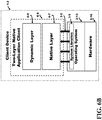
- FIG. 6B depicts a Two-Layer Native Application Client 6-6 which is a Native Application Client that consists of two layers: a Dynamic Layer 6-8 and a Native Layer 6-7.
- the Native Layer 6-7 runs 3-2 directly on the Operating System 2-13 of the Client Device 1-2 by using the system libraries 3-5 that are part of the Operating System 2-13.
- the Operating System in turn runs on the hardware 2-16.
- the Dynamic Layer 6-8 does not run directly on the Operating System 3-5, but instead runs on the Native Layer 6-7 by making use of software libraries and functional blocks provided in the Native Layer 6-7.
- the Native Layer 6-7 and the Dynamic Layer 6-8 together implement the functionality and user experience offered by the Two-Layer Native Application Client 6-6.
- the Native Layer 6-7 is an executable that depends on the Client Device 1-2 and needs to be downloaded and installed on the Client Device 1-2 using an installation manager external to the Two-Layer Native Application Client 6-6.
- the Native Layer 6-7 needs to be downloaded from the Application Store.
- the Dynamic Layer 6-8 does not need to be downloaded from the Application Store, but can be downloaded directly from an Application Server that is part of the System Solution.
- FIG. 7 illustrates the process of downloading the Two-Layer Native Application Client 6-6 to a Client Device 1-2 for the first time. This process is similar to the process of downloading a Native Application Client 3-1 to the Client Device depicted in FIG. 4A .
- a Business Entity 4-1 creates a new application which comprises a Two-Layer Native Application Client 6-6.
- the Two-Layer Native Application Client 6-6 has a Dynamic layer 6-8 and a Native Layer 6-7.
- the new Two-Layer Native Application Client 6-6 is submitted 4-3 to the Application Store 1-10 for an approval process 4-4.
- Once the new Two-Layer Native Application Client is accepted 4-5, information is passed to the Application Store 1-10 to make the new Two-Layer Native Application Client available for download 7-1 into a Client Device 1-2.
- a Client Device 1-2 which desires the Two-Layer Native Application Client 6-6 downloads the Two-Layer Native Application Client from the corresponding Application Store 1-10. For example, an IPHONETM downloads its desired Native Application Client from the APPLETM Application Store, an ANDROIDTM device downloads its desired Native Application Client from the ANDROIDTM Application Store, etc.
- an IPHONETM downloads its desired Native Application Client from the APPLETM Application Store
- an ANDROIDTM device downloads its desired Native Application Client from the ANDROIDTM Application Store
- the Operating System in turn runs on the hardware 2-16.
- the Two-Layer Native Mobile Application Client 6-6 executable depends on the Operating System (OS) as an iPhone would require a different executable than an ANDROIDTM phone
- the Business Entity modifies the Native Layer 6-7
- the Business Entity needs to submit the new version of the Native Layer 6-7 to the Application Store for re-approval in order to make it available for download to the Client Device.
- the existing version of the Native Layer if running on the Client Device 1-2, must be stopped and deleted from the memory of the Client Device 1-2 in order for the new version of the Native Layer to be installed on the Client Device.
- the Native Layer cannot be updated "on the fly" while the Native Application Client 3-1 is running on the Client Device 1-2.
- FIG. 8 illustrates an embodiment of the process of downloading an updated Dynamic Layer 8-2 to the Client Device.
- the Business Entity 4-1 desires a New Functionality of the Native Application client 8-1
- the Business Entity 4-1 modifies the Dynamic Layer 6-8 by using the Dashboard 5-11 by filling in the entries to create an Updated Dynamic Layer 8-2
- the Updated Dynamic Layer 8-2 is available for download directly from an Application Server 8-3 that is part of the System Solution or is owned by the Business Entity.
- the Application Server 5-6 was created in the method and apparatus illustrated in FIG. 6A .
- the new version of the Updated Dynamic Layer 8-2 of the previous Dynamic Layer 6-8 is made available for download to the Client Device without having the Business Entity submit it for approval to the Application Store 1-10.
- the updated Dynamic Layer 8-4 is downloaded and installed 8-4 in the Client Device 1-2 while the Two-Layer Native Application Client 6-6 is running on the Client Device.
- the update of the existing Dynamic Layer can be achieved using an update manager 8-5 that is internal in the Native Layer 6-7 of the Two-Layer Native Application Client 6-6.
- the Updated Dynamic Layer 8-7 is installed on the Client Device 1-2, the new application client functionality and new user experience 8-6 is provided to the end user.
- the Operating System 2-13 running on the hardware 2-16 in the Client Device 1-2.
- the Two-Layer Native Application Client 6-6 provides several benefits.
- the Business Entity can change the functionality of the Two-Layer Native Application Client 6-6 without resubmitting the Native Application Client to the approval process of the Application Store, which is laborious and time consuming.
- the functionality of the Two-Layer Native Application Client 6-6 can be changed "on the fly” while the Native Application Client is running on the Client Device, without disrupting the user experience offered by the Native Application Client.
- the updated Dynamic Layer 8-2 can be downloaded and installed in the Client Device "automatically" by the Two-Layer Native Application Client using an update manager 8-5 internal to the Native Layer 6-7 of the Two-Layer Native Application Client 6-6.
- the Two-Layer Native Application Client 6-6 can be updated "transparently" without requiring any action from the end user.
- the internal update manager 8-5 can make sure that the Dynamic Layer running on the Client Device 1-2 is always the latest version of the Dynamic Layer 8-7, by querying the Application Server asking whether there is a newer version of the Dynamic Layer than the version of the Dynamic Layer 8-7 currently running on the Client Device, and downloading and installing the latest version when it is made available by the Business Entity 4-1.
- the updated Dynamic Layer 8-2 is downloaded from an Application Server owned by the System Solution or by the Business Entity, rather than having to be downloaded from the Application Store 1-10.
- An Application Client includes both a Native Application Client and a Two-Layer Native Application Client.
- the Application Client comprises a plurality of Pages.
- the Pages are presented to the end user via a User Interface. Buttons in each Page allow the end user to "navigate" from one Page to another.
- Each Page contains a sub-set of the plurality of Buttons.
- Each Button connects one Page to another Page in the Application Client.
- a pre-configured Page in the plurality of Pages is displayed to the end user. Then, the end user navigates to the other Pages using the Buttons.
- Nevigation Element as a synonymous of Button to refer to the fact that "Buttons" may assume other forms on the User Interface, to connect one Page to another.
- Navigation Elements or Buttons include buttons themselves, tabs, navigation bars, tappable elements such as an address, a thumbnail, or a piece of text that when tapped navigates the end user to another Page. Buttons or Navigation Elements can even be "implicit," i.e., not be shown explicitly to the end user. For example, an "implicit" button may navigate the user from one Page to another Page, after a certain time lapses or if a certain event occurs.
- a Button or Navigation Element on the User Interface is presented on a Starting Page. If the end user taps or clicks the Button, it "navigates" to the Ending Page, meaning that the Application Client displays the User Interface of the Ending Page to the end user.
- the Buttons and the links that are provided among the plurality of Pages in the Application Client constitute the "Application Flow" of the Application Client.
- the Application Flow is an important part of the user experience that the Application Client offers to the end user.
- a Page for a Two-Layer Native Application Client comprises a plurality of Elements.
- each Element comprises a plurality of Sub-Elements.
- the term "Element” refers to any "part" or block of a Page.
- one of the Elements may be the Page itself, a UI Region (i.e., a portion of the Page), a widget, a building block, a piece of content, a navigation structure, a button, a tab, etc.
- Examples of Sub-Elements include a Background, a Content, Pictures, text, shape, text box, video, position, format, etc.
- a Background which is typically an image covering the entire area of the Element.
- the other possibilities includes a Content which includes Pictures and Text, a Picture which is an image, a Shape, a Text Box which is an imaginary "box" defining an area where text is displayed, a Video, a Position which consists of a X-Coordinate and a Y-Coordinate, a Size which consists of a Width and a Height, a Text, and a Format which may include a Font, a Font Size, an Alignment, and a Font Color for a Text Box. For a given Element, not all Sub-Elements may exist or even apply.
- Sub-Elements are used only in an "as needed fashion” to provide finer granularity in identifying the "parts of the Two-Layer Native Application Client 6-6 that should become part of the Dynamic Layer 8-7 in order to optimize Client/Server communication and Two-Layer Native Application Client dynamic behavior
- One or more of Elements are associated with a function, an action, or data. They are called Actionable Elements. For example, a line of text containing the Expiration Date of a Promotion is an Actionable Element, which is used by the Application Client to validate whether that Promotion is still active or needs to be retired.
- One or more of Elements are associated with data that should be filled. They are called Fillable Elements. There are three types of Fillable Elements.
- a Locally Fillable Element contains data that should be filled locally (i.e., using logic and data available in the Application Client) when the Element is displayed. For example, a Service which greets the Consumer by first name, may use a text Fillable Element which gets filled by the end user's first name.
- a Server Fillable Element contains data that should be filled by the Application Server.
- the Application Client may request the data from the Application Server using a Client/Server protocol.
- An Input Element is a Fillable Element which receives an end user's action that needs to be communicated to the Application Client or Application Server.
- One or more of Elements are Navigation Elements or Buttons.
- the Page can also include one or more Navigation Rule.
- a Navigation Rule is associated with a Navigation Element or button and defines the "navigation" provided by the Navigation Element.
- the Page includes Native Logic which consists of an Orchestration, a set of Native Client Functional Blocks and an Update Manager 8-5.
- a Page can be in one of two Page State.
- a Page in "In Use” Page State is a Page currently displayed to the end user by the Native Application Client.
- a Page in "Standby" Page State is a Page prepared in the Two-Layer Native Application Client for future use or use in the context of a certain Service, but not currently displayed to the Consumer.
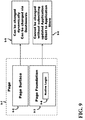
- FIG. 9 depicts a Page 9-7 in the Two-Layer Native Application Client 6-6 which consists of a Page Surface 9-2 and a Page Foundation 9-3.
- the Page Surface "can be changed dynamically and can be changed via Dashboards or via a Updating Application (to be described)" 9-5.
- the Page Foundation "cannot be changed without submitting the updated Application Client to Application Store” 9-6.
- the Page Surface 9-2 is part of the Dynamic Layer 6-8.
- the Page Foundation 9-3 is part of the Native Layer 6-7 and includes the Native Logic 9-8.
- the Dynamic Layer 6-8 of the Two-Layer Native Application Client 6-6 consists of the Page Surfaces 9-2 of all the Pages comprised in the Two-Layer Native Application Client 6-6.
- the Native Layer 6-7 of the Two-Layer Native Application Client 6-6 consists of the Page Foundations 9-3 of all the Pages comprised in the Two-Layer Native Application Client 6-6.
- FIG. 10 shows an update process with which the Update Manager 8-5 contained in the Native Layer 6-7 of the Two-Layer Native Application Client 6-6 queries the Application Server 5-6 while the Two-Layer Native Application Client 6-6 is running on the Client Device 1-2 to check if a newer version of the Dynamic Layer that is currently running on the Client Device 1-2 is available in the Application Server 5-6.
- the Update Manager 8-5 uses a Dynamic Update Protocol 10-3, which is part of the generated Client Server Protocols 5-10.
- a newer version of the Dynamic Layer becomes available in the Application Server 5-6, it is downloaded to the Client Device using the Updated Dynamic Layer Download 10-2, and the Updated Dynamic Layer 8-7 is run on the Client Device 1-2.
- FIG. 11 shows an optimized alternative to the process described in FIG. 10 .
- the Update Manager 8-5 contained in the Native Layer 6-7 of the Two-Layer Native Application Client 6-6 queries the Application Server 5-6 using the Dynamic Update Protocol 10-2 to check whether a newer version of the Dynamic Layer that is currently running on the Client Device 1-2 is available in the Application Server 5-6.
- the newer portion of the Dynamic Layer is in Updated Page Surfaces 11-2 while the unaltered or previous version of the Dynamic Layer is in Non-Updated Page Surfaces 11-1.
- the Application Client also provides a List of the Desired Page Surfaces 11-3 that are needed to be displayed to the end user.
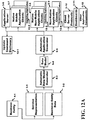
- FIG. 12A depicts a method and apparatus to automatically generate an Application consisting of several Application Components including Updating Applications for the Application Clients and an Update Command Dictionary.
- a Business Entity 4-1 defines a Service Representation 5-1 and Business Entity Data 5-2.
- An Automatic Data Model Generator 5-3 takes the Service Representation 5-1 and the Business Entity Data 5-2 as inputs and automatically generates a Data Model 5-4. Using the generated Data Model 5-4, an Automatic Application Generator 5-5 automatically generates all the Application Components.
- the generated Application Components include an Application Server 5-6, a set of Native Mobile Application Clients 5-7, a set of Native Non-Mobile Application Clients 5-8, a set of Non-Native Application Clients 5-9, Client Server Protocols 5-10, Dashboards 5-11, and Other Application Components 5-12.
- the set of Native Mobile Application Clients 5-7 comprises a Native Application Client executable for each mobile Client Device that the Native Mobile Application Client is desired to run on.
- the set of Native Non-Mobile Application Clients 5-8 comprises a Native Non-Mobile Application Client executable for each non-mobile Client Device that the Native Non-Mobile Application Client is desired to run on. Additional information regarding FIG. 12A is explained in detail in the U.S. Patent Application Ser. No.
- an Update Command Dictionary 12-1 is generated to provide a shorthand representation of possible desired update commands.
- the Update Command Dictionary 12-1 typically replaces a long instruction (difficult, at times, to type into a hand held mobile unit) with short numerical equivalents allowing for easy entry into a smartphone, for example.
- the Update Command Dictionary 12-1 allows the Business Entity 4-1 to use General Third Party Applications modify the generated Native Mobile Application Clients 5-7, Native Non-Mobile Application Clients 5-8, and Non-Native Application Clients 5-9 as will be explained shortly.
- FIG. 12B shows how the Updating Applications 12-2, 12-3, and 12-4 and the Update Command Dictionary 12-1 can also be generated using the Dashboards 5-11.
- the Native Application Clients can be modified by the Business Entity 4-1 using the Business Entity Data 5-2 and created Dashboards 5-11.
- the Business Entity 4-1 using the Dashboards 5-11 generates the Dynamically Updated Data Model 5-30 which is then applied to the Automatic Application Update Generator 5-31.
- the output of the Automatic Application Update Generator 5-31 generates a set of Dynamically Updated Native Mobile Application Clients 5-32, Dynamically Updated Non-Native Mobile Application Client 5-33, Dynamically Updated Non-Mobile and Cloud Application Clients 5-34 and Other Dynamically Updated Application Components 5-35.
- the Automatic Application Update Generator 5-31 can also generate a Native Mobile Updating Application 12-2, a Non-Native Updating Application 12-4, and a Native Non-Mobile Updating Application 12-3. Using these Updating Applications, the Business Entity 4-1 can further dynamically update the set of Native and Non-Native Application Clients.
- the Business Entity 4-1 would typically use this flow illustrated in FIG. 12B in the case where the Updating Applications do not already exist and were not already generated using the flow of FIG. 12A .
- the Business Entity 4-1 may also use the flow of FIG. 12B even if a set of Updating Applications was previously generated using the flow of FIG. 12A to generate new Updating Applications and replace the set of existing Updating Applications. For example, the Business Entity 4-1 may use this flow to generate new Updating Applications when a new Update Command is desired, which is not supported by the existing Updating Applications.
- the Automatic Application Update Generator 5-31 can also generate an Update Command Dictionary 12-1, using which the Business Entity can use a General Third Party Application to further dynamically update the Application Clients.
- the Business Entity 4-1 would typically use this flow illustrated in FIG. 12B in the case where the Update Command Dictionary 12-1 does not already exist and was not already generated using the flow of FIG. 12A .
- the Business Entity 4-1 may also use the flow of FIG. 12B even if the Update Command Dictionary 12-1 was previously generated using the flow of FIG. 12A to generate a new the Update Command Dictionary 12-1 and replace the existing the Update Command Dictionary 12-1.
- the Business Entity 4-1 may use this flow to generate a new the Update Command Dictionary 12-1 when a new Update Command is desired, which is not supported by the existing the Update Command Dictionary 12-1.
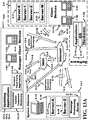
- FIG. 13A illustrates a System Solution 13-1 coupled to a set of Manager Client Devices 13-2 comprising Manager Client Device 1-2d to Manager Client Device 1-2e .
- the Manager Client Devices in the set of Manager Client Devices 13-2 are illustrated communicating with the System Solution 13-1 to dynamically update the Application Clients running on the set of Client Devices 13-15 comprising Client Devices 1-2a to 1-2c.
- the Manager Client Devices in the set of Manager Client Devices 13-2 belong to the Business Entity 4-1 and are used by employees of the Business Entity, for example managers of stores belonging to the Business Entity 4-1.
- the Client Devices 1-2b to 1-2c in the set of Client Devices 13-15 belong to customers or users of the Business Entity 4-1.
- At least one of System Solution Computing devices 5-15 and at least one System Solution servers 5-16 that comprises Server-A 5-17 through Server-Z 5-18 is coupled to the Business Entity 4-1.
- An Automatic Creation Application Server with a corresponding Automatic Creation Database is a subset of the server bank 5-16.
- the System Solution servers 5-16 can also be located in the Cloud, in the vicinity of the Computing devices 5-15 or a combination of any therein.
- the Automatic Creation Application Server and Automatic Creation Database run the System Solution and the Dashboards described in FIG. 12A and FIG. 12B to automatically create and dynamically update Native and Non-Native Application Clients, Updating Applications 12-2, 12-3, 12-4, and Update Command Dictionary 12-1.
- the System Solution 13-1 comprises a Message Processing Server 13-14 to process messaging input generated by Manager Client Devices in the set of Manager Client Devices 13-2 and containing Update Commands destined to the System Solution 13-1.
- Update Commands are commands generated by the Managers employed by the Business Entity 4-1 using Updating Applications 12-2, 12-3, 12-4 or General Third Party Application 13-22 and Downloaded Update Command Dictionary 13-21. Update Commands specify desired updates in the Native and Non-Native Application Clients generated by the System Solution 13-1.
- the System Solution 13-1 processes the Update Commands and generates the Updated Data Model 5-30 used by the Automatic Application Update Generator to generate dynamically updated Native and Non-Native Application Clients.
- the System Solution 13-1 couples to the Internet 1-3 via, for example, interconnects 5-19, 13-3, 2-2, 5-21, 5-22 and 2-3. These interconnections can be wireline, wireless or any combination therein and are part of the Communication network.
- the System Solution 13-1 creates through the Internet 1-3 Native and Non-Native Application Clients with the server bank 2-4 that comprises Server-0 2-11 through server-N 2-12.
- server bank 2-4 is coupled to Client Devices in the set of Client Devices 13-15 via interconnect 2-3 so dynamically updated Native and Non-Native Application Clients generated by the System Solution 13-1 can be downloaded in the Client Devices 13-15.
- the Applications 2-14 running on the OS 2-13 of the Client Devices 1- 2a, 1-2b , and 1-2c in the set of Client Devices 3-15 are the Native and Non-Native Application Clients generated by System Solution 13-1 as described in FIG. 12A and FIG. 12B .
- the automatically generated Application Clients and updated Application Clients are both generated in the architecture illustrated in FIG. 13A .
- the generated Application Clients apply to Native as well as non-Native devices.
- the Manager Client Devices 13-2 are coupled to the System Solution 13-1 through different communication mechanisms, depending on which type of applications are run on the Manager Client Devices. Examples of communication mechanisms comprises a messaging or SMS communication mechanism 13-7, an email communication mechanism 13-9, a voice to text communication mechanism 13-8, an application dependent messaging 13-6 and an Update Application Messaging 13-10.
- SMS communication mechanism 13-7 the Manager Client Devices 13-2 are coupled to a SMSC 13-4 which in turn is coupled to the Internet 1-3 and the System Solution 13-1 by communication mechanism 13-5.
- Update Application Messaging 13-10 is generated by Updating Applications 12-2, 12-3, 12-4.
- the Updating Applications 12-2, 12-3, 12-4 are downloaded onto the Manager Client Devices 13-2 ( 1-2d and 1-2e , for example) allowing the Business Entity 4-1 to change a portion of the application under the control of the System Solution 13-1 to alter the entire "look.”
- the Updating Application emulates the behavior of the Dashboards 5-11. For these updated Applications, there may be no need to re-apply to the Application store 1-10 for approval.
- These Applications are automatically downloaded unto the Client devices 1-2a , 1-2b and 1-2c .
- the Updating Application that was generated in FIG. 12A is an application that is used by the Business Entity to change or alter other Application Clients.
- the Update Command Dictionary 12-1 allows the Business Entity 4-1 to use a General Third Party Applications 13-22 such as an SMS application, an email application, or a messaging application commonly available on any smartphone or mobile device to generate Update Commands to alter Native and Non-Native Application Clients under the control of the System Solution 13-1.
- a General Third Party Application 13-22 in conjunction with the Update Command Dictionary 12-1 emulates the behavior of the Dashboards 5-11.
- the System Solution 13-1 uses the Messaging Processing Server 13-14 to process and decode the Update Commands and implement the desired changes to the Native and Non-Native Application Clients.
- FIG. 13B further illustrates a Manager Client Device 1-2d running a Native Mobile Updating Application 12-2 and coupled to the System Solution 13-1 via a communication mechanism 13-10.
- the manager who is part of the Business Entity 4-1 uses the Native Mobile Updating Application 12-2, the manager who is part of the Business Entity 4-1 generates Update Commands to instruct the System Solution 13-1 to generate Updated Native and Non-Native Application Clients 13-40 running on Client Devices 1-2b to 1-2c in the set of Client Devices 13-15 which are coupled to the System Solution 13-1 via a communication mechanism 13-20.
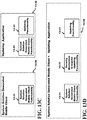
- FIG. 13C illustrates the structure of an Updating Application 13-32 and its relationship with the System Solution Generated Mobile Client 13-30.
- the System Solution Generated Mobile Client 13-30 refers to any of the Native and Non Native Mobile Clients generated by the System Solution 13-1 as described in FIG. 12A .
- the System Solution Generated Mobile Client 13-30 contains System Solution Generated Mobile Client Functionality 13-31, which implements the desired functionality described by the Service Representation 5-1 and Business Entity Data 5-2 in FIG. 12A .
- the Updating Application 13-32 is a separate Application Client which comprises the same System Solution Generated Mobile Client Functionality 13-31 contained in the System Solution Generated Mobile Client 13-30 and additional Updating Functionality 13-33 capable of generating update commands to update the System Solution Generated Mobile Client 13-30.
- FIG. 13D presents an alternative Single Structure 13-34 of an Application Client generated by the System Solution 13-1.
- the Single Structure 13-34 contains both the System Solution Generated Mobile Client Functionality 13-31 and the Updating Functionality 13-33.
- a Security Mechanism to Expose Updating Functionality 13-35 exposes the Updating Functionality 13-34 to the Managers and employees of the Business Entity 4-1.
- the Security Mechanism to Expose Updating Functionality 13-35 may comprise a username and password.
- the Combined Structure 13-34 which is created by the System Solution 13-1 as described in FIG. 12A is an Application Client capable of creating and updating itself.
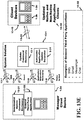
- FIG. 13E illustrates how the Update Command Dictionary 12-1 can be used in a Manager Client Device 1-2d to use a General Third Party Application 13-22 to generate the Updated Native and Non-Native Application Clients 13-40 generated by the System Solution 13-1 and running on Client Devices 1-2b to 1-2c in the set of Client Devices 13-15 coupled with the System Solution 13-1.
- a Downloaded Update Command Dictionary 13-21 which is a copy of the Update Command Dictionary 12-1, is downloaded to the Manager Client Device 1-2d. The download may consists of transferring a corresponding file from a server to the Manager Client Device 1-2d or sending an email to the Manager Client Device 1-2d.
- the Manager Client Device 1-2d is coupled to the System Solution 13-1 via a communication mechanism.
- the communication mechanism is typically dependent on the General Third Party Application 13-22 used on the Manager Client Device 1-2d.
- Examples of General Third Party Applications 13-22 are also shown in FIG. 13E .
- Examples comprise SMS Applications, Email Applications, Messenger Applications and Chat Applications. These types of applications are typically found in most smartphones and mobile devices.
- a SMS application is coupled to the System Solution 13-1 via a SMS communication mechanism 13-7
- an email application is coupled to the System Solution via an email communication mechanism 13-9
- a voice-to-text application is coupled to the System Solution via a voice-to-text communication mechanism 13-8
- other applications may be coupled to the System Solution 13-1 via Application Dependent Messaging 13-6.
- the System Solution is set of Client Devices via a communication mechanism 13-20.
- FIG. 13F presents examples of Update Command Dictionary 12-1 to be used with different General Third Party Applications.
- the Update Command Dictionary is dependent on the General Third Party Application used.
- a SMS Command Dictionary 13-23 is used with a SMS Third Party Application
- a Email Command Dictionary 13-24 is used with an Email Third Party Application
- an Application Dependent Command Dictionary 13-35 is used with a specific Third Party Application
- a Voice to Text Command Dictionary 13-26 is used with a Voice to Text Third Party Application.
- FIG. 14A depicts as an example the use of a General Third-Party SMS Application 14-1 to send Update Commands to the System Solution 13-1 in order to change the Native and Non-Native Mobile and Non-Mobile Application Clients generated by the System Solution 13-1.
- Third-party short messaging or SMS applications are available on most smartphones, tablets, and other mobile devices.
- the Manager or employee of the Business Entity 4-1 can use the SMS communication mechanism 13-7 which is a feature typically available on cellular network to send short messages containing Update Commands to the System Solution.
- the SMS communication mechanism 13-7 communicates with the Short Messaging Service Center (SMSC) 13-4, which in turn may relay the cellphone signal to the Internet via a communication mechanism 13-5.
- SMS Short Messaging Service Center
- the message is sent to the Message Processing Server 13-14 which is part of the System Solution 13-1.
- the same Update Commands can be generated by the smartphone or any mobile device which has a voice to text translator.
- the voice to text communication mechanism 13-8 may be sent as text by the smartphone to the SMSC 13-4 or may be sent directly to the Internet 1-3, and from there eventually reaches the System Solution 13-1.
- Another possibility is to use an email application, which is also commonly found in a smartphone, table, or any other mobile device and use the email communication mechanism 13-9 to send the Update Commands to the System Solution 13-1 as email messages.
- FIG. 14A depicts a General Third Party SMS Application 14-1 which comprises a display interface to Compose Text Message 14-2 that may be presented on a smartphone, tablet or an equivalent mobile device.
- the Compose Text Message 14-2 provides a display interface to Enter Recipient Address 14-3 and a display interface to Enter SMS Body 14-4.
- the General Third Party SMS Application may also include a Voice Entry 14-5 interface, to generate a SMS from a voice command, which may comprise a speak 14-6 and a stop 14-7 button.
- Different General Third Party SMS Applications 14-1 would have different layouts of the display interface and may have different features to enter and create the SMS message.
- the General Third Party SMS Application 14-1 is available on the Manager Client Device 1-2d. By using a downloaded SMS Command Dictionary 13-23, the Manager can use the General Third Party SMS Application 14-1 to generate and send Update Commands to the System Solution 13-1 using the SMS Communication Mechanism 13-7.
- the SMS Command Dictionary 13-23 contains the System Solution Address 14-8, which is the phone number or short code that should be entered in the Enter Recipient Address 14-3 display interface in order to generate a SMS destined to the System Solution.
- the SMS Command Dictionary 13-23 may contain a scrollable table 14-9. Each row in the scrollable table 14-9 contains the format and values to generate a specific Update Command. In other words, each row in the scrollable table defines the syntax of the corresponding Update Command.
- Each row in the SMS Command Dictionary also contains an explanation of the Update Command, so the Manager can choose the desired Update Command and generate the corresponding SMS.
- the table contains a value that should be entered in the Enter SMS Body 14-4 display interface to generate a specific Update Command.
- the Update Command may also require additional parameters that should be entered in the Enter SMS Body 14-4 display interface to generate the specific Update Command.
- the value that specifies the Update Command may be in the form of a phone number or a short code that should be entered in the Enter Recipient Address 14-3 display interface, and the corresponding parameters, if any, should be entered in the Enter SMS Body 14-4 display interface.
- the numerical value "25" when sent in the body of a SMS is the equivalent of typing out the Update Command "Generate Offer for a free donut in the next hour”.
- “45_number” when sent in the body of a SMS is the equivalent of "Generate offer for 2 electronic coupons for a bacon and egg bagel” where the numerical value 2 was substituted for "number”.
- FIG. 14B presents one embodiment of coupling the Manager Client Device 1-2d of a Business Entity to their Clients (for example, 1-2b and 1-2c ) via a communication network.
- the communication network comprises an Internet 1-3 coupled to base stations 14-11a to 14-11c.
- the manager 1-2d in region 14-12 sends 14-10 an SMS which is received by the base station 14-11a.
- the base station transfers (arrow 1) the SMS via the Internet 1-3 to the SMSC and eventually to the System Solution servers 14-13.
- the System Solution servers may generate the Updated Dynamic Layer or dynamically generate the Page Surfaces of the Application Clients and sends (arrow 3) the update and information through the Internet 1-3 to regions 14-14 and 14-15.
- the base station in these two regions receive the Updated Dynamic Layer or Updated Page Surfaces and respectively downloads 14-16a them to all the Client Devices 1-2b in region 14-14 and downloads 14-16b them to all the Client devices in region 14-15.
- FIG. 15 presents how the Updating Application 12-2, 12-3, 12-4 is used in the flow that the System Solution uses to generate dynamically Updated Native and Non-Native Application Clients.
- the Business Entity 4-1 can generate dynamically Updated Native and Non-Native Application Clients using the newly created Updating Applications 12-2, 12-3, 12-4 (when smartphones or their equivalent are available) or using the previously described Dashboards 5-11 (when desktop computers are available), although other embodiments can be possible, for example, the desktop can use an Updating Application to create updated applications.
- the Updating Applications 12-2, 12-3, 12-4 that are automatically created in FIG.
- the Business Entity 4-1 are used by the Business Entity 4-1 to add, delete, or modify content, features, and services contained in the Dynamic Layer of the Two-Layer Native Application Clients and replace the existing set of Dynamic Layers in the Client Devices 1-2. This is illustrated by new path introduced by the Updating Application 12-2, 12-3, 12-4 that couples the Business Entity Data 5-2 to the Dynamically Updated Data Model 5-30.
- the System Solution allows the Business Entity 4-1 to modify the Data Model 5-4 and generate new Dynamic Layers via the Updating Application 12-2, 12-3, 12-4.
- the Updating Applications 12-2, 12-3, 12-4 generate Messaging Input 15-6 that contains Update Commands.
- the Messaging Input 15-6 is processed by the System Solution 13-1 and used to generate the Dynamically Updated Data Model 5-30.
- the Updating Applications 12-2, 12-3, 12-4 allow the Business Entity 4-1 to have control of what the Business Entity wants to present to their Customers.
- This is an Application (installed on the Manager's Client device) that manages another Application (by installing new Page Surfaces on the Client Devices of their Clients or by Dynamically updating the Dynamic Layer of the two Layer Application Client).
- the Business Entity 4-1 using the Updating Application 12-2, 12-3, 12-4 generates the Dynamically Updated Data Model 5-30 which is then applied to the Automatic Application Update Generator 5-31 which is a sub-set of the Automatic Application Generator 5-5.
- the output of the Automatic Application Update Generator 5-31 generates a set of Dynamically Updated Native Mobile Application Clients 5-32, a set of Dynamically Updated Native Non-Mobile Application Clients 5-35, Dynamically Updated Non-Native Mobile Application Client 5-33, Dynamically Updated Non-Mobile and Cloud Application Clients 5-34 and Other Dynamically Updated Application Components 5-36.
- the set of Dynamically Updated Native Mobile Application Clients 5-32 and the set of Dynamically Updated Native Non-Mobile Application Clients 5-33 are the updated Dynamic Layers of the corresponding Two-Layer Native Application Clients 6-6.
- the Business Entity can manipulate the Business Entity Data 5-2 applied to the Update Applications 12-2, 12-3 , 12-4 or the Dashboards 5-11 which can continuously and automatically update the various Application Clients that this particular system generates.
- FIG. 16 presents how a General Third Party Application 13-22 in conjunction with an Update Command Dictionary 12-1 is used in the flow that the System Solution uses to generate dynamically Updated Native and Non-Native Application Clients.
- the Business Entity 4-1 can generate dynamically Updated Native and Non-Native Application Clients using General Third Party Application 13-22 in conjunction with an Update Command Dictionary 12-1 (when smartphones or their equivalent are available) or using the previously described Dashboards 5-11 (when desktop computers are available) to add, delete, or modify content, features, and services contained in the Dynamic Layer of the Two-Layer Native Application Clients and replace the existing set of Dynamic Layers in the Client Devices 1-2.
- the General Third Party Application 13-22 generates General Application Messaging Input 16-1 that contains Update Commands. For example, a General SMS Third Party Application generates SMS Messaging Input 16-2, a General Email Third Party Application generates Email Messaging Input 16-3, and a different General Third Party Application generates an Application Dependent Messaging Input 16-4.
- the General Application Messaging Input 16-1 is processed by the System Solution 13-1 and used to generate the Dynamically Updated Data Model 5-30.
- the System Solution 13-1 processes the General Application Messaging Input 16-1 using a Decoder and an Update Command Dictionary 12-1 corresponding to the specific messaging input received.
- the SMS Messaging Input 16-2 is processed using the SMS Command Dictionary 13-23 and the SMS Decoder 16-5
- the Email Messaging Input 16-3 is processed using the Email Command Dictionary 13-24 and the Email Decoder 16-6
- the Application Dependent Messaging Input 16-4 is processed using the Application Dependent Command Dictionary 13-25 and the Application Dependent Decoder 16-7.
- the System Solution generates the Dynamically Updated Data Model 5-30 to execute the desired Update Command.
- the Business Entity 4-1 using the General Third Party Application 13-22 and Update Command Dictionary 12-1 generates the Dynamically Updated Data Model 5-30 which is then applied to the Automatic Application Update Generator 5-31 which is a sub-set of the Automatic Application Generator 5-5.
- the output of the Automatic Application Update Generator 5-31 generates a set of Dynamically Updated Native Mobile Application Clients 5-32, a set of Dynamically Updated Native Non-Mobile Application Clients 5-35, Dynamically Updated Non-Native Mobile Application Client 5-33, Dynamically Updated Non-Mobile and Cloud Application Clients 5-34 and Other Dynamically Updated Application Components 5-36 .
- the set of Dynamically Updated Native Mobile Application Clients 5-32 and the set of Dynamically Updated Native Non-Mobile Application Clients 5-33 are the updated Dynamic Layers of the corresponding Two-Layer Native Application Clients 6-6.
- the Business Entity can manipulate the Business Entity Data 5-2 applied the General Third Party Application 13-22 and Update Command Dictionary 12-1 or the Dashboards 5-11 which can continuously and automatically update the various Application Clients that this particular system generates.
- Validation procedures are required to insure that the Manager did not enter an erroneous Update Command or erroneous numerical values or parameters when it generated the Update Command using either the Updating Applications 12-2, 12-3, 12-4 or the General Third Party Application 13-22 and Update Command Dictionary 12-1.
- the validation procedure can be performed at the Manager Client Device 1-2d , at the Message Processing Server 13-14 which is part of the System Solution 13-1, or both.
- FIG. 17 illustrates an embodiment of a flowchart of the process that enables the Manager to use a General Third Party Application 13-22 and an Update Command Dictionary 12-1 to dynamically update the Native and Non-Native Application Clients generated by the System Solution 13-1.
- This flow also contains the validation procedures to verify the correctness of the Manager's input.
- the Manager Client Device 1-2d starts 17-1 and the Server Downloads Update Command Dictionary to Manager Client Device 17-2.
- the Update Command Dictionary 12-1 can be downloaded to the Manager Client Device 1-2d as a file downloaded to the device, or it can be simply sent to the Manager 15-1 as an email or other form of message.
- This Downloaded Update Command Dictionary 13-21 may be presented to the Manager 15-1 via the display interface in the Manager Client Device 1-2d.
- the Manager 15-1 performs a Search Update Command Dictionary 17-4 through the steps of Enter Desired Command 17-3 in the dictionary and Select Update Command 17-5 from the possible Update Commands in the Downloaded Update Command Dictionary 13-21 .
- the Manager 15-1 learns the syntax to generate the desired Update Command
- the Manager 15-1 generates the corresponding message containing the Update Command by performing the step Enter Update Command 17-6.
- the Manager 15-1 also performs the step Enter Parameters to Complete Update Command 17-7. For example if a General SMS Third Party Application is used, a corresponding SMS containing the Update Command with the required parameters is generated.
- validation of the correctness of the Manager 15-1 input may be performed locally in the Manager Client Device 1-2d by performing the Local Validation of Update Command (optional) 17-8 step.
- this step may consist of a message presented to the Manager 15-1 that show the generated Update Command and asking the Manager 15-1 to validate its correctness. If the Manager 15-1 finds an error, the Manager 15-1 may modify the Update Command by going back to step 17-4 or 17-6 (this latter path is not shown). If the Manager 15-1 validates the correctness of the Update Command, the Generate Messaging Input 17-8 step and the Send Messaging Input to System Solution 17-9 are performed.
- the System Solution 13-1 receives the Messaging Input, it processes it as described in FIG. 16 by performing the System Solution Decodes Update Command 17-10 step.
- the System Solution may also send additional validation messages to the Manager 15-1 to further validate the correctness of the Update Command by performing the Send Validation of Update Command to Manager (optional) 17-11.
- the validation messages may consists of SMS, emails, or other forms of messages.
- the System Solution implements the desired update by performing the System Solution Processes Update Command 17-12 step.
- the System Solution 13-1 generates the Dynamically Updated Data Model 5-30 and uses the Automatic Application Update Generator 5-31 to generate the dynamically updated Native and Non-Native Application Clients reflecting the desired Update Command.
- the System Solution 13-1 may send an acknowledgement to the Manager 15-1 by optionally perform the Send Acknowledgment of Completed Update to Manager (optional) 17-13.
- the acknowledgment may consists of SMS, emails, or other forms of messages. The process ends at 17-14.
- a computer system may include instructions recorded on a computer-readable medium.
- a computer program product may be tangibly embodied on a computer-readable medium and may include executable code that, when executed, is configured to cause a data processing apparatus to generate at the updated applications and executables required.
- Any memory may also be another form of computer-readable medium, such as a magnetic or optical disk.
- a computer program product can be tangibly embodied in an information carrier.
- the information carrier is a computer- or machine-readable medium, such as the memory, the storage device, or memory on processor.
- the computer program product may also contain instructions that, when executed, perform one or more methods, such as those described above.
- the System Solution may include any combination of hardware and/or software suitable for performing one or more tasks described elsewhere herein, e.g., one or more central processing units (CPUs) or microprocessors and optional memory configured to execute one or more tasks of creating the various executables (Applications, Servers, etc.) of the System Solution as they have been described herein. It is understood that data can also be communicated in the opposite direction, in which case transceiver will be the transmitting transceiver and transceiver the receiving transceiver.
- CPUs central processing units
- microprocessors microprocessors
- optional memory configured to execute one or more tasks of creating the various executables (Applications, Servers, etc.) of the System Solution as they have been described herein.
- data can also be communicated in the opposite direction, in which case transceiver will be the transmitting transceiver and transceiver the receiving transceiver.
- a network and a portable system can exchange information wirelessly by using communication techniques such as Time Division Multiple Access (TDMA), Frequency Division Multiple Access (FDMA), Code Division Multiple Access (CDMA), Orthogonal Frequency Division Multiplexing (OFDM), Ultra Wide Band (UWB), Wi-Fi, WiGig, Bluetooth, etc.
- the network can comprise the phone network, IP (Internet protocol) network, Local Area Network (LAN), ad hoc networks, local routers and even other portable systems.
- IP Internet protocol
- LAN Local Area Network
- ad hoc networks local routers and even other portable systems.
- Mobile Client Device can be used for mobile devices such as cellphone, tablets, etc.
- Non-Mobile Client Device can be used for non-mobile devices such as desktops.
- Cloud Client Device can be used for the device formed in the Cloud.
- Client Device can imply either the “Mobile Client Device,” “Non-Mobile Client Device” or “Cloud Client Device.”
- the name of many of the blocks in the figures describes the functionality, behavior, or operation of the block. It is also understood that an application running on a client device can be replaced transparently (while the application is running) with some or all of an updated application.
Landscapes
- Engineering & Computer Science (AREA)
- Computer Networks & Wireless Communication (AREA)
- Signal Processing (AREA)
- Software Systems (AREA)
- General Engineering & Computer Science (AREA)
- Theoretical Computer Science (AREA)
- Computer Security & Cryptography (AREA)
- Physics & Mathematics (AREA)
- General Physics & Mathematics (AREA)
- Information Transfer Between Computers (AREA)
- Stored Programmes (AREA)
Claims (10)
- Ein Verfahren, um einer ersten Client-Vorrichtung (1-2b) zu ermöglichen, eine aktualisierte Anwendung zu erzeugen und auf eine zweite Client-Vorrichtung (1-2c) herunterzuladen, umfassend:Koppeln der ersten Client-Vorrichtung (1-2b) und der zweiten Client-Vorrichtung (1-2c) mit einem Server (5-16, 14-13);Herunterladen eines Wörterbuchs von Aktualisierungsbefehlen, die verfügbar sind, um die aktualisierte Anwendung auf der Grundlage eines Client-Datenmodells der Anwendung auf der zweiten Client-Vorrichtung zu erzeugen, vom Server (5-16, 14-13) auf die erste Client-Vorrichtung (1-2b);Auswählen eines Aktualisierungsbefehls aus dem Wörterbuch der Aktualisierungsbefehle an der ersten Client-Vorrichtung (1-2b);Verwenden der ersten Client-Vorrichtung (1-2b), um den ausgewählten Aktualisierungsbefehl an den Server (5-16, 14-13) zu senden;Verwenden des Servers (5-16, 14-13), um die aktualisierte Anwendung aus dem ausgewählten Aktualisierungsbefehl zu erzeugen; undHerunterladen der aktualisierten Anwendung vom Server (5-16, 14-13) auf die zweite Client-Vorrichtung (1-2c).
- Das Verfahren nach Anspruch 1, das ferner die folgenden Schritte umfasst:Ausführen einer zweiten Anwendung auf der zweiten Client-Vorrichtung (1-2c), wobei die zweite Anwendung eine Seitenoberfläche (Page Surface) (9-2) und eine Seitengrundlage (Page Foundation) (9-3) umfasst, wobei die Seitenoberfläche Teil einer Dynamischen Schicht ist und die Seitengrundlage Teil einer Nativen Schicht ist,wobei:die Native Schicht direkt auf einem Betriebssystem der zweiten Client-Vorrichtung läuft, und die Dynamische Schicht auf der Nativen Schicht und nicht direkt auf dem Betriebssystem läuft; undAktualisieren der zweiten Anwendung, die auf der zweiten Client-Vorrichtung (1-2c) läuft, wobei nur die Seitenoberfläche (9-2) aktualisiert wird.
- Das Verfahren nach Anspruch 1, das ferner die folgenden Schritte umfasst:
Senden des Aktualisierungsbefehls über einen Kommunikationsmechanismus, wobei der Kommunikationsmechanismus ausgewählt ist aus der Gruppe bestehend aus Short Message Service (SMS), E-Mail, Application Dependent Messaging, Chat, Messenger und Voice-to-Text. - Das Verfahren nach Anspruch 3, das ferner die folgenden Schritte umfasst:
Übersetzen des Aktualisierungsbefehls über den Server (5-16, 14-13) in eine entsprechende Aktualisierung, die der aktualisierten Anwendung hinzuzufügen ist. - Das Verfahren nach Anspruch 1, wobei die erste Client-Vorrichtung (1-2b) eine Manager-Client-Vorrichtung ist und die zweite Client-Vorrichtung (1-2c) eine Manager-Client-Vorrichtung oder eine Customer-Client-Vorrichtung ist.
- Das Verfahren nach Anspruch 1, das ferner Folgendes umfasst:
Übersetzen des ausgewählten Aktualisierungsbefehls in ein aktualisiertes Datenmodell unter Verwendung des Wörterbuchs, das aus der Gruppe ausgewählt ist, die aus SMS-, E-Mail-, Anwendungs-, Chat-, Messenger- und Voice-to-Text-Befehlswörterbüchern besteht; und/oder unter Verwendung des Servers (5-16, 14-13), um ein dynamisch aktualisiertes (Dynamically Updated - DU) Datenmodell zu erzeugen, um den ausgewählten Aktualisierungsbefehl auszuführen, um die aktualisierte Anwendung zu erzeugen, die aus der Gruppe ausgewählt ist, die aus DU Native Mobile Application Clients (AP), DU Native Non-Mobile AP, DU Non-Native Mobile AP, DU Non-Mobile AP, DU Cloud AP und DU Application Components besteht. - Ein Server (5-16, 14-13), der mit einer ersten Client-Vorrichtung (1-2b) und einer zweiten Client-Vorrichtung (1-2c) gekoppelt ist und Folgendes umfasst:ein Wörterbuch mit Aktualisierungsbefehlen, die verfügbar sind, um eine aktualisierte Anwendung auf der Grundlage eines Client-Datenmodells der Anwendung auf der zweiten Client-Vorrichtung zu erzeugen, das vom Server (5-16, 14-13) auf die erste Client-Vorrichtung (1-2b) heruntergeladen wurde;angepasst, um einen Aktualisierungsbefehl zu empfangen, der an der ersten Client-Vorrichtung (1-2b) ausgewählt und von der ersten Client-Vorrichtung (1-2b) an den Server (5-16, 14-13) gesendet wird;wobei der Server (5-16, 14-13) so konfiguriert ist, dass er die aktualisierte Anwendung aus dem ausgewählten Aktualisierungsbefehl erzeugt; und angepasst,um die aktualisierte Anwendung an die zweite Client-Vorrichtung (1-2c) zu senden.
- Der Server nach Anspruch 7, der ferner Folgendes umfasst:
eine zweite Anwendung, die konfiguriert ist, um auf der zweiten Client-Vorrichtung (1-2c) zu laufen, wobei die zweite Anwendung eine Seitenoberfläche (Page Surface) (9-2) und eine Seitengrundlage (Page Foundation) (9-3) umfasst, wobei die Seitenoberfläche Teil einer Dynamischen Schicht ist und die Seitengrundlage Teil einer Nativen Schicht ist, wobei:
die Native Schicht direkt auf einem Betriebssystem der zweiten Client-Vorrichtung läuft, und die Dynamische Schicht auf der Nativen Schicht und nicht direkt auf dem Betriebssystem läuft; und wobei nur die Seitenoberfläche (9-2) aktualisiert wird. - Der Server nach Anspruch 7, der ferner Folgendes umfasst:
einen Kommunikationsmechanismus, der zum Senden des ausgewählten Aktualisierungsbefehls konfiguriert ist, wobei der Kommunikationsmechanismus ausgewählt ist aus der Gruppe bestehend aus Short Message Service (SMS), E-Mail, Application Dependent Messaging, Chat, Messenger und Voice-to-Text. - Der Server nach Anspruch 7, der ferner Folgendes umfasst:
eine entsprechende Aktualisierung, die aus dem ausgewählten Aktualisierungsbefehl durch den Server (5-16, 14-13) übersetzt und der aktualisierten Anwendung hinzugefügt wird.
Priority Applications (2)
| Application Number | Priority Date | Filing Date | Title |
|---|---|---|---|
| EP26169550.6A EP4742704A2 (de) | 2014-04-18 | 2015-04-17 | Anwendungsverwaltungsanwendung |
| EP21176911.2A EP3926468B1 (de) | 2014-04-18 | 2015-04-17 | Anwendungsverwaltungsanwendung |
Applications Claiming Priority (2)
| Application Number | Priority Date | Filing Date | Title |
|---|---|---|---|
| US14/256,359 US10051444B2 (en) | 2014-04-18 | 2014-04-18 | Application managing application |
| PCT/US2015/026323 WO2015161168A1 (en) | 2014-04-18 | 2015-04-17 | Application managing application |
Related Child Applications (2)
| Application Number | Title | Priority Date | Filing Date |
|---|---|---|---|
| EP26169550.6A Division EP4742704A2 (de) | 2014-04-18 | 2015-04-17 | Anwendungsverwaltungsanwendung |
| EP21176911.2A Division EP3926468B1 (de) | 2014-04-18 | 2015-04-17 | Anwendungsverwaltungsanwendung |
Publications (3)
| Publication Number | Publication Date |
|---|---|
| EP3132345A1 EP3132345A1 (de) | 2017-02-22 |
| EP3132345A4 EP3132345A4 (de) | 2017-11-22 |
| EP3132345B1 true EP3132345B1 (de) | 2021-06-02 |
Family
ID=54323006
Family Applications (3)
| Application Number | Title | Priority Date | Filing Date |
|---|---|---|---|
| EP15779805.9A Active EP3132345B1 (de) | 2014-04-18 | 2015-04-17 | Anwendungsverwaltungsanwendung |
| EP21176911.2A Active EP3926468B1 (de) | 2014-04-18 | 2015-04-17 | Anwendungsverwaltungsanwendung |
| EP26169550.6A Pending EP4742704A2 (de) | 2014-04-18 | 2015-04-17 | Anwendungsverwaltungsanwendung |
Family Applications After (2)
| Application Number | Title | Priority Date | Filing Date |
|---|---|---|---|
| EP21176911.2A Active EP3926468B1 (de) | 2014-04-18 | 2015-04-17 | Anwendungsverwaltungsanwendung |
| EP26169550.6A Pending EP4742704A2 (de) | 2014-04-18 | 2015-04-17 | Anwendungsverwaltungsanwendung |
Country Status (4)
| Country | Link |
|---|---|
| US (3) | US10051444B2 (de) |
| EP (3) | EP3132345B1 (de) |
| ES (1) | ES2875348T3 (de) |
| WO (1) | WO2015161168A1 (de) |
Cited By (1)
| Publication number | Priority date | Publication date | Assignee | Title |
|---|---|---|---|---|
| WO2023275588A1 (en) * | 2021-06-28 | 2023-01-05 | Sensetime International Pte. Ltd. | Methods and apparatuses for automatic operational maintenance |
Families Citing this family (24)
| Publication number | Priority date | Publication date | Assignee | Title |
|---|---|---|---|---|
| US10326825B2 (en) | 2013-03-15 | 2019-06-18 | Gadget Software, Inc. | Apparatus for single workflow for multi-platform mobile application creation and delivery |
| US10320942B2 (en) * | 2013-03-15 | 2019-06-11 | Gadget Software, Inc. | Dynamic user interface delivery system |
| US10320885B2 (en) * | 2013-03-15 | 2019-06-11 | Gadget Software, Inc. | Method for single workflow for multi-platform mobile application creation and delivery |
| US10075560B2 (en) | 2013-03-15 | 2018-09-11 | Gadget Software, Inc. | User interface and content translation system |
| JP6461167B2 (ja) | 2014-01-21 | 2019-01-30 | オラクル・インターナショナル・コーポレイション | アプリケーションサーバ、クラウドまたは他の環境においてマルチテナンシをサポートするためのシステムおよび方法 |
| US9967324B2 (en) * | 2014-01-21 | 2018-05-08 | Oracle International Corporation | System and method for providing data sources for use in a multitenant application server environment |
| US10051444B2 (en) * | 2014-04-18 | 2018-08-14 | Gadget Software, Inc. | Application managing application |
| US10318280B2 (en) | 2014-09-24 | 2019-06-11 | Oracle International Corporation | System and method for supporting patching in a multitenant application server environment |
| US10257145B2 (en) | 2014-11-19 | 2019-04-09 | Centurylink Intellectual Property Llc | Message driven data updates |
| US10250512B2 (en) | 2015-01-21 | 2019-04-02 | Oracle International Corporation | System and method for traffic director support in a multitenant application server environment |
| US20170031676A1 (en) * | 2015-07-27 | 2017-02-02 | Deja Vu Security, Llc | Blockchain computer data distribution |
| US11334913B1 (en) * | 2015-08-04 | 2022-05-17 | Groupon, Inc. | Method, apparatus, and computer program product for facilitating the activation of promotions using short codes |
| US10628420B2 (en) * | 2015-12-18 | 2020-04-21 | Ca, Inc. | Dynamic virtual service |
| US10158669B2 (en) * | 2016-01-28 | 2018-12-18 | Adp, Llc | Dynamic application versioning system |
| KR102116814B1 (ko) * | 2018-06-22 | 2020-05-29 | 주식회사 티맥스 소프트 | 어플리케이션 무중단 배포 시 응용 프로그램 버전 정합성을 위한 방법 및 컴퓨터 판독가능 매체에 저장된 컴퓨터 프로그램 |
| CN109819013B (zh) * | 2018-12-11 | 2021-10-12 | 上海大学 | 一种基于云存储的区块链存储容量优化方法 |
| US10997192B2 (en) | 2019-01-31 | 2021-05-04 | Splunk Inc. | Data source correlation user interface |
| US10754638B1 (en) | 2019-04-29 | 2020-08-25 | Splunk Inc. | Enabling agile functionality updates using multi-component application |
| US10719332B1 (en) * | 2019-04-29 | 2020-07-21 | Splunk Inc. | Provisioning a client device with a multi-component application |
| US11194564B1 (en) | 2019-04-29 | 2021-12-07 | Splunk Inc. | Maintaining compatibility in a multi-component application |
| US11151125B1 (en) | 2019-10-18 | 2021-10-19 | Splunk Inc. | Efficient updating of journey instances detected within unstructured event data |
| US11269876B1 (en) | 2020-04-30 | 2022-03-08 | Splunk Inc. | Supporting graph data structure transformations in graphs generated from a query to event data |
| US11741131B1 (en) | 2020-07-31 | 2023-08-29 | Splunk Inc. | Fragmented upload and re-stitching of journey instances detected within event data |
| US12395568B2 (en) | 2022-08-15 | 2025-08-19 | Capital One Services, Llc | Systems and methods to determine the loss of ability to notify customer through mobile app and prompt re-download |
Family Cites Families (15)
| Publication number | Priority date | Publication date | Assignee | Title |
|---|---|---|---|---|
| JP3952893B2 (ja) | 2002-07-30 | 2007-08-01 | 株式会社日立製作所 | ネットワーク機器およびプログラム自動更新方式 |
| US8392453B2 (en) * | 2004-06-25 | 2013-03-05 | Google Inc. | Nonstandard text entry |
| WO2006124952A2 (en) | 2005-05-16 | 2006-11-23 | Nervana, Inc. | The information nervous system |
| US20080167128A1 (en) | 2007-01-05 | 2008-07-10 | Microsoft Corporation | Television Viewing on Gaming Consoles |
| US8805425B2 (en) * | 2007-06-01 | 2014-08-12 | Seven Networks, Inc. | Integrated messaging |
| US8514842B1 (en) * | 2007-09-28 | 2013-08-20 | Adobe Systems Incorporated | Systems and methods for enabling communication between users of common virtual spaces |
| WO2009108858A2 (en) | 2008-02-27 | 2009-09-03 | Powerwave Cognition, Inc. | Methods and systems for a mobile, broadband, routable internet |
| JP5476823B2 (ja) | 2009-07-06 | 2014-04-23 | 株式会社リコー | 機器管理装置、機器管理システム、ソフトウェア管理方法、ソフトウェア管理プログラム、及びそのプログラムを記録した記録媒体 |
| US8171154B2 (en) | 2009-09-29 | 2012-05-01 | Net Power And Light, Inc. | Method and system for low-latency transfer protocol |
| US8898629B2 (en) * | 2011-04-06 | 2014-11-25 | Media Direct, Inc. | Systems and methods for a mobile application development and deployment platform |
| US9032385B2 (en) | 2011-12-28 | 2015-05-12 | Lg Electronics Inc. | Mobile terminal and control method thereof |
| US10430391B2 (en) * | 2012-09-28 | 2019-10-01 | Oracle International Corporation | Techniques for activity tracking, data classification, and in database archiving |
| KR102133542B1 (ko) * | 2013-12-03 | 2020-07-14 | 에스케이하이닉스 주식회사 | 랜더마이저 및 디랜더마이저를 포함하는 메모리 시스템 |
| US9665357B2 (en) * | 2014-03-04 | 2017-05-30 | Adobe Systems Incorporated | Method and apparatus for synchronizing application configuration data over a network |
| US10051444B2 (en) * | 2014-04-18 | 2018-08-14 | Gadget Software, Inc. | Application managing application |
-
2014
- 2014-04-18 US US14/256,359 patent/US10051444B2/en active Active
-
2015
- 2015-04-17 ES ES15779805T patent/ES2875348T3/es active Active
- 2015-04-17 EP EP15779805.9A patent/EP3132345B1/de active Active
- 2015-04-17 EP EP21176911.2A patent/EP3926468B1/de active Active
- 2015-04-17 WO PCT/US2015/026323 patent/WO2015161168A1/en not_active Ceased
- 2015-04-17 EP EP26169550.6A patent/EP4742704A2/de active Pending
-
2018
- 2018-07-11 US US16/032,519 patent/US10728717B2/en active Active
-
2020
- 2020-06-30 US US16/916,685 patent/US11405758B2/en active Active
Non-Patent Citations (1)
| Title |
|---|
| None * |
Cited By (1)
| Publication number | Priority date | Publication date | Assignee | Title |
|---|---|---|---|---|
| WO2023275588A1 (en) * | 2021-06-28 | 2023-01-05 | Sensetime International Pte. Ltd. | Methods and apparatuses for automatic operational maintenance |
Also Published As
| Publication number | Publication date |
|---|---|
| EP4742704A2 (de) | 2026-05-13 |
| US20200329351A1 (en) | 2020-10-15 |
| US10728717B2 (en) | 2020-07-28 |
| EP3926468A1 (de) | 2021-12-22 |
| EP3926468B1 (de) | 2026-04-01 |
| US20150304389A1 (en) | 2015-10-22 |
| EP3132345A1 (de) | 2017-02-22 |
| EP3132345A4 (de) | 2017-11-22 |
| US20180324561A1 (en) | 2018-11-08 |
| US10051444B2 (en) | 2018-08-14 |
| US11405758B2 (en) | 2022-08-02 |
| WO2015161168A1 (en) | 2015-10-22 |
| ES2875348T3 (es) | 2021-11-10 |
Similar Documents
| Publication | Publication Date | Title |
|---|---|---|
| US11405758B2 (en) | Application managing application | |
| US12108310B2 (en) | Message extension app store | |
| CN107491296B (zh) | 与一个或多个扩展应用程序对接的消息应用程序 | |
| US11375045B2 (en) | Dynamic user interface delivery system | |
| US11363118B2 (en) | User interface and content translation system | |
| KR20140027341A (ko) | 애플리케이션 활성화 프레임워크 | |
| WO2014152141A1 (en) | Dynamic user interface delivery system | |
| US20130191502A1 (en) | System and method for transformation and delivery of software to mobile platforms | |
| US20140280481A1 (en) | Hierarchical Application Client System | |
| US10069957B1 (en) | Token based content distribution to wireless communication devices |
Legal Events
| Date | Code | Title | Description |
|---|---|---|---|
| STAA | Information on the status of an ep patent application or granted ep patent |
Free format text: STATUS: THE INTERNATIONAL PUBLICATION HAS BEEN MADE |
|
| PUAI | Public reference made under article 153(3) epc to a published international application that has entered the european phase |
Free format text: ORIGINAL CODE: 0009012 |
|
| STAA | Information on the status of an ep patent application or granted ep patent |
Free format text: STATUS: REQUEST FOR EXAMINATION WAS MADE |
|
| 17P | Request for examination filed |
Effective date: 20161117 |
|
| AK | Designated contracting states |
Kind code of ref document: A1 Designated state(s): AL AT BE BG CH CY CZ DE DK EE ES FI FR GB GR HR HU IE IS IT LI LT LU LV MC MK MT NL NO PL PT RO RS SE SI SK SM TR |
|
| AX | Request for extension of the european patent |
Extension state: BA ME |
|
| DAV | Request for validation of the european patent (deleted) | ||
| DAX | Request for extension of the european patent (deleted) | ||
| A4 | Supplementary search report drawn up and despatched |
Effective date: 20171024 |
|
| RIC1 | Information provided on ipc code assigned before grant |
Ipc: G06F 9/445 20060101AFI20171018BHEP Ipc: G06F 15/16 20060101ALI20171018BHEP Ipc: H04W 4/12 20090101ALI20171018BHEP Ipc: H04W 4/00 20090101ALI20171018BHEP |
|
| STAA | Information on the status of an ep patent application or granted ep patent |
Free format text: STATUS: EXAMINATION IS IN PROGRESS |
|
| 17Q | First examination report despatched |
Effective date: 20200116 |
|
| GRAP | Despatch of communication of intention to grant a patent |
Free format text: ORIGINAL CODE: EPIDOSNIGR1 |
|
| STAA | Information on the status of an ep patent application or granted ep patent |
Free format text: STATUS: GRANT OF PATENT IS INTENDED |
|
| INTG | Intention to grant announced |
Effective date: 20201211 |
|
| GRAS | Grant fee paid |
Free format text: ORIGINAL CODE: EPIDOSNIGR3 |
|
| GRAA | (expected) grant |
Free format text: ORIGINAL CODE: 0009210 |
|
| STAA | Information on the status of an ep patent application or granted ep patent |
Free format text: STATUS: THE PATENT HAS BEEN GRANTED |
|
| REG | Reference to a national code |
Ref country code: CH Ref legal event code: EP |
|
| AK | Designated contracting states |
Kind code of ref document: B1 Designated state(s): AL AT BE BG CH CY CZ DE DK EE ES FI FR GB GR HR HU IE IS IT LI LT LU LV MC MK MT NL NO PL PT RO RS SE SI SK SM TR |
|
| REG | Reference to a national code |
Ref country code: GB Ref legal event code: FG4D |
|
| REG | Reference to a national code |
Ref country code: AT Ref legal event code: REF Ref document number: 1399099 Country of ref document: AT Kind code of ref document: T Effective date: 20210615 |
|
| REG | Reference to a national code |
Ref country code: IE Ref legal event code: FG4D |
|
| REG | Reference to a national code |
Ref country code: DE Ref legal event code: R096 Ref document number: 602015070028 Country of ref document: DE |
|
| REG | Reference to a national code |
Ref country code: LT Ref legal event code: MG9D |
|
| PG25 | Lapsed in a contracting state [announced via postgrant information from national office to epo] |
Ref country code: FI Free format text: LAPSE BECAUSE OF FAILURE TO SUBMIT A TRANSLATION OF THE DESCRIPTION OR TO PAY THE FEE WITHIN THE PRESCRIBED TIME-LIMIT Effective date: 20210602 Ref country code: LT Free format text: LAPSE BECAUSE OF FAILURE TO SUBMIT A TRANSLATION OF THE DESCRIPTION OR TO PAY THE FEE WITHIN THE PRESCRIBED TIME-LIMIT Effective date: 20210602 Ref country code: HR Free format text: LAPSE BECAUSE OF FAILURE TO SUBMIT A TRANSLATION OF THE DESCRIPTION OR TO PAY THE FEE WITHIN THE PRESCRIBED TIME-LIMIT Effective date: 20210602 Ref country code: BG Free format text: LAPSE BECAUSE OF FAILURE TO SUBMIT A TRANSLATION OF THE DESCRIPTION OR TO PAY THE FEE WITHIN THE PRESCRIBED TIME-LIMIT Effective date: 20210902 |
|
| REG | Reference to a national code |
Ref country code: NL Ref legal event code: MP Effective date: 20210602 Ref country code: ES Ref legal event code: FG2A Ref document number: 2875348 Country of ref document: ES Kind code of ref document: T3 Effective date: 20211110 |
|
| REG | Reference to a national code |
Ref country code: AT Ref legal event code: MK05 Ref document number: 1399099 Country of ref document: AT Kind code of ref document: T Effective date: 20210602 |
|
| PG25 | Lapsed in a contracting state [announced via postgrant information from national office to epo] |
Ref country code: LV Free format text: LAPSE BECAUSE OF FAILURE TO SUBMIT A TRANSLATION OF THE DESCRIPTION OR TO PAY THE FEE WITHIN THE PRESCRIBED TIME-LIMIT Effective date: 20210602 Ref country code: GR Free format text: LAPSE BECAUSE OF FAILURE TO SUBMIT A TRANSLATION OF THE DESCRIPTION OR TO PAY THE FEE WITHIN THE PRESCRIBED TIME-LIMIT Effective date: 20210903 Ref country code: PL Free format text: LAPSE BECAUSE OF FAILURE TO SUBMIT A TRANSLATION OF THE DESCRIPTION OR TO PAY THE FEE WITHIN THE PRESCRIBED TIME-LIMIT Effective date: 20210602 Ref country code: NO Free format text: LAPSE BECAUSE OF FAILURE TO SUBMIT A TRANSLATION OF THE DESCRIPTION OR TO PAY THE FEE WITHIN THE PRESCRIBED TIME-LIMIT Effective date: 20210902 Ref country code: SE Free format text: LAPSE BECAUSE OF FAILURE TO SUBMIT A TRANSLATION OF THE DESCRIPTION OR TO PAY THE FEE WITHIN THE PRESCRIBED TIME-LIMIT Effective date: 20210602 Ref country code: RS Free format text: LAPSE BECAUSE OF FAILURE TO SUBMIT A TRANSLATION OF THE DESCRIPTION OR TO PAY THE FEE WITHIN THE PRESCRIBED TIME-LIMIT Effective date: 20210602 |
|
| PG25 | Lapsed in a contracting state [announced via postgrant information from national office to epo] |
Ref country code: AT Free format text: LAPSE BECAUSE OF FAILURE TO SUBMIT A TRANSLATION OF THE DESCRIPTION OR TO PAY THE FEE WITHIN THE PRESCRIBED TIME-LIMIT Effective date: 20210602 Ref country code: RO Free format text: LAPSE BECAUSE OF FAILURE TO SUBMIT A TRANSLATION OF THE DESCRIPTION OR TO PAY THE FEE WITHIN THE PRESCRIBED TIME-LIMIT Effective date: 20210602 Ref country code: NL Free format text: LAPSE BECAUSE OF FAILURE TO SUBMIT A TRANSLATION OF THE DESCRIPTION OR TO PAY THE FEE WITHIN THE PRESCRIBED TIME-LIMIT Effective date: 20210602 Ref country code: PT Free format text: LAPSE BECAUSE OF FAILURE TO SUBMIT A TRANSLATION OF THE DESCRIPTION OR TO PAY THE FEE WITHIN THE PRESCRIBED TIME-LIMIT Effective date: 20211004 Ref country code: EE Free format text: LAPSE BECAUSE OF FAILURE TO SUBMIT A TRANSLATION OF THE DESCRIPTION OR TO PAY THE FEE WITHIN THE PRESCRIBED TIME-LIMIT Effective date: 20210602 Ref country code: CZ Free format text: LAPSE BECAUSE OF FAILURE TO SUBMIT A TRANSLATION OF THE DESCRIPTION OR TO PAY THE FEE WITHIN THE PRESCRIBED TIME-LIMIT Effective date: 20210602 Ref country code: SM Free format text: LAPSE BECAUSE OF FAILURE TO SUBMIT A TRANSLATION OF THE DESCRIPTION OR TO PAY THE FEE WITHIN THE PRESCRIBED TIME-LIMIT Effective date: 20210602 Ref country code: SK Free format text: LAPSE BECAUSE OF FAILURE TO SUBMIT A TRANSLATION OF THE DESCRIPTION OR TO PAY THE FEE WITHIN THE PRESCRIBED TIME-LIMIT Effective date: 20210602 |
|
| REG | Reference to a national code |
Ref country code: DE Ref legal event code: R097 Ref document number: 602015070028 Country of ref document: DE |
|
| PLBE | No opposition filed within time limit |
Free format text: ORIGINAL CODE: 0009261 |
|
| STAA | Information on the status of an ep patent application or granted ep patent |
Free format text: STATUS: NO OPPOSITION FILED WITHIN TIME LIMIT |
|
| PG25 | Lapsed in a contracting state [announced via postgrant information from national office to epo] |
Ref country code: DK Free format text: LAPSE BECAUSE OF FAILURE TO SUBMIT A TRANSLATION OF THE DESCRIPTION OR TO PAY THE FEE WITHIN THE PRESCRIBED TIME-LIMIT Effective date: 20210602 |
|
| 26N | No opposition filed |
Effective date: 20220303 |
|
| PG25 | Lapsed in a contracting state [announced via postgrant information from national office to epo] |
Ref country code: AL Free format text: LAPSE BECAUSE OF FAILURE TO SUBMIT A TRANSLATION OF THE DESCRIPTION OR TO PAY THE FEE WITHIN THE PRESCRIBED TIME-LIMIT Effective date: 20210602 |
|
| PG25 | Lapsed in a contracting state [announced via postgrant information from national office to epo] |
Ref country code: IT Free format text: LAPSE BECAUSE OF FAILURE TO SUBMIT A TRANSLATION OF THE DESCRIPTION OR TO PAY THE FEE WITHIN THE PRESCRIBED TIME-LIMIT Effective date: 20210602 |
|
| REG | Reference to a national code |
Ref country code: CH Ref legal event code: PL |
|
| REG | Reference to a national code |
Ref country code: BE Ref legal event code: MM Effective date: 20220430 |
|
| PG25 | Lapsed in a contracting state [announced via postgrant information from national office to epo] |
Ref country code: MC Free format text: LAPSE BECAUSE OF FAILURE TO SUBMIT A TRANSLATION OF THE DESCRIPTION OR TO PAY THE FEE WITHIN THE PRESCRIBED TIME-LIMIT Effective date: 20210602 Ref country code: LU Free format text: LAPSE BECAUSE OF NON-PAYMENT OF DUE FEES Effective date: 20220417 Ref country code: LI Free format text: LAPSE BECAUSE OF NON-PAYMENT OF DUE FEES Effective date: 20220430 Ref country code: CH Free format text: LAPSE BECAUSE OF NON-PAYMENT OF DUE FEES Effective date: 20220430 |
|
| PG25 | Lapsed in a contracting state [announced via postgrant information from national office to epo] |
Ref country code: BE Free format text: LAPSE BECAUSE OF NON-PAYMENT OF DUE FEES Effective date: 20220430 |
|
| PG25 | Lapsed in a contracting state [announced via postgrant information from national office to epo] |
Ref country code: IE Free format text: LAPSE BECAUSE OF NON-PAYMENT OF DUE FEES Effective date: 20220417 |
|
| P01 | Opt-out of the competence of the unified patent court (upc) registered |
Effective date: 20230516 |
|
| PG25 | Lapsed in a contracting state [announced via postgrant information from national office to epo] |
Ref country code: HU Free format text: LAPSE BECAUSE OF FAILURE TO SUBMIT A TRANSLATION OF THE DESCRIPTION OR TO PAY THE FEE WITHIN THE PRESCRIBED TIME-LIMIT; INVALID AB INITIO Effective date: 20150417 |
|
| PG25 | Lapsed in a contracting state [announced via postgrant information from national office to epo] |
Ref country code: MK Free format text: LAPSE BECAUSE OF FAILURE TO SUBMIT A TRANSLATION OF THE DESCRIPTION OR TO PAY THE FEE WITHIN THE PRESCRIBED TIME-LIMIT Effective date: 20210602 Ref country code: CY Free format text: LAPSE BECAUSE OF FAILURE TO SUBMIT A TRANSLATION OF THE DESCRIPTION OR TO PAY THE FEE WITHIN THE PRESCRIBED TIME-LIMIT Effective date: 20210602 |
|
| PG25 | Lapsed in a contracting state [announced via postgrant information from national office to epo] |
Ref country code: TR Free format text: LAPSE BECAUSE OF FAILURE TO SUBMIT A TRANSLATION OF THE DESCRIPTION OR TO PAY THE FEE WITHIN THE PRESCRIBED TIME-LIMIT Effective date: 20210602 |
|
| PG25 | Lapsed in a contracting state [announced via postgrant information from national office to epo] |
Ref country code: MT Free format text: LAPSE BECAUSE OF FAILURE TO SUBMIT A TRANSLATION OF THE DESCRIPTION OR TO PAY THE FEE WITHIN THE PRESCRIBED TIME-LIMIT Effective date: 20210602 |
|
| PGFP | Annual fee paid to national office [announced via postgrant information from national office to epo] |
Ref country code: DE Payment date: 20250929 Year of fee payment: 11 |
|
| PGFP | Annual fee paid to national office [announced via postgrant information from national office to epo] |
Ref country code: GB Payment date: 20250929 Year of fee payment: 11 |
|
| PGFP | Annual fee paid to national office [announced via postgrant information from national office to epo] |
Ref country code: FR Payment date: 20250925 Year of fee payment: 11 |
|
| PGFP | Annual fee paid to national office [announced via postgrant information from national office to epo] |
Ref country code: ES Payment date: 20251001 Year of fee payment: 11 |
|
| REG | Reference to a national code |
Ref country code: DE Ref legal event code: R081 Ref document number: 602015070028 Country of ref document: DE Owner name: GADGET SOFTWARE, INC., HACKENSACK, US Free format text: FORMER OWNER: GADGET SOFTWARE, INC., NEWARK, NJ, US |