EP3113002A1 - Method and device for recommending solution based on user operation behavior - Google Patents
Method and device for recommending solution based on user operation behavior Download PDFInfo
- Publication number
- EP3113002A1 EP3113002A1 EP15876616.2A EP15876616A EP3113002A1 EP 3113002 A1 EP3113002 A1 EP 3113002A1 EP 15876616 A EP15876616 A EP 15876616A EP 3113002 A1 EP3113002 A1 EP 3113002A1
- Authority
- EP
- European Patent Office
- Prior art keywords
- window
- solution
- user
- abnormal
- window object
- Prior art date
- Legal status (The legal status is an assumption and is not a legal conclusion. Google has not performed a legal analysis and makes no representation as to the accuracy of the status listed.)
- Granted
Links
Images


Classifications
-
- G—PHYSICS
- G06—COMPUTING OR CALCULATING; COUNTING
- G06F—ELECTRIC DIGITAL DATA PROCESSING
- G06F11/00—Error detection; Error correction; Monitoring
- G06F11/30—Monitoring
- G06F11/3089—Monitoring arrangements determined by the means or processing involved in sensing the monitored data, e.g. interfaces, connectors, sensors, probes, agents
-
- G—PHYSICS
- G06—COMPUTING OR CALCULATING; COUNTING
- G06F—ELECTRIC DIGITAL DATA PROCESSING
- G06F3/00—Input arrangements for transferring data to be processed into a form capable of being handled by the computer; Output arrangements for transferring data from processing unit to output unit, e.g. interface arrangements
- G06F3/01—Input arrangements or combined input and output arrangements for interaction between user and computer
- G06F3/048—Interaction techniques based on graphical user interfaces [GUI]
- G06F3/0481—Interaction techniques based on graphical user interfaces [GUI] based on specific properties of the displayed interaction object or a metaphor-based environment, e.g. interaction with desktop elements like windows or icons, or assisted by a cursor's changing behaviour or appearance
-
- G—PHYSICS
- G06—COMPUTING OR CALCULATING; COUNTING
- G06F—ELECTRIC DIGITAL DATA PROCESSING
- G06F11/00—Error detection; Error correction; Monitoring
- G06F11/07—Responding to the occurrence of a fault, e.g. fault tolerance
- G06F11/0703—Error or fault processing not based on redundancy, i.e. by taking additional measures to deal with the error or fault not making use of redundancy in operation, in hardware, or in data representation
- G06F11/0793—Remedial or corrective actions
-
- G—PHYSICS
- G06—COMPUTING OR CALCULATING; COUNTING
- G06F—ELECTRIC DIGITAL DATA PROCESSING
- G06F11/00—Error detection; Error correction; Monitoring
- G06F11/07—Responding to the occurrence of a fault, e.g. fault tolerance
- G06F11/0703—Error or fault processing not based on redundancy, i.e. by taking additional measures to deal with the error or fault not making use of redundancy in operation, in hardware, or in data representation
- G06F11/0706—Error or fault processing not based on redundancy, i.e. by taking additional measures to deal with the error or fault not making use of redundancy in operation, in hardware, or in data representation the processing taking place on a specific hardware platform or in a specific software environment
-
- G—PHYSICS
- G06—COMPUTING OR CALCULATING; COUNTING
- G06F—ELECTRIC DIGITAL DATA PROCESSING
- G06F11/00—Error detection; Error correction; Monitoring
- G06F11/30—Monitoring
- G06F11/34—Recording or statistical evaluation of computer activity, e.g. of down time, of input/output operation ; Recording or statistical evaluation of user activity, e.g. usability assessment
- G06F11/3438—Recording or statistical evaluation of computer activity, e.g. of down time, of input/output operation ; Recording or statistical evaluation of user activity, e.g. usability assessment monitoring of user actions
-
- G—PHYSICS
- G06—COMPUTING OR CALCULATING; COUNTING
- G06F—ELECTRIC DIGITAL DATA PROCESSING
- G06F3/00—Input arrangements for transferring data to be processed into a form capable of being handled by the computer; Output arrangements for transferring data from processing unit to output unit, e.g. interface arrangements
- G06F3/01—Input arrangements or combined input and output arrangements for interaction between user and computer
- G06F3/048—Interaction techniques based on graphical user interfaces [GUI]
- G06F3/0484—Interaction techniques based on graphical user interfaces [GUI] for the control of specific functions or operations, e.g. selecting or manipulating an object, an image or a displayed text element, setting a parameter value or selecting a range
-
- G—PHYSICS
- G06—COMPUTING OR CALCULATING; COUNTING
- G06F—ELECTRIC DIGITAL DATA PROCESSING
- G06F9/00—Arrangements for program control, e.g. control units
- G06F9/06—Arrangements for program control, e.g. control units using stored programs, i.e. using an internal store of processing equipment to receive or retain programs
- G06F9/44—Arrangements for executing specific programs
- G06F9/451—Execution arrangements for user interfaces
- G06F9/453—Help systems
-
- G—PHYSICS
- G06—COMPUTING OR CALCULATING; COUNTING
- G06F—ELECTRIC DIGITAL DATA PROCESSING
- G06F2201/00—Indexing scheme relating to error detection, to error correction, and to monitoring
- G06F2201/86—Event-based monitoring
Definitions
- the present invention relates to a computer technology, and more specifically relates to a method and apparatus for recommending a solution based on a user operation behavior.
- One of the technical problems to be solved by certain embodiments of the present invention is to provide a solution according to an actual problem of a user when using a computer so as to provide a user-friendly service.
- a method of recommending a solution based on a user operation behavior comprising:
- an apparatus of recommending a solution based on a user operation behavior comprising:
- the present embodiment may determine, when monitoring that a second window object that is triggered after the user operates the first window is an abnormal window, a corresponding solution by identifying a type of the second window object, and when it is analyzed according to a user's operation behavior that the user needs to obtain a solution for solving a corresponding problem, provide the corresponding solution to the user, which exempts the user to form a need of manually searching the solution and implements a user-friendly smart recommendation function, such that it effectively helps the user to solve various problems occurring during a procedure of using the computer and promotes use experience of the user.
- the computer device includes, but not limited to, a server, a personal computer, a laptop, a tablet computer, and a smart phone, etc.
- Fig. 1 illustrates a flow diagram of a method for recommending a solution based on a user operation behavior according to one embodiment of the present invention.
- the method of recommending a solution based on a user operation behavior comprises steps of:
- the computer device may create an event notification callback function and a mouse-keyboard global hook of the operating system based on a message processing mechanism of the operating system; in the event notification callback function, other create events than creating a window object are filtered, and meanwhile trigger of a message of creating a window object is monitored.
- the event notification callback function is a function invoked by a function pointer.
- the function pointer may be one or plural. Each pointer is directed to a specific event. When the specific event occurs, the pointer invokes a corresponding function to trigger a corresponding operation.
- the mouse-keyboard global hook is for obtaining an operation behavior with respect to the created event through a mouse and keyboard, and then determining whether the user has solved a problem to occur or has not solved the problem to occur through the user's operation behavior.
- the computer device monitors an event message using an event notification callback function; after a message that the created event is a window object is triggered, i.e., the first window object is created, the user's operation behavior is further obtained through the mouse keyboard global hook. If a second window object is further triggered after the user operates the first window object through the mouse or keyboard, it indicates that the user's operation on the first window object might meet a problem that cannot be tackled. If the second window object is not triggered after the user operates the first window object, it indicates that a corresponding task has been completed by the user's operation on the first window object, without a need of recommending a solution.
- step S110 when monitoring that the user's operation on the first window object has triggered the second window object, the computer device first determines a type of the second window object, because only when the type of the second window object belongs to an abnormal prompt or an alarm window (hereinafter referred to as an abnormal window), it will further indicate that the user's operation on the first window object has met a problem that cannot be tackled.
- an abnormal window an abnormal prompt or an alarm window
- the computer device may adopt the following method to determine a type of the second window object:
- the computer device may first discern different scenarios through the textual information described by the obtained second window object, then continue to obtain environment information in the specific scene, and then obtain all textual information distributed on the second window object based on the environment information, and determine the type of the abnormal window by identifying the textual information.
- the computer device may obtain the environment information in a specific scene through the following steps:
- the computer device may obtain all textual information distributed on the second window object using the obtained environment information associated with the current scene.
- the handle is to identify different objects in an application and different instances of a same kind of objects using a unique integer value, e.g., a window, a button, an icon, a scrollbar, a control or a file, etc.; by analyzing the handle, the computer device can split a window object into a plurality of instances and identify the instances with literal contents; the identified textual content may act as textual information on the second window object, and then it may be obtained whether it is an abnormal window and a type of the abnormal window.
- a unique integer value e.g., a window, a button, an icon, a scrollbar, a control or a file, etc.
- step S120 after confirming that the second window object is an abnormal window as well as the type of the abnormal window, the computer device continues to monitor the user's operation behavior through a global mouse-keyboard hook.
- the user performs a retry operation to the second window object for at least once and triggers at least one second window object, or continues to trigger the second window object after re-triggering the first window object upon closing of the second window object (destroying the second window object), it indicates that the user cannot solve the current problem and it is needed to provide a solution to the current problem.
- the computer device may determine a corresponding solution from the pre-stored solution library as a solution for solving the problem corresponding to the second window object according to a type of the abnormal window, and then provides the determined solution to the user.
- the computer device may provide the determined solution according to the following manner to the user:
- the method of recommending a solution based on a user operation behavior provided by the present invention will be described in detail through specific embodiments.
- the present embodiment will be illustrated with the Windows operating system as an example. As shown in Fig. 2 , the method comprises:
- step S210 the computer device captures an object create message. Specifically, when monitoring a message that a Delete File popup prompt window is created, the computer device captures the message.
- the type of the Delete File popup prompt window is #32770.
- the title of the window object is obtained through an event notification callback function and it is judged whether the capture is "Delete File.” If yes, the window object is a Delete File confirmation prompt window triggered by the user's deleting a file; otherwise, it is other type of popup window.
- step S220 the computer device determines a window type.
- the computer device determines the window type based on title of the window, a text, and a current focal text.
- a Delete File Failure alarm window may comprise textual contents such as "unable to delete the file", “unable to delete the folder", "the file is being used", “the folder is being used”, and other contents.
- the computer device may determine a window type based on the text above. If the window type is an alarm window, perform step 230; if the window type is a non-alarm window, perform step 210. By determining the window type, the computer device may filter off the non-alarm windows such as "delete a file” and "privilege escalation” so as to accurately capture the Delete File Failure alarm window.
- step S230 the computer device obtains a text and feature of the alarm window.
- the computer device obtains one or more filename lists as deleted.
- step S240 the computer device obtains specific scene information. Specifically, the computer device finds an edit box control object with a path where the current file is located by enumerating windows to obtain the file path. Finally, the filename list and file path are combined into a complete scene of failing to delete a certain file.
- step S250 the computer device recommends a solution to the problem.
- a solution library stores a solution for each type of alarm windows, while for the alarm window "Unable to Delete File", a file shredder is used.
- the computer device determines that the user performs a retry or cancel operation on the "Unable to Delete File” alarm window through a message from a mouse and keyboard and an object destroy event. Wherein, the computer device determines trigger of a same-path same-name delete failure event to be a retry operation, while determines trigger of a same-window handle object destroy event as a cancel operation.
- a system window overlaying the current window is popped up to strongly recommend the user to use a file shredder; if it is determined to be a cancel or close operation, a manner of popping up a window at the lower-right corner is used to prompt the user whether he/she needs a file shredder.
- the method of recommending a solution based on a user operation behavior determines a corresponding solution by identifying the type of the second window object, and provides the corresponding solution to the user when analyzing that the user needs to obtain a solution to the corresponding problem according to the user's operation behavior, which exempts the user from manually searching a solution; more importantly, it only recommends a solution to the user when the user cannot solve the corresponding solution, rather than recommending solutions to the user for every problem he/she meets, thereby implementing a user-friendly smart recommendation function, which can effectively help the user to solve various problems occurring during the procedure of using computers, thereby enhancing user experience.
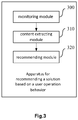
- Fig. 3 illustrates a block diagram of an apparatus for recommending a solution based on a user operation behavior according to one embodiment of the present invention (hereinafter referred to as "solution recommending apparatus").
- the solution recommending apparatus may be a computer device or an apparatus in a computer device. As illustrated in Fig. 3 , the solution recommending apparatus comprises:
- the monitoring unit 300 may create an event notification callback function and a mouse-keyboard global hook of the operating system based on a message processing mechanism of an operating system; in the event notification callback function, other create events besides creating a window object are filtered, meanwhile trigger of a message of creating a window object is monitored.
- the event notification callback function is a function invoked by a function pointer.
- the function pointer may be one or plural. Each pointer is directed to a specific event. When the specific event occurs, the pointer invokes a corresponding function to trigger a corresponding operation.
- the mouse-keyboard global hook is for obtaining an operation behavior with respect to the created event through a mouse and keyboard, and then determining whether the user has solved a problem to occur or has not solved the problem to occur through the user's operation behavior.
- the monitoring unit 300 monitors an event message using an event notification callback function; after a message that the created event is a window object is triggered, i.e., the first window object is created, the user's operation behavior is further obtained through the mouse keyboard global hook. If a second window object is further triggered after the user operates the first window object through the mouse or keyboard, it indicates that the user's operation on the first window object might meet a problem that cannot be tackled. If the second window object is not triggered after the user operates the first window object, it indicates that a corresponding task has been completed by the user's operation on the first window object, without a need of recommending a solution.
- the content extracting unit 310 when monitoring that the user's operation on the first window object has triggered the second window object, first determines a type of the second window object, because only when the type of the second window object belongs to an abnormal prompt or an alarm window (hereinafter referred to as an abnormal window), will it further indicate that the user's operation on the first window object has met a problem that cannot be tackled.
- an abnormal window an abnormal prompt or an alarm window
- the content extracting unit 310 may adopt the following modules to determine a type of the second window object:
- the information obtaining unit may first discern different scenarios through the textual information described by the obtained second window object, then continue to obtain environment information in the specific scene, and then obtain all textual information distributed on the second window object based on the environment information, and determine the type of the abnormal window by identifying the textual information.
- the information obtaining unit may obtain the environment information in a specific scene through the following units:
- the information obtaining unit may obtain all textual information distributed on the second window object using the obtained environment information associated with the current scene.
- the handle is to identify different objects in an application and different instances of a same kind of objects using a unique integer value, e.g., a window, a button, an icon, a scrollbar, a control or a file, etc.; by analyzing the handle, the type identifying unit can split a window object into a plurality of instances and identify the instances with textual content; the identified textual content may act as textual information on the second window object, and then it may be obtained whether it is an abnormal window and a type of the abnormal window.
- a unique integer value e.g., a window, a button, an icon, a scrollbar, a control or a file, etc.
- the recommending unit 320 After confirming that the second window object is an abnormal window as well as the type of the abnormal window, the recommending unit 320 continues to monitor the user's operation behavior through a global mouse-keyboard hook.
- a corresponding solution may be determined through the following sub-modules:
- the user performs a retry operation to the second window object for at least once and triggers at least one second window object, or continues to trigger the second window object after re-triggering the first window object upon closing of the second window object (destroying the second window object), it indicates that the user cannot solve the current problem and it is needed to provide a solution to the current problem.
- the recommending unit 320 may determine a corresponding solution from the pre-stored solution library as a solution for solving the problem corresponding to the second window object according to a type of the abnormal window, and then provides the determined solution to the user through the following sub-modules:
- the method of recommending a solution based on a user operation behavior provided by the present invention will be described in detail through specific embodiments.
- the present embodiment will be illustrated with the Windows operating system as an example. As shown in Fig. 2 , the method comprises:
- step S210 the monitoring unit 300 captures an object create message. Specifically, when monitoring a message that a Delete File popup prompt window is created, the monitoring unit 300 captures the message.
- the type of the Delete File popup prompt window is #32770.
- the title of the window object is obtained through an event notification callback function and it is judged whether the capture is "Delete File.” If yes, the window object is a Delete File confirmation prompt window triggered by the user's deleting a file; otherwise, it is other type of popup window.
- step S220 the content extracting unit determines a window type. Specifically, when the user selects "Confirm" in the Delete File popup prompt window, a Delete File scene appears. In the Delete File scene, the content extracting unit 310 determines the window type based on title of the window, a text, and a current focal text. In the Delete File scene, a Delete File Failure alarm window may comprise textual contents such as "unable to delete the file,” “unable to delete the folder,” “the file is being used,” “the folder is being used,” and other contents. The content extracting unit 310 may determine a window type based on the text above.
- the computer device may filter off the non-alarm windows such as "delete a file” and “privilege escalation” so as to accurately capture the Delete File Failure alarm window.
- step S230 the content extracting unit 310 obtains a text and feature of the alarm window. Specifically, when the Delete File Failure alarm window is triggered, in conjunction with a focal setting event, mouse and keyboard and like messages before the previous "Delete File" Confirm prompt window popup, the content extracting unit 310 obtains one or more filename lists as deleted.
- step S240 the content extracting unit 310 obtains specific scene information. Specifically, the content extracting unit 310 finds an edit box control object with a path where the current file is located by enumerating windows to obtain the file path. Finally, the filename list and file path are combined into a complete scene of failing to delete a certain.
- step S250 the recommending unit 320 recommends a solution to the problem.
- the solution library stores a solution for each type of alarm windows, while for the alarm window "unable to delete a file," a file shredder is used.
- the computer device determines that the user performs a retry or cancel operation on the "Unable to Delete File" alarm window through a message from a mouse and keyboard and an object destroy event.
- the recommending unit determines trigger of a same-path same-name delete failure event to be a retry operation, while determines trigger of a same-window handle object destroy event as a cancel operation.
- the recommending unit 320 pops up a system window overlaying the current window to strongly recommend the user to use a file shredder; if it is determined to be a cancel or close operation, the recommending unit 320 uses a manner of pop up window at the lower-right corner to prompt the user whether he/she needs a file shredder.
- the apparatus for recommending a solution based on a user operation behavior determines a corresponding solution by identifying the type of the second window object, and provides the corresponding solution to the user when analyzing that the user needs to obtain a solution to the corresponding problem according to the user's operation behavior, which exempts the user from manually searching a solution; more importantly, it only recommends a solution to the user when the user cannot solve the corresponding solution, rather than recommending solutions to the user for every problem he/she meets, thereby implementing a user-friendly smart recommendation function, which can effectively help the user to solve various problems occurring during the procedure of using computers, thereby enhancing user experience.
- the present invention may be implemented in software and/or a combination of software and hardware.
- respective modules in the present invention may be implemented by ASIC (Application Specific Integrated Circuit) or any other similar hardware device.
- the software program of the present invention may be executed through the processor to implement the steps or functions as aforesaid.
- a software program (including relevant data structure) of the present invention may be stored in a computer readable recording medium, e.g., RAM (random access memory) memory, magnetic or optical driver or a floppy disk, and a similar device.
- some steps or functions of the present invention may be implemented by hardware, e.g., as a circuit cooperating with the processor to execute various steps or functions.
- part of the present invention may be applied as a computer program product, e.g., a computer program instruction, which, when being executed by a computer, may invoke or provide a method and/or technical solution according to the present invention through operation of the computer.
- the program instruction that invokes a method of the present invention may be stored in a fixed or mobile recording medium, and/or transmitted through broadcast and/or other signal carrier medium, and/or stored in a work memory running according to the program instruction in a computer device.
- one embodiment according to the present invention comprises an apparatus that includes a memory for storing computer program instructions and a processor for executing program instructions, wherein when being executed by the processor, the computer program instruction triggers the apparatus to carry out the methods and/or technical solutions according to various embodiments of the present invention.
Landscapes
- Engineering & Computer Science (AREA)
- Theoretical Computer Science (AREA)
- General Engineering & Computer Science (AREA)
- Physics & Mathematics (AREA)
- General Physics & Mathematics (AREA)
- Software Systems (AREA)
- Human Computer Interaction (AREA)
- Quality & Reliability (AREA)
- Computer Hardware Design (AREA)
- User Interface Of Digital Computer (AREA)
- Debugging And Monitoring (AREA)
Abstract
Description
- The present invention claims a priority right of Chinese patent application No.
201510012093.4 filed on January 9, 2015 - The present invention relates to a computer technology, and more specifically relates to a method and apparatus for recommending a solution based on a user operation behavior.
- When using a computer, if a user has a problem that cannot be easily tackled, e.g., failure to delete a file, failure to end a process, lack of a dll (dynamic link library) file, or running of the operating system gets stuck, etc., and if the user is unfamiliar with computer operations, an approach that can help him/her to solve the problems would be urgently needed.
- Currently, computers usually provide solutions to problems which users encounter when operating the computers by embedding a help file in the operating system. However, the help file only contains solutions to problems occurring to the operating system and to software built in the operating system, while problems occurring to third party software or unknown problems occurring to the operating system cannot be solved. Therefore, is the aforementioned art cannot provide user-friendly services combining actual problems of the user and solutions to the problems.
- One of the technical problems to be solved by certain embodiments of the present invention is to provide a solution according to an actual problem of a user when using a computer so as to provide a user-friendly service.
- According to one embodiment of an aspect of the present invention, there is provided a method of recommending a solution based on a user operation behavior, comprising:
- monitoring a second window object triggered after a user operates a first window object;
- if the second window object is an abnormal window, determining a type of the abnormal window by extracting textual information in the second window object;
- recommending a solution to a problem corresponding to the second window object according to the type of the abnormal window and the monitored operation behavior of the user to the second window object.
- According to one embodiment of another aspect of the present invention, there is provided an apparatus of recommending a solution based on a user operation behavior, comprising:
- a module configured to monitor a second window object triggered after a user operates a first window object;
- a module configured to, if the second window object is an abnormal window, determine a type of the abnormal window by extracting textual information in the second window object;
- a module configured to recommend a solution to a problem corresponding to the second window object according to the type of the abnormal window and the monitored operation behavior of the user to the second window object.
- Because the present embodiment may determine, when monitoring that a second window object that is triggered after the user operates the first window is an abnormal window, a corresponding solution by identifying a type of the second window object, and when it is analyzed according to a user's operation behavior that the user needs to obtain a solution for solving a corresponding problem, provide the corresponding solution to the user, which exempts the user to form a need of manually searching the solution and implements a user-friendly smart recommendation function, such that it effectively helps the user to solve various problems occurring during a procedure of using the computer and promotes use experience of the user.
- A person of normal skill in the art will appreciate that although the detailed depiction below will be carried out with reference to the embodiments and drawings, the present invention is not limited to these embodiments. Instead, the scope of the present invention is intended to be limited only by the appended claims.
- Other features, objectives, and advantages of the present invention will become more apparent by reading the detailed depiction of the non-limiting embodiments with reference to the accompanying drawings:
- Fig. 1
- illustrates a flow diagram of a method for recommending a solution based on a user operation behavior according to one embodiment of the present invention;
- Fig. 2
- illustrates a flow diagram of a method for recommending a solution based on a user operation behavior according to another embodiment of the present invention;
- Fig. 3
- illustrates a block diagram of an apparatus for recommending a solution based on a user operation behavior according to one embodiment of the present invention.
- Same or similar reference numerals in the accompanying drawings represent same or similar components.
- Before discussing the exemplary embodiments in more detail, it should be mentioned that some exemplary embodiments are described as a process or method depicted as a flow diagram. Although the flow diagram describes various operations to be processed sequentially, many operations therein may be carried out in parallel, concurrently or simultaneously. Besides, sequences of various operations may be re-arranged. When their operations are completed, the process may be terminated. However, there may also comprise additional steps in the drawings. The process may correspond to a method, function, specification, sub-routine, sub-program, etc.
- The "computer device" herein, also referred to as "computer," refers to a smart electronic device that may perform a predetermined processing procedure such as numerical calculation and/or logical calculation by running a predetermined program or instruction, which may comprise a processor and a memory, such that the predetermined processing process is executed by executing a pre-stored program instruction in the memory by the processor, or the predetermined processing process is implemented by hardware such as ASIC, FPGA, DSP, or the predetermined processing process is implemented by a combination thereof. The computer device includes, but not limited to, a server, a personal computer, a laptop, a tablet computer, and a smart phone, etc.
- Hereinafter, the present invention will be described in more detail with reference to the accompanying drawings.
-
Fig. 1 illustrates a flow diagram of a method for recommending a solution based on a user operation behavior according to one embodiment of the present invention. - As illustrated in
Fig. 1 , the method of recommending a solution based on a user operation behavior according to the present embodiment comprises steps of: - S100. monitoring a second window object triggered after a user operates a first window object;
- S110. if the second window object is an abnormal window, determining a type of the abnormal window by extracting textual information in the second window object;
- S120. recommending a solution to a problem corresponding to the second window object according to the type of the abnormal window and the monitored operation behavior of the user to the second window object.
- Hereinafter, respective steps may be introduced in further detail.
- In step S100, the computer device may create an event notification callback function and a mouse-keyboard global hook of the operating system based on a message processing mechanism of the operating system; in the event notification callback function, other create events than creating a window object are filtered, and meanwhile trigger of a message of creating a window object is monitored.
- Wherein, the event notification callback function is a function invoked by a function pointer. The function pointer may be one or plural. Each pointer is directed to a specific event. When the specific event occurs, the pointer invokes a corresponding function to trigger a corresponding operation. The mouse-keyboard global hook is for obtaining an operation behavior with respect to the created event through a mouse and keyboard, and then determining whether the user has solved a problem to occur or has not solved the problem to occur through the user's operation behavior.
- In the present embodiment, the computer device monitors an event message using an event notification callback function; after a message that the created event is a window object is triggered, i.e., the first window object is created, the user's operation behavior is further obtained through the mouse keyboard global hook. If a second window object is further triggered after the user operates the first window object through the mouse or keyboard, it indicates that the user's operation on the first window object might meet a problem that cannot be tackled. If the second window object is not triggered after the user operates the first window object, it indicates that a corresponding task has been completed by the user's operation on the first window object, without a need of recommending a solution.
- In step S110, when monitoring that the user's operation on the first window object has triggered the second window object, the computer device first determines a type of the second window object, because only when the type of the second window object belongs to an abnormal prompt or an alarm window (hereinafter referred to as an abnormal window), it will further indicate that the user's operation on the first window object has met a problem that cannot be tackled.
- Wherein, alternatively, the computer device may adopt the following method to determine a type of the second window object:
- obtaining all textual information distributed on the second window object by enumerating window sub-controllers;
- determining a type of the abnormal window by identifying the textual information.
- Optionally, in the present embodiment, the computer device may first discern different scenarios through the textual information described by the obtained second window object, then continue to obtain environment information in the specific scene, and then obtain all textual information distributed on the second window object based on the environment information, and determine the type of the abnormal window by identifying the textual information. Specifically, the computer device may obtain the environment information in a specific scene through the following steps:
- obtaining a parent window handle and a parent window handle of a parent window through a handle of the current window object;
- then enumerating all objects under all parent windows and titles of all objects under a same parent window as the parent window, as well as other feature information, so as to obtain environment information associated with the current scene.
- Afterwards, the computer device may obtain all textual information distributed on the second window object using the obtained environment information associated with the current scene.
- Wherein, the handle is to identify different objects in an application and different instances of a same kind of objects using a unique integer value, e.g., a window, a button, an icon, a scrollbar, a control or a file, etc.; by analyzing the handle, the computer device can split a window object into a plurality of instances and identify the instances with literal contents; the identified textual content may act as textual information on the second window object, and then it may be obtained whether it is an abnormal window and a type of the abnormal window.
- In step S120, after confirming that the second window object is an abnormal window as well as the type of the abnormal window, the computer device continues to monitor the user's operation behavior through a global mouse-keyboard hook.
- For example, if the user performs a retry operation to the second window object for at least once and triggers at least one second window object, or continues to trigger the second window object after re-triggering the first window object upon closing of the second window object (destroying the second window object), it indicates that the user cannot solve the current problem and it is needed to provide a solution to the current problem.
- In this case, the computer device may determine a corresponding solution from the pre-stored solution library as a solution for solving the problem corresponding to the second window object according to a type of the abnormal window, and then provides the determined solution to the user. Alternatively, the computer device may provide the determined solution according to the following manner to the user:
- when the user performs a retry operation to the second window object, popping up the solution to the abnormal window at a position covering the second window; or
- when the user performs a close operation to the second window object, popping up the solution to the abnormal window at a specific position of the currently displayed screen.
- Hereinafter, the method of recommending a solution based on a user operation behavior provided by the present invention will be described in detail through specific embodiments. The present embodiment will be illustrated with the Windows operating system as an example. As shown in
Fig. 2 , the method comprises: - In step S200, the computer device creates an event notification callback function. Specifically, the computer device may be used to monitor the window object created in the Windows 7 operating system through the event callback function.
- In the present embodiment, illustration will be made with a Delete File popup prompt window as a specific window object, which is only exemplary. Those skilled in the art should understand that methods of recommending other solutions to problems such as failure of terminating a process, lack of a dll file, and that the operating system gets stuck during running, should also fall into the protection scope of the present invention. For the sake of clarity, they are only incorporated here by reference and will not be detailed.
- In step S210, the computer device captures an object create message. Specifically, when monitoring a message that a Delete File popup prompt window is created, the computer device captures the message.
- In the Windows operating system, the type of the Delete File popup prompt window is #32770. When monitoring a create event that the window object type is #32770, the title of the window object is obtained through an event notification callback function and it is judged whether the capture is "Delete File." If yes, the window object is a Delete File confirmation prompt window triggered by the user's deleting a file; otherwise, it is other type of popup window.
- In step S220, the computer device determines a window type. When the user selects "Confirm" in the Delete File popup prompt window, the computer device enters into a Delete File scene. In the Delete File scene, the computer device determines the window type based on title of the window, a text, and a current focal text. In the Delete File scene, a Delete File Failure alarm window may comprise textual contents such as "unable to delete the file", "unable to delete the folder", "the file is being used", "the folder is being used", and other contents. The computer device may determine a window type based on the text above. If the window type is an alarm window, perform step 230; if the window type is a non-alarm window, perform step 210. By determining the window type, the computer device may filter off the non-alarm windows such as "delete a file" and "privilege escalation" so as to accurately capture the Delete File Failure alarm window.
- In step S230, the computer device obtains a text and feature of the alarm window. When the Delete File Failure alarm window is triggered, in conjunction with a focal setting event, mouse and keyboard and like messages before the previous "Delete File" Confirm prompt window popup, the computer device obtains one or more filename lists as deleted.
- In step S240, the computer device obtains specific scene information. Specifically, the computer device finds an edit box control object with a path where the current file is located by enumerating windows to obtain the file path. Finally, the filename list and file path are combined into a complete scene of failing to delete a certain file.
- In step S250, the computer device recommends a solution to the problem. A solution library stores a solution for each type of alarm windows, while for the alarm window "Unable to Delete File", a file shredder is used. The computer device determines that the user performs a retry or cancel operation on the "Unable to Delete File" alarm window through a message from a mouse and keyboard and an object destroy event. Wherein, the computer device determines trigger of a same-path same-name delete failure event to be a retry operation, while determines trigger of a same-window handle object destroy event as a cancel operation. If the computer determines a retry operation according to a user operation, a system window overlaying the current window is popped up to strongly recommend the user to use a file shredder; if it is determined to be a cancel or close operation, a manner of popping up a window at the lower-right corner is used to prompt the user whether he/she needs a file shredder.
- When monitoring that a second window object triggered by the user after operating the first window object is an abnormal window, the method of recommending a solution based on a user operation behavior according to the present embodiment determines a corresponding solution by identifying the type of the second window object, and provides the corresponding solution to the user when analyzing that the user needs to obtain a solution to the corresponding problem according to the user's operation behavior, which exempts the user from manually searching a solution; more importantly, it only recommends a solution to the user when the user cannot solve the corresponding solution, rather than recommending solutions to the user for every problem he/she meets, thereby implementing a user-friendly smart recommendation function, which can effectively help the user to solve various problems occurring during the procedure of using computers, thereby enhancing user experience.
-
Fig. 3 illustrates a block diagram of an apparatus for recommending a solution based on a user operation behavior according to one embodiment of the present invention (hereinafter referred to as "solution recommending apparatus"). The solution recommending apparatus may be a computer device or an apparatus in a computer device. As illustrated inFig. 3 , the solution recommending apparatus comprises: - a module 300 (hereinafter referred to as "a monitoring unit") configured to monitor a second window object triggered after a user operates a first window object;
- a module 310 (hereinafter referred to as "a content extracting unit") configured to, if the second window object is an abnormal window, determine a type of the abnormal window by extracting textual information in the second window object;
- a module 320 (hereinafter referred to as "a recommending unit") configured to recommend a solution to a problem corresponding to the second window object according to the type of the abnormal window and the monitored operation behavior of the user to the second window object.
- The
monitoring unit 300 may create an event notification callback function and a mouse-keyboard global hook of the operating system based on a message processing mechanism of an operating system; in the event notification callback function, other create events besides creating a window object are filtered, meanwhile trigger of a message of creating a window object is monitored. - Wherein, the event notification callback function is a function invoked by a function pointer. The function pointer may be one or plural. Each pointer is directed to a specific event. When the specific event occurs, the pointer invokes a corresponding function to trigger a corresponding operation. The mouse-keyboard global hook is for obtaining an operation behavior with respect to the created event through a mouse and keyboard, and then determining whether the user has solved a problem to occur or has not solved the problem to occur through the user's operation behavior.
- In the present embodiment, the
monitoring unit 300 monitors an event message using an event notification callback function; after a message that the created event is a window object is triggered, i.e., the first window object is created, the user's operation behavior is further obtained through the mouse keyboard global hook. If a second window object is further triggered after the user operates the first window object through the mouse or keyboard, it indicates that the user's operation on the first window object might meet a problem that cannot be tackled. If the second window object is not triggered after the user operates the first window object, it indicates that a corresponding task has been completed by the user's operation on the first window object, without a need of recommending a solution. - The
content extracting unit 310, when monitoring that the user's operation on the first window object has triggered the second window object, first determines a type of the second window object, because only when the type of the second window object belongs to an abnormal prompt or an alarm window (hereinafter referred to as an abnormal window), will it further indicate that the user's operation on the first window object has met a problem that cannot be tackled. - Wherein, alternatively, the
content extracting unit 310 may adopt the following modules to determine a type of the second window object: - a sub-module (hereinafter referred to as "information obtaining unit") configured to obtain all textual information distributed on the second window object by enumerating window sub-controllers;
- a sub-module (hereinafter referred to as "type identifying unit") configured to determine a type of the abnormal window by identifying the textual information.
- Optionally, in the present embodiment, the information obtaining unit may first discern different scenarios through the textual information described by the obtained second window object, then continue to obtain environment information in the specific scene, and then obtain all textual information distributed on the second window object based on the environment information, and determine the type of the abnormal window by identifying the textual information. Specifically, the information obtaining unit may obtain the environment information in a specific scene through the following units:
- a unit for obtaining a parent window handle and a parent window handle of a parent window through a handle of the current window object;
- a unit for enumerating all objects under all parent windows and titles of all objects under a same parent window as the parent window, as well as other feature information, so as to obtain environment information associated with the current scene.
- Afterwards, the information obtaining unit may obtain all textual information distributed on the second window object using the obtained environment information associated with the current scene.
- Wherein, the handle is to identify different objects in an application and different instances of a same kind of objects using a unique integer value, e.g., a window, a button, an icon, a scrollbar, a control or a file, etc.; by analyzing the handle, the type identifying unit can split a window object into a plurality of instances and identify the instances with textual content; the identified textual content may act as textual information on the second window object, and then it may be obtained whether it is an abnormal window and a type of the abnormal window.
- After confirming that the second window object is an abnormal window as well as the type of the abnormal window, the recommending
unit 320 continues to monitor the user's operation behavior through a global mouse-keyboard hook. - After the recommending
unit 320 confirms that the second window object is the type of abnormal window, a corresponding solution may be determined through the following sub-modules: - a sub-module configured to determine, according to the type of the abnormal window, a corresponding solution from the pre-stored solution library as the solution to the problem corresponding to the second window.
- For example, if the user performs a retry operation to the second window object for at least once and triggers at least one second window object, or continues to trigger the second window object after re-triggering the first window object upon closing of the second window object (destroying the second window object), it indicates that the user cannot solve the current problem and it is needed to provide a solution to the current problem.
- In this case, the recommending
unit 320 may determine a corresponding solution from the pre-stored solution library as a solution for solving the problem corresponding to the second window object according to a type of the abnormal window, and then provides the determined solution to the user through the following sub-modules: - a sub-module configured to, when the user performs a retry operation to the second window object, pop up the solution to the abnormal window at a position covering the second window; or
- a sub-module configured to, when the user performs a close operation to the second window object, pop up the solution to the abnormal window at a specific position of the currently displayed screen.
- Hereinafter, the method of recommending a solution based on a user operation behavior provided by the present invention will be described in detail through specific embodiments. The present embodiment will be illustrated with the Windows operating system as an example. As shown in
Fig. 2 , the method comprises: - In step S200, the computer device creates an event notification callback function. Specifically, the computer device may be used to monitor the window object created in the Windows 7 operating system through the event callback function.
- In the present embodiment, illustration will be made with a Delete File popup prompt window as a specific window object, which is only exemplary. Those skilled in the art should understand that methods of recommending other solutions to problems such as failure of terminating a process, lack of a dll file, and that the operating system gets stuck during running, should also fall into the protection scope of the present invention. For the sake of clarity, they are only incorporated here by reference and will not be detailed.
- In step S210, the
monitoring unit 300 captures an object create message. Specifically, when monitoring a message that a Delete File popup prompt window is created, themonitoring unit 300 captures the message. - In the Windows operating system, the type of the Delete File popup prompt window is #32770. When monitoring a create event that the window object type is #32770, the title of the window object is obtained through an event notification callback function and it is judged whether the capture is "Delete File." If yes, the window object is a Delete File confirmation prompt window triggered by the user's deleting a file; otherwise, it is other type of popup window.
- In step S220, the content extracting unit determines a window type. Specifically, when the user selects "Confirm" in the Delete File popup prompt window, a Delete File scene appears. In the Delete File scene, the
content extracting unit 310 determines the window type based on title of the window, a text, and a current focal text. In the Delete File scene, a Delete File Failure alarm window may comprise textual contents such as "unable to delete the file," "unable to delete the folder," "the file is being used," "the folder is being used," and other contents. Thecontent extracting unit 310 may determine a window type based on the text above. If the window type is an alarm window, perform step 230; if the window type is a non-alarm window, perform step 210. By determining the window type, the computer device may filter off the non-alarm windows such as "delete a file" and "privilege escalation" so as to accurately capture the Delete File Failure alarm window. - In step S230, the
content extracting unit 310 obtains a text and feature of the alarm window. Specifically, when the Delete File Failure alarm window is triggered, in conjunction with a focal setting event, mouse and keyboard and like messages before the previous "Delete File" Confirm prompt window popup, thecontent extracting unit 310 obtains one or more filename lists as deleted. - In step S240, the
content extracting unit 310 obtains specific scene information. Specifically, thecontent extracting unit 310 finds an edit box control object with a path where the current file is located by enumerating windows to obtain the file path. Finally, the filename list and file path are combined into a complete scene of failing to delete a certain. - In step S250, the recommending
unit 320 recommends a solution to the problem. The solution library stores a solution for each type of alarm windows, while for the alarm window "unable to delete a file," a file shredder is used. The computer device determines that the user performs a retry or cancel operation on the "Unable to Delete File" alarm window through a message from a mouse and keyboard and an object destroy event. Wherein, the recommending unit determines trigger of a same-path same-name delete failure event to be a retry operation, while determines trigger of a same-window handle object destroy event as a cancel operation. If the computer determines a retry operation according to a user operation, the recommendingunit 320 pops up a system window overlaying the current window to strongly recommend the user to use a file shredder; if it is determined to be a cancel or close operation, the recommendingunit 320 uses a manner of pop up window at the lower-right corner to prompt the user whether he/she needs a file shredder. - When monitoring that a second window object triggered by the user after operating the first window object is an abnormal window, the apparatus for recommending a solution based on a user operation behavior according to the present embodiment determines a corresponding solution by identifying the type of the second window object, and provides the corresponding solution to the user when analyzing that the user needs to obtain a solution to the corresponding problem according to the user's operation behavior, which exempts the user from manually searching a solution; more importantly, it only recommends a solution to the user when the user cannot solve the corresponding solution, rather than recommending solutions to the user for every problem he/she meets, thereby implementing a user-friendly smart recommendation function, which can effectively help the user to solve various problems occurring during the procedure of using computers, thereby enhancing user experience.
- It should be noted that the present invention may be implemented in software and/or a combination of software and hardware. For example, respective modules in the present invention may be implemented by ASIC (Application Specific Integrated Circuit) or any other similar hardware device. In one embodiment, the software program of the present invention may be executed through the processor to implement the steps or functions as aforesaid. Likewise, a software program (including relevant data structure) of the present invention may be stored in a computer readable recording medium, e.g., RAM (random access memory) memory, magnetic or optical driver or a floppy disk, and a similar device. In addition, some steps or functions of the present invention may be implemented by hardware, e.g., as a circuit cooperating with the processor to execute various steps or functions.
- In addition, part of the present invention may be applied as a computer program product, e.g., a computer program instruction, which, when being executed by a computer, may invoke or provide a method and/or technical solution according to the present invention through operation of the computer. The program instruction that invokes a method of the present invention may be stored in a fixed or mobile recording medium, and/or transmitted through broadcast and/or other signal carrier medium, and/or stored in a work memory running according to the program instruction in a computer device. Here, one embodiment according to the present invention comprises an apparatus that includes a memory for storing computer program instructions and a processor for executing program instructions, wherein when being executed by the processor, the computer program instruction triggers the apparatus to carry out the methods and/or technical solutions according to various embodiments of the present invention.
- To those skilled in the art, it is apparent that the present disclosure is not limited to the details of the above exemplary embodiments, and the present disclosure may be implemented with other forms without departing from the spirit or basic features of the present disclosure. Thus, in any way, the embodiments should be regarded as exemplary, not limitative; the scope of the present disclosure is limited by the appended claims, instead of the above depiction. Thus, all variations intended to fall into the meaning and scope of equivalent elements of the claims should be covered within the present disclosure. No reference signs in the claims should be regarded as limiting the involved claims. Besides, it is apparent that the term "comprise/comprising/include/including" does not exclude other units or steps, and singularity does not exclude plurality. A plurality of units or means stated in the apparatus claims may also be implemented by a single unit or means through software or hardware. Terms such as the first and the second are used to indicate names, but do not indicate any particular sequence.
Claims (13)
- A method of recommending a solution based on a user operation behavior, comprising:monitoring a second window object triggered after a user operates a first window object;if the second window object is an abnormal window, determining a type of the abnormal window by extracting textual information in the second window object;recommending a solution to a problem corresponding to the second window object according to the type of the abnormal window and the monitored operation behavior of the user to the second window object.
- The method according to claim 1, wherein the determining of a type of the abnormal window by extracting textual information in the second window object comprises:obtaining all textual information distributed on the second window object by enumerating window sub-controls;determining a type of the abnormal window by identifying a type of the abnormal window.
- The method according to claim 2, wherein obtaining all textual information distributed on the second window object by enumerating window sub-controls comprises:obtaining a parent window handle and a parent window handle of a parent window through a handle of the abnormal window;enumerating all objects under all parent windows and titles of all objects under a same parent window as the parent window, as well as other feature information so as to collect environment information associated with a current scene.
- The method according to claim 1, the recommending of a solution to a problem corresponding to the second window object comprises:when the user performs a retry operation to the second window object, popping up a solution to the abnormal window at a position overlaying the second window; orwhen the user performs a close operation to the second window object, popping up a solution to the abnormal window at a specific position of the current display screen.
- The method according to any one of claims 1-4, wherein a procedure of determining the solution to a problem corresponding to the second window comprises:Determining a corresponding solution from the pre-stored solution library as a solution to the problem corresponding to the second window object according to the type of the abnormal window.
- An apparatus of recommending a solution based on a user operation behavior, comprising:a module configured to monitor a second window object triggered after a user operates a first window object;a module configured to, if the second window object is an abnormal window, determine a type of the abnormal window by extracting textual information in the second window object;a module configured to recommend a solution to a problem corresponding to the second window object according to the type of the abnormal window and the monitored operation behavior of the user to the second window object.
- The apparatus according to claim 6, wherein the module configured to determine a type of the abnormal window by extracting textual information in the second window object comprises:a sub-module configured to obtain all textual information distributed on the second window object by enumerating window sub-controls;a sub-module configured to determine a type of the abnormal window by identifying a type of the abnormal window.
- The apparatus according to claim 7, wherein the sub-module configured to obtain all textual information distributed on the second window object by enumerating window sub-controls comprises:a unit for obtaining a parent window handle and a parent window handle of a parent window through a handle of the abnormal window;a unit for enumerating all objects under all parent windows and titles of all objects under a same parent window as the parent window, as well as other feature information so as to collect environment information associated with a current scene.
- The apparatus according to claim 6, wherein the module configured to recommend a solution to a problem corresponding to the second window object according to the type of the abnormal window and the monitored operation behavior of the user to the second window object comprises:a sub-module configured to, when the user performs a retry operation to the second window object, pop up a solution to the abnormal window at a position overlaying the second window; ora sub-module configured to, when the user performs a close operation to the second window object, pop up a solution to the abnormal window at a specific position of the current display screen.
- The apparatus according to any one of claims 6-9, wherein the module configured to recommend a solution to a problem corresponding to the second window object according to the type of the abnormal window and the monitored operation behavior of the user to the second window object comprises:a sub-module configured to determine a corresponding solution from the pre-stored solution library as a solution to the problem corresponding to the second window object according to the type of the abnormal window and the monitored operation behavior of the user with respect to the second window object.
- A non-volatile computer readable medium that comprises computer code which, when being executed, causes the method according to any one of claims 1-5 to be executed.
- A computer program product which, when being executed by the computer device, causes the method according to any one of claims 1-5 to be executed.
- A computer device, comprising a memory and a processor, the memory storing computer code, the processor being configured to execute a method according to any one of claims 1-5 by executing the computer code.
Applications Claiming Priority (2)
| Application Number | Priority Date | Filing Date | Title |
|---|---|---|---|
| CN201510012093.4A CN104598128A (en) | 2015-01-09 | 2015-01-09 | Method and system for recommending solutions on basis of operation behaviors of users |
| PCT/CN2015/088188 WO2016110114A1 (en) | 2015-01-09 | 2015-08-26 | Method and device for recommending solution based on user operation behavior |
Publications (3)
| Publication Number | Publication Date |
|---|---|
| EP3113002A1 true EP3113002A1 (en) | 2017-01-04 |
| EP3113002A4 EP3113002A4 (en) | 2017-12-13 |
| EP3113002B1 EP3113002B1 (en) | 2024-08-07 |
Family
ID=53123958
Family Applications (1)
| Application Number | Title | Priority Date | Filing Date |
|---|---|---|---|
| EP15876616.2A Active EP3113002B1 (en) | 2015-01-09 | 2015-08-26 | Method and device for recommending solution based on user operation behavior |
Country Status (6)
| Country | Link |
|---|---|
| US (1) | US10901568B2 (en) |
| EP (1) | EP3113002B1 (en) |
| JP (1) | JP6334733B2 (en) |
| KR (1) | KR101990598B1 (en) |
| CN (1) | CN104598128A (en) |
| WO (1) | WO2016110114A1 (en) |
Cited By (1)
| Publication number | Priority date | Publication date | Assignee | Title |
|---|---|---|---|---|
| CN111078344A (en) * | 2019-12-11 | 2020-04-28 | 广州品唯软件有限公司 | Operation and maintenance control method, terminal device and computer-readable storage medium |
Families Citing this family (10)
| Publication number | Priority date | Publication date | Assignee | Title |
|---|---|---|---|---|
| CN104598128A (en) | 2015-01-09 | 2015-05-06 | 百度在线网络技术(北京)有限公司 | Method and system for recommending solutions on basis of operation behaviors of users |
| US10318094B2 (en) * | 2015-03-25 | 2019-06-11 | International Business Machines Corporation | Assistive technology (AT) responsive to cognitive states |
| US10359836B2 (en) * | 2015-03-25 | 2019-07-23 | International Business Machines Corporation | Assistive technology (AT) responsive to cognitive states |
| CN106339380A (en) * | 2015-07-07 | 2017-01-18 | 阿里巴巴集团控股有限公司 | Method and device for recommending frequently asked question information |
| CN105677535A (en) * | 2016-01-04 | 2016-06-15 | 广东威创视讯科技股份有限公司 | Window exception handling method and device |
| CN105677132A (en) * | 2016-01-06 | 2016-06-15 | 腾讯科技(深圳)有限公司 | Processing method and device for prompt information of application program |
| US10599615B2 (en) | 2016-06-20 | 2020-03-24 | International Business Machines Corporation | System, method, and recording medium for recycle bin management based on cognitive factors |
| CN106228669A (en) * | 2016-08-01 | 2016-12-14 | 中体彩科技发展有限公司 | Precisely obtain the method for user aid information, sell color terminal, server and system |
| US10826914B2 (en) | 2016-12-28 | 2020-11-03 | Mcafee, Llc | Method to improve anti-malware scan responsiveness and effectiveness using user symptoms feedback |
| CN113342622A (en) * | 2021-08-02 | 2021-09-03 | 深圳市永达电子信息股份有限公司 | Operation behavior auditing method and device and storage medium |
Family Cites Families (19)
| Publication number | Priority date | Publication date | Assignee | Title |
|---|---|---|---|---|
| US4500964A (en) * | 1983-03-30 | 1985-02-19 | International Business Machines Corporation | Dialog user error diagnosis, severity, and help technique |
| US6573906B1 (en) * | 1999-04-26 | 2003-06-03 | International Business Machines Corporation | Method and system for delivering integrated user assistance information and traditional help from the same source |
| US6487713B1 (en) * | 1999-09-24 | 2002-11-26 | Phoenix Technologies Ltd. | Software development system that presents a logical view of project components, facilitates their selection, and signals missing links prior to compilation |
| US20040095372A1 (en) * | 2002-11-14 | 2004-05-20 | International Business Machines Corporation | System and method for progressive levels of user assistance information |
| JP2004192625A (en) * | 2002-11-25 | 2004-07-08 | Brother Ind Ltd | Setting system, electronic device, and program |
| US20040199828A1 (en) * | 2003-04-01 | 2004-10-07 | International Business Machines Corporation | Method and apparatus for tracing troubleshooting events for aiding technical assistance |
| US20070067394A1 (en) * | 2005-09-16 | 2007-03-22 | Neil Adams | External e-mail detection and warning |
| EP1821483A1 (en) * | 2006-02-21 | 2007-08-22 | BrainLAB AG | Computer network system and method for operating the network system screenshot and sourceshot control |
| JP2009282817A (en) | 2008-05-23 | 2009-12-03 | Canon Inc | Help display method, help display and program |
| CN101676909A (en) * | 2008-09-16 | 2010-03-24 | 联想(北京)有限公司 | Method and computer for providing self-service for users |
| CN101662387B (en) * | 2009-10-14 | 2013-01-23 | 中国电信股份有限公司 | System for detecting computer accessing situation in network and method thereof |
| JP2011145918A (en) | 2010-01-15 | 2011-07-28 | Hitachi Solutions Ltd | Web application display control system |
| CN102236587B (en) | 2010-04-28 | 2013-11-13 | 中标软件有限公司 | Recovery method for abnormal firefox browser |
| US20110283226A1 (en) * | 2010-05-15 | 2011-11-17 | International Business Machines Corporation | Window display management in a graphical user interface |
| CN103051516B (en) * | 2011-10-17 | 2016-04-13 | 腾讯科技(深圳)有限公司 | A kind of message prompt method of instant communication client and device |
| CN103684826B (en) * | 2012-09-17 | 2017-05-24 | 腾讯科技(深圳)有限公司 | Method and device for solving fault |
| CN104216997A (en) * | 2014-09-10 | 2014-12-17 | 珠海市君天电子科技有限公司 | Method and device for repairing terminal equipment |
| JP2016057854A (en) * | 2014-09-10 | 2016-04-21 | 日本電気株式会社 | Operation support system, and operation support method |
| CN104598128A (en) | 2015-01-09 | 2015-05-06 | 百度在线网络技术(北京)有限公司 | Method and system for recommending solutions on basis of operation behaviors of users |
-
2015
- 2015-01-09 CN CN201510012093.4A patent/CN104598128A/en active Pending
- 2015-08-26 US US15/301,330 patent/US10901568B2/en active Active
- 2015-08-26 WO PCT/CN2015/088188 patent/WO2016110114A1/en not_active Ceased
- 2015-08-26 EP EP15876616.2A patent/EP3113002B1/en active Active
- 2015-08-26 KR KR1020167030069A patent/KR101990598B1/en active Active
- 2015-08-26 JP JP2016565284A patent/JP6334733B2/en active Active
Cited By (1)
| Publication number | Priority date | Publication date | Assignee | Title |
|---|---|---|---|---|
| CN111078344A (en) * | 2019-12-11 | 2020-04-28 | 广州品唯软件有限公司 | Operation and maintenance control method, terminal device and computer-readable storage medium |
Also Published As
| Publication number | Publication date |
|---|---|
| US10901568B2 (en) | 2021-01-26 |
| KR20160138250A (en) | 2016-12-02 |
| EP3113002A4 (en) | 2017-12-13 |
| WO2016110114A1 (en) | 2016-07-14 |
| EP3113002B1 (en) | 2024-08-07 |
| KR101990598B1 (en) | 2019-06-18 |
| US20170024228A1 (en) | 2017-01-26 |
| JP2017524169A (en) | 2017-08-24 |
| JP6334733B2 (en) | 2018-05-30 |
| CN104598128A (en) | 2015-05-06 |
Similar Documents
| Publication | Publication Date | Title |
|---|---|---|
| EP3113002B1 (en) | Method and device for recommending solution based on user operation behavior | |
| US10120536B2 (en) | Monitoring method | |
| JP6048688B2 (en) | Event analysis apparatus, event analysis method, and computer program | |
| US10983788B2 (en) | Registry for mapping names to component instances using configurable bindings and pointer definitions | |
| EP3059667B1 (en) | Theme display method and related device | |
| US11210072B2 (en) | System for generating a map illustrating bindings | |
| US20170004013A1 (en) | Method and device for managing application | |
| CN110781408B (en) | Information display method and device | |
| CN112449159B (en) | Monitoring video display control method and device, electronic equipment and storage medium | |
| US20120110451A1 (en) | Providing help information | |
| CN110162730B (en) | Information processing method, information processing device, computer equipment and storage medium | |
| CN106909486A (en) | Processing business abnormal method, apparatus and system | |
| CN111124211A (en) | Data display method and device and electronic equipment | |
| CN105574410A (en) | Application program safety detection method and device | |
| JP6497268B2 (en) | Management program, management apparatus and management method | |
| US20220342794A1 (en) | Operation logs acquiring device, operation logs acquiring method, and operation logs acquiring program | |
| CN112699086A (en) | File operation monitoring method and device based on Windows system | |
| CN110309647B (en) | Processing method and device for application program, electronic equipment and storage medium | |
| CN113836216A (en) | Data display method, device, storage medium and electronic device | |
| CN111639007A (en) | Data processing method, device, terminal and computer readable storage medium | |
| CN114090398A (en) | System alarm method and device | |
| HK1247346A1 (en) | Method and device for processing search results | |
| KR20190059186A (en) | Method and system to automatically organize and set alert through notification checking pattern analysis of smart device | |
| WO2010004618A1 (en) | Information processor, transparent display element control method, and program |
Legal Events
| Date | Code | Title | Description |
|---|---|---|---|
| PUAI | Public reference made under article 153(3) epc to a published international application that has entered the european phase |
Free format text: ORIGINAL CODE: 0009012 |
|
| STAA | Information on the status of an ep patent application or granted ep patent |
Free format text: STATUS: REQUEST FOR EXAMINATION WAS MADE |
|
| 17P | Request for examination filed |
Effective date: 20160928 |
|
| AK | Designated contracting states |
Kind code of ref document: A1 Designated state(s): AL AT BE BG CH CY CZ DE DK EE ES FI FR GB GR HR HU IE IS IT LI LT LU LV MC MK MT NL NO PL PT RO RS SE SI SK SM TR |
|
| AX | Request for extension of the european patent |
Extension state: BA ME |
|
| A4 | Supplementary search report drawn up and despatched |
Effective date: 20171115 |
|
| RIC1 | Information provided on ipc code assigned before grant |
Ipc: G06F 3/0484 20130101AFI20171109BHEP |
|
| DAV | Request for validation of the european patent (deleted) | ||
| DAX | Request for extension of the european patent (deleted) | ||
| STAA | Information on the status of an ep patent application or granted ep patent |
Free format text: STATUS: EXAMINATION IS IN PROGRESS |
|
| 17Q | First examination report despatched |
Effective date: 20191126 |
|
| REG | Reference to a national code |
Ref country code: DE Ref legal event code: R079 Ref document number: 602015089487 Country of ref document: DE Free format text: PREVIOUS MAIN CLASS: G06F0003048400 Ipc: G06F0009451000 Ref country code: DE Ref legal event code: R079 Free format text: PREVIOUS MAIN CLASS: G06F0003048400 Ipc: G06F0009451000 |
|
| GRAP | Despatch of communication of intention to grant a patent |
Free format text: ORIGINAL CODE: EPIDOSNIGR1 |
|
| STAA | Information on the status of an ep patent application or granted ep patent |
Free format text: STATUS: GRANT OF PATENT IS INTENDED |
|
| RIC1 | Information provided on ipc code assigned before grant |
Ipc: G06F 11/34 20060101ALI20240416BHEP Ipc: G06F 3/0481 20130101ALI20240416BHEP Ipc: G06F 9/451 20180101AFI20240416BHEP |
|
| INTG | Intention to grant announced |
Effective date: 20240508 |
|
| GRAS | Grant fee paid |
Free format text: ORIGINAL CODE: EPIDOSNIGR3 |
|
| GRAA | (expected) grant |
Free format text: ORIGINAL CODE: 0009210 |
|
| STAA | Information on the status of an ep patent application or granted ep patent |
Free format text: STATUS: THE PATENT HAS BEEN GRANTED |
|
| AK | Designated contracting states |
Kind code of ref document: B1 Designated state(s): AL AT BE BG CH CY CZ DE DK EE ES FI FR GB GR HR HU IE IS IT LI LT LU LV MC MK MT NL NO PL PT RO RS SE SI SK SM TR |
|
| REG | Reference to a national code |
Ref country code: GB Ref legal event code: FG4D |
|
| REG | Reference to a national code |
Ref country code: CH Ref legal event code: EP |
|
| REG | Reference to a national code |
Ref country code: IE Ref legal event code: FG4D |
|
| REG | Reference to a national code |
Ref country code: DE Ref legal event code: R096 Ref document number: 602015089487 Country of ref document: DE |
|
| REG | Reference to a national code |
Ref country code: LT Ref legal event code: MG9D |
|
| REG | Reference to a national code |
Ref country code: NL Ref legal event code: MP Effective date: 20240807 |
|
| PG25 | Lapsed in a contracting state [announced via postgrant information from national office to epo] |
Ref country code: NO Free format text: LAPSE BECAUSE OF FAILURE TO SUBMIT A TRANSLATION OF THE DESCRIPTION OR TO PAY THE FEE WITHIN THE PRESCRIBED TIME-LIMIT Effective date: 20241107 |
|
| REG | Reference to a national code |
Ref country code: AT Ref legal event code: MK05 Ref document number: 1711683 Country of ref document: AT Kind code of ref document: T Effective date: 20240807 |
|
| PG25 | Lapsed in a contracting state [announced via postgrant information from national office to epo] |
Ref country code: FI Free format text: LAPSE BECAUSE OF FAILURE TO SUBMIT A TRANSLATION OF THE DESCRIPTION OR TO PAY THE FEE WITHIN THE PRESCRIBED TIME-LIMIT Effective date: 20240807 Ref country code: NL Free format text: LAPSE BECAUSE OF FAILURE TO SUBMIT A TRANSLATION OF THE DESCRIPTION OR TO PAY THE FEE WITHIN THE PRESCRIBED TIME-LIMIT Effective date: 20240807 Ref country code: PL Free format text: LAPSE BECAUSE OF FAILURE TO SUBMIT A TRANSLATION OF THE DESCRIPTION OR TO PAY THE FEE WITHIN THE PRESCRIBED TIME-LIMIT Effective date: 20240807 Ref country code: PT Free format text: LAPSE BECAUSE OF FAILURE TO SUBMIT A TRANSLATION OF THE DESCRIPTION OR TO PAY THE FEE WITHIN THE PRESCRIBED TIME-LIMIT Effective date: 20241209 Ref country code: GR Free format text: LAPSE BECAUSE OF FAILURE TO SUBMIT A TRANSLATION OF THE DESCRIPTION OR TO PAY THE FEE WITHIN THE PRESCRIBED TIME-LIMIT Effective date: 20241108 |
|
| PG25 | Lapsed in a contracting state [announced via postgrant information from national office to epo] |
Ref country code: BG Free format text: LAPSE BECAUSE OF FAILURE TO SUBMIT A TRANSLATION OF THE DESCRIPTION OR TO PAY THE FEE WITHIN THE PRESCRIBED TIME-LIMIT Effective date: 20240807 |
|
| PG25 | Lapsed in a contracting state [announced via postgrant information from national office to epo] |
Ref country code: LV Free format text: LAPSE BECAUSE OF FAILURE TO SUBMIT A TRANSLATION OF THE DESCRIPTION OR TO PAY THE FEE WITHIN THE PRESCRIBED TIME-LIMIT Effective date: 20240807 |
|
| PG25 | Lapsed in a contracting state [announced via postgrant information from national office to epo] |
Ref country code: IS Free format text: LAPSE BECAUSE OF FAILURE TO SUBMIT A TRANSLATION OF THE DESCRIPTION OR TO PAY THE FEE WITHIN THE PRESCRIBED TIME-LIMIT Effective date: 20241207 Ref country code: AT Free format text: LAPSE BECAUSE OF FAILURE TO SUBMIT A TRANSLATION OF THE DESCRIPTION OR TO PAY THE FEE WITHIN THE PRESCRIBED TIME-LIMIT Effective date: 20240807 |
|
| PG25 | Lapsed in a contracting state [announced via postgrant information from national office to epo] |
Ref country code: HR Free format text: LAPSE BECAUSE OF FAILURE TO SUBMIT A TRANSLATION OF THE DESCRIPTION OR TO PAY THE FEE WITHIN THE PRESCRIBED TIME-LIMIT Effective date: 20240807 |
|
| PG25 | Lapsed in a contracting state [announced via postgrant information from national office to epo] |
Ref country code: ES Free format text: LAPSE BECAUSE OF FAILURE TO SUBMIT A TRANSLATION OF THE DESCRIPTION OR TO PAY THE FEE WITHIN THE PRESCRIBED TIME-LIMIT Effective date: 20240807 Ref country code: RS Free format text: LAPSE BECAUSE OF FAILURE TO SUBMIT A TRANSLATION OF THE DESCRIPTION OR TO PAY THE FEE WITHIN THE PRESCRIBED TIME-LIMIT Effective date: 20241107 |
|
| PG25 | Lapsed in a contracting state [announced via postgrant information from national office to epo] |
Ref country code: RS Free format text: LAPSE BECAUSE OF FAILURE TO SUBMIT A TRANSLATION OF THE DESCRIPTION OR TO PAY THE FEE WITHIN THE PRESCRIBED TIME-LIMIT Effective date: 20241107 Ref country code: PT Free format text: LAPSE BECAUSE OF FAILURE TO SUBMIT A TRANSLATION OF THE DESCRIPTION OR TO PAY THE FEE WITHIN THE PRESCRIBED TIME-LIMIT Effective date: 20241209 Ref country code: PL Free format text: LAPSE BECAUSE OF FAILURE TO SUBMIT A TRANSLATION OF THE DESCRIPTION OR TO PAY THE FEE WITHIN THE PRESCRIBED TIME-LIMIT Effective date: 20240807 Ref country code: NO Free format text: LAPSE BECAUSE OF FAILURE TO SUBMIT A TRANSLATION OF THE DESCRIPTION OR TO PAY THE FEE WITHIN THE PRESCRIBED TIME-LIMIT Effective date: 20241107 Ref country code: NL Free format text: LAPSE BECAUSE OF FAILURE TO SUBMIT A TRANSLATION OF THE DESCRIPTION OR TO PAY THE FEE WITHIN THE PRESCRIBED TIME-LIMIT Effective date: 20240807 Ref country code: LV Free format text: LAPSE BECAUSE OF FAILURE TO SUBMIT A TRANSLATION OF THE DESCRIPTION OR TO PAY THE FEE WITHIN THE PRESCRIBED TIME-LIMIT Effective date: 20240807 Ref country code: IS Free format text: LAPSE BECAUSE OF FAILURE TO SUBMIT A TRANSLATION OF THE DESCRIPTION OR TO PAY THE FEE WITHIN THE PRESCRIBED TIME-LIMIT Effective date: 20241207 Ref country code: HR Free format text: LAPSE BECAUSE OF FAILURE TO SUBMIT A TRANSLATION OF THE DESCRIPTION OR TO PAY THE FEE WITHIN THE PRESCRIBED TIME-LIMIT Effective date: 20240807 Ref country code: GR Free format text: LAPSE BECAUSE OF FAILURE TO SUBMIT A TRANSLATION OF THE DESCRIPTION OR TO PAY THE FEE WITHIN THE PRESCRIBED TIME-LIMIT Effective date: 20241108 Ref country code: FI Free format text: LAPSE BECAUSE OF FAILURE TO SUBMIT A TRANSLATION OF THE DESCRIPTION OR TO PAY THE FEE WITHIN THE PRESCRIBED TIME-LIMIT Effective date: 20240807 Ref country code: ES Free format text: LAPSE BECAUSE OF FAILURE TO SUBMIT A TRANSLATION OF THE DESCRIPTION OR TO PAY THE FEE WITHIN THE PRESCRIBED TIME-LIMIT Effective date: 20240807 Ref country code: BG Free format text: LAPSE BECAUSE OF FAILURE TO SUBMIT A TRANSLATION OF THE DESCRIPTION OR TO PAY THE FEE WITHIN THE PRESCRIBED TIME-LIMIT Effective date: 20240807 Ref country code: AT Free format text: LAPSE BECAUSE OF FAILURE TO SUBMIT A TRANSLATION OF THE DESCRIPTION OR TO PAY THE FEE WITHIN THE PRESCRIBED TIME-LIMIT Effective date: 20240807 |
|
| REG | Reference to a national code |
Ref country code: CH Ref legal event code: PL |
|
| PG25 | Lapsed in a contracting state [announced via postgrant information from national office to epo] |
Ref country code: DK Free format text: LAPSE BECAUSE OF FAILURE TO SUBMIT A TRANSLATION OF THE DESCRIPTION OR TO PAY THE FEE WITHIN THE PRESCRIBED TIME-LIMIT Effective date: 20240807 Ref country code: RO Free format text: LAPSE BECAUSE OF FAILURE TO SUBMIT A TRANSLATION OF THE DESCRIPTION OR TO PAY THE FEE WITHIN THE PRESCRIBED TIME-LIMIT Effective date: 20240807 Ref country code: SM Free format text: LAPSE BECAUSE OF FAILURE TO SUBMIT A TRANSLATION OF THE DESCRIPTION OR TO PAY THE FEE WITHIN THE PRESCRIBED TIME-LIMIT Effective date: 20240807 |
|
| PG25 | Lapsed in a contracting state [announced via postgrant information from national office to epo] |
Ref country code: LU Free format text: LAPSE BECAUSE OF NON-PAYMENT OF DUE FEES Effective date: 20240826 |
|
| PG25 | Lapsed in a contracting state [announced via postgrant information from national office to epo] |
Ref country code: EE Free format text: LAPSE BECAUSE OF FAILURE TO SUBMIT A TRANSLATION OF THE DESCRIPTION OR TO PAY THE FEE WITHIN THE PRESCRIBED TIME-LIMIT Effective date: 20240807 Ref country code: CH Free format text: LAPSE BECAUSE OF NON-PAYMENT OF DUE FEES Effective date: 20240831 |
|
| PG25 | Lapsed in a contracting state [announced via postgrant information from national office to epo] |
Ref country code: CZ Free format text: LAPSE BECAUSE OF FAILURE TO SUBMIT A TRANSLATION OF THE DESCRIPTION OR TO PAY THE FEE WITHIN THE PRESCRIBED TIME-LIMIT Effective date: 20240807 |
|
| PG25 | Lapsed in a contracting state [announced via postgrant information from national office to epo] |
Ref country code: SK Free format text: LAPSE BECAUSE OF FAILURE TO SUBMIT A TRANSLATION OF THE DESCRIPTION OR TO PAY THE FEE WITHIN THE PRESCRIBED TIME-LIMIT Effective date: 20240807 |
|
| REG | Reference to a national code |
Ref country code: DE Ref legal event code: R097 Ref document number: 602015089487 Country of ref document: DE |
|
| PLBE | No opposition filed within time limit |
Free format text: ORIGINAL CODE: 0009261 |
|
| STAA | Information on the status of an ep patent application or granted ep patent |
Free format text: STATUS: NO OPPOSITION FILED WITHIN TIME LIMIT |
|
| REG | Reference to a national code |
Ref country code: BE Ref legal event code: MM Effective date: 20240831 |
|
| PG25 | Lapsed in a contracting state [announced via postgrant information from national office to epo] |
Ref country code: MC Free format text: LAPSE BECAUSE OF FAILURE TO SUBMIT A TRANSLATION OF THE DESCRIPTION OR TO PAY THE FEE WITHIN THE PRESCRIBED TIME-LIMIT Effective date: 20240807 |
|
| PGFP | Annual fee paid to national office [announced via postgrant information from national office to epo] |
Ref country code: GB Payment date: 20250604 Year of fee payment: 11 |
|
| PG25 | Lapsed in a contracting state [announced via postgrant information from national office to epo] |
Ref country code: BE Free format text: LAPSE BECAUSE OF NON-PAYMENT OF DUE FEES Effective date: 20240831 |
|
| 26N | No opposition filed |
Effective date: 20250508 |
|
| PGFP | Annual fee paid to national office [announced via postgrant information from national office to epo] |
Ref country code: FR Payment date: 20250603 Year of fee payment: 11 |
|
| PG25 | Lapsed in a contracting state [announced via postgrant information from national office to epo] |
Ref country code: IE Free format text: LAPSE BECAUSE OF NON-PAYMENT OF DUE FEES Effective date: 20240826 |
|
| PG25 | Lapsed in a contracting state [announced via postgrant information from national office to epo] |
Ref country code: SE Free format text: LAPSE BECAUSE OF FAILURE TO SUBMIT A TRANSLATION OF THE DESCRIPTION OR TO PAY THE FEE WITHIN THE PRESCRIBED TIME-LIMIT Effective date: 20240807 |
|
| PGFP | Annual fee paid to national office [announced via postgrant information from national office to epo] |
Ref country code: DE Payment date: 20250819 Year of fee payment: 11 |
|
| PG25 | Lapsed in a contracting state [announced via postgrant information from national office to epo] |
Ref country code: IT Free format text: LAPSE BECAUSE OF FAILURE TO SUBMIT A TRANSLATION OF THE DESCRIPTION OR TO PAY THE FEE WITHIN THE PRESCRIBED TIME-LIMIT Effective date: 20240807 Ref country code: CY Free format text: LAPSE BECAUSE OF FAILURE TO SUBMIT A TRANSLATION OF THE DESCRIPTION OR TO PAY THE FEE WITHIN THE PRESCRIBED TIME-LIMIT; INVALID AB INITIO Effective date: 20150826 |
|
| PG25 | Lapsed in a contracting state [announced via postgrant information from national office to epo] |
Ref country code: HU Free format text: LAPSE BECAUSE OF FAILURE TO SUBMIT A TRANSLATION OF THE DESCRIPTION OR TO PAY THE FEE WITHIN THE PRESCRIBED TIME-LIMIT; INVALID AB INITIO Effective date: 20150826 |