EP3073361A1 - Procédé d'accès rapide à des fonctionnalités d'application - Google Patents
Procédé d'accès rapide à des fonctionnalités d'application Download PDFInfo
- Publication number
- EP3073361A1 EP3073361A1 EP16162463.0A EP16162463A EP3073361A1 EP 3073361 A1 EP3073361 A1 EP 3073361A1 EP 16162463 A EP16162463 A EP 16162463A EP 3073361 A1 EP3073361 A1 EP 3073361A1
- Authority
- EP
- European Patent Office
- Prior art keywords
- elements
- terminal
- screen
- application
- access
- Prior art date
- Legal status (The legal status is an assumption and is not a legal conclusion. Google has not performed a legal analysis and makes no representation as to the accuracy of the status listed.)
- Granted
Links
Images


Classifications
-
- H—ELECTRICITY
- H04—ELECTRIC COMMUNICATION TECHNIQUE
- H04M—TELEPHONIC COMMUNICATION
- H04M1/00—Substation equipment, e.g. for use by subscribers
- H04M1/72—Mobile telephones; Cordless telephones, i.e. devices for establishing wireless links to base stations without route selection
- H04M1/724—User interfaces specially adapted for cordless or mobile telephones
- H04M1/72469—User interfaces specially adapted for cordless or mobile telephones for operating the device by selecting functions from two or more displayed items, e.g. menus or icons
- H04M1/72472—User interfaces specially adapted for cordless or mobile telephones for operating the device by selecting functions from two or more displayed items, e.g. menus or icons wherein the items are sorted according to specific criteria, e.g. frequency of use
-
- G—PHYSICS
- G06—COMPUTING OR CALCULATING; COUNTING
- G06F—ELECTRIC DIGITAL DATA PROCESSING
- G06F3/00—Input arrangements for transferring data to be processed into a form capable of being handled by the computer; Output arrangements for transferring data from processing unit to output unit, e.g. interface arrangements
- G06F3/01—Input arrangements or combined input and output arrangements for interaction between user and computer
- G06F3/048—Interaction techniques based on graphical user interfaces [GUI]
- G06F3/0481—Interaction techniques based on graphical user interfaces [GUI] based on specific properties of the displayed interaction object or a metaphor-based environment, e.g. interaction with desktop elements like windows or icons, or assisted by a cursor's changing behaviour or appearance
- G06F3/04817—Interaction techniques based on graphical user interfaces [GUI] based on specific properties of the displayed interaction object or a metaphor-based environment, e.g. interaction with desktop elements like windows or icons, or assisted by a cursor's changing behaviour or appearance using icons
-
- G—PHYSICS
- G06—COMPUTING OR CALCULATING; COUNTING
- G06F—ELECTRIC DIGITAL DATA PROCESSING
- G06F3/00—Input arrangements for transferring data to be processed into a form capable of being handled by the computer; Output arrangements for transferring data from processing unit to output unit, e.g. interface arrangements
- G06F3/01—Input arrangements or combined input and output arrangements for interaction between user and computer
- G06F3/048—Interaction techniques based on graphical user interfaces [GUI]
- G06F3/0481—Interaction techniques based on graphical user interfaces [GUI] based on specific properties of the displayed interaction object or a metaphor-based environment, e.g. interaction with desktop elements like windows or icons, or assisted by a cursor's changing behaviour or appearance
- G06F3/0482—Interaction with lists of selectable items, e.g. menus
-
- G—PHYSICS
- G06—COMPUTING OR CALCULATING; COUNTING
- G06F—ELECTRIC DIGITAL DATA PROCESSING
- G06F3/00—Input arrangements for transferring data to be processed into a form capable of being handled by the computer; Output arrangements for transferring data from processing unit to output unit, e.g. interface arrangements
- G06F3/01—Input arrangements or combined input and output arrangements for interaction between user and computer
- G06F3/048—Interaction techniques based on graphical user interfaces [GUI]
- G06F3/0484—Interaction techniques based on graphical user interfaces [GUI] for the control of specific functions or operations, e.g. selecting or manipulating an object, an image or a displayed text element, setting a parameter value or selecting a range
- G06F3/04842—Selection of displayed objects or displayed text elements
-
- G—PHYSICS
- G06—COMPUTING OR CALCULATING; COUNTING
- G06F—ELECTRIC DIGITAL DATA PROCESSING
- G06F3/00—Input arrangements for transferring data to be processed into a form capable of being handled by the computer; Output arrangements for transferring data from processing unit to output unit, e.g. interface arrangements
- G06F3/01—Input arrangements or combined input and output arrangements for interaction between user and computer
- G06F3/048—Interaction techniques based on graphical user interfaces [GUI]
- G06F3/0487—Interaction techniques based on graphical user interfaces [GUI] using specific features provided by the input device, e.g. functions controlled by the rotation of a mouse with dual sensing arrangements, or of the nature of the input device, e.g. tap gestures based on pressure sensed by a digitiser
- G06F3/0488—Interaction techniques based on graphical user interfaces [GUI] using specific features provided by the input device, e.g. functions controlled by the rotation of a mouse with dual sensing arrangements, or of the nature of the input device, e.g. tap gestures based on pressure sensed by a digitiser using a touch-screen or digitiser, e.g. input of commands through traced gestures
- G06F3/04883—Interaction techniques based on graphical user interfaces [GUI] using specific features provided by the input device, e.g. functions controlled by the rotation of a mouse with dual sensing arrangements, or of the nature of the input device, e.g. tap gestures based on pressure sensed by a digitiser using a touch-screen or digitiser, e.g. input of commands through traced gestures for inputting data by handwriting, e.g. gesture or text
-
- G—PHYSICS
- G06—COMPUTING OR CALCULATING; COUNTING
- G06F—ELECTRIC DIGITAL DATA PROCESSING
- G06F3/00—Input arrangements for transferring data to be processed into a form capable of being handled by the computer; Output arrangements for transferring data from processing unit to output unit, e.g. interface arrangements
- G06F3/01—Input arrangements or combined input and output arrangements for interaction between user and computer
- G06F3/048—Interaction techniques based on graphical user interfaces [GUI]
- G06F3/0487—Interaction techniques based on graphical user interfaces [GUI] using specific features provided by the input device, e.g. functions controlled by the rotation of a mouse with dual sensing arrangements, or of the nature of the input device, e.g. tap gestures based on pressure sensed by a digitiser
- G06F3/0488—Interaction techniques based on graphical user interfaces [GUI] using specific features provided by the input device, e.g. functions controlled by the rotation of a mouse with dual sensing arrangements, or of the nature of the input device, e.g. tap gestures based on pressure sensed by a digitiser using a touch-screen or digitiser, e.g. input of commands through traced gestures
- G06F3/04886—Interaction techniques based on graphical user interfaces [GUI] using specific features provided by the input device, e.g. functions controlled by the rotation of a mouse with dual sensing arrangements, or of the nature of the input device, e.g. tap gestures based on pressure sensed by a digitiser using a touch-screen or digitiser, e.g. input of commands through traced gestures by partitioning the display area of the touch-screen or the surface of the digitising tablet into independently controllable areas, e.g. virtual keyboards or menus
-
- H—ELECTRICITY
- H04—ELECTRIC COMMUNICATION TECHNIQUE
- H04M—TELEPHONIC COMMUNICATION
- H04M1/00—Substation equipment, e.g. for use by subscribers
- H04M1/72—Mobile telephones; Cordless telephones, i.e. devices for establishing wireless links to base stations without route selection
- H04M1/724—User interfaces specially adapted for cordless or mobile telephones
- H04M1/72469—User interfaces specially adapted for cordless or mobile telephones for operating the device by selecting functions from two or more displayed items, e.g. menus or icons
-
- H—ELECTRICITY
- H04—ELECTRIC COMMUNICATION TECHNIQUE
- H04M—TELEPHONIC COMMUNICATION
- H04M2250/00—Details of telephonic subscriber devices
- H04M2250/22—Details of telephonic subscriber devices including a touch pad, a touch sensor or a touch detector
Definitions
- the invention relates to the field of user interfaces and more particularly relates to a method for accelerating access to certain data of a terminal.
- the use of the smartphone occupies a large part of the time of their owners because its uses are very varied: internet, communications, calendar, reading, photo, video, television, games, ...
- These terminals are evolutive and offer the possibility to their users to add new features by downloading and installing adapted programs called "applications".
- An application is conventionally represented by an icon displayed on a screen of the terminal and executed when the corresponding icon is selected.
- a smartphone must provide a particularly effective interface allowing users to quickly access information or functionality from all the data available.
- a touch interface is particularly advantageous on this type of device because it limits the use of physical buttons in favor of larger screens and promises an extremely intuitive user experience. Users can thus interact with their terminals by simple gestures made with one or more fingers on the screen.
- most smartphone-based mobile operating systems also allow the application launch icons to be reorganized on the screen so that users can highlight and make available immediately the functions they use most frequently.
- applications frequently use shortcuts of the "favorites" or "last viewed items” type in order to optimize access to the functions they contain.
- internet browsers have long included a bookmark system so that users can directly access their favorite websites.
- telephony applications may include a call log to access recently used numbers or still a system of favorite contacts that can optionally be automatically constituted by an observation of the frequency of use of the numbers. Access to these favorite items can, however, be difficult because the application in question must first be launched to access them. This is a consumer of time and energy resources of the terminal.
- the telephony function being a central element in a communication terminal
- the management of the address book and favorite contacts is sometimes directly integrated into the operating system and accessible immediately via a button or a dedicated icon. In this way, it is possible to establish a communication with a correspondent via a minimum of actions. Nevertheless, this way of doing things can not today be generalized without prejudice to the ergonomics of the terminal.
- the gesture made from the icon of an application thus makes it possible to trigger the display of a set of access elements relating to this application.
- the gesture is taken into account when it is a movement of a contact with the screen, for example the movement of a finger or a suitable object on the screen with as a starting point an icon application. In this way, it is possible to differentiate a launch action from the application of a gesture triggering the display of the quick access elements.
- Such a gesture starting from the icon of a communication application may trigger the display of buttons associated with particular entries of an address book. The user can then, by an action on one of these buttons, trigger the establishment of a communication with the associated correspondent.
- a gesture originating from the launch icon of a photography application can make similarly, a preview of the last photos captured by the terminal, an action on the preview allowing to trigger the display of the photo in large format.
- applications can be applied to many types of applications such as for example a web browser, a calendar, a messaging application, etc.
- a single simple action makes it possible to have quick access to an access element to the functions of the application: the limited number of actions to access a function saves time which results in a lower resource consumption on the application. terminal and energy saving.
- the invention can be involved in a large number of applications.
- the displayed elements relate to the application targeted by the origin of the gesture, which allows easier readability by avoiding visual pollution by information about other applications.
- the quick access elements displayed following the detection of the gesture are selected according to a predefined criterion such as for example a history or frequency of use of the application.
- the selection criterion may also comprise, according to a particular embodiment of the invention, a geographical location of the terminal or a particular network on which the terminal is connected so as to propose, for example, fast access elements relating to data inputs.
- the method is such that the number of fast access elements displayed depends on the displacement distance of the point of contact.
- the invention thus proposes to relate the number of fast access elements to the distance traveled by the contact on the screen of the terminal. For example, when a user makes a short gesture from the launch icon of a communication application, a small number of quick access elements are displayed. On the other hand, if the detected gesture is long, the elements of fast access are displayed in greater number.
- the invention thus makes it possible to limit the interactions necessary for the establishment of the call when the wanted contact is the first element of fast access. Conversely, the user can continue the gesture so as to reveal more elements of fast access until the display of the sought item.
- the method is such that the gesture is a vertical displacement of the contact point on the screen.
- the display of the quick access elements is triggered by a gesture whose origin is the launch icon of an application and which continues with a vertical movement of the contact with the screen.
- a gesture whose origin is the launch icon of an application and which continues with a vertical movement of the contact with the screen.
- an application icon is for example positioned at the bottom of a screen
- the user can perform a rectilinear gesture towards the top of the screen in order to display the elements of quick access.
- the icon is located at the top of the screen
- the user can continue the gesture towards the bottom of the screen to reveal these same elements.
- This embodiment of the invention advantageously makes it possible to clearly define an area located between the icon and the position of the end of the displacement of the contact point to display the elements of fast access, the number of displayed elements that can depend on the available space to display the items in the box.
- the quick access elements can be arranged in a column whose height corresponds to the distance between the icon of the application and the position of the finger of a user-or of any suitable
- the invention proposes that a second gesture can be performed following the initial gesture, the second gesture when it is detected allowing the display to be displayed.
- a second set of fast access elements This second gesture may for example correspond to a horizontal displacement of the contact detected on the screen consecutive vertical displacement having initially triggered the display of the first set of fast access elements.
- the terminal can display, for example in the form of additional columns, an additional number of access elements proportional to the length of the horizontal displacement.
- the method is such that the selection of the fast access elements is performed according to a criterion of frequency of use of said elements.
- the displayed quick access elements are selected according to the frequency of use of the objects to which they relate. For example, the most used entries of an address book can be selected and displayed in order of decreasing use frequency when a gesture from the icon of a communication application is detected. Thus, a very short gesture makes it possible to display only the elements having the greatest probability of being used by the user.
- the method is such that the selection of the fast access elements is performed according to a criterion relating to the date of last use of said elements.
- the invention allows quick access to the last elements consulted, used or produced.
- the invention when the invention is associated with the icon of a photography application, the user can advantageously quickly access the latest photos taken or, in the case of an internet browser, the last pages visited.
- the method is such that the fast access elements are displayed in the foreground and that a blur effect is applied to the graphic elements of the background previously displayed.
- the invention also relates to a terminal comprising a device for quick access to application functions.
- the invention also relates to a computer program comprising the instructions for executing the fast access method, when the program is executed by a processor.
- the invention also relates to a processor-readable information medium on which a computer program is stored including instructions for executing the steps of the fast access method.
- the terminals, devices, programs and information media have at least advantages similar to those conferred by the fast access method described above.
- the figure 1a illustrates a terminal 100 embodying the present invention according to a particular embodiment.
- the terminal 100 illustrated in the figure here corresponds to a smartphone-type mobile terminal
- the invention can be applied to any type of terminal having a touch screen, for example, and without limitation, a touch pad, an electronic reader, a game console, a control terminal of a home automation system, a driving assistance equipment or a personal computer.
- the terminal 100 comprises a touch screen 101 adapted to locate on the screen contacts with an object or a part of the body of the user.
- a screen of the capacitive or resistive type is for example adapted to implement the invention.
- the terminal 100 comprises a processor adapted to run an operating system and one or more applications stored in a memory, such as for example a RAM (Random Access Memory) or a Flash memory.
- a user of the terminal 100 controls the execution of an application by performing an action on the corresponding icon.
- the terminal interprets the action of the user according to what is displayed on the screen at the location where the action is performed.
- a user of the terminal 100 can touch the screen at the location of the icon 102 to launch a communication application on the terminal.
- a user of the terminal can, still conventionally, consult an address book and trigger the establishment of a communication with a correspondent.
- the figure 2 illustrates the main steps of the quick access process.
- the terminal detects a gesture made by a user, the gesture consisting in moving a contact point on the terminal screen from a location on the screen where a display is displayed. application launch icon.
- the terminal detects that the user places his finger on the screen at the location of the icon 102 and moves up the screen.
- the terminal combines data provided by the touch screen relating to the position of the contact point on the screen and data relating to the location of the icons on the screen, the latter data can be provided for example by the operating system of the terminal.
- An optional step 201 consists in measuring the displacement of the contact point relative to its original position.
- the displacement measurement corresponds to the distance traveled by the point of contact on the screen during its displacement.
- the displacement measurement corresponds to the distance separating the initial position of the point of contact and its position at the time of measurement.
- the distance can be calculated with reference to a particular axis, for example along a vertical axis or a horizontal axis or be calculated according to two axes.
- the measured distance may correspond to the absolute value of the difference in the vertical coordinates at the start and at the arrival of the displacement of the contact point. So, with reference to the figure 1a ,
- the contact point of the moving distance is denoted ht1 and corresponds to the distance between the position of the icon 102 on the screen and the position of the contact point 105.
- the terminal realizes the display of a set of elements for quick access to the application's functionalities, the displayed quick access elements being selected according to a predefined criterion. For this, the terminal determines the application concerned from the original location of the gesture and for example consults a database in which are stored features or data relating to said application to select a subset of these features or data. The selected features or data can then be associated with user interface elements such as buttons or icons and displayed on the terminal screen, an action on these user interface elements causing the feature to activate or display of the associated data.
- a quick access button may be associated with an execution command of the application with a parameter referring to the feature or data for which a fast access is requested, the application being adapted to interpret this parameter automatically when it is executed.
- the terminal selects three entries A, B and C in an address book and associates these three entries with user interface elements presented on the terminal screen.
- the fast access elements are presented in a screen area whose dimensions are related to the measured displacement of the point of contact.
- the quick access elements may be displayed in a rectangular area 104 whose height corresponds to the vertical distance between the location of the icon and the location of the point of contact on the screen.
- the number of fast access elements depends on the displacement distance of the point of contact.
- the figure 1b represents the terminal 100 after the point of contact has been moved to a location 106.
- the vertical distance ht2 between the icon 102 and the location 106 of the contact point is greater than the distance ht1 represented on the figure 1a and two new fast access elements D and E corresponding to two other entries of the address book could be displayed in the zone 104.
- the method thus allows the user to stop his action as soon as a desired item is displayed. in order to reduce the access time to the functionality or data sought.
- the displayed quick access elements are selected from a set of data or functionalities according to a criterion of frequency of use.
- the quick access elements A, B and C represented on the figure 1a can be the three most frequently used entries in the terminal's address book. In this way, the feature or data with the highest probability of use is displayed first.
- the displayed quick access elements are selected from a set of data or functionalities according to a chronological criterion.
- the quick access elements A, B, C, D, and E represented on the figure 1b can correspond to the five most recently used entries in the terminal's address book.
- the fast access elements are selected according to a geographical location criterion.
- the terminal can use a location component such as GPS (Global Positioning System) to determine its geographical location and determine for example whether the user is at home or at his place of work.
- GPS Global Positioning System
- the quick access elements can be selected in a professional address book previously associated by the user to a particular location. This makes it possible to limit manipulations consuming time and energy for the terminal.
- a visual effect is applied to the background when the fast access elements are displayed.
- the icons or other graphic elements displayed on the screen before the appearance of the quick access elements can be blurred by applying a Gaussian blur effect when the access elements are displayed.
- step 203 the terminal detects an action on a fast access element and activates the function associated with that element. For example, when the terminal detects an action on the quick access element B of the figure 1b , the terminal can execute a command causing the establishment of a communication to the correspondent associated with this element. The method thus allows the establishment of a communication to a correspondent from quick and simple gestures.
- the display step 202 may be followed by an optional step 204 of detecting a second gesture performed consecutively to the first gesture.
- the second gesture may for example consist of a horizontal displacement of the contact point made in the continuity of the first gesture.
- the terminal can evaluate the movement distance of the second gesture during an optional step 205.
- the terminal can for example evaluate the horizontal distance traveled during the displacement of the contact point by calculating for example the difference between the position of the contact point at the beginning of the second gesture and its position at the time of calculation.
- the terminal may display at least one new additional access element when a second gesture is detected.
- This new set of elements is constituted from access elements to functions or data of the application determined by the origin of the first gesture, the access elements being selected according to a predefined criterion, such as, for example a chronological criterion or a criterion relating to the frequency of use of the functions or data.
- the number of access elements included in the new set depends on the displacement distance evaluated at step 205. The method thus makes it possible to display more access items when this is necessary. By providing more fast access elements, the method reduces the number of cases in which a user will have to perform more complex manipulations to access a particular feature not available among the quick access elements.
- the figure 1c represents the terminal 100 when the user performs a second gesture in the continuity of the first gesture.
- a first vertical movement of a touch point on the screen from the display location of the icon 102 to the location 106 causes the display of a first set of fast access elements ⁇ A, B, C, D, E ⁇ as shown on the figure 1b .
- the user then makes a horizontal displacement of the contact point to the location 107.
- the terminal displays a new set of elements of fast access, the number of elements of the new set being related to the distance of movement of the second gesture. For example, on the figure 1c the displacement of the contact point over a distance Ig1 causes the display of 10 additional fast access elements ⁇ F, G, H, I, JK, L, M, N, O ⁇ .
- the method thus provides access to a large number of elements allowing quick access to functions or data associated with a particular application. In this way, the number of interactions to access functions or data can be significantly reduced compared to current techniques, which contributes to saving terminal resources.
- the fast access elements are selected and ordered according to their frequency of use and / or chronologically, the access time to the function or the corresponding data is very limited.
- other directions of the gesture may be applied and the change of direction sequence may be reversed to implement the invention.
- the initial display can be restored in different ways.
- the quick access items may be hidden after the expiration of a predetermined time period when no action has been performed by the user.
- the elements can be masked when an action is performed on an area of the screen that does not comprise fast access elements.
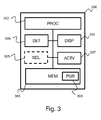
- the figure 3 illustrates a device 300 implementing the method of fast access, according to a particular embodiment of the invention.
- the device comprises a storage space 301, for example a memory MEM, a processing unit 302 equipped for example with a processor PROC.
- the processing unit may be driven by a program 303, for example a PGR computer program, implementing the quick access method as described in the invention with reference to the figures 1 and 2 , and in particular the steps of detecting a gesture made by moving a contact point on the screen of the terminal, whose origin is located at a location on the screen where is displayed a launch icon of an application, displaying, according to a predefined selection criterion, a set of elements for quick access to functions of the application, and activation of the corresponding function when a quick access element is selected.
- the instructions of the computer program 303 are for example loaded into a RAM (Random Access Memory in English) before being executed by the processor of the processing unit 302.
- program can also be stored on a storage medium such as a flash memory, a hard disk or any other non-transitory storage medium.
- the processor of the processing unit 302 implements the steps of the fast access method according to the instructions of the computer program 303.
- the device comprises, in addition to the memory 301, a display module 304 (DISP) enabling the device to display graphic elements, and in particular to display fast access elements.
- the device also comprises a detection unit 306 (DET) of a point of contact on the screen, such as a touch screen adapted to detect a contact between an object or part of the body and the touch screen.
- the detection unit and the display unit are combined in the form of a touch screen for example.
- the device also comprises a selection unit, according to a criterion predetermined, of a set of a set of fast access elements to be displayed.
- the selection unit is adapted to determine the functions or data of an application according to a criterion of frequency of use.
- the device further comprises an activation unit 307 (ACTV) adapted to activate the execution of a function or the display of data when a fast access element is selected by a user.
- ACTV activation unit 307
- the device can be integrated in a smartphone-type terminal, a touch pad, a personal computer, a control center of a home automation system, an on-board computer in a vehicle or a guidance module GPS type (Global Positioning System).
- GPS type Global Positioning System
Landscapes
- Engineering & Computer Science (AREA)
- General Engineering & Computer Science (AREA)
- Theoretical Computer Science (AREA)
- Human Computer Interaction (AREA)
- Physics & Mathematics (AREA)
- General Physics & Mathematics (AREA)
- Computer Networks & Wireless Communication (AREA)
- Signal Processing (AREA)
- User Interface Of Digital Computer (AREA)
Abstract
Description
- L'invention se rapporte au domaine des interfaces utilisateurs et concerne plus particulièrement un procédé permettant d'accélérer l'accès à certaines données d'un terminal.
- Les technologies de communication connaissent une évolution très rapide ces dernières années. Les terminaux mobiles connectés en particulier, comme par exemple les téléphones intelligents dits smartphones, se sont démocratisés et occupent aujourd'hui une place centrale dans la vie de leurs utilisateurs. Les utilisateurs sont joignables à tout instant selon différentes modalités et partagent toutes sortes d'informations avec d'autres, où et quand ils le désirent.
- L'utilisation du smartphone occupe une grande partie du temps de leurs propriétaires car ses usages sont très variés : internet, communications, agenda, lecture, photo, vidéo, télévision, jeux, ... Ces terminaux sont évolutifs et offrent la possibilité à leurs utilisateurs d'ajouter de nouvelles fonctionnalités par le téléchargement et l'installation de programmes adaptés appelés « applications ». Une application est classiquement représentée par une icône affichée sur un écran du terminal et exécutée lorsque l'icône correspondante est sélectionnée. Ainsi, un smartphone doit offrir une interface particulièrement efficace permettant aux utilisateurs d'accéder rapidement à une information ou à une fonctionnalité parmi l'ensemble des données dont il dispose.
- Dans ce but, une grande majorité des smartphones du marché sont dotés d'une interface utilisateur de type écran tactile. Une interface tactile est particulièrement avantageuse sur ce type d'appareil car permet de limiter l'usage de boutons physiques au profit d'écrans plus grands et promet une expérience utilisateur extrêmement intuitive. Les utilisateurs peuvent ainsi interagir avec leurs terminaux par de simples gestes effectués avec un ou plusieurs doigts sur l'écran.
- Afin de réduire encore les interactions nécessaires pour accéder à certaines fonctionnalités, la plupart des systèmes d'exploitation pour terminaux mobiles de type smartphone permettent en outre de réorganiser les icones de lancement d'application sur l'écran de manière à ce que les utilisateurs puissent mettre en évidence et rendre accessible immédiatement les fonctions qu'ils utilisent le plus fréquemment. D'autre part, les applications utilisent fréquemment des raccourcis du type « favoris » ou « derniers éléments consultés » afin d'optimiser l'accès aux fonctions qu'elles recèlent. Par exemple, les navigateurs internet incluent depuis longtemps un système de marque-page pour que les utilisateurs puissent accéder directement à leurs sites internet favoris. De même, les applications de téléphonie peuvent inclure un journal d'appel pour accéder aux numéros récemment utilisés ou encore un système de contacts favoris pouvant éventuellement être constitué automatiquement par une observation de la fréquence d'utilisation des numéros. L'accès à ces éléments favoris peut toutefois s'avérer laborieux car l'application concernée doit d'abord être lancée pour y accéder. Ceci est consommateur en temps et en ressources énergétiques du terminal.
- On peut noter que, dans ce dernier cas, la fonction téléphonie étant un élément central dans un terminal de communication, la gestion du carnet d'adresse et des contacts favori est parfois directement intégrée dans le système d'exploitation et accessible de façon immédiate via un bouton ou une icône dédiée. De cette façon, il est possible d'établir une communication avec un correspondant via un minimum d'actions. Malgré tout, cette manière de faire ne peut pas aujourd'hui être généralisée sans préjudice à l'ergonomie du terminal.
- Ainsi, il existe bien un besoin pour une solution permettant d'accéder rapidement et de façon ergonomique à des données ou des fonctions relatives à différentes applications.
- À cet effet, l'invention concerne un procédé d'accès rapide à des fonctionnalités d'application sur un terminal comprenant un écran tactile caractérisé en ce qu'il comprend les étapes suivantes :
- Détection d'un geste réalisé par le déplacement d'un point de contact sur l'écran du terminal, dont l'origine est située à un emplacement sur l'écran où est affichée une icône de lancement d'une application,
- Affichage, selon un critère de sélection prédéfini, d'en ensemble d'éléments d'accès rapide à des fonctions de l'application, et
- Activation de la fonction correspondante lorsqu'un élément d'accès rapide est sélectionné.
- Le geste effectué à partir de l'icône d'une application permet ainsi de déclencher l'affichage d'un ensemble d'éléments d'accès rapides relatifs à cette application. Le geste est pris en compte lorsqu'il s'agit d'un déplacement d'un contact avec l'écran, par exemple le déplacement d'un doigt ou d'un objet adapté sur l'écran avec comme point de départ une icône d'application. De cette façon, il est possible de différencier une action de lancement de l'application d'un geste déclenchant l'affichage des éléments d'accès rapide. Un tel geste ayant pour point de départ l'icône d'une application de communication peut déclencher l'affichage de boutons associés à des entrées particulières d'un carnet d'adresses. L'utilisateur peut alors, par une action sur l'un de ces boutons, déclencher l'établissement d'une communication avec le correspondant associé. Selon un autre exemple, un geste ayant pour origine l'icône de lancement d'une application de photographie peut faire apparaitre de la même manière un aperçu des dernières photos capturées par le terminal, une action sur l'aperçu permettant alors de déclencher l'affichage de la photo en grand format. Ces exemples ne sont pas limitatifs et l'application peut s'appliquer à de nombreux types d'application comme par exemple un navigateur web, un agenda, une application de messagerie...
- Une seule action simple permet d'avoir accès rapidement à un élément d'accès aux fonctions de l'application : le nombre d'actions limité pour accéder à une fonction permet un gain de temps qui se traduit par une consommation de ressources moindre sur le terminal et une économie d'énergie.
- D'autre part, l'invention peut s'impliquer à un grand nombre d'applications. Les éléments affichés sont relatifs à l'application visée par l'origine du geste, ce qui permet une lisibilité plus facile en évitant une pollution visuelle par des informations concernant d'autres applications.
- Les éléments d'accès rapide affichés suite à la détection du geste sont sélectionnés selon un critère prédéfini tel que par exemple un historique ou une fréquence d'utilisation de l'application. Le critère de sélection peut également comprendre, selon une réalisation particulière de l'invention, une localisation géographique du terminal ou un réseau particulier sur lequel le terminal est connecté de façon à proposer par exemple des éléments d'accès rapides relatifs à des entrées d'un carnet d'adresses d'entreprise lorsque le terminal est localisé sur un lieu de travail et des entrées d'un carnet d'adresses personnel lorsque le terminal est localisé au domicile de son utilisateur.
- Selon un mode de réalisation particulier, le procédé est tel que le nombre d'éléments d'accès rapide affiché dépend de la distance de déplacement du point de contact.
- L'invention propose ainsi de mettre en relation le nombre d'éléments d'accès rapides avec la distance parcourue par le contact sur l'écran du terminal. Par exemple, lorsqu'un utilisateur réalise un geste court à partir de l'icône de lancement d'une application de communication, un petit nombre d'éléments d'accès rapide est affiché. En revanche, si le geste détecté est long, les éléments d'accès rapide sont affichés en plus grand nombre. L'invention permet ainsi de limiter les interactions nécessaires à l'établissement de la communication lorsque le contact recherché est le premier élément d'accès rapide. A l'inverse, l'utilisateur peut poursuivre le geste de façon à faire apparaître davantage d'éléments d'accès rapide jusqu'à l'affichage de l'élément recherché.
- Selon un mode particulier de réalisation, le procédé est tel que le geste est un déplacement vertical du point de contact sur l'écran.
- L'affichage des éléments d'accès rapide est déclenché par un geste dont l'origine est l'icône de lancement d'une application et qui se poursuit par un déplacement vertical du contact avec l'écran. Ainsi, lorsqu'une icône d'application est par exemple positionnée en bas d'un écran, l'utilisateur peut effectuer un geste rectiligne vers le haut de l'écran afin de faire apparaître les éléments d'accès rapide. A l'inverse, si l'icône est située en haut de l'écran, l'utilisateur peut poursuivre le geste vers le bas de l'écran pour faire apparaître ces mêmes éléments. Ce mode réalisation de l'invention permet avantageusement de clairement définir une zone située entre l'icône et la position de la fin du déplacement du point contact pour afficher les éléments d'accès rapide, le nombre d'éléments affichés pouvant dépendre de l'espace disponible pour afficher les éléments dans la zone. Par exemple, les éléments d'accès rapide peuvent être disposés en une colonne dont la hauteur correspond à la distance entre l'icône de l'application et la position du doigt d'un utilisateur-ou d'un quelconque objet de pointage adapté- sur l'écran.
- Selon une réalisation particulière, le procédé est tel qu'il comporte en outre les étapes suivantes :
- Détection d'un second geste réalisé consécutivement au premier geste, et
- Affichage, selon un critère de sélection prédéfini, d'un second ensemble d'éléments d'accès rapide à des fonctions de l'application.
- Lorsque le nombre d'éléments d'accès affichés dépend de la longueur du déplacement du contact sur l'écran, Il peut arriver que la distance maximale pouvant être parcourue ne permette pas l'affichage d'un élément d'accès rapide recherché. Par exemple, si l'icône de lancement d'une application de communication est située au milieu de l'écran, la distance maximale qu'il est possible de parcourir en déplaçant un doigt verticalement depuis l'icône est limitée. De façon à autoriser l'affichage d'un plus grand nombre d'éléments d'accès rapide, l'invention propose qu'un second geste puisse être réalisé consécutivement au geste initial, le second geste lorsqu'il est détecté permettant d'afficher un second ensemble d'éléments d'accès rapide. Ce second geste peut par exemple correspondre à un déplacement horizontal du contact détecté sur l'écran consécutif au déplacement vertical ayant initialement déclenché l'affichage du premier ensemble d'éléments d'accès rapide. Lorsque ce déplacement horizontal est détecté, le terminal peut afficher par exemple sous la forme de colonnes supplémentaires, un nombre d'élément d'accès rapide additionnels proportionnel à la longueur du déplacement horizontal.
- Selon un mode de réalisation particulier, le procédé est tel que la sélection des éléments d'accès rapide est réalisée selon un critère de fréquence d'utilisation desdits éléments.
- Les éléments d'accès rapide affiché sont sélectionnés selon la fréquence d'utilisation des objets auxquels ils se rapportent. Par exemple, les entrées les plus utilisées d'un carnet d'adresses peuvent être sélectionnées et affichées par ordre de fréquence d'utilisation décroissant lorsqu'un geste partant de l'icône d'une application de communication est détecté. Ainsi, un geste très court permet d'afficher uniquement les éléments ayant la plus grande probabilité d'être utilisé par l'utilisateur.
- Selon un mode particulier de réalisation, le procédé est tel que la sélection des éléments d'accès rapide est réalisée selon un critère relatif à la date de dernière utilisation des desdits éléments.
- L'invention permet de cette façon un accès rapide aux derniers éléments consultés, utilisés ou produits. Par exemple, lorsque l'invention est associée à l'icône d'une application de photographie, l'utilisateur peut avantageusement accéder rapidement aux dernières photos prises ou encore, dans le cas d'un navigateur internet, aux dernières pages visitées.
- Selon une réalisation particulière, le procédé est tel que les éléments d'accès rapide sont affichés au premier plan et en ce qu'un effet de flou est appliqué aux éléments graphiques de l'arrière-plan affichés précédemment.
- L'application d'un effet graphique tel qu'un flou ou une désaturation sur les éléments affichés avant l'apparition des éléments d'accès rapide permet à ces éléments de se démarquer plus nettement de l'arrière-plan. En permettant à l'utilisateur de se focaliser sur les éléments d'accès, l'invention peut accélérer l'accès à la fonctionnalité recherchée.
- Selon un autre aspect, l'invention concerne un dispositif d'accès rapide à des fonctionnalités d'application comprenant un écran tactile caractérisé en ce qu'il comporte:
- Une unité de détection d'un geste réalisé par le déplacement d'un point de contact sur l'écran du terminal, dont l'origine est située à un emplacement sur l'écran où est affichée une icône de lancement d'une application,
- Un afficheur adapté pour afficher un ensemble d'éléments d'accès rapide à des fonctions de l'application selon un critère de sélection prédéfini, et
- Une unité d'activation de la fonction correspondante lorsqu'un élément d'accès rapide est sélectionné.
- L'invention se rapporte aussi un terminal comprenant un dispositif d'accès rapide à des fonctionnalités d'application.
- L'invention concerne également un programme d'ordinateur comportant les instructions pour l'exécution du procédé d'accès rapide, lorsque le programme est exécuté par un processeur.
- L'invention concerne aussi un support d'informations lisible par un processeur sur lequel est enregistré un programme d'ordinateur comprenant des instructions pour l'exécution des étapes du procédé d'accès rapide.
- Les différents modes ou caractéristiques de réalisation précités peuvent être ajoutés indépendamment ou en combinaison les uns avec les autres, aux étapes du procédé d'accès rapide.
- Les terminaux, dispositifs, programmes et supports d'information présentent au moins des avantages analogues à ceux conférés par le procédé d'accès rapide décrit ci-dessus.
- D'autres caractéristiques et avantages de l'invention apparaîtront plus clairement à la lecture de la description suivante d'un mode de réalisation particulier, donné à titre de simple exemple illustratif et non limitatif, et des dessins annexés, parmi lesquels :
- Les
figures 1a, 1b et 1c illustrent une mise en oeuvre de l'invention sur un terminal selon un mode particulier de réalisation. - La
figure 2 illustre les principales étapes du procédé d'accès rapide selon une réalisation particulière de l'invention, - La
figure 3 représente de manière schématique un exemple d'architecture d'un dispositif adapté pour la mise en oeuvre du procédé d'accès rapide selon un mode de réalisation particulier de l'invention. - La
figure 1a illustre un terminal 100 mettant en oeuvre la présente invention selon un mode particulier de réalisation. Il convient de noter ici que, bien que le terminal 100 illustré sur la figure corresponde ici à un terminal mobile de type smartphone, l'invention peut s'appliquer à tout type de terminal disposant d'un écran tactile, comme par exemple, et de façon non limitative, une tablette tactile, une liseuse électronique, une console de jeux, un terminal de contrôle d'une installation domotique, un équipement d'assistance à la conduite ou encore un ordinateur personnel. - Le terminal 100 comprend un écran tactile 101 adapté pour localiser sur l'écran des contacts avec un objet ou une partie du corps de l'utilisateur. Un écran de type capacitif ou résistif est par exemple adapté pour mettre en oeuvre l'invention.
- Le terminal 100 comprend un processeur adapté pour exécuter un système d'exploitation et une ou plusieurs applications mémorisés dans une mémoire, comme par exemple une mémoire RAM (Random Access Memory) ou une mémoire Flash. De manière classique, un utilisateur du terminal 100 commande l'exécution d'une application en effectuant une action sur l'icône correspondante. Pour cela, le terminal interprète l'action de l'utilisateur en fonction de ce qui est affiché sur l'écran à l'emplacement où est effectuée l'action. Par exemple, un utilisateur du terminal 100 peut toucher l'écran à l'emplacement de l'icône 102 pour lancer une application de communication sur le terminal. Lorsque l'application est lancée, un utilisateur du terminal peut, toujours de manière classique, consulter un carnet d'adresses et déclencher l'établissement d'une communication avec un correspondant.
- La
figure 2 illustre les principales étapes du procédé d'accès rapide. Lors d'une première étape 200, le terminal détecte un geste réalisé par un utilisateur, le geste consistant en un déplacement d'un point de contact sur l'écran du terminal à partir d'un emplacement sur l'écran où est affichée une icône de lancement d'une application. Par exemple, le terminal détecte que l'utilisateur place son doigt sur l'écran à l'emplacement de l'icône 102 et effectue un déplacement vers le haut de l'écran. Pour cela, le terminal combine des données fournies par l'écran tactile relatives à la position du point de contact sur l'écran et des données relatives à l'emplacement des icônes sur l'écran, ces dernières données pouvant être fournies par exemple par le système d'exploitation du terminal. - Une étape optionnelle 201 consiste à mesurer le déplacement du point de contact par rapport à sa position d'origine. Selon un mode de réalisation particulier, la mesure du déplacement correspond à la distance parcourue par le point de contact sur l'écran lors de son déplacement. Selon un mode de réalisation préféré, la mesure du déplacement correspond à la distance séparant la position initiale du point de contact et sa position au moment de la mesure. La distance peut être calculée en référence à un axe particulier, par exemple selon un axe vertical ou un axe horizontal ou bien être calculé selon deux axes. Par exemple, lorsque la mesure concerne un déplacement vertical du point de contact, la distance mesurée peut correspondre à la valeur absolue de la différence des coordonnées verticales au départ et à l'arrivée du déplacement du point de contact. Ainsi, en référence à la
figure 1a , la distance de déplacement du point de contact est notée ht1 et correspond à la distance entre la position de l'icône 102 sur l'écran et la position du point de contact 105. - À l'étape 202, le terminal réalise l'affichage d'un ensemble d'éléments d'accès rapide à des fonctionnalités de l'application, les éléments d'accès rapide affichés étant sélectionnés selon un critère prédéfini. Pour cela, le terminal détermine l'application concernée à partir de l'emplacement d'origine du geste et consulte par exemple une base de données dans laquelle sont mémorisées des fonctionnalités ou des données relatives à ladite application afin de sélectionner un sous ensemble de ces fonctionnalités ou données. Les fonctionnalités ou données sélectionnées peuvent ensuite être associées à des éléments d'interface utilisateur tels que des boutons ou des icônes et affichées sur l'écran du terminal, une action sur ces éléments d'interface utilisateur provoquant l'activation de la fonctionnalité ou l'affichage de la donnée associée. Par exemple, un bouton d'accès rapide peut être associé à une commande d'exécution de l'application assortie d'un paramètre faisant référence à la fonctionnalité ou à la donnée pour laquelle un accès rapide est sollicité, l'application étant adaptée pour interpréter ce paramètre automatiquement lors de son exécution. Ainsi, suite à la détection d'un geste réalisé sur le terminal 100 de la
figure 1a , depuis l'icône 102 associée à une application de communication jusqu'à l'emplacement 105, le terminal sélectionne trois entrées A, B et C dans un carnet d'adresses et associe ces trois entrées à des éléments d'interface utilisateur présentés sur l'écran du terminal. Selon un mode de réalisation particulier, les éléments d'accès rapide sont présentés dans une zone d'écran dont les dimensions sont en rapport avec le déplacement mesuré du point de contact. Par exemple, les éléments d'accès rapide peuvent être affichés dans une zone rectangulaire 104 dont la hauteur correspond à la distance verticale entre l'emplacement de l'icône et l'emplacement du point de contact sur l'écran. - Selon un mode de réalisation particulier, le nombre d'éléments d'accès rapide dépend de la distance de déplacement du point de contact. Par exemple, la
figure 1b représente le terminal 100 après que le point de contact ait été déplacé à un emplacement 106. La distance verticale ht2 entre l'icône 102 et l'emplacement 106 du point de contact est supérieure à la distance ht1 représentée sur lafigure 1a et deux nouveaux éléments d'accès rapide D et E correspondant à deux autres entrées du carnet d'adresses ont pu être affiché dans la zone 104. Le procédé permet ainsi à l'utilisateur de stopper son geste dès qu'un élément recherché est affiché de façon à réduire le temps d'accès à la fonctionnalité ou la donnée recherchée. - Selon une réalisation particulière, les éléments d'accès rapide affichés sont sélectionnés parmi un ensemble de données ou de fonctionnalités selon un critère de fréquence d'utilisation. Par exemple, les éléments d'accès rapides A, B et C représentés sur la
figure 1a peuvent correspondre aux trois entrées les plus fréquemment utilisées dans le carnet d'adresses du terminal. De cette façon, la fonctionnalité ou la donnée avec la probabilité d'utilisation la plus haute est affichée en premier lieu. - Selon un mode particulier de réalisation, les éléments d'accès rapide affichés sont sélectionnés parmi un ensemble de données ou de fonctionnalités selon un critère chronologique. Par exemple, les éléments d'accès rapides A, B, C, D et E représentés sur la
figure 1b peuvent correspondre aux cinq entrées les plus récemment utilisées dans le carnet d'adresses du terminal. - Ainsi, l'accès à une fonctionnalité fréquemment utilisée ou récemment utilisée ne nécessite qu'un geste court. Le procédé permet ainsi un gain de temps pour l'utilisateur et une économie de ressources pour le terminal.
- Selon un mode particulier de réalisation, les éléments d'accès rapide sont sélectionnés selon un critère de localisation géographique. Pour cela, le terminal peut utiliser un composant de localisation tel qu'un GPS (global Positioning System) pour déterminer sa localisation géographique et déterminer par exemple si l'utilisateur se trouve à son domicile ou sur son lieu de travail. Ainsi, lorsque le terminal se trouve sur le lieu de travail de l'utilisateur, les éléments d'accès rapide peuvent être sélectionnés dans un carnet d'adresses professionnel associé au préalable par l'utilisateur à une localisation particulière. Ceci permet de limiter des manipulations consommatrices en temps et en énergie pour le terminal.
- Selon un mode de réalisation particulier, un effet visuel est appliqué à l'arrière-plan lorsque les éléments d'accès rapides sont affichés. Par exemple, les icônes ou autres éléments graphiques affichés sur l'écran avant l'apparition des éléments d'accès rapide peuvent être rendus flous par application d'un effet de flou gaussien lorsque les éléments d'accès sont affichés. En mettant ainsi en évidence les éléments d'accès rapides par rapport à l'arrière-plan, les éléments d'accès rapide sont plus rapidement identifiables par l'utilisateur, ce qui permet de réduire encore le temps d'accès aux fonctions ou données de l'application.
- À l'étape 203, le terminal détecte une action sur un élément d'accès rapide et active la fonction associée à cet élément. Par exemple, lorsque le terminal détecte une action sur l'élément d'accès rapide B de la
figure 1b , le terminal peut exécuter une commande provoquant l'établissement d'une communication vers le correspondant associé à cet élément. Le procédé permet de cette façon l'établissement d'une communication vers un correspondant à partir de gestes rapides et simples. - Selon une réalisation particulière, l'étape d'affichage 202 peut être suivie d'une étape optionnelle 204 de détection d'un second geste réalisé consécutivement au premier geste. Le second geste peut par exemple consister en un déplacement horizontal du point de contact réalisé dans la continuité du premier geste.
- Le terminal peut évaluer la distance de déplacement du second geste lors d'une étape optionnelle 205. Pour cela, le terminal peut par exemple évaluer la distance horizontale parcourue lors du déplacement du point de contact en calculant par exemple l'écart entre la position du point contact au début du second geste et sa position au moment du calcul.
- À l'étape 206, le terminal peut afficher au moins un nouvel élément d'accès rapide supplémentaire lorsqu'un second geste est détecté. Ce nouvel ensemble d'éléments est constitué à partir d'éléments d'accès à des fonctions ou des données de l'application déterminée par l'origine du premier geste, les éléments d'accès étant sélectionnés selon un critère prédéfini, comme par exemple un critère chronologique ou un critère relatif à la fréquence d'utilisation des fonctions ou données. Selon un mode de réalisation particulier, le nombre d'éléments d'accès compris dans le nouvel ensemble dépend de la distance de déplacement évaluée à l'étape 205. Le procédé permet ainsi d'afficher davantage d'éléments d'accès lorsque cela est nécessaire. En proposant davantage d'éléments d'accès rapide, le procédé permet de réduire le nombre de cas dans lesquels un utilisateur devra effectuer des manipulations plus complexes pour accéder à une fonctionnalité particulière non disponible parmi les éléments d'accès rapide.
- La
figure 1c représente le terminal 100 lorsque l'utilisateur réalise un second geste dans la continuité du premier geste. Un premier déplacement vertical d'un point de contact sur l'écran depuis l'emplacement d'affichage de l'icône 102 jusqu'à l'emplacement 106 provoque l'affichage d'un premier ensemble d'éléments d'accès rapide {A, B, C, D, E} comme représenté sur lafigure 1b . À partir de l'emplacement 106, l'utilisateur effectue alors un déplacement horizontal du point de contact vers l'emplacement 107. A la détection du second geste, le terminal affiche un nouvel ensemble d'éléments d'accès rapide, le nombre d'éléments du nouvel ensemble étant en relation avec la distance de déplacement du second geste. Par exemple, sur lafigure 1c , le déplacement du point de contact sur une distance Ig1 provoque l'affichage de 10 éléments d'accès rapide supplémentaires {F, G, H, I, J K, L, M, N, O}. - Le procédé permet ainsi d'accéder à un nombre important d'éléments permettant d'accéder rapidement à des fonctions ou des données associées à une application particulière. De cette manière, le nombre d'interactions pour accéder à des fonctions ou des données peut être nettement réduit par rapport aux techniques actuelles, ce qui participe à économiser les ressources du terminal. En particulier, lorsque les éléments d'accès rapide sont sélectionnés et ordonnés selon leur fréquence d'utilisation et/ou de façon chronologique, le temps d'accès à la fonction ou à la donnée correspondante est très limité. Bien entendu, d'autres directions du geste peuvent être appliquées et la séquence de changement de direction peut être inverse pour mettre en oeuvre l'invention.
- Après l'apparition des éléments d'accès rapide, l'affichage initial peut être rétabli de différentes manières. Par exemple, les éléments d'accès rapide peuvent être masqués après l'expiration d'une période temporelle prédéterminée lorsqu'aucune action n'a été effectuée par l'utilisateur. Selon une réalisation particulière, les éléments peuvent être masqués lorsqu'une action est effectuée sur une zone de l'écran qui ne comporte pas d'éléments d'accès rapide.
- La
figure 3 illustre un dispositif 300 mettant en oeuvre le procédé d'accès rapide, selon un mode particulier de réalisation de l'invention. Le dispositif comprend un espace de stockage 301, par exemple une mémoire MEM, une unité de traitement 302 équipée par exemple d'un processeur PROC. L'unité de traitement peut être pilotée par un programme 303, par exemple un programme d'ordinateur PGR, mettant en oeuvre le procédé d'accès rapide tel que décrit dans l'invention en référence auxfigures 1 et2 , et notamment les étapes de détection d'un geste réalisé par le déplacement d'un point de contact sur l'écran du terminal, dont l'origine est située à un emplacement sur l'écran où est affichée une icône de lancement d'une application, d'affichage, selon un critère de sélection prédéfini, d'un ensemble d'éléments d'accès rapide à des fonctions de l'application, et d'activation de la fonction correspondante lorsqu'un élément d'accès rapide est sélectionné. - À l'initialisation, les instructions du programme d'ordinateur 303 (PGR) sont par exemple chargées dans une mémoire RAM (Random Access Memory en anglais) avant d'être exécutées par le processeur de l'unité de traitement 302. Les instructions du programme peuvent également être mémorisées sur un support de stockage tel qu'une mémoire flash, un disque dur ou tout autre support de stockage non-transitoire. Le processeur de l'unité de traitement 302 met en oeuvre les étapes du procédé d'accès rapide selon les instructions du programme d'ordinateur 303.
- Pour cela, le dispositif comprend, outre la mémoire 301, un module d'affichage 304 (DISP) permettant au dispositif d'afficher des éléments graphiques, et en particulier d'afficher des éléments d'accès rapide. Le dispositif comprend également une unité de détection 306 (DET) d'un point de contact sur l'écran, comme par exemple une dalle tactile adaptée pour détecter un contact entre un objet ou une partie du corps et la dalle tactile. Selon une réalisation particulière, l'unité de détection et l'unité d'affichage sont combinées sous la forme d'un écran tactile par exemple. Selon une réalisation particulière, le dispositif comprend également une unité de sélection, selon un critère prédéterminé, d'un ensemble d'un ensemble d'éléments d'accès rapides à afficher. En particulier, l'unité de sélection est adaptée pour déterminer les fonctions ou les données d'une application selon un critère de fréquence d'utilisation. Le dispositif comprend en outre une unité d'activation 307 (ACTV) adaptée pour activer l'exécution d'une fonction ou l'affichage d'une donnée lorsqu'un élément d'accès rapide est sélectionné par un utilisateur.
- Selon un mode particulier de réalisation, le dispositif peut être intégré dans un terminal de type smartphone, une tablette tactile, un ordinateur personnel, un centre de contrôle d'une installation domotique, un ordinateur de bord dans un véhicule ou encore un module de guidage de type GPS (global Positioning System).
Claims (9)
- Procédé d'accès rapide à des fonctionnalités d'application sur un terminal comprenant un écran tactile caractérisé en ce qu'il comprend les étapes suivantes :- Détection (200) d'un geste réalisé par le déplacement d'un point de contact sur l'écran du terminal, dont l'origine est située à un emplacement sur l'écran où est affichée une icône de lancement d'une application,- Affichage (202), selon un critère de sélection prédéfini, d'un ensemble d'éléments d'accès rapide à des fonctions de l'application,- Détection d'un second geste réalisé consécutivement au premier geste,- Affichage, selon un critère de sélection prédéfini, d'un second ensemble d'éléments d'accès rapide à des fonctions de l'application, le nombre d'éléments du premier et du second ensemble étant respectivement fonction de la longueur des premier et second gestes, et- Activation (203) de la fonction correspondante lorsqu'un élément d'accès rapide est sélectionné.
- Procédé selon la revendication 1 caractérisé en ce que le geste est un déplacement vertical du point de contact sur l'écran.
- Procédé selon l'une des revendications précédentes caractérisé en ce que la sélection des éléments d'accès rapide est réalisée selon un critère de fréquence d'utilisation desdits éléments.
- Procédé selon l'une des revendications précédentes caractérisé en ce que la sélection des éléments d'accès rapide est réalisée selon un critère relatif à la date de dernière utilisation des desdits éléments.
- Procédé selon l'une des revendications précédentes caractérisé en ce que les éléments d'accès rapide sont affichés au premier plan et en ce qu'un effet de flou est appliqué aux éléments graphiques de l'arrière-plan affichés précédemment.
- Dispositif d'accès rapide à des fonctionnalités d'application comprenant un écran tactile caractérisé en ce qu'il comporte:- Une unité de détection d'un geste réalisé par le déplacement d'un point de contact sur l'écran du terminal, dont l'origine est située à un emplacement sur l'écran où est affichée une icône de lancement d'une application,- Un afficheur adapté pour afficher un ensemble d'éléments d'accès rapide à des fonctions de l'application selon un critère de sélection prédéfini, et- Une unité d'activation de la fonction correspondante lorsqu'un élément d'accès rapide est sélectionné.
- Terminal caractérisé en ce qu'il comporte un dispositif d'accès rapide selon la revendication 6.
- Programme d'ordinateur comportant les instructions pour l'exécution du procédé d'accès rapide selon l'une quelconque des revendications 1 à 5, lorsque le programme est exécuté par un processeur.
- Support d'informations lisible par un processeur sur lequel est enregistré un programme d'ordinateur comprenant des instructions pour l'exécution des étapes du procédé d'accès rapide selon l'une quelconque des revendications 1 à 5.
Applications Claiming Priority (1)
| Application Number | Priority Date | Filing Date | Title |
|---|---|---|---|
| FR1552608A FR3034218A1 (fr) | 2015-03-27 | 2015-03-27 | Procede d'acces rapide a des fonctionnalites d'application |
Publications (2)
| Publication Number | Publication Date |
|---|---|
| EP3073361A1 true EP3073361A1 (fr) | 2016-09-28 |
| EP3073361B1 EP3073361B1 (fr) | 2018-07-04 |
Family
ID=53496761
Family Applications (1)
| Application Number | Title | Priority Date | Filing Date |
|---|---|---|---|
| EP16162463.0A Active EP3073361B1 (fr) | 2015-03-27 | 2016-03-25 | Procédé d'accès rapide à des fonctionnalités d'application |
Country Status (3)
| Country | Link |
|---|---|
| US (1) | US20160286036A1 (fr) |
| EP (1) | EP3073361B1 (fr) |
| FR (1) | FR3034218A1 (fr) |
Families Citing this family (3)
| Publication number | Priority date | Publication date | Assignee | Title |
|---|---|---|---|---|
| KR20180051002A (ko) * | 2016-11-07 | 2018-05-16 | 삼성전자주식회사 | 터치 스크린을 이용하는 전자 장치에서 애플리케이션의 실행을 제어하는 방법과 이를 위한 전자 장치 |
| CN111433723A (zh) * | 2018-06-27 | 2020-07-17 | 华为技术有限公司 | 一种快捷按键的控制方法及终端 |
| JP7846492B2 (ja) * | 2022-04-27 | 2026-04-15 | フォルシアクラリオン・エレクトロニクス株式会社 | 情報処理装置及びプログラム |
Citations (3)
| Publication number | Priority date | Publication date | Assignee | Title |
|---|---|---|---|---|
| US20100299638A1 (en) * | 2009-05-25 | 2010-11-25 | Choi Jin-Won | Function execution method and apparatus thereof |
| US20130326421A1 (en) * | 2012-05-29 | 2013-12-05 | Samsung Electronics Co. Ltd. | Method for displaying item in terminal and terminal using the same |
| US20150040065A1 (en) * | 2013-07-31 | 2015-02-05 | Vonage Network Llc | Method and apparatus for generating customized menus for accessing application functionality |
Family Cites Families (20)
| Publication number | Priority date | Publication date | Assignee | Title |
|---|---|---|---|---|
| US20020191028A1 (en) * | 2001-06-19 | 2002-12-19 | Senechalle David A. | Window manager user interface |
| US7058902B2 (en) * | 2002-07-30 | 2006-06-06 | Microsoft Corporation | Enhanced on-object context menus |
| KR100774927B1 (ko) * | 2006-09-27 | 2007-11-09 | 엘지전자 주식회사 | 이동통신 단말기, 메뉴 및 아이템 선택방법 |
| KR100900295B1 (ko) * | 2008-04-17 | 2009-05-29 | 엘지전자 주식회사 | 이동 디바이스와 이동 통신 시스템의 사용자 인터페이스방법 |
| US8159469B2 (en) * | 2008-05-06 | 2012-04-17 | Hewlett-Packard Development Company, L.P. | User interface for initiating activities in an electronic device |
| US9250797B2 (en) * | 2008-09-30 | 2016-02-02 | Verizon Patent And Licensing Inc. | Touch gesture interface apparatuses, systems, and methods |
| US20100185949A1 (en) * | 2008-12-09 | 2010-07-22 | Denny Jaeger | Method for using gesture objects for computer control |
| JP5340088B2 (ja) * | 2009-09-07 | 2013-11-13 | キヤノン株式会社 | 情報処理方法及び装置 |
| KR101126394B1 (ko) * | 2010-01-29 | 2012-03-28 | 주식회사 팬택 | 이동 단말기 및 이동 단말기를 이용한 정보 표시 방법 |
| JP5640467B2 (ja) * | 2010-06-01 | 2014-12-17 | ソニー株式会社 | 表示方法および情報処理装置 |
| US8773370B2 (en) * | 2010-07-13 | 2014-07-08 | Apple Inc. | Table editing systems with gesture-based insertion and deletion of columns and rows |
| US9015641B2 (en) * | 2011-01-06 | 2015-04-21 | Blackberry Limited | Electronic device and method of providing visual notification of a received communication |
| US9032062B2 (en) * | 2011-05-20 | 2015-05-12 | Citrix Systems, Inc. | Shell integration on a mobile device for an application executing remotely on a server |
| US9086794B2 (en) * | 2011-07-14 | 2015-07-21 | Microsoft Technology Licensing, Llc | Determining gestures on context based menus |
| US20140033093A1 (en) * | 2012-07-25 | 2014-01-30 | Microsoft Corporation | Manipulating tables with touch gestures |
| KR102028119B1 (ko) * | 2012-11-28 | 2019-11-04 | 삼성전자주식회사 | 애플리케이션을 디스플레이하는 방법 및 그 전자 장치 |
| WO2014157885A1 (fr) * | 2013-03-27 | 2014-10-02 | Samsung Electronics Co., Ltd. | Procédé et dispositif de présentation d'une interface avec menus |
| WO2014177753A1 (fr) * | 2013-04-30 | 2014-11-06 | Multitouch Oy | Tiroirs dynamiques |
| US20150033188A1 (en) * | 2013-07-23 | 2015-01-29 | Microsoft Corporation | Scrollable smart menu |
| US9811239B2 (en) * | 2014-05-05 | 2017-11-07 | Cellco Partnership | Systems and methods for efficiently searching applications |
-
2015
- 2015-03-27 FR FR1552608A patent/FR3034218A1/fr active Pending
-
2016
- 2016-03-22 US US15/077,835 patent/US20160286036A1/en not_active Abandoned
- 2016-03-25 EP EP16162463.0A patent/EP3073361B1/fr active Active
Patent Citations (3)
| Publication number | Priority date | Publication date | Assignee | Title |
|---|---|---|---|---|
| US20100299638A1 (en) * | 2009-05-25 | 2010-11-25 | Choi Jin-Won | Function execution method and apparatus thereof |
| US20130326421A1 (en) * | 2012-05-29 | 2013-12-05 | Samsung Electronics Co. Ltd. | Method for displaying item in terminal and terminal using the same |
| US20150040065A1 (en) * | 2013-07-31 | 2015-02-05 | Vonage Network Llc | Method and apparatus for generating customized menus for accessing application functionality |
Also Published As
| Publication number | Publication date |
|---|---|
| FR3034218A1 (fr) | 2016-09-30 |
| US20160286036A1 (en) | 2016-09-29 |
| EP3073361B1 (fr) | 2018-07-04 |
Similar Documents
| Publication | Publication Date | Title |
|---|---|---|
| US20150040065A1 (en) | Method and apparatus for generating customized menus for accessing application functionality | |
| JP6169590B2 (ja) | 適応的な入力言語切り換え | |
| CN113055525A (zh) | 文件分享方法、装置、设备和存储介质 | |
| US10338765B2 (en) | Combined switching and window placement | |
| KR102518172B1 (ko) | 컴퓨팅 시스템에서 사용자 어시스턴스를 제공하기 위한 장치 및 방법 | |
| EP3425581A1 (fr) | Procédé et dispositif d'affichage d'informations | |
| US9411499B2 (en) | Jump to top/jump to bottom scroll widgets | |
| US12461962B2 (en) | Dynamic search control invocation and visual search | |
| US20130187873A1 (en) | Scroll control apparatus and method of terminal | |
| US10200328B2 (en) | Reminder views for facilitating draft reminders | |
| US20140344249A1 (en) | Simple action record search | |
| US20130339884A1 (en) | Augmenting user interface elements with information | |
| RU2017115939A (ru) | Контекстно-зависимые вкладки в мобильных лентах | |
| US20120221969A1 (en) | Scrollable list navigation using persistent headings | |
| KR20170097161A (ko) | 브라우저 디스플레이 캐스팅 기법들 | |
| US20170097945A1 (en) | Dynamic search input selection | |
| EP3128411A1 (fr) | Procédé et dispositif d'affichage d'interface | |
| US12164588B2 (en) | Enhanced navigation in a web browser while avoiding redirects | |
| JP2025510489A (ja) | ページ対話のための方法、装置、デバイス、及び記憶媒体 | |
| EP3073361B1 (fr) | Procédé d'accès rapide à des fonctionnalités d'application | |
| US20180284951A1 (en) | Gui configuration | |
| CN105183287A (zh) | 显示处理方法及电子设备 | |
| TWI498808B (zh) | 螢幕畫面裁切方法、裝置及電腦程式產品 | |
| US10757241B2 (en) | Method and system for dynamically changing a header space in a graphical user interface | |
| EP2447807A1 (fr) | Chargement de données sur un dispositif électronique |
Legal Events
| Date | Code | Title | Description |
|---|---|---|---|
| PUAI | Public reference made under article 153(3) epc to a published international application that has entered the european phase |
Free format text: ORIGINAL CODE: 0009012 |
|
| AK | Designated contracting states |
Kind code of ref document: A1 Designated state(s): AL AT BE BG CH CY CZ DE DK EE ES FI FR GB GR HR HU IE IS IT LI LT LU LV MC MK MT NL NO PL PT RO RS SE SI SK SM TR |
|
| AX | Request for extension of the european patent |
Extension state: BA ME |
|
| STAA | Information on the status of an ep patent application or granted ep patent |
Free format text: STATUS: REQUEST FOR EXAMINATION WAS MADE |
|
| 17P | Request for examination filed |
Effective date: 20170328 |
|
| RBV | Designated contracting states (corrected) |
Designated state(s): AL AT BE BG CH CY CZ DE DK EE ES FI FR GB GR HR HU IE IS IT LI LT LU LV MC MK MT NL NO PL PT RO RS SE SI SK SM TR |
|
| GRAP | Despatch of communication of intention to grant a patent |
Free format text: ORIGINAL CODE: EPIDOSNIGR1 |
|
| STAA | Information on the status of an ep patent application or granted ep patent |
Free format text: STATUS: GRANT OF PATENT IS INTENDED |
|
| INTG | Intention to grant announced |
Effective date: 20170810 |
|
| GRAJ | Information related to disapproval of communication of intention to grant by the applicant or resumption of examination proceedings by the epo deleted |
Free format text: ORIGINAL CODE: EPIDOSDIGR1 |
|
| STAA | Information on the status of an ep patent application or granted ep patent |
Free format text: STATUS: REQUEST FOR EXAMINATION WAS MADE |
|
| INTC | Intention to grant announced (deleted) | ||
| GRAP | Despatch of communication of intention to grant a patent |
Free format text: ORIGINAL CODE: EPIDOSNIGR1 |
|
| STAA | Information on the status of an ep patent application or granted ep patent |
Free format text: STATUS: GRANT OF PATENT IS INTENDED |
|
| INTG | Intention to grant announced |
Effective date: 20180105 |
|
| GRAJ | Information related to disapproval of communication of intention to grant by the applicant or resumption of examination proceedings by the epo deleted |
Free format text: ORIGINAL CODE: EPIDOSDIGR1 |
|
| STAA | Information on the status of an ep patent application or granted ep patent |
Free format text: STATUS: REQUEST FOR EXAMINATION WAS MADE |
|
| GRAR | Information related to intention to grant a patent recorded |
Free format text: ORIGINAL CODE: EPIDOSNIGR71 |
|
| GRAS | Grant fee paid |
Free format text: ORIGINAL CODE: EPIDOSNIGR3 |
|
| STAA | Information on the status of an ep patent application or granted ep patent |
Free format text: STATUS: GRANT OF PATENT IS INTENDED |
|
| GRAA | (expected) grant |
Free format text: ORIGINAL CODE: 0009210 |
|
| STAA | Information on the status of an ep patent application or granted ep patent |
Free format text: STATUS: THE PATENT HAS BEEN GRANTED |
|
| INTC | Intention to grant announced (deleted) | ||
| INTG | Intention to grant announced |
Effective date: 20180522 |
|
| AK | Designated contracting states |
Kind code of ref document: B1 Designated state(s): AL AT BE BG CH CY CZ DE DK EE ES FI FR GB GR HR HU IE IS IT LI LT LU LV MC MK MT NL NO PL PT RO RS SE SI SK SM TR |
|
| REG | Reference to a national code |
Ref country code: GB Ref legal event code: FG4D Free format text: NOT ENGLISH |
|
| REG | Reference to a national code |
Ref country code: CH Ref legal event code: EP |
|
| REG | Reference to a national code |
Ref country code: AT Ref legal event code: REF Ref document number: 1015214 Country of ref document: AT Kind code of ref document: T Effective date: 20180715 |
|
| REG | Reference to a national code |
Ref country code: IE Ref legal event code: FG4D Free format text: LANGUAGE OF EP DOCUMENT: FRENCH |
|
| REG | Reference to a national code |
Ref country code: DE Ref legal event code: R096 Ref document number: 602016003887 Country of ref document: DE |
|
| REG | Reference to a national code |
Ref country code: NL Ref legal event code: MP Effective date: 20180704 |
|
| REG | Reference to a national code |
Ref country code: LT Ref legal event code: MG4D |
|
| REG | Reference to a national code |
Ref country code: AT Ref legal event code: MK05 Ref document number: 1015214 Country of ref document: AT Kind code of ref document: T Effective date: 20180704 |
|
| PG25 | Lapsed in a contracting state [announced via postgrant information from national office to epo] |
Ref country code: NL Free format text: LAPSE BECAUSE OF FAILURE TO SUBMIT A TRANSLATION OF THE DESCRIPTION OR TO PAY THE FEE WITHIN THE PRESCRIBED TIME-LIMIT Effective date: 20180704 |
|
| PG25 | Lapsed in a contracting state [announced via postgrant information from national office to epo] |
Ref country code: RS Free format text: LAPSE BECAUSE OF FAILURE TO SUBMIT A TRANSLATION OF THE DESCRIPTION OR TO PAY THE FEE WITHIN THE PRESCRIBED TIME-LIMIT Effective date: 20180704 Ref country code: FI Free format text: LAPSE BECAUSE OF FAILURE TO SUBMIT A TRANSLATION OF THE DESCRIPTION OR TO PAY THE FEE WITHIN THE PRESCRIBED TIME-LIMIT Effective date: 20180704 Ref country code: SE Free format text: LAPSE BECAUSE OF FAILURE TO SUBMIT A TRANSLATION OF THE DESCRIPTION OR TO PAY THE FEE WITHIN THE PRESCRIBED TIME-LIMIT Effective date: 20180704 Ref country code: BG Free format text: LAPSE BECAUSE OF FAILURE TO SUBMIT A TRANSLATION OF THE DESCRIPTION OR TO PAY THE FEE WITHIN THE PRESCRIBED TIME-LIMIT Effective date: 20181004 Ref country code: GR Free format text: LAPSE BECAUSE OF FAILURE TO SUBMIT A TRANSLATION OF THE DESCRIPTION OR TO PAY THE FEE WITHIN THE PRESCRIBED TIME-LIMIT Effective date: 20181005 Ref country code: IS Free format text: LAPSE BECAUSE OF FAILURE TO SUBMIT A TRANSLATION OF THE DESCRIPTION OR TO PAY THE FEE WITHIN THE PRESCRIBED TIME-LIMIT Effective date: 20181104 Ref country code: PL Free format text: LAPSE BECAUSE OF FAILURE TO SUBMIT A TRANSLATION OF THE DESCRIPTION OR TO PAY THE FEE WITHIN THE PRESCRIBED TIME-LIMIT Effective date: 20180704 Ref country code: NO Free format text: LAPSE BECAUSE OF FAILURE TO SUBMIT A TRANSLATION OF THE DESCRIPTION OR TO PAY THE FEE WITHIN THE PRESCRIBED TIME-LIMIT Effective date: 20181004 Ref country code: AT Free format text: LAPSE BECAUSE OF FAILURE TO SUBMIT A TRANSLATION OF THE DESCRIPTION OR TO PAY THE FEE WITHIN THE PRESCRIBED TIME-LIMIT Effective date: 20180704 Ref country code: LT Free format text: LAPSE BECAUSE OF FAILURE TO SUBMIT A TRANSLATION OF THE DESCRIPTION OR TO PAY THE FEE WITHIN THE PRESCRIBED TIME-LIMIT Effective date: 20180704 Ref country code: CZ Free format text: LAPSE BECAUSE OF FAILURE TO SUBMIT A TRANSLATION OF THE DESCRIPTION OR TO PAY THE FEE WITHIN THE PRESCRIBED TIME-LIMIT Effective date: 20180704 |
|
| PG25 | Lapsed in a contracting state [announced via postgrant information from national office to epo] |
Ref country code: AL Free format text: LAPSE BECAUSE OF FAILURE TO SUBMIT A TRANSLATION OF THE DESCRIPTION OR TO PAY THE FEE WITHIN THE PRESCRIBED TIME-LIMIT Effective date: 20180704 Ref country code: HR Free format text: LAPSE BECAUSE OF FAILURE TO SUBMIT A TRANSLATION OF THE DESCRIPTION OR TO PAY THE FEE WITHIN THE PRESCRIBED TIME-LIMIT Effective date: 20180704 Ref country code: LV Free format text: LAPSE BECAUSE OF FAILURE TO SUBMIT A TRANSLATION OF THE DESCRIPTION OR TO PAY THE FEE WITHIN THE PRESCRIBED TIME-LIMIT Effective date: 20180704 Ref country code: ES Free format text: LAPSE BECAUSE OF FAILURE TO SUBMIT A TRANSLATION OF THE DESCRIPTION OR TO PAY THE FEE WITHIN THE PRESCRIBED TIME-LIMIT Effective date: 20180704 |
|
| REG | Reference to a national code |
Ref country code: DE Ref legal event code: R097 Ref document number: 602016003887 Country of ref document: DE |
|
| PG25 | Lapsed in a contracting state [announced via postgrant information from national office to epo] |
Ref country code: RO Free format text: LAPSE BECAUSE OF FAILURE TO SUBMIT A TRANSLATION OF THE DESCRIPTION OR TO PAY THE FEE WITHIN THE PRESCRIBED TIME-LIMIT Effective date: 20180704 Ref country code: IT Free format text: LAPSE BECAUSE OF FAILURE TO SUBMIT A TRANSLATION OF THE DESCRIPTION OR TO PAY THE FEE WITHIN THE PRESCRIBED TIME-LIMIT Effective date: 20180704 Ref country code: EE Free format text: LAPSE BECAUSE OF FAILURE TO SUBMIT A TRANSLATION OF THE DESCRIPTION OR TO PAY THE FEE WITHIN THE PRESCRIBED TIME-LIMIT Effective date: 20180704 |
|
| PLBE | No opposition filed within time limit |
Free format text: ORIGINAL CODE: 0009261 |
|
| STAA | Information on the status of an ep patent application or granted ep patent |
Free format text: STATUS: NO OPPOSITION FILED WITHIN TIME LIMIT |
|
| PG25 | Lapsed in a contracting state [announced via postgrant information from national office to epo] |
Ref country code: DK Free format text: LAPSE BECAUSE OF FAILURE TO SUBMIT A TRANSLATION OF THE DESCRIPTION OR TO PAY THE FEE WITHIN THE PRESCRIBED TIME-LIMIT Effective date: 20180704 Ref country code: SM Free format text: LAPSE BECAUSE OF FAILURE TO SUBMIT A TRANSLATION OF THE DESCRIPTION OR TO PAY THE FEE WITHIN THE PRESCRIBED TIME-LIMIT Effective date: 20180704 Ref country code: SK Free format text: LAPSE BECAUSE OF FAILURE TO SUBMIT A TRANSLATION OF THE DESCRIPTION OR TO PAY THE FEE WITHIN THE PRESCRIBED TIME-LIMIT Effective date: 20180704 |
|
| 26N | No opposition filed |
Effective date: 20190405 |
|
| PG25 | Lapsed in a contracting state [announced via postgrant information from national office to epo] |
Ref country code: SI Free format text: LAPSE BECAUSE OF FAILURE TO SUBMIT A TRANSLATION OF THE DESCRIPTION OR TO PAY THE FEE WITHIN THE PRESCRIBED TIME-LIMIT Effective date: 20180704 |
|
| PG25 | Lapsed in a contracting state [announced via postgrant information from national office to epo] |
Ref country code: MC Free format text: LAPSE BECAUSE OF FAILURE TO SUBMIT A TRANSLATION OF THE DESCRIPTION OR TO PAY THE FEE WITHIN THE PRESCRIBED TIME-LIMIT Effective date: 20180704 |
|
| REG | Reference to a national code |
Ref country code: CH Ref legal event code: PL |
|
| PG25 | Lapsed in a contracting state [announced via postgrant information from national office to epo] |
Ref country code: LU Free format text: LAPSE BECAUSE OF NON-PAYMENT OF DUE FEES Effective date: 20190325 |
|
| REG | Reference to a national code |
Ref country code: BE Ref legal event code: MM Effective date: 20190331 |
|
| PG25 | Lapsed in a contracting state [announced via postgrant information from national office to epo] |
Ref country code: CH Free format text: LAPSE BECAUSE OF NON-PAYMENT OF DUE FEES Effective date: 20190331 Ref country code: LI Free format text: LAPSE BECAUSE OF NON-PAYMENT OF DUE FEES Effective date: 20190331 Ref country code: IE Free format text: LAPSE BECAUSE OF NON-PAYMENT OF DUE FEES Effective date: 20190325 |
|
| PG25 | Lapsed in a contracting state [announced via postgrant information from national office to epo] |
Ref country code: BE Free format text: LAPSE BECAUSE OF NON-PAYMENT OF DUE FEES Effective date: 20190331 |
|
| PG25 | Lapsed in a contracting state [announced via postgrant information from national office to epo] |
Ref country code: TR Free format text: LAPSE BECAUSE OF FAILURE TO SUBMIT A TRANSLATION OF THE DESCRIPTION OR TO PAY THE FEE WITHIN THE PRESCRIBED TIME-LIMIT Effective date: 20180704 |
|
| PG25 | Lapsed in a contracting state [announced via postgrant information from national office to epo] |
Ref country code: PT Free format text: LAPSE BECAUSE OF FAILURE TO SUBMIT A TRANSLATION OF THE DESCRIPTION OR TO PAY THE FEE WITHIN THE PRESCRIBED TIME-LIMIT Effective date: 20181104 Ref country code: MT Free format text: LAPSE BECAUSE OF FAILURE TO SUBMIT A TRANSLATION OF THE DESCRIPTION OR TO PAY THE FEE WITHIN THE PRESCRIBED TIME-LIMIT Effective date: 20180704 |
|
| PG25 | Lapsed in a contracting state [announced via postgrant information from national office to epo] |
Ref country code: CY Free format text: LAPSE BECAUSE OF FAILURE TO SUBMIT A TRANSLATION OF THE DESCRIPTION OR TO PAY THE FEE WITHIN THE PRESCRIBED TIME-LIMIT Effective date: 20180704 |
|
| PG25 | Lapsed in a contracting state [announced via postgrant information from national office to epo] |
Ref country code: HU Free format text: LAPSE BECAUSE OF FAILURE TO SUBMIT A TRANSLATION OF THE DESCRIPTION OR TO PAY THE FEE WITHIN THE PRESCRIBED TIME-LIMIT; INVALID AB INITIO Effective date: 20160325 |
|
| PG25 | Lapsed in a contracting state [announced via postgrant information from national office to epo] |
Ref country code: MK Free format text: LAPSE BECAUSE OF FAILURE TO SUBMIT A TRANSLATION OF THE DESCRIPTION OR TO PAY THE FEE WITHIN THE PRESCRIBED TIME-LIMIT Effective date: 20180704 |
|
| PGFP | Annual fee paid to national office [announced via postgrant information from national office to epo] |
Ref country code: GB Payment date: 20260220 Year of fee payment: 11 |
|
| PGFP | Annual fee paid to national office [announced via postgrant information from national office to epo] |
Ref country code: DE Payment date: 20260219 Year of fee payment: 11 |
|
| PGFP | Annual fee paid to national office [announced via postgrant information from national office to epo] |
Ref country code: FR Payment date: 20260219 Year of fee payment: 11 |