EP3070588A1 - A method for operating an electronic device having a wraparound display, corresponding electronic device and non-transitory program storage device - Google Patents
A method for operating an electronic device having a wraparound display, corresponding electronic device and non-transitory program storage device Download PDFInfo
- Publication number
- EP3070588A1 EP3070588A1 EP15305386.3A EP15305386A EP3070588A1 EP 3070588 A1 EP3070588 A1 EP 3070588A1 EP 15305386 A EP15305386 A EP 15305386A EP 3070588 A1 EP3070588 A1 EP 3070588A1
- Authority
- EP
- European Patent Office
- Prior art keywords
- electronic device
- signal
- speed
- rotational direction
- items
- Prior art date
- Legal status (The legal status is an assumption and is not a legal conclusion. Google has not performed a legal analysis and makes no representation as to the accuracy of the status listed.)
- Withdrawn
Links
Images


Classifications
-
- G—PHYSICS
- G06—COMPUTING OR CALCULATING; COUNTING
- G06F—ELECTRIC DIGITAL DATA PROCESSING
- G06F3/00—Input arrangements for transferring data to be processed into a form capable of being handled by the computer; Output arrangements for transferring data from processing unit to output unit, e.g. interface arrangements
- G06F3/01—Input arrangements or combined input and output arrangements for interaction between user and computer
- G06F3/048—Interaction techniques based on graphical user interfaces [GUI]
- G06F3/0484—Interaction techniques based on graphical user interfaces [GUI] for the control of specific functions or operations, e.g. selecting or manipulating an object, an image or a displayed text element, setting a parameter value or selecting a range
- G06F3/0485—Scrolling or panning
-
- G—PHYSICS
- G06—COMPUTING OR CALCULATING; COUNTING
- G06F—ELECTRIC DIGITAL DATA PROCESSING
- G06F1/00—Details not covered by groups G06F3/00 - G06F13/00 and G06F21/00
- G06F1/16—Constructional details or arrangements
- G06F1/1613—Constructional details or arrangements for portable computers
-
- G—PHYSICS
- G06—COMPUTING OR CALCULATING; COUNTING
- G06F—ELECTRIC DIGITAL DATA PROCESSING
- G06F1/00—Details not covered by groups G06F3/00 - G06F13/00 and G06F21/00
- G06F1/16—Constructional details or arrangements
- G06F1/1613—Constructional details or arrangements for portable computers
- G06F1/1626—Constructional details or arrangements for portable computers with a single-body enclosure integrating a flat display, e.g. Personal Digital Assistants [PDAs]
-
- G—PHYSICS
- G06—COMPUTING OR CALCULATING; COUNTING
- G06F—ELECTRIC DIGITAL DATA PROCESSING
- G06F1/00—Details not covered by groups G06F3/00 - G06F13/00 and G06F21/00
- G06F1/16—Constructional details or arrangements
- G06F1/1613—Constructional details or arrangements for portable computers
- G06F1/1633—Constructional details or arrangements of portable computers not specific to the type of enclosures covered by groups G06F1/1615 - G06F1/1626
- G06F1/1637—Details related to the display arrangement, including those related to the mounting of the display in the housing
-
- G—PHYSICS
- G06—COMPUTING OR CALCULATING; COUNTING
- G06F—ELECTRIC DIGITAL DATA PROCESSING
- G06F1/00—Details not covered by groups G06F3/00 - G06F13/00 and G06F21/00
- G06F1/16—Constructional details or arrangements
- G06F1/1613—Constructional details or arrangements for portable computers
- G06F1/1633—Constructional details or arrangements of portable computers not specific to the type of enclosures covered by groups G06F1/1615 - G06F1/1626
- G06F1/1637—Details related to the display arrangement, including those related to the mounting of the display in the housing
- G06F1/1652—Details related to the display arrangement, including those related to the mounting of the display in the housing the display being flexible, e.g. mimicking a sheet of paper, or rollable
-
- G—PHYSICS
- G06—COMPUTING OR CALCULATING; COUNTING
- G06F—ELECTRIC DIGITAL DATA PROCESSING
- G06F1/00—Details not covered by groups G06F3/00 - G06F13/00 and G06F21/00
- G06F1/16—Constructional details or arrangements
- G06F1/1613—Constructional details or arrangements for portable computers
- G06F1/1633—Constructional details or arrangements of portable computers not specific to the type of enclosures covered by groups G06F1/1615 - G06F1/1626
- G06F1/1684—Constructional details or arrangements related to integrated I/O peripherals not covered by groups G06F1/1635 - G06F1/1675
- G06F1/1694—Constructional details or arrangements related to integrated I/O peripherals not covered by groups G06F1/1635 - G06F1/1675 the I/O peripheral being a single or a set of motion sensors for pointer control or gesture input obtained by sensing movements of the portable computer
-
- G—PHYSICS
- G06—COMPUTING OR CALCULATING; COUNTING
- G06F—ELECTRIC DIGITAL DATA PROCESSING
- G06F3/00—Input arrangements for transferring data to be processed into a form capable of being handled by the computer; Output arrangements for transferring data from processing unit to output unit, e.g. interface arrangements
- G06F3/01—Input arrangements or combined input and output arrangements for interaction between user and computer
- G06F3/03—Arrangements for converting the position or the displacement of a member into a coded form
- G06F3/033—Pointing devices displaced or positioned by the user, e.g. mice, trackballs, pens or joysticks; Accessories therefor
- G06F3/0362—Pointing devices displaced or positioned by the user, e.g. mice, trackballs, pens or joysticks; Accessories therefor with detection of one-dimensional [1D] translations or rotations of an operating part of the device, e.g. scroll wheels, sliders, knobs, rollers or belts
-
- G—PHYSICS
- G06—COMPUTING OR CALCULATING; COUNTING
- G06F—ELECTRIC DIGITAL DATA PROCESSING
- G06F3/00—Input arrangements for transferring data to be processed into a form capable of being handled by the computer; Output arrangements for transferring data from processing unit to output unit, e.g. interface arrangements
- G06F3/14—Digital output to display device ; Cooperation and interconnection of the display device with other functional units
- G06F3/147—Digital output to display device ; Cooperation and interconnection of the display device with other functional units using display panels
-
- G—PHYSICS
- G06—COMPUTING OR CALCULATING; COUNTING
- G06F—ELECTRIC DIGITAL DATA PROCESSING
- G06F2200/00—Indexing scheme relating to G06F1/04 - G06F1/32
- G06F2200/16—Indexing scheme relating to G06F1/16 - G06F1/18
- G06F2200/163—Indexing scheme relating to constructional details of the computer
- G06F2200/1637—Sensing arrangement for detection of housing movement or orientation, e.g. for controlling scrolling or cursor movement on the display of an handheld computer
-
- G—PHYSICS
- G06—COMPUTING OR CALCULATING; COUNTING
- G06F—ELECTRIC DIGITAL DATA PROCESSING
- G06F2203/00—Indexing scheme relating to G06F3/00 - G06F3/048
- G06F2203/041—Indexing scheme relating to G06F3/041 - G06F3/045
- G06F2203/04102—Flexible digitiser, i.e. constructional details for allowing the whole digitising part of a device to be flexed or rolled like a sheet of paper
-
- G—PHYSICS
- G09—EDUCATION; CRYPTOGRAPHY; DISPLAY; ADVERTISING; SEALS
- G09G—ARRANGEMENTS OR CIRCUITS FOR CONTROL OF INDICATING DEVICES USING STATIC MEANS TO PRESENT VARIABLE INFORMATION
- G09G2380/00—Specific applications
- G09G2380/02—Flexible displays
Definitions
- the present disclosure generally relates to operating an electronic device with a wraparound display, more particularly to changing shifting/rotating speed of displaying context in the wraparound display with respect to wraparound display and changing display appearance according to the distance to a center of viewing angle on the wraparound display.
- a method for operating an electronic device having a wraparound display comprises receiving a first signal indicating a first rotational direction; rotating a list of items displayed on the wraparound display with respect to the wraparound display in the indicated first rotational direction at a first speed responsive to the first signal; receiving a second signal after the first signal, the second signal indicating a second rotational direction; and increasing the first speed if the second rotational direction is same as the first rotational direction and decreasing the first speed, if the second rotational direction is different from the first rotational direction.
- an electronic device comprising storage means for storing programs and data; a wraparound display; and processing means configured to receive a first signal indicating a first rotational direction, wherein the processing means is configured to rotate a list of items displayed on the wraparound display with respect to the wraparound display in the indicated first rotational direction with a first speed responsive to the first signal; receive a second user signal after the first signal, the second signal indicating a second rotational direction; and increase the first speed if the second rotational direction is same as the first rotational direction and decrease the first speed, if the second rotational direction is different from the first rotational direction.
- a first one of the items is displayed with a first font size or a first intensity and a second one of the items is displayed with a second font size or a second intensity according to a distance in the wraparound display to the first one of the items.
- the increased first speed is a predetermined speed plus a first amount and decreased first speed is the predetermined speed minus a second amount.
- the processing means (2) is configured to receive at least one more signal after the second signal, the at least one more signal indicating a rotational direction different from the first rotational direction; and further decrease the first speed according a number of the at least one more signal has been received, wherein the further decreased first speed is negative and the method further comprises receiving at least one more signal after the second signal, the at least one more signal indicating a rotational direction different from the first rotational direction; and further decreasing the first speed according a number of the at least one more signal received, wherein the further decreased first speed is negative.
- the processing means is configured to receive a user selection signal and in response to the user selection signal, stop displaying items that have a distance to the first one of the items over 45 degrees and the method further comprises receiving a user selection signal and in response to the user selection signal, stopping displaying items that have a distance to the first one of the items over 45 degrees.
- the processing means is configured to receive a fourth user signal and responsive to the fourth user signal, stop the rotating of the list of items and the method further comprises receiving a fourth user signal and responsive to the fourth user signal, stop the rotating of the list of items.
- the processing means is configured to select the item at a particular location for execution when the shifting rotating is stopped and the method further comprises selecting the item at a particular location for execution when the shifting rotating is stopped.
- a non-transitory program storage device readable by machine.
- the non-transitory program storage tangibly embodies a program of instructions executable by the machine to perform program steps of one of the method claims.
- FIG. 1 An illustrative electronic device with a wraparound display is shown in FIG. 1 .
- the electronic device 10 has a display means such as wraparound display 12 that is continuously wrapped around the body of the electronic device 10.
- Displays such as the wraparound display 12 may be formed using liquid crystal display (LCD) technology, a light-emitting display such as an organic light-emitting diode display, an electrophoretic display, an electrowetting display, a plasma display, or other suitable types of display technology.
- the wraparound display 12 may be a touch sensitive display.
- the line 0-0 on the display 12 shown in FIG. 1 indicates the beginning of the wraparound display 12 in this illustration.
- the line 0-0 is at the seam that connects the two ends of the wraparound display 12.
- display 12 completely wraps around the body of electronic device 10 with respect to the longitudinal axis, however, it is to be understood, that the present principles also apply to a device in which the display wraps around a portion of the body of a device with respect to the longitudinal axis.
- the housing of the electronic device 10 has an elongated shape with an oval cross-sectional shape. This is merely illustrative. Other types, such as a circular or a polygonal cross-sectional shape, of housings may be used for the electronic device 10 if desired.
- the electronic device 10 may optionally include an interface (not shown) on an end surface 28 of an end cap 84, such as an audio jack port (not shown) for an accessory such as a headset (not shown), which may include a speaker, a microphone, and/or a headset controller (all not shown).
- the end cap 84 may be associated with plastic cap structures or other types of housing structures.
- the electronic device 10 may also have a similar end surface at the opposing end.
- the end cap 129 at the opposing end has a shape like a wheel with threads on the wheel surface, so that a user can easily rotate the electronic device 10 with respect to Z axis, which is an imaginary line about which the electronic device 10 (and the wraparound display 12) rotates when the wheel is turned by a user.
- Z axis which is an imaginary line about which the electronic device 10 (and the wraparound display 12) rotates when the wheel is turned by a user.
- the electronic device 10 is also turned.
- the electronic device 10 may optionally have input-output components such as buttons, status indicators, microphone ports, speaker ports, connector ports, sensors such as an ambient light sensor and proximity sensor, switches, and/or other electrical components (all not shown) that are mounted to one or both of the two end surfaces in addition to the audio jack port.
- One of the buttons may be designated as a selection button. When one of the displayed items on the wraparound display 12 is pointed to by a cursor or highlighted, pressing the selection button causes the electronic device 10 to select the item pointed to by the cursor or highlighted. Depending on the function of the item, the selection of the item causes the electronic device 10 to perform a particular function assigned to that item.
- the electronic device 10 displays the submenu responsive to the selection of the item. If the item is a file, the electronic device opens the selected item. For another example, if the item is a song/video, the electronic device 10 causes playing back the song/video by itself or another playing device connected to the electronic device 10 responsive to the selection.
- Another button may be designated as a setting button. Pressing the setting button causes the electronic device 10 to display a setting menu for setting, for example, a center of the viewing angle and a shifting/rotating speed, which may be a predetermined shifting speed, of displayed items.
- One input-output component may be designated as an adjusting knob for adjusting, for example, volume or shifting a cursor or highlight from one displayed item to another.
- FIG. 2 A schematic diagram showing illustrative circuitry that may be included in device 10 is shown in FIG. 2 .
- the electronic device 10 includes control circuitry such as storage and processing circuitry 29.
- the storage and processing circuitry 29 may include storage means such as hard disk drive storage, nonvolatile memory (e. g. , flash memory or other electrically-programmable-read-only memory configured to form a solid state drive), volatile memory (e.g., static or dynamic random-access-memory), etc., for storing programs and data.
- a portion of the storage is a non-transitory storage readable by the processing circuitry and is used to store a program of instructions executable by the processing circuitry to perform program steps as disclosed in this disclosure.
- Processing circuitry in the storage and processing circuitry 29 may be used to control the operation of the electronic device 10.
- the processing circuitry or means may be based on one or more microprocessors, microcontrollers, digital signal processors, baseband processors, power management units, audio codec chips, application specific integrated circuits, etc.
- Input-output devices 32 may include sensors 34 such as ambient light sensors, touch sensors, accelerometers, gyroscope sensors, and proximity sensors, touch screen sensor arrays (e.g., capacitive touch sensors, touch sensors based on resistive touch sensor technology, acoustic touch technology, light-based touch technology, or other touch sensors), and other sensors.
- the electronic device 10 may use an accelerometer or a gyroscope (not shown) for detecting the rotational movement of the electronic device 10 with respect to Z axis.
- Input-output devices may also include devices 36 such as audio input-output devices (e.g., microphones and speakers), device such as buttons, adjusting knobs, joysticks, click wheels, scrolling wheels, touch pads, key pads, keyboards, tone generators, vibrators, cameras, status indicators such as light-emitting diodes, etc.
- the devices 36 may also include one or more displays such as the wraparound display 12 of FIG. 1 .
- Communications circuitry 38 may include wired data port circuitry and wireless communications circuitry.
- the wireless communications circuitry may include radio frequency (RF) transceiver circuitry formed from one or more integrated circuits, power amplifier circuitry, low-noise input amplifiers, passive RF components, one or more antennas, and other circuitry for handling RF wireless signals.
- Wireless signals can also be sent using light (e.g., using infrared communications).
- the electronic device 10 may interact with external equipment.
- electronic device 10 may send data to external equipment 44 and may receive data from the external equipment 44.
- the external equipment 44 may include a wireless local area network that communicates wirelessly with device 10 using communications circuitry 38 in the electronic device 10, may be wired network equipment to which the electronic device 10 is attached with a cable, may be a peer device that is coupled to the electronic device 10 through a wired or wireless connection, or may be other equipment that sends and/or receives signals from the electronic device 10.
- the electronic device 10 may also interact with equipment such as accessories 42 using a wired path and/or wireless path.
- the accessories 42 may include a headset with an audio plug that is configured to mate with an audio jack in the electronic device 10.
- the accessories 42 may also include microphones, speakers, and other audio accessories, video accessories, televisions, computer monitors, charging stations, display equipment, embedded system equipment such as equipment in an automobile, and other external electronic equipment. Analog and/or digital communications may be used in communicating between the electronic device 10 and the accessories 42.
- the electronic device 10 may use software for implementing functions that display information on display 12 and other device functions.
- the software may be executed by the control circuitry such as storage and processing circuitry 29 of FIG. 2 .
- software that may be implemented on the electronic device 10 may include operating system 46 and applications 48.
- the applications 48 may include productivity applications 50 such as word processing applications, document management applications, applications for viewing and editing Portable Document Format (PDF) files, applications for viewing presentations, and spreadsheet applications.
- PDF Portable Document Format
- the applications 48 may also include media playback applications such as video applications, electronic book readers, and applications for playing audio files (e.g., with the simultaneous display of cover art, lyrics, and other associated information).
- the applications 48 may include games 54, video and photo editing applications 56, and other applications 58.
- the games 54 may include games with static image content such as word games and moving images (video) such as action games.
- Editing applications 56 may be used to edit videos, to edit digital photographs, and to edit other digital imaging data.
- Applications 58 may include applications for displaying stock prices and other financial data, applications for displaying reviews, applications for displaying travel information, applications for displaying weather information, applications for implementing remote control functions for controlling selected audio visual devices, applications for implementing processes as disclosed in embodiments discussed below, and other applications.
- the electronic device 10 may receive user input from a touch screen, keyboard, touch pad, voice recognition function, or other user input resources and may provide a user of device with audio output using speakers or other audio equipment.
- Visible output may be displayed for the user with the wraparound display 12 using the applications 48 and/or the operating system 46.
- the visible output that is displayed for the user may include static content and or moving content. Displayed content may include still and/or moving images such as digital image data, video, graphics, text, game output, etc.
- content may be displayed on the wraparound display 12 in a wrapped fashion (i.e., using an approach that takes advantage of the wrapped display shape of the wraparound display 12).
- content may be displayed on the wraparound display 12 that circulates around the wraparound display 12 continuously, as with a scrolling stock ticker, in which it appears that one displayed item is shifted out at one end of the wraparound display and a new item is shifted into the wraparound display at the other end.
- game content may be displayed for a user that continually updates in response to rotational motion of the electronic device 10 as a user rotates the wraparound display 12 (and the electronic device 10).
- the wraparound display 12 may, if desired, have a display cover structure.
- the display cover structure may be formed from a transparent material with a hollow shape.
- the display cover structure may have the shape of an elongated hollow structure such as a hollow cylinder or a hollow tube with a circular or non-circular cross-sectional shape.
- a flexible display layer may be mounted on the inner surface of the hollow display cover structure.
- a flexible display layer may be attached to an inner surface of a hollow display cover structure using adhesive.
- a display cover structure is formed in a conventional manner.
- it may be formed from a transparent material such as clear glass (e.g., borosilicate glass, fused silica, etc.), transparent plastic, clear ceramic (e.g., aluminum oxynitride), etc.
- display cover structures may be formed from a transparent crystalline material such as sapphire (aluminum oxide), zirconium dioxide, or other materials that are clear and hard.
- Sapphire display cover structures may be grown as single crystals by pulling a boule of sapphire from a melt.
- the circuitry for the electronic device 10 such as the storage and processing circuitry 29 associated with input-output devices 32 of FIG. 2 is implemented using components that are mounted within the display 12 in a conventional manner.
- the circuitry for the electronic device 10 is implemented using electrical components, which includes one or more integrated circuits, discrete components such as inductors, resistors, and capacitors, components such as switches, filters, power supply components, connectors, sensors, input-out-out devices, and other electronic devices.
- FIG. 4 is a perspective view of the wraparound display 12 in the process of displaying content 118 for a user of the electronic device 10.
- the user may be positioned, for example, at viewer location 120 and may view display 12 in direction 122, called viewing line 122 in the following discussion.
- the user may rotate device 10 about axis 94, which is the longitudinal axis or the Z axis of the electronic device 10 shown in FIG.1 .
- the user may rotate display 12 in counterclockwise direction 126 about axis 94.
- the electronic device 10 may rotate content 118 (or some of content 118) on the surface of the wraparound display 12 in the opposite direction (i.e., in clockwise direction 124).
- rotating the display 12 means the electronic device 10 is rotated
- rotating or shifting content means that the content is rotated with respect to the wraparound display 12, i.e., an item in the content is moved from one position of the wraparound display 12 to another position in the rotating direction regardless of whether the wraparound display 12 (and the electronic device 10) is stationary or not.
- the content 118 (or some of content 118) may be continuously shifted in one direction, for example, direction 124, while the electronic device 10 is stationary and when the user rotates the electronic device 10 with respect to the Y axis in one direction, the content 118 (or the some of the content 118) is shifted along the Z axis in the rotating direction.
- An accelerometer, gyroscope, and/or other sensors in the electronic device 10 may be used in monitoring the rotation and orientation of the electronic device 10 and the display 12 in real time. Content can be displayed in synchronization with the rotation of display 12, if desired.
- the electronic device 10 may maintain portions of content 118 stationary with respect to viewer position 120 while other portions of content 118 are allowed to rotate or shift with the display.
- a game or other software may be implemented on the electronic device 10 that contains a ball or other object such as object 118B.
- the object 118B may be moved relative to the surface of the display 12 by tilting the display 12, causing, for example, the object 118B to move along the Z axis in the tilting direction, and rotating the display 12 causing, for example, the object 118B to stay in the same position relative to the user's viewing direction.
- Content 118A may remain stationary with respect to the surface of the wraparound display 12 as the user manipulates the wraparound display 12.
- FIG. 5 is a side view of the electronic device 10 showing how the wraparound display 12 may be viewed in direction 122 by a user at viewer position 120 while rotating the electronic device 10 and the wraparound display 12 in direction 126.
- the surface of the wraparound display 12 may be considered to be made up of four contiguous areas -- a first area extending from A to B, a second area extending from B to C, a third area extending from C to D, and a fourth area extending from D to A.
- the viewing angle is formed by the imaginary line from the viewer position to point A and the imaginary line from the view position to point B.
- the electronic device 10 may use an accelerometer, gyroscope, or other sensors in determining the orientation of the electronic device 10 and the wraparound display 12 relative to the Earth (surface 130). Using this information, the electronic device 10 can display information on the wraparound display 12 in real time that is based on the user's positioning of the electronic device 10 relative to the Earth and/or other appropriate inputs (e.g., time, date
- the center of the viewing angle is the point where an imaginary line, which is the shortest line from the viewer position 120 to the surface of the wraparound display 12, touches the wraparound display 12. Although viewing from the side view in FIG. 5 , the center is a point, it is actually a line on the wraparound display 12 extending from one end surface to the other in the Z direction.
- the center can be automatically detected by the electronic device 10 equipped with a camera, such as a 360-degree camera, for detecting the viewer position 120 using conventional image processing methods to detect the user's eyes. With two camera views, the electronic device 10 can also detect the distance between user's eyes and the electronic device 10.
- the center of the viewing angle can be set by a user by, for example, selecting a displayed item and this set center is treated as the center of the viewing angle in the following discussion, but as mentioned, the center can be automatically detected by the electronic device 10 as well.
- the end cap 129 is a knob, which can be rotated from 0 degree to 360 degrees with respect to the seam without rotating the electronic device 10.
- the position of the knob is set as the center of the viewing angle, which may be stored in the memory for next use of the electronic device 10.
- the electronic device 10 is operative or configured to detect a period of inactivity, for example, being left on a table for a period.
- the electronic device 10 is configured or operative to detect such a movement using one or more of the sensors.
- the electronic device 10 is operative or configured to display a visual clue, such as a dash line, moving around the longitudinal axis Z.
- a visual clue such as a dash line
- the user indicates to the electronic device 10 that this position of the visual clue is the center of the viewing center by, for example, shaking the electronic device 10 and the electronic device 10 upon detecting the user indication is configured or operative to stop moving the visual clue and/or stop displaying the visual clue.
- content can be rotated about the longitudinal axis 94 in synchronization with the rotation of the wraparound display 12.
- the user rotates the electronic device 10 in FIG. 1 45 degrees ( ⁇ /4) clockwise viewing from the end surface 28 and the displayed content is rotated by the same amount.
- the content may be stored in the electronic device 10 or received from an external device.
- FIG. 7 shows an example of two lists of items respectively received from two of the playing devices 44, an MP3 player and a television, via, for example, a network connection.
- List 710 is a list of audios received from the MP3 player and list 720 is a list of television (TV) programs from the TV.
- the electronic device 10 receives, for example, minimal information about the available content on the playing device.
- the content is stored in the electronic device 10 if the electronic device 10 is also the playing device.
- the content information may be transmitted to the electronic device 10 from an external playing device in many ways, for example, single bitmap with tags associated with surfaces, descriptors transmitted as JavaScript Object Notation (JSon) or EXtensible Markup Language (XML) content.
- JSon JavaScript Object Notation
- XML EXtensible Markup Language
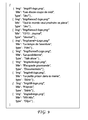
- the list 710 is transmitted as XML content shown in FIG. 8 and the list 720 is transmitted as JSon content shown in FIG. 9 .
- a received list can be displayed on the wraparound display 12.
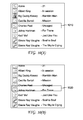
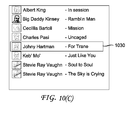
- FIG. 10(a) shows the flattened view of the list 710 displayed on the wraparound display 12.
- the electronic device 10 may highlight or place a cursor on a predetermined item, for example, the first item on the list.
- a user may move the cursor or highlight to a different item by touching the different item.
- the user has placed the cursor or highlight on item 1010 entitled "Charles Pasi" by touching the item 1010.
- the item 1010 is highlighted or pointed to by a cursor.
- the position of the item 1010 newly highlighted or pointed by a cursor on the wraparound display 12 may illustratively be set as the center of the viewing angle by the processing circuitry in response to the placing or the highlight or the cursor at the item 1010 even if the item 1010 is shifted out of this position.
- the electronic device 10 may be in one of first and second modes.
- the user may touch one of the displayed items to cause the electronic device 10 go back to the first mode.
- the user can switch the electronic device 10 into the second mode from the first mode by, for example, exerting a rotational impulse.
- a rotational impulse as used herein is a movement generated by rotating the electronic device 10 in one direction for any angle, preferably with a rotational acceleration of 0.01 ⁇ radian/second 2 or less for an angular displacement of 0.5 radian or less.
- the new shifting speed is the current shifting speed times (1 + angular displacement/2 ⁇ ) if the shifting speed is increased or the current shifting speed times (1 - angular displacement/2 ⁇ ) if the shifting speed is decreased.
- the electronic device 10 switches into the second mode and shifts the list in the wraparound display 12 at a predefined speed in the same direction as that of the received rotational impulse, while the electronic device 10 remains stationary.
- the displayed content is synchronous with the rotation of the electronic device 10 and the user can rotate the electronic device 10 to see different displayed items that are displayed on the wraparound display 12.
- the displayed items and the electronic device 10 are both rotated 45 degrees from the position shown in FIG. 1 .
- the displayed content may be just a portion of the content list because the wraparound display 12 can only display certain number of items in the list. Other items can be displayed by shifting the list in one direction manually or automatically.
- the content continues to move or be shifted in one direction automatically until the beginning or the end of the content but the electronic device 10 remains stationary. That is, one displayed item is shifted out at one end, and a new item is shifted into the wraparound display 12 at the other end until no new item in the content can be shifted into the wraparound display 12.
- the electronic device 10 continues to shift a displayed item out of the wraparound display 12 at one end automatically, even if no item can be shifted in at the other end.
- the electronic device 10 keeps the cursor or the highlight at the same physical position of the wraparound display 12, i.e., in the same X, Y coordinates.
- the cursor or the highlight is transitioning from item entitled "Charles Pasi,” to the immediately next item entitled “Johny Hartman” and at FIG. 10(c) , the cursor or highlight covers the item entitled "Johny Hartman.” This process continues until the electronic device 10 changes to the second mode.
- a shifted out item at one end may be shifted in at the other end.
- the electronic device 10 when the electronic device 10 is in the first mode, rotating the electronic device in one direction for any angle switches the electronic device 10 into the second mode and the electronic device 10 shifts the content in the rotational direction with a pre-defined speed.
- the electronic device 10 increases the shifting/rotating speed.
- the electronic device 10 decreases the shifting/rotating speed.
- the new speed is increased by a predefined amount in percentage, such as 25% more than the current shifting speed, i.e., the new shifting speed is the product of the current speed times 1.25 if the shifting speed is increased. If the shifting speed is decreased, the new shifting speed is the current speed multiplied by 0.75.
- the electronic device 10 may store a predefined maximum shifting speed, such as ⁇ radians/second, and any attempt to increase the shifting speed when it reaches the maximum will fail and the electronic device 10 will maintain the maximum shifting speed.
- the new shifting speed is the current shifting speed plus or minus a predefined amount, for example, 0.1 ⁇ radian/second, if the shifting speed is increased or decreased.
- the electronic device 10 may store a maximum shifting speed and the new shifting speed cannot go beyond the maximum. Repeated attempts to decrease the shifting speed may cause the electronic device 10 to shift the content in the different direction, i.e., the shifting speed is negative. Again, the electronic device 10 may limit the shifting speed in the different direction to the same stored maximum speed.
- the stored maximum shifting speed may be set up by user by invoking certain user interface (not shown), for example, by pressing the setting button.
- the new shifting speed depends on the angular displacement of the rotational impulse.
- the new shifting speed is the current shifting speed times (1 + angular displacement/2 ⁇ ) if the shifting speed is increased or the current shifting speed times (1 - angular displacement/2 ⁇ ) if the shifting speed is decreased.
- the new shifting speed may depend on the rotational acceleration of the rotational impulse.
- the new shifting speed is the current shifting speed plus the rotational acceleration if the shifting speed is increased or the current shifting speed minus the rotational acceleration if the shifting speed is decreased.
- the electronic device 10 in response to receiving a decreasing user command or a separate command different from an increasing or decreasing command, the electronic device 10 is operative or configured to continuously to decrease the shifting speed over time and when the shifting speed is below a threshold, the electronic device 10 is operative or configured to stop the shifting of the displayed content items. This way, the shifting speed of the displayed content items smoothly slow down until it comes to a complete stop.
- Any decreasing function can be used in this embodiment, such as, but not limited to linear and geometric functions.
- either clicking the selection button or shaking the electronic device 10 stops the navigation process and sends to a playing device a play command with the information of the selected item for executing, such as playing, the selected item if the playing device, such as the external equipment 44, is not the electronic device 10 itself.
- the term "shaking" as used herein means rotating the electronic device 10 with respect to the Y axis, which is perpendicular to the longitudinal axis Z, preferably with a rotational acceleration of 0.01 ⁇ radian/second 2 or less for an angular displacement of 0.5 ⁇ radian or less.
- the user may use a voice command to stop the navigation.
- the user can stop the navigation by pressing the adjusting knob.
- the command sent to the external playing device 44 should comprise some identification of the selected item.
- the command includes the 'img' attribute and its value or a numerical identifier unique to the selected item, or the index of the item position within the displayed list would be sufficient, but any other means, such as the title of the selected item can be envisaged.
- the transmission is done by, for example, exchanging information in a JSon or XML form, with the connected playing device. If the playing device is the electronic device 10 itself, the electronic device 10 starts executing, such as playing, the selected item.
- the electronic device 10 is not the playing device and the electronic device 10 is used as a remote control for the playing device, the communication of the content information between the playing device and the electronic device 10 can be done in many different ways. The following lists some examples:
- the electronic device 10 may execute the selected item by opening a new browsing session. For example, if the list is related to a music collection, the new browsing session allows the user to select an album in the collection. Once an album is selected, the electronic device 10 displays a list of songs in that selected album. The user can then select a song from the selected album.
- the electronic device 10 can be used as a remote control.
- a home is equipped with a home network (HN) that embeds at least wireless capability. Additional Ethernet or Broadband over power line (BPL) may also be provided.
- Playing devices are connected to this HN.
- Each of these playing devices may provide a list of titles and/or icons that summarize their available content (either locally stored content or content available from external connections with the playing devices) to the electronic device 10, which is also connected to the HN.
- the electronic device 10 detects the available playing devices connected to the HN in a conventional manner, displays a list of playing devices, and allows the user to select one of the playing devices.
- the electronic device 10 may select a predefined playing device or randomly select one of the playing devices automatically without the user manually selecting one. Manual selection can be performed in a similar manner described above for selecting a displayed item in content.
- the displayed list items may be displayed with different display appearances according to the distances to the set center of viewing angle at the wraparound display 12, so that a user can see clearly for those items away from the center.
- the font sizes may be changed, so that the display appeared to be flattened. That is, the font size or the number of vertical pixels (measured in the surface of the wraparound display 12 circumferentially) required for displaying an item is determined according to its distance from the center of the viewing angle. See FIG. 5 for an example of a viewing angle. The nearer a displayed item to the center of the viewing angle, as shown in FIG.
- an item is allocated with x vertical pixels, while on the top and bottom limits of the viewing angle, an item is allocated more than x vertical pixels.
- the distance is the angle with respect to the Z axis from the center of the displayed item to the center of the viewing angle on the wraparound display 12. The angle distance is measured in the XY plane shown in FIG.
- the size of the display is x * (1 + tan (y)). Although number of pixels is used as an example, the font size or intensity can be used in a similar manner. If the function produces a non-integer answer, the electronic device 10 may round it, select the nearest smaller integer, or select the nearest larger integer as the size.
- the size of the displayed item is x * (1 + 2y/ ⁇ ), where y has the unit of radian.
- the distance, y is simply the number of items between an item and the item in the viewing center plus 1 and the size of the displayed item is simply x + y.
- the intensity, such as gray scale, of a displayed item is set according to its distance to the center of the viewing angle. For example, the farther away from the center of an item, the darker the electronic device 10 displays the item.
- those items having an angle from the center of the viewing angle of over 45 degrees are not displayed because a user is unable to see those items.
- a user may use a setting menu to enable or disable this feature.
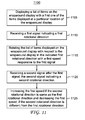
- FIG. 11 shows an exemplary process 1100 executed by the electronic device 10 in accordance with the principles of the embodiments of the invention.
- the electronic device 10 is operative or configured to display content including more than one item on the wraparound display 12 with a first one of the items displayed at a particular location of the wraparound display 12.
- items entitled A, B, and C are displayed on the wraparound display 12.
- the first one of the items is the item entitled B, which is displayed at the center of the viewing angle, which is the particular location in the wraparound display 12.
- This particular location can be set as the center of the viewing angle by the user by, for example, placing the cursor or highlight at the item displayed at that particular location in the first mode.
- this particular location in the wraparound display 12 is always treated as the center of the viewing angle regardless whether item B is shifted to other position in the wraparound display 12 until the user changes the set center. For example, if the particular location is 100 pixels circumferentially away from the seam, i.e., line 0-0 in FIG. 6 , the center of the viewing angle is at the location 100 pixels circumferentially away from the seam before the user changes it even if the user is looking at a different angle. As such, when the electronic device 10 shifts the displayed items, another item other than item entitled B may be displayed at that particular location of the wraparound display. In this example, the electronic device 10 is illustratively in the first mode.
- the processing circuitry of the electronic device 10 is operative or configured to receive a first signal indicating a first rotational direction, for example, due to user rotation of the electronic device about the longitudinal axis.
- the user rotates the electronic device 10 (and the wraparound display 12) using for example, the wheel 129, in the first rotational direction with respect to the longitudinal axis Z or 94 for any angle, preferably less than a predefined threshold, such as 0.5 radian, so that the set center of viewing angle does not deviate too much from the center of the real viewing angle.
- the processing circuitry of the electronic device 10 receives the direction information by detecting the rotational movement of the electronic device 10 using, for example, an accelerometer, gyroscope, and/or other sensors in the electronic device 10.
- the processing circuitry of the electronic device 10 is operative or configured to shift/rotate the list of items with respect to the wraparound display 12 and the longitudinal axis in the indicated first rotational direction with a first speed, which may be a predetermined speed, responsive to the first signal.
- the predefined speed for example, is 0.1 radian/second, and can be set by the user.
- the processing circuitry of the electronic device 10 in response to the rotating movement, is configured or operative to switch the electronic device 10 into the second mode, in which the content continues to be shifted/rotated in one direction automatically with respect to the longitudinal axis but the electronic device 10 remains stationary.
- FIG. 10(a) For example, if the first rotational direction is clockwise with respect to the longitudinal axis viewing from the end surface 28 and the initial display on the wraparound display 12 at step 1105 is shown in FIG. 10(a), FIGs. 10(b) and 10(c) show two instances of the future display after step 1115 with the electronic device 12 remains stationary.
- the shifting/rotating speed responsive to the first signal is proportional to the value of acceleration that the gyroscope detects from the rotational impulse provided by the user.
- the processing circuity of the electronic device 10 is operative or configured to receive a second signal after the first signal, the second signal indicating a second rotational direction.
- the user for example, can rotate the electronic device 10 (and the wraparound display 12) in the second rotational direction with respect to the longitudinal axis Z or 94 for any angle, preferably less than the predefined threshold, to generate the second signal.
- the processing circuitry of the electronic device 10 receives the direction information by detecting the rotational movement of the electronic device 10 using, for example, an accelerometer, gyroscope, and/or other sensors in the electronic device 10.
- the processing circuitry of the electronic device 10 is operative or configured to increase the first speed, which is the current shifting/rotating speed of the list of items if the second rotational direction is same as the first rotational direction and decrease the first speed, if the second rotational direction is different from the first rotational direction.
- the increased first speed is the current shifting/rotating speed of the list of items plus a first predefined amount and decreased first speed is the current speed minus a second predefined amount.
- the first and second predefined amounts are 0.1 radian/second.
- the first and second predefined amounts may also be different. For example, one is 0.1 radian/second and the other 0.2 radian/second.
- the processing circuitry of the electronic device 10 may continue to decrease the current shifting/rotating speed of the list of items in response to receiving signals indicating rotational direction different from the first rotational direction, to a point that the shifting speed becomes negative with respect to the first speed. For example, if the electronic device 10 is shifting/rotating clockwise 0.1 radian/second and the processing circuity receives two signals indicating counterclockwise direction rotation, each reducing the shifting/rotating speed by 0.1 radian/second, the resulting shifting/rotating speed will be -0.1 radian/second. That is the electronic device 10 is shifting/rotating the displayed items in the counterclockwise direction with a speed of 0.1 radian/second.
- the processing circuitry of the electronic device 10 is operative or configured to display the first one of the items with a first appearance, such as a first font size or a first intensity and a second one of the items is displayed with a second appearance, such as a second font size or a second intensity.
- the second appearance is derived according to a distance measured circumferentially in the wraparound display from the second one of the items to the first one of the items.
- the processing circuitry of the electronic device 10 is operative or configured to receive a user selection signal and in response to the user selection signal, stop displaying items that have a distance to the first one of the items over 45 degrees or ⁇ /4 radians. This is because those areas are blocked by the electronic device 10.
- the user can invoke a setting menu to enable or disable this feature.
- the default is disabling this feature.
- the processing circuit of the electronic device 10 is operative or configured to receive a fourth user signal and responsive to the fourth user signal, stop the shitting/rotating of the list of items with respect to the wraparound display 12.
- the fourth user signal is generated by either activating the selection button or shaking the electronic device 10.
- the electronic device 10 switches back to the first mode in response to the four user signal.
- the processing circuitry of the electronic device 10 is operative or configured to select the item at the particular location for execution in response to the fourth user signal.
- the processing circuitry of the electronic device 10 is operative or configured to play back the video program and if another device is the playing device, the processing circuitry of the electronic device 10 is operative or configured to send a signal indicating the selected item to the playing device for playing back the selected video program.
- any flow charts, flow diagrams, state transition diagrams, pseudo code, and the like represent various processes that can be substantially represented in computer readable media and so executed by a computer or processor, whether or not such computer or processor is explicitly shown.
- the computer readable media and code written on can be implemented in a transitory state (signal) and a non-transitory state (e.g., on a tangible medium such as CD-ROM, DVD, Blu-Ray, Hard Drive, flash card, Secured Digital (SD) memory card, or other type of tangible storage medium).
- processor or “controller” should not be construed to refer exclusively to hardware capable of executing software, and may implicitly include, without limitation, digital signal processor ("DSP") hardware, read only memory (“ROM”) for storing software, random access memory (“RAM”), and nonvolatile storage.
- DSP digital signal processor
- ROM read only memory
- RAM random access memory
- any switches/keys shown in the figures or mentioned above are conceptual only. Their function may be carried out through the operation of program logic, through dedicated logic, through the interaction of program control and dedicated logic, or even manually, the particular technique being selectable by the implementer as more specifically understood from the context.
Landscapes
- Engineering & Computer Science (AREA)
- Theoretical Computer Science (AREA)
- General Engineering & Computer Science (AREA)
- Human Computer Interaction (AREA)
- Physics & Mathematics (AREA)
- General Physics & Mathematics (AREA)
- Computer Hardware Design (AREA)
- User Interface Of Digital Computer (AREA)
Abstract
A method for operating an electronic device having a wraparound display, the method comprising receiving a first signal indicating a first rotational direction; rotating a list of items displayed on the wraparound display with respect to the wraparound display in the indicated first rotational direction at a first speed responsive to the first signal; receiving a second signal after the first signal, the second signal indicating a second rotational direction; and increasing the first speed if the second rotational direction is same as the first rotational direction and decreasing the first speed, if the second rotational direction is different from the first rotational direction.
Description
- The present disclosure generally relates to operating an electronic device with a wraparound display, more particularly to changing shifting/rotating speed of displaying context in the wraparound display with respect to wraparound display and changing display appearance according to the distance to a center of viewing angle on the wraparound display.
- An electronic device with wraparound display is disclosed in International Publication Number
WO 2013/188111 A2 , incorporated herein by reference. However, for a handheld electronic device with wraparound display, a better user interface should be provided. - In accordance with an aspect of the present invention, a method for operating an electronic device having a wraparound display is disclosed. The method comprises receiving a first signal indicating a first rotational direction; rotating a list of items displayed on the wraparound display with respect to the wraparound display in the indicated first rotational direction at a first speed responsive to the first signal; receiving a second signal after the first signal, the second signal indicating a second rotational direction; and increasing the first speed if the second rotational direction is same as the first rotational direction and decreasing the first speed, if the second rotational direction is different from the first rotational direction.
- In accordance with another aspect of the present invention, an electronic device is disclosed. The electronic device comprises storage means for storing programs and data; a wraparound display; and processing means configured to receive a first signal indicating a first rotational direction, wherein the processing means is configured to rotate a list of items displayed on the wraparound display with respect to the wraparound display in the indicated first rotational direction with a first speed responsive to the first signal; receive a second user signal after the first signal, the second signal indicating a second rotational direction; and increase the first speed if the second rotational direction is same as the first rotational direction and decrease the first speed, if the second rotational direction is different from the first rotational direction.
- In one embodiment, a first one of the items is displayed with a first font size or a first intensity and a second one of the items is displayed with a second font size or a second intensity according to a distance in the wraparound display to the first one of the items.
- In another embodiment, the increased first speed is a predetermined speed plus a first amount and decreased first speed is the predetermined speed minus a second amount.
- In another embodiment, the processing means (2) is configured to receive at least one more signal after the second signal, the at least one more signal indicating a rotational direction different from the first rotational direction; and further decrease the first speed according a number of the at least one more signal has been received, wherein the further decreased first speed is negative and the method further comprises receiving at least one more signal after the second signal, the at least one more signal indicating a rotational direction different from the first rotational direction; and further decreasing the first speed according a number of the at least one more signal received, wherein the further decreased first speed is negative.
- In another embodiment, the processing means is configured to receive a user selection signal and in response to the user selection signal, stop displaying items that have a distance to the first one of the items over 45 degrees and the method further comprises receiving a user selection signal and in response to the user selection signal, stopping displaying items that have a distance to the first one of the items over 45 degrees.
- In another embodiment, the processing means is configured to receive a fourth user signal and responsive to the fourth user signal, stop the rotating of the list of items and the method further comprises receiving a fourth user signal and responsive to the fourth user signal, stop the rotating of the list of items.
- In another embodiment, the processing means is configured to select the item at a particular location for execution when the shifting rotating is stopped and the method further comprises selecting the item at a particular location for execution when the shifting rotating is stopped.
- In accordance with another aspect of the present invention, a non-transitory program storage device readable by machine is disclosed. The non-transitory program storage, tangibly embodies a program of instructions executable by the machine to perform program steps of one of the method claims.
- The aforementioned brief summary of exemplary embodiments of the present invention is merely illustrative of the inventive concepts presented herein, and is not intended to limit the scope of the present invention in any manner.
- These, and other aspects, features and advantages of the present disclosure will be described or become apparent from the following detailed description of the preferred embodiments, which is to be read in connection with the accompanying drawings.
- In the drawings, wherein like reference numerals denote similar elements throughout the views:
-
FIG. 1 is an illustrative electronic device with a wraparound display in accordance with an embodiment of the present disclosure; -
FIG. 2 is a schematic diagram showing illustrative circuitry that may be included indevice 10 shown inFIG. 1 in accordance with an embodiment of the present disclosure; -
FIG. 3 is a diagram of illustrative software that may be implemented on the processing circuitry of the type shown inFIG. 2 in accordance with an embodiment of the present disclosure; -
FIG. 4 is a perspective view ofdisplay 12 in the process of displayingcontent 118 for a user of theelectronic device 10; -
FIG. 5 is a side view of theelectronic device 10 showing how thewraparound display 12 may be viewed indirection 122 by a user atviewer position 120 while rotating theelectronic device 10 and thewraparound display 12 indirection 126; -
FIG. 6 shows the view of theelectronic device 10 inFIG. 1 rotated 45 degrees clockwise viewing from theend surface 28; -
FIG. 7 shows an example of receiving two lists of items respectively from two playing devices, an MP3 player and a television; -
FIG. 8 shows an example of the XML content for thelist 710 shown inFIG. 7 received by theelectronic device 10; and -
FIG. 9 shows an example of the JSon content for thelist 720 shown inFIG. 7 received by theelectronic device 10; -
FIG. 10 shows an example of a list shifted clockwise in thewraparound display 12; and -
FIG. 11 shows anexemplary process 1100 executed by theelectronic device 10 in accordance with the principles of the embodiments of the invention. - An illustrative electronic device with a wraparound display is shown in
FIG. 1 . As shown inFIG. 1 , theelectronic device 10 has a display means such aswraparound display 12 that is continuously wrapped around the body of theelectronic device 10. Displays such as thewraparound display 12 may be formed using liquid crystal display (LCD) technology, a light-emitting display such as an organic light-emitting diode display, an electrophoretic display, an electrowetting display, a plasma display, or other suitable types of display technology. Thewraparound display 12 may be a touch sensitive display. The line 0-0 on thedisplay 12 shown inFIG. 1 indicates the beginning of thewraparound display 12 in this illustration. The line 0-0 is at the seam that connects the two ends of thewraparound display 12. In this example, display 12 completely wraps around the body ofelectronic device 10 with respect to the longitudinal axis, however, it is to be understood, that the present principles also apply to a device in which the display wraps around a portion of the body of a device with respect to the longitudinal axis. - In the example of
FIG. 1 , the housing of theelectronic device 10 has an elongated shape with an oval cross-sectional shape. This is merely illustrative. Other types, such as a circular or a polygonal cross-sectional shape, of housings may be used for theelectronic device 10 if desired. Theelectronic device 10 may optionally include an interface (not shown) on anend surface 28 of anend cap 84, such as an audio jack port (not shown) for an accessory such as a headset (not shown), which may include a speaker, a microphone, and/or a headset controller (all not shown). - The
end cap 84 may be associated with plastic cap structures or other types of housing structures. Theelectronic device 10 may also have a similar end surface at the opposing end. Preferably, theend cap 129 at the opposing end has a shape like a wheel with threads on the wheel surface, so that a user can easily rotate theelectronic device 10 with respect to Z axis, which is an imaginary line about which the electronic device 10 (and the wraparound display 12) rotates when the wheel is turned by a user. In this embodiment, when the wheel is turned, theelectronic device 10 is also turned. For illustration purposes, we also define the X and Y axes as shown inFIG. 1 and call the Z or 94 axis as the longitudinal axis of theelectronic device 10. - The
electronic device 10 may optionally have input-output components such as buttons, status indicators, microphone ports, speaker ports, connector ports, sensors such as an ambient light sensor and proximity sensor, switches, and/or other electrical components (all not shown) that are mounted to one or both of the two end surfaces in addition to the audio jack port. One of the buttons may be designated as a selection button. When one of the displayed items on thewraparound display 12 is pointed to by a cursor or highlighted, pressing the selection button causes theelectronic device 10 to select the item pointed to by the cursor or highlighted. Depending on the function of the item, the selection of the item causes theelectronic device 10 to perform a particular function assigned to that item. For example, if the item is a submenu, theelectronic device 10 displays the submenu responsive to the selection of the item. If the item is a file, the electronic device opens the selected item. For another example, if the item is a song/video, theelectronic device 10 causes playing back the song/video by itself or another playing device connected to theelectronic device 10 responsive to the selection. - Another button may be designated as a setting button. Pressing the setting button causes the
electronic device 10 to display a setting menu for setting, for example, a center of the viewing angle and a shifting/rotating speed, which may be a predetermined shifting speed, of displayed items. - One input-output component may be designated as an adjusting knob for adjusting, for example, volume or shifting a cursor or highlight from one displayed item to another.
- A schematic diagram showing illustrative circuitry that may be included in
device 10 is shown inFIG. 2 . As shown inFIG. 2 , theelectronic device 10 includes control circuitry such as storage andprocessing circuitry 29. The storage andprocessing circuitry 29 may include storage means such as hard disk drive storage, nonvolatile memory (e. g. , flash memory or other electrically-programmable-read-only memory configured to form a solid state drive), volatile memory (e.g., static or dynamic random-access-memory), etc., for storing programs and data. A portion of the storage is a non-transitory storage readable by the processing circuitry and is used to store a program of instructions executable by the processing circuitry to perform program steps as disclosed in this disclosure. Processing circuitry in the storage andprocessing circuitry 29 may be used to control the operation of theelectronic device 10. The processing circuitry or means may be based on one or more microprocessors, microcontrollers, digital signal processors, baseband processors, power management units, audio codec chips, application specific integrated circuits, etc. - Input-
output devices 32 may includesensors 34 such as ambient light sensors, touch sensors, accelerometers, gyroscope sensors, and proximity sensors, touch screen sensor arrays (e.g., capacitive touch sensors, touch sensors based on resistive touch sensor technology, acoustic touch technology, light-based touch technology, or other touch sensors), and other sensors. Theelectronic device 10 may use an accelerometer or a gyroscope (not shown) for detecting the rotational movement of theelectronic device 10 with respect to Z axis. - Input-output devices may also include
devices 36 such as audio input-output devices (e.g., microphones and speakers), device such as buttons, adjusting knobs, joysticks, click wheels, scrolling wheels, touch pads, key pads, keyboards, tone generators, vibrators, cameras, status indicators such as light-emitting diodes, etc. Thedevices 36 may also include one or more displays such as thewraparound display 12 ofFIG. 1 . -
Communications circuitry 38 may include wired data port circuitry and wireless communications circuitry. The wireless communications circuitry may include radio frequency (RF) transceiver circuitry formed from one or more integrated circuits, power amplifier circuitry, low-noise input amplifiers, passive RF components, one or more antennas, and other circuitry for handling RF wireless signals. Wireless signals can also be sent using light (e.g., using infrared communications). - The
electronic device 10 may interact with external equipment. For example,electronic device 10 may send data toexternal equipment 44 and may receive data from theexternal equipment 44. Theexternal equipment 44 may include a wireless local area network that communicates wirelessly withdevice 10 usingcommunications circuitry 38 in theelectronic device 10, may be wired network equipment to which theelectronic device 10 is attached with a cable, may be a peer device that is coupled to theelectronic device 10 through a wired or wireless connection, or may be other equipment that sends and/or receives signals from theelectronic device 10. - The
electronic device 10 may also interact with equipment such asaccessories 42 using a wired path and/or wireless path. For example, theaccessories 42 may include a headset with an audio plug that is configured to mate with an audio jack in theelectronic device 10. Theaccessories 42 may also include microphones, speakers, and other audio accessories, video accessories, televisions, computer monitors, charging stations, display equipment, embedded system equipment such as equipment in an automobile, and other external electronic equipment. Analog and/or digital communications may be used in communicating between theelectronic device 10 and theaccessories 42. - The
electronic device 10 may use software for implementing functions that display information ondisplay 12 and other device functions. The software may be executed by the control circuitry such as storage andprocessing circuitry 29 ofFIG. 2 . As shown inFIG. 3 , software that may be implemented on theelectronic device 10 may includeoperating system 46 andapplications 48. Theapplications 48 may includeproductivity applications 50 such as word processing applications, document management applications, applications for viewing and editing Portable Document Format (PDF) files, applications for viewing presentations, and spreadsheet applications. Theapplications 48 may also include media playback applications such as video applications, electronic book readers, and applications for playing audio files (e.g., with the simultaneous display of cover art, lyrics, and other associated information). Theapplications 48 may includegames 54, video andphoto editing applications 56, andother applications 58. Thegames 54 may include games with static image content such as word games and moving images (video) such as action games. Editingapplications 56 may be used to edit videos, to edit digital photographs, and to edit other digital imaging data.Applications 58 may include applications for displaying stock prices and other financial data, applications for displaying reviews, applications for displaying travel information, applications for displaying weather information, applications for implementing remote control functions for controlling selected audio visual devices, applications for implementing processes as disclosed in embodiments discussed below, and other applications. - When running application and operating system software such as the
applications 48 and theoperating system 46, theelectronic device 10 may receive user input from a touch screen, keyboard, touch pad, voice recognition function, or other user input resources and may provide a user of device with audio output using speakers or other audio equipment. Visible output may be displayed for the user with thewraparound display 12 using theapplications 48 and/or theoperating system 46. The visible output that is displayed for the user may include static content and or moving content. Displayed content may include still and/or moving images such as digital image data, video, graphics, text, game output, etc. - In some applications, content may be displayed on the
wraparound display 12 in a wrapped fashion (i.e., using an approach that takes advantage of the wrapped display shape of the wraparound display 12). For example, content may be displayed on thewraparound display 12 that circulates around thewraparound display 12 continuously, as with a scrolling stock ticker, in which it appears that one displayed item is shifted out at one end of the wraparound display and a new item is shifted into the wraparound display at the other end. For another example, game content may be displayed for a user that continually updates in response to rotational motion of theelectronic device 10 as a user rotates the wraparound display 12 (and the electronic device 10). - The
wraparound display 12 may, if desired, have a display cover structure. The display cover structure may be formed from a transparent material with a hollow shape. As an example, the display cover structure may have the shape of an elongated hollow structure such as a hollow cylinder or a hollow tube with a circular or non-circular cross-sectional shape. A flexible display layer may be mounted on the inner surface of the hollow display cover structure. For example, a flexible display layer may be attached to an inner surface of a hollow display cover structure using adhesive. - A display cover structure is formed in a conventional manner. For example, it may be formed from a transparent material such as clear glass (e.g., borosilicate glass, fused silica, etc.), transparent plastic, clear ceramic (e.g., aluminum oxynitride), etc. With one illustrative arrangement, which may sometimes be described herein as an example, display cover structures may be formed from a transparent crystalline material such as sapphire (aluminum oxide), zirconium dioxide, or other materials that are clear and hard. An advantage of materials of this type is that they may exhibit elevated hardness values (e.g., values of 9 Mohs, 7 Mohs or above, 8 Mohs or above, or other values above 6 Mohs, which is typical for borosilicate glass). Sapphire display cover structures may be grown as single crystals by pulling a boule of sapphire from a melt.
- The circuitry for the
electronic device 10 such as the storage andprocessing circuitry 29 associated with input-output devices 32 ofFIG. 2 is implemented using components that are mounted within thedisplay 12 in a conventional manner. For example, the circuitry for theelectronic device 10 is implemented using electrical components, which includes one or more integrated circuits, discrete components such as inductors, resistors, and capacitors, components such as switches, filters, power supply components, connectors, sensors, input-out-out devices, and other electronic devices. -
FIG. 4 is a perspective view of thewraparound display 12 in the process of displayingcontent 118 for a user of theelectronic device 10. The user may be positioned, for example, atviewer location 120 and may viewdisplay 12 indirection 122, calledviewing line 122 in the following discussion. As the user is using theelectronic device 10, the user may rotatedevice 10 aboutaxis 94, which is the longitudinal axis or the Z axis of theelectronic device 10 shown inFIG.1 . For example, while staying in a fixed viewing location such asposition 120, the user may rotatedisplay 12 incounterclockwise direction 126 aboutaxis 94. At the same time as the user is rotating the display 12 (and the electronic device 10) in a counterclockwise fashion, theelectronic device 10 may rotate content 118 (or some of content 118) on the surface of thewraparound display 12 in the opposite direction (i.e., in clockwise direction 124). As used herein rotating thedisplay 12 means theelectronic device 10 is rotated, whereas rotating or shifting content means that the content is rotated with respect to thewraparound display 12, i.e., an item in the content is moved from one position of thewraparound display 12 to another position in the rotating direction regardless of whether the wraparound display 12 (and the electronic device 10) is stationary or not. - In one embodiment, the content 118 (or some of content 118) may be continuously shifted in one direction, for example,
direction 124, while theelectronic device 10 is stationary and when the user rotates theelectronic device 10 with respect to the Y axis in one direction, the content 118 (or the some of the content 118) is shifted along the Z axis in the rotating direction. - An accelerometer, gyroscope, and/or other sensors in the
electronic device 10 may be used in monitoring the rotation and orientation of theelectronic device 10 and thedisplay 12 in real time. Content can be displayed in synchronization with the rotation ofdisplay 12, if desired. - By rotating or shifting some of
content 118 to counteract the rotation of thewraparound display 12, theelectronic device 10 may maintain portions ofcontent 118 stationary with respect toviewer position 120 while other portions ofcontent 118 are allowed to rotate or shift with the display. For example, a game or other software may be implemented on theelectronic device 10 that contains a ball or other object such asobject 118B. Theobject 118B may be moved relative to the surface of thedisplay 12 by tilting thedisplay 12, causing, for example, theobject 118B to move along the Z axis in the tilting direction, and rotating thedisplay 12 causing, for example, theobject 118B to stay in the same position relative to the user's viewing direction.Content 118A may remain stationary with respect to the surface of thewraparound display 12 as the user manipulates thewraparound display 12. -
FIG. 5 is a side view of theelectronic device 10 showing how thewraparound display 12 may be viewed indirection 122 by a user atviewer position 120 while rotating theelectronic device 10 and thewraparound display 12 indirection 126. The surface of thewraparound display 12 may be considered to be made up of four contiguous areas -- a first area extending from A to B, a second area extending from B to C, a third area extending from C to D, and a fourth area extending from D to A. The viewing angle is formed by the imaginary line from the viewer position to point A and the imaginary line from the view position to point B. Theelectronic device 10 may use an accelerometer, gyroscope, or other sensors in determining the orientation of theelectronic device 10 and thewraparound display 12 relative to the Earth (surface 130). Using this information, theelectronic device 10 can display information on thewraparound display 12 in real time that is based on the user's positioning of theelectronic device 10 relative to the Earth and/or other appropriate inputs (e.g., time, date, content, etc.). - As used herein, the center of the viewing angle is the point where an imaginary line, which is the shortest line from the
viewer position 120 to the surface of thewraparound display 12, touches thewraparound display 12. Although viewing from the side view inFIG. 5 , the center is a point, it is actually a line on thewraparound display 12 extending from one end surface to the other in the Z direction. The center can be automatically detected by theelectronic device 10 equipped with a camera, such as a 360-degree camera, for detecting theviewer position 120 using conventional image processing methods to detect the user's eyes. With two camera views, theelectronic device 10 can also detect the distance between user's eyes and theelectronic device 10. For simplicity, the center of the viewing angle can be set by a user by, for example, selecting a displayed item and this set center is treated as the center of the viewing angle in the following discussion, but as mentioned, the center can be automatically detected by theelectronic device 10 as well. - In one embodiment, the
end cap 129 is a knob, which can be rotated from 0 degree to 360 degrees with respect to the seam without rotating theelectronic device 10. The position of the knob is set as the center of the viewing angle, which may be stored in the memory for next use of theelectronic device 10. - In another embodiment, the
electronic device 10 is operative or configured to detect a period of inactivity, for example, being left on a table for a period. When the user moves theelectronic device 10, theelectronic device 10 is configured or operative to detect such a movement using one or more of the sensors. In response to the detection, theelectronic device 10 is operative or configured to display a visual clue, such as a dash line, moving around the longitudinal axis Z. When the user sees this visual clue in front of his eyes, the user indicates to theelectronic device 10 that this position of the visual clue is the center of the viewing center by, for example, shaking theelectronic device 10 and theelectronic device 10 upon detecting the user indication is configured or operative to stop moving the visual clue and/or stop displaying the visual clue. - As stated above, content can be rotated about the
longitudinal axis 94 in synchronization with the rotation of thewraparound display 12. For example, as shown inFIG. 6 , the user rotates theelectronic device 10 inFIG. 1 45 degrees (π/4) clockwise viewing from theend surface 28 and the displayed content is rotated by the same amount. - The content may be stored in the
electronic device 10 or received from an external device.FIG. 7 shows an example of two lists of items respectively received from two of theplaying devices 44, an MP3 player and a television, via, for example, a network connection.List 710 is a list of audios received from the MP3 player andlist 720 is a list of television (TV) programs from the TV. Once connected to one of the playing devices, theelectronic device 10 receives, for example, minimal information about the available content on the playing device. The content is stored in theelectronic device 10 if theelectronic device 10 is also the playing device. - The content information may be transmitted to the
electronic device 10 from an external playing device in many ways, for example, single bitmap with tags associated with surfaces, descriptors transmitted as JavaScript Object Notation (JSon) or EXtensible Markup Language (XML) content. For example, thelist 710 is transmitted as XML content shown inFIG. 8 and thelist 720 is transmitted as JSon content shown inFIG. 9 . - A received list can be displayed on the
wraparound display 12. For example,FIG. 10(a) shows the flattened view of thelist 710 displayed on thewraparound display 12. Theelectronic device 10 may highlight or place a cursor on a predetermined item, for example, the first item on the list. A user may move the cursor or highlight to a different item by touching the different item. In the example shown inFIG. 10(a) , the user has placed the cursor or highlight onitem 1010 entitled "Charles Pasi" by touching theitem 1010. As such, theitem 1010 is highlighted or pointed to by a cursor. As discussed above, the position of theitem 1010 newly highlighted or pointed by a cursor on thewraparound display 12 may illustratively be set as the center of the viewing angle by the processing circuitry in response to the placing or the highlight or the cursor at theitem 1010 even if theitem 1010 is shifted out of this position. - At this point, the
electronic device 10 may be in one of first and second modes. When theelectronic device 10 is in the second mode, the user may touch one of the displayed items to cause theelectronic device 10 go back to the first mode. The user can switch theelectronic device 10 into the second mode from the first mode by, for example, exerting a rotational impulse. A rotational impulse as used herein is a movement generated by rotating theelectronic device 10 in one direction for any angle, preferably with a rotational acceleration of 0.01 π radian/second2 or less for an angular displacement of 0.5 radian or less. For example, the new shifting speed is the current shifting speed times (1 + angular displacement/2π) if the shifting speed is increased or the current shifting speed times (1 - angular displacement/2π) if the shifting speed is decreased. After receiving a rotational impulse, theelectronic device 10 switches into the second mode and shifts the list in thewraparound display 12 at a predefined speed in the same direction as that of the received rotational impulse, while theelectronic device 10 remains stationary. - In the first mode, the displayed content is synchronous with the rotation of the
electronic device 10 and the user can rotate theelectronic device 10 to see different displayed items that are displayed on thewraparound display 12. For example, inFIG. 6 , the displayed items and theelectronic device 10 are both rotated 45 degrees from the position shown inFIG. 1 . Note that the displayed content may be just a portion of the content list because thewraparound display 12 can only display certain number of items in the list. Other items can be displayed by shifting the list in one direction manually or automatically. - In one embodiment of the second mode, the content continues to move or be shifted in one direction automatically until the beginning or the end of the content but the
electronic device 10 remains stationary. That is, one displayed item is shifted out at one end, and a new item is shifted into thewraparound display 12 at the other end until no new item in the content can be shifted into thewraparound display 12. For example, if thecontent 710 displayed on thewraparound display 12 shown inFIG. 10(a) is shifted in the clockwise direction viewing from theend surface 28 of theelectronic device 10, the shifting stops at the item entitled "Adele" displayed at one end of thewraparound display 12 because the item "Adele" is the first item in the content and no more item in thecontent 710 can be shifted into thewraparound display 12. - In another embodiment of the second mode, as shown in
FIG. 10 , theelectronic device 10 continues to shift a displayed item out of thewraparound display 12 at one end automatically, even if no item can be shifted in at the other end. - Assuming that the
electronic device 10 is in the first mode displaying thelist 710, as shown inFIG. 10(a) , and the user rotates theelectronic device 10 clockwise, theelectronic device 10 keeps the cursor or the highlight at the same physical position of thewraparound display 12, i.e., in the same X, Y coordinates. As shown inFIG. 10(b) , the cursor or the highlight is transitioning from item entitled "Charles Pasi," to the immediately next item entitled "Johny Hartman" and atFIG. 10(c) , the cursor or highlight covers the item entitled "Johny Hartman." This process continues until theelectronic device 10 changes to the second mode. In one embodiment, a shifted out item at one end may be shifted in at the other end. - As discussed above, when the
electronic device 10 is in the first mode, rotating the electronic device in one direction for any angle switches theelectronic device 10 into the second mode and theelectronic device 10 shifts the content in the rotational direction with a pre-defined speed. During the second mode, if the user rotates once more in the same direction for any angle, theelectronic device 10 increases the shifting/rotating speed. On the other hand, if the user rotates theelectronic device 10 in a different direction, for any angle, theelectronic device 10 decreases the shifting/rotating speed. - Any kind of formula can be used here to derive the new shifting speed. For example, the new speed is increased by a predefined amount in percentage, such as 25% more than the current shifting speed, i.e., the new shifting speed is the product of the current speed times 1.25 if the shifting speed is increased. If the shifting speed is decreased, the new shifting speed is the current speed multiplied by 0.75. In this embodiment, the
electronic device 10 may store a predefined maximum shifting speed, such as π radians/second, and any attempt to increase the shifting speed when it reaches the maximum will fail and theelectronic device 10 will maintain the maximum shifting speed. - In another embodiment, the new shifting speed is the current shifting speed plus or minus a predefined amount, for example, 0.1 π radian/second, if the shifting speed is increased or decreased. Again, the
electronic device 10 may store a maximum shifting speed and the new shifting speed cannot go beyond the maximum. Repeated attempts to decrease the shifting speed may cause theelectronic device 10 to shift the content in the different direction, i.e., the shifting speed is negative. Again, theelectronic device 10 may limit the shifting speed in the different direction to the same stored maximum speed. The stored maximum shifting speed may be set up by user by invoking certain user interface (not shown), for example, by pressing the setting button. - In another embodiment, the new shifting speed depends on the angular displacement of the rotational impulse. For example, the new shifting speed is the current shifting speed times (1 + angular displacement/2π) if the shifting speed is increased or the current shifting speed times (1 - angular displacement/2π) if the shifting speed is decreased. Similarly, the new shifting speed may depend on the rotational acceleration of the rotational impulse. For example, the new shifting speed is the current shifting speed plus the rotational acceleration if the shifting speed is increased or the current shifting speed minus the rotational acceleration if the shifting speed is decreased.
- In one embodiment, in response to receiving a decreasing user command or a separate command different from an increasing or decreasing command, the
electronic device 10 is operative or configured to continuously to decrease the shifting speed over time and when the shifting speed is below a threshold, theelectronic device 10 is operative or configured to stop the shifting of the displayed content items. This way, the shifting speed of the displayed content items smoothly slow down until it comes to a complete stop. Any decreasing function can be used in this embodiment, such as, but not limited to linear and geometric functions. - In one embodiment, either clicking the selection button or shaking the
electronic device 10 stops the navigation process and sends to a playing device a play command with the information of the selected item for executing, such as playing, the selected item if the playing device, such as theexternal equipment 44, is not theelectronic device 10 itself. The term "shaking" as used herein means rotating theelectronic device 10 with respect to the Y axis, which is perpendicular to the longitudinal axis Z, preferably with a rotational acceleration of 0.01 π radian/second2 or less for an angular displacement of 0.5 π radian or less. In another embodiment, the user may use a voice command to stop the navigation. In yet another embodiment, the user can stop the navigation by pressing the adjusting knob. - The command sent to the
external playing device 44 should comprise some identification of the selected item. For example, the command includes the 'img' attribute and its value or a numerical identifier unique to the selected item, or the index of the item position within the displayed list would be sufficient, but any other means, such as the title of the selected item can be envisaged. The transmission is done by, for example, exchanging information in a JSon or XML form, with the connected playing device. If the playing device is theelectronic device 10 itself, theelectronic device 10 starts executing, such as playing, the selected item. - If the
electronic device 10 is not the playing device and theelectronic device 10 is used as a remote control for the playing device, the communication of the content information between the playing device and theelectronic device 10 can be done in many different ways. The following lists some examples: - 1. The playing device sends information about its whole content and the
electronic device 10 manages the content information by displaying the list of items in the content on itswraparound display 12 for a user to select one item for execution. - 2. The
electronic device 10 requests the playing device for information of a specified number of items for display on thewraparound display 12 and when one or more displayed items are shifted out of thewraparound display 12, theelectronic device 10 requests the playing device to send information of one or more items for shifting into thewraparound display 12. - 3. This is an enhancement of example 2. The
electronic device 10 buffers all the information that it has already received from the playing device and if a shift-in item is in the buffer, theelectronic device 10 gets the information from the buffer and does not request the playing device to send the information of the shift-in item. - In one embodiment, once an item is selected, the
electronic device 10 may execute the selected item by opening a new browsing session. For example, if the list is related to a music collection, the new browsing session allows the user to select an album in the collection. Once an album is selected, theelectronic device 10 displays a list of songs in that selected album. The user can then select a song from the selected album. - As discussed above with respect to one embodiment, the
electronic device 10 can be used as a remote control. In this embodiment, a home is equipped with a home network (HN) that embeds at least wireless capability. Additional Ethernet or Broadband over power line (BPL) may also be provided. Playing devices are connected to this HN. Each of these playing devices may provide a list of titles and/or icons that summarize their available content (either locally stored content or content available from external connections with the playing devices) to theelectronic device 10, which is also connected to the HN. Theelectronic device 10 detects the available playing devices connected to the HN in a conventional manner, displays a list of playing devices, and allows the user to select one of the playing devices. In one embodiment, theelectronic device 10 may select a predefined playing device or randomly select one of the playing devices automatically without the user manually selecting one. Manual selection can be performed in a similar manner described above for selecting a displayed item in content. - According to the principles of the embodiments of the invention, the displayed list items may be displayed with different display appearances according to the distances to the set center of viewing angle at the
wraparound display 12, so that a user can see clearly for those items away from the center. For example, the font sizes may be changed, so that the display appeared to be flattened. That is, the font size or the number of vertical pixels (measured in the surface of thewraparound display 12 circumferentially) required for displaying an item is determined according to its distance from the center of the viewing angle. SeeFIG. 5 for an example of a viewing angle. The nearer a displayed item to the center of the viewing angle, as shown inFIG. 5 , a smaller font is used, whereas the farther the displayed item away from the center of the viewing angle, a larger font is used. This is because for an area farther away from the center, the projected area in the plane perpendicular to theviewing line 122 becomes smaller and it is more difficult for a user to read. As an example of an embodiment of the invention, at the center of the display, an item is allocated with x vertical pixels, while on the top and bottom limits of the viewing angle, an item is allocated more than x vertical pixels. In one embodiment, the distance is the angle with respect to the Z axis from the center of the displayed item to the center of the viewing angle on thewraparound display 12. The angle distance is measured in the XY plane shown inFIG. 1 with respect to the Z axis and is not the viewing angle. According to one embodiment, the size of display of that item is a tangent function of the distance. For example, if the displayed item in the center of the viewing angle occupies x vertical pixels, such as 4 pixels, the size of display of an item having a distance of y degrees or radians is tan (y) + x. Some examples are

- In another embodiment, the size of the display is x * (1 + tan (y)). Although number of pixels is used as an example, the font size or intensity can be used in a similar manner. If the function produces a non-integer answer, the
electronic device 10 may round it, select the nearest smaller integer, or select the nearest larger integer as the size. - Since tan (±90.0°) = infinity, the maximum number of pixels or font size or intensity should be set.
- Another example is that the size of the displayed item is x * (1 + 2y/π), where y has the unit of radian.
- Yet another example, the distance, y, is simply the number of items between an item and the item in the viewing center plus 1 and the size of the displayed item is simply x + y.
- In another embodiment, the intensity, such as gray scale, of a displayed item is set according to its distance to the center of the viewing angle. For example, the farther away from the center of an item, the darker the
electronic device 10 displays the item. - In another embodiment, those items having an angle from the center of the viewing angle of over 45 degrees are not displayed because a user is unable to see those items. A user may use a setting menu to enable or disable this feature.
-
FIG. 11 shows anexemplary process 1100 executed by theelectronic device 10 in accordance with the principles of the embodiments of the invention. Atstep 1105, theelectronic device 10 is operative or configured to display content including more than one item on thewraparound display 12 with a first one of the items displayed at a particular location of thewraparound display 12. For example, as shown inFIG. 6 , items entitled A, B, and C are displayed on thewraparound display 12. The first one of the items is the item entitled B, which is displayed at the center of the viewing angle, which is the particular location in thewraparound display 12. This particular location can be set as the center of the viewing angle by the user by, for example, placing the cursor or highlight at the item displayed at that particular location in the first mode. Once the center of viewing is set, this particular location in thewraparound display 12 is always treated as the center of the viewing angle regardless whether item B is shifted to other position in thewraparound display 12 until the user changes the set center. For example, if the particular location is 100 pixels circumferentially away from the seam, i.e., line 0-0 inFIG. 6 , the center of the viewing angle is at the location 100 pixels circumferentially away from the seam before the user changes it even if the user is looking at a different angle. As such, when theelectronic device 10 shifts the displayed items, another item other than item entitled B may be displayed at that particular location of the wraparound display. In this example, theelectronic device 10 is illustratively in the first mode. - At
step 1110, the processing circuitry of theelectronic device 10 is operative or configured to receive a first signal indicating a first rotational direction, for example, due to user rotation of the electronic device about the longitudinal axis. The user rotates the electronic device 10 (and the wraparound display 12) using for example, thewheel 129, in the first rotational direction with respect to the longitudinal axis Z or 94 for any angle, preferably less than a predefined threshold, such as 0.5 radian, so that the set center of viewing angle does not deviate too much from the center of the real viewing angle. The processing circuitry of theelectronic device 10 receives the direction information by detecting the rotational movement of theelectronic device 10 using, for example, an accelerometer, gyroscope, and/or other sensors in theelectronic device 10. - At
step 1115, the processing circuitry of theelectronic device 10 is operative or configured to shift/rotate the list of items with respect to thewraparound display 12 and the longitudinal axis in the indicated first rotational direction with a first speed, which may be a predetermined speed, responsive to the first signal. The predefined speed, for example, is 0.1 radian/second, and can be set by the user. As discussed previously, in response to the rotating movement, the processing circuitry of theelectronic device 10 is configured or operative to switch theelectronic device 10 into the second mode, in which the content continues to be shifted/rotated in one direction automatically with respect to the longitudinal axis but theelectronic device 10 remains stationary. For example, if the first rotational direction is clockwise with respect to the longitudinal axis viewing from theend surface 28 and the initial display on thewraparound display 12 atstep 1105 is shown inFIG. 10(a), FIGs. 10(b) and10(c) show two instances of the future display afterstep 1115 with theelectronic device 12 remains stationary. In an embodiment, the shifting/rotating speed responsive to the first signal is proportional to the value of acceleration that the gyroscope detects from the rotational impulse provided by the user. - At
step 1120, the processing circuity of theelectronic device 10 is operative or configured to receive a second signal after the first signal, the second signal indicating a second rotational direction. After generating the first signal, the user, for example, can rotate the electronic device 10 (and the wraparound display 12) in the second rotational direction with respect to the longitudinal axis Z or 94 for any angle, preferably less than the predefined threshold, to generate the second signal. The processing circuitry of theelectronic device 10 receives the direction information by detecting the rotational movement of theelectronic device 10 using, for example, an accelerometer, gyroscope, and/or other sensors in theelectronic device 10. - At
step 1125, the processing circuitry of theelectronic device 10 is operative or configured to increase the first speed, which is the current shifting/rotating speed of the list of items if the second rotational direction is same as the first rotational direction and decrease the first speed, if the second rotational direction is different from the first rotational direction. In one embodiment, the increased first speed is the current shifting/rotating speed of the list of items plus a first predefined amount and decreased first speed is the current speed minus a second predefined amount. For example, the first and second predefined amounts are 0.1 radian/second. The first and second predefined amounts may also be different. For example, one is 0.1 radian/second and the other 0.2 radian/second. - As discussed previous, the processing circuitry of the
electronic device 10 may continue to decrease the current shifting/rotating speed of the list of items in response to receiving signals indicating rotational direction different from the first rotational direction, to a point that the shifting speed becomes negative with respect to the first speed. For example, if theelectronic device 10 is shifting/rotating clockwise 0.1 radian/second and the processing circuity receives two signals indicating counterclockwise direction rotation, each reducing the shifting/rotating speed by 0.1 radian/second, the resulting shifting/rotating speed will be -0.1 radian/second. That is theelectronic device 10 is shifting/rotating the displayed items in the counterclockwise direction with a speed of 0.1 radian/second. - In one embodiment, the processing circuitry of the
electronic device 10 is operative or configured to display the first one of the items with a first appearance, such as a first font size or a first intensity and a second one of the items is displayed with a second appearance, such as a second font size or a second intensity. The second appearance is derived according to a distance measured circumferentially in the wraparound display from the second one of the items to the first one of the items. - In one embodiment, the processing circuitry of the
electronic device 10 is operative or configured to receive a user selection signal and in response to the user selection signal, stop displaying items that have a distance to the first one of the items over 45 degrees or π/4 radians. This is because those areas are blocked by theelectronic device 10. As discussed previous, the user can invoke a setting menu to enable or disable this feature. Preferably, the default is disabling this feature. - In one embodiment, the processing circuit of the
electronic device 10 is operative or configured to receive a fourth user signal and responsive to the fourth user signal, stop the shitting/rotating of the list of items with respect to thewraparound display 12. The fourth user signal is generated by either activating the selection button or shaking theelectronic device 10. Theelectronic device 10 switches back to the first mode in response to the four user signal. In addition, the processing circuitry of theelectronic device 10 is operative or configured to select the item at the particular location for execution in response to the fourth user signal. For example, if the selected item is a video program and theelectronic device 10 is the playing device, the processing circuitry of theelectronic device 10 is operative or configured to play back the video program and if another device is the playing device, the processing circuitry of theelectronic device 10 is operative or configured to send a signal indicating the selected item to the playing device for playing back the selected video program. - The present description illustrates the principles of the present disclosure. It will thus be appreciated that those skilled in the art will be able to devise various arrangements that, although not explicitly described or shown herein, embody the principles of the disclosure and are included within its scope.
- All examples and conditional language recited herein are intended for informational purposes to aid the reader in understanding the principles of the disclosure and the concepts contributed by the inventor to furthering the art, and are to be construed as being without limitation to such specifically recited examples and conditions.
- Moreover, all statements herein reciting principles, aspects, and embodiments of the disclosure, as well as specific examples thereof, are intended to encompass both structural and functional equivalents thereof. Additionally, it is intended that such equivalents include both currently known equivalents as well as equivalents developed in the future, i.e., any elements developed that perform the same function, regardless of structure.
- Thus, for example, it will be appreciated by those skilled in the art that the block diagrams presented herein represent conceptual views of illustrative circuitry embodying the principles of the disclosure. Similarly, it will be appreciated that any flow charts, flow diagrams, state transition diagrams, pseudo code, and the like represent various processes that can be substantially represented in computer readable media and so executed by a computer or processor, whether or not such computer or processor is explicitly shown. The computer readable media and code written on can be implemented in a transitory state (signal) and a non-transitory state (e.g., on a tangible medium such as CD-ROM, DVD, Blu-Ray, Hard Drive, flash card, Secured Digital (SD) memory card, or other type of tangible storage medium).
- The functions of the various elements shown in the figures may be provided through the use of dedicated hardware as well as hardware capable of executing software in association with appropriate software. When provided by a processor, the functions may be provided by a single dedicated processor, by a single shared processor, or by a plurality of individual processors, some of which may be shared. Moreover, explicit use of the term "processor" or "controller" should not be construed to refer exclusively to hardware capable of executing software, and may implicitly include, without limitation, digital signal processor ("DSP") hardware, read only memory ("ROM") for storing software, random access memory ("RAM"), and nonvolatile storage.
- Other hardware, conventional and/or custom, may also be included. Similarly, any switches/keys shown in the figures or mentioned above are conceptual only. Their function may be carried out through the operation of program logic, through dedicated logic, through the interaction of program control and dedicated logic, or even manually, the particular technique being selectable by the implementer as more specifically understood from the context.
- Although embodiments which incorporate the teachings of the present disclosure have been shown and described in detail herein, those skilled in the art can readily devise many other varied embodiments that still incorporate these teachings. It is noted that modifications and variations can be made by persons skilled in the art in light of the above teachings.
Claims (15)
- A method for operating an electronic device having a wraparound display, the method comprising:receiving (1110) a first signal indicating a first rotational direction; characterized byrotating (1115) a list of items displayed on the wraparound display with respect to the wraparound display in the indicated first rotational direction at a first speed responsive to the first signal;receiving (1120) a second signal after the first signal, the second signal indicating a second rotational direction; andincreasing (1125) the first speed if the second rotational direction is same as the first rotational direction and decreasing the first speed, if the second rotational direction is different from the first rotational direction.
- The method of claim 1, wherein a first one of the items is displayed with a first font size or a first intensity and a second one of the items is displayed with a second font size or a second intensity according to a distance in the wraparound display to the first one of the items.
- The method of claim 1, wherein the increased first speed is a predetermined speed plus a first amount and decreased first speed is the predetermined speed minus a second amount.
- The method of claim 3, further comprising:receiving at least one more signal after the second signal, the at least one more signal indicating a rotational direction different from the first rotational direction; andfurther decreasing the first speed according a number of the at least one more signal received, wherein the further decreased first speed is negative.
- The method of one of claims 1-4, further comprising
receiving a user selection signal and in response to the user selection signal, stopping displaying items that have a distance to the first one of the items over 45 degrees. - The method of one of claims 1-5, further comprising receiving a fourth user signal and responsive to the fourth user signal, stopping the rotating of the list of items.
- The method of claim 6, wherein the item at a particular location when the rotating is stopped is selected for execution.
- A non-transitory program storage device readable by machine, tangibly embodying a program of instructions executable by the machine to perform program steps of one of claims 1-7.
- An electronic device (10) comprising:storage means (29) for storing programs and data;a wraparound display; andprocessing means (29) configured to receive a first signal indicating a first rotational direction, characterized in that the processing means (29) is configured to rotate a list of items displayed on the wraparound display with respect to the wraparound display in the indicated first rotational direction with a first speed responsive to the first signal; receive a second signal after the first signal, the second signal indicating a second rotational direction; and increase the first speed if the second rotational direction is same as the first rotational direction and decrease the first speed, if the second rotational direction is different from the first rotational direction.
- The electronic device of claim 9, wherein a first one of the items is displayed with a first font size or a first intensity and a second one of the items is displayed with a second font size or a second intensity according to a distance in the wraparound display to the first one of the items.
- The electronic device of claim 9, wherein the increased first speed is a predetermined speed plus a first amount and decreased first speed is the predetermined speed minus a second amount.
- The electronic device of claim 11, wherein the processing means (29) is configured to receive at least one more signal after the second signal, the at least one more signal indicating a rotational direction different from the first rotational direction; and further decrease the first speed according a number of the at least one more signal has been received, wherein the further decreased first speed is negative.
- The electronic device of claims 9-12, wherein the processing means (29) is configured to receive a user selection signal and in response to the user selection signal, stop displaying items that have a distance to the first one of the items over 45 degrees.
- The electronic device of claim 9-13, wherein the processing means (29) is configured to receive a fourth user signal and responsive to the fourth user signal, stop the rotating of the list of items.
- The electronic device of claim 14, wherein the processing means (29) is configured to select the item at a particular location for execution when the rotating is stopped.
Priority Applications (1)
| Application Number | Priority Date | Filing Date | Title |
|---|---|---|---|
| EP15305386.3A EP3070588A1 (en) | 2015-03-16 | 2015-03-16 | A method for operating an electronic device having a wraparound display, corresponding electronic device and non-transitory program storage device |
Applications Claiming Priority (1)
| Application Number | Priority Date | Filing Date | Title |
|---|---|---|---|
| EP15305386.3A EP3070588A1 (en) | 2015-03-16 | 2015-03-16 | A method for operating an electronic device having a wraparound display, corresponding electronic device and non-transitory program storage device |
Publications (1)
| Publication Number | Publication Date |
|---|---|
| EP3070588A1 true EP3070588A1 (en) | 2016-09-21 |
Family
ID=52824187
Family Applications (1)
| Application Number | Title | Priority Date | Filing Date |
|---|---|---|---|
| EP15305386.3A Withdrawn EP3070588A1 (en) | 2015-03-16 | 2015-03-16 | A method for operating an electronic device having a wraparound display, corresponding electronic device and non-transitory program storage device |
Country Status (1)
| Country | Link |
|---|---|
| EP (1) | EP3070588A1 (en) |
Citations (5)
| Publication number | Priority date | Publication date | Assignee | Title |
|---|---|---|---|---|
| WO2009152879A1 (en) * | 2008-06-19 | 2009-12-23 | Sony Ericsson Mobile Communications Ab | Information presentation device |
| US20130127748A1 (en) * | 2006-03-30 | 2013-05-23 | Roel Vertegaal | Interaction techniques for flexible displays |
| EP2631767A2 (en) * | 2012-02-24 | 2013-08-28 | Samsung Electronics Co., Ltd | Method, medium and apparatus for scrolling a screen in a display apparatus |
| WO2013188111A2 (en) | 2012-06-12 | 2013-12-19 | Apple Inc. | Electronic device with wrapped display |
| WO2014108634A2 (en) * | 2013-01-09 | 2014-07-17 | Conservatoire National Des Arts Et Metiers (Cnam) | Portable interactive reading device and method for displaying a digital document on this device |
-
2015
- 2015-03-16 EP EP15305386.3A patent/EP3070588A1/en not_active Withdrawn
Patent Citations (5)
| Publication number | Priority date | Publication date | Assignee | Title |
|---|---|---|---|---|
| US20130127748A1 (en) * | 2006-03-30 | 2013-05-23 | Roel Vertegaal | Interaction techniques for flexible displays |
| WO2009152879A1 (en) * | 2008-06-19 | 2009-12-23 | Sony Ericsson Mobile Communications Ab | Information presentation device |
| EP2631767A2 (en) * | 2012-02-24 | 2013-08-28 | Samsung Electronics Co., Ltd | Method, medium and apparatus for scrolling a screen in a display apparatus |
| WO2013188111A2 (en) | 2012-06-12 | 2013-12-19 | Apple Inc. | Electronic device with wrapped display |
| WO2014108634A2 (en) * | 2013-01-09 | 2014-07-17 | Conservatoire National Des Arts Et Metiers (Cnam) | Portable interactive reading device and method for displaying a digital document on this device |
Similar Documents
| Publication | Publication Date | Title |
|---|---|---|
| KR102719257B1 (en) | Method and device for drifting a virtual vehicle in a virtual world, and storage medium | |
| CN107291356B (en) | File transmission display control method and device and corresponding terminal | |
| US10515610B2 (en) | Floating window processing method and apparatus | |
| KR102871767B1 (en) | Electronic device with wrapped display | |
| US9983628B2 (en) | Flexible apparatus and control method thereof | |
| CN109828802B (en) | List view display method, device and readable medium | |
| US10360871B2 (en) | Method for sharing screen with external display device by electronic device and electronic device | |
| EP3731506B1 (en) | PICTURE DISPLAY METHOD AND MOBILE DEVICE | |
| EP2597557B1 (en) | Mobile terminal and control method thereof | |
| CN112764654B (en) | Component adsorption operation method and device, terminal and storage medium | |
| CN110928464B (en) | User interface display method, device, equipment and medium | |
| CN110460907A (en) | A video playback control method and terminal | |
| KR101872272B1 (en) | Method and apparatus for controlling of electronic device using a control device | |
| CN109032445B (en) | Screen display control method and terminal equipment | |
| CN114546545B (en) | Image-text display method, device, terminal and storage medium | |
| US20170046040A1 (en) | Terminal device and screen content enlarging method | |
| EP3916532A1 (en) | Image storage method and terminal apparatus | |
| CN109683802B (en) | Icon moving method and terminal | |
| CN111025889B (en) | Wearable device and control method | |
| EP3842912B1 (en) | Display interface processing method and mobile terminal | |
| CN103955279B (en) | A kind of visual angle feedback method and terminal | |
| CN118520184A (en) | Media resource display method, device, equipment and storage medium | |
| WO2021147767A1 (en) | Icon display method and electronic device | |
| CN110780795A (en) | Screen capturing method and electronic equipment | |
| CN108664300B (en) | Application interface display method and device in picture-in-picture mode |
Legal Events
| Date | Code | Title | Description |
|---|---|---|---|
| PUAI | Public reference made under article 153(3) epc to a published international application that has entered the european phase |
Free format text: ORIGINAL CODE: 0009012 |
|
| AK | Designated contracting states |
Kind code of ref document: A1 Designated state(s): AL AT BE BG CH CY CZ DE DK EE ES FI FR GB GR HR HU IE IS IT LI LT LU LV MC MK MT NL NO PL PT RO RS SE SI SK SM TR |
|
| AX | Request for extension of the european patent |
Extension state: BA ME |
|
| STAA | Information on the status of an ep patent application or granted ep patent |
Free format text: STATUS: THE APPLICATION IS DEEMED TO BE WITHDRAWN |
|
| 18D | Application deemed to be withdrawn |
Effective date: 20170322 |