EP3040820A1 - Content playback apparatus and content playing method - Google Patents
Content playback apparatus and content playing method Download PDFInfo
- Publication number
- EP3040820A1 EP3040820A1 EP14840926.1A EP14840926A EP3040820A1 EP 3040820 A1 EP3040820 A1 EP 3040820A1 EP 14840926 A EP14840926 A EP 14840926A EP 3040820 A1 EP3040820 A1 EP 3040820A1
- Authority
- EP
- European Patent Office
- Prior art keywords
- contents
- size
- touch
- magnifying
- user
- Prior art date
- Legal status (The legal status is an assumption and is not a legal conclusion. Google has not performed a legal analysis and makes no representation as to the accuracy of the status listed.)
- Granted
Links
Images


Classifications
-
- G—PHYSICS
- G06—COMPUTING OR CALCULATING; COUNTING
- G06F—ELECTRIC DIGITAL DATA PROCESSING
- G06F3/00—Input arrangements for transferring data to be processed into a form capable of being handled by the computer; Output arrangements for transferring data from processing unit to output unit, e.g. interface arrangements
- G06F3/01—Input arrangements or combined input and output arrangements for interaction between user and computer
- G06F3/048—Interaction techniques based on graphical user interfaces [GUI]
- G06F3/0484—Interaction techniques based on graphical user interfaces [GUI] for the control of specific functions or operations, e.g. selecting or manipulating an object, an image or a displayed text element, setting a parameter value or selecting a range
- G06F3/04845—Interaction techniques based on graphical user interfaces [GUI] for the control of specific functions or operations, e.g. selecting or manipulating an object, an image or a displayed text element, setting a parameter value or selecting a range for image manipulation, e.g. dragging, rotation, expansion or change of colour
-
- G—PHYSICS
- G06—COMPUTING OR CALCULATING; COUNTING
- G06F—ELECTRIC DIGITAL DATA PROCESSING
- G06F3/00—Input arrangements for transferring data to be processed into a form capable of being handled by the computer; Output arrangements for transferring data from processing unit to output unit, e.g. interface arrangements
- G06F3/01—Input arrangements or combined input and output arrangements for interaction between user and computer
- G06F3/048—Interaction techniques based on graphical user interfaces [GUI]
- G06F3/0481—Interaction techniques based on graphical user interfaces [GUI] based on specific properties of the displayed interaction object or a metaphor-based environment, e.g. interaction with desktop elements like windows or icons, or assisted by a cursor's changing behaviour or appearance
- G06F3/0482—Interaction with lists of selectable items, e.g. menus
-
- G—PHYSICS
- G06—COMPUTING OR CALCULATING; COUNTING
- G06F—ELECTRIC DIGITAL DATA PROCESSING
- G06F3/00—Input arrangements for transferring data to be processed into a form capable of being handled by the computer; Output arrangements for transferring data from processing unit to output unit, e.g. interface arrangements
- G06F3/01—Input arrangements or combined input and output arrangements for interaction between user and computer
- G06F3/048—Interaction techniques based on graphical user interfaces [GUI]
- G06F3/0484—Interaction techniques based on graphical user interfaces [GUI] for the control of specific functions or operations, e.g. selecting or manipulating an object, an image or a displayed text element, setting a parameter value or selecting a range
-
- G—PHYSICS
- G06—COMPUTING OR CALCULATING; COUNTING
- G06F—ELECTRIC DIGITAL DATA PROCESSING
- G06F3/00—Input arrangements for transferring data to be processed into a form capable of being handled by the computer; Output arrangements for transferring data from processing unit to output unit, e.g. interface arrangements
- G06F3/01—Input arrangements or combined input and output arrangements for interaction between user and computer
- G06F3/048—Interaction techniques based on graphical user interfaces [GUI]
- G06F3/0484—Interaction techniques based on graphical user interfaces [GUI] for the control of specific functions or operations, e.g. selecting or manipulating an object, an image or a displayed text element, setting a parameter value or selecting a range
- G06F3/04847—Interaction techniques to control parameter settings, e.g. interaction with sliders or dials
-
- G—PHYSICS
- G06—COMPUTING OR CALCULATING; COUNTING
- G06F—ELECTRIC DIGITAL DATA PROCESSING
- G06F3/00—Input arrangements for transferring data to be processed into a form capable of being handled by the computer; Output arrangements for transferring data from processing unit to output unit, e.g. interface arrangements
- G06F3/01—Input arrangements or combined input and output arrangements for interaction between user and computer
- G06F3/048—Interaction techniques based on graphical user interfaces [GUI]
- G06F3/0484—Interaction techniques based on graphical user interfaces [GUI] for the control of specific functions or operations, e.g. selecting or manipulating an object, an image or a displayed text element, setting a parameter value or selecting a range
- G06F3/0486—Drag-and-drop
-
- G—PHYSICS
- G06—COMPUTING OR CALCULATING; COUNTING
- G06F—ELECTRIC DIGITAL DATA PROCESSING
- G06F3/00—Input arrangements for transferring data to be processed into a form capable of being handled by the computer; Output arrangements for transferring data from processing unit to output unit, e.g. interface arrangements
- G06F3/01—Input arrangements or combined input and output arrangements for interaction between user and computer
- G06F3/048—Interaction techniques based on graphical user interfaces [GUI]
- G06F3/0487—Interaction techniques based on graphical user interfaces [GUI] using specific features provided by the input device, e.g. functions controlled by the rotation of a mouse with dual sensing arrangements, or of the nature of the input device, e.g. tap gestures based on pressure sensed by a digitiser
- G06F3/0488—Interaction techniques based on graphical user interfaces [GUI] using specific features provided by the input device, e.g. functions controlled by the rotation of a mouse with dual sensing arrangements, or of the nature of the input device, e.g. tap gestures based on pressure sensed by a digitiser using a touch-screen or digitiser, e.g. input of commands through traced gestures
- G06F3/04883—Interaction techniques based on graphical user interfaces [GUI] using specific features provided by the input device, e.g. functions controlled by the rotation of a mouse with dual sensing arrangements, or of the nature of the input device, e.g. tap gestures based on pressure sensed by a digitiser using a touch-screen or digitiser, e.g. input of commands through traced gestures for inputting data by handwriting, e.g. gesture or text
-
- G—PHYSICS
- G06—COMPUTING OR CALCULATING; COUNTING
- G06F—ELECTRIC DIGITAL DATA PROCESSING
- G06F2203/00—Indexing scheme relating to G06F3/00 - G06F3/048
- G06F2203/048—Indexing scheme relating to G06F3/048
- G06F2203/04806—Zoom, i.e. interaction techniques or interactors for controlling the zooming operation
Definitions
- the present invention relates to a technique for playing back contents, and more particularly to an apparatus and method for playing back a plurality of contents.
- mobile devices such as smartphones and the like
- play back one of contents such as videos and the like
- contents such as videos and the like
- the recent change in decoding of contents such as videos from software to hardware allows a plurality of contents to be played back at a time in mobile devices.
- an aspect of the present invention provides a content playback apparatus including: a touch screen configured to display one or more contents and to sense user's touch inputs for the contents; a memory configured to store instructions to play back the contents; and a processor configured to control the contents to be displayed on the touch screen according to the instructions, wherein the instructions includes: an instruction to perform a step of displaying the one or more contents in a predetermined size; and an instruction to perform a step of moving the contents and magnifying the size of the contents according to the user's touch inputs to display the contents on the touch screen.
- the step of moving the contents and magnifying the size of the contents according to the user's touch inputs to display the contents on the touch screen may include: a step of moving the contents according to a drag input of the user's touch inputs; a step of magnifying a size of the contents with a predetermined magnification every unit time for a touch hold time after the drag input is stopped; and a step of displaying the contents on the touch screen at the magnified size when the touch is terminated.
- the step of moving the contents and magnifying the size of the contents according to the user's touch inputs to display the contents on the touch screen may include: a step of moving the contents according to a drag input of the user's touch inputs; a step of magnifying a size of the contents depending on a pressure during the touch input; and a step of displaying the contents on the touch screen at the magnified size when the touch is terminated.
- the step of magnifying a size of the contents depending on a pressure during the touch input may include: a step of magnifying the size of the contents in proportion to the pressure.
- the step of magnifying a size of the contents depending on a pressure during the touch input may include: a step of magnifying the size of the contents with a predetermined magnification every unit time for a time for which the pressure is held at a predetermined value or larger.
- the step of moving the contents and magnifying the size of the contents according to the user's touch input to display the contents on the touch screen may include: a step of displaying the contents to correspond to a size and position according to a figure formed by a single closed curve of intersecting path lines formed according to a drag input of the touch inputs.
- the step of moving the contents and magnifying the size of the contents according to the user's touch input to display the contents on the touch screen may include: a step of displaying the contents to correspond to a size and position according to one or more of rectangles circumscribing and inscribing a figure formed by a single closed curve of intersecting path lines formed according to a drag input of the touch inputs.
- Another aspect of the present invention provides a content playback method of a content playback apparatus including a touch screen, including: a step of displaying one or more contents in a predetermined size; and a step of moving the contents and magnifying the size of the contents according to user's touch inputs to display the contents on the touch screen.
- the step of moving the contents and magnifying the size of the contents according to the user's touch inputs to display the contents on the touch screen may include: a step of moving the contents according to a drag input of the user's touch inputs; a step of magnifying a size of the contents with a predetermined magnification every unit time for a touch hold time after the drag input is stopped; and a step of displaying the contents on the touch screen at the magnified size when the touch is terminated.
- the step of moving the contents and magnifying the size of the contents according to the user's touch inputs to display the contents on the touch screen may include: a step of moving the contents according to a drag input of the user's touch inputs; a step of magnifying a size of the contents depending on a pressure during the touch input; and a step of displaying the contents on the touch screen at the magnified size when the touch is terminated.
- the step of magnifying a size of the contents depending on a pressure during the touch input may include: a step of magnifying the size of the contents in proportion to the pressure.
- the step of magnifying a size of the contents depending on a pressure during the touch input may include: a step of magnifying the size of the contents with a predetermined magnification every unit time for a time for which the pressure is held at a predetermined value or larger.
- the step of moving the contents and magnifying the size of the contents according to the user's touch input to display the contents on the touch screen may include: a step of displaying the contents to correspond to a size and position according to a figure formed by a single closed curve of intersecting path lines formed according to a drag input of the touch inputs.
- the step of moving the contents and magnifying the size of the contents according to the user's touch input to display the contents on the touch screen may include: a step of displaying the contents to correspond to a size and position according to one or more of rectangles circumscribing and inscribing a figure formed by a single closed curve of intersecting path lines formed according to a drag input of the touch inputs.
- a device including a touch screen which is capable of allowing a user to easily arrange and display a plurality of contents on a screen according to intention of the user.
- phase of "transmitting a signal from one element to another” refers to not only transmitting the signal through direction connection from the one element to the another element but also transmitting the signal via still another element between the one element and the another element, unless stated otherwise.
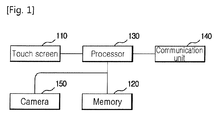
- Fig. 1 is a block diagram illustrating a content playback apparatus according to one embodiment of the present invention.
- a content playback apparatus includes a touch screen 110, a memory 120, a processor 130, a communication unit 140 and a camera 150.
- the touch screen 110 displays images received from the processor 130.
- the touch screen 110 can receive a touch input from a user through a finger or pen which touches on the touch screen 110, and can generate input information based on the received touch input.
- the touch input may include one or more of an input from the user which touches on the touch screen 110, an input of release of the finger or pen from the touch screen, a drag input of movement of the finger or pen on the touch screen 110 in touch with touch screen 100, and a touch pressure.
- the input information is information indicating the above-mentioned inputs.
- the touch screen 110 transmits the input information to the processor 130.
- the memory 120 stores one or more contents and a program including a user interface and instructions for playbacks of the contents.
- the processor 130 generates a content such as an image to be played back through the user interface, according to an instruction stored in the memory 120, and transmits it to the touch screen 110.
- a process of the processor 130 to generate the image through the user interface and display the image on the touch screen 110 is obvious to those skilled in the art and, therefore, explanation of which is omitted for the purpose of brevity.
- the user interface includes a thumbnail image display area in which contents being played back are displayed as thumbnail images, and a main area in which contents are displayed at positions and sizes set by the user.
- the main area may be the entire area of the touch screen 110 including the thumbnail image display area.
- the processor 130 magnifies the content depending on a touch hold time. Accordingly, the content playback apparatus makes it possible for a user to easily adjust a position and size at which a content is played back, through a touch input. A process of adjusting a position and size at which a content is played back through the user interface will be described in detail later with reference to Figs. 2 and 3 .
- the processor 130 can also generate a transmission image to be transmitted to another device through the communication unit 140.
- the processor 130 can generate a transmission image (a first content) to be played back on the entire screen.
- the processor 130 can transmit the transmission image to another device through the communication unit 140.
- the another device may be a mobile device or a device such as a television which is connected to the communication unit 140 via a predetermined communication protocol and can receive and display the transmission image.
- the communication unit 140 is connected to another device and transmits a transmission image.
- the communication unit 140 can receive a content from another device and transmit it to the processor 130.
- the processor 130 can store the content in the memory 120 and display it on the touch screen 110 directly according to a playback instruction through the user interface.
- the communication unit 140 may include a plurality of communication modules of schemes known in the art.
- the camera 150 can pick up an image of external environments to generate a content.
- the camera 150 can transmit the generated content to the processor 130.
- the processor 130 can store the content in the memory 120 and play back it.
- the processor 130 can display the content generated by the camera 150 on the touch screen 110 directly through the user interface.
- Fig. 2 is a view showing a screen on which a plurality of contents is played back through a user interface by a content playback apparatus, in accordance with a first embodiment.
- the user interface includes a thumbnail image display area 203 and a main area 206.
- the main area 206 may become the entire area of the touch screen 110 including the thumbnail image display area 203. That is, the entire thumbnail image display area 203 or a background area may be used as the main area in which contents are displayed.
- a plurality of contents may be played back as thumbnail images in the thumbnail image display area 203.
- the processor 130 receives an input of touching one of the contents and dragging it to a point in the main area 206 from a user, the processor 130 moves the content to the point. If the drag by the user is finished and a finger or pen of the user remains in touch with the content, the processor 130 magnifies the size of the content with a predetermined magnification every predetermined unit time until the touch is ended. For example, after moving a content (e.g., a thumbnail image 210) to a point 220 according to an input from the user, the processor 130 magnifies the thumbnail image 210 to a size indicated by reference numeral 230 for a touch hold time.
- a content e.g., a thumbnail image 210
- the processor 130 magnifies the thumbnail image 210 to a size indicated by reference numeral 230 for a touch hold time.
- the processor 130 magnifies the content 210 to a size indicated by reference numeral 240.
- the processor 130 ceases to change the size of the content 210. Therefore, the content playback apparatus can set positions and sizes at which contents displayed as thumbnail images are played back, according to touch, drag and touch release inputs from a user. Therefore, even when it is a device, such as a mobile device, having a small screen, the content playback apparatus allows a user to set positions and sizes at which contents are played back, without a small button which is hard to be pressed.
- the user can cause the content playback apparatus to play back and display the plurality of contents through user inputs including touch, drag and touch release for thumbnail images.
- the sizes at which the above-described contents are determined depending on the touch input hold time may be determined according to a touch pressure by a user depending on an implementation method.
- the processor 130 can magnify a size at which a content is played back, with increase in a touch pressure. Therefore, a user can adjust the size without waiting magnification of the size after drag termination.
- a pressure according to a touch pressure exceeds a predetermined value, the processor 130 can gradually magnify the size at which the content is played back. Therefore, even when the user stops the drag input for a minute in order to designate a position at which the content is played back, the size at which the content is played back, and further, even when the user stops the drag input for a minute in order to grasp a position at which the content is played back, it is possible to prevent the processor 130 from entering a process of adjusting the size at which the content is played back.
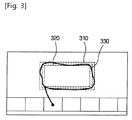
- Fig, 3 is a view showing a screen on which a plurality of contents is played back through a user interface by a content playback apparatus, in accordance with a second embodiment.
- the user interface includes a thumbnail image display area 203 and a main area 206.
- a plurality of contents can be played back as thumbnail images in the thumbnail image display area 203.
- the processor 130 receives an input of touching one 210 of the contents and dragging it into the main area 206 from a user, the processor 130 displays a path according to the drag input, as a line (hereinafter referred to as a path line). Thereafter, when path lines according to the drag input intersect each other, the processor sets a size at which a content is played back, to a size of a rectangle 310 circumscribing a figure formed by a single closed curve of the path lines, and displays the content at a position of the rectangle.
- the processor 130 may display the content at a size and position according to a rectangle 320 inscribing the figure formed by the single closed curve.
- the processor 130 may set a content size and position according to a rectangle 330 formed by a set of points having the same distance from matched sides when sides of the rectangle 310 circumscribing the figure formed by the single closed curve match in one-to-one correspondence with sides of the rectangle 320 inscribing the figure formed by the single closed curve.
- the processor 130 may match the upper side of the rectangle 310 circumscribing the figure with the upper side of the rectangle 320 inscribing the figure and calculate points having the same distance from the upper sides.
- the processor 130 may calculate points having the same distance for left sides, right sides and lower sides of the rectangle 310 and rectangle 320, according to the above-described process.
- the processor 130 can set sizes and positions of contents through the rectangle 330 formed by the same distance points.
- the content playback apparatus can set sizes and positions at which contents are displayed, through a drag input from a user.
- the contents played back and displayed according to the above-described methods ( Figs. 2 and 3 ) of the present invention can be changed in size and position or changed in size at the same position through the user inputs including the touch, drag and touch release, in the same way.
- Fig. 4 is a flow chart illustrating a process of the content playback apparatus to play back the contents, in accordance with one embodiment.
- the following process is a process performed by functional units included in the content playback apparatus.
- the description will be given with the content playback apparatus as a subject.
- the content playback apparatus displays one or more contents in the thumbnail image area 203.
- the contents may be contents received from an external device through the communication unit 140, contents generated by the camera 150, and the like.
- the contents playback apparatus senses a touch input on the touch screen 110 from a user.
- the touch input may be inputs, such as touch, drag and touch release, from the user, which are known in the art.
- the content playback apparatus sets a position at which a content corresponding to a thumbnail image first touched by the user is played back. For example, the content playback apparatus can move the content positioned at the point first touched by the user, according to a drag input.
- the drag input is terminated (i.e., a finger or pen pauses under a touched state
- the content playback apparatus can set the point at which the drag input is terminated, to a position at which the content is to be played back.
- the content playback apparatus sets a size at which the content is to be played back, according to the touch input. For example, the content playback apparatus magnifies the size of the content for a touch hold time after the drag input is terminated, ceases to magnify the content size if the touch release occurs during the magnification of the content size, and sets the magnified size of the thumbnail image to a size at which the content is to be played back.
- the content playback apparatus may change the content size in proportion to a pressure according to the touch input at Step 440.
- the content playback apparatus may change the size at which the content is to be displayed, by a predetermined magnification every unit time.
- Step 440 may be changed to a step in which the content playback apparatus sets a size and position at which the content is to be played back using a path line formed by the user drag input, as described above with reference to Fig. 3 .
- the content playback apparatus completes the control for content playback and plays back the contents according to the control.
- Steps 420, 430, 440 and 450 except Step 410 in the flow chart of Fig. 4 may be performed in order to change the sizes and positions at which the contents are being played back. That is, the contents being already played back can be changed in position and size by sensing a touch input to select a content to be changed in position and size, among the contents being already played back, at Step 420, setting a playback position at Step 430, setting a playback size at Step 440, and completing the touch input at Step 450.
- the contents can be changed in size by sensing a touch input to select a content to be changed in size, among the contents being already played back, at Step 420, setting a playback size at Step 440 in the above-described way if a touch input for playback size setting is sensed without a position change input for Step 430, for example, if a touch lasts for a certain time or a touch pressure is sensed to exceed a predetermined value without any drag after the touch input at Step 420, and completing the touch input at Step 450.
Landscapes
- Engineering & Computer Science (AREA)
- Theoretical Computer Science (AREA)
- General Engineering & Computer Science (AREA)
- Human Computer Interaction (AREA)
- Physics & Mathematics (AREA)
- General Physics & Mathematics (AREA)
- User Interface Of Digital Computer (AREA)
Abstract
Description
- The present invention relates to a technique for playing back contents, and more particularly to an apparatus and method for playing back a plurality of contents.
- In general, mobile devices, such as smartphones and the like, play back one of contents, such as videos and the like, at a time due to restrictions on their performance. However, the recent change in decoding of contents such as videos from software to hardware allows a plurality of contents to be played back at a time in mobile devices.
- However, a user interface for playback of the plurality of contents is unavailable, which makes it difficult to provide the plurality of contents for users.
- It is therefore an object of the present invention to provide a content playback apparatus which is capable of efficiently displaying a plurality of contents on a limited screen.
- To achieve the above object, an aspect of the present invention provides a content playback apparatus including: a touch screen configured to display one or more contents and to sense user's touch inputs for the contents; a memory configured to store instructions to play back the contents; and a processor configured to control the contents to be displayed on the touch screen according to the instructions, wherein the instructions includes: an instruction to perform a step of displaying the one or more contents in a predetermined size; and an instruction to perform a step of moving the contents and magnifying the size of the contents according to the user's touch inputs to display the contents on the touch screen.
- The step of moving the contents and magnifying the size of the contents according to the user's touch inputs to display the contents on the touch screen may include: a step of moving the contents according to a drag input of the user's touch inputs; a step of magnifying a size of the contents with a predetermined magnification every unit time for a touch hold time after the drag input is stopped; and a step of displaying the contents on the touch screen at the magnified size when the touch is terminated.
- The step of moving the contents and magnifying the size of the contents according to the user's touch inputs to display the contents on the touch screen may include: a step of moving the contents according to a drag input of the user's touch inputs; a step of magnifying a size of the contents depending on a pressure during the touch input; and a step of displaying the contents on the touch screen at the magnified size when the touch is terminated.
- The step of magnifying a size of the contents depending on a pressure during the touch input may include: a step of magnifying the size of the contents in proportion to the pressure.
- The step of magnifying a size of the contents depending on a pressure during the touch input may include: a step of magnifying the size of the contents with a predetermined magnification every unit time for a time for which the pressure is held at a predetermined value or larger.
- The step of moving the contents and magnifying the size of the contents according to the user's touch input to display the contents on the touch screen may include: a step of displaying the contents to correspond to a size and position according to a figure formed by a single closed curve of intersecting path lines formed according to a drag input of the touch inputs.
- The step of moving the contents and magnifying the size of the contents according to the user's touch input to display the contents on the touch screen may include: a step of displaying the contents to correspond to a size and position according to one or more of rectangles circumscribing and inscribing a figure formed by a single closed curve of intersecting path lines formed according to a drag input of the touch inputs.
- Another aspect of the present invention provides a content playback method of a content playback apparatus including a touch screen, including: a step of displaying one or more contents in a predetermined size; and a step of moving the contents and magnifying the size of the contents according to user's touch inputs to display the contents on the touch screen.
- The step of moving the contents and magnifying the size of the contents according to the user's touch inputs to display the contents on the touch screen may include: a step of moving the contents according to a drag input of the user's touch inputs; a step of magnifying a size of the contents with a predetermined magnification every unit time for a touch hold time after the drag input is stopped; and a step of displaying the contents on the touch screen at the magnified size when the touch is terminated.
- The step of moving the contents and magnifying the size of the contents according to the user's touch inputs to display the contents on the touch screen may include: a step of moving the contents according to a drag input of the user's touch inputs; a step of magnifying a size of the contents depending on a pressure during the touch input; and a step of displaying the contents on the touch screen at the magnified size when the touch is terminated.
- The step of magnifying a size of the contents depending on a pressure during the touch input may include: a step of magnifying the size of the contents in proportion to the pressure.
- The step of magnifying a size of the contents depending on a pressure during the touch input may include: a step of magnifying the size of the contents with a predetermined magnification every unit time for a time for which the pressure is held at a predetermined value or larger.
- The step of moving the contents and magnifying the size of the contents according to the user's touch input to display the contents on the touch screen may include: a step of displaying the contents to correspond to a size and position according to a figure formed by a single closed curve of intersecting path lines formed according to a drag input of the touch inputs.
- The step of moving the contents and magnifying the size of the contents according to the user's touch input to display the contents on the touch screen may include: a step of displaying the contents to correspond to a size and position according to one or more of rectangles circumscribing and inscribing a figure formed by a single closed curve of intersecting path lines formed according to a drag input of the touch inputs.
- As described above, according to the present invention, it is possible to provide a device including a touch screen, which is capable of allowing a user to easily arrange and display a plurality of contents on a screen according to intention of the user.
- In addition, according to the present invention, it is possible for a user to control playback of contents shared by means of a content playback apparatus through an external device.
-
-
Fig. 1 is a block diagram illustrating a content playback apparatus according to one embodiment of the present invention. -
Fig. 2 is a view showing a screen on which a plurality of contents is played back through a user interface by a content playback apparatus, in accordance with a first embodiment. -
Fig. 3 is a view showing a screen on which a plurality of contents is played back through a user interface by a content playback apparatus, in accordance with a second embodiment. -
Fig. 4 is a flow chart illustrating a process of the content playback apparatus to play back the contents, in accordance with one embodiment. - The present invention can be modified in various ways and practiced with many embodiments. Hereinafter, some embodiments of the present invention will be described in detail with reference to the drawings. However, the present invention is not limited to the disclosed embodiments and it is to be understood that modifications, equivalents and substitutes thereof may be made and fall within the scope of the invention set forth in the claims.
- In the specification, the phase of "transmitting a signal from one element to another" refers to not only transmitting the signal through direction connection from the one element to the another element but also transmitting the signal via still another element between the one element and the another element, unless stated otherwise.
-
Fig. 1 is a block diagram illustrating a content playback apparatus according to one embodiment of the present invention. - Referring to
Fig. 1 , a content playback apparatus includes atouch screen 110, amemory 120, aprocessor 130, acommunication unit 140 and acamera 150. - The
touch screen 110 displays images received from theprocessor 130. Thetouch screen 110 can receive a touch input from a user through a finger or pen which touches on thetouch screen 110, and can generate input information based on the received touch input. In this case, the touch input may include one or more of an input from the user which touches on thetouch screen 110, an input of release of the finger or pen from the touch screen, a drag input of movement of the finger or pen on thetouch screen 110 in touch with touch screen 100, and a touch pressure. The input information is information indicating the above-mentioned inputs. Thetouch screen 110 transmits the input information to theprocessor 130. - The
memory 120 stores one or more contents and a program including a user interface and instructions for playbacks of the contents. - The
processor 130 generates a content such as an image to be played back through the user interface, according to an instruction stored in thememory 120, and transmits it to thetouch screen 110. A process of theprocessor 130 to generate the image through the user interface and display the image on thetouch screen 110 is obvious to those skilled in the art and, therefore, explanation of which is omitted for the purpose of brevity. The user interface includes a thumbnail image display area in which contents being played back are displayed as thumbnail images, and a main area in which contents are displayed at positions and sizes set by the user. The main area may be the entire area of thetouch screen 110 including the thumbnail image display area. In this case, when the user touches one of the contents displayed as the thumbnail images, drags it into the main area, and holds the touching, theprocessor 130 magnifies the content depending on a touch hold time. Accordingly, the content playback apparatus makes it possible for a user to easily adjust a position and size at which a content is played back, through a touch input. A process of adjusting a position and size at which a content is played back through the user interface will be described in detail later with reference toFigs. 2 and3 . - The
processor 130 can also generate a transmission image to be transmitted to another device through thecommunication unit 140. For example, theprocessor 130 can generate a transmission image (a first content) to be played back on the entire screen. Theprocessor 130 can transmit the transmission image to another device through thecommunication unit 140. In this case, the another device may be a mobile device or a device such as a television which is connected to thecommunication unit 140 via a predetermined communication protocol and can receive and display the transmission image. - The
communication unit 140 is connected to another device and transmits a transmission image. In addition, thecommunication unit 140 can receive a content from another device and transmit it to theprocessor 130. In this case, theprocessor 130 can store the content in thememory 120 and display it on thetouch screen 110 directly according to a playback instruction through the user interface. In addition, thecommunication unit 140 may include a plurality of communication modules of schemes known in the art. - The
camera 150 can pick up an image of external environments to generate a content. Thecamera 150 can transmit the generated content to theprocessor 130. Theprocessor 130 can store the content in thememory 120 and play back it. In addition, theprocessor 130 can display the content generated by thecamera 150 on thetouch screen 110 directly through the user interface. -
Fig. 2 is a view showing a screen on which a plurality of contents is played back through a user interface by a content playback apparatus, in accordance with a first embodiment. - Referring to
Fig. 2 , the user interface includes a thumbnailimage display area 203 and amain area 206. In this case, themain area 206 may become the entire area of thetouch screen 110 including the thumbnailimage display area 203. That is, the entire thumbnailimage display area 203 or a background area may be used as the main area in which contents are displayed. - At this time, a plurality of contents may be played back as thumbnail images in the thumbnail
image display area 203. When theprocessor 130 receives an input of touching one of the contents and dragging it to a point in themain area 206 from a user, theprocessor 130 moves the content to the point. If the drag by the user is finished and a finger or pen of the user remains in touch with the content, theprocessor 130 magnifies the size of the content with a predetermined magnification every predetermined unit time until the touch is ended. For example, after moving a content (e.g., a thumbnail image 210) to apoint 220 according to an input from the user, theprocessor 130 magnifies thethumbnail image 210 to a size indicated byreference numeral 230 for a touch hold time. If the touch input from the user still remains maintained, theprocessor 130 magnifies thecontent 210 to a size indicated byreference numeral 240. When the touch input from the user is terminated, theprocessor 130 ceases to change the size of thecontent 210. Therefore, the content playback apparatus can set positions and sizes at which contents displayed as thumbnail images are played back, according to touch, drag and touch release inputs from a user. Therefore, even when it is a device, such as a mobile device, having a small screen, the content playback apparatus allows a user to set positions and sizes at which contents are played back, without a small button which is hard to be pressed. Thus, if the user wishes to display a plurality of contents on themain area 206, the user can cause the content playback apparatus to play back and display the plurality of contents through user inputs including touch, drag and touch release for thumbnail images. - Although it has been illustrated that the sizes at which the above-described contents are determined depending on the touch input hold time, the sizes may be determined according to a touch pressure by a user depending on an implementation method.
- For example, the
processor 130 can magnify a size at which a content is played back, with increase in a touch pressure. Therefore, a user can adjust the size without waiting magnification of the size after drag termination. In addition, if a pressure according to a touch pressure exceeds a predetermined value, theprocessor 130 can gradually magnify the size at which the content is played back. Therefore, even when the user stops the drag input for a minute in order to designate a position at which the content is played back, the size at which the content is played back, and further, even when the user stops the drag input for a minute in order to grasp a position at which the content is played back, it is possible to prevent theprocessor 130 from entering a process of adjusting the size at which the content is played back. -
Fig, 3 is a view showing a screen on which a plurality of contents is played back through a user interface by a content playback apparatus, in accordance with a second embodiment. - Referring to
Fig. 3 , the user interface includes a thumbnailimage display area 203 and amain area 206. - In this case, a plurality of contents can be played back as thumbnail images in the thumbnail
image display area 203. When theprocessor 130 receives an input of touching one 210 of the contents and dragging it into themain area 206 from a user, theprocessor 130 displays a path according to the drag input, as a line (hereinafter referred to as a path line). Thereafter, when path lines according to the drag input intersect each other, the processor sets a size at which a content is played back, to a size of arectangle 310 circumscribing a figure formed by a single closed curve of the path lines, and displays the content at a position of the rectangle. - Of course, depending on an implementation method, the
processor 130 may display the content at a size and position according to arectangle 320 inscribing the figure formed by the single closed curve. Alternatively, theprocessor 130 may set a content size and position according to arectangle 330 formed by a set of points having the same distance from matched sides when sides of therectangle 310 circumscribing the figure formed by the single closed curve match in one-to-one correspondence with sides of therectangle 320 inscribing the figure formed by the single closed curve. For example, theprocessor 130 may match the upper side of therectangle 310 circumscribing the figure with the upper side of therectangle 320 inscribing the figure and calculate points having the same distance from the upper sides. In addition, theprocessor 130 may calculate points having the same distance for left sides, right sides and lower sides of therectangle 310 andrectangle 320, according to the above-described process. Theprocessor 130 can set sizes and positions of contents through therectangle 330 formed by the same distance points. - Accordingly, the content playback apparatus according to the second embodiment of the present invention can set sizes and positions at which contents are displayed, through a drag input from a user.
- The contents played back and displayed according to the above-described methods (
Figs. 2 and3 ) of the present invention can be changed in size and position or changed in size at the same position through the user inputs including the touch, drag and touch release, in the same way. -
Fig. 4 is a flow chart illustrating a process of the content playback apparatus to play back the contents, in accordance with one embodiment. The following process is a process performed by functional units included in the content playback apparatus. However, for the purpose of brevity of description, the description will be given with the content playback apparatus as a subject. - Referring to
Fig. 4 , atStep 410, the content playback apparatus displays one or more contents in thethumbnail image area 203. At this time, the contents may be contents received from an external device through thecommunication unit 140, contents generated by thecamera 150, and the like. - At
Step 420, the contents playback apparatus senses a touch input on thetouch screen 110 from a user. In this case, the touch input may be inputs, such as touch, drag and touch release, from the user, which are known in the art. - At
Step 430, the content playback apparatus sets a position at which a content corresponding to a thumbnail image first touched by the user is played back. For example, the content playback apparatus can move the content positioned at the point first touched by the user, according to a drag input. When the drag input is terminated (i.e., a finger or pen pauses under a touched state, the content playback apparatus can set the point at which the drag input is terminated, to a position at which the content is to be played back. - At
Step 440, the content playback apparatus sets a size at which the content is to be played back, according to the touch input. For example, the content playback apparatus magnifies the size of the content for a touch hold time after the drag input is terminated, ceases to magnify the content size if the touch release occurs during the magnification of the content size, and sets the magnified size of the thumbnail image to a size at which the content is to be played back. - Although it has been illustrated that the size at which the content is to be played back is set depending on a touch hold time at
Step 440, conditions of setting the size at which the content is to be displayed may be changed depending on an implementation method. - For example, the content playback apparatus may change the content size in proportion to a pressure according to the touch input at
Step 440. Alternatively, if the touch pressure exceeds a predetermined value, the content playback apparatus may change the size at which the content is to be displayed, by a predetermined magnification every unit time. - In addition,
Step 440 may be changed to a step in which the content playback apparatus sets a size and position at which the content is to be played back using a path line formed by the user drag input, as described above with reference toFig. 3 . - When the touch input is completed at
Step 450, the content playback apparatus completes the control for content playback and plays back the contents according to the control. - If one or more contents are already being played back in the main area, only Steps 420, 430, 440 and 450 except
Step 410 in the flow chart ofFig. 4 may be performed in order to change the sizes and positions at which the contents are being played back. That is, the contents being already played back can be changed in position and size by sensing a touch input to select a content to be changed in position and size, among the contents being already played back, atStep 420, setting a playback position atStep 430, setting a playback size atStep 440, and completing the touch input atStep 450. In addition, if only the playback sizes of the contents being already played back are intended to be adjusted, the contents can be changed in size by sensing a touch input to select a content to be changed in size, among the contents being already played back, atStep 420, setting a playback size atStep 440 in the above-described way if a touch input for playback size setting is sensed without a position change input forStep 430, for example, if a touch lasts for a certain time or a touch pressure is sensed to exceed a predetermined value without any drag after the touch input atStep 420, and completing the touch input atStep 450. - While the present invention has been particularly shown and described with reference to exemplary embodiments thereof, it will be understood by those skilled in the art that various changes in form and details may be made therein without departing from the spirit and scope of the present invention as defined by the appended claims and equivalents thereof.
Claims (14)
- A content playback apparatus comprising:a touch screen configured to display one or more contents and to sense user's touch inputs for the contents;a memory configured to store instructions to play back the contents; anda processor configured to control the contents to be displayed on the touch screen according to the instructions,wherein the instructions include: an instruction to perform a step of displaying the one or more contents in a predetermined size; and an instruction to perform a step of moving the contents and magnifying the size of the contents according to the user's touch inputs to display the contents on the touch screen.
- The content playback apparatus according to claim 1, wherein the step of moving the contents and magnifying the size of the contents according to the user's touch inputs to display the contents on the touch screen includes:a step of moving the contents according to a drag input of the user's touch inputs;a step of magnifying a size of the contents with a predetermined magnification every unit time for a touch hold time after the drag input is stopped; anda step of displaying the contents on the touch screen at the magnified size when the touch is terminated.
- The content playback apparatus according to claim 1, wherein the step of moving the contents and magnifying the size of the contents according to the user's touch inputs to display the contents on the touch screen includes:a step of moving the contents according to a drag input of the user's touch inputs;a step of magnifying a size of the contents depending on a pressure during the touch input; anda step of displaying the contents on the touch screen at the magnified size when the touch is terminated.
- The content playback apparatus according to claim 3, wherein the step of magnifying a size of the contents depending on a pressure during the touch input includes:a step of magnifying the size of the contents in proportion to the pressure.
- The content playback apparatus according to claim 3, wherein the step of magnifying a size of the contents depending on a pressure during the touch input includes:a step of magnifying the size of the contents with a predetermined magnification every unit time for a time for which the pressure is held at a predetermined value or larger.
- The content playback apparatus according to claim 1, wherein the step of moving the contents and magnifying the size of the contents according to the user's touch input to display the contents on the touch screen includes:a step of displaying the contents to correspond to a size and position according to a figure formed by a single closed curve of intersecting path lines formed according to a drag input of the touch inputs.
- The content playback apparatus according to claim 6, wherein the step of moving the contents and magnifying the size of the contents according to the user's touch input to display the contents on the touch screen includes:a step of displaying the contents to correspond to a size and position according to one or more of rectangles circumscribing and inscribing a figure formed by a single closed curve of intersecting path lines formed according to a drag input of the touch inputs.
- A content playback method of a content playback apparatus including a touch screen, comprising:a step of displaying one or more contents in a predetermined size; anda step of moving the contents and magnifying the size of the contents according to user's touch inputs to display the contents on the touch screen.
- The content playback method according to claim 8, wherein the step of moving the contents and magnifying the size of the contents according to the user's touch inputs to display the contents on the touch screen includes:a step of moving the contents according to a drag input of the user's touch inputs;a step of magnifying a size of the contents with a predetermined magnification every unit time for a touch hold time after the drag input is stopped; anda step of displaying the contents on the touch screen at the magnified size when the touch is terminated.
- The content playback method according to claim 8, wherein the step of moving the contents and magnifying the size of the contents according to the user's touch inputs to display the contents on the touch screen includes:a step of moving the contents according to a drag input of the user's touch inputs;a step of magnifying a size of the contents depending on a pressure during the touch input; anda step of displaying the contents on the touch screen at the magnified size when the touch is terminated.
- The content playback method according to claim 10, wherein the step of magnifying a size of the contents depending on a pressure during the touch input includes:a step of magnifying the size of the contents in proportion to the pressure.
- The content playback method according to claim 10, wherein the step of magnifying a size of the contents depending on a pressure during the touch input includes:a step of magnifying the size of the contents with a predetermined magnification every unit time for a time for which the pressure is held at a predetermined value or larger.
- The content playback method according to claim 8, wherein the step of moving the contents and magnifying the size of the contents according to the user's touch input to display the contents on the touch screen includes:a step of displaying the contents to correspond to a size and position according to a figure formed by a single closed curve of intersecting path lines formed according to a drag input of the touch inputs.
- The content playback method according to claim 13, wherein the step of moving the contents and magnifying the size of the contents according to the user's touch input to display the contents on the touch screen includes:a step of displaying the contents to correspond to a size and position according to one or more of rectangles circumscribing and inscribing a figure formed by a single closed curve of intersecting path lines formed according to a drag input of the touch inputs.
Applications Claiming Priority (2)
| Application Number | Priority Date | Filing Date | Title |
|---|---|---|---|
| KR1020130103252A KR101518453B1 (en) | 2013-08-29 | 2013-08-29 | Apparatus and methdo for playing contents |
| PCT/KR2014/007199 WO2015030383A1 (en) | 2013-08-29 | 2014-08-05 | Content playback apparatus and content playing method |
Publications (3)
| Publication Number | Publication Date |
|---|---|
| EP3040820A1 true EP3040820A1 (en) | 2016-07-06 |
| EP3040820A4 EP3040820A4 (en) | 2017-05-17 |
| EP3040820B1 EP3040820B1 (en) | 2019-06-26 |
Family
ID=52586875
Family Applications (1)
| Application Number | Title | Priority Date | Filing Date |
|---|---|---|---|
| EP14840926.1A Not-in-force EP3040820B1 (en) | 2013-08-29 | 2014-08-05 | Content playback apparatus and content playing method |
Country Status (6)
| Country | Link |
|---|---|
| US (1) | US10162499B2 (en) |
| EP (1) | EP3040820B1 (en) |
| JP (1) | JP6220976B2 (en) |
| KR (1) | KR101518453B1 (en) |
| CN (1) | CN105593795B (en) |
| WO (1) | WO2015030383A1 (en) |
Family Cites Families (21)
| Publication number | Priority date | Publication date | Assignee | Title |
|---|---|---|---|---|
| US8196055B2 (en) * | 2006-01-30 | 2012-06-05 | Microsoft Corporation | Controlling application windows in an operating system |
| US8564544B2 (en) | 2006-09-06 | 2013-10-22 | Apple Inc. | Touch screen device, method, and graphical user interface for customizing display of content category icons |
| KR101351023B1 (en) * | 2007-03-08 | 2014-01-14 | 엘지전자 주식회사 | Method for providing broadcast information in terminal and terminal using the same |
| JP4605214B2 (en) * | 2007-12-19 | 2011-01-05 | ソニー株式会社 | Information processing apparatus, information processing method, and program |
| US20090300554A1 (en) * | 2008-06-03 | 2009-12-03 | Nokia Corporation | Gesture Recognition for Display Zoom Feature |
| KR101495559B1 (en) | 2008-07-21 | 2015-02-27 | 삼성전자주식회사 | User command input method and apparatus |
| US8363020B2 (en) * | 2009-08-27 | 2013-01-29 | Symbol Technologies, Inc. | Methods and apparatus for pressure-based manipulation of content on a touch screen |
| JP2011049870A (en) * | 2009-08-27 | 2011-03-10 | Life Management:Kk | Album creation system |
| EP2325737B1 (en) * | 2009-10-28 | 2019-05-08 | Orange | Verfahren und Vorrichtung zur gestenbasierten Eingabe in eine graphische Benutzeroberfläche zur Anzeige von Anwendungsfenstern |
| US8902259B1 (en) * | 2009-12-29 | 2014-12-02 | Google Inc. | Finger-friendly content selection interface |
| KR101304321B1 (en) * | 2010-01-22 | 2013-09-11 | 전자부품연구원 | Method for providing UI according to single touch pressure and electronic device using the same |
| US9411504B2 (en) * | 2010-01-28 | 2016-08-09 | Microsoft Technology Licensing, Llc | Copy and staple gestures |
| US9030419B1 (en) * | 2010-09-28 | 2015-05-12 | Amazon Technologies, Inc. | Touch and force user interface navigation |
| JP5751898B2 (en) * | 2011-04-05 | 2015-07-22 | キヤノン株式会社 | Information processing apparatus, information processing method, program, and storage medium |
| KR101290145B1 (en) | 2011-05-31 | 2013-07-26 | 삼성전자주식회사 | Control method and apparatus for touch screen, computer-reable recording medium, and terminal apparatus |
| JP5576841B2 (en) * | 2011-09-09 | 2014-08-20 | Kddi株式会社 | User interface device capable of zooming image by pressing, image zoom method and program |
| US9792955B2 (en) * | 2011-11-14 | 2017-10-17 | Apple Inc. | Automatic generation of multi-camera media clips |
| KR101338825B1 (en) | 2011-12-14 | 2013-12-06 | 현대자동차주식회사 | A controlling method and apparatus for display particular in selected area by using dynamic touch interaction |
| KR20130082352A (en) * | 2012-01-11 | 2013-07-19 | 삼성전자주식회사 | Apparatus and method for zooming touch screen in electronic device |
| JP5867094B2 (en) * | 2012-01-11 | 2016-02-24 | カシオ計算機株式会社 | Information processing apparatus, information processing method, and program |
| MX355320B (en) * | 2013-02-25 | 2018-04-16 | Savant Systems Llc | Video tiling. |
-
2013
- 2013-08-29 KR KR1020130103252A patent/KR101518453B1/en active Active
-
2014
- 2014-08-05 US US14/915,569 patent/US10162499B2/en active Active
- 2014-08-05 WO PCT/KR2014/007199 patent/WO2015030383A1/en not_active Ceased
- 2014-08-05 JP JP2016538835A patent/JP6220976B2/en not_active Expired - Fee Related
- 2014-08-05 CN CN201480053765.XA patent/CN105593795B/en not_active Expired - Fee Related
- 2014-08-05 EP EP14840926.1A patent/EP3040820B1/en not_active Not-in-force
Also Published As
| Publication number | Publication date |
|---|---|
| EP3040820A4 (en) | 2017-05-17 |
| JP2016528658A (en) | 2016-09-15 |
| EP3040820B1 (en) | 2019-06-26 |
| WO2015030383A1 (en) | 2015-03-05 |
| CN105593795A (en) | 2016-05-18 |
| US20160216870A1 (en) | 2016-07-28 |
| US10162499B2 (en) | 2018-12-25 |
| JP6220976B2 (en) | 2017-10-25 |
| CN105593795B (en) | 2018-12-18 |
| KR20150025583A (en) | 2015-03-11 |
| KR101518453B1 (en) | 2015-05-11 |
Similar Documents
| Publication | Publication Date | Title |
|---|---|---|
| US11816330B2 (en) | Display device, display controlling method, and computer program | |
| KR101491045B1 (en) | Apparatus and methdo for sharing contents | |
| US10969949B2 (en) | Information display device, information display method and information display program | |
| JP6144242B2 (en) | GUI application for 3D remote controller | |
| KR102085181B1 (en) | Method and device for transmitting data and method and device for receiving data | |
| US10409446B2 (en) | Information processing apparatus and method for manipulating display position of a three-dimensional image | |
| JP6105822B1 (en) | Touch screen control method and apparatus | |
| CN105190477A (en) | Head-mounted display device for user interaction in an augmented reality environment | |
| JP2013045457A (en) | Content moving method and device using pointing device | |
| US20130050277A1 (en) | Data transmitting media, data transmitting device, and data receiving device | |
| WO2016141597A1 (en) | Touch control method, device, terminal and graphical user interface thereof | |
| US20140085219A1 (en) | Controlling display device with display portions through touch-sensitive display | |
| US10162499B2 (en) | Content playback apparatus and content playing method | |
| JP7000289B2 (en) | Programs, information processing equipment, and methods | |
| JP7289208B2 (en) | Program, Information Processing Apparatus, and Method | |
| CN103677579A (en) | Electronic equipment and control method | |
| JP2022137023A (en) | Program, Information Processing Apparatus, and Method | |
| HK1185676B (en) | Method and apparatus for gesture based controls | |
| HK1185676A (en) | Method and apparatus for gesture based controls |
Legal Events
| Date | Code | Title | Description |
|---|---|---|---|
| PUAI | Public reference made under article 153(3) epc to a published international application that has entered the european phase |
Free format text: ORIGINAL CODE: 0009012 |
|
| 17P | Request for examination filed |
Effective date: 20160324 |
|
| AK | Designated contracting states |
Kind code of ref document: A1 Designated state(s): AL AT BE BG CH CY CZ DE DK EE ES FI FR GB GR HR HU IE IS IT LI LT LU LV MC MK MT NL NO PL PT RO RS SE SI SK SM TR |
|
| AX | Request for extension of the european patent |
Extension state: BA ME |
|
| DAX | Request for extension of the european patent (deleted) | ||
| A4 | Supplementary search report drawn up and despatched |
Effective date: 20170419 |
|
| RIC1 | Information provided on ipc code assigned before grant |
Ipc: G06F 3/041 20060101ALI20170411BHEP Ipc: G06F 3/0488 20130101AFI20170411BHEP Ipc: G06F 3/0484 20130101ALI20170411BHEP Ipc: G06F 3/14 20060101ALI20170411BHEP |
|
| STAA | Information on the status of an ep patent application or granted ep patent |
Free format text: STATUS: EXAMINATION IS IN PROGRESS |
|
| 17Q | First examination report despatched |
Effective date: 20180806 |
|
| REG | Reference to a national code |
Ref country code: DE Ref legal event code: R079 Ref document number: 602014049216 Country of ref document: DE Free format text: PREVIOUS MAIN CLASS: G06F0003041000 Ipc: G06F0003048800 |
|
| RIC1 | Information provided on ipc code assigned before grant |
Ipc: G06F 3/041 20060101ALI20181214BHEP Ipc: G06F 3/14 20060101ALI20181214BHEP Ipc: G06F 3/0486 20130101ALI20181214BHEP Ipc: G06F 3/0488 20130101AFI20181214BHEP Ipc: G06F 3/0484 20130101ALI20181214BHEP |
|
| GRAP | Despatch of communication of intention to grant a patent |
Free format text: ORIGINAL CODE: EPIDOSNIGR1 |
|
| STAA | Information on the status of an ep patent application or granted ep patent |
Free format text: STATUS: GRANT OF PATENT IS INTENDED |
|
| INTG | Intention to grant announced |
Effective date: 20190221 |
|
| RAP1 | Party data changed (applicant data changed or rights of an application transferred) |
Owner name: SK TELECOM CO., LTD. Owner name: PIXTREE TECHNOLOGIES INC. |
|
| GRAS | Grant fee paid |
Free format text: ORIGINAL CODE: EPIDOSNIGR3 |
|
| GRAA | (expected) grant |
Free format text: ORIGINAL CODE: 0009210 |
|
| STAA | Information on the status of an ep patent application or granted ep patent |
Free format text: STATUS: THE PATENT HAS BEEN GRANTED |
|
| AK | Designated contracting states |
Kind code of ref document: B1 Designated state(s): AL AT BE BG CH CY CZ DE DK EE ES FI FR GB GR HR HU IE IS IT LI LT LU LV MC MK MT NL NO PL PT RO RS SE SI SK SM TR |
|
| REG | Reference to a national code |
Ref country code: GB Ref legal event code: FG4D |
|
| REG | Reference to a national code |
Ref country code: CH Ref legal event code: EP |
|
| REG | Reference to a national code |
Ref country code: AT Ref legal event code: REF Ref document number: 1149076 Country of ref document: AT Kind code of ref document: T Effective date: 20190715 |
|
| REG | Reference to a national code |
Ref country code: DE Ref legal event code: R096 Ref document number: 602014049216 Country of ref document: DE |
|
| REG | Reference to a national code |
Ref country code: IE Ref legal event code: FG4D |
|
| REG | Reference to a national code |
Ref country code: NL Ref legal event code: MP Effective date: 20190626 |
|
| PG25 | Lapsed in a contracting state [announced via postgrant information from national office to epo] |
Ref country code: SE Free format text: LAPSE BECAUSE OF FAILURE TO SUBMIT A TRANSLATION OF THE DESCRIPTION OR TO PAY THE FEE WITHIN THE PRESCRIBED TIME-LIMIT Effective date: 20190626 Ref country code: NO Free format text: LAPSE BECAUSE OF FAILURE TO SUBMIT A TRANSLATION OF THE DESCRIPTION OR TO PAY THE FEE WITHIN THE PRESCRIBED TIME-LIMIT Effective date: 20190926 Ref country code: AL Free format text: LAPSE BECAUSE OF FAILURE TO SUBMIT A TRANSLATION OF THE DESCRIPTION OR TO PAY THE FEE WITHIN THE PRESCRIBED TIME-LIMIT Effective date: 20190626 Ref country code: FI Free format text: LAPSE BECAUSE OF FAILURE TO SUBMIT A TRANSLATION OF THE DESCRIPTION OR TO PAY THE FEE WITHIN THE PRESCRIBED TIME-LIMIT Effective date: 20190626 Ref country code: LT Free format text: LAPSE BECAUSE OF FAILURE TO SUBMIT A TRANSLATION OF THE DESCRIPTION OR TO PAY THE FEE WITHIN THE PRESCRIBED TIME-LIMIT Effective date: 20190626 Ref country code: HR Free format text: LAPSE BECAUSE OF FAILURE TO SUBMIT A TRANSLATION OF THE DESCRIPTION OR TO PAY THE FEE WITHIN THE PRESCRIBED TIME-LIMIT Effective date: 20190626 |
|
| REG | Reference to a national code |
Ref country code: LT Ref legal event code: MG4D |
|
| PG25 | Lapsed in a contracting state [announced via postgrant information from national office to epo] |
Ref country code: LV Free format text: LAPSE BECAUSE OF FAILURE TO SUBMIT A TRANSLATION OF THE DESCRIPTION OR TO PAY THE FEE WITHIN THE PRESCRIBED TIME-LIMIT Effective date: 20190626 Ref country code: RS Free format text: LAPSE BECAUSE OF FAILURE TO SUBMIT A TRANSLATION OF THE DESCRIPTION OR TO PAY THE FEE WITHIN THE PRESCRIBED TIME-LIMIT Effective date: 20190626 Ref country code: BG Free format text: LAPSE BECAUSE OF FAILURE TO SUBMIT A TRANSLATION OF THE DESCRIPTION OR TO PAY THE FEE WITHIN THE PRESCRIBED TIME-LIMIT Effective date: 20190926 Ref country code: GR Free format text: LAPSE BECAUSE OF FAILURE TO SUBMIT A TRANSLATION OF THE DESCRIPTION OR TO PAY THE FEE WITHIN THE PRESCRIBED TIME-LIMIT Effective date: 20190927 |
|
| REG | Reference to a national code |
Ref country code: AT Ref legal event code: MK05 Ref document number: 1149076 Country of ref document: AT Kind code of ref document: T Effective date: 20190626 |
|
| PG25 | Lapsed in a contracting state [announced via postgrant information from national office to epo] |
Ref country code: CZ Free format text: LAPSE BECAUSE OF FAILURE TO SUBMIT A TRANSLATION OF THE DESCRIPTION OR TO PAY THE FEE WITHIN THE PRESCRIBED TIME-LIMIT Effective date: 20190626 Ref country code: AT Free format text: LAPSE BECAUSE OF FAILURE TO SUBMIT A TRANSLATION OF THE DESCRIPTION OR TO PAY THE FEE WITHIN THE PRESCRIBED TIME-LIMIT Effective date: 20190626 Ref country code: EE Free format text: LAPSE BECAUSE OF FAILURE TO SUBMIT A TRANSLATION OF THE DESCRIPTION OR TO PAY THE FEE WITHIN THE PRESCRIBED TIME-LIMIT Effective date: 20190626 Ref country code: SK Free format text: LAPSE BECAUSE OF FAILURE TO SUBMIT A TRANSLATION OF THE DESCRIPTION OR TO PAY THE FEE WITHIN THE PRESCRIBED TIME-LIMIT Effective date: 20190626 Ref country code: NL Free format text: LAPSE BECAUSE OF FAILURE TO SUBMIT A TRANSLATION OF THE DESCRIPTION OR TO PAY THE FEE WITHIN THE PRESCRIBED TIME-LIMIT Effective date: 20190626 Ref country code: RO Free format text: LAPSE BECAUSE OF FAILURE TO SUBMIT A TRANSLATION OF THE DESCRIPTION OR TO PAY THE FEE WITHIN THE PRESCRIBED TIME-LIMIT Effective date: 20190626 Ref country code: PT Free format text: LAPSE BECAUSE OF FAILURE TO SUBMIT A TRANSLATION OF THE DESCRIPTION OR TO PAY THE FEE WITHIN THE PRESCRIBED TIME-LIMIT Effective date: 20191028 |
|
| PG25 | Lapsed in a contracting state [announced via postgrant information from national office to epo] |
Ref country code: IT Free format text: LAPSE BECAUSE OF FAILURE TO SUBMIT A TRANSLATION OF THE DESCRIPTION OR TO PAY THE FEE WITHIN THE PRESCRIBED TIME-LIMIT Effective date: 20190626 Ref country code: SM Free format text: LAPSE BECAUSE OF FAILURE TO SUBMIT A TRANSLATION OF THE DESCRIPTION OR TO PAY THE FEE WITHIN THE PRESCRIBED TIME-LIMIT Effective date: 20190626 Ref country code: IS Free format text: LAPSE BECAUSE OF FAILURE TO SUBMIT A TRANSLATION OF THE DESCRIPTION OR TO PAY THE FEE WITHIN THE PRESCRIBED TIME-LIMIT Effective date: 20191026 Ref country code: ES Free format text: LAPSE BECAUSE OF FAILURE TO SUBMIT A TRANSLATION OF THE DESCRIPTION OR TO PAY THE FEE WITHIN THE PRESCRIBED TIME-LIMIT Effective date: 20190626 |
|
| PG25 | Lapsed in a contracting state [announced via postgrant information from national office to epo] |
Ref country code: TR Free format text: LAPSE BECAUSE OF FAILURE TO SUBMIT A TRANSLATION OF THE DESCRIPTION OR TO PAY THE FEE WITHIN THE PRESCRIBED TIME-LIMIT Effective date: 20190626 |
|
| PG25 | Lapsed in a contracting state [announced via postgrant information from national office to epo] |
Ref country code: PL Free format text: LAPSE BECAUSE OF FAILURE TO SUBMIT A TRANSLATION OF THE DESCRIPTION OR TO PAY THE FEE WITHIN THE PRESCRIBED TIME-LIMIT Effective date: 20190626 Ref country code: DK Free format text: LAPSE BECAUSE OF FAILURE TO SUBMIT A TRANSLATION OF THE DESCRIPTION OR TO PAY THE FEE WITHIN THE PRESCRIBED TIME-LIMIT Effective date: 20190626 |
|
| PG25 | Lapsed in a contracting state [announced via postgrant information from national office to epo] |
Ref country code: MC Free format text: LAPSE BECAUSE OF FAILURE TO SUBMIT A TRANSLATION OF THE DESCRIPTION OR TO PAY THE FEE WITHIN THE PRESCRIBED TIME-LIMIT Effective date: 20190626 Ref country code: LU Free format text: LAPSE BECAUSE OF NON-PAYMENT OF DUE FEES Effective date: 20190805 Ref country code: IS Free format text: LAPSE BECAUSE OF FAILURE TO SUBMIT A TRANSLATION OF THE DESCRIPTION OR TO PAY THE FEE WITHIN THE PRESCRIBED TIME-LIMIT Effective date: 20200224 Ref country code: LI Free format text: LAPSE BECAUSE OF NON-PAYMENT OF DUE FEES Effective date: 20190831 Ref country code: CH Free format text: LAPSE BECAUSE OF NON-PAYMENT OF DUE FEES Effective date: 20190831 |
|
| REG | Reference to a national code |
Ref country code: BE Ref legal event code: MM Effective date: 20190831 |
|
| REG | Reference to a national code |
Ref country code: DE Ref legal event code: R097 Ref document number: 602014049216 Country of ref document: DE |
|
| PLBE | No opposition filed within time limit |
Free format text: ORIGINAL CODE: 0009261 |
|
| STAA | Information on the status of an ep patent application or granted ep patent |
Free format text: STATUS: NO OPPOSITION FILED WITHIN TIME LIMIT |
|
| PG2D | Information on lapse in contracting state deleted |
Ref country code: IS |
|
| PG25 | Lapsed in a contracting state [announced via postgrant information from national office to epo] |
Ref country code: IE Free format text: LAPSE BECAUSE OF NON-PAYMENT OF DUE FEES Effective date: 20190805 |
|
| 26N | No opposition filed |
Effective date: 20200603 |
|
| PG25 | Lapsed in a contracting state [announced via postgrant information from national office to epo] |
Ref country code: SI Free format text: LAPSE BECAUSE OF FAILURE TO SUBMIT A TRANSLATION OF THE DESCRIPTION OR TO PAY THE FEE WITHIN THE PRESCRIBED TIME-LIMIT Effective date: 20190626 Ref country code: BE Free format text: LAPSE BECAUSE OF NON-PAYMENT OF DUE FEES Effective date: 20190831 |
|
| PG25 | Lapsed in a contracting state [announced via postgrant information from national office to epo] |
Ref country code: CY Free format text: LAPSE BECAUSE OF FAILURE TO SUBMIT A TRANSLATION OF THE DESCRIPTION OR TO PAY THE FEE WITHIN THE PRESCRIBED TIME-LIMIT Effective date: 20190626 |
|
| PG25 | Lapsed in a contracting state [announced via postgrant information from national office to epo] |
Ref country code: MT Free format text: LAPSE BECAUSE OF FAILURE TO SUBMIT A TRANSLATION OF THE DESCRIPTION OR TO PAY THE FEE WITHIN THE PRESCRIBED TIME-LIMIT Effective date: 20190626 Ref country code: HU Free format text: LAPSE BECAUSE OF FAILURE TO SUBMIT A TRANSLATION OF THE DESCRIPTION OR TO PAY THE FEE WITHIN THE PRESCRIBED TIME-LIMIT; INVALID AB INITIO Effective date: 20140805 |
|
| PG25 | Lapsed in a contracting state [announced via postgrant information from national office to epo] |
Ref country code: MK Free format text: LAPSE BECAUSE OF FAILURE TO SUBMIT A TRANSLATION OF THE DESCRIPTION OR TO PAY THE FEE WITHIN THE PRESCRIBED TIME-LIMIT Effective date: 20190626 |
|
| P01 | Opt-out of the competence of the unified patent court (upc) registered |
Effective date: 20230602 |
|
| PGFP | Annual fee paid to national office [announced via postgrant information from national office to epo] |
Ref country code: FR Payment date: 20230620 Year of fee payment: 10 |
|
| PGFP | Annual fee paid to national office [announced via postgrant information from national office to epo] |
Ref country code: GB Payment date: 20230615 Year of fee payment: 10 |
|
| PGFP | Annual fee paid to national office [announced via postgrant information from national office to epo] |
Ref country code: DE Payment date: 20230613 Year of fee payment: 10 |
|
| REG | Reference to a national code |
Ref country code: DE Ref legal event code: R119 Ref document number: 602014049216 Country of ref document: DE |
|
| GBPC | Gb: european patent ceased through non-payment of renewal fee |
Effective date: 20240805 |
|
| PG25 | Lapsed in a contracting state [announced via postgrant information from national office to epo] |
Ref country code: DE Free format text: LAPSE BECAUSE OF NON-PAYMENT OF DUE FEES Effective date: 20250301 |
|
| PG25 | Lapsed in a contracting state [announced via postgrant information from national office to epo] |
Ref country code: GB Free format text: LAPSE BECAUSE OF NON-PAYMENT OF DUE FEES Effective date: 20240805 |
|
| PG25 | Lapsed in a contracting state [announced via postgrant information from national office to epo] |
Ref country code: FR Free format text: LAPSE BECAUSE OF NON-PAYMENT OF DUE FEES Effective date: 20240831 |