EP2997464B1 - Schlaue einfügung von anwendungensfenstern in einem verwalteten anzeigegebiet - Google Patents
Schlaue einfügung von anwendungensfenstern in einem verwalteten anzeigegebiet Download PDFInfo
- Publication number
- EP2997464B1 EP2997464B1 EP13773974.4A EP13773974A EP2997464B1 EP 2997464 B1 EP2997464 B1 EP 2997464B1 EP 13773974 A EP13773974 A EP 13773974A EP 2997464 B1 EP2997464 B1 EP 2997464B1
- Authority
- EP
- European Patent Office
- Prior art keywords
- window
- windows
- user
- display
- application
- Prior art date
- Legal status (The legal status is an assumption and is not a legal conclusion. Google has not performed a legal analysis and makes no representation as to the accuracy of the status listed.)
- Active
Links
Images




Classifications
-
- G—PHYSICS
- G06—COMPUTING OR CALCULATING; COUNTING
- G06F—ELECTRIC DIGITAL DATA PROCESSING
- G06F9/00—Arrangements for program control, e.g. control units
- G06F9/06—Arrangements for program control, e.g. control units using stored programs, i.e. using an internal store of processing equipment to receive or retain programs
- G06F9/44—Arrangements for executing specific programs
- G06F9/451—Execution arrangements for user interfaces
-
- G—PHYSICS
- G06—COMPUTING OR CALCULATING; COUNTING
- G06F—ELECTRIC DIGITAL DATA PROCESSING
- G06F3/00—Input arrangements for transferring data to be processed into a form capable of being handled by the computer; Output arrangements for transferring data from processing unit to output unit, e.g. interface arrangements
- G06F3/01—Input arrangements or combined input and output arrangements for interaction between user and computer
- G06F3/048—Interaction techniques based on graphical user interfaces [GUI]
- G06F3/0481—Interaction techniques based on graphical user interfaces [GUI] based on specific properties of the displayed interaction object or a metaphor-based environment, e.g. interaction with desktop elements like windows or icons, or assisted by a cursor's changing behaviour or appearance
-
- G—PHYSICS
- G06—COMPUTING OR CALCULATING; COUNTING
- G06F—ELECTRIC DIGITAL DATA PROCESSING
- G06F2203/00—Indexing scheme relating to G06F3/00 - G06F3/048
- G06F2203/048—Indexing scheme relating to G06F3/048
- G06F2203/04803—Split screen, i.e. subdividing the display area or the window area into separate subareas
Definitions
- Windowing systems have long been in use. Such windowing systems can have many designs, for instance free-form window manipulation by users. Features of such windowing systems are well known and documented elsewhere. Typically, windowing systems have graphic windows for respective processes running on a computer. A user interacts with the windowing system to manipulate and manage the windows. Most windowing systems have functionality to allow applications (assumed to have respective windows) to be opened, closed, moved, hidden, displayed, resized, customized, and so forth.
- tiled windowing systems While various schemes for windowing systems have been used, the increasing size of displays (including projectors and 3D displays) as well as the popularity of tablet computing devices and touch input has renewed interest in tiled windowing systems.
- application windows may be manipulated by a user to maximize window sizes while keeping windows from occluding each other, even when application windows are added.
- tiled windowing systems may benefit from improved techniques for automatically managing the insertion by a user of windows to a display where one or more other windows are already displayed. Such techniques and related approaches are discussed below.
- US 6,008,809 discloses D1 an apparatus and method for viewing multiple windows simultaneously when a dynamic window allows a user to relate several windows shown on a display without having to repeatedly arrange and size each individual window. Once a window is selected and dragged into the dynamic window, the dynamic windowing mechanism dynamically sizes the window. Dynamic sizing causes the window to be sized in proportion to other windows already located within the dynamic window.
- EP 0 820 002 A1 discloses a multi-pane window for reconfiguring workspaces.
- Embodiments described herein relate to maintaining a tiled arrangement of application windows as a user inserts application windows into a managed display region.
- a tiled arrangement is an arrangement where windows do not overlap each other and substantially maximize window occupation of the display region.
- the tiled arrangement is maintained by resizing any previously present application windows.
- which displayed windows to resize and to what extent can be determined based on factors such as user input, any prior manual adjustment of the tiled arrangement, and/or minimum window sizes.
- tile arranging is performed in a managed or curated fashion (e.g., by sharing space equally among windows) or in a semi-curated fashion may be determined by taking into account any of the aforementioned factors.
- Embodiments discussed below relate to managing layout and arrangement of windows when a window is interactively added to a display.
- Tiled windowing systems are discussed first.
- Interactive window placement is described next, followed by discussion of algorithms for automatically managing interactive window placement or insertion using various signals available at the time of insertion.
- Example insertion scenarios are also discussed.
- Figure 1 shows a computing device 100 having an operating system 102 managing application processes 104 and displaying corresponding windows 108 on a display 106.
- the computing device 100 may be any of a variety of types which are described later with reference to Figure 10 .
- the computing device 100 may be assumed to have at least storage and a processor for executing the operating system 102 and the application processes 104. Although there may be windowing systems with individual windows that represent multiple processes, and also processes without windows, for ease of discussion application processes 104 are assumed herein to each have at least a corresponding window 108.
- Processes are well known operating system objects that are discretely managed units of execution, typically having a process identifier, memory managed by the operating system (heap and/or stack memory), and may be managed in a process table of process identifiers or the like that is maintained by the operating system.
- the windows 108 may be managed and rendered by a windowing system which may be a part of the operating system 102 or may be closely coupled with operating system 102.
- the windowing system may itself be a process 104.
- the windowing system typically responds to user input events and window events, handles the generation and removal of windows 108, resizing windows, moving windows, and many other window-related functions.
- Techniques described herein may be implemented directly in a windowing system, or in a user interface shell or layer wrapping a windowing system, or a combination thereof. For discussion, implementations in a windowing system are described herein. However, those skilled in the art of computer programming will be able to apply the teachings herein to other implementations and such implementations are contemplated by this description.
- a "windowing system” is any executing computer component(s) managing windows as described herein.
- the windowing system may implement a tiled management scheme where windows are automatically laid out in a tiled arrangement.
- a tiled arrangement may generally be one in which windows (or perhaps at least active windows) are automatically kept from overlapping or obscuring each other and yet occupation of the display (or a managed region thereof) by windows is maximized such that non-window space is minimized.
- Such a tiled arrangement may be automatically maintained while accommodating windows being newly displayed or redisplayed, opened, closed, hidden, moved, inserted, resized, etc.
- Non-window space may include borders or aesthetic margins, areas for user interface elements such as search tools, shortcuts for functions or particular windows, etc.
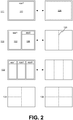
- FIG. 2 shows examples of tiled window arrangements.
- example 120 is a single application window 122 displayed in a managed display region 124.
- another application window 128 is added by a user, for example by opening an application, dragging an indicator of an application into the managed display region 124, invoking an application shortcut, etc.
- the windowing system or the like manages the layout of the application windows 122, 128 to maximize window occupancy of the display region 124, as shown in example 126.
- the windowing system may automatically provide a user-adjustable divider 130 between the application windows. When the divider 130 is interactively moved by the user two or more affected windows are resized accordingly to maintain the tiled arrangement.
- the tiled arrangement may continue to be maintained by automatically resizing the existing application windows, as shown in example 132.
- application windows are tiled into linear slots (e.g., a single vertical column or a single horizontal row), as seen in the previously mentioned examples (grid-style layouts may also be used as discussed below).
- the windowing system may be pre-configured to transition to different types of arrangements according to conditions such as the number of application windows, the types of windows, user preferences, minimum window sizes, and others.
- automatically managed tiled arrangements may have asymmetries and various rectilinear layouts such as a grid layout.
- Figure 3 shows an example of predefined input regions that allow a user to insert or replace application windows.
- a windowing system may allow a user to interactively add an application window to a display (or managed region thereof). The user may control, by various forms of input from an input device, where and how an application window is to be added.
- a windowing system dynamically arranges input-sensitive regions in relation to the number and/or location of application windows being displayed. Such regions may include insertion regions 150 and replacement regions 152. When the user directs input for a to-be-displayed (target) application window to a particular insertion region 150 then the target window is inserted accordingly.
- target to-be-displayed
- a target window when directed to a replacement region 152 a corresponding application window may be replaced (note that any of the insertion techniques described herein may be applied to or used in conjunction with window replacement). If the user directs the target application window to the leftmost insertion region 150 then the target application window will be inserted accordingly; the previously displayed application windows (e.g., "app1" and "app2”) may be moved and/or resized to fit both the previously displayed application windows and the target application window.
- the previously displayed application windows e.g., "app1" and "app2”
- the regions may be defined in a number of ways.
- the regions may have predefined default sizes and locations for different numbers of displayed application windows.
- the regions may be dynamically configured according to factors such as the size of the display, accessibility settings, font size, user preferences derived from past manipulation of dividers, ratios of window size and/or display size, user input such as modifier keys (e.g., left-click vs. right-click), and others. Also, there may be inert regions where user input will neither insert nor replace the target window. User-activatable regions with other functions may also be included.
- Any type of input device may be manipulated by a user to direct placement of a target application window (as described elsewhere, alternatively, a user may initiate a window insertion but the insertion location or position can be automatically determined).
- the input device may be, for example, a touch sensitive surface, a mouse, a digitizer pad, an object-recognizing camera system, and so on.
- the input thereof may take a variety of forms. For example, a user may hover an input point over an input-sensitive region, an input-sensitive region may be explicitly designated, a marker or icon may be dragged and dropped in an input-sensitive region, etc.
- a representation of the target application is moved on the display by the user and a nearest region may be selected with explicit user input or by the user ending or releasing the movement.
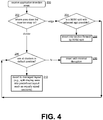
- Figure 4 shows an example of an algorithm for automatically maintaining a tiled window arrangement when an application window is inserted by a user.
- the input points may move, on the display, an input pointer, an application representation (icon, thumbnail, etc.), the target application window itself, or some other graphic object. Graphics or highlights may be displayed to indicate an input-sensitive region (or a destination screen area) that the user is about to select or target. Details for previewing a user's intended insertion are discussed further below.
- a screen location for the target window is designated and step 200 occurs; an application insertion event is received.
- step 202 there is a determination of where the insertion maps on the display or a managed region thereof. If the insertion maps to an edge or an exterior element of the display or managed display region (to be referred to inclusively as "display" for short) then step 204 is performed, otherwise step 206 is performed. Note that an edge can correspond to an exterior input-sensitive insertion region such as the leftmost and rightmost insertion regions 150. If the user's insertion maps to an edge then there is an application window adjacent to the selected edge, and that application window is used in performing step 204. Step 204 determines whether the space occupied by the adjacent application window is large enough to fit the target application window and the adjacent application window with a reduced size.
- this space might be required to be large enough to accommodate the new application and divider without disturbing the existing dividers on screen. This may be determined by various means such as by determining if the space occupied by the adjacent application windows is larger than a minimum size of the adjacent application window plus a minimum size of the target application window (plus any addition needed space such as for a new divider or margins). Such minimum sizes can be application-specific settings, default system settings, dynamically computed according to features such the size of the display, and so forth. As used herein, "minimum size” also refers to a size preference, possibly an application attribute, which might or might not be strictly enforced.
- step 204 determines that a split is to be performed, then at step 208 the space occupied by the adjacent application window is split, for instance divided in half, the adjacent application window is resized to fit its half, and the target application window is displayed with a size to fit its half (the half next to the selected edge).
- Ratios other than 50/50 may be used, for instance to accommodate a minimum size of either application window or application preference, but the split may be limited to splitting the space of only the adjacent application window; any other application windows that are already displayed are not affected.
- step 206 is performed (in some cases, when step 204 determines that there will be no split, the process may go to step 206). In this case, another test is performed to determine if all dividers are in their default positions. In a general sense, the algorithm checks to see whether the window applications are in a curated or managed mode where window tiling is managed by the system and has not been overridden by the user. If the dividers (or application window screen partitions) are in their default positions then automated or curated management of the tiled layout continues at step 212.
- the automated or curated layout management may involve using pre-defined layouts for the number of current application windows, evenly dividing the display into sections for the respective application windows, or other fully managed tiled layouts.
- the target application window is inserted with techniques to minimize disruption of the current display layout. In other words, the algorithm attempts to minimize disruption of the layout preference indicated by the user.
- the target application window is inserted at a minimal size with minimal automatic rearrangement of dividers to allow fitting the target application. This may also require moving one or more other dividers the least amount possible.
- an implementation may start by targeting the applications that are closest and try to obtain as much space as possible. If an application-minimum is a limiting factor, then the implementation may radiate out to take more space until it has sufficient space for an insertion.
- a set of applications in a managed or curated layout e.g., 50/50, 75/25, 40/30/30
- space may be taken equally from those applications (rather than one at a time), thus preserving the pre-existing applications' relative size relationships.
- the process described above uses various types of signals or indicators to determine how to automatically arrange a tiled layout.
- the steps and decisions mentioned with reference may be varied in order and in other ways while achieving similar ends. Variations of the process are able to fully manage the insertion of application windows without requiring the user to do anything other than to designate a location to insert the application window.
- the process may insert windows in a way that avoids or minimizes any change to the layout of relevant application windows.
- features of the application windows themselves may be taken into account. For example, minimum size, range of supported sizes, expected or average size, past manual sizings of an application window, or other size-related features may be used.
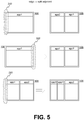
- Figure 5 shows examples of inserting an application window at an edge when an adjacent split is found to be possible.
- the user has designated left edge 240 as an insertion point and the target application window "app2" has been inserted accordingly with tiled layout computed automatically.
- the next sequence of Figure 5 shows selection of right edge 242 and "app2" inserted at the corresponding side of the display 106.
- the lower sequence of Figure 5 shows insertion at the left edge 240 when two application windows are present. There is a determination that the space occupied by adjacent "app1" is able to contain both the target application window "app3" and the "app1" window and the space is split 50/50.
- the "app3" window is inserted next to the selected edge and the adjacent application window of "app1" is resized resulting in the tiled arrangement at the lower right of Figure 5 .
- a divider is added between the two application windows of "app3" and "app1".
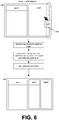
- Figure 6 shows an example where an edge insertion includes an application representation 260 inserted at an edge.
- the insertion event is received, there is a determination that a split of the adjacent application "app2" is possible, and the application window for "appN” is inserted into the space created by the split.
- a divider may be added between the application windows for "app2" and "appN”.
- the application representation 260 may move without restraint, may move on a horizontal "rail", or may snap from one insertion or replacement region to another, for example.
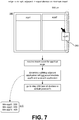
- Figure 7 shows an example of an insertion directed to an edge when a split of the adjacent application is not possible.
- the insertion event for "appN" is received and there is a determination according to application size information 270 and the size of the adjacent space (600 pixels) a split is not to be performed. While approximately 600 pixels are available and the "app2" window's minimum size of 300 pixels would fit in half of the space. However, the 400 pixel minimum width of the "appN" window would not fit in a 50/50 split. Consequently, step 206 is performed to determine how to insert the application window for "appN".
- Figure 8 shows an example of an insertion at a divider or other interior point 280.
- the layout manager determines how to arrange the application windows.
- the layout is arranged by equally distributing display space between the newly displayed target application window and the previously displayed application windows. In practice the distribution may not be precisely equal due to rounding, borders, margins, dividers, etc.
- Figure 9 shows an example inserting a target application window at a divider or interior point 280 that has been manually adjusted.
- a tiled arrangement is computed to minimize impact on the user preference implicit in the detected manual adjustment. For example, inserting the target application window at its minimum size, reducing the pre-existing applications to preserve the ratio between the pre-existing application windows (e.g., "app1" and "app2"), or other approaches may be used. Note that minimal sizes or other features of the windows may be used to inform the impact-minimizing redistribution of space on the display 106.
- Target application windows or the need to insert same may originate from a variety of sources.
- a target window may be a newly launched application.
- a target window may be a result of interaction with a user interface element for tracking active or launchable applications, for instance selecting an application icon or dragging an application thumbnail into the managed area.
- a keypress or other input for launching or switching-to an application can also result in a target window to be interactively inserted. It may be appreciated that target application windows being interactively inserted are application windows that are not currently displayed on the display or the managed region thereof.
- Some embodiments may repeatedly compute and preview a new tiled arrangement that would occur if a target were placed according to a current input location.
- the windowing system may use recent input points as potential insertion points and compute how the displayed and target windows would be tiled if the recent input points were used as the insertion points.
- Such previews may be simple graphics such as highlights of regions to be affected by a potential insertion, highlights to indicate expected sizes of windows. It is also possible that such input points can be displayed as actual insertions (changing according to changing input points) that are then finalized or undone according to additional user input or ending the current user input.
- tiled application windows displayed on the display or the managed display region are live or executing application windows susceptible to user input and each able to dynamically display content as the case may be. While horizontal tiling schemes have been described vertical schemes or vertical and horizontal schemes (and corresponding insertion regions) are equally applicable.
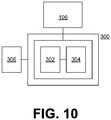
- FIG 10 shows an example of a computing device 300 on which embodiments described above may be implemented.
- the computing device 300 may have the display 106, as well as storage 302 and a processor 304. These elements may cooperate in ways well understood in the art of computing.
- input devices 306 may be integrated with or in communication with the computing device 300.
- the display 106 may be a touch-sensitive display that also functions as an input device.
- the computing device 300 may have any form factor or be used in any type of encompassing device. For example, touch-sensitive control panels are often used to control appliances, robots, and other machines.
- the computing device 300 may be in the form of a handheld device such as a smartphone, a tablet computer, a gaming device, a server, or others.
- Embodiments and features discussed above can be realized in the form of information stored in volatile or non-volatile computer or device readable devices. This is deemed to include at least devices such as optical storage (e.g., compact-disk read-only memory (CD-ROM)), magnetic media, flash read-only memory (ROM), or devices for storing digital information.
- the stored information can be in the form of machine executable instructions (e.g., compiled executable binary code), source code, bytecode, or any other information that can be used to enable or configure computing devices to perform the various embodiments discussed above.
- RAM random-access memory
- CPU central processing unit
- non-volatile devices storing information that allows a program or executable to be loaded and executed.
- the embodiments and features can be performed on any type of computing device, including portable devices, workstations, servers, mobile wireless devices, and so on.
Landscapes
- Engineering & Computer Science (AREA)
- Theoretical Computer Science (AREA)
- Software Systems (AREA)
- General Engineering & Computer Science (AREA)
- Human Computer Interaction (AREA)
- Physics & Mathematics (AREA)
- General Physics & Mathematics (AREA)
- User Interface Of Digital Computer (AREA)
Claims (10)
- Verfahren zum Verwalten der Anzeige von Fenstern (108, app1, app2, appN) jeweiliger, voneinander unabhängiger Anwendungen, die auf einem Computer (100, 300) ausgeführt werden, der eine Anzeige (106), einen Prozessor (304), eine Eingabevorrichtung (306) und einen Speicher (302) umfasst, wobei jede Anwendung einen jeweiligen Prozess (104) umfasst, der von einem Betriebssystem (102) des Computers verwaltet wird, wobei das Verfahren umfasst:- Anzeigen einer Vielzahl von Fenstern (app1, app2) auf der Anzeige (106), wobei jedes Fenster separat von einem Fenstersystem verwaltet wird, das Fenster für die Anwendungen verwaltet;- Empfangen von interaktiven Benutzereingaben, die jeweilige Positionen für Einfügungen der Fenster an benutzerdefinierten Positionen (150, 152, 240, 242, 280) innerhalb eines verwalteten Bereichs (124) der Anzeige spezifizieren; und- jedes Mal, wenn eine der interaktiven Eingaben empfangen wird, um ein Einfügen eines entsprechenden Zielfensters (appN) zu platzieren, wenn nur eines oder mehrere der Fenster, mit Ausnahme des Zielfensters, derzeit in einer gekachelten Anordnung in dem verwalteten Bereich angezeigt werden, reagieren auf die interaktive Eingabe, um das Zielfenster in den verwalteten Bereich einzufügen durch:
wenn bestimmt wird, dass das Zielfenster von einem Benutzer an einem Teiler oder einem Einfügebereich (280) eingefügt wird, der keine Kante ist, und wenn bestimmt wird, dass der Teiler oder das Standardlayout nicht vom Benutzer geändert wurde, dann einen Layout-Manager, der bestimmt die Anwendungsfenster durch gleichmäßige Verteilung des Anzeigebereichs zwischen dem neu angezeigten Zielanwendungsfenster (appN) und den zuvor angezeigten Anwendungsfenstern (app1, app2) anzuordnen, wenn bestimmt wird, dass der Teiler oder das Standard-gemanagte Layout vom Benutzer geändert wurde, dann einen Layout-Manager, der eine gekachelte Anordnung berechnet, um eine Auswirkung auf die in der bestimmten manuellen Änderung implizite Benutzerpräferenz zu minimieren, wobei die gekachelte Anordnung mindestens eines beinhaltet von Einfügen des Zielfensters (appN) mit seiner minimalen Größe oder Reduzieren der bereits vorhandenen Anwendungen, um das Verhältnis zwischen den bereits vorhandenen Anwendungsfenstern (app1, app2) zu erhalten,- das Zielfenster in der verwalteten Region neu anzuzeigen, so dass das Zielfenster und das eine oder die mehreren aktuell angezeigten Fenster im gekachelten Bereich in der verwalteten Region angezeigt werden. - Verfahren nach Anspruch 1, ferner umfassend das Anzeigen eines grafischen Indikators (260), der als sich bewegend in Übereinstimmung mit der Benutzerinteraktion mit einer Eingabevorrichtung angezeigt wird, wobei die Positionen des grafischen Indikators (260) den eingabespezifischen Positionen entsprechen.
- Verfahren nach Anspruch 1, ferner umfassend den Zugriff auf Größeninformationen, die minimale oder bevorzugte Größen der Anwendungen umfassen, und die Verwendung der minimalen oder bevorzugten Größen, um die Größenänderung durchzuführen.
- Verfahren nach Anspruch 1, ferner umfassend das Bereitstellen eines benutzerdefinierbaren Teilers zwischen zwei aktuell angezeigten Fenstern und, wenn die Größenänderung in Reaktion auf eine interaktive Eingabe durchgeführt wird, die ein entsprechendes Zielfenster platziert, das Ändern der Größe eines oder beider der beiden aktuell angezeigten Fenster, je nachdem, ob der durch einen Benutzer einstellbare Teiler durch den Benutzer eingestellt wurde.
- Verfahren nach Anspruch 1, ferner umfassend das Berechnen einer gekachelten Anordnung unter Verwendung von minimalen Fenstergrößen oder Hinweisen auf eine Benutzereinstellung von Größen eines oder mehrerer angezeigter Fenster oder der benutzerdefinierten Einfügepositionen der Zielfenster, oder durch Berücksichtigung einer Benutzer-Übersteuerungseingabe, die die gekachelte Anordnung steuert.
- Verfahren nach Anspruch 5, worin, wenn ein Zielfenster eingesetzt wird, das Verfahren zunächst bestimmt, ob sich eine entsprechende Einfügeposition an einem Rand des verwalteten Bereichs befindet, und wenn so bestimmt wird, das Verfahren bestimmt, ob ein durch ein Randfenster, das an den Rand angrenzt, belegter Raum das Randfenster und das Zielfenster aufnehmen kann, ohne die Größe anderer angezeigter Fenster zu ändern, und wenn so bestimmt wird, den Raum in zwei Teile aufzuteilen, an die das Zielfenster und das Randfenster jeweils angepasst sind, wobei das Zielfenster in dem Teil angezeigt wird, der sich neben dem Rand befindet.
- Verfahren nach Anspruch 6, ferner umfassend: wenn bestimmt ist, dass der Raum keine Größenänderung aufnehmen kann, je nachdem, ob eine manuelle Anpassung an eine Fenstergröße vorgenommen wurde und/oder je nach minimaler Fenstergröße, Ändern der Größe von mindestens zwei aktuell angezeigten Fenstern, um das Einfügen des Zielfensters neben dem Rand zu ermöglichen.
- Computervorrichtung (100,300), umfassend einen Speicher (302), einen Prozessor (304), eine Anzeige (106) und eine Eingabevorrichtung (306), wobei der Speicher konfiguriert ist um Instruktionen zu speichern, die vom Prozessor ausführbar sind;- die Eingabevorrichtung konfiguriert ist gemäß einer Benutzerinteraktion damit Benutzereingaben bereitzustellen, die Fenstereinfügungen auf der Anzeige aktivieren, wobei jede Fenstereinfügung eine entsprechende Einfügeposition in Bezug auf die Anzeige aufweist;- der Prozessor gemäß den Instruktionen konfiguriert ist, eine gekachelte Anordnung aller von der Anzeige angezeigten Anwendungsfenster (app1, app2) aufrecht zu erhalten; und- der Prozessor gemäß den Instruktionen konfiguriert ist, auf eine Fenstereinfügung zum Einfügen eines Zielfensters (appN) in die gekachelte Anordnung zu reagieren, durch bestimmen, ob die gekachelte Anordnung vom Benutzer manuell eingestellt wurde und ob die dem Zielfenster entsprechende Einfügeposition einem Rand der Anzeige entspricht, undwenn bestimmt wird, dass das Zielfenster von einem Benutzer an einem Teiler oder einem Einfügebereich (280) eingefügt wird, der keine Kante ist, wenn bestimmt wird, dass der Teiler oder das Standardlayout nicht manuell durch den Benutzer angepasst wurde, dann ist ein Layoutmanager konfiguriert, um zu bestimmen, die Anwendungsfenster durch gleichmäßige Verteilung von Anzeigeraum zwischen dem neu angezeigten Zielanwendungsfenster (appN) und den zuvor angezeigten Anwendungsfenstern (app1, app2) anzuordnen, wenn bestimmt wird, dass der Teiler oder das Standardlayout vom Benutzer manuell angepasst wurde, dann ist ein Layoutmanager konfiguriert, um eine gekachelte Anordnung zu berechnen, um eine Auswirkung auf die Benutzerpräferenz zu minimieren, die implizit in der erfassten manuellen Einstellung enthalten ist, wobei die gekachelte Anordnung mindestens eines von einem Einfügen des Zielfensters bei seiner minimalen Größe oder Reduzieren von bereits vorhandenen Anwendungen beinhaltet, um das Verhältnis zwischen den bereits vorhandenen Anwendungsfenstern beizubehalten, worin nach dem Einfügen des Zielfensters die von der Anzeige (106) angezeigten Fenster in einer gekachelten Anordnung sind.
- Computervorrichtung nach Anspruch 8, wobei der Prozessor ferner konfiguriert ist, um zu bestimmen, wie der Anzeige (106)-Raum gemäß Anwendungspräferenzen der Fenster zugewiesen wird.
- Computervorrichtung nach Anspruch 8, wobei der Anzeige- (106) Raum im Wesentlichen zwischen den Fenstern gemäß einem vordefinierten Verhältnis zugeordnet ist, wenn das Zielfenster nicht an einem Rand eingefügt ist, und der Anzeige- (106) Raum von einem Randfenster getrennt ist, wenn das Zielfenster an einem Rand eingefügt ist.
Applications Claiming Priority (2)
| Application Number | Priority Date | Filing Date | Title |
|---|---|---|---|
| US13/892,532 US9535565B2 (en) | 2013-05-13 | 2013-05-13 | Smart insertion of applications into layouts |
| PCT/US2013/060752 WO2014185946A1 (en) | 2013-05-13 | 2013-09-20 | Smart insertion of application windows into a managed display region |
Publications (2)
| Publication Number | Publication Date |
|---|---|
| EP2997464A1 EP2997464A1 (de) | 2016-03-23 |
| EP2997464B1 true EP2997464B1 (de) | 2019-05-15 |
Family
ID=49305155
Family Applications (1)
| Application Number | Title | Priority Date | Filing Date |
|---|---|---|---|
| EP13773974.4A Active EP2997464B1 (de) | 2013-05-13 | 2013-09-20 | Schlaue einfügung von anwendungensfenstern in einem verwalteten anzeigegebiet |
Country Status (5)
| Country | Link |
|---|---|
| US (1) | US9535565B2 (de) |
| EP (1) | EP2997464B1 (de) |
| KR (1) | KR102045601B1 (de) |
| CN (1) | CN105378653B (de) |
| WO (1) | WO2014185946A1 (de) |
Families Citing this family (35)
| Publication number | Priority date | Publication date | Assignee | Title |
|---|---|---|---|---|
| JP6132644B2 (ja) * | 2013-04-24 | 2017-05-24 | キヤノン株式会社 | 情報処理装置、表示制御方法、コンピュータプログラム、及び記憶媒体 |
| US10754536B2 (en) | 2013-04-29 | 2020-08-25 | Microsoft Technology Licensing, Llc | Content-based directional placement application launch |
| US9921714B1 (en) * | 2013-07-22 | 2018-03-20 | Rockwell Collins, Inc. | Graphical method to select formats |
| KR102266198B1 (ko) * | 2013-08-02 | 2021-06-18 | 삼성전자주식회사 | 이종 애플리케이션들을 포함하는 그룹을 나타내는 탭 윈도우를 관리하는 방법 및 장치. |
| WO2015026101A1 (ko) * | 2013-08-22 | 2015-02-26 | 삼성전자 주식회사 | 디스플레이 장치의 애플리케이션 실행 방법 및 그 디스플레이 장치 |
| KR102220085B1 (ko) | 2013-10-18 | 2021-02-26 | 삼성전자주식회사 | 멀티윈도우 운용 방법 및 이를 지원하는 전자 장치 |
| TWI608403B (zh) * | 2014-02-14 | 2017-12-11 | 緯創資通股份有限公司 | 多視窗快速排列方法與系統及其行動裝置 |
| US10558344B2 (en) * | 2015-06-01 | 2020-02-11 | Apple Inc. | Linking multiple windows in a user interface display |
| WO2016200669A1 (en) * | 2015-06-07 | 2016-12-15 | Apple Inc. | Device, method, and graphical user interface for manipulating related application windows |
| US10748312B2 (en) | 2016-02-12 | 2020-08-18 | Microsoft Technology Licensing, Llc | Tagging utilizations for selectively preserving chart elements during visualization optimizations |
| US10347017B2 (en) * | 2016-02-12 | 2019-07-09 | Microsoft Technology Licensing, Llc | Interactive controls that are collapsible and expandable and sequences for chart visualization optimizations |
| JP6624972B2 (ja) * | 2016-02-26 | 2019-12-25 | キヤノン株式会社 | 表示を制御する方法、装置、およびプログラム |
| CN117717411A (zh) * | 2016-11-04 | 2024-03-19 | 直观外科手术操作公司 | 在计算机辅助远程操作外科手术中的可重新配置的显示器 |
| KR102760797B1 (ko) | 2017-01-04 | 2025-02-03 | 삼성전자주식회사 | 전자 장치 및 전자 장치의 어플리케이션 실행 히스토리 표시 방법 |
| US10331293B2 (en) * | 2017-02-22 | 2019-06-25 | International Business Machines Coporation | Automated resizing of application windows based on interactive states |
| KR101999340B1 (ko) * | 2017-04-24 | 2019-07-11 | 네이버 주식회사 | 웹 브라우징 인터페이스 제공 방법 및 장치 |
| DK180117B1 (en) * | 2017-05-15 | 2020-05-15 | Apple Inc. | SYSTEMS AND METHODS FOR INTERACTING WITH MULTIPLE APPLICATIONS THAT ARE SIMULTANEOUSLY DISPLAYED ON AN ELECTRONIC DEVICE WITH A TOUCHSENSITIVE DISPLAY |
| CN110622121B (zh) * | 2017-05-15 | 2024-12-24 | 苹果公司 | 用于与同时显示在具有触敏显示器的电子设备上的多个应用程序交互的系统和方法 |
| CN107168673B (zh) * | 2017-05-16 | 2021-01-22 | 西安万像电子科技有限公司 | 窗口的控制方法、装置和系统、存储介质及处理器 |
| US20190258396A1 (en) * | 2018-02-20 | 2019-08-22 | Adobe Inc. | Layout design with adaptive areas |
| US11199944B2 (en) * | 2018-09-24 | 2021-12-14 | Salesforce.Com, Inc. | System and method for navigation within widget-sized browser panels |
| DK180317B1 (en) * | 2019-04-15 | 2020-11-09 | Apple Inc | Systems, methods, and user interfaces for interacting with multiple application windows |
| CN110471725A (zh) * | 2019-07-02 | 2019-11-19 | 华为技术有限公司 | 一种分屏方法及电子设备 |
| CN114816620A (zh) | 2019-07-29 | 2022-07-29 | 华为技术有限公司 | 一种显示方法及电子设备 |
| CN110830645B (zh) * | 2019-09-24 | 2021-05-18 | 华为技术有限公司 | 一种操作方法和电子设备及计算机存储介质 |
| CN113076154B (zh) * | 2020-01-03 | 2023-09-05 | 华为技术有限公司 | 多应用下进行分屏的方法、装置以及电子设备 |
| US11848099B1 (en) | 2020-01-15 | 2023-12-19 | Navvis & Company, LLC | Unified ecosystem experience for managing multiple healthcare applications from a common interface with context passing between applications |
| CN111488189B (zh) * | 2020-03-20 | 2022-11-18 | 厦门汉印电子技术有限公司 | 窗体显示方法、装置、设备以及计算机可读存储介质 |
| CN111562869B (zh) * | 2020-03-31 | 2022-02-25 | 完美世界(北京)软件科技发展有限公司 | 截图方法及装置、存储介质、电子装置 |
| KR102875930B1 (ko) * | 2020-05-11 | 2025-10-27 | 바스프 코팅스 게엠베하 | 대시보드 소프트웨어를 위한 적응가능 gui |
| KR20220012599A (ko) * | 2020-07-23 | 2022-02-04 | 삼성전자주식회사 | 전자 장치에서 키패드를 이용한 컨텐츠 검색을 제공하는 방법 및 장치 |
| CN112083871A (zh) * | 2020-09-11 | 2020-12-15 | 北京字节跳动网络技术有限公司 | 控制电子设备的方法、装置、终端及存储介质 |
| CN115268727A (zh) * | 2021-04-30 | 2022-11-01 | 华为技术有限公司 | 显示方法及其装置 |
| US11816302B2 (en) * | 2021-07-21 | 2023-11-14 | EMC IP Holding Company LLC | Techniques for user interface layouts |
| CN117425875A (zh) * | 2022-05-19 | 2024-01-19 | 京东方科技集团股份有限公司 | 操作方法、装置、电子设备和计算机可读存储介质 |
Citations (2)
| Publication number | Priority date | Publication date | Assignee | Title |
|---|---|---|---|---|
| US5577187A (en) * | 1994-05-20 | 1996-11-19 | Microsoft Corporation | Method and system for tiling windows based on previous position and size |
| WO2015019575A1 (en) * | 2013-08-09 | 2015-02-12 | Sony Corporation | Window manager |
Family Cites Families (18)
| Publication number | Priority date | Publication date | Assignee | Title |
|---|---|---|---|---|
| US5487143A (en) * | 1994-04-06 | 1996-01-23 | Altera Corporation | Computer user interface having tiled and overlapped window areas |
| EP0820000B1 (de) | 1996-07-17 | 2002-10-09 | International Business Machines Corporation | Mechanismus zum Steuern der sichtbaren Anwesenheit von Desktop-Objekten in einer graphischen Benutzerschnittstelle |
| US5920315A (en) | 1996-07-17 | 1999-07-06 | International Business Machines Corporation | Multi-pane window with recoiling workspaces |
| US6008809A (en) * | 1997-09-22 | 1999-12-28 | International Business Machines Corporation | Apparatus and method for viewing multiple windows within a dynamic window |
| US6999637B1 (en) * | 2000-03-16 | 2006-02-14 | Ipac Acquisition Subsidiary I, Llc | Method and system for providing a photo album to a user of a digital imaging device |
| US6964025B2 (en) * | 2001-03-20 | 2005-11-08 | Microsoft Corporation | Auto thumbnail gallery |
| US7913183B2 (en) * | 2002-10-08 | 2011-03-22 | Microsoft Corporation | System and method for managing software applications in a graphical user interface |
| US8127248B2 (en) * | 2003-06-20 | 2012-02-28 | Apple Inc. | Computer interface having a virtual single-layer mode for viewing overlapping objects |
| US20050055645A1 (en) * | 2003-09-09 | 2005-03-10 | Mitutoyo Corporation | System and method for resizing tiles on a computer display |
| US20050198584A1 (en) | 2004-01-27 | 2005-09-08 | Matthews David A. | System and method for controlling manipulation of tiles within a sidebar |
| US20060248471A1 (en) * | 2005-04-29 | 2006-11-02 | Microsoft Corporation | System and method for providing a window management mode |
| US7437678B2 (en) * | 2005-10-27 | 2008-10-14 | International Business Machines Corporation | Maximizing window display area using window flowing |
| US8356258B2 (en) * | 2008-02-01 | 2013-01-15 | Microsoft Corporation | Arranging display areas utilizing enhanced window states |
| US8345057B2 (en) * | 2009-07-30 | 2013-01-01 | Eastman Kodak Company | Context coordination for an artistic digital template for image display |
| US8479117B2 (en) * | 2010-06-04 | 2013-07-02 | Lenovo (Singapore) Pte. Ltd. | Intelligent window sizing for graphical user interfaces |
| US9679404B2 (en) | 2010-12-23 | 2017-06-13 | Microsoft Technology Licensing, Llc | Techniques for dynamic layout of presentation tiles on a grid |
| US9183006B2 (en) * | 2011-08-31 | 2015-11-10 | Visan Industries | Systems and methods for layout of graphic objects for electronic display, print or other output |
| US20140013271A1 (en) * | 2012-07-05 | 2014-01-09 | Research In Motion Limited | Prioritization of multitasking applications in a mobile device interface |
-
2013
- 2013-05-13 US US13/892,532 patent/US9535565B2/en active Active
- 2013-09-20 WO PCT/US2013/060752 patent/WO2014185946A1/en not_active Ceased
- 2013-09-20 EP EP13773974.4A patent/EP2997464B1/de active Active
- 2013-09-20 CN CN201380076594.8A patent/CN105378653B/zh active Active
- 2013-09-20 KR KR1020157035142A patent/KR102045601B1/ko active Active
Patent Citations (2)
| Publication number | Priority date | Publication date | Assignee | Title |
|---|---|---|---|---|
| US5577187A (en) * | 1994-05-20 | 1996-11-19 | Microsoft Corporation | Method and system for tiling windows based on previous position and size |
| WO2015019575A1 (en) * | 2013-08-09 | 2015-02-12 | Sony Corporation | Window manager |
Also Published As
| Publication number | Publication date |
|---|---|
| KR102045601B1 (ko) | 2019-12-02 |
| US20140337794A1 (en) | 2014-11-13 |
| US9535565B2 (en) | 2017-01-03 |
| CN105378653B (zh) | 2019-07-16 |
| WO2014185946A1 (en) | 2014-11-20 |
| EP2997464A1 (de) | 2016-03-23 |
| CN105378653A (zh) | 2016-03-02 |
| KR20160007614A (ko) | 2016-01-20 |
Similar Documents
| Publication | Publication Date | Title |
|---|---|---|
| EP2997464B1 (de) | Schlaue einfügung von anwendungensfenstern in einem verwalteten anzeigegebiet | |
| US10067651B2 (en) | Navigable layering of viewable areas for hierarchical content | |
| EP2656196B1 (de) | Anpassung einer immersiven umgebung | |
| US11662876B2 (en) | Tool for arranging objects and adjusting spacing in a layout | |
| US20200319763A1 (en) | Method and device for managing tab window indicating application group including heterogeneous applications | |
| US10678412B2 (en) | Dynamic joint dividers for application windows | |
| US20160103793A1 (en) | Heterogeneous Application Tabs | |
| JP2017531814A (ja) | アプリケーションウィンドウの適応的サイズ調節および適所配置 | |
| JP2017526057A (ja) | アプリケーションウィンドウの領域ベースのサイズ調節および適所配置 | |
| US20120311472A1 (en) | Apparatus and method for providing graphical user interface | |
| JP2017527882A (ja) | アプリケーションウィンドウの補助的表示 | |
| US10915284B2 (en) | Multi-monitor full screen mode in a windowing environment | |
| US20130275912A1 (en) | Electronic apparatus and object processing method thereof |
Legal Events
| Date | Code | Title | Description |
|---|---|---|---|
| PUAI | Public reference made under article 153(3) epc to a published international application that has entered the european phase |
Free format text: ORIGINAL CODE: 0009012 |
|
| 17P | Request for examination filed |
Effective date: 20151020 |
|
| AK | Designated contracting states |
Kind code of ref document: A1 Designated state(s): AL AT BE BG CH CY CZ DE DK EE ES FI FR GB GR HR HU IE IS IT LI LT LU LV MC MK MT NL NO PL PT RO RS SE SI SK SM TR |
|
| AX | Request for extension of the european patent |
Extension state: BA ME |
|
| DAX | Request for extension of the european patent (deleted) | ||
| REG | Reference to a national code |
Ref country code: DE Ref legal event code: R079 Ref document number: 602013055464 Country of ref document: DE Free format text: PREVIOUS MAIN CLASS: G06F0009440000 Ipc: G06F0009451000 |
|
| RIC1 | Information provided on ipc code assigned before grant |
Ipc: G06F 9/451 20160323AFI20181018BHEP Ipc: G06F 3/0481 20130101ALI20181018BHEP |
|
| GRAP | Despatch of communication of intention to grant a patent |
Free format text: ORIGINAL CODE: EPIDOSNIGR1 |
|
| STAA | Information on the status of an ep patent application or granted ep patent |
Free format text: STATUS: GRANT OF PATENT IS INTENDED |
|
| INTG | Intention to grant announced |
Effective date: 20181128 |
|
| RIC1 | Information provided on ipc code assigned before grant |
Ipc: G06F 9/451 20180101AFI20181018BHEP Ipc: G06F 3/0481 20130101ALI20181018BHEP |
|
| RIC1 | Information provided on ipc code assigned before grant |
Ipc: G06F 3/0481 20130101ALI20181018BHEP Ipc: G06F 9/451 20180101AFI20181018BHEP |
|
| GRAS | Grant fee paid |
Free format text: ORIGINAL CODE: EPIDOSNIGR3 |
|
| GRAA | (expected) grant |
Free format text: ORIGINAL CODE: 0009210 |
|
| STAA | Information on the status of an ep patent application or granted ep patent |
Free format text: STATUS: THE PATENT HAS BEEN GRANTED |
|
| AK | Designated contracting states |
Kind code of ref document: B1 Designated state(s): AL AT BE BG CH CY CZ DE DK EE ES FI FR GB GR HR HU IE IS IT LI LT LU LV MC MK MT NL NO PL PT RO RS SE SI SK SM TR |
|
| REG | Reference to a national code |
Ref country code: CH Ref legal event code: EP |
|
| REG | Reference to a national code |
Ref country code: DE Ref legal event code: R096 Ref document number: 602013055464 Country of ref document: DE |
|
| REG | Reference to a national code |
Ref country code: IE Ref legal event code: FG4D |
|
| REG | Reference to a national code |
Ref country code: NL Ref legal event code: FP |
|
| REG | Reference to a national code |
Ref country code: LT Ref legal event code: MG4D |
|
| PG25 | Lapsed in a contracting state [announced via postgrant information from national office to epo] |
Ref country code: LT Free format text: LAPSE BECAUSE OF FAILURE TO SUBMIT A TRANSLATION OF THE DESCRIPTION OR TO PAY THE FEE WITHIN THE PRESCRIBED TIME-LIMIT Effective date: 20190515 Ref country code: HR Free format text: LAPSE BECAUSE OF FAILURE TO SUBMIT A TRANSLATION OF THE DESCRIPTION OR TO PAY THE FEE WITHIN THE PRESCRIBED TIME-LIMIT Effective date: 20190515 Ref country code: ES Free format text: LAPSE BECAUSE OF FAILURE TO SUBMIT A TRANSLATION OF THE DESCRIPTION OR TO PAY THE FEE WITHIN THE PRESCRIBED TIME-LIMIT Effective date: 20190515 Ref country code: PT Free format text: LAPSE BECAUSE OF FAILURE TO SUBMIT A TRANSLATION OF THE DESCRIPTION OR TO PAY THE FEE WITHIN THE PRESCRIBED TIME-LIMIT Effective date: 20190915 Ref country code: NO Free format text: LAPSE BECAUSE OF FAILURE TO SUBMIT A TRANSLATION OF THE DESCRIPTION OR TO PAY THE FEE WITHIN THE PRESCRIBED TIME-LIMIT Effective date: 20190815 Ref country code: AL Free format text: LAPSE BECAUSE OF FAILURE TO SUBMIT A TRANSLATION OF THE DESCRIPTION OR TO PAY THE FEE WITHIN THE PRESCRIBED TIME-LIMIT Effective date: 20190515 Ref country code: SE Free format text: LAPSE BECAUSE OF FAILURE TO SUBMIT A TRANSLATION OF THE DESCRIPTION OR TO PAY THE FEE WITHIN THE PRESCRIBED TIME-LIMIT Effective date: 20190515 Ref country code: FI Free format text: LAPSE BECAUSE OF FAILURE TO SUBMIT A TRANSLATION OF THE DESCRIPTION OR TO PAY THE FEE WITHIN THE PRESCRIBED TIME-LIMIT Effective date: 20190515 |
|
| PG25 | Lapsed in a contracting state [announced via postgrant information from national office to epo] |
Ref country code: BG Free format text: LAPSE BECAUSE OF FAILURE TO SUBMIT A TRANSLATION OF THE DESCRIPTION OR TO PAY THE FEE WITHIN THE PRESCRIBED TIME-LIMIT Effective date: 20190815 Ref country code: GR Free format text: LAPSE BECAUSE OF FAILURE TO SUBMIT A TRANSLATION OF THE DESCRIPTION OR TO PAY THE FEE WITHIN THE PRESCRIBED TIME-LIMIT Effective date: 20190816 Ref country code: LV Free format text: LAPSE BECAUSE OF FAILURE TO SUBMIT A TRANSLATION OF THE DESCRIPTION OR TO PAY THE FEE WITHIN THE PRESCRIBED TIME-LIMIT Effective date: 20190515 Ref country code: RS Free format text: LAPSE BECAUSE OF FAILURE TO SUBMIT A TRANSLATION OF THE DESCRIPTION OR TO PAY THE FEE WITHIN THE PRESCRIBED TIME-LIMIT Effective date: 20190515 |
|
| REG | Reference to a national code |
Ref country code: AT Ref legal event code: MK05 Ref document number: 1134242 Country of ref document: AT Kind code of ref document: T Effective date: 20190515 |
|
| PG25 | Lapsed in a contracting state [announced via postgrant information from national office to epo] |
Ref country code: EE Free format text: LAPSE BECAUSE OF FAILURE TO SUBMIT A TRANSLATION OF THE DESCRIPTION OR TO PAY THE FEE WITHIN THE PRESCRIBED TIME-LIMIT Effective date: 20190515 Ref country code: SK Free format text: LAPSE BECAUSE OF FAILURE TO SUBMIT A TRANSLATION OF THE DESCRIPTION OR TO PAY THE FEE WITHIN THE PRESCRIBED TIME-LIMIT Effective date: 20190515 Ref country code: RO Free format text: LAPSE BECAUSE OF FAILURE TO SUBMIT A TRANSLATION OF THE DESCRIPTION OR TO PAY THE FEE WITHIN THE PRESCRIBED TIME-LIMIT Effective date: 20190515 Ref country code: CZ Free format text: LAPSE BECAUSE OF FAILURE TO SUBMIT A TRANSLATION OF THE DESCRIPTION OR TO PAY THE FEE WITHIN THE PRESCRIBED TIME-LIMIT Effective date: 20190515 Ref country code: AT Free format text: LAPSE BECAUSE OF FAILURE TO SUBMIT A TRANSLATION OF THE DESCRIPTION OR TO PAY THE FEE WITHIN THE PRESCRIBED TIME-LIMIT Effective date: 20190515 Ref country code: DK Free format text: LAPSE BECAUSE OF FAILURE TO SUBMIT A TRANSLATION OF THE DESCRIPTION OR TO PAY THE FEE WITHIN THE PRESCRIBED TIME-LIMIT Effective date: 20190515 |
|
| REG | Reference to a national code |
Ref country code: DE Ref legal event code: R097 Ref document number: 602013055464 Country of ref document: DE |
|
| PG25 | Lapsed in a contracting state [announced via postgrant information from national office to epo] |
Ref country code: SM Free format text: LAPSE BECAUSE OF FAILURE TO SUBMIT A TRANSLATION OF THE DESCRIPTION OR TO PAY THE FEE WITHIN THE PRESCRIBED TIME-LIMIT Effective date: 20190515 Ref country code: IT Free format text: LAPSE BECAUSE OF FAILURE TO SUBMIT A TRANSLATION OF THE DESCRIPTION OR TO PAY THE FEE WITHIN THE PRESCRIBED TIME-LIMIT Effective date: 20190515 |
|
| PLBE | No opposition filed within time limit |
Free format text: ORIGINAL CODE: 0009261 |
|
| STAA | Information on the status of an ep patent application or granted ep patent |
Free format text: STATUS: NO OPPOSITION FILED WITHIN TIME LIMIT |
|
| PG25 | Lapsed in a contracting state [announced via postgrant information from national office to epo] |
Ref country code: TR Free format text: LAPSE BECAUSE OF FAILURE TO SUBMIT A TRANSLATION OF THE DESCRIPTION OR TO PAY THE FEE WITHIN THE PRESCRIBED TIME-LIMIT Effective date: 20190515 |
|
| 26N | No opposition filed |
Effective date: 20200218 |
|
| PG25 | Lapsed in a contracting state [announced via postgrant information from national office to epo] |
Ref country code: PL Free format text: LAPSE BECAUSE OF FAILURE TO SUBMIT A TRANSLATION OF THE DESCRIPTION OR TO PAY THE FEE WITHIN THE PRESCRIBED TIME-LIMIT Effective date: 20190515 |
|
| PG25 | Lapsed in a contracting state [announced via postgrant information from national office to epo] |
Ref country code: MC Free format text: LAPSE BECAUSE OF FAILURE TO SUBMIT A TRANSLATION OF THE DESCRIPTION OR TO PAY THE FEE WITHIN THE PRESCRIBED TIME-LIMIT Effective date: 20190515 Ref country code: SI Free format text: LAPSE BECAUSE OF FAILURE TO SUBMIT A TRANSLATION OF THE DESCRIPTION OR TO PAY THE FEE WITHIN THE PRESCRIBED TIME-LIMIT Effective date: 20190515 |
|
| REG | Reference to a national code |
Ref country code: CH Ref legal event code: PL |
|
| PG25 | Lapsed in a contracting state [announced via postgrant information from national office to epo] |
Ref country code: CH Free format text: LAPSE BECAUSE OF NON-PAYMENT OF DUE FEES Effective date: 20190930 Ref country code: LI Free format text: LAPSE BECAUSE OF NON-PAYMENT OF DUE FEES Effective date: 20190930 Ref country code: LU Free format text: LAPSE BECAUSE OF NON-PAYMENT OF DUE FEES Effective date: 20190920 Ref country code: IE Free format text: LAPSE BECAUSE OF NON-PAYMENT OF DUE FEES Effective date: 20190920 |
|
| REG | Reference to a national code |
Ref country code: BE Ref legal event code: MM Effective date: 20190930 |
|
| PG25 | Lapsed in a contracting state [announced via postgrant information from national office to epo] |
Ref country code: BE Free format text: LAPSE BECAUSE OF NON-PAYMENT OF DUE FEES Effective date: 20190930 |
|
| PG25 | Lapsed in a contracting state [announced via postgrant information from national office to epo] |
Ref country code: CY Free format text: LAPSE BECAUSE OF FAILURE TO SUBMIT A TRANSLATION OF THE DESCRIPTION OR TO PAY THE FEE WITHIN THE PRESCRIBED TIME-LIMIT Effective date: 20190515 |
|
| PG25 | Lapsed in a contracting state [announced via postgrant information from national office to epo] |
Ref country code: IS Free format text: LAPSE BECAUSE OF FAILURE TO SUBMIT A TRANSLATION OF THE DESCRIPTION OR TO PAY THE FEE WITHIN THE PRESCRIBED TIME-LIMIT Effective date: 20190915 |
|
| PG25 | Lapsed in a contracting state [announced via postgrant information from national office to epo] |
Ref country code: HU Free format text: LAPSE BECAUSE OF FAILURE TO SUBMIT A TRANSLATION OF THE DESCRIPTION OR TO PAY THE FEE WITHIN THE PRESCRIBED TIME-LIMIT; INVALID AB INITIO Effective date: 20130920 Ref country code: MT Free format text: LAPSE BECAUSE OF FAILURE TO SUBMIT A TRANSLATION OF THE DESCRIPTION OR TO PAY THE FEE WITHIN THE PRESCRIBED TIME-LIMIT Effective date: 20190515 |
|
| PG25 | Lapsed in a contracting state [announced via postgrant information from national office to epo] |
Ref country code: MK Free format text: LAPSE BECAUSE OF FAILURE TO SUBMIT A TRANSLATION OF THE DESCRIPTION OR TO PAY THE FEE WITHIN THE PRESCRIBED TIME-LIMIT Effective date: 20190515 |
|
| P01 | Opt-out of the competence of the unified patent court (upc) registered |
Effective date: 20230512 |
|
| PGFP | Annual fee paid to national office [announced via postgrant information from national office to epo] |
Ref country code: NL Payment date: 20250820 Year of fee payment: 13 |
|
| PGFP | Annual fee paid to national office [announced via postgrant information from national office to epo] |
Ref country code: DE Payment date: 20250820 Year of fee payment: 13 |
|
| PGFP | Annual fee paid to national office [announced via postgrant information from national office to epo] |
Ref country code: GB Payment date: 20250820 Year of fee payment: 13 |
|
| PGFP | Annual fee paid to national office [announced via postgrant information from national office to epo] |
Ref country code: FR Payment date: 20250821 Year of fee payment: 13 |