EP2963545B1 - Procédé d'affichage d'une nouvelle fenêtre rectangulaire sur un écran - Google Patents
Procédé d'affichage d'une nouvelle fenêtre rectangulaire sur un écran Download PDFInfo
- Publication number
- EP2963545B1 EP2963545B1 EP15174509.8A EP15174509A EP2963545B1 EP 2963545 B1 EP2963545 B1 EP 2963545B1 EP 15174509 A EP15174509 A EP 15174509A EP 2963545 B1 EP2963545 B1 EP 2963545B1
- Authority
- EP
- European Patent Office
- Prior art keywords
- window
- edge
- new
- new window
- content
- Prior art date
- Legal status (The legal status is an assumption and is not a legal conclusion. Google has not performed a legal analysis and makes no representation as to the accuracy of the status listed.)
- Active
Links
Images


Classifications
-
- G—PHYSICS
- G06—COMPUTING OR CALCULATING; COUNTING
- G06T—IMAGE DATA PROCESSING OR GENERATION, IN GENERAL
- G06T3/00—Geometric image transformations in the plane of the image
- G06T3/20—Linear translation of whole images or parts thereof, e.g. panning
-
- G—PHYSICS
- G06—COMPUTING OR CALCULATING; COUNTING
- G06F—ELECTRIC DIGITAL DATA PROCESSING
- G06F9/00—Arrangements for program control, e.g. control units
- G06F9/06—Arrangements for program control, e.g. control units using stored programs, i.e. using an internal store of processing equipment to receive or retain programs
- G06F9/44—Arrangements for executing specific programs
- G06F9/4401—Bootstrapping
- G06F9/4403—Processor initialisation
-
- G—PHYSICS
- G06—COMPUTING OR CALCULATING; COUNTING
- G06F—ELECTRIC DIGITAL DATA PROCESSING
- G06F3/00—Input arrangements for transferring data to be processed into a form capable of being handled by the computer; Output arrangements for transferring data from processing unit to output unit, e.g. interface arrangements
- G06F3/01—Input arrangements or combined input and output arrangements for interaction between user and computer
- G06F3/048—Interaction techniques based on graphical user interfaces [GUI]
- G06F3/0481—Interaction techniques based on graphical user interfaces [GUI] based on specific properties of the displayed interaction object or a metaphor-based environment, e.g. interaction with desktop elements like windows or icons, or assisted by a cursor's changing behaviour or appearance
- G06F3/04815—Interaction with a metaphor-based environment or interaction object displayed as three-dimensional, e.g. changing the user viewpoint with respect to the environment or object
-
- G—PHYSICS
- G06—COMPUTING OR CALCULATING; COUNTING
- G06F—ELECTRIC DIGITAL DATA PROCESSING
- G06F3/00—Input arrangements for transferring data to be processed into a form capable of being handled by the computer; Output arrangements for transferring data from processing unit to output unit, e.g. interface arrangements
- G06F3/01—Input arrangements or combined input and output arrangements for interaction between user and computer
- G06F3/048—Interaction techniques based on graphical user interfaces [GUI]
- G06F3/0481—Interaction techniques based on graphical user interfaces [GUI] based on specific properties of the displayed interaction object or a metaphor-based environment, e.g. interaction with desktop elements like windows or icons, or assisted by a cursor's changing behaviour or appearance
- G06F3/0483—Interaction with page-structured environments, e.g. book metaphor
-
- G—PHYSICS
- G06—COMPUTING OR CALCULATING; COUNTING
- G06F—ELECTRIC DIGITAL DATA PROCESSING
- G06F3/00—Input arrangements for transferring data to be processed into a form capable of being handled by the computer; Output arrangements for transferring data from processing unit to output unit, e.g. interface arrangements
- G06F3/01—Input arrangements or combined input and output arrangements for interaction between user and computer
- G06F3/048—Interaction techniques based on graphical user interfaces [GUI]
- G06F3/0484—Interaction techniques based on graphical user interfaces [GUI] for the control of specific functions or operations, e.g. selecting or manipulating an object, an image or a displayed text element, setting a parameter value or selecting a range
- G06F3/0485—Scrolling or panning
-
- G—PHYSICS
- G06—COMPUTING OR CALCULATING; COUNTING
- G06F—ELECTRIC DIGITAL DATA PROCESSING
- G06F3/00—Input arrangements for transferring data to be processed into a form capable of being handled by the computer; Output arrangements for transferring data from processing unit to output unit, e.g. interface arrangements
- G06F3/01—Input arrangements or combined input and output arrangements for interaction between user and computer
- G06F3/048—Interaction techniques based on graphical user interfaces [GUI]
- G06F3/0484—Interaction techniques based on graphical user interfaces [GUI] for the control of specific functions or operations, e.g. selecting or manipulating an object, an image or a displayed text element, setting a parameter value or selecting a range
- G06F3/0485—Scrolling or panning
- G06F3/04855—Interaction with scrollbars
-
- G—PHYSICS
- G06—COMPUTING OR CALCULATING; COUNTING
- G06F—ELECTRIC DIGITAL DATA PROCESSING
- G06F3/00—Input arrangements for transferring data to be processed into a form capable of being handled by the computer; Output arrangements for transferring data from processing unit to output unit, e.g. interface arrangements
- G06F3/01—Input arrangements or combined input and output arrangements for interaction between user and computer
- G06F3/048—Interaction techniques based on graphical user interfaces [GUI]
- G06F3/0487—Interaction techniques based on graphical user interfaces [GUI] using specific features provided by the input device, e.g. functions controlled by the rotation of a mouse with dual sensing arrangements, or of the nature of the input device, e.g. tap gestures based on pressure sensed by a digitiser
- G06F3/0488—Interaction techniques based on graphical user interfaces [GUI] using specific features provided by the input device, e.g. functions controlled by the rotation of a mouse with dual sensing arrangements, or of the nature of the input device, e.g. tap gestures based on pressure sensed by a digitiser using a touch-screen or digitiser, e.g. input of commands through traced gestures
- G06F3/04886—Interaction techniques based on graphical user interfaces [GUI] using specific features provided by the input device, e.g. functions controlled by the rotation of a mouse with dual sensing arrangements, or of the nature of the input device, e.g. tap gestures based on pressure sensed by a digitiser using a touch-screen or digitiser, e.g. input of commands through traced gestures by partitioning the display area of the touch-screen or the surface of the digitising tablet into independently controllable areas, e.g. virtual keyboards or menus
-
- G—PHYSICS
- G06—COMPUTING OR CALCULATING; COUNTING
- G06T—IMAGE DATA PROCESSING OR GENERATION, IN GENERAL
- G06T3/00—Geometric image transformations in the plane of the image
- G06T3/40—Scaling of whole images or parts thereof, e.g. expanding or contracting
-
- G—PHYSICS
- G09—EDUCATION; CRYPTOGRAPHY; DISPLAY; ADVERTISING; SEALS
- G09G—ARRANGEMENTS OR CIRCUITS FOR CONTROL OF INDICATING DEVICES USING STATIC MEANS TO PRESENT VARIABLE INFORMATION
- G09G5/00—Control arrangements or circuits for visual indicators common to cathode-ray tube indicators and other visual indicators
- G09G5/34—Control arrangements or circuits for visual indicators common to cathode-ray tube indicators and other visual indicators for rolling or scrolling
-
- H—ELECTRICITY
- H04—ELECTRIC COMMUNICATION TECHNIQUE
- H04M—TELEPHONIC COMMUNICATION
- H04M1/00—Substation equipment, e.g. for use by subscribers
- H04M1/72—Mobile telephones; Cordless telephones, i.e. devices for establishing wireless links to base stations without route selection
- H04M1/724—User interfaces specially adapted for cordless or mobile telephones
- H04M1/72403—User interfaces specially adapted for cordless or mobile telephones with means for local support of applications that increase the functionality
- H04M1/72427—User interfaces specially adapted for cordless or mobile telephones with means for local support of applications that increase the functionality for supporting games or graphical animations
-
- H—ELECTRICITY
- H04—ELECTRIC COMMUNICATION TECHNIQUE
- H04M—TELEPHONIC COMMUNICATION
- H04M1/00—Substation equipment, e.g. for use by subscribers
- H04M1/72—Mobile telephones; Cordless telephones, i.e. devices for establishing wireless links to base stations without route selection
- H04M1/725—Cordless telephones
-
- G—PHYSICS
- G06—COMPUTING OR CALCULATING; COUNTING
- G06F—ELECTRIC DIGITAL DATA PROCESSING
- G06F2203/00—Indexing scheme relating to G06F3/00 - G06F3/048
- G06F2203/048—Indexing scheme relating to G06F3/048
- G06F2203/04803—Split screen, i.e. subdividing the display area or the window area into separate subareas
Definitions
- the invention lies in the field of graphical interfaces.
- This solution although very advantageous, has the drawback of hiding the content that was displayed at the place occupied by this new window. To access this content again, the user can move this new window, and therefore hide other content, or close the new window.
- WO 2009/143076 A2 discloses a method for displaying a new rectangular window in a display area on a screen already comprising at least a first rectangular window.
- the new window is displayed gradually inward and from an edge of the first window.
- the content of the first window is offset from said edge, over a distance corresponding to the dimension of said new window along a second direction perpendicular to a first direction parallel to said edge.
- the new window is displayed along said edge, this display having the effect of reducing said first window by the same amount in said second direction once the entire new window has been displayed.
- WO 2010/001326 A1 discloses, in particular in FIGS. 2a-c and 3a -3d, a user interface of a touch screen of a mobile phone.
- a user When a video is displayed in a first window, and a user approaches the screen with a finger or selects a physical button on the edge of the telephone, the user triggers the appearance of a new window comprising a menu .
- This menu can be placed under the first window displaying the video, the video then being resized to avoid any overlapping of the menu with the video. The content of the first window is therefore either visible in a reduced way.
- NILSSON ET AL "Design patterns for user interface for mobile applications", ADVANCES IN ENGINEERING SOFTWARE, ELSEVIER SCIENCE, OXFORD, GB, vol. 40, no. 12, 1 December 2009 (2009-12-01), pages 1318-1328, XP026471 073 , discloses a method for displaying a new rectangular window in a display area on a screen of a display device, said display area already comprising at least a first rectangular window, the new window being displayed towards inside and from an initial location of an edge of the first window in the display area.
- part of the content of the first window is offset from said edge and another part is distorted and resized.
- the invention is aimed at a method of displaying content which does not have the drawbacks mentioned above.
- the invention relates to a method for displaying a new rectangular window in a display area on a screen, this display area comprising a first rectangular window, the new window being displayed progressively inwards and from an edge of the first window.
- the new window is displayed gradually towards the interior of the area initially occupied by the first window, starting from the initial location (i.e. before the display of the new window) of an edge of the first window .
- the method includes steps as defined in claim 1.
- the display method according to the invention thus makes it possible to display one or more additional windows (or panes) while retaining the possibility of accessing all of the initial content of the first window according to a scrolling mechanism. “scrolling”).
- the shifting of the contents of the first window is generally done without distortion.
- This display method has a preferred but non-limiting application in the context of small screens and/or for which it is not possible to display several windows simultaneously without first acting on a characteristic of the current display. , for example by hiding or by resizing a window already displayed while keeping its content (that is to say by deforming the content of this window, for example by decreasing the size of this content).
- the new window appears to push the contents of the first window and shrink the first window accordingly.
- the dimension of the new window along a first direction parallel to the edge is greater than or equal to the dimension of this edge.
- the initial content of the window is not deformed.
- the initial content of the window is not resized.
- the new window is cut into strips of 1 pixel. This embodiment makes it possible to display the content of the new window in a very progressive and non-aggressive way for the user.
- the new window is divided into bands of increasing or decreasing dimensions so as to create an effect of acceleration or deceleration in the display of this new window.
- the new window is displayed on detection of an opening command.
- the new window can be closed so as to recover the space occupied by this new window to resize the first window.
- the display zone comprises a plurality of first rectangular windows which do not overlap, juxtaposed or not.
- the dimension of the new window according to the second dimension is slightly smaller than this dimension of a first window.
- the first window farthest among all these first windows displayed is erased over almost its entire surface, giving the impression of gradually leaving the screen as if pushed by the new window.
- the strip of this first window still visible reminds the user that the initial content can be accessed by scrolling.
- the new window includes a menu making it possible to trigger the display of new content in the first window.
- the invention also relates to a display device as defined in claim 12.
- the different steps of the display method are determined by computer program instructions.
- the invention relates to a computer program on an information medium, this program comprising instructions for the execution of said steps of a display method as mentioned above, when these instructions are executed by a computer.
- the invention also relates to a computer program on an information medium comprising instructions for the execution of said steps of a display method as mentioned above when these instructions are executed by a display method such than mentioned above.
- These programs may use any programming language, and be in the form of source code, object code, or intermediate code between source code and object code, such as in partially compiled form, or in any other desirable form.
- the invention also relates to an information medium readable by a computer, and comprising instructions of a computer program as mentioned above.
- the information carrier can be any entity or device capable of storing the program.
- the medium may include a storage medium, such as a ROM, for example a CD ROM or a microelectronic circuit ROM, or even a magnetic recording medium, for example a floppy disk or a disk. hard.
- the information medium can be a transmissible medium such as an electrical or optical signal, which can be conveyed via an electrical or optical cable, by radio or by other means.
- the program according to the invention can in particular be downloaded from an Internet-type network.
- the information carrier may be an integrated circuit in which the program is incorporated, the circuit being adapted to execute or to be used in the execution of the method in question.
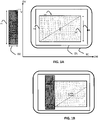
- a computer screen SC has been shown comprising a display zone ZA in which a first rectangular window FR is displayed, the initial content of this window being referenced C.
- HFR the height of this window
- DV the vertical direction
- DH the horizontal direction
- the vertical dimension D1 of this new window V is greater than the dimension HFR of the edge V1.
- D2 the horizontal dimension of this new window.
- the figure 1B illustrates the result of this display step: the new window V has pushed the content C of the first window horizontally, without resizing it, over a distance D2, so that a new content C ⁇ is displayed in the first window .
- the horizontal dimension of the first window FR is reduced by the same amount, that is to say by the width D2.
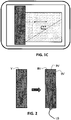
- the figure 1C illustrates that it is possible to access the entire initial content of the first window by scrolling this content (“scrolling”). This mechanism gives the illusion, when the initial content scrolls to the left, that the initial content slides under the new window V.
- the scrolling of the content in the new window V is impossible. This content is said to be frozen.
- the content of the new window V is divided into strips BV parallel to the edge V1, three in this example, during a step E20. This division is not performed if the new window V must be displayed all at once.
- the figure 2 illustrates this division in the particular but optional case in which the bands all have the same width LB.
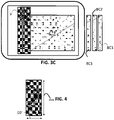
- the Figure 3B illustrates the result of the process after the display of the second strip BV2 of the new window V, a second strip BC2 of the initial content C having been erased from the screen and stored with its position in the initial content.
- the initial content C can thus be reconstituted from the displayed content C ⁇ and from the content of the bands BC1 and BC2.
- the Fig. 3C illustrates the result of the process after the display of the third band BV3 of the new window V. This figure is identical to the Figure 3B except in that the third band BC3 of the initial content has been shown as stored.
- this new window V' is displayed all at once and is therefore not split.
- the initial content of the first window FR in other words the content C ⁇ displayed on the screen and the stored content bands (BC1, BC2, BC3, BC') can scroll between the new windows V and V'.
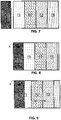
- a display area comprising 4 rectangular windows F1 to F4 of the same dimensions and juxtaposed and at the figure 8 , the content of the display area after displaying a new window V whose width is slightly less than the width of these windows.
- This small band prompts the user to scroll through the displayed content to access all of the content as depicted in figure 9 , the content giving the illusion of sliding under the new window V during this scrolling.
- the shift, display and management steps apply to the entity made up of the plurality of windows F1 to F4.
- the new window V is deployed when the user clicks twice on one of the windows.
- the new window V comprises, when it is deployed, a button B, pressing this button has the effect of closing this new window V and returning to the state of the figure 7 .
- this new window is deployed progressively or is displayed directly from the edge of a first window already displayed.
- this new window can include a menu allowing the user to trigger the display of new content in the first window.
- a first window within the meaning of the invention can contain metadata of a musical album; when you click on this window, a new window comprising a reader is deployed encroaching on the first window while allowing scrolling access to all the metadata.
- a command present in the new window can, in a particular embodiment, make it possible to change the album displayed in the first window.
Landscapes
- Engineering & Computer Science (AREA)
- Theoretical Computer Science (AREA)
- General Engineering & Computer Science (AREA)
- Physics & Mathematics (AREA)
- General Physics & Mathematics (AREA)
- Human Computer Interaction (AREA)
- Software Systems (AREA)
- Computer Networks & Wireless Communication (AREA)
- Signal Processing (AREA)
- Computer Security & Cryptography (AREA)
- Computer Hardware Design (AREA)
- User Interface Of Digital Computer (AREA)
- Controls And Circuits For Display Device (AREA)
Description
- L'invention se situe dans le domaine des interfaces graphiques.
- Dans l'état actuel de la technique, il est usuel, lorsque l'on veut afficher un nouveau contenu sur un écran, d'ouvrir une nouvelle fenêtre pour ce contenu.
- Cette solution, bien que très avantageuse, présente l'inconvénient de masquer le contenu qui était affiché à l'endroit occupé par cette nouvelle fenêtre. Pour accéder à nouveau à ce contenu, l'utilisateur peut déplacer cette nouvelle fenêtre, et par conséquent, masquer un autre contenu, ou fermer la nouvelle fenêtre.
-
WO 2009/143076 A2 (PALM INC [US]; SHIPLACOFF DANIEL MARC GATAN [US]; DUARTE MATIAS GONZAL), 26 novembre 2009 , divulgue un procédé d'affichage d'une nouvelle fenêtre rectangulaire dans une zone d'affichage sur un écran comportant déjà au moins une première fenêtre rectangulaire. Dans ce procédé d'affichage, la nouvelle fenêtre est affichée progressivement vers l'intérieur et à partir d'un bord de la première fenêtre. Le contenu de la première fenêtre est décalé à partir dudit bord, sur une distance correspondant à la dimension de ladite nouvelle fenêtre selon une deuxième direction perpendiculaire à une première direction parallèle audit bord. La nouvelle fenêtre est affichée, le long dudit bord, cet affichage ayant pour effet de diminuer d'autant ladite première fenêtre selon ladite deuxième direction une fois que toute la nouvelle fenêtre a été affichée. -
WO 2010/001326 A1 (NOKIA CORP [FI]; MCCARTHY PATRICK [GB]), 7 janvier 2010 , divulgue, en particulier aux figures 2a-c et3a -3d, une interface utilisateur d'un écran tactile d'un téléphone mobile. Lorsqu'une vidéo est affichée dans une première fenêtre, et qu'un utilisateur approche le doigt de l'écran ou en sélectionne un bouton physique sur le rebord du téléphone, l'utilisateur déclenche l'apparition d'une nouvelle fenêtre comportant un menu. Ce menu peut venir se loger sous la première fenêtre affichant la vidéo, la vidéo étant alors redimensionnée pour éviter tout chevauchement du menu avec la vidéo. Le contenu de la première fenêtre est donc soit visible de façon réduite. - NILSSON ET AL: "Design patterns for user interface for mobile applications", ADVANCES IN ENGINEERING SOFTWARE, ELSEVIER SCIENCE, OXFORD, GB, vol. 40, no. 12, 1 décembre 2009 (2009-12-01), pages 1318-1328, XP026471 073, divulgue un procédé d'affichage d'une nouvelle fenêtre rectangulaire dans une zone d'affichage sur un écran d'un dispositif d'affichage, ladite zone d'affichage comportant déjà au moins une première fenêtre rectangulaire, la nouvelle fenêtre étant affichée vers l'intérieur et à partir d'un emplacement initial d'un bord de la première fenêtre dans la zone d'affichage. Dans la
figure 5 de ce document, une partie du contenu de la première fenêtre est décalée à partir dudit bord et une autre partie est déformée et redimensionnée. - L'invention vise une méthode d'affichage de contenu qui ne présente pas les inconvénients mentionnés ci-dessus.
- Plus précisément, l'invention vise un procédé d'affichage d'une nouvelle fenêtre rectangulaire dans une zone d'affichage sur un écran, cette zone d'affichage comportant une première fenêtre rectangulaire, la nouvelle fenêtre étant affichée progressivement vers l'intérieur et à partir d'un bord de la première fenêtre.
- Autrement dit, la nouvelle fenêtre s'affiche progressivement vers l'intérieur de la zone occupée initialement par la première fenêtre, à partir de l'emplacement initial (i.e. avant l'affichage de la nouvelle fenêtre) d'un bord de la première fenêtre.
- Le procédé comporte des étapes comme définies à la revendication 1.
- Le procédé d'affichage selon l'invention permet ainsi d'afficher une ou plusieurs fenêtres supplémentaires (ou volets) tout en gardant la possibilité d'accéder à l'intégralité du contenu initial de la première fenêtre selon un mécanisme de défilement (en anglais « scrolling »).
- Lors de l'affichage de la nouvelle fenêtre, le décalage du contenu de la première fenêtre s'effectue de manière générale sans déformation.
- Ce procédé d'affichage a une application privilégiée mais non limitative dans le contexte d'écrans de petite taille et/ou pour lesquels il n'est pas possible d'afficher simultanément plusieurs fenêtres sans agir au préalable sur une caractéristique de l'affichage courant, par exemple en masquant ou en redimensionnant une fenêtre déjà affichée tout en conservant son contenu (c'est-à-dire en déformant le contenu de cette fenêtre, par exemple en diminuant la taille de ce contenu).
- En se déployant, la nouvelle fenêtre semble pousser le contenu de la première fenêtre et réduit d'autant la première fenêtre.
- Dans un mode particulier de réalisation, la dimension de la nouvelle fenêtre selon une première direction parallèle au bord est supérieure ou égale à la dimension de ce bord.
- Dans un mode de réalisation de l'invention, le contenu initial de la fenêtre n'est pas déformé.
- Dans un mode préféré de réalisation, le contenu initial de la fenêtre n'est pas redimensionné. Dans un mode particulier de réalisation, on peut également permettre le défilement du contenu dans la nouvelle fenêtre, horizontalement et/ou verticalement.
- Le fait d'afficher la nouvelle fenêtre par bandes (éventuellement de largeur 1 pixel) successives permet de faire ressentir à l'utilisateur une impression de déploiement de cette nouvelle fenêtre.
- Dans un mode particulier de réalisation, la nouvelle fenêtre est découpée en bandes de 1 pixel. Ce mode de réalisation permet d'afficher le contenu de la nouvelle fenêtre de façon très progressive et non agressive pour l'utilisateur.
- Dans un autre mode de réalisation, la nouvelle fenêtre est découpée en bandes de dimensions croissantes ou décroissantes de façon à créer un effet d'accélération ou de décélération dans l'affichage de cette nouvelle fenêtre.
- Dans un mode particulier de réalisation, la nouvelle fenêtre est affichée sur détection d'une commande d'ouverture.
- Dans un mode particulier de réalisation, la nouvelle fenêtre peut être refermée de sorte à récupérer la place occupée par cette nouvelle fenêtre pour redimensionner la première fenêtre.
- Plus précisément, dans ce mode de réalisation, sur détection d'une commande de fermeture, le procédé d'affichage selon l'invention comporte des étapes pour :
- effacer la nouvelle fenêtre de la zone d'affichage ;
- agrandir la première fenêtre par le bord précité et décaler son contenu initial selon la deuxième direction, vers ce bord, sur une distance correspondant à la dimension de la nouvelle fenêtre selon cette deuxième direction.
- Dans un mode particulier de réalisation, la zone d'affichage comporte une pluralité de premières fenêtres rectangulaires qui ne se superposent pas, juxtaposées ou non.
- Dans un mode particulier de réalisation, la dimension de la nouvelle fenêtre selon la deuxième dimension est légèrement inférieure à cette dimension d'une première fenêtre.
- Ainsi, lorsque la nouvelle fenêtre se déploie, la première fenêtre la plus éloignée parmi toutes ces premières fenêtres affichées est effacée sur presque toute sa surface, donnant l'impression de sortir progressivement de l'écran comme poussée par la nouvelle fenêtre. La bande de cette première fenêtre encore visible permet de rappeler à l'utilisateur que du contenu initial peut être accédé par défilement.
- Dans un mode particulier de réalisation, la nouvelle fenêtre comporte un menu permettant de déclencher l'affichage de nouveaux contenus dans la première fenêtre.
- L'invention vise aussi un dispositif d'affichage tel que défini à la revendication 12.
- Dans un mode particulier de réalisation, les différentes étapes du procédé d'affichage sont déterminées par des instructions de programmes d'ordinateurs.
- En conséquence, l'invention vise un programme d'ordinateur sur un support d'informations, ce programme comportant des instructions pour l'exécution desdites étapes d'un procédé d'affichage tel que mentionné ci-dessus, lorsque ces instructions sont exécutées par un ordinateur.
- L'invention vise aussi un programme d'ordinateur sur un support d'informations comportant des instructions pour l'exécution desdites étapes d'un procédé d'affichage tel que mentionné ci-dessus lorsque ces instructions sont exécutées par un procédé d'affichage tel que mentionné ci-dessus.
- Ces programmes peuvent utiliser n'importe quel langage de programmation, et être sous la forme de code source, code objet, ou de code intermédiaire entre code source et code objet, tel que dans une forme partiellement compilée, ou dans n'importe quelle autre forme souhaitable.
- L'invention vise aussi un support d'informations lisible par un ordinateur, et comportant des instructions d'un programme d'ordinateur tel que mentionné ci-dessus.
- Le support d'informations peut être n'importe quelle entité ou dispositif capable de stocker le programme. Par exemple, le support peut comporter un moyen de stockage, tel qu'une ROM, par exemple un CD ROM ou une ROM de circuit microélectronique, ou encore un moyen d'enregistrement magnétique, par exemple une disquette (floppy disc) ou un disque dur.
- D'autre part, le support d'informations peut être un support transmissible tel qu'un signal électrique ou optique, qui peut être acheminé via un câble électrique ou optique, par radio ou par d'autres moyens. Le programme selon l'invention peut être en particulier téléchargé sur un réseau de type Internet.
- Alternativement, le support d'informations peut être un circuit intégré dans lequel le programme est incorporé, le circuit étant adapté pour exécuter ou pour être utilisé dans l'exécution du procédé en question.
- D'autres caractéristiques et avantages de l'invention apparaîtront à la lumière de la description qui suit, faite en référence aux dessins annexés dans lesquels :
- les
figures 1A à 1C illustrent un exemple de mise en œuvre de l'invention dans son principe ; - la
figure 2 illustre le découpage d'une nouvelle fenêtre en bandes parallèles ; - les
figures 3A à 5 représentent le contenu d'un écran après différentes étapes d'un procédé d'affichage de deux nouvelles fenêtres conformément à un exemple de mise en œuvre de l'invention; - la
figure 6 représente sous forme d'organigramme, les principales étapes d'un procédé d'affichage conforme à un mode de réalisation de l'invention ; - les
figures 7 à 9 illustrent un exemple de mise en œuvre de l'invention dans lequel le contenu est compris dans une pluralité de fenêtres juxtaposées. - Les
figures 1A à 1C illustrent un exemple de mise en œuvre de l'invention dans son principe. - Sur la
figure 1A , on a représenté un écran d'ordinateur SC comportant une zone d'affichage ZA dans laquelle est affichée une première fenêtre rectangulaire FR, le contenu initial de cette fenêtre étant référencé C. - On note HFR la hauteur de cette fenêtre, DV la direction verticale et DH la direction horizontale.
- On suppose dans cet exemple que l'on veut afficher une première nouvelle fenêtre rectangulaire V, conformément à l'invention, selon un déploiement progressif horizontal, à partir d'un bord vertical V1 de la première fenêtre FR, vers l'intérieur de cette première fenêtre. Soit V2, le bord vertical opposé à V1.
- Dans cet exemple, la dimension verticale D1 de cette nouvelle fenêtre V est supérieure à la dimension HFR du bord V1. On note D2 la dimension horizontale de cette nouvelle fenêtre.
- La
figure 1B illustre le résultat de cette étape d'affichage : la nouvelle fenêtre V a poussé le contenu C de la première fenêtre horizontalement, sans le redimensionner, sur une distance D2, si bien qu'un nouveau contenu C∗∗ est affiché dans la première fenêtre. La dimension horizontale de la première fenêtre FR est réduite d'autant, c'est-à-dire de la largeur D2. - La
figure 1C illustre qu'il est possible d'accéder à l'intégralité du contenu initial de la première fenêtre par défilement de ce contenu (en anglais « scrolling »). Ce mécanisme donne l'illusion, lorsque le contenu initial défile vers la gauche, que le contenu initial glisse sous la nouvelle fenêtre V. - Dans l'exemple de réalisation décrit ici, le défilement du contenu dans la nouvelle fenêtre V est impossible. On dit que ce contenu est figé.
- A titre d'alternative, le défilement horizontal et/ou vertical dans la nouvelle fenêtre est possible.
- Afin de réaliser l'affichage de cette nouvelle fenêtre de façon progressive, le contenu de la nouvelle fenêtre V est découpé en bandes BV parallèles au bord V1, trois dans cet exemple, au cours d'une étape E20. Ce découpage n'est pas réalisé si la nouvelle fenêtre V doit être affichée en une seule fois.
- La
figure 2 illustre ce découpage dans le cas particulier mais optionnel dans lequel les bandes ont toutes la même largeur LB. - La
figure 3A illustre le résultat du procédé après l'affichage de la première bande BV1 de la nouvelle fenêtre. On note : - qu'une bande rectangulaire BC1 du contenu initial C de la première fenêtre n'est plus affichée. Le contenu de cette bande BC1 est mémorisé ainsi que la position de cette bande dans le contenu initial (étape E30) afin de pouvoir permettre d'accéder à tout ce contenu initial C par défilement ;
- que le contenu initial C a été décalé (étape E40) selon la direction horizontale DH, à partir du bord V1 sur une distance correspondant à la dimension horizontale LB de la bande BV1.
- que la bande BV1 a été affichée le long du bord vertical V1 (étape E50).
- que le contenu initial C peut être reconstitué à partir du contenu affiché C∗ et du contenu de la bande BC1.
- La
figure 3B illustre le résultat du procédé après l'affichage de la deuxième bande BV2 de la nouvelle fenêtre V, une deuxième bande BC2 du contenu initial C ayant été effacée de l'écran et mémorisée avec sa position dans le contenu initial. - Le contenu initial C peut ainsi être reconstitué à partir du contenu affiché C∗∗ et du contenu des bandes BC1 et BC2.
- La
figure 3C illustre le résultat du procédé après l'affichage de la troisième bande BV3 de la nouvelle fenêtre V. Cette figure est identique à lafigure 3B sauf en ce que l'on a représenté la troisième bande BC3 du contenu initial telle que mémorisée. - On suppose maintenant que l'on veut afficher une nouvelle fenêtre rectangulaire V' représentée à la
figure 4 de hauteur HFR et de largeur D2' le long du bord V2 de la fenêtre FR. - Dans cet exemple, cette nouvelle fenêtre V' est affichée en une seule fois et n'est donc pas découpée.
- La
figure 5 représente le résultat du procédé après l'affichage de cette nouvelle fenêtre V'. On note : - que le contenu de la première fenêtre FR a été décalé horizontalement à partir du bord V2 sur une distance correspondant à la largeur D2' de la nouvelle fenêtre V'. Cela donne l'illusion de faire glisser le contenu sous la fenêtre V ;
- que la largeur de la première fenêtre FR a été diminuée de cette largeur D2' ;
- qu'une bande rectangulaire BC' du contenu initial de la fenêtre FR, de largeur D2' et masqué par la fenêtre V est mémorisée (avec sa position dans le contenu initial) ;
- que la nouvelle fenêtre V' a été affichée le long du bord vertical V2.
- Conformément à l'invention, le contenu initial de la première fenêtre FR, autrement dit le contenu C∗∗∗ affiché sur l'écran et les bandes de contenu mémorisées (BC1, BC2, BC3, BC') peuvent défiler entre les nouvelles fenêtres V et V'.
- A la
figure 7 , on a représenté une zone d'affichage comportant 4 fenêtres rectangulaires F1 à F4 de mêmes dimensions et juxtaposées et à lafigure 8 , le contenu de la zone d'affichage après avoir affiché une nouvelle fenêtre V dont la largeur est de peu inférieure à la largeur de ces fenêtres. - Il apparaît sur cette figure que les fenêtres F1 à F4 ont été décalées et qu'il ne reste visible qu'une petite bande de la fenêtre F4.
- Cette petite bande incite l'utilisateur à faire défiler le contenu affiché pour accéder à l'ensemble du contenu comme représenté à la
figure 9 , le contenu donnant l'illusion de glisser sous la nouvelle fenêtre V au cours de ce défilement. - Ainsi, dans le mode de réalisation décrit ici, les étapes de décalage, d'affichage et de gestion s'appliquent à l'entité constituée de la pluralité de fenêtres F1 à F4.
- Dans le mode de réalisation décrit ici, la nouvelle fenêtre V se déploie dès lors que l'utilisateur clique deux fois sur une des fenêtres.
- Dans le mode de réalisation décrit ici, la nouvelle fenêtre V comporte, lorsqu'elle est déployée un bouton B, un appui sur ce bouton ayant pour effet de refermer cette nouvelle fenêtre V et revenir à l'état de la
figure 7 . - On rappelle que conformément à l'invention, une nouvelle fenêtre se déploie progressivement ou s'affiche directement à partir du bord d'une première fenêtre déjà affichée. Dans un mode particulier de réalisation décrit ici, cette nouvelle fenêtre peut comporter un menu permettant à l'utilisateur de déclencher l'affichage de nouveaux contenus dans la première fenêtre.
- L'invention peut en particulier être utilisée dans une application de lecture de fichiers musicaux. Par exemple, une première fenêtre au sens de l'invention peut contenir des métadonnées d'un album musical ; lorsqu'on clique sur cette fenêtre, une nouvelle fenêtre comportant un lecteur se déploie en empiétant sur la première fenêtre tout en permettant par défilement un accès à l'ensemble des métadonnées.
- Une commande présente dans la nouvelle fenêtre peut, dans un mode de réalisation particulier, permettre de changer l'album affiché dans la première fenêtre.
Claims (12)
- Procédé d'affichage d'une nouvelle fenêtre rectangulaire (V) dans une zone d'affichage (ZA) sur un écran (SC) d'un dispositif d'affichage, ladite zone d'affichage comportant déjà au moins une première fenêtre rectangulaire (FR), la nouvelle fenêtre étant affichée progressivement vers l'intérieur et à partir d'un emplacement initial d'un bord (V1) de la première fenêtre (FR) dans la zone d'affichage, ledit procédé comportant des étapes pour- décaler (E40) le contenu de la première fenêtre à partir de l'emplacement initial dudit bord (V1), sur une distance correspondant à la dimension de ladite nouvelle fenêtre selon une deuxième direction (DH) perpendiculaire à une première direction (DV) parallèle audit bord (V1), ledit décalage étant réalisé sans causer de déformation du contenu initial de la première fenêtre;- afficher (E50) la nouvelle fenêtre, le long de l'emplacement initial dudit bord (V1), cet affichage ayant pour effet de diminuer d'autant ladite première fenêtre (FR) selon ladite deuxième direction de sorte que l'ensemble du contenu initial de la première fenêtre soit accessible dans la première fenêtre par défilement du contenu initial dans la première fenêtre (FR), une fois que toute la nouvelle fenêtre a été affichée;
dans lequel ladite nouvelle fenêtre est découpée en une pluralité de bandes (BV) parallèles audit bord (V1) et pour chacune desdites bandes :• ledit contenu initial de la première fenêtre est décalé à partir dudit bord (V1) sur une
distance correspondant à la dimension (LB) de ladite bande selon ladite deuxième direction (DH) ; et• la bande de la nouvelle fenêtre est affichée le long dudit bord (V1). - Procédé selon la revendication 1 caractérisé en ce que la dimension (D1) de la nouvelle fenêtre selon une première direction (DV) parallèle audit bord (V1) est supérieure ou égale à la dimension (HFR) de ce bord (V1).
- Procédé selon la revendication 1 ou 2 caractérisé en ce que ladite nouvelle fenêtre est découpée en bandes de 1 pixel.
- Procédé selon la revendication 1 ou 2 caractérisé en ce que ladite nouvelle fenêtre est découpée en bandes de dimensions croissantes ou décroissantes.
- Procédé selon l'une quelconque des revendications 1 à 4, caractérisé en ce que ladite nouvelle fenêtre est affichée sur détection d'une commande 5 d'ouverture.
- Procédé selon l'une quelconque des revendications 1 à 5, caractérisé en ce qu'il comporte, sur détection d'une commande de fermeture :- effacer ladite nouvelle fenêtre (V) de ladite zone d'affichage ;- agrandir la première fenêtre (FR) par ledit bord (V1) et décaler son contenu initial selon ladite deuxième direction (DH), vers ledit bord (V1), sur une distance correspondant à la dimension de ladite nouvelle fenêtre (V) selon cette deuxième direction.
- Procédé selon l'une quelconque des revendications 1 à 6, dans lequel ladite zone d'affichage (ZA) comporte une pluralité de premières fenêtres rectangulaires (F1, F2, F3, F4) qui ne se superposent pas.
- Procédé selon la revendication 7, caractérisé en ce la dimension de ladite nouvelle fenêtre selon ladite deuxième dimension est légèrement inférieure à cette dimension d'une dite première fenêtre (F4).
- Procédé selon l'une quelconque des revendications 1 à 8, caractérisé en ce que ladite nouvelle fenêtre (V) comporte un menu permettant de déclencher l'affichage de nouveaux contenus dans la première fenêtre (FR).
- Programme d'ordinateur comportant des instructions pour l'exécution des étapes d'un procédé selon l'une quelconque des revendications 1 à 9 lorsque ces instructions sont exécutées par un ordinateur.
- Support d'enregistrement lisible par un ordinateur sur lequel est enregistré un programme d'ordinateur comprenant des instructions pour l'exécution desdites étapes d'un procédé selon l'une quelconque des revendications 1 à 9.
- Dispositif d'affichage d'une nouvelle fenêtre rectangulaire (V) dans une zone d'affichage (ZA) sur un écran (SC), ladite zone d'affichage comportant déjà au moins une première fenêtre rectangulaire (FR), la nouvelle fenêtre étant affichée progressivement vers l'intérieur et à partir d'un emplacement initial d'un bord (V1) de la première fenêtre (FR) dans la zone d'affichage, ledit dispositif comportant des moyens pour :- décaler (E40) le contenu de la première fenêtre à partir de l'emplacement initial dudit bord (V1), sur une distance correspondant à la dimension (BV) de ladite nouvelle fenêtre selon une deuxième direction (DH) perpendiculaire à une première direction (DV) parallèle audit bord (V1), ledit décalage étant réalisé sans causer de déformation du contenu initial de la première fenêtre;- afficher (E50) la nouvelle fenêtre, le long dudit bord (V1), cet affichage ayant pour effet de diminuer d'autant ladite première fenêtre (FR) selon ladite deuxième direction de sorte que l'ensemble du contenu initial de la première fenêtre soit accessible dans la première fenêtre par défilement du contenu initial dans la première fenêtre (FR), une fois que toute la nouvelle fenêtre a été affichée;
dans lequel le dispositif d'affichage est configuré pour découper ladite nouvelle fenêtre en une pluralité de bandes (BV) parallèles audit bord (V1) et pour chacune desdites bandes :• ledit contenu initial de la première fenêtre est décalé à partir dudit bord (V1) sur une
distance correspondant à la dimension (LB) de ladite bande selon ladite deuxième direction (DH) ; et• la bande de la nouvelle fenêtre est affichée le long dudit bord (V1)
Applications Claiming Priority (1)
| Application Number | Priority Date | Filing Date | Title |
|---|---|---|---|
| FR1456218A FR3023022A1 (fr) | 2014-06-30 | 2014-06-30 | Procede d'affichage d'une nouvelle fenetre rectangulaire sur un ecran |
Publications (2)
| Publication Number | Publication Date |
|---|---|
| EP2963545A1 EP2963545A1 (fr) | 2016-01-06 |
| EP2963545B1 true EP2963545B1 (fr) | 2022-08-31 |
Family
ID=52003912
Family Applications (1)
| Application Number | Title | Priority Date | Filing Date |
|---|---|---|---|
| EP15174509.8A Active EP2963545B1 (fr) | 2014-06-30 | 2015-06-30 | Procédé d'affichage d'une nouvelle fenêtre rectangulaire sur un écran |
Country Status (3)
| Country | Link |
|---|---|
| US (1) | US9595078B2 (fr) |
| EP (1) | EP2963545B1 (fr) |
| FR (1) | FR3023022A1 (fr) |
Family Cites Families (6)
| Publication number | Priority date | Publication date | Assignee | Title |
|---|---|---|---|---|
| US8683362B2 (en) * | 2008-05-23 | 2014-03-25 | Qualcomm Incorporated | Card metaphor for activities in a computing device |
| GB0811946D0 (en) * | 2008-06-30 | 2008-07-30 | Symbian Software Ltd | Computing device |
| US20110055753A1 (en) * | 2009-08-31 | 2011-03-03 | Horodezky Samuel J | User interface methods providing searching functionality |
| BR112014005335A2 (pt) * | 2011-09-13 | 2017-04-11 | Sony Computer Entertainment Inc | dispositivo de processamento de informação, método de controle de exibição, e, meio de armazenamento |
| US20130191775A1 (en) * | 2012-01-25 | 2013-07-25 | Richard James Lawson | Adjustable user interface |
| US9274695B2 (en) * | 2013-04-19 | 2016-03-01 | Jive Software | Parallax scrolling of multiple information panels in a graphical user interface |
-
2014
- 2014-06-30 FR FR1456218A patent/FR3023022A1/fr not_active Withdrawn
-
2015
- 2015-06-29 US US14/754,109 patent/US9595078B2/en active Active
- 2015-06-30 EP EP15174509.8A patent/EP2963545B1/fr active Active
Non-Patent Citations (1)
| Title |
|---|
| NILSSON ET AL: "Design patterns for user interface for mobile applications", ADVANCES IN ENGINEERING SOFTWARE, ELSEVIER SCIENCE, OXFORD, GB, vol. 40, no. 12, 1 December 2009 (2009-12-01), pages 1318 - 1328, XP026471073, ISSN: 0965-9978, [retrieved on 20090425], DOI: 10.1016/J.ADVENGSOFT.2009.01.017 * |
Also Published As
| Publication number | Publication date |
|---|---|
| FR3023022A1 (fr) | 2016-01-01 |
| EP2963545A1 (fr) | 2016-01-06 |
| US20150379686A1 (en) | 2015-12-31 |
| US9595078B2 (en) | 2017-03-14 |
Similar Documents
| Publication | Publication Date | Title |
|---|---|---|
| FR2693810A1 (fr) | Systèmes d'interfaces d'utilisateurs à accès direct à une zone secondaire d'affichage. | |
| CN103294345B (zh) | 一种界面显示方法、装置及移动终端 | |
| KR20130124542A (ko) | 이메일 사용자 인터페이스 | |
| EP2989593A1 (fr) | Systeme de synchronisation permanente pour la saisie manuscrite | |
| EP2270640A1 (fr) | Procédé de gestion de l'affichage d'une fenêtre d'une application sur un écran, un programme et un terminal l'utilisant | |
| EP2898391A1 (fr) | Methode de selection de mode d'interactivite | |
| EP2963545B1 (fr) | Procédé d'affichage d'une nouvelle fenêtre rectangulaire sur un écran | |
| WO2011138551A1 (fr) | Terminal incorporant un videoprojecteur et un ecran dont une zone permet le controle d'un pointeur distant projete par ce videoprojecteur | |
| FR2939921A1 (fr) | Procedes de gestion d'un parametre affiche dans un objet graphique interactif | |
| FR3090150A1 (fr) | Navigation spatio-temporelle de contenus | |
| CN106484225A (zh) | 一种壁纸切换方法及移动终端 | |
| FR3045178A1 (fr) | Navigation directe dans un extrait video | |
| WO2020136311A1 (fr) | |interface tactile d'affichage et de manipulation d'un document et procédé de mise en œuvre | |
| US20220270647A1 (en) | Method and device for editing video | |
| EP1739532A1 (fr) | Procédé et dispositif d'aide à la recherche d'un élément dans une liste par défilement accéléré sur un dispositif d'affichage | |
| EP3242188B1 (fr) | Procede et dispositif de gestion simultanee d'une pluralite de messages | |
| WO2008087314A2 (fr) | Systeme de selection d'elements affiches sur un ecran | |
| EP1717673A1 (fr) | Procédé d'affichage d'un ensemble d'éléments graphiques | |
| US20160320944A1 (en) | Character processing method and device | |
| FR3064767B1 (fr) | Systeme informatique et procede correspondant pour la gestion de contenus | |
| FR2969332A1 (fr) | Traitement perfectionne de donnees d'interface graphique. | |
| EP2466497B1 (fr) | Procédé d'affichage d'entités multimédia, programme d'ordinateur et dispositif d'affichage associés | |
| EP2597556A1 (fr) | Procédé d'affichage d'un contenu numérique sur un écran | |
| CN107831976A (zh) | 消息显示方法及装置 | |
| FR2984545A1 (fr) | Procede de navigation au sein d'un contenu affichable a l'aide de commandes de navigation, dispositif de navigation et programme associe |
Legal Events
| Date | Code | Title | Description |
|---|---|---|---|
| PUAI | Public reference made under article 153(3) epc to a published international application that has entered the european phase |
Free format text: ORIGINAL CODE: 0009012 |
|
| AK | Designated contracting states |
Kind code of ref document: A1 Designated state(s): AL AT BE BG CH CY CZ DE DK EE ES FI FR GB GR HR HU IE IS IT LI LT LU LV MC MK MT NL NO PL PT RO RS SE SI SK SM TR |
|
| AX | Request for extension of the european patent |
Extension state: BA ME |
|
| 17P | Request for examination filed |
Effective date: 20160629 |
|
| RBV | Designated contracting states (corrected) |
Designated state(s): AL AT BE BG CH CY CZ DE DK EE ES FI FR GB GR HR HU IE IS IT LI LT LU LV MC MK MT NL NO PL PT RO RS SE SI SK SM TR |
|
| STAA | Information on the status of an ep patent application or granted ep patent |
Free format text: STATUS: EXAMINATION IS IN PROGRESS |
|
| 17Q | First examination report despatched |
Effective date: 20180831 |
|
| RAP1 | Party data changed (applicant data changed or rights of an application transferred) |
Owner name: ORANGE |
|
| RAP3 | Party data changed (applicant data changed or rights of an application transferred) |
Owner name: ORANGE |
|
| GRAP | Despatch of communication of intention to grant a patent |
Free format text: ORIGINAL CODE: EPIDOSNIGR1 |
|
| STAA | Information on the status of an ep patent application or granted ep patent |
Free format text: STATUS: GRANT OF PATENT IS INTENDED |
|
| RIC1 | Information provided on ipc code assigned before grant |
Ipc: H04M 1/725 20210101ALI20211004BHEP Ipc: G06F 3/0488 20130101ALI20211004BHEP Ipc: G06F 3/0485 20130101ALI20211004BHEP Ipc: G06F 3/0483 20130101ALI20211004BHEP Ipc: G06F 3/0481 20130101ALI20211004BHEP Ipc: H04M 1/72427 20210101ALI20211004BHEP Ipc: G06F 9/4401 20180101AFI20211004BHEP |
|
| INTG | Intention to grant announced |
Effective date: 20211025 |
|
| GRAJ | Information related to disapproval of communication of intention to grant by the applicant or resumption of examination proceedings by the epo deleted |
Free format text: ORIGINAL CODE: EPIDOSDIGR1 |
|
| STAA | Information on the status of an ep patent application or granted ep patent |
Free format text: STATUS: EXAMINATION IS IN PROGRESS |
|
| REG | Reference to a national code |
Ref country code: DE Ref legal event code: R079 Ref document number: 602015080545 Country of ref document: DE Free format text: PREVIOUS MAIN CLASS: G06F0009440000 Ipc: G06F0003048150 |
|
| INTC | Intention to grant announced (deleted) | ||
| GRAP | Despatch of communication of intention to grant a patent |
Free format text: ORIGINAL CODE: EPIDOSNIGR1 |
|
| STAA | Information on the status of an ep patent application or granted ep patent |
Free format text: STATUS: GRANT OF PATENT IS INTENDED |
|
| INTG | Intention to grant announced |
Effective date: 20220407 |
|
| RIC1 | Information provided on ipc code assigned before grant |
Ipc: H04M 1/72427 20210101ALI20220325BHEP Ipc: G06F 3/0485 20130101ALI20220325BHEP Ipc: H04M 1/725 20060101ALI20220325BHEP Ipc: G06F 3/0483 20130101ALI20220325BHEP Ipc: G06F 9/4401 20180101ALI20220325BHEP Ipc: G06F 3/04886 20220101ALI20220325BHEP Ipc: G06F 3/04855 20220101ALI20220325BHEP Ipc: G06F 3/04815 20220101AFI20220325BHEP |
|
| GRAS | Grant fee paid |
Free format text: ORIGINAL CODE: EPIDOSNIGR3 |
|
| GRAA | (expected) grant |
Free format text: ORIGINAL CODE: 0009210 |
|
| STAA | Information on the status of an ep patent application or granted ep patent |
Free format text: STATUS: THE PATENT HAS BEEN GRANTED |
|
| AK | Designated contracting states |
Kind code of ref document: B1 Designated state(s): AL AT BE BG CH CY CZ DE DK EE ES FI FR GB GR HR HU IE IS IT LI LT LU LV MC MK MT NL NO PL PT RO RS SE SI SK SM TR |
|
| REG | Reference to a national code |
Ref country code: CH Ref legal event code: EP Ref country code: GB Ref legal event code: FG4D Free format text: NOT ENGLISH |
|
| REG | Reference to a national code |
Ref country code: AT Ref legal event code: REF Ref document number: 1515776 Country of ref document: AT Kind code of ref document: T Effective date: 20220915 Ref country code: DE Ref legal event code: R096 Ref document number: 602015080545 Country of ref document: DE |
|
| REG | Reference to a national code |
Ref country code: IE Ref legal event code: FG4D Free format text: LANGUAGE OF EP DOCUMENT: FRENCH |
|
| REG | Reference to a national code |
Ref country code: LT Ref legal event code: MG9D |
|
| REG | Reference to a national code |
Ref country code: NL Ref legal event code: MP Effective date: 20220831 |
|
| PG25 | Lapsed in a contracting state [announced via postgrant information from national office to epo] |
Ref country code: SE Free format text: LAPSE BECAUSE OF FAILURE TO SUBMIT A TRANSLATION OF THE DESCRIPTION OR TO PAY THE FEE WITHIN THE PRESCRIBED TIME-LIMIT Effective date: 20220831 Ref country code: RS Free format text: LAPSE BECAUSE OF FAILURE TO SUBMIT A TRANSLATION OF THE DESCRIPTION OR TO PAY THE FEE WITHIN THE PRESCRIBED TIME-LIMIT Effective date: 20220831 Ref country code: NO Free format text: LAPSE BECAUSE OF FAILURE TO SUBMIT A TRANSLATION OF THE DESCRIPTION OR TO PAY THE FEE WITHIN THE PRESCRIBED TIME-LIMIT Effective date: 20221130 Ref country code: LV Free format text: LAPSE BECAUSE OF FAILURE TO SUBMIT A TRANSLATION OF THE DESCRIPTION OR TO PAY THE FEE WITHIN THE PRESCRIBED TIME-LIMIT Effective date: 20220831 Ref country code: LT Free format text: LAPSE BECAUSE OF FAILURE TO SUBMIT A TRANSLATION OF THE DESCRIPTION OR TO PAY THE FEE WITHIN THE PRESCRIBED TIME-LIMIT Effective date: 20220831 Ref country code: FI Free format text: LAPSE BECAUSE OF FAILURE TO SUBMIT A TRANSLATION OF THE DESCRIPTION OR TO PAY THE FEE WITHIN THE PRESCRIBED TIME-LIMIT Effective date: 20220831 Ref country code: ES Free format text: LAPSE BECAUSE OF FAILURE TO SUBMIT A TRANSLATION OF THE DESCRIPTION OR TO PAY THE FEE WITHIN THE PRESCRIBED TIME-LIMIT Effective date: 20220831 |
|
| REG | Reference to a national code |
Ref country code: AT Ref legal event code: MK05 Ref document number: 1515776 Country of ref document: AT Kind code of ref document: T Effective date: 20220831 |
|
| PG25 | Lapsed in a contracting state [announced via postgrant information from national office to epo] |
Ref country code: PL Free format text: LAPSE BECAUSE OF FAILURE TO SUBMIT A TRANSLATION OF THE DESCRIPTION OR TO PAY THE FEE WITHIN THE PRESCRIBED TIME-LIMIT Effective date: 20220831 Ref country code: IS Free format text: LAPSE BECAUSE OF FAILURE TO SUBMIT A TRANSLATION OF THE DESCRIPTION OR TO PAY THE FEE WITHIN THE PRESCRIBED TIME-LIMIT Effective date: 20221231 Ref country code: HR Free format text: LAPSE BECAUSE OF FAILURE TO SUBMIT A TRANSLATION OF THE DESCRIPTION OR TO PAY THE FEE WITHIN THE PRESCRIBED TIME-LIMIT Effective date: 20220831 Ref country code: GR Free format text: LAPSE BECAUSE OF FAILURE TO SUBMIT A TRANSLATION OF THE DESCRIPTION OR TO PAY THE FEE WITHIN THE PRESCRIBED TIME-LIMIT Effective date: 20221201 |
|
| PG25 | Lapsed in a contracting state [announced via postgrant information from national office to epo] |
Ref country code: SM Free format text: LAPSE BECAUSE OF FAILURE TO SUBMIT A TRANSLATION OF THE DESCRIPTION OR TO PAY THE FEE WITHIN THE PRESCRIBED TIME-LIMIT Effective date: 20220831 Ref country code: RO Free format text: LAPSE BECAUSE OF FAILURE TO SUBMIT A TRANSLATION OF THE DESCRIPTION OR TO PAY THE FEE WITHIN THE PRESCRIBED TIME-LIMIT Effective date: 20220831 Ref country code: PT Free format text: LAPSE BECAUSE OF FAILURE TO SUBMIT A TRANSLATION OF THE DESCRIPTION OR TO PAY THE FEE WITHIN THE PRESCRIBED TIME-LIMIT Effective date: 20230102 Ref country code: DK Free format text: LAPSE BECAUSE OF FAILURE TO SUBMIT A TRANSLATION OF THE DESCRIPTION OR TO PAY THE FEE WITHIN THE PRESCRIBED TIME-LIMIT Effective date: 20220831 Ref country code: CZ Free format text: LAPSE BECAUSE OF FAILURE TO SUBMIT A TRANSLATION OF THE DESCRIPTION OR TO PAY THE FEE WITHIN THE PRESCRIBED TIME-LIMIT Effective date: 20220831 Ref country code: AT Free format text: LAPSE BECAUSE OF FAILURE TO SUBMIT A TRANSLATION OF THE DESCRIPTION OR TO PAY THE FEE WITHIN THE PRESCRIBED TIME-LIMIT Effective date: 20220831 |
|
| PG25 | Lapsed in a contracting state [announced via postgrant information from national office to epo] |
Ref country code: SK Free format text: LAPSE BECAUSE OF FAILURE TO SUBMIT A TRANSLATION OF THE DESCRIPTION OR TO PAY THE FEE WITHIN THE PRESCRIBED TIME-LIMIT Effective date: 20220831 Ref country code: EE Free format text: LAPSE BECAUSE OF FAILURE TO SUBMIT A TRANSLATION OF THE DESCRIPTION OR TO PAY THE FEE WITHIN THE PRESCRIBED TIME-LIMIT Effective date: 20220831 |
|
| REG | Reference to a national code |
Ref country code: DE Ref legal event code: R097 Ref document number: 602015080545 Country of ref document: DE |
|
| PG25 | Lapsed in a contracting state [announced via postgrant information from national office to epo] |
Ref country code: NL Free format text: LAPSE BECAUSE OF FAILURE TO SUBMIT A TRANSLATION OF THE DESCRIPTION OR TO PAY THE FEE WITHIN THE PRESCRIBED TIME-LIMIT Effective date: 20220831 Ref country code: AL Free format text: LAPSE BECAUSE OF FAILURE TO SUBMIT A TRANSLATION OF THE DESCRIPTION OR TO PAY THE FEE WITHIN THE PRESCRIBED TIME-LIMIT Effective date: 20220831 |
|
| PLBE | No opposition filed within time limit |
Free format text: ORIGINAL CODE: 0009261 |
|
| STAA | Information on the status of an ep patent application or granted ep patent |
Free format text: STATUS: NO OPPOSITION FILED WITHIN TIME LIMIT |
|
| 26N | No opposition filed |
Effective date: 20230601 |
|
| PG25 | Lapsed in a contracting state [announced via postgrant information from national office to epo] |
Ref country code: SI Free format text: LAPSE BECAUSE OF FAILURE TO SUBMIT A TRANSLATION OF THE DESCRIPTION OR TO PAY THE FEE WITHIN THE PRESCRIBED TIME-LIMIT Effective date: 20220831 |
|
| PG25 | Lapsed in a contracting state [announced via postgrant information from national office to epo] |
Ref country code: MC Free format text: LAPSE BECAUSE OF FAILURE TO SUBMIT A TRANSLATION OF THE DESCRIPTION OR TO PAY THE FEE WITHIN THE PRESCRIBED TIME-LIMIT Effective date: 20220831 |
|
| PG25 | Lapsed in a contracting state [announced via postgrant information from national office to epo] |
Ref country code: MC Free format text: LAPSE BECAUSE OF FAILURE TO SUBMIT A TRANSLATION OF THE DESCRIPTION OR TO PAY THE FEE WITHIN THE PRESCRIBED TIME-LIMIT Effective date: 20220831 |
|
| REG | Reference to a national code |
Ref country code: CH Ref legal event code: PL |
|
| REG | Reference to a national code |
Ref country code: BE Ref legal event code: MM Effective date: 20230630 |
|
| PG25 | Lapsed in a contracting state [announced via postgrant information from national office to epo] |
Ref country code: LU Free format text: LAPSE BECAUSE OF NON-PAYMENT OF DUE FEES Effective date: 20230630 |
|
| REG | Reference to a national code |
Ref country code: IE Ref legal event code: MM4A |
|
| PG25 | Lapsed in a contracting state [announced via postgrant information from national office to epo] |
Ref country code: LU Free format text: LAPSE BECAUSE OF NON-PAYMENT OF DUE FEES Effective date: 20230630 |
|
| PG25 | Lapsed in a contracting state [announced via postgrant information from national office to epo] |
Ref country code: IE Free format text: LAPSE BECAUSE OF NON-PAYMENT OF DUE FEES Effective date: 20230630 |
|
| PG25 | Lapsed in a contracting state [announced via postgrant information from national office to epo] |
Ref country code: IE Free format text: LAPSE BECAUSE OF NON-PAYMENT OF DUE FEES Effective date: 20230630 Ref country code: CH Free format text: LAPSE BECAUSE OF NON-PAYMENT OF DUE FEES Effective date: 20230630 |
|
| PG25 | Lapsed in a contracting state [announced via postgrant information from national office to epo] |
Ref country code: IT Free format text: LAPSE BECAUSE OF FAILURE TO SUBMIT A TRANSLATION OF THE DESCRIPTION OR TO PAY THE FEE WITHIN THE PRESCRIBED TIME-LIMIT Effective date: 20220831 Ref country code: BE Free format text: LAPSE BECAUSE OF NON-PAYMENT OF DUE FEES Effective date: 20230630 |
|
| PG25 | Lapsed in a contracting state [announced via postgrant information from national office to epo] |
Ref country code: BG Free format text: LAPSE BECAUSE OF FAILURE TO SUBMIT A TRANSLATION OF THE DESCRIPTION OR TO PAY THE FEE WITHIN THE PRESCRIBED TIME-LIMIT Effective date: 20220831 |
|
| PG25 | Lapsed in a contracting state [announced via postgrant information from national office to epo] |
Ref country code: BG Free format text: LAPSE BECAUSE OF FAILURE TO SUBMIT A TRANSLATION OF THE DESCRIPTION OR TO PAY THE FEE WITHIN THE PRESCRIBED TIME-LIMIT Effective date: 20220831 |
|
| PGFP | Annual fee paid to national office [announced via postgrant information from national office to epo] |
Ref country code: DE Payment date: 20250520 Year of fee payment: 11 |
|
| PGFP | Annual fee paid to national office [announced via postgrant information from national office to epo] |
Ref country code: GB Payment date: 20250520 Year of fee payment: 11 |
|
| PGFP | Annual fee paid to national office [announced via postgrant information from national office to epo] |
Ref country code: FR Payment date: 20250520 Year of fee payment: 11 |
|
| PG25 | Lapsed in a contracting state [announced via postgrant information from national office to epo] |
Ref country code: CY Free format text: LAPSE BECAUSE OF FAILURE TO SUBMIT A TRANSLATION OF THE DESCRIPTION OR TO PAY THE FEE WITHIN THE PRESCRIBED TIME-LIMIT; INVALID AB INITIO Effective date: 20150630 |
|
| PG25 | Lapsed in a contracting state [announced via postgrant information from national office to epo] |
Ref country code: HU Free format text: LAPSE BECAUSE OF FAILURE TO SUBMIT A TRANSLATION OF THE DESCRIPTION OR TO PAY THE FEE WITHIN THE PRESCRIBED TIME-LIMIT; INVALID AB INITIO Effective date: 20150630 |
|
| PG25 | Lapsed in a contracting state [announced via postgrant information from national office to epo] |
Ref country code: TR Free format text: LAPSE BECAUSE OF FAILURE TO SUBMIT A TRANSLATION OF THE DESCRIPTION OR TO PAY THE FEE WITHIN THE PRESCRIBED TIME-LIMIT Effective date: 20220831 |