EP2933765A1 - Zeitzonenbewusster kalender - Google Patents
Zeitzonenbewusster kalender Download PDFInfo
- Publication number
- EP2933765A1 EP2933765A1 EP15163424.3A EP15163424A EP2933765A1 EP 2933765 A1 EP2933765 A1 EP 2933765A1 EP 15163424 A EP15163424 A EP 15163424A EP 2933765 A1 EP2933765 A1 EP 2933765A1
- Authority
- EP
- European Patent Office
- Prior art keywords
- time
- time zone
- calendar
- event
- different
- Prior art date
- Legal status (The legal status is an assumption and is not a legal conclusion. Google has not performed a legal analysis and makes no representation as to the accuracy of the status listed.)
- Withdrawn
Links
Images




Classifications
-
- G—PHYSICS
- G06—COMPUTING OR CALCULATING; COUNTING
- G06Q—INFORMATION AND COMMUNICATION TECHNOLOGY [ICT] SPECIALLY ADAPTED FOR ADMINISTRATIVE, COMMERCIAL, FINANCIAL, MANAGERIAL OR SUPERVISORY PURPOSES; SYSTEMS OR METHODS SPECIALLY ADAPTED FOR ADMINISTRATIVE, COMMERCIAL, FINANCIAL, MANAGERIAL OR SUPERVISORY PURPOSES, NOT OTHERWISE PROVIDED FOR
- G06Q10/00—Administration; Management
- G06Q10/10—Office automation; Time management
- G06Q10/109—Time management, e.g. calendars, reminders, meetings or time accounting
- G06Q10/1093—Calendar-based scheduling for persons or groups
-
- G—PHYSICS
- G04—HOROLOGY
- G04G—ELECTRONIC TIME-PIECES
- G04G9/00—Visual time or date indication means
- G04G9/0076—Visual time or date indication means in which the time in another time-zone or in another city can be displayed at will
-
- G—PHYSICS
- G06—COMPUTING OR CALCULATING; COUNTING
- G06Q—INFORMATION AND COMMUNICATION TECHNOLOGY [ICT] SPECIALLY ADAPTED FOR ADMINISTRATIVE, COMMERCIAL, FINANCIAL, MANAGERIAL OR SUPERVISORY PURPOSES; SYSTEMS OR METHODS SPECIALLY ADAPTED FOR ADMINISTRATIVE, COMMERCIAL, FINANCIAL, MANAGERIAL OR SUPERVISORY PURPOSES, NOT OTHERWISE PROVIDED FOR
- G06Q10/00—Administration; Management
- G06Q10/10—Office automation; Time management
- G06Q10/109—Time management, e.g. calendars, reminders, meetings or time accounting
Definitions
- Electronic calendars are commonly used to keep track of and schedule different events. For example, a user may schedule all of their meetings using an electronic calendar.
- Many calendars include an option for changing the time zone used to display events. For example, a user may change the time zone of their calendar when they travel to a different time zone. After changing to the new time zone, all of the events within the calendar view are displayed according to the selected time zone. For example, if the user changes the time zone from Central Standard Time (CST) to Pacific Standard Time (PST), all of the events in the calendar are shown as starting two hours earlier. When the user changes the time zone back to CST, all of the events in the calendar view are shown as starting two hours later as compared to the times of the events when displayed in PST.
- CST Central Standard Time
- PST Pacific Standard Time
- Some calendars may allow a user to display two time scales.
- a first time scale shows the time according to a first time zone and a second time scale shows the time according to the second time zone.
- the PST time scale shows 1PM and the CST time scale shows 3PM directly next to PST time scale (e.g., 1:00
- the user may refer to the time scale to see what time an event is scheduled for in each of the different time zones. For example, they may see that an event starts at either 1PM or 3PM depending on the time zone.
- Selecting and navigating between different time zones when viewing a calendar can be challenging. For example, it is very easy for a user to become confused when creating and viewing appointments across different time zones. For example, when viewing the appointments across the different time zones, the user either switches the calendar view to a different time zone or performs a conversion to determine the time difference of the events that occur in the other time zones.
- a method for displaying a time zone sensitive calendar.
- Information is accessed that is associated with the time zone sensitive calendar.
- the information is used in determining the different time zones to include in a calendar view.
- Each of the different time periods in the calendar view are associated with one of the time zones.
- the calendar view is displayed such that the time periods that are associated with different time zones are visually distinguishable from each other.
- a computer-readable storage medium for displaying a time zone sensitive calendar.
- Information that includes appointments and travel events is accessed that is associated with the time zone sensitive calendar.
- the information is used in determining the different time zones to include in a calendar view.
- Each of the different time periods in the calendar view are associated with one of the time zones.
- Events that are within each of the time periods are associated with the different time zones.
- the calendar view is displayed such that the time periods that are associated with different time zones are visually distinguishable from each other.
- the aspect further comprises displaying a travel duration indicator on the time zone sensitive calendar that indicates a compression of time or an expansion of time that indicates a duration of time that is associated with the travel event.
- the aspect further comprises automatically adding a virtual travel event to the time zone sensitive calendar.
- a system for displaying a time zone sensitive calendar.
- the system includes a display and a processor.
- the processor is used to determine the time zones to display in a calendar view of the time zone sensitive calendar.
- the time zones are determined based on travel events within the calendar that change from one time zone to another time zone.
- Each of the different time periods in the calendar view are associated with one of the time zones.
- Events that are within each of the time periods are associated with the different time zones.
- the calendar view is then displayed.
- a time zone sensitive calendar displays a calendar view such that events are displayed according to their associated time zone. For example, a user may be located in their home time zone for a first time period of the week and in a different time zone during a second time period of the week.
- events that occur Monday and Tuesday are displayed according to the user's home time zone and events that occur Wednesday through Sunday are displayed according to the different time zone during this period.
- the different time periods that are associated with the different time periods are displayed using different formatting such that they are visually distinguishable from each other.
- travel events are used to determine when to change the display of the calendar view to reflect a different time zone. For example, when a travel event is determined (e.g., a flight that results in changing time zones), the time zone sensitive calendar updates the part of the calendar view which represents the different time zone to reflect the new time zone that is associated with a different time zone.
- the events in the time zone sensitive calendar are shown according to the user's current time zone and when the user is indicated to be in a new time zone, the events are shown according to the new time zone.
- the times of each event in the calendar view may be shown according to the time zone where the user will be located, when the event happens.
- travel events may also be shown in a calendar view of the time zone sensitive calendar.
- an event may be shown in the calendar view that shows a flight, or some other form of travel, from one time zone to another.
- the formatting of the time period before the user travels may be different as compared to the formatting of the time period after the user completes their travel to the different time zone.
- Travel duration indicators may also be displayed to illustrate when time is being compressed during the travel event or expanded during the travel event. For example, a travel duration indicator may be displayed for a flight that takes four hours to complete even though the flight appeared to only take two hours when viewing the time from the calendar view (e.g., took off at 5PM and landed at 7PM). For the return flight, a travel duration indicator may be displayed to show that the return flight took four hours even though the flight appeared to take size hours when viewing the time from the calendar view (e.g., took off at 5PM and landed at 11PM).
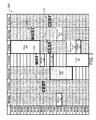
- calendar view 100 displays a week of time that reflects two different time zones. Other time periods may be configured to be displayed in a calendar view. For example, the calendar view may display a day, a week, a month, or some other time period.
- a calendar view such as calendar view 100, displays events during different time periods in the calendar view to reflect the time zone in which the user will be located in during that time period.
- Calendar view 100 shows three different time periods that are associated with two different time zones.
- the first time period in calendar view 100 starts at 00:00 on Monday and ends at 12:00 on Wednesday.
- the second time period starts at 19:00 on Wednesday and ends at to 17:00 on Thursday.
- the third time period starts at 09:00 on Friday and ends at the end of Sunday.
- the first time period is associated with the Central European Summer Time (CEST) 115.
- the second time period is associated with Mountain Standard Time (MST) 125 and the third time period is associated with CEST 115.
- CEST Central European Summer Time
- MST Mountain Standard Time
- the first time period and the third time period are displayed using a dotted pattern fill and the second time period are displayed with no fill.
- many other types of formatting may be applied to the different time periods such that they are visually distinguishable from each other.
- each time period may be associated with a particular color (e.g., green for CEST, blue for MST) and/or some other formatting may be used to reflect the different time zones.
- the text within the different time periods may be displayed using different fonts, different types of lines may be placed around the time periods, and the like.
- a user may configure the formatting for the different time periods as well as whether or not to use different formatting for the different time periods.
- the formatting for the different time periods may be predetermined.
- calendar view 100 clearly shows the different time zones and the events that will occur while the user is located in those time zones.
- the different time periods may be associated with the time zones using different methods. For example, a user may manually input the times when they will be in a certain location (e.g., MST 125, CEST 115). The different time periods may also be associated with the time zones automatically.
- the different time periods in calendar view 100 are automatically determined.
- Other information may also be used in determining when a user will be in a different time zone.
- the information used in determining when a user will be in a different time zone may include but is not limited to, event information (e.g., time zone, location information for non-virtual meetings), movement information (e.g., Global Positioning System "GPS" information or some other sensor information), manual input, and the like.
- event information e.g., time zone, location information for non-virtual meetings
- movement information e.g., Global Positioning System "GPS" information or some other sensor information
- Each event that is within one of the different time periods may be displayed according to the assumed time zone, the user will be in.
- meeting 110 is displayed according to CEST 115 and meeting 130 and lunch 132 are displayed according to MST.
- MST the number of events that are displayed according to MST.
- calendar view 100 it can be readily determined that the user will be in a CEST 115 time zone until they travel on flight 120. The user remains in MST 125 until they take off on flight 140. Once the user lands, calendar view 100 shows that the user is back to CEST 115. More details regarding associating different time zones with different time periods and events are described below.
- FIGURE 2 illustrates a calendar view for a time zone sensitive calendar that includes virtual travel events.
- Calendar view 200 is similar to calendar view 100 that is shown in FIGURE 1 but includes virtual travel event 222, virtual travel event 224, Western European Summer Time (WEST) 220 and different time periods.
- WEST Western European Summer Time
- a calendar view may display time periods in the calendar view to reflect time zones indicating where the user will be located during the time displayed in the calendar view.
- calendar view 200 shows five different time periods.
- the first time period and the second time period that are displayed in calendar view 200 are the same as illustrated in calendar view 100 as shown in FIGURE 1 .
- the third time period in calendar view 200 starts at the end of flight 140 and ends at virtual travel event 222.
- the fourth time period starts at virtual travel event 222 and ends at virtual travel event 224.
- the fifth time period starts at virtual travel event 224 and ends at the end of Sunday.
- the first time period is associated with CEST 115.
- the second time period is associated with MST 125.
- the third time period is associated with CEST 115.
- the fourth time period is associated with WEST 220 and the fifth time period is associated with CEST 115.
- a virtual travel event is automatically added to the time zone sensitive calendar when an event is indicated to be in a different time zone but there are not any travel events indicating travel from one time zone to the time zone where the event is located.
- a virtual travel event may or may not be displayed in a calendar view. For example, see FIGURE 3 for a calendar view where virtual travel events are not depicted.
- meeting 230 is indicated to be in the WEST 220 time zone. There is a one hour time difference between CEST 115 and WEST 220.
- a diagonal line, or some other indicator may be displayed on the time zone sensitive calendar to indicate a division between two different time zones.
- the diagonal line at the top of virtual travel event 222 shows that meeting 230 either starts at 18:00 CEST or at 17:00 WEST.
- a diagonal line may be displayed without the display of a virtual travel event (See FIGURE 3 ).
- Virtual travel event 222 provides the user viewing calendar view 200 with an indication that the meeting is in a different time zone.
- Calendar view 200 may be updated to reflect when the user travels to a new time zone automatically or manually.
- the time zone may automatically change based on a detected time zone change (e.g., using GPS) or when a user selects an option indicating that they are located in the time zone of meeting 230.
- the diagonal line changes to a horizontal line when the time zone change to the meeting is detected.
- virtual travel event 224 shows changing back to CEST 115 in response to the user being indicated to be in the CEST 115 time zone.
- the smart phone or computing device that is associated with the user may determine that the time zone changed from WEST 220 to CEST 115.
- Other methods may be used to determine when a user is located in a different time zone.
- the time of events are adjusted to reflect the time zone where the user is indicated to be located in during the time period.
- FIGURE 3 illustrates a calendar view for a time zone sensitive calendar that includes the same event displayed in two different time zones.
- Calendar view 300 is similar to calendar view 200 that is shown in FIGURE 2 but shows a display of the same event in two different time zones without displaying a virtual travel event.
- Calendar view 300 also includes Moscow Standard Time (MSK) 325, a meeting 320 and different time periods.
- MSK Moscow Standard Time
- calendar view 300 shows five different time periods.
- the first time period, the second time period and the third time period that are displayed in calendar view 300 are the same as illustrated in calendar view 200 as shown in FIGURE 2 .
- the fourth time period in calendar view 300 starts during the meeting 230 and ends at 14:00 CEST.
- the fifth time period starts at 14:00 CEST and ends at the end of Sunday.
- the first time period is associated with CEST 115.
- the second time period is associated with MST 125.
- the third time period is associated with CEST 115.
- the fourth time period is associated with WEST 220 and the fifth time period is associated with MSK 325.
- meeting 230 and meeting 320 is indicated to be associated with two different time zones.
- meeting 230 there is a one hour time difference between CEST 115 and WEST 220.
- a diagonal line is displayed on the time zone sensitive calendar to indicate a division between two different time zones.
- the diagonal line for the meeting 230 shows that meeting 230 either starts at 18:00 CEST or at 17:00 WEST.
- an event such as meeting 320
- the event is depicted in two different time zones.
- the event is illustrated in the time zone before the virtual travel event and the event is also displayed in the time zone after the virtual travel event.
- meeting 320 is displayed in the WEST and is also displayed in the MSK using the CEST 115 time scale.
- a diagonal line connects the same event.
- other indicators may be used to depict a same event in two different time zones.
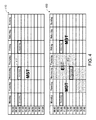
- FIGURE 4 shows two calendar views illustrating changing a recurring event to reflect a different time zone.
- Calendar view 410 illustrates a weekly time period where the user is indicated to be within the same MST time zone during the entire week.
- Calendar view 450 shows the same weekly time period where the user is indicated to be located in the Eastern Standard Time (EST) time zone from Tuesday at 15:00 to Thursday at 15:00.
- EST Eastern Standard Time
- Calendar view 410 shows an event that recurs at 10:00AM MST every Monday, Wednesday and Friday.
- the time of recurring event 412 is automatically adjusted from 10:00AM to 1PM EST.
- Viewing calendar view 450 a user can readily determine that they will be located in a different time zone between Tuesday and Thursday as well as the time of any events, such as recurring event 412 that occurs while they are in the time zone.
- FIGURE 5 shows two calendar views for a time zone sensitive calendar.
- Calendar view 510 and calendar view 550 are similar to calendar view 450 that is displayed in FIGURE 4 .
- Calendar view 510 shows the time period when the user will be in the EST time zone using different formatting as compared to the formatting of calendar view 450.
- outline 520 is displayed around the time period when the user is indicated to be in EST time zone.
- many different types of formatting may be used to visually distinguish different time periods that are associated with different time zones.
- Calendar view 550 shows the time period when the user will be in the EST time zone without using different formatting between the different time periods.
- a calendar view may be displayed without formatting the time periods differently.
- the recurring event 412 is displayed according to the EST time zone instead of the MST time zone.
- other information may be shown to provide the user with more information relating to time zone changes.
- calendar view 600 illustrates travel duration indicators showing compression of time and expansion of time.
- calendar view 600 shows travel duration indicator 610, travel duration indicator 620, and travel duration indicator 630.
- Calendar view 600 shows four different time periods that are associated with three different time zones.
- the first time period in calendar view 600 starts at 00:00 on Monday and ends at 11:00 on Tuesday.
- the second time period starts at 14:00 on Tuesday and ends at to 18:00 on Wednesday.
- the third time period starts at 08:00 on Thursday and ends at 18:00 on Friday.
- the fourth time period begins at 09:00 on Friday and ends at the end of Sunday.
- the first time period and the third time period is associated with Time Zone 1.
- the second time period is associated with Time Zone 2.
- the fourth time period is associated with Time Zone 3.
- the first time period and the third time period are displayed using a dotted pattern fill.
- the second time period is displayed with no fill and the fourth time period is filled with a diagonal line pattern.
- calendar view 600 a user can readily determine when they will be located in a different time zone.
- a user may also view a travel duration indicator to see if the actual travel time between time zones as well as whether time is being compressed or expanded during the travel event.
- Travel duration indicator 610 shows that Flight 1 while only taking three hours to complete according to the time differences between Time Zone 1 and Time Zone 2 actually took 11 hours of actual travel time. Travel duration indicator 610 is divided into eleven segments to show each hour of actual travel time.
- the return flight indicated by Flight 2 displays travel duration indicator 620 that shows Flight 2 took 11 hours of actual travel time even though there is a fourteen hour time span when traveling from Time Zone 2 back to Time Zone 1. Travel duration indicator 620 displays an "11" showing the actual travel time.
- Travel duration indicator 630 illustrates a flight where the flight takes off at 18:00 on Friday in Time Zone 1 and arrived at 09:00 on Friday in Time Zone 3. Travel duration indicator shows a number (1-9) in each segment for displaying the actual travel time of 9 hours. While the travel duration indicators are shown as arrows, other types of travel duration indicators may be displayed. For example, the indicators may be rectangles, some other shape, textual descriptions and the like.
- FIGURES 7 and 8 illustrative routines are described relating to a time zone sensitive calendar. It should be appreciated that more or fewer operations may be performed than shown in the figures and described herein. These operations may also be performed in a different order than those described herein.
- FIGURE 7 illustrates a routine relating to displaying a time zone sensitive calendar.
- Routine 700 begins at operation 710, where information that is associated with the time zone sensitive calendar is accessed.
- the information may include different types of information that may be obtained from the time zone sensitive calendar or from some other source.
- the information may include event information such as appointment information, meeting information, time zone information, category information, importance information, time information, and the like.
- the information may also include information such as, but not limited to trip information (e.g., flight, train, car), car rental information, user location information, GPS (or some other sensor) information, and the like.
- event information may be obtained from the time zone sensitive calendar and trip information may be obtained from a travel source, such as an airline, travel website, and the like.
- the information may also come from one or more other calendars or data files.
- the information may come from any data source that includes information relating to a user's location during a period of time as well as any events that occur during a period of time within the time zone sensitive calendar.
- routine 700 continues to operation 720, where the time zones to include in the calendar view are determined.
- the time zones to include in a calendar view are based on the determined indications of what time zones a user will be located in during the time that is displayed within the calendar view.
- the time period of the calendar view may be configured.
- the time period may be one day, two days, one week, two weeks, one month, two months, and the like.
- the information that is accessed in operation 710 may indicate that the user will be located in one, two, three, four, or five or more different time zones during the time that is displayed in a calendar view of the time zone sensitive calendar.
- one or more travel events may be determined from the information, an event in another time zone may be determined, and the like.
- routine 700 transitions to operation 730, where the different time periods in the calendar view are associated with the different time zones determined in operation 720.
- the calendar view is divided into different time periods based on determined times that the user will be located in each of the time zones.
- each event that occurs within the time period for a time zone is adjusted (if not already in that time zone) to display according to the time of the time zone.
- events may be automatically adjusted when a user is determined to be in a different time zone or is indicated to be traveling to a different time zone.
- FIGURE 7 and the related discussion provide more details regarding associating a time zone with an event.
- routine 700 flows to operation 740, where the time zone sensitive calendar displays the calendar view.
- each of the different time periods that are associated with different time zones are displayed such that they are visually distinguishable from each other.
- many different formatting methods may be used.
- each different time zone may have a different color, pattern, text, and the like.
- any formatting that visually distinguishes the different time zones may be used.
- the different time periods are not visually distinguishable from each other. Instead, the events for each of the different time zones are adjusted to reflect the time of each of the different time zones. Routine 700 then flows to an end operation and returns to processing other actions.
- FIGURE 8 shows an illustrative process for associating an event in a time zone sensitive calendar with a time zone.
- Routine 800 begins at operation 810, where an event in the time zone sensitive calendar is accessed.
- the event(s) may be accessed sequentially during the time period that is displayed in the calendar view or in some other order.
- routine 800 flows to operation 820, where a determination is made as to whether the event is associated with a time zone. For example, an event may be associated with a time zone manually when a user creates an appointment. An event may also automatically be associated with a time zone. When the event is associated with a time zone, the time zone that is associated with the event may be used as the associated time zone and routine 800 may flow to an end operation or continue to operation 830.
- a travel event indicates that a user that is associated with the time zone sensitive calendar is traveling from one time zone to a different time zone.
- the travel event may be created from within the calendar (e.g., as an appointment) or may be determined from an external source such as a travel website or some other location. Travel events may be used to determine the different time periods in the calendar view that are associated with different time zones as well as determining what events are associated with the different time zones.
- routine 800 may flow to an end operation or continue to operation 840.
- a location of the event is determined.
- the location of the event may be used to indicate a time zone that is associated with an event. For example, when a location of the event indicates a different time zone, then that event is associated with the different time zone.
- a virtual travel event may be created when a corresponding travel event is not determined in operation 830.
- the location may be manually set or determined from other information. For example, a user may specify "Meet with John in Denver" from which the time zone may be directly determined from the meeting information in the calendar. According to other examples, the user may specify "Meeting at Joe's Bar and Café.” Other information may be accessed from within the calendar (e.g., other appointments) or from outside of the calendar. For example, a search may be performed to determine an associated location. When a location is determined, routine 800 may flow to an end operation or continue to operation 850.
- Transitioning to operation 850 a determination is made as to whether there is a predecessor event.
- the time zone of the predecessor event may be associated with the event.
- routine 800 may flow to an end operation or continue to operation 860.
- a default time zone is associated with the event.
- a default time zone is associated with the event.
- the default time zone may be set to the time zone where the user lives or works.
- Routine 800 flows to an end operation and returns to processing other actions. For example, routine 800 may return to operation 810 to continue processing the events in the calendar.
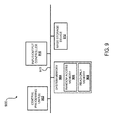
- FIGURE 9 illustrates a computer in which a time zone sensitive calendar may be displayed according to at least one embodiment disclosed herein.
- the computer 900 illustrated in FIGURE 9 includes one or more central processing unit(s) ("CPUs”) 902, a system memory 904, including a random-access memory (“RAM”) 906 and a read-only memory (“ROM”) 908, and a system bus 910 that couples the system memory 904 to the CPU 902.
- CPUs central processing unit
- RAM random-access memory
- ROM read-only memory
- a basic input/output system containing the routines that help to transfer information between elements within the computer 900, such as during startup, may be stored in the ROM 908.
- the CPUs 902 may be standard programmable processors that perform arithmetic and logical operations for the operation of the computer 900, such as the routines 700 and 800 described above.
- the CPUs 902 may perform the operations by transitioning from one discrete, physical state to the next through the manipulation of switching elements that differentiate between and change these states.
- Switching elements may generally include electronic circuits that maintain one of two binary states, such as flip-flops, and electronic circuits that provide an output state based on the logical combination of the states of one or more other switching elements, such as logic gates. These basic switching elements may be combined to create more complex logic circuits, including registers, adders-subtractors, arithmetic logic units, floating-point units, and the like.
- the computer 900 may also include a mass storage device 912.
- the mass storage device may be an optical disk, a magnetic storage device, or a solid state storage device.
- the mass storage device 912 may be operative to store one or more instructions to control a fuel cell discharge controller.
- the RAM 906, ROM 908, and the mass storage device 912 may be operative to have stored thereon, either alone or in various combinations, instructions for controlling a fuel cell discharge controller.
- the computer 900 may store programs and data on the mass storage device 912 by transforming the physical state of the mass storage device 912 to reflect the information being stored.
- the specific transformation of physical state may depend on various factors, in different implementations of this disclosure. Examples of such factors may include, but are not limited to, the technology used to implement the mass storage device 912, whether the mass storage device 912 is characterized as primary or secondary storage, and the like.
- the computer 900 may store information to the mass storage device 912 by issuing instructions through a storage controller to alter the magnetic characteristics of a particular location within a magnetic disk drive device, the reflective or refractive characteristics of a particular location in an optical storage device, or the electrical characteristics of a particular capacitor, transistor, or other discrete component in a solid-state storage device.
- Other transformations of physical media are possible without departing from the scope and spirit of the present description, with the foregoing examples provided only to facilitate this description.
- the computer 900 may further read information from the mass storage device 912 by detecting the physical states or characteristics of one or more particular locations within the mass storage device 912.
- the RAM 906, the ROM 908, or the mass storage device 912 may be operative as computer-readable storage mediums.
- Various aspects of the present disclosure may be stored on other types of computer-readable storage mediums, such as, but not limit to, RAM, ROM, EPROM, EEPROM, flash memory or other solid state memory technology, CD-ROM, digital versatile disks ("DVD"), HD-DVD, BLU-RAY, or other optical storage, magnetic cassettes, magnetic tape, magnetic disk storage or other magnetic storage devices, or any other medium that can be used to store the desired information and which can be accessed by the computer 900. It should be understood that when the claims are interpreted in light of this present disclosure, a computer-readable storage medium does not include energy in the form of waves or signals.
- the computer 900 also may include an input/output controller 916 for receiving and processing input from a number of other devices, including a keyboard, mouse, or electronic stylus. Similarly, the input/output controller 916 may provide an output to a display screen, a printer, or other type of output device.
- One or more embodiments may include a computer-readable storage medium manufactured so that, when read by a properly configured computing device, instructions may be provided to perform operations relating to displaying and updating a time zone sensitive calendar.
Landscapes
- Business, Economics & Management (AREA)
- Human Resources & Organizations (AREA)
- Engineering & Computer Science (AREA)
- Entrepreneurship & Innovation (AREA)
- Strategic Management (AREA)
- General Physics & Mathematics (AREA)
- Physics & Mathematics (AREA)
- Operations Research (AREA)
- Marketing (AREA)
- Quality & Reliability (AREA)
- Tourism & Hospitality (AREA)
- Economics (AREA)
- General Business, Economics & Management (AREA)
- Data Mining & Analysis (AREA)
- Theoretical Computer Science (AREA)
- User Interface Of Digital Computer (AREA)
- Management, Administration, Business Operations System, And Electronic Commerce (AREA)
Applications Claiming Priority (1)
| Application Number | Priority Date | Filing Date | Title |
|---|---|---|---|
| US14/252,095 US10096002B2 (en) | 2014-04-14 | 2014-04-14 | Time zone sensitive calendar |
Publications (1)
| Publication Number | Publication Date |
|---|---|
| EP2933765A1 true EP2933765A1 (de) | 2015-10-21 |
Family
ID=53052668
Family Applications (1)
| Application Number | Title | Priority Date | Filing Date |
|---|---|---|---|
| EP15163424.3A Withdrawn EP2933765A1 (de) | 2014-04-14 | 2015-04-13 | Zeitzonenbewusster kalender |
Country Status (2)
| Country | Link |
|---|---|
| US (1) | US10096002B2 (de) |
| EP (1) | EP2933765A1 (de) |
Families Citing this family (21)
| Publication number | Priority date | Publication date | Assignee | Title |
|---|---|---|---|---|
| US20140136295A1 (en) | 2012-11-13 | 2014-05-15 | Apptio, Inc. | Dynamic recommendations taken over time for reservations of information technology resources |
| US10417591B2 (en) | 2013-07-03 | 2019-09-17 | Apptio, Inc. | Recursive processing of object allocation rules |
| US10325232B2 (en) | 2013-09-20 | 2019-06-18 | Apptio, Inc. | Allocating heritage information in data models |
| US11244364B2 (en) | 2014-02-13 | 2022-02-08 | Apptio, Inc. | Unified modeling of technology towers |
| US9438649B2 (en) * | 2014-03-20 | 2016-09-06 | Microsoft Technology Licensing, Llc | Warped presentation of events in calendar views |
| GB2556504A (en) | 2015-06-30 | 2018-05-30 | Apptio Inc | Infrastructure benchmarking based on dynamic cost modeling |
| US10387815B2 (en) | 2015-09-29 | 2019-08-20 | Apptio, Inc. | Continuously variable resolution of resource allocation |
| US10726367B2 (en) | 2015-12-28 | 2020-07-28 | Apptio, Inc. | Resource allocation forecasting |
| US10474974B2 (en) | 2016-09-08 | 2019-11-12 | Apptio, Inc. | Reciprocal models for resource allocation |
| US10936978B2 (en) * | 2016-09-20 | 2021-03-02 | Apptio, Inc. | Models for visualizing resource allocation |
| US10482407B2 (en) | 2016-11-14 | 2019-11-19 | Apptio, Inc. | Identifying resource allocation discrepancies |
| WO2018143671A1 (en) * | 2017-01-31 | 2018-08-09 | Samsung Electronics Co., Ltd. | Method and electronic device for automatically managing events based on time-zone difference |
| US11775552B2 (en) | 2017-12-29 | 2023-10-03 | Apptio, Inc. | Binding annotations to data objects |
| US10268980B1 (en) | 2017-12-29 | 2019-04-23 | Apptio, Inc. | Report generation based on user responsibility |
| US11163267B2 (en) * | 2019-03-26 | 2021-11-02 | International Business Machines Corporation | Event-based time zone changes |
| US11151104B2 (en) | 2019-05-16 | 2021-10-19 | Microsoft Technology Licensing, Llc | Time systems as data |
| US11120407B2 (en) | 2019-05-16 | 2021-09-14 | Microsoft Technology Licensing, Llc | Real time collaboration in calendar |
| US11645628B2 (en) | 2019-05-16 | 2023-05-09 | Microsoft Technology Licensing, Llc | Translation of time between calendar systems |
| US11061525B2 (en) | 2019-05-16 | 2021-07-13 | Microsoft Technology Licensing, Llc | Digital map calendar user interface |
| US11514405B1 (en) | 2021-05-14 | 2022-11-29 | Microsoft Technology Licensing, Llc | Map calendar graphical user interface with dynamic time mold functionality |
| US11681424B2 (en) | 2021-05-14 | 2023-06-20 | Microsoft Technology Licensing, Llc | Map calendar graphical user interface with content-variable view levels |
Citations (3)
| Publication number | Priority date | Publication date | Assignee | Title |
|---|---|---|---|---|
| US20090168609A1 (en) * | 2007-12-28 | 2009-07-02 | Weir Robert C | Method and system for automatic time-zone sensitive scheduling |
| US20100174998A1 (en) * | 2009-01-06 | 2010-07-08 | Kiha Software Inc. | Calendaring Location-Based Events and Associated Travel |
| US20100214878A1 (en) * | 2009-02-25 | 2010-08-26 | Research In Motion Limited | Method and apparatus for processing a calendar database for time zone shifting |
Family Cites Families (37)
| Publication number | Priority date | Publication date | Assignee | Title |
|---|---|---|---|---|
| US4549047A (en) * | 1982-07-22 | 1985-10-22 | Voicemail International, Inc. | Digitized voice message storage system |
| US4819191A (en) * | 1987-01-29 | 1989-04-04 | International Business Machines Corporation | Electronic calendaring method to establish calendar floating triggers for calendared events and processes |
| US6198696B1 (en) * | 1999-06-16 | 2001-03-06 | Siemens Information And Communication Networks, Inc. | Device and method for tracking time zone changes in communications devices |
| US5845257A (en) * | 1996-02-29 | 1998-12-01 | Starfish Software, Inc. | System and methods for scheduling and tracking events across multiple time zones |
| US5867822A (en) * | 1996-06-26 | 1999-02-02 | Sun Microsystems, Inc. | Method and apparatus for management of electronic calendars throughout an enterprise and management of events in a distributed system |
| US6016478A (en) * | 1996-08-13 | 2000-01-18 | Starfish Software, Inc. | Scheduling system with methods for peer-to-peer scheduling of remote users |
| US7082402B2 (en) * | 1997-06-19 | 2006-07-25 | International Business Machines Corporation | Electronic calendar with group scheduling and storage of user and resource profiles |
| US20010014867A1 (en) * | 1997-06-19 | 2001-08-16 | Douglas Walter Conmy | Electronic calendar with group scheduling |
| US6370566B2 (en) * | 1998-04-10 | 2002-04-09 | Microsoft Corporation | Generating meeting requests and group scheduling from a mobile device |
| US6295541B1 (en) * | 1997-12-16 | 2001-09-25 | Starfish Software, Inc. | System and methods for synchronizing two or more datasets |
| US6266295B1 (en) * | 1998-01-07 | 2001-07-24 | Microsoft Corporation | System and method of displaying times corresponding to events on a calendar |
| US5960406A (en) * | 1998-01-22 | 1999-09-28 | Ecal, Corp. | Scheduling system for use between users on the web |
| US6249486B1 (en) * | 1998-09-30 | 2001-06-19 | Prasanna R. Chitturi | Linear time display |
| US6219307B1 (en) * | 1998-09-30 | 2001-04-17 | Prasanna R. Chitturi | Linear time display |
| US8015049B1 (en) * | 1999-08-18 | 2011-09-06 | S.F. Ip Properties 61 Llc | On-line appointment system |
| US6831970B1 (en) * | 2000-09-21 | 2004-12-14 | International Business Machines Corporation | Method and system for remote activation of a telephone profile |
| US20030009411A1 (en) * | 2001-07-03 | 2003-01-09 | Pranil Ram | Interactive grid-based graphical trading system for real time security trading |
| US7305491B2 (en) * | 2001-07-02 | 2007-12-04 | Intellisync Corporation | Techniques for handling time zone changes in personal information management software |
| US7219109B1 (en) * | 2001-08-27 | 2007-05-15 | Palmsource, Inc. | Time zone management |
| US6950662B2 (en) * | 2002-03-28 | 2005-09-27 | Intel Corporation | Wireless communication device and method for automatic time updates in personal information management applications |
| US7343312B2 (en) * | 2002-04-25 | 2008-03-11 | International Business Machines Corporation | Event scheduling with optimization |
| US20050021636A1 (en) * | 2003-07-11 | 2005-01-27 | Arvind Kumar | Method, apparatus and system for configuring automated responses to email messages |
| US20050114191A1 (en) * | 2003-11-20 | 2005-05-26 | International Business Machines Corporation | Method and apparatus for a calendar system with a location functionality |
| US7856483B2 (en) * | 2004-12-10 | 2010-12-21 | Microsoft Corporation | Information management systems with time zone information, including event scheduling processes |
| US20060136121A1 (en) * | 2004-12-16 | 2006-06-22 | International Business Machines Corporation | Method, system, and computer program product for conveying a changing local time zone in an electronic calendar |
| US20060155591A1 (en) * | 2005-01-10 | 2006-07-13 | Faheem Altaf | Systems, methods, and media for managing a travel itinerary |
| US8626556B2 (en) * | 2005-04-25 | 2014-01-07 | International Business Machines Corporation | Visualizing multiple time zones in a calendaring and scheduling application |
| US20070089071A1 (en) * | 2005-10-14 | 2007-04-19 | Research In Motion Limited | Software mechanism for providing distinct types of time dependent event objects for display in a graphical user interface |
| US7783988B2 (en) * | 2006-02-09 | 2010-08-24 | Sap Ag | Method and apparatus for scheduling appointments for single location entries |
| US20070185752A1 (en) * | 2006-02-09 | 2007-08-09 | Curran Kevin M | Method and apparatus for scheduling appointments for multiple location entries |
| US7774224B2 (en) * | 2006-11-16 | 2010-08-10 | Sap Ag | Methods and apparatuses for organizing events |
| US8607250B2 (en) * | 2007-09-14 | 2013-12-10 | International Business Machines Corporation | Visually indicating a calendar event among different time zones |
| US8838461B2 (en) * | 2008-12-19 | 2014-09-16 | Qualcomm Incorporated | Access and management of cross-platform calendars |
| US20100325214A1 (en) * | 2009-06-18 | 2010-12-23 | Microsoft Corporation | Predictive Collaboration |
| WO2012048163A2 (en) * | 2010-10-06 | 2012-04-12 | Kuity Corp. | Automated analysis and mechanization of scheduling |
| US9760869B2 (en) * | 2013-05-23 | 2017-09-12 | Skedgo Pty Ltd | Visualising multiple time zones |
| US9438649B2 (en) * | 2014-03-20 | 2016-09-06 | Microsoft Technology Licensing, Llc | Warped presentation of events in calendar views |
-
2014
- 2014-04-14 US US14/252,095 patent/US10096002B2/en active Active
-
2015
- 2015-04-13 EP EP15163424.3A patent/EP2933765A1/de not_active Withdrawn
Patent Citations (3)
| Publication number | Priority date | Publication date | Assignee | Title |
|---|---|---|---|---|
| US20090168609A1 (en) * | 2007-12-28 | 2009-07-02 | Weir Robert C | Method and system for automatic time-zone sensitive scheduling |
| US20100174998A1 (en) * | 2009-01-06 | 2010-07-08 | Kiha Software Inc. | Calendaring Location-Based Events and Associated Travel |
| US20100214878A1 (en) * | 2009-02-25 | 2010-08-26 | Research In Motion Limited | Method and apparatus for processing a calendar database for time zone shifting |
Also Published As
| Publication number | Publication date |
|---|---|
| US20150294273A1 (en) | 2015-10-15 |
| US10096002B2 (en) | 2018-10-09 |
Similar Documents
| Publication | Publication Date | Title |
|---|---|---|
| US10096002B2 (en) | Time zone sensitive calendar | |
| US20150199077A1 (en) | Scheduling and viewing a calender event using time zones based on a user's location at event time | |
| US10694337B2 (en) | Managing user data on an electronic device | |
| US20160179353A1 (en) | Analog clock display with time events | |
| US10241654B2 (en) | Computer method and apparatus for automated scheduling | |
| US20190318369A1 (en) | Method and device for predicting business volume | |
| US9760869B2 (en) | Visualising multiple time zones | |
| KR101519575B1 (ko) | 상세한 디스플레이를 위한 터치 제스처 | |
| US10217064B2 (en) | Intelligent home screen for mobile and desktop operating systems | |
| CN101589349B (zh) | 将任务和约会相集成的灵活电子日历 | |
| US20100094678A1 (en) | System and method for providing delay notifications | |
| US20100094529A1 (en) | System and method for providing travel-related information associated with a calendar appointment | |
| US20140082536A1 (en) | Scheduling Events on an Electronic Calendar Utilizing Fixed-positioned Events and a Draggable Calendar Grid | |
| US20140328151A1 (en) | Proportional Hour Time Display | |
| US11774917B2 (en) | Apparatus with API for use in indicating time interval durations of particular events | |
| EP4339754A2 (de) | Verfahren und elektronische vorrichtung zur automatischen verwaltung von ereignissen auf der basis von zeitzonenunterschieden | |
| US9599967B2 (en) | Deferring appointment alarms | |
| KR20140097608A (ko) | 임박한 여행을 위한 자동 엔터테인먼트 캐싱 | |
| US20160269543A1 (en) | Schedule management device and method therefor | |
| EP2897087A1 (de) | Verfahren zur Zuordnung von Terminplaninformationen eines elektronischen Tagebuchs mit Gedächtniskarte, Server zur Bereitstellung des Programms zur Ausführung davon und computerlesbares Aufzeichnungsmedium mit darauf aufgezeichnetem Programm | |
| US10681155B1 (en) | Presenting user activity timeline in a colloquial style | |
| CN105466449B (zh) | 一种车辆环境信息的播放方法及装置 | |
| US9424560B2 (en) | Time indicators for calendars | |
| CN111273824B (zh) | 日程处理方法、装置和设备 | |
| JP3867200B2 (ja) | 電子機器、及び電子機器制御プログラム、電子機器制御方法 |
Legal Events
| Date | Code | Title | Description |
|---|---|---|---|
| PUAI | Public reference made under article 153(3) epc to a published international application that has entered the european phase |
Free format text: ORIGINAL CODE: 0009012 |
|
| 17P | Request for examination filed |
Effective date: 20150413 |
|
| AK | Designated contracting states |
Kind code of ref document: A1 Designated state(s): AL AT BE BG CH CY CZ DE DK EE ES FI FR GB GR HR HU IE IS IT LI LT LU LV MC MK MT NL NO PL PT RO RS SE SI SK SM TR |
|
| AX | Request for extension of the european patent |
Extension state: BA ME |
|
| 17Q | First examination report despatched |
Effective date: 20160706 |
|
| STAA | Information on the status of an ep patent application or granted ep patent |
Free format text: STATUS: THE APPLICATION IS DEEMED TO BE WITHDRAWN |
|
| 18D | Application deemed to be withdrawn |
Effective date: 20161117 |