EP2898482B1 - Zugangssteuerungsleser für remote-anwendungen - Google Patents
Zugangssteuerungsleser für remote-anwendungen Download PDFInfo
- Publication number
- EP2898482B1 EP2898482B1 EP13765589.0A EP13765589A EP2898482B1 EP 2898482 B1 EP2898482 B1 EP 2898482B1 EP 13765589 A EP13765589 A EP 13765589A EP 2898482 B1 EP2898482 B1 EP 2898482B1
- Authority
- EP
- European Patent Office
- Prior art keywords
- users
- access control
- applications
- user
- displays
- Prior art date
- Legal status (The legal status is an assumption and is not a legal conclusion. Google has not performed a legal analysis and makes no representation as to the accuracy of the status listed.)
- Active
Links
Images







Classifications
-
- G—PHYSICS
- G07—CHECKING-DEVICES
- G07C—TIME OR ATTENDANCE REGISTERS; REGISTERING OR INDICATING THE WORKING OF MACHINES; GENERATING RANDOM NUMBERS; VOTING OR LOTTERY APPARATUS; ARRANGEMENTS, SYSTEMS OR APPARATUS FOR CHECKING NOT PROVIDED FOR ELSEWHERE
- G07C9/00—Individual registration on entry or exit
- G07C9/00174—Electronically operated locks; Circuits therefor; Nonmechanical keys therefor, e.g. passive or active electrical keys or other data carriers without mechanical keys
- G07C9/00896—Electronically operated locks; Circuits therefor; Nonmechanical keys therefor, e.g. passive or active electrical keys or other data carriers without mechanical keys specially adapted for particular uses
- G07C9/00904—Electronically operated locks; Circuits therefor; Nonmechanical keys therefor, e.g. passive or active electrical keys or other data carriers without mechanical keys specially adapted for particular uses for hotels, motels, office buildings or the like
-
- G—PHYSICS
- G07—CHECKING-DEVICES
- G07C—TIME OR ATTENDANCE REGISTERS; REGISTERING OR INDICATING THE WORKING OF MACHINES; GENERATING RANDOM NUMBERS; VOTING OR LOTTERY APPARATUS; ARRANGEMENTS, SYSTEMS OR APPARATUS FOR CHECKING NOT PROVIDED FOR ELSEWHERE
- G07C9/00—Individual registration on entry or exit
- G07C9/20—Individual registration on entry or exit involving the use of a pass
- G07C9/22—Individual registration on entry or exit involving the use of a pass in combination with an identity check of the pass holder
- G07C9/23—Individual registration on entry or exit involving the use of a pass in combination with an identity check of the pass holder by means of a password
-
- G—PHYSICS
- G07—CHECKING-DEVICES
- G07C—TIME OR ATTENDANCE REGISTERS; REGISTERING OR INDICATING THE WORKING OF MACHINES; GENERATING RANDOM NUMBERS; VOTING OR LOTTERY APPARATUS; ARRANGEMENTS, SYSTEMS OR APPARATUS FOR CHECKING NOT PROVIDED FOR ELSEWHERE
- G07C9/00—Individual registration on entry or exit
- G07C9/20—Individual registration on entry or exit involving the use of a pass
- G07C9/27—Individual registration on entry or exit involving the use of a pass with central registration
Definitions
- US 7,136,711 B1 discloses a facilities management system with an access control system that is customized by a user.
- US 2011/038278 A1 discloses systems and methods for configuring access control devices, such as by use of a smart card to configure a disconnected access control device.
- Security systems are often implemented in schools, office buildings, and government building, to list a few examples. These security systems typically include elements such as surveillance cameras, network video recorders (NVRs) that store video from the cameras, door controllers, and access control readers to provide access to restricted areas.
- NVRs network video recorders
- access control readers are used to validate users' identities and enable authorized users to access restricted areas through locked doors, for example.
- the access control readers are connected via a communications network to the security system's control system.
- the access control readers obtain information about the users from databases of user information. If the users are authorized to enter the restricted area, then the access control or a separate door controller unlocks the locked door for the users, in one specific example.
- access control readers historically only included card readers. Yet, it is becoming increasingly common to add components to the access control readers such as displays, video cameras, and microphones, to list a few examples.
- a system administrator creates different remote applications groups such as admin, engineer or cardholder, to list a few examples. Then, the users are assigned to one of the remote application groups. Next, the system administrator assigns remote applications, which are executed on application servers, to the remote applications groups. Generally, the remote application groups with higher access levels (e.g., admin) are assigned more remote applications than other remote application groups. Conversely, remote application groups with lower access levels (e.g., cardholders) are assigned fewer remote applications (or possibly none at all). Additionally, the system administrator is able to create as many different groups as needed with any combination of remote applications assigned to the different remote application groups.
- the remote application groups with higher access levels e.g., admin
- remote application groups with lower access levels e.g., cardholders
- the system administrator is able to create as many different groups as needed with any combination of remote applications assigned to the different remote application groups.
- the invention features a security system operation method according to claim 1.
- the method includes that upon user activation of access control readers of the security system, determining whether an application mode of the access control readers is invoked.
- the method further includes displaying selectable applications on displays of the access control readers and invoking the applications in response to selection by the users.
- displaying selectable applications comprises determining assigned groups of the users and acquiring a list of selectable applications from an application server based on the assigned groups of the users.
- the applications are executed on an application server.
- the output from the executing applications is sent for display on the access control readers, using PHP web pages, for example.
- invoking applications includes: invoking daily swipes applications and displaying on the displays of the access control readers numbers of swipes by the users over previous days.
- invoking applications includes invoking change PIN applications and displaying on the displays of the access control readers current PIN screens, new PIN screens, and PIN confirmation screens.
- numbers of occupants within one or more zones and a remaining allowance of people allowed in the one or more zones, and access control readers device settings that users are able to configure are displayed.
- the invention features a security system according to claim 9 comprising an access control reader.
- the reader includes a user validation system for validating users and a display that displays a user interface that includes selectable applications that are invoked by the users.
- the term “and/or” includes any and all combinations of one or more of the associated listed items. Further, the singular forms of the articles “a”, “an” and “the” are intended to include the plural forms as well, unless expressly stated otherwise. It will be further understood that the terms: includes, comprises, including and/or comprising, when used in this specification, specify the presence of stated features, integers, steps, operations, elements, and/or components, but do not preclude the presence or addition of one or more other features, integers, steps, operations, elements, components, and/or groups thereof. Further, it will be understood that when an element, including component or subsystem, is referred to and/or shown as being connected or coupled to another element, it can be directly connected or coupled to the other element or intervening elements may be present.
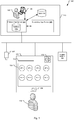
- Fig. 1 is block diagram of a security system 100 including an access control reader 102 that enables a user 112 to run remote applications according to the present invention.
- the access control reader (or reader) 102 of the security system 100 includes a display 104, a card reader (or user validation system) 103, a speaker 108, and a microphone 106.
- the display 104 is a touchscreen that displays user selectable icons, which link to corresponding remote applications.
- the remote applications are executed on a primary application server 124, which is also known as a central database computer.
- the user validation system validates users.
- the user validation system is the card reader 103 of the access control reader 102, which reads identification badges or keycards of the user 112.
- the card reader 103 reads contactless smart cards.
- Contactless smart cards operate similar to RFID technology, but typically provide additional security features such as encryption for protecting information of the users. Additionally, contactless smart cards often have a range of less than 10-15 centimeters (approximately 4-6 inches), which prevents other nearby readers from accidentally reading the smart card.
- the card read uses radio frequency identification (RFID) technology to read an RFID tag embedded within a keycard (or identification badge).
- RFID radio frequency identification
- the contactless smart card or RFID tag is linked to information about the users stored in a database 118 and at a realtime controller 130, which is connected via a communication network 117.
- Other validation systems include voice or facial recognition systems, fingerprint readers, and/or retinal scanners, to list a few examples.
- the speaker 108 and microphone 106 create an intercom system.
- the user 112 sometimes needs to communicate with security personnel as part of a validation or identification process.
- the speaker 108 and microphone 106 enable communication between the user and the security personnel.
- the access control reader 102 uses VoIP (Voice over Internet Protocol) technology to transmit the communications between the user 112 and the security personal.
- VoIP Voice over Internet Protocol
- the realtime controller 130 performs the validation of the users 112 by comparing the information read from the user's keycard with the user information stored at the realtime controller 130 and/or database 118. Then, if the user is validated, the realtime controller 130 instructs the access control reader 102 to unlock the locked door for the user. After the predefined length of time expires, the access control reader 102 automatically relocks the doors to prevent unauthorized persons from entering the restricted area. Additionally, the realtime controller 130 often provides additional security such as anti-passback security, which prevents a keycard from form being used to enter a zone multiple times before leaving the zone first. In a current embodiment, each realtime controller 130 is able to control up to 256 access control readers 102. Moreover, up to 256 controllers 130 are able to be deployed in the security system 100.
- the functionality of the realtime controller 130 is implemented on the primary application server 124.
- the primary application server 124 performs the validation of the users and then instructs the access control reader 102 to unlock the locked door for validated users.
- each access control reader 102 includes an internal database of authenticated users that is accessed by the access control reader 102 if the realtime controller 130 is offline.
- the security system 100 typically includes additional elements such as external cameras 107, smoke detectors, fire alarms, or motion sensors, to list a few examples.
- the elements of the security system 100 are connected via the communications network 117 or bus, which is generally a private or public data network, or a combination of both.
- the security system 100 further includes an office or room 113, which houses the primary application server 124, the database 118, a secondary application server 125, a network video recorder (NVR) 116, and a workstation 120.
- office or room 113 which houses the primary application server 124, the database 118, a secondary application server 125, a network video recorder (NVR) 116, and a workstation 120.
- NVR network video recorder
- the primary application server 124 stores and runs the remote applications and includes the database 118. Additionally, the primary application server 124 also stores additional software and information such as the software to run the server and web pages, for example. Generally, the primary application server 124 is also connected to a secondary application server 125 and NVR 116. The secondary application server 125 is a backup (or fail-over server) and is only utilized when the primary application server 125 fails.
- the application servers 124, 125 are typically Linux web servers running Apache web server software by The Apache Software Foundation.
- the NVR 116 stores video data external cameras 107 that are part of the security system 100. Typically, time and date information are added to the captured audio and video to allow the data to be indexed and reviewed at a later date.
- the database 118 stores information about users such as a name, date of birth, occupation, department, company, identification card or keycard number, and an image of the user, to list a few examples. Generally, some of the user information stored in the database 118 is also stored at the realtime controller 130 to validate card swipes.
- the workstation 120 is used by an administrator 122 to edit user information. Additionally, the workstation 120 allows the administrator 122 to monitor the application servers 124, 125, review the audio and video data stored in the NVR 116, and otherwise set and change the configuration information of the security system.
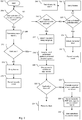
- Fig. 2 is a flow diagram illustrating the operation of the security system 100 that includes access control reader 102 that enables the user to run remote applications according to the present invention.
- the access control reader 102 waits for user activation of the reader 102. If the user 112 has not activated the access control reader 102, then the reader 102 waits for user activation. If the user 112 activates the access control reader 102, then access control reader 102 determines the user's identity in step 206. Typically, the user's identify is determined by reading information associated with the user's keycard and comparing it to information stored in the database 118. In an alternative example not being part of the invention, the access control reader 102 uses biometrics (or biometric information) such as facial recognition, retinal scans, and/or fingerprint information to identify the user 112.
- biometrics or biometric information
- the access control reader 102 determines if the user 112 is a valid user. If the user 112 is not a valid user, then the access control reader 102 denies access to the restricted area in step 212 and records a security event in step 214.
- the access control reader 102 determines if a remote applications mode is invoked in step 216. If the remote applications mode is invoked, then the access control reader 102 determines the remote application group assigned to the user 112 in step 217. In the next step 218, the access control reader 102 acquires a list of authorized remote applications based on the assigned remote application group of the user 112. Next, the access control reader 102 displays the user's authorized remote applications on the display 104 of the access control reader 102 in step 220.
- the access control reader 102 determines if one of the remote applications is invoked by the user 112. If none of the remote applications is invoked, then the access control reader 102 returns to start (202) in step 224.
- the access control reader 102 executes the remote application on the application server 124 in step 226.
- the application server 124 transmits PHP web pages to be displayed on the display of the access control reader 102.
- the user selections made by interacting with the remote application are returned to the application server 124.
- the access control reader 102 determines if the user is authorized to access the restricted area in step 225. If the user 112 is not authorized to access the restricted area, then the access control reader 102 denies access in step 238 and records a security event in step 240.
- the access control reader 102 If the user 112 is authorized to access the restricted area in step 225, then the access control reader 102 unlocks the locked door in step 234. In the next step 236, the access control reader 102 records the security event.
- Fig. 3 shows the remote applications group editing screen 300 for adding and removing remote application groups.
- the system administrator creates new remote application groups as part of the configuration process of the security system by entering the name of the group in the group name box 302 and then selecting the Add button 303.
- the remote applications group editing screen 300 displays a list 306 of all the current remote application groups.
- the system administrator 122 is able to select one of the remote application groups to be the default group by selecting a corresponding default box.
- the default group is the remote application group that is automatically assigned when new users are added to the database 118. Additionally, the remote application groups can be removed by selecting a corresponding remove button.
- Fig. 4 shows a graphical user interface of a software program for editing user information that is stored in the database 118 and associated with the user keycards.
- the graphical user interface is divided in a personnel details section 401 and a card details section 414.
- the personnel details section 401 includes fields to enter user information such as surname (or last name) 402, forename (or first name) 403, address 404, date of birth 410, company name 406, department name 408, and job title 412, to list a few examples. Additionally, the personnel details section 401 includes fields for other information such as payroll number, contact phone number, email address, and gender.
- the card details section 414 enables the system administrator 122 to add, edit, or remove information associated the keycard of the user. For example, the system administrator is able to assign the badge name 415, an access level 416, a PIN 418, and the remote application group 420, to list a few examples.
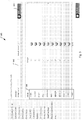
- Fig. 5A shows the remote application allocation screen 500a for editing which remote applications are assigned to the engineer remote application group.
- the system administrator (ref. numeral 122 in Fig. 1 ) selected engineer from the remote application group drop down menu 594.
- the left window 598 displays icons of applications that can be assigned to the selected remote application group.
- the right window 596 displays a preview of what will be displayed in the display 104 of the access control reader 102.
- the graphical user interface uses a drag and drop interface.
- icons are dragged from the left window 598 and dropped the right window 596 to assign remote applications to the remote application group.
- remote application groups with higher access levels are assigned more remote applications than other remote application groups.
- remote application groups with lower access levels are assigned fewer remote applications or possibly none at all.
- Fig. 5B shows the remote application allocation screen 500b for editing which remote applications are assigned to the cardholder remote application group.
- the cardholder remote application group has the lower access level than the engineer remote application group.
- this remote application group is assigned fewer applications than the engineer remote application group.
- Fig. 5C shows an example of the remote application allocation screen 500c for editing which remote applications are assigned to the admin remote application group.
- the admin remote application group has the highest access level.
- the admin remote application group is assigned all of the remote applications.
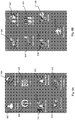
- Figs. 6A and 6B show how remote applications are displayed on the access control reader 102 when the applications mode is invoked.
- the icons do fit on the screen and are shown as Fig. 6A and 6B between which a use can toggle using a scrolling function.
- the user then presses a remote application button displayed on the display 104 prior to swiping their keycard.
- the user simply swipes their keycard and the access control reader 102 operates as a traditional access control reader to authenticate the user and provide access to the restricted area associated with the access control reader.
- the icons 502 to 530 provide links to invoke corresponding remote applications that are executed on the primary applications server 124.
- the user invokes the desired remote application by touching the icon on the display 104.
- stars 511, 529 are added to some icons to indicate a recent change or important update to that remote application.
- the recent alarms star 511 indicates a recent alarm within the last 24 hours.
- Fig. 7 shows the recent alarms screen 700 of the recent alarms application, which is invoked by the recent alarms icon 510 (shown in Figs. 5A-5C and 6A-6B ).
- the recent alarms screen 700 displays up to twenty of the most recent alarms from the last 24 hours.
- the top of the recent alarms screen 700 includes a description of the device 702, an address of the access control reader 703, and a total number of alarms triggered in the last 24 hours 704.
- the address is abbreviated or replaced with ellipses.
- each alarm is displayed as a separate row 708-718. Additionally, information such as the type of alarm, the time alarm was triggered, and the state of the alarm is also displayed within each row.
- each row is expandable to show an expanded row 720 with additional information about the alarm such a description of the alarm's state 721 and the date the alarm was activated 722, to list a few examples.
- the most recent alarm is automatically expanded when the application is invoked by the user.
- separate days are distinguished by a border (e.g., ref. numeral 722) at the top of the row. If there are less than twenty recent alarms, then the recent alarms screen 700 displays a black row (with a '-') 724 to indicate there are no more recent alarms to view.
- a star (ref. numeral 511 in Fig. 6A ) is added to the recent alarms computer icon (e.g., ref. numeral 510 in Fig. 6A ).
- Fig. 8 shows the devices with most alarms screen 800 of the devices with most alarms application, which is invoked by the devices with the most alarms icon 512 (shown in Figs. 5A-5C and 6A-6B ).
- the devices with most alarms screen 800 displays up to twenty access control readers that have had alarms triggered within the last 24 hours. Each access control reader is displayed in a separate row 802 to 810. In the illustrated example, the list is sorted as based on the number of triggered alarms 814 to 822 at each access control reader.
- each row includes a description 824 and address 826 of the access control reader.
- selecting one of the rows sends the user to the recent alarms screen (e.g., ref numeral 700 of see Fig. 7 ) of the selected access control reader.
- the devices with most alarms screen 800 displays a black row 812 to indicate there are no more access control readers to view.
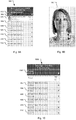
- Fig. 9A shows the recent swipes screen 900 of the recent swipes application, which is invoked by the recent swipes icon 512 (shown in Figs. 5A-5C and 6A-6B ).
- the recent card swipes screen 900 displays the most recent keycard swipes as a series of rows 902 to 914. Additionally, the name of the user (e.g., 903) and a time of the keycard swipe (e.g., 905) are also displayed in each row. In some embodiments, the rows 902 to 914 include an indication of whether the user was allowed or denied access or not.
- selecting one of the rows causes an expanded row 916 to display to additional information such as the date of the keycard swipe, a telephone number of the user, a job title, and an image of the user, to list a few examples.
- an image of the user 950 can be enlarged by clicking on the expanded row 916.
- Fig. 9B shows an example of an enlarged version of the image 950, which is displayed after the user selects an expanded row (e.g., 916) from the recent card swipes screen 900 shown in Fig. 9A .
- an expanded row e.g., 916
- Fig. 10 shows the timeline screen 1000 of the timeline application, which is invoked by selecting the timeline alarms and swipes icon 516 (shown in Figs. 5A-5C and 6A-6B).
- the timeline screen 1000 displays a combination of the recent alarms and keycard swipes for the access control reader 102.
- the functionality of the timeline screen 1000 is identical to the recent alarms screen and/or recent swipes screens (shown in Figs. 7 and 9A , respectively). Thus, each row is expandable to show additional information about the triggered alarm or keycard swipe.
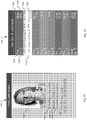
- Fig. 11 shows the card details screen 1100 of the card details application, which is invoked by selecting the card details icon 502 (shown in Figs. 5A-5C and 6A-6B ).
- the card details screen 1100 displays the user information associated with the swiped keycard.
- the card details screen 1100 displays the user's name 1104, the access level of the user 1106, when the keycard was issued 1108, and when the keycard expires 1110. Additionally, an image of the user 1102 is also displayed (if available).
- additional information that could be displayed includes the user's department, company, and job title, to list a few examples.
- Fig. 12 shows the first and last swipes screen 1200 of the first and last swipes application, which is invoked by selecting the first and last swipes icon 504 (shown in Figs. 5A-5C and 6A-6B ).
- the first and last swipes screen 1200 displays the time of the first keycard swipe 1202, the time of the last keycard swipe 1204, the date 1206, and the day of the week 1208 for the keycard swipe.
- the rows are expandable to display an expanded row 1210 with additional information such as the location of where the first swipe occurred 1214, the action 1216 performed by the reader 102 in response to the keycard swipe, the last keycard swipe details 1218, and the action performed by the reader 102 in response to the last keycard swipe 1220, to list a few examples. If there are no logged keycard swipes, then the days are grayed out, unelectable, and "N/A" is displayed within the row.
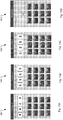
- Figs. 13A-13D show the sequence of screens 1300-1303 for the PIN application, which is invoked by the PIN icon 508 (shown in Figs. 5A-5C and 6A-6B ).
- the user 112 is able to change their PIN via the access control reader 102.
- the enter current PIN screen 1300 the user enters their current PIN. If the user enters their current correct PIN (e.g., 4444), the new PIN screen 1301 is displayed to enable the user to enter a new PIN (e.g., 5555). Next, the confirm new PIN screen 1303 is displayed and the user is required to confirm their new PIN.
- the PIN changed screen 1303 is displayed.
- the PIN change application includes a timeout of approximately four second before returning the user to a previous screen. This timeout could be adjusted be longer or shorter.
- Fig. 14 shows the daily swipes screen 1400 of the daily swipes application, which is invoked by the daily swipes icon 520 (shown in Figs. 5A-5C and 6A-6B ).
- the daily swipes screen 1400 displays a bar graph 1402 of the keycard swipes for the past week. Each day of the week is represented by a separate bar graph.
- the Y-axis 1404 displays the number of swipes and the X-axis 1406 displays the day of the week.
- the user is able to view the exact number of keycard swipes by selecting an individual bar. Generally, days without keycard swipes do not display bars. Additionally, if the user attempts to select a day without any keycard swipes, a zero is briefly displayed before returning the user to the daily swipes screen 1400.
- Fig. 15A shows the alarm - 3 months screen 1500 of the alarms - 3 months application, which is invoked by the alarms - 3 months icon 522 (shown in Figs. 5A-5C and 6A-6B ).
- the alarms - 3 months screen 1500 displays a pie chart 1502 showing the distribution of alarms for the last three months of the entire security system 100.
- the alarms could be displayed with a line graph, a bar graph, or as text, to list a few examples.
- selecting one of the months 1506, 1508, 1510 of the legend 1504 displays additional information about the selected month.
- Fig. 15B shows an example of expanded information that is displayed after selecting one of the months from legend 1504.
- the expanded information displays the total number of alarms 1512 and a percentage of total alarms 1514 for the month of June.
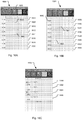
- Fig. 16A shows the muster zone screen 1600 of the muster zone application, which is invoked by the muster zone icon 524 (shown in Figs. 5A-5C and 6A-6B ).
- the muster zone screen 1600 displays the number of people entering and leaving a zone as two line graphs.
- the number of people enter/leaving the zone is determined by the keycard swipes read by the access control reader 102 and any other readers controlling access to the zone.
- the first line 1604 shows the people (or users) entering the muster zone and second line 1605 represents the people leaving the zone.
- each day is divided down into hours, which are displayed on the Y-axis as a series of rows 1606 to 1620.
- the number of swipes for each hour is shown on the X-axis.
- the default view is 07:00 hours to 20:00 hours.
- the top of the muster zone screen 1600 displays the name of the muster zone, the location of the muster zone, and the selected day.
- a timeframe button 1603 expands the line graph to display the line graphs for the entire day. Additionally, the user is able to select if they wish to view only the number of people enter or leaving the muster zone.
- Fig. 16B shows an expanded muster zone screen 1601.
- the user is able to view an hour that has been divided into 5 minute increments 1650 to 1664. Additionally, the user is able to view an exact total of all the people in the muster zone by selecting the time (e.g., 1648) on the Y-axis of the graph.
- Fig. 16C shows a further expanded muster zone screen 1602.
- the user is able to view who has entered/left the muster zone and when.
- Fig. 17 shows the muster occupancy screen 1700 of the occupancy application, which is invoked by the occupancy icon 526 (shown in Figs. 5A-5C and 6A-6B ).
- the muster occupancy screen 1700 displays a pie chart of the number of people currently in a muster zone as well as the remaining allowance of people as a pie chart. Additionally, the exact number of people in the muster zone 1702 and percentage of maximum capacity 1704 are also displayed.
- Fig. 18 shows the your visits screen 1800 of the your visits application, which is invoked by the your visits icon 528 (shown in Figs. 5A-5C and 6A-6B ).
- the your visits screen 1800 displays upcoming and/or ongoing visits, which are client or visitors coming to meet the user at the office building.
- up to twenty visits are shown as a series of rows.
- Each row 1802 to 1810 represents one of the visits. If there are less than twenty visits, then a black row 1812 will be displayed so show that there are no more scheduled visits.
- the ongoing visits are displayed after the upcoming visits.
- the your visits screen 1800 displays the visitor's name 1814.
- additional information such an arrival date, arrival time, and company name are also displayed.
- the user is able to expand each row (e.g., 1816), which displays the visitor's company, telephone number, and expected arrival date, to list a few examples.
- Fig. 19 shows the all visits screen 1900 of the all visits application, which is invoked by the all visits icon 530 (shown in Figs. 5A-5C and 6A-6B ).
- the all visits screen 1900 displays upcoming visits for all of the users. Each visit is displayed as a separate row (e.g., 1802 to 1810). In typical implementation, each row displays the visitor's name (e.g., "Test Test") 1814 and the user 1852 being visited. In the illustrated example, all of the visitors are for a single user. However, if other users had visits scheduled, then their named and names of the visitors would be displayed as well. In a typical implementation, the rows are expandable to show additional information 1854 about the visitor such as an arrival date (or dates, if the visit is ongoing) 1856 and an image of the visitor 1858, to list a few examples.
- additional information 1854 about the visitor such as an arrival date (or dates, if the visit is ongoing) 1856 and an image of the visitor 1858, to list a few examples.
- Fig. 20A shows the device settings screen 2000 of the device settings application, which is accessed via the device settings icon 532 shown in Figs. 5A-5C and 6A-6B).
- the device settings screen 2000 displays a list of user configurable settings.
- the different settings appear as a series of rows: lock open time 2002, door close time 2004, passenger time 2006, alarm time 2008, debounce time 2010, lock open time 2012, and close time 2014. In one example, these settings would be applied to the access control reader 102 (see Fig. 1 ).
- the user is able to change the door close time, which is currently 3 seconds, by selecting the close time row 2014.
- another row or window appears to enable the user to increase or decrease the door close time, which is displayed in a circle 2016 in the close time row 2014.
- Fig. 20B shows the user is able to change the door close time by selecting the '-'(minus) or '+' (plus) buttons 2018, 2020. To save the changes, the user selects the 'Set' button 2022. Similar interfaces are presented for the other user configurable settings in the other rows 2002 to 2012.
Landscapes
- Physics & Mathematics (AREA)
- General Physics & Mathematics (AREA)
- User Interface Of Digital Computer (AREA)
- Telephonic Communication Services (AREA)
- Alarm Systems (AREA)
- Selective Calling Equipment (AREA)
Claims (14)
- Verfahren für den Betrieb eines Sicherheitssystems, mit folgenden Schritten:bei Benutzeraktivierung von Zugangskontrolllesegeräten (102) des Sicherheitssystems, Bestimmen der Identität von Benutzern durch Lesen von Informationen, die zu Schlüsselkarten der Benutzer gehören, und Vergleichen der Informationen mit in einer Datenbank (118) gespeicherten Informationen eines Applikationsservers (124) zur Bestimmung der Gültigkeit der Benutzer, und Bestimmen, ob bei Bestimmung der Gültigkeit der Benutzer ein Applikationsmodus der Zugangskontrolllesegeräte aufgerufen wird (216);Anzeigen von Applikationen auf Displays der Zugangskontrolllesegeräte (220) als Reaktion auf ein Aufrufen des Applikationsmodus;Aufrufen der Applikationen als Reaktion auf eine Auswahl der Benutzer (222) ;dadurch gekennzeichnet, dass das Verfahren ferner umfasst:Bestimmen zugeordneter Gruppen des Benutzers (217);Erhalten einer Liste von Applikationen von dem Applikationsserver basierend auf den zugeordneten Gruppen des Benutzers (218);wobei das Anzeigen von Applikationen umfasst:Anzeigen der Applikationen der Liste basierend auf den zugeordneten Gruppen; unddass das Verfahren ferner das Ausführen von Applikationen umfasst, die von den Benutzern auf dem Applikationsserver ausgewählt werden (226); undSenden von Output aus den ausführenden Applikationen zur Anzeige auf den Zugangskontrolllesegeräten (228); undwobei der Applikationsmodus aufgerufen wird, indem die Benutzer vor dem Durchziehen ihrer Schlüsselkarten eine auf den Displays angezeigte Remote-Applikationsschaltfläche betätigen, und wenn Benutzer den Applikationsmodus nicht aufrufen möchten, dann ziehen die Benutzer ihre Schlüsselkarten durch und die Zugangskontrolllesegeräte authentifizieren die Benutzer und ermöglichen Zugang zu Sperrbereichen, die mit den Zugangskontrolllesegeräten verbunden sind.
- Verfahren nach Anspruch 1, wobei das Senden von Output aus den ausgeführten Applikationen umfasst, dass der Applikationsserver PHP-Webseiten sendet, die auf den Displays der Zugangskontrolllesegeräte angezeigt werden.
- Verfahren nach einem der Ansprüche 1 bis 2, wobei das Authentifizieren der Benutzer und das Bereitstellen eines Zugangs zu Sperrbereichen ferner umfasst:Bestätigen, dass Benutzer eine Zugangsberechtigung zu Türen haben, die mit den Zugangskontrolllesegeräten verbunden sind (225); undEntriegeln der Türen, wenn die Benutzer zugangsberechtigt sind und der Applikationsmodus nicht von den Benutzern aufgerufen wird (234).
- Verfahren nach einem der Ansprüche 1 bis 3, wobei die Zugangskontrolllesegeräte Gegensprechanlagen aufweisen, die aus Lautsprechern und Mikrofonen bestehen.
- Verfahren nach einem der Ansprüche 1 bis 4, wobei das Aufrufen von Applikationen umfasst:Aufrufen von täglichen Durchzugapplikationen (520); undAnzeigen auf den Displays der Zugangskontrolllesegeräte der Anzahl von Durchzügen von Schlüsselkarten durch die Benutzer in den Vortagen.
- Verfahren nach einem der Ansprüche 1 bis 5, wobei das Aufrufen von Applikationen umfasst:Aufrufen von PIN-Änderungsapplikationen (508); undAnzeigen auf den Displays der Zugangskontrolllesegeräte der Bildschirme für die aktuelle PIN, die neue PIN und die PIN-Bestätigung.
- Verfahren nach einem der Ansprüche 1 bis 6, wobei das Aufrufen von Applikationen umfasst:Aufrufen von Belegungsapplikationen (526); undAnzeigen auf den Displays der Zugangskontrolllesegeräte der Anzahl von belegenden Personen innerhalb einer oder mehrerer Zonen und einer verbleibenden zugelassenen Anzahl von Personen, die in einer oder in mehreren Zonen zugelassen sind.
- Verfahren nach einem der Ansprüche 1 bis 7, wobei das Aufrufen von Applikationen umfasst:Aufrufen von Vorrichtungskonfigurationsapplikationen (532); undAnzeigen auf den Displays der Zugangskontrolllesegeräte von Einstellungen, die von Benutzer konfiguriert werden können.
- Sicherheitssystem (100) mit:einem Controller (130);einem Kommunikationsnetz (117);einem Zugangskontrolllesegerät (102), das mit dem Controller über das Kommunikationsnetz verbunden ist, wobei das Zugangskontrolllesegerät aufweist:ein Benutzervalidierungssystem (103) zum Lesen von Informationen der Schlüsselkarte der Benutzer, wobei die gelesenen Informationen mit Benutzerinformationen durch den Controller (130) verglichen werden, welcher die Benutzerinformationen zur Validierung der Benutzer enthält, undeinem Display (104), das zum Anzeigen einer Benutzerschnittstelle ausgebildet ist, welche Applikationen (AAP-n) beinhaltet als Reaktion auf das Aufrufen eines Applikationsmodus für gültige Benutzer durch einen Benutzer,wobei die Applikationen als Reaktion auf die Auswahl der Benutzer aufgerufen werden;dadurch gekennzeichnet, dass die angezeigten Applikationen auf zugeordneten Gruppen der Benutzer basieren;und dass das Sicherheitssystem aufweist:einen Applikationsserver, der zum Ausführen der von den Benutzern ausgewählten Applikationen ausgebildet ist, wobei der Output der ausführenden Applikationen zum Anzeigen auf dem Display des Zugangskontrolllesegeräts gesendet wird;ferner dadurch gekennzeichnet, dass der Applikationsmodus aufgerufen wird, indem die Benutzer vor dem Durchziehen ihrer Schlüsselkarte eine auf dem Display angezeigte Remote-Applikationsschaltfläche betätigen, und wenn Benutzer den Applikationsmodus nicht aufrufen möchten, dann ziehen die Benutzer ihre Schlüsselkarten durch und das Zugangskontrolllesegerät authentifiziert die Benutzer und ermöglicht Zugang zu Sperrbereichen, die mit den Zugangskontrolllesegeräten verbunden sind.
- Sicherheitssystem nach Anspruch 9, wobei das Display zum Anzeigen von PHP-Webseiten ausgebildet ist, die von dem Applikationsserver (124) gesendet werden.
- Sicherheitssystem nach einem der Ansprüche 9 bis 10, wobei das Zugangskontrolllesegerät eine Gegensprechanlage (108) aufweist, die mindestens einen Lautsprecher und mindestens ein Mikrofon aufweist.
- Sicherheitssystem nach einem der Ansprüche 9 bis 11, wobei die aufgerufenen Applikationen eine tägliche Durchzugapplikation (520) umfassen, welche auf dem Display des Zugangskontrolllesegeräts die Anzahl von Durchzügen von Schlüsselkarten durch die Benutzer in den Vortagen anzeigt.
- Sicherheitssystem nach einem der Ansprüche 9 bis 12, wobei die aufgerufenen Applikationen eine PIN-Änderungsapplikation (508) umfassen, die auf dem Display des Zugangskontrolllesegeräts die Bildschirme für die aktuelle PIN, die neue PIN und die PIN-Bestätigung anzeigt.
- Sicherheitssystem nach einem der Ansprüche 9 bis 13, wobei die aufgerufenen Applikationen eine Belegungsapplikation (526) aufweisen, die auf dem Display des Zugangskontrolllesegeräts die Anzahl von belegenden Personen innerhalb einer oder mehrerer Zonen anzeigt und eine verbleibenden zugelassene Anzahl von Personen, die in einer oder in mehreren Zonen zugelassen sind.
Applications Claiming Priority (2)
| Application Number | Priority Date | Filing Date | Title |
|---|---|---|---|
| US13/622,182 US8888002B2 (en) | 2012-09-18 | 2012-09-18 | Access control reader enabling remote applications |
| PCT/US2013/058928 WO2014046911A1 (en) | 2012-09-18 | 2013-09-10 | Access control reader enabling remote applications |
Publications (2)
| Publication Number | Publication Date |
|---|---|
| EP2898482A1 EP2898482A1 (de) | 2015-07-29 |
| EP2898482B1 true EP2898482B1 (de) | 2020-02-12 |
Family
ID=49223894
Family Applications (1)
| Application Number | Title | Priority Date | Filing Date |
|---|---|---|---|
| EP13765589.0A Active EP2898482B1 (de) | 2012-09-18 | 2013-09-10 | Zugangssteuerungsleser für remote-anwendungen |
Country Status (5)
| Country | Link |
|---|---|
| US (2) | US8888002B2 (de) |
| EP (1) | EP2898482B1 (de) |
| CN (2) | CN109859361A (de) |
| AR (1) | AR092414A1 (de) |
| WO (1) | WO2014046911A1 (de) |
Families Citing this family (162)
| Publication number | Priority date | Publication date | Assignee | Title |
|---|---|---|---|---|
| US9426132B1 (en) | 2012-09-12 | 2016-08-23 | Emc Corporation | Methods and apparatus for rules-based multi-factor verification |
| US9280645B1 (en) * | 2012-11-15 | 2016-03-08 | Emc Corporation | Local and remote verification |
| US8970367B2 (en) * | 2013-05-15 | 2015-03-03 | Aquila Offshore, LLC | Person on board system and method |
| US9916707B2 (en) | 2013-08-19 | 2018-03-13 | Arm Ip Limited | Interacting with embedded devices within a user's environment |
| CA2926811C (en) * | 2013-10-07 | 2023-03-21 | Google Inc. | Smart-home hazard detector providing context specific features and/or pre-alarm configurations |
| US9734681B2 (en) * | 2013-10-07 | 2017-08-15 | Ubiquiti Networks, Inc. | Cloud-based video monitoring |
| US11615199B1 (en) * | 2014-12-31 | 2023-03-28 | Idemia Identity & Security USA LLC | User authentication for digital identifications |
| US10254749B2 (en) * | 2015-03-27 | 2019-04-09 | Rockwell Automation Technologies, Inc. | Systems and methods for virtually tagging and securing industrial equipment |
| WO2016168409A1 (en) | 2015-04-14 | 2016-10-20 | Capital One Services, LLC. | Automated bluetooth pairing |
| CN105809760A (zh) * | 2016-03-31 | 2016-07-27 | 湖南云控科技有限公司 | 一种智能校园安防管理方法 |
| ITUA20162215A1 (it) * | 2016-04-01 | 2017-10-01 | Camper Park S R L | Sistema d'accesso a una struttura d'alloggio |
| US20170286356A1 (en) * | 2016-04-01 | 2017-10-05 | Intel Corporation | Enhanced quality of service mechanism for ma usb protocol |
| CN106485816A (zh) * | 2016-09-27 | 2017-03-08 | 上海思慧德安防设备有限公司 | 一种具有离线防返传功能的门禁控制方法 |
| US11315114B2 (en) | 2016-12-28 | 2022-04-26 | Capital One Services, Llc | Dynamic transaction card protected by multi-factor authentication |
| US10515361B2 (en) | 2016-12-28 | 2019-12-24 | Capital One Services, Llc | Smart card secure online checkout |
| GB2564477A (en) * | 2017-07-06 | 2019-01-16 | Argus Global Pty Ltd | An access terminal control system |
| US10657782B2 (en) * | 2017-12-21 | 2020-05-19 | At&T Intellectual Property I, L.P. | Networked premises security |
| US10546444B2 (en) | 2018-06-21 | 2020-01-28 | Capital One Services, Llc | Systems and methods for secure read-only authentication |
| US11030867B1 (en) * | 2018-07-17 | 2021-06-08 | Security Identification Systems, Inc. | System and method for the assignment of passengers to available lifeboat |
| US11216806B2 (en) | 2018-09-19 | 2022-01-04 | Capital One Services, Llc | Systems and methods for providing card interactions |
| US10685350B2 (en) | 2018-10-02 | 2020-06-16 | Capital One Services, Llc | Systems and methods for cryptographic authentication of contactless cards |
| CA3115142A1 (en) | 2018-10-02 | 2020-04-09 | Capital One Services, Llc | Systems and methods for cryptographic authentication of contactless cards |
| SG11202103249VA (en) | 2018-10-02 | 2021-04-29 | Capital One Services Llc | Systems and methods for cryptographic authentication of contactless cards |
| US10579998B1 (en) | 2018-10-02 | 2020-03-03 | Capital One Services, Llc | Systems and methods for cryptographic authentication of contactless cards |
| US10771254B2 (en) | 2018-10-02 | 2020-09-08 | Capital One Services, Llc | Systems and methods for email-based card activation |
| US10489781B1 (en) | 2018-10-02 | 2019-11-26 | Capital One Services, Llc | Systems and methods for cryptographic authentication of contactless cards |
| WO2020072550A1 (en) | 2018-10-02 | 2020-04-09 | Capital One Services, Llc | Systems and methods for cryptographic authentication of contactless cards |
| CA3115252A1 (en) | 2018-10-02 | 2020-04-09 | Capital One Services, Llc | Systems and methods for cryptographic authentication of contactless cards |
| US10783519B2 (en) | 2018-10-02 | 2020-09-22 | Capital One Services, Llc | Systems and methods for cryptographic authentication of contactless cards |
| US10909527B2 (en) | 2018-10-02 | 2021-02-02 | Capital One Services, Llc | Systems and methods for performing a reissue of a contactless card |
| US10733645B2 (en) | 2018-10-02 | 2020-08-04 | Capital One Services, Llc | Systems and methods for establishing identity for order pick up |
| AU2019355878A1 (en) | 2018-10-02 | 2021-02-25 | Capital One Services, Llc | Systems and methods for cryptographic authentication of contactless cards |
| US10542036B1 (en) | 2018-10-02 | 2020-01-21 | Capital One Services, Llc | Systems and methods for signaling an attack on contactless cards |
| CA3115064A1 (en) | 2018-10-02 | 2020-04-09 | Capital One Services, Llc | Systems and methods for cryptographic authentication of contactless cards |
| US10592710B1 (en) | 2018-10-02 | 2020-03-17 | Capital One Services, Llc | Systems and methods for cryptographic authentication of contactless cards |
| US10771253B2 (en) | 2018-10-02 | 2020-09-08 | Capital One Services, Llc | Systems and methods for cryptographic authentication of contactless cards |
| US10554411B1 (en) | 2018-10-02 | 2020-02-04 | Capital One Services, Llc | Systems and methods for cryptographic authentication of contactless cards |
| WO2020072440A1 (en) | 2018-10-02 | 2020-04-09 | Capital One Services, Llc | Systems and methods for cryptographic authentication of contactless cards |
| US10505738B1 (en) | 2018-10-02 | 2019-12-10 | Capital One Services, Llc | Systems and methods for cryptographic authentication of contactless cards |
| US10565587B1 (en) | 2018-10-02 | 2020-02-18 | Capital One Services, Llc | Systems and methods for cryptographic authentication of contactless cards |
| US10581611B1 (en) | 2018-10-02 | 2020-03-03 | Capital One Services, Llc | Systems and methods for cryptographic authentication of contactless cards |
| MX2021003217A (es) | 2018-10-02 | 2021-05-12 | Capital One Services Llc | Sistemas y metodos para autentificacion criptografica de tarjetas sin contacto. |
| US10582386B1 (en) | 2018-10-02 | 2020-03-03 | Capital One Services, Llc | Systems and methods for cryptographic authentication of contactless cards |
| US10511443B1 (en) | 2018-10-02 | 2019-12-17 | Capital One Services, Llc | Systems and methods for cryptographic authentication of contactless cards |
| WO2020072413A1 (en) | 2018-10-02 | 2020-04-09 | Capital One Services, Llc | Systems and methods for cryptographic authentication of contactless cards |
| US11210664B2 (en) | 2018-10-02 | 2021-12-28 | Capital One Services, Llc | Systems and methods for amplifying the strength of cryptographic algorithms |
| US10949520B2 (en) | 2018-10-02 | 2021-03-16 | Capital One Services, Llc | Systems and methods for cross coupling risk analytics and one-time-passcodes |
| US10607214B1 (en) | 2018-10-02 | 2020-03-31 | Capital One Services, Llc | Systems and methods for cryptographic authentication of contactless cards |
| CA3115107A1 (en) | 2018-10-02 | 2020-04-09 | Capital One Services, Llc | Systems and methods for cryptographic authentication of contactless cards |
| CA3112585A1 (en) | 2018-10-02 | 2020-04-09 | Capital One Services, Llc | Systems and methods for cryptographic authentication of contactless cards |
| JP7194932B2 (ja) * | 2018-10-17 | 2022-12-23 | パナソニックIpマネジメント株式会社 | 施解錠システム及び無線通信方式 |
| US10664830B1 (en) | 2018-12-18 | 2020-05-26 | Capital One Services, Llc | Devices and methods for selective contactless communication |
| US11361302B2 (en) | 2019-01-11 | 2022-06-14 | Capital One Services, Llc | Systems and methods for touch screen interface interaction using a card overlay |
| US11037136B2 (en) | 2019-01-24 | 2021-06-15 | Capital One Services, Llc | Tap to autofill card data |
| US10510074B1 (en) | 2019-02-01 | 2019-12-17 | Capital One Services, Llc | One-tap payment using a contactless card |
| US11120453B2 (en) | 2019-02-01 | 2021-09-14 | Capital One Services, Llc | Tap card to securely generate card data to copy to clipboard |
| US10467622B1 (en) | 2019-02-01 | 2019-11-05 | Capital One Services, Llc | Using on-demand applications to generate virtual numbers for a contactless card to securely autofill forms |
| US10425129B1 (en) | 2019-02-27 | 2019-09-24 | Capital One Services, Llc | Techniques to reduce power consumption in near field communication systems |
| US10523708B1 (en) | 2019-03-18 | 2019-12-31 | Capital One Services, Llc | System and method for second factor authentication of customer support calls |
| US10984416B2 (en) | 2019-03-20 | 2021-04-20 | Capital One Services, Llc | NFC mobile currency transfer |
| US10438437B1 (en) | 2019-03-20 | 2019-10-08 | Capital One Services, Llc | Tap to copy data to clipboard via NFC |
| US10643420B1 (en) | 2019-03-20 | 2020-05-05 | Capital One Services, Llc | Contextual tapping engine |
| US10535062B1 (en) | 2019-03-20 | 2020-01-14 | Capital One Services, Llc | Using a contactless card to securely share personal data stored in a blockchain |
| US10970712B2 (en) | 2019-03-21 | 2021-04-06 | Capital One Services, Llc | Delegated administration of permissions using a contactless card |
| US10467445B1 (en) | 2019-03-28 | 2019-11-05 | Capital One Services, Llc | Devices and methods for contactless card alignment with a foldable mobile device |
| US11521262B2 (en) | 2019-05-28 | 2022-12-06 | Capital One Services, Llc | NFC enhanced augmented reality information overlays |
| US10516447B1 (en) | 2019-06-17 | 2019-12-24 | Capital One Services, Llc | Dynamic power levels in NFC card communications |
| US10871958B1 (en) | 2019-07-03 | 2020-12-22 | Capital One Services, Llc | Techniques to perform applet programming |
| US11392933B2 (en) | 2019-07-03 | 2022-07-19 | Capital One Services, Llc | Systems and methods for providing online and hybridcard interactions |
| US11694187B2 (en) | 2019-07-03 | 2023-07-04 | Capital One Services, Llc | Constraining transactional capabilities for contactless cards |
| US12086852B2 (en) | 2019-07-08 | 2024-09-10 | Capital One Services, Llc | Authenticating voice transactions with payment card |
| US10713649B1 (en) | 2019-07-09 | 2020-07-14 | Capital One Services, Llc | System and method enabling mobile near-field communication to update display on a payment card |
| US10498401B1 (en) | 2019-07-15 | 2019-12-03 | Capital One Services, Llc | System and method for guiding card positioning using phone sensors |
| US10885514B1 (en) | 2019-07-15 | 2021-01-05 | Capital One Services, Llc | System and method for using image data to trigger contactless card transactions |
| US11182771B2 (en) | 2019-07-17 | 2021-11-23 | Capital One Services, Llc | System for value loading onto in-vehicle device |
| US10733601B1 (en) | 2019-07-17 | 2020-08-04 | Capital One Services, Llc | Body area network facilitated authentication or payment authorization |
| US10832271B1 (en) | 2019-07-17 | 2020-11-10 | Capital One Services, Llc | Verified reviews using a contactless card |
| US11521213B2 (en) | 2019-07-18 | 2022-12-06 | Capital One Services, Llc | Continuous authentication for digital services based on contactless card positioning |
| US10506426B1 (en) | 2019-07-19 | 2019-12-10 | Capital One Services, Llc | Techniques for call authentication |
| US10541995B1 (en) | 2019-07-23 | 2020-01-21 | Capital One Services, Llc | First factor contactless card authentication system and method |
| CN121393015A (zh) | 2019-10-02 | 2026-01-23 | 第一资本服务有限责任公司 | 使用非接触式传统磁条数据的客户端设备认证 |
| US11651361B2 (en) | 2019-12-23 | 2023-05-16 | Capital One Services, Llc | Secure authentication based on passport data stored in a contactless card |
| US10885410B1 (en) | 2019-12-23 | 2021-01-05 | Capital One Services, Llc | Generating barcodes utilizing cryptographic techniques |
| US11615395B2 (en) | 2019-12-23 | 2023-03-28 | Capital One Services, Llc | Authentication for third party digital wallet provisioning |
| US11113685B2 (en) | 2019-12-23 | 2021-09-07 | Capital One Services, Llc | Card issuing with restricted virtual numbers |
| US10862540B1 (en) | 2019-12-23 | 2020-12-08 | Capital One Services, Llc | Method for mapping NFC field strength and location on mobile devices |
| US10657754B1 (en) | 2019-12-23 | 2020-05-19 | Capital One Services, Llc | Contactless card and personal identification system |
| US10733283B1 (en) | 2019-12-23 | 2020-08-04 | Capital One Services, Llc | Secure password generation and management using NFC and contactless smart cards |
| US11200563B2 (en) | 2019-12-24 | 2021-12-14 | Capital One Services, Llc | Account registration using a contactless card |
| US10664941B1 (en) | 2019-12-24 | 2020-05-26 | Capital One Services, Llc | Steganographic image encoding of biometric template information on a card |
| US10853795B1 (en) | 2019-12-24 | 2020-12-01 | Capital One Services, Llc | Secure authentication based on identity data stored in a contactless card |
| US10909544B1 (en) | 2019-12-26 | 2021-02-02 | Capital One Services, Llc | Accessing and utilizing multiple loyalty point accounts |
| US10757574B1 (en) | 2019-12-26 | 2020-08-25 | Capital One Services, Llc | Multi-factor authentication providing a credential via a contactless card for secure messaging |
| US11038688B1 (en) | 2019-12-30 | 2021-06-15 | Capital One Services, Llc | Techniques to control applets for contactless cards |
| US11455620B2 (en) | 2019-12-31 | 2022-09-27 | Capital One Services, Llc | Tapping a contactless card to a computing device to provision a virtual number |
| US10860914B1 (en) | 2019-12-31 | 2020-12-08 | Capital One Services, Llc | Contactless card and method of assembly |
| US11127276B2 (en) * | 2020-01-27 | 2021-09-21 | James Michael Prokes | Emergency alarm system for restricted spaces |
| US11210656B2 (en) | 2020-04-13 | 2021-12-28 | Capital One Services, Llc | Determining specific terms for contactless card activation |
| US11823175B2 (en) | 2020-04-30 | 2023-11-21 | Capital One Services, Llc | Intelligent card unlock |
| US11222342B2 (en) | 2020-04-30 | 2022-01-11 | Capital One Services, Llc | Accurate images in graphical user interfaces to enable data transfer |
| US10915888B1 (en) | 2020-04-30 | 2021-02-09 | Capital One Services, Llc | Contactless card with multiple rotating security keys |
| US11030339B1 (en) | 2020-04-30 | 2021-06-08 | Capital One Services, Llc | Systems and methods for data access control of personal user data using a short-range transceiver |
| US10861006B1 (en) | 2020-04-30 | 2020-12-08 | Capital One Services, Llc | Systems and methods for data access control using a short-range transceiver |
| US10963865B1 (en) | 2020-05-12 | 2021-03-30 | Capital One Services, Llc | Augmented reality card activation experience |
| US11100511B1 (en) | 2020-05-18 | 2021-08-24 | Capital One Services, Llc | Application-based point of sale system in mobile operating systems |
| US11063979B1 (en) | 2020-05-18 | 2021-07-13 | Capital One Services, Llc | Enabling communications between applications in a mobile operating system |
| US11062098B1 (en) | 2020-08-11 | 2021-07-13 | Capital One Services, Llc | Augmented reality information display and interaction via NFC based authentication |
| US12165149B2 (en) | 2020-08-12 | 2024-12-10 | Capital One Services, Llc | Systems and methods for user verification via short-range transceiver |
| SE2050963A1 (en) * | 2020-08-19 | 2022-02-20 | Amido Ab Publ | Control system and method for operating such a control system |
| US11165586B1 (en) | 2020-10-30 | 2021-11-02 | Capital One Services, Llc | Call center web-based authentication using a contactless card |
| US11482312B2 (en) | 2020-10-30 | 2022-10-25 | Capital One Services, Llc | Secure verification of medical status using a contactless card |
| US11373169B2 (en) | 2020-11-03 | 2022-06-28 | Capital One Services, Llc | Web-based activation of contactless cards |
| US11216799B1 (en) | 2021-01-04 | 2022-01-04 | Capital One Services, Llc | Secure generation of one-time passcodes using a contactless card |
| US11682012B2 (en) | 2021-01-27 | 2023-06-20 | Capital One Services, Llc | Contactless delivery systems and methods |
| US11792001B2 (en) | 2021-01-28 | 2023-10-17 | Capital One Services, Llc | Systems and methods for secure reprovisioning |
| US11562358B2 (en) | 2021-01-28 | 2023-01-24 | Capital One Services, Llc | Systems and methods for near field contactless card communication and cryptographic authentication |
| US11687930B2 (en) | 2021-01-28 | 2023-06-27 | Capital One Services, Llc | Systems and methods for authentication of access tokens |
| US11438329B2 (en) | 2021-01-29 | 2022-09-06 | Capital One Services, Llc | Systems and methods for authenticated peer-to-peer data transfer using resource locators |
| US11777933B2 (en) | 2021-02-03 | 2023-10-03 | Capital One Services, Llc | URL-based authentication for payment cards |
| US11842588B2 (en) | 2021-02-08 | 2023-12-12 | Panduit Corp. | System for controlling access to an enclosure |
| US11637826B2 (en) | 2021-02-24 | 2023-04-25 | Capital One Services, Llc | Establishing authentication persistence |
| US11245438B1 (en) | 2021-03-26 | 2022-02-08 | Capital One Services, Llc | Network-enabled smart apparatus and systems and methods for activating and provisioning same |
| US12143515B2 (en) | 2021-03-26 | 2024-11-12 | Capital One Services, Llc | Systems and methods for transaction card-based authentication |
| US12160419B2 (en) | 2021-04-15 | 2024-12-03 | Capital One Services, Llc | Authenticated messaging session with contactless card authentication |
| US11961089B2 (en) | 2021-04-20 | 2024-04-16 | Capital One Services, Llc | On-demand applications to extend web services |
| US11935035B2 (en) | 2021-04-20 | 2024-03-19 | Capital One Services, Llc | Techniques to utilize resource locators by a contactless card to perform a sequence of operations |
| US11902442B2 (en) | 2021-04-22 | 2024-02-13 | Capital One Services, Llc | Secure management of accounts on display devices using a contactless card |
| US11354555B1 (en) | 2021-05-04 | 2022-06-07 | Capital One Services, Llc | Methods, mediums, and systems for applying a display to a transaction card |
| US12301735B2 (en) | 2021-06-18 | 2025-05-13 | Capital One Services, Llc | Systems and methods for contactless card communication and multi-device key pair cryptographic authentication |
| US12335412B2 (en) | 2021-06-21 | 2025-06-17 | Capital One Services, Llc | Systems and methods for scalable cryptographic authentication of contactless cards |
| US12041172B2 (en) | 2021-06-25 | 2024-07-16 | Capital One Services, Llc | Cryptographic authentication to control access to storage devices |
| US12061682B2 (en) | 2021-07-19 | 2024-08-13 | Capital One Services, Llc | System and method to perform digital authentication using multiple channels of communication |
| US12495042B2 (en) | 2021-08-16 | 2025-12-09 | Capital One Services, Llc | Systems and methods for resetting an authentication counter |
| US12062258B2 (en) | 2021-09-16 | 2024-08-13 | Capital One Services, Llc | Use of a payment card to unlock a lock |
| US12069173B2 (en) | 2021-12-15 | 2024-08-20 | Capital One Services, Llc | Key recovery based on contactless card authentication |
| US12166750B2 (en) | 2022-02-08 | 2024-12-10 | Capital One Services, Llc | Systems and methods for secure access of storage |
| EP4283414A1 (de) * | 2022-05-25 | 2023-11-29 | Carrier Corporation | Aufrechterhaltung gesunder räume für benutzer unter verwendung mobiler berechtigungsnachweise |
| US12354077B2 (en) | 2022-06-23 | 2025-07-08 | Capital One Services, Llc | Mobile web browser authentication and checkout using a contactless card |
| US12596780B2 (en) | 2022-06-27 | 2026-04-07 | Capital One Services, LLC. | Techniques to perform dynamic call center authentication utilizing a contactless card |
| US12511654B2 (en) | 2022-08-08 | 2025-12-30 | Capital One Services, Llc | Systems and methods for bypassing contactless payment transaction limit |
| US12354104B2 (en) | 2022-08-09 | 2025-07-08 | Capital One Services, Llc | Methods and arrangements for proof of purchase |
| US12505450B2 (en) | 2022-08-17 | 2025-12-23 | Capital One Services, Llc | Systems and methods for dynamic data generation and cryptographic card authentication |
| US12289396B2 (en) | 2022-08-18 | 2025-04-29 | Capital One Services, Llc | Parallel secret salt generation and authentication for encrypted communication |
| US12592828B2 (en) | 2023-01-06 | 2026-03-31 | Capital One Services, Llc | System and method for parallel manufacture and verification of one-time-password authentication cards |
| US12147983B2 (en) | 2023-01-13 | 2024-11-19 | Capital One Services, Llc | Systems and methods for multi-factor authentication using device tracking and identity verification |
| US12519652B2 (en) | 2023-02-24 | 2026-01-06 | Capital One Services, Llc | System and method for dynamic integration of user-provided data with one-time-password authentication cryptogram |
| US12592819B2 (en) | 2023-02-28 | 2026-03-31 | Capital One Services, Llc | Membership account management using a contactless card |
| US12621642B2 (en) | 2023-03-07 | 2026-05-05 | Capital One Services, Llc | Systems and methods for device case detection for adaptive near field communication |
| US12248832B2 (en) | 2023-03-07 | 2025-03-11 | Capital One Services, Llc | Systems and methods for steganographic image encoding and identity verification using same |
| US12335256B2 (en) | 2023-03-08 | 2025-06-17 | Capital One Services, Llc | Systems and methods for device binding authentication |
| US12591875B2 (en) | 2023-03-10 | 2026-03-31 | Capital One Services, Llc | Systems and methods of contactless card as one authentication factor for multiple factor authentication |
| US12248928B2 (en) | 2023-03-13 | 2025-03-11 | Capital One Services, Llc | Systems and methods of secure merchant payment over messaging platform using a contactless card |
| US12511640B2 (en) | 2023-03-13 | 2025-12-30 | Capital One Services, Llc | Systems and methods of managing password using contactless card |
| US12124903B2 (en) | 2023-03-16 | 2024-10-22 | Capital One Services, Llc | Card with a time-sensitive element and systems and methods for implementing the same |
| US12299672B2 (en) | 2023-03-30 | 2025-05-13 | Capital One Services, Llc | System and method for authentication with transaction cards |
| US12499432B2 (en) | 2023-04-06 | 2025-12-16 | Capital One Services, Llc | Techniques to perform operations with a contactless card when in the presence of a trusted device |
| US12591876B2 (en) | 2023-04-07 | 2026-03-31 | Capital One Services, Llc | Systems and methods for launching a mobile application or a browser extension responsive to satisfying predetermined conditions |
| US12200135B2 (en) | 2023-06-13 | 2025-01-14 | Capital One Services, Llc | Contactless card-based authentication via web-browser |
| US12505448B2 (en) | 2023-08-09 | 2025-12-23 | Capital One Services, Llc | Systems and methods for fraud prevention in mobile application verification device enrollment process |
| US12511638B2 (en) | 2023-09-07 | 2025-12-30 | Capital One Services, Llc | Assignment of near-field communications applets |
| US12580767B2 (en) | 2023-10-31 | 2026-03-17 | Capital One Services, LLC. | Transmission of secure and authenticated data over a network |
| US12580752B2 (en) | 2024-01-03 | 2026-03-17 | Capital One Services, Llc | Systems and methods for generating shared secret key for transaction cards |
Family Cites Families (34)
| Publication number | Priority date | Publication date | Assignee | Title |
|---|---|---|---|---|
| US5245329A (en) * | 1989-02-27 | 1993-09-14 | Security People Inc. | Access control system with mechanical keys which store data |
| GB9125540D0 (en) * | 1991-11-30 | 1992-01-29 | Davies John H E | Access control systems |
| US6351817B1 (en) * | 1999-10-27 | 2002-02-26 | Terence T. Flyntz | Multi-level secure computer with token-based access control |
| US7424618B2 (en) * | 2001-03-14 | 2008-09-09 | Paladin Electronic Services, Inc. | Biometric access control and time and attendance network including configurable system-on-chip (CSOC) processors with embedded programmable logic |
| US7376839B2 (en) * | 2001-05-04 | 2008-05-20 | Cubic Corporation | Smart card access control system |
| US6839027B2 (en) * | 2002-11-15 | 2005-01-04 | Microsoft Corporation | Location measurement process for radio-frequency badges employing path constraints |
| US7136711B1 (en) | 2002-11-21 | 2006-11-14 | Global Network Security, Inc. | Facilities management system |
| US6905567B2 (en) * | 2003-04-10 | 2005-06-14 | Unilever Home & Personal Care Usa, Division Of Conopco, Inc. | Process for production of cotton swabs |
| EP1480172A1 (de) * | 2003-05-22 | 2004-11-24 | ABB Technology FLB AB | System zum Verwalten von Besucher- oder Kundenströmen |
| US8589787B2 (en) * | 2004-04-20 | 2013-11-19 | American Express Travel Related Services Company, Inc. | Centralized field rendering system and method |
| JP4606868B2 (ja) * | 2004-12-24 | 2011-01-05 | 富士通株式会社 | 個人認証装置 |
| US8207816B2 (en) * | 2005-07-18 | 2012-06-26 | Law Enforcement Intelligent Devices, Llc | Biometric access control system |
| JP2007197911A (ja) | 2006-01-23 | 2007-08-09 | Ntt Facilities Inc | 集合住宅の出入管理システム |
| US20080006685A1 (en) * | 2006-07-06 | 2008-01-10 | Firethorn Holdings, Llc | Methods and Systems For Real Time Account Balances in a Mobile Environment |
| US8170603B2 (en) * | 2006-08-28 | 2012-05-01 | Sony Ericsson Mobile Communications Ab | Differentiated access to a data item store |
| US8590783B2 (en) * | 2007-03-30 | 2013-11-26 | Verizon Patent And Licensing Inc. | Security device reader and method of validation |
| US7733231B2 (en) * | 2007-03-30 | 2010-06-08 | Verizon Patent And Licensing Inc. | Security device with display |
| CN101765835B (zh) * | 2007-05-28 | 2013-05-08 | 霍尼韦尔国际公司 | 用于配置访问控制装置的系统和方法 |
| US8291345B2 (en) * | 2007-10-05 | 2012-10-16 | Autodesk, Inc. | Sun-shadow simulation in a geospatial system |
| US20090102679A1 (en) * | 2007-10-19 | 2009-04-23 | Optimal Innovations Inc. | Infrastructure device with removable face plate for remote operation |
| US20090153290A1 (en) * | 2007-12-14 | 2009-06-18 | Farpointe Data, Inc., A California Corporation | Secure interface for access control systems |
| US20110239132A1 (en) * | 2008-01-18 | 2011-09-29 | Craig Jorasch | Systems and methods for webpage creation and updating |
| JP5547881B2 (ja) * | 2008-07-25 | 2014-07-16 | アズビル株式会社 | 入退室管理システムおよび入退室管理方法 |
| KR101479655B1 (ko) * | 2008-09-12 | 2015-01-06 | 삼성전자주식회사 | 휴대 단말기의 보안 설정 방법 및 시스템 |
| GB2464517A (en) | 2008-10-18 | 2010-04-21 | Next Step Digital Ltd | Biometric security and room management system |
| US8473420B2 (en) * | 2009-06-26 | 2013-06-25 | Microsoft Corporation | Computational models for supporting situated interactions in multi-user scenarios |
| US20110238579A1 (en) * | 2009-10-23 | 2011-09-29 | Apriva, Llc | System and device for facilitating a secure transaction with a validated token |
| US8319606B2 (en) * | 2009-10-29 | 2012-11-27 | Corestreet, Ltd. | Universal validation module for access control systems |
| US9332060B2 (en) * | 2009-12-04 | 2016-05-03 | Telefonaktiebolaget L M Ericsson (Publ) | Methods, secure element, server, computer programs and computer program products for improved application management |
| CN102231693A (zh) * | 2010-04-22 | 2011-11-02 | 北京握奇数据系统有限公司 | 访问权限的管理方法及装置 |
| CN102176718A (zh) | 2010-12-28 | 2011-09-07 | 山东大学 | 基于校园卡的电工电子实验中心综合管理系统 |
| US8918719B2 (en) * | 2011-02-14 | 2014-12-23 | Universal Electronics Inc. | Graphical user interface and data transfer methods in a controlling device |
| CN102306342A (zh) * | 2011-07-26 | 2012-01-04 | 东华大学 | 一种实验室开放智能管理系统和方法 |
| US20130339749A1 (en) * | 2012-06-19 | 2013-12-19 | Philippe Spuehier | Distributed biometric data storage and validation |
-
2012
- 2012-09-18 US US13/622,182 patent/US8888002B2/en active Active
- 2012-11-05 CN CN201910186457.9A patent/CN109859361A/zh active Pending
- 2012-11-05 CN CN201210434596.7A patent/CN103679867A/zh active Pending
-
2013
- 2013-09-02 AR ARP130103117A patent/AR092414A1/es active IP Right Grant
- 2013-09-10 EP EP13765589.0A patent/EP2898482B1/de active Active
- 2013-09-10 WO PCT/US2013/058928 patent/WO2014046911A1/en not_active Ceased
-
2014
- 2014-10-16 US US14/515,907 patent/US9390573B2/en active Active
Non-Patent Citations (1)
| Title |
|---|
| None * |
Also Published As
| Publication number | Publication date |
|---|---|
| US9390573B2 (en) | 2016-07-12 |
| AR092414A1 (es) | 2015-04-22 |
| EP2898482A1 (de) | 2015-07-29 |
| US20140076969A1 (en) | 2014-03-20 |
| US20150034718A1 (en) | 2015-02-05 |
| CN103679867A (zh) | 2014-03-26 |
| CN109859361A (zh) | 2019-06-07 |
| US8888002B2 (en) | 2014-11-18 |
| WO2014046911A1 (en) | 2014-03-27 |
Similar Documents
| Publication | Publication Date | Title |
|---|---|---|
| US9390573B2 (en) | Access control reader enabling remote applications | |
| US12425479B2 (en) | Web-cloud hosted unified physical security system | |
| CA2723186C (en) | Method and apparatus for configuring an access control system | |
| CA2892113C (en) | Dual access level security system and method | |
| US20200153868A1 (en) | Converged logical and physical security | |
| EP2408984B1 (de) | Systeme und verfahren zur verwaltung von zugangssteuerungsvorrichtungen | |
| US10515493B2 (en) | Method and system for tracking and pictorially displaying locations of tracked individuals | |
| EP2003620A2 (de) | Zugangssteuersystem mit Regelantriebsstruktur | |
| US20130214902A1 (en) | Systems and methods for networks using token based location | |
| CN108475447A (zh) | 用于控制对物理空间的访问的系统和方法 | |
| EP3452994B1 (de) | Virtuelles bedienfeld für ein zugangskontrollsystem | |
| CN106887064B (zh) | 一种基于动态口令的门禁控制器以及门禁系统 | |
| WO2021262938A1 (en) | Remote security system and method for securing a remote workstation | |
| JP5308985B2 (ja) | 監視制御システム | |
| JP2021152852A (ja) | 情報処理システム | |
| JP2020077148A (ja) | セキュリティシステムおよび管理プログラム | |
| EP4564743A1 (de) | Verfahren und system zum automatischen ändern einer sicherheitsebenenkonfiguration eines sicherheitssystems einer anlage auf basis eines empfangenen ereignisprofils eines an der anlage zu haltenden ereignisses | |
| US20230252823A1 (en) | Time and/or attendance recording device; system; method for operating a time and/or attendance recording device; computer program product | |
| JP2020095302A (ja) | プラント監視制御装置及び、プラント監視制御システム | |
| WO2010106531A1 (en) | An inventory control system | |
| AU2011203344B2 (en) | A Security System | |
| JP2011022655A (ja) | 管理システム | |
| JP2001056891A (ja) | ビル管理システム |
Legal Events
| Date | Code | Title | Description |
|---|---|---|---|
| PUAI | Public reference made under article 153(3) epc to a published international application that has entered the european phase |
Free format text: ORIGINAL CODE: 0009012 |
|
| 17P | Request for examination filed |
Effective date: 20150401 |
|
| AK | Designated contracting states |
Kind code of ref document: A1 Designated state(s): AL AT BE BG CH CY CZ DE DK EE ES FI FR GB GR HR HU IE IS IT LI LT LU LV MC MK MT NL NO PL PT RO RS SE SI SK SM TR |
|
| AX | Request for extension of the european patent |
Extension state: BA ME |
|
| RAP1 | Party data changed (applicant data changed or rights of an application transferred) |
Owner name: SENSORMATIC ELECTRONICS LLC |
|
| DAX | Request for extension of the european patent (deleted) | ||
| STAA | Information on the status of an ep patent application or granted ep patent |
Free format text: STATUS: EXAMINATION IS IN PROGRESS |
|
| 17Q | First examination report despatched |
Effective date: 20180215 |
|
| GRAP | Despatch of communication of intention to grant a patent |
Free format text: ORIGINAL CODE: EPIDOSNIGR1 |
|
| STAA | Information on the status of an ep patent application or granted ep patent |
Free format text: STATUS: GRANT OF PATENT IS INTENDED |
|
| INTG | Intention to grant announced |
Effective date: 20190829 |
|
| GRAS | Grant fee paid |
Free format text: ORIGINAL CODE: EPIDOSNIGR3 |
|
| GRAA | (expected) grant |
Free format text: ORIGINAL CODE: 0009210 |
|
| STAA | Information on the status of an ep patent application or granted ep patent |
Free format text: STATUS: THE PATENT HAS BEEN GRANTED |
|
| AK | Designated contracting states |
Kind code of ref document: B1 Designated state(s): AL AT BE BG CH CY CZ DE DK EE ES FI FR GB GR HR HU IE IS IT LI LT LU LV MC MK MT NL NO PL PT RO RS SE SI SK SM TR |
|
| REG | Reference to a national code |
Ref country code: GB Ref legal event code: FG4D |
|
| REG | Reference to a national code |
Ref country code: CH Ref legal event code: EP |
|
| REG | Reference to a national code |
Ref country code: AT Ref legal event code: REF Ref document number: 1233141 Country of ref document: AT Kind code of ref document: T Effective date: 20200215 |
|
| REG | Reference to a national code |
Ref country code: DE Ref legal event code: R096 Ref document number: 602013065717 Country of ref document: DE |
|
| REG | Reference to a national code |
Ref country code: IE Ref legal event code: FG4D |
|
| PG25 | Lapsed in a contracting state [announced via postgrant information from national office to epo] |
Ref country code: RS Free format text: LAPSE BECAUSE OF FAILURE TO SUBMIT A TRANSLATION OF THE DESCRIPTION OR TO PAY THE FEE WITHIN THE PRESCRIBED TIME-LIMIT Effective date: 20200212 Ref country code: FI Free format text: LAPSE BECAUSE OF FAILURE TO SUBMIT A TRANSLATION OF THE DESCRIPTION OR TO PAY THE FEE WITHIN THE PRESCRIBED TIME-LIMIT Effective date: 20200212 Ref country code: NO Free format text: LAPSE BECAUSE OF FAILURE TO SUBMIT A TRANSLATION OF THE DESCRIPTION OR TO PAY THE FEE WITHIN THE PRESCRIBED TIME-LIMIT Effective date: 20200512 |
|
| REG | Reference to a national code |
Ref country code: LT Ref legal event code: MG4D |
|
| REG | Reference to a national code |
Ref country code: NL Ref legal event code: MP Effective date: 20200212 |
|
| PG25 | Lapsed in a contracting state [announced via postgrant information from national office to epo] |
Ref country code: BG Free format text: LAPSE BECAUSE OF FAILURE TO SUBMIT A TRANSLATION OF THE DESCRIPTION OR TO PAY THE FEE WITHIN THE PRESCRIBED TIME-LIMIT Effective date: 20200512 Ref country code: HR Free format text: LAPSE BECAUSE OF FAILURE TO SUBMIT A TRANSLATION OF THE DESCRIPTION OR TO PAY THE FEE WITHIN THE PRESCRIBED TIME-LIMIT Effective date: 20200212 Ref country code: GR Free format text: LAPSE BECAUSE OF FAILURE TO SUBMIT A TRANSLATION OF THE DESCRIPTION OR TO PAY THE FEE WITHIN THE PRESCRIBED TIME-LIMIT Effective date: 20200513 Ref country code: LV Free format text: LAPSE BECAUSE OF FAILURE TO SUBMIT A TRANSLATION OF THE DESCRIPTION OR TO PAY THE FEE WITHIN THE PRESCRIBED TIME-LIMIT Effective date: 20200212 Ref country code: SE Free format text: LAPSE BECAUSE OF FAILURE TO SUBMIT A TRANSLATION OF THE DESCRIPTION OR TO PAY THE FEE WITHIN THE PRESCRIBED TIME-LIMIT Effective date: 20200212 Ref country code: IS Free format text: LAPSE BECAUSE OF FAILURE TO SUBMIT A TRANSLATION OF THE DESCRIPTION OR TO PAY THE FEE WITHIN THE PRESCRIBED TIME-LIMIT Effective date: 20200612 |
|
| PG25 | Lapsed in a contracting state [announced via postgrant information from national office to epo] |
Ref country code: NL Free format text: LAPSE BECAUSE OF FAILURE TO SUBMIT A TRANSLATION OF THE DESCRIPTION OR TO PAY THE FEE WITHIN THE PRESCRIBED TIME-LIMIT Effective date: 20200212 |
|
| PG25 | Lapsed in a contracting state [announced via postgrant information from national office to epo] |
Ref country code: PT Free format text: LAPSE BECAUSE OF FAILURE TO SUBMIT A TRANSLATION OF THE DESCRIPTION OR TO PAY THE FEE WITHIN THE PRESCRIBED TIME-LIMIT Effective date: 20200705 Ref country code: SM Free format text: LAPSE BECAUSE OF FAILURE TO SUBMIT A TRANSLATION OF THE DESCRIPTION OR TO PAY THE FEE WITHIN THE PRESCRIBED TIME-LIMIT Effective date: 20200212 Ref country code: EE Free format text: LAPSE BECAUSE OF FAILURE TO SUBMIT A TRANSLATION OF THE DESCRIPTION OR TO PAY THE FEE WITHIN THE PRESCRIBED TIME-LIMIT Effective date: 20200212 Ref country code: DK Free format text: LAPSE BECAUSE OF FAILURE TO SUBMIT A TRANSLATION OF THE DESCRIPTION OR TO PAY THE FEE WITHIN THE PRESCRIBED TIME-LIMIT Effective date: 20200212 Ref country code: RO Free format text: LAPSE BECAUSE OF FAILURE TO SUBMIT A TRANSLATION OF THE DESCRIPTION OR TO PAY THE FEE WITHIN THE PRESCRIBED TIME-LIMIT Effective date: 20200212 Ref country code: CZ Free format text: LAPSE BECAUSE OF FAILURE TO SUBMIT A TRANSLATION OF THE DESCRIPTION OR TO PAY THE FEE WITHIN THE PRESCRIBED TIME-LIMIT Effective date: 20200212 Ref country code: SK Free format text: LAPSE BECAUSE OF FAILURE TO SUBMIT A TRANSLATION OF THE DESCRIPTION OR TO PAY THE FEE WITHIN THE PRESCRIBED TIME-LIMIT Effective date: 20200212 Ref country code: LT Free format text: LAPSE BECAUSE OF FAILURE TO SUBMIT A TRANSLATION OF THE DESCRIPTION OR TO PAY THE FEE WITHIN THE PRESCRIBED TIME-LIMIT Effective date: 20200212 Ref country code: ES Free format text: LAPSE BECAUSE OF FAILURE TO SUBMIT A TRANSLATION OF THE DESCRIPTION OR TO PAY THE FEE WITHIN THE PRESCRIBED TIME-LIMIT Effective date: 20200212 |
|
| REG | Reference to a national code |
Ref country code: DE Ref legal event code: R097 Ref document number: 602013065717 Country of ref document: DE |
|
| REG | Reference to a national code |
Ref country code: AT Ref legal event code: MK05 Ref document number: 1233141 Country of ref document: AT Kind code of ref document: T Effective date: 20200212 |
|
| PLBE | No opposition filed within time limit |
Free format text: ORIGINAL CODE: 0009261 |
|
| STAA | Information on the status of an ep patent application or granted ep patent |
Free format text: STATUS: NO OPPOSITION FILED WITHIN TIME LIMIT |
|
| 26N | No opposition filed |
Effective date: 20201113 |
|
| PG25 | Lapsed in a contracting state [announced via postgrant information from national office to epo] |
Ref country code: IT Free format text: LAPSE BECAUSE OF FAILURE TO SUBMIT A TRANSLATION OF THE DESCRIPTION OR TO PAY THE FEE WITHIN THE PRESCRIBED TIME-LIMIT Effective date: 20200212 Ref country code: AT Free format text: LAPSE BECAUSE OF FAILURE TO SUBMIT A TRANSLATION OF THE DESCRIPTION OR TO PAY THE FEE WITHIN THE PRESCRIBED TIME-LIMIT Effective date: 20200212 |
|
| PG25 | Lapsed in a contracting state [announced via postgrant information from national office to epo] |
Ref country code: PL Free format text: LAPSE BECAUSE OF FAILURE TO SUBMIT A TRANSLATION OF THE DESCRIPTION OR TO PAY THE FEE WITHIN THE PRESCRIBED TIME-LIMIT Effective date: 20200212 Ref country code: SI Free format text: LAPSE BECAUSE OF FAILURE TO SUBMIT A TRANSLATION OF THE DESCRIPTION OR TO PAY THE FEE WITHIN THE PRESCRIBED TIME-LIMIT Effective date: 20200212 |
|
| PG25 | Lapsed in a contracting state [announced via postgrant information from national office to epo] |
Ref country code: MC Free format text: LAPSE BECAUSE OF FAILURE TO SUBMIT A TRANSLATION OF THE DESCRIPTION OR TO PAY THE FEE WITHIN THE PRESCRIBED TIME-LIMIT Effective date: 20200212 |
|
| REG | Reference to a national code |
Ref country code: CH Ref legal event code: PL |
|
| REG | Reference to a national code |
Ref country code: BE Ref legal event code: MM Effective date: 20200930 |
|
| PG25 | Lapsed in a contracting state [announced via postgrant information from national office to epo] |
Ref country code: LU Free format text: LAPSE BECAUSE OF NON-PAYMENT OF DUE FEES Effective date: 20200910 |
|
| PG25 | Lapsed in a contracting state [announced via postgrant information from national office to epo] |
Ref country code: CH Free format text: LAPSE BECAUSE OF NON-PAYMENT OF DUE FEES Effective date: 20200930 Ref country code: BE Free format text: LAPSE BECAUSE OF NON-PAYMENT OF DUE FEES Effective date: 20200930 Ref country code: IE Free format text: LAPSE BECAUSE OF NON-PAYMENT OF DUE FEES Effective date: 20200910 Ref country code: LI Free format text: LAPSE BECAUSE OF NON-PAYMENT OF DUE FEES Effective date: 20200930 |
|
| PG25 | Lapsed in a contracting state [announced via postgrant information from national office to epo] |
Ref country code: TR Free format text: LAPSE BECAUSE OF FAILURE TO SUBMIT A TRANSLATION OF THE DESCRIPTION OR TO PAY THE FEE WITHIN THE PRESCRIBED TIME-LIMIT Effective date: 20200212 Ref country code: MT Free format text: LAPSE BECAUSE OF FAILURE TO SUBMIT A TRANSLATION OF THE DESCRIPTION OR TO PAY THE FEE WITHIN THE PRESCRIBED TIME-LIMIT Effective date: 20200212 Ref country code: CY Free format text: LAPSE BECAUSE OF FAILURE TO SUBMIT A TRANSLATION OF THE DESCRIPTION OR TO PAY THE FEE WITHIN THE PRESCRIBED TIME-LIMIT Effective date: 20200212 |
|
| PG25 | Lapsed in a contracting state [announced via postgrant information from national office to epo] |
Ref country code: MK Free format text: LAPSE BECAUSE OF FAILURE TO SUBMIT A TRANSLATION OF THE DESCRIPTION OR TO PAY THE FEE WITHIN THE PRESCRIBED TIME-LIMIT Effective date: 20200212 Ref country code: AL Free format text: LAPSE BECAUSE OF FAILURE TO SUBMIT A TRANSLATION OF THE DESCRIPTION OR TO PAY THE FEE WITHIN THE PRESCRIBED TIME-LIMIT Effective date: 20200212 |
|
| PGFP | Annual fee paid to national office [announced via postgrant information from national office to epo] |
Ref country code: DE Payment date: 20250926 Year of fee payment: 13 |
|
| PGFP | Annual fee paid to national office [announced via postgrant information from national office to epo] |
Ref country code: GB Payment date: 20250923 Year of fee payment: 13 |
|
| PGFP | Annual fee paid to national office [announced via postgrant information from national office to epo] |
Ref country code: FR Payment date: 20250925 Year of fee payment: 13 |