EP2838246A1 - Fast dialing method and device for touch screen mobile phones - Google Patents
Fast dialing method and device for touch screen mobile phones Download PDFInfo
- Publication number
- EP2838246A1 EP2838246A1 EP13774984.2A EP13774984A EP2838246A1 EP 2838246 A1 EP2838246 A1 EP 2838246A1 EP 13774984 A EP13774984 A EP 13774984A EP 2838246 A1 EP2838246 A1 EP 2838246A1
- Authority
- EP
- European Patent Office
- Prior art keywords
- floating window
- speed dial
- click event
- lock screen
- touch screen
- Prior art date
- Legal status (The legal status is an assumption and is not a legal conclusion. Google has not performed a legal analysis and makes no representation as to the accuracy of the status listed.)
- Withdrawn
Links
Images


Classifications
-
- H—ELECTRICITY
- H04—ELECTRIC COMMUNICATION TECHNIQUE
- H04M—TELEPHONIC COMMUNICATION
- H04M3/00—Automatic or semi-automatic exchanges
- H04M3/42—Systems providing special services or facilities to subscribers
- H04M3/44—Additional connecting arrangements for providing access to frequently-wanted subscribers, e.g. abbreviated dialling
-
- G—PHYSICS
- G06—COMPUTING OR CALCULATING; COUNTING
- G06F—ELECTRIC DIGITAL DATA PROCESSING
- G06F3/00—Input arrangements for transferring data to be processed into a form capable of being handled by the computer; Output arrangements for transferring data from processing unit to output unit, e.g. interface arrangements
- G06F3/01—Input arrangements or combined input and output arrangements for interaction between user and computer
- G06F3/048—Interaction techniques based on graphical user interfaces [GUI]
- G06F3/0481—Interaction techniques based on graphical user interfaces [GUI] based on specific properties of the displayed interaction object or a metaphor-based environment, e.g. interaction with desktop elements like windows or icons, or assisted by a cursor's changing behaviour or appearance
- G06F3/0482—Interaction with lists of selectable items, e.g. menus
-
- H—ELECTRICITY
- H04—ELECTRIC COMMUNICATION TECHNIQUE
- H04M—TELEPHONIC COMMUNICATION
- H04M1/00—Substation equipment, e.g. for use by subscribers
- H04M1/26—Devices for calling a subscriber
- H04M1/27—Devices whereby a plurality of signals may be stored simultaneously
- H04M1/274—Devices whereby a plurality of signals may be stored simultaneously with provision for storing more than one subscriber number at a time, e.g. using toothed disc
- H04M1/2745—Devices whereby a plurality of signals may be stored simultaneously with provision for storing more than one subscriber number at a time, e.g. using toothed disc using static electronic memories, e.g. chips
- H04M1/27467—Methods of retrieving data
- H04M1/27475—Methods of retrieving data using interactive graphical means or pictorial representations
-
- H—ELECTRICITY
- H04—ELECTRIC COMMUNICATION TECHNIQUE
- H04M—TELEPHONIC COMMUNICATION
- H04M1/00—Substation equipment, e.g. for use by subscribers
- H04M1/66—Substation equipment, e.g. for use by subscribers with means for preventing unauthorised or fraudulent calling
- H04M1/667—Preventing unauthorised calls from a telephone set
- H04M1/67—Preventing unauthorised calls from a telephone set by electronic means
-
- H—ELECTRICITY
- H04—ELECTRIC COMMUNICATION TECHNIQUE
- H04M—TELEPHONIC COMMUNICATION
- H04M1/00—Substation equipment, e.g. for use by subscribers
- H04M1/72—Mobile telephones; Cordless telephones, i.e. devices for establishing wireless links to base stations without route selection
- H04M1/724—User interfaces specially adapted for cordless or mobile telephones
- H04M1/72469—User interfaces specially adapted for cordless or mobile telephones for operating the device by selecting functions from two or more displayed items, e.g. menus or icons
-
- H—ELECTRICITY
- H04—ELECTRIC COMMUNICATION TECHNIQUE
- H04M—TELEPHONIC COMMUNICATION
- H04M1/00—Substation equipment, e.g. for use by subscribers
- H04M1/26—Devices for calling a subscriber
- H04M1/27—Devices whereby a plurality of signals may be stored simultaneously
- H04M1/274—Devices whereby a plurality of signals may be stored simultaneously with provision for storing more than one subscriber number at a time, e.g. using toothed disc
- H04M1/2745—Devices whereby a plurality of signals may be stored simultaneously with provision for storing more than one subscriber number at a time, e.g. using toothed disc using static electronic memories, e.g. chips
- H04M1/27467—Methods of retrieving data
- H04M1/2748—Methods of retrieving data by matching character strings
-
- H—ELECTRICITY
- H04—ELECTRIC COMMUNICATION TECHNIQUE
- H04M—TELEPHONIC COMMUNICATION
- H04M2250/00—Details of telephonic subscriber devices
- H04M2250/22—Details of telephonic subscriber devices including a touch pad, a touch sensor or a touch detector
Definitions
- embodiments of this invention provide a method for speed dial on the touch screen mobile phone, wherein the touch screen mobile phone uses a lock screen interface; characterized in that a floating window is displayed on top of the lock screen interface; wherein the speed dial method includes:
- the floating window includes:
- the method further includes:
- Acquiring the phone number corresponding to the click event includes:
- the method further includes:
- the method Prior to the real-time monitoring of the lock screen interface and the acquisition of the click event, the method further includes:
- the floating window includes:
- the device further includes:
- the telephone number acquisition module includes:
- the device further includes:
- the device further includes:
- the phone number corresponding to the click event is accessed and dialed via real-time monitoring of the lock screen interface.
- a link is then established between the user and a terminal device of the phone number, also known as the callee, thus enabling phone calls to be made when the touch screen mobile phone is in lock screen mode, without having to unlock. Phone calls could be made with reduced user operation at the same time maintaining the original function of the lock screen.
- an embodiment of the invention provides a speed dial method for a touch screen mobile phone.
- a touch screen mobile phone is in lock screen mode, a floating window is displayed on the top of a lock screen interface.
- the speed dial method includes the following steps.
- S101 Monitor the lock screen interface in real time to access a click event.
- S103 Dial the phone number, and allow a user to establish a link to the peer of the telephone number.
- the lock screen interface is a full-screen window displayed on the top of the interfaces of the touch screen mobile phone, used to prevent misuse of the touch screen mobile phone. Only through proper operation can this window be unlocked and allow entrance to other interfaces of the touch screen mobile phone for other operations.
- touch screen mobile phone described in the embodiment of the invention also refers to other touch screen devices such as a tablet PC, personal digital assistant (PDA), etc.
- PDA personal digital assistant
- the speed dial method can be used by the other touch screen devices. Therefore, any improvements formed based on the methods described in the embodiments of the invention are within the protection of this invention and may not be mentioned again here on.
- the lock screen is monitored in real time. If a click event detected is a speed dial event, then access a telephone number corresponding to the click event, and dial the telephone number allowing the user to establish a link with the peer of the telephone number.
- phone calls could be made when the touch screen mobile phone is in lock screen mode, without having to unlock the screen. That is, phone calls could be made with reduced user operation at the same time maintaining the original function of the lock screen; hence, improving user experience on phone operation.
- an embodiment of this invention provides another speed dial method for a touch screen mobile phone.
- the speed dial method includes:
- S201 Display a favorite contact settings interface to a user.
- favorite contacts are used as the contacts for speed dial when the touch screen mobile phone is in lock screen.
- the favorite contact settings interface could be displayed to the user through a separate form of software interface.
- the software interface including a user's contact list, is used for displaying contact names and phone numbers.
- a check box, placed after each contact, allows the user to confirm and make a contact a favorite contact through touching the check box.
- the favorite contact settings interface could also be added into the detailed information of each contact contained in the contact list. This allows the user to decide whether or not to set a contact as a favorite contact when the user is accessing the detailed information of the contact.
- S202 Obtain at least one favorite contact set by the user, and generate a first floating window for indicating the favorite contact on the lock screen.
- a floating window is generated on the lock screen.
- Such is the first floating window and is used to display the favorite contact.
- such floating window can be used to display the name of the favorite contact and/or a specific photo of the favorite contact set by the user.
- a following step is to speed dial on the lock screen.
- the aforementioned favorite contact could also be set through other methods such as making a recent contact in the call log into a favorite contact. Also, based on the frequency of different numbers dialed in a given time, the most frequently dialed number is set as a favorite contact. There are other methods for setting a favorite contact; however, they may not be further addressed herein.
- a corresponding relationship between the first floating window and the corresponding favorite contact phone number is set by default.
- the corresponding relationship also includes favorite contact information corresponding to the first floating window.
- the corresponding relationship is shown in Table 1. Table 1 Favorite contact First floating window Favorite contact's phone number A First floating window A 123 B First floating window B 456 C First floating window C 789
- the instruction signal may be used to indicate that the speed dial function on the touch screen mobile phone is turned on.
- the instruction signal can be an electrical signal sent out via a push of a specific hotkey.
- the specific hotkey can be the on/off key of the mobile phone or other function keys.
- S204 Turn on the screen of the touch screen mobile phone by using the instruction signal, and display the lock screen interface.
- the screen of the touch screen mobile phone will light up and display the lock screen interface.
- S205 Display at least one first floating window that is draggable and a second floating window that is not draggable on the top of the lock screen.
- a first floating window is used to display a favorite contact.
- the favorite contact is used as a speed dial contact when the touch screen mobile phone is in lock screen mode.
- the second floating window is used to display a dial area.
- the dial area is an area that helps to confirm that the drag made to the first floating window is for speed dial.
- Figure 3 shows the lock screen of a touch screen mobile phone
- floating windows marked as A, B, and C are first floating windows.
- A, B, and C indicate the names of the favorite contacts set by the user.
- the icon located on the right side of the lock screen is the second floating window, shown as a simple telephone icon.
- S206 Execute a real-time monitoring of the lock screen to access a click event.
- S207 can additionally include the following steps.
- S2071 Determine whether the first floating window is clicked. If yes, start S2072; if not, then return to S206.
- this step through determining whether the click event accessed from S206 is triggered by clicking of the first floating window, it is further determined whether the first floating window has been clicked.
- the click event is DA
- S2072 is executed. If the click event is DX, then there may be no response to the click event and the method may return to S206, that is, real-time monitoring the lock screen interface and access of click events will be continued.
- S2072 Determine whether the clicked first floating window is dragged. If yes, execute S2073; if not, return to S206.
- step S2071 when first floating window A is clicked, this step serves to further determine whether the first floating window is moved. If yes, then S2073 is executed; if not, then return to S206 to continue real-time monitoring of the lock screen interface to acquire a click event.
- the motion described in this step means a continuous motion as a result of dragging the first floating window.
- S2073 Determine whether the drag motion of the clicked first floating window has ended. If yes, execute S2074; if not, return to S2072.
- step S2072 when first floating window A is dragged and the drag action has ended, execute S2074; if the first floating window is still being dragged, then execute S2072.
- S2074 Determine whether the first floating window has been dragged to the second floating window. If yes, then a click event, DA, is confirmed as a speed dial event and S208 is executed. If not, then the first floating window may return to the original place on the lock screen, and the method returns to S206.
- first floating window A has been dragged to the second floating window, which is shown as a simple phone icon on the right side of the lock screen
- S208 is executed. If not, then the first floating window may return to its original location on the lock screen, and the method may proceed to S206 to continue real-time monitoring of the lock screen interface and acquire click events.
- whether or not the first floating window has been dragged to the second floating window is determined by the area of overlap between the first floating window and the second floating window.
- a default value can be a preferred value derived from experimental statistics.
- the corresponding first floating window is first floating window A.
- S209 Check the preset corresponding relationship between the first floating window and the favorite contact phone number, and access the phone number of the favorite contact corresponding to the clicked first floating window.
- the corresponding phone number of the favorite contact is the phone number corresponding to the click event.
- a click event DA generated by the clicking is a speed dial event.
- S210 Dial the phone number to establish a link between the opposite peer using the phone number and the user.
- the phone number corresponding to the click event is retrieved and the phone number is dialed, thereby establishing a link between the opposite peer using the phone number and the user, thus enabling phone calls to be made when the touch screen mobile phone is in lock screen mode without having to unlock the screen through real-time monitoring of the lock screen interface.
- Phone calls could be made with reduced user operation and at the same time the original function of the lock screen can be maintained, thereby improving the user's phone operation experience.
- an embodiment of the invention also provides a speed dial device for a touch screen mobile phone.
- the touch screen mobile phone uses a lock screen interface and displays floating windows on top of the windows of the lock screen interface.
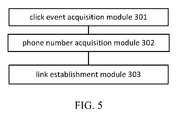
- Such speed dial device includes: a click event acquisition module 301, a phone number acquisition module 302, and a link establishment module 303.
- the click event acquisition module 301 is used for real-time monitoring of the lock screen interface and acquisition of a click event.
- the phone number acquisition module 302 is used to access a phone number corresponding to the click event at a floating window, when the click event is a speed dial event.
- the link establishment module 303 is used to dial the phone number.
- touch screen mobile phone described in the embodiment of this invention can also be referring to other touch screen devices, such as a tablet PC, PDA, etc.
- the phone number corresponding to the click event is retrieved and dialed, thereby establishing a link between the opposite peer using the phone number and the user.
- This thus enables phone calls to be made when the touch screen mobile phone is in lock screen mode without having to unlock the screen. Phone calls could be made with reduced user operation and at the same time maintain the original function of the lock screen, thereby improving the user's phone operation experience.
- an embodiment of the invention also provides a speed dial device for a touch screen mobile phone.
- the touch screen mobile phone uses a lock screen interface.
- the embodiment includes the click event acquisition module 301, the phone number acquisition module 302, and the link establishment module 303 described in prior embodiments.
- the phone number acquisition module 302 may further include:
- the aforementioned corresponding favorite contact's phone number is a phone number corresponding to the click event.
- the floating window may include: a first floating window and an undraggable second floating window.
- the first floating window is used to display a favorite contact.
- the favorite contact is then used as a speed dial contact when the touch screen mobile phone is in lock screen mode.
- the second floating window is used to display a dial area.
- the dial area is used to determine whether the drag made to the first floating window is for speed dial.
- the device also includes: a speed dial event confirmation module 304, used to confirm that the click event is a speed dial event when at least one of the first floating windows has been clicked and dragged to the second floating window.
- a speed dial event confirmation module 304 used to confirm that the click event is a speed dial event when at least one of the first floating windows has been clicked and dragged to the second floating window.
- the speed dial event confirmation module 304 can specifically first, determine whether the first floating window has been clicked. If the first floating window is clicked, continue to determine whether the clicked first floating window is being dragged. When the clicked first floating window is being dragged, continue to determine if the drag for the clicked first floating window has been finished. When the drag for the clicked first floating window has been finished, continue to determine if the first floating window is being dragged to the second floating window. Finally, if the first floating window is being dragged to the second floating window, the click event DA is then a speed dial event.
- the device also includes the following modules.
- a display module 305 is used to display a favorite contact settings interface to a user.
- a first floating window generation module 306 is used to access at least one favorite contact set by the user, then generate the first floating window for displaying the favorite contact on the lock screen interface.
- a corresponding relationship establishment module 307 is used for establishing a corresponding relationship between the first floating window and its corresponding favorite contact's phone number.
- such device can also include:
- the phone number corresponding to the click event is retrieved and the phone number is dialed, thereby establishing a link between the opposite peer using the phone number and the user.
- This thus enables phone calls to be made when the touch screen mobile phone is in lock screen mode without having to unlock the screen. Phone calls could be made with reduced user operation and at the same time maintain the original function of the lock screen, thereby improving the user's phone operation experience.
Landscapes
- Engineering & Computer Science (AREA)
- Signal Processing (AREA)
- Human Computer Interaction (AREA)
- Computer Security & Cryptography (AREA)
- General Engineering & Computer Science (AREA)
- Theoretical Computer Science (AREA)
- Computer Networks & Wireless Communication (AREA)
- Physics & Mathematics (AREA)
- General Physics & Mathematics (AREA)
- User Interface Of Digital Computer (AREA)
- Telephone Function (AREA)
Abstract
Description
- This application claims priority to a Chinese Patent Application No.
2012101033499 - As smart phone technology advances, endless varieties of touch screen mobile phones emerge. Smart phones have become the mainstream of cell phone development. Compared to the traditional keyboard, touch screen operation is much easier. However, in order to prevent misuse, when not in use, the phone will generally implement a lock screen. The so-called lock screen of a touch-screen phone is used to prevent misuse. It is a full-screen window displayed on the top level of the mobile phone interface and only through correct operation can this window be unlocked to enter the mobile phone interface for other operations. A common example of unlocking a phone is to use a slide motion to unlock the phone. However, this brings up an inconvenience. Before performing any operation, one must first unlock the lock screen. Phone calls are one of the most commonly used features on a phone, but because of the lock screen, users must first unlock the lock screen before making a phone call, thereby increasing the steps of user input.
- In order to enable phone calls when a touch screen mobile phone is on a lock screen mode, embodiments of this invention provide a method for speed dial on the touch screen mobile phone, wherein the touch screen mobile phone uses a lock screen interface;
characterized in that a floating window is displayed on top of the lock screen interface;
wherein the speed dial method includes: - monitoring the lock screen interface in real time to acquire a click event;
- if the click event is a speed dial event, acquiring a phone number corresponding to the click event within the floating window; and
- dialing the phone number.
- The floating window includes:
- at least one first floating window that is draggable and a second floating window that is not draggable;
- the first floating window is used to display a favorite contact, wherein the favorite contact is used as a speed dial contact when the touch screen mobile phone is in a lock screen mode; and
- the second floating window is used to display a dial area, wherein the dial area is an area that confirms that a drag made to the first floating window is for speed dial.
- After the click event is acquired, the method further includes:
- if the first floating window is touched and dragged to the second floating window, determining that the click event is the speed dial event.
- Acquiring the phone number corresponding to the click event includes:
- accessing a clicked first floating window corresponding to the click event; and
- searching for a default corresponding relationship between the clicked first floating window and a phone number of the favorite contact, accessing the phone number of the favorite contact corresponding to the clicked first floating window, wherein the corresponding phone number of the favorite contact is the phone number corresponding to the click event.
- The method further includes:
- displaying a favorite contact settings interface to a user;
- obtaining at least one favorite contact set by the user;
- generating, for every favorite contact obtained, a first floating window displaying the favorite contact on the lock screen interface; and
- establishing a corresponding relationship between the first floating window and the phone number of the favorite contact that the first floating window displays.
- Prior to the real-time monitoring of the lock screen interface and the acquisition of the click event, the method further includes:
- when the touch screen mobile phone is in a standby mode, accessing an instruction signal for speed dial; and
- turning on the screen of the touch screen mobile phone to display the lock screen interface according to the instruction signal.
- Embodiments of this invention also provide a speed dial device for a touch screen mobile phone, wherein the touch screen mobile phone uses a lock screen interface, wherein a floating window is displayed on top of the lock screen interface;
- the speed dial device includes:
- a click event acquisition module, used to monitor the lock screen interface in real time, and acquire a click event;
- a telephone number acquisition module, used to acquire a telephone number of the click event within the floating window when the click event is a speed dial event; and
- a link establishment module, used to dial the telephone number.
- The floating window includes:
- at least one first floating window that is draggable and a second floating window that is not draggable;
- wherein the first floating window is used to display a favorite contact, wherein the favorite contact is used as a speed dial contact when the touch screen mobile phone is in a lock screen mode; and
- the second floating window is used to display a dial area;
- wherein when the first floating window is dragged, it is confirmed according to the dial area that the drag is for speed dial.
- The device further includes:
- a speed dial event determination module, used to determine that the click event is the speed dial event when the first floating window is clicked and dragged to the second floating window.
- The telephone number acquisition module includes:
- a unit for acquiring floating window of click event, used to obtain the first floating window according to a click of the click event; and
- a telephone number acquisition unit, used to query a default corresponding relationship between the first floating window with a phone number of the favorite contact, obtain the phone number of the favorite contact corresponding to the clicked first floating window, wherein the corresponding phone number of the favorite contact is a phone number corresponding to the click event.
- The device further includes:
- a display module, used to display a favorite contact settings interface to a user;
- a first floating window generation module, used to obtain at least one favorite contact set by the user, and generate, for every favorite contact obtained, a first floating window displaying the favorite contact on the lock screen interface; and
- a corresponding relationship generation module, used to establish the corresponding relationship between the first floating window and the phone number of the favorite contact that the first floating window displays.
- The device further includes:
- a speed dial instruction signal acquisition module, used to obtain an instruction signal for turning on the speed dial when the touch screen mobile phone is in a standby mode; and
- a lock screen interface display module, used to enable the screen of the touch screen mobile phone to turn on according to the instruction signal and show the lock screen interface.
- In the embodiments, when a click event for speed dial is monitored, the phone number corresponding to the click event is accessed and dialed via real-time monitoring of the lock screen interface. A link is then established between the user and a terminal device of the phone number, also known as the callee, thus enabling phone calls to be made when the touch screen mobile phone is in lock screen mode, without having to unlock. Phone calls could be made with reduced user operation at the same time maintaining the original function of the lock screen.
- In order to more clearly illustrate the embodiments of this invention or the technical schemes of the existing technology, figures used in the embodiments of the invention or the existing technology will be briefly described below. Obviously, the figures described below are some embodiments of this invention. For those skilled in the art, other figures may still be obtained based on these figures without providing any creative and labor effort.
-
Figure 1 represents a flowchart of a speed dial method for a touch screen mobile phone provided in an embodiment of this invention. -
Figure 2 shows a flowchart of a speed dial method for a touch screen mobile phone provided in another embodiment of this invention. -
Figure 3 shows a schematic diagram of a lock screen display provided in an embodiment of this invention. -
Figure 4 shows a schematic diagram of a lock screen display provided in another embodiment of this invention. -
Figure 5 shows a schematic drawing of a speed dial device for a touch screen mobile phone provided in an embodiment of this invention. -
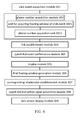
Figure 6 shows a schematic drawing of a speed dial device for a touch screen mobile phone provided in another embodiment of this invention. - For making the purpose, the technical proposal and advantages of embodiments of the invention more clear, the technical proposal of the embodiments of this invention may be described clearly and fully using the figures included. Clearly, the described embodiments are only parts of the embodiments of this invention and not all of the embodiments. Based on the embodiments of this invention, all other embodiments obtained without contributing any creative effect by those skilled in the art are within the scope of protection of this invention.
- As shown in
Figure 1 , an embodiment of the invention provides a speed dial method for a touch screen mobile phone. When the touch screen mobile phone is in lock screen mode, a floating window is displayed on the top of a lock screen interface. The speed dial method includes the following steps. - S101: Monitor the lock screen interface in real time to access a click event.
- S102: In the event that the click event is a speed dial event, access a phone number corresponding to the click event from the floating window.
- S103: Dial the phone number, and allow a user to establish a link to the peer of the telephone number.
- Herein, the lock screen interface is a full-screen window displayed on the top of the interfaces of the touch screen mobile phone, used to prevent misuse of the touch screen mobile phone. Only through proper operation can this window be unlocked and allow entrance to other interfaces of the touch screen mobile phone for other operations.
- Note that the touch screen mobile phone described in the embodiment of the invention also refers to other touch screen devices such as a tablet PC, personal digital assistant (PDA), etc. The speed dial method can be used by the other touch screen devices. Therefore, any improvements formed based on the methods described in the embodiments of the invention are within the protection of this invention and may not be mentioned again here on.
- In embodiments of this invention, the lock screen is monitored in real time. If a click event detected is a speed dial event, then access a telephone number corresponding to the click event, and dial the telephone number allowing the user to establish a link with the peer of the telephone number. Thus, phone calls could be made when the touch screen mobile phone is in lock screen mode, without having to unlock the screen. That is, phone calls could be made with reduced user operation at the same time maintaining the original function of the lock screen; hence, improving user experience on phone operation.
- As shown in
Figure 2 , an embodiment of this invention provides another speed dial method for a touch screen mobile phone. When the touch screen mobile phone uses a lock screen, the speed dial method includes: - S201: Display a favorite contact settings interface to a user.
- Herein, favorite contacts are used as the contacts for speed dial when the touch screen mobile phone is in lock screen.
- In this embodiment, the favorite contact settings interface could be displayed to the user through a separate form of software interface. For example, the software interface, including a user's contact list, is used for displaying contact names and phone numbers. A check box, placed after each contact, allows the user to confirm and make a contact a favorite contact through touching the check box.
- As an additional option, the favorite contact settings interface could also be added into the detailed information of each contact contained in the contact list. This allows the user to decide whether or not to set a contact as a favorite contact when the user is accessing the detailed information of the contact.
- S202: Obtain at least one favorite contact set by the user, and generate a first floating window for indicating the favorite contact on the lock screen.
- In this embodiment, when the user selects a favorite contact through the displayed favorite contact settings interface in S201, a floating window is generated on the lock screen. Such is the first floating window and is used to display the favorite contact. Optionally, such floating window can be used to display the name of the favorite contact and/or a specific photo of the favorite contact set by the user. After the user sets a favorite contact, a following step is to speed dial on the lock screen.
- Alternatively, the aforementioned favorite contact could also be set through other methods such as making a recent contact in the call log into a favorite contact. Also, based on the frequency of different numbers dialed in a given time, the most frequently dialed number is set as a favorite contact. There are other methods for setting a favorite contact; however, they may not be further addressed herein.
- Meanwhile, when at least one favorite contact is set by the user, a corresponding relationship between the first floating window and the corresponding favorite contact phone number is set by default. The corresponding relationship also includes favorite contact information corresponding to the first floating window. The corresponding relationship is shown in Table 1.
Table 1 Favorite contact First floating window Favorite contact's phone number A First floating window A 123 B First floating window B 456 C First floating window C 789 - S203: When the touch screen mobile phone is in standby mode, an instruction signal for speed dial is acquired.
- Herein, during standby mode, the screen of the touch screen mobile phone is off. The instruction signal may be used to indicate that the speed dial function on the touch screen mobile phone is turned on.
- Alternatively, the instruction signal can be an electrical signal sent out via a push of a specific hotkey. The specific hotkey can be the on/off key of the mobile phone or other function keys.
- S204: Turn on the screen of the touch screen mobile phone by using the instruction signal, and display the lock screen interface.
- For example, when an electrical signal, generated when the on/off key of the touch screen mobile phone is pushed, is received, according to the electrical signal, the screen of the touch screen mobile phone will light up and display the lock screen interface.
- S205: Display at least one first floating window that is draggable and a second floating window that is not draggable on the top of the lock screen.
- Herein, a first floating window is used to display a favorite contact. The favorite contact is used as a speed dial contact when the touch screen mobile phone is in lock screen mode. The second floating window is used to display a dial area. The dial area is an area that helps to confirm that the drag made to the first floating window is for speed dial.
- For example,
Figure 3 shows the lock screen of a touch screen mobile phone, floating windows marked as A, B, and C are first floating windows. A, B, and C indicate the names of the favorite contacts set by the user. The icon located on the right side of the lock screen is the second floating window, shown as a simple telephone icon. - S206: Execute a real-time monitoring of the lock screen to access a click event.
- In this step, real-time monitoring of click events of the lock screen interface, shown in
Figure 3 , takes place through the backend of the touch screen mobile phone to obtain possible click events. In terms of a click event, any location on the lock screen interface can be clicked to trigger the click event. For example, when floating window A, as shown inFigure 3 , is clicked, the click event that follows is named DA. When the floating window of a right arrow icon is clicked, the click event that follows is called DX. - S207: If the first floating window is clicked and dragged to the second floating window, then the click event is confirmed as a speed dial event.
- Specifically, S207 can additionally include the following steps.
- S2071: Determine whether the first floating window is clicked. If yes, start S2072; if not, then return to S206.
- Specifically, in this step, through determining whether the click event accessed from S206 is triggered by clicking of the first floating window, it is further determined whether the first floating window has been clicked.
- For example, as shown in the lock screen interface in
Figure 3 , if the click event is DA, it is determined that the first floating screen is clicked, and then S2072 is executed. If the click event is DX, then there may be no response to the click event and the method may return to S206, that is, real-time monitoring the lock screen interface and access of click events will be continued. - S2072: Determine whether the clicked first floating window is dragged. If yes, execute S2073; if not, return to S206.
- For example, as shown in step S2071, when first floating window A is clicked, this step serves to further determine whether the first floating window is moved. If yes, then S2073 is executed; if not, then return to S206 to continue real-time monitoring of the lock screen interface to acquire a click event.
- Note that the motion described in this step means a continuous motion as a result of dragging the first floating window.
- S2073: Determine whether the drag motion of the clicked first floating window has ended. If yes, execute S2074; if not, return to S2072.
- For example, in step S2072, when first floating window A is dragged and the drag action has ended, execute S2074; if the first floating window is still being dragged, then execute S2072.
- It should be noted that, in this embodiment, in order to clearly describe dragging of the first floating window as being dragged from initiation until the drag ends, such action is divided into two steps, S2072 and S2073. However, since dragging and drag ending of the first floating window is a continuous motion, S2072 and S2073 can be replaced by a single continuous determination step. Therefore, other methods used to determine whether the first floating window has continuously been dragged and until the drag ends are within the scope of this invention and may not be addressed again hereon.
- S2074: Determine whether the first floating window has been dragged to the second floating window. If yes, then a click event, DA, is confirmed as a speed dial event and S208 is executed. If not, then the first floating window may return to the original place on the lock screen, and the method returns to S206.
- For example, as shown in
Figure 4 , when first floating window A has been dragged to the second floating window, which is shown as a simple phone icon on the right side of the lock screen, S208 is executed. If not, then the first floating window may return to its original location on the lock screen, and the method may proceed to S206 to continue real-time monitoring of the lock screen interface and acquire click events. - Specifically, whether or not the first floating window has been dragged to the second floating window is determined by the area of overlap between the first floating window and the second floating window. When the area of overlap between the first floating window and the second floating window is greater than or equal to a default value, it is then determined that the first floating window has been dragged to the second floating window. This default value can be a preferred value derived from experimental statistics.
- S208: Access the clicked first floating window of the click event.
- For example, if the click event is DA, then the corresponding first floating window is first floating window A.
- S209: Check the preset corresponding relationship between the first floating window and the favorite contact phone number, and access the phone number of the favorite contact corresponding to the clicked first floating window.
- Herein, the corresponding phone number of the favorite contact is the phone number corresponding to the click event.
- For example, when floating window A is confirmed to have been clicked, a click event DA generated by the clicking is a speed dial event. By checking the corresponding relationship Table 1, one can see that the corresponding favorite contact's phone number for first floating window A is "123".
- S210: Dial the phone number to establish a link between the opposite peer using the phone number and the user.
- For example, in S208, when first floating window A is dragged to the second floating window, access the phone number "123" for favorite contact A, and dial the phone number to establish a link between the opposite peer using the phone number and the user.
- In the embodiment of the invention, when the monitored click event is a speed dial event, the phone number corresponding to the click event is retrieved and the phone number is dialed, thereby establishing a link between the opposite peer using the phone number and the user, thus enabling phone calls to be made when the touch screen mobile phone is in lock screen mode without having to unlock the screen through real-time monitoring of the lock screen interface. Phone calls could be made with reduced user operation and at the same time the original function of the lock screen can be maintained, thereby improving the user's phone operation experience.
- As shown in
Figure 5 , an embodiment of the invention also provides a speed dial device for a touch screen mobile phone. The touch screen mobile phone uses a lock screen interface and displays floating windows on top of the windows of the lock screen interface. Such speed dial device includes: a clickevent acquisition module 301, a phonenumber acquisition module 302, and alink establishment module 303. - The click
event acquisition module 301 is used for real-time monitoring of the lock screen interface and acquisition of a click event. - The phone
number acquisition module 302 is used to access a phone number corresponding to the click event at a floating window, when the click event is a speed dial event. - The
link establishment module 303 is used to dial the phone number. - Note that the touch screen mobile phone described in the embodiment of this invention can also be referring to other touch screen devices, such as a tablet PC, PDA, etc.
- In the embodiment of the invention, through real-time monitoring of the lock screen interface, when the monitored click event is a speed dial event, the phone number corresponding to the click event is retrieved and dialed, thereby establishing a link between the opposite peer using the phone number and the user. This thus enables phone calls to be made when the touch screen mobile phone is in lock screen mode without having to unlock the screen. Phone calls could be made with reduced user operation and at the same time maintain the original function of the lock screen, thereby improving the user's phone operation experience.
- As shown in
Figure 6 , an embodiment of the invention also provides a speed dial device for a touch screen mobile phone. The touch screen mobile phone uses a lock screen interface. The embodiment includes the clickevent acquisition module 301, the phonenumber acquisition module 302, and thelink establishment module 303 described in prior embodiments. - Specifically, the phone
number acquisition module 302 may further include: - a unit for acquiring floating window of
click event 3021, used to access the clicked first floating window corresponding to the click event; and - a phone
number acquisition unit 3022, used to check the default corresponding relationship between the favorite contact's phone number and the first floating window, and access the favorite contact's phone number corresponding to the clicked first floating window. - The aforementioned corresponding favorite contact's phone number is a phone number corresponding to the click event.
- The floating window may include: a first floating window and an undraggable second floating window. The first floating window is used to display a favorite contact. The favorite contact is then used as a speed dial contact when the touch screen mobile phone is in lock screen mode. The second floating window is used to display a dial area. The dial area is used to determine whether the drag made to the first floating window is for speed dial.
- Furthermore, the device also includes: a speed dial
event confirmation module 304, used to confirm that the click event is a speed dial event when at least one of the first floating windows has been clicked and dragged to the second floating window. - Alternatively, the speed dial
event confirmation module 304 can specifically first, determine whether the first floating window has been clicked. If the first floating window is clicked, continue to determine whether the clicked first floating window is being dragged. When the clicked first floating window is being dragged, continue to determine if the drag for the clicked first floating window has been finished. When the drag for the clicked first floating window has been finished, continue to determine if the first floating window is being dragged to the second floating window. Finally, if the first floating window is being dragged to the second floating window, the click event DA is then a speed dial event. - Furthermore, the device also includes the following modules.
- A
display module 305 is used to display a favorite contact settings interface to a user. - A first floating
window generation module 306 is used to access at least one favorite contact set by the user, then generate the first floating window for displaying the favorite contact on the lock screen interface. - A corresponding
relationship establishment module 307 is used for establishing a corresponding relationship between the first floating window and its corresponding favorite contact's phone number. - Furthermore, such device can also include:
- a speed dial instruction
signal acquisition module 308, used to acquire an instruction signal for starting speed dial when the touch screen mobile phone is in lock screen mode. - a lock
screen display module 309, used according to the instruction signal to turn on the screen of the touch screen mobile phone and display the lock screen interface. - In the embodiments of the invention, through real-time monitoring of the lock screen interface, when the monitored click event is a speed dial event, the phone number corresponding to the click event is retrieved and the phone number is dialed, thereby establishing a link between the opposite peer using the phone number and the user. This thus enables phone calls to be made when the touch screen mobile phone is in lock screen mode without having to unlock the screen. Phone calls could be made with reduced user operation and at the same time maintain the original function of the lock screen, thereby improving the user's phone operation experience.
- Those skilled in the art can understand that: complete or partial steps of the method mentioned in the above embodiments can be achieved through related hardware instructed by a program. The previously mentioned program can be stored in a computer readable storage medium. When executing the program, the steps from the previously described method in the embodiments may also be executed. The storage medium mentioned above includes: ROM, RAM, hard drive, optical disc, or any kind of medium that can store program codes.
- Finally, it should be noted that, the above embodiments are used only to describe a technical proposal of this invention and not to limit it. Although the above mentioned embodiments describe the invention in detail, those skilled in the art should understand that: one can still make modifications to the technical proposal described in the various embodiments mentioned above or substitute parts of the technical characteristics, but these modifications or substitutions do not make such technical proposal depart from the span and scope of the technical proposal described in the various embodiments of this invention.
Claims (12)
- A speed dial method for a touch screen mobile phone, wherein the touch screen mobile phone uses a lock screen interface;
characterized in that a floating window is displayed on top of the lock screen interface;
wherein the speed dial method comprises:monitoring the lock screen interface in real time to acquire a click event;if the click event is a speed dial event, acquiring a phone number corresponding to the click event within the floating window; anddialing the phone number. - The method according to claim 1, wherein the floating window comprises:at least one first floating window that is draggable and a second floating window that is not draggable;the first floating window is used to display a favorite contact, wherein the favorite contact is used as a speed dial contact when the touch screen mobile phone is in a lock screen mode; andthe second floating window is used to display a dial area, wherein the dial area is an area that confirms that a drag made to the first floating window is for speed dial.
- The method according to claim 2, wherein, after the click event is acquired, the method further comprises:if the first floating window is touched and dragged to the second floating window, determining that the click event is the speed dial event.
- The method according to claim 2, wherein acquiring the phone number corresponding to the click event comprises:accessing a clicked first floating window corresponding to the click event; andsearching for a default corresponding relationship between the clicked first floating window and a phone number of the favorite contact, accessing the phone number of the favorite contact corresponding to the clicked first floating window, wherein the corresponding phone number of the favorite contact is the phone number corresponding to the click event.
- The method according to claim 2, further comprising:displaying a favorite contact settings interface to a user;obtaining at least one favorite contact set by the user;generating, for every favorite contact obtained, a first floating window displaying the favorite contact on the lock screen interface; andestablishing a corresponding relationship between the first floating window and the phone number of the favorite contact that the first floating window displays.
- The method according to any of claims 1 to 5, wherein, prior to the real-time monitoring of the lock screen interface and the acquisition of the click event, the method further comprises:when the touch screen mobile phone is in a standby mode, accessing an instruction signal for speed dial; andturning on the screen of the touch screen mobile phone to display the lock screen interface according to the instruction signal.
- A speed dial device for a touch screen mobile phone, wherein the touch screen mobile phone uses a lock screen interface, wherein a floating window is displayed on top of the lock screen interface;
the speed dial device comprises:a click event acquisition module, used to monitor the lock screen interface in real time, and acquire a click event;a telephone number acquisition module, used to acquire a telephone number of the click event within the floating window when the click event is a speed dial event; anda link establishment module, used to dial the telephone number. - The device according to claim 7, wherein the floating window comprises:at least one first floating window that is draggable and a second floating window that is not draggable;wherein the first floating window is used to display a favorite contact, wherein the favorite contact is used as a speed dial contact when the touch screen mobile phone is in a lock screen mode; andthe second floating window is used to display a dial area;wherein when the first floating window is dragged, it is confirmed according to the dial area that the drag is for speed dial.
- The device according to claim 8, further comprising:a speed dial event determination module, used to determine that the click event is the speed dial event when the first floating window is clicked and dragged to the second floating window.
- The device according to claim 8, wherein the telephone number acquisition module comprises:a unit for acquiring floating window of click event, used to obtain the first floating window according to a click of the click event; anda telephone number acquisition unit, used to query a default corresponding relationship between the first floating window with a phone number of the favorite contact, obtain the phone number of the favorite contact corresponding to the clicked first floating window, wherein the corresponding phone number of the favorite contact is a phone number corresponding to the click event.
- The device according to claim 8, further comprising:a display module, used to display a favorite contact settings interface to a user;a first floating window generation module, used to obtain at least one favorite contact set by the user, and generate, for every favorite contact obtained, a first floating window displaying the favorite contact on the lock screen interface; anda corresponding relationship generation module, used to establish the corresponding relationship between the first floating window and the phone number of the favorite contact that the first floating window displays.
- The device according to any of claims 7 to 11, further comprising:a speed dial instruction signal acquisition module, used to obtain an instruction signal for turning on the speed dial when the touch screen mobile phone is in a standby mode; anda lock screen interface display module, used to enable the screen of the touch screen mobile phone to turn on according to the instruction signal and show the lock screen interface.
Applications Claiming Priority (2)
| Application Number | Priority Date | Filing Date | Title |
|---|---|---|---|
| CN2012101033499A CN103369125A (en) | 2012-04-10 | 2012-04-10 | Speed-dial method and device for touch-screen mobile phone |
| PCT/CN2013/073135 WO2013152665A1 (en) | 2012-04-10 | 2013-03-25 | Fast dialing method and device for touch screen mobile phones |
Publications (2)
| Publication Number | Publication Date |
|---|---|
| EP2838246A1 true EP2838246A1 (en) | 2015-02-18 |
| EP2838246A4 EP2838246A4 (en) | 2015-04-08 |
Family
ID=49327081
Family Applications (1)
| Application Number | Title | Priority Date | Filing Date |
|---|---|---|---|
| EP13774984.2A Withdrawn EP2838246A4 (en) | 2012-04-10 | 2013-03-25 | Fast dialing method and device for touch screen mobile phones |
Country Status (6)
| Country | Link |
|---|---|
| US (1) | US20150057048A1 (en) |
| EP (1) | EP2838246A4 (en) |
| JP (1) | JP2015517263A (en) |
| CN (1) | CN103369125A (en) |
| SG (1) | SG11201405927RA (en) |
| WO (1) | WO2013152665A1 (en) |
Families Citing this family (21)
| Publication number | Priority date | Publication date | Assignee | Title |
|---|---|---|---|---|
| CN103795854B (en) * | 2013-12-03 | 2016-03-09 | 河南博仕达通信技术有限公司 | The method and apparatus of quick contact phone is dialed under a kind of mobile phone locking screen interface |
| KR101618175B1 (en) * | 2014-04-11 | 2016-05-04 | 주식회사 엑스디웍스 | Three-dimensional character control apparatus of smart device |
| EP3410257B1 (en) * | 2014-06-11 | 2020-01-08 | Huawei Technologies Co., Ltd. | Method for quickly starting application service, and terminal |
| CN104281385B (en) * | 2014-09-17 | 2017-03-15 | 北京搜狗科技发展有限公司 | The method of adjustment of input method dummy keyboard and input subtraction unit |
| CN105721663A (en) * | 2014-12-03 | 2016-06-29 | 深圳富泰宏精密工业有限公司 | Speed dialing system and method |
| CN105989035A (en) * | 2015-02-03 | 2016-10-05 | 阿里巴巴集团控股有限公司 | In-page quick dialing method, device and mobile terminal |
| CN104778005A (en) * | 2015-03-26 | 2015-07-15 | 深圳市金立通信设备有限公司 | Dialing method |
| CN105100420A (en) * | 2015-05-29 | 2015-11-25 | 努比亚技术有限公司 | Terminal and method for quick dialing of same |
| CN104954582B (en) * | 2015-06-30 | 2019-11-08 | 努比亚技术有限公司 | A kind of method and device for initiating speed dialling according to pressing touch-control |
| CN106445270A (en) * | 2015-08-06 | 2017-02-22 | 天津三星通信技术研究有限公司 | Information transmission method and apparatus |
| WO2017022965A1 (en) * | 2015-08-06 | 2017-02-09 | 삼성전자 주식회사 | Information transmission device and operating method therefor |
| CN105159575A (en) * | 2015-08-17 | 2015-12-16 | 美国掌赢信息科技有限公司 | Call initiating method and electronic equipment |
| KR20170046969A (en) * | 2015-10-22 | 2017-05-04 | 엘지전자 주식회사 | Mobile device and, the method thereof |
| CN105516437A (en) * | 2015-12-11 | 2016-04-20 | 温玉桂 | Intelligent dialing method |
| KR101783421B1 (en) * | 2016-03-30 | 2017-09-29 | 이수현 | Method of providing user certification and additional service using graphics image and system performing the same |
| CN105867827A (en) * | 2016-04-20 | 2016-08-17 | 北京小米移动软件有限公司 | Method, device and electronic device for establishing communication connection |
| CN106845311A (en) * | 2016-11-09 | 2017-06-13 | 北京鼎九信息工程研究院有限公司 | A kind of reading method and device of figure Quick Response Code |
| KR101885836B1 (en) * | 2016-12-07 | 2018-09-11 | 이수현 | Method of Providing User Certification and Additional Service Using Image Password System |
| CN106572261A (en) * | 2016-12-29 | 2017-04-19 | 宁波亿拍客网络科技有限公司 | Method for quickly operating equipment in locked state |
| CN111443844A (en) * | 2020-03-26 | 2020-07-24 | 维沃移动通信有限公司 | Information processing method and electronic equipment |
| CN115291768A (en) * | 2021-04-16 | 2022-11-04 | 华为技术有限公司 | Method and device for starting function in application |
Family Cites Families (10)
| Publication number | Priority date | Publication date | Assignee | Title |
|---|---|---|---|---|
| JP4932159B2 (en) * | 2005-01-11 | 2012-05-16 | Necカシオモバイルコミュニケーションズ株式会社 | Communication terminal, communication terminal display method, and computer program |
| CN101287027B (en) * | 2008-05-27 | 2011-01-12 | 宇龙计算机通信科技(深圳)有限公司 | Dialing method of mobile terminal |
| US9197738B2 (en) * | 2008-12-04 | 2015-11-24 | Microsoft Technology Licensing, Llc | Providing selected data through a locked display |
| KR101537706B1 (en) * | 2009-04-16 | 2015-07-20 | 엘지전자 주식회사 | Mobile terminal and control method thereof |
| KR101564222B1 (en) * | 2009-05-26 | 2015-11-06 | 삼성전자주식회사 | A method and device for releasing a lock mode of a portable terminal |
| CN101938568B (en) * | 2010-09-21 | 2013-12-25 | 宇龙计算机通信科技(深圳)有限公司 | Method, system and mobile terminal for positioning information |
| CN102065166A (en) * | 2010-12-30 | 2011-05-18 | 东莞宇龙通信科技有限公司 | A contact shortcut operation method, system and mobile terminal |
| CN102111503A (en) * | 2011-02-18 | 2011-06-29 | 宇龙计算机通信科技(深圳)有限公司 | Quick operation method and mobile terminal |
| US20110247065A1 (en) * | 2011-03-14 | 2011-10-06 | Volodymyr Melnyk | Simultaneous screen unlock and operation initiation |
| CN102231097A (en) * | 2011-07-28 | 2011-11-02 | 青岛海信移动通信技术股份有限公司 | Method and device for unlocking screen |
-
2012
- 2012-04-10 CN CN2012101033499A patent/CN103369125A/en active Pending
-
2013
- 2013-03-25 EP EP13774984.2A patent/EP2838246A4/en not_active Withdrawn
- 2013-03-25 SG SG11201405927RA patent/SG11201405927RA/en unknown
- 2013-03-25 JP JP2015503735A patent/JP2015517263A/en active Pending
- 2013-03-25 WO PCT/CN2013/073135 patent/WO2013152665A1/en not_active Ceased
-
2014
- 2014-10-09 US US14/511,043 patent/US20150057048A1/en not_active Abandoned
Also Published As
| Publication number | Publication date |
|---|---|
| WO2013152665A1 (en) | 2013-10-17 |
| SG11201405927RA (en) | 2014-11-27 |
| JP2015517263A (en) | 2015-06-18 |
| EP2838246A4 (en) | 2015-04-08 |
| US20150057048A1 (en) | 2015-02-26 |
| CN103369125A (en) | 2013-10-23 |
Similar Documents
| Publication | Publication Date | Title |
|---|---|---|
| EP2838246A1 (en) | Fast dialing method and device for touch screen mobile phones | |
| EP3206456B1 (en) | Contextual search by a mobile communications device | |
| US10430078B2 (en) | Touch screen device, and graphical user interface for inserting a character from an alternate keyboard | |
| US8504946B2 (en) | Portable device, method, and graphical user interface for automatically scrolling to display the top of an electronic document | |
| KR100784969B1 (en) | How to Display History-Based Menus on Mobile Devices | |
| CN104350454A (en) | Causing display of search results | |
| CN103220430B (en) | A kind of method that mobile phone first line of a couplet people from system is searched and device | |
| CN102968427A (en) | Context-related data handling | |
| EP2899620A1 (en) | Screen unlocking unit and screen unlocking method thereof as well as mobile communication equipment | |
| CN106792604B (en) | Method and device for service prompt in communication process | |
| CN105426232A (en) | Interface processing method and apparatus | |
| CN104636148B (en) | The option of operation management method and device of a kind of mobile terminal | |
| TW201642113A (en) | Method, device and mobile terminal for speed dialing in page | |
| CN105677156B (en) | Unlocking-free application access method and mobile terminal | |
| CN105991815B (en) | Dialing method of user terminal and user terminal | |
| CN107295161A (en) | Telephone call method, device, storage medium and computer equipment | |
| CN102118505A (en) | Standby interface information display method and device | |
| CN113360067A (en) | Screenshot cleaning method and device | |
| CA2719387C (en) | System and method for facilitating character capitalization in handheld electronic device | |
| CN105608350B (en) | Screen inputs keyboard generation method and device | |
| CN116466946A (en) | Page display method, device, equipment and medium of low-code development platform | |
| JP2014089503A (en) | Electronic apparatus and control method for electronic apparatus | |
| KR20040088175A (en) | To call through shortcut menu confirmation method | |
| JP2014132282A (en) | Image display device, image display method, and program |
Legal Events
| Date | Code | Title | Description |
|---|---|---|---|
| PUAI | Public reference made under article 153(3) epc to a published international application that has entered the european phase |
Free format text: ORIGINAL CODE: 0009012 |
|
| 17P | Request for examination filed |
Effective date: 20141107 |
|
| AK | Designated contracting states |
Kind code of ref document: A1 Designated state(s): AL AT BE BG CH CY CZ DE DK EE ES FI FR GB GR HR HU IE IS IT LI LT LU LV MC MK MT NL NO PL PT RO RS SE SI SK SM TR |
|
| AX | Request for extension of the european patent |
Extension state: BA ME |
|
| RA4 | Supplementary search report drawn up and despatched (corrected) |
Effective date: 20150309 |
|
| RIC1 | Information provided on ipc code assigned before grant |
Ipc: H04M 1/27 20060101AFI20150303BHEP Ipc: H04M 1/2745 20060101ALI20150303BHEP Ipc: G06F 3/0482 20130101ALI20150303BHEP Ipc: H04M 3/44 20060101ALI20150303BHEP Ipc: H04M 1/725 20060101ALI20150303BHEP Ipc: H04M 1/67 20060101ALI20150303BHEP |
|
| DAX | Request for extension of the european patent (deleted) | ||
| STAA | Information on the status of an ep patent application or granted ep patent |
Free format text: STATUS: THE APPLICATION IS DEEMED TO BE WITHDRAWN |
|
| 18D | Application deemed to be withdrawn |
Effective date: 20151006 |