EP2838005A2 - Mobile terminal and controlling method thereof - Google Patents
Mobile terminal and controlling method thereof Download PDFInfo
- Publication number
- EP2838005A2 EP2838005A2 EP20140169933 EP14169933A EP2838005A2 EP 2838005 A2 EP2838005 A2 EP 2838005A2 EP 20140169933 EP20140169933 EP 20140169933 EP 14169933 A EP14169933 A EP 14169933A EP 2838005 A2 EP2838005 A2 EP 2838005A2
- Authority
- EP
- European Patent Office
- Prior art keywords
- controller
- content
- input
- clipboard
- touch
- Prior art date
- Legal status (The legal status is an assumption and is not a legal conclusion. Google has not performed a legal analysis and makes no representation as to the accuracy of the status listed.)
- Ceased
Links
Images
























Classifications
-
- G—PHYSICS
- G06—COMPUTING OR CALCULATING; COUNTING
- G06F—ELECTRIC DIGITAL DATA PROCESSING
- G06F3/00—Input arrangements for transferring data to be processed into a form capable of being handled by the computer; Output arrangements for transferring data from processing unit to output unit, e.g. interface arrangements
- G06F3/01—Input arrangements or combined input and output arrangements for interaction between user and computer
- G06F3/048—Interaction techniques based on graphical user interfaces [GUI]
- G06F3/0484—Interaction techniques based on graphical user interfaces [GUI] for the control of specific functions or operations, e.g. selecting or manipulating an object, an image or a displayed text element, setting a parameter value or selecting a range
- G06F3/0486—Drag-and-drop
-
- G—PHYSICS
- G06—COMPUTING OR CALCULATING; COUNTING
- G06F—ELECTRIC DIGITAL DATA PROCESSING
- G06F3/00—Input arrangements for transferring data to be processed into a form capable of being handled by the computer; Output arrangements for transferring data from processing unit to output unit, e.g. interface arrangements
- G06F3/01—Input arrangements or combined input and output arrangements for interaction between user and computer
- G06F3/048—Interaction techniques based on graphical user interfaces [GUI]
- G06F3/0481—Interaction techniques based on graphical user interfaces [GUI] based on specific properties of the displayed interaction object or a metaphor-based environment, e.g. interaction with desktop elements like windows or icons, or assisted by a cursor's changing behaviour or appearance
- G06F3/04817—Interaction techniques based on graphical user interfaces [GUI] based on specific properties of the displayed interaction object or a metaphor-based environment, e.g. interaction with desktop elements like windows or icons, or assisted by a cursor's changing behaviour or appearance using icons
-
- G—PHYSICS
- G06—COMPUTING OR CALCULATING; COUNTING
- G06F—ELECTRIC DIGITAL DATA PROCESSING
- G06F3/00—Input arrangements for transferring data to be processed into a form capable of being handled by the computer; Output arrangements for transferring data from processing unit to output unit, e.g. interface arrangements
- G06F3/01—Input arrangements or combined input and output arrangements for interaction between user and computer
- G06F3/048—Interaction techniques based on graphical user interfaces [GUI]
- G06F3/0484—Interaction techniques based on graphical user interfaces [GUI] for the control of specific functions or operations, e.g. selecting or manipulating an object, an image or a displayed text element, setting a parameter value or selecting a range
- G06F3/04845—Interaction techniques based on graphical user interfaces [GUI] for the control of specific functions or operations, e.g. selecting or manipulating an object, an image or a displayed text element, setting a parameter value or selecting a range for image manipulation, e.g. dragging, rotation, expansion or change of colour
-
- G—PHYSICS
- G06—COMPUTING OR CALCULATING; COUNTING
- G06F—ELECTRIC DIGITAL DATA PROCESSING
- G06F3/00—Input arrangements for transferring data to be processed into a form capable of being handled by the computer; Output arrangements for transferring data from processing unit to output unit, e.g. interface arrangements
- G06F3/01—Input arrangements or combined input and output arrangements for interaction between user and computer
- G06F3/048—Interaction techniques based on graphical user interfaces [GUI]
- G06F3/0487—Interaction techniques based on graphical user interfaces [GUI] using specific features provided by the input device, e.g. functions controlled by the rotation of a mouse with dual sensing arrangements, or of the nature of the input device, e.g. tap gestures based on pressure sensed by a digitiser
- G06F3/0488—Interaction techniques based on graphical user interfaces [GUI] using specific features provided by the input device, e.g. functions controlled by the rotation of a mouse with dual sensing arrangements, or of the nature of the input device, e.g. tap gestures based on pressure sensed by a digitiser using a touch-screen or digitiser, e.g. input of commands through traced gestures
-
- G—PHYSICS
- G06—COMPUTING OR CALCULATING; COUNTING
- G06F—ELECTRIC DIGITAL DATA PROCESSING
- G06F3/00—Input arrangements for transferring data to be processed into a form capable of being handled by the computer; Output arrangements for transferring data from processing unit to output unit, e.g. interface arrangements
- G06F3/01—Input arrangements or combined input and output arrangements for interaction between user and computer
- G06F3/048—Interaction techniques based on graphical user interfaces [GUI]
- G06F3/0487—Interaction techniques based on graphical user interfaces [GUI] using specific features provided by the input device, e.g. functions controlled by the rotation of a mouse with dual sensing arrangements, or of the nature of the input device, e.g. tap gestures based on pressure sensed by a digitiser
- G06F3/0488—Interaction techniques based on graphical user interfaces [GUI] using specific features provided by the input device, e.g. functions controlled by the rotation of a mouse with dual sensing arrangements, or of the nature of the input device, e.g. tap gestures based on pressure sensed by a digitiser using a touch-screen or digitiser, e.g. input of commands through traced gestures
- G06F3/04883—Interaction techniques based on graphical user interfaces [GUI] using specific features provided by the input device, e.g. functions controlled by the rotation of a mouse with dual sensing arrangements, or of the nature of the input device, e.g. tap gestures based on pressure sensed by a digitiser using a touch-screen or digitiser, e.g. input of commands through traced gestures for inputting data by handwriting, e.g. gesture or text
-
- G—PHYSICS
- G06—COMPUTING OR CALCULATING; COUNTING
- G06F—ELECTRIC DIGITAL DATA PROCESSING
- G06F3/00—Input arrangements for transferring data to be processed into a form capable of being handled by the computer; Output arrangements for transferring data from processing unit to output unit, e.g. interface arrangements
- G06F3/01—Input arrangements or combined input and output arrangements for interaction between user and computer
- G06F3/048—Interaction techniques based on graphical user interfaces [GUI]
- G06F3/0487—Interaction techniques based on graphical user interfaces [GUI] using specific features provided by the input device, e.g. functions controlled by the rotation of a mouse with dual sensing arrangements, or of the nature of the input device, e.g. tap gestures based on pressure sensed by a digitiser
- G06F3/0488—Interaction techniques based on graphical user interfaces [GUI] using specific features provided by the input device, e.g. functions controlled by the rotation of a mouse with dual sensing arrangements, or of the nature of the input device, e.g. tap gestures based on pressure sensed by a digitiser using a touch-screen or digitiser, e.g. input of commands through traced gestures
- G06F3/04886—Interaction techniques based on graphical user interfaces [GUI] using specific features provided by the input device, e.g. functions controlled by the rotation of a mouse with dual sensing arrangements, or of the nature of the input device, e.g. tap gestures based on pressure sensed by a digitiser using a touch-screen or digitiser, e.g. input of commands through traced gestures by partitioning the display area of the touch-screen or the surface of the digitising tablet into independently controllable areas, e.g. virtual keyboards or menus
-
- G—PHYSICS
- G06—COMPUTING OR CALCULATING; COUNTING
- G06F—ELECTRIC DIGITAL DATA PROCESSING
- G06F9/00—Arrangements for program control, e.g. control units
- G06F9/06—Arrangements for program control, e.g. control units using stored programs, i.e. using an internal store of processing equipment to receive or retain programs
- G06F9/46—Multiprogramming arrangements
- G06F9/54—Interprogram communication
- G06F9/543—User-generated data transfer, e.g. clipboards, dynamic data exchange [DDE], object linking and embedding [OLE]
-
- G—PHYSICS
- G06—COMPUTING OR CALCULATING; COUNTING
- G06F—ELECTRIC DIGITAL DATA PROCESSING
- G06F2203/00—Indexing scheme relating to G06F3/00 - G06F3/048
- G06F2203/048—Indexing scheme relating to G06F3/048
- G06F2203/04804—Transparency, e.g. transparent or translucent windows
-
- G—PHYSICS
- G06—COMPUTING OR CALCULATING; COUNTING
- G06F—ELECTRIC DIGITAL DATA PROCESSING
- G06F2203/00—Indexing scheme relating to G06F3/00 - G06F3/048
- G06F2203/048—Indexing scheme relating to G06F3/048
- G06F2203/04808—Several contacts: gestures triggering a specific function, e.g. scrolling, zooming, right-click, when the user establishes several contacts with the surface simultaneously; e.g. using several fingers or a combination of fingers and pen
Definitions
- the present invention relates to a mobile terminal, and more particularly, to a mobile terminal and controlling method thereof.
- the present invention is suitable for a wide scope of applications, it is particularly suitable for facilitating a terminal to be used in further consideration of user's convenience.
- a mobile terminal can perform various functions including data and voice communications, capturing images and video via a camera, recording audio, playing music files and outputting music via a speaker system, and displaying images and video on a display. Some terminals include additional functionality which supports game playing, while other terminals are also configured as multimedia players. More recently, mobile terminals have been configured to receive broadcast and multicast signals which permit viewing of contents, such as videos and television programs.
- terminals can be classified into mobile terminals and stationary terminals.
- mobile terminals can be further classified into handheld terminals and vehicle mounted terminals.
- a mobile terminal provided as a version of a smartphone is configured by outputting a desired data through a relatively wide touchscreen as soon as receiving a control input through the output screen.
- efficient controlling methods have not been provided.
- the demands for a controlling method for performing a copy & paste action on various kinds of contents are increasingly rising.
- embodiments of the present invention are directed to a mobile terminal and controlling method thereof that substantially obviate one or more problems due to limitations and disadvantages of the related art.
- One object of the present invention is to provide a mobile terminal and controlling method thereof, by which various kinds of contents can be managed and controlled effectively.
- a mobile terminal may include a touchscreen, a memory configured to store at least one content, and a controller, if receiving a command for pasting a prescribed content on a prescribed location on a screen output through the touchscreen, pasting the prescribed content on the prescribed location in response to the command, the controller determining a property of the prescribed location, the controller pasting the prescribed content by modifying a paste type of the prescribed content depending on the determined property.
- the present invention provides a user interface environment facilitating a copy & paste operation of a user-designated region for multimedia contents.
- a method of controlling a mobile terminal may include the steps of if receiving a command for pasting a prescribed content on a prescribed location on a screen output through a touchscreen, determining a property of the prescribed location and pasting the prescribed content on the prescribed location by modifying a paste type of the prescribed content depending on the determined property.
- a mobile terminal may include a memory configured to store at least one image, a touchscreen, and a controller recognizing a first touch path of a touch drag input through the touchscreen, the controller searching the at least one image for at least one image having a portion of an outline figure matched to the recognized first touch path.
- the controller may output the outline figure of the found at least one image to the touchscreen.
- the controller may control a plurality of the outline figures to be output by overlying a location of the recognized first touch path.
- the controller may recognize the first touch path by real time until a touch of the touch drag input is removed.
- the controller may filter a plurality of the output outline figures depending on a variation of the first touch path recognized by real time.
- the controller may paste an image corresponding to the output outline figure on the location of the recognized first touch path.
- the controller may adjust a size of the pasted image depending on a size of a figure formed by the first touch path.
- the controller may recognize a second touch path of the touch drag input through the touchscreen. If a closed curve corresponding to the recognized second touch path is formed, the controller may save a capture screen of a screen output within the closed curve.
- an outline figure of the saved capture screen may include the formed closed curve.
- a method of controlling a mobile terminal may include the steps of saving at least one image, recognizing a first touch path of a touch drag input through a touchscreen, and searching the at least one image for at least one image having a portion of an outline figure matched to the recognized first touch path.
- the method may further include the step of outputting the outline figure of the found at least one image to the touchscreen.
- the outputting step may include the step of if a plurality of outline figures are output, controlling a plurality of the outline figures to be output by overlying a location of the recognized first touch path.
- the recognizing step may further include the steps of recognizing the first touch path by real time until a touch of the touch drag input is removed and filtering a plurality of the output outline figures depending on a variation of the first touch path recognized by real time.
- the method may further include the step of if only one of the output outline figures remains due to the filtering, pasting an image corresponding to the output outline figure on the location of the recognized first touch path.
- the pasting step may include the step of adjusting a size of the pasted image depending on a size of a figure formed by the first touch path.
- the method may further include the steps of recognizing a second touch path of the touch drag input through the touchscreen and if a closed curve corresponding to the recognized second touch path is formed, saving a capture screen of a screen output within the closed curve.
- the suffixes 'module', 'unit' and 'part' are used for elements in order to facilitate the invention only. Therefore, significant meanings or roles are not given to the suffixes themselves and it is understood that the 'module', 'unit' and 'part' can be used together or interchangeably.
- the present invention can be applicable to a various types of terminals.
- terminals include mobile terminals, such as mobile phones, user equipment, smart phones, mobile computers, digital broadcast terminals, personal digital assistants, portable multimedia players (PMP) and navigators.
- PMP portable multimedia players
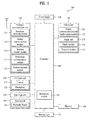
- FIG. 1 is a block diagram of a mobile terminal 100 in accordance with an embodiment of the present invention.
- FIG. 1 shows the mobile terminal 100 according to one embodiment of the present invention includes a wireless communication unit 110, an A/V (audio/video) input unit 120, a user input unit 130, a sensing unit 140, an output unit 150, a memory 160, an interface unit 170, a controller 180, a power supply unit 190 and the like.
- FIG. 1 shows the mobile terminal 100 having various components, but implementing all of the illustrated components is not a requirement. Greater or fewer components may alternatively be implemented.
- the wireless communication unit 110 typically includes one or more components which permits wireless communication between the mobile terminal 100 and a wireless communication system or network within which the mobile terminal 100 is located.
- the wireless communication unit 110 can include a broadcast receiving module 111, a mobile communication module 112, a wireless internet module 113, a short-range communication module 114, a position-location module 115 and the like.
- the broadcast receiving module 111 receives a broadcast signal and/or broadcast associated information from an external broadcast managing server via a broadcast channel.
- the broadcast channel may include a satellite channel and a terrestrial channel.
- the broadcast managing server generally refers to a server which generates and transmits a broadcast signal and/or broadcast associated information or a server which is provided with a previously generated broadcast signal and/or broadcast associated information and then transmits the provided signal or information to a terminal.
- the broadcast signal may be implemented as a TV broadcast signal, a radio broadcast signal, and a data broadcast signal, among others. If desired, the broadcast signal may further include a broadcast signal combined with a TV or radio broadcast signal.
- At least two broadcast receiving modules 111 can be provided to the mobile terminal 100 in pursuit of simultaneous receptions of at least two broadcast channels or broadcast channel switching facilitation.
- the broadcast associated information includes information associated with a broadcast channel, a broadcast program, a broadcast service provider, etc.
- the broadcast associated information can be provided via a mobile communication network.
- the broadcast associated information can be received by the mobile communication module 112.
- broadcast associated information can be implemented in various forms.
- broadcast associated information may include an electronic program guide (EPG) of digital multimedia broadcasting (DMB) and electronic service guide (ESG) of digital video broadcast-handheld (DVB-H).
- EPG electronic program guide
- ESG electronic service guide
- DMB digital multimedia broadcasting
- DVB-H digital video broadcast-handheld
- the broadcast receiving module 111 may be configured to receive broadcast signals transmitted from various types of broadcast systems.
- broadcasting systems include digital multimedia broadcasting-terrestrial (DMB-T), digital multimedia broadcasting-satellite (DMB-S), digital video broadcast-handheld (DVB-H), DVB-CBMS, OMA-BCAST, the data broadcasting system known as media forward link only (MediaFLO®) and integrated services digital broadcast-terrestrial (ISDB-T).
- the broadcast receiving module 111 can be configured suitable for other broadcasting systems as well as the above-explained digital broadcasting systems.
- the broadcast signal and/or broadcast associated information received by the broadcast receiving module 111 may be stored in a suitable device, such as a memory 160.
- the mobile communication module 112 transmits/receives wireless signals to/from one or more network entities (e.g., base station, external terminal, server, etc.) via a mobile network such as GSM(Global System for Mobile communications), CDMA(Code Division Multiple Access), WCDMA(Wideband CDMA) and so on.
- a mobile network such as GSM(Global System for Mobile communications), CDMA(Code Division Multiple Access), WCDMA(Wideband CDMA) and so on.
- GSM Global System for Mobile communications
- CDMA Code Division Multiple Access
- WCDMA Wideband CDMA
- the wireless internet module 113 supports Internet access for the mobile terminal 100.
- This module may be internally or externally coupled to the mobile terminal 100.
- the wireless Internet technology can include WLAN(Wireless LAN) (Wi-Fi), Wibro (Wireless broadband), Wimax (World Interoperability for Microwave Access), HSDPA(High Speed Downlink Packet Access), GSM, CDMA, WCDMA, LTE (Long Term Evolution) etc.
- Wireless internet access by Wibro, HSPDA, GSM, CDMA, WCDMA, LTE or the like is achieved via a mobile communication network.
- the wireless internet module 113 configured to perform the wireless internet access via the mobile communication network can be understood as a sort of the mobile communication module 112.
- the short-range communication module 114 facilitates relatively short-range communications. Suitable technologies for implementing this module include radio frequency identification (RFID), infrared data association (IrDA), ultra-wideband (UWB), as well at the networking technologies commonly referred to as Bluetooth and ZigBee, to name a few.
- RFID radio frequency identification
- IrDA infrared data association
- UWB ultra-wideband
- the position-location module 115 identifies or otherwise obtains the location of the mobile terminal 100. If desired, this module may be implemented with a global positioning system (GPS) module.
- GPS global positioning system
- the GPS module 115 can precisely calculate current 3-dimensional position information based on at least one of longitude, latitude and altitude and direction (or orientation) by calculating distance information and precise time information from at least three satellites and then applying triangulation to the calculated information.
- location and time information are calculated using three satellites, and errors of the calculated location position and time information are then amended using another satellite.
- the GPS module 115 can calculate speed information by continuously calculating a real-time current location.
- the audio/video (A/V) input unit 120 is configured to provide audio or video signal input to the mobile terminal 100.
- the AN input unit 120 includes a camera 121 and a microphone 122.
- the camera 121 receives and processes image frames of still pictures or video, which are obtained by an image sensor in a video call mode or a photographing mode.
- the processed image frames can be displayed on the display 151.
- the image frames processed by the camera 121 can be stored in the memory 160 or can be externally transmitted via the wireless communication unit 110.
- at least two cameras 121 can be provided to the mobile terminal 100 according to environment of usage.
- the microphone 122 receives an external audio signal while the portable device is in a particular mode, such as phone call mode, recording mode and voice recognition. This audio signal is processed and converted into electric audio data. The processed audio data is transformed into a format transmittable to a mobile communication base station via the mobile communication module 112 when a call mode.
- the microphone 122 typically includes assorted noise removing algorithms to remove noise generated while receiving the external audio signal.
- the user input unit 130 generates input data responsive to user manipulation of an associated input device or devices.
- Examples of such devices include a keypad, a dome switch, a touchpad (e.g., static pressure/capacitance), a jog wheel, a jog switch, etc.
- the sensing unit 140 provides sensing signals for controlling operations of the mobile terminal 100 using status measurements of various aspects of the mobile terminal. For instance, the sensing unit 140 may detect an open/close status of the mobile terminal 100, relative positioning of components (e.g., a display and keypad) of the mobile terminal 100, a change of position of the mobile terminal 100 or a component of the mobile terminal 100, a presence or absence of user contact with the mobile terminal 100, orientation or acceleration/deceleration of the mobile terminal 100, and free-falling of the mobile terminal 100. As an example, consider the mobile terminal 100 being configured as a slide-type mobile terminal. In this configuration, the sensing unit 140 may sense whether a sliding portion of the mobile terminal is open or closed.
- components e.g., a display and keypad
- sensing unit 140 sensing the presence or absence of power provided by the power supply 190, the presence or absence of a coupling or other connection between the interface unit 170 and an external device.
- the sensing unit 140 can include a proximity sensor 141.
- the output unit 150 generates outputs relevant to the senses of sight, hearing, touch and the like.
- the output unit 150 includes the display 151, an audio output module 152, an alarm unit 153, a haptic module 154, a projector module 155 and the like.
- the display 151 is typically implemented to visually display (output) information associated with the mobile terminal 100. For instance, if the mobile terminal is operating in a phone call mode, the display will generally provide a user interface (UI) or graphical user interface (GUI) which includes information associated with placing, conducting, and terminating a phone call. As another example, if the mobile terminal 100 is in a video call mode or a photographing mode, the display 151 may additionally or alternatively display images which are associated with these modes, the UI or the GUI.
- UI user interface
- GUI graphical user interface
- the display module 151 may be implemented using known display technologies including, for example, a liquid crystal display (LCD), a thin film transistor-liquid crystal display (TFT-LCD), an organic light-emitting diode display (OLED), a flexible display and a three-dimensional display.
- LCD liquid crystal display
- TFT-LCD thin film transistor-liquid crystal display
- OLED organic light-emitting diode display
- the mobile terminal 100 may include one or more of such displays.
- Some of the above displays can be implemented in a transparent or optical transmittive type, which can be named a transparent display.
- a transparent display there is TOLED (transparent OLED) or the like.
- a rear configuration of the display 151 can be implemented in the optical transmittive type as well. In this configuration, a user can see an object in rear of a terminal body via the area occupied by the display 151 of the terminal body.
- At least two displays 151 can be provided to the mobile terminal 100 in accordance with the implemented configuration of the mobile terminal 100.
- a plurality of displays can be arranged on a single face of the mobile terminal 100 by being spaced apart from each other or being built in one body.
- a plurality of displays can be arranged on different faces of the mobile terminal 100.
- the display 151 and a sensor for detecting a touch action configures a mutual layer structure (hereinafter called 'touchscreen')
- 'touchscreen' a mutual layer structure
- the touch sensor can be configured as a touch film, a touch sheet, a touchpad or the like.
- the touch sensor can be configured to convert a pressure applied to a specific portion of the display 151 or a variation of a capacitance generated from a specific portion of the display 151 to an electric input signal. Moreover, it can configure the touch sensor to detect a pressure of a touch as well as a touched position or size.
- a touch input is made to the touch sensor, signal(s) corresponding to the touch is transferred to a touch controller.
- the touch controller processes the signal(s) and then transfers the processed signal(s) to the controller 180. Therefore, the controller 180 can know whether a prescribed portion of the display 151 is touched.
- the proximity sensor 141 can be provided to an internal area of the mobile terminal 100 enclosed by the touchscreen or around the touchscreen.
- the proximity sensor is the sensor that detects a presence or non-presence of an object approaching a prescribed detecting surface or an object existing around the proximity sensor using an electromagnetic field strength or infrared ray without mechanical contact.
- the proximity sensor has durability longer than that of a contact type sensor and also has utility wider than that of the contact type sensor.
- the proximity sensor can include one of a transmittive photoelectric sensor, a direct reflective photoelectric sensor, a mirror reflective photoelectric sensor, a radio frequency oscillation proximity sensor, an electrostatic capacity proximity sensor, a magnetic proximity sensor, an infrared proximity sensor and the like.
- the touchscreen includes the electrostatic capacity proximity sensor, it is configured to detect the proximity of a pointer using a variation of electric field according to the proximity of the pointer. In this instance, the touchscreen (touch sensor) can be classified as the proximity sensor.
- the proximity sensor detects a proximity touch and a proximity touch pattern (e.g., a proximity touch distance, a proximity touch duration, a proximity touch position, a proximity touch shift state, etc.).
- a proximity touch pattern e.g., a proximity touch distance, a proximity touch duration, a proximity touch position, a proximity touch shift state, etc.
- information corresponding to the detected proximity touch action and the detected proximity touch pattern can be output to the touchscreen.
- the audio output module 152 functions in various modes including a call-receiving mode, a call-placing mode, a recording mode, a voice recognition mode, a broadcast reception mode and the like to output audio data which is received from the wireless communication unit 110 or is stored in the memory 160. During operation, the audio output module 152 outputs audio relating to a particular function (e.g., call received, message received, etc.). The audio output module 152 is often implemented using one or more speakers, buzzers, other audio producing devices, and combinations thereof.
- the alarm unit 153 is output a signal for announcing the occurrence of a particular event associated with the mobile terminal 100.
- Typical events include a call received event, a message received event and a touch input received event.
- the alarm unit 153 can output a signal for announcing the event occurrence by way of vibration as well as video or audio signal.
- the video or audio signal can be output via the display 151 or the audio output unit 152.
- the display 151 or the audio output module 152 can be regarded as a part of the alarm unit 153.
- the haptic module 154 generates various tactile effects that can be sensed by a user. Vibration is a representative one of the tactile effects generated by the haptic module 154. Strength and pattern of the vibration generated by the haptic module 154 are controllable. For instance, different vibrations can be output by being synthesized together or can be output in sequence.
- the haptic module 154 can generate various tactile effects as well as the vibration. For instance, the haptic module 154 generates the effect attributed to the arrangement of pins vertically moving against a contact skin surface, the effect attributed to the injection/suction power of air though an injection/suction hole, the effect attributed to the skim over a skin surface, the effect attributed to the contact with electrode, the effect attributed to the electrostatic force, the effect attributed to the representation of hold/cold sense using an endothermic or exothermic device and the like.
- the haptic module 154 can be implemented to enable a user to sense the tactile effect through a muscle sense of finger, arm or the like as well as to transfer the tactile effect through a direct contact.
- at least two haptic modules 154 can be provided to the mobile terminal 100 in accordance with the corresponding configuration type of the mobile terminal 100.
- the projector module 155 is the element for performing an image projector function using the mobile terminal 100.
- the projector module 155 can display an image, which is identical to or partially different at least from the image displayed on the display unit 151, on an external screen or wall according to a control signal of the controller 180.
- the projector module 155 can include a light source generating light (e.g., laser) for projecting an image externally, an image producing means (not shown in the drawing) for producing an image to output externally using the light generated from the light source, and a lens (not shown in the drawing) for enlarging to output the image externally in a predetermined focus distance.
- the projector module 155 can further include a device for adjusting an image projected direction by mechanically moving the lens or the whole module.
- the projector module 155 can be classified into a CRT (cathode ray tube) module, an LCD (liquid crystal display) module, a DLP (digital light processing) module or the like according to a device type of a display means.
- the DLP module is operated by the mechanism of enabling the light generated from the light source to reflect on a DMD (digital micro-mirror device) chip and can be advantageous for the downsizing of the projector module 151.
- the projector module 155 can be provided in a length direction of a lateral, front or backside direction of the mobile terminal 100.
- the projector module 155 can be provided to any portion of the mobile terminal 100 according to the necessity thereof.
- the memory unit 160 is generally used to store various types of data to support the processing, control, and storage requirements of the mobile terminal 100. Examples of such data include program instructions for applications operating on the mobile terminal 100, contact data, phonebook data, messages, audio, still pictures (or photo), moving pictures, etc. In addition, a recent use history or a cumulative use frequency of each data (e.g., use frequency for each phonebook, each message or each multimedia) can be stored in the memory unit 160. Moreover, data for various patterns of vibration and/or sound output when a touch input to the touchscreen can be stored in the memory unit 160.
- the memory 160 may be implemented using any type or combination of suitable volatile and nonvolatile memory or storage devices including hard disk, random access memory (RAM), static random access memory (SRAM), electrically erasable programmable read-only memory (EEPROM), erasable programmable read-only memory (EPROM), programmable read-only memory (PROM), read-only memory (ROM), magnetic memory, flash memory, magnetic or optical disk, multimedia card micro type memory, card-type memory (e.g., SD memory, XD memory, etc.), or other similar memory or data storage device.
- the mobile terminal 100 can operate in association with a web storage for performing a storage function of the memory 160 on Internet.
- the interface unit 170 is often implemented to couple the mobile terminal 100 with external devices.
- the interface unit 170 receives data from the external devices or is supplied with the power and then transfers the data or power to the respective elements of the mobile terminal 100 or enables data within the mobile terminal 100 to be transferred to the external devices.
- the interface unit 170 may be configured using a wired/wireless headset port, an external charger port, a wired/wireless data port, a memory card port, a port for coupling to a device having an identity module, audio input/output ports, video input/output ports, an earphone port and/or the like.
- the identity module is the chip for storing various kinds of information for authenticating a use authority of the mobile terminal 100 and can include User Identify Module (UIM), Subscriber Identify Module (SIM), Universal Subscriber Identity Module (USIM) and/or the like.
- a device having the identity module (hereinafter called 'identity device') can be manufactured as a smart card. Therefore, the identity device is connectible to the mobile terminal 100 via the corresponding port.
- the interface unit 170 When the mobile terminal 110 is connected to an external cradle, the interface unit 170 becomes a passage for supplying the mobile terminal 100 with a power from the cradle or a passage for delivering various command signals input from the cradle by a user to the mobile terminal 100.
- Each of the various command signals input from the cradle or the power can operate as a signal enabling the mobile terminal 100 to recognize that it is correctly loaded in the cradle.
- the controller 180 typically controls the overall operations of the mobile terminal 100. For example, the controller 180 performs the control and processing associated with voice calls, data communications, video calls, etc.
- the controller 180 can include a multimedia module 181 that provides multimedia playback.
- the multimedia module 181 may be configured as part of the controller 180, or implemented as a separate component.
- controller 180 can perform a pattern (or image) recognizing process for recognizing a writing input and a picture drawing input carried out on the touchscreen as characters or images, respectively.
- the power supply unit 190 provides power required by the various components for the mobile terminal 100.
- the power may be internal power, external power, or combinations thereof.
- Various embodiments described herein may be implemented in a computer-readable medium using, for example, computer software, hardware, or some combination thereof.
- the embodiments described herein may be implemented within one or more application specific integrated circuits (ASICs), digital signal processors (DSPs), digital signal processing devices (DSPDs), programmable logic devices (PLDs), field programmable gate arrays (FPGAs), processors, controllers, micro-controllers, microprocessors, other electronic units designed to perform the functions described herein, or a selective combination thereof.
- ASICs application specific integrated circuits
- DSPs digital signal processors
- DSPDs digital signal processing devices
- PLDs programmable logic devices
- FPGAs field programmable gate arrays
- processors controllers, micro-controllers, microprocessors, other electronic units designed to perform the functions described herein, or a selective combination thereof.
- controller 180 may also be implemented by the controller 180.
- the embodiments described herein may be implemented with separate software modules, such as procedures and functions, each of which perform one or more of the functions and operations described herein.
- the software codes can be implemented with a software application written in any suitable programming language and may be stored in memory such as the memory 160, and executed by a controller or processor, such as the controller 180.
- FIG. 2 is a front perspective diagram of a mobile terminal according to one embodiment of the present invention.
- the mobile terminal 100 shown in the drawing has a bar type terminal body.
- the mobile terminal 100 may be implemented in a variety of different configurations. Examples of such configurations include folder-type, slide-type, rotational-type, swing-type and combinations thereof.
- further invention will primarily relate to a bar-type mobile terminal 100. However such teachings apply equally to other types of mobile terminals.
- the mobile terminal 100 includes a case (casing, housing, cover, etc.) configuring an exterior thereof.
- the case can be divided into a front case 101 and a rear case 102.
- Various electric/electronic parts are loaded in a space provided between the front and rear cases 101 and 102.
- at least one middle case can be further provided between the front and rear cases 101 and 102 in addition.
- the cases 101 and 102 are formed by injection molding of synthetic resin or can be formed of metal substance such as stainless steel (STS), titanium (Ti) or the like for example.
- STS stainless steel
- Ti titanium
- a display 151 As shown in FIGS. 2 and 3 , a display 151, an audio output unit 152, a camera 121, user input units 130/131 and 132, proximity sensor 141, audio output unit 152, a microphone 122, an interface 170 ( FIG. 3 ) and the like can be provided to the terminal body.
- the display 151 occupies most of a main face of the front case 101.
- the audio output unit 151 and the camera 121 are provided to an area adjacent to one of both end portions of the display 151, while the user input unit 131 and the microphone 122 are provided to another area adjacent to the other end portion of the display 151.
- the user input unit 132 and the interface 170 can be provided to lateral sides of the front and rear cases 101 and 102.
- the input unit 130 is manipulated to receive a command for controlling an operation of the terminal 100.
- the input unit 130 can include a plurality of manipulating units 131 and 132.
- the manipulating units 131 and 132 can be named a manipulating portion and may adopt any mechanism of a tactile manner that enables a user to perform a manipulation action by experiencing a tactile feeling.
- Content input by the first or second manipulating unit 131 or 132 can be diversely set. For instance, such a command as start, end, scroll and the like is input to the first manipulating unit 131.
- a command for a volume adjustment of sound output from the audio output unit 152, a command for a switching to a touch recognizing mode of the display 151 or the like can be input to the second manipulating unit 132.
- FIG. 3 is a perspective diagram of a backside of the terminal shown in FIG. 2 .
- a camera 121' can be additionally provided to a backside of the terminal body, and more particularly, to the rear case 102.
- the camera 121' has a photographing direction that is substantially opposite to the camera 121 shown in FIG. 2 and may have pixels differing from those of the camera 121.
- the camera 121 has low pixels enough to capture and transmit a picture of user's face for a video call, while the latter camera 121' has high pixels for capturing a general subject for photography without transmitting the captured subject.
- each of the cameras 121 and 121' can be installed at the terminal body to be rotated or popped up.
- a flash 123 and a mirror 124 are additionally provided adjacent to the camera 121'.
- the flash 123 projects light toward a subject when photographing the subject using the camera 121'.
- the mirror 124 enables the user to view user's face reflected by the mirror 124.
- An additional audio output unit 152' can be provided to the backside of the terminal body.
- the additional audio output unit 152' can implement a stereo function together with the former audio output unit 152 shown in FIG. 2 and may be used for implementation of a speakerphone mode in talking over the terminal.
- a broadcast signal receiving antenna 116 can be additionally provided to the lateral side of the terminal body as well as an antenna for communication or the like.
- the antenna 116 constructing a portion of the broadcast receiving module 111 shown in FIG. 1 can be retractably provided to the terminal body.
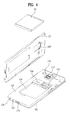
- FIG. 4 is a rear perspective diagram of a surface of a rear case exposed by separating a rear cover of a mobile terminal according to one embodiment of the present invention.
- a front case 101, a rear case 102, a rear cover (or a battery cover) 103, a camera 121', an interface unit 170, a microphone 122, a speaker module, an audio output unit 152', a battery 191, a battery loading unit 104, a USIM card loading unit 105, and a memory card loading unit 106 are provided.
- a space for mounting such an external part as the battery loading unit 104, the USIM card loading unit 105, the memory card loading unit 106 and the like can be provided to a surface of the rear case 102.
- the external part loaded on the surface of the rear case 102 is provided to extend functions of the mobile terminal 100 in order to meet the diversified functions of the mobile terminal and a variety of the consumer's needs.
- the battery 191 can be configured as a replaceable type, as shown in FIG. 4 , to complement a considerable amount of power consumption.
- the battery loading unit 104 is formed on the surface of the rear case 102 to enable a user to detach the corresponding battery.
- a contact terminal is provided to the battery loading unit 104 to be electrically connected to a part installed within the case.
- the USIM card loading unit 105 or the memory card loading unit 106 may be provided, as shown in FIG. 4 , next to the battery loading unit 104.
- the USIM card loading unit 105 or the memory card loading unit 106 may be provided to a bottom surface of the battery loading unit 104.
- the battery 191 can be externally exposed if the battery 191 is unloaded from the battery loading unit 104.
- the battery 191 can be oversized.
- FIG. 4 shows the configuration that the USIM card loading unit 105 or the memory card loading unit 106 is mounted on a backside of the rear case 102, it can be inserted in or separated from the mobile terminal 100 by being inserted in a lateral side of the rear case 102.
- the rear cover 103 covers the surface of the rear case 102.
- the rear cover 103 can fix the battery 191, the USIM card, the memory card, etc. not to be separated from the rear case 102 and also protects the external parts from external shocks or particles.
- a waterproof function is added to the mobile terminal 100.
- the mobile terminal 100 can further include a waterproof structure.
- the waterproof structure can seal up the gap between the rear case 102 and the rear cover 103.
- the types of the contents may include a text content, a video content, a voice content, a location (or position) information content, an image content, a contact content and the like.
- One embodiment of the present invention provides a controlling method for enhancing convenience in a mobile terminal environment that handles contents of various types.
- one embodiment of the present invention provides a method of facilitating a control of an operation of copying & pasting a specific content and a controlling method for adaptively performing such an operation in accordance with an environment for performing the corresponding operation.
- the mobile terminal 100 includes a touchscreen capable of performing both an input and an output.
- the input through the touchscreen is not appropriate for editing and controlling various kinds of multimedia contents.
- the reason for this is that the way for performing the input through the touchscreen are not various. Therefore, according to one embodiment of the present invention, proposed are methods of effectively controlling multimedia contents through a touchscreen. Particularly, according to one embodiment of the present invention, proposed is a method of effectively performing a copy & paste operation on multimedia contents.
- a terminology 'copy & paste operation' is used.
- a user may attempt to use a specific content, which is currently used in a prescribed application (or a specific use environment), in a specific application (or another use environment).
- the user temporarily saves the corresponding specific content and can then input the specific content in a manner that the specific content is brought by a different application.
- the controller 180 saves the corresponding specific content in the memory 160.
- Such an operation is named a copy operation.
- a specific content is saved temporarily for example.
- a method of saving a specific content in a non-flash memory permanently can be included as well as a method of saving a specific content in a flash memory temporarily.
- the content saved in the above manner can be input by being brought by a user's input in a different application (or a different use environment).
- Such an operation is named a paste operation.
- the paste operation means an operation performed in a manner that the controller 180 reads in a specific content saved in the memory 160 and then inputs the corresponding content.
- a clipboard is a tool for managing at least one content saved by a copy operation.
- the clipboard may include one virtual region for outputting a list of at least one or more contents saved in the memory 160 to the touchscreen.
- the controller 180 can control something to be saved in the memory 160 actually.
- the expression of saving a specific content in a clipboard may be interpreted as controlling the specific content to be included in a content list displayed on the clipboard.
- FIG. 5 is a diagram illustrating one example of a controlling method for paging a clipboard according to one embodiment of the present invention. Referring to FIG. 5 , for clarity of the description in the present specification, a case for forming an exterior of the mobile terminal is omitted and a diagram illustrating a configuration of an output through the display unit 151 is shown only.
- the controller 180 outputs an image of a home screen.
- the home screen may be defined as a screen initially displayed on the touchscreen when a locked sate of the touchscreen is cancelled (i.e., unlocked).
- at least one icon or widget for activating an application or an internal function may be displayed.
- At least two home screens can exist in the mobile terminal 100. In this instance, if a prescribed touch gesture is performed on the touchscreen, the at least two home screens can be sequentially displayed on the touchscreen one by one.
- different icons or widgets can be arranged on each of the at least two home screens.
- the controller 180 can page or output a clipboard handler 501 that is an object capable of controlling a clipboard.
- the controller 180 can control the paged clipboard handler 501 to be continuously output through the display unit 151 during a prescribed time. (Thus, the clipboard handler 501 can be output except an application that uses a full screen.)
- the controller 180 can control the above-mentioned clipboard handler 501 to be always output. (Thus, the clipboard handler can be output except an application that uses a full screen.)
- the controller 180 can provide a content copy mode for saving a content in a clipboard (cf. FIG. 5 (c) ).
- the content copy mode means a user interface for performing a copy operation more efficiently.
- FIG. 5 (c) shows a state diagram illustrating one example of a content copy mode.
- an indicator 502 hereinafter named a bar indicator
- a bar indicator of a bar type can be output to indicate the content copy mode.
- a user designates a prescribed region and can then save a content included in the designated prescribed region and/or a capture screen of the designated prescribed region in the clipboard.
- This copy operation shall be described in detail with reference to FIG. 6 as follows.
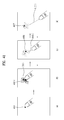
- FIG. 6 is a diagram illustrating one example of designating a partial region in content copy mode and then saving a content in the designated partial region according to one embodiment of the present invention.
- the controller 180 can output a region designating indicator 601 to receive a designation of a prescribed region.
- the controller 180 can receive an input of changing a location and/or size of the region designating indicator 601 and can then change the location and/or size of the region designating indicator 601 in response to the input.
- the controller 180 can fade the rest of the regions except the region designated by the user.
- the controller 180 can save a content related to the designated prescribed region in the clipboard.
- the command for saving the designated prescribed region may include a flicking input performed in a specific direction after a touch to an inside of the region designating indicator 601 (e.g., a flicking input in a direction toward the currently output bar indicator 502, a flicking input in a left direction in FIG. 6 , etc.).
- the controller 180 can save contents related to an object existing in the designated prescribed region in the clipboard (described in detail with reference to FIG. 7 later).
- the controller 180 can save a capture screen of the designated prescribed region in the clipboard.
- the controller 180 can control the object existing in the designated prescribed region and the capture screen to be saved by being matched.
- the controller can output a clipboard region 602 by extending a region of the bar indicator 502.
- the clipboard region 602 is one virtual region on the touchscreen and can output a list of at least one content currently saved in the clipboard.
- FIGs. 6 (a) to 6 (h) are diagrams of a series of operations for saving the aforementioned capture screen in the output clipboard region 602.
- a series of the operations illustrate an animation effect as if opening or closing a drawer when the clipboard region 602 is extended or reduced from the region of the bar indicator 502.
- the animation effect shown in FIG. 6 represents one example of saving a content, by which one embodiment of the present invention is non-limited.
- the controller 180 can additionally output a region designating indicator 601 in order to save a next content, which is to be copied, consecutively.
- a region designating indicator 601 in order to save a next content, which is to be copied, consecutively.
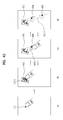
- FIG. 7 is a diagram illustrating one example of an operation of saving a content in a clipboard additionally in continuation with the former operation shown in FIG. 6 according to one embodiment of the present invention.
- the controller 180 when the controller 180 performs a copy operation on the designated predetermined region, the controller 180 proposes to save a content related to the specific object together (or to save the content related to the specific object by matching the content and a capture screen of the designated predetermined region).
- the object may include an application activation icon, a text, an image and the like.
- the reason for saving the content related to the specific object, when performing the copy operation while the specific object is included in the designated predetermined region is to input the content by changing a paste type depending on a location for performing a paste operation. For instance, if the controller 180 receives a command for inputting a specific content onto a home screen through a paste operation, the controller 180 can input the specific content in form of an activation icon capable of directly activating the specific content on the home screen, which will be described in detail with reference to FIG. 14 and FIG. 15 .
- the controller 180 can input the specific content in a text type (e.g., representing a title information on the specific content as a text type, representing a URL (uniform resource locator) information of the specific content as a text type, etc.).
- a text type e.g., representing a title information on the specific content as a text type, representing a URL (uniform resource locator) information of the specific content as a text type, etc.
- FIG. 7 (a) is a state diagram of the content copy mode mentioned in the foregoing description.
- an activation icon of 'gallery application' exists inside the region designating indicator 601.
- the controller 180 can save the activation icon 604 of the gallery application in the clipboard 602 ( FIG. 7 (b) ).
- the controller 180 can save a content related to the gallery application together.
- the content related to the gallery application may include an identification information or a title information of the gallery application.
- the controller 180 receives an input of pasting the activation icon 604 on the home screen is received from a user, the controller 180 can input the corresponding content to the home screen in form of the activation icon of the gallery application. If the controller 180 receives an input of pasting the activation icon 604 on a text memo pad from a user, the controller 180 can input the corresponding content in form of a text data 'gallery' that is the title of the corresponding content.
- FIG. 7 (b) is a diagram illustrating one example of the clipboard 602 that can be output by the controller 180 after performing the copy operation shown in FIG. 6 and FIG. 7 (a) .
- the first capture screen 603 saved by the copy operation in FIG. 6 and the activation icon 604 saved by the copy operation shown in FIG. 7 (b) are included in a content list.
- the controller 180 can facilitate the currently copy operation performed content list to be provided to a user through the clipboard 602.
- FIG. 8 and FIG. 9 are diagrams illustrating examples of a paste operation according to one embodiment of the present invention.
- FIG. 8 is a state diagram of when a clipboard 602 occupies a prescribed region of a screen
- FIG. 9 is a state diagram of when a clipboard 602 occupies a full screen.
- a copy & paste operation and a cut & paste operation can be discriminated from each other depending on whether the specific content continues to be saved in the clipboard 602.
- the copy & paste corresponds to an operating mode in which the specific content continues to be saved in the clipboard 602 after the paste operation.
- the cut and paste corresponds to an operating mode in which the specific content is deleted from the clipboard 602 after the paste operation.
- the discrimination between the copy & paste operation and the cut & paste operation can be made based on a touch input from a user.
- the controller 180 receives a command (i.e., a first touch input) for copying and pasting a prescribed content saved in the clipboard 602 from a user, the controller 180 inputs the prescribed content to a prescribed location and can also maintain the prescribed content saved in the clipboard 602 as it is. Moreover, if the controller 180 receives a command (i.e., a second touch input) for cutting and pasting a prescribed content saved in the clipboard 602 from a user, the controller 180 inputs the prescribed content to a prescribed location and can also delete the prescribed content saved in the clipboard 602.
- a command i.e., a first touch input
- a command i.e., a second touch input
- the modes of operations can be discriminated from each other by the above touch inputs, they may be discriminated from each other by configurations.
- the controller 180 determines a mode of a configured paste operation and can then perform one of a copy & paste and a cut & paste depending on the determined mode.
- the controller 180 can display the clipboard 602. In addition, it can discriminate when the clipboard 602 occupies a prescribed region of the entire touchscreen 151 ( FIG. 8 ) from when the clipboard 602 occupies the entire touchscreen 151 ( FIG. 9 ).
- FIG. 8 (a) is a state diagram of the paste mode described with reference to FIG. 6 .
- the controller 180 can output the clipboard 602.
- the command 1000e for paging the clipboard 602 there is an input performed by touching the clipboard handler 501, moving the touched clipboard handler 501 in a predetermined distance by maintaining the touch, and then removing the touch.
- a region of the clipboard 602 can be determined by the moving distance of the clipboard handler 501.
- first to fifth contents 701 to 705 are included. If the clipboard 602 occupies one prescribed region of the screen only, as shown in FIG. 8 (b) , the controller 180 can receives a selection of a prescribed location 710, on which a paste operation will be performed, from a user. As one example of the location selection, an input 1000f of a touch to a target content of a paste operation is received and the touch input is then shifted to a prescribed location by maintaining the corresponding touch. If the corresponding touch is removed from the prescribed location 710, the controller 180 can input the corresponding content to the prescribed location by a paste operation.
- FIG. 9 (a) shows when the clipboard 602 occupies a full screen of the touchscreen 151.
- the controller 180 receives an input 1000g of selecting a specific content to paste, the controller 180 can stop displaying the clipboard 602 ( FIG. 9 (b), FIG. 9 (c) ).
- the controller 180 should keep receiving a designation of a location for inputting the selected specific content from a user.
- the clipboard 602 occupies the full screen, it may interrupt the designation from the user.
- the controller 180 can shift a location of displaying the selected third content 703, which is shifted while the touch is maintained, depending on the location of the moving touch ( FIG. 9 (c) ).
- FIG. 10 is a diagram illustrating one example of a method of facilitating a switching between active applications in paste mode for displaying a clipboard 602 on a prescribed region of a touchscreen 151.
- the clipboard 602 is currently output from one prescribed region of the touchscreen 151.
- a home screen is currently output to a background as well as the clipboard 602 is currently output.
- the controller 180 can intactly apply an operation on an existing home screen to the currently output home screen except a region of the home screen blocked by a layer of the clipboard 602.
- a screen switching can be performed between a plurality of home screens by a flicking action performed on an existing home screen in a left or right direction. If a flicking action in a left or right direction is input to the home screen except a region blocked by the layer of the clipboard 602 like the existing home screen in FIG. 10 (a) , the controller 180 can switch a plurality of the home screens. If the controller 180 receives an input of selecting an activation icon of an application on the home screen except the region blocked by the layer of the clipboard 602, the controller 180 can activate the selected application.
- an environment for facilitating a switching between applications active on a background is provided.
- the application active on the background means an application currently active despite not being displayed on the touchscreen 151.
- the controller 180 can output a screen of a most recently activated application together with the clipboard 602 of a prescribed region. If the controller 180 receives an additional switching input 1000h, the controller 180 can consecutively switch outputs between applications in order of recently activated order ( FIG. 10 (c) ).
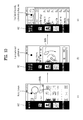
- FIG. 11A and FIG. 11B are diagrams illustrating one example of a method of performing a switching between a clipboard layer and an application layer in paste mode according to one embodiment of the present invention.
- the controller 180 can control the two layers 602 and 1101 to be displayed through a single touchscreen 151 by overlaying each other.
- the controller 180 can control the two layers to be displayed together in a manner that the layer displayed on a top layer is processed into a semi-transparent layer.
- FIG. 11A(b) shows one example of displaying a clipboard layer and an application layer 1101 on a top layer and a bottom layer according to one embodiment of the present invention, respectively.
- the controller 180 can control the clipboard layer displayed on the top layer to be displayed by being processed into a semi-transparent layer.
- the controller 180 can switch the layer displayed on the top layer and the layer displayed on the bottom layer to each other (i.e., switching to the state shown in FIG. 11A(c) ).
- the layer switching input 1000i there is a flicking input in a right direction of a multi-touch (e.g., a triple touch in FIG. 11A ).
- the application layer 1101 previously displayed on the bottom layer is displayed on the top layer and the layer of the clipboard 602 is displayed on the bottom layer.
- FIG. 11B shows one example of a method of returning to the state shown in FIG. 11A (b) according to one embodiment of the present invention.
- the controller 180 outputs the application layer 1101 and the layer of the clipboard 602 to the top layer and the bottom layer, respectively.
- the controller 180 in the state shown in FIG. 11B(a) , if a layer switching input 1000kk is received, the controller 180 can switch the layer displayed on the top layer and the layer displayed on the bottom layer to each other (i.e., switching to the state shown in FIG. 11B(b) ).
- the layer switching input 1000kk may include a flicking input in a left direction of a multi-touch (e.g., a triple touch in FIG. 11B ).
- the controller 180 can output the layer of the clipboard 602 and the application layer 1101 to the top layer and the bottom layer, respectively.
- FIG. 11A(b) when the layer of the clipboard 602 is located on the top layer, as shown in FIG. 11A(b) , a method of performing a paste operation has been described in the foregoing description with reference to FIG. 9 .
- FIG. 11A(c) When the application layer 1101 is located above the layer of the clipboard 602, as shown in FIG. 11A(c) , a method of performing a paste operation is described in detail with reference to FIG. 12 as follows.
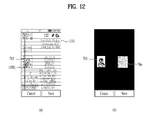
- FIG. 12 is a diagram illustrating one example of a paste operation when a layer of a clipboard 602 is located on a lower layer according to one embodiment of the present invention.
- a clipboard layer 602 is located on a bottom layer and a memo application layer 1101 is located on a top layer.
- a paste command is received through the memo application layer 1101.
- the controller 180 can input the third content 703 to a corresponding location of the memo application ( FIG. 12 (b) ).
- the paste input 1000j on the memo application layer 1101 may include an input 1000j performed by touching the third content 703 viewable through the memo application layer 1101 and then maintaining the touch over a prescribed duration.
- the controller 180 controls all contents having the same property of a corresponding content to be input to the application layer 1101.
- both of the third content 703 and the sixth content 706 selected by the user are image contents. Both of the third content 703 and the sixth content 706 can have the common property as an image.
- the controller 180 if the controller 180 receives a paste input of the third content 703, the controller 180 can control the sixth content 706 to be input to the application layer 1101 as well as the third content 703.
- FIG. 13 is a diagram illustrating one example of performing a copy operation when a layer of a clipboard 602 and an application layer 1101 are arranged on a lower layer and an upper layer, respectively, according to one embodiment of the present invention.
- a web browser application layer 1101 is arranged above a layer of a clipboard 602.
- the web browser application layer 1101 arranged on the top layer is processed into a semi-transparent layer.
- the former operation described with reference to FIG. 12 includes the paste operation when arranging the layer of the clipboard 602 on the bottom layer. However, a copy operation under the same condition as shown in FIG. 12 is described with reference to FIG. 13 . While a user uses a web browser application, assume that the user attempts to save a specific content (hereinafter named a seventh content) 707 on the web browser application in the clipboard 602.
- a specific content hereinafter named a seventh content
- the controller 180 can control the seventh content 707 to be included in the clipboard 602 arranged on the bottom layer ( FIG. 13 (b) ).
- the command 1000k for performing the copy operation may include an input 1000k performed by touching the seventh content 707 and then maintaining the touch over a prescribed time.
- the controller 180 can arrange the layer of the clipboard 602, which was arranged on the bottom layer in FIG. 13 (b) , to be arranged on the top layer ( FIG. 13 (c) ). If the clipboard layer arranged on the top layer is referred to, it can check the seventh content 707 added in FIG. 13 (a) .
- the content is input by modifying a paste type of the content in accordance with an property of the prescribed location.
- the paste operation performed location can include one of various locations of various applications. Hence, if contents are uniformly input to the locations, it may be inefficient or in appropriate.
- a home screen output by the controller 180 generally includes a screen provided when an initial entry into the mobile terminal, the home screen can be configured with an activation icon of an application.
- the home screen In inputting a content to a prescribed location of the above-mentioned home screen, if a simple text or image is input instead of an activation icon, it may be inappropriate.
- a content to a search window of a search engine if an image data, an audio data or the like is input, it may be inappropriate.
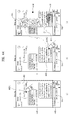
- FIG. 14 and FIG. 15 are diagrams illustrating one example of a method of inputting a content when performing a paste operation on a prescribed location on a home screen according to one embodiment of the present invention.
- an activation icon (or a widget icon) of an application arranged on a home screen is efficient and appropriate.
- the controller 180 when the controller 180 receives a paste command for pasting a prescribed content on a prescribed location, if a property of the prescribed location is capable of creating, arranging or deleting an activation icon (or a widget icon) of an application, the prescribed content is input in form of an activation icon.
- FIG. 14 (a) shows one example of inputting the activation icon 604 described with reference to FIG. 7 to a prescribed location on a home screen through a paste operation.
- contents are included in the clipboard 602.
- the activation icon 604 is saved in the clipboard 602
- a content related to 'gallery application' is saved in the memory 160 by corresponding to the activation icon 604 (refer to the detailed description with reference to FIG. 7 ).
- the content related to the gallery application may include an identification information of the gallery application or a title of an application.
- the controller 180 can control the activation icon 604 to be input in form of an activation icon 1402 of an application.
- the controller 180 identifies the application based on the application identification information among the contents related to the activation icon 604 and can create the icon 1402 for the identified application from the prescribed location 1401 ( FIG. 14 (b) ).
- FIG. 14 (c) and FIG. 14 (d) are diagrams illustrating one example of pasting the activation icon 604 on a message transceiving application screen according to one embodiment of the present invention.
- a screen of a message transceiving application is output as a background and a clipboard 602 is displayed on a prescribed left region of the touchscreen.
- an activation icon 604 of an application 'Naver Blog' is saved in the clipboard 602.
- the controller 180 If the controller 180 receives a command 1000pp for pasting the activation icon 604 on a region 1702 for inputting a message to send, the controller 180 inputs the activation icon 604 by modifying a paste type of the activation icon 604 into a URL form ( FIG. 14 (d) ).
- the URL form may include a URL information related to the activation icon 604, and more particularly, a URL information 1403 for downloading a corresponding application from an application market.
- the counterpart mobile terminal can switch a current screen to a screen for downloading a corresponding application in direct.
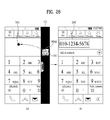
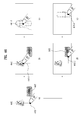
- FIG. 15 (a) shows an operation of copying numeral data in text data.
- This numeral data is assumed as a phone number '010-1234-5678' of a mobile phone.
- a numeral content 1501 created by the copy operation is included in a clipboard 602 currently displayed on a prescribed right region.
- a home screen is currently output as a background image and a clip board 602 and a numeral content 1501 are currently output to a prescribed region of the screen as well.
- the controller 180 can input the corresponding numeral content by changing a form of the numeral content into an activation icon 1503 (particularly, an icon for activating an outgoing call to a phone number).
- the controller 180 can make a phone call to the phone number '010-1234-5678'.
- FIG. 16 is a diagram illustrating one example of when a paste type is not changed, when a numeral content is input through a paste operation, according to one embodiment of the present invention.
- a contact adding screen is currently output to a background
- a clipboard 602 is currently displayed on a prescribed right region of a screen
- the numeral content 1501 as shown in FIG. 15 is currently displayed on the clipboard 602 as well.
- the controller 180 can input the numeral data itself included in the numeral content 1501.
- the controller 180 applies the corresponding input by modifying a content type into a text data type. This can be compared to the case of the modification into an icon type on applying an input to a home screen.
- a contact type indicated by the corresponding numeral content 1501 is analyzed.
- a type (e.g., home, mobile, work, etc.) of a contact is automatically designated based on a result of the analysis. For instance, assume that the numeral content 1501 saved in the clipboard 602 shown in FIG. 16 (a) is a phone number '010-1234-5678' of a mobile phone.
- the controller 180 analyzes a type of a contact indicated by the numeral content 1501 into a mobile phone based on the number'010-1234-5678' and can then further apply a designation 1603 of the analyzed type to the contact adding screen.
- FIG. 15 and FIG. 16 Comparing the embodiments shown in FIG. 15 and FIG. 16 to each other, if the same content of the numeral content 1501 is input to the home screen ( FIG. 15 ) or the contact adding screen ( FIG. 16 ), the paste type is changed.
- FIG. 15 or FIG. 16 shows one example of saving the phone number itself as the numeral content 1501
- contact data e.g., counterpart name information, counterpart phone number information, counterpart email information, counterpart address information, etc.
- FIG. 17 is a diagram illustrating one example of copying or pasting a contact content according to one embodiment of the present invention.
- the controller 180 receives an input 1000p for copying a contact of a counterpart 'Kang Naeng Yi' on a clipboard 602. Subsequently, the controller 180 saves a contact content 1703 on the clipboard 602 and can display the contact content 1703 together with the clipboard 602 ( FIG. 17 (b) ).
- the controller 180 when the controller 180 saves the contact content in the clipboard 602, as shown in FIG. 17 (a) , the controller 180 can control the contact content to be saved in the memory 160 together with a content (e.g., a name of a counterpart, a phone number of a counterpart, an email information on a counterpart, an address of a counterpart, etc.) related to the corresponding contact by being matched to the content.
- a content e.g., a name of a counterpart, a phone number of a counterpart, an email information on a counterpart, an address of a counterpart, etc.
- the controller 180 when the controller 180 saves the contact content 1703 in the clipboard 602, the controller 180 saves an identification information of a contact counterpart together with the contact content 1703 by matching the identification information and the contact content 1703 and can then perform a paste operation using the saved identification information.
- a screen of a message transceiving application is currently output to a background.
- the clipboard 602 can be displayed on a prescribed region of a touchscreen by overlaying the screen.
- the screen of the message transceiving application can include a region 1701 for designating a message receiving counterpart and a region 1702 for inputting a message to be sent.
- a paste type of a paste target content is modified depending on a fact that a paste operation is performed on which location in an active screen of an application.
- a contact information for designating a counterpart is input.
- an additional content related to the corresponding contact content 1703 may be preferably included. Therefore, according to one embodiment of the present invention, when a specific contact content 1703 is input through the above paste operation, methods for further providing an additional content related to the contact content 1703 are provided.
- a reception counterpart can be designated in a manner that a phone number of the reception counterpart is input to the region 1701 for designating the reception counterpart.
- a reception counterpart can be designated in a manner that a contact name or title is input to the region 1701 for designating the reception counterpart.
- the controller 180 can designate a message receiving counterpart as a counterpart of the contact content 1703.
- the controller 180 when a phone number is saved in the memory 160 together with the contact content 1703 by being matched to the contact content 1703, the controller 180 can designate the phone number as the message receiving counterpart. According to another embodiment of the present invention, the controller 180 can perform a designation 1704 of a message receiving counterpart based on a contact identification information saved together with the contact content 1703 on the clipboard 602.
- the controller 180 can perform the corresponding input by modifying a paste type into a text type. If the paste type of the contact content 1703 is modified into the text type, the controller 180 can input a text 1705, which includes at least one of a name, phone number and email information of a contact counterpart saved together with the contact content 1703 by being matched to the contact content 1703, to the region 1702 for inputting a message to be sent.
- FIG. 18 is a diagram illustrating another example of copying or pasting a contact content according to one embodiment of the present invention.
- the controller 180 saves a contact content 1703 of a counterpart 'Kang Naeng Yi' in a clipboard 602, which is identical to the former assumption in FIG. 17 (a) .
- the controller 180 currently outputs a screen of a memo application as a background to the touchscreen 151 as well as displays the clipboard 602 on the touchscreen 151.
- the controller 180 receives a command 1000r for inputting a contact content 1703 to a prescribed location 1801 of the memo application. If so, in response to the command 1000r, when the contact content 1703 is input to the memo application, the controller 180 can apply an input 1802 by modifying a paste type into a text type ( FIG. 18 (b) ).
- FIG. 19 is a diagram illustrating further example of copying or pasting a contact content according to one embodiment of the present invention.
- the controller 180 saves a contact content 1703 for a counterpart called 'Kang Naeng Yi', which is identical to the former assumption in FIG. 17 (a) .
- the controller 180 currently outputs a screen of an SNS (social network service) application as a background to the touchscreen 151 as well as displays the clipboard 602 on the touchscreen 151.
- the controller 180 receives a command 1000s for inputting the contact content 1703 to a prescribed location 1901 of the SNS application.
- SNS social network service
- the SNS is defined as an online service that establishes and shows a reciprocal relation network or reciprocal relationship among persons sharing interests or activities with each other.
- the SNS application is the application used to provide the SNS.
- the SNS application is provided to enable a user to register a posting to use the SNS.
- the SNS application is provided to read a posting registered by another user.
- the SNS application enables the posting to be registered by designating (or tagging) a specific place or a specific counterpart.
- a content saved in a clipboard 602 is proposed to be used.
- a content saved in a clipboard 602 is proposed to be used.
- the controller 180 can compose a posting that performs a designation 1902 of a specific counterpart corresponding to the contact content 1703 in the composed posting ( FIG. 19 (b) ).
- a method of designating a specific place in uploading a posting through an SNS application is described in detail with reference to FIG. 22 as follows.
- FIGs. 20 to 22 are diagrams illustrating example to describe a copy and/or paste operation for a location information content according to one embodiment of the present invention.
- FIG. 20A(a) shows one example of saving a content for a specific geographical location.
- the controller 180 currently outputs a screen of a map application as a background and also outputs a clipboard 602 to a prescribed region in a manner that the clipboard 602 overlays the screen of the map application.
- the controller 180 can save a location information content 708 for the corresponding geographical location in the clipboard 602 ( FIG. 20A(b) ).
- the saved location information content 708 may include at least one of a coordinate information, an address information and a GPS location information.
- the controller 180 modifies the location information content 1703 into a location information type and can then input it to the map application. If so, the map application can provide an output 2002 on the basis of the input location information so that a point on the map corresponding to the location information can be identified. In particular, in order for the modified and input location information to be identified on the map, the controller 180 can output a location indicator 2002 (or a pin indicator). Such an operation shall be named a pinning operation.
- a user can input a geographical location information to a map application through a search or the like.
- a geographical location information is input through a paste operation. If the controller 180 receives a command for pasting a specific content 1703 on a prescribed location, the controller 180 determines a property of the corresponding prescribed location. If the determined property of the corresponding prescribed location is the property capable of controlling a geographical location information, it is proposed that the controller 180 inputs the specific content 1703 by modifying a paste type of the specific content 1703 into a geographical location information type.
- FIG. 20A shows the example of a method for inputting a location information while a map application is active.
- a map application is not active, it is proposed that a location information is input by performing a paste operation on an activation icon of the map application ( FIG. 20B ).
- the controller 180 currently outputs a home screen as a background and also outputs a clipboard 602 to a prescribed top region of the touchscreen 151.
- An activation icon 2003 of a map application e.g., Google Maps
- Google Maps a map application
- the controller 180 if the controller 180 receives a command 1000mm for pasting the location information content 7608 on the activation icon 2003 of the map application, the controller 180 automatically activates the map application and can also provide a display 2002 so that a place corresponding to the location information content 708 can be identified on the map.
- the controller 180 currently outputs a screen of a map application (or a navigation application) as a background and also outputs a clipboard 602 on a prescribed region in a manner that the clipboard 602 overlays the screen of the map application.
- the same location information content 708 as shown in FIG. 20 is saved in the output clipboard 602.
- the map application provides a search window 2101 for a specific point.
- traffic information on the found specific point can be provided through the search window 2101.
- proposed is to search for a specific point through a copy operation for copying the location information content 1703 to a location of the search window 2101.
- the controller 180 if the controller 180 receives a command 1000v for pasting the location information content 708 on the search window 2101 of the map application, the controller 180 searches for a geographical point corresponding to the location information content 708 and can then provide a traffic information 2102 (e.g., an information on a traffic route to the found geographical point, etc.) on the found geographical point.
- a traffic information 2102 e.g., an information on a traffic route to the found geographical point, etc.
- the controller 180 can automatically perform a search & guidance of information on a traffic route having the corresponding geographical point set to a destination.
- a navigation application although a navigation application is not activated, it can input a location information by performing a paste operation on an activation icon of the navigation application. If a command for pasting a location information content 708 on the activation icon of the navigation application is received, the navigation application is automatically activated, a location information is input, and a search & guidance 2102 of such an information of a traffic route as an optimal route information having the input location information set to a destination and the like can be performed.
- a user in order to search for a specific point through the aforementioned search window 2101, a user should type to input a title or keyword for the specific point.
- the corresponding typing input can be replaced by a paste operation.
- the controller 180 currently outputs a contact adding screen as a background and also outputs a clipboard 602 on a prescribed region in a manner that the clipboard 602 overlays the contact adding screen.
- the same location information content 708 as shown in FIG. 20 is saved in the output clipboard 602.
- the controller 180 can automatically input an address of the location information content 708. Moreover, the controller 180 can automatically designate a type 2206 (e.g., company, XXX apartments, home, etc.) of the address by analyzing features (e.g., a building name, a firm name, a shop name, etc.) of the corresponding address.
- a type 2206 e.g., company, XXX apartments, home, etc.
- features e.g., a building name, a firm name, a shop name, etc.
- the controller 180 currently outputs a screen of an SNS application as a background and also outputs a clipboard 602 to a prescribed region in a manner that the clipboard 602 overlays the screen of the SNS application.
- the same location information content 708 as shown in FIG. 20 is saved in the output clipboard 602.
- the controller 180 If the controller 180 receives a command 1000w for inputting the location information content 708 to a prescribed location 2201 on the SNS application, the controller 180 recognizes a GPS location information of the location information content 708 and can then compose a posting 2203 for putting a tag 2202 on a specific place corresponding to the recognized location ( FIG. 23 (b) ). If the specific place is tagged, the tagged place can be displayed together with the posting 2203. If a user selects the tagged place, the user can further check additional information on the tagged place. Moreover, if the tagged place is selected, a map application is activated and a location indicator 2202 can be further displayed at the tagged place on the activated map application.
- FIGs. 23 to 26 are diagrams illustrating example to describe a copy and/or paste operation for a sound content according to one embodiment of the present invention.
- the controller currently outputs a music play application as a background and also displays a clipboard 602 on a prescribed region of the touchscreen 151.
- a sound content is saved in the clipboard 602 and the sound content saved in the clipboard 602 is proposed to be input to another location.
- the sound content saved in the clipboard 602 may include a data previously saved in the memory 160. If the sound content is saved in the clipboard 602, it may mean that an identification information of the sound content is saved.
- the controller 180 can save a sound content 'weird Day' 2302 in the clipboard 602 ( FIG. 23 (b) ).
- a setting screen for designating a ringtone is currently output as a background and a clipboard 602 is also output together with the setting screen.
- the setting screen for designating a ringtone is the screen provided to designate a sound that notifies a call signal received from an unspecific or specific counterpart.
- this setting screen it can set a ringtone to a song data randomly saved by a user as well as to a default notification sound.
- a user searches for the corresponding song data and then sets up a ringtone based on the found song data.
- it can specify a song data based on the sound content 2302 saved in the clipboard 602.
- the controller 180 can set the corresponding sound content 2302 as a ringtone. This set ringtone can be checked in the manner shown in FIG. 23 (c) .
- FIG. 24 is a diagram illustrating an embodiment of inputting a sound content 2303 saved in a clipboard 602 to a search window 2401 of a music play application (or a music search application).
- the search window 2401 of the music play application (or the music search application) is the input window provided to search for a specific music.
- a search keyword e.g., an album title, a singer name, a song title, etc.
- proposed is to input a search keyword by a paste operation of pasting the sound content 2303 on the specific search window 2401 instead of typing the search keyword.
- the controller 180 can input a search formula related to the sound content 2303 to the search window 2401.
- the controller 180 if the controller 180 receives the command 1000z for pasting the sound content 2303 on the search window 2401, the controller 180 inputs a search keyword resulting from modifying a paste type of the sound content 2030 into a text type.
- the search keyword can be set to include at least one of an artist information, album information and song title of the sound content 2303.
- the search window 2401 handles the search keyword, it can have the property capable of inputting, editing or deleting a text. If a paste operation is performed on a prescribed location having the property capable of inputting, editing or deleting a text like the search window 2401, the controller 180 can input a target content 2402 by modifying a paste type of the target content into a text type.
- proposed is a method of setting a ringtone for a specific counterpart by a paste operation of a sound content 2303 saved in a clipboard 602.
- a screen of a contact of a specific counterpart i.e., a counterpart named 'Kang Naeng Yi'
- a clipboard 602 is displayed on a prescribed region of the screen by overlaying the contact screen.
- a sound content 'Weird Day' 2303 is saved in the clipboard 602.
- the controller 180 can set the sound content 2303 as a ringtone for the specific counterpart.
- the ringtone is set by a paste operation, a user can perform the setting 2501 of the ringtone for the specific counterpart more conveniently, thereby being provided with convenience.
- proposed is a method of attaching a sound content 2303 to an outgoing message by a paste operation for the sound content 2303.
- a screen of a message transceiving application a screen of a message transceiving application.
- a clipboard 602 is displayed on a prescribed region of the screen by overlaying the screen.
- a sound content 'Weird Day' 2303 is saved in the clipboard 602.
- the controller 180 can perform an attachment 2602 by attaching the sound content 2303 to the outgoing message 2601.
- the controller 180 can send the sound content 2303 together.
- FIG. 27 is a diagram illustrating one example of a method of inputting a search keyword according to one embodiment of the present invention.
- a search window 2701 (or a search window of a search site activated in a web browser application) is currently output.
- a clipboard 602 is displayed on a manner of overlaying a prescribed region of a screen.
- the controller 180 can provide a search result 2703 having the numeral content 1501 set as a search keyword 2072 ( FIG. 27 (b) ).
- FIG. 28 is a diagram illustrating one example of a method of inputting a phone number to save a contact according to one embodiment of the present invention.
- a contact saving screen keyboard for inputting a contact included
- a clipboard 602 is displayed on a manner of overlaying a prescribed region of the screen.
- the controller 180 can automatically input the numeral content 1501 to the input box 2801 ( FIG. 28 (b) ). If so, a user can easily save the contact based on the automatically input numeral content 1501.
- a following method is proposed. First of all, a login information on a specific site that requires a login is saved by the copy operation mentioned in the foregoing description. Secondly, the saved login information is input to a login information input box by a paste operation. This method shall be described in detail with reference to FIG. 29 and FIG. 30 .
- FIG. 29 is a diagram illustrating one example of a method of copying a login information according to one embodiment of the present invention.
- a login information input screen of a site 'Google' is currently output as a background.
- a clipboard 602 is displayed on a prescribed region of a screen.
- proposed is to apply a copy & paste operation on a login information 2901 (e.g., at least one of ID, email address and password) for each specific site.
- a user can be provided with a user interface capable of inputting the complicated login information easily and quickly.
- the controller 180 can control an ID information (or email information) and a password to be saved by matching each other. Moreover, the controller r180 can save an information for identifying the specific site together as well.
- the controller 180 can control the login information 2901 to be saved as a login information content 709 in the clipboard 602 ( FIG. 29 (b) ).
- a paste operation for the login information content 709 is described in detail with reference to FIG. 30 as follows.
- FIG. 30 is a diagram illustrating one example of applying a paste operation for a login information content 709 according to one embodiment of the present invention.
- the controller 180 currently outputs a login information input screen and also displays a clipboard 602 on a prescribed region of the screen. Currently, a login information has not been input to the login information input screen shown in FIG. 30 (a) .
- the login information when the login information is input, proposed is to input the login information by a paste operation instead of a user's typing action. Assume that a login information content 709 for a site 'Google' is saved in the clipboard 602.
- the controller 180 can individually input the login information content 709 to the ID input box and the password box of the login input box 3002.
- proposed is a method of inputting an ID information and a password information required for a login by a single paste operation at a time.
- the above-mentioned paste operation of pasting the login information content 709 is not limited to a specific site but may be applicable various sites.
- FIG. 31 is a diagram illustrating one example to describe an operation when a clipboard 602 occupies a full screen.
- the controller 180 currently outputs a memo application layer to a bottom layer as a background and also outputs a layer of a clipboard 602 to a top layer.
- a command 1000gg for pasting a first content 701 on the memo application layer located on the bottom layer is received.
- the controller 180 can display the memo content 3101 by moving the memo content 3101 toward a bottom end of the screen by a prescribed distance.
- FIG. 32 is a diagram illustrating one example of a method of changing locations of a clipboard handler 501 and a bar indicator 502 according to one embodiment of the present invention.
- the controller 180 can enter a location change mode. In particular, if a command (e.g., an input of touching the bar indicator 502 over prescribed duration) for entering the location change mode is received, the controller 180 can enter the location change mode.
- a command e.g., an input of touching the bar indicator 502 over prescribed duration
- the controller 180 can control the bar indicator 502 to be displayed by being shifted to a touch dragged location ( FIG. 32 (b) ). Subsequently, if a direction of the touch drag is turned toward a top end of the touchscreen 151, the controller 180 can output an indicator 3201 indicating that the bar indicator 502 can be positioned at the top end.
- the controller 180 can arrange a location of the bar indicator 502 at the top end of the touchscreen 151 ( FIG. 32 (c) ). Meanwhile, the bar indicator 502 can be located or positioned on each of 4 edges of the touchscreen 151 in the same manner and may be shifted depending on user's position settings.
- FIG. 33 is a diagram illustrating one example of a method of deleting or editing a content saved in a clipboard 302 according to one embodiment of the present invention.
- a content editing mode for editing contents saved in the clipboard 602.
- the controller 180 displays the clipboard 602 and also outputs an icon 3301 provided to enter the content editing mode. If the controller 180 receives a command 1000ii for entering the content editing mode, the controller 180 can switch a current mode to the content editing mode. In this instance, the command 1000ii may include an input of touching the aforementioned icon 3301.
- FIG. 33 (b) shows a content editing mode.
- the controller 180 currently outputs a content delete icon 3302 to each content of a clipboard 602. If the controller 180 receives a command 1000jj for shifting a first content 3305 to a prescribed location 3303 on a second content 3304, the controller 180 can switch a location of the first content 3305 and a location of the second content 3304 to each other.
- the command 1000jj may include an input performed by touching the first content 3305, dragging the touched first content 3305 to the second content 3304 by maintaining the corresponding touch, and then removing the corresponding touch.
- the controller 180 can return to a previous state by deviating from the content editing mode.
- This command may include an input performed by retouching the aforementioned icon 3301.
- FIG. 34 is a flowchart illustrating a method of controlling a mobile terminal according to one embodiment of the present invention.
- the controller 180 can output at least one object through the touchscreen.
- the object may include at least one of an activation icon of an application, a text data (numeral data included), a contact data, a sound data and a location (or position) data.
- a step S3402 if the output object copying command is received, the controller 180 can go to a step S3407. In the step S3407, the controller 180 can save a content of the output object in the clipboard 602 mentioned in the foregoing description. If the output object copying command is not received in the step S3402, the controller 180 can go to a step S3403. In the step S3403, the controller 180 determines whether a paste command for pasting on a prescribed location exists. If the paste command exists in the step S3403, the controller 180 can go to a step S3404. If the paste command does not exist in the step S3403, the controller 180 can return to the step S3401.
- the controller 180 can determine a property of the prescribed location.
- the controller 180 modifies a paste type of the content through a paste based on the determined property.
- the controller 180 can input the content to the prescribed location in accordance with the content having the paste type modified.
- a controlling method of utilizing a clipboard in copying and pasting a specific content has been described.
- a controlling method of performing a copy & paste operation using a touch path of a user's touch drag input is described as follows.
- FIG. 35 is a diagram illustrating one example of a touch input for performing a copy operation in a mobile terminal 100 according to one embodiment of the present invention.
- FIG. 35 is a state diagram when a copy mode for supporting a copy operation is entered in an active screen of a gallery application for viewing photos.
- an input for entering a copy mode for a prescribed photo there is an input performed by while a prescribed photo is viewed using a gallery application, touching & pressing a prescribed region of the prescribed photo.
- a touch drag input is used.
- a user can use a touch path established by a touch drag input in designating an outline figure of the corresponding region.
- the controller 180 can output a path identifier 3501 for identifying the touch path established by the touch drag input.
- touch inputs inputtable to the touchscreen 151 include a touch input performed through various inputtable tools such as a stylus pen and the like as well as a touch input through user' finger(s).
- the controller 180 can save a capture screen of a screen output within the first closed curve 3504. In addition, the controller 180 can output a guidance text 3502 indicating that the capture screen has been saved ( FIG. 35 (c) ).
- the capture screen (or capture image) output within the first closed curve 3504 may have an outline figure identical to that of the first closed curve 3504.
- the outline figure formed by the closed curve may use the reference number identical to that of the corresponding closed curve.
- the capture screen shall be named a first image 3503.
- FIG. 36 is a diagram illustrating another example of a saved capture screen (or image) according to one embodiment of the present invention.
- FIG. 36 (a) and FIG. 36 (b) show examples of a copy operation according to one embodiment of the present invention.
- FIG. 36 (a) is a state diagram of a copy mode as well.
- a second closed curve 3601 is formed on an outline of a cola cup in a currently output photo in response to a touch drag input.
- the controller 180 can save a second image 3603 of a screen, which is output within the second closed curve 3601, in the memory (or a clipboard).
- the clipboard means a virtual storage space for temporary storage in order to perform a copy & paste operation.
- the terminology 'saving in the clipboard' is used.
- FIG. 36 (b) is a state diagram of a copy mode as well.
- a third closed curve 3602 is formed on an outline of a cola cup in a currently output photo in response to a touch drag input.
- the controller 180 can save a third image 3604 of a screen, which is output within the third closed curve 3602, in the memory (or a clipboard).
- FIG. 37 is a diagram illustrating one example of a method of automatically forming a closed curve according to one embodiment of the present invention.
- the touch path should return to a touch starting point.
- outline figures of objects for a photo are analyzed. If it is determined that a touch drag input is performed along an outline figure of a specific object, a closed curve in the corresponding outline figure is automatically designated.
- FIG. 37 (a) is a state diagram of a copy mode according to one embodiment of the present invention.
- three bears are displayed like the photo shown in FIG. 35 .
- the controller 180 analyzes outline figures of the three bears.
- the controller 180 can automatically output an outline figure 3701 for the middle bear. If the output outline figure 3701 coincides with a region on which a user intends to perform a copy operation, the user can give a command 3702 to perform the copy operation on the corresponding outline figure 3701. As an example of the command 3702, there may be a press input performed by touching a prescribed point on the outline figure 3701 and then maintaining the touch over a prescribed duration.
- the controller 180 saves a capture screen of an image or screen currently output within the outline figure 3701 and can output a guidance 3502 that indicates that the copy operation has been performed. So far, one example of an input for performing a copy operation according to one embodiment of the present invention has been described. In the following description, examples of a paste operation according to one embodiment of the present invention shall be explained with reference to the accompanying drawings.
- FIG. 38 is a diagram to describe a paste operation according to a first embodiment of the present invention.
- FIG. 38 shows a state that a paste mode is entered according to one embodiment of the present invention.
- an input for entering a paste mode there may be a press input to a prescribed point on an editing screen.
- the controller 180 can output outline figures 3504, 3601 and 3602 of an image (capture screen) saved in the memory 160.
- the examples of the output outline figures 3504, 3601 and 3602 correspond to the outline figures of the saved capture screen shown in FIG. 35 or FIG. 36 .
- the controller 180 can output an preview 3802 of an image corresponding to the selected outline figure 3504.
- an input e.g., an input of touching an outline figure to select, etc.
- the controller 180 can output an preview 3802 of an image corresponding to the selected outline figure 3504.
- the controller 180 changes the location of the selected outline figure 3504 and the location of the preview 3802 in response to a reception of the shift command 3803 for the selected outline figure 3504 and the preview 3802 ( FIG. 38 (c) ).
- the location shift command 3803 there may be a touch drag input for shifting the selected outline figure 3504 to a desired location or position.
- the controller receives a paste input 3804 the controller 180 can perform a paste operation of pasting an image corresponding to the preview 3802 on the corresponding location.
- FIG. 39 is a diagram to describe a paste operation according to a second embodiment of the present invention.
- a user's touch path is recognized in paste mode.
- a paste operation is performed on an image having an outline figure identical/similar to the touch path.
- a first image 3503 is saved in the memory 160 or a clipboard.
- the state diagrams shown in FIG. 39 correspond to the state diagrams in paste mode.
- the controller 180 searches an image having an outline figure corresponding to the first touch path 3901.
- the first touch path 3901 has a figure corresponding to the outline figure of the first image 3503 described with reference to FIG. 35 .
- the controller 180 searches for the first image 3503 and then pastes the found first image 3503 on the screen ( FIG. 39 (b) ).
- the controller 180 enlarges and then pastes the corresponding image. If a size of the figure formed by the touch path input by the user is small, the controller 180 reduces and then pastes the corresponding image. In particular, the controller 180 can paste the corresponding image by adjusting the size of the corresponding image in proportion to the size of the touch path figure.
- a figure of an input second touch path 3902 is identical to that of the first touch path 3901 but a size of the second touch path 3902 is smaller than that of the first touch path 3901.
- the controller 180 determines a size of a figure formed by the second touch path 3902 and can then paste the first image 3503 in proportion to the determined size.
- a size of the pasted first image 3503 shown in FIG. 39 (d) may be smaller than that of the pasted first image 3503 shown in FIG. 39 (b) .
- the controller 180 recognizes a touch path until removing the touch for the touch drag input by real time and is proposed to output/filter a search result depending on a variation of the real-time recognized touch path.
- FIG. 40 is a diagram illustrating one example of an output and filtering of a search result in response to a real-time input of a touch path according to a second embodiment of the present invention.
- FIGs. 40 (a) to 40 (d) real-time varying states of a touch drag input (4001-1 to 4001-4) are indicated by reference numbers 4001-1 to 4001-4, respectively.
- a state diagram of a paste mode is output.
- a touch for applying a touch drag input is initiated. If a state of an input touch path is changed into the state 4001-2 shown in FIG. 40 (b) by a user's touch drag action, the controller 180 searches for an image corresponding to the touch path in the state 4001-2 by real time. In particular, the controller 180 can search the images saved in the memory 160 (or clipboard) for the image having a portion of its outline figure that matches the touch path in the state 4001-2.
- the controller 180 can display a plurality of outline figures 4002 to 4005 for a plurality of the found images on the touchscreen.
- a plurality of the outline figures 4002 to 4005 may include candidate items for an image a user intends to input.
- the output candidate items can play roles as guide lines for a user to perform a touch drag input.
- the state of the touch path may be changed into the state 4001-3 ( FIG. 40 (c) ).
- candidate items mismatching the outline figure can be filtered off.
- the outline figure 4002 and the outline figure 4003 are output only but the rest of the outline figures may not be output by being filtered off.
- FIG. 40 (d) shows a touch drag input completed state.
- the touch path in the state 4001-4 is established.
- the rest of the outline figures except one are filtered off by the touch path in the state 4001-4.
- a user selects the corresponding outline figure (e.g., applying a press input to the corresponding outline figure) and can then perform a paste operation on the second image 4006 corresponding to the selected outline figure.
- FIG. 41 is a diagram illustrating one example of a paste operation according to a third embodiment of the present invention.
- a length change of a touch path of a touch drag input is detected.
- an image on which a paste operation will be performed is selected to correspond to the length.
- FIG. 41 (a) shows one example of entering a paste mode in an editing screen. If the controller 180 receives a command 4101 for entering a paste mode in an editing screen, the controller 180 enters the paste mode.
- FIG. 41 (b) is a state diagram that a past mode is entered. If the paste mode is entered (a touch input is maintained, 4102-1), the controller 180 can output an image (e.g., a first image 3503 in the drawing) on which a copy operation has been performed most recently.
- one of a plurality of the images may correspond to an image on which a user intends to perform a paste operation.
- an image for performing a paste operation thereon can be selected in response to a length change of a touch path.
- the controller 180 can output a second one (assumed as a second image 4006) of the recently copied images. Subsequently, referring to FIG. 41 (d) , while the touch is maintained, if the controller 180 receives a touch drag input amounting to a length 4102-3, the controller 180 can output a third one (assumed as a third image 4007) of the recently copied images.
- the controller 180 can return to the state shown in FIG. 41 (c) or FIG. 41 (b) .
- the controller 180 can differentiate an interval, in which a photo is changed and output, depending on a speed of a touch drag. For instance, if a touch drag speed is slow, an output image can be changed by 0.5 cm. If the touch drag speed is high, an output image can be changed by 0.2 cm.
- a user selects the corresponding image and can then perform a paste operation thereon.
- the controller 180 performs a paste operation on the second image 4006.
- the controller 180 performs a paste operation on the third image 4007.
- a paste operation according to a third embodiment of the present invention can differentiate an image output form.
- FIG. 42 is a diagram illustrating another example of a paste operation according to a third embodiment of the present invention.
- FIG. 42 (a) shows another example of entering a paste mode in an editing screen. If the controller 180 receives a command 4201 for entering a paste mode in an editing screen, the controller 180 enters the paste mode.
- FIG. 42 (b) is a state diagram that a past mode is entered. If the paste mode is entered, the controller 180 can output an image (e.g., a first image 3503 in the drawing) on which a copy operation has been performed most recently. In particular, referring to FIG. 42 (c) , while the touch is maintained, if the controller 180 receives a touch drag input amounting to a length 4202-2, the controller 180 can further output a second one (assumed as a second image 4006) of the recently copied images.
- FIG. 42 differs from FIG. 41 in further outputting a new image instead of changing and outputting a previously output image.
- the controller 180 can further output a third one (assumed as a third image 4007) of the recently copied images. Meanwhile, while the touch drag input amounting to the length 4202-3 is received, if the controller 180 receives a drag input performed by being traced back along the touch path, the controller 180 can return to the state shown in FIG. 42 (c) or FIG. 42 (b) .
- the controller 180 can differentiate an interval, in which a photo is changed and output, depending on a speed of a touch drag. For instance, if a touch drag speed is slow, an output image can be changed by 0.5 cm. If the touch drag speed is high, an output image can be changed by 0.2 cm.
- a user selects the corresponding image and can then perform a paste operation thereon.
- the controller 180 performs a paste operation on the second image 4006.
- the controller 180 performs a paste operation on the third image 4007.
- FIG. 43 is a diagram illustrating one example of a paste operation according to a second embodiment of the present invention.
- FIG. 43 is a state diagram of an active screen of a contact application. Referring to FIG. 43 (a) , a contact list saved in the mobile terminal 100 is displayed. A user selects a prescribed contact from the contact list and may then intend to register an image for the selected contact. If the controller 180 receives an input 4301 of selecting one of image screens output from the contact list, the controller 180 can output a touch reception popup window 4302 for receiving a touch drag input in response to the corresponding input 4301.
- the touch reception popup window 4302 is the popup window configured to receive an input of a touch path from a user and to search for an image based on the input touch path.
- the controller 180 receives a touch path input 4303 through the touch reception popup window 4302, the controller 180 searches for an image 4304 by the searching method described with reference to FIG. 9 and can then output the found image 4304 ( FIG. 43 (c) ).
- the controller 180 can save the found image 4304 as the image of the selected contact. So far, the copy & paste operation for an image has been described. Moreover, one embodiment of the present invention is applicable to a copy & paste operation for text data.
- FIG. 44 is a diagram to describe an operation of copying text data according to one embodiment of the present invention.
- FIG. 44 (a) shows a state diagram of a message transceiving application.
- the state diagram of the message application is similar to that of a general message application. Details of parts unnecessary for the description of embodiments of the present invention shall be omitted from the following description.
- a message application can be mainly divided into two regions including a first region 4405 and a second region 4406.
- the first region s405 is the region for outputting a message transceived history.
- messages are output from a bottom end in order of recent message transceiving.
- a text data 4401 corresponds to a most recently transceived message.
- the second region 4406 is an input window for inputting a message.
- a paste operation which will be described later, can be performed on the second region 4406.
- a copy & paste operation described with reference to FIG. 44 is explained by taking a state diagram of a message application as one example and may be identically applicable to various applications capable of inputting and outputting text data.
- the controller 180 can save the first text data 4401 in the clipboard.
- the controller 180 can output a guidance text 3502 indicating that the first text data 4401 has been saved in the clipboard.
- the controller 180 outputs to provide a clipboard layer 4404 to enable a user to check the text data saved in the clipboard ( FIG. 44 (c) ).
- the controller 180 can save the second text data 4402 in the clipboard.
- the controller 180 can output a guidance text 3502 indicating that the second text data 4402 has been saved in the clipboard.
- the controller 180 outputs to provide a clipboard layer 4404 to enable a user to check the text data saved in the clipboard ( FIG. 44 (c) ).
- the content or substance of the text data saved in the clipboard can be displayed on the clipboard by being reduced (or in a manner that a letter font size is decreased) in order to be displayed on a single screen.
- the clipboard layer 404 is output by displaying the text data saved so far. Assume that the first to third text data 4401 to 4403 saved in the clipboard are output to the clipboard layer 4404. In addition, the controller 180 can control the clipboard layer 4404 to be output semi-transparently.
- FIG. 45 is a diagram illustrating examples of performing a paste operation on the copied data shown in FIG. 44 .
- FIG. 45 (a) shows a state diagram of a message application.
- the controller 180 receives a paste command 4501 for pasting on the second region 4406.
- the paste command 4501 there may be a touch & press input to the second region 4406.
- the controller 180 can output a plurality of word balloon forms corresponding to a plurality of text data saved in the clipboard, respectively.
- the output word balloon forms can have various sizes and shapes depending on the copied text data.
- a user selects a prescribed word balloon form from a plurality of the output word balloon forms and can then perform a paste operation for the text data corresponding to the selected word balloon form.
- the controller 180 receives an input 4502 of selecting a prescribed one of a plurality of the word balloon forms, the controller 180 can output a preview screen 4503 of the corresponding text data.
- the controller 180 receives an input 4505 of enlarging the preview screen 4503, the controller 180 can enlarge and output the text data ( FIG. 45 (c) ).
- the enlarging input 4505 there may be a press input to the preview screen.
- the controller 180 receives a paste command 4504 for pasting the selected text data, the controller 180 can perform a paste operation of pasting the selected text data on the second region 4406.
- the text data pasting and the image data pasting may differ from each other in operation. Therefore, according to one embodiment of the present invention, proposed is to determine whether to perform a text pasting or an image pasting prior to performing a paste operation.
- FIG. 46 is a diagram illustrating one example of a method of discriminating a paste operation for a text data and a paste operation for an image data according to one embodiment of the present invention.
- FIG. 46 (a) is a state diagram of a pasting mode. If the controller 180 receives a paste command 4601, the controller 180 can output an image icon 4602 and a text icon 4603. A user can select one of the two icons 4602 and 4603 and can then perform a paste operation appropriate for the selected icon.
- FIG. 46 (b) and FIG. 46 (c) show one example of when the image icon 4602 is selected.
- the input for selecting the image icon 4602 may include an input of performing a touch drag 4601-1 toward the image icon 4602. If the image icon 4602 is selected, the controller 180 outputs outline figures of images saved in the clipboard so that a user can select one of the output outline figures. Since this process is identical to the former operation described with reference to FIG. 38 , its details shall be omitted from the following description.
- FIG. 46 (d) and FIG. 46 (e) show one example of when the text icon 4603 is selected.
- the input for selecting the text icon 4603 may include an input of performing a touch drag 4601-2 toward the text icon 4603. If the text icon 4603 is selected, the controller 180 outputs word balloon figures of texts saved in the clipboard so that a user can select one of the word balloon figures. Since this process is identical to the former operation described with reference to FIG. 45 , its details shall be omitted from the following description.
- an emoticon or sticker may be provided by the mobile terminal 100 itself in the embodiment shown in FIG. 47 , it may include an emoticon or sticker provided by a third party application.
- FIG. 47 is a diagram illustrating one extensible example of applying a copy & paste operation to a content previously saved in a memory 160 according to one embodiment of the present invention.
- FIG. 47 (a) is a state diagram of a message transceiving application.
- the message transceiving application may include an application of the mobile terminal 100 or an application of a third party application.
- the message transceiving application can provide a state diagram a little bit different from that of the former description.
- the message transceiving application can output an input window for inputting a message to a third region 4701.
- the message transceiving application can output a touch input window for inputting a touch gesture to a fourth region 4702.
- a user can search for a desired emotion or sticker by inputting a gesture having a configuration similar to that of the desired emoticon or sticker. If the controller 180 receives a command 4705 for searching using a gesture input to the fourth region 4702, the controller 180 searches for emoticons 4704-1 and 4704-2, each of which has a configuration (or emotion) similar to that of the input gesture, and can then output the found emotions 4704-1 and 4704-2 ( FIG. 47 (c) ). If the controller 180 receives an input 4706 of selecting one of the found emotions 4704-1 and 4704-2, the controller 180 can paste the selected emoticon 4704-1 on the message input window 4701 of the third region 4701 ( FIG. 47 (d) ).
- the controller 180 in performing a paste operation of pasting an emoticon or sticker, can provide an emoticon indicating an outline figure of an image or a similar emotion even if an input of a gesture is not perfectly identical.
- proposed is to paste text data through an input of a gesture.
- FIG. 48 is a diagram illustrating one example of a copy & paste operation for a text data according to one embodiment of the present invention.
- FIG. 48 (a) is a state diagram of a message transceiving application.
- the message transceiving application may include an application of the mobile terminal 100 or an application of a third party application.
- the message transceiving application can output an input window for inputting a message to a third region 4701.
- the message transceiving application can output a touch input window for inputting a touch gesture to a fourth region 4702.
- a touch gesture input to the fourth region 4702 is a handwriting 'Hello'.
- the controller 180 recognizes the handwriting as a text, searches a plurality of text data saved in the clipboard for text data 4802 and 4803 including the recognized text, and can then output the found text data 4802 and 4803.
- the controller 180 can determine the corresponding timing point as one of a timing point of receiving a gesture complete input and a timing point at the expiration of a prescribed time from a timing point of receiving a last gesture input.
- the reference is determined in order to clarify the complete timing point of the input. Therefore, once the input of the touch gesture is complete, the controller 180 recognizes a text with reference to the input completed touch gesture and can then perform the search operation based on the recognized text.
- the controller 180 can perform a paste operation of pasting the selected text data on the message input window 4701 (i.e., the third region) ( FIG. 48 (c) ).
- an emoticon input mode and a text input mode are discriminated from each other.
- the operation shown in FIG. 47 is performed in the emoticon input mode
- the operation shown in FIG. 48 is performed in the text input mode.
- a paste operation is performed in paste mode and a copy operation is performed in copy mode.
- a method of discriminating the two operations from each other depending a selection of a gesture or action is explained,
- FIG. 49 is a diagram illustrating a first example of discriminating a paste operation and a copy operation according to one embodiment of the present invention.
- a state diagram of an image editing mode is output. In this editing mode, both a paste operation and a copy operation can be performed.
- the controller 180 receives an input 4903 of touching a prescribed region in an image editing mode, the controller 180 can output a direction arrow 4901 indicating a direction of the paste operation and a copy direction arrow 4902 indicating a direction of the copy operation.
- the controller 180 receives an input 4903 of touching a prescribed region in an image editing mode
- the controller 180 can output a direction arrow 4901 indicating a direction of the paste operation and a copy direction arrow 4902 indicating a direction of the copy operation.
- the touch input 4903 while the touch input 4903 is maintained, if a drag input starts in a left direction, the copy operation can be performed. If a drag input starts in a right direction, the copy operation can be performed.
- FIG. 49 (b) and FIG. 49 (c) show one example of performing the paste operation.
- the controller 180 can perform the paste operation in response to the touch drag input 4904-1.
- a touch path is recognized by real time and an image corresponding to the real-time recognized touch path can be then found and output by real time.
- an operation of outputting an outline figure 4905 of the corresponding image is as good as mentioned in the foregoing description.
- FIG. 49 (d) and FIG. 49 (e) show one example of performing the copy operation.
- the controller 180 can perform the copy operation in response to the touch drag input 4904-2.
- the controller 180 can automatically designate a closed curve 4906 of the corresponding outline figure.
- a drag start in a right direction can select a paste operation.
- a drag start in a left direction can select a copy operation.
- it can select a paste operation or a copy operation depending on a clockwise or counterclockwise formation of a closed curve.
- FIG. 50 is a diagram illustrating a second example of discriminating a paste operation and a copy operation according to one embodiment of the present invention.
- a paste operation is proposed to be performed in the first place. If an image on which a paste operation will be performed is not found, a copy operation is proposed to be performed.
- FIG. 50 (a) a touch input 5001 is currently received in image editing mode. If a touch drag input 5002-1 is received in continuation with the touch input 5001, as mentioned in the foregoing description with reference to FIG. 10 , the controller 180 recognizes a touch path by real time and can then search for an image corresponding to the real-time recognized touch path by real time.
- the controller 180 can output an outline figure 5003 corresponding to the found image ( FIG. 50 (c) ). Thereafter, if the controller 180 receives an input of selecting the outline figure 5003, the controller 180 can output an image 5004 corresponding to the selected outline figure 5003 ( FIG. 50 (d) ). Moreover, if the controller 180 receives a paste input (e.g., a press input to the mage) to the output image 5004, the controller 180 can pate the output image 5004 on an editing screen. In particular, in the drawing shown in FIG. 50 , if a path proceeds in order of (a) ⁇ (b) ⁇ (c) ⁇ (d), the controller 180 can perform a paste operation.
- a paste input e.g., a press input to the mage
- the controller 180 can perform a copy operation. While the outline figure 5003 corresponding to the real-time found image is output, as shown in FIG. 50 (c) , the outline figure 5003 may not be further output by being filtered off due to the continuous touch path input. In this instance, the controller 180 can perform a copy operation in response to the corresponding touch path. In particular, in the drawing shown in FIG. 50 , if a path proceeds in order of (a) ⁇ (b) ⁇ (c) ⁇ (e) ⁇ (f), the controller 180 can perform the paste operation.
- a user when a paste operation is performed, a user should input a touch path having the same configuration of an outline figure of an image saved in a clipboard.
- a copy operation since a new touch path is input, it may be able to discriminate operations like the second example.
- FIG. 51 is a diagram illustrating a third example of discriminating a paste operation and a copy operation according to one embodiment of the present invention.
- a pressure of a touch input is proposed to be further determined.
- a copy operation and a paste operation are discriminated from each other with the determined pressure.
- FIG. 51 (a) shows a state of receiving a touch input 5101 at a high pressure.
- the controller 180 can operate in paste mode in response to a touch drag input 5102 after the touch input 5101 at the high pressure ( FIG. 51 (b)).
- FIG. 51 (c) shows a state of receiving a touch input 5103 at a low pressure.
- the controller 180 can operate in copy mode in response to a touch drag input 5104 after the touch input 5103 at the low pressure ( FIG. 51 (d) ).
- the controller 180 can output an animation effect of cutting with a sound effect of a buming-in sound.
- the controller 180 can operate in copy mode in response to a touch input at a high pressure. And the controller 180 can operate in paste mode in response to a touch input at a low pressure.
- FIG. 52 is a diagram illustrating a fourth example of discriminating a paste operation and a copy operation according to one embodiment of the present invention.
- a start input of a touch drag is discriminated as a single touch or a multi-touch. Based on a result of the discrimination, it is proposed to select an operating mode.
- FIG. 52 (a) shows a state of receiving a single touch input 5201.
- the controller 180 can operate in paste mode in response to a touch drag input 5202 after the single touch input 5201 ( FIG. 52 (b)).
- FIG. 52 (c) shows a state of receiving a multi-touch input 5203.
- the controller 180 can operate in copy mode in response to a touch drag input 5204 after the multi-touch input 5203 ( FIG. 52 (d) ).
- the controller 180 can operate in copy mode in response to a single touch input. And the controller 180 can operate in paste mode in response to a multi-touch input.
- FIG. 53 is a diagram illustrating a fifth example of discriminating a paste operation and a copy operation according to one embodiment of the present invention. According to the fifth example, operation discrimination is proposed to be performed through discrimination between a direct touch and a proximity touch.
- FIG. 53 (a) shows a state of receiving a direct touch input 5301.
- the controller 180 can operate in paste mode in response to a touch drag input 5302 after the direct touch input 5301 ( FIG. 53 (b)).
- FIG. 53 (c) shows a state of receiving a proximity touch input 5303.
- the controller 180 can operate in copy mode in response to a proximity touch drag input 5304 (or an air gesture) after the proximity touch input 5303 ( FIG. 53 (d) ).
- the controller 180 can operate in copy mode in response to a direct touch input. And the controller 180 can operate in paste mode in response to a proximity touch input.
- FIG. 54 is a diagram illustrating a sixth example of discriminating a paste operation and a copy operation according to one embodiment of the present invention. According to the sixth example, after mode selecting icons 5402 and 5403 have been output, a mode is proposed to be selected by a user.
- FIG. 54 (a) shows a state of receiving a touch input 5401. In this instance, in response to the touch input 5401, the controller 180 can output a copy operation icon 5402 and a paste operation icon 5403.
- controller 180 If the controller 180 receives an input of selecting one of a copy operation icon 5402 and a paste operation icon 5403, the controller 180 can operate in the corresponding mode.
- an input for selection there is a drag input to each operation icon by maintaining the touch input 5401.
- the controller 180 can output a first identifier 5404 indicating that the copy operation has been selected. While the copy operation icon 5402 is selected, if a prescribed time expires, the controller 180 confirms the selected operation and can then operate in the confirmed operation mode.
- the controller 180 can output a second identifier 5405 indicating that the paste operation has been selected. While the paste operation icon 5403 is selected, if a prescribed time expires, the controller 180 confirms the selected operation and can then operate in the confirmed operation mode, i.e., the paste operation mode ( FIG. 54 (d) ).
- FIG. 55 is a diagram illustrating a seventh example of discriminating a paste operation and a copy operation according to one embodiment of the present invention.
- a mode is proposed to be selected by a user like the former example.
- a difference between FIG. 54 and FIG. 55 includes the difference between the example ( FIG. 54 ) of making a selection before a touch drag input and the example ( FIG. 55 ) of making a selection after a touch drag input.
- FIG. 55 (a) is a state diagram of an image editing screen.
- a touch input 5501 is applied.
- a touch drag input 5502 is received.
- the controller 180 can change locations of the mode selecting icons 5402 and 5403 depending on a location of the touch input changing in response to a touch drag.
- the controller 180 can change an output location of each of the mode selecting icons 5402 and 5403 using a location of a finger with which the touch is maintained.
- FIG. 55 (c) is a state diagram of a point at which the touch drag input ends.
- the controller 180 currently outputs the mode selecting icons 5402 and 5403 to the touch input removed location. Subsequently, if the paste operation icon 5403 is selected, the controller 180 can perform the paste operation corresponding to an input touch path ( FIG. 55 (d) ). In particular, referring to FIG. 55 (d) , the controller 180 searches for an image corresponding to the input touch path 5502 and then performs a paste operation on the found image (e.g., a first image 5503).
- a paste operation e.g., a first image 5503
- the controller 180 since a touch drag input is received before determining a copy mode or a paste mode, it may be appropriate not to perform an operation of outputting a candidate group in the paste mode. Moreover, although the paste operation mode is selected, if an image corresponding to an input touch path is not found, the controller 180 indicates that any image is not found and may not perform the paste operation.
- the above described copy and paste operations may be applicable to an icon or widget on a home screen as well as to an image.
- a corresponding embodiment shall be described with reference to FIG. 56 as follows.
- FIG. 56 is a diagram illustrating one example of a method of performing a copy & paste operation on a home screen according to one embodiment of the present invention.
- FIG. 56 (a) is a state diagram of an icon copy mode.
- the controller 180 recognizes a touch path established by a touch drag input. If a closed curve 5601 is formed by the recognized touch path, the controller 180 can copy the icons inside the formed closed curve.
- an icon 'Chrome', an icon 'Gallery', an icon 'Internet', an icon 'Play store' and an icon 'camera' are copied to a clipboard.
- FIG. 56 (b) is a state diagram of an icon paste mode.
- the controller 180 recognizes a touch path 5602 established by a touch drag input and then searches for icons saved by a touch path similar to the recognized touch path 5602. In particular, by a gesture for drawing the touch path similar to the former touch path drawn for saving the icons, it can perform the paste operation of pasting icons. Subsequently, the controller 180 performs a paste operation of pasting the found icons on the home screen.
- the icon 'Chrome', the icon 'Gallery', the icon 'Internet', the icon 'Play store' and the icon 'camera' are pasted on the home screen ( FIG. 56 (c) ). If a prescribed one of the pasted icons is touched (or selected), it is a matter of course that a corresponding application can be activated. Regarding the mode switching between the icon copy mode and the icon paste mode, which is described with reference to FIG. 56 , it may be able to discriminate the two modes from each other by one of the methods described with reference to FIGs. 49 to 55 .
- one embodiment of the present invention can be extended and applied to a file and folder copy & paste operation as well as to the icon copy & paste operation.
- a corresponding embodiment shall be described with reference to FIG. 57 as follows.
- FIG. 57 is a diagram illustrating one example of a copy & paste operation for a file and folder according to one embodiment of the present invention.
- FIG. 57 shows one example of a case of managing a photo file in a gallery application.
- FIG. 57 (a) photo folders, each of which containing photo files, in a gallery application are displayed. In this instance, it can perform a copy operation according to one embodiment of the present invention.
- the controller 180 can perform a copy operation on a folder (and file) located inside the formed closed curve 5701.
- a first folder 5703 and a second folder 5704 are copied to a clipboard.
- a user can paste the first and second folders 5703 and 5704 copied to the clipboard on another location or position.
- FIG. 57 (b) files and folders different from those shown in FIG. 57 (a) are displayed on a gallery application.
- a user can perform a paste operation of pasting the first and second folders 5703 and 5704, which are copied to the clipboard, on the corresponding location. If a touch path 5702 similar to the aforementioned closed curve 5701 is input, the controller 180 can paste the first and second folders 5803 and 5704 on a location to which the touch path is input ( FIG. 57 (c) ).
- FIG. 58 is a flowchart of a method according to one embodiment of the present invention.
- the controller 180 determines whether a current mode is a copy mode or a paste mode. Thus, the controller 180 can discriminate the two modes from each other by one of the methods described with reference to FIGs. 49 to 55 . If the controller 180 determines that the current mode is the copy mode, the controller 180 goes to a step S5801. If the controller 180 determines that the current mode is the paste mode, the controller 180 goes to a step S5805.
- the controller 180 receives a touch drag input through the touchscreen.
- the controller 180 determines whether a first touch path established by the received touch drag input forms a closed curve. If the closed curve is not formed, the controller 180 returns to the step S5801. If the closed curve is formed, the controller 180 can go to a step S5803.
- the controller 180 can capture a screen within the closed curve.
- the controller 180 saves the captured screen in the clipboard. If the controller 180 completes the saving, the controller 180 returns to the step S5801 of receiving a touch drag input.
- the controller receives a touch drag input in paste mode.
- the controller 180 can recognize a second touch path established by the received touch drag input.
- the controller 180 can search images saved in the clipboard for at least one image having a portion of its outline figure matched to the recognized second touch path.
- step S5808 the controller 180 outputs the outline figure of the found at least one image to the touchscreen.
- step S5809 if the controller 180 receives an input of selecting one of outline figures, the controller 180 can perform a paste operation for the image corresponding to the selected outline figure. After performing the paste operation, the controller 180 can return to the step S5805.
- embodiments of the present invention provide several advantages. According to at least one of embodiments of the present invention, various kinds of contents can be efficiently managed and controlled. Further, a copy & paste operation on a capture screen of a region designated by a user is facilitated.
- the above-described methods can be implemented in a program recorded medium as computer-readable codes.
- the computer-readable media may include all kinds of recording devices in which data readable by a computer system are stored.
- the computer-readable media may include ROM, RAM, CD-ROM, magnetic tapes, floppy discs, optical data storage devices, and the like for example and also include carrier-wave type implementations (e.g., transmission via Internet).
- the computer may include the controller 180 of the terminal.
Landscapes
- Engineering & Computer Science (AREA)
- Theoretical Computer Science (AREA)
- General Engineering & Computer Science (AREA)
- Physics & Mathematics (AREA)
- General Physics & Mathematics (AREA)
- Human Computer Interaction (AREA)
- Software Systems (AREA)
- User Interface Of Digital Computer (AREA)
- Telephone Function (AREA)
Abstract
Description
- The present invention relates to a mobile terminal, and more particularly, to a mobile terminal and controlling method thereof. Although the present invention is suitable for a wide scope of applications, it is particularly suitable for facilitating a terminal to be used in further consideration of user's convenience.
- A mobile terminal can perform various functions including data and voice communications, capturing images and video via a camera, recording audio, playing music files and outputting music via a speaker system, and displaying images and video on a display. Some terminals include additional functionality which supports game playing, while other terminals are also configured as multimedia players. More recently, mobile terminals have been configured to receive broadcast and multicast signals which permit viewing of contents, such as videos and television programs.
- Generally, terminals can be classified into mobile terminals and stationary terminals. In addition, mobile terminals can be further classified into handheld terminals and vehicle mounted terminals.
- Recently, mobile terminals have been provided as smartphone versions and the performance of a mobile terminal has significantly advanced. The advanced performance however increases the amount and/or types of contents handled by the mobile terminal.
- Generally, a mobile terminal provided as a version of a smartphone is configured by outputting a desired data through a relatively wide touchscreen as soon as receiving a control input through the output screen. However, in controlling the various and massive contents through the touchscreen, efficient controlling methods have not been provided. Particularly, the demands for a controlling method for performing a copy & paste action on various kinds of contents are increasingly rising.
- Accordingly, embodiments of the present invention are directed to a mobile terminal and controlling method thereof that substantially obviate one or more problems due to limitations and disadvantages of the related art.
- One object of the present invention is to provide a mobile terminal and controlling method thereof, by which various kinds of contents can be managed and controlled effectively.
- Technical tasks obtainable from the present invention are non-limited by the above-mentioned technical tasks. In addition, other unmentioned technical tasks can be clearly understood from the following description by those having ordinary skill in the technical field to which the present invention pertains.
- Additional advantages, objects, and features of the invention will be set forth in the invention herein as well as the accompanying drawings. Such aspects may also be appreciated by those skilled in the art based on the invention herein.
- To achieve these objects and other advantages and in accordance with the purpose of the invention, as embodied and broadly described herein, a mobile terminal according to an embodiment of the present invention may include a touchscreen, a memory configured to store at least one content, and a controller, if receiving a command for pasting a prescribed content on a prescribed location on a screen output through the touchscreen, pasting the prescribed content on the prescribed location in response to the command, the controller determining a property of the prescribed location, the controller pasting the prescribed content by modifying a paste type of the prescribed content depending on the determined property. Accordingly, the present invention provides a user interface environment facilitating a copy & paste operation of a user-designated region for multimedia contents.
- In another aspect of the present invention, as embodied and broadly described herein, a method of controlling a mobile terminal according to an embodiment of the present invention may include the steps of if receiving a command for pasting a prescribed content on a prescribed location on a screen output through a touchscreen, determining a property of the prescribed location and pasting the prescribed content on the prescribed location by modifying a paste type of the prescribed content depending on the determined property.
- In another aspect of the present invention, as embodied and broadly described herein, a mobile terminal according to an embodiment of the present invention may include a memory configured to store at least one image, a touchscreen, and a controller recognizing a first touch path of a touch drag input through the touchscreen, the controller searching the at least one image for at least one image having a portion of an outline figure matched to the recognized first touch path.
- Preferably, the controller may output the outline figure of the found at least one image to the touchscreen.
- More preferably, if a plurality of outline figures are output, the controller may control a plurality of the outline figures to be output by overlying a location of the recognized first touch path.
- The controller may recognize the first touch path by real time until a touch of the touch drag input is removed. In addition, the controller may filter a plurality of the output outline figures depending on a variation of the first touch path recognized by real time.
- If only one of the output outline figures remains due to the filtering, the controller may paste an image corresponding to the output outline figure on the location of the recognized first touch path.
- The controller may adjust a size of the pasted image depending on a size of a figure formed by the first touch path.
- More preferably, when an image saving mode, the controller may recognize a second touch path of the touch drag input through the touchscreen. If a closed curve corresponding to the recognized second touch path is formed, the controller may save a capture screen of a screen output within the closed curve.
- In addition, an outline figure of the saved capture screen may include the formed closed curve.
- In a further aspect of the present invention, as embodied and broadly described herein, a method of controlling a mobile terminal according to an embodiment of the present invention may include the steps of saving at least one image, recognizing a first touch path of a touch drag input through a touchscreen, and searching the at least one image for at least one image having a portion of an outline figure matched to the recognized first touch path.
- Preferably, the method may further include the step of outputting the outline figure of the found at least one image to the touchscreen.
- More preferably, the outputting step may include the step of if a plurality of outline figures are output, controlling a plurality of the outline figures to be output by overlying a location of the recognized first touch path.
- The recognizing step may further include the steps of recognizing the first touch path by real time until a touch of the touch drag input is removed and filtering a plurality of the output outline figures depending on a variation of the first touch path recognized by real time.
- The method may further include the step of if only one of the output outline figures remains due to the filtering, pasting an image corresponding to the output outline figure on the location of the recognized first touch path.
- The pasting step may include the step of adjusting a size of the pasted image depending on a size of a figure formed by the first touch path.
- More preferably, when an image saving mode, the method may further include the steps of recognizing a second touch path of the touch drag input through the touchscreen and if a closed curve corresponding to the recognized second touch path is formed, saving a capture screen of a screen output within the closed curve.
- Effects obtainable from the present invention may be non-limited by the above mentioned effect. In addition, other unmentioned effects can be clearly understood from the following description by those having ordinary skill in the technical field to which the present invention pertains.
- It is to be understood that both the foregoing general description and the following detailed description of the present invention are and explanatory and are intended to provide further explanation of the invention as claimed.
- The accompanying drawings, which are included to provide a further understanding of the invention and are incorporated in and constitute a part of this application, illustrate embodiment(s) of the invention and together with the description serve to explain the principle of the invention. The above and other aspects, features, and advantages of the present invention will become more apparent upon consideration of the following description of preferred embodiments, taken in conjunction with the accompanying drawing figures. In the drawings:
-
FIG. 1 is a block diagram of a mobile terminal according to one embodiment of the present invention; -
FIG. 2 is a front perspective diagram illustrating one example of a mobile or portable terminal according to an embodiment of the present invention; -
FIG. 3 is a rear perspective diagram of the mobile terminal shown inFIG. 2 ; -
FIG. 4 is a rear perspective diagram of a surface of a rear case exposed by separating a rear cover of a mobile terminal according to one embodiment of the present invention; -
FIG. 5 is a diagram illustrating one example of a controlling method for paging a clipboard according to one embodiment of the present invention; -
FIG. 6 is a diagram illustrating one example of designating a partial region in content copy mode and then saving a content in the designated partial region according to one embodiment of the present invention; -
FIG. 7 is a diagram illustrating one example of an operation of saving a content in a clipboard additionally in continuation with the former operation shown inFIG. 6 according to one embodiment of the present invention; -
FIG. 8 andFIG. 9 are diagrams illustrating examples of a paste operation according to one embodiment of the present invention; -
FIG. 10 is a diagram illustrating one example of a method of facilitating a switching between active applications in paste mode for displaying aclipboard 602 on a prescribed region of atouchscreen 151; -
FIG. 11A andFIG. 11B are diagrams illustrating one example of a method of performing a switching between a clipboard layer and an application layer in paste mode according to one embodiment of the present invention; -
FIG. 12 is a diagram illustrating one example of a paste operation when a clipboard layer is located on a lower layer according to one embodiment of the present invention; -
FIG. 13 is a diagram illustrating one example of performing a copy operation when a clipboard layer and an application layer are arranged on a lower layer and an upper layer, respectively, according to one embodiment of the present invention; -
FIG. 14 andFIG. 15 are diagrams illustrating one example of a method of inputting a content when performing a paste operation on a prescribed location on a home screen according to one embodiment of the present invention; -
FIG. 16 is a diagram illustrating one example of when a paste type is not changed, when a numeral content is input through a paste operation, according to one embodiment of the present invention; -
FIG. 17 is a diagram illustrating one example of copying or pasting a contact content according to one embodiment of the present invention; -
FIG. 18 is a diagram illustrating another example of copying or pasting a contact content according to one embodiment of the present invention; -
FIG. 19 is a diagram illustrating further example of copying or pasting a contact content according to one embodiment of the present invention; -
FIGs. 20 to 22 are diagrams illustrating example to describe a copy and/or paste operation for a location information content according to one embodiment of the present invention; -
FIGs. 23 to 26 are diagrams illustrating example to describe a copy and/or paste operation for a sound content according to one embodiment of the present invention; -
FIG. 27 is a diagram illustrating one example of a method of inputting a search keyword according to one embodiment of the present invention; -
FIG. 28 is a diagram illustrating one example of a method of inputting a phone number to save a contact according to one embodiment of the present invention; -
FIG. 29 is a diagram illustrating one example of a method of copying a login information according to one embodiment of the present invention; -
FIG. 30 is a diagram illustrating one example of applying a paste operation for alogin information content 709 according to one embodiment of the present invention; -
FIG. 31 is a diagram illustrating one example to describe an operation when aclipboard 602 occupies a full screen; -
FIG. 32 is a diagram illustrating one example of a method of changing locations of aclipboard handler 501 and abar indicator 502 according to one embodiment of the present invention; -
FIG. 33 is a diagram illustrating one example of a method of deleting or editing a content saved in a clipboard 302 according to one embodiment of the present invention; -
FIG. 34 is a flowchart illustrating a method of controlling a mobile terminal according to one embodiment of the present invention; -
FIG. 35 is a diagram illustrating one example of a touch input for performing a copy operation in amobile terminal 100 according to one embodiment of the present invention; -
FIG. 36 is a diagram illustrating another example of a saved capture screen (or image) according to one embodiment of the present invention; -
FIG. 37 is a diagram illustrating one example of a method of automatically forming a closed curve according to one embodiment of the present invention; -
FIG. 38 is a diagram to describe a paste operation according to a first embodiment of the present invention; -
FIG. 39 is a diagram to describe a paste operation according to a second embodiment of the present invention; -
FIG. 40 is a diagram illustrating one example of an output and filtering of a search result in response to a real-time input of a touch path according to a second embodiment of the present invention; -
FIG. 41 is a diagram illustrating one example of a paste operation according to a third embodiment of the present invention; -
FIG. 42 is a diagram illustrating another example of a paste operation according to a third embodiment of the present invention; -
FIG. 43 is a diagram illustrating one example of a paste operation according to a second embodiment of the present invention; -
FIG. 44 is a diagram to describe an operation of copying text data according to one embodiment of the present invention; -
FIG. 45 is a diagram illustrating examples of performing a paste operation on the copied data shown inFIG. 44 ; -
FIG. 46 is a diagram illustrating one example of a method of discriminating a paste operation for a text data and a paste operation for an image data according to one embodiment of the present invention; -
FIG. 47 is a diagram illustrating one extensible example of applying a copy & paste operation to a content previously saved in amemory 160 according to one embodiment of the present invention; -
FIG. 48 is a diagram illustrating one example of a copy & paste operation for a text data according to one embodiment of the present invention; -
FIG. 49 is a diagram illustrating a first example of discriminating a paste operation and a copy operation according to one embodiment of the present invention; -
FIG. 50 is a diagram illustrating a second example of discriminating a paste operation and a copy operation according to one embodiment of the present invention; -
FIG. 51 is a diagram illustrating a third example of discriminating a paste operation and a copy operation according to one embodiment of the present invention; -
FIG. 52 is a diagram illustrating a fourth example of discriminating a paste operation and a copy operation according to one embodiment of the present invention; -
FIG. 53 is a diagram illustrating a fifth example of discriminating a paste operation and a copy operation according to one embodiment of the present invention; -
FIG. 54 is a diagram illustrating a sixth example of discriminating a paste operation and a copy operation according to one embodiment of the present invention; -
FIG. 55 is a diagram illustrating a seventh example of discriminating a paste operation and a copy operation according to one embodiment of the present invention; -
FIG. 56 is a diagram illustrating one example of a method of performing a copy & paste operation on a home screen according to one embodiment of the present invention; -
FIG. 57 is a diagram illustrating one example of a copy & paste operation for a file and folder according to one embodiment of the present invention; and -
FIG. 58 is a flowchart of a method according to one embodiment of the present invention. - In the following detailed description, reference is made to the accompanying drawing figures which form a part hereof, and which show byway of illustration specific embodiments of the invention. It is to be understood by those of ordinary skill in this technological field that other embodiments may be utilized, and structural, electrical, as well as procedural changes may be made without departing from the scope of the present invention. Wherever possible, the same reference numbers will be used throughout the drawings to refer to the same or similar parts.
- As used herein, the suffixes 'module', 'unit' and 'part' are used for elements in order to facilitate the invention only. Therefore, significant meanings or roles are not given to the suffixes themselves and it is understood that the 'module', 'unit' and 'part' can be used together or interchangeably.
- The present invention can be applicable to a various types of terminals. Examples of such terminals include mobile terminals, such as mobile phones, user equipment, smart phones, mobile computers, digital broadcast terminals, personal digital assistants, portable multimedia players (PMP) and navigators.
-
FIG. 1 is a block diagram of amobile terminal 100 in accordance with an embodiment of the present invention.FIG. 1 shows themobile terminal 100 according to one embodiment of the present invention includes awireless communication unit 110, an A/V (audio/video)input unit 120, a user input unit 130, asensing unit 140, anoutput unit 150, amemory 160, aninterface unit 170, acontroller 180, a power supply unit 190 and the like.FIG. 1 shows themobile terminal 100 having various components, but implementing all of the illustrated components is not a requirement. Greater or fewer components may alternatively be implemented. - In the following description, the above elements of the
mobile terminal 100 are explained in sequence. - First of all, the
wireless communication unit 110 typically includes one or more components which permits wireless communication between themobile terminal 100 and a wireless communication system or network within which themobile terminal 100 is located. For instance, thewireless communication unit 110 can include abroadcast receiving module 111, amobile communication module 112, awireless internet module 113, a short-range communication module 114, a position-location module 115 and the like. - The
broadcast receiving module 111 receives a broadcast signal and/or broadcast associated information from an external broadcast managing server via a broadcast channel. The broadcast channel may include a satellite channel and a terrestrial channel. - The broadcast managing server generally refers to a server which generates and transmits a broadcast signal and/or broadcast associated information or a server which is provided with a previously generated broadcast signal and/or broadcast associated information and then transmits the provided signal or information to a terminal. The broadcast signal may be implemented as a TV broadcast signal, a radio broadcast signal, and a data broadcast signal, among others. If desired, the broadcast signal may further include a broadcast signal combined with a TV or radio broadcast signal.
- At least two
broadcast receiving modules 111 can be provided to themobile terminal 100 in pursuit of simultaneous receptions of at least two broadcast channels or broadcast channel switching facilitation. - The broadcast associated information includes information associated with a broadcast channel, a broadcast program, a broadcast service provider, etc. In addition, the broadcast associated information can be provided via a mobile communication network. In this instance, the broadcast associated information can be received by the
mobile communication module 112. - The broadcast associated information can be implemented in various forms. For instance, broadcast associated information may include an electronic program guide (EPG) of digital multimedia broadcasting (DMB) and electronic service guide (ESG) of digital video broadcast-handheld (DVB-H).
- The
broadcast receiving module 111 may be configured to receive broadcast signals transmitted from various types of broadcast systems. By nonlimiting example, such broadcasting systems include digital multimedia broadcasting-terrestrial (DMB-T), digital multimedia broadcasting-satellite (DMB-S), digital video broadcast-handheld (DVB-H), DVB-CBMS, OMA-BCAST, the data broadcasting system known as media forward link only (MediaFLO®) and integrated services digital broadcast-terrestrial (ISDB-T). Optionally, thebroadcast receiving module 111 can be configured suitable for other broadcasting systems as well as the above-explained digital broadcasting systems. The broadcast signal and/or broadcast associated information received by thebroadcast receiving module 111 may be stored in a suitable device, such as amemory 160. - The
mobile communication module 112 transmits/receives wireless signals to/from one or more network entities (e.g., base station, external terminal, server, etc.) via a mobile network such as GSM(Global System for Mobile communications), CDMA(Code Division Multiple Access), WCDMA(Wideband CDMA) and so on. Such wireless signals may represent audio, video, and data according to text/multimedia message transceivings, among others. - The
wireless internet module 113 supports Internet access for themobile terminal 100. This module may be internally or externally coupled to themobile terminal 100. In this instance, the wireless Internet technology can include WLAN(Wireless LAN) (Wi-Fi), Wibro (Wireless broadband), Wimax (World Interoperability for Microwave Access), HSDPA(High Speed Downlink Packet Access), GSM, CDMA, WCDMA, LTE (Long Term Evolution) etc. - Wireless internet access by Wibro, HSPDA, GSM, CDMA, WCDMA, LTE or the like is achieved via a mobile communication network. In this aspect, the
wireless internet module 113 configured to perform the wireless internet access via the mobile communication network can be understood as a sort of themobile communication module 112. - The short-
range communication module 114 facilitates relatively short-range communications. Suitable technologies for implementing this module include radio frequency identification (RFID), infrared data association (IrDA), ultra-wideband (UWB), as well at the networking technologies commonly referred to as Bluetooth and ZigBee, to name a few. - The position-
location module 115 identifies or otherwise obtains the location of themobile terminal 100. If desired, this module may be implemented with a global positioning system (GPS) module. - According to the current technology, the
GPS module 115 can precisely calculate current 3-dimensional position information based on at least one of longitude, latitude and altitude and direction (or orientation) by calculating distance information and precise time information from at least three satellites and then applying triangulation to the calculated information. Currently, location and time information are calculated using three satellites, and errors of the calculated location position and time information are then amended using another satellite. Besides, theGPS module 115 can calculate speed information by continuously calculating a real-time current location. - Referring to
FIG. 1 , the audio/video (A/V)input unit 120 is configured to provide audio or video signal input to themobile terminal 100. As shown, the ANinput unit 120 includes acamera 121 and amicrophone 122. Thecamera 121 receives and processes image frames of still pictures or video, which are obtained by an image sensor in a video call mode or a photographing mode. In addition, the processed image frames can be displayed on thedisplay 151. - The image frames processed by the
camera 121 can be stored in thememory 160 or can be externally transmitted via thewireless communication unit 110. Optionally, at least twocameras 121 can be provided to themobile terminal 100 according to environment of usage. - The
microphone 122 receives an external audio signal while the portable device is in a particular mode, such as phone call mode, recording mode and voice recognition. This audio signal is processed and converted into electric audio data. The processed audio data is transformed into a format transmittable to a mobile communication base station via themobile communication module 112 when a call mode. Themicrophone 122 typically includes assorted noise removing algorithms to remove noise generated while receiving the external audio signal. - The user input unit 130 generates input data responsive to user manipulation of an associated input device or devices. Examples of such devices include a keypad, a dome switch, a touchpad (e.g., static pressure/capacitance), a jog wheel, a jog switch, etc.
- The
sensing unit 140 provides sensing signals for controlling operations of themobile terminal 100 using status measurements of various aspects of the mobile terminal. For instance, thesensing unit 140 may detect an open/close status of themobile terminal 100, relative positioning of components (e.g., a display and keypad) of themobile terminal 100, a change of position of themobile terminal 100 or a component of themobile terminal 100, a presence or absence of user contact with themobile terminal 100, orientation or acceleration/deceleration of themobile terminal 100, and free-falling of themobile terminal 100. As an example, consider themobile terminal 100 being configured as a slide-type mobile terminal. In this configuration, thesensing unit 140 may sense whether a sliding portion of the mobile terminal is open or closed. Other examples include thesensing unit 140 sensing the presence or absence of power provided by the power supply 190, the presence or absence of a coupling or other connection between theinterface unit 170 and an external device. In addition, thesensing unit 140 can include aproximity sensor 141. - The
output unit 150 generates outputs relevant to the senses of sight, hearing, touch and the like. In addition, theoutput unit 150 includes thedisplay 151, anaudio output module 152, analarm unit 153, ahaptic module 154, aprojector module 155 and the like. - The
display 151 is typically implemented to visually display (output) information associated with themobile terminal 100. For instance, if the mobile terminal is operating in a phone call mode, the display will generally provide a user interface (UI) or graphical user interface (GUI) which includes information associated with placing, conducting, and terminating a phone call. As another example, if themobile terminal 100 is in a video call mode or a photographing mode, thedisplay 151 may additionally or alternatively display images which are associated with these modes, the UI or the GUI. - The
display module 151 may be implemented using known display technologies including, for example, a liquid crystal display (LCD), a thin film transistor-liquid crystal display (TFT-LCD), an organic light-emitting diode display (OLED), a flexible display and a three-dimensional display. Themobile terminal 100 may include one or more of such displays. - Some of the above displays can be implemented in a transparent or optical transmittive type, which can be named a transparent display. As a representative example for the transparent display, there is TOLED (transparent OLED) or the like. A rear configuration of the
display 151 can be implemented in the optical transmittive type as well. In this configuration, a user can see an object in rear of a terminal body via the area occupied by thedisplay 151 of the terminal body. - At least two
displays 151 can be provided to themobile terminal 100 in accordance with the implemented configuration of themobile terminal 100. For instance, a plurality of displays can be arranged on a single face of themobile terminal 100 by being spaced apart from each other or being built in one body. Alternatively, a plurality of displays can be arranged on different faces of themobile terminal 100. - When the
display 151 and a sensor for detecting a touch action (hereinafter called 'touch sensor') configures a mutual layer structure (hereinafter called 'touchscreen'), it can use thedisplay 151 as an input device as well as an output device. In this instance, the touch sensor can be configured as a touch film, a touch sheet, a touchpad or the like. - The touch sensor can be configured to convert a pressure applied to a specific portion of the
display 151 or a variation of a capacitance generated from a specific portion of thedisplay 151 to an electric input signal. Moreover, it can configure the touch sensor to detect a pressure of a touch as well as a touched position or size. - If a touch input is made to the touch sensor, signal(s) corresponding to the touch is transferred to a touch controller. The touch controller processes the signal(s) and then transfers the processed signal(s) to the
controller 180. Therefore, thecontroller 180 can know whether a prescribed portion of thedisplay 151 is touched. - Referring to
FIG. 1 , theproximity sensor 141 can be provided to an internal area of themobile terminal 100 enclosed by the touchscreen or around the touchscreen. The proximity sensor is the sensor that detects a presence or non-presence of an object approaching a prescribed detecting surface or an object existing around the proximity sensor using an electromagnetic field strength or infrared ray without mechanical contact. Hence, the proximity sensor has durability longer than that of a contact type sensor and also has utility wider than that of the contact type sensor. - The proximity sensor can include one of a transmittive photoelectric sensor, a direct reflective photoelectric sensor, a mirror reflective photoelectric sensor, a radio frequency oscillation proximity sensor, an electrostatic capacity proximity sensor, a magnetic proximity sensor, an infrared proximity sensor and the like. When the touchscreen includes the electrostatic capacity proximity sensor, it is configured to detect the proximity of a pointer using a variation of electric field according to the proximity of the pointer. In this instance, the touchscreen (touch sensor) can be classified as the proximity sensor.
- The proximity sensor detects a proximity touch and a proximity touch pattern (e.g., a proximity touch distance, a proximity touch duration, a proximity touch position, a proximity touch shift state, etc.). In addition, information corresponding to the detected proximity touch action and the detected proximity touch pattern can be output to the touchscreen.
- The
audio output module 152 functions in various modes including a call-receiving mode, a call-placing mode, a recording mode, a voice recognition mode, a broadcast reception mode and the like to output audio data which is received from thewireless communication unit 110 or is stored in thememory 160. During operation, theaudio output module 152 outputs audio relating to a particular function (e.g., call received, message received, etc.). Theaudio output module 152 is often implemented using one or more speakers, buzzers, other audio producing devices, and combinations thereof. - The
alarm unit 153 is output a signal for announcing the occurrence of a particular event associated with themobile terminal 100. Typical events include a call received event, a message received event and a touch input received event. Thealarm unit 153 can output a signal for announcing the event occurrence by way of vibration as well as video or audio signal. The video or audio signal can be output via thedisplay 151 or theaudio output unit 152. Hence, thedisplay 151 or theaudio output module 152 can be regarded as a part of thealarm unit 153. - The
haptic module 154 generates various tactile effects that can be sensed by a user. Vibration is a representative one of the tactile effects generated by thehaptic module 154. Strength and pattern of the vibration generated by thehaptic module 154 are controllable. For instance, different vibrations can be output by being synthesized together or can be output in sequence. - The
haptic module 154 can generate various tactile effects as well as the vibration. For instance, thehaptic module 154 generates the effect attributed to the arrangement of pins vertically moving against a contact skin surface, the effect attributed to the injection/suction power of air though an injection/suction hole, the effect attributed to the skim over a skin surface, the effect attributed to the contact with electrode, the effect attributed to the electrostatic force, the effect attributed to the representation of hold/cold sense using an endothermic or exothermic device and the like. - The
haptic module 154 can be implemented to enable a user to sense the tactile effect through a muscle sense of finger, arm or the like as well as to transfer the tactile effect through a direct contact. Optionally, at least twohaptic modules 154 can be provided to themobile terminal 100 in accordance with the corresponding configuration type of themobile terminal 100. - The
projector module 155 is the element for performing an image projector function using themobile terminal 100. In addition, theprojector module 155 can display an image, which is identical to or partially different at least from the image displayed on thedisplay unit 151, on an external screen or wall according to a control signal of thecontroller 180. - In particular, the
projector module 155 can include a light source generating light (e.g., laser) for projecting an image externally, an image producing means (not shown in the drawing) for producing an image to output externally using the light generated from the light source, and a lens (not shown in the drawing) for enlarging to output the image externally in a predetermined focus distance. In addition, theprojector module 155 can further include a device for adjusting an image projected direction by mechanically moving the lens or the whole module. - The
projector module 155 can be classified into a CRT (cathode ray tube) module, an LCD (liquid crystal display) module, a DLP (digital light processing) module or the like according to a device type of a display means. In particular, the DLP module is operated by the mechanism of enabling the light generated from the light source to reflect on a DMD (digital micro-mirror device) chip and can be advantageous for the downsizing of theprojector module 151. - Preferably, the
projector module 155 can be provided in a length direction of a lateral, front or backside direction of themobile terminal 100. In addition, it is understood that theprojector module 155 can be provided to any portion of themobile terminal 100 according to the necessity thereof. - The
memory unit 160 is generally used to store various types of data to support the processing, control, and storage requirements of themobile terminal 100. Examples of such data include program instructions for applications operating on themobile terminal 100, contact data, phonebook data, messages, audio, still pictures (or photo), moving pictures, etc. In addition, a recent use history or a cumulative use frequency of each data (e.g., use frequency for each phonebook, each message or each multimedia) can be stored in thememory unit 160. Moreover, data for various patterns of vibration and/or sound output when a touch input to the touchscreen can be stored in thememory unit 160. - The
memory 160 may be implemented using any type or combination of suitable volatile and nonvolatile memory or storage devices including hard disk, random access memory (RAM), static random access memory (SRAM), electrically erasable programmable read-only memory (EEPROM), erasable programmable read-only memory (EPROM), programmable read-only memory (PROM), read-only memory (ROM), magnetic memory, flash memory, magnetic or optical disk, multimedia card micro type memory, card-type memory (e.g., SD memory, XD memory, etc.), or other similar memory or data storage device. In addition, themobile terminal 100 can operate in association with a web storage for performing a storage function of thememory 160 on Internet. - The
interface unit 170 is often implemented to couple themobile terminal 100 with external devices. Theinterface unit 170 receives data from the external devices or is supplied with the power and then transfers the data or power to the respective elements of themobile terminal 100 or enables data within themobile terminal 100 to be transferred to the external devices. Theinterface unit 170 may be configured using a wired/wireless headset port, an external charger port, a wired/wireless data port, a memory card port, a port for coupling to a device having an identity module, audio input/output ports, video input/output ports, an earphone port and/or the like. - The identity module is the chip for storing various kinds of information for authenticating a use authority of the
mobile terminal 100 and can include User Identify Module (UIM), Subscriber Identify Module (SIM), Universal Subscriber Identity Module (USIM) and/or the like. A device having the identity module (hereinafter called 'identity device') can be manufactured as a smart card. Therefore, the identity device is connectible to themobile terminal 100 via the corresponding port. - When the
mobile terminal 110 is connected to an external cradle, theinterface unit 170 becomes a passage for supplying themobile terminal 100 with a power from the cradle or a passage for delivering various command signals input from the cradle by a user to themobile terminal 100. Each of the various command signals input from the cradle or the power can operate as a signal enabling themobile terminal 100 to recognize that it is correctly loaded in the cradle. - The
controller 180 typically controls the overall operations of themobile terminal 100. For example, thecontroller 180 performs the control and processing associated with voice calls, data communications, video calls, etc. Thecontroller 180 can include amultimedia module 181 that provides multimedia playback. Themultimedia module 181 may be configured as part of thecontroller 180, or implemented as a separate component. - Moreover, the
controller 180 can perform a pattern (or image) recognizing process for recognizing a writing input and a picture drawing input carried out on the touchscreen as characters or images, respectively. - The power supply unit 190 provides power required by the various components for the
mobile terminal 100. The power may be internal power, external power, or combinations thereof. - Various embodiments described herein may be implemented in a computer-readable medium using, for example, computer software, hardware, or some combination thereof. For a hardware implementation, the embodiments described herein may be implemented within one or more application specific integrated circuits (ASICs), digital signal processors (DSPs), digital signal processing devices (DSPDs), programmable logic devices (PLDs), field programmable gate arrays (FPGAs), processors, controllers, micro-controllers, microprocessors, other electronic units designed to perform the functions described herein, or a selective combination thereof. Such embodiments may also be implemented by the
controller 180. - For a software implementation, the embodiments described herein may be implemented with separate software modules, such as procedures and functions, each of which perform one or more of the functions and operations described herein. The software codes can be implemented with a software application written in any suitable programming language and may be stored in memory such as the
memory 160, and executed by a controller or processor, such as thecontroller 180. -
FIG. 2 is a front perspective diagram of a mobile terminal according to one embodiment of the present invention. Themobile terminal 100 shown in the drawing has a bar type terminal body. Yet, themobile terminal 100 may be implemented in a variety of different configurations. Examples of such configurations include folder-type, slide-type, rotational-type, swing-type and combinations thereof. For clarity, further invention will primarily relate to a bar-typemobile terminal 100. However such teachings apply equally to other types of mobile terminals. - Referring to
FIG. 2 , themobile terminal 100 includes a case (casing, housing, cover, etc.) configuring an exterior thereof. In the present embodiment, the case can be divided into afront case 101 and arear case 102. Various electric/electronic parts are loaded in a space provided between the front andrear cases rear cases - The
cases - As shown in
FIGS. 2 and3 , adisplay 151, anaudio output unit 152, acamera 121, user input units 130/131 and 132,proximity sensor 141,audio output unit 152, amicrophone 122, an interface 170 (FIG. 3 ) and the like can be provided to the terminal body. - The
display 151 occupies most of a main face of thefront case 101. Theaudio output unit 151 and thecamera 121 are provided to an area adjacent to one of both end portions of thedisplay 151, while theuser input unit 131 and themicrophone 122 are provided to another area adjacent to the other end portion of thedisplay 151. Theuser input unit 132 and theinterface 170 can be provided to lateral sides of the front andrear cases - The input unit 130 is manipulated to receive a command for controlling an operation of the terminal 100. In addition, the input unit 130 can include a plurality of manipulating
units units - Content input by the first or second manipulating
unit unit 131. In addition, a command for a volume adjustment of sound output from theaudio output unit 152, a command for a switching to a touch recognizing mode of thedisplay 151 or the like can be input to the second manipulatingunit 132. -
FIG. 3 is a perspective diagram of a backside of the terminal shown inFIG. 2 . Referring toFIG. 3 , a camera 121' can be additionally provided to a backside of the terminal body, and more particularly, to therear case 102. The camera 121' has a photographing direction that is substantially opposite to thecamera 121 shown inFIG. 2 and may have pixels differing from those of thecamera 121. - Preferably, for instance, the
camera 121 has low pixels enough to capture and transmit a picture of user's face for a video call, while the latter camera 121' has high pixels for capturing a general subject for photography without transmitting the captured subject. In addition, each of thecameras 121 and 121' can be installed at the terminal body to be rotated or popped up. - A
flash 123 and amirror 124 are additionally provided adjacent to the camera 121'. Theflash 123 projects light toward a subject when photographing the subject using the camera 121'. When a user attempts to take a picture of the user (self-photography) using the camera 121', themirror 124 enables the user to view user's face reflected by themirror 124. - An additional audio output unit 152' can be provided to the backside of the terminal body. The additional audio output unit 152' can implement a stereo function together with the former
audio output unit 152 shown inFIG. 2 and may be used for implementation of a speakerphone mode in talking over the terminal. - A broadcast
signal receiving antenna 116 can be additionally provided to the lateral side of the terminal body as well as an antenna for communication or the like. Theantenna 116 constructing a portion of thebroadcast receiving module 111 shown inFIG. 1 can be retractably provided to the terminal body. - Next,
FIG. 4 is a rear perspective diagram of a surface of a rear case exposed by separating a rear cover of a mobile terminal according to one embodiment of the present invention. Referring toFIG. 4 , afront case 101, arear case 102, a rear cover (or a battery cover) 103, a camera 121', aninterface unit 170, amicrophone 122, a speaker module, an audio output unit 152', abattery 191, abattery loading unit 104, a USIMcard loading unit 105, and a memorycard loading unit 106 are provided. - A space for mounting such an external part as the
battery loading unit 104, the USIMcard loading unit 105, the memorycard loading unit 106 and the like can be provided to a surface of therear case 102. Generally, the external part loaded on the surface of therear case 102 is provided to extend functions of themobile terminal 100 in order to meet the diversified functions of the mobile terminal and a variety of the consumer's needs. - The
battery 191 can be configured as a replaceable type, as shown inFIG. 4 , to complement a considerable amount of power consumption. When the replaceable type is adopted, thebattery loading unit 104 is formed on the surface of therear case 102 to enable a user to detach the corresponding battery. In this instance, a contact terminal is provided to thebattery loading unit 104 to be electrically connected to a part installed within the case. - The USIM
card loading unit 105 or the memorycard loading unit 106 may be provided, as shown inFIG. 4 , next to thebattery loading unit 104. Alternatively, the USIMcard loading unit 105 or the memorycard loading unit 106 may be provided to a bottom surface of thebattery loading unit 104. Hence, thebattery 191 can be externally exposed if thebattery 191 is unloaded from thebattery loading unit 104. In this instance, because a size of thebattery loading unit 104 is extensible, thebattery 191 can be oversized. - Although
FIG. 4 shows the configuration that the USIMcard loading unit 105 or the memorycard loading unit 106 is mounted on a backside of therear case 102, it can be inserted in or separated from themobile terminal 100 by being inserted in a lateral side of therear case 102. - The
rear cover 103 covers the surface of therear case 102. Hence, therear cover 103 can fix thebattery 191, the USIM card, the memory card, etc. not to be separated from therear case 102 and also protects the external parts from external shocks or particles. Recently, a waterproof function is added to themobile terminal 100. In order to prevent the external parts from contacting with water, themobile terminal 100 can further include a waterproof structure. Hence, whenrear case 102 and therear cover 103 are connected to each other, the waterproof structure can seal up the gap between therear case 102 and therear cover 103. - As mentioned in the foregoing description, since the performance of the
mobile terminal 100 has made rapid progress recently, contents of various types handled by fixed terminals can be processed by themobile terminal 100 as well. In this instance, the types of the contents may include a text content, a video content, a voice content, a location (or position) information content, an image content, a contact content and the like. - One embodiment of the present invention provides a controlling method for enhancing convenience in a mobile terminal environment that handles contents of various types. In particular, one embodiment of the present invention provides a method of facilitating a control of an operation of copying & pasting a specific content and a controlling method for adaptively performing such an operation in accordance with an environment for performing the corresponding operation.
- In order to emphasize the aspect of mobility or portability, the
mobile terminal 100 includes a touchscreen capable of performing both an input and an output. However, the input through the touchscreen is not appropriate for editing and controlling various kinds of multimedia contents. The reason for this is that the way for performing the input through the touchscreen are not various. Therefore, according to one embodiment of the present invention, proposed are methods of effectively controlling multimedia contents through a touchscreen. Particularly, according to one embodiment of the present invention, proposed is a method of effectively performing a copy & paste operation on multimedia contents. - Meanwhile, in the following descriptions of embodiments of the present invention, a terminology 'copy & paste operation' is used. A user may attempt to use a specific content, which is currently used in a prescribed application (or a specific use environment), in a specific application (or another use environment). In this instance, the user temporarily saves the corresponding specific content and can then input the specific content in a manner that the specific content is brought by a different application. For this operation, if an input for saving a specific content is received from a user, the
controller 180 saves the corresponding specific content in thememory 160. Such an operation is named a copy operation. In the above description of the copy operation, a specific content is saved temporarily for example. Alternatively, a method of saving a specific content in a non-flash memory permanently can be included as well as a method of saving a specific content in a flash memory temporarily. - The content saved in the above manner can be input by being brought by a user's input in a different application (or a different use environment). Such an operation is named a paste operation. In particular, the paste operation means an operation performed in a manner that the
controller 180 reads in a specific content saved in thememory 160 and then inputs the corresponding content. - In the following description, embodiments related to a controlling method are described with reference to the accompanying drawings.
- First of all, the above-mentioned copy operation and a clipboard corresponding to a tool for editing & managing copied contents are described as follows.
- A clipboard is a tool for managing at least one content saved by a copy operation. In addition, the clipboard may include one virtual region for outputting a list of at least one or more contents saved in the
memory 160 to the touchscreen. In the following description, although such an expression of saving something in a clipboard, thecontroller 180 can control something to be saved in thememory 160 actually. However, the expression of saving a specific content in a clipboard may be interpreted as controlling the specific content to be included in a content list displayed on the clipboard. -
FIG. 5 is a diagram illustrating one example of a controlling method for paging a clipboard according to one embodiment of the present invention. Referring toFIG. 5 , for clarity of the description in the present specification, a case for forming an exterior of the mobile terminal is omitted and a diagram illustrating a configuration of an output through thedisplay unit 151 is shown only. - Referring to
FIG. 5 (a) , thecontroller 180 outputs an image of a home screen. Generally, the home screen may be defined as a screen initially displayed on the touchscreen when a locked sate of the touchscreen is cancelled (i.e., unlocked). On the home screen, at least one icon or widget for activating an application or an internal function may be displayed. At least two home screens can exist in themobile terminal 100. In this instance, if a prescribed touch gesture is performed on the touchscreen, the at least two home screens can be sequentially displayed on the touchscreen one by one. In addition, different icons (or widgets) can be arranged on each of the at least two home screens. - According to one embodiment of the present invention, if an action of performing a drag inward by maintaining a
touch 1000a to one edge of the display 151 (hereinafter, an action of performing a drag by maintaining a touch shall be named a touch drag action), thecontroller 180 can page or output aclipboard handler 501 that is an object capable of controlling a clipboard. - The
controller 180 can control the pagedclipboard handler 501 to be continuously output through thedisplay unit 151 during a prescribed time. (Thus, theclipboard handler 501 can be output except an application that uses a full screen.) - According to another embodiment of the present invention, although a separate paging input is not received, the
controller 180 can control the above-mentionedclipboard handler 501 to be always output. (Thus, the clipboard handler can be output except an application that uses a full screen.) - According to one embodiment of the present invention, if a
touch drag action 1000b is performed inward on theclipboard handler 501, thecontroller 180 can provide a content copy mode for saving a content in a clipboard (cf.FIG. 5 (c) ). In this instance, the content copy mode means a user interface for performing a copy operation more efficiently. In particular, according to one embodiment of the present invention, in the content copy mode, general operations provided by themobile terminal 100 are not provided except the copy operation.FIG. 5 (c) shows a state diagram illustrating one example of a content copy mode. Referring toFIG. 5 (c) , an indicator 502 (hereinafter named a bar indicator) of a bar type can be output to indicate the content copy mode. - In the content copy mode, a user designates a prescribed region and can then save a content included in the designated prescribed region and/or a capture screen of the designated prescribed region in the clipboard. This copy operation shall be described in detail with reference to
FIG. 6 as follows. -
FIG. 6 is a diagram illustrating one example of designating a partial region in content copy mode and then saving a content in the designated partial region according to one embodiment of the present invention. - Referring to
FIG. 6 , in the content copy mode, thecontroller 180 can output aregion designating indicator 601 to receive a designation of a prescribed region. Thecontroller 180 can receive an input of changing a location and/or size of theregion designating indicator 601 and can then change the location and/or size of theregion designating indicator 601 in response to the input. In order to provide more intuitive cognition to a user, thecontroller 180 can fade the rest of the regions except the region designated by the user. - If a command for saving the designated prescribed region is received, the
controller 180 can save a content related to the designated prescribed region in the clipboard. In this instance, the command for saving the designated prescribed region may include a flicking input performed in a specific direction after a touch to an inside of the region designating indicator 601 (e.g., a flicking input in a direction toward the currentlyoutput bar indicator 502, a flicking input in a left direction inFIG. 6 , etc.). Thecontroller 180 can save contents related to an object existing in the designated prescribed region in the clipboard (described in detail with reference toFIG. 7 later). Thecontroller 180 can save a capture screen of the designated prescribed region in the clipboard. In addition, thecontroller 180 can control the object existing in the designated prescribed region and the capture screen to be saved by being matched. - If a flicking input performed in a left direction after a touch to an inside of the
region designating indictor 601 is received, the controller can output aclipboard region 602 by extending a region of thebar indicator 502. Theclipboard region 602 is one virtual region on the touchscreen and can output a list of at least one content currently saved in the clipboard. -
FIGs. 6 (a) to 6 (h) are diagrams of a series of operations for saving the aforementioned capture screen in theoutput clipboard region 602. A series of the operations illustrate an animation effect as if opening or closing a drawer when theclipboard region 602 is extended or reduced from the region of thebar indicator 502. The animation effect shown inFIG. 6 represents one example of saving a content, by which one embodiment of the present invention is non-limited. - In response to the operations shown in
FIG. 6 , after thecontroller 180 has performed the copy operation, it can additionally output aregion designating indicator 601 in order to save a next content, which is to be copied, consecutively. In the following description, an operation of saving a content additionally is explained with reference toFIG. 7 . -
FIG. 7 is a diagram illustrating one example of an operation of saving a content in a clipboard additionally in continuation with the former operation shown inFIG. 6 according to one embodiment of the present invention. - According to one embodiment of the present invention, if a specific object is included in a designated predetermined region, when the
controller 180 performs a copy operation on the designated predetermined region, thecontroller 180 proposes to save a content related to the specific object together (or to save the content related to the specific object by matching the content and a capture screen of the designated predetermined region). - In this instance, the object may include an application activation icon, a text, an image and the like. According to one embodiment of the present invention, the reason for saving the content related to the specific object, when performing the copy operation while the specific object is included in the designated predetermined region, is to input the content by changing a paste type depending on a location for performing a paste operation. For instance, if the
controller 180 receives a command for inputting a specific content onto a home screen through a paste operation, thecontroller 180 can input the specific content in form of an activation icon capable of directly activating the specific content on the home screen, which will be described in detail with reference toFIG. 14 andFIG. 15 . Moreover, when receiving an input of pasting a specific content on a text memo pad, thecontroller 180 can input the specific content in a text type (e.g., representing a title information on the specific content as a text type, representing a URL (uniform resource locator) information of the specific content as a text type, etc.). -
FIG. 7 (a) is a state diagram of the content copy mode mentioned in the foregoing description. In addition, an activation icon of 'gallery application' exists inside theregion designating indicator 601. Thus, while the region is designated, assume that acommand 1000d for saving the designated region is received. If so, thecontroller 180 can save theactivation icon 604 of the gallery application in the clipboard 602 (FIG. 7 (b) ). When theactivation icon 604 of the gallery application is saved, thecontroller 180 can save a content related to the gallery application together. In this instance, the content related to the gallery application may include an identification information or a title information of the gallery application. - In particular, assume that the content related to the gallery application is saved, as shown in
FIG. 7 (a) , together with theactivation icon 604. Thereafter, if thecontroller 180 receives an input of pasting theactivation icon 604 on the home screen is received from a user, thecontroller 180 can input the corresponding content to the home screen in form of the activation icon of the gallery application. If thecontroller 180 receives an input of pasting theactivation icon 604 on a text memo pad from a user, thecontroller 180 can input the corresponding content in form of a text data 'gallery' that is the title of the corresponding content. -
FIG. 7 (b) is a diagram illustrating one example of theclipboard 602 that can be output by thecontroller 180 after performing the copy operation shown inFIG. 6 andFIG. 7 (a) . Referring to theclipboard 602 shown inFIG. 7 (b) , thefirst capture screen 603 saved by the copy operation inFIG. 6 and theactivation icon 604 saved by the copy operation shown inFIG. 7 (b) are included in a content list. Thus, thecontroller 180 can facilitate the currently copy operation performed content list to be provided to a user through theclipboard 602. - So far, the copy operation and the clipboard for checking a content saved by the copy operation are described with reference to
FIGs. 5 to 7 . In the following description, a paste operation shall be described in detail with reference to the accompanying drawings. -
FIG. 8 andFIG. 9 are diagrams illustrating examples of a paste operation according to one embodiment of the present invention. In particular,FIG. 8 is a state diagram of when aclipboard 602 occupies a prescribed region of a screen, whereasFIG. 9 is a state diagram of when aclipboard 602 occupies a full screen. - According to one embodiment of the present invention, after a specific content has been input through a paste operation, a copy & paste operation and a cut & paste operation can be discriminated from each other depending on whether the specific content continues to be saved in the
clipboard 602. - First of all, the copy & paste corresponds to an operating mode in which the specific content continues to be saved in the
clipboard 602 after the paste operation. Secondly, the cut and paste corresponds to an operating mode in which the specific content is deleted from theclipboard 602 after the paste operation. According to one embodiment of the present invention, the discrimination between the copy & paste operation and the cut & paste operation can be made based on a touch input from a user. - In particular, if the
controller 180 receives a command (i.e., a first touch input) for copying and pasting a prescribed content saved in theclipboard 602 from a user, thecontroller 180 inputs the prescribed content to a prescribed location and can also maintain the prescribed content saved in theclipboard 602 as it is. Moreover, if thecontroller 180 receives a command (i.e., a second touch input) for cutting and pasting a prescribed content saved in theclipboard 602 from a user, thecontroller 180 inputs the prescribed content to a prescribed location and can also delete the prescribed content saved in theclipboard 602. - According to another embodiment of the present invention, although the modes of operations can be discriminated from each other by the above touch inputs, they may be discriminated from each other by configurations. In particular, if the
controller 180 receives a paste command, thecontroller 180 determines a mode of a configured paste operation and can then perform one of a copy & paste and a cut & paste depending on the determined mode. - In order to perform a paste operation, a content is selected, which is to be input through a paste operation, from a plurality of contents included in the
clipboard 602. Hence, according to one embodiment of the present invention, in mode (hereinafter named a paste mode) for performing a paste operation, thecontroller 180 can display theclipboard 602. In addition, it can discriminate when theclipboard 602 occupies a prescribed region of the entire touchscreen 151 (FIG. 8 ) from when theclipboard 602 occupies the entire touchscreen 151 (FIG. 9 ). -
FIG. 8 (a) is a state diagram of the paste mode described with reference toFIG. 6 . In this state, if thecontroller 180 receives acommand 1000e for paging theclipboard 602, referring toFIG. 8 (b) , thecontroller 180 can output theclipboard 602. As one example of thecommand 1000e for paging theclipboard 602, there is an input performed by touching theclipboard handler 501, moving the touchedclipboard handler 501 in a predetermined distance by maintaining the touch, and then removing the touch. In addition, a region of theclipboard 602 can be determined by the moving distance of theclipboard handler 501. - In the
clipboard 602 shown inFIG. 8 (b) , first tofifth contents 701 to 705 are included. If theclipboard 602 occupies one prescribed region of the screen only, as shown inFIG. 8 (b) , thecontroller 180 can receives a selection of aprescribed location 710, on which a paste operation will be performed, from a user. As one example of the location selection, aninput 1000f of a touch to a target content of a paste operation is received and the touch input is then shifted to a prescribed location by maintaining the corresponding touch. If the corresponding touch is removed from theprescribed location 710, thecontroller 180 can input the corresponding content to the prescribed location by a paste operation. -
FIG. 9 (a) shows when theclipboard 602 occupies a full screen of thetouchscreen 151. According to one embodiment of the present invention, when theclipboard 602 occupies a full screen, as shown inFIG. 9 (a) , if thecontroller 180 receives aninput 1000g of selecting a specific content to paste, thecontroller 180 can stop displaying the clipboard 602 (FIG. 9 (b), FIG. 9 (c) ). The reason for this is described as follows. First of all, thecontroller 180 should keep receiving a designation of a location for inputting the selected specific content from a user. However, since theclipboard 602 occupies the full screen, it may interrupt the designation from the user. - As one example of the
input 1000g of selecting the specific content, there may be an input performed by touching the specific content and then maintaining the touch over prescribed duration. In the example shown inFIG. 9 (a) , if thecontroller 180 receives aninput 1000g of selecting athird content 703, thecontroller 180 stops displaying theclipboard 602 except thethird content 703 and receives an input of a designation of aprescribed location 710 for a paste operation from a user. As an example of the input of receiving the designation of theprescribed location 710, there may be an input performed by moving to theprescribed location 710 by maintaining the touch of theaforementioned input 1000g and then removing the touch. Thus, thecontroller 180 can shift a location of displaying the selectedthird content 703, which is shifted while the touch is maintained, depending on the location of the moving touch (FIG. 9 (c) ). - In the following description, an operation of the aforementioned paste mode shall be explained in detail.
-
FIG. 10 is a diagram illustrating one example of a method of facilitating a switching between active applications in paste mode for displaying aclipboard 602 on a prescribed region of atouchscreen 151. InFIGs. 10 (a) to 10 (c), theclipboard 602 is currently output from one prescribed region of thetouchscreen 151. InFIG. 10 (a) , a home screen is currently output to a background as well as theclipboard 602 is currently output. - The
controller 180 can intactly apply an operation on an existing home screen to the currently output home screen except a region of the home screen blocked by a layer of theclipboard 602. - Assume that a screen switching can be performed between a plurality of home screens by a flicking action performed on an existing home screen in a left or right direction. If a flicking action in a left or right direction is input to the home screen except a region blocked by the layer of the
clipboard 602 like the existing home screen inFIG. 10 (a) , thecontroller 180 can switch a plurality of the home screens. If thecontroller 180 receives an input of selecting an activation icon of an application on the home screen except the region blocked by the layer of theclipboard 602, thecontroller 180 can activate the selected application. - According to embodiments of the present invention, in order to perform a copy operation and a paste operation in various applications (or various environments), an environment for facilitating a switching between applications active on a background is provided. In this instance, the application active on the background means an application currently active despite not being displayed on the
touchscreen 151. - While the home screen is currently output in
FIG. 10 (a) , if anapplication switching input 1000h is received, thecontroller 180 can output a screen of a most recently activated application together with theclipboard 602 of a prescribed region. If thecontroller 180 receives anadditional switching input 1000h, thecontroller 180 can consecutively switch outputs between applications in order of recently activated order (FIG. 10 (c) ). - Operations in paste mode for outputting the
clipboard 602 through a full screen of thetouchscreen 151 are described in detail with reference toFIG. 11A andFIG. 11B as follows.FIG. 11A andFIG. 11B are diagrams illustrating one example of a method of performing a switching between a clipboard layer and an application layer in paste mode according to one embodiment of the present invention. - Referring to
FIG. 11A(a) , structures of a layer of aclipboard 602 and anapplication layer 1101 are illustrated. Thecontroller 180 can control the twolayers single touchscreen 151 by overlaying each other. When the two layers are output by overlaying each other, thecontroller 180 can control the two layers to be displayed together in a manner that the layer displayed on a top layer is processed into a semi-transparent layer. -
FIG. 11A(b) shows one example of displaying a clipboard layer and anapplication layer 1101 on a top layer and a bottom layer according to one embodiment of the present invention, respectively. As mentioned in the foregoing description, thecontroller 180 can control the clipboard layer displayed on the top layer to be displayed by being processed into a semi-transparent layer. - In the state shown in
FIG. 11A(b) , if a layer switching input 1000i is received, thecontroller 180 can switch the layer displayed on the top layer and the layer displayed on the bottom layer to each other (i.e., switching to the state shown inFIG. 11A(c) ). As one example of the layer switching input 1000i, there is a flicking input in a right direction of a multi-touch (e.g., a triple touch inFIG. 11A ). Referring toFIG. 11A(c) , theapplication layer 1101 previously displayed on the bottom layer is displayed on the top layer and the layer of theclipboard 602 is displayed on the bottom layer. -
FIG. 11B shows one example of a method of returning to the state shown inFIG. 11A (b) according to one embodiment of the present invention. Referring toFIG. 11B (a) , likeFIG. 11A (c) , thecontroller 180 outputs theapplication layer 1101 and the layer of theclipboard 602 to the top layer and the bottom layer, respectively. - According to one embodiment of the present invention, in the state shown in
FIG. 11B(a) , if a layer switching input 1000kk is received, thecontroller 180 can switch the layer displayed on the top layer and the layer displayed on the bottom layer to each other (i.e., switching to the state shown inFIG. 11B(b) ). In this instance, the layer switching input 1000kk may include a flicking input in a left direction of a multi-touch (e.g., a triple touch inFIG. 11B ). In the switched state shown inFIG. 11B(b) , thecontroller 180 can output the layer of theclipboard 602 and theapplication layer 1101 to the top layer and the bottom layer, respectively. - Meanwhile, when the layer of the
clipboard 602 is located on the top layer, as shown inFIG. 11A(b) , a method of performing a paste operation has been described in the foregoing description with reference toFIG. 9 . When theapplication layer 1101 is located above the layer of theclipboard 602, as shown inFIG. 11A(c) , a method of performing a paste operation is described in detail with reference toFIG. 12 as follows. -
FIG. 12 is a diagram illustrating one example of a paste operation when a layer of aclipboard 602 is located on a lower layer according to one embodiment of the present invention. Referring toFIG. 12 (a) , aclipboard layer 602 is located on a bottom layer and amemo application layer 1101 is located on a top layer. - Assume a situation that a user attempts to input a
third content 703 among the contents included in theclipboard 602 to the memo pad. According to one embodiment of the present invention, a paste command is received through thememo application layer 1101. - If a
paste input 1000j on thememo application layer 1101, through which the third content is viewable, is received, thecontroller 180 can input thethird content 703 to a corresponding location of the memo application (FIG. 12 (b) ). For example, thepaste input 1000j on thememo application layer 1101 may include aninput 1000j performed by touching thethird content 703 viewable through thememo application layer 1101 and then maintaining the touch over a prescribed duration. - Meanwhile, in a method according to another embodiment of the present invention, if the
aforementioned paste input 1000j is received, thecontroller 180 controls all contents having the same property of a corresponding content to be input to theapplication layer 1101. - In particular, in the example shown in
FIG. 12 , assume that both of thethird content 703 and thesixth content 706 selected by the user are image contents. Both of thethird content 703 and thesixth content 706 can have the common property as an image. Hence, according to one embodiment of the present invention, if thecontroller 180 receives a paste input of thethird content 703, thecontroller 180 can control thesixth content 706 to be input to theapplication layer 1101 as well as thethird content 703. - Meanwhile, according to another embodiment of the present invention, when the layer of the
clipboard 602 is located behind theapplication layer 1101, a method of performing a copy operation is proposed. This method shall be described in detail with reference toFIG. 13 as follows. -
FIG. 13 is a diagram illustrating one example of performing a copy operation when a layer of aclipboard 602 and anapplication layer 1101 are arranged on a lower layer and an upper layer, respectively, according to one embodiment of the present invention. Referring toFIG. 13 (a) , a webbrowser application layer 1101 is arranged above a layer of aclipboard 602. In addition, the webbrowser application layer 1101 arranged on the top layer is processed into a semi-transparent layer. - The former operation described with reference to
FIG. 12 includes the paste operation when arranging the layer of theclipboard 602 on the bottom layer. However, a copy operation under the same condition as shown inFIG. 12 is described with reference toFIG. 13 . While a user uses a web browser application, assume that the user attempts to save a specific content (hereinafter named a seventh content) 707 on the web browser application in theclipboard 602. - If the
controller 180 receives acommand 1000k for performing a copy operation of theseventh content 707 on the webbrowser application layer 1101, thecontroller 180 can control theseventh content 707 to be included in theclipboard 602 arranged on the bottom layer (FIG. 13 (b) ). For instance, thecommand 1000k for performing the copy operation may include aninput 1000k performed by touching theseventh content 707 and then maintaining the touch over a prescribed time. - As mentioned in the foregoing description with reference to
FIG. 11 , if an inter-layer switching input 1000i is received, thecontroller 180 can arrange the layer of theclipboard 602, which was arranged on the bottom layer inFIG. 13 (b) , to be arranged on the top layer (FIG. 13 (c) ). If the clipboard layer arranged on the top layer is referred to, it can check theseventh content 707 added inFIG. 13 (a) . - Meanwhile, as mentioned in the foregoing description of the copy operation, according to one embodiment of the present invention, in inputting a content to a prescribed location through a paste operation, it is proposed that the content is input by modifying a paste type of the content in accordance with an property of the prescribed location. The paste operation performed location can include one of various locations of various applications. Hence, if contents are uniformly input to the locations, it may be inefficient or in appropriate.
- For instance, since a home screen output by the
controller 180 generally includes a screen provided when an initial entry into the mobile terminal, the home screen can be configured with an activation icon of an application. In inputting a content to a prescribed location of the above-mentioned home screen, if a simple text or image is input instead of an activation icon, it may be inappropriate. Moreover, in inputting a content to a search window of a search engine, if an image data, an audio data or the like is input, it may be inappropriate. - Therefore, according to one embodiment of the present invention, when inputting the content through a paste operation, proposed is a method of determining a property of the prescribed location and then modifying a paste type of the content depending on the determined property. Properties of prescribed locations and modifiable input forms are described in detail with reference to the accompanying drawings as follows.
-
FIG. 14 andFIG. 15 are diagrams illustrating one example of a method of inputting a content when performing a paste operation on a prescribed location on a home screen according to one embodiment of the present invention. - As mentioned in the foregoing description, an activation icon (or a widget icon) of an application arranged on a home screen is efficient and appropriate. Hence, according to one embodiment of the present invention, when the
controller 180 receives a paste command for pasting a prescribed content on a prescribed location, if a property of the prescribed location is capable of creating, arranging or deleting an activation icon (or a widget icon) of an application, the prescribed content is input in form of an activation icon. -
FIG. 14 (a) shows one example of inputting theactivation icon 604 described with reference toFIG. 7 to a prescribed location on a home screen through a paste operation. Several contents are included in theclipboard 602. When theactivation icon 604 is saved in theclipboard 602, assume that a content related to 'gallery application' is saved in thememory 160 by corresponding to the activation icon 604 (refer to the detailed description with reference toFIG. 7 ). In this instance, the content related to the gallery application may include an identification information of the gallery application or a title of an application. - In particular, although the
activation icon 604 is displayed on theclipboard 602 only, assume that contents corresponding to theactivation icon 604 are saved in thememory 160 as well. When a paste operation is performed in order for theactivation icon 604 to be input to aprescribed location 1401 on a home screen, thecontroller 180 can control theactivation icon 604 to be input in form of anactivation icon 1402 of an application. Thus, thecontroller 180 identifies the application based on the application identification information among the contents related to theactivation icon 604 and can create theicon 1402 for the identified application from the prescribed location 1401 (FIG. 14 (b) ). -
FIG. 14 (c) and FIG. 14 (d) are diagrams illustrating one example of pasting theactivation icon 604 on a message transceiving application screen according to one embodiment of the present invention. Referring toFIG. 14 (c) , a screen of a message transceiving application is output as a background and aclipboard 602 is displayed on a prescribed left region of the touchscreen. In addition, assume that anactivation icon 604 of an application 'Naver Blog' is saved in theclipboard 602. - If the
controller 180 receives a command 1000pp for pasting theactivation icon 604 on aregion 1702 for inputting a message to send, thecontroller 180 inputs theactivation icon 604 by modifying a paste type of theactivation icon 604 into a URL form (FIG. 14 (d) ). The URL form may include a URL information related to theactivation icon 604, and more particularly, aURL information 1403 for downloading a corresponding application from an application market. In particular, after a counterpart mobile terminal has received a corresponding message, if an input for selecting a URL of the received message is received, the counterpart mobile terminal can switch a current screen to a screen for downloading a corresponding application in direct. -
FIG. 15 (a) shows an operation of copying numeral data in text data. This numeral data is assumed as a phone number '010-1234-5678' of a mobile phone. In addition, anumeral content 1501 created by the copy operation is included in aclipboard 602 currently displayed on a prescribed right region. - Referring to
FIG. 15 (b) , a home screen is currently output as a background image and aclip board 602 and anumeral content 1501 are currently output to a prescribed region of the screen as well. If thenumeral content 1501 is selected through theclipboard 602 by a user and the selected numeral content is input to aprescribed region 1502 of the home screen, thecontroller 180 can input the corresponding numeral content by changing a form of the numeral content into an activation icon 1503 (particularly, an icon for activating an outgoing call to a phone number). In particular, if thecontroller 180 receives an input of selecting theactivation icon 1502 from a user, thecontroller 180 can make a phone call to the phone number '010-1234-5678'. - Meanwhile, when the numeral content is input to an active screen of another application other than the home screen, the numeral content itself can be input instead of an activation icon. In comparison with the paste type shown in
FIG. 15 , inputting a numeral content itself is described with reference toFIG. 16 as follows. -
FIG. 16 is a diagram illustrating one example of when a paste type is not changed, when a numeral content is input through a paste operation, according to one embodiment of the present invention. Referring toFIG. 16 (a) , a contact adding screen is currently output to a background, aclipboard 602 is currently displayed on a prescribed right region of a screen, and thenumeral content 1501 as shown inFIG. 15 is currently displayed on theclipboard 602 as well. - In the example shown in
FIG. 16 , assume that a user intends to add a phone number included in thenumeral content 1501 to contacts. Hence, the user can apply aninput 1000n for performing a paste operation of pasting thenumeral content 1501 on a prescribed region. - In response to the
input 1000n for performing the paste operation, when thenumeral content 1501 is input to a prescribed location on a contact adding screen, thecontroller 180 can input the numeral data itself included in thenumeral content 1501. In particular, when thecontroller 180 performs the paste operation on the prescribed location at which text data can be input, edited or deleted, thecontroller 180 applies the corresponding input by modifying a content type into a text data type. This can be compared to the case of the modification into an icon type on applying an input to a home screen. - Moreover, according to one embodiment of the present invention, when the
numeral content 1501 is input to the contact adding screen, a following process is proposed. First of all, a contact type indicated by the correspondingnumeral content 1501 is analyzed. Secondly, a type (e.g., home, mobile, work, etc.) of a contact is automatically designated based on a result of the analysis. For instance, assume that thenumeral content 1501 saved in theclipboard 602 shown inFIG. 16 (a) is a phone number '010-1234-5678' of a mobile phone. Hence, thecontroller 180 analyzes a type of a contact indicated by thenumeral content 1501 into a mobile phone based on the number'010-1234-5678' and can then further apply adesignation 1603 of the analyzed type to the contact adding screen. - Comparing the embodiments shown in
FIG. 15 andFIG. 16 to each other, if the same content of thenumeral content 1501 is input to the home screen (FIG. 15 ) or the contact adding screen (FIG. 16 ), the paste type is changed. Meanwhile, althoughFIG. 15 orFIG. 16 shows one example of saving the phone number itself as thenumeral content 1501, one embodiment of the present invention can be extended and applied to an operation of contact data (e.g., counterpart name information, counterpart phone number information, counterpart email information, counterpart address information, etc.). Such an embodiment shall be described with reference toFIG. 17 as follows. -
FIG. 17 is a diagram illustrating one example of copying or pasting a contact content according to one embodiment of the present invention. Referring toFIG. 17 (a) , thecontroller 180 receives aninput 1000p for copying a contact of a counterpart 'Kang Naeng Yi' on aclipboard 602. Subsequently, thecontroller 180 saves acontact content 1703 on theclipboard 602 and can display thecontact content 1703 together with the clipboard 602 (FIG. 17 (b) ). - Meanwhile, according to one embodiment of the present invention, when the
controller 180 saves the contact content in theclipboard 602, as shown inFIG. 17 (a) , thecontroller 180 can control the contact content to be saved in thememory 160 together with a content (e.g., a name of a counterpart, a phone number of a counterpart, an email information on a counterpart, an address of a counterpart, etc.) related to the corresponding contact by being matched to the content. - According to another embodiment of the present invention, when the
controller 180 saves thecontact content 1703 in theclipboard 602, thecontroller 180 saves an identification information of a contact counterpart together with thecontact content 1703 by matching the identification information and thecontact content 1703 and can then perform a paste operation using the saved identification information. - Referring to
FIG. 17 (b) , a screen of a message transceiving application is currently output to a background. In addition, theclipboard 602 can be displayed on a prescribed region of a touchscreen by overlaying the screen. In the drawing, the screen of the message transceiving application can include aregion 1701 for designating a message receiving counterpart and aregion 1702 for inputting a message to be sent. - According to one embodiment of the present invention described with reference to
FIG. 17 , a following process is proposed. First of all, a paste type of a paste target content is modified depending on a fact that a paste operation is performed on which location in an active screen of an application. In particular, if thecontact content 1703 is input through a paste operation performed on theregion 1701 for designating a reception counterpart, a contact information for designating a counterpart is input. - However, if the
contact content 1703 is input to theregion 1702 for inputting a message to be sent, an additional content related to thecorresponding contact content 1703 may be preferably included. Therefore, according to one embodiment of the present invention, when aspecific contact content 1703 is input through the above paste operation, methods for further providing an additional content related to thecontact content 1703 are provided. - A reception counterpart can be designated in a manner that a phone number of the reception counterpart is input to the
region 1701 for designating the reception counterpart. Alternatively, if a contact is previously saved in thememory 160, a reception counterpart can be designated in a manner that a contact name or title is input to theregion 1701 for designating the reception counterpart. On the other hand, according to one embodiment of the present invention, when aspecific contact content 1703 is already saved in theclipboard 602, if aninput 1000q of thecorresponding contact content 1703 is applied to the receptioncounterpart designating region 1701 through a paste operation, thecontroller 180 can designate a message receiving counterpart as a counterpart of thecontact content 1703. - In particular, according to one embodiment of the present invention, when a phone number is saved in the
memory 160 together with thecontact content 1703 by being matched to thecontact content 1703, thecontroller 180 can designate the phone number as the message receiving counterpart. According to another embodiment of the present invention, thecontroller 180 can perform adesignation 1704 of a message receiving counterpart based on a contact identification information saved together with thecontact content 1703 on theclipboard 602. - Meanwhile, when an
input 1000q of a paste operation on thecontact content 1703 is applied to theregion 1702 for inputting a message to be sent in the message transceiving application screen, when thecontact content 1703 is input, thecontroller 180 can perform the corresponding input by modifying a paste type into a text type. If the paste type of thecontact content 1703 is modified into the text type, thecontroller 180 can input atext 1705, which includes at least one of a name, phone number and email information of a contact counterpart saved together with thecontact content 1703 by being matched to thecontact content 1703, to theregion 1702 for inputting a message to be sent. -
FIG. 18 is a diagram illustrating another example of copying or pasting a contact content according to one embodiment of the present invention. Referring toFIG. 18 (a) , assume that thecontroller 180 saves acontact content 1703 of a counterpart 'Kang Naeng Yi' in aclipboard 602, which is identical to the former assumption inFIG. 17 (a) . Thecontroller 180 currently outputs a screen of a memo application as a background to thetouchscreen 151 as well as displays theclipboard 602 on thetouchscreen 151. - In addition, assume that the
controller 180 receives acommand 1000r for inputting acontact content 1703 to aprescribed location 1801 of the memo application. If so, in response to thecommand 1000r, when thecontact content 1703 is input to the memo application, thecontroller 180 can apply aninput 1802 by modifying a paste type into a text type (FIG. 18 (b) ). -
FIG. 19 is a diagram illustrating further example of copying or pasting a contact content according to one embodiment of the present invention. Referring toFIG. 19 (a) , assume that thecontroller 180 saves acontact content 1703 for a counterpart called 'Kang Naeng Yi', which is identical to the former assumption inFIG. 17 (a) . Thecontroller 180 currently outputs a screen of an SNS (social network service) application as a background to thetouchscreen 151 as well as displays theclipboard 602 on thetouchscreen 151. In addition, assume that thecontroller 180 receives acommand 1000s for inputting thecontact content 1703 to aprescribed location 1901 of the SNS application. - The SNS is defined as an online service that establishes and shows a reciprocal relation network or reciprocal relationship among persons sharing interests or activities with each other. The SNS application is the application used to provide the SNS. The SNS application is provided to enable a user to register a posting to use the SNS. In addition, the SNS application is provided to read a posting registered by another user. In a method of registering a posting, the SNS application enables the posting to be registered by designating (or tagging) a specific place or a specific counterpart.
- According to one embodiment of the present invention, when a posting is registered through the above-mentioned SNS application, in designating a specific counterpart or a specific place, a content saved in a
clipboard 602 is proposed to be used. In particular, based on thecontact content 1703 for the counterpart 'Kang Naeng Yi' displayed on theclipboard 602, it is proposed to designate a specific counterpart of the posting in the SNS application. - If the
controller 180 receives acommand 1000s for inputting thecontact content 1703 to aprescribed location 1901 of the SNS application, thecontroller 180 can compose a posting that performs adesignation 1902 of a specific counterpart corresponding to thecontact content 1703 in the composed posting (FIG. 19 (b) ). - A method of designating a specific place in uploading a posting through an SNS application is described in detail with reference to
FIG. 22 as follows. -
FIGs. 20 to 22 are diagrams illustrating example to describe a copy and/or paste operation for a location information content according to one embodiment of the present invention.FIG. 20A(a) shows one example of saving a content for a specific geographical location. Referring toFIG. 20A(a) , thecontroller 180 currently outputs a screen of a map application as a background and also outputs aclipboard 602 to a prescribed region in a manner that theclipboard 602 overlays the screen of the map application. - If the
controller 180 receives acopy command 1000t for copying a geographical location found (or specified) through the map application to theclipboard 602, thecontroller 180 can save alocation information content 708 for the corresponding geographical location in the clipboard 602 (FIG. 20A(b) ). In this instance, the savedlocation information content 708 may include at least one of a coordinate information, an address information and a GPS location information. - If the
controller 180 receives a command 1000u for inputting thelocation information content 1703 to a prescribed location 2001 of the map application, thecontroller 180 modifies thelocation information content 1703 into a location information type and can then input it to the map application. If so, the map application can provide anoutput 2002 on the basis of the input location information so that a point on the map corresponding to the location information can be identified. In particular, in order for the modified and input location information to be identified on the map, thecontroller 180 can output a location indicator 2002 (or a pin indicator). Such an operation shall be named a pinning operation. - A user can input a geographical location information to a map application through a search or the like. According to one embodiment of the present invention, it is proposed that a geographical location information is input through a paste operation. If the
controller 180 receives a command for pasting aspecific content 1703 on a prescribed location, thecontroller 180 determines a property of the corresponding prescribed location. If the determined property of the corresponding prescribed location is the property capable of controlling a geographical location information, it is proposed that thecontroller 180 inputs thespecific content 1703 by modifying a paste type of thespecific content 1703 into a geographical location information type. -
FIG. 20A shows the example of a method for inputting a location information while a map application is active. On the other hand, according to another embodiment of the present invention, although a map application is not active, it is proposed that a location information is input by performing a paste operation on an activation icon of the map application (FIG. 20B ). - Referring to
FIG. 20B(a) , thecontroller 180 currently outputs a home screen as a background and also outputs aclipboard 602 to a prescribed top region of thetouchscreen 151. Anactivation icon 2003 of a map application (e.g., Google Maps) is currently output to the home screen. In addition, assume that the samelocation information content 708 shown inFIG. 20A is saved in theclipboard 602. - According to one embodiment of the present invention, if the
controller 180 receives a command 1000mm for pasting the location information content 7608 on theactivation icon 2003 of the map application, thecontroller 180 automatically activates the map application and can also provide adisplay 2002 so that a place corresponding to thelocation information content 708 can be identified on the map. - Referring to
FIG. 21 (a) , thecontroller 180 currently outputs a screen of a map application (or a navigation application) as a background and also outputs aclipboard 602 on a prescribed region in a manner that theclipboard 602 overlays the screen of the map application. In addition, assume that the samelocation information content 708 as shown inFIG. 20 is saved in theoutput clipboard 602. - In order to describe one embodiment of the present invention, assume that the map application provides a
search window 2101 for a specific point. In addition, assume that traffic information on the found specific point can be provided through thesearch window 2101. According to one embodiment of the present invention, proposed is to search for a specific point through a copy operation for copying thelocation information content 1703 to a location of thesearch window 2101. - In particular, referring to
FIG. 21 (a) , if thecontroller 180 receives acommand 1000v for pasting thelocation information content 708 on thesearch window 2101 of the map application, thecontroller 180 searches for a geographical point corresponding to thelocation information content 708 and can then provide a traffic information 2102 (e.g., an information on a traffic route to the found geographical point, etc.) on the found geographical point. Thus, thecontroller 180 can automatically perform a search & guidance of information on a traffic route having the corresponding geographical point set to a destination. - Moreover, according to another embodiment of the present invention, although a navigation application is not activated, it can input a location information by performing a paste operation on an activation icon of the navigation application. If a command for pasting a
location information content 708 on the activation icon of the navigation application is received, the navigation application is automatically activated, a location information is input, and a search &guidance 2102 of such an information of a traffic route as an optimal route information having the input location information set to a destination and the like can be performed. - Generally, in order to search for a specific point through the
aforementioned search window 2101, a user should type to input a title or keyword for the specific point. However, according to one embodiment of the present invention, the corresponding typing input can be replaced by a paste operation. - Referring to
FIG. 22A(a) , thecontroller 180 currently outputs a contact adding screen as a background and also outputs aclipboard 602 on a prescribed region in a manner that theclipboard 602 overlays the contact adding screen. In addition, assume that the samelocation information content 708 as shown inFIG. 20 is saved in theoutput clipboard 602. - If the
controller 180 receives a command 1000nn for inputting thelocation information content 708 to aprescribed location 2204 on the contact adding screen, thecontroller 180 can automatically input an address of thelocation information content 708. Moreover, thecontroller 180 can automatically designate a type 2206 (e.g., company, XXX apartments, home, etc.) of the address by analyzing features (e.g., a building name, a firm name, a shop name, etc.) of the corresponding address. - Referring to
FIG. 22B(a) , thecontroller 180 currently outputs a screen of an SNS application as a background and also outputs aclipboard 602 to a prescribed region in a manner that theclipboard 602 overlays the screen of the SNS application. In addition, assume that the samelocation information content 708 as shown inFIG. 20 is saved in theoutput clipboard 602. - If the
controller 180 receives acommand 1000w for inputting thelocation information content 708 to aprescribed location 2201 on the SNS application, thecontroller 180 recognizes a GPS location information of thelocation information content 708 and can then compose aposting 2203 for putting atag 2202 on a specific place corresponding to the recognized location (FIG. 23 (b) ). If the specific place is tagged, the tagged place can be displayed together with theposting 2203. If a user selects the tagged place, the user can further check additional information on the tagged place. Moreover, if the tagged place is selected, a map application is activated and alocation indicator 2202 can be further displayed at the tagged place on the activated map application. -
FIGs. 23 to 26 are diagrams illustrating example to describe a copy and/or paste operation for a sound content according to one embodiment of the present invention. Referring toFIG. 23 (a) , the controller currently outputs a music play application as a background and also displays aclipboard 602 on a prescribed region of thetouchscreen 151. According to one embodiment of the present invention, a sound content is saved in theclipboard 602 and the sound content saved in theclipboard 602 is proposed to be input to another location. The sound content saved in theclipboard 602 may include a data previously saved in thememory 160. If the sound content is saved in theclipboard 602, it may mean that an identification information of the sound content is saved. - If the
controller 180 receives acommand 1000x for copying a song 'Weird Day' 2301, which is included in a music application list of the state diagram shown inFIG. 23 (a) , to theclipboard 602, thecontroller 180 can save a sound content 'weird Day' 2302 in the clipboard 602 (FIG. 23 (b) ). - Referring to
FIG. 23 (b) , a setting screen for designating a ringtone is currently output as a background and aclipboard 602 is also output together with the setting screen. The setting screen for designating a ringtone is the screen provided to designate a sound that notifies a call signal received from an unspecific or specific counterpart. In this setting screen, it can set a ringtone to a song data randomly saved by a user as well as to a default notification sound. Generally, in order to save a song data as a ringtone, a user searches for the corresponding song data and then sets up a ringtone based on the found song data. According to one embodiment of the present invention, it can specify a song data based on thesound content 2302 saved in theclipboard 602. - Referring to
FIG. 23 (b) , if thecontroller 180 receives apaste command 1000y for pasting thesound content 2302 saved in theclipboard 602 on the ringtone setting screen, thecontroller 180 can set thecorresponding sound content 2302 as a ringtone. This set ringtone can be checked in the manner shown inFIG. 23 (c) . -
FIG. 24 is a diagram illustrating an embodiment of inputting asound content 2303 saved in aclipboard 602 to asearch window 2401 of a music play application (or a music search application). In this instance, thesearch window 2401 of the music play application (or the music search application) is the input window provided to search for a specific music. Generally, if a search keyword (e.g., an album title, a singer name, a song title, etc.) is input to thesearch window 2401, a result from the search keyword input can be output. According to one embodiment of the present invention, proposed is to input a search keyword by a paste operation of pasting thesound content 2303 on thespecific search window 2401 instead of typing the search keyword. - If the
controller 180 receives acommand 1000z for pasting a sound content 'Weird Day' 2303 saved in theclipboard 602 on thesearch window 2401, thecontroller 180 can input a search formula related to thesound content 2303 to thesearch window 2401. - Thus, if the
controller 180 receives thecommand 1000z for pasting thesound content 2303 on thesearch window 2401, thecontroller 180 inputs a search keyword resulting from modifying a paste type of the sound content 2030 into a text type. In this instance, the search keyword can be set to include at least one of an artist information, album information and song title of thesound content 2303. Thus, since thesearch window 2401 handles the search keyword, it can have the property capable of inputting, editing or deleting a text. If a paste operation is performed on a prescribed location having the property capable of inputting, editing or deleting a text like thesearch window 2401, thecontroller 180 can input atarget content 2402 by modifying a paste type of the target content into a text type. - Moreover, according to one embodiment of the present invention, proposed is a method of setting a ringtone for a specific counterpart by a paste operation of a
sound content 2303 saved in aclipboard 602. - Referring to
FIG. 25 (a) , a screen of a contact of a specific counterpart (i.e., a counterpart named 'Kang Naeng Yi') is displayed. In addition, aclipboard 602 is displayed on a prescribed region of the screen by overlaying the contact screen. In addition, assume that a sound content 'Weird Day' 2303 is saved in theclipboard 602. - If the
controller 180 receives a command 1000aa for pasting thesound content 2303 on the contact of the specific counterpart, thecontroller 180 can set thesound content 2303 as a ringtone for the specific counterpart. Thus, if the ringtone is set by a paste operation, a user can perform the setting 2501 of the ringtone for the specific counterpart more conveniently, thereby being provided with convenience. Moreover, according to one embodiment of the present invention, proposed is a method of attaching asound content 2303 to an outgoing message by a paste operation for thesound content 2303. - Referring to
FIG. 26 (a) , a screen of a message transceiving application. In addition, aclipboard 602 is displayed on a prescribed region of the screen by overlaying the screen. In addition, assume that a sound content 'Weird Day' 2303 is saved in theclipboard 602. - If the
controller 180 receives a command 1000bb for pasting thesound content 2303 on anoutgoing message 2601 for a specific counterpart, thecontroller 180 can perform anattachment 2602 by attaching thesound content 2303 to theoutgoing message 2601. Thus, if thesound content 2303 is attached, when thecontroller 180 sends the corresponding message, thecontroller 180 can send thesound content 2303 together. - According to one embodiment of the present invention, it can easily input a search keyword using a content copied to a
clipboard 602. This embodiment shall be described in detail with reference toFIG. 27 andFIG. 28 as follows. -
FIG. 27 is a diagram illustrating one example of a method of inputting a search keyword according to one embodiment of the present invention. Referring toFIG. 27 (a) , a search window 2701 (or a search window of a search site activated in a web browser application) is currently output. In addition, aclipboard 602 is displayed on a manner of overlaying a prescribed region of a screen. - Assume that the saved
numeral content 1501 described with reference toFIG. 15 is saved in theclipboard 602. According to one embodiment of the present invention, if thecontroller 180 receives a command 1000cc for pasting thenumeral content 1501 on asearch window 2701, thecontroller 180 can provide asearch result 2703 having thenumeral content 1501 set as a search keyword 2072 (FIG. 27 (b) ). -
FIG. 28 is a diagram illustrating one example of a method of inputting a phone number to save a contact according to one embodiment of the present invention. Referring toFIG. 28 (a) , a contact saving screen (keypad for inputting a contact included) is currently output. In addition, aclipboard 602 is displayed on a manner of overlaying a prescribed region of the screen. - Assume that the saved
numeral content 1501 described with reference toFIG. 15 is saved in theclipboard 602. According to one embodiment of the present invention, if thecontroller 180 receives a command 1000dd for pasting thenumeral content 1501 on acontact input box 2801 in the contact saving screen, thecontroller 180 can automatically input thenumeral content 1501 to the input box 2801 (FIG. 28 (b) ). If so, a user can easily save the contact based on the automatically inputnumeral content 1501. - Meanwhile, according to one embodiment of the present invention, a following method is proposed. First of all, a login information on a specific site that requires a login is saved by the copy operation mentioned in the foregoing description. Secondly, the saved login information is input to a login information input box by a paste operation. This method shall be described in detail with reference to
FIG. 29 andFIG. 30 . -
FIG. 29 is a diagram illustrating one example of a method of copying a login information according to one embodiment of the present invention. Referring toFIG. 29 (a) , a login information input screen of a site 'Google' is currently output as a background. In addition, aclipboard 602 is displayed on a prescribed region of a screen. According to one embodiment of the present invention, proposed is to apply a copy & paste operation on a login information 2901 (e.g., at least one of ID, email address and password) for each specific site. In particular, by inputting the savedlogin information 2901 through a paste operation later, a user can be provided with a user interface capable of inputting the complicated login information easily and quickly. - When the
controller 180 save thelogin information 2901 on the specific site, thecontroller 180 can control an ID information (or email information) and a password to be saved by matching each other. Moreover, the controller r180 can save an information for identifying the specific site together as well. - If the
controller 180 receives a copy command 100033 for copying thelogin information 2901, thecontroller 180 can control thelogin information 2901 to be saved as alogin information content 709 in the clipboard 602 (FIG. 29 (b) ). A paste operation for thelogin information content 709 is described in detail with reference toFIG. 30 as follows. -
FIG. 30 is a diagram illustrating one example of applying a paste operation for alogin information content 709 according to one embodiment of the present invention. Referring toFIG. 30 (a) , thecontroller 180 currently outputs a login information input screen and also displays aclipboard 602 on a prescribed region of the screen. Currently, a login information has not been input to the login information input screen shown inFIG. 30 (a) . - According to one embodiment of the present invention, when the login information is input, proposed is to input the login information by a paste operation instead of a user's typing action. Assume that a
login information content 709 for a site 'Google' is saved in theclipboard 602. - If the
controller 180 receives a command 1000ff for pasting thelogin information content 709 on a login input box 3002 (an ID input box and a password box included), thecontroller 180 can individually input thelogin information content 709 to the ID input box and the password box of thelogin input box 3002. In particular, according to one embodiment of the present invention, proposed is a method of inputting an ID information and a password information required for a login by a single paste operation at a time. - Meanwhile, since
login information 2901 for various sites is generally maintained identical, according to another embodiment of the present invention, the above-mentioned paste operation of pasting thelogin information content 709 is not limited to a specific site but may be applicable various sites. -
FIG. 31 is a diagram illustrating one example to describe an operation when aclipboard 602 occupies a full screen. Referring toFIG. 31 (a) , thecontroller 180 currently outputs a memo application layer to a bottom layer as a background and also outputs a layer of aclipboard 602 to a top layer. Thus, assume that a command 1000gg for pasting afirst content 701 on the memo application layer located on the bottom layer is received. - Referring to
FIG. 31 (b) , when a state diagram of a current output screen of the memo application, since amemo content 3101 is input to a memo application screen overall, if a paste operation of pasting a content is performed in response to the above command 1000gg, it may cause a problem that the corresponding content may contend (or overlap) with the currently input memo content. Therefore, according to one embodiment of the present invention, if a contention occurs between an existing content already input to a screen and a content input by a paste operation, thecontroller 180 is proposed to move the existing content (FIG. 31 (b), FIG. 31 (c) ). - In particular, referring to
FIG. 31 (c) , in order to prevent thefirst content 701 input in response to the paste command 1000gg from overlapping thememo content 3101, thecontroller 180 can display thememo content 3101 by moving thememo content 3101 toward a bottom end of the screen by a prescribed distance. - So far, the paste operation of pasting a content saved in the
clipboard 602 has been described. In the following description, a method of editing contents saved in aclipboard 602 is explained. -
FIG. 32 is a diagram illustrating one example of a method of changing locations of aclipboard handler 501 and abar indicator 502 according to one embodiment of the present invention. - In order to change a location of a
clipboard handler 501 and a location of abar indicator 502, thecontroller 180 can enter a location change mode. In particular, if a command (e.g., an input of touching thebar indicator 502 over prescribed duration) for entering the location change mode is received, thecontroller 180 can enter the location change mode. - Referring to
FIG. 32 (a) , assume when while the location change mode is entered, a location of thebar indicator 502 is changed. Theclipboard handler 501 and thebar indicator 502 are currently located on a left edge of thetouchscreen 151. In addition, assume when a user intends to locate theclipboard handler 501 and thebar indicator 502 on a top edge of thetouchscreen 151. - If the
controller 180 receives a touch drag input 1000hh to thebar indicator 502, thecontroller 180 can control thebar indicator 502 to be displayed by being shifted to a touch dragged location (FIG. 32 (b) ). Subsequently, if a direction of the touch drag is turned toward a top end of thetouchscreen 151, thecontroller 180 can output anindicator 3201 indicating that thebar indicator 502 can be positioned at the top end. - While the
indicator 3201 is output, if thecontroller 180 receives an input of cancelling the touch of the touch drag input 1000hh, thecontroller 180 can arrange a location of thebar indicator 502 at the top end of the touchscreen 151 (FIG. 32 (c) ). Meanwhile, thebar indicator 502 can be located or positioned on each of 4 edges of thetouchscreen 151 in the same manner and may be shifted depending on user's position settings. -
FIG. 33 is a diagram illustrating one example of a method of deleting or editing a content saved in a clipboard 302 according to one embodiment of the present invention. When many contents are saved in theclipboard 602, it is necessary to delete or edit the many contents. Therefore, according to one embodiment of the present invention, provided is a content editing mode for editing contents saved in theclipboard 602. - Thus, according to one embodiment of the present invention, the
controller 180 displays theclipboard 602 and also outputs anicon 3301 provided to enter the content editing mode. If thecontroller 180 receives a command 1000ii for entering the content editing mode, thecontroller 180 can switch a current mode to the content editing mode. In this instance, the command 1000ii may include an input of touching theaforementioned icon 3301. -
FIG. 33 (b) shows a content editing mode. Referring toFIG. 33 (b) , thecontroller 180 currently outputs a content deleteicon 3302 to each content of aclipboard 602. If thecontroller 180 receives a command 1000jj for shifting afirst content 3305 to aprescribed location 3303 on asecond content 3304, thecontroller 180 can switch a location of thefirst content 3305 and a location of thesecond content 3304 to each other. Thus, the command 1000jj may include an input performed by touching thefirst content 3305, dragging the touchedfirst content 3305 to thesecond content 3304 by maintaining the corresponding touch, and then removing the corresponding touch. - If the
controller 180 receives a command for deviating from the content editing mode, thecontroller 180 can return to a previous state by deviating from the content editing mode. This command may include an input performed by retouching theaforementioned icon 3301. -
FIG. 34 is a flowchart illustrating a method of controlling a mobile terminal according to one embodiment of the present invention. Referring toFIG. 34 , in a step S3401, thecontroller 180 can output at least one object through the touchscreen. In this instance, the object may include at least one of an activation icon of an application, a text data (numeral data included), a contact data, a sound data and a location (or position) data. - In a step S3402, if the output object copying command is received, the
controller 180 can go to a step S3407. In the step S3407, thecontroller 180 can save a content of the output object in theclipboard 602 mentioned in the foregoing description. If the output object copying command is not received in the step S3402, thecontroller 180 can go to a step S3403. In the step S3403, thecontroller 180 determines whether a paste command for pasting on a prescribed location exists. If the paste command exists in the step S3403, thecontroller 180 can go to a step S3404. If the paste command does not exist in the step S3403, thecontroller 180 can return to the step S3401. - In the step S3404, the
controller 180 can determine a property of the prescribed location. In a step S3405, thecontroller 180 modifies a paste type of the content through a paste based on the determined property. Finally, in a step s3406, thecontroller 180 can input the content to the prescribed location in accordance with the content having the paste type modified. - So far, according to the embodiment mentioned in the foregoing description, a controlling method of utilizing a clipboard in copying and pasting a specific content has been described. According to another embodiment of the present invention, a controlling method of performing a copy & paste operation using a touch path of a user's touch drag input is described as follows.
- First of all, an operation of copying an image is described as follows.
-
FIG. 35 is a diagram illustrating one example of a touch input for performing a copy operation in amobile terminal 100 according to one embodiment of the present invention. - Assume that
FIG. 35 is a state diagram when a copy mode for supporting a copy operation is entered in an active screen of a gallery application for viewing photos. As an example of an input for entering a copy mode for a prescribed photo, there is an input performed by while a prescribed photo is viewed using a gallery application, touching & pressing a prescribed region of the prescribed photo. - Referring to
FIG. 35 (a) , in order to copy a prescribed region of a photo in copy mode, according to one embodiment of the present invention, a touch drag input is used. In particular, if there is a region intended to be copied, a user can use a touch path established by a touch drag input in designating an outline figure of the corresponding region. Thecontroller 180 can output apath identifier 3501 for identifying the touch path established by the touch drag input. - On the other hand, according to embodiments of the present invention, touch inputs inputtable to the
touchscreen 151 include a touch input performed through various inputtable tools such as a stylus pen and the like as well as a touch input through user' finger(s). - Referring to
FIG. 35 (b) , if a firstclosed curve 3504 is formed by the touch path, thecontroller 180 can save a capture screen of a screen output within the firstclosed curve 3504. In addition, thecontroller 180 can output aguidance text 3502 indicating that the capture screen has been saved (FIG. 35 (c) ). - Referring to
FIG. 35 (d) , the capture screen (or capture image) output within the firstclosed curve 3504 may have an outline figure identical to that of the firstclosed curve 3504. Hence, in the following description, the outline figure formed by the closed curve may use the reference number identical to that of the corresponding closed curve. In addition, in the following description, the capture screen shall be named afirst image 3503. -
FIG. 36 is a diagram illustrating another example of a saved capture screen (or image) according to one embodiment of the present invention. In particular,FIG. 36 (a) and FIG. 36 (b) show examples of a copy operation according to one embodiment of the present invention.FIG. 36 (a) is a state diagram of a copy mode as well. - Referring to
FIG. 36 (a) , a secondclosed curve 3601 is formed on an outline of a cola cup in a currently output photo in response to a touch drag input. Thecontroller 180 can save asecond image 3603 of a screen, which is output within the secondclosed curve 3601, in the memory (or a clipboard). - In the descriptions of embodiments of the present invention, such a terminology as a clipboard can be used. In the embodiments of the present invention, the clipboard means a virtual storage space for temporary storage in order to perform a copy & paste operation. To discriminate the meaning of the storage in the clipboard (i.e., 'saving in the clipboard') in consideration that something is saved in the
memory 160 included in the configuration of themobile terminal 100 by being separately stored to perform the copy & paste operation, the terminology 'saving in the clipboard' is used. -
FIG. 36 (b) is a state diagram of a copy mode as well. Referring toFIG. 36 (b) , a thirdclosed curve 3602 is formed on an outline of a cola cup in a currently output photo in response to a touch drag input. Thecontroller 180 can save athird image 3604 of a screen, which is output within the thirdclosed curve 3602, in the memory (or a clipboard). -
FIG. 37 is a diagram illustrating one example of a method of automatically forming a closed curve according to one embodiment of the present invention. Generally, in order to for a touch path to form a closed curve, the touch path should return to a touch starting point. However, if a touch drag input is performed along an outline of a specific object currently output to a photo, it is highly probable that a user's intention corresponds to a copy operation for the corresponding object. Therefore, according to one embodiment of the present invention, outline figures of objects for a photo are analyzed. If it is determined that a touch drag input is performed along an outline figure of a specific object, a closed curve in the corresponding outline figure is automatically designated. -
FIG. 37 (a) is a state diagram of a copy mode according to one embodiment of the present invention. In this state diagram, three bears are displayed like the photo shown inFIG. 35 . According to one embodiment of the present invention, thecontroller 180 analyzes outline figures of the three bears. - Referring to
FIG. 37 (b) , if thecontroller 180 receives a touch drag input matching the outline figure of the middle bear, thecontroller 180 can automatically output an outline figure 3701 for the middle bear. If the output outline figure 3701 coincides with a region on which a user intends to perform a copy operation, the user can give acommand 3702 to perform the copy operation on the corresponding outline figure 3701. As an example of thecommand 3702, there may be a press input performed by touching a prescribed point on the outline figure 3701 and then maintaining the touch over a prescribed duration. - If the
command 3702 is applied to the outline figure 3701, thecontroller 180 saves a capture screen of an image or screen currently output within the outline figure 3701 and can output aguidance 3502 that indicates that the copy operation has been performed. So far, one example of an input for performing a copy operation according to one embodiment of the present invention has been described. In the following description, examples of a paste operation according to one embodiment of the present invention shall be explained with reference to the accompanying drawings. -
FIG. 38 is a diagram to describe a paste operation according to a first embodiment of the present invention. In particular,FIG. 38 shows a state that a paste mode is entered according to one embodiment of the present invention. As an example of an input for entering a paste mode, there may be a press input to a prescribed point on an editing screen. - Referring to
FIG. 38 (a) , if a paste mode is entered, thecontroller 180 can output outline figures 3504, 3601 and 3602 of an image (capture screen) saved in thememory 160. The examples of the output outline figures 3504, 3601 and 3602 correspond to the outline figures of the saved capture screen shown inFIG. 35 orFIG. 36 . - Referring to
FIG. 38 (b) , if thecontroller 180 receives an input (e.g., an input of touching an outline figure to select, etc.) of selecting a prescribed one of the output outline figures 3504, 3601 and 3602, thecontroller 180 can output anpreview 3802 of an image corresponding to the selected outline figure 3504. - A user shifts the selected outline figure 3504 to a paste-intended location and can then perform a paste operation. In particular, the
controller 180 changes the location of the selected outline figure 3504 and the location of thepreview 3802 in response to a reception of theshift command 3803 for the selected outline figure 3504 and the preview 3802 (FIG. 38 (c) ). In this instance, as an example of thelocation shift command 3803, there may be a touch drag input for shifting the selected outline figure 3504 to a desired location or position. Finally, if the controller receives apaste input 3804, thecontroller 180 can perform a paste operation of pasting an image corresponding to thepreview 3802 on the corresponding location. -
FIG. 39 is a diagram to describe a paste operation according to a second embodiment of the present invention. According to a second embodiment, a user's touch path is recognized in paste mode. In addition, a paste operation is performed on an image having an outline figure identical/similar to the touch path. First of all, likeFIG. 5 , assume that afirst image 3503 is saved in thememory 160 or a clipboard. In addition, assume that the state diagrams shown inFIG. 39 correspond to the state diagrams in paste mode. - Referring to
FIG. 39 , if thecontroller 180 receives afirst touch path 3901 in response to a touch drag input from a user, thecontroller 180 searches an image having an outline figure corresponding to thefirst touch path 3901. In particular, referring toFIG. 39 (a) , thefirst touch path 3901 has a figure corresponding to the outline figure of thefirst image 3503 described with reference toFIG. 35 . Hence, thecontroller 180 searches for thefirst image 3503 and then pastes the foundfirst image 3503 on the screen (FIG. 39 (b) ). - Moreover, according to the second embodiment of the present invention, if a size of the figure formed by the touch path input by the user is large, the
controller 180 enlarges and then pastes the corresponding image. If a size of the figure formed by the touch path input by the user is small, thecontroller 180 reduces and then pastes the corresponding image. In particular, thecontroller 180 can paste the corresponding image by adjusting the size of the corresponding image in proportion to the size of the touch path figure. - Referring to
FIG. 39 (c) , a figure of an inputsecond touch path 3902 is identical to that of thefirst touch path 3901 but a size of thesecond touch path 3902 is smaller than that of thefirst touch path 3901. In particular, thecontroller 180 determines a size of a figure formed by thesecond touch path 3902 and can then paste thefirst image 3503 in proportion to the determined size. Hence, a size of the pastedfirst image 3503 shown inFIG. 39 (d) may be smaller than that of the pastedfirst image 3503 shown inFIG. 39 (b) . - Moreover, according to the second embodiment of the present invention, the
controller 180 recognizes a touch path until removing the touch for the touch drag input by real time and is proposed to output/filter a search result depending on a variation of the real-time recognized touch path. -
FIG. 40 is a diagram illustrating one example of an output and filtering of a search result in response to a real-time input of a touch path according to a second embodiment of the present invention. InFIGs. 40 (a) to 40 (d) , real-time varying states of a touch drag input (4001-1 to 4001-4) are indicated by reference numbers 4001-1 to 4001-4, respectively. - Referring to
FIG. 40 (a) , a state diagram of a paste mode is output. In addition, a touch for applying a touch drag input is initiated. If a state of an input touch path is changed into the state 4001-2 shown inFIG. 40 (b) by a user's touch drag action, thecontroller 180 searches for an image corresponding to the touch path in the state 4001-2 by real time. In particular, thecontroller 180 can search the images saved in the memory 160 (or clipboard) for the image having a portion of its outline figure that matches the touch path in the state 4001-2. - Since the input of the touch path is not completed yet, there may exist a plurality of images, each of which has a portion of its outline figure matching the touch path in the state 4001-2. The
controller 180 can display a plurality of outline figures 4002 to 4005 for a plurality of the found images on the touchscreen. In this instance, a plurality of the outline figures 4002 to 4005 may include candidate items for an image a user intends to input. - The output candidate items can play roles as guide lines for a user to perform a touch drag input. As the user continues the touch drag input, the state of the touch path may be changed into the state 4001-3 (
FIG. 40 (c) ). As the touch path keeps being input, candidate items mismatching the outline figure can be filtered off. In particular, referring toFIG. 40 (c) , the outline figure 4002 and the outline figure 4003 are output only but the rest of the outline figures may not be output by being filtered off. -
FIG. 40 (d) shows a touch drag input completed state. In this instance, the touch path in the state 4001-4 is established. The rest of the outline figures except one are filtered off by the touch path in the state 4001-4. In this state, a user selects the corresponding outline figure (e.g., applying a press input to the corresponding outline figure) and can then perform a paste operation on thesecond image 4006 corresponding to the selected outline figure. -
FIG. 41 is a diagram illustrating one example of a paste operation according to a third embodiment of the present invention. According to a third embodiment of the present invention, a length change of a touch path of a touch drag input is detected. In addition, an image on which a paste operation will be performed is selected to correspond to the length. -
FIG. 41 (a) shows one example of entering a paste mode in an editing screen. If thecontroller 180 receives acommand 4101 for entering a paste mode in an editing screen, thecontroller 180 enters the paste mode.FIG. 41 (b) is a state diagram that a past mode is entered. If the paste mode is entered (a touch input is maintained, 4102-1), thecontroller 180 can output an image (e.g., afirst image 3503 in the drawing) on which a copy operation has been performed most recently. - If a plurality of images are saved in the memory 160 (or a clipboard), one of a plurality of the images may correspond to an image on which a user intends to perform a paste operation. Hence, according to a third embodiment of the present invention, provided is an environment in which an image for performing a paste operation thereon can be selected in response to a length change of a touch path.
- In particular, referring to
FIG. 41 (c) , if thecontroller 180 receives a touch drag input amounting to a length 4102-2, thecontroller 180 can output a second one (assumed as a second image 4006) of the recently copied images. Subsequently, referring toFIG. 41 (d) , while the touch is maintained, if thecontroller 180 receives a touch drag input amounting to a length 4102-3, thecontroller 180 can output a third one (assumed as a third image 4007) of the recently copied images. - Meanwhile, while the touch drag input amounting to the length 4102-3 is received, if the
controller 180 receives a drag input performed by being traced back along the touch path, thecontroller 180 can return to the state shown inFIG. 41 (c) or FIG. 41 (b) . - Moreover, according to a third embodiment of the present invention, the
controller 180 can differentiate an interval, in which a photo is changed and output, depending on a speed of a touch drag. For instance, if a touch drag speed is slow, an output image can be changed by 0.5 cm. If the touch drag speed is high, an output image can be changed by 0.2 cm. - As the output image is changed, if a user-desired image is output, a user selects the corresponding image and can then perform a paste operation thereon. Thus, as an example of an input for the selection, there may be an input of removing a currently maintained touch input. Hence, referring to
FIG. 41 (c) , after a touch drag input amounting to a length 4102-2 has been input, if the touch is removed, thecontroller 180 performs a paste operation on thesecond image 4006. Likewise, referring toFIG. 41 (d) , after a touch drag input amounting to a length 4102-3 has been input, if the touch is removed, thecontroller 180 performs a paste operation on thethird image 4007. - After the paste operation has been performed, the user can perform a paste operation by modifying a location or position of an image through a touch drag input for the pasted image. On the other hand, a paste operation according to a third embodiment of the present invention can differentiate an image output form. Thus, one example shall be described with reference to
FIG. 42 as follows. -
FIG. 42 is a diagram illustrating another example of a paste operation according to a third embodiment of the present invention.FIG. 42 (a) shows another example of entering a paste mode in an editing screen. If thecontroller 180 receives acommand 4201 for entering a paste mode in an editing screen, thecontroller 180 enters the paste mode. -
FIG. 42 (b) is a state diagram that a past mode is entered. If the paste mode is entered, thecontroller 180 can output an image (e.g., afirst image 3503 in the drawing) on which a copy operation has been performed most recently. In particular, referring toFIG. 42 (c) , while the touch is maintained, if thecontroller 180 receives a touch drag input amounting to a length 4202-2, thecontroller 180 can further output a second one (assumed as a second image 4006) of the recently copied images.FIG. 42 differs fromFIG. 41 in further outputting a new image instead of changing and outputting a previously output image. - Subsequently, referring to
FIG. 42 (d) , while the touch is maintained, if thecontroller 180 receives a touch drag input amounting to a length 4202-3, thecontroller 180 can further output a third one (assumed as a third image 4007) of the recently copied images. Meanwhile, while the touch drag input amounting to the length 4202-3 is received, if thecontroller 180 receives a drag input performed by being traced back along the touch path, thecontroller 180 can return to the state shown inFIG. 42 (c) or FIG. 42 (b) . - Like
FIG. 41 , according to a third embodiment of the present invention, thecontroller 180 can differentiate an interval, in which a photo is changed and output, depending on a speed of a touch drag. For instance, if a touch drag speed is slow, an output image can be changed by 0.5 cm. If the touch drag speed is high, an output image can be changed by 0.2 cm. - As the output image is changed, if a user-desired image is output, a user selects the corresponding image and can then perform a paste operation thereon. Thus, as an example of an input for the selection, there may be an input of removing a currently maintained touch input. Hence, referring to
FIG. 42 (c) , after a touch drag input amounting to a length 4202-2 has been input, if the touch is removed, thecontroller 180 performs a paste operation on thesecond image 4006. Likewise, referring toFIG. 42 (d) , after a touch drag input amounting to a length 4202-3 has been input, if the touch is removed, thecontroller 180 performs a paste operation on thethird image 4007. - One example of a paste operation according to a second embodiment of the present invention is described as follows.
-
FIG. 43 is a diagram illustrating one example of a paste operation according to a second embodiment of the present invention.FIG. 43 is a state diagram of an active screen of a contact application. Referring toFIG. 43 (a) , a contact list saved in themobile terminal 100 is displayed. A user selects a prescribed contact from the contact list and may then intend to register an image for the selected contact. If thecontroller 180 receives aninput 4301 of selecting one of image screens output from the contact list, thecontroller 180 can output a touchreception popup window 4302 for receiving a touch drag input in response to thecorresponding input 4301. - In this instance, the touch
reception popup window 4302 is the popup window configured to receive an input of a touch path from a user and to search for an image based on the input touch path. In particular, if thecontroller 180 receives atouch path input 4303 through the touchreception popup window 4302, thecontroller 180 searches for animage 4304 by the searching method described with reference toFIG. 9 and can then output the found image 4304 (FIG. 43 (c) ). - Thereafter, the
controller 180 can save the foundimage 4304 as the image of the selected contact. So far, the copy & paste operation for an image has been described. Moreover, one embodiment of the present invention is applicable to a copy & paste operation for text data. -
FIG. 44 is a diagram to describe an operation of copying text data according to one embodiment of the present invention.FIG. 44 (a) shows a state diagram of a message transceiving application. The state diagram of the message application is similar to that of a general message application. Details of parts unnecessary for the description of embodiments of the present invention shall be omitted from the following description. - Referring to
FIG. 44 (a) , a message application can be mainly divided into two regions including afirst region 4405 and asecond region 4406. The first region s405 is the region for outputting a message transceived history. In thefirst region 4405, messages are output from a bottom end in order of recent message transceiving. In particular, in the drawing, atext data 4401 corresponds to a most recently transceived message. - The
second region 4406 is an input window for inputting a message. In addition, a paste operation, which will be described later, can be performed on thesecond region 4406. A copy & paste operation described with reference toFIG. 44 is explained by taking a state diagram of a message application as one example and may be identically applicable to various applications capable of inputting and outputting text data. - Referring to
FIG. 44 (a) , if thecontroller 180 receives a copy command 410-1 for copying afirst text data 4401, thecontroller 180 can save thefirst text data 4401 in the clipboard. In addition, thecontroller 180 can output aguidance text 3502 indicating that thefirst text data 4401 has been saved in the clipboard. Once thecontroller 180 saves thefirst text data 4401 in the clipboard, thecontroller 180 outputs to provide aclipboard layer 4404 to enable a user to check the text data saved in the clipboard (FIG. 44 (c) ). - Meanwhile, according to one embodiment of the present invention, in saving text data, proposed is to save a word balloon form of the corresponding text data as well. If so, when a user performs a paste operation, the user can identify a prescribed text data owing to a size of shape of the word balloon form. Hence, text data output to the
clipboard layer 4404 can be output together with the corresponding word balloon forms instead of being simply output as texts. - Referring to
FIG. 44 (b) , if thecontroller 180 receives a copy command 4410-2 for copying asecond text data 4402, thecontroller 180 can save thesecond text data 4402 in the clipboard. In addition, thecontroller 180 can output aguidance text 3502 indicating that thesecond text data 4402 has been saved in the clipboard. Once thecontroller 180 saves thesecond text data 4402 in the clipboard, thecontroller 180 outputs to provide aclipboard layer 4404 to enable a user to check the text data saved in the clipboard (FIG. 44 (c) ). On the other hand, if a content or substance of the text data saved in the clipboard is long, the content or substance of the text data can be displayed on the clipboard by being reduced (or in a manner that a letter font size is decreased) in order to be displayed on a single screen. - In the state diagram shown in
FIG. 44 (c) , the clipboard layer 404 is output by displaying the text data saved so far. Assume that the first tothird text data 4401 to 4403 saved in the clipboard are output to theclipboard layer 4404. In addition, thecontroller 180 can control theclipboard layer 4404 to be output semi-transparently. - Examples of performing a paste operation on the copied data shown in
FIG. 44 are described with reference toFIG. 45 as follows. -
FIG. 45 is a diagram illustrating examples of performing a paste operation on the copied data shown inFIG. 44 .FIG. 45 (a) shows a state diagram of a message application. Referring toFIG. 45 (a) , thecontroller 180 receives apaste command 4501 for pasting on thesecond region 4406. As one example of thepaste command 4501, there may be a touch & press input to thesecond region 4406. - If the
controller 180 receives thepaste command 4501, thecontroller 180 can output a plurality of word balloon forms corresponding to a plurality of text data saved in the clipboard, respectively. Thus, the output word balloon forms can have various sizes and shapes depending on the copied text data. - A user selects a prescribed word balloon form from a plurality of the output word balloon forms and can then perform a paste operation for the text data corresponding to the selected word balloon form. In particular, if the
controller 180 receives aninput 4502 of selecting a prescribed one of a plurality of the word balloon forms, thecontroller 180 can output apreview screen 4503 of the corresponding text data. - While the
preview screen 4503 is output, if thecontroller 180 receives aninput 4505 of enlarging thepreview screen 4503, thecontroller 180 can enlarge and output the text data (FIG. 45 (c) ). As one example of the enlarginginput 4505, there may be a press input to the preview screen. If thecontroller 180 receives apaste command 4504 for pasting the selected text data, thecontroller 180 can perform a paste operation of pasting the selected text data on thesecond region 4406. - As mentioned in the foregoing description, the text data pasting and the image data pasting may differ from each other in operation. Therefore, according to one embodiment of the present invention, proposed is to determine whether to perform a text pasting or an image pasting prior to performing a paste operation.
-
FIG. 46 is a diagram illustrating one example of a method of discriminating a paste operation for a text data and a paste operation for an image data according to one embodiment of the present invention.FIG. 46 (a) is a state diagram of a pasting mode. If thecontroller 180 receives apaste command 4601, thecontroller 180 can output animage icon 4602 and atext icon 4603. A user can select one of the twoicons -
FIG. 46 (b) and FIG. 46 (c) show one example of when theimage icon 4602 is selected. In this instance, the input for selecting theimage icon 4602 may include an input of performing a touch drag 4601-1 toward theimage icon 4602. If theimage icon 4602 is selected, thecontroller 180 outputs outline figures of images saved in the clipboard so that a user can select one of the output outline figures. Since this process is identical to the former operation described with reference toFIG. 38 , its details shall be omitted from the following description. -
FIG. 46 (d) and FIG. 46 (e) show one example of when thetext icon 4603 is selected. In this instance, the input for selecting thetext icon 4603 may include an input of performing a touch drag 4601-2 toward thetext icon 4603. If thetext icon 4603 is selected, thecontroller 180 outputs word balloon figures of texts saved in the clipboard so that a user can select one of the word balloon figures. Since this process is identical to the former operation described with reference toFIG. 45 , its details shall be omitted from the following description. - So far, a paste operation for pasting image or text data saved in the memory 160 (or clipboard) has been described. According to one embodiment of the present invention, proposed is an extensible method applicable to a case of an emoticon (or a sort of sticker) saved in the
memory 160. Although an emoticon or sticker may be provided by themobile terminal 100 itself in the embodiment shown inFIG. 47 , it may include an emoticon or sticker provided by a third party application. -
FIG. 47 is a diagram illustrating one extensible example of applying a copy & paste operation to a content previously saved in amemory 160 according to one embodiment of the present invention.FIG. 47 (a) is a state diagram of a message transceiving application. In this instance, the message transceiving application may include an application of themobile terminal 100 or an application of a third party application. - The message transceiving application can provide a state diagram a little bit different from that of the former description. The message transceiving application can output an input window for inputting a message to a
third region 4701. In addition, the message transceiving application can output a touch input window for inputting a touch gesture to afourth region 4702. - Referring to
FIG. 47 (b) , a user can search for a desired emotion or sticker by inputting a gesture having a configuration similar to that of the desired emoticon or sticker. If thecontroller 180 receives acommand 4705 for searching using a gesture input to thefourth region 4702, thecontroller 180 searches for emoticons 4704-1 and 4704-2, each of which has a configuration (or emotion) similar to that of the input gesture, and can then output the found emotions 4704-1 and 4704-2 (FIG. 47 (c) ). If thecontroller 180 receives aninput 4706 of selecting one of the found emotions 4704-1 and 4704-2, thecontroller 180 can paste the selected emoticon 4704-1 on themessage input window 4701 of the third region 4701 (FIG. 47 (d) ). - Meanwhile, according to one embodiment of the present invention, in performing a paste operation of pasting an emoticon or sticker, the
controller 180 can provide an emoticon indicating an outline figure of an image or a similar emotion even if an input of a gesture is not perfectly identical. - According to one embodiment of the present invention, proposed is to paste text data through an input of a gesture.
-
FIG. 48 is a diagram illustrating one example of a copy & paste operation for a text data according to one embodiment of the present invention.FIG. 48 (a) is a state diagram of a message transceiving application. In this instance, the message transceiving application may include an application of themobile terminal 100 or an application of a third party application. - Like
FIG. 47 , the message transceiving application can output an input window for inputting a message to athird region 4701. In addition, the message transceiving application can output a touch input window for inputting a touch gesture to afourth region 4702. - According to one embodiment of the present invention, it is proposed to recognize a text of a touch gesture input through the touch input window. In addition, it is also proposed to search a plurality of text data saved in a clipboard for a text data including the recognized text.
- Referring to
FIG. 48 (a) , a touch gesture input to thefourth region 4702 is a handwriting 'Hello'. Thecontroller 180 recognizes the handwriting as a text, searches a plurality of text data saved in the clipboard fortext data text data - Meanwhile, in determining a timing point of completing an input for a touch gesture, the
controller 180 can determine the corresponding timing point as one of a timing point of receiving a gesture complete input and a timing point at the expiration of a prescribed time from a timing point of receiving a last gesture input. In particular, since it may be unclear to specify a timing point of completion of the input of the gesture may, the reference is determined in order to clarify the complete timing point of the input. Therefore, once the input of the touch gesture is complete, thecontroller 180 recognizes a text with reference to the input completed touch gesture and can then perform the search operation based on the recognized text. - Referring to
FIG. 48 (b) , if thecontroller 180 receives an input of selecting one of a plurality of the foundtext data controller 180 can perform a paste operation of pasting the selected text data on the message input window 4701 (i.e., the third region) (FIG. 48 (c) ). - Meanwhile, the emoticon input through the gesture shown in
FIG. 47 and the text data input through the gesture shown inFIG. 48 may contend with each other in their operations. Hence, according to one embodiment of the present invention, in order to discriminate the two operations from each other, an emoticon input mode and a text input mode are discriminated from each other. The operation shown inFIG. 47 is performed in the emoticon input mode, whereas the operation shown inFIG. 48 is performed in the text input mode. - According to the above-described embodiments, a paste operation is performed in paste mode and a copy operation is performed in copy mode. In the following description, without the discrimination between the paste mode and the copy mode, a method of discriminating the two operations from each other depending a selection of a gesture or action is explained,
-
FIG. 49 is a diagram illustrating a first example of discriminating a paste operation and a copy operation according to one embodiment of the present invention. Referring toFIG. 49 (a) , a state diagram of an image editing mode is output. In this editing mode, both a paste operation and a copy operation can be performed. If thecontroller 180 receives aninput 4903 of touching a prescribed region in an image editing mode, thecontroller 180 can output adirection arrow 4901 indicating a direction of the paste operation and acopy direction arrow 4902 indicating a direction of the copy operation. In particular, while thetouch input 4903 is maintained, if a drag input starts in a left direction, the copy operation can be performed. If a drag input starts in a right direction, the copy operation can be performed. -
FIG. 49 (b) and FIG. 49 (c) show one example of performing the paste operation. Referring toFIG. 49 (b) , since a touch drag input 4904-1 starts in the left direction, thecontroller 180 can perform the paste operation in response to the touch drag input 4904-1. As mentioned in the foregoing description with reference toFIG. 40 , a touch path is recognized by real time and an image corresponding to the real-time recognized touch path can be then found and output by real time. Moreover, an operation of outputting an outline figure 4905 of the corresponding image is as good as mentioned in the foregoing description. -
FIG. 49 (d) and FIG. 49 (e) show one example of performing the copy operation. Referring toFIG. 49 (d) , since a touch drag input 4904-2 starts in the right direction, thecontroller 180 can perform the copy operation in response to the touch drag input 4904-2. As mentioned in the foregoing description with reference toFIG. 7 , if the touch drag input 4904-2 is performed along with an outline figure of a specific object, thecontroller 180 can automatically designate aclosed curve 4906 of the corresponding outline figure. - Meanwhile, since the designation in the left/right direction is just exemplary, it is apparent to those skilled in the art that the designation may be non-limited by a specific direction. In particular, on the contrary to the example shown in
FIG. 49 , a drag start in a right direction can select a paste operation. In addition, a drag start in a left direction can select a copy operation. - Moreover, according to one embodiment of the present invention, it can select a paste operation or a copy operation depending on a clockwise or counterclockwise formation of a closed curve.
-
FIG. 50 is a diagram illustrating a second example of discriminating a paste operation and a copy operation according to one embodiment of the present invention. Referring toFIG. 50 , according to the second example, a paste operation is proposed to be performed in the first place. If an image on which a paste operation will be performed is not found, a copy operation is proposed to be performed. Referring toFIG. 50 (a) , atouch input 5001 is currently received in image editing mode. If a touch drag input 5002-1 is received in continuation with thetouch input 5001, as mentioned in the foregoing description with reference toFIG. 10 , thecontroller 180 recognizes a touch path by real time and can then search for an image corresponding to the real-time recognized touch path by real time. - Subsequently, the
controller 180 can output an outline figure 5003 corresponding to the found image (FIG. 50 (c) ). Thereafter, if thecontroller 180 receives an input of selecting the outline figure 5003, thecontroller 180 can output animage 5004 corresponding to the selected outline figure 5003 (FIG. 50 (d) ). Moreover, if thecontroller 180 receives a paste input (e.g., a press input to the mage) to theoutput image 5004, thecontroller 180 can pate theoutput image 5004 on an editing screen. In particular, in the drawing shown inFIG. 50 , if a path proceeds in order of (a) → (b) → (c) → (d), thecontroller 180 can perform a paste operation. - On the other hand, if there is no image found by real time, the
controller 180 can perform a copy operation. While the outline figure 5003 corresponding to the real-time found image is output, as shown inFIG. 50 (c) , the outline figure 5003 may not be further output by being filtered off due to the continuous touch path input. In this instance, thecontroller 180 can perform a copy operation in response to the corresponding touch path. In particular, in the drawing shown inFIG. 50 , if a path proceeds in order of (a) → (b) → (c) → (e) → (f), thecontroller 180 can perform the paste operation. - Thus, when a paste operation is performed, a user should input a touch path having the same configuration of an outline figure of an image saved in a clipboard. However, when a copy operation is performed, since a new touch path is input, it may be able to discriminate operations like the second example.
-
FIG. 51 is a diagram illustrating a third example of discriminating a paste operation and a copy operation according to one embodiment of the present invention. According to the third example shown inFIG. 51 , a pressure of a touch input is proposed to be further determined. In addition, a copy operation and a paste operation are discriminated from each other with the determined pressure. -
FIG. 51 (a) shows a state of receiving atouch input 5101 at a high pressure. In this instance, thecontroller 180 can operate in paste mode in response to atouch drag input 5102 after thetouch input 5101 at the high pressure (FIG. 51 (b)). FIG. 51 (c) shows a state of receiving atouch input 5103 at a low pressure. In this instance, thecontroller 180 can operate in copy mode in response to atouch drag input 5104 after thetouch input 5103 at the low pressure (FIG. 51 (d) ). Thus, while thecontroller 180 performs the copy operation, thecontroller 180 can output an animation effect of cutting with a sound effect of a buming-in sound. - Meanwhile, the above-described operation mode selection may be performed to the contrary. In particular, the
controller 180 can operate in copy mode in response to a touch input at a high pressure. And thecontroller 180 can operate in paste mode in response to a touch input at a low pressure. -
FIG. 52 is a diagram illustrating a fourth example of discriminating a paste operation and a copy operation according to one embodiment of the present invention. According to the fourth example, a start input of a touch drag is discriminated as a single touch or a multi-touch. Based on a result of the discrimination, it is proposed to select an operating mode. -
FIG. 52 (a) shows a state of receiving asingle touch input 5201. In this instance, thecontroller 180 can operate in paste mode in response to atouch drag input 5202 after the single touch input 5201 (FIG. 52 (b)). FIG. 52 (c) shows a state of receiving amulti-touch input 5203. In this instance, thecontroller 180 can operate in copy mode in response to atouch drag input 5204 after the multi-touch input 5203 (FIG. 52 (d) ). - Meanwhile, the above-described operation mode selection may be performed to the contrary. In particular, the
controller 180 can operate in copy mode in response to a single touch input. And thecontroller 180 can operate in paste mode in response to a multi-touch input. -
FIG. 53 is a diagram illustrating a fifth example of discriminating a paste operation and a copy operation according to one embodiment of the present invention. According to the fifth example, operation discrimination is proposed to be performed through discrimination between a direct touch and a proximity touch. -
FIG. 53 (a) shows a state of receiving adirect touch input 5301. In this instance, thecontroller 180 can operate in paste mode in response to atouch drag input 5302 after the direct touch input 5301 (FIG. 53 (b)). FIG. 53 (c) shows a state of receiving aproximity touch input 5303. In this instance, thecontroller 180 can operate in copy mode in response to a proximity touch drag input 5304 (or an air gesture) after the proximity touch input 5303 (FIG. 53 (d) ). - Meanwhile, the above-described operation mode selection may be performed to the contrary. In particular, the
controller 180 can operate in copy mode in response to a direct touch input. And thecontroller 180 can operate in paste mode in response to a proximity touch input. -
FIG. 54 is a diagram illustrating a sixth example of discriminating a paste operation and a copy operation according to one embodiment of the present invention. According to the sixth example, aftermode selecting icons FIG. 54 (a) shows a state of receiving atouch input 5401. In this instance, in response to thetouch input 5401, thecontroller 180 can output acopy operation icon 5402 and apaste operation icon 5403. - If the
controller 180 receives an input of selecting one of acopy operation icon 5402 and apaste operation icon 5403, thecontroller 180 can operate in the corresponding mode. - As an example of an input for selection, there is a drag input to each operation icon by maintaining the
touch input 5401. In particular, referring toFIG. 54 (b) , while thetouch input 5401 is maintained, if a touch drag is input to thecopy operation icon 5402, thecontroller 180 can output afirst identifier 5404 indicating that the copy operation has been selected. While thecopy operation icon 5402 is selected, if a prescribed time expires, thecontroller 180 confirms the selected operation and can then operate in the confirmed operation mode. - On the contrary, referring to
FIG. 54 (c) , while thetouch input 5401 is maintained, if a touch drag is input to thepaste operation icon 5403, thecontroller 180 can output asecond identifier 5405 indicating that the paste operation has been selected. While thepaste operation icon 5403 is selected, if a prescribed time expires, thecontroller 180 confirms the selected operation and can then operate in the confirmed operation mode, i.e., the paste operation mode (FIG. 54 (d) ). -
FIG. 55 is a diagram illustrating a seventh example of discriminating a paste operation and a copy operation according to one embodiment of the present invention. According to the seventh example, aftermode selecting icons FIG. 54 andFIG. 55 includes the difference between the example (FIG. 54 ) of making a selection before a touch drag input and the example (FIG. 55 ) of making a selection after a touch drag input. -
FIG. 55 (a) is a state diagram of an image editing screen. Referring toFIG. 55 (a) , atouch input 5501 is applied. Referring toFIG. 55 (b) , while thetouch input 5501 is maintained, atouch drag input 5502 is received. In the seventh example, thecontroller 180 can change locations of themode selecting icons controller 180 can change an output location of each of themode selecting icons -
FIG. 55 (c) is a state diagram of a point at which the touch drag input ends. Referring toFIG. 55 (c) , thecontroller 180 currently outputs themode selecting icons paste operation icon 5403 is selected, thecontroller 180 can perform the paste operation corresponding to an input touch path (FIG. 55 (d) ). In particular, referring toFIG. 55 (d) , thecontroller 180 searches for an image corresponding to theinput touch path 5502 and then performs a paste operation on the found image (e.g., a first image 5503). - Meanwhile, in the seventh embodiment described with reference to
FIG. 55 , since a touch drag input is received before determining a copy mode or a paste mode, it may be appropriate not to perform an operation of outputting a candidate group in the paste mode. Moreover, although the paste operation mode is selected, if an image corresponding to an input touch path is not found, thecontroller 180 indicates that any image is not found and may not perform the paste operation. - Meanwhile, according to one embodiment of the present invention, the above described copy and paste operations may be applicable to an icon or widget on a home screen as well as to an image. Thus, a corresponding embodiment shall be described with reference to
FIG. 56 as follows. -
FIG. 56 is a diagram illustrating one example of a method of performing a copy & paste operation on a home screen according to one embodiment of the present invention.FIG. 56 (a) is a state diagram of an icon copy mode. In the icon copy mode, thecontroller 180 recognizes a touch path established by a touch drag input. If aclosed curve 5601 is formed by the recognized touch path, thecontroller 180 can copy the icons inside the formed closed curve. In particular, referring toFIG. 56 (a) , an icon 'Chrome', an icon 'Gallery', an icon 'Internet', an icon 'Play store' and an icon 'camera' are copied to a clipboard. -
FIG. 56 (b) is a state diagram of an icon paste mode. In the icon paste mode, thecontroller 180 recognizes atouch path 5602 established by a touch drag input and then searches for icons saved by a touch path similar to the recognizedtouch path 5602. In particular, by a gesture for drawing the touch path similar to the former touch path drawn for saving the icons, it can perform the paste operation of pasting icons. Subsequently, thecontroller 180 performs a paste operation of pasting the found icons on the home screen. - In particular, referring to
FIG. 56 (b) , the icon 'Chrome', the icon 'Gallery', the icon 'Internet', the icon 'Play store' and the icon 'camera' are pasted on the home screen (FIG. 56 (c) ). If a prescribed one of the pasted icons is touched (or selected), it is a matter of course that a corresponding application can be activated. Regarding the mode switching between the icon copy mode and the icon paste mode, which is described with reference toFIG. 56 , it may be able to discriminate the two modes from each other by one of the methods described with reference toFIGs. 49 to 55 . - Moreover, one embodiment of the present invention can be extended and applied to a file and folder copy & paste operation as well as to the icon copy & paste operation. Thus, a corresponding embodiment shall be described with reference to
FIG. 57 as follows. -
FIG. 57 is a diagram illustrating one example of a copy & paste operation for a file and folder according to one embodiment of the present invention. In particular,FIG. 57 shows one example of a case of managing a photo file in a gallery application. - Referring to
FIG. 57 (a) , photo folders, each of which containing photo files, in a gallery application are displayed. In this instance, it can perform a copy operation according to one embodiment of the present invention. If aclosed curve 5701 is formed by a touch path, thecontroller 180 can perform a copy operation on a folder (and file) located inside the formedclosed curve 5701. In the example shown inFIG. 57 (a) , afirst folder 5703 and asecond folder 5704 are copied to a clipboard. A user can paste the first andsecond folders - Referring to
FIG. 57 (b) , files and folders different from those shown inFIG. 57 (a) are displayed on a gallery application. A user can perform a paste operation of pasting the first andsecond folders touch path 5702 similar to the aforementionedclosed curve 5701 is input, thecontroller 180 can paste the first andsecond folders FIG. 57 (c) ). -
FIG. 58 is a flowchart of a method according to one embodiment of the present invention. Referring toFIG. 58 , in a step S5810, thecontroller 180 determines whether a current mode is a copy mode or a paste mode. Thus, thecontroller 180 can discriminate the two modes from each other by one of the methods described with reference toFIGs. 49 to 55 . If thecontroller 180 determines that the current mode is the copy mode, thecontroller 180 goes to a step S5801. If thecontroller 180 determines that the current mode is the paste mode, thecontroller 180 goes to a step S5805. - In the step S5801, the
controller 180 receives a touch drag input through the touchscreen. In a step S5802, thecontroller 180 determines whether a first touch path established by the received touch drag input forms a closed curve. If the closed curve is not formed, thecontroller 180 returns to the step S5801. If the closed curve is formed, thecontroller 180 can go to a step S5803. - In the step S5803, the
controller 180 can capture a screen within the closed curve. In a step S5804, thecontroller 180 saves the captured screen in the clipboard. If thecontroller 180 completes the saving, thecontroller 180 returns to the step S5801 of receiving a touch drag input. - In the following description, a pasting step is explained. First of all, in the step S5805, the controller receives a touch drag input in paste mode. In a step S5806, the
controller 180 can recognize a second touch path established by the received touch drag input. In a step S5807, thecontroller 180 can search images saved in the clipboard for at least one image having a portion of its outline figure matched to the recognized second touch path. - In a step S5808, the
controller 180 outputs the outline figure of the found at least one image to the touchscreen. Finally, in a step S5809, if thecontroller 180 receives an input of selecting one of outline figures, thecontroller 180 can perform a paste operation for the image corresponding to the selected outline figure. After performing the paste operation, thecontroller 180 can return to the step S5805. - Accordingly, embodiments of the present invention provide several advantages. According to at least one of embodiments of the present invention, various kinds of contents can be efficiently managed and controlled. Further, a copy & paste operation on a capture screen of a region designated by a user is facilitated.
- It will be appreciated by those skilled in the art that the present invention can be specified into other form(s) without departing from the spirit or scope of the inventions.
- The above-described methods can be implemented in a program recorded medium as computer-readable codes. The computer-readable media may include all kinds of recording devices in which data readable by a computer system are stored. The computer-readable media may include ROM, RAM, CD-ROM, magnetic tapes, floppy discs, optical data storage devices, and the like for example and also include carrier-wave type implementations (e.g., transmission via Internet). Further, the computer may include the
controller 180 of the terminal. - It will be appreciated by those skilled in the art that various modifications and variations can be made in the present invention without departing from the spirit or scope of the inventions. Thus, it is intended that the present invention covers the modifications and variations of this invention provided they come within the scope of the appended claims and their equivalents.
Claims (15)
- A mobile terminal comprising:a wireless communication unit configured to provide wireless communication;a touchscreen;a memory; anda controller configured to:display a clipboard including copied content on the touchscreen,receive a paste selection signal indicating a pasting of the copied content from the clipboard to another location on the touchscreen, andmodify a type of the copied content to correspond to a property of the other location when the content is pasted to the other location.
- The mobile terminal of claim 1, wherein the controller is further configured to modify the copied content into an activation icon for executing an application corresponding to the copied content if the property corresponds to a home screen.
- The mobile terminal of claim 2, wherein if the copied content in the clipboard includes information on a phone number of another terminal, the activation icon executes a call to the phone number of the other terminal.
- The mobile terminal of claim 2, wherein if the copied content includes identification information of a prescribed application, the activation icon executes the prescribed application.
- The mobile terminal of claim 1, wherein the controller is further configured to modify the copied content into text data if the property corresponds to a type of a text data location.
- The mobile terminal of claim 1, wherein the controller is further configured to modify the copied content into image data if the property corresponds to a type of an image data.
- The mobile terminal of claim 1, wherein the controller is further configured to modify the copied content into geographical location information if the property corresponds to a type of a geographical location information.
- The mobile terminal of any one of claims 1-7, wherein the paste selection signal comprises a touch and drag from the content in the clipboard to the other location.
- The mobile terminal of any one of claims 1-8, wherein the controller is further configured to receive an input of selecting at least one content through the touchscreen and then save the selected at least one content in the memory.
- The mobile terminal of claim 9, wherein the selecting input comprises selecting at least one object by designating a partial region of an output screen to include the selected at least one content, and
wherein the controller is further configured to save a capture screen of the designated partial region. - The mobile terminal of claim 1, wherein the controller is further configured to:recognize a touch path of a touch drag input on the touchscreen,search the memory for an image having a portion of an outline figure matching the recognized touch path, anddisplay the searched image on the touchscreen.
- The mobile terminal of claim 11, wherein the controller is further configured to display a plurality of outline figures matching the touch path.
- The mobile terminal of claim 12, wherein the controller is further configured to filter the displayed plurality of outline figures depending on a variation of the touch path recognized in real time.
- The mobile terminal of claim 13, wherein if only one of the outline figures remains due to the filtering, the controller is further configured to paste an image corresponding to the remaining outline figure at the location of the recognized touch path.
- A method of controlling a mobile terminal, the method comprising:displaying a clipboard including copied content on a touchscreen of the mobile terminal;receiving, via a controller of the mobile terminal, a paste selection signal indicating a pasting of the copied content from the clipboard to another location on the touchscreen; andmodifying, via the controller, a type of the copied content to correspond to the property of the other location when the content is pasted to the other location.
Applications Claiming Priority (2)
| Application Number | Priority Date | Filing Date | Title |
|---|---|---|---|
| KR20130061221A KR20140140400A (en) | 2013-05-29 | 2013-05-29 | Mobile terminal and method for controlling the same |
| KR20130067413A KR20140145030A (en) | 2013-06-12 | 2013-06-12 | Mobile terminal and method for controlling the same |
Publications (2)
| Publication Number | Publication Date |
|---|---|
| EP2838005A2 true EP2838005A2 (en) | 2015-02-18 |
| EP2838005A3 EP2838005A3 (en) | 2015-07-22 |
Family
ID=50980911
Family Applications (1)
| Application Number | Title | Priority Date | Filing Date |
|---|---|---|---|
| EP14169933.0A Ceased EP2838005A3 (en) | 2013-05-29 | 2014-05-27 | Mobile terminal and controlling method thereof |
Country Status (3)
| Country | Link |
|---|---|
| US (1) | US9710147B2 (en) |
| EP (1) | EP2838005A3 (en) |
| CN (1) | CN104216654A (en) |
Cited By (2)
| Publication number | Priority date | Publication date | Assignee | Title |
|---|---|---|---|---|
| EP2897032A4 (en) * | 2012-09-13 | 2016-08-03 | Huizhou Tcl Mobile Comm Co Ltd | MOBILE TERMINAL-BASED METHOD FOR DATA-SIDE-BY-SIDE ENTRY AND MOBILE TERMINAL |
| EP3962049A4 (en) * | 2019-04-23 | 2022-06-08 | Vivo Mobile Communication Co., Ltd. | CONTENT ENTRY PROCESS AND TERMINAL EQUIPMENT |
Families Citing this family (150)
| Publication number | Priority date | Publication date | Assignee | Title |
|---|---|---|---|---|
| US9318108B2 (en) | 2010-01-18 | 2016-04-19 | Apple Inc. | Intelligent automated assistant |
| US8977255B2 (en) | 2007-04-03 | 2015-03-10 | Apple Inc. | Method and system for operating a multi-function portable electronic device using voice-activation |
| US8676904B2 (en) | 2008-10-02 | 2014-03-18 | Apple Inc. | Electronic devices with voice command and contextual data processing capabilities |
| US10706373B2 (en) | 2011-06-03 | 2020-07-07 | Apple Inc. | Performing actions associated with task items that represent tasks to perform |
| US10276170B2 (en) | 2010-01-18 | 2019-04-30 | Apple Inc. | Intelligent automated assistant |
| US10057736B2 (en) | 2011-06-03 | 2018-08-21 | Apple Inc. | Active transport based notifications |
| US10417037B2 (en) | 2012-05-15 | 2019-09-17 | Apple Inc. | Systems and methods for integrating third party services with a digital assistant |
| EP4560630A3 (en) | 2013-02-07 | 2025-08-06 | Apple Inc. | Voice trigger for a digital assistant |
| US10652394B2 (en) | 2013-03-14 | 2020-05-12 | Apple Inc. | System and method for processing voicemail |
| US10748529B1 (en) | 2013-03-15 | 2020-08-18 | Apple Inc. | Voice activated device for use with a voice-based digital assistant |
| US10176167B2 (en) | 2013-06-09 | 2019-01-08 | Apple Inc. | System and method for inferring user intent from speech inputs |
| EP3008641A1 (en) | 2013-06-09 | 2016-04-20 | Apple Inc. | Device, method, and graphical user interface for enabling conversation persistence across two or more instances of a digital assistant |
| KR102251834B1 (en) * | 2013-07-10 | 2021-05-14 | 삼성전자주식회사 | Method for displaying in electronic device |
| CN104346092A (en) * | 2013-08-01 | 2015-02-11 | 腾讯科技(深圳)有限公司 | Method and device used for displaying clipboard contents at mobile terminal |
| US10791216B2 (en) | 2013-08-06 | 2020-09-29 | Apple Inc. | Auto-activating smart responses based on activities from remote devices |
| USD746302S1 (en) * | 2013-09-03 | 2015-12-29 | Samsung Electronics Co., Ltd. | Display screen or portion thereof with graphical user interface |
| KR102213490B1 (en) | 2013-09-03 | 2021-02-08 | 삼성전자주식회사 | Electronic device and method for controlling screen |
| JP2015064697A (en) * | 2013-09-24 | 2015-04-09 | 富士通株式会社 | Information processing apparatus, information processing method, and information processing program |
| CN104657061B (en) * | 2013-11-25 | 2018-01-30 | 华硕电脑股份有限公司 | Screen capture method and electronic device using same |
| US20160320944A1 (en) * | 2013-12-27 | 2016-11-03 | Huawei Device Co., Ltd. | Character processing method and device |
| JP5740015B1 (en) * | 2014-02-06 | 2015-06-24 | ヤフー株式会社 | Terminal device, storage method, and information processing program |
| KR102256388B1 (en) * | 2014-02-17 | 2021-05-26 | 삼성전자 주식회사 | Method and apparatus for providing mobile diary service in electronic device |
| US10365804B1 (en) * | 2014-02-20 | 2019-07-30 | Google Llc | Manipulation of maps as documents |
| US9547422B2 (en) * | 2014-03-07 | 2017-01-17 | Blackberry Limited | System and method for capturing notes on electronic devices |
| US9715875B2 (en) | 2014-05-30 | 2017-07-25 | Apple Inc. | Reducing the need for manual start/end-pointing and trigger phrases |
| US9966065B2 (en) | 2014-05-30 | 2018-05-08 | Apple Inc. | Multi-command single utterance input method |
| US10170123B2 (en) | 2014-05-30 | 2019-01-01 | Apple Inc. | Intelligent assistant for home automation |
| US9338493B2 (en) | 2014-06-30 | 2016-05-10 | Apple Inc. | Intelligent automated assistant for TV user interactions |
| US20160004853A1 (en) * | 2014-07-07 | 2016-01-07 | International Business Machines Corporation | Preventing unauthorized access to computer software applications |
| USD788787S1 (en) * | 2014-09-10 | 2017-06-06 | Baidu Online Network Technology (Beijing) Co., Ltd. | Display screen or portion thereof with animated graphical user interface |
| CN105446608A (en) * | 2014-09-25 | 2016-03-30 | 阿里巴巴集团控股有限公司 | Information searching method, information searching device and electronic device |
| USD776129S1 (en) * | 2014-09-29 | 2017-01-10 | Zte Corporation | Display screen with graphical user interface with widget |
| US20160182413A1 (en) * | 2014-12-22 | 2016-06-23 | Yun Hung Shen | Device and Its Method for Post-Processing Conversation Contents in a Communication Software |
| JP6043334B2 (en) * | 2014-12-22 | 2016-12-14 | 京セラドキュメントソリューションズ株式会社 | Display device, image forming apparatus, and display method |
| US20160179773A1 (en) * | 2014-12-22 | 2016-06-23 | Yun Hung Shen | Device and Its Method for Post-Processing Conversation Contents in a Communication Software |
| USD761816S1 (en) * | 2015-01-02 | 2016-07-19 | Samsung Electronics Co., Ltd. | Display screen or portion thereof with animated graphical user interface |
| USD762662S1 (en) * | 2015-01-02 | 2016-08-02 | Samsung Electronics Co., Ltd. | Display screen or portion thereof with animated graphical user interface |
| USD765733S1 (en) * | 2015-01-20 | 2016-09-06 | Microsoft Corporation | Display screen with animated graphical user interface |
| US9886953B2 (en) | 2015-03-08 | 2018-02-06 | Apple Inc. | Virtual assistant activation |
| USD771102S1 (en) | 2015-04-27 | 2016-11-08 | Lutron Electronics Co., Inc. | Display screen or portion thereof with graphical user interface |
| USD766296S1 (en) * | 2015-05-01 | 2016-09-13 | Microsoft Corporation | Display screen with animated graphical user interface |
| US10460227B2 (en) | 2015-05-15 | 2019-10-29 | Apple Inc. | Virtual assistant in a communication session |
| US10097973B2 (en) * | 2015-05-27 | 2018-10-09 | Apple Inc. | Systems and methods for proactively identifying and surfacing relevant content on a touch-sensitive device |
| US10200824B2 (en) | 2015-05-27 | 2019-02-05 | Apple Inc. | Systems and methods for proactively identifying and surfacing relevant content on a touch-sensitive device |
| CN106293379A (en) * | 2015-06-10 | 2017-01-04 | 联想(北京)有限公司 | A kind of information processing method and electronic equipment |
| US20160378747A1 (en) | 2015-06-29 | 2016-12-29 | Apple Inc. | Virtual assistant for media playback |
| USD773519S1 (en) * | 2015-09-01 | 2016-12-06 | Apriva, Llc | Mobile phone with graphical user interface |
| US10747498B2 (en) | 2015-09-08 | 2020-08-18 | Apple Inc. | Zero latency digital assistant |
| US10671428B2 (en) | 2015-09-08 | 2020-06-02 | Apple Inc. | Distributed personal assistant |
| US10740384B2 (en) | 2015-09-08 | 2020-08-11 | Apple Inc. | Intelligent automated assistant for media search and playback |
| US10331312B2 (en) | 2015-09-08 | 2019-06-25 | Apple Inc. | Intelligent automated assistant in a media environment |
| US11587559B2 (en) | 2015-09-30 | 2023-02-21 | Apple Inc. | Intelligent device identification |
| US10691473B2 (en) | 2015-11-06 | 2020-06-23 | Apple Inc. | Intelligent automated assistant in a messaging environment |
| US10956666B2 (en) | 2015-11-09 | 2021-03-23 | Apple Inc. | Unconventional virtual assistant interactions |
| US10223066B2 (en) | 2015-12-23 | 2019-03-05 | Apple Inc. | Proactive assistance based on dialog communication between devices |
| USD795284S1 (en) * | 2016-01-22 | 2017-08-22 | Google Inc. | Portion of a display screen with a changeable graphical user interface component |
| USD795290S1 (en) * | 2016-03-16 | 2017-08-22 | Jakob Gottlieb | Display screen or portion thereof with animated graphical user interface |
| USD795291S1 (en) * | 2016-03-16 | 2017-08-22 | Hm Group Ab | Display screen or portion thereof with animated graphical user interface |
| USD815123S1 (en) * | 2016-04-20 | 2018-04-10 | Sorenson Ip Holdings, Llc | Display screen with transitional graphical user interface |
| EP3444725A4 (en) * | 2016-04-28 | 2019-04-24 | Huawei Technologies Co., Ltd. | MAN-MACHINE INTERACTION METHOD AND DEVICE THEREOF |
| US12223282B2 (en) | 2016-06-09 | 2025-02-11 | Apple Inc. | Intelligent automated assistant in a home environment |
| US10586535B2 (en) | 2016-06-10 | 2020-03-10 | Apple Inc. | Intelligent digital assistant in a multi-tasking environment |
| US12197817B2 (en) | 2016-06-11 | 2025-01-14 | Apple Inc. | Intelligent device arbitration and control |
| DK179415B1 (en) | 2016-06-11 | 2018-06-14 | Apple Inc | Intelligent device arbitration and control |
| DK201670540A1 (en) | 2016-06-11 | 2018-01-08 | Apple Inc | Application integration with a digital assistant |
| USD816117S1 (en) * | 2016-06-13 | 2018-04-24 | Apple Inc. | Display screen or portion thereof with icon |
| US9973456B2 (en) | 2016-07-22 | 2018-05-15 | Strip Messenger | Messaging as a graphical comic strip |
| US9684430B1 (en) * | 2016-07-27 | 2017-06-20 | Strip Messenger | Linguistic and icon based message conversion for virtual environments and objects |
| CN106648926A (en) * | 2016-08-05 | 2017-05-10 | 乐视控股(北京)有限公司 | Information input method and device |
| US10831983B2 (en) | 2016-09-16 | 2020-11-10 | Oracle International Corporation | Techniques for managing display of headers in an electronic document |
| USD841017S1 (en) * | 2016-09-16 | 2019-02-19 | Oracle International Corporation | Display screen or portion thereof with animated graphical user interface for selective movement of a data table header |
| KR20180057035A (en) * | 2016-11-21 | 2018-05-30 | 엘지전자 주식회사 | Mobile terminal and method for controlling the same |
| CN106603846A (en) * | 2016-12-19 | 2017-04-26 | 联想(北京)有限公司 | Method for transmitting file and smartphone |
| USD799530S1 (en) * | 2016-12-23 | 2017-10-10 | Beijing Kingsoft Internet Security Software Co., Ltd. | Mobile terminal display screen with a graphical user interface |
| USD802007S1 (en) * | 2016-12-23 | 2017-11-07 | Beijing Kingsoft Internet Security Software Co., Ltd. | Mobile terminal display screen with a graphical user interface |
| USD847829S1 (en) * | 2016-12-28 | 2019-05-07 | Samsung Electronics Co., Ltd. | Display screen or portion thereof with transitional graphical user interface |
| US10409852B2 (en) * | 2016-12-30 | 2019-09-10 | Atlassian Pty Ltd | Method, apparatus, and computer program product for user-specific contextual integration for a searchable enterprise platform |
| US11204787B2 (en) | 2017-01-09 | 2021-12-21 | Apple Inc. | Application integration with a digital assistant |
| USD857052S1 (en) * | 2017-02-27 | 2019-08-20 | Lg Electronics Inc. | Display screen with animated graphical user interface |
| USD847168S1 (en) * | 2017-03-11 | 2019-04-30 | Domo, Inc. | Display screen or portion thereof with a graphical user interface for communication |
| US10468022B2 (en) * | 2017-04-03 | 2019-11-05 | Motorola Mobility Llc | Multi mode voice assistant for the hearing disabled |
| CN107133113B (en) * | 2017-05-10 | 2020-09-25 | 努比亚技术有限公司 | Notification reminding method, terminal and computer readable storage medium |
| US10726832B2 (en) | 2017-05-11 | 2020-07-28 | Apple Inc. | Maintaining privacy of personal information |
| DK180048B1 (en) | 2017-05-11 | 2020-02-04 | Apple Inc. | MAINTAINING THE DATA PROTECTION OF PERSONAL INFORMATION |
| DK179496B1 (en) | 2017-05-12 | 2019-01-15 | Apple Inc. | USER-SPECIFIC Acoustic Models |
| DK201770428A1 (en) | 2017-05-12 | 2019-02-18 | Apple Inc. | Low-latency intelligent automated assistant |
| DK179745B1 (en) | 2017-05-12 | 2019-05-01 | Apple Inc. | SYNCHRONIZATION AND TASK DELEGATION OF A DIGITAL ASSISTANT |
| DK201770411A1 (en) | 2017-05-15 | 2018-12-20 | Apple Inc. | MULTI-MODAL INTERFACES |
| US20180336892A1 (en) | 2017-05-16 | 2018-11-22 | Apple Inc. | Detecting a trigger of a digital assistant |
| US10303715B2 (en) | 2017-05-16 | 2019-05-28 | Apple Inc. | Intelligent automated assistant for media exploration |
| DK179549B1 (en) | 2017-05-16 | 2019-02-12 | Apple Inc. | Far-field extension for digital assistant services |
| CN107273119A (en) * | 2017-05-31 | 2017-10-20 | 广东星美灿照明科技股份有限公司 | The smart terminal accepts the computer-readable storage medium and the smart terminal for users to configure the controlled equipment of the smart home system |
| US11144195B2 (en) | 2017-06-07 | 2021-10-12 | Huawei Technologies Co., Ltd. | Fast data copying method and electronic device |
| USD846580S1 (en) * | 2017-06-11 | 2019-04-23 | Facebook, Inc. | Display panel of a programmed computer system with a graphical user interface |
| USD849770S1 (en) * | 2017-06-11 | 2019-05-28 | Facebook, Inc. | Display panel of a programmed computer system with a graphical user interface |
| US10509546B2 (en) * | 2017-08-31 | 2019-12-17 | Salesforce.Com, Inc. | History component for single page application |
| CN107748741B (en) * | 2017-11-20 | 2021-04-23 | 维沃移动通信有限公司 | A text editing method and mobile terminal |
| US11259076B2 (en) | 2017-12-13 | 2022-02-22 | Google Llc | Tactile launching of an asymmetric visual communication session |
| US10818288B2 (en) | 2018-03-26 | 2020-10-27 | Apple Inc. | Natural assistant interaction |
| US11170160B2 (en) * | 2018-04-24 | 2021-11-09 | Lenovo (Singapore) Pte. Ltd. | Method and device to automate content transfer based on resource context awareness |
| US10928918B2 (en) | 2018-05-07 | 2021-02-23 | Apple Inc. | Raise to speak |
| US11145294B2 (en) | 2018-05-07 | 2021-10-12 | Apple Inc. | Intelligent automated assistant for delivering content from user experiences |
| DK179822B1 (en) | 2018-06-01 | 2019-07-12 | Apple Inc. | Voice interaction at a primary device to access call functionality of a companion device |
| US10892996B2 (en) | 2018-06-01 | 2021-01-12 | Apple Inc. | Variable latency device coordination |
| DK201870355A1 (en) | 2018-06-01 | 2019-12-16 | Apple Inc. | Virtual assistant operation in multi-device environments |
| DK180639B1 (en) | 2018-06-01 | 2021-11-04 | Apple Inc | DISABILITY OF ATTENTION-ATTENTIVE VIRTUAL ASSISTANT |
| USD937857S1 (en) * | 2018-06-11 | 2021-12-07 | Patientory, Inc. | Display screen or portion thereof with graphical user interface |
| KR102516345B1 (en) * | 2018-07-10 | 2023-04-03 | 삼성전자주식회사 | Method for determining illegal modification of data and electronic device supporting the same |
| US11462215B2 (en) | 2018-09-28 | 2022-10-04 | Apple Inc. | Multi-modal inputs for voice commands |
| CN109543172B (en) * | 2018-11-30 | 2023-06-02 | 努比亚技术有限公司 | Editing object regulation and control method, equipment and computer readable storage medium |
| USD916783S1 (en) | 2018-12-21 | 2021-04-20 | Xerox Corporation | Display screen with animated graphic user interface |
| CN109794063A (en) * | 2018-12-24 | 2019-05-24 | 苏州蜗牛数字科技股份有限公司 | A kind of method of audio customized recording and broadcasting |
| CN109815031B (en) * | 2019-01-11 | 2024-01-05 | Oppo广东移动通信有限公司 | Information processing method, device, electronic equipment and medium |
| US11348573B2 (en) | 2019-03-18 | 2022-05-31 | Apple Inc. | Multimodality in digital assistant systems |
| US11307752B2 (en) | 2019-05-06 | 2022-04-19 | Apple Inc. | User configurable task triggers |
| DK201970509A1 (en) | 2019-05-06 | 2021-01-15 | Apple Inc | Spoken notifications |
| US11140099B2 (en) | 2019-05-21 | 2021-10-05 | Apple Inc. | Providing message response suggestions |
| DK201970510A1 (en) | 2019-05-31 | 2021-02-11 | Apple Inc | Voice identification in digital assistant systems |
| DK180129B1 (en) | 2019-05-31 | 2020-06-02 | Apple Inc. | USER ACTIVITY SHORTCUT SUGGESTIONS |
| US11227599B2 (en) | 2019-06-01 | 2022-01-18 | Apple Inc. | Methods and user interfaces for voice-based control of electronic devices |
| USD928818S1 (en) * | 2019-06-04 | 2021-08-24 | Samsung Electronics Co., Ltd. | Display screen or portion thereof with animated graphical user interface |
| JP1654648S (en) * | 2019-07-05 | 2020-03-09 | ||
| JP1654588S (en) * | 2019-07-05 | 2020-03-09 | ||
| USD916823S1 (en) * | 2019-07-19 | 2021-04-20 | eCU Technology, LLC | Display screen or portion thereof with graphical user interface |
| CN110502173A (en) * | 2019-08-19 | 2019-11-26 | Oppo(重庆)智能科技有限公司 | A kind of interface content processing method, device and computer readable storage medium |
| USD973062S1 (en) | 2019-08-29 | 2022-12-20 | Google Llc | Display screen or portion thereof with graphical user interface |
| USD916840S1 (en) * | 2019-09-23 | 2021-04-20 | eCU Technology, LLC | Display screen or portion thereof with a graphical user interface |
| CN110806827A (en) * | 2019-10-30 | 2020-02-18 | 北京字节跳动网络技术有限公司 | Information processing method, information processing apparatus, electronic device, and medium |
| USD968424S1 (en) * | 2019-12-23 | 2022-11-01 | Abbyy Development Inc. | Portion of a display panel with a graphical user interface |
| US12301635B2 (en) | 2020-05-11 | 2025-05-13 | Apple Inc. | Digital assistant hardware abstraction |
| US11043220B1 (en) | 2020-05-11 | 2021-06-22 | Apple Inc. | Digital assistant hardware abstraction |
| US11061543B1 (en) | 2020-05-11 | 2021-07-13 | Apple Inc. | Providing relevant data items based on context |
| US11755276B2 (en) | 2020-05-12 | 2023-09-12 | Apple Inc. | Reducing description length based on confidence |
| US11490204B2 (en) | 2020-07-20 | 2022-11-01 | Apple Inc. | Multi-device audio adjustment coordination |
| US11438683B2 (en) | 2020-07-21 | 2022-09-06 | Apple Inc. | User identification using headphones |
| USD1024115S1 (en) * | 2020-09-11 | 2024-04-23 | Google Llc | Display screen of portion thereof with a transitional graphical user interface |
| US11960447B2 (en) * | 2020-12-31 | 2024-04-16 | Google Llc | Operating system-level management of multiple item copy and paste |
| CN112764625A (en) * | 2021-01-26 | 2021-05-07 | 维沃移动通信有限公司 | Notification message display method and device |
| JP1760882S (en) * | 2021-03-22 | 2024-01-10 | Computer with video call function | |
| USD1029024S1 (en) * | 2021-04-23 | 2024-05-28 | Joiint Inc. | Display screen with a transitional graphical user interface |
| USD1101800S1 (en) * | 2021-10-27 | 2025-11-11 | Nasdaq, Inc. | Display screen or portion thereof with animated graphical user interface |
| USD1087110S1 (en) * | 2021-10-27 | 2025-08-05 | Nasdaq, Inc. | Display screen or portion thereof with graphical user interface |
| USD1101761S1 (en) * | 2021-10-27 | 2025-11-11 | Nasdaq, Inc. | Display screen or portion thereof with animated graphical user interface |
| USD1087976S1 (en) * | 2021-10-28 | 2025-08-12 | Dropbox, Inc. | Display screen or portion thereof with graphical user interface |
| USD1034644S1 (en) * | 2022-03-14 | 2024-07-09 | Ossa Collective Inc. | Display screen or portion thereof with a transitional graphical user interface |
| USD1092491S1 (en) * | 2022-03-30 | 2025-09-09 | Nasdaq Technology Ab | Display screen or portion thereof with animated graphical user interface |
| USD1099150S1 (en) * | 2022-04-29 | 2025-10-21 | Salesforce Inc. | Display screen or portion thereof with graphical user interface |
| CN115087181A (en) * | 2022-06-10 | 2022-09-20 | 广州速胜科技服务有限公司 | Intelligent building block lamp and control method thereof |
| USD1090568S1 (en) * | 2022-12-20 | 2025-08-26 | Google Llc | Display screen or portion thereof with transitional graphical user interface |
| USD1078781S1 (en) * | 2023-12-22 | 2025-06-10 | Bigo Technology Pte. Ltd. | Display screen or portion thereof with graphical user interface |
Citations (2)
| Publication number | Priority date | Publication date | Assignee | Title |
|---|---|---|---|---|
| JP2005301647A (en) * | 2004-04-12 | 2005-10-27 | Sony Corp | Information processing apparatus and method, and program |
| US20100235726A1 (en) * | 2009-03-16 | 2010-09-16 | Bas Ording | Methods and Graphical User Interfaces for Editing on a Multifunction Device with a Touch Screen Display |
Family Cites Families (8)
| Publication number | Priority date | Publication date | Assignee | Title |
|---|---|---|---|---|
| US7689925B2 (en) | 2005-09-13 | 2010-03-30 | Microsoft Corporation | Copy and paste extensibility |
| US8453066B2 (en) * | 2006-11-06 | 2013-05-28 | Microsoft Corporation | Clipboard augmentation with references |
| KR101498622B1 (en) * | 2008-06-25 | 2015-03-04 | 엘지전자 주식회사 | Mobile terminal for providing haptic effect and control method thereof |
| US9135229B2 (en) * | 2009-11-25 | 2015-09-15 | International Business Machines Corporation | Automated clipboard software |
| KR101685364B1 (en) * | 2010-01-05 | 2016-12-12 | 엘지전자 주식회사 | Mobile terminal, Mobile Terminal System and operation control method thereof |
| KR101601049B1 (en) * | 2010-02-10 | 2016-03-08 | 삼성전자주식회사 | Portable terminal having dual display unit and method for providing clipboard function therefor |
| KR20120107356A (en) | 2011-03-21 | 2012-10-02 | 삼성전자주식회사 | Method for providing clipboard function in a portable terminal |
| US9256351B2 (en) * | 2012-07-20 | 2016-02-09 | Blackberry Limited | Method and electronic device for facilitating user control of a menu |
-
2014
- 2014-05-19 US US14/281,366 patent/US9710147B2/en not_active Expired - Fee Related
- 2014-05-27 EP EP14169933.0A patent/EP2838005A3/en not_active Ceased
- 2014-05-29 CN CN201410234161.7A patent/CN104216654A/en active Pending
Patent Citations (2)
| Publication number | Priority date | Publication date | Assignee | Title |
|---|---|---|---|---|
| JP2005301647A (en) * | 2004-04-12 | 2005-10-27 | Sony Corp | Information processing apparatus and method, and program |
| US20100235726A1 (en) * | 2009-03-16 | 2010-09-16 | Bas Ording | Methods and Graphical User Interfaces for Editing on a Multifunction Device with a Touch Screen Display |
Cited By (2)
| Publication number | Priority date | Publication date | Assignee | Title |
|---|---|---|---|---|
| EP2897032A4 (en) * | 2012-09-13 | 2016-08-03 | Huizhou Tcl Mobile Comm Co Ltd | MOBILE TERMINAL-BASED METHOD FOR DATA-SIDE-BY-SIDE ENTRY AND MOBILE TERMINAL |
| EP3962049A4 (en) * | 2019-04-23 | 2022-06-08 | Vivo Mobile Communication Co., Ltd. | CONTENT ENTRY PROCESS AND TERMINAL EQUIPMENT |
Also Published As
| Publication number | Publication date |
|---|---|
| EP2838005A3 (en) | 2015-07-22 |
| CN104216654A (en) | 2014-12-17 |
| US9710147B2 (en) | 2017-07-18 |
| US20150026620A1 (en) | 2015-01-22 |
Similar Documents
| Publication | Publication Date | Title |
|---|---|---|
| US9710147B2 (en) | Mobile terminal and controlling method thereof | |
| US10498881B2 (en) | Creating and displaying shortcut to another application to link contents of different applications to each other | |
| US9417781B2 (en) | Mobile terminal and method of controlling the same | |
| EP2770415B1 (en) | Mobile terminal and controlling method thereof | |
| EP2693727B1 (en) | Mobile terminal and controlling method thereof | |
| US9900422B2 (en) | Mobile terminal and method of controlling therefor | |
| US9817571B2 (en) | Mobile terminal | |
| KR101873734B1 (en) | Mobile terminal and Method for controlling display thereof | |
| US8521146B2 (en) | Mobile terminal and method of managing information in the same | |
| US9223785B2 (en) | Mobile terminal displaying page of e-book and background image and controlling method thereof | |
| US10048833B2 (en) | Mobile terminal providing an improved memo function for various separate applications and method for controlling the same | |
| US8515404B2 (en) | Mobile terminal and controlling method thereof | |
| US9367231B2 (en) | Mobile terminal and controlling method thereof | |
| US9197730B2 (en) | Mobile terminal and controlling method thereof | |
| EP2690848A1 (en) | Mobile terminal and controlling method thereof | |
| US20120274581A1 (en) | Mobile terminal and method of controlling the same | |
| US9467551B2 (en) | Mobile terminal and method of controlling therefor | |
| US20150084883A1 (en) | Mobile terminal and method for controlling the same | |
| US20140220943A1 (en) | Mobile terminal and controlling method thereof | |
| US20150015505A1 (en) | Mobile terminal and controlling method thereof | |
| KR101850822B1 (en) | Mobile terminal and method for controlling of the same | |
| KR20150049117A (en) | Mobile terminal and controlling method thereof | |
| KR20140140400A (en) | Mobile terminal and method for controlling the same | |
| KR20140133058A (en) | Mobile terminal and method for controlling thereof |
Legal Events
| Date | Code | Title | Description |
|---|---|---|---|
| 17P | Request for examination filed |
Effective date: 20140527 |
|
| AK | Designated contracting states |
Kind code of ref document: A2 Designated state(s): AL AT BE BG CH CY CZ DE DK EE ES FI FR GB GR HR HU IE IS IT LI LT LU LV MC MK MT NL NO PL PT RO RS SE SI SK SM TR |
|
| AX | Request for extension of the european patent |
Extension state: BA ME |
|
| PUAI | Public reference made under article 153(3) epc to a published international application that has entered the european phase |
Free format text: ORIGINAL CODE: 0009012 |
|
| RIC1 | Information provided on ipc code assigned before grant |
Ipc: G06F 3/0488 20130101ALI20150513BHEP Ipc: G06F 9/54 20060101ALI20150513BHEP Ipc: G06F 3/0486 20130101AFI20150513BHEP |
|
| PUAL | Search report despatched |
Free format text: ORIGINAL CODE: 0009013 |
|
| RIC1 | Information provided on ipc code assigned before grant |
Ipc: G06F 9/54 20060101ALI20150602BHEP Ipc: G06F 3/0486 20130101AFI20150602BHEP Ipc: G06F 3/0488 20130101ALI20150602BHEP |
|
| RIC1 | Information provided on ipc code assigned before grant |
Ipc: G06F 3/0488 20130101ALI20150611BHEP Ipc: G06F 3/0486 20130101AFI20150611BHEP Ipc: G06F 9/54 20060101ALI20150611BHEP |
|
| AK | Designated contracting states |
Kind code of ref document: A3 Designated state(s): AL AT BE BG CH CY CZ DE DK EE ES FI FR GB GR HR HU IE IS IT LI LT LU LV MC MK MT NL NO PL PT RO RS SE SI SK SM TR |
|
| AX | Request for extension of the european patent |
Extension state: BA ME |
|
| RIC1 | Information provided on ipc code assigned before grant |
Ipc: G06F 3/0488 20130101ALI20150617BHEP Ipc: G06F 9/54 20060101ALI20150617BHEP Ipc: G06F 3/0486 20130101AFI20150617BHEP |
|
| RBV | Designated contracting states (corrected) |
Designated state(s): AL AT BE BG CH CY CZ DE DK EE ES FI FR GB GR HR HU IE IS IT LI LT LU LV MC MK MT NL NO PL PT RO RS SE SI SK SM TR |
|
| STAA | Information on the status of an ep patent application or granted ep patent |
Free format text: STATUS: EXAMINATION IS IN PROGRESS |
|
| 17Q | First examination report despatched |
Effective date: 20170418 |
|
| STAA | Information on the status of an ep patent application or granted ep patent |
Free format text: STATUS: THE APPLICATION HAS BEEN REFUSED |
|
| 18R | Application refused |
Effective date: 20181230 |