EP2810190B1 - User interface for accessing documents from a computing device - Google Patents
User interface for accessing documents from a computing device Download PDFInfo
- Publication number
- EP2810190B1 EP2810190B1 EP13704859.1A EP13704859A EP2810190B1 EP 2810190 B1 EP2810190 B1 EP 2810190B1 EP 13704859 A EP13704859 A EP 13704859A EP 2810190 B1 EP2810190 B1 EP 2810190B1
- Authority
- EP
- European Patent Office
- Prior art keywords
- file
- application
- displaying
- user interface
- interface element
- Prior art date
- Legal status (The legal status is an assumption and is not a legal conclusion. Google has not performed a legal analysis and makes no representation as to the accuracy of the status listed.)
- Active
Links
Images




Classifications
-
- G—PHYSICS
- G06—COMPUTING OR CALCULATING; COUNTING
- G06F—ELECTRIC DIGITAL DATA PROCESSING
- G06F16/00—Information retrieval; Database structures therefor; File system structures therefor
- G06F16/10—File systems; File servers
- G06F16/16—File or folder operations, e.g. details of user interfaces specifically adapted to file systems
- G06F16/168—Details of user interfaces specifically adapted to file systems, e.g. browsing and visualisation, 2d or 3d GUIs
Definitions
- the present disclosure is directed to the storage and retrieval of documents in a computing system, and more particularly to a user interface that provides a user with access to the documents.
- a user's computing experiences were typically focused upon a particular device within a given environment.
- the user might interact with a desktop computer in the work environment, to store and access work-related documents, and might also have a home computer for storing and accessing personal documents.
- the user might employ a portable computer, e.g., a laptop computer, for use in both the work and home environments.
- the documents that the user created, edited, or otherwise interacted with were typically stored on the user's computing device, or accessed via a network to which the computing device was connected.
- the user When the user desired to access a document, the user might employ a user interface element, such as a browser, to view and locate all of the documents stored in the file system associated with the computing device. Alternatively, the user might employ a search tool to locate a document having a particular title, content or other attribute.
- the file system of the computing device might typically store a variety of documents associated with different types of application programs. For instance, the file system might contain text files associated with a word processing application, spreadsheet files, presentation files, photographs, video files, music files, and the like. Each of these different types of files has an associated format that can be interpreted and displayed by a given application program.
- documents associated with all of the different application programs will generally be displayed.
- documents associated with different application programs that meet the search criteria will be presented to the user.
- a search for documents having the name "sheet” might return a word processing file entitled “Specifications Sheet,” a spreadsheet file entitled “Fiscal Year Spreadsheet” and a graphics file entitled “Color Sheet.”
- the storage of documents, and presentation of information to a user about the stored documents comprehensively encompassed the entire file system associated with the computing device, without regard to the particular application programs with which the documents were affiliated.
- the user's experience has not been limited to a single device for a given environment. Rather, the user might employ a number of different computing devices, such as a laptop or desktop computer, a tablet computer, a smart phone, and the like. At any given time, the user might view, and otherwise interact with, a particular document on any one of these different devices. To enable the user to access and interact with documents via any one of these different devices, the documents are stored both locally on the devices, and on a remote server that functions to synchronize the stored documents on all of the various computing devices. Thus, regardless of which computing device the user employs to access a document, the same version of the document will be present on each device. This type of computing experience is sometimes referred to as "cloud computing.”
- file-system based approaches to accessing documents may not be conducive to an easy comprehension of the shared documents.
- the libraries of documents stored on the remote server for a given user are not viewable through a file-system based browser or search tool.
- the present disclosure describes a user interface that facilitates easy understanding of which documents that are shared amongst multiple devices, and access to the documents.
- Ted Landau "File Sharing with an iPad: Ugh! discloses methods for transferring files between laptop computers and tablet computers.
- An application-centric model is employed for the storage, searching and retrieval of documents.
- a user interface element such as a window or panel, displays documents stored on the computing device that are associated with that application. For example, clicking on an icon for a spreadsheet program causes a panel to open that displays the spreadsheet documents stored on the computing device, for access by the user.
- a user interface is described in the context of its implementation in a so-called "cloud computing" environment, in which documents are stored on a remote server and can be accessed from a variety of different computing devices.
- the server functions to synchronize copies of the documents that are stored on each on each of a number of authorized devices.
- the user interface described herein is not limited to this particular implementation. Rather, the principles that underlie the functionality of the user interface can be employed in a variety of different environments in which application-centric access to documents is beneficial.
- Figure 1 illustrates a schematic view of a cloud computing environment in which the user interface of the present invention can be implemented.
- the user may have three different computing devices that are used to access, and otherwise interact with, documents, namely a laptop computer 10, a tablet computer 12 and a smart phone 14.
- the cloud computing environment enables the user to create or download a document on one of the computing devices, and then subsequently view, and interact with, the document on any of the other two devices.
- a copy of each document that is to be shared amongst the computing devices is stored on a server 16.
- the operating system of that device causes the document to be uploaded to the server 16.
- the server performs a synchronization operation, to replicate a copy of the document on each of the other devices.
- a copy of the document is stored on each of the three computing devices 10, 12 and 14, as well as on the server 16.
- three computing devices are depicted in the illustrated example, it will be appreciated that any number of devices can be configured, and authorized, to share documents among one another.
- more than one server can be employed to support the storage and synchronization of the shared documents.
- FIG. 2 illustrates an example of a folder hierarchy that may exist in the memory of each of the computing devices.
- Each device includes a home folder 18, which may function as the root directory for all files stored on the computing device.
- a mobile applications folder 20 is contained within the home folder 18.
- the mobile applications folder 20 may reside at the next layer of the folder hierarchy below the home folder, as shown in the figure, or there may be intervening layers of the hierarchy between the home folder and the mobile applications folder (not shown).
- the mobile applications folder contains a number of individual folders 22 respectively associated with different application programs that are installed on the computing device. In the illustrated example, four application folders are respectively associated with a word processing application, a spreadsheet application, a video application program and a music organizer and playback program.
- the folders 18-22 depicted in Figure 2 represent logical file storage units that can be employed to group and/or associate related files and folders with one another. It will be appreciated that other forms of logical file storage units can be employed, e.g., directories, linked lists, memory partitions, etc., to provide such grouping and identification of related files.
- the computing device When a new document is created on, or imported into, the computing device, it might be initially stored in a location where it is only locally accessible from that computing device. For instance, the document might be stored in the home folder 18. If the user desires to access that document from any of the other computing devices, the user can move the document from local memory storage into the mobile applications folder 20.
- the operating system of the computing device examines the document to determine the application program with which it is associated. For example, this association might be determined from an extension on the name of the file, or any other attribute of the file that identifies the format of the data.
- the operating system moves the document from the mobile applications folder 20 into the folder 22 associated with that application program. Thus, for example, if the document was created with a word processing program, it is moved into the word processing application folder.
- the operating system uploads a copy of the document to the server 16.
- the server similarly examines the document to determine its associated application program, and places the document in an appropriate application folder.
- An exemplary folder hierarchy for the server 16 is illustrated in Figure 3 . Since the server provides synchronization services to a number of different users, its memory contains a separate folder 24 for each registered user. Within each user's folder, application folders 26 corresponding to that user's preferences are stored. Each user can designate the types of documents that are to be shared and synchronized among that user's computing devices.
- the server places that document in the appropriate application folder 26 of the user to whom the computing device is registered. In conjunction with doing so, the server also sends a copy of the document to each of the other computing devices associated with that user.
- the identification of all the computing devices associated with a particular user may be stored in the user's folder 24 on the server, or in a separate database on the server.
- the user may designate different subsets of documents to be synchronized on the user's different computing devices. For instance, the user may indicate that word processing documents are to be shared amongst the laptop computer and the tablet computer, whereas music files are only shared between the tablet computer and the smart phone. These designations can also be stored in the user's folder 24 on the server 16, or in a database, so that the server only sends copies of documents to be shared to the appropriate computing devices.
- Figure 4 illustrates an example of a browser window 30 that may be employed as one type of user interface element to view documents that are locally stored on a computing device, and/or accessible via networked storage media.
- the browser includes a side bar menu 32 that enables the user to select a particular storage device, whose files are to be viewed, as well as a directory or subdirectory of the files.
- the window also contains a pane 34 illustrating the documents stored in the selected storage medium and/or directory.
- a menu bar 36 At the top of the window is a menu bar 36 that enables the user to select different viewing modes for the files.
- the files are presented in a list view.
- the browser window 30 also contains a search box 38 via which the user can enter a query to search for documents stored on memory accessible to the computing device. As can be seen, documents in a variety of different formats, respectively associated with different application programs, are displayed.
- FIG. 5 illustrates an alternative type of user interface element 40 that may be displayed to view and access documents when application-centric storage of the documents is employed, such as in a cloud computing environment.
- the user interface element comprises an application-based window or panel, hereinafter referred to as an application panel.
- an application panel may be launched through a variety of different actions.
- a bar, or dock, 42 is displayed at the bottom of the viewing screen 44.
- This dock contains a number of icons that are respectively associated with different applications that have been installed on the computing device. By performing an action directed to one of these icons, the user can cause an application panel associated with that application to open.
- Such an action might be, for example, clicking on the icon while a cursor is positioned over it, or touching the icon on a computing device that includes a touch I/O display screen.
- the user has clicked on the icon 46 associated with a word processing application, which causes an application panel 40 associated with that application to open.
- Alternative actions for launching the application panel may be to pull down a "File" menu from an open window of the application, and select an "Open” command, or click on an icon for a document whose type is associated with the application.
- the title bar 48 of the panel contains the name of the application program. Within the viewing pane 50 of the panel, only those documents that are associated with that application are displayed. Referring to the folder diagram of Figure 2 , therefore, the documents that are stored within the word processing application folder 22 are the ones that appear in the viewing pane of the application panel depicted in Figure 5 .
- a number of different functions can be performed with respect to documents that are displayed in the application panel.
- a document can be opened within the associated application program, for example by double-clicking on the document, or by selecting the document and clicking an "Open" button 52.
- When one or more documents are selected they can be shared with other users by clicking a "Forward” button 54.
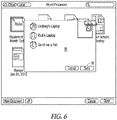
- a pop up window 56 illustrated in Figure 6 , can migrate onto the application panel. From this window, the user can select one or more computing devices to which to send the selected document(s). Once the recipients have been selected, clicking on a "Send” button 58 causes the document(s) to be transmitted to the devices.
- Another approach to sharing the selected documents can be to create a new email message, with the documents as attachments, in response to activation of the "Forward" button.
- a drop down menu 60 appears, to provide additional functions that can be performed on a selected document. These functions include the ability to rename a document, move it to another location, e.g., back to the desktop for local storage only, and duplicate, or copy, the document.
- the application panel also provides the user with the ability to move a document from local storage to the synchronizing server 18, so that it is shared amongst multiple computing devices.
- This functionality can be implemented by dragging the document from the desktop or other locally accessible storage location, into the application panel. Since the panel is associated with a particular application program, the operating system of the computing device examines the document being dragged into the panel, to determine whether it is compatible with the given application. Thus, if the document was created with the same application, in this case a word processing application, the operating system permits it to be dropped onto the panel. In addition, the operating system moves the document into the appropriate application folder 22, to enable it to be replicated on other computing devices, via the cloud server 18.
- the operating system may cause the file to return to its original location, and/or may display a warning to the user that it cannot be placed on the panel.
- the user may also drag a file that is created by a different application, but that is compatible with the application associated with the panel.
- a text document may be in a first format that is associated with a text editing application program. If the text document is dropped onto the panel for the word processing application, the word processing application converts the document into its own format, and opens the document in the converted format.
- an application panel When an application panel is open, it may be the case that a particular application document of interest to the user does not appear in the panel. For example, the user may not have designated that document to be shared among multiple devices via the cloud computing system, for instance by dragging or sending it to the mobile applications folder 20. If the user is not able to locate the desired document within the application panel, a "Local" button 64 can be actuated, to switch from the application panel view of Figure 5 to the browser view of Figure 4 , and thereby provide a view of the files accessible via the local file system of the computing device.
- the application panel 40 preferably has a different appearance from the browser 30.
- a comparison of Figures 4 and 5 reveals that the side bar 32 in the browser 30 is not present in the application panel 50.
- the browser 30 has a different motif from the application panel.
- the documents are displayed in different viewing formats. Specifically, in the browser of Figure 4 , the documents are presented in a list view, whereas in the application panel of Figure 5 , the documents are presented in a thumbnail view. This change in viewing format reinforces the impression that a switch has been made between the sets of documents that are being viewed. In an alternative embodiment, it may be preferable to maintain a consistent viewing format when the switch is made from the application panel 50 to the browser 30, or vice versa. Thus, if the documents are presented with a thumbnail view in the application panel 50, upon actuating the Local button 64 to switch to the browser 30, the displayed files can be presented in the thumbnail view as well.
- Another mechanism that can be employed, to notify the user of the switch, is to display an animation as the transition is made from one user interface element to the other.
- the application panel 40 might appear as a page that is flipping over, with the browser 30 on the reverse side of the page.
- the behavior of the application panel is non-modal.
- the user can switch to any of the other open windows, and interact with them, without the need to close the application panel.
- the user could open the text document "Spec Sheet” and edit it while the application panel 50 remains open on the display.
- the documents appearing in an application panel are synchronized among multiple computing devices, when a change is made to a document on one of the computing devices, that change can appear, in real time, on the other computing devices with which the document is shared.
- the user may have a word processing document open on one computing device, and the application panel for the word processing application may be open on another one of the synchronized devices.
- the viewing mode in the application panel is the thumbnail view, as depicted in Figure 5 , as changes are made to the document on the first computing device, those changes will appear in the thumbnail view on the application panel of the other computing device.
- the speed with which the change appears in the application panel will be dependent upon the rate at which the server 18 synchronizes the documents among the various computing devices.
- a suitable indicator such as an arrow, can be displayed on, or adjacent, the thumbnail view of the document in the application panel.
- all of the documents associated with a given application may be stored in the application folder 22 for that application at the same hierarchical level.
- each of the documents that are bound to the word processing application is individually displayed in the viewing pane 50.
- the ability to display documents within folders on the application panel can be made application specific. Thus, if a particular application does not permit hierarchical storage, the operating system does not allow folders to be created within the associated application folder, or be displayed in the application panel.
- the open document may replace the display of the application panel.
- the application icon e.g., the word processing icon 46
- the application panel can again be actuated to cause the application panel to reappear.
- a second document is opened from that panel, it likewise replaces the display of the open panel.
- the user can actuate the "Cancel" button on the application panel, to thereby remove the application panel from the display and quit the application.
- the panel can be closed, but the application remains running until the user explicitly exits the application, e.g. via a command on a menu, or the like.
- each application program has an associated application folder 22, in which documents created by, or otherwise associated with, that program are stored.
- the application panel is launched, only the documents stored in the associated application's folder 22 are displayed in the panel.
- Figure 9 illustrates an example of a virtual folder 70 that is based upon the word processing application folder 22a and the spreadsheet application folder 22b.
- an open panel 72 is launched, and displays the documents contained in both the word processing application folder 22a and the spreadsheet application folder 22b.
- an application panel appears, and the same two sets of documents are displayed in that panel.
- FIG. 10 is a block diagram illustrating one example of hardware and software components of a computing device on which the user interface can be implemented.
- a computing device 100 can be any type of computer, such as, for example, a desktop computer, a workstation, a laptop computer, a tablet computer, a smart phone or personal digital assistant, or any other type of processor-based device that can support a GUI environment.
- Computer 100 includes a central processing unit (CPU) 120.
- CPU 120 can be any form of processor, such as, for example, a microprocessor.
- Computing device 100 also includes one or more forms of non-transitory, computer-readable memory 125.
- Memory 125 can include a suitable form of working memory, such as, for example, random access memory (RAM), or any other form of computer memory.
- RAM random access memory
- Software components of computer 100 can be stored in non-volatile electronic storage media, such as, for example, a magnetic hard disk, an optical disk, and/or semiconductor memory, e.g., flash memory. From there, the software is loaded into the working memory for execution by CPU 120. Other data, including the documents associated with the application programs, can also be stored in the non-volatile memory media.
- non-volatile electronic storage media such as, for example, a magnetic hard disk, an optical disk, and/or semiconductor memory, e.g., flash memory.
- Other data including the documents associated with the application programs, can also be stored in the non-volatile memory media.
- Display 145 can be any type of display, such as, for example, a computer monitor, an LCD screen, a plasma display, a touch I/O screen, or any other form of display on which graphical and/or textual data can be presented to a user.
- Each display 145 is connected to, and controlled by, a video card 135 that operates in accordance with video driver software 140.
- An operating system 115 running on CPU 120 can include a window manager 110.
- Operating system 115 can be any type of computer operating system that supports a GUI environment.
- Window manager 110 manages graphical windows, including the browser 30 and applications panel 40 described previously, as well as other graphical and/or textual control elements displayed on display 145.
- Window manager 110 can keep track of the location, size and status of each graphical window displayed on display 145.
- Window manager 110 can be any type of window manager or any other type of application that can manage graphical windows through which documents and any other form of graphical and/or textual information can be displayed to a user on a display device (e.g., display 145).
- Operating system 115 can also include a display manager 130 that provides communication between window manager 110 and the display devices (e.g., display 145) via the display devices' associated video driver software 140 and video card 135.
- Display manager 130 can be a software component that is either separate from or an integrated component of the operating system 115.
- At least one software program such as application program 105, generates information to be displayed on the display devices (e.g., display 145). Examples of such information include text, windows and other graphical objects, and control structures, such as, for example, menus and dialog boxes. This information is presented to display manager 130 through window manager 110 for eventual display to a user on display 145.
Landscapes
- Engineering & Computer Science (AREA)
- Theoretical Computer Science (AREA)
- Human Computer Interaction (AREA)
- Data Mining & Analysis (AREA)
- Databases & Information Systems (AREA)
- Physics & Mathematics (AREA)
- General Engineering & Computer Science (AREA)
- General Physics & Mathematics (AREA)
- Information Retrieval, Db Structures And Fs Structures Therefor (AREA)
- User Interface Of Digital Computer (AREA)
Description
- The present disclosure is directed to the storage and retrieval of documents in a computing system, and more particularly to a user interface that provides a user with access to the documents.
- Conventionally, a user's computing experiences were typically focused upon a particular device within a given environment. For instance, the user might interact with a desktop computer in the work environment, to store and access work-related documents, and might also have a home computer for storing and accessing personal documents. Alternatively, the user might employ a portable computer, e.g., a laptop computer, for use in both the work and home environments. In either case, the documents that the user created, edited, or otherwise interacted with, were typically stored on the user's computing device, or accessed via a network to which the computing device was connected.
- When the user desired to access a document, the user might employ a user interface element, such as a browser, to view and locate all of the documents stored in the file system associated with the computing device. Alternatively, the user might employ a search tool to locate a document having a particular title, content or other attribute. The file system of the computing device might typically store a variety of documents associated with different types of application programs. For instance, the file system might contain text files associated with a word processing application, spreadsheet files, presentation files, photographs, video files, music files, and the like. Each of these different types of files has an associated format that can be interpreted and displayed by a given application program.
- When the user desires to view the documents on the computer, for example via a browser, documents associated with all of the different application programs will generally be displayed. Likewise, when a search is conducted, documents associated with different application programs that meet the search criteria will be presented to the user. For example, a search for documents having the name "sheet" might return a word processing file entitled "Specifications Sheet," a spreadsheet file entitled "Fiscal Year Spreadsheet" and a graphics file entitled "Color Sheet." In other words, the storage of documents, and presentation of information to a user about the stored documents, comprehensively encompassed the entire file system associated with the computing device, without regard to the particular application programs with which the documents were affiliated.
- More recently, the user's experience has not been limited to a single device for a given environment. Rather, the user might employ a number of different computing devices, such as a laptop or desktop computer, a tablet computer, a smart phone, and the like. At any given time, the user might view, and otherwise interact with, a particular document on any one of these different devices. To enable the user to access and interact with documents via any one of these different devices, the documents are stored both locally on the devices, and on a remote server that functions to synchronize the stored documents on all of the various computing devices. Thus, regardless of which computing device the user employs to access a document, the same version of the document will be present on each device. This type of computing experience is sometimes referred to as "cloud computing."
- When looking for documents that are shared and synchronized among multiple devices, file-system based approaches to accessing documents, e.g., via a browser or search query, may not be conducive to an easy comprehension of the shared documents. In particular, the libraries of documents stored on the remote server for a given user are not viewable through a file-system based browser or search tool. Pursuant thereto, the present disclosure describes a user interface that facilitates easy understanding of which documents that are shared amongst multiple devices, and access to the documents.
- Ted Landau "File Sharing with an iPad: Ugh!" discloses methods for transferring files between laptop computers and tablet computers.
- According to a first aspect of the present invention, there is provided a method as set out in
claim 1. - According to a second aspect of the present invention, there is provided a device as set out in claim 11.
- According to a third aspect of the present invention, there is provided a non-transitory computer readable medium as set out in claim 15.
- The foregoing features, as well as additional functions and advantages of the user interface, are described hereinafter with reference to exemplary embodiments depicted in the accompanying figures.
-
-
Figure 1 is a schematic diagram of a cloud computing system with multiple user computing devices; -
Figure 2 is a schematic diagram of an exemplary folder hierarchy in a computing device for storing documents in an application-centric manner; -
Figure 3 is a schematic diagram of a folder hierarchy in a cloud server computer; -
Figure 4 is an image of a browser that provides a file-system based view of documents stored on a computing device; -
Figure 5 is an image of a user interface panel that provides a view of documents stored in an application-centric manner; -
Figure 6 is an image of a pop-up window for sharing documents with other users; -
Figure 7 is an illustration of a command menu that drops down from the title bar of an application panel; -
Figure 8 is an illustration of a warning displayed when an incompatible document is dragged onto an application panel; -
Figure 9 is a schematic representation of a virtual folder; and -
Figure 10 is a block diagram of the components of an exemplary computing system. - An application-centric model is employed for the storage, searching and retrieval of documents. By entering a command directed to a particular application program, such as clicking on an icon for that program, a user interface element, such as a window or panel, displays documents stored on the computing device that are associated with that application. For example, clicking on an icon for a spreadsheet program causes a panel to open that displays the spreadsheet documents stored on the computing device, for access by the user.
- To facilitate an understanding of the concepts disclosed herein, they are described with reference to exemplary embodiments. In particular, a user interface is described in the context of its implementation in a so-called "cloud computing" environment, in which documents are stored on a remote server and can be accessed from a variety of different computing devices. The server functions to synchronize copies of the documents that are stored on each on each of a number of authorized devices. It will be appreciated, however, that the user interface described herein is not limited to this particular implementation. Rather, the principles that underlie the functionality of the user interface can be employed in a variety of different environments in which application-centric access to documents is beneficial.
-
Figure 1 illustrates a schematic view of a cloud computing environment in which the user interface of the present invention can be implemented. In the illustrated example, the user may have three different computing devices that are used to access, and otherwise interact with, documents, namely alaptop computer 10, atablet computer 12 and asmart phone 14. The cloud computing environment enables the user to create or download a document on one of the computing devices, and then subsequently view, and interact with, the document on any of the other two devices. To implement this functionality, a copy of each document that is to be shared amongst the computing devices is stored on aserver 16. In operation, whenever a document to be shared among the computing devices is created, downloaded or edited on one of the devices, the operating system of that device causes the document to be uploaded to theserver 16.
In response, the server performs a synchronization operation, to replicate a copy of the document on each of the other devices. Thus, after synchronization has occurred, a copy of the document is stored on each of the threecomputing devices server 16. Although three computing devices are depicted in the illustrated example, it will be appreciated that any number of devices can be configured, and authorized, to share documents among one another. Likewise, more than one server can be employed to support the storage and synchronization of the shared documents. - To facilitate the synchronization of documents among multiple computing devices, the documents are stored on each device, as well as on the
server 16, in an application-centric manner.Figure 2 illustrates an example of a folder hierarchy that may exist in the memory of each of the computing devices. Each device includes ahome folder 18, which may function as the root directory for all files stored on the computing device. Amobile applications folder 20 is contained within thehome folder 18. Themobile applications folder 20 may reside at the next layer of the folder hierarchy below the home folder, as shown in the figure, or there may be intervening layers of the hierarchy between the home folder and the mobile applications folder (not shown). The mobile applications folder contains a number ofindividual folders 22 respectively associated with different application programs that are installed on the computing device. In the illustrated example, four application folders are respectively associated with a word processing application, a spreadsheet application, a video application program and a music organizer and playback program. - The folders 18-22 depicted in
Figure 2 represent logical file storage units that can be employed to group and/or associate related files and folders with one another. It will be appreciated that other forms of logical file storage units can be employed, e.g., directories, linked lists, memory partitions, etc., to provide such grouping and identification of related files. - When a new document is created on, or imported into, the computing device, it might be initially stored in a location where it is only locally accessible from that computing device. For instance, the document might be stored in the
home folder 18. If the user desires to access that document from any of the other computing devices, the user can move the document from local memory storage into themobile applications folder 20. When a document is placed in the mobile applications folder, the operating system of the computing device examines the document to determine the application program with which it is associated. For example, this association might be determined from an extension on the name of the file, or any other attribute of the file that identifies the format of the data. Upon determining the particular application program with which the document is associated, the operating system moves the document from themobile applications folder 20 into thefolder 22 associated with that application program. Thus, for example, if the document was created with a word processing program, it is moved into the word processing application folder. - At the same time, the operating system uploads a copy of the document to the
server 16. In response to receipt of the document, the server similarly examines the document to determine its associated application program, and places the document in an appropriate application folder. An exemplary folder hierarchy for theserver 16 is illustrated inFigure 3 . Since the server provides synchronization services to a number of different users, its memory contains aseparate folder 24 for each registered user. Within each user's folder,application folders 26 corresponding to that user's preferences are stored. Each user can designate the types of documents that are to be shared and synchronized among that user's computing devices. In the example ofFigure 3 , it can be seen thatUser 1 has designated word processing, spreadsheet, movie and music documents to be shared amongst that user's computing devices, consistent with the example ofFigure 2 . In contrast, User 2 has designated that only photos and music files are to be shared amongst that user's computing devices. - Once a document is uploaded from a computing device to the
server 16, the server places that document in theappropriate application folder 26 of the user to whom the computing device is registered. In conjunction with doing so, the server also sends a copy of the document to each of the other computing devices associated with that user. The identification of all the computing devices associated with a particular user may be stored in the user'sfolder 24 on the server, or in a separate database on the server. - Further in this regard, the user may designate different subsets of documents to be synchronized on the user's different computing devices. For instance, the user may indicate that word processing documents are to be shared amongst the laptop computer and the tablet computer, whereas music files are only shared between the tablet computer and the smart phone. These designations can also be stored in the user's
folder 24 on theserver 16, or in a database, so that the server only sends copies of documents to be shared to the appropriate computing devices. -
Figure 4 illustrates an example of abrowser window 30 that may be employed as one type of user interface element to view documents that are locally stored on a computing device, and/or accessible via networked storage media. In this example, the browser includes aside bar menu 32 that enables the user to select a particular storage device, whose files are to be viewed, as well as a directory or subdirectory of the files. The window also contains apane 34 illustrating the documents stored in the selected storage medium and/or directory. At the top of the window is amenu bar 36 that enables the user to select different viewing modes for the files. In the illustrated example, the files are presented in a list view. Thebrowser window 30 also contains asearch box 38 via which the user can enter a query to search for documents stored on memory accessible to the computing device. As can be seen, documents in a variety of different formats, respectively associated with different application programs, are displayed. -
Figure 5 illustrates an alternative type ofuser interface element 40 that may be displayed to view and access documents when application-centric storage of the documents is employed, such as in a cloud computing environment. The user interface element comprises an application-based window or panel, hereinafter referred to as an application panel. Such a panel may be launched through a variety of different actions. For example, in the illustrated embodiment, a bar, or dock, 42 is displayed at the bottom of the viewing screen 44. This dock contains a number of icons that are respectively associated with different applications that have been installed on the computing device. By performing an action directed to one of these icons, the user can cause an application panel associated with that application to open. Such an action might be, for example, clicking on the icon while a cursor is positioned over it, or touching the icon on a computing device that includes a touch I/O display screen. In the illustrated example, the user has clicked on theicon 46 associated with a word processing application, which causes anapplication panel 40 associated with that application to open. Alternative actions for launching the application panel may be to pull down a "File" menu from an open window of the application, and select an "Open" command, or click on an icon for a document whose type is associated with the application. - The
title bar 48 of the panel contains the name of the application program. Within theviewing pane 50 of the panel, only those documents that are associated with that application are displayed. Referring to the folder diagram ofFigure 2 , therefore, the documents that are stored within the wordprocessing application folder 22 are the ones that appear in the viewing pane of the application panel depicted inFigure 5 . - A number of different functions can be performed with respect to documents that are displayed in the application panel. A document can be opened within the associated application program, for example by double-clicking on the document, or by selecting the document and clicking an "Open"
button 52. When one or more documents are selected, they can be shared with other users by clicking a "Forward"button 54. In one implementation, when the "Forward" button is activated, a pop up window 56, illustrated inFigure 6 , can migrate onto the application panel. From this window, the user can select one or more computing devices to which to send the selected document(s). Once the recipients have been selected, clicking on a "Send" button 58 causes the document(s) to be transmitted to the devices. Another approach to sharing the selected documents can be to create a new email message, with the documents as attachments, in response to activation of the "Forward" button. - Referring to
Figure 7 , by clicking on thetitle bar 48 of the panel, a drop downmenu 60 appears, to provide additional functions that can be performed on a selected document. These functions include the ability to rename a document, move it to another location, e.g., back to the desktop for local storage only, and duplicate, or copy, the document. - The application panel also provides the user with the ability to move a document from local storage to the synchronizing
server 18, so that it is shared amongst multiple computing devices. This functionality can be implemented by dragging the document from the desktop or other locally accessible storage location, into the application panel. Since the panel is associated with a particular application program, the operating system of the computing device examines the document being dragged into the panel, to determine whether it is compatible with the given application. Thus, if the document was created with the same application, in this case a word processing application, the operating system permits it to be dropped onto the panel. In addition, the operating system moves the document into theappropriate application folder 22, to enable it to be replicated on other computing devices, via thecloud server 18. - Conversely, as shown in
Figure 8 , if the document is not compatible with the word processing application, e.g., it is a movie file, the operating system may cause the file to return to its original location, and/or may display a warning to the user that it cannot be placed on the panel. - The user may also drag a file that is created by a different application, but that is compatible with the application associated with the panel. For example, a text document may be in a first format that is associated with a text editing application program. If the text document is dropped onto the panel for the word processing application, the word processing application converts the document into its own format, and opens the document in the converted format.
- Referring back to
Figure 5 , it is also possible to open a new application document from theapplication panel 40, by clicking on a "New Document"button 62 shown at the bottom of the panel. In one embodiment, when such a command is entered to open a new document, another panel can be presented that displays various templates for formatting the new document to be created. Upon selecting one of the templates, a new document is opened in the format of that template. - When an application panel is open, it may be the case that a particular application document of interest to the user does not appear in the panel. For example, the user may not have designated that document to be shared among multiple devices via the cloud computing system, for instance by dragging or sending it to the
mobile applications folder 20. If the user is not able to locate the desired document within the application panel, a "Local"button 64 can be actuated, to switch from the application panel view ofFigure 5 to the browser view ofFigure 4 , and thereby provide a view of the files accessible via the local file system of the computing device. To apprise the user of the fact that a change is being made from an application-centric, cloud-based view of documents to a local file system-view of documents, theapplication panel 40 preferably has a different appearance from thebrowser 30. For example, a comparison ofFigures 4 and5 reveals that theside bar 32 in thebrowser 30 is not present in theapplication panel 50. In addition, thebrowser 30 has a different motif from the application panel. - In the examples of
Figures 4 and5 , the documents are displayed in different viewing formats. Specifically, in the browser ofFigure 4 , the documents are presented in a list view, whereas in the application panel ofFigure 5 , the documents are presented in a thumbnail view. This change in viewing format reinforces the impression that a switch has been made between the sets of documents that are being viewed. In an alternative embodiment, it may be preferable to maintain a consistent viewing format when the switch is made from theapplication panel 50 to thebrowser 30, or vice versa. Thus, if the documents are presented with a thumbnail view in theapplication panel 50, upon actuating theLocal button 64 to switch to thebrowser 30, the displayed files can be presented in the thumbnail view as well. - Another mechanism that can be employed, to notify the user of the switch, is to display an animation as the transition is made from one user interface element to the other. For example, the
application panel 40 might appear as a page that is flipping over, with thebrowser 30 on the reverse side of the page. - In an exemplary implementation, the behavior of the application panel is non-modal. In this exemplary implementation, if other windows are open on the desktop, in addition to the application panel, the user can switch to any of the other open windows, and interact with them, without the need to close the application panel. Thus, for example, with reference to
Figure 5 , the user could open the text document "Spec Sheet" and edit it while theapplication panel 50 remains open on the display. - Since the documents appearing in an application panel are synchronized among multiple computing devices, when a change is made to a document on one of the computing devices, that change can appear, in real time, on the other computing devices with which the document is shared. For example, the user may have a word processing document open on one computing device, and the application panel for the word processing application may be open on another one of the synchronized devices. If the viewing mode in the application panel is the thumbnail view, as depicted in
Figure 5 , as changes are made to the document on the first computing device, those changes will appear in the thumbnail view on the application panel of the other computing device. The speed with which the change appears in the application panel will be dependent upon the rate at which theserver 18 synchronizes the documents among the various computing devices. To alert a viewer of the second computing device that a change is being made to one of the documents, a suitable indicator, such as an arrow, can be displayed on, or adjacent, the thumbnail view of the document in the application panel. - In one exemplary implementation, all of the documents associated with a given application may be stored in the
application folder 22 for that application at the same hierarchical level. Thus, as illustrated inFigure 5 , each of the documents that are bound to the word processing application is individually displayed in theviewing pane 50. In some exemplary implementations, it may be preferable to allow a subset of the documents to be grouped in a folder, or similar such logical file storage unit. In one embodiment, the ability to display documents within folders on the application panel can be made application specific. Thus, if a particular application does not permit hierarchical storage, the operating system does not allow folders to be created within the associated application folder, or be displayed in the application panel. Other applications may permit one hierarchical level of folders, such that multiple documents can be grouped within a folder, but one folder cannot be nested inside another folder. In other applications, nested folders may be permitted. When an application is installed on the computing device, the operating system is informed of the policy associated with that application program for folder creation, and enforces that policy in the application panels. Thus, with reference to the example ofFigure 5 , if the word processing application does not permit folders, but the user drops one document on top of another document, in an attempt to create a folder, the operating system prohibits such action, and returns the dropped document to its original position. - In one implementation, once a user has launched an application panel, and opened a document from within the panel, the open document may replace the display of the application panel. If the user desires to open a second document of the same application, the application icon, e.g., the
word processing icon 46, can again be actuated to cause the application panel to reappear. If a second document is opened from that panel, it likewise replaces the display of the open panel. In this embodiment, after the user has closed the last of the open documents, it may be preferable to cause the application panel to reappear, to apprise the user of the fact that the associated application is still running. In response, the user can actuate the "Cancel" button on the application panel, to thereby remove the application panel from the display and quit the application. Alternatively, the panel can be closed, but the application remains running until the user explicitly exits the application, e.g. via a command on a menu, or the like. - In the previously described examples, each application program has an associated
application folder 22, in which documents created by, or otherwise associated with, that program are stored. When the application panel is launched, only the documents stored in the associated application'sfolder 22 are displayed in the panel. In an alternate embodiment, it may be desirable to link two or more applications to one another. For example, if the word processing application and the spreadsheet application are created by the same developer, the formats of their documents may be compatible with one another. In that case, when a user is working on one type of document, it may be convenient to be able to access content from a related type of document. To accommodate such a situation, two ormore application folders 22 can be linked to one another, to create a virtual folder.Figure 9 illustrates an example of avirtual folder 70 that is based upon the wordprocessing application folder 22a and thespreadsheet application folder 22b. When a user clicks on the application icon for the word processor, anopen panel 72 is launched, and displays the documents contained in both the wordprocessing application folder 22a and thespreadsheet application folder 22b. Similarly, if the user clicks on the icon for the spreadsheet program, an application panel appears, and the same two sets of documents are displayed in that panel. -
Figure 10 is a block diagram illustrating one example of hardware and software components of a computing device on which the user interface can be implemented. Acomputing device 100 can be any type of computer, such as, for example, a desktop computer, a workstation, a laptop computer, a tablet computer, a smart phone or personal digital assistant, or any other type of processor-based device that can support a GUI environment.Computer 100 includes a central processing unit (CPU) 120.CPU 120 can be any form of processor, such as, for example, a microprocessor.Computing device 100 also includes one or more forms of non-transitory, computer-readable memory 125.Memory 125 can include a suitable form of working memory, such as, for example, random access memory (RAM), or any other form of computer memory. Software components ofcomputer 100 can be stored in non-volatile electronic storage media, such as, for example, a magnetic hard disk, an optical disk, and/or semiconductor memory, e.g., flash memory. From there, the software is loaded into the working memory for execution byCPU 120. Other data, including the documents associated with the application programs, can also be stored in the non-volatile memory media. - The system illustrated in
Figure 10 includes at least onedisplay 145.Display 145 can be any type of display, such as, for example, a computer monitor, an LCD screen, a plasma display, a touch I/O screen, or any other form of display on which graphical and/or textual data can be presented to a user. Eachdisplay 145 is connected to, and controlled by, avideo card 135 that operates in accordance withvideo driver software 140. - An
operating system 115 running onCPU 120 can include awindow manager 110.Operating system 115 can be any type of computer operating system that supports a GUI environment.Window manager 110 manages graphical windows, including thebrowser 30 andapplications panel 40 described previously, as well as other graphical and/or textual control elements displayed ondisplay 145.Window manager 110 can keep track of the location, size and status of each graphical window displayed ondisplay 145.Window manager 110 can be any type of window manager or any other type of application that can manage graphical windows through which documents and any other form of graphical and/or textual information can be displayed to a user on a display device (e.g., display 145).Operating system 115 can also include adisplay manager 130 that provides communication betweenwindow manager 110 and the display devices (e.g., display 145) via the display devices' associatedvideo driver software 140 andvideo card 135.Display manager 130 can be a software component that is either separate from or an integrated component of theoperating system 115. - At least one software program, such as
application program 105, generates information to be displayed on the display devices (e.g., display 145). Examples of such information include text, windows and other graphical objects, and control structures, such as, for example, menus and dialog boxes. This information is presented todisplay manager 130 throughwindow manager 110 for eventual display to a user ondisplay 145. - It will be appreciated by those of ordinary skill in the art that the foregoing concepts can be embodied in other specific forms without departing from the essential characteristics thereof. The presently disclosed embodiments are therefore considered in all respects to be illustrative, and not restrictive. The scope of the invention is indicated by the appended claims, rather than the foregoing description, and all changes that come within the meaning and range of equivalents thereof are intended to be embraced therein.
Claims (15)
- A method comprising:
at a computer system (100) that includes one or more processors (120) and memory (125):displaying a first user interface element (40) on a display (145) of a computing device, the first user interface element representing a logical file storage location associated with an application, wherein displaying the first user interface element includes displaying representations of respective files stored in the logical file storage location;while displaying the first user interface element, detecting an input that corresponds to dropping a representation of a file onto the first user interface element;in response to detecting the input that corresponds to dropping the representation of the file onto the first user interface element:determining if the file is compatible with the application andin accordance with a determination that the file is compatible with the application, storing content corresponding to the file in the logical file storage location associated with the application and displaying the representation of the file on the display concurrently with displaying the representations of the respective files that were stored in the logical file storage location prior to detecting the input; andin accordance with a determination that the file is not compatible with the application, forgoing storage of content corresponding to the file in the logical file storage location associated with the application and displaying a warning on the display that indicates that the file is not compatible with the application. - The method of claim 1, including in accordance with the determination that the file is compatible with the application, converting the file to the format of the application, the converting being done by the application.
- The method of claim 1, wherein determining if the file is compatible with the application includes determining that the file is an incompatible file format that cannot be opened by the application.
- The method of claim 1, further comprising in accordance with the determination that the file is compatible with the application, automatically causing the content corresponding to the file to be stored on a remote server, for synchronization with other computing devices that include the application.
- The method of claim 4, wherein the content corresponding to the file is stored on the remote server for synchronization with other computing devices associated with a same user account as the computing device.
- The method of claim 1, further comprising detecting a user action directed toward a dock; and wherein the displaying of the first user interface element is in response to the detection of the user action directed toward the dock.
- The method of claim 6, wherein the user action directed toward the dock comprises a user action directed toward an icon contained in the dock, the icon being associated with the application.
- A device comprising:a memory (125);a display device (145); andone or more processors (120) configured to performed operations comprising:displaying a first user interface element (40) on the display device, the first user interface element representing a logical file storage location associated with an application, wherein displaying the first user interface element includes displaying representations of respective files stored in the logical file storage location;while displaying the first user interface element, detecting an input that corresponds to dropping a representation of a file onto the first user interface element;in response to detecting the input that corresponds to dropping the representation of the file onto the first user interface element:determining if the file is compatible with the application and in accordance with a determination that the file is compatible with the application, storing content corresponding to the file in the logical file storage location associated with the application and displaying the representation of the file on the display concurrently with displaying the representations of the respective files that were stored in the logical file storage location prior to detecting the input; andin accordance with a determination that the file is not compatible with the application, forgoing storage of content corresponding to the file in the logical file storage location associated with the application and displaying a warning that indicates that the file is not compatible with the application.
- The device of claim 8, wherein the operations further comprise:
in accordance with the determination that the file is compatible with the application, converting the file to the format of the application, the converting being done by the application. - The device of claim 8, wherein determining if the file is compatible with the application includes determining that the file is an incompatible file format that cannot be opened by the application.
- The device of claim 8, wherein the operations further comprise:
in accordance with the determination that the file is compatible with the application, automatically causing the content corresponding to the file to be stored on a remote server, for synchronization with other computing devices that include the application. - The device of claim 11, wherein the content corresponding to the file is stored on the remote server for synchronization with other computing devices associated with a same user account as the computing device.
- The device of claim 8, wherein the operations further comprise detecting a user action directed toward a dock; and wherein the displaying of the first user interface element is in response to the detection of the user action directed toward the dock.
- The device of claim 13, wherein the user action directed toward the dock comprises a user action directed toward an icon contained in the dock, the icon being associated with the application.
- A non-transitory computer-readable medium containing program instructions that, when executed by a processor, cause the processor to perform operations comprising:displaying a first user interface element on a display device (145), the first user interface element representing a logical file storage location associated with an application, wherein displaying the first user interface element includes displaying representations of respective files stored in the logical file storage location;while displaying the first user interface element, detecting an input that corresponds to dropping a representation of a file onto the first user interface element;in response to detecting the input that corresponds to dropping the representation of the file onto the first user interface element:determining if the file is compatible with the application and in accordance with a determination that a file format of the file is compatible with the application, storing content corresponding to the file in the logical file storage location associated with the application and displaying the representation of the file on the display concurrently with displaying the representations of the respective files that were stored in the logical file storage location prior to detecting the input; andin accordance with a determination that the file is not compatible with the application, forgoing storage of content corresponding to the file in the logical file storage location associated with the application and displaying a warning that indicates that the file format of the file is not compatible with the application.
Applications Claiming Priority (2)
| Application Number | Priority Date | Filing Date | Title |
|---|---|---|---|
| US13/366,071 US10055419B2 (en) | 2012-02-03 | 2012-02-03 | User interface for accessing documents from a computing device |
| PCT/US2013/024289 WO2013116604A1 (en) | 2012-02-03 | 2013-02-01 | User interface for accessing documents from a computing device |
Publications (2)
| Publication Number | Publication Date |
|---|---|
| EP2810190A1 EP2810190A1 (en) | 2014-12-10 |
| EP2810190B1 true EP2810190B1 (en) | 2018-06-27 |
Family
ID=47722558
Family Applications (1)
| Application Number | Title | Priority Date | Filing Date |
|---|---|---|---|
| EP13704859.1A Active EP2810190B1 (en) | 2012-02-03 | 2013-02-01 | User interface for accessing documents from a computing device |
Country Status (7)
| Country | Link |
|---|---|
| US (1) | US10055419B2 (en) |
| EP (1) | EP2810190B1 (en) |
| JP (2) | JP5982014B2 (en) |
| KR (1) | KR101624446B1 (en) |
| CN (1) | CN104081395B (en) |
| AU (2) | AU2013214946A1 (en) |
| WO (1) | WO2013116604A1 (en) |
Families Citing this family (29)
| Publication number | Priority date | Publication date | Assignee | Title |
|---|---|---|---|---|
| US20060101064A1 (en) | 2004-11-08 | 2006-05-11 | Sharpcast, Inc. | Method and apparatus for a file sharing and synchronization system |
| US10055419B2 (en) | 2012-02-03 | 2018-08-21 | Apple Inc. | User interface for accessing documents from a computing device |
| US20130304697A1 (en) * | 2012-05-09 | 2013-11-14 | Salesforce.Com, Inc. | System and method for cross-platform synchronization of data objects in a multi-tenant environment |
| JP2014010465A (en) * | 2012-06-27 | 2014-01-20 | International Business Maschines Corporation | Method for selecting storage cloud for storing entity file from two or more storage cloud and computer and computer program |
| US9633125B1 (en) * | 2012-08-10 | 2017-04-25 | Dropbox, Inc. | System, method, and computer program for enabling a user to synchronize, manage, and share folders across a plurality of client devices and a synchronization server |
| US10057318B1 (en) | 2012-08-10 | 2018-08-21 | Dropbox, Inc. | System, method, and computer program for enabling a user to access and edit via a virtual drive objects synchronized to a plurality of synchronization clients |
| US9870422B2 (en) * | 2013-04-19 | 2018-01-16 | Dropbox, Inc. | Natural language search |
| US20150012831A1 (en) * | 2013-07-08 | 2015-01-08 | Jacoh, Llc | Systems and methods for sharing graphical user interfaces between multiple computers |
| US20150095458A1 (en) * | 2013-09-27 | 2015-04-02 | Xerox Corporation | Methods and systems for providing a seamless transition of documents between client types |
| US9298355B1 (en) | 2015-03-23 | 2016-03-29 | Dropbox, Inc. | Content item templates |
| US10291701B2 (en) * | 2016-06-20 | 2019-05-14 | Wyse Technology L.L.C. | Virtualizing a shortcut to a file in a cloud desktop |
| US11599383B2 (en) * | 2016-08-30 | 2023-03-07 | Microsoft Technology Licensing, Llc | Concurrent execution of task instances relating to a plurality of applications |
| CN106469094A (en) * | 2016-09-05 | 2017-03-01 | 维沃移动通信有限公司 | A kind of Word message sharing method and mobile terminal |
| US10970656B2 (en) | 2016-12-29 | 2021-04-06 | Dropbox, Inc. | Automatically suggesting project affiliations |
| US10719807B2 (en) | 2016-12-29 | 2020-07-21 | Dropbox, Inc. | Managing projects using references |
| US10402786B2 (en) | 2016-12-30 | 2019-09-03 | Dropbox, Inc. | Managing projects in a content management system |
| CN110191818B (en) | 2017-01-24 | 2020-06-30 | 日产自动车株式会社 | Method for controlling electric vehicle and device for controlling electric vehicle |
| GB201710831D0 (en) * | 2017-07-05 | 2017-08-16 | Jones Maria Francisca | Method and apparatus to transfer data from a first computer state to a different computer state |
| US10826985B2 (en) | 2017-08-04 | 2020-11-03 | Oracle International Corporation | System and method for content tethering in an enterprise content management system |
| CN107729160B (en) * | 2017-09-29 | 2021-08-03 | 努比亚技术有限公司 | Application control method, mobile terminal and computer-readable storage medium |
| US11226939B2 (en) | 2017-12-29 | 2022-01-18 | Dropbox, Inc. | Synchronizing changes within a collaborative content management system |
| JP6550485B2 (en) * | 2018-02-07 | 2019-07-24 | シャープ株式会社 | Display device, control program and control method |
| US11334596B2 (en) | 2018-04-27 | 2022-05-17 | Dropbox, Inc. | Selectively identifying and recommending digital content items for synchronization |
| CN117492611A (en) * | 2019-12-24 | 2024-02-02 | 华为技术有限公司 | A file processing method, electronic device, system and storage medium |
| US11200205B2 (en) * | 2020-01-31 | 2021-12-14 | EMC IP Holding Company LLC | Displaying an alert and options when deleting a file that is associated with a sequence of files |
| US11199948B2 (en) | 2020-01-31 | 2021-12-14 | EMC IP Holding Company LLC | Displaying a sequence and files associated with the sequence having a missing file |
| US11947772B2 (en) | 2021-09-07 | 2024-04-02 | Samsung Electronics Co., Ltd. | Electronic device for displaying source information of file and operation method of same |
| WO2023038232A1 (en) * | 2021-09-07 | 2023-03-16 | 삼성전자 주식회사 | Electronic device for displaying file provenance information and operation method for same |
| CN114461585A (en) * | 2021-10-21 | 2022-05-10 | 统信软件技术有限公司 | File classification method, computing device and readable storage medium |
Family Cites Families (42)
| Publication number | Priority date | Publication date | Assignee | Title |
|---|---|---|---|---|
| US5666530A (en) * | 1992-12-02 | 1997-09-09 | Compaq Computer Corporation | System for automatic synchronization of common file between portable computer and host computer via communication channel selected from a plurality of usable channels there between |
| WO1994027229A1 (en) * | 1993-05-10 | 1994-11-24 | Apple Computer, Inc. | Computer-human interface system which manipulates parts between a desktop and a document |
| US6260043B1 (en) * | 1998-11-06 | 2001-07-10 | Microsoft Corporation | Automatic file format converter |
| US7062532B1 (en) * | 1999-03-25 | 2006-06-13 | Autodesk, Inc. | Method and apparatus for drawing collaboration on a network |
| US6351776B1 (en) | 1999-11-04 | 2002-02-26 | Xdrive, Inc. | Shared internet storage resource, user interface system, and method |
| US7434177B1 (en) | 1999-12-20 | 2008-10-07 | Apple Inc. | User interface for providing consolidation and access |
| JP2001357010A (en) * | 2000-04-10 | 2001-12-26 | Mitsubishi Corp | Method for managing files on a Web server on the Internet and file management system used for the method |
| US6590568B1 (en) * | 2000-11-20 | 2003-07-08 | Nokia Corporation | Touch screen drag and drop input technique |
| US20030182139A1 (en) * | 2002-03-22 | 2003-09-25 | Microsoft Corporation | Storage, retrieval, and display of contextual art with digital media files |
| US20040095390A1 (en) * | 2002-11-19 | 2004-05-20 | International Business Machines Corporaton | Method of performing a drag-drop operation |
| JP2004227170A (en) | 2003-01-21 | 2004-08-12 | Toshiba Microelectronics Corp | Software license use permission device, software license use permission method, and software license use permission program |
| US7769794B2 (en) * | 2003-03-24 | 2010-08-03 | Microsoft Corporation | User interface for a file system shell |
| EP1478158A1 (en) * | 2003-05-14 | 2004-11-17 | Hewlett-Packard Development Company, L.P. | Lightweight service brokering systems |
| JP4366120B2 (en) * | 2003-06-03 | 2009-11-18 | キヤノン株式会社 | Recording device |
| JP2004362091A (en) * | 2003-06-03 | 2004-12-24 | Toshiba Corp | Data conversion device, data conversion system, and data storage control program |
| AU2003285383A1 (en) * | 2003-12-11 | 2005-06-29 | Nokia Corporation | Internet terminal, www-browser located in the terminal and a method for setting a display mode of the terminal |
| JP2005267559A (en) | 2004-03-22 | 2005-09-29 | Sony Corp | Recording / reproducing apparatus, information transfer management method, and recording medium |
| JP2005322135A (en) | 2004-05-11 | 2005-11-17 | Casio Comput Co Ltd | Electronic equipment, display management program |
| JP4212539B2 (en) | 2004-09-27 | 2009-01-21 | 株式会社日立情報システムズ | File storage location information management system and method and program thereof |
| JP4192136B2 (en) * | 2004-09-30 | 2008-12-03 | 株式会社小松製作所 | Image display system and image display program |
| US7747685B2 (en) * | 2005-01-20 | 2010-06-29 | International Business Machines Corporation | Method for automatic detection of display sharing and alert generation in instant messaging |
| US7636888B2 (en) * | 2005-03-15 | 2009-12-22 | Microsoft Corporation | Verifying compatibility between document features and server capabilities |
| US10026140B2 (en) * | 2005-06-10 | 2018-07-17 | Nvidia Corporation | Using a scalable graphics system to enable a general-purpose multi-user computer system |
| US7765229B2 (en) | 2005-07-12 | 2010-07-27 | Microsoft Corporation | Single view of data in a networked computer system with distributed storage |
| US7757185B2 (en) * | 2006-01-06 | 2010-07-13 | Apple Inc. | Enabling and disabling hotkeys |
| US7987432B1 (en) * | 2006-04-25 | 2011-07-26 | Parallels Holdings, Ltd. | Seamless integration and installation of non-native application into native operating system |
| CN101101592A (en) * | 2006-07-04 | 2008-01-09 | 联想(北京)有限公司 | File format automatic conversion method and device |
| JP4137144B2 (en) * | 2006-07-07 | 2008-08-20 | キヤノン株式会社 | Data processing apparatus and control method thereof |
| US8127249B2 (en) * | 2006-09-06 | 2012-02-28 | Sap Ag | Method and apparatus providing configurable pop-ups |
| JP4247694B2 (en) * | 2007-02-01 | 2009-04-02 | ソニー株式会社 | Display control apparatus and method, and program |
| US9612847B2 (en) * | 2008-02-05 | 2017-04-04 | Microsoft Technology Licensing, Llc | Destination list associated with an application launcher |
| US8689115B2 (en) * | 2008-09-19 | 2014-04-01 | Net Power And Light, Inc. | Method and system for distributed computing interface |
| US8285787B2 (en) * | 2008-11-26 | 2012-10-09 | Red Hat, Inc. | Systems and methods for managing a collaboration space having application hosting capabilities |
| US8886714B2 (en) * | 2011-08-08 | 2014-11-11 | Ctera Networks Ltd. | Remote access service for cloud-enabled network devices |
| US8090744B1 (en) * | 2009-08-26 | 2012-01-03 | Symantec Operating Corporation | Method and apparatus for determining compatibility between a virtualized application and a base environment |
| US8561055B2 (en) * | 2009-10-15 | 2013-10-15 | Blackberry Limited | Method, system and apparatus for management of push content |
| WO2011062689A1 (en) | 2009-11-20 | 2011-05-26 | Rovi Technologies Corporation | Managing different formats for media files and media playback devices |
| US8335991B2 (en) * | 2010-06-11 | 2012-12-18 | Microsoft Corporation | Secure application interoperation via user interface gestures |
| US8620296B2 (en) * | 2010-09-10 | 2013-12-31 | Cox Communications, Inc. | Integration of contact information across multiple communication devices |
| EP3450920B1 (en) * | 2010-12-30 | 2023-05-24 | TomTom Navigation B.V. | Methods and systems of providing information using a navigation apparatus |
| CN102075546A (en) * | 2011-02-18 | 2011-05-25 | 北京积木恒硕科技有限公司 | Cloud computing-based online operating system |
| US10055419B2 (en) | 2012-02-03 | 2018-08-21 | Apple Inc. | User interface for accessing documents from a computing device |
-
2012
- 2012-02-03 US US13/366,071 patent/US10055419B2/en active Active
-
2013
- 2013-02-01 WO PCT/US2013/024289 patent/WO2013116604A1/en not_active Ceased
- 2013-02-01 EP EP13704859.1A patent/EP2810190B1/en active Active
- 2013-02-01 CN CN201380007683.7A patent/CN104081395B/en active Active
- 2013-02-01 KR KR1020147024761A patent/KR101624446B1/en active Active
- 2013-02-01 AU AU2013214946A patent/AU2013214946A1/en not_active Abandoned
- 2013-02-01 JP JP2014555735A patent/JP5982014B2/en active Active
-
2016
- 2016-04-14 AU AU2016202337A patent/AU2016202337B2/en active Active
- 2016-07-29 JP JP2016149632A patent/JP6488265B2/en active Active
Non-Patent Citations (1)
| Title |
|---|
| None * |
Also Published As
| Publication number | Publication date |
|---|---|
| JP5982014B2 (en) | 2016-08-31 |
| WO2013116604A1 (en) | 2013-08-08 |
| JP6488265B2 (en) | 2019-03-20 |
| JP2015508920A (en) | 2015-03-23 |
| US20130205251A1 (en) | 2013-08-08 |
| AU2013214946A1 (en) | 2014-07-31 |
| US10055419B2 (en) | 2018-08-21 |
| CN104081395B (en) | 2018-06-12 |
| JP2017010568A (en) | 2017-01-12 |
| CN104081395A (en) | 2014-10-01 |
| KR20140123988A (en) | 2014-10-23 |
| AU2016202337B2 (en) | 2017-11-09 |
| EP2810190A1 (en) | 2014-12-10 |
| AU2016202337A1 (en) | 2016-05-05 |
| KR101624446B1 (en) | 2016-05-25 |
Similar Documents
| Publication | Publication Date | Title |
|---|---|---|
| AU2016202337B2 (en) | User interface for accessing documents from a computing device | |
| US20230143275A1 (en) | Software clipboard | |
| US10248305B2 (en) | Manipulating documents in touch screen file management applications | |
| US10394429B2 (en) | Sharing of user interface objects via a shared space | |
| US10242045B2 (en) | Filtering content using synchronization data | |
| JP6692418B2 (en) | Native application collaboration | |
| US10282056B2 (en) | Sharing content items from a collection | |
| CN101223496B (en) | Rich drag and drop user interface | |
| US20160140139A1 (en) | Local representation of shared files in disparate locations | |
| CN101263479A (en) | Nested Views in Electronic File Systems | |
| WO2007008524A2 (en) | Rich drag drop user interface | |
| EP1761869A1 (en) | A media package and a system and method for managing a media package | |
| WO2014189632A1 (en) | Providing enhanced user interfaces | |
| CN107092657A (en) | File management user interface | |
| US10606924B2 (en) | Contextual file manager | |
| US20090228826A1 (en) | Group filtering of items in a view | |
| US20150143243A1 (en) | Hierarchical presentation editor | |
| EP3791250B1 (en) | Method and electronic device for selecting files in a file system | |
| AU2024203202A1 (en) | Systems and methods for performing bulk design edits | |
| AU2011308901B2 (en) | Content preview | |
| Padova | Changing Object Views with Multi-State Objects | |
| Ray | My IMac (covers OS X Mavericks) | |
| AU2011308901A1 (en) | Content preview |
Legal Events
| Date | Code | Title | Description |
|---|---|---|---|
| PUAI | Public reference made under article 153(3) epc to a published international application that has entered the european phase |
Free format text: ORIGINAL CODE: 0009012 |
|
| 17P | Request for examination filed |
Effective date: 20140714 |
|
| AK | Designated contracting states |
Kind code of ref document: A1 Designated state(s): AL AT BE BG CH CY CZ DE DK EE ES FI FR GB GR HR HU IE IS IT LI LT LU LV MC MK MT NL NO PL PT RO RS SE SI SK SM TR |
|
| AX | Request for extension of the european patent |
Extension state: BA ME |
|
| DAX | Request for extension of the european patent (deleted) | ||
| STAA | Information on the status of an ep patent application or granted ep patent |
Free format text: STATUS: EXAMINATION IS IN PROGRESS |
|
| 17Q | First examination report despatched |
Effective date: 20170512 |
|
| GRAP | Despatch of communication of intention to grant a patent |
Free format text: ORIGINAL CODE: EPIDOSNIGR1 |
|
| STAA | Information on the status of an ep patent application or granted ep patent |
Free format text: STATUS: GRANT OF PATENT IS INTENDED |
|
| INTG | Intention to grant announced |
Effective date: 20180118 |
|
| GRAS | Grant fee paid |
Free format text: ORIGINAL CODE: EPIDOSNIGR3 |
|
| GRAA | (expected) grant |
Free format text: ORIGINAL CODE: 0009210 |
|
| STAA | Information on the status of an ep patent application or granted ep patent |
Free format text: STATUS: THE PATENT HAS BEEN GRANTED |
|
| AK | Designated contracting states |
Kind code of ref document: B1 Designated state(s): AL AT BE BG CH CY CZ DE DK EE ES FI FR GB GR HR HU IE IS IT LI LT LU LV MC MK MT NL NO PL PT RO RS SE SI SK SM TR |
|
| REG | Reference to a national code |
Ref country code: GB Ref legal event code: FG4D |
|
| REG | Reference to a national code |
Ref country code: AT Ref legal event code: REF Ref document number: 1012934 Country of ref document: AT Kind code of ref document: T Effective date: 20180715 |
|
| REG | Reference to a national code |
Ref country code: IE Ref legal event code: FG4D |
|
| REG | Reference to a national code |
Ref country code: DE Ref legal event code: R096 Ref document number: 602013039376 Country of ref document: DE |
|
| RAP2 | Party data changed (patent owner data changed or rights of a patent transferred) |
Owner name: APPLE INC. |
|
| PG25 | Lapsed in a contracting state [announced via postgrant information from national office to epo] |
Ref country code: SE Free format text: LAPSE BECAUSE OF FAILURE TO SUBMIT A TRANSLATION OF THE DESCRIPTION OR TO PAY THE FEE WITHIN THE PRESCRIBED TIME-LIMIT Effective date: 20180627 Ref country code: LT Free format text: LAPSE BECAUSE OF FAILURE TO SUBMIT A TRANSLATION OF THE DESCRIPTION OR TO PAY THE FEE WITHIN THE PRESCRIBED TIME-LIMIT Effective date: 20180627 Ref country code: NO Free format text: LAPSE BECAUSE OF FAILURE TO SUBMIT A TRANSLATION OF THE DESCRIPTION OR TO PAY THE FEE WITHIN THE PRESCRIBED TIME-LIMIT Effective date: 20180927 Ref country code: BG Free format text: LAPSE BECAUSE OF FAILURE TO SUBMIT A TRANSLATION OF THE DESCRIPTION OR TO PAY THE FEE WITHIN THE PRESCRIBED TIME-LIMIT Effective date: 20180927 Ref country code: FI Free format text: LAPSE BECAUSE OF FAILURE TO SUBMIT A TRANSLATION OF THE DESCRIPTION OR TO PAY THE FEE WITHIN THE PRESCRIBED TIME-LIMIT Effective date: 20180627 |
|
| REG | Reference to a national code |
Ref country code: NL Ref legal event code: MP Effective date: 20180627 |
|
| REG | Reference to a national code |
Ref country code: LT Ref legal event code: MG4D |
|
| REG | Reference to a national code |
Ref country code: DE Ref legal event code: R079 Ref document number: 602013039376 Country of ref document: DE Free format text: PREVIOUS MAIN CLASS: G06F0017300000 Ipc: G06F0016000000 |
|
| PG25 | Lapsed in a contracting state [announced via postgrant information from national office to epo] |
Ref country code: GR Free format text: LAPSE BECAUSE OF FAILURE TO SUBMIT A TRANSLATION OF THE DESCRIPTION OR TO PAY THE FEE WITHIN THE PRESCRIBED TIME-LIMIT Effective date: 20180928 Ref country code: RS Free format text: LAPSE BECAUSE OF FAILURE TO SUBMIT A TRANSLATION OF THE DESCRIPTION OR TO PAY THE FEE WITHIN THE PRESCRIBED TIME-LIMIT Effective date: 20180627 Ref country code: LV Free format text: LAPSE BECAUSE OF FAILURE TO SUBMIT A TRANSLATION OF THE DESCRIPTION OR TO PAY THE FEE WITHIN THE PRESCRIBED TIME-LIMIT Effective date: 20180627 Ref country code: HR Free format text: LAPSE BECAUSE OF FAILURE TO SUBMIT A TRANSLATION OF THE DESCRIPTION OR TO PAY THE FEE WITHIN THE PRESCRIBED TIME-LIMIT Effective date: 20180627 |
|
| REG | Reference to a national code |
Ref country code: AT Ref legal event code: MK05 Ref document number: 1012934 Country of ref document: AT Kind code of ref document: T Effective date: 20180627 |
|
| PG25 | Lapsed in a contracting state [announced via postgrant information from national office to epo] |
Ref country code: NL Free format text: LAPSE BECAUSE OF FAILURE TO SUBMIT A TRANSLATION OF THE DESCRIPTION OR TO PAY THE FEE WITHIN THE PRESCRIBED TIME-LIMIT Effective date: 20180627 |
|
| PG25 | Lapsed in a contracting state [announced via postgrant information from national office to epo] |
Ref country code: CZ Free format text: LAPSE BECAUSE OF FAILURE TO SUBMIT A TRANSLATION OF THE DESCRIPTION OR TO PAY THE FEE WITHIN THE PRESCRIBED TIME-LIMIT Effective date: 20180627 Ref country code: SK Free format text: LAPSE BECAUSE OF FAILURE TO SUBMIT A TRANSLATION OF THE DESCRIPTION OR TO PAY THE FEE WITHIN THE PRESCRIBED TIME-LIMIT Effective date: 20180627 Ref country code: EE Free format text: LAPSE BECAUSE OF FAILURE TO SUBMIT A TRANSLATION OF THE DESCRIPTION OR TO PAY THE FEE WITHIN THE PRESCRIBED TIME-LIMIT Effective date: 20180627 Ref country code: IS Free format text: LAPSE BECAUSE OF FAILURE TO SUBMIT A TRANSLATION OF THE DESCRIPTION OR TO PAY THE FEE WITHIN THE PRESCRIBED TIME-LIMIT Effective date: 20181027 Ref country code: PL Free format text: LAPSE BECAUSE OF FAILURE TO SUBMIT A TRANSLATION OF THE DESCRIPTION OR TO PAY THE FEE WITHIN THE PRESCRIBED TIME-LIMIT Effective date: 20180627 Ref country code: RO Free format text: LAPSE BECAUSE OF FAILURE TO SUBMIT A TRANSLATION OF THE DESCRIPTION OR TO PAY THE FEE WITHIN THE PRESCRIBED TIME-LIMIT Effective date: 20180627 Ref country code: AT Free format text: LAPSE BECAUSE OF FAILURE TO SUBMIT A TRANSLATION OF THE DESCRIPTION OR TO PAY THE FEE WITHIN THE PRESCRIBED TIME-LIMIT Effective date: 20180627 |
|
| PG25 | Lapsed in a contracting state [announced via postgrant information from national office to epo] |
Ref country code: ES Free format text: LAPSE BECAUSE OF FAILURE TO SUBMIT A TRANSLATION OF THE DESCRIPTION OR TO PAY THE FEE WITHIN THE PRESCRIBED TIME-LIMIT Effective date: 20180627 Ref country code: SM Free format text: LAPSE BECAUSE OF FAILURE TO SUBMIT A TRANSLATION OF THE DESCRIPTION OR TO PAY THE FEE WITHIN THE PRESCRIBED TIME-LIMIT Effective date: 20180627 Ref country code: IT Free format text: LAPSE BECAUSE OF FAILURE TO SUBMIT A TRANSLATION OF THE DESCRIPTION OR TO PAY THE FEE WITHIN THE PRESCRIBED TIME-LIMIT Effective date: 20180627 |
|
| REG | Reference to a national code |
Ref country code: DE Ref legal event code: R097 Ref document number: 602013039376 Country of ref document: DE |
|
| PLBE | No opposition filed within time limit |
Free format text: ORIGINAL CODE: 0009261 |
|
| STAA | Information on the status of an ep patent application or granted ep patent |
Free format text: STATUS: NO OPPOSITION FILED WITHIN TIME LIMIT |
|
| PG25 | Lapsed in a contracting state [announced via postgrant information from national office to epo] |
Ref country code: DK Free format text: LAPSE BECAUSE OF FAILURE TO SUBMIT A TRANSLATION OF THE DESCRIPTION OR TO PAY THE FEE WITHIN THE PRESCRIBED TIME-LIMIT Effective date: 20180627 |
|
| 26N | No opposition filed |
Effective date: 20190328 |
|
| PG25 | Lapsed in a contracting state [announced via postgrant information from national office to epo] |
Ref country code: SI Free format text: LAPSE BECAUSE OF FAILURE TO SUBMIT A TRANSLATION OF THE DESCRIPTION OR TO PAY THE FEE WITHIN THE PRESCRIBED TIME-LIMIT Effective date: 20180627 |
|
| REG | Reference to a national code |
Ref country code: CH Ref legal event code: PL |
|
| GBPC | Gb: european patent ceased through non-payment of renewal fee |
Effective date: 20190201 |
|
| PG25 | Lapsed in a contracting state [announced via postgrant information from national office to epo] |
Ref country code: MC Free format text: LAPSE BECAUSE OF FAILURE TO SUBMIT A TRANSLATION OF THE DESCRIPTION OR TO PAY THE FEE WITHIN THE PRESCRIBED TIME-LIMIT Effective date: 20180627 Ref country code: LU Free format text: LAPSE BECAUSE OF NON-PAYMENT OF DUE FEES Effective date: 20190201 |
|
| REG | Reference to a national code |
Ref country code: BE Ref legal event code: MM Effective date: 20190228 |
|
| REG | Reference to a national code |
Ref country code: IE Ref legal event code: MM4A |
|
| PG25 | Lapsed in a contracting state [announced via postgrant information from national office to epo] |
Ref country code: AL Free format text: LAPSE BECAUSE OF FAILURE TO SUBMIT A TRANSLATION OF THE DESCRIPTION OR TO PAY THE FEE WITHIN THE PRESCRIBED TIME-LIMIT Effective date: 20180627 |
|
| PG25 | Lapsed in a contracting state [announced via postgrant information from national office to epo] |
Ref country code: LI Free format text: LAPSE BECAUSE OF NON-PAYMENT OF DUE FEES Effective date: 20190228 Ref country code: CH Free format text: LAPSE BECAUSE OF NON-PAYMENT OF DUE FEES Effective date: 20190228 |
|
| PG25 | Lapsed in a contracting state [announced via postgrant information from national office to epo] |
Ref country code: IE Free format text: LAPSE BECAUSE OF NON-PAYMENT OF DUE FEES Effective date: 20190201 Ref country code: GB Free format text: LAPSE BECAUSE OF NON-PAYMENT OF DUE FEES Effective date: 20190201 |
|
| PG25 | Lapsed in a contracting state [announced via postgrant information from national office to epo] |
Ref country code: BE Free format text: LAPSE BECAUSE OF NON-PAYMENT OF DUE FEES Effective date: 20190228 Ref country code: FR Free format text: LAPSE BECAUSE OF NON-PAYMENT OF DUE FEES Effective date: 20190228 |
|
| PG25 | Lapsed in a contracting state [announced via postgrant information from national office to epo] |
Ref country code: TR Free format text: LAPSE BECAUSE OF FAILURE TO SUBMIT A TRANSLATION OF THE DESCRIPTION OR TO PAY THE FEE WITHIN THE PRESCRIBED TIME-LIMIT Effective date: 20180627 |
|
| PG25 | Lapsed in a contracting state [announced via postgrant information from national office to epo] |
Ref country code: PT Free format text: LAPSE BECAUSE OF FAILURE TO SUBMIT A TRANSLATION OF THE DESCRIPTION OR TO PAY THE FEE WITHIN THE PRESCRIBED TIME-LIMIT Effective date: 20181029 Ref country code: MT Free format text: LAPSE BECAUSE OF NON-PAYMENT OF DUE FEES Effective date: 20190201 |
|
| PG25 | Lapsed in a contracting state [announced via postgrant information from national office to epo] |
Ref country code: CY Free format text: LAPSE BECAUSE OF FAILURE TO SUBMIT A TRANSLATION OF THE DESCRIPTION OR TO PAY THE FEE WITHIN THE PRESCRIBED TIME-LIMIT Effective date: 20180627 |
|
| PG25 | Lapsed in a contracting state [announced via postgrant information from national office to epo] |
Ref country code: HU Free format text: LAPSE BECAUSE OF FAILURE TO SUBMIT A TRANSLATION OF THE DESCRIPTION OR TO PAY THE FEE WITHIN THE PRESCRIBED TIME-LIMIT; INVALID AB INITIO Effective date: 20130201 |
|
| PG25 | Lapsed in a contracting state [announced via postgrant information from national office to epo] |
Ref country code: MK Free format text: LAPSE BECAUSE OF FAILURE TO SUBMIT A TRANSLATION OF THE DESCRIPTION OR TO PAY THE FEE WITHIN THE PRESCRIBED TIME-LIMIT Effective date: 20180627 |
|
| P01 | Opt-out of the competence of the unified patent court (upc) registered |
Effective date: 20230526 |
|
| PGFP | Annual fee paid to national office [announced via postgrant information from national office to epo] |
Ref country code: DE Payment date: 20251210 Year of fee payment: 14 |