EP2804087A2 - Terminal and method for editing text using the same - Google Patents
Terminal and method for editing text using the same Download PDFInfo
- Publication number
- EP2804087A2 EP2804087A2 EP14153136.8A EP14153136A EP2804087A2 EP 2804087 A2 EP2804087 A2 EP 2804087A2 EP 14153136 A EP14153136 A EP 14153136A EP 2804087 A2 EP2804087 A2 EP 2804087A2
- Authority
- EP
- European Patent Office
- Prior art keywords
- text
- touch input
- block
- input
- controller
- Prior art date
- Legal status (The legal status is an assumption and is not a legal conclusion. Google has not performed a legal analysis and makes no representation as to the accuracy of the status listed.)
- Withdrawn
Links
Images











Classifications
-
- G—PHYSICS
- G06—COMPUTING OR CALCULATING; COUNTING
- G06F—ELECTRIC DIGITAL DATA PROCESSING
- G06F40/00—Handling natural language data
- G06F40/10—Text processing
- G06F40/166—Editing, e.g. inserting or deleting
-
- H—ELECTRICITY
- H04—ELECTRIC COMMUNICATION TECHNIQUE
- H04B—TRANSMISSION
- H04B1/00—Details of transmission systems, not covered by a single one of groups H04B3/00 - H04B13/00; Details of transmission systems not characterised by the medium used for transmission
- H04B1/38—Transceivers, i.e. devices in which transmitter and receiver form a structural unit and in which at least one part is used for functions of transmitting and receiving
- H04B1/40—Circuits
-
- G—PHYSICS
- G06—COMPUTING OR CALCULATING; COUNTING
- G06F—ELECTRIC DIGITAL DATA PROCESSING
- G06F3/00—Input arrangements for transferring data to be processed into a form capable of being handled by the computer; Output arrangements for transferring data from processing unit to output unit, e.g. interface arrangements
- G06F3/01—Input arrangements or combined input and output arrangements for interaction between user and computer
-
- G—PHYSICS
- G06—COMPUTING OR CALCULATING; COUNTING
- G06F—ELECTRIC DIGITAL DATA PROCESSING
- G06F3/00—Input arrangements for transferring data to be processed into a form capable of being handled by the computer; Output arrangements for transferring data from processing unit to output unit, e.g. interface arrangements
- G06F3/01—Input arrangements or combined input and output arrangements for interaction between user and computer
- G06F3/02—Input arrangements using manually operated switches, e.g. using keyboards or dials
- G06F3/023—Arrangements for converting discrete items of information into a coded form, e.g. arrangements for interpreting keyboard generated codes as alphanumeric codes, operand codes or instruction codes
- G06F3/0233—Character input methods
- G06F3/0236—Character input methods using selection techniques to select from displayed items
-
- G—PHYSICS
- G06—COMPUTING OR CALCULATING; COUNTING
- G06F—ELECTRIC DIGITAL DATA PROCESSING
- G06F3/00—Input arrangements for transferring data to be processed into a form capable of being handled by the computer; Output arrangements for transferring data from processing unit to output unit, e.g. interface arrangements
- G06F3/01—Input arrangements or combined input and output arrangements for interaction between user and computer
- G06F3/03—Arrangements for converting the position or the displacement of a member into a coded form
- G06F3/041—Digitisers, e.g. for touch screens or touch pads, characterised by the transducing means
-
- G—PHYSICS
- G06—COMPUTING OR CALCULATING; COUNTING
- G06F—ELECTRIC DIGITAL DATA PROCESSING
- G06F3/00—Input arrangements for transferring data to be processed into a form capable of being handled by the computer; Output arrangements for transferring data from processing unit to output unit, e.g. interface arrangements
- G06F3/01—Input arrangements or combined input and output arrangements for interaction between user and computer
- G06F3/048—Interaction techniques based on graphical user interfaces [GUI]
- G06F3/0484—Interaction techniques based on graphical user interfaces [GUI] for the control of specific functions or operations, e.g. selecting or manipulating an object, an image or a displayed text element, setting a parameter value or selecting a range
-
- G—PHYSICS
- G06—COMPUTING OR CALCULATING; COUNTING
- G06F—ELECTRIC DIGITAL DATA PROCESSING
- G06F3/00—Input arrangements for transferring data to be processed into a form capable of being handled by the computer; Output arrangements for transferring data from processing unit to output unit, e.g. interface arrangements
- G06F3/01—Input arrangements or combined input and output arrangements for interaction between user and computer
- G06F3/048—Interaction techniques based on graphical user interfaces [GUI]
- G06F3/0487—Interaction techniques based on graphical user interfaces [GUI] using specific features provided by the input device, e.g. functions controlled by the rotation of a mouse with dual sensing arrangements, or of the nature of the input device, e.g. tap gestures based on pressure sensed by a digitiser
- G06F3/0488—Interaction techniques based on graphical user interfaces [GUI] using specific features provided by the input device, e.g. functions controlled by the rotation of a mouse with dual sensing arrangements, or of the nature of the input device, e.g. tap gestures based on pressure sensed by a digitiser using a touch-screen or digitiser, e.g. input of commands through traced gestures
-
- G—PHYSICS
- G06—COMPUTING OR CALCULATING; COUNTING
- G06F—ELECTRIC DIGITAL DATA PROCESSING
- G06F3/00—Input arrangements for transferring data to be processed into a form capable of being handled by the computer; Output arrangements for transferring data from processing unit to output unit, e.g. interface arrangements
- G06F3/01—Input arrangements or combined input and output arrangements for interaction between user and computer
- G06F3/048—Interaction techniques based on graphical user interfaces [GUI]
- G06F3/0487—Interaction techniques based on graphical user interfaces [GUI] using specific features provided by the input device, e.g. functions controlled by the rotation of a mouse with dual sensing arrangements, or of the nature of the input device, e.g. tap gestures based on pressure sensed by a digitiser
- G06F3/0488—Interaction techniques based on graphical user interfaces [GUI] using specific features provided by the input device, e.g. functions controlled by the rotation of a mouse with dual sensing arrangements, or of the nature of the input device, e.g. tap gestures based on pressure sensed by a digitiser using a touch-screen or digitiser, e.g. input of commands through traced gestures
- G06F3/04886—Interaction techniques based on graphical user interfaces [GUI] using specific features provided by the input device, e.g. functions controlled by the rotation of a mouse with dual sensing arrangements, or of the nature of the input device, e.g. tap gestures based on pressure sensed by a digitiser using a touch-screen or digitiser, e.g. input of commands through traced gestures by partitioning the display area of the touch-screen or the surface of the digitising tablet into independently controllable areas, e.g. virtual keyboards or menus
-
- G—PHYSICS
- G06—COMPUTING OR CALCULATING; COUNTING
- G06F—ELECTRIC DIGITAL DATA PROCESSING
- G06F3/00—Input arrangements for transferring data to be processed into a form capable of being handled by the computer; Output arrangements for transferring data from processing unit to output unit, e.g. interface arrangements
- G06F3/14—Digital output to display device ; Cooperation and interconnection of the display device with other functional units
Definitions
- Example embodiments of the present invention relate to a terminal and a method for editing text using the same.
- a device such as a smart phone may have touch screen functionality that allows for entry of text through a virtual keyboard. For better portability, the screen size of the device is reduced, but this may cause more errors in typing.
- An example embodiment of the present invention provides a method for editing text using a terminal.
- a first touch input is sensed.
- the first touch input occurs on the text.
- the text is displayed on a text display area of the terminal.
- a first part of the text corresponds to the first touch input.
- the first part of the text is enlarged and displayed on the display unit.
- a terminal in an example embodiment of the present invention, includes a display unit and a controller.
- the display unit displays text.
- the display unit includes a touch panel.
- the controller divides a first part of the text into sub-parts.
- the first part of the text corresponds to a first touch input.
- the first part is enlarged and displayed on the display unit in response to the first touch input.
- the first touch input occurs on the text.
- the text is displayed on the display unit and is sensed through the touch panel.
- a first touch is performed on a first part of the text message.
- the first part includes one or more characters.
- the characters are enlarged.
- a second touch is performed on one of the characters.
- the second-touched character is replaced by another character.
- a terminal may include a mobile terminal, such as a portable phone, a smart phone, a notebook computer, a terminal for digital broadcasting, a PDA (Personal Digital Assistant), a PMP (Portable Multimedia Player), or navigation, and a stationary terminal, such as a digital TV or a desktop computer, and may be implemented in diverse forms.
- a mobile terminal such as a portable phone, a smart phone, a notebook computer, a terminal for digital broadcasting, a PDA (Personal Digital Assistant), a PMP (Portable Multimedia Player), or navigation
- a stationary terminal such as a digital TV or a desktop computer
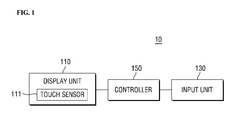
- FIG. 1 is a block diagram illustrating a configuration of a terminal according to an example embodiment of the present invention.
- a terminal 10 may include a display unit 110 and a controller 150.
- the terminal 10 may further include an input unit 130.
- the display unit 110 displays information that is processed in the terminal 10. For example, when the terminal 10 is in a phone call mode, the display unit 110 may display a UI (User Interface) or a GUI (Graphic User Interface) related to the phone call. When a user prepares text, the display unit 110 may display the text prepared by the user.
- UI User Interface
- GUI Graphic User Interface
- the display unit 110 may include various display devices.
- the display unit 110 may include a liquid crystal display, a thin film transistor-liquid crystal display, an organic light emitting diode display, a flexible display, and/or a 3D (three-dimensional) display.
- Some transparent display devices may be used allowing an outside to be seen therethrough.
- the transparent displays may include, e.g., a TOLED (Transparent Organic Light Emitting Diode) display.
- two or more display units 110 may be provided.
- the display unit 110 may include a touch sensor 111.
- a display device and the touch sensor 111 may form a mutual layer structure.
- the display unit 110 may include a touch screen.
- the display unit 110 may function as an output device and/or an input device.
- the touch sensor 111 may convert pressure that is applied to a specific region of the display unit 110 or a change in capacitance that occurs on the specific region of the display unit 110 into an electrical input signal.
- the touch sensor 111 may detect the position, area, and pressure of a touch. When the touch sensor 111 has a touch input, a corresponding signal may be sent to a touch controller.
- the touch controller may process the signal into corresponding data and may transmit the corresponding data to the controller 150. Accordingly, the controller 150 can recognize the area where the touch has occurred in the display unit 110.
- the touch input may include a real touch and a proximity touch by hovering.
- the touch input may also include a single touch and a multi-touch (a double touch, touch and drag, and a long touch).
- the input unit 130 may generate input data for a user to control the operation of the terminal 10.
- the input unit 130 may include a keypad, a dome switch, a touch pad, a touch panel, a jog wheel, and/or a jog switch.
- the input unit 130 is a keypad that is displayed on a keypad display area of the display unit 110.
- the input unit 130 may be implemented by the touch sensor 111 of the display unit 110.
- example embodiments of the present invention are not limited thereto.
- the controller 150 controls the whole operation of the terminal 10. For example, when the terminal 10 is a mobile communication terminal, the controller 150 performs control and processing related to voice communication, data communication, and a video call. For example, the controller 150 may divide the text selected by user's touch input into syllables, numerals, symbols, or letters depending on the type of the text.
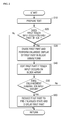
- FIG. 2 is a flowchart illustrating a method for editing text using a terminal according to an example embodiment of the present invention.
- text is prepared in a text preparation mode of the terminal (S10).
- a first touch input occurring on the prepared text is sensed (S20).
- a first part of the text corresponding to the first touch input is divided, and the first part is enlarged in the form of a block array (S30).
- the enlarged first part may be edited when a touch input occurs on the block array (S40).
- an enlargement termination input occurs (S50)
- the enlarged first part returns to its pre-enlarged state, and the first part of the pre-enlarged state is displayed (S60).
- the terminal After displaying the first part of the pre-enlarged state, the terminal returns to the text preparation state in the text preparation mode unless an event occurs, such as an occurrence of a separate input to terminate the text preparation mode.
- editing the enlarged first part (S40) may be performed in various ways.
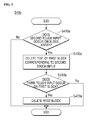
- FIG. 3 is a flowchart illustrating a method for editing a first part in a method for editing text according to an example embodiment of the present invention.
- FIGS. 4 to 16 are views illustrating processes of editing text using a terminal according to example embodiments of the present invention.
- FIGS. 4 to 10 illustrate a process of editing English text
- FIGS. 11 to 16 illustrate a process of editing Korean text.
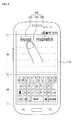
- the controller 150 may display text 200 on the text display area TA of the display unit 110 in response to the user's keypad operation.
- the controller 150 may divide a first part of the text 200 corresponding to the first touch input into a plurality of pieces and may enlarge the first part in response to the first touch input as illustrated in FIG. 5 .
- the first part of the text 200 may be a word that corresponds to where the first touch input occurs.
- the first part of the text 200 may be divided into syllables, numerals, symbols, and letters in an alphabet depending on the type of the text 200.
- the text 200 is a phrase "Beyond Imagination” that includes one English word “Beyond” 210, a spacing 230, and one English word “Imagination” 250
- the word “Beyond” 210 corresponds to the user's first touch input as illustrated in FIG. 4 , and thus, "Beyond” 210 may correspond to the first part 210.
- the controller 150 may divide the word "Beyond” that corresponds to the first part 210 of the text 200 into alphabetical letters "B", “e”, “y”, “o”, “n”, and “d”, may allocate the respective letters to a plurality of blocks 901, 903, 905, 907, 909, and 911, and may display the enlarged first part on the display unit 110 in the form of a block array 900.
- the additional numerals or symbols may be divided in substantially the same manner as the letters, and the divided numerals or symbols may be allocated to their respective blocks.
- the divided pieces of the first part 210 may be displayed in the blocks 901, 903, 905, 907, 909, and 911, respectively, of the block array 900, and the number of the blocks 901, 903, 905, 907, 909, and 911 may be substantially equal to the number of the divided pieces of the first part 210.
- the shape of the blocks 901, 903, 905, 907, 909, and 911 are not limited as shown in the drawings. As shown in FIG. 5 , the blocks 901, 903, 905, 907, 909, and 911 have a rectangular shape. However, the blocks 901, 903, 905, 907, 909, and 911 may have other shapes, such as a circle, an ellipse, or a polygon. As shown in FIG. 5 , the blocks 901, 903, 905, 907, 909, and 911 are spaced apart from each other. However, example embodiments of the present invention are not limited thereto. For example, the blocks 901, 903, 905, 907, 909, and 911 may contact each other.
- the controller 150 may return the first part 210 to its pre-enlarged state, displaying the reduced first part 210.
- a user's touch input hereinafter referred to as a "fourth touch input”
- the controller 110 may recognize the fourth touch input as the enlargement termination input and may return the first part 210 to its pre-enlarged state as illustrated in FIG. 4 , displaying the reduced first part 210 on the display unit 110.
- the terminal 10 may return to the text preparation mode for receiving text from the user.
- the controller 150 may delete part (e.g., "e") of the text that is displayed on the first block 903 corresponding to the second touch input as illustrated in FIG. 7 .
- the controller 150 may display text that corresponds to the user's separate text input on the first block 903.
- the first block refers to a block of the block array 900 on which the user's touch input occurs. The first block may be changed depending on the position where the touch input occurs. For example, the term "first block” may be used to discriminate the block on which the user's touch input occurs from other blocks.
- the controller 150 may return the edited first part 210-1 to its pre-enlarged state and may display the reduced first part 210-1 on the display unit 110 as illustrated in FIG. 8 .
- the edited first part 210-1 may include a blank where "e" used to be displayed.
- the controller 150 may delete the first block (903 in FIG. 6 ) that is positioned between the two blocks 901 and 905 as illustrated in FIG. 9 .
- the controller 150 may return the edited first part 210-2 to its pre-enlarged state and may display the reduced first part on the display unit 110 as illustrated in FIG. 10 .
- the edited first part 210-2 does not include the blank where "e" used to be displayed, unlike that illustrated in FIG. 8 .
- example in which the text is English text has been described by way of example. However, example embodiments of the present invention are not limited thereto. For example, example embodiments of the present invention may be also applied to any Roman alphabet-based, non-English text.
- the controller 150 may divide a first part of the text 300 corresponding to the first touch input into a plurality of pieces and may enlarge the first part in response to the first touch input as illustrated in FIG. 12 .
- the first part of the text 300 may be a word or eojeol that corresponds to where the first touch input occurs.
- eojeol refers to each part of a sentence which is separated by spaces from its preceding and succeeding ones.
- the first part of the text 300 may be divided into syllables, numerals, symbols, and letters depending on the type of the text 300.
- the respective syllables and numerals included in the first part 310 may be displayed in the respective blocks 901, 903, 905, 907, 909, and 911 of the block array 900.
- the number of the blocks 901, 903, 905, 907, 909, and 911 may be substantially equal to the number of the syllables and numerals included in the first part 310.
- the controller 150 may return the edited first part to its pre-enlarged state and may display the reduced first part on the display unit 110.
- the edited first part may be " ", and a blank is positioned between “ " and " "
- whether a second touch input occurs on the block array may be sensed (S410a), and when the second touch input occurs, one of blocks (e.g., first block) that corresponds to the second touch input and that is included in the block array is activated to an edition state (S430b).
- a user's edition input may be received, and the text displayed on the first block may be edited (S450b).
- the text input e.g., input of "
- the text displayed on the first block 903 can be directly changed to other text (e.g., " ") that corresponds to the text input.
- the text inputs " " and " " are sequentially caused by the user while the first block 903 is activated to the edition state
- the text (e.g., " ") that is previously displayed on the first block 903 may be sequentially replaced by " " and " ".
- a drag touch input that occurs on the block array is sensed (S410c), and when the drag touch input is sensed, a blank block is added to the block array corresponding to the drag touch input (S430c).
- the blank block means a block where a separate text is not displayed.
Landscapes
- Engineering & Computer Science (AREA)
- Theoretical Computer Science (AREA)
- General Engineering & Computer Science (AREA)
- Physics & Mathematics (AREA)
- General Physics & Mathematics (AREA)
- Human Computer Interaction (AREA)
- Computer Networks & Wireless Communication (AREA)
- Signal Processing (AREA)
- Health & Medical Sciences (AREA)
- Artificial Intelligence (AREA)
- Audiology, Speech & Language Pathology (AREA)
- Computational Linguistics (AREA)
- General Health & Medical Sciences (AREA)
- User Interface Of Digital Computer (AREA)
Abstract
Description
- Example embodiments of the present invention relate to a terminal and a method for editing text using the same.
- A device such as a smart phone may have touch screen functionality that allows for entry of text through a virtual keyboard. For better portability, the screen size of the device is reduced, but this may cause more errors in typing.
- An example embodiment of the present invention provides a method for editing text using a terminal. In the method, a first touch input is sensed. The first touch input occurs on the text. The text is displayed on a text display area of the terminal. A first part of the text corresponds to the first touch input. In response to the touch input, the first part of the text is enlarged and displayed on the display unit.
- In an example embodiment of the present invention, a terminal includes a display unit and a controller. The display unit displays text. The display unit includes a touch panel. The controller divides a first part of the text into sub-parts. The first part of the text corresponds to a first touch input. The first part is enlarged and displayed on the display unit in response to the first touch input. The first touch input occurs on the text. The text is displayed on the display unit and is sensed through the touch panel.
- According to an example embodiment of the present invention, in a method of editing a text message, a first touch is performed on a first part of the text message. The first part includes one or more characters. The characters are enlarged. A second touch is performed on one of the characters. The second-touched character is replaced by another character.
- At least some of the above and other features of the invention are set out in the claims.
- The features of the present invention will be more apparent from the following detailed description taken in conjunction with the accompanying drawings, in which:
-
FIG. 1 is a block diagram illustrating a configuration of a terminal according to an example embodiment of the present invention; -
FIG. 2 is a flowchart illustrating a method for editing text using a terminal according to an example embodiment of the present invention; -
FIG. 3 is a flowchart illustrating a method for editing a first part in a method for editing text according to an example embodiment of the present invention; -
FIGS. 4 to 16 are views illustrating processes of editing text using a terminal according to example embodiments of the present invention; -
FIG. 17 is a flowchart illustrating a method for editing a first part in a method for editing text according to an example embodiment of the present invention; -
FIGS. 18 to 25 are views illustrating processes of editing text using a terminal according to example embodiments of the present invention; -
FIG. 26 is a flowchart illustrating a process for editing a first part in a method for editing text according to an example embodiment of the present invention; and -
FIGS. 27 to 30 are views illustrating processes of editing text using a terminal according to example embodiments of the present invention. - Hereinafter, example embodiments of the present invention will be described in detail with reference to the accompanying drawings. The present invention will be apparent by referring to example embodiments thereof with reference to the accompanying drawings. The same reference numerals may be used to denote the same or substantially the same elements throughout the specification and the drawings.
- As used herein, a terminal may include a mobile terminal, such as a portable phone, a smart phone, a notebook computer, a terminal for digital broadcasting, a PDA (Personal Digital Assistant), a PMP (Portable Multimedia Player), or navigation, and a stationary terminal, such as a digital TV or a desktop computer, and may be implemented in diverse forms. In the following description, for the purpose of description, the terminal is a mobile terminal. However, unless the context clearly indicates otherwise, example embodiments of the present invention may also be applied to a stationary terminal.
- As used herein, the singular forms "a," "an," and "the" are intended to include the plural forms as well, unless the context clearly indicates otherwise.
-
FIG. 1 is a block diagram illustrating a configuration of a terminal according to an example embodiment of the present invention. - Referring to
FIG. 1 , aterminal 10 may include adisplay unit 110 and acontroller 150. Theterminal 10 may further include aninput unit 130. - The
display unit 110 displays information that is processed in theterminal 10. For example, when theterminal 10 is in a phone call mode, thedisplay unit 110 may display a UI (User Interface) or a GUI (Graphic User Interface) related to the phone call. When a user prepares text, thedisplay unit 110 may display the text prepared by the user. - The
display unit 110 may include various display devices. For example, thedisplay unit 110 may include a liquid crystal display, a thin film transistor-liquid crystal display, an organic light emitting diode display, a flexible display, and/or a 3D (three-dimensional) display. Some transparent display devices may be used allowing an outside to be seen therethrough. The transparent displays may include, e.g., a TOLED (Transparent Organic Light Emitting Diode) display. Further, depending on the implementation type of theterminal 10, two ormore display units 110 may be provided. - The
display unit 110 may include atouch sensor 111. A display device and thetouch sensor 111 may form a mutual layer structure. Thedisplay unit 110 may include a touch screen. Thedisplay unit 110 may function as an output device and/or an input device. Thetouch sensor 111 may convert pressure that is applied to a specific region of thedisplay unit 110 or a change in capacitance that occurs on the specific region of thedisplay unit 110 into an electrical input signal. Thetouch sensor 111 may detect the position, area, and pressure of a touch. When thetouch sensor 111 has a touch input, a corresponding signal may be sent to a touch controller. The touch controller may process the signal into corresponding data and may transmit the corresponding data to thecontroller 150. Accordingly, thecontroller 150 can recognize the area where the touch has occurred in thedisplay unit 110. - For example, the touch input may include a real touch and a proximity touch by hovering. The touch input may also include a single touch and a multi-touch (a double touch, touch and drag, and a long touch).
- The
input unit 130 may generate input data for a user to control the operation of the terminal 10. Theinput unit 130 may include a keypad, a dome switch, a touch pad, a touch panel, a jog wheel, and/or a jog switch. For the purpose of description, theinput unit 130 is a keypad that is displayed on a keypad display area of thedisplay unit 110. For example, theinput unit 130 may be implemented by thetouch sensor 111 of thedisplay unit 110. However, example embodiments of the present invention are not limited thereto. - The
controller 150 controls the whole operation of the terminal 10. For example, when the terminal 10 is a mobile communication terminal, thecontroller 150 performs control and processing related to voice communication, data communication, and a video call. For example, thecontroller 150 may divide the text selected by user's touch input into syllables, numerals, symbols, or letters depending on the type of the text. -
FIG. 2 is a flowchart illustrating a method for editing text using a terminal according to an example embodiment of the present invention. - In a method for editing text using a terminal, text is prepared in a text preparation mode of the terminal (S10). A first touch input occurring on the prepared text is sensed (S20). A first part of the text corresponding to the first touch input is divided, and the first part is enlarged in the form of a block array (S30). The enlarged first part may be edited when a touch input occurs on the block array (S40). When an enlargement termination input occurs (S50), the enlarged first part returns to its pre-enlarged state, and the first part of the pre-enlarged state is displayed (S60). After displaying the first part of the pre-enlarged state, the terminal returns to the text preparation state in the text preparation mode unless an event occurs, such as an occurrence of a separate input to terminate the text preparation mode.
- When the touch input occurs on the block array, editing the enlarged first part (S40) may be performed in various ways.
-
FIG. 3 is a flowchart illustrating a method for editing a first part in a method for editing text according to an example embodiment of the present invention. - Referring to
FIG. 3 , in editing an enlarged first part of the text (S40a), whether a second touch input occurs on the block array (S410a) may be sensed, and when the second touch input occurs on the block array (S410a), the text of a block that corresponds to the second touch input and that is included in a block array may be deleted (S430a). In editing the enlarged first part (S40a), whether a third touch input occurs on the block from which the text is deleted may be sensed (S450), and when the third touch input occurs, the block on which the third touch input occurs may be deleted (S470). -
FIGS. 4 to 16 are views illustrating processes of editing text using a terminal according to example embodiments of the present invention. For example,FIGS. 4 to 10 illustrate a process of editing English text, andFIGS. 11 to 16 illustrate a process of editing Korean text. - Referring to
FIGS. 1 to 10 , a process of editing English text is described. - As illustrated in
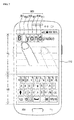
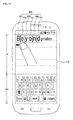
FIG. 4 , when a user operates a keypad that is displayed on a keypad display area KA of thedisplay unit 110 in a text preparation mode of the terminal, thecontroller 150 may displaytext 200 on the text display area TA of thedisplay unit 110 in response to the user's keypad operation. - When the
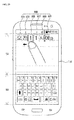
touch sensor 111 senses the user's touch input (hereinafter referred to as a "first touch input") that occurs on thetext 200 displayed on thedisplay unit 110 during the preparation of thetext 200, thecontroller 150 may divide a first part of thetext 200 corresponding to the first touch input into a plurality of pieces and may enlarge the first part in response to the first touch input as illustrated inFIG. 5 . The first part of thetext 200 may be a word that corresponds to where the first touch input occurs. The first part of thetext 200 may be divided into syllables, numerals, symbols, and letters in an alphabet depending on the type of thetext 200. - For example, when the
text 200 is a phrase "Beyond Imagination" that includes one English word "Beyond" 210, aspacing 230, and one English word "Imagination" 250, the word "Beyond" 210 corresponds to the user's first touch input as illustrated inFIG. 4 , and thus, "Beyond" 210 may correspond to thefirst part 210. - As illustrated in
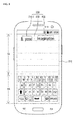
FIG. 5 , thecontroller 150 may divide the word "Beyond" that corresponds to thefirst part 210 of thetext 200 into alphabetical letters "B", "e", "y", "o", "n", and "d", may allocate the respective letters to a plurality ofblocks display unit 110 in the form of ablock array 900. According to an example embodiment of the present invention, when the word that corresponds to thefirst part 210 includes additional numerals or symbols, the additional numerals or symbols may be divided in substantially the same manner as the letters, and the divided numerals or symbols may be allocated to their respective blocks. - As illustrated in
FIG. 5 , the divided pieces of the first part 210 (e.g., respective letters, numerals, or symbols) may be displayed in theblocks block array 900, and the number of theblocks first part 210. - The shape of the
blocks FIG. 5 , theblocks blocks FIG. 5 , theblocks blocks - When an enlargement termination input is caused by the user after the
first part 210 is enlarged and displayed, thecontroller 150 may return thefirst part 210 to its pre-enlarged state, displaying the reducedfirst part 210. For example, as shown inFIG. 5 , when a user's touch input (hereinafter referred to as a "fourth touch input") occurs on the remaining part of thedisplay unit 110 except for the part on which theblock array 900 is displayed, thecontroller 110 may recognize the fourth touch input as the enlargement termination input and may return thefirst part 210 to its pre-enlarged state as illustrated inFIG. 4 , displaying the reducedfirst part 210 on thedisplay unit 110. The terminal 10 may return to the text preparation mode for receiving text from the user. - As illustrated in
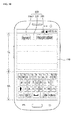
FIG. 6 , when a user's touch input (hereinafter referred to as a "second touch input") for selecting one 903 (hereinafter, referred to as a "first block") of the plurality ofblocks block array 900 occurs, thecontroller 150 may delete part (e.g., "e") of the text that is displayed on thefirst block 903 corresponding to the second touch input as illustrated inFIG. 7 . When a separate text input is caused by the user, thecontroller 150 may display text that corresponds to the user's separate text input on thefirst block 903. Hereinafter, the first block refers to a block of theblock array 900 on which the user's touch input occurs. The first block may be changed depending on the position where the touch input occurs. For example, the term "first block" may be used to discriminate the block on which the user's touch input occurs from other blocks. - When the fourth touch input occurs on the remaining part of the
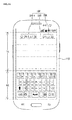
display unit 110 except for the part on which theblock array 900 is displayed while no user's text input occurs, thecontroller 150 may return the edited first part 210-1 to its pre-enlarged state and may display the reduced first part 210-1 on thedisplay unit 110 as illustrated inFIG. 8 . The edited first part 210-1 may include a blank where "e" used to be displayed. - When a user's touch input (hereinafter referred to as a "third touch input") occurs on the first block from which the text is deleted as illustrated in
FIG. 7 while the user's text input and the fourth touch input do not occur, thecontroller 150 may delete the first block (903 inFIG. 6 ) that is positioned between the twoblocks FIG. 9 . When the fourth touch input occurs while the first block (903 inFIG. 6 ) is deleted, thecontroller 150 may return the edited first part 210-2 to its pre-enlarged state and may display the reduced first part on thedisplay unit 110 as illustrated inFIG. 10 . The edited first part 210-2 does not include the blank where "e" used to be displayed, unlike that illustrated inFIG. 8 . - An example in which the text is English text has been described by way of example. However, example embodiments of the present invention are not limited thereto. For example, example embodiments of the present invention may be also applied to any Roman alphabet-based, non-English text.
- Referring to
FIGS. 1 to 3 , and11 to 16 , a process of editing a Korean text is described. - As illustrated in
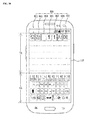
FIG. 11 , when a user operates a keypad that is displayed on a keypad display area KA of thedisplay unit 110, thecontroller 150 may displaytext 300 on the text display area TA of thedisplay unit 110 in response to the user's keypad operation. - When the
touch sensor 111 senses a user's touch input (e.g., a first touch input) that occurs on thetext 300 displayed on thedisplay unit 110, thecontroller 150 may divide a first part of thetext 300 corresponding to the first touch input into a plurality of pieces and may enlarge the first part in response to the first touch input as illustrated inFIG. 12 . The first part of thetext 300 may be a word or eojeol that corresponds to where the first touch input occurs. As used herein, "eojeol" refers to each part of a sentence which is separated by spaces from its preceding and succeeding ones. The first part of thetext 300 may be divided into syllables, numerals, symbols, and letters depending on the type of thetext 300. - For example, when the
text 300 is a Korean sentence "", the
text 300 may include aneojeol 310 "", a
space 330, and anothereojeol 350 "." The eojeol that corresponds to the user's first touch input as illustrated in
FIG. 11 is "" 310 that may correspond to the
first part 210. - As illustrated in
FIG. 12 , thecontroller 150 may divide the eojeol "" that corresponds to the
first part 310 of thetext 300 into respective syllables and numerals "", ""and " ", and the
controller 150 may allocate the respective syllables and numerals to the plurality ofblocks controller 150 may enlarge the first part on thedisplay unit 110 in the form of ablock array 900. - The respective syllables and numerals included in the
first part 310 may be displayed in therespective blocks block array 900. The number of theblocks first part 310. - For example, substantially the same shape and arrangement as described above in connection with
FIG. 5 may apply to theblocks - When an enlargement termination input (e.g., the fourth touch input) is caused by the user after the
first part 310 is enlarged and displayed, thecontroller 150 may display thefirst part 310 of its pre-enlarged state. For example, as shown inFIG. 12 , when the fourth touch input occurs on the remaining part of thedisplay unit 110 except for the part on which theblock array 900 is displayed, thecontroller 110 may recognize the fourth touch input as the enlargement termination input and may return thefirst part 310 to its pre-enlarged state as illustrated inFIG. 11 , displaying the reducedfirst part 310 on thedisplay unit 110. - As illustrated in
FIG. 13 , when a user's touch input (e.g., a "second touch input") for selecting one 905 (hereinafter, referred to as a "first block") of the plurality ofblocks block array 900 occurs, thecontroller 150 may delete the text (e.g., "1") that is displayed on thefirst block 905 corresponding to the second touch input as illustrated inFIG. 14 . When a separate text input is caused by the user, thecontroller 150 may display text that corresponds to the user's text input on thefirst block 905. - When the enlargement termination input (e.g., fourth touch input) occurs while the second touch input occurs, the
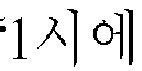
controller 150 may return the edited first part to its pre-enlarged state and may display the reduced first part on thedisplay unit 110. The edited first part may be "", and a blank is positioned between " " and "
 "
"
- When a user's touch input (e.g., a "third touch input") occurs on the
first block 905 from which the text is deleted as illustrated inFIG. 14 while the user's text input and the fourth touch input do not occur, thecontroller 150 may delete the first block (905 inFIG. 14 ) that is positioned between the twoblocks FIG. 15 . When the fourth touch input occurs while the first block (905 inFIG. 14 ) is deleted, thecontroller 150 may return the edited first part 310-1 to its pre-enlarged state and may display the reduced first part on thedisplay unit 110 as illustrated inFIG. 16 . The edited first part 310-1 may be "" Since the first block (905 in
FIG. 14 ) is deleted, no blank is positioned between "" and " "
"
- According to an example embodiment of the present invention, text to be edited later is divided into a plurality of pieces that respectively correspond to a plurality of blocks, and the divided pieces of the text are enlarged and displayed on the
display unit 110 having a limited size. Accordingly, a user can easily recognize the text that is to be edited later. - Further, since the text edition is performed through selection of the enlarged block by the touch input in the text edition process, accurate selection and control becomes possible in comparison to the case where the text is edited using the cursor movement.
- The text that is to be later edited is divided into respective letters, syllables, numerals, and/or symbols in the text edition process, thus allowing for easy and accurate selection and control.
-
FIG. 17 is a flowchart illustrating a method for editing a first part in a method for editing text as illustrated inFIG. 2 according to an example embodiment of the present invention, - Referring to
FIG. 17 , in editing the enlarged first part (S40b), whether a second touch input occurs on the block array may be sensed (S410a), and when the second touch input occurs, one of blocks (e.g., first block) that corresponds to the second touch input and that is included in the block array is activated to an edition state (S430b). A user's edition input may be received, and the text displayed on the first block may be edited (S450b). -
FIGS. 18 to 25 are views illustrating processes of editing text using a terminal according to example embodiments of the present invention. For example,FIGS. 18 to 21 illustrate a process of editing English text, andFIGS. 22 to 25 illustrate a process of editing Korean text. - Referring to
FIGS. 1 ,2 ,4 ,5 , and17 to 21 , a process of editing an English text is described. - As illustrated in
FIG. 4 , when a user operates an input unit 130 (e.g., a keypad that is displayed on a keypad display area KA of the display unit 110) in a text preparation mode of the terminal, thecontroller 150 may displaytext 200 on the text display area TA of thedisplay unit 110 in response to the user's keypad operation. - When the
touch sensor 111 senses a user's touch input (hereinafter referred to as a "first touch input") that occurs on thetext 200 displayed on thedisplay unit 110 during the preparation of thetext 200, thecontroller 150 may divide a word "Beyond" that corresponds to thefirst part 210 of thetext 200 into letters "B", "e", "y", "o", "n", and "d" in response to the first touch input as illustrated inFIG. 5 . Thecontroller 150 may allocate the respective letters to a plurality ofblocks display unit 110 in the form of ablock array 900. - When an enlargement termination input is caused by the user after the
first part 210 is enlarged and displayed, thecontroller 150 may return thefirst part 210 to its pre-enlarged state, displaying the reducedfirst part 210. For example, as shown inFIG. 5 , when a user's touch input (hereinafter referred to as a "fourth touch input") occurs on the remaining part of thedisplay unit 110 except for the part on which theblock array 900 is displayed, thecontroller 110 may recognize the fourth touch input as the enlargement termination input and may return thefirst part 210 to its pre-enlarged state as illustrated inFIG. 4 , displaying the reducedfirst part 210 on thedisplay unit 110. The terminal 10 may return to the text preparation mode for receiving text from the user as described above with reference toFIG. 4 . - As illustrated in
FIG. 18 , when a user's touch input (hereinafter referred to as a "second touch input") for selecting one 903 (hereinafter, referred to as a "first block") of the plurality ofblocks block array 900 occurs, thecontroller 150 may activate the first block corresponding to the second touch input to the edition state. As used herein, the edition state may refer to where the text (e.g., "e") included in thefirst block 903 can be deleted, copied, cut, or changed to other text. - The
first block 903 that is activated to the edition state may be visually distinguished fromother blocks FIG. 18 , thecontroller 150 may highlight thefirst block 903 that corresponds to the second touch input, and thus the user can more easily recognize the block that is activated to the edition state. - Thereafter, the text (e.g., "e") that is displayed on the
first block 903 activated to the edition state may be replaced by other text (e.g., "o") as illustrated inFIG. 19 in response to the user's edition input. - Various methods may be used to edit the text of the
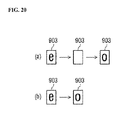
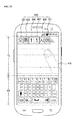
first block 903 that is activated to the edition state. For example, as illustrated inFIG. 20A , the text (e.g., "e") of thefirst block 903 that is activated to the edition state may be deleted when a text deletion input (e.g., backspace input) is caused by the user. Thereafter, when the text input (e.g., input of letter "o") is caused by the user, other text (e.g., letter "o") that corresponds to the text input may be displayed in thefirst block 903. As illustrated inFIG. 20B , when the text input (e.g., input of letter "o") is caused by the user, even when performing a separate process of deleting the text (e.g., "e") of thefirst block 903 that is activated to the edition state, the text displayed on thefirst block 903 can be directly changed to other text (e.g., "o") that corresponds to the text input. For example, when the text input for inputting "o" is caused by the user while thefirst block 903 is activated to the edition state, the text (e.g., "e") that is previously displayed on thefirst block 903 may be replaced by the text (e.g., "o") input by the user. - Thereafter, when the enlargement termination input (e.g., the fourth touch input) is input by the user, the
controller 150 may return the edited first part 210-3 to the pre-enlarged state as illustrated inFIG. 21 and may display the reduced first part on thedisplay unit 110. -
FIGS. 22 to 25 illustrate examples of edition screens of Korean text. Referring toFIGS. 1 ,2 ,11 ,12 , and22 to 25 , an example of a Korean text edition process will be described. - As illustrated in
FIG. 11 , when a user operates an input unit 130 (e.g., a keypad that is displayed on a keypad display area KA of the display unit 110), thecontroller 150 may displaytext 300 on the text display area TA of thedisplay unit 110 in response to the user's operation of theinput unit 130. - When the
touch sensor 111 senses the user's touch input (hereinafter referred to as a "first touch input") that occurs on thetext 300 displayed on thedisplay unit 110 during the preparation of thetext 300, thecontroller 150 may divide an eojeol "" that corresponds to the
first part 310 of thetext 300 into respective syllables and numerals """, and " " As used herein, "eojeol" refers to each part of a sentence which is separated by spaces from its preceding and succeeding ones. The first part of the
text 300 may be divided into syllables, numerals, symbols, and letters depending on the type of thetext 300. Thecontroller 150 may allocate the respective syllables and numerals to the plurality ofblocks first part 310 on thedisplay unit 110 in the form of ablock array 900. - When an enlargement termination input (e.g., fourth touch input) is caused by the user after the
first part 310 is enlarged and displayed, thecontroller 150 may return thefirst part 310 to its pre-enlarged state, displaying the reducedfirst part 310 as illustrated inFIG. 11 . - As illustrated in
FIG. 22 , when a user's touch input (hereinafter referred to as a "second touch input") for selecting one 903 (hereinafter, referred to as a "first block") of the plurality ofblocks block array 900 occurs, thecontroller 150 may activate thefirst block 903 corresponding to the second touch input to the edition state. Thefirst block 903 that is activated to the edition state may be highlighted, thus visually distinguishing thefirst block 903 fromother blocks - Thereafter, the text (e.g., "") that is displayed on the

first block 903 activated to the edition state may be replaced by other text (e.g., "") as illustrated in
FIG. 23 in response to the user's edition input (e.g., input of "").
- Various methods may be used to edit the text of the
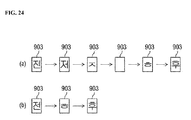
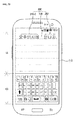
first block 903 that is activated to the edition state. For example, as illustrated inFIG. 24A , the text (e.g., "") of the
first block 903 that is activated to the edition state may be deleted when a text deletion input (e.g., a backspace input) is caused by the user. In an example embodiment of the present invention, the text of thefirst block 903 may be deleted on a per-phoneme basis in response to the user's text deletion input. For example, when a backspace input is caused by the user while thefirst block 903 that is activated to the edition state displays "", the
first block 903 displays "". For example, one phoneme (e.g., " ") is deleted from "
 " in response to the user's backspace input. When one more backspace input is caused by the user, the
first block 903 displays "", which is obtained by deleting one phoneme (e.g., " ") from "
 ." When one further backspace input is caused, the phoneme (e.g., "
 ") is deleted, and thus the
first block 903 displays a blank. For example, thefirst block 903 becomes a blank block. When the text input of "" and "T" is sequentially caused by the user, the
first block 903 sequentially displays "" and " ."
."
- Accordingly, the text to be edited can be corrected on a per-phoneme basis, thus enabling the text correction to be performed in various ways.
- As illustrated in
FIG. 24B , when the text input (e.g., input of "") is caused by the user, even when not separately deleting the text (e.g., " ") of the
first block 903 that is activated to the edition state, the text displayed on thefirst block 903 can be directly changed to other text (e.g., "") that corresponds to the text input. For example, when the text inputs " " and "
 " are sequentially caused by the user while the
first block 903 is activated to the edition state, the text (e.g., "") that is previously displayed on the
first block 903 may be sequentially replaced by "" and " ".
".
- Thereafter, when the enlargement termination input (e.g., the fourth touch input) is input by the user, the
controller 150 may return the edited first part 310-2 to the pre-enlarged state as illustrated inFIG. 25 and may display the reduced first part on thedisplay unit 110. -
FIG. 26 is a flowchart illustrating a method for editing a first part in a method for editing text according to an exemplary embodiment of the present invention. - Referring to
FIG. 26 , in editing the enlarged first part (S40c), a drag touch input that occurs on the block array is sensed (S410c), and when the drag touch input is sensed, a blank block is added to the block array corresponding to the drag touch input (S430c). As used herein, the blank block means a block where a separate text is not displayed. -
FIGS. 27 to 30 are views illustrating processes of editing text using a terminal according to example embodiments of the present invention.FIGS. 27 and28 illustrate a process of editing English text, andFIGS. 29 and30 illustrate a process of editing Korean text. - Referring to
FIGS. 1 ,2 ,4 ,5 ,27 , and28 , a process of editing an English text edition process is described. - As illustrated in
FIG. 4 , in response to a user's keypad operation that occurs in the keypad display area KA of thedisplay unit 110 in a text preparation mode of the terminal, thecontroller 150 may display thetext 200 that corresponds to the keypad operation on the text display area TA of thedisplay unit 110. - When the
touch sensor 111 senses the user's touch input (e.g., the "first touch input") that occurs on thetext 200 displayed on thedisplay unit 110 during the preparation of thetext 200, thecontroller 150 may divide the word "Beyond" that corresponds to thefirst part 210 of thetext 200 into letters "B", "e", "y", "o", "n", and "d" in response to the first touch input as illustrated inFIG. 5 . Thecontroller 150 may allocate the respective letters to a plurality ofblocks display unit 110 in the form of ablock array 900. When the enlargement termination input is caused by the user after thefirst part 210 is enlarged and displayed, thecontroller 150 may return thefirst part 210 to its pre-enlarged state, displaying the reducedfirst part 210. - When a drag touch input is caused by the user on the plurality of
blocks block array 900 as illustrated inFIG. 27 , thecontroller 150 may add ablank block 902 to theblock array 900 as illustrated inFIG. 28 in response to the drag touch input. - For example, when the drag touch input occurs on the
block array 900, thecontroller 150 may add theblank block 902 to a position that is closest to the block (e.g., first block) that corresponds to a start point of the drag touch input. The position to which theblank block 902 is added may correspond to the direction of the drag touch input. For example, when the drag touch input is caused in the left direction as illustrated inFIG. 27 , theblank block 902 may be inserted at the left side of thefirst block 903. In substantially the same manner, when a drag touch input is caused in the right direction, a blank block may be inserted at the right side of thefirst block 903. - When the user selects the
blank block 902, an additional text may be inserted into theblank block 902. When the user makes an enlargement termination input (e.g., fourth touch input) without adding separate text, the first part can be returned to its pre-enlarged state, and a reduced first part can be displayed. When the enlargement termination input occurs without adding the separate text, a blank is displayed where theblank block 902 is inserted. For example, a space is displayed on thedisplay unit 110, thus resulting in the text being "B eyond Imagination." For example, a blank may be positioned between the text "B" and the text "eyond". -
FIGS. 29 and30 illustrate a process of editing a Korean text according to an embodiment of the present invention. Referring toFIGS. 1 ,2 ,11 ,12 ,16 ,29 , and30 , a process of editing a Korean text is described. - As illustrated in
FIG. 11 , when a user operates the keypad that is displayed on the keypad display area KA of thedisplay unit 110, thecontroller 150 may display thetext 300 on the text display area TA of thedisplay unit 110 in response to the user's keypad operation. - When the
touch sensor 111 senses the user's touch input (hereinafter referred to as a "first touch input") that occurs on thetext 300 displayed on thedisplay unit 110 during the preparation of thetext 300, thecontroller 150 may divide an eojeol "" that corresponds to the
first part 310 of thetext 300 into respective syllables and numerals "" and " " in response to the first touch input. The
controller 150 may allocate the respective syllables and numerals to the plurality ofblocks controller 150 may enlarge thefirst part 310 on thedisplay unit 110 in the form of ablock array 900. - When the enlargement termination input (e.g., fourth touch input) is caused by the user after the
first part 310 is enlarged and displayed, thecontroller 150 may return thefirst part 310 to its pre-enlarged state, displaying the reducedfirst part 310 on thedisplay unit 110 as illustrated inFIG. 11 . - When a drag touch input occurs on the plurality of
blocks block array 900 by the user as illustrated inFIG. 29 without making the enlargement termination input, thecontroller 150 may add ablank block 902 to theblock array 900 as illustrated inFIG. 28 in response to the drag touch input. - For example, when the drag touch input occurs on the
block array 900, thecontroller 150 may add theblank block 902 to a position that is closest to the block 903 (e.g., the first block) that corresponds to the start point of the drag touch input. The position to which theblank block 902 is added may correspond to the direction of the drag touch input as described above with reference toFIGS. 27 and28 . - When the user selects the
blank block 902 after theblank block 902 is added, an additional text may be inserted into theblank block 902. When the user makes the enlargement termination input (e.g., fourth touch input) without adding separate text, the first part can be returned to its pre-enlarged state, and a reduced first part can be displayed. In this case, a space may be displayed where theblank block 902 is inserted on thedisplay unit 110, thus resulting in the text being "".
- The terminal and the method for editing text using the terminal as described above are not be limited to the embodiments as described above. For example, all or some of the embodiments may be selectively combined. For example, adding the blank block through the drag touch input may be combined with editing the text displayed in the block.
- Although embodiments of the present invention have been described, those skilled in the art will appreciate that various modifications, additions and substitutions are possible, without departing from the scope and spirit of the invention as disclosed in the accompanying claims.
Claims (15)
- A terminal (10), comprising:a display unit (110) including a touch sensor (111) configured to sense a touch input, the display unit (110) configured to display text (200, 300); anda controller (150) configured to divide a first part (210, 310) of the text into a plurality of sub-parts, to enlarge the first part (210, 310), and to display the enlarged first part (210, 310) on the display unit (110) in response to the first touch input that is sensed on the text (200, 300) through the touch sensor (111), wherein the first part (210, 310) of the text corresponds to the first touch input position.
- A terminal (10) according to claim 1, wherein the plurality of sub-parts of the first part (210, 310) include syllables, numerals, symbols, and/or letters depending on the type of the text (200, 300), and wherein the controller (150) is configured to display the divided and enlarged first part (210, 230) on the display unit (110) in the form of a block array (900) that includes a plurality of blocks (901, 903).
- A terminal (10) according to claim 2, wherein the controller (150) is configured to allocate the sub-parts of the first part (210, 310) to the plurality of blocks (901), respectively.
- A terminal (10) according to claim 2 or 3, wherein the controller (150) is configured to edit the first part (210, 310) and display the edited first part on the display unit (110), in response to a second touch input that occurs on the block array (900) and sensed through the touch sensor (111).
- A terminal (10) according to claim 4, wherein the controller (150) is configured to delete the text in a first block (903) that corresponds to the second touch input.
- A terminal (10) according to claim 5, wherein, the controller (150) is configured to delete the first block (903), in response to a third touch input that occurs on the first block (903) and that is sensed through the touch sensor (111) after the text in the first block (903) is deleted.
- A terminal (10) according to claim 4, further comprising an input unit (130) configured to receive a user's input,
wherein the controller (150) is configured to turn a first block that corresponds to the second touch input into an edition state, and wherein
in response to the user's text edition input that is received through the input unit (130), the controller is configured to edit the text in the first block and display the edited text. - A terminal (10) according to any one of claims 2 to 7, wherein in response to a drag touch input that occurs on the block array (900) and that is sensed through the touch sensor (111), the controller (150) is configured to add a blank block to the block array (900) and display the block array.
- A terminal (10) according to claim 8, wherein the added blank block is positioned closest to a block that corresponds to a start point of the drag touch input.
- A terminal according to any one of claims 2 to 10, wherein in response to a fourth touch input that occurs on a part of the display area except for where the block array (900) is displayed, the controller (150) is configured to return the first part to its pre-enlarged state and is configured to display the first part on the display unit.
- A method for editing text using a terminal (10), the method comprising:sensing a first touch input that occurs on the text (200, 300), wherein the text is displayed on a text display area of the terminal (10); anddividing a first part (210, 310) of the text into a plurality of sub-parts, enlarging the first part, and displaying the divided and enlarged first part in response to the first touch input, wherein the first part of the text corresponds to the first touch input position,wherein the sub-parts include syllables, numerals, symbols, and/or letters depending on the type of the text, andwherein the enlarged and divided first part is displayed on a block array (900) that includes a plurality of blocks.
- A method according to claim 11, further comprising:sensing a second touch input that occurs on the block array (900) after displaying the enlarged first part; andediting and displaying the edited first part in response to the second touch input,wherein the editing and displaying the edited first part comprises deleting the text in a first block (903) that corresponds to the second touch input.
- A method according to claim 11 or 12, further comprising:sensing a third touch input that occurs on the block array (900) after displaying the enlarged first part; andediting and displaying the edited first part in response to the third touch input,wherein the editing and displaying the edited first part comprises:turning a first block that corresponds to the third touch input into an edition state, andediting and displaying the text in the first block in response to a user's edition input.
- A method according to any one of claims 11 to 13, further comprising:sensing a drag touch input that occurs on the block array (900); andadding a blank block to the block array (900) and displaying the edited block array in response to the drag touch input.
- A method according to any one of claims 11 to 14, further comprising:sensing a fourth touch input that occurs on a part of the display area except for where the block array (900) is displayed; andreturning the first part to its pre-enlarged state and displaying the first part in its pre-enlarged state in response to the fourth touch input.
Applications Claiming Priority (1)
| Application Number | Priority Date | Filing Date | Title |
|---|---|---|---|
| KR1020130054471A KR102072049B1 (en) | 2013-05-14 | 2013-05-14 | Terminal and method for editing text using thereof |
Publications (2)
| Publication Number | Publication Date |
|---|---|
| EP2804087A2 true EP2804087A2 (en) | 2014-11-19 |
| EP2804087A3 EP2804087A3 (en) | 2015-02-25 |
Family
ID=50112693
Family Applications (1)
| Application Number | Title | Priority Date | Filing Date |
|---|---|---|---|
| EP14153136.8A Withdrawn EP2804087A3 (en) | 2013-05-14 | 2014-01-29 | Terminal and method for editing text using the same |
Country Status (4)
| Country | Link |
|---|---|
| US (1) | US9547634B2 (en) |
| EP (1) | EP2804087A3 (en) |
| KR (1) | KR102072049B1 (en) |
| CN (1) | CN104156164B (en) |
Families Citing this family (8)
| Publication number | Priority date | Publication date | Assignee | Title |
|---|---|---|---|---|
| US20150338945A1 (en) * | 2013-01-04 | 2015-11-26 | Ubiquitous Entertainment Inc. | Information processing device and information updating program |
| KR102138515B1 (en) | 2013-10-01 | 2020-07-28 | 엘지전자 주식회사 | Mobile terminal and method for controlling thereof |
| WO2016104876A1 (en) * | 2014-12-23 | 2016-06-30 | 김규리 | Text editing apparatus and method |
| CN106406687A (en) * | 2015-07-31 | 2017-02-15 | 东莞酷派软件技术有限公司 | Input control method and device |
| CN108664201B (en) * | 2017-03-29 | 2021-12-28 | 北京搜狗科技发展有限公司 | Text editing method and device and electronic equipment |
| CN109189303B (en) * | 2018-08-30 | 2021-02-09 | 维沃移动通信有限公司 | Text editing method and mobile terminal |
| TWI811789B (en) * | 2021-09-10 | 2023-08-11 | 宏碁股份有限公司 | Intelligent zooming method and electronic device using the same |
| CN114518827B (en) * | 2022-02-21 | 2025-09-05 | 维沃移动通信有限公司 | Text processing method and device |
Citations (1)
| Publication number | Priority date | Publication date | Assignee | Title |
|---|---|---|---|---|
| US5953735A (en) * | 1991-03-20 | 1999-09-14 | Forcier; Mitchell D. | Script character processing method and system with bit-mapped document editing |
Family Cites Families (13)
| Publication number | Priority date | Publication date | Assignee | Title |
|---|---|---|---|---|
| JPH04238525A (en) * | 1991-01-22 | 1992-08-26 | Sony Corp | Character input and control device |
| US7526737B2 (en) * | 2005-11-14 | 2009-04-28 | Microsoft Corporation | Free form wiper |
| KR100813062B1 (en) * | 2006-05-03 | 2008-03-14 | 엘지전자 주식회사 | Portable terminal and text display method using the same |
| EP2053497A1 (en) * | 2007-10-26 | 2009-04-29 | Research In Motion Limited | Text selection using a touch sensitive screen of a handheld mobile communication device |
| US8116569B2 (en) * | 2007-12-21 | 2012-02-14 | Microsoft Corporation | Inline handwriting recognition and correction |
| US20110035209A1 (en) * | 2009-07-06 | 2011-02-10 | Macfarlane Scott | Entry of text and selections into computing devices |
| KR20110104620A (en) * | 2010-03-17 | 2011-09-23 | 삼성전자주식회사 | Character input method and device in portable terminal |
| KR101169424B1 (en) | 2010-08-26 | 2012-07-27 | 동명대학교산학협력단 | Application program locking and unlocking apparatus and method in smart phone |
| KR101677636B1 (en) * | 2010-08-30 | 2016-11-18 | 엘지전자 주식회사 | Mobile terminal and method for editing text thereof |
| KR20120020730A (en) * | 2010-08-31 | 2012-03-08 | 삼성전자주식회사 | Method and apparatus for inputing character in portable terminal |
| US8640026B2 (en) | 2011-07-11 | 2014-01-28 | International Business Machines Corporation | Word correction in a multi-touch environment |
| US10838513B2 (en) * | 2012-08-06 | 2020-11-17 | Nokia Technologies Oy | Responding to selection of a displayed character string |
| US8656296B1 (en) * | 2012-09-27 | 2014-02-18 | Google Inc. | Selection of characters in a string of characters |
-
2013
- 2013-05-14 KR KR1020130054471A patent/KR102072049B1/en not_active Expired - Fee Related
- 2013-09-18 US US14/030,635 patent/US9547634B2/en not_active Expired - Fee Related
- 2013-12-23 CN CN201310715079.1A patent/CN104156164B/en not_active Expired - Fee Related
-
2014
- 2014-01-29 EP EP14153136.8A patent/EP2804087A3/en not_active Withdrawn
Patent Citations (1)
| Publication number | Priority date | Publication date | Assignee | Title |
|---|---|---|---|---|
| US5953735A (en) * | 1991-03-20 | 1999-09-14 | Forcier; Mitchell D. | Script character processing method and system with bit-mapped document editing |
Also Published As
| Publication number | Publication date |
|---|---|
| US9547634B2 (en) | 2017-01-17 |
| KR102072049B1 (en) | 2020-02-03 |
| EP2804087A3 (en) | 2015-02-25 |
| CN104156164A (en) | 2014-11-19 |
| US20140344678A1 (en) | 2014-11-20 |
| KR20140134810A (en) | 2014-11-25 |
| CN104156164B (en) | 2019-01-18 |
Similar Documents
| Publication | Publication Date | Title |
|---|---|---|
| EP2804087A2 (en) | Terminal and method for editing text using the same | |
| KR102091235B1 (en) | Apparatus and method for editing a message in a portable terminal | |
| US9256366B2 (en) | Systems and methods for touch-based two-stage text input | |
| CN101630226B (en) | Rapid positioning method and device of display content of electronic equipment | |
| US20160077602A1 (en) | Method and Handheld Electronic Device for Displaying and Selecting Diacritics | |
| DE112007000122T5 (en) | Keyboards for portable electronic devices | |
| KR20120006503A (en) | Improved text input | |
| US20120326988A1 (en) | Multilingual key input apparatus and method thereof | |
| US8816966B2 (en) | Touchscreen japanese character selection through sliding input | |
| KR101846238B1 (en) | Chinese character input apparatus and controlling method thereof | |
| US9507516B2 (en) | Method for presenting different keypad configurations for data input and a portable device utilizing same | |
| US8812973B1 (en) | Mobile device text-formatting | |
| US9606727B2 (en) | Apparatus and method for providing user interface providing keyboard layout | |
| US9069391B2 (en) | Method and medium for inputting Korean characters using a touch screen | |
| KR102126831B1 (en) | Chinese character input apparatus based on first-input-character and controlling method thereof | |
| US20200104043A1 (en) | Head mounted display device and content input method thereof | |
| US20140331160A1 (en) | Apparatus and method for generating message in portable terminal | |
| US20150082234A1 (en) | Electronic device and text-input interface displaying method thereof | |
| US20130021260A1 (en) | Method for inputting korean character on touch screen | |
| US20160292140A1 (en) | Associative input method and terminal | |
| EP2942704A1 (en) | Handheld device and input method thereof | |
| CN104699409A (en) | Information inputting method and information inputting system for mobile terminal of touch screen | |
| KR20140139702A (en) | Method and apparatus for correcting text | |
| US8902179B1 (en) | Method and device for inputting text using a touch screen | |
| EP3229108A1 (en) | Character input assistance device |
Legal Events
| Date | Code | Title | Description |
|---|---|---|---|
| PUAI | Public reference made under article 153(3) epc to a published international application that has entered the european phase |
Free format text: ORIGINAL CODE: 0009012 |
|
| 17P | Request for examination filed |
Effective date: 20140331 |
|
| AK | Designated contracting states |
Kind code of ref document: A2 Designated state(s): AL AT BE BG CH CY CZ DE DK EE ES FI FR GB GR HR HU IE IS IT LI LT LU LV MC MK MT NL NO PL PT RO RS SE SI SK SM TR |
|
| AX | Request for extension of the european patent |
Extension state: BA ME |
|
| PUAL | Search report despatched |
Free format text: ORIGINAL CODE: 0009013 |
|
| AK | Designated contracting states |
Kind code of ref document: A3 Designated state(s): AL AT BE BG CH CY CZ DE DK EE ES FI FR GB GR HR HU IE IS IT LI LT LU LV MC MK MT NL NO PL PT RO RS SE SI SK SM TR |
|
| AX | Request for extension of the european patent |
Extension state: BA ME |
|
| RIC1 | Information provided on ipc code assigned before grant |
Ipc: G06F 17/24 20060101ALI20150120BHEP Ipc: G06F 3/0488 20130101AFI20150120BHEP Ipc: G06F 3/023 20060101ALI20150120BHEP |
|
| RAP1 | Party data changed (applicant data changed or rights of an application transferred) |
Owner name: SAMSUNG DISPLAY CO., LTD. |
|
| STAA | Information on the status of an ep patent application or granted ep patent |
Free format text: STATUS: EXAMINATION IS IN PROGRESS |
|
| 17Q | First examination report despatched |
Effective date: 20171020 |
|
| RIC1 | Information provided on ipc code assigned before grant |
Ipc: G06F 3/023 20060101ALI20220922BHEP Ipc: G06F 3/0488 20130101AFI20220922BHEP |
|
| GRAP | Despatch of communication of intention to grant a patent |
Free format text: ORIGINAL CODE: EPIDOSNIGR1 |
|
| STAA | Information on the status of an ep patent application or granted ep patent |
Free format text: STATUS: GRANT OF PATENT IS INTENDED |
|
| INTG | Intention to grant announced |
Effective date: 20221031 |
|
| STAA | Information on the status of an ep patent application or granted ep patent |
Free format text: STATUS: THE APPLICATION IS DEEMED TO BE WITHDRAWN |
|
| 18D | Application deemed to be withdrawn |
Effective date: 20230311 |