EP2801894B1 - Adaptiver Fliesenrahmen - Google Patents
Adaptiver Fliesenrahmen Download PDFInfo
- Publication number
- EP2801894B1 EP2801894B1 EP14001664.3A EP14001664A EP2801894B1 EP 2801894 B1 EP2801894 B1 EP 2801894B1 EP 14001664 A EP14001664 A EP 14001664A EP 2801894 B1 EP2801894 B1 EP 2801894B1
- Authority
- EP
- European Patent Office
- Prior art keywords
- tiles
- tile
- displayed
- interactive features
- different
- Prior art date
- Legal status (The legal status is an assumption and is not a legal conclusion. Google has not performed a legal analysis and makes no representation as to the accuracy of the status listed.)
- Active
Links
Images






Classifications
-
- H—ELECTRICITY
- H04—ELECTRIC COMMUNICATION TECHNIQUE
- H04L—TRANSMISSION OF DIGITAL INFORMATION, e.g. TELEGRAPHIC COMMUNICATION
- H04L67/00—Network arrangements or protocols for supporting network services or applications
- H04L67/01—Protocols
- H04L67/02—Protocols based on web technology, e.g. hypertext transfer protocol [HTTP]
- H04L67/025—Protocols based on web technology, e.g. hypertext transfer protocol [HTTP] for remote control or remote monitoring of applications
-
- G—PHYSICS
- G06—COMPUTING OR CALCULATING; COUNTING
- G06F—ELECTRIC DIGITAL DATA PROCESSING
- G06F16/00—Information retrieval; Database structures therefor; File system structures therefor
- G06F16/90—Details of database functions independent of the retrieved data types
- G06F16/95—Retrieval from the web
- G06F16/957—Browsing optimisation, e.g. caching or content distillation
- G06F16/9577—Optimising the visualization of content, e.g. distillation of HTML documents
-
- H—ELECTRICITY
- H04—ELECTRIC COMMUNICATION TECHNIQUE
- H04W—WIRELESS COMMUNICATION NETWORKS
- H04W4/00—Services specially adapted for wireless communication networks; Facilities therefor
- H04W4/20—Services signaling; Auxiliary data signalling, i.e. transmitting data via a non-traffic channel
-
- G—PHYSICS
- G06—COMPUTING OR CALCULATING; COUNTING
- G06F—ELECTRIC DIGITAL DATA PROCESSING
- G06F3/00—Input arrangements for transferring data to be processed into a form capable of being handled by the computer; Output arrangements for transferring data from processing unit to output unit, e.g. interface arrangements
- G06F3/01—Input arrangements or combined input and output arrangements for interaction between user and computer
- G06F3/048—Interaction techniques based on graphical user interfaces [GUI]
- G06F3/0481—Interaction techniques based on graphical user interfaces [GUI] based on specific properties of the displayed interaction object or a metaphor-based environment, e.g. interaction with desktop elements like windows or icons, or assisted by a cursor's changing behaviour or appearance
-
- H—ELECTRICITY
- H04—ELECTRIC COMMUNICATION TECHNIQUE
- H04L—TRANSMISSION OF DIGITAL INFORMATION, e.g. TELEGRAPHIC COMMUNICATION
- H04L67/00—Network arrangements or protocols for supporting network services or applications
- H04L67/50—Network services
- H04L67/75—Indicating network or usage conditions on the user display
Definitions
- the present invention relates to computing and data processing, and in particular, to an adaptive tile framework.
- network connectivity is another distinction between mobile devices and traditional desktop systems.
- a computer In a desktop system, a computer is often connected directly to a network, which in turn, may be connected via high speed connections and standard protocols to backend servers or the Internet.
- backend servers or the Internet.
- accessing complex functionality that may reside on an external system using a mobile device is challenging because in many cases intermediate, and sometimes intermittent, networks and unique gateways are required to access typical backend systems. Further, given limited interface space available on many mobile devices, accessing feature rich backend services can be a significant challenge.
- Exemplary conventional methods of presenting information from sources on a display are disclosed in US 2009/0132942 A1 and US 2006/0235935 A1 .
- the present disclosure includes an adaptive tile framework.
- a method comprising sending an access request from a mobile application operating on a mobile device to one or more remote systems, receiving a plurality of interactive features available on the remote systems based on a role of a user associated with the mobile application, associating the plurality interactive features with a plurality of tiles, where particular interactive features are associated with particular tiles, and where the tiles are user interface elements for interfacing with one or more specific interactive features of the remote systems, and displaying the tiles as a two-dimensional array having rows and columns of tiles.
- a tile placement for each tile is determined automatically.
- the mobile application displays different tiles having different interactive features and different sizes for different mobile application users having different roles.
- the method accesses the plurality of interactive features on the remote systems through the associated plurality of tiles.
- the apparatuses, methods, and techniques described below may be implemented as a computer program (software) executing on one or more computers.
- the computer program may further be stored on a tangible non-transitory computer readable medium, such as a memory or disk, for example.
- a computer readable medium may include instructions for performing the processes described below.
- Fig. 1 illustrates a mobile device operating a mobile application according to one embodiment.
- a mobile computing device 110 (or just, “mobile device") executes a mobile application 112.
- Mobile device 110 may be a mobile phone, such as a smartphone, or a tablet computer, for example.
- Such mobile devices may include one or more processors and memory for storing instructions to perform a wide variety of features and functions, including the features described herein.
- Mobile device 110 may connect to other remote systems such as one or more servers 101 over a network 150, for example.
- Network 150 is illustrative of one or more networks for communicating information with other computer systems, such as a cellular communication system, an Ethernet network, the Internet, or a wireless network, for example.
- Mobile application 112 executing on mobile device 110 may receive and send data from one or more remote systems or from a user via a user interface including display 111, for example.
- mobile application 112 may communicate with a mobile server 102.
- Mobile server 102 may act as an interface between mobile application 112 and backend applications 103-105.
- mobile application 112 may include an adaptive tile framework 113 to display tiles 120-125.
- Tiles 120-125 may be displayed as a two-dimensional array having rows and columns of tiles. In this example, the array has 3 rows and 3 columns.
- Tiles are user interface elements, and in particular embodiments described herein, may be used for interfacing with one or more specific interactive features of the remote systems, such as backend applications 103-105.
- tiles may be individual and independent user interfaces arranged on a scrollable user interface field for presentation to a user in display 111. As illustrated in display 111, different tiles may occupy one or more rows and one or more columns in the two-dimensional array.
- the example tiles in Fig. 1 are squares and rectangles.
- tile 120 has an aspect ratio of 1x1 (i.e., a width x height of 1 column and 1 row), and occupies one space in the array.
- tiles 123 and 124 have aspect ratios of 1x1 and occupy one space each in the array. Some of the tiles occupy more than one row or more than one column.
- tile 121 has an aspect ratio of 1x2 (i.e., 1 column and 2 rows) and occupies 2 spaces across two rows in the array.
- tiles 122 and 125 have aspect ratios of 2x1 (i.e., 2 columns and 1 row) and occupy 2 spaces across two columns in the array.
- Other embodiments may use squares and rectangles having a variety of other aspect ratios (width and height) or other shapes arranged on a grid.
- Adaptive tile framework 113 may present interactive features from backend applications 103-105 in different tiles.
- tiles may automatically be configured on display 111.
- interactive features available on backend applications may be accessed based on a role of a user associated with tiles displayed on a mobile application, for example.
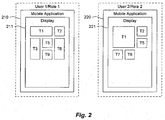
- Fig. 2 illustrates automatic configuration of tiles on a display according to one embodiment.
- different displays may present different tiles based on the particular user and role.
- display 211 on mobile application 210 may be associated with a first user and display 221 on mobile application 220 may be associated with a second user.
- Each user may have a particular role within an organization, such as an HR facilitator, product line director, Vice President of Marketing, or Finance Manager, for example.
- the mobile applications When the mobile applications connect to a backed server, such as an enterprise software application, the mobile applications may be authorized (e.g., using single sign on, "SSO") and the user's roles may be determined. Different users may have access to different backend features based on their roles in an organization, for example. Accordingly, one user (User 1 in Role 1) may be presented with one set of tiles that are associated with particular backend interactive services (T1, T2, T3, T5, T6, and T9), and another user (User 2 in Role 2) may be presented with another set of tiles that are associated with particular backend interactive services (T1, T2, T5, T7, and T8).
- SSO single sign on
- Embodiments of the disclosure described below may automatically reconfigure available tiles for display, such that tile sizes or tile placements, or both, for each tile are determined automatically.
- tile size and tile placement may be based on a number of tiles to be displayed, the size of the tiles, tile display preferences, or based on the interactive features associated with each tile, or all of these.
- the mobile application may automatically display different tiles having different interactive features and different sizes for different mobile application users having different roles as illustrated in Fig. 2 .
- some embodiments may display tiles so that not more than one row of a two-dimensional array in the display is partially filled with tiles. Additionally, a partially filled row may be displayed below rows that are entirely filled with tiles. As illustrated in Fig. 2 , all three rows of the 3x3 grid in display 211 are entirely filled. In display 221, the first two rows are entirely filled, and the partially filled row, comprising tiles T7 and T8, is below the entirely filled rows.
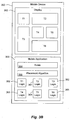
- Fig. 3A illustrates tiles associated with interactive features of different enterprise applications according to one embodiment.
- enterprise applications 301-301 each include a variety of features that may be accessible by tiles on a mobile device.
- Example interactive features include ToDo lists, Analytics, Notifications, or Newsfeeds.
- Enterprise applications may be human resource software applications, enterprise resource planning applications, or any of a wide variety of backend software systems, for example.
- Mobile devices may communicate with enterprise applications 301-303 through a mobile server (not shown).
- Enterprise application 301 may include interactive features f1, f2, and f3 that are accessible to tiles on a mobile application. A user's role may be determined and communicated across enterprise applications 301-303, and particular interactive features may be presented for display in associated tiles.
- interactive feature f3 may be presented and accessed through tile 310.
- Some interactive features such as a ToDo list, may be included on multiple systems.
- a particular tile may be associated with interactive features on multiple different systems, such as tile 311 and feature f1 on enterprise applications 301, 302, and 303, for example.
- core functionality of an application server may be associated with a particular tile.
- enterprise application 302 may include core features f4, f5, and f6, which may be associated with a single tile 312, for example.
- different features of a particular enterprise application may be associated with different tiles, such as feature f9, which is associated with tile 313 based on Role 1, and feature f11, which is associated with tile 314 based on Role 1.
- tile 320 is associated with feature f2 in application 301
- tile 321 is associated with feature f1 on applications 301-303 (e.g., a ToDo feature)
- tile 322 is associated with core application features f4, f5, and f6 on application 302
- tile 323 is associated with feature f7 on application 303
- tile 324 is associated with feature f8 on application 303.
- Fig. 3B illustrates a tile framework according to another embodiment.
- mobile application 353 operating on mobile device 350 may display tiles T1-T6 using predefined tile logic 360-365, rules 354, and placement algorithm 355, which may be used to configure the tiles in the display and enhance functionality of the tiles.
- each of tiles T1-T6 may have one or more associated interactive features on a backend system.
- each tile may be displayed using a default size that may be based on the particular associated interactive feature for the tile. For instance, a ToDo list tile may have a particular default size of 1x1 and a profile tile may have a default size of 2x2.
- rules 354 may dynamically change the tile size.
- rules 354 may change the size of a tile based on whether or not one or more particular other tiles are displayed. In another embodiment, the rules may change the tile size based on a total number of tiles displayed. Other embodiments may use rules that change a default tile size according to other factors or even specify particular placement of certain tiles, which advantageously may give a user more flexibility in arranging a display. The following is an example set of rules that may be used to change the configuration of the tiles in display 352: /*
- the above rule set illustrates default sizes and changes in size for 9 tiles used to display and interact with particular backend features.
- the above example also illustrates that tiles may be displayed in a preferred order.
- a My Profile Tile has a default size of 2x1, but the default size is changed to increase the tile size to 2x2 when a Jam (in this case Jam Feed or Jam Group) Tile is not displayed and when a total number of tiles is above 5.
- a Jam Feed Tile default size is similarly changed to multiple different sizes based on a total number of tiles, whether or not a particular other tile (e.g., ToDo) is displayed, or a relative position of tiles (e.g., Jam Feed before ToDo).
- a special rule designates a particular location of a tile (e.g., Jam Feed in second place).
- tiles may be automatically displayed in a two-dimensional array using a placement algorithm 355.
- a preferred sequence (or order) may be specified for the tiles, and the placement algorithm may automatically arrange the tiles on display 352. Since each user may have access to different backend features, it may be advantageous to automatically and dynamically place tiles according to the particular tiles available to each user. Further, the status of some backend features may change.
- some embodiments may automatically configure the tiles so that there are no blank spaces in the array (e.g., when a feature becomes unavailable).
- the placement may include specifying a preferred sequence of the tiles. In the example shown in Fig. 3B , the preferred sequence is specified in rules 354.
- placement algorithm 355 performs placement based on the rules 354 (e.g., using the preferred order or modifying the default sizes). Rules may determine the preferred sequence and the tile aspect ratios, for example, which are in turn processed by placement algorithm 355. Placement may further include sequentially determining if a particular tile fits in an available space in the two-dimensional array.
- the placement algorithm may determine if a tile fits in an available space according to the preferred sequence (e.g., starting with the My Profile Tile above). The algorithm may start with a first row and first column of a grid, and proceed across each row column-by-column until a space can be found. If a tile does fit in an available space, then the tile is displayed in the available space. However, if a tile does not fit in an available space, then the next tile in the preferred sequence that does fit in the available space may be displayed in the available space.
- One example implementation of a placement algorithm is described below.
- Fig. 3B further illustrates tile logic according to another embodiment.
- some tiles may include predefined logic customized for interacting with particular backend features. Tiles may be advantageous over generic traditional windows in that the mobile application may include specific logic blocks customized to allow a user to interact with particular backend features using the tiles.
- Tile T1 for example, may be associated with a particular backend feature. Therefore, tile T1 may include logic 360 customized for the particular backend feature to optimize transactions between the particular backend feature and tile T1.
- some tiles may allow users to interact with data records in a backend database, such as a ToDo list, for example. Accordingly, tile logic may retrieve blocks of records and successively present individual data records from the block of records one at a time to be operated on by the user.
- features of a backend system are paginated and presented in a tile one at a time.
- a user may swipe between successive items using a particular tile.
- data records may be retrieved and stored in a particular order.
- the records may be presented to a user one at a time, in order, in a tile (e.g., individual items in a ToDo list may be presented according to priority or due date).
- the tile logic may receive a command from a user (e.g., a swipe across the tile), and the logic may configure each record as an individual page for a tile and display successive individual data records in the tile according to the order.
- a user may select elements of the data record (e.g., by touching the tile), and the logic may cause further calls to the backend system to be made to access other data or features, for example.
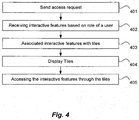
- Fig. 4 illustrates a method of displaying tiles according to one embodiment.
- an access request is sent from a mobile application operating on a mobile device to one or more remote systems.
- the mobile application may make a call (e.g., a RestAPI call) to a mobile server.
- the mobile server may act as a conduit to backend application servers, and may make a RestAPI call to one or more application servers.
- interactive features available on the remote systems are received based on a role of a user associated with the mobile application.
- permissions may be granted within one or more backend applications based on a user's role, which may be determined when the user's application connects to the backend system.
- the application servers may expose particular features depending on who the user is within an organization, for example.
- the exposed features that are provided to a particular user may be compiled into a list, together with an indication of whether a particular feature is enabled or disabled on the backend system. For instance, a mobile application of a particular user having a particular role may receive a list of backend features that the user's role allows them to access.
- the list may also indicate whether each feature on the list is currently available (e.g., enabled) or unavailable (e.g., disabled).
- the interactive features are associated with tiles. As described above, particular interactive features are associated with particular tiles.
- the list of features received from the backend systems may be filtered.
- the mobile application may include a set of predefined features that may be displayed using tiles (e.g., a ToDo list, Events, and Analytics).
- the mobile application may iterate through the list and determine which predetermined feature is on the list of enabled features received from the backend systems. For example, the mobile application may specify that a ToDo feature is to be displayed on one of the tiles. Accordingly, the mobile application may search through the list of features from the backend system and determine if a ToDo feature on a backend system is enabled. If so, the tile designated for the ToDo feature is activated.
- the tiles are displayed as a two-dimensional array having rows and columns of tiles. As mentioned above different tiles occupy one or more rows and one or more columns in the two-dimensional array, and tiles may occupy more than one row or more than one column.
- the interactive features are accessed on the remote systems through the associated plurality of tiles.
- Fig. 5 illustrates one example algorithm for displaying tiles.
- dynamically displaying tiles may start at 501 by determining the tiles to be displayed.
- either turning on the mobile application or a "pull to refresh" (e.g., by the user) may trigger a backend call to an enterprise server to retrieve all features with their on-off flags (referred to as list A).
- List A may be filtered by a list of all supported tiles on the mobile application, for example. In this example, only those features that are on the supported tiles list and are turned on are considered to be displayed (referred to as list B).
- the feature tiles to be displayed (list B) may be compared with a list of feature tiles currently being displayed (referred to as list C). If list B has the same features as list C, then no feature permissions have changed and the current displayed feature tiles would remain. If list B and list C contain different features, then feature permissions have changed on the backend system and the UI displays the feature tiles contained in list B.
- the process for laying out tiles in the UI is illustrated at 502-507.
- This example includes the creation of data structures to store the tiles to be placed and a representation of the two-dimensional array of tiles in the UI.
- Each tile has an associated feature.
- the tiles are sometimes referred to as "feature tiles.”
- the feature tiles to be displayed are stored in an array that is ordered by preferred sequence (a "preferred sequence array").
- a specific example is provided using a 3 column UI grid. In other words, the UI is 3 columns wide and the tiles are placed in the UI 3 columns wide and with a number of rows to hold all the tiles.
- the supported aspect ratios in this example are 1X1, 2X1, 2X2, 1X2 and 1X3.
- the display is modeled as a two-dimensional array of states.
- a two-dimensional array to model the 3 column grid (array B) may be created.
- Each element of the array represents a row, and each row is another 3-element array (array C) representing a 3-column row.
- Each element of array C may be initialized with a value to indicate its state as "available”. The initialization is carried out across all the elements of array B.
- the elements of array C found in each of the three elements of array B constitute a 2 dimensional array representing the UI.
- tiles in the preferred sequence are identified for placement. For example, using the two-dimensional array representing rows and columns (arrays B and C), the first row with an empty column may be found and designated "the current line". The number of columns with an "available” state on “the current line” may be checked. The process may typically start working on the first line with "available” column(s), so if all 3 columns on "the current line” are “available,” that means the rows below are all “available.” In this case, the first feature tile in the preferred sequence array (array A) is picked because a feature tile of any aspect ratio may be placed in that location.
- the first feature tile in the preferred sequence array (arrayA) with aspect ratio 1X1 is picked. If only the 2nd column is “available” on “the current line”, then the first feature tile in the preferred sequence array (arrayA) with aspect ratio 1X1 is picked. If only the 3rd column is “available” on “the current line”, then the first feature tile in the preferred sequence array (arrayA) with aspect ratio 1X1 is picked. If only the 1st and 2nd columns on “the current line” are “available”, then the first feature tile in the preferred sequence array (arrayA) with aspect ratio 2X1 is picked.
- the 1st column on the line below (the next line) may be checked. If that column is “available”, a feature tile is placed there in order to avoid it becoming a "blank” tile later. Since column 2 on “the next line” is by implication also empty, and the first feature tile from the preferred sequence array (arrayA) with aspect ratio 2X1 is picked to be placed on “the next line” starting on column 1. If only the 2nd and 3rd columns are “available” on “the current line”, but the 1st column on the line below (the next line) is "occupied”, then there is no danger of a "left behind blank” tile over that column on "the next line”.
- the first feature tile from the preferred sequence array (arrayA) with aspect ratio 2X2 may be found to be placed on both lines in columns 2 and 3. If there is no feature tile with aspect ratio 2X2, the first one that is 2X1 is found to be placed on the current line only in columns 2 and 3. If none of the above logic is able to pick on a feature tile, then just pick the first feature tile in the preferred sequence array (arrayA). This will handle feature tiles of aspect ratios 1X2 and 1X3 because as long as a column is "available" on "the current line", feature tiles with these aspect ratios can be placed.
- a feature tile is identified by the steps above as one example it may be removed from the preferred sequence array (arrayA) at 505.
- the tile is placed in an available space.
- placement may occur as follows. Using the two-dimensional array representing rows and columns (array B), the first row with an empty column is found and called "the current line".
- Each tile may have an aspect ratio width, W, and aspect ratio height, H, of an aspect ratio WxH. If the width of the feature tile is 1, then the tile is place there and the "available" column becomes the x-coordinate and the row number of "the current line" is the y-coordinate for the tile. If the width of the feature tile is 2, but the "available” column is the 3rd column, this column cannot be used as the x-coordinate because the tile requires two columns. Rather, "the next line” is considered instead to place the feature tile.
- the next line if the "available” column is the 1 st or 2nd column, the next column is checked to make sure it is also "available”. If so, the feature tile may be placed here, with the first "available” column as the x-coordinate and the row number of "the current line” is the y-coordinate.
- the dimensions of the tile may be calculated.
- the coordinates are expressed in terms of row and column numbers.
- the tile is converted to pixels. Rows and columns may be numbered starting from 0, and tile coordinates may be referenced from the upper left corner of the tile, for example.
- the column number x-coordinate and the tile pixel width a constant, e.g., 100 pixels
- the state of the location(s) where the tile was placed are changed from "available” to "occupied.”
- the elements in the two-dimensional array representing rows (array B elements) and columns (array C elements) that correspond to the now “occupied” grids are identified and their values are set to "occupied”.
- the row number y-coordinate that was used above identifies the element in arrayB.
- each element represents a row and is in turn a 3-element array representing the 3 columns (array C).
- the column number x-coordinate can identify which array C element should be marked as "occupied”. If the aspect width is 2, then the next element in array C is also marked to be "occupied”. If aspect height is 2, the same is done for "the next line”. If aspect height is 3, the same is done again for the next "next line”.
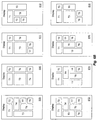
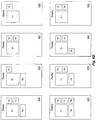
- Figs. 6A-D illustrate an example of automatic tile placement according to another embodiment.
- Displays 601-632 show different tile configurations for tiles T1-T9 for different roles making different backend features accessible on a mobile application.
- Tiles. T1-T9 have associated backend features. Table 1 below illustrates how different tiles T1-T9 are displayed based on a person's role. When a particular user's role allows the user permission to access a particular backend feature, the feature is extended to the mobile device and displayed in one of the tiles.
- Tiles may be automatically reconfigured in displays 601-632 based on whether or not the corresponding backend features are active using the algorithm described above, for example.
- Fig. 5 illustrates hardware of a special purpose computing machine configured with a process according to the above disclosure.
- the following hardware description is merely one example. It is to be understood that a variety of computers topologies may be used to implement the above described techniques.
- An example mobile computer system 510 is illustrated in Fig. 5 .
- Mobile computer system 510 includes a bus 505 or other communication mechanism for communicating information, and one or more processor(s) 501 coupled with bus 505 for processing information.
- Mobile computer system 510 also includes a memory 502 coupled to bus 505 for storing information and instructions to be executed by processor 501, including information and instructions for performing the techniques described above, for example. This memory may also be used for storing variables or other intermediate information during execution of instructions to be executed by processor 501.
- a storage device 503 is also provided for storing information and instructions.
- Common forms of storage devices include, for example, a hard drive, a magnetic disk, an optical disk, a CD-ROM, a DVD, a flash or other non-volatile memory, a USB memory card, or any other medium from which a computer can read.
- Storage device 503 may include source code, binary code, or software files for performing the techniques above, for example.
- Storage device and memory are both examples of non-transitory computer readable storage mediums.
- Mobile computer system 510 may be coupled via bus 505 to a display 512 for displaying information to a computer user.
- An input device 511 such as a keyboard, touchscreen, and/or mouse is coupled to bus 505 for communicating information and command selections from the user to processor 501.
- the combination of these components allows the user to communicate with the system.
- bus 505 represents multiple specialized buses, for example.
- Mobile computer system 510 also includes a network interface 504 coupled with bus 505.
- Network interface 504 may provide two-way data communication between computer system 510 and a local network 520.
- the network interface 504 may be a wireless or wired connection, for example.
- Mobile computer system 510 can send and receive information through the network interface 504 across a local area network, an Intranet, a cellular network, or the Internet, for example.
- One example implementation may include a mobile application executing on a mobile computing system 510 that displays tiles used to interact with remote systems as described above.
- a mobile application may access data and features on backend systems that may reside on multiple different hardware servers 531-535 across the network. Servers 531-535 may also reside in a cloud computing environment, for example.
Landscapes
- Engineering & Computer Science (AREA)
- Theoretical Computer Science (AREA)
- Computer Networks & Wireless Communication (AREA)
- Signal Processing (AREA)
- Databases & Information Systems (AREA)
- General Engineering & Computer Science (AREA)
- Physics & Mathematics (AREA)
- General Physics & Mathematics (AREA)
- Data Mining & Analysis (AREA)
- User Interface Of Digital Computer (AREA)
- Human Computer Interaction (AREA)
- Information Transfer Between Computers (AREA)
Claims (15)
- Verfahren umfassend:Senden einer Zugriffsanforderung von einer Mobilanwendung (112), die auf einem Mobilgerät (110) ausgeführt wird, an ein oder mehrere Fernsysteme (101);Empfangen, durch das Mobilgerät (110), einer Mehrzahl von auf den Fernsystemen (101) verfügbaren interaktiven Merkmalen basierend auf einer Rolle eines der Mobilanwendung (112) zugeordneten Benutzers;Zuordnen, durch das Mobilgerät (110), einer Mehrzahl von interaktiven Merkmalen zu einer Mehrzahl von Feldern (120, 121, 122, 123, 124, 125), wobei bestimmte interaktive Merkmale bestimmten Feldern (120, 121, 122, 123, 124, 125) zugeordnet werden, und wobei die Felder (120, 121, 122, 123, 124, 125) Benutzerschnittstellenelemente für das Zusammenwirken mit einem oder mehreren spezifischen interaktiven Merkmalen der Fernsysteme (101) sind;Anzeigen der Felder (120, 121, 122, 123, 124, 125) als eine zwei-dimensionale Anordnung mit Zeilen und Spalten von Feldern (120, 121, 122, 123, 124, 125), wobei unterschiedliche Felder (120, 121, 122, 123, 124, 125) eine oder mehrere Zeilen und eine oder mehrere Spalten in der zwei-dimensionalen Anordnung belegen und wobei zumindest ein Feld (120, 121, 122, 123, 124, 125) mehr als eine Zeile oder mehr als eine Spalte belegt, und wobei eine Feldplatzierung für jedes Feld (120, 121, 122, 123, 124, 125) automatisch basierend auf einer Feldgröße von anzuzeigenden Feldern (120, 121, 122, 123, 124, 125) und einer Anzahl von anzuzeigenden Feldern (120, 121, 122, 123, 124, 125) bestimmt wird, wobei die Mobilanwendung unterschiedliche Felder (120, 121, 122, 123, 124, 125) mit unterschiedlichen interaktiven Merkmalen und unterschiedlichen Größen für unterschiedliche Benutzer der Mobilanwendung mit unterschiedlichen Rollen anzeigt; undZugreifen auf die Mehrzahl von interaktiven Merkmalen auf den Fernsystemen (101) durch die zugeordnete Mehrzahl von Feldern (120, 121, 122, 123, 124, 125).
- Verfahren nach Anspruch 1,- wobei ein erstes Feld (120, 121, 122, 123, 124, 125) einem bestimmten interaktiven Merkmal zugeordnet ist, welches von einer Mehrzahl von unterschiedlichen Anwendungsservern (101) zur Verfügung gestellt wird; und/oder- wobei ein erstes Feld (120, 121, 122, 123, 124, 125) interaktiven Merkmalen zugeordnet ist, welche Kernfunktionalität eines Anwendungsservers (101) umfassen; und/oder- wobei ein erstes Feld (120, 121, 122, 123, 124, 125) zumindest einem interaktiven Merkmal von einem ersten Anwendungsserver (101) zugeordnet ist und ein zweites Feld (120, 121, 122, 123, 124, 125) zumindest einem interaktiven Merkmal von einem zweiten Anwendungsserver (101) zugeordnet ist.
- Verfahren nach Anspruch 1 oder 2, weiterhin umfassend:Empfangen, durch das Mobilgerät (110), einer Liste von zugänglichen interaktiven Merkmalen basierend auf der Rolle des Nutzers und, für jedes zugängliche interaktive Merkmal, eines Status, welcher angibt, ob das zugängliche interaktive Merkmal auf dem einen oder mehreren Fernsystemen (101) ein- oder ausgeschaltet ist; undBestimmen, durch das Mobilgerät (110), welche zugängliche interaktive Merkmale auf der Liste entsprechende anzuzeigende Felder (120, 121, 122, 123, 124, 125) besitzen.
- Verfahren nach einem der vorgehenden Ansprüche, wobei die Felder (120, 121, 122, 123, 124, 125) unter Verwendung einer Standardfeldgröße angezeigt werden, die einem bestimmten Feld (120, 121, 122, 123, 124, 125) zugeordnet ist, und wobei eine Mehrzahl von Regeln die Standardfeldgröße verändert,
wobei vorzugsweise die Regeln die Standardfeldgröße eines ersten Feldes (120, 121, 122, 123, 124, 125) basierend darauf verändern, ob ein oder mehrere bestimmte andere Felder (120, 121, 122, 123, 124, 125) angezeigt werden oder nicht; und/oder
wobei vorzugsweise die Regeln die Standardfeldgröße eines ersten Feldes (120, 121, 122, 123, 124, 125) basierend auf einer Gesamtzahl angezeigter Felder (120, 121, 122, 123, 124, 125) verändern. - Verfahren nach Anspruch 4,
wobei zumindest ein Feld (120, 121, 122, 123, 124, 125) eine Standardfeldgröße besitzt, die mehr als eine Spalte oder mehr als eine Zeile umfasst, und wobei die Standardfeldgröße verändert wird, um die Feldgröße des zumindest einen Feldes (120, 121, 122, 123, 124, 125), wenn ein bestimmtes anderes Feld (120, 121, 122, 123, 124, 125) nicht angezeigt wird und basierend auf einer Gesamtzahl von Feldern (120, 121, 122, 123, 124, 125), zu vergrößern. - Verfahren nach einem der vorgehenden Ansprüche, wobei ein oder mehrere Felder (120, 121, 122, 123, 124, 125) spezielle Logik entsprechend eines oder mehreren bestimmten interaktiven Merkmalen umfassen,
wobei vorzugsweise zumindest ein Feld (120, 121, 122, 123, 124, 125) spezielle Logik zum aufeinanderfolgenden Darstellen von individuellen Datensätzen aus einem Block von Sätzen in einem Feld (120, 121, 122, 123, 124, 125) umfasst, wobei die Datensätze in einer Reihenfolge angeordnet sind, und wobei, in Reaktion auf einen Befehl von einem Benutzer, die Logik aufeinanderfolgende individuelle Datensätze als Seiten in einem bestimmten Feld gemäß dieser Reihenfolge anzeigt. - Verfahren nach einem der vorgehenden Ansprüche, weiterhin umfassend:Festlegen einer bevorzugten Folge von Feldern (120, 121, 122, 123, 124, 125);Sequentielles Bestimmen, gemäß der bevorzugten Folge von Feldern (120, 121, 122, 123, 124, 125) und Beginnen einer ersten Zeile und einer ersten Spalte und Fortfahren entlang jeder Zeile und dann jeder Spalte, ob ein bestimmtes Feld (120, 121, 122, 123, 124, 125) in einen verfügbaren Platz in der zwei-dimensionalen Anordnung paßt,wobei, falls das bestimmte Feld (120, 121, 122, 123, 124, 125) in den verfügbaren Platz paßt, das bestimmte Feld (120, 121, 122, 123, 124, 125) dann in dem verfügbaren Platz angezeigt wird, und wobei, falls das bestimmte Feld (120, 121, 122, 123, 124, 125) nicht in den verfügbaren Platz paßt, dann ein nächstes Feld (120, 121, 122, 123, 124, 125) in der bevorzugten Folge, welches in den verfügbaren Platz paßt, in dem verfügbaren Platz angezeigt wird.
- Verfahren nach einem der vorgehenden Ansprüche, wobei die Felder (120, 121, 122, 123, 124, 125) als ein Quadrat oder ein Rechteck angezeigt werden.
- Verfahren nach einem der vorgehenden Ansprüche, wobei nicht mehr als eine Zeile der zwei-dimensionalen Anordnung teilweise mit Feldern (120, 121, 122, 123, 124, 125) gefüllt ist, und wobei eine teilweise gefüllte Zeile unter einer Mehrzahl von vollständig mit Feldern (120, 121, 122, 123, 124, 125) gefüllten Zeilen angezeigt wird.
- Mobile Rechenvorrichtung, umfassend:Einen Prozessor (501); undEin nichtflüchtiges computerlesbares Medium mit darauf gespeicherten einem oder mehreren Programmen, welche, wenn sie von dem Prozessor (501) ausgeführt werden, den Prozessor (501) dazu führen:Eine Zugriffsanforderung von einer Mobilanwendung (112), die auf einem Mobilgerät (110) ausgeführt wird, an ein oder mehrere Fernsysteme (101) zu senden;Eine Mehrzahl von auf den Fernsystemen (101) verfügbaren interaktiven Merkmalen basierend auf einer Rolle eines der Mobilanwendung (112) zugeordneten Benutzers zu empfangen;Die Mehrzahl von interaktiven Merkmalen einer Mehrzahl von Feldern (120, 121, 122, 123, 124, 125) zuzuordnen, wobei bestimmte interaktive Merkmale bestimmten Feldern (120, 121, 122, 123, 124, 125) zugeordnet werden, und wobei die Felder (120, 121, 122, 123, 124, 125) Benutzerschnittstellenelemente für das Zusammenwirken mit einem oder mehreren spezifischen interaktiven Merkmalen der Fernsysteme (101) sind;Die Felder (120, 121, 122, 123, 124, 125) als eine zwei-dimensionale Anordnung mit Zeilen und Spalten von Felder anzuzeigen, wobei unterschiedliche Felder (120, 121, 122, 123, 124, 125) eine oder mehrere Zeilen und eine oder mehrere Spalten in der zwei-dimensionalen Anordnung belegen und wobei zumindest ein Feld (120, 121, 122, 123, 124, 125) mehr als eine Zeile oder mehr als eine Spalte belegt, und wobei eine Feldplatzierung für jedes Feld automatisch basierend auf einer Feldgröße von anzuzeigenden Feldern (120, 121, 122, 123, 124, 125) und einer Anzahl von anzuzeigenden Feldern (120, 121, 122, 123, 124, 125) bestimmt wird, wobei die Mobilanwendung (112) unterschiedliche Felder (120, 121, 122, 123, 124, 125) mit unterschiedlichen interaktiven Merkmalen und unterschiedlichen Größen für unterschiedliche Benutzer der Mobilanwendung (112) mit unterschiedlichen Rollen anzeigt; undAuf die Mehrzahl von interaktiven Merkmalen auf den Fernsystemen (101) durch die zugeordnete Mehrzahl von Feldern (120, 121, 122, 123, 124, 125) zuzugreifen.
- Mobile Rechenvorrichtung (110) nach Anspruch 10, wobei Programme den Prozessor (501) weiterhin dazu führen:Eine Liste von zugänglichen interaktiven Merkmalen basierend auf der Rolle des Benutzers und, für jedes zugängliche interaktive Merkmal, einen Status, welcher angibt, ob das zugängliche interaktive Merkmal auf dem einen oder mehreren Fernsystemen (101) ein- oder ausgeschaltet ist, zu empfangen; undZu bestimmen, welche zugängliche interaktive Merkmale auf der Liste entsprechende anzuzeigende Felder besitzen.
- Mobile Rechenvorrichtung (110) nach Ansprüchen 10 oder 11, wobei die Felder (120, 121, 122, 123, 124, 125) unter Verwendung einer Standardfeldgröße angezeigt werden, die einem bestimmten Feld (120, 121, 122, 123, 124, 125) zugeordnet ist, und wobei eine Mehrzahl von Regeln die Standardfeldgröße verändert.
- Nichtflüchtiges computerlesbares Speichermedium, welches ein oder mehrere Programme speichert, wobei die ein oder mehreren Programme Anleitungen umfassen für:Senden einer Zugriffsanforderung von einer Mobilanwendung (112), die auf einem Mobilgerät (110) ausgeführt wird, an ein oder mehrere Fernsysteme (101);Empfangen einer Mehrzahl von auf den Fernsystemen (101) verfügbaren interaktiven Merkmalen basierend auf einer Rolle eines der Mobilanwendung (112) zugeordneten Benutzers;Zuordnen einer Mehrzahl von interaktiven Merkmalen zu einer Mehrzahl von Feldern (120, 121, 122, 123, 124, 125), wobei bestimmte interaktive Merkmale bestimmten Feldern (120, 121, 122, 123, 124, 125) zugeordnet werden, und wobei die Felder (120, 121, 122, 123, 124, 125) Benutzerschnittstellenelemente für das Zusammenwirken mit einem oder mehreren spezifischen interaktiven Merkmalen der Fernsysteme sind;Anzeigen der Felder (120, 121, 122, 123, 124, 125) als eine zwei-dimensionale Anordnung mit Zeilen und Spalten von Feldern (120, 121, 122, 123, 124, 125), wobei unterschiedliche Felder eine oder mehrere Zeilen und eine oder mehrere Spalten in der zwei-dimensionalen Anordnung belegen und wobei zumindest ein Feld (120, 121, 122, 123, 124, 125) mehr als eine Zeile oder mehr als eine Spalte belegt, und wobei eine Feldplatzierung für jedes Feld (120, 121, 122, 123, 124, 125) automatisch basierend auf einer Feldgröße von anzuzeigenden Feldern und einer Anzahl von anzuzeigenden Feldern (120, 121, 122, 123, 124, 125) bestimmt wird, wobei die Mobilanwendung (112) unterschiedliche Felder (120, 121, 122, 123, 124, 125) mit unterschiedlichen interaktiven Merkmalen und unterschiedlichen Größen für unterschiedliche Benutzer der Mobilanwendung (112) mit unterschiedlichen Rollen anzeigt; undZugreifen auf die Mehrzahl von interaktiven Merkmalen auf den Fernsystemen (101) durch die zugeordnete Mehrzahl von Feldern.
- Nichtflüchtiges computerlesbares Speichermedium nach Anspruch 13, wobei die Programme weiterhin Anleitungen umfassen für:Empfangen einer Liste von zugänglichen interaktiven Merkmalen basierend auf der Rolle des Benutzers und, für jedes zugängliche interaktive Merkmal, eines Status, welcher angibt, ob das zugängliche interaktive Merkmal auf dem einen oder mehreren Fernsystemen (101) ein- oder ausgeschaltet ist; undBestimmen, welche zugängliche interaktive Merkmale auf der Liste entsprechende anzuzeigende Felder (120, 121, 122, 123, 124, 125) besitzen.
- Nichtflüchtiges computerlesbares Speichermedium nach Ansprüchen 13 oder 14, wobei die Felder (120, 121, 122, 123, 124, 125) unter Verwendung einer Standardfeldgröße angezeigt werden, die einem bestimmten Feld (120, 121, 122, 123, 124, 125) zugeordnet ist, und wobei eine Mehrzahl von Regeln die Standardfeldgröße verändert.
Applications Claiming Priority (2)
| Application Number | Priority Date | Filing Date | Title |
|---|---|---|---|
| US201361822231P | 2013-05-10 | 2013-05-10 | |
| US13/918,691 US9807145B2 (en) | 2013-05-10 | 2013-06-14 | Adaptive tile framework |
Publications (2)
| Publication Number | Publication Date |
|---|---|
| EP2801894A1 EP2801894A1 (de) | 2014-11-12 |
| EP2801894B1 true EP2801894B1 (de) | 2016-07-27 |
Family
ID=51062610
Family Applications (1)
| Application Number | Title | Priority Date | Filing Date |
|---|---|---|---|
| EP14001664.3A Active EP2801894B1 (de) | 2013-05-10 | 2014-05-12 | Adaptiver Fliesenrahmen |
Country Status (3)
| Country | Link |
|---|---|
| US (2) | US9807145B2 (de) |
| EP (1) | EP2801894B1 (de) |
| CN (1) | CN104142783B (de) |
Families Citing this family (33)
| Publication number | Priority date | Publication date | Assignee | Title |
|---|---|---|---|---|
| USD693361S1 (en) * | 2011-02-03 | 2013-11-12 | Microsoft Corporation | Display screen with transitional graphical user interface |
| USD682288S1 (en) * | 2011-12-23 | 2013-05-14 | Microsoft Corporation | Display screen with graphical user interface |
| EP2741176A3 (de) * | 2012-12-10 | 2017-03-08 | Samsung Electronics Co., Ltd | Mobile armbandartige Vorrichtung, Steuerverfahren dafür und Benutzeroberflächenverfahren |
| US9807145B2 (en) | 2013-05-10 | 2017-10-31 | Successfactors, Inc. | Adaptive tile framework |
| USD732066S1 (en) * | 2013-08-09 | 2015-06-16 | Microsoft Corporation | Display screen with graphical user interface |
| USD778310S1 (en) | 2013-08-09 | 2017-02-07 | Microsoft Corporation | Display screen with graphical user interface |
| USD732065S1 (en) * | 2013-08-09 | 2015-06-16 | Microsoft Corporation | Display screen with graphical user interface |
| USD732064S1 (en) * | 2013-08-09 | 2015-06-16 | Microsoft Corporation | Display screen with graphical user interface |
| USD738902S1 (en) * | 2013-08-09 | 2015-09-15 | Microsoft Corporation | Display screen with graphical user interface |
| USD732568S1 (en) * | 2013-08-09 | 2015-06-23 | Microsoft Corporation | Display screen with graphical user interface |
| USD739870S1 (en) * | 2013-08-09 | 2015-09-29 | Microsoft Corporation | Display screen with graphical user interface |
| USD771111S1 (en) | 2013-08-30 | 2016-11-08 | Microsoft Corporation | Display screen with graphical user interface |
| US9686581B2 (en) * | 2013-11-07 | 2017-06-20 | Cisco Technology, Inc. | Second-screen TV bridge |
| JP6314539B2 (ja) * | 2014-02-28 | 2018-04-25 | 株式会社リコー | 伝送端末、伝送システム、伝送方法及びプログラム |
| US10452749B2 (en) * | 2014-03-26 | 2019-10-22 | Microsoft Technology Licensing, Llc | Predictable organic tile layout |
| USD840422S1 (en) | 2014-09-18 | 2019-02-12 | Aetna Inc. | Display screen with graphical user interface |
| USD839289S1 (en) | 2014-09-18 | 2019-01-29 | Aetna Inc. | Display screen with graphical user interface |
| USD810108S1 (en) * | 2014-09-18 | 2018-02-13 | Aetna Inc. | Display screen with graphical user interface |
| USD863328S1 (en) | 2014-09-18 | 2019-10-15 | Aetna Inc. | Display screen with graphical user interface |
| USD770495S1 (en) * | 2014-09-30 | 2016-11-01 | Microsoft Corporation | Display screen with graphical user interface |
| US20160132192A1 (en) * | 2014-11-12 | 2016-05-12 | Here Global B.V. | Active Menu with Surfacing Notifications |
| US9442686B2 (en) * | 2014-11-26 | 2016-09-13 | Blackberry Limited | Electronic device and method of controlling display of information |
| USD831675S1 (en) | 2014-12-24 | 2018-10-23 | Airbnb, Inc. | Computer screen with graphical user interface |
| US10558742B2 (en) * | 2015-03-09 | 2020-02-11 | Vinyl Development LLC | Responsive user interface system |
| US9400776B1 (en) | 2015-03-09 | 2016-07-26 | Vinyl Development LLC | Adaptive column selection |
| US10353564B2 (en) | 2015-12-21 | 2019-07-16 | Sap Se | Graphical user interface with virtual extension areas |
| US10353534B2 (en) * | 2016-05-13 | 2019-07-16 | Sap Se | Overview page in multi application user interface |
| US10318253B2 (en) | 2016-05-13 | 2019-06-11 | Sap Se | Smart templates for use in multiple platforms |
| US20170329505A1 (en) | 2016-05-13 | 2017-11-16 | Sap Se | Transferring parameters in applications and interfaces across multiple platforms |
| US10579238B2 (en) | 2016-05-13 | 2020-03-03 | Sap Se | Flexible screen layout across multiple platforms |
| US10915303B2 (en) | 2017-01-26 | 2021-02-09 | Sap Se | Run time integrated development and modification system |
| US10430035B2 (en) * | 2017-08-24 | 2019-10-01 | Sap Se | Embedded analytics for applications and interfaces across multiple platforms |
| USD1099937S1 (en) * | 2024-01-18 | 2025-10-28 | Walmart Apollo, Llc | Display screen or portion thereof with graphical user interface |
Family Cites Families (49)
| Publication number | Priority date | Publication date | Assignee | Title |
|---|---|---|---|---|
| US5548692A (en) * | 1995-02-21 | 1996-08-20 | Eastman Kodak Company | Method for layout of arbitrarily sized and shaped icons in a display |
| US6789054B1 (en) | 1999-04-25 | 2004-09-07 | Mahmoud A. Makhlouf | Geometric display tools and methods for the visual specification, design automation, and control of adaptive real systems |
| US20020173721A1 (en) | 1999-08-20 | 2002-11-21 | Novasonics, Inc. | User interface for handheld imaging devices |
| US7987431B2 (en) | 1999-10-29 | 2011-07-26 | Surfcast, Inc. | System and method for simultaneous display of multiple information sources |
| US6353448B1 (en) | 2000-05-16 | 2002-03-05 | Ez Online Network, Inc. | Graphic user interface display method |
| US7346843B2 (en) * | 2001-09-18 | 2008-03-18 | International Business Machines Corporation | Low-latency, incremental rendering in a content framework |
| US20040006593A1 (en) | 2002-06-14 | 2004-01-08 | Vogler Hartmut K. | Multidimensional approach to context-awareness |
| CA2406565A1 (en) * | 2002-10-04 | 2004-04-04 | Ibm Canada Limited-Ibm Canada Limitee | Method and apparatus for using business rules or user roles for selecting portlets in a web portal |
| JP2004133733A (ja) * | 2002-10-11 | 2004-04-30 | Sony Corp | 表示装置および方法、並びにプログラム |
| US7136874B2 (en) | 2002-10-16 | 2006-11-14 | Microsoft Corporation | Adaptive menu system for media players |
| US7577912B2 (en) | 2003-03-27 | 2009-08-18 | Sap Ag | Suggestive form factors |
| US7949953B2 (en) | 2003-06-13 | 2011-05-24 | Sap Aktiengesellschaft | Designing and generating charts to graphically represent data in a data source |
| US8589311B2 (en) | 2003-06-13 | 2013-11-19 | Sap Aktiengesellschaft | Designing business content for reporting |
| US7689923B2 (en) | 2003-08-22 | 2010-03-30 | Sap Ag | Framework for creating user interfaces for web application programs |
| US7831931B2 (en) | 2003-09-30 | 2010-11-09 | Sap Aktiengesellschaft | Successively displaying panels in a computer user interface |
| US7360170B1 (en) | 2004-04-29 | 2008-04-15 | Sap Ag | Graphical user interface and background search methodology for creating references between software components |
| US9330187B2 (en) * | 2004-06-22 | 2016-05-03 | International Business Machines Corporation | Persuasive portlets |
| US7475354B2 (en) * | 2004-07-09 | 2009-01-06 | International Business Machines Corporation | Method for generating a portal page |
| US8146016B2 (en) | 2004-08-16 | 2012-03-27 | Microsoft Corporation | User interface for displaying a gallery of formatting options applicable to a selected object |
| US7475089B1 (en) * | 2004-09-02 | 2009-01-06 | Sprint Spectrum L.P. | Enhanced portal server system and method |
| US7680648B2 (en) | 2004-09-30 | 2010-03-16 | Google Inc. | Methods and systems for improving text segmentation |
| US7577907B2 (en) | 2004-11-15 | 2009-08-18 | Sap, Aktiengesellschaft | System and method for dynamically constructing synchronized business information user interfaces |
| US7925985B2 (en) | 2005-07-29 | 2011-04-12 | Sap Ag | Methods and apparatus for process thumbnail view |
| US7933632B2 (en) | 2005-09-16 | 2011-04-26 | Microsoft Corporation | Tile space user interface for mobile devices |
| US10169475B2 (en) * | 2005-11-17 | 2019-01-01 | International Business Machines Corporation | Pattern for navigating content in a portal |
| GB0611399D0 (en) * | 2006-06-09 | 2006-07-19 | Ibm | A method, apparatus or software for providing a portal comprising one or more portlets for displaying data |
| CN101356493A (zh) * | 2006-09-06 | 2009-01-28 | 苹果公司 | 用于照片管理的便携式电子装置 |
| US8015506B2 (en) | 2006-09-22 | 2011-09-06 | Microsoft Corporation | Customizing a menu in a discovery interface |
| US8463852B2 (en) * | 2006-10-06 | 2013-06-11 | Oracle International Corporation | Groupware portlets for integrating a portal with groupware systems |
| US8364145B2 (en) * | 2008-01-09 | 2013-01-29 | Mediatek Inc. | Methods and devices for dynamic menu update |
| US8086037B2 (en) | 2008-02-15 | 2011-12-27 | Microsoft Corporation | Tiling and merging framework for segmenting large images |
| US20110004827A1 (en) | 2008-02-29 | 2011-01-06 | The Regents Of The University Of California | Scalable, Cross-Platform Method for Multi-Tile Display Systems |
| US8775940B2 (en) | 2008-04-22 | 2014-07-08 | Sap Ag | Situational workspaces |
| US8392664B2 (en) | 2008-05-09 | 2013-03-05 | International Business Machines Corporation | Network on chip |
| US7949775B2 (en) | 2008-05-30 | 2011-05-24 | Microsoft Corporation | Stream selection for enhanced media streaming |
| US20110252349A1 (en) | 2010-04-07 | 2011-10-13 | Imran Chaudhri | Device, Method, and Graphical User Interface for Managing Folders |
| US8401687B2 (en) | 2010-11-24 | 2013-03-19 | Sap Ag | Visual assembly tool |
| US8549425B2 (en) | 2010-12-02 | 2013-10-01 | Sony Corporation | Visual treatment for a user interface in a content integration framework |
| US9679404B2 (en) * | 2010-12-23 | 2017-06-13 | Microsoft Technology Licensing, Llc | Techniques for dynamic layout of presentation tiles on a grid |
| US9459846B2 (en) | 2011-01-31 | 2016-10-04 | Sap Se | User interface style guide compliance |
| US20120266100A1 (en) | 2011-04-12 | 2012-10-18 | Caliendo Jr Neal Robert | Dynamic Tile Billboard User Interface |
| US20130067412A1 (en) | 2011-09-09 | 2013-03-14 | Microsoft Corporation | Grouping selectable tiles |
| US20130067365A1 (en) * | 2011-09-13 | 2013-03-14 | Microsoft Corporation | Role based user interface for limited display devices |
| US9058589B2 (en) | 2011-10-13 | 2015-06-16 | Sap Se | Subjective user interface |
| US10089774B2 (en) | 2011-11-16 | 2018-10-02 | Qualcomm Incorporated | Tessellation in tile-based rendering |
| US8612851B2 (en) * | 2011-12-06 | 2013-12-17 | Google Inc. | Edition grid layout |
| US20140149932A1 (en) * | 2012-11-26 | 2014-05-29 | Nero Ag | System and method for providing a tapestry presentation |
| US9658742B2 (en) | 2012-12-28 | 2017-05-23 | Intel Corporation | Generating and displaying supplemental information and user interactions on interface tiles of a user interface |
| US9807145B2 (en) | 2013-05-10 | 2017-10-31 | Successfactors, Inc. | Adaptive tile framework |
-
2013
- 2013-06-14 US US13/918,691 patent/US9807145B2/en active Active
-
2014
- 2014-05-12 CN CN201410198432.8A patent/CN104142783B/zh active Active
- 2014-05-12 EP EP14001664.3A patent/EP2801894B1/de active Active
-
2017
- 2017-09-29 US US15/721,513 patent/US10560511B2/en active Active
Also Published As
| Publication number | Publication date |
|---|---|
| EP2801894A1 (de) | 2014-11-12 |
| US10560511B2 (en) | 2020-02-11 |
| US9807145B2 (en) | 2017-10-31 |
| CN104142783B (zh) | 2019-06-14 |
| US20140337747A1 (en) | 2014-11-13 |
| CN104142783A (zh) | 2014-11-12 |
| US20180027047A1 (en) | 2018-01-25 |
Similar Documents
| Publication | Publication Date | Title |
|---|---|---|
| US10560511B2 (en) | Adaptive tile framework | |
| US10691284B2 (en) | Canvas layout algorithm | |
| US9703444B2 (en) | Dynamic distribution of client windows on multiple monitors | |
| US10346004B2 (en) | Systems and methods for intelligent layered interactive programmatic elements for fixed content | |
| CN109359141B (zh) | 一种可视化报表数据展示方法及装置 | |
| CN104506921A (zh) | 一种动态显示图片的方法及装置 | |
| US20160328132A1 (en) | Systems and methods of optimizing delivery of form factor specific content | |
| CN103279902A (zh) | 电子菜谱显示方法 | |
| KR20200094637A (ko) | 오브젝트 집합의 시각적 표현을 제공하는 방법, 장치, 기기 및 저장 매체 | |
| US10417258B2 (en) | Interactive multi-dimensional nested table supporting scalable real-time querying of large data volumes | |
| CN103631507A (zh) | 虚拟键盘提供方法和装置 | |
| US9639250B2 (en) | Systems and methods for reconfiguring a matrix in a display | |
| US11698719B2 (en) | Systems and methods for automated derivation of interactive layers for fixed content | |
| US9171346B2 (en) | Method and device for movement of image object | |
| CN202979020U (zh) | 基于云设计的家居设计系统 | |
| US20170255340A1 (en) | Information processing apparatus, and control method and control program thereof | |
| CN105512288A (zh) | 矢量选择集绘制方法及系统 | |
| CN112835660A (zh) | 媒体图层展示方法、装置及系统、存储介质 | |
| US20150113470A1 (en) | Adjustable progressive disclosure of structured data | |
| CN107272920B (zh) | 变更按键与字符的对应关系的方法及装置 | |
| JP7302344B2 (ja) | メンテナンス支援プログラム、メンテナンス支援方法及びメンテナンス支援装置 | |
| CN115686315A (zh) | 工业设备趋势显示方法、装置和电子设备 | |
| CN119809763A (zh) | 一种页面展示的方法和装置 | |
| CN104423940A (zh) | 工具组合系统及方法 | |
| JP2015225631A (ja) | プログラム、情報処理装置および表示方法 |
Legal Events
| Date | Code | Title | Description |
|---|---|---|---|
| PUAI | Public reference made under article 153(3) epc to a published international application that has entered the european phase |
Free format text: ORIGINAL CODE: 0009012 |
|
| 17P | Request for examination filed |
Effective date: 20140512 |
|
| AK | Designated contracting states |
Kind code of ref document: A1 Designated state(s): AL AT BE BG CH CY CZ DE DK EE ES FI FR GB GR HR HU IE IS IT LI LT LU LV MC MK MT NL NO PL PT RO RS SE SI SK SM TR |
|
| AX | Request for extension of the european patent |
Extension state: BA ME |
|
| R17P | Request for examination filed (corrected) |
Effective date: 20150226 |
|
| RBV | Designated contracting states (corrected) |
Designated state(s): AL AT BE BG CH CY CZ DE DK EE ES FI FR GB GR HR HU IE IS IT LI LT LU LV MC MK MT NL NO PL PT RO RS SE SI SK SM TR |
|
| REG | Reference to a national code |
Ref country code: DE Ref legal event code: R079 Ref document number: 602014002801 Country of ref document: DE Free format text: PREVIOUS MAIN CLASS: G06F0003048000 Ipc: H04L0029080000 |
|
| GRAP | Despatch of communication of intention to grant a patent |
Free format text: ORIGINAL CODE: EPIDOSNIGR1 |
|
| RIC1 | Information provided on ipc code assigned before grant |
Ipc: H04L 29/08 20060101AFI20160204BHEP Ipc: H04W 4/20 20090101ALN20160204BHEP Ipc: G06F 17/30 20060101ALI20160204BHEP |
|
| INTG | Intention to grant announced |
Effective date: 20160217 |
|
| GRAS | Grant fee paid |
Free format text: ORIGINAL CODE: EPIDOSNIGR3 |
|
| GRAA | (expected) grant |
Free format text: ORIGINAL CODE: 0009210 |
|
| AK | Designated contracting states |
Kind code of ref document: B1 Designated state(s): AL AT BE BG CH CY CZ DE DK EE ES FI FR GB GR HR HU IE IS IT LI LT LU LV MC MK MT NL NO PL PT RO RS SE SI SK SM TR |
|
| REG | Reference to a national code |
Ref country code: GB Ref legal event code: FG4D |
|
| REG | Reference to a national code |
Ref country code: CH Ref legal event code: EP |
|
| REG | Reference to a national code |
Ref country code: AT Ref legal event code: REF Ref document number: 816607 Country of ref document: AT Kind code of ref document: T Effective date: 20160815 |
|
| REG | Reference to a national code |
Ref country code: IE Ref legal event code: FG4D |
|
| REG | Reference to a national code |
Ref country code: DE Ref legal event code: R096 Ref document number: 602014002801 Country of ref document: DE |
|
| REG | Reference to a national code |
Ref country code: LT Ref legal event code: MG4D |
|
| REG | Reference to a national code |
Ref country code: NL Ref legal event code: MP Effective date: 20160727 |
|
| REG | Reference to a national code |
Ref country code: AT Ref legal event code: MK05 Ref document number: 816607 Country of ref document: AT Kind code of ref document: T Effective date: 20160727 |
|
| PG25 | Lapsed in a contracting state [announced via postgrant information from national office to epo] |
Ref country code: RS Free format text: LAPSE BECAUSE OF FAILURE TO SUBMIT A TRANSLATION OF THE DESCRIPTION OR TO PAY THE FEE WITHIN THE PRESCRIBED TIME-LIMIT Effective date: 20160727 Ref country code: FI Free format text: LAPSE BECAUSE OF FAILURE TO SUBMIT A TRANSLATION OF THE DESCRIPTION OR TO PAY THE FEE WITHIN THE PRESCRIBED TIME-LIMIT Effective date: 20160727 Ref country code: NL Free format text: LAPSE BECAUSE OF FAILURE TO SUBMIT A TRANSLATION OF THE DESCRIPTION OR TO PAY THE FEE WITHIN THE PRESCRIBED TIME-LIMIT Effective date: 20160727 Ref country code: IT Free format text: LAPSE BECAUSE OF FAILURE TO SUBMIT A TRANSLATION OF THE DESCRIPTION OR TO PAY THE FEE WITHIN THE PRESCRIBED TIME-LIMIT Effective date: 20160727 Ref country code: LT Free format text: LAPSE BECAUSE OF FAILURE TO SUBMIT A TRANSLATION OF THE DESCRIPTION OR TO PAY THE FEE WITHIN THE PRESCRIBED TIME-LIMIT Effective date: 20160727 Ref country code: IS Free format text: LAPSE BECAUSE OF FAILURE TO SUBMIT A TRANSLATION OF THE DESCRIPTION OR TO PAY THE FEE WITHIN THE PRESCRIBED TIME-LIMIT Effective date: 20161127 Ref country code: HR Free format text: LAPSE BECAUSE OF FAILURE TO SUBMIT A TRANSLATION OF THE DESCRIPTION OR TO PAY THE FEE WITHIN THE PRESCRIBED TIME-LIMIT Effective date: 20160727 Ref country code: NO Free format text: LAPSE BECAUSE OF FAILURE TO SUBMIT A TRANSLATION OF THE DESCRIPTION OR TO PAY THE FEE WITHIN THE PRESCRIBED TIME-LIMIT Effective date: 20161027 |
|
| PG25 | Lapsed in a contracting state [announced via postgrant information from national office to epo] |
Ref country code: PT Free format text: LAPSE BECAUSE OF FAILURE TO SUBMIT A TRANSLATION OF THE DESCRIPTION OR TO PAY THE FEE WITHIN THE PRESCRIBED TIME-LIMIT Effective date: 20161128 Ref country code: SE Free format text: LAPSE BECAUSE OF FAILURE TO SUBMIT A TRANSLATION OF THE DESCRIPTION OR TO PAY THE FEE WITHIN THE PRESCRIBED TIME-LIMIT Effective date: 20160727 Ref country code: AT Free format text: LAPSE BECAUSE OF FAILURE TO SUBMIT A TRANSLATION OF THE DESCRIPTION OR TO PAY THE FEE WITHIN THE PRESCRIBED TIME-LIMIT Effective date: 20160727 Ref country code: LV Free format text: LAPSE BECAUSE OF FAILURE TO SUBMIT A TRANSLATION OF THE DESCRIPTION OR TO PAY THE FEE WITHIN THE PRESCRIBED TIME-LIMIT Effective date: 20160727 Ref country code: GR Free format text: LAPSE BECAUSE OF FAILURE TO SUBMIT A TRANSLATION OF THE DESCRIPTION OR TO PAY THE FEE WITHIN THE PRESCRIBED TIME-LIMIT Effective date: 20161028 Ref country code: BE Free format text: LAPSE BECAUSE OF FAILURE TO SUBMIT A TRANSLATION OF THE DESCRIPTION OR TO PAY THE FEE WITHIN THE PRESCRIBED TIME-LIMIT Effective date: 20160727 Ref country code: ES Free format text: LAPSE BECAUSE OF FAILURE TO SUBMIT A TRANSLATION OF THE DESCRIPTION OR TO PAY THE FEE WITHIN THE PRESCRIBED TIME-LIMIT Effective date: 20160727 Ref country code: PL Free format text: LAPSE BECAUSE OF FAILURE TO SUBMIT A TRANSLATION OF THE DESCRIPTION OR TO PAY THE FEE WITHIN THE PRESCRIBED TIME-LIMIT Effective date: 20160727 |
|
| PG25 | Lapsed in a contracting state [announced via postgrant information from national office to epo] |
Ref country code: EE Free format text: LAPSE BECAUSE OF FAILURE TO SUBMIT A TRANSLATION OF THE DESCRIPTION OR TO PAY THE FEE WITHIN THE PRESCRIBED TIME-LIMIT Effective date: 20160727 Ref country code: RO Free format text: LAPSE BECAUSE OF FAILURE TO SUBMIT A TRANSLATION OF THE DESCRIPTION OR TO PAY THE FEE WITHIN THE PRESCRIBED TIME-LIMIT Effective date: 20160727 |
|
| REG | Reference to a national code |
Ref country code: DE Ref legal event code: R097 Ref document number: 602014002801 Country of ref document: DE |
|
| REG | Reference to a national code |
Ref country code: FR Ref legal event code: PLFP Year of fee payment: 4 |
|
| PG25 | Lapsed in a contracting state [announced via postgrant information from national office to epo] |
Ref country code: SK Free format text: LAPSE BECAUSE OF FAILURE TO SUBMIT A TRANSLATION OF THE DESCRIPTION OR TO PAY THE FEE WITHIN THE PRESCRIBED TIME-LIMIT Effective date: 20160727 Ref country code: CZ Free format text: LAPSE BECAUSE OF FAILURE TO SUBMIT A TRANSLATION OF THE DESCRIPTION OR TO PAY THE FEE WITHIN THE PRESCRIBED TIME-LIMIT Effective date: 20160727 Ref country code: SM Free format text: LAPSE BECAUSE OF FAILURE TO SUBMIT A TRANSLATION OF THE DESCRIPTION OR TO PAY THE FEE WITHIN THE PRESCRIBED TIME-LIMIT Effective date: 20160727 Ref country code: BG Free format text: LAPSE BECAUSE OF FAILURE TO SUBMIT A TRANSLATION OF THE DESCRIPTION OR TO PAY THE FEE WITHIN THE PRESCRIBED TIME-LIMIT Effective date: 20161027 Ref country code: DK Free format text: LAPSE BECAUSE OF FAILURE TO SUBMIT A TRANSLATION OF THE DESCRIPTION OR TO PAY THE FEE WITHIN THE PRESCRIBED TIME-LIMIT Effective date: 20160727 |
|
| PLBE | No opposition filed within time limit |
Free format text: ORIGINAL CODE: 0009261 |
|
| STAA | Information on the status of an ep patent application or granted ep patent |
Free format text: STATUS: NO OPPOSITION FILED WITHIN TIME LIMIT |
|
| 26N | No opposition filed |
Effective date: 20170502 |
|
| PG25 | Lapsed in a contracting state [announced via postgrant information from national office to epo] |
Ref country code: SI Free format text: LAPSE BECAUSE OF FAILURE TO SUBMIT A TRANSLATION OF THE DESCRIPTION OR TO PAY THE FEE WITHIN THE PRESCRIBED TIME-LIMIT Effective date: 20160727 Ref country code: LU Free format text: LAPSE BECAUSE OF NON-PAYMENT OF DUE FEES Effective date: 20170531 |
|
| REG | Reference to a national code |
Ref country code: CH Ref legal event code: PL |
|
| PG25 | Lapsed in a contracting state [announced via postgrant information from national office to epo] |
Ref country code: MC Free format text: LAPSE BECAUSE OF FAILURE TO SUBMIT A TRANSLATION OF THE DESCRIPTION OR TO PAY THE FEE WITHIN THE PRESCRIBED TIME-LIMIT Effective date: 20160727 |
|
| REG | Reference to a national code |
Ref country code: IE Ref legal event code: MM4A |
|
| PG25 | Lapsed in a contracting state [announced via postgrant information from national office to epo] |
Ref country code: CH Free format text: LAPSE BECAUSE OF NON-PAYMENT OF DUE FEES Effective date: 20170531 Ref country code: LI Free format text: LAPSE BECAUSE OF NON-PAYMENT OF DUE FEES Effective date: 20170531 |
|
| PG25 | Lapsed in a contracting state [announced via postgrant information from national office to epo] |
Ref country code: LU Free format text: LAPSE BECAUSE OF NON-PAYMENT OF DUE FEES Effective date: 20170512 |
|
| PG25 | Lapsed in a contracting state [announced via postgrant information from national office to epo] |
Ref country code: IE Free format text: LAPSE BECAUSE OF NON-PAYMENT OF DUE FEES Effective date: 20170512 |
|
| REG | Reference to a national code |
Ref country code: FR Ref legal event code: PLFP Year of fee payment: 5 |
|
| PG25 | Lapsed in a contracting state [announced via postgrant information from national office to epo] |
Ref country code: MT Free format text: LAPSE BECAUSE OF NON-PAYMENT OF DUE FEES Effective date: 20170512 |
|
| PG25 | Lapsed in a contracting state [announced via postgrant information from national office to epo] |
Ref country code: AL Free format text: LAPSE BECAUSE OF FAILURE TO SUBMIT A TRANSLATION OF THE DESCRIPTION OR TO PAY THE FEE WITHIN THE PRESCRIBED TIME-LIMIT Effective date: 20160727 |
|
| PG25 | Lapsed in a contracting state [announced via postgrant information from national office to epo] |
Ref country code: HU Free format text: LAPSE BECAUSE OF FAILURE TO SUBMIT A TRANSLATION OF THE DESCRIPTION OR TO PAY THE FEE WITHIN THE PRESCRIBED TIME-LIMIT; INVALID AB INITIO Effective date: 20140512 |
|
| PG25 | Lapsed in a contracting state [announced via postgrant information from national office to epo] |
Ref country code: CY Free format text: LAPSE BECAUSE OF FAILURE TO SUBMIT A TRANSLATION OF THE DESCRIPTION OR TO PAY THE FEE WITHIN THE PRESCRIBED TIME-LIMIT Effective date: 20160727 |
|
| PG25 | Lapsed in a contracting state [announced via postgrant information from national office to epo] |
Ref country code: MK Free format text: LAPSE BECAUSE OF FAILURE TO SUBMIT A TRANSLATION OF THE DESCRIPTION OR TO PAY THE FEE WITHIN THE PRESCRIBED TIME-LIMIT Effective date: 20160727 |
|
| PG25 | Lapsed in a contracting state [announced via postgrant information from national office to epo] |
Ref country code: TR Free format text: LAPSE BECAUSE OF FAILURE TO SUBMIT A TRANSLATION OF THE DESCRIPTION OR TO PAY THE FEE WITHIN THE PRESCRIBED TIME-LIMIT Effective date: 20160727 |
|
| REG | Reference to a national code |
Ref country code: DE Ref legal event code: R079 Ref document number: 602014002801 Country of ref document: DE Free format text: PREVIOUS MAIN CLASS: H04L0029080000 Ipc: H04L0065000000 |
|
| PGFP | Annual fee paid to national office [announced via postgrant information from national office to epo] |
Ref country code: DE Payment date: 20250521 Year of fee payment: 12 |
|
| PGFP | Annual fee paid to national office [announced via postgrant information from national office to epo] |
Ref country code: GB Payment date: 20250521 Year of fee payment: 12 |
|
| PGFP | Annual fee paid to national office [announced via postgrant information from national office to epo] |
Ref country code: FR Payment date: 20250528 Year of fee payment: 12 |