EP2793458B1 - Apparatus and method for auto-focusing in device having camera - Google Patents
Apparatus and method for auto-focusing in device having camera Download PDFInfo
- Publication number
- EP2793458B1 EP2793458B1 EP14164883.2A EP14164883A EP2793458B1 EP 2793458 B1 EP2793458 B1 EP 2793458B1 EP 14164883 A EP14164883 A EP 14164883A EP 2793458 B1 EP2793458 B1 EP 2793458B1
- Authority
- EP
- European Patent Office
- Prior art keywords
- image
- focus item
- focus
- item
- preview image
- Prior art date
- Legal status (The legal status is an assumption and is not a legal conclusion. Google has not performed a legal analysis and makes no representation as to the accuracy of the status listed.)
- Active
Links
Images



Classifications
-
- H—ELECTRICITY
- H04—ELECTRIC COMMUNICATION TECHNIQUE
- H04N—PICTORIAL COMMUNICATION, e.g. TELEVISION
- H04N23/00—Cameras or camera modules comprising electronic image sensors; Control thereof
- H04N23/60—Control of cameras or camera modules
- H04N23/66—Remote control of cameras or camera parts, e.g. by remote control devices
- H04N23/661—Transmitting camera control signals through networks, e.g. control via the Internet
-
- H—ELECTRICITY
- H04—ELECTRIC COMMUNICATION TECHNIQUE
- H04N—PICTORIAL COMMUNICATION, e.g. TELEVISION
- H04N23/00—Cameras or camera modules comprising electronic image sensors; Control thereof
- H04N23/60—Control of cameras or camera modules
- H04N23/67—Focus control based on electronic image sensor signals
- H04N23/675—Focus control based on electronic image sensor signals comprising setting of focusing regions
-
- G—PHYSICS
- G06—COMPUTING OR CALCULATING; COUNTING
- G06Q—INFORMATION AND COMMUNICATION TECHNOLOGY [ICT] SPECIALLY ADAPTED FOR ADMINISTRATIVE, COMMERCIAL, FINANCIAL, MANAGERIAL OR SUPERVISORY PURPOSES; SYSTEMS OR METHODS SPECIALLY ADAPTED FOR ADMINISTRATIVE, COMMERCIAL, FINANCIAL, MANAGERIAL OR SUPERVISORY PURPOSES, NOT OTHERWISE PROVIDED FOR
- G06Q50/00—Information and communication technology [ICT] specially adapted for implementation of business processes of specific business sectors, e.g. utilities or tourism
- G06Q50/10—Services
-
- H—ELECTRICITY
- H04—ELECTRIC COMMUNICATION TECHNIQUE
- H04N—PICTORIAL COMMUNICATION, e.g. TELEVISION
- H04N23/00—Cameras or camera modules comprising electronic image sensors; Control thereof
- H04N23/60—Control of cameras or camera modules
- H04N23/61—Control of cameras or camera modules based on recognised objects
-
- H—ELECTRICITY
- H04—ELECTRIC COMMUNICATION TECHNIQUE
- H04N—PICTORIAL COMMUNICATION, e.g. TELEVISION
- H04N23/00—Cameras or camera modules comprising electronic image sensors; Control thereof
- H04N23/60—Control of cameras or camera modules
- H04N23/61—Control of cameras or camera modules based on recognised objects
- H04N23/611—Control of cameras or camera modules based on recognised objects where the recognised objects include parts of the human body
-
- H—ELECTRICITY
- H04—ELECTRIC COMMUNICATION TECHNIQUE
- H04N—PICTORIAL COMMUNICATION, e.g. TELEVISION
- H04N23/00—Cameras or camera modules comprising electronic image sensors; Control thereof
- H04N23/60—Control of cameras or camera modules
- H04N23/63—Control of cameras or camera modules by using electronic viewfinders
- H04N23/633—Control of cameras or camera modules by using electronic viewfinders for displaying additional information relating to control or operation of the camera
- H04N23/635—Region indicators; Field of view indicators
-
- G—PHYSICS
- G03—PHOTOGRAPHY; CINEMATOGRAPHY; ANALOGOUS TECHNIQUES USING WAVES OTHER THAN OPTICAL WAVES; ELECTROGRAPHY; HOLOGRAPHY
- G03B—APPARATUS OR ARRANGEMENTS FOR TAKING PHOTOGRAPHS OR FOR PROJECTING OR VIEWING THEM; APPARATUS OR ARRANGEMENTS EMPLOYING ANALOGOUS TECHNIQUES USING WAVES OTHER THAN OPTICAL WAVES; ACCESSORIES THEREFOR
- G03B13/00—Viewfinders; Focusing aids for cameras; Means for focusing for cameras; Autofocus systems for cameras
- G03B13/32—Means for focusing
- G03B13/34—Power focusing
- G03B13/36—Autofocus systems
-
- G—PHYSICS
- G03—PHOTOGRAPHY; CINEMATOGRAPHY; ANALOGOUS TECHNIQUES USING WAVES OTHER THAN OPTICAL WAVES; ELECTROGRAPHY; HOLOGRAPHY
- G03B—APPARATUS OR ARRANGEMENTS FOR TAKING PHOTOGRAPHS OR FOR PROJECTING OR VIEWING THEM; APPARATUS OR ARRANGEMENTS EMPLOYING ANALOGOUS TECHNIQUES USING WAVES OTHER THAN OPTICAL WAVES; ACCESSORIES THEREFOR
- G03B17/00—Details of cameras or camera bodies; Accessories therefor
- G03B17/18—Signals indicating condition of a camera member or suitability of light
Definitions
- the present disclosure relates to an apparatus and a method for processing an image in a device having a camera and, more particularly, to an apparatus and a method for processing an image by automatically focusing a subject.
- the focusing method in the prior art can be divided into two methods of an auto-focusing and a manual focusing.
- the auto-focusing method is to focus on the center of an image
- the manual focusing method is to focus on a specific area of a screen manually selected by a user.
- the camera must be controlled to focus on a desired subject, and the focusing must be performed every time whenever photographing a specific person or object in a continuous photographing mode.
- US 2012/044401 A1 discloses that a camera may be capable of autofocusing and that the user may be able to change the focus of the camera, analyzing data from a camera to determine if an object is located in the field of view of the camera, and causing an indication that the object has been located through the user interface.
- US 2010/066847 A1 discloses setting of registered objects based on recording image of still image.
- the user can specify the specified object to be a target of object recognition processing among the registered objects registered in the second memory.
- the CPU 23 in the object recognition mode executes the AF by setting a position of the specified object as the focus detecting area. Accordingly, on the menu screen, the user can select the specified object and set ON/OFF of the AF with respect to each specified object.
- US 2009/247219 A1 discloses to perform a search, or other function, based on input from a camera in a mobile computing device, the camera of the mobile computing device captures an image, an area corresponding to text or another searchable object in the image is selected or determined, the text in the area is recognized to generate a plurality of characters, or a string, the plurality of characters or the object becomes input for the function, and output of the function is displayed in a display of the mobile computing device.
- an aspect of the present disclosure is to provide an apparatus and a method for automatically focusing on a predetermined subject to be photographed by selecting the subject and tracking a preview image while operating a camera.
- the invention is defined by the appended independent claims.
- a method for automatically focusing in a device having a camera includes displaying a focus item in a preview screen while driving a camera.
- the method also includes auto-focusing by searching an image of the focus item from a preview image and displaying a focus mark.
- the method further includes processing a focused image if the auto-focusing is completed.
- an apparatus in accordance with another aspect of the present disclosure, includes a camera configured to generate a preview image.
- the apparatus also includes a display unit configured to display the preview image.
- the apparatus further includes a control unit configured to display a predetermined focus item in the preview screen while driving the camera, and to focus display a focus mark by searching the preview image for an image of the focus item.
- a camera in accordance with another aspect of the present disclosure, includes a display configured to display the preview image.
- the camera also includes a controller configured to generate a preview image, to control the display to display a predetermined focus item in the preview screen while driving the camera, and to focus display a focus mark by searching the preview image for an image of the focus item.
- FIGURES 1 through 4F discussed below, and the various embodiments used to describe the principles of the present disclosure in this patent document are by way of illustration only and should not be construed in any way to limit the scope of the disclosure. Those skilled in the art will understand that the principles of the present disclosure may be implemented in any suitably arranged system and method.
- An apparatus pre-registers a focus item, and automatically focuses by searching images corresponding to the registered focus item while operating a camera.
- a method for registering the focus item may be performed by registering a character or voice in a text, and further images displayed in a screen can be registered as a focus item. If the camera operates in the state of registering the focus item, the device searches preview images for an image of the registered focus item, focuses on the location of image corresponding to the focus item registered in the searching process by controlling the camera, and displays a focus mark in a display unit.
- the device having a camera may be a camera device, mobile phone, tablet PC, or portable PC.
- the embodiments of the present disclosure will be described, assuming that the device having a camera is a mobile phone.
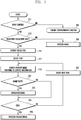
- FIG. 1 illustrates a block diagram of a configuration of a portable terminal according to an embodiment of the present disclosure.
- the portable terminal may be a mobile phone.
- the communication unit 150 performs a function of communicating with a base station or an internet server.
- the communication unit 150 may be configured with a transmitter for up-converting the frequency of a transmitting signal and amplifying an electric power, and a receiver for low-noise amplifying a received signal and down-converting the frequency of the received signal.
- the communication unit 150 may include an encoder and a decoder.
- the encoder outputs a signal to the transmitter by encoding the signal, and the decoder decodes a signal received from the receiver.
- the encoder and decoder may be one of an LTE, WCDMA, GSM, WIFI, WIBRO, NFC, and Bluetooth.
- the communication unit 150 according to the embodiments of the present disclosure is assumed to include an LTE, WIFI, NFC, and Bluetooth communication units.
- the camera 120 is driven under the control of the control unit 100, and photographs a subject.
- the camera 120 may be configured with a rear camera installed at the rear side of the terminal for photographing a high resolution image and a front camera installed at the front side of the terminal for photographing a relatively low resolution image.
- the control unit 100 controls the general operation of the portable terminal, and automatically focuses on a predetermined focus item by searching a preview image while driving the camera 120 according to the embodiment of the present disclosure.
- the control unit 100 may include a recognizer for identifying a character and/or image in the preview image as a focus item.
- the storage unit 110 may include a program memory for storing an operating program of terminal and programs according to the embodiment of the present disclosure, and a data memory for storing tables used for the operation of terminal and data generated while executing programs.
- the storage unit 110 may store predetermined focus items, and include contact information corresponding to the focus items.
- the contact information may include an image.
- the display unit 130 displays a focus mark in a preview image and an image of predetermined focus item under the control of the control unit 100.
- the display unit 130 may be an LCD or an OLED.
- the input unit 140 may be configured with a capacitive or resistive type, and output location information of a user's touch (hereafter, a finger touch is assumed) to the control unit 100. Further, the input unit 140 may include an EMR sensor, and detect a pen touch input in order to output to the control unit 100.
- the display unit 130 and the input unit 140 may be configured in an integrated form.
- the audio processing unit 160 processes a voice signal generated in a communication mode and an audio signal generated in a photographing mode of camera under the control of the control unit 100.
- the control unit 100 stores a focus item in the storage unit 110 in a registration mode, and controls to display a preview image in the display unit 130 while driving the camera 120.
- the control unit 100 tracks images in the preview image corresponding to the predetermined focus items, controls the camera 120 to automatically focus on an image matching the focus item, and controls to display a focus mark at a focused location in the display unit 130.
- the control unit 100 registers a focus item in a registration mode.
- a method of registering the focus item may include a method of registering with a text (by typing a text) and a method of registering with an image.
- the control unit 100 stores the focus item in the storage unit 110 by converting to a text.
- the focus item may be registered with an image by marking on the image.
- the image of focus item may be selected from the preview image or from a stored image (for example, an image stored in a gallery).
- the control unit 100 registers an image selected from images displayed in the display unit 130 (for example, by tapping) as a focus item in the registration mode.
- the control unit 100 displays a preview image output by the camera 120 in the display unit 130.
- the control unit 100 searches the preview image for an image of registered focus item. If an image identical to the image of registered focus item exists, the control unit 100 controls the camera 120 to focus on the corresponding image and the display unit 130 to display a focus mark at the corresponding location of preview image.
- the control unit 100 decides face information matching a registered name as a focus item. If the focus item is a person's name, the control unit 100 searches for a name identical to a person's name registered in contact information of the storage unit 110 and decides a found face registered as a focus item. If data matching the contact information doesn't exist, the corresponding focus item may be ignored. Further, if a name registered as a focus item doesn't exist in the contact information, the control unit 100 may search a corresponding person through a website. If a corresponding image is found, the name of corresponding image can be determined as a focus item. If a plurality of search results is given, the control unit 100 may decide an image classified to the most accurate information as a focus item. If a focus item is found through a website, the control unit 100 registers the spelling of person's name.
- control unit 100 identifies an image of person registered through the contact information or website. If a matching image is found by searching the preview image for an image of focus item, the control unit 100 controls the camera 120 to automatically focus and displays a focus mark in the display unit 130. As the camera 120 moves, the control unit 100 controls to display a moving location of the image focused in the preview image by tracking.
- the control unit 100 firstly searches a call-log with a keyword of caller-ID, and if a caller-ID is not found, secondly searches a website. For example, if the focus item is set to John and the caller-ID of John doesn't exist, the control unit 100 may control an auto-focusing operation by using an image obtained from website.
- the contact information may include an image.
- the contact information may include at least one of a person's name, telephone number, email information, SNS information, and image. Accordingly, if the person's name is set as a focus item, the control unit 100 searches the preview image for contact information of the person and an image matching the image of person set as a focus item. Further, the contact information may include color information. If a color is set as a focus item, the control unit 100 confirms the color set as a focus item in the contact information, and may perform a focusing operation on an image having a corresponding color in the preview image.
- control unit 100 searches for a corresponding character and/or image in the preview image. If the corresponding character and/or image is found, the control unit 100 searches for an image of the corresponding location.
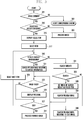
- FIG. 2 illustrates a process for a procedure of automatically focusing a predetermined subject in a device having a camera according to an embodiment of the present disclosure.
- the control unit 100 drives the camera 120 by detecting it, and displays an image output by the camera 120 in the display unit 130 as a preview image at operation 211.
- the control unit 100 checks whether a registered focus item exists at operation 213, and displays the registered focus item in the preview image if exist at operation 215.
- the focus item may be registered with a character and/or an image.
- the registration of focus item may be performed by using a character or an image, and a portion of image (a preview image or an image stored in a gallery) displayed in the display unit 130 may be registered.
- the focus item may be more than one, can be set before driving a camera, and may be one registered in a previous state.
- the focus item may be contact information stored in the storage unit 110.
- the control unit 100 selects the first item from predetermined focus items at operation 217, and searches for focus items in the contact information at operation 219.
- the contact information may include an image of the selected focus item or a color. If the focus item exists in the contact information and an image and/or color of the focus item is found from the preview image displayed in the display unit 130, the control unit 100 detects it at operation 221, and controls the camera 120 to automatically focus on the corresponding image and/or color at operation 223.
- the control unit 100 displays a focus mark on the preview image of the display unit 130 displayed at operation 223 to indicate that the auto-focusing has been performed. However, if the focus item doesn't exist in the contact information or an image of the focus item doesn't exist in the preview image, the control unit 100 detects it at operation 221 and proceeds to operation 225.
- the control unit 100 checks whether a following focus item exists at operation 225, selects the following focus item if exists at operation 227, and repeats the above operations by proceeding to operation 219. If the focusing operation is finished for all the focus items, the control unit 100 detects it at operation 225, and processes the focused image at operation 229.
- the control unit 100 displays a focus mark at the locations of auto focused images in the preview image displayed in the display unit 130, and stores an image by capturing the image output by the camera 120 in the storage unit 110 if a request for photographing is input through the input unit 140.
- the image being stored in the storage unit 110 may correspond to an image focused according to the predetermined (registered) focus item.
- FIG. 2 illustrates an example of which the predetermined focusing items are automatically focused according to the images stored in the contact information.
- the portable terminal can identify an image by searching a website or by searching a preview image for a character and/or an image.
- FIG. 3 illustrates a process for a procedure of automatically focusing in a portable terminal according to another embodiment of the present disclosure.
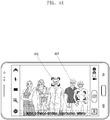
- FIGS. 4A to 4F illustrates screen examples of a method of automatically focusing according to the procedure of FIG. 3 .
- the control unit 100 drives the camera 120 by detecting it, and displays an image output by the camera 120 in the display unit 130 as a preview image at operation 311.
- the control unit 100 checks whether a registered focus item exists at operation 313, and displays the registered focus items in the preview image at operation 315.
- the focus item may be at least one character and/or an image.
- the focus item may be set before driving the camera 120, or a focus item registered in a previous state can be used.
- the control unit 100 selects the first item from the predetermined focus items at operation 317, and searches contact information for the focus items at operation 319.
- the contact information may include an image or a color of the selected focus item. If the focus item exists in the contact information, the control unit 100 detects it at operation 319, and searches a preview image referring to the image and/or color of contact information corresponding to the focus item at operation 321. If the image and/or color of focus item is found from the preview image displayed in the display unit 130, the control unit 100 detects it at operation 323, and controls the camera 120 to automatically focus on a corresponding location of the image and/or color at operation 325.
- the control unit 100 displays a focus mark at the location of focus item in the preview image displayed in the display unit 130 to indicate that the auto-focusing has been performed at operation 325. However, if an image of the focus item exits in the contact information but not in the preview image, the control unit 100 detects it at operation 323, and proceeds to operation 327.
- the control unit 100 searches a website by connecting to an internet network through the communication unit 150 at operation 331. If the focus item is found through the website searching, the control unit 100 detects it at operation 333, selects an image having the highest priority from the found images at operation 335, and searches for an image matching the image found from the preview image at operation 337. Subsequently, the control unit 100 identifies whether an image of the found focus item exists at operation 323, and if the image of the found focus item exists, control the camera 120 to automatically focus on a corresponding location of the image at operation 325.
- the control unit 100 searches the preview image for a character and/or image of the focus item at operation 339. If a character and/or image of the focus item is found, the control unit 100 detects it at operation 323, and controls the camera 120 to automatically focus on a corresponding location of the image at operation 325.
- control unit 100 searches the contact information for a selected focusing item, performs auto-focusing if the focus item exists in the contact information, performs auto-focusing referring to an image found through web searching if the focus item doesn't exist in the contact information, and performs the auto-focusing by using information of focusing item itself (character and/or image) if the focus item is not found through both the contact information and web searching.
- the control unit 100 checks whether the following focus item exists at operation 327. If the following focus item exists, the control unit 100 select the focus item at operation 329, and repeats the above operations by returning to operation 319. If the auto-focusing is completed for all the predetermined focus items, the control unit 100 detects it at operation 327, and processes the focused image at operation 341.
- the control unit 100 displays a focus mark at a location of the auto-focused images in the preview image displayed in the display unit 130, and stores an image output by the camera 120 in the storage unit 110 by capturing the image if a request for photographing is input through the input unit 140.
- the image stored in the storage unit 110 may correspond to an auto-focused image including the predetermined (registered) focus items.
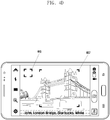
- FIGS. 4A to 4F may assume that that the focus items are set with “John,” “London Bridge,” “Starbucks,” and “white.” If the camera is driven in the state of setting the focus items as above, the control unit 100 detects the predetermined focus items at operation 313, and displays the focus items of "John,” “London Bridge,” “Starbucks,” and “white” in the preview image at operation 315.
- the control unit 100 selects an item "John” at operation 317, and checks whether the item "John” is registered in the contact information at operation 319 as shown in FIG. 4B . If the item "John” is a caller-ID registered in the contact information as shown by 425 of FIG. 4B , the control unit 100 searches a preview image referring to the image of contact information at operation 321.
- the control unit 100 may search for an image by comparing the image of contact information (image of John) with the preview image (for example, by using an analysis method of comparing a portion of face such as eyes).
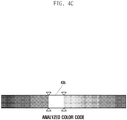
- the control unit 100 detects it at operation 323, and displays a focus mark by focusing on the face of John at operation 325 as shown by 415 of FIG. 4A . Subsequently, the control unit 100 repeats the above operations by selecting the next focus item. While performing operations 319 to 321, the control unit 100 select a white color from color information (analyzed color code) shown in FIG. 4C , and checks whether a white colored image exists at operation 323. If a white colored image is found, the control unit 100 focuses on the white color and displays a focus mark at operation 325 as shown by 417 of FIG. 4A .
- color information analyzed color code
- the control unit 100 registers the corresponding face image as a focus item if the name include a caller-ID and matches the contact information, and focuses on the corresponding person's image by tracking the person's image, if the corresponding image exists in the preview image while driving the camera. Further, if a corresponding color determined from a color range exists in the preview image, the control unit 100 focuses on the color by tracking the color.
- the control unit 100 selects the item John at operation 317, and checks whether the item John is registered in the contact information at operation 319 as shown in FIG. 4D . If the item "John" is caller-ID registered in the contact information as shown by 425 of FIG. 4B , the control unit 100 searches the preview image referring to the image of contact information at operation 321. If a matching image is not found, the control unit 100 identifies it at operation 323, and selects the next item "London Bridge” at operation 329. Because the item "London Bridge" is not registered in the contact information, the control unit 100 performs website searching by connecting to an internet network through the communication unit 150 at operation.
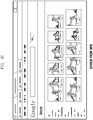
- the control unit 100 displays the search result at operation 335 as shown in FIG. 4E , and decides an image selected by a user as a focusing image.
- the user may select an image from the displayed images shown in FIG. 4E , which is similar to the image displayed in the preview image.
- the control unit 100 may set an image of focus item by automatically selecting the image from the images found through the website searching.
- the control unit 100 compares the image set by the website searching and the preview image at operation 337, and if a matching image is found at operation 323, displays a focus mark by focusing on the corresponding image as shown by 447 of FIG. 4D .
- control unit 100 identifies a white color from color information (analyzed color code) shown in FIG. 4C and checks whether an image having a white color exists at operation 323. If an image having a white color is found, the control unit 100 displays a focus mark by focusing on the image having the white color at operation 325 as shown by 417 of FIG. 4A .
- the control unit 100 selects an image having the most accurate value through website searching, and performs focusing and tracking operations by comparing with a preview image. Further, if a color predetermined from a color range exists in the preview image, the control unit 100 performs focusing and tracking of an image having the corresponding color.
- the control unit 100 cannot focus on an image of predetermined focus item even though the search of contact information and website is performed.
- the control unit 100 detects it at operation 333, and searches for a character and/or image of the predetermined focus item at operation 339.
- a character recognition method may be used for a text search, or an image comparison method may be used. If characters registered as the focus item (for example, Starbucks) exists in the preview image as shown in FIG. 4F , the control unit 100 detects it at operation 323, and displays a focus mark of the corresponding image as shown by 455 of FIG. 4F .
- the control unit 100 recognizes characters in the preview image by using an OCR (Optical Character Reader) technology, and performs focusing and tracking operations if corresponding characters exist. Because the control unit 100 knows a keypad mode of the input characters, languages having a similar form (for example, English and Spanish) can be easily recognized. Namely, because the control unit 100 searches characters input by using an English keypad also in an OCR searching of English mode, and thereby the accuracy of recognition can be improved without changing a language mode.
- OCR Optical Character Reader
- the control unit 100 performs an auto-focusing operation by analyzing focus items predetermined while displaying a preview image. If the user marks a specific image in the preview image with a closed loop, the control unit 100 registers the marked image as a focusing item. Thereafter, if an image identical or similar to the registered image is input, the control unit 100 can perform focusing and tracking of the corresponding image.
- a predetermined focus item can be focused by using search results in three categories (contact, website search, and text). If an image is searched simultaneously through contact information and a website, the control unit 100 may process the image by assigning a higher priority for an image matching value of contact information (caller-ID when a person) than that of website image. For example, if an item "John" exists in both the caller-ID and website, the focusing operation is performed based on the caller-ID. When performing focusing by using a keyword, the focus item is maintained unless the keyword is deleted.
- the control unit may perform auto-focusing whenever the corresponding baby appears in a preview image.
- the registered baby's face may be the only baby face focused and not all of the appearing babies' faces.
- a focus item may be pre-registered before driving a camera, and auto-focusing can be performed by searching images in a preview image corresponding to the registered focus items while driving the camera. Therefore, a subject can be auto-focused while driving the camera and a plurality of subjects can be continuously focused.
Landscapes
- Engineering & Computer Science (AREA)
- Multimedia (AREA)
- Signal Processing (AREA)
- Business, Economics & Management (AREA)
- Tourism & Hospitality (AREA)
- Health & Medical Sciences (AREA)
- Economics (AREA)
- General Health & Medical Sciences (AREA)
- Human Resources & Organizations (AREA)
- Marketing (AREA)
- Primary Health Care (AREA)
- Strategic Management (AREA)
- Physics & Mathematics (AREA)
- General Business, Economics & Management (AREA)
- General Physics & Mathematics (AREA)
- Theoretical Computer Science (AREA)
- Studio Devices (AREA)
Description
- The present disclosure relates to an apparatus and a method for processing an image in a device having a camera and, more particularly, to an apparatus and a method for processing an image by automatically focusing a subject.
- When photographing an image in a device having a camera, a subject to be photographed must be set and focused. The focusing method in the prior art can be divided into two methods of an auto-focusing and a manual focusing. The auto-focusing method is to focus on the center of an image, and the manual focusing method is to focus on a specific area of a screen manually selected by a user.
- However, in the focusing method of the prior art, the camera must be controlled to focus on a desired subject, and the focusing must be performed every time whenever photographing a specific person or object in a continuous photographing mode.
-
US 2012/044401 A1 discloses that a camera may be capable of autofocusing and that the user may be able to change the focus of the camera, analyzing data from a camera to determine if an object is located in the field of view of the camera, and causing an indication that the object has been located through the user interface. -
US 2010/066847 A1 discloses setting of registered objects based on recording image of still image. The user can specify the specified object to be a target of object recognition processing among the registered objects registered in the second memory. The CPU 23 in the object recognition mode executes the AF by setting a position of the specified object as the focus detecting area. Accordingly, on the menu screen, the user can select the specified object and set ON/OFF of the AF with respect to each specified object. -
US 2009/247219 A1 discloses to perform a search, or other function, based on input from a camera in a mobile computing device, the camera of the mobile computing device captures an image, an area corresponding to text or another searchable object in the image is selected or determined, the text in the area is recognized to generate a plurality of characters, or a string, the plurality of characters or the object becomes input for the function, and output of the function is displayed in a display of the mobile computing device. - To address the above-discussed deficiencies, it is a primary object to provide at least advantages described below. Accordingly, an aspect of the present disclosure is to provide an apparatus and a method for automatically focusing on a predetermined subject to be photographed by selecting the subject and tracking a preview image while operating a camera. The invention is defined by the appended independent claims.
- In accordance with an aspect of the present disclosure, a method for automatically focusing in a device having a camera includes displaying a focus item in a preview screen while driving a camera. The method also includes auto-focusing by searching an image of the focus item from a preview image and displaying a focus mark. The method further includes processing a focused image if the auto-focusing is completed.
- In accordance with another aspect of the present disclosure, an apparatus includes a camera configured to generate a preview image. The apparatus also includes a display unit configured to display the preview image. The apparatus further includes a control unit configured to display a predetermined focus item in the preview screen while driving the camera, and to focus display a focus mark by searching the preview image for an image of the focus item.
- In accordance with another aspect of the present disclosure, a camera includes a display configured to display the preview image. The camera also includes a controller configured to generate a preview image, to control the display to display a predetermined focus item in the preview screen while driving the camera, and to focus display a focus mark by searching the preview image for an image of the focus item.
- Before undertaking the DETAILED DESCRIPTION below, it may be advantageous to set forth definitions of certain words and phrases used throughout this patent document: the terms "include" and "comprise," as well as derivatives thereof, mean inclusion without limitation; the term "or," is inclusive, meaning and/or; the phrases "associated with" and "associated therewith," as well as derivatives thereof, may mean to include, be included within, interconnect with, contain, be contained within, connect to or with, couple to or with, be communicable with, cooperate with, interleave, juxtapose, be proximate to, be bound to or with, have, have a property of, or the like; and the term "controller" means any device, system or part thereof that controls at least one operation, such a device may be implemented in hardware, firmware or software, or some combination of at least two of the same. It should be noted that the functionality associated with any particular controller may be centralized or distributed, whether locally or remotely. Definitions for certain words and phrases are provided throughout this patent document, those of ordinary skill in the art should understand that in many, if not most instances, such definitions apply to prior, as well as future uses of such defined words and phrases.
- For a more complete understanding of the present disclosure and its advantages, reference is now made to the following description taken in conjunction with the accompanying drawings, in which like reference numerals represent like parts:
-
FIG. 1 illustrates a block diagram of a configuration of a portable terminal according to an embodiment of the present disclosure; -
FIG. 2 illustrates a process for a procedure of automatically focusing a predetermined subject in a device having a camera according to an embodiment of the present disclosure; -
FIG. 3 illustrates a process for a procedure of automatically focusing in a portable terminal according to another embodiment of the present disclosure; and -
FIGS. 4A to 4F illustrate screen examples of a method of automatically focusing according to the procedure ofFIG. 3 . -
FIGURES 1 through 4F , discussed below, and the various embodiments used to describe the principles of the present disclosure in this patent document are by way of illustration only and should not be construed in any way to limit the scope of the disclosure. Those skilled in the art will understand that the principles of the present disclosure may be implemented in any suitably arranged system and method. - Hereinafter, embodiments of the disclosure are described in detail with reference to the accompanying drawings. The same reference symbols are used throughout the drawings to refer to the same or like parts. Detailed descriptions of well-known functions and structures incorporated herein may be omitted to avoid obscuring the subject matter of the disclosure.
- An apparatus according embodiments of the present disclosure pre-registers a focus item, and automatically focuses by searching images corresponding to the registered focus item while operating a camera. A method for registering the focus item may be performed by registering a character or voice in a text, and further images displayed in a screen can be registered as a focus item. If the camera operates in the state of registering the focus item, the device searches preview images for an image of the registered focus item, focuses on the location of image corresponding to the focus item registered in the searching process by controlling the camera, and displays a focus mark in a display unit.
- Here, the device having a camera may be a camera device, mobile phone, tablet PC, or portable PC. The embodiments of the present disclosure will be described, assuming that the device having a camera is a mobile phone.
-
FIG. 1 illustrates a block diagram of a configuration of a portable terminal according to an embodiment of the present disclosure. Here, the portable terminal may be a mobile phone. - Referring to
FIG. 1 , thecommunication unit 150 performs a function of communicating with a base station or an internet server. Thecommunication unit 150 may be configured with a transmitter for up-converting the frequency of a transmitting signal and amplifying an electric power, and a receiver for low-noise amplifying a received signal and down-converting the frequency of the received signal. Further, thecommunication unit 150 may include an encoder and a decoder. The encoder outputs a signal to the transmitter by encoding the signal, and the decoder decodes a signal received from the receiver. The encoder and decoder may be one of an LTE, WCDMA, GSM, WIFI, WIBRO, NFC, and Bluetooth. Thecommunication unit 150 according to the embodiments of the present disclosure is assumed to include an LTE, WIFI, NFC, and Bluetooth communication units. - The
camera 120 is driven under the control of thecontrol unit 100, and photographs a subject. Thecamera 120 may be configured with a rear camera installed at the rear side of the terminal for photographing a high resolution image and a front camera installed at the front side of the terminal for photographing a relatively low resolution image. - The
control unit 100 controls the general operation of the portable terminal, and automatically focuses on a predetermined focus item by searching a preview image while driving thecamera 120 according to the embodiment of the present disclosure. Thecontrol unit 100 may include a recognizer for identifying a character and/or image in the preview image as a focus item. - The
storage unit 110 may include a program memory for storing an operating program of terminal and programs according to the embodiment of the present disclosure, and a data memory for storing tables used for the operation of terminal and data generated while executing programs. In the embodiments of the present disclosure, thestorage unit 110 may store predetermined focus items, and include contact information corresponding to the focus items. Here, the contact information may include an image. - The
display unit 130 displays a focus mark in a preview image and an image of predetermined focus item under the control of thecontrol unit 100. Thedisplay unit 130 may be an LCD or an OLED. Theinput unit 140 may be configured with a capacitive or resistive type, and output location information of a user's touch (hereafter, a finger touch is assumed) to thecontrol unit 100. Further, theinput unit 140 may include an EMR sensor, and detect a pen touch input in order to output to thecontrol unit 100. Here, thedisplay unit 130 and theinput unit 140 may be configured in an integrated form. - The
audio processing unit 160 processes a voice signal generated in a communication mode and an audio signal generated in a photographing mode of camera under the control of thecontrol unit 100. - In the portable terminal having the above configuration, the
control unit 100 stores a focus item in thestorage unit 110 in a registration mode, and controls to display a preview image in thedisplay unit 130 while driving thecamera 120. When displaying the preview image, thecontrol unit 100 tracks images in the preview image corresponding to the predetermined focus items, controls thecamera 120 to automatically focus on an image matching the focus item, and controls to display a focus mark at a focused location in thedisplay unit 130. - Firstly, the
control unit 100 registers a focus item in a registration mode. Here, a method of registering the focus item may include a method of registering with a text (by typing a text) and a method of registering with an image. In the method of registering as a text, if a user inputs a focus item with a text or voice through theinput unit 140 oraudio processing unit 160 in the registration mode, thecontrol unit 100 stores the focus item in thestorage unit 110 by converting to a text. Alternatively, the focus item may be registered with an image by marking on the image. The image of focus item may be selected from the preview image or from a stored image (for example, an image stored in a gallery). In this embodiment, thecontrol unit 100 registers an image selected from images displayed in the display unit 130 (for example, by tapping) as a focus item in the registration mode. - If the
camera 120 is driven after registering the focus item, thecontrol unit 100 displays a preview image output by thecamera 120 in thedisplay unit 130. Thecontrol unit 100 then searches the preview image for an image of registered focus item. If an image identical to the image of registered focus item exists, thecontrol unit 100 controls thecamera 120 to focus on the corresponding image and thedisplay unit 130 to display a focus mark at the corresponding location of preview image. - If the focus item is a person, the
control unit 100 decides face information matching a registered name as a focus item. If the focus item is a person's name, thecontrol unit 100 searches for a name identical to a person's name registered in contact information of thestorage unit 110 and decides a found face registered as a focus item. If data matching the contact information doesn't exist, the corresponding focus item may be ignored. Further, if a name registered as a focus item doesn't exist in the contact information, thecontrol unit 100 may search a corresponding person through a website. If a corresponding image is found, the name of corresponding image can be determined as a focus item. If a plurality of search results is given, thecontrol unit 100 may decide an image classified to the most accurate information as a focus item. If a focus item is found through a website, thecontrol unit 100 registers the spelling of person's name. - Subsequently, the
control unit 100 identifies an image of person registered through the contact information or website. If a matching image is found by searching the preview image for an image of focus item, thecontrol unit 100 controls thecamera 120 to automatically focus and displays a focus mark in thedisplay unit 130. As thecamera 120 moves, thecontrol unit 100 controls to display a moving location of the image focused in the preview image by tracking. - As described above, if the focus item is a person's name, the
control unit 100 firstly searches a call-log with a keyword of caller-ID, and if a caller-ID is not found, secondly searches a website. For example, if the focus item is set to John and the caller-ID of John doesn't exist, thecontrol unit 100 may control an auto-focusing operation by using an image obtained from website. - Here, the contact information may include an image. For example, when a person's contact information, the contact information may include at least one of a person's name, telephone number, email information, SNS information, and image. Accordingly, if the person's name is set as a focus item, the
control unit 100 searches the preview image for contact information of the person and an image matching the image of person set as a focus item. Further, the contact information may include color information. If a color is set as a focus item, thecontrol unit 100 confirms the color set as a focus item in the contact information, and may perform a focusing operation on an image having a corresponding color in the preview image. - Further, if a character and/or image set as a focus item is not found through the contact information or website searching, the
control unit 100 searches for a corresponding character and/or image in the preview image. If the corresponding character and/or image is found, thecontrol unit 100 searches for an image of the corresponding location. -
FIG. 2 illustrates a process for a procedure of automatically focusing a predetermined subject in a device having a camera according to an embodiment of the present disclosure. - Referring to
FIG. 2 , if driving a camera is requested, thecontrol unit 100 drives thecamera 120 by detecting it, and displays an image output by thecamera 120 in thedisplay unit 130 as a preview image atoperation 211. Thecontrol unit 100 checks whether a registered focus item exists atoperation 213, and displays the registered focus item in the preview image if exist atoperation 215. Here, the focus item may be registered with a character and/or an image. The registration of focus item may be performed by using a character or an image, and a portion of image (a preview image or an image stored in a gallery) displayed in thedisplay unit 130 may be registered. The focus item may be more than one, can be set before driving a camera, and may be one registered in a previous state. - The focus item may be contact information stored in the
storage unit 110. Thecontrol unit 100 selects the first item from predetermined focus items atoperation 217, and searches for focus items in the contact information atoperation 219. The contact information may include an image of the selected focus item or a color. If the focus item exists in the contact information and an image and/or color of the focus item is found from the preview image displayed in thedisplay unit 130, thecontrol unit 100 detects it atoperation 221, and controls thecamera 120 to automatically focus on the corresponding image and/or color atoperation 223. Thecontrol unit 100 displays a focus mark on the preview image of thedisplay unit 130 displayed atoperation 223 to indicate that the auto-focusing has been performed. However, if the focus item doesn't exist in the contact information or an image of the focus item doesn't exist in the preview image, thecontrol unit 100 detects it atoperation 221 and proceeds tooperation 225. - Subsequently, the
control unit 100 checks whether a following focus item exists atoperation 225, selects the following focus item if exists atoperation 227, and repeats the above operations by proceeding tooperation 219. If the focusing operation is finished for all the focus items, thecontrol unit 100 detects it atoperation 225, and processes the focused image atoperation 229. Here, thecontrol unit 100 displays a focus mark at the locations of auto focused images in the preview image displayed in thedisplay unit 130, and stores an image by capturing the image output by thecamera 120 in thestorage unit 110 if a request for photographing is input through theinput unit 140. Here, the image being stored in thestorage unit 110 may correspond to an image focused according to the predetermined (registered) focus item. -
FIG. 2 illustrates an example of which the predetermined focusing items are automatically focused according to the images stored in the contact information. However, if a predetermined focusing item is not included in the contact information, the portable terminal can identify an image by searching a website or by searching a preview image for a character and/or an image. -
FIG. 3 illustrates a process for a procedure of automatically focusing in a portable terminal according to another embodiment of the present disclosure.FIGS. 4A to 4F illustrates screen examples of a method of automatically focusing according to the procedure ofFIG. 3 . - Referring to
FIGS. 3 and4A to 4F , if driving a camera is requested, thecontrol unit 100 drives thecamera 120 by detecting it, and displays an image output by thecamera 120 in thedisplay unit 130 as a preview image atoperation 311. Thecontrol unit 100 then checks whether a registered focus item exists atoperation 313, and displays the registered focus items in the preview image atoperation 315. Here, the focus item may be at least one character and/or an image. The focus item may be set before driving thecamera 120, or a focus item registered in a previous state can be used. - The
control unit 100 selects the first item from the predetermined focus items atoperation 317, and searches contact information for the focus items atoperation 319. The contact information may include an image or a color of the selected focus item. If the focus item exists in the contact information, thecontrol unit 100 detects it atoperation 319, and searches a preview image referring to the image and/or color of contact information corresponding to the focus item atoperation 321. If the image and/or color of focus item is found from the preview image displayed in thedisplay unit 130, thecontrol unit 100 detects it atoperation 323, and controls thecamera 120 to automatically focus on a corresponding location of the image and/or color atoperation 325. Thecontrol unit 100 displays a focus mark at the location of focus item in the preview image displayed in thedisplay unit 130 to indicate that the auto-focusing has been performed atoperation 325. However, if an image of the focus item exits in the contact information but not in the preview image, thecontrol unit 100 detects it atoperation 323, and proceeds tooperation 327. - If the focus item doesn't exist in the contact information at
operation 319, thecontrol unit 100 searches a website by connecting to an internet network through thecommunication unit 150 atoperation 331. If the focus item is found through the website searching, thecontrol unit 100 detects it atoperation 333, selects an image having the highest priority from the found images atoperation 335, and searches for an image matching the image found from the preview image atoperation 337. Subsequently, thecontrol unit 100 identifies whether an image of the found focus item exists atoperation 323, and if the image of the found focus item exists, control thecamera 120 to automatically focus on a corresponding location of the image atoperation 325. - However, if the focusing item is not found through the website searching at
operation 333, thecontrol unit 100 searches the preview image for a character and/or image of the focus item atoperation 339. If a character and/or image of the focus item is found, thecontrol unit 100 detects it atoperation 323, and controls thecamera 120 to automatically focus on a corresponding location of the image atoperation 325. - As described above, the
control unit 100 searches the contact information for a selected focusing item, performs auto-focusing if the focus item exists in the contact information, performs auto-focusing referring to an image found through web searching if the focus item doesn't exist in the contact information, and performs the auto-focusing by using information of focusing item itself (character and/or image) if the focus item is not found through both the contact information and web searching. - Subsequently, the
control unit 100 checks whether the following focus item exists atoperation 327. If the following focus item exists, thecontrol unit 100 select the focus item atoperation 329, and repeats the above operations by returning tooperation 319. If the auto-focusing is completed for all the predetermined focus items, thecontrol unit 100 detects it atoperation 327, and processes the focused image atoperation 341. Here, thecontrol unit 100 displays a focus mark at a location of the auto-focused images in the preview image displayed in thedisplay unit 130, and stores an image output by thecamera 120 in thestorage unit 110 by capturing the image if a request for photographing is input through theinput unit 140. The image stored in thestorage unit 110 may correspond to an auto-focused image including the predetermined (registered) focus items. -
FIGS. 4A to 4F may assume that that the focus items are set with "John," "London Bridge," "Starbucks," and "white." If the camera is driven in the state of setting the focus items as above, thecontrol unit 100 detects the predetermined focus items atoperation 313, and displays the focus items of "John," "London Bridge," "Starbucks," and "white" in the preview image atoperation 315. - Firstly, if an image of a subject is obtained from the
camera 120 as shown inFIG. 4A , thecontrol unit 100 selects an item "John" atoperation 317, and checks whether the item "John" is registered in the contact information atoperation 319 as shown inFIG. 4B . If the item "John" is a caller-ID registered in the contact information as shown by 425 ofFIG. 4B , thecontrol unit 100 searches a preview image referring to the image of contact information atoperation 321. Here, thecontrol unit 100 may search for an image by comparing the image of contact information (image of John) with the preview image (for example, by using an analysis method of comparing a portion of face such as eyes). If a matching image exists, thecontrol unit 100 detects it atoperation 323, and displays a focus mark by focusing on the face of John atoperation 325 as shown by 415 ofFIG. 4A . Subsequently, thecontrol unit 100 repeats the above operations by selecting the next focus item. While performingoperations 319 to 321, thecontrol unit 100 select a white color from color information (analyzed color code) shown inFIG. 4C , and checks whether a white colored image exists atoperation 323. If a white colored image is found, thecontrol unit 100 focuses on the white color and displays a focus mark atoperation 325 as shown by 417 ofFIG. 4A . - As described above, if a focus item registered by inputting a keyword is a person's name, the
control unit 100 registers the corresponding face image as a focus item if the name include a caller-ID and matches the contact information, and focuses on the corresponding person's image by tracking the person's image, if the corresponding image exists in the preview image while driving the camera. Further, if a corresponding color determined from a color range exists in the preview image, thecontrol unit 100 focuses on the color by tracking the color. - Secondly, if an image of subject is obtained from the
camera 120 as shown inFIG. 4D , thecontrol unit 100 selects the item John atoperation 317, and checks whether the item John is registered in the contact information atoperation 319 as shown inFIG. 4D . If the item "John" is caller-ID registered in the contact information as shown by 425 ofFIG. 4B , thecontrol unit 100 searches the preview image referring to the image of contact information atoperation 321. If a matching image is not found, thecontrol unit 100 identifies it atoperation 323, and selects the next item "London Bridge" atoperation 329. Because the item "London Bridge" is not registered in the contact information, thecontrol unit 100 performs website searching by connecting to an internet network through thecommunication unit 150 at operation. If "London Bridge" is found through the website searching, thecontrol unit 100 displays the search result atoperation 335 as shown inFIG. 4E , and decides an image selected by a user as a focusing image. Here, the user may select an image from the displayed images shown inFIG. 4E , which is similar to the image displayed in the preview image. Alternatively, thecontrol unit 100 may set an image of focus item by automatically selecting the image from the images found through the website searching. Subsequently, thecontrol unit 100 compares the image set by the website searching and the preview image atoperation 337, and if a matching image is found atoperation 323, displays a focus mark by focusing on the corresponding image as shown by 447 ofFIG. 4D . Subsequently, while performingoperations 319 to 321, thecontrol unit 100 identifies a white color from color information (analyzed color code) shown inFIG. 4C and checks whether an image having a white color exists atoperation 323. If an image having a white color is found, thecontrol unit 100 displays a focus mark by focusing on the image having the white color atoperation 325 as shown by 417 ofFIG. 4A . - When an item of famous subject (for example, London Bridge) is registered by inputting a keyword, if the input keyword doesn't exist in the contact information or an image is not available for a caller-ID, the
control unit 100 selects an image having the most accurate value through website searching, and performs focusing and tracking operations by comparing with a preview image. Further, if a color predetermined from a color range exists in the preview image, thecontrol unit 100 performs focusing and tracking of an image having the corresponding color. - Thirdly, if an image is obtained from the
camera 120 as shown inFIG. 4F , thecontrol unit 100 cannot focus on an image of predetermined focus item even though the search of contact information and website is performed. Thecontrol unit 100 detects it atoperation 333, and searches for a character and/or image of the predetermined focus item atoperation 339. Here, a character recognition method may be used for a text search, or an image comparison method may be used. If characters registered as the focus item (for example, Starbucks) exists in the preview image as shown inFIG. 4F , thecontrol unit 100 detects it atoperation 323, and displays a focus mark of the corresponding image as shown by 455 ofFIG. 4F . - If an item registered by inputting a keyword is set as a focus item, the
control unit 100 recognizes characters in the preview image by using an OCR (Optical Character Reader) technology, and performs focusing and tracking operations if corresponding characters exist. Because thecontrol unit 100 knows a keypad mode of the input characters, languages having a similar form (for example, English and Spanish) can be easily recognized. Namely, because thecontrol unit 100 searches characters input by using an English keypad also in an OCR searching of English mode, and thereby the accuracy of recognition can be improved without changing a language mode. - While the auto-focusing is performed as above, an area predetermined by a user can be focused. Namely, the
control unit 100 performs an auto-focusing operation by analyzing focus items predetermined while displaying a preview image. If the user marks a specific image in the preview image with a closed loop, thecontrol unit 100 registers the marked image as a focusing item. Thereafter, if an image identical or similar to the registered image is input, thecontrol unit 100 can perform focusing and tracking of the corresponding image. - As described above, the focusing method according to an embodiment of the present disclosure can be performed in the following procedure. Firstly, a predetermined focus item can be focused by using search results in three categories (contact, website search, and text). If an image is searched simultaneously through contact information and a website, the
control unit 100 may process the image by assigning a higher priority for an image matching value of contact information (caller-ID when a person) than that of website image. For example, if an item "John" exists in both the caller-ID and website, the focusing operation is performed based on the caller-ID. When performing focusing by using a keyword, the focus item is maintained unless the keyword is deleted. For example, if a baby's name is registered as the focus item, the control unit may perform auto-focusing whenever the corresponding baby appears in a preview image. In this embodiment, the registered baby's face may be the only baby face focused and not all of the appearing babies' faces. - In a device having a camera, a focus item may be pre-registered before driving a camera, and auto-focusing can be performed by searching images in a preview image corresponding to the registered focus items while driving the camera. Therefore, a subject can be auto-focused while driving the camera and a plurality of subjects can be continuously focused.
- Although the present disclosure has been described with an example embodiment, various changes and modifications may be suggested to one skilled in the art. It is intended that the present disclosure encompass such changes and modifications as fall within the scope of the appended claims.
Claims (12)
- A method of focusing in a device having a camera, the method comprising:displaying an image output by the camera in a display unit 130 as a preview image (311);checking whether at least one registered focus item exists (313);displaying the at least one registered focus item in the preview image (315);selecting a focus item of the at least one registered focus item (317);searching contact information for the selected focus item (319), wherein the contact information includes an image or a color of the selected focus item;if the selected focus item exists in the contact information (319), searching the preview image for the image or the color of the selected focus item (321);if the image or the color of the selected focus item is found in the preview image displayed by the display unit (323), automatically focusing the camera on a corresponding location of the image or the color of the selected focus item and displaying a focus mark at the location of the selected focus item in the preview image displayed by the display unit to indicate that the auto-focusing has been performed (325);if the selected focus item does not exist in the contact information (319), searching a website by connecting to an internet network through a communication unit (331);if the selected focus item is found through the website searching (333), selecting an image from at least one found image (335), and searching for an image matching the selected image in the preview image (337);if the image matching the selected image exists in the preview image (323), automatically focusing the camera on a corresponding location of the image matching the selected image (325);if the selected focus item is not found through the website searching (333), searching the preview image for a character of the focus item (339) using character recognition for a text search; andif the character of the focus item is found (323), automatically focusing the camera on a corresponding location of the character of the focus item (325).
- The method of claim 1, wherein if the selected focus item exists in the contact information (319), the searching the preview image for the image or the color of the selected focus item (321) comprises searching the preview image for one of a portion and a whole of a face image registered in the contact information,
- The method of claim 1, wherein if the selected focus item exists in the contact information (319), the searching the preview image for the image or the color of the selected focus item (321) comprises searching the preview image for a color included in a color range indicated by the contact information.
- The method of claim 1, further comprising
if a following focus item exists among the at least one registered focus item (327), selecting the following focus item (329) and repeating the operations of searching (321) and auto-focusing (325) in respect of the selected following focus item. - The method of claim 4, further comprising
if the auto-focusing is complete for all the focus items of the at least one focus item (327), displaying a focus mark at a location of the auto-focused images in the preview image displayed in the display unit, and storing an image output by the camera in a storage unit by capturing the image if a request for photographing is input through an input unit (341). - The method of claim 1, wherein the focus item comprises at least one character or an image.
- An apparatus, the apparatus comprising:a camera (120) configured to generate a preview image;a display unit (130) configured to display the preview image while driving the camera;a communication unit (150) configured to connect with an internet network for searching a website;a character recognizer; anda control unit (100) configured to:display an image output by the camera in a display unit 130 as a preview image (311);check whether at least one registered focus item exists (313);display the at least one registered focus item in the preview image (315);select a focus item of the at least one registered focus item (317);search contact information for the selected focus item (319), wherein the contact information includes an image or a color of the selected focus item;if the selected focus item exists in the contact information (319), search the preview image for the image or the color of the selected focus item (321);if the image or the color of the selected focus item is found in the preview image displayed by the display unit (323), automatically focus the camera on a corresponding location of the image or the color of the selected focus item and display a focus mark at the location of the selected focus item in the preview image displayed by the display unit to indicate that the auto-focusing has been performed (325);if the selected focus item does not exist in the contact information (319), search a website by connecting to an internet network through the communication unit (331);if the selected focus item is found through the website searching (333), select an image from at least one found image (335), and search for an image matching the selected image in the preview image (337);if the image matching the selected image exists in the preview image (323), automatically focus the camera on a corresponding location of the image matching the selected image (325);if the selected focus item is not found through the website searching (333), searching the preview image for a character of the focus item (339) using character recognition for a text search; andif the character of the focus item is found (323), automatically focusing the camera on a corresponding location of the character of the focus item (325).
- The apparatus of claim 7, wherein the control unit is configured to, if the selected focus item exists in the contact information (319), search the preview image for one of a portion and whole of a face image registered in the contact information.
- The apparatus of claim 7, wherein
the control unit is configured to, if the selected focus item exists in the contact information (319), search the preview image for a color included in a color range indicated by the contact information. - The apparatus of claim 7, wherein the control unit (100) is configured to, if a following focus item exists among the at least one registered focus item (327), select the following focus item (329) and repeat the operations of search and auto-focus in respect of the selected following focus item.
- The apparatus of claim 9, further comprising an input unit (140),
wherein the control unit (100) is configured to, if the auto-focusing is complete for all the focus items of the at least one focus item (327), display a focus mark at a location of the auto-focused images in the preview image displayed in the display unit, and store an image output by the camera in a storage unit by capturing the image if a request for photographing is input through an input unit (341). - The apparatus of claim 8, wherein the focus item comprises at least one character or an image.
Applications Claiming Priority (1)
| Application Number | Priority Date | Filing Date | Title |
|---|---|---|---|
| KR1020130041668A KR102057581B1 (en) | 2013-04-16 | 2013-04-16 | Apparatus and method for automatically focusing an object in device having a camera |
Publications (2)
| Publication Number | Publication Date |
|---|---|
| EP2793458A1 EP2793458A1 (en) | 2014-10-22 |
| EP2793458B1 true EP2793458B1 (en) | 2017-09-20 |
Family
ID=50846757
Family Applications (1)
| Application Number | Title | Priority Date | Filing Date |
|---|---|---|---|
| EP14164883.2A Active EP2793458B1 (en) | 2013-04-16 | 2014-04-16 | Apparatus and method for auto-focusing in device having camera |
Country Status (3)
| Country | Link |
|---|---|
| US (1) | US9641740B2 (en) |
| EP (1) | EP2793458B1 (en) |
| KR (1) | KR102057581B1 (en) |
Families Citing this family (4)
| Publication number | Priority date | Publication date | Assignee | Title |
|---|---|---|---|---|
| KR102795536B1 (en) * | 2016-11-09 | 2025-04-16 | 삼성전자주식회사 | Method for Processing Image and the Electronic Device supporting the same |
| KR102014971B1 (en) * | 2017-09-20 | 2019-08-27 | 오스템임플란트 주식회사 | Oral camera video display device and method |
| KR101998083B1 (en) * | 2017-10-11 | 2019-07-09 | 오스템임플란트 주식회사 | Oral camera video display device and method |
| KR102141179B1 (en) * | 2020-03-09 | 2020-08-04 | 주식회사 베스트디지탈 | Video processing apparatus based on automatic focusing and surveillance system usign the same |
Family Cites Families (21)
| Publication number | Priority date | Publication date | Assignee | Title |
|---|---|---|---|---|
| US20020093531A1 (en) * | 2001-01-17 | 2002-07-18 | John Barile | Adaptive display for video conferences |
| FI116547B (en) * | 2003-09-04 | 2005-12-15 | Nokia Corp | Method and apparatus for naming the images to be stored in mobile station |
| JP5318321B2 (en) * | 2004-08-05 | 2013-10-16 | パナソニック株式会社 | Imaging device |
| JP4360369B2 (en) * | 2005-11-25 | 2009-11-11 | 株式会社ニコン | Electronic camera |
| JP5087856B2 (en) | 2006-04-05 | 2012-12-05 | 株式会社ニコン | Electronic camera |
| EP2064636A4 (en) | 2006-09-17 | 2009-11-04 | Nokia Corp | METHOD, APPARATUS AND COMPUTER PROGRAM FOR A TAG-BASED VISUAL SEARCH USER INTERFACE |
| JP5056061B2 (en) | 2007-02-22 | 2012-10-24 | 株式会社ニコン | Imaging device |
| JP4900014B2 (en) * | 2007-04-16 | 2012-03-21 | カシオ計算機株式会社 | Imaging apparatus and program thereof |
| JP2008277903A (en) * | 2007-04-25 | 2008-11-13 | Sony Corp | Imaging apparatus and focus target determination method |
| US20090247219A1 (en) * | 2008-03-25 | 2009-10-01 | Jian-Liang Lin | Method of generating a function output from a photographed image and related mobile computing device |
| KR101507786B1 (en) | 2008-03-31 | 2015-04-03 | 엘지전자 주식회사 | Terminal and its interference improvement method |
| US8520979B2 (en) * | 2008-08-19 | 2013-08-27 | Digimarc Corporation | Methods and systems for content processing |
| JP2010117663A (en) * | 2008-11-14 | 2010-05-27 | Fujinon Corp | Autofocus system |
| KR20110051393A (en) * | 2009-11-10 | 2011-05-18 | 엘지전자 주식회사 | Mobile terminal and its control method |
| JP5473551B2 (en) * | 2009-11-17 | 2014-04-16 | 富士フイルム株式会社 | Auto focus system |
| US8810684B2 (en) * | 2010-04-09 | 2014-08-19 | Apple Inc. | Tagging images in a mobile communications device using a contacts list |
| US9118832B2 (en) | 2010-08-17 | 2015-08-25 | Nokia Technologies Oy | Input method |
| TWI435597B (en) | 2010-10-20 | 2014-04-21 | Altek Corp | Photo information display method combined with face recognition and electronic device with camera function thereof |
| CN102916986A (en) * | 2011-08-01 | 2013-02-06 | 环达电脑(上海)有限公司 | Searching system and searching method for face recognition |
| US20130088413A1 (en) * | 2011-10-05 | 2013-04-11 | Google Inc. | Method to Autofocus on Near-Eye Display |
| US8768377B2 (en) * | 2011-11-22 | 2014-07-01 | Sony Corporation | Portable electronic device and method of providing location-based information associated with an image |
-
2013
- 2013-04-16 KR KR1020130041668A patent/KR102057581B1/en active Active
-
2014
- 2014-04-16 EP EP14164883.2A patent/EP2793458B1/en active Active
- 2014-04-16 US US14/254,820 patent/US9641740B2/en active Active
Non-Patent Citations (1)
| Title |
|---|
| None * |
Also Published As
| Publication number | Publication date |
|---|---|
| US20140307146A1 (en) | 2014-10-16 |
| KR20140124205A (en) | 2014-10-24 |
| US9641740B2 (en) | 2017-05-02 |
| KR102057581B1 (en) | 2019-12-19 |
| EP2793458A1 (en) | 2014-10-22 |
Similar Documents
| Publication | Publication Date | Title |
|---|---|---|
| KR102147935B1 (en) | Method for processing data and an electronic device thereof | |
| EP2704061A2 (en) | Apparatus and method for recognizing a character in terminal equipment | |
| US9471219B2 (en) | Text recognition apparatus and method for a terminal | |
| US9075520B2 (en) | Apparatus and method for representing an image in a portable terminal | |
| US9172879B2 (en) | Image display control apparatus, image display apparatus, non-transitory computer readable medium, and image display control method | |
| KR102236616B1 (en) | Information processing apparatus, control method thereof, and storage medium | |
| CN109085982B (en) | Content identification method, device and mobile terminal | |
| US20200349551A1 (en) | Code scanning method, code scanning device and mobile terminal | |
| EP3171279A1 (en) | Method and device for input processing | |
| CN108958634A (en) | Express delivery information acquisition method, device, mobile terminal and storage medium | |
| CN106527928B (en) | Screen capture control device and method and intelligent terminal | |
| US9641740B2 (en) | Apparatus and method for auto-focusing in device having camera | |
| JP2013206141A (en) | Character input device, character input method, and character input program | |
| CN105302335B (en) | Vocabulary recommends method and apparatus and computer readable storage medium | |
| CN108763193A (en) | word processing method, device, mobile terminal and storage medium | |
| US9886452B2 (en) | Method for providing related information regarding retrieval place and electronic device thereof | |
| US20190189122A1 (en) | Information processing device and information processing method | |
| US9906669B2 (en) | Scanning system, scanned image processing device and scanning method | |
| CN113989589B (en) | Image text detection method, device, storage medium and electronic device | |
| US9343065B2 (en) | System and method for processing a keyword identifier | |
| CN111078982A (en) | An electronic page retrieval method, electronic device and storage medium | |
| US20190324548A1 (en) | Gesture-based designation of regions of interest in images | |
| CN111639158B (en) | Learning content display method and electronic equipment | |
| CN114049878A (en) | Automatic focusing method and system based on voice recognition and mobile terminal | |
| CN111142656A (en) | A content positioning method, electronic device and storage medium |
Legal Events
| Date | Code | Title | Description |
|---|---|---|---|
| PUAI | Public reference made under article 153(3) epc to a published international application that has entered the european phase |
Free format text: ORIGINAL CODE: 0009012 |
|
| 17P | Request for examination filed |
Effective date: 20140416 |
|
| AK | Designated contracting states |
Kind code of ref document: A1 Designated state(s): AL AT BE BG CH CY CZ DE DK EE ES FI FR GB GR HR HU IE IS IT LI LT LU LV MC MK MT NL NO PL PT RO RS SE SI SK SM TR |
|
| AX | Request for extension of the european patent |
Extension state: BA ME |
|
| R17P | Request for examination filed (corrected) |
Effective date: 20150422 |
|
| RBV | Designated contracting states (corrected) |
Designated state(s): AL AT BE BG CH CY CZ DE DK EE ES FI FR GB GR HR HU IE IS IT LI LT LU LV MC MK MT NL NO PL PT RO RS SE SI SK SM TR |
|
| 17Q | First examination report despatched |
Effective date: 20151130 |
|
| GRAP | Despatch of communication of intention to grant a patent |
Free format text: ORIGINAL CODE: EPIDOSNIGR1 |
|
| RIC1 | Information provided on ipc code assigned before grant |
Ipc: G03B 17/18 20060101ALI20170314BHEP Ipc: G03B 13/36 20060101ALI20170314BHEP Ipc: H04N 5/232 20060101AFI20170314BHEP |
|
| INTG | Intention to grant announced |
Effective date: 20170413 |
|
| GRAS | Grant fee paid |
Free format text: ORIGINAL CODE: EPIDOSNIGR3 |
|
| GRAA | (expected) grant |
Free format text: ORIGINAL CODE: 0009210 |
|
| AK | Designated contracting states |
Kind code of ref document: B1 Designated state(s): AL AT BE BG CH CY CZ DE DK EE ES FI FR GB GR HR HU IE IS IT LI LT LU LV MC MK MT NL NO PL PT RO RS SE SI SK SM TR |
|
| REG | Reference to a national code |
Ref country code: GB Ref legal event code: FG4D |
|
| REG | Reference to a national code |
Ref country code: CH Ref legal event code: EP |
|
| REG | Reference to a national code |
Ref country code: AT Ref legal event code: REF Ref document number: 930969 Country of ref document: AT Kind code of ref document: T Effective date: 20171015 |
|
| REG | Reference to a national code |
Ref country code: IE Ref legal event code: FG4D |
|
| REG | Reference to a national code |
Ref country code: DE Ref legal event code: R096 Ref document number: 602014014730 Country of ref document: DE |
|
| REG | Reference to a national code |
Ref country code: NL Ref legal event code: FP |
|
| PG25 | Lapsed in a contracting state [announced via postgrant information from national office to epo] |
Ref country code: FI Free format text: LAPSE BECAUSE OF FAILURE TO SUBMIT A TRANSLATION OF THE DESCRIPTION OR TO PAY THE FEE WITHIN THE PRESCRIBED TIME-LIMIT Effective date: 20170920 Ref country code: LT Free format text: LAPSE BECAUSE OF FAILURE TO SUBMIT A TRANSLATION OF THE DESCRIPTION OR TO PAY THE FEE WITHIN THE PRESCRIBED TIME-LIMIT Effective date: 20170920 Ref country code: NO Free format text: LAPSE BECAUSE OF FAILURE TO SUBMIT A TRANSLATION OF THE DESCRIPTION OR TO PAY THE FEE WITHIN THE PRESCRIBED TIME-LIMIT Effective date: 20171220 Ref country code: SE Free format text: LAPSE BECAUSE OF FAILURE TO SUBMIT A TRANSLATION OF THE DESCRIPTION OR TO PAY THE FEE WITHIN THE PRESCRIBED TIME-LIMIT Effective date: 20170920 Ref country code: HR Free format text: LAPSE BECAUSE OF FAILURE TO SUBMIT A TRANSLATION OF THE DESCRIPTION OR TO PAY THE FEE WITHIN THE PRESCRIBED TIME-LIMIT Effective date: 20170920 |
|
| REG | Reference to a national code |
Ref country code: LT Ref legal event code: MG4D |
|
| REG | Reference to a national code |
Ref country code: AT Ref legal event code: MK05 Ref document number: 930969 Country of ref document: AT Kind code of ref document: T Effective date: 20170920 |
|
| PG25 | Lapsed in a contracting state [announced via postgrant information from national office to epo] |
Ref country code: LV Free format text: LAPSE BECAUSE OF FAILURE TO SUBMIT A TRANSLATION OF THE DESCRIPTION OR TO PAY THE FEE WITHIN THE PRESCRIBED TIME-LIMIT Effective date: 20170920 Ref country code: GR Free format text: LAPSE BECAUSE OF FAILURE TO SUBMIT A TRANSLATION OF THE DESCRIPTION OR TO PAY THE FEE WITHIN THE PRESCRIBED TIME-LIMIT Effective date: 20171221 Ref country code: RS Free format text: LAPSE BECAUSE OF FAILURE TO SUBMIT A TRANSLATION OF THE DESCRIPTION OR TO PAY THE FEE WITHIN THE PRESCRIBED TIME-LIMIT Effective date: 20170920 Ref country code: BG Free format text: LAPSE BECAUSE OF FAILURE TO SUBMIT A TRANSLATION OF THE DESCRIPTION OR TO PAY THE FEE WITHIN THE PRESCRIBED TIME-LIMIT Effective date: 20171220 |
|
| PG25 | Lapsed in a contracting state [announced via postgrant information from national office to epo] |
Ref country code: PL Free format text: LAPSE BECAUSE OF FAILURE TO SUBMIT A TRANSLATION OF THE DESCRIPTION OR TO PAY THE FEE WITHIN THE PRESCRIBED TIME-LIMIT Effective date: 20170920 Ref country code: ES Free format text: LAPSE BECAUSE OF FAILURE TO SUBMIT A TRANSLATION OF THE DESCRIPTION OR TO PAY THE FEE WITHIN THE PRESCRIBED TIME-LIMIT Effective date: 20170920 Ref country code: RO Free format text: LAPSE BECAUSE OF FAILURE TO SUBMIT A TRANSLATION OF THE DESCRIPTION OR TO PAY THE FEE WITHIN THE PRESCRIBED TIME-LIMIT Effective date: 20170920 Ref country code: CZ Free format text: LAPSE BECAUSE OF FAILURE TO SUBMIT A TRANSLATION OF THE DESCRIPTION OR TO PAY THE FEE WITHIN THE PRESCRIBED TIME-LIMIT Effective date: 20170920 |
|
| PG25 | Lapsed in a contracting state [announced via postgrant information from national office to epo] |
Ref country code: AT Free format text: LAPSE BECAUSE OF FAILURE TO SUBMIT A TRANSLATION OF THE DESCRIPTION OR TO PAY THE FEE WITHIN THE PRESCRIBED TIME-LIMIT Effective date: 20170920 Ref country code: SM Free format text: LAPSE BECAUSE OF FAILURE TO SUBMIT A TRANSLATION OF THE DESCRIPTION OR TO PAY THE FEE WITHIN THE PRESCRIBED TIME-LIMIT Effective date: 20170920 Ref country code: IS Free format text: LAPSE BECAUSE OF FAILURE TO SUBMIT A TRANSLATION OF THE DESCRIPTION OR TO PAY THE FEE WITHIN THE PRESCRIBED TIME-LIMIT Effective date: 20180120 Ref country code: SK Free format text: LAPSE BECAUSE OF FAILURE TO SUBMIT A TRANSLATION OF THE DESCRIPTION OR TO PAY THE FEE WITHIN THE PRESCRIBED TIME-LIMIT Effective date: 20170920 Ref country code: IT Free format text: LAPSE BECAUSE OF FAILURE TO SUBMIT A TRANSLATION OF THE DESCRIPTION OR TO PAY THE FEE WITHIN THE PRESCRIBED TIME-LIMIT Effective date: 20170920 Ref country code: EE Free format text: LAPSE BECAUSE OF FAILURE TO SUBMIT A TRANSLATION OF THE DESCRIPTION OR TO PAY THE FEE WITHIN THE PRESCRIBED TIME-LIMIT Effective date: 20170920 |
|
| REG | Reference to a national code |
Ref country code: DE Ref legal event code: R097 Ref document number: 602014014730 Country of ref document: DE |
|
| PLBE | No opposition filed within time limit |
Free format text: ORIGINAL CODE: 0009261 |
|
| STAA | Information on the status of an ep patent application or granted ep patent |
Free format text: STATUS: NO OPPOSITION FILED WITHIN TIME LIMIT |
|
| PG25 | Lapsed in a contracting state [announced via postgrant information from national office to epo] |
Ref country code: DK Free format text: LAPSE BECAUSE OF FAILURE TO SUBMIT A TRANSLATION OF THE DESCRIPTION OR TO PAY THE FEE WITHIN THE PRESCRIBED TIME-LIMIT Effective date: 20170920 |
|
| 26N | No opposition filed |
Effective date: 20180621 |
|
| PG25 | Lapsed in a contracting state [announced via postgrant information from national office to epo] |
Ref country code: SI Free format text: LAPSE BECAUSE OF FAILURE TO SUBMIT A TRANSLATION OF THE DESCRIPTION OR TO PAY THE FEE WITHIN THE PRESCRIBED TIME-LIMIT Effective date: 20170920 Ref country code: MC Free format text: LAPSE BECAUSE OF FAILURE TO SUBMIT A TRANSLATION OF THE DESCRIPTION OR TO PAY THE FEE WITHIN THE PRESCRIBED TIME-LIMIT Effective date: 20170920 |
|
| REG | Reference to a national code |
Ref country code: CH Ref legal event code: PL |
|
| REG | Reference to a national code |
Ref country code: BE Ref legal event code: MM Effective date: 20180430 |
|
| REG | Reference to a national code |
Ref country code: IE Ref legal event code: MM4A |
|
| PG25 | Lapsed in a contracting state [announced via postgrant information from national office to epo] |
Ref country code: LU Free format text: LAPSE BECAUSE OF NON-PAYMENT OF DUE FEES Effective date: 20180416 |
|
| PG25 | Lapsed in a contracting state [announced via postgrant information from national office to epo] |
Ref country code: LI Free format text: LAPSE BECAUSE OF NON-PAYMENT OF DUE FEES Effective date: 20180430 Ref country code: CH Free format text: LAPSE BECAUSE OF NON-PAYMENT OF DUE FEES Effective date: 20180430 Ref country code: BE Free format text: LAPSE BECAUSE OF NON-PAYMENT OF DUE FEES Effective date: 20180430 |
|
| PG25 | Lapsed in a contracting state [announced via postgrant information from national office to epo] |
Ref country code: IE Free format text: LAPSE BECAUSE OF NON-PAYMENT OF DUE FEES Effective date: 20180416 Ref country code: FR Free format text: LAPSE BECAUSE OF NON-PAYMENT OF DUE FEES Effective date: 20180430 |
|
| PG25 | Lapsed in a contracting state [announced via postgrant information from national office to epo] |
Ref country code: MT Free format text: LAPSE BECAUSE OF NON-PAYMENT OF DUE FEES Effective date: 20180416 |
|
| PG25 | Lapsed in a contracting state [announced via postgrant information from national office to epo] |
Ref country code: TR Free format text: LAPSE BECAUSE OF FAILURE TO SUBMIT A TRANSLATION OF THE DESCRIPTION OR TO PAY THE FEE WITHIN THE PRESCRIBED TIME-LIMIT Effective date: 20170920 |
|
| PG25 | Lapsed in a contracting state [announced via postgrant information from national office to epo] |
Ref country code: PT Free format text: LAPSE BECAUSE OF FAILURE TO SUBMIT A TRANSLATION OF THE DESCRIPTION OR TO PAY THE FEE WITHIN THE PRESCRIBED TIME-LIMIT Effective date: 20170920 Ref country code: HU Free format text: LAPSE BECAUSE OF FAILURE TO SUBMIT A TRANSLATION OF THE DESCRIPTION OR TO PAY THE FEE WITHIN THE PRESCRIBED TIME-LIMIT; INVALID AB INITIO Effective date: 20140416 |
|
| PG25 | Lapsed in a contracting state [announced via postgrant information from national office to epo] |
Ref country code: MK Free format text: LAPSE BECAUSE OF NON-PAYMENT OF DUE FEES Effective date: 20170920 Ref country code: CY Free format text: LAPSE BECAUSE OF FAILURE TO SUBMIT A TRANSLATION OF THE DESCRIPTION OR TO PAY THE FEE WITHIN THE PRESCRIBED TIME-LIMIT Effective date: 20170920 |
|
| PG25 | Lapsed in a contracting state [announced via postgrant information from national office to epo] |
Ref country code: AL Free format text: LAPSE BECAUSE OF FAILURE TO SUBMIT A TRANSLATION OF THE DESCRIPTION OR TO PAY THE FEE WITHIN THE PRESCRIBED TIME-LIMIT Effective date: 20170920 |
|
| REG | Reference to a national code |
Ref country code: DE Ref legal event code: R079 Ref document number: 602014014730 Country of ref document: DE Free format text: PREVIOUS MAIN CLASS: H04N0005232000 Ipc: H04N0023600000 |
|
| PGFP | Annual fee paid to national office [announced via postgrant information from national office to epo] |
Ref country code: DE Payment date: 20250320 Year of fee payment: 12 |
|
| PGFP | Annual fee paid to national office [announced via postgrant information from national office to epo] |
Ref country code: GB Payment date: 20260324 Year of fee payment: 13 |
|
| PGFP | Annual fee paid to national office [announced via postgrant information from national office to epo] |
Ref country code: NL Payment date: 20260323 Year of fee payment: 13 |