EP2784643A1 - Management of files in a personal communication device - Google Patents
Management of files in a personal communication device Download PDFInfo
- Publication number
- EP2784643A1 EP2784643A1 EP14168360.7A EP14168360A EP2784643A1 EP 2784643 A1 EP2784643 A1 EP 2784643A1 EP 14168360 A EP14168360 A EP 14168360A EP 2784643 A1 EP2784643 A1 EP 2784643A1
- Authority
- EP
- European Patent Office
- Prior art keywords
- user
- interface
- interfaces
- screen
- accordance
- Prior art date
- Legal status (The legal status is an assumption and is not a legal conclusion. Google has not performed a legal analysis and makes no representation as to the accuracy of the status listed.)
- Withdrawn
Links
Images


























Classifications
-
- G—PHYSICS
- G06—COMPUTING OR CALCULATING; COUNTING
- G06F—ELECTRIC DIGITAL DATA PROCESSING
- G06F3/00—Input arrangements for transferring data to be processed into a form capable of being handled by the computer; Output arrangements for transferring data from processing unit to output unit, e.g. interface arrangements
- G06F3/01—Input arrangements or combined input and output arrangements for interaction between user and computer
- G06F3/048—Interaction techniques based on graphical user interfaces [GUI]
- G06F3/0487—Interaction techniques based on graphical user interfaces [GUI] using specific features provided by the input device, e.g. functions controlled by the rotation of a mouse with dual sensing arrangements, or of the nature of the input device, e.g. tap gestures based on pressure sensed by a digitiser
- G06F3/0489—Interaction techniques based on graphical user interfaces [GUI] using specific features provided by the input device, e.g. functions controlled by the rotation of a mouse with dual sensing arrangements, or of the nature of the input device, e.g. tap gestures based on pressure sensed by a digitiser using dedicated keyboard keys or combinations thereof
- G06F3/04892—Arrangements for controlling cursor position based on codes indicative of cursor displacements from one discrete location to another, e.g. using cursor control keys associated to different directions or using the tab key
-
- G—PHYSICS
- G06—COMPUTING OR CALCULATING; COUNTING
- G06F—ELECTRIC DIGITAL DATA PROCESSING
- G06F3/00—Input arrangements for transferring data to be processed into a form capable of being handled by the computer; Output arrangements for transferring data from processing unit to output unit, e.g. interface arrangements
- G06F3/01—Input arrangements or combined input and output arrangements for interaction between user and computer
- G06F3/048—Interaction techniques based on graphical user interfaces [GUI]
- G06F3/0487—Interaction techniques based on graphical user interfaces [GUI] using specific features provided by the input device, e.g. functions controlled by the rotation of a mouse with dual sensing arrangements, or of the nature of the input device, e.g. tap gestures based on pressure sensed by a digitiser
- G06F3/0489—Interaction techniques based on graphical user interfaces [GUI] using specific features provided by the input device, e.g. functions controlled by the rotation of a mouse with dual sensing arrangements, or of the nature of the input device, e.g. tap gestures based on pressure sensed by a digitiser using dedicated keyboard keys or combinations thereof
-
- G—PHYSICS
- G06—COMPUTING OR CALCULATING; COUNTING
- G06F—ELECTRIC DIGITAL DATA PROCESSING
- G06F3/00—Input arrangements for transferring data to be processed into a form capable of being handled by the computer; Output arrangements for transferring data from processing unit to output unit, e.g. interface arrangements
- G06F3/01—Input arrangements or combined input and output arrangements for interaction between user and computer
- G06F3/03—Arrangements for converting the position or the displacement of a member into a coded form
- G06F3/033—Pointing devices displaced or positioned by the user, e.g. mice, trackballs, pens or joysticks; Accessories therefor
- G06F3/0362—Pointing devices displaced or positioned by the user, e.g. mice, trackballs, pens or joysticks; Accessories therefor with detection of 1D translations or rotations of an operating part of the device, e.g. scroll wheels, sliders, knobs, rollers or belts
-
- G—PHYSICS
- G06—COMPUTING OR CALCULATING; COUNTING
- G06F—ELECTRIC DIGITAL DATA PROCESSING
- G06F3/00—Input arrangements for transferring data to be processed into a form capable of being handled by the computer; Output arrangements for transferring data from processing unit to output unit, e.g. interface arrangements
- G06F3/01—Input arrangements or combined input and output arrangements for interaction between user and computer
- G06F3/048—Interaction techniques based on graphical user interfaces [GUI]
- G06F3/0481—Interaction techniques based on graphical user interfaces [GUI] based on specific properties of the displayed interaction object or a metaphor-based environment, e.g. interaction with desktop elements like windows or icons, or assisted by a cursor's changing behaviour or appearance
- G06F3/0482—Interaction with lists of selectable items, e.g. menus
-
- G—PHYSICS
- G06—COMPUTING OR CALCULATING; COUNTING
- G06F—ELECTRIC DIGITAL DATA PROCESSING
- G06F3/00—Input arrangements for transferring data to be processed into a form capable of being handled by the computer; Output arrangements for transferring data from processing unit to output unit, e.g. interface arrangements
- G06F3/01—Input arrangements or combined input and output arrangements for interaction between user and computer
- G06F3/048—Interaction techniques based on graphical user interfaces [GUI]
- G06F3/0484—Interaction techniques based on graphical user interfaces [GUI] for the control of specific functions or operations, e.g. selecting or manipulating an object, an image or a displayed text element, setting a parameter value or selecting a range
- G06F3/0485—Scrolling or panning
-
- H—ELECTRICITY
- H04—ELECTRIC COMMUNICATION TECHNIQUE
- H04B—TRANSMISSION
- H04B1/00—Details of transmission systems, not covered by a single one of groups H04B3/00 - H04B13/00; Details of transmission systems not characterised by the medium used for transmission
- H04B1/38—Transceivers, i.e. devices in which transmitter and receiver form a structural unit and in which at least one part is used for functions of transmitting and receiving
- H04B1/40—Circuits
Definitions
- This invention relates generally to portable communication devices both wired and wireless in nature. More specifically, the invention describes a graphical user interface for use in a portable wireless communication device suitable for assisting a user in retrieving and accessing files stored therein.
- Recent developments in consumer electronics have included the introduction of portable communication devices such as cell phones, Personal Digital Assistants (PDAs), MP3 players, minidisk players, and the like.
- PDAs Personal Digital Assistants
- MP3 players a number of digitized audio files in the form of MP3 files are stored in a storage medium included in the MP3 player.
- MP3 files for example, a user of the MP3 player must be able to peruse and select a particular file, or files, based upon such characteristics as music genre, author, album, or whatever grouping of MP3 files is present in the MP3 player.
- cell phones and PDAs have been upgraded to include both still picture and video capture functions as well as acting as a repository of personal information (such as phone numbers, addresses) which require new and more efficient methods of locating and retrieving sought out information and/or files.
- What is required is a user interface that provides for a user friendly and efficient retrieval of stored data in a portable communication device such as a cell phone, multimedia player, and the like.
- the invention described herein pertains to a user interface that provides for a user friendly and efficient retrieval of stored multimedia asset files.
- a method of assisting a user interacting with a portable wireless communication device includes at least the operations of: providing a user interface for the portable wireless communication device, the user interface including a plurality of linked display screens and a plurality of physical keys; displaying one of the linked display screens as a current display screen, receiving a key press corresponding to a selected physical key; and displaying a resulting action on a next display screen based upon the current displayed screen and a most recently displayed previous display screen.
- a method of assisting a user in interacting with the selectable items displayed on a cell phone includes at least the operations of: displaying the selectable items on the display screen; receiving a key press corresponding to a selected physical key; determining a duration of time of the pressing of the selected physical key; displaying a resulting action on the display screen based upon the received key press; and, if the duration of time is greater than a predetermined amount of time, then applying an acceleration adjustment to the resulting action based on the duration of time.
- a method of assisting user interaction with a personal portable wireless device by way of a hierarchically ordered user interface that includes displaying a first order user interface having a first list of user selectable items each of which points to at least one of a second list of user selectable items displayed on a corresponding second order user interface, receiving a user selection of one of the user selectable items from the first list, and automatically transitioning to and displaying the second order user interface based upon the selected one of the user selectable items from the first list, wherein each of the user selectable items in the second list points back to the corresponding one of the user selectable items in the first list and points forward to at least one of a user selectable items in a third list displayed on a corresponding third order user interface, and wherein each of the user selectable items in the second list are different from the first list of user selectable items.
- Portable communication devices include wireless communication devices as well those communication devices tethered by way of a data link (such as a cable) to a server or other such device.
- the personal communication device takes the form of a pocket size wireless communication device, such as a cell phone having a display screen suitable for displaying a graphical user interface (GUI) as well as a number of input sensors (such as buttons, dials, wheels, etc.) arrange to receive user supplied input events.
- GUI graphical user interface
- Such user supplied inputs can include user supplied commands directed at retrieving specific files, such as digital media, such as audio files, image files, or video files.
- a hierarchically ordered graphical user interface are provided that facilitates a user file selection procedure.
- a first order (sometimes referred to as a home interface) provides a highest order of user selectable items each of which, when selected, results in an automatic transition to a lower order user interface associated with the selected item.
- the lower order interface includes other user selectable items associated with the previously selected item from the higher order user interface. In this way, a user can automatically transition from a higher order interface to a lower order interface (and vice versa) by, in some cases, a direct transition. In other cases, the user can transition from the higher order user interface to the lower order user interface (and vice versa) in a stepwise fashion whereby each intervening interface is displayed having any number of user selectable input items each directly associated with the previously selected input item.
- the portable multimedia device is a pocket sized, multimedia device (personal digital assistant, personal MP3 player/recorder, and the like) having a display screen arranged to display the various user interfaces and a corresponding user input device.
- the user input device is typically a manually operated switch, button, dial, wheel, or other such contrivances. Accordingly, the invention will now be described in terms a portable multimedia device (capable of storing a number of multimedia assets.
- the multimedia assets can include audio files, image files or video files, as well as any other appropriately formatted data files.
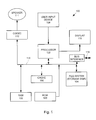
- Fig. 1 shows an exemplary portable multimedia device, or media player, 100 in accordance with an embodiment of the invention.
- the media player 100 includes a processor 102 that pertains to a microprocessor or controller for controlling the overall operation of the media player 100.
- the media player 100 stores media data pertaining to media assets in a file system 104.
- the file system 104 is, typically, a storage disk or a plurality of disks. Alternatively, the file system 104 can be re-writable non-volatile memory, such as FLASH memory.
- the file system 104 typically provides high capacity storage capability for the media player 100. However, since the access time to the file system 104 is relatively slow, the media player 100 can also include a cache 106.
- the cache 106 is, for example, Random-Access Memory (RAM) provided by semiconductor memory.
- RAM Random-Access Memory
- the relative access time to the cache 106 is substantially shorter than for the file system 104.
- the cache 106 does not have the large storage capacity of the file system 104.
- the file system 104 when active, consumes more power than does the cache 106.
- the media player 100 also includes a RAM 120 and a Read-Only Memory (ROM) 122.
- the ROM 122 can store programs, utilities or processes to be executed in a non-volatile manner.
- the RAM 120 provides volatile data storage, such as for the cache 106.
- the media player 100 also includes a user input device 108 that allows a user of the media player 100 to interact with the media player 100.
- the user input device 108 can take a variety of forms, such as a button, keypad, dial, wheel, etc.
- the media player 100 includes a display 110 (screen display) that can be controlled by the processor 102 to display information to the user.
- a data bus 116 can facilitate data transfer between at least the file system 104, the cache 106, the processor 102, and the CODEC 112.
- the media player 100 also includes a bus interface 116 that couples to a data link 118. The data link 118 allows the media player 100 to couple to a host computer.
- the media player 100 serves to store a plurality of media assets (e.g., songs) in the file system 104.
- a user desires to have the media player play a particular media item, a list of available media assets is displayed on the display 110. Then, using the user input device 108, a user can select one of the available media assets.
- the processor 102 upon receiving a selection of a particular media item, supplies the media data (e.g., audio file) for the particular media item to a coder/decoder (CODEC) 112.
- CDDEC coder/decoder
- the CODEC 112 then produces analog output signals for a speaker 114.
- the speaker 114 can be a speaker internal to the media player 100 or external to the media player 100. For example, headphones or earphones that connect to the media player 100 would be considered an external speaker.
- the available media assets are arranged in a hierarchical manner based upon a selected number and type of groupings appropriate to the available media assets.
- the available media assets take the form of audio files (each of which corresponds to a digitally encoded song or other audio rendition) stored at least in part in the file system 104.
- the available media assets (or in this case, songs) can be grouped in any manner deemed appropriate.
- the songs can be arranged hierarchically as a list of music genres at a first level, a list of artists associated with each genre at a second level, a list of albums for each artist listed in the second level at a third level, a list of songs for each album listed in the third level at a fourth level, and so on.
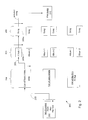
- Fig 2 illustrates an hierarchically ordered menu 200 used to navigate through those stored media assets of interest to a user in accordance with an embodiment of the invention.
- the menu 200 is navigated by the user scrolling vertically within a particular level in order to peruse and eventually select a particular item located within that level.
- the menu 200 is automatically transitioned in a horizontal manner to a lower order interface associated with the selected item. For example, at a first level, a list of music genres 202 (ROCK, JAZZ, HIP HOP) corresponding to the available audio files is displayed.
- ROCK music genres 202
- a user scrolls "vertically down" the list 202 (usually accompanied by a pointer such as an arrow or by highlighting the adjacent item) until a desired input item is reached.
- a particular music genre (ROCK, for example)
- an automatic horizontal traversal 203 to a lower order interface 204 that includes a display of a list of ROCK artists 204a corresponding to the selected ROCK genre.
- a user selects a particular one of the listed ROCK artists included in the list 204a resulting in another automatic horizontal traversal 205 to a lower order interface 206 denoting an album 206a (from a list of albums 206, if appropriate) associated with the selected artist.
- This procedure is continued until a particular song 208a from a list of songs 208 (included in the selected album) is selected.
- the song 208a is then ready to be played as described at a play song interface 210 that can in some cases include information related to the selected song 208a.
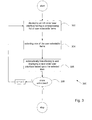
- Fig. 3 shows a flowchart 300 illustrating a particular process 300 for selecting a particular one of a group of stored media assets in accordance with an embodiment of the invention.
- a first order user interface is displayed having a list of first order user selectable items.
- the first order user interface is the list of genres 202 whereas the first order user selectable items correspond to the various genres listed.
- at 304 at least one of the user selectable items are selected.
- a determination is made whether or not there are additional order user interfaces based upon the latest selected item. For example, from Fig.
- selection of the Rock genre from the list 202 initiates the automatic transition to the lower order user interface and substantially simultaneous display of the list of ROCK artists 204a. This process continues until a lowest order interface (i.e., the Play Song display 210) is reached at which point the selection process ends and the selected multimedia asset is played.
- a lowest order interface i.e., the Play Song display 210
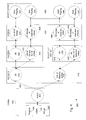
- Fig. 4 shows a state diagram 400 of a user interface suitable for providing user provided input for an exemplary media player (along the lines of the player 100) in accordance with an embodiment of the invention.
- a home interface 402 provides a list that includes a PLAYLIST item 404, an ARTISTS item 406, and a SONGS item 408 each of which is selectable by a user.
- each item is associated with a particular grouping of the multimedia assets (which in this example are audio files) stored at least in the file system 104.
- the PLAYLIST item 404 is associated with a number of customizable playlists (i.e., a compendium of artists, songs, albums, etc. in any order and grouping as deemed appropriate) whereas the ARTISTS item 406 is associated with particular artists whose songs are stored in the file system 104 and so on.
- an automatic transition to a lower order user interface occurs corresponding to the selected item. For example, if the user selects the ARTISTS item 406, an automatic transition 410 to the ARTISTS user interface 412 occurs where an ALL item 414 (associated with all artists) and a list of specific artists 416 are concurrently displayed. It should be noted that, although not shown, if the user had selected, a particular song from the list of songs associated with the SONGS item 408, then the display would automatically transition directly to a now playing interface (not shown) indicating that the selected song is playing (or is prepared to be played) along with any other data or information deemed appropriate.
- the user has the option of selecting a particular artist by selecting a desired artist from the list of specific artists 416 or selecting all artists by invoking the ALL item 414. For example, if the user selects all artists by invoking the ALL item 414, an automatic transition to a lower order ALBUMS interface 418 occurs where an ALL item 420 corresponding to all songs of all artists and a list of specific albums for all artists 422 are concurrently displayed. If, for example, the user selected a specific album from the list of specific albums 422, then an automatic transition to a still lower order interface ALL SONGS 424 occurs that displays a list of all songs of the selected album 426. At this point, when the user selects a particular song, an automatic transition to a now playing interface 428 occurs having a song information display 430 consistent with the selected song.
- songs interface 424 would display a list of all songs 432 of all the artists. At this point, the user could select a particular song from the list of all songs 432 resulting in an automatic transition to the now playing interface 428 having a song information display 434 consistent with the selected song.
- a similar procedure can be followed in the case where instead of invoking the ALL item 414, the user had selected a particular artist from the list of artists 416.
- the act of selecting a particular artist initiates an automatic transition to a selected artist interface 436 that includes an ALL item 438 that points to all songs of the selected artist stored in the media player and a list of all albums of the selected artist 440 that are stored in the media player. Selecting one of the albums from the list of albums 440 results in an automatic transition to the songs interface 424 that includes a list of all songs associated with the selected album 442.
- invoking the ALL item 438 results in an automatic transition to the songs interface 424 having a list of all songs of the selected artist 444.
- the user is free to select any song listed resulting in an automatic transition to the now playing interface 428. For example, selecting one of the songs listed in list of all songs of selected artist 444 or from the list of all songs of selected album 442 results in an automatic transition to the now playing interface 428 simultaneously with the display of song information displays 446 and 448, respectively.
- Figs. 5A - 5E illustrate various exemplary user interfaces consistent with selection and play of a media asset in accordance with an embodiment of the invention.
- the various user interfaces illustrated in Figs. 5A -5E correspond to particular embodiments of the HOME interface 402, the ARTISTS interface 412, the ALBUMS interface 418, the SONGS interface 424, and the NOW PLAYING interface 428 described above. Accordingly, it should be further noted that each of the interfaces described are incorporated into a representative media player 500 having a display 502 and a user input device 504 that includes a central button 506, a selector wheel 508, and selectors 510 - 516.
- the selectors 510 - 516 are a back up one level 510, a rewind 512, a play/pause 514, and a fast forward 516.
- Fig. 5A shows a particular implementation of the HOME interface 402 displayed on the display 502.
- the user rotates selector wheel 508 in either a clockwise or counterclockwise direction (or any appropriate combination thereof) until the ARTISTS item 406 is rendered selectable (as noted by a semi-transparent highlight bar 518).
- the user selects the highlighted item by invoking a selection protocol by, for example, pressing the central button 506.
- the HOME interface 402 immediately transitions to the ARTISTS interface 412 as shown in Fig. 5B .
- a particular artist or all artists is selected by manipulating any of the user input devices 504 (such as the selector wheel 508) in combination with an appropriate selection event which can include pressing the central button 506.
- an appropriate selection event which can include pressing the central button 506.
- a stack indicator bar 520 indicates the relative position of the selected item in relation to the stack of items associated with the particular selected group. Accordingly, Figs. 5C - 5E show various exemplary user interfaces consistent with the described embodiment of the invention.
- the personal communication device takes the form of a wireless communication device such as a cell phone, PDA, or other such device.
- a personal communication device is a cell phone 600 illustrated in Fig. 6 .
- the cell phone 600 includes a display 602 suitable for displaying any of a number of icons (not shown) useful for providing information to a user, a number of input keys 604 (which in this case represent telephonic input characters useful for telephone dialing, text messaging, etc.) and a navigation tool 606 that provides a user the ability to navigate amongst the displayed icons. For example, a user can use the navigation tool 606 to search for and display previously dialed telephone numbers.
- the navigation tool 606 includes any of a number of navigation input devices such as an up-pointer 608, a down pointer 610, a right pointer 612, and a left pointer 614 each of which provides a corresponding navigation instruction to the cell phone 600 that translates into a particular observable action on the display 602.
- a selector 616 provides for a user to select a designated (e.g., highlighted) icon.
- any number of useful personal data files can be loaded into a memory device (not shown) incorporated into the cell phone 600 for later retrieval and access by a user.
- the wireless communication device can be used as a multimedia player in much the same manner described above.
- the wireless communication device can provide the functionality of the cell phone as well as provide for the storage and playback of multimedia asset files, such as AAC or MP3 files.
- the cell phone/multimedia player wirelessly synchronizes with a remote server.
- cell phone/multimedia player 600 will periodically wirelessly synchronize to a host computer (e.g., personal computer) as shown in Figs.
- the synchronization processing 700 is, for example, performed by a host computer that connects to the wireless communication device over a wired or wireless data link.
- the media device synchronization processing 700 is performed by a media device that interacts with a host computer over a network.
- the media device can pertain to the media player 100 illustrated in Fig. 1 .
- the media device synchronization processing 700 is generally operative on the media device when the media device is powered-on.
- a decision 702 determines whether the media device has just been coupled to the host computer.
- the media device is a wireless communication device
- the wireless communication device can couple to the host computer via a wireless network.
- the decision 702 determines that the media device has not just been coupled to host computer
- the media device is operated 704 as a media player. In such a mode, the media device operates to browse, search or play media items for its user.
- the media items can be audio items (e.g., songs).
- the media device synchronization processing 700 returns to repeat the decision 702 and subsequent operations.
- the media device when the decision 702 determines that the media device has just been coupled to the host computer, then the media device is placed in a hard disk mode 706. In the hard disk mode, the media device acts as an external hard drive to the host computer.
- a decision 708 determines whether the host computer has requested media and or programmable button attributes for the media items residing on the media device. When the decision 708 determines that the host computer is not requesting media and or programmable button attributes, the media device can, but need not, perform other hard drive operations for non-synchronization purposes (not shown).
- the media and or programmable button attributes of the media items stored on the media device are retrieved 710.
- the media attributes are forwarded 712 to the host computer.
- a decision 714 determines whether new and or media file attributes have been received at the media device from the host computer.
- the media device will often receive media content from the host computer.
- the decision 714 determines whether new media items have been or are presently being received.
- the media device synchronization processing 700 can await such new media items. While waiting for new media items, the media device can, but need not, perform other hard drive operations for non-synchronization purposes (not shown). More generally, other hard disk operations can occur concurrently with synchronization operations.
- the new media items and their associated media attributes are stored 716 to the media device.
- the new media items are stored to files in the media device, and the associated media attributes pertaining to the media items are stored in a media database residing on the media device.
- any unneeded media items and their associated media attributes and or programmable button attributes can be removed 718 from the media device.
- new media items are not only stored to the media device, but unneeded (e.g., old) media items and their associated media attributes are also removed from the media device.
- a decision 720 determines whether a play list update has been received. When the decision 720 determines that a play list update has not been received, then the media device synchronization processing 700 can await such a play list update. Alternatively, when the decision 720 determines that a play list update has been received, then an updated play list for the media device is produced 722. The play list update could be the updated play list or could be instructions to update an existing play list. The updated play list is then stored 722 to the media device.
- one or more play lists at the host computer can be synchronized with the media device and thus made available to the media device.
- a play list identifies particular media items that are to be played in a sequence.
- the play list can be represented in the media database as a data structure that points to files of the appropriate media items residing on the storage device within the media device.
- the pointers to the files of the appropriate media items on the media device can differ from the pointers to the files for the same media items on the host computer, thus the need to update the pointers if a particular play list is moved between the host computer and the media device.
- the wireless communication device e.g., cell phone 600
- a user has the option of selecting any of a number of audio files stored therein.
- a hierarchically ordered graphical user interface can be presented on a display (e.g., the display 602) having, in one embodiment, a form illustrated in Figs. 9 - 27 .
- the wireless communication device is assumed to have a number of audio (i.e., music and song) files stored therein. In this way, the wireless communication device can be a cell phone/media player combination device, or any other device arranged in a like manner.
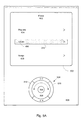
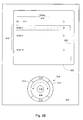
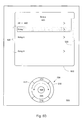
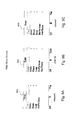
- Figs. 9A - 9C show a main menu screen 900, 904 and 906, respectively, each being associated with a particular operational state (i.e., stopped in Fig. 9A , playing in Fig. 9B , or paused in Fig. 9C ) of a wireless communication device.
- the main menu screen is the home screen of a graphical user interface from which a user can view, at least, a master playlist, a list of artists, a list of albums, and a list of songs in a library of audio files stored in the wireless communication device.
- the main menu screens can also enable the user to request operations.
- the main menu screen 902 includes a "shuffle songs" item in the graphical user interface, which if selected causes a shuffle operation.
- the main menu screens 904 and 906 include a "Now Playing" item in the graphical user interface, which, if selected, causes display of media attribute information for a media item being played.
- the various screens provide one or more soft key functions.
- the soft key functions can include an EXIT icon, a play icon, and a pause icon depending upon the corresponding operational state of the personal communication device.
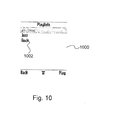
- Fig. 10 shows a particular example of a playlists screen 1000 in accordance with an embodiment of the invention.
- the playlists screen 1000 displays the names of all the playlists that have been added to the wireless communication device including and starting with a master playlist 1002, that includes all the tracks stored in the wireless communication device. From the playlists screen 1000, the user can view the tracks in a playlist or start playing the first track in a playlist.
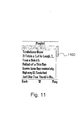
- Fig. 11 shows a particular example of a playlist screen 1100 in accordance with an embodiment of the invention.
- the playlist screen displays the names of the tracks in the current playlist in the order in which they will be played. The user can arrange the order of the tracks in the playlist as desired.
- Fig. 12 shows a particular example of an artists screen 1200 in accordance with an embodiment of the invention.
- the artists screen 1200 displays a list of all the artists stored in the wireless communication device in any appropriate order, such as alphabetical. From the artists screen 1200, the user can view all the albums by an artist or start playing all the tracks by an artist.
- Fig. 13 shows a particular example of an albums screen 1300 in accordance with an embodiment of the invention.
- the albums screen 1300 displays a list of the albums stored in the wireless communication device in any appropriate order, such as alphabetical or order set by user, or order added to the device.
- all the albums stored in the wireless communication device are displayed in an all albums screen 1302.
- the albums for the selected artist are displayed in a particular albums screen 1304. From the albums screen 1300, the user can view all the tracks in an album or start playing all the tracks in an album.
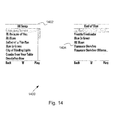
- Fig. 14 shows a particular example of a songs screen 1400 in accordance with an embodiment of the invention.
- the songs screen 1400 displays a list of track names in any appropriate order, such as alphabetical, or order set by user, or order added to the device.
- all the tracks in the library are displayed in an all songs screen 1402.
- the tracks for the selected album are displayed in a particular songs screen 1404.
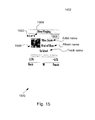
- Figs. 15 - 20 shows a particular example of a now playing screen in accordance with an embodiment of the invention.
- the now playing screen displays metadata information for the track that is currently playing, along with playback progress information, and in particular displays an index 1502 of the current track in play order, and the total number 1504 of tracks in the play order.
- the metadata information includes artist, album, track name and any available album artwork image 1506.
- the track name scrolls horizontally if it is wider than the width of the screen.
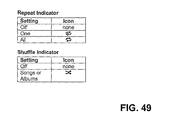
- the repeat and shuffle settings for the current playlist are indicated by icons in the upper right corner (1508).
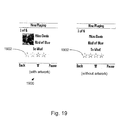
- the now playing screen has five modes each having a particular display screen: progress mode (progress mode screen 1600 in Fig. 16 ), artwork mode (artwork mode screen 1700 in Fig. 17 ), position mode (position mode screen 1800 in Fig. 18 ), rating mode (rating mode screen 1900 in Fig. 19 ), and volume mode (volume mode screen 2000 in Fig. 20 ).
- the progress mode screen 1600 displays a progress bar 1602 with an elapsed time and a remaining time for the current track.
- artwork mode Fig. 17
- the artwork mode screen 1700 a full screen album artwork image 1702 is displayed if artwork is available for the current track.
- position mode Fig. 18
- the position mode screen 1800 displays a progress bar 1802 with a position indicator 1804and allows the user to adjust the playback position with the current track.
- rating mode Fig. 19
- the rating mode screen 1900 displays a user rating 1902 for the current track and may allow the user to adjust the rating.
- volume mode Fig. 20
- the volume mode screen 2000 (with or without artwork) displays a current volume level 2002 of the player and allows the user to adjust the volume level.
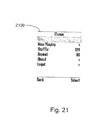
- Fig. 21 shows a contextual menu screen 2100 in accordance with an embodiment of the invention.
- the contextual menu screen 2100 is a screen that can be accessed via a soft key to display infrequently used preferences, settings or information.
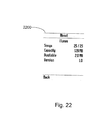
- Fig. 22 shows an about screen 2200 in accordance with an embodiment of the invention.
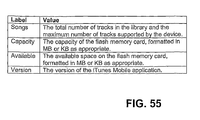
- the about screen 2200 displays statistical information that includes the total number of tracks in the library, the maximum number of tracks supported by the wireless communication device, the capacity of internal memory (such as a flash memory card), the available space in the internal memory, and the current version of a software application used on the wireless communication device.
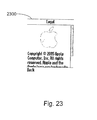
- Fig. 23 shows a legal screen 2300 in accordance with an embodiment of the invention.
- the legal screen 2300 displays copyright and other legal information pertinent to the wireless communication device and any application thereon.
- Fig. 24 shows a delete menu screen 2400 in accordance with an embodiment of the invention.
- the delete menu screen 2400 is displayed in what is referred to in the delete-on-download mode. It allows the user to delete one or more tracks from the wireless communication device in order to free-up space on the internal memory for over the air downloaded content.
- the delete menu screen 2400 also indicates an amount of space needed.
- Fig. 25 shows a delete artists screen 2500 in accordance with an embodiment of the invention.
- the delete artists screen 2500 displays a list of all the artists stored in the wireless communication device and allows the user to view the albums for an artist or to delete all of the tracks for an artist on the wireless communication device.
- the delete artists screen 2500 also indicates an amount of space needed.
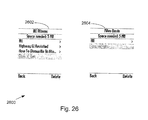
- Fig. 26 shows delete albums screens 2600 in accordance with an embodiment of the invention.
- the delete albums screens 2600 displays a list of all the albums stored in the device and allows the user to view all the tracks in an album or to delete all the tracks in an album.
- all the albums in the wireless communication device are displayed (2602).
- the albums for the selected artist are displayed (2604).
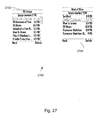
- Fig. 27 shows delete songs screens 2700 in accordance with an embodiment of the invention.
- the delete songs screens 2700 display the name and size of a list of tracks and allows the user to delete one or more songs from the library.
- all the tracks are displayed (2702).
- the tracks for the selected album are displayed (2704).
- each of the display screens described herein provides a number of user activated icons whose functions are determined by the particular screen being displayed.
- the user activated icons include an exit icon, a soft key icon, and a play icon, whereas in the playing mode, the play icon is replaced with a pause icon.
- an acceleration feature whereby during a period of time in which a particular user input button, or key, having the acceleration feature is held down, the observed resulting action (such as moving a playback position forward, for example) can be accelerated in a predetermined manner.
- a long press input i.e., holding a key down for a length of time greater than a predetermined threshold
- a forward hard key results in moving the playback position forward starting in pre-determined time intervals increments (such as 5 seconds) and accelerating in larger time interval increments while the playback position key is being held down.
- the mode switches to another mode (to progress mode, for example).
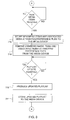
- Fig. 28 illustrates a flowchart detailing a process 2800 describing an accelerated resulting action in accordance with an embodiment of the invention.
- the process 2800 begins at 2802 by determining if a key press has occurred. When a key press has occurred, then at 2804, a corresponding resulting action is initiated while at 2806 the key press time is incremented (such as 5 seconds). At 2808, the total key press time (i.e., the total length of time that the key in question has been held down) is compared to a pre-determined threshold length of time. If the total length of key press time is less than the pre-detennined threshold, then a determination is made at 2810 if the key press is still ongoing.
- a pre-determined threshold length of time i.e., the total length of time that the key in question has been held down
- the process 2800 stops.
- an acceleration factor is applied to the resulting action where the applied acceleration depends upon the total key press time.
- the acceleration behavior that occurs while a key is held down also takes into account the relation of the current playback position to the beginning and end of the track. More specifically, as the playback position approaches the end of the track when fast-forwarding or the beginning of the track when rewinding, the rate of acceleration automatically decreases so as to allow for more precise positioning and to avoid overshooting the end or beginning of the track.
- the mode switches to another mode (to progress mode, for example).
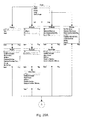
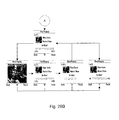
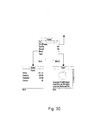
- Figs. 29A , B - 30 shows exemplary screen flows in accordance with an embodiment of the invention.
- Figs. 29A ,B shows an exemplary main menu screen flows whereas Fig. 30 shows a contextual menu flow.
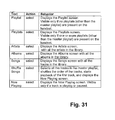
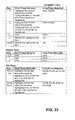
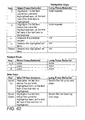
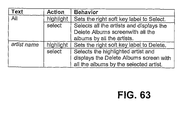
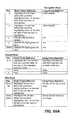
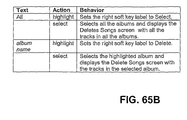
- Figs. 31 - 63 show operational tables for each of the above described menu screens for list items, soft keys, and hard keys in accordance with an embodiment of the invention.
- Fig. 31 is a list item operational table for the main menu screen in accordance with an embodiment of the invention.
- Fig. 32 is a soft key operational table for the main menu screen in accordance with an embodiment of the invention.
- Fig. 33 is a hard key operational table for the main menu screen in accordance with an embodiment of the invention.
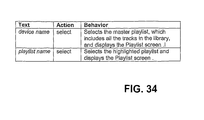
- Fig. 34 is a list item operational table for the playlist screen in accordance with an embodiment of the invention.
- Fig. 35 is a soft key operational table for the playlist screen in accordance with an embodiment of the invention.
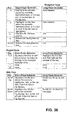
- Fig. 36 is a hard key operational table for the playlist screen in accordance with an embodiment of the invention.
- Fig. 37 is a list item operational table for the playlists screen in accordance with an embodiment of the invention.
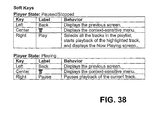
- Fig. 38 is a soft key operational table for the playlists screen in accordance with an embodiment of the invention.
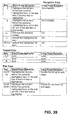
- Fig. 39 is a hard key operational table for the playlists screen in accordance with an embodiment of the invention.
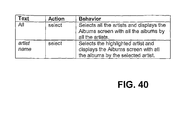
- Fig. 40 is a list item operational table for the artists screen in accordance with an embodiment of the invention.
- Fig. 41 is a soft key operational table for the artists screen in accordance with an embodiment of the invention.
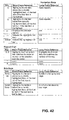
- Fig. 42 is a hard key operational table for the artists screen in accordance with an embodiment of the invention.
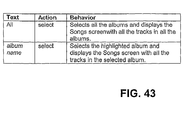
- Fig. 43 is a list item operational table for the albums screen in accordance with an embodiment of the invention.
- Fig. 44 is a soft key operational table for the albums screen in accordance with an embodiment of the invention.
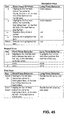
- Fig. 45 is a hard key operational table for the albums screen in accordance with an embodiment of the invention.
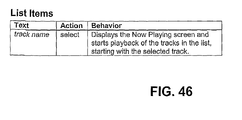
- Fig. 46 is a list item operational table for the songs screen in accordance with an embodiment of the invention.
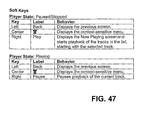
- Fig. 47 is a soft key operational table for the songs screen in accordance with an embodiment of the invention.
- Fig. 48 is a hard key operational table for the songs screen in accordance with an embodiment of the invention.
- Fig. 49 is a repeat indicator and shuffle indicator operational table for the now playing screen in accordance with an embodiment of the invention.
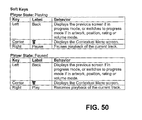
- Fig. 50 is a soft key operational table for the now playing screen in accordance with an embodiment of the invention.
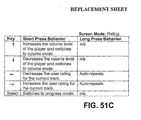
- Fig. 51A - 51D are hard key operational tables for the now playing screen in accordance with an embodiment of the invention.
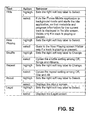
- Fig. 52 is a list item operational table for the contextual menu screen in accordance with an embodiment of the invention.
- Fig. 53 is a soft key operational table for the contextual menu screen in accordance with an embodiment of the invention.
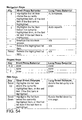
- Fig. 54 is a hard key operational table for the contextual menu screen in accordance with an embodiment of the invention.
- Fig. 55 is a list item operational table for the about screen in accordance with an embodiment of the invention.
- Fig. 56 is a soft key operational table for the about screen in accordance with an embodiment of the invention.
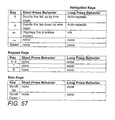
- Fig. 57 is a hard key operational table for the about screen in accordance with an embodiment of the invention.
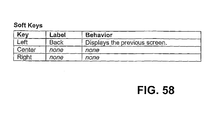
- Fig. 58 is a soft key operational table for the legal screen in accordance with an embodiment of the invention.
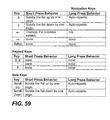
- Fig. 59 is a hard key operational table for the legal screen in accordance with an embodiment of the invention.
- Fig. 60 is a list item operational table for the delete menu screen in accordance with an embodiment of the invention.
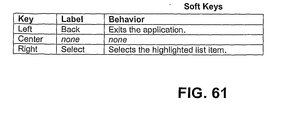
- Fig. 61 is a soft key operational table for the delete menu screen in accordance with an embodiment of the invention.
- Fig. 62 is a hard key operational table for the delete menu screen in accordance with an embodiment of the invention.
- Fig. 63 is a list item operational table for the delete artists screen in accordance with an embodiment of the invention.
- Fig. 64 is a soft key operational table for the delete artists screen in accordance with an embodiment of the invention.
- Fig. 65 is a hard key operational table for the delete artists screen in accordance with an embodiment of the invention.
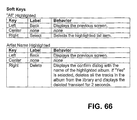
- Fig. 66 is a list item operational table for the delete albums screen in accordance with an embodiment of the invention.
- Fig. 67 is a soft key operational table for the delete albums screen in accordance with an embodiment of the invention.
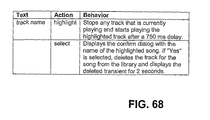
- Fig. 68 is a hard key operational table for the delete albums screen in accordance with an embodiment of the invention.
- Fig. 69 is a list item operational table for the delete songs screen in accordance with an embodiment of the invention.
- Fig. 70 is a soft key operational table for the delete songs screen in accordance with an embodiment of the invention.
Landscapes
- Engineering & Computer Science (AREA)
- General Engineering & Computer Science (AREA)
- Theoretical Computer Science (AREA)
- Human Computer Interaction (AREA)
- Physics & Mathematics (AREA)
- General Physics & Mathematics (AREA)
- Computer Networks & Wireless Communication (AREA)
- Signal Processing (AREA)
- User Interface Of Digital Computer (AREA)
- Indexing, Searching, Synchronizing, And The Amount Of Synchronization Travel Of Record Carriers (AREA)
- Information Retrieval, Db Structures And Fs Structures Therefor (AREA)
- Mobile Radio Communication Systems (AREA)
Applications Claiming Priority (2)
| Application Number | Priority Date | Filing Date | Title |
|---|---|---|---|
| US71453705P | 2005-09-02 | 2005-09-02 | |
| EP06802744.0A EP1920313B1 (en) | 2005-09-02 | 2006-08-30 | Management of files in a personal communication device |
Related Parent Applications (2)
| Application Number | Title | Priority Date | Filing Date |
|---|---|---|---|
| EP06802744.0A Division-Into EP1920313B1 (en) | 2005-09-02 | 2006-08-30 | Management of files in a personal communication device |
| EP06802744.0A Division EP1920313B1 (en) | 2005-09-02 | 2006-08-30 | Management of files in a personal communication device |
Publications (1)
| Publication Number | Publication Date |
|---|---|
| EP2784643A1 true EP2784643A1 (en) | 2014-10-01 |
Family
ID=37487373
Family Applications (2)
| Application Number | Title | Priority Date | Filing Date |
|---|---|---|---|
| EP14168360.7A Withdrawn EP2784643A1 (en) | 2005-09-02 | 2006-08-30 | Management of files in a personal communication device |
| EP06802744.0A Active EP1920313B1 (en) | 2005-09-02 | 2006-08-30 | Management of files in a personal communication device |
Family Applications After (1)
| Application Number | Title | Priority Date | Filing Date |
|---|---|---|---|
| EP06802744.0A Active EP1920313B1 (en) | 2005-09-02 | 2006-08-30 | Management of files in a personal communication device |
Country Status (7)
| Country | Link |
|---|---|
| EP (2) | EP2784643A1 (enExample) |
| JP (1) | JP5036716B2 (enExample) |
| KR (1) | KR100984593B1 (enExample) |
| CN (1) | CN101297264B (enExample) |
| AU (1) | AU2006284665B2 (enExample) |
| HK (1) | HK1202934A1 (enExample) |
| WO (1) | WO2007027949A2 (enExample) |
Cited By (3)
| Publication number | Priority date | Publication date | Assignee | Title |
|---|---|---|---|---|
| EP3824379A1 (en) * | 2018-07-17 | 2021-05-26 | Methodical Mind, LLC | Graphical user interface system |
| US12210731B2 (en) | 2019-12-27 | 2025-01-28 | Methodical Mind, Llc | Graphical user interface system |
| US12248656B2 (en) | 2020-01-22 | 2025-03-11 | Methodical Mind, Llc | Graphical user interface system |
Families Citing this family (4)
| Publication number | Priority date | Publication date | Assignee | Title |
|---|---|---|---|---|
| US20100225809A1 (en) * | 2009-03-09 | 2010-09-09 | Sony Corporation And Sony Electronics Inc. | Electronic book with enhanced features |
| US9075523B2 (en) * | 2010-12-17 | 2015-07-07 | Verizon Patent And Licensing Inc. | Remote control emulation methods and systems |
| CN103248957B (zh) * | 2012-02-09 | 2018-02-27 | 联想(北京)有限公司 | 显示方法和电子设备 |
| US20250130710A1 (en) * | 2022-02-07 | 2025-04-24 | Sony Semiconductor Solutions Corporation | Electronic device and control method |
Citations (5)
| Publication number | Priority date | Publication date | Assignee | Title |
|---|---|---|---|---|
| WO2000063766A1 (en) * | 1999-04-15 | 2000-10-26 | Apple Computer, Inc. | User interface for presenting media information |
| WO2001053963A1 (en) * | 2000-01-24 | 2001-07-26 | Zapmedia, Inc. | System and method for the distribution and sharing of media assets between media players devices |
| US20040055446A1 (en) * | 2002-07-30 | 2004-03-25 | Apple Computer, Inc. | Graphical user interface and methods of use thereof in a multimedia player |
| US20040078416A1 (en) * | 2002-10-22 | 2004-04-22 | Canon Kabushiki Kaisha | Data input apparatus and method |
| EP1548740A2 (en) * | 2003-12-24 | 2005-06-29 | Bose Corporation | Intelligent music track selection |
Family Cites Families (9)
| Publication number | Priority date | Publication date | Assignee | Title |
|---|---|---|---|---|
| JP2001243751A (ja) * | 2000-02-25 | 2001-09-07 | Aiwa Co Ltd | 情報記録制御装置 |
| US6248946B1 (en) * | 2000-03-01 | 2001-06-19 | Ijockey, Inc. | Multimedia content delivery system and method |
| GB0023003D0 (en) * | 2000-09-20 | 2000-11-01 | Koninkl Philips Electronics Nv | Method and apparatus for setting a parameter |
| US7312785B2 (en) * | 2001-10-22 | 2007-12-25 | Apple Inc. | Method and apparatus for accelerated scrolling |
| KR20030055855A (ko) * | 2001-12-27 | 2003-07-04 | 지유아이디자인 주식회사 | 휴대폰의 그래픽 사용자 인터페이스방법 |
| CN1666517A (zh) * | 2002-06-27 | 2005-09-07 | 皇家飞利浦电子股份有限公司 | 控制一个人化可视频道的内容 |
| KR20040052075A (ko) * | 2002-12-13 | 2004-06-19 | 엘지전자 주식회사 | 텔레비전의 키 처리 가속 방법 |
| KR20040084610A (ko) * | 2003-03-29 | 2004-10-06 | 류미선 | 스크롤 터치패드 |
| US7418670B2 (en) * | 2003-10-03 | 2008-08-26 | Microsoft Corporation | Hierarchical in-place menus |
-
2006
- 2006-08-30 WO PCT/US2006/034111 patent/WO2007027949A2/en not_active Ceased
- 2006-08-30 CN CN2006800402304A patent/CN101297264B/zh active Active
- 2006-08-30 JP JP2008529290A patent/JP5036716B2/ja active Active
- 2006-08-30 KR KR1020087007955A patent/KR100984593B1/ko active Active
- 2006-08-30 EP EP14168360.7A patent/EP2784643A1/en not_active Withdrawn
- 2006-08-30 AU AU2006284665A patent/AU2006284665B2/en active Active
- 2006-08-30 EP EP06802744.0A patent/EP1920313B1/en active Active
-
2015
- 2015-04-01 HK HK15103309.3A patent/HK1202934A1/en unknown
Patent Citations (5)
| Publication number | Priority date | Publication date | Assignee | Title |
|---|---|---|---|---|
| WO2000063766A1 (en) * | 1999-04-15 | 2000-10-26 | Apple Computer, Inc. | User interface for presenting media information |
| WO2001053963A1 (en) * | 2000-01-24 | 2001-07-26 | Zapmedia, Inc. | System and method for the distribution and sharing of media assets between media players devices |
| US20040055446A1 (en) * | 2002-07-30 | 2004-03-25 | Apple Computer, Inc. | Graphical user interface and methods of use thereof in a multimedia player |
| US20040078416A1 (en) * | 2002-10-22 | 2004-04-22 | Canon Kabushiki Kaisha | Data input apparatus and method |
| EP1548740A2 (en) * | 2003-12-24 | 2005-06-29 | Bose Corporation | Intelligent music track selection |
Cited By (5)
| Publication number | Priority date | Publication date | Assignee | Title |
|---|---|---|---|---|
| EP3824379A1 (en) * | 2018-07-17 | 2021-05-26 | Methodical Mind, LLC | Graphical user interface system |
| US11861145B2 (en) | 2018-07-17 | 2024-01-02 | Methodical Mind, Llc | Graphical user interface system |
| US12405708B2 (en) | 2018-07-17 | 2025-09-02 | Methodical Mind, Llc | Graphical user interface system |
| US12210731B2 (en) | 2019-12-27 | 2025-01-28 | Methodical Mind, Llc | Graphical user interface system |
| US12248656B2 (en) | 2020-01-22 | 2025-03-11 | Methodical Mind, Llc | Graphical user interface system |
Also Published As
| Publication number | Publication date |
|---|---|
| EP1920313A2 (en) | 2008-05-14 |
| AU2006284665A1 (en) | 2007-03-08 |
| KR20080043382A (ko) | 2008-05-16 |
| HK1202934A1 (en) | 2015-10-09 |
| KR100984593B1 (ko) | 2010-09-30 |
| EP1920313B1 (en) | 2014-06-18 |
| CN101297264B (zh) | 2011-10-26 |
| JP2009508194A (ja) | 2009-02-26 |
| WO2007027949A3 (en) | 2007-08-09 |
| CN101297264A (zh) | 2008-10-29 |
| AU2006284665B2 (en) | 2010-04-15 |
| WO2007027949A2 (en) | 2007-03-08 |
| JP5036716B2 (ja) | 2012-09-26 |
Similar Documents
| Publication | Publication Date | Title |
|---|---|---|
| US7956272B2 (en) | Management of files in a personal communication device | |
| US10061478B2 (en) | Graphical user interface and methods of use thereof in a multimedia player | |
| US7667123B2 (en) | System and method for musical playlist selection in a portable audio device | |
| US7735012B2 (en) | Audio user interface for computing devices | |
| HK1202934A1 (en) | Management of files in a personal communication device | |
| US20100229094A1 (en) | Audio preview of music | |
| TW200807297A (en) | Improved mobile communication terminal and method | |
| US7820901B2 (en) | Information management method, information management program, and information management device | |
| EP2538696A1 (en) | Method and apparatus for multimedia content playback | |
| US20110099080A1 (en) | Content delivery system and method, content reproduction apparatus and content-providing server, and program for use in the same | |
| EP1748442B1 (en) | Reproduction device and display control method | |
| CA2621128C (en) | Management of files in a personal communication device | |
| JP5704006B2 (ja) | コンテンツ選択装置およびそのプログラム |
Legal Events
| Date | Code | Title | Description |
|---|---|---|---|
| 17P | Request for examination filed |
Effective date: 20140514 |
|
| AC | Divisional application: reference to earlier application |
Ref document number: 1920313 Country of ref document: EP Kind code of ref document: P |
|
| AK | Designated contracting states |
Kind code of ref document: A1 Designated state(s): AT BE BG CH CY CZ DE DK EE ES FI FR GB GR HU IE IS IT LI LT LU LV MC NL PL PT RO SE SI SK TR |
|
| PUAI | Public reference made under article 153(3) epc to a published international application that has entered the european phase |
Free format text: ORIGINAL CODE: 0009012 |
|
| REG | Reference to a national code |
Ref country code: HK Ref legal event code: DE Ref document number: 1202934 Country of ref document: HK |
|
| 17Q | First examination report despatched |
Effective date: 20160203 |
|
| STAA | Information on the status of an ep patent application or granted ep patent |
Free format text: STATUS: THE APPLICATION IS DEEMED TO BE WITHDRAWN |
|
| 18D | Application deemed to be withdrawn |
Effective date: 20160614 |
|
| REG | Reference to a national code |
Ref country code: HK Ref legal event code: WD Ref document number: 1202934 Country of ref document: HK |